Give one Argo CD instance to more than one team and a quiet question appears: what stops team A deploying into team B’s namespace? What stops an app pulling manifests from a repo nobody vetted? What stops a fat-fingered — or compromised — Application from creating a ClusterRole that grants itself the whole cluster? Out of the box, the answer is nothing. Every Application you create lands in a project called default, and default permits every repo, every cluster, every namespace, and every resource kind on Earth.
The AppProject is Argo CD’s answer, and it is the only multi-tenancy primitive the platform has. A project is a fence drawn around a set of Applications: it declares which Git repos they may deploy from, which cluster-and-namespace pairs they may deploy to, which Kubernetes resource kinds they may create, which namespaces may even hold their Application objects, who may operate them, and when syncs are allowed to run at all. Every guardrail in this lesson is enforced by the application-controller before a single manifest reaches a cluster — a violation is refused, not half-applied.
This lesson walks the entire AppProject spec field by field around real, complete manifests, shows you the exact rejection messages Argo CD emits when an app steps over the line, then has you build a genuine tenant boundary in the hands-on lab: a team-a project locked to one repo, the team-a-* namespaces, no cluster-scoped resources, and a change-freeze that denies syncs all day Friday — with a compliant app that syncs and a violating app that gets refused. By the end you can hand a shared Argo CD to five teams and sleep at night.
Why this matters
Argo CD started life on a single team’s cluster, and its defaults still reflect that origin: friendly, permissive, trusting. The moment it becomes a platform — one instance that a dozen application teams push GitOps through — those defaults become a liability. A shared control plane with no tenancy boundary is a shared blast radius. One team’s typo, one leaked repo token, one over-broad Helm chart, and the failure is everyone’s.
The specific failures are concrete and common. An engineer copies an Application manifest, forgets to change the namespace, and deploys staging config into the production namespace of a different team. A chart bundled with a cluster-admin ClusterRoleBinding gets synced and silently hands an app god-mode over the cluster. A repo that was never reviewed becomes the source of truth for a workload, because nothing said it couldn’t. None of these require malice — they require only the absence of a boundary.
The mental model to hold: an AppProject is a per-tenant allow-list, and an Application is bound to exactly one project. Where the Application says what to deploy and where, the project says whether that is even allowed. The Application is the request; the project is the policy that the request is checked against. Get the projects right and a shared Argo CD behaves like many small, isolated ones. Get them wrong — or never make any — and you are running everyone’s production on the honour system.
Here is the difference a project makes, failure by failure:
| Failure mode | With only the default project |
With a scoped AppProject |
|---|---|---|
| App deploys to another team’s namespace | Allowed — destinations is * |
Refused — destination not in the project’s destinations |
| App pulls from an unvetted repo | Allowed — sourceRepos is * |
Refused — repo not in sourceRepos |
App creates a ClusterRole/ClusterRoleBinding |
Allowed — clusterResourceWhitelist is */* |
Refused — kind not whitelisted (empty list = deny all) |
| App deploys onto a cluster it shouldn’t reach | Allowed — any registered cluster | Refused — cluster not in destinations |
| Someone syncs prod during a change freeze | Allowed — no windows | Refused — active deny sync window |
| A tenant engineer needs sync-only rights | Not expressible per team | Project role + token, scoped to that project |
Every row on the right is one field of the AppProject spec. Let us meet the object.
What an AppProject actually is
An AppProject is a namespaced custom resource, apiVersion: argoproj.io/v1alpha1, kind: AppProject, and — like every Argo CD control-plane object — it lives in the argocd namespace. It carries no workloads of its own. It is pure policy: a set of allow-lists that constrain the Applications that name it.
The binding is a single field. Every Application has a spec.project, and if you omit it, Argo CD fills in default. That one string is the entire link between an app and its tenancy boundary:
apiVersion: argoproj.io/v1alpha1
kind: Application
metadata:
  name: team-a-web
  namespace: argocd
spec:
  project: team-a            # <-- this app is fenced by the "team-a" AppProject
  source:
    repoURL: https://github.com/acme/team-a-config.git
    targetRevision: v1.4.0
    path: web
  destination:
    server: https://kubernetes.default.svc
    namespace: team-a-web
When the application-controller reconciles team-a-web, it loads the team-a AppProject and checks the app’s source against sourceRepos, its destination against destinations, and — at sync time — every rendered resource against the resource whitelists. If any check fails, the app is marked with a condition and the sync is refused. Nothing reaches the cluster.
It helps to see where the project sits relative to the objects you already know:
| Object | Scope | What it declares | Who owns it |
|---|---|---|---|
Application |
One workload | What to deploy and where (source → destination) | App team (often generated) |
AppProject |
One tenant | Whether an app’s source/destination/kinds are permitted | Platform team |
argocd-rbac-cm |
Whole instance | Who (which SSO group/user) may act on which project | Platform team |
Cluster Secret |
One target cluster | Connection + credentials for a registered cluster | Platform team |
AppProject and RBAC are complementary and easy to confuse. The project restricts what an Application may do (its repos, clusters, namespaces, kinds). RBAC — configured in argocd-rbac-cm and covered in RBAC, local users & policies — restricts which humans may operate which projects. You want both: a tight project so a compromised app can’t escape its namespace, and tight RBAC so a tenant engineer can sync their app but not touch anyone else’s. This lesson is the first half; project roles (below) are where the two meet.
Now walk the fields.
The AppProject spec, field by field
Here is the complete shape of the spec. Every field below is real and current in Argo CD 2.13+/3.x; none is invented. The rest of this section takes them one at a time.
| Field | Type | What it constrains | Empty / unset means | * means |
|---|---|---|---|---|
description |
string | Free text; documentation only | No description | — |
sourceRepos |
[]string |
Which Git/Helm repo URLs apps may deploy from | Deny all repos | Any repo |
destinations |
[]object |
Which server/name + namespace combos apps may deploy to |
Deny all destinations | Any (per field) |
clusterResourceWhitelist |
[]{group,kind} |
Which cluster-scoped kinds apps may create | Deny all cluster-scoped kinds | Any cluster-scoped kind |
clusterResourceBlacklist |
[]{group,kind} |
Which cluster-scoped kinds are forbidden | Nothing extra blocked | Block all cluster-scoped |
namespaceResourceWhitelist |
[]{group,kind} |
Which namespaced kinds apps may create | Allow all namespaced kinds | Any namespaced kind |
namespaceResourceBlacklist |
[]{group,kind} |
Which namespaced kinds are forbidden | Nothing blocked | Block all namespaced |
sourceNamespaces |
[]string |
Which namespaces may hold this project’s Application CRs (apps-in-any-namespace) |
Only the argocd namespace |
Any allow-listed namespace |
roles |
[]object |
Project-scoped RBAC roles + JWT tokens | No project roles | — |
syncWindows |
[]object |
Time windows that allow or deny syncs | No windows; always allowed | — |
orphanedResources |
object |
Warn on un-managed resources in the namespace | Off | — |
permitOnlyProjectScopedClusters |
bool | Restrict destinations to clusters explicitly scoped to this project | false (any registered cluster) |
— |
signatureKeys |
[]{keyID} |
Required GPG signing keys for commit verification | No signature requirement | — |
Two asymmetries in that table are the single biggest source of confusion, so read them twice. An empty sourceRepos or destinations denies everything — you must opt in. But an empty namespaceResourceWhitelist allows every namespaced kind — namespaced resources are permissive by default, cluster-scoped ones are restrictive by default. And an empty clusterResourceWhitelist denies every cluster-scoped kind, which is exactly the safe default you want. We will return to the whitelist/blacklist logic once we have met the fields.
sourceRepos — which repositories apps may deploy from
sourceRepos is a list of glob patterns matched against an Application’s spec.source.repoURL (and each repoURL in a multi-source app). If the URL matches no entry, the app is refused. This is your defence against a tenant deploying from a repo you never reviewed.
spec:
  sourceRepos:
    - https://github.com/acme/team-a-config.git   # exact repo
    - https://github.com/acme/team-a-*             # any team-a repo under acme
    - https://charts.acme.io/*                     # a Helm repo
The patterns are Argo CD glob patterns (not full regex). A few behaviours worth knowing:
| Pattern | Matches | Note |
|---|---|---|
https://github.com/acme/app.git |
Exactly that repo | The literal, safest form |
https://github.com/acme/* |
Any repo under the acme org |
* does not cross /… |
https://github.com/acme/** |
Any repo, any depth under acme |
…but ** does |
* |
Every repo | The default project’s setting — avoid for tenants |
!https://github.com/acme/legacy.git |
Everything except that repo | A leading ! negates (use with a broad allow) |
Prefer an explicit list of the tenant’s repos. * here means “deploy from anywhere,” which quietly defeats the point of a boundary — a supply-chain attack that gets a malicious repo referenced in an Application would sail straight through.
destinations — the core guardrail
destinations is the field that stops team A landing in team B’s namespace, and it is the one you will tune most. Each entry identifies a cluster — by API-server URL (server) or by registered name (name) — plus a namespace glob. An Application’s destination must match one entry, both on cluster and on namespace.
spec:
  destinations:
    - server: https://kubernetes.default.svc   # the in-cluster (where Argo CD runs)
      namespace: team-a-*                       # only namespaces starting team-a-
    - name: prod-eu                             # a registered cluster, by name
      namespace: team-a-web
The rules that trip people up:
| Aspect | Behaviour |
|---|---|
server vs name |
Identify the cluster by one of them. server is the API URL; name is the cluster Secret’s registered name. Don’t set both. |
| In-cluster URL | The cluster Argo CD runs on is always https://kubernetes.default.svc (registered name in-cluster). |
namespace globbing |
team-a-* matches team-a-web, team-a-api; it does not match team-a alone or team-b-x. |
| Negation | A leading ! excludes: namespace: '!kube-system' with server: '*' = every namespace except kube-system. |
| Both must match | An app is permitted only if some entry matches its cluster and its namespace together. |
A subtle but important footnote on name vs server: they are two ways to name the same cluster, and mixing them causes silent surprises. If you write destinations with name: prod-eu but the Application’s spec.destination uses server: https://prod-eu-api…, Argo CD resolves both to the same cluster and the match succeeds — but if the cluster’s registered name changes, a name-based destination breaks while a server-based one keeps working. For stability, pick one convention per platform. (The full story of registering clusters and how their Secrets carry names lives in Multi-cluster registration & cluster Secrets.)
Argo CD is cloud-neutral, but the clusters it points at are not. Because destinations can reference remote clusters by URL or name, the same field scopes a tenant across AKS, EKS and GKE identically — only the URL/name differs per cloud:
| Cloud | Managed Kubernetes | Typical registered name | destinations reference |
|---|---|---|---|
| Azure | AKS | aks-prod-weu |
name: aks-prod-weu or server: https://aks-prod-weu-….hcp.westeurope.azmk8s.io |
| AWS | EKS | eks-prod-euw1 |
name: eks-prod-euw1 or server: https://XXXX.gr7.eu-west-1.eks.amazonaws.com |
| GCP | GKE | gke-prod-euw1 |
name: gke-prod-euw1 or server: https://34.xx.xx.xx (control-plane IP) |
The AppProject field is the same everywhere; the deep-dive on registering those clusters (Azure Workload Identity, EKS IRSA/Pod Identity, GKE Workload Identity) is a multi-cloud lesson of its own — here you only need to know that a destination scoped to name: aks-prod-weu and namespace: team-a-* fences a tenant onto exactly one namespace pattern on exactly one cluster, whichever cloud it lives on.
The resource whitelists and blacklists
Four fields decide which Kubernetes kinds an app in the project may create, split by scope. This is your defence against privilege escalation — the classic escape is an app that creates a ClusterRoleBinding granting itself cluster-admin.
The split matters because it maps to Kubernetes’ own scoping:
| Kind is… | Governed by | Examples |
|---|---|---|
| Cluster-scoped (no namespace) | clusterResourceWhitelist / clusterResourceBlacklist |
Namespace, ClusterRole, ClusterRoleBinding, CustomResourceDefinition, PersistentVolume, StorageClass, ValidatingWebhookConfiguration |
| Namespaced (lives in a namespace) | namespaceResourceWhitelist / namespaceResourceBlacklist |
Deployment, Service, ConfigMap, Secret, Ingress, Role, RoleBinding, Job |
Now the behaviour that everyone gets backwards, laid out explicitly:
| Field | If empty/unset | If populated |
|---|---|---|
clusterResourceWhitelist |
Deny all cluster-scoped kinds | Allow only the listed kinds |
namespaceResourceWhitelist |
Allow all namespaced kinds | Allow only the listed kinds |
clusterResourceBlacklist |
Block nothing extra | Additionally forbid the listed kinds |
namespaceResourceBlacklist |
Block nothing | Forbid the listed kinds |
Read that again: cluster-scoped is deny-by-default (safe), namespaced is allow-by-default (convenient). So the single most effective guardrail is leaving clusterResourceWhitelist empty — a tenant then cannot create a namespace, a CRD, or any cluster role at all. If they need one specific cluster-scoped kind (say, their own CRD), you add just that:
spec:
  # Empty clusterResourceWhitelist (omit it) => tenant creates NO cluster-scoped kinds.
  # If they genuinely need one, allow exactly that:
  clusterResourceWhitelist:
    - group: apiextensions.k8s.io
      kind: CustomResourceDefinition
  # Namespaced is allow-all by default; blacklist the dangerous ones:
  namespaceResourceBlacklist:
    - group: ""
      kind: ResourceQuota          # tenants shouldn't rewrite their own quota
    - group: networking.k8s.io
      kind: NetworkPolicy          # platform owns network policy
When precedence collides — a kind is both whitelisted and blacklisted — blacklist wins. And group: '*', kind: '*' is legal in any of the four to mean “everything of that scope.” The default project ships with clusterResourceWhitelist: [{group: '*', kind: '*'}], i.e. it can create any cluster-scoped resource; that is precisely why default is dangerous.
sourceNamespaces — apps-in-any-namespace
By default, every Application must live in the argocd namespace. The apps-in-any-namespace feature relaxes this so app teams can keep their Application CRs in their own namespaces (closer to their workloads, under their own RBAC). sourceNamespaces is the project half of the gate:
spec:
  sourceNamespaces:
    - team-a-web
    - team-a-api
This is a two-level allow-list, and forgetting the other level is the most common reason the feature “doesn’t work”:
| Level | Where | What it says |
|---|---|---|
| Instance | argocd-cmd-params-cm key application.namespaces (or the controller/server --application-namespaces flag) |
Which namespaces the whole instance will watch for Applications |
| Project | AppProject.spec.sourceNamespaces |
Which of those namespaces may hold Applications belonging to this project |
An Application created in team-a-web is only accepted if team-a-web is in both the instance-level list and the project’s sourceNamespaces. Set only one and the app is quietly ignored or rejected. Apps created outside their allowed namespaces are marked with an error and never reconcile.
roles — project-scoped RBAC and tokens
roles grants permissions scoped to this project — the mechanism that lets a tenant’s CI pipeline sync their apps without any standing access to the rest of Argo CD. Each role is a name, a list of RBAC policy lines, optional SSO groups, and any issued jwtTokens:
spec:
  roles:
    - name: ci-deployer
      description: CI can sync team-a apps only
      policies:
        - p, proj:team-a:ci-deployer, applications, get, team-a/*, allow
        - p, proj:team-a:ci-deployer, applications, sync, team-a/*, allow
      groups:
        - acme:team-a-engineers        # map an SSO group to this role
The policy grammar (p, <subject>, <resource>, <action>, <object>, <effect>) is the same one used in the instance-wide argocd-rbac-cm; the difference is that a project role can only grant permissions within its own project — the object is always team-a/*. The subject is always proj:<project>:<role>. You can then either bind an SSO group to the role, or mint a JWT token for machine use:
roles sub-field |
Purpose |
|---|---|
name |
Role identifier; becomes the subject proj:<project>:<name> |
policies |
RBAC lines, restricted to applications … <project>/* … |
groups |
SSO groups mapped to the role (humans) |
jwtTokens |
Issued token metadata (machines); created via argocd proj role create-token |
Project roles are the forward-reference to full RBAC: they are how you delegate operation of a tenant’s apps to that tenant. We create one and issue a token in the lab. The instance-wide side — global roles, SSO group mapping, role:admin vs role:readonly — is the subject of RBAC, local users & policies.
syncWindows — the change-freeze control
A sync window is a recurring time span in which syncs are either allowed or denied for the matching apps. This is how you implement a change freeze — “no production syncs on Fridays,” “no syncs during the Monday 02:00 maintenance,” “only sync during business hours.”
spec:
  syncWindows:
    - kind: deny                 # allow | deny
      schedule: '0 0 * * 5'      # cron: 00:00 every Friday (window opens)
      duration: 24h              # ...stays open 24h => all of Friday
      applications:
        - '*'
      manualSync: false          # false => even a manual sync is blocked
      timeZone: Asia/Kolkata     # IANA zone; the schedule is evaluated here
The fields:
| Field | Meaning |
|---|---|
kind |
allow or deny |
schedule |
Cron expression for when the window opens |
duration |
How long it stays open (30m, 1h, 24h) |
applications |
Glob list of app names the window applies to |
namespaces |
Glob list of destination namespaces it applies to |
clusters |
Glob list of clusters (name or server) it applies to |
manualSync |
If true, a human may still sync manually during a deny window |
timeZone |
IANA timezone the schedule is interpreted in (default UTC) |
The precedence logic is the part people misread, because allow and deny combine in a specific way:
| Windows configured | Currently active | Result |
|---|---|---|
| None | — | Sync allowed |
Only allow windows |
An allow is active |
Sync allowed |
Only allow windows |
None active | Sync denied (allow-windows are inclusive) |
A deny window |
The deny is active |
Sync denied (regardless of any allow) |
deny with manualSync: true |
The deny is active |
Automated sync denied; manual sync allowed |
Two takeaways. First, deny always beats allow when both are active — a deny window is a hard stop. Second, adding a single allow window quietly flips the default: outside every allow window, syncs are denied, which surprises teams who only meant to add a maintenance window. Use deny windows for change freezes (the common case) and reach for allow windows only when you truly want syncs blocked except during specific slots. manualSync: true is the pressure-release valve: it lets an on-call engineer push an emergency fix during a freeze while automated reconciliation stays paused.
orphanedResources, permitOnlyProjectScopedClusters, signatureKeys
Three smaller fields round out the spec.
orphanedResources warns you about resources living in a project’s destination namespaces that aren’t managed by any Application — the config someone kubectl apply-ed by hand and forgot. It doesn’t delete anything; it surfaces a warning so you can bring the resource under GitOps or remove it.
spec:
  orphanedResources:
    warn: true
    ignore:
      - group: ""
        kind: ConfigMap
        name: kube-root-ca.crt   # noise every namespace has; ignore it
orphanedResources field |
Meaning |
|---|---|
warn |
If true, show a warning (and a UI indicator) when orphans exist |
ignore |
List of {group, kind, name} to exclude from the check |
The single biggest complaint about this feature is noise: Kubernetes injects resources into every namespace (kube-root-ca.crt, default ServiceAccount, service-account token Secrets), and they all read as orphans. Populate ignore with those, or the warning becomes wallpaper everyone learns to ignore.
permitOnlyProjectScopedClusters (boolean) tightens destinations further: when true, the project may only deploy to clusters that are explicitly scoped to it via the cluster Secret’s own project field. It’s belt-and-braces isolation — even a destinations entry of server: '*' won’t let the project reach a cluster that wasn’t dedicated to it.
signatureKeys requires that the Git commit at targetRevision be GPG-signed by one of the listed key IDs, giving you commit-level provenance:
spec:
  signatureKeys:
    - keyID: 4AEE18F83AFDEB238B3F   # apps in this project must sync signed commits
| Field | Requires | Note |
|---|---|---|
permitOnlyProjectScopedClusters |
Cluster Secrets carry a matching project |
Hard cluster isolation on top of destinations |
signatureKeys |
ARGOCD_GPG_ENABLED=true on the instance |
Refuses to sync commits not signed by a listed key |
How enforcement works
Every guardrail above is checked by the application-controller, and — this is the part that makes projects trustworthy — the check happens before any manifest is applied. There is no “apply first, validate later.” A violating Application is stopped at the gate.
There are two moments of enforcement:
| Checked at | Guardrails enforced | Failure surfaces as |
|---|---|---|
| Spec validation (every reconcile) | sourceRepos, destinations, sourceNamespaces |
A condition on the Application; app won’t sync |
| Sync time (per rendered resource) | clusterResourceWhitelist/Blacklist, namespaceResourceWhitelist/Blacklist, syncWindows, signatureKeys |
Failed sync operation; resource-level error |
The messages are specific and worth memorising, because they tell you exactly which field you tripped. A destination outside destinations:
# representative controller condition
application destination server 'https://kubernetes.default.svc' and namespace
'team-b-web' is not permitted in project 'team-a'
A repo outside sourceRepos:
application repo 'https://github.com/evil/repo.git' is not permitted in project 'team-a'
A cluster-scoped kind not in clusterResourceWhitelist (here, trying to create a ClusterRole):
# representative sync-operation error
Resource rbac.authorization.k8s.io/ClusterRole:team-a-admin is not permitted in project team-a
The unifying phrase is “is not permitted in project” — when you see it, an AppProject boundary did its job, and the fix is either to correct the app’s source/destination/kind, or to widen the project on purpose. This is the whole promise of the object: a mistake becomes a refused sync with a clear reason, not a cross-tenant incident.
Here is the boundary drawn as one picture. Read it left to right: a tenant’s repo and Application flow into the team-a project’s fence; the application-controller checks the app against the project’s guardrails; a compliant app is permitted into the allowed cluster+namespace, while a violating one is refused with “not permitted in project.”
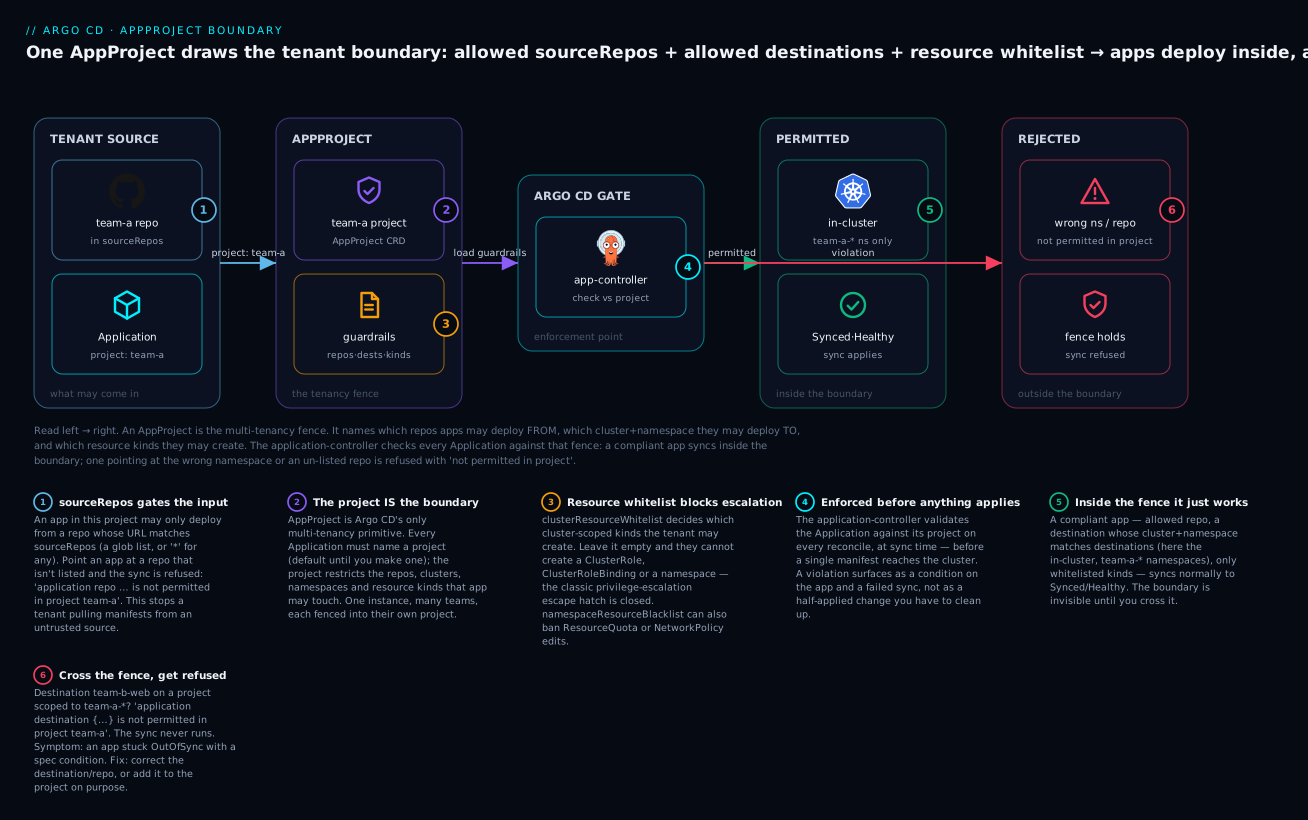
The badges mark the load-bearing ideas: sourceRepos gates which repos may enter (1); the project is the boundary and every app must name one (2); the resource whitelist blocks the privilege-escalation escape hatch (3); enforcement happens in the controller before anything applies (4); inside the fence a compliant app just works (5); and crossing the fence earns a refused sync with a precise error (6). If you internalise only this diagram, you understand Argo CD multi-tenancy.
The default project, and why to lock it down
Every Argo CD install ships a project called default, and it is deliberately wide open so that a brand-new user’s first app “just works.” Here is what it actually contains:
apiVersion: argoproj.io/v1alpha1
kind: AppProject
metadata:
  name: default
  namespace: argocd
spec:
  sourceRepos:
    - '*'                 # any repo
  destinations:
    - namespace: '*'      # any namespace
      server: '*'         # any cluster
  clusterResourceWhitelist:
    - group: '*'          # any cluster-scoped kind — including ClusterRoleBinding
      kind: '*'
Read against everything above, default is the anti-pattern in a box: any repo, any cluster, any namespace, any kind. An Application in default has no boundary at all. That is fine for a personal test cluster and a five-alarm fire for a shared platform.
| Aspect | default as shipped |
What a real tenant needs |
|---|---|---|
sourceRepos |
* (any repo) |
Explicit list of the tenant’s repos |
destinations |
*/* (any cluster, any ns) |
The tenant’s clusters + namespace glob only |
clusterResourceWhitelist |
*/* (any cluster kind) |
Empty (deny all) unless a specific kind is needed |
| Sync windows | None | Change-freeze windows for prod |
| Roles | None | Project role + token per tenant |
The rule of thumb: never run a real tenant in default. Either lock default down to nothing (so an app that forgets its project fails loudly instead of getting god-mode) or leave it only for throwaway experiments on non-shared clusters. A common hardening move is to shrink default to deny everything:
spec:
  sourceRepos: []          # deny all repos
  destinations: []         # deny all destinations
  clusterResourceWhitelist: []   # deny all cluster-scoped kinds
Now a forgotten project field can’t quietly inherit the keys to the kingdom — the app is refused, you notice, and you assign it to its real project.
The platform pattern: a project per tenant
Put the fields together and a repeatable pattern emerges: one AppProject per team (or per team-and-environment), scoped as tightly as that team genuinely needs. Here is a complete, production-shaped tenant project — copy it, rename it, and adjust the three lists:
apiVersion: argoproj.io/v1alpha1
kind: AppProject
metadata:
  name: team-a
  namespace: argocd
  finalizers:
    - resources-finalizer.argocd.argoproj.io   # clean up apps if the project is deleted
spec:
  description: "Team A — web + api, prod-eu only"
  # 1. Only Team A's repos:
  sourceRepos:
    - https://github.com/acme/team-a-config.git
    - https://github.com/acme/team-a-*
  # 2. Only Team A's namespaces, on the clusters they own:
  destinations:
    - server: https://kubernetes.default.svc
      namespace: team-a-*
    - name: prod-eu
      namespace: team-a-*
  # 3. No cluster-scoped resources at all (empty whitelist = deny all):
  clusterResourceWhitelist: []
  # Namespaced is allow-all; block the ones the platform owns:
  namespaceResourceBlacklist:
    - group: ""
      kind: ResourceQuota
    - group: networking.k8s.io
      kind: NetworkPolicy
  # 4. Let Team A keep Application CRs in their own namespaces:
  sourceNamespaces:
    - team-a-web
    - team-a-api
  # 5. Freeze production syncs all day Friday (emergency manual override allowed):
  syncWindows:
    - kind: deny
      schedule: '0 0 * * 5'
      duration: 24h
      applications:
        - '*'
      manualSync: true
      timeZone: Asia/Kolkata
  # 6. Surface hand-applied drift in Team A's namespaces:
  orphanedResources:
    warn: true
    ignore:
      - group: ""
        kind: ConfigMap
        name: kube-root-ca.crt
  # 7. Delegate sync/get on Team A's apps to their CI + engineers:
  roles:
    - name: ci-deployer
      description: CI syncs Team A apps
      policies:
        - p, proj:team-a:ci-deployer, applications, get, team-a/*, allow
        - p, proj:team-a:ci-deployer, applications, sync, team-a/*, allow
    - name: engineer
      description: Team A engineers (SSO group) — read + sync
      policies:
        - p, proj:team-a:engineer, applications, get, team-a/*, allow
        - p, proj:team-a:engineer, applications, sync, team-a/*, allow
      groups:
        - acme:team-a-engineers
The design principles this manifest encodes, which generalise to any tenant:
| Principle | How the manifest expresses it |
|---|---|
| Least privilege on repos | sourceRepos is an explicit short list, never * |
| Namespace isolation | destinations uses a team-a-* glob, not * |
| No privilege escalation | clusterResourceWhitelist: [] — can’t create cluster roles/namespaces |
| Platform owns shared policy | namespaceResourceBlacklist reserves quota + network policy |
| Delegated operation | Project roles give the team sync/get, nothing wider |
| Safe change control | A deny sync window freezes prod, with manualSync for emergencies |
| Drift visibility | orphanedResources.warn flags un-managed resources |
Generate these with an ApplicationSet or a small template if you have many tenants, but keep each project’s scope explicit and reviewed — the project is the one place a reviewer can see, in twenty lines, exactly what a team is allowed to do.
Hands-on lab
You will build a real tenant boundary on a free local cluster, prove that a compliant app syncs and a violating app is refused, then issue a project token and set a change-freeze window. Nothing here bills — it’s all on kind. Where an output depends on a live cluster it is labelled representative; the manifests and commands are exact.
Prerequisites: a local cluster and Argo CD. If you followed Your First Application you already have these; otherwise:
# A throwaway cluster + Argo CD (cloud-neutral, no cloud bill)
kind create cluster --name argo-lab
kubectl create namespace argocd
kubectl apply -n argocd -f https://raw.githubusercontent.com/argoproj/argo-cd/stable/manifests/install.yaml
kubectl -n argocd rollout status deploy/argocd-server   # wait until Available

# Log in with the CLI (port-forward in another terminal: kubectl -n argocd port-forward svc/argocd-server 8080:443)
argocd login localhost:8080 --username admin \
  --password "$(argocd admin initial-password -n argocd | head -1)" --insecure
Step 1 — Create the tenant namespaces. Our project will fence apps into team-a-*; create two such namespaces and one “other team” namespace to violate later.
kubectl create namespace team-a-web
kubectl create namespace team-a-api
kubectl create namespace team-b-web     # the forbidden zone
What just happened: three empty namespaces. The project we build next will permit the first two and refuse the third.
Step 2 — Create the locked-down team-a project. Save this as team-a-project.yaml:
apiVersion: argoproj.io/v1alpha1
kind: AppProject
metadata:
  name: team-a
  namespace: argocd
spec:
  description: "Team A tenant — lab"
  sourceRepos:
    - https://github.com/argoproj/argocd-example-apps.git   # the only allowed repo
  destinations:
    - server: https://kubernetes.default.svc
      namespace: team-a-*                                   # only team-a-* namespaces
  clusterResourceWhitelist: []                              # no cluster-scoped kinds
  namespaceResourceBlacklist:
    - group: ""
      kind: ResourceQuota
  syncWindows:
    - kind: deny
      schedule: '0 0 * * 5'                                 # all day Friday
      duration: 24h
      applications:
        - '*'
      manualSync: true
      timeZone: Asia/Kolkata
kubectl apply -f team-a-project.yaml
# appproject.argoproj.io/team-a created

argocd proj get team-a
Representative argocd proj get team-a output:
Name:                        team-a
Description:                 Team A tenant — lab
Destinations:                https://kubernetes.default.svc,team-a-*
Repositories:                https://github.com/argoproj/argocd-example-apps.git
Allowed Cluster Resources:   <none>
Denied Namespaced Resources: /ResourceQuota
Signature keys:
Orphaned Resources:          Disabled
What just happened: the tenant fence now exists. Allowed Cluster Resources: <none> confirms an empty whitelist denies all cluster-scoped kinds — team-a cannot create a ClusterRole even if they try.
Step 3 — Deploy a COMPLIANT app (should sync). Its repo is the allowed one and its namespace matches team-a-*:
argocd app create team-a-web \
  --project team-a \
  --repo https://github.com/argoproj/argocd-example-apps.git \
  --path guestbook \
  --dest-server https://kubernetes.default.svc \
  --dest-namespace team-a-web \
  --sync-policy manual

argocd app sync team-a-web
argocd app get team-a-web
Representative tail of argocd app get team-a-web:
Name:               argocd/team-a-web
Project:            team-a
Sync Status:        Synced to HEAD (…)
Health Status:      Healthy

GROUP  KIND        NAMESPACE    NAME          STATUS  HEALTH
       Service     team-a-web   guestbook-ui  Synced  Healthy
apps   Deployment  team-a-web   guestbook-ui  Synced  Healthy
What just happened: allowed repo + allowed namespace = the sync runs and the app reaches Synced/Healthy. The boundary is invisible when you stay inside it.
Step 4 — Deploy a VIOLATING app (should be refused). Same app, but aimed at team-b-web, which the project does not permit:
argocd app create team-a-rogue \
  --project team-a \
  --repo https://github.com/argoproj/argocd-example-apps.git \
  --path guestbook \
  --dest-server https://kubernetes.default.svc \
  --dest-namespace team-b-web \
  --sync-policy manual
Creating it may already fail validation; if the app is created, the sync is refused. Representative output:
FATA[0000] rpc error: code = InvalidArgument desc = application spec for team-a-rogue
is invalid: InvalidSpecError: application destination server
'https://kubernetes.default.svc' and namespace 'team-b-web' is not permitted in
project 'team-a'
Or, if created, argocd app get team-a-rogue shows the condition:
CONDITION            MESSAGE
InvalidSpecError     application destination server 'https://kubernetes.default.svc'
                     and namespace 'team-b-web' is not permitted in project 'team-a'
What just happened: the destinations guardrail refused the app. The phrase “is not permitted in project ‘team-a’” is the signature of a working boundary. Nothing was applied to team-b-web.
Step 5 — Try to create a cluster-scoped resource (should be refused at sync). Point an app at a path that includes a ClusterRole. Using a small demo repo path that renders cluster-scoped RBAC, the sync fails per-resource. Representative sync error:
one or more objects failed to apply, reason: Resource
rbac.authorization.k8s.io/ClusterRole:demo-admin is not permitted in project team-a
What just happened: clusterResourceWhitelist: [] blocked the ClusterRole at sync time. Even though the manifest and the repo were fine, the kind wasn’t allowed — the escalation path is closed. (To allow it deliberately: argocd proj allow-cluster-resource team-a rbac.authorization.k8s.io ClusterRole.)
Step 6 — Add a project role and mint a token. Give the tenant’s CI sync-only rights, then issue a token for it:
# Create the role
argocd proj role create team-a ci-deployer \
  --description "CI syncs team-a apps"

# Grant get + sync on team-a's apps only
argocd proj role add-policy team-a ci-deployer \
  --action get  --permission allow --object '*'
argocd proj role add-policy team-a ci-deployer \
  --action sync --permission allow --object '*'

# Issue a JWT token for machine use
argocd proj role create-token team-a ci-deployer
Representative token output:
Create token succeeded for proj:team-a:ci-deployer.
  ID:          f0e6…-b2
  Issued At:   2026-07-17T09:14:22+05:30
  Expires At:  Never
  Token:       eyJhbGciOiJIUzI1NiIsInR5cCI6IkpXVCJ9.eyJpc3M…<snip>
What just happened: proj:team-a:ci-deployer can now get and sync team-a apps — and only team-a apps — using that bearer token. It cannot see or touch team-b. Treat the token like a password; scope it, store it in a secret manager, and rotate it. (Add --expires-in 720h to time-box it — a token that never expires is a standing liability.)
Step 7 — Inspect the sync window. Confirm the Friday freeze is registered:
argocd proj windows list team-a
Representative output (STATUS is Active only when it’s actually Friday in Asia/Kolkata):
ID  STATUS    KIND  SCHEDULE   DURATION  APPLICATIONS  NAMESPACES  CLUSTERS  MANUALSYNC
0   Inactive  deny  0 0 * * 5  24h       *             -           -         Enabled
What just happened: the window exists and will flip to Active for all of Friday, denying automated syncs (MANUALSYNC: Enabled means a human can still push an emergency fix). During an active deny window an automated sync is refused with a PermissionDenied error naming the sync window.
Step 8 — Teardown. Remove everything the lab created.
argocd app delete team-a-web --yes
argocd app delete team-a-rogue --yes 2>/dev/null || true
kubectl delete appproject team-a -n argocd
kubectl delete namespace team-a-web team-a-api team-b-web
# If you created the cluster just for this lab:
kind delete cluster --name argo-lab
What just happened: apps and project gone, namespaces gone, cluster gone — no lingering cost, since none of this ever left your laptop.
You have now built a complete tenant boundary from scratch: a scoped project, a compliant app that syncs, a violating app that’s refused, a blocked cluster-scoped resource, a delegated role with a token, and a change-freeze window. That is multi-tenant Argo CD in miniature.
Common mistakes and troubleshooting
Projects fail in a handful of predictable ways, and every one has a tell in the error message. Keep this table close.
| Symptom / message | Cause | Fix |
|---|---|---|
application destination … is not permitted in project |
App’s destination cluster/namespace isn’t in the project’s destinations |
Add the cluster+namespace to destinations, or fix the app’s destination |
application repo … is not permitted in project |
App’s repoURL matches no sourceRepos glob |
Add the repo to sourceRepos, or point the app at an allowed repo |
Resource …/ClusterRole … is not permitted in project at sync |
Cluster-scoped kind not in clusterResourceWhitelist (empty = deny all) |
argocd proj allow-cluster-resource <proj> <group> <kind> if it’s genuinely needed |
Sync refused with PermissionDenied mentioning a sync window |
An active deny sync window (or you’re outside every allow window) |
Wait for the window to close, or set manualSync: true and sync manually |
| Application in a team namespace is ignored / errors | sourceNamespaces set on project but namespace not in instance application.namespaces |
Add the namespace to both the project’s sourceNamespaces and argocd-cmd-params-cm application.namespaces |
orphanedResources floods warnings |
Default injected resources (kube-root-ca.crt, SA tokens) counted as orphans |
Add them to orphanedResources.ignore, or set warn: false |
| Project token works far more than expected | Token minted on a role whose policy object is * at instance scope, or role over-granted |
Scope role policies to applications, sync, <proj>/*; re-issue with --expires-in |
App names cluster by name but destination uses server (or vice-versa) — refused |
destinations and the app’s destination identify the same cluster differently and the name changed |
Standardise on server or name platform-wide; keep them consistent |
| A blacklisted kind still applies | Confused whitelist vs blacklist, or namespaced-vs-cluster scope | Remember: namespaced is allow-all (blacklist to deny); cluster-scoped is deny-all (whitelist to allow); blacklist wins ties |
| Tightening a project breaks apps that worked yesterday | An existing app relied on the old, looser scope (a repo/namespace/kind you just removed) | Audit argocd app list -p <proj> before narrowing; widen back or migrate the app |
| App runs with full cluster power unexpectedly | It’s in the default project (forgot spec.project) |
Assign the real project; lock default down to deny-all so this fails loudly |
Three gotchas cost the most hours, and each deserves a paragraph.
1. The sourceNamespaces two-level trap. Apps-in-any-namespace has two allow-lists, and they are enforced by two different components. The project’s sourceNamespaces is necessary but not sufficient — the instance must also be told to watch that namespace via application.namespaces in argocd-cmd-params-cm (which the controller and server read at startup). Set only the project field and your Applications sit in their namespaces doing nothing, with no obvious error, because the controller never looked. When “apps-in-any-namespace isn’t working,” check the instance-level list first.
2. Changing a project is a breaking change. A project is policy that existing apps are already relying on. Remove a repo from sourceRepos, narrow a destinations glob, or add a namespaceResourceBlacklist entry, and any app that depended on the old, wider scope immediately flips to InvalidSpecError and stops syncing — including at 2 a.m. when it tries to self-heal. Before you tighten a project, list what’s in it (argocd app list -p <project>) and confirm nothing relies on what you’re about to remove. Tighten in a PR, in staging, with the blast radius visible.
3. manualSync is subtle — and allow windows flip the default. Two window mistakes recur. First, teams set a deny window with manualSync: false for a hard freeze, then can’t push an emergency hotfix and panic — set manualSync: true if humans must be able to override. Second, teams add a single allow window meaning “also sync at 2 a.m.” and are baffled when syncs stop the rest of the day: an allow window is inclusive, so configuring any allow window denies syncs outside all of them. For a change freeze you almost always want a deny window, not an allow window.
Cheat-sheet
The AppProject spec at a glance — field, what it controls, and the gotcha:
| Field | Controls | Remember |
|---|---|---|
sourceRepos |
Allowed repo URLs (globs) | Empty = deny all; * = any; prefer an explicit list |
destinations |
Allowed cluster + namespace | Empty = deny all; both cluster and namespace must match |
clusterResourceWhitelist |
Cluster-scoped kinds allowed | Empty = deny all (the safe default) |
clusterResourceBlacklist |
Cluster-scoped kinds forbidden | Adds denials on top of the whitelist |
namespaceResourceWhitelist |
Namespaced kinds allowed | Empty = allow all |
namespaceResourceBlacklist |
Namespaced kinds forbidden | Blacklist wins ties |
sourceNamespaces |
Namespaces that may hold this project’s apps | Also needs instance application.namespaces |
roles |
Project-scoped RBAC + tokens | Subject is proj:<project>:<role>; object stays <project>/* |
syncWindows |
When syncs are allowed/denied | deny beats allow; manualSync lets humans override |
orphanedResources |
Warn on un-managed resources | Ignore kube-root-ca.crt + SA tokens or it’s all noise |
permitOnlyProjectScopedClusters |
Restrict to project-scoped clusters | Belt-and-braces on top of destinations |
signatureKeys |
Required GPG signing keys | Needs ARGOCD_GPG_ENABLED=true |
The argocd proj commands you will actually use:
| Command | What it does |
|---|---|
argocd proj create <p> / argocd proj get <p> |
Create / inspect a project |
argocd proj list |
List all projects |
argocd proj add-source <p> <repo> |
Append a repo to sourceRepos |
argocd proj add-destination <p> <server|name> <ns> |
Append a destinations entry |
argocd proj allow-cluster-resource <p> <group> <kind> |
Add a cluster-scoped kind to the whitelist |
argocd proj deny-cluster-resource <p> <group> <kind> |
Add to the cluster blacklist |
argocd proj allow-namespace-resource <p> <group> <kind> |
Add a namespaced kind to the whitelist |
argocd proj deny-namespace-resource <p> <group> <kind> |
Add to the namespaced blacklist |
argocd proj add-source-namespace <p> <ns> |
Add to sourceNamespaces (apps-in-any-namespace) |
argocd proj windows add <p> --kind deny --schedule "0 0 * * 5" --duration 24h --applications '*' |
Add a sync window |
argocd proj windows list <p> |
List sync windows + active status |
argocd proj role create <p> <role> |
Create a project role |
argocd proj role add-policy <p> <role> --action sync --permission allow --object '*' |
Grant a policy to a role |
argocd proj role create-token <p> <role> --expires-in 720h |
Mint a JWT token for a role |
argocd app list -p <p> |
List the apps bound to a project (audit before tightening) |
The minimal tenant-project template to copy:
apiVersion: argoproj.io/v1alpha1
kind: AppProject
metadata:
  name: <tenant>
  namespace: argocd
spec:
  sourceRepos:
    - https://github.com/<org>/<tenant>-*        # their repos only
  destinations:
    - server: https://kubernetes.default.svc
      namespace: <tenant>-*                       # their namespaces only
  clusterResourceWhitelist: []                    # no cluster-scoped kinds
  roles:
    - name: deployer
      policies:
        - p, proj:<tenant>:deployer, applications, sync, <tenant>/*, allow
        - p, proj:<tenant>:deployer, applications, get,  <tenant>/*, allow
Interview and exam questions
Q: What problem does an AppProject solve that RBAC does not?
A: An AppProject restricts what an Application may do — which repos it may deploy from, which clusters and namespaces it may target, and which resource kinds it may create. RBAC (argocd-rbac-cm) restricts which humans/tokens may operate which apps and projects. They’re orthogonal and complementary: the project stops a compromised or fat-fingered app from escaping its namespace or creating a ClusterRoleBinding; RBAC stops the wrong person from syncing it. A shared Argo CD needs both.
Q: An app in project team-a reports application destination … is not permitted in project 'team-a'. What happened and how do you fix it?
A: The app’s spec.destination (cluster server/name + namespace) matches no entry in the project’s destinations allow-list, so the controller refused it at spec validation — before applying anything. Fix it by either correcting the app’s destination to an allowed cluster/namespace, or, if the destination is legitimate, adding it to the project’s destinations (argocd proj add-destination team-a <server|name> <ns>).
Q: Why is an empty clusterResourceWhitelist a good default, but an empty namespaceResourceWhitelist is not restrictive at all?
A: The two lists have opposite default semantics. An empty clusterResourceWhitelist means deny all cluster-scoped kinds — so a tenant can’t create ClusterRole, ClusterRoleBinding, CRDs or namespaces, which is exactly the privilege-escalation surface you want closed. An empty namespaceResourceWhitelist means allow all namespaced kinds — namespaced resources are permissive by default, so to restrict them you use namespaceResourceBlacklist instead. Cluster-scoped is deny-by-default; namespaced is allow-by-default.
Q: A team says apps-in-any-namespace “isn’t working” — their Applications in team-a-web never reconcile. What do you check?
A: The two-level allow-list. The namespace must be listed in both the project’s sourceNamespaces and the instance-level application.namespaces (in argocd-cmd-params-cm, read by the controller/server at startup). If only the project field is set, the controller never watches the namespace, so the apps sit there doing nothing with no obvious error. Add the namespace to both and restart/roll the controller and server.
Q: How do you implement a “no production syncs on Friday” change freeze?
A: A deny sync window on the project: kind: deny, schedule: '0 0 * * 5' (midnight Friday), duration: 24h, applications: ['*'], and a timeZone. Set manualSync: true if on-call must be able to push emergency fixes during the freeze; manualSync: false for a hard stop. When the window is active, automated syncs are refused with a PermissionDenied error naming the window.
Q: What’s the difference between an allow and a deny sync window, and which surprises people?
A: A deny window blocks syncs while it’s active; a deny always beats an allow when both are active. An allow window is inclusive — if any allow window is configured, syncs are denied outside all of them. The surprise: teams add a single allow window meaning “also sync at 2 a.m.” and inadvertently block syncs the rest of the day. For a change freeze you want deny, not allow.
Q: Why is the default project dangerous on a shared Argo CD, and what do you do about it?
A: default ships with sourceRepos: ['*'], destinations: [*/*], and clusterResourceWhitelist: [*/*] — any repo, any cluster, any namespace, any kind. An app that forgets spec.project inherits no boundary at all and can create cluster-admin bindings anywhere. Either lock default down to deny-all (empty lists) so a forgotten project fails loudly, or reserve it strictly for throwaway experiments; never run a real tenant in it.
Q: How do you give a tenant’s CI pipeline permission to sync their apps but nothing else?
A: A project role with narrow policies plus a JWT token. Create the role (argocd proj role create team-a ci-deployer), grant only applications, get and applications, sync on team-a/*, then mint a token (argocd proj role create-token team-a ci-deployer --expires-in 720h). The subject proj:team-a:ci-deployer can operate only team-a apps; it has no visibility into other projects. Time-box and rotate the token.
Q: You need to tighten an existing tenant project — remove an old repo from sourceRepos. What’s the risk and how do you de-risk it?
A: Projects are policy that existing apps rely on, so removing a repo immediately breaks any app still deploying from it — it flips to InvalidSpecError and stops syncing, including during self-heal. De-risk by auditing first (argocd app list -p team-a), confirming nothing uses the repo, making the change in a reviewed PR, and rolling it out in staging before prod. Never tighten a project blind.
Q: A tenant needs to create their own CRD, but the project denies all cluster-scoped resources. How do you allow exactly that without opening the floodgates?
A: Add just that one kind to clusterResourceWhitelist: {group: apiextensions.k8s.io, kind: CustomResourceDefinition} (or argocd proj allow-cluster-resource <proj> apiextensions.k8s.io CustomResourceDefinition). The whitelist stays deny-by-default for everything else — they get CRDs and nothing more, not the */* blanket that default uses.
Q: What does permitOnlyProjectScopedClusters add on top of destinations?
A: Hard cluster isolation. Even if destinations contains a broad server: '*', setting permitOnlyProjectScopedClusters: true restricts the project to clusters whose cluster Secret explicitly names this project in its project field. It’s belt-and-braces: a mistake in destinations can’t let the project reach a cluster that wasn’t dedicated to it.
Q: Where and when are project guardrails enforced — before or after manifests are applied? A: Before. Source/destination/sourceNamespaces are checked at spec validation on every reconcile; resource whitelists, sync windows and signature keys are checked at sync time, per rendered resource, before anything is applied to the cluster. A violation becomes a condition on the Application and a refused sync — never a half-applied, cross-tenant change you have to clean up.
Key takeaways
- The
AppProjectis Argo CD’s only multi-tenancy boundary. Every Application names exactly one project (defaultif you don’t set one), and the project decides whether that app’s repos, clusters, namespaces and resource kinds are even allowed. - Empty lists mean opposite things by field.
sourceRepos,destinationsandclusterResourceWhitelistare deny-all when empty (opt in);namespaceResourceWhitelistis allow-all when empty (use the blacklist to restrict). Blacklist wins ties. destinationsis the core guardrail — it stops team A landing in team B’s namespace or on the wrong cluster. Scope it to a namespace glob (team-a-*) on the specific clusters a tenant owns, never*/*.- Enforcement happens before anything applies. A violation surfaces as
InvalidSpecError/ a refused sync with the tell-tale phrase “is not permitted in project” — a clear refusal, not a cross-tenant incident. - Never run a real tenant in
default— it permits any repo, cluster, namespace and cluster-scoped kind. Lockdefaultdown to deny-all so a forgottenspec.projectfails loudly instead of inheriting god-mode. - The platform pattern is one tightly-scoped project per tenant: their repos in
sourceRepos, their namespaces indestinations, an emptyclusterResourceWhitelist, a projectrole+ token for their engineers, and adenysync window for prod change-freezes. sourceNamespacesis a two-level gate (project field and instanceapplication.namespaces), sync windows have inclusiveallowvs harddenysemantics, and tightening a live project is a breaking change — auditargocd app list -p <project>before you narrow anything.