There are two completely different permission systems in play the moment you run Argo CD on a Kubernetes cluster, and confusing them is the single most common source of “why can this person delete that?” incidents. The first is Kubernetes RBAC — the cluster’s own gate, deciding which ServiceAccount may get/create/delete which Kubernetes objects. The second, the subject of this entire lesson, is Argo CD’s own RBAC — a gate that lives inside Argo CD and decides who may view an Application, click Sync, register a cluster, add a repository, or create a project. They are enforced by different components, configured in different places, and answer different questions. Getting the second one right is what stops a junior engineer from syncing production, and what lets a CI pipeline hold a token that can do exactly one thing and nothing else.
If you have only ever used kubectl, here is the bridge: kubectl authorization is checked by the Kubernetes API server against Role/ClusterRole objects. Argo CD authorization is checked by argocd-server against a single ConfigMap called argocd-rbac-cm — a text file of comma-separated policy lines. Everywhere below you’ll see real manifests for Argo CD 2.13+/3.x, real argocd commands, and representative command output (the shape to expect — labelled as representative, since RBAC decisions depend on your own accounts and SSO). By the end you will read and write policy.csv fluently, know why SSO groups beat local accounts at scale, and be able to prove any grant is correct before it reaches a cluster.
Why this matters
Argo CD is a control plane with enormous reach. A single Argo CD instance often manages dozens of applications across many namespaces and clusters, and anyone who can drive it inherits that reach. The person who can click Sync on a production Application can ship code to production. The person who can register a new cluster can point Argo CD at infrastructure it should never touch. The token baked into a CI job, if over-scoped, is a skeleton key sitting in a pipeline log. None of this is governed by Kubernetes RBAC — the cluster only sees Argo CD’s own service account doing the work. The gate that actually matters here is Argo CD’s RBAC, and it is off to the side: deny-nothing by default for the built-in admin, and easy to leave far too open if you never touch it.
The problem shows up the first time more than one human logs in. Out of the box there is a single admin account with unrestricted power, which is fine for a solo demo and dangerous for a team. The moment you add SSO, or hand a token to a pipeline, or onboard a second team, you need answers to concrete questions: Can this group sync, or only view? Can that team reach another team’s apps? Can this CI token do anything beyond the one sync it needs? Who can open a shell inside a running pod? Every one of those answers is a line — or the absence of a line — in policy.csv.
The mental model to hold from the start: Argo CD RBAC is a list of rules that match a subject against a resource, an action, and an object, and return allow or deny. Subjects are local accounts, SSO users, SSO groups, and project-role tokens. Resources are the things Argo CD manages (applications, clusters, repositories, projects, and more). Actions are what you can do to them (get, sync, create, delete…). Objects are which ones (this app, this whole project, everything). Learn to read a rule left to right and the rest is detail. This lesson is cloud-neutral — Argo CD RBAC is identical on AKS, EKS, and GKE because it is Argo CD’s gate, not the cloud’s — with one edge, SSO group claims, where the three clouds differ; we cover the shape of that edge here and hand the full per-cloud identity-provider setup to the dedicated SSO / OIDC lesson.
Argo CD RBAC vs Kubernetes RBAC: two different gates
Beginners routinely try to grant Argo CD permissions with a Kubernetes Role, or expect an Argo CD role:readonly to stop someone kubectl-ing the cluster directly. Neither works, because the two systems guard different doors.
| Kubernetes RBAC | Argo CD RBAC | |
|---|---|---|
| Guards | The Kubernetes API (kubectl, controllers) |
The Argo CD API (argocd CLI, the web UI, the REST/gRPC API) |
| Enforced by | The kube-apiserver | argocd-server |
| Configured in | Role/ClusterRole + bindings |
The argocd-rbac-cm ConfigMap (policy.csv) |
| Subjects | User, Group, ServiceAccount |
Local accounts, SSO users, SSO groups, project-role tokens |
| Resources | Pods, Deployments, Secrets, CRDs… | applications, clusters, repositories, projects, exec, logs… |
| Question it answers | “May this identity change this Kubernetes object?” | “May this identity view/sync/create this Argo CD app or manage this repo/cluster/project?” |
| When Argo CD applies manifests | The cluster checks Argo CD’s service account here | Already passed — the human/token was authorized to trigger the sync |
Read the last two rows together and the division of labour is clear. When you click Sync, Argo CD RBAC decides whether you were allowed to ask; then Argo CD’s own controller applies the manifests, and Kubernetes RBAC governs what that controller’s service account may write. A read-only Argo CD user cannot sync — but if they have kubectl access to the cluster, Argo CD RBAC does nothing to stop them there. The two are complementary layers, not substitutes. This lesson is entirely about the second gate. (For how the controller and API server fit together, see the architecture lesson.)
RBAC also applies identically whether you drive Argo CD through the web UI or the argocd CLI — both are thin clients of the same argocd-server, so a grant that works in one works in the other, and “it works in the UI but not the CLI” is an authentication/context bug, not an RBAC one (the two interfaces are compared in The UI, the CLI & Declarative vs Imperative).
The four kinds of subject
Every request that reaches argocd-server carries an identity string, and RBAC only ever sees that string — never a password. There are four kinds, and knowing which one you’re granting to is half the battle.
| Subject | Looks like in a rule | Where it comes from | Typical use |
|---|---|---|---|
| Local account | alice |
accounts.alice in argocd-cm |
Break-glass humans, small teams, legacy scripts |
| SSO user | alice@acme.com (the OIDC sub/email) |
Your IdP via OIDC (Entra ID / Google / Cognito) | Individual humans at scale — but grant to their group, not them |
| SSO group | acme:team-a-admins |
A group claim in the OIDC token | The scalable unit of access — map a group to a role once |
| Project-role token | proj:team-a:ci-web-sync |
AppProject.spec.roles + a minted JWT |
CI/automation scoped to one project, least privilege by construction |
The built-in admin account is a fifth, special case: it is a superuser whose access policy.csv cannot restrict. That is a safety net (you can’t accidentally lock the admin out with a bad rule) and a responsibility (disable it, or protect its password, in any shared environment). We’ll return to it in the lockout gotcha.
The built-in roles and the deny-by-default posture
Argo CD ships two roles you cannot delete, and one global setting that decides what happens to everyone who isn’t explicitly granted anything. Understanding these three things — role:admin, role:readonly, and policy.default — is enough to reason about the default posture of any Argo CD you inherit.
| Built-in role | Grants | Use it for |
|---|---|---|
role:admin |
Every action on every resource and every object — including exec (shell into pods), cluster/repo/project management, and account administration |
Platform/operators only; map to a small SSO group |
role:readonly |
get across resources — view apps, projects, repos, clusters, and (in current versions) application logs — but no sync, create, update, delete, or exec |
The safe default for everyone else; auditors, developers who only need visibility |
Neither role is granted to anyone automatically (except the superuser admin account, which behaves as full admin regardless). To hand a role out, you write a g line — g, <subject>, role:admin — which we cover next. The crucial global knob is policy.default:
policy.default value |
Effect | Posture |
|---|---|---|
role:readonly |
Every authenticated identity that matches no other rule can read everything | Convenient; common default. Everyone (including tokens) can view the whole estate |
'' (empty) |
Any request not matched by an explicit allow is denied |
Strict, deny-by-default; the recommended posture for least privilege |
role:admin |
Everyone becomes admin | Never do this. A frequent, catastrophic misconfiguration |
A custom role, e.g. role:org-view |
Fallback to a role you define | Fine-grained default without granting all of readonly |
The single most important design decision in an Argo CD RBAC setup is policy.default. role:readonly is friendly but means every token — including a narrowly-scoped CI token — can additionally list every application in the system. '' (empty) is the deny-by-default stance: a subject gets exactly what its rules grant and nothing more, which is what real least privilege requires. We build the lab with role:readonly (it satisfies the common “org-wide read” ask) and then show the one-line change to '' and exactly what it tightens.
A default Argo CD install ships an essentially empty
argocd-rbac-cm— nopolicy.csv, nopolicy.default. In that state only the superuseradmincan do anything and everyone else is denied. The “readonly for all” behaviour many people expect is something you opt into by settingpolicy.default: role:readonly. Don’t assume it’s there.
policy.csv, line by line
policy.csv is the heart of the system: a block of text in the argocd-rbac-cm ConfigMap, evaluated by a Casbin RBAC engine. It has exactly two kinds of line, and once you can read both you can read any Argo CD policy in the wild.
apiVersion: v1
kind: ConfigMap
metadata:
  name: argocd-rbac-cm
  namespace: argocd
  labels:
    app.kubernetes.io/name: argocd-rbac-cm
    app.kubernetes.io/part-of: argocd
data:
  policy.default: role:readonly
  policy.csv: |
    # p = a permission rule
    p, role:team-a-admin, applications, sync, team-a/*, allow
    # g = a group/role assignment
    g, acme:team-a-admins, role:team-a-admin
The p line — a permission
p, <subject>, <resource>, <action>, <object>, <effect>
Read it as a sentence: subject may (or may not) perform action on resource object. Each field:
| Field | What it is | Examples |
|---|---|---|
p |
Literally the letter p — marks this a permission line |
p |
<subject> |
Who the rule is about — a role, SSO group/user, local account, or proj:... role |
role:team-a-admin, acme:team-a-admins, proj:team-a:ci-web-sync |
<resource> |
Which Argo CD resource kind | applications, clusters, repositories, projects, logs, exec |
<action> |
What may be done | get, create, update, delete, sync, override, action/*, * |
<object> |
Which instances — a glob | team-a/web, team-a/*, */*, * |
<effect> |
allow or deny |
allow |
The g line — an assignment
g, <subject>, <role>
A g line says “this subject is this role” — it assigns a user, an SSO group, or even another role to a role, so the subject inherits every p line written for that role. This indirection is the whole point of roles: you write the permissions once against role:team-a-admin, then assign as many groups or users to it as you like.
| Line | Purpose | Example | Read as |
|---|---|---|---|
p |
Grant or deny a specific action | p, role:dev, applications, sync, team-a/*, allow |
“role dev may sync team-a’s apps” |
g |
Assign a subject to a role | g, acme:team-a-devs, role:dev |
“the SSO group team-a-devs is role dev” |
The commonest beginner error is mixing these up — writing a p line where a g line is needed (trying to “grant a role” with p, alice, role:dev, ..., which is nonsense) or vice versa. If you are attaching a subject to a role, it’s g. If you are describing what a role can do, it’s p.
The resources
These are the object kinds Argo CD’s RBAC knows about. The object pattern column is the shape of the <object> field for that resource — get this wrong and your glob silently matches nothing (or everything).
| Resource | Controls | Object pattern | Notable actions |
|---|---|---|---|
applications |
Viewing, syncing, editing, deleting apps | <project>/<app> e.g. team-a/web, team-a/*, */* |
get, sync, create, update, delete, override, action/* |
applicationsets |
Managing ApplicationSets (the app generators) | <project>/<name> (current versions) |
get, create, update, delete |
clusters |
Registering/editing/removing target clusters | cluster URL or name, e.g. *, https://kubernetes.default.svc |
get, create, update, delete |
repositories |
Managing connected Git/Helm repos | repo URL, e.g. *, https://github.com/acme/* |
get, create, update, delete |
projects |
Managing AppProjects |
project name, e.g. team-a, * |
get, create, update, delete |
accounts |
Managing local accounts / passwords | account name, e.g. alice, * |
get, update |
certificates |
TLS/SSH known-host certs for repos | cert identifier | get, create, update, delete |
gpgkeys |
GPG keys for commit signature verification | key id | get, create, update, delete |
logs |
Streaming a running pod’s logs in the UI/CLI | <project>/<app> |
get |
exec |
Opening a shell inside a running pod from the UI | <project>/<app> |
create |
Two resources deserve a red flag now and a whole section of care later: logs (someone can read what your pods print, which often includes sensitive data) and exec (someone can open an interactive terminal inside a production pod — effectively kubectl exec through Argo CD). exec is disabled at the feature level by default; even after you enable it, RBAC decides who may use it. Treat both as privileged.
The actions
| Action | Meaning | Applies to |
|---|---|---|
get |
View / list | All resources |
create |
Create a new instance (and, for exec, open a terminal session) |
applications, clusters, repositories, projects, exec… |
update |
Modify an existing instance | Most resources |
delete |
Remove an instance | Most resources |
sync |
Trigger a sync of an Application | applications only |
override |
Override/roll back an app’s live state (e.g. argocd app rollback) |
applications only |
action/<group/kind/action> |
Run a named resource action (e.g. restart a Deployment); action/* = all |
applications |
* |
All actions on that resource | All resources |
Objects, globs, and blast radius
The <object> field is where least privilege lives or dies. For applications (and logs/exec) the object is <project>/<app>, and the glob is matched left to right:
| Object glob | Matches | Blast radius |
|---|---|---|
team-a/web |
Exactly the web app in project team-a |
One app — tightest |
team-a/* |
Every app in project team-a |
One project |
*/web |
An app named web in any project |
One app name across the estate — rarely what you want |
*/* |
Every app in every project | Everything |
* (single-segment resources) |
Every cluster / repo / project | All of that resource kind |
The classic over-grant is a glob one segment too wide: someone means “this team’s apps” (team-a/*) and writes */*, handing the team every application in the company. When you review a policy, read every object field as a blast-radius question: if this rule is abused, how much can it touch?
allow, deny, and the order of evaluation
Every p line ends in allow or deny, and the evaluation order is fixed and worth memorising:
| Precedence | Rule | Result |
|---|---|---|
| 1 (highest) | Any matching deny |
Denied, full stop — a deny beats every allow |
| 2 | An explicit allow (and no matching deny) |
Allowed |
| 3 (lowest) | Nothing matches | Fall back to policy.default |
deny always wins. This is the property you exploit to write guarantees: a p, role:global-auditor, exec, create, */*, deny line means that identity can never get a shell, even if some future rule (or a role they’re also in) tries to allow it. It is also a trap: an over-broad deny you forgot about will quietly block an allow you expected to work, producing the maddening “I granted it but it’s still denied” bug. When access is refused unexpectedly, hunt for a matching deny first, then check whether policy.default is doing the denying.
Here is the whole flow as one picture — a request from a subject, through the single argocd-server gate, matched against policy.csv, to an allow or deny on a specific Application. Read it left to right: the same team-a identity that is allowed to sync team-a/web is refused on team-b/*, because no rule matches and deny-by-default applies.
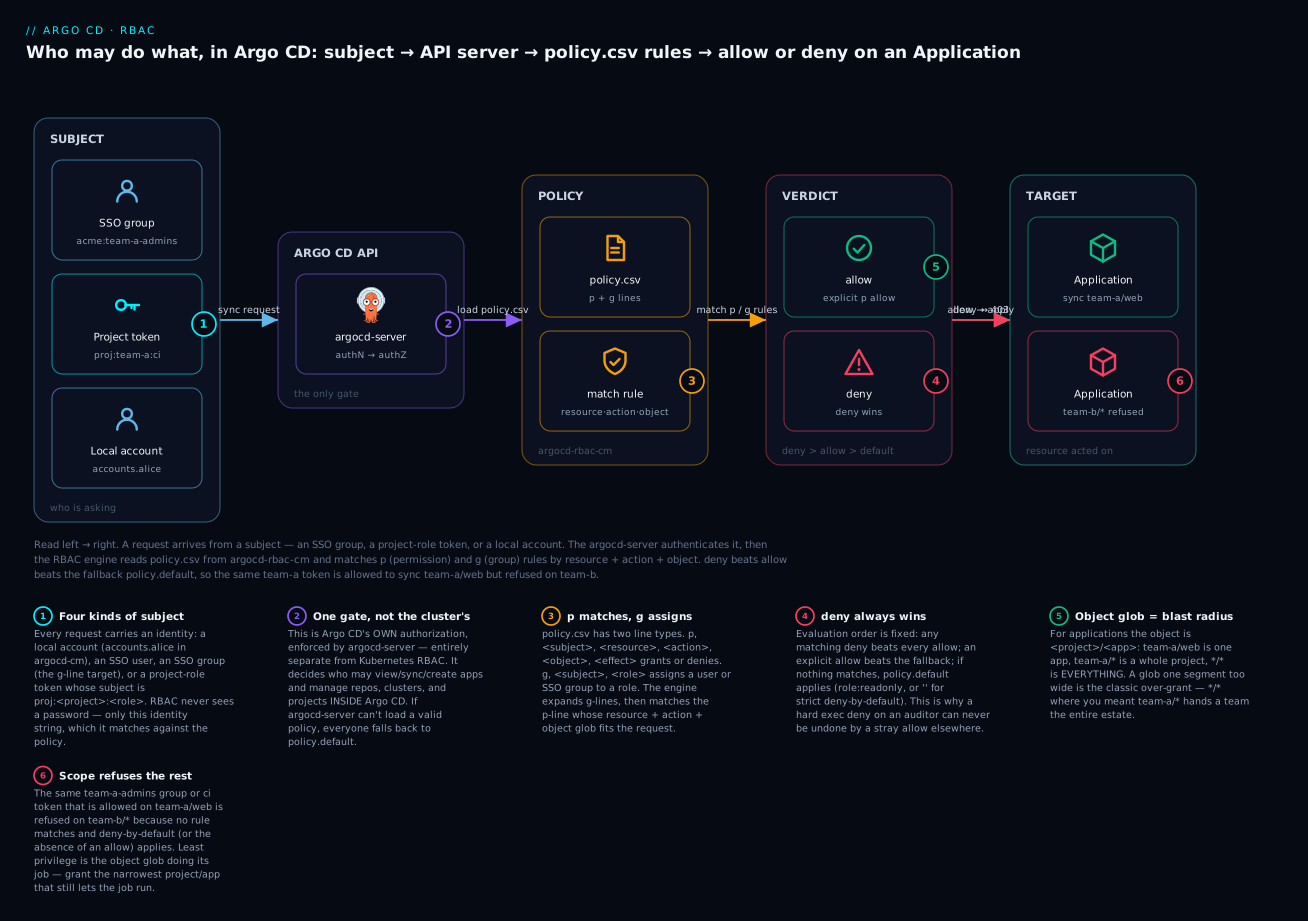
The badges mark the load-bearing ideas: the project-role token is a subject in its own right (1); argocd-server is the only gate and it’s separate from Kubernetes RBAC (2); p matches while g assigns (3); deny beats allow beats the fallback (4); an explicit allow on the exact object lets the action through (5); and a glob that doesn’t match refuses everything outside the intended scope (6).
Local accounts, and why SSO groups win at scale
Beyond the built-in admin, you can define local accounts directly in Argo CD’s main ConfigMap, argocd-cm. Each account is a username plus a set of capabilities.
apiVersion: v1
kind: ConfigMap
metadata:
  name: argocd-cm
  namespace: argocd
  labels:
    app.kubernetes.io/name: argocd-cm
    app.kubernetes.io/part-of: argocd
data:
  # A human break-glass account: can log in AND mint API tokens.
  accounts.alice: apiKey, login
  # A machine account for a legacy script: tokens only, no password login.
  accounts.ci-legacy: apiKey
  accounts.ci-legacy.enabled: "true"
| Capability | Enables | Omit it to… |
|---|---|---|
login |
Interactive login with a password (UI and argocd login) |
Make the account usable only via API tokens — no password login |
apiKey |
Generating API tokens (argocd account generate-token) |
Prevent the account from minting tokens |
accounts.<name>.enabled: "false" |
(Setting) disables the account entirely | Keep it enabled (the default) |
A subtle, real gotcha lives here: an account with only apiKey cannot log in with a password, and an account with only login cannot mint tokens. If someone reports “my local account can’t log in,” the first check is whether login is in its capability list. Defining the account does not grant it any Argo CD permissions — you still map it to a role in policy.csv (g, alice, role:admin) or write p lines for it directly. Account creation and authorization are two separate steps.
Manage accounts with the argocd account command group:
| Command | What it does |
|---|---|
argocd account list |
List local accounts and their capabilities/enabled state |
argocd account get --account alice |
Show one account’s details and token IDs |
argocd account update-password --account alice |
Set/rotate a password (admin sets others’; users set their own) |
argocd account generate-token --account ci-legacy |
Mint an API token bearing that account’s RBAC (needs apiKey) |
argocd account delete-token --account ci-legacy --id <id> |
Revoke a specific token |
argocd account can-i <action> <resource> <object> |
Test whether the current logged-in identity is allowed |
Why SSO groups beat local accounts at scale. Local accounts are perfect for a break-glass admin and the occasional legacy script, but they don’t scale to a workforce: every account is a password to rotate, a joiner/leaver to remember, and a credential that lives only in Argo CD’s config. The scalable pattern is to authenticate humans through your identity provider (Entra ID, Google, Cognito) and grant access to their groups, not to individuals. You write the mapping once — g, acme:team-a-admins, role:team-a-admin — and membership is managed in the IdP, where offboarding is already handled. Add a person to the group in Entra ID and they get Argo CD access; remove them and it’s gone, with no Argo CD change at all.
The bridge between an SSO login and a g line is a group claim in the OIDC token, and which claim to read is set by scopes in argocd-rbac-cm:
data:
  # Which OIDC token claim(s) carry group membership. Default is [groups].
  scopes: '[groups]'
The group string you put in the g line must match the claim value exactly, and this is where the three clouds differ — the one cloud edge in an otherwise cloud-neutral topic:
| IdP (managed K8s context) | Typical group-claim value in the token | Watch out for |
|---|---|---|
| Entra ID (AKS) | An opaque GUID like a1b2c3d4-... unless you configure group names |
g, <GUID>, role:... is unreadable; enable group-name emission or map GUIDs deliberately |
| Google / Google Workspace (GKE) | The group email, e.g. team-a@acme.com |
Groups aren’t in the default token; you must enable Google Groups claims via a service account |
| Amazon Cognito (EKS) | The cognito:groups claim, e.g. team-a-admins |
The claim name isn’t groups — set scopes: '[cognito:groups]'] accordingly |
A mismatch between the claim value and the g-line subject is the number-one SSO-RBAC failure: the user logs in fine but has only policy.default permissions because their group string never matched. The full per-cloud IdP wiring — Dex vs direct OIDC, configuring the claims above, and debugging them — is the job of the SSO / OIDC lesson; here you only need to know that the SSO group name in your g line is a contract with the IdP that must match to the character.
Project-scoped roles and API tokens
There is a second place to write RBAC, and for automation it’s usually the better place: inside an AppProject. A project role is a role that lives in one project, carries its own p lines, and can mint its own JWT tokens — perfect for a CI pipeline that should touch exactly one project and nothing else.
apiVersion: argoproj.io/v1alpha1
kind: AppProject
metadata:
  name: team-a
  namespace: argocd
spec:
  description: Team A tenant
  sourceRepos:
    - 'https://github.com/acme/team-a-*'
  destinations:
    - server: https://kubernetes.default.svc
      namespace: 'team-a-*'
  clusterResourceWhitelist: []
  roles:
    - name: ci-web-sync
      description: CI may sync ONLY team-a/web
      policies:
        - p, proj:team-a:ci-web-sync, applications, get, team-a/web, allow
        - p, proj:team-a:ci-web-sync, applications, sync, team-a/web, allow
      # Optional: also grant this project role to an SSO group.
      groups:
        - acme:team-a-ci
Three rules make project roles safe and predictable:
- The subject is always
proj:<project>:<role>. Everypline in a project role must name that exact subject. The minted token’s identity is the same string. - A project role can only touch its own project’s applications. Even if you wrote
p, proj:team-a:ci-web-sync, applications, sync, team-b/web, allow, Argo CD ignores it — a project role cannot escape its project. This containment is structural, not something you have to remember to enforce. syncneedsgettoo. To sync an app the token also reads it, so grant bothgetandsyncon the object. That’s the whole grant here: read and syncteam-a/web, nothing else.
Manage project roles and their tokens with argocd proj role:
| Command | What it does |
|---|---|
argocd proj role create team-a ci-web-sync |
Create the role |
argocd proj role add-policy team-a ci-web-sync --action sync --permission allow --object web |
Add a p line (resource is applications; object is prefixed with the project → team-a/web) |
argocd proj role create-token team-a ci-web-sync --expires-in 720h --id ci-2026q3 |
Mint a JWT for the role and print it once |
argocd proj role list-tokens team-a ci-web-sync |
List issued tokens (by id / issued-at) |
argocd proj role delete-token team-a ci-web-sync ci-2026q3 |
Revoke a token immediately |
Minting a token returns the JWT one time — copy it into your secret store then, because it’s never shown again:
# Representative output — the token is printed once; store it immediately.
argocd proj role create-token team-a ci-web-sync --expires-in 720h --id ci-2026q3
# Create token succeeded for proj:team-a:ci-web-sync.
#   ID: ci-2026q3
#   Issued At: 2026-07-17T10:22:04Z
#   Expires At: 2026-08-16T10:22:04Z
#   Token: eyJhbGciOiJIUzI1NiIsInR5cCI6IkpXVCJ9.eyJpYXQiOjE3MjE...<snip>
Project-role tokens vs account tokens
Both are JWTs you hand to automation, but they differ in scope, blast radius, and where they’re revoked. This table is the one to remember when wiring up CI:
| Project-role token | Account (API-key) token | |
|---|---|---|
| Bound to | An AppProject role (proj:team-a:ci-web-sync) |
A local account (accounts.ci-legacy) |
| Carries | Only that project role’s p lines |
The account’s global RBAC from policy.csv |
| Scope ceiling | Structurally limited to one project | As wide as you grant — easy to over-scope |
| Defined in | AppProject.spec.roles (self-documenting, in Git) |
argocd-cm + separate policy.csv rules |
| Revoke with | argocd proj role delete-token (or delete the role/project) |
argocd account delete-token |
| Best for | CI/automation scoped to one project — the least-privilege default | Cross-project automation that genuinely needs breadth |
For a pipeline that syncs one team’s apps, reach for a project-role token: its scope is baked into the AppProject, it lives in Git next to the project it serves, and it cannot be tricked into touching another project. Reserve account tokens for the rare automation that legitimately spans projects — and scope those tightly in policy.csv.
Rotation, revocation, and least privilege for CI
Tokens are long-lived credentials sitting in CI systems, so treat them like any other secret:
| Practice | How |
|---|---|
| Always set an expiry | --expires-in 720h (30 days) or shorter; a leaked non-expiring token is forever |
| Give each token an id | --id ci-2026q3 so you can revoke this one without disturbing others |
| Least privilege | Grant only sync+get on the exact app; never hand CI role:admin |
| Rotate on a schedule | Mint a new token, update the secret, then delete-token the old id — overlap avoids downtime |
| Revoke on leak | argocd proj role delete-token ... / argocd account delete-token ... kills it immediately |
| Store in a secret manager | Never in a repo, a plaintext ConfigMap, or (worst) a CI log line |
Use the token from CI via the CLI’s environment variables — no interactive login:
# In CI: point at the server and present the token, then sync one app.
export ARGOCD_SERVER=argocd.example.com
export ARGOCD_AUTH_TOKEN="$CI_ARGOCD_TOKEN"   # injected from the secret store
argocd app sync team-a/web --grpc-web
# The token's identity is proj:team-a:ci-web-sync; it may sync team-a/web and nothing else.
Least-privilege in practice
Putting the pieces together, here are the three worked patterns you’ll reach for most, expressed as the exact rules. Each is a recipe you can lift into policy.csv (or, for the CI token, into an AppProject).
| Pattern | Rules | Why it’s least-privilege |
|---|---|---|
| Read-only auditor (logs, never exec) | p, role:global-auditor, applications, get, */*, allow<br>p, role:global-auditor, logs, get, */*, allow<br>p, role:global-auditor, exec, create, */*, deny |
Sees everything and can read pod logs for investigation, but the hard deny on exec guarantees no shell — even if another rule tries to grant it |
| Team scoped to its own project | p, role:team-a-admin, applications, *, team-a/*, allow<br>p, role:team-a-admin, logs, get, team-a/*, allow<br>p, role:team-a-admin, exec, create, team-a/*, allow<br>p, role:team-a-admin, projects, get, team-a, allow |
Full control of team-a apps and nothing outside; the team-a/* object glob is the fence |
| CI token that syncs one app | (in the AppProject) p, proj:team-a:ci-web-sync, applications, get, team-a/web, allow<br>p, proj:team-a:ci-web-sync, applications, sync, team-a/web, allow |
A project-role token bound to one app; structurally cannot touch other projects |
A note on the team pattern: giving app teams create/delete on Applications (the * action above) is fine for a self-service team that authors its own Application manifests, but many platforms instead let a platform-owned ApplicationSet own the Application lifecycle and grant teams only sync+get+override. Which model you choose is a multi-tenancy decision covered in the AppProjects lesson; RBAC simply enforces whichever you pick — drop create/delete from the action to move from self-service to platform-managed.
Hands-on lab
You’ll build the complete least-privilege setup from the patterns above and test every grant offline — no cluster required — using argocd admin settings rbac, the tool that evaluates a policy.csv on your laptop. Where a step would need a live server (minting a token, can-i), the output is labelled representative. You only need the argocd CLI installed.
Everything the tests below need is in one file, so create a working directory first.
Step 1 — Write the org-wide policy.csv. This is the readable, standalone policy we’ll test; in production its contents go into the policy.csv key of argocd-rbac-cm.
mkdir -p ~/argocd-rbac-lab && cd ~/argocd-rbac-lab
cat > policy.csv <<'EOF'
# ---- team-a admins: full control, project team-a ONLY ----
p, role:team-a-admin, applications, *, team-a/*, allow
p, role:team-a-admin, applicationsets, *, team-a/*, allow
p, role:team-a-admin, logs, get, team-a/*, allow
p, role:team-a-admin, exec, create, team-a/*, allow
p, role:team-a-admin, projects, get, team-a, allow

# ---- global auditor: read + logs everywhere, NEVER exec ----
p, role:global-auditor, applications, get, */*, allow
p, role:global-auditor, logs, get, */*, allow
p, role:global-auditor, exec, create, */*, deny

# ---- map SSO groups (from the [groups] claim) to roles ----
g, acme:team-a-admins, role:team-a-admin
g, acme:security-auditors, role:global-auditor
EOF
What just happened: you defined two custom roles and mapped two SSO groups to them. Note there is no rule for team-b — that absence is the fence.
Step 2 — Validate the syntax. Before testing behaviour, make sure the policy even parses. A single malformed line makes Argo CD reject the whole policy.
argocd admin settings rbac validate --policy-file policy.csv
# Representative:
# Policy is valid.
What just happened: validate catches typos — a wrong number of fields, an unknown effect, a p/g mix-up — that would otherwise silently drop everyone to policy.default at runtime.
Step 3 — Test the team-a admin: allowed inside team-a, refused outside. The rbac can subcommand answers “may this subject do this?” against your file, using the same engine Argo CD uses.
# May team-a admins sync their own app?  -> Yes
argocd admin settings rbac can role:team-a-admin sync applications team-a/web \
  --policy-file policy.csv --default-role role:readonly
# Representative: Yes

# May they sync ANOTHER team's app?  -> No (no rule matches; not readonly's job either)
argocd admin settings rbac can role:team-a-admin sync applications team-b/web \
  --policy-file policy.csv --default-role role:readonly
# Representative: No
What just happened: the team-a/* object glob allowed team-a/web and refused team-b/web. The fence works.
Step 4 — Test the auditor: logs yes, exec no. This is the deny-precedence guarantee in action.
# Auditor may read logs anywhere?  -> Yes
argocd admin settings rbac can role:global-auditor get logs "*/*" \
  --policy-file policy.csv --default-role role:readonly
# Representative: Yes

# Auditor may open a shell in a pod?  -> No (explicit deny wins)
argocd admin settings rbac can role:global-auditor create exec team-a/web \
  --policy-file policy.csv --default-role role:readonly
# Representative: No
What just happened: the auditor’s exec, create, */*, deny line overrides everything. Even if you added an allow for exec elsewhere, this deny would still win.
Step 5 — Prove the SSO-group mapping resolves. Test the group string, exactly as it would arrive in the OIDC token, not the role.
# The SSO group inherits the role via its g line.
argocd admin settings rbac can acme:team-a-admins update applications team-a/web \
  --policy-file policy.csv --default-role role:readonly
# Representative: Yes

# A group with a typo (wrong claim value) matches nothing -> falls back to readonly.
argocd admin settings rbac can acme:team-a-admin update applications team-a/web \
  --policy-file policy.csv --default-role role:readonly
# Representative: No
What just happened: the correctly-named group acme:team-a-admins resolved through its g line to role:team-a-admin; the mistyped acme:team-a-admin (missing the s) matched no g line and got only policy.default. This is precisely the SSO-mismatch bug, reproduced offline.
Step 6 — Define the CI project-role token in an AppProject. Project-role policies live in the AppProject, not policy.csv. Write the project manifest.
cat > team-a-project.yaml <<'EOF'
apiVersion: argoproj.io/v1alpha1
kind: AppProject
metadata:
  name: team-a
  namespace: argocd
spec:
  description: Team A tenant
  sourceRepos:
    - 'https://github.com/acme/team-a-*'
  destinations:
    - server: https://kubernetes.default.svc
      namespace: 'team-a-*'
  clusterResourceWhitelist: []
  roles:
    - name: ci-web-sync
      description: CI may sync ONLY team-a/web
      policies:
        - p, proj:team-a:ci-web-sync, applications, get, team-a/web, allow
        - p, proj:team-a:ci-web-sync, applications, sync, team-a/web, allow
EOF
# On a live cluster you would apply it:
# kubectl apply -f team-a-project.yaml
What just happened: you declared a project role whose only power is to read and sync team-a/web. It is self-documenting and lives in Git.
Step 7 — Mint and use the CI token (representative — needs a live server).
# Mint a 30-day token with a rotation-friendly id:
argocd proj role create-token team-a ci-web-sync --expires-in 720h --id ci-2026q3
# Representative:
#   Token: eyJhbGciOiJIUzI1NiIsInR5cCI6IkpXVCJ9.<snip>

# Use it from CI (no interactive login):
export ARGOCD_SERVER=argocd.example.com
export ARGOCD_AUTH_TOKEN="$CI_ARGOCD_TOKEN"
argocd account can-i sync applications team-a/web    # representative: yes
argocd account can-i sync applications team-a/api    # representative: no
argocd account can-i create exec team-a/web          # representative: no
What just happened: the token’s identity (proj:team-a:ci-web-sync) can sync exactly team-a/web and nothing else — not another app, not a shell.
Step 8 — Tighten to deny-by-default and see what changes. Our org default is role:readonly, so every identity can currently read every app. Flip the default to empty and re-test to feel the difference.
# Re-run the team-a admin's cross-team read under BOTH defaults:
argocd admin settings rbac can role:team-a-admin get applications team-b/web \
  --policy-file policy.csv --default-role role:readonly
# Representative: Yes   <- readonly default lets anyone READ team-b

argocd admin settings rbac can role:team-a-admin get applications team-b/web \
  --policy-file policy.csv --default-role ''
# Representative: No    <- deny-by-default: only what's explicitly granted
What just happened: with policy.default: role:readonly, team-a can read (not change) team-b’s apps; with policy.default: '', they can’t see them at all. Choose '' when even visibility must be earned — the strict least-privilege posture.
Step 9 — Teardown. The offline lab writes nothing to any cluster, so cleanup is just the working directory.
cd ~ && rm -rf ~/argocd-rbac-lab
# If you applied team-a-project.yaml to a real cluster:
# kubectl delete appproject team-a -n argocd
# And revoke any minted token:
# argocd proj role delete-token team-a ci-web-sync ci-2026q3
You have now authored a real policy, validated it, and proved — allow and deny, per subject — that it does exactly what you intended, all without a cluster. In production the only change is that policy.csv’s contents live in the argocd-rbac-cm ConfigMap and the AppProject is applied to the cluster; the rules and the tests are identical.
Common mistakes and troubleshooting
RBAC failures are quiet — the usual symptom is a PermissionDenied on an action you thought you’d allowed, or the reverse. This table maps the ones you’ll actually hit.
| Symptom | Likely cause | Fix |
|---|---|---|
| User is denied an action you granted | A matching deny line (deny beats allow), or the grant is a p for a role the user was never assigned to via g |
Search for a deny on that resource/object first; confirm a g line ties the user/group to the role |
| A team can see/sync apps they shouldn’t | Object glob too wide — */* where team-a/* was meant |
Narrow the object to <project>/* or the exact <project>/<app>; re-test with rbac can |
| SSO user logs in but has almost no access | The g-line group string doesn’t match the IdP’s group claim (GUID vs name, wrong claim, typo) |
Compare the token’s actual claim value to the g line; fix scopes and the group string to match exactly |
| Local account can’t log in | The account lacks the login capability (only apiKey) |
Add login: accounts.alice: apiKey, login, then set a password |
| CI token can do far more than sync one app | It’s an account token carrying broad policy.csv rights, or policy.default: role:readonly adds estate-wide read |
Use a project-role token; set policy.default: '' for true least privilege |
| Project-role token “won’t touch” another project | Correct by design — project roles are structurally confined to their own project | If it genuinely needs cross-project reach, use an account token scoped in policy.csv, not a project role |
| Anyone can read pod logs / open a pod shell | logs/exec left open (or role:readonly covers logs; exec.enabled: "true" with no RBAC gate) |
Scope logs per project; keep exec disabled or gate it tightly and add a deny for auditors |
p, alice, role:dev, ... “does nothing” |
p/g confusion — assigning a role needs a g line |
Use g, alice, role:dev to assign; use p only to describe what a role may do |
An allow “isn’t working” |
A broader deny (often a leftover catch-all) is matching the same request |
Remove or narrow the deny; remember precedence is deny → allow → default |
Everyone locked out after a policy.csv edit |
A syntax error made the whole policy fail to load, dropping users to policy.default (or ''); the local admin was also disabled |
kubectl -n argocd edit cm argocd-rbac-cm to fix the syntax, or re-enable admin (accounts.admin.enabled: "true" in argocd-cm) and log in to repair |
Three of these are worth extra words because they cost the most hours.
1. Deny precedence surprises. The rule “deny always wins” is a feature until it bites you. A common pattern is a broad safety deny — say p, role:contractor, applications, delete, */*, deny — that later silently blocks a legitimate allow when the same person joins another role that grants delete. There is no “most specific wins” tie-breaker across allow/deny: any matching deny ends the decision. When something is denied and you can’t see why, dump the effective policy and grep for deny on that resource before you touch anything else. Test hypotheses with argocd admin settings rbac can <subject> <action> <resource> <object> --policy-file policy.csv — it tells you the verdict without a trial-and-error login loop.
2. The glob that’s one segment too wide. applications objects are <project>/<app>, and it is genuinely easy to type */* while thinking “all of this team’s apps.” That single character hands the subject the entire estate. Two habits prevent it: always write the project segment explicitly (team-a/*, never a lone *), and review every policy change by reading each object field aloud as a blast-radius question — “if abused, this rule can touch which apps?” The offline rbac can test with a deliberately out-of-scope object (team-b/web) is your regression check.
3. Locking yourself out. Two things protect you and one thing removes both protections. The built-in admin account is a superuser that policy.csv cannot restrict, and a bad policy normally just fails safe. But if you’ve disabled admin (accounts.admin.enabled: "false") to force SSO, and you ship a policy.csv with a syntax error or a group-claim mismatch, every human can be locked out at once — the policy fails to load, SSO users match nothing, and there’s no admin to fix it in the UI. Recovery is always at the kubectl layer: edit argocd-rbac-cm to repair the policy, or re-enable admin in argocd-cm and restart argocd-server. Keep a break-glass path (a protected admin password in a vault, or kubectl access) for exactly this moment, and validate every policy change with rbac validate before it ships.
Cheat-sheet
policy.csv grammar
| Form | Meaning |
|---|---|
p, <subject>, <resource>, <action>, <object>, <effect> |
A permission: subject may/may-not do action on resource object |
g, <subject>, <role> |
An assignment: subject is role (inherits its p lines) |
<subject> |
role:<name> · SSO group acme:team-a · SSO user a@acme.com · proj:<proj>:<role> · local alice |
<effect> |
allow or deny — deny beats allow beats policy.default |
policy.default |
Fallback: role:readonly (open read) or '' (deny-by-default) |
scopes: '[groups]' |
Which OIDC claim carries SSO groups |
Resources & actions
| Resources | Actions |
|---|---|
applications applicationsets clusters repositories projects accounts certificates gpgkeys logs exec |
get create update delete sync override action/* * |
Object for apps/logs/exec: <project>/<app> |
sync,override = apps only; exec action is create |
Least-privilege recipes
| Goal | Rule(s) |
|---|---|
| Auditor: read + logs, no shell | p, role:auditor, applications, get, */*, allow · p, role:auditor, logs, get, */*, allow · p, role:auditor, exec, create, */*, deny |
| Team owns its project | p, role:team-a, applications, *, team-a/*, allow |
| Grant a group a role | g, acme:team-a-admins, role:team-a |
| CI syncs one app (in AppProject) | p, proj:team-a:ci, applications, sync, team-a/web, allow (+ get) |
| Strict posture | policy.default: '' |
Commands
| Command | Does |
|---|---|
argocd admin settings rbac validate --policy-file policy.csv |
Check policy syntax offline |
argocd admin settings rbac can <subj> <action> <res> <obj> --policy-file policy.csv |
Test a decision offline |
argocd account can-i <action> <resource> <object> |
Test the current logged-in identity |
argocd account list / generate-token / delete-token |
Manage local accounts and their tokens |
argocd account update-password --account <name> |
Set/rotate a password |
argocd proj role create / add-policy / create-token / delete-token |
Manage project roles and JWTs |
kubectl -n argocd edit cm argocd-rbac-cm |
Edit the live policy (break-glass repair) |
Interview and exam questions
Q: What’s the difference between Argo CD RBAC and Kubernetes RBAC?
A: They guard different APIs. Kubernetes RBAC (Roles/ClusterRoles, enforced by the kube-apiserver) decides which identity may change which Kubernetes object. Argo CD RBAC (the policy.csv in argocd-rbac-cm, enforced by argocd-server) decides who may view/sync/create/delete Applications and manage repos, clusters, and projects inside Argo CD. A read-only Argo CD user still can’t sync — but Argo CD RBAC says nothing about their direct kubectl access.
Q: What are the two line types in policy.csv and how do they differ?
A: p lines are permissions — p, <subject>, <resource>, <action>, <object>, <effect> grants or denies a specific action. g lines are assignments — g, <subject>, <role> makes a user or SSO group inherit a role’s permissions. You describe what a role can do with p, and attach subjects to roles with g.
Q: What does policy.default: '' (empty) mean, and why prefer it?
A: It’s deny-by-default: any request not matched by an explicit allow is denied. It’s the least-privilege posture — every subject, including tokens, gets exactly what its rules grant and nothing more. policy.default: role:readonly is friendlier but lets every authenticated identity read the whole estate, which undermines a narrowly-scoped token.
Q: Why prefer SSO groups over local accounts at scale?
A: Local accounts are passwords Argo CD has to store and you have to rotate and offboard by hand. SSO groups move membership to your IdP (Entra ID/Google/Cognito), where joiners/leavers are already managed. You map the group to a role once (g, acme:team-a, role:team-a) and never touch Argo CD when the team changes. Local accounts stay useful for break-glass admins and the occasional script.
Q: A user was granted an allow but is still denied. What’s the most likely cause?
A: A matching deny line — deny beats allow beats policy.default, with no “most specific wins” tie-breaker. Or the “grant” was a p line for a role the user was never assigned to with a g line. Check for a deny, then confirm the g assignment; verify with argocd admin settings rbac can.
Q: When do you use a project-role token vs an account token?
A: A project-role token (proj:team-a:ci) is structurally confined to one project and defined in the AppProject next to what it serves — the least-privilege default for CI touching one team. An account token carries the account’s global policy.csv rights and can be scoped anywhere — use it only for automation that legitimately spans projects, and scope it tightly.
Q: How do you give a CI pipeline permission to sync exactly one app and nothing else?
A: Add a role to that app’s AppProject with p, proj:<proj>:<role>, applications, get, <proj>/<app>, allow and ... sync, <proj>/<app>, allow, mint a token with argocd proj role create-token <proj> <role> --expires-in 720h --id <id>, store it in your secret manager, and use it via ARGOCD_AUTH_TOKEN. It can’t touch any other app or project.
Q: How do you let an auditor read pod logs but never open a pod shell?
A: Grant logs, get and hard-deny exec: p, role:auditor, logs, get, */*, allow plus p, role:auditor, exec, create, */*, deny. Because deny always wins, no other rule can hand that role a shell. Keep the exec feature disabled globally unless you truly need it.
Q: How can you test an RBAC policy without a running cluster?
A: argocd admin settings rbac validate --policy-file policy.csv checks syntax, and argocd admin settings rbac can <subject> <action> <resource> <object> --policy-file policy.csv --default-role <role> returns the allow/deny verdict from your local file. On a live server, argocd account can-i <action> <resource> <object> tests the currently logged-in identity.
Q: Can policy.csv lock out the built-in admin? What can lock everyone out?
A: No — the local admin is a superuser that policy.csv cannot restrict, which is a deliberate safety net. But if you disable admin (accounts.admin.enabled: "false") to force SSO and then ship a policy with a syntax error or a group-claim mismatch, every human can be locked out at once. Recover at the kubectl layer: fix argocd-rbac-cm or re-enable admin in argocd-cm.
Q: What does scopes in argocd-rbac-cm control, and how does it relate to the g line?
A: scopes names the OIDC token claim(s) Argo CD reads for group membership (default [groups]; Cognito uses [cognito:groups]). The values it finds are the subjects your g lines must match exactly. A mismatch — a GUID vs a name, or a typo — means the user authenticates but inherits no role and falls back to policy.default.
Q: A leaked CI token is in a build log. What do you do?
A: Revoke it immediately by id — argocd proj role delete-token <proj> <role> <id> for a project-role token, or argocd account delete-token --account <name> --id <id> for an account token — then mint a fresh one into the secret store and update CI. This is also why every token should carry --expires-in and a unique --id: you can revoke exactly the compromised one.
Key takeaways
- Argo CD RBAC is a separate gate from Kubernetes RBAC. It’s enforced by
argocd-servervia theargocd-rbac-cmConfigMap and decides who may view/sync/create apps and manage repos, clusters, and projects inside Argo CD — not what the cluster itself allows. - The model is subject → resource → action → object → effect. Subjects are local accounts, SSO users, SSO groups, and project-role tokens;
policy.csvhas just two line types —p(permission) andg(assignment). - deny beats allow beats
policy.default. There’s no “most specific wins.” Usedenyto write guarantees (an auditor who can never exec) and hunt for a straydenyfirst when access is refused unexpectedly. policy.defaultsets your whole posture.role:readonlyopens estate-wide read to everyone including tokens;''(empty) is deny-by-default and the real least-privilege choice. Never set it torole:admin.- The object glob is the blast radius.
team-a/webis one app,team-a/*a project,*/*everything — the classic over-grant is one segment too wide. - Prefer SSO groups over local accounts, and project-role tokens over account tokens. Map a group to a role once and let the IdP manage membership; scope CI to a project-role token that structurally can’t escape its project.
- Test before you ship.
argocd admin settings rbac validateandargocd admin settings rbac canprove a policy is correct offline; keep akubectlbreak-glass path in case a bad policy or a disabled admin locks everyone out.