The moment more than one person touches Argo CD, the shared admin password becomes a liability. It gets pasted into a wiki, it survives every offboarding, it grants everyone the same god-mode, and it sails straight past your company’s MFA and conditional-access rules because it never touches your identity provider. Single sign-on fixes all of that at once: people log in as themselves, through the same IdP that guards everything else, and Argo CD learns which groups they belong to so RBAC can decide what they may do.
The catch is that SSO is where Argo CD stops being cloud-agnostic. The reconcile loop is identical on AKS, EKS and GKE — but the identity provider on each is a different product with a different way of putting group memberships into a token, and that group claim is the one thing your RBAC absolutely depends on. Microsoft Entra ID hands you GUIDs instead of names and silently drops the claim past 200 groups. AWS Cognito puts groups under a differently-named claim; IAM Identity Center barely sends them at all. Google Workspace puts no groups in a standard OIDC token and forces you through a service-account side door. This lesson is about getting all three right.
By the end you will understand the two OIDC paths Argo CD offers, configure one cloud fully (Entra), have paired config blocks for the other two, map an IdP group to an Argo role, and decode a real ID token to prove the groups arrived — plus a troubleshooting table for the failures that make SSO feel haunted.
Why this matters
Argo CD ships with exactly one real account: a local admin user whose bcrypt-hashed password lives in the argocd-secret Secret. That is perfect for the first login and completely wrong for a team. A shared credential has no identity behind it — the audit log says “admin did it”, never who — and it cannot be revoked for one person without breaking everyone. It is also invisible to your security stack: the conditional-access policy that forces MFA on risky logins, the geo-restrictions, the device-compliance checks — none of them fire, because the local login never leaves Argo CD.
SSO moves authentication out of Argo CD and into your identity provider, where it belongs. Argo CD becomes an OIDC client (in OAuth terms, a “relying party”): it doesn’t verify passwords itself, it redirects you to Entra / Cognito / Google, trusts the signed ID token that comes back, and reads your identity and group memberships out of it. Everything your IdP already enforces now applies to Argo CD for free.
| Pain with the shared local admin | What SSO gives you instead |
|---|---|
| One password everyone knows; pasted into wikis and chats | Each person logs in as themselves; no shared secret to leak |
| Audit log shows only “admin” | Every action attributed to a real user (email, sub) |
| Offboarding means rotating the password for the whole team | Disable the user once in the IdP — Argo access dies with it |
| No MFA, no conditional access, no device checks | The IdP’s MFA / conditional access / geo rules apply automatically |
| Everyone gets the same access | Group-based RBAC — platform-admins differ from read-only-devs |
| A second cluster means a second password to manage | One identity spans every Argo CD instance and every cluster |
The keystone is that last-but-one row: group-based access. Your IdP already knows that Alice is in platform-admins and Bob is in payments-developers. SSO carries those group memberships into the token as a groups claim, and Argo CD’s RBAC maps groups to roles. Add someone to the right group in the IdP and their Argo access appears; remove them and it vanishes. You never touch Argo CD to grant or revoke access again — which is exactly why getting the group claim right (the theme of this entire lesson) matters more than any other single setting.
Concretely, here is what stops being Argo CD’s problem the moment SSO is on — every control below moves to the IdP, where it’s already maintained for the rest of your stack:
| Control | Enforced by the IdP, inherited by Argo CD |
|---|---|
| Multi-factor authentication | Entra Conditional Access / Cognito MFA / Google 2-Step apply to Argo login |
| Conditional / risk-based access | Block risky sign-ins, require compliant devices, restrict by geo/IP |
| Account lifecycle | Disable the user once → every Argo CD and cluster access dies with it |
| Password policy | Length, rotation, breach detection — all the IdP’s job, not Argo’s |
| Group membership | The source of truth for who is a platform-admin; RBAC just reads it |
This lesson handles authentication (who are you) and hands off to authorization (what may you do). The RBAC half — roles, policies, p, and g, lines, projects — lives in Argo CD RBAC: local users, groups and policies, and the tenancy boundaries those roles ride on are in AppProjects and multi-tenancy boundaries. Here we get the groups into the token and mapped to a role; those lessons take the role from there.
Two ways Argo CD does OIDC: bundled Dex vs direct
Argo CD can speak OIDC through two entirely different mechanisms, and choosing between them is the first real decision. Both end with Argo CD trusting an ID token; they differ in who talks to your IdP.
Direct OIDC (oidc.config) — Argo CD’s API server talks straight to any standards-compliant OIDC provider. You put an oidc.config block in the argocd-cm ConfigMap with the issuer, client ID and secret, and Argo CD runs the OAuth 2.0 authorization-code flow itself. Nothing else is involved. This is the simplest path and the right default when your IdP is a clean OIDC provider that emits the claims you need — Entra ID and Cognito both qualify.
Bundled Dex (dex.config) — Argo CD ships a small identity broker called Dex as the argocd-dex-server pod (the component tour is in Argo CD architecture). Instead of talking to your IdP directly, Argo CD delegates to Dex, and Dex uses a connector to talk to the upstream. You configure connectors in a dex.config block in argocd-cm. Dex exists because some identity systems are not plain OIDC (SAML-only IdPs, LDAP) or need extra work to surface groups (Google Workspace). Dex also lets you keep the upstream client secret inside the cluster and present a single, uniform OIDC face to Argo CD regardless of what’s behind it.
Direct OIDC (oidc.config) |
Bundled Dex (dex.config) |
|
|---|---|---|
| Who talks to the IdP | argocd-server itself |
The argocd-dex-server pod, via a connector |
| Config lives in | oidc.config key of argocd-cm |
dex.config key of argocd-cm |
| Redirect / callback URI | https://<argocd>/auth/callback |
https://<argocd>/api/dex/callback |
| Works with | Any compliant OIDC provider | OIDC and SAML, LDAP, GitHub, Google-with-groups, etc. |
| Extra moving part | None | The Dex pod must be running and healthy |
| Best when | Entra / Cognito / Okta / Auth0 — clean OIDC | SAML-only (IAM Identity Center), or Google groups |
| Client secret exposure | Referenced from argocd-secret |
Referenced from argocd-secret, held by Dex |
The connector type is what makes Dex worth its weight. A rough guide to when each cloud pushes you toward Dex:
| IdP / need | Direct oidc.config? |
Use Dex connector? | Why |
|---|---|---|---|
| Entra ID, basic login + groups | ✅ Works | Optional (microsoft connector) |
Direct is fine; Dex microsoft helps with group overage |
| AWS Cognito user pool | ✅ Works | Not needed | Cognito is a compliant OIDC issuer |
| AWS IAM Identity Center | ❌ (SAML app) | ✅ saml connector |
IdC integrates as SAML, which direct OIDC can’t consume |
| Google Workspace, login only | ✅ Works | Optional | Plain login needs no groups |
| Google Workspace, with groups | ❌ No groups in token | ✅ google connector |
Only the connector can fetch Google Groups via the Directory API |
| Okta / Auth0 / Keycloak | ✅ Works | Optional | All clean OIDC |
The mental shortcut: reach for direct
oidc.configfirst — it’s one less pod to keep healthy. Switch to Dex the moment your IdP is SAML-only (IAM Identity Center) or the moment you need Google Groups, because those are the two things direct OIDC genuinely cannot do. Everything else is a preference, not a requirement.
A subtle but important point: you configure either oidc.config or dex.config, not both, for a given provider. If both are present Argo CD prefers oidc.config. Don’t try to run the same IdP through both paths at once — pick one per provider.
The OIDC login flow, end to end
Before touching config, hold the flow in your head. It is the standard OAuth 2.0 authorization-code flow, and every failure you’ll debug is a broken step in it. The walkthrough reads left → right: a user hits Argo CD’s login, Argo (through Dex or its own oidc.config) redirects to that cloud’s IdP, the IdP authenticates the human and applies MFA, then issues a signed ID token carrying a groups claim; Argo maps those groups through argocd-rbac-cm to a role and grants scoped access. The badges mark the parts that bite — the Dex-vs-direct choice and the $-referenced secret (1), the three clouds’ group gotchas (2–4), the all-important groups claim you must verify in the token (5), and the group→role mapping where a name/GUID mismatch silently dumps users on the default role (6).
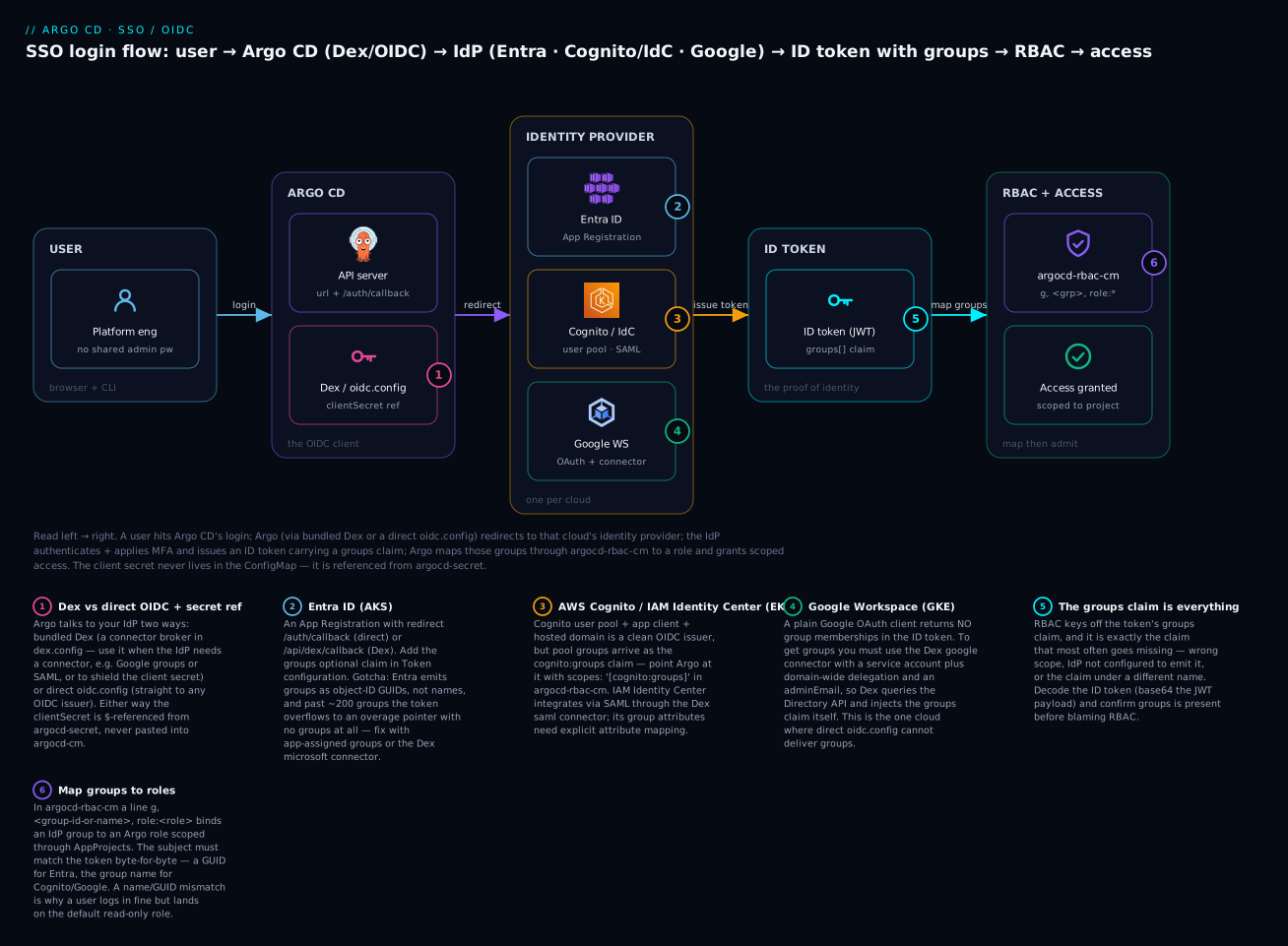
A quick vocabulary anchor, because the error messages you’ll read use these exact words and it helps to know which Argo CD component each maps to:
| OIDC / OAuth term | What it means here |
|---|---|
| Relying party (client) | Argo CD itself — it relies on the IdP to authenticate |
| Authorization endpoint | The IdP URL Argo redirects the browser to for login |
| Token endpoint | The IdP URL Argo calls back-channel to swap the code for tokens |
| Authorization code | A short-lived one-time code returned to the callback |
| ID token | The signed JWT proving identity; carries email, sub, groups |
| Claim | A field inside the token (e.g. groups) |
| Scope | A request for categories of claims (e.g. openid, groups) |
Step by step, here is what actually happens when a user clicks Log in via SSO:
| # | Step | Who does it | What flows |
|---|---|---|---|
| 1 | User opens Argo CD and clicks “Log in via SSO” | Browser → argocd-server |
Redirect begins |
| 2 | Argo CD redirects to the IdP’s authorize endpoint | argocd-server (or Dex) → IdP |
client_id, redirect_uri, scope, state |
| 3 | IdP authenticates the user (password + MFA, conditional access) | IdP | The human proves who they are |
| 4 | IdP redirects back with an authorization code | IdP → /auth/callback (or /api/dex/callback) |
Short-lived code |
| 5 | Argo CD exchanges the code for tokens (back-channel) | argocd-server/Dex → IdP token endpoint |
code + client_secret → ID token + access token |
| 6 | Argo CD validates the ID token’s signature and reads claims | argocd-server |
sub, email, and — critically — groups |
| 7 | RBAC maps the groups claim to an Argo role |
argocd-rbac-cm |
g, <group>, role:x decides access |
| 8 | User lands in the UI with exactly the access their groups grant | argocd-server |
Scoped session (JWT cookie) |
Two things about this flow decide almost every bug you’ll hit. First, step 4’s redirect URI must exactly match what you registered in the IdP — scheme, host, path, all of it — or the IdP refuses at step 3 with a redirect-mismatch error. Second, step 6’s groups claim must actually be in the token. If the IdP wasn’t configured to emit groups (or emitted them under a different name, or dropped them due to overage), the user authenticates perfectly and then lands on the read-only default role, looking for all the world like an RBAC bug when the real problem is three steps upstream in the token itself. Keep both facts close; they explain most of the troubleshooting table later.
The config, field by field
Everything lives in two Kubernetes objects: the argocd-cm ConfigMap (the OIDC/Dex configuration and the url) and the argocd-secret Secret (the actual client secret, referenced — never inlined). Here is a complete, schema-correct direct-OIDC config for Entra ID, which we’ll then dissect:
# argocd-cm — the OIDC config (safe to commit; contains NO secret)
apiVersion: v1
kind: ConfigMap
metadata:
  name: argocd-cm
  namespace: argocd
  labels:
    app.kubernetes.io/name: argocd-cm
    app.kubernetes.io/part-of: argocd
data:
  # The external base URL of Argo CD. Callback URLs are derived from this.
  url: https://argocd.example.com
  oidc.config: |
    name: Entra ID
    issuer: https://login.microsoftonline.com/11111111-2222-3333-4444-555555555555/v2.0
    clientID: aaaaaaaa-bbbb-cccc-dddd-eeeeeeeeeeee
    clientSecret: $oidc.entra.clientSecret       # <-- reference, resolved from argocd-secret
    cliClientID: aaaaaaaa-bbbb-cccc-dddd-eeeeeeeeeeee
    requestedScopes:
      - openid
      - profile
      - email
      - groups
    requestedIDTokenClaims:
      groups:
        essential: true
    # rootCA: |                                  # only for a private IdP with a custom CA
    #   -----BEGIN CERTIFICATE-----
    #   ...
    #   -----END CERTIFICATE-----
The client secret is never in that ConfigMap. It sits in argocd-secret, and the $oidc.entra.clientSecret reference resolves to the key of the same name:
# argocd-secret — the actual secret value (NEVER commit the real value)
apiVersion: v1
kind: Secret
metadata:
  name: argocd-secret
  namespace: argocd
  labels:
    app.kubernetes.io/part-of: argocd
type: Opaque
stringData:
  oidc.entra.clientSecret: <PLACEHOLDER-ENTRA-CLIENT-SECRET>   # from the App Registration
Field by field, here is what each key does and where people go wrong:
Field (oidc.config) |
Required? | What it is | Gotcha |
|---|---|---|---|
name |
Yes | Label shown on the login button | Cosmetic only |
issuer |
Yes | The OIDC issuer URL; Argo fetches <issuer>/.well-known/openid-configuration |
Must match the token’s iss exactly, including /v2.0 on Entra |
clientID |
Yes | The application/client ID from the IdP | — |
clientSecret |
Yes | The client secret — as a $-reference |
Inlining the real value here is the #1 security mistake |
cliClientID |
No | A separate (often public) client ID for the argocd CLI |
Set when the CLI uses a different app registration than the web UI |
requestedScopes |
No | Scopes to request; default ["openid","profile","email","groups"] |
Drop groups and RBAC breaks; some IdPs ignore a groups scope |
requestedIDTokenClaims |
No | Claims to request via the OIDC claims parameter |
Makes groups “essential”; still needs IdP-side config on Entra |
rootCA |
No | PEM CA bundle to trust a private IdP’s TLS cert | Only for on-prem/private issuers with a non-public CA |
logoutURL |
No | IdP endpoint to hit on logout (single logout) | Optional; wire up if your IdP supports RP-initiated logout |
Three fields deserve a closer look because they cause the most confusion.
url is the externally reachable base URL of Argo CD (https://argocd.example.com). Argo CD derives the OAuth redirect_uri from it — <url>/auth/callback for direct OIDC, <url>/api/dex/callback for Dex. If url is missing, wrong, or has the wrong scheme, the redirect_uri Argo sends won’t match what you registered in the IdP, and you’ll get a redirect-mismatch error every time. Set url correctly before you register the callback in your IdP, and copy the callback path exactly.
The redirect / callback URIs differ by path depending on the mechanism, and you register the matching one in the IdP:
| Mechanism | Callback path you register in the IdP | Full example |
|---|---|---|
Direct oidc.config |
/auth/callback |
https://argocd.example.com/auth/callback |
Bundled dex.config |
/api/dex/callback |
https://argocd.example.com/api/dex/callback |
CLI login (argocd login --sso) |
http://localhost:8085/auth/callback |
Local loopback; add it too if you use CLI SSO |
requestedScopes and the groups claim are where OIDC gets slippery. Here’s what each default scope actually buys you:
| Scope | Returns | Notes |
|---|---|---|
openid |
The ID token at all | Mandatory — without it there is no OIDC flow |
profile |
name, preferred_username |
Cosmetic; nice for the UI |
email |
email claim |
Often used as the username subject |
groups |
The groups claim (if the IdP emits it) |
The one RBAC depends on; requesting ≠ receiving |
openid is mandatory; profile and email fill in name and email; groups is the one RBAC needs. But requesting a groups scope does not guarantee a groups claim — whether groups appear in the token is ultimately controlled by the IdP’s configuration. That is the single most important idea in this lesson: the groups claim is emitted by the IdP, on the IdP’s terms, and each cloud has different terms. Which brings us to the core.
The multi-cloud IdP setup (the core)
Argo CD’s config is nearly identical for all three clouds — the same oidc.config or dex.config shape. What differs, and differs a lot, is how you set up the IdP object on each cloud and how you coax it into emitting groups. Here is the master table; the rest of this section is the per-cloud detail behind it.
| Entra ID (AKS) | AWS Cognito (EKS) | AWS IAM Identity Center (EKS) | Google Workspace (GKE) | |
|---|---|---|---|---|
| IdP object you create | App Registration | User Pool + app client + hosted domain | Customer-managed SAML application | OAuth 2.0 Client ID |
| Argo mechanism | Direct oidc.config (or Dex microsoft) |
Direct oidc.config |
Dex saml connector |
Dex google connector |
| Issuer URL | https://login.microsoftonline.com/<tenant>/v2.0 |
https://cognito-idp.<region>.amazonaws.com/<poolId> |
n/a (SAML, not OIDC) | https://accounts.google.com |
| Callback to register | /auth/callback |
/auth/callback |
/api/dex/callback |
/api/dex/callback |
| Groups arrive as | groups claim — GUIDs |
cognito:groups claim |
SAML groups attribute |
groups claim (injected by Dex) |
| How to get groups | Token config → groups optional claim | User-pool groups (automatic) | Attribute mapping in IdC | Service account + domain-wide delegation |
| The gotcha | GUIDs not names; overage past ~200 groups | Claim is cognito:groups, not groups |
IdC barely sends groups; mapping is fiddly | Plain OIDC has no groups; must use the connector |
Entra ID — App Registration (for AKS)
On Azure, the IdP object is an App Registration in Microsoft Entra ID. The setup:
| Step | Where in Entra | What to set |
|---|---|---|
| 1. Register the app | Entra ID → App registrations → New | Name it e.g. argocd-prod |
| 2. Add the redirect URI | Authentication → Add platform → Web | https://argocd.example.com/auth/callback (Web platform) |
| 3. Create a client secret | Certificates & secrets → New client secret | Copy the value immediately (it’s shown once) |
| 4. Emit groups | Token configuration → Add groups claim | Choose Security groups, ID token |
| 5. (optional) Limit groups | Same dialog | “Groups assigned to the application” to dodge overage |
Which groups Entra actually emits is governed by the app manifest’s groupMembershipClaims setting — worth knowing because the right value is also the overage cure:
groupMembershipClaims |
Emits | Reach for it when |
|---|---|---|
None |
No groups claim | You don’t use group-based RBAC |
SecurityGroup |
All security groups the user is in | Default; risks overage in large tenants |
ApplicationGroup |
Only groups assigned to this enterprise app | The clean way to stay under the overage limit |
DirectoryRole |
Entra directory roles | Rare for Argo |
All |
Security groups + directory roles + distribution | Almost never — largest overage risk |
The oidc.config is exactly the Entra block shown earlier. Two Entra-specific traps define this whole cloud:
Groups are GUIDs, not names. Entra’s groups claim contains group object IDs — 12345678-90ab-cdef-1234-567890abcdef — not platform-admins. Your RBAC mapping must therefore use the GUID (covered in the next section). If you want names you’d configure the claim to emit cloud_displayname or switch to Entra App Roles, but the default and most common case is GUIDs. Plan your g, lines around GUIDs.
Group overage. Entra will not put an unbounded list of groups in a token. Past the limit, Entra omits the groups claim entirely and instead inserts a _claim_names / _claim_sources pointer to a Microsoft Graph endpoint where the full list can be fetched. The limits are token-type-specific:
| Token type | Overage threshold | What Entra does past it |
|---|---|---|
| JWT (OIDC/OAuth ID token) | 200 groups | Drops groups; adds _claim_names + _claim_sources (Graph URL) |
| SAML assertion | 150 groups | Same overage indicator instead of the group list |
Argo CD’s direct oidc.config does not call Graph, so an over-the-limit user shows up with no groups at all and lands on the default role. Two fixes: (a) set the groups claim to “Groups assigned to the application” (groupMembershipClaims: ApplicationGroup) so only app-relevant groups are emitted, staying under the limit; or (b) use the Dex microsoft connector, which can call Graph and resolve groups even under overage:
# argocd-cm — Entra via the Dex microsoft connector (survives group overage)
data:
  url: https://argocd.example.com
  dex.config: |
    connectors:
      - type: microsoft
        id: microsoft
        name: Microsoft
        config:
          clientID: $dex.entra.clientID
          clientSecret: $dex.entra.clientSecret
          redirectURI: https://argocd.example.com/api/dex/callback
          tenant: 11111111-2222-3333-4444-555555555555
          # groups here filter which groups Dex fetches via Graph
          groups:
            - platform-admins
            - payments-developers
Note the redirect URI switched to /api/dex/callback — because Dex is now the one talking to Entra. The microsoft connector fetches memberships via Graph, so it survives overage; it still commonly surfaces group IDs, so keep mapping by GUID unless you’ve deliberately arranged names.
AWS — Cognito or IAM Identity Center (for EKS)
AWS gives you two very different front doors, and picking the right one saves hours.
| Cognito user pool | IAM Identity Center | |
|---|---|---|
| Nature | A full OIDC provider | An SSO portal; integrates as SAML |
| Argo mechanism | Direct oidc.config |
Dex saml connector |
| Groups story | Clean — cognito:groups claim |
Weak — limited SAML group attributes |
| Best for | Argo-first / app-centric identity, cleanest groups | Org already standardized on IdC as the front door |
| Setup effort | Low | Higher (SAML app + attribute mapping) |
Cognito is the smoother path when you want reliable groups. Create a user pool, add an app client (with a client secret), and configure a hosted domain so Cognito exposes the OIDC endpoints. Cognito is a compliant OIDC issuer, so Argo talks to it directly:
# argocd-cm — AWS Cognito via direct OIDC
data:
  url: https://argocd.example.com
  oidc.config: |
    name: AWS Cognito
    issuer: https://cognito-idp.ap-south-1.amazonaws.com/ap-south-1_AbCdEfGhI
    clientID: 1example23clientid45678
    clientSecret: $oidc.cognito.clientSecret
    requestedScopes:
      - openid
      - profile
      - email
The Cognito catch: user-pool group memberships arrive in the token under cognito:groups, not groups. Argo CD’s RBAC reads the groups claim by default, so you must tell it to also consider cognito:groups via the scopes key in argocd-rbac-cm:
# argocd-rbac-cm — tell RBAC to match on Cognito's claim name
data:
  scopes: '[cognito:groups, email]'
  policy.csv: |
    g, platform-admins, role:admin
IAM Identity Center is the choice when your org already funnels everything through IdC. It presents to apps as a SAML 2.0 identity provider, which direct OIDC cannot consume — so you go through Dex’s saml connector. Create a customer managed application in IdC, download its SAML metadata, and wire it up:
# argocd-cm — AWS IAM Identity Center via the Dex SAML connector
data:
  url: https://argocd.example.com
  dex.config: |
    connectors:
      - type: saml
        id: aws
        name: AWS IAM Identity Center
        config:
          ssoURL: https://portal.sso.ap-south-1.amazonaws.com/saml/assertion/EXAMPLEID
          caData: <BASE64-ENCODED-IDC-SIGNING-CERT>
          redirectURI: https://argocd.example.com/api/dex/callback
          entityIssuer: https://argocd.example.com/api/dex/callback
          usernameAttr: email
          emailAttr: email
          groupsAttr: groups
The IdC caveat is real and worth stating plainly: IAM Identity Center does not send group memberships in SAML assertions to customer-managed apps out of the box. You configure attribute mappings in the IdC application, and even then the group-passing support is limited compared with Entra or Okta. If groups are central to your Argo RBAC — and they usually are — Cognito is the less painful AWS path. Reach for IdC when the org mandate to centralize on it outweighs the weaker groups story.
Google Workspace — OAuth client + the groups side door (for GKE)
Google is the cloud that most often ambushes people, because a standard Google OIDC token contains no group memberships at all. Google simply does not put Workspace group membership into the ID token via plain OIDC. You can log users in with a direct oidc.config (issuer https://accounts.google.com), but they’ll have zero groups and every one of them lands on the default role.
To get Google Groups you must use the Dex google connector, and the connector must be given a service account with domain-wide delegation plus an admin email, so Dex can query the Google Admin SDK Directory API on the user’s behalf and inject the groups itself:
| Requirement | Why | Where |
|---|---|---|
| OAuth 2.0 Client ID | The login itself | Google Cloud console → Credentials |
| Service account + key (JSON) | Dex uses it to call the Directory API | Google Cloud console → IAM |
| Domain-wide delegation | Lets the SA read group memberships org-wide | Workspace Admin → API controls |
adminEmail |
The admin identity Dex impersonates for the query | A super-admin in your Workspace |
| Mount the SA JSON into Dex | The connector reads it from a file path | Volume from a Secret |
# argocd-cm — Google Workspace with GROUPS via the Dex google connector
data:
  url: https://argocd.example.com
  dex.config: |
    connectors:
      - type: google
        id: google
        name: Google
        config:
          clientID: $dex.google.clientID
          clientSecret: $dex.google.clientSecret
          redirectURI: https://argocd.example.com/api/dex/callback
          hostedDomains:
            - example.com
          # These two switch on group fetching via the Directory API:
          serviceAccountFilePath: /tmp/oidc/googleAuth.json
          adminEmail: super-admin@example.com
The serviceAccountFilePath points at the mounted SA key; without it (and adminEmail), the connector logs users in but returns no groups. On the Helm chart you mount the key by dropping it into a Secret and wiring a volume into the argocd-dex-server pod — fiddly, but it’s the only way Google surfaces groups. Once wired, the injected groups claim contains the group email addresses (e.g. platform-admins@example.com), which is what your g, mapping matches on.
The one-line summary of the whole section: Entra emits GUIDs and overflows past 200 groups; Cognito emits
cognito:groups; IAM Identity Center barely emits groups at all; Google emits none without the Dex service-account connector. Same Argo CD, four different group stories. If SSO “works but RBAC doesn’t”, you are almost always looking at one of these four gotchas.
Mapping groups to Argo CD roles
Authentication is now done — the token arrives with a groups claim. Authorization is a separate step, and it lives in the argocd-rbac-cm ConfigMap. This lesson only needs the group-mapping essentials; the full policy language is in the RBAC lesson.
RBAC has two line types. A p, line is a policy — it grants a permission to a role. A g, line is a grouping — it binds a subject (a user or an IdP group) to a role. SSO connects to RBAC through g, lines:
# argocd-rbac-cm
apiVersion: v1
kind: ConfigMap
metadata:
  name: argocd-rbac-cm
  namespace: argocd
data:
  policy.default: role:readonly          # everyone with no matching group gets this
  scopes: '[groups]'                     # which token claim(s) count as the "subject"
  policy.csv: |
    # define a custom role with policies
    p, role:platform-admin, applications, *, */*, allow
    p, role:platform-admin, clusters, get, *, allow
    p, role:platform-admin, projects, get, *, allow
    # bind an IdP GROUP to that role
    g, platform-admins, role:platform-admin
    # bind another group to a built-in role
    g, payments-developers, role:readonly
| Line | Meaning |
|---|---|
p, role:x, <resource>, <action>, <object>, allow |
Role x may do <action> on <resource>/<object> |
g, <group>, role:x |
Members of IdP group <group> get role x |
g, <user-email>, role:x |
A specific SSO user gets role x |
policy.default |
Fallback role for anyone with no matching g, line |
scopes |
Which token claim(s) supply the subject for g, matching |
The single most common SSO-into-RBAC failure is a subject mismatch: the string in your g, line must match what’s actually in the token, byte for byte. That means the value is cloud-specific:
| Cloud | What the token carries | Your g, line must use |
Example |
|---|---|---|---|
| Entra ID | Group object IDs (GUIDs) | The GUID | g, 12345678-90ab-cdef-1234-567890abcdef, role:platform-admin |
| Cognito | cognito:groups values (group names) |
The group name (+ set scopes: '[cognito:groups]') |
g, platform-admins, role:admin |
| IAM Identity Center | SAML groups attribute values |
Whatever the attribute mapping emits | g, platform-admins, role:admin |
| Google (Dex) | Group email addresses | The full group email | g, platform-admins@example.com, role:admin |
The Entra GUID gotcha deserves its own callout because it looks like a bug. You add g, platform-admins, role:platform-admin, the user logs in fine, and they’re still read-only — because the token never said platform-admins, it said a GUID. The fix is to map by GUID:
  policy.csv: |
    p, role:platform-admin, applications, *, */*, allow
    # Entra: the subject is the group's object ID, NOT its display name
    g, 12345678-90ab-cdef-1234-567890abcdef, role:platform-admin
To find the GUID, either read it off the group in the Entra portal, or — the surest way — log in and decode your own token (next section) to see the exact strings Argo received, then paste those into your g, lines. A short comment next to each GUID (# platform-admins) keeps the file readable, since the GUID itself tells a future reader nothing.
Testing and decoding the token
Never trust SSO until you’ve seen the groups in the token. Two commands do the job.
Log in over SSO from the CLI. argocd login --sso opens a browser for the OIDC flow and, on success, drops a token into your CLI config:
# Trigger the browser-based SSO flow from the CLI
argocd login argocd.example.com --sso --grpc-web
# Opening browser for authentication
# INFO Authentication successful
# 'vinod@example.com' logged in successfully
# Context 'argocd.example.com' updated
--sso starts a local listener (default http://localhost:8085/auth/callback) to catch the redirect — if the browser hangs on the callback, that loopback URL usually needs adding to the IdP’s allowed redirect URIs, or the port is blocked. --grpc-web is the usual companion when Argo sits behind an L7 load balancer (ALB/App Gateway/GCLB), exactly as in the installation lesson.
Confirm who Argo thinks you are. get-user-info shows the identity and, crucially, the groups Argo extracted:
argocd account get-user-info
# Logged In: true
# Username: vinod@example.com
# Issuer: https://login.microsoftonline.com/1111.../v2.0
# Groups: 12345678-90ab-cdef-1234-567890abcdef, abcdef00-1111-2222-3333-444455556666
If Groups: is empty, stop — the problem is in the token, not in RBAC. Prove it by decoding the JWT the CLI stored (it carries the same groups Argo extracted). A JWT is three base64url segments split by dots; the middle segment is the readable payload:
# Grab the stored session token, decode its payload (middle segment)
TOKEN=$(awk '/auth-token/{print $2}' ~/.config/argocd/config | head -1)
echo "$TOKEN" | cut -d. -f2 | base64 -d 2>/dev/null | jq .
A representative decoded Entra payload — note groups are GUIDs:
{
  "iss": "https://login.microsoftonline.com/1111.../v2.0",
  "aud": "aaaaaaaa-bbbb-cccc-dddd-eeeeeeeeeeee",
  "sub": "k1a2B3c4D5...",
  "email": "vinod@example.com",
  "name": "Vinod H",
  "groups": [
    "12345678-90ab-cdef-1234-567890abcdef",
    "abcdef00-1111-2222-3333-444455556666"
  ],
  "exp": 1721145600,
  "iat": 1721142000
}
When you read a decoded token, these are the claims to check and what each one tells you:
| Claim | What to verify | Red flag |
|---|---|---|
iss |
Matches the issuer in your config exactly |
Mismatch → signature/discovery failure |
aud |
Equals your clientID |
Wrong audience → token rejected |
exp / iat |
In the future / recent | Clock skew → “expired”/“not yet valid” |
email / sub |
Identifies the right user | Empty → username-claim misconfig |
groups (or cognito:groups) |
Present and correct | Missing → IdP didn’t emit groups (not an RBAC bug) |
_claim_names present, no groups |
— | Entra overage — switch to app-groups or Dex |
The same decode for Cognito shows the differently-named claim, and for Google-via-Dex the group emails:
// Cognito — groups live under cognito:groups (representative)
{ "email": "vinod@example.com", "cognito:groups": ["platform-admins"], "iss": "https://cognito-idp.ap-south-1.amazonaws.com/ap-south-1_AbCdEfGhI" }

// Google via Dex — groups are email addresses (representative)
{ "email": "vinod@example.com", "groups": ["platform-admins@example.com"], "iss": "https://argocd.example.com/api/dex" }
Seeing the exact strings here is what lets you write correct g, lines: copy the values out of the decoded token and paste them into argocd-rbac-cm. If the claim is present in the token but RBAC still doesn’t apply, now it’s an RBAC problem (wrong scopes, typo in the subject, missing p, policy) — and you’ve cleanly bisected the two halves.
A useful overage tell: if the decoded Entra token has no
groupsarray but does have_claim_namesand_claim_sourceskeys pointing atgraph.microsoft.com, you’ve hit the 200-group overage. That’s your signal to switch to app-assigned groups or the Dexmicrosoftconnector — no amount of RBAC editing will help, because the groups simply aren’t in the token.
Securing the SSO setup
SSO is a security feature, so its own configuration has to be handled with care. The essentials:
| Concern | Do this | Don’t |
|---|---|---|
| Client secret storage | $-reference it from argocd-secret (or an external Secret labeled app.kubernetes.io/part-of: argocd) |
Never inline the real secret in argocd-cm — it’s world-readable to anyone with get cm |
| Secret in Git | Use Sealed Secrets / External Secrets Operator / SOPS for the value | Never commit the plaintext client secret |
| Private / on-prem IdP | Set rootCA with the IdP’s CA bundle |
Don’t disable TLS verification |
| Transport | Serve Argo over HTTPS end to end; url must be https:// |
Don’t run OIDC over plain HTTP in production |
| Secret rotation | Rotate the IdP client secret on a schedule; update argocd-secret |
Don’t let a leaked/expired secret linger — it causes invalid_client |
| Session lifetime | Keep Argo and the IdP clocks in sync (NTP); tokens are time-bound | Clock skew → tokens “not yet valid” / “expired” |
| Least privilege | policy.default: role:readonly; grant elevated roles only via groups |
Don’t default everyone to admin |
The $-reference deserves emphasis because it’s both the security control and a common source of confusion. A value in argocd-cm that begins with $ is a pointer, not the secret: $oidc.entra.clientSecret means “read the key oidc.entra.clientSecret from argocd-secret”. You can also point at a different secret with $<secretName>:<key> — but that external secret must carry the label app.kubernetes.io/part-of: argocd or Argo won’t read it, and the reference resolves to an empty string, which then surfaces as invalid_client from the IdP. When in doubt, keep the secret in argocd-secret and reference it with the simple $key form.
Hands-on lab
There is no cluster and no live IdP on this machine, so this lab is configuration-level: you’ll assemble every object end to end for one cloud (Entra), reference the client secret correctly, request the groups scope, wire the group→role mapping, and then see the Cognito and Google variants as drop-in replacements. The commands are the exact ones you’d run against a real Argo CD; the token decode uses a representative token so you can practise the technique. ⚠️ Never commit a real client secret — every secret below is a placeholder.
For a zero-cost dry run of the mechanics (not a real SSO login, which needs a real IdP), you can apply these to a local kind + Argo CD install; the config will load and the login button will appear, though the actual redirect needs a registered IdP app.
Step 1 — Set the external URL. Everything derives from url. Set it first.
kubectl -n argocd patch cm argocd-cm --type merge \
  -p '{"data":{"url":"https://argocd.example.com"}}'
# configmap/argocd-cm patched
What just happened: Argo now knows its own address, so it can build the correct redirect_uri (https://argocd.example.com/auth/callback). This is the value you register in the IdP.
Step 2 — Store the client secret as a real Secret (placeholder value).
kubectl -n argocd patch secret argocd-secret --type merge \
  -p '{"stringData":{"oidc.entra.clientSecret":"<PLACEHOLDER-ENTRA-CLIENT-SECRET>"}}'
# secret/argocd-secret patched
What just happened: the secret value lives in argocd-secret, not in any ConfigMap. The oidc.config will reference it, never contain it.
Step 3 — Write the Entra oidc.config into argocd-cm. Apply the full config (safe to commit — no secret in it):
# entra-oidc.yaml
apiVersion: v1
kind: ConfigMap
metadata:
  name: argocd-cm
  namespace: argocd
data:
  url: https://argocd.example.com
  oidc.config: |
    name: Entra ID
    issuer: https://login.microsoftonline.com/11111111-2222-3333-4444-555555555555/v2.0
    clientID: aaaaaaaa-bbbb-cccc-dddd-eeeeeeeeeeee
    clientSecret: $oidc.entra.clientSecret
    requestedScopes: ["openid", "profile", "email", "groups"]
    requestedIDTokenClaims:
      groups:
        essential: true
kubectl apply -f entra-oidc.yaml
# configmap/argocd-cm configured
What just happened: Argo CD now advertises an OIDC login. requestedScopes asks for groups, and requestedIDTokenClaims marks it essential — but remember, Entra only emits groups if you added the groups optional claim in the App Registration’s Token configuration.
Step 4 — Map an Entra group (a GUID) to a role in argocd-rbac-cm.
# entra-rbac.yaml
apiVersion: v1
kind: ConfigMap
metadata:
  name: argocd-rbac-cm
  namespace: argocd
data:
  policy.default: role:readonly
  scopes: '[groups]'
  policy.csv: |
    p, role:platform-admin, applications, *, */*, allow
    p, role:platform-admin, clusters, get, *, allow
    # Entra emits GUIDs — map by object ID, not display name
    g, 12345678-90ab-cdef-1234-567890abcdef, role:platform-admin   # platform-admins
kubectl apply -f entra-rbac.yaml
# configmap/argocd-rbac-cm configured
What just happened: members of the Entra group whose object ID is that GUID now get role:platform-admin; everyone else falls to role:readonly. The comment records which group the GUID is.
Step 5 — Restart the server (and Dex, if used) to load the config.
kubectl -n argocd rollout restart deploy/argocd-server
# deployment.apps/argocd-server restarted
# If you used dex.config instead, also: kubectl -n argocd rollout restart deploy/argocd-dex-server
kubectl -n argocd rollout status deploy/argocd-server --timeout=120s
# deployment "argocd-server" successfully rolled out
What just happened: argocd-server re-reads argocd-cm/argocd-secret on restart; the “Log in via Entra ID” button now appears on the login page.
Step 6 — Swap in the other clouds (paired variants). Same objects, different provider block. Cognito is direct OIDC plus the RBAC scopes change:
# argocd-cm data: — AWS Cognito
  oidc.config: |
    name: AWS Cognito
    issuer: https://cognito-idp.ap-south-1.amazonaws.com/ap-south-1_AbCdEfGhI
    clientID: 1example23clientid45678
    clientSecret: $oidc.cognito.clientSecret
    requestedScopes: ["openid", "profile", "email"]
# argocd-rbac-cm data: — Cognito puts groups under cognito:groups
  scopes: '[cognito:groups, email]'
  policy.csv: |
    g, platform-admins, role:platform-admin
Google needs the Dex connector (no groups without it):
# argocd-cm data: — Google Workspace via Dex (groups via service account)
  dex.config: |
    connectors:
      - type: google
        id: google
        name: Google
        config:
          clientID: $dex.google.clientID
          clientSecret: $dex.google.clientSecret
          redirectURI: https://argocd.example.com/api/dex/callback
          hostedDomains: ["example.com"]
          serviceAccountFilePath: /tmp/oidc/googleAuth.json
          adminEmail: super-admin@example.com
# argocd-rbac-cm data: — Google groups are email addresses
  policy.csv: |
    g, platform-admins@example.com, role:platform-admin
What just happened: the Argo-side objects barely changed; only the provider block and the group-subject format differ — exactly the per-cloud reality this lesson keeps hammering.
Step 7 — Log in over SSO and decode the token. Against a real IdP:
argocd login argocd.example.com --sso --grpc-web
# Opening browser for authentication ... logged in successfully
argocd account get-user-info
# Groups: 12345678-90ab-cdef-1234-567890abcdef, ...
Then decode the stored token (the technique from the Testing section) to see the exact group strings, and copy them into your g, lines.
What just happened: you confirmed — from the token itself — that the groups Argo received match the subjects in your g, lines. This is the check that ends most “SSO logs in but I’m read-only” tickets.
Step 8 — Teardown. Remove the SSO config and the placeholder secret, and fall back to local admin:
# Drop the OIDC/Dex config and the group mappings
kubectl -n argocd patch cm argocd-cm --type json \
  -p '[{"op":"remove","path":"/data/oidc.config"}]' 2>/dev/null || true
kubectl -n argocd patch cm argocd-cm --type json \
  -p '[{"op":"remove","path":"/data/dex.config"}]' 2>/dev/null || true
# Remove the placeholder client secret
kubectl -n argocd patch secret argocd-secret --type json \
  -p '[{"op":"remove","path":"/data/oidc.entra.clientSecret"}]' 2>/dev/null || true
# Reload
kubectl -n argocd rollout restart deploy/argocd-server
# (kind only) tear the cluster down entirely
# kind delete cluster --name argocd-lab
What just happened: the SSO login button disappears and Argo CD falls back to the local admin user. Nothing here billed — it was all config in the cluster.
Common mistakes and troubleshooting
The failures below are the ones that actually eat afternoons. The pattern to internalize: SSO problems split into “the login itself broke” (redirect/secret/TLS) and “login worked but access is wrong” (groups/RBAC) — decode the token to know which half you’re in.
| Symptom | Likely cause | Fix |
|---|---|---|
AADSTS50011 / redirect URI mismatch |
url in argocd-cm doesn’t match the IdP’s registered redirect URI |
Set url correctly; register <url>/auth/callback (direct) or <url>/api/dex/callback (Dex) exactly |
invalid_client at the token exchange |
Client secret wrong, expired, or the $-reference resolves empty |
Re-copy the secret into argocd-secret; check the key name matches the $ reference; verify external Secret has the part-of: argocd label |
Logs in fine but user is role:readonly |
Groups claim missing from the token | Decode the token; if no groups, fix the IdP (scope/claim config), not RBAC |
| Entra: groups present but RBAC ignores them | g, line uses the display name; token carries GUIDs |
Map by GUID: g, <object-id>, role:x |
Entra: token has _claim_names/_claim_sources, no groups |
Group overage (>200 groups) — Entra omitted the claim | Use “groups assigned to the application”, or the Dex microsoft connector (calls Graph) |
| Cognito: groups exist in token but RBAC blind to them | Cognito uses cognito:groups, not groups |
Set scopes: '[cognito:groups]' in argocd-rbac-cm |
| Google: login works, zero groups ever | Plain OIDC returns no Google groups | Use the Dex google connector with a service account + domain-wide delegation + adminEmail |
x509: certificate signed by unknown authority to the IdP |
Private/on-prem IdP with a non-public CA | Add the CA bundle via rootCA in oidc.config |
| Dex vs direct confusion — callback 404s | Registered /auth/callback but using Dex (or vice-versa) |
Match the path to the mechanism: Dex = /api/dex/callback |
argocd login --sso hangs on the browser callback |
Loopback redirect URI not allowed, or port blocked | Add http://localhost:8085/auth/callback to the IdP; free/change the port |
| Token “not yet valid” / “expired” immediately | Clock skew between Argo and the IdP | Sync NTP on the nodes; tokens are time-bound |
| SAML (IdC) login works, no groups | IdC not mapping a groups attribute | Configure attribute mapping in the IdC app; set groupsAttr in the Dex connector |
Three of these deserve extra words because they masquerade as different problems than they are.
1. “SSO is broken” is usually “groups didn’t arrive.” By far the most reported failure is a user who logs in perfectly and then can’t see anything — and the instinct is to rewrite RBAC. But if argocd account get-user-info shows an empty Groups: line, or a token decode shows no groups array, RBAC is innocent — the groups never made it into the token. That’s an IdP-side problem: scope not requested, claim not configured (Entra token config, Cognito membership, Google’s missing connector), or overage. Always bisect with a token decode before touching a single p, or g, line.
2. The Entra GUID trap looks exactly like an RBAC typo. You write g, platform-admins, role:admin, it doesn’t work, you assume you fumbled the syntax. The syntax is fine — the subject is wrong, because Entra’s token says 12345678-…, not platform-admins. This is the single most common Entra-specific stumble, and the cure is always: decode the token, copy the GUID, paste it into the g, line, add a comment naming the group.
3. Never inline the client secret. Under deadline pressure people paste the raw client secret into oidc.config “just to test.” argocd-cm is a ConfigMap — anyone with get configmap in the namespace can read it, and it often ends up in Git. The $-reference costs one extra line and keeps the secret in argocd-secret (or an external labeled Secret managed by Sealed Secrets / ESO / SOPS). Treat an inlined secret as already leaked: rotate it in the IdP and move it to argocd-secret.
Cheat-sheet
The fields, per-cloud setup, and mappings you’ll reach for constantly.
oidc.config / dex.config fields (in argocd-cm):
| Field | Applies to | What it does |
|---|---|---|
url (top-level) |
Both | External base URL; callback URLs derive from it |
name |
oidc | Login-button label |
issuer |
oidc | OIDC issuer URL (.well-known discovery) |
clientID |
oidc / connector | App/client ID |
clientSecret |
oidc / connector | $-reference into argocd-secret |
cliClientID |
oidc | Separate client for the CLI |
requestedScopes |
oidc | Scopes; include groups for RBAC |
requestedIDTokenClaims |
oidc | Request specific claims (e.g. groups essential) |
rootCA |
oidc | Trust a private IdP’s CA |
connectors[].type |
dex | oidc / microsoft / google / saml / ldap |
redirectURI |
connector | Must be <url>/api/dex/callback |
serviceAccountFilePath + adminEmail |
dex google | Switch on Google Groups fetching |
groupsAttr |
dex saml | Which SAML attribute holds groups |
Per-cloud IdP setup at a glance:
| Cloud | IdP object | Mechanism | Groups arrive as | Key gotcha |
|---|---|---|---|---|
| Entra (AKS) | App Registration | Direct OIDC / Dex microsoft |
groups (GUIDs) |
GUIDs + overage >200 |
| Cognito (EKS) | User pool + app client | Direct OIDC | cognito:groups |
Set RBAC scopes |
| IAM IdC (EKS) | SAML app | Dex saml |
SAML groups attr |
Weak group support |
| Google (GKE) | OAuth client | Dex google |
groups (emails) |
Needs SA + delegation |
Group mapping (argocd-rbac-cm):
| Task | Syntax |
|---|---|
| Bind group → role | g, <group-id-or-name>, role:x |
| Bind user → role | g, <user-email>, role:x |
| Define a role’s powers | p, role:x, applications, *, */*, allow |
| Default role | policy.default: role:readonly |
| Match a non-standard claim | scopes: '[cognito:groups, email]' |
Commands:
| Task | Command |
|---|---|
| SSO login (CLI) | argocd login <host> --sso --grpc-web |
| Show identity + groups | argocd account get-user-info |
| Decode a JWT payload | echo "$T" | cut -d. -f2 | base64 -d | jq . |
| Reload after config change | kubectl -n argocd rollout restart deploy/argocd-server |
| Reload Dex | kubectl -n argocd rollout restart deploy/argocd-dex-server |
| Read applied SSO config | kubectl -n argocd get cm argocd-cm -o yaml |
Interview and exam questions
Q: Why is SSO worth the setup effort over the built-in admin user?
A: The local admin is a shared credential — no per-user attribution, no revocation without breaking everyone, and it bypasses the IdP’s MFA and conditional access. SSO makes people log in as themselves through the IdP, brings MFA/conditional-access/device policies along for free, attributes every action to a real user, and — the big one — carries group memberships into the token so RBAC is driven by IdP groups. Offboarding becomes “disable the user in the IdP once.”
Q: What’s the difference between Argo CD’s direct oidc.config and bundled Dex?
A: oidc.config has argocd-server talk straight to a compliant OIDC provider (callback /auth/callback). Dex is a broker pod that uses connectors to talk to the upstream (callback /api/dex/callback) and can handle SAML, LDAP, and Google-with-groups — things direct OIDC can’t. Use direct OIDC by default; use Dex when the IdP is SAML-only (IAM Identity Center) or you need Google Groups.
Q: You configured SSO, the user logs in successfully, but they only have read-only access. Walk through the diagnosis.
A: Split login from authorization. Run argocd account get-user-info or decode the ID token. If Groups: is empty, the problem is the token (IdP didn’t emit groups — scope/claim/overage), not RBAC. If groups are present but RBAC ignores them, it’s a subject mismatch: wrong scopes claim name, or the g, subject doesn’t match the token value (classically, Entra GUIDs vs display names).
Q: How does Microsoft Entra ID represent groups in the token, and why does that surprise people?
A: As group object IDs (GUIDs), not display names. So g, platform-admins, role:admin silently fails — you must map by GUID: g, <object-id>, role:admin. Find the GUID in the portal or by decoding your own token.
Q: What is Entra “group overage” and how do you handle it in Argo CD?
A: Past ~200 groups (150 for SAML), Entra omits the groups claim and instead adds _claim_names/_claim_sources pointing to Microsoft Graph. Argo’s direct OIDC doesn’t call Graph, so the user shows no groups. Fix by emitting only groups assigned to the application (groupMembershipClaims: ApplicationGroup) to stay under the limit, or use the Dex microsoft connector, which calls Graph and resolves groups even under overage.
Q: For EKS, when would you choose Cognito vs IAM Identity Center?
A: Cognito is a full OIDC provider with a clean groups story — user-pool groups come through as cognito:groups (point RBAC at it with scopes). IAM Identity Center integrates as SAML (via Dex’s saml connector) and has weak, fiddly group support. Choose Cognito when you want reliable groups; choose IdC when the org has standardized on it as the front door and you can live with the group limitations.
Q: Cognito login works and users are in groups, but RBAC never matches. What’s wrong?
A: Cognito emits groups under the cognito:groups claim, but Argo CD’s RBAC matches the groups claim by default. Add scopes: '[cognito:groups, email]' to argocd-rbac-cm so RBAC uses the Cognito claim name as the subject.
Q: Why can’t you get Google Workspace groups with a plain oidc.config, and what’s required instead?
A: Google does not put Workspace group memberships in a standard OIDC ID token. You must use the Dex google connector configured with a service account that has domain-wide delegation plus an adminEmail, so Dex queries the Admin SDK Directory API and injects a groups claim (the group email addresses). No service account, no groups.
Q: How do you keep the client secret out of harm’s way?
A: Put the real value in argocd-secret (or an external Secret labeled app.kubernetes.io/part-of: argocd) and reference it from argocd-cm with a $ pointer (clientSecret: $oidc.entra.clientSecret). Never inline it in the ConfigMap — it’s readable by anyone with get cm and tends to leak into Git. Manage the value with Sealed Secrets / ESO / SOPS.
Q: What does the url setting have to do with SSO, and what breaks if it’s wrong?
A: Argo derives the OAuth redirect_uri from url (<url>/auth/callback or <url>/api/dex/callback). If url is missing or wrong, the redirect URI Argo sends won’t match the one registered in the IdP, and every login fails with a redirect-mismatch error.
Q: A user reports argocd login --sso opens the browser but never completes. What are the usual causes?
A: The CLI starts a local loopback listener (default http://localhost:8085/auth/callback) to catch the redirect. If that loopback URI isn’t in the IdP’s allowed redirect URIs, or the local port is blocked/in use, the callback never returns. Add the loopback URI to the IdP and ensure the port is free; add --grpc-web if Argo is behind an L7 load balancer.
Q: How do you prove, definitively, that the right groups reached Argo CD?
A: Decode the ID token. It’s a JWT; base64url-decode the middle segment and inspect the groups (or cognito:groups) claim: echo "$TOKEN" | cut -d. -f2 | base64 -d | jq .. The exact strings you see there are what your g, lines must match — copy them straight in.
Key takeaways
- SSO replaces the shared admin password with per-user identity from your IdP — bringing MFA, conditional access, audit attribution, one-step offboarding, and, above all, group-based RBAC.
- Two mechanisms, one decision: direct
oidc.config(callback/auth/callback) for clean OIDC providers, or bundled Dex (/api/dex/callback) when you need SAML (IAM Identity Center) or Google Groups. Configure one per provider, not both. - The groups claim is the crux, and every cloud handles it differently: Entra emits GUIDs and overflows past 200 groups; Cognito uses
cognito:groups; IAM Identity Center barely sends groups; Google sends none without the Dex service-account connector. - Map groups to roles with
g, <subject>, role:xinargocd-rbac-cm, and match the subject to what the token actually carries — a GUID for Entra, a name for Cognito, an email for Google. - Always keep the client secret as a
$-reference intoargocd-secret(or an external labeled Secret); never inline it inargocd-cm, and manage the value with Sealed Secrets / ESO / SOPS. Placeholders only in Git. - Debug by bisecting login vs authorization:
argocd account get-user-infoand a token decode tell you whether the groups arrived. If they didn’t, it’s an IdP problem; if they did but access is wrong, it’s an RBAC subject mismatch. urlmust be right first — the callback URIs derive from it, and a wrongurlis the most common redirect-mismatch failure.