Every other lesson in this course has been about making the desired state of your cluster live in Git, where it can be reviewed, diffed, reverted, and reconciled. Secrets break that model — and they break it in a way that is genuinely dangerous, not merely inconvenient. A database password, a TLS private key, an API token: these belong in the cluster, but they must never land in a Git repository in readable form. Git is replicated to every laptop that clones it, cached by CI runners, mirrored to backups, and often pushed to a hosted provider you do not control. Commit a secret once and it is effectively public forever, because Git history is immutable by design and a git push --force does not un-ring the bell.
So how do secrets flow in a pull-based GitOps system, where the whole premise is “if it isn’t in Git, it isn’t real”? That is the question this lesson answers. There are four mainstream approaches, and they make genuinely different trade-offs about where the ciphertext lives, where the decryption key lives, and how big the blast radius is when something leaks. We will compare them honestly — no single tool wins every axis — and then go deep on the one most cloud-native platforms converge on: the External Secrets Operator (ESO) pulling from your cloud’s secret manager. That is where the multi-cloud reality lives, so we cover Azure Key Vault on AKS, AWS Secrets Manager on EKS, and Google Secret Manager on GKE with a per-cloud table, paired SecretStore manifests, and the matching ExternalSecret.
One rule governs every code block below, and it is not negotiable: there is never a real plaintext secret here — every token, password, and key is a labelled placeholder. That is not just good manners; it is the exact discipline the lesson is teaching. If you have already worked through Connecting Repositories: HTTPS, SSH, Private Repos, Credential Templates, you saw every registry credential written as PLACEHOLDER_. This lesson is where those placeholders finally get a real home.
Why this matters
Picture the moment a new engineer, three days into the job, needs their service to read a database. They know GitOps means “put it in Git,” so they write a Secret manifest with the password in it, base64-encode it because Kubernetes wants data: in base64, feel a flicker of “is this encryption?”, decide it looks scrambled enough, and open a pull request. A reviewer who is skimming approves it. It merges. Argo CD syncs it. It works.
It also just leaked a production database password to everyone with read access to the repo, to the CI system’s logs, to every fork, and to the company’s off-site Git backup. base64 is an encoding, not encryption — echo aHVudGVyMg== | base64 -d reveals hunter2 to anyone, no key required. There is no password on base64. It exists so binary bytes survive being pasted into YAML, nothing more.
This is not a rare mistake. It is one of the most common ways credentials leak in the entire industry, precisely because GitOps encourages putting configuration in Git and a Secret looks like just more configuration. The whole point of this lesson is to give you a correct mental model so you never make it, and a correct toolchain so your teammates cannot make it either.
The mental model is one sentence: the secret material and the Git repository must never occupy the same place in plaintext — so either you encrypt the value before it enters Git (and keep the key out of Git), or you keep only a reference in Git and let an in-cluster operator fetch the real value at runtime. Every approach in this lesson is one of those two shapes. Sealed Secrets and SOPS encrypt-then-commit. ESO and Vault keep-a-reference-and-fetch. Get that dichotomy and the rest is detail.
| The instinct | What actually happens | The correct move |
|---|---|---|
| “base64 hides it” | base64 is reversible with zero key — it’s plaintext with extra steps | Encrypt (Sealed Secrets/SOPS) or reference (ESO/Vault) |
| “the repo is private” | Private repos are cloned, forked, backed up, and read by CI | Never rely on repo ACLs as the only control on a secret |
“I’ll git rm it later” |
History is immutable; the old commit still holds the secret | Treat any committed secret as compromised — rotate it |
| “it’s just a dev password” | Dev creds pivot to prod, and habits set in dev ship to prod | Same discipline everywhere; no plaintext, ever |
The core problem: Git is not a secret store
Before comparing tools, be precise about why the naive path fails, because each approach is a different answer to a specific defect.
A Kubernetes Secret is, on the wire and at rest in etcd, just a key/value object whose values are base64-encoded. It is not encrypted at rest unless you separately configure etcd encryption, and its base64 wrapping provides no confidentiality at all. When you write that object into a Git repo, three independent bad things happen at once:
- Confidentiality is lost immediately. Anyone who can read the repo can read the secret. Repo read access is almost always far broader than secret access should be.
- The exposure is permanent. Git history keeps every version of every file. Deleting the secret in a later commit leaves it in the history; recovering requires a history rewrite (
git filter-repo) and invalidates every clone, and even then you must assume it was already copied. - The blast radius is the whole repo’s audience. CI runners, forks, mirrors, and backups all now hold the secret. You cannot enumerate who has it.
So the requirement is sharp: the plaintext secret value must never be committed. From there, exactly two architectures satisfy it.
| Architecture | How Git stays clean | Where the real secret lives | Representative tools |
|---|---|---|---|
| Encrypt-then-commit | Only ciphertext is committed; the decryption key is held elsewhere | Encrypted, inside Git — recoverable only with the out-of-band key | Sealed Secrets, SOPS |
| Reference-and-fetch | Only a pointer/reference is committed; it names, but does not contain, the secret | In an external secret store, fetched into the cluster at runtime | External Secrets Operator, Vault |
Both are valid. The choice between them — and between the specific tools inside each — is what the next sections make concrete. Here is the whole picture end to end; read it left to right and notice the two lanes that both keep plaintext out of Git.
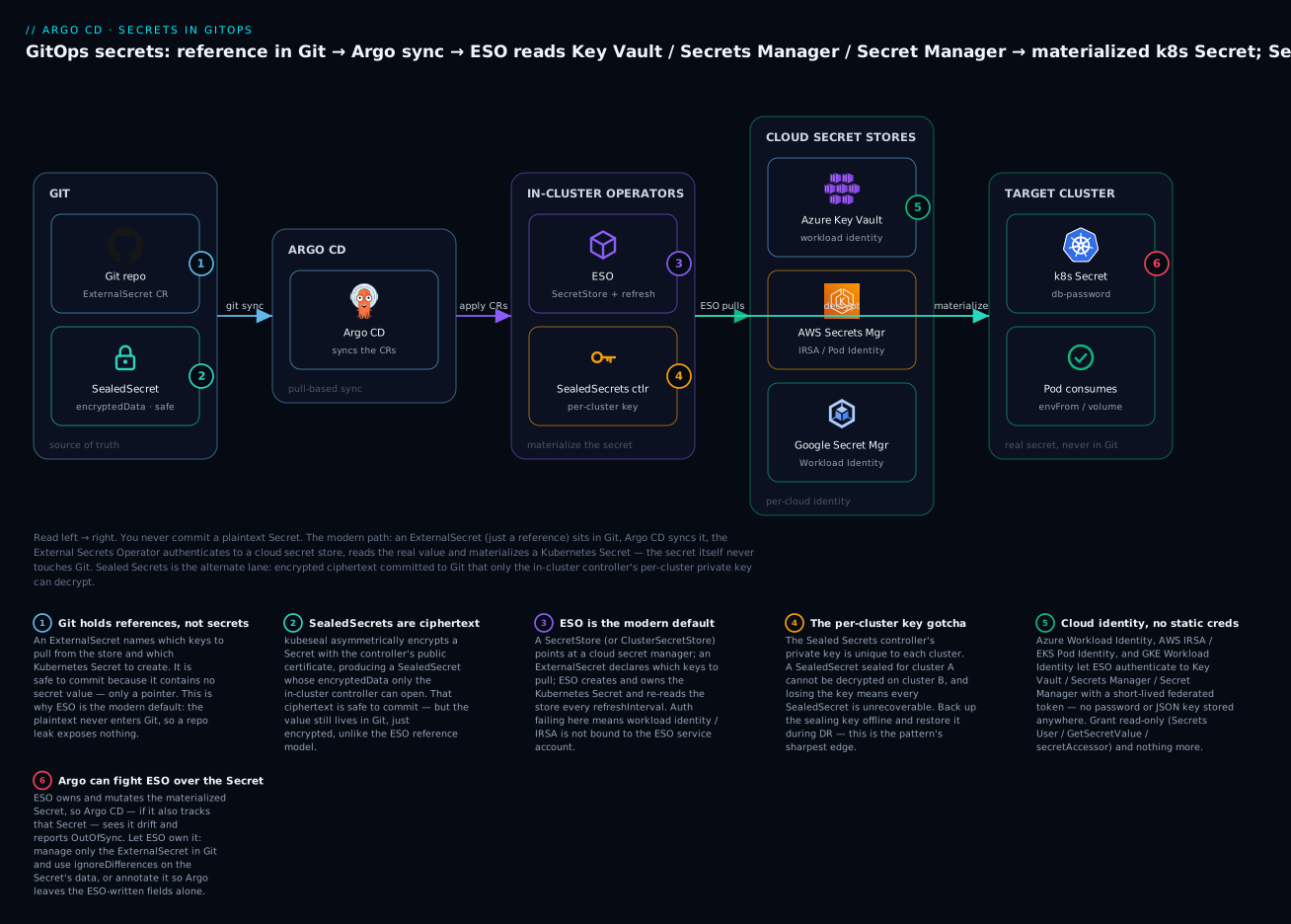
The badges mark the six decisions that decide whether your secrets stay safe: an ExternalSecret is a reference, not a value (1); a SealedSecret is committable ciphertext (2); ESO is the modern default because the plaintext never touches Git (3); the Sealed Secrets private key is per-cluster and must be backed up (4); cloud workload identity means no stored credential at all (5); and ESO owning the materialized Secret can make Argo report it OutOfSync unless you tell Argo to leave it alone (6). The rest of the lesson is those six ideas, in depth.
The four approaches, compared honestly
This is the table to screenshot. It compares the four mainstream approaches across the axes that actually decide an architecture: where the ciphertext lives, where the key lives, the blast radius of a compromise, how rotation works, how it behaves across many clusters, and the ongoing operational burden. No tool wins every column — the point is to see the trade, not to crown a winner.
| Axis | Sealed Secrets | External Secrets Operator (ESO) | SOPS | HashiCorp Vault |
|---|---|---|---|---|
| Shape | Encrypt-then-commit | Reference-and-fetch | Encrypt-then-commit | Reference-and-fetch |
| Where ciphertext lives | In Git (SealedSecret CRD) |
Not in Git — only a reference | In Git (encrypted values in YAML/JSON) | Not in Git — only a reference |
| Where the key lives | Controller’s private key, in the cluster | Cloud secret store + cloud IAM | age/PGP/KMS key, out of band | Vault’s own storage + unseal keys |
| Blast radius if Git leaks | None (ciphertext only) | None (reference only) | None (ciphertext only) | None (reference only) |
| Blast radius if the key leaks | Every SealedSecret in that cluster | Everything the IAM identity can read | Everything encrypted to that key | Depends on token/policy scope |
| Rotation of a value | Re-seal and commit a new ciphertext | Change it in the store; ESO re-pulls | Re-encrypt and commit | Change in Vault; consumer re-reads |
| Dynamic (short-lived) secrets | No | No (static values only) | No | Yes — DB creds, cloud creds on demand |
| Multi-cluster story | Weak — key is per-cluster | Strong — one store, many clusters | Medium — same key everywhere | Strong — one Vault, many clusters |
| Cloud dependency | None | Yes — a cloud secret manager (or Vault) | None (or a cloud KMS if you choose) | Runs Vault (self-host or HCP) |
| Ops burden | Low — one controller | Medium — operator + per-cloud identity | Medium — key distribution to the plugin | High — run and secure Vault |
| Best when | Simple, no cloud dependency wanted | Cloud-native, multi-cluster | Git-native encryption, few tools | Dynamic secrets, heavy compliance |
A few honest observations that the table compresses:
- “Blast radius if Git leaks” is
Nonefor all four. That is the whole game — every serious approach makes a repo leak a non-event for secrets. The differentiator is the second row: what happens if the key leaks. Sealed Secrets concentrates risk in one per-cluster key; ESO and Vault push it into cloud IAM where it is auditable and revocable; SOPS spreads it to wherever the age/KMS key is trusted. - Only Vault does dynamic secrets. If your compliance regime wants database credentials that live for an hour and are unique per pod, none of the other three can do it — they manage static values. That single capability is why regulated shops run Vault despite its operational weight.
- ESO’s “medium ops burden” is mostly the per-cloud identity plumbing — workload identity, IRSA, Pod Identity. Once that is wired, day-to-day use is trivial. That plumbing is exactly the multi-cloud core of this lesson.
Approach 1: Sealed Secrets
Sealed Secrets, from Bitnami, is the simplest correct answer and a great first step off the plaintext cliff. The model is asymmetric encryption you can reason about in one breath: a controller runs in your cluster and holds a private key; it publishes the matching public certificate; you use the kubeseal CLI to encrypt a normal Secret into a SealedSecret custom resource using that public cert; the SealedSecret is safe to commit because only the controller’s private key can decrypt it; Argo CD syncs the SealedSecret; the controller notices it, decrypts it, and creates the real Secret in the same namespace.
# db-sealedsecret.yaml — SAFE to commit. encryptedData is ciphertext, not plaintext.
apiVersion: bitnami.com/v1alpha1
kind: SealedSecret
metadata:
  name: db-credentials
  namespace: production
spec:
  encryptedData:
    password: AgBy3i4OJSWK+PiTySYZZA9rO43cGDEQAx3xY8...PLACEHOLDER_CIPHERTEXT
    username: AgCf9k2mQ1p8sVr7wZ...PLACEHOLDER_CIPHERTEXT
  template:
    metadata:
      name: db-credentials      # the Secret the controller will create
      namespace: production
    type: Opaque                # the resulting Secret's type
The template block is not decoration — it defines the Secret the controller emits (its name, namespace, type, labels, annotations). The encryptedData values are per-key ciphertext. You never write those by hand; kubeseal produces them.
Scopes — the sharp edge most people miss. By default a SealedSecret is bound to both its name and namespace: the ciphertext for db-credentials in production cannot be decrypted if you rename it or move it. That “strict” scope is a security feature — it stops someone copying your sealed value into a namespace they control and reading it via a Secret they can mount. Two looser scopes exist for when you need portability.
| Scope | How to select it | What the ciphertext is bound to | Use when |
|---|---|---|---|
strict (default) |
nothing — it’s the default | Exact name and namespace | Almost always; tightest blast radius |
namespace-wide |
annotation sealedsecrets.bitnami.com/namespace-wide: "true" |
Namespace only (any name) | You rename secrets but keep them in one namespace |
cluster-wide |
annotation sealedsecrets.bitnami.com/cluster-wide: "true" |
Nothing (any name, any namespace) | Rare; you accept the widest reuse |
The per-cluster key: the backup/DR gotcha you must internalise. The controller’s private key is generated in the cluster and lives as a Secret in the controller’s namespace. It is unique to that cluster. This has two consequences that bite hard:
- A
SealedSecretsealed against cluster A’s public cert cannot be decrypted on cluster B. So aSealedSecretin Git is not portable across clusters — the opposite of what multi-cluster GitOps wants. To reuse it you must copy the sealing key (which centralises risk) or re-seal per cluster. - If you lose the sealing key, every
SealedSecretin that cluster is permanently unrecoverable. A rebuilt cluster with a fresh controller gets a fresh key and cannot read any of your committed ciphertext.
The mitigation is a disciplined backup of the sealing key, stored offline and encrypted — never in Git:
# Back up the ACTIVE sealing key. Store this OFFLINE and encrypted (e.g. in your
# cloud KMS or a vault) — it is the master key for every SealedSecret in the cluster.
kubectl get secret -n kube-system \
  -l sealedsecrets.bitnami.com/sealing-key=active \
  -o yaml > sealed-secrets-master-PLACEHOLDER.key
# secret/sealed-secrets-keyXXXXX  (contains the RSA private key — treat as top secret)

# Restore on a new cluster BEFORE relying on it: apply the key, then restart the
# controller so it adopts the restored key instead of generating a new one.
kubectl apply -f sealed-secrets-master-PLACEHOLDER.key
kubectl -n kube-system rollout restart deploy sealed-secrets
| Sealed Secrets fact | Detail |
|---|---|
| CRD | bitnami.com/v1alpha1, kind: SealedSecret |
| Controller default namespace | kube-system (manifest install) or wherever the Helm release lands |
| CLI | kubeseal — encrypts a Secret into a SealedSecret |
| Key type | RSA-OAEP; private key held in-cluster, public cert published |
| Sealing key label | sealedsecrets.bitnami.com/sealing-key=active |
| Key renewal | Controller rotates the sealing key every 30 days by default; old keys are retained to decrypt old SealedSecrets |
| What’s safe to commit | The SealedSecret only — never the sealing key |
Sealed Secrets is the right first tool for a small team with no cloud secret manager and one or few clusters. Its whole cost is concentrated in one operational duty: back up the sealing key and know how to restore it. Teams that skip that duty discover it the hard way during a cluster rebuild, when a directory full of committed
SealedSecretfiles suddenly decrypts to nothing.
Approach 2: External Secrets Operator (ESO)
ESO is where most cloud-native platforms land, and for a clean reason: the secret never enters Git at all — not even as ciphertext. You commit a reference that says “there is a secret called db-password in my cloud’s secret manager; pull it into a Kubernetes Secret called db-credentials.” ESO, running in the cluster with a cloud identity, does the pulling. Git holds a pointer; the value lives in Key Vault / Secrets Manager / Secret Manager where it is already audited, versioned, and access-controlled by cloud IAM.
ESO introduces two custom resources you must know cold.
| CRD | Scope | What it declares |
|---|---|---|
SecretStore |
Namespaced | Where to fetch from and how to authenticate — one cloud store, one namespace |
ClusterSecretStore |
Cluster-wide | The same, but usable by ExternalSecrets in any namespace |
ExternalSecret |
Namespaced | Which keys to pull and which Kubernetes Secret to create |
PushSecret |
Namespaced | The reverse — push a Kubernetes Secret into the store (less common) |
A SecretStore is the “how do I reach the store, and who am I” object; an ExternalSecret is the “what do I want, and where do I put it” object. They pair up. Here is the provider-agnostic ExternalSecret — the same shape regardless of cloud, because all the cloud-specific detail lives in the SecretStore it references:
# externalsecret.yaml — a REFERENCE, safe to commit. No secret value anywhere in it.
apiVersion: external-secrets.io/v1
kind: ExternalSecret
metadata:
  name: db-credentials
  namespace: production
spec:
  refreshInterval: 1h                 # how often ESO re-reads the store
  secretStoreRef:
    name: cloud-store                 # the SecretStore below
    kind: SecretStore                 # or ClusterSecretStore
  target:
    name: db-credentials              # the k8s Secret ESO will create/own
    creationPolicy: Owner             # Owner | Merge | Orphan | None
  data:
    - secretKey: password             # key in the resulting k8s Secret
      remoteRef:
        key: db-password              # name/path of the secret in the cloud store
        # property: password          # if the stored secret is JSON, pick a field
The result is an ordinary Secret named db-credentials, created and owned by ESO, that your pods consume exactly as they would any Secret. Your workloads never know a cloud store was involved. One ordering caveat: the Secret must exist before the Deployment that mounts it, or the pod fails to start with CreateContainerConfigError. When ESO and the workload sync together, order them with sync waves — put the ExternalSecret in an earlier wave so ESO has materialized the Secret before the app’s wave applies.
creationPolicy — who owns the target Secret, which matters for how Argo CD treats it (more in troubleshooting):
creationPolicy |
Behaviour |
|---|---|
Owner (default) |
ESO creates the Secret and owns it (owner-reference to the ExternalSecret); deleting the ExternalSecret deletes the Secret |
Merge |
The Secret must already exist; ESO merges keys in but does not own it |
Orphan |
ESO creates the Secret but does not set an owner-reference (survives ExternalSecret deletion) |
None |
ESO does not create a Secret — useful with target.template for other outputs |
Pulling many keys at once with dataFrom. When a stored secret is a JSON blob with several fields (a common pattern — one Secrets Manager entry holding {"username":...,"password":...,"host":...}), dataFrom extracts them all without listing each:
spec:
  dataFrom:
    - extract:
        key: db-connection            # a JSON secret; every top-level field becomes a key
Status you will read constantly. kubectl get externalsecret shows a STATUS and READY column. Healthy is SecretSynced / True:
kubectl get externalsecret -n production
# NAME            STORE        REFRESH  STATUS         READY
# db-credentials  cloud-store  1h       SecretSynced   True
ExternalSecret condition |
Meaning | Typical cause when bad |
|---|---|---|
Ready=True, reason SecretSynced |
Value pulled and Secret written | — |
Ready=False, reason SecretSyncedError |
Could not fetch/build the Secret | Wrong remoteRef.key, store unreachable |
| No status / stuck | Controller can’t reach the store | SecretStore auth failing (identity not bound) |
refreshInterval is the heartbeat: ESO re-reads the store on that cadence and updates the Secret if the value changed. Set it deliberately — it is the knob that decides how fast a rotated secret propagates, covered in the rotation section.
The multi-cloud edge: SecretStores for Key Vault, Secrets Manager & Secret Manager
This is the heart of the lesson. ESO is cloud-agnostic in its ExternalSecret, but the SecretStore — specifically how ESO authenticates to the cloud — is where AKS, EKS and GKE genuinely differ. Each cloud has a native, keyless way to give a Kubernetes ServiceAccount a cloud identity, and using it is the whole point: no static credential is stored anywhere, not in Git, not in a Secret, nowhere. ESO’s pod presents a short-lived federated token and the cloud hands back the secret.
Here is the per-cloud reality — the reference table you will return to:
| Azure Key Vault (AKS) | AWS Secrets Manager (EKS) | Google Secret Manager (GKE) | |
|---|---|---|---|
| ESO provider key | azurekv |
aws (service: SecretsManager) |
gcpsm |
| Keyless auth mechanism | Azure Workload Identity (OIDC federation) | IRSA (OIDC) or EKS Pod Identity | GKE Workload Identity |
| What binds to what | ESO KSA → Entra managed identity | ESO KSA → IAM role | ESO KSA → Google service account |
| How the KSA is marked | annotation azure.workload.identity/client-id + pod label |
annotation eks.amazonaws.com/role-arn (IRSA) |
annotation iam.gke.io/gcp-service-account |
| Read-only grant to give | Key Vault Secrets User (RBAC) or get/list access policy |
secretsmanager:GetSecretValue, DescribeSecret |
roles/secretmanager.secretAccessor |
| Store address in the CR | vaultUrl: https://<vault>.vault.azure.net |
region: <region> |
projectID: <project> |
| The gotcha | Access policy vs RBAC mode confusion — grant on the model the vault uses | IRSA needs the OIDC provider on the cluster; Pod Identity needs the agent add-on | KSA↔GSA binding and the KSA annotation are both required |
And the binding chain, made explicit, because “auth failing” almost always means one link here is missing:
| Cloud | Bind this | To this | Via | Then annotate/label |
|---|---|---|---|---|
| AKS | external-secrets ServiceAccount |
User-assigned managed identity | Federated credential, subject system:serviceaccount:external-secrets:external-secrets |
KSA: azure.workload.identity/client-id; pod: azure.workload.identity/use: "true" |
| EKS (IRSA) | external-secrets ServiceAccount |
IAM role with a trust policy for the cluster OIDC provider | OIDC federation | KSA: eks.amazonaws.com/role-arn: arn:aws:iam::<acct>:role/<role> |
| EKS (Pod Identity) | external-secrets ServiceAccount |
IAM role | Pod Identity association (aws eks create-pod-identity-association) |
No annotation needed; the Pod Identity agent injects creds |
| GKE | external-secrets KSA |
Google service account | roles/iam.workloadIdentityUser on <proj>.svc.id.goog[external-secrets/external-secrets] |
KSA: iam.gke.io/gcp-service-account: <gsa>@<proj>.iam.gserviceaccount.com |
Now the paired SecretStore manifests. Notice that only the provider block changes — the rest of the ESO model is identical across clouds.
Azure Key Vault (AKS)
# secretstore-azure.yaml — Azure Key Vault via Azure Workload Identity (no stored secret)
apiVersion: external-secrets.io/v1
kind: SecretStore
metadata:
  name: cloud-store
  namespace: production
spec:
  provider:
    azurekv:
      authType: WorkloadIdentity        # WorkloadIdentity | ManagedIdentity | ServicePrincipal
      vaultUrl: "https://kv-acme-prod.vault.azure.net"
      serviceAccountRef:
        name: external-secrets          # KSA federated to the managed identity
# Pre-req: federate the ESO ServiceAccount to a managed identity with Key Vault read.
az identity create -g rg-gitops -n id-eso
PRINCIPAL=$(az identity show -g rg-gitops -n id-eso --query principalId -o tsv)
az role assignment create --assignee "$PRINCIPAL" \
  --role "Key Vault Secrets User" \
  --scope $(az keyvault show -n kv-acme-prod --query id -o tsv)
az identity federated-credential create --identity-name id-eso -g rg-gitops \
  --name eso --issuer "$(az aks show -g rg-aks -n aks-prod \
    --query oidcIssuerProfile.issuerUrl -o tsv)" \
  --subject system:serviceaccount:external-secrets:external-secrets
# Then annotate the KSA with azure.workload.identity/client-id=<id-eso clientId>.
AWS Secrets Manager (EKS)
# secretstore-aws.yaml — AWS Secrets Manager via IRSA (short-lived token, no keys)
apiVersion: external-secrets.io/v1
kind: SecretStore
metadata:
  name: cloud-store
  namespace: production
spec:
  provider:
    aws:
      service: SecretsManager           # SecretsManager | ParameterStore
      region: eu-west-1
      auth:
        jwt:
          serviceAccountRef:
            name: external-secrets      # IRSA-annotated KSA
# Pre-req: an IAM role trusting the cluster OIDC provider, with SecretsManager read.
# IRSA: annotate the KSA with the role ARN.
kubectl annotate serviceaccount external-secrets -n external-secrets \
  eks.amazonaws.com/role-arn=arn:aws:iam::123456789012:role/eso-secrets-reader
# The role's policy must allow secretsmanager:GetSecretValue + DescribeSecret on the ARNs.
# Alternative to IRSA: EKS Pod Identity —
#   aws eks create-pod-identity-association --cluster-name eks-prod \
#     --namespace external-secrets --service-account external-secrets \
#     --role-arn arn:aws:iam::123456789012:role/eso-secrets-reader
Google Secret Manager (GKE)
# secretstore-gcp.yaml — Google Secret Manager via GKE Workload Identity (no JSON key)
apiVersion: external-secrets.io/v1
kind: SecretStore
metadata:
  name: cloud-store
  namespace: production
spec:
  provider:
    gcpsm:
      projectID: acme-prod
      auth:
        workloadIdentity:
          clusterLocation: europe-west1
          clusterName: gke-prod
          serviceAccountRef:
            name: external-secrets      # KSA bound to a GSA with secretAccessor
# Pre-req: a Google SA with read on Secret Manager, bound to the ESO KSA.
gcloud projects add-iam-policy-binding acme-prod \
  --member="serviceAccount:eso@acme-prod.iam.gserviceaccount.com" \
  --role="roles/secretmanager.secretAccessor"
gcloud iam service-accounts add-iam-policy-binding \
  eso@acme-prod.iam.gserviceaccount.com \
  --role roles/iam.workloadIdentityUser \
  --member "serviceAccount:acme-prod.svc.id.goog[external-secrets/external-secrets]"
kubectl annotate serviceaccount external-secrets -n external-secrets \
  iam.gke.io/gcp-service-account=eso@acme-prod.iam.gserviceaccount.com
Whoever owns the secret writes it into the store with the cloud’s own CLI — never into Git. The commands differ per cloud; keep this as your reference for seeding and reading:
| Action | Azure Key Vault | AWS Secrets Manager | Google Secret Manager |
|---|---|---|---|
| Create/update | az keyvault secret set --vault-name <v> --name db-password --value <val> |
aws secretsmanager put-secret-value --secret-id db-password --secret-string <val> |
gcloud secrets versions add db-password --data-file=- |
| Read (verify) | az keyvault secret show --vault-name <v> --name db-password |
aws secretsmanager get-secret-value --secret-id db-password |
gcloud secrets versions access latest --secret=db-password |
Path/name in remoteRef.key |
the secret name | the secret name or ARN | the secret name |
The one ExternalSecret that works with all three
Because every cloud difference is captured in the SecretStore, the ExternalSecret is portable. The same file below works on AKS, EKS or GKE — you only swap which SecretStore you applied:
# externalsecret.yaml — identical across clouds; the SecretStore hides the cloud detail
apiVersion: external-secrets.io/v1
kind: ExternalSecret
metadata:
  name: db-credentials
  namespace: production
spec:
  refreshInterval: 1h
  secretStoreRef:
    name: cloud-store                   # the per-cloud SecretStore above
    kind: SecretStore
  target:
    name: db-credentials
    creationPolicy: Owner
  data:
    - secretKey: password
      remoteRef:
        key: db-password                # the secret's name/path in the cloud store
This portability is ESO’s quiet superpower for multi-cloud platforms. App teams write one
ExternalSecretper app and never touch cloud-specific auth; the platform team owns a singleClusterSecretStoreper cluster that encodes “this cluster’s identity into this cluster’s cloud store.” Swapping a workload from EKS to GKE changes theClusterSecretStorethe platform maintains, not the hundreds ofExternalSecrets the app teams wrote. Use aClusterSecretStore(not a per-namespaceSecretStore) exactly when you want that one-place-to-change property. This is the same fleet reasoning behind Multi-Cluster Argo CD: Registering Clusters & Cluster Secrets — one control plane, per-cluster identity at the edge.
Approach 3: SOPS — git-native encryption
SOPS (from getsops, originally Mozilla) is the encrypt-then-commit approach for teams who want their secrets in Git but encrypted, without running an operator that reaches out to a cloud store at runtime. Its defining trick is that it encrypts only the values in a structured file (YAML/JSON/ENV/INI), leaving the keys readable — so a diff still shows which secrets changed, just not to what.
# db-secret.enc.yaml — SOPS-encrypted; committable. Values are ENC[...], keys are clear.
apiVersion: v1
kind: Secret
metadata:
  name: db-credentials
  namespace: production
type: Opaque
stringData:
  password: ENC[AES256_GCM,data:Xy9kPLACEHOLDER,iv:PLACEHOLDER,tag:PLACEHOLDER,type:str]
sops:
  age:
    - recipient: age1ql3z7hjy54pw3hyww5ayyfg7zqPLACEHOLDER
      enc: |
        -----BEGIN AGE ENCRYPTED FILE-----
        PLACEHOLDER_WRAPPED_DATA_KEY
        -----END AGE ENCRYPTED FILE-----
  lastmodified: "2026-07-15T10:04:00Z"
  mac: ENC[AES256_GCM,data:PLACEHOLDER,type:str]
  version: 3.9.0
SOPS supports several key backends; you pick based on where you want the trust to live:
| SOPS backend | Key material | Good when |
|---|---|---|
| age | An age keypair (modern, simple) |
You want a lightweight, cloud-free key; the default choice today |
| PGP | A GnuPG keypair | You already run PGP infrastructure |
| AWS KMS | A KMS key (arn:aws:kms:...) |
You’re on AWS and want IAM-governed decryption |
| GCP KMS | A Cloud KMS key | You’re on GCP and want IAM-governed decryption |
| Azure Key Vault | A Key Vault key | You’re on Azure and want RBAC-governed decryption |
A .sops.yaml at the repo root sets creation rules so contributors don’t have to remember recipients:
# .sops.yaml — encrypt any *.enc.yaml to this age recipient automatically
creation_rules:
  - path_regex: \.enc\.yaml$
    encrypted_regex: ^(data|stringData)$        # only encrypt secret-bearing fields
    age: age1ql3z7hjy54pw3hyww5ayyfg7zqPLACEHOLDER
The Argo CD integration is the crux: the repo-server must be able to decrypt at render time, so the SOPS key has to reach it. That is done with a plugin, not natively:
| Integration | How it decrypts inside Argo CD |
|---|---|
| ksops | A Kustomize plugin; Argo runs kustomize build --enable-alpha-plugins via a repo-server sidecar/CMP; the age key is mounted into the repo-server |
| helm-secrets | Wraps Helm to decrypt SOPS-encrypted values files before templating |
| A custom Config Management Plugin (CMP) | A sidecar that runs sops -d on the manifests before handing YAML to Argo |
| argocd-vault-plugin | Primarily for Vault-style placeholders, but supports SOPS-encrypted files as a backend too |
# Generate an age key; the PUBLIC key (age1...) goes in .sops.yaml, the PRIVATE key
# (AGE-SECRET-KEY-...) is mounted into the repo-server and NEVER committed.
age-keygen -o age.key
# Public key: age1ql3z7hjy54pw3hyww5ayyfg7zqPLACEHOLDER

# Encrypt a plaintext manifest into the committable .enc.yaml (plaintext stays local).
sops --encrypt --age age1ql3z7hjy54pw3hyww5ayyfg7zqPLACEHOLDER \
  db-secret.yaml > db-secret.enc.yaml
rm db-secret.yaml                       # delete the plaintext immediately
SOPS’s strength is that it keeps everything in Git and adds no runtime dependency on a cloud store — attractive for air-gapped or Git-centric shops. Its cost is key distribution: the private key must be present wherever decryption happens (the repo-server, every engineer who edits secrets, and CI if it renders). That is more moving parts to secure than ESO’s single cloud identity, and it is why cloud-native teams usually prefer ESO while Git-purist teams prefer SOPS.
Approach 4: HashiCorp Vault
Vault is the heavyweight, and the only approach here that does dynamic secrets — credentials Vault generates on demand with a short lease (a database user that exists for one hour, a cloud credential minted per pod). For static secrets it competes with ESO; for dynamic secrets and deep compliance it is in a class of its own. There are three common ways to marry Vault with Argo CD.
| Integration | Mechanism | Best for |
|---|---|---|
| Vault Secrets Operator (VSO) | CRDs (VaultStaticSecret, VaultDynamicSecret, VaultPKISecret) sync Vault → Kubernetes Secrets, like ESO but Vault-native |
The modern, declarative path; dynamic secrets included |
| ESO Vault provider | A SecretStore with provider.vault — reuse the ESO model against Vault |
You already run ESO and want Vault as one more store |
| argocd-vault-plugin (AVP) | A CMP that substitutes <path:...#key> placeholders in manifests at render time |
Inline placeholders; no extra CRDs, but render-time coupling |
The Vault Secrets Operator is the path most new Vault-on-Kubernetes setups pick, because it is declarative in the same way ESO is. Its CRDs, so you don’t guess:
VSO CRD (secrets.hashicorp.com/v1beta1) |
What it does |
|---|---|
VaultConnection |
How to reach a Vault server (address, TLS) |
VaultAuth |
Which Vault auth method to use (typically the Kubernetes method) |
VaultStaticSecret |
Sync a KV (static) secret → Kubernetes Secret, refreshed on refreshAfter |
VaultDynamicSecret |
Generate a dynamic secret (DB/cloud creds) and renew its lease |
VaultPKISecret |
Issue and renew a certificate from Vault’s PKI engine |
The declarative VSO shape mirrors ESO closely — a reference in Git, a Secret materialized in-cluster:
# vaultstaticsecret.yaml — VSO reference; the value lives in Vault, not Git
apiVersion: secrets.hashicorp.com/v1beta1
kind: VaultStaticSecret
metadata:
  name: db-credentials
  namespace: production
spec:
  type: kv-v2
  mount: secret
  path: apps/db                         # the KV path in Vault
  refreshAfter: 1h
  destination:
    name: db-credentials                # the k8s Secret VSO creates
    create: true
  vaultAuthRef: k8s-auth                # a VaultAuth CR (Kubernetes auth method)
And the argocd-vault-plugin style, where the placeholder is resolved by the repo-server plugin at sync time:
# A plain Secret manifest with an AVP placeholder — resolved at render, never committed as plaintext
apiVersion: v1
kind: Secret
metadata:
  name: db-credentials
  namespace: production
  annotations:
    avp.kubernetes.io/path: "secret/data/apps/db"   # AVP looks the value up here
type: Opaque
stringData:
  password: <password>                  # AVP replaces this from Vault at render time
| Vault concept | Static secret | Dynamic secret |
|---|---|---|
| Who creates the value | You store it | Vault generates it on request |
| Lifetime | Until you change it | Short lease (minutes/hours), then revoked |
| Rotation | Manual/automated re-write | Automatic — a new lease is a new credential |
| Kubernetes surface | VaultStaticSecret |
VaultDynamicSecret |
| When it’s worth the weight | Rarely (ESO is lighter) | Compliance wants ephemeral, per-consumer creds |
Reach for Vault when you specifically need dynamic secrets or you already operate Vault for other reasons — its operational burden (running, unsealing, backing up, securing a stateful HA service) is real and not justified by static secrets alone. For static values, ESO against your cloud’s secret manager delivers most of the benefit at a fraction of the operational cost.
Rotation: what happens when a secret changes
Rotation is where the approaches diverge most in day-to-day operation, because “change the value” means something different in each. The question that matters operationally: after the value changes at the source, how — and how fast — does the running pod get the new value?
| Approach | How you rotate | How the new value reaches the cluster | How fast |
|---|---|---|---|
| Sealed Secrets | Re-seal the new value, commit the new SealedSecret |
Argo syncs; controller decrypts to the Secret | On next sync (seconds–minutes) |
| ESO | Change the value in the cloud store (no Git change) | ESO re-reads on refreshInterval and updates the Secret |
Up to one refreshInterval |
| SOPS | Re-encrypt and commit the new .enc.yaml |
Argo syncs; plugin decrypts at render | On next sync |
| Vault (VSO) | Change in Vault (static) or let the lease expire (dynamic) | VSO re-syncs on refreshAfter; dynamic renews per lease |
Up to refreshAfter; dynamic is automatic |
Two subtleties bite in production:
- ESO’s
refreshIntervalis a propagation delay, not just a poll. Rotate a compromised secret in Secrets Manager, and pods keep the old value until ESO’s next refresh — up to an hour if you set1h. For break-glass rotation, either shorten the interval on criticalExternalSecrets, or force an immediate reconcile by annotating the resource (kubectl annotate externalsecret db-credentials force-sync=$(date +%s) --overwrite). Then remember updating a Secret does not restart pods — the process that read it at startup still holds the old value. Pair rotation with a rollout (kubectl rollout restart) or use a reloader that watches Secret changes. - Sealed Secrets rotation is a Git commit, which is auditable but not instant and not centralised. Every cluster needs its own re-sealed value (per-cluster key), so rotating one secret across ten clusters is ten re-seal-and-commit operations — versus one write to a shared cloud store with ESO. This is the multi-cluster tax of encrypt-then-commit.
Because updating a Secret object never restarts the pods that consumed it, the second half of rotation — getting the new value into the running process — is a separate decision:
| Strategy | How it picks up the change | Trade-off |
|---|---|---|
kubectl rollout restart deploy/<app> |
New pods read the updated Secret at startup | Simple; a deliberate restart per rotation |
| A reloader (e.g. Stakater Reloader) | Watches Secret changes and rolls the workload automatically | One more controller; but hands-off rotation |
| Secret mounted as a volume | The projected file updates in place (with a delay) | Only helps if the app re-reads the file — most don’t |
Secret via envFrom/env |
Environment is fixed at container start | Never updates without a restart — the common trap |
Choosing an approach
There is no universally correct choice — there is a correct choice for your constraints. This is the decision table.
| If your situation is… | Choose | Because |
|---|---|---|
| Cloud-native, one or many clusters, you already have a cloud secret manager | ESO | The plaintext never touches Git; one store serves many clusters; keyless cloud identity |
| Small/simple, no cloud dependency wanted, one or few clusters | Sealed Secrets | Lowest ops burden; nothing to run but one controller — just back up the key |
| You want everything in Git, encrypted, no runtime store dependency | SOPS | Git-native encryption; diffs stay meaningful; works air-gapped |
| You need dynamic/short-lived secrets or heavy compliance | Vault | The only option that mints ephemeral, per-consumer credentials |
| Multi-cloud platform, app teams shouldn’t see cloud auth | ESO + ClusterSecretStore | App ExternalSecrets stay portable; platform owns the per-cloud identity in one place |
| Regulated, need both static config and dynamic DB creds | Vault (+ ESO for the static tail) | Dynamic where required; ESO for the long tail of static values |
A pragmatic combination many mature platforms run: ESO as the default for the vast majority of static secrets (pulling from the cloud store, keyless), Vault only for the specific workloads that need dynamic credentials, and Sealed Secrets or SOPS avoided once a cloud secret manager is available — because keeping ciphertext in Git is strictly more to manage than keeping a reference. The exception is the bootstrap secret ESO itself might need before a cloud identity exists, which is a classic fit for a single Sealed Secret.
What NOT to do
These are the anti-patterns that cause real incidents. Each row is a habit to actively design against.
| Anti-pattern | Why it’s dangerous | Do this instead |
|---|---|---|
Commit a plaintext Secret |
Instant, permanent leak to everyone with repo access | ESO reference, or Sealed Secrets/SOPS ciphertext |
| “base64 it and commit” | base64 is not encryption — trivially reversed | Same as above; base64 protects nothing |
Secrets in Helm values.yaml in Git |
Values files are committed too — same leak, wearing a chart | ExternalSecret, or SOPS-encrypted values via helm-secrets |
| Commit the sealing key / age private key ⚠️ | Turns all your ciphertext into plaintext for everyone | Store keys offline/in KMS; never in Git |
| One cloud IAM identity that can read every secret | A single compromised pod reads the whole vault | Scope identities per app/namespace; least privilege |
refreshInterval so long you can’t rotate in an emergency |
Compromised secret lingers for an hour after you rotate | Short interval on critical secrets; force-sync for break-glass |
| Let Argo and ESO both “own” the same Secret | Endless OutOfSync/self-heal fighting |
Commit only the ExternalSecret; ignoreDifferences on the Secret |
| Skip backing up the Sealed Secrets key | A cluster rebuild makes every SealedSecret unrecoverable |
Back up the sealing-key=active Secret offline |
The single worst outcome in this whole lesson is committing a private key — the sealing key or the age key. It is worse than committing a secret, because it decrypts every secret protected by that key, retroactively, for anyone who ever cloned the repo. A committed database password is one rotation to fix; a committed sealing key means re-sealing everything on a new key and treating every previously sealed value as compromised. Put both key types in your
.gitignore, and prefer approaches (ESO with workload identity) that have no long-lived private key to leak in the first place.
Hands-on lab
Two flows, both with placeholder data only. Flow A seals a Secret and lets an in-cluster controller decrypt it. Flow B wires ESO to a cloud store and materializes a Secret from a reference, then shows the AWS and GCP SecretStore variants. Flow A runs on any cluster including local kind/minikube and bills nothing. Flow B’s cloud steps assume you have an AKS/EKS/GKE cluster with workload identity available; ⚠️ the cloud secret managers themselves are effectively free at this scale, but the managed cluster and its control plane bill — tear down anything you spin up. The rule that overrides everything: never commit a real secret or a real private key. Every value below is a placeholder; treat it literally.
Flow A — Sealed Secrets
Step 1 — Install the controller.
helm repo add sealed-secrets https://bitnami-labs.github.io/sealed-secrets
helm install sealed-secrets sealed-secrets/sealed-secrets -n kube-system
kubectl -n kube-system rollout status deploy sealed-secrets
# deployment "sealed-secrets" successfully rolled out
What just happened: the controller is running and has generated its per-cluster sealing key. Everything you seal from now on is readable only by this controller.
Step 2 — Install kubeseal and create a placeholder Secret locally (do NOT commit it).
# kubeseal CLI (macOS shown; use the release binary for your OS)
brew install kubeseal

# Build a plaintext Secret as a LOCAL file only — this file never gets committed.
kubectl create secret generic db-credentials \
  --namespace production \
  --from-literal=password='PLACEHOLDER_CHANGE_ME' \
  --dry-run=client -o yaml > /tmp/plain-secret.yaml
What just happened: you have a normal Secret on disk, in /tmp, outside the repo. It is plaintext — which is exactly why it must not be committed.
Step 3 — Seal it into a committable SealedSecret.
kubeseal --controller-name sealed-secrets --controller-namespace kube-system \
  --format yaml < /tmp/plain-secret.yaml > db-sealedsecret.yaml
rm /tmp/plain-secret.yaml            # delete the plaintext immediately

grep -A2 encryptedData db-sealedsecret.yaml
# encryptedData:
#   password: AgBy3i4OJSWK+PiTySYZZA9rO43cGDEQ...   <- ciphertext, safe to commit
What just happened: kubeseal encrypted the value with the controller’s public cert. db-sealedsecret.yaml holds only ciphertext — this is the file you commit. The plaintext is gone.
Step 4 — Commit and let Argo CD sync; the controller decrypts.
git add db-sealedsecret.yaml && git commit -m "Add sealed db-credentials" && git push
# Argo CD syncs the SealedSecret; the controller reconciles it into a real Secret.

kubectl get sealedsecret,secret db-credentials -n production
# NAME                                       STATUS   SYNCED   AGE
# sealedsecret.bitnami.com/db-credentials             True     20s
# NAME                        TYPE     DATA   AGE
# secret/db-credentials       Opaque   1      18s
What just happened: Argo synced the SealedSecret; the controller decrypted it in-cluster and created the Secret. Git only ever held ciphertext; the real value materialized only inside the cluster.
Flow B — ESO with a cloud store (Azure Key Vault primary)
Step 1 — Install ESO.
helm repo add external-secrets https://charts.external-secrets.io
helm install external-secrets external-secrets/external-secrets \
  -n external-secrets --create-namespace
kubectl -n external-secrets rollout status deploy external-secrets
# deployment "external-secrets" successfully rolled out
Step 2 — Put a placeholder secret in the store and bind the identity. Use the Azure federation commands from the multi-cloud section, then seed a value:
# Seed a placeholder secret in Key Vault (in real life this is set by whoever owns the secret).
az keyvault secret set --vault-name kv-acme-prod \
  --name db-password --value 'PLACEHOLDER_ROTATE_ME'
# The value lives in Key Vault, governed by Azure RBAC — never in Git.
Step 3 — Apply the SecretStore and ExternalSecret (these ARE committed — they’re references).
kubectl apply -f secretstore-azure.yaml       # from the multi-cloud section
kubectl apply -f externalsecret.yaml          # the portable reference
Step 4 — Watch ESO materialize the Secret.
kubectl get externalsecret -n production
# NAME            STORE        REFRESH  STATUS         READY
# db-credentials  cloud-store  1h       SecretSynced   True

kubectl get secret db-credentials -n production -o jsonpath='{.data.password}' | base64 -d
# PLACEHOLDER_ROTATE_ME
What just happened: Argo synced two references (SecretStore, ExternalSecret); ESO authenticated to Key Vault with workload identity, read db-password, and created the Secret. The secret value never appeared in Git — only the pointers did. SecretSynced/True is the success signal.
Step 5 — The other two clouds (paired). Swap only the SecretStore; the ExternalSecret is unchanged.
# EKS — apply the AWS SecretStore instead (IRSA-annotated ESO ServiceAccount required)
kubectl apply -f secretstore-aws.yaml
# aws secretsmanager put-secret-value --secret-id db-password --secret-string 'PLACEHOLDER'

# GKE — apply the GCP SecretStore instead (KSA↔GSA Workload Identity binding required)
kubectl apply -f secretstore-gcp.yaml
# gcloud secrets create db-password --data-file=- <<<'PLACEHOLDER'   (once)
What just happened: the exact same ExternalSecret now pulls from Secrets Manager or Secret Manager, because all cloud specificity lives in the SecretStore. That is the portability payoff of the ESO model.
Teardown
# ESO objects and installs
kubectl delete -f externalsecret.yaml -f secretstore-azure.yaml 2>/dev/null || true
helm uninstall external-secrets -n external-secrets
kubectl delete ns external-secrets

# Sealed Secrets
kubectl delete secret db-credentials -n production 2>/dev/null || true
helm uninstall sealed-secrets -n kube-system
rm -f db-sealedsecret.yaml

# Remove the placeholder from the cloud store (Azure shown)
az keyvault secret delete --vault-name kv-acme-prod --name db-password 2>/dev/null || true
# ⚠️ If you created a cluster/identity just for this lab, delete them too — they bill.
What just happened: every operator, CR, and placeholder value from the lab is removed. In a real workflow the SecretStore/ExternalSecret/SealedSecret files live in Git and teardown is a Git revert; the values live in the store or the sealing key, never in the repo.
Common mistakes and troubleshooting
Secret failures are unusually scary because the symptom is often “the app can’t start” far downstream from the real cause. Almost every one maps to a row below.
| Symptom / message | Cause | Fix |
|---|---|---|
| A plaintext/base64 Secret is in a commit | It was committed readable — leak is permanent | Rotate the secret now. History rewrite doesn’t undo exposure; assume it’s compromised |
SealedSecret won’t decrypt on another cluster |
Per-cluster sealing key — B can’t open A’s ciphertext | Re-seal against B’s cert, or restore A’s sealing key to B (centralises risk) |
Every SealedSecret fails after a cluster rebuild |
Fresh controller = fresh key; old ciphertext unrecoverable | Restore the backed-up sealing-key=active Secret, then restart the controller |
ExternalSecret stuck, SecretStore auth error |
Workload identity / IRSA / Pod Identity not bound to the ESO SA | Verify federation + KSA annotation per cloud; confirm the read-only role grant |
ExternalSecret SecretSyncedError, Ready=False |
remoteRef.key path/name wrong, or secret missing in store |
Fix the key/path; confirm the secret exists (az/aws/gcloud ... get) |
| Rotated the store but pods still see the old value | refreshInterval not elapsed, and Secret update doesn’t restart pods |
Shorten interval or force-sync; then kubectl rollout restart the consumers |
SOPS render fails: no matching creation rules / can’t decrypt |
The age/KMS key isn’t available to the repo-server plugin | Mount the private key into the repo-server (CMP/sidecar); check .sops.yaml |
argocd-vault-plugin placeholders left as <path:...> |
AVP not configured as a CMP, or Vault auth missing | Register AVP as a Config Management Plugin; supply Vault creds/role to the repo-server |
ESO-created Secret shows OutOfSync in Argo |
Argo tracks the Secret too; ESO keeps mutating its data | Manage only the ExternalSecret in Git; ignoreDifferences on the Secret’s /data |
| Committed the sealing key / age key ⚠️ | The master key is now public — all ciphertext is exposed | Rotate the key, re-seal/re-encrypt everything, treat old values as compromised |
Cloud IAM AccessDenied reading the secret |
The bound identity lacks the read role, or scope is wrong | Grant Secrets User / GetSecretValue / secretAccessor on the exact resource |
Three gotchas cost the most hours and deserve prose:
1. The Argo-vs-ESO ownership war. This is the most common ESO surprise. If your Argo Application points at a directory that includes a plain Secret manifest and ESO is also writing that Secret, both controllers now believe they own it. ESO refreshes the data; Argo sees the live Secret differ from the (empty or stale) one in Git and flips to OutOfSync; if self-heal is on, Argo overwrites ESO’s data, ESO rewrites it, and they flap forever. The fix is conceptual: the ExternalSecret is the desired state in Git, not the Secret. Commit only the ExternalSecret (and SecretStore); do not commit the materialized Secret at all. If Argo still tracks the Secret for some reason, add ignoreDifferences on its /data so Argo stops diffing the field ESO owns.
2. Rotation that “worked” but didn’t reach the app. You rotate a leaked password in Secrets Manager, confirm SecretSynced/True, and consider it done — but the compromised pods keep serving with the old value in memory, because (a) ESO may not have refreshed yet, and (b) even after the Secret object updates, a running process that read it at startup does not magically reload. Rotation is a two-step operation: propagate the new value (force ESO to refresh, don’t wait for the interval), then restart the consumers so they pick it up. Skipping the restart is why “I rotated it an hour ago” and “it’s still using the old creds” coexist.
3. The private key you didn’t mean to commit. The scariest failure isn’t a leaked secret — it’s a leaked key. An age.key, an exported sealing key, a KMS key file left in the working tree and swept up by git add .. Because these keys decrypt everything, a single such commit compromises your whole secret store retroactively. Add the key patterns to .gitignore on day one (*.key, age.key, sealed-secrets-*.key), and strongly prefer ESO-with-workload-identity, which has no long-lived private key to leak — the cloud mints a short-lived token instead.
Cheat-sheet
The four approaches at a glance:
| Approach | Git holds | Key/identity | One-line when |
|---|---|---|---|
| Sealed Secrets | SealedSecret ciphertext |
Controller’s per-cluster private key | Simple, no cloud dependency |
| ESO | ExternalSecret reference |
Cloud workload identity / IRSA | Cloud-native, multi-cluster |
| SOPS | Encrypted values in YAML | age / PGP / cloud KMS key | Git-native encryption |
| Vault | Vault*Secret reference / AVP placeholder |
Vault auth (K8s method), leases | Dynamic secrets, compliance |
ESO core shapes (copy these):
# SecretStore  →  WHERE + how to auth (per cloud: azurekv | aws | gcpsm)
apiVersion: external-secrets.io/v1
kind: SecretStore            # or ClusterSecretStore for cross-namespace
spec: { provider: { azurekv: { authType: WorkloadIdentity, vaultUrl: ..., serviceAccountRef: { name: external-secrets } } } }
---
# ExternalSecret  →  WHAT to pull + WHERE to put it (portable across clouds)
apiVersion: external-secrets.io/v1
kind: ExternalSecret
spec:
  refreshInterval: 1h
  secretStoreRef: { name: cloud-store, kind: SecretStore }
  target: { name: db-credentials, creationPolicy: Owner }
  data: [ { secretKey: password, remoteRef: { key: db-password } } ]
Per-cloud SecretStore.provider block:
| Cloud | Provider key | Auth field | Address field | Read role |
|---|---|---|---|---|
| Azure (Key Vault) | azurekv |
authType: WorkloadIdentity + serviceAccountRef |
vaultUrl |
Key Vault Secrets User |
| AWS (Secrets Manager) | aws (service: SecretsManager) |
auth.jwt.serviceAccountRef (IRSA) |
region |
secretsmanager:GetSecretValue |
| GCP (Secret Manager) | gcpsm |
auth.workloadIdentity.serviceAccountRef |
projectID |
roles/secretmanager.secretAccessor |
Commands you’ll actually run:
| Command | What it does |
|---|---|
kubeseal --format yaml < secret.yaml > sealed.yaml |
Encrypt a Secret into a committable SealedSecret |
kubeseal --fetch-cert > pub.pem |
Get the controller’s public cert (seal offline) |
kubectl get secret -n kube-system -l sealedsecrets.bitnami.com/sealing-key=active -o yaml |
Back up the sealing key (store OFFLINE) |
kubectl get externalsecret -A |
See STATUS (SecretSynced) and READY per ExternalSecret |
kubectl describe externalsecret <n> |
Read the failure reason when Ready=False |
kubectl annotate externalsecret <n> force-sync=$(date +%s) --overwrite |
Force ESO to re-read the store now (break-glass) |
sops --encrypt --age <age1...> f.yaml > f.enc.yaml |
SOPS-encrypt values, keeping keys readable |
sops -d f.enc.yaml |
Decrypt (needs the private key present) |
Interview and exam questions
Q: Why can’t you just commit a Kubernetes Secret to Git, given it’s already base64-encoded?
A: Because base64 is an encoding, not encryption — it’s reversed with base64 -d and no key, so a committed Secret is plaintext to anyone who can read the repo. Git makes it worse by keeping history permanently and replicating to forks, CI, and backups, so the exposure is immediate, permanent, and unbounded. The value must be encrypted before it enters Git (Sealed Secrets/SOPS) or kept out of Git entirely as a reference (ESO/Vault).
Q: Contrast the two fundamental architectures for GitOps secrets. A: Encrypt-then-commit (Sealed Secrets, SOPS) puts ciphertext in Git and keeps the decryption key elsewhere — the value is in the repo but unreadable without the key. Reference-and-fetch (ESO, Vault) puts only a pointer in Git and stores the real value in an external store, fetched into the cluster at runtime by an operator. Both keep plaintext out of Git; they differ in where the value lives and how it’s decrypted.
Q: How does the External Secrets Operator work, and what are its two key CRDs?
A: A SecretStore (or ClusterSecretStore) declares where to fetch from and how to authenticate to a cloud secret manager; an ExternalSecret declares which keys to pull and which Kubernetes Secret to create. ESO runs in-cluster with a cloud identity, reads the value from the store on refreshInterval, and materializes an ordinary Secret. The secret value never enters Git — only the reference does.
Q: Explain the Sealed Secrets per-cluster key problem and its two consequences.
A: The controller’s private key is generated per cluster, so (1) a SealedSecret sealed for cluster A cannot be decrypted on cluster B — it’s not portable across clusters — and (2) losing the key makes every SealedSecret in that cluster permanently unrecoverable, including after a cluster rebuild. The mitigation is to back up the sealing-key=active Secret offline and restore it during DR, then restart the controller so it adopts the restored key.
Q: How do ESO’s SecretStores differ across Azure, AWS and GCP?
A: Only the provider block and its auth differ. Azure uses azurekv with authType: WorkloadIdentity and a vaultUrl, backed by a federated managed identity. AWS uses aws/SecretsManager with auth.jwt.serviceAccountRef (IRSA) or EKS Pod Identity and a region. GCP uses gcpsm with auth.workloadIdentity and a projectID, backed by a KSA-to-GSA binding. The ExternalSecret is identical across all three, which is what makes it portable.
Q: Why might an ESO-created Secret show as OutOfSync in Argo CD, and how do you fix it?
A: If Argo also tracks that Secret, both Argo and ESO try to own it: ESO mutates the data on refresh, Argo sees drift from Git and reports OutOfSync (and self-heal will fight ESO). The fix is to commit only the ExternalSecret (and SecretStore) to Git — not the materialized Secret — so ESO is the sole owner; if Argo still tracks it, add ignoreDifferences on the Secret’s /data.
Q: What is the one thing SOPS does that Sealed Secrets doesn’t, and what’s SOPS’s main operational cost? A: SOPS encrypts only the values in a structured file and leaves the keys readable, so Git diffs still show which secrets changed. Its cost is key distribution: the private (age/PGP/KMS) key must be available wherever decryption happens — the Argo repo-server (via ksops/helm-secrets/CMP), plus every engineer and CI job that renders — which is more places to secure a key than ESO’s single cloud identity.
Q: When is Vault the right choice over ESO? A: When you need dynamic secrets — credentials Vault generates on demand with a short lease, like a per-pod database user that exists for an hour — or you have heavy compliance requirements and already run Vault. For static values, ESO against your cloud’s secret manager delivers most of the benefit at far lower operational cost, since Vault is a stateful HA service you must run, unseal, back up, and secure.
Q: A secret was leaked in Secrets Manager and you rotated it. Why might the app still be compromised?
A: Two reasons. First, ESO only re-reads on refreshInterval, so the Secret object may still hold the old value until the next refresh (force a sync for break-glass). Second, even after the Secret updates, a running pod that read the value at startup keeps the old one in memory — updating a Secret doesn’t restart pods. Rotation is two steps: propagate the new value, then rollout restart the consumers.
Q: What’s the single most dangerous thing you can commit, and why is it worse than a leaked secret? A: A private key — the Sealed Secrets sealing key or a SOPS age/KMS key. It’s worse because it decrypts every secret protected by it, retroactively, for anyone who ever cloned the repo. A leaked secret is one rotation to fix; a leaked key means re-sealing/re-encrypting everything on a new key and treating all previously protected values as compromised. Prefer workload identity, which has no long-lived private key to leak.
Q: Give three anti-patterns for GitOps secrets and the correct alternative for each.
A: (1) Committing a plaintext or base64 Secret → use an ExternalSecret reference or Sealed Secrets/SOPS ciphertext. (2) Secrets in a committed Helm values.yaml → SOPS-encrypted values via helm-secrets, or ESO. (3) One cloud IAM identity that can read every secret → scope identities per app/namespace with least privilege so a single compromised pod can’t read the whole store.
Key takeaways
- Git is not a secret store and base64 is not encryption. The plaintext value must never be committed — either encrypt it before it enters Git (Sealed Secrets, SOPS) or keep only a reference in Git and fetch the value at runtime (ESO, Vault).
- ESO is the modern default for cloud-native platforms. A
SecretStoresays where and how to authenticate; anExternalSecretsays what to pull and where to put it; the secret never touches Git, one store serves many clusters, and cloud workload identity means no stored credential. - The multi-cloud difference lives entirely in the
SecretStore.azurekv+ Workload Identity for Key Vault,aws/SecretsManager+ IRSA/Pod Identity for Secrets Manager,gcpsm+ Workload Identity for Secret Manager — while theExternalSecretstays identical and portable across all three. - Sealed Secrets is simple but its key is per-cluster. Ciphertext is safe to commit, but a sealed value isn’t portable across clusters and losing the sealing key makes every
SealedSecretunrecoverable — back the key up offline and know how to restore it. - SOPS keeps encrypted values in Git; Vault does dynamic secrets. Choose SOPS for git-native encryption with no runtime store dependency (at the cost of distributing the key to the repo-server); choose Vault when you specifically need short-lived, on-demand credentials.
- Rotation is two steps, not one. Propagate the new value (mind ESO’s
refreshInterval; force a sync for break-glass), then restart the consumers — updating a Secret does not reload a running process. - Let ESO own the materialized Secret. Commit only the
ExternalSecret, not the Secret it creates, or Argo and ESO will fight over ownership and flap betweenOutOfSyncand self-heal. - Never commit a private key. The sealing key or age key decrypts everything; a single such commit compromises your whole store retroactively.
.gitignorethe key patterns and prefer workload identity, which has no long-lived key to leak.