Sooner or later a single cluster stops being the story. You have a dev cluster and a prod cluster; then a second region; then a compliance boundary that forces payments onto its own cluster; then someone acquires a company running on a different cloud entirely. The question that decides your next two years of operations is deceptively small: do you run one Argo CD per cluster, or one Argo CD that reaches them all?
This lesson is about the second answer — the hub-and-spoke model — and the single mechanism that makes it work: the cluster Secret. Everything Argo CD knows about a remote cluster (where its API server lives, and how to prove who you are to it) is stored in one Kubernetes Secret in the hub’s argocd namespace. Learn the shape of that Secret and you can register any cluster, on any cloud, by hand or with one command — and, crucially, debug the ones that refuse to connect.
The hard part is never the Secret’s YAML. It is authentication: how does an Argo CD pod running in one cluster prove its identity to a different cluster’s API server, when that cluster is guarded by Entra ID, or AWS IAM, or Google Cloud IAM? That edge is different on AKS, EKS and GKE, and it is where most real multi-cluster setups break. So we cover all three, with real execProviderConfig blocks for each. By the end you will register a remote cluster two ways, wire up per-cloud auth, and deploy an application to a spoke by name.
This lesson assumes you have Argo CD installed and can log in — if not, start with Installing Argo CD — and that you have connected at least one Git repository, covered in Connecting Repositories.
Why this matters
A cluster you cannot deploy to is just expensive idle compute. The whole promise of GitOps — the state in Git is the state in the cluster — only scales if one control plane can hold that promise across a fleet. The alternative, an Argo CD instance babysitting every cluster, means N upgrade cycles, N sets of credentials, N dashboards, and no single place to answer “is checkout at version 4.2 everywhere?”
Multi-cluster is also where the friendly single-cluster mental model quietly breaks. On one cluster, Argo CD talks to its own API server over https://kubernetes.default.svc using the ServiceAccount token mounted into its pods — you never think about authentication, because Kubernetes hands it to you for free. The moment the target is a different cluster, that free ride ends. The hub’s pods have no automatic identity on the spoke. You have to establish one, store it, keep it fresh, and make sure the network even allows the connection. Four separate things, each with its own failure mode.
The mental model to hold for the whole lesson: Argo CD is a client of many Kubernetes API servers. Its own cluster is just the client’s home. Every other cluster is a remote server it must be handed a URL for and credentials to. A “cluster” in Argo CD is not a mystical binding — it is a rest.Config (the same struct any Kubernetes client library builds from a kubeconfig), serialized into a Secret. Once you see it that way, registration stops being magic and becomes plumbing you fully control.
The hub-and-spoke model
In the hub-and-spoke topology, one Argo CD installation — the hub — holds all your Application and ApplicationSet objects and reconciles them onto many target clusters — the spokes. The hub runs in exactly one cluster (often a small, dedicated “management” or “tooling” cluster). Everything else is a spoke it reaches over the network.
The contrast is with standalone Argo CD, one instance per cluster, each managing only itself. Both are valid; the trade-offs are real and worth a table before you commit.
| Dimension | Hub-and-spoke (one Argo CD → many clusters) | Standalone (one Argo CD per cluster) |
|---|---|---|
| Number of Argo CD installs | 1 | N (one per cluster) |
| Where Applications live | All in the hub’s argocd namespace |
Scattered, one set per cluster |
| Upgrades | Upgrade one control plane | Upgrade N control planes |
| Single pane of glass | Yes — one UI/API shows the whole fleet | No — N dashboards |
| Blast radius of a hub outage | High — no cluster gets reconciled | Low — only the affected cluster stalls |
| Credentials to manage | Hub holds creds to every spoke (a juicy target) | Each Argo CD uses only its own in-cluster identity |
| Network requirement | Hub must reach every spoke’s API server | None cross-cluster |
| Best for | Central platform team, many clusters, fleet-wide policy | Strong isolation, air-gapped clusters, autonomy per team |
| Scaling limit | Controller shards; repo-server throughput; API fan-out | Linear ops cost with cluster count |
Most enterprises land on hub-and-spoke, because the operational savings dominate and the two downsides — blast radius and credential concentration — are manageable with HA and least-privilege RBAC. A common refinement is a small number of hubs (say one per region or per security tier) rather than one global hub, which caps blast radius without returning to per-cluster sprawl.
The vocabulary is worth pinning down, because the docs and the CLI use these words precisely:
| Term | What it means in Argo CD |
|---|---|
| Hub | The cluster where Argo CD’s control plane (API server, repo-server, application-controller, Redis) actually runs |
| Spoke | A remote/managed cluster the hub deploys to; represented by a cluster Secret |
| in-cluster | The built-in destination for the hub’s own cluster (https://kubernetes.default.svc) — always present, no Secret |
| Managed cluster | Any registered cluster (a spoke) that Argo CD can target |
| Destination | The spec.destination on an Application that selects which cluster (and namespace) to deploy to |
The in-cluster default
Before you register anything, every Argo CD already knows about exactly one cluster: itself. This destination is called in-cluster, and its server URL is the well-known internal address https://kubernetes.default.svc. There is no Secret for it — the hub authenticates to its own API server with the ServiceAccount token that Kubernetes mounts into the argocd-application-controller pods, the same way any in-cluster workload does.
# List clusters on a fresh install — only the hub's own cluster is present
argocd cluster list
# SERVER                          NAME        VERSION  STATUS      MESSAGE  PROJECT
# https://kubernetes.default.svc  in-cluster  1.29     Successful
That single line is the baseline you fan out from. A couple of facts about in-cluster that trip people up:
- Its name is literally
in-clusterand its server is literallyhttps://kubernetes.default.svc. AnApplicationthat targets the hub itself uses one of those two values inspec.destination. - It has no cluster labels, which is why an ApplicationSet cluster generator with a
matchLabelsselector excludes the hub automatically (nothing to match) — a behaviour we lean on later. - You can disable it (
kubectl -n argocd patch configmap argocd-cm ... clusterResources/cluster.inClusterEnabled: "false") if the hub must never deploy to its own cluster — a hardening step for setups where the management cluster runs only Argo CD and nothing else.
Here is the whole hub-and-spoke picture end to end. Read it left to right: the hub holds its own in-cluster destination, plus one cluster Secret per spoke that carries the API URL and the credentials; the hub uses those to authenticate across the network to each managed cluster’s API server; and an Application selects exactly one spoke through its destination.
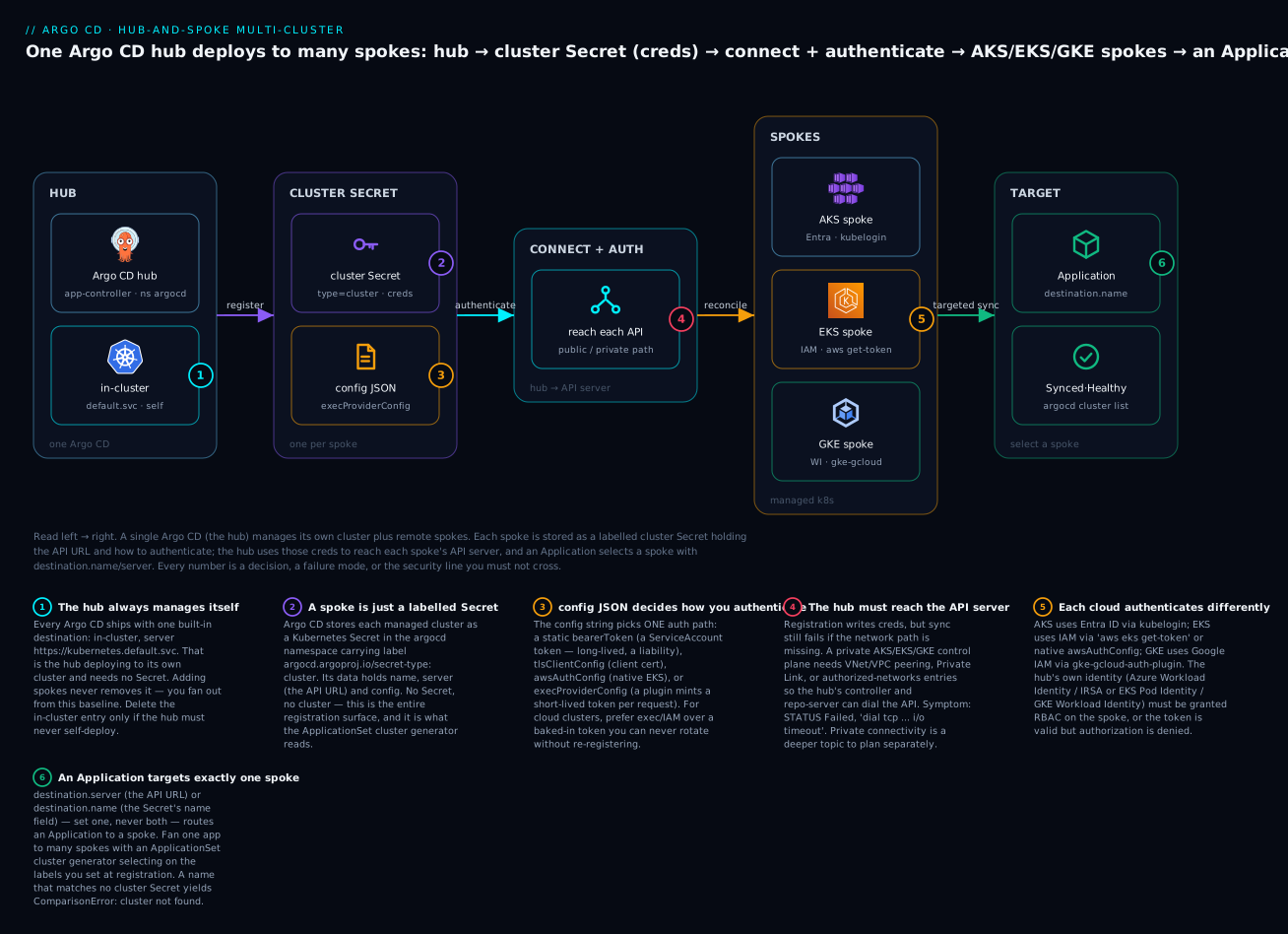
The badges mark the six things that actually matter: the hub always manages itself (1); a spoke is nothing but a labelled Secret (2); the config JSON picks how you authenticate (3); the network path to a private API server is a separate problem from credentials (4); each cloud authenticates its own way (5); and an Application targets one spoke by destination (6). If you internalise only this diagram, you can reason about any multi-cluster Argo CD topology.
The cluster Secret: how Argo CD stores a cluster
Everything the hub knows about a spoke lives in one Kubernetes Secret in the argocd namespace, marked with a specific label. This is the single most important object in the lesson, so we take it apart field by field.
# A cluster Secret — the complete, minimal shape (bearer-token variant)
apiVersion: v1
kind: Secret
metadata:
  name: prod-eks-secret            # any name; NOT the cluster name Argo CD uses
  namespace: argocd                # must be Argo CD's namespace
  labels:
    argocd.argoproj.io/secret-type: cluster   # THIS is what makes it a cluster
    # your own labels below drive the ApplicationSet cluster generator
    cloud: aws
    environment: prod
    region: us-east-1
type: Opaque
stringData:
  name: prod-eks                   # the cluster name used by destination.name
  server: https://ABCD1234.gr7.us-east-1.eks.amazonaws.com   # the API server URL
  config: |
    {
      "bearerToken": "<ServiceAccount-token>",
      "tlsClientConfig": {
        "insecure": false,
        "caData": "<base64-encoded CA PEM>"
      }
    }
Two things make this Secret special, and both are mandatory:
- The label
argocd.argoproj.io/secret-type: cluster. Without it, Argo CD ignores the Secret entirely — it is how the controller finds clusters (and how repo credentials, which usesecret-type: repository, are kept separate). - It lives in the
argocdnamespace (or wherever your Argo CD runs). A cluster Secret in another namespace does nothing.
The top-level data keys are a small, fixed set. Learn them once:
| Data key | Required? | Type | What it is |
|---|---|---|---|
name |
yes | string | The human name Argo CD shows and that destination.name matches. Must be unique. |
server |
yes | string | The spoke’s API server URL, e.g. https://...:443. Must match destination.server exactly. |
config |
yes | JSON string | How to authenticate — the whole auth story lives here (next section). |
namespaces |
no | comma/space list | Scope the cluster to these namespaces only (a “namespaced” cluster). |
clusterResources |
no | "true"/"false" |
Whether apps on this cluster may manage cluster-scoped resources. |
project |
no | string | Bind this cluster to a single AppProject (a project-scoped cluster). |
shard |
no | string (number) | Pin this cluster to a specific application-controller shard (manual sharding). |
Note that config is a JSON string stored inside YAML, not nested YAML. That mismatch is a top-three source of malformed cluster Secrets — a stray unescaped quote or a missing brace and the whole cluster silently fails to load. Using stringData (as above) lets you write the values in plaintext and lets Kubernetes base64-encode them into data for you; if you write data directly, every value must already be base64.
The config JSON, field by field
The config string deserializes into Argo CD’s cluster configuration — effectively a Kubernetes rest.Config. These are its top-level fields; you fill in exactly the subset your auth method needs.
config field |
Type | Purpose |
|---|---|---|
username / password |
string | HTTP basic auth to the API server (rare; legacy) |
bearerToken |
string | A static bearer token — usually a ServiceAccount token |
tlsClientConfig |
object | TLS settings: CA to trust, optional client cert/key, insecure |
awsAuthConfig |
object | Native EKS auth — Argo CD calls AWS STS itself (no exec plugin) |
execProviderConfig |
object | Run an external plugin to mint a token per request (the cloud way) |
proxyUrl |
string | Route API calls through an HTTP(S) proxy (useful for private clusters) |
disableCompression |
bool | Disable response compression (rarely needed) |
You pick one primary credential path — bearerToken, or tlsClientConfig client cert, or awsAuthConfig, or execProviderConfig — and almost always also supply tlsClientConfig.caData so the hub trusts the spoke’s API server certificate. The tlsClientConfig sub-fields:
tlsClientConfig field |
Type | Purpose |
|---|---|---|
insecure |
bool | Skip API-server cert verification. Convenient in labs, never in prod. |
serverName |
string | Override the SNI/hostname to verify against (when connecting by IP) |
caData |
base64 | The CA bundle that signed the API server cert — so insecure can stay false |
certData |
base64 | Client certificate (for mTLS / client-cert auth) |
keyData |
base64 | Client private key (paired with certData) |
And the two cloud-auth objects, which are the reason this lesson exists:
execProviderConfig field |
Type | Purpose |
|---|---|---|
command |
string | The plugin binary to run (kubelogin, aws, gke-gcloud-auth-plugin) |
args |
[]string | Arguments passed to the plugin |
env |
map[string]string | Environment variables for the plugin process |
apiVersion |
string | The client-auth API version, e.g. client.authentication.k8s.io/v1beta1 |
installHint |
string | Message shown if the binary is missing — a hint, not functional |
awsAuthConfig field |
Type | Purpose |
|---|---|---|
clusterName |
string | The EKS cluster name STS signs the token for |
roleARN |
string | An IAM role to assume before minting the token (cross-account, or IRSA) |
profile |
string | A named AWS profile/credentials file to use (rare in-cluster) |
That is the entire vocabulary of a cluster Secret. Every registration method below — imperative or declarative, any cloud — produces a Secret with exactly these fields. The rest of the lesson is just which fields, filled with what.
Registering a cluster the imperative way: argocd cluster add
The fast path is one command. You point the argocd CLI at a kubeconfig context that can already reach the target cluster as an admin, and it does the rest:
# Your local kubeconfig already has a context for the target cluster
kubectl config get-contexts
# CURRENT   NAME              CLUSTER           AUTHINFO
# *         hub-mgmt          hub-mgmt          hub-mgmt
#           prod-eks          prod-eks          prod-eks

# Register the prod-eks context as a spoke of this Argo CD
argocd cluster add prod-eks --name prod-eks
# WARNING: This will create a service account `argocd-manager` on the cluster
# referenced by context `prod-eks` with full cluster level privileges. Do you
# want to continue [y/N]? y
# INFO[0002] ServiceAccount "argocd-manager" created in namespace "kube-system"
# INFO[0002] ClusterRole "argocd-manager-role" created
# INFO[0002] ClusterRoleBinding "argocd-manager-role-binding" created
# Cluster 'https://ABCD1234.gr7.us-east-1.eks.amazonaws.com' added
What it actually does under the hood
That prompt is not boilerplate — it is telling you exactly what is about to be created on the target cluster. Step by step:
| Step | What Argo CD creates on the target (spoke) | Why |
|---|---|---|
| 1 | ServiceAccount argocd-manager in kube-system |
An identity on the spoke for the hub to use |
| 2 | ClusterRole argocd-manager-role (full access by default) |
Permission for that identity to manage the cluster |
| 3 | ClusterRoleBinding argocd-manager-role-binding |
Binds the role to the ServiceAccount |
| 4 | A token Secret for argocd-manager (k8s 1.24+: created explicitly) |
A long-lived bearer token to authenticate with |
| 5 | (on the hub) a cluster Secret in argocd with that token + the API CA |
The registration record the hub reconciles from |
The default argocd-manager-role is deliberately broad — it grants full access so Argo CD can deploy anything:
# The ClusterRole argocd cluster add creates on the spoke (default: full access)
apiVersion: rbac.authorization.k8s.io/v1
kind: ClusterRole
metadata:
  name: argocd-manager-role
rules:
  - apiGroups: ["*"]
    resources: ["*"]
    verbs: ["*"]
  - nonResourceURLs: ["*"]
    verbs: ["*"]
The credential it grabs is the argocd-manager ServiceAccount’s token, and this is the crucial security point: it is a static, long-lived bearer token written verbatim into the cluster Secret’s config.bearerToken on the hub. On Kubernetes 1.24+ ServiceAccounts no longer auto-generate token Secrets, so argocd cluster add explicitly creates one (a Secret annotated kubernetes.io/service-account.name: argocd-manager) to obtain a non-expiring token. Convenient — and a liability, because you cannot rotate it without re-registering, and if the hub is compromised, that token is cluster-admin on the spoke. For cloud clusters, the exec-provider approach in the next sections avoids this entirely.
The most useful flags on argocd cluster add:
| Flag | What it does |
|---|---|
--name <name> |
Override the cluster name (otherwise derived from the server URL) |
--kubeconfig <path> |
Use a specific kubeconfig instead of the default |
--in-cluster |
Use the in-cluster URL for the hub itself (self-registration) |
--upsert |
Update the cluster Secret if it already exists (idempotent re-runs) |
--service-account <sa> |
Use an existing ServiceAccount instead of creating argocd-manager |
--system-namespace <ns> |
Namespace to create the ServiceAccount in (default kube-system) |
--namespace <ns> (repeatable) |
Scope the cluster to specific namespaces (namespaced cluster) |
--cluster-resources |
Allow managing cluster-scoped resources on a namespaced cluster |
--label key=value (repeatable) |
Attach labels to the cluster Secret (for the cluster generator) |
--annotation key=value |
Attach annotations to the cluster Secret |
--aws-cluster-name / --aws-role-arn |
Write an awsAuthConfig instead of a static token (EKS) |
--exec-command / --exec-command-args / --exec-command-env |
Write an execProviderConfig (any cloud) |
--yes |
Skip the confirmation prompt (for automation) |
# Register with labels the cluster generator can select on later
argocd cluster add prod-eks \
  --name prod-eks \
  --label cloud=aws --label environment=prod --label region=us-east-1
argocd cluster add is perfect for a quick spoke, a lab, or bootstrapping. But notice what it did: it created a static token and mutated the target cluster imperatively. Neither of those is GitOps. The credential now lives only in a Secret nobody reviewed, and the RBAC on the spoke was created by a laptop. For anything you want reproducible and auditable, hand-write the Secret instead.
Registering a cluster the declarative way
The GitOps way to register a spoke is to author the cluster Secret yourself and kubectl apply it (ideally through Argo CD itself, managed like any other resource). You get review, version history, and — the big win for cloud — you can use exec providers so no static token ever exists.
The three credential shapes you will actually write:
Variant A — static ServiceAccount bearer token (portable, but rotate-averse)
This is the declarative equivalent of what argocd cluster add produces. You create the argocd-manager SA and RBAC on the spoke (also in Git), read its token, and reference it. It works on any Kubernetes cluster, cloud or not.
apiVersion: v1
kind: Secret
metadata:
  name: onprem-prod-secret
  namespace: argocd
  labels:
    argocd.argoproj.io/secret-type: cluster
    cloud: onprem
    environment: prod
type: Opaque
stringData:
  name: onprem-prod
  server: https://k8s-api.internal.example.com:6443
  config: |
    {
      "bearerToken": "<argocd-manager ServiceAccount token>",
      "tlsClientConfig": {
        "insecure": false,
        "caData": "<base64 of the API server CA certificate>"
      }
    }
Never commit the real
bearerTokenorcaDatato Git in plaintext. Use Sealed Secrets, the External Secrets Operator, or SOPS to encrypt them, and let Argo CD (or your bootstrap) materialise the decrypted Secret. The placeholders above are exactly that — placeholders. This is the same secrets discipline covered for repositories in Connecting Repositories.
Variant B — TLS client certificate (mTLS)
Some clusters (kubeadm defaults, on-prem, kOps) authenticate with a client certificate rather than a token. Fill certData/keyData instead of bearerToken:
stringData:
  name: onprem-mtls
  server: https://k8s-api.internal.example.com:6443
  config: |
    {
      "tlsClientConfig": {
        "insecure": false,
        "caData": "<base64 API server CA PEM>",
        "certData": "<base64 client cert PEM>",
        "keyData": "<base64 client key PEM>"
      }
    }
Variant C — exec provider (the cloud way, no static token)
For AKS, EKS and GKE you almost always want an execProviderConfig: instead of storing a token that never changes, Argo CD runs a small plugin every time it needs to talk to the spoke, and the plugin mints a fresh, short-lived token from the cloud’s identity system. The token in flight is valid for minutes, there is nothing long-lived to leak, and access is governed by real cloud IAM.
# EKS via the aws CLI exec plugin (one of three cloud variants — see next section)
apiVersion: v1
kind: Secret
metadata:
  name: prod-eks-secret
  namespace: argocd
  labels:
    argocd.argoproj.io/secret-type: cluster
    cloud: aws
    environment: prod
type: Opaque
stringData:
  name: prod-eks
  server: https://ABCD1234.gr7.us-east-1.eks.amazonaws.com
  config: |
    {
      "execProviderConfig": {
        "apiVersion": "client.authentication.k8s.io/v1beta1",
        "command": "aws",
        "args": ["--region", "us-east-1", "eks", "get-token",
                 "--cluster-name", "prod-eks", "--output", "json"]
      },
      "tlsClientConfig": {
        "insecure": false,
        "caData": "<base64 EKS API server CA>"
      }
    }
# Apply it — the GitOps way, or straight to the API for a lab
kubectl apply -f prod-eks-secret.yaml
# secret/prod-eks-secret created

argocd cluster list
# SERVER                                                    NAME       VERSION  STATUS       MESSAGE  PROJECT
# https://kubernetes.default.svc                            in-cluster 1.29     Successful
# https://ABCD1234.gr7.us-east-1.eks.amazonaws.com          prod-eks   1.29     Successful
The imperative-vs-declarative choice, summarised:
argocd cluster add (imperative) |
Hand-written cluster Secret (declarative) | |
|---|---|---|
| Effort | One command | Author + apply a Secret |
| Credential | Static SA token by default | Any: token, cert, or exec provider |
| Reviewable / auditable | No — done from a laptop | Yes — it is a file in Git |
| Reproducible | No — re-run needed | Yes — re-apply the manifest |
| Creates RBAC on the spoke | Yes (argocd-manager + ClusterRole) |
You do it separately (also in Git) |
| Rotation | Re-register | Exec provider rotates every request |
| Best for | Labs, quick spokes, bootstrapping | Production, cloud clusters, GitOps |
The exec-provider Secret is the shape you want in production on every cloud. What differs per cloud is the command, the args, the env, and the identity the plugin uses — which is the multi-cloud edge, and the core of this lesson.
The multi-cloud auth edge
Here is the crux. An Argo CD pod on the hub has to prove its identity to a foreign cluster’s API server. Kubernetes itself does not care which cloud that cluster runs on — a bearer token is a bearer token — but how you obtain a valid token differs completely across AKS, EKS and GKE, because each cloud gates its API server behind its own identity system. Get this right per cloud, or the cluster shows Failed with an auth error no amount of RBAC will fix.
The one table to memorise:
| AKS (Azure) | EKS (AWS) | GKE (Google Cloud) | |
|---|---|---|---|
| Cloud identity system | Microsoft Entra ID (AAD) | AWS IAM | Google Cloud IAM |
| Get a kubeconfig with | az aks get-credentials |
aws eks update-kubeconfig |
gcloud container clusters get-credentials |
| Exec plugin binary | kubelogin |
aws (aws eks get-token) |
gke-gcloud-auth-plugin |
| Argo CD native option | execProviderConfig (kubelogin) |
awsAuthConfig (built-in, no CLI) or execProviderConfig |
execProviderConfig (plugin) |
| Recommended hub identity | Azure Workload Identity / Managed Identity | IRSA or EKS Pod Identity | GKE Workload Identity |
| Token lifetime | ~1 hour (AAD token, cached by kubelogin) | ~15 min (STS presigned URL) | ~1 hour (Google OAuth2) |
| Authorization on the spoke | AKS Kubernetes RBAC bound to the Entra object ID | aws-auth ConfigMap or EKS access entry maps the IAM role |
Kubernetes RBAC bound to the Google identity |
| Classic gotcha | --login mode must match the hub’s identity; local accounts may be disabled |
The hub’s IAM role must be mapped on the spoke; regional STS endpoints | Plugin needs Application Default Credentials; older args differ |
The pattern is identical in all three: the hub has a cloud identity → the exec plugin turns that identity into a short-lived Kubernetes token → the spoke’s API server trusts it because you granted that identity RBAC on the spoke. Two grants are always in play — the cloud IAM grant (so the plugin can mint a token) and the Kubernetes RBAC grant (so the token is authorized). Miss either and you get a different error; the troubleshooting table later separates them.
Now the concrete execProviderConfig for each. These are the config JSON bodies; wrap each in the same cluster Secret shell from the previous section.
AKS — Entra ID via kubelogin
AKS clusters with Entra (AAD) integration authenticate through kubelogin, which exchanges an Azure identity for a Kubernetes token. az aks get-credentials writes a kubeconfig whose exec block calls kubelogin get-token; you mirror that in the cluster Secret. For a hub running in Azure, use --login workloadidentity (Azure Workload Identity) or --login msi (a managed identity).
# Fetch admin/user credentials, then convert the kubeconfig to kubelogin (exec) form
az aks get-credentials --resource-group rg-prod --name prod-aks --overwrite-existing
kubelogin convert-kubeconfig -l workloadidentity   # or: -l azurecli (for a laptop)
{
  "execProviderConfig": {
    "apiVersion": "client.authentication.k8s.io/v1beta1",
    "command": "kubelogin",
    "args": [
      "get-token",
      "--login", "workloadidentity",
      "--server-id", "6dae42f8-4368-4678-94ff-3960e28e3630",
      "--environment", "AzurePublicCloud"
    ],
    "env": {
      "AZURE_CLIENT_ID": "<hub-managed-identity-client-id>",
      "AZURE_TENANT_ID": "<tenant-id>",
      "AZURE_FEDERATED_TOKEN_FILE": "/var/run/secrets/azure/tokens/azure-identity-token",
      "AZURE_AUTHORITY_HOST": "https://login.microsoftonline.com/"
    }
  },
  "tlsClientConfig": { "insecure": false, "caData": "<base64 AKS API CA>" }
}
The --server-id value 6dae42f8-4368-4678-94ff-3960e28e3630 is the well-known first-party application ID of the Azure Kubernetes Service AAD Server — it is the same across all AKS clusters and is the audience the token is minted for. The AZURE_FEDERATED_TOKEN_FILE path is where the Azure Workload Identity webhook projects the hub’s federated token; kubelogin reads it and exchanges it for an AKS token. On the spoke you must bind that identity’s object ID to Kubernetes RBAC (a ClusterRoleBinding referencing the group/OID), or the token authenticates but is denied.
EKS — AWS IAM via aws eks get-token or native awsAuthConfig
EKS has two clean paths, and this is where Argo CD is nicest: it can call AWS STS itself through awsAuthConfig, so you do not even need the aws CLI in the image.
# Write a kubeconfig (exec plugin form) for reference / laptop use
aws eks update-kubeconfig --region us-east-1 --name prod-eks
Native awsAuthConfig — preferred, no exec binary required:
{
  "awsAuthConfig": {
    "clusterName": "prod-eks",
    "roleARN": "arn:aws:iam::111122223333:role/argocd-hub-eks-access"
  },
  "tlsClientConfig": { "insecure": false, "caData": "<base64 EKS API CA>" }
}
Exec-plugin form — if you prefer to call the AWS CLI explicitly:
{
  "execProviderConfig": {
    "apiVersion": "client.authentication.k8s.io/v1beta1",
    "command": "aws",
    "args": ["--region", "us-east-1", "eks", "get-token",
             "--cluster-name", "prod-eks", "--output", "json"],
    "env": { "AWS_STS_REGIONAL_ENDPOINTS": "regional" }
  },
  "tlsClientConfig": { "insecure": false, "caData": "<base64 EKS API CA>" }
}
The hub’s identity here is an IAM role, granted to the Argo CD pods via IRSA (IAM Roles for Service Accounts) or the newer EKS Pod Identity. Then — the step everyone forgets — that IAM role (or the roleARN it assumes) must be authorised on the spoke: either an entry in the legacy aws-auth ConfigMap, or a modern EKS access entry mapping the role to Kubernetes groups. The token is an STS presigned URL valid ~15 minutes, minted fresh every request, so there is nothing long-lived to leak.
GKE — Google Cloud IAM via gke-gcloud-auth-plugin
GKE moved to an external auth plugin (gke-gcloud-auth-plugin) for kubectl 1.26+. It authenticates using Application Default Credentials (ADC) — for a hub in GKE, that means Workload Identity mapping the Argo CD Kubernetes ServiceAccount to a Google service account.
# Install the plugin and fetch credentials
gcloud components install gke-gcloud-auth-plugin
gcloud container clusters get-credentials prod-gke --region us-central1 --project my-proj
{
  "execProviderConfig": {
    "apiVersion": "client.authentication.k8s.io/v1beta1",
    "command": "gke-gcloud-auth-plugin",
    "installHint": "Install gke-gcloud-auth-plugin: gcloud components install gke-gcloud-auth-plugin"
  },
  "tlsClientConfig": { "insecure": false, "caData": "<base64 GKE API CA>" }
}
The plugin reads ADC from the environment — with Workload Identity, the Argo CD SA’s projected token is exchanged for a Google OAuth2 access token (~1 hour) that GKE’s API server trusts. On the spoke, bind the Google service account to Kubernetes RBAC. GKE is the fiddliest of the three because the plugin relies on ambient ADC rather than explicit args, so the hub’s environment (Workload Identity annotations, GOOGLE_APPLICATION_CREDENTIALS, or metadata server access) has to be correct — a valid ADC but missing RBAC yields a token that is accepted and then denied.
The per-cloud “how do I even get the kubeconfig” commands, side by side, because you will run these constantly:
| Task | AKS | EKS | GKE |
|---|---|---|---|
| Get credentials | az aks get-credentials -g RG -n NAME |
aws eks update-kubeconfig --name NAME |
gcloud container clusters get-credentials NAME |
| Convert to exec form | kubelogin convert-kubeconfig -l azurecli |
(already exec) | (already exec) |
| Plugin to install | kubelogin |
aws CLI v2 |
gke-gcloud-auth-plugin |
| Verify context works | kubectl get ns |
kubectl get ns |
kubectl get ns |
And the hub-side identity you attach so the plugin has something to exchange:
| Cloud | Hub identity mechanism | What you grant on the spoke |
|---|---|---|
| AKS | Azure Workload Identity (federated) or a user-assigned Managed Identity | Kubernetes RBAC bound to the identity’s object ID |
| EKS | IRSA (OIDC federation) or EKS Pod Identity | aws-auth mapRoles entry, or an EKS access entry, for the IAM role |
| GKE | GKE Workload Identity (KSA → GSA) | Kubernetes RBAC bound to the Google service account |
One more honesty note the brief demands: you do not have to use the cloud IAM path. All three clouds are ordinary Kubernetes underneath, so a static argocd-manager ServiceAccount token (Variant A) works everywhere and sidesteps every plugin. Teams choose it for simplicity and accept the rotation cost; teams that must avoid long-lived credentials choose the exec/native path. Know both — reach for exec/IAM on anything production, fall back to the SA token when the plugin plumbing is not worth it.
Scoped clusters, labels & the ApplicationSet cluster generator
A registered cluster does not have to be all-or-nothing. Two scoping mechanisms and one selection mechanism turn a flat list of clusters into a governed fleet.
Cluster labels (and how the generator uses them)
Any labels on the cluster Secret’s metadata.labels (beyond the mandatory secret-type) become selectable attributes. Label every cluster consistently at registration and you never hand-write a per-cluster Application again — the ApplicationSet cluster generator fans out by selector. Common label conventions:
| Label | Example values | Used to select… |
|---|---|---|
environment |
dev, staging, prod |
Which environments an app deploys to |
cloud |
aws, azure, gcp, onprem |
Cloud-specific overlays or apps |
region |
us-east-1, westeurope |
Regional rollouts, data residency |
tier |
pci, internal, sandbox |
Compliance boundaries |
argocd.argoproj.io/secret-type |
cluster (fixed) |
(Reserved — marks the Secret as a cluster) |
The cluster generator reads these directly. This ties straight into the ApplicationSets and generators lesson, where generators are covered in full — here is just the join:
apiVersion: argoproj.io/v1alpha1
kind: ApplicationSet
metadata:
  name: monitoring-everywhere
  namespace: argocd
spec:
  goTemplate: true
  generators:
    - clusters:
        selector:
          matchLabels:
            environment: prod       # every prod cluster, any cloud
  template:
    metadata:
      name: 'monitoring-{{.name}}'
    spec:
      project: platform
      source:
        repoURL: https://github.com/acme/platform-gitops.git
        targetRevision: main
        path: monitoring
      destination:
        server: '{{.server}}'       # the generator supplies each cluster's URL
        namespace: monitoring
Add a prod cluster Secret with environment: prod and a monitoring-<name> Application appears automatically. Because the selector is non-empty, the hub’s own in-cluster (which has no labels) is excluded — exactly what you want when a workload should hit only registered spokes.
Namespaced (scoped) clusters
By default a registered cluster is cluster-scoped: apps on it can create resources in any namespace and manage cluster-scoped resources (CRDs, ClusterRoles). Set the namespaces key to restrict it to a list, turning it into a namespaced cluster:
stringData:
  name: shared-tenant-cluster
  server: https://shared.example.com
  namespaces: "team-a,team-a-jobs,team-a-ci"   # apps may only touch these
  clusterResources: "false"                      # and no cluster-scoped resources
  config: '{"bearerToken":"...","tlsClientConfig":{"caData":"..."}}'
| Setting | Effect |
|---|---|
namespaces unset |
Cluster-scoped: apps may deploy to any namespace |
namespaces: "a,b,c" |
Namespaced: apps may only deploy to a, b, c |
clusterResources: "false" (default when namespaces set) |
Apps may not manage cluster-scoped resources here |
clusterResources: "true" |
Apps may manage cluster-scoped resources despite the namespace scope |
This is how one physical cluster is safely shared between tenants without letting a stray Application create a ClusterRole or land in kube-system.
Project-scoped clusters
Set the project key and the cluster Secret is bound to a single AppProject — only that project’s Applications may target it. This is a control-plane guardrail rather than a target-side one, and it pairs with the destination allow-lists covered in AppProjects and multi-tenancy boundaries:
stringData:
  name: payments-prod
  server: https://payments.example.com
  project: team-payments      # only Applications in this project can use this cluster
  config: '{"bearerToken":"...","tlsClientConfig":{"caData":"..."}}'
| Scoping key | Lives on | Restricts |
|---|---|---|
namespaces |
Cluster Secret | Which namespaces apps may deploy into |
clusterResources |
Cluster Secret | Whether apps may touch cluster-scoped resources |
project |
Cluster Secret | Which AppProject may target this cluster at all |
destinations allow-list |
AppProject |
Which clusters/namespaces a project’s apps may reach |
Targeting deployments
With clusters registered, an Application chooses one through spec.destination. There are two ways to name the target, and picking the right one avoids a whole class of bugs.
apiVersion: argoproj.io/v1alpha1
kind: Application
metadata:
  name: web-prod-eks
  namespace: argocd
spec:
  project: default
  source:
    repoURL: https://github.com/acme/app-config.git
    targetRevision: main
    path: web/overlays/prod
  destination:
    name: prod-eks          # by cluster NAME (the Secret's `name` field)
    namespace: web
  syncPolicy:
    automated: { prune: true, selfHeal: true }
or, equivalently, by API URL:
  destination:
    server: https://ABCD1234.gr7.us-east-1.eks.amazonaws.com   # by SERVER url
    namespace: web
The rules:
destination field |
Matches | Notes |
|---|---|---|
server |
The cluster Secret’s server value |
Must match exactly — scheme, host, port, no trailing slash |
name |
The cluster Secret’s name value |
More readable and stable; survives an API URL change |
| the hub itself | https://kubernetes.default.svc or name in-cluster |
The built-in destination |
Set exactly one of server or name, never both — specifying both is a validation error. Prefer name for anything humans edit: it is readable, and if a cluster’s API endpoint ever changes (a rebuild, a private-endpoint migration), the Applications keep working because they never hard-coded the URL. Use server in generated Applications where the ApplicationSet already has the URL in hand ({{.server}}).
To deploy the same app to many clusters, do not copy the Application N times — use the ApplicationSet cluster generator from the previous section, which stamps one Application per matching cluster and fills destination.server with each cluster’s URL. That is the whole multi-cluster fan-out story: label clusters once, select them with a generator, and adding a spoke makes apps appear with no new manifests.
Connectivity: the part credentials do not solve
A perfectly valid cluster Secret still fails if the hub cannot reach the spoke’s API server. Registration is authentication; it is not networking. The hub’s application-controller (and repo-server for some operations) opens a TCP connection to the server URL, and that has to succeed:
| Spoke API endpoint | What the hub needs |
|---|---|
| Public endpoint (default managed clusters) | Outbound HTTPS from the hub; the spoke may restrict source IPs (authorized networks) |
| Private endpoint (private AKS/EKS/GKE) | A private network path: VNet/VPC peering, Private Link/PrivateLink, or a proxy (config.proxyUrl) |
| Firewalled / on-prem | Routing + firewall rules, or an egress proxy |
Private-cluster connectivity — VNet peering for private AKS, VPC peering or PrivateLink for private EKS, authorized networks and Private Service Connect for GKE — is a substantial topic in its own right and a design decision that belongs with your networking team. For this lesson, the thing to internalise is the split: a Failed cluster with an auth message is a credentials problem; a Failed cluster with dial tcp ... i/o timeout is a connectivity problem. They live in different teams’ backlogs.
Verifying a registration
# List every cluster and its connection state
argocd cluster list
# SERVER                                            NAME        VERSION  STATUS       MESSAGE
# https://kubernetes.default.svc                    in-cluster  1.29     Successful
# https://prod-aks-dns-xxxx.hcp.westeurope...       prod-aks    1.29     Successful
# https://ABCD1234.gr7.us-east-1.eks.amazonaws.com  prod-eks    1.29     Successful
# https://34.72.x.x                                 prod-gke    1.29     Successful

# Full detail for one cluster, including the connection state and config
argocd cluster get prod-eks

# The underlying Secrets (labels drive the cluster generator)
kubectl get secrets -n argocd -l argocd.argoproj.io/secret-type=cluster \
  -o custom-columns=NAME:.metadata.name,SERVER:.data.server
STATUS has three values worth knowing cold:
| Connection STATUS | Meaning | Typical cause when not Successful |
|---|---|---|
Successful |
Hub connected and listed the API version | — |
Failed |
Hub reached (or tried to reach) the API but errored | Bad/expired creds, RBAC denied, or network timeout (read the MESSAGE) |
Unknown |
No connection attempted yet (no app targets it) | Benign until an app uses it; forces a probe |
Unknown surprises people: Argo CD does not eagerly probe a cluster no Application targets, so a freshly added spoke can sit at Unknown until you point an app at it. That is not an error — it is laziness by design.
Hands-on lab
You will register a remote cluster both ways, inspect exactly what each produced, deploy an app to the spoke by name, and tear it all down. Because this machine has no clusters attached, the commands below show the real invocations and representative output (labelled as such) — run them against your own hub plus one spoke to see the live equivalents. Nothing here invents a field or a flag.
⚠️ Cloud spokes bill. A managed cluster’s control plane and any load balancers you create cost money for as long as they exist. Do the lab against clusters you already run, and complete the teardown at the end. Never commit a real
bearerTokenorcaDatato Git.
Step 1 — Confirm your starting point (only the hub).
argocd cluster list
# (representative)
# SERVER                          NAME        VERSION  STATUS       MESSAGE
# https://kubernetes.default.svc  in-cluster  1.29     Successful
What just happened: a fresh hub knows only itself. Everything below adds a spoke.
Step 2 — Register imperatively with argocd cluster add. Point at a kubeconfig context that can already reach the spoke as admin.
kubectl config get-contexts             # find the spoke's context name
argocd cluster add prod-eks --name prod-eks \
  --label cloud=aws --label environment=prod
# WARNING: This will create a service account `argocd-manager` ... [y/N]? y
# INFO ServiceAccount "argocd-manager" created in namespace "kube-system"
# INFO ClusterRole "argocd-manager-role" created
# INFO ClusterRoleBinding "argocd-manager-role-binding" created
# Cluster 'https://ABCD1234.gr7.us-east-1.eks.amazonaws.com' added
What just happened: Argo CD created the argocd-manager ServiceAccount + full-access ClusterRole/binding on the spoke, grabbed that SA’s token, and wrote a cluster Secret on the hub. Verify:
argocd cluster list        # prod-eks now appears, STATUS Successful once an app probes it
# Inspect the hub-side Secret this created:
kubectl get secret -n argocd -l argocd.argoproj.io/secret-type=cluster
Step 3 — Inspect what it wrote (the static token).
kubectl get secret -n argocd <cluster-secret-name> -o jsonpath='{.data.config}' | base64 -d
# (representative — note the long-lived bearerToken)
# {"bearerToken":"eyJhbGciOi...","tlsClientConfig":{"insecure":false,"caData":"LS0t..."}}
What just happened: you are looking at the liability — a static bearerToken that is cluster-admin on the spoke and cannot be rotated without re-registering. Fine for a lab; not what you want in prod. So do it the other way too.
Step 4 — Remove it, then register declaratively.
argocd cluster rm https://ABCD1234.gr7.us-east-1.eks.amazonaws.com
# Cluster 'https://ABCD1234.gr7.us-east-1.eks.amazonaws.com' removed
Now author the cluster Secret with an exec provider (EKS shown; the AKS and GKE config bodies from the multi-cloud section drop straight in):
# prod-eks-secret.yaml
apiVersion: v1
kind: Secret
metadata:
  name: prod-eks-secret
  namespace: argocd
  labels:
    argocd.argoproj.io/secret-type: cluster
    cloud: aws
    environment: prod
type: Opaque
stringData:
  name: prod-eks
  server: https://ABCD1234.gr7.us-east-1.eks.amazonaws.com
  config: |
    {
      "execProviderConfig": {
        "apiVersion": "client.authentication.k8s.io/v1beta1",
        "command": "aws",
        "args": ["--region", "us-east-1", "eks", "get-token",
                 "--cluster-name", "prod-eks", "--output", "json"]
      },
      "tlsClientConfig": { "insecure": false, "caData": "<base64 EKS API CA>" }
    }
Paired AKS and GKE config bodies (same Secret shell, swap the config):
// AKS
{
  "execProviderConfig": {
    "apiVersion": "client.authentication.k8s.io/v1beta1",
    "command": "kubelogin",
    "args": ["get-token", "--login", "workloadidentity",
             "--server-id", "6dae42f8-4368-4678-94ff-3960e28e3630",
             "--environment", "AzurePublicCloud"],
    "env": { "AZURE_CLIENT_ID": "<mi-client-id>", "AZURE_TENANT_ID": "<tenant-id>",
             "AZURE_FEDERATED_TOKEN_FILE": "/var/run/secrets/azure/tokens/azure-identity-token",
             "AZURE_AUTHORITY_HOST": "https://login.microsoftonline.com/" }
  },
  "tlsClientConfig": { "insecure": false, "caData": "<base64 AKS API CA>" }
}
// GKE
{
  "execProviderConfig": {
    "apiVersion": "client.authentication.k8s.io/v1beta1",
    "command": "gke-gcloud-auth-plugin",
    "installHint": "gcloud components install gke-gcloud-auth-plugin"
  },
  "tlsClientConfig": { "insecure": false, "caData": "<base64 GKE API CA>" }
}
kubectl apply -f prod-eks-secret.yaml
# secret/prod-eks-secret created
argocd cluster list
# (representative) prod-eks  1.29  Successful
What just happened: the spoke is registered again — but now with no static token. Argo CD runs the exec plugin on every API call to mint a fresh, short-lived token from AWS IAM. The Secret is a reviewable file you can commit (encrypted) to Git.
Step 5 — Deploy an app to the spoke by name.
argocd app create web-prod-eks \
  --repo https://github.com/acme/app-config.git \
  --path web/overlays/prod \
  --dest-name prod-eks \
  --dest-namespace web \
  --sync-policy automated
# application 'web-prod-eks' created

argocd app get web-prod-eks
# (representative)
# Name:        argocd/web-prod-eks
# Cluster:     prod-eks (https://ABCD1234.gr7.us-east-1.eks.amazonaws.com)
# Namespace:   web
# Health Status:  Healthy
# Sync Status:    Synced to main (a1b2c3d)
What just happened: --dest-name prod-eks matched the cluster Secret’s name field, and Argo CD authenticated with the exec provider, cloned the repo, rendered, and synced onto the spoke. The app runs on EKS while its Application object lives on the hub.
Step 6 — Teardown (leave no static tokens, no orphan SAs).
# 1. Delete the app (prune removes its workloads from the spoke)
argocd app delete web-prod-eks --cascade
# 2. Remove the declaratively-registered cluster
kubectl delete secret -n argocd prod-eks-secret
# 3. If you kept the imperative registration at any point, also remove the
#    argocd-manager identity it created ON THE SPOKE:
kubectl --context prod-eks -n kube-system delete serviceaccount argocd-manager
kubectl --context prod-eks delete clusterrole argocd-manager-role
kubectl --context prod-eks delete clusterrolebinding argocd-manager-role-binding
argocd cluster list      # back to just in-cluster
What just happened: you deleted the app and its resources on the spoke, removed the hub-side cluster Secret, and — critically — cleaned up the argocd-manager ServiceAccount and RBAC that argocd cluster add had left behind on the spoke. argocd cluster rm removes those for you; a hand-deleted Secret does not, so you do it explicitly.
Common mistakes and troubleshooting
Multi-cluster failures cluster (pun intended) into credentials, RBAC, networking, and plain typos. The table separates them by the symptom you actually see; the prose covers the three that cost the most hours.
| Symptom | Likely cause | Fix |
|---|---|---|
Cluster STATUS Failed, MESSAGE dial tcp ...: i/o timeout |
Hub cannot reach the spoke API server (network, not auth) | Open the network path: peering / Private Link / authorized-networks; or set config.proxyUrl |
rpc error: code = Unauthenticated on sync |
Token invalid or expired (often a static SA token, or a bad exec result) | Use an execProviderConfig instead of a static token; check the plugin actually returns a token |
exec: "kubelogin": executable file not found in $PATH |
The exec plugin binary is missing from the Argo CD image | Bake kubelogin / aws / gke-gcloud-auth-plugin into a custom repo-server/controller image, or use an init/sidecar |
Auth succeeds but ... is forbidden: User "..." cannot ... |
The hub identity is not bound to Kubernetes RBAC on the spoke | Grant RBAC on the spoke: aws-auth/EKS access entry (EKS), OID ClusterRoleBinding (AKS), GSA binding (GKE) |
argocd cluster add registers the wrong cluster |
Wrong kubeconfig context passed | Pass the exact context from kubectl config get-contexts; use --name to label it clearly |
Cluster Secret ignored entirely (not in argocd cluster list) |
Missing/typo’d label argocd.argoproj.io/secret-type: cluster, or wrong namespace |
Add the exact label; ensure the Secret is in the argocd namespace |
App ComparisonError: cluster "prod-eks" not found |
destination.name matches no cluster Secret’s name |
Fix the name, or register the cluster; check name vs metadata.name (they differ) |
App stuck Unknown / never syncs to a new spoke |
destination.server does not exactly match the registered server (trailing slash, port) |
Copy the exact server from argocd cluster get, or switch to destination.name |
Malformed cluster Secret, controller logs invalid character ... in config |
The config JSON is broken (unescaped quote, bad base64 in caData) |
Validate the JSON; ensure caData/certData are valid base64 of PEM |
| ApplicationSet cluster generator produces zero apps | Selector labels do not match any cluster Secret’s labels | Label clusters at registration; verify with kubectl get secret -l <selector> |
| EKS token works locally but not from the hub | Hub’s IAM role (IRSA/Pod Identity) not mapped on the spoke, or wrong roleARN |
Add the hub role to aws-auth/access entries; set awsAuthConfig.roleARN correctly |
STATUS Unknown forever on a spoke |
No Application targets it yet, so no probe fires | Benign — point an app at it, or run argocd cluster get <server> to force a check |
Three gotchas deserve extra words.
1. The exec plugin has to exist inside Argo CD’s pods. This is the single most common surprise. Your laptop has kubelogin, aws, and gke-gcloud-auth-plugin, so kubectl works there — but the Argo CD application-controller and repo-server pods do not ship those binaries. An execProviderConfig referencing kubelogin fails with executable file not found in $PATH until you put the binary in the image (a custom image FROM the Argo CD image with the plugin added, or an init container that copies it onto a shared PATH volume). The static-token path (Variant A) has no such requirement, which is one reason teams reach for it despite the rotation cost.
2. Authentication and authorization are two different failures. A valid token that reaches the API server can still be denied. The plugin minting a token proves the hub’s cloud identity; it does not grant that identity any Kubernetes permissions. Unauthenticated means the token is bad (auth failed); forbidden / cannot list ... in the namespace means the token is fine but no RBAC binds your identity (authorization failed). On EKS the authorization grant is an aws-auth entry or EKS access entry; on AKS it is a ClusterRoleBinding to the Entra object ID; on GKE it is a binding to the Google service account. Reading the exact word in the error tells you which of the two to fix.
3. name vs server mismatches route apps into the void. destination.server must match the registered server byte-for-byte — a trailing slash, :443 present on one side and absent on the other, or an IP vs a DNS name are all “no match,” and the app reports the cluster as not found or sits Unknown. destination.name is safer for hand-written Applications because it matches a stable, human-chosen string. And do not confuse the cluster Secret’s metadata.name (the Kubernetes object name, irrelevant to targeting) with its stringData.name (the cluster name destination.name matches) — they are different fields and only the latter matters for routing.
Cheat-sheet
Everything in one place — the cluster Secret shape, the argocd cluster verbs, and the per-cloud exec config.
Cluster Secret — the shape:
| Piece | Value |
|---|---|
metadata.labels[argocd.argoproj.io/secret-type] |
cluster (mandatory — marks it a cluster) |
metadata.namespace |
argocd (mandatory) |
metadata.labels[...] |
Your labels (cloud, environment, region) → cluster generator |
stringData.name |
Cluster name → matches destination.name |
stringData.server |
API server URL → matches destination.server |
stringData.config |
JSON: bearerToken / tlsClientConfig / awsAuthConfig / execProviderConfig |
stringData.namespaces |
Comma list → namespaced (scoped) cluster |
stringData.clusterResources |
"true"/"false" → allow cluster-scoped resources |
stringData.project |
Bind cluster to one AppProject |
argocd cluster verbs:
| Command | What it does |
|---|---|
argocd cluster add <context> |
Register a spoke imperatively (creates argocd-manager + token) |
argocd cluster add <ctx> --label k=v |
Register and attach generator labels |
argocd cluster add <ctx> --in-cluster |
Register the hub’s own cluster explicitly |
argocd cluster add <ctx> --upsert |
Idempotently update an existing registration |
argocd cluster list |
List clusters + connection STATUS |
| `argocd cluster get <server | name>` |
| `argocd cluster rm <server | name>` |
argocd cluster set <name> --namespace ns |
Adjust scoping on a registered cluster |
kubectl get secret -n argocd -l argocd.argoproj.io/secret-type=cluster |
The Secrets behind it all |
Per-cloud exec config (drop into stringData.config):
| Cloud | command |
Key args / fields |
|---|---|---|
| AKS | kubelogin |
get-token --login workloadidentity --server-id 6dae42f8-4368-4678-94ff-3960e28e3630; env AZURE_* |
| EKS (exec) | aws |
--region R eks get-token --cluster-name N --output json |
| EKS (native) | — | awsAuthConfig: { clusterName, roleARN } (no plugin) |
| GKE | gke-gcloud-auth-plugin |
no args; needs ADC / Workload Identity; installHint |
Destination — target selection:
| Field | Matches | When to use |
|---|---|---|
destination.name: prod-eks |
Secret stringData.name |
Hand-written apps (readable, stable) |
destination.server: https://... |
Secret stringData.server |
Generated apps ({{.server}}) |
destination.server: https://kubernetes.default.svc |
The hub itself | Deploying to the hub cluster |
Interview and exam questions
Q: What is the hub-and-spoke model in Argo CD, and why do enterprises prefer it? A: One Argo CD installation (the hub) holds all Applications and reconciles them onto many target clusters (spokes) over the network, instead of running a separate Argo CD per cluster. Enterprises prefer it for a single pane of glass across the fleet, one control plane to upgrade and secure, and fleet-wide policy — at the cost of a larger blast radius if the hub goes down and a concentration of credentials the hub must protect.
Q: How does Argo CD store the information about a remote cluster?
A: As a Kubernetes Secret in the argocd namespace labelled argocd.argoproj.io/secret-type: cluster. Its data holds name, server (the API URL) and config (a JSON string describing how to authenticate), plus optional namespaces, clusterResources, and project for scoping. That one Secret is the registration.
Q: What does argocd cluster add actually create, and where?
A: On the target cluster it creates a argocd-manager ServiceAccount in kube-system, a full-access argocd-manager-role ClusterRole, and a ClusterRoleBinding; on Kubernetes 1.24+ it also creates a token Secret to obtain a long-lived bearer token. On the hub it writes a cluster Secret containing that token and the API server CA. The identity created on the spoke is cluster-admin by default.
Q: Why is a static ServiceAccount bearer token a security concern, and what is the alternative?
A: It is long-lived and cannot be rotated without re-registering, and it is cluster-admin on the spoke — if the hub is compromised, the token is a full key to the managed cluster. The alternative is an execProviderConfig (or native awsAuthConfig for EKS): a plugin mints a short-lived token per request from the cloud’s IAM, so nothing long-lived is stored and access is governed by cloud identity.
Q: Walk through how the hub authenticates to an EKS spoke.
A: The hub’s pods carry an AWS IAM identity via IRSA or EKS Pod Identity. Either Argo CD’s native awsAuthConfig (with clusterName and optional roleARN) calls STS directly, or an execProviderConfig runs aws eks get-token, producing a presigned STS token valid ~15 minutes. The EKS API server validates it, and authorization comes from mapping that IAM role in the aws-auth ConfigMap or an EKS access entry to Kubernetes groups.
Q: How does AKS authentication differ from EKS?
A: AKS uses Microsoft Entra ID (AAD), not IAM. The exec plugin is kubelogin, which exchanges an Azure identity (Workload Identity or a managed identity via --login workloadidentity/msi) for an AKS token, with --server-id set to the well-known AKS AAD server app ID. Authorization is Kubernetes RBAC bound to the Entra object ID. Tokens last ~1 hour versus EKS’s ~15 minutes.
Q: What is special about GKE’s auth, and what is the common failure?
A: GKE uses gke-gcloud-auth-plugin, which authenticates via Application Default Credentials — typically GKE Workload Identity mapping the Argo CD KSA to a Google service account. The common failure is a valid ADC token that is then denied, because the Google service account was never bound to Kubernetes RBAC on the spoke — authentication succeeded but authorization was never granted.
Q: An exec-provider cluster shows executable file not found in $PATH. Why, and how do you fix it?
A: The plugin binary (kubelogin, aws, or gke-gcloud-auth-plugin) is not present in the Argo CD application-controller/repo-server pods — your laptop has it, the pods do not. Fix it by baking the binary into a custom Argo CD image, or using an init container that copies it onto a shared PATH volume.
Q: What is the difference between destination.name and destination.server, and can you set both?
A: destination.server matches the cluster Secret’s server (the API URL) exactly; destination.name matches the Secret’s name field. You set exactly one — specifying both is a validation error. Prefer name for hand-written apps (readable and survives an API-URL change) and server in generated Applications where the URL is already in hand.
Q: A newly registered cluster shows STATUS Unknown. Is that a problem?
A: Not by itself. Argo CD only probes a cluster when an Application targets it, so a spoke with no apps sits at Unknown. Point an app at it (or run argocd cluster get <server>) to force a connection; if it then goes Successful you are fine, and if it goes Failed you read the MESSAGE to tell a credentials problem from a network timeout.
Q: How do cluster labels connect to multi-cluster deployment at scale?
A: Labels on the cluster Secret’s metadata are read by the ApplicationSet cluster generator’s matchLabels selector. Label every cluster consistently at registration (environment, cloud, region), and one ApplicationSet fans an app to every matching cluster automatically — adding a spoke with the right labels makes the apps appear with no new manifests.
Q: You registered a spoke but sync fails with dial tcp: i/o timeout. Credentials or networking?
A: Networking. An i/o timeout means the hub could not open a TCP connection to the spoke’s API server — the credential was never even tried. The cluster likely has a private API endpoint or restricted authorized networks; you need a network path (VNet/VPC peering, Private Link, authorized-networks entry, or a proxyUrl). An auth problem instead shows Unauthenticated or forbidden.
Key takeaways
- Hub-and-spoke is the standard enterprise topology: one Argo CD reconciles Applications onto many clusters, giving one control plane and one pane of glass — at the cost of blast radius and concentrated credentials.
- A cluster is just a Secret. Every spoke is a
Secretin theargocdnamespace labelledargocd.argoproj.io/secret-type: cluster, holdingname,server, and aconfigJSON that says how to authenticate. The hub always has the built-inin-clusterdestination for itself. - Two ways to register.
argocd cluster add <context>is fast but imperative — it creates a full-accessargocd-managerServiceAccount on the spoke and stores its static token. Hand-writing the cluster Secret is the GitOps way: reviewable, reproducible, and able to use exec providers. - Static tokens are a liability; exec providers are the cloud answer. An
execProviderConfig(or nativeawsAuthConfig) mints a short-lived token per request from the cloud’s IAM, so nothing long-lived is stored and access follows cloud identity. - The multi-cloud edge is authentication. AKS uses Entra ID via
kubelogin; EKS uses IAM viaaws eks get-tokenor nativeawsAuthConfig; GKE uses Google IAM viagke-gcloud-auth-plugin. Each needs the hub’s own identity (Workload Identity / IRSA / Pod Identity) granted RBAC on the spoke — authentication and authorization are separate grants and separate failures. - Target with
destination. Setname(the Secret’sname) orserver(the API URL), never both. Fan one app to many clusters with the ApplicationSet cluster generator selecting on the labels you set at registration. - Credentials are not connectivity. A valid Secret still fails if the hub cannot reach the spoke’s API server; private endpoints need peering/Private Link/authorized networks.
Unauthenticated/forbiddenis auth;i/o timeoutis the network. - Put the exec plugin in the image.
kubelogin,aws, andgke-gcloud-auth-pluginmust exist inside the Argo CD pods, not just on your laptop, or every exec-provider cluster fails withexecutable file not found.