Argo CD itself is cloud-agnostic — the same Application CRD, the same reconcile loop, the same argocd app sync on AKS, EKS and GKE. What is not agnostic is everything the control plane touches at its edges: how it proves its identity to the cloud, where its secrets live, which registry serves its charts and images, and how a human reaches the UI. Those edges are where a “works on my kind cluster” install turns into a production platform — and where most of the failures live.
This lesson wires Argo CD into Azure end to end. The spine is Azure Workload Identity: a federation that lets Argo CD’s components obtain Microsoft Entra tokens with no stored secret at all — the modern replacement for aad-pod-identity and for pasting a service-principal password into a Secret. Hang everything else off that spine: Entra ID for SSO, Azure Key Vault for secrets (via External Secrets Operator), Azure Container Registry (ACR) for images and OCI Helm charts, and the Application Gateway Ingress Controller (AGIC) for the UI. Because you will meet the same shapes on the other two clouds, each edge carries a short AKS vs EKS vs GKE contrast so the mapping is one glance away. The companion Argo CD on Amazon EKS lesson does the AWS side in the same depth.
No live cluster is assumed. Every manifest, az command and Terraform block below is schema-correct with real fields and flags, outputs are representative (labelled as such), and every secret is a placeholder. Pin versions to what you actually run; the shapes do not change.
Why this matters
You can kubectl apply the Argo CD install manifest onto AKS in two minutes and log in with the bootstrap admin password. That is a demo, not a platform. A demo has a shared admin password (no audit trail), plaintext secrets in Git or in Secret YAML, imagePullSecrets copied between namespaces, a kubectl port-forward for access, and a service principal whose client secret is one screenshot away from a breach. Each of those is a cloud edge you have not wired yet.
The Azure “grown-up” version replaces every one of those with a managed primitive. Instead of a shared password, Entra ID SSO with your real corporate groups. Instead of secrets in Git, Key Vault read through a workload identity. Instead of pull secrets, the kubelet identity’s AcrPull on ACR. Instead of port-forward, an Application Gateway ingress with TLS. And underpinning the lot, Workload Identity so none of those integrations needs a stored credential. Here is the before/after that frames the whole lesson:
| The edge | The demo way (don’t ship this) | The Azure way (this lesson) |
|---|---|---|
| Argo CD’s identity to Azure | Service-principal client secret in a Secret |
Workload Identity — federated token, nothing stored |
| Human login | Shared admin password |
Entra ID SSO, group → role in argocd-rbac-cm |
| App secrets | Plaintext in Git / hand-made Secret |
Key Vault via External Secrets Operator (or CSI) |
| Image + chart pulls | imagePullSecrets, registry admin user |
ACR: AcrPull for images, scoped token for OCI charts |
| UI access | kubectl port-forward |
AGIC / internal LB, TLS from Key Vault |
| Provisioning | Clicked in the portal | Terraform: cluster + federation + roles as code |
The through-line is remove the stored credential. Once Workload Identity is in place, Key Vault, ACR and cluster registration all stop needing passwords, and your blast radius on a Git leak drops to “references, no values.” That is the mental model: identity first, then everything the identity unlocks.
This is the Azure sibling of the multi-cloud “wire Argo CD into the platform” family. If you have already read the EKS lesson, you will recognise the structure exactly — only the service names and three key annotations change. The contrast tables in each section make that swap explicit.
The Azure wiring at a glance
Before the details, hold the whole picture in your head. Read it left to right: the AKS cluster runs Argo CD; you annotate a ServiceAccount so a federated credential trusts it; Entra mints a short-lived token; with that token the repo-server reaches ACR and External Secrets Operator reaches Key Vault; AGIC exposes the UI and Entra is also the SSO identity provider. Not one client secret sits anywhere in that chain.
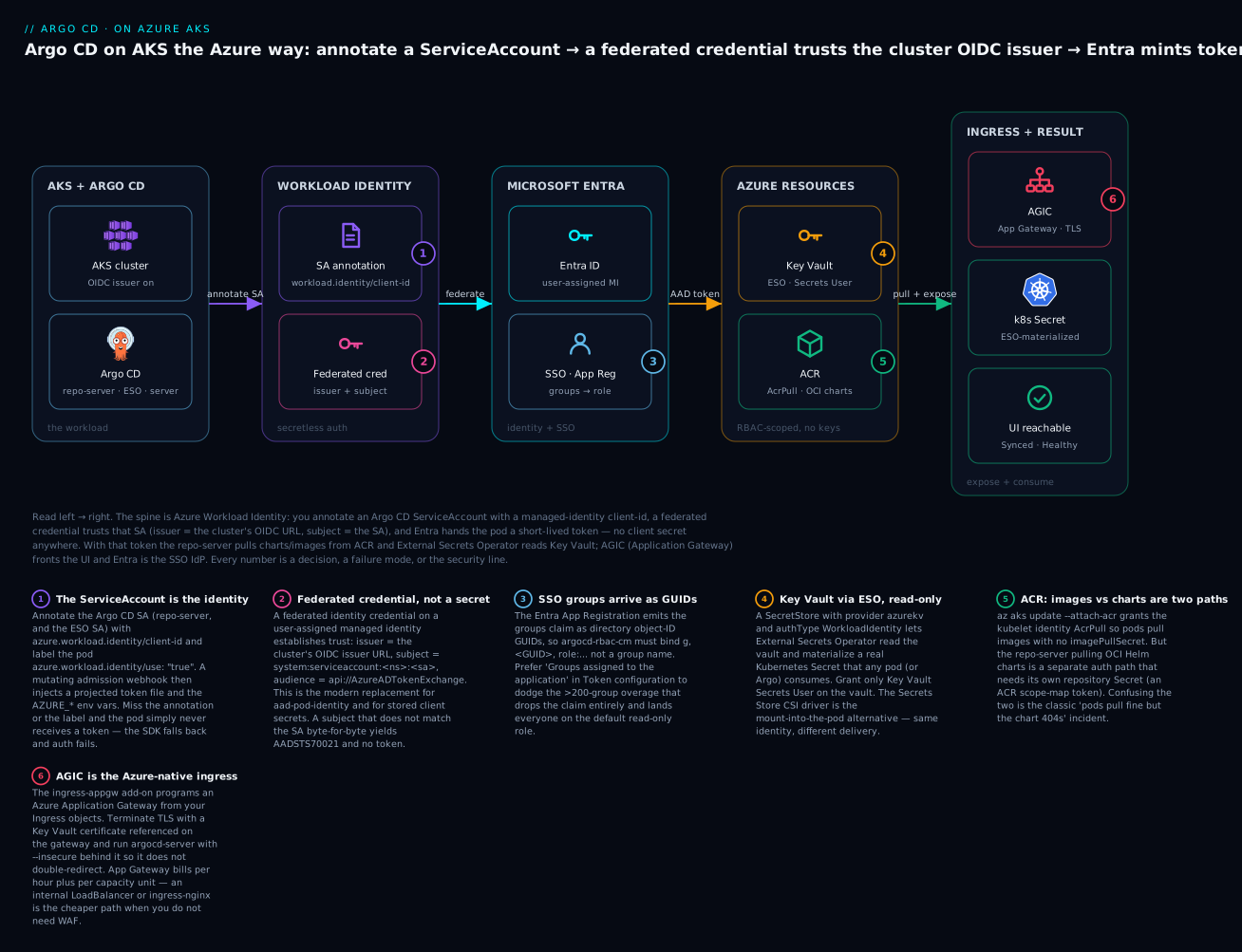
The numbered points are the ones that cost people the most hours: the ServiceAccount annotation and pod label that make Workload Identity actually inject a token (1), the federated credential whose subject must match the SA exactly (2), the Entra groups claim that arrives as GUIDs (3), the read-only Key Vault role ESO needs (4), the split between image pulls and chart pulls on ACR (5), and the App Gateway that fronts and TLS-terminates the UI (6). Everything below is those six boxes in depth.
Installing Argo CD on AKS
First you need a kubeconfig context that points at the cluster. az aks get-credentials merges cluster credentials into ~/.kube/config. The three clouds each have their own credential-fetch command, and this is the first place a script written for one cloud breaks on another:
| Cloud | Get a kubeconfig context | Auth mechanism under the hood |
|---|---|---|
| AKS | az aks get-credentials -g <rg> -n <cluster> |
Entra ID via kubelogin (or --admin for local admin, if not disabled) |
| EKS | aws eks update-kubeconfig --name <cluster> --region <r> |
IAM via aws eks get-token (exec plugin) |
| GKE | gcloud container clusters get-credentials <cluster> --region <r> |
Google IAM via gke-gcloud-auth-plugin (exec plugin) |
On an Entra-integrated AKS cluster the context uses an exec plugin (kubelogin) rather than a static token, so the first kubectl call opens a browser or device-code prompt. This matters later: when this same cluster is registered as a spoke into a hub Argo CD, that exec-based kubeconfig is exactly what has to be translated into a cluster Secret.
# Point kubectl at the AKS cluster (Entra-integrated; uses kubelogin under the hood)
az aks get-credentials --resource-group rg-platform --name aks-platform
# Merged "aks-platform" as current context in ~/.kube/config

kubectl get nodes
# NAME                              STATUS   ROLES   AGE   VERSION
# aks-sys-31840americ-vmss000000    Ready    <none>  9d    v1.30.4
High availability is not optional in production
Argo CD is not one process. The install lays down several components, and the difference between the demo and an HA deployment is how many replicas each runs and whether Redis is highly available. The pieces you will scale:
| Component | What it does | HA posture |
|---|---|---|
argocd-application-controller |
The reconcile engine — diffs desired vs live, applies syncs | StatefulSet; shard with replicas + ARGOCD_CONTROLLER_REPLICAS at large fleet size |
argocd-repo-server |
Clones repos, renders Helm/Kustomize to manifests | Stateless Deployment; scale replicas for parallel render throughput |
argocd-server |
The API + UI (this is what ingress fronts) | Stateless Deployment; 2+ replicas behind the ingress |
argocd-applicationset-controller |
Renders ApplicationSet generators into Applications |
Deployment; 1 is fine, 2 for HA |
argocd-dex-server |
Optional OIDC broker for SSO connectors | Deployment; only if you use Dex rather than direct OIDC |
redis / redis-ha |
Cache for repo renders and cluster state | The single most important thing to make HA — a lone Redis is a SPOF |
You have three realistic install routes. Pick one and stay declarative:
| Method | How | When to use |
|---|---|---|
| Raw HA manifests | kubectl apply -n argocd -f .../manifests/ha/install.yaml |
Fastest correct HA start; pin the tag, commit the file |
Helm chart (argo/argo-cd) |
helm install with a values file |
You want values-driven config, redis-ha.enabled, replica knobs |
| Argo CD Operator | Deploy the operator, create an ArgoCD CR |
You want a reconciled, opinionated install managed by a controller |
The HA raw-manifest path, pinned to the version you run:
kubectl create namespace argocd

# Pin to the exact version you run — never "stable"
kubectl apply -n argocd \
  -f https://raw.githubusercontent.com/argoproj/argo-cd/v2.13.0/manifests/ha/install.yaml
# customresourcedefinition.apiextensions.k8s.io/applications.argoproj.io created
# statefulset.apps/argocd-application-controller created
# deployment.apps/argocd-repo-server created
# ... (HA manifests set redis-ha and multiple replicas)

kubectl -n argocd rollout status deploy/argocd-server
# deployment "argocd-server" successfully rolled out
Or the Helm route, where HA and replica counts are values:
helm repo add argo https://argoproj.github.io/argo-helm
helm upgrade --install argocd argo/argo-cd \
  --namespace argocd --create-namespace \
  --set redis-ha.enabled=true \
  --set controller.replicas=1 \
  --set server.replicas=2 \
  --set repoServer.replicas=2 \
  --set applicationSet.replicas=2 \
  --set configs.params."server\.insecure"=true   # TLS terminates at the ingress
The server.insecure=true there is deliberate and worth flagging now: argocd-server normally serves TLS and does its own HTTP→HTTPS redirect, which fights an ingress that also terminates TLS. Running it --insecure (plain HTTP inside the cluster, TLS at the gateway) is the standard pattern behind AGIC or nginx. We return to it under ingress.
First login uses a generated bootstrap password stored in a Secret — your very first act should be to wire SSO and delete it:
# The bootstrap admin password
argocd admin initial-password -n argocd
# ph7Fk2mQx9LtV0Zn
#  (equivalently: kubectl -n argocd get secret argocd-initial-admin-secret \
#     -o jsonpath="{.data.password}" | base64 -d)

argocd login argocd.example.com --username admin --password 'ph7Fk2mQx9LtV0Zn'
The full install matrix — Redis HA, resource requests, TLS options and the first-login walkthrough — lives in Installing Argo CD: Helm, manifests, HA & first login. Here we assume it is up and move to the Azure edges.
Azure Workload Identity: secretless tokens for Argo CD
This is the spine, so we go slowly. The problem it solves: several Argo CD components need to call Azure APIs. External Secrets Operator must read Key Vault. The repo-server may need an Entra token to pull from ACR. The old answers were all bad — a service-principal client secret in a Kubernetes Secret (long-lived, leakable, a rotation chore), or aad-pod-identity (a per-node daemon intercepting IMDS, now deprecated). Azure Workload Identity replaces both with an OIDC federation and no stored credential.
Here is the mechanism in one paragraph. Every AKS cluster can expose an OIDC issuer — a public HTTPS endpoint publishing the cluster’s token-signing keys. Kubernetes already projects a signed, short-lived token into each pod for its ServiceAccount. Workload Identity teaches Entra to trust those SA tokens for a specific ServiceAccount: you create a federated identity credential on a managed identity that says “a token from this cluster’s issuer, for this exact ServiceAccount, may be exchanged for one of my Azure tokens.” A pod presents its projected SA token, Entra validates the federation and returns an Azure access token. Nothing is stored; the trust is the credential.
Four moving parts must line up, and every Workload Identity failure is one of them being wrong:
| Part | What it is | Where it lives | The exact value |
|---|---|---|---|
| OIDC issuer | The cluster’s public token issuer URL | On the AKS cluster | az aks show ... --query oidcIssuerProfile.issuerUrl |
| Managed identity | The Azure identity the pod becomes | Resource group | A user-assigned MI (has clientId, principalId) |
| Federated credential | The trust: issuer + subject + audience | On the managed identity | subject = system:serviceaccount:<ns>:<sa> |
| SA annotation + pod label | Tells the webhook to inject a token | In the cluster | azure.workload.identity/client-id + use: "true" |
Step one — enable the issuer and the webhook on the cluster. These flags turn on the OIDC issuer and install the mutating admission webhook that injects tokens:
az aks update --resource-group rg-platform --name aks-platform \
  --enable-oidc-issuer \
  --enable-workload-identity

# Capture the issuer URL — the federation's "issuer" field
export OIDC_ISSUER="$(az aks show -g rg-platform -n aks-platform \
  --query oidcIssuerProfile.issuerUrl -o tsv)"
echo "$OIDC_ISSUER"
# https://westeurope.oic.prod-aks.azure.com/<tenant-guid>/<cluster-guid>/
Step two — create the managed identity that External Secrets Operator (and, if you go that route, the repo-server) will assume:
az identity create --resource-group rg-platform --name id-argocd-eso

export MI_CLIENT_ID="$(az identity show -g rg-platform -n id-argocd-eso --query clientId -o tsv)"
export MI_PRINCIPAL_ID="$(az identity show -g rg-platform -n id-argocd-eso --query principalId -o tsv)"
# clientId    -> goes on the ServiceAccount annotation
# principalId -> gets the Azure role assignments (Key Vault, ACR)
Step three — create the federated credential, the trust itself. Note the subject: it names the exact namespace and ServiceAccount, and it must match byte-for-byte or Entra refuses the exchange:
az identity federated-credential create \
  --name fic-eso \
  --identity-name id-argocd-eso \
  --resource-group rg-platform \
  --issuer "$OIDC_ISSUER" \
  --subject "system:serviceaccount:external-secrets:external-secrets" \
  --audience "api://AzureADTokenExchange"
Those three fields are the whole trust contract. Get any one wrong and no token is issued:
| Federated credential field | Must equal | Symptom if wrong |
|---|---|---|
issuer |
The cluster’s OIDC issuer URL exactly | AADSTS700016 / no matching federated credential |
subject |
system:serviceaccount:<namespace>:<sa-name> |
AADSTS70021: No matching federated identity record |
audience |
api://AzureADTokenExchange (the default) |
Token audience mismatch, exchange rejected |
Step four — annotate the ServiceAccount and label the pod. The annotation carries the MI’s client-id; the pod label is what tells the admission webhook to actually inject the token file and env vars:
apiVersion: v1
kind: ServiceAccount
metadata:
  name: external-secrets
  namespace: external-secrets
  annotations:
    azure.workload.identity/client-id: "00000000-1111-2222-3333-444444444444"  # MI clientId
---
# On the workload's pod template (ESO Helm exposes this as a value):
# metadata.labels:
#   azure.workload.identity/use: "true"
When both are present, the webhook mutates the pod to add a projected token and four environment variables — this is what the Azure SDK inside ESO reads:
| Injected by the webhook | Value | Used for |
|---|---|---|
AZURE_CLIENT_ID |
The MI client-id from the annotation | Which identity to become |
AZURE_TENANT_ID |
Your tenant GUID | Which directory |
AZURE_FEDERATED_TOKEN_FILE |
/var/run/secrets/azure/tokens/azure-identity-token |
The projected SA token to exchange |
AZURE_AUTHORITY_HOST |
https://login.microsoftonline.com/ |
Where to exchange it |
Which Argo CD components actually need an Azure identity
A useful clarifier before you over-federate: most of Argo CD needs no Azure identity at all. The server and controller only ever talk to the Kubernetes API. Only two Argo pods (plus the node kubelet, which is not an Argo pod) reach into Azure:
| Component | Calls which Azure resource | Identity path | If the identity is missing |
|---|---|---|---|
| External Secrets Operator | Key Vault | Workload Identity (federated SA) | SecretStore ValidationFailed, 403 |
argocd-repo-server |
ACR (OCI Helm charts) | Repository Secret (ACR token) |
failed to get repo / chart not found |
| kubelet (node, not Argo) | ACR (container images) | Kubelet identity AcrPull via attach-acr |
ImagePullBackOff / 401 |
argocd-server |
None — SSO is browser-side OIDC | — | n/a |
argocd-application-controller |
None — Kubernetes API only | — | n/a |
So you federate exactly one identity for ESO, wire one repository Secret for the repo-server, and run attach-acr once for the kubelet. That is the entire Azure-identity surface — do not annotate the server or controller.
The same pattern on EKS and GKE
The concept — federate a Kubernetes ServiceAccount to a cloud identity, no stored key — is identical on all three clouds. Only three things change: the feature’s name, the SA annotation, and one pod requirement. This table is the whole translation:
| Aspect | Azure (AKS) | AWS (EKS) | Google (GKE) |
|---|---|---|---|
| Feature name | Microsoft Entra Workload ID | IRSA / EKS Pod Identity | GKE Workload Identity Federation |
| Trust object | Federated identity credential on a managed identity | IAM OIDC provider (IRSA) or Pod Identity association | IAM policy binding on a Google SA (or direct WI) |
| SA annotation | azure.workload.identity/client-id |
eks.amazonaws.com/role-arn |
iam.gke.io/gcp-service-account |
| Pod requirement | label azure.workload.identity/use: "true" |
none (IRSA); Pod Identity agent (Pod Identity) | none |
| Token audience | api://AzureADTokenExchange |
sts.amazonaws.com |
GCP STS (...svc.id.goog) |
| Enable on cluster | --enable-oidc-issuer --enable-workload-identity |
eksctl utils associate-iam-oidc-provider / pod-identity add-on |
--workload-pool=PROJECT.svc.id.goog |
| Cloud role granted | Key Vault Secrets User, AcrPull, … | IAM policy on the role | IAM role on the Google SA |
If you internalise one thing, make it this: on Azure the identity is expressed as an annotation client-id plus a pod label plus a federated credential whose subject is the SA. Miss the label and the SDK silently gets no token; miss the subject match and Entra returns AADSTS70021. Those two are the top Workload Identity tickets.
Entra ID SSO: App Registration, groups, RBAC
With identity solved for the machines, solve it for the humans. You never want a shared admin password in production — you want engineers logging in with their corporate Entra accounts, MFA enforced by Entra, and their group membership deciding what they can do in Argo CD. Argo CD is an OIDC client; Entra is the OIDC provider.
The Azure side is an App Registration. Its fields:
| App Registration setting | Value for Argo CD | Why |
|---|---|---|
| Redirect URI (direct OIDC) | https://argocd.example.com/auth/callback |
Where Entra returns the code |
| Redirect URI (via Dex) | https://argocd.example.com/api/dex/callback |
If you broker through bundled Dex |
| Client secret | Generated, stored in argocd-secret (not argocd-cm) |
Confidential-client auth |
| Token configuration → groups claim | “Groups assigned to the application” (preferred) | Emits groups in the ID token, overage-safe |
| Implicit/hybrid | ID tokens enabled | Argo needs the ID token |
On the Argo CD side, oidc.config in argocd-cm points at the Entra v2 issuer. The client secret is $-referenced from argocd-secret — it never sits in the ConfigMap:
apiVersion: v1
kind: ConfigMap
metadata:
  name: argocd-cm
  namespace: argocd
data:
  url: "https://argocd.example.com"
  oidc.config: |
    name: Entra ID
    issuer: https://login.microsoftonline.com/<TENANT_ID>/v2.0
    clientID: <APP_CLIENT_ID>
    clientSecret: $oidc.entra.clientSecret        # key in argocd-secret
    requestedIDTokenClaims:
      groups:
        essential: true                            # ask Entra to include groups
    requestedScopes:
      - openid
      - profile
      - email
apiVersion: v1
kind: Secret
metadata:
  name: argocd-secret
  namespace: argocd
type: Opaque
stringData:
  oidc.entra.clientSecret: "<APP_CLIENT_SECRET>"   # placeholder — inject via ESO/CSI in real life
The claims Argo CD actually reads out of the Entra ID token, and where each comes from:
| Claim | Entra emits it when | Argo CD uses it for |
|---|---|---|
sub / oid |
Always | Stable per-user identity |
email / preferred_username |
email + profile scopes requested |
Display name and any per-user policy.csv rules |
groups |
groups claim added in Token configuration | RBAC group bindings — arrives as object-ID GUIDs |
aud |
Always | Must equal the App Registration’s client ID |
Now the part that generates the most “SSO works but I have no permissions” tickets: Entra emits groups as directory object-ID GUIDs, not names. So your RBAC must bind the GUID, not Platform-Admins:
apiVersion: v1
kind: ConfigMap
metadata:
  name: argocd-rbac-cm
  namespace: argocd
data:
  scopes: '[groups]'                # read roles from the groups claim
  policy.default: role:readonly
  policy.csv: |
    # g, <ENTRA GROUP OBJECT-ID GUID>, <role>
    g, 6c8b7f1e-9a2d-4f3b-8e21-0d5c7a1b2e34, role:admin
    g, 9f4a2c88-1b7e-4d6a-b0c3-2e8f5a9d1c40, proj:team-payments:developer
Two Entra-specific gotchas dominate here:
| Gotcha | What happens | Fix |
|---|---|---|
| Groups as GUIDs | RBAC line with a group name never matches | Bind the object-ID GUID; find it with az ad group show |
| Groups overage (>200) | Token drops groups, adds a _claim_sources pointer; user lands on role:readonly |
Use “Groups assigned to the application” so only assigned groups are emitted |
| Wrong issuer version | v1 sts.windows.net vs v2 login.microsoftonline.com/.../v2.0 mismatch |
Use the v2 issuer to match the v2 groups claim behaviour |
The per-cloud SSO shapes differ mostly in how you get groups into the token — the single most fragile part on every cloud:
| Aspect | Entra ID (AKS) | Cognito / IAM Identity Center (EKS) | Google Workspace (GKE) |
|---|---|---|---|
| Provider type | Direct OIDC (v2 issuer) | Cognito user pool OIDC / IdC via SAML | Direct OAuth returns no groups |
| Groups claim | groups (GUIDs) |
cognito:groups (names) |
Requires Dex google connector + Directory API |
RBAC scopes |
[groups] |
[cognito:groups] |
[groups] (via Dex) |
| Sharp edge | GUIDs + overage | Map pool groups to the claim | Direct OIDC cannot deliver groups at all |
The full three-cloud SSO walkthrough — Dex vs direct OIDC, decoding the ID token to confirm the claim, the Google domain-wide-delegation dance — is in Argo CD SSO: OIDC, Dex, Entra, Cognito & Google. For Azure, the summary is: v2 issuer, groups as GUIDs, prefer app-assigned groups, and confirm the claim before you ever blame RBAC.
Key Vault secrets with External Secrets Operator
Argo CD’s own rule is absolute: never commit a plaintext secret to Git. On Azure the clean answer is Key Vault as the backend and something in-cluster that reads it. There are two “somethings,” and choosing between them is a real decision.
External Secrets Operator (ESO) is the modern default. You commit an ExternalSecret — a reference, not a value — Argo CD syncs it, and ESO authenticates to Key Vault (using the Workload Identity you just built) and materialises a normal Kubernetes Secret. The plaintext never enters Git; a repo leak exposes only pointers.
The Secrets Store CSI driver is the alternative: it mounts secrets straight into a pod’s filesystem at runtime and can optionally sync them to a Secret. Different delivery, same identity.
| External Secrets Operator (ESO) | Secrets Store CSI driver | |
|---|---|---|
| Delivery | Creates and owns a real Secret |
Mounts a volume into the pod; Secret sync optional |
| Exists when… | Always, once reconciled (refreshInterval) |
Only while a pod mounts the volume |
| Consumed via | envFrom / valueFrom like any Secret |
File in the pod, or synced Secret |
| GitOps fit | Excellent — the ExternalSecret is a clean Git object |
Fine, but the SecretProviderClass + a mounting pod are coupled |
| AKS install | Helm chart | AKS add-on (azure-keyvault-secrets-provider) |
| Best for | Secrets many workloads share; Argo-managed references | Secrets one pod needs mounted as files; tight blast radius |
ESO wired to Key Vault via Workload Identity
The ESO ServiceAccount is the one you federated above (external-secrets/external-secrets). Grant its managed identity read access on the vault — nothing more:
# RBAC-authorization vault: assign the read-only built-in role to the MI principal
az role assignment create \
  --assignee-object-id "$MI_PRINCIPAL_ID" \
  --assignee-principal-type ServicePrincipal \
  --role "Key Vault Secrets User" \
  --scope "$(az keyvault show -n kv-platform --query id -o tsv)"
Two vault authorization models exist, and picking the wrong grant is a common 403:
| Vault authorization model | How to grant ESO read access | Note |
|---|---|---|
| Azure RBAC (recommended) | Role assignment: Key Vault Secrets User | Least-privilege, auditable in Azure |
| Access policies (legacy) | az keyvault set-policy --secret-permissions get list |
Per-vault ACL; still common on older vaults |
The SecretStore names the vault and says “authenticate with Workload Identity, using this SA”:
apiVersion: external-secrets.io/v1
kind: SecretStore
metadata:
  name: azure-keyvault
  namespace: external-secrets
spec:
  provider:
    azurekv:
      authType: WorkloadIdentity
      vaultUrl: "https://kv-platform.vault.azure.net"
      serviceAccountRef:
        name: external-secrets          # the federated, annotated SA
The ExternalSecret declares which vault secret to pull and which Secret to create:
apiVersion: external-secrets.io/v1
kind: ExternalSecret
metadata:
  name: db-credentials
  namespace: team-payments
spec:
  refreshInterval: 1h
  secretStoreRef:
    name: azure-keyvault
    kind: SecretStore
  target:
    name: db-credentials                # the k8s Secret ESO will create + own
    creationPolicy: Owner
  data:
    - secretKey: password               # key inside the k8s Secret
      remoteRef:
        key: db-password                # the secret NAME in Key Vault
Argo CD and ESO can fight over the same
Secret. ESO owns and rewrites the materialisedSecret, so if Argo also tracks it, Argo sees the data change and flagsOutOfSyncforever. The fix: keep only theExternalSecretunder Argo’s management (that is the Git object), and either let ESO own theSecretentirely or add it toignoreDifferenceson/data. Never put both theExternalSecretand a hand-writtenSecretfor the same name in Git.
The API group is
external-secrets.io/v1on current ESO (v0.10+, GA). Older installs useexternal-secrets.io/v1beta1with identical field names — checkkubectl get crd externalsecrets.external-secrets.io -o jsonpath='{.spec.versions[*].name}'and match it.
The CSI alternative, briefly
If a single pod needs the secret mounted as a file, the CSI driver is lighter. Enable the add-on, then a SecretProviderClass (still using Workload Identity — clientID is the MI client-id) describes what to fetch:
az aks enable-addons --addons azure-keyvault-secrets-provider \
  -g rg-platform -n aks-platform
apiVersion: secrets-store.csi.x-k8s.io/v1
kind: SecretProviderClass
metadata:
  name: kv-db
  namespace: team-payments
spec:
  provider: azure
  parameters:
    usePodIdentity: "false"
    useVMManagedIdentity: "false"
    clientID: "00000000-1111-2222-3333-444444444444"   # MI client-id, Workload Identity
    keyvaultName: "kv-platform"
    tenantId: "<TENANT_ID>"
    objects: |
      array:
        - |
          objectName: db-password
          objectType: secret
  secretObjects:                          # optional: also sync to a k8s Secret
    - secretName: db-credentials
      type: Opaque
      data:
        - objectName: db-password
          key: password
The per-cloud secret-store mapping — same ESO, different provider block:
| Aspect | Azure Key Vault | AWS Secrets Manager | Google Secret Manager |
|---|---|---|---|
| ESO provider | azurekv |
aws (service SecretsManager) |
gcpsm |
| Auth to store | authType: WorkloadIdentity |
IRSA / Pod Identity (jwt) |
Workload Identity |
| Read role | Key Vault Secrets User | secretsmanager:GetSecretValue |
roles/secretmanager.secretAccessor |
| CSI provider | secrets-store-provider-azure (AKS add-on) | ASCP (AWS provider) | secret-manager CSI provider |
The complete secrets story — ESO vs Sealed Secrets vs SOPS vs Vault, refresh, rotation and the ownership war above — is in Secrets in Argo CD: Sealed Secrets, ESO, SOPS & Vault.
Pulling from ACR: images and OCI Helm charts
Azure Container Registry serves two very different things to Argo CD, over two different auth paths, and conflating them is a classic incident. Be precise:
- Container images are pulled by the kubelet on the nodes when a Pod starts. This is a cluster-level concern, solved once with
attach-acr. - OCI Helm charts are pulled by the repo-server when it renders an
Application. This is a repository-credential concern, solved with a repositorySecret.
Remember what Argo CD is not: it is not a CI system and it does not build images. Your pipeline builds and pushes to ACR; Argo CD only pulls. The registry auth is purely about read access.
Images: attach ACR to the cluster
attach-acr grants the cluster’s kubelet managed identity the AcrPull role on the registry. After it, Pods pull from ACR with no imagePullSecrets anywhere:
az aks update --resource-group rg-platform --name aks-platform \
  --attach-acr acrplatform
# Grants AcrPull to the kubelet identity on registry "acrplatform"
OCI Helm charts: a repository Secret for the repo-server
The repo-server does not use the kubelet identity — it is a different Pod with a different (or no) identity. To let it pull an OCI chart from ACR, register the registry as a repository. Create a scoped ACR token (never the admin user) and reference it:
# A repository-scoped, pull-only token — least privilege for the repo-server
az acr token create --registry acrplatform --name argocd-pull \
  --scope-map _repositories_pull
# credentials.passwords[].value -> use as the repository password (rotate on schedule)
apiVersion: v1
kind: Secret
metadata:
  name: acr-oci-charts
  namespace: argocd
  labels:
    argocd.argoproj.io/secret-type: repository
stringData:
  name: acr-charts
  type: helm
  enableOCI: "true"
  url: acrplatform.azurecr.io
  username: argocd-pull                 # the ACR token name
  password: "<ACR_TOKEN_PASSWORD>"      # placeholder — inject via ESO from Key Vault
An Application then sources the chart by OCI URL:
apiVersion: argoproj.io/v1alpha1
kind: Application
metadata:
  name: payments
  namespace: argocd
spec:
  project: team-payments
  source:
    repoURL: acrplatform.azurecr.io      # OCI registry host
    chart: payments                      # chart repo path in ACR
    targetRevision: 1.4.2                # chart version (pin it)
    helm:
      valueFiles:
        - values-prod.yaml
  destination:
    server: https://kubernetes.default.svc
    namespace: payments
  syncPolicy:
    automated:
      prune: true
      selfHeal: true
The two ACR paths, side by side, so you never mix them up:
| Concern | Who pulls | How it authenticates | Symptom if misconfigured |
|---|---|---|---|
| Container image | kubelet (node) | Kubelet identity AcrPull via --attach-acr |
ImagePullBackOff, 401 Unauthorized on pull |
| OCI Helm chart | argocd-repo-server |
Repository Secret (ACR token) with enableOCI: "true" |
failed to get repo, chart not found, ComparisonError |
Per-cloud registry mapping:
| Aspect | ACR (Azure) | ECR (AWS) | Artifact Registry (Google) |
|---|---|---|---|
| Attach to cluster (images) | az aks update --attach-acr → AcrPull |
Node role gets AmazonEC2ContainerRegistryReadOnly |
Node SA gets roles/artifactregistry.reader |
| Pull role name | AcrPull |
ecr:GetDownloadUrlForLayer / BatchGetImage |
roles/artifactregistry.reader |
| OCI chart auth (repo-server) | ACR scope-map token | ECR auth token (12-hr, needs refresh) | AR via short-lived OAuth / token |
| Gotcha | Images ≠ charts; two paths | ECR tokens expire in 12h — automate refresh | Region-specific host names |
Exposing the UI: AGIC, ingress-nginx, and internal load balancers
Now put a real front door on argocd-server. Three options on AKS, and the choice is about WAF, cost and whether the UI should be public at all.
| Option | What it is | TLS | Cost / notes | Choose when |
|---|---|---|---|---|
| AGIC (Application Gateway) | Azure L7 gateway programmed from Ingress | Key Vault cert on the gateway, or cert-manager | Per-hour + per-capacity-unit billing; WAF available | You want Azure-native L7 + WAF |
| ingress-nginx | In-cluster controller behind a Service LB |
cert-manager into a Secret |
One Standard LB; cheaper, cloud-portable | You want portability and lower cost |
| Internal LoadBalancer | Service type=LoadBalancer, internal annotation |
Terminate in-cluster | Private IP only; no public exposure | Argo CD must never be internet-facing |
AGIC
Enable the add-on (pointing at an existing Application Gateway or letting AKS create one), then an Ingress with AGIC annotations. Because argocd-server does its own redirect and gRPC, run it --insecure and let the gateway own TLS:
az aks enable-addons --addons ingress-appgw \
  -g rg-platform -n aks-platform \
  --appgw-id "$(az network application-gateway show -g rg-platform -n appgw-platform --query id -o tsv)"
apiVersion: networking.k8s.io/v1
kind: Ingress
metadata:
  name: argocd-server
  namespace: argocd
  annotations:
    kubernetes.io/ingress.class: azure/application-gateway
    appgw.ingress.kubernetes.io/backend-protocol: "http"        # server runs --insecure
    appgw.ingress.kubernetes.io/ssl-redirect: "true"
    appgw.ingress.kubernetes.io/appgw-ssl-certificate: "argocd-cert"  # cert on the gateway (from Key Vault)
spec:
  rules:
    - host: argocd.example.com
      http:
        paths:
          - path: /
            pathType: Prefix
            backend:
              service:
                name: argocd-server
                port:
                  number: 80
The AGIC annotations you will actually reach for:
| Annotation | Purpose |
|---|---|
kubernetes.io/ingress.class: azure/application-gateway |
Bind the Ingress to AGIC (or ingressClassName: azure-application-gateway) |
appgw.ingress.kubernetes.io/backend-protocol |
http (server --insecure) or https (server keeps TLS) |
appgw.ingress.kubernetes.io/ssl-redirect |
Force HTTP→HTTPS at the gateway |
appgw.ingress.kubernetes.io/appgw-ssl-certificate |
Use a named cert already on the gateway (often synced from Key Vault) |
TLS from Key Vault. App Gateway can reference a certificate stored in Key Vault directly — you load it onto the gateway once and reference it by name in the annotation:
# Put the Key Vault cert on the Application Gateway (gateway's identity needs Key Vault access)
az network application-gateway ssl-cert create \
  --resource-group rg-platform --gateway-name appgw-platform \
  --name argocd-cert \
  --key-vault-secret-id "https://kv-platform.vault.azure.net/secrets/argocd-tls"
Internal LoadBalancer (private UI)
If Argo CD should stay off the internet, skip public ingress entirely and give argocd-server an internal LB — a private IP reachable only inside the VNet (and whatever peers into it):
apiVersion: v1
kind: Service
metadata:
  name: argocd-server-internal
  namespace: argocd
  annotations:
    service.beta.kubernetes.io/azure-load-balancer-internal: "true"
spec:
  type: LoadBalancer
  selector:
    app.kubernetes.io/name: argocd-server
  ports:
    - name: https
      port: 443
      targetPort: 8080
Private AKS and the hub-connectivity implication
If you go further and make the API server private (--enable-private-cluster), the control plane has no public endpoint — it is reachable only via a private FQDN in a private DNS zone. That is great for the cluster’s own security, but it changes cluster registration: a hub Argo CD sitting in another VNet cannot dial a private API server without VNet peering, Private Link, or private-DNS resolution into that network. The symptom is a spoke cluster stuck Failed with dial tcp ... i/o timeout even though the cluster Secret is perfect — the creds are right, the network path is missing. Planning that connectivity (peering, Private Link, authorized IP ranges) is a topic of its own; a dedicated lesson on private clusters and hub reachability covers it. For this lesson, know that private ingress (internal LB) and a private API server are two separate switches, and the second one is what breaks hub-and-spoke.
Per-cloud ingress mapping:
| Aspect | AGIC (Azure) | AWS Load Balancer Controller (ALB) | GKE Ingress (GCLB) |
|---|---|---|---|
| Controller | ingress-appgw add-on |
aws-load-balancer-controller |
Built-in GKE ingress |
| ingressClass | azure/application-gateway |
alb |
gce / gce-internal |
| Internal variant | Internal LB annotation / private App Gateway | alb.ingress.kubernetes.io/scheme: internal |
gce-internal |
| TLS from cloud store | Key Vault cert on the gateway | ACM cert ARN annotation | Google-managed certificate |
| WAF option | App Gateway WAF SKU | AWS WAF on the ALB | Cloud Armor |
⚠️ Billing. An Application Gateway bills per hour plus per capacity unit, an internal or public Standard Load Balancer has an hourly + rule cost, and Private Link / private endpoints bill per hour and per GB. None of these are free-tier. For a lab, an internal LB or ingress-nginx behind a single Standard LB is the cheapest route; reserve AGIC for when you genuinely want Azure L7 + WAF, and tear the gateway down when you are done.
Terraform: AKS + federated identity in one place
Clicking this together in the portal is how you end up unable to rebuild it. The whole spine — cluster with OIDC issuer and Workload Identity on, the managed identity, the federated credential, and the Key Vault / ACR role assignments — is a few azurerm (v4) resources. This is the skeleton; the bootstrapping lesson covers installing Argo CD itself via helm_release and the app-of-apps root.
terraform {
  required_providers {
    azurerm = { source = "hashicorp/azurerm", version = "~> 4.0" }
  }
}

provider "azurerm" {
  features {}
}

resource "azurerm_kubernetes_cluster" "this" {
  name                = "aks-platform"
  location            = "westeurope"
  resource_group_name = "rg-platform"
  dns_prefix          = "aksplatform"

  oidc_issuer_enabled       = true      # publish the OIDC issuer
  workload_identity_enabled = true      # install the mutating webhook

  default_node_pool {
    name       = "system"
    node_count = 3
    vm_size    = "Standard_D4s_v5"
  }

  identity {
    type = "SystemAssigned"
  }
}

# The identity External Secrets Operator will assume
resource "azurerm_user_assigned_identity" "eso" {
  name                = "id-argocd-eso"
  location            = azurerm_kubernetes_cluster.this.location
  resource_group_name = "rg-platform"
}

# The trust: this SA on this cluster may become the identity above
resource "azurerm_federated_identity_credential" "eso" {
  name                = "fic-eso"
  resource_group_name = "rg-platform"
  audience            = ["api://AzureADTokenExchange"]
  issuer              = azurerm_kubernetes_cluster.this.oidc_issuer_url
  parent_id           = azurerm_user_assigned_identity.eso.id
  subject             = "system:serviceaccount:external-secrets:external-secrets"
}

# ESO reads Key Vault — read-only
resource "azurerm_role_assignment" "eso_kv" {
  scope                = azurerm_key_vault.this.id
  role_definition_name = "Key Vault Secrets User"
  principal_id         = azurerm_user_assigned_identity.eso.principal_id
}

# The kubelet identity pulls images from ACR
resource "azurerm_role_assignment" "kubelet_acr" {
  scope                = azurerm_container_registry.this.id
  role_definition_name = "AcrPull"
  principal_id         = azurerm_kubernetes_cluster.this.kubelet_identity[0].object_id
}
The resources and what each replaces:
| Terraform resource | Replaces | Key field |
|---|---|---|
azurerm_kubernetes_cluster (oidc_issuer_enabled, workload_identity_enabled) |
Two az aks update flags |
Outputs oidc_issuer_url |
azurerm_user_assigned_identity |
az identity create |
Outputs client_id, principal_id |
azurerm_federated_identity_credential |
az identity federated-credential create |
subject, issuer, audience |
azurerm_role_assignment (Key Vault Secrets User) |
az role assignment create |
Least-privilege read |
azurerm_role_assignment (AcrPull) |
az aks update --attach-acr |
Kubelet identity object_id |
Feed the outputs forward: azurerm_user_assigned_identity.eso.client_id becomes the ServiceAccount annotation, and azurerm_kubernetes_cluster.this.oidc_issuer_url is what the federated credential trusts. Installing Argo CD on top — the helm_release, the root app-of-apps, ordering the bootstrap so CRDs exist before the Applications — is the subject of the dedicated bootstrapping lesson.
Hands-on lab: wire it end to end
No live cluster is required — this lab is config-level: you produce every manifest and command in the correct order, exactly as you would apply them, and you verify shape and cross-references rather than a running sync. That is the honest way to learn the wiring without an Azure bill. Where a step would bill on a real cluster, it is flagged. Follow it as a build sheet.
Before you start, know what would cost money if this were live, so you reach for the cheap option in a lab:
| Resource | Billing model | Cheaper lab alternative |
|---|---|---|
| Application Gateway (AGIC) | Per hour + per capacity unit | Internal LoadBalancer or ingress-nginx |
| Standard Load Balancer | Per hour + per rule + data processed | Reuse one LB for all ingress |
| Private endpoint / Private Link | Per hour + per GB | Skip unless you are testing private AKS |
| ACR | Per registry tier per day | Basic tier is fine for labs |
| Key Vault | Per 10k operations (negligible) | Leave it running |
| AKS control plane | Free tier, or Standard (Uptime SLA) per hour | Free tier for labs |
Scenario. One AKS cluster runs Argo CD. You will: (1) turn on Workload Identity, (2) federate an identity for ESO, (3) deploy a SecretStore + ExternalSecret pulling a Key Vault secret, (4) configure Entra SSO with a group→role mapping, and (5) expose the UI via AGIC.
Step 1 — Turn on the OIDC issuer and Workload Identity.
az aks update -g rg-lab -n aks-lab --enable-oidc-issuer --enable-workload-identity
export OIDC_ISSUER="$(az aks show -g rg-lab -n aks-lab --query oidcIssuerProfile.issuerUrl -o tsv)"
What just happened: the cluster now publishes an OIDC issuer and runs the mutating webhook. Nothing bills yet — these are cluster feature flags. $OIDC_ISSUER is the string the federation will trust.
Step 2 — Create the identity and federate it to the ESO ServiceAccount.
az identity create -g rg-lab -n id-eso-lab
export MI_CLIENT_ID="$(az identity show -g rg-lab -n id-eso-lab --query clientId -o tsv)"
export MI_PRINCIPAL_ID="$(az identity show -g rg-lab -n id-eso-lab --query principalId -o tsv)"

az identity federated-credential create \
  --name fic-eso-lab --identity-name id-eso-lab -g rg-lab \
  --issuer "$OIDC_ISSUER" \
  --subject "system:serviceaccount:external-secrets:external-secrets" \
  --audience "api://AzureADTokenExchange"
What just happened: Entra now trusts the external-secrets ServiceAccount in the external-secrets namespace. The subject string is the load-bearing part — it must equal the SA’s system:serviceaccount:<ns>:<name> exactly.
Step 3 — Grant read on Key Vault and seed a test secret.
az keyvault secret set --vault-name kv-lab --name db-password --value 'S3cr3t-in-Vault'   # ⚠️ demo value
az role assignment create \
  --assignee-object-id "$MI_PRINCIPAL_ID" --assignee-principal-type ServicePrincipal \
  --role "Key Vault Secrets User" \
  --scope "$(az keyvault show -n kv-lab --query id -o tsv)"
What just happened: the managed identity can now read secrets from kv-lab and nothing else. The secret value lives in Key Vault — it will never appear in Git.
Step 4 — Annotate the ESO ServiceAccount (the manifest ESO’s Helm chart renders).
apiVersion: v1
kind: ServiceAccount
metadata:
  name: external-secrets
  namespace: external-secrets
  annotations:
    azure.workload.identity/client-id: "REPLACE_WITH_MI_CLIENT_ID"
# The ESO pod template must also carry the label:
#   azure.workload.identity/use: "true"
What just happened: the annotation ties the SA to the managed identity; the pod label makes the webhook inject the token. Install ESO with its Helm chart and set both via values (serviceAccount.annotations and podLabels).
Step 5 — Deploy the SecretStore and ExternalSecret.
apiVersion: external-secrets.io/v1
kind: SecretStore
metadata:
  name: azure-keyvault
  namespace: external-secrets
spec:
  provider:
    azurekv:
      authType: WorkloadIdentity
      vaultUrl: "https://kv-lab.vault.azure.net"
      serviceAccountRef:
        name: external-secrets
---
apiVersion: external-secrets.io/v1
kind: ExternalSecret
metadata:
  name: db-credentials
  namespace: external-secrets
spec:
  refreshInterval: 1h
  secretStoreRef:
    name: azure-keyvault
    kind: SecretStore
  target:
    name: db-credentials
    creationPolicy: Owner
  data:
    - secretKey: password
      remoteRef:
        key: db-password
What just happened: on a live cluster, ESO would authenticate with the federated token, read db-password from Key Vault, and create a db-credentials Secret. Representative verification output:
kubectl -n external-secrets get externalsecret db-credentials
# NAME             STORE            REFRESH INTERVAL   STATUS         READY
# db-credentials   azure-keyvault   1h                 SecretSynced   True

kubectl -n external-secrets get secret db-credentials -o jsonpath='{.data.password}' | base64 -d
# S3cr3t-in-Vault   (materialized from Key Vault; never in Git)
Step 6 — Configure Entra SSO with a group→role mapping. Apply the argocd-cm oidc.config, the argocd-secret client-secret, and the RBAC binding shown earlier. The load-bearing line:
# argocd-rbac-cm data.policy.csv
g, 6c8b7f1e-9a2d-4f3b-8e21-0d5c7a1b2e34, role:admin   # your Platform-Admins group OBJECT-ID
What just happened: members of that Entra group become Argo CD admins on next login; everyone else falls to role:readonly. Confirm the group object-id with az ad group show --group Platform-Admins --query id -o tsv.
Step 7 — Expose the UI via AGIC. Apply the Ingress from the ingress section (server --insecure, TLS cert on the gateway). Representative result:
kubectl -n argocd get ingress argocd-server
# NAME            CLASS   HOSTS                ADDRESS         PORTS   AGE
# argocd-server   <none>  argocd.example.com   20.50.x.x       80      2m
What just happened: AGIC programmed the Application Gateway with a listener for argocd.example.com and a backend pool of argocd-server pods. ⚠️ This step bills on a real cluster — the Application Gateway is live from the moment the add-on provisions it.
Verify (the shape you expect):
argocd app list          # Applications visible after SSO login
kubectl -n external-secrets get secretstore azure-keyvault -o jsonpath='{.status.conditions[0].reason}'
# ValidationSucceeded      <- Workload Identity auth to Key Vault worked
Teardown. Reverse order, and delete the billing resources first:
kubectl -n argocd delete ingress argocd-server                        # stop AGIC programming
az aks disable-addons --addons ingress-appgw -g rg-lab -n aks-lab      # ⚠️ stop App Gateway billing
az network application-gateway delete -g rg-lab -n appgw-lab           # if AKS created it
kubectl delete -n external-secrets externalsecret db-credentials secretstore azure-keyvault
az identity federated-credential delete --name fic-eso-lab --identity-name id-eso-lab -g rg-lab
az identity delete -g rg-lab -n id-eso-lab
az keyvault secret delete --vault-name kv-lab --name db-password
# Delete the resource group last if the lab is disposable: az group delete -n rg-lab
What just happened: you removed the billing surfaces (App Gateway, LB) first, then the identity federation and the test secret. The cluster feature flags (OIDC issuer, Workload Identity) cost nothing and can stay.
Common mistakes and troubleshooting
The failures here are almost never in Argo CD itself — they are in the Azure edges. This table is the one to keep open; the prose after it dissects the three nastiest.
| Symptom | Likely cause | Fix |
|---|---|---|
Pod gets no token; SDK error DefaultAzureCredential ... no credential |
SA missing azure.workload.identity/client-id, or pod missing azure.workload.identity/use: "true" label |
Add both; the label is what triggers the webhook injection |
AADSTS70021: No matching federated identity record found |
Federated credential subject ≠ system:serviceaccount:<ns>:<sa> |
Recreate the credential with the exact SA subject; check namespace too |
SecretStore status: ValidationFailed, 403 from Key Vault |
MI lacks read role, or vault uses access policies not RBAC | Assign Key Vault Secrets User (RBAC) or set-policy --secret-permissions get list |
ImagePullBackOff, 401 pulling image from ACR |
attach-acr not run; kubelet identity has no AcrPull |
az aks update --attach-acr <acr> |
failed to get repo / chart not found for OCI chart |
repo-server has no repository Secret; images ≠ charts |
Add a repository Secret with enableOCI: "true" and an ACR token |
AGIC ingress gets no ADDRESS; nothing routes |
Add-on not enabled, or ingress.class annotation missing/wrong |
Enable ingress-appgw; set kubernetes.io/ingress.class: azure/application-gateway |
| SSO logs in but everything is read-only | RBAC binds a group name; Entra sends GUIDs; or groups overage dropped the claim | Bind the object-ID GUID; use “Groups assigned to the application” |
| TLS cert not served by App Gateway | Cert not loaded on the gateway, or annotation name typo | Load via ssl-cert create --key-vault-secret-id; reference appgw-ssl-certificate |
Hub cannot reach a registered private AKS spoke; dial tcp ... i/o timeout |
Private API server, no network path from the hub | VNet peering / Private Link + private DNS; creds are fine, path is not |
argocd CLI login fails / gRPC errors through the ingress |
argocd-server still doing TLS + redirect behind a TLS-terminating gateway |
Run server --insecure; set backend-protocol: http |
az aks get-credentials context fails with kubelogin not found |
Entra-integrated cluster needs the exec plugin | az aks install-cli / install kubelogin; re-run get-credentials |
| Wrong secret/no access despite correct RBAC | Logged into the wrong tenant/subscription | az account show; az account set --subscription <id> |
1. The Workload Identity token that never arrives. This is the number-one ticket, and it is almost always the pod label, not the credential. People set the SA annotation, create a flawless federated credential, and forget that the pod template also needs azure.workload.identity/use: "true". Without the label the mutating webhook does nothing — no projected token file, no AZURE_* env — so the Azure SDK falls through DefaultAzureCredential and fails as if you configured nothing. Debug it by exec-ing into the pod and checking env | grep AZURE_ and ls /var/run/secrets/azure/tokens/. Empty means the webhook did not fire, which means the label (or the webhook itself, if --enable-workload-identity was skipped) is missing. The credential subject is the second thing to check, and its failure has a distinct signature: AADSTS70021.
2. Images pull but the chart 404s (or vice-versa). ACR serves images to the kubelet and charts to the repo-server over different identities, and the two failure modes look unrelated until you see the split. If Pods run but the Application is ComparisonError/failed to get repo, your images are fine (kubelet has AcrPull) but the repo-server has no repository Secret for the OCI chart. If the Application renders fine but Pods are ImagePullBackOff, it is the reverse — the chart auth is fine but attach-acr never ran. Always ask “which side is failing, the render or the pod?” before touching anything. The fix is on the matching side, never both.
3. SSO succeeds and the user has no rights. A login that works but lands on role:readonly almost always means the groups claim did not match your RBAC. Two Entra-specific causes: the claim carries GUIDs and your policy.csv used a friendly name, or the user is in more than ~200 groups and Entra replaced the groups array with an overage pointer (_claim_sources), sending no groups at all. Decode the ID token (base64-decode the middle segment of the JWT) and look for groups. If it is a list of GUIDs, fix your RBAC lines to use GUIDs. If it is absent with an overage pointer, switch the App Registration to emit only “Groups assigned to the application.” Never debug this from the Argo side first — confirm the claim, then map it.
Cheat-sheet
The Azure-specific wiring, command by command:
| Task | Command / field |
|---|---|
| Kubeconfig for AKS | az aks get-credentials -g <rg> -n <cluster> |
| Enable Workload Identity | az aks update ... --enable-oidc-issuer --enable-workload-identity |
| Get OIDC issuer URL | az aks show ... --query oidcIssuerProfile.issuerUrl -o tsv |
| Create managed identity | az identity create -g <rg> -n <name> |
| Federate SA → identity | az identity federated-credential create --subject system:serviceaccount:<ns>:<sa> --audience api://AzureADTokenExchange |
| SA annotation | azure.workload.identity/client-id: <MI clientId> |
| Pod label (required!) | azure.workload.identity/use: "true" |
| Key Vault read role | az role assignment create --role "Key Vault Secrets User" --scope <vault-id> |
| ESO store auth | provider.azurekv.authType: WorkloadIdentity |
| Attach ACR (images) | az aks update --attach-acr <acr> |
| ACR pull token (charts) | az acr token create --registry <acr> --scope-map _repositories_pull |
| OCI repo Secret | label argocd.argoproj.io/secret-type: repository, type: helm, enableOCI: "true" |
| Enable AGIC | az aks enable-addons --addons ingress-appgw --appgw-id <id> |
| AGIC ingress class | kubernetes.io/ingress.class: azure/application-gateway |
| Key Vault cert on gateway | az network application-gateway ssl-cert create --key-vault-secret-id <id> |
| Internal LB | service.beta.kubernetes.io/azure-load-balancer-internal: "true" |
| Server behind TLS gateway | run argocd-server --insecure; backend-protocol: http |
| SSO issuer (Entra v2) | https://login.microsoftonline.com/<tenant>/v2.0 |
| RBAC group binding | g, <group-object-id-GUID>, role:<role> |
The one-line cross-cloud map — the whole lesson compressed:
| Edge | Azure (AKS) | AWS (EKS) | Google (GKE) |
|---|---|---|---|
| Pod identity | Workload Identity (.../client-id) |
IRSA / Pod Identity (.../role-arn) |
Workload Identity (.../gcp-service-account) |
| Secrets | Key Vault + ESO azurekv |
Secrets Manager + ESO aws |
Secret Manager + ESO gcpsm |
| Registry | ACR (AcrPull) |
ECR | Artifact Registry |
| Ingress | AGIC (App Gateway) | ALB (LB Controller) | GCLB (GKE Ingress) |
| SSO IdP | Entra ID (groups = GUIDs) | Cognito / IAM Identity Center | Google (needs Dex for groups) |
Interview and exam questions
Q: Why is Azure Workload Identity preferred over a service-principal client secret or aad-pod-identity for Argo CD’s Azure access? A: It removes the stored credential entirely. A client secret is long-lived, leakable and must be rotated; aad-pod-identity is a deprecated per-node daemon that intercepts IMDS. Workload Identity federates a Kubernetes ServiceAccount to a managed identity via OIDC — the pod presents its short-lived, cluster-signed SA token and Entra returns an Azure token. Nothing is stored; the trust is a federated credential, so a Git or cluster leak exposes no usable secret.
Q: A pod using Workload Identity gets no token even though the federated credential exists. What are the two things to check first?
A: The pod label azure.workload.identity/use: "true" (without it the mutating webhook never injects a token) and the ServiceAccount annotation azure.workload.identity/client-id. Then confirm the federated credential’s subject equals system:serviceaccount:<ns>:<sa> exactly — a mismatch throws AADSTS70021. Check inside the pod with env | grep AZURE_ and ls /var/run/secrets/azure/tokens/.
Q: How does External Secrets Operator authenticate to Key Vault without a stored credential, and what role does it need?
A: Its ServiceAccount is federated to a managed identity via Workload Identity; the SecretStore sets provider.azurekv.authType: WorkloadIdentity and references that SA. The identity needs only Key Vault Secrets User (RBAC vaults) or get/list secret access-policy permissions (legacy vaults) — read-only, least privilege.
Q: Explain the difference between how ACR serves container images and OCI Helm charts to Argo CD.
A: Two paths. Container images are pulled by the kubelet on the nodes — solved cluster-wide with az aks update --attach-acr, which grants the kubelet identity AcrPull. OCI Helm charts are pulled by the argocd-repo-server, a different pod, which needs its own repository Secret (labelled argocd.argoproj.io/secret-type: repository, type: helm, enableOCI: "true") authenticated with an ACR scope-map token. Confusing the two produces “images pull but the chart 404s” (or the reverse).
Q: Why do you often run argocd-server with --insecure behind AGIC or ingress-nginx?
A: argocd-server normally terminates TLS itself and issues its own HTTP→HTTPS redirect, and it serves gRPC for the CLI. Behind an ingress that also terminates TLS, that double TLS/redirect breaks the flow. Running the server --insecure (plain HTTP in-cluster) and terminating TLS at the gateway with backend-protocol: http is the standard, working pattern.
Q: An engineer logs in via Entra SSO but has only read-only access. Walk through diagnosing it.
A: The groups claim did not match RBAC. Decode the ID token (base64 its middle segment) and inspect groups. If it lists GUIDs, your policy.csv used a group name — rebind with the object-ID GUID. If groups is absent with a _claim_sources overage pointer, the user is in >200 groups and Entra dropped the claim — switch the App Registration to “Groups assigned to the application.” Confirm the claim before touching Argo RBAC.
Q: What is the difference between a private ingress (internal LB) and a private AKS API server, and why does the second one matter for a hub Argo CD?
A: An internal LoadBalancer gives argocd-server a private IP so the UI is not internet-facing — purely about human access. A private API server (--enable-private-cluster) removes the control plane’s public endpoint. That second switch breaks hub-and-spoke: a hub Argo CD in another VNet cannot dial a private API server without VNet peering / Private Link and private-DNS resolution. Symptom: a registered spoke stuck Failed with dial tcp ... i/o timeout despite correct credentials.
Q: Map Azure’s Workload Identity, Key Vault, ACR and AGIC to their EKS and GKE equivalents.
A: Workload Identity ≈ EKS IRSA / Pod Identity ≈ GKE Workload Identity. Key Vault ≈ AWS Secrets Manager ≈ Google Secret Manager (ESO providers azurekv / aws / gcpsm). ACR ≈ ECR ≈ Artifact Registry. AGIC (Application Gateway) ≈ AWS Load Balancer Controller (ALB) ≈ GKE Ingress (GCLB). The SA annotation differs on each: azure.workload.identity/client-id, eks.amazonaws.com/role-arn, iam.gke.io/gcp-service-account.
Q: Which azurerm (v4) fields turn on Workload Identity, and how do you express the trust in Terraform?
A: On azurerm_kubernetes_cluster, set oidc_issuer_enabled = true and workload_identity_enabled = true. The trust is azurerm_federated_identity_credential with issuer = azurerm_kubernetes_cluster.this.oidc_issuer_url, subject = "system:serviceaccount:<ns>:<sa>", audience = ["api://AzureADTokenExchange"], and parent_id pointing at the azurerm_user_assigned_identity. Role assignments (azurerm_role_assignment) grant that identity Key Vault Secrets User and AcrPull.
Q: When would you choose the Secrets Store CSI driver over External Secrets Operator on AKS?
A: Choose CSI when a single pod needs the secret mounted as a file with the tightest possible lifetime — the secret exists only while the pod mounts the volume. Choose ESO (the default) when you want a real Kubernetes Secret that many workloads share, a clean Git object (ExternalSecret) for GitOps, and a refreshInterval. Both use the same Workload Identity; they differ only in delivery.
Q: You register an Entra-integrated AKS cluster as a spoke and sync fails with an auth error even though registration succeeded. Why?
A: The cluster’s kubeconfig uses an exec plugin (kubelogin) rather than a static token, and the hub’s cluster Secret must encode that exec/credential path (and the hub’s own identity must have RBAC on the spoke). Registration writing a Secret is necessary but not sufficient — the hub still needs a valid auth mechanism and a network path to the API server.
Q: What is the least-privilege way to let the Argo CD repo-server pull OCI charts from ACR, and why not the admin user?
A: Create a repository-scoped ACR token (az acr token create --scope-map _repositories_pull) — pull-only, revocable, rotatable independently — and put it in a repository Secret. The registry admin user is a single all-powerful credential that grants push and delete across the whole registry and cannot be scoped; using it for a read-only pull is a large, unnecessary blast radius.
Key takeaways
- Identity first, then everything it unlocks. Azure Workload Identity — a federated credential trusting a ServiceAccount, plus the SA annotation and the
azure.workload.identity/use: "true"pod label — is the spine. It replaces stored client secrets and deprecated aad-pod-identity, and Key Vault, ACR and cluster auth all hang off it with no password anywhere. - The pod label and the credential subject are the top two failures. No label means the webhook injects nothing; a
subjectthat is not exactlysystem:serviceaccount:<ns>:<sa>throwsAADSTS70021. Checkenv | grep AZURE_inside the pod before anything else. - Key Vault via ESO, read-only. A
SecretStorewithauthType: WorkloadIdentitylets ESO materialise a realSecret; grant only Key Vault Secrets User. The CSI driver is the mount-into-the-pod alternative for single-pod, file-based secrets. Let ESO own theSecretor Argo will fight it asOutOfSync. - ACR is two paths, not one.
--attach-acrgives the kubeletAcrPullfor images; the repo-server needs its own repositorySecret(a scoped ACR token) for OCI charts. “Images pull but the chart 404s” is the tell that you did one and not the other. - Entra SSO groups arrive as GUIDs and can vanish past ~200 groups. Bind the object-ID GUID in
argocd-rbac-cm, prefer “Groups assigned to the application,” and decode the ID token to confirm the claim before blaming RBAC. - AGIC fronts the UI; run the server
--insecure. Terminate TLS on the Application Gateway with a Key Vault certificate. Prefer an internal LoadBalancer or ingress-nginx when you do not need Azure L7/WAF — App Gateway and private endpoints all bill. - Private ingress ≠ private API server. An internal LB privatises the UI;
--enable-private-clusterprivatises the control plane and is what breaks hub-and-spoke reachability. Plan peering/Private Link separately. - The pattern transfers. Workload Identity ≈ IRSA/Pod Identity ≈ GKE Workload Identity; Key Vault ≈ Secrets Manager ≈ Secret Manager; ACR ≈ ECR ≈ Artifact Registry; AGIC ≈ ALB ≈ GCLB. Learn the Azure edges here and the EKS and GKE versions are a three-annotation swap.