Argo CD does not care which cloud it runs on. It watches Git, renders manifests, and reconciles a cluster — the same Application YAML works on a laptop kind cluster and on a fleet of production clusters. But the instant you run Argo CD on Amazon EKS and ask it to do real work, four cloud-specific edges appear, and each one is a place where teams either wire it correctly or quietly bake a long-lived AWS credential into a pod. Those four edges are identity (how does a pod get AWS permissions?), secrets (how does a pulled Secret’s value come from AWS Secrets Manager, not Git?), registry (how do images and OCI Helm charts come from ECR without a token that expires every twelve hours?), and networking (how is the UI exposed, and why does the CLI break behind a load balancer?).
This lesson wires all four, end to end, at production quality. We go deepest on the one that unlocks the rest — identity — because on EKS there are now two mechanisms (the established IRSA and the newer EKS Pod Identity), and choosing between them shapes everything downstream. Then we point that identity at Secrets Manager through the External Secrets Operator, solve the ECR twelve-hour-token problem for both images and charts, and expose the Argo CD UI through the AWS Load Balancer Controller with the --grpc-web and ACM details that trip up almost everyone. We finish with a Terraform snippet that provisions the whole thing, notes on private EKS, and — because this is a multi-cloud course — a per-edge contrast table that maps every AWS piece to its AKS and GKE equivalent, so the pattern you learn here transfers to the other two clouds you will inevitably also run.
This lesson assumes you can already install Argo CD and log in — if not, start with Installing Argo CD — and that you understand how Argo CD handles secrets in general, covered in Secrets in GitOps. Everything below is schema-correct for Argo CD 2.13+/3.x on Kubernetes 1.29+ with the AWS provider v5 idioms; account IDs, ARNs and hostnames are placeholders you replace.
Why this matters
Here is the trap this lesson exists to prevent. A team stands up Argo CD on EKS, needs it to read a database password, and — because it is Friday and IRSA looks like a lot of JSON — creates an IAM user, generates an access key, and drops it into a Kubernetes Secret. It works. It also means a static, long-lived AWS credential now lives in the cluster, is mounted into a pod, and will be there in a year when nobody remembers it, cannot be rotated without downtime, and is one kubectl get secret -o yaml away from an incident. Every one of the four edges has a version of this trap, and every one has a clean answer that uses short-lived, federated credentials instead.
The clean answer rests on a single idea: a pod on EKS can prove its identity to AWS without any stored secret at all. The cluster publishes an OIDC identity, AWS trusts it, and a pod’s ServiceAccount is mapped to an IAM role. The pod receives temporary credentials, scoped to exactly what it needs, refreshed automatically, and revocable by editing one IAM role. Once you have that, the other three edges fall out of it: the External Secrets Operator uses that identity to read Secrets Manager, a refresh job uses it to mint ECR tokens, and the load balancer controller uses it to create ALBs. Identity first; everything else is plumbing.
The mental model to hold for the whole lesson is the diagram below. Argo CD sits in the cluster. To its left is the identity edge that gives it (and its helpers) AWS permissions. To its right are the AWS services those permissions unlock. And wrapping the front is the ingress edge that lets you and the CLI reach it. Keep that shape in your head and each section slots into place.
The four AWS edges, at a glance
Before the deep dives, here is the whole wiring in one picture. Read it left to right: the EKS cluster runs Argo CD; a pod assumes an IAM role via IRSA or EKS Pod Identity; that identity lets the External Secrets Operator read Secrets Manager and lets Argo CD and the kubelet pull from ECR; and the AWS Load Balancer Controller turns an Ingress into an ALB that fronts the UI. The numbered badges mark the decisions and failure modes we unpack below.
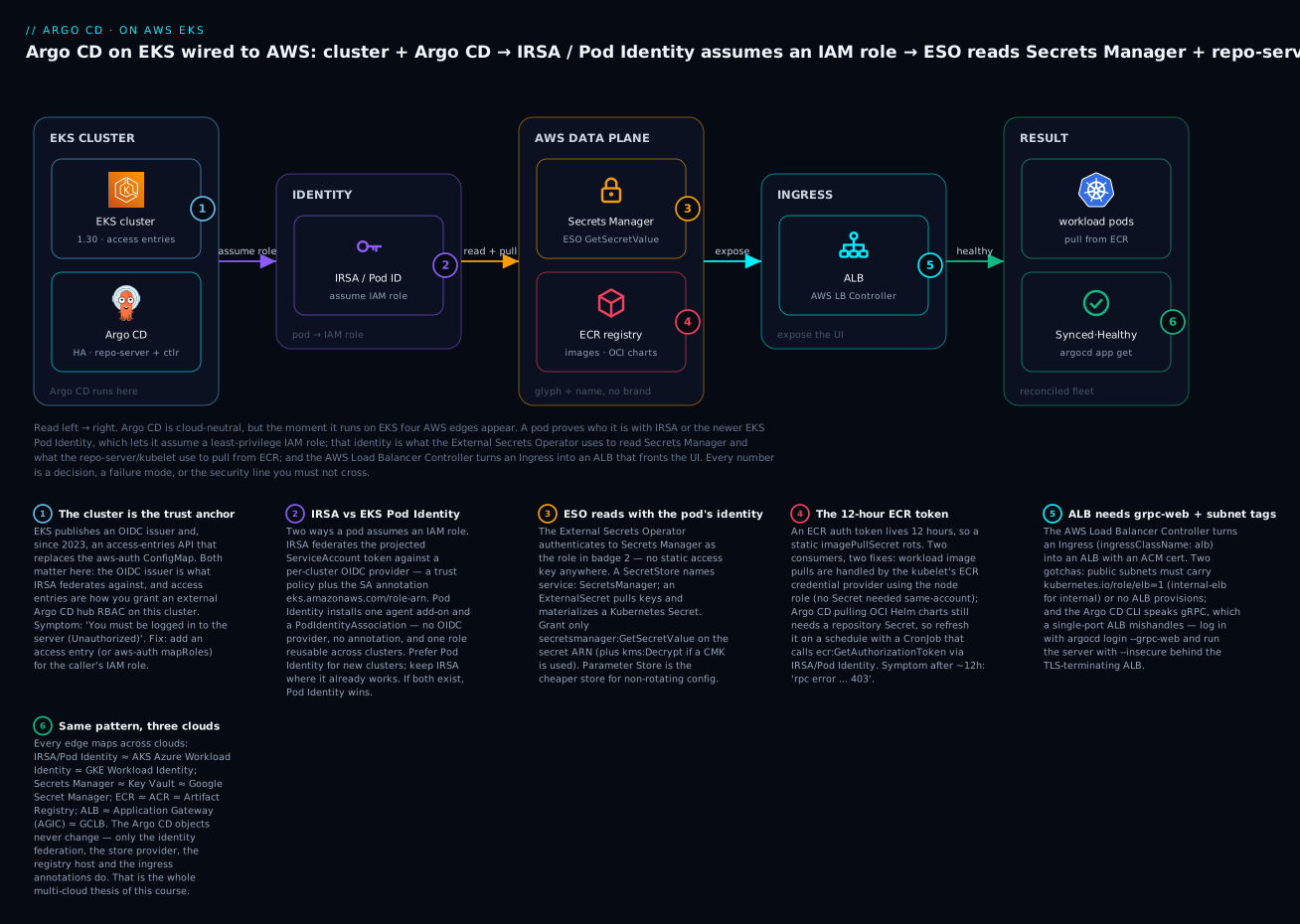
Each edge is a distinct AWS integration with its own IAM surface, its own failure signature, and its own equivalent on the other two clouds:
| Edge | What it solves | AWS mechanism | The trap it replaces | Covered in |
|---|---|---|---|---|
| Identity | A pod gets AWS permissions | IRSA or EKS Pod Identity | An IAM user access key baked into a Secret | Identity section |
| Secrets | A Secret’s value comes from AWS, not Git | Secrets Manager via ESO | Plaintext/base64 secrets committed to Git | Secrets section |
| Registry | Images & OCI charts pull from a private registry | ECR + credential provider | A hand-refreshed docker-registry Secret |
ECR section |
| Networking | The UI/API is reachable and the CLI works | AWS Load Balancer Controller → ALB | A raw LoadBalancer Service with no TLS/WAF |
Networking section |
Notice what is not cloud-specific: the Application, AppProject, ApplicationSet, sync waves, RBAC, and the whole GitOps loop are identical on every cloud. Only these four edges change. That is exactly why the course structures cloud lessons this way — you learn the neutral core once, then wire the edges per cloud.
Installing Argo CD on EKS
You reach an EKS cluster the same way you reach any: point kubectl at it. The one AWS-specific command writes a kubeconfig context that uses the AWS CLI to mint a short-lived token on every call.
# Write/refresh a kubeconfig context for the cluster (uses IAM to authenticate)
aws eks update-kubeconfig --name kloudvin-prod --region ap-south-1 --alias kloudvin-prod
# Added new context arn:aws:eks:ap-south-1:111122223333:cluster/kloudvin-prod to ~/.kube/config

kubectl config current-context     # kloudvin-prod
kubectl get nodes                  # confirm you can reach the API server
# NAME                          STATUS   ROLES    AGE   VERSION
# ip-10-0-12-31.ap-south-1...    Ready    <none>   9d    v1.30.2-eks-...
Under the hood that context runs aws eks get-token, so your kubectl access is governed by IAM — the same mechanism a remote Argo CD hub uses to register this cluster as a spoke. Two facts about EKS authorization matter here:
| Concept | What it is | Why it matters for Argo CD |
|---|---|---|
aws-auth ConfigMap |
The legacy map of IAM principals → Kubernetes RBAC groups in kube-system |
Still works; editing it wrong locks everyone out of the cluster |
| EKS access entries | The newer IAM-side API (GA late 2023) that maps IAM roles to cluster access without touching a ConfigMap | The recommended way to grant a hub Argo CD’s IAM role RBAC on this cluster; managed by API/Terraform, no risky ConfigMap edit |
authentication_mode |
Cluster setting: CONFIG_MAP, API, or API_AND_CONFIG_MAP |
New clusters should use API (or the hybrid) so you can use access entries |
For a production install, run Argo CD in high availability. The Helm chart (argo/argo-cd, i.e. argo-helm) exposes a canonical HA shape — redundant replicas of every component and a Redis HA topology so a single node failure does not stall reconciliation:
# argocd-values.yaml — HA install tuned for running behind an ALB
redis-ha:
  enabled: true                 # 3-node Redis with sentinels (replaces the single redis Pod)

controller:
  replicas: 1                   # application-controller shards; scale with clusters/apps

server:
  replicas: 2                   # the API/UI server — HA behind the ALB
  autoscaling:
    enabled: true
    minReplicas: 2

repoServer:
  replicas: 2                   # manifest rendering (Helm/Kustomize/OCI pulls) — CPU-bound

applicationSet:
  replicas: 2

configs:
  params:
    server.insecure: true       # ALB terminates TLS; server speaks plain HTTP to the ALB target
helm repo add argo https://argoproj.github.io/argo-helm
helm upgrade --install argocd argo/argo-cd \
  --namespace argocd --create-namespace \
  --version 7.6.12 \
  -f argocd-values.yaml
# ... Argo CD installed. Components: application-controller, repo-server, server (x2), applicationset-controller, redis-ha
The server.insecure: true line is not a security hole — it is the deliberate choice to let the ALB terminate TLS with a real ACM certificate and speak HTTP to the Argo CD Service inside the VPC. We come back to the alternative (end-to-end TLS with backend-protocol: HTTPS) in the networking section; both are valid, and which you pick decides two Ingress annotations.
| HA component | Chart key | Default | Production posture |
|---|---|---|---|
| Application controller | controller.replicas |
1 | 1 per shard; add shards as cluster/app count grows |
| API/UI server | server.replicas |
1 | 2+ behind the ALB; stateless, safe to scale |
| Repo server | repoServer.replicas |
1 | 2+; this is where Helm/Kustomize/OCI rendering happens |
| ApplicationSet controller | applicationSet.replicas |
1 | 2 for HA (leader-elected; only one is active) |
| Redis | redis-ha.enabled |
false (single Pod) |
true — the single Redis is a real SPOF for the cache |
⚠️ Billing. An HA install is more Pods and a 3-node Redis; the bigger recurring cost is the ALB you are about to create (billed per hour + per LCU), any NAT gateway your private nodes use for egress, and — if you go private — the cross-VPC connectivity. None of these are free-tier. Tear the lab down when you are done (there is a teardown section).
IRSA vs EKS Pod Identity: how a pod assumes an IAM role
This is the foundation. Argo CD’s repo-server, the External Secrets Operator, the load balancer controller, and any ECR-refresh job all need AWS permissions, and the correct way to grant them is to map a Kubernetes ServiceAccount to an IAM role so the pod receives temporary credentials. On EKS there are two mechanisms to do this. Understanding both — and when to reach for each — is the single most valuable thing in this lesson.
IRSA: IAM Roles for Service Accounts
IRSA is the original mechanism (GA since 2019) and it works by OIDC federation. Each EKS cluster publishes an OIDC issuer URL. You register that issuer as an IAM OIDC identity provider, then write an IAM role whose trust policy says “allow a Kubernetes ServiceAccount from this cluster, with this exact name, to assume me via a web identity token.” Finally you annotate the ServiceAccount with the role ARN. A mutating webhook injects the token and environment variables, and the AWS SDK inside the pod does the rest.
There are four moving parts, and every IRSA failure is one of them being wrong:
# 1) Find the cluster's OIDC issuer
aws eks describe-cluster --name kloudvin-prod --region ap-south-1 \
  --query "cluster.identity.oidc.issuer" --output text
# https://oidc.eks.ap-south-1.amazonaws.com/id/EXAMPLED539D4633E53DE1B716D3041E

# 2) Create the IAM OIDC provider for the cluster (idempotent; one per cluster)
eksctl utils associate-iam-oidc-provider --cluster kloudvin-prod --region ap-south-1 --approve
# (or: aws iam create-open-id-connect-provider ... for a pure-CLI/Terraform path)
The trust policy is where the security lives. It pins the exact namespace:serviceaccount and the STS audience, so only that SA in that cluster can assume the role:
{
  "Version": "2012-10-17",
  "Statement": [
    {
      "Effect": "Allow",
      "Principal": {
        "Federated": "arn:aws:iam::111122223333:oidc-provider/oidc.eks.ap-south-1.amazonaws.com/id/EXAMPLED539D4633E53DE1B716D3041E"
      },
      "Action": "sts:AssumeRoleWithWebIdentity",
      "Condition": {
        "StringEquals": {
          "oidc.eks.ap-south-1.amazonaws.com/id/EXAMPLED539D4633E53DE1B716D3041E:sub": "system:serviceaccount:external-secrets:external-secrets",
          "oidc.eks.ap-south-1.amazonaws.com/id/EXAMPLED539D4633E53DE1B716D3041E:aud": "sts.amazonaws.com"
        }
      }
    }
  ]
}
Then the ServiceAccount carries the role ARN as an annotation — this is the line that connects Kubernetes to IAM:
apiVersion: v1
kind: ServiceAccount
metadata:
  name: external-secrets
  namespace: external-secrets
  annotations:
    eks.amazonaws.com/role-arn: arn:aws:iam::111122223333:role/eso-secrets-reader
When a pod uses that SA, the EKS Pod Identity Webhook (a cluster component, not to be confused with Pod Identity the feature) mutates the pod to inject a projected token and environment variables. You can prove it landed:
kubectl -n external-secrets exec deploy/external-secrets -- env | grep AWS_
# AWS_ROLE_ARN=arn:aws:iam::111122223333:role/eso-secrets-reader
# AWS_WEB_IDENTITY_TOKEN_FILE=/var/run/secrets/eks.amazonaws.com/serviceaccount/token
# AWS_STS_REGIONAL_ENDPOINTS=regional
Those three environment variables (plus the projected token file) are the entire contract between Kubernetes and the AWS SDK — the SDK reads them, exchanges the token, and gets temporary credentials:
| Injected by the webhook | Value | Purpose |
|---|---|---|
AWS_ROLE_ARN |
The role from the SA annotation | Which IAM role the SDK assumes |
AWS_WEB_IDENTITY_TOKEN_FILE |
/var/run/secrets/eks.amazonaws.com/serviceaccount/token |
The projected OIDC token the SDK exchanges |
AWS_STS_REGIONAL_ENDPOINTS |
regional |
Use the regional STS endpoint (faster, more resilient) |
| Projected SA token | audience sts.amazonaws.com, ~1h TTL, auto-rotated |
The credential presented at AssumeRoleWithWebIdentity |
| IRSA moving part | Where it lives | Failure signature if wrong |
|---|---|---|
| OIDC provider | IAM (one per cluster) | Not authorized to perform sts:AssumeRoleWithWebIdentity |
Trust policy sub |
The IAM role | AccessDenied — the namespace:serviceaccount string doesn’t match exactly |
Trust policy aud |
The IAM role | InvalidIdentityToken — audience isn’t sts.amazonaws.com |
| SA annotation | Kubernetes ServiceAccount | No AWS_* env injected → SDK falls back to node role or nothing |
EKS Pod Identity: the newer, simpler mechanism
EKS Pod Identity (GA late 2023) removes the two most painful parts of IRSA: the per-cluster OIDC provider and the trust-policy string-matching. Instead you install a small agent add-on once, and create a PodIdentityAssociation that maps (cluster, namespace, serviceaccount) → role ARN on the AWS side. No SA annotation, no OIDC provider, and the same IAM role can be reused across many clusters because its trust policy no longer names a specific cluster’s issuer.
# 1) Install the agent once per cluster (a DaemonSet delivered as a managed add-on)
aws eks create-addon --cluster-name kloudvin-prod --region ap-south-1 \
  --addon-name eks-pod-identity-agent

# 2) Associate a ServiceAccount with a role (no annotation, no OIDC)
aws eks create-pod-identity-association --cluster-name kloudvin-prod --region ap-south-1 \
  --namespace external-secrets \
  --service-account external-secrets \
  --role-arn arn:aws:iam::111122223333:role/eso-secrets-reader
# { "association": { "associationId": "a-abcd1234...", "associationArn": "..." } }
The trust policy for a Pod Identity role is dramatically simpler — a fixed service principal, and it must allow sts:TagSession alongside sts:AssumeRole (the agent passes cluster/namespace/SA as session tags):
{
  "Version": "2012-10-17",
  "Statement": [
    {
      "Effect": "Allow",
      "Principal": { "Service": "pods.eks.amazonaws.com" },
      "Action": ["sts:AssumeRole", "sts:TagSession"]
    }
  ]
}
That is the entire trust relationship — no account ID, no issuer, no sub. The association carries the binding, so the same role works on every cluster you associate it in.
Choosing between them
Both deliver the same outcome (a pod gets temporary, scoped credentials with no stored secret). They differ in setup cost, portability, and a few edge cases:
| Dimension | IRSA | EKS Pod Identity |
|---|---|---|
| GA since | 2019 (mature, universal) | Late 2023 (newer) |
| Per-cluster setup | Register an OIDC provider | Install one agent add-on |
| Role trust policy | Names the cluster’s OIDC issuer + SA sub |
Fixed pods.eks.amazonaws.com principal |
| SA annotation needed | Yes (eks.amazonaws.com/role-arn) |
No |
| Reuse one role across clusters | Painful — trust policy is per-issuer | Easy — same role, many associations |
| Credentials source in pod | AWS_WEB_IDENTITY_TOKEN_FILE |
Agent-provided endpoint (SDK default chain) |
| Works outside EKS (e.g. ECS, Lambda) | OIDC federation is generic | EKS-only |
| Requires recent SDK | Any | SDK new enough to know the Pod Identity endpoint |
| Precedence if both configured | — | Pod Identity wins |
The practical guidance: for a new cluster, prefer Pod Identity — it is less JSON, less per-cluster ceremony, and role reuse across a fleet is genuinely simpler. Keep IRSA where it already works, where a tool’s docs only cover IRSA, or where you need the same federation model on non-EKS compute. Do not mix them for the same ServiceAccount: if a pod has both an IRSA annotation and a Pod Identity association, Pod Identity takes precedence, which is a classic “I changed the IAM policy and nothing happened” debugging session.
The same edge on AKS and GKE
Every cloud has a federated-identity story; the shapes rhyme. On AKS you use Azure Workload Identity: a user-assigned managed identity gets a federated credential trusting the cluster’s OIDC issuer, and the SA is annotated azure.workload.identity/client-id with the pod labeled azure.workload.identity/use: "true". On GKE, Workload Identity binds a Kubernetes SA to a Google service account via an IAM policy on serviceAccount:PROJECT.svc.id.goog[NAMESPACE/KSA], with the SA annotated iam.gke.io/gcp-service-account. This is the AKS lesson Argo CD on AKS and the GKE lesson Argo CD on GKE in depth.
| Identity concept | AWS EKS | Azure AKS | Google GKE |
|---|---|---|---|
| Mechanism | IRSA / EKS Pod Identity | Azure AD Workload Identity | GKE Workload Identity |
| Federation anchor | Cluster OIDC provider (IRSA) | Cluster OIDC issuer + federated credential | PROJECT.svc.id.goog pool |
| SA → cloud identity | eks.amazonaws.com/role-arn (or association) |
azure.workload.identity/client-id |
iam.gke.io/gcp-service-account |
| Cloud identity object | IAM role | User-assigned managed identity | Google service account |
| Extra pod requirement | None | Pod label azure.workload.identity/use: "true" |
None |
Reading secrets from AWS Secrets Manager
You now have an identity. The first thing to point it at is AWS Secrets Manager, so that a database password lives in AWS — rotated, audited, KMS-encrypted — and only a reference to it lives in Git. The tool that does this is the External Secrets Operator (ESO), which we introduced generically in Secrets in GitOps; here we wire its AWS provider precisely.
ESO has three objects. A SecretStore (namespaced) or ClusterSecretStore (cluster-wide) says where secrets come from and how to authenticate. An ExternalSecret says which keys to pull and what Kubernetes Secret to create. ESO reads Secrets Manager on a schedule and owns the resulting Secret.
| ESO object | Scope | Answers |
|---|---|---|
SecretStore |
Namespaced | Where secrets come from + how to authenticate, for this namespace |
ClusterSecretStore |
Cluster-wide | The same, shared across all namespaces (one store, many teams) |
ExternalSecret |
Namespaced | Which keys to pull and the Kubernetes Secret to create and own |
The IAM role from the previous section needs a tightly scoped read policy — GetSecretValue on exactly the secret ARNs it should see, nothing wider:
{
  "Version": "2012-10-17",
  "Statement": [
    {
      "Effect": "Allow",
      "Action": ["secretsmanager:GetSecretValue", "secretsmanager:DescribeSecret"],
      "Resource": "arn:aws:secretsmanager:ap-south-1:111122223333:secret:prod/team-a/*"
    },
    {
      "Effect": "Allow",
      "Action": ["kms:Decrypt"],
      "Resource": "arn:aws:kms:ap-south-1:111122223333:key/EXAMPLE-KMS-KEY-ID",
      "Condition": { "StringEquals": { "kms:ViaService": "secretsmanager.ap-south-1.amazonaws.com" } }
    }
  ]
}
The kms:Decrypt statement is the single most-forgotten line: if the secret is encrypted with a customer-managed KMS key (not the AWS-managed default), reading it fails with AccessDenied on kms:Decrypt even though the Secrets Manager permission is correct.
The SecretStore differs slightly depending on which identity mechanism you chose. With IRSA, point ESO at the annotated ServiceAccount so it performs the web-identity exchange itself. With Pod Identity, associate the role with the ESO controller’s own SA and omit the auth block — ESO then uses the SDK default credential chain, which the agent satisfies:
# IRSA path — ESO assumes the role named by the referenced SA's annotation
apiVersion: external-secrets.io/v1
kind: SecretStore
metadata:
  name: aws-secretsmanager
  namespace: team-a
spec:
  provider:
    aws:
      service: SecretsManager
      region: ap-south-1
      auth:
        jwt:
          serviceAccountRef:
            name: eso-team-a          # this SA is annotated with the role ARN
# Pod Identity path — no auth block; ESO controller pod uses its ambient identity
apiVersion: external-secrets.io/v1
kind: SecretStore
metadata:
  name: aws-secretsmanager
  namespace: team-a
spec:
  provider:
    aws:
      service: SecretsManager
      region: ap-south-1
      # no auth: default credential chain, satisfied by the Pod Identity agent
The ExternalSecret then declares the materialization. Pull individual keys with data, or extract an entire JSON secret with dataFrom:
apiVersion: external-secrets.io/v1
kind: ExternalSecret
metadata:
  name: app-db
  namespace: team-a
spec:
  refreshInterval: 1h
  secretStoreRef:
    name: aws-secretsmanager
    kind: SecretStore
  target:
    name: app-db-credentials         # the Kubernetes Secret ESO will create and own
    creationPolicy: Owner
  data:
    - secretKey: password             # key inside the k8s Secret
      remoteRef:
        key: prod/team-a/db           # the Secrets Manager secret name
        property: password            # a field within the secret's JSON
  # dataFrom:                          # alternative: pull the whole JSON as keys
  #   - extract:
  #       key: prod/team-a/db
kubectl -n team-a get externalsecret app-db
# NAME     STORE                STATUS         READY
# app-db   aws-secretsmanager   SecretSynced   True
kubectl -n team-a get secret app-db-credentials -o jsonpath='{.data.password}' | base64 -d
# (the real value, fetched from Secrets Manager — never committed to Git)
Commit the SecretStore and ExternalSecret to Git and let Argo CD sync them; they contain no secret value, only references. There is one gotcha specific to Argo CD, carried over from the secrets lesson: ESO owns the materialized Secret and keeps mutating it, so if Argo CD also tracks that Secret it will report OutOfSync forever. Manage only the ExternalSecret in Git, and if Argo CD does see the Secret, add it to ignoreDifferences on data.
Parameter Store — the cheaper alternative. For non-rotating configuration (feature flags, endpoints, non-critical tokens), AWS Systems Manager Parameter Store is far cheaper: standard parameters are free versus roughly $0.40 per secret per month for Secrets Manager, though Parameter Store lacks native rotation. ESO speaks to it by changing one field:
spec:
  provider:
    aws:
      service: ParameterStore        # instead of SecretsManager
      region: ap-south-1
| Secrets Manager | Parameter Store (SecureString) | |
|---|---|---|
ESO service value |
SecretsManager |
ParameterStore |
| IAM action | secretsmanager:GetSecretValue |
ssm:GetParameter |
| Native rotation | Yes (Lambda-driven) | No |
| Cost | ~$0.40/secret/month + API calls | Standard tier free; advanced tier priced |
| Best for | Passwords, keys, anything that rotates | Config, endpoints, non-rotating values |
The same edge on AKS and GKE
| Secrets concept | AWS EKS | Azure AKS | Google GKE |
|---|---|---|---|
| Managed store | Secrets Manager / Parameter Store | Azure Key Vault | Google Secret Manager |
| ESO provider | aws (service: SecretsManager) |
azurekv |
gcpsm |
| Store identifier | region |
vaultUrl |
projectID |
| Read permission | secretsmanager:GetSecretValue |
Key Vault Secrets User role |
roles/secretmanager.secretAccessor |
| Auth via identity | IRSA / Pod Identity | Workload Identity | Workload Identity |
ECR: pulling images and OCI Helm charts
The registry edge has a signature problem: an ECR authorization token is valid for exactly 12 hours. Any approach that stashes a token in a Kubernetes Secret works beautifully in the demo and breaks the next morning with a 401. The fix depends on who is pulling, and there are two distinct consumers with two different answers.
| Consumer | What it pulls | How it authenticates | Static Secret needed? |
|---|---|---|---|
| kubelet (workload pods) | Container images for your apps | Node role’s ECR credential provider (built into EKS AMIs) | No — same-account pulls are automatic |
| Argo CD repo-server | OCI Helm charts / manifests from ECR | An Argo CD repository Secret with a token | Yes — and the token expires in 12h |
Image pulls: the node role already solves it
For ordinary workload images in the same account, you do nothing. The EKS node AMI ships an ECR credential provider that the kubelet uses to fetch a fresh token from the node’s instance role on every pull. Give the node role the read policy and image pulls just work — no imagePullSecret, no refresh job:
{
  "Version": "2012-10-17",
  "Statement": [
    {
      "Effect": "Allow",
      "Action": [
        "ecr:GetAuthorizationToken",
        "ecr:BatchCheckLayerAvailability",
        "ecr:GetDownloadUrlForLayer",
        "ecr:BatchGetImage"
      ],
      "Resource": "*"
    }
  ]
}
In practice you attach the AWS-managed AmazonEC2ContainerRegistryReadOnly policy (or the newer, tighter AmazonEC2ContainerRegistryPullOnly, 2024) to the node role and move on. Note that ecr:GetAuthorizationToken is an account-level action so its Resource is *; the per-image actions can be scoped to repository ARNs. Cross-account pulls need one extra thing: a repository policy on the ECR repo granting the puller’s account/role access — that is the common cause of a 403 when the image lives in a shared registry account.
OCI Helm charts: the repo-server needs a refreshed token
Argo CD pulling a Helm chart stored as an OCI artifact in ECR is a pod-level pull by the repo-server, and here you do need credentials in an Argo CD repository Secret. Argo CD does not natively refresh ECR tokens, so a static password rots after 12 hours:
apiVersion: v1
kind: Secret
metadata:
  name: ecr-oci-charts
  namespace: argocd
  labels:
    argocd.argoproj.io/secret-type: repository
stringData:
  type: helm
  name: ecr-charts
  url: 111122223333.dkr.ecr.ap-south-1.amazonaws.com
  enableOCI: "true"
  username: AWS
  password: PLACEHOLDER_12H_ECR_TOKEN     # from `aws ecr get-login-password` — EXPIRES in 12h
The clean fix is a small CronJob that runs every few hours, mints a fresh token using IRSA or Pod Identity (no static AWS key), and patches the repository Secret. The identity you built earlier is exactly what makes this safe:
apiVersion: batch/v1
kind: CronJob
metadata:
  name: ecr-token-refresh
  namespace: argocd
spec:
  schedule: "0 */6 * * *"          # every 6h; comfortably inside the 12h TTL
  jobTemplate:
    spec:
      template:
        spec:
          serviceAccountName: ecr-refresher   # IRSA/Pod Identity → ecr:GetAuthorizationToken
          restartPolicy: OnFailure
          containers:
            - name: refresh
              image: amazon/aws-cli:2.17.0
              command: ["/bin/sh", "-c"]
              args:
                - |
                  TOKEN=$(aws ecr get-login-password --region ap-south-1)
                  kubectl -n argocd patch secret ecr-oci-charts \
                    --type merge -p "{\"stringData\":{\"password\":\"$TOKEN\"}}"
| ECR token approach | Refresh mechanism | Verdict |
|---|---|---|
| Node role + kubelet credential provider | Automatic, per-pull | Best for images — no Secret at all (same-account) |
| CronJob patching the repo Secret via IRSA/Pod Identity | Scheduled (every 6h) | Pragmatic for OCI charts — no static key |
Manual aws ecr get-login-password into a Secret |
None | Anti-pattern — breaks in 12h, don’t ship it |
| ECR pull-through cache | Caches upstream (Docker Hub, etc.) into ECR | Complementary — cuts rate limits, not an auth fix |
⚠️ Billing. ECR charges for stored data and for cross-Region/cross-AZ data transfer on pulls. A busy cluster pulling large images across AZs adds up; keep the registry in the cluster’s Region and use VPC endpoints for ECR to avoid NAT egress charges on every pull.
The same edge on AKS and GKE
| Registry concept | AWS EKS | Azure AKS | Google GKE |
|---|---|---|---|
| Registry | ECR | Azure Container Registry (ACR) | Artifact Registry |
| Image-pull auth | Node role + credential provider | az aks update --attach-acr (kubelet MI → AcrPull) |
Node SA + roles/artifactregistry.reader |
| Token lifetime issue | 12h token to refresh for OCI | ACR tokens; MI avoids static creds | Short-lived; WI/node SA avoids static creds |
| OCI Helm charts | Repo Secret + refresh CronJob | Repo Secret or ACR token | Repo Secret or WI |
Exposing the UI with the AWS Load Balancer Controller
Argo CD’s server serves the web UI and the gRPC API on one port. To expose it on EKS the right way, you install the AWS Load Balancer Controller, which watches Ingress objects with ingressClassName: alb and provisions a real Application Load Balancer (or an NLB for Service type: LoadBalancer with its own annotations). This gives you an ACM certificate, WAF integration, and health checks — far better than a raw LoadBalancer Service.
The controller itself needs IRSA/Pod Identity (it creates ALBs, target groups, and listeners on your behalf), so it is another consumer of the identity edge:
helm repo add eks https://aws.github.io/eks-charts
helm upgrade --install aws-load-balancer-controller eks/aws-load-balancer-controller \
  --namespace kube-system \
  --set clusterName=kloudvin-prod \
  --set serviceAccount.create=false \
  --set serviceAccount.name=aws-load-balancer-controller   # pre-annotated with its IAM role
The Ingress for Argo CD carries the ALB configuration as annotations. This is the end-to-end-TLS variant that pairs with server.insecure: false (the server keeps its own TLS and the ALB re-encrypts to it):
apiVersion: networking.k8s.io/v1
kind: Ingress
metadata:
  name: argocd-server
  namespace: argocd
  annotations:
    alb.ingress.kubernetes.io/scheme: internet-facing
    alb.ingress.kubernetes.io/target-type: ip
    alb.ingress.kubernetes.io/backend-protocol: HTTPS          # ALB re-encrypts to the server
    alb.ingress.kubernetes.io/listen-ports: '[{"HTTPS":443}]'
    alb.ingress.kubernetes.io/ssl-redirect: '443'
    alb.ingress.kubernetes.io/certificate-arn: arn:aws:acm:ap-south-1:111122223333:certificate/EXAMPLE-CERT-ID
    alb.ingress.kubernetes.io/healthcheck-path: /healthz?full=true
spec:
  ingressClassName: alb
  rules:
    - host: argocd.kloudvin.com
      http:
        paths:
          - path: /
            pathType: Prefix
            backend:
              service:
                name: argocd-server
                port:
                  number: 443          # 443 for HTTPS backend; use 80 if server runs --insecure
If instead you set server.insecure: true (the simpler ALB-terminates-TLS model from the install section), change backend-protocol to HTTP and the service port to 80. Both are correct; pick one and keep the settings consistent — a mismatch between them is the usual cause of a redirect loop or a 502:
| Setting | ALB terminates TLS | End-to-end TLS |
|---|---|---|
configs.params.server.insecure |
true |
false |
backend-protocol annotation |
HTTP |
HTTPS |
| Service port in the Ingress | 80 |
443 |
| Traffic from ALB to Pod | Plaintext (inside the VPC) | Re-encrypted end to end |
| When to use | Simplest; the VPC is trusted | Compliance requires in-VPC encryption |
| Annotation | Purpose | Common value |
|---|---|---|
alb.ingress.kubernetes.io/scheme |
Internet-facing vs internal ALB | internet-facing / internal |
alb.ingress.kubernetes.io/target-type |
Register Pod IPs or node ports | ip (VPC-CNI) / instance |
alb.ingress.kubernetes.io/certificate-arn |
ACM cert for HTTPS | arn:aws:acm:... |
alb.ingress.kubernetes.io/backend-protocol |
Protocol ALB uses to the target | HTTP (insecure) / HTTPS |
alb.ingress.kubernetes.io/listen-ports |
Which ports the ALB listens on | '[{"HTTPS":443}]' |
alb.ingress.kubernetes.io/healthcheck-path |
Health check path | /healthz?full=true |
alb.ingress.kubernetes.io/group.name |
Share one ALB across Ingresses | platform |
The subnet-tag trap
The single most common “my ALB never appeared” cause is subnet tagging. The controller auto-discovers which subnets to place the ALB in by reading tags. Miss them and the Ingress sits forever with no ADDRESS:
| Subnet | Required tag | Value |
|---|---|---|
| Public (internet-facing ALB) | kubernetes.io/role/elb |
1 |
| Private (internal ALB) | kubernetes.io/role/internal-elb |
1 |
| Any (cluster discovery, older setups) | kubernetes.io/cluster/kloudvin-prod |
owned or shared |
Why the CLI breaks behind an ALB — and --grpc-web
Here is the gotcha that costs everyone an afternoon. The web UI works fine through the ALB, but argocd login hangs or fails with rpc error: code = Unavailable. The reason: the Argo CD CLI speaks gRPC, and the server multiplexes gRPC and REST on one port. A single-listener ALB does not cleanly proxy that multiplexed gRPC. The fix is gRPC-Web, which tunnels gRPC over ordinary HTTP/1.1 so the ALB handles it like any web request:
# Log in through the ALB using gRPC-Web (works where plain gRPC stalls)
argocd login argocd.kloudvin.com --grpc-web
# 'admin:login' logged in successfully

argocd app list --grpc-web
# NAME              CLUSTER                         STATUS   HEALTH
# argocd/root       https://kubernetes.default.svc  Synced   Healthy
You can bake --grpc-web into the CLI context so you never forget it. On the server side, running with --insecure (ALB terminates TLS) is the most reliable pairing behind an ALB.
| Symptom through ALB | Cause | Fix |
|---|---|---|
| UI works, CLI hangs | ALB can’t proxy multiplexed gRPC | argocd login --grpc-web |
rpc error: code = Unavailable |
Same gRPC issue | --grpc-web; server --insecure |
| Redirect loop / mixed content | Server does TLS but ALB also redirects | Match backend-protocol to server.insecure |
TargetGroupBinding: when Terraform owns the ALB
Sometimes you provision the ALB and target group in Terraform (for a shared, long-lived LB) and only want Kubernetes to keep Pod IPs registered. That is what TargetGroupBinding does — it binds an existing target group to a Service so the controller manages membership without owning the ALB:
apiVersion: elbv2.k8s.aws/v1beta1
kind: TargetGroupBinding
metadata:
  name: argocd-server
  namespace: argocd
spec:
  serviceRef:
    name: argocd-server
    port: 443
  targetGroupARN: arn:aws:elasticloadbalancing:ap-south-1:111122223333:targetgroup/argocd/EXAMPLE
  targetType: ip
The same edge on AKS and GKE
| Load balancer concept | AWS EKS | Azure AKS | Google GKE |
|---|---|---|---|
| Controller | AWS Load Balancer Controller | Application Gateway Ingress Controller (AGIC) | GKE Ingress controller (built-in) |
| L7 resource | ALB | Application Gateway | Google Cloud Load Balancer (GCLB) |
| IngressClass / selector | alb |
azure/application-gateway |
gce / gce-internal |
| TLS cert source | ACM | Key Vault / AppGw cert | Google-managed cert / self-managed |
| gRPC note | Use --grpc-web (single-port multiplex) |
Same --grpc-web guidance |
Same; or a dedicated gRPC backend |
Private EKS and hub connectivity
Production clusters often make the API server endpoint private (endpointPublicAccess: false, endpointPrivateAccess: true) so the control plane is unreachable from the internet. That is good security and a real operational constraint: anything that talks to the API server — your kubectl, CI, and crucially a remote Argo CD hub registering this cluster as a spoke — must now sit inside a network path to the private endpoint.
| Endpoint mode | Reachable from | Use when |
|---|---|---|
| Public | Internet (optionally CIDR-restricted) | Dev/simple setups; lock down with publicAccessCidrs |
| Public + Private | Internet + VPC | Common; nodes use the private path, admins the public |
| Private only | VPC / peered networks only | Regulated/production; no internet path to the API |
If your Argo CD hub lives in a different VPC or account from a private spoke, the hub’s application-controller and repo-server must be able to dial the spoke’s private API endpoint. The options, roughly in order of how most teams do it:
| Connectivity option | What it gives | Trade-off |
|---|---|---|
| VPC peering | Direct private routing between two VPCs | Simple; doesn’t scale past a few VPCs, no transitive routing |
| AWS Transit Gateway | Hub-and-spoke routing across many VPCs/accounts | The standard for fleets; hourly + data cost |
| PrivateLink / private endpoint | Expose the API reachably without full peering | More setup; tight blast radius |
| Same-VPC hub | Hub runs in the spoke’s VPC | Only works for a co-located cluster |
The failure signature when the path is missing is unambiguous: the cluster registers fine (the Secret is written), but syncs fail with dial tcp <api-ip>:443: i/o timeout. Registration writing credentials and the network actually being reachable are two separate things — cluster registration handles the credentials half; this is the network half.
⚠️ Billing. Private endpoints, Transit Gateway attachments, and NAT gateways all bill hourly plus per-GB. A private-EKS design is the right call for production but is materially more expensive than a public-endpoint dev cluster — size it deliberately.
Terraform: wiring it as code
Everything above can be provisioned declaratively. Here is a representative snippet using the terraform-aws-eks module (v20+, which uses access entries by default) with the AWS provider v5, an IRSA role for ESO, the Pod Identity variant, and Argo CD installed via helm_release. This is the “forward-reference bootstrap” pattern: Terraform stands up the cluster and a seed Argo CD, and from then on Argo CD manages everything else (including, via an app-of-apps, itself).
terraform {
  required_providers {
    aws  = { source = "hashicorp/aws", version = "~> 5.60" }
    helm = { source = "hashicorp/helm", version = "~> 2.14" }
  }
}

module "eks" {
  source  = "terraform-aws-modules/eks/aws"
  version = "~> 20.24"

  cluster_name    = "kloudvin-prod"
  cluster_version = "1.30"

  cluster_endpoint_public_access = true            # set false + private access for a private cluster
  enable_irsa                    = true            # publishes the OIDC provider for IRSA

  # v20 defaults to access entries; grant the Terraform caller admin
  authentication_mode                      = "API_AND_CONFIG_MAP"
  enable_cluster_creator_admin_permissions = true

  vpc_id     = var.vpc_id
  subnet_ids = var.private_subnet_ids

  eks_managed_node_groups = {
    default = { instance_types = ["m6i.large"], min_size = 2, max_size = 6, desired_size = 3 }
  }
}

# --- Identity option A: IRSA role for the External Secrets Operator ---
module "eso_irsa" {
  source  = "terraform-aws-modules/iam/aws//modules/iam-role-for-service-accounts-eks"
  version = "~> 5.44"

  role_name                      = "eso-secrets-reader"
  attach_external_secrets_policy = true            # built-in least-privilege ESO policy

  oidc_providers = {
    main = {
      provider_arn               = module.eks.oidc_provider_arn
      namespace_service_accounts = ["external-secrets:external-secrets"]
    }
  }
}

# --- Identity option B: EKS Pod Identity (no OIDC, no SA annotation) ---
resource "aws_eks_pod_identity_association" "eso" {
  cluster_name    = module.eks.cluster_name
  namespace       = "external-secrets"
  service_account = "external-secrets"
  role_arn        = aws_iam_role.eso_podidentity.arn   # trust: pods.eks.amazonaws.com + TagSession
}

# --- Seed Argo CD; after this, GitOps takes over ---
resource "helm_release" "argocd" {
  name             = "argocd"
  namespace        = "argocd"
  create_namespace = true
  repository       = "https://argoproj.github.io/argo-helm"
  chart            = "argo-cd"
  version          = "7.6.12"
  values           = [file("${path.module}/argocd-values.yaml")]

  depends_on = [module.eks]
}
The attach_external_secrets_policy = true input is a convenience: the IAM module ships a curated least-privilege policy for ESO so you don’t hand-write the GetSecretValue JSON. The two identity options are shown side by side deliberately — pick one per ServiceAccount, not both.
| Terraform building block | Resource / module | Provides |
|---|---|---|
| Cluster + OIDC + access entries | terraform-aws-modules/eks/aws v20 |
The cluster, node groups, IRSA OIDC provider |
| IRSA role | iam-role-for-service-accounts-eks submodule |
Role + trust policy from (ns, sa) |
| Pod Identity | aws_eks_pod_identity_association |
SA → role binding, no OIDC |
| Seed Argo CD | helm_release (chart argo-cd) |
The bootstrap controller that then self-manages |
Hands-on lab
This lab wires Argo CD on EKS end to end at the config level — every manifest is real and schema-correct, but because it provisions billable AWS resources, treat the outputs as representative and run it only against a cluster you own. Each step has the command, what you should see, and a one-line “what just happened.”
⚠️ Billing warning up front. Steps 5–6 create an ALB (hourly + LCU) and rely on a cluster whose nodes likely egress through a NAT gateway. Do the teardown at the end. Nothing here is free-tier.
Step 1 — Reach the cluster.
aws eks update-kubeconfig --name kloudvin-prod --region ap-south-1
kubectl get nodes
# NAME                        STATUS   ROLES    AGE   VERSION
# ip-10-0-11-12.ap-south-1... Ready    <none>   3h    v1.30.2-eks-...
What just happened: your kubectl now authenticates to EKS through IAM via aws eks get-token.
Step 2 — Install Argo CD (HA) and confirm the Pods.
helm repo add argo https://argoproj.github.io/argo-helm && helm repo update
helm upgrade --install argocd argo/argo-cd -n argocd --create-namespace \
  --version 7.6.12 -f argocd-values.yaml
kubectl -n argocd get deploy
# NAME                        READY   UP-TO-DATE   AVAILABLE
# argocd-server               2/2     2            2
# argocd-repo-server          2/2     2            2
# argocd-applicationset-...   2/2     2            2
What just happened: Argo CD is running in HA; the server has 2 replicas ready to sit behind the ALB.
Step 3 — Create the IRSA role and wire ESO’s ServiceAccount. (Pod Identity variant shown as an alternative.)
# OIDC provider (idempotent)
eksctl utils associate-iam-oidc-provider --cluster kloudvin-prod --region ap-south-1 --approve
# Create role eso-secrets-reader with the trust policy + GetSecretValue policy shown earlier,
# then annotate the SA:
kubectl -n external-secrets annotate sa external-secrets \
  eks.amazonaws.com/role-arn=arn:aws:iam::111122223333:role/eso-secrets-reader --overwrite

# --- Pod Identity alternative (no annotation) ---
aws eks create-addon --cluster-name kloudvin-prod --addon-name eks-pod-identity-agent --region ap-south-1
aws eks create-pod-identity-association --cluster-name kloudvin-prod --region ap-south-1 \
  --namespace external-secrets --service-account external-secrets \
  --role-arn arn:aws:iam::111122223333:role/eso-secrets-reader
What just happened: ESO’s pod can now assume an IAM role and read Secrets Manager with temporary credentials — no stored AWS key.
Step 4 — Deploy a SecretStore and ExternalSecret.
kubectl apply -f secretstore.yaml -f externalsecret.yaml
kubectl -n team-a get externalsecret app-db
# NAME     STORE                STATUS         READY
# app-db   aws-secretsmanager   SecretSynced   True
What just happened: ESO authenticated to Secrets Manager, read prod/team-a/db, and materialized the app-db-credentials Secret. The value came from AWS; only the reference is in Git.
Step 5 — Expose the UI via an ALB Ingress.
kubectl apply -f argocd-ingress.yaml
kubectl -n argocd get ingress argocd-server
# NAME            CLASS   HOSTS                 ADDRESS                                   PORTS
# argocd-server   alb     argocd.kloudvin.com   k8s-argocd-...ap-south-1.elb.amazonaws.com   80,443
What just happened: the AWS Load Balancer Controller saw the alb Ingress, discovered your tagged subnets, provisioned an ALB with your ACM cert, and populated ADDRESS. If ADDRESS stays empty, re-check subnet tags (the number-one cause).
Step 6 — Log in through the ALB with --grpc-web.
argocd login argocd.kloudvin.com --grpc-web
# 'admin:login' logged in successfully
argocd app list --grpc-web
# NAME          CLUSTER                          STATUS   HEALTH
What just happened: the CLI reached the gRPC API through the ALB by tunneling over gRPC-Web. Plain argocd login (without --grpc-web) would have hung — that is the expected failure, not a broken cluster.
Step 7 — Teardown.
kubectl delete -f argocd-ingress.yaml           # deletes the ALB (stops LB billing)
kubectl delete -f externalsecret.yaml -f secretstore.yaml
helm uninstall argocd -n argocd && kubectl delete ns argocd
aws eks delete-pod-identity-association --cluster-name kloudvin-prod --region ap-south-1 \
  --association-id a-abcd1234    # if you used the Pod Identity path
# (delete the IAM role/policies you created for the lab)
What just happened: deleting the Ingress deprovisions the ALB — the most important teardown step for billing. Then Argo CD and the ESO objects go, and you clean up the IAM you created.
Common mistakes and troubleshooting
Every failure below is a real symptom you will actually see. The table maps symptom → cause → fix; the prose after it covers the three nastiest.
| Symptom | Likely cause | Fix |
|---|---|---|
AccessDenied ... sts:AssumeRoleWithWebIdentity |
IRSA trust policy sub doesn’t match system:serviceaccount:<ns>:<sa> exactly, or no OIDC provider |
Fix the sub string; confirm the OIDC provider exists for the cluster |
Pod has no AWS_* env / NoCredentialProviders |
SA annotation missing (IRSA), or Pod Identity agent add-on/association missing | Add the annotation, or install eks-pod-identity-agent and create the association |
ExternalSecret SecretSyncError, AccessDenied on GetSecretValue |
IAM policy missing the action, wrong secret ARN scope, or missing kms:Decrypt for a CMK |
Widen the resource ARN to the secret; add kms:Decrypt on the KMS key |
Image pull 401 Unauthorized / no basic auth credentials |
Node role lacks ECR read, or cross-account repo policy missing | Attach AmazonEC2ContainerRegistryPullOnly; add a repo policy for cross-account |
OCI chart repo rpc error ... 403 after ~12h |
ECR token in the repository Secret expired | Run the refresh CronJob (mints a token via IRSA/Pod Identity every 6h) |
Ingress has no ADDRESS, no ALB appears |
LB controller not installed, or subnets not tagged | Install the controller; tag public subnets kubernetes.io/role/elb=1 |
ALB target unhealthy, UI returns 503 |
Wrong target-type, health-check path, or backend-protocol vs server.insecure mismatch |
Use target-type: ip, healthcheck-path: /healthz?full=true, align protocol |
argocd login hangs / rpc error: code = Unavailable |
CLI gRPC not proxied by the single-port ALB | Add --grpc-web; run the server --insecure behind the TLS-terminating ALB |
Sync fails dial tcp <api>:443: i/o timeout |
Private EKS endpoint with no network path from the hub | Add VPC peering / Transit Gateway; place the hub on a reachable network |
| ALB provisions HTTP only / cert error | certificate-arn wrong Region or domain mismatch |
Use an ACM cert in the ALB’s Region matching the Ingress host |
Cluster registration You must be logged in to the server (Unauthorized) |
No access entry / aws-auth mapping for the caller’s IAM role |
Add an EKS access entry (or aws-auth mapRoles) for that role |
| Changed the IAM policy, nothing changed | Both IRSA and Pod Identity configured; Pod Identity silently wins | Remove one; edit the mechanism actually in effect (Pod Identity) |
The IRSA sub mismatch. Ninety percent of IRSA AccessDenied errors are a one-character difference in the trust policy’s sub condition. It must be exactly system:serviceaccount:<namespace>:<serviceaccount-name> — the literal prefix system:serviceaccount:, the namespace (not the cluster), then the ServiceAccount name. Deploy ESO into external-secrets but write the sub for default and you get a denial that looks like a permissions problem but is really a typo. When in doubt, kubectl -n <ns> exec <pod> -- env | grep AWS_ROLE_ARN and confirm the pod is even using the SA you think it is.
The 12-hour ECR cliff. This one is insidious because it works in the demo. You paste a token into the repository Secret, Argo CD syncs the OCI chart, everyone moves on — and the next morning syncs fail with a 403. The token expired. If you only remember one thing about ECR: never store a raw ECR token as if it were permanent. Node role for images, refresh CronJob for OCI chart repos, and the underlying credential is always minted fresh from ecr:GetAuthorizationToken using IRSA/Pod Identity.
The subnet-tag silence. The load balancer controller does not error loudly when subnets are untagged — the Ingress simply never gets an ADDRESS, which reads like “nothing is happening.” Check the controller logs (kubectl -n kube-system logs deploy/aws-load-balancer-controller) and you’ll see it complaining it can’t find subnets. Tag public subnets kubernetes.io/role/elb=1 for an internet-facing ALB, private subnets kubernetes.io/role/internal-elb=1 for an internal one, and the ALB appears within a minute.
Cheat-sheet
The AWS-wiring quick reference:
| Command / field | What it does |
|---|---|
aws eks update-kubeconfig --name <c> --region <r> |
Write a kubeconfig context authenticated via IAM |
aws eks describe-cluster --query cluster.identity.oidc.issuer |
Get the cluster’s OIDC issuer (for IRSA) |
eksctl utils associate-iam-oidc-provider --cluster <c> --approve |
Register the IAM OIDC provider (IRSA) |
eks.amazonaws.com/role-arn (SA annotation) |
Map a ServiceAccount to an IAM role (IRSA) |
aws eks create-addon --addon-name eks-pod-identity-agent |
Install the Pod Identity agent |
aws eks create-pod-identity-association ... |
Bind (ns, sa) → role without OIDC (Pod Identity) |
sts:AssumeRole + sts:TagSession |
The two actions a Pod Identity role’s trust policy needs |
SecretStore provider.aws.service: SecretsManager |
Point ESO at Secrets Manager (ParameterStore for the cheap store) |
secretsmanager:GetSecretValue (+ kms:Decrypt) |
The read permissions ESO needs |
aws ecr get-login-password --region <r> |
Mint a 12-hour ECR token |
AmazonEC2ContainerRegistryPullOnly |
Managed policy for node-role image pulls |
ingressClassName: alb |
Ask the AWS LB Controller to build an ALB |
kubernetes.io/role/elb=1 (subnet tag) |
Let the controller place an internet-facing ALB |
alb.ingress.kubernetes.io/certificate-arn |
Attach an ACM cert to the ALB |
argocd login <host> --grpc-web |
Log in through an ALB (tunnels gRPC over HTTP) |
/healthz?full=true |
Argo CD server health-check path for the ALB |
The cross-cloud contrast, consolidated — the whole point of a multi-cloud course in one table:
| Edge | AWS EKS | Azure AKS | Google GKE |
|---|---|---|---|
| Pod → cloud identity | IRSA / EKS Pod Identity | Azure Workload Identity | GKE Workload Identity |
| Secret store | Secrets Manager / Parameter Store | Key Vault | Secret Manager |
| ESO provider | aws |
azurekv |
gcpsm |
| Container registry | ECR | ACR | Artifact Registry |
| L7 load balancer | ALB (AWS LB Controller) | Application Gateway (AGIC) | GCLB (GKE Ingress) |
| IngressClass | alb |
azure/application-gateway |
gce |
| CLI behind LB | --grpc-web |
--grpc-web |
--grpc-web |
Interview and exam questions
Q: What problem does IRSA solve, and what are its four moving parts?
A: IRSA lets a pod assume an IAM role using short-lived, federated credentials instead of a stored access key. The four parts are: the cluster’s IAM OIDC provider; the IAM role’s trust policy pinning the ServiceAccount sub and sts.amazonaws.com audience; the ServiceAccount annotation eks.amazonaws.com/role-arn; and the Pod Identity Webhook that injects the token and AWS_* env vars. Any IRSA failure is one of those four being wrong.
Q: How is EKS Pod Identity different from IRSA, and when would you choose it?
A: Pod Identity replaces per-cluster OIDC federation with a cluster agent add-on plus a PodIdentityAssociation that binds a ServiceAccount to a role on the AWS side. There’s no OIDC provider and no SA annotation, and the role’s trust policy is a fixed pods.eks.amazonaws.com principal (with sts:TagSession), so one role is trivially reusable across clusters. Choose it for new clusters and fleets; keep IRSA where it already works or where you need federation on non-EKS compute. If both are configured for one SA, Pod Identity wins.
Q: How does the External Secrets Operator authenticate to Secrets Manager on EKS?
A: It uses the pod’s IAM identity. With IRSA, the SecretStore references the annotated ServiceAccount via auth.jwt.serviceAccountRef and ESO performs the web-identity exchange. With Pod Identity, you associate the role with ESO’s controller SA and omit the auth block so ESO uses the SDK default chain. The IAM role needs secretsmanager:GetSecretValue on the secret ARN, plus kms:Decrypt if a customer-managed key encrypts it.
Q: Why does an ECR-based imagePullSecret break the next day, and what’s the right fix?
A: An ECR authorization token is valid for only 12 hours, so a token stashed in a Secret expires. For workload images, don’t use a Secret at all — the kubelet’s ECR credential provider fetches fresh tokens from the node role. For Argo CD pulling OCI Helm charts, use a repository Secret refreshed by a CronJob that mints a new token via ecr:GetAuthorizationToken using IRSA/Pod Identity every few hours.
Q: Your Argo CD Ingress never gets an ADDRESS. Walk through the diagnosis.
A: First confirm the AWS Load Balancer Controller is installed and running (kubectl -n kube-system get deploy aws-load-balancer-controller). Then check subnet tags — the number-one cause — public subnets need kubernetes.io/role/elb=1 (or internal-elb for internal). Read the controller logs for “unable to discover subnets.” Confirm ingressClassName: alb and a valid certificate-arn in the ALB’s Region.
Q: The web UI works but argocd login hangs behind the ALB. Why, and how do you fix it?
A: The CLI speaks gRPC, and a single-port ALB can’t cleanly proxy the server’s multiplexed gRPC/REST. Use argocd login <host> --grpc-web to tunnel gRPC over HTTP/1.1, and run the server --insecure behind the TLS-terminating ALB. Bake --grpc-web into the CLI context so it’s automatic.
Q: What breaks when you make the EKS API endpoint private, for a hub-and-spoke Argo CD?
A: Registration still succeeds (the cluster Secret is written), but the hub’s controller and repo-server can no longer reach the private API server, so syncs fail with dial tcp ... i/o timeout. You need a network path — VPC peering, Transit Gateway, or PrivateLink — between the hub’s network and the spoke’s private endpoint. Credentials and connectivity are separate problems.
Q: What’s the cheaper alternative to Secrets Manager, and what do you give up?
A: SSM Parameter Store — standard parameters are free versus ~$0.40/secret/month. ESO switches to it by setting service: ParameterStore and the IAM action becomes ssm:GetParameter. You give up native rotation, so use it for non-rotating config and keep Secrets Manager for credentials that must rotate.
Q: What is a TargetGroupBinding and when do you use it?
A: It’s a CRD from the AWS Load Balancer Controller that binds an existing target group to a Kubernetes Service, so the controller keeps Pod IPs registered without creating or owning the ALB. Use it when Terraform (or another team) provisions a shared, long-lived ALB and you only want Kubernetes to manage target membership.
Q: Why prefer EKS access entries over the aws-auth ConfigMap for registering a cluster with Argo CD?
A: Access entries are an IAM-side API (GA late 2023) that maps IAM roles to cluster access without editing the aws-auth ConfigMap — a ConfigMap whose malformed edit can lock everyone out of the cluster. They’re managed by API/Terraform, are auditable, and are the recommended way to grant a hub’s IAM role RBAC on a spoke. New clusters should run authentication_mode: API (or the hybrid).
Q: Map each AWS edge to its AKS and GKE equivalent.
A: Identity: IRSA/Pod Identity ≈ Azure Workload Identity ≈ GKE Workload Identity. Secrets: Secrets Manager ≈ Key Vault ≈ Secret Manager (ESO providers aws/azurekv/gcpsm). Registry: ECR ≈ ACR ≈ Artifact Registry. Load balancer: ALB (AWS LB Controller) ≈ Application Gateway (AGIC) ≈ GCLB (GKE Ingress). The Argo CD objects are identical across all three; only these edges change.
Key takeaways
- Argo CD is cloud-neutral; four edges are not. On EKS you must wire identity, secrets, registry, and networking — and each has one right answer (short-lived federated credentials) and several traps (stored access keys, expired tokens).
- Identity is the foundation. A pod assumes an IAM role via IRSA (OIDC provider + trust policy + SA annotation) or the newer EKS Pod Identity (agent add-on + association, no OIDC, no annotation). Prefer Pod Identity for new clusters; if both are set, Pod Identity wins.
- Secrets Manager via ESO keeps only a reference in Git. Scope IAM to
GetSecretValueon the secret ARN and rememberkms:Decryptfor customer-managed keys. Parameter Store is the cheaper store for non-rotating config. - ECR’s 12-hour token is the registry gotcha: node role + kubelet credential provider for images (no Secret), and a refresh CronJob (minting tokens via IRSA/Pod Identity) for OCI chart repositories. Never ship a static ECR token.
- The AWS Load Balancer Controller turns an
ingressClassName: albIngress into an ALB with ACM TLS — but only if subnets are tagged (kubernetes.io/role/elb=1), and the CLI needs--grpc-webto work through it. - Private EKS secures the API server but requires a real network path (peering/Transit Gateway/PrivateLink) for a remote hub, or syncs time out. Registration and connectivity are separate concerns.
- Terraform provisions all of it — the
terraform-aws-eksv20 module (access entries), an IRSA/Pod Identity role, and a seed Argo CD viahelm_releasethat then self-manages. - The pattern transfers: every edge maps cleanly to AKS (Workload Identity, Key Vault, ACR, Application Gateway) and GKE (Workload Identity, Secret Manager, Artifact Registry, GCLB). Learn it once on AWS and you have learned it three times.