Argo CD is cloud-agnostic. The edges around it are not. The moment you run it on GKE, four questions appear that have nothing to do with GitOps and everything to do with Google Cloud: how does a pod prove who it is without a stored key, how does it read a secret out of Secret Manager, how does it pull an image or a chart out of Artifact Registry, and how does a browser reach the UI over HTTPS. Get those four wirings right and Argo CD on GKE is boring in the best way — keyless, declarative, and identical to run whether the cluster is Standard or Autopilot. Get them wrong and you are debugging PermissionDenied at 2 a.m. with a JSON key sitting in a Secret that should never have existed.
This lesson wires all four, from first principles, with real gcloud, real manifests, and the exact GKE CRDs (ManagedCertificate, BackendConfig, FrontendConfig). The spine of everything is Workload Identity Federation for GKE — the Google mechanism that lets a Kubernetes ServiceAccount act as a Google service account with no key material anywhere. Every other edge hangs off it. And because the promise of this course is multi-cloud, every edge carries a table showing its AKS and EKS twin, so what you learn here maps straight onto Argo CD on Amazon EKS and Argo CD on Azure AKS.
There is no live cluster behind this lesson. Every command, manifest, and Terraform block is schema-correct and shows representative output labelled as such; every secret is a placeholder. Treat the commands as a wiring diagram you can run, not a transcript of a run.
Why this matters
A GitOps control plane is only as trustworthy as the identity it runs under. If your Argo CD repo-server holds a downloaded Google service-account JSON key to reach Artifact Registry, you have taken the one thing GitOps was supposed to kill — a long-lived credential outside Git — and put it back, in the most privileged pod in the cluster. If the External Secrets Operator authenticates to Secret Manager with a key mounted from a Secret, you have a bootstrapping paradox: a secret to read your secrets. Workload Identity exists precisely to delete those keys. It is not a convenience; on GKE it is the correct security posture, and it is the difference between a platform you can pass an audit with and one you cannot.
The learner hits this wall the day they move Argo CD off a local kind cluster and onto GKE. Everything worked locally because nothing needed a cloud identity. On GKE the first argocd app sync that references a private Artifact Registry chart fails with failed to get repo, the first ExternalSecret sits SecretSyncedError, and the UI is unreachable because a LoadBalancer Service quietly provisioned a network load balancer with no TLS. None of these are Argo CD bugs. They are the four GCP edges, unmet.
Here is the mental model to hold for the whole lesson. Argo CD’s pods run under Kubernetes ServiceAccounts. Google’s APIs only understand Google service accounts and IAM. Workload Identity is the bridge: it federates the two so a Kubernetes ServiceAccount presents a short-lived Google token, and IAM decides what that token can do. Once the bridge is up, “read this secret” and “pull this image” become ordinary IAM grants — no keys, no rotation, no bootstrapping paradox. Every section below is either building that bridge or driving traffic across it.
| GCP edge | What Argo CD component needs it | Google service | Keyless mechanism |
|---|---|---|---|
| Identity | Every pod that calls a Google API | Google Cloud IAM | Workload Identity Federation for GKE |
| Secrets | ESO (materialises Secrets Argo CD references) |
Secret Manager | roles/secretmanager.secretAccessor via WI |
| Registry | Kubelet (images) · repo-server (OCI charts) | Artifact Registry | roles/artifactregistry.reader via node SA / WI |
| Ingress | argocd-server (the UI + API + gRPC) |
Cloud Load Balancing (GCLB) | GKE Ingress + ManagedCertificate |
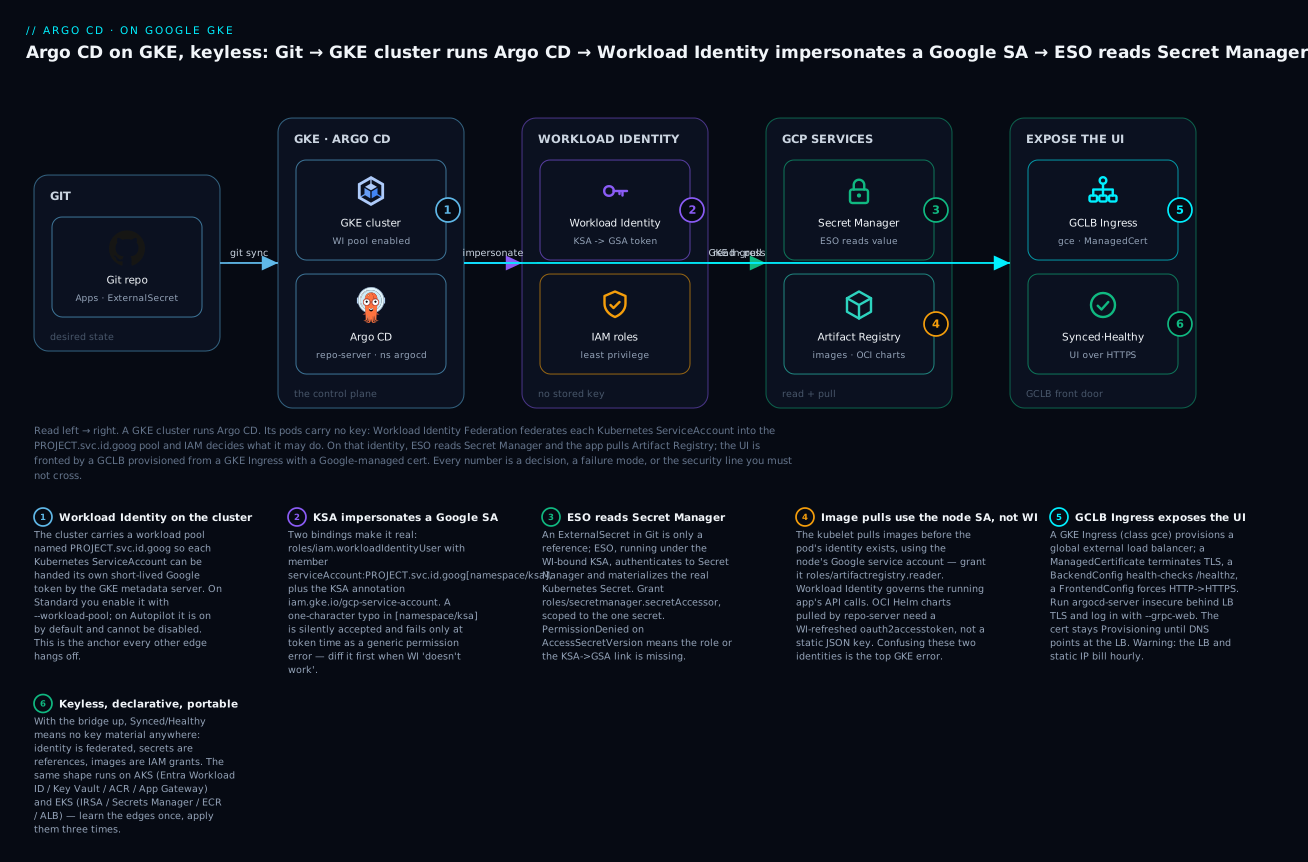
Here is the whole wiring on one canvas, left to right. Git holds desired state; a GKE cluster runs Argo CD; Workload Identity turns its Kubernetes ServiceAccounts into Google identities with no stored key; and on that identity the External Secrets Operator reads Secret Manager while pods pull from Artifact Registry — with a GCLB Ingress fronting the UI. The badges mark the decisions and failure points the rest of the lesson unpacks: the [namespace/ksa] binding (2), the image-pull-versus-Workload-Identity trap (4), and the managed-cert-needs-DNS gotcha (5).
Installing Argo CD on GKE: get-credentials, HA, and the Standard vs Autopilot fork
Before any wiring, you need a cluster context and Argo CD running in it. Getting a kubeconfig entry for a GKE cluster is one command, but it hides a dependency that trips almost everyone the first time.
# Point kubectl at a regional GKE cluster. --region for regional, --zone for zonal.
gcloud container clusters get-credentials gke-prod \
  --region europe-west1 \
  --project acme-prod
# Fetching cluster endpoint and auth data.
# kubeconfig entry generated for gke-prod.
That command writes a kubeconfig user entry whose auth is not a token but an exec plugin call to gke-gcloud-auth-plugin. Since kubectl 1.26 the plugin is mandatory and is not bundled with kubectl — it ships with the gcloud CLI. If it is missing you get no Auth Provider found for name "gcp" or gke-gcloud-auth-plugin: executable file not found, and — critically — the same failure hits Argo CD later when it tries to register this cluster as a spoke. Install it once:
gcloud components install gke-gcloud-auth-plugin
gke-gcloud-auth-plugin --version   # confirm it resolves on PATH
# Kubernetes v1.29.0-alpha+... (representative)
With a context in hand, install Argo CD. The three install routes behave identically once running; they differ in how you manage the install, which matters because Argo CD is itself best managed by GitOps once bootstrapped. The mechanics of each — and the first-login password dance — are covered in depth in Installing Argo CD: Helm, Manifests, HA & First Login; here is the decision at a glance.
| Install route | Command surface | HA story | Best when |
|---|---|---|---|
| Raw manifests | kubectl apply -n argocd -f install.yaml |
Apply the ha/ overlay instead of install.yaml |
Learning; a quick non-prod stand-up |
Helm chart (argo-cd) |
helm install argocd argo/argo-cd |
redis-ha.enabled, controller.replicas, repoServer.replicas values |
Prod; Terraform/Helm-driven platforms |
| Argo CD Operator | Subscription / ArgoCD CR |
spec.ha.enabled: true |
OpenShift; operator-centric shops |
For anything production, install the HA topology from the start. The non-HA install runs a single Redis and single replicas; HA runs a three-node Redis (with HAProxy), multiple repo-server replicas, and lets the application-controller shard across clusters. HA is not free — it needs to spread pods across nodes — and that is exactly where GKE’s two cluster modes start to matter.
# HA via the upstream kustomize overlay, pinned to a release (never 'stable' in prod).
kubectl create namespace argocd
kubectl apply -n argocd \
  -k https://github.com/argoproj/argo-cd/manifests/ha?ref=v2.13.2
# ... redis-ha, argocd-repo-server (x2), argocd-application-controller (statefulset) ...
What the HA overlay actually changes, component by component:
| Component | Non-HA | HA | Why HA |
|---|---|---|---|
| Redis | 1 replica | 3-node Redis + HAProxy | Cache/session survives a node loss |
repo-server |
1 replica | 2+ replicas | Parallel manifest rendering; no single point |
application-controller |
1 replica | Shardable across replicas | Reconcile scales across many clusters |
server (API/UI) |
1 replica | 2+ replicas | UI/API stays up during a rollout |
| Pod placement | Best-effort | Anti-affinity across nodes | One node failure never takes every replica |
Standard vs Autopilot is the fork that shapes the rest of your GKE life. Standard gives you node pools you own and full control of the node OS; Autopilot hands node management to Google and bills you per pod resource request, enforcing a set of guardrails. Argo CD runs fine on both, but Autopilot’s guardrails intersect Argo CD’s manifests in specific places you must know before you apply the HA overlay.
| Concern | GKE Standard | GKE Autopilot | Impact on Argo CD |
|---|---|---|---|
| Node management | You own node pools | Google owns nodes | Autopilot: no node-level tuning for repo-server perf |
| Resource requests | Optional (scheduler defaults) | Enforced — every container needs requests | HA redis-ha/CMP sidecars must declare requests or are rejected |
| Privileged / hostPath / hostNetwork | Allowed | Blocked | Fine — Argo CD needs none of these |
| DaemonSets | Full freedom | Allowed, but constrained (no privilege/host) | Rarely relevant to Argo CD itself |
| Workload Identity | Opt-in (--workload-pool) |
On by default, cannot disable | Autopilot: identity edge is half-done for you |
| GKE metadata server | Per-node-pool (GKE_METADATA) |
Always present | Autopilot: WI “just works” for pods |
| Pod anti-affinity (HA spread) | Honoured if nodes exist | Autopilot provisions nodes to satisfy it | HA redis spreads automatically, but you pay for the nodes |
| Mutating webhooks on kube-system | Allowed | Restricted | Some third-party CMP/init hacks won’t apply |
| SSH / privileged debug | kubectl debug + node SSH |
No node SSH | Debug repo-server via ephemeral containers only |
The practical reading: on Autopilot, the identity edge is partly built for you (Workload Identity is always on), but you must make sure every Argo CD container — especially in the HA overlay and any Config Management Plugin sidecar — declares CPU/memory requests, or the Autopilot admission webhook rejects the pod with a message like pods "argocd-repo-server-..." is forbidden: ... must specify resource requests. On Standard, you get more control but you must explicitly enable Workload Identity on the cluster and the node pool. We cover both paths in the next section.
GKE Workload Identity: how a pod becomes a Google service account
This is the load-bearing wall. Everything else — Secret Manager, Artifact Registry, private-cluster egress — is a role grant on top of it. Slow down here.
A pod on GKE authenticates to Google APIs by asking the GKE metadata server for a token. Without Workload Identity, that metadata server hands back a token for the node’s Google service account, which means every pod on the node shares one identity with the union of everyone’s permissions — a blast radius you cannot scope. Workload Identity Federation for GKE replaces that: it federates your cluster’s Kubernetes ServiceAccounts into a fixed workload identity pool named PROJECT_ID.svc.id.goog, so the metadata server can hand each pod a token scoped to its own KSA. IAM then decides what that KSA may do.
There are two ways to turn a KSA into Google permissions, and knowing which you are using prevents most of the errors in this lesson.
| Model | How the KSA gets access | Setup surface | Google’s current guidance |
|---|---|---|---|
| Impersonation (classic) | KSA impersonates a Google SA (GSA); you grant roles to the GSA | iam.gke.io/gcp-service-account annotation + roles/iam.workloadIdentityUser binding |
Widely deployed; fine to keep |
| Direct resource access (newer) | Grant IAM roles directly to the KSA principal — no GSA | principal://... member on the resource; no annotation |
Preferred for new setups; fewer moving parts |
The impersonation model, step by step
Four things must line up. Miss one and the pod gets a token that is valid but unauthorized.
| Piece | What it is | Concrete value |
|---|---|---|
| Workload pool | The cluster’s WI federation pool | acme-prod.svc.id.goog |
| Kubernetes SA (KSA) | The SA the Argo CD / ESO pod runs as | external-secrets in ns external-secrets |
| Google SA (GSA) | The Google identity the KSA impersonates | eso@acme-prod.iam.gserviceaccount.com |
workloadIdentityUser binding |
Lets the KSA act as the GSA | member serviceAccount:acme-prod.svc.id.goog[external-secrets/external-secrets] |
| KSA annotation | Tells GKE which GSA this KSA maps to | iam.gke.io/gcp-service-account: eso@... |
First, enable Workload Identity on the cluster (Standard — Autopilot has this on already):
# Standard: enable the workload pool on the cluster...
gcloud container clusters update gke-prod \
  --region europe-west1 \
  --workload-pool=acme-prod.svc.id.goog

# ...and switch the node pool to the GKE metadata server (Standard only).
gcloud container node-pools update default-pool \
  --cluster gke-prod --region europe-west1 \
  --workload-metadata=GKE_METADATA
Then create the GSA, grant it whatever Google role the workload needs, and bind the KSA to it:
# The Google identity the pod will act as.
gcloud iam service-accounts create eso \
  --project acme-prod --display-name "ESO for Argo CD"

# What that identity may do (example: read secrets — scoped in the next section).
gcloud projects add-iam-policy-binding acme-prod \
  --member="serviceAccount:eso@acme-prod.iam.gserviceaccount.com" \
  --role="roles/secretmanager.secretAccessor"

# The federation binding: let the KSA impersonate the GSA.
gcloud iam service-accounts add-iam-policy-binding \
  eso@acme-prod.iam.gserviceaccount.com \
  --role="roles/iam.workloadIdentityUser" \
  --member="serviceAccount:acme-prod.svc.id.goog[external-secrets/external-secrets]"
Finally, annotate the KSA so GKE knows the mapping:
kubectl annotate serviceaccount external-secrets \
  -n external-secrets \
  iam.gke.io/gcp-service-account=eso@acme-prod.iam.gserviceaccount.com
The member string PROJECT.svc.id.goog[NAMESPACE/KSA] is the single most typo-prone value in the whole flow. The namespace and KSA inside the brackets must match the pod exactly; a mismatch yields a token the metadata server refuses to mint, surfacing as Unable to authenticate ... IAM_PERMISSION_DENIED from inside the pod even though every role looks correct in the console.
The direct model, in one grant
The newer path skips the GSA entirely. You grant the Google role to the KSA’s principal identifier, using the project number:
# No GSA, no annotation — grant secretAccessor straight to the KSA principal.
gcloud projects add-iam-policy-binding acme-prod \
  --role="roles/secretmanager.secretAccessor" \
  --member="principal://iam.googleapis.com/projects/123456789012/locations/global/workloadIdentityPools/acme-prod.svc.id.goog/subject/ns/external-secrets/sa/external-secrets"
One binding, no impersonation chain, nothing to annotate. The trade-off is that some tools (ESO among them, at time of writing) expect the annotation/impersonation shape, so you will still meet the classic model in the field — but for your own workloads, prefer direct.
Autopilot specifics
On Autopilot you skip the two cluster/node-pool enablement commands entirely — the workload pool is set and the metadata server is present the moment the cluster exists. You still create the GSA, grant the role, add the workloadIdentityUser binding, and annotate the KSA. The one extra thing to watch: because Autopilot enforces resource requests, the ESO and Argo CD pods that use Workload Identity must declare requests or they never schedule to acquire an identity in the first place — an identity error that is really a scheduling error in disguise.
The cross-cloud shape
Workload Identity is Google’s name for a pattern all three clouds now implement: give a Kubernetes ServiceAccount a cloud identity via federation, so no key is stored. The nouns differ; the shape is identical.
| Aspect | GKE (Google) | AKS (Azure) | EKS (AWS) |
|---|---|---|---|
| Mechanism | Workload Identity Federation for GKE | Microsoft Entra Workload ID | IRSA · or EKS Pod Identity |
| Federation anchor | Pool PROJECT.svc.id.goog |
OIDC issuer + federated credential | Cluster OIDC provider (IRSA) / agent (Pod Identity) |
| KSA → cloud link | iam.gke.io/gcp-service-account annotation or direct principal |
azure.workload.identity/client-id annotation |
eks.amazonaws.com/role-arn annotation (IRSA) |
| The binding | roles/iam.workloadIdentityUser |
Federated identity credential on the app registration | Trust policy on the IAM role (OIDC sub) |
| Grant target | Google SA or KSA principal | Entra app / managed identity | IAM role |
| Token path | GKE metadata server | Entra token endpoint (projected SA token) | Projected SA token → STS AssumeRoleWithWebIdentity |
If you already ran the EKS or AKS lesson, notice the through-line: a projected/federated ServiceAccount token, exchanged for a cloud token, with a binding that names the exact namespace/sa. GKE’s PROJECT.svc.id.goog[ns/sa] is the same idea as IRSA’s OIDC sub: system:serviceaccount:ns:sa. Learn it once, apply it three times.
Secret Manager through the External Secrets Operator
Argo CD does not read secrets from Secret Manager itself — and it should not. It reconciles Kubernetes objects. The clean pattern is: you commit an ExternalSecret (a reference, safe for Git) to your repo, Argo CD syncs it like any other manifest, and the External Secrets Operator — running under a Workload-Identity-bound KSA — reads the real value from Secret Manager and materialises a Kubernetes Secret. The plaintext never touches Git. The full four-approach comparison (Sealed Secrets, ESO, SOPS, Vault) lives in Managing Secrets in Argo CD; here we wire the GKE-specific half: ESO to Secret Manager over Workload Identity.
ESO’s model splits cleanly into two objects. A SecretStore says where the store is and who I am; an ExternalSecret says what I want and where to put it. On GKE the store’s provider is gcpsm, and its auth block points at the Workload-Identity-bound KSA.
# secretstore-gcp.yaml — Google Secret Manager via GKE Workload Identity (no JSON key).
apiVersion: external-secrets.io/v1
kind: SecretStore
metadata:
  name: gcp-store
  namespace: production
spec:
  provider:
    gcpsm:
      projectID: acme-prod
      auth:
        workloadIdentity:
          clusterLocation: europe-west1
          clusterName: gke-prod
          serviceAccountRef:
            name: external-secrets   # KSA bound to a GSA with secretAccessor
# externalsecret.yaml — a reference, not a secret. Safe to commit and let Argo CD sync.
apiVersion: external-secrets.io/v1
kind: ExternalSecret
metadata:
  name: db-credentials
  namespace: production
spec:
  refreshInterval: 1h
  secretStoreRef:
    name: gcp-store
    kind: SecretStore
  target:
    name: db-credentials          # the k8s Secret ESO will create and own
    creationPolicy: Owner
  data:
    - secretKey: password
      remoteRef:
        key: db-password           # the secret's name in Secret Manager
Every GKE-specific detail lives in that SecretStore auth block — these four fields are the whole GKE surface, and the two cluster* values must match the real cluster exactly:
| Field | Example | What it does |
|---|---|---|
provider.gcpsm.projectID |
acme-prod |
Which project’s Secret Manager to read |
auth.workloadIdentity.clusterLocation |
europe-west1 |
The cluster’s region/zone — must match, or auth fails |
auth.workloadIdentity.clusterName |
gke-prod |
The cluster name — must match |
auth.workloadIdentity.serviceAccountRef.name |
external-secrets |
The WI-bound KSA ESO presents as |
The IAM side is a single role, granted the least-privilege way. Do not grant secretmanager.admin; ESO only reads.
| Grant | Role | Scope | Why |
|---|---|---|---|
| Read a secret’s value | roles/secretmanager.secretAccessor |
Per-secret (preferred) or per-project | ESO’s only real need |
| List/inspect metadata | roles/secretmanager.viewer |
Rarely needed | Some tooling lists secrets |
| The federation binding | roles/iam.workloadIdentityUser |
On the GSA | Lets the ESO KSA impersonate it |
Scope the accessor to the individual secret when you can — it turns a broad “can read every secret in the project” into “can read exactly db-password”:
# Least privilege: grant on the specific secret, not the whole project.
gcloud secrets add-iam-policy-binding db-password \
  --project acme-prod \
  --member="serviceAccount:eso@acme-prod.iam.gserviceaccount.com" \
  --role="roles/secretmanager.secretAccessor"
Whoever owns the secret seeds it with gcloud, never through Git:
printf 's3cr3t-placeholder' | \
  gcloud secrets create db-password --data-file=- --replication-policy=automatic \
  --project acme-prod
# Created version [1] of the secret [db-password].
gcloud secrets versions access latest --secret=db-password --project acme-prod  # verify
A healthy ExternalSecret reports SecretSynced:
kubectl get externalsecret db-credentials -n production
# NAME             STORE       REFRESH INTERVAL   STATUS         READY
# db-credentials   gcp-store   1h                 SecretSynced   True
One Argo CD gotcha worth stating loudly: ESO owns the Secret it creates and re-writes it every refreshInterval. If you also let Argo CD track that Secret object, Argo CD will see ESO’s writes as drift and flap OutOfSync. The fix is to keep only the ExternalSecret in Git (let ESO create the Secret), or add the materialised Secret to ignoreDifferences. This is the classic “two controllers, one object” conflict.
Cross-cloud: the secret store edge
| Aspect | GKE | AKS | EKS |
|---|---|---|---|
| Store | Google Secret Manager | Azure Key Vault | AWS Secrets Manager |
| ESO provider | gcpsm |
azurekv |
aws (service: SecretsManager) |
| Store address in CR | projectID |
vaultUrl |
region |
| Read role | roles/secretmanager.secretAccessor |
Key Vault Secrets User |
secretsmanager:GetSecretValue |
| Identity to ESO | Workload Identity | Entra Workload ID | IRSA / Pod Identity |
| Seed CLI | gcloud secrets versions add |
az keyvault secret set |
aws secretsmanager put-secret-value |
The ExternalSecret itself is byte-for-byte portable across all three — only the SecretStore changes. That portability is the whole reason to standardise on ESO for a multi-cloud fleet: app teams write one reference, the platform team owns one per-cluster store.
Artifact Registry: pulling images and OCI charts via Workload Identity
Artifact Registry (GAR) is Google’s successor to Container Registry, hosting both container images and OCI artifacts including Helm charts. There are two different pull paths on a GKE cluster, they authenticate differently, and conflating them is the single most common Artifact Registry mistake.
| Pull path | Who pulls | Identity used | Grant |
|---|---|---|---|
| Container image (your app’s pods) | The kubelet on the node | The node’s Google SA — not Workload Identity | roles/artifactregistry.reader on the node SA |
| OCI Helm chart (Argo CD renders it) | argocd-repo-server |
Repo-server credential (WI-derived token or repo Secret) |
roles/artifactregistry.reader for that identity |
The critical correction: Workload Identity does not govern image pulls. Image pulls happen before your pod’s identity exists — the kubelet fetches the image to start the container. The kubelet authenticates with the node’s Google service account. So to let pods run private GAR images, you grant the node/cluster service account artifactregistry.reader; Workload Identity is irrelevant to that path. Workload Identity governs the calls your running application makes to Google APIs.
# Create a Docker-format repo in the same region as the cluster (lower latency, egress).
gcloud artifacts repositories create apps \
  --repository-format=docker \
  --location=europe-west1 --project acme-prod

# Let the NODE service account pull images (this is the kubelet's identity).
gcloud artifacts repositories add-iam-policy-binding apps \
  --location=europe-west1 --project acme-prod \
  --member="serviceAccount:gke-nodes@acme-prod.iam.gserviceaccount.com" \
  --role="roles/artifactregistry.reader"
With that grant, a normal pod reference to europe-west1-docker.pkg.dev/acme-prod/apps/web:1.4.2 pulls with no imagePullSecrets at all — no key, no docker login, no dockerconfigjson. That is the payoff over the old JSON-key approach.
Images/charts: why Workload Identity beats a JSON key
The alternative — download a service-account JSON key, stuff it into a dockerconfigjson Secret, reference it via imagePullSecrets — works and is wrong for the same reasons a password file is wrong.
| Dimension | JSON key in a Secret | Workload Identity / node SA |
|---|---|---|
| Key material at rest | Yes — in a Secret, and wherever it was downloaded |
None |
| Rotation | Manual, and you will forget | Automatic, short-lived tokens |
| Blast radius if leaked | Full GSA until revoked | A token that expires in minutes |
| Git safety | Must be sealed/encrypted separately | Nothing to commit |
| Audit story | “Who has the key?” — unanswerable | IAM policy is the answer |
| Setup | gcloud iam ... keys create key.json |
One IAM binding |
There is essentially no production case for the JSON key on GKE. If you find one in a repo, treat it as an incident: rotate the key, delete it, and replace it with a node-SA or Workload-Identity grant.
OCI Helm charts and Argo CD’s repo-server — the honest state
Argo CD can consume a Helm chart stored as an OCI artifact in GAR. This is a repo-server concern, not a kubelet one, and it is genuinely more awkward than image pulls, so here is the honest picture rather than a hand-wave. Argo CD registers the OCI registry as a Helm repository and needs a bearer credential to pull. Two workable patterns:
- Short-lived access token as the password. Authenticate to GAR with username
oauth2accesstokenand an access token from the repo-server’s Workload Identity, refreshed before it expires (~60 min). This keeps zero long-lived key material but requires a small refresher (a sidecar or CronJob that rewrites the repoSecret), because Argo CD’s Helm-OCI client does not itself mint Google tokens. - A repository
Secretin theargocdnamespace of typerepositorywithenableOCI: "true", pointed ateurope-west1-docker.pkg.dev, holding whatever credential your refresher writes.
# argocd-gar-repo.yaml — register GAR as an OCI Helm repo. The password is written
# by a token refresher (WI-derived), NOT a committed static key.
apiVersion: v1
kind: Secret
metadata:
  name: gar-oci
  namespace: argocd
  labels:
    argocd.argoproj.io/secret-type: repository
stringData:
  name: gar
  type: helm
  url: europe-west1-docker.pkg.dev/acme-prod/charts
  enableOCI: "true"
  username: oauth2accesstoken
  password: <short-lived-access-token-written-by-refresher>   # placeholder; rotates
Do not put a permanent token there and do not commit a real one. The reason this is clunkier than image pulls is architectural: the kubelet is a first-class GKE citizen with a node identity, whereas Argo CD’s Helm-OCI client is a generic OCI client that predates cloud-native token federation. For most teams the pragmatic answer is to keep application images in GAR (clean, node-SA auth) and keep Argo CD’s charts in a Git-hosted Helm repo or a plain Git path, sidestepping OCI auth for the control plane entirely.
Cross-cloud: the registry edge
| Aspect | GKE | AKS | EKS |
|---|---|---|---|
| Registry | Artifact Registry (GAR) | Azure Container Registry (ACR) | Elastic Container Registry (ECR) |
| Image-pull identity | Node Google SA | Kubelet identity / ACR AcrPull on kubelet MI |
Node IAM role / ECR auth |
| Read role | roles/artifactregistry.reader |
AcrPull |
AmazonEC2ContainerRegistryReadOnly (or scoped policy) |
| Native “no pull secret” | Node SA grant | --attach-acr (kubelet MI) |
Node role policy |
| OCI Helm auth | oauth2accesstoken (WI-refreshed) |
az acr login token / repo Secret |
aws ecr get-login-password (12h) refreshed |
Exposing the UI: GKE Ingress (GCLB), Gateway API, and internal/private options
Argo CD’s argocd-server serves the web UI, the REST/gRPC API the CLI uses, and gRPC-Web all on one port. Exposing it on GKE means putting a Google Cloud Load Balancer in front. You have two generations of API to do it — the mature Ingress path and the forward-looking Gateway API path — plus the choice of external vs internal.
The GKE Ingress path (GCLB)
A GKE Ingress provisions a global external Application Load Balancer. Three GKE-specific CRDs shape it, and a static IP plus a Google-managed cert make it production-real.
| Object | API group | What it configures |
|---|---|---|
Ingress |
networking.k8s.io/v1 |
The L7 LB, hosts, paths, which cert/IP |
ManagedCertificate |
networking.gke.io/v1 |
A Google-managed TLS cert, auto-provisioned by DNS |
BackendConfig |
cloud.google.com/v1 |
Per-Service: health check, IAP, CDN, timeouts, affinity |
FrontendConfig |
networking.gke.io/v1beta1 |
SSL policy, HTTP→HTTPS redirect |
The ingressClass picks external vs internal:
kubernetes.io/ingress.class |
Load balancer | Reachable from | Use for |
|---|---|---|---|
gce |
Global external ALB | The internet | Public Argo CD UI (with SSO + TLS) |
gce-internal |
Regional internal ALB | Inside the VPC only | Private Argo CD, reached via VPN/bastion |
The cleanest Argo CD wiring is to run argocd-server in insecure mode (plain HTTP on 8080) and let the GCLB terminate TLS with the ManagedCertificate. That avoids double TLS and the gRPC-over-HTTPS backend complications. Here is the full set.
# 1) A Google-managed cert. DNS for the domain MUST point at the LB IP or it stalls.
apiVersion: networking.gke.io/v1
kind: ManagedCertificate
metadata:
  name: argocd-cert
  namespace: argocd
spec:
  domains:
    - argocd.example.com
# 2) Backend health check on Argo CD's /healthz (not the default '/').
apiVersion: cloud.google.com/v1
kind: BackendConfig
metadata:
  name: argocd-backendconfig
  namespace: argocd
spec:
  healthCheck:
    checkIntervalSec: 15
    timeoutSec: 5
    type: HTTP
    requestPath: /healthz
    port: 8080
# 3) Force HTTPS: redirect any HTTP hit to HTTPS at the load balancer.
apiVersion: networking.gke.io/v1beta1
kind: FrontendConfig
metadata:
  name: argocd-frontendconfig
  namespace: argocd
spec:
  redirectToHttps:
    enabled: true
    responseCodeName: MOVED_PERMANENTLY_DEFAULT
# 4) The Ingress itself, tying IP + cert + frontend config together.
apiVersion: networking.k8s.io/v1
kind: Ingress
metadata:
  name: argocd-server
  namespace: argocd
  annotations:
    kubernetes.io/ingress.class: "gce"
    kubernetes.io/ingress.global-static-ip-name: "argocd-ip"
    networking.gke.io/managed-certificates: "argocd-cert"
    networking.gke.io/v1beta1.FrontendConfig: "argocd-frontendconfig"
spec:
  rules:
    - host: argocd.example.com
      http:
        paths:
          - path: /
            pathType: Prefix
            backend:
              service:
                name: argocd-server
                port:
                  number: 80
Two edits make the backend behave. Patch the argocd-server Service to attach the BackendConfig and (on a VPC-native cluster) use a container-native NEG, and set the server to insecure so the HTTP health check and HTTP backend line up:
# Attach the BackendConfig and request a container-native NEG on the Service.
kubectl -n argocd annotate service argocd-server \
  cloud.google.com/backend-config='{"default":"argocd-backendconfig"}' \
  cloud.google.com/neg='{"ingress": true}'

# Run argocd-server insecure (TLS terminates at the GCLB).
kubectl -n argocd patch configmap argocd-cmd-params-cm --type merge \
  -p '{"data":{"server.insecure":"true"}}'
kubectl -n argocd rollout restart deploy argocd-server

# Reserve the global static IP the Ingress annotation references (⚠️ billable).
gcloud compute addresses create argocd-ip --global --project acme-prod
Because the CLI speaks gRPC and the GCLB fronts HTTP/1.1+HTTP/2, log in with gRPC-Web so the CLI tunnels over standard HTTPS:
argocd login argocd.example.com --grpc-web
# 'admin:login' logged in successfully
The Gateway API direction
GKE has a first-class Gateway controller implementing the Kubernetes Gateway API — the successor to Ingress. Instead of annotations on an Ingress, you pick a GatewayClass, declare a Gateway, and attach HTTPRoutes. Health checks and backend policy move to HealthCheckPolicy/GCPBackendPolicy objects.
| GatewayClass | Load balancer |
|---|---|
gke-l7-global-external-managed |
Global external ALB |
gke-l7-regional-external-managed |
Regional external ALB |
gke-l7-rilb |
Regional internal ALB |
gke-l7-gxlb |
Classic global external ALB |
| Aspect | Ingress (gce) |
Gateway API |
|---|---|---|
| Maturity on GKE | GA, ubiquitous | GA, newer |
| Config surface | Annotations + BackendConfig/FrontendConfig |
Typed Gateway/HTTPRoute/policy CRDs |
| Cross-namespace routing | Awkward | First-class (ReferenceGrant) |
| Traffic splitting | Not native | Native (weighted HTTPRoute) |
| Recommendation | Fine today; stable | Where new GKE networking is heading |
For Argo CD specifically, either works. If you are standing up a new platform and expect canary or multi-team routing, start on Gateway API; if you want the shortest path to a working HTTPS UI, the Ingress above is it.
Internal and private GKE
Two independent “private” decisions often get conflated. One is how the UI is exposed (external vs internal LB — the gce vs gce-internal choice above). The other is whether the cluster itself is private — private nodes with no public IP and a private control-plane endpoint. A private GKE cluster changes how Argo CD reaches things and how a hub Argo CD reaches this cluster as a spoke.
# A private GKE cluster: no public node IPs, control plane reachable only from
# authorized networks; egress needs Cloud NAT (⚠️ Cloud NAT bills hourly + per GB).
gcloud container clusters create gke-prod \
  --region europe-west1 --project acme-prod \
  --enable-private-nodes \
  --enable-private-endpoint \
  --master-ipv4-cidr 172.16.0.0/28 \
  --enable-master-authorized-networks \
  --master-authorized-networks 10.0.0.0/8
The flags each do one specific thing, and two of them have billing or connectivity tails you must plan for:
| Flag | Effect | Tail to plan for |
|---|---|---|
--enable-private-nodes |
Nodes get no public IP | Egress needs Cloud NAT (⚠️ bills hourly + per GB) |
--enable-private-endpoint |
API server has no public IP | Reachable only from authorized networks / peered VPC |
--master-ipv4-cidr |
The /28 for the control plane |
Must not overlap your VPC ranges |
--enable-master-authorized-networks |
Restrict who may dial the API | Turn on before adding CIDRs |
--master-authorized-networks |
The allowed source CIDR list | Add the hub’s egress range for multi-cluster |
The multi-cluster consequence is the important part. If this GKE cluster is a spoke managed by a hub Argo CD elsewhere, the hub’s application-controller and repo-server must be able to dial this cluster’s API server. With --enable-private-endpoint the API server has no public IP, so the hub reaches it only through VPC peering, a shared VPC, or an authorized-network entry for the hub’s egress. Symptom when that path is missing: the cluster registers, but every Application shows STATUS Failed with dial tcp 172.16.0.2:443: i/o timeout. The mechanics of registering clusters and the private-connectivity patterns are covered in Multi-Cluster Argo CD: Registering Clusters — plan the network path before you register a private spoke.
Cross-cloud: the ingress edge
| Aspect | GKE | AKS | EKS |
|---|---|---|---|
| L7 load balancer | Cloud Load Balancing (GCLB) | Application Gateway | Application Load Balancer (ALB) |
| Controller | Built-in GKE Ingress / Gateway | AGIC (App Gateway Ingress Controller) | AWS Load Balancer Controller |
ingressClass |
gce / gce-internal |
azure/application-gateway |
alb |
| Managed TLS cert | ManagedCertificate CRD |
App Gateway cert / Key Vault cert | ACM certificate (annotation) |
| Internal variant | gce-internal |
Internal App Gateway | alb.ingress.kubernetes.io/scheme: internal |
| Gateway API | GKE Gateway controller (GA) | (emerging) | (emerging) |
A Terraform slice: cluster, Workload Identity, and bootstrapping Argo CD
Clicking gcloud commands is how you learn the edges; Terraform is how you keep them. Here is a representative slice with the google provider that provisions the cluster with Workload Identity on, creates the ESO Google SA, wires both IAM bindings, and forward-references bootstrapping Argo CD via Helm. Every resource and argument name is real.
# providers.tf — the google provider plus k8s/helm providers fed by the cluster output.
terraform {
  required_providers {
    google     = { source = "hashicorp/google",     version = "~> 6.0" }
    kubernetes = { source = "hashicorp/kubernetes",  version = "~> 2.30" }
    helm       = { source = "hashicorp/helm",        version = "~> 2.13" }
  }
}

provider "google" {
  project = "acme-prod"
  region  = "europe-west1"
}
# cluster.tf — GKE with Workload Identity enabled (workload_pool = the WI federation pool).
resource "google_container_cluster" "prod" {
  name     = "gke-prod"
  location = "europe-west1"

  workload_identity_config {
    workload_pool = "acme-prod.svc.id.goog"
  }
  # ... node pools omitted; on Standard set node_config.workload_metadata_config.mode = "GKE_METADATA"
}
# identity.tf — the ESO Google SA, its read grant, and the KSA->GSA federation binding.
resource "google_service_account" "eso" {
  account_id   = "eso"
  display_name = "ESO for Argo CD"
}

resource "google_project_iam_member" "eso_secret_reader" {
  project = "acme-prod"
  role    = "roles/secretmanager.secretAccessor"
  member  = "serviceAccount:${google_service_account.eso.email}"
}

resource "google_service_account_iam_member" "eso_wi" {
  service_account_id = google_service_account.eso.name
  role               = "roles/iam.workloadIdentityUser"
  member             = "serviceAccount:acme-prod.svc.id.goog[external-secrets/external-secrets]"
}
# argocd.tf — bootstrap Argo CD via the argo-helm chart (HA values), then let Argo CD
# manage itself and everything else. This is the "forward reference": Terraform plants
# the seed; Git grows the tree.
resource "helm_release" "argocd" {
  name             = "argocd"
  repository       = "https://argoproj.github.io/argo-helm"
  chart            = "argo-cd"
  version          = "7.7.0"        # chart 7.x -> Argo CD 2.13+; chart 8.x -> Argo CD 3.x
  namespace        = "argocd"
  create_namespace = true

  set {
    name  = "redis-ha.enabled"
    value = "true"
  }
  set {
    name  = "controller.replicas"
    value = "1"
  }
  set {
    name  = "repoServer.replicas"
    value = "2"
  }
}
| Terraform resource | Wires | Real argument that matters |
|---|---|---|
google_container_cluster |
The cluster + WI | workload_identity_config.workload_pool |
google_service_account |
The ESO Google identity | account_id |
google_project_iam_member |
ESO’s read grant | role = "roles/secretmanager.secretAccessor" |
google_service_account_iam_member |
KSA→GSA federation | member = "PROJECT.svc.id.goog[ns/ksa]" |
helm_release (argo-cd) |
Argo CD bootstrap | repository, chart, version |
The two-phase gotcha: the kubernetes/helm providers need the cluster’s endpoint and CA, which only exist after google_container_cluster applies. Feed them from the cluster’s attributes (google_container_cluster.prod.endpoint, .master_auth) and, in CI, structure the run so the cluster and the in-cluster resources are separate applies or use depends_on — otherwise the first plan fails because the providers cannot reach a cluster that does not yet exist. After bootstrap, Argo CD’s own Applications (an app-of-apps) take over; Terraform’s job ends at planting the control plane.
Hands-on lab
Wire Argo CD on GKE end-to-end at the config level: give ESO a Google identity via Workload Identity, sync a SecretStore + ExternalSecret from Secret Manager, and expose the UI on a GCLB with a Google-managed certificate — with the Autopilot adjustments called out. Every value is a placeholder. This lab describes the real objects and their representative output; there is no live cluster behind it, so treat it as a runnable wiring guide.
⚠️ Billing. A global static IP, the GCLB the Ingress provisions, and (on a private cluster) Cloud NAT all bill by the hour plus egress — a few dollars a day, not free-tier. Reserve them only while testing and run the teardown. Secret Manager and Artifact Registry are effectively free at this scale; the GKE control plane and any Standard nodes are the real cost.
| Resource | Bills | Stop it with |
|---|---|---|
GCLB (from the Ingress) |
Hourly + per forwarding rule + egress | Delete the Ingress |
| Global static IP | Hourly while reserved (even if unattached) | gcloud compute addresses delete ... --global |
| Cloud NAT (private-cluster egress) | Hourly + per-GB processed | Delete the NAT / Cloud Router |
| GKE control plane | Hourly management fee per cluster | Delete the cluster |
| Standard node pools | Per-VM (Autopilot bills per pod request) | Scale to zero / delete the cluster |
| Secret Manager · Artifact Registry | Negligible at this scale | Leave — they persist as the real store |
Step 1 — Point kubectl at the cluster and confirm the auth plugin.
gcloud container clusters get-credentials gke-prod --region europe-west1 --project acme-prod
kubectl config current-context
# gke_acme-prod_europe-west1_gke-prod
What just happened: you have a context whose auth calls gke-gcloud-auth-plugin. If current-context errors with executable ... not found, install the plugin (gcloud components install gke-gcloud-auth-plugin) before going further — Argo CD will hit the same wall registering this cluster.
Step 2 — Create the ESO Google SA and the two bindings.
gcloud iam service-accounts create eso --display-name "ESO for Argo CD" --project acme-prod
gcloud secrets add-iam-policy-binding db-password --project acme-prod \
  --member="serviceAccount:eso@acme-prod.iam.gserviceaccount.com" \
  --role="roles/secretmanager.secretAccessor"
gcloud iam service-accounts add-iam-policy-binding eso@acme-prod.iam.gserviceaccount.com \
  --role="roles/iam.workloadIdentityUser" \
  --member="serviceAccount:acme-prod.svc.id.goog[external-secrets/external-secrets]"
What just happened: the ESO Google SA can now read exactly one secret, and the external-secrets KSA may impersonate it. Note the [ns/ksa] in the last member string — that is the exact pod that gets the identity.
Step 3 — Annotate ESO’s KSA (impersonation model).
kubectl annotate serviceaccount external-secrets -n external-secrets \
  iam.gke.io/gcp-service-account=eso@acme-prod.iam.gserviceaccount.com --overwrite
# serviceaccount/external-secrets annotated
What just happened: GKE now maps the external-secrets KSA to the eso Google SA. Autopilot adjustment: you skip nothing here — the annotation is still required — but you did not need any cluster/node-pool WI enablement in a prior step, because Autopilot ships Workload Identity on. Also ensure the ESO Helm values set resource requests, or Autopilot’s admission webhook rejects the pod.
Step 4 — Commit and sync the SecretStore + ExternalSecret via Argo CD.
# These are references (no secret value), so they live in Git and Argo CD syncs them.
argocd app create eso-wiring \
  --repo https://github.com/acme/platform-gitops.git \
  --path secrets/production --dest-server https://kubernetes.default.svc \
  --dest-namespace production --sync-policy automated
argocd app get eso-wiring
# Name:    argocd/eso-wiring
# Health Status:  Healthy
# Sync Status:    Synced to HEAD
What just happened: Argo CD applied secretstore-gcp.yaml and externalsecret.yaml. ESO authenticated to Secret Manager with the Workload-Identity token, read db-password, and created the db-credentials Secret. Verify:
kubectl get externalsecret db-credentials -n production
# NAME             STORE       STATUS         READY
# db-credentials   gcp-store   SecretSynced   True
Step 5 — Expose the UI on a GCLB with a managed cert.
gcloud compute addresses create argocd-ip --global --project acme-prod   # ⚠️ billable
kubectl -n argocd apply -f managedcertificate.yaml -f backendconfig.yaml -f frontendconfig.yaml -f ingress.yaml
kubectl -n argocd annotate service argocd-server \
  cloud.google.com/backend-config='{"default":"argocd-backendconfig"}' --overwrite
kubectl -n argocd patch configmap argocd-cmd-params-cm --type merge \
  -p '{"data":{"server.insecure":"true"}}'
kubectl -n argocd rollout restart deploy argocd-server
What just happened: a global external ALB is provisioning. Point your DNS A record for argocd.example.com at the reserved IP — the ManagedCertificate will not leave Provisioning until DNS resolves to the LB. Watch it:
kubectl -n argocd describe managedcertificate argocd-cert | grep -i status
# Status:  Provisioning     <-- becomes 'Active' once DNS resolves (can take 15-60 min)
kubectl -n argocd get ingress argocd-server
# NAME            CLASS    HOSTS                ADDRESS         PORTS   AGE
# argocd-server   <none>   argocd.example.com   34.120.10.20    80      3m
What just happened: once the cert flips to Active, https://argocd.example.com serves the UI with TLS terminated at the GCLB; HTTP is redirected to HTTPS by the FrontendConfig. Log in with argocd login argocd.example.com --grpc-web.
Step 6 — Teardown (stop the billing).
kubectl -n argocd delete ingress argocd-server
kubectl -n argocd delete managedcertificate argocd-cert
kubectl -n argocd delete backendconfig argocd-backendconfig
kubectl -n argocd delete frontendconfig argocd-frontendconfig
gcloud compute addresses delete argocd-ip --global --project acme-prod --quiet   # stops IP + LB billing
argocd app delete eso-wiring --yes
# optional: remove IAM bindings and the ESO GSA if this was throwaway
gcloud iam service-accounts delete eso@acme-prod.iam.gserviceaccount.com --quiet
What just happened: deleting the Ingress and the global address tears down the GCLB (the recurring cost); deleting the app removes the ESO references. The real secret in Secret Manager and any images in Artifact Registry are untouched — in a real workflow those persist and only the references live in Git.
Common mistakes and troubleshooting
Every failure below is a real state you will see. The pattern: an IAM/identity misconfiguration surfaces as an Argo CD SyncFailed/Degraded or an ESO SecretSyncedError, several layers away from the actual cause.
| Symptom | Cause | Fix |
|---|---|---|
Pod: IAM_PERMISSION_DENIED / Unable to authenticate despite correct roles |
workloadIdentityUser binding member string wrong — [ns/ksa] mismatch or wrong pool |
Rebind with the exact PROJECT.svc.id.goog[namespace/ksa]; verify the KSA annotation matches the GSA |
ExternalSecret stuck SecretSyncedError · PermissionDenied on AccessSecretVersion |
ESO GSA lacks secretmanager.secretAccessor, or the KSA↔GSA link is missing |
Grant secretAccessor (scope to the secret); confirm the iam.gke.io/gcp-service-account annotation and serviceAccountRef in the SecretStore |
Image pull fails: Failed to pull ... denied: Permission denied from GAR |
You granted Workload Identity but not the node SA — kubelet pulls use the node identity | Grant roles/artifactregistry.reader to the node/cluster service account, not the pod’s KSA |
Argo CD OCI chart: failed to get repo ... 401 Unauthorized from pkg.dev |
Repo-server has no valid GAR token, or the token expired | Register GAR as a repository Secret with a WI-refreshed oauth2accesstoken; ensure the refresher runs before expiry |
GKE Ingress never gets an ADDRESS / stuck creating |
Service is ClusterIP without a NEG on a non-VPC-native cluster, or BackendConfig health check fails |
Add cloud.google.com/neg (or use NodePort); point the health check at /healthz, not / |
ManagedCertificate stuck Provisioning forever |
DNS A record does not resolve to the LB IP, or the domain/cert quota is hit |
Point DNS at the reserved static IP; wait (15-60 min); check FailedNotVisible in describe |
Autopilot rejects a pod: must specify resource requests / hostPath ... is not allowed |
Autopilot enforces requests and blocks privileged/host access | Add CPU/memory requests to every container; remove privileged/hostPath (Argo CD needs none) |
CLI argocd login hangs or transport: ... unexpected HTTP status 464 |
gRPC over the GCLB without gRPC-Web | Log in with --grpc-web; keep argocd-server insecure behind LB-terminated TLS |
Private spoke registers but Applications show dial tcp ... i/o timeout |
Hub cannot reach the private control-plane endpoint | Add the hub egress to --master-authorized-networks; peer the VPCs / use a shared VPC |
get-credentials works but Argo CD cluster add fails: no Auth Provider/plugin not found |
gke-gcloud-auth-plugin missing where Argo CD runs |
Install the plugin; for registration prefer an exec/token that does not depend on local gcloud |
| Everything 403s in the wrong project/region | --project/--region (or projectID, location) point at the wrong place |
Verify gcloud config get-value project; match SecretStore.clusterLocation/clusterName to the actual cluster |
Three gotchas deserve extra words because they burn the most hours.
1. The [namespace/ksa] member string. Ninety percent of “Workload Identity is broken” tickets are a one-character error in serviceAccount:PROJECT.svc.id.goog[namespace/ksa]. GKE does not validate that the namespace or KSA exists when you create the binding, so a typo is silently accepted and only fails at token-mint time, inside the pod, as a generic permission error. When WI “doesn’t work,” print the exact string three ways — the binding member, the KSA annotation’s GSA, and the actual pod’s serviceAccountName — and diff them character by character before touching anything else.
2. Images vs Workload Identity. The mental model “Workload Identity gives my pods access to Google, and images come from Google, therefore WI handles image pulls” is wrong and costs a full debugging session. The kubelet pulls the image to start the container — before the pod’s identity exists — using the node’s service account. Grant artifactregistry.reader to the node SA. Reserve Workload Identity for the API calls your running app makes. If image pulls fail while in-app Google calls succeed (or vice versa), you have almost certainly granted the wrong one of these two identities.
3. ManagedCertificate and DNS ordering. A Google-managed cert provisions by proving domain control through DNS that already points at the load balancer. If you apply the Ingress, then wait for the cert, then set DNS, the cert can sit in Provisioning (often with FailedNotVisible) indefinitely because at validation time the domain did not resolve to the LB. The correct order is: reserve the static IP, point DNS at it, then apply the Ingress/cert — or accept a 15-60 minute wait after DNS propagates. It is not stuck; it is waiting for the world to agree the domain is yours.
Cheat-sheet
The GCP wiring commands and CRDs you reach for, plus the one-glance cross-cloud map.
| Command / field | What it does |
|---|---|
gcloud container clusters get-credentials <c> --region <r> |
Write a kubeconfig context (needs gke-gcloud-auth-plugin) |
gcloud container clusters create-auto <c> --region <r> |
Autopilot cluster (Workload Identity on by default) |
gcloud container clusters update <c> --workload-pool=<proj>.svc.id.goog |
Enable Workload Identity (Standard) |
gcloud container node-pools update <p> --workload-metadata=GKE_METADATA |
Turn on the GKE metadata server for a node pool (Standard) |
gcloud iam service-accounts add-iam-policy-binding <gsa> --role roles/iam.workloadIdentityUser --member "serviceAccount:<proj>.svc.id.goog[<ns>/<ksa>]" |
The KSA→GSA federation binding |
kubectl annotate sa <ksa> -n <ns> iam.gke.io/gcp-service-account=<gsa> |
Map the KSA to the GSA (impersonation model) |
--member "principal://iam.googleapis.com/projects/<num>/locations/global/workloadIdentityPools/<proj>.svc.id.goog/subject/ns/<ns>/sa/<ksa>" |
Direct-access grant (no GSA) |
roles/secretmanager.secretAccessor |
ESO’s read grant on Secret Manager |
roles/artifactregistry.reader |
Image/chart pull grant (node SA for images) |
gcloud secrets versions access latest --secret=<name> |
Read a secret value to verify |
gcloud artifacts repositories create <r> --repository-format=docker --location=<loc> |
Create a GAR repo |
provider.gcpsm (ESO SecretStore) |
Point ESO at Secret Manager via Workload Identity |
ManagedCertificate (networking.gke.io/v1) |
Google-managed TLS cert |
BackendConfig (cloud.google.com/v1) |
Health check /healthz, IAP, CDN, timeouts |
FrontendConfig (networking.gke.io/v1beta1) |
HTTP→HTTPS redirect, SSL policy |
kubernetes.io/ingress.class: "gce" / "gce-internal" |
External vs internal GKE Ingress |
argocd login <host> --grpc-web |
CLI login through the GCLB |
The whole multi-cloud edge in one table — the mental model to carry between the three lessons:
| Edge | GKE (this lesson) | AKS | EKS |
|---|---|---|---|
| Identity | Workload Identity Federation for GKE | Entra Workload ID | IRSA / EKS Pod Identity |
| Secrets | Secret Manager (gcpsm) |
Key Vault (azurekv) |
Secrets Manager (aws) |
| Registry | Artifact Registry | ACR | ECR |
| L7 ingress | GCLB (GKE Ingress/Gateway) | Application Gateway (AGIC) | ALB (LB Controller) |
| Managed TLS | ManagedCertificate |
App Gateway/Key Vault cert | ACM |
| The keyless idea | PROJECT.svc.id.goog[ns/sa] |
federated credential | OIDC trust policy |
Interview and exam questions
Q: On GKE, does Workload Identity handle pulling a private image from Artifact Registry? Explain.
A: No. The kubelet pulls the image to start the container, before the pod’s identity exists, using the node’s Google service account. Grant roles/artifactregistry.reader to the node SA for image pulls. Workload Identity governs the Google API calls your running application makes (e.g., ESO reading Secret Manager). Conflating these is a classic GKE mistake.
Q: Walk through the four things that must line up for a pod to read Secret Manager via Workload Identity (impersonation model).
A: (1) The cluster has a workload pool (PROJECT.svc.id.goog); (2) a Google SA has roles/secretmanager.secretAccessor; (3) that GSA has a roles/iam.workloadIdentityUser binding whose member is serviceAccount:PROJECT.svc.id.goog[namespace/ksa]; (4) the KSA is annotated iam.gke.io/gcp-service-account=<gsa>. Miss any one and the pod gets a valid but unauthorized token.
Q: What is the difference between the impersonation model and the direct-access model for Workload Identity?
A: Impersonation: the KSA impersonates a Google SA (annotation + workloadIdentityUser binding), and you grant roles to the GSA. Direct access: you grant the IAM role straight to the KSA principal (principal://.../subject/ns/<ns>/sa/<ksa>) — no GSA, no annotation. Direct is simpler and Google-preferred for new setups, but some tools (ESO) still expect the impersonation shape.
Q: Which Autopilot constraints actually affect an Argo CD install, and how do you handle them? A: Autopilot enforces resource requests on every container (add CPU/memory requests to the HA overlay and any CMP sidecar or the pod is rejected), blocks privileged/hostPath/hostNetwork (Argo CD needs none, so fine), and has Workload Identity on by default (so you skip cluster/node-pool enablement). No node SSH, so debug repo-server via ephemeral containers.
Q: How do you expose the Argo CD UI on GKE with HTTPS and force HTTP→HTTPS?
A: A GKE Ingress (kubernetes.io/ingress.class: "gce") with a ManagedCertificate for TLS, a BackendConfig health check on /healthz, and a FrontendConfig with redirectToHttps.enabled: true. Run argocd-server insecure so the GCLB terminates TLS, reserve a global static IP, and point DNS at it so the managed cert can provision.
Q: A ManagedCertificate is stuck in Provisioning. What is the most likely cause?
A: DNS for the domain does not resolve to the load balancer’s IP. Google-managed certs prove domain control through DNS that already points at the LB, so if you set DNS after applying the Ingress, provisioning stalls (often FailedNotVisible). Fix: reserve the static IP, point DNS at it, then apply — or wait 15-60 min after DNS propagates.
Q: Why is a downloaded service-account JSON key the wrong way to pull from Artifact Registry, and what replaces it?
A: The key is long-lived material at rest (in a Secret and wherever it was downloaded), must be rotated manually, and has a full-GSA blast radius if leaked. Replace it with a node-SA grant (artifactregistry.reader) for image pulls and Workload Identity for app API calls — short-lived tokens, no key, IAM policy as the audit answer.
Q: You register a private GKE cluster as an Argo CD spoke and every Application shows dial tcp ... i/o timeout. Why?
A: The private control-plane endpoint has no public IP, so the hub’s application-controller/repo-server cannot reach the API server. Add the hub’s egress range to --master-authorized-networks and provide a network path (VPC peering / shared VPC). Registration only writes credentials; it does not create connectivity.
Q: Why does the CLI need --grpc-web behind a GKE Ingress?
A: The argocd CLI speaks gRPC, but the GCLB fronts it as standard HTTP(S). gRPC-Web tunnels the gRPC calls over normal HTTPS so they survive the L7 load balancer. Without it, login can hang or return an unexpected HTTP status.
Q: An ExternalSecret shows SecretSynced/True but Argo CD reports the app OutOfSync on the materialised Secret. Why?
A: ESO owns and re-writes that Secret every refreshInterval, and Argo CD sees those writes as drift. Keep only the ExternalSecret in Git (let ESO create the Secret), or add the Secret to ignoreDifferences. It is the “two controllers, one object” conflict.
Q: Ingress or Gateway API on GKE for Argo CD — how do you choose?
A: Both are GA and both work. Ingress (gce) with BackendConfig/FrontendConfig is the shortest path to a working HTTPS UI. Gateway API (gke-l7-* GatewayClasses) is where GKE networking is heading and gives typed CRDs, first-class cross-namespace routing, and native traffic splitting — prefer it for a new platform expecting canary/multi-team routing.
Q: What is the single command that enables Workload Identity on an existing Standard cluster, and what else must you do?
A: gcloud container clusters update <c> --workload-pool=<proj>.svc.id.goog. You must also switch the node pool to the metadata server: gcloud container node-pools update <p> --workload-metadata=GKE_METADATA. On Autopilot both are unnecessary — Workload Identity is always on.
Key takeaways
- Workload Identity is the spine. On GKE, federate Kubernetes ServiceAccounts into the
PROJECT.svc.id.googpool so pods get short-lived Google tokens — no keys anywhere. Secret Manager, Artifact Registry, and private-cluster access are all IAM grants on top of it. - Image pulls use the node SA, not Workload Identity. The kubelet fetches images with the node’s Google identity before the pod exists; grant it
artifactregistry.reader. Workload Identity is for your running app’s API calls. Confusing the two is the top GKE error. - The
[namespace/ksa]member string is the usual culprit. GKE accepts a typo silently and fails only at token-mint time as a generic permission error. Diff the binding member, the KSA annotation, and the pod’sserviceAccountNamebefore anything else. - Standard vs Autopilot changes the setup, not the outcome. Autopilot gives you Workload Identity for free but enforces resource requests and blocks privileged/host access — declare requests on every Argo CD container or pods never schedule.
- Expose the UI with a GKE Ingress +
ManagedCertificate+BackendConfig+FrontendConfig, runargocd-serverinsecure behind LB-terminated TLS, and log in with--grpc-web. The managed cert will not provision until DNS points at the LB. - ESO reads Secret Manager over Workload Identity, and Argo CD only syncs the reference. The
ExternalSecretis portable across clouds; only theSecretStore(gcpsm) is GKE-specific. Let ESO own the materialisedSecretto avoidOutOfSyncflapping. - Terraform plants; Git grows. Use the
googleprovider to create the cluster withworkload_identity_config, wire the two IAM bindings, andhelm_releaseArgo CD — then hand off to an app-of-apps. Mind the two-phase provider dependency. - The pattern transfers. GKE Workload Identity ≈ AKS Entra Workload ID ≈ EKS IRSA/Pod Identity; Secret Manager ≈ Key Vault ≈ Secrets Manager; Artifact Registry ≈ ACR ≈ ECR; GCLB ≈ Application Gateway ≈ ALB. Learn the edges once, apply them on all three.