Every lesson in this course has been building one machine. You installed Argo CD, wrote your first Application, learned Helm and Kustomize sources, registered a second cluster, and templated dozens of apps with an ApplicationSet. This lesson is where those parts fuse into the thing the course promised on day one: a single Argo CD hub that deploys a fleet of applications across AKS, EKS and GKE simultaneously — one control plane, one Git source of truth, three clouds, and a change that rolls out to all of them from one commit.
That sentence is easy to say and hard to earn. A multi-cloud fleet is not “the single-cluster tutorial, three times.” It is a new set of problems: which topology concentrates risk where you can live with it; how one hub authenticates to three clouds’ API servers in the same reconcile loop; how a single ApplicationSet produces a correct ingress on Application Gateway, an ALB and a Google Cloud load balancer without three copies of the app; how you stop a fat-fingered selector from breaking all three clouds at once; and what happens to the fleet when the hub itself dies. Get these right and you run a real GitOps platform; get them wrong and you have built a single blast radius spanning your entire infrastructure.
This is a capstone, so it leans on two lessons you should have already: multi-cluster registration and cluster Secrets, which taught how the hub stores and authenticates to one spoke, and ApplicationSets and generators, which taught how one object templates many Applications. Here we compose them into a fleet and confront everything that composition breaks.
Why this matters
The business reason for a multi-cloud fleet is rarely “we love complexity.” It is acquisitions (the company you bought runs on GKE, you run on EKS), data residency (a contract forces EU workloads onto a specific provider), resilience (a cloud-level outage should not take the product down), procurement leverage, or app teams who each picked their own cloud years ago. Whatever the cause, you own clusters on more than one provider — and the question is whether you operate them as one platform or as three islands with three on-call rotations.
A single Argo CD hub is the strongest answer to “operate them as one platform.” It gives you one place to ask “is checkout at version 4.2 everywhere?”, one RBAC model, one upgrade cycle, and one Git repo whose history is the audit trail for every cluster on every cloud. The alternative — an Argo CD per cluster, or per cloud — multiplies your operational surface by the number of instances and guarantees that “everywhere” is a question you answer by logging into N dashboards.
The mental model to carry through the whole lesson is the one from the registration lesson, extended: Argo CD is a client of many Kubernetes API servers, and now those servers live on different clouds. The hub does not care that one spoke is AKS and another is GKE — a Kubernetes API is a Kubernetes API. What it does care about is that each of those API servers is guarded by a different cloud’s identity system, sits behind a different network path, and provisions load balancers through a different ingress controller. Argo CD’s job is to hold the desired state uniformly in Git; your job is to make the three cloud edges — identity, connectivity, ingress — resolve correctly per spoke. The fleet is where “Argo CD is cloud-agnostic, but the edges are not” stops being a slogan and becomes your daily work.
One honesty note up front, because it shapes every decision below. The hub is a control plane, not a data plane — user traffic never flows through Argo CD. If the hub is down, every workload on every spoke keeps serving exactly as before; you only lose reconciliation, drift correction, and rollouts. That single fact is what makes a single hub tolerable despite the blast-radius risk, and it governs HA and DR later.
The topology decision: one hub, hub-per-cloud, or one-Argo-per-cluster
Before any YAML, you make a topology choice that dictates your next two years of operations. There are three defensible answers, and the right one depends entirely on where you are willing to concentrate risk.
| Topology | What it is | You’d pick it when |
|---|---|---|
| Single global hub | One Argo CD manages every cluster on every cloud | You want one pane of glass and fleet-wide policy, and can invest in HA + least-privilege |
| Hub per cloud (or per region) | One Argo CD per cloud/region, each managing that cloud’s spokes | Data residency, blast-radius, or connectivity make a global hub costly or non-compliant |
| One Argo CD per cluster | Every cluster runs its own standalone Argo CD managing only itself | You need hard isolation, air-gapped clusters, or full per-team autonomy |
The reason this is a hard decision is that the three options trade the same set of properties against each other in opposite directions. Here is the comparison that actually drives the choice:
| Dimension | Single global hub | Hub per cloud/region | One Argo per cluster |
|---|---|---|---|
| Blast radius | Highest — a bad change or a hub compromise can reach every cloud | Contained to one cloud/region | Contained to one cluster |
| Connectivity | Hub must reach every spoke’s API server across clouds (cross-cloud egress, private paths) | Hub reaches only same-cloud spokes (often same VPC/VNet) | None cross-cluster — each Argo talks to kubernetes.default.svc |
| Identity | Hub needs a valid identity on all three clouds at once (Entra + IAM + Google IAM) | Hub needs one cloud’s identity only | Each uses its own in-cluster ServiceAccount — no cross-cloud identity |
| Latency | Cross-region/cross-cloud API calls add reconcile latency and timeout risk | Low — same-cloud, often same-region | Lowest — in-cluster |
| Failure isolation | Weak — the hub is a shared fate for the fleet | Per cloud | Per cluster |
| Compliance / data residency | Hardest — one hub holds config + secrets for every region in one place | Strong — EU hub holds only EU config, stays in-region | Strongest — nothing leaves the cluster |
| Operational cost | Lowest — one control plane to run, upgrade, watch | Medium — N control planes (N = clouds/regions) | Highest — linear with cluster count |
| Single pane of glass | Yes — one UI/API for the whole fleet | Partial — one per cloud/region | No — one per cluster |
| Upgrade effort | Upgrade one Argo CD | Upgrade N | Upgrade one per cluster |
Read down the “single global hub” column and you see the bargain plainly: it wins on cost, upgrades, and the single pane of glass, and it loses on blast radius, failure isolation, and data residency. Everything about running a global hub well is about buying back the columns where it loses — HA to soften the shared-fate problem, RBAC and RollingSync to shrink the blast radius, and (where residency demands it) accepting a regional hub for the workloads that cannot tolerate their config leaving a jurisdiction.
The pragmatic pattern most enterprises settle on is not a single global hub but a small number of hubs — often one per compliance boundary or region — each managing a multi-cloud fleet within that boundary, capping blast radius and satisfying residency while keeping control planes far below “one per cluster.” A single global hub is the right teaching model and fine for a startup in one jurisdiction; a per-region hub is right the moment a contract says “EU customer data and its control plane stay in the EU.” We build the single-hub model here because every skill transfers directly — a per-region hub is just this lesson, scoped by a region label.
The decision you cannot undo cheaply is where the credentials live. A single global hub holds cluster-admin-equivalent access to every cloud in one namespace — an extraordinarily valuable target, and the real argument for per-region hubs in regulated environments: not the compute, but the concentration of standing access. If a single hub is right for you, treat its
argocdnamespace as the crown jewels — dedicated cluster, minimal RBAC, exec-based short-lived tokens (never static), audited break-glass.
Registering the fleet: one cluster Secret per spoke, per cloud
The registration lesson took a single spoke apart field by field; here we only need the fleet-level recap and the one rule that matters at scale: every spoke is a labelled cluster Secret in the hub’s argocd namespace, and each carries its own cloud’s exec auth. The hub holds three such Secrets for our fleet — one AKS, one EKS, one GKE — and the only thing that differs between them is the config block’s auth path and the labels.
Here is the per-cloud registration recap — the exact auth each Secret uses, which you’ll place in config:
| AKS (Azure) | EKS (AWS) | GKE (Google Cloud) | |
|---|---|---|---|
| Cloud identity system | Microsoft Entra ID | AWS IAM | Google Cloud IAM |
config auth path |
execProviderConfig → kubelogin |
awsAuthConfig (native) or execProviderConfig → aws |
execProviderConfig → gke-gcloud-auth-plugin |
| Exec-plugin binary the hub image must contain | kubelogin |
aws CLI v2 (only if using exec form) |
gke-gcloud-auth-plugin (+ gcloud) |
| Token lifetime | ~1 hour (Entra) | ~15 min (STS presigned URL) | ~1 hour (Google OAuth2) |
| Hub’s own identity | Azure Workload Identity / Managed Identity | IRSA or EKS Pod Identity | GKE Workload Identity |
| Authorization on the spoke | k8s RBAC bound to the Entra object ID | aws-auth ConfigMap entry or EKS access entry for the IAM role |
k8s RBAC bound to the Google service account |
The three cluster Secrets, side by side, so you can see that the shell is identical and only config and labels move. These are schema-correct; every credential is a placeholder you must supply through a secrets tool, never in plaintext Git.
# prod-aks — Entra ID via kubelogin (Azure Workload Identity on the hub)
apiVersion: v1
kind: Secret
metadata:
  name: prod-aks-secret
  namespace: argocd
  labels:
    argocd.argoproj.io/secret-type: cluster
    cloud: aks
    env: prod
    region: westeurope
    tier: standard
type: Opaque
stringData:
  name: prod-aks
  server: https://prod-aks-dns-abcd1234.hcp.westeurope.azmk8s.io:443
  config: |
    {
      "execProviderConfig": {
        "apiVersion": "client.authentication.k8s.io/v1beta1",
        "command": "kubelogin",
        "args": ["get-token", "--login", "workloadidentity",
                 "--server-id", "6dae42f8-4368-4678-94ff-3960e28e3630",
                 "--environment", "AzurePublicCloud"],
        "env": {
          "AZURE_CLIENT_ID": "<hub-managed-identity-client-id>",
          "AZURE_TENANT_ID": "<tenant-id>",
          "AZURE_FEDERATED_TOKEN_FILE": "/var/run/secrets/azure/tokens/azure-identity-token",
          "AZURE_AUTHORITY_HOST": "https://login.microsoftonline.com/"
        }
      },
      "tlsClientConfig": { "insecure": false, "caData": "<base64 AKS API CA>" }
    }
# prod-eks — native AWS auth (no exec binary needed in the image)
apiVersion: v1
kind: Secret
metadata:
  name: prod-eks-secret
  namespace: argocd
  labels:
    argocd.argoproj.io/secret-type: cluster
    cloud: eks
    env: prod
    region: us-east-1
    tier: standard
type: Opaque
stringData:
  name: prod-eks
  server: https://ABCD1234EFGH.gr7.us-east-1.eks.amazonaws.com
  config: |
    {
      "awsAuthConfig": {
        "clusterName": "prod-eks",
        "roleARN": "arn:aws:iam::111122223333:role/argocd-hub-eks-access"
      },
      "tlsClientConfig": { "insecure": false, "caData": "<base64 EKS API CA>" }
    }
# prod-gke — Google IAM via gke-gcloud-auth-plugin (Workload Identity on the hub)
apiVersion: v1
kind: Secret
metadata:
  name: prod-gke-secret
  namespace: argocd
  labels:
    argocd.argoproj.io/secret-type: cluster
    cloud: gke
    env: prod
    region: us-central1
    tier: standard
type: Opaque
stringData:
  name: prod-gke
  server: https://34.72.100.200
  config: |
    {
      "execProviderConfig": {
        "apiVersion": "client.authentication.k8s.io/v1beta1",
        "command": "gke-gcloud-auth-plugin",
        "installHint": "gcloud components install gke-gcloud-auth-plugin"
      },
      "tlsClientConfig": { "insecure": false, "caData": "<base64 GKE API CA>" }
    }
The fleet-scale insight hiding in those three files is the one most teams discover the hard way: the hub’s container image must contain every exec-plugin binary its spokes reference. A single hub managing all three clouds needs kubelogin, gke-gcloud-auth-plugin (and its gcloud dependency), and — if you use the EKS exec form rather than native awsAuthConfig — the aws CLI, all baked into the argocd-application-controller and argocd-server images. This is why native awsAuthConfig is attractive for EKS: it removes one binary from the image because Argo CD calls AWS STS itself. The moment a plugin is missing, that cloud’s spokes fail auth with executable file not found in $PATH, while the others sync fine — a partial, per-cloud failure that reads as “flaky.”
| Hub image concern | Why it matters at fleet scale |
|---|---|
| Custom image with all plugins | Stock argoproj/argocd ships none of the cloud plugins; you build a derived image (or use init-container copies) that adds kubelogin, gke-gcloud-auth-plugin, gcloud, and optionally aws |
| Plugin present on the right pods | The application-controller makes the API calls; argocd-server needs them for the UI/CLI cluster operations too. Both images need the plugins |
| Plugin version drift | An outdated kubelogin or gke-gcloud-auth-plugin can break against a newer control plane; pin and update deliberately |
| Native over exec where possible | awsAuthConfig for EKS avoids shipping the aws CLI entirely — one fewer binary, one fewer CVE surface |
For the AKS spoke specifically — Entra integration, the --server-id audience, and Application Gateway ingress — the deep per-cloud walkthrough lives in Argo CD on AKS: Entra, Key Vault, ACR and Application Gateway. And when a spoke’s API server is private (private AKS/EKS/GKE control planes), registration succeeds but the hub still cannot reach it — that connectivity problem is a separate discipline covered in private clusters and network connectivity. Keep the split from the registration lesson firmly in mind: an auth error is a credentials problem; dial tcp ... i/o timeout is a connectivity problem, and across clouds the connectivity problem gets harder.
Cluster labels as the fleet’s organizing principle
A flat list of three cluster Secrets is not yet a fleet. What turns it into one — the single most leveraged decision in this whole lesson — is labelling every spoke consistently at registration, because those labels are the only thing an ApplicationSet has to route on. Get the label taxonomy right once and you never hand-write a per-cluster Application again; get it inconsistent and every selector becomes a special case.
The four labels that carry almost all real fleets:
| Label | Example values | Selects for… | Consequence if inconsistent |
|---|---|---|---|
cloud |
aks, eks, gke |
Per-cloud branching (ingress class, storage class, registry) | The per-cloud template branch picks the wrong edge or none |
env |
prod, staging, dev |
Which environments an app targets | An app lands in prod that should have been staging-only |
region |
westeurope, us-east-1, us-central1 |
Regional rollout, data residency, canary ordering | Residency and latency controls can’t select the right clusters |
tier |
standard, pci, sandbox |
Compliance boundaries, isolation | A PCI workload deploys to a non-PCI cluster |
Two disciplines make labels trustworthy. First, agree the vocabulary before you register anything — cloud=aks not sometimes cloud=azure, env=prod not environment=production. The generator does exact-match on label values; one spoke labelled cloud=azure while the template branches on aks is invisible to the branch and silently gets the default. Second, treat labels as declarative infrastructure, set in the committed cluster Secret (through your secrets tool), not patched onto a live Secret from a laptop — because a label that exists only in the cluster and not in Git is drift in your control plane itself.
Here is the fleet after labelling, as argocd cluster list and the underlying Secrets show it (representative output — this machine has no clusters attached):
# The registered fleet, all three clouds under one hub
argocd cluster list
# (representative)
# SERVER                                              NAME        VERSION  STATUS       MESSAGE
# https://kubernetes.default.svc                      in-cluster  1.29     Successful
# https://prod-aks-dns-abcd1234.hcp.westeurope...     prod-aks    1.29     Successful
# https://ABCD1234EFGH.gr7.us-east-1.eks.amazon...    prod-eks    1.29     Successful
# https://34.72.100.200                               prod-gke    1.29     Successful

# The labels that drive every generator — read them straight off the Secrets
kubectl get secrets -n argocd -l argocd.argoproj.io/secret-type=cluster \
  -L cloud -L env -L region -L tier
# (representative)
# NAME               TYPE     DATA   AGE   CLOUD   ENV    REGION        TIER
# prod-aks-secret    Opaque   3      5d    aks     prod   westeurope    standard
# prod-eks-secret    Opaque   3      5d    eks     prod   us-east-1     standard
# prod-gke-secret    Opaque   3      5d    gke     prod   us-central1   standard
That table of labels is the fleet’s routing table. Every ApplicationSet in the rest of the lesson selects rows from it. The in-cluster entry, note, has no labels — which (as the ApplicationSets lesson stresses) means any non-empty selector automatically excludes the hub’s own cluster, exactly what you want when an app should hit only the managed spokes.
The ApplicationSet cluster generator across clouds
This is the centerpiece. One ApplicationSet, one cluster generator, one template — fanning a single application to every env=prod cluster regardless of cloud, and branching the parts that must differ per cloud. Let’s build it from the simple case to the real one.
The generators covered in depth in the ApplicationSets lesson map onto fleet jobs like this — the Cluster and Matrix generators do almost all fleet work:
| Fleet job | Generator | Why |
|---|---|---|
| One add-on on every cluster matching a label | Cluster | The fleet is the loop; select by env/cloud/region |
| Every app on every matching cluster | Matrix (git × clusters) |
The cartesian product of apps and spokes |
| A base fleet with a few clusters overridden | Merge | Layer per-cluster overrides on a base without redefining it |
| A hand-picked set of named clusters | List | The set is small, fixed, and typed by hand |
| Follow an external placement controller | Cluster Decision Resource | Another system owns “which clusters” |
The simplest fleet-wide app
Deploy one add-on to every prod cluster, any cloud, with the ingress left generic:
apiVersion: argoproj.io/v1alpha1
kind: ApplicationSet
metadata:
  name: web-fleet
  namespace: argocd
spec:
  goTemplate: true
  goTemplateOptions: ["missingkey=error"]
  generators:
    - clusters:
        selector:
          matchLabels:
            env: prod            # every prod cluster — aks, eks, gke alike
  template:
    metadata:
      name: 'web-{{.nameNormalized}}'   # nameNormalized is RFC-1123 safe (AKS FQDNs, EKS ARNs)
      labels:
        cloud: '{{index .metadata.labels "cloud"}}'   # stamp cloud onto the App (RollingSync needs this)
    spec:
      project: fleet
      source:
        repoURL: https://github.com/acme/app-config.git
        targetRevision: main
        path: charts/web
      destination:
        server: '{{.server}}'    # the generator supplies each spoke's API URL
        namespace: web
      syncPolicy:
        automated:
          prune: true
          selfHeal: true
        syncOptions:
          - CreateNamespace=true
Three prod clusters, three Applications — web-prod-aks, web-prod-eks, web-prod-gke — each syncing the same chart to its own cloud. Register a fourth prod cluster and a fourth Application appears with no edit. The cluster generator’s parameters are fixed and worth pinning, because the per-cloud branch depends on them:
| Parameter (goTemplate) | Value | Used here for |
|---|---|---|
{{.name}} |
The cluster’s registered name (prod-aks) |
Human-readable app names |
{{.nameNormalized}} |
Name coerced RFC-1123 (dots/colons → dashes) | metadata.name (safe for AKS/EKS names) |
{{.server}} |
The spoke’s API server URL | destination.server |
{{index .metadata.labels "cloud"}} |
The cloud label (aks/eks/gke) |
The per-cloud branch |
{{index .metadata.labels "region"}} |
The region label |
Residency, canary ordering |
{{.values.<key>}} |
Any literal from the generator’s values block |
Static per-generator overrides |
The per-cloud branch: one app, three correct ingresses
Here is the problem that makes multi-cloud real. The same web app needs an Ingress, but the ingress controller — and therefore the ingressClassName and the annotations — is different on every cloud. On AKS you front it with the Application Gateway Ingress Controller (AGIC); on EKS with the AWS Load Balancer Controller provisioning an ALB; on GKE with the built-in GCE ingress provisioning a Google Cloud load balancer. One app, three edges:
cloud label |
ingressClassName |
Provisions | A representative annotation |
|---|---|---|---|
aks |
azure-application-gateway |
Azure Application Gateway (AGIC) | appgw.ingress.kubernetes.io/ssl-redirect: "true" |
eks |
alb |
AWS Application Load Balancer | alb.ingress.kubernetes.io/scheme: internet-facing |
gke |
gce |
Google Cloud external HTTP(S) LB | kubernetes.io/ingress.allow-http: "false" |
There are two clean ways to express “pick the right one per cloud,” and choosing between them is a real design call.
Approach A — a per-cloud values file, keyed by the cloud label. The template points Helm at a values file whose name is computed from the cloud label, so AKS reads values/aks.yaml (AGIC settings), EKS reads values/eks.yaml (ALB), GKE reads values/gke.yaml (GCE). This is the pattern that scales, because everything that differs per cloud — ingress, storage class, image registry host, resource sizing — lives in one small per-cloud file in Git, reviewed like any other change.
spec:
  template:
    spec:
      source:
        repoURL: https://github.com/acme/app-config.git
        targetRevision: main
        path: charts/web
        helm:
          valueFiles:
            - values.yaml                                     # shared base
            - 'values/{{index .metadata.labels "cloud"}}.yaml' # values/aks.yaml | eks.yaml | gke.yaml
# charts/web/values/aks.yaml — the Azure edge, committed and reviewable
ingress:
  className: azure-application-gateway
  annotations:
    appgw.ingress.kubernetes.io/ssl-redirect: "true"
# charts/web/values/eks.yaml — the AWS edge
ingress:
  className: alb
  annotations:
    alb.ingress.kubernetes.io/scheme: internet-facing
    alb.ingress.kubernetes.io/target-type: ip
# charts/web/values/gke.yaml — the GCP edge
ingress:
  className: gce
  annotations:
    kubernetes.io/ingress.allow-http: "false"
Approach B — an inline branch, for a single differing value. When only one thing changes per cloud, a per-cloud file is overkill; branch inline in the template with goTemplate. The cleanest idiom is a dict lookup keyed by the cloud label, which reads better than a chain of if/else:
spec:
  template:
    spec:
      source:
        repoURL: https://github.com/acme/app-config.git
        targetRevision: main
        path: charts/web
        helm:
          parameters:
            - name: ingress.className
              value: '{{ index (dict "aks" "azure-application-gateway" "eks" "alb" "gke" "gce") (index .metadata.labels "cloud") }}'
That one line means: build a map from cloud → ingress class, then look up this cluster’s cloud label in it. For cloud=eks it renders alb; for cloud=gke, gce. Because goTemplateOptions: ["missingkey=error"] is set, a cluster whose cloud label is missing or misspelled aborts the render loudly instead of producing an Application with a blank ingress.className that silently provisions no load balancer.
The choice, summarised:
| Approach A — per-cloud values file | Approach B — inline branch | |
|---|---|---|
| Best when | Many things differ per cloud | Exactly one value differs |
| Where the diff lives | A small file per cloud in Git (reviewable) | A line in the ApplicationSet |
| Readability at scale | High — the app’s per-cloud surface is one file | Degrades as branches multiply |
| Reviewer sees | A normal values diff | An ApplicationSet diff |
| Reach for it | Production apps with real per-cloud edges | A quick single-value override |
The Matrix: every app on every cloud
When you have many apps and many clusters, the cluster generator alone repeats itself. A Matrix generator takes the cartesian product of git (app directories) × clusters (env=prod) and stamps one Application per (app, cluster) pair — and each still branches per cloud via the same cloud label:
apiVersion: argoproj.io/v1alpha1
kind: ApplicationSet
metadata:
  name: platform-fleet
  namespace: argocd
spec:
  goTemplate: true
  goTemplateOptions: ["missingkey=error"]
  generators:
    - matrix:
        generators:
          - git:
              repoURL: https://github.com/acme/app-config.git
              revision: main
              directories:
                - path: apps/*
          - clusters:
              selector:
                matchLabels:
                  env: prod
  template:
    metadata:
      name: '{{.path.basename}}-{{.nameNormalized}}'   # app × cluster — must be unique
      labels:
        cloud: '{{index .metadata.labels "cloud"}}'
    spec:
      project: fleet
      source:
        repoURL: https://github.com/acme/app-config.git
        targetRevision: main
        path: '{{.path.path}}'
        helm:
          valueFiles:
            - values.yaml
            - 'values/{{index .metadata.labels "cloud"}}.yaml'
      destination:
        server: '{{.server}}'
        namespace: '{{.path.basename}}'
      syncPolicy:
        automated: { prune: true, selfHeal: true }
        syncOptions: [ "CreateNamespace=true" ]
Six app directories across three prod clusters is eighteen Applications from one object. That multiplication is the power and the danger — which is the entire reason the next section exists. Note the metadata.name combines a parameter from each generator ({{.path.basename}}-{{.nameNormalized}}); omit either and combinations collide and overwrite each other.
Read the fleet as one picture. The hub holds the ApplicationSet and its cluster generator (left); the generator selects spokes by label and the template branches per cloud; each spoke gets the correct ingress edge for its provider; and the whole fleet reconciles back to Synced/Healthy under one control plane.
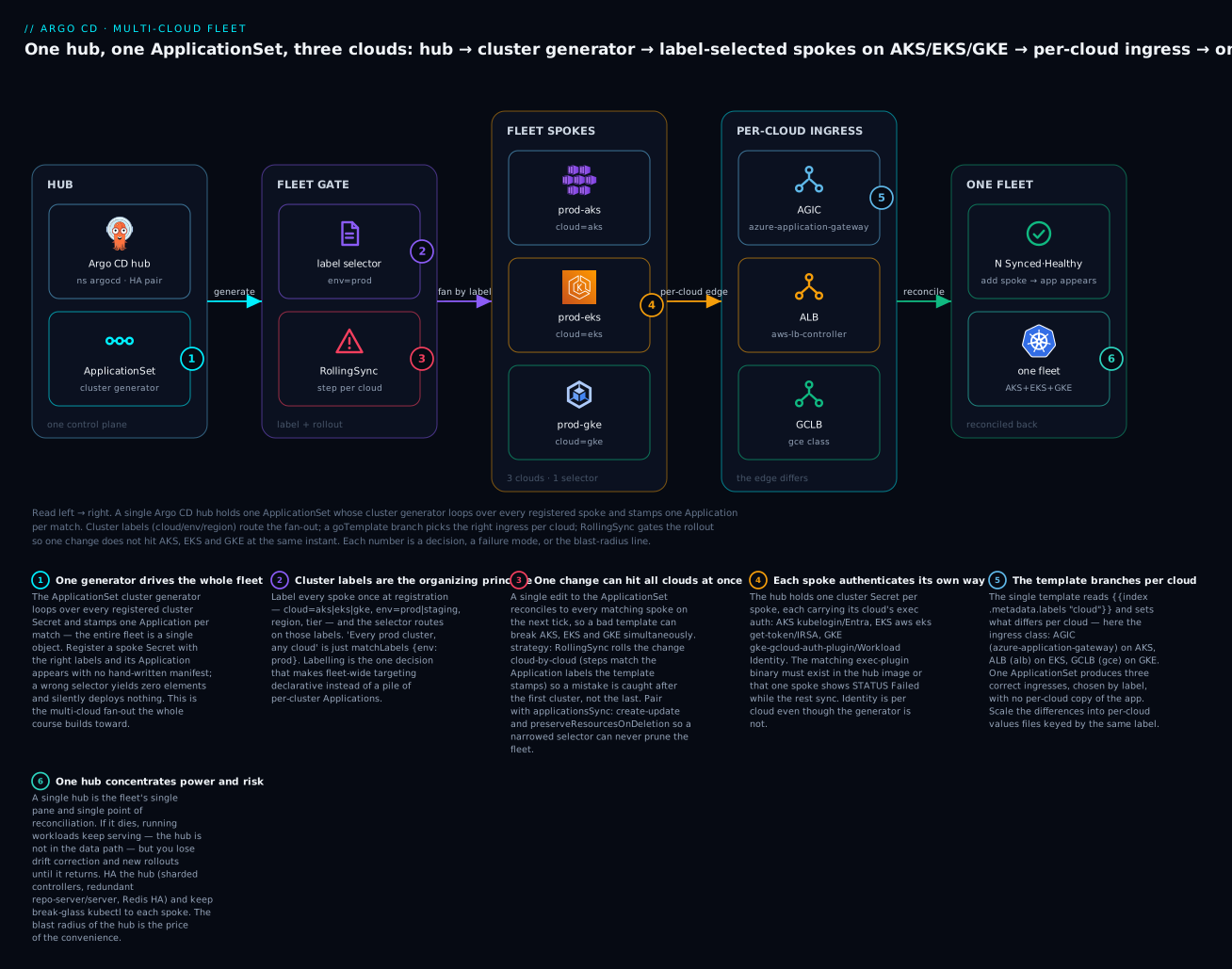
The badges mark the six things that make a fleet a fleet rather than a liability: the generator drives the whole fan-out (1); cluster labels are the organizing principle (2); one change can hit every cloud at once unless you gate it (3); each spoke authenticates its own way (4); the template branches per cloud for the ingress edge (5); and one hub concentrates both the convenience and the risk (6).
Identity per cloud: the hub authenticates three ways at once
The generator is blissfully cloud-agnostic — it loops over labels — but the hub underneath it is doing something genuinely hard on every reconcile: proving three different identities to three different clouds. This is worth making explicit because it is where a “working” fleet quietly becomes a two-thirds-working fleet.
Each spoke’s cluster Secret names an exec plugin (or native awsAuthConfig), and the hub runs it per API call to mint a fresh short-lived token. That means the hub simultaneously needs a valid cloud identity on each provider so the plugin has something to exchange:
| Cloud | Hub’s own identity mechanism | What the plugin exchanges it for | What you must grant on the spoke |
|---|---|---|---|
| AKS | Azure Workload Identity (federated) or a user-assigned Managed Identity | An Entra token → an AKS Kubernetes token (~1h) | k8s RBAC (ClusterRoleBinding) bound to the identity’s object ID |
| EKS | IRSA (OIDC) or EKS Pod Identity | An STS presigned URL as a bearer token (~15m) | An aws-auth mapRoles entry, or an EKS access entry, for the IAM role |
| GKE | GKE Workload Identity (KSA → GSA) | A Google OAuth2 access token (~1h) | k8s RBAC bound to the Google service account |
Two grants are always in play per cloud, and they fail differently — the single most useful diagnostic distinction on a fleet, and the fastest way to localise a per-cloud auth failure:
| Grant | Enables | Missing it looks like | Lives on |
|---|---|---|---|
| Cloud IAM grant | The plugin can mint a token | Plugin can’t get credentials; cloud returns Unauthorized before reaching the spoke |
The cloud (IRSA role, Entra federation, GKE WI binding) |
| Kubernetes RBAC grant | The minted token is authorized | Token accepted, then rpc error: code = PermissionDenied; resources won’t apply |
The spoke (RBAC binding, or EKS access entry) |
| Exec-plugin binary | The hub can run the plugin at all | exec: "kubelogin": executable file not found in $PATH; STATUS Failed |
The hub image |
A fleet makes this three-dimensional: the hub can be perfectly configured for AKS and GKE and completely broken for EKS because someone forgot the EKS access entry, and argocd cluster list will show two Successful and one Failed. The failure is per cloud, never global, and that is exactly why people misdiagnose it as “flaky.” When you add a cloud to the fleet, treat “grant the hub’s identity on the new spoke” and “put the plugin in the hub image” as two separate checklist items, because they produce two different error messages.
The exec-plugin model is what lets a single hub hold access to three clouds without any standing long-lived credential — nothing in the
argocdnamespace is a usable token at rest; tokens exist for minutes, minted on demand, governed by cloud IAM you revoke centrally. That is what makes a global hub’s concentrated access defensible: revoke the hub’s IRSA role or its Entra federation and its access to that cloud evaporates immediately, with nothing cached to leak. Never fall back to staticargocd-managertokens on a multi-cloud hub unless you accept you cannot rotate them without re-registering.
Blast radius and failure isolation
Everything that makes a single ApplicationSet powerful — one object producing Applications across every cloud — is exactly what makes it a fleet-wide weapon. A generator does not know you made a mistake. Change the selector, rename a label, fix a “harmless” template line, and the controller faithfully reconciles that change to AKS, EKS and GKE on the next tick. The number-one multi-cloud incident is a single commit that breaks all three clouds simultaneously.
The scenarios and their guardrails:
| Blast-radius scenario | What happens across the fleet | Guardrail |
|---|---|---|
| Bad template change (e.g. broken ingress branch) | Every cloud’s apps go OutOfSync / Degraded at once |
RollingSync — roll cloud-by-cloud, catch it after the first |
| Selector narrowed / label renamed | Every previously-matched Application is deleted fleet-wide | applicationsSync: create-update — controller never prunes |
| ApplicationSet deleted | All generated Apps + their workloads pruned everywhere | preserveResourcesOnDeletion: true |
| Matrix explosion | Hundreds of Apps created and applied to all clouds at once | Preview count; RollingSync; repo-server parallelism cap |
| Non-unique template name | Combinations collide, apps overwrite across clusters | Include a param from each generator in metadata.name |
Three controls form the fleet’s seatbelt, and on a multi-cloud hub you want all three on any ApplicationSet that spans clouds:
| Control | Field / command | What it protects against |
|---|---|---|
| Preview offline | argocd admin applicationset generate |
Applying a selector/glob that produces the wrong set — you count before the controller acts |
| Gate the rollout | strategy: RollingSync (steps by cloud) |
A bad change reaching all clouds at once — it halts after the first failing cloud |
| Freeze deletes | applicationsSync: create-update + preserveResourcesOnDeletion: true |
A narrowed selector or a deleted AppSet pruning live workloads fleet-wide |
The detail on each:
1. Preview offline, every time. argocd admin applicationset generate renders the exact Applications an ApplicationSet would produce, from a file, touching nothing:
# Render what this fleet-wide AppSet would create — nothing is applied
argocd admin applicationset generate platform-fleet.yaml | grep -c '^kind: Application'
# (representative) 18        # 6 apps × 3 prod clusters — if it's not 18, the selector/glob is wrong
Count the documents before the controller does. A number that surprises you is a bug you just caught for free.
2. Gate the rollout with RollingSync. For anything spanning clouds, strategy: RollingSync rolls a change across the fleet in ordered steps instead of all at once. The critical, easily-missed detail: the steps match labels on the generated Applications, not on the clusters — which is why the template stamps labels.cloud onto each Application. Order the steps so your least-critical cloud (or a canary cluster) goes first:
apiVersion: argoproj.io/v1alpha1
kind: ApplicationSet
metadata:
  name: web-fleet
  namespace: argocd
spec:
  goTemplate: true
  strategy:
    type: RollingSync
    rollingSync:
      steps:
        - matchExpressions:
            - key: cloud
              operator: In
              values: [gke]        # step 1 — canary one cloud first
        - matchExpressions:
            - key: cloud
              operator: In
              values: [eks]        # step 2 — only after gke apps are Healthy
        - matchExpressions:
            - key: cloud
              operator: In
              values: [aks]        # step 3 — last
  generators:
    - clusters:
        selector:
          matchLabels:
            env: prod
  template:
    metadata:
      name: 'web-{{.nameNormalized}}'
      labels:
        cloud: '{{index .metadata.labels "cloud"}}'   # RollingSync steps match THIS label
    spec:
      # ... source / destination / syncPolicy as before
      project: fleet
      source:
        repoURL: https://github.com/acme/app-config.git
        targetRevision: main
        path: charts/web
      destination:
        server: '{{.server}}'
        namespace: web
      syncPolicy:
        automated: { prune: true, selfHeal: true }
The controller syncs step 1’s Applications, waits for them to become Healthy, then proceeds to step 2, and so on. A change that breaks the GKE apps halts the rollout there — EKS and AKS never receive it. That is the difference between a one-cloud incident and a three-cloud outage.
Progressive Syncs (
RollingSync) is an opt-in feature. In Argo CD 2.13+/3.x it must be enabled on the ApplicationSet controller (envARGOCD_APPLICATIONSET_CONTROLLER_ENABLE_PROGRESSIVE_SYNCS=true, or the equivalentapplicationsetcontroller.enable.progressive.syncs: "true"inargocd-cmd-params-cm). If you setstrategy: RollingSyncand it appears to do nothing — every cloud updates at once — the feature flag is off. This is the most common “my RollingSync isn’t working” cause.
3. Freeze destructive changes. Set spec.syncPolicy.applicationsSync: create-update so the controller may create and update Applications but never delete them — a narrowed selector then loses the ability to prune your fleet; it can only stop updating it. Combine with preserveResourcesOnDeletion: true so deleting the ApplicationSet itself doesn’t cascade into every cloud’s workloads. These two flags convert the scariest failure modes from “outage” to “stale.”
Per-app canaries compose with fleet gating: Argo Rollouts canaries the pods within a spoke while RollingSync canaries the clusters across the fleet. RollingSync gets a change to GKE first; Argo Rollouts then shifts traffic gradually within GKE — two independent brakes on the same change.
HA and DR of the hub
Because a single hub is a shared fate for the fleet, you must answer two questions honestly: what happens when it dies, and how do you get it back. The reassuring half of the answer is the fact from the intro — the hub is not in the data path. When the hub is down, this is precisely what does and does not still work:
| When the hub is down… | State | Why |
|---|---|---|
| Running workloads on every spoke | Keep serving | User traffic never touched Argo CD; the spokes run independently |
Drift correction (selfHeal) |
Stops | No controller is comparing live vs Git |
| New syncs / rollouts | Stop | Nothing is applying new desired state |
| ApplicationSet generation | Stops | Adding a spoke or app produces no new Applications until the hub returns |
The UI / API / argocd CLI |
Unavailable | These are the hub |
| A spoke’s own Kubernetes controllers (HPA, etc.) | Keep working | They are local to the spoke, independent of the hub |
So a hub outage is a reconciliation outage, not a service outage — survivable for a while, but not indefinitely, because drift accumulates and you cannot ship. That risk profile justifies real HA:
| HA target | What to run | Failure it survives |
|---|---|---|
application-controller |
Multiple replicas with sharding (one shard set per replica); dynamic sharding for balance | A controller pod/node loss; also scales API fan-out across the fleet |
argocd-repo-server |
2+ replicas | A repo-server loss; parallelises manifest generation |
argocd-server (API/UI) |
2+ replicas behind a Service | An API pod loss |
argocd-applicationset-controller |
2+ replicas (leader-elected) | Generation continuity |
| Redis | Redis HA (Sentinel) or a managed external Redis | Cache loss causing slow, thundering-herd reconciles |
Sharding deserves a word at fleet scale specifically: with many clusters across clouds, a single application-controller becomes the bottleneck for API fan-out and cross-cloud latency. Sharding assigns clusters to controller replicas (round-robin, or by a shard key), so ten spokes across three clouds spread their reconcile load rather than serialising through one process. This is both an HA control and a throughput control — the two reasons multi-cluster hubs shard.
The DR story is where GitOps quietly pays you back. The hub is reconstructable from Git, because everything it holds is declarative and committed:
| DR step | Command / action | Note |
|---|---|---|
| 1. Reinstall Argo CD on a fresh (or standby) cluster | Helm/manifests install | Same version; use your custom image with the cloud plugins |
| 2. Re-materialise the cluster Secrets | Your bootstrap re-applies them (via Sealed Secrets / ESO) | The exec-auth creds come from the cloud, not from a hub backup |
| 3. Re-apply the root app / ApplicationSets | kubectl apply the bootstrap, or point at the Git repo |
The generators regenerate every Application |
| 4. Let it reconcile | Argo CD adopts live resources | It does not recreate workloads — it compares to Git and converges |
The crucial property in step 4: Argo CD does not destroy and rebuild the fleet on recovery. It computes the diff between Git and each spoke’s current live state and reconciles the delta — so if the spokes never stopped serving (they didn’t), recovery is nearly invisible to users. A hub that stores no unique state — only what is in Git and cloud IAM — is cattle: lose it, redeploy it, re-adopt.
Two operational must-haves complete the picture. Keep a break-glass path — audited, rarely-used direct kubectl access to each spoke — so a hub outage during an incident does not also mean you cannot touch the clusters. And for regulated or global fleets, the per-region hub refinement both bounds the blast radius and is the natural place to satisfy data residency, our next topic.
Observing the fleet
A single hub gives you the one thing per-cluster Argo CD cannot: fleet-wide health in one query. The reconciliation state of every app on every cloud is visible from the hub’s API, CLI, and metrics — which is exactly why the single pane of glass is the headline benefit of the topology. The signals worth wiring into a dashboard and an alert:
| Signal | Where to read it | What it tells you about the fleet |
|---|---|---|
| Per-app sync/health | argocd app list -o wide (optionally -l cloud/-l env) |
Which apps on which clouds are OutOfSync/Degraded right now |
| Per-cluster connection | argocd cluster list |
Which spokes are Successful/Failed/Unknown — the per-cloud auth/connectivity view |
| ApplicationSet health | kubectl get applicationset -n argocd -o wide |
Whether a generator is erroring (a bad selector reports a condition here) |
| Rollout progress | argocd appset get web-fleet / app conditions |
Which RollingSync step the fleet is on, and where it stalled |
| Drift events | argocd app diff <app> |
Live-vs-Git delta on any spoke before you sync |
For anything beyond eyeballing, Argo CD exports Prometheus metrics from the hub, and on a fleet these become your SLOs:
| Metric | Fleet use |
|---|---|
argocd_app_info (labels: sync_status, health_status, dest_server) |
Count OutOfSync/Degraded apps per cluster/cloud; alert on sustained non-zero |
argocd_cluster_connection_status |
Alert the instant a spoke flips to disconnected — catches a per-cloud auth expiry early |
argocd_app_sync_total (labels: phase) |
Sync failure rate across the fleet; a spike after a commit is a bad rollout |
argocd_app_reconcile (histogram) |
Reconcile latency — climbs as the fleet grows or a cloud is slow; the signal to shard controllers |
Two fleet-specific habits. First, label dashboards by cloud and region (the same labels you registered clusters with), so “EKS is unhealthy” or “the EU region is drifting” is a one-click filter, not manual correlation. Second, alert on argocd_cluster_connection_status per cloud — a fleet’s most common silent failure is one cloud’s identity expiring, and connection status flips before any app does. The point is that the hub already emits everything you need to watch three clouds from one place.
Cost and data residency across clouds
A multi-cloud fleet forces two concerns a single-cloud setup never does: where the money leaks, and where the bytes are allowed to live.
Cost. The counterintuitive part is that a single hub is cheaper on compute (one control plane, not N) but can be more expensive on network, because a global hub reaches spokes on other clouds over the internet, and cross-cloud API traffic is billable egress. The drivers to watch:
| Cost driver | Where it bites on a fleet | Mitigation |
|---|---|---|
| Cross-cloud API egress | Global hub polling/reconciling spokes on other clouds | Webhooks instead of polling; a per-cloud hub keeps API traffic in-cloud |
| Per-spoke control-plane hours | Each managed cluster (AKS/EKS/GKE) bills its control plane | Right-size the fleet; don’t run idle prod-shaped clusters |
| Load balancers per cloud | AGIC/App Gateway, ALB, GCLB each bill per hour + traffic | One ingress per cluster, shared by apps; avoid per-app LBs |
| Private connectivity | Private Link / PrivateLink / PSC and NAT for private control planes | Plan with the networking lesson; these are standing costs |
| N control planes (multi-hub) | A per-region/per-cloud hub multiplies Argo CD’s own footprint | Only split hubs where residency/blast-radius demands it |
Data residency. This is often the reason you cannot run a single global hub. If a contract or regulation says EU customer data — and its control plane — must stay in the EU, then a hub in us-east-1 that holds the EU clusters’ desired state, values, and (materialised) secrets is a problem, because that config lives outside the jurisdiction. The controls:
| Residency control | How it works on the fleet |
|---|---|
| Regional hub | Run an EU hub that manages only region=eu-* spokes; its Git, Secrets, and reconciliation stay in-region |
| In-region secret stores | Materialise each region’s secrets from that region’s store (Key Vault West Europe, Secrets Manager eu-west-1, Secret Manager europe-*) via ESO — secret material never crosses a border |
| Region-scoped Git / repos | Keep EU environment config in an EU-hosted repo the EU hub reads |
| Label-scoped targeting | region labels ensure an ApplicationSet for EU workloads selects only EU spokes — never accidentally fanning EU config to a US cluster |
| Selector as a compliance boundary | An AppProject + cluster project binding so only the EU project’s apps can target EU clusters |
The label taxonomy makes residency enforceable rather than aspirational: because every spoke carries region, an EU-only ApplicationSet is matchLabels: {region: westeurope} (or matchExpressions In [eu-west-1, westeurope, europe-west1]), and the hub physically cannot put EU config on a US cluster. The connectivity side of keeping regional traffic in-region is covered in private clusters and network connectivity — residency is a config-placement problem and a network-path problem, and both must hold.
Hands-on lab
You will build the fleet control plane at the config level: register three spokes (one per cloud, labelled cloud + env=prod), write one ApplicationSet with a cluster generator and a goTemplate branch that sets the ingress class per cloud, deploy a sample app across the whole fleet, inspect the generated per-cloud Applications, and tear it down. Because this machine has no clusters attached, the commands show real invocations with representative output labelled as such — run them against your own hub plus three spokes to see the live equivalents. Nothing here invents a field or a flag.
⚠️ A multi-cloud fleet bills on three providers at once: three managed control planes, three ingress load balancers (App Gateway / ALB / GCLB), and any private connectivity. Do the lab against clusters you already run, keep it brief, and complete the teardown. Never commit a real
bearerToken,caData, or cloud credential to Git — use Sealed Secrets, ESO, or SOPS.
Step 1 — Confirm the hub and its image. The hub must contain the exec plugins its spokes will reference.
argocd version --short          # confirm 2.13+/3.x on the hub
# (representative) argocd: v3.0.6+
kubectl -n argocd get deploy argocd-application-controller \
  -o jsonpath='{.spec.template.spec.containers[0].image}'
# (representative) registry.example.com/argocd-fleet:v3.0.6   # your custom image with kubelogin + gke-gcloud-auth-plugin
What just happened: you verified the hub can even authenticate to all three clouds. A stock image here is the number-one cause of a GKE or AKS spoke that refuses to connect later.
Step 2 — Register the three spokes, labelled. One command per cloud; only get-credentials differs. (Or apply the three declarative cluster Secrets from earlier — preferred for prod.)
# AKS
az aks get-credentials --resource-group rg-prod --name prod-aks --overwrite-existing
argocd cluster add prod-aks --name prod-aks \
  --label cloud=aks --label env=prod --label region=westeurope

# EKS
aws eks update-kubeconfig --region us-east-1 --name prod-eks
argocd cluster add arn:aws:eks:us-east-1:111122223333:cluster/prod-eks --name prod-eks \
  --label cloud=eks --label env=prod --label region=us-east-1

# GKE
gcloud container clusters get-credentials prod-gke --region us-central1 --project my-proj
argocd cluster add gke_my-proj_us-central1_prod-gke --name prod-gke \
  --label cloud=gke --label env=prod --label region=us-central1
What just happened: three clouds are now one labelled fleet. Verify the routing table:
argocd cluster list
# (representative)
# SERVER                                              NAME        VERSION  STATUS       MESSAGE
# https://kubernetes.default.svc                      in-cluster  1.29     Successful
# https://prod-aks-dns-abcd1234.hcp.westeurope...     prod-aks    1.29     Successful
# https://ABCD1234EFGH.gr7.us-east-1.eks.amazon...    prod-eks    1.29     Successful
# https://34.72.100.200                               prod-gke    1.29     Successful
Step 3 — Author the sample app with per-cloud ingress. A minimal Helm chart with one shared base and three tiny per-cloud values files (Approach A):
charts/web/
  Chart.yaml
  values.yaml                # replicaCount, image, ingress.enabled: true
  values/aks.yaml            # ingress.className: azure-application-gateway
  values/eks.yaml            # ingress.className: alb
  values/gke.yaml            # ingress.className: gce
  templates/
    deployment.yaml
    service.yaml
    ingress.yaml             # uses .Values.ingress.className + .Values.ingress.annotations
Step 4 — Write ONE ApplicationSet for the whole fleet.
# web-fleet.yaml
apiVersion: argoproj.io/v1alpha1
kind: ApplicationSet
metadata:
  name: web-fleet
  namespace: argocd
spec:
  goTemplate: true
  goTemplateOptions: ["missingkey=error"]
  generators:
    - clusters:
        selector:
          matchLabels:
            env: prod
  template:
    metadata:
      name: 'web-{{.nameNormalized}}'
      labels:
        cloud: '{{index .metadata.labels "cloud"}}'
    spec:
      project: fleet
      source:
        repoURL: https://github.com/acme/app-config.git
        targetRevision: main
        path: charts/web
        helm:
          valueFiles:
            - values.yaml
            - 'values/{{index .metadata.labels "cloud"}}.yaml'
      destination:
        server: '{{.server}}'
        namespace: web
      syncPolicy:
        automated: { prune: true, selfHeal: true }
        syncOptions: [ "CreateNamespace=true" ]
Step 5 — Preview before applying (always).
argocd admin applicationset generate web-fleet.yaml | grep -E '^\s+name:|valueFiles'
# (representative)
#   name: web-prod-aks     ...  values/aks.yaml
#   name: web-prod-eks     ...  values/eks.yaml
#   name: web-prod-gke     ...  values/gke.yaml
What just happened: three Applications, each pointed at the correct per-cloud values file — proof the branch works before anything touches a cluster. If you saw four (in-cluster leaked in) or a blank name, you’d fix the selector or the label now.
Step 6 — Apply and watch the fleet converge.
kubectl apply -f web-fleet.yaml
# applicationset.argoproj.io/web-fleet created

argocd app list -l cloud
# (representative)
# NAME          CLUSTER    NAMESPACE  PROJECT  STATUS  HEALTH   SYNCPOLICY
# web-prod-aks  prod-aks   web        fleet    Synced  Healthy  Auto
# web-prod-eks  prod-eks   web        fleet    Synced  Healthy  Auto
# web-prod-gke  prod-gke   web        fleet    Synced  Healthy  Auto
What just happened: one object produced three Applications across three clouds, each with the right ingress class. Confirm the per-cloud edge actually rendered differently:
argocd app manifests web-prod-eks | grep -A1 ingressClassName
# (representative)   ingressClassName: alb
argocd app manifests web-prod-gke | grep -A1 ingressClassName
# (representative)   ingressClassName: gce
Step 7 — Prove the fleet self-maintains. Add a fourth prod cluster Secret (any cloud) with env=prod and watch a fourth Application appear with no manifest edit — the whole point of the fleet:
kubectl apply -f prod-aks2-secret.yaml     # a second AKS prod cluster, labelled env=prod
argocd app list -l cloud | grep web-
# (representative) ... web-prod-aks2  prod-aks2  ...  Synced  Healthy   # appeared automatically
Step 8 — Teardown. Delete the ApplicationSet (which garbage-collects its Applications and their workloads), then deregister the spokes.
kubectl delete applicationset -n argocd web-fleet
# applicationset.argoproj.io "web-fleet" deleted   # generated web-* apps + their workloads pruned
argocd cluster rm prod-aks ; argocd cluster rm prod-eks ; argocd cluster rm prod-gke
# Cluster '...' removed   (x3)
What just happened: you confirmed the delete semantics that make ApplicationSets dangerous — deleting the object cascaded to workloads on all three clouds. In production you’d set preserveResourcesOnDeletion: true to break that chain. Teardown is complete; nothing is left billing.
What the lab proved, step by step:
| Step | Proved |
|---|---|
| 1 | The hub image carries the exec plugins for all three clouds |
| 2 | Three clouds register as one labelled fleet (argocd cluster list) |
| 3–4 | One ApplicationSet + a per-cloud values branch drives the whole fleet |
| 5 | Previewing offline catches a wrong selector/branch before anything applies |
| 6 | One object produced three Applications with three correct ingress classes |
| 7 | Adding a labelled spoke makes its app appear with no manifest edit |
| 8 | Deleting the AppSet cascades to workloads on every cloud (why you gate deletes) |
Common mistakes and troubleshooting
The failures that only appear on a fleet are almost all partial — one cloud, or one rollout step — which is what makes them confusing. Use real Argo CD states and messages to localise them fast.
| Symptom | Cause | Fix |
|---|---|---|
A change flips all three clouds to OutOfSync/Degraded at once |
An ApplicationSet edit reconciled fleet-wide with no gating | Add strategy: RollingSync (steps by cloud); set applicationsSync: create-update; preview every change |
One cloud’s spokes show STATUS Failed, MESSAGE exec: "kubelogin": executable file not found in $PATH |
The exec plugin is missing from the hub image | Build the hub image with kubelogin/gke-gcloud-auth-plugin/aws; the other clouds working proves it’s plugin-specific |
App is Synced/Healthy but no load balancer is created on one cloud |
Per-cloud ingress branch rendered the wrong/blank class | Check argocd app manifests <app> | grep ingressClassName; fix the cloud label or the values-file/dict branch |
Apps appear on clusters you didn’t intend (e.g. staging, or in-cluster) |
Selector too broad (empty selector, or env label reused) |
Tighten matchLabels; never leave a cluster-generator selector empty for fleet apps |
| Whole fleet stops reconciling; UI/CLI unreachable | The hub is down (HA gap) | Workloads still serve; restore the hub (HA replicas / reinstall + re-adopt from Git); use break-glass kubectl meanwhile |
One spoke was Successful, now Failed with rpc error: code = Unauthenticated |
That spoke’s identity expired or was revoked (IAM role, Entra federation, GSA) | Re-check the hub’s cloud identity and the spoke-side grant (access entry / RBAC binding); tokens are short-lived by design |
One spoke intermittently Failed with dial tcp ... i/o timeout or context deadline exceeded |
Cross-region/cross-cloud latency or a private endpoint with no path | This is connectivity, not creds — see the private-clusters lesson; consider a per-region hub |
| EU cluster’s config/secrets found in a US-region hub | Data-residency violation — global hub holds in-jurisdiction config out of region | Move EU workloads to a regional (EU) hub; materialise secrets from in-region stores; scope by region label |
RollingSync set, but every cloud still updates at once |
Progressive Syncs feature flag is off | Enable ARGOCD_APPLICATIONSET_CONTROLLER_ENABLE_PROGRESSIVE_SYNCS=true on the appset controller |
| Rollout stuck partway; step 2/3 never starts | Step 1’s Applications are not Healthy (a real Degraded app) |
RollingSync waits for each step to be Healthy — fix the failing cloud, or the whole fleet halts by design |
| A newly-registered spoke never gets its apps | Label typo (cloud=azure vs aks) or requeue delay |
Verify labels (kubectl get secret ... -L cloud -L env); the selector does exact-match |
Three gotchas cost the most hours on a real fleet:
1. The partial-cloud failure that reads as “flaky.” Because each cloud authenticates independently, one missing plugin or one un-granted IAM role breaks exactly one third of the fleet while the rest is green. Engineers who assume Argo CD is all-or-nothing waste hours looking for a global cause. The habit that saves you: when something is wrong, run argocd cluster list first and read which clouds are Failed. A single-cloud pattern points straight at that cloud’s identity or plugin; a fleet-wide pattern points at the hub or the ApplicationSet.
2. RollingSync that silently does nothing. Progressive Syncs is opt-in, and the failure mode when the flag is off is not an error — it’s the absence of gating. You set strategy: RollingSync, feel safe, and your next bad change still hits all three clouds because the controller ignored the strategy. Verify the flag is on and verify the template stamps the label the steps match on (labels.cloud), because RollingSync matches Application labels, not cluster labels — the two most common reasons it “doesn’t work.”
3. Assuming teardown is safe. Deleting an ApplicationSet on a fleet, by default, prunes generated Applications and their live workloads across every cloud at once. On a global hub that is a multi-cloud outage triggered by one kubectl delete. Set preserveResourcesOnDeletion: true on anything whose deletion should not cascade, and treat any change to a fleet-spanning generators block as a change that can delete production on three clouds simultaneously.
Cheat-sheet
The fleet, condensed to what you reach for.
| Task | Command / field |
|---|---|
| List the whole fleet + connection state | argocd cluster list |
| Show fleet apps grouped by cloud | argocd app list -l cloud |
| Read the routing labels off the Secrets | kubectl get secrets -n argocd -l argocd.argoproj.io/secret-type=cluster -L cloud -L env -L region |
| Preview an ApplicationSet offline (count!) | argocd admin applicationset generate f.yaml |
| See a generated app’s rendered manifests | argocd app manifests web-prod-eks |
| Register + label a spoke | argocd cluster add CTX --name N --label cloud=eks --label env=prod |
| Fleet-wide selector (any cloud) | generators: [ clusters: { selector: { matchLabels: { env: prod } } } ] |
| Per-cloud branch (values file) | valueFiles: [ 'values/{{index .metadata.labels "cloud"}}.yaml' ] |
| Per-cloud branch (inline) | value: '{{ index (dict "aks" "azure-application-gateway" "eks" "alb" "gke" "gce") (index .metadata.labels "cloud") }}' |
| Cluster name → RFC-1123 safe | {{.nameNormalized}} in metadata.name |
| Gate rollout across clouds | strategy: { type: RollingSync, rollingSync: { steps: [...] } } (steps match Application labels) |
| Enable Progressive Syncs | ARGOCD_APPLICATIONSET_CONTROLLER_ENABLE_PROGRESSIVE_SYNCS=true |
| Never prune the fleet | spec.syncPolicy.applicationsSync: create-update |
| Keep workloads on AppSet delete | spec.syncPolicy.preserveResourcesOnDeletion: true |
| Shard controllers for many clusters | Scale application-controller replicas + set replica shard env |
Per-cloud ingress at a glance:
cloud |
ingressClassName |
Controller / LB |
|---|---|---|
aks |
azure-application-gateway |
AGIC → Azure Application Gateway |
eks |
alb |
AWS Load Balancer Controller → ALB |
gke |
gce |
Built-in GKE ingress → Google Cloud LB |
Topology decision, one line each:
| Choose | When |
|---|---|
| Single global hub | One jurisdiction; you’ll invest in HA + RBAC + RollingSync |
| Hub per region/cloud | Data residency or blast-radius/connectivity demand it |
| One Argo per cluster | Hard isolation / air-gapped / full team autonomy |
Interview and exam questions
Q: You run clusters on AKS, EKS and GKE. Argue for and against a single Argo CD hub versus a hub per cloud. A: A single hub gives one pane of glass, one RBAC model, one upgrade cycle, and one Git audit trail for the whole fleet, at the lowest compute cost. Against it: the highest blast radius (a bad ApplicationSet or a hub compromise reaches every cloud), the weakest failure isolation (the hub is shared fate), the hardest data-residency story (one place holds every region’s config), and it needs valid identity on all three clouds at once with cross-cloud connectivity and latency. A hub per cloud/region contains blast radius and residency at the cost of N control planes. Most regulated enterprises pick a small number of hubs — often per region or compliance boundary — as the middle ground.
Q: How does one ApplicationSet deploy the same app to all three clouds but give each the correct ingress?
A: A cluster generator with selector.matchLabels.env: prod fans one Application to every prod spoke regardless of cloud. The template branches on the cloud label — either by pointing Helm valueFiles at values/{{index .metadata.labels "cloud"}}.yaml (scales to many per-cloud differences) or by an inline dict lookup that sets ingress.className to azure-application-gateway/alb/gce. The label is set once at cluster registration, so routing and per-cloud config are both declarative.
Q: What is the single biggest risk of a fleet-spanning ApplicationSet, and how do you contain it?
A: One change reconciles to every matching cluster on the next tick, so a bad template can break all three clouds simultaneously. Contain it with strategy: RollingSync (roll cloud-by-cloud, canary the least-critical first — steps match the Application labels the template stamps), applicationsSync: create-update (the controller can never prune the fleet), preserveResourcesOnDeletion: true (deleting the AppSet doesn’t cascade to workloads), and always previewing with argocd admin applicationset generate before applying.
Q: A colleague set strategy: RollingSync but changes still hit all clouds at once. Why?
A: Progressive Syncs is opt-in and the feature flag is almost certainly off — enable ARGOCD_APPLICATIONSET_CONTROLLER_ENABLE_PROGRESSIVE_SYNCS=true on the ApplicationSet controller. Also verify the template stamps the label the steps match on (e.g. labels.cloud), because RollingSync matches labels on the generated Applications, not on the clusters.
Q: The hub shows two clusters Successful and one Failed. How do you localise the problem?
A: A single-cloud failure points at that cloud, not the hub. Read the MESSAGE: executable file not found in $PATH means the exec plugin is missing from the hub image; rpc error: code = Unauthenticated/PermissionDenied means the identity expired or the spoke-side grant (EKS access entry, Entra RBAC binding, GKE RBAC) is missing; dial tcp ... i/o timeout means connectivity, not credentials. The fleet-wide-vs-single-cloud pattern is the first diagnostic.
Q: What actually happens to the fleet when the hub goes down?
A: Nothing to user traffic — the hub is not in the data path, so every workload on every spoke keeps serving. What stops is reconciliation: drift correction (selfHeal), new syncs, ApplicationSet generation, and the UI/API/CLI. It’s a reconciliation outage, survivable short-term. You mitigate with HA (sharded controllers, redundant repo-server/server/appset-controller, Redis HA) and a break-glass kubectl path, and you recover by reinstalling and letting Argo CD adopt the still-running resources from Git.
Q: Why must the hub’s container image be customised for a multi-cloud fleet?
A: The exec-plugin auth model runs a binary per API call to mint a short-lived token, so the hub image must contain every plugin its spokes reference — kubelogin for AKS, gke-gcloud-auth-plugin (+ gcloud) for GKE, and aws for EKS unless you use native awsAuthConfig. The application-controller and argocd-server pods both need them. A missing plugin fails exactly one cloud.
Q: How do you enforce data residency — EU config must not leave the EU — on an Argo CD fleet?
A: Run a regional (EU) hub that manages only region=eu-* spokes so its Git, Secrets, and reconciliation stay in-region; materialise each region’s secrets from an in-region store (Key Vault West Europe, etc.) via ESO so secret material never crosses a border; keep EU environment config in an EU-hosted repo; and scope every EU ApplicationSet with a region label selector plus an AppProject/cluster project binding so the hub physically cannot place EU config on a non-EU cluster.
Q: Why does the hub-and-spoke fleet still need per-cloud identity if the generator is cloud-agnostic? A: The generator only routes on labels; the actual API calls need a valid identity per cloud. The hub holds an Azure Workload Identity/Managed Identity for AKS, IRSA or EKS Pod Identity for EKS, and GKE Workload Identity for GKE — and each of those must also be granted Kubernetes RBAC (or an EKS access entry) on the target spoke. Two grants per cloud: one to mint the token (cloud IAM), one to authorize it (k8s RBAC). They fail with different errors.
Q: You add a new prod cluster to the fleet but its apps never appear. Diagnose.
A: The cluster generator does exact-match on labels — check the Secret’s labels (kubectl get secret ... -L cloud -L env) for a typo like cloud=azure instead of aks, or a missing env=prod. If labels are correct, the controller may be waiting on its requeue interval or a webhook; confirm the Secret carries argocd.argoproj.io/secret-type: cluster and lives in the argocd namespace. Preview with argocd admin applicationset generate to see whether the generator even emits the new element.
Q: When would you use a Matrix generator on a fleet, and what’s the danger?
A: Use Matrix for “every app on every cluster” — git (apps) × clusters (env=prod) — so adding an app directory or a cluster fans automatically. The danger is multiplication: 6 apps × 3 clusters is 18 Applications, but 40 × 20 is 800, generated from one commit and applied at once. Preview the count, gate with RollingSync, cap repo-server parallelism, and make metadata.name include a parameter from each generator so combinations don’t collide.
Q: RollingSync canaries clusters; Argo Rollouts canaries pods. How do they compose on a fleet? A: They’re independent brakes on the same change. RollingSync gets the change to one cloud first and waits for its Applications to be Healthy before the next cloud; within that cloud, Argo Rollouts shifts pod traffic gradually (canary/blue-green). So a bad change is caught either by the first cloud’s Rollout analysis (before full pod rollout) or by RollingSync halting before the other clouds — two layers, cluster-level and pod-level.
Key takeaways
- The fleet is the payoff: one hub, one ApplicationSet, three clouds. A cluster generator selecting
env=prodfans one app across AKS, EKS and GKE, and adding a labelled spoke makes its Application appear with no hand-written manifest. - Topology is a risk-placement decision. A single global hub wins on cost, upgrades, and single-pane-of-glass; it loses on blast radius, failure isolation, and data residency. Buy those back with HA, RBAC, and RollingSync — or split into per-region hubs where residency or blast radius demand it.
- Cluster labels are the organizing principle.
cloud,env,region,tier, set consistently at registration, are the only thing generators route on. One inconsistent value (azurevsaks) silently breaks a per-cloud branch. - The template branches per cloud. Read
{{index .metadata.labels "cloud"}}and pick the ingress class —azure-application-gateway/alb/gce— via a per-cloud values file (scales) or an inlinedict(one value). One app, three correct edges. - Identity is per cloud even when the generator isn’t. The hub proves three identities at once; each spoke needs both a cloud-IAM grant (to mint a token) and a k8s-RBAC grant (to authorize it), and the hub image must carry every exec plugin — miss any and exactly one cloud fails.
- One change can break all three clouds at once. Gate fleet-spanning ApplicationSets with
RollingSync(opt-in feature flag; steps match Application labels; canary the least-critical cloud first),applicationsSync: create-update, andpreserveResourcesOnDeletion— and always preview offline. - The hub is a control plane, not a data plane. If it dies, workloads keep serving; you lose reconciliation. HA it (sharded controllers, redundant components, Redis HA), keep break-glass access, and recover by reinstalling and letting Argo CD adopt live resources from Git.
- Multi-cloud forces cost and residency to the surface. A global hub is cheaper on compute but pays cross-cloud egress; EU config staying in the EU often mandates a regional hub, in-region secret stores, and
region-scoped selectors as a hard compliance boundary.