Every other lesson in this course quietly assumed a hyperscaler. Install Argo CD, expose it behind an Application Gateway or an ALB or a Google Cloud Load Balancer, wire SSO to Entra ID or Cognito or Google Workspace, pull secrets from Key Vault or Secrets Manager or Secret Manager, register a spoke and let the cloud’s IAM handle the token. That is the world of AKS, EKS and GKE — the “big three” — and it is a comfortable world, because the platform hands you a load balancer, a certificate, a DNS name, a CSI driver and an identity provider for free.
Most Kubernetes on Earth does not run there. It runs on OpenShift in a regulated enterprise, on Rancher-managed RKE2 in a data centre, on kubeadm bare-metal under a raised floor, on K3s at the edge in a factory or a retail store, and — more often than cloud engineers expect — in an air-gapped network with no route to the internet at all. Argo CD is genuinely cloud-agnostic; the same argocd-application-controller reconciles the same Application CRD on every one of these. But the edges — install, ingress, identity, storage, registry — are radically different, and each platform has one or two sharp gotchas that will cost you an afternoon the first time you meet them.
This lesson is the map for everything the big-three lessons left out. Read it as the multi-platform sibling of the multi-cloud lessons: instead of “here’s the AKS way, the EKS way, the GKE way,” it’s “here’s the OpenShift way, the Rancher way, the bare-metal way, the air-gapped-edge way” — with the same insistence on real manifests, real commands and real failure modes.
Why this matters
Here is the mental model to hold for the whole lesson: Argo CD’s core is identical everywhere; only the platform’s edges change. The server, the repo-server, the application-controller, the Redis cache, the Application/ApplicationSet/AppProject CRDs — byte for byte the same container images on OpenShift as on a Raspberry Pi. What changes is the ring of platform-specific concerns around Argo CD:
- How you install it. A
kubectl applyand a Helm chart on most platforms; a declarative operator on OpenShift that you do nothelm installat all. - How you expose the UI. A cloud LoadBalancer on the big three; an OpenShift
Route; MetalLB or a NodePort on bare-metal because aLoadBalancerService otherwise hangs<pending>forever. - How users log in. A cloud IdP’s OIDC on the big three; Dex wired to OpenShift OAuth on OpenShift; Dex + LDAP or an on-prem Keycloak where no cloud IdP is reachable.
- Whether pods are even allowed to start. On OpenShift, Security Context Constraints reject the exact
securityContexta chart that “works on EKS” happily runs — the single most common porting failure in this whole space. - Where storage and images come from. No cloud CSI (so
local-pathor Longhorn) and no public registry reachable (so a mirrored private registry).
Get this model right and every platform below is just “the core plus a known set of edges.” Get it wrong and you will keep asking “why does Argo CD behave differently here?” when the honest answer is that Argo CD behaves identically — it’s the platform underneath that differs.
The platform landscape: what actually changes
Before the deep dives, here is the whole territory in one view. This is the table to come back to; every later section expands one column of it.
| Concern | AKS / EKS / GKE (the big three) | OpenShift | Rancher (RKE2/K3s) | On-prem / bare-metal | Edge (K3s) / air-gapped |
|---|---|---|---|---|---|
| Install method | Helm chart or manifests | OLM operator (ArgoCD CR) |
Helm/manifests, or Rancher’s own Fleet | Helm/manifests | Manifests + mirrored images |
| Who owns the install | You (Helm release) | The operator reconciles it | You, or Rancher | You | You, offline |
| Expose the UI | Cloud LB (App GW / ALB / GCLB) | Route |
Ingress / NodePort / MetalLB | MetalLB / NodePort | NodePort / K3s ServiceLB |
| TLS & DNS | Cloud cert + cloud DNS | Route + cluster wildcard cert | cert-manager + your DNS | cert-manager, self-managed CA | Internal CA, no public ACME |
| SSO / identity | Cloud OIDC (Entra/Cognito/Google) | Dex → OpenShift OAuth (pre-wired) | Keycloak / Dex+LDAP | Dex+LDAP / Keycloak | Local users / LDAP only |
| Pod admission | Pod Security Standards (restricted) |
SCC (restricted-v2) — strict |
PSS | PSS | PSS |
| Secrets backend | Cloud secret store via ESO | ESO / Sealed Secrets | ESO / Sealed Secrets | Sealed Secrets / self-hosted Vault | Sealed Secrets / Vault (no cloud) |
| Storage (CSI) | Managed (Disk/EBS/PD) | ODF / whatever CSI is installed | Longhorn / local-path | local-path / Longhorn / Ceph / NFS | local-path |
| Registry | ACR / ECR / Artifact Registry | Internal registry / Quay | Harbor / Nexus | Harbor / Nexus | Mirrored private registry |
| Signature gotcha | IAM/IRSA/WI just works | SCC rejection | Rancher kubeconfig token rot | no LoadBalancer | image pulls fail offline |
Two honest framings before we dive in. First, these categories blur: OpenShift often is on-prem, Rancher often manages edge K3s, and air-gapped can describe any of them. The columns are axes of difference, not mutually exclusive products — a single deployment can be “OpenShift, on-prem, air-gapped” all at once, in which case you inherit every gotcha in those three columns. Second, the core promise still holds: a working Application manifest from the EKS lesson syncs unchanged on all of these. You are not relearning Argo CD; you are learning four rings of platform edges.
The whole territory reads left to right: one Argo CD control plane, then the four non-cloud platforms, each adding its own edge — OpenShift’s operator/SCC/Route, Rancher’s spoke registration, bare-metal’s MetalLB, and the air-gapped/edge private-registry-plus-pull. The numbered points are the decisions and failure lines each section unpacks.
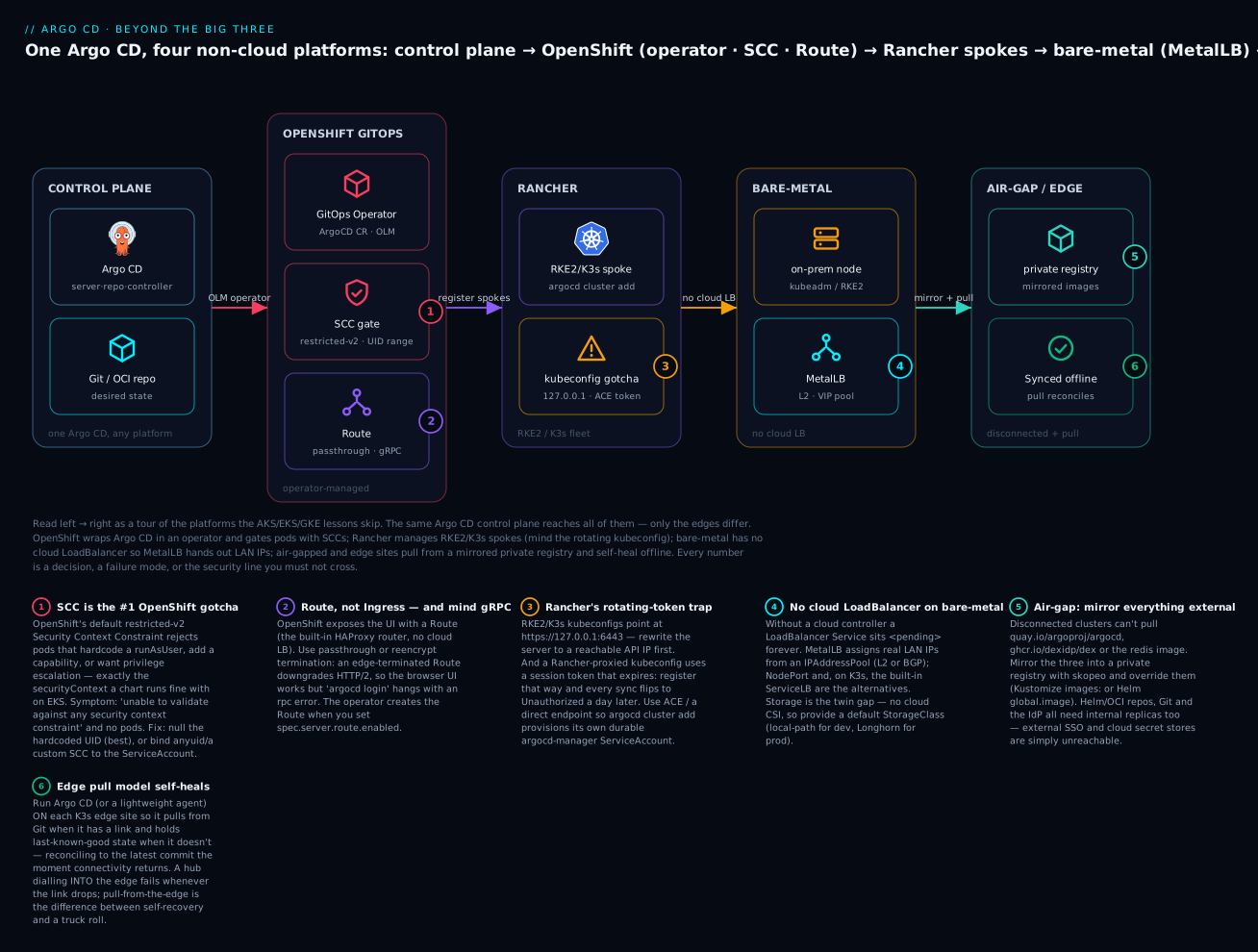
The rest of the lesson walks the columns: OpenShift (and its SCC and Route rows), Rancher (and the Fleet question), bare-metal (the LoadBalancer and storage rows), air-gapped (the registry row), edge (the K3s row), and identity (the SSO row).
OpenShift GitOps: Argo CD as a Red Hat operator
On the big three you install Argo CD yourself — you own the Helm release, you pick the version, you upgrade on your schedule (that whole flow is the Installing Argo CD lesson). On OpenShift you do something structurally different: you install an operator, and the operator installs and continuously reconciles Argo CD for you. The product is called Red Hat OpenShift GitOps, and it is genuinely just upstream Argo CD wrapped in Red Hat packaging, support, and a Kubernetes-native install experience.
The pieces fit together like this:
| Layer | What it is | You interact with it via |
|---|---|---|
| OLM (Operator Lifecycle Manager) | OpenShift’s operator package manager | A Subscription object (or the OperatorHub UI) |
| openshift-gitops-operator | The operator that manages Argo CD | Installing it once, cluster-wide |
| argocd-operator | The upstream operator underneath; owns the ArgoCD CRD |
The ArgoCD custom resource |
GitopsService |
A singleton the operator creates to bootstrap the default instance + console plugin | Rarely — it self-manages |
The openshift-gitops instance |
The default Argo CD, created automatically in namespace openshift-gitops |
The Argo CD UI/CLI as normal |
Install the operator declaratively — which is itself GitOps-friendly, and the recommended way — with an OLM Subscription:
# openshift-gitops-operator subscription (apply once, cluster-wide)
apiVersion: operators.coreos.com/v1alpha1
kind: Subscription
metadata:
  name: openshift-gitops-operator
  namespace: openshift-operators
spec:
  channel: latest                 # or a pinned channel like gitops-1.14
  installPlanApproval: Automatic
  name: openshift-gitops-operator
  source: redhat-operators
  sourceNamespace: openshift-marketplace
oc apply -f subscription.yaml
# subscription.operators.coreos.com/openshift-gitops-operator created

# Watch the operator install, then confirm the default instance appears
oc get csv -n openshift-operators | grep gitops
# openshift-gitops-operator.v1.14.0   Red Hat OpenShift GitOps   1.14.0   Succeeded   (representative)

oc get pods -n openshift-gitops
# NAME                                                    READY   STATUS    RESTARTS   AGE
# openshift-gitops-application-controller-0               1/1     Running   0          3m
# openshift-gitops-applicationset-controller-...          1/1     Running   0          3m
# openshift-gitops-dex-server-...                         1/1     Running   0          3m
# openshift-gitops-redis-...                              1/1     Running   0          3m
# openshift-gitops-repo-server-...                        1/1     Running   0          3m
# openshift-gitops-server-...                             1/1     Running   0          3m   (representative)
Notice what you did not do: you never ran helm install, never applied install.yaml, never created the namespace. The operator did all of that when it reconciled a default ArgoCD custom resource named openshift-gitops. That is the fundamental shift — the install is declarative and self-healing. Delete the argocd-server Deployment and the operator recreates it; the desired state of Argo CD itself is now a CR under version control, not a Helm release you must remember to re-apply.
The ArgoCD custom resource
Everything you would set in Helm values.yaml on the big three, you set as fields on the ArgoCD CR here. This is the single most important object in OpenShift GitOps. A representative instance that turns on the OpenShift-native goodies:
apiVersion: argoproj.io/v1beta1
kind: ArgoCD
metadata:
  name: argocd
  namespace: gitops-tenant          # a self-managed instance in its own namespace
spec:
  # --- expose the UI via an OpenShift Route, not an Ingress ---
  server:
    route:
      enabled: true
      tls:
        termination: reencrypt       # passthrough | reencrypt | edge
        insecureEdgeTerminationPolicy: Redirect
  # --- SSO: Dex pre-wired to OpenShift's own OAuth ---
  sso:
    provider: dex
    dex:
      openShiftOAuth: true           # log in with your OpenShift identity
  # --- map an OpenShift group to Argo CD admin ---
  rbac:
    defaultPolicy: 'role:readonly'
    policy: |
      g, cluster-admins, role:admin
    scopes: '[groups]'
  # --- turn on the ApplicationSet controller and HA ---
  applicationSet: {}
  ha:
    enabled: false
The fields that matter, and how they differ from the vanilla/Helm world:
ArgoCD CR field |
What it does | Vanilla equivalent |
|---|---|---|
spec.server.route.enabled |
Creates an OpenShift Route for the UI |
An Ingress + cloud LB you build yourself |
spec.server.route.tls.termination |
passthrough / reencrypt / edge |
Ingress TLS annotations |
spec.sso.provider: dex + dex.openShiftOAuth |
Auto-configures Dex against OpenShift OAuth | Hand-writing dex.config in argocd-cm |
spec.rbac.policy |
RBAC CSV, same syntax as argocd-rbac-cm |
The argocd-rbac-cm ConfigMap |
spec.applicationSet: {} |
Enables the ApplicationSet controller | A separate install/flag |
spec.ha.enabled |
Switches to the HA topology (Redis HA) | The HA manifests / Helm redis-ha |
spec.controller.resources etc. |
Per-component requests/limits | Helm resources blocks |
The openShiftOAuth: true line is the headline convenience. On AKS/EKS/GKE you register an app in Entra/Cognito/Google, copy a client ID and secret into argocd-cm, and hand-write a Dex OIDC connector. On OpenShift, that one boolean tells the operator to configure Dex against the cluster’s built-in OAuth server, so anyone who can log into OpenShift can log into Argo CD, and their OpenShift groups flow through as Argo CD RBAC subjects. No external IdP, no app registration, no secret to rotate.
Default instance vs your own instance
The operator creates one instance for you automatically. Know its coordinates:
| Object | Value (default instance) | Command to find it |
|---|---|---|
| Namespace | openshift-gitops |
oc get argocd -A |
| Instance name | openshift-gitops |
oc get argocd -n openshift-gitops |
| UI Route | openshift-gitops-server |
oc get route -n openshift-gitops |
| Admin password secret | openshift-gitops-cluster (key admin.password) |
see below |
| Console link | App-launcher grid → “Cluster Argo CD” | the OpenShift web console |
# The default instance's admin password (the initial one)
oc get secret openshift-gitops-cluster -n openshift-gitops \
  -o jsonpath='{.data.admin\.password}' | base64 -d ; echo
# 8fJ2c...redacted...   (representative)

# The UI URL (an OpenShift Route, HTTPS by default)
oc get route openshift-gitops-server -n openshift-gitops \
  -o jsonpath='{.spec.host}' ; echo
# openshift-gitops-server-openshift-gitops.apps.mycluster.example.com  (representative)
The default instance is powerful — by design it is granted broad, cluster-wide permissions so it can deploy anywhere on the cluster. That is convenient for a platform team and dangerous for multi-tenancy: it is effectively a cluster-admin sitting behind your SSO. For anything with tenants, the pattern is to leave the default instance to the platform team and stand up namespace-scoped instances (a second ArgoCD CR in a tenant namespace, as in the manifest above) governed by AppProject boundaries — exactly the tenancy model from the AppProjects lesson, now enforced per-instance by the operator.
The other OpenShift-only nicety is console integration: the operator installs a dynamic console plugin, so the OpenShift web console gains a GitOps view and an app-launcher link straight to the Argo CD UI. It is cosmetic but it is the reason OpenShift admins often “find” Argo CD already running — the operator ships enabled in many install profiles.
The SCC problem: why your EKS chart won’t run on OpenShift
This is the deep one, and it is worth every paragraph, because it is the number-one reason a Helm chart that runs perfectly on EKS fails on OpenShift. The symptom is a Deployment that creates a ReplicaSet that creates… nothing, and an event that reads:
Error creating: pods "myapp-7c9d..." is forbidden: unable to validate against
any security context constraint:
[provider "restricted-v2": Forbidden: not usable by user or serviceaccount,
 ... runAsUser: Invalid value: 1000: must be in the ranges: [1000700000, 1000709999],
 ... capabilities.add: Invalid value: "NET_ADMIN": capability may not be added]  (representative)
No pod is ever created. kubectl get pods shows nothing; only oc get events or the ReplicaSet’s status reveals why. To fix it you must understand Security Context Constraints (SCCs).
What an SCC is
An SCC is OpenShift’s admission-time policy for what a pod’s securityContext is allowed to request. It predates and is stricter than upstream Pod Security Standards. Every pod is validated against the SCCs available to its ServiceAccount; if none of them permit what the pod asks for, the pod is refused at admission — it never schedules. Since OpenShift 4.11 the default SCC bound to ordinary workloads is restricted-v2, and it is deliberately paranoid:
| SCC | Runs as | Capabilities | Privileged? | Typical use |
|---|---|---|---|---|
restricted-v2 |
A random UID from the namespace’s range; never root | Drops ALL (allows only NET_BIND_SERVICE) |
No | The default for everything |
nonroot-v2 |
Any non-root UID the pod picks | Drops ALL | No | Chart hardcodes a specific non-root UID |
anyuid |
Any UID, including root (0) | Drops ALL by default | No | Legacy images that need a fixed UID |
hostmount-anyuid |
Any UID | Drops ALL | No | Pods needing host mounts (storage) |
privileged |
Anything, incl. root, host namespaces | All | Yes | Trusted infra (CNI, CSI) only |
The crucial behaviour of restricted-v2: it does not let you choose your UID. OpenShift allocates each namespace a UID range (an annotation like openshift.io/sa.scc.uid-range: 1000700000/10000), and restricted-v2 forces the pod to run as some UID inside that range, with GID 0 as the group. A chart that hardcodes runAsUser: 1000 is asking for a UID outside the allowed range, so restricted-v2 rejects it — and because 1000 is not root either, anyuid is overkill; the honest fix is usually to stop hardcoding at all.
Here is exactly what restricted-v2 forbids that a permissive cloud cluster allows:
| The pod requests… | On EKS/AKS/GKE | On OpenShift (restricted-v2) |
|---|---|---|
runAsUser: 0 (root) |
Runs (PSS baseline) |
Rejected |
runAsUser: 1000 (fixed non-root) |
Runs | Rejected (outside the namespace UID range) |
No runAsUser at all |
Runs as the image’s USER |
Runs — OpenShift injects a valid UID |
capabilities.add: [NET_ADMIN] |
Runs | Rejected (not in the drop-ALL allow-list) |
privileged: true |
Runs | Rejected |
allowPrivilegeEscalation: true |
Runs | Rejected |
Writes to a root-owned dir (e.g. /var/run) |
Works (running as root) | Fails at runtime (random UID can’t write) |
hostPath / hostNetwork |
Runs | Rejected |
The three ways to fix it
When a chart is rejected, you have three levers, in order of preference:
| Fix | What you do | Trade-off | When |
|---|---|---|---|
| 1. Fix the chart (best) | Remove hardcoded runAsUser/fsGroup; let OpenShift inject a UID. Make written dirs group-writable (GID 0). |
Requires editing values/image; the right answer | Almost always — this is the OpenShift-native way |
| 2. Bind a looser SCC | Grant the workload’s ServiceAccount anyuid (or nonroot-v2) |
Weakens isolation; the pod can now run as root/any UID | The image genuinely needs a fixed UID and you can’t rebuild it |
| 3. Author a custom SCC | Write a minimal SCC granting exactly what’s needed and bind it | Most work; most precise | You need some extra capability but not full anyuid |
Fix 1 — fix the chart. Most well-maintained charts expose the pod and container securityContext as values. The OpenShift-friendly move is to null out the hardcoded UID/GID and let the platform decide:
# Helm values that stop fighting restricted-v2
podSecurityContext:
  runAsNonRoot: true
  # NO runAsUser / fsGroup — let OpenShift inject a UID from the namespace range
  seccompProfile:
    type: RuntimeDefault
securityContext:
  allowPrivilegeEscalation: false
  runAsNonRoot: true
  capabilities:
    drop: ["ALL"]
For images that write files, the durable image-level fix is to make the writable directories owned by group 0 and group-writable (chgrp -R 0 /data && chmod -R g=u /data in the Dockerfile), because OpenShift runs your container with a random UID but always GID 0. Get that right and the same image runs on EKS and OpenShift with no per-platform values.
Fix 2 — bind a looser SCC declaratively. The imperative way is oc adm policy add-scc-to-user anyuid -z myapp -n my-app, but that is a click you cannot commit to Git. The GitOps-native way is a plain RoleBinding to the auto-generated ClusterRole system:openshift:scc:<name> — which Argo CD can sync like any other manifest:
# Grant the 'myapp' ServiceAccount permission to USE the anyuid SCC
apiVersion: rbac.authorization.k8s.io/v1
kind: RoleBinding
metadata:
  name: myapp-anyuid
  namespace: my-app
roleRef:
  apiGroup: rbac.authorization.k8s.io
  kind: ClusterRole
  name: system:openshift:scc:anyuid   # OpenShift auto-creates one per SCC
subjects:
  - kind: ServiceAccount
    name: myapp
    namespace: my-app
This is the “SCC binding” you will write most often. It says: the myapp ServiceAccount may run pods that request any UID. Keep the subject as narrow as possible — one ServiceAccount in one namespace, never a broad group — because you are handing that workload a real privilege escalation relative to the default.
Fix 3 — a custom SCC. When a workload needs one specific thing (say, MustRunAsNonRoot but with RunAsAny fsGroup for an NFS mount) and anyuid is too broad, author a minimal SCC and bind it the same way:
apiVersion: security.openshift.io/v1
kind: SecurityContextConstraints
metadata:
  name: argo-workload-scc
allowPrivilegeEscalation: false
allowPrivilegedContainer: false
requiredDropCapabilities: ["ALL"]
runAsUser:
  type: MustRunAsNonRoot     # any non-root UID, not tied to the namespace range
seLinuxContext:
  type: MustRunAs
fsGroup:
  type: RunAsAny             # allow an arbitrary fsGroup for shared storage
volumes: ["configMap", "secret", "persistentVolumeClaim", "projected", "emptyDir"]
users: []                    # bind via a RoleBinding to system:openshift:scc:argo-workload-scc
Note the SCC’s fields sit at the top level, not under spec — SCCs are an unusual CRD in that respect. Bind it with the same RoleBinding-to-system:openshift:scc:argo-workload-scc pattern.
The takeaway for a platform engineer: treat SCC as a first-class part of any chart you port to OpenShift. When someone says “the Bitnami/community chart works on EKS but the pods never come up on OpenShift,” the diagnosis is almost always oc get events -n <ns> | grep -i "security context constraint", and the fix is one of these three — reaching for Fix 1 first and Fix 2 only when you truly cannot rebuild the image.
Routes vs Ingress: exposing the Argo CD UI on OpenShift
On the big three you expose argocd-server with an Ingress and let a cloud load-balancer controller (App Gateway, ALB, GCLB) give it a public address. OpenShift has Ingress, but its native, first-class object is the Route — and the operator creates one for you when you set spec.server.route.enabled: true. If you are running vanilla Argo CD on OpenShift (not the operator), you write the Route yourself:
apiVersion: route.openshift.io/v1
kind: Route
metadata:
  name: argocd-server
  namespace: argocd
spec:
  to:
    kind: Service
    name: argocd-server
  port:
    targetPort: https           # argocd-server's 8080 TLS port
  tls:
    termination: passthrough    # let argocd-server terminate its own TLS
    insecureEdgeTerminationPolicy: Redirect
The single decision that trips people up is TLS termination mode, and it interacts badly with Argo CD’s use of gRPC (the argocd CLI and the UI’s streaming both speak gRPC/HTTP2):
| Termination | Who terminates TLS | gRPC / argocd CLI works? |
When to use |
|---|---|---|---|
passthrough |
argocd-server itself (end-to-end TLS) |
Yes — cleanest for the CLI | Default recommendation for Argo CD |
reencrypt |
Router terminates, re-encrypts to the pod | Yes (router keeps HTTP2) | You need a cluster-managed cert at the edge |
edge |
Router terminates, plaintext to the pod | Often no — gRPC/HTTP2 can break | Only with argocd-server --insecure + care |
The classic failure — worth memorising — is: the UI loads fine in a browser but argocd login <route-host> hangs or fails with an rpc error or a protocol error. Ninety percent of the time the Route is edge-terminated, which downgrades the gRPC stream. The fix is to switch the Route to passthrough (or reencrypt), so the HTTP2/gRPC path survives to the pod. Put another way: browsers are forgiving, gRPC is not.
Route vs Ingress, side by side, for the times you must choose:
OpenShift Route |
Kubernetes Ingress |
|
|---|---|---|
| API group | route.openshift.io/v1 |
networking.k8s.io/v1 |
| Load balancer | The built-in HAProxy router (no cloud LB needed) | Needs an ingress controller + (usually) a cloud LB |
| TLS modes | edge / passthrough / reencrypt |
Controller-specific annotations |
| Wildcard DNS | Uses the cluster’s *.apps.<domain> automatically |
You manage DNS |
| Portability | OpenShift-only | Portable across all clusters |
Because OpenShift ships the HAProxy router and a wildcard *.apps domain, a Route gives you a working, TLS-terminated URL with no cloud load balancer and no DNS work — one of the genuine ergonomic wins of the platform. If you want portability across OpenShift and other clusters, you can still use Ingress (OpenShift will honour it), but for the Argo CD UI specifically, the operator-managed Route with reencrypt or passthrough is the path of least resistance.
Rancher: managing Argo CD across RKE2/K3s — and the Fleet question
Rancher (now SUSE Rancher) is a multi-cluster management platform: it provisions and imports Kubernetes clusters — typically RKE2 (its hardened, CIS/FIPS-friendly distro) and K3s (its lightweight one) — and gives you one console over the fleet. Argo CD slots into a Rancher estate in the usual hub-and-spoke way: one Argo CD reaches many Rancher-managed clusters. But Rancher raises a question no cloud does, and you should answer it deliberately: why Argo CD and not Fleet?
Fleet vs Argo CD — the honest comparison
Fleet (fleet.cattle.io) is Rancher’s own built-in GitOps engine. It ships with Rancher, is managed from the Rancher UI, and is engineered for one thing extremely well: pushing bundles of manifests to thousands of clusters selected by labels. It is not a worse Argo CD; it is a different tool with a different centre of gravity.
| Dimension | Fleet (Rancher-native) | Argo CD |
|---|---|---|
| Model | Git → Bundle → agent on each downstream cluster |
Git → controller → target clusters |
| CRDs | GitRepo, Bundle, BundleDeployment |
Application, ApplicationSet, AppProject |
| Scale sweet spot | Thousands of clusters, label-selected | Dozens–hundreds of clusters/apps |
| UI | Inside the Rancher console | Rich, app-centric Argo CD UI (health/sync graph) |
| App visualisation | Minimal | Excellent (resource tree, live health, diff) |
| Sync waves / hooks | Limited | Yes (waves, PreSync/PostSync hooks) |
| Progressive rollout | Basic | ApplicationSets + Argo Rollouts ecosystem |
| SSO / RBAC | Via Rancher | Native OIDC/Dex + fine-grained RBAC |
| Ecosystem | Rancher only | Huge (Rollouts, Notifications, Image Updater) |
Choose Fleet when you are all-in on Rancher, need fleet-scale bundle distribution to many edge clusters, and want zero extra tooling. Choose Argo CD when you want the app-centric UI and health model, sync waves and hooks, ApplicationSets, a team that already knows Argo, or portability off Rancher later. Plenty of shops run both: Fleet for Rancher’s own platform components, Argo CD for application teams. The wrong move is to adopt Argo CD and Fleet for the same workloads and let them fight over the same namespaces — pick one owner per resource, exactly as you would never point two Argo CD instances at the same app.
Registering RKE2/K3s clusters — the kubeconfig gotcha
Registering a Rancher-managed cluster in Argo CD is the standard cluster-registration flow — argocd cluster add <context> writes a labelled cluster Secret. But two Rancher-specific traps bite here.
Trap 1 — the RKE2/K3s kubeconfig points at localhost. The kubeconfig a node writes locally uses 127.0.0.1, which is meaningless to a remote Argo CD:
| Distro | Kubeconfig on the node | Default server address |
|---|---|---|
| RKE2 | /etc/rancher/rke2/rke2.yaml |
https://127.0.0.1:6443 |
| K3s | /etc/rancher/k3s/k3s.yaml |
https://127.0.0.1:6443 |
| kubeadm | /etc/kubernetes/admin.conf |
the API server’s advertised address |
You must rewrite that server: to the cluster’s reachable API address (a node IP, a VIP, or a load-balanced control-plane endpoint) before argocd cluster add can use it:
# Copy the K3s kubeconfig and point it at the real API address
sudo cat /etc/rancher/k3s/k3s.yaml > k3s.yaml
sed -i 's#https://127.0.0.1:6443#https://10.10.0.11:6443#' k3s.yaml
export KUBECONFIG=$PWD/k3s.yaml
argocd cluster add default --name edge-k3s-01
# INFO ... ServiceAccount "argocd-manager" created ...
# Cluster 'https://10.10.0.11:6443' added   (representative)
Trap 2 — the Rancher-proxied kubeconfig uses a rotating token. If you download the kubeconfig from the Rancher UI, its server: may be the Rancher proxy (https://rancher.example.com/k8s/clusters/c-m-xxxxx) authenticated with a Rancher session token that expires. Register with that and Argo CD works for a day, then every sync flips to Failed with Unauthorized once the token rotates. Two durable fixes: enable Rancher’s Authorized Cluster Endpoint (ACE) to get a direct API path that bypasses the proxy, or (better for automation) let argocd cluster add create its own long-lived argocd-manager ServiceAccount on the downstream cluster — which is exactly what the command does when you point it at a direct endpoint. The rule: never register a spoke with a credential that rotates out from under Argo CD.
On-prem and bare-metal: no cloud to lean on
Strip away the cloud and two things you never thought about suddenly become your problem: how does a LoadBalancer Service get an IP, and where do PersistentVolumes come from. Argo CD installs identically — the manifests and the Helm chart from the installation lesson apply unchanged — but exposing its UI and giving your workloads storage are now on you.
The no-LoadBalancer problem
On a managed cloud, kubectl expose ... --type=LoadBalancer triggers a cloud controller that provisions a real LB in a minute. On bare-metal there is no cloud controller, so the Service sits <pending> forever:
kubectl get svc argocd-server -n argocd
# NAME            TYPE           CLUSTER-IP     EXTERNAL-IP   PORT(S)
# argocd-server   LoadBalancer   10.43.51.12    <pending>     80:31080/TCP,443:31443/TCP
#                                               ^^^^^^^^^ never resolves on bare-metal
Four ways to actually reach the UI without a cloud:
| Option | How it works | Pros | Cons |
|---|---|---|---|
| NodePort | Service opens a port (30000–32767) on every node | Zero extra components; always works | Ugly port, no VIP, you manage which node IP |
| MetalLB | Assigns real LAN IPs to LoadBalancer Services |
Proper LoadBalancer UX on bare-metal |
Extra component; needs an IP pool + L2/BGP |
| ingress-nginx | An ingress controller + one entry point | HTTP routing, TLS, many services on one IP | Still needs a NodePort/MetalLB in front; gRPC care |
| K3s ServiceLB (Klipper) | K3s’s built-in LB uses node host-ports | Works out of the box on K3s | K3s-only; uses node IPs, not a separate VIP |
MetalLB is the standard answer when you want cloud-like LoadBalancer behaviour. You give it a pool of spare LAN addresses and an advertisement mode (Layer2 = one node answers ARP for the VIP; BGP = peer with your routers). Two small CRs:
apiVersion: metallb.io/v1beta1
kind: IPAddressPool
metadata:
  name: argocd-pool
  namespace: metallb-system
spec:
  addresses:
    - 192.168.1.240-192.168.1.250     # spare, un-DHCP'd LAN IPs
---
apiVersion: metallb.io/v1beta1
kind: L2Advertisement
metadata:
  name: argocd-l2
  namespace: metallb-system
spec:
  ipAddressPools:
    - argocd-pool
With MetalLB running, the same argocd-server LoadBalancer Service is assigned, say, 192.168.1.240, and the UI is reachable at that stable LAN IP — cloud-like behaviour, no cloud. On K3s specifically, you often need none of this: K3s ships ServiceLB (Klipper), so a LoadBalancer Service is handed the node IPs automatically. That is one reason K3s is so pleasant at the edge.
One gRPC caveat mirrors the OpenShift Route story: if you front Argo CD with ingress-nginx, the CLI’s gRPC needs either SSL passthrough (
nginx.ingress.kubernetes.io/ssl-passthrough: "true") or thebackend-protocol: HTTPSannotation withargocd-serverserving TLS. A plain HTTP ingress will serve the browser UI but breakargocd login.
Storage without a cloud CSI
Argo CD itself is effectively stateless — server, repo-server and application-controller keep no durable data, and Redis is an in-memory cache whose loss just forces a re-sync — so installing Argo CD needs no storage class at all. The storage problem is about the workloads Argo CD deploys: the moment a synced app has a PersistentVolumeClaim, it needs a StorageClass, and on bare-metal there is no managed-csi/gp3/standard-rwo waiting for you.
| Provisioner | What it gives you | Best for |
|---|---|---|
| local-path (Rancher) | A PV on the node’s local disk; K3s ships it as default | Dev, single-node, edge |
| Longhorn (Rancher) | Distributed, replicated block storage; snapshots | Production bare-metal HA |
| Ceph / Rook | Full software-defined storage (block/file/object) | Large, storage-heavy clusters |
| NFS subdir provisioner | Dynamic PVs on an existing NFS server | You already have a NAS |
The failure mode to recognise: a synced app’s pod stuck Pending with pod has unbound immediate PersistentVolumeClaims, and the app stuck Progressing in Argo CD, because no default StorageClass exists. Install one (local-path for dev, Longhorn for prod) and mark it default. This is the on-prem equivalent of “the cloud just had a default StorageClass” — here you provide it.
What you lose without a cloud — and the replacement
| The cloud gave you… | On bare-metal you provide… |
|---|---|
| LoadBalancer IPs | MetalLB / NodePort / K3s ServiceLB |
| DNS (Route53/Azure DNS/Cloud DNS) | Your own DNS / /etc/hosts / external-dns to a local zone |
| Managed TLS certs / ACME | cert-manager with an internal CA (no public ACME in air-gap) |
| CSI storage | local-path / Longhorn / Ceph / NFS |
| A container registry | Harbor / Nexus / Artifactory |
| Cloud IAM for cluster auth | ServiceAccount tokens / client certs in the cluster Secret |
None of this changes Argo CD — it changes the platform Argo CD sits on. Budget for it: standing up MetalLB, a StorageClass, an internal CA and a registry is the real “day zero” of on-prem GitOps.
Air-gapped installs: Argo CD with no internet
An air-gapped cluster has no route to the public internet — common in defence, finance, OT/industrial, and sovereign environments. Argo CD can run fully disconnected, but three assumptions in a normal install break, and you fix each one deliberately.
Break 1 — image pulls fail
The default install pulls three images from public registries. In an air-gap every one of them fails ImagePullBackOff:
| Image (representative) | Role | Default source |
|---|---|---|
quay.io/argoproj/argocd:v2.13.x |
server, repo-server, controller, appset | Quay |
ghcr.io/dexidp/dex:v2.x |
Dex (SSO) | GitHub Container Registry |
public.ecr.aws/docker/library/redis:7.x |
Redis cache | AWS public ECR |
The fix is to mirror them into your internal registry (Harbor/Nexus/Artifactory) from a connected jump host, using skopeo (no Docker daemon needed):
# From a connected host, copy each image into the private registry
skopeo copy docker://quay.io/argoproj/argocd:v2.13.3 \
  docker://registry.internal:5000/argoproj/argocd:v2.13.3
skopeo copy docker://ghcr.io/dexidp/dex:v2.41.1 \
  docker://registry.internal:5000/dexidp/dex:v2.41.1
skopeo copy docker://public.ecr.aws/docker/library/redis:7.4.1-alpine \
  docker://registry.internal:5000/library/redis:7.4.1-alpine
# (tags are illustrative — pin to exactly what your Argo CD version's install.yaml references)
Then override the image references so the install points at the mirror. Two clean approaches:
# Approach A — Kustomize image transformer over the upstream install.yaml
apiVersion: kustomize.config.k8s.io/v1beta1
kind: Kustomization
namespace: argocd
resources:
  - install.yaml            # a local copy of the pinned upstream manifest
images:
  - name: quay.io/argoproj/argocd
    newName: registry.internal:5000/argoproj/argocd
    newTag: v2.13.3
  - name: ghcr.io/dexidp/dex
    newName: registry.internal:5000/dexidp/dex
    newTag: v2.41.1
  - name: public.ecr.aws/docker/library/redis
    newName: registry.internal:5000/library/redis
    newTag: 7.4.1-alpine
# Approach B — Helm values (argo/argo-cd chart), the cleaner path for air-gap
global:
  image:
    repository: registry.internal:5000/argoproj/argocd
    tag: v2.13.3
dex:
  image:
    repository: registry.internal:5000/dexidp/dex
    tag: v2.41.1
redis:
  image:
    repository: registry.internal:5000/library/redis
    tag: 7.4.1-alpine
| Method | Best when | Note |
|---|---|---|
Kustomize images: |
You install from raw manifests | The transformer rewrites every matching image name |
Helm global.image + per-component |
You install via the chart | global.image covers the main image; Dex/Redis need their own blocks |
Break 2 — Helm/OCI repos are unreachable
Argo CD’s repo-server pulls Helm charts and OCI artifacts at sync time. Air-gapped, https://charts.bitnami.com and ghcr.io/... do not resolve, so syncs fail with failed to get repo or a TLS/DNS error. You must repoint every chart and OCI reference at your internal mirror (Harbor and Nexus both proxy Helm/OCI), register those as Argo CD repositories with credentials, and trust the mirror’s CA in the repo-server. The desired-state repos themselves must be an internal Git (a self-hosted GitLab/Gitea), not github.com.
Break 3 — external SSO and secret stores are unreachable
No Entra ID, no Okta, no Google — and no Key Vault / Secrets Manager / Secret Manager either. That reshapes two edges:
- Identity falls back to an on-prem IdP (Keycloak) or Dex + LDAP against internal Active Directory, or local users (next section).
- Secrets can no longer use the cloud-store path from the secrets lesson. The air-gap-friendly options are Sealed Secrets (encrypted ciphertext committed to your internal Git, decrypted by an in-cluster controller — no external calls) or a self-hosted Vault with ESO pointed at it. Both keep the entire secret lifecycle inside the perimeter.
| Air-gap breakage | Symptom | Fix |
|---|---|---|
| Image pulls | ImagePullBackOff on argocd/dex/redis |
Mirror 3 images; override with Kustomize/Helm |
| Helm/OCI charts | failed to get repo, DNS/TLS errors |
Internal Harbor/Nexus mirror + repo creds + CA |
| Git source | repository not accessible |
Self-hosted GitLab/Gitea, not github.com |
| SSO | Dex/OIDC callback times out | Keycloak / Dex+LDAP internally |
| Secrets | ESO to cloud store fails auth/DNS | Sealed Secrets or self-hosted Vault |
| CLI/tooling | argocd/kubeseal not present |
Side-load the binaries onto the jump host |
The mental shift: in air-gap, everything Argo CD reaches out to must have an internal replica — registry, chart repo, Git, IdP, secret store, CA. Argo CD’s pull model actually helps here (it dials out to Git and registries you control, rather than something dialling in), but only once every external dependency has a local stand-in.
Edge and K3s: the pull model earns its keep
The edge — a store, a factory floor, a cell tower, a wind turbine — is defined by two constraints: small nodes and flaky connectivity. K3s is the usual distro because it is a single ~60 MB binary with a sane memory footprint, and it is where the GitOps pull model stops being a philosophical nicety and becomes a genuine operational advantage.
| Edge constraint | Why it bites | Mitigation |
|---|---|---|
| Tiny nodes (1–4 GB RAM) | Full Argo CD default requests are heavy | Non-HA single-replica; trim resources; drop Dex if unused |
| Intermittent network | A push from a central CD fails when offline | Run Argo CD (or an agent) on the edge; it pulls when it can |
| Many identical sites | Per-site hand-config doesn’t scale | ApplicationSet cluster generator + labels |
| No local ops staff | Nobody to kubectl apply a fix |
Self-heal reconciles to Git automatically |
| Local storage only | No cloud CSI | K3s default local-path |
The architectural nuance worth internalising: there are two ways to do edge GitOps, and they fail very differently.
- Hub-into-edge (push over the network). One central Argo CD registers each edge cluster as a spoke and dials into its API server to reconcile. Clean to operate — until the edge link drops, at which point that cluster is simply unreachable and drifts unmanaged until connectivity returns. The hub cannot reconcile what it cannot dial.
- Argo-on-edge (pull). Argo CD (or a lightweight per-cluster agent) runs on the edge cluster and pulls desired state from Git whenever it has a link. When the network is down it holds the last-known-good state; when the link returns it reconciles to the latest commit on its own. Intermittent connectivity is survivable, because reconciliation is initiated from the edge outward, not the centre inward.
For anything genuinely disconnected or bandwidth-starved, prefer Argo-on-edge: the pull model means a site rides out an outage and self-heals to Git the moment it reconnects, with no operator and no reachable control plane. This is the same “pull beats push” argument from the GitOps-principles lesson, but at the edge it is not a preference — it is the difference between a site that recovers itself and a site that needs a truck roll. (The community argocd-agent project is emerging to make the lightweight on-edge footprint smaller still; today, a trimmed non-HA Argo CD per site is the pragmatic pattern.)
Identity without a cloud IdP
The big-three lessons wired SSO to a cloud IdP. Off-cloud you have three honest options, in rough order of how much you’d want them in production:
| Option | How it works | Good for | Watch out for |
|---|---|---|---|
| Keycloak (native OIDC) | Argo CD’s oidc.config points straight at an on-prem Keycloak realm |
On-prem/air-gap with real SSO + groups | You run Keycloak (HA, backups) |
| Dex + LDAP | Bundled Dex bridges to Active Directory / OpenLDAP | Estates with existing AD | LDAP group mapping is fiddly |
| Local users | accounts.<name> in argocd-cm + password in argocd-secret |
Tiny/air-gapped, break-glass | No MFA, doesn’t scale, per-user toil |
Keycloak is the on-prem default when you want cloud-grade SSO without a cloud. Argo CD talks to it directly — no Dex needed — via oidc.config in argocd-cm:
apiVersion: v1
kind: ConfigMap
metadata:
  name: argocd-cm
  namespace: argocd
data:
  url: https://argocd.internal.example.com
  oidc.config: |
    name: Keycloak
    issuer: https://keycloak.internal.example.com/realms/argocd
    clientID: argocd
    clientSecret: $oidc.keycloak.clientSecret   # resolves from argocd-secret
    requestedScopes: ["openid", "profile", "email", "groups"]
    requestedIDTokenClaims: {"groups": {"essential": true}}
Dex + LDAP is the choice when your source of truth is Active Directory and you want to reuse it directly. Dex is already in the Argo CD install; you just give it an LDAP connector in argocd-cm:
data:
  dex.config: |
    connectors:
      - type: ldap
        id: ldap
        name: Corporate LDAP
        config:
          host: ldap.internal.example.com:636
          bindDN: cn=argocd,ou=svc,dc=example,dc=com
          bindPW: $dex.ldap.bindPW           # from argocd-secret
          userSearch:
            baseDN: ou=people,dc=example,dc=com
            filter: "(objectClass=person)"
            username: uid
            idAttr: uid
            emailAttr: mail
            nameAttr: cn
          groupSearch:
            baseDN: ou=groups,dc=example,dc=com
            filter: "(objectClass=groupOfNames)"
            userMatchers:
              - userAttr: DN
                groupAttr: member
            nameAttr: cn
In both cases the group names Dex/Keycloak return (cn values, or Keycloak group claims) become the subjects in your argocd-rbac-cm policy — g, cn=platform,ou=groups,dc=example,dc=com, role:admin. Local users remain useful as a break-glass account even when SSO works: if the IdP is down (very possible in a small air-gapped site), a local admin login is your way back in. The OpenShift case is the happy exception to this whole section — openShiftOAuth: true gives you SSO with zero of this wiring, because the cluster is the IdP.
Hands-on lab
Two config-level mini-flows, one per world: (A) OpenShift — install via the operator, expose with a Route, and fix an SCC rejection; (B) bare-metal — install vanilla Argo CD, expose via MetalLB/NodePort, and note the air-gap image-mirroring steps. These are written to be read and reasoned about even if you don’t have each platform handy; every manifest is real and every output is representative and labelled. Where a step needs a specific platform, it’s flagged.
No cluster is spun up for you here — the outputs below are representative of a correct run, not a live capture. Apply them on a real OpenShift cluster (or the free OpenShift Local / CRC) and a bare-metal/K3s cluster to see the actual results.
Flow A — OpenShift: operator, Route, and an SCC fix
A1 — Install the operator.
oc apply -f subscription.yaml       # the Subscription from earlier
# subscription.operators.coreos.com/openshift-gitops-operator created
oc get csv -n openshift-operators | grep -i gitops
# openshift-gitops-operator.v1.14.0 ... Succeeded   (representative)
What just happened: OLM pulled the operator and it reconciled a default ArgoCD instance into openshift-gitops. You installed Argo CD without ever touching a Helm chart.
A2 — Get the URL and password.
oc get route openshift-gitops-server -n openshift-gitops -o jsonpath='{.spec.host}{"\n"}'
# openshift-gitops-server-openshift-gitops.apps.crc.testing   (representative)
oc get secret openshift-gitops-cluster -n openshift-gitops \
  -o jsonpath='{.data.admin\.password}' | base64 -d ; echo
# r7Kd2...redacted   (representative)
What just happened: The operator created an OpenShift Route (no cloud LB) and stored the initial admin password in openshift-gitops-cluster. You can also just click “Cluster Argo CD” in the console app-launcher and log in with your OpenShift identity via openShiftOAuth.
A3 — Deploy a sample app, and watch SCC reject it. Point an Application at a chart that hardcodes a non-root UID (many community charts do). The Application syncs, but the workload’s pods never appear:
oc get application sample-app -n openshift-gitops
# NAME         SYNC STATUS   HEALTH STATUS
# sample-app   Synced        Progressing        <-- stuck; the Deployment exists but no pods
oc get events -n sample | grep -i "security context constraint"
# ... Error creating: pods "sample-..." is forbidden: unable to validate against
#     any security context constraint: ... runAsUser: Invalid value: 1000:
#     must be in the ranges: [1000700000, 1000709999]   (representative)
What just happened: restricted-v2 rejected the pod because the chart requested runAsUser: 1000, outside the namespace’s allocated UID range. Argo CD reports the app Synced (the manifests applied) but Progressing/Degraded (the pods never became healthy) — a textbook SCC failure.
A4 — Fix it the GitOps way. Commit a RoleBinding granting the app’s ServiceAccount the anyuid SCC (Fix 2), or better, null out the hardcoded UID in the chart values (Fix 1). The binding, synced by Argo CD:
# after committing the RoleBinding from the SCC section and syncing:
argocd app sync sample-app
oc get pods -n sample
# NAME               READY   STATUS    RESTARTS   AGE
# sample-6b9f...     1/1     Running   0          20s   (representative)
argocd app get sample-app | grep Health
# Health Status:     Healthy   (representative)
What just happened: With permission to run its requested UID (or with the UID no longer hardcoded), the pod passed SCC admission, scheduled, and went Healthy. You resolved a platform-specific admission failure declaratively — the fix itself is a manifest in Git.
A5 — Teardown.
argocd app delete sample-app --yes
oc delete rolebinding myapp-anyuid -n sample
oc delete subscription openshift-gitops-operator -n openshift-operators
oc delete csv -n openshift-operators -l operators.coreos.com/openshift-gitops-operator.openshift-operators
oc delete namespace openshift-gitops sample --ignore-not-found
Flow B — Bare-metal: vanilla install, MetalLB, and air-gap notes
B1 — Install Argo CD (identical to any cluster).
kubectl create namespace argocd
kubectl apply -n argocd -f https://raw.githubusercontent.com/argoproj/argo-cd/stable/manifests/install.yaml
# ... many resources created ...
kubectl -n argocd rollout status deploy/argocd-server
# deployment "argocd-server" successfully rolled out   (representative)
What just happened: The core install is platform-agnostic — the same command you’d run on EKS. Nothing about bare-metal changed Argo CD itself.
B2 — Try a LoadBalancer and watch it hang.
kubectl patch svc argocd-server -n argocd -p '{"spec":{"type":"LoadBalancer"}}'
kubectl get svc argocd-server -n argocd
# argocd-server   LoadBalancer   10.43.51.12   <pending>   80:31080/TCP,443:31443/TCP   (representative)
What just happened: No cloud controller exists, so the external IP is <pending> indefinitely. This is the defining bare-metal moment.
B3 — Give it an IP with MetalLB (or fall back to NodePort).
kubectl apply -f https://raw.githubusercontent.com/metallb/metallb/v0.14.8/config/manifests/metallb-native.yaml
kubectl -n metallb-system rollout status deploy/controller
kubectl apply -f metallb-pool.yaml          # the IPAddressPool + L2Advertisement from earlier
kubectl get svc argocd-server -n argocd
# argocd-server   LoadBalancer   10.43.51.12   192.168.1.240   80:31080/TCP,443:31443/TCP   (representative)
What just happened: MetalLB assigned 192.168.1.240 from your pool; the UI is now reachable at that stable LAN IP — cloud-like behaviour with no cloud. If you’d rather not run MetalLB, --type=NodePort and browsing to https://<node-ip>:31443 works immediately (and on K3s, ServiceLB would have assigned node IPs without any of this).
B4 — First login.
kubectl -n argocd get secret argocd-initial-admin-secret \
  -o jsonpath='{.data.password}' | base64 -d ; echo
# 4xTq...redacted   (representative)
argocd login 192.168.1.240 --username admin --insecure
# 'admin:login' logged in successfully   (representative)
What just happened: Same initial-admin-secret flow as any cluster. --insecure here is just to skip the self-signed cert prompt on a lab LAN — in production you’d front this with cert-manager and an internal CA.
B5 — Air-gap note (read, don’t run). In a disconnected build you’d have prefaced B1 by mirroring the three images (skopeo copy to registry.internal:5000/...) and installing with the Kustomize/Helm image overrides from the air-gap section, plus pointing Helm/OCI repos and Git at internal mirrors. The install steps are identical; only the sources move inside the perimeter.
B6 — Teardown.
argocd logout 192.168.1.240
kubectl delete -n argocd -f https://raw.githubusercontent.com/argoproj/argo-cd/stable/manifests/install.yaml
kubectl delete namespace argocd
kubectl delete -f https://raw.githubusercontent.com/metallb/metallb/v0.14.8/config/manifests/metallb-native.yaml
Common mistakes and troubleshooting
Every row here is a real failure mode from the platforms above. The states are genuine Argo CD/OpenShift/Kubernetes messages.
| Symptom | Likely cause | Fix |
|---|---|---|
unable to validate against any security context constraint |
OpenShift restricted-v2 rejects the chart’s runAsUser/caps/privileged |
Null the hardcoded UID (Fix 1), or bind anyuid/custom SCC to the SA (Fix 2/3) |
App Synced but Progressing/Degraded, no pods on OpenShift |
SCC admission blocked the pods (they never scheduled) | oc get events -n <ns> | grep -i "security context"; apply an SCC fix |
UI loads in browser but argocd login hangs / rpc error |
Route/Ingress is edge-terminated → gRPC/HTTP2 downgraded | Switch Route to passthrough/reencrypt; on nginx use ssl-passthrough |
ArgoCD CR applied but nothing reconciles |
Operator not installed/healthy, or CR in a namespace it doesn’t watch | oc get csv -n openshift-operators; check operator pod logs; verify CR namespace |
| Team debates “should we use Fleet or Argo CD?” and adopts both | Overlapping ownership of the same namespaces | Pick one owner per resource; Fleet for Rancher platform, Argo for apps — not both on the same app |
LoadBalancer Service stuck <pending> forever |
No cloud LB controller on bare-metal | Install MetalLB (pool + L2/BGP), use NodePort, or rely on K3s ServiceLB |
ImagePullBackOff on argocd/dex/redis in air-gap |
Public registries unreachable | Mirror the 3 images to a private registry; override via Kustomize images:/Helm global.image |
| Edge cluster falls behind, hub can’t reach it | Hub-into-edge push model breaks on a dropped link | Run Argo CD/agent on the edge (pull model); it self-heals when the link returns |
Synced app pod Pending: unbound immediate PersistentVolumeClaims |
No default StorageClass on bare-metal |
Install local-path (dev) or Longhorn (prod) and mark it default |
Rancher spoke works for a day, then every sync Unauthorized |
Registered with a rotating Rancher proxy/session token | Use ACE/direct endpoint + the argocd-manager SA; never register with a rotating token |
argocd cluster add fails: dial tcp 127.0.0.1:6443 |
RKE2/K3s kubeconfig still points at localhost | Rewrite server: to the node’s reachable API IP before adding |
| Dex/OIDC login times out in air-gap | External IdP (Entra/Okta/Google) unreachable | Switch to on-prem Keycloak or Dex+LDAP; keep a local break-glass user |
Three gotchas earn extra words:
1. SCC is the tax on every OpenShift port. The instinct after an SCC rejection is to reach for anyuid and move on. Resist it. anyuid lets the pod run as root, which is a real regression from restricted-v2 and will show up in your next security review. Spend the ten minutes to null out the hardcoded UID and make written directories GID-0-writable; then the same image runs unprivileged on OpenShift and the big three, and you never touch an SCC binding again. Reserve anyuid/custom SCCs for images you genuinely cannot rebuild.
2. gRPC is the silent Route/Ingress killer. The reason “the UI works but the CLI doesn’t” recurs on both OpenShift Routes and bare-metal ingress is the same: Argo CD’s CLI and streaming use gRPC (HTTP/2), and edge-terminating proxies love to downgrade it to HTTP/1.1. Whenever argocd login misbehaves against a URL whose browser UI is fine, suspect TLS termination before anything else — passthrough on a Route, ssl-passthrough on nginx.
3. Rotating credentials are a time bomb in cluster Secrets. The Rancher token trap is a specific case of a general rule: a spoke’s cluster Secret must hold a credential that outlives the token you happened to have in your shell. Rancher session tokens, cloud CLI tokens baked into a kubeconfig, and short-lived SA tokens all “work” at registration and fail silently later. Register with something durable — the argocd-manager ServiceAccount Argo CD creates, or an exec-plugin that mints tokens on demand — and your fleet doesn’t rot.
Cheat-sheet
OpenShift GitOps
| Command / field | What it does |
|---|---|
oc apply -f subscription.yaml |
Install the OpenShift GitOps operator via OLM |
oc get argocd -A |
List all ArgoCD instances (operator-managed) |
spec.server.route.enabled: true |
Operator creates a Route for the UI |
spec.sso.dex.openShiftOAuth: true |
Wire Dex to OpenShift’s built-in OAuth |
spec.rbac.policy |
RBAC CSV (same syntax as argocd-rbac-cm) |
oc get secret openshift-gitops-cluster -o jsonpath='{.data.admin\.password}' | base64 -d |
Default instance admin password |
oc get events -n <ns> | grep -i "security context" |
Diagnose an SCC rejection |
oc adm policy add-scc-to-user anyuid -z <sa> -n <ns> |
Imperative SCC grant (prefer the RoleBinding for GitOps) |
RoleBinding → system:openshift:scc:<scc> |
Declarative SCC grant Argo CD can sync |
On-prem / bare-metal exposure
| Option | One-liner intent |
|---|---|
| NodePort | --type=NodePort → https://<node-ip>:<30000–32767> |
| MetalLB | IPAddressPool + L2Advertisement → real LAN IP on LoadBalancer Services |
| K3s ServiceLB | Built in — LoadBalancer gets node IPs automatically |
| ingress-nginx | One entry point; add ssl-passthrough for gRPC |
| StorageClass | local-path (dev) / Longhorn (prod); mark default for PVCs |
Air-gap image mirror
| Step | Command / field |
|---|---|
| Mirror an image | skopeo copy docker://quay.io/argoproj/argocd:vX docker://registry.internal:5000/argoproj/argocd:vX |
| Override (Kustomize) | images: [{name: quay.io/argoproj/argocd, newName: registry.internal:5000/argoproj/argocd, newTag: vX}] |
| Override (Helm) | global.image.repository/tag, dex.image.*, redis.image.* |
| Identity offline | oidc.config → Keycloak, or dex.config → LDAP, or local users |
Interview and exam questions
Q: On OpenShift, how is installing Argo CD different from a helm install on EKS?
A: You don’t install Argo CD directly — you install the OpenShift GitOps operator via OLM (a Subscription), and the operator reconciles an ArgoCD custom resource that it uses to create and continuously self-heal the Argo CD deployment. The install becomes declarative and operator-managed: delete a component and the operator recreates it, and the version is chosen by the operator channel rather than a Helm chart version you pick.
Q: A Helm chart runs on EKS but its pods never appear on OpenShift. What’s your first diagnostic and the likely cause?
A: oc get events -n <ns> | grep -i "security context constraint". The likely cause is that OpenShift’s default restricted-v2 SCC rejected the pod — usually because the chart hardcodes a runAsUser outside the namespace’s allocated UID range, requests an added capability, or wants privilege escalation. The app shows Synced (manifests applied) but Progressing/Degraded (no healthy pods).
Q: Give the three ways to fix an SCC rejection, best first.
A: (1) Fix the chart/image — remove the hardcoded UID/fsGroup so OpenShift injects a valid UID, and make written dirs GID-0-writable. (2) Bind a looser SCC — a RoleBinding from the workload’s ServiceAccount to system:openshift:scc:anyuid (or nonroot-v2). (3) Author a custom SCC granting exactly what’s needed and bind it. Prefer (1); reach for (2)/(3) only when you can’t rebuild the image.
Q: Why does the argocd CLI sometimes fail against an OpenShift Route even though the browser UI works?
A: The CLI uses gRPC (HTTP/2). If the Route is edge-terminated, the router can downgrade the connection and break gRPC while the browser’s plain HTTPS still works. Fix by using passthrough or reencrypt termination so the HTTP/2 stream survives to argocd-server.
Q: When would you use Rancher Fleet instead of Argo CD, and vice versa? A: Fleet when you’re all-in on Rancher and need to push bundles to thousands of clusters by label with no extra tooling, managed from the Rancher console. Argo CD when you want the app-centric UI and health/diff model, sync waves and hooks, ApplicationSets, native OIDC/RBAC, the wider Argo ecosystem, or portability off Rancher. Many shops run both — Fleet for Rancher platform components, Argo CD for app teams — but never both owning the same resources.
Q: A LoadBalancer Service is stuck <pending> on a bare-metal cluster. Why, and what are your options?
A: There’s no cloud load-balancer controller to fulfil the Service, so the external IP never gets assigned. Options: install MetalLB (an IP pool + L2 or BGP advertisement) for real LoadBalancer behaviour, use a NodePort, front it with an ingress controller, or — on K3s — rely on the built-in ServiceLB (Klipper), which assigns node IPs automatically.
Q: What must you do to install Argo CD in an air-gapped environment?
A: Mirror the three images (quay.io/argoproj/argocd, ghcr.io/dexidp/dex, public.ecr.aws/.../redis) into an internal registry with skopeo, override the image references (Kustomize images: or Helm global.image/dex.image/redis.image), point Helm/OCI chart repos and Git at internal mirrors with credentials and CA trust, and replace external SSO/secret stores with on-prem equivalents (Keycloak/Dex+LDAP, Sealed Secrets or self-hosted Vault).
Q: Why does the GitOps pull model matter more at the edge than in the cloud? A: Edge links are intermittent. A hub-into-edge push (a central Argo CD dialling into each edge API server) fails whenever the link is down — the hub can’t reconcile what it can’t reach. Argo-on-edge (pull) runs Argo CD or an agent on the edge cluster; it holds last-known-good state when offline and reconciles to the latest Git commit when the link returns, with no operator and no reachable control plane. At the edge that’s the difference between self-recovery and a truck roll.
Q: You registered a Rancher-managed cluster in Argo CD and it worked for a day, then every sync went Unauthorized. What happened?
A: You almost certainly registered using the Rancher-proxied kubeconfig whose credential is a rotating session token. When it expired, Argo CD lost authorization to the spoke. Fix by registering against a durable path — Rancher’s Authorized Cluster Endpoint (ACE) or a direct API address — so argocd cluster add provisions its own long-lived argocd-manager ServiceAccount instead of relying on a token that rotates.
Q: argocd cluster add on an RKE2/K3s cluster fails with dial tcp 127.0.0.1:6443. Why?
A: The RKE2/K3s kubeconfig (/etc/rancher/{rke2,k3s}/...yaml) has server: https://127.0.0.1:6443, which is meaningless from a remote Argo CD. Rewrite the server: field to the node’s reachable API IP (or a control-plane VIP) before adding the cluster.
Q: Does installing Argo CD itself require a StorageClass on bare-metal?
A: No — Argo CD’s server, repo-server and application-controller are stateless, and Redis is an in-memory cache, so the install needs no PersistentVolumes. Storage becomes a concern for the workloads Argo CD deploys: any app with a PVC needs a default StorageClass, which on bare-metal you provide with local-path (dev) or Longhorn/Ceph/NFS (production).
Q: What does spec.sso.dex.openShiftOAuth: true buy you, and what’s the off-cloud equivalent?
A: It tells the operator to configure Dex against OpenShift’s built-in OAuth server, so anyone who can log into OpenShift can log into Argo CD and their OpenShift groups become RBAC subjects — SSO with zero external IdP wiring. Off-cloud there’s no such shortcut: you wire Dex to LDAP/AD, point oidc.config at an on-prem Keycloak, or fall back to local users.
Key takeaways
- Argo CD’s core is identical on every platform; only the edges change. Install, ingress, identity, storage and registry differ across OpenShift, Rancher, bare-metal and edge — the controller and CRDs do not. Learn the edges, not a new Argo CD.
- OpenShift ships Argo CD as an operator. You install the OpenShift GitOps operator (OLM), and it reconciles an
ArgoCDCR — a declarative, self-healing install with aRouteandopenShiftOAuthSSO built in, not a Helm release you own. - SCC is the number-one OpenShift porting failure.
restricted-v2rejects hardcoded UIDs, added capabilities and privilege escalation that run fine on EKS. Fix the chart/image first (null the UID, GID-0-writable dirs); bindanyuid/a custom SCC only when you can’t rebuild. - Routes and gRPC: expose the UI with a
Route, and usepassthrough/reencrypttermination — an edge-terminated Route breaks theargocdCLI’s gRPC even when the browser UI works. - Rancher raises the Fleet question: Fleet for Rancher-native, fleet-scale bundle distribution; Argo CD for the app-centric UI, waves/hooks, ApplicationSets and ecosystem. Register RKE2/K3s spokes with a durable credential and a reachable API address, never a rotating Rancher token or
127.0.0.1. - Bare-metal takes away the cloud freebies. No LoadBalancer (MetalLB/NodePort/K3s ServiceLB), no default StorageClass (local-path/Longhorn), no managed certs or registry — Argo CD is unchanged, but you must supply the platform underneath.
- Air-gapped means everything external needs an internal replica: mirror the three Argo images to a private registry and override them, point Helm/OCI/Git at internal mirrors, and swap cloud SSO/secret stores for Keycloak/LDAP and Sealed Secrets/Vault.
- At the edge, the pull model earns its keep: run Argo CD (or an agent) on each K3s site so it survives flaky links and self-heals to Git when connectivity returns — a hub dialling into the edge fails the moment the link drops.