Every GitOps story has a chicken-and-egg problem at the very start, and most tutorials quietly skip it. Argo CD reconciles Git into a Kubernetes cluster — but something has to create the cluster, the node pools, the VPC, the cloud identity, and the registry first, and then something has to install Argo CD itself. Argo CD cannot bootstrap the cluster it runs on. That job belongs to infrastructure-as-code, and on the three big clouds that means Terraform.
So the real design question of this lesson is not “how do I install Argo CD” — you covered the install in Installing Argo CD: Helm, Manifests, HA & First Login. It is a boundary question: what should Terraform own, and what should Argo CD own? Get the line right and the two tools never touch the same object; each is idempotent in its own lane and you can rebuild a whole region from an empty cloud account with one command. Get it wrong — let Terraform keep managing in-cluster Helm releases that Argo CD also watches — and you get two controllers fighting over the same YAML forever. This lesson draws that line precisely, then builds the real bootstrap for AKS, EKS and GKE.
Why this matters
There is a natural seam in every Kubernetes platform, and it falls exactly where the cloud API ends and the Kubernetes API begins. Below the seam is the substrate: the managed control plane (AKS/EKS/GKE), worker node pools, the network (VNet/VPC, subnets, NAT, private endpoints), cloud IAM and workload identity, the container registry, and DNS. None of that lives inside the cluster — it lives in the cloud provider’s control plane, described by ARM/CloudFormation/Deployment-Manager-style APIs, and Terraform is purpose-built to manage it. Above the seam is everything in the cluster: ingress controllers, cert-manager, the External Secrets Operator, a monitoring stack, network policies, and your own workloads — all Kubernetes objects, all better managed by pull-based GitOps.
The mistake that costs teams the most is treating Terraform as a Kubernetes package manager. It is tempting: the helm and kubernetes Terraform providers exist, so you can helm_release your ingress controller, cert-manager, and Prometheus straight from Terraform. It works on day one. Then someone changes a Helm value in Git, Argo CD reconciles it, Terraform’s next plan sees “drift” and wants to revert it, and now you have two controllers with opposite opinions about the same Deployment. Every terraform apply becomes a small act of vandalism against Git, and every Git commit becomes drift in Terraform’s eyes. The fix is not better tooling — it is a boundary.
The principled answer this lesson defends: Terraform owns the substrate and installs Argo CD exactly once; Argo CD owns everything inside the cluster from then on. Terraform’s last act is to helm_release Argo CD and apply one root Application — the app-of-apps — and then it stops touching the cluster. From that single root, Argo CD pulls the entire platform from Git. Terraform touches the cluster exactly once at birth; after that, the only way anything changes inside the cluster is a commit. That one sentence is the whole architecture, and the rest of this lesson makes it real on three clouds.
It helps to see the platform’s life as two phases with a single handoff between them:
| Phase | Actor | What happens | Cadence | Changes flow via |
|---|---|---|---|---|
| Day-0 | Terraform | Cluster, node pools, network, IAM/identity, registry, DNS created | Rare, deliberate, dangerous | terraform apply (reviewed) |
| Handoff | Terraform (once) | helm_release Argo CD + one root Application |
Exactly once, at birth | The same apply, last two resources |
| Day-1+ | Argo CD | Controllers, add-ons, platform config, workloads reconciled | Continuous | Git commits only |
Everything that follows is about keeping the handoff clean — so day-0 and day-1+ never reach across the seam and fight over the same object.
The boundary question: who owns what
Start with the table that ends most arguments. For each concern, there is a correct owner, and the reason is always the same: does the thing live outside the Kubernetes API (cloud control plane → Terraform) or inside it (Kubernetes API → Argo CD)?
| Concern | Owner | Why |
|---|---|---|
| Managed cluster (AKS/EKS/GKE control plane) | Terraform | A cloud resource; Argo CD cannot create the cluster it runs in |
| Node pools / node groups, autoscaler config | Terraform | Cloud resources tied to the cluster and VM sizing |
| VPC/VNet, subnets, NAT, private endpoints, peering | Terraform | Pure cloud networking, no Kubernetes API involved |
| Cloud IAM: roles, Workload Identity, IRSA, federated creds | Terraform | Identity is a day-0 prerequisite for in-cluster controllers |
| Container registry (ACR / ECR / Artifact Registry) | Terraform | A cloud resource; the cluster only pulls from it |
| DNS zones, wildcard records for ingress | Terraform (zone) | The zone is cloud infra; individual records may be Argo-managed via external-dns |
| The Argo CD install itself (first time only) | Terraform | The bootstrap helm_release — the one exception where Terraform touches the cluster |
The single root Application (app-of-apps) |
Terraform | The seed Argo CD needs to start pulling from Git |
| Ingress controller (ingress-nginx, App Gateway/ALB/GCLB add-ons) | Argo CD | In-cluster Deployments/CRDs — reconcile from Git |
| cert-manager, External Secrets Operator, Kyverno/OPA | Argo CD | In-cluster operators; app-of-apps children |
| Monitoring stack (kube-prometheus-stack, Loki, Grafana) | Argo CD | In-cluster workloads, values in Git |
| Namespaces, ResourceQuotas, NetworkPolicies, RBAC | Argo CD | Kubernetes objects; belong to the GitOps repo |
AppProject guardrails and Argo CD’s own config |
Argo CD | Argo CD manages itself (self-management pattern) after bootstrap |
| Your application workloads | Argo CD | The whole reason GitOps exists |
The one row people trip over is “the Argo CD install itself.” Terraform installs Argo CD once — but immediately after, Argo CD should manage its own Helm release from Git (the self-management pattern), so upgrades and config changes flow through GitOps like everything else. Terraform’s helm_release is a seed, not a permanent owner. The seam is: Terraform plants Argo CD; Git grows it.
The anti-patterns, and what they cost
Every anti-pattern here is a variation of “Terraform reached across the seam.” The symptoms are specific and worth memorising, because you will diagnose them by symptom in production.
| Anti-pattern | What you did | What it costs |
|---|---|---|
| Terraform manages in-cluster Helm releases Argo CD also watches | helm_release "ingress_nginx" in TF and an Argo Application for it |
Two controllers fight; plan shows perpetual drift; a Git change is reverted on next apply |
Terraform applies workload manifests with kubernetes_manifest |
Deployments/Services managed as TF resources | Every app change is a Terraform PR; you lose sync waves, health, rollback, the Argo UI |
| Argo CD tries to manage node pools or IAM | An Application pointed at a Crossplane/ACK/Config-Connector composition doing day-0 |
Bootstrap deadlock: the thing that creates the cluster needs the cluster to exist |
| Reading Argo CD’s admin password into a TF output | data "kubernetes_secret" "admin" → output |
The plaintext secret lands in state and in every plan log |
| Terraform re-runs re-install/reconfigure Argo CD | Bootstrap helm_release values drift from Git over time |
apply reverts Argo CD’s self-managed config; login/SSO breaks intermittently |
| One giant Terraform root doing cluster and platform | No stage split | Any platform change forces a plan against the whole substrate; blast radius is enormous |
The deepest of these is the drift war, so name it precisely. Terraform’s model is desired state = the HCL; Argo CD’s model is desired state = Git. If a single Kubernetes object has both as its “owner,” each tool sees the other’s writes as drift and undoes them. There is no configuration that reconciles two sources of truth for one object — the only fix is to make sure each object has exactly one owner. That is what the boundary table guarantees: nothing above the seam is ever in Terraform, nothing below it (except the one-time seed) is ever in Argo CD.
The bootstrap mechanics: touch the cluster once, then hand off
Mechanically, the handoff is three Terraform resources executed in order after the cluster exists:
- A
helm_releasethat installs theargo-cdchart into theargocdnamespace. - A single
kubectl_manifest(orkubernetes_manifest) that applies the rootApplication. - Nothing else that touches the cluster — ever again.
The root Application is the app-of-apps you built in The App-of-Apps Pattern: its Git source is a directory of child Application manifests, so applying that one object causes Argo CD to plant the entire platform. Terraform’s job ends the instant that root object is accepted by the API server. Everything after is Git → Argo CD → cluster.
To reach across the seam even once, Terraform needs three providers. Know exactly what each does and why you need all three:
| Provider | Source | Role in the bootstrap | Why not another |
|---|---|---|---|
helm |
hashicorp/helm |
Installs the Argo CD chart (helm_release.argocd) |
The kubernetes provider cannot render a chart; Helm does dependency + templating |
kubectl |
gavinbunney/kubectl |
Applies the raw root Application YAML (kubectl_manifest) |
Tolerates a CRD that does not exist at plan time — critical for bootstrap (see below) |
kubernetes |
hashicorp/kubernetes |
Namespaces, the initial repo/cluster Secret, data lookups |
kubernetes_manifest needs the API reachable at plan time — a bootstrap trap |
The reason you reach for gavinbunney/kubectl (or its actively maintained fork alekc/kubectl) rather than the official kubernetes_manifest for the root Application is the single most important mechanical detail in this whole topic, and it gets its own section next.
Here is the handoff drawn end to end. Read it left to right: Terraform provisions the substrate, installs Argo CD and applies one root Application, and then the ownership boundary flips — Argo CD’s app-of-apps pulls the whole platform from Git and reconciles it to Synced/Healthy, identically on all three clouds.
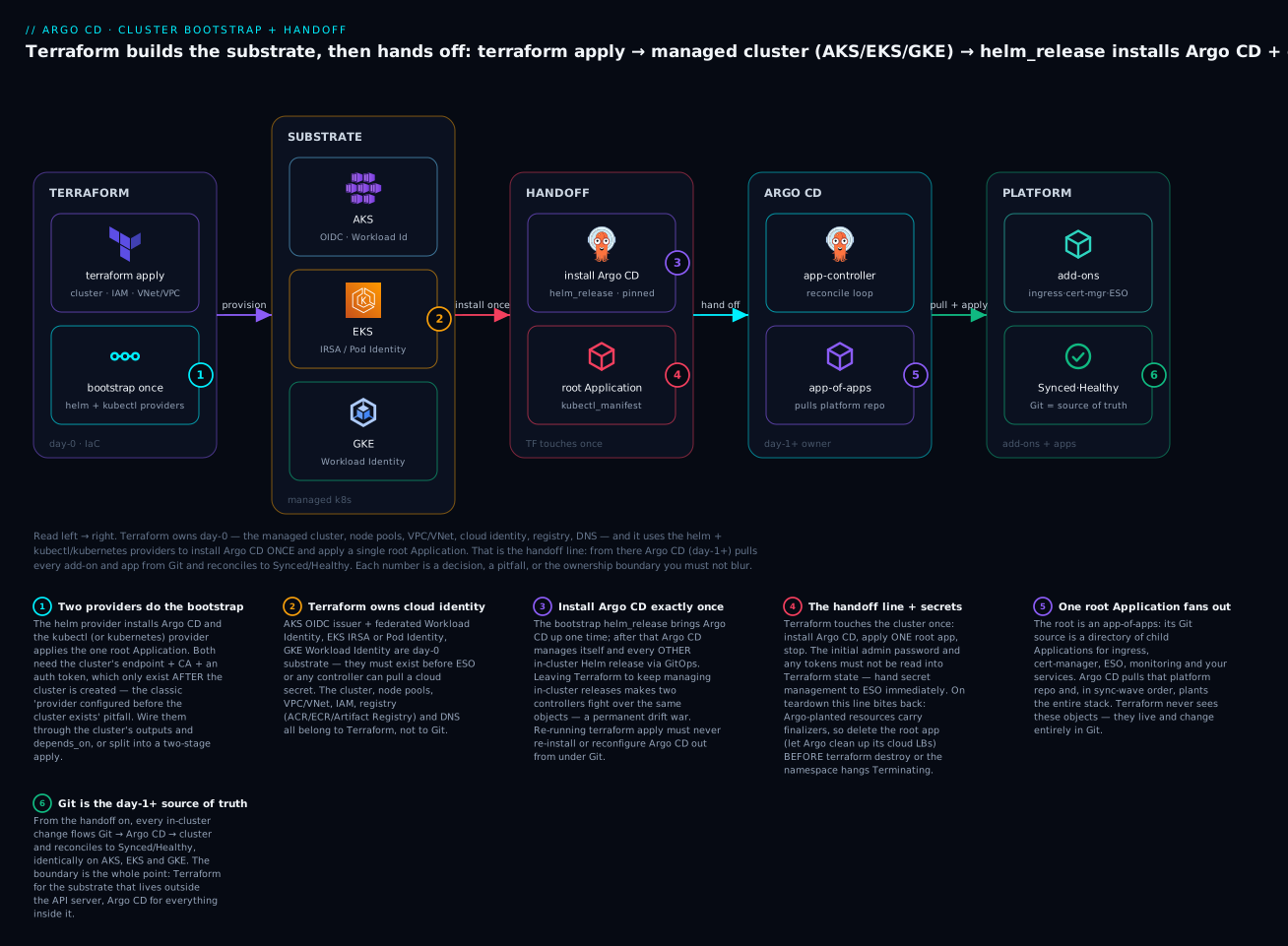
The badges mark where teams get it wrong first: the two-provider bootstrap needs the cluster’s outputs before it can authenticate (1); cloud identity is day-0 substrate Terraform must create before any controller can pull a secret (2); Argo CD is installed exactly once and then self-manages (3); the handoff line is also where secrets must not leak into state and where destroy ordering bites (4); one root Application fans out to the whole platform (5); and from the seam onward, Git is the source of truth (6).
The bootstrap helm_release, exactly
The Argo CD chart is argo-cd from the argoproj.github.io/argo-helm repository. Pin the chart version and understand that it is not the same number as the Argo CD version — the chart’s appVersion is the Argo CD release it installs.
resource "helm_release" "argocd" {
  name             = "argocd"
  namespace        = "argocd"
  create_namespace = true
  repository       = "https://argoproj.github.io/argo-helm"
  chart            = "argo-cd"
  version          = "7.8.2" # CHART version. appVersion pins Argo CD (chart 7.8.x ≈ Argo CD 2.13.x; chart 8.x ≈ Argo CD 3.x)

  # Keep bootstrap values MINIMAL. Real config comes from Git once Argo CD self-manages.
  values = [yamlencode({
    global = { domain = "argocd.example.com" }
    configs = {
      params = { "server.insecure" = true } # terminate TLS at the ingress/LB, not argocd-server
    }
    # HA + metrics + SSO belong in Git, applied by the app-of-apps — not here.
  })]

  # Wait for the CRDs + controllers to be Ready before the root Application is applied.
  wait    = true
  timeout = 600
}
| Field | Value here | Why it matters at bootstrap |
|---|---|---|
chart / repository |
argo-cd / argo-helm |
The official chart; never a random mirror |
version |
pinned (7.8.2) |
Reproducible bootstrap; an unpinned chart makes every apply non-deterministic |
create_namespace |
true |
The argocd namespace must exist before the release |
wait |
true |
Blocks until CRDs + Deployments are Ready, so the next resource can apply an Application |
values |
minimal | Bootstrap installs a plain Argo CD; HA/SSO/RBAC come from Git so they stay GitOps-managed |
The chart version and the Argo CD version are different numbers — pin the chart and read its appVersion to know what you are actually installing:
argo-cd chart version |
appVersion (Argo CD) |
Notes |
|---|---|---|
7.6.x |
~2.12.x | Widely deployed |
7.8.x |
~2.13.x | Used in this lesson |
8.0.x+ |
~3.0.x+ | Argo CD 3.x line; review breaking changes before bumping |
Always pin version; never track latest, or two applies months apart install different Argo CD releases. Check the chart’s appVersion (helm show chart argo/argo-cd) before every bump.
Keep the bootstrap values deliberately thin. The temptation to configure HA, SSO, RBAC, and resource limits right here in Terraform is exactly the drift trap: those settings belong in Git so Argo CD manages them by reconciling its own chart. The bootstrap release should install a working, minimal Argo CD and nothing more.
The one root Application
resource "kubectl_manifest" "argocd_root_app" {
  yaml_body = yamlencode({
    apiVersion = "argoproj.io/v1alpha1"
    kind       = "Application"
    metadata = {
      name       = "root"
      namespace  = "argocd"
      finalizers = ["resources-finalizer.argocd.argoproj.io"]
    }
    spec = {
      project = "default"
      source = {
        repoURL        = "https://github.com/acme/platform-gitops.git"
        targetRevision = "main"
        path           = "bootstrap" # a directory of child Application manifests
      }
      destination = {
        server    = "https://kubernetes.default.svc"
        namespace = "argocd"
      }
      syncPolicy = {
        automated   = { prune = true, selfHeal = true }
        syncOptions = ["CreateNamespace=true"]
      }
    }
  })

  depends_on = [helm_release.argocd] # the Application CRD must exist first
}
That is the entire handoff. depends_on = [helm_release.argocd] guarantees the Application CRD (installed by the chart) exists before Terraform applies an Application. After apply, the argocd-application-controller sees the root, reads the bootstrap/ directory in Git, and creates the child Applications — ingress, cert-manager, ESO, monitoring, your apps — in sync-wave order. Terraform is done touching the cluster.
The Argo CD this bootstraps manages its own cluster (destination https://kubernetes.default.svc). To have that single Argo CD also drive additional AKS/EKS/GKE clusters as spokes, register them as cluster Secrets per Multi-Cluster Registration & Cluster Secrets — the bootstrap in this lesson is the hub half of that story.
The ordering problem: providers that need a cluster that does not exist yet
Here is the pitfall that turns a clean-looking module into a broken one. The helm, kubernetes, and kubectl providers must be configured with the cluster’s API endpoint, CA certificate, and an auth token. But those values are outputs of the cluster resource, which does not exist during the first plan. Terraform evaluates provider configuration blocks in a way that assumes they can be known — and if you feed a provider an attribute that is (known after apply), you get errors ranging from confusing to fatal.
There are two distinct failure modes, and they are not the same problem:
| Failure mode | Trigger | Symptom |
|---|---|---|
| Provider config unknown at plan | Provider host/token references a not-yet-created cluster |
Provider configuration ... depends on resource attributes that cannot be determined until apply |
kubernetes_manifest dry-run at plan |
The official manifest resource does a server-side dry-run during plan |
Failed to construct REST client / cannot create REST mapping — the API/CRD is not reachable yet |
The second one is the killer. hashicorp/kubernetes’s kubernetes_manifest performs a server-side dry-run at plan time to validate the object against the live API. During a from-scratch bootstrap the API server (and the Application CRD) does not exist yet, so plan fails before anything is created. This is precisely why the community uses gavinbunney/kubectl’s kubectl_manifest for bootstrap manifests: it does not require the API or the CRD to be reachable at plan time, so it survives the cold start.
| Behaviour | kubernetes_manifest (hashicorp) |
kubectl_manifest (gavinbunney) |
|---|---|---|
| Validation at plan time | Server-side dry-run against live API | None — renders the raw YAML |
Needs the API reachable at plan |
Yes — fails a cold bootstrap | No |
Needs the CRD to already exist at plan |
Yes — no matches for kind |
No — tolerates a CRD applied later |
| Field-level plan diff | Rich, typed | Coarser (whole-body) |
Right tool for the root Application |
✗ (bootstrap trap) | ✓ (survives cold start) |
| Right tool on an existing cluster | ✓ (better diffs) | ✓ (either works) |
The trade-off is real: kubernetes_manifest gives you better plan diffs once the cluster exists, but it cannot bootstrap one from nothing. For the seed root Application you always want the plan-tolerant kubectl_manifest; reserve kubernetes_manifest for day-2 objects on an already-running cluster (and even then, prefer to let Argo CD own them).
You have three honest strategies to resolve the ordering. Pick based on how much you value a single apply:
| Strategy | How | Trade-off |
|---|---|---|
| Single apply, wired dependencies | Provider config reads cluster outputs; helm_release + kubectl_manifest depends_on the cluster; use kubectl_manifest (plan-tolerant) |
Cleanest UX; works because kubectl provider tolerates unknown-at-plan, but fragile if you add kubernetes_manifest |
| Two-stage apply | Stage 1 root = cluster + IAM + network; Stage 2 root = helm + root Application, reading Stage 1 via terraform_remote_state |
Bulletproof and explicit; two states, two applies, clear blast-radius separation |
| Targeted apply | terraform apply -target=module.cluster first, then a full apply |
A one-off escape hatch, not a workflow; -target is for recovery, not routine |
For anything beyond a demo, two-stage is the professional default, and it doubles as blast-radius control: the substrate state changes rarely and dangerously; the platform-seed state changes more often and safely. The lab uses a wired single-apply for teachability and then shows the stage split. The two stages divide cleanly:
| Stage | State file | Contains | Reads from | Changes how often |
|---|---|---|---|---|
| 1 · substrate | infra.tfstate |
Cluster, node pools, VPC/VNet, IAM/identity, registry, DNS | Cloud provider only | Rarely (cluster upgrades, capacity) |
| 2 · bootstrap | platform.tfstate |
helm_release Argo CD + root Application |
Stage 1 via terraform_remote_state |
Once at birth, then frozen |
Stage 2 consumes Stage 1’s outputs (endpoint, CA, OIDC issuer, IAM role ARNs) through a data "terraform_remote_state" block, so the provider config in Stage 2 is always reading values that already exist — the provider-before-cluster problem simply cannot occur.
Configuring the providers per cloud
The provider blocks differ per cloud only in how they authenticate to the API server. The shape is identical: endpoint + CA + a token via an exec plugin. This is the exec-plugin table you will copy most often.
| Cloud | Endpoint output | CA output | Auth to API server |
|---|---|---|---|
| AKS | azurerm_kubernetes_cluster.this.kube_config[0].host |
...kube_config[0].cluster_ca_certificate |
kubelogin exec plugin (Entra) or client cert from kube_config |
| EKS | module.eks.cluster_endpoint |
module.eks.cluster_certificate_authority_data |
aws eks get-token exec plugin (IAM) |
| GKE | google_container_cluster.this.endpoint |
...master_auth[0].cluster_ca_certificate |
data.google_client_config.default.access_token (ADC) or gke-gcloud-auth-plugin |
# EKS — the exec-plugin pattern (IAM → short-lived token, nothing baked into state)
provider "helm" {
  kubernetes {
    host                   = module.eks.cluster_endpoint
    cluster_ca_certificate = base64decode(module.eks.cluster_certificate_authority_data)
    exec {
      api_version = "client.authentication.k8s.io/v1beta1"
      command     = "aws"
      args        = ["eks", "get-token", "--cluster-name", module.eks.cluster_name]
    }
  }
}

provider "kubectl" {
  host                   = module.eks.cluster_endpoint
  cluster_ca_certificate = base64decode(module.eks.cluster_certificate_authority_data)
  load_config_file       = false
  exec {
    api_version = "client.authentication.k8s.io/v1beta1"
    command     = "aws"
    args        = ["eks", "get-token", "--cluster-name", module.eks.cluster_name]
  }
}
Note the helm provider syntax.
hashicorp/helmv2.x uses the nestedkubernetes { ... }block shown above. v3.0 (2025) changed it to akubernetes = { ... }attribute (an object). Pinhelm = "~> 2.17"to use the syntax in this lesson, or adapt to v3.
Per-cloud bootstrap modules: AKS, EKS, GKE
Now the substrate. Each cloud needs the same five things before the handoff: a managed cluster, node pools, a network, workload identity, and a registry. The resources differ; the shape does not. First, the resource map — the single most useful cross-cloud reference in this lesson:
| Substrate piece | AKS (azurerm v4) | EKS (aws v5 + module) | GKE (google) |
|---|---|---|---|
| Cluster | azurerm_kubernetes_cluster |
module "eks" (terraform-aws-modules/eks/aws) |
google_container_cluster |
| Node pool | default_node_pool + azurerm_kubernetes_cluster_node_pool |
eks_managed_node_groups |
google_container_node_pool |
| Network | azurerm_virtual_network + azurerm_subnet |
module "vpc" (terraform-aws-modules/vpc/aws) |
google_compute_network + google_compute_subnetwork |
| Workload identity | OIDC issuer + azurerm_user_assigned_identity + azurerm_federated_identity_credential |
IRSA (iam-role-for-service-accounts-eks) or EKS Pod Identity |
workload_identity_config + google_service_account + IAM member |
| Registry | azurerm_container_registry |
aws_ecr_repository |
google_artifact_registry_repository |
| Identity → cluster grant | azurerm_role_assignment (AcrPull) |
trust policy on the OIDC provider | google_service_account_iam_member (workloadIdentityUser) |
And the identity story per cloud — the part that lets the in-cluster External Secrets Operator pull from the cloud secret store without a static credential. Terraform creates the cloud half; Argo CD (via the app-of-apps) creates the Kubernetes half.
| AKS | EKS | GKE | |
|---|---|---|---|
| Mechanism | Azure Workload Identity (federated) | IRSA (OIDC) or EKS Pod Identity | GKE Workload Identity |
| Cloud identity | User-assigned managed identity | IAM role | Google service account (GSA) |
| Federation to KSA | azurerm_federated_identity_credential on subject: system:serviceaccount:<ns>:<sa> |
IAM trust policy sub: system:serviceaccount:<ns>:<sa> |
roles/iam.workloadIdentityUser for serviceAccount:<proj>.svc.id.goog[<ns>/<ksa>] |
| Secret store it unlocks | Azure Key Vault | AWS Secrets Manager | Google Secret Manager |
| Registry it unlocks | ACR (AcrPull) | ECR (pull policy) | Artifact Registry (reader) |
The EKS identity model has its own dedicated deep-dive in Argo CD on EKS: IRSA, Secrets Manager, ECR & the ALB; here we cover just enough to bootstrap.
AKS module (azurerm v4)
resource "azurerm_resource_group" "this" {
  name     = "rg-platform-eus"
  location = "eastus"
}

resource "azurerm_kubernetes_cluster" "this" {
  name                = "aks-platform"
  location            = azurerm_resource_group.this.location
  resource_group_name = azurerm_resource_group.this.name
  dns_prefix          = "aksplatform"
  kubernetes_version  = "1.31" # pin; do not float

  default_node_pool {
    name       = "system"
    node_count = 3
    vm_size    = "Standard_D4s_v5"
  }

  identity { type = "SystemAssigned" }

  # The two switches that make in-cluster Workload Identity possible:
  oidc_issuer_enabled       = true
  workload_identity_enabled = true
}

resource "azurerm_container_registry" "this" {
  name                = "acrplatform12345" # globally unique, alphanumeric
  resource_group_name = azurerm_resource_group.this.name
  location            = azurerm_resource_group.this.location
  sku                 = "Standard"
}

# Let the cluster's kubelet identity pull from ACR (no imagePullSecret needed)
resource "azurerm_role_assignment" "acr_pull" {
  scope                = azurerm_container_registry.this.id
  role_definition_name = "AcrPull"
  principal_id         = azurerm_kubernetes_cluster.this.kubelet_identity[0].object_id
}

# --- Workload Identity for the External Secrets Operator (day-0 half) ---
resource "azurerm_user_assigned_identity" "eso" {
  name                = "id-external-secrets"
  resource_group_name = azurerm_resource_group.this.name
  location            = azurerm_resource_group.this.location
}

resource "azurerm_federated_identity_credential" "eso" {
  name                = "fic-external-secrets"
  resource_group_name = azurerm_resource_group.this.name
  parent_id           = azurerm_user_assigned_identity.eso.id
  audience            = ["api://AzureADTokenExchange"]
  issuer              = azurerm_kubernetes_cluster.this.oidc_issuer_url
  subject             = "system:serviceaccount:external-secrets:external-secrets" # <ns>:<ksa>
}
The federated credential is the whole trick: it says “a Kubernetes ServiceAccount named external-secrets in namespace external-secrets, presenting a token signed by this AKS cluster’s OIDC issuer, may act as this managed identity.” ESO — installed later by Argo CD — then reads Key Vault with no stored secret. Terraform builds the cloud half now; the Kubernetes ServiceAccount (annotated with the identity’s client ID) is created by the app-of-apps.
The AKS helm/kubectl provider config uses the client-cert kube_config for a local-admin cluster, or kubelogin for an Entra-only cluster:
provider "helm" {
  kubernetes {
    host                   = azurerm_kubernetes_cluster.this.kube_config[0].host
    cluster_ca_certificate = base64decode(azurerm_kubernetes_cluster.this.kube_config[0].cluster_ca_certificate)
    client_certificate     = base64decode(azurerm_kubernetes_cluster.this.kube_config[0].client_certificate)
    client_key             = base64decode(azurerm_kubernetes_cluster.this.kube_config[0].client_key)
  }
}
For a hardened AKS cluster with local accounts disabled (
local_account_disabled = true),kube_configreturns no client cert — switch to anexecblock callingkubelogin get-token, mirroring the EKS pattern.
EKS module (aws v5 + terraform-aws-modules)
module "vpc" {
  source  = "terraform-aws-modules/vpc/aws"
  version = "~> 5.0"

  name = "vpc-platform"
  cidr = "10.0.0.0/16"

  azs             = ["us-east-1a", "us-east-1b", "us-east-1c"]
  private_subnets = ["10.0.1.0/24", "10.0.2.0/24", "10.0.3.0/24"]
  public_subnets  = ["10.0.101.0/24", "10.0.102.0/24", "10.0.103.0/24"]

  enable_nat_gateway = true # ⚠️ NAT gateways bill per-hour + per-GB
  single_nat_gateway = true # one NAT for a non-prod platform; use one-per-AZ in prod
}

module "eks" {
  source  = "terraform-aws-modules/eks/aws"
  version = "~> 20.0"

  cluster_name    = "eks-platform"
  cluster_version = "1.31" # pin

  vpc_id     = module.vpc.vpc_id
  subnet_ids = module.vpc.private_subnets

  enable_irsa                    = true # OIDC provider for IRSA
  cluster_endpoint_public_access = true # ⚠️ demo only; use private access in prod

  eks_managed_node_groups = {
    system = {
      instance_types = ["m6i.large"]
      min_size       = 2
      max_size       = 5
      desired_size   = 3
    }
  }
}

resource "aws_ecr_repository" "app" {
  name                 = "platform/app"
  image_tag_mutability = "IMMUTABLE"
  image_scanning_configuration { scan_on_push = true }
}

# --- IRSA role for the External Secrets Operator (day-0 half) ---
module "eso_irsa" {
  source  = "terraform-aws-modules/iam/aws//modules/iam-role-for-service-accounts-eks"
  version = "~> 5.0"

  role_name                      = "external-secrets"
  attach_external_secrets_policy = true

  oidc_providers = {
    main = {
      provider_arn               = module.eks.oidc_provider_arn
      namespace_service_accounts = ["external-secrets:external-secrets"] # <ns>:<ksa>
    }
  }
}
The iam-role-for-service-accounts-eks submodule wires the OIDC trust policy so the external-secrets ServiceAccount can assume the role — the IRSA half of the same “in-cluster controller reads a cloud secret store” story. EKS Pod Identity is the newer, GA alternative that drops the OIDC trust dance for an aws_eks_pod_identity_association; IRSA remains the widely deployed default and is fine to bootstrap with.
GKE module (google, current)
resource "google_compute_network" "this" {
  name                    = "vpc-platform"
  auto_create_subnetworks = false
}

resource "google_compute_subnetwork" "this" {
  name          = "subnet-platform"
  region        = "us-central1"
  network       = google_compute_network.this.id
  ip_cidr_range = "10.0.0.0/20"

  secondary_ip_range { # required for VPC-native (Alias IP) clusters
    range_name    = "pods"
    ip_cidr_range = "10.4.0.0/14"
  }
  secondary_ip_range {
    range_name    = "services"
    ip_cidr_range = "10.8.0.0/20"
  }
}

resource "google_container_cluster" "this" {
  name     = "gke-platform"
  location = "us-central1"

  network    = google_compute_network.this.id
  subnetwork = google_compute_subnetwork.this.id

  remove_default_node_pool = true
  initial_node_count       = 1
  deletion_protection      = false # ⚠️ set true in prod; blocks accidental destroy

  # The switch that makes in-cluster Workload Identity possible:
  workload_identity_config { workload_pool = "my-project.svc.id.goog" }

  ip_allocation_policy {
    cluster_secondary_range_name  = "pods"
    services_secondary_range_name = "services"
  }
}

resource "google_container_node_pool" "system" {
  name       = "system"
  cluster    = google_container_cluster.this.id
  node_count = 3

  node_config {
    machine_type    = "e2-standard-4"
    workload_metadata_config { mode = "GKE_METADATA" } # enables WI on the nodes
  }
}

resource "google_artifact_registry_repository" "app" {
  location      = "us-central1"
  repository_id = "platform"
  format        = "DOCKER"
}

# --- Workload Identity for the External Secrets Operator (day-0 half) ---
resource "google_service_account" "eso" {
  account_id   = "external-secrets"
  display_name = "External Secrets Operator"
}

resource "google_service_account_iam_member" "eso_wi" {
  service_account_id = google_service_account.eso.name
  role               = "roles/iam.workloadIdentityUser"
  member             = "serviceAccount:my-project.svc.id.goog[external-secrets/external-secrets]" # [<ns>/<ksa>]
}

resource "google_project_iam_member" "eso_secrets" {
  project = "my-project"
  role    = "roles/secretmanager.secretAccessor"
  member  = "serviceAccount:${google_service_account.eso.email}"
}
The GKE provider config uses the ADC access token rather than an exec plugin, which is the simplest of the three:
data "google_client_config" "default" {}

provider "helm" {
  kubernetes {
    host                   = "https://${google_container_cluster.this.endpoint}"
    cluster_ca_certificate = base64decode(google_container_cluster.this.master_auth[0].cluster_ca_certificate)
    token                  = data.google_client_config.default.access_token
  }
}
The registry and load-balancer edges
Two more cloud edges show up in bootstrap because add-ons depend on them. The registry is pure day-0 (Terraform). The load balancer is a split: the controller is an in-cluster add-on (Argo CD), but it often needs a cloud IAM grant that is day-0 (Terraform).
| Edge | AKS | EKS | GKE |
|---|---|---|---|
| Registry (Terraform) | ACR + AcrPull role to kubelet identity |
ECR + pull policy | Artifact Registry + reader role |
| Ingress data plane | Application Gateway (AGIC) or ingress-nginx + Azure LB | ALB via AWS Load Balancer Controller | GCLB via GKE Ingress or ingress-nginx + Network LB |
| LB controller identity (Terraform half) | AGIC managed identity / WI federation | IAM policy + IRSA for aws-load-balancer-controller SA |
WI for the GKE ingress controller SA |
| LB controller install (Argo CD half) | app-of-apps child | app-of-apps child | app-of-apps child |
State, secrets, idempotency, and teardown
The handoff line is also a security and lifecycle line, and three things go wrong there if you are careless.
Never let secrets land in Terraform state
Terraform state is a plaintext JSON file. Every attribute of every resource and data source is stored in it verbatim — including secret values. The classic mistake is reading Argo CD’s initial admin password so you can print it:
# ANTI-PATTERN — do not do this. The password is now in state and in plan output.
data "kubernetes_secret" "argocd_admin" {
  metadata {
    name      = "argocd-initial-admin-secret"
    namespace = "argocd"
  }
}
output "argocd_password" { value = data.kubernetes_secret.argocd_admin.data["password"] } # leaked
| What leaks into state | How it gets there | Do this instead |
|---|---|---|
| Argo CD admin password | data "kubernetes_secret" + output |
Retrieve out-of-band with kubectl; disable the admin account once SSO is up |
| Cloud secret-store values | Reading Key Vault/Secrets Manager/Secret Manager into TF | Let ESO pull them at runtime; Terraform only grants identity |
| Git/registry tokens for repo creds | Passing tokens as TF variables into a Secret |
Provision the identity; let ESO or a bootstrap SealedSecret carry the token |
| TLS private keys | Generating certs in TF | Let cert-manager mint them in-cluster |
The rule: Terraform provisions identity and grants; it never handles the secret values themselves. The moment the cluster is up, secret management is ESO’s job — it pulls from the cloud store (Key Vault / Secrets Manager / Secret Manager) at runtime via the workload identity Terraform just created, so no secret value ever passes through Terraform at all. Beyond that, encrypt the state backend at rest and lock it, because even “no secrets” state reveals your whole topology:
| Cloud | State backend | Encryption at rest | Locking |
|---|---|---|---|
| Azure | azurerm (Storage container) |
SSE, optionally customer-managed key (CMK) | Native blob lease (built into the backend) |
| AWS | s3 |
SSE-S3 or SSE-KMS (customer key) | S3 native lock (use_lockfile) or DynamoDB table |
| GCP | gcs |
Google-managed or CMEK | Native GCS object locking (built in) |
Idempotency and drift
Terraform for the substrate is idempotent by construction: a second apply with no config change is a no-op Plan: 0 to add, 0 to change, 0 to destroy. The drift you must prevent is ownership drift — Terraform re-managing something Argo CD now owns. Two safeguards:
| Safeguard | Mechanism | Effect |
|---|---|---|
| Minimal bootstrap values | Argo CD chart values in TF stay thin; real config in Git | apply cannot revert Argo CD’s self-managed HA/SSO/RBAC |
ignore_changes on the seed |
lifecycle { ignore_changes = all } on kubectl_manifest.argocd_root_app after first apply |
Argo CD may mutate the root app’s status/annotations without TF fighting it |
The lifecycle { ignore_changes = all } on the root Application deserves emphasis: once Argo CD owns the root app, Argo CD writes to it (status, operation state, argocd.argoproj.io/* annotations). If Terraform keeps reconciling the root app’s full spec, the two can flap. Applying the seed once and then ignoring changes is the clean way to say “Terraform planted this; Argo CD owns it now.”
Teardown: destroy ordering and the finalizer trap
Destroying a GitOps cluster is where the boundary bites back, because Argo CD created resources that Terraform does not know about — including cloud load balancers and disks that keep billing after the cluster is gone. Two ordering hazards:
- Argo CD finalizers wedge namespace deletion. Applications carry
resources-finalizer.argocd.argoproj.io. If youterraform destroyand it removes the Argo CD controllers before the Applications are cleaned up, nothing is left to process the finalizers — theargocdnamespace and app namespaces hangTerminatingforever. - Orphaned cloud resources. The ingress controller Argo CD installed provisioned an ALB/App Gateway/GCLB and public IPs. Those are cloud resources not in Terraform state. Destroy the cluster and they leak — you pay for load balancers pointing at nothing.
The correct teardown order reverses the bootstrap:
| Step | Action | Why |
|---|---|---|
| 1 | argocd app delete root --cascade (or delete the root Application) |
Argo CD tears down all children and their cloud LBs/PVs first |
| 2 | Wait for app namespaces to fully delete | Confirms finalizers ran and cloud resources were released |
| 3 | terraform destroy |
Now the substrate has nothing depending on it; no orphans |
You can encode step 1 as a destroy-time hook so terraform destroy does it for you:
resource "null_resource" "argocd_teardown" {
  # Runs BEFORE helm_release.argocd is destroyed, deleting Argo-managed apps first.
  triggers = { cluster = module.eks.cluster_name }
  provisioner "local-exec" {
    when    = destroy
    command = "kubectl delete applications --all -n argocd --cascade=foreground --timeout=300s || true"
  }
  depends_on = [helm_release.argocd]
}
The safer production teardown keeps step 1 a manual, verified action, not an automatic destroy hook. Deleting all Applications is exactly as destructive as it sounds; you want a human to confirm the cloud LBs actually released before Terraform removes the cluster underneath them.
Hands-on lab
You will build a real bootstrap module (config-level — we do not run a live apply here, and every step flags what would bill) that (1) creates an EKS cluster, (2) installs Argo CD via helm_release, (3) applies the root app-of-apps Application, and then you will lay out the platform repo the root app points at. EKS is the worked example; the AKS and GKE substrate blocks above are drop-in replacements for step 2.
⚠️ This lab describes real billable infrastructure. An EKS control plane, three
m6i.largenodes, a NAT gateway, and any load balancers the platform creates all cost money. Read it as a buildable reference; onlyapplyin an account you can afford and will tear down. Nothing here has been run against a live cluster.
The billable pieces to watch — and their equivalents on the other two clouds — so nothing silently accrues:
| Billable item | AKS | EKS | GKE |
|---|---|---|---|
| Control plane hours | Free tier or Standard (paid uptime SLA) | Per-cluster/hour | Per-cluster/hour (one zonal cluster free per billing account) |
| Worker nodes | VM sizes (Standard_D4s_v5) |
EC2 (m6i.large) |
Compute Engine (e2-standard-4) |
| Egress NAT | NAT Gateway (hour + GB) | NAT Gateway (hour + GB) | Cloud NAT (hour + GB) |
| Platform-created LBs ⚠️ | Azure LB / App Gateway | ELB/ALB via LB Controller | Network LB / GCLB |
| Registry storage | ACR | ECR | Artifact Registry |
The load-balancer row carries the ⚠️ because those are created by Argo CD (the ingress controller), not Terraform — which is exactly why teardown order matters (step 9): destroy the cluster first and those LBs orphan and keep billing.
Step 1 — Pin every provider. Reproducibility starts here.
# versions.tf
terraform {
  required_version = ">= 1.6"
  required_providers {
    aws        = { source = "hashicorp/aws", version = "~> 5.0" }
    helm       = { source = "hashicorp/helm", version = "~> 2.17" }
    kubernetes = { source = "hashicorp/kubernetes", version = "~> 2.33" }
    kubectl    = { source = "gavinbunney/kubectl", version = "~> 1.19" }
  }
}

provider "aws" { region = "us-east-1" }
What just happened: you locked the provider majors so plan is deterministic. helm ~> 2.17 keeps the nested kubernetes {} block syntax; gavinbunney/kubectl gives you the plan-tolerant kubectl_manifest.
Step 2 — The substrate. Use the VPC + EKS + ECR + IRSA blocks from the EKS module section above (main.tf). These create the cluster, node group, network, registry, and the ESO IAM role.
What just happened: Terraform now owns everything below the seam. module.eks also creates the OIDC provider that IRSA needs.
Step 3 — Wire the providers to the cluster outputs. Add the helm and kubectl provider blocks from the exec-plugin section above (they read module.eks.cluster_endpoint, the CA, and shell out to aws eks get-token).
What just happened: the providers can now authenticate to the API server — but only after the cluster exists, which is why the next resources use depends_on.
Step 4 — Install Argo CD. Add the helm_release.argocd from the bootstrap-release section (argocd.tf), with wait = true.
What just happened: when applied, this installs Argo CD’s CRDs and controllers into the argocd namespace and blocks until they are Ready — so the root Application in the next step has a CRD to be validated against.
Step 5 — Apply the one root Application. Add the kubectl_manifest.argocd_root_app from the root-Application section, with depends_on = [helm_release.argocd] and pointing repoURL at your platform repo.
What just happened: this is the handoff. After apply, Argo CD reads bootstrap/ in Git and starts creating children. Terraform will never touch the cluster again.
Step 6 — Lay out the platform repo the root app points at. The root’s path: bootstrap is a directory of child Applications — this is what Argo CD pulls.
platform-gitops/
  bootstrap/
    00-namespaces.yaml        # sync-wave -3: namespaces + quotas (Application)
    10-cert-manager.yaml      # sync-wave -2: cert-manager (Application)
    10-external-secrets.yaml  # sync-wave -2: ESO (Application)
    20-ingress-nginx.yaml     # sync-wave -1: ingress controller (Application)
    30-monitoring.yaml        # sync-wave  0: kube-prometheus-stack (Application)
    40-apps.yaml              # sync-wave  1: your workloads (ApplicationSet)
  addons/
    cert-manager/             # Helm value overlays per add-on
    external-secrets/
    ingress-nginx/
The waves are not arbitrary — each add-on depends on something in an earlier wave, which is why the app-of-apps gates them in order:
| Wave | Child app | Depends on | Why this order |
|---|---|---|---|
| -3 | namespaces + quotas | nothing | Everything else deploys into these namespaces |
| -2 | cert-manager | namespaces | Issues TLS certs other add-ons’ webhooks need |
| -2 | external-secrets (ESO) | namespaces + the day-0 identity Terraform made | Pulls cloud secrets before workloads that consume them |
| -1 | ingress-nginx | cert-manager (for its TLS) | Exposes services once certs can be minted |
| 0 | kube-prometheus-stack | namespaces | Monitoring can lag the platform coming up |
| 1 | your workloads (ApplicationSet) | all of the above | Apps need ingress, secrets, and certs already present |
A representative child — External Secrets, wired to the IRSA role Terraform created:
# bootstrap/10-external-secrets.yaml
apiVersion: argoproj.io/v1alpha1
kind: Application
metadata:
  name: external-secrets
  namespace: argocd
  annotations:
    argocd.argoproj.io/sync-wave: "-2"
spec:
  project: default
  source:
    repoURL: https://charts.external-secrets.io
    chart: external-secrets
    targetRevision: 0.10.4
    helm:
      values: |
        installCRDs: true
        serviceAccount:
          annotations:
            eks.amazonaws.com/role-arn: arn:aws:iam::111122223333:role/external-secrets # from TF output
  destination:
    server: https://kubernetes.default.svc
    namespace: external-secrets
  syncPolicy:
    automated: { prune: true, selfHeal: true }
    syncOptions: ["CreateNamespace=true"]
What just happened: the ServiceAccount annotation ties the in-cluster ESO to the IAM role Terraform built in step 2 — the two halves of workload identity meet here, with no static credential anywhere. Argo CD applies the child in sync-wave -2, before workloads that need secrets.
Step 7 — Inspect the plan (representative). A real terraform plan for this module summarises like the abridged output below.
# terraform plan  — representative, abridged
Terraform will perform the following actions:

  # module.vpc.aws_vpc.this[0] will be created
  # module.eks.aws_eks_cluster.this[0] will be created
  # module.eks.aws_iam_openid_connect_provider.oidc_provider[0] will be created
  # module.eks.module.eks_managed_node_group["system"]... will be created
  # aws_ecr_repository.app will be created
  # module.eso_irsa.aws_iam_role.this[0] will be created
  # helm_release.argocd will be created
  # kubectl_manifest.argocd_root_app will be created

Plan: 63 to add, 0 to change, 0 to destroy.

Changes to Outputs:
  + cluster_name = "eks-platform"
What just happened: one plan builds the whole substrate and the two handoff resources. Notice helm_release.argocd and kubectl_manifest.argocd_root_app are the only two of 63 resources that touch inside the cluster — the ratio is the boundary.
Step 8 — Verify the handoff (post-apply commands). After a real apply you would confirm Argo CD took over:
# Argo CD is up
kubectl get pods -n argocd
# NAME                                  READY   STATUS    RESTARTS   AGE
# argocd-application-controller-0        1/1     Running   0          3m
# argocd-repo-server-...                 1/1     Running   0          3m
# argocd-server-...                      1/1     Running   0          3m

# The root took over and planted the children
kubectl get applications -n argocd
# NAME               SYNC STATUS   HEALTH STATUS
# root               Synced        Healthy
# cert-manager       Synced        Healthy
# external-secrets   Synced        Healthy
# ingress-nginx      Synced        Healthy
What just happened: root is Synced/Healthy and it created the children — proof that Terraform’s single seed grew the whole platform via Git. Terraform’s work is done.
Step 9 — Teardown (the ordering that matters).
# 1. Let Argo CD tear down its apps + their cloud LBs FIRST
kubectl delete applications --all -n argocd --cascade=foreground --timeout=300s

# 2. Confirm app namespaces fully deleted (finalizers ran, LBs released)
kubectl get ns

# 3. Only now destroy the substrate
terraform destroy
What just happened: deleting the Applications first let Argo CD release the cloud load balancers it created (which Terraform never tracked), so terraform destroy does not leave orphaned, billing LBs behind, and no namespace hangs Terminating on an unprocessable finalizer.
Common mistakes and troubleshooting
| Symptom | Cause | Fix |
|---|---|---|
Provider configuration ... cannot be determined until apply |
Provider host/token references a not-yet-created cluster |
Split into a two-stage apply, or terraform apply -target=module.eks first |
plan fails: Failed to construct REST client / no matches for kind Application |
kubernetes_manifest does a server-side dry-run at plan; API/CRD not there yet |
Use gavinbunney/kubectl’s kubectl_manifest for the root Application |
Every plan shows drift on ingress-nginx / cert-manager |
Terraform helm_release and an Argo Application both manage it |
Remove it from Terraform; let the app-of-apps own it (one owner per object) |
| Argo CD admin password visible in state / CI logs | data "kubernetes_secret" + output read the secret into state |
Never read it into TF; fetch via kubectl out-of-band; disable admin after SSO |
terraform destroy hangs; namespace stuck Terminating |
Controllers removed before Applications; finalizers cannot run | Delete Applications first (--cascade=foreground), then destroy |
| Orphaned ALB/App Gateway/GCLB billing after destroy | Argo-created cloud LBs not in TF state | Delete the ingress Application first so Argo releases the LB, then destroy |
helm_release.argocd times out context deadline exceeded |
Provider cannot auth to the API (exec plugin missing/wrong) | Ensure aws/kubelogin/gke-gcloud-auth-plugin is on PATH; check endpoint/CA outputs |
Re-running apply reverts Argo CD’s HA/SSO config |
Bootstrap helm_release values fight Argo CD’s self-managed chart |
Keep bootstrap values minimal; move real config to Git; ignore_changes on the seed |
Root Application ComparisonError: repo not accessible |
repoURL unreachable/private, or creds not yet present |
Verify the repo URL; add repo creds as a bootstrap Secret before/with the root app |
ESO pods CreateContainerConfigError / cannot pull secret |
Cloud identity (WI/IRSA) not created before ESO synced | Terraform must create the federated identity/role before the ESO child syncs |
| Node group not Ready before add-ons schedule | Add-ons synced onto a cluster with no schedulable nodes | helm_release wait = true + node group as an explicit dependency of the release |
Three gotchas cost the most hours, so give them extra words.
1. kubernetes_manifest at plan time is a bootstrap trap. The official hashicorp/kubernetes provider validates a kubernetes_manifest against the live API during plan via a server-side dry-run. That is a fine safety feature on an existing cluster and a fatal one during a from-scratch bootstrap, because the API server (and the Application CRD) does not exist yet — plan dies before apply can create anything. The entire community works around this with gavinbunney/kubectl (or the alekc/kubectl fork), whose kubectl_manifest does not dry-run at plan and so tolerates a CRD that will only exist after the Helm release. If you ever see no matches for kind "Application" in group "argoproj.io" at plan time, this is your problem, and switching the resource type is the fix.
2. The drift war has no configuration fix — only an ownership fix. When both Terraform and Argo CD manage one object, no ignore_changes, no syncOptions, no annotation makes them agree, because each is a full reconciler with its own source of truth. The only resolution is to remove one owner. In practice that means: audit your Terraform for any helm_release or kubernetes_manifest that is not the Argo CD bootstrap seed, and delete it, moving the workload into the app-of-apps. A useful test: if a terraform plan on a healthy, unchanged platform shows any in-cluster resource wanting to change, you have an ownership leak.
3. Destroy order is not optional. The instinct is terraform destroy and walk away. But Terraform only knows about the substrate; it has no idea Argo CD provisioned a public-facing ALB and three Elastic IPs through the load-balancer controller. Destroy the cluster first and those cloud resources are orphaned — still allocated, still billing, now un-owned by any tool. Worse, if the controllers die before the Applications are finalized, namespaces wedge in Terminating and you are hand-editing finalizers off objects. Always drain Argo CD first (delete the root app, let it cascade and release cloud LBs), confirm the namespaces are gone, then destroy.
Cheat-sheet
The boundary, as a decision rule you can apply to any new concern:
| If the thing… | It is owned by | Example |
|---|---|---|
| Lives in the cloud control plane (outside the K8s API) | Terraform | Cluster, node pool, VPC, IAM, registry, DNS zone |
| Is the first install of Argo CD or the one root app | Terraform (seed only) | helm_release.argocd, kubectl_manifest root Application |
| Lives inside the K8s API (any Kubernetes object) | Argo CD | Ingress, cert-manager, ESO, monitoring, namespaces, your apps |
| Is a secret value | Neither in plaintext | ESO pulls from Key Vault/Secrets Manager/Secret Manager via WI/IRSA |
The bootstrap module skeleton, top to bottom:
| Order | Resource | Purpose |
|---|---|---|
| 1 | required_providers (aws/azurerm/google + helm + kubernetes + kubectl) |
Pin everything |
| 2 | Cluster + node pool + network + registry | The substrate |
| 3 | Workload identity (federated cred / IRSA role / WI binding) | Day-0 identity for in-cluster controllers |
| 4 | provider "helm" / provider "kubectl" wired to cluster outputs (exec plugin) |
Auth to the new API server |
| 5 | helm_release "argocd" (wait = true, minimal values) |
Install Argo CD once |
| 6 | kubectl_manifest root Application (depends_on the release) |
The handoff seed |
| 7 | null_resource destroy hook (optional) |
Delete apps before teardown |
Commands you will actually run:
| Command | What it does |
|---|---|
terraform apply -target=module.eks |
Create the cluster first (ordering escape hatch) |
terraform apply |
Full bootstrap: substrate + Argo CD + root app |
kubectl get applications -n argocd |
Confirm the root planted the children |
argocd app get root |
Inspect the app-of-apps status |
kubectl get secret argocd-initial-admin-secret -n argocd -o jsonpath='{.data.password}' | base64 -d |
Fetch the initial admin password out-of-band (do NOT put in TF) |
kubectl delete applications --all -n argocd --cascade=foreground |
Drain Argo CD before destroy |
terraform destroy |
Remove the substrate (only after Argo CD drained) |
Provider version anchors used in this lesson:
| Provider | Version | Note |
|---|---|---|
hashicorp/azurerm |
~> 4.0 |
AKS resources, federated identity |
hashicorp/aws |
~> 5.0 |
EKS via terraform-aws-modules/eks/aws ~> 20.0 |
hashicorp/google |
~> 6.0 |
GKE, Workload Identity, Artifact Registry |
hashicorp/helm |
~> 2.17 |
Nested kubernetes {} block (v3 changed to an attribute) |
hashicorp/kubernetes |
~> 2.33 |
Namespaces/data; avoid kubernetes_manifest at bootstrap |
gavinbunney/kubectl |
~> 1.19 |
Plan-tolerant kubectl_manifest; or alekc/kubectl fork |
Interview and exam questions
Q: Where is the line between what Terraform manages and what Argo CD manages? A: The Kubernetes API boundary. Anything in the cloud control plane — the managed cluster, node pools, VPC/VNet, IAM/workload identity, registry, DNS — is Terraform’s (day-0 substrate). Anything inside the cluster — controllers, add-ons, namespaces, your workloads — is Argo CD’s (day-1+), reconciled from Git. The one exception is the bootstrap: Terraform installs Argo CD once and applies a single root Application, then hands off.
Q: Why not just manage the ingress controller and cert-manager with Terraform’s helm_release?
A: Because Argo CD will also want to manage them from Git, and two reconcilers over one object means a permanent drift war — each sees the other’s writes as drift and reverts them. There is no config that reconciles two sources of truth; the fix is one owner per object. In-cluster Helm releases belong to Argo CD.
Q: What is the “provider configured before the cluster exists” problem, and how do you avoid it?
A: The helm/kubernetes/kubectl providers need the cluster’s endpoint, CA, and a token to authenticate — but those are outputs of a resource that does not exist at the first plan. You avoid it with a two-stage apply (cluster in stage 1, Argo CD + root app in stage 2 reading stage 1 via remote state), or a -target apply of the cluster first, or a single apply that wires provider config to cluster outputs and uses the plan-tolerant kubectl_manifest.
Q: Why use gavinbunney/kubectl’s kubectl_manifest instead of hashicorp/kubernetes’s kubernetes_manifest for the root Application?
A: kubernetes_manifest performs a server-side dry-run at plan time to validate against the live API. During a from-scratch bootstrap the API server and the Application CRD do not exist yet, so plan fails. kubectl_manifest does not dry-run at plan, so it tolerates a CRD that only appears after the Helm release installs it.
Q: How does an in-cluster External Secrets Operator read a cloud secret store without a stored credential, and who sets that up?
A: Workload identity. Terraform (day-0) creates the cloud half — an AKS federated identity credential, an EKS IRSA role/trust policy, or a GKE Workload Identity binding — scoped to the external-secrets ServiceAccount. Argo CD (day-1) installs ESO with that ServiceAccount annotated to assume the identity. The two halves meet with no static secret anywhere.
Q: Why must secrets never land in Terraform state, and what is the correct pattern?
A: State is plaintext JSON; any value read into a resource, data source, or output is stored verbatim and shows up in plan logs. So Terraform provisions identity and grants, never secret values. Argo CD’s admin password is fetched out-of-band with kubectl (then the admin account is disabled once SSO is up); application secrets are pulled at runtime by ESO from the cloud store via the workload identity Terraform created.
Q: Your terraform destroy hangs with a namespace stuck Terminating. What happened and what is the right order?
A: Terraform removed the Argo CD controllers before the Applications were finalized, so nothing is left to process the resources-finalizer.argocd.argoproj.io finalizers. The right order reverses the bootstrap: delete the root Application first (--cascade=foreground) so Argo CD tears down children and releases the cloud LBs it created, confirm the namespaces are gone, then terraform destroy the substrate.
Q: After a clean bootstrap, a colleague runs terraform plan on the unchanged platform and it wants to change three in-cluster resources. What does that tell you?
A: An ownership leak — Terraform is still managing objects Argo CD now owns. On a healthy platform, plan should be a no-op for everything inside the cluster except the untouched bootstrap seed. The fix is to remove those helm_release/kubernetes_manifest resources from Terraform and move them into the app-of-apps.
Q: Why keep the bootstrap helm_release values minimal instead of configuring HA and SSO there?
A: Because Argo CD should self-manage its own chart from Git after bootstrap. If HA/SSO/RBAC live in the Terraform values, every apply fights Argo CD’s Git-managed config and login/SSO breaks intermittently. Terraform installs a minimal, working Argo CD; the real config is an app-of-apps child so it stays GitOps-managed.
Q: Compare the workload-identity mechanism across AKS, EKS, and GKE at a high level.
A: All three federate a Kubernetes ServiceAccount to a cloud identity via the cluster’s OIDC issuer. AKS uses a user-assigned managed identity with an azurerm_federated_identity_credential on the SA subject. EKS uses IRSA (an IAM role whose trust policy matches the SA’s OIDC subject) or the newer Pod Identity association. GKE uses a Google service account bound with roles/iam.workloadIdentityUser to PROJECT.svc.id.goog[ns/ksa]. Terraform creates the cloud side; Argo CD annotates the SA.
Q: What does “Terraform touches the cluster exactly once” actually mean in resources?
A: Two resources reach inside the API server: the helm_release that installs Argo CD and the kubectl_manifest that applies the single root Application. Everything else in the module is cloud substrate. After those two, no Terraform resource ever modifies an in-cluster object again — the only path to change is a Git commit.
Q: When is a two-stage apply worth the extra state file versus a single wired apply? A: Whenever the platform is more than a demo. Two stages give bulletproof ordering (no provider-before-cluster fragility) and blast-radius separation: the substrate state changes rarely and dangerously, the platform-seed state changes more often and safely. A single wired apply is fine for teaching and small setups but couples cluster and bootstrap into one risky plan.
Key takeaways
- The boundary is the Kubernetes API. Terraform owns everything outside it (cluster, node pools, network, IAM, registry, DNS) — the day-0 substrate; Argo CD owns everything inside it (controllers, add-ons, your apps) — day-1+, from Git.
- Terraform touches the cluster exactly once. Its only two in-cluster resources are the
helm_releasethat installs Argo CD and thekubectl_manifestthat applies one rootApplication(the app-of-apps). Then it hands off and never touches the cluster again. - Never let two tools own one object. A
helm_releasein Terraform and anApplicationin Argo CD for the same thing is a permanent drift war with no config fix — remove one owner. - Solve the provider-before-cluster ordering with a two-stage apply (professional default) or a wired single apply, and use
gavinbunney/kubectl’s plan-tolerantkubectl_manifestfor the root app so a not-yet-existing CRD does not breakplan. - Keep secrets out of state. Terraform provisions identity and grants (AKS federated creds, EKS IRSA, GKE Workload Identity); ESO pulls the actual secret values at runtime. Never read the Argo CD admin password into an output.
- The three clouds differ only at the edges. Same shape — cluster, node pool, network, workload identity, registry — with
azurerm_kubernetes_cluster/terraform-aws-modules/eks/google_container_clusterand per-cloud identity and exec-plugin auth. - Destroy in reverse. Delete Argo CD’s Applications first so it releases the cloud LBs it created and finalizers can run, confirm namespaces are gone, then
terraform destroy— or you leak billing load balancers and wedge namespaces inTerminating.