Every earlier lesson quietly assumed a thing that is almost never true in a serious enterprise: that the hub could reach the cluster it was deploying to. On a demo cluster, on kind, on a public EKS endpoint, the hub dials the Kubernetes API server over the internet and it just works. Then you take the same Argo CD to production and it stops dead, because production clusters do the responsible thing — they turn the public API endpoint off. The control plane has no internet-facing address at all. And a hub Argo CD is, at its core, a client that pulls by opening a TCP connection to each spoke’s API server. No address it can reach means no sync, no matter how perfect your manifests are.
This is the single hardest, least-taught part of enterprise GitOps, and it is pure networking. Not YAML, not RBAC, not Helm — routing, DNS, and firewalls. The multi-cluster registration lesson taught you how the hub stores a spoke and how it authenticates to it; it deliberately left one line unaddressed: “the hub must reach the API server… private connectivity is a deeper topic to plan separately.” This is that topic. By the end you will know the two ways to solve it, the exact per-cloud mechanisms for private control planes on AKS, EKS and GKE, why DNS is the failure that bites everyone first, and how to design a hub that reaches a private spoke without ever exposing an API server to the internet.
No cluster on the bench. This lesson designs and configures against real cloud APIs and Argo CD schemas; the outputs shown are representative shapes, not a live capture from your account. Anything that bills — private endpoints, NAT gateways, Transit Gateways, VPN gateways, cross-cloud interconnects — is flagged with ⚠️. Read the config, understand the path, then build it in your own network.
Why this matters
Argo CD’s reconciliation model is pull-based from the hub’s point of view but client-initiated at the wire. The application-controller wakes up, and for every Application targeting a spoke it opens an HTTPS connection to that spoke’s Kubernetes API server, lists the live objects, diffs them against the desired state, and (if auto-sync is on) applies the difference. That connection is an ordinary outbound TCP dial from the hub to https://<api-server>:443. Everything Argo CD does to a spoke rides on it.
So the moment a spoke’s API server has no public endpoint, the hub is holding valid credentials to a server it cannot route a single packet to. Registration succeeds — writing a cluster Secret never touches the network — and then every sync fails with dial tcp …: i/o timeout. This is the trap that catches teams who tested on public clusters: the Argo CD config is flawless, the failure is one network layer below anything Argo CD controls.
There is a second, quieter dependency that private networking also breaks. Argo CD’s repo-server (which lives on the hub) must reach Git and any referenced Helm/OCI registries to render manifests; the cloud exec auth plugins must reach the cloud’s IAM/token endpoints to mint a token; and inside each spoke, workloads must pull container images and operators like External Secrets must reach their secret stores. Lock a cluster down for security and you can accidentally sever any of these. A working private setup is not one path but a small bundle of paths, each with its own direction and its own firewall.
Hold this mental model for the whole lesson: a private cluster changes nothing about Argo CD and everything about the network underneath it. Your job is to re-establish, deliberately and with least privilege, the exact paths the hub and the spokes need — and nothing more. There are only two shapes that job can take, and choosing between them is the first real decision.
The core problem, stated precisely
Let us name the four independent things that must all be true before a hub can sync a single resource to a private spoke. They fail independently, they produce nearly identical symptoms, and confusing them is why private-cluster debugging eats afternoons.
| # | Requirement | What it means | Owned by | Typical failure text |
|---|---|---|---|---|
| 1 | Route | An actual network path exists from the hub pods to the spoke’s API server IP | Cloud networking (peering/VPN/PSC) | dial tcp <ip>:443: i/o timeout |
| 2 | DNS | The spoke’s private API FQDN resolves to that IP from inside the hub | Private DNS zone / resolver | dial tcp: lookup <fqdn>: no such host |
| 3 | Firewall | The hub’s source IP is permitted inbound to the API on 443 | NSG / security group / authorized networks | i/o timeout (looks like a missing route) |
| 4 | Auth | The hub’s identity is accepted and authorized by the spoke | Cloud IAM + Kubernetes RBAC | Unauthorized / forbidden (NOT a timeout) |
The crucial diagnostic insight is in the last column. Requirements 1–3 all produce a timeout or a “no such host”; requirement 4 produces an authentication or authorization error. If you see i/o timeout, no amount of fixing IAM roles will help — you have a network problem. If you see Unauthorized, the network is fine and you have an identity problem (covered in the registration lesson). This lesson lives almost entirely in rows 1–3.
Here is what each Argo CD component actually needs on the network, because “the hub” is not one process:
| Hub component | Needs to reach | Over | Why |
|---|---|---|---|
application-controller |
Every spoke API server | TCP 443 | List/watch/apply — the core reconcile |
repo-server |
Git remotes, Helm/OCI registries | TCP 443 (or 22 for SSH Git) | Clone/fetch and render desired state |
applicationset-controller |
Git/SCM providers; cluster list | TCP 443 | Generators (git, SCM, cluster) |
argocd-server (API/UI) |
Spoke API servers (for argocd app proxying, logs, exec) |
TCP 443 | UI “live” views, pod logs, terminal |
exec auth plugin (argocd-k8s-auth) |
Cloud IAM/STS/token endpoints | TCP 443 | Mint a short-lived token per request |
Notice a subtlety that surprises almost everyone: in hub-and-spoke Argo CD, the spoke does not pull from Git. The hub’s repo-server clones Git and renders; the controller applies the rendered objects to the spoke through the API (if the split of responsibilities between repo-server and application-controller is fuzzy, revisit Architecture: repo-server & controller). So a private spoke does not need Git egress for Argo CD’s sake — it needs image-registry egress (the kubelet pulls images) and egress for whatever operators run inside it. That distinction reshapes your egress firewall, and we will return to it.
The two architectural answers
There are exactly two ways to get desired state from Git into a private cluster, and they differ in who opens the connection. Everything else — cost, scale, blast radius, attack surface — follows from that one bit.
Answer 1 — the hub reaches in. Keep the single hub-and-spoke Argo CD. Build a private network path so the hub’s outbound dial to each spoke’s private API server succeeds: VNet/VPC peering, a Transit Gateway, a VPN, or a private-endpoint service (Azure Private Link / GCP Private Service Connect). The hub is the client; the spoke’s API server is the server; the connection direction is hub → spoke. This is the default and the rest of this lesson is mostly about making it work.
Answer 2 — an agent in the spoke pulls out. Flip the direction. Put something inside each spoke that initiates an outbound connection to the hub (or straight to Git), so no one ever has to route into the private API server from outside. Three flavours exist, from boring-and-proven to new-and-promising:
| Agent-pull flavour | What runs in the spoke | Connection direction | Maturity | Trade-off |
|---|---|---|---|---|
| Standalone Argo CD per spoke | A full Argo CD, targeting only in-cluster |
Spoke → Git (outbound 443) | Battle-tested | N control planes to run/upgrade; no single pane of glass |
argocd-agent (argoproj-labs) |
A lightweight agent; control plane (“principal”) on the hub | Spoke agent → hub principal (outbound mTLS) | Emerging / early | Young project; fast-moving; keeps one UI while spokes stay private |
| Reverse tunnel / proxy | A tunnel client (e.g. Konnectivity-style, frp, inlets) that dials out and exposes the API back |
Spoke → hub (outbound), API tunnelled back | Niche / DIY | Extra moving part to run and secure; opaque failure modes |
Compare the two answers head-on — this table is the decision:
| Dimension | Hub reaches in | Agent pulls out |
|---|---|---|
| Who initiates the connection | Hub → spoke API server (inbound to spoke) | Spoke → hub or Git (outbound from spoke) |
| Firewall direction on the spoke | Must allow inbound 443 to the API from the hub | Only needs outbound 443 (already allowed almost everywhere) |
| Private DNS work | Substantial — hub must resolve each spoke’s private FQDN | None for the API — the spoke dials a public/known hub or Git |
| New network infra | Peering / VPN / PSC / PrivateLink per spoke | Usually none |
| Single pane of glass | Yes (one hub sees the whole fleet) | Standalone: no. argocd-agent: yes |
| Blast radius of hub compromise | High — hub holds creds + a route to every API server | Lower — no inbound route to any spoke API |
| Attack surface of the spoke | An inbound 443 path exists (locked down, but exists) | Zero inbound — API server is unreachable from outside |
| Scale ceiling | Controller shards; N private paths to build and maintain | Linear agents; no per-spoke network engineering |
| Best when | Central platform team, clusters mostly in one or two clouds/regions with easy peering | Many clouds, air-gapped or high-security spokes, on-prem, edge |
The walkthrough below traces the hub-reaches-in path left to right — resolve DNS, cross a private route, pass a firewall, land on a private AKS/EKS/GKE API server — and the purple arrow shows the agent-pull alternative folding the direction back on itself. Read the badges as the four things that must line up (DNS, route, firewall, per-cloud mechanism) plus the escape hatch.
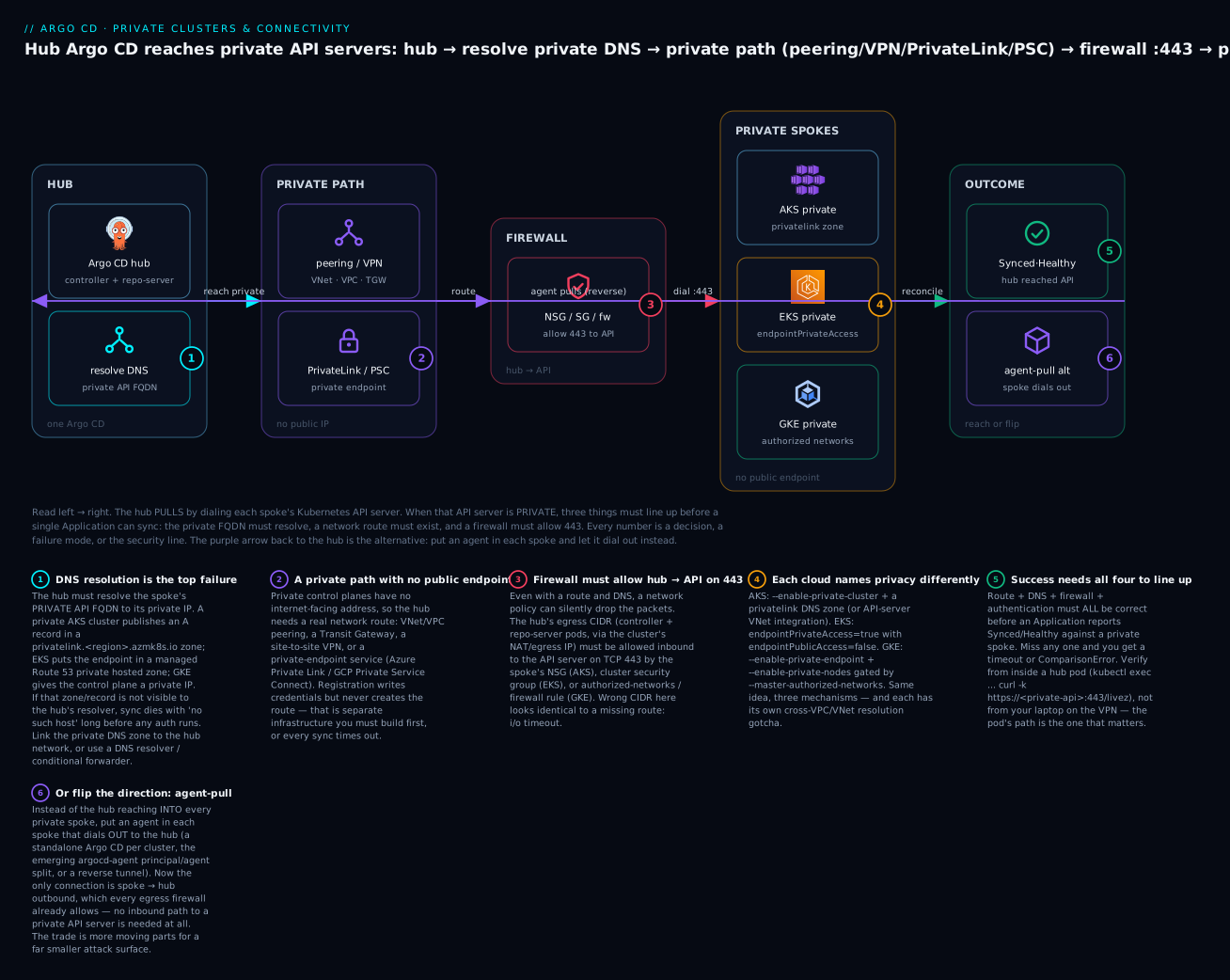
Most enterprises run a hybrid: hub-reaches-in for the clusters that sit in the same cloud/region as the hub (peering is cheap and easy there), and agent-pull for the awkward ones — a spoke in another cloud, an air-gapped compliance cluster, an edge site behind NAT. There is no prize for purity. Pick per spoke based on how hard the network path is to build and how much you distrust an inbound route. Use this as a starting decision:
| Spoke scenario | Recommended answer | Why |
|---|---|---|
| Same cloud, same region as the hub | Hub reaches in | Peering is trivial; one pane of glass for free |
| Same cloud, different region | Hub reaches in (enable cross-region reach, e.g. GKE global access) | Route is a config flag, not new infra |
| Different cloud from the hub | Agent pulls out | Cross-cloud API paths multiply every hard problem |
| Air-gapped / strict-compliance | Agent pulls out | No inbound path can be permitted at all |
| Edge / on-prem behind NAT | Agent pulls out | The spoke has no stable inbound address |
| Many small spokes, one platform team | Hub reaches in (peered) | Central control outweighs per-spoke agents |
Anatomy of the connection the hub actually dials
Before the per-cloud detail, pin down what the hub is dialing. The cluster Secret’s server field is a URL, and for a private cluster it must be the private API address — either a private FQDN or a private IP. The tlsClientConfig governs how the hub validates the API server’s certificate, and it hides two fields that matter enormously on private endpoints:
apiVersion: v1
kind: Secret
metadata:
  name: eks-prod-private
  namespace: argocd
  labels:
    argocd.argoproj.io/secret-type: cluster
type: Opaque
stringData:
  name: eks-prod-private
  # THE private endpoint — resolvable and routable from the hub, not a public URL
  server: https://ABCDEF0123456789ABCDEF.gr7.ap-south-1.eks.amazonaws.com
  config: |
    {
      "execProviderConfig": {
        "apiVersion": "client.authentication.k8s.io/v1beta1",
        "command": "argocd-k8s-auth",
        "args": ["aws", "--cluster-name", "prod-private"],
        "env": { "AWS_REGION": "ap-south-1" }
      },
      "tlsClientConfig": {
        "insecure": false,
        "caData": "LS0tLS1CRUdJTiBDRVJUSUZJQ0FURS0tLS0t...",
        "serverName": ""
      }
    }
tlsClientConfig field |
Type | What it does on a private endpoint |
|---|---|---|
caData |
base64 PEM | The CA that signed the API server cert; the hub verifies against it |
insecure |
bool | true skips TLS verification entirely — an escape hatch, never for prod |
serverName |
string | SNI / expected cert name. Set this when you dial a private IP but the cert’s SAN is a hostname — otherwise you get x509: certificate is valid for …, not <ip> |
serverName is the field that rescues GKE-by-private-IP and any endpoint you reach at an address the certificate does not list. You dial https://172.16.0.2 but the API server’s certificate is issued for a DNS name; set serverName to that DNS name and TLS validation passes while you still connect to the IP. The auth block (execProviderConfig) is unchanged by privacy — it is covered in the registration lesson — so from here on we focus on getting server to a place the hub can actually reach.
The one field that changes for a private cluster is server, and its shape differs per cloud. Getting this exactly right — a private address, not the public one you tested with — is half the battle:
| Cloud | Private server value looks like |
Address type | Set serverName? |
|---|---|---|---|
| AKS | https://<name>-<hash>.<guid>.privatelink.<region>.azmk8s.io |
Private FQDN | No — it’s a name in the cert SAN |
| EKS | https://<id>.gr7.<region>.eks.amazonaws.com |
Private FQDN → ENI IPs | No — the managed cert covers it |
| GKE (private IP) | https://172.16.0.2 |
Private IP (--master-ipv4-cidr) |
Yes — cert lists a DNS SAN, not the IP |
| GKE (DNS endpoint) | https://gke-<uid>.<region>.gke.goog |
Private FQDN (Cloud DNS) | No |
AKS: private clusters and connectivity
An AKS private cluster replaces the public API endpoint with an Azure Private Endpoint in the cluster’s node resource group, fronted by an Azure Private Link Service that terminates at the managed control plane. The API server’s FQDN is published as an A record in a private DNS zone named privatelink.<region>.azmk8s.io. Nothing outside a network that can (a) route to that private endpoint’s IP and (b) resolve that private DNS zone can reach the API server.
# Create a private AKS cluster; Azure creates the privatelink.<region>.azmk8s.io zone
az aks create -g rg-prod -n aks-prod-private \
  --enable-private-cluster \
  --private-dns-zone system \
  --network-plugin azure \
  --enable-managed-identity
# ... provisions; the API server gets a private FQDN like:
#   aks-prod-private-a1b2c3d4.<guid>.privatelink.eastus.azmk8s.io
az aks show -g rg-prod -n aks-prod-private --query apiServerAccessProfile
# {
#   "enablePrivateCluster": true,
#   "enablePrivateClusterPublicFqdn": false,
#   "privateDnsZone": "system"
# }
The --private-dns-zone flag has three modes, and the choice dictates how much DNS plumbing you own:
--private-dns-zone value |
Who owns the zone | When to use | Hub-side resolution work |
|---|---|---|---|
system (default) |
AKS creates privatelink.<region>.azmk8s.io in the node resource group |
Simple single-VNet setups | Link that zone to the hub VNet |
<custom zone resource ID> |
You pre-create a privatelink.<region>.azmk8s.io (or <sub>.privatelink…) zone |
Central DNS governance, shared zones | You already control the zone — link it to the hub VNet |
none |
Nobody — no private DNS zone is created | You run your own DNS entirely | You must publish/forward the A record yourself |
The hub can sit in a different VNet from the spoke, which is the normal enterprise shape (a hub VNet, many spoke VNets). To make hub-reaches-in work you need both halves — route and resolution:
| AKS connectivity option | What it gives you | Route? | DNS? | ⚠️ Cost / note |
|---|---|---|---|---|
| VNet peering + private DNS zone link | Hub VNet peered to spoke VNet; the privatelink… zone linked to the hub VNet |
✅ peering | ✅ virtual network link | Peering egress billed; the classic pattern |
API server VNet integration (--enable-apiserver-vnet-integration) |
API server injected into a delegated subnet in your VNet with a normal private IP | ✅ peering to that subnet | ✅ simpler — standard A record, no Private Link zone dance | GA; the modern recommendation, fewer DNS gotchas |
| Azure VPN / ExpressRoute | On-prem or cross-region hub reaches the private endpoint | ✅ gateway | Needs a Private DNS Resolver or conditional forwarder | ⚠️ VPN/ER gateway hours billed |
| Private DNS Resolver | Resolves privatelink… zones across VNets/on-prem without linking every zone |
— (pair with a route) | ✅ centralised forwarding rules | ⚠️ resolver endpoint billed hourly |
The virtual network link is the step everyone forgets. Peering gives you a route to the private endpoint IP; it does not let the hub resolve the privatelink.<region>.azmk8s.io name. You must explicitly link the private DNS zone to the hub VNet:
# Link the AKS private DNS zone to the HUB VNet so the hub can resolve the API FQDN
az network private-dns link vnet create \
  -g <node-resource-group> \
  -z privatelink.eastus.azmk8s.io \
  -n hub-vnet-link \
  --virtual-network /subscriptions/<sub>/resourceGroups/rg-hub/providers/Microsoft.Network/virtualNetworks/hub-vnet \
  --registration-enabled false
What just happened: the hub VNet’s default resolver can now answer the spoke’s private API FQDN, and — because the VNets are peered — packets to that IP have a route. Both halves are present, so the hub’s controller can finally complete its dial. Miss the link and you get no such host; miss the peering and you get i/o timeout. For AKS-specific hub deployments (Argo CD on AKS with Entra, Key Vault, ACR), see Argo CD on AKS.
The NSG on the spoke’s API subnet (or the node subnet, for VNet integration) must allow the hub’s source range inbound on 443. If you also keep a public FQDN for break-glass, --enable-private-cluster-public-fqdn exists — but for a truly private posture, leave it off.
EKS: private API endpoints and connectivity
EKS does not have a separate “private cluster” resource; instead every cluster has an endpoint access setting with two independent booleans — endpointPublicAccess and endpointPrivateAccess — that combine into three meaningful modes:
| Mode | endpointPublicAccess |
endpointPrivateAccess |
Who can reach the API | Argo CD hub placement |
|---|---|---|---|---|
| Public only (default) | true |
false |
The internet (optionally restricted by publicAccessCidrs) |
Hub anywhere; simplest, least secure |
| Public + private | true |
true |
In-VPC traffic goes private; the rest via the public CIDR allowlist | Hub in-VPC uses private path; others via allowlist |
| Private only | false |
true |
Only the VPC and networks routed to it | Hub must be in-VPC or on a peered/TGW network |
# Inspect current endpoint access
aws eks describe-cluster --name prod-private \
  --query 'cluster.resourcesVpcConfig.{public:endpointPublicAccess,private:endpointPrivateAccess,cidrs:publicAccessCidrs}'
# {
#     "public": false,
#     "private": true,
#     "cidrs": []
# }
# Flip a cluster to private-only (⚠️ do this from IN the VPC or you lock yourself out)
aws eks update-cluster-config --name prod-private \
  --resources-vpc-config endpointPublicAccess=false,endpointPrivateAccess=true
# {
#     "update": {
#         "id": "b3e9...",
#         "status": "InProgress",
#         "type": "EndpointAccessUpdate"
#     }
# }
⚠️ Setting
endpointPublicAccess=falsewhile your only access is the public internet locks you out of your own cluster. Establish the private path (and verify it) before you flip the switch, or use the public+private mode as a stepping stone.
When private access is enabled, EKS provisions cross-account elastic network interfaces (ENIs) in your cluster subnets and creates a Route 53 private hosted zone for the endpoint (ABCDEF….gr7.<region>.eks.amazonaws.com), associated with the cluster VPC. Inside that VPC the endpoint resolves to the ENIs’ private IPs. The connectivity choices for a hub in a different VPC:
| EKS connectivity option | What it gives you | Cross-VPC DNS handling | ⚠️ Cost / note |
|---|---|---|---|
| VPC peering | Route between hub VPC and cluster VPC | Associate the managed private hosted zone with the hub VPC, or use Resolver | Data across peering billed; no transitive peering |
| Transit Gateway | Hub-and-spoke routing for many VPCs | Same — associate the PHZ or run Resolver inbound endpoints | ⚠️ TGW attachment + data billed; scales past peering mesh |
| Route 53 Resolver inbound endpoints | Lets the hub/on-prem query the cluster VPC’s private zones | Central, no per-VPC zone association | ⚠️ resolver endpoints billed hourly |
| PrivateLink (endpoint service) | Expose the API cross-account via an NLB + endpoint service | You publish a private DNS name for the endpoint service | Advanced cross-account/SaaS hub pattern; more parts |
| Site-to-site VPN / Direct Connect | On-prem or other-cloud hub reaches the VPC | Resolver / conditional forwarder | ⚠️ VPN/DX billed |
The EKS-specific gotcha is DNS across VPCs. The managed private hosted zone is associated only with the cluster VPC at creation, so a peered hub VPC has a route but cannot resolve the endpoint:
# Associate the EKS-managed private hosted zone with the HUB VPC so it can resolve the endpoint
aws route53 associate-vpc-with-hosted-zone \
  --hosted-zone-id /hostedzone/Z0123456HOSTEDZONE \
  --vpc VPCRegion=ap-south-1,VPCId=vpc-0hub00000000
# { "ChangeInfo": { "Status": "PENDING", ... } }
Two more EKS-only points. First, the cluster security group (the one EKS auto-creates, tagged kubernetes.io/cluster/<name>: owned) guards the control-plane ENIs — you must add an inbound rule allowing 443 from the hub’s CIDR or security group, or you get a clean-looking timeout. Second, publicAccessCidrs on a public+private cluster is not a private control — it only narrows the public endpoint; it does nothing for the private path.
GKE: private clusters and connectivity
A GKE private cluster is two independent decisions: --enable-private-nodes gives the nodes internal IPs (no public IPs, egress via Cloud NAT), and --enable-private-endpoint makes the control plane reachable only at its private IP, disabling the public endpoint. Access to the control plane is then gated by master authorized networks — an explicit CIDR allowlist.
gcloud container clusters create gke-prod-private \
  --enable-private-nodes \
  --enable-private-endpoint \
  --master-ipv4-cidr 172.16.0.0/28 \
  --enable-master-authorized-networks \
  --master-authorized-networks 10.10.0.0/24 \
  --enable-master-global-access \
  --region asia-south1
# Creating cluster gke-prod-private... done.
# The control plane private endpoint is 172.16.0.2
| GKE flag | What it controls | Why it matters for the hub |
|---|---|---|
--enable-private-nodes |
Nodes have no public IPs; egress via Cloud NAT | Doesn’t affect API reachability, but shapes spoke egress |
--enable-private-endpoint |
Disables the public control-plane endpoint | The hub must use the private IP / DNS endpoint |
--master-ipv4-cidr |
The /28 for the control plane (VPC-peering model) | Must not overlap the hub’s ranges |
--enable-master-authorized-networks |
Turns on the CIDR allowlist | The hub’s source CIDR must be listed or you get a timeout |
--master-authorized-networks |
The allowed CIDRs | Add the hub’s NAT/egress CIDR here |
--enable-master-global-access |
Reach the private endpoint from other regions | Required when the hub is in a different region than the cluster |
The connectivity choices — and here GKE has genuinely modernised:
| GKE connectivity option | What it gives you | DNS handling | ⚠️ Note |
|---|---|---|---|
| VPC peering (classic model) | Peering to Google’s managed control-plane VPC | Resolve the private IP; export custom routes on the GKE peering for transitive reach | No transitive peering; the route-export gotcha below |
| Private Service Connect (PSC) | Control plane fronted by a PSC endpoint in your VPC | PSC endpoint has its own address/DNS | Default for newer clusters; cleaner cross-VPC story |
Control-plane global access (--enable-master-global-access) |
Reach the private endpoint from any region | Same private IP, wider reach | Needed for cross-region hubs |
DNS-based endpoint (--enable-dns-access) |
A gke-<uid>.<region>.gke.goog name reachable via Cloud DNS, IAM-gated |
Cloud DNS resolves it; no authorized-networks juggling | Modern; removes most private-DNS pain |
# Modern option: enable the DNS-based control-plane endpoint (IAM-gated, no authorized-networks dance)
gcloud container clusters update gke-prod-private \
  --region asia-south1 \
  --enable-dns-access
# Updated cluster; control plane DNS endpoint:
#   gke-a1b2c3d4.asia-south1.gke.goog
The classic GKE gotcha is non-transitive VPC peering. GKE peers your VPC with Google’s managed control-plane VPC. If your hub reaches the cluster VPC over a different peering or a VPN, that path cannot “hop through” to the control-plane VPC by default — VPC peering is never transitive. You must enable custom-route export on the GKE peering, or (far better) adopt the PSC-based cluster or the DNS-based endpoint, which sidestep the whole problem. When you dial the control plane by its private IP, remember serverName in the cluster Secret so TLS validates against the cert’s DNS SAN rather than the IP.
GKE’s control-plane connectivity has evolved through three generations, and which one you’re on changes the cross-VPC story completely — know which your cluster uses:
| Generation | How the hub reaches the control plane | Cross-VPC reach | Verdict |
|---|---|---|---|
| VPC peering (classic) | Peering to Google’s managed VPC, private IP | Needs custom-route export; non-transitive | Legacy; the transitive-peering trap lives here |
| Private Service Connect (PSC) | A PSC endpoint in your own VPC | Works across peered VPCs without route-export gymnastics | Default for newer clusters; prefer it |
DNS-based endpoint (--enable-dns-access) |
A Cloud-DNS name, IAM-gated, no authorized-networks | Reachable anywhere the IAM + DNS resolve | Modern; the least-pain option for a remote hub |
The per-cloud private-connectivity matrix
This is the reference to keep. One row per cloud, the mechanism each uses for a private control plane, the cross-network option, the DNS story, the firewall control, and the single gotcha that bites first.
| AKS | EKS | GKE | |
|---|---|---|---|
| Make it private | --enable-private-cluster (or API-server VNet integration) |
endpointPrivateAccess=true + endpointPublicAccess=false |
--enable-private-endpoint + --enable-private-nodes |
| Private API address | FQDN in privatelink.<region>.azmk8s.io |
…gr7.<region>.eks.amazonaws.com → ENIs |
Control-plane private IP (or …gke.goog DNS endpoint) |
| Cross-network route | VNet peering / VPN / ExpressRoute | VPC peering / Transit Gateway / PrivateLink / VPN | VPC peering / PSC / global access |
| DNS resolution | Link the private DNS zone to the hub VNet | Associate the managed PHZ with the hub VPC (or Resolver) | Cloud DNS / private IP; DNS endpoint is easiest |
| Firewall control | NSG on API/node subnet | Cluster security group (control-plane ENIs) | Master authorized networks (CIDR allowlist) |
| Hub-side identity | Azure Workload Identity → RBAC on spoke | IRSA / EKS Pod Identity → aws-auth/access entry |
GKE Workload Identity → RBAC on spoke |
| The gotcha that bites first | Forgot the virtual network link → no such host |
PHZ associated only with cluster VPC → no such host |
Non-transitive peering → route-export or i/o timeout |
Read this alongside the four-requirements table from earlier: the “DNS resolution” row is requirement 2, the “Cross-network route” row is requirement 1, and the “Firewall control” row is requirement 3. Every cloud implements the same three requirements with different nouns.
DNS: resolving the private API hostname from the hub
DNS is the failure that hits everyone first, because a private control plane and a private DNS zone are usually created together, and the zone is scoped to the cluster’s network — not the hub’s. So the hub has (or can easily get) a route, but cannot turn the API FQDN into an IP. The symptom is unmistakable and different from every other failure: no such host.
# From inside the hub's namespace, prove the FQDN resolves BEFORE blaming Argo CD.
# A throwaway netshoot pod shares the hub cluster's CoreDNS + node egress path.
kubectl -n argocd run netcheck --rm -it --restart=Never \
  --image=nicolaka/netshoot -- \
  nslookup ABCDEF0123456789ABCDEF.gr7.ap-south-1.eks.amazonaws.com
# Server:    10.96.0.10
# Address:   10.96.0.10#53
# ** server can't find ABCDEF0123456789ABCDEF.gr7.ap-south-1.eks.amazonaws.com: NXDOMAIN
NXDOMAIN from the hub’s CoreDNS (10.96.0.10 is the usual cluster DNS service IP) means the hub’s resolver has no path to the private zone. The fix is per-cloud, and it is always about making the private zone visible to the hub’s resolver:
| Cloud | Private zone / record | How the hub resolves it |
|---|---|---|
| AKS | privatelink.<region>.azmk8s.io (Azure Private DNS) |
az network private-dns link vnet create to link the zone to the hub VNet; for on-prem/cross-region use Azure Private DNS Resolver |
| EKS | Managed Route 53 private hosted zone | aws route53 associate-vpc-with-hosted-zone for the hub VPC, or Route 53 Resolver inbound endpoints for external resolvers |
| GKE | Control-plane private IP; optional …gke.goog |
Use the DNS-based endpoint (Cloud DNS resolves it), or dial the private IP directly with serverName set |
Once resolution works, re-run and you should see the private IP, then test the actual TCP path in the same breath:
kubectl -n argocd run netcheck --rm -it --restart=Never \
  --image=nicolaka/netshoot -- \
  bash -c 'getent hosts $API && nc -vz -w5 $API 443' \
  env API=ABCDEF0123456789ABCDEF.gr7.ap-south-1.eks.amazonaws.com
# 10.20.30.40  ABCDEF0123456789ABCDEF.gr7.ap-south-1.eks.amazonaws.com
# Connection to ABCDEF...eks.amazonaws.com (10.20.30.40) 443 port [tcp/https] succeeded!
If resolution now returns an IP but nc times out, DNS is fixed and you have dropped down to a route or firewall problem — exactly the diagnostic split from the four-requirements table. That two-line test (getent hosts then nc -vz) is the single most useful thing you can run when a private spoke won’t sync; it isolates requirement 2 from requirements 1 and 3 in seconds.
Egress: a private cluster still needs to talk outbound
Turning off the public API endpoint is only half of “private.” The other half is egress — what the cluster is allowed to send out. Private nodes have no public IPs, so their outbound traffic goes through a NAT gateway or an egress firewall, and if that path (or its allowlist) is wrong, things fail in ways that look nothing like the API-reachability problems above.
Here is the point that reshapes the whole egress design, restated because it is so often gotten wrong: which side needs Git egress depends on your architecture.
| Traffic | Hub-reaches-in (one hub) | Agent-pull (standalone per spoke) |
|---|---|---|
| Git clone/fetch | Hub repo-server only | Each spoke’s Argo CD |
| Container image pulls | Each spoke’s kubelet | Each spoke’s kubelet |
| Cloud IAM / token endpoints | Hub (exec auth) + spokes (workload identity) | Each spoke |
| ESO / secret store | Wherever ESO runs (usually each spoke) | Each spoke |
| Argo CD → spoke API | Hub → spoke (inbound to spoke) | none (spoke dials out) |
So in the standard hub-and-spoke model, a private spoke does not need Git egress for Argo CD — the hub already rendered everything. The spoke’s mandatory egress is narrower than people assume:
| From the private spoke, outbound to | Port | Why it’s needed | Skip it and… |
|---|---|---|---|
| Container registry (ECR/ACR/Artifact Registry, or public) | 443 | kubelet pulls workload + Argo CD-applied images | ErrImagePull / ImagePullBackOff |
| Cloud metadata / IAM / STS | 443 | Workload Identity / IRSA token exchange | Auth failures inside the cluster |
| Cloud secret store (if ESO/CSI runs here) | 443 | External Secrets fetches secrets | SecretSyncError |
| OCI Helm registry (if charts pulled in-cluster) | 443 | Rare — only if something in-cluster pulls charts | Chart pull errors |
| Observability / webhook targets | 443 | Metrics push, notifications, admission webhooks | Silent gaps |
Per-cloud, the egress plumbing and where you write the allowlist:
| Cloud | Default private egress | Where to allowlist | ⚠️ Note |
|---|---|---|---|
| AKS | User-defined routing or Azure NAT Gateway; Azure Firewall for filtering | Azure Firewall application/network rules; the AKS egress FQDN allowlist | ⚠️ NAT Gateway + Firewall billed; AKS has a required-FQDN list |
| EKS | NAT Gateway (private subnets) or VPC endpoints | Security groups + NACLs; PrivateLink endpoints for ECR/STS/S3 to avoid NAT | ⚠️ NAT Gateway hourly + per-GB; VPC endpoints reduce NAT cost |
| GKE | Cloud NAT | Firewall egress rules; Private Google Access for *.googleapis.com |
⚠️ Cloud NAT billed; Private Google Access avoids egress for Google APIs |
The elegant move on every cloud is to avoid NAT for cloud-internal traffic: EKS interface/gateway VPC endpoints for ECR/STS/S3, GKE Private Google Access for Artifact Registry and Secret Manager, AKS private endpoints for ACR and Key Vault. That keeps registry and secret traffic on the provider’s backbone — cheaper, faster, and it shrinks the egress allowlist to almost nothing.
Cross-cloud connectivity, and why hubs often don’t cross
The hardest case is a hub in cloud A reaching a private spoke in cloud B — say an Argo CD hub on EKS managing a private AKS cluster. It is possible, and it is usually the wrong default.
| Cross-cloud path | What it takes | Latency | ⚠️ Cost / pain |
|---|---|---|---|
| Site-to-site VPN (A ↔ B) | VPN gateways both ends, routes, cross-cloud DNS forwarding | Internet-path, variable | ⚠️ Two gateways billed; encryption overhead; DNS is the hard part |
| Provider interconnect (Megaport, Equinix, partner interconnect) | A physical/virtual cross-connect between clouds | Low, stable | ⚠️ Interconnect + port fees; procurement lead time |
| Public endpoint + strict allowlist | Keep the API public but lock publicAccessCidrs / authorized networks to the hub’s egress IP |
Internet | Weakest posture; sometimes an acceptable compromise |
| Hub per cloud (the usual answer) | One Argo CD in each cloud, each managing same-cloud spokes | N/A (no cross-cloud API path) | Cleanest; unify via one Git and dashboards, not one network |
The reason most mature platforms run a hub per cloud is that cross-cloud networking multiplies every hard problem in this lesson: DNS forwarding across two providers’ private zones, two firewall models, asymmetric routing, IAM that doesn’t federate cleanly, and a fat blast radius if the one cross-cloud hub is compromised. You keep the GitOps logically unified — one Git organisation, one set of ApplicationSets, one dashboard aggregation — while the network stays within each cloud. This is exactly the hub-and-spoke-per-cloud fleet shape covered in the multi-cloud fleet lesson; private connectivity is one more reason it wins. When you genuinely must cross clouds, prefer agent-pull (the spoke dials out to the hub) over building a bidirectional private path into a foreign cloud’s API server.
Firewall rules: exactly what the hub↔API path needs
Least privilege means opening the smallest possible set of holes. For hub-reaches-in, the entire required ruleset is remarkably small:
| Direction | Source | Destination | Port/Proto | Purpose |
|---|---|---|---|---|
| Inbound to spoke | Hub egress CIDR (NAT IP or pod CIDR via SNAT) | Spoke API server (private IP/endpoint) | TCP 443 | The controller/server dial |
| Outbound from hub | Hub pods (repo-server) | Git remotes | TCP 443 (or 22) | Clone/fetch to render |
| Outbound from hub | Hub pods (exec auth) | Cloud IAM/STS/token endpoints | TCP 443 | Mint per-request tokens |
| Outbound from spoke | Spoke nodes | Registries, IAM, secret stores | TCP 443 | Image pulls, workload identity, ESO |
Two rules of thumb keep this correct. First, the source of the hub→API connection is the hub cluster’s egress identity, not a pod IP — pods SNAT through a node or a NAT gateway, so the CIDR you allowlist (in an NSG, security group, or authorized-networks entry) is the hub’s NAT/egress range, not its pod range. Getting this wrong is the single most common firewall mistake: you allow the pod CIDR, the packet arrives with the NAT IP, and it’s dropped — an i/o timeout indistinguishable from a missing route.
Second, do not widen publicAccessCidrs / authorized networks to 0.0.0.0/0 “just to test.” That re-exposes the API server to the internet and defeats the entire exercise. If you must test from a laptop, add your egress /32 temporarily and remove it — and remember the laptop’s success proves nothing about the hub pod’s path, which is the one that has to work.
Security: the least-privilege network posture
Private clusters exist for one reason — to shrink the attack surface of the most sensitive endpoint you own, the Kubernetes API server. Weigh the posture deliberately:
| Posture | API exposure | Operational cost | When it’s right |
|---|---|---|---|
| Public endpoint, open | Internet-reachable | Lowest | Never for production |
| Public endpoint, CIDR-allowlisted | Internet-reachable, narrowed to known IPs | Low | Dev/test; a pragmatic cross-cloud compromise |
| Private + hub reaches in | No public endpoint; inbound 443 from the hub only | Medium (build/maintain the path) | The enterprise default in-cloud |
| Private + agent pulls out | No public endpoint; zero inbound | Higher (agents to run) | Highest-security, air-gapped, cross-cloud, edge |
The honest trade is operational simplicity versus attack surface. Public-and-open is trivial to run and a standing liability. Private-plus-agent-pull is the strongest posture — the API server accepts no inbound connections from anywhere — at the cost of more components and (today) less mature tooling. Most teams land on private-plus-hub-reaches-in for clusters in the same cloud as the hub, and reserve agent-pull for the spokes where an inbound route is genuinely unacceptable. Whichever you choose, the principle is constant: open the fewest holes, from the narrowest sources, on exactly one port.
Hands-on lab: design a hub reaching a private EKS spoke
This is a design-and-config lab — there is no live network to run against here, so every command shows the real invocation and a representative result, and the goal is a correct, buildable design plus the verification you would run on real infrastructure. We take a hub Argo CD (in a hub VPC) and make it reach a private-only EKS spoke in a spoke VPC, then sketch the AKS and GKE variants and the agent-pull alternative.
⚠️ Billing: on real infrastructure this lab provisions two VPCs, a peering connection (or Transit Gateway), and EKS control planes — all of which bill. Tear down when done.
Step 1 — Confirm the spoke’s endpoint access and lock it to private.
aws eks describe-cluster --name prod-private \
  --query 'cluster.resourcesVpcConfig.{public:endpointPublicAccess,private:endpointPrivateAccess}'
# { "public": true, "private": false }   <- currently public-only

# Build the path FIRST (steps 2-4), THEN flip to private-only:
aws eks update-cluster-config --name prod-private \
  --resources-vpc-config endpointPublicAccess=false,endpointPrivateAccess=true
# { "update": { "status": "InProgress", "type": "EndpointAccessUpdate" } }
What just happened: you’ve declared the spoke private-only. Sequencing matters — flipping before the private path exists locks everyone out, so this is written after the path is built.
Step 2 — Establish the route (VPC peering).
# Peer the hub VPC to the spoke VPC (⚠️ CIDRs must not overlap)
aws ec2 create-vpc-peering-connection \
  --vpc-id vpc-0hub00000000 --peer-vpc-id vpc-0spoke0000000
# { "VpcPeeringConnection": { "VpcPeeringConnectionId": "pcx-0abc...", "Status": {"Code":"pending-acceptance"} } }
aws ec2 accept-vpc-peering-connection --vpc-peering-connection-id pcx-0abc...
# Add routes BOTH ways: hub route table -> spoke CIDR via pcx; spoke -> hub CIDR via pcx
aws ec2 create-route --route-table-id rtb-hub --destination-cidr-block 10.20.0.0/16 \
  --vpc-peering-connection-id pcx-0abc...
What just happened: packets from the hub now have a route to the spoke’s private ENIs. Requirement 1 (route) is satisfied — but the hub still can’t resolve the endpoint name.
Step 3 — Fix DNS (associate the managed private hosted zone with the hub VPC).
# Find the EKS endpoint and its managed private hosted zone, then associate the hub VPC
aws eks describe-cluster --name prod-private --query 'cluster.endpoint'
# "https://ABCDEF0123456789ABCDEF.gr7.ap-south-1.eks.amazonaws.com"
aws route53 associate-vpc-with-hosted-zone \
  --hosted-zone-id Z0123456HOSTEDZONE \
  --vpc VPCRegion=ap-south-1,VPCId=vpc-0hub00000000
# { "ChangeInfo": { "Status": "PENDING" } }
What just happened: the hub VPC can now resolve the private endpoint FQDN to the ENI IPs. Requirement 2 (DNS) is satisfied.
Step 4 — Open the firewall (cluster security group inbound 443 from the hub).
# The EKS-managed cluster security group guards the control-plane ENIs
CLUSTER_SG=$(aws eks describe-cluster --name prod-private \
  --query 'cluster.resourcesVpcConfig.clusterSecurityGroupId' --output text)
aws ec2 authorize-security-group-ingress \
  --group-id "$CLUSTER_SG" \
  --protocol tcp --port 443 --cidr 10.10.0.0/16   # the HUB's NAT/egress CIDR
# { "Return": true, "SecurityGroupRules": [ ... ] }
What just happened: the hub’s egress CIDR is now allowed inbound to the API on 443. Requirement 3 (firewall) is satisfied. Note the CIDR is the hub’s NAT/egress range, not its pod range.
Step 5 — Prove the path from inside the hub (not from your laptop).
kubectl -n argocd run netcheck --rm -it --restart=Never \
  --image=nicolaka/netshoot -- \
  bash -c 'getent hosts ABCDEF0123456789ABCDEF.gr7.ap-south-1.eks.amazonaws.com && \
           nc -vz -w5 ABCDEF0123456789ABCDEF.gr7.ap-south-1.eks.amazonaws.com 443'
# 10.20.30.40  ABCDEF0123456789ABCDEF.gr7.ap-south-1.eks.amazonaws.com
# Connection to ABCDEF...eks.amazonaws.com (10.20.30.40) 443 succeeded!
What just happened: all three network requirements verified from the hub’s own network namespace — the only vantage point that matters. A laptop on the VPN could succeed while the hub still fails; this test can’t lie.
Step 6 — Register the spoke and deploy.
# Register (kubeconfig context must point at the PRIVATE endpoint)
argocd cluster add my-eks-context --name eks-prod-private
# INFO Cluster 'https://ABCDEF...eks.amazonaws.com' added

argocd cluster list
# SERVER                                              NAME              VERSION  STATUS       MESSAGE
# https://ABCDEF...gr7.ap-south-1.eks.amazonaws.com   eks-prod-private  1.29     Successful
# https://kubernetes.default.svc                      in-cluster        1.29     Successful

argocd app create guestbook-eks \
  --repo https://github.com/argoproj/argocd-example-apps.git \
  --path guestbook --dest-name eks-prod-private --dest-namespace default
argocd app sync guestbook-eks
# ... Synced / Healthy
What just happened: with route + DNS + firewall + auth all lined up, argocd cluster list reports Successful (not Failed … i/o timeout) and the app syncs. Now you can safely execute Step 1’s private-only flip.
Step 7 — The AKS and GKE variants (sketch).
# AKS: peer VNets, then LINK the private DNS zone to the hub VNet (the step everyone forgets)
az network private-dns link vnet create -g <node-rg> \
  -z privatelink.eastus.azmk8s.io -n hub-link \
  --virtual-network /subscriptions/<sub>/resourceGroups/rg-hub/providers/Microsoft.Network/virtualNetworks/hub-vnet \
  --registration-enabled false

# GKE: add the hub's egress CIDR to authorized networks, or use the DNS-based endpoint
gcloud container clusters update gke-prod-private --region asia-south1 \
  --enable-master-authorized-networks \
  --master-authorized-networks 10.10.0.0/24
# ...or the modern, DNS-based, IAM-gated endpoint:
gcloud container clusters update gke-prod-private --region asia-south1 --enable-dns-access
Step 8 — The agent-pull alternative (sketch). If building the inbound path is unacceptable (a cross-cloud or air-gapped spoke), don’t. Run a standalone Argo CD inside the spoke targeting only in-cluster, pointed at the same Git repo the hub uses. The spoke initiates all connections outbound to Git on 443 — no inbound route, no private DNS work, no firewall hole. You trade the single pane of glass for zero attack surface (or keep the pane with the emerging argocd-agent, whose agent dials out to a hub-side principal).
Firewall / DNS pre-flight checklist (run before declaring victory):
Teardown.
argocd app delete guestbook-eks --cascade
argocd cluster rm eks-prod-private
# ⚠️ Remove the billable network infra you created:
aws ec2 delete-vpc-peering-connection --vpc-peering-connection-id pcx-0abc...
aws route53 disassociate-vpc-from-hosted-zone --hosted-zone-id Z0123456HOSTEDZONE \
  --vpc VPCRegion=ap-south-1,VPCId=vpc-0hub00000000
aws ec2 revoke-security-group-ingress --group-id "$CLUSTER_SG" \
  --protocol tcp --port 443 --cidr 10.10.0.0/16
# (AKS) az network private-dns link vnet delete ... ; (GKE) drop the authorized-networks entry
Common mistakes and troubleshooting
Private-cluster failures nearly all reduce to “which of the four requirements is broken.” Use the diagnostic split — timeout/no-such-host = network (rows 1–3); Unauthorized/forbidden = auth (row 4) — and this table.
| Symptom | Likely cause | Fix |
|---|---|---|
dial tcp 10.x.x.x:443: i/o timeout |
No network route to the private API (or firewall dropping) | Verify peering/VPN/PSC route AND the firewall CIDR; test nc -vz from a hub pod |
dial tcp: lookup <fqdn> …: no such host |
Private API FQDN doesn’t resolve from the hub | Link the private DNS zone (AKS) / associate the PHZ (EKS) / use the DNS endpoint (GKE) |
| Works from your laptop, fails in Argo CD | You tested on the VPN, not the hub pod’s path | Re-test from kubectl -n argocd run netcheck …; fix the hub’s route/DNS |
argocd cluster list shows Failed … i/o timeout |
Registered creds are fine; no path exists | Build the route/DNS/firewall before expecting sync |
x509: certificate is valid for …, not <ip> |
Dialing a private IP whose cert lists a DNS SAN | Set tlsClientConfig.serverName to the cert’s DNS name |
| Firewall rule added but still times out | Allowlisted the pod CIDR; traffic SNATs to the NAT IP | Allowlist the hub’s NAT/egress CIDR instead |
| GKE reachable in-region, times out cross-region | Private endpoint not globally accessible | --enable-master-global-access (or the DNS-based endpoint) |
| On-prem/other-VPC hub can’t resolve, route is fine | Non-transitive peering / zone scoped to cluster VPC | Route 53 Resolver / Private DNS Resolver / export custom routes (GKE) |
ImagePullBackOff on the private spoke |
Egress blocked to the registry | Open egress 443 to the registry, or add ECR/ACR/AR private endpoints |
Unauthorized / forbidden (NOT a timeout) |
Network is fine; identity not authorized on the spoke | Fix Workload Identity/IRSA + spoke RBAC (see the registration lesson) |
| Sync worked, then broke after “security hardening” | Someone set endpointPublicAccess=false with no private path |
Restore public+private, build the private path, then re-lock |
Three gotchas deserve extra words because they cost the most hours.
1. The laptop lie. You add a spoke, argocd cluster add succeeds from your workstation (which is on the corporate VPN with a route to the private API), you high-five — and every sync fails with i/o timeout. The registration ran from your laptop’s network; the sync runs from the hub pods’ network, and those are different paths. Always verify from a pod in the argocd namespace, never from your machine. The netcheck one-liner in the lab is the antidote.
2. Route without resolution (and vice versa). Peering and DNS are separate steps that fail separately and look different. Peering-but-no-DNS gives you no such host; DNS-but-no-route (or a wrong firewall CIDR) gives you i/o timeout. Teams fix one, see a new error, and think they made things worse — they didn’t; they advanced to the next requirement. Expect to satisfy requirements 1, 2, and 3 in sequence, each surfacing the next.
3. The NAT-CIDR trap. You open the API firewall to the hub’s pod CIDR because that’s the “source” you see in Argo CD. But hub pods SNAT through a node or NAT gateway, so the API server sees the NAT/egress IP, not the pod IP. Your rule never matches, packets drop, and the symptom is a plain i/o timeout — identical to a missing route, which sends people debugging the wrong layer for hours. Allowlist the egress CIDR, and confirm what the spoke actually sees.
Cheat-sheet
Private-cluster connectivity, per cloud, plus the commands that isolate the failure.
| Cloud | Make private | Route the hub | Resolve DNS | Firewall the API |
|---|---|---|---|---|
| AKS | az aks create --enable-private-cluster |
VNet peering / API-server VNet integration | az network private-dns link vnet create |
NSG inbound 443 from hub CIDR |
| EKS | --resources-vpc-config endpointPublicAccess=false,endpointPrivateAccess=true |
VPC peering / Transit Gateway | aws route53 associate-vpc-with-hosted-zone |
Cluster SG inbound 443 from hub CIDR |
| GKE | --enable-private-endpoint --enable-private-nodes |
VPC peering / PSC / --enable-master-global-access |
DNS endpoint (--enable-dns-access) or private IP |
--master-authorized-networks <hub-cidr> |
| Command | What it tells you |
|---|---|
kubectl -n argocd run netcheck --rm -it --image=nicolaka/netshoot -- nslookup <api> |
Does the private FQDN resolve from the hub? (NXDOMAIN = DNS broken) |
… netshoot -- nc -vz -w5 <api> 443 |
Is there a route + open firewall? (timeout = route/firewall) |
argocd cluster list |
Per-cluster reachability; Failed … i/o timeout = network, not creds |
argocd app get <app> |
ComparisonError with a dial error = the spoke is unreachable |
aws eks describe-cluster --name X --query cluster.resourcesVpcConfig |
EKS endpoint public/private booleans + cluster SG |
az aks show -g G -n N --query apiServerAccessProfile |
AKS private-cluster + private-DNS-zone mode |
gcloud container clusters describe X --format='value(privateClusterConfig)' |
GKE private endpoint, master CIDR, global access |
Isolate which of the four requirements is broken with one test each — run them in order and stop at the first failure:
| Requirement | Test from a hub pod | Pass looks like | Fail looks like |
|---|---|---|---|
| 2 · DNS | nslookup <api> |
Returns a private IP | NXDOMAIN / no such host |
| 1 · Route + 3 · Firewall | nc -vz -w5 <api> 443 |
succeeded! |
Connection timed out |
| 4 · Auth | argocd cluster list |
Successful |
Unauthorized / forbidden |
| End to end | argocd app sync <app> |
Synced / Healthy |
ComparisonError + dial/auth error |
The diagnostic split (memorise this): i/o timeout or no such host → network (route/DNS/firewall, this lesson). Unauthorized / forbidden → auth (identity/RBAC, the registration lesson). Never debug the wrong half.
Interview and exam questions
Q: Why can a hub Argo CD register a private cluster successfully but then fail every sync?
A: Registration only writes a cluster Secret — it never touches the network. Sync requires the application-controller to actually dial the spoke’s API server. If that server is private and no route/DNS/firewall path exists from the hub, registration succeeds while every reconcile fails with dial tcp …: i/o timeout. Credentials and connectivity are independent.
Q: A private-cluster sync fails. How do you tell a network problem from an auth problem in one glance?
A: Read the error. i/o timeout or no such host is a network problem (route, DNS, or firewall). Unauthorized or forbidden is an auth problem (identity accepted-but-not-authorized). They live in different layers and different lessons; fixing IAM won’t cure a timeout.
Q: You peered the hub VPC to the spoke VPC and the route is correct, but Argo CD reports no such host. What’s missing?
A: DNS. The private API endpoint resolves only within the cluster’s own network by default. Peering gives a route, not resolution. On EKS you must associate the managed private hosted zone with the hub VPC (or use Route 53 Resolver); on AKS you must link the privatelink.<region>.azmk8s.io zone to the hub VNet.
Q: What are the three EKS endpoint-access modes, and which does a hub need?
A: Public-only (endpointPublicAccess=true, private false), public+private (both true), and private-only (public false, private true). A hub reaching a private-only cluster must sit in the VPC or on a peered/Transit-Gateway/VPN network; there is no public path at all.
Q: On AKS, what’s the difference between a classic private cluster and API-server VNet integration?
A: A classic private cluster fronts the managed control plane with an Azure Private Endpoint and publishes the API FQDN in a privatelink… private DNS zone — you must link that zone to the hub VNet to resolve it. API-server VNet integration injects the API server into a delegated subnet in your own VNet with an ordinary private IP, so a peered hub reaches it with far less DNS ceremony. Integration is the modern recommendation.
Q: Why do you add the hub’s NAT/egress CIDR — not its pod CIDR — to the spoke’s API firewall?
A: Hub pods SNAT through a node or NAT gateway when leaving the cluster, so the spoke’s API server sees the NAT/egress IP as the source. An allowlist on the pod CIDR never matches, and the drop looks exactly like a missing route (i/o timeout), which misdirects debugging.
Q: In hub-and-spoke Argo CD, does a private spoke need outbound access to Git? Why or why not? A: No. The hub’s repo-server clones Git and renders; the controller applies the rendered objects to the spoke via the API. The spoke’s required egress is image registries, cloud IAM/token endpoints, and any secret stores its in-cluster operators use. (In the standalone agent-pull model, where each spoke runs its own Argo CD, then each spoke does need Git egress.)
Q: Contrast “hub reaches in” with “agent pulls out” on firewall direction and attack surface.
A: Hub-reaches-in opens an inbound 443 path to each spoke’s API server (from the hub only) and needs private DNS + routing per spoke. Agent-pull flips the direction: an agent in the spoke dials outbound to the hub or Git, so the spoke needs zero inbound access and no private-DNS work — a much smaller attack surface, at the cost of more components (a standalone Argo CD per cluster, or the emerging argocd-agent).
Q: Your GKE cluster syncs fine when the hub is in the same region but times out from a hub in another region. Why?
A: A GKE private endpoint is reachable only from the cluster’s region unless you enable control-plane global access (--enable-master-global-access), or adopt the DNS-based endpoint. Without it, a cross-region hub has no path to the private control plane.
Q: Why do many organisations run a hub per cloud instead of one hub reaching across clouds? A: Cross-cloud API connectivity multiplies every hard problem — private DNS forwarding across two providers, two firewall models, asymmetric routing, non-federating IAM, and a large blast radius for one cross-cloud hub. A hub per cloud keeps each API path inside its own cloud while GitOps stays logically unified through one Git and aggregated dashboards.
Q: When would you set tlsClientConfig.serverName in a cluster Secret?
A: When the hub connects to the API server by an address the certificate doesn’t list — most often a private IP (common on GKE) while the cert’s SAN is a DNS name. serverName tells the TLS stack which name to validate against, so verification passes without disabling TLS (insecure: true).
Q: You “hardened” a cluster by setting endpointPublicAccess=false and now the whole team is locked out. What went wrong and how do you recover?
A: The private path didn’t exist before you removed the public one. Recover by re-enabling public access (from an in-VPC bastion/CloudShell if the console can’t reach it), build and verify the private path (route + DNS + firewall) from the hub’s network, then re-disable public. Always build the private path before removing the public one.
Key takeaways
- A private cluster changes nothing about Argo CD and everything about the network under it. The hub still pulls by dialing each spoke’s API server; a private API server just means that dial has nowhere to go until you build the path.
- Four requirements must all hold: route, DNS, firewall, auth. Requirements 1–3 fail as
i/o timeout/no such host; requirement 4 fails asUnauthorized. Read the error to know which layer — and which lesson — you’re in. - DNS is the failure that bites first. Peering gives a route, not resolution. Link the AKS private DNS zone to the hub VNet, associate the EKS managed hosted zone with the hub VPC, or use GKE’s DNS-based endpoint.
- Each cloud spells “private” differently: AKS
--enable-private-cluster+ aprivatelinkzone; EKSendpointPrivateAccess=truewith public off; GKE--enable-private-endpointgated by master authorized networks — same three requirements, three sets of nouns. - Verify from a hub pod, never your laptop. The
netcheckone-liner (getent hoststhennc -vz … 443) isolates DNS from route/firewall in seconds and exposes the “laptop lie.” - Allowlist the hub’s NAT/egress CIDR, not its pod CIDR — pods SNAT on the way out, and a wrong CIDR looks exactly like a missing route.
- The two architectural answers are hub-reaches-in and agent-pulls-out. Reaching in keeps one hub but needs a private inbound path per spoke; pulling out flips the direction for zero inbound attack surface. Most fleets mix them and run a hub per cloud rather than crossing clouds.
- Private spokes still need egress — image registries, IAM/token endpoints, secret stores — but not Git in hub-and-spoke, because the hub’s repo-server already rendered the manifests.