Every other lesson in this course has treated Git as the source of truth: you change a manifest, Argo CD reconciles it, the cluster follows. That model has a quiet gap right at the seam between build and deploy. Your CI pipeline compiles the code, builds a container image, and pushes it to a registry as ghcr.io/acme/web:v1.4.0. The image now exists. But Argo CD does not deploy images that exist in a registry — it deploys whatever tag is written in Git. So the new tag has to get into Git before anything happens. Who writes it there?
That single question is the whole subject of this lesson. There are two mainstream answers, and they make a genuine trade. The first is that CI writes the tag — after the push, the pipeline commits a one-line change to your config repo (or opens a pull request) bumping image.tag to v1.4.0. Explicit, auditable, and by far the most common approach at scale. The second is Argo CD Image Updater: a controller that watches your registry for new tags, and when one matches a policy you declare per-Application, writes the tag back to Git for you — no CI step required. Powerful, but opinionated, and with one genuinely hard part that this lesson spends most of its length on: authenticating to a private cloud registry, which is different on Azure, AWS and Google Cloud.
We will be honest throughout. Image Updater is not the only right answer and is often not the best one — plenty of mature teams deliberately keep the tag write in CI for the auditability and the policy gate it gives them. You should finish this lesson able to choose on purpose, and if you choose Image Updater, able to run it safely against ACR on AKS, ECR on EKS, and Artifact Registry on GKE.
One rule governs every code block below: there is never a real credential here — every token, password, ARN and key is a labelled placeholder. Registry auth is exactly the place a leaked credential does the most damage, so treat every PLACEHOLDER_ literally.
Why this matters
Picture the loop a platform team lives in a hundred times a day. A developer merges to main. CI runs: tests, then docker build, then docker push to the registry. Ninety seconds later the image web:v1.4.0 sits in ACR (or ECR, or Artifact Registry). And then… nothing. The cluster is still running v1.3.0, because the Git repo Argo CD watches still says v1.3.0. The image is built but not deployed. The pull-based GitOps model — the thing that makes Argo CD safe and auditable — is precisely what creates this gap: Argo CD will never reach out to the registry and notice a newer image on its own. It reconciles Git, and only Git.
So a team has to close the loop deliberately. The naive first instinct is to point the Argo CD Application at a moving tag like :latest or :main and hope Argo redeploys — but that does not work either, because the tag string in Git never changed, so Argo sees no diff and does nothing. (And even if you force it, you have thrown away the entire audit trail: Git no longer records which image is running.) The correct closes-the-loop options all share one property: the concrete new tag ends up committed in Git, where it can be reviewed, diffed, and reverted like everything else.
This is where Argo CD Image Updater enters. It is a small controller, separate from Argo CD’s core, whose entire job is to watch a registry and, when a new tag appears that matches a policy you declared, get that tag into your desired state. In its recommended mode it commits the tag to Git — so the loop closes without breaking GitOps. That is the promise. The cost is a second controller to run, an opinionated policy model to learn, and the per-cloud registry authentication that is genuinely the fiddly part.
| The instinct | What actually happens | The correct move |
|---|---|---|
“Point the app at :latest and Argo will redeploy” |
The tag string in Git never changed, so Argo sees no diff — nothing deploys | Write a concrete new tag into Git (CI commit, or Image Updater) |
| “Argo CD builds and promotes images” | Argo CD is not CI — it never builds or pushes an image | CI builds and pushes; something else writes the tag to Git |
| “Automating this means giving up the audit trail” | Only true if you update live state; git write-back keeps the full history | Use write-back-method: git so every promotion is a commit |
| “One tool does build + push + promote” | Build/push (CI) and promote-to-Git (CD) are separate concerns | Keep the handoff explicit; pick a promotion mechanism on purpose |
The mental model to hold: Image Updater is a registry-watching, Git-writing bridge between CI and Argo CD — not a replacement for either. CI still builds. Argo CD still deploys. Image Updater only answers “who writes the new tag into Git,” and it answers it by watching the registry so you do not have to wire that step into every pipeline.
The CI→CD handoff: who writes the new tag?
Before touching Image Updater’s mechanics, be precise about the decision it competes in, because choosing it blindly is how teams end up fighting it later. The handoff — getting a freshly pushed tag into Git — has three practical implementations, and they differ mainly in where the promotion logic lives and how much you can gate it.
| Approach | Who writes the tag to Git | Where the logic lives | Gating / policy | Best when |
|---|---|---|---|---|
| CI commits the tag | The CI pipeline, as an explicit commit or PR after the push | Your CI system (per repo) | Full — PR review, checks, approvals, environment gates | You want auditability and human/policy gates on promotion |
| Argo CD Image Updater | The Image Updater controller, watching the registry | One controller + per-app config | Limited — a tag constraint, not a review gate | You want zero CI→Git plumbing and central, declarative promotion |
| Dedicated promotion tool (Kargo, etc.) | A promotion controller with stages and verifications | A separate promotion system | Rich — stages, freight, verification, approvals | You need multi-stage promotion (dev→stage→prod) with gates |
The CI-commits-the-tag pattern is the workhorse of large organisations. After docker push, a pipeline step runs something like yq -i '.image.tag = "v1.4.0"' overlays/prod/values.yaml and either commits directly or opens a PR against the config repo. It is explicit and boring in the best way: the promotion is a commit authored by a system you already trust, it can require a PR review, it can run a policy check (is this image signed? did it pass the security scan?), and it can be gated per environment. Its only real downside is plumbing — every service’s CI needs write access to the config repo and the few lines to do the bump, which is repetitive across dozens of pipelines.
Image Updater removes that plumbing. You do not touch any pipeline; you annotate the Argo CD Application (or, in v1.x, write an ImageUpdater custom resource) and the controller watches the registry centrally. The trade is that its gate is a tag constraint, not a review: it promotes any tag that satisfies your update-strategy and allow-tags, automatically. There is no natural “a human approved this” or “policy X passed” checkpoint in the default flow. For a dev or staging environment that is often exactly what you want; for regulated production it is frequently the reason teams keep the write in CI.
There is also a Flux-world analogue worth naming so you can place Image Updater on the map: Flux ships image automation (ImageRepository, ImagePolicy, ImageUpdateAutomation) that does essentially the same registry-watch-and-commit job natively. Image Updater is the Argo CD ecosystem’s answer to that Flux feature. And Kargo (from the Akuity/Argo community) is the heavier, stage-based promotion tool for when you need dev→stage→prod freight with verification gates — a different weight class from Image Updater’s single-hop “new tag → commit.”
The honest framing: reach for Image Updater when the promotion decision is genuinely “deploy the newest tag that matches this version rule, automatically” — dev/staging, internal tools, fleets of similar services. Keep the tag write in CI when promotion needs a gate: a review, a signature check, a change window, a compliance sign-off. Neither is more “GitOps” than the other as long as the tag ends up committed to Git. The wrong move is adopting Image Updater because it is clever, then bolting gates back on and discovering you have rebuilt CI-writes-the-tag the hard way.
How Argo CD Image Updater works
Image Updater is a separate controller — a single Deployment, from the argoproj-labs project (not Argo CD core), that you install into the argocd namespace. It does not modify Argo CD; it sits beside it. Its reconcile loop is simple to state:
- Enumerate the Argo CD Applications it is configured to manage.
- For each managed image, list the tags currently available in the registry (authenticating as needed).
- Filter and sort those tags according to the image’s update-strategy and allow-tags constraint.
- If the selected tag differs from what is running, write the new tag — either back to Git (the GitOps-correct mode) or to the live Application’s parameters (the non-GitOps mode).
- Sleep for the poll interval (default two minutes) and repeat. A registry webhook can replace polling for near-instant updates.
The crucial thing to internalise is what it watches: the registry, not Git. This is the opposite of Argo CD, which watches Git. That difference is why the two compose cleanly — Image Updater writes to Git, Argo CD reads from Git — and it is also why git write-back does not create an infinite loop (more on that shortly).
Here is the whole loop end to end. Read it left to right: CI builds and pushes, the registry holds the new image, Image Updater detects a tag that matches your policy, commits it to Git, and Argo CD syncs the commit like any other change.
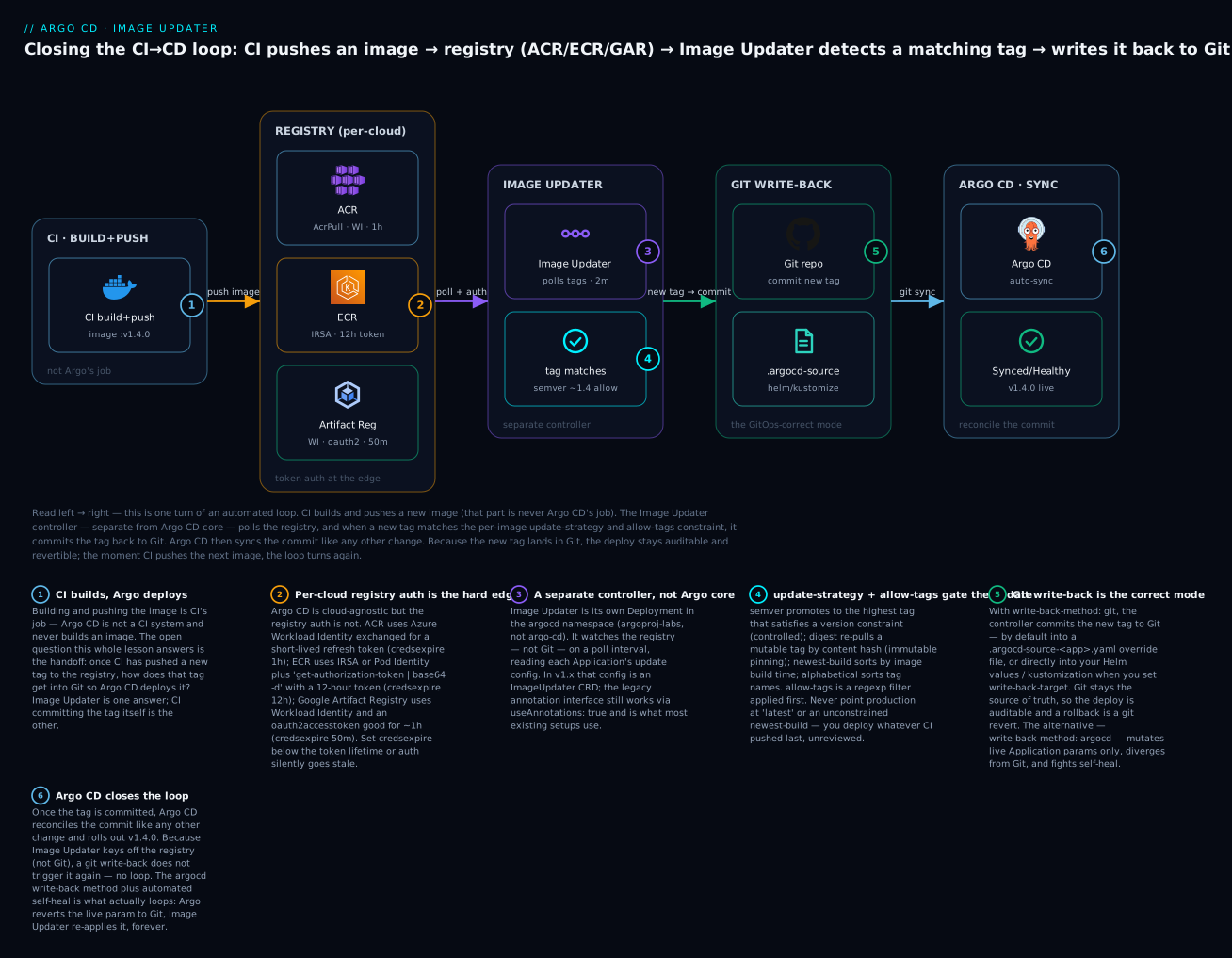
The badges mark the six ideas that decide whether this loop is safe: CI builds and Argo deploys — the handoff is the whole question (1); per-cloud registry auth is the hard edge, with ECR’s 12-hour token and ACR/GAR short-lived tokens each needing the right credsexpire (2); Image Updater is a separate controller that watches the registry, not Git (3); update-strategy plus allow-tags gate which tag is chosen, and pointing at latest is dangerous (4); git write-back keeps Git the source of truth so a rollback is a revert (5); and Argo CD closes the loop by reconciling the commit — with no loop, because Image Updater keys off the registry (6).
The v1.x reality: CRD now, annotations still
There is a version fork you must know about before you copy any example, because the internet is full of both shapes. Historically — through the entire v0.x line that dominated for years — Image Updater was configured entirely with annotations on the Argo CD Application. As of v1.0 (current release: v1.1.1), configuration moved to a dedicated ImageUpdater custom resource, and the annotation interface became legacy — still fully supported, but only when you opt back into it.
Legacy annotations (v0.x default, still supported) |
ImageUpdater CRD (v1.x recommended) |
|
|---|---|---|
| Where config lives | Annotations on each Argo CD Application |
A separate ImageUpdater object (usually in argocd) |
| API | argocd-image-updater.argoproj.io/* annotation keys |
apiVersion: argocd-image-updater.argoproj.io/v1alpha1, kind: ImageUpdater |
| App selection | Implicit — any Application carrying the annotations | Explicit — applicationRefs by namePattern / labelSelectors |
| How to enable annotations in v1.x | — | Set spec.useAnnotations: true (all CR config is then ignored) |
| What most existing setups use | This — the vast installed base, Helm charts, tutorials | Growing, but newer |
Which should you learn? Both, and you already will. This lesson teaches the annotation model as the primary interface because it is what you will meet in essentially every existing repo, the community Helm chart, and 95% of examples — and because the field-by-field vocabulary (image-list, update-strategy, write-back-method) is identical in meaning across both models. Then it shows the CRD equivalent so you are current. If you are starting fresh on v1.x, prefer the CRD; if you are operating an existing install, you are almost certainly on annotations and should stay deliberate about migrating.
Do not mix the two blindly. In v1.x, an
ImageUpdaterCR withuseAnnotations: false(the default) ignores anyargocd-image-updater.argoproj.io/*annotations on your Applications, and vice-versa. A classic v1.0 upgrade surprise is “the controller stopped updating anything” — because the annotations that drove v0.x are silently inert until you either setuseAnnotations: trueor port them into a CR.
The configuration, field by field
Everything Image Updater does is driven by a handful of fields. This section is the reference. We lead with the annotation keys (the interface you will actually encounter), and show the CRD equivalents after.
Here is a complete, realistic annotated Application — a Helm app tracking one image with a semver strategy and git write-back. Every field is explained in the tables that follow.
# application-web.yaml — an Argo CD Application with Image Updater annotations (legacy interface)
apiVersion: argoproj.io/v1alpha1
kind: Application
metadata:
  name: web
  namespace: argocd
  annotations:
    # Which image(s) to track: <alias>=<image>[:<version-constraint>]
    argocd-image-updater.argoproj.io/image-list: web=ghcr.io/acme/web
    # How to choose a tag for the 'web' alias
    argocd-image-updater.argoproj.io/web.update-strategy: semver
    # Only consider tags matching this filter (applied before the strategy)
    argocd-image-updater.argoproj.io/web.allow-tags: regexp:^v[0-9]+\.[0-9]+\.[0-9]+$
    # Map to THIS chart's Helm parameter names (defaults are image.name / image.tag)
    argocd-image-updater.argoproj.io/web.helm.image-name: image.repository
    argocd-image-updater.argoproj.io/web.helm.image-tag: image.tag
    # Commit the new tag to Git, using credentials in this Secret
    argocd-image-updater.argoproj.io/write-back-method: git:secret:argocd/git-creds
    argocd-image-updater.argoproj.io/git-branch: main
spec:
  project: default
  source:
    repoURL: https://github.com/acme/web-config.git
    targetRevision: main
    path: charts/web
    helm:
      parameters:
        - name: image.tag
          value: v1.3.0            # the tag Image Updater will bump
  destination:
    server: https://kubernetes.default.svc
    namespace: web
  syncPolicy:
    automated:
      prune: true
      selfHeal: true
The image-list annotation is the anchor — it names the images to track and gives each an alias used to prefix all the other per-image annotations. Its grammar:
image-list form |
Meaning |
|---|---|
web=ghcr.io/acme/web |
Track ghcr.io/acme/web, alias it web |
web=ghcr.io/acme/web:~1.3 |
Track it, but only consider semver tags satisfying ~1.3 (>=1.3.0 <1.4.0) |
api=123.dkr.ecr.eu-west-1.amazonaws.com/api |
An ECR image, aliased api |
a=img-a, b=img-b |
Two images, comma-separated, aliases a and b |
The alias matters because every other knob is <alias>.<key>. These are the per-image annotations you will actually use:
Annotation (prefix argocd-image-updater.argoproj.io/) |
What it does | Example value |
|---|---|---|
image-list |
The images to track, with aliases and optional constraints | web=ghcr.io/acme/web |
<alias>.update-strategy |
How to pick a tag | semver, digest, newest-build, alphabetical |
<alias>.allow-tags |
Filter of candidate tags, applied before the strategy | regexp:^v\d+\.\d+\.\d+$ |
<alias>.ignore-tags |
Tags to exclude explicitly | latest, edge, nightly |
<alias>.pull-secret |
Registry credentials for this image (static-cred registries) | pullsecret:argocd/regcred |
<alias>.platforms |
Restrict to platform(s) for multi-arch manifests | linux/amd64 |
<alias>.force-update |
Update even if the image is not currently referenced | "true" |
<alias>.helm.image-name |
Helm parameter holding the image name/repository | image.repository |
<alias>.helm.image-tag |
Helm parameter holding the tag | image.tag |
<alias>.kustomize.image-name |
The kustomize image name to override | ghcr.io/acme/web |
And the application-level annotations (no alias prefix) that control write-back:
Annotation (prefix argocd-image-updater.argoproj.io/) |
What it does | Example value |
|---|---|---|
write-back-method |
argocd (live params) or git (commit) — and where the git creds come from |
git:secret:argocd/git-creds |
write-back-target |
Where in Git to write: the override file (default), a Helm values file, or a kustomization | helmvalues:/values.yaml |
git-branch |
Branch to commit to; base:target opens a new branch (for PR flows) |
main or main:img-{{.SHA256}} |
git-repository |
Override the repo to write to (when repoURL is a chart, not Git) |
git@github.com:acme/web-config.git |
The Helm mapping is the field people get wrong first. By default Image Updater writes to Helm parameters named image.name and image.tag. Real charts frequently use image.repository and image.tag, or controller.image.tag, or something bespoke. If the parameter names do not match your chart, Image Updater writes values the chart never reads, the rendered image never changes, and it re-commits forever. Always set <alias>.helm.image-name / <alias>.helm.image-tag to your chart’s actual keys. For Kustomize the equivalent is <alias>.kustomize.image-name, naming the image kustomize should override (as if you ran kustomize edit set image).
The CRD equivalent
The same intent as an ImageUpdater custom resource. Note that the vocabulary is identical — updateStrategy, allowTags, writeBackConfig.method — only the shape changed from flat annotations to nested YAML:
# imageupdater-web.yaml — the v1.x CRD equivalent of the annotated Application above
apiVersion: argocd-image-updater.argoproj.io/v1alpha1
kind: ImageUpdater
metadata:
  name: web-updater
  namespace: argocd
spec:
  # Which Argo CD Applications this CR governs
  applicationRefs:
    - namePattern: "web"
      writeBackConfig:
        method: "git:secret:argocd/git-creds"
        gitConfig:
          branch: "main"
          writeBackTarget: "helmvalues:/values.yaml"
      images:
        - alias: "web"
          imageName: "ghcr.io/acme/web"
          commonUpdateSettings:
            updateStrategy: "semver"
            allowTags: "regexp:^v[0-9]+\\.[0-9]+\\.[0-9]+$"
| Legacy annotation | CRD field |
|---|---|
image-list: web=ghcr.io/acme/web |
images[].alias: web + images[].imageName: ghcr.io/acme/web |
<alias>.update-strategy |
images[].commonUpdateSettings.updateStrategy |
<alias>.allow-tags |
commonUpdateSettings.allowTags |
<alias>.ignore-tags |
commonUpdateSettings.ignoreTags |
<alias>.pull-secret |
commonUpdateSettings.pullSecret |
write-back-method |
writeBackConfig.method |
write-back-target |
writeBackConfig.gitConfig.writeBackTarget |
git-branch / git-repository |
writeBackConfig.gitConfig.branch / .repository |
| (implicit: any annotated app) | applicationRefs[].namePattern / .labelSelectors |
The CRD also supports layering: settings on spec.commonUpdateSettings apply to all applicationRefs, which can each override them, and individual images[] can override again — useful when one CR governs many similar Applications. To run the CRD build but keep driving it from annotations during a migration, set spec.useAnnotations: true and the controller reads the Applications’ annotations instead.
When you have dozens or hundreds of similar Applications, do not hand-annotate each one. Generate the annotations from an ApplicationSet template so every generated app carries a consistent, parameterised Image Updater config — the same fleet-management reasoning that governs the rest of a multi-cluster platform. In v1.x, a single
ImageUpdaterCR with alabelSelectorsref can cover a whole class of apps at once.
Update strategies in depth
The update-strategy is the single most consequential choice, because it decides which new tag becomes your desired state. There are four, and their names changed in recent releases — the old names still work but are deprecated, and you will see both in the wild.
| Strategy (current name) | Old name (deprecated) | Selects | Best for |
|---|---|---|---|
semver |
semver |
The highest tag satisfying the version constraint | Controlled promotion within a version range |
newest-build |
latest |
The tag with the most recent build/creation timestamp | Rapid dev loops where any newest image is fine |
alphabetical |
name |
The last tag in an alphabetically sorted list | Zero-padded date/sequence tags (2026.07.15) |
digest |
digest |
The current digest behind a mutable tag | Pinning to a tag (e.g. stable) but tracking its content |
semver is the default and the right choice for most promotion. It parses tags as semantic versions and picks the highest one that satisfies a constraint, which you express either in the image-list (web=ghcr.io/acme/web:~1.3) or as a plain allow-tags filter. The constraint is what gives you controlled automation — “take patch releases automatically, but never jump a minor without me.”
| Constraint | Matches | Use for |
|---|---|---|
~1.3 |
>=1.3.0 <1.4.0 (patch updates only) |
Auto-apply patch releases; hold minors |
^1.3 |
>=1.3.0 <2.0.0 (minor + patch) |
Auto-apply anything below the next major |
1.x or 1.* |
Any 1.y.z |
Track a major line |
>=1.3.0 <2.0.0 |
Explicit range | When you want the range spelled out |
| (none) | The highest valid semver overall | Rarely what you want in prod |
digest is the immutability strategy. Instead of moving between tags, you keep a fixed, mutable tag like stable or prod, and Image Updater tracks the digest (content hash) behind it. When CI re-pushes stable pointing at new content, the digest changes, and Image Updater writes the pinned image@sha256:... reference. This gives you tag-based ergonomics with digest-level immutability — the deployed workload is pinned to exact bytes, and a re-tag cannot silently change what runs without a Git commit recording the new digest.
newest-build and alphabetical are sort-order strategies, and here is the honest warning the brief demands: do not point production at newest-build unconstrained, and never at a moving latest tag. newest-build deploys whatever image was pushed most recently — which means any accidental push, any experimental build, any CI misfire promotes straight to prod with no version gate. It is fine for a scratch dev environment and dangerous everywhere else. alphabetical only behaves if your tags sort correctly (zero-padded dates like 2026.07.15.0930 work; v9 vs v10 sorts wrong). When in doubt, use semver with a real constraint, or digest for pinning.
| If you want… | Use | Because |
|---|---|---|
| Auto-apply patches, hold minors/majors | semver with ~x.y |
The constraint is an explicit, reviewable gate |
| Immutable pinning to exact content behind a stable tag | digest |
Tracks the hash; a re-tag is recorded as a Git commit |
| A fast dev environment that takes the newest build | newest-build |
Speed over control — acceptable only off prod |
| Date/sequence-tagged releases that sort cleanly | alphabetical |
Deterministic ordering of well-formed tags |
“Deploy :latest” in production |
none of these | You lose the version gate and, with it, safety |
The strategy is your safety mechanism, not a convenience knob.
semverwith a constraint means the worst automated promotion is a patch you already implicitly approved by choosing the range.newest-build/latestmeans the worst automated promotion is anything anyone pushed. Pick the strategy that makes your worst-case automatic deploy acceptable, then letallow-tagsandignore-tagstighten it further.
Write-back to Git
Write-back is where GitOps is either preserved or quietly abandoned. Image Updater has two methods, and the difference is not cosmetic.
write-back-method: git (correct) |
write-back-method: argocd (default, non-GitOps) |
|
|---|---|---|
| What it changes | Commits the new tag to your Git repo | Mutates the live Argo CD Application’s parameters via the API |
| Source of truth after | Git — still accurate | Git now lies; live state has drifted from it |
| Audit trail | Full — every promotion is a commit | None in Git; only the live object changed |
| Rollback | git revert |
Re-set the param by hand or re-run |
| Interaction with self-heal | None (Git and live agree) | Fights it — self-heal reverts to Git, Updater re-applies |
| Requires | Git write credentials | Nothing extra (uses the Argo API) |
Always prefer git. The argocd method exists for imperatively-created apps and quick experiments, but in any repo with automated sync and self-heal it is actively harmful: Argo CD sees the live parameter differ from Git, self-heal reverts it to the Git value, Image Updater notices the image is “old” again and re-applies its change, and you have built an infinite reconcile loop that flaps forever. This is the loop the troubleshooting section warns about, and its root cause is almost always write-back-method: argocd plus self-heal.
With git, there is no loop — because Image Updater watches the registry, not Git. Once it has committed v1.4.0 and v1.4.0 is still the newest allowed tag, it has nothing new to do. The commit flows to Argo CD, which deploys it, and the system rests until CI pushes v1.4.1.
What the commit actually contains
By default (no write-back-target), Image Updater does not edit your values.yaml or kustomization.yaml. It writes a dedicated override file named .argocd-source-<appName>.yaml in the Application’s source path. Argo CD natively reads this file and merges it as source-level parameter overrides at render time — which is why the change deploys without Image Updater ever touching your hand-maintained manifests.
# .argocd-source-web.yaml — written by Image Updater; read natively by Argo CD
helm:
  parameters:
    - name: image.repository
      value: ghcr.io/acme/web
      forcestring: true
    - name: image.tag
      value: v1.4.0
      forcestring: true
For a Kustomize app the same override file instead carries an images override:
# .argocd-source-web.yaml — Kustomize variant
kustomize:
  images:
    - ghcr.io/acme/web:v1.4.0
If you would rather Image Updater edit the real files — so the tag lives in your values.yaml where humans read it — set write-back-target:
write-back-target value |
Effect |
|---|---|
| (unset — the default) | Writes .argocd-source-<app>.yaml in the source path |
helmvalues |
Edits the app’s default Helm values file in place |
helmvalues:/values.yaml |
Edits a specific values file (absolute path in the repo) |
helmvalues:../../values.yaml |
Edits a values file at a relative path |
kustomization |
Runs the equivalent of kustomize edit set image on the base |
kustomization:/overlays/prod |
Edits a specific overlay’s kustomization |
The commit message is templated (git.commit-message-template in the config), defaulting to a build-style message. A representative commit:
build: automatic update of web

updates image ghcr.io/acme/web tag 'v1.3.0' to 'v1.4.0'
Git credentials for write-back
Committing means Image Updater needs write access to the repo — a higher bar than Argo CD’s usual read-only repo access. Three ways to supply it:
write-back-method value |
Credentials used | When |
|---|---|---|
git |
The Argo CD repo credentials for that repo, if they allow write | You already store a write-capable cred in Argo CD |
git:repocreds |
Argo CD’s repository credential template (org-wide creds) | Many repos under one org credential |
git:secret:<ns>/<name> |
A dedicated Kubernetes Secret you point at | You want a scoped, separate write credential (recommended) |
The dedicated secret holds either an HTTPS token or an SSH key — the same credential shapes covered in Connecting Repositories: HTTPS, SSH, Private Repos, Credential Templates:
# git-creds.yaml — a scoped write credential for Image Updater (PLACEHOLDERS ONLY)
apiVersion: v1
kind: Secret
metadata:
  name: git-creds
  namespace: argocd
type: Opaque
stringData:
  # HTTPS + PAT form:
  username: PLACEHOLDER_GIT_USER
  password: PLACEHOLDER_PERSONAL_ACCESS_TOKEN   # scope: write to the ONE config repo
  # --- OR SSH form (use one or the other) ---
  # sshPrivateKey: |
  #   -----BEGIN OPENSSH PRIVATE KEY-----
  #   PLACEHOLDER_DEPLOY_KEY
  #   -----END OPENSSH PRIVATE KEY-----
The git author identity is set once in the controller’s ConfigMap, alongside the commit-message template and the registry config we build in the next section:
# argocd-image-updater-config (excerpt) — git identity + commit message
apiVersion: v1
kind: ConfigMap
metadata:
  name: argocd-image-updater-config
  namespace: argocd
data:
  git.user: argocd-image-updater
  git.email: image-updater@acme.io
  git.commit-message-template: |
    build: automatic update of {{ .AppName }}
    {{ range .AppChanges -}}
    updates image {{ .Image }} tag '{{ .OldTag }}' to '{{ .NewTag }}'
    {{ end -}}
To avoid promoting straight to a branch Argo CD auto-syncs (no review at all), point
git-branchat a new branch with thebase:targetform — e.g.main:image-updater-{{.SHA256}}— and let your Git provider’s automation open a pull request. You get the automation of Image Updater with the gate of a PR, which is the pragmatic middle ground between full auto-promotion and CI-writes-the-tag.
The multi-cloud core: authenticating to ACR, ECR & Artifact Registry
This is the heart of the lesson and the genuinely hard part. Image Updater is cloud-agnostic in everything above — image-list, update-strategy, write-back are identical no matter where your images live. But to list the tags of a private registry, it must authenticate, and that is where Azure, AWS and Google Cloud diverge completely. Each cloud offers a keyless workload-identity path (the right way) and each hands back a short-lived token, which forces the one field that trips everyone up: credsexpire.
Registry auth lives in the controller’s config, not in the Application. You define a registries list in argocd-image-updater-config, and each entry says how to get credentials. The credential sources are shared across clouds:
credentials: source |
Meaning | Fits |
|---|---|---|
secret:<ns>/<name>#<field> |
Read a static credential from a Kubernetes Secret | Long-lived registry passwords |
pullsecret:<ns>/<name> |
Reuse a docker-registry pull Secret | Registries with non-expiring creds |
env:<VAR> |
Read from an environment variable | Simple/static setups |
ext:/path/to/script.sh |
Run a script that prints username:password to stdout |
Cloud token auth — the multi-cloud path |
For ACR, ECR and Artifact Registry the answer is always ext: + a small script + credsexpire, because the credential is a token that expires. The script prints username:password; Image Updater caches it until credsexpire elapses, then re-runs the script for a fresh token. Set credsexpire below the token’s lifetime or auth silently goes stale mid-day — the single most common per-cloud failure.
Here is the per-cloud reality in one table — the reference you will return to:
| Azure Container Registry (AKS) | Amazon ECR (EKS) | Google Artifact Registry (GKE) | |
|---|---|---|---|
| Keyless identity for the Updater pod | Azure Workload Identity (OIDC federation) | IRSA (OIDC) or EKS Pod Identity | GKE Workload Identity |
| Read-only role to grant | AcrPull on the registry |
ecr:GetAuthorizationToken + ecr:DescribeImages/ListImages/BatchGetImage |
roles/artifactregistry.reader |
| Token mechanism | Federated token → AAD → ACR refresh token | aws ecr get-authorization-token → base64-decode |
Workload Identity → OAuth2 access token |
| Docker username in the token | 00000000-0000-0000-0000-000000000000 (well-known GUID) |
AWS (comes from the decoded token) |
oauth2accesstoken |
| Token lifetime | ~3 hours | 12 hours | ~1 hour |
credsexpire to set |
1h |
12h (or less) |
50m |
| The gotcha | Federated-token env vars must be projected into the pod | The 12h token — without credsexpire auth dies daily |
Access token expires hourly — set credsexpire well under 60m |
And the binding chain — the identity plumbing for the Image Updater pod itself (mirrors the pattern you configured for ESO in Secrets in GitOps):
| Cloud | Bind this | To this | Then mark the ServiceAccount |
|---|---|---|---|
| AKS | argocd-image-updater KSA |
User-assigned managed identity with AcrPull |
Federated credential (subject system:serviceaccount:argocd:argocd-image-updater); KSA annotation azure.workload.identity/client-id; pod label azure.workload.identity/use: "true" |
| EKS (IRSA) | argocd-image-updater KSA |
IAM role with ECR read, trusting the cluster OIDC provider | KSA annotation eks.amazonaws.com/role-arn: arn:aws:iam::<acct>:role/<role> |
| EKS (Pod Identity) | argocd-image-updater KSA |
IAM role | aws eks create-pod-identity-association (no annotation needed) |
| GKE | argocd-image-updater KSA |
Google service account with artifactregistry.reader |
roles/iam.workloadIdentityUser on <proj>.svc.id.goog[argocd/argocd-image-updater]; KSA annotation iam.gke.io/gcp-service-account |
Now the config for each cloud. Notice only the registries entry and its script change — the Application annotations do not.
Azure Container Registry (AKS)
# argocd-image-updater-config (excerpt) — ACR via Azure Workload Identity
data:
  registries.conf: |
    registries:
    - name: ACR
      api_url: https://acmeprod.azurecr.io
      prefix: acmeprod.azurecr.io
      ping: yes
      credentials: ext:/app/scripts/acr-login.sh
      credsexpire: 1h        # ACR refresh token ~3h; refresh conservatively
# acr-login.sh — exchange the projected federated token for an ACR token.
# Prints "username:password"; the username is the well-known ACR GUID.
#!/bin/sh
# AZURE_* env vars are projected by the Azure Workload Identity webhook when the
# pod carries the label azure.workload.identity/use: "true".
az login --service-principal \
  -u "$AZURE_CLIENT_ID" -t "$AZURE_TENANT_ID" \
  --federated-token "$(cat "$AZURE_FEDERATED_TOKEN_FILE")" >/dev/null
TOKEN=$(az acr login -n acmeprod --expose-token --output tsv --query accessToken)
echo "00000000-0000-0000-0000-000000000000:${TOKEN}"
Amazon ECR (EKS)
# argocd-image-updater-config (excerpt) — ECR via IRSA / Pod Identity
data:
  registries.conf: |
    registries:
    - name: ECR
      api_url: https://123456789012.dkr.ecr.eu-west-1.amazonaws.com
      prefix: 123456789012.dkr.ecr.eu-west-1.amazonaws.com
      ping: yes
      credentials: ext:/app/scripts/ecr-login.sh
      credsexpire: 12h       # ECR authorization token lives 12h — refresh within it
# ecr-login.sh — the classic ECR contract. get-authorization-token returns
# base64("AWS:<password>"); decoding it yields the "username:password" line directly.
#!/bin/sh
aws ecr --region eu-west-1 get-authorization-token \
  --output text --query 'authorizationData[].authorizationToken' | base64 -d
Google Artifact Registry (GKE)
# argocd-image-updater-config (excerpt) — Artifact Registry via GKE Workload Identity
data:
  registries.conf: |
    registries:
    - name: GAR
      api_url: https://europe-west1-docker.pkg.dev
      prefix: europe-west1-docker.pkg.dev
      ping: yes
      credentials: ext:/app/scripts/gar-login.sh
      credsexpire: 50m       # OAuth2 access token ~1h — refresh under 60m
# gar-login.sh — with Workload Identity, fetch an access token from the metadata
# server and print it as "oauth2accesstoken:<token>".
#!/bin/sh
TOKEN=$(wget -qO- --header 'Metadata-Flavor: Google' \
  'http://metadata.google.internal/computeMetadata/v1/instance/service-accounts/default/token' \
  | sed -n 's/.*"access_token":"\([^"]*\)".*/\1/p')
echo "oauth2accesstoken:${TOKEN}"
These scripts are mounted into the controller — the community Helm chart exposes authScripts.enabled: true and an authScripts.scripts map that lands them at /app/scripts/, and the pod needs the cloud CLI/tooling the script calls (the az CLI for ACR; aws for ECR; only wget for GAR). Whoever owns the pipeline pushes images with the cloud’s own tooling; the read paths for verification differ per cloud:
| Action | Azure Container Registry | Amazon ECR | Google Artifact Registry |
|---|---|---|---|
| List tags (verify access) | az acr repository show-tags -n acmeprod --repository web |
aws ecr describe-images --repository-name web |
gcloud artifacts docker tags list europe-west1-docker.pkg.dev/acme/web |
| The read-only grant | AcrPull role assignment |
ECR read policy on the repo ARN | roles/artifactregistry.reader |
Registry host (the prefix) |
acmeprod.azurecr.io |
<acct>.dkr.ecr.<region>.amazonaws.com |
<region>-docker.pkg.dev |
The multi-cloud lesson in one line: the only thing that changes across clouds is the ~5-line
ext:script and itscredsexpire. Everything upstream (which tags to allow, how to promote, where to commit) is identical. That is the payoff of Image Updater’s design — but it is also why “auth works in AKS, breaks in EKS” is the top support question: the token lifetimes differ (3h vs 12h vs 1h), so acredsexpirecopied from one cloud to another is wrong. Matchcredsexpireto that cloud’s token, and prefer workload identity so there is no static credential to leak in the first place.
Security
Image Updater sits in a sensitive spot: it can read your registries and write to your Git repo. Treat both grants with least privilege.
| Concern | Risk if sloppy | The disciplined default |
|---|---|---|
| Git write scope | A broad PAT lets a compromised controller rewrite any repo | A token/deploy key scoped to only the one config repo, write-only to it |
| Registry read scope | An over-broad role reads (or worse) every registry | AcrPull / ECR-read / artifactregistry.reader on only the needed registries |
| Static credentials | A leaked long-lived password is game over | Workload identity everywhere — no stored registry password at all |
| Auto-promote to prod | Any pushed tag ships unreviewed | git-branch: base:target → PR, or keep prod’s tag write in CI |
| Unsigned images | Automation deploys a tampered image | Verify signatures/provenance in admission (see below) |
| Branch protection | The bot commits bypass review | A bot identity that must open PRs, not push to protected branches |
The write-back credential should be scoped to a single repository, not an org-wide token — the blast radius of a leaked Image Updater cred should be “one config repo,” not “everything.” Store it as a Kubernetes Secret handled like every other secret in this course (never in Git in plaintext) — the same discipline from Secrets in GitOps applies to the PAT and the SSH key here.
On signed images and policy — a forward reference. Image Updater promotes based on tag policy, not on whether the image is trustworthy. It has no built-in “only promote signed images” gate. If your threat model requires that (and in regulated prod it does), enforce it at admission with a policy engine — Sigstore/cosign signature verification via Kyverno or OPA Gatekeeper, or Connaisseur — so that even if Image Updater promotes a tag, the cluster refuses to run an unsigned or unattested image. Automated promotion and admission-time verification are complementary controls; do not let the convenience of the former talk you out of the latter.
The uncomfortable truth about any auto-promotion tool: it widens the path from “someone can push to a registry” to “something runs in production” and removes a human from the middle. That is the point, and it is fine — if the ends are locked down. Lock the front door (who can push to the registry, image signing) and the back door (branch protection, admission policy), and Image Updater is a safe convenience. Leave them open and you have automated the delivery of whatever an attacker can push.
When NOT to use it
The brief for this lesson is opinionated on purpose, and so is this section. Reach past Image Updater when:
| Situation | Prefer instead | Why |
|---|---|---|
| Production with compliance/change-control | CI-writes-the-tag with a PR gate | You need a reviewable, policy-gated promotion, not an automatic one |
| Multi-stage promotion (dev→stage→prod) | A promotion tool (Kargo) or CI orchestration | Image Updater does one hop (new tag → commit), not staged freight |
| You want promotion decisions in one auditable place | CI pipeline | The bump is an authored commit in a system you already govern |
| Image trustworthiness must gate deploys | CI check + admission policy | Image Updater has no signature/provenance gate of its own |
| You are already committing tags in CI cleanly | Keep it | Adding Image Updater duplicates the mechanism and invites the write-back loop |
The strongest reason to keep the tag write in CI is auditability with a gate: a promotion becomes a pull request that a human or a policy check approves, tied to the exact build that produced the image, in the CI system your org already trusts and logs. Image Updater’s automatic, constraint-based promotion is a poor fit for anything that must answer “who approved shipping this, and against which policy?” For dev and staging, where the answer is “whoever merged, automatically,” Image Updater shines. Match the tool to whether the promotion needs a gate.
Hands-on lab
We will install Image Updater, wire one Application to auto-promote with semver + git write-back, watch the commit it makes, then show the ACR/ECR/GAR auth variants. Flow A is config-level and cloud-neutral — it works against any registry you can already read (a local kind cluster plus a public image is enough to see the mechanics). Flow B shows the per-cloud registry auth. Every credential below is a placeholder; never commit a real PAT, SSH key or registry password. ⚠️ The cloud registries and workload identity themselves are effectively free at this scale, but the managed clusters (AKS/EKS/GKE) bill — tear down anything you spin up.
Flow A — install, annotate, and watch the write-back
Step 1 — Install the controller into the argocd namespace.
# Manifest install (installs the ImageUpdater CRD too, on v1.x)
kubectl apply -n argocd \
  -f https://raw.githubusercontent.com/argoproj-labs/argocd-image-updater/stable/manifests/install.yaml
# Or via Helm:
#   helm repo add argo https://argoproj.github.io/argo-helm
#   helm install argocd-image-updater argo/argocd-image-updater -n argocd
kubectl -n argocd rollout status deploy/argocd-image-updater
# deployment "argocd-image-updater" successfully rolled out
What just happened: a second controller now runs beside Argo CD. It is doing nothing yet — it has no Applications configured to watch.
Step 2 — Give it a Git write credential (placeholder) and set the git identity.
# A repo-scoped write credential — treat the token as a real secret.
kubectl -n argocd create secret generic git-creds \
  --from-literal=username=PLACEHOLDER_GIT_USER \
  --from-literal=password=PLACEHOLDER_PERSONAL_ACCESS_TOKEN
Add the git identity to argocd-image-updater-config (the ConfigMap excerpt from earlier), then restart the controller so it reloads:
kubectl -n argocd rollout restart deploy/argocd-image-updater
What just happened: the controller can now author commits as argocd-image-updater <image-updater@acme.io> and push using the placeholder credential.
Step 3 — Annotate an Application for semver + git write-back. Apply the application-web.yaml from the configuration section (it already carries the annotations). The key four: image-list, web.update-strategy: semver, write-back-method: git:secret:argocd/git-creds, git-branch: main.
kubectl apply -f application-web.yaml
kubectl -n argocd get application web
# NAME   SYNC STATUS   HEALTH STATUS
# web    Synced        Healthy
What just happened: Image Updater now sees web in its watch set (it carries image-list). On its next cycle it lists the tags of ghcr.io/acme/web, filters by allow-tags, and picks the highest semver.
Step 4 — Trigger a promotion and read the logs. When CI pushes a newer matching tag (say v1.4.0), the controller acts on its next poll:
kubectl -n argocd logs deploy/argocd-image-updater | grep -Ei 'web|update|commit'
# (representative)
# level=info msg="Starting image update cycle, considering 1 application(s)"
# level=info msg="Setting new image to ghcr.io/acme/web:v1.4.0" application=web
# level=info msg="Successfully updated image 'ghcr.io/acme/web:v1.3.0' to
#                 'ghcr.io/acme/web:v1.4.0', now processing group write-back"
# level=info msg="Committing 2 parameter(s) for application web"
# level=info msg="Successfully committed changes to git"
What just happened: the controller chose v1.4.0, and because write-back is git, it committed the tag — not to your values.yaml, but to .argocd-source-web.yaml in the app’s source path.
Step 5 — Verify the commit and the deploy.
# The commit Image Updater authored:
git -C web-config log --oneline -1
# a1b2c3d build: automatic update of web

# The override file it wrote (this is what Argo CD reads):
git -C web-config show HEAD:charts/web/.argocd-source-web.yaml
# helm:
#   parameters:
#     - name: image.repository
#       value: ghcr.io/acme/web
#       forcestring: true
#     - name: image.tag
#       value: v1.4.0
#       forcestring: true

# Argo CD picked up the commit and rolled it out:
argocd app get web --refresh | grep -E 'Images|Sync Status'
#  Images:  ghcr.io/acme/web:v1.4.0
#  Sync Status: Synced to main (a1b2c3d)
What just happened: the full loop closed inside Git. CI pushed → Image Updater committed the tag → Argo CD synced the commit → v1.4.0 is live, and Git records exactly that. A rollback is now git revert a1b2c3d.
Flow B — the per-cloud registry auth (paired)
To track a private ACR/ECR/GAR image, bind the controller pod’s identity and add the matching registries entry + script. Apply the cloud you are on:
# AKS — federate the Image Updater KSA to a managed identity with AcrPull
az identity create -g rg-gitops -n id-image-updater
az role assignment create \
  --assignee "$(az identity show -g rg-gitops -n id-image-updater --query principalId -o tsv)" \
  --role AcrPull --scope "$(az acr show -n acmeprod --query id -o tsv)"
az identity federated-credential create --identity-name id-image-updater -g rg-gitops \
  --name aiu --issuer "$(az aks show -g rg-aks -n aks-prod \
    --query oidcIssuerProfile.issuerUrl -o tsv)" \
  --subject system:serviceaccount:argocd:argocd-image-updater
kubectl -n argocd annotate sa argocd-image-updater \
  azure.workload.identity/client-id="$(az identity show -g rg-gitops -n id-image-updater --query clientId -o tsv)"
kubectl -n argocd patch deploy argocd-image-updater --type merge \
  -p '{"spec":{"template":{"metadata":{"labels":{"azure.workload.identity/use":"true"}}}}}'

# EKS — annotate the KSA for IRSA (role has ECR read), OR use Pod Identity
kubectl -n argocd annotate sa argocd-image-updater \
  eks.amazonaws.com/role-arn=arn:aws:iam::123456789012:role/image-updater-ecr-read
#   aws eks create-pod-identity-association --cluster-name eks-prod \
#     --namespace argocd --service-account argocd-image-updater \
#     --role-arn arn:aws:iam::123456789012:role/image-updater-ecr-read

# GKE — bind the KSA to a GSA with artifactregistry.reader
gcloud iam service-accounts add-iam-policy-binding \
  image-updater@acme-prod.iam.gserviceaccount.com \
  --role roles/iam.workloadIdentityUser \
  --member "serviceAccount:acme-prod.svc.id.goog[argocd/argocd-image-updater]"
kubectl -n argocd annotate sa argocd-image-updater \
  iam.gke.io/gcp-service-account=image-updater@acme-prod.iam.gserviceaccount.com
Then add the cloud’s registries.conf entry and ext: script from the multi-cloud section, restart the controller, and point image-list at the private image (e.g. api=123456789012.dkr.ecr.eu-west-1.amazonaws.com/api). Confirm auth:
kubectl -n argocd logs deploy/argocd-image-updater | grep -Ei 'registr|token|tags'
# (representative, healthy)
# level=info msg="Loaded 1 registry configurations"
# level=debug msg="Fetching available tags for image 123...amazonaws.com/api"
# level=debug msg="Found 7 tags in registry"
What just happened: the controller ran your ext: script, got a short-lived token from the cloud, listed the private repo’s tags, and cached the token until credsexpire. The Application annotations did not change — only the registry config did.
Teardown
# Remove the demo Application (and its .argocd-source file via a normal Git PR/commit)
kubectl -n argocd delete application web
# Uninstall the controller
kubectl delete -n argocd \
  -f https://raw.githubusercontent.com/argoproj-labs/argocd-image-updater/stable/manifests/install.yaml
kubectl -n argocd delete secret git-creds
# ⚠️ Cloud: delete the managed identity/IAM role/GSA and any test cluster to stop billing.
az identity delete -g rg-gitops -n id-image-updater          # AKS
# aws iam delete-role --role-name image-updater-ecr-read      # EKS
# gcloud iam service-accounts delete image-updater@acme-prod.iam.gserviceaccount.com  # GKE
Common mistakes and troubleshooting
Image Updater fails in a small number of very recognisable ways. Keep this table close.
| Symptom | Likely cause | Fix |
|---|---|---|
| Controller runs but nothing updates | No image-list on the app, or (v1.x) a CR with useAnnotations: false ignoring your annotations |
Add image-list; or set useAnnotations: true, or port config into the ImageUpdater CR |
| Chosen tag is chaos / prod jumped a major | update-strategy: newest-build/latest, or semver with no constraint |
Use semver with ~x.y/^x.y, or digest; never latest in prod |
| Commits made but the deploy never changes | Helm param names don’t match the chart (image.name vs image.repository) |
Set <alias>.helm.image-name/helm.image-tag to the chart’s real keys |
| Endless re-commits / self-heal flapping | write-back-method: argocd + automated self-heal fighting live params |
Switch to write-back-method: git; git write-back has no loop |
git push fails / write-back errors |
Wrong or read-only Git credential; branch protection blocks the bot | Use a write-scoped git:secret:<ns>/<name>; or push to a PR branch (base:target) |
| Auth works for hours then breaks daily (ECR) | No credsexpire, or set above the 12h token lifetime |
Set credsexpire: 12h (or less) on the ECR registry entry |
| Auth breaks hourly (GAR) or every few hours (ACR) | credsexpire above the token lifetime (GAR ~1h, ACR ~3h) |
credsexpire: 50m (GAR), 1h (ACR); refresh under the token’s life |
no basic auth credentials / 401 listing tags |
registries entry missing/prefix mismatch, or identity lacks the read role |
Match prefix to the registry host; grant AcrPull/ECR-read/artifactregistry.reader |
| No tags ever match | allow-tags regexp doesn’t match your tag scheme |
Test the regexp against real tags; remember it filters before the strategy |
| Updates the live app but not Git (non-GitOps) | Default write-back-method: argocd was left in place |
Explicitly set write-back-method: git — the default is not GitOps |
digest vs tag confusion |
Expecting a version bump but strategy is digest (tracks a mutable tag’s hash) |
Use semver to move between tags; digest only re-pins one tag |
| Updates from an untrusted/unexpected image | RBAC too broad, or no admission gate on signatures | Scope the read role per-registry; verify signatures at admission |
Three failure modes deserve extra words because they cost the most hours.
1. The write-back loop. You enabled automation, and now Argo CD flaps between Synced and OutOfSync every few seconds while the Image Updater log shows repeated updates. The cause is almost always write-back-method: argocd (the default) combined with automated self-heal: Image Updater sets the live parameter, Argo CD’s self-heal reverts it to the Git value, Image Updater sees the “old” image and re-applies. The fix is not to disable self-heal — it is to switch to write-back-method: git, which writes to Git so there is nothing for self-heal to fight. Remember the default write-back method is argocd; GitOps is opt-in here.
2. The Helm-parameter mismatch churn. A subtler cousin: Image Updater commits happily, but the deployed image never changes, and it keeps committing every cycle. This happens when the Helm parameter it writes (image.name/image.tag by default) is not the parameter your chart actually reads (image.repository, controller.image.tag, …). The rendered manifest ignores the written value, so from Image Updater’s view the running image is still old, so it writes again. Fix the mapping with <alias>.helm.image-name/<alias>.helm.image-tag — and confirm by rendering the chart and checking the image line changed.
3. credsexpire drift across clouds. Auth that “works, then breaks on a schedule” is always a token-lifetime problem. The token from each cloud has a different life — ECR 12 hours, ACR roughly 3, Artifact Registry about 1 — and Image Updater caches the credential for exactly credsexpire. If credsexpire is unset or longer than the token lives, the cached credential expires mid-cycle and tag listing starts returning 401s until the next restart. Set credsexpire comfortably under each cloud’s token lifetime, and never copy an ECR’s 12h onto a GAR entry whose token dies in an hour.
Cheat-sheet
Bookmark this. It answers “what do I annotate, which strategy, and how does each cloud authenticate?”
The annotation set (prefix every key with argocd-image-updater.argoproj.io/):
| Key | Purpose | Example |
|---|---|---|
image-list |
Images to track, alias=image[:constraint] |
web=ghcr.io/acme/web:~1.3 |
<alias>.update-strategy |
Tag selection | semver |
<alias>.allow-tags |
Pre-filter candidate tags | regexp:^v\d+\.\d+\.\d+$ |
<alias>.ignore-tags |
Exclude tags | latest, edge |
<alias>.pull-secret |
Static registry creds for this image | pullsecret:argocd/regcred |
<alias>.helm.image-name / .helm.image-tag |
Chart’s image params | image.repository / image.tag |
<alias>.kustomize.image-name |
Kustomize image to override | ghcr.io/acme/web |
write-back-method |
git (correct) or argocd (non-GitOps) |
git:secret:argocd/git-creds |
write-back-target |
Override file (default), helmvalues:…, or kustomization:… |
helmvalues:/values.yaml |
git-branch |
Target branch; base:target for PRs |
main:img-{{.SHA256}} |
Update strategies:
| Strategy | Picks | Old name |
|---|---|---|
semver |
Highest tag satisfying the constraint | semver |
digest |
Current digest behind a mutable tag | digest |
newest-build |
Most recently built tag | latest |
alphabetical |
Last tag alphabetically | name |
Per-cloud registry auth (all via credentials: ext:<script> + credsexpire):
| Cloud | Identity | Read role | Token life | credsexpire |
Docker username |
|---|---|---|---|---|---|
| ACR (AKS) | Azure Workload Identity | AcrPull |
~3h | 1h |
00000000-0000-0000-0000-000000000000 |
| ECR (EKS) | IRSA / Pod Identity | ecr:GetAuthorizationToken + describe/list |
12h | 12h |
AWS |
| GAR (GKE) | GKE Workload Identity | artifactregistry.reader |
~1h | 50m |
oauth2accesstoken |
Handy commands:
| Command | What it does |
|---|---|
kubectl -n argocd logs deploy/argocd-image-updater |
The controller’s decisions and errors |
kubectl -n argocd rollout restart deploy/argocd-image-updater |
Reload config/registries/scripts |
argocd-image-updater test <image> --update-strategy semver --allow-tags '<re>' |
Dry-run tag selection for one image |
git show HEAD:<path>/.argocd-source-<app>.yaml |
See the override file Image Updater wrote |
argocd app get <app> --refresh |
Confirm Argo synced the promoted tag |
Interview and exam questions
Q: Argo CD deploys what’s in Git, and CI just pushed a new image to the registry. Why doesn’t the app update, and what are the ways to fix it?
A: Because the tag string in Git never changed, so Argo CD sees no diff — it reconciles Git, not the registry, and will never notice a newer image on its own. To fix it you must get the concrete new tag into Git: either CI commits the tag after the push (explicit, gateable), or Argo CD Image Updater watches the registry and writes the tag back to Git for you. Pointing at :latest does not work, because the tag string still doesn’t change.
Q: Is Argo CD Image Updater part of Argo CD? What does it watch?
A: No — it’s a separate controller from the argoproj-labs project, installed alongside Argo CD (typically in the argocd namespace). Crucially, it watches the registry, not Git — the opposite of Argo CD. That’s why they compose: Image Updater writes new tags to Git, Argo CD reads Git and deploys. It’s also why git write-back doesn’t loop.
Q: Explain the difference between the two write-back methods and why git is preferred.
A: write-back-method: git commits the new tag to Git, keeping Git the source of truth — the promotion is auditable and a rollback is git revert. write-back-method: argocd (the default) mutates the live Application’s parameters via the API, so Git no longer reflects reality. Worse, with automated self-heal the argocd method creates an infinite loop: self-heal reverts the live param to Git, Image Updater re-applies it, forever. Always use git in a GitOps repo.
Q: What is .argocd-source-<app>.yaml and why use it instead of editing values.yaml?
A: It’s the override file Image Updater writes by default in the Application’s source path; Argo CD reads it natively and merges it as source-level parameter overrides at render time. Using it means Image Updater never touches your hand-maintained values.yaml/kustomization.yaml, avoiding merge conflicts with humans and CI. If you’d rather the tag live in the real values file, set write-back-target: helmvalues:… (or kustomization:…).
Q: Walk through the four update strategies and when each is appropriate.
A: semver picks the highest tag satisfying a version constraint — the default and best for controlled promotion (~1.3 for patches only). digest tracks the content hash behind a mutable tag like stable — immutability with tag ergonomics. newest-build (formerly latest) takes the most recently built tag — fine for dev, dangerous for prod. alphabetical (formerly name) takes the last tag alphabetically — only safe with zero-padded, well-sorting tags. Production should use semver with a constraint or digest.
Q: Why is pointing an update-strategy at latest dangerous?
A: A moving latest tag (or an unconstrained newest-build) deploys whatever image was pushed most recently, with no version gate — an accidental push, an experimental build, or a CI misfire promotes straight to production. The strategy is your safety mechanism: semver with a constraint makes the worst automatic promotion a patch you pre-approved by choosing the range; latest makes it anything anyone pushed.
Q: How does Image Updater authenticate to a private ECR registry, and what’s the ECR-specific gotcha?
A: On EKS the controller pod gets an IAM role via IRSA or Pod Identity with ECR read; a registries entry uses credentials: ext:/…/ecr-login.sh, and the script runs aws ecr get-authorization-token … | base64 -d, which yields the AWS:<password> line Image Updater needs. The gotcha is the 12-hour token: you must set credsexpire: 12h (or less) so the cached credential is refreshed before it expires — otherwise auth works for a while, then fails daily.
Q: Contrast the auth for ACR, ECR and Artifact Registry.
A: All three use keyless workload identity for the pod and a credentials: ext: script that prints username:password, but they differ in mechanism, token username, and lifetime. ACR: Azure Workload Identity → an ACR token, username the well-known GUID 00000000-…, ~3h life (credsexpire: 1h). ECR: IRSA/Pod Identity → get-authorization-token, username AWS, 12h life (credsexpire: 12h). GAR: GKE Workload Identity → an OAuth2 access token, username oauth2accesstoken, ~1h life (credsexpire: 50m). The only per-cloud change is the script and credsexpire.
Q: A team enabled Image Updater and now their app flaps between Synced and OutOfSync. What happened?
A: Classic write-back loop: they left write-back-method at its default (argocd) with automated self-heal on. Image Updater sets the live param, self-heal reverts it to the Git value, Image Updater re-applies — an infinite fight. The fix is write-back-method: git, which writes to Git so self-heal has nothing to revert.
Q: Image Updater commits every cycle but the running image never changes. Diagnose it.
A: The Helm parameter it writes doesn’t match the chart’s actual keys — it writes image.name/image.tag (defaults) while the chart reads image.repository or controller.image.tag. The rendered manifest ignores the written value, so Image Updater always thinks the image is old and re-commits. Fix with <alias>.helm.image-name/<alias>.helm.image-tag set to the chart’s real parameter names.
Q: When would you deliberately NOT use Image Updater? A: When promotion needs a gate — regulated production, change control, or “who approved this and against which policy?” In those cases CI-writes-the-tag with a PR review (and a signature/scan check) is better, because the promotion is an authored, reviewable commit. Also for multi-stage promotion (dev→stage→prod with verification), a dedicated tool like Kargo fits better than Image Updater’s single new-tag→commit hop. And if you already commit tags cleanly in CI, adding Image Updater just duplicates the mechanism.
Q: Does Image Updater verify that an image is signed or trustworthy before promoting?
A: No. It promotes based purely on tag policy (update-strategy + allow-tags) — it has no signature or provenance gate. If trustworthiness must gate deploys, enforce it at admission with cosign verification via Kyverno/OPA Gatekeeper or Connaisseur, so the cluster refuses to run an unsigned image even if Image Updater promotes the tag. Automated promotion and admission verification are complementary controls.
Key takeaways
- Argo CD deploys Git, not registries. When CI pushes a new image, something must write the new tag into Git before Argo CD acts. The whole question is who — and pointing at
:latestis not an answer, because the tag string never changes. - Two honest options: CI commits the tag, or Image Updater does. CI-writes-the-tag is explicit and gateable (PR review, policy, signature checks) and is the right default for regulated production. Image Updater removes the CI→Git plumbing and promotes automatically by tag policy — great for dev/staging, weaker where promotion needs a gate.
- Image Updater is a separate controller that watches the registry, not Git. It lives beside Argo CD, reads each app’s config, and on a poll interval selects a tag and writes it. That registry-watching design is exactly why git write-back does not loop.
- Always use
write-back-method: git. It keeps Git the source of truth (auditable,git revertrollback). The defaultargocdmethod mutates live state, diverges from Git, and combined with self-heal creates an infinite loop. GitOps is opt-in here. semverwith a constraint is the safe strategy;digestfor immutable pinning.newest-build/latestdeploys whatever was pushed last — fine for a scratch env, dangerous in prod. Choose the strategy that makes your worst-case automatic deploy acceptable.- The multi-cloud core is a 5-line script and
credsexpire. ACR (Azure Workload Identity, ~3h token,credsexpire: 1h), ECR (IRSA/Pod Identity, 12h token,credsexpire: 12h), and Artifact Registry (GKE Workload Identity, ~1h token,credsexpire: 50m) each authenticate with a keyless identity and anext:script — only the script andcredsexpirechange. Setcredsexpireunder the token lifetime or auth silently goes stale. - v1.x uses an
ImageUpdaterCRD; annotations are legacy but universal. The vocabulary is identical across both; the huge installed base is annotation-driven. On v1.x, annotations are inert unless you setuseAnnotations: true— a common upgrade surprise. - Lock both doors. Image Updater widens the path from “can push an image” to “runs in production.” Scope its Git write credential to one repo and its registry read role per-registry, prefer workload identity so there’s no static credential to leak, and verify image signatures at admission — automated promotion and admission policy are complementary, not alternatives.