Every deploy is a bet. You have tested the new version in staging, the pipeline is green, and now you are about to replace the code that is serving real users. A plain Kubernetes Deployment settles that bet the same crude way every time: it starts swapping old pods for new ones the instant the manifest changes, and it does not stop, does not ask, and does not check whether the new pods are actually serving well — only whether they are passing their readiness probe. A probe says “the process is up and answered /healthz.” It says nothing about a 5% jump in HTTP 500s, a latency cliff, or a subtle bug that only fires for logged-in users. By the time your dashboards catch it, the Deployment has already rolled the whole fleet.
This lesson is about buying back control of that bet. Argo Rollouts is a Kubernetes controller — a sibling project to Argo CD, not a feature of it — that replaces Deployment with a Rollout custom resource and gives you the two release strategies every serious platform eventually needs: canary (shift a little traffic to the new version, watch, then shift more) and blue-green (stand the new version up fully in the dark, then flip everyone over in one instant). Both add what a RollingUpdate lacks: a place to pause, a place to check metrics, and — the part that matters most at 2 a.m. — a way to roll back in seconds because the old version is still running.
By the end you will understand the Rollout CRD field by field, be able to write and read both a canary and a blue-green manifest, know exactly how Argo CD and Argo Rollouts divide the work, and have stepped a real release forward with kubectl argo rollouts promote. We stay cloud-neutral here on purpose: the strategies are identical on AKS, EKS, and GKE. The one genuinely cloud-specific piece — wiring a real traffic router (Istio, NGINX, an ALB, or Gateway API) so that setWeight: 20 sends a true 20% of requests — is the whole of the next lesson, Traffic Management with Istio, NGINX, ALB & Gateway API.
Why this matters: a RollingUpdate is a blunt instrument
A Deployment has exactly one update strategy worth using, RollingUpdate, and it is governed by two knobs — maxSurge (how many extra pods it may create above the desired count) and maxUnavailable (how many it may take down). That is the entire vocabulary. There is no verb for “replace 20% and wait,” no verb for “check the error rate before continuing,” and no verb for “put it back the way it was, now.” The rollout is a one-way conveyor belt: once it starts, it runs to completion unless you race it with a manual edit.
Here is the same release expressed under each model, so the gap is concrete:
| Capability | Deployment RollingUpdate |
Rollout (canary / blue-green) |
|---|---|---|
| Replace pods gradually | Yes (by maxSurge/maxUnavailable) |
Yes, in named, explicit steps |
| Pause mid-rollout for a human to look | No | Yes — pause: {} holds indefinitely |
| Pause for a fixed time | No | Yes — pause: {duration: 10m} |
| Gate on live metrics (error rate, latency) | No | Yes — analysis steps (next lesson) |
| Send a percentage of traffic to the new version | No (all-or-nothing per pod) | Yes, with a traffic router |
| Instant rollback (old version still running) | No — must re-deploy the old image | Yes — abort re-points to stable in seconds |
| Two live versions behind separate Services | No | Yes — blue-green active/preview |
| Roll back a bad canary automatically | No | Yes — analysis auto-abort (next lesson) |
The row that changes how you sleep is instant rollback. Under a Deployment, “rolling back” means starting a fresh rollout of the previous image — you are asking a busy, possibly-degraded cluster to pull an image, schedule pods, and pass probes all over again, which takes minutes you do not have during an incident. Argo Rollouts never throws the old version away mid-release: during a canary the stable ReplicaSet keeps running at full or near-full scale, and during blue-green the old ReplicaSet lingers for a configurable delay. Rollback is therefore a selector change, not a deploy. It is measured in seconds.
The mental model to carry through the rest of the lesson: a Deployment answers “is the new code running?”; a Rollout answers “is the new code running well enough to keep going?” — and lets you stop, or reverse, at every step of finding out.
Argo Rollouts is not Argo CD: how the two Argo projects fit
This trips up nearly everyone, so we settle it first. Argo CD and Argo Rollouts are two separate controllers from the same open-source family (Argo, a CNCF project), and they solve two different problems. Installing one does not install the other. You can run either alone.
- Argo CD is a GitOps continuous delivery controller. Its job is to make the cluster match Git. It reads manifests from a repo, diffs them against the live cluster, and syncs the difference. It does not know or care what kind of resource it is applying — a
Deployment, aService, aRollout, aConfigMapare all just YAML to reconcile. - Argo Rollouts is a progressive delivery controller. Its job is to take a single
Rolloutresource and execute a canary or blue-green strategy against it — creating ReplicaSets, shifting weight, running pauses and analysis, and promoting or aborting. It has no idea where the manifest came from; it would run identically whether you applied theRolloutwithkubectl apply, Helm, or Argo CD.
Put them together and the division of labour is clean:
| Concern | Owned by Argo CD | Owned by Argo Rollouts |
|---|---|---|
| Where the desired manifest lives | Git repo (source of truth) | — (reads the live object) |
Getting the Rollout manifest into the cluster |
argocd app sync |
— |
| Detecting drift from Git | Yes (diff + self-heal) | No |
| Creating/scaling ReplicaSets for the release | No | Yes |
setWeight, pause, analysis, promotion |
No | Yes |
Instant rollback / abort |
No | Yes |
| Reporting the release’s health back to the UI | Reads Rollout status → app health | Writes Rollout status.phase |
The argocd CLI / UI |
Yes | Its own kubectl argo rollouts plugin |
The handoff is worth stating in one sentence: Argo CD delivers the Rollout object to the cluster; the Argo Rollouts controller then runs the progressive strategy inside it, and Argo CD watches the resulting status to decide whether the Application is Progressing, Suspended, Healthy, or Degraded. Neither reaches into the other’s job. We will see exactly how that status feedback works in the GitOps section, and it is drawn in the lesson diagram.
One practical consequence up front: because Argo CD only cares that the live Rollout matches Git, the ReplicaSets that Argo Rollouts spins up and tears down are not something Argo CD tries to prune. The Rollout owns those ReplicaSets; Git owns the Rollout. This is why an old, deliberately-lingering ReplicaSet is not seen as drift — a point we return to under troubleshooting.
The Rollout CRD, field by field
A Rollout is intentionally a near-drop-in replacement for a Deployment. If you can read a Deployment spec, you already know most of a Rollout: spec.replicas, spec.selector, and spec.template mean exactly what they do in a Deployment — the pod template, the labels, the replica count. The only structural change is that spec.strategy gains a canary or blueGreen block instead of the Deployment’s rollingUpdate/recreate.
apiVersion: argoproj.io/v1alpha1
kind: Rollout
metadata:
  name: web
  namespace: demo
spec:
  replicas: 5
  revisionHistoryLimit: 5
  selector:
    matchLabels:
      app: web
  template:                 # identical to a Deployment's pod template
    metadata:
      labels:
        app: web
    spec:
      containers:
        - name: web
          image: argoproj/rollouts-demo:blue
          ports:
            - containerPort: 8080
          resources:
            requests:
              cpu: 5m
              memory: 32Mi
  strategy:
    canary:                 # the only genuinely new part
      steps:
        - setWeight: 20
        - pause: {}
        - setWeight: 50
        - pause: {duration: 5m}
        - setWeight: 100
Note the apiVersion: argoproj.io/v1alpha1 and kind: Rollout — the same API group Argo CD’s own CRDs use, which is a coincidence of the Argo family, not a dependency. Here are the top-level spec fields and their real defaults (verified against the Argo Rollouts specification):
spec field |
Type | Default | What it does |
|---|---|---|---|
replicas |
int | 1 | Desired pod count, exactly as in a Deployment |
selector |
label selector | required | Which pods this Rollout owns |
template |
pod template | required unless workloadRef |
The pod spec to run |
strategy.canary | strategy.blueGreen |
object | required | Which progressive strategy to run |
revisionHistoryLimit |
int | 10 | How many old ReplicaSets to keep for rollback |
minReadySeconds |
int | 0 | Seconds a pod must be ready before counting as available |
progressDeadlineSeconds |
int | 600 | If no progress in this window, the Rollout goes Degraded |
progressDeadlineAbort |
bool | false | Abort (not just mark Degraded) when the deadline passes |
paused |
bool | false | Start the Rollout paused (distinct from a pause step) |
rollbackWindow |
object | unset | Restrict fast-rollback to the last N revisions |
workloadRef |
object | unset | Point at an existing Deployment instead of inlining template |
Two of those deserve more than a table row.
workloadRef — adopting an existing Deployment. Migrating a live app straight to a Rollout means deleting the Deployment, which deletes its pods — an outage. workloadRef avoids that: the Rollout references an existing Deployment and takes over its pod template, so you can cut across without dropping traffic and scale the old Deployment down gradually.
apiVersion: argoproj.io/v1alpha1
kind: Rollout
metadata:
  name: web
  namespace: demo
spec:
  replicas: 5
  selector:
    matchLabels:
      app: web
  workloadRef:
    apiVersion: apps/v1
    kind: Deployment
    name: web             # the existing Deployment to adopt
    scaleDown: progressively
  strategy:
    canary:
      steps:
        - setWeight: 25
        - pause: {duration: 2m}
        - setWeight: 100
The scaleDown field decides what happens to the referenced Deployment once the Rollout is live:
workloadRef.scaleDown |
Behaviour |
|---|---|
never |
Leave the Deployment running (you scale it down yourself) |
onsuccess |
Scale the Deployment to zero after the Rollout first becomes healthy |
progressively |
Scale the Deployment down in step with the Rollout scaling up (safest cutover) |
The one rule that bites people: you provide workloadRef or spec.template, never both. If you set both, the controller rejects the spec — a common first-day error, and a troubleshooting row later.
revisionHistoryLimit and rollbackWindow. Every revision is a stored ReplicaSet at zero scale. revisionHistoryLimit caps how many are retained (older ones are garbage-collected); rollbackWindow optionally restricts fast rollback (skipping the analysis/steps) to only the most recent few revisions, so you cannot instantly promote a very old, possibly-incompatible version by accident.
Canary: shifting weight in controlled steps
A canary release runs the old (“stable”) and new (“canary”) versions side by side and moves traffic from stable to canary in stages, pausing to observe between stages. The name is the old mining practice — a small, expendable probe that warns you before the whole crew is in danger. In a Rollout, the canary is described entirely by strategy.canary, and the heart of it is the ordered steps list.
Before the fields, the shape. This is the whole progressive-delivery idea in one picture — the canary lane runs left to right, and the blue-green flip hangs off the same new revision as an alternate lane:
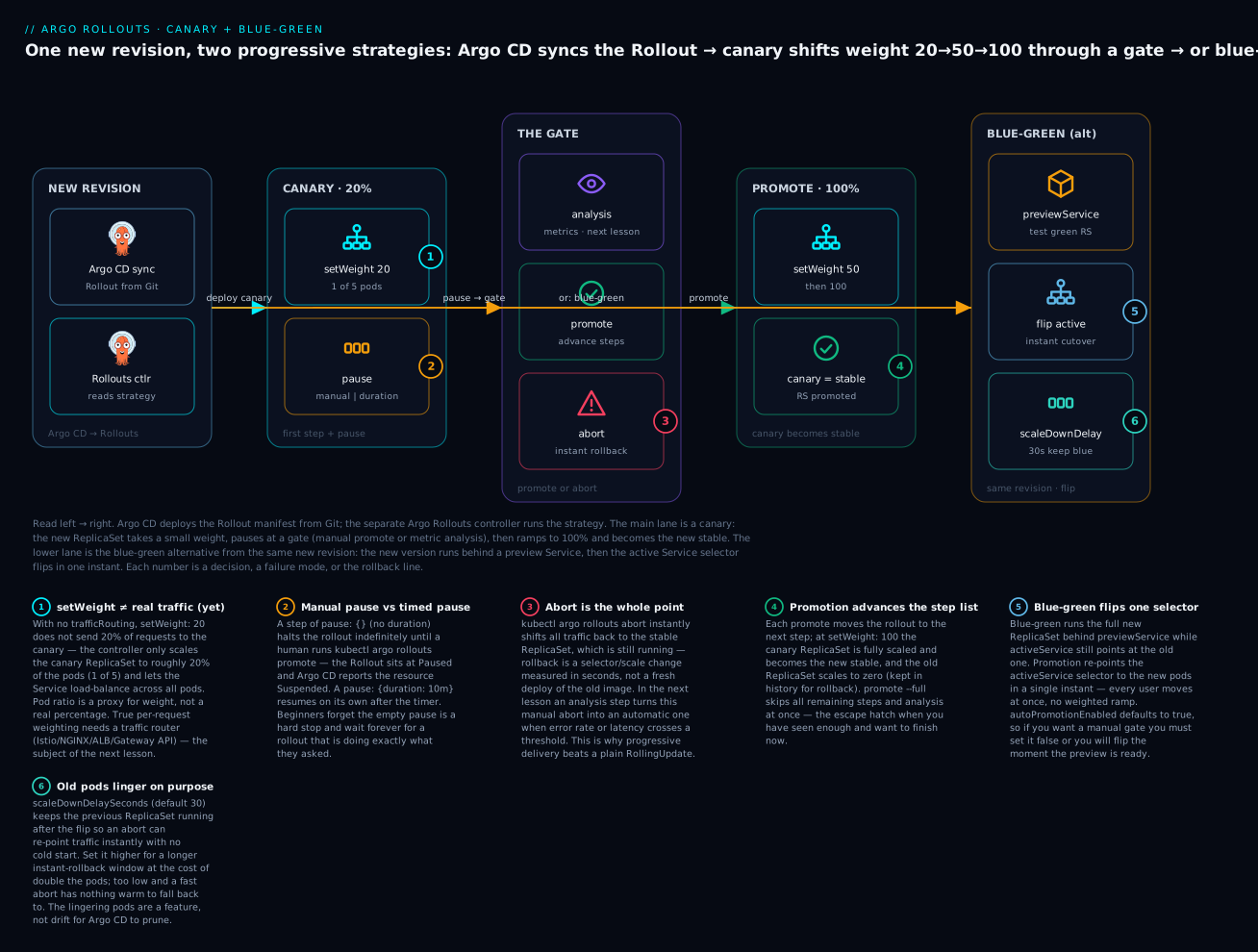
The badges mark the traps and the payoffs: setWeight alone shifts pod ratios, not real request percentages, until you add a traffic router (1); an empty pause is a hard manual stop while a timed one auto-resumes (2); abort is the instant rollback that justifies the whole approach (3); promotion walks the step list until the canary becomes the new stable (4); and blue-green flips a single Service selector (5) while keeping the old pods warm for a fast reversal (6).
The steps list
Each entry in steps is one instruction. The controller executes them top to bottom, and the rollout’s “current step” is simply how far down the list it has walked. There are five step types:
| Step | Shape | What it does |
|---|---|---|
setWeight |
- setWeight: 20 |
Target this percentage of pods/traffic for the canary |
pause (manual) |
- pause: {} |
Halt until a human runs promote |
pause (timed) |
- pause: {duration: 10m} |
Halt, then auto-resume after the duration |
setCanaryScale |
- setCanaryScale: {weight: 20} |
Control canary pod count independently of traffic weight |
analysis |
- analysis: {templates: [...]} |
Run an AnalysisTemplate as a gate (next lesson) |
A representative production-shaped canary reads like a staircase with landings:
strategy:
  canary:
    maxSurge: 1
    maxUnavailable: 0
    steps:
      - setWeight: 10
      - pause: {duration: 2m}     # soak 2 minutes at 10%
      - setWeight: 25
      - pause: {duration: 5m}
      - setWeight: 50
      - pause: {}                 # HARD stop — a human decides before 100%
      - setWeight: 100
Read it aloud: send 10% to the canary, wait two minutes, go to 25%, wait five, go to 50%, then stop and wait for a person before committing to 100%. That last empty pause is the human gate you cannot express in a Deployment at all.
Walking that exact staircase, here is what the controller does and what you would see at each step (with 5 replicas and no traffic router, so weight is approximated by pod count):
| Step | Instruction | Canary pods (of 5) | Rollout status | What you do |
|---|---|---|---|---|
| 1 | setWeight: 10 |
~1 | Progressing → Paused |
wait — timed |
| 2 | pause: {duration: 2m} |
~1 | Paused (2 min) |
nothing — auto-resumes |
| 3 | setWeight: 25 |
~1 | Progressing → Paused |
wait — timed |
| 4 | pause: {duration: 5m} |
~1 | Paused (5 min) |
nothing — auto-resumes |
| 5 | setWeight: 50 |
~2-3 | Progressing → Paused |
reach the manual gate |
| 6 | pause: {} |
~2-3 | Paused (indefinite) |
promote to continue |
| 7 | setWeight: 100 |
5 (now stable) | Healthy |
done — canary is promoted |
Manual pauses versus timed pauses
The single most common canary confusion is why a rollout “got stuck.” Almost always the answer is that it did exactly what you told it: it hit a pause: {} and is now waiting for you. The two pause forms behave very differently and report differently:
| Pause form | Resumes when | Rollout status | Argo CD sees the resource as |
|---|---|---|---|
pause: {} |
You run kubectl argo rollouts promote |
Paused |
Suspended |
pause: {duration: 10m} |
The timer expires | Paused (until timer) |
Progressing |
pause: {duration: 30} |
30 seconds (a bare number is seconds) | Paused (briefly) |
Progressing |
A bare integer duration is seconds; add a unit (s, m, h) to be explicit. An empty pause: {} never resumes on its own — that is the whole point of it — so if a rollout is sitting at a step forever and the step is an empty pause, it is not stuck, it is waiting, and promote is the answer.
setWeight without a traffic router: the honest caveat
Here is the caveat the next lesson exists to remove. When you write setWeight: 20 and you have not configured trafficRouting, Argo Rollouts cannot actually send 20% of requests to the canary — a plain Kubernetes Service load-balances evenly across whatever pods match its selector and offers no weighting. So the controller approximates: it scales the canary ReplicaSet to roughly 20% of the pods (1 of 5) and lets the Service spread traffic across all pods. With 5 replicas, “20% weight” really means “1 canary pod out of 5,” and the traffic split is only as precise as that ratio.
With setWeight: 20 and 5 replicas |
No trafficRouting |
With trafficRouting (next lesson) |
|---|---|---|
| What actually shifts | Pod count (1 of 5 pods is canary) | Real request percentage (20% of calls) |
| Traffic precision | Coarse — limited by replica count | Fine — exactly 20%, independent of replicas |
| Needs extra Services | No (one Service is enough) | Yes — canaryService + stableService |
| Needs a mesh/ingress/LB | No | Yes — Istio, NGINX, ALB, or Gateway API |
This is not a bug; it is the boundary of what a Service can do. Coarse pod-ratio canaries are genuinely useful for catching crash-loops and gross regressions. Precise percentage canaries — 1% to a specific header, say — need the traffic router, which is cloud-specific and covered next. When you do add one, the canary spec grows a canaryService, a stableService, and a trafficRouting block:
strategy:
  canary:
    canaryService: web-canary      # Service the router points at the new pods
    stableService: web-stable      # Service the router points at the old pods
    trafficRouting:
      nginx:
        stableIngress: web-ingress # provider-specific — detailed next lesson
    steps:
      - setWeight: 20
      - pause: {}
maxSurge, maxUnavailable, and setCanaryScale
During a canary, maxSurge and maxUnavailable mean what they do in a Deployment but apply to the step transitions. Per the current specification, both default to 1. For a canary you almost always want maxSurge: 1 and maxUnavailable: 0 so you never drop below your desired capacity while shifting weight — the constraint being that maxUnavailable cannot be 0 if maxSurge is also 0 (the rollout would have no room to move).
| Field | Spec default | Canary recommendation | Why |
|---|---|---|---|
maxSurge |
1 |
1 or 25% |
Room to add a canary pod without evicting a stable one |
maxUnavailable |
1 |
0 |
Never lose serving capacity mid-canary |
setCanaryScale is the escape hatch for when pod count and traffic weight should not move together — most relevant once you have a traffic router. It has three modes:
setCanaryScale mode |
Example | Meaning |
|---|---|---|
weight |
{weight: 20} |
Scale canary pods to match a given weight percentage |
replicas |
{replicas: 3} |
Pin the canary to an exact pod count |
matchTrafficWeight |
{matchTrafficWeight: true} |
Return control of scaling to the setWeight steps |
A common pattern with a router is to pre-scale the canary to full size before sending it traffic, so the ramp does not also wait on pods scheduling: setCanaryScale: {weight: 100} early, then setWeight steps that move only traffic.
Blue-green: two Services, an instant flip
Blue-green takes the opposite bet from canary. Instead of trickling traffic to the new version, it stands the entire new version up in parallel — invisible to users, reachable only through a preview Service — lets you (or an automated check) validate it, then re-points the active Service at the new pods in one instant. Everyone moves at once. There is no weighted ramp; the flip is atomic.
The mechanism is two Services and a selector the controller manages for you:
apiVersion: argoproj.io/v1alpha1
kind: Rollout
metadata:
  name: web
  namespace: demo
spec:
  replicas: 5
  revisionHistoryLimit: 3
  selector:
    matchLabels:
      app: web
  template:
    metadata:
      labels:
        app: web
    spec:
      containers:
        - name: web
          image: argoproj/rollouts-demo:blue
          ports:
            - containerPort: 8080
  strategy:
    blueGreen:
      activeService: web-active      # what users hit
      previewService: web-preview    # what you test the new version on
      autoPromotionEnabled: false    # require a manual promote (see below)
      scaleDownDelaySeconds: 30      # keep the old RS this long after the flip
      prePromotionAnalysis:          # optional gate before the flip (next lesson)
        templates:
          - templateName: smoke-test
        args:
          - name: service
            value: web-preview
The two Services carry only your own label selector; you do not hand-pin a pod hash:
apiVersion: v1
kind: Service
metadata:
  name: web-active
  namespace: demo
spec:
  selector:
    app: web            # Rollouts injects a pod-template-hash at runtime
  ports:
    - port: 80
      targetPort: 8080
---
apiVersion: v1
kind: Service
metadata:
  name: web-preview
  namespace: demo
spec:
  selector:
    app: web
  ports:
    - port: 80
      targetPort: 8080
The trick that makes the flip atomic: Argo Rollouts adds a rollouts-pod-template-hash label to every pod and injects a matching selector into each Service at runtime. The active Service’s injected hash points at the old ReplicaSet; the preview Service’s points at the new one. Promotion is nothing more than the controller rewriting the active Service’s injected hash to the new ReplicaSet — a single API write, effective immediately. This is also the classic failure mode: if you hand-write a rollouts-pod-template-hash into your Service selector, you have pinned it, the controller cannot flip it, and blue-green silently fails to switch. Leave the selector to your own labels only.
The blue-green fields
blueGreen field |
Default | What it does |
|---|---|---|
activeService |
required | Service that serves live traffic |
previewService |
unset | Service that exposes the new version pre-promotion |
autoPromotionEnabled |
true |
Flip automatically as soon as preview is ready |
autoPromotionSeconds |
unset | Auto-flip this many seconds after preview is ready |
previewReplicaCount |
= replicas |
Run fewer preview pods to save cost pre-flip |
scaleDownDelaySeconds |
30 |
Keep the old ReplicaSet running this long after the flip |
scaleDownDelayRevisionLimit |
unset | Cap how many old ReplicaSets are kept warm |
abortScaleDownDelaySeconds |
30 |
Delay before scaling down the preview if you abort (0 = keep it) |
prePromotionAnalysis |
unset | Analysis gate that must pass before the flip |
postPromotionAnalysis |
unset | Analysis gate after the flip (can trigger auto-abort) |
Two of these are where teams get surprised.
autoPromotionEnabled defaults to true. If you write a blue-green strategy and set nothing else, the moment the preview pods are ready the controller flips traffic — there is no manual gate. People expect the opposite (“surely it waits for me”) and are startled when a new version goes live untouched. If you want a human in the loop, you must explicitly set autoPromotionEnabled: false. This is the single most common blue-green gotcha and a troubleshooting row below.
scaleDownDelaySeconds keeps the old version warm. After the flip, the old ReplicaSet does not vanish; it lingers for this delay (default 30 seconds) so that an abort can re-point the active Service back to warm, running pods instantly. Raise it for a longer instant-rollback window at the cost of running double the pods for longer; lower it and a fast abort may find nothing warm to fall back to. Those lingering pods are deliberate — not drift for Argo CD to prune.
Following one blue-green release from start to finish makes the Service choreography concrete — watch which ReplicaSet each Service points at through each phase:
| Phase | activeService points at |
previewService points at |
Old ReplicaSet |
|---|---|---|---|
| Steady state | old RS | old RS | serving live traffic |
| New revision synced | old RS (users unaffected) | new RS | still active |
prePromotionAnalysis running |
old RS | new RS (under test) | still active |
promote — the flip |
new RS | new RS | kept warm (scaleDownDelaySeconds) |
| After the delay | new RS | new RS | scaled to zero (kept in history) |
abort before scale-down |
back to old RS (instant) | new RS | becomes active again |
The pre- and post-promotion hooks
Blue-green offers two analysis attachment points that canary does not phrase the same way: prePromotionAnalysis runs against the preview Service and must pass before the flip (a smoke test on the dark version), and postPromotionAnalysis runs after the flip against live traffic and, if it fails, triggers an automatic abort back to the old version. Both reference AnalysisTemplate objects and are covered in depth in Analysis, Metrics & Automated Rollback; here they are forward-references you can see the shape of.
Canary versus blue-green: choosing a strategy
Neither strategy is “better” — they trade different things. Canary limits blast radius (only a slice of users see a bad version) at the cost of complexity (you usually want a traffic router and metrics). Blue-green limits complexity (flip a Service, done) at the cost of resource overhead (you run two full copies) and blast radius (when it is wrong, it is wrong for everyone at once, though only for as long as it takes to abort).
| Dimension | Canary | Blue-green |
|---|---|---|
| Blast radius of a bad version | Small — only the canary slice | Large — everyone, until abort |
| Rollback speed | Seconds (abort → stable still serving) |
Seconds (abort → old RS still warm) |
| Peak resource cost | ~1x + a few canary pods | ~2x (two full copies during the window) |
| Needs a traffic router for real % | Yes (for precise weighting) | No (a Service flip needs no router) |
| Good for metric-gated automation | Excellent (weight + analysis loop) | Good (pre/post-promotion analysis) |
| Handles stateful / schema changes | Poorly — both versions run at once | Poorly — both versions run at once |
| Complexity to operate | Higher (steps, weights, router) | Lower (two Services, a flip) |
| Time to full rollout | Longer (deliberate, staged) | Shorter (validate, then instant) |
| Best when | You want gradual exposure + metrics | You want an atomic cutover + easy rollback |
The statefulness row is a shared warning, not a differentiator: both strategies run two versions of your code simultaneously, so both are dangerous with backward-incompatible database migrations. If v2 renames a column that v1 still reads, a canary and a blue-green preview will both break v1 the moment the schema changes. The fix is the same as always — expand/contract migrations that keep the schema compatible with both versions across the release — and it lives in your migration discipline, not in the Rollout.
A rough rule to start from: reach for canary when you have metrics worth gating on and want to limit who is exposed to a regression; reach for blue-green when a clean, instant cutover with a trivial rollback matters more than limiting blast radius, and you can afford to run two copies for a while.
Promotion, abort, and instant rollback
A Rollout is a small state machine, and four verbs drive it. All are actions on the live object (they change runtime state, not your Git manifest — a distinction that matters enormously under GitOps, covered next).
| Verb | Command | Effect |
|---|---|---|
| Promote | kubectl argo rollouts promote web |
Advance past the current pause/step to the next one |
| Promote (full) | kubectl argo rollouts promote web --full |
Skip all remaining steps and analysis; finish now |
| Abort | kubectl argo rollouts abort web |
Stop and shift all traffic back to stable immediately |
| Retry | kubectl argo rollouts retry rollout web |
Restart an aborted rollout from the beginning of its steps |
| Undo | kubectl argo rollouts undo web --to-revision=3 |
Roll the spec back to a previous revision |
The distinction between abort and undo is worth internalising. abort is your emergency brake during a release: it does not touch the manifest, it just parks traffic back on the stable ReplicaSet, which is still running — so it is instantaneous and safe to hit on reflex. undo is a manifest-level rewind to an earlier revision, useful after a release has already completed. During an incident you almost always want abort first (stop the bleeding in seconds), then investigate, then decide whether to retry the fixed version or undo to an older one.
Here is the state machine in words:
| Rollout state | Meaning | How you leave it |
|---|---|---|
Progressing |
Executing steps / scaling pods | Reaches a pause, completes, or degrades |
Paused |
Halted at a pause step or autoPromotionEnabled: false gate |
promote, or a timed pause expires |
Healthy |
Fully promoted; canary is now stable | A new revision starts it over |
Degraded |
Failed (probe failure, progress deadline, aborted analysis) | retry, abort, or fix + resync |
This is the concrete payoff of the whole lesson. With a Deployment, “roll back” is a new rollout of the old image — minutes, under load, when you can least afford them. With a Rollout, abort is a selector flip against pods that never stopped running. Instant rollback is not a feature you bolt on; it is the reason progressive delivery exists.
The tooling: the kubectl plugin and the UI extension
Argo Rollouts ships its own CLI as a kubectl plugin, kubectl-argo-rollouts, because a Rollout is richer than a Deployment and kubectl get alone will not show you steps, weights, or the ReplicaSet tree. Install the controller and the plugin (both are separate from Argo CD):
# 1) The Argo Rollouts controller — its own namespace, separate from Argo CD
kubectl create namespace argo-rollouts
kubectl apply -n argo-rollouts \
  -f https://github.com/argoproj/argo-rollouts/releases/latest/download/install.yaml

# 2) The kubectl plugin (macOS via Homebrew)
brew install argoproj/tap/kubectl-argo-rollouts

# ...or Linux, grab the release binary
curl -sSLo kubectl-argo-rollouts \
  https://github.com/argoproj/argo-rollouts/releases/latest/download/kubectl-argo-rollouts-linux-amd64
chmod +x kubectl-argo-rollouts && sudo mv kubectl-argo-rollouts /usr/local/bin/

kubectl argo rollouts version
# kubectl-argo-rollouts: v1.8.x+<hash>
The verbs you will use daily:
| Command | What it does |
|---|---|
kubectl argo rollouts get rollout web --watch |
Live tree view of the Rollout, ReplicaSets, and pods |
kubectl argo rollouts status web |
Print the current status (blocks until terminal with --watch) |
kubectl argo rollouts list rollouts |
List all Rollouts in the namespace |
kubectl argo rollouts promote web |
Advance past the current pause/step |
kubectl argo rollouts promote web --full |
Skip all remaining steps + analysis |
kubectl argo rollouts abort web |
Roll back to stable immediately |
kubectl argo rollouts retry rollout web |
Restart an aborted rollout |
kubectl argo rollouts undo web --to-revision=N |
Roll the spec back to a prior revision |
kubectl argo rollouts set image web web=repo/app:tag |
Patch the container image (imperative — see the GitOps caveat) |
kubectl argo rollouts restart web |
Restart pods (rolling) without changing the spec |
kubectl argo rollouts dashboard |
Serve the local web UI at http://localhost:3100 |
kubectl argo rollouts lint -f rollout.yaml |
Statically validate a Rollout manifest |
The get rollout --watch output is the display you will live in during a release. A representative snapshot of a canary paused at its first step (formatting and hashes are representative, not from a live run on this machine):
# representative output — kubectl argo rollouts get rollout web --watch
Name:            web
Namespace:       demo
Status:          ॥ Paused
Message:         CanaryPauseStep
Strategy:        Canary
  Step:          1/5
  SetWeight:     20
  ActualWeight:  20
Images:          argoproj/rollouts-demo:blue (stable)
                 argoproj/rollouts-demo:yellow (canary)
Replicas:
  Desired:       5
  Current:       6
  Updated:       1
  Ready:         6
  Available:     6

NAME                             KIND        STATUS     AGE  INFO
⟳ web                            Rollout     ॥ Paused   6m
├──# revision:2
│  └──⧉ web-687d76d795           ReplicaSet  ✔ Healthy  40s  canary
│     └──□ web-687d76d795-9jvj9  Pod         ✔ Running  40s  ready:1/1
└──# revision:1
   └──⧉ web-6cf78c9648           ReplicaSet  ✔ Healthy  6m   stable
      ├──□ web-6cf78c9648-abc12  Pod         ✔ Running  6m   ready:1/1
      └──□ web-6cf78c9648-def34  Pod         ✔ Running  6m   ready:1/1
Read the header first: Status: Paused, Step: 1/5, SetWeight: 20, two Images (blue stable, yellow canary), and Current: 6 pods (5 stable + 1 canary) confirming the “1 of 5” pod-ratio approximation from earlier. The tree shows revision 2 (the canary ReplicaSet, one pod) and revision 1 (stable, holding the rest). Each header field is worth knowing:
get rollout field |
What it tells you |
|---|---|
Status |
The phase: Progressing, Paused, Healthy, or Degraded |
Message |
Why it is in that phase (e.g. CanaryPauseStep) |
Strategy |
Canary or BlueGreen |
Step |
Current step / total (e.g. 1/5) |
SetWeight |
The weight the current step is targeting |
ActualWeight |
The weight actually in effect right now |
Images |
Which image is (stable) vs (canary)/(preview) |
Replicas |
Desired/Current/Updated/Ready/Available pod accounting |
Finally, the Argo CD UI Rollouts extension (argoproj-labs/rollout-extension) renders this same tree inside the Argo CD web UI and adds promote/abort buttons to the resource view, so operators who live in Argo CD do not have to drop to the CLI. It is an optional Argo CD extension you install into argocd-server; it does not change how anything works, only where you can see and drive it.
GitOps integration: a Rollout in Argo CD
A Rollout is just another manifest, so it lives in Git and is delivered by an Argo CD Application exactly like a Deployment would be:
apiVersion: argoproj.io/v1alpha1
kind: Application
metadata:
  name: web
  namespace: argocd
spec:
  project: default
  source:
    repoURL: https://github.com/acme/rollouts-demo.git
    targetRevision: main
    path: web                # dir holding rollout.yaml + services
  destination:
    server: https://kubernetes.default.svc
    namespace: demo
  syncPolicy:
    automated:
      prune: true
      selfHeal: true
    syncOptions:
      - CreateNamespace=true
Now the interesting part: what does Argo CD report while the Rollout is progressing? Argo CD ships a built-in health check for argoproj.io/Rollout, so it reads the Rollout’s status.phase and maps it onto its own health vocabulary. Refer back to Sync Status & Health Assessment for the two-axis model; here is how a Rollout populates the health axis:
Rollout status.phase |
Argo CD resource health | App is Healthy? |
|---|---|---|
Progressing (executing steps) |
Progressing |
No — still rolling |
Paused (manual gate / empty pause) |
Suspended |
No — waiting for a human |
Healthy (fully promoted) |
Healthy |
Yes |
Degraded (aborted / deadline) |
Degraded |
No — failed |
This produces a behaviour that confuses people the first time: an Argo CD Application wrapping a canary can be Synced but not Healthy for a long time. Sync status answers “does the cluster match Git?” — and it does, the moment the Rollout object is applied. But health answers “is it working and settled?” — and a canary deliberately does not settle until it reaches 100%. So a paused canary shows Synced / Suspended; a canary walking timed steps shows Synced / Progressing; only after promotion does it read Synced / Healthy. A pipeline that runs argocd app wait web --health will therefore block through the entire canary — which is usually what you want, but only if you expected it.
The second GitOps subtlety is the one that catches everyone: promote and abort change runtime state, not your Git manifest. That is exactly right for GitOps — promotion is an operational decision, not a config change — and it means selfHeal does not fight a promote (there is nothing in Git to revert to). But it cuts the other way for the image. If you bump the version with kubectl argo rollouts set image web web=repo/app:v2, you have patched spec.template on the live object, which now differs from Git. With selfHeal: true, Argo CD sees drift and reverts the image back to whatever Git says — your new version disappears. Under GitOps you trigger a new revision by committing the new image tag to Git, not with set image. Argo CD syncs the new tag, the Rollout controller sees a changed pod template, and the canary begins. The imperative set image is for non-GitOps clusters; in an Argo CD world it is a foot-gun.
Which brings us back to the caveat the diagram flags and the next lesson resolves: everything here works, but setWeight only shifts pod ratios until you attach a traffic router. For a true percentage split — and for the analysis metrics that let a canary abort itself — you need the cloud-specific traffic layer in Traffic Management with Istio, NGINX, ALB & Gateway API and the gates in Analysis, Metrics & Automated Rollback.
Hands-on lab
You will convert a Deployment into a canary Rollout, deploy it through Argo CD, trigger a new revision, step it forward with the plugin, then swap the same app to blue-green. This lab is cloud-neutral and runs on any cluster — the free local kind/minikube from the install lesson is perfect. It assumes you already have Argo CD running (from the earlier install lesson) and reachable via argocd login. Nothing here bills on a cloud provider; there are no LoadBalancers or NAT gateways.
This lab uses the public
argoproj/rollouts-demoimage, whose tags are colours (blue,yellow,green). Changing the tag is a visible, harmless way to “ship a new version.” No live cluster run is reproduced here — outputs shown are representative of what you will see.
The nine steps at a glance, so you know where you are heading:
| Step | What you do | Outcome |
|---|---|---|
| 0 | Install the Rollouts controller + kubectl plugin |
a second controller, separate from Argo CD |
| 1 | Put a canary Rollout + Service in Git |
desired state committed |
| 2 | Create the Argo CD Application |
Rollout synced; first version live |
| 3 | Watch the resting Rollout | one stable ReplicaSet at 100% |
| 4 | Commit a new image tag | canary starts, pauses at gate #1 |
| 5 | promote past the manual gate |
advances; timed gate auto-resumes to 100% |
| 6 | abort a mid-flight canary |
instant rollback to stable |
| 7 | Switch the strategy to blue-green | full new RS behind preview; manual flip |
| 8 | Teardown | everything removed, Argo CD untouched |
Step 0 — Install the Argo Rollouts controller and plugin.
# The controller (separate from Argo CD) and the kubectl plugin
kubectl create namespace argo-rollouts
kubectl apply -n argo-rollouts \
  -f https://github.com/argoproj/argo-rollouts/releases/latest/download/install.yaml
kubectl -n argo-rollouts rollout status deploy/argo-rollouts   # wait until Available

brew install argoproj/tap/kubectl-argo-rollouts   # or the Linux curl from earlier
kubectl argo rollouts version
What just happened: you added a second controller to the cluster. Argo CD is still in argocd; the Rollouts controller now watches Rollout objects in argo-rollouts. They are independent.
Step 1 — Put a canary Rollout and its Service in Git. In your GitOps repo, create web/rollout.yaml:
apiVersion: argoproj.io/v1alpha1
kind: Rollout
metadata:
  name: web
  namespace: demo
spec:
  replicas: 5
  revisionHistoryLimit: 3
  selector:
    matchLabels:
      app: web
  template:
    metadata:
      labels:
        app: web
    spec:
      containers:
        - name: web
          image: argoproj/rollouts-demo:blue
          ports:
            - containerPort: 8080
          resources:
            requests:
              cpu: 5m
              memory: 32Mi
  strategy:
    canary:
      maxSurge: 1
      maxUnavailable: 0
      steps:
        - setWeight: 20
        - pause: {}              # manual gate #1
        - setWeight: 50
        - pause: {duration: 60}  # 60-second timed gate
        - setWeight: 100
And web/service.yaml:
apiVersion: v1
kind: Service
metadata:
  name: web
  namespace: demo
spec:
  selector:
    app: web
  ports:
    - port: 80
      targetPort: 8080
What just happened: nothing yet in the cluster — this is Git. The Rollout replaces what would have been a Deployment; the Service is an ordinary Service (no traffic router in this lab, so pod-ratio weighting applies).
Step 2 — Create the Argo CD Application.
argocd app create web \
  --repo https://github.com/<you>/rollouts-demo.git \
  --path web \
  --dest-server https://kubernetes.default.svc \
  --dest-namespace demo \
  --sync-option CreateNamespace=true \
  --sync-policy automated
argocd app get web
# Health Status:   Progressing   (the Rollout is doing its initial rollout)
What just happened: Argo CD synced the Rollout and Service from Git. On first creation there is no “old” version, so the canary steps are skipped and all 5 pods come up on blue. The app settles to Synced / Healthy.
Step 3 — Watch the Rollout in its resting state.
kubectl argo rollouts get rollout web -n demo --watch
# Status: ✔ Healthy   Step: 5/5   SetWeight: 100
# revision:1  web-<hash>  ReplicaSet  Healthy  stable   (5 pods)
What just happened: a fresh, fully-promoted canary looks like a normal app — one stable ReplicaSet at 100%. Leave this --watch running in a second terminal; you will see the next step animate it.
Step 4 — Ship a new version the GitOps way. Edit web/rollout.yaml, change the image tag blue → yellow, commit, and push. Then let Argo CD pick it up:
git commit -am "web: ship yellow" && git push
argocd app sync web           # or wait for auto-sync/webhook
What just happened: the pod template changed, so the Rollouts controller starts revision 2 as a canary. It applies setWeight: 20 — scaling one yellow pod alongside four blue — then hits pause: {} and stops. In your watch terminal the status flips to ॥ Paused, Step 1/5, SetWeight 20, and argocd app get web now reads Synced / Suspended. The release is waiting for you. (Note we did not use set image — committing the tag keeps Git the source of truth so selfHeal does not revert it.)
Step 5 — Inspect, then promote past the manual gate.
kubectl argo rollouts get rollout web -n demo    # confirm Step 1/5, one yellow pod
kubectl argo rollouts promote web -n demo        # advance past pause #1
What just happened: promote moved the rollout to step 3 (setWeight: 50 — now ~2-3 yellow pods), then step 4’s pause: {duration: 60}, which will auto-resume after 60 seconds — no second promote needed. Watch it advance on its own to setWeight: 100, at which point revision 2 becomes the new stable, revision 1 scales to zero, and the app returns to Synced / Healthy.
Step 6 — Practise the emergency brake. Ship one more version (yellow → green, commit, push, sync) so a canary is mid-flight and paused, then abort it:
kubectl argo rollouts abort web -n demo
kubectl argo rollouts get rollout web -n demo
# Status: ✖ Degraded   (all traffic back on the stable ReplicaSet, instantly)
What just happened: abort parked traffic on the still-running stable version in seconds — no re-deploy, no image pull. The Rollout is Degraded because it was deliberately stopped, and Argo CD shows Synced / Degraded. To recover, either kubectl argo rollouts retry rollout web to try green again, or revert the commit in Git so the desired state returns to yellow.
Step 7 — Convert the same app to blue-green. Replace the strategy.canary block in web/rollout.yaml with blue-green, and add a preview Service. The strategy becomes:
  strategy:
    blueGreen:
      activeService: web-active
      previewService: web-preview
      autoPromotionEnabled: false     # require a manual promote
      scaleDownDelaySeconds: 30
Add the two Services (web-active, web-preview) — both selecting app: web, exactly as shown earlier — commit, push, and sync.
argocd app sync web
kubectl argo rollouts get rollout web -n demo --watch
What just happened: now a new image tag brings up a full second ReplicaSet behind web-preview while web-active still serves the old one. Because autoPromotionEnabled: false, the Rollout pauses at Paused waiting for you. kubectl argo rollouts promote web -n demo flips web-active to the new pods instantly; the old ReplicaSet lingers 30 seconds (your instant-rollback window) before scaling down.
Step 8 — Teardown. Remove everything so nothing is left running.
argocd app delete web --cascade                       # removes Rollout + Services
kubectl delete namespace demo --ignore-not-found
# Optional: remove the Rollouts controller entirely
kubectl delete -n argo-rollouts \
  -f https://github.com/argoproj/argo-rollouts/releases/latest/download/install.yaml
kubectl delete namespace argo-rollouts --ignore-not-found
What just happened: argocd app delete --cascade prunes everything the Application created. Deleting the argo-rollouts namespace and manifests removes the controller if you are done experimenting. Your Argo CD install is untouched.
Common mistakes and troubleshooting
Argo Rollouts failures are almost always one of a dozen shapes. This table is the fast lookup; the prose after it covers the three that cost the most hours.
| Symptom | Likely cause | Fix |
|---|---|---|
setWeight: 10 sends way more than 10% of traffic |
No trafficRouting — weight is approximated by pod count, and 10% of 5 pods rounds to 1 (20%) |
Add a traffic router (next lesson) for true percentages, or raise replicas so the ratio is finer |
| Rollout stuck at a step, never advances | It hit a pause: {} (manual gate) — it is waiting, not broken |
kubectl argo rollouts promote <name>; use pause: {duration: ...} if you wanted it timed |
Argo CD shows the app Progressing/Suspended forever |
The Rollout is paused (Suspended) or its canary never became healthy (Progressing) |
Check kubectl argo rollouts get rollout; promote a manual pause, or fix the failing canary pod |
| Blue-green never flips traffic | activeService selector was hand-pinned with a rollouts-pod-template-hash, so the controller can’t rewrite it |
Remove the hash; let the Service select only your own labels — Rollouts injects the hash |
| New version went live with no gate | autoPromotionEnabled defaults to true for blue-green |
Set autoPromotionEnabled: false for a manual gate |
| Old pods keep running after a blue-green flip | scaleDownDelaySeconds (default 30) is keeping the old RS warm for rollback |
Expected; lower it to scale down sooner, or accept the instant-rollback window |
spec.template and workloadRef both set → rejected |
You cannot inline a template and reference a Deployment | Use exactly one: workloadRef (adopt existing) or template (inline) |
| New image never rolls out under Argo CD | You ran set image; selfHeal reverted the live spec back to Git |
Commit the tag to Git and sync — never set image on a GitOps-managed Rollout |
error: unable to recognize "...": no matches for kind "Rollout" |
The Argo Rollouts controller/CRDs aren’t installed | Install the controller (.../install.yaml) before applying any Rollout |
unknown command "argo" from kubectl |
The kubectl-argo-rollouts plugin isn’t on PATH |
Install the plugin binary and confirm with kubectl argo rollouts version |
Rollout goes Degraded after ~10 minutes untouched |
progressDeadlineSeconds (default 600) elapsed with no progress |
Fix the stuck pods/probe; the deadline is a safety net, not the bug |
analysis step errors: template not found |
An analysis step references an AnalysisTemplate that doesn’t exist |
Create the template (next lesson) or remove the step until you have metrics |
1. “setWeight isn’t shifting real traffic.” This is not a bug and it is worth fully absorbing because it is the number-one confusion. A plain Kubernetes Service cannot weight traffic — it round-robins across all matching pods. So without trafficRouting, Argo Rollouts translates setWeight: N into “make roughly N% of the pods be canary pods” and relies on the Service to spread load. With 5 replicas the finest grain you can express is 20% (1 pod), so setWeight: 10 and setWeight: 20 look identical. If you need a genuine 10% — or a 1% canary keyed on a header — you must add a traffic router, which is the entire subject of the next lesson. Until then, pod-ratio canaries are still valuable for catching crashes and gross errors; just do not expect a Service to do arithmetic it cannot do.
2. “My rollout is stuck.” (It isn’t.) When a Rollout sits unchanged and the current step is pause: {}, it is doing precisely what you asked: waiting for a human. kubectl argo rollouts get rollout <name> will show Status: Paused and Message: CanaryPauseStep. The cure is promote, not debugging. This masquerades as a hang because an empty pause has no timer — which is the feature. If you wanted it to continue on its own, you wanted pause: {duration: 10m} instead. The corollary under Argo CD: that paused Rollout makes the Application read Suspended, so a argocd app wait --health in CI will block — again, by design.
3. “The new image won’t deploy under Argo CD.” You changed the image with kubectl argo rollouts set image (or kubectl set image), the canary started, and then it reverted to the old version. That is selfHeal doing its job: set image patched the live object, which now disagrees with Git, so Argo CD reconciled it back. In a GitOps world the image tag must change in Git; commit it, and Argo CD will sync a pod-template change that the Rollouts controller turns into a canary. The imperative set image command exists for clusters not managed by Argo CD — on a self-healing Application it is a foot-gun that fights you every reconcile.
Cheat-sheet
Rollout strategy fields, the two flavours side by side:
| Field | Canary | Blue-green |
|---|---|---|
| Traffic control | steps with setWeight |
activeService / previewService flip |
| Pause | pause: {} / pause: {duration} |
autoPromotionEnabled: false |
| Auto-advance | timed pause / analysis |
autoPromotionSeconds |
| Extra Services | canaryService + stableService (with router) |
activeService + previewService |
| Pod-count control | setCanaryScale, maxSurge, maxUnavailable |
previewReplicaCount |
| Keep old version warm | stable RS stays up | scaleDownDelaySeconds (30) |
| Pre-cutover check | analysis step |
prePromotionAnalysis |
| Post-cutover check | background analysis |
postPromotionAnalysis |
| Instant rollback | abort (stable still serving) |
abort (old RS still warm) |
Common Rollout spec fields and their defaults:
| Field | Default | Meaning |
|---|---|---|
replicas |
1 | Desired pods |
revisionHistoryLimit |
10 | Old ReplicaSets kept for rollback |
progressDeadlineSeconds |
600 | No-progress window before Degraded |
minReadySeconds |
0 | Ready-soak before “available” |
strategy.canary.maxSurge |
1 | Extra pods allowed during a step |
strategy.canary.maxUnavailable |
1 | Pods that may be unavailable (set 0 for canary) |
blueGreen.autoPromotionEnabled |
true | Flip automatically when preview is ready |
blueGreen.scaleDownDelaySeconds |
30 | Keep old RS warm after the flip |
workloadRef.scaleDown |
— | never / onsuccess / progressively |
kubectl argo rollouts verbs:
| Command | Does |
|---|---|
get rollout <n> --watch |
Live tree of the rollout, RSes, pods |
status <n> |
Current status (blocks with --watch) |
promote <n> |
Advance past the current pause/step |
promote <n> --full |
Skip all remaining steps + analysis |
abort <n> |
Instant rollback to stable |
retry rollout <n> |
Restart an aborted rollout |
undo <n> --to-revision=N |
Rewind spec to a prior revision |
restart <n> |
Rolling pod restart, no spec change |
set image <n> c=img:tag |
Patch image (avoid under GitOps) |
dashboard |
Local UI at localhost:3100 |
lint -f rollout.yaml |
Static-validate a manifest |
Interview and exam questions
Q: What is the relationship between Argo CD and Argo Rollouts — is one part of the other?
A: No. They are two separate controllers in the Argo family. Argo CD is a GitOps CD tool that makes the cluster match Git; Argo Rollouts is a progressive-delivery controller that runs canary/blue-green strategies on a Rollout CRD. Argo CD delivers the Rollout manifest to the cluster and reads its status for health; the Rollouts controller executes the strategy. Either runs without the other.
Q: What does a Rollout give you that a Deployment RollingUpdate does not?
A: A place to pause (manual or timed), a place to gate on live metrics (analysis), true percentage traffic shifting (with a router), two live versions behind separate Services (blue-green), and — most importantly — instant rollback, because the old version keeps running and abort re-points traffic in seconds instead of re-deploying the old image.
Q: Which Rollout fields are identical to a Deployment, and which are new?
A: spec.replicas, spec.selector, and spec.template are identical. The new part is spec.strategy.canary or spec.strategy.blueGreen. Optional additions include workloadRef (adopt an existing Deployment) and revisionHistoryLimit/rollbackWindow for rollback control.
Q: You set setWeight: 10 but far more than 10% of traffic hits the canary. Why?
A: There is no trafficRouting configured, so a plain Service cannot weight requests. Argo Rollouts approximates weight by pod count; with 5 replicas the finest grain is 20% (1 pod), so 10% rounds up to one canary pod. Real percentage weighting needs a traffic router (Istio/NGINX/ALB/Gateway API).
Q: A canary Rollout has been “stuck” at step 1 for an hour. What happened and what do you do?
A: Step 1 is almost certainly pause: {}, a manual gate with no timer — the Rollout is waiting for a human, not failing. Confirm with kubectl argo rollouts get rollout (Status: Paused), then kubectl argo rollouts promote <name>. If you wanted it to auto-continue, use pause: {duration: ...}.
Q: In blue-green, a new version went live with no manual approval. Why?
A: autoPromotionEnabled defaults to true, so the controller flips activeService to the new pods as soon as the preview is ready. To require a human gate, set autoPromotionEnabled: false.
Q: How does blue-green flip traffic instantly, and how can that flip silently fail?
A: Argo Rollouts injects a rollouts-pod-template-hash selector into the active and preview Services at runtime; promotion rewrites the active Service’s hash to the new ReplicaSet in one API write. It fails silently if you hand-pin a rollouts-pod-template-hash in your Service selector — the controller can no longer rewrite it. Service selectors should carry only your own labels.
Q: Why can an Argo CD Application wrapping a canary be Synced but not Healthy?
A: Sync status asks “does the cluster match Git?” — true as soon as the Rollout is applied. Health asks “is it working and settled?” — and a canary deliberately does not settle until it reaches 100%. So a paused canary is Synced / Suspended and a progressing one is Synced / Progressing; it becomes Synced / Healthy only after full promotion.
Q: What is the difference between abort and undo?
A: abort is the in-flight emergency brake: it stops the current release and shifts traffic back to the still-running stable version in seconds, without touching the manifest. undo is a manifest-level rewind to a previous revision, used after a release has completed. During an incident you abort first, then investigate.
Q: Under GitOps with selfHeal on, how do you correctly ship a new image to a Rollout?
A: Commit the new image tag to Git and let Argo CD sync it — the changed pod template triggers a canary. Do not use kubectl argo rollouts set image; that patches the live object, selfHeal sees drift, and Argo CD reverts it to Git.
Q: When would you choose blue-green over canary? A: When you want an atomic cutover and a trivial, instant rollback more than you want to limit blast radius, and you can afford to run two full copies during the window. Canary is better when you have metrics to gate on and want to limit how many users see a regression. Neither handles backward-incompatible schema changes — both run two versions at once, so use expand/contract migrations.
Q: How do you migrate a live Deployment to a Rollout without downtime?
A: Use workloadRef to reference the existing Deployment (do not inline template), and set scaleDown: progressively so the Deployment scales down as the Rollout scales up. This adopts the running pods instead of deleting the Deployment and dropping traffic.
Key takeaways
- A Deployment’s RollingUpdate is a blunt instrument — no pause, no metric gate, no instant rollback. Argo Rollouts replaces
Deploymentwith aRolloutCRD that adds all three. - Argo Rollouts is a sibling of Argo CD, not a part of it. Argo CD delivers the
Rolloutfrom Git and reads its status; the Rollouts controller runs the canary/blue-green strategy. Install and reason about them separately. - A
Rolloutis a Deployment plus a strategy.replicas,selector, andtemplateare unchanged;strategy.canaryorstrategy.blueGreenis the new part. UseworkloadRefto adopt a live Deployment without downtime. - Canary shifts weight in explicit steps (
setWeight,pause,setCanaryScale,analysis), limiting blast radius; blue-green flips one Service selector for an atomic cutover. Choose by blast radius vs resource cost vs rollback style. setWeightonly moves pod ratios until you add a traffic router — real percentage traffic (and self-aborting analysis) is the next two lessons.- Instant rollback is the whole point.
abortre-points traffic to a still-running stable version in seconds; that, not the gradual ramp, is why progressive delivery beats a re-deploy. - Under GitOps, ship images by committing the tag — never
set image, whichselfHealwill revert. And expect a canary to readSynced / ProgressingorSynced / Suspendeduntil it fully promotes.