A canary deployment is a promise: send a small slice of real users to the new version, watch it, and only widen the slice if it behaves. The trap almost everyone falls into is believing Argo Rollouts keeps that promise the moment you write setWeight: 20. It does not. On its own, that line changes a pod ratio, and a pod ratio is only a rough, quantised approximation of a traffic percentage. To shift a true 20% of requests — not 33%, not 50%, but twenty — you need a traffic router: NGINX, Istio, an AWS ALB, or a Gateway API implementation, told by Rollouts exactly how to weight the split. This lesson is about that layer, and about the fact that the router is a cloud edge — so it looks different on EKS, AKS and GKE.
Why this matters
Every serious progressive-delivery story eventually collides with one question from a skeptical SRE: “when you say 20% canary, is that 20% of traffic or 20% of pods?” If you cannot answer crisply, your canary is theatre. A canary that routes by pod count can only move in coarse steps (with five replicas the smallest non-zero slice is 20%), it drifts every time the Horizontal Pod Autoscaler resizes the fleet, and it gives you no way to do header-based or mirrored routing at all. The difference between “roughly a fifth of pods” and “exactly a fifth of requests, verifiable at the load balancer” is the difference between a demo and a control you would stake a Friday deploy on.
The reason this is a whole lesson — and an expert-tier one — is that the router lives at the networking edge, and the edge is the least portable part of Kubernetes. Argo Rollouts is beautifully cloud-agnostic right up until trafficRouting, at which point the honest answer to “how do I weight traffic?” becomes “which mesh or ingress or managed load balancer are you on?” On EKS that might be the AWS Load Balancer Controller driving an ALB’s weighted target groups; on AKS it is usually NGINX or Istio in front of Application Gateway, because AGIC has no native Rollouts integration; on GKE it is increasingly the Gateway API plugin driving a Google Cloud Load Balancer. Same Rollout object, three different edges. Getting this mapping right — and knowing which combinations are mature versus experimental — is the skill that separates “I followed a tutorial” from “I run progressive delivery across three clouds.”
The mental model to hold: Rollouts is the brain, the router is the hands. Rollouts decides the weight at each step; the router is the thing that actually splits packets. If the hands are missing or mis-wired, the brain’s decisions never reach real users, and setWeight: 20 quietly degrades into “scale the canary ReplicaSet to about a fifth and hope kube-proxy load-balances evenly.” This lesson wires up real hands, four different kinds, and then shows you which pair of hands each cloud hands you.
setWeight is a lie without a router: pods vs real traffic
Start with the uncomfortable truth. A Rollout with a plain canary strategy and no trafficRouting does not touch your network path at all. It manipulates two ReplicaSets — a stable one and a canary one — behind a single Service. When you say setWeight: 20, the controller scales the canary ReplicaSet to roughly 20% of the desired replicas and the stable ReplicaSet to the remaining 80%. The Service has one selector that matches both ReplicaSets’ pods, so traffic distribution is whatever kube-proxy (or your CNI’s service proxy) does across the combined endpoint list — approximately even per endpoint, which only approximates your intended weight because it is really “1 canary pod out of 5 total.”
That approximation breaks in three ways that matter in production:
| Failure of pod-ratio “canary” | Why it happens | What a real router fixes |
|---|---|---|
| Coarse granularity | With 5 replicas the smallest non-zero slice is 1/5 = 20%; you can never test 5% or 1% | Router weights are percentages, independent of replica count — setWeight: 1 means 1% |
| Drift under autoscaling | The HPA resizes the fleet; 1 canary pod out of 5 becomes 1 out of 12, silently changing the “weight” | Router weight is set explicitly and does not move when replica counts change |
| No advanced routing | You cannot route by header, mirror/shadow traffic, or do sticky sessions with a shared Service | Routers expose header/mirror/weight primitives Rollouts drives via steps |
| Uneven real distribution | kube-proxy balances per-connection, so long-lived connections (gRPC, keep-alive) skew badly | The router load-balances at L7 per-request, honouring the weight for every request |
Here is the arithmetic that makes it concrete. Suppose desired replicas: 4 and you want a 10% canary. Pod-ratio math forces you to round: 10% of 4 is 0.4 pods, which Rollouts rounds up to 1 canary pod — that is 25% of pods, not 10%, and with per-connection balancing your canary may see anywhere from 15% to 35% of requests depending on connection reuse. Now add trafficRouting. The controller still runs a canary pod (it must, to have somewhere to send traffic), but the split is enforced by the router at exactly 10%, regardless of whether that canary pod is 25% or 5% of the fleet. The replica count becomes a capacity decision; the weight becomes a routing decision; the two are finally decoupled.
That decoupling is controlled by a small set of canary knobs you should know before touching any provider:
Field (under strategy.canary) |
What it controls | Default without a router | Typical use with a router |
|---|---|---|---|
canaryService |
Name of the Service that selects only canary pods | not required | required — the router’s “canary” backend |
stableService |
Name of the Service that selects only stable pods | not required | required — the router’s “stable” backend |
setWeight (step) |
The traffic percentage to send to canary | scales canary ReplicaSet | sets the router’s canary weight exactly |
setCanaryScale (step) |
Decouple canary replica count from traffic weight | n/a | run 5% traffic on 1 pod, or pre-scale before shifting |
dynamicStableScale |
Scale the stable ReplicaSet down as canary weight rises | off | reclaim capacity during a long bake |
The canaryService/stableService pair is the linchpin. Without a router, one Service fronts everything. With a router, Rollouts injects the rollouts-pod-template-hash label into each of those two Services’ selectors so that canaryService resolves to only the new pods and stableService to only the old ones. The router then has two clean backends to weight between. If you forget to create these two Services, or their selectors overlap and both match every pod, the router faithfully splits traffic — to two backends that are secretly identical, and your “canary” is meaningless. That selector hygiene is the single most common wiring bug, and we will hit it again in troubleshooting.
The trafficRouting field: one canary, many routers
trafficRouting lives at spec.strategy.canary.trafficRouting and is a oneof-ish map: you populate exactly one provider block (plus optional managedRoutes), and that provider becomes the thing Rollouts programs at every setWeight. The full menu of first-class and plugin providers:
trafficRouting key |
Router it drives | What Rollouts manipulates | Status |
|---|---|---|---|
nginx |
ingress-nginx | A generated canary Ingress with canary-weight annotations |
GA, very common |
istio |
Istio service mesh | VirtualService HTTP route weights (± DestinationRule subsets) |
GA, very common |
alb |
AWS Load Balancer Controller | The ALB action annotation’s weighted target groups | GA on EKS |
smi |
SMI TrafficSplit (Linkerd et al.) |
A TrafficSplit object’s backend weights |
Legacy — SMI is dormant |
plugin |
Any plugin: Gateway API, APISIX, Traefik, Kong, Contour, Gloo | Provider-specific (e.g. HTTPRoute backendRefs[].weight) |
Plugin model, the growth area |
ambassador |
Emissary-ingress / Ambassador | Mapping weight |
GA, niche |
appMesh |
AWS App Mesh | VirtualRouter route weights |
GA, App Mesh being retired |
Two structural rules cut across every provider. First, all of them need the canary/stable Service model — a canaryService, a stableService, and for some a root Service that receives all traffic before the split. Second, capabilities differ: not every router can do header routing or mirroring, and that gap decides which advanced steps you can use. Keep this capability matrix nearby; it will save you from writing a setMirrorRoute step against a provider that cannot honour it.
| Capability | nginx | istio | alb | gateway-api (plugin) | smi |
|---|---|---|---|---|---|
setWeight (percentage split) |
✅ | ✅ | ✅ | ✅ | ✅ |
setHeaderRoute (route by header) |
❌ | ✅ | ✅ | ✅ | ❌ |
setMirrorRoute (shadow traffic) |
❌ | ✅ | ❌ | ✅ (impl-dependent) | ❌ |
dynamicStableScale |
✅ | ✅ | ✅ | ✅ | ✅ |
| Needs a service mesh sidecar | ❌ | ✅ | ❌ | ❌ | usually ✅ |
| Root Service concept | no | no | rootService |
no | rootService |
And the Service model, provider by provider, because “which Services do I actually create?” is a question every one of these raises:
| Provider | canaryService |
stableService |
Root / extra | Who receives client traffic first |
|---|---|---|---|---|
| nginx | required | required | the stable Ingress you author | the stable Ingress; canary Ingress is generated |
| istio | required | required | the VirtualService host |
the VirtualService (via a Gateway) |
| alb | required | required | rootService behind the Ingress action |
the ALB Ingress action → root |
| gateway-api | required | required | the HTTPRoute + Gateway |
the Gateway listener → HTTPRoute |
| smi | required | required | rootService fronting the TrafficSplit |
the root Service → TrafficSplit |
With the shape of the field understood, we can wire each router for real. The pattern repeats: define the two Services, define the router’s native object, and point trafficRouting.<provider> at it. Everything else is detail — but the detail is where trust is won or lost, so we go field by field.
NGINX Ingress: canary annotations and the shadow ingress
ingress-nginx has a built-in canary feature driven entirely by annotations, and the Rollouts NGINX provider is a thin, clever wrapper over it. You author one Ingress — the stable Ingress, pointing at your stableService. Rollouts, at sync time, generates a second, shadow Ingress — the canary Ingress — that is a near-copy of your stable one but carries nginx.ingress.kubernetes.io/canary: "true" and nginx.ingress.kubernetes.io/canary-weight: "<N>", and points at your canaryService. ingress-nginx sees the two Ingresses for the same host/path, and routes N% of matching requests to the canary backend. You never write the canary Ingress; you never hand-edit the weight; Rollouts owns both.
The trafficRouting.nginx block is small:
| Field | Required | Meaning |
|---|---|---|
stableIngress |
yes (or stableIngresses) |
Name of the Ingress you authored, pointing at stableService |
stableIngresses |
alternative | List form, when one Rollout fronts multiple Ingresses |
annotationPrefix |
no | Override if your ingress-nginx uses a custom prefix (default nginx.ingress.kubernetes.io) |
additionalIngressAnnotations |
no | Extra canary annotations to stamp on the generated Ingress (e.g. header routing) |
A complete, schema-correct NGINX Rollout:
apiVersion: argoproj.io/v1alpha1
kind: Rollout
metadata:
  name: rollouts-demo
  namespace: demo
spec:
  replicas: 5
  strategy:
    canary:
      canaryService: rollouts-demo-canary   # Service selecting only canary pods
      stableService: rollouts-demo-stable    # Service selecting only stable pods
      trafficRouting:
        nginx:
          stableIngress: rollouts-demo-stable # the Ingress you author, below
      steps:
        - setWeight: 10
        - pause: {}                            # hold for a human or an analysis
        - setWeight: 50
        - pause: { duration: 5m }
        - setWeight: 100
  selector:
    matchLabels:
      app: rollouts-demo
  template:
    metadata:
      labels:
        app: rollouts-demo
    spec:
      containers:
        - name: rollouts-demo
          image: argoproj/rollouts-demo:blue
          ports:
            - containerPort: 8080
The two Services are ordinary ClusterIP Services; Rollouts injects the pod-template-hash into their selectors at runtime, so you write only the app label:
apiVersion: v1
kind: Service
metadata:
  name: rollouts-demo-stable
  namespace: demo
spec:
  selector:
    app: rollouts-demo        # Rollouts adds rollouts-pod-template-hash here
  ports:
    - port: 80
      targetPort: 8080
---
apiVersion: v1
kind: Service
metadata:
  name: rollouts-demo-canary
  namespace: demo
spec:
  selector:
    app: rollouts-demo        # same base selector; hash makes it canary-only
  ports:
    - port: 80
      targetPort: 8080
And the stable Ingress — the one you author, pointing at the stable Service:
apiVersion: networking.k8s.io/v1
kind: Ingress
metadata:
  name: rollouts-demo-stable
  namespace: demo
spec:
  ingressClassName: nginx
  rules:
    - host: rollouts-demo.local
      http:
        paths:
          - path: /
            pathType: Prefix
            backend:
              service:
                name: rollouts-demo-stable
                port:
                  number: 80
When the Rollout reaches setWeight: 10, inspect the generated Ingress and you will see the canary annotations Rollouts stamped on it. The generated Ingress is named after the stable one with a canary suffix:
# List the ingresses; note the second, generated one
kubectl -n demo get ingress
# NAME                                     CLASS   HOSTS                 ...
# rollouts-demo-stable                     nginx   rollouts-demo.local   ...
# rollouts-demo-stable-rollouts-demo-canary  nginx rollouts-demo.local   ...   (generated)

# The generated canary Ingress carries the weight (representative output)
kubectl -n demo get ingress rollouts-demo-stable-rollouts-demo-canary \
  -o jsonpath='{.metadata.annotations}' | tr ',' '\n'
# "nginx.ingress.kubernetes.io/canary":"true"
# "nginx.ingress.kubernetes.io/canary-weight":"10"
The canary annotation family is worth memorising, because additionalIngressAnnotations lets you use the header/cookie variants for targeted testing even though the NGINX provider does not implement the setHeaderRoute step:
| Annotation | Effect |
|---|---|
nginx.ingress.kubernetes.io/canary: "true" |
Marks this Ingress as the canary sibling of a stable Ingress |
nginx.ingress.kubernetes.io/canary-weight: "N" |
Route N% of requests to this Ingress’s backend (Rollouts sets this) |
nginx.ingress.kubernetes.io/canary-by-header |
Route to canary when this header is present with value always |
nginx.ingress.kubernetes.io/canary-by-header-value |
Custom trigger value for the header above |
nginx.ingress.kubernetes.io/canary-by-header-pattern |
Regex match on the header value |
nginx.ingress.kubernetes.io/canary-by-cookie |
Route to canary when this cookie equals always |
The NGINX provider has a well-known sharp edge: weight precision and total-weight are ingress-controller settings, not Rollouts settings. ingress-nginx defaults to integer weights out of 100. If you need sub-1% canaries you must raise
nginx.ingress.kubernetes.io/canary-weight-total(and a matching controller flag) — Rollouts will happily setcanary-weight: 0for asetWeight: 0step, but asetWeightfiner than the controller’s granularity silently rounds. Test your smallest intended step against the real controller before you trust it in prod.
Istio: VirtualService weights and subsets
Istio is the most capable router in this lesson: it does weighting, header routing, and true traffic mirroring, all at L7, all per-request. The cost is that every pod in the path needs an Istio sidecar (or you run ambient mode), which means the namespace must be mesh-enrolled. The Rollouts Istio provider does not invent any Istio concept — it edits the weight fields inside a VirtualService you author, and optionally flips pods between DestinationRule subsets.
There are two ways to model the split, and choosing between them is the first Istio decision:
| Approach | How the split is expressed | When to use |
|---|---|---|
| Two hosts (Services) | VirtualService routes to stableService and canaryService by host, Rollouts weights them |
Simplest; no DestinationRule needed |
Subsets (DestinationRule) |
One host, two subsets (stable/canary) selected by label; Rollouts weights the subsets and manages the subset labels |
You already model versions as subsets, or want mTLS/policy per subset |
The trafficRouting.istio fields:
| Field | Meaning |
|---|---|
virtualService.name |
The VirtualService Rollouts will edit (virtualServices for the plural/multi form) |
virtualService.routes |
Which named HTTP routes to manage (omit if there is exactly one) |
destinationRule.name |
Optional DestinationRule for the subset approach |
destinationRule.canarySubsetName |
The subset name Rollouts points canary traffic at |
destinationRule.stableSubsetName |
The subset name for stable traffic |
A host-based Rollout and its VirtualService:
apiVersion: argoproj.io/v1alpha1
kind: Rollout
metadata:
  name: rollouts-demo
  namespace: demo
spec:
  replicas: 5
  strategy:
    canary:
      canaryService: rollouts-demo-canary
      stableService: rollouts-demo-stable
      trafficRouting:
        istio:
          virtualService:
            name: rollouts-demo-vsvc
            routes:
              - primary            # the named HTTP route to manage
      steps:
        - setWeight: 20
        - pause: { duration: 2m }
        - setWeight: 60
        - pause: { duration: 2m }
        - setWeight: 100
  selector:
    matchLabels:
      app: rollouts-demo
  template:
    metadata:
      labels:
        app: rollouts-demo
    spec:
      containers:
        - name: rollouts-demo
          image: argoproj/rollouts-demo:blue
          ports:
            - containerPort: 8080
apiVersion: networking.istio.io/v1beta1
kind: VirtualService
metadata:
  name: rollouts-demo-vsvc
  namespace: demo
spec:
  gateways:
    - rollouts-demo-gateway
  hosts:
    - rollouts-demo.local
  http:
    - name: primary               # matches trafficRouting.istio ... routes[0]
      route:
        - destination:
            host: rollouts-demo-stable
          weight: 100              # Rollouts drives this down
        - destination:
            host: rollouts-demo-canary
          weight: 0                # ...and this up
You author the weights as 100/0; Rollouts rewrites them at every step. The critical, non-obvious rule: the route name in the VirtualService must match a name in routes, and the two destination entries must already exist — Rollouts edits weights, it does not add or remove destinations. If your VirtualService has a single unnamed route, you may omit routes, but naming it is far less error-prone.
The subset variant swaps the two hosts for one host plus a DestinationRule:
apiVersion: networking.istio.io/v1beta1
kind: DestinationRule
metadata:
  name: rollouts-demo-destrule
  namespace: demo
spec:
  host: rollouts-demo               # one Service fronting all pods
  subsets:
    - name: stable
      labels: {}                    # Rollouts injects rollouts-pod-template-hash
    - name: canary
      labels: {}                    # ...into these subset label maps
# In the Rollout, reference the DestinationRule:
trafficRouting:
  istio:
    virtualService:
      name: rollouts-demo-vsvc
      routes: [primary]
    destinationRule:
      name: rollouts-demo-destrule
      canarySubsetName: canary
      stableSubsetName: stable
Knowing which parts of the VirtualService you own versus which Rollouts rewrites keeps the two from fighting — anything Rollouts owns, you must not template or a sync will thrash:
| VirtualService element | Who owns it | Note |
|---|---|---|
hosts, gateways |
you | Must match the client Host: and the Gateway, or the route never applies |
http[].name |
you | Must match a name in trafficRouting.istio.virtualService.routes |
http[].route[].destination |
you | Both stable and canary destinations must pre-exist; Rollouts won’t add them |
http[].route[].weight |
Rollouts | Rewritten at every setWeight; author as 100/0 and don’t template |
DestinationRule subset labels |
Rollouts | The rollouts-pod-template-hash is injected; leave the label maps empty |
Istio’s most infamous canary bug is a host/gateway mismatch you cannot see in the Rollout. If the client’s
Host:header (or the Gateway’shosts) does not exactly match the VirtualServicehosts, Istio never applies the route, the weights are irrelevant, and 100% of traffic sails through on the default routing — your canary receives zero.ActualWeightinkubectl argo rollouts getwill say 20 because Rollouts set the VirtualService correctly; the mesh simply isn’t matching it. Always verify withistioctl proxy-config route <pod>that the route and its weights are actually programmed into Envoy, not just present in the VirtualService YAML.
AWS ALB: weighted target groups and the action annotation
On EKS the native answer is the AWS Load Balancer Controller, which turns an Ingress into a real Application Load Balancer. The ALB supports weighted target groups natively, and Rollouts drives them through the controller’s action annotation. This is the most AWS-specific wiring in the lesson, so go slowly.
The controller reads an annotation of the form alb.ingress.kubernetes.io/actions.<action-name>, whose value is a JSON forward action listing target groups with weights. The Ingress rule’s backend then references that action by name (with port: use-annotation). Rollouts, at each setWeight, rewrites the two weights inside that JSON. The rootService field tells Rollouts which Service/action is the entry point.
The trafficRouting.alb fields:
| Field | Required | Meaning |
|---|---|---|
ingress |
yes | The Ingress carrying the action annotation |
servicePort |
yes | The port the target groups listen on |
rootService |
recommended | The Service the ALB action forwards to (the “root” that fans to stable/canary) |
annotationPrefix |
no | If you use a non-default ALB annotation prefix |
stickinessConfig |
no | Target-group stickiness settings |
A representative ALB Ingress. Note target-type: ip — weighted target groups require IP targets (pods registered directly), not instance targets:
apiVersion: networking.k8s.io/v1
kind: Ingress
metadata:
  name: rollouts-demo-ingress
  namespace: demo
  annotations:
    kubernetes.io/ingress.class: alb
    alb.ingress.kubernetes.io/scheme: internet-facing
    alb.ingress.kubernetes.io/target-type: ip           # required for weighting
    # The action Rollouts rewrites; you seed it, Rollouts owns the weights:
    alb.ingress.kubernetes.io/actions.rollouts-demo-root: >
      {"type":"forward","forwardConfig":{"targetGroups":[
        {"serviceName":"rollouts-demo-stable","servicePort":"80","weight":100},
        {"serviceName":"rollouts-demo-canary","servicePort":"80","weight":0}]}}
spec:
  ingressClassName: alb
  rules:
    - http:
        paths:
          - path: /
            pathType: Prefix
            backend:
              service:
                name: rollouts-demo-root      # the action name above
                port:
                  name: use-annotation        # tells the controller to read the annotation
# The matching Rollout trafficRouting block:
trafficRouting:
  alb:
    ingress: rollouts-demo-ingress
    servicePort: 80
    rootService: rollouts-demo-root
The forward action’s JSON is the thing Rollouts edits in place; know its shape so you can read it in a debug session:
| Action JSON field | Meaning | Owned by |
|---|---|---|
type: forward |
The action forwards to target groups (vs redirect/fixed-response) |
you (seed it) |
forwardConfig.targetGroups[] |
The list of weighted backends | you seed both entries |
targetGroups[].serviceName |
The Service backing this target group (-stable / -canary) |
you |
targetGroups[].servicePort |
Port as a string ("80") — a common YAML gotcha |
you |
targetGroups[].weight |
The 0–100 weight | Rollouts rewrites both |
Two annotations, two behaviours, and one CRD, all worth a row:
| ALB mechanism | What it does | Relevance to Rollouts |
|---|---|---|
actions.<name> forward config |
Weighted forward across target groups | The weights Rollouts rewrites at each setWeight |
conditions.<name> |
Header/query/path match conditions | Backs setHeaderRoute on ALB |
TargetGroupBinding (CRD) |
Bind a Service to a pre-existing target group ARN | Lets you canary against target groups you manage in Terraform |
target-type: ip |
Register pod IPs directly as targets | Mandatory for accurate weighting; instance mode weights nodes, not pods |
The ALB provider’s classic failure is silent: weights that never apply. The three usual causes are (1) the AWS Load Balancer Controller isn’t installed or lacks IAM to modify the ALB, so the annotation changes but the ALB does not; (2)
target-typeisinstance, so you are weighting nodes and every node runs both versions; or (3)rootService/action name mismatch, so Rollouts edits an annotation the Ingress rule never references. Check the controller logs and confirm the ALB’s listener rule shows two target groups with the expected weights in the AWS console oraws elbv2 describe-rules— the cluster-side annotation is necessary but not sufficient.
SMI, Gateway API, and the plugin ecosystem
Three more routing worlds round out the picture — one fading, one ascending, and a long tail reached through plugins.
SMI (TrafficSplit) — legacy, know it, avoid it for greenfield. The Service Mesh Interface defined a portable TrafficSplit CRD, and Rollouts’ smi provider writes backend weights into it. It was the neutral option when Linkerd and others implemented SMI. The honest status in 2026: SMI is dormant — the project has not moved in years and few meshes still push it. If you already run a TrafficSplit-based setup it works, but do not build new pipelines on it.
trafficRouting:
  smi:
    rootService: rollouts-demo-root        # fronts the TrafficSplit
    trafficSplitName: rollouts-demo-split  # optional; generated if omitted
Gateway API — the emerging standard, via a plugin. The Kubernetes Gateway API (HTTPRoute, Gateway) reached GA (v1) and is the industry’s convergence point for L7 routing — it replaces the annotation soup of Ingress with typed, portable resources, and HTTPRoute backendRefs carry a first-class weight. Rollouts supports it through the argoproj-labs/gatewayAPI plugin, not a built-in provider, so there is an install step. You register the plugin in the argo-rollouts-config ConfigMap and grant RBAC over httproutes:
apiVersion: v1
kind: ConfigMap
metadata:
  name: argo-rollouts-config
  namespace: argo-rollouts
data:
  trafficRouterPlugins: |-
    - name: "argoproj-labs/gatewayAPI"
      location: "https://github.com/argoproj-labs/rollouts-plugin-trafficrouter-gatewayapi/releases/download/v0.5.0/gatewayapi-plugin-linux-amd64"
# The Rollout references the plugin by its registered name:
trafficRouting:
  plugin:
    argoproj-labs/gatewayAPI:
      httpRoute: rollouts-demo-route     # the HTTPRoute to weight
      namespace: demo
apiVersion: gateway.networking.k8s.io/v1
kind: HTTPRoute
metadata:
  name: rollouts-demo-route
  namespace: demo
spec:
  parentRefs:
    - name: rollouts-demo-gateway
  rules:
    - backendRefs:
        - name: rollouts-demo-stable
          port: 80
          weight: 100                    # Rollouts drives these two weights
        - name: rollouts-demo-canary
          port: 80
          weight: 0
The plugin field keys off the exact registered name, and the config keys on this one table:
| Gateway API plugin field | Meaning |
|---|---|
ConfigMap trafficRouterPlugins[].name |
Must equal the key under trafficRouting.plugin (e.g. argoproj-labs/gatewayAPI) |
ConfigMap trafficRouterPlugins[].location |
URL or path to the plugin binary the controller loads at startup |
httpRoute |
The HTTPRoute whose backendRefs weights Rollouts manages |
namespace |
Namespace of that HTTPRoute |
Gateway API maturity, honestly: the API is GA and stable; the Rollouts plugin is a community (
argoproj-labs) component still on a0.xline, and support forsetMirrorRoute/setHeaderRoutedepends on both the plugin version and the specific Gateway implementation (Istio’s gateway, Envoy Gateway, NGINX Gateway Fabric, and each cloud’s controller differ). Treat weighting as solid and the advanced routes as “verify on your exact stack.” This is the direction the ecosystem is heading, but it is not yet the safest default on every cloud.
The plugin long tail. The same plugin mechanism reaches routers that never had a built-in provider:
| Plugin | Router it drives | Object it weights |
|---|---|---|
argoproj-labs/gatewayAPI |
Any Gateway API implementation | HTTPRoute backendRefs[].weight |
argoproj-labs/apisix |
Apache APISIX | ApisixRoute backend weights |
argoproj-labs/traefik |
Traefik Proxy | TraefikService weighted services |
| Contour / Gloo (community plugins) | Contour HTTPProxy, Gloo RouteTable |
Provider-specific weights |
Kong is typically driven via its Ingress or Gateway API support rather than a bespoke weight object, and the community list grows over time — the point is that “my router isn’t in the built-in list” no longer means “I can’t do real traffic canaries.”
The multi-cloud LB edge: ALB, Application Gateway, GCLB
This is the crux of the lesson and the reason it is tagged multi-cloud. Everything above is a router type; a managed Kubernetes service also hands you a cloud load balancer, and the interesting question is how the router maps onto that specific LB. The three big managed platforms answer very differently, and — critically — one of them has no native Rollouts integration at all.
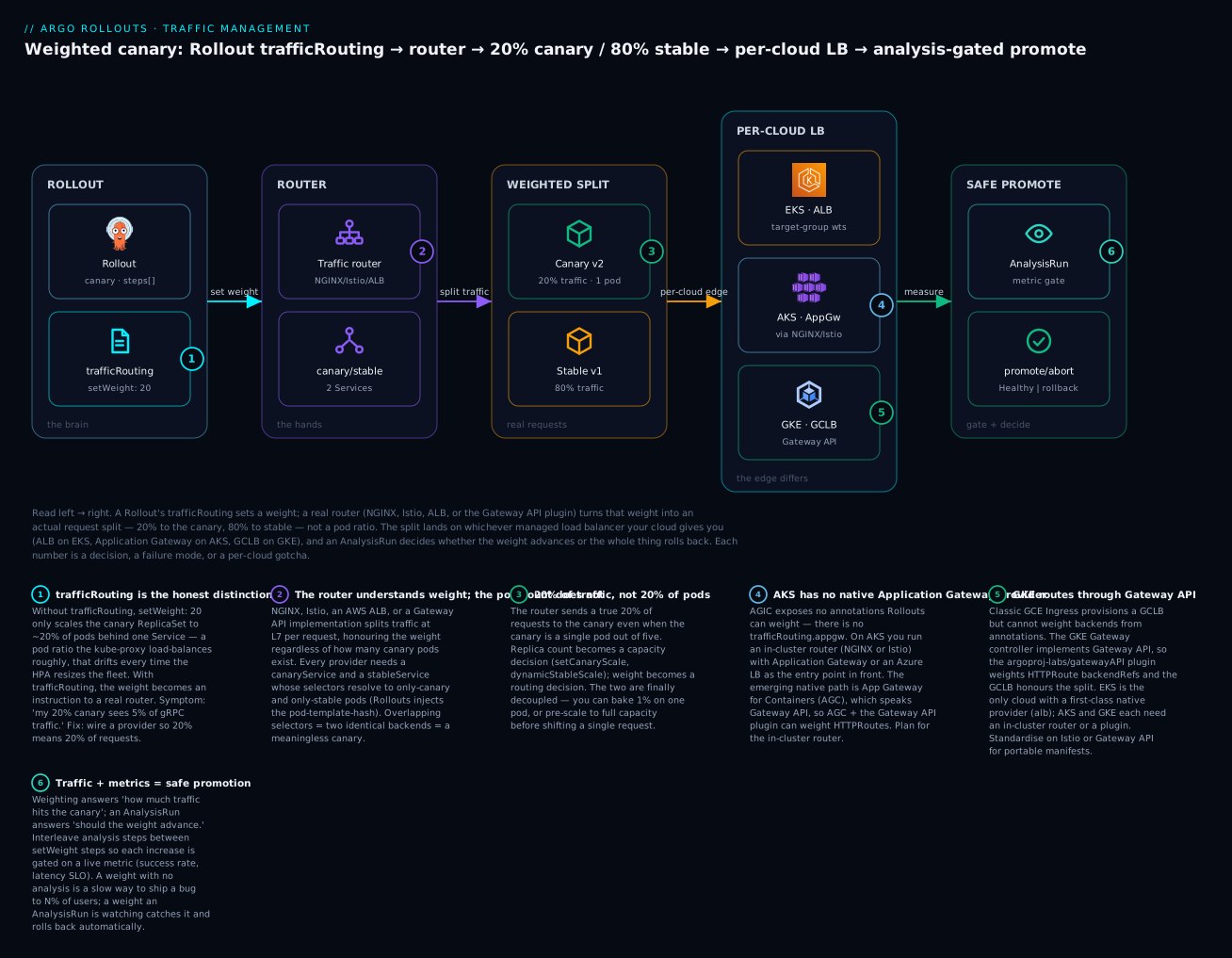
Read the diagram left to right: the Rollout’s trafficRouting sets a weight, a router turns that weight into a real request split, the split lands on whichever managed LB your cloud gives you, and an AnalysisRun decides whether the weight advances or the whole thing rolls back. The per-cloud table is the reference you will actually come back to:
| Cloud | Managed LB | Native Rollouts router | Common alternative | Maturity | Gotcha |
|---|---|---|---|---|---|
| EKS | ALB (AWS LB Controller) | alb provider |
NGINX / Istio / Gateway API | GA, mature | Needs target-type: ip + action annotation + rootService; instance mode breaks weighting |
| AKS | Application Gateway (AGIC) | none for classic AGIC | NGINX / Istio (in front) | AGIC has no Rollouts provider | Run NGINX/Istio inside the cluster; App Gateway for Containers (AGC) + Gateway API plugin is the emerging native path |
| GKE | GCLB (GKE Ingress / Gateway) | Gateway API plugin (GKE Gateway) | NGINX / Istio | Gateway API on GKE is GA; plugin is 0.x |
Classic GCE Ingress can’t weight; use the GKE Gateway controller + the Gateway API plugin |
Now the paired blocks — the same canary, expressed three ways, one per cloud edge.
EKS → ALB (native). Use the alb provider straight onto the AWS Load Balancer Controller. This is the smoothest of the three because the ALB weights are a first-class AWS feature:
# EKS: Rollouts drives ALB weighted target groups directly
trafficRouting:
  alb:
    ingress: rollouts-demo-ingress   # ALB Ingress with target-type: ip
    servicePort: 80
    rootService: rollouts-demo-root  # the forward action's root
# Prereqs: AWS Load Balancer Controller installed, IRSA/Pod Identity granting
# elasticloadbalancing:* on the ALB, and target-type=ip on the Ingress.
AKS → Application Gateway (no native provider — front it). This is the honest, load-bearing caveat of the whole lesson. AGIC (the Application Gateway Ingress Controller) has no Argo Rollouts traffic-router provider. There is no appgw key. So on AKS you do not point Rollouts at Application Gateway; you run a router inside the cluster — almost always NGINX or Istio — and let Application Gateway (or a plain Azure Load Balancer) sit in front as the L4/L7 entry point that forwards to the in-cluster router:
# AKS: Rollouts drives NGINX (or Istio) INSIDE the cluster;
# Application Gateway / Azure LB is just the entry point in front of it.
trafficRouting:
  nginx:
    stableIngress: rollouts-demo-stable   # ingress-nginx, exposed via App Gateway/ALB
# There is NO trafficRouting.appgw. Do not expect AGIC to weight for you.
# Emerging native path: Application Gateway for Containers (AGC) speaks Gateway API,
# so AGC + the argoproj-labs/gatewayAPI plugin can weight HTTPRoutes natively.
GKE → GCLB (via Gateway API). Classic GKE Ingress (the gce class) provisions a Google Cloud Load Balancer but cannot weight between backends from annotations. The modern path is the GKE Gateway controller, which implements Gateway API and can weight HTTPRoute backends — so you drive it with the Gateway API plugin:
# GKE: the GKE Gateway controller implements Gateway API; the plugin weights HTTPRoute
trafficRouting:
  plugin:
    argoproj-labs/gatewayAPI:
      httpRoute: rollouts-demo-route   # HTTPRoute bound to a gke-l7-* GatewayClass
      namespace: demo
# Prereqs: Gateway API CRDs + GKE Gateway controller enabled, the plugin registered
# in argo-rollouts-config, and a Gateway using a GKE GatewayClass (e.g. gke-l7-global-external-managed).
The through-line: only EKS gives you a first-class, native trafficRouting provider for its managed LB. AKS makes you run an in-cluster mesh/ingress and treats the cloud LB as plumbing. GKE routes you through Gateway API. If a stakeholder says “we’ll just use the cloud load balancer’s canary feature on all three,” this table is your evidence that the story is uneven and AKS in particular needs an in-cluster router. Standardising on Istio or the Gateway API plugin across all three clouds is the pragmatic way to make your Rollout manifests portable — the router becomes the same object everywhere, and only the entry-point LB differs. The IAM and controller wiring behind each edge is a lesson in itself: the ALB controller’s IRSA setup is covered in Argo CD on EKS: IRSA, Secrets Manager, ECR & ALB, and the GKE Gateway plus Workload Identity path in Argo CD on GKE: Workload Identity, Secret Manager & Artifact Registry.
Before you pick, weigh the operational prerequisites and what each edge actually bills for — the router is rarely free, and the cheapest-to-run option is not always the most portable:
| Cloud edge | What you must install | Identity/permission it needs | What bills |
|---|---|---|---|
EKS + alb |
AWS Load Balancer Controller | IRSA or EKS Pod Identity granting elasticloadbalancing:* |
The ALB (per-hour + LCU) |
| AKS + NGINX/Istio | ingress-nginx or Istio in-cluster | none cloud-side for weighting; App Gateway/LB for ingress | The Azure LB / Application Gateway in front |
| GKE + Gateway API | GKE Gateway controller + Rollouts plugin | Workload Identity for the controller; RBAC on httproutes |
The GCLB the Gateway provisions |
Beyond weight: header routing, mirroring, and canary scale
Weighting is the backbone, but the providers that support it also unlock routing primitives that make canaries far safer than “N% of everyone.” These are expressed as steps, and they require declaring the routes you will manage under trafficRouting.managedRoutes so Rollouts knows to create and clean them up.
Header routing (setHeaderRoute) sends only requests carrying a specific header to the canary — perfect for “route my QA team to v2, everyone else stays on v1” before you shift any percentage of the public:
strategy:
  canary:
    trafficRouting:
      managedRoutes:
        - name: canary-by-header      # declare the route Rollouts manages
      istio:
        virtualService:
          name: rollouts-demo-vsvc
          routes: [primary]
    steps:
      - setHeaderRoute:
          name: canary-by-header
          match:
            - headerName: X-Canary
              headerValue:
                exact: "true"
      - pause: { duration: 30m }       # internal testing window, 0% public traffic
      - setHeaderRoute:                 # remove the header route
          name: canary-by-header
      - setWeight: 10                   # now begin the real percentage rollout
Traffic mirroring (setMirrorRoute), supported by Istio and (implementation-dependent) the Gateway API plugin, shadows a copy of live requests to the canary without the client ever seeing the canary’s response — the ultimate zero-risk smoke test under real load:
steps:
  - setMirrorRoute:
      name: mirror-canary
      percentage: 35                    # mirror 35% of matching requests to canary
      match:
        - method:
            exact: GET                  # mirror only idempotent GETs
  - pause: { duration: 10m }
  - setMirrorRoute:                     # stop mirroring
      name: mirror-canary
  - setWeight: 20
The match grammar these two steps share is worth a table, because it is how you scope which requests get diverted or mirrored:
match field |
Applies to | Example |
|---|---|---|
headerName + headerValue.exact |
setHeaderRoute |
X-Canary = true |
headerValue.regex / prefix |
setHeaderRoute |
user-agent prefix Mobile |
path.exact / path.prefix |
both | /api/v2 prefix |
method.exact |
both | GET only (safe for mirroring) |
percentage |
setMirrorRoute |
mirror 35% of matched requests |
Canary scale decoupling is the capacity side of the same idea. By default Rollouts scales the canary ReplicaSet to roughly match the weight, but setCanaryScale and dynamicStableScale let you break that link:
| Step / field | What it does | Why you’d use it |
|---|---|---|
setCanaryScale.weight |
Scale canary to a % of replicas independent of traffic weight | Pre-warm capacity before shifting traffic |
setCanaryScale.replicas |
Scale canary to an absolute pod count | Fixed-size canary regardless of fleet size |
setCanaryScale.matchTrafficWeight |
Re-tie scale back to traffic weight | Return to default behaviour after a manual scale step |
dynamicStableScale: true |
Shrink stable as canary weight grows | Reclaim capacity during a long bake; total pods stay ~constant |
setMirrorRouteandsetHeaderRouteare the two steps most likely to fail silently on the wrong provider. If you write them against thenginxprovider (which implements neither step), Rollouts does not error loudly — the step is a no-op and your “header canary” routes nobody. Cross-check the capability matrix from earlier before you design a pipeline around these, and prefer Istio or the Gateway API plugin when header/mirror routing is a requirement rather than a nicety.
Traffic plus metrics: where analysis comes in
A weighted split answers “how much traffic hits the canary?” It does not answer “is the canary healthy enough to widen the split?” That second question is what turns a traffic router from a manual dial into an autopilot, and it is the job of Rollouts analysis — AnalysisTemplate, ClusterAnalysisTemplate, and the AnalysisRun they spawn. The pattern is to interleave setWeight steps with analysis steps so that each traffic increase is gated on a metric query (Prometheus success rate, latency SLO, a Datadog monitor) rather than a human staring at a dashboard.
steps:
  - setWeight: 10
  - analysis:                          # gate the next step on live metrics
      templates:
        - templateName: success-rate
      args:
        - name: canary-service
          value: rollouts-demo-canary
  - setWeight: 50
  - analysis:
      templates:
        - templateName: success-rate
  - setWeight: 100
The analysis step’s fields are few but load-bearing — this is the seam where traffic hands off to metrics:
analysis step field |
Meaning |
|---|---|
templates[].templateName |
The AnalysisTemplate/ClusterAnalysisTemplate to run |
templates[].clusterScope |
Whether to resolve the template as a cluster-scoped one |
args[].name / args[].value |
Parameters passed in (e.g. the canary Service name for the metric query) |
args[].valueFrom.fieldRef |
Pull an arg from the Rollout (e.g. metadata.labels['app']) |
When the AnalysisRun a step spawns reports Failed, the Rollout aborts and rolls back to stable automatically; Successful lets the next setWeight proceed. The synergy is the whole point of progressive delivery: traffic gives the canary real users to be judged on; metrics judge it; the two together let promotion and rollback happen without a human in the loop. A 10% weight with no analysis is just a slower way to ship a bug to 10% of users; a 10% weight plus an AnalysisRun watching error rate is a control that catches the bug and rolls back automatically. We build those templates, background vs inline analysis, metric providers, and auto-rollback in Rollouts Analysis: Metrics, AnalysisTemplates & Automated Rollback; for now, hold the shape — a setWeight you trust is one an AnalysisRun is watching. And if you have not yet met the Rollout object and its canary/blue-green strategies from the ground up, Argo Rollouts: Canary & Blue-Green Deployments is the prerequisite that introduces the CRD this lesson has been driving.
Hands-on lab
We wire a true traffic-shifted canary two ways on a free local cluster — first with NGINX, then with Istio — then map the result onto each cloud’s LB. No cloud spend is required for the two working labs; the per-cloud mapping is read-only reference you would apply on a real EKS/AKS/GKE cluster.
⚠️ Cost note: Parts A and B run entirely on a local
kindcluster and bill nothing. The per-cloud blocks in Part C, if you apply them on a real cluster, provision a managed load balancer (ALB / Application Gateway / GCLB) that bills by the hour plus data processing — do not leave them running. Everything in Parts A and B is torn down at the end.
Prerequisites. A local Docker, kind, kubectl, helm, and the Argo Rollouts kubectl plugin (kubectl argo rollouts version). Install the plugin from the Argo Rollouts releases page if kubectl argo rollouts is not found.
Part A — NGINX traffic-shifted canary
Step 1 — Create the cluster and install ingress-nginx + Argo Rollouts.
kind create cluster --name traffic-lab
# Creating cluster "traffic-lab" ...
#  ✓ Ready after a few seconds

# ingress-nginx (the router)
kubectl apply -f https://raw.githubusercontent.com/kubernetes/ingress-nginx/main/deploy/static/provider/kind/deploy.yaml
kubectl -n ingress-nginx wait --for=condition=available deploy/ingress-nginx-controller --timeout=180s
# deployment.apps/ingress-nginx-controller condition met

# Argo Rollouts controller
kubectl create namespace argo-rollouts
kubectl apply -n argo-rollouts -f https://github.com/argoproj/argo-rollouts/releases/latest/download/install.yaml
kubectl -n argo-rollouts wait --for=condition=available deploy/argo-rollouts --timeout=180s
# deployment.apps/argo-rollouts condition met
What just happened: you now have a router (ingress-nginx) and the brain (the Rollouts controller). Neither knows about the other yet — the Rollout will connect them.
Step 2 — Apply the demo namespace, Services, Ingress and Rollout (the four manifests from the NGINX section; save them as nginx-canary.yaml).
kubectl create namespace demo
kubectl apply -n demo -f nginx-canary.yaml
# service/rollouts-demo-stable created
# service/rollouts-demo-canary created
# ingress.networking.k8s.io/rollouts-demo-stable created
# rollout.argoproj.io/rollouts-demo created

kubectl argo rollouts -n demo get rollout rollouts-demo --watch
Representative output once the initial revision is healthy:
Name:            rollouts-demo
Namespace:       demo
Status:          ✔ Healthy
Strategy:        Canary
  Step:          5/5
  SetWeight:     100
  ActualWeight:  100
Images:          argoproj/rollouts-demo:blue (stable)
Replicas:
  Desired:       5
  Current:       5
  Updated:       5
  Ready:         5
  Available:     5
What just happened: the first revision is fully stable at 100% — there is nothing to canary yet. The router is wired but idle.
Step 3 — Trigger a canary by changing the image, then watch the split.
# Ship a new version — this starts the canary at step 1 (setWeight: 10)
kubectl argo rollouts -n demo set image rollouts-demo \
  rollouts-demo=argoproj/rollouts-demo:yellow
# rollout "rollouts-demo" image updated

kubectl argo rollouts -n demo get rollout rollouts-demo
Representative paused-at-10% output:
Name:            rollouts-demo
Status:          ॥ Paused
Message:         CanaryPauseStep
Strategy:        Canary
  Step:          2/5
  SetWeight:     10
  ActualWeight:  10
Images:          argoproj/rollouts-demo:blue (stable)
                 argoproj/rollouts-demo:yellow (canary)
What just happened: Rollouts scaled up a canary pod, generated the shadow canary Ingress, set its canary-weight to 10, and paused. Now prove the weight is real traffic, not pods:
# Confirm the generated canary Ingress and its weight
kubectl -n demo get ingress
# rollouts-demo-stable                          nginx  rollouts-demo.local
# rollouts-demo-stable-rollouts-demo-canary     nginx  rollouts-demo.local

# Send 200 requests through the ingress and count versions (representative)
for i in $(seq 200); do
  curl -s -H 'Host: rollouts-demo.local' http://localhost/color
done | sort | uniq -c
#   180 "blue"
#    20 "yellow"     <- ~10% real traffic to canary, on 1 canary pod out of ~5
What just happened: roughly 10% of requests — about 20 of 200 — hit the yellow canary, enforced by ingress-nginx, not by pod arithmetic. That is the whole lesson in one loop.
Step 4 — Promote through the remaining steps.
kubectl argo rollouts -n demo promote rollouts-demo   # advance past the pause to setWeight: 50
# rollout "rollouts-demo" promoted
kubectl argo rollouts -n demo promote rollouts-demo   # advance to setWeight: 100
Re-run the curl loop between promotions and you will see the yellow share climb to ~50%, then 100%. The stable image flips to yellow once the rollout completes.
Part B — the Istio variant
Step 5 — Install Istio and enable sidecar injection.
# istioctl install --set profile=demo -y   (install istioctl first from Istio releases)
istioctl install --set profile=demo -y
# ✔ Istio core installed
# ✔ Istiod installed
# ✔ Ingress gateways installed

kubectl label namespace demo istio-injection=enabled --overwrite
# namespace/demo labeled
What just happened: pods created in demo from now on get an Envoy sidecar — the thing that actually enforces Istio weights. Existing pods do not get a sidecar retroactively, which is exactly the trap in troubleshooting row 8.
Step 6 — Apply the Istio Rollout, VirtualService and a Gateway (from the Istio section, plus a Gateway named rollouts-demo-gateway), then restart the Rollout so its pods are injected:
kubectl apply -n demo -f istio-canary.yaml
kubectl argo rollouts -n demo restart rollouts-demo   # get sidecars into the pods
Step 7 — Trigger the canary and verify the VirtualService weights.
kubectl argo rollouts -n demo set image rollouts-demo \
  rollouts-demo=argoproj/rollouts-demo:yellow

# Rollouts rewrites the VirtualService weights; confirm them (representative)
kubectl -n demo get virtualservice rollouts-demo-vsvc -o jsonpath=\
'{.spec.http[0].route[*].weight}'
# 80 20        <- stable=80, canary=20 at step 1

# And confirm Envoy actually programmed the route:
istioctl -n demo proxy-config route deploy/istio-ingressgateway | grep rollouts-demo
# rollouts-demo.local  ...  weighted_clusters 80/20
What just happened: Rollouts edited the VirtualService, Istiod pushed the config, and Envoy is now splitting real requests 80/20. The second command is the one that catches host/gateway mismatches — if it shows no weighted clusters, your Host header or Gateway hosts don’t match.
Part C — map it onto each cloud (reference)
You now have a working, router-enforced canary. On a real cluster the only thing that changes is the trafficRouting provider and the entry-point LB. Apply the paired block for your cloud from the multi-cloud section: EKS keeps NGINX/Istio or switches to the native alb provider; AKS keeps the exact NGINX/Istio setup from Parts A/B behind Application Gateway (there is no AGIC provider to switch to); GKE switches to the argoproj-labs/gatewayAPI plugin driving a GKE Gateway. The Rollout’s steps — your weights, pauses, and analysis gates — do not change at all. That portability is the payoff of separating the brain from the hands.
| Lab checkpoint | Command | What it proves |
|---|---|---|
| Router installed | kubectl -n ingress-nginx get deploy / istioctl version |
The hands exist |
| Weight is real traffic | the `curl … | uniq -c` loop |
| NGINX weight set | kubectl get ingress ...-canary -o jsonpath=... |
Rollouts owns canary-weight |
| Istio weight set | istioctl proxy-config route ... |
Envoy is programmed, not just the YAML |
Teardown.
kind delete cluster --name traffic-lab
# Deleting cluster "traffic-lab" ...
What just happened: the entire lab — cluster, router, controller, Rollout — is gone, and because it was all local kind, your cloud bill is untouched.
Common mistakes and troubleshooting
The failure modes here cluster around one theme: the weight is set correctly in the Rollout but never reaches real traffic, because the router is missing, mis-wired, or not matching. Use the ActualWeight field as your first signal — if it advances but traffic doesn’t shift, the problem is below Rollouts, in the router or the LB.
| Symptom | Likely cause | Fix |
|---|---|---|
setWeight advances but traffic doesn’t shift |
No trafficRouting block — you have a pod-ratio canary, not a real one |
Add trafficRouting.<provider> plus canaryService/stableService |
| NGINX canary Ingress never appears | stableIngress name doesn’t match the Ingress you authored, or wrong ingressClassName |
Match trafficRouting.nginx.stableIngress to the real Ingress metadata.name |
Istio ActualWeight: 20 but canary gets 0% |
Host/gateway mismatch — request Host: ≠ VirtualService hosts |
Align hosts/gateways; verify with istioctl proxy-config route |
| Istio subsets route nothing | DestinationRule subsets missing or canarySubsetName/stableSubsetName typo |
Ensure subsets exist and names match the destinationRule block exactly |
| ALB weights set in annotation but ALB unchanged | LB Controller not installed / lacks IAM, or target-type: instance |
Install the controller with IRSA/Pod Identity; set target-type: ip |
| ALB action mismatch | rootService/action name ≠ the Ingress backend service name |
Make rootService, the actions.<name> annotation, and the backend name identical |
| Gateway API plugin does nothing | Plugin not registered in argo-rollouts-config, or RBAC missing on httproutes |
Add the trafficRouterPlugins entry, restart the controller, grant httproutes verbs |
| Both versions served at every weight | canaryService and stableService selectors overlap (both match all pods) |
Let Rollouts own the selector; don’t hand-add labels that defeat the pod-template-hash |
| Istio weights ignored for some pods | Sidecar not injected (namespace unlabeled or pods predate the label) | Label the namespace istio-injection=enabled and restart the Rollout |
| Plugin/provider errors after upgrade | Rollouts version ≠ plugin version, or dropped/renamed field | Pin compatible versions; re-read the provider schema for the running Rollouts release |
| “Native” canary expected on AKS AGIC | AGIC has no Rollouts provider | Front the cluster with NGINX/Istio, or move to AGC + Gateway API plugin |
Three of these deserve a longer look because they cost the most hours.
1. The invisible pod-ratio canary. The nastiest failure is the one that looks like it works. Omit trafficRouting and everything is green — the Rollout progresses, setWeight steps advance, kubectl argo rollouts get shows a tidy canary. But there is no router, so “20%” means “one canary pod among five, load-balanced by kube-proxy.” Under keep-alive or gRPC connections that pod can see 5% or 40% of real traffic, and it drifts every time the HPA fires. The tell is that ActualWeight matches SetWeight yet your load balancer’s own metrics show a different split. The fix is conceptual, not a flag: decide up front whether you need real traffic weighting, and if you do, wire a provider. A canary without trafficRouting is a slow rollout, not a controlled one.
2. Host/gateway mismatch in Istio. Rollouts writes the VirtualService weights perfectly and reports success, because from its perspective the job is done — the object has the right numbers. But Istio only applies a VirtualService when the request matches its hosts and arrives through a listed gateway. A trailing-dot hostname, a mismatched Host: header from your test client, or a Gateway serving a different host means Envoy never selects the weighted route, and 100% of traffic takes the default path. Because Rollouts is “correct” and Istio is “correct,” nothing errors — you just get no canary. Always confirm at the data plane: istioctl proxy-config route <gateway-pod> must show your weighted_clusters with the expected split. If it doesn’t, the problem is your host/gateway plumbing, not the Rollout.
3. AKS expecting a native provider. Teams moving from EKS to AKS assume symmetry: “ALB has a provider, so Application Gateway must too.” It does not. AGIC exposes no annotations Rollouts can weight, and there is no trafficRouting.appgw. The result is an afternoon lost searching for a provider that was never built. The correct architecture on AKS is an in-cluster router — NGINX or Istio, wired exactly as in this lab — with Application Gateway or an Azure Load Balancer as the L7/L4 entry point in front of it. The genuinely native Azure path is newer: Application Gateway for Containers (AGC) speaks Gateway API, so AGC plus the argoproj-labs/gatewayAPI plugin can weight HTTPRoutes — but that is a deliberate architecture choice, not a drop-in AGIC feature. Plan for the in-cluster router on AKS and you will never hit this wall.
Cheat-sheet
The trafficRouting providers at a glance:
| Provider block | Minimum required fields | Object it weights |
|---|---|---|
nginx |
stableIngress (+ canary/stable Services) |
generated canary Ingress canary-weight |
istio |
virtualService.name (+ routes) |
VirtualService HTTP route weights |
alb |
ingress, servicePort (+ rootService) |
ALB action annotation target-group weights |
plugin: argoproj-labs/gatewayAPI |
httpRoute, namespace (+ ConfigMap registration) |
HTTPRoute backendRefs[].weight |
smi |
rootService |
TrafficSplit backend weights (legacy) |
Per-cloud LB mapping, the reference you’ll reach for most:
| Cloud | Managed LB | What to use | One-line reason |
|---|---|---|---|
| EKS | ALB | alb provider (or NGINX/Istio) |
ALB weighted target groups are first-class |
| AKS | Application Gateway | NGINX or Istio in front (or AGC + Gateway API) | No native AGIC provider exists |
| GKE | GCLB | Gateway API plugin on GKE Gateway | GCE Ingress can’t weight; Gateway can |
The kubectl argo rollouts commands you’ll live in:
| Command | What it does |
|---|---|
kubectl argo rollouts get rollout <name> |
Show status, current step, SetWeight/ActualWeight, images |
kubectl argo rollouts get rollout <name> --watch |
Live-follow the canary progression |
kubectl argo rollouts set image <name> <c>=<img> |
Trigger a new revision (start the canary) |
kubectl argo rollouts promote <name> |
Advance past the current pause to the next step |
kubectl argo rollouts promote <name> --full |
Skip all remaining steps/analysis to 100% |
kubectl argo rollouts abort <name> |
Abort the canary and roll back to stable |
kubectl argo rollouts retry rollout <name> |
Retry an aborted rollout |
kubectl argo rollouts restart <name> |
Restart pods (e.g. to pick up sidecar injection) |
kubectl argo rollouts status <name> |
Machine-readable status for CI gates |
Canary steps and scale knobs:
| Step / field | Purpose |
|---|---|
setWeight: N |
Send N% of real traffic to canary (needs trafficRouting) |
pause: {} / pause: {duration: 5m} |
Hold indefinitely (manual promote) or for a fixed time |
setHeaderRoute |
Route requests matching a header to canary (Istio/ALB/Gateway API) |
setMirrorRoute |
Shadow a % of traffic to canary (Istio/Gateway API) |
setCanaryScale |
Decouple canary replica count from traffic weight |
analysis |
Gate the next step on an AnalysisTemplate metric query |
dynamicStableScale: true |
Scale stable down as canary weight rises |
Interview and exam questions
Q: A colleague says “we’re running a 20% canary” but there’s no trafficRouting in the Rollout. What is actually happening, and why might it not be 20%?
A: It’s a pod-ratio canary: Rollouts scales the canary ReplicaSet to ~20% of replicas behind a single Service, and traffic distribution is whatever the service proxy does across the combined endpoints. With five replicas that’s one canary pod, and per-connection balancing (worse with keep-alive/gRPC) means real traffic can land anywhere from ~5% to ~40%. It also drifts when the HPA resizes the fleet. True 20% of requests requires a trafficRouting provider that weights at L7.
Q: What is the role of canaryService and stableService, and what breaks if their selectors overlap?
A: They are two Services that must resolve to only canary pods and only stable pods respectively; Rollouts injects the rollouts-pod-template-hash into their selectors to achieve that. The router weights traffic between these two backends. If the selectors overlap and both match every pod, the router still splits traffic — but to two identical backends, so the “canary” is meaningless and you’re testing nothing.
Q: Walk through how the NGINX provider actually shifts traffic.
A: You author one stable Ingress pointing at stableService. At each setWeight, Rollouts generates (and owns) a second, canary Ingress — a copy carrying nginx.ingress.kubernetes.io/canary: "true" and canary-weight: "N" — pointing at canaryService. ingress-nginx sees two Ingresses for the same host/path and routes N% of requests to the canary backend. You never hand-edit the canary Ingress or its weight.
Q: On EKS you set setWeight: 30, the annotation updates, but the ALB doesn’t shift traffic. Name three likely causes.
A: (1) The AWS Load Balancer Controller isn’t installed or lacks IAM (IRSA/Pod Identity) to modify the ALB, so the annotation changes but the ALB doesn’t; (2) alb.ingress.kubernetes.io/target-type is instance instead of ip, so you’re weighting nodes that both run both versions; (3) rootService/action-name mismatch, so Rollouts edits an action annotation the Ingress rule never references. Verify at the ALB with aws elbv2 describe-rules.
Q: Why is there no native Argo Rollouts provider for AKS’s Application Gateway, and what do you do instead?
A: AGIC (the classic Application Gateway Ingress Controller) exposes no annotations Rollouts can weight, and there’s no trafficRouting.appgw. On AKS you run an in-cluster router — NGINX or Istio — wired normally, with Application Gateway or an Azure LB as the entry point in front. The emerging native path is Application Gateway for Containers (AGC), which speaks Gateway API, so AGC plus the argoproj-labs/gatewayAPI plugin can weight HTTPRoutes.
Q: How does the Gateway API plugin differ operationally from the built-in nginx/istio providers?
A: It’s not compiled into the controller — it’s a plugin you register in the argo-rollouts-config ConfigMap (trafficRouterPlugins with a name and a binary location), and the controller needs RBAC over httproutes. Once registered, you reference it under trafficRouting.plugin by the exact registered name, and it weights HTTPRoute backendRefs. The API is GA; the plugin is a 0.x community component, so verify advanced features on your specific Gateway implementation.
Q: You need to send only your QA team to v2 before exposing any public traffic. Which primitive, and on which providers?
A: setHeaderRoute — route requests carrying a specific header (e.g. X-Canary: true) to the canary while 0% of public traffic shifts. It’s supported on Istio, ALB, and the Gateway API plugin (not NGINX’s step, not SMI). Declare the route under trafficRouting.managedRoutes, add the setHeaderRoute step, then remove it before the first setWeight.
Q: What is traffic mirroring, when would you use it, and what’s the constraint?
A: setMirrorRoute shadows a copy of live requests to the canary; the client never sees the canary’s response. It’s the zero-user-impact way to test the new version under real production load and traffic shapes. The constraint: it’s Istio (and implementation-dependent Gateway API) only, and you should mirror idempotent requests (match on GET) so the shadow doesn’t cause side effects like duplicate writes.
Q: How do traffic weighting and analysis combine, and why is weighting alone insufficient?
A: Weighting controls how much traffic hits the canary; analysis (AnalysisTemplate/AnalysisRun) controls whether it should advance, by querying metrics (success rate, latency) and failing the step if the canary is unhealthy. Weighting alone is just a slow way to ship a bug to N% of users; interleaving analysis steps between setWeight steps gates each increase on live health and enables automatic rollback — that’s what makes it progressive delivery, not just a staged rollout.
Q: You want the same Rollout manifests to work across EKS, AKS, and GKE. What’s the pragmatic strategy?
A: Standardise on a router that exists identically on all three — Istio, or the Gateway API plugin — so trafficRouting and the steps are the same object everywhere, and only the entry-point LB (ALB/App Gateway/GCLB) differs per cloud. Relying on each cloud’s native LB feature doesn’t port, because AKS has no native provider and GKE needs Gateway API while EKS uses the ALB action model.
Q: kubectl argo rollouts get shows ActualWeight: 20 on Istio, but the canary receives no traffic. Where do you look?
A: The data plane, not the Rollout. Rollouts set the VirtualService weights correctly (hence ActualWeight: 20), but Istio only applies the route if the request’s Host: and the Gateway match the VirtualService hosts/gateways. Run istioctl proxy-config route <gateway-pod> — if it doesn’t show your weighted_clusters 80/20, the host/gateway plumbing is the culprit, or the pods lack sidecars.
Key takeaways
setWeightwithouttrafficRoutingis a pod-ratio approximation, not a traffic percentage. It’s coarse, drifts under autoscaling, and can’t do header or mirror routing. Real traffic weighting needs a router.- Every provider needs the canary/stable Service model, and some need a root Service. Rollouts injects the pod-template-hash so those Services resolve to only canary or only stable pods — selector hygiene is the most common wiring bug.
- Each router weights a different native object: NGINX a generated canary Ingress, Istio a
VirtualService(orDestinationRulesubsets), ALB the action annotation’s target groups, Gateway API anHTTPRoute’sbackendRefs. SMI’sTrafficSplitis legacy — avoid it for new work. - The load-balancer edge is per-cloud and uneven: EKS has a native
albprovider; AKS has no native Application Gateway provider (front it with NGINX/Istio, or use AGC + Gateway API); GKE routes through the Gateway API plugin on GKE Gateway. Standardise on Istio or the Gateway API plugin for portable manifests. - Header routing and mirroring are provider-dependent (Istio and Gateway API are the capable ones); writing
setHeaderRoute/setMirrorRouteagainst NGINX or SMI fails silently. Check the capability matrix before designing a pipeline around them. - Weighting answers “how much”; analysis answers “should it advance.” Interleave
analysissteps betweensetWeightsteps so each traffic increase is gated on live metrics — that’s the difference between a slow rollout and an autopilot with automatic rollback. - Debug below Rollouts. When
ActualWeightmatchesSetWeightbut traffic doesn’t move, the fault is in the router or LB — verify at the data plane (istioctl proxy-config route,aws elbv2 describe-rules, the generated canary Ingress), not in the Rollout YAML.