Every GitOps team eventually stands in front of the same whiteboard and asks the question that decides whether their platform is trustworthy or terrifying: a change is good in dev — now how does it get to staging, and then to production, without anyone breaking anything? Get the answer right and promotion becomes a boring, auditable, one-line pull request that anybody on the team can review over coffee. Get it wrong and promotion becomes a folklore ritual — someone SSHes to a jump box, runs a helm upgrade from their laptop, clicks Sync in the Argo CD UI, and prays that prod resembles the staging they tested.
This lesson is the whole discipline in one place. We treat promotion as what it actually is under GitOps: a controlled change to an environment’s desired state in Git. Not a command you run against a cluster. Not a button you press. A commit — almost always a pull request — that moves one number forward. We will compare the three repo-structuring patterns honestly (the good, the fallen-out-of-favour, and the “it depends”), destroy config drift with a shared base, wire up a real PR-based pipeline with reviewers and sync windows, fan a promotion out across regions, and look at the purpose-built tools (Argo CD Image Updater’s write-back, and Kargo) that automate the paperwork.
Everything here targets Argo CD 2.13+/3.x on Kubernetes 1.29+, and the mechanics are cloud-neutral — a tag bump is a tag bump on AKS, EKS or GKE alike. The one genuinely cloud-specific edge, per-environment secrets, gets all three clouds covered where it appears. Let’s build the pipeline every reviewer will thank you for.
Why this matters
Promotion is where GitOps either pays off or falls apart, because it is the exact seam between “a change is safe here” and “a change is live for customers”. A platform can have flawless manifests, gorgeous ApplicationSets and a self-healing controller, and still cause a Sev-1 — because the human process for moving a change forward was a Slack message and a hand-run command. The manifests were declarative; the promotion was not.
There are only two ways promotion goes wrong, and almost every production incident born of a deploy is one of them:
| The two failure modes | What it looks like | Why it hurts |
|---|---|---|
| You promote the wrong thing | A rebuilt image with the same tag; a chart version that moved under you; a config value you forgot was different in prod | What you tested is not what shipped. “Works in staging, breaks in prod” is this, every time. |
| You promote in an uncontrolled way | kubectl apply from a laptop; clicking Sync in the UI; prod auto-syncing an unreviewed merge at 2am |
No review, no record, no gate. The cluster diverges from Git, and nobody can say who changed what, when, or why. |
The mental model that dissolves both is a single sentence: an environment is a folder in Git that declares desired state, and promotion is a reviewed edit to that folder. Dev, staging and prod are not three clusters you push to; they are three files (or three directories) you change, and Argo CD’s job is to make each cluster match its file. Promotion never touches a cluster directly. It touches Git, a human (or a policy) approves the change, and the pull-based controller does the rest.
Hold onto three consequences of that model, because the rest of the lesson is their detail:
- The artifact is immutable; only the reference moves. You do not promote “the code” — you promote a pointer (an image tag, ideally pinned to a digest) from one environment’s file to the next. The bytes never change between dev and prod.
- Every environment difference must be explicit and reviewed, or it becomes drift. If staging and prod diverge in ways nobody can see in a diff, you have a time bomb. A shared base makes each difference a line someone approved.
- The gate lives in Git and in the sync policy, not in a person’s discipline. Branch protection, CODEOWNERS, required reviewers and Argo CD sync windows are the controls. “We’re careful” is not a control.
If you have run kubectl apply and nothing else, this lesson is the leap from “I can deploy” to “I can run a promotion pipeline a bank would sign off on.” Let’s start with the principle everything hangs from.
The core principle: promotion is a Git change, not a kubectl
Under a push-based world (plain CI running kubectl/helm against clusters), promotion is an action: a pipeline stage that reaches into staging, then another that reaches into prod. The environments are destinations you push to, and the record of what’s running lives in the head of whoever ran the last pipeline.
Under GitOps, promotion inverts. The environment’s desired state is a file in Git; a controller (Argo CD) continuously makes the cluster match that file. So to change what’s running, you change the file — and because it’s Git, that change is a commit, which means it can be a pull request, which means it can be reviewed, approved, recorded and reverted. The promotion is the PR.
| Push-style promotion (imperative) | GitOps promotion (declarative) | |
|---|---|---|
| The unit of promotion | A pipeline run against an environment | A commit/PR that edits an environment’s file |
| Where “what’s live” is recorded | In CI history / operator memory | In Git — the file is the source of truth |
| How you review it | Read a pipeline log after the fact | Review a diff before it merges |
| How you gate it | Pipeline approvals, if any | Branch protection + CODEOWNERS + sync windows |
| How you roll back | Re-run an old pipeline (hope it’s reproducible) | git revert — the exact prior desired state |
| Who applies it | The CI runner’s credentials, into the cluster | Argo CD, pulling from Git into the cluster |
| Drift visibility | Invisible until something breaks | Argo CD reports OutOfSync continuously |
The declarative column is the entire reason GitOps exists, and promotion is where you feel it most. Because the desired state is a reviewed artifact in Git, the question “what is running in prod, and who approved it?” has a precise answer: the file at HEAD of the prod path, and the approver on the PR that last changed it. No archaeology.
Two anti-patterns are worth naming immediately, because they quietly re-introduce the push model into a GitOps shop:
- Clicking Sync in the UI to promote. The UI sync button reconciles the current Git state onto the cluster. It does not change desired state, so it is not a promotion — and if you find yourself clicking it to “push a change to prod”, the change came from somewhere other than a reviewed commit. That is drift with extra steps.
kubectl edit/kubectl set imageon the prod deployment. This changes the live state, not the desired state. Argo CD will faithfully reportOutOfSyncand, if self-heal is on, revert your change. You didn’t promote; you started a fight with the controller.
The full set of pretenders, and their honest replacement:
| “Promotion” that isn’t one | Why it’s not a promotion | Do this instead |
|---|---|---|
| Clicking Sync in the UI | Reconciles the current Git state; changes no desired state | Open a PR that edits the next env’s file |
kubectl set image / kubectl edit on prod |
Mutates live state; Argo reports OutOfSync, self-heal reverts it |
Bump the tag in the prod overlay via PR |
helm upgrade from a laptop |
Push-model apply with personal creds; no record, no review | Let Argo CD pull the reviewed commit |
| Rebuilding the image for prod | A different artifact under the same tag | Promote the digest built once in CI |
Promotion is a diff in Git. Everything else in this lesson is about making that diff small, legible, correct, and hard to get wrong.
What actually moves — and what stays put
If promotion is “edit the file”, the sharpest question is: edit which line? The answer is the crux of doing this safely. You promote a reference to an immutable artifact. You do not promote the artifact, and you do not promote environment-specific configuration.
An image built by CI is content — a set of layers, addressable by a cryptographic digest (sha256:…). That content is immutable: registry.example.com/web@sha256:9f2c… means exactly one set of bytes, forever. A tag (:2.3.1) is a human-friendly label pointing at a digest. Promotion moves that pointer from environment to environment; the bytes it points at never change. This is why “the same artifact runs everywhere” is achievable at all.
| Thing | Immutable? | Does it move during promotion? | Notes |
|---|---|---|---|
Image digest (@sha256:…) |
Yes — content-addressed | It is what you’re promoting (the reference) | The gold standard. Pin to digest and “same artifact” is guaranteed. |
Image tag (:2.3.1) |
No — a mutable label | Yes, the tag string is what the PR bumps | Fine if your registry enforces tag immutability; otherwise pin the digest too. |
| Chart version (Helm) | Yes, if pinned to a version | Yes — bump targetRevision/chart version |
A moving chart is an un-pinned artifact. Pin it. |
| Application source code | — | No — code isn’t promoted; the built artifact is | You never rebuild per env (see the anti-pattern below). |
| Env-specific config (replicas, hostnames, resource limits, feature flags, secret store name) | — | No — it stays put in that env’s overlay | Prod has 12 replicas; dev has 1. That difference is permanent, not promoted. |
| Secrets (values) | — | No — never in Git; resolved per-env at runtime | Promote the reference to a secret, never the secret. |
Pinning is what makes “same artifact everywhere” a guarantee rather than a hope. Each artifact type has a way to pin it so a promotion is deterministic:
| Artifact type | How to pin it so promotion is deterministic | What breaks if you don’t |
|---|---|---|
| Container image | Reference by digest (@sha256:…), or a tag your registry marks immutable |
A re-pushed tag silently changes what prod runs |
| Helm chart | Pin targetRevision to an exact chart version (or a Git SHA for a repo chart) |
A moving chart deploys code you never reviewed |
| Config repo revision | Prod Application tracks a tag/SHA (or you gate main with branch protection) |
Any merge to main becomes an unreviewed prod change |
| Values / overlay | Versioned by the Git commit itself — no external mutability | Out-of-band edits become silent drift |
The rows that trip teams up are the env-specific config and secrets rows — the things that stay put. Beginners imagine promotion as “copy staging’s whole config to prod.” It is the opposite: only the artifact reference crosses the boundary; everything env-specific is a permanent, reviewed difference that lives in that environment and never travels. Prod’s replica count, prod’s ingress hostname, prod’s HPA ceiling, prod’s secret-store name — these are supposed to differ, forever. Promotion must move the tag without dragging staging’s replica count into prod.
That is exactly what a shared base plus per-env overlays gives you, and why the structure you choose (next section) is not a cosmetic preference — it decides whether “move only the tag” is a one-line diff or a merge minefield.
The immutability rule, stated once so you never forget it: the artifact you deploy to prod must be bit-for-bit the artifact you validated in staging, which is the one you first ran in dev. The only correct way to guarantee that is to promote a reference (tag pinned to a digest), and to never rebuild the image for a different environment. A rebuilt image is a different artifact wearing a familiar name.
Repo & branch structuring patterns, compared honestly
Where you put per-environment config decides everything downstream: how a promotion looks as a diff, how badly environments drift, and how big the blast radius of a mistake is. There are three patterns in the wild. Two are good for different reasons; one is a trap that many teams learn about the hard way.
Pattern 1 — Directory-per-environment (the recommended default)
One branch (main), one directory per environment, each pointing at a shared base:
gitops-repo/
  base/                          # ONE definition of the app — shared by all envs
    kustomization.yaml
    deployment.yaml
    service.yaml
  envs/
    dev/
      kustomization.yaml         # base + dev overlay (replicas:1, image tag)
    staging/
      kustomization.yaml         # base + staging overlay (replicas:3, image tag)
    prod/
      kustomization.yaml         # base + prod overlay (replicas:12, image tag, HPA)
Promotion is copying the tag from one env’s file to the next, via a PR against main. The tag that dev proved gets written into envs/staging/kustomization.yaml; later, into envs/prod/kustomization.yaml. Each environment is a directory Argo CD watches with a separate Application. This is the pattern most teams converge on because the promotion diff is a single, obvious line and every environment lives on one branch you can grep in one place.
Pattern 2 — Branch-per-environment (fallen out of favour)
A long-lived branch per environment — dev, staging, prod — and each Argo CD Application tracks its own branch (targetRevision: prod). Promotion is a merge or cherry-pick from staging into prod.
It sounds elegant (“prod is just the prod branch”) and it is how many teams started, but it has three structural problems that compound at scale:
- Silent drift is the default. Environment-specific differences (replica counts, hostnames) live as commits on each branch. Over months,
stagingandprodaccumulate divergent history, and nobody can tell at a glance what’s actually different. The branches quietly stop being comparable. - Merge hell. Promotion-by-merge drags every difference between branches, not just the tag you meant to promote. You either get merge conflicts on the env-specific bits, or — worse — you accidentally promote a staging-only config change into prod along with the tag. Cherry-picking one commit avoids that but turns promotion into a manual archaeology exercise.
- The diff lies. A merge from
stagingtoprodshows dozens of unrelated changes, so reviewers rubber-stamp it. The review — the whole point of PR-based promotion — becomes noise.
Branch-per-env is not wrong for a tiny single-config app, but for anything with real per-environment differences it turns the reviewed-diff superpower into a liability. This is why the community broadly moved to directory-per-env.
Pattern 3 — Overlay-per-environment (the mechanism, not a rival)
Strictly, “overlay-per-env” is how you express the per-env differences inside Pattern 1 (or even Pattern 2): Kustomize bases + overlays, or Helm with a shared chart and per-environment values files. It is not really a third repo layout so much as the templating engine that keeps directory-per-env DRY. We lean on it heavily in the drift section, and the mechanics live in the dedicated lessons: Kustomize integration and, for the fan-out, ApplicationSets & generators.
Here is the honest comparison — the table to screenshot when your team argues about this:
| Dimension | Directory-per-env (Pattern 1) | Branch-per-env (Pattern 2) | Overlay engine (used within #1) |
|---|---|---|---|
| Drift risk | Low — all envs visible on one branch, base shared | High — branches diverge silently over time | Low — enforces shared base + explicit deltas |
| Promotion diff clarity | Excellent — one line (newTag) |
Poor — merge drags unrelated changes | Excellent — the delta is the overlay |
| Blast radius of a bad change | Scoped to one env’s directory | Can leak across branches on merge | Scoped to the overlay you edit |
| Review clarity (CODEOWNERS) | Per-directory ownership is trivial | Awkward — ownership is per-branch | Per-directory/per-file |
| Atomic cross-env change | Yes — one PR touches all envs if needed | No — N merges | Yes |
| “What’s live everywhere?” | grep newTag envs/*/ on one branch |
Diff N branches, carefully | One grep |
| Tooling fit (Kargo, Image Updater) | First-class — both write to paths | Weaker — branch write-back is clumsier | First-class |
| When it’s the right call | Almost always | Tiny single-config app; strong branch-based org policy | Whenever you have real per-env deltas (i.e., always) |
The recommendation the rest of this lesson assumes: directory-per-env on a single branch, with a Kustomize (or Helm) shared base, and per-environment overlays that express only the delta. It gives you the small, legible promotion diff that makes review meaningful, keeps every environment comparable, and is exactly what the promotion tooling expects.
If you are still weighing repo topology at the org level — one monorepo versus many — that is its own decision with its own trade-offs, covered in Monorepo vs Polyrepo GitOps. This lesson is orthogonal to it: directory-per-env works inside a monorepo or a per-app config repo.
Avoiding config drift between environments (the #1 promotion problem)
Ask any platform engineer for their worst deploy story and a shocking fraction reduce to four words: staging and prod diverged. A value someone changed in prod months ago during an incident and never wrote down. A feature flag flipped in staging for a demo. A resource limit bumped in prod but not staging. Individually trivial; together they mean “passed in staging” stops predicting “works in prod”. This silent divergence is config drift between environments, and it is the single biggest reason promotions fail even when the artifact is correct.
The fix is structural, not disciplinary. You cannot solve drift by asking people to be careful; you solve it by making every environment difference explicit, minimal, and reviewed. Concretely: one shared base, and per-environment overlays that contain only the delta.
Drift almost always enters through the same handful of doors — know them so you can shut them:
| How environments drift apart | Typical trigger | The structural defence |
|---|---|---|
| An incident hotfix never written back to Git | kubectl edit at 3am to stop the bleeding |
Self-heal reverts it and flags OutOfSync; write the fix back as a PR |
| A demo flag flipped in staging, left on | A manual toggle for a stakeholder | Flags live in the overlay; a toggle becomes a reviewed diff |
| Prod scaled up by hand, never in Git | kubectl scale during a traffic spike |
Replica count is an explicit overlay line; HPA in Git |
| A value tuned in one env only | Copy-paste divergence over months | Shared base; overlays hold only the reviewed delta |
| Prod ahead/behind on the base itself | Base changes merged unevenly | One base for all envs; a render-diff check in CI |
Here is the shared base — one definition of the app, identical for every environment:
# base/kustomization.yaml
apiVersion: kustomize.config.k8s.io/v1beta1
kind: Kustomization
resources:
  - deployment.yaml
  - service.yaml
commonLabels:
  app.kubernetes.io/name: web
# base/deployment.yaml — the SHARED shape; env-specific numbers are NOT here
apiVersion: apps/v1
kind: Deployment
metadata:
  name: web
spec:
  replicas: 1                     # a safe default; overlays override per env
  selector:
    matchLabels:
      app.kubernetes.io/name: web
  template:
    metadata:
      labels:
        app.kubernetes.io/name: web
    spec:
      containers:
        - name: web
          image: registry.example.com/web   # tag set by the overlay, not here
          ports:
            - containerPort: 8080
          resources:
            requests:
              cpu: 100m
              memory: 128Mi
Now each environment overlay expresses only what genuinely differs. Dev:
# envs/dev/kustomization.yaml
apiVersion: kustomize.config.k8s.io/v1beta1
kind: Kustomization
namespace: web-dev
resources:
  - ../../base
images:
  - name: registry.example.com/web
    newTag: "2.3.1"               # the promoted reference — dev has it first
# dev keeps base defaults: replicas 1, small resources
Prod:
# envs/prod/kustomization.yaml
apiVersion: kustomize.config.k8s.io/v1beta1
kind: Kustomization
namespace: web-prod
resources:
  - ../../base
images:
  - name: registry.example.com/web
    newTag: "2.3.0"               # prod still on the previous version — until promoted
replicas:
  - name: web
    count: 12                     # the ONLY structural prod difference, made explicit
patches:
  - path: hpa.yaml                # prod-only HorizontalPodAutoscaler, visible in Git
The magic is what you cannot do here: you cannot let prod drift, because there is nowhere for an unreviewed difference to hide. If prod needs 12 replicas, that is a line in envs/prod/kustomization.yaml that someone approved. If someone kubectl edits it to 20 during an incident, Argo CD reports OutOfSync and (with self-heal) reverts it — the drift is loud, not silent. The base guarantees the two environments share a shape; the overlay makes every deviation a reviewed artifact.
Use this rule to decide where any given setting belongs:
| Setting | Belongs in base/ |
Belongs in an overlay | Why |
|---|---|---|---|
| Container ports, probes, labels | ✅ | Identical everywhere — shared shape | |
| The structure of the Deployment/Service | ✅ | One definition, no duplication | |
| Image tag/digest | (a default) | ✅ per env | This is the promoted reference; it differs by env by design |
| Replica count | (a safe default) | ✅ if it differs | Prod scales up; make it explicit |
| Resource requests/limits | (a default) | ✅ if it differs | Prod often bigger; a reviewed line |
| Ingress hostname | ✅ | dev.example.com vs example.com — permanent difference |
|
| HPA, PodDisruptionBudget | ✅ (often prod-only) | Explicit prod hardening | |
| Secret store name / path | ✅ per env | Points at the per-env secret backend (never the value) | |
| Feature flags | ✅ if they differ | A flag on in staging but off in prod is drift unless it’s in Git |
The anti-drift test: can you run
diff <(kustomize build envs/staging) <(kustomize build envs/prod)and explain every line of the output by pointing at an overlay? If yes, you have no drift — only intended, reviewed differences. If a line surprises you, you just found your next incident early. Wire that diff into CI and drift becomes a failing check, not a postmortem.
If an overlay starts to look like a near-complete copy of the base, your base is under-parameterised — pull the shared parts up. The override file is the diff a reviewer approves; keep it small enough to read in ten seconds.
PR-based promotion: the actual flow
Now we assemble the pieces into the flow a real team runs. The shape is always the same, and CI does the building while Git + Argo CD do the promoting — the handoff is the whole art.
Read the pipeline left → right. The image is built once and is immutable; from there, promotion is a sequence of pull requests moving that one reference through gated environments, with Argo CD reconciling each environment’s file onto its cluster.
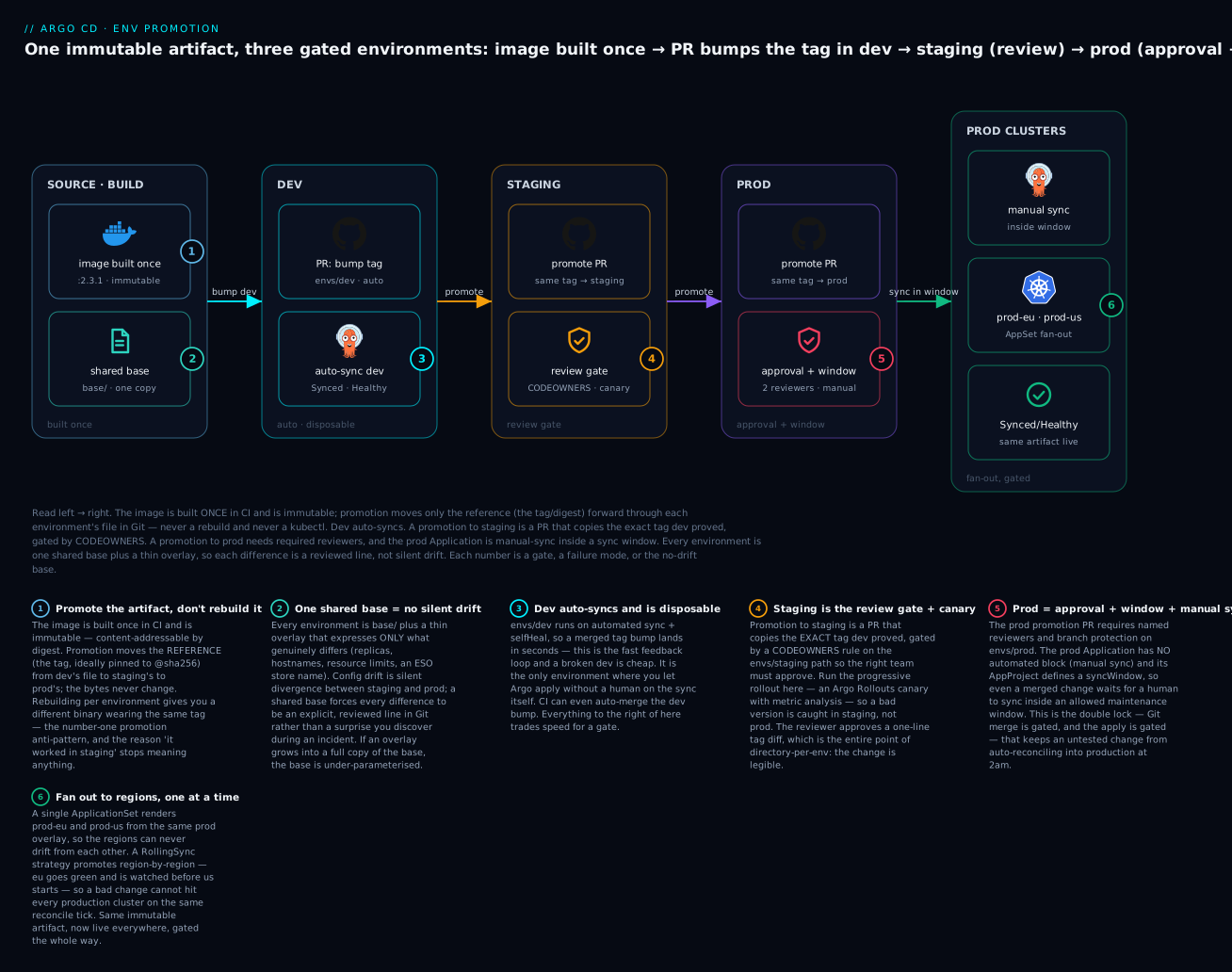
The six badges mark where teams win or lose: promote the immutable artifact rather than rebuild it (1); a shared base so environments never drift silently (2); dev auto-syncs and is disposable (3); staging is the review gate where the canary runs (4); prod demands approval and a sync window with manual sync (5); and the fan-out to regions goes one at a time, not all at once (6). Let’s walk each stage.
The flow, step by step
| # | Stage | Who does it | What happens | Gate |
|---|---|---|---|---|
| 1 | Build | CI (not Argo CD) | Build image, push to registry, tag :2.3.1 (pin a digest) |
CI tests pass |
| 2 | Bump dev | CI or a bot | Open/auto-merge a PR setting newTag: 2.3.1 in envs/dev |
Usually auto-merge |
| 3 | Sync dev | Argo CD | Auto-sync + self-heal applies it to the dev cluster in seconds | none (dev is disposable) |
| 4 | Validate dev | Tests / humans | Smoke tests, manual poke; dev is the fast feedback loop | informal |
| 5 | Promote → staging | A person (or bot) opens a PR | Copy the same tag into envs/staging |
CODEOWNERS review |
| 6 | Sync + canary staging | Argo CD + Rollouts | Sync staging; run a canary with metric analysis | canary analysis gate |
| 7 | Promote → prod | A person opens a PR | Copy the same tag into envs/prod |
required reviewers + branch protection |
| 8 | Sync prod | A human triggers argocd app sync |
Manual sync, inside a sync window; fan out region by region | sync window + manual sync |
Notice the asymmetry that makes this safe: the gate tightens as you move right. Dev auto-syncs (speed). Staging needs a review (a human confirms the tag). Prod needs a named approver and a maintenance window and a human on the sync button (defence in depth). The same artifact flows through all three; only the ceremony changes.
The promotion PR — what a reviewer actually sees
This is the payoff of directory-per-env plus a shared base. Promoting 2.3.1 from staging to prod is this diff, and nothing else:
# PR: "Promote web 2.3.1 to prod"  (edits envs/prod/kustomization.yaml)
   images:
     - name: registry.example.com/web
-      newTag: "2.3.0"
+      newTag: "2.3.1"
A reviewer approves that in seconds and knows exactly what changes: the prod reference moves from the version prod runs today to the version staging just proved. No replica counts, no hostnames, no surprises — because those live in the overlay and don’t move. Harden it further by pinning the digest, so the tag can never be re-pointed under you:
# envs/prod/kustomization.yaml — digest-pinned promotion (belt and braces)
images:
  - name: registry.example.com/web
    newName: registry.example.com/web
    digest: sha256:9f2c4b8e1d3a6c7f0b2e5d8a1c4f7b0e3d6a9c2f5b8e1d4a7c0f3b6e9d2a5c8f1
The gates, per environment
The controls are not vibes; they are concrete settings you configure once. Here is the matrix:
| Control | Dev | Staging | Prod | How it’s configured |
|---|---|---|---|---|
| Argo CD sync mode | Automated + self-heal | Automated (or manual) | Manual | Application.spec.syncPolicy |
| PR merge gate | Auto-merge OK | Required review | Required reviewers | Git branch protection |
| Path ownership | none | CODEOWNERS: app team | CODEOWNERS: platform/SRE | .github/CODEOWNERS |
| Sync window | none | none | allow window only | AppProject.spec.syncWindows |
| Progressive rollout | none | canary + analysis | canary (or blue-green) | Argo Rollouts |
| Who can sync | anyone/automated | app team | platform on-call | Argo CD RBAC |
Branch protection + CODEOWNERS are your Git-side gate. A CODEOWNERS file makes the right people mandatory reviewers on the right paths:
# .github/CODEOWNERS — path-scoped promotion approval
/base/                 @acme/platform-team
/envs/dev/             @acme/web-developers
/envs/staging/         @acme/web-developers @acme/qa
/envs/prod/            @acme/platform-team  @acme/sre-oncall
Now a PR that edits envs/prod/ cannot merge without a platform-team and an SRE approval — enforced by the forge, not by etiquette. Combine with “require pull request before merging” and “dismiss stale approvals” on the protected branch and the Git gate is airtight.
The branch-protection settings that make CODEOWNERS actually bite (configure once on the protected branch / prod path):
| Branch-protection setting | Why it matters for promotion |
|---|---|
| Require a pull request before merging | No direct pushes to prod desired state |
| Require approval from CODEOWNERS | The right team (platform/SRE) must sign the prod diff |
| Required reviewers ≥ 2 for the prod path | Two humans see every prod change |
| Dismiss stale approvals on new commits | An approval can’t be reused after the diff changes |
| Require status checks (render-diff, lint) to pass | Drift and invalid manifests are caught before merge |
| Include administrators / restrict who can push | Nobody bypasses the gate — not even admins |
Manual sync for prod is simply the absence of an automated block on the prod Application. A merged prod PR then sits as OutOfSync until a human runs argocd app sync web-prod. That deliberate human step is a feature: the merge is reviewed and the apply is intentional.
Sync windows add when. Configured on the AppProject, they restrict the times a sync may happen at all — even a manual one:
# AppProject with a prod change window
apiVersion: argoproj.io/v1alpha1
kind: AppProject
metadata:
  name: prod
  namespace: argocd
spec:
  sourceRepos:
    - https://github.com/acme/gitops-repo.git
  destinations:
    - server: https://prod-eu.example.com
      namespace: 'web-prod'
    - server: https://prod-us.example.com
      namespace: 'web-prod'
  syncWindows:
    - kind: allow
      schedule: '0 14 * * 2,4'      # Tue & Thu, 14:00
      duration: 2h                   # a 2-hour change window
      applications:
        - 'web-prod'
      manualSync: true               # humans may sync inside the window
      timeZone: 'Europe/London'
    - kind: deny
      schedule: '0 0 * * *'          # a standing deny...
      duration: 24h                  # ...covering all other times
      applications:
        - 'web-prod'
      manualSync: false              # ...that even blocks manual sync
With that project, an attempt to sync web-prod outside Tuesday/Thursday afternoons is rejected — the change waits for the window. Inside the window, the on-call engineer runs the sync deliberately.
The syncWindows fields, for reference:
syncWindows[] field |
What it controls | Example |
|---|---|---|
kind |
allow or deny — deny always wins over allow |
allow |
schedule |
Cron expression for when the window opens | '0 14 * * 2,4' (Tue & Thu 14:00) |
duration |
How long the window stays open from schedule |
2h |
applications / namespaces / clusters |
Which apps/targets the window governs | ['web-prod'] |
manualSync |
Whether a manual sync is allowed when the window would block | true = break-glass allowed |
timeZone |
IANA zone the schedule is evaluated in |
'Europe/London' |
Automating the paperwork — Image Updater and Kargo
Opening promotion PRs by hand is fine at low volume, but three tools automate the boilerplate. Compare them honestly:
| Tool | What it does | Best for | Honest caveat |
|---|---|---|---|
| CI opens the PR (a script/bot) | Your pipeline commits the tag bump and opens the promotion PR | Any team — no new components | You build and maintain the glue yourself |
| Argo CD Image Updater | Watches the registry; on a new matching tag, writes the tag back to Git | Auto-advancing dev on every build | Registry-triggered, per-image; not a multi-stage promotion engine. See the Image Updater lesson. |
| Kargo (Akuity) | A purpose-built promotion engine: models Warehouses → Freight → Stages and promotes verified Freight stage-to-stage | Multi-stage promotion with verification, at scale | Newer, extra CRDs/controller to run and learn; evolving API |
Argo CD Image Updater is the right tool for the first hop: point it at dev, and every time CI pushes a new tag matching your constraint, it commits that tag into envs/dev (write-back-method git), and Argo CD syncs it. Dev advances with zero human paperwork. It is not a promotion engine, though — it keys off the registry, not off “staging is healthy”, so it does not model dev → staging → prod on its own. Use it to feed the pipeline, not to run it.
Kargo is the emerging, purpose-built answer to exactly the problem this lesson describes. Instead of you scripting PRs, Kargo models the pipeline as first-class objects:
| Kargo concept | What it is | Analogy in this lesson |
|---|---|---|
| Warehouse | Subscribes to an image repo / Git / chart and produces Freight when something new appears | “CI pushed 2.3.1” |
| Freight | An immutable snapshot of artifact versions (image digests, chart versions, commits) | The exact thing you promote |
| Stage | An environment; requests Freight from a Warehouse or an upstream Stage, and promotes it via configured steps | dev, staging, prod |
| Promotion | The act of moving a piece of Freight into a Stage (e.g. writing the tag to that env’s path) | Your promotion PR, automated |
| Verification | An AnalysisRun (Argo Rollouts) that must pass before Freight is eligible to move on |
The staging canary gate |
A Kargo Warehouse subscribing to your registry looks roughly like this (schema evolves across Kargo versions — treat as illustrative of the model, and check the docs for your version):
# Illustrative Kargo Warehouse — subscribes to the image, emits Freight on new versions
apiVersion: kargo.akuity.io/v1alpha1
kind: Warehouse
metadata:
  name: web
  namespace: web
spec:
  subscriptions:
    - image:
        repoURL: registry.example.com/web
        semverConstraint: ^2.0.0        # only 2.x tags become Freight
        discoveryLimit: 20
Kargo then promotes that Freight dev → staging → prod, running your verification (a Rollouts AnalysisRun) at each stage and writing the tag into the right env path via Git — the pipeline this lesson builds by hand, expressed declaratively. The honest trade-off: it’s another controller and a new mental model to operate, and the API is still maturing, so adopt it when hand-rolled PR automation becomes the bottleneck, not before.
Progressive promotion: canary in staging, and fan-out across regions
Two refinements turn a competent pipeline into a resilient one: catch bad versions with a canary before prod, and never hit all of prod at once.
Canary in staging before prod
Promotion answers “which artifact”; progressive delivery answers “how carefully do we switch to it”. They compose: promote the tag into staging, then let Argo Rollouts shift traffic to it gradually while watching metrics, so a bad version aborts in staging and never earns its prod PR. The full mechanics are in Argo Rollouts canary & blue-green; here is the shape that matters for promotion:
# envs/staging uses a Rollout instead of a bare Deployment: canary with an analysis gate
apiVersion: argoproj.io/v1alpha1
kind: Rollout
metadata:
  name: web
spec:
  strategy:
    canary:
      steps:
        - setWeight: 20
        - pause: {duration: 5m}
        - analysis:                       # metric gate: abort if bad
            templates:
              - templateName: success-rate
        - setWeight: 50
        - pause: {duration: 5m}
        - setWeight: 100
The promotion-level point: staging is where the canary earns its keep. A version that degrades error rate or latency aborts here — automatically, via the analysis step — and the prod promotion PR is never opened. By the time a change reaches prod, it has been proven both functionally (it works) and progressively (it can be rolled forward without a spike). Prod can then run its own canary or blue-green as a final safety net.
| Stage | Rollout strategy | Why |
|---|---|---|
| dev | plain Deployment (or fast canary) |
speed over safety — it’s disposable |
| staging | canary + AnalysisRun |
the automated quality gate before prod |
| prod | canary (conservative weights) or blue-green | final safety net; instant abort on a real user-facing regression |
Fan-out across clusters and regions
Production is rarely one cluster. You promote to prod-eu, watch it, then prod-us — never both on the same reconcile tick, or a bad change takes out every region simultaneously. An ApplicationSet with a cluster generator renders one prod Application per region from the same prod overlay (so regions can’t drift from each other), and a RollingSync strategy sequences them:
# One ApplicationSet fans the prod overlay across regions — gated, one at a time
apiVersion: argoproj.io/v1alpha1
kind: ApplicationSet
metadata:
  name: web-prod
  namespace: argocd
spec:
  goTemplate: true
  goTemplateOptions: ["missingkey=error"]
  strategy:
    type: RollingSync
    rollingSync:
      steps:
        - matchExpressions:
            - key: region
              operator: In
              values: [eu]          # eu goes first, must be Healthy...
        - matchExpressions:
            - key: region
              operator: In
              values: [us]          # ...before us starts
  generators:
    - clusters:
        selector:
          matchLabels:
            env: prod               # every registered prod cluster
  template:
    metadata:
      name: 'web-prod-{{index .metadata.labels "region"}}'
    spec:
      project: prod
      source:
        repoURL: https://github.com/acme/gitops-repo.git
        targetRevision: main
        path: envs/prod             # the SAME overlay for every region — no drift
      destination:
        server: '{{.server}}'
        namespace: web-prod
      syncPolicy: {}                # no automated block → manual sync for prod
Two promotion-critical details: every region reads path: envs/prod, so prod-eu and prod-us are structurally identical by construction — you cannot drift one region from another. And RollingSync means a bad promotion is contained to eu while you watch, before us is touched. This is the fan-out failure mode from the troubleshooting table, defused. (The generator mechanics live in the ApplicationSets lesson.)
The regions promote in a strict order, each gating the next — this is the whole safety property of RollingSync:
| Step | Clusters selected (region label) |
Gate before the next step starts |
|---|---|---|
| 1 | eu → web-prod-eu |
prod-eu must reach Healthy |
| 2 | us → web-prod-us |
starts only after step 1 is Healthy |
| 3+ | ap, … one region per step |
never all regions on one reconcile tick |
A subtlety worth internalising: a naïve
ApplicationSetlist generator applies the same template to every element, so if you generate dev/staging/prod from one list, they’d all get the same sync policy — and prod would auto-sync. Either keep prod in a separate Application/ApplicationSet (what we do above — this set is prod-only), or usespec.templatePatchto give prod a differentsyncPolicy. Fanning one template across tiers without differentiating the gate is exactly how “ApplicationSet hit prod too early” incidents happen.
Secrets & config that differ per environment
This is the one genuinely cloud-specific edge in promotion, so all three clouds get covered. Everything else in this lesson is cloud-neutral — a tag bump is identical on AKS, EKS and GKE. Secrets are not, because the store lives in the cloud.
The rule from the “what moves” section stands: you never promote a secret value, and secret values never live in Git. What differs per environment is which secret store an environment points at — dev reads dev secrets, prod reads prod secrets — and that pointer is a reviewed line in the overlay. The External Secrets Operator (ESO) is the clean way to express it: an ExternalSecret names a per-env store; the store lives in each cloud’s secret manager. (Depth in Secrets: Sealed Secrets, ESO, SOPS & Vault.)
# envs/prod overlay adds an ExternalSecret pointing at the PROD store (name differs per env)
apiVersion: external-secrets.io/v1beta1        # v1 is now GA; v1beta1 remains widely deployed
kind: ExternalSecret
metadata:
  name: web-secrets
spec:
  refreshInterval: 1h
  secretStoreRef:
    name: prod-store                            # dev overlay says dev-store; that's the ONLY delta
    kind: ClusterSecretStore
  target:
    name: web-secrets
  data:
    - secretKey: db-password
      remoteRef:
        key: prod/web/db                        # per-env path in the cloud store
        property: password
The per-env difference is secretStoreRef.name (and the remoteRef.key path) — one reviewed line, never a value. The store itself is backed by the cloud, and that is where the three clouds diverge:
| Cloud | Secret store | ESO provider | Workload identity to reach it | Registry (for the image you promote) |
|---|---|---|---|---|
| AKS | Azure Key Vault | azurekv |
Azure Workload Identity (federated) | ACR |
| EKS | AWS Secrets Manager | aws (service: SecretsManager) |
IRSA or EKS Pod Identity | ECR |
| GKE | Google Secret Manager | gcpsm |
GKE Workload Identity | Artifact Registry |
Per-env ClusterSecretStore, one per cloud (paired blocks — the fields genuinely differ):
# AKS — prod store backed by Azure Key Vault (Workload Identity)
apiVersion: external-secrets.io/v1beta1
kind: ClusterSecretStore
metadata:
  name: prod-store
spec:
  provider:
    azurekv:
      authType: WorkloadIdentity
      vaultUrl: "https://web-prod-kv.vault.azure.net"
      serviceAccountRef:
        name: eso-prod
        namespace: external-secrets
# EKS — prod store backed by AWS Secrets Manager (IRSA / Pod Identity)
apiVersion: external-secrets.io/v1beta1
kind: ClusterSecretStore
metadata:
  name: prod-store
spec:
  provider:
    aws:
      service: SecretsManager
      region: eu-west-1
      auth:
        jwt:
          serviceAccountRef:
            name: eso-prod
            namespace: external-secrets
# GKE — prod store backed by Google Secret Manager (Workload Identity)
apiVersion: external-secrets.io/v1beta1
kind: ClusterSecretStore
metadata:
  name: prod-store
spec:
  provider:
    gcpsm:
      projectID: "acme-web-prod"
      auth:
        workloadIdentity:
          clusterLocation: europe-west1
          clusterName: prod-eu
          serviceAccountRef:
            name: eso-prod
            namespace: external-secrets
The promotion consequence: because each environment’s overlay names its own store, a promoted tag lands in prod and the prod pods resolve prod secrets automatically — no secret ever travelled, no value ever touched Git, and dev’s credentials can never leak into prod because dev’s overlay never referenced the prod store. The image reference you promoted is cloud-neutral; the secret store it lands next to is cloud-specific and per-env. That separation is the whole trick.
Hands-on lab
You will build a complete dev → staging → prod promotion at the config level — a directory-per-env repo, a shared base, three Applications with prod on manual-sync inside a sync window, and then walk an actual promotion as a series of PRs, watching the diff shrink to one line. It runs on a free local kind cluster; nothing here bills. We simulate the three “environments” as three namespaces on one cluster so anyone can follow — the manifests are identical to a real three-cluster setup except the destination.server values.
No real cluster is required to read this and learn the structure. If you do run it, the outputs shown are representative — exact strings vary by version. We do not promote by rebuilding anything; the “artifact” is a stock public image whose tag we move.
Step 0 — Prerequisites
# kind, kubectl, and the Argo CD CLI installed; then a throwaway cluster:
kind create cluster --name promo
kubectl create namespace argocd
kubectl apply -n argocd -f https://raw.githubusercontent.com/argoproj/argo-cd/stable/manifests/install.yaml
kubectl -n argocd rollout status deploy/argocd-server   # wait until Available
What just happened: a local cluster with Argo CD installed. This is the control plane that will reconcile our three “environments”.
Step 1 — Lay out the directory-per-env repo
Create this structure and push it to a Git repo Argo CD can read (any public repo works for the lab; substitute your URL below):
gitops-lab/
  base/
    kustomization.yaml
    deployment.yaml
  envs/
    dev/kustomization.yaml
    staging/kustomization.yaml
    prod/kustomization.yaml
# base/kustomization.yaml
apiVersion: kustomize.config.k8s.io/v1beta1
kind: Kustomization
resources:
  - deployment.yaml
# base/deployment.yaml — a stock image so the lab needs no CI
apiVersion: apps/v1
kind: Deployment
metadata:
  name: web
spec:
  replicas: 1
  selector:
    matchLabels: {app: web}
  template:
    metadata:
      labels: {app: web}
    spec:
      containers:
        - name: web
          image: hashicorp/http-echo      # tag is set per-env by the overlay
          args: ["-text=hello"]
          ports: [{containerPort: 5678}]
# envs/dev/kustomization.yaml
apiVersion: kustomize.config.k8s.io/v1beta1
kind: Kustomization
namespace: web-dev
resources: [../../base]
images:
  - name: hashicorp/http-echo
    newTag: "0.2.3"          # dev gets the new version first
# envs/staging/kustomization.yaml
apiVersion: kustomize.config.k8s.io/v1beta1
kind: Kustomization
namespace: web-staging
resources: [../../base]
images:
  - name: hashicorp/http-echo
    newTag: "0.2.1"          # staging still on the old version
replicas:
  - {name: web, count: 3}    # explicit, reviewed per-env difference
# envs/prod/kustomization.yaml
apiVersion: kustomize.config.k8s.io/v1beta1
kind: Kustomization
namespace: web-prod
resources: [../../base]
images:
  - name: hashicorp/http-echo
    newTag: "0.2.1"          # prod still on the old version too
replicas:
  - {name: web, count: 5}
kubectl create namespace web-dev
kubectl create namespace web-staging
kubectl create namespace web-prod
What just happened: one base, three overlays. Dev is ahead (0.2.3); staging and prod trail (0.2.1). The per-env deltas (replica counts) are explicit lines. This is the no-drift structure in miniature.
Step 2 — The AppProject with a prod sync window
# project-prod.yaml
apiVersion: argoproj.io/v1alpha1
kind: AppProject
metadata:
  name: prod
  namespace: argocd
spec:
  sourceRepos: ['*']
  destinations:
    - {server: 'https://kubernetes.default.svc', namespace: 'web-prod'}
  clusterResourceWhitelist: []            # deny cluster-scoped resources (least privilege)
  namespaceResourceWhitelist:
    - {group: '*', kind: '*'}
  syncWindows:
    - kind: allow
      schedule: '0 14 * * 2,4'            # Tue & Thu 14:00, 2h window
      duration: 2h
      applications: ['web-prod']
      manualSync: true
kubectl apply -f project-prod.yaml
What just happened: prod lives in its own AppProject with a sync window — outside Tue/Thu afternoons, even a manual sync is blocked (we’ll see the block, then override it for the lab). (Project boundaries in depth: AppProjects & multi-tenancy.)
Step 3 — Three Applications, three sync policies
The heart of the lab: dev auto-syncs, staging auto-syncs, prod is manual.
# apps.yaml — one file, three Applications
apiVersion: argoproj.io/v1alpha1
kind: Application
metadata: {name: web-dev, namespace: argocd}
spec:
  project: default
  source:
    repoURL: https://github.com/YOU/gitops-lab.git
    targetRevision: main
    path: envs/dev
  destination: {server: https://kubernetes.default.svc, namespace: web-dev}
  syncPolicy:
    automated: {prune: true, selfHeal: true}    # dev: fully automated
---
apiVersion: argoproj.io/v1alpha1
kind: Application
metadata: {name: web-staging, namespace: argocd}
spec:
  project: default
  source:
    repoURL: https://github.com/YOU/gitops-lab.git
    targetRevision: main
    path: envs/staging
  destination: {server: https://kubernetes.default.svc, namespace: web-staging}
  syncPolicy:
    automated: {prune: true, selfHeal: true}    # staging: automated (add a canary in real life)
---
apiVersion: argoproj.io/v1alpha1
kind: Application
metadata: {name: web-prod, namespace: argocd}
spec:
  project: prod                                 # the project WITH the sync window
  source:
    repoURL: https://github.com/YOU/gitops-lab.git
    targetRevision: main
    path: envs/prod
  destination: {server: https://kubernetes.default.svc, namespace: web-prod}
  syncPolicy: {}                                # NO automated block → prod is manual-sync
kubectl apply -f apps.yaml
argocd app list           # representative:
# NAME         SYNC STATUS   HEALTH    PROJECT
# web-dev      Synced        Healthy   default
# web-staging  Synced        Healthy   default
# web-prod     OutOfSync     Missing   prod        <- manual: nothing applied yet
What just happened: dev and staging reconciled themselves. Prod shows OutOfSync/Missing because it has no automated block — it will not apply until a human syncs it. That is the manual-sync gate, working.
argocd app sync web-prod        # first prod sync, inside the lab
# (If outside the window you'd see a block — see Step 6.)
argocd app get web-prod         # now Synced/Healthy on 0.2.1
The three Applications differ only in path, project, and sync policy — the gate made concrete:
| Application | path |
project |
syncPolicy |
Extra gate |
|---|---|---|---|---|
web-dev |
envs/dev |
default |
automated + selfHeal |
none — disposable |
web-staging |
envs/staging |
default |
automated (add a canary IRL) |
CODEOWNERS review on the PR |
web-prod |
envs/prod |
prod |
{} — manual |
required reviewers + sync window |
Step 4 — Promote 0.2.3: dev → staging (the review PR)
In a real repo this is a PR; here we make the same edit. Change staging’s tag to match dev:
# PR #1: "Promote web 0.2.3 to staging"  (envs/staging/kustomization.yaml)
   images:
     - name: hashicorp/http-echo
-      newTag: "0.2.1"
+      newTag: "0.2.3"
git commit -am "Promote web 0.2.3 to staging" && git push
# staging auto-syncs (or: argocd app sync web-staging)
argocd app get web-staging      # representative: Synced, image now 0.2.3
kubectl -n web-staging get deploy web -o jsonpath='{..image}{"\n"}'
# hashicorp/http-echo:0.2.3
What just happened: the promotion to staging was a one-line diff copying the exact tag dev proved. In production this PR would require a CODEOWNERS review before merge. Staging now runs 0.2.3; prod still runs 0.2.1.
Step 5 — Promote 0.2.3: staging → prod (the approval PR)
# PR #2: "Promote web 0.2.3 to prod"  (envs/prod/kustomization.yaml)
   images:
     - name: hashicorp/http-echo
-      newTag: "0.2.1"
+      newTag: "0.2.3"
git commit -am "Promote web 0.2.3 to prod" && git push
argocd app get web-prod
# representative: SYNC STATUS: OutOfSync   (merged, but prod is manual — not applied)
What just happened: the prod desired state now says 0.2.3, but the cluster still runs 0.2.1. Prod is OutOfSync and stays that way until a human syncs — the merge is done, the apply is a separate, deliberate act. In real life PR #2 required named reviewers (platform + SRE) to merge at all.
Step 6 — Sync prod, and meet the window
argocd app sync web-prod
# If run OUTSIDE the Tue/Thu 14:00–16:00 window, representative:
# FATA[0000] rpc error: code = FailedPrecondition desc = Cannot sync web-prod:
#            an active sync window blocks this sync
The sync window is doing its job: even a human, with an approved merge, cannot apply to prod outside the change window. To complete the lab regardless of the day, widen the window to “now” (edit the schedule/duration in project-prod.yaml to cover the current time, or temporarily add - {kind: allow, schedule: '* * * * *', duration: 1h, applications: ['web-prod'], manualSync: true}), re-apply the project, then:
argocd app sync web-prod        # inside the window now
argocd app get web-prod         # Synced/Healthy, image 0.2.3
kubectl -n web-prod get deploy web -o jsonpath='{..image}{"\n"}'
# hashicorp/http-echo:0.2.3
What just happened: the same artifact (0.2.3) that started in dev is now in prod, having passed a review gate (staging PR), an approval gate (prod PR), and a timing+manual gate (sync window + human sync). It was never rebuilt and never applied by hand — every hop was a reviewed Git change reconciled by Argo CD.
Step 7 — Prove there’s no drift
# Every env difference is explainable from the overlays — nothing hidden:
diff <(kubectl kustomize envs/staging) <(kubectl kustomize envs/prod)
# representative: only namespace + replica count differ (5 vs 3) — both are reviewed overlay lines
What just happened: the only differences between staging and prod are the ones you wrote in the overlays. There is no silent drift, because there is nowhere for it to hide.
Teardown
kind delete cluster --name promo # removes everything; nothing was billable
You have built and run a promotion pipeline: directory-per-env, shared base, per-env sync policies, a prod sync window, and a real dev → staging → prod walk where the promotion diff was one line and the artifact never changed.
Common mistakes and troubleshooting
Promotion failures cluster into a predictable set. Keep this table close; each row is a real incident pattern.
| Symptom | Likely cause | Fix |
|---|---|---|
| “Works in staging, breaks in prod” | Config drift — prod diverged from staging in ways not in Git | Shared base + explicit overlays; wire diff <(kustomize build staging) <(kustomize build prod) into CI as a gate |
| The same tag behaves differently across envs | Rebuilt image — CI built a new image per env under the same tag | Build once, promote the reference; pin the digest so the tag can’t re-point |
| Prod deployed an unreviewed change on its own | Prod Application has an automated syncPolicy |
Remove the automated block → prod is manual-sync; require a human argocd app sync |
| Promotion PR is huge and reviewers rubber-stamp it | Branch-per-env merge dragging unrelated diffs | Switch to directory-per-env; the promotion becomes a one-line newTag diff |
| A prod PR merged with no approval | No branch protection / CODEOWNERS on envs/prod/ |
Add path-scoped CODEOWNERS + “require reviewers” branch protection |
| Dev’s secret showed up resolving in prod | Overlay reused the same secretStoreRef across envs |
Per-env store name (dev-store/prod-store); prod overlay must reference only the prod store |
| Tag promoted but behaviour still wrong | The chart/base moved even though the tag didn’t | Pin chart targetRevision to a version/SHA; treat the chart as an artifact to promote too |
| ApplicationSet rolled a change to all prod at once | List/cluster generator applied simultaneously; no RollingSync |
Add a RollingSync strategy stepping region-by-region; watch eu before us |
| Prod auto-synced at a bad time | No sync window; automated on |
AppProject.syncWindows allow-window + manual sync; deny outside it |
argocd app sync web-prod rejected |
An active sync window blocks it (working as intended) | Sync inside the allow window, or (break-glass) set manualSync: true on the window |
| Rolled back staging but prod still bad | Rollback treated as env-local, not promoted backward | Roll back with git revert of the prod promotion PR — desired state returns to the prior tag |
| Prod overlay grew into a full copy of base | Base under-parameterised; drift creeping back in | Pull shared parts up into base/; keep the overlay to the delta only |
You will watch the Application status move through a small set of states as a promotion travels — read them fluently:
| State you’ll see | When, during a promotion | What it means / what to do |
|---|---|---|
Synced / Healthy |
After an env applies the promoted tag | Desired == live, workloads up — done |
OutOfSync |
Prod after a merged PR, before the manual sync | Desired changed; waiting for a human argocd app sync |
Missing |
Prod before its first sync | Nothing applied yet (manual env) |
Progressing |
Mid-rollout (canary shifting weight) | Rollout in flight; wait or watch the analysis |
Degraded |
A promoted version fails health checks | Bad promotion — abort/roll back with git revert |
| Blocked by sync window | argocd app sync attempted outside the window |
Working as intended; sync inside the window |
Three gotchas deserve extra words, because they cause the most damage:
1. Promoting a rebuilt image (the silent artifact swap). The most dangerous mistake because it looks fine: CI has a “build and deploy to prod” job that rebuilds from source. Even from the same commit, a rebuild can pull newer base-image layers, different dependency patch versions, or a differently-resolved lockfile — a different binary wearing tag 2.3.1. Everything you validated in staging is now unverified in prod. The only defence is architectural: build the image exactly once, in one job, and let every environment reference that one artifact by digest. If your prod deploy job contains docker build, you have this bug.
2. Silent config drift. Prod and staging start identical and diverge one incident at a time — a kubectl edit here, a hotfix there, none written back to Git. Six months later “staging passed” predicts nothing. The structural fix is the shared base (so differences must be explicit) plus self-heal on (so an out-of-band kubectl edit is reverted and reported as OutOfSync, making drift loud). The diff-in-CI check turns drift from a postmortem finding into a failed pipeline.
3. Prod auto-syncing an untested change. Convenience is the enemy here. If prod has automated: {selfHeal: true} and tracks main, then any merge that touches the prod path rolls out with no human in the loop — including a mistaken one, at 2am, with no one watching. Prod earns two locks the other environments don’t: manual sync (no automated block) so a human triggers the apply, and a sync window so even that human can only do it in an agreed slot. Yes, it’s more friction. Prod is where you want friction.
Cheat-sheet
The promotion flow, the structuring decision, and the tooling — dense reference.
The promotion flow (what happens, in order):
| Step | Command / action | Result |
|---|---|---|
| Build once | CI: docker build … && docker push …:2.3.1 |
Immutable artifact in the registry |
| Bump dev | PR sets newTag: 2.3.1 in envs/dev (auto-merge) |
Dev auto-syncs |
| Promote → staging | PR copies tag into envs/staging (CODEOWNERS review) |
Staging syncs; canary runs |
| Promote → prod | PR copies tag into envs/prod (required reviewers) |
Prod OutOfSync (manual) |
| Sync prod | argocd app sync web-prod (inside window) |
Prod applies the same artifact |
| Roll back | git revert <promotion-PR> |
Desired state returns to prior tag |
Key commands:
| Command | What it does |
|---|---|
argocd app sync <app> |
Manually reconcile desired → live (the prod apply step) |
argocd app get <app> |
Sync status, health, current images, sync windows |
argocd app diff <app> |
Show live-vs-Git diff without syncing |
argocd app history <app> |
Prior synced revisions (for rollback context) |
argocd app rollback <app> <id> |
Roll the live app to a prior sync (prefer git revert for desired state) |
kubectl kustomize envs/prod |
Render an overlay locally to inspect the promoted result |
diff <(kubectl kustomize envs/staging) <(kubectl kustomize envs/prod) |
Drift check — every line must be an intended delta |
grep -r newTag envs/ |
What version is each environment on, right now |
The env-structuring decision:
| If… | Use | Because |
|---|---|---|
| You have real per-env differences (almost always) | Directory-per-env + shared base | One-line promotion diff; no silent drift |
| Tiny single-config app, strong branch policy | Branch-per-env (reluctantly) | Simplicity, if you accept merge/drift risk |
| Expressing the per-env delta | Kustomize overlays or Helm values | Keeps directory-per-env DRY |
| Multi-region prod | ApplicationSet + RollingSync |
Same overlay everywhere; region-by-region gate |
Gates, per environment:
| Env | Sync mode | Git gate | Timing gate | Progressive |
|---|---|---|---|---|
| dev | auto + self-heal | auto-merge | none | none |
| staging | auto (or manual) | CODEOWNERS review | none | canary + analysis |
| prod | manual | required reviewers | sync window | canary/blue-green |
Automation note:
| Tool | Use it for | Not for |
|---|---|---|
| Image Updater (git write-back) | Auto-advancing dev on every new build | Multi-stage dev→staging→prod promotion |
| Kargo | A declarative promotion engine (Warehouse→Freight→Stage, with verification) | When hand-rolled PR automation still suffices |
| CI-opens-PR bot | Any team; zero new controllers | — (you maintain the glue) |
Interview and exam questions
Q: In one sentence, what is a promotion under GitOps?
A: A controlled, reviewed change to an environment’s desired state in Git — almost always a pull request that moves an immutable artifact’s reference (an image tag/digest) into the next environment’s file — after which the pull-based controller (Argo CD) reconciles the cluster to match. It is never a kubectl command or a UI Sync click.
Q: What actually gets promoted, and what must not move? A: You promote a reference to an immutable artifact — an image tag (ideally pinned to a digest) or a pinned chart version. You do not promote the artifact itself (never rebuild per env) and you do not promote environment-specific config (replicas, hostnames, resource limits, secret-store names) — those are permanent, reviewed differences that live in each environment’s overlay and stay put.
Q: Compare directory-per-env and branch-per-env promotion. Why has branch-per-env fallen out of favour?
A: Directory-per-env keeps every environment on one branch with a shared base, so promotion is a one-line newTag diff and environments stay comparable. Branch-per-env uses a long-lived branch per environment and promotes by merge/cherry-pick, which (a) lets branches drift silently, (b) drags unrelated env-specific changes on merge (“merge hell”), and © produces noisy diffs that defeat review. Directory-per-env preserves the reviewed-diff superpower; branch-per-env erodes it.
Q: What is config drift between environments, and how do you prevent it structurally?
A: Drift is silent divergence between environments (e.g., a value changed in prod during an incident and never written to Git) so that “passed in staging” stops predicting “works in prod”. You prevent it structurally with a shared base plus per-env overlays that contain only the delta — every difference becomes an explicit, reviewed line — reinforced by self-heal (reverts out-of-band kubectl edits) and a CI diff check between rendered environments.
Q: Why is rebuilding the image per environment an anti-pattern?
A: Because a rebuild — even from the same commit — can produce a different binary (newer base layers, different resolved dependencies) under the same tag, so what you validated in staging is not what runs in prod. The immutability guarantee (“same artifact everywhere”) only holds if you build once and promote a digest-pinned reference. A prod deploy job containing docker build has this bug.
Q: How do you make prod refuse to auto-deploy an unreviewed change?
A: Two locks. Remove the automated block from the prod Application so it is manual-sync (a human must run argocd app sync), and define sync windows on the prod AppProject so syncs are only permitted in an agreed window (with manualSync controlling break-glass). Add branch protection + CODEOWNERS on envs/prod/ so the merge also requires named approvers. The Git merge is gated and the apply is gated.
Q: What are sync windows and how do they interact with manual sync?
A: AppProject.spec.syncWindows are cron-scheduled allow/deny windows restricting when syncs may occur. deny overrides allow; if only allow windows exist and none is active, syncs are blocked. Each window’s manualSync: true|false decides whether manual syncs are permitted when the window would otherwise block — so you can allow break-glass manual syncs while blocking automated ones, or lock both.
Q: How does Argo CD Image Updater fit a promotion pipeline, and what are its limits?
A: Image Updater watches a registry and, on a new matching tag, writes that tag back to Git (write-back-method git), which Argo CD then syncs. It’s ideal for auto-advancing dev on every build with no manual PR. Its limit: it keys off the registry, not off “staging is healthy”, so it does not model dev→staging→prod on its own. Use it to feed the pipeline’s first hop, not to run the whole promotion.
Q: What is Kargo, and when would you reach for it over hand-rolled PR automation? A: Kargo (by Akuity) is a purpose-built promotion engine that models the pipeline as first-class objects — Warehouses (subscribe to artifacts, emit immutable Freight), Stages (environments that request and promote Freight, with verification via Rollouts AnalysisRuns), and Promotions. Reach for it when multi-stage promotion with verification outgrows scripted PRs; the trade-off is another controller and an evolving API to operate.
Q: How do you promote safely across multiple prod regions?
A: Render every region’s prod Application from the same prod overlay via an ApplicationSet cluster generator (so regions can’t drift from each other), and add a RollingSync strategy that sequences them — prod-eu must be Healthy before prod-us begins — so a bad promotion is contained to one region while you watch, instead of hitting the whole fleet on one reconcile tick.
Q: A prod promotion caused an incident. Walk through the rollback.
A: git revert the prod promotion PR — that restores the prior desired-state tag in envs/prod, and the reverted change goes through the same review gate. Then sync prod (inside the window, or break-glass) so the cluster returns to the previous artifact. Because desired state is in Git, rollback is a normal reviewed change, not a scramble; the exact prior state is recoverable byte-for-byte. Avoid kubectl/UI rollbacks, which create drift the controller will fight.
Q: How do per-environment secrets work without promoting secret values?
A: You never put values in Git or promote them. Each environment’s overlay references its own secret store (e.g., ESO secretStoreRef: dev-store vs prod-store) — a single reviewed line — and the store is backed by the cloud’s secret manager (Azure Key Vault on AKS, AWS Secrets Manager on EKS, Google Secret Manager on GKE). A promoted image lands next to the prod store and resolves prod secrets at runtime; dev’s overlay never references the prod store, so credentials can’t leak across environments.
Key takeaways
- Promotion is a reviewed Git change, not a command. Dev, staging and prod are files that declare desired state; you promote by editing the next environment’s file via a PR, and Argo CD reconciles the cluster. Never
kubectl, never a UI Sync click. - Promote the reference to an immutable artifact — and nothing else. Move an image tag (pinned to a digest) or a pinned chart version. Build the image once; never rebuild per env. Env-specific config (replicas, hostnames, secret-store names) stays put as permanent, reviewed differences.
- Directory-per-env with a shared base is the default. It makes promotion a one-line diff and keeps environments comparable. Branch-per-env drags unrelated changes on merge and drifts silently — avoid it for anything with real per-env deltas.
- Config drift is the #1 promotion failure, and the fix is structural. One shared base + overlays that contain only the delta make every difference explicit and reviewed; self-heal + a rendered-diff CI check make any drift loud instead of silent.
- The gate tightens left to right. Dev auto-syncs (speed); staging needs a CODEOWNERS review and a canary; prod needs required reviewers, manual sync, and a sync window. That defence-in-depth is deliberate friction where it counts.
- Progressive delivery and promotion compose. A canary with metric analysis in staging aborts a bad version before it earns a prod PR; a
RollingSyncApplicationSet fans prod out region-by-region from one overlay, so no single change hits the whole fleet at once. - Automate the paperwork carefully. Image Updater auto-advances dev; Kargo is the purpose-built engine (Warehouse → Freight → Stage, with verification) for multi-stage promotion at scale — adopt it when scripted PRs become the bottleneck.
- Secrets are the one cloud-specific edge. Never promote a value; per-env overlays name a per-env store backed by Key Vault (AKS), Secrets Manager (EKS) or Secret Manager (GKE). The artifact you promote is cloud-neutral; the store it lands beside is per-env and per-cloud.