If you have run kubectl apply -f a few times and someone has now told you “we do GitOps with Argo CD,” this is the right place to start — not with a manifest to memorise, but with a worldview. Almost every confusing thing a beginner meets — “isn’t GitOps just CI/CD with extra steps?”, “does Argo CD build my Docker image?”, “why did my kubectl edit change vanish overnight?”, “how is this different from a Jenkins job that runs helm upgrade?” — every one of them dissolves the moment you hold the correct model of how the pieces fit.
There are only a handful of ideas, and this lesson is about all of them: desired state (what you want, written down), actual state (what the cluster is really running), a single source of truth (Git), and an agent that continuously drags the second toward the first. Get this map right and the rest of the course is detail. Get it wrong and you will spend months fighting the tool instead of using it.
This lesson is deliberately cloud-neutral. The GitOps model is byte-for-byte identical whether your cluster is AKS, EKS, or GKE — the reconcile loop does not care who runs the control plane. The cloud-specific edges (how you install Argo CD behind an ingress, wire SSO, or mount secrets on each cloud) arrive in later lessons; here we build the mental model they all sit on. Everything below you can prove with nothing but git on your laptop — no cluster, no Argo CD install yet.
Why this matters
Before GitOps, deploying to Kubernetes usually looked like this: a CI pipeline finished building your image, then — as its final act — reached into the cluster and ran kubectl apply or helm upgrade using an admin credential stored in the CI system. It worked, right up until it didn’t. Nobody could say with certainty what was actually running in production, because the truth lived in the cluster’s memory, not in any file you could read. Someone would kubectl edit a Deployment at 2 a.m. to stop an incident, forget to write it down, and three weeks later a routine redeploy would silently wipe the fix. Rolling back meant re-running an old pipeline and praying the inputs still existed. And every CI job that could deploy also held the keys to your entire cluster.
GitOps is the discipline that fixes all of that with one deceptively simple rule: the desired state of your system lives in Git, and an agent in the cluster continuously makes reality match it. Nothing reaches the cluster except through a Git commit that the agent pulls. That single constraint gives you a complete, always-current, human-readable record of what should be running; an audit log for free (it is just git log); a rollback that is just git revert; drift detection and self-healing; and a security model where your CI system never needs cluster credentials at all.
| The old pain | Why it hurt | The GitOps answer |
|---|---|---|
| “What’s actually running in prod?” | Truth lived in the cluster, not a file | Git is the desired state — read the repo |
A hotfix kubectl edit gets lost on next deploy |
No record; the imperative change is invisible | Drift is detected and either flagged or auto-reverted |
| Rollback = re-run an old, maybe-broken pipeline | Deploy inputs are ephemeral | Rollback = git revert to a known-good commit |
| Every CI job can nuke the cluster | Cluster admin creds sit in CI | The agent pulls; CI holds no cluster access |
| “Who changed this, and when?” | No unified audit trail | git log / git blame on the desired state |
Hold one sentence in your head as the anchor for everything else: GitOps is not a tool, it is a set of principles; Argo CD is one tool that implements them. Keep the principles and the tool as separate ideas and the whole course gets easier.
What GitOps actually is: the four OpenGitOps principles
“GitOps” gets used loosely, so let’s use the precise definition. OpenGitOps is a vendor-neutral project under the CNCF that published a small, formal set of principles (v1.0.0). A system is doing GitOps if, and only if, it satisfies all four. They are the rubric you can hold any tool — Argo CD, Flux, or a homegrown script — up against.
| # | Principle | In plain English | Argo CD mechanism |
|---|---|---|---|
| 1 | Declarative | The whole system’s desired state is expressed as data describing the end state, not steps to get there | Kubernetes manifests / Helm / Kustomize in a repo |
| 2 | Versioned and immutable | Desired state is stored so it is versioned, immutable, and keeps a complete history | Git commits — each an immutable SHA with author + time |
| 3 | Pulled automatically | Software agents automatically pull the desired state from the source | The application-controller pulls from the repo |
| 4 | Continuously reconciled | Agents continuously observe actual state and work to apply the desired state | The reconcile loop (default ~180s + on webhook) |
Take them one at a time, with a concrete example running through all four.
1. Declarative
Declarative means you describe what the world should look like, not the commands to get there. Contrast two ways to run three replicas of nginx:
# Imperative — a SEQUENCE OF ACTIONS. Order matters; re-running is not safe.
kubectl create deployment web --image=nginx:1.25.3
kubectl scale deployment web --replicas=3
# Run this twice and the second create errors: "already exists".
# Declarative — a STATEMENT OF THE END STATE. Apply it once or a hundred times;
# the result is identical. This is the whole file, and it IS the desired state.
apiVersion: apps/v1
kind: Deployment
metadata:
  name: web
spec:
  replicas: 3
  selector:
    matchLabels:
      app: web
  template:
    metadata:
      labels:
        app: web
    spec:
      containers:
        - name: web
          image: nginx:1.25.3
The declarative version is idempotent: applying it when three replicas already exist changes nothing. That property is what makes continuous reconciliation possible — an agent can safely re-apply the same desired state forever without side effects.
| Imperative | Declarative | |
|---|---|---|
| You specify | The steps (verbs) | The end state (nouns) |
| Example | kubectl scale ... --replicas=3 |
spec.replicas: 3 in a file |
| Re-running it | May error or double-apply | Always safe (idempotent) |
| Reviewable in a PR? | Awkward — it’s a script | Yes — it’s data you can diff |
| Suits GitOps? | No | Yes — this is principle #1 |
2. Versioned and immutable
The desired state must be stored somewhere that versions every change and never lets you quietly rewrite history. Git is the canonical fit: every change is a commit with an immutable SHA, an author, and a timestamp; the full history is retained; and you can point at any exact past state.
| Git gives you… | Which delivers the principle by… |
|---|---|
| Commit SHA | An immutable, addressable snapshot of the entire desired state |
git log / git blame |
A complete audit trail — who changed what, when, and why |
| Tags / branches | Naming a known-good release (v1.4.2) to promote or pin |
git revert |
Rolling back by creating a new commit that restores an old state |
| Pull requests + reviews | A human gate on every change to production intent |
Notice what you get for free: audit and rollback are not features someone bolted on — they are inherent properties of storing desired state in version control. That is the quiet power of principle #2.
3. Pulled automatically
Here is the pivot most newcomers miss. In GitOps, an agent running inside the cluster pulls the desired state from Git and applies it. Nothing outside the cluster pushes changes in. The engineer’s job ends at git push; from there an in-cluster controller notices the new commit (by polling, or instantly via a webhook) and does the applying.
This is the exact opposite of the traditional model where a CI runner outside the cluster reaches in with kubectl. We spend the whole of Push vs pull below on why this inversion matters — for now, just log the fact: the mechanism is pull, and the puller lives in the cluster.
4. Continuously reconciled
The agent does not apply once and walk away. It runs a loop: read desired state from Git, read actual state from the cluster, compare (diff) the two, and if they differ, act. This runs on every cycle (Argo CD’s default resync is roughly every three minutes, and a Git webhook can trigger it in seconds), forever.
“Reconciliation” is the single most important word in this course. It is why GitOps is not a fancy deploy button but a control system — a thermostat for your cluster. A thermostat doesn’t heat the room once and switch off; it continuously compares the actual temperature to the target and corrects. Argo CD continuously compares actual cluster state to the desired state in Git and corrects. Set the target (commit to Git); the loop holds the room there.
Put the four together and you get the through-line of the whole diagram below: an engineer commits a declarative manifest, Git stores it immutably and versioned, an in-cluster agent pulls it, and a loop continuously reconciles actual against desired. Miss any one principle and you are not doing GitOps — you are doing something that merely rhymes with it.
The core mental model: desired state vs actual state
If you remember one picture from this lesson, make it this one. There are two states, and one loop that connects them.
- Desired state — what you want the cluster to be running. It lives in Git, as declarative manifests. It is the truth.
- Actual state — what the cluster is really running right now, according to the Kubernetes API server. It is reality, and reality drifts.
| Desired state | Actual state | |
|---|---|---|
| Lives in | Git (manifests, Helm, Kustomize) | The cluster (etcd, via the API server) |
| Written by | Humans, through commits + PRs | Controllers, kubelets, and (badly) kubectl edit |
| Role | The source of truth | The thing being steered toward truth |
| Argo CD reads it with | git pull from the repo |
kubectl get against the API server |
| When they match | Argo CD reports Synced | The system is healthy and honest |
| When they differ | Argo CD reports OutOfSync | Drift — something to reconcile |
Argo CD’s entire job is to close the gap between those two columns. Every reconcile tick it fetches desired state from Git, fetches actual state from the cluster, computes a diff, and reports one of two things: Synced (the columns match) or OutOfSync (they don’t). If you have enabled automated sync, an OutOfSync result triggers an apply that brings actual back to desired. That is the loop. Everything else in Argo CD — the UI, the CLI, projects, RBAC, ApplicationSets — is machinery around this one comparison.
Here is that loop drawn as the real thing, left to right, with the anti-pattern marked. Read it as: an engineer (and CI) commit desired state to Git; the Argo CD agent inside the cluster pulls it, diffs desired against actual, applies to Kubernetes, and keeps reconciling — catching and healing drift on the way back around.
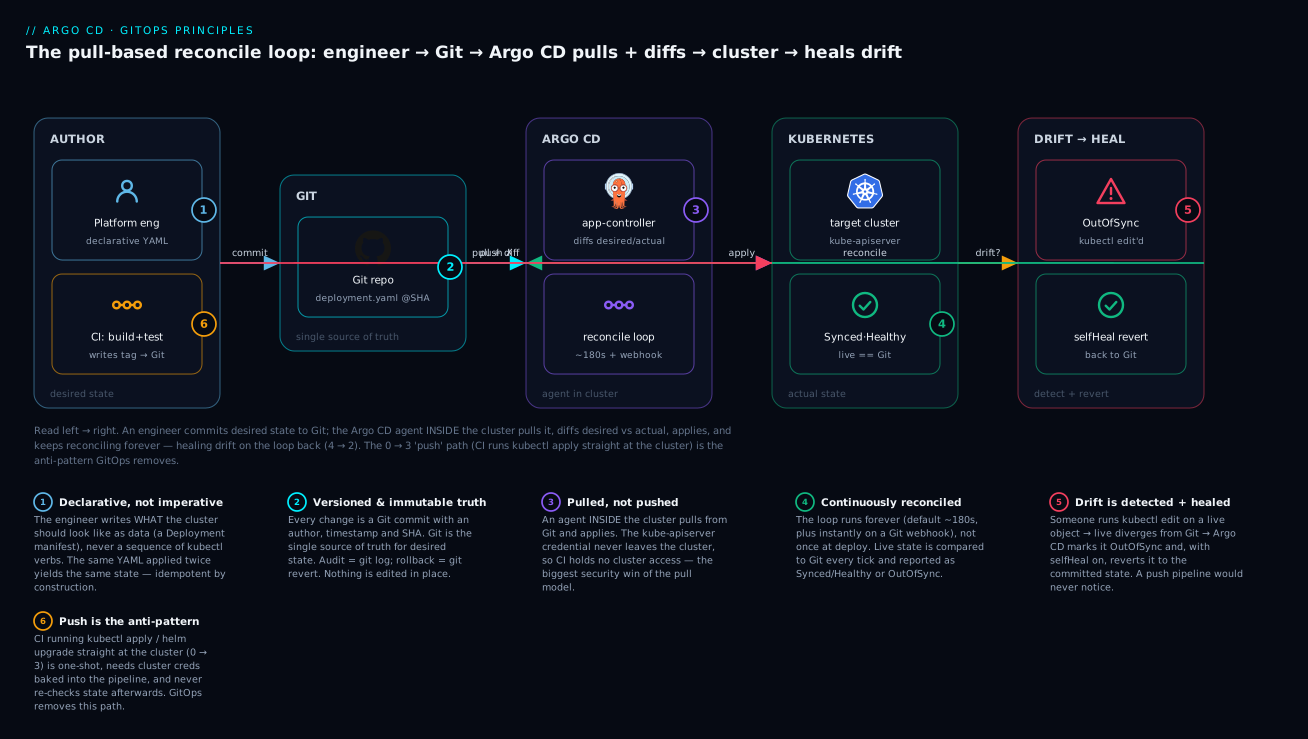
The badges mark the ideas worth tattooing on your brain: desired state is declarative data, not a script (1); Git is the versioned, immutable source of truth where rollback is git revert (2); the agent pulls from inside the cluster so CI never holds cluster creds (3); the loop continuously reconciles, not once (4); drift from a manual edit is detected and self-healed (5); and the push path where CI applies straight to the cluster is the anti-pattern GitOps removes (6). If you understand only this diagram from the whole lesson, you understand GitOps better than most people who have used it for a year.
Push vs pull: the two delivery models
This is the section that pays for the lesson. “Push” and “pull” describe who initiates the change to the cluster and from where. They sound like a minor plumbing detail. They are the entire difference between old-style CI-driven deploys and GitOps.
The push model (the old way)
In a push pipeline, your CI system is the one that changes the cluster. The last stage of the pipeline authenticates to the cluster and applies.
# A typical push-model CI job (pseudocode for any CI system).
# The pipeline itself reaches INTO the cluster. Note the cluster credential.
deploy:
  steps:
    - build_and_push_image: registry.example.com/web:${GIT_SHA}
    - configure_kubeconfig: ${{ secrets.PROD_CLUSTER_KUBECONFIG }}   # ⚠️ cluster admin in CI
    - run: kubectl set image deployment/web web=registry.example.com/web:${GIT_SHA}
    - run: kubectl rollout status deployment/web
The defining traits: the change is pushed from outside, the CI runner holds cluster credentials, and the action is one-shot — once the pipeline turns green, nothing is checking that the cluster still matches what you deployed. (The step-by-step of both models sits in the side-by-side table below.)
The pull model (GitOps)
In a pull pipeline, CI’s job ends at Git. It builds, tests, pushes the image, and then writes the new image tag into a manifest in Git. That’s it — CI never touches the cluster. An in-cluster agent (Argo CD) notices the commit, pulls it, and applies.
# The pull-model CI job stops at Git. No cluster credential anywhere.
update-manifest:
  steps:
    - build_and_push_image: registry.example.com/web:${GIT_SHA}
    - run: |
        # Update the desired state IN GIT, then push. CI's job is done here.
        yq -i '.spec.template.spec.containers[0].image =
               "registry.example.com/web:'"${GIT_SHA}"'"' manifests/deployment.yaml
        git commit -am "web: deploy ${GIT_SHA}" && git push
    # Argo CD (in the cluster) pulls this commit and reconciles. CI does NOT deploy.
The same five steps in both models, side by side — watch where step 3 diverges and who does the applying:
| Step | Push model (CI applies) | Pull model (GitOps) |
|---|---|---|
| 1 | CI builds + tests the code | CI builds + tests the code |
| 2 | CI builds + pushes the image | CI builds + pushes the image |
| 3 | CI loads a cluster credential | CI commits the new tag to Git — no cluster cred |
| 4 | CI runs kubectl/helm at the cluster |
Argo CD (agent inside the cluster) pulls the commit |
| 5 | Pipeline ends — nothing watches (one-shot) | Argo CD applies, then keeps reconciling (continuous) |
Why pull wins
Line the two models up on the things that actually bite you in production:
| Dimension | Push (CI applies) | Pull (GitOps / Argo CD) |
|---|---|---|
| Cluster credentials | Live in CI — every job is a blast radius | Never leave the cluster; CI has none |
| Direction of trust | Outside-in (CI reaches into cluster) | Inside-out (agent reaches out to Git, read-only) |
| Timing | One-shot at pipeline end | Continuous loop, forever |
| Drift | Never noticed | Detected every reconcile |
| Self-healing | None — the pipeline is long gone | Optional auto-revert to Git |
| Source of truth | Ambiguous — last pipeline? last hotfix? | Unambiguous — the Git repo |
| Audit trail | Scattered across CI logs | git log on the desired state |
| Rollback | Re-run an old pipeline (fragile) | git revert (one commit) |
| New cluster onboarding | Wire CI creds + jobs per cluster | Point an agent at the repo |
| Works if CI is down? | No deploy path at all | Cluster keeps reconciling from Git |
The headline reasons, stated plainly:
- No cluster credentials in CI. This is the biggest security win. In the push model, anyone who compromises a CI job — a poisoned dependency, a malicious PR, a leaked token — can do anything to your cluster. In the pull model, CI can only write to a Git repo; the cluster credential never leaves the cluster. The direction of trust flips from dangerous (outside-in) to safe (an in-cluster agent making an outbound, read-only pull from Git).
- Continuous reconciliation, not a one-shot apply. A push pipeline is true for exactly one instant — the moment it runs. A pull agent re-verifies reality against Git every few minutes, so “deployed correctly” stays true over time.
- Drift detection and correction. Because the agent constantly diffs, it sees when the cluster stops matching Git — and can heal it. Push-based deploys are blind to anything that happens after the pipeline exits.
- Auditability. The desired state is a Git history. Every change to production intent is a reviewed, attributed, timestamped commit. Your audit log is
git log. - Trivial rollback. Going back to a known-good state is
git revert <bad-sha>— a new commit the agent pulls and applies. No re-running brittle old pipelines.
There is nothing magic here. Pull wins because it turns “deploy” from an event that CI performs on the cluster into a property the cluster maintains about itself.
Drift: the problem GitOps was built to catch
Drift is any divergence between the desired state in Git and the actual state in the cluster. It is not exotic — it is the normal, entropic result of humans and controllers touching live objects. The classic example is a human under pressure:
# 2 a.m. incident. An engineer scales up by hand to ride out a traffic spike.
kubectl -n demo scale deployment/web --replicas=10
# The cluster now runs 10 replicas. Git still says 3. That gap IS drift.
Now watch how the two models respond to that one command:
| Push-based deploy | GitOps (Argo CD) | |
|---|---|---|
| Does anything notice the edit? | No. The pipeline ran days ago and is gone. | Yes. The next reconcile diffs live (10) vs Git (3). |
| What the operator sees | Nothing — silence | App flips to OutOfSync, diff shows replicas: 3 → 10 |
| What happens next | The drift persists, invisibly… | With selfHeal: true, Argo CD reverts live back to 3 |
| The next unrelated deploy | Silently resets replicas to 3 — surprise! | No surprise: Git was always the truth |
| Where the truth now lives | Nobody is sure | Still in Git, provably |
In the push world, that manual scale-up is a time bomb. It works tonight, but it exists only in the cluster’s memory. Weeks later, someone merges an unrelated change, the pipeline re-applies the old manifest, replicas snap back to 3, and the service falls over during peak — with no obvious connection to the “harmless” change that triggered it. The fix was invisible, so its loss is inexplicable.
In the GitOps world, the same edit is caught on the very next reconcile. Argo CD reports OutOfSync and shows you the exact diff. Then you have a choice baked into policy:
selfHeal: true— Argo CD automatically reverts the live object back to Git’sreplicas: 3. The manual edit is undone, loudly and predictably. The correct response to “we really do need 10 replicas” is to change Git, not the cluster.selfHeal: false(detect-only) — Argo CD leaves the drift in place but keeps screaming OutOfSync in the UI and metrics until a human resolves it, either by syncing (revert) or by committing the change to Git (bless it).
Either way, drift is visible. That visibility is the whole point. GitOps doesn’t magically stop people from running kubectl edit; it makes the consequence impossible to lose. The lesson to internalise: out-of-band changes are not how you change a GitOps system — you change Git, and let the loop carry it. The moment you edit the cluster directly, you have told a lie that the reconcile loop will eventually catch.
Where Argo CD fits: it is CD, not CI
Here is the hard line that clears up more beginner confusion than anything else in this course:
Argo CD is Continuous Delivery. It does not build images, run your unit tests, or push to a registry. That is Continuous Integration — a different tool’s job.
Argo CD reads manifests from Git and reconciles them into a cluster. It has no idea how to compile your Go binary or run npm test, and it never will. If you find yourself asking “how do I make Argo CD build my image,” you have mislabelled the box. Building is CI (GitHub Actions, GitLab CI, Jenkins, Azure Pipelines, Tekton…). Argo CD picks up after the artifact exists.
| Concern | CI (GitHub Actions / GitLab / Jenkins…) | CD (Argo CD) |
|---|---|---|
| Build the image | ✅ Yes | ❌ No |
| Run unit / integration tests | ✅ Yes | ❌ No |
| Push image to a registry | ✅ Yes (ACR / ECR / Artifact Registry) | ❌ No |
| Update the image tag in a manifest | ✅ Yes (commits to Git) | ❌ No |
| Pull desired state from Git | ❌ No | ✅ Yes |
| Diff desired vs actual in the cluster | ❌ No | ✅ Yes |
| Apply manifests to Kubernetes | ❌ No (in GitOps) | ✅ Yes |
| Detect + heal drift | ❌ No | ✅ Yes |
| Holds cluster credentials | ❌ No (that’s the point) | ✅ Yes (inside the cluster) |
The clean handoff — the seam where CI ends and CD begins — is a commit to Git. CI’s final act is to write the new desired state (usually an updated image tag) into the repo. Argo CD’s first act is to pull that commit. Neither tool reaches into the other’s territory.
| Stage | Who | Action | Output |
|---|---|---|---|
| 1 | Developer | Push app code | Source commit |
| 2 | CI | Build + test | Green build |
| 3 | CI | Build + push image | web:${SHA} in the registry |
| 4 | CI | Update manifest tag, commit | New commit in the config repo |
| 5 | — handoff: the commit — | Desired state updated in Git | |
| 6 | CD (Argo CD) | Pull the commit, diff | An OutOfSync detection |
| 7 | CD (Argo CD) | Apply to the cluster | New ReplicaSet rolling out |
| 8 | CD (Argo CD) | Reconcile continuously | Synced / Healthy, and stays that way |
A useful mantra: CI produces artifacts and updates Git; CD consumes Git and updates the cluster. They meet at exactly one place — the commit — and nowhere else. (A common refinement is to keep two repos: an app source repo that CI builds from, and a separate config/GitOps repo that holds the manifests Argo CD watches. That keeps a config change from re-triggering an image build and vice-versa. More on repo topology in later lessons.)
Benefits, honest tradeoffs, and the tooling landscape
GitOps is a genuinely great default for Kubernetes delivery, but selling it as free is how teams get burned. Here is the honest ledger.
| Benefit | What you actually get |
|---|---|
| Single source of truth | The repo is production intent — no guessing |
| Audit + compliance | Every change is a reviewed, attributed commit |
| Easy rollback | git revert to any prior known-good state |
| Drift detection + self-healing | Reality is continuously held to Git |
| No cluster creds in CI | Smaller, safer blast radius |
| Disaster recovery | Rebuild a cluster by pointing an agent at the repo |
| Consistency across clusters | The same repo reconciled onto AKS, EKS, and GKE alike |
And the costs — real, and worth naming out loud:
| Tradeoff / cost | Why it bites | How teams handle it |
|---|---|---|
| Learning curve | A new mental model (pull, reconcile, drift) + a new tool | Exactly why this course exists — start here |
| Everything through Git | No more quick kubectl edit in prod; you commit and wait for the loop |
Cultural discipline; fast reconcile + webhooks keep it snappy |
| Secrets need a story | You must never commit plaintext secrets to Git | Sealed Secrets / External Secrets Operator / SOPS / cloud secret stores |
| Not ideal for everything | One-off debug pods, imperative experiments, some batch jobs fit Git poorly | Keep those out of GitOps; use it for the desired-state workloads |
| Repo + tooling sprawl | Config repos, ApplicationSets, and overlays multiply at scale | Deliberate repo topology (a later lesson) |
| Diff noise | Controllers (HPA, webhooks) mutate live objects and look like drift | ignoreDifferences to scope out legitimate mutation |
One tradeoff deserves a flag now because beginners trip on it hardest: secrets. The instinct “everything is in Git” collides with “never put a password in Git.” Both are true, and the resolution is that you commit an encrypted or referenced secret, never a plaintext one. The full treatment — Sealed Secrets, External Secrets Operator, SOPS, and the per-cloud stores (Azure Key Vault, AWS Secrets Manager, Google Secret Manager) — is its own lesson later in the course. For now, just carve the rule in stone:
| ❌ Never | ✅ Instead |
|---|---|
Commit a plaintext Secret manifest to Git |
Commit a SealedSecret (encrypted; only the cluster can decrypt) |
| Base64 a password into a manifest (base64 ≠ encryption) | Use External Secrets Operator to pull from a cloud secret store at runtime |
Paste a token into a Helm values.yaml in Git |
Encrypt values with SOPS; decrypt in-cluster |
The GitOps tooling landscape
Argo CD is not the only GitOps tool. Its main peer is Flux (also a CNCF-graduated project). You will meet both; a one-liner now, a deep dive later.
| Tool | In one line | Feel |
|---|---|---|
| Argo CD | GitOps CD with a first-class Web UI, an Application CRD, and a rich CLI |
App-centric, visual, great for teams that want to see sync + health |
| Flux | GitOps toolkit of composable controllers, CLI-first, no bundled UI | Kubernetes-native building blocks, favoured for pure-automation setups |
Both fully implement the four OpenGitOps principles — the choice is ergonomics and ecosystem, not correctness. This course teaches Argo CD because its UI and Application model make the concepts visible, which is exactly what you want while learning. When you can draw the reconcile loop from memory, the differences between the two tools become easy to reason about.
To orient yourself among tools you’ll hear named in the same breath (and often wrongly equated with Argo CD):
| Tool | Category | Relationship to Argo CD |
|---|---|---|
| GitHub Actions / GitLab CI / Jenkins | CI | Feeds Argo CD by committing manifests; does not deploy |
| Argo CD / Flux | GitOps CD | Pulls from Git and reconciles — this course |
| Helm / Kustomize | Manifest templating | Input to Argo CD; it renders them, they don’t deploy themselves |
| Argo Rollouts | Progressive delivery | Adds canary/blue-green; complements Argo CD (later lesson) |
Hands-on lab
You do not need a cluster for this. The point of the lab is to make the reconcile loop concrete using nothing but real git commands you run on your laptop, then reason precisely about what a GitOps controller would do at each step. When you reach the install lesson you will do the exact same flow against a live Argo CD — and it will feel familiar because you already understand it here.
Everything below is real and copy-pasteable. The only things we simulate (because there is no cluster) are the cluster’s reactions — and each of those is clearly labelled as what Argo CD would do. Nothing here bills a cent; it is all local Git.
Step 0 — Prerequisites. Just Git.
git --version   # any modern Git is fine
# git version 2.43.0
What just happened: nothing yet — but note that this is the entire toolchain for today. The live Argo CD install comes later in Argo CD Architecture: Components, Repo-Server & Controller.
Step 1 — Create the desired state in Git.
mkdir gitops-lab && cd gitops-lab
git init -q
mkdir manifests
cat > manifests/deployment.yaml <<'YAML'
apiVersion: apps/v1
kind: Deployment
metadata:
  name: web
  namespace: demo
  labels:
    app: web
spec:
  replicas: 2
  selector:
    matchLabels:
      app: web
  template:
    metadata:
      labels:
        app: web
    spec:
      containers:
        - name: web
          image: nginx:1.25.3
          ports:
            - containerPort: 80
YAML
git add manifests/deployment.yaml
git commit -qm "web: initial desired state, 2 replicas, nginx:1.25.3"
git log --oneline
# a1b2c3d web: initial desired state, 2 replicas, nginx:1.25.3
What just happened: you authored desired state declaratively and committed it. That commit SHA is now an immutable snapshot of what the cluster should run. Principles #1 (declarative) and #2 (versioned) are satisfied — on your laptop, with no cluster in sight.
Step 2 — Reason about the first sync. Imagine you now register this repo as an Argo CD Application. The manifest that does it (real, schema-correct — you’ll write one for real soon):
apiVersion: argoproj.io/v1alpha1
kind: Application
metadata:
  name: web
  namespace: argocd
spec:
  project: default
  source:
    repoURL: https://github.com/your-org/gitops-lab.git
    targetRevision: main
    path: manifests
  destination:
    server: https://kubernetes.default.svc
    namespace: demo
  syncPolicy:
    automated:
      prune: true
      selfHeal: true
    syncOptions:
      - CreateNamespace=true
What Argo CD would do (illustrative — no cluster here): on first reconcile it pulls the repo, sees the demo namespace has no web Deployment (actual = nothing, desired = 2 replicas), reports OutOfSync, and — because automated is on — applies the manifest. A moment later:
# Representative `argocd app get web` output (illustrative shape, not a live run):
Name:               argocd/web
Sync Status:        Synced
Health Status:      Healthy
GROUP  KIND        NAMESPACE  NAME  STATUS  HEALTH
apps   Deployment  demo       web   Synced  Healthy
What just happened: the loop closed the gap. Desired (Git) and actual (cluster) now match, so the state is Synced/Healthy. This is principle #3 (pulled) and #4 (reconciled) in action.
Step 3 — Make a change the GitOps way: commit it. Bump to three replicas and a patch image.
sed -i.bak 's/replicas: 2/replicas: 3/; s/nginx:1.25.3/nginx:1.25.4/' manifests/deployment.yaml
rm manifests/deployment.yaml.bak
git commit -qam "web: scale to 3, bump to nginx:1.25.4"
git log --oneline
# e4f5g6h web: scale to 3, bump to nginx:1.25.4
# a1b2c3d web: initial desired state, 2 replicas, nginx:1.25.3
What Argo CD would do: the next reconcile (or an instant webhook) sees a new commit. It diffs desired vs actual and finds two differences:
# Representative `argocd app diff web` output (illustrative):
===== apps/Deployment demo/web =====
-   replicas: 2
+   replicas: 3
-   image: nginx:1.25.3
+   image: nginx:1.25.4
It applies, Kubernetes performs a rolling update, and the app returns to Synced/Healthy.
What just happened: you changed production intent through Git. No kubectl, no cluster access — a commit is the only interface. That is the daily rhythm of GitOps.
Step 4 — Simulate drift, and watch reconciliation restore truth. Now do the forbidden thing (in your head — there’s no cluster): an engineer edits the live object directly.
# Imagine, at 2 a.m. during an incident:
#   kubectl -n demo scale deployment/web --replicas=10
# The cluster now runs 10. Git still says 3. That gap is DRIFT.
What Argo CD would do: on the next reconcile it reads actual (replicas: 10) and desired (replicas: 3), they disagree, and it reports:
# Representative status after the out-of-band edit (illustrative):
Sync Status:   OutOfSync
  apps/Deployment demo/web   OutOfSync   (live replicas 10, desired 3)
Because our Application has selfHeal: true, Argo CD then reverts the live object back to 3 — automatically, and audibly in the UI and metrics. Had selfHeal been false, it would leave 10 running but keep flagging OutOfSync until a human resolved it. Contrast the push world: that scale-to-10 would sit there silently until some unrelated future deploy blew it away without warning.
What just happened: you saw the thermostat correct the room. The correct way to actually run 10 replicas is to commit replicas: 10 to Git — then it’s the truth, and the loop keeps it.
Step 5 — Roll back with git revert. Suppose the nginx:1.25.4 bump was bad. Rollback is not a special Argo CD feature — it’s Git.
git revert --no-edit HEAD          # create a NEW commit that undoes the last one
git log --oneline
# 7h8i9j0 Revert "web: scale to 3, bump to nginx:1.25.4"
# e4f5g6h web: scale to 3, bump to nginx:1.25.4
# a1b2c3d web: initial desired state, 2 replicas, nginx:1.25.3
grep -E 'replicas|image' manifests/deployment.yaml
#   replicas: 2
#         image: nginx:1.25.3
What Argo CD would do: it pulls the revert commit, sees desired state is back to 2 / nginx:1.25.3, diffs against the live 3 / nginx:1.25.4, and reconciles the cluster back down. Rollback complete — as an ordinary, attributed commit.
What just happened: you rolled back production by adding to history, not rewriting it. git revert creates a new commit (immutability intact), your audit trail shows both the bad change and its reversal, and the loop did the actual work. (Argo CD also offers argocd app rollback and argocd app history, but the GitOps-pure path — the one that keeps Git as the single truth — is git revert.)
Step 6 — Read your audit trail. Everything that happened is in one place.
git log --oneline
# 7h8i9j0 Revert "web: scale to 3, bump to nginx:1.25.4"
# e4f5g6h web: scale to 3, bump to nginx:1.25.4
# a1b2c3d web: initial desired state, 2 replicas, nginx:1.25.3
What just happened: deploy, change, and rollback are all here — attributed, timestamped, immutable. This is the compliance/audit story, for free, from principle #2.
Here is the decision table you were reasoning through — the core of what a GitOps controller does every tick:
| Desired (Git) | Actual (cluster) | Argo CD status | With selfHeal: true, it… |
|---|---|---|---|
web @ 2 replicas |
(nothing) | OutOfSync | Creates the Deployment |
web @ 3 replicas |
web @ 2 replicas |
OutOfSync | Applies — rolls to 3 |
web @ 3 replicas |
web @ 3 replicas |
Synced | Nothing — already matches |
web @ 3 replicas |
web @ 10 (drift) |
OutOfSync | Reverts live back to 3 |
web @ 2 (reverted) |
web @ 3 replicas |
OutOfSync | Applies — rolls back to 2 |
Teardown.
cd .. && rm -rf gitops-lab # it was only ever a local Git repo — nothing to un-bill
What just happened: you deleted a directory. There was never a cluster, a cloud resource, or a cost — just Git, proving that the model is learnable with zero infrastructure. The live version of this exact flow is the payoff of the install lesson.
Common mistakes and troubleshooting
Beginners get stuck in the same handful of places, and every one traces back to a cracked mental model. Keep this table close.
| Symptom / belief | Cause | Fix |
|---|---|---|
| “GitOps is just CI/CD with Git” | Missing the pull + continuous reconcile half | GitOps = declarative + versioned + pulled + reconciled; a push pipeline is none of the last two |
| “Argo CD builds my image” | Confusing CD with CI | Argo CD only reconciles manifests; your CI builds/tests/pushes and commits the tag |
kubectl edit change vanished overnight |
selfHeal: true reverted your out-of-band edit to match Git |
Change Git, not the live object; commit the intended state |
| Manual hotfix silently lost on next deploy | You’re still push-based — the pipeline re-applied old manifests | Adopt pull; then drift is flagged instead of silently clobbered |
| App stuck OutOfSync forever | Desired ≠ actual and selfHeal is off (detect-only), or a field a controller mutates |
Sync it, or commit the change to Git; scope legit mutation with ignoreDifferences |
Committed a plaintext Secret to Git |
Treating “everything in Git” as “secrets in Git too” | Never commit plaintext; use Sealed Secrets / ESO / SOPS (secrets lesson) |
| “We deployed, so we’re done” | Expecting a one-shot apply, not a loop | Reconciliation is continuous; “done” means stays Synced, not went Synced once |
| Prod changed out-of-band by a script/operator | Something bypassed Git as the source of truth | Route all changes through Git; use RBAC + AppProject to block direct writes |
| “Pull means Argo CD needs no Git access” | Confusing who initiates with who authenticates | Pull = the agent reaches out to Git (with read creds); it still authenticates to the repo |
| “Rollback = redeploy the old version” | Thinking imperatively | Rollback = git revert (or argocd app rollback) — restore desired state, let the loop apply it |
| Argo CD shows Synced but app is broken | Sync ≠ health — manifests applied, but pods crash | Check Health (Degraded/Progressing), not just Sync; read pod logs/events |
Three misconceptions cost beginners the most hours, so they get extra words.
1. “GitOps is just CI/CD.” No — it is a superset of ideas that a push pipeline lacks. A CI/CD pipeline can absolutely deploy to Kubernetes, but if it pushes with kubectl apply from the runner, it satisfies neither “pulled automatically” nor “continuously reconciled.” It fires once and forgets. GitOps keeps an agent in the loop forever. When someone says “we already do CI/CD, why GitOps?”, the honest answer is: because your pipeline stops caring the instant it turns green, and GitOps never stops.
2. “Argo CD is a build tool.” No — it is allergic to building. Argo CD has no concept of a Dockerfile, a test suite, or a registry push. It reads manifests and reconciles them. The seam is a commit: CI’s last act writes desired state to Git; Argo CD’s first act reads it. If your instinct is to make Argo CD build something, you’ve put the wrong job in the wrong box — reach for your CI system instead.
3. “Sync means it works.” No — Sync and Health are two different signals. Synced means the manifests in Git were successfully applied to the cluster. It says nothing about whether the resulting pods are healthy. You can be perfectly Synced and thoroughly Degraded — a Deployment with a typo’d image is applied faithfully (Synced) but its pods ImagePullBackOff (Degraded). Always read both columns. Sync answers “did the cluster accept my desired state?”; Health answers “is that state actually running well?”
Cheat-sheet
Bookmark this. It compresses the whole lesson into the pieces you’ll want to recall fast.
The one-liners to memorise — the four principles, then push-vs-pull and CI-vs-CD:
| Idea | The one-liner to memorise |
|---|---|
| Declarative (principle 1) | Describe the end state as data, not steps — idempotent by design |
| Versioned & immutable (principle 2) | Store it in Git — every change an immutable, attributed commit |
| Pulled automatically (principle 3) | An in-cluster agent pulls desired state from Git |
| Continuously reconciled (principle 4) | A loop forever diffs actual vs desired and corrects the gap |
| Push model | CI reaches into the cluster with kubectl/helm — creds in CI, one-shot, drift-blind |
| Pull model | An in-cluster agent pulls from Git — no creds in CI, continuous, drift-aware |
| Why pull wins | No cluster creds in CI + continuous reconcile + drift heal + git revert rollback + git log audit |
| CI | Builds, tests, pushes the image, commits the tag to Git — never deploys |
| CD (Argo CD) | Pulls from Git, diffs, applies, reconciles — never builds |
| The handoff | CI and CD meet at exactly one place: a Git commit |
| Drift | Live ≠ Git; Argo CD flags OutOfSync and (with selfHeal) reverts to Git |
| Rollback | git revert <bad-sha> — a new commit the agent pulls and applies |
The commands the lab leaned on (all real):
| Command | What it does |
|---|---|
git commit -am "…" |
Record new desired state (an immutable snapshot) |
git log --oneline |
The audit trail of production intent |
git revert <sha> |
Roll back by adding a commit that undoes another |
argocd app get <app> |
Show an app’s Sync + Health status |
argocd app diff <app> |
Show desired (Git) vs actual (cluster) differences |
argocd app sync <app> |
Manually reconcile now (apply desired state) |
argocd app history <app> |
List past synced revisions |
argocd app rollback <app> <id> |
Imperative rollback to a prior synced revision |
kubectl -n argocd get applications |
List Argo CD Application objects |
Argo CD status vocabulary you’ll see constantly:
| Status | Means |
|---|---|
Synced |
Live cluster matches Git (desired == actual) |
OutOfSync |
Live cluster differs from Git — drift or a pending change |
Healthy |
The resources are running correctly |
Progressing |
A rollout is underway, not yet settled |
Degraded |
The resource is unhealthy (crash, failed probe, bad image) |
Missing |
Desired in Git but not present in the cluster |
Unknown |
Health can’t be determined yet |
Interview and exam questions
Q: What is GitOps, in one sentence? A: An operating model where the entire desired state of a system is stored declaratively in Git as the single source of truth, and one or more agents continuously pull that state and reconcile the running system to match it. Formally, it’s the four OpenGitOps principles: declarative, versioned & immutable, pulled automatically, continuously reconciled.
Q: Name the four OpenGitOps principles and give a one-line gloss of each. A: Declarative — desired state is expressed as data describing the end state, not steps. Versioned and immutable — that state is stored with full history and no in-place rewrites (Git). Pulled automatically — an agent pulls the state from the source. Continuously reconciled — the agent constantly compares actual to desired and corrects drift.
Q: What is the difference between the push and pull deployment models?
A: In push, an external CI system authenticates to the cluster and runs kubectl/helm to apply changes — it initiates, holds cluster credentials, and acts once. In pull, an agent inside the cluster fetches desired state from Git and applies it — the cluster credential never leaves the cluster, and the agent keeps reconciling continuously.
Q: Give three concrete reasons the pull model is preferred.
A: (1) No cluster credentials in CI, so a compromised pipeline can’t touch the cluster. (2) Continuous reconciliation instead of a one-shot apply, so “deployed correctly” stays true. (3) Drift detection and self-healing plus trivial git revert rollback and a git log audit trail — none of which a fire-and-forget push pipeline offers.
Q: What is drift, and how does GitOps handle it versus a push pipeline?
A: Drift is any divergence between the desired state in Git and the actual state in the cluster — classically someone running kubectl edit. A push pipeline never notices; the change lingers until an unrelated deploy silently overwrites it. GitOps detects drift on the next reconcile (marking the app OutOfSync) and, with selfHeal enabled, reverts the live object back to Git.
Q: Does Argo CD build container images? Explain the boundary. A: No. Argo CD is CD, not CI — it never builds, tests, or pushes images. CI does all of that and commits the updated image tag to Git; Argo CD pulls that commit and reconciles the cluster. The two meet only at the commit.
Q: A colleague says “we already have a Jenkins job that runs helm upgrade, so we’re doing GitOps.” Are they?
A: No. That’s a push pipeline: it fires once, holds cluster credentials in Jenkins, and never reconciles or detects drift afterward. It satisfies “declarative” and maybe “versioned,” but not “pulled automatically” or “continuously reconciled” — so it fails the OpenGitOps definition.
Q: How do you roll back a bad change in GitOps, and why is that better than re-running an old pipeline?
A: git revert <bad-sha> creates a new commit restoring the previous desired state; the agent pulls it and reconciles the cluster back. It’s better because it’s a single, attributed, reviewable action against an immutable history — no dependence on fragile old pipeline inputs, and the rollback itself is auditable.
Q: An app shows Synced but users report it’s down. What’s going on and where do you look?
A: Sync and Health are independent. Synced only means the manifests were applied successfully; it says nothing about runtime health. Check the Health status — likely Degraded or Progressing — and the pod logs/events (e.g. ImagePullBackOff, failing readiness probe). A perfectly synced manifest can still describe a broken app.
Q: Why must you never commit a plaintext Secret to Git, and what do you do instead? A: Git history is immutable and widely readable — a committed secret is effectively leaked forever, and base64 is encoding, not encryption. Instead commit encrypted or referenced secrets: Sealed Secrets (only the cluster can decrypt), External Secrets Operator (pulls from a cloud secret store at runtime), or SOPS-encrypted values.
Q: Does GitOps work the same on AKS, EKS, and GKE? A: The GitOps model and the reconcile loop are identical across all three — Argo CD doesn’t care who runs the control plane. Only the edges differ per cloud: how you install and expose Argo CD, wire SSO, and mount secrets (Key Vault vs Secrets Manager vs Secret Manager). Those are separate, later lessons.
Q: What’s the difference between selfHeal: false and selfHeal: true?
A: With selfHeal: false (detect-only), Argo CD reports drift as OutOfSync but leaves the live change in place until a human acts. With selfHeal: true, Argo CD automatically reverts live drift back to the state in Git on the next reconcile. Detect-only suits cautious rollouts; self-heal suits prod where Git must always win.
Key takeaways
- GitOps is a set of principles, not a tool. A system is doing GitOps only if its desired state is declarative, versioned & immutable (in Git), pulled automatically by an agent, and continuously reconciled. Argo CD is one tool that implements all four.
- Two states, one loop. Desired state lives in Git; actual state lives in the cluster. Argo CD’s whole job is to continuously diff them and close the gap —
Syncedwhen they match,OutOfSyncwhen they don’t. - Pull beats push because the cluster credential never leaves the cluster, reconciliation is continuous instead of one-shot, drift is detected and healed, and rollback is just
git revert. Push pipelines are blind the instant they turn green. - Drift is caught, not prevented. GitOps doesn’t stop someone from running
kubectl edit; it makes the divergence impossible to lose — flagged asOutOfSyncand, withselfHeal, reverted to Git. - Argo CD is CD, never CI. It does not build, test, or push images. CI does that and commits the new tag; Argo CD pulls the commit. They meet at exactly one seam — the Git commit.
- Sync ≠ Health.
Syncedmeans the manifests were applied;Healthymeans the resulting workload actually runs. Always read both. - Secrets never go into Git in plaintext. Commit encrypted or referenced secrets (Sealed Secrets, External Secrets Operator, SOPS, cloud stores) — a full lesson later.
- The model is cloud-neutral. The reconcile loop is identical on AKS, EKS, and GKE; only install/SSO/secrets edges differ per cloud. Learn the loop once here, and it carries you through the whole course — starting with Argo CD Architecture: Components, Repo-Server & Controller, then Your First Application: source, destination & sync and UI, CLI & Declarative vs Imperative.