Most people meet Argo CD as a web page: a graph of green hexagons, a big blue SYNC button, an app that says Synced and Healthy. That UI is honest, but it hides the machine. Behind the graph sit five cooperating processes, each with one job, talking to each other over gRPC and to a Redis cache in the middle. Learn those five and Argo CD stops being magic. You will know why an app is stuck, which pod’s logs to open, and what a given error message is actually complaining about — before you have read a single line of the docs.
This lesson opens the box. We will name every component, say exactly what each does, and follow one change all the way through: from argocd app sync on your laptop, through the repo-server turning your Git repo into Kubernetes YAML, into the application-controller’s reconcile loop where desired state meets live state, and out to the cluster. Then we will do the thing that makes this knowledge pay: build the debugging map — the table that tells you, for any symptom, which component is to blame.
Everything here is cloud-neutral. Argo CD’s internals are byte-for-byte identical on AKS, EKS, GKE, a laptop kind cluster, or bare metal — the same seven pods, the same reconcile loop. Only the edges differ (how you expose the UI to the internet, which identity provider Dex federates to), and where those edges appear we cover all three clouds in one line each. The engine is universal.
Why this matters
Here is the trap. You install Argo CD, point it at a repo, and for a week everything is green. Then one morning an app is OutOfSync and won’t move, or the UI throws ComparisonError, or a login that worked yesterday returns rpc error: code = Unauthenticated. If Argo CD is a single black box in your head, you are now stuck — you restart pods at random and hope. If instead you hold the component model, the same symptoms name their own culprit: ComparisonError is the repo-server failing to render; a stuck sync is the application-controller; a broken login is the API server or Dex. The map turns panic into a two-minute diagnosis.
The second reason is that every later lesson assumes this picture. When we talk about sync waves, we mean the order the controller applies resources. When we talk about private repos, we mean credentials the repo-server uses to clone. When we talk about SSO, we mean the API server delegating to Dex. When we talk about scaling to hundreds of clusters, we mean sharding the controller. Without the architecture, those lessons are vocabulary you memorise; with it, they are obvious consequences of who-does-what.
The mental model to anchor everything: Argo CD is a control loop, not a pipeline. A CI pipeline runs once, top to bottom, and stops. Argo CD’s application-controller runs forever, in a loop, continuously asking one question — “does the cluster match Git?” — and closing the gap when the answer is no. Git is the desired state; the cluster is the actual state; the controller is the thermostat that drives one toward the other. Hold that and the rest is detail. (If the pull-based, continuously-reconciled model itself is new, the sibling lesson GitOps From First Principles is the place to start; this lesson assumes you accept the model and asks how it is built.)
The component map at a glance
Argo CD is not one program. A default install drops seven workloads into one namespace, of which five are the core you must know and two are important-but-optional controllers. Every one is an ordinary Kubernetes Deployment or StatefulSet — there is no hidden daemon, no host agent. Here is the whole cast in one table; the rest of the lesson is just this table, expanded.
| Component | Kubernetes kind | One-line job | Talks to | If it’s down, you see… |
|---|---|---|---|---|
API server (argocd-server) |
Deployment | Serves the UI + CLI; authentication, RBAC, app CRUD | Clients, repo-server, Redis, Dex, k8s API | UI won’t load, argocd login fails |
Repository server (argocd-repo-server) |
Deployment | Clones Git, renders manifests (kustomize/helm/plain/plugins) | Git repos, Redis | ComparisonError, apps can’t render |
Application controller (argocd-application-controller) |
StatefulSet | The reconcile loop: diff desired vs live, sync, run hooks, report status | repo-server, Redis, target clusters | Nothing syncs; status never updates |
Redis (argocd-redis) |
Deployment | Ephemeral cache of rendered manifests + cluster state | server, repo-server, controller | Slow UI, stale views, cache errors |
Dex (argocd-dex-server) |
Deployment | Optional bundled OIDC provider for SSO federation | API server, your IdP | SSO login broken (local login still works) |
ApplicationSet controller (argocd-applicationset-controller) |
Deployment | Generates many Applications from generators (templating) |
Git, k8s API | New generated apps don’t appear |
Notifications controller (argocd-notifications-controller) |
Deployment | Sends alerts on app state changes (Slack, email, webhooks) | k8s API, notification services | No notifications fire |
Three facts to notice immediately, because they drive everything below:
- Only the application-controller is a StatefulSet. The rest are stateless Deployments. That single design choice is why its pod is named
argocd-application-controller-0(a StatefulSet ordinal) and why “scaling the controller” means sharding across ordinals-0,-1,-2— each owning a slice of your clusters — rather than plain replicas. (Sharding is a Tier-4 scaling topic; just file the shape away.) - Redis sits in the middle. The server, repo-server, and controller do not cache in their own memory; they share Redis. That is why Redis being unhealthy degrades all three at once, and why — because it is only a cache — losing it costs performance, never data.
- The two extra controllers are genuinely separable. ApplicationSet and Notifications are their own binaries with their own jobs; you can uninstall either and core sync still works. We forward-reference them here and give each its own lesson later.
Now, each component in turn.
The API server: the front door
The argocd-server process is the only component you talk to directly. The web UI is served by it; the argocd CLI is a gRPC/REST client of it; every automation token authenticates against it. Think of it as the front door and the reception desk combined — it does not do the deployment work itself, but nothing reaches the work without passing through it first.
It handles a specific, bounded set of responsibilities:
| Responsibility | What it means in practice |
|---|---|
| Serve the UI + API | One process serves the web app, a REST API, and a gRPC API — the CLI and UI use the same endpoints |
| Authentication | Validates the session/JWT on every call: local admin user, API tokens, or SSO (via Dex or a direct OIDC issuer) |
| Authorization (RBAC) | Enforces argocd-rbac-cm policy — can this subject sync/get/create this app/project? |
| Application management | Create/read/update/delete Application, AppProject, repo and cluster records (writing the CRDs the controller then acts on) |
| Repo/manifest proxy | Calls the repo-server on your behalf for the UI’s live diff and manifest views |
| Webhook receiver | Accepts Git provider webhooks at /api/webhook to trigger an immediate refresh instead of waiting for the poll |
One protocol detail worth internalising because it explains a whole class of connection errors: argocd-server multiplexes gRPC and HTTP on the same port (container port 8080, exposed by the argocd-server Service as 80/443). The CLI speaks gRPC; the browser speaks HTTP; both hit the same endpoint. When you see the CLI hang or throw a TLS/gRPC handshake error, it is almost always about how you reached this port (plain vs TLS, a proxy stripping gRPC, --grpc-web needed behind an L7 load balancer) — not about the controller or your manifests.
Because the API server is the internet-facing piece, exposing it is the one genuinely cloud-specific edge in this lesson. Out of the box its Service is ClusterIP (reachable only inside the cluster); to reach the UI from your laptop you either kubectl port-forward, or put a cloud load balancer / ingress in front. The mechanics differ per cloud:
| Cloud | Managed cluster | Typical way to expose argocd-server |
Notes |
|---|---|---|---|
| Azure | AKS | Application Gateway via AGIC, or a Service type=LoadBalancer (Azure LB) |
Front with Entra ID later for SSO; ⚠️ a public LB/App Gateway bills hourly |
| AWS | EKS | AWS Load Balancer Controller — ALB (Ingress) or NLB (Service) | ALB needs --grpc-web or a gRPC-aware listener for the CLI; ⚠️ ALB/NLB bills |
| GKE | GKE Ingress (external GCLB) or a Service type=LoadBalancer |
Container-native LB via NEGs is the clean path; ⚠️ forwarding rules bill |
The install lesson walks through each of these end to end (including HA and first login); here the point is only that the API server is the component that owns “can I reach the UI?” If login or the UI is the problem, this pod — or the load balancer in front of it — is where you look. If apps are the problem, the API server is almost never the cause, because — and this is the fact that surprises people — you can delete the API server entirely and your apps keep reconciling. The controller does not need it.
The repository server: turning Git into manifests
The argocd-repo-server has the most underestimated job in the system: it is the one that clones your Git repositories and turns whatever is in them into plain Kubernetes manifests. Argo CD does not deploy “your repo”; it deploys the rendered output of your repo. The repo-server is the renderer.
Give it a source (a repo URL, a revision, a path) and it:
- Clones (or reuses a cached clone of) the repo at the requested
targetRevision. - Looks at the path and decides which tool to run — plain YAML, Kustomize, Helm, or a config-management plugin.
- Runs that tool to produce a flat stream of Kubernetes manifests.
- Returns those manifests to the caller (the controller during reconcile, or the API server for the UI diff), and caches them in Redis keyed by repo + revision + parameters.
The tool it picks is automatic, based on what the path contains:
| If the path contains… | Repo-server runs… | Produces |
|---|---|---|
Plain .yaml/.json manifests |
(nothing — reads them directly) | The manifests as-is |
A kustomization.yaml |
kustomize build |
Kustomize’s rendered output |
A Chart.yaml |
helm template (server-side render, not helm install) |
The chart rendered with your values |
A .jsonnet file |
the Jsonnet VM | Generated manifests |
| A configured plugin match | your Config Management Plugin (CMP) | Whatever the plugin prints to stdout |
Two things here routinely bite newcomers, so say them plainly. First, Helm under Argo CD is helm template, not helm install. The repo-server renders the chart to YAML locally and hands the YAML to the controller; Tiller does not exist, and there is no Helm release stored in the cluster. Your “release” is the Application. That is why helm list shows nothing and why Helm hooks behave differently — the manifests are just applied by Argo CD like any other. Second, the repo-server is where the words “render” and “generate” always point. Any error that mentions manifest generation, a kustomize build failure, a missing Helm value, or ComparisonError originates here, because rendering is exclusively this component’s job.
Caching is the repo-server’s other half, and it is why big installs stay fast:
| Cache (in Redis) | Keyed by | Why it matters |
|---|---|---|
| Rendered manifests | repo + revision + path + parameters | The expensive helm template/kustomize build runs once per unique input, not once per reconcile |
| Git revision metadata | repo + ref | Resolving a branch/tag to a commit SHA is cached briefly |
| Repo clones (on local disk) | repo | The pod keeps working copies so it re-fetches, not re-clones, on each refresh |
The cache is also the source of a classic gotcha: after a Git change the repo-server may briefly serve a cached render, so a --hard-refresh (which bypasses the manifest cache and forces a fresh helm template/kustomize build) is the fix when an app looks stale even though you know Git moved. And because the repo-server runs your tooling with your credentials, it is also the component that needs repo access — SSH keys, HTTPS tokens, Helm/OCI registry creds all live as Secrets the repo-server consumes (covered in the repositories lesson).
The application controller: the reconcile loop
This is the heart of Argo CD, so we go slowly. The argocd-application-controller is the process that actually makes your cluster match Git. It is a control loop: for every Application, over and over, it compares desired state (the manifests the repo-server renders from Git) against live state (what is actually running in the target cluster), decides whether they match, judges whether the running app is healthy, and — if you have asked it to — applies the difference. Everything the UI shows you (Synced/OutOfSync, Healthy/Degraded) is this loop reporting its findings.
One full pass of the loop, for one Application, looks like this:
| Step | What the controller does | Result it records |
|---|---|---|
| 1. Trigger | A reconcile is kicked off (see triggers below) | — |
| 2. Get desired state | Asks the repo-server to render the app’s source at targetRevision |
The target manifests |
| 3. Get live state | Reads the actual objects from the target cluster (served from its watched cluster cache) | The live manifests |
| 4. Diff | Compares desired vs live field-by-field, honouring ignoreDifferences |
Synced or OutOfSync |
| 5. Assess health | Runs per-resource health checks (built-in + custom Lua) and rolls them up | Healthy / Progressing / Degraded / Suspended / Missing |
| 6. Act (if automated) | If OutOfSync and syncPolicy.automated is set, apply manifests in sync-wave order, run hooks, prune |
An OperationState (Succeeded/Failed) |
| 7. Report | Writes sync status, health, revision, and conditions back to the Application status |
What the UI/CLI display |
Steps 4 and 5 produce two independent answers, and conflating them is the single most common beginner confusion. Sync status answers “does live match Git?” Health status answers “is the running thing actually working?” They are orthogonal — an app can be any combination:
Healthy |
Degraded |
|
|---|---|---|
Synced |
The happy path: cluster matches Git and the app works | Matches Git, but the app is broken (bad image, failing probe) — Git itself is wrong |
OutOfSync |
Works, but drifted from Git (someone ran kubectl edit, or a new commit hasn’t been applied) |
Drifted and broken — usually mid-failed-deploy |
(The full state machine — including Progressing, Missing, and Unknown — is the whole subject of the sibling lesson Sync Status & Health Assessment. Here the load-bearing idea is just that the controller computes both, separately.)
What actually triggers a reconcile
The loop does not run continuously at full tilt; it is triggered. Knowing the triggers is what lets you answer “why is Argo CD slow to notice my commit?”
| Trigger | When it fires | Latency to apply |
|---|---|---|
| App resync timer | Every timeout.reconciliation (default 180s = 3 min) |
Up to 3 minutes |
| Git webhook | Instantly, when your provider POSTs to /api/webhook on push |
Near-instant |
| Spec change | You edit the Application (via UI/CLI/Git) — the controller watches its own CRDs |
Immediate |
| Watched resource change | A managed live object changes (the controller watches the target cluster) | Immediate |
| Manual refresh | argocd app get <app> --refresh (soft) or --hard-refresh (bypass manifest cache) |
On demand |
The default 3-minute poll is the number to remember. Out of the box, a commit to Git can take up to three minutes to be noticed, because the controller only re-examines each app every timeout.reconciliation. That interval lives in the argocd-cm ConfigMap:
apiVersion: v1
kind: ConfigMap
metadata:
  name: argocd-cm
  namespace: argocd
data:
  # How often the controller re-checks every app even with no event. Default 180s.
  timeout.reconciliation: 180s
You could lower it, but the right fix for “GitOps feels slow” is webhooks, not a tighter poll. A webhook makes a push near-instant while the 3-minute poll stays as a safety net for missed webhooks. Cranking the poll down to, say, 10s instead just multiplies load on the repo-server and every Git host you talk to — a self-inflicted rate-limit. Reach for a webhook first.
A subtle but important point about soft vs hard refresh: a normal (soft) refresh re-runs the diff using cached manifests — it re-reads live cluster state but trusts the repo-server’s cache for desired state. A hard refresh additionally throws away the manifest cache and forces the repo-server to re-clone and re-render. So when an app is stuck showing an old revision even though Git moved, a hard refresh — not a pod restart — is the targeted fix, because it invalidates exactly the cache that is stale.
Redis, Dex, and the two extra controllers
Redis — the cache in the middle
argocd-redis is a plain Redis instance, and its role is easy to state and easy to get wrong: it is an ephemeral cache, never a database. The server, repo-server, and controller all read and write it instead of caching in their own memory, which is what lets them stay fast and (in HA) stay stateless.
| What Redis holds | Written by | Purpose |
|---|---|---|
| Rendered manifests | repo-server | Skip re-running helm template/kustomize build on every reconcile |
| Cluster resource state | application-controller | Fast diffs without re-listing the whole cluster each pass |
| App/UI response data | API server | Snappy UI and API reads |
The crucial property: because it is only a cache, Redis is safe to lose. The source of truth for desired state is Git; the source of truth for live state is the cluster itself. If Redis is wiped or restarted, Argo CD simply rebuilds the cache — it re-renders manifests and re-lists cluster resources. The cost is performance, not correctness: while the cache is cold, reconciles are slower and the UI may momentarily show stale or errored panels. If Redis is fully down (not just wiped), you will see degraded behaviour across the UI and slow or failing reconciles, with cache-connection errors in the logs — but the instant Redis is back, everything recovers with no data lost. This is exactly why production installs run argocd-redis-ha (Redis with Sentinel) — not to protect data, but to keep the cache continuously available so performance never craters.
Dex — optional SSO federation
argocd-dex-server is an embedded Dex instance: a small OIDC provider that Argo CD bundles so you can wire up single sign-on without standing up your own identity broker. It is optional in two senses — you can run Argo CD with just the local admin user and no Dex at all, and even for SSO you can bypass Dex by pointing Argo CD at an OIDC issuer directly. Dex exists for the cases where your identity provider isn’t a clean OIDC issuer, or you want SAML/LDAP/GitHub-org federation normalised into OIDC for Argo CD.
The flow is: the API server delegates login to Dex; Dex federates to your real IdP; the token comes back and the API server enforces RBAC on the groups inside it. Which IdP you federate to is a cloud/identity edge:
| Cloud / platform | Typical IdP Dex federates to | Connector |
|---|---|---|
| Azure / Entra | Microsoft Entra ID | OIDC / SAML connector |
| AWS | IAM Identity Center or Amazon Cognito | SAML / OIDC connector |
| Google / GKE | Google Workspace (Cloud Identity) | OIDC / SAML connector |
| Any | GitHub / GitLab org, LDAP, Okta | Dedicated connectors |
Dex’s config lives under dex.config in argocd-cm, with client secrets in argocd-secret. The one thing to know here is the blast radius: misconfigure Dex and only SSO login breaks — the local admin login and already-running apps are untouched. The full setup (per cloud) is the subject of the SSO lesson; for architecture, Dex is “the optional auth sidecar the API server talks to.”
ApplicationSet and Notifications controllers
Two more controllers ship by default and each earns its own lesson later, but you should recognise them in get pods:
| Controller | Its job | Reads / writes | Failure looks like |
|---|---|---|---|
| ApplicationSet | Templating engine: turns generators (list, cluster, Git, matrix, PR) into many Applications automatically |
Watches ApplicationSet CRDs; creates/updates Applications |
New apps don’t get generated; ApplicationSet status shows a generator error |
| Notifications | Watches app state and fires alerts (Slack, Teams, email, webhooks) on triggers you define | Reads Application status; calls external services |
Deploys succeed/fail silently — no message arrives |
Both are strictly additive: core sync works without either. The ApplicationSet controller is how you go from hand-writing one Application per app-per-cluster to generating hundreds — the scaling story the App-of-Apps and ApplicationSets lessons pick up in Tier 2.
How a change flows end to end
Now assemble the pieces into one motion. Say you run argocd app sync guestbook from your laptop. Read the diagram left to right, then the walkthrough — the numbered badges mark exactly where each component’s job (and its failure mode) lives.
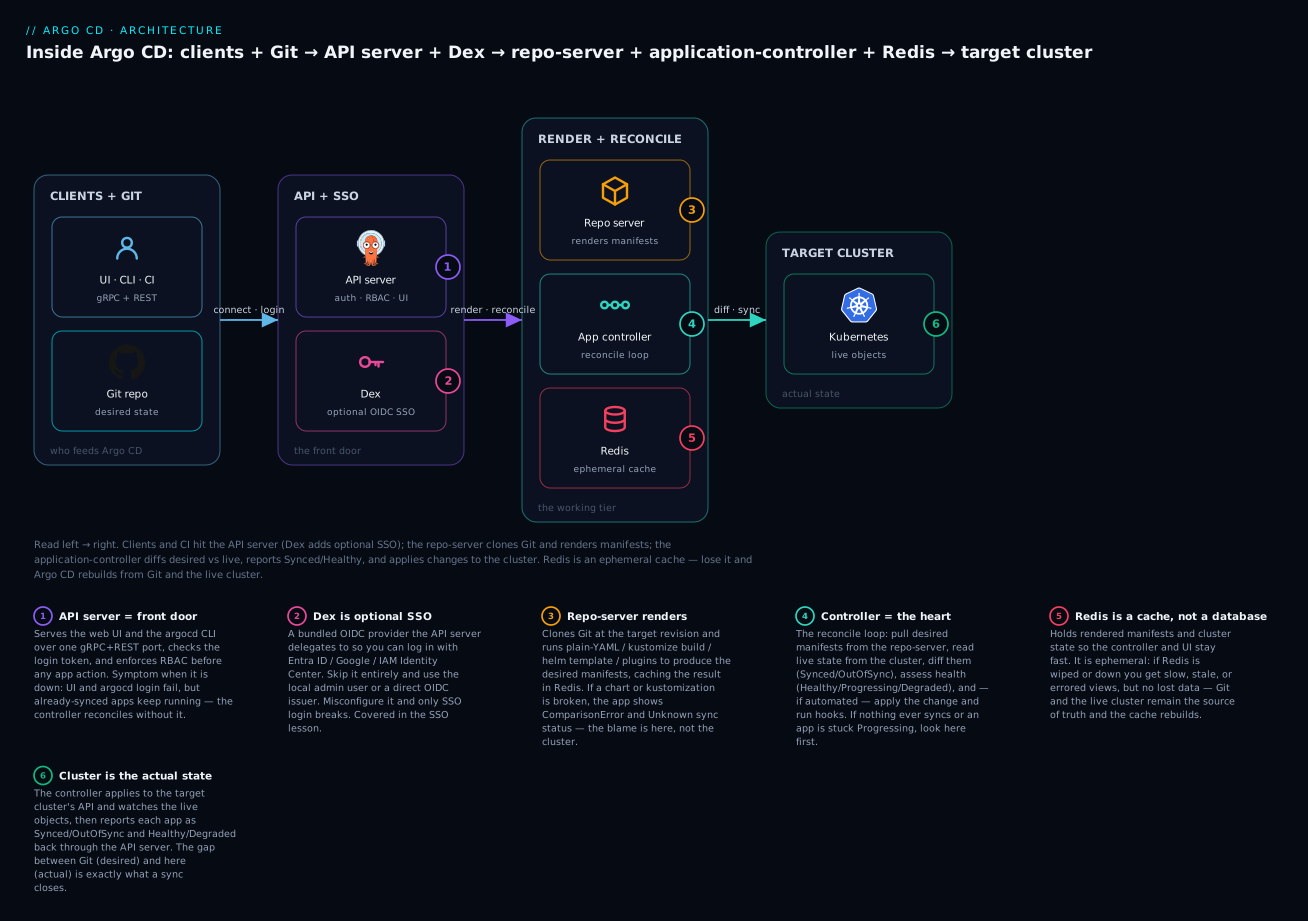
The path, step by step:
- CLI → API server. The
argocdCLI opens a gRPC call toargocd-server. The server validates your token (local, API-key, or SSO via Dex) and checks RBAC: may yousyncthis app? If login fails, you never leave this box — the error isUnauthenticated, and the culprit is the API server or Dex, never the controller. - API server records intent. The server writes a sync operation onto the
Applicationresource. It does not deploy anything itself — it just records that a sync was requested. (This is why declarative and imperative management converge: the CLI and a Git edit both end up mutating the same CRD.) - Controller wakes. The application-controller, watching its
ApplicationCRDs, sees the requested operation and begins a reconcile. - Controller → repo-server. It asks the repo-server for the desired manifests. The repo-server clones the repo at
targetRevision, runskustomize build/helm template/plain YAML, and returns rendered manifests — caching them in Redis. A broken chart or kustomization surfaces here asComparisonError. - Controller diffs and applies. It compares desired against the live cluster state (kept warm in its Redis-backed cache), computes the diff, then applies the changes to the target cluster in sync-wave order, running any hooks.
- Cluster → status → you. The controller watches the applied objects, assesses health, writes
Synced/Healthyback to theApplicationstatus, and the API server serves that back to your CLI and the UI.
Notice what depends on what. The API server is only needed at the ends (to accept your request and to show you the result); the actual reconcile — steps 3 through 6 — runs whether or not any human is watching. That is the control-loop nature made concrete: kill the UI and your apps still self-heal; kill the controller and everything freezes.
Namespaces, CRDs, and the pods you’ll see
One namespace, by convention
By default the whole control plane lives in the argocd namespace. Nothing forces that name — you can install elsewhere — but argocd is the universal convention, and every command in this course uses -n argocd. The workloads there are the seven above plus their Services, ConfigMaps (argocd-cm, argocd-cmd-params-cm, argocd-rbac-cm), and Secrets (argocd-secret, plus repo/cluster Secrets).
Where your apps run is a separate question. Argo CD can deploy into the same cluster it runs in, into other namespaces, or into entirely different clusters — the Application’s destination decides. The control plane and the workloads it manages are decoupled.
Three CRDs are the whole API surface
Argo CD extends Kubernetes with a small set of Custom Resource Definitions, all in the argoproj.io/v1alpha1 API group. These are Argo CD’s declarative interface — the UI and CLI are just ergonomic ways to edit them:
| CRD | Short name | What it declares | Managed by |
|---|---|---|---|
Application |
app / apps |
One deployable unit: a source (repo/path/revision) → a destination (cluster/namespace), plus sync policy |
You / API server / ApplicationSet |
ApplicationSet |
appset |
A generator + template that produces many Applications |
You; the ApplicationSet controller acts on it |
AppProject |
appproj |
A guardrail: which repos, clusters, namespaces and resource kinds a group of apps may use | Platform team |
A minimal Application is worth seeing now, because it is the object every other lesson manipulates and the thing the controller reconciles:
apiVersion: argoproj.io/v1alpha1
kind: Application
metadata:
  name: guestbook
  namespace: argocd                     # the Application lives in the control-plane namespace
spec:
  project: default
  source:
    repoURL: https://github.com/argoproj/argocd-example-apps.git
    targetRevision: HEAD
    path: guestbook                     # the repo-server renders whatever is here
  destination:
    server: https://kubernetes.default.svc   # deploy into THIS cluster
    namespace: guestbook
  syncPolicy:
    automated:                          # let the controller sync without a human click
      prune: true
      selfHeal: true
You do not need to understand every field yet — the first-Application lesson is entirely about this manifest. What matters architecturally is the mapping: source is the repo-server’s input, destination is the controller’s target, syncPolicy tells the controller whether to act automatically, and the whole object is what the API server writes and the controller reads.
The pods you’ll actually see
On a fresh non-HA install, kubectl -n argocd get pods shows the cast in the flesh (representative output — names have random suffixes, and an HA install adds Redis-HA and multiple server/repo replicas):
kubectl -n argocd get pods
# NAME                                                READY   STATUS    RESTARTS   AGE
# argocd-application-controller-0                     1/1     Running   0          6m
# argocd-applicationset-controller-6d8f4b5c9d-abcde   1/1     Running   0          6m
# argocd-dex-server-7b9c8f6d5b-fghij                  1/1     Running   0          6m
# argocd-notifications-controller-5c7d9f8b6c-klmno    1/1     Running   0          6m
# argocd-redis-6fd9c8b7f5-pqrst                       1/1     Running   0          6m
# argocd-repo-server-84b7d9c6f8-uvwxy                 1/1     Running   0          6m
# argocd-server-6c9f7d8b5c-z1234                      1/1     Running   0          6m
The -0 on the controller (versus the ReplicaSet-hash suffixes on the others) is the StatefulSet tell from earlier. And the matching Services expose the internal ports the components use to talk to each other:
kubectl -n argocd get svc
# NAME                               TYPE        PORT(S)                     (what it is)
# argocd-server                      ClusterIP   80/TCP,443/TCP              UI + API (→ 8080)
# argocd-repo-server                 ClusterIP   8081/TCP,8084/TCP           render gRPC + metrics
# argocd-redis                       ClusterIP   6379/TCP                    the cache
# argocd-dex-server                  ClusterIP   5556/TCP,5557/TCP,5558/TCP  OIDC http/grpc/metrics
# argocd-applicationset-controller   ClusterIP   7000/TCP,8080/TCP           webhook + metrics
# argocd-metrics                     ClusterIP   8082/TCP                    controller metrics
# argocd-server-metrics              ClusterIP   8083/TCP                    server metrics
Two reading tips: the application-controller has no serving Service other than argocd-metrics (it is a controller, not a server — it dials out to clusters and the repo-server, nothing dials in), and argocd-server is the only one whose Service you would ever expose beyond the cluster.
The debugging map: which component owns which symptom
This is the table the whole lesson exists to give you. When Argo CD misbehaves, do not guess — read the symptom, find the component, open that pod’s logs. Memorise the shape of it and you have turned every future incident into a lookup.
| Symptom you observe | Component to blame | Why | First thing to check |
|---|---|---|---|
UI won’t load; argocd login fails |
API server (or its LB/ingress) | It serves UI+API and does auth | kubectl -n argocd logs deploy/argocd-server; the load balancer in front |
rpc error: code = Unauthenticated |
API server / Dex | Token/SSO validation failed | Token expiry; argocd-dex-server logs if using SSO |
ComparisonError; app can’t render |
Repo server | Rendering is exclusively its job | kubectl -n argocd logs deploy/argocd-repo-server for the helm/kustomize error |
helm template/kustomize build error |
Repo server | It runs those tools | repo-server logs; try the same command locally on the path |
App stuck OutOfSync / never syncs |
Application controller | It runs the reconcile + apply | kubectl -n argocd logs statefulset/argocd-application-controller |
App stuck Progressing forever |
Application controller (+ the workload) | It runs the health assessment | controller logs; then the app’s own pods/events |
Status never updates; everything Unknown |
Application controller (down/wedged) | No reconcile means no status | Is argocd-application-controller-0 Running? |
| Sync latency; commits take minutes | Reconcile trigger (poll vs webhook) | Default 3-min timeout.reconciliation |
Add a Git webhook; check webhook delivery |
| UI slow, panels stale or errored | Redis | Shared cache is down/cold | kubectl -n argocd logs deploy/argocd-redis; is the pod up? |
| SSO login broken; local login works | Dex (misconfig) | Only the SSO path uses Dex | argocd-dex-server logs; dex.config in argocd-cm |
| Controller OOMing with many apps/clusters | Application controller (needs sharding) | One shard can’t hold all cluster caches | Controller memory; shard across replicas (Tier-4) |
| New generated apps don’t appear | ApplicationSet controller | It generates Applications |
kubectl -n argocd logs deploy/argocd-applicationset-controller |
Application/AppProject kind not found |
CRDs missing (incomplete install) | The API types were never installed | kubectl get crd | grep argoproj.io |
The pattern to internalise: rendering problems are the repo-server, sync/status problems are the controller, login/UI problems are the API server, “slow/stale” is Redis, and “SSO only” is Dex. Five rules cover the vast majority of real incidents.
Hands-on lab
This lab is pure exploration — you will not change anything, just see the architecture running and practise the mapping. It assumes you already have Argo CD installed (the install lesson in this tier covers that on AKS, EKS, GKE, or a free local cluster); if you don’t yet, do that first — a kind or minikube cluster is perfect and none of this bills. Everything below is read-only kubectl/argocd.
Step 1 — Meet the whole cast.
kubectl -n argocd get pods,svc
# You should see the 7 workloads and their Services from the section above.
What just happened: you are looking at the entire Argo CD control plane. Find each of the five core components by name. Confirm the controller ends in -0 (StatefulSet) while the rest carry ReplicaSet hashes (Deployments).
Step 2 — Confirm the CRDs are installed.
kubectl get crd | grep argoproj.io
# applications.argoproj.io
# applicationsets.argoproj.io
# appprojects.argoproj.io
What just happened: these three CRDs are Argo CD’s entire declarative API. If this command comes back empty, your install is incomplete — that is the “kind not found” row in the debug map, seen from the other side.
Step 3 — Watch the application-controller think.
kubectl -n argocd logs statefulset/argocd-application-controller --tail=40 -f
# time="..." level=info msg="Refreshing app status (controller refresh requested)" application=argocd/guestbook
# time="..." level=info msg="Comparing app state (cluster: https://kubernetes.default.svc, namespace: guestbook)" application=argocd/guestbook
# time="..." level=info msg="Reconciliation completed" application=argocd/guestbook time_ms=137
What just happened (representative logs): you are watching the reconcile loop from the last section, live. Each Comparing app state line is step 4 (the diff); Reconciliation completed closes one pass. Leave this streaming and move to Step 4.
Step 4 — Trigger a reconcile and watch it land. In a second terminal:
argocd app get guestbook --refresh # force a soft refresh now, don't wait for the 3-min poll
What just happened: the --refresh flag made the controller reconcile immediately instead of at the next timeout.reconciliation tick. Flip back to your Step 3 terminal — you should see a fresh Refreshing app status → Comparing app state → Reconciliation completed burst appear the moment you ran it. You just caused a trip around the loop and observed it in the logs. That connection — command in one terminal, loop reaction in the other — is the whole mental model made tangible.
Step 5 — Watch the repo-server render.
kubectl -n argocd logs deploy/argocd-repo-server --tail=30
# time="..." level=info msg="manifest cache miss" ...
# time="..." level=info msg="Generating manifests with no cache" ...
What just happened (representative): a cache miss followed by Generating manifests is the repo-server doing its one job — running your kustomize/helm/plain-YAML render. A cache hit on a repeat means Redis served the previous render. This is exactly where ComparisonError would show up if a chart were broken.
Step 6 — Prove the API server is separable (optional, conceptual).
# Read-only observation: note the controller reconciles on its own timer.
kubectl -n argocd logs statefulset/argocd-application-controller --tail=5
# Even with nobody logged into the UI, reconciles keep happening.
What just happened: you confirmed the claim from earlier — the reconcile loop runs without any client attached. The API server is the door you use, not the engine that does the work.
Step 7 — Map a symptom yourself. Without scrolling up, answer: an app shows ComparisonError. Which pod’s logs do you open? (Answer: argocd-repo-server — rendering is its job.) Now: argocd login returns Unauthenticated. Which pod? (argocd-server, and argocd-dex-server if you use SSO.) If both came instantly, you have the map.
Teardown: nothing to tear down — this lab created no resources. If you spun up a local cluster only for this, delete it when done (kind delete cluster / minikube delete) so it isn’t left running.
Common mistakes and troubleshooting
The debugging map above is your symptom→component index. This section adds the causes and fixes for the mistakes beginners actually make, plus prose on the three nastiest.
| Symptom | Cause | Fix |
|---|---|---|
ComparisonError with a helm/kustomize message |
The repo-server can’t render — bad chart, missing value, wrong path |
Read argocd-repo-server logs; run the same helm template/kustomize build locally on that path |
| App shows an old commit after you pushed | repo-server served a cached render | argocd app get <app> --hard-refresh to bypass the manifest cache |
| Commit takes ~3 minutes to deploy | Default timeout.reconciliation: 180s poll; no webhook |
Add a Git webhook to /api/webhook; don’t just shrink the poll |
argocd login → rpc error: code = Unauthenticated |
Expired token, or SSO/Dex misconfigured | Re-login; if SSO, check argocd-dex-server logs and dex.config |
| CLI hangs / TLS or gRPC handshake error behind an LB | L7 load balancer not gRPC-aware | Use argocd login --grpc-web, or an ALB/ingress configured for gRPC |
Everything shows Unknown, status frozen |
application-controller is down or wedged | Check argocd-application-controller-0 is Running; read its logs |
| UI slow, panels intermittently error | Redis down or cold | Check argocd-redis; on prod run argocd-redis-ha for cache availability |
error: failed to get repo / clone fails |
repo-server lacks credentials or network to Git | Check the repo Secret and repo-server egress; test the URL from the pod |
SSO login fails but admin login works |
Dex misconfiguration only | Fix dex.config; local/API-token auth is unaffected |
no matches for kind "Application" |
CRDs not installed (incomplete install) | Re-apply the install manifests; kubectl get crd | grep argoproj |
Controller pod OOMKilled as fleet grows |
One controller shard holding too many cluster caches | Increase memory now; shard the controller across replicas (Tier-4) |
Three gotchas cost the most hours, so spell them out:
1. Blaming the cluster for a render error. ComparisonError feels like a deployment failure, so people go poke at their pods and Deployments. But ComparisonError fires in step 4 of the reconcile — the controller could not even get the desired manifests, because the repo-server failed to render them. Nothing was ever applied to the cluster. The fix is always in the repo-server’s world: a bad Helm value, a kustomization.yaml that doesn’t build, a path pointing at the wrong directory. Reproduce it by running helm template or kustomize build on that path yourself; the error will be identical, and you never touched the cluster.
2. Fighting the 3-minute poll the wrong way. When “GitOps feels slow,” the instinct is to shrink timeout.reconciliation. That is a trap: a low poll multiplies load on the repo-server and hammers your Git host (GitHub/GitLab will rate-limit you), and it still isn’t instant. The correct fix is a webhook, which makes a push near-instant while the 3-minute poll remains a cheap safety net for the rare missed webhook. Latency is a trigger problem, not a poll-interval problem.
3. Treating Redis like it holds your data. Because “database-shaped things” usually hold state, people panic when Redis restarts and assume apps are lost. They are not. Redis is only a cache; desired state is in Git and live state is in the cluster. A Redis blip degrades performance and can throw transient UI errors, and then everything recovers on its own when the cache warms back up. Run argocd-redis-ha in production not to protect data but to keep the cache continuously available so you never even notice the blip.
Cheat-sheet
The commands and mappings you will reach for constantly.
| Command | What it does |
|---|---|
kubectl -n argocd get pods |
See all Argo CD components and their status |
kubectl -n argocd get svc |
See the internal ports each component exposes |
kubectl -n argocd logs statefulset/argocd-application-controller |
The reconcile loop’s logs (sync/diff/health) |
kubectl -n argocd logs deploy/argocd-repo-server |
Manifest rendering logs (ComparisonError origin) |
kubectl -n argocd logs deploy/argocd-server |
API/UI/auth logs (login problems) |
kubectl -n argocd logs deploy/argocd-dex-server |
SSO federation logs |
kubectl -n argocd logs deploy/argocd-redis |
Cache health |
kubectl get crd | grep argoproj.io |
Confirm the 3 CRDs are installed |
argocd app get <app> --refresh |
Force an immediate soft reconcile |
argocd app get <app> --hard-refresh |
Reconcile and bust the manifest cache |
kubectl -n argocd get cm argocd-cm -o yaml |
Read core config (incl. timeout.reconciliation) |
kubectl -n argocd get application <app> -o yaml |
The raw CRD the controller reconciles |
Component → job → failure signature, in one glance:
| Component | Its one job | Failure signature |
|---|---|---|
| API server | UI/CLI, auth, RBAC, app CRUD | Login/UI fails; Unauthenticated |
| Repo server | Clone Git + render manifests | ComparisonError; helm/kustomize errors |
| Application controller | The reconcile loop (diff, sync, health) | Stuck OutOfSync/Progressing; frozen status |
| Redis | Ephemeral cache | Slow/stale UI; cache errors (no data loss) |
| Dex | Optional OIDC SSO | SSO login broken; local login fine |
| ApplicationSet controller | Generate many Applications |
Generated apps don’t appear |
| Notifications controller | Alert on state changes | No notifications fire |
Ports worth knowing: server 443/80→8080, repo-server 8081, Redis 6379, Dex 5556, controller metrics 8082.
Interview and exam questions
Q: Name the five core components of Argo CD and give each a one-line job. A: API server — serves the UI/CLI and handles auth, RBAC, and app management. Repository server — clones Git and renders manifests (kustomize/helm/plain/plugins). Application controller — runs the reconcile loop: diff desired vs live, assess health, sync. Redis — an ephemeral cache of rendered manifests and cluster state. Dex — an optional bundled OIDC provider for SSO federation.
Q: Which component renders your Helm chart, and does Argo CD run helm install?
A: The repo-server, and no — it runs helm template to render the chart to plain manifests locally, then hands them to the controller to apply. There is no Tiller and no Helm release stored in the cluster; the Application is the release. That’s why helm list shows nothing.
Q: An app shows ComparisonError. Which component is at fault and why?
A: The repo-server. ComparisonError means the controller couldn’t obtain the desired manifests because rendering failed — a broken chart/kustomization, a missing value, or a wrong path. Nothing was applied to the cluster; the fix is in the repo-server’s render, reproducible with helm template/kustomize build on that path.
Q: What is the reconcile loop, and what two independent answers does it produce?
A: It’s the application-controller’s continuous cycle: get desired state (repo-server), get live state (cluster), diff, assess health, and — if automated — apply. It produces sync status (Synced/OutOfSync: does live match Git?) and health status (Healthy/Progressing/Degraded: is the app actually working?). They’re orthogonal — an app can be Synced but Degraded, or OutOfSync but Healthy.
Q: What is timeout.reconciliation, its default, and the right way to make syncs faster?
A: It’s the interval in argocd-cm at which the controller re-checks every app even with no event; default 180s (3 minutes). The right fix for slow syncs is a Git webhook to /api/webhook (near-instant on push), keeping the poll as a safety net — not shrinking the poll, which just loads the repo-server and rate-limits your Git host.
Q: If Redis goes down, do you lose data? What breaks?
A: No data loss — Redis is only a cache; desired state lives in Git, live state in the cluster. What breaks is performance: slow reconciles, stale or errored UI panels, cache-connection errors in the logs. When Redis returns, Argo CD rebuilds the cache and recovers. Prod runs argocd-redis-ha for cache availability, not data safety.
Q: You delete the argocd-server pod. Do your applications stop syncing?
A: No. The application-controller reconciles independently of the API server. You lose the UI, the CLI, and SSO/webhook reception, but existing apps keep diffing and self-healing. Kill the controller, though, and all reconciliation freezes — that’s the component whose outage actually stops deployments.
Q: Why is the application-controller a StatefulSet while the others are Deployments, and what does that imply for scale?
A: It holds per-cluster state (watched-resource caches) and is scaled by sharding — each ordinal replica (-0, -1, …) owns a subset of clusters — rather than by interchangeable replicas. That’s why its pod is ...-controller-0 and why “scale the controller” means configure sharding, not just bump replicas.
Q: What are Argo CD’s three CRDs and what does each declare?
A: Application (one deployable unit: source → destination + sync policy), ApplicationSet (a generator + template that produces many Applications), and AppProject (a guardrail restricting which repos, clusters, namespaces, and kinds a group of apps may use). All are in argoproj.io/v1alpha1.
Q: Is Dex required? What breaks if it’s misconfigured?
A: No — you can run with just the local admin user, or use a direct OIDC issuer without Dex. Dex is the bundled OIDC broker for SSO federation (Entra ID, Google, IAM Identity Center, GitHub org, LDAP…). Misconfigure it and only SSO login breaks; local and API-token auth, and all running apps, are unaffected.
Q (scenario): The UI is down but kubectl get applications -n argocd shows everything Synced/Healthy. What’s going on and is it urgent?
A: The API server (or its load balancer/ingress) is down, but the controller is fine — apps are still reconciling, which is why the CRDs report healthy. It’s a visibility/access outage, not a delivery outage: fix argocd-server or the LB in front of it, but deployments are not at risk in the meantime.
Q (scenario): A teammate lowered timeout.reconciliation to 10s and now Git pushes sometimes fail with 403. Why?
A: The tight poll makes the repo-server re-fetch/re-render far more often, hammering the Git host until it rate-limits (403 secondary rate limit on GitHub). Restore the default 180s and add a webhook for latency instead — you get near-instant syncs without the load.
Key takeaways
- Argo CD is seven pods in one namespace, five of them core. API server (front door), repo-server (renders Git → manifests), application-controller (the reconcile loop), Redis (cache), Dex (optional SSO) — plus the ApplicationSet and Notifications controllers.
- It’s a control loop, not a pipeline. The controller runs forever, continuously diffing desired (Git, via the repo-server) against live (the cluster) and closing the gap. Sync status and health status are two separate answers it computes each pass.
- The repo-server owns rendering. Anything about
helm template,kustomize build, orComparisonErroris this component — never the cluster. Helm is templated, not installed; there’s no Tiller and no release object. - Redis is a cache, never a database. Losing it costs performance, not data — Git and the cluster remain the source of truth.
argocd-redis-hakeeps the cache available, not “safe.” - The debugging map is the payoff: rendering → repo-server, sync/status → controller, login/UI → API server, slow/stale → Redis, SSO-only → Dex. Read the symptom, open that pod’s logs.
- Latency is a trigger problem. The default 3-minute
timeout.reconciliationpoll is meant to be backstopped by a webhook, not shrunk. A tight poll just rate-limits your Git host. - The API server is separable; the controller is not. Kill the UI and apps still reconcile; kill the controller and delivery stops. That asymmetry tells you where the real engine is.