Before Argo CD can sync a single application, it has to exist — as a set of pods in a namespace on a real Kubernetes cluster. That sounds trivial, and on a laptop cluster it nearly is: one kubectl apply and you have it. But the moment you install it somewhere real, three questions land on you at once, and getting any of them wrong costs you an afternoon (or a surprise cloud bill):
- How do you install it — the plain manifests, the HA manifests, or the Helm chart? They are not interchangeable, and the choice affects how you upgrade for the next three years.
- How much do you install — the single-replica default, or the high-availability topology with a Redis cluster and multiple controllers? Install HA on a one-node cluster and half the pods sit
Pendingforever. - How do you reach it — because a freshly installed
argocd-serveris aClusterIPyou cannot open in a browser, and the way you expose it is completely different on Azure, AWS and Google. This is the part every “just runkubectl apply” tutorial skips, and it is where this lesson spends most of its time.
By the end you will have installed Argo CD (for real, with exact commands and the output you should see), logged in, rotated the bootstrap password, and exposed the UI on AKS via Application Gateway, EKS via an ALB, and GKE via a Google Cloud Load Balancer — and torn it all down cleanly so nothing keeps billing.
Why this matters
Argo CD is a pull-based GitOps controller: it runs inside your cluster, watches a Git repository, and continuously reconciles the cluster toward what Git says. That “runs inside your cluster” is the whole reason installation is its own topic. Unlike a CI system that lives on a SaaS somewhere and pushes to you, Argo CD is a workload you operate — pods, a Redis cache, CRDs, RBAC, a web server that needs exposing. Installing it well is the difference between a control plane your team trusts and a flaky box someone reinstalls every quarter.
It helps to be honest up front about what Argo CD is not. It is not a CI system, and keeping that boundary clear stops you from trying to make the installer do things it was never meant to do — CI ends where Argo CD begins.
| Argo CD does | Argo CD does not |
|---|---|
| Watch Git and reconcile the cluster toward it (pull model) | Build images, run tests, or push to a registry (that’s CI) |
| Render Helm/Kustomize into plain YAML and apply it | Author your manifests or decide what to deploy |
| Show live drift between Git and the cluster, and heal it | Store desired state itself — Git is the source of truth |
| Run inside your cluster as pods you operate | Live as an external SaaS that pushes into your cluster |
The mental model to hold for this entire lesson: the Argo CD control plane is identical on every cloud — the same pods, the same CRDs, the same argocd namespace. Only the edges differ. How you get a kubeconfig, and how you expose argocd-server to real users, are cloud-specific; everything between is portable. That is why the lab installs one identical stack and then forks into three cloud-specific “how do I reach it” paths. GitOps is never “different on AWS” — the reconcile loop is the same everywhere; only the load balancer in front of it changes.
If you want the deeper tour of what each pod does, the companion lesson Argo CD Architecture: the repo-server, application-controller and API server takes the components apart one by one. Here we install them and get logged in.
What actually gets installed
Whichever method you pick, the result is the same short list of workloads in the argocd namespace. Knowing them by name makes every later step — reading kubectl get pods, debugging a stuck install, deciding what HA scales — obvious instead of mysterious.
| Component | What it does | Workload kind (default) | Talks to |
|---|---|---|---|
argocd-server |
The API + web UI + gRPC endpoint the CLI hits. Stateless. | Deployment | Everything; this is your front door |
argocd-repo-server |
Clones Git repos and renders manifests (Helm/Kustomize) into plain YAML | Deployment | Git repos, the controller |
argocd-application-controller |
The reconcile engine: diffs desired (Git) vs live (cluster) and syncs | StatefulSet | Target clusters’ API servers |
argocd-applicationset-controller |
Generates Applications from generators (git, cluster, matrix…) |
Deployment | Git, the API server |
argocd-notifications-controller |
Sends sync/health notifications (Slack, webhooks) | Deployment | External notification services |
argocd-dex-server |
Optional SSO federation (OIDC/SAML/LDAP) — off until you configure it | Deployment | Your IdP (Entra ID, etc.) |
argocd-redis |
Cache for the controller/server (manifests, cluster state) | Deployment | server + controller |
The two you touch most are argocd-server (the thing you log into) and argocd-application-controller (the thing that does the syncing). argocd-repo-server is the quiet workhorse that turns a Helm chart or Kustomize overlay into flat YAML — when a sync says ComparisonError, this pod’s logs are usually where the answer is. Notice that only the application-controller is a StatefulSet; that detail matters later when we talk about sharding it across many clusters.
Two facts to file away now. First, the installer also creates a handful of CustomResourceDefinitions — applications.argoproj.io, applicationsets.argoproj.io, and appprojects.argoproj.io — under the API group argoproj.io/v1alpha1. Those CRDs are the vocabulary of everything you do in Argo CD. Second, it creates a few ConfigMaps and Secrets you will edit constantly: argocd-cm (main config), argocd-rbac-cm (RBAC), argocd-cmd-params-cm (component command-line flags, including the crucial server.insecure), and argocd-secret (where the hashed admin password lives).
The three install methods, compared
There are three official ways to get Argo CD onto a cluster, and each is a genuinely different answer to “who owns the upgrades.” Choosing is not a matter of taste — it depends on whether you want to hand-edit YAML, run raw manifests, or drive everything from Helm values that Argo CD itself can later manage.
| Method | Command shape | You control it by | Upgrades | Self-manage via GitOps? | Reach for it when |
|---|---|---|---|---|---|
| Plain manifests | kubectl apply -f .../install.yaml |
Editing ConfigMaps after the fact | Re-apply a newer install.yaml |
Awkward (raw YAML, no values layer) | Learning, dev clusters, fastest possible start |
| HA manifests | kubectl apply -f .../ha/install.yaml |
Same, but the HA topology | Re-apply a newer ha/install.yaml |
Awkward, same as above | Production without Helm in your stack |
| Helm chart | helm install argocd argo/argo-cd -f values.yaml |
A single values.yaml |
helm upgrade (or Argo CD syncs it) |
Yes — cleanest path | Production; anywhere you already use Helm |
The plain manifests live at a stable, versioned URL and are the shortest path to a running Argo CD:
# Non-HA, cluster-wide install (the classic quickstart)
kubectl create namespace argocd
kubectl apply -n argocd \
  -f https://raw.githubusercontent.com/argoproj/argo-cd/stable/manifests/install.yaml
The stable in that URL is a Git ref that always points at the latest stable release. Pin it in production — replace stable with a release tag so you know exactly what you deployed and upgrades are deliberate:
# Pinned to an exact version — reproducible, auditable
kubectl apply -n argocd \
  -f https://raw.githubusercontent.com/argoproj/argo-cd/v2.13.3/manifests/install.yaml
There are more manifest flavours than most people realise, and the right one saves you RBAC headaches:
| Manifest path | What you get | Use when |
|---|---|---|
manifests/install.yaml |
Full install, cluster-scoped RBAC (ClusterRoles) | Argo CD manages apps across many namespaces/clusters |
manifests/namespace-install.yaml |
Full install, namespace-scoped RBAC (Roles only) | Argo CD may only manage its own namespace; least privilege |
manifests/ha/install.yaml |
HA topology, cluster-scoped | Production |
manifests/ha/namespace-install.yaml |
HA topology, namespace-scoped | Production + least privilege |
manifests/core-install.yaml |
Argo CD Core — no API server, UI, SSO or RBAC | A pure headless GitOps engine driven only by the CLI/kubectl |
The Helm chart is the same components expressed as templated values, and it is the method that pays off long-term because a values.yaml is far easier to review, diff, and — critically — hand to Argo CD to manage itself (more on that at the end):
# Add the Argo project's Helm repo and install the chart
helm repo add argo https://argoproj.github.io/argo-helm
helm repo update
helm install argocd argo/argo-cd \
  --namespace argocd --create-namespace \
  --version 7.7.7 \
  -f values.yaml     # your overrides live here
Pin the chart version (
--version) exactly as you pin the manifest tag. The chart version and the Argo CD app version it installs are different numbers — the chart’sappVersiontells you which Argo CD you actually get. Check withhelm show chart argo/argo-cd | grep -E 'version|appVersion'before you install.
A minimal-but-real values.yaml for a production-ish Helm install looks like this — note that turning on HA is a single flag:
# values.yaml — a realistic starting point
global:
  domain: argocd.example.com        # used to build callback URLs, etc.

configs:
  params:
    server.insecure: true           # terminate TLS at the ingress, not in argocd-server

redis-ha:
  enabled: true                     # <-- this one flag switches on the HA Redis topology

controller:
  replicas: 1                       # raise + shard only when you manage many clusters
repoServer:
  replicas: 2
server:
  replicas: 2
applicationSet:
  replicas: 2
Non-HA vs HA: what changes, and when you actually need it
The default install is non-HA: one replica of everything and a single Redis pod. It is perfectly fine for learning, dev, and even small production if you can tolerate a minute of control-plane downtime during a node reboot. Crucially, non-HA Argo CD going down does not take your apps down — your workloads keep running; you just temporarily can’t sync new changes or see live status. That is a much gentler failure mode than most people fear, and it is why non-HA is a reasonable default far longer than you’d expect.
HA hardens the control plane against losing a node. Here is precisely what the HA manifests (or redis-ha.enabled: true in Helm) change:
| Component | Non-HA | HA | Why |
|---|---|---|---|
| Redis | 1 × argocd-redis (Deployment) |
3 × argocd-redis-ha (StatefulSet) + 3 × haproxy |
A single Redis is a cache SPOF; the controller stalls if it dies |
argocd-server |
1 replica | 2 replicas | Survive a node loss; spread UI/API load |
argocd-repo-server |
1 replica | 2 replicas | Manifest rendering is CPU-heavy; parallelism + redundancy |
argocd-application-controller |
1 (StatefulSet) | 1 by default, shardable to N | Shard clusters across replicas at scale |
| ApplicationSet / notifications / dex | 1 each | 1 each (leader-elected) | Redundant replicas optional; leader election prevents double-runs |
The Redis HA piece is the part that trips people up, so understand it before you deploy it. Three redis-ha pods form a Redis cluster with Sentinel for failover, and three HAProxy pods present a single stable endpoint that always routes to the current master. For the cluster to hold quorum, the three Redis pods must land on three different nodes — the manifests enforce this with requiredDuringScheduling pod anti-affinity. On a single-node cluster (or a two-node one), the third pod can never be scheduled and sits Pending forever. That is not a bug; it is HA doing its job. If you only have one node, install non-HA.
So when do you actually reach for HA? Match the signal, don’t cargo-cult it:
| Signal | Non-HA is fine | Go HA |
|---|---|---|
| Cluster size | 1–2 nodes | ≥3 nodes across zones |
| Environment | dev, staging, personal | production you’re paged for |
| Blast radius | one team, a few apps | many teams, many apps/clusters |
| Tolerance for a brief control-plane outage | yes | no |
| Number of managed clusters | a handful | dozens (then also shard the controller) |
Sharding the application-controller is the one HA knob unique to scale: when a single controller can’t keep up with dozens of target clusters, you run several controller replicas and split the clusters between them. You raise the StatefulSet replica count and set the matching env var so each replica knows the total:
# argocd-application-controller StatefulSet
spec:
  replicas: 3
  template:
    spec:
      containers:
        - name: argocd-application-controller
          env:
            - name: ARGOCD_CONTROLLER_REPLICAS
              value: "3"                    # must match spec.replicas
            - name: ARGOCD_CONTROLLER_SHARDING_ALGORITHM
              value: "round-robin"          # spread clusters evenly across shards
A rough, representative footprint so you can size a node pool (exact requests vary by version and your values.yaml):
| Install | Pods (typical) | Fits on | Notes |
|---|---|---|---|
| Non-HA | ~7 | a single 2 vCPU / 4 GiB node | great for kind/minikube and dev |
| HA | ~13–14 | ≥3 nodes, ~2 vCPU / 8 GiB each | Redis anti-affinity forces 3 nodes minimum |
First login: password, CLI, and locking it down
You have pods running — now you need in. Argo CD generates a random admin password at install time and stashes it in a throwaway Secret named argocd-initial-admin-secret. The first-login sequence is always the same five moves:
| Step | Command | What it does |
|---|---|---|
| 1. Get the initial password | kubectl -n argocd get secret argocd-initial-admin-secret -o jsonpath='{.data.password}' | base64 -d |
Prints the autogenerated admin password |
| 1. (alternative) | argocd admin initial-password -n argocd |
Same value, plus a reminder to delete the secret |
| 2. Port-forward the server | kubectl port-forward svc/argocd-server -n argocd 8080:443 |
Opens localhost:8080 → the UI/API, no LB needed |
| 3. Log in with the CLI | argocd login localhost:8080 --username admin --password <pw> --insecure |
Authenticates the CLI; --insecure skips the self-signed cert |
| 4. Rotate the password | argocd account update-password |
Prompts for current + new password |
| 5. Delete the bootstrap secret | kubectl -n argocd delete secret argocd-initial-admin-secret |
⚠️ Removes the plaintext credential from the cluster |
Fetching the password is a one-liner, but read the pieces: the value in the Secret is base64-encoded (as all Secret data is), so you pipe it through base64 -d to get the real string.
# Grab the initial admin password (base64-decoded)
kubectl -n argocd get secret argocd-initial-admin-secret \
  -o jsonpath='{.data.password}' | base64 -d ; echo
# Representative output:
# 8xKq-2mNvPtL0rZ9
⚠️ The admin’s real, hashed password lives in
argocd-secretunderadmin.password(bcrypt). Theargocd-initial-admin-secretis a convenience copy in plaintext meant only for the first login. Leaving it in the cluster is a standing credential-leak risk, which is exactly why Step 5 deletes it. After you’ve rotated the password, that secret has no further purpose.
Installing the CLI
The argocd CLI talks to argocd-server over gRPC and is how you’ll do almost everything scriptable. Install the version that matches (or is close to) your server:
| OS | Install command |
|---|---|
| macOS / Linux (Homebrew) | brew install argocd |
| Linux (direct binary) | curl -sSL -o argocd https://github.com/argoproj/argo-cd/releases/latest/download/argocd-linux-amd64 && sudo install -m 555 argocd /usr/local/bin/argocd && rm argocd |
| Linux (ARM64) | same URL but ...argocd-linux-arm64 |
| Windows (PowerShell) | Invoke-WebRequest -Uri https://github.com/argoproj/argo-cd/releases/latest/download/argocd-windows-amd64.exe -OutFile argocd.exe then put it on your PATH |
# Confirm the CLI is installed and see client/server versions
argocd version --client
# argocd: v2.13.3+abc1234
#   BuildDate: ...
Once logged in, prove it end-to-end:
argocd account get-user-info
# Logged In: true
# Username: admin
# Issuer: argocd
Exposing the API and UI: port-forward → LoadBalancer → Ingress
A fresh argocd-server Service is a ClusterIP — reachable only from inside the cluster. There are exactly three ways to open it up, and they form a ladder: use the lowest rung that meets your need, because every rung up adds cost and moving parts.
| Option | How | Who can reach it | Cost | Use for |
|---|---|---|---|---|
kubectl port-forward |
kubectl port-forward svc/argocd-server -n argocd 8080:443 |
Just you, while the command runs | Free | Dev, first login, quick debugging |
Service type=LoadBalancer |
Patch the Service to LoadBalancer |
Anyone who can route to the cloud LB IP | 💲 an L4 cloud LB, per-hour | A team, when you don’t need a hostname/cert yet |
Ingress |
An Ingress + ingress controller (per cloud) |
Anyone, via DNS + TLS | 💲 an L7 LB/App Gateway | Real, shared, production access |
# Rung 2: turn the ClusterIP into a cloud load balancer
kubectl patch svc argocd-server -n argocd \
  -p '{"spec": {"type": "LoadBalancer"}}'
# Watch for the external IP to appear (this is where a stuck <pending> shows up)
kubectl -n argocd get svc argocd-server -w
The one gotcha that catches everyone: TLS and gRPC
argocd-server serves its own TLS with a self-signed certificate by default, on port 443. That’s fine behind port-forward. But the instant you put an ingress or L7 load balancer in front — which also terminates TLS — you have TLS wrapped in TLS, and things break in confusing ways. The fix is to run the server in insecure mode (plain HTTP internally) and let the edge terminate the real TLS:
| Setting | Where | Effect |
|---|---|---|
server.insecure: "true" |
argocd-cmd-params-cm ConfigMap (or configs.params."server.insecure": true in Helm) |
argocd-server serves HTTP; the ingress owns TLS |
| Backend protocol = HTTP | Ingress annotation (per cloud) | Edge → server is plain HTTP; no double-wrap |
argocd login --grpc-web |
CLI flag | Makes the gRPC API tunnel over normal HTTP/1.1 so L7 LBs pass it |
That last row is the other classic trap. The CLI speaks gRPC (HTTP/2). Many L7 load balancers — notably AWS ALB and Google’s GCLB — don’t pass raw gRPC to the backend cleanly alongside the HTTP web UI. The universal escape hatch is --grpc-web, which makes the CLI use gRPC-Web over ordinary HTTP so it survives any L7 hop:
# Logging in through an ALB / App Gateway / GCLB? Add --grpc-web
argocd login argocd.example.com --username admin --password <pw> --grpc-web
The multi-cloud edges: reaching the UI on AKS, EKS and GKE
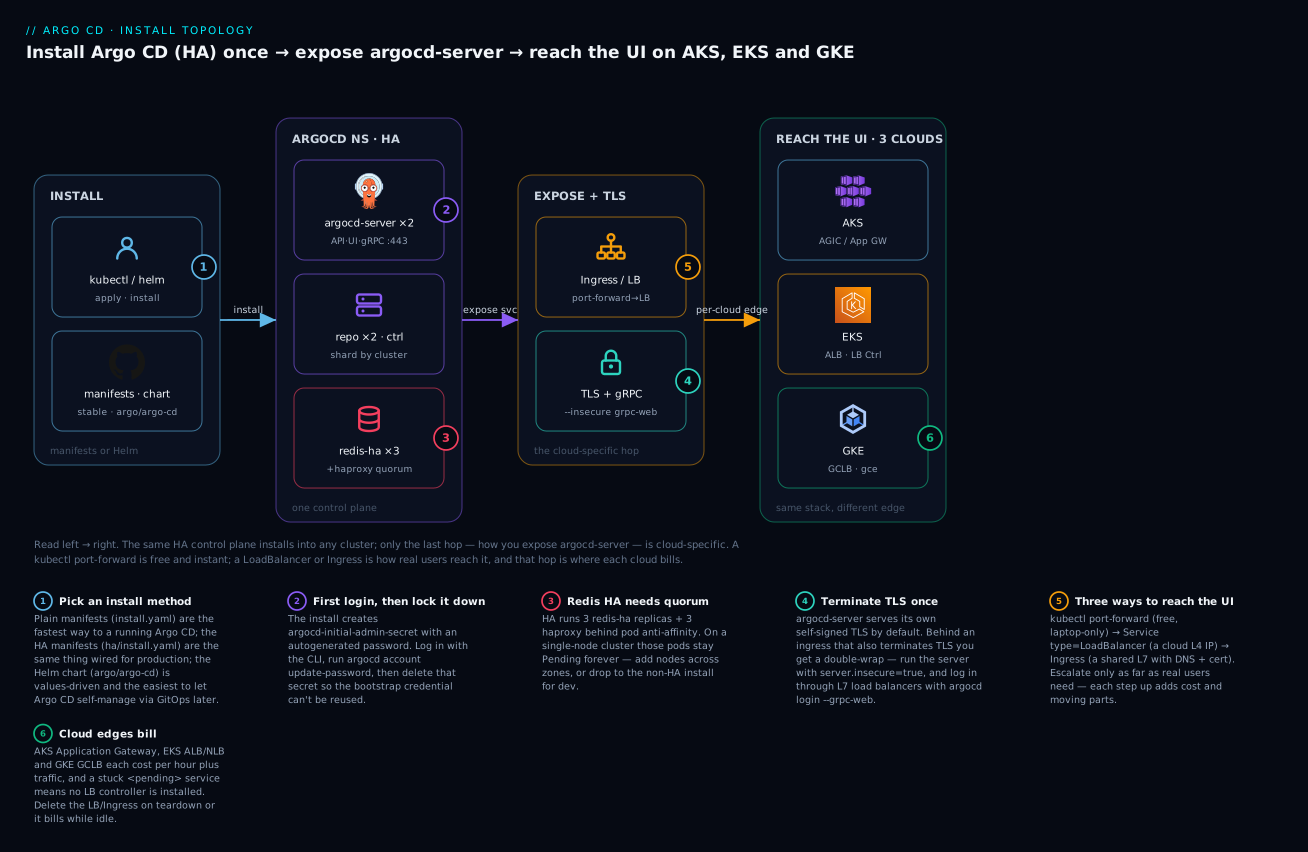
Here is the core of the lesson. The install is identical on all three clouds; only the last hop differs — how you get a kubeconfig, and how you turn argocd-server into something a browser can open. Get the diagram below into your head and the rest is detail.
The flow reads left → right: you kubectl apply or helm install the same HA control plane into the argocd namespace, then expose argocd-server through that cloud’s load balancer or ingress — Application Gateway on AKS, an ALB on EKS, a Google Cloud Load Balancer on GKE — and only then does a real user reach the UI. The badges mark the decisions that bite: the install method (1), the first-login secret you must rotate then delete (2), Redis HA’s quorum requirement (3), terminating TLS exactly once (4), the port-forward → LoadBalancer → Ingress ladder (5), and the fact that every cloud edge bills until you delete it (6).
Step zero: get a kubeconfig
You can’t install anything until kubectl points at the right cluster. Each cloud has its own credential command, and each writes a context into your kubeconfig:
| Cloud | Get credentials | Extra requirement |
|---|---|---|
| AKS | az aks get-credentials --resource-group <rg> --name <cluster> |
az CLI, logged in with az login |
| EKS | aws eks update-kubeconfig --region <region> --name <cluster> |
aws CLI v2, IAM creds with EKS access |
| GKE | gcloud container clusters get-credentials <cluster> --region <region> |
gcloud + the gke-gcloud-auth-plugin |
# AKS
az aks get-credentials --resource-group rg-gitops --name aks-prod --overwrite-existing

# EKS
aws eks update-kubeconfig --region ap-south-1 --name eks-prod

# GKE  (install the auth plugin first: gcloud components install gke-gcloud-auth-plugin)
gcloud container clusters get-credentials gke-prod --region asia-south1 --project my-proj
# Always confirm which cluster you're about to install into
kubectl config current-context
kubectl get nodes
⚠️ Running the wrong
argocd/kubectlcommand against the wrong context is the single most common “how did that get installed there?” mistake. Checkkubectl config current-contextbefore every install and every teardown.
Before any Ingress can get an address, the cloud’s controller has to be present. This is the “why is my Service <pending>?” table — install these first:
| Cloud | Prerequisite for an L7 ingress | Installed by default? | Without it you get |
|---|---|---|---|
| AKS | AGIC add-on (or managed NGINX / App Gateway for Containers) | No — enable the add-on | An Ingress with no address |
| EKS | AWS Load Balancer Controller (needs IRSA / Pod Identity) | No — you must install it | Service/Ingress stuck <pending> |
| GKE | GKE Ingress controller (gce) |
Yes — built in | Works out of the box; add BackendConfig for gRPC |
The per-cloud exposure matrix
This is the table to bookmark. It answers “what load balancer, what ingress class, what about DNS and certs, and what will trip me up” for all three clouds at once:
| AKS (Azure) | EKS (AWS) | GKE (Google) | |
|---|---|---|---|
L4 LoadBalancer Service |
Azure Standard Load Balancer + public IP | NLB (needs AWS Load Balancer Controller) | Google L4 Network LB |
| Internal LB annotation | service.beta.kubernetes.io/azure-load-balancer-internal: "true" |
service.beta.kubernetes.io/aws-load-balancer-scheme: "internal" |
networking.gke.io/load-balancer-type: "Internal" |
| L7 ingress → | Application Gateway (AGIC) or managed NGINX | ALB (AWS Load Balancer Controller) | Google Cloud LB (GKE Ingress) |
ingressClassName |
azure-application-gateway |
alb |
gce (or gce-internal) |
| TLS certificate from | Key Vault / cert-manager | ACM (certificate-arn annotation) |
Google-managed cert (ManagedCertificate CRD) |
| Static/public IP | Public IP resource | ALB-managed | global-static-ip-name annotation |
| Biggest gotcha | AGIC add-on must be enabled; App Gateway bills hourly | LB Controller not installed by default → Service stuck <pending> |
GKE Ingress needs a BackendConfig/HTTP2 for gRPC; use --grpc-web |
| Modern alternative | App Gateway for Containers | — | Gateway API: gke-l7-global-external-managed |
Now the concrete manifests. First, the simplest real exposure — a LoadBalancer Service — where the annotations are what differ per cloud:
# AKS — internal Azure Standard LB (no public exposure)
apiVersion: v1
kind: Service
metadata:
  name: argocd-server
  namespace: argocd
  annotations:
    service.beta.kubernetes.io/azure-load-balancer-internal: "true"
spec:
  type: LoadBalancer
  selector:
    app.kubernetes.io/name: argocd-server
  ports:
    - port: 443
      targetPort: 8080
# EKS — internet-facing NLB via the AWS Load Balancer Controller
apiVersion: v1
kind: Service
metadata:
  name: argocd-server
  namespace: argocd
  annotations:
    service.beta.kubernetes.io/aws-load-balancer-type: "external"
    service.beta.kubernetes.io/aws-load-balancer-nlb-target-type: "ip"
    service.beta.kubernetes.io/aws-load-balancer-scheme: "internet-facing"
spec:
  type: LoadBalancer
  selector:
    app.kubernetes.io/name: argocd-server
  ports:
    - port: 443
      targetPort: 8080
# GKE — internal Google L4 Network LB
apiVersion: v1
kind: Service
metadata:
  name: argocd-server
  namespace: argocd
  annotations:
    networking.gke.io/load-balancer-type: "Internal"
spec:
  type: LoadBalancer
  selector:
    app.kubernetes.io/name: argocd-server
  ports:
    - port: 443
      targetPort: 8080
For a real, shared, HTTPS-with-a-hostname setup you use an Ingress. Remember the TLS rule from the previous section: set server.insecure: true first so the edge terminates TLS and the backend is plain HTTP. The Ingress object differs by class and annotations:
# AKS — Application Gateway Ingress Controller (AGIC)
apiVersion: networking.k8s.io/v1
kind: Ingress
metadata:
  name: argocd-server
  namespace: argocd
  annotations:
    appgw.ingress.kubernetes.io/ssl-redirect: "true"
    appgw.ingress.kubernetes.io/backend-protocol: "http"   # server runs --insecure
spec:
  ingressClassName: azure-application-gateway
  rules:
    - host: argocd.example.com
      http:
        paths:
          - path: /
            pathType: Prefix
            backend:
              service:
                name: argocd-server
                port:
                  number: 80
# EKS — AWS Load Balancer Controller → ALB, TLS via ACM
apiVersion: networking.k8s.io/v1
kind: Ingress
metadata:
  name: argocd-server
  namespace: argocd
  annotations:
    alb.ingress.kubernetes.io/scheme: internet-facing
    alb.ingress.kubernetes.io/target-type: ip
    alb.ingress.kubernetes.io/listen-ports: '[{"HTTPS":443}]'
    alb.ingress.kubernetes.io/certificate-arn: arn:aws:acm:ap-south-1:111122223333:certificate/abcd-1234
    alb.ingress.kubernetes.io/backend-protocol: HTTP        # server runs --insecure
spec:
  ingressClassName: alb
  rules:
    - host: argocd.example.com
      http:
        paths:
          - path: /
            pathType: Prefix
            backend:
              service:
                name: argocd-server
                port:
                  number: 80
# GKE — Google Cloud Load Balancer via GKE Ingress + a Google-managed cert
apiVersion: networking.k8s.io/v1
kind: Ingress
metadata:
  name: argocd-server
  namespace: argocd
  annotations:
    kubernetes.io/ingress.global-static-ip-name: "argocd-ip"
    networking.gke.io/managed-certificates: "argocd-cert"
spec:
  ingressClassName: gce
  rules:
    - host: argocd.example.com
      http:
        paths:
          - path: /
            pathType: Prefix
            backend:
              service:
                name: argocd-server
                port:
                  number: 80
⚠️ Every one of these edges costs money and keeps costing until you delete it. An Azure Application Gateway and public IP bill per hour, an AWS ALB/NLB bills per hour plus LCUs, and a GCLB bills per forwarding rule plus traffic — whether or not anyone is using Argo CD. On EKS and GKE especially, an
Ingressyou forgot about can quietly run up a bill for weeks. Delete theIngress/Service type=LoadBalancerwhen you’re done (the teardown step does this), and preferport-forwardfor anything short-lived.
Getting Argo CD to manage its own install (forward reference)
Here is the idea that makes the Helm path worth it. Once Argo CD is running, you can point it at the very Git repo that holds its own values.yaml, and create an Application that syncs Argo CD to itself. From then on, upgrading Argo CD is a pull request: bump the chart version in Git, and Argo CD rolls out its own upgrade. There is a genuine chicken-and-egg at the very start — you must install it once by hand to bootstrap — but after that, Argo CD becomes just another app under GitOps. You’ll build exactly this in Your First Application: source, destination and sync; for now, just know that the Helm chart is the method that makes self-management clean, because the entire install is one reviewable values.yaml.
Hands-on lab
You will install Argo CD, log in, rotate the password, expose it per-cloud, and tear it all down. There is no cluster on this machine, so the commands below are the exact ones to run against a real AKS/EKS/GKE cluster — or, for free, a local kind cluster (steps 1–7 work identically on kind; only step 8, the cloud LB, needs a real cloud). Every command is followed by the output you should see and a one-line “what just happened.”
For a zero-cost run-through, create a local cluster first:
kind create cluster --name argocd-lab. Steps 1–7 are then completely free. Skip step 8 (no cloud LB on kind) and useport-forward.
Step 1 — Point kubectl at your cluster and create the namespace.
# Pick ONE cloud (or kind); confirm the context first
kubectl config current-context
# aks-prod        <- make sure this is the cluster you intend!
kubectl create namespace argocd
# namespace/argocd created
What just happened: you’ve confirmed the target cluster and created the namespace everything installs into. The context check is your seatbelt.
Step 2 — Install the HA manifests (or Helm).
# Option A — HA manifests, pinned to a version
kubectl apply -n argocd \
  -f https://raw.githubusercontent.com/argoproj/argo-cd/v2.13.3/manifests/ha/install.yaml
# customresourcedefinition.apiextensions.k8s.io/applications.argoproj.io created
# serviceaccount/argocd-application-controller created
# ... (many resources) ...
# statefulset.apps/argocd-application-controller created
# deployment.apps/argocd-server created
# Option B — Helm, with HA turned on
helm repo add argo https://argoproj.github.io/argo-helm && helm repo update
helm install argocd argo/argo-cd -n argocd --create-namespace \
  --version 7.7.7 --set redis-ha.enabled=true \
  --set controller.replicas=1 --set server.replicas=2 --set repoServer.replicas=2
# NAME: argocd
# STATUS: deployed
What just happened: the CRDs, RBAC, ConfigMaps, and all the workloads landed in argocd. Nothing is reachable yet — these are ClusterIP Services.
Step 3 — Wait for the pods to come up.
# Give the rollout a couple of minutes; images have to pull
kubectl -n argocd rollout status deploy/argocd-server --timeout=300s
# deployment "argocd-server" successfully rolled out
kubectl -n argocd get pods
# NAME                                              READY   STATUS    RESTARTS   AGE
# argocd-application-controller-0                   1/1     Running   0          2m
# argocd-applicationset-controller-7c...            1/1     Running   0          2m
# argocd-dex-server-6f...                           1/1     Running   0          2m
# argocd-notifications-controller-5d...             1/1     Running   0          2m
# argocd-redis-ha-haproxy-0/1/2                     1/1     Running   0          2m
# argocd-redis-ha-server-0/1/2                      3/3     Running   0          2m
# argocd-repo-server-8b...  (×2)                    1/1     Running   0          2m
# argocd-server-9a...       (×2)                    1/1     Running   0          2m
What just happened: you can now read the topology you learned — two servers, two repo-servers, three redis-ha + three haproxy. If any Redis pod is Pending, your cluster has fewer than 3 schedulable nodes (see troubleshooting).
Step 4 — Fetch the initial admin password.
kubectl -n argocd get secret argocd-initial-admin-secret \
  -o jsonpath='{.data.password}' | base64 -d ; echo
# 8xKq-2mNvPtL0rZ9
What just happened: Argo CD generated a random admin password at install and stored it (base64) in a throwaway secret. Copy it.
Step 5 — Port-forward and log in with the CLI.
# In one terminal — leave it running
kubectl port-forward svc/argocd-server -n argocd 8080:443
# Forwarding from 127.0.0.1:8080 -> 8080

# In another terminal
argocd login localhost:8080 --username admin --password '8xKq-2mNvPtL0rZ9' --insecure
# 'admin:login' logged in successfully
# Context 'localhost:8080' updated
What just happened: port-forward tunnels localhost:8080 to argocd-server, and the CLI authenticated. --insecure accepts the server’s self-signed cert. You can now open https://localhost:8080 in a browser too.
Step 6 — Rotate the password and delete the bootstrap secret.
argocd account update-password
# *** Enter password of currently logged in user (admin): <old>
# *** Enter new password for user admin: <new>
# *** Confirm new password for user admin: <new>
# Password updated
# Context 'localhost:8080' updated

kubectl -n argocd delete secret argocd-initial-admin-secret
# secret "argocd-initial-admin-secret" deleted
What just happened: the real (bcrypt) password in argocd-secret is now yours, and the plaintext bootstrap copy is gone — one fewer credential to leak.
Step 7 — Verify you’re genuinely in.
argocd account get-user-info
# Logged In: true
# Username: admin
argocd app list
# NAME  CLUSTER  NAMESPACE  PROJECT  STATUS  HEALTH  ...
# (empty — no apps yet, which is correct)
What just happened: an empty app list is success — Argo CD is installed, authenticated, and simply has nothing to sync yet.
Step 8 — Expose it for real (per cloud). ⚠️ This step creates a billable load balancer. Pick your cloud:
# AKS — internal Azure LB
kubectl annotate svc argocd-server -n argocd \
  service.beta.kubernetes.io/azure-load-balancer-internal="true" --overwrite
kubectl patch svc argocd-server -n argocd -p '{"spec":{"type":"LoadBalancer"}}'

# EKS — internet-facing NLB (requires AWS Load Balancer Controller installed)
kubectl annotate svc argocd-server -n argocd \
  service.beta.kubernetes.io/aws-load-balancer-type="external" \
  service.beta.kubernetes.io/aws-load-balancer-scheme="internet-facing" --overwrite
kubectl patch svc argocd-server -n argocd -p '{"spec":{"type":"LoadBalancer"}}'

# GKE — internal Google L4 LB
kubectl annotate svc argocd-server -n argocd \
  networking.gke.io/load-balancer-type="Internal" --overwrite
kubectl patch svc argocd-server -n argocd -p '{"spec":{"type":"LoadBalancer"}}'
# Watch the external address appear (all clouds)
kubectl -n argocd get svc argocd-server -w
# NAME            TYPE           EXTERNAL-IP      PORT(S)
# argocd-server   LoadBalancer   <pending>        443:31234/TCP     <- provisioning...
# argocd-server   LoadBalancer   20.55.1.42       443:31234/TCP     <- ready
What just happened: the cloud provisioned an L4 load balancer and gave the Service an external address. A <pending> that never resolves means no LB controller is wired up (very common on EKS — see troubleshooting).
Step 9 — Teardown (do this, or it bills).
# 1) Remove the billable edge FIRST
kubectl -n argocd delete ingress --all             # if you created any Ingress
kubectl patch svc argocd-server -n argocd -p '{"spec":{"type":"ClusterIP"}}'  # release the LB

# 2) Remove Argo CD itself
helm uninstall argocd -n argocd     # if you used Helm
# OR, if you used manifests:
kubectl delete -n argocd -f https://raw.githubusercontent.com/argoproj/argo-cd/v2.13.3/manifests/ha/install.yaml

# 3) Delete the namespace (also removes any leftover LB Services)
kubectl delete namespace argocd
# namespace "argocd" deleted

# 4) If you used kind
kind delete cluster --name argocd-lab
What just happened: deleting the LoadBalancer/Ingress releases the cloud LB so it stops billing; deleting the namespace clears the rest. Confirm in your cloud console that the LB is actually gone.
Common mistakes and troubleshooting
Real states and messages you’ll see, and what they actually mean.
| Symptom | Likely cause | Fix |
|---|---|---|
Pods stuck Pending |
Not enough CPU/mem, or no default StorageClass for Redis HA’s PVCs | kubectl -n argocd describe pod <p> — read the Events; add nodes or a StorageClass |
One argocd-redis-ha-server pod Pending on HA |
requiredDuringScheduling pod anti-affinity needs 3 distinct nodes |
Add nodes (≥3), or install non-HA on small clusters |
argocd-initial-admin-secret not found |
Already rotated/deleted, or you used Helm with a custom admin config | Reset via argocd-secret (admin.password bcrypt) or argocd admin initial-password if still present |
argocd login → x509: certificate signed by unknown authority |
Server’s self-signed TLS cert not trusted | Add --insecure (dev) or trust the cert; behind an LB use the real hostname |
argocd login → rpc error: code = Unavailable through an ALB/GCLB |
L7 LB won’t pass raw gRPC | Add --grpc-web to the login command |
Service stuck EXTERNAL-IP: <pending> on EKS |
AWS Load Balancer Controller not installed | Install the controller (IRSA + Helm); until then no LB is provisioned |
| Ingress created but no address (AKS/GKE) | AGIC add-on disabled / GKE Ingress needs a BackendConfig or health check |
Enable AGIC; add BackendConfig + readiness on GKE; check kubectl describe ingress |
UI loads but shows a redirect loop / too many redirects |
Double TLS — server does its own TLS and the ingress terminates TLS | Set server.insecure: "true" in argocd-cmd-params-cm, restart argocd-server |
CRDs not established / no matches for kind "Application" |
You applied a namespace-install without CRDs, or applied out of order |
Apply the full install.yaml; CRDs ship with it — re-apply |
| Helm install ignores your setting | Overriding the wrong key (chart keys are nested, e.g. configs.params."server.insecure") |
helm get values argocd -n argocd to see what actually applied; fix the path |
Three gotchas deserve extra words because they eat the most hours:
1. The Redis-HA quorum trap. By far the most common “why won’t it install?” is dropping the HA manifests onto a one- or two-node cluster and finding a Redis pod stuck Pending. The HA topology requires three nodes because Redis needs quorum and the pods have hard anti-affinity. This is correct behaviour — HA that tolerates a node loss cannot pack all its replicas onto one node. On anything smaller than three nodes, install non-HA; you lose control-plane redundancy, not your apps.
2. TLS wrapped in TLS. argocd-server terminating its own TLS is great for port-forward and terrible behind an ingress. The symptoms are maddening — redirect loops, ERR_TOO_MANY_REDIRECTS, gRPC errors — but they all trace to two things trying to own TLS. The moment you add an ingress or L7 LB, set server.insecure: "true" so the server speaks plain HTTP internally and the edge owns the certificate. This isn’t “less secure” — TLS still terminates at the edge, exactly once.
3. The load balancer you forgot to delete. Cloud LBs bill whether or not they carry traffic, and an orphaned ALB or forwarding rule can survive even a namespace delete if its controller lost track of it. Tear the edge down first, then confirm in the cloud console that the LB, public IP, or App Gateway is actually gone.
Cheat-sheet
Install, log in, expose — the commands you’ll reach for constantly.
| Task | Command |
|---|---|
| Non-HA install (pinned) | kubectl apply -n argocd -f https://raw.githubusercontent.com/argoproj/argo-cd/v2.13.3/manifests/install.yaml |
| HA install | kubectl apply -n argocd -f https://raw.githubusercontent.com/argoproj/argo-cd/v2.13.3/manifests/ha/install.yaml |
| Helm install (HA) | helm install argocd argo/argo-cd -n argocd --create-namespace --set redis-ha.enabled=true |
| Initial admin password | kubectl -n argocd get secret argocd-initial-admin-secret -o jsonpath='{.data.password}' | base64 -d |
| Port-forward the UI/API | kubectl port-forward svc/argocd-server -n argocd 8080:443 |
| CLI login (port-forward) | argocd login localhost:8080 --username admin --password <pw> --insecure |
| CLI login (through an L7 LB) | argocd login <host> --username admin --password <pw> --grpc-web |
| Rotate password | argocd account update-password |
| Delete bootstrap secret | kubectl -n argocd delete secret argocd-initial-admin-secret |
| Expose via cloud LB | kubectl patch svc argocd-server -n argocd -p '{"spec":{"type":"LoadBalancer"}}' |
| Set server insecure (behind ingress) | kubectl -n argocd patch cm argocd-cmd-params-cm --type merge -p '{"data":{"server.insecure":"true"}}' |
| AKS kubeconfig | az aks get-credentials -g <rg> -n <cluster> |
| EKS kubeconfig | aws eks update-kubeconfig --region <r> --name <cluster> |
| GKE kubeconfig | gcloud container clusters get-credentials <cluster> --region <r> |
| Teardown | kubectl delete ns argocd (after removing any LB/Ingress) |
Key config objects you’ll edit after install:
| Object | Kind | What it holds |
|---|---|---|
argocd-cm |
ConfigMap | Main config: repos, url, SSO/dex, resource customizations |
argocd-rbac-cm |
ConfigMap | RBAC policy (roles, group→role mappings) |
argocd-cmd-params-cm |
ConfigMap | Component flags — server.insecure, log level, timeouts |
argocd-secret |
Secret | Hashed admin password (admin.password), server TLS, signing keys |
argocd-initial-admin-secret |
Secret | Plaintext bootstrap password — delete after first login |
Interview and exam questions
Q: What are the three ways to install Argo CD, and when would you pick each?
A: (1) Plain manifests (install.yaml) — fastest, best for learning/dev; (2) HA manifests (ha/install.yaml) — same components in a redundant topology, for production without Helm; (3) the Helm chart (argo/argo-cd) — values-driven, easiest to upgrade and to let Argo CD self-manage via GitOps. Pick manifests to learn, HA manifests for prod-without-Helm, and Helm anywhere you already use Helm.
Q: What does HA actually change over the default install?
A: It replaces the single Redis with a 3-node Redis HA cluster (plus 3 HAProxy pods), and runs multiple replicas of argocd-server and argocd-repo-server. The application-controller stays at one replica unless you shard it. The point is surviving a node loss without a control-plane outage.
Q: Why might a Redis pod be stuck Pending right after an HA install?
A: The HA Redis pods have required pod anti-affinity and need three distinct nodes for quorum. On a one- or two-node cluster the third can never schedule. Fix: use ≥3 nodes, or install non-HA on small clusters.
Q: If Argo CD’s control plane goes down, do your applications go down? A: No. Argo CD is a reconcile controller, not a data-plane proxy. Your workloads keep running; you temporarily lose the ability to sync changes and see live status until it recovers. That’s why non-HA is acceptable far longer than people assume.
Q: How do you get the first admin password, and what should you do right after logging in?
A: kubectl -n argocd get secret argocd-initial-admin-secret -o jsonpath='{.data.password}' | base64 -d. Then log in, run argocd account update-password, and delete argocd-initial-admin-secret so the plaintext bootstrap credential no longer sits in the cluster.
Q: You put Argo CD behind an ingress and now the UI redirect-loops. Why?
A: Double TLS — argocd-server terminates its own TLS and so does the ingress. Set server.insecure: "true" in argocd-cmd-params-cm so the server serves HTTP internally and the ingress owns the certificate. TLS still terminates once, at the edge.
Q: The argocd CLI can’t log in through an AWS ALB — what’s the fix?
A: L7 LBs like ALB and GCLB don’t cleanly pass raw gRPC to the backend. Add --grpc-web to argocd login so the CLI tunnels gRPC over ordinary HTTP.
Q: On EKS, kubectl get svc argocd-server shows EXTERNAL-IP: <pending> and never resolves. Diagnose it.
A: There’s no load-balancer controller reconciling the Service. EKS doesn’t install the AWS Load Balancer Controller by default; install it (with IRSA/Pod Identity and its Helm chart). Until then no NLB/ALB is provisioned.
Q: Compare how you expose the Argo CD UI on AKS, EKS and GKE.
A: AKS — Application Gateway via AGIC (ingressClassName: azure-application-gateway) or an Azure Standard LB. EKS — the AWS Load Balancer Controller creating an ALB (ingressClassName: alb, ACM cert) or an NLB. GKE — GKE Ingress creating a Google Cloud LB (ingressClassName: gce, a ManagedCertificate), or the Gateway API gke-l7-* classes. Each also has an internal-LB annotation.
Q: What’s the difference between install.yaml and namespace-install.yaml?
A: install.yaml grants cluster-scoped RBAC (ClusterRoles) so Argo CD can manage resources across namespaces/clusters. namespace-install.yaml uses namespace-scoped Roles so Argo CD can only manage its own namespace — least privilege for single-tenant setups.
Q: How does Argo CD end up managing its own installation?
A: You bootstrap it once by hand, then commit its Helm values.yaml (or manifests) to Git and create an Application that points Argo CD at itself. Upgrades then become pull requests. There’s an unavoidable chicken-and-egg for the very first install, but after that Argo CD is just another GitOps-managed app.
Q: Why pin the manifest tag or chart version instead of using stable/latest?
A: stable and latest move under you, so two installs weeks apart can differ, and upgrades happen by accident. Pinning a tag/version makes installs reproducible and upgrades a deliberate, reviewable change.
Key takeaways
- The control plane is identical on every cloud — same pods, same CRDs, same
argocdnamespace. Only the edges (kubeconfig, and how you exposeargocd-server) are cloud-specific. - Three install methods, three owners of upgrades: plain manifests (fastest), HA manifests (prod-without-Helm), and the Helm chart (values-driven and the only one that self-manages cleanly). Pin the version either way.
- HA is a topology, not a toggle you flip everywhere: it swaps in a 3-node Redis HA cluster and doubles
server/repo-server. It needs ≥3 nodes — on smaller clusters install non-HA, and remember your apps survive a control-plane outage regardless. - First login is a fixed ritual: fetch
argocd-initial-admin-secret, log in viaport-forward,argocd account update-password, then delete the bootstrap secret. - Expose with the lowest rung that works:
port-forward(free) →LoadBalancer→Ingress. Each rung up adds cost and complexity. - Terminate TLS exactly once. Behind an ingress, set
server.insecure: "true"and log in with--grpc-webthrough L7 load balancers — that combination cures the redirect loops and gRPC failures. - Every cloud edge bills. AKS App Gateway, EKS ALB/NLB, GKE GCLB all cost money idle. Tear down the LB/Ingress first, then the namespace, and confirm in the console it’s gone.