Everything you will ever do in Argo CD runs through a single object. Registering a cluster, wiring up SSO, building an ApplicationSet that fans a hundred services across a fleet — all of it eventually produces, or manages, an Application. It is the one custom resource you cannot avoid, and it is refreshingly small: a name, a place the truth lives (the source), a place it should run (the destination), and a policy for how the two are kept equal. Learn this object cold and the rest of Argo CD is elaboration.
This lesson walks the Application spec field by field around one complete, real manifest, and then puts it to work. You will deploy the classic guestbook example two different ways — the quick imperative command and the declarative YAML that is the actual GitOps way — watch it march from OutOfSync to Synced/Healthy, inspect the live Deployment and Service that Argo CD created for you, and finally delete the app and watch its resources cascade cleanly away. If you have only ever run kubectl apply and hoped things stayed put, this is the lesson where GitOps stops being a slogan and becomes an object you can hold in your hand.
The commands here assume you already have a Kubernetes cluster with Argo CD installed and are logged in with the
argocdCLI — exactly the state you reach at the end of the install lesson. If you are reading ahead, follow along conceptually; every command is real and every output is the real shape you will see when your cluster is up.
Why this matters
Before Argo CD, deploying meant running an action: you (or a CI job) ran kubectl apply -f, the change hit the cluster, and from that instant nobody could tell you whether the cluster still matched what you intended. Someone kubectl edits a replica count at 2 a.m., a half-finished apply leaves the cluster in a state that exists in no file anywhere, and “what is actually running in prod?” becomes a question you answer by squinting at kubectl get. The desired state lived in a person’s head and a pipeline’s logs, not in a durable, reviewable place.
GitOps flips this. The desired state lives in Git, and a controller continuously reconciles the cluster toward it — a pull model, where the cluster’s own agent fetches and applies, rather than a push from an external pipeline. (The trade-offs of pull vs push are the subject of GitOps principles: push vs pull.) The Application is the object that makes that concrete: it is the binding that says “the manifests at this Git path are the desired state; reconcile them into that cluster and namespace, and here is how.” Once that binding exists, “what is running?” has an answer you can read off one object, and drift has a name and a fix.
It helps to be precise about what an Application does and, just as importantly, what it does not do:
Argo CD’s Application does |
It does not |
|---|---|
| Watch a Git repo/path for the desired manifests | Build container images or run tests — that is CI’s job |
| Render Helm/Kustomize/plain YAML into final manifests | Push code or open pull requests |
| Compare (diff) desired state against the live cluster | Store desired state itself — Git is the source of truth |
| Apply manifests to a target cluster + namespace | Decide what the app should be; you author that in Git |
| Report a sync status (matches Git?) and health (is it up?) | Guarantee a namespace/CRD exists unless you tell it to |
| Optionally self-heal and prune to hold the cluster to Git | Replace kubectl for one-off debugging |
Hold one mental model for the whole lesson: an Application answers three questions — what (source: which manifests, at which revision), where (destination: which cluster, which namespace), and how (project + syncPolicy: what is allowed and when to apply). Every field you are about to meet is a detail on one of those three questions.
The Application: one object, the whole contract
Here is a complete, valid Application — the centerpiece of this lesson. It deploys the upstream guestbook example into a guestbook namespace on the same cluster Argo CD runs on, with manual sync (nothing reaches the cluster until you ask). Read it once top to bottom; every field is dissected below.
apiVersion: argoproj.io/v1alpha1
kind: Application
metadata:
  name: guestbook
  namespace: argocd                      # the Application object lives here
  finalizers:
    - resources-finalizer.argocd.argoproj.io   # delete app => delete its resources
spec:
  project: default                       # which AppProject's guardrails apply
  source:
    repoURL: https://github.com/argoproj/argocd-example-apps.git
    path: guestbook                      # directory in the repo to render
    targetRevision: HEAD                 # branch / tag / commit to read
  destination:
    server: https://kubernetes.default.svc   # the in-cluster API endpoint
    namespace: guestbook                 # where the workloads land
  syncPolicy:
    syncOptions:
      - CreateNamespace=true             # make the namespace if it is missing
That is the entire object — around a dozen lines do real work. The top-level shape never changes, no matter how elaborate the app gets:
| Top-level field | Required? | What it is | Notes |
|---|---|---|---|
apiVersion |
yes | argoproj.io/v1alpha1 |
The Argo CD CRD group/version. Same for AppProject, ApplicationSet. |
kind |
yes | Application |
The object type. |
metadata |
yes | Name, namespace, finalizers, labels, annotations | The Kubernetes object header (see below). |
spec.project |
effectively | Which AppProject governs this app |
Defaults to default; never truly optional. |
spec.source |
yes* | What to deploy and from where | Use either source or sources, not both. |
spec.sources |
yes* | An array of sources (multi-source apps) | The plural form; mutually exclusive with source. |
spec.destination |
yes | Where to deploy (cluster + namespace) | server or name, plus namespace. |
spec.syncPolicy |
no | How to sync: automated, options, retry | Omit it entirely and you get manual sync. |
spec.ignoreDifferences |
no | Fields Argo CD should stop diffing | For controllers that legitimately mutate specs. |
spec.revisionHistoryLimit |
no | How many past syncs to keep for rollback | Defaults to 10. |
status |
(managed) | Live sync/health, resource tree, history | Read-only — Argo CD writes it; you never author it. |
The metadata block is an ordinary Kubernetes object header, but three fields carry Argo-specific weight:
metadata field |
Meaning | The gotcha |
|---|---|---|
name |
The Application’s name, unique within its namespace | Becomes the app’s identity in the UI, CLI, and RBAC rules. |
namespace |
Must be argocd (or a namespace an admin allow-listed) |
Apply it anywhere else and the controller silently ignores it. |
finalizers |
resources-finalizer.argocd.argoproj.io enables cascade delete |
Without it, deleting the app orphans its live resources. |
labels / annotations |
Free-form metadata; some annotations drive behaviour | e.g. argocd.argoproj.io/sync-wave orders resources within a sync. |
That metadata.namespace rule trips up nearly everyone once. By default the Argo CD application-controller only reconciles Application objects that live in its own namespace — argocd. There is a well-supported “apps in any namespace” feature (an admin lists extra namespaces in argocd-cmd-params-cm under application.namespaces), but until that is enabled, an Application you kubectl apply into default or my-team simply does nothing: the object exists, but no controller is watching it. If your app never appears in argocd app list, check its namespace first.
The rest of this lesson zooms into the three fields that carry the meaning — source, destination, and the project/syncPolicy pair — then creates, syncs, and deletes the object.
spec.source: where the desired state lives
source answers what to deploy and from where. In its most common (Git) form it is exactly three fields:
spec.source field |
What it points at | Example |
|---|---|---|
repoURL |
The Git (or Helm/OCI) repository | https://github.com/argoproj/argocd-example-apps.git |
path |
The directory inside the repo to render | guestbook, apps/checkout/overlays/prod |
targetRevision |
The branch, tag, or commit to read | HEAD, main, v1.4.2, 53e28ff… |
chart |
A Helm chart name (used instead of path for Helm repos) |
argo-cd (with repoURL an OCI/Helm registry) |
ref |
A short name for this source, referenced by other sources | values (multi-source only) |
repoURL and path say which files; targetRevision says which version of those files. The first two are usually stable — you rarely move a path — so the field that actually changes on every promotion, and the one people misuse, is targetRevision.
targetRevision: pin it, don’t chase HEAD
targetRevision accepts several forms, and the difference between them is the difference between a reproducible deploy and a mystery outage:
| Form | Example | Behaviour | Use it when |
|---|---|---|---|
HEAD |
HEAD |
The default; tracks the repo’s default branch tip | Demos and throwaway apps only |
| Branch | main, release-2.1 |
Tracks that branch’s moving tip | Dev/preview environments where “latest” is fine |
| Tag | v1.4.2 |
Pinned to an immutable tag | Staging/prod — promote by moving the pin |
| Commit SHA | 53e28ff2… |
Pinned to an exact commit | Maximum reproducibility, audits, rollback targets |
| Helm chart semver | 1.2.3, ~1.2.0, >=1.2 <2.0 |
Resolves a chart version from a Helm/OCI repo | Only when chart is set (Helm-repo sources) |
Here is the trap that catches every beginner exactly once. targetRevision: HEAD (or any branch name) is a moving target. Argo CD reconciles continuously, so the next commit anyone merges to that branch becomes the new desired state, and on the next reconcile the app quietly redeploys — no one ran a deploy, nothing shows in your pipeline, prod just changed. The symptom is the dreaded “I didn’t touch anything and it drifted.” The fix is a one-word discipline: pin production to an immutable tag or a full commit SHA, and promote by changing the pin in Git (a reviewable commit), never by letting a branch drag prod along behind it.
# Dev: "always latest" is acceptable
source:
  repoURL: https://github.com/acme/checkout.git
  path: deploy
  targetRevision: main            # moving tip — fine for dev
---
# Prod: pinned, promoted by an explicit, reviewed commit
source:
  repoURL: https://github.com/acme/checkout.git
  path: deploy
  targetRevision: v2.7.3          # immutable tag — a merge elsewhere can't move it
Source-type knobs: directory, Helm, Kustomize
Argo CD auto-detects how to render a path: a Chart.yaml means Helm, a kustomization.yaml means Kustomize, otherwise it treats the directory as plain manifests. Each type has a small block of tuning under source. You do not need these for the guestbook (it is plain YAML), but you should recognise them:
| Sub-block | Turns on | One knob you will meet first | Covered in |
|---|---|---|---|
directory |
Plain-YAML rendering | recurse: true — include sub-directories |
This lesson (below) |
helm |
Helm chart rendering | valueFiles, values, parameters, releaseName |
The Helm-source lesson |
kustomize |
Kustomize overlay rendering | namePrefix, images, nameSuffix |
The Kustomize-source lesson |
plugin |
A config-management plugin | name, env |
The CMP/plugin lesson |
directory.recurse is the one plain-YAML knob worth knowing now: by default Argo CD reads manifests only from the top of path. If your manifests are nested in sub-folders, set recurse: true:
source:
  repoURL: https://github.com/acme/config.git
  path: manifests
  targetRevision: v1.0.0
  directory:
    recurse: true          # render manifests/ AND every sub-directory
The Helm and Kustomize blocks get their own lessons because they are deep; here it is enough to know that the knob lives on source, and that mixing engines for one app (a Helm chart and a Kustomize overlay) is not a thing — one source renders with exactly one engine.
Multi-source apps: the sources: array
Sometimes one app needs manifests from two places — most commonly a Helm chart in one repo whose values live in a different repo. That is what spec.sources (plural) is for: an array of sources, where one can be marked with a ref name that another references.
spec:
  sources:
    - repoURL: https://github.com/acme/config.git
      targetRevision: main
      ref: valuesrepo                     # name this source...
    - repoURL: https://charts.example.com  # a Helm repo
      chart: checkout
      targetRevision: 1.8.0
      helm:
        valueFiles:
          - $valuesrepo/checkout/prod.yaml # ...and pull its files here
Use sources (plural) or source (singular), never both. Multi-source is a genuinely useful pattern once you separate chart from config, but it is an intermediate topic — for your first app, a single source is all you need.
spec.destination: where it runs
If source is what, destination is where. It has just three fields, and the only subtlety is server vs name:
spec.destination field |
What it is | Notes |
|---|---|---|
server |
The API URL of the target cluster | https://kubernetes.default.svc for the cluster Argo CD runs on |
name |
The target cluster’s registered name | An alternative to server; resolves to the same cluster secret |
namespace |
The default namespace for namespaced resources | Cluster-scoped resources ignore it |
You specify a cluster either by server (its API URL) or by name (the friendly name it was given when registered), never both. They are two ways to point at the same thing — a cluster that Argo CD stores as a Secret labelled argocd.argoproj.io/secret-type: cluster:
Pick destination.server when… |
Pick destination.name when… |
|---|---|
Deploying to the local cluster (https://kubernetes.default.svc) |
You registered the cluster with a memorable name (argocd cluster add … --name prod-eu) |
| You want the canonical, unambiguous identifier | You want manifests that read well and survive an endpoint change |
| Scripting/templating against exact API URLs | Humans will read and review the manifest |
The single most important value to memorise is the in-cluster API endpoint:
| To deploy to… | Set destination.server (or name) to… |
|---|---|
| The same cluster Argo CD runs on (“in-cluster”) | https://kubernetes.default.svc (or name: in-cluster) |
| A remote cluster you registered | that cluster’s API URL, e.g. https://EXAMPLE.eks.amazonaws.com (or its name) |
https://kubernetes.default.svc is the in-cluster Kubernetes Service DNS name for the API server — it is how a pod inside the cluster reaches its own control plane, and Argo CD ships with it pre-registered as the local destination. For your first app, running on the same cluster, that is exactly the value you want.
The Application object itself is completely cloud-neutral — the same three fields work whether the destination is a kind cluster on your laptop, AKS, EKS, or GKE. What differs per cloud is registering those remote clusters (the identity, the API endpoint, IAM/Workload Identity), and that — AKS via Entra ID, EKS via IRSA/Pod Identity, GKE via Workload Identity — is the whole subject of the multi-cluster lesson. Here, everything lands in-cluster, so there is nothing cloud-specific to configure.
spec.project and spec.syncPolicy: the guardrails and the “how”
Two more fields complete the contract: project (what this app is allowed to do) and syncPolicy (how and when it applies).
spec.project
Every Application belongs to exactly one AppProject, named by spec.project. If you omit it, you get the built-in default project, which — by default — permits any repo, any destination, and any resource kind. That is fine for a lab and dangerous for a shared platform, because it means any app can deploy anything anywhere.
An AppProject is the multi-tenancy boundary: it restricts which sourceRepos, which destination clusters/namespaces, and which resource kinds its member apps may touch. Building real projects — an empty clusterResourceWhitelist, namespace-scoped destinations, SSO-group roles — is its own lesson. For now, know that project: default is a placeholder you will outgrow, and that the field is a forward reference to that guardrail layer.
spec:
  project: default        # every app has a project; "default" allows everything
spec.syncPolicy — and why manual is the right default here
syncPolicy controls how the app syncs. It has three independent parts:
syncPolicy part |
What it controls | In this lesson |
|---|---|---|
automated |
Whether Argo CD syncs by itself on drift/new commits (prune, selfHeal) |
Omitted — we sync manually |
syncOptions |
Per-sync behaviour flags (a list of Key=value strings) |
We use CreateNamespace=true |
retry |
Retry/backoff when a sync fails (limit, backoff) |
Not needed yet |
Notice the guestbook manifest has no automated block. That is deliberate and it is the correct default for your first app: with no automated, sync is manual — Argo CD will detect that the cluster is OutOfSync with Git and wait, changing nothing until you explicitly run argocd app sync (or click Sync in the UI). For a first deploy that is exactly what you want: you get to look at the diff and decide, and nothing surprises you. Turning on automated: { prune, selfHeal } — so Argo CD applies new commits and reverts manual edits without you — is powerful and is its own lesson; you graduate to it once you trust the pipeline.
syncOptions is a flat list of behaviour flags. There are many; these are the ones you meet first:
| syncOption | What it does | When you need it |
|---|---|---|
CreateNamespace=true |
Create destination.namespace if it does not exist |
Almost always, on a first app |
PrunePropagationPolicy=foreground |
Delete children before parents when pruning | Ordered teardown of owner/child resources |
PruneLast=true |
Prune removed resources after everything else applies | Safer prunes; avoids deleting a still-referenced resource |
ServerSideApply=true |
Use Kubernetes server-side apply | Large CRDs, cleaner field ownership |
Validate=false |
Skip client-side kubectl schema validation |
Rare — CRDs the client can’t validate yet |
ApplyOutOfSyncOnly=true |
Apply only the resources that are out of sync | Big apps, to shrink each sync |
The one everyone needs first is CreateNamespace=true. Argo CD will not create your destination namespace by default; point an app at a namespace that does not exist and the sync fails with a “namespace not found” comparison error. Adding CreateNamespace=true tells Argo CD to create it as part of the sync — the single most common reason a first app won’t sync, solved in one line.
syncPolicy:
  syncOptions:
    - CreateNamespace=true      # the one first-timers always forget
Two ways to create an Application: imperative vs declarative
There are two ways to bring an Application into existence, and understanding why there are two is half of understanding GitOps.
The imperative way — one CLI command that creates the object for you:
# Create the guestbook app with a single command
argocd app create guestbook \
  --repo https://github.com/argoproj/argocd-example-apps.git \
  --path guestbook \
  --dest-server https://kubernetes.default.svc \
  --dest-namespace guestbook \
  --revision HEAD \
  --sync-option CreateNamespace=true
# application 'guestbook' created
Each flag maps one-to-one onto a spec field you now know:
argocd app create flag |
Sets spec field | Example value |
|---|---|---|
--repo |
source.repoURL |
https://github.com/argoproj/argocd-example-apps.git |
--path |
source.path |
guestbook |
--revision |
source.targetRevision |
HEAD, v1.4.2 |
--dest-server |
destination.server |
https://kubernetes.default.svc |
--dest-name |
destination.name |
in-cluster, prod-eu |
--dest-namespace |
destination.namespace |
guestbook |
--project |
spec.project |
default |
--sync-policy |
syncPolicy.automated |
automated or manual |
--sync-option |
syncPolicy.syncOptions[] |
CreateNamespace=true |
The declarative way — write the Application YAML (the centerpiece manifest from earlier) and apply it like any other Kubernetes object:
# Apply the Application manifest into the argocd namespace
kubectl apply -f guestbook-app.yaml -n argocd
# application.argoproj.io/guestbook created
Both produce the same Application object in the argocd namespace. So which should you use?
Imperative (argocd app create) |
Declarative (kubectl apply -f) |
|
|---|---|---|
| How the app is defined | Flags on a command, run once | A YAML file you can commit |
| Reproducible? | Only if you saved the exact command | Yes — the file is the definition |
| Reviewable in a PR? | No | Yes — the manifest is the diff |
| Lives in Git? | No (unless you argocd app get -o yaml it out) |
Yes — that is the point |
| Best for | Quick experiments, learning, one-offs | Everything real |
| Is it “the GitOps way”? | No | Yes |
The imperative command is a wonderful way to learn — every flag teaches a field — but it is not GitOps, because the app’s definition lives only in your shell history. The declarative manifest is the GitOps way: you commit the Application YAML to Git, and then the app is versioned, reviewed, and reproducible like everything else. The beautiful next step — having Argo CD manage its own Application manifests out of a Git repo, so even “create an app” becomes a commit — is the app-of-apps / self-management pattern, a lesson of its own. The mechanics of driving Argo CD by UI, CLI, and declarative manifests are compared in depth in UI, CLI & declarative vs imperative. For now, internalise the rule: learn imperatively, ship declaratively.
Your first sync: from OutOfSync to Synced/Healthy
Creating an Application (with manual sync) does not deploy anything. It registers intent. Argo CD immediately compares the desired state (your Git path) against the live cluster and reports two independent statuses — and keeping them separate in your head is essential:
| Dimension | Question it answers | Values you’ll see |
|---|---|---|
| Sync status | Does the live cluster match Git? | Synced, OutOfSync, Unknown |
| Health status | Are the workloads actually working? | Healthy, Progressing, Degraded, Missing, Suspended, Unknown |
They are orthogonal. A brand-new manual app is OutOfSync (Git says “these resources should exist”; the cluster has none) and Missing (nothing is running yet). After a successful sync it becomes Synced (cluster matches Git) and, once the Pods are up, Healthy. The nasty combination to recognise is Synced but Degraded: the manifests applied cleanly (so Argo CD is happy with the diff), but the Pods are crash-looping (so the health check fails). Sync is about “did it apply?”; health is about “is it up?”. How Argo CD assesses each, including custom health checks, is the subject of Sync status & health assessment.
Right after creation, argocd app get shows the app and its resource tree — the resources Argo CD expects to manage, each marked OutOfSync / Missing because none exist yet:
argocd app get guestbook
# representative output
Name:               argocd/guestbook
Project:            default
Server:             https://kubernetes.default.svc
Namespace:          guestbook
URL:                https://argocd.example.com/applications/guestbook
Source:
- Repo:             https://github.com/argoproj/argocd-example-apps.git
  Target:           HEAD
  Path:             guestbook
SyncWindow:         Sync Allowed
Sync Policy:        Manual
Sync Status:        OutOfSync from HEAD (53e28ff)
Health Status:      Missing

GROUP  KIND        NAMESPACE  NAME          STATUS     HEALTH   HOOK  MESSAGE
       Service     guestbook  guestbook-ui  OutOfSync  Missing
apps   Deployment  guestbook  guestbook-ui  OutOfSync  Missing
That resource tree is Argo CD telling you exactly what it will create: a Service and a Deployment named guestbook-ui, both currently missing. Nothing has touched the cluster. Now sync:
argocd app sync guestbook
# representative output (tail)
TIMESTAMP                  GROUP        KIND   NAMESPACE  NAME          STATUS   HEALTH        HOOK  MESSAGE
2026-07-15T10:32:41+00:00    Service    guestbook  guestbook-ui  Synced   Healthy             service/guestbook-ui created
2026-07-15T10:32:41+00:00  apps  Deployment guestbook guestbook-ui  Synced   Progressing         deployment.apps/guestbook-ui created

Operation:          Sync
Sync Revision:      53e28ff2…
Phase:              Succeeded
Message:            successfully synced (all tasks run)
Give the Deployment a few seconds to pull its image and start its pod, then look again:
argocd app get guestbook
# representative output
Sync Status:        Synced to HEAD (53e28ff)
Health Status:      Healthy

GROUP  KIND        NAMESPACE  NAME          STATUS  HEALTH   HOOK  MESSAGE
       Service     guestbook  guestbook-ui  Synced  Healthy        service/guestbook-ui created
apps   Deployment  guestbook  guestbook-ui  Synced  Healthy        deployment.apps/guestbook-ui created
Synced and Healthy — the two words you are always driving toward. In the web UI, the same information is the app’s tree view: the guestbook application tile at the root, with the Service and Deployment hanging off it, then the ReplicaSet and Pod beneath the Deployment, every node ringed green for Synced and Healthy. The CLI tree and the UI tree are the same data — Argo CD’s live picture of desired-vs-actual, rendered by the application-controller that does the reconciling (its internals are covered in Argo CD architecture & components).
The whole mapping — one Application binding a Git source to a cluster destination, rendered and reconciled by Argo CD into live, healthy resources — is worth seeing as a single picture:
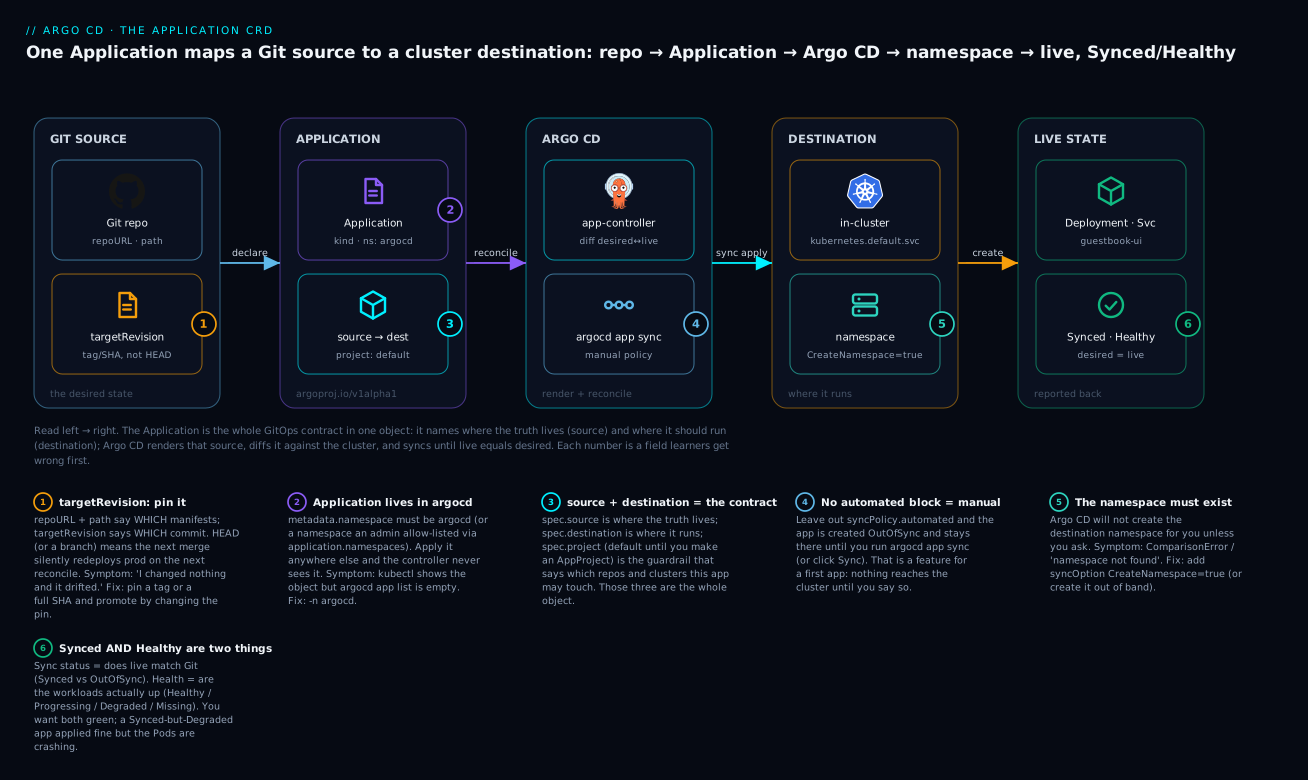
The badges call out the six fields first-timers get wrong: pinning targetRevision instead of chasing HEAD (1); the Application having to live in the argocd namespace (2); source + destination + project being the whole contract (3); no automated block meaning manual sync (4); CreateNamespace=true because Argo CD won’t make the namespace for you (5); and Synced and Healthy being two separate green lights, not one (6).
The Application lifecycle: diff, history, rollback, and cascade delete
Once an app exists you manage it through a small, memorable set of argocd app verbs. These four are the daily drivers:
| Command | What it does | Typical use |
|---|---|---|
argocd app get <app> |
Show status, source/destination, and the resource tree | “What is this app and is it healthy?” |
argocd app diff <app> |
Show the diff between Git and live, without syncing | Review a change before applying it |
argocd app history <app> |
List past syncs, each with an ID and revision | Find a known-good revision to roll back to |
argocd app rollback <app> <id> |
Re-sync the app to a previous history ID | Undo a bad deploy fast |
argocd app diff is the habit worth forming early — it answers “what would change if I synced right now?” without changing anything:
argocd app diff guestbook
# (no output = live matches Git; a unified diff = the pending change)
history and rollback work together. Each successful sync is recorded with an incrementing ID:
argocd app history guestbook
# representative output
ID  DATE                           REVISION
0   2026-07-15 10:32:41 +0000 UTC  (53e28ff)
1   2026-07-15 11:07:12 +0000 UTC  (7b2c9a1)
# Roll back to the first, known-good sync (ID 0)
argocd app rollback guestbook 0
One honest caveat: rollback re-syncs to an older revision, so if the app has automated sync enabled, Argo CD will just march it forward to Git’s tip again. Rollback is a manual-sync operation; with automation on, you “roll back” by reverting the commit in Git. How many revisions you can roll back to is capped by spec.revisionHistoryLimit (default 10).
Deleting an app: finalizers and cascade delete
Deletion is where the finalizers field from the very first manifest earns its place, because it decides the fate of every resource the app created.
| How you delete | Finalizer present? | What happens to the live resources |
|---|---|---|
argocd app delete guestbook |
(CLI adds it) | Cascade — the Service, Deployment, Pods are all deleted |
argocd app delete guestbook --cascade=false |
ignored | Orphaned — the app is gone but its resources keep running |
kubectl delete app guestbook -n argocd |
yes (resources-finalizer…) |
Cascade — the finalizer triggers resource deletion |
kubectl delete app guestbook -n argocd |
no | Orphaned — only the Application object is removed |
The mechanism is a Kubernetes finalizer: resources-finalizer.argocd.argoproj.io. When present in metadata.finalizers, deleting the Application does not complete immediately — Kubernetes holds the object in Terminating while Argo CD deletes all the resources the app owns, then removes the finalizer and lets the object disappear. That is cascade delete: delete the app, and its Deployment/Service/Pods go with it. Leave the finalizer out and a kubectl delete removes only the Application record, leaving the guestbook Deployment running as an orphan that nothing manages anymore.
metadata:
  name: guestbook
  namespace: argocd
  finalizers:
    - resources-finalizer.argocd.argoproj.io   # present => cascade delete
The argocd app delete CLI cascades by default (it applies the finalizer for you), which is why the two paths in the table converge. The lesson: if you author Application manifests declaratively and want “delete the app = delete its resources,” include the finalizer in the YAML — do not rely on remembering a CLI flag.
Hands-on lab
You will deploy the guestbook as your first Application, watch it go Synced/Healthy, inspect what Argo CD created, then delete it and watch the cascade clean up. Everything is read-only or self-cleaning, and it all happens on one cluster.
Prerequisites. A Kubernetes cluster (a free local kind/minikube is perfect) with Argo CD installed in the argocd namespace, and you logged in with argocd login — the exact state the install lesson leaves you in. Verify:
kubectl -n argocd get pods         # argocd-server, repo-server, application-controller… all Running
argocd version --short             # client + server versions (Argo CD 2.13+/3.x)
Step 1 — Write the Application manifest. Save this as guestbook-app.yaml:
apiVersion: argoproj.io/v1alpha1
kind: Application
metadata:
  name: guestbook
  namespace: argocd
  finalizers:
    - resources-finalizer.argocd.argoproj.io
spec:
  project: default
  source:
    repoURL: https://github.com/argoproj/argocd-example-apps.git
    path: guestbook
    targetRevision: HEAD
  destination:
    server: https://kubernetes.default.svc
    namespace: guestbook
  syncPolicy:
    syncOptions:
      - CreateNamespace=true
What just happened: nothing yet — this is just a file. But it is the entire desired state, reviewable and committable.
Step 2 — Create the app declaratively.
kubectl apply -f guestbook-app.yaml -n argocd
# application.argoproj.io/guestbook created
What just happened: the Application object now exists in argocd. The controller has started comparing Git to the cluster — but with manual sync, it will not touch anything yet.
Step 3 — Confirm it is registered and OutOfSync.
argocd app list
# NAME              CLUSTER                         NAMESPACE  PROJECT  STATUS     HEALTH   SYNCPOLICY
# argocd/guestbook  https://kubernetes.default.svc  guestbook  default  OutOfSync  Missing  Manual
What just happened: Argo CD sees the app, knows it should create resources (OutOfSync), and is waiting for you (Manual). No guestbook resources exist yet — confirm with kubectl get all -n guestbook (the namespace itself doesn’t even exist until sync, thanks to CreateNamespace=true).
Step 4 — Inspect the plan.
argocd app get guestbook
# Sync Status: OutOfSync from HEAD (…);  Health Status: Missing
# resource tree lists: Service/guestbook-ui and apps/Deployment/guestbook-ui, both OutOfSync/Missing
What just happened: the resource tree is Argo CD showing you exactly what it will create before it creates it — a Service and a Deployment.
Step 5 — Sync (the moment it hits the cluster).
argocd app sync guestbook
# …Phase: Succeeded … successfully synced (all tasks run)
What just happened: Argo CD created the guestbook namespace, then applied the Service and Deployment. This is the first time anything reached the cluster — and it happened because you asked.
Step 6 — Watch it become Healthy.
argocd app wait guestbook --health --timeout 120
# … guestbook  Synced  Healthy
argocd app get guestbook
# Sync Status: Synced;  Health Status: Healthy
What just happened: argocd app wait blocks until the app is Healthy (the Deployment’s pod is up and ready), so you don’t have to poll by hand.
Step 7 — Prove it with plain kubectl.
kubectl get all -n guestbook
# NAME                                READY   STATUS    RESTARTS   AGE
# pod/guestbook-ui-...                1/1     Running   0          40s
# service/guestbook-ui   ClusterIP   10.x.x.x   <none>   80/TCP    40s
# deployment.apps/guestbook-ui  1/1  1  1  40s
# replicaset.apps/guestbook-ui-...  1  1  1  40s
What just happened: the resources in Argo CD’s tree are ordinary Kubernetes objects — Argo CD created exactly what the Git manifests declared, and kubectl sees them like anything else. (Optional: kubectl -n guestbook port-forward svc/guestbook-ui 8080:80 and open http://localhost:8080 to see the app.)
Step 8 — Teardown (watch the cascade).
argocd app delete guestbook
# are you sure you want to delete 'guestbook'? [y/n] y
# application 'guestbook' deleted

# Watch the resources disappear with the app:
kubectl get all -n guestbook
# No resources found in guestbook namespace.  (the Deployment/Service went with the app)
kubectl delete namespace guestbook        # optional: remove the empty namespace too
What just happened: because the manifest included resources-finalizer.argocd.argoproj.io, deleting the app cascaded to its resources — the Deployment, Service, ReplicaSet, and Pod were all removed. Delete the app, and everything it created is gone. That is the whole lifecycle, start to finish, in eight steps.
Common mistakes and troubleshooting
The failures below are the ones every beginner hits with their first few apps. The pattern is almost always a field that is subtly wrong, and Argo CD names the problem precisely — learn to read the state.
| Symptom | Likely cause | Fix |
|---|---|---|
App is OutOfSync and never deploys |
Manual sync policy — no automated block; nothing syncs until you ask |
Run argocd app sync <app>, or add syncPolicy.automated once you trust it |
ComparisonError on the app |
Bad repoURL, path, or targetRevision — Argo CD can’t fetch/render the source |
argocd app get reads the exact error; fix the typo; confirm the path exists at that revision |
Sync fails: namespace "x" not found |
Destination namespace doesn’t exist and Argo CD won’t create it | Add syncOptions: [CreateNamespace=true], or create the namespace out of band |
error: failed to get repo / repository not found |
repoURL wrong, private repo with no credentials, or typo |
Correct the URL; register repo credentials (argocd repo add) for private repos |
| App applies to the wrong/no cluster | destination.server URL wrong or cluster not registered |
Use https://kubernetes.default.svc for in-cluster; argocd cluster list to verify remotes |
App never appears in argocd app list |
metadata.namespace isn’t argocd (and apps-in-any-namespace isn’t enabled) |
Apply the Application into -n argocd (or allow-list its namespace in argocd-cmd-params-cm) |
| App silently redeployed after a merge | targetRevision: HEAD/a branch — a new commit became desired state |
Pin prod to an immutable tag or full SHA; promote by changing the pin |
| Deleted the app but resources kept running | No resources-finalizer.argocd.argoproj.io, or --cascade=false |
Add the finalizer to the manifest; use argocd app delete (cascades by default) |
| Everything deleted when you only meant to remove the app | Cascade delete did exactly what it says | Expected with the finalizer; use --cascade=false to orphan resources deliberately |
Sync is SyncFailed / RBAC error |
The AppProject forbids that repo, destination, or resource kind |
Widen the project’s sourceRepos/destinations, or deploy within the allowed scope |
path renders nothing / “no matching resources” |
path points at a non-manifest directory, or manifests are nested |
Point path at the manifest dir; set directory.recurse: true for sub-folders |
Three of these deserve extra words, because they cost the most confusion:
1. “I created the app but nothing deployed.” This is not a bug — it is manual sync working as designed. With no syncPolicy.automated, Argo CD detects the difference (OutOfSync) and waits. The whole point of manual mode is that you review and then run argocd app sync. If you actually want hands-off deployment, that is automated: { prune, selfHeal } — a deliberate step you take, covered in the sync-policy lesson.
2. The targetRevision: HEAD surprise. An app pinned to HEAD or a branch is subscribed to every future commit on that branch. Someone merges an unrelated change, the next reconcile treats it as the new desired state, and your app redeploys with no deploy event anywhere. In dev that is convenient; in prod it is an incident waiting to happen. Pin production to a tag or SHA and make promotion an explicit, reviewed commit — this single habit prevents a whole class of “who changed prod?” mysteries.
3. Finalizers cut both ways. The resources-finalizer.argocd.argoproj.io finalizer is what makes “delete the app, delete its resources” work — and it is also what makes an over-eager argocd app delete wipe out a live workload. Both directions surprise people: forget the finalizer and you leave orphans that nothing manages; include it and a careless delete cascades. Know which you want. For most declaratively-managed apps you do want the finalizer (so Git remains the single source of truth, deletes included); reach for --cascade=false only when you deliberately mean to decommission the Application while leaving its resources standing.
Cheat-sheet
The Application skeleton, every field you have to fill in, and the argocd app verbs — bookmark this.
The Application manifest, field by field:
| Field | Put here | Example |
|---|---|---|
apiVersion |
Always this | argoproj.io/v1alpha1 |
kind |
Always this | Application |
metadata.name |
App name (unique in namespace) | guestbook |
metadata.namespace |
Where the app object lives | argocd |
metadata.finalizers |
For cascade delete | [resources-finalizer.argocd.argoproj.io] |
spec.project |
Guardrail project | default |
spec.source.repoURL |
Where the manifests live | https://github.com/argoproj/argocd-example-apps.git |
spec.source.path |
Directory in the repo | guestbook |
spec.source.targetRevision |
Branch/tag/SHA to deploy | HEAD (dev), v1.4.2 (prod) |
spec.destination.server |
Target cluster API URL | https://kubernetes.default.svc |
spec.destination.namespace |
Target namespace | guestbook |
spec.syncPolicy.syncOptions |
Per-sync flags | [CreateNamespace=true] |
The argocd app verbs:
| Command | What it does |
|---|---|
argocd app create <name> --repo … --path … --dest-server … --dest-namespace … |
Create an app imperatively |
kubectl apply -f app.yaml -n argocd |
Create an app declaratively (the GitOps way) |
argocd app list |
List all apps with sync/health/policy |
argocd app get <app> |
Show status + the resource tree |
argocd app diff <app> |
Diff Git vs live without syncing |
argocd app sync <app> |
Apply the desired state now |
argocd app wait <app> --health |
Block until the app is Healthy |
argocd app history <app> |
List past syncs with IDs |
argocd app rollback <app> <id> |
Re-sync to a previous history ID |
argocd app set <app> --revision <rev> |
Change a field (e.g. pin the revision) |
argocd app manifests <app> |
Print the rendered manifests Argo CD would apply |
argocd app delete <app> |
Delete the app (cascades to resources by default) |
argocd app delete <app> --cascade=false |
Delete the app but orphan its resources |
Interview and exam questions
Q: What is the Argo CD Application object, in one sentence?
A: It is the custom resource (argoproj.io/v1alpha1) that binds a Git source (repo, path, revision) to a cluster destination (server/name, namespace) and a syncPolicy, so Argo CD can continuously reconcile the live cluster toward the desired state declared in Git.
Q: Name the three fields that carry the meaning of an Application and what each answers.
A: spec.source = what to deploy and from where; spec.destination = where to run it (which cluster + namespace); spec.project/spec.syncPolicy = what’s allowed and how/when to apply. Source, destination, policy.
Q: What does targetRevision: HEAD do, and why is it risky in production?
A: It tracks the default branch’s moving tip. Because Argo CD reconciles continuously, the next commit merged to that branch silently becomes the desired state and redeploys the app with no explicit deploy. In prod, pin an immutable tag or full commit SHA and promote by changing the pin in a reviewed commit.
Q: destination.server vs destination.name — what’s the difference?
A: Two ways to point at the same registered cluster. server is the cluster’s API URL (e.g. https://kubernetes.default.svc for in-cluster); name is the friendly name it was given at registration. Use one or the other, never both.
Q: You created an app and nothing deployed. It shows OutOfSync. Why?
A: Almost certainly manual sync — there is no syncPolicy.automated block, so Argo CD detects the difference and waits. Run argocd app sync <app> (or click Sync), or add automated for hands-off syncing.
Q: Your first sync fails with a “namespace not found” comparison error. Fix it.
A: Argo CD does not create the destination namespace by default. Add syncPolicy.syncOptions: [CreateNamespace=true] (or create the namespace out of band).
Q: What does the resources-finalizer.argocd.argoproj.io finalizer do?
A: It enables cascade delete. With it in metadata.finalizers, deleting the Application first deletes all the resources the app created (Deployment, Service, Pods…) before the object is removed. Without it, deleting the app orphans those resources — they keep running unmanaged.
Q: Imperative argocd app create vs declarative kubectl apply -f — which is “the GitOps way,” and why?
A: Declarative. The Application YAML can be committed to Git, reviewed in a PR, and reproduced exactly — the manifest is the definition. argocd app create is great for learning (each flag maps to a field) but the app then lives only in your shell history. Learn imperatively, ship declaratively.
Q: An app is Synced but Degraded. What does that mean?
A: Sync and health are independent. Synced means the live cluster matches Git (the manifests applied). Degraded means the workloads aren’t healthy — e.g. Pods are crash-looping. It applied fine but it isn’t working; debug the workload, not the sync.
Q: You applied an Application manifest but it never shows up in argocd app list. What’s the most likely cause?
A: The Application isn’t in the argocd namespace. By default the controller only reconciles Applications in its own namespace; apply it with -n argocd (or have an admin enable apps-in-any-namespace via application.namespaces and allow-list the namespace).
Q: How do you roll back a bad deploy, and what’s the catch with automated sync?
A: argocd app history <app> to find a good ID, then argocd app rollback <app> <id> to re-sync to it. The catch: if automated sync is on, Argo CD will re-sync forward to Git’s tip and undo your rollback — with automation on, you roll back by reverting the commit in Git. History depth is bounded by spec.revisionHistoryLimit (default 10).
Q: What’s the difference between argocd app diff and argocd app sync?
A: diff shows what would change (Git vs live) and changes nothing — a safe preview. sync actually applies the desired state to the cluster. Habitually diff before you sync.
Key takeaways
- The
Application(argoproj.io/v1alpha1) is the one object you cannot avoid — it is the GitOps contract binding a Git source to a cluster destination with a syncPolicy. Master it and the rest of Argo CD is detail. - Every field answers one of three questions: what (
source:repoURL,path,targetRevision), where (destination:server/name,namespace), how/allowed (syncPolicy,project). - Pin
targetRevisionto an immutable tag or SHA in production;HEADand branches are moving targets that redeploy prod on the next merge with no deploy event. - The
Applicationmust live in theargocdnamespace (unless apps-in-any-namespace is enabled), andCreateNamespace=trueis the one syncOption first-timers always need. - Learn imperatively (
argocd app create), ship declaratively (kubectl applya committed manifest). Only the declarative manifest is versioned, reviewable, and reproducible — the GitOps way. - Manual vs automated sync: with no
automatedblock the app sitsOutOfSyncuntil you runargocd app sync— a feature for a first app, since nothing reaches the cluster unless you ask. - Sync status and health are independent:
Syncedmeans it matches Git;Healthymeans it’s actually up. Drive toward both green, and recogniseSynced/Degradedas “applied but broken.” - The
resources-finalizer.argocd.argoproj.iofinalizer controls delete behaviour: include it for cascade delete (app gone = resources gone), omit it (or use--cascade=false) to orphan resources deliberately. - The
Applicationis cloud-neutral — the same manifest targets a local kind cluster, AKS, EKS, or GKE; only registering remote clusters is cloud-specific, and that lives in the multi-cluster lesson.