In a nutshell
Level: Advanced · Time: ~67 min
Imagine a company that lets every team rent an empty plot of land and build its own office from scratch. One team forgets the fire alarms, another wires the locks backwards, a third never installs a smoke detector — and nobody can prove the whole campus is safe. That is a company that hands each project a raw AWS account. A landing zone is the opposite: a governed, move-in-ready foundation where every new account arrives already wired with logging, identity, guardrails, and a signed “lease” of rules it cannot break. AWS Control Tower is the property manager that stamps out those identical, pre-wired units on demand — so account number one hundred is as safe on day one as account number one.
The single idea that makes the whole design click: the AWS account is a wall, and the OU is where you hang the rules. Everything that matters for blast radius — who can do what (IAM), what is forbidden outright (SCPs), what network exists, and who pays — stops at the account edge. So instead of cramming prod and dev into one account and praying a tag keeps them apart, you give each workload-and-environment its own account, then group those accounts into organizational units (OUs) and attach a rule once at the OU so every account beneath it inherits the rule automatically. Control Tower’s job is to make that inheritance real, consistent, and auditable across hundreds of accounts.
If you have only ever worked inside a single AWS account, this is the moment the picture gets bigger. You will not memorise every knob today — you will build a mental model of where governance lives (management account, Security OU, the policy tree) and how a new account is born already governed (Account Factory and the AFT pipeline). Keep the wall-and-rules image in mind and the rest of this lesson is mostly detail hanging off it. The sections below go deep — read the analogy first, then let each table fill in the specifics.
A landing zone is the governed, pre-wired AWS foundation your workloads land in — accounts, OUs, identity, logging, and guardrails already in place so teams ship without re-litigating security per project. AWS Control Tower orchestrates this on top of AWS Organizations, and Account Factory for Terraform (AFT) turns account creation into a GitOps pipeline. This guide builds the whole thing the way it is done in regulated enterprises — and because you will return to it mid-build and mid-incident, almost every decision here is laid out as a scannable table: the controls, the SCP shapes, the OU choices, the limits, the error codes, and a symptom→cause→confirm→fix playbook for the day governance fights you.
The core principle is simple and load-bearing: the AWS account is your strongest isolation boundary. IAM, SCPs, networking, and billing all stop at the account edge. So instead of cramming prod and dev into one account separated by tags and hope, you give each workload-and-environment its own account. A compromised dev account cannot reach prod. A runaway Lambda cannot exhaust prod’s concurrency. A DeleteBucket blast radius is one account, not the company. Accounts are cheap; the hard part is governing hundreds of them consistently — and that is exactly what Control Tower and an organizational unit (OU) strategy solve.
By the end you will be able to enable Control Tower deliberately (home region and all), design an OU tree that scales to hundreds of accounts, attach the right controls and custom SCPs at the right level, stand up AFT in its own account, vend a governed account from a pull request, centralize logging into an immutable Log Archive, and run the drift, upgrade, and decommission lifecycle without hand-patching the platform into a corner.
What problem this solves
A single shared AWS account is a time bomb. Every team’s IAM policies pile up; one over-broad *:* grant or a leaked access key reaches everything; cost is impossible to attribute; an experiment in dev can throttle, delete, or bankrupt prod because they share the same limits, the same buckets, the same network. The first instinct — “we will separate environments with tags and IAM conditions” — fails because IAM is additive and tag-based isolation is one missing Condition away from collapse. The account boundary, by contrast, is the one isolation primitive AWS cannot leak across by accident.
But the moment you accept “an account per workload-environment,” you have a new problem: consistency at scale. Account #1 is hand-built lovingly. Account #50 is built at 5pm on a Friday and forgets the CloudTrail, the region lock, the break-glass role, the budget alarm. Six months later a security review finds forty accounts, each subtly different, none fully compliant, and no one able to say which control is where. That drift is the real enemy. Control Tower exists to make account #100 the same PR as account #1 — governed, logged, and consistent on day one — and to detect the moment any account diverges from that baseline.
Who hits this: any organization past its first few AWS accounts; anyone in a regulated industry (finance, health, public sector) that must prove centralized logging and preventive controls; any platform team asked to “give every squad their own account but keep us out of the news.” The failure mode without a landing zone is not dramatic — it is slow: a hundred snowflake accounts, an audit you cannot pass, and a blast radius the size of the company.
To frame the whole field before the build, here is every layer this article governs, who owns it, and the failure it prevents:
| Layer | What lives here | Who owns it | Failure it prevents |
|---|---|---|---|
| Management (payer) | Organizations, Control Tower, SCPs, billing | Cloud platform / security | One account that can dismantle everything |
| OU policy tree | SCPs, Config rules, control attachment | Platform + governance | Inconsistent guardrails per team |
| Security OU | Log Archive + Audit accounts | Security / SecOps | Tamperable logs; no central detection |
| Identity | IAM Identity Center, permission sets | Identity team | IAM-user sprawl; static keys |
| Account vending (AFT) | Account requests, customizations | Platform engineering | Snowflake, half-built accounts |
| Member accounts | The actual workloads | App / product teams | Blast radius beyond one account |
| Network (shared) | Transit Gateway, central egress, DNS | Network team | Re-inventing connectivity per account |
Learning objectives
By the end of this article you can:
- Explain why the account is the unit of isolation and billing while the OU is the unit of policy, and design an OU tree around how you govern rather than your org chart.
- Enable Control Tower from the management account with a deliberate home region, and register additional OUs so their baseline reaches every current and future account.
- Distinguish preventive (SCP), detective (Config), and proactive (CloudFormation hook) controls, and place mandatory / strongly-recommended / elective controls correctly.
- Author a safe region-allowlist SCP with the global-service exemptions that stop you locking yourself out of IAM.
- Stand up AFT in its own account, vend a governed account from a pull request, and layer global vs account customizations in the right order.
- Centralize logging into an immutable Log Archive with the organization CloudTrail trail, Object Lock, and log validation, and query it with Athena / CloudTrail Lake.
- Run the operational lifecycle — drift detection, landing-zone upgrades, account decommissioning — without hand-patching managed resources into drift.
- Diagnose the common landing-zone failure modes from a symptom→cause→confirm→fix playbook and pick the right fix instead of the band-aid.
Prerequisites & where this fits
You should already understand AWS account basics: an account is the billing and isolation boundary; IAM governs identity within an account; STS issues temporary credentials for cross-account access. You should be comfortable running aws CLI v2 with named profiles, reading JSON output with --query, and writing basic Terraform (providers, modules, terraform apply). Familiarity with AWS Organizations (the root, OUs, member accounts, consolidated billing) is assumed at a conceptual level — this article builds the governance layer on top of it.
This sits at the foundation of any multi-account AWS estate. It is upstream of almost everything: networking, identity federation, workload deployment, and cost management all assume the landing zone exists. It pairs tightly with AWS Organizations: SCP guardrails and delegated admin for the policy mechanics, Control Tower guardrails: the multi-account foundation for the control catalog in depth, Account Factory for Terraform: account vending and customizations for the AFT pipeline internals, and IAM Identity Center: permission sets and ABAC across accounts for human access. Centralized logging connects to CloudTrail and Config for audit and compliance, and the shared network it enables is built in Transit Gateway multi-account VPC architecture.
Where the responsibility boundary sits between you and AWS, so you know what you can and cannot change:
| Concern | AWS owns | You own |
|---|---|---|
| Control Tower control plane | The orchestration, managed roles, baseline logic | Which OUs you register, which controls you enable |
| Mandatory controls | The control definitions; you cannot disable them | Designing workflows that live within them |
| Org CloudTrail trail | The managed trail + delivery roles | The Log Archive bucket policy hardening, retention |
| SCPs | The evaluation engine | Authoring your own custom SCPs |
| Account vending | The Account Factory provisioning product | The AFT pipeline, requests, and customizations |
| Member account contents | Nothing — it is yours | All workloads, IAM, networking inside it |
Core concepts
Five mental models make every later decision obvious.
The account is the blast radius; the OU is the policy unit. Accounts are where isolation and billing stop; OUs are where you attach controls once and inherit everywhere beneath. You design the OU tree around how you want to govern (prod vs non-prod, security vs sandbox), not around your reporting lines. A new team account dropped into Workloads/Prod inherits prod’s stricter SCPs on creation — that inheritance is the entire point.
Controls come in three behaviors. Preventive controls are SCPs: they block a non-compliant API call outright (return AccessDenied no matter what IAM says). Detective controls are AWS Config rules: they flag drift but do not stop it. Proactive controls are CloudFormation hooks: they block a non-compliant resource before it is provisioned. “Block the call,” “flag the state,” “block the deploy” — three different points on the timeline.
The three foundational accounts enforce separation of duties. Control Tower creates a Management account (Organizations, billing, SCPs — no workloads, ever), a Log Archive account (the immutable central log store), and an Audit account (cross-account security tooling). The people who can change the org are not the people who can read every log, and neither can tamper with the log store. That triangle is what makes the landing zone trustworthy to an auditor.
The landing zone has versioned state that can drift. Control Tower ships landing-zone versions and baseline versions. Enabling a control on an OU applies a baseline to every current and future account in it — but an in-place landing-zone upgrade does not re-apply the baseline to already-enrolled OUs. Accounts can therefore drift against a new control set until something downstream trips over the gap. Treat “update landing zone” and “re-register OUs” as one atomic step.
Account vending should be GitOps, not clicks. Clicking “Enroll account” does not scale and leaves no audit trail. AFT wraps Account Factory: you describe an account in a Terraform request, merge it, and a pipeline vends, enrolls, and customizes the account end to end — reproducible, reviewed, logged.
The vocabulary in one table
Pin down every moving part before the deep sections. The glossary repeats these for lookup; this is the mental model side by side:
| Term | One-line definition | Where it lives | Why it matters |
|---|---|---|---|
| Management account | The Organizations root payer | Top of the org | Can dismantle everything; keep it clean |
| Organizational unit (OU) | A container for accounts | Under the root | The unit of policy attachment |
| Service Control Policy (SCP) | Org-level Deny/Allow boundary | Attached to root/OU/account | Preventive control; caps IAM |
| Control (guardrail) | A managed governance rule | Applied to an OU | Preventive/detective/proactive |
| Baseline | The control set applied to an OU | Per registered OU | Drifts if not re-applied on upgrade |
| Log Archive account | Immutable central log store | Security OU | Tamper-proof audit trail |
| Audit account | Cross-account security tooling | Security OU | Delegated GuardDuty/Hub admin |
| IAM Identity Center | Workforce SSO + permission sets | Org-wide | Replaces IAM users for humans |
| Account Factory | Control Tower’s account-provisioning product | Service Catalog | Vends + enrolls accounts |
| AFT | Terraform GitOps wrapper for Account Factory | Its own account | Reproducible account vending |
| Customization | Terraform run in a vended account | AFT repos | Bakes VPC/roles/tags into every account |
| Home region | The region anchoring the landing zone | Chosen at setup | Painful to change later |
| Drift | An account diverging from its baseline | Detected by Control Tower | Re-register/re-enroll to fix |
Step 1 — Enable Control Tower and design the OU hierarchy
Control Tower is set up from the management account (the Organizations root payer). Before you click anything, decide your home region carefully — it anchors the landing zone, hosts the managed resources, and is painful to change later. Enable it from the console (Set up landing zone) or, if you prefer IaC from day one, the aws controltower API once the prerequisites exist. The console wizard is genuinely the right call for the initial enablement because it provisions the audit and log archive accounts atomically; automate everything after that point.
During setup you choose two foundational OUs (Control Tower calls the security one the Security OU and the sandbox one the Sandbox OU) and the regions Control Tower governs. Once the landing zone is live, extend the tree to something that scales:
Root
├── Security                 (Control Tower foundational OU)
│   ├── Log Archive  (account)
│   └── Audit        (account)
├── Infrastructure           (shared platform: networking, CI/CD, DNS)
│   ├── Network      (account: Transit Gateway, central egress)
│   └── Shared-Services (account: AD, artifact registries)
├── Workloads
│   ├── Prod
│   └── NonProd
├── Sandbox                  (Control Tower foundational OU; loose guardrails)
└── Suspended                (quarantine: deny-all SCP, pending closure)
This mirrors the AWS multi-account reference. Workloads/Prod and Workloads/NonProd are split so you can attach stricter SCPs (deny leaving approved regions, deny disabling CloudTrail) to prod without slowing down experimentation. Suspended exists for the day you decommission an account — you move it there, attach a deny-all SCP, and it sits inert until closure.
Each OU exists for a reason; placing an account in the wrong one gives it the wrong guardrails. The full tree, what governs each node, and the SCP posture:
| OU | Purpose | Typical accounts | SCP posture | Control Tower role |
|---|---|---|---|---|
| Security | Audit + logging plane | Log Archive, Audit | Tightest; deny tampering | Foundational (mandatory) |
| Infrastructure | Shared platform services | Network, Shared-Services | Strict; region-locked | Custom (you register) |
| Workloads/Prod | Production workloads | per-team prod accounts | Strict; deny region/trail changes | Custom (you register) |
| Workloads/NonProd | Dev/test/stage | per-team non-prod accounts | Looser; region allowlist | Custom (you register) |
| Sandbox | Free experimentation | personal/POC accounts | Loosest; budget caps | Foundational |
| Suspended | Quarantine before closure | accounts being retired | Deny-all | Custom (you register) |
| PolicyStaging (opt.) | Test SCPs before prod | a throwaway account | Whatever you are testing | Custom (you register) |
Register additional OUs with Control Tower so it enrolls and governs accounts placed in them. With the CLI:
# OUs themselves are Organizations objects; create under the root or a parent OU
aws organizations create-organizational-unit \
  --parent-id "$ROOT_ID" \
  --name "Workloads"

aws organizations create-organizational-unit \
  --parent-id "$WORKLOADS_OU_ID" \
  --name "Prod"

# Then register the OU with Control Tower so its accounts are governed/enrolled
aws controltower enable-baseline \
  --baseline-identifier "$AWS_CONTROL_TOWER_BASELINE_ARN" \
  --target-identifier "$WORKLOADS_PROD_OU_ARN" \
  --baseline-version "4.0"
In Terraform, the OU tree and registration are declarative — this is how you keep the hierarchy in version control:
resource "aws_organizations_organizational_unit" "workloads" {
  name      = "Workloads"
  parent_id = data.aws_organizations_organization.this.roots[0].id
}

resource "aws_organizations_organizational_unit" "prod" {
  name      = "Prod"
  parent_id = aws_organizations_organizational_unit.workloads.id
}

# Register the OU's baseline with Control Tower (provider-dependent resource)
resource "aws_controltower_baseline_enablement" "prod" {
  baseline_identifier = var.aws_control_tower_baseline_arn
  baseline_version    = "4.0"
  target_identifier   = aws_organizations_organizational_unit.prod.arn
}
Why this matters: an OU registered with Control Tower applies its baseline (the mandatory controls and a Config recorder) to every current and future account in that OU. New teams inherit guardrails on day one — that is the entire point.
A note on OU and Organizations limits so your tree design does not hit a wall: nesting and counts are bounded. Design wide, not deep.
| Resource | Default limit | Adjustable? | Design implication |
|---|---|---|---|
| OU nesting depth | 5 levels below root | No | Keep the tree shallow; group by governance |
| OUs per organization | 1,000 | No | Plenty; do not create an OU per team if policy is shared |
| Accounts per organization | Default ~10, raise via Service Quotas | Yes (quota) | Request increases early for large estates |
| SCPs per organization | 5,000 | No | Reuse SCPs across OUs; do not template per account |
| SCPs attached per OU/account | 5 | No | Compose policy carefully; consolidate statements |
| SCP document size | 5,120 characters | No | Trim whitespace; split logical policies |
| Policy types per root | SCP, Tag, AI opt-out, Backup, RCP | n/a | Enable SCP type at the root before attaching |
Step 2 — Inside the landing zone: the three foundational accounts
Control Tower creates a deliberate separation of duties across three accounts. Treat these as platform infrastructure, not playgrounds.
| Account | Lives in | Owns | Never does |
|---|---|---|---|
| Management | Root | Organizations, Control Tower, consolidated billing, SCPs | Run workloads; hold IAM users |
| Log Archive | Security OU | The immutable, central S3 destination for org CloudTrail and Config logs | Allow member accounts to delete logs |
| Audit | Security OU | Cross-account security tooling: GuardDuty/Security Hub delegated admin, read/audit roles | Hold workloads or write access to prod |
The split exists so that the people who can change the org (management) are not the same as the people who can read every log (audit), and neither can tamper with the log store (archive). Lock the management account down hard: no IAM users, root protected with hardware MFA, access only through IAM Identity Center (formerly AWS SSO) with a tightly scoped permission set, and SCPs that prevent anyone from leaving the org or disabling Control Tower.
How to lock down the management account, concretely — each control and the exact mechanism:
| Hardening control | Why | How (mechanism) |
|---|---|---|
| No IAM users | Static keys are the #1 breach vector | Identity Center permission sets only; delete legacy IAM users |
| Root hardware MFA | Root cannot be SCP-restricted | FIDO2 security key on root; store offline |
| No root access keys | A root key is total compromise | Delete any root access keys; alarm on root usage |
| Restrict who can assume admin | Limit blast radius of the payer | Scoped permission set; SCP aws:PrincipalOrgID conditions |
| Deny leaving the org | Stop an account escaping governance | SCP deny on organizations:LeaveOrganization |
| Deny disabling Control Tower / trail | Preserve the foundation | Mandatory controls already do this; do not relax |
| Alarm on root + console login | Detect misuse fast | CloudTrail → EventBridge → SNS on root events |
A useful pattern is to delegate administration of security services out of the management account to the audit account, keeping the payer account clean:
# Run from the management account: make Audit the org-wide GuardDuty admin
aws guardduty enable-organization-admin-account \
  --admin-account-id "$AUDIT_ACCOUNT_ID"

# Same idea for Security Hub
aws securityhub enable-organization-admin-account \
  --admin-account-id "$AUDIT_ACCOUNT_ID"
Which security services support delegated administration, and where to run them from:
| Service | Delegate to | Why delegate | Run org enable from |
|---|---|---|---|
| GuardDuty | Audit | Org-wide threat detection, single pane | Management → Audit becomes admin |
| Security Hub | Audit | Aggregate findings org-wide | Management → Audit becomes admin |
| IAM Access Analyzer | Audit | Org-level external-access analyzer | Management → Audit |
| Config aggregator | Audit | Single multi-account/region view | Management → Audit |
| Macie | Audit (or Security) | Central data-classification posture | Management → delegated admin |
| Detective | Audit | Cross-account investigation graph | Management → delegated admin |
| Firewall Manager | Security/Network | Centralized WAF/firewall policy | Management → delegated admin |
Step 3 — Baseline controls: mandatory, strongly recommended, elective
Control Tower governance is delivered through controls (historically “guardrails”). They come in three behaviors and three categories.
By behavior:
| Behavior | Implemented as | Effect | Timing | Example |
|---|---|---|---|---|
| Preventive | Service Control Policy | Blocks the API call (AccessDenied) |
At call time | Disallow changes to CloudTrail |
| Detective | AWS Config rule | Flags non-compliance (does not block) | After the fact | Detect public-read S3 buckets |
| Proactive | CloudFormation hook | Blocks the resource before provisioning | At deploy time | Block creating an unencrypted volume |
By category:
| Category | What it is | You can disable it? | How to treat it |
|---|---|---|---|
| Mandatory | Always on; the bedrock of the landing zone | No | Do not fight it; design within it |
| Strongly recommended | AWS best practice (Well-Architected aligned) | Yes | Enable broadly across OUs |
| Elective | Common but situational locks | Yes | Apply surgically to OUs that need them |
The mandatory set is what makes the landing zone trustworthy — it does things like disallow deleting the central log archive, disallow changes to the CloudTrail/Config roles, and disallow public access to the log buckets. Do not fight the mandatory controls. A representative sample of what mandatory controls actually enforce (the catalog evolves; verify in your account):
| Mandatory control (representative) | Behavior | What it enforces |
|---|---|---|
| Disallow changes to CloudTrail | Preventive | Members cannot stop/alter the org trail |
| Disallow deletion of the log archive | Preventive | The central log bucket cannot be removed |
| Disallow public read on log buckets | Preventive | Audit logs never become public |
| Disallow changes to Config setup | Preventive | The Config recorder/role stay intact |
| Disallow changes to encryption config of log archive | Preventive | KMS on the log store cannot be weakened |
| Integrate CloudTrail with CloudWatch Logs | Detective/setup | Trail events reach a log group for alarms |
Enable a strongly-recommended or elective control on an OU via the API:
aws controltower enable-control \
  --control-identifier "$STRONGLY_RECOMMENDED_CONTROL_ARN" \
  --target-identifier "$WORKLOADS_PROD_OU_ARN"
A starter map of high-value strongly-recommended / elective controls and where to apply them:
| Control (intent) | Category | Apply to | Rationale |
|---|---|---|---|
| Disallow internet access via IGW on EC2 (no public IP) | Strongly recommended | Workloads/Prod | Force traffic through controlled egress |
| Disallow public-read/-write S3 buckets | Strongly recommended | All workload OUs | Stop the classic bucket leak |
| Detect EBS volumes not encrypted | Detective (strongly rec.) | All OUs | Flag unencrypted storage |
| Disallow RDS public accessibility | Strongly recommended | Workloads/Prod | Databases never internet-facing |
| Require MFA for root | Strongly recommended | All OUs | Baseline identity hygiene |
| Disallow changes to AWS Config rules set by CT | Elective | Workloads | Prevent drift from the baseline |
| Disallow cross-region networking (where unused) | Elective | NonProd | Reduce attack surface |
Reading note: a control’s behavior tells you how it acts (block now / flag later / block deploy); its category tells you whether you may turn it off. Mandatory + preventive is the strongest combination and the bedrock you never relax.
Custom SCPs: your org-specific non-negotiables
Beyond Control Tower’s catalog, layer your own custom SCPs at the OU level for org-specific rules — a region allowlist is the classic one:
{
  "Version": "2012-10-17",
  "Statement": [
    {
      "Sid": "DenyOutsideApprovedRegions",
      "Effect": "Deny",
      "NotAction": [
        "iam:*", "organizations:*", "route53:*",
        "cloudfront:*", "support:*", "sts:*"
      ],
      "Resource": "*",
      "Condition": {
        "StringNotEquals": {
          "aws:RequestedRegion": ["us-east-1", "eu-west-1"]
        }
      }
    }
  ]
}
Callout: global services (IAM, Route 53, CloudFront, Organizations) authenticate through
us-east-1. If you region-lock with an SCP, you must exempt those actions or you will lock yourself out of IAM. TheNotActionlist above is the safe baseline.
SCPs are a boundary, not a grant — the mechanics trip up almost everyone the first time. Internalize these rules:
| SCP rule | What it means | Consequence if forgotten |
|---|---|---|
| SCPs never grant permission | They only cap what IAM can allow | Expecting an SCP to “enable” an action wastes hours |
| Effective perms = IAM ∩ SCP | An action needs both to allow | A correct IAM policy still fails if SCP denies |
| Explicit Deny always wins | A Deny anywhere overrides any Allow | One stray Deny can break a whole account |
| SCPs do not apply to the management account | The payer is exempt | Test SCPs in a member account, never the root |
| SCPs do not affect service-linked roles | SLRs bypass SCPs | Some platform actions still work; do not rely on that |
NotAction is a complement, not “all except” semantics you assume |
Lists actions the Deny does not hit | Forgetting global services = lockout |
Common custom-SCP patterns, what each blocks, and the gotcha that bites:
| SCP pattern | Blocks | Apply to | Gotcha |
|---|---|---|---|
| Region allowlist | API calls outside approved regions | Workloads OUs | Must NotAction global services |
| Deny leave-organization | organizations:LeaveOrganization |
Root / all OUs | Keep management exempt (it is automatically) |
| Deny CloudTrail tampering | Stop/delete/update trail | All OUs (CT also does this) | Do not duplicate-conflict with CT’s control |
| Protect IAM roles (deny mutation) | Delete/modify of named platform roles | All OUs | Match exact role names/paths |
| Deny disabling default EBS encryption | ec2:DisableEbsEncryptionByDefault |
All OUs | Pair with proactive control |
| Require IMDSv2 | RunInstances without IMDSv2 |
Workloads | Use ec2:MetadataHttpTokens condition |
| Deny-all (quarantine) | Everything | Suspended OU | Use only for decommissioning |
| Data-perimeter (org-only access) | Principals/resources outside the org | All OUs | Combine with RCPs for resource-side perimeter |
Apply a custom SCP with the CLI or Terraform:
# Create the SCP, then attach it to an OU
SCP_ID=$(aws organizations create-policy \
  --name "deny-non-approved-regions" --type SERVICE_CONTROL_POLICY \
  --content file://region-allowlist.json \
  --query 'Policy.PolicySummary.Id' -o tsv)

aws organizations attach-policy \
  --policy-id "$SCP_ID" --target-id "$WORKLOADS_OU_ID"
resource "aws_organizations_policy" "region_allowlist" {
  name    = "deny-non-approved-regions"
  type    = "SERVICE_CONTROL_POLICY"
  content = file("${path.module}/policies/region-allowlist.json")
}

resource "aws_organizations_policy_attachment" "region_allowlist" {
  policy_id = aws_organizations_policy.region_allowlist.id
  target_id = aws_organizations_organizational_unit.workloads.id
}
Step 4 — Automating account vending with AFT
Clicking “Enroll account” in the Account Factory console does not scale. Account Factory for Terraform (AFT) wraps Account Factory in a GitOps pipeline: you describe an account in a Terraform request, merge it, and AFT vends and customizes the account end to end.
AFT runs in its own dedicated account and is itself deployed with the published Terraform module. The bootstrap is a one-time apply from a management-context backend:
module "aft" {
  source  = "aws-ia/control_tower_account_factory/aws"
  version = "1.14.0"

  # Core account wiring
  ct_management_account_id    = "111111111111"
  log_archive_account_id      = "222222222222"
  audit_account_id            = "333333333333"
  aft_management_account_id   = "444444444444"
  ct_home_region              = "us-east-1"
  tf_backend_secondary_region = "us-west-2"

  # Point AFT at your four pipeline repos (CodeCommit by default,
  # or GitHub/GitLab/Bitbucket via *_vcs settings)
  account_request_repo_name             = "aft-account-request"
  global_customizations_repo_name       = "aft-global-customizations"
  account_customizations_repo_name      = "aft-account-customizations"
  account_provisioning_customizations_repo_name = "aft-account-provisioning-customizations"

  terraform_distribution = "oss"
}
AFT is driven by four repositories, each with a distinct job. Mixing up which code goes where is the most common AFT mistake — this table is the map:
| Repo | Holds | Runs when | Scope |
|---|---|---|---|
| aft-account-request | One module call per account | On merge → triggers vend | Per account (the request) |
| aft-global-customizations | Terraform for every account | After every account is provisioned | Universal baseline |
| aft-account-customizations | Named bundles (workload-prod, sandbox) |
When a request selects that bundle | Per environment type |
| aft-account-provisioning-customizations | Step Functions / pre-vend hooks | During provisioning, before customizations | The provisioning pipeline itself |
Key AFT module inputs you will actually set, and what each controls:
| Input | Purpose | Typical value | Gotcha |
|---|---|---|---|
ct_home_region |
Must match Control Tower’s home region | us-east-1 |
Mismatch breaks the pipeline |
tf_backend_secondary_region |
DR region for AFT’s state backend | us-west-2 |
Pick a second region deliberately |
terraform_distribution |
oss / tfc / tfe |
oss |
TFC/TFE needs token wiring |
vcs_provider |
codecommit / github / gitlabselfmanaged |
github |
Needs connection/credentials |
aft_feature_cloudtrail_data_events |
Enable AFT data-event trail | false |
Cost vs forensic depth |
aft_feature_enterprise_support |
Auto-enroll Enterprise Support | false |
Only if you have the agreement |
aft_metrics_reporting |
Send anonymized AFT metrics to AWS | true/false |
Disable in strict environments |
Once AFT is live, vending an account is a pull request to the account request repo. Each account is a module call:
module "team_payments_prod" {
  source = "./modules/aft-account-request"

  control_tower_parameters = {
    AccountEmail              = "aws+payments-prod@kloudvin.io"
    AccountName               = "payments-prod"
    ManagedOrganizationalUnit = "Prod (ou-xxxx-prod1234)"
    SSOUserEmail              = "platform@kloudvin.io"
    SSOUserFirstName          = "Platform"
    SSOUserLastName           = "Team"
  }

  account_tags = {
    "team"        = "payments"
    "environment" = "prod"
    "cost-center" = "CC-4012"
  }

  # Which customization sets run after provisioning
  account_customizations_name = "workload-prod"

  change_management_parameters = {
    change_requested_by = "vinod"
    change_reason       = "New prod account for payments service"
  }
}
The control_tower_parameters block has exact required keys — miss one and the vend fails at validation:
| Parameter | Required | What it sets | Gotcha |
|---|---|---|---|
AccountEmail |
Yes | The new account’s unique root email | Must be globally unique; use plus-addressing |
AccountName |
Yes | Display name in Organizations | Cannot collide with an existing account |
ManagedOrganizationalUnit |
Yes | Which OU the account enrolls in | Wrong OU = wrong guardrails (see playbook) |
SSOUserEmail |
Yes | Initial Identity Center user | Becomes the account’s first SSO admin |
SSOUserFirstName / SSOUserLastName |
Yes | SSO user display | Cosmetic but required |
account_tags |
No (recommended) | Cost/ownership tags on the account | Drive showback; set cost-center |
account_customizations_name |
No | Which customization bundle to run | Must match a folder in the repo |
change_management_parameters |
No | Audit metadata for the change | Good practice for the trail |
Merge to the main branch, and AFT’s pipeline calls Account Factory to create and enroll the account, then runs your customization layers against it — no console, full audit trail, fully reproducible. The end-to-end vend, stage by stage and roughly how long each takes:
| Stage | What happens | Typical duration | Fails if… |
|---|---|---|---|
| 1. PR merged | Account-request pipeline triggers | seconds | Branch protection blocks merge |
| 2. Account Factory provision | Service Catalog creates + enrolls account | ~25–35 min | Email collides; OU not registered |
| 3. Baseline applied | Mandatory controls + Config recorder land | minutes | OU not registered with CT |
| 4. Provisioning customizations | Pre-vend Step Functions hooks run | minutes | Hook code errors |
| 5. Global customizations | Universal baseline Terraform applies | minutes | Module/version error |
| 6. Account customizations | The selected bundle applies | minutes | Bundle name mismatch; IAM/KMS deny |
| 7. Done | Account governed + customized | — | — |
Step 5 — Customizations: baking VPCs, IAM roles, and CloudTrail into every account
AFT applies customizations in two tiers, and understanding the order is the key to a clean baseline:
- Global customizations — Terraform that runs on every account AFT touches. Put your universal baseline here: a standard VPC pattern, break-glass IAM roles, an account-level GuardDuty/Config posture, default budgets, mandatory tags.
- Account customizations — named bundles (e.g.
workload-prod,sandbox) selected per request. Put environment-specific bits here: a larger VPC CIDR for prod, stricter password policy, prod-only backup vaults.
What belongs in each tier — the decision is “does every account need it, or only this type?”:
| Resource | Global or account-specific | Why |
|---|---|---|
| Standard VPC (3-AZ, private/public) | Global (size varies per account) | Every account needs a network |
| Break-glass IAM role | Global | Emergency access everywhere |
| Default tags enforcement | Global | Org-wide cost/ownership hygiene |
| Account-level budget + alarm | Global | Catch runaway spend in any account |
| GuardDuty/Config member enable | Global | Detection in every account |
| Larger prod VPC CIDR | Account (workload-prod) |
Only prod needs the headroom |
| Strict password policy | Account (workload-prod) |
Prod-grade identity controls |
| Backup vault + Vault Lock | Account (workload-prod) |
Compliance backups for prod only |
| Sandbox auto-nuke schedule | Account (sandbox) |
Cost control for throwaway accounts |
| Per-team SSO permission set assignment | Account (per bundle) | Team-specific access |
A global customization that lays down a standard network and a cross-account automation role looks like ordinary Terraform — AFT just runs it in the target account:
# aft-global-customizations/terraform/network.tf
module "vpc" {
  source  = "terraform-aws-modules/vpc/aws"
  version = "5.13.0"

  name = "core"
  cidr = var.vpc_cidr

  azs             = ["${var.region}a", "${var.region}b", "${var.region}c"]
  private_subnets = var.private_subnets
  public_subnets  = var.public_subnets

  enable_nat_gateway   = true
  single_nat_gateway   = var.environment != "prod"
  enable_dns_hostnames = true
}

# A standard role the platform pipeline assumes into this account
resource "aws_iam_role" "platform_automation" {
  name = "PlatformAutomation"
  assume_role_policy = jsonencode({
    Version = "2012-10-17"
    Statement = [{
      Effect    = "Allow"
      Principal = { AWS = "arn:aws:iam::${var.aft_mgmt_account_id}:root" }
      Action    = "sts:AssumeRole"
      Condition = {
        StringEquals = { "sts:ExternalId" = var.automation_external_id }
      }
    }]
  })
}
Note: you generally do not create a per-account CloudTrail trail in customizations. The organization trail (Step 6) already captures every account centrally; a redundant per-account trail just duplicates data and cost. Reserve account-level trails for narrow cases like a data-events trail scoped to one sensitive account.
A practical baseline budget for every account — fail loud before the bill does:
resource "aws_budgets_budget" "account_monthly" {
  name         = "account-monthly-baseline"
  budget_type  = "COST"
  limit_amount = var.environment == "prod" ? "5000" : "500"
  limit_unit   = "USD"
  time_unit    = "MONTHLY"

  notification {
    comparison_operator        = "GREATER_THAN"
    threshold                  = 80
    threshold_type             = "PERCENTAGE"
    notification_type          = "ACTUAL"
    subscriber_email_addresses = [var.finops_alert_email]
  }
}
Step 6 — Centralized logging: the CloudTrail org trail to Log Archive
Control Tower provisions an organization CloudTrail trail that captures management events across all accounts and delivers them to a hardened S3 bucket in the Log Archive account. The org trail is created in the management account but applies org-wide, so a new account is covered the moment it is enrolled — no per-account wiring.
The properties that make this trustworthy:
- The destination bucket lives in Log Archive, a different account from where workloads run, so a workload-account compromise cannot delete its own audit trail.
- Mandatory controls deny changes to the trail, the bucket, and the delivery roles from member accounts.
- Log file validation produces tamper-evident digests.
The hardening layers on the Log Archive bucket, and what each defends against:
| Layer | What it does | Defends against |
|---|---|---|
| Cross-account location | Bucket in Log Archive, not the workload account | A compromised account deleting its own logs |
| Mandatory SCP deny | Members cannot alter trail/bucket/roles | Insider/attacker disabling the trail |
| S3 Object Lock (WORM) | Write-once-read-many, retention enforced | Deletion/overwrite even by an admin |
| Log file validation | SHA-256 digest files per delivery | Silent tampering with delivered logs |
| Bucket KMS encryption | Logs encrypted at rest with a CMK | Reading logs without the key |
| Lifecycle to Glacier | Cheap long-term retention | Cost blowup on years of logs |
| Block Public Access | Account + bucket level | Accidental public exposure |
For long-term integrity, harden the bucket with S3 Object Lock (write-once-read-many) and a lifecycle policy. Verify CloudTrail integrity from a role in the audit account:
# Validate that delivered log files haven't been tampered with
aws cloudtrail validate-logs \
  --trail-arn "arn:aws:cloudtrail:us-east-1:111111111111:trail/aws-controltower-BaselineCloudTrail" \
  --start-time "2026-05-01T00:00:00Z"
If you need queryable history, point Athena or CloudTrail Lake at the archive bucket rather than standing up logging stacks in every account. Where each log type lands and how to query it:
| Log source | Where it lands | Query path | Retention strategy |
|---|---|---|---|
| Org CloudTrail (management events) | Log Archive S3 bucket | Athena / CloudTrail Lake | Object Lock + Glacier lifecycle |
| CloudTrail data events (opt-in) | S3 (scoped trail) | Athena | Expensive; scope to sensitive buckets only |
| AWS Config snapshots/history | Log Archive S3 bucket | Config aggregator (Audit) | Long-term in S3 |
| VPC Flow Logs | Per-account S3 or central | Athena | Often centralized to Log Archive |
| GuardDuty findings | Audit (delegated admin) | Security Hub console | Findings retained ~90 days |
| Access logs (S3/ALB) | App account or central | Athena | Per-workload decision |
A compact Athena query to answer the auditor’s first question — “who did what in the last day?”:
SELECT eventtime, useridentity.arn AS who, eventname, awsregion, sourceipaddress
FROM cloudtrail_logs
WHERE eventtime > to_iso8601(current_timestamp - interval '1' day)
  AND eventname IN ('DeleteTrail','StopLogging','PutBucketPolicy','DeleteBucket')
ORDER BY eventtime DESC
LIMIT 100;
Architecture at a glance
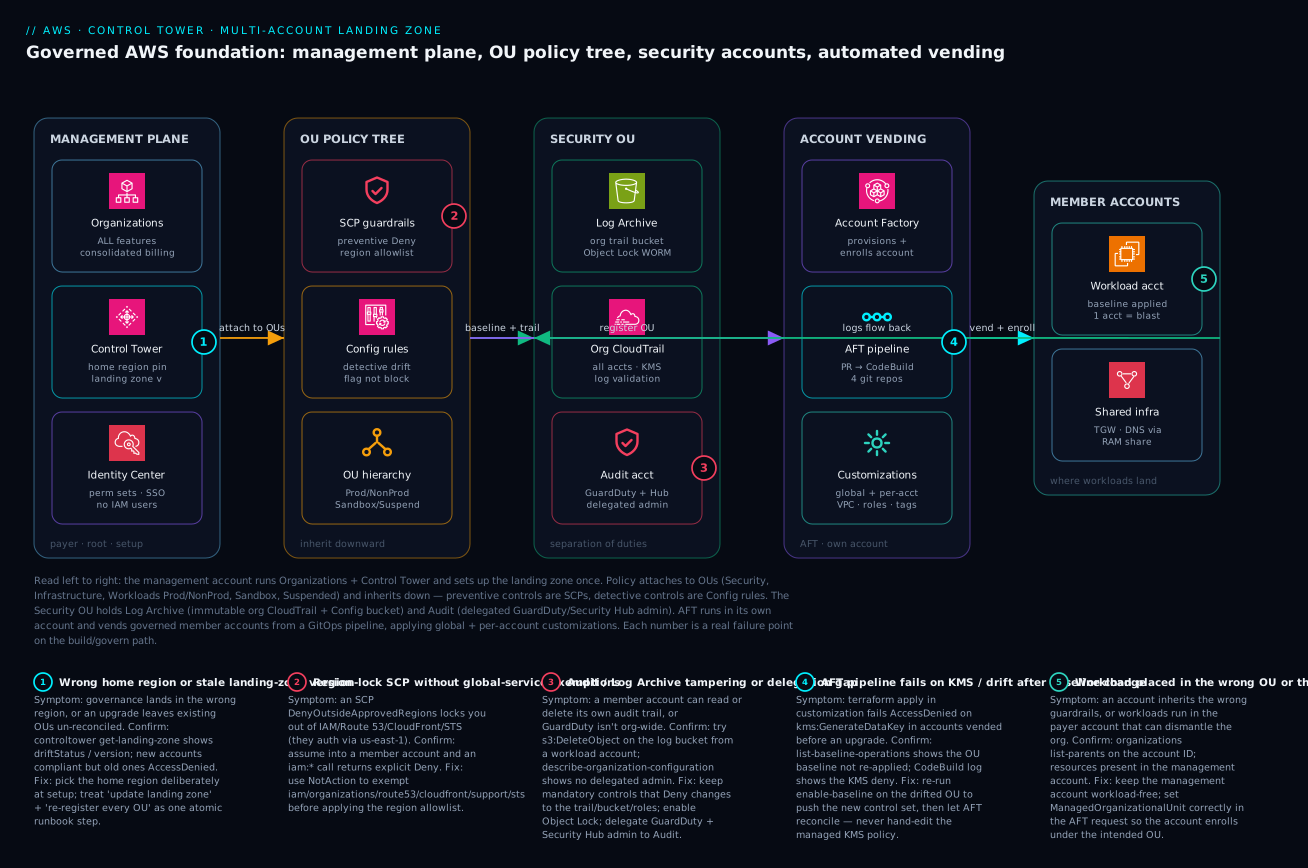
Read the diagram left to right as a build-and-govern path. On the far left sits the management plane: the Organizations root in ALL-features mode (consolidated billing, SCP support), Control Tower pinned to a home region and tracking a landing-zone version, and IAM Identity Center issuing permission sets so no human ever needs an IAM user. From here, policy flows down into the second zone — the OU policy tree — where preventive SCPs (the region allowlist, the leave-org deny) and detective Config rules attach to OUs (Workloads/Prod, NonProd, Sandbox, Suspended) and inherit to every account beneath. The third zone is the Security OU: the Log Archive account holding the immutable org-trail bucket (Object Lock WORM), the org CloudTrail trail with log validation, and the Audit account running GuardDuty and Security Hub as delegated administrator.
The right half is how accounts are born and where workloads live. The fourth zone is account vending: Account Factory (the Service Catalog product) provisions and enrolls an account, the AFT pipeline drives it from a pull request through CodeBuild across four git repos, and customizations bake a standard VPC, break-glass roles, budgets, and tags into the result. The vended member accounts in the fifth zone are where workloads actually run — each account a blast-radius boundary — with shared infrastructure (Transit Gateway, DNS) reaching them via RAM shares. Crucially, logs flow back from every member account into the Log Archive, closing the loop. The five numbered badges mark the real failure points: a wrong home region or stale landing-zone version, a region-lock SCP that forgot the global-service exemptions, an audit/log-archive tampering or delegation gap, an AFT pipeline failing on KMS after a baseline change, and a workload placed in the wrong OU or the management account.
Real-world scenario
A fintech platform team — call it NorthLedger — runs ~140 accounts under AFT for a payments product subject to PCI-DSS and SOC 2. Their OU tree was textbook: Security (Log Archive, Audit), Infrastructure (Network, Shared-Services), Workloads/Prod and Workloads/NonProd, Sandbox, and Suspended. Account vending was a pull request; a new squad got a governed prod and non-prod account within an afternoon, each with a baselined VPC, break-glass role, budget, and the org trail already capturing every API call into the immutable Log Archive bucket.
The wall they hit came during a routine landing-zone upgrade. A new baseline version shipped a stricter mandatory control on the org CloudTrail’s KMS key policy. After the platform lead clicked Update landing zone, every subsequent AFT account-customization run started failing at terraform apply with AccessDenied on kms:GenerateDataKey — but only in accounts vended before the upgrade. Brand-new accounts were fine. The on-call engineer’s first instinct was to edit the KMS key policy by hand to add the CodeBuild execution role back. That “fix” worked for ten minutes and then Control Tower’s drift detection flagged the key as non-compliant and the platform reconciled it back, breaking the pipeline again — now with an added drift alarm.
The actual root cause: an in-place landing-zone update updates the managed baseline definition, but it does not re-apply that baseline to already-enrolled OUs. The pre-existing accounts were sitting in a drifted state against the new control set, and their CodeBuild execution role could no longer write encrypted logs because the baseline that would have re-granted it had never been pushed down to their OU. New accounts vended after the upgrade got the new baseline at enrollment, which is why they worked.
The correct fix was not to touch the KMS policy at all. They re-registered each affected OU to push the new baseline down, then let AFT reconcile:
# Re-apply the current baseline to a drifted OU so enrolled accounts converge
aws controltower enable-baseline \
  --baseline-identifier "$AWS_CONTROL_TOWER_BASELINE_ARN" \
  --target-identifier "$WORKLOADS_PROD_OU_ARN" \
  --baseline-version "4.0" \
  --parameters '[{"key":"IdentityCenterEnabledBaselineArn","value":"'"$IC_BASELINE_ARN"'"}]'

# Then list operations to confirm the OU baseline op reached SUCCEEDED
aws controltower list-baseline-operations \
  --query 'baselineOperations[0].{Op:operationType,Status:status}'
Within twenty minutes of the OU baselines reaching SUCCEEDED, the CodeBuild roles regained kms:GenerateDataKey through the managed policy, the drift alarms cleared, and the stalled customization pipelines drained. The lasting lesson NorthLedger wrote into their runbook: treat update landing zone and re-register every registered OU as one atomic change-management step, gated behind approval and a maintenance window. Upgrading the baseline without re-registering OUs leaves your existing fleet quietly non-compliant until something downstream — usually a pipeline — trips over it at the worst possible time. They also added a synthetic canary: a throwaway account in a PolicyStaging OU that runs the full vend+customize flow nightly, so a baseline regression surfaces in CI, not in a payments incident.
Going deeper
The build above is the ninety-percent path. This section is the other ten percent — the control-identifier taxonomy you will hit the first time you script controls, the two account-customization mechanisms AWS ships besides AFT, how to bring a pre-existing account under governance, the honest Control-Tower-vs-alternatives decision, and the drift taxonomy that tells you which repair action to reach for. None of this replaces the core; it is what you need the day the abstraction leaks.
Control identifiers decoded: AWS-GR_*, CT.*.PR.*, SH.*, and Control Catalog ARNs
The moment you enable controls from code instead of the console, you meet three different naming schemes, and confusing them wastes an afternoon. A control’s friendly identifier encodes its lineage and behavior:
| ID shape | Example | Behavior | Implemented as | Notes |
|---|---|---|---|---|
AWS-GR_<NAME> |
AWS-GR_ENCRYPTED_VOLUMES, AWS-GR_RESTRICTED_COMMON_PORTS |
Preventive or detective | SCP (preventive) or Config rule (detective) | The original “guardrail” IDs; still valid |
CT.<SERVICE>.PR.<n> |
CT.S3.PR.1, CT.CLOUDTRAIL.PR.1, CT.EC2.PR.1 |
Proactive | CloudFormation hook (preCreate/preUpdate) |
Only fires on CloudFormation stack operations |
SH.<SERVICE>.<n> |
SH.S3.1, SH.EC2.2 |
Detective | Security Hub managed control | Surfaced through the Security Hub standard |
The proactive nuance is the one that bites experienced engineers. A proactive control is a CloudFormation hook, so it evaluates a resource only when that resource is created or updated through a CloudFormation stack operation. A volume created by a raw aws ec2 create-volume, by the console’s “Launch instance” wizard, or by a Terraform aws_ebs_volume never passes through the hook and is not caught by the proactive control. Proactive means “block the non-compliant CloudFormation deploy,” not “block the action everywhere.” If you need a path-independent guarantee, the preventive SCP (which denies the API call itself, no matter who makes it) is the tool — proactive and preventive are complements, not substitutes.
Under the friendly IDs sit ARNs, and AWS now issues two flavors. Newer controls live in the Control Catalog and carry a global ARN that is Region-independent and recommended for all automation:
Global (recommended):  arn:aws:controlcatalog:::control/{opaque-id}
                       e.g. arn:aws:controlcatalog:::control/k4izcjxhukijhajp6ks5mjxk

Regional (legacy):     arn:aws:controltower:{region}::control/{ID}
                       e.g. arn:aws:controltower:us-east-1::control/YEHYWYAUIQHZ
Regional ARNs still work in the controltower and controlcatalog APIs, but they differ per Region for the same control, so pinning them into IaC is a portability trap — prefer the global ARN. You can enumerate every control, its behavior, and its global ARN without touching a landing zone:
# Browse the catalog to find the control ARN you want to enable (read-only)
aws controlcatalog list-controls \
  --query 'Controls[?Behavior==`PROACTIVE`].{Name:Name,Arn:Arn}' --output table

# Resolve a legacy regional ARN to its global ARN
aws controlcatalog get-control \
  --control-arn "arn:aws:controltower:us-east-1::control/YEHYWYAUIQHZ" \
  --query '{Global:Arn,Behavior:Behavior}'
Then aws controltower enable-control --control-identifier <arn> --target-identifier <ou-arn> (the same shape the core lesson used) turns it on for an OU. Rule of thumb: script with global ARNs, read logs and dashboards by friendly ID, and never assume a CT.*.PR.* proactive control covers a non-CloudFormation path.
Three ways to bake resources into accounts: AFT vs CfCT vs AFC
The core lesson built AFT (Account Factory for Terraform) in depth because it is the GitOps-native choice. But AWS ships two other first-party mechanisms, and picking the wrong one means running a pipeline you did not need — or hand-clicking something a pipeline should own. All three sit on the same Control Tower foundation; they differ in language, who maintains the machinery, and what triggers a run.
Account Factory Customization (AFC) is the console-native option with no pipeline to maintain. You author a blueprint — a single AWS Service Catalog product wrapping a CloudFormation template (or a Terraform “External” product) — and store it in a hub account (explicitly not the management account). At provision time, at enroll time, or later via Update account, Control Tower attaches that one blueprint and deploys its resources as a StackSet into the target. Constraints worth knowing: one blueprint per account; the Service Catalog product must live in the hub account in the landing zone’s home Region; you choose “home Region only” or “all governed Regions” (no arbitrary Region subset); and the hub needs an AWSControlTowerBlueprintAccess role while the target needs the usual AWSControlTowerExecution role. AFC is the right tool when a team wants a bespoke baseline on a few accounts and does not want to own CodePipeline.
Customizations for Control Tower (CfCT) is a CloudFormation-launched AWS Solution that turns a manifest.yaml into org-wide deployments. Each entry names a resource and a deploy_method — stack_set (a CloudFormation StackSet) or scp — plus deployment_targets of OUs and/or accounts. A CodePipeline applies the manifest and, crucially, re-applies it automatically on Control Tower lifecycle events: when Account Factory creates a new account, CfCT deploys that account’s attached templates and policies without a human. CfCT deploys CloudFormation, SCPs, and RCPs, which makes it the natural home for org-wide policy plus shared infrastructure stacks — the things you want every account or every Prod OU to get, expressed as StackSets rather than per-account Terraform.
Where they land side by side:
| Dimension | AFT | CfCT | AFC |
|---|---|---|---|
| Primary language | Terraform | CloudFormation (+ SCP/RCP) | CloudFormation or Terraform (Service Catalog product) |
| Pipeline to maintain | Yes (its own account, 4 repos, CodePipeline) | Yes (a CodePipeline the solution deploys) | None (Control Tower runs it) |
| Trigger | PR merge to the request repo | Manifest change + CT lifecycle events | Account provision / enroll / Update account |
| Granularity | Per account + global + per-bundle | Per OU / per account via manifest | One blueprint per account |
| Sweet spot | Full GitOps vending at scale | Org-wide SCPs/RCPs + shared StackSets | A bespoke blueprint on a few accounts, no pipeline |
| Vends the account itself? | Yes | No (customizes existing/enrolled) | Yes (at provision) or applies at enroll |
These are not mutually exclusive. A common enterprise shape is AFT to vend, CfCT for org-wide SCPs and shared StackSets, and AFC reserved for a partner-supplied blueprint. If you are already deep in Terraform, Account Factory for Terraform is your spine; reach for the others only where they remove work rather than add a system to babysit.
Enrolling an existing account (not just vending new ones)
Vending is the clean path; the messy reality is the 3-year-old account someone created before governance existed. Enrollment brings a pre-existing account under Control Tower’s baseline, and it fails in predictable ways if the prerequisites are not met:
| Prerequisite | Why it is required | Failure if skipped |
|---|---|---|
| Account is already a member of the Organization | Control Tower governs org members only | Nothing to enroll |
AWSControlTowerExecution role exists in the target |
Control Tower assumes it to apply the baseline | Enroll cannot execute in the account |
| Account is moved into a registered OU | The OU’s AWSControlTowerBaseline is what gets applied |
Account stays ungoverned |
| No conflicting AWS Config setup | The baseline creates a Config recorder/delivery channel | Enroll fails at the Config step (the classic one) |
| Root email / account not mid-operation | CT serializes operations | ConcurrentModification |
The AWSControlTowerExecution role is just a cross-account admin role trusting the management account — the same primitive you would create for any automation, with placeholders here:
{
  "Version": "2012-10-17",
  "Statement": [{
    "Effect": "Allow",
    "Principal": { "AWS": "arn:aws:iam::111111111111:root" },
    "Action": "sts:AssumeRole"
  }]
}
The single most common enrollment failure is a pre-existing AWS Config recorder or delivery channel in the account: the baseline wants to create its own, collides, and the operation errors. Remediation is to reconcile or delete the conflicting Config configuration in the target account first, then enroll. Once enrolled, the account is baselined like any vended account — and if a later baseline upgrade leaves it drifted, you converge it with the same OU re-registration (enable-baseline / the ResetEnabledBaseline path) the core lesson used, never by hand-editing the managed resources. In AFT-land, enrolling an existing account is simply an account-request whose AccountEmail matches the existing account rather than a fresh address.
Control Tower vs Landing Zone Accelerator vs roll-your-own
Control Tower is the right default, but it is not the only way to build a landing zone, and an architect should be able to defend the choice. Three options, honestly compared:
| AWS Control Tower | Landing Zone Accelerator (LZA) | Roll-your-own (Organizations + IaC) | |
|---|---|---|---|
| What it is | Managed, opinionated landing-zone service | CloudFormation-based AWS Solution driven by YAML config files | Your own Terraform/CDK over raw Organizations |
| Setup speed | Fastest (console wizard) | Slower (config files, deep options) | Slowest (you build everything) |
| Flexibility | Opinionated; limited knobs | Very high; deep network/security baselines | Total |
| Who owns drift/baseline logic | AWS (managed) | You + the solution’s tooling | You, entirely |
| Best for | Most orgs; standard compliance | Highly regulated / complex: GovCloud, air-gapped, FedRAMP, many-Region network baselines | Unusual constraints Control Tower/LZA cannot express |
| Relationship | The foundation | Runs on top of Control Tower (or standalone) | Replaces both |
The decision is mostly about how much bespoke governance you must express versus how much platform you want to own. Start with Control Tower. Reach for LZA when a regulator or an air-gapped partition forces baselines Control Tower does not offer out of the box — LZA is config-file-driven and can layer richer network and security scaffolding on top of a Control Tower landing zone. Choose roll-your-own only when you have a constraint neither can express and a platform team willing to build and maintain drift detection, baselines, and centralized logging themselves — a real, ongoing cost most teams should not pay. “We want more control” is rarely worth re-implementing what Control Tower gives you free.
Landing-zone versioning, drift types, and the repair path
The core lesson taught the headline rule — update the landing zone and re-register OUs as one atomic step. Going deeper means knowing the version surface and the full drift taxonomy, because different drifts need different fixes, and reaching for the wrong one (or the “repair landing zone” hammer) wastes a maintenance window.
Inspect the version state before you touch anything:
# What landing-zone version is deployed, and is a newer one available?
aws controltower list-landing-zones --query 'landingZones[].arn'
aws controltower get-landing-zone --landing-zone-identifier "$LZ_ARN" \
  --query '{Version:landingZone.version,Status:landingZone.status,Drift:landingZone.driftStatus}'
Control Tower reports several distinct drift conditions, and each maps to a specific remediation — not a generic “reset”:
| Drift type | What happened | Right remediation |
|---|---|---|
| Account drift | A member account diverged from its baseline (control disabled out-of-band) | Re-enroll the account |
| OU-wide drift after upgrade | New baseline not pushed to an already-enrolled OU | Re-register the OU (enable-baseline, current version) |
| SCP drift | A managed SCP was edited, detached, or re-attached by hand | Let Control Tower reconcile / re-register; stop hand-editing |
| OU structure drift | An account was moved between OUs manually | Move it back, or re-baseline for the new OU |
| Managed-resource drift | A Control Tower role, trail, or Config recorder was deleted/stopped in a member | Repair (reset) the landing zone, then re-register |
| Landing-zone version behind | Deployed version older than latest available | update-landing-zone + re-register every OU |
The heavy tool is Repair / Reset landing zone (reset-landing-zone): it re-applies Control Tower’s managed resources across the landing zone and is the right call when managed infrastructure (a baseline role, the org trail wiring, a Config recorder) has been deleted or corrupted in the shared accounts. It is not the tool for a single drifted member account (re-enroll that one) or for an OU that simply missed a baseline push (re-register that OU) — using reset for those is a sledgehammer that lengthens the outage. And because Control Tower serializes landing-zone operations, a second op launched while one runs returns LandingZoneInProgress or ConcurrentModificationException; the fix is patience, not retries in a loop. Wrap version upgrades in change management, run them in a window, and drive a nightly vend-and-customize canary in a throwaway PolicyStaging OU so a baseline regression surfaces in CI rather than in a payments incident.
Advantages and disadvantages
The honest trade-off of adopting Control Tower + AFT versus rolling your own or staying single-account:
| Advantages | Disadvantages |
|---|---|
| Account #100 is the same governed PR as #1 | The home region is hard to change later |
| Mandatory controls give an audit-ready baseline free | You live within mandatory controls; some workflows must adapt |
| Separation of duties (mgmt/log/audit) out of the box | More accounts = more operational surface (limits, billing, IAM) |
| Centralized immutable logging with no per-account wiring | Control Tower abstracts AWS primitives; hand-edits cause drift |
| AFT makes vending reproducible and fully audited | AFT has real setup complexity (its own account, 4 repos, a pipeline) |
| Drift detection surfaces divergence automatically | Upgrades are a two-step (update LZ + re-register OUs) people forget |
| SCPs give a hard preventive boundary above IAM | SCP mistakes (region lock without exemptions) can lock you out |
| Delegated admin keeps the payer account clean | Some newer services lag Control Tower governance support |
When each side matters: the advantages dominate the moment you are past a handful of accounts or face a compliance regime — the cost of not having a consistent baseline (a failed audit, a snowflake fleet, a breach that crosses accounts) dwarfs the operational overhead. The disadvantages matter most for tiny estates (a two-account startup may not need AFT yet) and for teams unwilling to invest in the upgrade/drift discipline — for them, the abstraction becomes a thing they fight rather than a thing that protects them. Build the muscle: never hand-edit managed resources, always re-register OUs on upgrade, and the disadvantages shrink to footnotes.
Hands-on lab
This lab builds the governance primitives you can practice safely without a full Control Tower enablement (which provisions billable accounts). You will create an OU, author and attach a region-allowlist SCP, prove it blocks a forbidden action, and verify the org posture an auditor checks. Run it in a sandbox organization you can afford to experiment in, from the management account.
Prerequisites: an AWS Organization in ALL features mode, the SCP policy type enabled at the root, and aws CLI v2 configured for the management account.
# 0. Confirm ALL features mode and that SCPs are enabled
aws organizations describe-organization --query 'Organization.FeatureSet'   # -> "ALL"
aws organizations list-roots --query 'Roots[0].PolicyTypes'                 # SERVICE_CONTROL_POLICY -> ENABLED

# If SCPs are not enabled, enable the policy type on the root:
ROOT_ID=$(aws organizations list-roots --query 'Roots[0].Id' -o tsv)
aws organizations enable-policy-type --root-id "$ROOT_ID" \
  --policy-type SERVICE_CONTROL_POLICY
# 1. Create a Workloads OU and a NonProd child under it
WORKLOADS_OU=$(aws organizations create-organizational-unit \
  --parent-id "$ROOT_ID" --name "Lab-Workloads" \
  --query 'OrganizationalUnit.Id' -o tsv)

NONPROD_OU=$(aws organizations create-organizational-unit \
  --parent-id "$WORKLOADS_OU" --name "Lab-NonProd" \
  --query 'OrganizationalUnit.Id' -o tsv)
echo "Workloads=$WORKLOADS_OU  NonProd=$NONPROD_OU"
# 2. Write the region-allowlist SCP (note the global-service NotAction exemptions)
cat > /tmp/region-allowlist.json <<'JSON'
{ "Version": "2012-10-17",
  "Statement": [{
    "Sid": "DenyOutsideApprovedRegions", "Effect": "Deny",
    "NotAction": ["iam:*","organizations:*","route53:*","cloudfront:*","support:*","sts:*"],
    "Resource": "*",
    "Condition": { "StringNotEquals": { "aws:RequestedRegion": ["us-east-1"] } }
  }]
}
JSON

SCP_ID=$(aws organizations create-policy \
  --name "lab-deny-non-approved-regions" --type SERVICE_CONTROL_POLICY \
  --content file:///tmp/region-allowlist.json \
  --query 'Policy.PolicySummary.Id' -o tsv)

aws organizations attach-policy --policy-id "$SCP_ID" --target-id "$NONPROD_OU"
echo "Attached SCP $SCP_ID to $NONPROD_OU"
# 3. Prove it. Move/assume into a MEMBER account in the NonProd OU, then:
#    A call in an approved region succeeds:
aws ec2 describe-vpcs --region us-east-1 --query 'Vpcs[].VpcId' -o table
#    The SAME call in a denied region returns AccessDenied regardless of IAM:
aws ec2 describe-vpcs --region eu-west-1
# Expected: An error occurred (UnauthorizedOperation/AccessDenied) ... explicit deny
# 4. Audit the posture the way a reviewer would
aws organizations list-policies-for-target --target-id "$NONPROD_OU" \
  --filter SERVICE_CONTROL_POLICY --query 'Policies[].Name' -o table
aws organizations list-parents --child-id "$NONPROD_OU" --query 'Parents[].Id' -o table
# 5. Teardown — detach and delete the lab SCP and OUs (order matters)
aws organizations detach-policy --policy-id "$SCP_ID" --target-id "$NONPROD_OU"
aws organizations delete-policy --policy-id "$SCP_ID"
aws organizations delete-organizational-unit --organizational-unit-id "$NONPROD_OU"
aws organizations delete-organizational-unit --organizational-unit-id "$WORKLOADS_OU"
Expected outcomes and what each proves:
| Step | Expected result | What it proves |
|---|---|---|
| 0 | ALL and ENABLED |
Org is ready for SCP governance |
| 1 | Two OU IDs printed | You can build the policy tree |
| 2 | An SCP ID, attached | Custom preventive control in place |
| 3a | us-east-1 call succeeds |
The allowlist permits approved regions |
| 3b | eu-west-1 call denied |
The SCP blocks regardless of IAM (boundary works) |
| 4 | SCP listed on the OU | The control is where you think it is |
| 5 | Clean delete | You can decommission governance safely |
Lab note: an OU cannot be deleted while it still contains accounts or child OUs, and an SCP cannot be deleted while still attached — hence the teardown order. If a delete fails with “not empty,” move the accounts out first.
Practice challenges
Work these in order — they escalate from “read the tree” to “make the AFT-vs-CfCT-vs-AFC call.” No live Control Tower enablement is needed; the governance-only ones you can try in a sandbox Organization, and the design ones you reason through. Each has a worked solution and a one-line why.
1. (Beginner) Name the three foundational accounts and place them. Which accounts does Control Tower create, and which OU does each non-management one live in?
<details><summary>Solution</summary>
Management (the Organizations root payer — runs Control Tower/SCPs, holds no workloads), Log Archive (in the Security OU — immutable central log store), and Audit (in the Security OU — cross-account security tooling / delegated admin).
Why: separating who-can-change-the-org from who-can-read-every-log from who-owns-the-log-store is the separation of duties an auditor checks for. </details>
2. (Beginner) Fix a region-lock lockout. A region-allowlist SCP is attached and now aws iam list-users fails with an explicit deny. Write the one change that fixes it.
<details><summary>Solution</summary>
Add the global-service exemptions to the SCP’s NotAction so the region Deny never catches services that authenticate through us-east-1:
"NotAction": ["iam:*","organizations:*","route53:*","cloudfront:*","support:*","sts:*"]
Why: IAM/Route 53/CloudFront/Organizations/STS are global and route through us-east-1; a blanket aws:RequestedRegion deny hits them unless exempted.
</details>
3. (Intermediate) Decode three control IDs. Classify AWS-GR_ENCRYPTED_VOLUMES, CT.S3.PR.1, and SH.EC2.2 by behavior, mechanism, and which creation paths each actually governs.
<details><summary>Solution</summary>
| ID | Behavior | Mechanism | Governs |
|---|---|---|---|
AWS-GR_ENCRYPTED_VOLUMES |
Detective (legacy guardrail) | AWS Config rule | Flags non-compliant resources after the fact, any path |
CT.S3.PR.1 |
Proactive | CloudFormation hook (preCreate/preUpdate) |
Only resources created/updated via CloudFormation stacks |
SH.EC2.2 |
Detective | Security Hub managed control | Flags after the fact via the Security Hub standard |
Why: the ID prefix tells you the behavior and mechanism at a glance — and reminds you a CT.*.PR.* proactive control does not catch console/CLI/Terraform-made resources.
</details>
4. (Intermediate) Guarantee no unencrypted EBS volume — via any path. You enable the proactive control CT.EC2.PR.* for unencrypted volumes and a teammate still creates one with aws ec2 create-volume. What went wrong, and what actually guarantees it?
<details><summary>Solution</summary>
The proactive control is a CloudFormation hook — a raw create-volume (or console, or Terraform) never passes through it. For a path-independent guarantee, enable account default EBS encryption and add a preventive SCP denying the disable of it (and/or denying RunInstances/CreateVolume without encryption):
{ "Effect": "Deny", "Action": "ec2:DisableEbsEncryptionByDefault", "Resource": "*" }
Why: proactive = block the non-compliant CloudFormation deploy; preventive SCP = block the API call itself. Only the SCP (plus default encryption) is path-independent. </details>
5. (Advanced) Pick AFT vs CfCT vs AFC for three jobs. (a) Push an org-wide SCP plus a StackSet enforcing an IAM password policy to every Prod account. (b) One team wants a bespoke data-platform blueprint on its two accounts with no pipeline to run. © Full GitOps vending of 100 accounts described in Terraform.
<details><summary>Solution</summary>
- (a) CfCT — a
manifest.yamldeploys the SCP (deploy_method: scp) and the password-policy StackSet (deploy_method: stack_set) to the Prod OU, re-applied on lifecycle events. - (b) AFC — a single Service Catalog blueprint in a hub account, attached to those two accounts; no pipeline to maintain.
- © AFT — the request repo vends and customizes 100 accounts from pull requests with a full audit trail.
Why: CfCT owns org-wide policy + StackSets, AFC owns a per-account blueprint with zero pipeline, AFT owns GitOps vending at scale — match the mechanism to the shape of the work. </details>
6. (Advanced) Enroll a 3-year-old account that fails at the Config step. An existing account’s enrollment errors partway through, at the baseline’s Config setup. Diagnose it and list the enrollment prerequisites.
<details><summary>Solution</summary>
The account almost certainly has a pre-existing AWS Config recorder / delivery channel that collides with the baseline’s own. Reconcile or delete the conflicting Config setup, then enroll. Prerequisites: the account is an Org member, has the AWSControlTowerExecution role (trusting the management account), is moved into a registered OU (with AWSControlTowerBaseline), and carries no clashing Config configuration. Converge any later drift with enable-baseline / ResetEnabledBaseline, never a hand-edit.
Why: enrollment applies the OU baseline into the account, and the baseline’s managed Config setup cannot coexist with a conflicting pre-existing one — the single most common enroll failure. </details>
Common mistakes & troubleshooting
The landing zone fights you in predictable ways. This is the symptom → root cause → confirm → fix playbook; scan for your symptom, confirm with the exact command, then apply the real fix (not the band-aid).
| # | Symptom | Root cause | Confirm (exact command / path) | Fix |
|---|---|---|---|---|
| 1 | AccessDenied on IAM after a region SCP |
Region allowlist with no global-service exemption | Assume into the account; aws iam list-users → explicit deny |
Add iam/route53/cloudfront/organizations/support/sts to NotAction |
| 2 | New account ignores its guardrails | OU was never registered with Control Tower | aws controltower list-enabled-baselines lacks the OU |
enable-baseline on that OU; re-vend/enroll |
| 3 | AFT customization fails kms:GenerateDataKey |
Baseline upgraded but OU not re-registered (drift) | list-baseline-operations; CodeBuild log shows KMS deny |
enable-baseline (current version) on the OU; never hand-edit the key |
| 4 | Account vend fails at validation | Duplicate AccountEmail or AccountName |
AFT Step Functions execution error in the AFT account | Use a unique plus-addressed email; unique name |
| 5 | Account landed in the wrong OU | ManagedOrganizationalUnit wrong in the request |
aws organizations list-parents --child-id <acct> |
Correct the request OU string; move + re-baseline |
| 6 | Control Tower shows an account “Not enrolled / drifted” | Manual change out-of-band (control disabled, account moved) | Control Tower dashboard → account status | Re-register OU or re-enroll the account; stop hand-editing |
| 7 | Logs missing for a new account | OU not registered, or trail config drifted | describe-trails --query "...IsOrganizationTrail" |
Re-register OU; verify the org trail is multi-region + logging |
| 8 | Can delete the audit trail from a workload account | Mandatory control relaxed or trail not org-level | Try aws cloudtrail stop-logging from a member account |
Restore mandatory controls; never relax trail protection |
| 9 | SCP “works” in console simulator but not live | Testing against the management account (exempt) | Run the action from a member account, not root | Always test SCPs in a member account |
| 10 | Landing-zone upgrade left fleet non-compliant | Updated LZ but skipped re-registering OUs | get-landing-zone version vs OU baseline versions |
Re-register every registered OU as part of the upgrade |
| 11 | Cannot delete an account immediately | Organizations has no instant delete | close-account → ~90-day suspended state |
Plan decommission as a multi-step runbook (below) |
| 12 | Runaway spend in a new account | No baseline budget in global customizations | Cost Explorer by cost-center tag |
Add an account budget + alarm to global customizations |
| 13 | Quarantined account still reachable | Deny-all SCP not attached / wrong OU | list-policies-for-target on the account |
Move to Suspended OU and attach the deny-all SCP |
| 14 | Hit “max accounts” on a big vend wave | Default account quota too low | Service Quotas console for Organizations | Request an increase early, before the wave |
The error/limit codes you will actually see across this surface, decoded:
| Code / message | Where it appears | Meaning | First fix |
|---|---|---|---|
AccessDenied (explicit deny) |
Any API in a member account | An SCP denies it (or IAM does not allow) | Check SCPs on the OU path and IAM |
kms:GenerateDataKey denied |
AFT CodeBuild / customization | Drifted baseline removed the KMS grant | Re-register the OU baseline |
AccountEmailAlreadyExists |
Account vend | Email not unique across all AWS | New plus-addressed root email |
ConcurrentModificationException |
Control Tower op | Another CT operation in progress | Wait; CT serializes landing-zone ops |
DRIFTED (account/control status) |
Control Tower dashboard | Account diverged from baseline | Re-register OU or re-enroll account |
ServiceQuotaExceeded (accounts) |
Org / vend | Org account limit reached | Raise quota via Service Quotas |
OU is not empty |
delete-organizational-unit |
Accounts/child OUs still inside | Move children out first |
Policy is attached |
delete-policy |
SCP still attached somewhere | Detach from all targets first |
LandingZoneInProgress |
update-landing-zone |
An LZ op already running | Wait for the current op to finish |
Decision table: which fix actually fits
When the dashboard is red, this table points you at the right corrective action instead of guessing:
| If you see… | It is probably… | Do this |
|---|---|---|
| One account drifted, others fine | A manual out-of-band change in that account | Re-enroll that single account |
| Whole OU’s accounts drifted after an upgrade | Baseline not re-applied post-upgrade | Re-register the OU baseline |
AccessDenied only outside one region |
A region-lock SCP | Verify global-service exemptions |
| Pipeline KMS denies post-upgrade | Drift on the log-encryption baseline | Re-register OU; do not edit the key |
| Account in the wrong place | Wrong ManagedOrganizationalUnit |
Move account + re-baseline |
| Spend alarm but no budget | Missing global-customization budget | Add budget to global customizations |
| Can tamper with logs from a member | Relaxed/missing mandatory control | Restore the mandatory control set |
Common beginner mistakes
These are misconceptions, not symptoms — the wrong mental models that send newcomers down the wrong path before an error ever appears. (The symptom → cause → confirm → fix table above is for when something is already broken; this is for getting the model right first.)
-
“An SCP grants my account permission.” It never does. An SCP is a ceiling, not a floor — effective permission is
IAM ∩ SCP. If your IAM policy allows an action but the action still fails, an SCP may be denying it; but adding an SCP will never enable an action IAM does not already allow. Right model: SCPs cap, IAM grants. -
“A proactive control blocks the action everywhere.” A proactive control is a CloudFormation hook — it only evaluates resources created or updated through CloudFormation stacks. A resource made by console, CLI, SDK, or Terraform sails past it. Right model: proactive = “block the non-compliant CloudFormation deploy”; for a path-independent block, use a preventive SCP.
-
“One big account with tags and IAM conditions is simpler than many accounts.” Tag-based isolation is one missing
Conditionaway from collapse, and IAM is additive — permissions only pile up. The account boundary is the one isolation primitive AWS cannot leak across by accident. Right model: the account is the wall; reach for a new account before you reach for another tag. -
“Control Tower and AWS Organizations are the same thing.” Organizations is the substrate — the root, OUs, member accounts, consolidated billing, and the SCP engine. Control Tower is an opinionated layer on top that orchestrates the landing zone, baselines, and managed controls. Right model: Organizations is the ground; Control Tower is the building code enforced on it.
-
“I’ll just click Enroll account for each one.” Clicking does not scale, leaves no review trail, and produces snowflake accounts that drift apart. Right model: vend and enroll through GitOps (AFT pull requests) or a manifest (CfCT), so every account is reviewed, reproducible, and logged.
-
“Updating the landing zone updates all my existing accounts.” An in-place landing-zone upgrade changes the managed baseline definition but does not re-push it to already-enrolled OUs — old accounts quietly drift against the new control set while new ones are fine. Right model: “update landing zone” and “re-register every OU” are one atomic change, gated behind a maintenance window.
-
“The management account is a good place for shared services or a workload.” It is the one account that can dismantle the whole org, SCPs do not even apply to it, and a workload there widens the blast radius to catastrophic. Right model: keep the management account empty of workloads and IAM users — access only via Identity Center, root behind hardware MFA.
-
“More OUs means better governance, so give every team its own OU.” The OU is the unit of policy, not the unit of org chart. If two teams share the same guardrails, they belong in the same OU; splitting them just multiplies attachments you must keep in sync. Right model: design the tree around how you govern (Prod vs NonProd vs Sandbox vs Suspended), not around reporting lines.
Best practices
- Choose the home region deliberately, once. It anchors the landing zone and is painful to undo. Pick your primary region with data-residency and latency in mind before enabling.
- Keep the management account workload-free. No IAM users, root on hardware MFA, access only via Identity Center. It is the one account that can dismantle everything.
- Design the OU tree around governance, not the org chart. Split
Prod/NonProdso you can apply stricter SCPs to prod; keep aSuspendedOU for decommissioning. - Never fight mandatory controls. If a workflow needs an action a mandatory control blocks, redesign the workflow — do not try to subvert the guardrail.
- Treat “update landing zone” and “re-register OUs” as one atomic step. Upgrading the baseline without re-registering OUs leaves existing accounts quietly non-compliant.
- Region-lock with the global-service exemptions every time. Always
NotActioniam/organizations/route53/cloudfront/support/stsor you will lock yourself out. - Vend accounts via AFT pull requests, never the console. GitOps gives you review, reproducibility, and a full audit trail; clicking does not scale.
- Put the universal baseline in global customizations. Standard VPC, break-glass role, budget+alarm, GuardDuty/Config, mandatory tags — every account, automatically.
- Do not sprawl per-account CloudTrail trails. The org trail already covers everything; redundant trails just multiply S3 and ingestion cost.
- Never hand-edit managed resources. Touching Control Tower’s roles, SCPs, KMS keys, or buckets creates drift the platform will flag and fight.
- Delegate security admin to the Audit account. Keep the payer clean; centralize GuardDuty, Security Hub, Config aggregation, and Access Analyzer in Audit.
- Harden the Log Archive bucket with Object Lock + validation. WORM retention plus log-file validation makes the audit trail tamper-evident and tamper-proof.
- Run a nightly vend canary in a staging OU. Catch baseline regressions in CI, not in a production incident.
Security notes
Security in a landing zone is layered, and each layer has a least-privilege story:
| Control area | Least-privilege / hardening practice | Mechanism |
|---|---|---|
| Human access | No IAM users; short-lived sessions only | IAM Identity Center permission sets |
| Management account | Root behind hardware MFA; no root keys | FIDO2 key; alarm on root usage |
| Preventive boundary | Deny dangerous actions above IAM | SCPs at OU/root level |
| Resource perimeter | Allow only org principals to touch resources | RCPs (Resource Control Policies) + data-perimeter SCPs |
| Cross-account roles | External ID + confused-deputy protection | sts:ExternalId condition on assume-role |
| Log integrity | Tamper-proof, cross-account audit trail | Log Archive + Object Lock + validation |
| Detection | Org-wide threat + config monitoring | GuardDuty + Security Hub (delegated to Audit) |
| Encryption | Logs and data encrypted with managed keys | KMS CMKs; mandatory control protects the log key |
| Network egress | Controlled, inspected outbound | Central egress VPC via Transit Gateway |
Two deeper points worth their own paragraph. First, preventive beats detective for the things that must never happen. A Config rule that detects a public bucket fires after the data is already exposed; an SCP (or a proactive hook) that blocks it never lets the window open. Reserve detective controls for posture you want to measure, and reach for preventive/proactive controls for posture you must guarantee. Second, the data perimeter is the modern frontier. SCPs cap what your principals can do; Resource Control Policies (RCPs) cap who can touch your resources from outside the org. Together with aws:PrincipalOrgID conditions they close the “confused deputy” and cross-org-access gaps that plain IAM leaves open — see Resource Control Policies and the data perimeter and IAM least privilege and permission boundaries for the deep mechanics, and KMS encryption: keys, policies, envelope, rotation for the key policies that protect the log store.
Cost & sizing
The landing zone itself is cheap; what drives the bill is the plumbing it standardizes — logging, detection, and centralized networking — multiplied across accounts. Control Tower has no per-account license fee; you pay for the AWS resources it provisions and the per-account baselines.
| Cost driver | What it is | Rough cost | How to control |
|---|---|---|---|
| Control Tower service | The orchestration itself | No direct charge | n/a |
| AWS Config (per account) | Configuration items recorded + rules evaluated | ~$0.003/config item + rule eval | Scope recording; avoid recording chatty global resources everywhere |
| Org CloudTrail (mgmt events) | First copy of management events | Free (1st mgmt trail) | Do not duplicate per-account trails |
| CloudTrail data events | S3/Lambda object-level events | ~$0.10 per 100k events | Scope to sensitive resources only |
| S3 Log Archive storage | Years of logs | ~$0.023/GB → Glacier ~$0.004/GB | Lifecycle to Glacier; Object Lock retention sized to compliance |
| GuardDuty | Threat detection per account | Per-GB analyzed (CloudTrail/DNS/flow) | Org-wide but watch flow-log volume |
| Security Hub | Findings + checks per account | Per check + finding ingestion | Disable unneeded standards |
| KMS | CMKs for log/data encryption | ~$1/key/month + API calls | Reuse keys where policy allows |
| NAT / central egress | Shared outbound data processing | ~$0.045/GB + hourly | Gateway endpoints for S3/DynamoDB |
| AFT pipeline | CodeBuild minutes, small backend | Pennies per vend | Negligible; runs on merge |
Rough INR framing for an Indian team: the fixed landing-zone overhead (a couple of KMS keys, the AFT backend, the base Config recording in the foundational accounts) lands in the low ₹2,000–6,000/month range before workloads. The variable cost scales with log and flow-log volume and GuardDuty/Security Hub per-account charges — for a 100-account estate, central logging + detection commonly runs ₹40,000–1,50,000/month depending on flow-log retention and data-event scope. The single biggest lever is VPC Flow Log and CloudTrail data-event volume: centralize and lifecycle aggressively, and scope data events to genuinely sensitive buckets rather than turning them on everywhere.
Sizing guidance — match the spend control to the estate:
| Estate size | Posture | What to enable | What to defer |
|---|---|---|---|
| 1–5 accounts | Single team / startup | Control Tower, org trail, basic Config | Full AFT (manual vend is fine) |
| 5–30 accounts | Growing platform | AFT, global customizations, GuardDuty | Heavy data-event trails |
| 30–150 accounts | Enterprise | Delegated admin, central egress, RCPs | Per-account bespoke trails |
| 150+ accounts | Regulated estate | Nightly vend canary, aggregators, Vault Lock backups | Anything that does not scale to clicks |
Free-tier and quota notes: AWS Config and GuardDuty offer limited free trials/tiers per account, and the first organization management-events CloudTrail trail is free — design around these so you are not paying for redundant copies. Request account-count quota increases well before a large vend wave, not during it.
Interview & exam questions
Q1. Why is the AWS account, not IAM or tags, the recommended isolation boundary in a landing zone?
The account is where IAM, SCPs, networking, and billing all stop — it is the one boundary AWS cannot leak across by accident. IAM is additive and tag-based isolation is one missing Condition from collapse, whereas a compromised or runaway account cannot reach another account’s resources, limits, or data. Maps to SAP-C02 (multi-account strategy) and the Security specialty.
Q2. Distinguish preventive, detective, and proactive controls in Control Tower. Preventive controls are SCPs that block a non-compliant API call at call time; detective controls are Config rules that flag non-compliance after the fact; proactive controls are CloudFormation hooks that block a non-compliant resource before it is provisioned. “Block the call / flag the state / block the deploy.” Relevant to SAP-C02 and SCS-C02.
Q3. A region-lock SCP locked the team out of IAM. What went wrong and how do you fix it?
Global services (IAM, Route 53, CloudFront, Organizations, STS) authenticate through us-east-1, so a blanket region Deny catches them. The fix is a NotAction exemption listing those services so the Deny applies only to regional services. Always test SCPs in a member account because the management account is exempt.
Q4. What are the three foundational accounts and why are they separated? Management (Organizations, billing, SCPs — no workloads), Log Archive (immutable central log store), and Audit (cross-account security tooling). The separation enforces separation of duties: whoever can change the org cannot read every log, and neither can tamper with the log store — the property auditors require.
Q5. After a landing-zone upgrade, old accounts started failing on KMS while new ones worked. Why?
An in-place landing-zone update changes the managed baseline definition but does not re-apply it to already-enrolled OUs, so pre-existing accounts drift against the new control set. New accounts get the new baseline at enrollment. The fix is to re-register (re-enable-baseline) every registered OU as part of the upgrade.
Q6. Why deploy AFT instead of clicking “Enroll account”? AFT turns account vending into a reviewed, reproducible GitOps pipeline: an account is a Terraform request that, on merge, vends, enrolls, and customizes the account with a full audit trail. Console enrollment does not scale, leaves no review trail, and produces snowflake accounts.
Q7. What is the difference between AFT global and account customizations?
Global customizations run on every account AFT touches (the universal baseline: standard VPC, break-glass role, budgets, tags, GuardDuty/Config). Account customizations are named bundles selected per request (workload-prod, sandbox) for environment-specific resources. Global runs first, then the selected account bundle.
Q8. How does the landing zone make audit logs tamper-proof? The org CloudTrail trail delivers to an S3 bucket in the Log Archive account (a different account from workloads), mandatory controls deny members from altering the trail/bucket/roles, S3 Object Lock enforces WORM retention, and log-file validation produces tamper-evident digests. A workload-account compromise cannot delete its own audit trail.
Q9. What is SCP evaluation logic, and does it grant permissions? SCPs never grant permission; they cap what IAM can allow. Effective permissions are the intersection of IAM allows and SCP allows, and an explicit Deny anywhere overrides any Allow. They also do not apply to the management account or restrict service-linked roles.
Q10. How do you decommission a workload account?
There is no instant delete. Move it to the Suspended OU and attach a deny-all SCP to freeze it, drain and back up needed data, remove its AFT request so the pipeline stops reconciling it, then close-account — it enters a ~90-day suspended state before AWS permanently deletes it.
Q11. What is the role of RCPs versus SCPs in a data perimeter?
SCPs cap what your principals can do (identity perimeter); Resource Control Policies cap who can access your resources, including principals outside the org (resource perimeter). Together with aws:PrincipalOrgID conditions they close confused-deputy and cross-org-access gaps that plain IAM leaves open.
Q12. How do you detect and remediate drift in Control Tower? Control Tower’s dashboard surfaces drift when an account diverges from its baseline (a control disabled out-of-band, an account moved between OUs manually, a stopped Config recorder). Remediate by re-registering the OU or re-enrolling the account — never by hand-patching managed roles/SCPs/buckets, which itself creates drift.
Quick check
- You apply a region-allowlist SCP and immediately lose access to IAM. What single change fixes it?
- A brand-new account vended fine but ignores all your guardrails. What was almost certainly skipped?
- After clicking “Update landing zone,” old accounts fail on
kms:GenerateDataKeybut new ones are fine. What is the cause and the fix? - Which account holds the immutable central log store, and why is it a separate account from the management account?
- Where do you put a standard VPC that every vended account should receive — global customizations or account customizations?
Answers
- Add the global-service exemptions — list
iam,organizations,route53,cloudfront,support, andstsin the SCP’sNotActionso the region Deny does not catch services that authenticate throughus-east-1. - The OU was never registered with Control Tower (
enable-baselineon that OU). An unregistered OU does not apply the baseline/controls to accounts placed in it. - Cause: the in-place upgrade updated the baseline definition but did not re-apply it to already-enrolled OUs, so old accounts drifted. Fix: re-run
enable-baseline(current version) on each affected OU; never hand-edit the KMS key. - The Log Archive account. Keeping it separate from management enforces separation of duties — a compromise of the org-changing account (management) cannot reach or delete the audit logs, and members cannot tamper with their own trail.
- Global customizations — they run on every account AFT touches, so the standard VPC lands everywhere automatically. Account customizations are for environment-specific differences (e.g. a larger prod CIDR).
Glossary
- Landing zone — A governed, pre-wired AWS foundation (accounts, OUs, identity, logging, guardrails) that workloads “land” in, ready on day one.
- AWS Organizations — The service that groups AWS accounts under a root, into OUs, with consolidated billing and policy attachment.
- Management account — The Organizations root payer; runs Control Tower and SCPs and must hold no workloads.
- Organizational unit (OU) — A container for accounts and the unit at which policy (SCPs, controls) is attached and inherited.
- Service Control Policy (SCP) — An organization-level Deny/Allow boundary that caps what IAM in member accounts can permit; never grants permission.
- Resource Control Policy (RCP) — An organization-level policy that caps who can access your resources, including principals outside the org (resource-side perimeter).
- Control (guardrail) — A managed governance rule applied to an OU; preventive (SCP), detective (Config), or proactive (CloudFormation hook).
- Baseline — The set of controls and configuration Control Tower applies to a registered OU; drifts if not re-applied on upgrade.
- Log Archive account — The Security-OU account holding the immutable central S3 destination for org CloudTrail and Config logs.
- Audit account — The Security-OU account hosting cross-account security tooling (delegated GuardDuty/Security Hub admin, read/audit roles).
- IAM Identity Center — Workforce SSO that issues short-lived sessions via permission sets, replacing IAM users for humans.
- Account Factory — Control Tower’s Service Catalog product that provisions and enrolls new governed accounts.
- Account Factory for Terraform (AFT) — A Terraform GitOps wrapper around Account Factory; vends accounts from pull requests in its own dedicated account.
- Customization — Terraform that AFT runs inside a vended account (global = every account; account = per-environment bundle).
- Home region — The region that anchors the Control Tower landing zone and its managed resources; chosen at setup and painful to change.
- Drift — The state of an enrolled account diverging from its baseline; detected by Control Tower and remediated by re-registering/re-enrolling.
- Object Lock (WORM) — S3 write-once-read-many retention that makes delivered logs tamper-proof.
- Control Catalog — The AWS service that lists every managed control with its behavior and a Region-independent global ARN; the modern way to discover and reference controls in code.
- Global control ARN — A Region-independent control identifier of the form
arn:aws:controlcatalog:::control/<id>, recommended over the legacy regionalarn:aws:controltower:<region>::control/<ID>for all automation. - Legacy guardrail ID (
AWS-GR_*) — The original Control Tower control identifiers (e.g.AWS-GR_ENCRYPTED_VOLUMES), covering preventive (SCP) and detective (Config) guardrails; still valid. - Proactive control (
CT.*.PR.*) — A control implemented as a CloudFormation hook that blocks a non-compliant resource at deploy time — but only when the resource is created/updated through a CloudFormation stack operation. - Security Hub detective control (
SH.*) — A detective control surfaced through an AWS Security Hub standard (e.g.SH.S3.1); flags non-compliance after the fact. - Account Factory Customization (AFC) — Control Tower’s console-native, pipeline-free way to apply a single blueprint to an account at provision, enroll, or update time.
- Blueprint — An AWS Service Catalog product (CloudFormation or Terraform/External) stored in a hub account that AFC deploys into a target account; one blueprint per account.
- Hub account — The dedicated account (not the management account) where AFC blueprints live as Service Catalog products, in the landing zone’s home Region.
- Customizations for Control Tower (CfCT) — A CloudFormation-launched AWS Solution that deploys StackSets, SCPs, and RCPs across OUs/accounts from a
manifest.yaml, re-applied automatically on Control Tower lifecycle events. - Landing Zone Accelerator (LZA) — A config-file-driven AWS Solution that layers deeper, highly regulated (e.g. GovCloud, FedRAMP, air-gapped) landing-zone scaffolding on top of, or in place of, Control Tower.
AWSControlTowerExecutionrole — The cross-account admin role, trusting the management account, that Control Tower assumes to apply the baseline; required in any account you enroll.- Enrollment — Bringing a pre-existing organization-member account under Control Tower governance by adding the execution role, moving it into a registered OU, and applying the baseline.
Next steps
- AWS Organizations: SCP guardrails and delegated admin — the policy mechanics underneath the landing zone, in depth.
- Control Tower guardrails: the multi-account foundation — the full control catalog and how to place each one.
- Account Factory for Terraform: account vending and customizations — the AFT pipeline internals, repos, and customization patterns.
- IAM Identity Center: permission sets and ABAC across accounts — human access to the fleet you just built.
- Transit Gateway multi-account VPC architecture — the shared network the landing zone enables, with central egress and segmentation.
- AWS zero-to-hero capstone: a Well-Architected landing zone — assemble everything into a production-grade foundation.