The auditor asks one question and your whole quarter hinges on the answer: “Prove that no one disabled encryption on a production database between January and March, and if they did, show me when it was caught and fixed.” If the only honest reply you can give is “we think it was fine,” you have already failed. This is the gap AWS CloudTrail and AWS Config exist to close — not as two security products you bolt on, but as the two halves of a single evidence machine. CloudTrail is the immutable record of who called which API, when, from where, and whether it was allowed; Config is the continuous record of what every resource’s configuration actually is right now, how it got there, and whether it still satisfies the rules you wrote. CloudTrail answers who did what. Config answers is it still right. You need both, you need them turned on everywhere before the incident, and you need the evidence stored where the person who broke the rule cannot quietly erase the proof.
This article is the deep reference for running that machine at organization scale. We treat audit and compliance not as a checkbox but as a data pipeline with five stages — enable org-wide → record in every account → archive immutably → detect and query → remediate — and we go through each stage option by option: every trail type, every event category, the Config recorder’s recording group, conformance packs, the difference between AWS-managed and custom rules, remediation via SSM Automation versus Lambda, and the exact way each stage fails silently. Because this is the document you open mid-audit, the trail settings, the Config rule states, the event reference, the limits, the IAM and KMS gotchas and the failure playbook are all laid out as tables you can scan — read the prose once, keep the tables open when the auditor is in the room.
By the end you will stop hoping your logging is complete and start proving it. You will know why a per-account trail is a liability and an organization trail is the only correct answer, why a Config recorder that excludes global resources will swear an IAM policy is compliant when it never looked, why an S3 archive without Object Lock is evidence a privileged attacker can delete, and how a single misconfigured conformance pack can either save an audit or bury your team under ten thousand meaningless findings. The mechanism is simple; getting every setting right so the evidence holds up is the craft.
What problem this solves
Security on AWS is not only about preventing bad actions with IAM and SCPs — preventive controls have gaps, insiders have legitimate access, and “who approved this?” is a question you will be asked after the fact, not before. You need three capabilities that prevention alone cannot give you: an audit history of every change and every API call, continuous verification that resources still match policy long after they were created, and fast forensic search when something looks wrong at 2 a.m. CloudTrail provides the activity record; Config provides the configuration record and the compliance verdict; together they are the substrate every framework — PCI-DSS, SOC 2, HIPAA, ISO 27001, FedRAMP — assumes you already have.
What breaks without this, concretely: a team enables EBS encryption “at creation” and assumes it stays on, but six months later a Terraform module default flips and three hundred new volumes are unencrypted — and nobody knows until the audit, because there was no continuous check. An engineer makes a public S3 bucket “just for a demo,” forgets it, and it is found by a researcher instead of by you. A privileged credential is stolen and the attacker’s first move is to stop CloudTrail and delete the logs — and they succeed, because the trail wrote to a bucket in the same account they compromised. Each of these is invisible without continuous recording in a tamper-proof location, and each is a board-level incident when discovered the wrong way.
Who hits this: everyone past a single account. It bites hardest on multi-account organizations (where “is every account logging?” is a real and easily-wrong question), regulated workloads (where the auditor wants evidence, not assurances), and any team that has confused “we turned on CloudTrail once” with “we have a complete, immutable, queryable audit trail.” The fix is never “we’ll be more careful” — it is a recording plane that cannot be opted out of, an archive that cannot be tampered with, and rules that re-check reality on a schedule.
To frame the whole field before the deep dive, here is the division of labour between the two services and where each one is the right tool:
| Question you must answer | Which service | What it records | Where the answer lives | Typical latency |
|---|---|---|---|---|
| Who called this API, when, from where? | CloudTrail | The API event (identity, params, source IP, result) | S3 archive / CloudWatch Logs / CloudTrail Lake | ~5–15 min to S3; ~minutes to Lake |
| Was this action allowed or denied? | CloudTrail | errorCode / errorMessage on the event |
Same event record | Same |
| What is this resource’s configuration now? | Config | The current configuration item (CI) | Config console / aggregator / S3 snapshot | Near-real-time on change |
| How did this resource change over time? | Config | The configuration timeline (CI history) | Config resource timeline | Per change |
| Is this resource compliant with policy? | Config | Rule evaluation result (COMPLIANT / NON_COMPLIANT) | Config rules / Security Hub | Minutes after change or periodic |
| Is the whole org compliant against a framework? | Config + Security Hub | Conformance-pack + standard scores | Aggregator / Security Hub | Continuous |
| What changed across all of this last night? | CloudTrail Lake / Athena | SQL over the event store | Lake query / Athena | Query time |
Learning objectives
By the end of this article you can:
- Explain precisely what CloudTrail records versus what Config records, and pick the right one (or both) for any audit, forensic or compliance question.
- Stand up an organization CloudTrail that enrolls every current and future account automatically, captures management and (selectively) data events, and delivers to an immutable archive.
- Configure the Config recorder correctly — recording group, global resources, all regions — and explain every way a misconfigured recorder produces false “compliant” verdicts.
- Choose between AWS-managed Config rules, custom Lambda rules, custom Guard rules, and conformance packs, and map them to PCI-DSS / CIS / FSBP controls.
- Build auto-remediation that is safe: SSM Automation runbooks versus custom Lambda, idempotency, exception tags, and blast-radius control.
- Make the evidence tamper-proof with S3 Object Lock (WORM), a KMS CMK with a correct key policy, CloudTrail log-file validation, and SCPs that deny tampering.
- Query the audit trail fluently with CloudTrail Lake and Athena, and run a forensic investigation from a single suspicious event back to the full blast radius.
- Diagnose the silent failures — a new account with no trail, a recorder that’s off, a KMS deny that drops logs, a finding flood — and confirm each with an exact CLI command.
Prerequisites & where this fits
You should already understand the AWS account model: an AWS Organization with a management account and member accounts grouped into organizational units (OUs), the difference between identity-based and resource-based policies, and that service control policies (SCPs) set permission ceilings. You should be comfortable running the aws CLI, reading JSON, and reasoning about IAM roles and KMS key policies. Familiarity with S3 bucket policies and EventBridge rules helps; you do not need prior Config experience — we build it from zero.
This sits squarely in the Governance & Security track and assumes the multi-account foundation is already in place. The account and OU structure comes from AWS Organizations and IAM Foundations: Accounts, OUs and Roles, and the guardrail layer it pairs with is AWS Control Tower Guardrails: Building a Secure Multi-Account Foundation — Control Tower in fact turns on an org trail and a baseline set of Config rules for you, and understanding what it provisions is half the battle. The archive bucket’s storage economics are governed by Amazon S3 Storage Classes and Lifecycle: Optimize Cost Without Losing Data, and the remediation functions ride on the patterns in AWS Lambda Patterns: Event-Driven Functions That Scale to Zero.
A quick map of who owns which layer, so during an incident you escalate to the right person:
| Layer | What lives here | Who usually owns it | Failure it can cause |
|---|---|---|---|
| Management account | Org trail + delegated admin setup | Cloud platform / security | New accounts not logging; org-wide gap |
| Member account | Local Config recorder, resources | App / workload team | Recorder off → false compliant |
| Security / Log Archive account | Immutable bucket, KMS CMK | Security operations | Tampered or unreadable evidence |
| Audit / delegated-admin account | Aggregator, Security Hub, GuardDuty | Security operations | No org-wide view; finding flood |
| Remediation tooling | SSM runbooks, Lambda, EventBridge | Platform + security | Broken or runaway auto-fixes |
| Network / KMS | CMK key policy, VPC endpoints | Security + network | Logs silently dropped on encrypt |
Core concepts
Six mental models make every later decision obvious.
CloudTrail records the verb; Config records the noun. A CloudTrail event is an action — RunInstances, PutBucketPolicy, AssumeRole — captured with the identity that made the call, the parameters, the source IP, the user agent, and crucially the result (errorCode if it was denied). A Config configuration item (CI) is a snapshot of a resource’s state — this security group’s rules, this bucket’s encryption setting — at a point in time, with a timeline of how it changed. CloudTrail tells you Alice deleted the rule at 14:03 from this IP; Config tells you the rule existed at 14:00 and was gone at 14:05, and here is every version in between. You correlate the two: Config flags the bad state, CloudTrail names who caused it.
Trails are per-account unless you make them organization-wide. A plain trail logs only the account it lives in. An organization trail, created in the management (or a delegated-admin) account with the organization flag set, is automatically created in every member account, including ones created later, and member accounts cannot modify or delete it. This single property — automatic, mandatory, future-proof enrollment — is why a per-account trail is a governance liability: the day someone spins up account #47 and forgets to add a trail is the day you have a blind spot you won’t discover until the audit.
The Config recorder is opt-in per region and easy to under-scope. Config does nothing until you turn on the configuration recorder in a region, and it only records the resource types in its recording group. If the recorder is off in ap-south-1, Config knows nothing about resources there. If the recording group excludes global resources (IAM users, roles, policies), every IAM compliance rule is silently evaluating nothing. A rule that has no CIs to evaluate doesn’t report NON_COMPLIANT — it reports nothing, which reads as “fine.” The most dangerous Config failure is not a wrong answer; it’s a confidently empty one.
Compliance is a verdict, not a state of the resource. A Config rule takes a resource’s CI and returns COMPLIANT, NON_COMPLIANT, NOT_APPLICABLE, or INSUFFICIENT_DATA. Rules are evaluated on configuration change (when the CI updates), periodically (every 1/3/6/12/24h), or both. The verdict is recorded as its own data point — so “this bucket was non-compliant from 14:05 to 14:40 and then a remediation fixed it” is a queryable fact, which is exactly what an auditor wants to see.
The archive must be tamper-proof or it isn’t evidence. Logs an attacker can delete are not an audit trail. The archive lives in a dedicated Security/Log Archive account that workload teams cannot touch, in an S3 bucket with Object Lock (WORM) so objects cannot be deleted or overwritten before a retention period, encrypted with a KMS CMK whose key policy gates who can decrypt, with CloudTrail log-file validation producing signed digests that prove no log file was altered or removed. SCPs deny everyone — including the management account’s humans — from disabling the trail or deleting the bucket.
Detection and remediation close the loop. A NON_COMPLIANT verdict is only useful if something acts on it. Security Hub aggregates Config (and GuardDuty, Inspector, Macie) findings into a single normalized format (ASFF) scored against standards like CIS, AWS Foundational Security Best Practices (FSBP) and PCI-DSS. EventBridge fires on a compliance-change event and routes it to SSM Automation (managed, idempotent runbooks for common fixes) or a custom Lambda (for anything bespoke), optionally alerting via SNS. The loop is: record → evaluate → detect → remediate → re-record.
The vocabulary in one table
Before the deep sections, pin down every moving part. The glossary repeats these for lookup; this table is the mental model side by side:
| Concept | One-line definition | Service | Why it matters to audit/compliance |
|---|---|---|---|
| Trail | A config that delivers CloudTrail events to S3/Logs/Lake | CloudTrail | No trail = no record of who did what |
| Organization trail | A trail auto-applied to every account in the org | CloudTrail | The only way to guarantee full coverage |
| Event (management/data) | One recorded API call | CloudTrail | The atomic unit of “who did what” |
| CloudTrail Lake | Queryable, managed event store (SQL) | CloudTrail | Forensics without standing up Athena/Glue |
| Configuration recorder | The per-region engine that records resource state | Config | Off → Config is blind in that region |
| Configuration item (CI) | A point-in-time snapshot of a resource | Config | The evidence of “what it looked like” |
| Config rule | A check that returns COMPLIANT/NON_COMPLIANT | Config | The automated “is it still right” |
| Conformance pack | A deployable bundle of rules + remediation | Config | Framework-as-code (PCI/CIS) in one unit |
| Aggregator | Cross-account/region view of Config data | Config | The single org-wide compliance pane |
| Remediation | An automated fix on NON_COMPLIANT | Config + SSM | Closes the gap without a human |
| Object Lock (WORM) | S3 setting preventing delete/overwrite | S3 | Makes the archive tamper-proof |
| Log-file validation | Signed digest proving logs unaltered | CloudTrail | Proves nobody edited the evidence |
| Security Hub | Aggregates + scores findings vs standards | Security Hub | The org-wide compliance scoreboard |
Finally, place CloudTrail and Config in the wider security toolbox so you don’t reach for the wrong service — each answers a different question, and audits need several working together:
| Service | Answers | Records / detects | Pairs with | Don’t use it for |
|---|---|---|---|---|
| CloudTrail | Who did what, when, from where? | Every API call (action + result) | Config, Athena, EventBridge | Knowing a resource’s current config |
| Config | Is it configured correctly, still? | Resource state + compliance verdict | CloudTrail, Security Hub, SSM | Catching who changed it (use CloudTrail) |
| Security Hub | What’s our org-wide posture vs standards? | Normalized findings + scores | Config, GuardDuty, Inspector | Raw event search (it aggregates, not stores) |
| GuardDuty | Is there active malicious behaviour? | Threat detection from logs/DNS/flow | Security Hub, EventBridge | Configuration compliance (use Config) |
| CloudWatch | Is it healthy / alarm me now | Metrics, logs, real-time alarms | CloudTrail (via Logs) | Long-term audit evidence (use the S3 archive) |
| Macie | Is sensitive data exposed in S3? | Data classification findings | Security Hub | API audit or config state |
| IAM Access Analyzer | Who can access this (external)? | Reachability of resource policies | Config, Security Hub | What did happen (use CloudTrail) |
The CloudTrail deep dive: trails, events and delivery
CloudTrail’s job is to record every API call. The craft is in choosing the right trail topology and the right event coverage without drowning in cost or noise.
Trail types and what each is for
There are effectively three ways CloudTrail data exists, and conflating them wastes money and creates blind spots. The default Event history is not a trail — it’s a free, 90-day, region-scoped, read-only view of management events that you cannot configure or export reliably. Real audit needs a trail.
| Trail concept | Scope | Retention | Configurable | Use it for | Cost note |
|---|---|---|---|---|---|
| Event history (default) | One region, this account | 90 days | No | Quick “what happened recently” lookups | Free |
| Single-account trail | One account (all/one region) | Until you delete the S3 objects | Yes | A standalone account with no org | First mgmt-event copy free; data events billed |
| Organization trail | Every account in the org | Same | Yes (from mgmt/delegated) | Any multi-account org — the correct default | Same; one config covers all |
| CloudTrail Lake event data store | Account or org | 7 days–10 years (or indefinite) | Yes | SQL forensics, long retention | Per-GB ingest + scan |
The decision is almost always the same — make it an organization trail — but the reasons are worth stating as a table, because each row is an objection you’ll hear:
| If you… | Per-account trail | Organization trail |
|---|---|---|
| Add a new account next month | Must remember to add a trail (you won’t) | Trail appears automatically |
| Want a member account unable to stop logging | They can delete their own trail | They cannot touch the org trail |
| Need one place to query all accounts | N copies, N buckets | One bucket, one config |
| Onboard via Control Tower | Redundant with the CT-managed trail | This is what CT provisions |
| Worry about a compromised account | Attacker deletes that account’s trail | Attacker cannot delete the org trail |
Create the organization trail from the management account (or a delegated administrator). Note the explicit organization flag — without it you’ve just made a single-account trail:
# Create an organization-wide trail delivering to the central Log Archive bucket
aws cloudtrail create-trail \
  --name org-trail \
  --s3-bucket-name org-cloudtrail-logs-987654321098 \
  --is-organization-trail \
  --is-multi-region-trail \
  --kms-key-id arn:aws:kms:ap-south-1:987654321098:key/abcd-1234 \
  --enable-log-file-validation

# Trails are created in a STOPPED state — you must start logging explicitly
aws cloudtrail start-logging --name org-trail
The single most common operational miss is on that last line: a freshly created trail is not logging until you call start-logging. Verify both the org flag and the logging status, or you have a trail that records nothing:
aws cloudtrail get-trail-status --name org-trail --query 'IsLogging'
aws cloudtrail describe-trails --query 'trailList[].{name:Name,org:IsOrganizationTrail,multiRegion:IsMultiRegionTrail,kms:KmsKeyId}'
In Terraform the same trail, with the org flag and validation that auditors look for:
resource "aws_cloudtrail" "org" {
  name                          = "org-trail"
  s3_bucket_name                = aws_s3_bucket.log_archive.id
  is_organization_trail         = true   # WITHOUT this it's a single-account trail
  is_multi_region_trail         = true
  enable_log_file_validation    = true   # produces signed digests (tamper-evidence)
  kms_key_id                    = aws_kms_key.cloudtrail.arn
  include_global_service_events = true   # IAM, STS, CloudFront, Route 53 events

  # Selectively add data events (see the next section before enabling broadly)
  advanced_event_selector {
    name = "Log S3 data-plane on the sensitive bucket only"
    field_selector {
      field  = "eventCategory"
      equals = ["Data"]
    }
    field_selector {
      field  = "resources.type"
      equals = ["AWS::S3::Object"]
    }
    field_selector {
      field       = "resources.ARN"
      starts_with = ["arn:aws:s3:::regulated-data-bucket/"]
    }
  }
}
Event categories: management, data and Insights
CloudTrail records three categories of event, and the difference between them is the difference between a ₹0 bill and a ₹50,000 surprise. Management events (control-plane: create/modify/delete, AssumeRole, console logins) are the audit backbone and the first copy is free. Data events (data-plane: every GetObject, every Lambda Invoke, every DynamoDB item op) are high-volume and billed per event — enabling them account-wide on a busy S3 bucket can generate millions of events an hour. Insights events detect unusual rates of API calls (a sudden spike in DeleteSecurityGroup) and are billed separately.
| Event category | What it captures | Volume | Cost | Enable it… |
|---|---|---|---|---|
| Management (read) | Describe*, List*, Get* (control plane) |
High | First copy free | Usually yes, but consider excluding to cut noise |
| Management (write) | Create*, Delete*, Put*, AssumeRole |
Moderate | First copy free | Always — this is the audit core |
| Data events — S3 | GetObject/PutObject/DeleteObject |
Very high | Per-event billed | Only on sensitive buckets, scoped by prefix |
| Data events — Lambda | Function Invoke |
Very high | Per-event billed | Only for functions under audit scope |
| Data events — DynamoDB | Item-level GetItem/PutItem |
Very high | Per-event billed | Rarely; only for regulated tables |
| Insights — API call rate | Anomalous call-volume spikes | Derived | Per-analyzed-event | High-value for detecting bursts of deletes |
| Insights — API error rate | Anomalous error-rate spikes | Derived | Per-analyzed-event | Catches credential brute-force / probing |
The rule that saves the most money and noise: log all write-management events org-wide; add data events only with an advanced event selector scoped to specific sensitive resources. Scoping by resources.ARN prefix turns “log every object read in the company” (ruinous) into “log every read on the cardholder-data bucket” (exactly what PCI wants).
The hard limits and defaults that shape these decisions — the numbers you should know before an auditor or a bill surprises you:
| Limit / default | Value | Why it matters |
|---|---|---|
| Event history retention | 90 days | The free view expires; a trail is required for longer evidence |
| Trails per region per account | 5 (soft limit) | Enough for org + a couple of scoped trails; don’t sprawl |
| Free management-event copy | 1 per account | Additional trails copying the same events are billed |
| CloudTrail event delivery latency to S3 | ~5–15 minutes | This is detection, not prevention — don’t expect instant |
| Max event record size | 256 KB | Very large requestParameters may be truncated |
| Advanced event selectors per trail | 500 | Plenty to scope data events precisely by ARN |
| CloudTrail Lake retention | 7 days to 10 years (or indefinite) | Choose per regulatory retention requirement |
| Config rules per account per region | 1,000 (soft) | Conformance packs count toward this |
| Config rule periodic frequencies | 1h / 3h / 6h / 12h / 24h | The only allowed periodic intervals |
| Config CI delivery | Near-real-time on change | Faster than CloudTrail; state reflects quickly |
MaximumAutomaticAttempts (remediation) |
1–25 | Cap retries so a bad fix can’t loop forever |
| S3 Object Lock retention modes | Governance / Compliance | Compliance cannot be overridden, even by root |
A CloudTrail event is a JSON record with a fixed shape; knowing the fields turns a forensic search from guesswork into a filter. The fields that matter in an investigation:
| Field | What it tells you | Why it matters forensically |
|---|---|---|
eventTime |
UTC timestamp of the call | Anchors the timeline |
eventName |
The API action (e.g. PutBucketPolicy) |
What was done |
eventSource |
The service (e.g. s3.amazonaws.com) |
Which service |
userIdentity.type |
IAMUser / AssumedRole / Root / AWSService | Who/what the principal is |
userIdentity.arn |
The exact principal ARN | Who did it |
sourceIPAddress |
Caller IP (or AWS service name) | From where |
userAgent |
SDK/console/CLI signature | How it was called |
errorCode / errorMessage |
Present if the call was denied/failed | Allowed or blocked |
requestParameters |
The inputs to the call | The what exactly |
responseElements |
The result (e.g. new resource ID) | What it produced |
readOnly |
Whether it was a read or a mutation | Filter out noise |
recipientAccountId |
Which account (in an org trail) | Which account in the org |
Where CloudTrail delivers, and why you want more than S3
A trail can deliver to S3 (always — the archive of record), to CloudWatch Logs (for metric filters and real-time alarms), and to CloudTrail Lake (for SQL forensics). Each destination answers a different need, and mature setups use all three for different reasons.
| Destination | Latency | Best for | Retention | Cost driver |
|---|---|---|---|---|
| S3 (required) | ~5–15 min | Immutable archive, Athena queries, evidence | You control (lifecycle) | Storage + requests |
| CloudWatch Logs | ~minutes | Real-time metric-filter alarms (root login!) | Log-group retention | Ingest + storage |
| CloudTrail Lake | ~minutes | Ad-hoc SQL across accounts, long retention | 7 days–10 years | Ingest + scan |
| EventBridge (via Logs / native) | Seconds–minutes | Trigger automation on specific calls | n/a | Per rule/target |
The classic real-time control is a CloudWatch metric filter + alarm on root-account usage — an event no automated system should ever generate:
# Alarm whenever the root user is used (a finding in CIS and FSBP)
aws logs put-metric-filter \
  --log-group-name aws-cloudtrail-logs \
  --filter-name RootAccountUsage \
  --filter-pattern '{ $.userIdentity.type = "Root" && $.userIdentity.invokedBy NOT EXISTS && $.eventType != "AwsServiceEvent" }' \
  --metric-transformations metricName=RootUsage,metricNamespace=CISBenchmark,metricValue=1
The Config deep dive: recorder, rules and remediation
Where CloudTrail records actions, Config records state and compliance. This is the half teams get wrong most often, because the failure mode is silence, not error.
The configuration recorder and its recording group
Config records nothing until the recorder is on, and it records only the resource types in its recording group. Getting this right is the whole ballgame — a recorder that’s off, region-incomplete, or missing global resources produces compliance reports that are confidently, dangerously wrong.
| Recording-group setting | What it controls | Recommended | Why |
|---|---|---|---|
allSupported |
Record every supported resource type | true |
You can’t check what you don’t record |
includeGlobalResourceTypes |
Record IAM, CloudFront, Route 53, WAF | true (in one home region) |
IAM rules evaluate nothing without it |
resourceTypes (explicit list) |
Record only named types | Use only to reduce cost deliberately | Narrow scope = blind spots |
exclusionByResourceTypes |
Record all except a named list | Exclude only truly noisy/expensive types | E.g. exclude per-object resource churn |
| Recording frequency | Continuous vs daily | Continuous for security-relevant types | Periodic-only misses fast changes |
| Region coverage | Per-region (recorder is regional) | Enable in every region you use | An un-recorded region is invisible |
A subtle, expensive trap: includeGlobalResourceTypes should be true in exactly one region (your home region). If you enable it in every region, every IAM resource is recorded N times and you pay N times for the same global data — and your IAM rules fire redundantly. Turn it on once, off everywhere else.
Turn the recorder on with full scope and a delivery channel pointing at the central archive:
# 1. The recorder (all resources + global types) — uses a service-linked / custom role
aws configservice put-configuration-recorder \
  --configuration-recorder name=default,roleARN=arn:aws:iam::111122223333:role/aws-config-role \
  --recording-group allSupported=true,includeGlobalResourceTypes=true

# 2. The delivery channel — where snapshots/history land
aws configservice put-delivery-channel \
  --delivery-channel name=default,s3BucketName=org-config-logs-987654321098,configSnapshotDeliveryProperties={deliveryFrequency=TwentyFour_Hours}

# 3. START it — the recorder exists but is NOT recording until this call
aws configservice start-configuration-recorder --configuration-recorder-name default
The verification that catches the silent failure — recorder present but not recording:
aws configservice describe-configuration-recorder-status \
  --query 'ConfigurationRecordersStatus[].{name:name,recording:recording,lastStatus:lastStatus}'
# recording must be true; lastStatus must be SUCCESS
The same in Terraform, including the role and the explicit start (the recording toggle is a separate resource):
resource "aws_config_configuration_recorder" "main" {
  name     = "default"
  role_arn = aws_iam_role.config.arn
  recording_group {
    all_supported                 = true
    include_global_resource_types = true   # ONLY in your home region
  }
}

resource "aws_config_delivery_channel" "main" {
  name           = "default"
  s3_bucket_name = aws_s3_bucket.config_archive.id
  snapshot_delivery_properties { delivery_frequency = "TwentyFour_Hours" }
  depends_on     = [aws_config_configuration_recorder.main]
}

resource "aws_config_configuration_recorder_status" "main" {
  name       = aws_config_configuration_recorder.main.name
  is_enabled = true   # the equivalent of start-configuration-recorder
  depends_on = [aws_config_delivery_channel.main]
}
Config rules: managed, custom Lambda, custom Guard
A Config rule evaluates resources and returns a compliance verdict. There are four flavours, and choosing the wrong one means either reinventing a rule AWS already ships or trying to express complex logic in a syntax that can’t hold it.
| Rule type | How you author it | Best for | Limit / gotcha |
|---|---|---|---|
| AWS-managed | Pick from ~300 prebuilt rules, set params | 80% of checks (encryption, public access, MFA) | Can’t change the logic, only parameters |
| Custom Lambda | Write a Lambda returning compliance | Bespoke logic, cross-resource checks, external lookups | You own the code, cold starts, IAM |
| Custom Guard (CfnGuard) | Declarative policy-as-code (Guard DSL) | Config-as-code checks without Lambda | DSL learning curve; less flexible than code |
| Conformance pack | A YAML bundle of many rules + remediation | Deploying a whole framework at once | Pack-level deploy; per-rule tuning is fiddly |
Every rule reports one of four verdicts, and the difference between NON_COMPLIANT and the two “no answer” states is where audits go wrong:
| Verdict | Meaning | Common cause | What an auditor reads it as |
|---|---|---|---|
COMPLIANT |
Resource satisfies the rule | All good | Pass |
NON_COMPLIANT |
Resource violates the rule | The actual finding | Fail — actionable |
NOT_APPLICABLE |
Rule doesn’t apply to this resource | Wrong resource type for the rule | Ignore (correct) |
INSUFFICIENT_DATA |
Rule couldn’t evaluate | Recorder off, resource not yet recorded, params missing | Danger — looks benign, means blind |
When a rule runs matters as much as what it checks — a change-triggered rule reacts in minutes, a periodic-only rule can leave a violation undetected for up to its interval. Pick the trigger to the risk:
| Trigger type | Fires when | Detection latency | Best for | Trade-off |
|---|---|---|---|---|
| Configuration change | A matching resource’s CI updates | Minutes after the change | Fast detection of risky mutations (public bucket) | Needs the recorder on for that type |
| Periodic | On a fixed schedule (1–24h) | Up to the interval | Account-wide checks not tied to one resource (e.g. “a trail exists”) | Slower; a violation can sit until next run |
| Both | Either of the above | Min of the two | Belt-and-suspenders for critical controls | Slightly more evaluation cost |
| Hybrid (managed default) | As the managed rule defines | Varies per rule | Most managed rules pick a sane default | You can’t always change it |
A representative slice of the AWS-managed rules every regulated org turns on first, with the framework control each maps to:
| Managed rule (identifier) | Checks | Maps to |
|---|---|---|
encrypted-volumes |
EBS volumes are encrypted | PCI 3.4, CIS, FSBP |
s3-bucket-public-read-prohibited |
No public-read S3 buckets | CIS 1.20-ish, FSBP S3.2 |
s3-bucket-public-write-prohibited |
No public-write S3 buckets | FSBP S3.3 |
s3-bucket-server-side-encryption-enabled |
Default SSE on buckets | PCI, FSBP S3.4 |
iam-user-mfa-enabled |
IAM users have MFA | CIS 1.10, FSBP IAM.5 |
root-account-mfa-enabled |
Root has MFA | CIS 1.5, FSBP IAM.9 |
iam-password-policy |
Password policy meets minimums | CIS 1.5–1.11 |
access-keys-rotated |
Access keys rotated within N days | CIS 1.14, FSBP IAM.3 |
rds-storage-encrypted |
RDS instances encrypted at rest | PCI, FSBP RDS.3 |
restricted-ssh |
No 0.0.0.0/0 on port 22 | CIS 5.2, FSBP EC2.13 |
cloud-trail-encryption-enabled |
CloudTrail uses SSE-KMS | CIS 3.7, FSBP CloudTrail.2 |
cloudtrail-enabled |
A trail exists and is logging | CIS 3.1, FSBP CloudTrail.1 |
vpc-flow-logs-enabled |
VPC flow logs are on | CIS 3.9, FSBP EC2.6 |
multi-region-cloudtrail-enabled |
Trail is multi-region | CIS 3.1 |
Deploy a managed rule with a parameter — here, “access keys must be rotated within 90 days”:
aws configservice put-config-rule --config-rule '{
  "ConfigRuleName": "access-keys-rotated",
  "Source": { "Owner": "AWS", "SourceIdentifier": "ACCESS_KEYS_ROTATED" },
  "InputParameters": "{\"maxAccessKeyAge\":\"90\"}"
}'
resource "aws_config_config_rule" "keys_rotated" {
  name = "access-keys-rotated"
  source {
    owner             = "AWS"
    source_identifier = "ACCESS_KEYS_ROTATED"
  }
  input_parameters = jsonencode({ maxAccessKeyAge = "90" })
  depends_on       = [aws_config_configuration_recorder.main]
}
A custom rule is a Lambda that receives the CI and returns a verdict — use it when the logic crosses resources or needs an external lookup the managed rules can’t express. The skeleton:
# Custom Config rule: flag any security group named "*-temp" as NON_COMPLIANT
import json, boto3
config = boto3.client("config")

def handler(event, context):
    invoking = json.loads(event["invokingEvent"])
    ci = invoking["configurationItem"]
    rt = ci["resourceType"]
    compliance = "NOT_APPLICABLE"
    if rt == "AWS::EC2::SecurityGroup":
        name = ci["configuration"].get("groupName", "")
        compliance = "NON_COMPLIANT" if name.endswith("-temp") else "COMPLIANT"
    config.put_evaluations(
        Evaluations=[{
            "ComplianceResourceType": rt,
            "ComplianceResourceId": ci["resourceId"],
            "ComplianceType": compliance,
            "OrderingTimestamp": ci["configurationItemCaptureTime"],
        }],
        ResultToken=event["resultToken"],
    )
Conformance packs: a framework as one deployable unit
A conformance pack is a YAML template bundling many rules (and their remediation) so you deploy an entire framework — PCI-DSS, CIS, NIST, HIPAA — in one operation, and deploy it org-wide from a delegated admin. AWS publishes sample packs for the major frameworks; you customize and deploy.
| Conformance-pack property | What it does | Note |
|---|---|---|
| Rule set | The bundled Config rules | AWS sample packs map to frameworks |
| Remediation actions | Auto-fix templates per rule | Optional; test before enabling |
| Parameters | Per-pack tunables (e.g. key-age) | Set once at the pack level |
| Delivery bucket | Where pack results land | Often the central Config bucket |
| Org deployment | Deploy to all accounts/OUs | From delegated admin |
| Compliance score | % of in-scope resources compliant | The number you report up |
# Deploy an org-wide conformance pack from the delegated administrator account
aws configservice put-organization-conformance-pack \
  --organization-conformance-pack-name pci-dss-pack \
  --template-s3-uri s3://my-conformance-templates/pci-dss-conformance-pack.yaml \
  --delivery-s3-bucket org-config-conformance-987654321098
Remediation: SSM Automation vs custom Lambda
A NON_COMPLIANT verdict can trigger an automatic fix. Two engines: SSM Automation (managed, idempotent runbooks — AWS-EnableS3BucketEncryption, AWS-DisablePublicAccessForSecurityGroup) for common fixes, and a custom Lambda for anything bespoke. The choice and its trade-offs:
| Remediation engine | Best for | Idempotent? | Risk | Trigger |
|---|---|---|---|---|
| SSM Automation (managed runbook) | Common fixes AWS ships a runbook for | Yes (by design) | Low | Config remediation / EventBridge |
| SSM Automation (custom runbook) | Org-specific multi-step fixes | If you write it so | Medium | Same |
| Custom Lambda | Complex logic, external calls, conditional fixes | You must ensure it | Higher (your code) | EventBridge on compliance change |
| Manual (no auto-fix) | High-blast-radius resources | n/a | Lowest | Ticket from Security Hub |
Two modes matter: automatic remediation fires the instant a resource goes NON_COMPLIANT; manual requires a human to click “remediate.” Automatic is powerful and dangerous — a too-broad rule with automatic remediation can fight a deploy pipeline, loop, or break a legitimately-public resource. The safety rules:
| Safety control | Why | How |
|---|---|---|
| Idempotency | Fix may fire repeatedly | Runbook must be safe to re-run |
| Exception tag | Some resources are meant to violate | Rule honours compliance-exception=true |
| Sandbox first | Blast radius is real | Test in a non-prod account |
| Manual for high-risk | Auto-fix can break prod | Manual mode + ticket for risky rules |
| Retry / backoff cap | Avoid runaway loops | MaximumAutomaticAttempts, retry window |
| Scope tightly | Broad rules over-fire | Narrow resourceTypes / scope |
Wire automatic remediation onto a rule:
# Auto-enable S3 default encryption whenever a bucket is found unencrypted
aws configservice put-remediation-configurations --remediation-configurations '[{
  "ConfigRuleName": "s3-bucket-server-side-encryption-enabled",
  "TargetType": "SSM_DOCUMENT",
  "TargetId": "AWS-EnableS3BucketEncryption",
  "Automatic": true,
  "MaximumAutomaticAttempts": 3,
  "RetryAttemptSeconds": 60,
  "Parameters": {
    "AutomationAssumeRole": {"StaticValue": {"Values": ["arn:aws:iam::111122223333:role/ConfigRemediationRole"]}},
    "BucketName": {"ResourceValue": {"Value": "RESOURCE_ID"}},
    "SSEAlgorithm": {"StaticValue": {"Values": ["AES256"]}}
  }
}]'
Making the evidence tamper-proof
A log an attacker can delete is not evidence. This is the section auditors probe hardest, because it’s where naive setups fail: the trail wrote to a bucket in the same account the attacker compromised, and the first thing they did was empty it.
The controls that make the archive hold up, and what each defends against:
| Control | What it does | Defends against | How to verify |
|---|---|---|---|
| Dedicated Log Archive account | Logs live where workload teams have no access | Insider/compromised workload deleting logs | Bucket is in a separate account; no cross-account write-back |
| S3 Object Lock (compliance mode) | Objects can’t be deleted/overwritten before retention | Anyone (even root) erasing evidence | get-object-lock-configuration shows COMPLIANCE |
| SCP deny on trail/bucket changes | No one can stop the trail or delete the bucket | Org-admin or attacker disabling logging | Try stop-logging from a member → AccessDenied |
| KMS CMK + key policy | Logs encrypted; decryption gated | Reading logs without authorization | Key policy grants only the auditors + services |
| CloudTrail log-file validation | Signed digest per delivery period | Silent edit/removal of a log file | validate-logs reports no gaps/tampering |
| MFA Delete on the bucket | Deletion requires MFA | Casual/accidental/automated deletion | Bucket versioning + MFA-delete enabled |
| Bucket policy: deny non-TLS, deny non-CloudTrail writes | Only the trail can write, only over TLS | Tampered or injected log objects | Policy has aws:SecureTransport + source ARN conditions |
The bucket policy that lets CloudTrail (and only CloudTrail) write, refuses anything not over TLS, and is the thing an auditor reads first:
{
  "Version": "2012-10-17",
  "Statement": [
    {
      "Sid": "AllowCloudTrailWrite",
      "Effect": "Allow",
      "Principal": { "Service": "cloudtrail.amazonaws.com" },
      "Action": "s3:PutObject",
      "Resource": "arn:aws:s3:::org-cloudtrail-logs-987654321098/AWSLogs/*",
      "Condition": { "StringEquals": { "s3:x-amz-acl": "bucket-owner-full-control" } }
    },
    {
      "Sid": "DenyInsecureTransport",
      "Effect": "Deny",
      "Principal": "*",
      "Action": "s3:*",
      "Resource": [
        "arn:aws:s3:::org-cloudtrail-logs-987654321098",
        "arn:aws:s3:::org-cloudtrail-logs-987654321098/*"
      ],
      "Condition": { "Bool": { "aws:SecureTransport": "false" } }
    }
  ]
}
The KMS key policy must grant the service principals kms:GenerateDataKey* — miss this and CloudTrail/Config silently cannot encrypt, so no logs are delivered at all (badge 3 on the diagram). This is the single most common “we have a trail but the bucket is empty” cause:
{
  "Sid": "AllowCloudTrailEncrypt",
  "Effect": "Allow",
  "Principal": { "Service": "cloudtrail.amazonaws.com" },
  "Action": ["kms:GenerateDataKey*", "kms:DescribeKey"],
  "Resource": "*"
}
Prove the logs were never altered — this is the command you run for the auditor, not just to satisfy yourself:
# Validate the signed digests across a time range; reports any tampering or gaps
aws cloudtrail validate-logs \
  --trail-arn arn:aws:cloudtrail:ap-south-1:987654321098:trail/org-trail \
  --start-time 2026-01-01T00:00:00Z \
  --end-time 2026-03-31T23:59:59Z
And the SCP that denies everyone in the org — including humans in the management account — from tampering with the logging substrate. This is what turns “we promise we won’t” into “the platform won’t let us”:
{
  "Sid": "ProtectAuditLogging",
  "Effect": "Deny",
  "Action": [
    "cloudtrail:StopLogging",
    "cloudtrail:DeleteTrail",
    "cloudtrail:UpdateTrail",
    "config:StopConfigurationRecorder",
    "config:DeleteConfigurationRecorder"
  ],
  "Resource": "*",
  "Condition": { "ArnNotLike": { "aws:PrincipalArn": "arn:aws:iam::*:role/OrgSecurityBreakGlass" } }
}
Querying and investigating: CloudTrail Lake and Athena
Recording is half the job; retrieving the answer under audit pressure is the other half. Two query paths: CloudTrail Lake (managed SQL event store, no infrastructure) and Athena over the S3 archive (you define a table, you control the cost). Pick by how often and how broadly you query.
| Query approach | Setup | Cost model | Best for | Limit |
|---|---|---|---|---|
| Event history (console) | None | Free | Last-90-day, single-region quick lookups | 90 days, mgmt events only, no export |
| CloudTrail Lake | Create an event data store | Per-GB ingest + per-GB scanned | Cross-account SQL forensics, long retention | Scan cost on big ranges |
| Athena over S3 | Define table/partitions (or use the wizard) | Per-TB scanned | Cheap occasional queries on existing archive | You manage partitions/Glue |
| CloudWatch Logs Insights | Trail → Logs | Per-GB scanned | Real-time-ish queries + alarms | Retention/cost on high volume |
A CloudTrail Lake query reads like SQL — here, “who deleted or modified a security group in the last 30 days, and from where”:
SELECT eventTime, userIdentity.arn AS who, eventName,
       sourceIPAddress AS from_ip, recipientAccountId AS account
FROM <event-data-store-id>
WHERE eventName IN ('AuthorizeSecurityGroupIngress','RevokeSecurityGroupIngress',
                    'DeleteSecurityGroup','AuthorizeSecurityGroupEgress')
  AND eventTime > timestamp '2026-05-25 00:00:00'
ORDER BY eventTime DESC
The forensic questions you’ll ask most, and the query shape for each:
| Investigation question | Filter on | One-liner shape |
|---|---|---|
| Who used the root account? | userIdentity.type = 'Root' |
WHERE userIdentity.type='Root' |
| What did this principal do? | userIdentity.arn = '<arn>' |
WHERE userIdentity.arn='<arn>' ORDER BY eventTime |
| Who made this resource public? | eventName='PutBucketPolicy' |
WHERE eventName IN ('PutBucketPolicy','PutBucketAcl') |
| What was denied (probing)? | errorCode IS NOT NULL |
WHERE errorCode LIKE '%Denied%' |
| What happened from this IP? | sourceIPAddress='<ip>' |
WHERE sourceIPAddress='<ip>' |
| Console logins without MFA | eventName='ConsoleLogin' |
WHERE eventName='ConsoleLogin' AND additionalEventData.MFAUsed='No' |
| Who disabled the trail? | eventName='StopLogging' |
WHERE eventName IN ('StopLogging','DeleteTrail') |
The decision between the two SQL paths comes down to how often, how broad, and who pays — match the situation to the engine:
| If you… | It’s probably… | Do this |
|---|---|---|
| Query rarely over an existing S3 archive | A cost-sensitive ad-hoc lookup | Athena over the trail bucket (pay per TB scanned, no standing cost) |
| Run frequent cross-account forensic SQL | A security operations workflow | CloudTrail Lake (managed store, no Glue/partitions to maintain) |
| Need 7+ year retention queryable in place | A regulatory retention mandate | CloudTrail Lake event data store with long retention |
| Only need the last 90 days, one region | A quick “what just happened” | Event history console (free, no setup) |
| Want a real-time alarm, not a query | An active-threat tripwire | CloudWatch Logs metric filter + alarm |
| Already run a data lake with Glue | An existing analytics estate | Athena to reuse your catalog and tooling |
Architecture at a glance
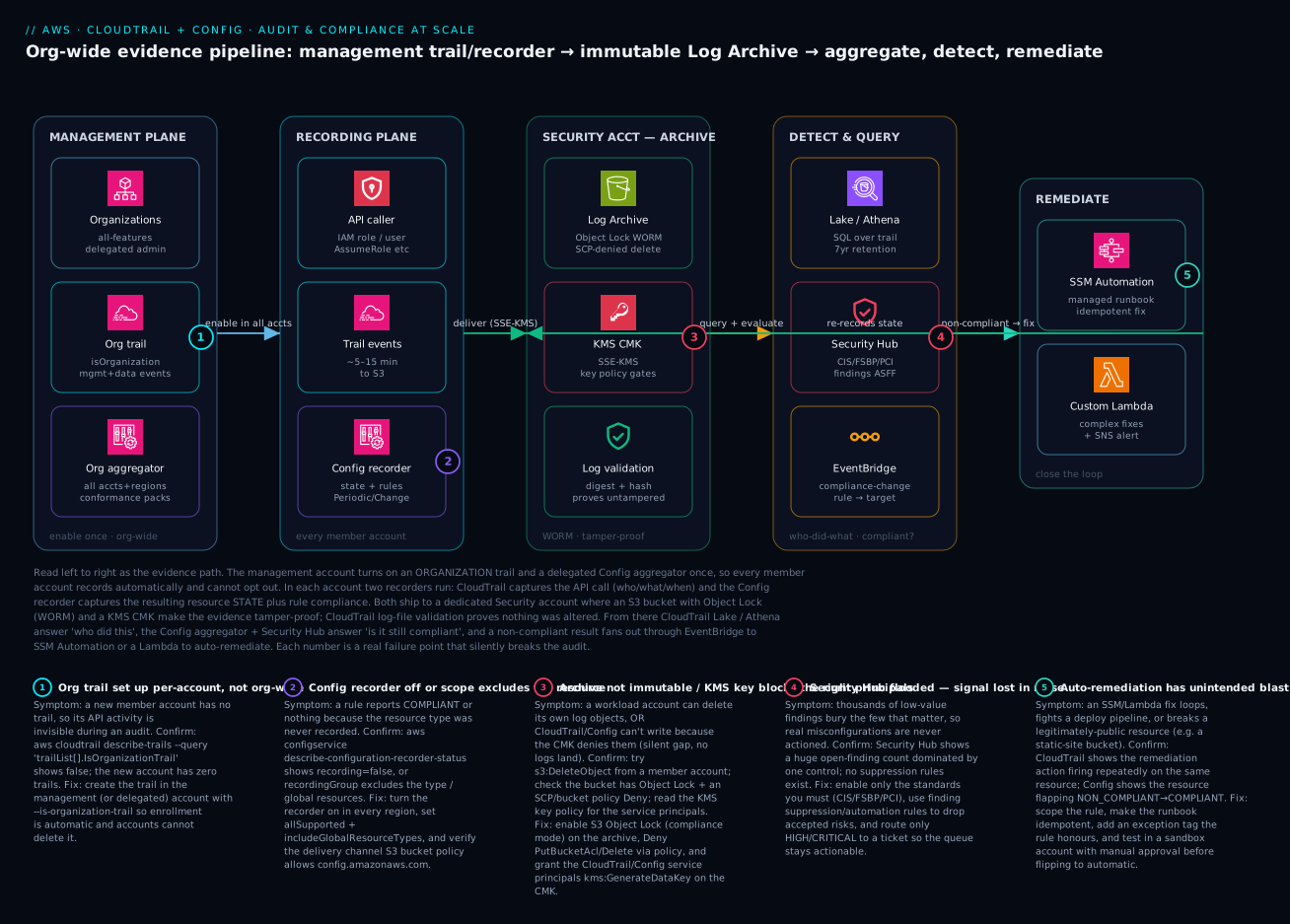
The diagram traces the evidence path from the moment governance is switched on to the moment a violation is fixed, read left to right. In the management plane, AWS Organizations (with delegated admin) lets you create exactly two org-wide things once: an organization CloudTrail (isOrganizationTrail, capturing management and selectively data events) and an organization Config aggregator (all accounts, all regions, conformance packs attached). Because they’re org-wide, the recording plane lights up automatically in every member account: an IAM principal makes an API call, CloudTrail captures the action (~5–15 minutes to S3), and the Config recorder captures the resulting resource state plus its rule verdict, on change and periodically. Both streams flow into a dedicated Security account archive, where an S3 bucket with Object Lock (WORM) and an SCP-denied delete make the objects un-erasable, a KMS CMK gates decryption, and log-file validation emits signed digests proving nothing was altered.
From the archive, two questions get answered in the detect & query zone: who did what is answered by CloudTrail Lake / Athena (SQL over the trail, 7-year retention), and is it still compliant is answered by the Config aggregator feeding Security Hub (scored against CIS / FSBP / PCI into normalized ASFF findings). A compliance-change event then fans out through EventBridge to the remediate zone — SSM Automation runs an idempotent managed runbook for common fixes, or a custom Lambda handles complex cases and raises an SNS alert — and the fix re-records state, closing the loop. The five numbered badges mark where this silently breaks: a trail set up per-account instead of org-wide (badge 1) so new accounts are blind; a Config recorder that’s off or scope-excludes a resource (badge 2) so rules evaluate nothing; an archive that isn’t immutable or a KMS key that blocks the service principals (badge 3) so logs are deletable or never land; a Security Hub finding flood (badge 4) that buries the real issues; and auto-remediation with unintended blast radius (badge 5) that loops or breaks legitimate resources. The legend narrates each as symptom, the exact confirm command, and the fix.
Real-world scenario
Meridian Pay, a fictional but realistic fintech, processes card payments across a 40-account AWS organization in ap-south-1 and us-east-1, regulated under PCI-DSS and audited annually for SOC 2 Type II. The platform team is six engineers; the monthly spend on the governance stack — CloudTrail data events, Config, Security Hub, and the archive — runs about ₹95,000, a number the CFO questions every quarter until the audit makes the case for him.
The crisis arrived two weeks before the PCI assessment. The QSA’s pre-audit questionnaire asked Meridian to prove that no EBS volume holding cardholder data had ever been unencrypted in the audit window, and that any exception had been detected and remediated within the SLA. The security lead pulled up CloudTrail and could show that volumes were created encrypted — but CloudTrail records actions, not ongoing state, so it could not prove a volume hadn’t been modified or that a new volume from a drifted module hadn’t slipped through unencrypted. Worse, when they checked, account #34 (onboarded three months earlier by a team in a hurry) had no Config recorder running at all. For that account, every compliance rule had been silently returning nothing — not NON_COMPLIANT, just nothing — and the dashboards showed green because empty looks like compliant. They had a three-month blind spot in a PCI account. This is exactly badge 2 on the diagram.
The remediation was a two-week sprint that became the template. First, they fixed the recording plane: a conformance pack mapped to PCI-DSS, deployed org-wide from a delegated-admin account, which forced the Config recorder on in every account and region (with includeGlobalResourceTypes=true in the home region only) and attached encrypted-volumes, s3-bucket-server-side-encryption-enabled, rds-storage-encrypted, and the IAM/MFA rules. Within an hour, account #34 lit up with eleven NON_COMPLIANT volumes — the blind spot made visible. Second, they made the evidence bulletproof: the org CloudTrail already wrote to a Log Archive account, but the bucket lacked Object Lock, so they enabled it in compliance mode with a seven-year retention, added the SCP denying StopLogging/DeleteTrail/StopConfigurationRecorder org-wide (with a single break-glass role exemption), and ran validate-logs across the full window to produce the signed proof the QSA wanted.
Third — carefully — they added remediation. For the unencrypted-volume finding they did not enable automatic remediation (you cannot encrypt an in-use EBS volume in place; the fix is a snapshot-and-replace, too blast-heavy to automate), so that rule routes a HIGH finding to a ticket. But for the high-frequency, low-risk findings — public-read S3 buckets and default-encryption-off buckets — they wired SSM Automation (AWS-EnableS3BucketEncryption, AWS-DisableS3BucketPublicReadWrite) with Automatic=true, idempotent runbooks, and an compliance-exception=true tag the rule honoured for the two genuinely-public static-site buckets. They tested every remediation in a sandbox account first, after badge-5’s exact failure bit a neighbour team the previous year: an over-broad auto-remediation had repeatedly re-privatized a bucket that a deploy pipeline kept making public, and the two fought in a loop for a weekend.
At the audit, the QSA asked the encryption question and the security lead answered it in ninety seconds: a CloudTrail Lake query showing every CreateVolume with its Encrypted parameter, a Config compliance timeline showing the eleven account-#34 volumes going NON_COMPLIANT and then COMPLIANT after remediation with timestamps, and validate-logs output proving the logs themselves were untampered across the whole window. Meridian passed with zero findings on logging and monitoring. The lesson on the wall: “Green isn’t compliant — empty is also green. Prove the recorder is on in every account before you trust a single dashboard.” The timeline, because the order is the lesson:
| Phase | Finding | Action | Effect |
|---|---|---|---|
| Pre-audit | Can prove creation, not ongoing state | Realize CloudTrail ≠ Config | Identified the gap |
| Pre-audit | Account #34 recorder OFF for 3 months | describe-configuration-recorder-status = false |
Found the blind spot |
| Day 1–3 | Need org-wide enforcement | Deploy PCI conformance pack from delegated admin | Recorder on everywhere |
| Day 1 | 11 unencrypted volumes surface | (pack evaluates account #34) | Blind spot made visible |
| Day 4–7 | Bucket not immutable | Enable Object Lock + protective SCP | Evidence tamper-proof |
| Day 4 | Need proof of integrity | validate-logs over the window |
Signed proof for the QSA |
| Day 8–12 | Close common gaps safely | SSM auto-remediation (S3 only) + exception tags | Low-risk fixes automated |
| Audit | “Prove encryption all window” | Lake query + Config timeline + validate-logs | Passed, zero logging findings |
Advantages and disadvantages
The CloudTrail-plus-Config model is the backbone of AWS audit, but it has real edges. Weigh it honestly:
| Advantages (why this model wins) | Disadvantages (why it bites) |
|---|---|
| Complete, immutable API audit trail across every account — the substrate every framework assumes | The HTTP-simple “turn it on” hides that coverage (every account, every region, global types) is the hard part |
| Continuous compliance — rules re-check reality on a schedule, not just at creation | Config is regional and opt-in; an off recorder reports nothing, which reads as compliant |
| Org trail enrolls future accounts automatically — no “we forgot account #47” gap | Data events are billed per event; one careless account-wide selector is a five-figure surprise |
| Automated remediation closes common gaps without a human | Auto-remediation can loop, fight pipelines, or break legitimately-public resources |
| Conformance packs deploy a whole framework (PCI/CIS) as one versioned unit | Pack-level deploy makes per-rule tuning fiddly; noise without curation |
| Security Hub normalizes findings (ASFF) and scores against standards | Standards generate thousands of findings; signal drowns without suppression rules |
| Tamper-proof via Object Lock + validation + SCP — evidence that holds up | Getting KMS key policy / service principals wrong drops logs silently (empty bucket) |
| Not real-time, but fast enough — minutes from change to detection | “Minutes” is not “instant”; this is detection, not prevention — pair with SCPs and GuardDuty |
The model is right whenever you need evidence and continuous assurance — which is every regulated workload and every org past a single account. It bites hardest on teams that confuse “enabled” with “complete,” on cost-blind data-event configs, and on anyone who turns on automatic remediation without a sandbox and exception tags. Crucially, this is a detective control plane: it tells you what happened and whether it’s still right; it does not prevent the bad action. Pair it with preventive SCPs (from AWS Control Tower Guardrails: Building a Secure Multi-Account Foundation) and threat detection (GuardDuty) so prevention, detection and remediation cover each other’s gaps.
Hands-on lab
Stand up a single-account trail and a Config rule, watch a deliberately-public bucket get flagged, then auto-remediate it — all comfortably inside the free tier if you tear down promptly. Run in CloudShell (which has the CLI and your credentials).
Step 1 — Variables and a unique suffix.
SUFFIX=$RANDOM
REGION=ap-south-1
ACCOUNT=$(aws sts get-caller-identity --query Account --output text)
TRAIL_BUCKET=lab-trail-$ACCOUNT-$SUFFIX
TEST_BUCKET=lab-public-$ACCOUNT-$SUFFIX
echo "account=$ACCOUNT suffix=$SUFFIX"
Step 2 — Create the trail bucket and a trail.
aws s3api create-bucket --bucket $TRAIL_BUCKET --region $REGION \
  --create-bucket-configuration LocationConstraint=$REGION
# Minimal CloudTrail-write policy (see article for the hardened version)
aws s3api put-bucket-policy --bucket $TRAIL_BUCKET --policy "$(cat <<JSON
{"Version":"2012-10-17","Statement":[
 {"Sid":"ACLCheck","Effect":"Allow","Principal":{"Service":"cloudtrail.amazonaws.com"},"Action":"s3:GetBucketAcl","Resource":"arn:aws:s3:::$TRAIL_BUCKET"},
 {"Sid":"Write","Effect":"Allow","Principal":{"Service":"cloudtrail.amazonaws.com"},"Action":"s3:PutObject","Resource":"arn:aws:s3:::$TRAIL_BUCKET/AWSLogs/$ACCOUNT/*","Condition":{"StringEquals":{"s3:x-amz-acl":"bucket-owner-full-control"}}}
]}
JSON
)"
aws cloudtrail create-trail --name lab-trail --s3-bucket-name $TRAIL_BUCKET --is-multi-region-trail --enable-log-file-validation
aws cloudtrail start-logging --name lab-trail
Expected: create-trail returns the trail ARN; get-trail-status --name lab-trail --query IsLogging returns true.
Step 3 — Turn on the Config recorder (service-linked role).
aws iam create-service-linked-role --aws-service-name config.amazonaws.com 2>/dev/null || true
aws s3api create-bucket --bucket lab-config-$ACCOUNT-$SUFFIX --region $REGION \
  --create-bucket-configuration LocationConstraint=$REGION
ROLE=arn:aws:iam::$ACCOUNT:role/aws-service-role/config.amazonaws.com/AWSServiceRoleForConfig
aws configservice put-configuration-recorder \
  --configuration-recorder name=default,roleARN=$ROLE \
  --recording-group allSupported=true,includeGlobalResourceTypes=true
aws configservice put-delivery-channel \
  --delivery-channel name=default,s3BucketName=lab-config-$ACCOUNT-$SUFFIX
aws configservice start-configuration-recorder --configuration-recorder-name default
aws configservice describe-configuration-recorder-status --query 'ConfigurationRecordersStatus[0].recording'
Expected: the final command prints true — the recorder is actually recording (the silent-failure check).
Step 4 — Add the public-bucket rule.
aws configservice put-config-rule --config-rule '{
  "ConfigRuleName":"s3-bucket-public-read-prohibited",
  "Source":{"Owner":"AWS","SourceIdentifier":"S3_BUCKET_PUBLIC_READ_PROHIBITED"}
}'
Step 5 — Create a deliberately public bucket and trip the rule.
aws s3api create-bucket --bucket $TEST_BUCKET --region $REGION \
  --create-bucket-configuration LocationConstraint=$REGION
# Turn OFF the account/bucket public-access block so the bucket can actually be public
aws s3api put-public-access-block --bucket $TEST_BUCKET \
  --public-access-block-configuration BlockPublicAcls=false,IgnorePublicAcls=false,BlockPublicPolicy=false,RestrictPublicBuckets=false
aws s3api put-bucket-acl --bucket $TEST_BUCKET --acl public-read
# Force an evaluation rather than waiting for the change-trigger
aws configservice start-config-rules-evaluation --config-rule-names s3-bucket-public-read-prohibited
sleep 30
aws configservice get-compliance-details-by-config-rule \
  --config-rule-name s3-bucket-public-read-prohibited \
  --query 'EvaluationResults[?EvaluationResultIdentifier.EvaluationResultQualifier.ResourceId==`'$TEST_BUCKET'`].ComplianceType'
Expected: NON_COMPLIANT for $TEST_BUCKET — Config caught the public bucket.
Step 6 — Confirm CloudTrail recorded the act in Event history.
aws cloudtrail lookup-events --lookup-attributes AttributeKey=EventName,AttributeValue=PutBucketAcl \
  --query 'Events[0].{when:EventTime,who:Username,name:EventName}'
Expected: the PutBucketAcl you just ran, with your identity — CloudTrail’s who-did-what alongside Config’s is-it-right.
Validation checklist. You turned on both halves (trail + recorder), confirmed the recorder is actually recording (not the silent-empty failure), watched Config flag a public bucket as NON_COMPLIANT, and corroborated the action in CloudTrail. That is the entire model in six steps.
Cleanup (avoid lingering charges — buckets and recorders cost if left).
aws configservice stop-configuration-recorder --configuration-recorder-name default
aws configservice delete-config-rule --config-rule-name s3-bucket-public-read-prohibited
aws configservice delete-configuration-recorder --configuration-recorder-name default
aws configservice delete-delivery-channel --delivery-channel-name default
aws cloudtrail delete-trail --name lab-trail
for B in $TRAIL_BUCKET $TEST_BUCKET lab-config-$ACCOUNT-$SUFFIX; do
  aws s3 rm s3://$B --recursive; aws s3api delete-bucket --bucket $B; done
Cost note. A trail’s first management-event copy is free; Config bills per configuration item recorded and per rule evaluation — a one-hour lab on a near-empty account is a few rupees. Deleting the recorder, trail and buckets stops everything. Object Lock was deliberately not enabled in the lab so cleanup isn’t blocked.
Common mistakes & troubleshooting
This is the playbook — the part you bookmark. First as a scannable table, then the same entries with full confirm-command detail. Every one of these is a silent failure: nothing errors, but your audit is wrong.
| # | Symptom | Root cause | Confirm (exact cmd) | Fix |
|---|---|---|---|---|
| 1 | A new account has no audit trail | Per-account trail, not an org trail | aws cloudtrail describe-trails --query 'trailList[].IsOrganizationTrail' (false) |
Recreate as --is-organization-trail from mgmt/delegated |
| 2 | Compliance dashboard green but suspicious | Config recorder OFF in an account/region | aws configservice describe-configuration-recorder-status --query '[].recording' (false) |
start-configuration-recorder; deploy via conformance pack |
| 3 | IAM rules never flag anything | Recorder excludes global resources | ... describe-configuration-recorder --query '[].recordingGroup.includeGlobalResourceTypes' (false) |
Set includeGlobalResourceTypes=true in home region |
| 4 | Trail exists but S3 bucket is empty | Trail never started, or KMS denies the service | aws cloudtrail get-trail-status --query IsLogging; check CMK key policy |
start-logging; grant kms:GenerateDataKey* to cloudtrail.amazonaws.com |
| 5 | Logs stop after enabling encryption | KMS key policy missing service principal | aws kms get-key-policy ... lacks CloudTrail/Config |
Add the service principal to the key policy |
| 6 | Rule shows INSUFFICIENT_DATA | Resource type not recorded / params missing | get-compliance-details-by-config-rule returns INSUFFICIENT_DATA |
Widen recording group; supply required rule params |
| 7 | Surprise five-figure CloudTrail bill | Data events enabled account-wide | aws cloudtrail get-event-selectors shows broad data selectors |
Scope data events by resources.ARN prefix |
| 8 | Auto-remediation loops / fights a pipeline | Over-broad rule + automatic remediation | CloudTrail shows the runbook firing repeatedly on one resource | Add exception tag; narrow scope; manual mode for risky rules |
| 9 | Member account can delete its own logs | Archive in the same account; no Object Lock | Try s3:DeleteObject from the workload account (succeeds) |
Move to Log Archive account; enable Object Lock + SCP |
| 10 | Anyone disabled the trail and logging stopped | No SCP protecting the logging substrate | aws cloudtrail lookup-events ... StopLogging shows the event |
SCP denying StopLogging/DeleteTrail/StopConfigurationRecorder |
| 11 | Security Hub is a wall of findings nobody reads | Every standard on, no suppression | Security Hub open-findings count dominated by one control | Enable only needed standards; suppression/automation rules |
| 12 | Cross-region activity invisible | Single-region trail | ... describe-trails --query '[].IsMultiRegionTrail' (false) |
Recreate with --is-multi-region-trail |
| 13 | Aggregator shows fewer accounts than the org | Aggregator not authorized for all accounts/regions | aws configservice describe-configuration-aggregators scope |
Re-create as org aggregator from delegated admin |
| 14 | Old log files can’t be validated | Log-file validation was off when written | aws cloudtrail validate-logs reports no digests |
Enable --enable-log-file-validation (covers future logs) |
The expanded form for the entries that bite hardest:
1. A newly created account has no audit trail at all.
Root cause: The org uses per-account trails, so each new account needs a trail added manually — and someone always forgets.
Confirm: aws cloudtrail describe-trails --query 'trailList[].{n:Name,org:IsOrganizationTrail}' from the new account shows no org trail (or no trail at all).
Fix: Delete the per-account approach; create one organization trail from the management or delegated-admin account with --is-organization-trail. Future accounts are enrolled automatically and cannot delete it.
2. The compliance dashboard is green, but you suspect a gap.
Root cause: The Config recorder is off (or never set up) in one or more accounts/regions, so rules evaluate nothing — and empty reports as compliant.
Confirm: aws configservice describe-configuration-recorder-status --query 'ConfigurationRecordersStatus[].{r:recording,s:lastStatus}' shows recording=false (or the command returns an empty list).
Fix: aws configservice start-configuration-recorder --configuration-recorder-name default; enforce org-wide with a conformance pack deployed from a delegated admin so no account can be missing.
3. IAM/MFA rules never flag anything, even known-bad IAM.
Root cause: The recording group has includeGlobalResourceTypes=false, so IAM users/roles/policies (global resources) are never recorded; the rules have nothing to evaluate.
Confirm: aws configservice describe-configuration-recorder --query 'ConfigurationRecorders[].recordingGroup.includeGlobalResourceTypes' returns false.
Fix: Set it true in your home region only (enabling it everywhere double-bills global data). Re-evaluate the IAM rules.
4. The trail exists and looks configured, but the S3 bucket is empty.
Root cause: Either you never called start-logging (trails are created stopped), or the KMS key denies the CloudTrail service principal so nothing can be encrypted/delivered.
Confirm: aws cloudtrail get-trail-status --name org-trail --query IsLogging (false → never started); else read the CMK policy for cloudtrail.amazonaws.com with kms:GenerateDataKey*.
Fix: aws cloudtrail start-logging --name org-trail; add the service principal to the key policy. This pair is the overwhelming cause of “we have a trail but no logs.”
7. A surprise five-figure CloudTrail bill this month.
Root cause: Data events were enabled account-wide (every S3 GetObject, every Lambda Invoke), generating millions of billed events.
Confirm: aws cloudtrail get-event-selectors --trail-name org-trail shows broad data-event selectors with no resource scoping.
Fix: Replace with an advanced event selector scoped by resources.ARN prefix to only the sensitive buckets/functions under audit. Management-event logging stays free.
8. Auto-remediation fires repeatedly or fights a deploy pipeline.
Root cause: A broad rule with automatic remediation keeps “fixing” a resource that something else keeps changing — an infinite tug-of-war (badge 5).
Confirm: CloudTrail shows the SSM/Lambda remediation action on the same resource ID every few minutes; Config shows it flapping COMPLIANT↔NON_COMPLIANT.
Fix: Honour a compliance-exception=true tag in the rule, narrow resourceTypes, cap MaximumAutomaticAttempts, and switch high-blast-radius rules to manual remediation with a ticket.
9. A workload account can delete its own audit logs.
Root cause: The archive bucket lives in the same account as the workloads and has no Object Lock, so a compromised/insider principal can empty it.
Confirm: From the workload account, aws s3api delete-object --bucket <log-bucket> --key <some-key> succeeds.
Fix: Move the archive to a dedicated Log Archive account no workload team can access; enable S3 Object Lock (compliance mode) and an SCP denying deletes.
Best practices
- Use one organization trail, not per-account trails. It enrolls every current and future account automatically and member accounts cannot disable it — the only way to guarantee complete coverage.
- Verify the recorder is actually recording in every account and region.
describe-configuration-recorder-statusmust showrecording=true. A missing recorder reports nothing, which reads as compliant — the most dangerous failure in this whole stack. - Turn on
includeGlobalResourceTypesin exactly one home region. On everywhere = double-billed IAM data; off everywhere = IAM rules silently evaluate nothing. - Log all write-management events org-wide; add data events only scoped by ARN. Account-wide data events are a five-figure surprise; an ARN-prefixed advanced event selector gives PCI exactly the bucket it cares about and nothing else.
- Centralize logs in a dedicated Log Archive account with Object Lock. Evidence a privileged attacker can delete is not evidence. WORM + a separate account + an SCP deny make it hold up.
- Protect the logging substrate with an SCP. Deny
StopLogging,DeleteTrail,StopConfigurationRecorderorg-wide, with a single audited break-glass exemption. Turn “we promise” into “the platform won’t let us.” - Deploy frameworks as conformance packs from a delegated admin. PCI/CIS/NIST as one versioned, org-wide unit beats hand-adding rules account by account.
- Curate Security Hub ruthlessly. Enable only the standards you must, suppress accepted risks with automation rules, and route only HIGH/CRITICAL to tickets — a finding flood is the same as no findings.
- Test every auto-remediation in a sandbox first, and use exception tags. Automatic remediation on a broad rule can loop or break legitimately-public resources; idempotency + an exception tag + a sandbox prove it’s safe.
- Enable log-file validation from day one. It only protects logs written after it’s on, and
validate-logsis the proof an auditor actually asks for. - Pair this detective stack with preventive SCPs and GuardDuty. Config tells you it broke; SCPs stop it breaking; GuardDuty catches the threat the rules don’t model. Defense in depth.
- Alert on the canaries: root-account usage,
StopLogging, console login without MFA, and anyDelete*on the trail/bucket — via CloudWatch metric filters, before they show up in an audit.
The alerts worth wiring before the next audit — the leading indicators, not the lagging “we failed”:
| Alert on | Signal (CloudTrail event / metric) | Why it’s leading |
|---|---|---|
| Root account used | userIdentity.type=Root |
No automation should ever use root |
| Logging disabled | StopLogging / DeleteTrail |
First move of a competent attacker |
| Recorder stopped | StopConfigurationRecorder |
Creates an instant compliance blind spot |
| Console login w/o MFA | ConsoleLogin + MFAUsed=No |
Weakest-link access |
| Public bucket created | PutBucketAcl / PutBucketPolicy |
Data-exposure precursor |
| Security-group opened to 0.0.0.0/0 | AuthorizeSecurityGroupIngress |
Network exposure precursor |
| KMS key disabled/scheduled-delete | DisableKey / ScheduleKeyDeletion |
Could blind encrypted logs |
Security notes
- Least privilege on the Config and remediation roles. The Config service role needs read across resources, but the remediation role should be scoped to exactly the actions its runbooks perform — an over-broad remediation role is a privilege-escalation path (it can change resources org-wide).
- Encrypt logs with a customer-managed KMS key, and gate the key policy. SSE-KMS on the trail and Config archive means reading the logs requires
kms:Decrypton the CMK — grant that only to the auditors and the services that need it, not broadly. The key policy is itself an access-control boundary. - The Log Archive account is a crown jewel — isolate it. No workload, no human day-to-day access; access is break-glass and audited. Compromising it must be as hard as compromising the management account.
- Object Lock in compliance mode, not governance mode. Governance mode lets a sufficiently-privileged principal override the lock; compliance mode cannot be overridden by anyone, including root — which is the point for legal-hold evidence.
- Don’t leak topology in findings. Security Hub findings and Config rule outputs can carry resource names, ARNs and configurations — restrict who can read the security/audit account so the compliance data isn’t itself an attacker’s map.
- Protect the trail and bucket with an SCP that even the management account obeys. The org-admin’s own credentials being stolen is a real threat model; the SCP denying logging changes (minus a break-glass role) defends against your own most-privileged identity.
- Validate, don’t trust. Run
validate-logson a schedule, not just at audit time — a gap in the digest chain is the earliest signal that someone tampered with or deleted log files.
The security controls that also prevent these incidents — secure and audit-ready pull the same direction:
| Control | Mechanism | Secures against | Also prevents |
|---|---|---|---|
| Dedicated Log Archive account | Separate account + cross-account write only | Insider deleting logs | The “trail in the compromised account” gap |
| Object Lock (compliance mode) | S3 WORM, no override | Evidence tampering | Accidental lifecycle deletion of evidence |
| SCP: deny logging changes | Org-wide deny + break-glass | Attacker/admin disabling logging | “Oops, I stopped the trail” outages |
| KMS CMK + tight key policy | SSE-KMS + scoped kms:Decrypt |
Unauthorized log reading | Logs silently dropping (when granted right) |
| Least-privilege remediation role | Scoped IAM on the SSM/Lambda role | Remediation-role privilege escalation | Runaway over-broad auto-fixes |
| Log-file validation | Signed digests | Silent edit/removal of logs | Undetected gaps in the audit chain |
| MFA Delete on the bucket | Versioning + MFA-delete | Casual/automated deletion | Scripted accidental wipes |
Cost & sizing
The bill drivers, and how each interacts with the controls:
- CloudTrail management events are effectively free for the first copy per account — there is no excuse not to log them org-wide. The cost lever is data events, billed per event: enable them only on specific sensitive resources via an ARN-scoped advanced event selector. Account-wide data events on a busy S3 bucket is the single most common “why is CloudTrail ₹40,000 this month” cause.
- Config bills two ways: per configuration item recorded (each resource change is a CI) and per rule evaluation. A large, churny account with
allSupported=truerecords a lot of CIs; the fix is not to under-record (that creates blind spots) but to use periodic rather than continuous recording for low-risk resource types where minutes-old state is fine. - Conformance packs themselves are free to deploy; you pay for the underlying rule evaluations and CIs they generate. The cost scales with rule count × resource count × evaluation frequency.
- Security Hub bills per finding ingested and per compliance check. Turning on every standard in every account multiplies this; enable only the standards you’re audited against.
- The archive is mostly S3 storage + requests — cheap, and you tune it with lifecycle (transition old logs to Glacier; but keep them retrievable for the retention window). CloudTrail Lake adds per-GB ingest and per-GB-scanned query cost; broad SQL over years of data can be expensive, so partition your thinking.
A rough monthly picture for a mid-size org (40 accounts, moderate change rate), in INR, and what each line buys:
| Cost driver | What you pay for | Rough INR / month | What it buys | Watch-out |
|---|---|---|---|---|
| CloudTrail management events | First copy free | ₹0 | The whole audit backbone | Truly free — always on |
| CloudTrail data events (scoped) | Per event on sensitive resources | ₹3,000–15,000 | S3/Lambda data-plane evidence | Account-wide = 10× this |
| Config — configuration items | Per CI recorded | ₹15,000–40,000 | Continuous state recording | Churny accounts cost more |
| Config — rule evaluations | Per evaluation | ₹5,000–15,000 | The compliance verdicts | Frequency × rules × resources |
| Security Hub | Per finding + check | ₹8,000–20,000 | Normalized scoring vs standards | Every standard on = noise + cost |
| Archive (S3 + lifecycle) | Storage + requests | ₹2,000–6,000 | Tamper-proof evidence store | Glacier for old logs |
| CloudTrail Lake (optional) | Ingest + scan | ₹5,000–20,000 | SQL forensics + long retention | Broad scans get pricey |
The honest floor: management events + Config recorder + a handful of high-value rules + a hardened archive is a few-thousand-rupee baseline that already passes most logging-and-monitoring controls. The cost grows with data events, Security Hub standards and Lake scanning — all of which you scope deliberately, not by default. Meridian’s ₹95,000 was after turning on PCI-grade coverage across 40 accounts; the CFO’s quarterly objection ended the day the audit passed in ninety seconds.
Interview & exam questions
1. What is the difference between what CloudTrail records and what Config records? CloudTrail records API actions — who called which API, when, from where, with what parameters and result (the verb). Config records resource configuration state over time and evaluates it against rules for compliance (the noun). CloudTrail answers “who did what”; Config answers “what is it now and is it still right.” You correlate them: Config flags the bad state, CloudTrail names who caused it.
2. Why is an organization trail strongly preferred over per-account trails? An organization trail, created in the management or delegated-admin account, is automatically applied to every member account including future ones, and member accounts cannot modify or delete it. Per-account trails require remembering to add a trail to each new account (a guaranteed eventual gap) and can be deleted by a compromised account. The org trail gives mandatory, future-proof, tamper-resistant coverage.
3. A compliance dashboard shows all-green but you suspect a blind spot. What’s the most likely cause? The Config recorder is off (or never configured) in one or more accounts/regions. A rule with no configuration items to evaluate returns nothing, not NON_COMPLIANT — and empty renders as green. Confirm with describe-configuration-recorder-status (recording must be true); fix by starting the recorder, ideally enforced org-wide via a conformance pack.
4. Why might IAM-related Config rules never flag anything? The recording group has includeGlobalResourceTypes=false, so global resources (IAM users, roles, policies) are never recorded and the IAM rules have nothing to evaluate. Enable it in your home region only (enabling it in every region double-bills the same global data). This is a classic silent gap.
5. You enabled KMS encryption on the trail and logs stopped arriving. Why? The KMS key policy doesn’t grant the CloudTrail service principal kms:GenerateDataKey*, so CloudTrail can’t encrypt the log files and delivery silently fails — the bucket goes empty with no obvious error. Fix by adding cloudtrail.amazonaws.com (and config.amazonaws.com for the Config archive) to the key policy.
6. How do you make CloudTrail logs tamper-proof? Deliver to an S3 bucket in a dedicated Log Archive account workload teams can’t access; enable S3 Object Lock in compliance mode (no one, including root, can delete objects before retention); enable log-file validation (signed digests prove no file was altered or removed); and apply an SCP denying StopLogging/DeleteTrail/StopConfigurationRecorder org-wide with only a break-glass exemption.
7. What is a conformance pack and when do you use one? A conformance pack is a YAML bundle of Config rules and their remediation deployable as one unit — and org-wide from a delegated admin. Use it to deploy an entire framework (PCI-DSS, CIS, NIST, HIPAA) consistently across every account rather than hand-adding rules account by account. The trade-off is that per-rule tuning is fiddlier than standalone rules.
8. Difference between automatic and manual remediation, and when do you avoid automatic? Automatic remediation fires the instant a resource goes NON_COMPLIANT; manual requires a human to trigger it. Avoid automatic for high-blast-radius fixes (e.g. anything that replaces or disrupts a resource) and for rules broad enough to fight a deploy pipeline or break a legitimately-public resource. Use idempotent runbooks, exception tags, and a sandbox test before flipping a rule to automatic.
9. How does Security Hub relate to Config? Security Hub aggregates and normalizes findings — from Config rules, GuardDuty, Inspector, Macie — into the AWS Security Finding Format (ASFF) and scores them against standards like CIS, FSBP and PCI-DSS. Config produces the per-rule compliance data; Security Hub turns many sources into one prioritized, framework-scored view. Without curation it floods, so suppression rules matter.
10. What are CloudTrail data events and why are they a cost risk? Data events record data-plane operations — S3 GetObject/PutObject, Lambda Invoke, DynamoDB item ops — which are extremely high volume and billed per event. Enabling them account-wide on a busy bucket generates millions of billed events. Scope them with an advanced event selector filtered by resources.ARN to only the sensitive resources under audit.
11. An account was onboarded but its activity is missing from audits. Walk through diagnosis. Check, in order: is there an org trail that should have enrolled it (describe-trails → IsOrganizationTrail)? Is the Config recorder on (describe-configuration-recorder-status → recording)? Is the trail multi-region (IsMultiRegionTrail)? Does the aggregator include the account? Most “missing account” cases are a per-account trail that was never added or a recorder that was never started.
12. How do you prove to an auditor that logs weren’t tampered with over a date range? Run aws cloudtrail validate-logs with the trail ARN and the start/end time; it verifies the signed digest chain and reports any altered or missing log files. This requires log-file validation to have been enabled when the logs were written — it only covers logs produced after it’s turned on, which is why you enable it from day one.
These map primarily to the AWS Certified Security – Specialty (SCS-C02) — logging and monitoring, incident response, and governance — and to Solutions Architect Professional for the multi-account governance design. The cost-scoping and remediation angles also appear in SysOps Administrator. A compact cert-mapping for revision:
| Question theme | Primary cert | Objective area |
|---|---|---|
| CloudTrail vs Config, event types | Security Specialty | Logging & monitoring |
| Org trail, delegated admin, coverage | Solutions Architect Pro | Multi-account governance |
| Tamper-proofing (Object Lock, SCP, KMS) | Security Specialty | Data protection; incident response |
| Conformance packs, rules, remediation | Security Specialty | Compliance automation |
| Security Hub aggregation & scoring | Security Specialty | Security operations |
| Cost scoping (data events, CIs) | SysOps Administrator | Cost & operations |
| Forensic query (Lake/Athena) | Security Specialty | Incident response |
Quick check
- An auditor asks you to prove who deleted a security-group rule and whether the bad state existed for any window. Which service answers each half, and how do you correlate them?
- Your org-wide compliance dashboard is entirely green, but a security review found a public S3 bucket in account #34. What is the single most likely reason the dashboard missed it, and the one command that confirms it?
- You enabled SSE-KMS on the org trail and the archive bucket has been empty ever since. What did you almost certainly forget?
- Name two controls that make the CloudTrail archive impossible for a compromised privileged user to delete.
- You’re about to enable automatic remediation on a rule that flags public buckets. What two safeguards do you put in place first, and why?
Answers
- CloudTrail answers who (the
DeleteSecurityGroupRule/RevokeSecurityGroupIngressevent withuserIdentity.arn, time and source IP); Config answers whether the bad state existed and for how long (the resource’s configuration timeline and the rule’s COMPLIANT→NON_COMPLIANT→COMPLIANT verdicts with timestamps). Correlate by matching the CloudTraileventTimeto the Config timeline transition — Config shows the window, CloudTrail names the actor. - The Config recorder is off (or never configured) in account #34, so its rules evaluate nothing and “empty” renders as green — not NON_COMPLIANT. Confirm with
aws configservice describe-configuration-recorder-status --query 'ConfigurationRecordersStatus[].recording'; it returnsfalse(or an empty list). Fix by starting the recorder and enforcing org-wide via a conformance pack. - You forgot to grant the CloudTrail service principal (
cloudtrail.amazonaws.com)kms:GenerateDataKey*in the KMS key policy. Without it CloudTrail can’t encrypt the log files and delivery silently fails, leaving the bucket empty with no obvious error. (Addconfig.amazonaws.comto the Config archive’s CMK for the same reason.) - Any two of: a dedicated Log Archive account the user has no access to; S3 Object Lock in compliance mode (deletes/overwrites blocked even for root before retention); an SCP denying
s3:DeleteObject/StopLogging/DeleteTrailorg-wide; MFA Delete on the bucket. The strongest combination is the separate account plus Object Lock plus the SCP. - (a) Test the runbook in a sandbox account and confirm it’s idempotent (safe to re-run), so a flapping resource doesn’t cause damage; and (b) honour an exception tag (e.g.
compliance-exception=true) so the two genuinely-public buckets (a static site) aren’t repeatedly re-privatized, which would otherwise loop and fight your deploy pipeline. Both guard against auto-remediation’s blast radius (badge 5).
Glossary
- CloudTrail — the service recording every AWS API call (the action, identity, parameters, source and result); the immutable record of who did what.
- Trail — a CloudTrail configuration that delivers events to S3, CloudWatch Logs and/or CloudTrail Lake; created in a stopped state until you
start-logging. - Organization trail — a trail created from the management/delegated-admin account that is automatically applied to every member account (including future ones) and cannot be deleted by them.
- Management event — a control-plane API call (create/modify/delete, AssumeRole, console login); the audit backbone, first copy free.
- Data event — a data-plane operation (S3 object access, Lambda invoke, DynamoDB item op); high-volume and billed per event, so scope it by resource ARN.
- Insights event — a CloudTrail-derived signal flagging anomalous API call-rate or error-rate spikes.
- CloudTrail Lake — a managed, queryable event data store you search with SQL, with retention up to ten years; forensics without standing up Athena/Glue.
- Log-file validation — CloudTrail’s signed-digest mechanism proving log files weren’t altered or removed; verified with
validate-logs. - AWS Config — the service recording resource configuration state over time and evaluating it against rules for compliance; the record of what it is and whether it’s right.
- Configuration recorder — the per-region engine that records resource state; does nothing until started, and records only its recording group.
- Recording group — what the recorder captures:
allSupported,includeGlobalResourceTypes(IAM etc.), or an explicit/excluded type list. - Configuration item (CI) — a point-in-time snapshot of a single resource’s configuration; the unit Config bills and stores.
- Config rule — a check returning COMPLIANT / NON_COMPLIANT / NOT_APPLICABLE / INSUFFICIENT_DATA; AWS-managed, custom Lambda, or Guard.
- Conformance pack — a deployable YAML bundle of Config rules and remediation, mappable to a framework (PCI/CIS/NIST) and deployable org-wide.
- Aggregator — a cross-account, cross-region view of Config data and compliance; the single org-wide pane (set up from a delegated admin).
- Remediation — an automated fix triggered on NON_COMPLIANT, via an SSM Automation runbook or a custom Lambda; automatic or manual.
- Object Lock (WORM) — an S3 setting that prevents deletion/overwrite of objects before a retention period; in compliance mode, not even root can override it.
- Security Hub — the service aggregating and normalizing findings (ASFF) from Config/GuardDuty/Inspector/Macie and scoring them against standards (CIS, FSBP, PCI-DSS).
- Delegated administrator — a member account granted authority to manage an org-wide service (CloudTrail org trail, Config aggregator, Security Hub) on behalf of the management account.
Next steps
You can now build a complete, tamper-proof, org-wide audit and compliance pipeline and prove it under audit. Build outward:
- Next: AWS Control Tower Guardrails: Building a Secure Multi-Account Foundation — Control Tower provisions the org trail and a baseline of these Config rules for you; learn what it sets up and how to extend it.
- Related: AWS Organizations and IAM Foundations: Accounts, OUs and Roles — the account/OU/SCP structure that the org trail, aggregator and protective SCPs all depend on.
- Related: Amazon S3 Storage Classes and Lifecycle: Optimize Cost Without Losing Data — right-size and lifecycle the log archive without losing retrievability for the retention window.
- Related: AWS Lambda Patterns: Event-Driven Functions That Scale to Zero — the pattern behind custom Config rules and EventBridge-driven remediation functions.
- Related: AWS VPC, Subnets and Security Groups Explained — the network resources many of these compliance rules (open SSH, flow logs) evaluate.
- Related: AWS Backup and Disaster Recovery: Protect Workloads Across Regions — pair tamper-proof audit logs with tamper-proof backups for a complete recoverability story.