Quick take: AWS Certificate Manager (ACM) issues, stores, and automatically renews the TLS certificates that put the padlock on your domain — for free, as long as you let an AWS service terminate TLS and you validate ownership by DNS. Get three things right — the validation method (DNS, not email), the Region the cert lives in (us-east-1 for CloudFront, the resource’s own Region for an ALB), and whether the cert is in use — and renewals happen silently forever. Get any of them wrong and you get a cert stuck in
PENDING_VALIDATION, a CloudFront distribution that refuses to list your certificate, or a 2 a.m. outage the day a cert expires because nothing renewed it.
A payments team once shipped a new marketing site behind CloudFront, requested a certificate in their home Region of ap-south-1 (Mumbai), and spent forty minutes convinced ACM was broken because the certificate simply would not appear in the CloudFront console’s certificate dropdown. It was ISSUED, it was valid, describe-certificate looked perfect — and CloudFront acted as if it did not exist. The cause is a single sentence in the ACM docs that everyone skims past: CloudFront only accepts certificates in us-east-1. They re-requested the exact same cert in N. Virginia, and it appeared instantly. That one rule — regional scoping — is the number-one ACM gotcha, and it is the reason this article spends as much time on where a certificate lives as on how to request one.
This is the hands-on, production-grade guide to ACM: public vs private certificates, DNS vs email validation and why the choice silently decides whether you ever have to think about renewal again, the regional-scoping rules for every integration, wildcard and SAN coverage, managed renewal and the RenewalEligibility field, importing third-party certs, AWS Private CA for internal and mTLS trust, and the key algorithms (RSA 2048 vs ECDSA P-256/P-384). You will build the real thing — a public DNS-validated cert attached to an ALB HTTPS listener and a second cert in us-east-1 on a CloudFront distribution, then a small Private CA issuing an internal cert — with aws acm, aws acm-pca, aws route53 and Terraform, and tear it down (⚠️ the Private CA costs real money every month until you delete it). Because you will reach for this mid-incident, the options, limits, error codes and the playbook are all laid out as scannable tables.
What problem this solves
Every service that speaks HTTPS needs an X.509 certificate: a signed statement, trusted by browsers, that “the holder of this private key really controls example.com.” Historically you bought that certificate from a commercial Certificate Authority once a year, generated a private key and a CSR by hand, pasted PEM blobs into a load balancer, set a calendar reminder, and — inevitably — forgot the reminder. The classic production outage is not a code bug at all: it is a certificate that expired at midnight because the one engineer who knew about it left the company, and now every browser and mobile app shows NET::ERR_CERT_DATE_INVALID and the site is “down” while the code runs perfectly.
Here is the pain ACM removes, in production terms:
- Manual renewal that everyone forgets. A one-year cert is a landmine with a 365-day fuse. Miss the renewal and TLS breaks everywhere at once — web, API, mobile, partner integrations.
- Private keys sprayed across servers. Copying a
.keyfile onto every web server, into CI, into a wiki “for convenience” is how private keys leak. Once a key leaks, every cert it signed must be revoked and reissued. - Per-certificate cost and procurement friction. Commercial certs cost money and take a purchase order and a validation phone call. Teams under-provision (one wildcard for everything) or skip TLS on “internal” services.
- Wrong cert, wrong place. Terminating TLS in ten different services means ten places to rotate, ten chances to serve the wrong certificate, ten mismatched
SNIbugs. - No trust for internal traffic. East-west traffic between microservices, or mTLS where both sides present a cert, needs a private CA — and standing up your own OpenSSL root CA, distributing it, and running revocation is a project nobody wants to own.
ACM answers all five. Public certs are free and renew themselves. The private key is generated inside ACM and — for managed public certs — never leaves; you literally cannot download it, so it cannot leak from your side. Integrated services (CloudFront, ALB, NLB, API Gateway, App Runner, Cognito, Elastic Beanstalk) attach a cert by ARN and rotate transparently. And AWS Private CA gives you a managed root/subordinate hierarchy for internal and mTLS certificates without running your own PKI. Who hits the problems ACM solves? Essentially everyone serving HTTPS on AWS — and the ones who get burned are the teams that treat “just get a cert” as trivial and then meet regional scoping, email-validation non-renewal, or an un-deletable Private CA bill the hard way.
Learning objectives
By the end of this article you can:
- Distinguish public from private ACM certificates and choose the right one for internet-facing TLS vs internal/mTLS trust.
- Validate domain ownership by DNS (the CNAME that enables automatic renewal) or email, and explain precisely why DNS validation renews itself and email does not.
- Place every certificate in the correct Region — us-east-1 for CloudFront, Cognito custom domains and edge-optimized API Gateway; the resource’s own Region for ALB, NLB, regional API Gateway, App Runner and Beanstalk.
- Request wildcard and multi-domain (SAN) certificates and predict exactly which hostnames a
*.example.comcert does and does not cover. - Reason about managed renewal: the
RenewalEligibilityfield, the “DNS-validated + in use” rule, and the EventBridge/CloudWatch signals that tell you a cert needs attention. - Import a third-party certificate, know it will never auto-renew, and re-import to the same ARN so associations survive rotation.
- Stand up an AWS Private CA (root → subordinate), issue an internal certificate, understand the monthly + per-cert cost model, and tear it down so it stops billing.
- Diagnose the dozen classic ACM failures —
PENDING_VALIDATION, CloudFront won’t list the cert, ALB Region mismatch, renewal that didn’t happen, imported cert expiring, uncovered domain, chain/mixed-content errors, untrusted private CA — from symptom to fix.
Prerequisites & where this fits
You should be comfortable with the building blocks ACM plugs into. If any are shaky, read these first:
- Route 53: Records & Routing Policies — hosted zones, CNAME vs alias, how DNS validation records are created.
- CloudFront: CDN Setup, Caching & Origins — distributions, viewer certificates, why CloudFront is a global (us-east-1-managed) service.
- AWS Application Load Balancer & Target Groups Hands-On — HTTPS listeners, SNI, attaching certs by ARN.
- Host a Static Site on S3 + CloudFront with a Custom Domain — the canonical “cert must be in us-east-1” pattern end to end.
- AWS KMS: Encryption Keys & Envelope Encryption — how Private CA private keys are protected, and why key material matters.
You will also need: an AWS account with the AWS CLI v2 configured, permission to create ACM/ACM-PCA/Route 53/ELB/CloudFront resources, and a domain whose DNS you control (ideally in a Route 53 public hosted zone). Terraform ≥ 1.5 with the hashicorp/aws provider ≥ 5.x is used for the IaC path.
Where it fits: ACM is a cross-cutting security service. It is the “T” (TLS) in almost every AWS reference architecture — the certificate on the CloudFront distribution in front of your S3 site, on the ALB in front of your containers, on the API Gateway custom domain, and (via Private CA) on the mTLS between your services. Certificates map directly to cert-exam questions: the “cert must be in us-east-1” question on SAA-C03/SOA-C02, the DNS-vs-email and renewal questions on DVA-C02, and the Private CA / mTLS / CT-logging questions on SCS-C02 (Security Specialty).
Core concepts
Before the knobs, the mental model. ACM is deceptively small — request, validate, attach, renew — but each word hides a decision that determines whether the thing runs itself or pages you. Nine moving parts collaborate; get their roles straight and every later rule is obvious.
| Component | What it is | You control | The rule that bites |
|---|---|---|---|
| Certificate | An X.509 cert + its private key, stored in ACM | Domains, validation method, key algorithm | Managed public keys are not exportable |
| Domain name | The primary subject (CN) of the cert | The first --domain-name |
Must be a public, resolvable domain for public certs |
| Subject Alternative Name (SAN) | Extra hostnames the same cert covers | --subject-alternative-names |
Up to 10 names per cert by default |
| Validation | Proof you control the domain | DNS or email | DNS → auto-renew; email → manual |
| Region | Where the cert object lives | The --region you request in |
Must match the consuming service’s rule |
| Association / “in use” | Which services reference this cert ARN | Attaching to ALB/CloudFront/etc. | Renewal is reliable only when in use |
| Managed renewal | ACM re-issuing before expiry | Nothing (automatic) or re-import | Only for ACM-issued + eligible certs |
| AWS Private CA | A managed private root/subordinate CA | Hierarchy, validity, revocation | ~$400/mo per CA until deleted |
| Certificate Transparency (CT) | Public logging of issued public certs | Opt in/out at request time | Opt-out breaks Chrome for public certs |
The certificate lifecycle (status values)
describe-certificate returns a Status field. Knowing the seven values — and which are terminal — turns “the cert is weird” into a diagnosis.
| Status | Meaning | Typical trigger | What to do |
|---|---|---|---|
PENDING_VALIDATION |
Requested, waiting for you to prove ownership | Just ran request-certificate |
Create the DNS CNAME (or click the email) |
ISSUED |
Valid and usable | Validation succeeded | Attach it to a service |
INACTIVE |
Issued but administratively inactive | Rare; account/PCA state | Investigate CA / account status |
EXPIRED |
Past NotAfter |
Renewal didn’t happen | Re-issue or re-import; fix why renewal failed |
VALIDATION_TIMED_OUT |
You didn’t validate within 72 hours | CNAME never created | Request again; add the CNAME promptly |
REVOKED |
Certificate revoked | Key compromise / CA action | Issue a new cert |
FAILED |
Issuance failed | CAA block, invalid domain, no contacts | Read FailureReason; fix and re-request |
Public vs private, at a glance
The single most important fork in ACM is public vs private. Everything downstream — cost, trust, validation, renewal, exportability — follows from it.
| Dimension | Public certificate (ACM) | Private certificate (AWS Private CA) |
|---|---|---|
| Trusted by | Browsers/OS out of the box (Amazon public CA) | Only clients that trust your CA chain |
| Cost | Free | ~$400/mo per CA + per-cert issuance fee |
| Use case | Internet-facing HTTPS | Internal services, mTLS, IoT, VPN |
| Validation | DNS or email (prove domain control) | None — the CA just signs |
| Domains allowed | Public, resolvable domains only | Any name you choose (internal.local is fine) |
| Auto-renewal | Yes (DNS-validated + in use) | Yes for ACM-managed; you rotate for exported |
| Exportable key | No (managed) | Yes when issued via the PCA API (you hold the key) |
| CT logging | Yes (opt-out possible) | Not applicable |
| Max validity | 13 months (395 days) | Up to the CA’s validity; 7 days in short-lived mode |
Public vs private certificates — choosing correctly
A public certificate chains up to the Amazon public Certificate Authority, whose root is already in every browser and operating-system trust store. That is why a visitor gets a green padlock with no configuration: their browser already trusts Amazon’s root, Amazon’s root vouches for the intermediate, and the intermediate signed your cert. Public certs are for anything a stranger’s browser or a third-party API client will connect to.
A private certificate chains to a root you created inside AWS Private CA. No browser trusts it until you distribute your CA chain to every client — install it in the OS trust store, bake it into a container image, push it via MDM to laptops, or configure your service mesh with it. Private certs are for east-west traffic where you own both ends: microservice-to-microservice mTLS, an internal admin portal on admin.corp.internal, IoT devices, or a VPN. The payoff is total freedom over naming (private DNS names, non-public TLDs) and validity, and the ability to hold the private key yourself.
| If you need… | Use | Why |
|---|---|---|
| HTTPS on a public website/API | Public | Free, browser-trusted, auto-renews |
| A cert on CloudFront/ALB/API GW for real users | Public | Integrated services accept public ACM certs |
| mTLS between your own microservices | Private | You control both trust stores; no public exposure |
| A cert on an EC2 instance you manage | Private (or import) | Public ACM keys aren’t exportable |
An internal tool on *.corp.internal |
Private | Public CAs won’t issue for non-public names |
| Short-lived, high-volume certs (7-day) | Private (short-lived mode) | Cheaper CA fee, rotates fast |
| A cert your partner’s browser must trust | Public | Only public roots are pre-trusted |
The trap teams fall into is using a public wildcard on internal services “to save the Private CA fee.” It works, but you have just published every internal hostname to the world via Certificate Transparency logs (see below), and you still cannot install that cert on a self-managed server because the key is not exportable. For anything internal, a Private CA is the right tool even though it is not free.
Validation — DNS vs email (this decides your renewal fate)
Before ACM issues a public certificate, you must prove you control the domain. There are exactly two methods, and the choice is more consequential than it looks: it silently decides whether you ever have to think about renewal again.
DNS validation — the CNAME that enables auto-renewal
With DNS validation, ACM generates a unique CNAME record — a random-looking name and value — and asks you to add it to your domain’s DNS. Something like:
_3e8623d4a5f5c1e....example.com. CNAME _a1b2c3d4....acm-validations.aws.
Once that record resolves, ACM checks it, confirms you control the zone, and issues the cert. The crucial property: the CNAME stays in place. Because ACM can re-check that same record at any time, it can prove ownership again automatically when the cert nears expiry — so it renews the certificate with no human involved, potentially forever. This is why DNS validation is the AWS-recommended method and the only sane choice for anything long-lived.
If your domain is in Route 53, ACM (and the console’s “Create records in Route 53” button, and Terraform) can create the CNAME for you in one step. If your DNS is elsewhere (Cloudflare, GoDaddy, an internal IPAM), you copy the name/value into that provider.
| Property | DNS validation | Email validation |
|---|---|---|
| How you prove control | Add a CNAME ACM generates | Click a link in an email |
| Automatic renewal | Yes — CNAME stays, ACM re-checks | No — someone must re-approve each cycle |
| Route 53 one-click | Yes | No |
| Works for wildcard | Yes (one CNAME covers the wildcard) | Yes, but emails to the base domain |
| Human in the loop | Only once, to add the record | Every request and every renewal |
| Automatable in IaC | Fully (Terraform creates the record) | No — email cannot be scripted |
| Time to validate | Minutes (DNS propagation) | Until someone reads the inbox |
| Fails if | CNAME missing/wrong zone/CAA blocks | Nobody can receive the admin email |
| Best for | Everything | Legacy edge cases only |
The DNS validation CNAME has three fields you will see in describe-certificate under DomainValidationOptions[].ResourceRecord:
| Field | Example | Meaning |
|---|---|---|
Name |
_3e86….example.com. |
The record name to create (host) |
Type |
CNAME |
Always CNAME for DNS validation |
Value |
_a1b2….acm-validations.aws. |
The target the CNAME must point to |
Email validation — manual, and it does not renew
With email validation, ACM emails an approval link to a fixed set of addresses at the domain: the domain’s WHOIS registrant/technical/administrative contacts, plus five common admin mailboxes. Someone must open one of those inboxes and click “Approve.”
| Address ACM emails | Source |
|---|---|
administrator@example.com |
Fixed common mailbox |
hostmaster@example.com |
Fixed common mailbox |
postmaster@example.com |
Fixed common mailbox |
webmaster@example.com |
Fixed common mailbox |
admin@example.com |
Fixed common mailbox |
| Domain registrant contact | WHOIS record |
| Domain technical contact | WHOIS record |
| Domain administrative contact | WHOIS record |
The problems are obvious in a modern setup: those mailboxes usually do not exist, WHOIS contacts are hidden behind privacy proxies, and — fatally — email validation cannot renew itself. When an email-validated cert nears expiry, ACM sends the approval emails again, and if nobody clicks, the cert expires. There is no way to automate a mailbox click. Use email validation only when you genuinely cannot create a DNS record, and even then, migrate to DNS as soon as you can.
| If you see… | It’s probably… | Do this |
|---|---|---|
Cert stuck PENDING_VALIDATION for >30 min |
CNAME not created / wrong zone | Verify with dig; add the exact CNAME |
VALIDATION_TIMED_OUT |
72-hour window elapsed | Request again; create the record immediately |
FAILED with CAA_ERROR |
CAA record blocks Amazon’s CA | Add a CAA record permitting amazon.com |
| Email never arrived | Admin mailboxes don’t exist | Switch to DNS validation |
| Renewal didn’t happen on an email cert | Email validation never auto-renews | Re-request with DNS validation |
Regional scoping — the #1 gotcha
An ACM certificate is a regional resource: it exists in exactly one Region, and its ARN encodes that Region (arn:aws:acm:ap-south-1:1234...:certificate/...). A consuming service can only attach a cert that satisfies its Region rule. There are two rules, and mixing them up is the most common ACM mistake in existence.
Rule 1 — CloudFront (and anything built on it) needs the cert in us-east-1. CloudFront is a global service, but it is administered from N. Virginia, so its viewer certificate must be an ACM cert in us-east-1 — regardless of where your origin, your bucket, your ALB, or your users are. This also applies to Cognito hosted-UI custom domains and edge-optimized API Gateway custom domains, because both sit behind CloudFront under the hood.
Rule 2 — regional services need the cert in their own Region. An ALB, an NLB with a TLS listener, a regional API Gateway custom domain, App Runner, Elastic Beanstalk (via its load balancer), and Amplify all require the cert to live in the same Region as the resource. A cert in us-east-1 will not attach to an ALB in ap-south-1.
| Service / integration | Cert must be in… | Why |
|---|---|---|
| CloudFront distribution | us-east-1 | Global service, managed from N. Virginia |
| Cognito custom domain (hosted UI) | us-east-1 | Runs behind CloudFront |
| API Gateway — edge-optimized custom domain | us-east-1 | Fronted by CloudFront |
| API Gateway — regional custom domain | The API’s Region | Terminates in-Region |
| Application Load Balancer | The ALB’s Region | Regional resource |
| Network Load Balancer (TLS listener) | The NLB’s Region | Regional resource |
| App Runner custom domain | The service’s Region | Regional resource |
| Elastic Beanstalk (via ELB) | The environment’s Region | Uses a regional ELB |
| AWS Amplify custom domain | Managed (us-east-1 under the hood) | Amplify fronts with CloudFront |
| API Gateway (private) | The API’s Region | In-VPC endpoint |
The practical consequence is that a single logical site often needs two certificates for the same domain: one in us-east-1 for the CloudFront distribution, and one in (say) ap-south-1 for the ALB behind it. That is not a bug — it is the design. They are free, so requesting the same domain twice in two Regions costs nothing.
| Symptom | Root cause | Confirm | Fix |
|---|---|---|---|
| Cert not in CloudFront’s dropdown | Cert isn’t in us-east-1 | aws acm list-certificates --region us-east-1 |
Re-request in us-east-1 |
| ALB won’t accept the cert ARN | Cert is in a different Region than the ALB | Compare Region in the cert ARN vs the ALB ARN | Request the cert in the ALB’s Region |
| Terraform “certificate not found” on CloudFront | Provider default Region ≠ us-east-1 | Check the provider alias on aws_acm_certificate |
Use a us-east-1 provider alias for the CF cert |
| Cognito custom domain rejects cert | Cognito needs us-east-1 | Region of the cert ARN | Issue the cert in us-east-1 |
Wildcard and SAN certificates — what a cert actually covers
One certificate can cover more than one hostname, two ways: a wildcard name, and Subject Alternative Names (SANs).
Wildcard certificates
A wildcard cert like *.example.com matches exactly one label in place of the *. It covers www.example.com, api.example.com, shop.example.com — but not the bare apex example.com, and not two levels deep like a.b.example.com.
| Hostname | Covered by *.example.com? |
Why |
|---|---|---|
www.example.com |
✅ Yes | One label replaces * |
api.example.com |
✅ Yes | One label replaces * |
example.com (apex) |
❌ No | Wildcard doesn’t match zero labels |
a.b.example.com |
❌ No | * matches one label, not two |
www.staging.example.com |
❌ No | Two labels below example.com |
EXAMPLE.com |
✅ Yes | DNS is case-insensitive |
To cover both the apex and its subdomains — the usual requirement — request a cert whose domain name is example.com and whose SAN is *.example.com. That single cert then covers the apex plus every one-level subdomain. For two-level wildcards you would add *.staging.example.com as another SAN.
SAN (multi-domain) certificates
A SAN certificate lists several explicit domain names on one cert — useful when you own multiple brands or need several unrelated subdomains on one ALB listener. Each name is validated independently (its own CNAME for DNS validation).
| Approach | Example subjects | Best for | Watch out for |
|---|---|---|---|
| Single domain | api.example.com |
One hostname | Rigid; new host = new cert |
| Wildcard | example.com + *.example.com |
Many subdomains, one brand | Doesn’t cover 2-level or other domains |
| SAN / multi-domain | example.com, shop.net, api.io |
Several distinct domains on one cert | Every name needs its own validation |
| Wildcard + SAN mix | *.example.com, *.example.net |
Multi-brand with subdomains | More CNAMEs to manage |
ACM limits and quotas (real numbers)
| Quota | Default | Adjustable? | Notes |
|---|---|---|---|
| Domain names per certificate | 10 | Yes (Service Quotas) | Primary + SANs combined |
| ACM certificates per Region | 2,500 | Yes | Issued + imported ACM-managed |
| Imported certificates per Region | 2,500 | Yes | Separate pool from issued |
| Public cert validity | 13 months (395 days) | No | Fixed by the Amazon CA |
| Validation window | 72 hours | No | Then VALIDATION_TIMED_OUT |
| Renewal starts before expiry | ~60 days | No | For eligible certs |
| Key algorithms (issued) | RSA 2048, ECDSA P-256, P-384 | No | Import supports more (below) |
| Wildcard depth | 1 label | No | *.example.com = one level |
Automatic renewal — the whole point of ACM
Managed renewal is the feature that makes ACM worth using: for eligible certificates, ACM issues a fresh certificate before the current one expires and — if the cert is attached to an integrated service — deploys it transparently, with zero downtime and zero action from you. But “eligible” has conditions, and understanding them is the difference between “it just works” and a surprise expiry.
The eligibility rule: DNS-validated AND in use
Two conditions govern hands-off renewal:
- The cert must be renewable at all — it must be ACM-issued (not imported) and DNS-validated (email-validated certs need a manual click each cycle).
- The cert should be in use — attached to at least one integrated service — so ACM can reliably validate and redeploy.
describe-certificate exposes this as RenewalEligibility (ELIGIBLE / INELIGIBLE) and InUseBy[] (the ARNs consuming the cert).
| DNS-validated? | In use? | ACM-issued? | Renews automatically? |
|---|---|---|---|
| ✅ | ✅ | ✅ | ✅ Yes — the happy path |
| ✅ | ❌ (not attached) | ✅ | ⚠️ ACM emails you; may not silently renew |
| ❌ (email) | ✅ | ✅ | ❌ You must approve renewal emails |
| ❌ (email) | ❌ | ✅ | ❌ Manual, and easy to miss |
| n/a | any | ❌ (imported) | ❌ Never — you re-import |
The takeaway: keep the DNS validation CNAME in place forever (deleting it can break the next renewal even though the current cert still works), and keep the cert attached to a service. Do both and you never think about it again.
The renewal timeline and its signals
ACM begins the managed-renewal process roughly 60 days before expiry. If anything blocks it — the CNAME was deleted, the domain now has a blocking CAA record — ACM surfaces it through events and a metric you should alarm on.
| Signal | Where | Meaning | Act on it by… |
|---|---|---|---|
RenewalStatus: PENDING_AUTO_RENEWAL |
describe-certificate |
Renewal in progress | Nothing — normal |
RenewalStatus: PENDING_VALIDATION |
describe-certificate |
ACM can’t re-validate | Re-check the CNAME exists |
RenewalStatus: FAILED |
describe-certificate |
Renewal failed | Read RenewalSummary; fix DNS/CAA |
DaysToExpiry metric |
CloudWatch (AWS/CertificateManager) | Days until expiry | Alarm at, say, < 20 days |
ACM Certificate Approaching Expiration |
EventBridge (daily from 45 days out) | Cert nearing expiry | Route to Slack/PagerDuty |
Renewal Action Required |
EventBridge | Manual action needed | Investigate immediately |
A robust setup wires the EventBridge ACM Certificate Approaching Expiration event (and/or a CloudWatch alarm on DaysToExpiry) to SNS so a human hears about any cert — especially imported ones — long before it lapses.
What “in use” means per service
| Service | Counts as “in use” when… |
|---|---|
| CloudFront | Cert is the distribution’s viewer certificate |
| ALB / NLB | Cert is attached to an HTTPS/TLS listener |
| API Gateway | Cert backs a custom domain name |
| App Runner | Cert backs the service’s custom domain |
| Cognito | Cert backs the hosted-UI custom domain |
| Elastic Beanstalk | Cert is on the environment’s load balancer |
| Not attached anywhere | InUseBy[] is empty — renewal less reliable |
Importing third-party certificates
Sometimes you must bring a certificate ACM did not issue — an Extended Validation (EV) cert your compliance team insists on, a cert from a corporate CA, or one issued by a partner. ACM lets you import it so integrated services can still attach it by ARN. The catch, in bold because people forget it: imported certificates do not auto-renew. ACM cannot renew a cert it did not issue, because it does not control the issuing CA. You rotate it yourself before it expires.
| Dimension | ACM-issued (managed) | Imported |
|---|---|---|
| Issued by | Amazon public CA | Any third-party CA |
| Auto-renewal | Yes (DNS-validated + in use) | No — you re-import |
| Private key | Not exportable | You supply it (and hold a copy) |
| Cost | Free | Free to import (you paid the CA) |
| Expiry handling | Automatic | You monitor and re-import |
| CT logging | ACM logs it | Depends on the issuing CA |
| Validity | 13 months, fixed | Whatever the issuer set |
| Use with EC2 directly | No (no key to install) | The cert can also be installed on EC2 |
| ARN stability on rotation | New cert, same or new ARN | Re-import to same ARN to keep it stable |
To import, you provide three PEM-encoded blobs:
| Input | Flag | Requirement |
|---|---|---|
| Certificate body | --certificate |
The leaf cert, PEM |
| Private key | --private-key |
Unencrypted PEM (no passphrase) |
| Certificate chain | --certificate-chain |
Intermediates, PEM, leaf→root order |
aws acm import-certificate \
  --certificate     fileb://cert.pem \
  --private-key     fileb://privkey.pem \
  --certificate-chain fileb://chain.pem \
  --region ap-south-1
Rotate by re-importing to the same ARN. Pass --certificate-arn <existing-arn> on the next import-certificate and ACM updates the material in place — every ALB/CloudFront association keeps working, no re-attach needed. Where import is genuinely needed:
| Scenario | Why import |
|---|---|
| Compliance mandates a specific CA / EV cert | Amazon CA can’t issue EV |
| Cert issued by a corporate/partner CA | Not an Amazon-issued cert |
| Migrating an existing cert into AWS | Reuse until it expires, then switch to ACM |
| A wildcard already bought for the year | Avoid double-paying; import and use it |
| Non-standard validity or key you already hold | ACM issuance is fixed at 13 months |
Key algorithms and Certificate Transparency
RSA vs ECDSA
ACM issues public certs with RSA 2048, ECDSA P-256, or ECDSA P-384 keys (import supports more, including RSA 3072/4096). ECDSA keys are smaller and faster for the same security level — a P-256 key is comparable to RSA 3072 — which means faster TLS handshakes and lower CPU, valuable at CloudFront/ALB scale. The catch is client and integration support: a few older clients and some AWS integrations historically preferred RSA, so RSA 2048 remains the safe default unless you specifically want ECDSA’s performance and know your clients handle it.
| Algorithm | Rough security level | Handshake cost | Support | When to pick |
|---|---|---|---|---|
| RSA 2048 | ~112-bit | Baseline | Universal | Default; maximum compatibility |
| RSA 3072/4096 | ~128–152-bit | Slower | Import only (issuance is 2048) | Compliance mandates larger RSA |
| ECDSA P-256 | ~128-bit | Faster, smaller | Broad (modern clients) | Performance at scale, modern clients |
| ECDSA P-384 | ~192-bit | Fast, small | Broad | Higher assurance + performance |
| Integration | RSA support | ECDSA support | Note |
|---|---|---|---|
| CloudFront | ✅ | ✅ | Both supported for viewer certs |
| ALB | ✅ | ✅ | Pick per listener; SNI can mix |
| NLB (TLS) | ✅ | ✅ | Same |
| API Gateway | ✅ | ✅ (regional) | Confirm per endpoint type |
| Legacy/embedded clients | ✅ | ⚠️ | Some old stacks lack ECDSA |
Request the algorithm with --key-algorithm:
aws acm request-certificate \
  --domain-name api.example.com \
  --validation-method DNS \
  --key-algorithm EC_prime256v1 \
  --region ap-south-1
Certificate Transparency logging
Every public cert ACM issues is, by default, recorded in public Certificate Transparency (CT) logs — an append-only, publicly auditable record that browsers (Chrome since 2018) require; a public cert not in CT logs is rejected by Chrome. You can opt out at request time, but only do so for a genuine reason (you do not want a soon-to-launch hostname visible in public logs), and understand it will break in Chrome. CT does not apply to private (Private CA) certs.
| Aspect | Detail |
|---|---|
| Default | Logging enabled for public certs |
| Why it exists | Detect mis-issued certs; browser requirement |
| Opt out | --options CertificateTransparencyLoggingPreference=DISABLED |
| Consequence of opt-out | Chrome errors on the cert |
| Privacy note | Hostnames become publicly searchable (crt.sh) |
| Private certs | Not logged (CT is a public-CA concept) |
The privacy point matters: because CT logs are public and searchable (e.g. crt.sh), issuing a public cert for secret-admin.example.com publishes that hostname to the world. For sensitive internal names, that is another reason to use a Private CA.
AWS Private CA — private certificates and mTLS
AWS Private Certificate Authority (AWS Private CA) is a managed CA service: you create a root CA, optionally one or more subordinate (intermediate) CAs, and issue private end-entity certificates that chain to your root. It replaces running your own OpenSSL/step-ca PKI — AWS stores the CA private key in an HSM, handles the CRL/OCSP revocation infrastructure, and integrates with ACM so you can request private certs the same way you request public ones.
The CA hierarchy
| CA type | Role | Key property |
|---|---|---|
| Root CA | Top of trust; self-signed | Kept offline/rarely used; signs subordinates |
| Subordinate (intermediate) CA | Issues the actual leaf certs | Day-to-day workhorse; can be revoked without killing the root |
| End-entity (leaf) cert | On your service/device | What you install and present in TLS |
Best practice mirrors real-world PKI: a root that signs one or more subordinates, and the subordinates issue leaf certs. If a subordinate’s key is ever compromised, you revoke just that subordinate and its certs — the root, and everything under other subordinates, survives.
CA modes, states and cost model
| Setting | Values | Meaning |
|---|---|---|
| Type | ROOT, SUBORDINATE |
Position in the hierarchy |
| Usage mode | GENERAL_PURPOSE, SHORT_LIVED_CERTIFICATE |
General = normal validity; short-lived = ≤7-day certs, cheaper |
| Key algorithm | RSA_2048/4096, EC_prime256v1, EC_secp384r1 |
CA signing key |
| Signing algorithm | SHA256WITHRSA, SHA256WITHECDSA, … |
How it signs |
| Revocation | CRL (S3) and/or OCSP | How clients learn a cert is revoked |
| CA state | Meaning |
|---|---|
CREATING |
Being provisioned |
PENDING_CERTIFICATE |
Root awaiting its self-signed cert install |
ACTIVE |
Issuing certificates |
DISABLED |
Not issuing — but still billing |
EXPIRED |
CA cert expired |
DELETED |
Scheduled for deletion (restore window) |
The cost model is where people get hurt. You pay a monthly fee per CA — roughly $400/month for a general-purpose CA, or about $50/month in short-lived-certificate mode — plus a per-certificate issuance fee (tiered: about $0.75 each for the first 1,000/month, dropping to ~$0.35 and then fractions of a cent at high volume). Critically, the monthly fee accrues from the moment you create the CA until you delete it. Disabling a CA does not stop the charge. A lab CA left DISABLED “to be safe” still bills $400 the next month — you must delete-certificate-authority to stop the meter.
| Cost item | Approx. price | Billed |
|---|---|---|
| General-purpose CA | ~$400 / month | Per CA, until deleted |
| Short-lived-cert mode CA | ~$50 / month | Per CA, until deleted |
| Private certs issued | ~$0.75 each (1st 1,000/mo) | Per issuance, tiered down |
| Private certs (high volume) | ~$0.35 → ~$0.001 each | Higher tiers |
| Certs via ACM export from PCA | Same per-cert tiers | Per issuance |
Issuing a private cert
You can issue a private cert two ways: through ACM (request-certificate --certificate-authority-arn ..., where ACM generates and holds a non-exportable key — good for ACM-integrated services), or through the PCA API (acm-pca issue-certificate from a CSR you generate — you hold the key, so you can install it on EC2, a device, or a mesh sidecar). The second path is how you get a key you can actually export and install.
| Parameter | Flag (PCA) | Purpose |
|---|---|---|
| CA ARN | --certificate-authority-arn |
Which CA signs |
| CSR | --csr |
Your generated request (holds your public key) |
| Signing algorithm | --signing-algorithm |
e.g. SHA256WITHRSA |
| Validity | --validity Value=…,Type=DAYS |
Leaf cert lifetime |
| Template | --template-arn |
e.g. EndEntityCertificate/V1, mTLS templates |
Integrations — who can (and can’t) use ACM directly
An ACM certificate is only useful if a service can terminate TLS with it. The integrated services attach a cert by ARN and let ACM manage the material and rotation. The services that cannot use ACM directly are the ones where you run the TLS termination and would need the private key — which ACM will not give you for a managed public cert.
| Service | ACM public cert? | Cert Region | Notes |
|---|---|---|---|
| CloudFront | ✅ | us-east-1 | Viewer certificate |
| Application Load Balancer | ✅ | Same as ALB | HTTPS listener + SNI |
| Network Load Balancer | ✅ | Same as NLB | TLS listener |
| API Gateway (edge-optimized) | ✅ | us-east-1 | Behind CloudFront |
| API Gateway (regional) | ✅ | API’s Region | In-Region custom domain |
| App Runner | ✅ | Service’s Region | Custom domain |
| Amazon Cognito | ✅ | us-east-1 | Hosted-UI custom domain |
| Elastic Beanstalk | ✅ | Env’s Region | Via its ELB |
| AWS Amplify | ✅ | Managed | Fronts with CloudFront |
| AWS App Mesh | ✅ (Private CA) | Same Region | mTLS via Private CA |
| Nitro Enclaves | ✅ | Same Region | ACM for Nitro Enclaves + ALB |
| EC2 (self-managed web server) | ❌ | n/a | No key export — use Private CA or install a 3rd-party cert |
| On-prem / non-AWS server | ❌ | n/a | Import to ACM won’t help; install directly |
| ECS/EKS app terminating its own TLS | ❌ (directly) | n/a | Terminate at ALB, or use Private CA in the pod |
The EC2 rule is the one that surprises people: you cannot take a managed public ACM cert and install it on nginx or Apache on an EC2 instance, because there is no way to export the private key. Your options for EC2 are: (a) terminate TLS at an ALB/CloudFront in front of the instance and use ACM there (the usual answer), (b) issue a private cert from AWS Private CA via the PCA API (you hold the key) and install it, or © install a third-party cert directly on the instance.
Architecture at a glance
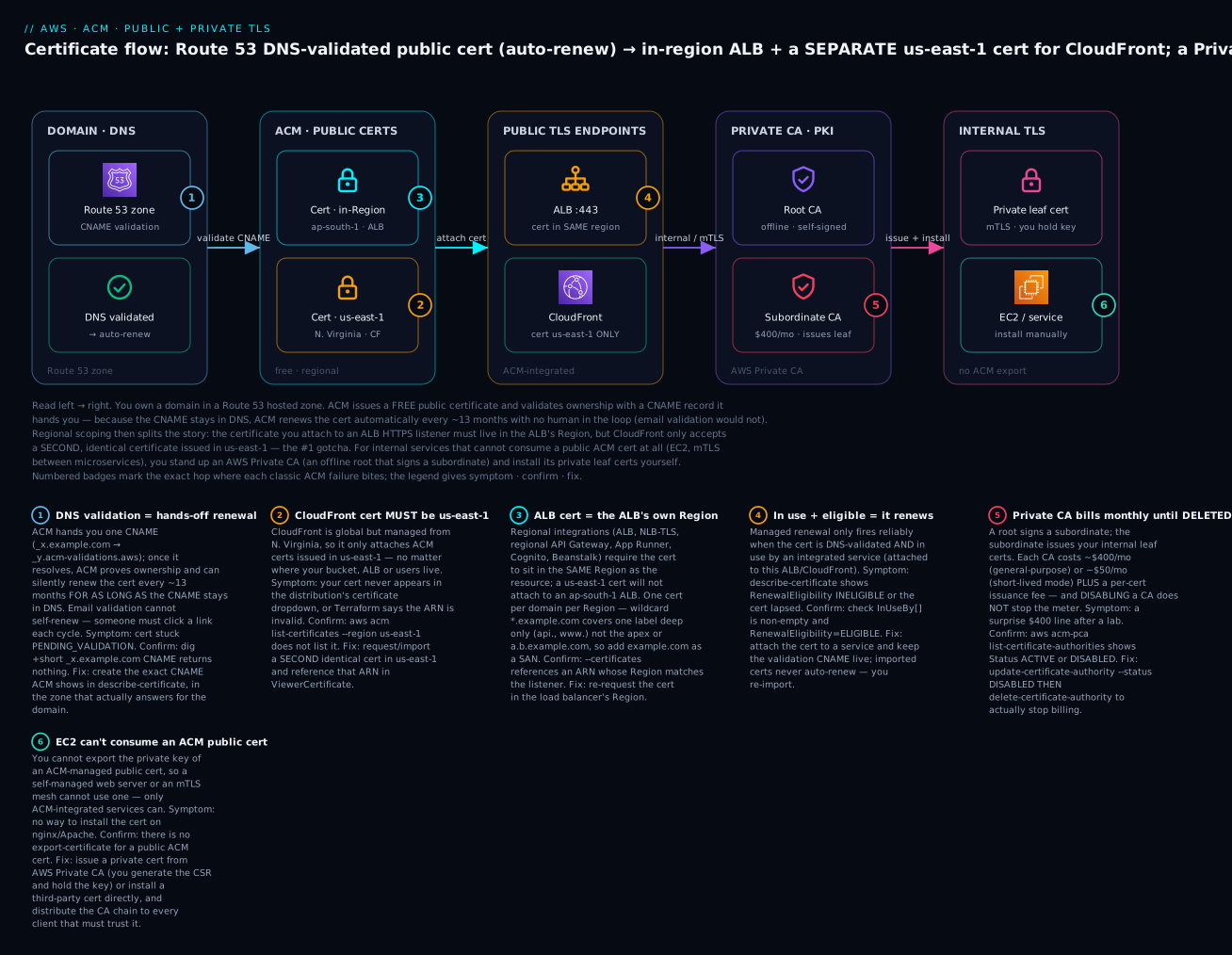
The diagram traces certificates from ownership to consumption. On the left you own a domain in a Route 53 hosted zone; ACM proves control with a DNS validation CNAME, and because that CNAME stays put, the public certificate renews itself every ~13 months. Regional scoping then forks the flow: the certificate you attach to the ALB HTTPS listener must live in the ALB’s own Region (ap-south-1 here), while CloudFront accepts only a second, identical certificate issued in us-east-1 — the classic gotcha. On a separate track, internal services that cannot consume a public ACM cert at all — an EC2 web server, mTLS between microservices — get their certificates from an AWS Private CA (an offline root that signs a subordinate, which issues leaf certs you install yourself). The six numbered badges mark exactly where each classic failure bites, and the legend gives symptom · confirm · fix for each.
Real-world scenario
Novacart, a fictional D2C retailer, ran www.novacart.in and api.novacart.in on AWS out of ap-south-1 (Mumbai). The site sat behind CloudFront (static front end on S3) and the API behind an internet-facing ALB in front of ECS. During the original build, an engineer requested one ACM certificate for novacart.in + *.novacart.in in ap-south-1, attached it to the ALB, and then spent an afternoon fighting CloudFront, which refused to show the certificate in its dropdown. After escalating internally, they learned the us-east-1 rule, requested a second identical cert in us-east-1, attached it to the distribution, and shipped. Both certs were DNS-validated with CNAMEs created automatically in the Route 53 zone. Everything worked, and — importantly — nobody had to think about it again: both certs showed RenewalEligibility: ELIGIBLE and InUseBy[] populated.
Fifteen months later, a different problem surfaced. A junior engineer, tidying the Route 53 zone, deleted “some weird underscore CNAME records nobody documented” — the ACM validation records. The current certs kept working (they were already issued), so nothing broke immediately. But at the next renewal cycle, ACM tried to re-validate, could not find the CNAMEs, and the ap-south-1 cert’s RenewalStatus went to PENDING_VALIDATION. Because Novacart had wired the EventBridge ACM Certificate Approaching Expiration event to a Slack channel, the on-call engineer saw the alert 40 days out, opened describe-certificate, spotted the missing CNAME in DomainValidationOptions, and re-created both validation records from the values ACM still exposed. The renewal completed on the next attempt. Had they relied on email validation — or not alarmed on the event — the ALB cert would have silently expired and taken the checkout API down.
A year later Novacart added a partner integration requiring mTLS: their backend and the partner’s backend each present a client certificate. Public certs were wrong for this (they did not want internal service identities in public CT logs, and they needed to control both trust stores). They stood up an AWS Private CA — a root plus a subordinate in short-lived-certificate mode — and issued 7-day leaf certs to each service via the PCA API, distributing the CA chain through their container base image. The lesson they wrote into their runbook has three lines: DNS-validate everything and never delete the CNAME; every domain that touches CloudFront needs a twin cert in us-east-1; and a Private CA bills $400/month until you delete it, not disable it.
Advantages and disadvantages
| Advantages | Disadvantages |
|---|---|
| Public certs are free | Public certs only work with integrated services |
| Automatic renewal (DNS-validated, in use) | Email-validated & imported certs don’t auto-renew |
| Private key never exportable (managed) → can’t leak | Can’t install a managed cert on EC2/self-managed servers |
| One-click Route 53 DNS validation | Regional scoping (us-east-1 for CloudFront) trips everyone |
| Integrated rotation — no re-attach on renewal | Two certs often needed for one domain (region split) |
| Private CA replaces running your own PKI | Private CA is expensive (~$400/mo per CA) |
| CT logging + Amazon-trusted root out of the box | CT publishes public hostnames (privacy) |
| ECDSA option for faster handshakes | 13-month fixed validity; no custom validity for public |
| Fully Terraform-able | DNS validation needs the certificate_validation dance in IaC |
Public ACM is a near-unambiguous win for internet-facing TLS: free, self-renewing, leak-proof. The disadvantages cluster around two things — the regional-scoping mental tax, and the fact that anything self-managed (EC2, on-prem, your own TLS termination) needs a Private CA or an imported cert, which reintroduces cost and manual rotation. Know which world you are in before you request.
Hands-on lab
This lab requests a public DNS-validated certificate, attaches it to an ALB HTTPS listener and to a CloudFront distribution (a second cert in us-east-1), verifies status and renewal eligibility, then stands up a small Private CA and issues a private cert. It assumes a Route 53 public hosted zone for a domain you control (placeholder example.com, zone id Z0123456789ABCDEFGHIJ) and an existing ALB (see the ALB hands-on). ⚠️ The Private CA section costs real money — roughly $400 pro-rated even for a few minutes, plus per-cert fees. Do that part only if you accept the charge, and follow the teardown exactly.
1. Request a public DNS-validated certificate (ALB’s Region)
export ZONE_ID=Z0123456789ABCDEFGHIJ
export DOMAIN=example.com
export REGION=ap-south-1

CERT_ARN=$(aws acm request-certificate \
  --domain-name "$DOMAIN" \
  --subject-alternative-names "*.$DOMAIN" \
  --validation-method DNS \
  --key-algorithm RSA_2048 \
  --region "$REGION" \
  --query CertificateArn --output text)
echo "$CERT_ARN"
Expected: an ARN like arn:aws:acm:ap-south-1:111122223333:certificate/8e.... The cert is now PENDING_VALIDATION.
2. Read the validation CNAME and create it in Route 53
aws acm describe-certificate --certificate-arn "$CERT_ARN" --region "$REGION" \
  --query 'Certificate.DomainValidationOptions[0].ResourceRecord' --output json
Expected:
{
  "Name": "_3e8623d4....example.com.",
  "Type": "CNAME",
  "Value": "_a1b2c3d4....acm-validations.aws."
}
Create that record (one CNAME covers the apex + wildcard because the validation name is shared):
CNAME_NAME=$(aws acm describe-certificate --certificate-arn "$CERT_ARN" --region "$REGION" \
  --query 'Certificate.DomainValidationOptions[0].ResourceRecord.Name' --output text)
CNAME_VALUE=$(aws acm describe-certificate --certificate-arn "$CERT_ARN" --region "$REGION" \
  --query 'Certificate.DomainValidationOptions[0].ResourceRecord.Value' --output text)

aws route53 change-resource-record-sets --hosted-zone-id "$ZONE_ID" \
  --change-batch "{\"Changes\":[{\"Action\":\"UPSERT\",\"ResourceRecordSet\":{\"Name\":\"$CNAME_NAME\",\"Type\":\"CNAME\",\"TTL\":300,\"ResourceRecords\":[{\"Value\":\"$CNAME_VALUE\"}]}}]}"
3. Wait for ISSUED and verify renewal eligibility
aws acm wait certificate-validated --certificate-arn "$CERT_ARN" --region "$REGION"

aws acm describe-certificate --certificate-arn "$CERT_ARN" --region "$REGION" \
  --query 'Certificate.{Status:Status,Eligible:RenewalEligibility,InUse:InUseBy}' --output json
Expected:
{ "Status": "ISSUED", "Eligible": "ELIGIBLE", "InUse": [] }
InUse is empty until you attach it — that is the next step.
4. Attach to an ALB HTTPS listener
export ALB_ARN=arn:aws:elasticloadbalancing:ap-south-1:111122223333:loadbalancer/app/demo/abc
export TG_ARN=arn:aws:elasticloadbalancing:ap-south-1:111122223333:targetgroup/demo/def

aws elbv2 create-listener --load-balancer-arn "$ALB_ARN" \
  --protocol HTTPS --port 443 \
  --ssl-policy ELBSecurityPolicy-TLS13-1-2-2021-06 \
  --certificates CertificateArn="$CERT_ARN" \
  --default-actions Type=forward,TargetGroupArn="$TG_ARN" \
  --region "$REGION"
Re-run the describe-certificate query from step 3: InUse now lists the listener ARN, confirming the cert is “in use” and firmly ELIGIBLE for hands-off renewal.
5. Request a SECOND cert in us-east-1 for CloudFront
CF_CERT_ARN=$(aws acm request-certificate \
  --domain-name "$DOMAIN" \
  --subject-alternative-names "*.$DOMAIN" \
  --validation-method DNS \
  --region us-east-1 \
  --query CertificateArn --output text)

# Create this cert's own validation CNAME (same shape as step 2, region us-east-1),
# then wait:
aws acm wait certificate-validated --certificate-arn "$CF_CERT_ARN" --region us-east-1
Attach it as the CloudFront viewer certificate (in a distribution config):
"ViewerCertificate": {
  "ACMCertificateArn": "arn:aws:acm:us-east-1:111122223333:certificate/....",
  "SSLSupportMethod": "sni-only",
  "MinimumProtocolVersion": "TLSv1.2_2021"
}
If you request this cert in any Region other than us-east-1, it will not appear in the CloudFront console and the API will reject the ARN — the gotcha, made concrete.
6. Terraform equivalent (public certs)
terraform {
  required_providers { aws = { source = "hashicorp/aws", version = "~> 5.0" } }
}
provider "aws" { region = "ap-south-1" }
provider "aws" { alias = "use1", region = "us-east-1" }   # CloudFront cert lives here

# --- In-Region cert for the ALB ---
resource "aws_acm_certificate" "alb" {
  domain_name               = "example.com"
  subject_alternative_names = ["*.example.com"]
  validation_method         = "DNS"
  key_algorithm             = "RSA_2048"
  lifecycle { create_before_destroy = true }
}

resource "aws_route53_record" "alb_validation" {
  for_each = {
    for o in aws_acm_certificate.alb.domain_validation_options :
    o.domain_name => { name = o.resource_record_name, type = o.resource_record_type, value = o.resource_record_value }
  }
  zone_id = "Z0123456789ABCDEFGHIJ"
  name    = each.value.name
  type    = each.value.type
  records = [each.value.value]
  ttl     = 300
}

resource "aws_acm_certificate_validation" "alb" {
  certificate_arn         = aws_acm_certificate.alb.arn
  validation_record_fqdns = [for r in aws_route53_record.alb_validation : r.fqdn]
}

# --- us-east-1 cert for CloudFront (note the aliased provider) ---
resource "aws_acm_certificate" "cf" {
  provider                  = aws.use1
  domain_name               = "example.com"
  subject_alternative_names = ["*.example.com"]
  validation_method         = "DNS"
  lifecycle { create_before_destroy = true }
}
The aws_acm_certificate_validation resource is the “wait for ISSUED” gate — reference aws_acm_certificate_validation.alb.certificate_arn from your aws_lb_listener so Terraform doesn’t attach a still-pending cert.
7. Stand up a Private CA and issue a private cert (⚠️ costs money)
# 7a. Create a ROOT CA
CA_ARN=$(aws acm-pca create-certificate-authority \
  --certificate-authority-type ROOT \
  --certificate-authority-configuration '{
    "KeyAlgorithm":"RSA_2048",
    "SigningAlgorithm":"SHA256WITHRSA",
    "Subject":{"Organization":"Novacart","CommonName":"Novacart Root CA"}
  }' \
  --region "$REGION" --query CertificateAuthorityArn --output text)

# 7b. Get the CSR, self-sign it, and install the CA certificate
aws acm-pca get-certificate-authority-csr --certificate-authority-arn "$CA_ARN" \
  --region "$REGION" --output text > ca.csr

ROOT_CERT_ARN=$(aws acm-pca issue-certificate \
  --certificate-authority-arn "$CA_ARN" \
  --csr fileb://ca.csr \
  --signing-algorithm SHA256WITHRSA \
  --template-arn arn:aws:acm-pca:::template/RootCACertificate/V1 \
  --validity Value=10,Type=YEARS \
  --region "$REGION" --query CertificateArn --output text)

aws acm-pca get-certificate --certificate-authority-arn "$CA_ARN" \
  --certificate-arn "$ROOT_CERT_ARN" --region "$REGION" \
  --query Certificate --output text > rootca.pem

aws acm-pca import-certificate-authority-certificate \
  --certificate-authority-arn "$CA_ARN" \
  --certificate fileb://rootca.pem --region "$REGION"
Now issue a private end-entity cert from a CSR you generate (so you hold the key and can install it on EC2):
openssl req -newkey rsa:2048 -nodes -keyout svc.key \
  -subj "/CN=payments.corp.internal" -out svc.csr

LEAF_ARN=$(aws acm-pca issue-certificate \
  --certificate-authority-arn "$CA_ARN" \
  --csr fileb://svc.csr \
  --signing-algorithm SHA256WITHRSA \
  --template-arn arn:aws:acm-pca:::template/EndEntityCertificate/V1 \
  --validity Value=13,Type=MONTHS \
  --region "$REGION" --query CertificateArn --output text)

aws acm-pca get-certificate --certificate-authority-arn "$CA_ARN" \
  --certificate-arn "$LEAF_ARN" --region "$REGION" \
  --query Certificate --output text > svc.pem
You now have svc.key + svc.pem to install on a server or sidecar, and clients must trust rootca.pem.
8. Verification checklist
| Check | Command | Expected |
|---|---|---|
| Public cert issued | describe-certificate … Status |
ISSUED |
| Renewal eligible | describe-certificate … RenewalEligibility |
ELIGIBLE |
| In use by ALB | describe-certificate … InUseBy |
listener ARN present |
| CloudFront cert region | ARN contains us-east-1 |
yes |
| Private CA active | acm-pca describe-certificate-authority … Status |
ACTIVE |
| Leaf chains to root | openssl verify -CAfile rootca.pem svc.pem |
svc.pem: OK |
9. Teardown (⚠️ delete the Private CA to stop billing)
# Public certs: detach from services first (delete the ALB listener / CloudFront cert), then:
aws acm delete-certificate --certificate-arn "$CERT_ARN" --region "$REGION"
aws acm delete-certificate --certificate-arn "$CF_CERT_ARN" --region us-east-1

# Route 53 validation records: delete with a DELETE change-batch (reverse of step 2).

# Private CA: DISABLE then DELETE — disabling alone does NOT stop the $400/mo charge.
aws acm-pca update-certificate-authority --certificate-authority-arn "$CA_ARN" \
  --status DISABLED --region "$REGION"

aws acm-pca delete-certificate-authority --certificate-authority-arn "$CA_ARN" \
  --permanent-deletion-time-in-days 7 --region "$REGION"
A delete-certificate fails if the cert is still InUseBy a service — detach it first. And the Private CA keeps billing until delete-certificate-authority runs; the --permanent-deletion-time-in-days window (7–30) lets you restore, but you are no longer charged once deletion is scheduled.
Common mistakes & troubleshooting
The playbook. Each row is symptom → root cause → the exact command/console path to confirm → the fix.
| # | Symptom | Root cause | Confirm (command / console) | Fix |
|---|---|---|---|---|
| 1 | Cert stuck PENDING_VALIDATION |
Validation CNAME never created | dig +short _xxx.example.com CNAME → empty |
Create the exact CNAME from describe-certificate |
| 2 | PENDING_VALIDATION, CNAME exists |
CNAME created in the wrong zone (not the one that answers) | dig +trace shows a different authoritative NS |
Add the CNAME to the zone that is actually authoritative |
| 3 | PENDING_VALIDATION right after creating the record |
DNS propagation delay | dig from multiple resolvers |
Wait; validation retries automatically (within 72h) |
| 4 | VALIDATION_TIMED_OUT |
72-hour window elapsed with no valid record | describe-certificate … Status |
Request a new cert; add the CNAME immediately |
| 5 | FAILED, reason CAA_ERROR |
Domain’s CAA record forbids Amazon’s CA | dig CAA example.com |
Add example.com. CAA 0 issue "amazon.com" |
| 6 | CloudFront won’t show/accept the cert | Cert isn’t in us-east-1 | aws acm list-certificates --region us-east-1 |
Request/import a twin cert in us-east-1 |
| 7 | ALB rejects the cert ARN | Cert Region ≠ the ALB’s Region | Compare Region in cert ARN vs ALB ARN | Request the cert in the ALB’s Region |
| 8 | Renewal didn’t happen; cert expired | Email-validated (no auto-renew) or CNAME deleted | describe-certificate … RenewalEligibility / RenewalSummary |
Switch to DNS validation; restore the CNAME |
| 9 | RenewalEligibility: INELIGIBLE |
Imported cert, or not in use | describe-certificate … InUseBy empty |
Attach to a service; for imported, re-import before expiry |
| 10 | Imported cert about to expire silently | Imported certs never auto-renew | EventBridge Approaching Expiration / DaysToExpiry metric |
Re-import new material to the same ARN |
| 11 | Browser: NET::ERR_CERT_COMMON_NAME_INVALID |
Hostname not covered (wildcard depth / missing SAN) | openssl s_client -connect host:443 → check CN/SAN |
Add the name as a SAN; remember * = one label |
| 12 | Browser padlock broken / “Mixed content” | Page loads http:// assets over HTTPS |
DevTools console “Mixed Content” | Serve all assets over HTTPS / protocol-relative |
| 13 | SSL_ERROR / “incomplete chain” on some clients |
Intermediate chain not sent (imported cert) | openssl s_client -showcerts shows only leaf |
Import with the full --certificate-chain |
| 14 | Private cert: “unable to verify / untrusted issuer” | Client doesn’t trust your Private CA | openssl verify -CAfile rootca.pem leaf.pem |
Distribute the CA chain to every client’s trust store |
| 15 | mTLS handshake fails | Client cert missing/expired, or CA not on server | Server TLS logs; openssl s_client -cert client.pem |
Issue/renew the client cert; load the CA on the server |
| 16 | Chrome rejects a valid public cert | CT logging was disabled | describe-certificate … Options shows DISABLED |
Re-request with CT logging enabled |
| 17 | Surprise ~$400 bill after a lab | Private CA disabled but not deleted | acm-pca list-certificate-authorities … Status |
delete-certificate-authority (disable ≠ delete) |
| 18 | delete-certificate fails |
Cert still InUseBy a service |
describe-certificate … InUseBy |
Detach from the ALB/CloudFront first, then delete |
The three nastiest, in prose
The disappearing CloudFront certificate (rows 6, 7). You request a cert in your home Region, it goes ISSUED, everything looks perfect, and CloudFront pretends it does not exist. There is no error — the cert simply is not in the dropdown, and the API rejects the ARN with a vague message. The mental model to internalize: CloudFront lives in us-east-1, and so does its certificate, always. Regional services (ALB, NLB, regional API Gateway) are the mirror image — a us-east-1 cert will not attach to them. When a cert “won’t attach,” the first thing to check is never the cert; it is the Region in the ARN versus the consuming resource’s rule.
The renewal that didn’t happen (rows 8, 9, 10). The cruelty here is the delay. Deleting the validation CNAME, or using email validation, or importing a cert, breaks the next renewal — not today. The current cert keeps working for months, everyone forgets, and then it expires at midnight and every client fails TLS simultaneously. Defense in depth: DNS-validate everything, never delete the underscore CNAME records (label them clearly so no one “cleans them up”), keep certs attached to a service, and alarm on the EventBridge ACM Certificate Approaching Expiration event and the CloudWatch DaysToExpiry metric so a human is warned weeks before any cert — especially imported ones — lapses.
The untrusted private certificate (rows 14, 15). A private cert is only as trusted as your CA chain distribution. The cert is technically perfect; the client just has never heard of your root. curl says unable to get local issuer certificate, the browser shows a scary warning, and mTLS fails the handshake. The fix is always on the client side: the CA chain (rootca.pem, plus any subordinate) must be in the OS trust store, the container image, the JVM truststore, or the mesh config of every party that must trust it. Bake CA distribution into your image/provisioning pipeline; do not hand-install it and hope.
Best practices
| # | Practice | Why |
|---|---|---|
| 1 | Always use DNS validation | Only DNS-validated certs auto-renew hands-off |
| 2 | Never delete the validation CNAME | Deleting it breaks the next renewal, silently |
| 3 | Keep certs attached to a service | “In use” makes renewal reliable and eligible |
| 4 | One domain, two certs across the region split | us-east-1 for CloudFront + in-Region for ALB — they’re free |
| 5 | Request example.com + *.example.com together |
Covers apex and one-level subdomains in one cert |
| 6 | Alarm on DaysToExpiry + the EventBridge expiry event |
Catch imported/broken-renewal certs weeks early |
| 7 | Re-import to the same ARN when rotating imports | Associations survive; no re-attach |
| 8 | Use a Private CA for internal/mTLS, not a public wildcard | Avoid publishing internal hostnames to CT logs |
| 9 | Use a root → subordinate hierarchy in Private CA | Revoke a subordinate without killing the root |
| 10 | Prefer ECDSA where clients support it | Faster handshakes, smaller certs at scale |
| 11 | Manage certs in Terraform with the validation gate | aws_acm_certificate_validation prevents attaching pending certs |
| 12 | Delete (not just disable) unused Private CAs | Disabling still bills ~$400/month |
Security notes
TLS certificates are a security control, so ACM sits squarely in your security posture. The strongest property of managed ACM is that the private key never leaves AWS and cannot be exported — a whole class of “private key leaked in a repo/wiki/CI log” incidents simply cannot happen from your side. Lean into that: prefer managed ACM certs over imports wherever a service can consume them, and reserve exportable keys (imports, PCA-issued leaf certs) for the cases that truly need them.
| Control | How | Why it matters |
|---|---|---|
| Non-exportable keys | Use managed public certs | Key can’t leak from your side |
| Least-privilege IAM | Scope acm:* / acm-pca:* to specific ARNs |
Limit who can issue/delete certs and CAs |
| Private CA key protection | AWS stores the CA key in an HSM (FIPS) | Root key never exposed; see KMS & envelope encryption |
| Revocation | Enable CRL and/or OCSP on the Private CA | Revoke compromised leaf certs |
| Strong TLS policy | ELBSecurityPolicy-TLS13-1-2-2021-06 on ALB; TLSv1.2_2021 on CloudFront |
Disable weak protocols/ciphers |
| CT monitoring | Watch CT logs (crt.sh) for your domains | Detect mis-issuance for your names |
| mTLS for east-west | Private CA + client certs | Mutual auth between services |
| CAA records | CAA 0 issue "amazon.com" |
Restrict which CAs may issue for your domain |
| Rotate audit | CloudTrail on RequestCertificate, IssueCertificate, DeleteCertificateAuthority |
Detect unexpected issuance/deletion |
For mTLS, the pattern is: a Private CA issues both server and client leaf certs; each side is configured to require and verify a client cert signed by your CA; you distribute the CA chain to both. Store any exportable private keys (imported certs, PCA leaf keys) in Secrets Manager with rotation, not on disk or in git — see Secrets Manager rotation. And scope IAM tightly: acm-pca:IssueCertificate and acm-pca:DeleteCertificateAuthority are powerful — the first mints trusted identities, the second can (after the restore window) destroy your entire private trust root.
Cost & sizing
| Item | Cost | Notes |
|---|---|---|
| Public certificate | Free | No charge for the cert; ever |
| Imported certificate | Free to import | You paid the third-party CA separately |
| DNS validation (Route 53) | Standard Route 53 query pricing | Negligible for a CNAME |
| Private CA (general-purpose) | ~$400 / month per CA | Until deleted, not disabled |
| Private CA (short-lived mode) | ~$50 / month per CA | ≤7-day certs; good for mTLS churn |
| Private cert issuance | ~$0.75 each (first 1,000/mo) | Tiers down to ~$0.35, then ~$0.001 |
CloudWatch alarm on DaysToExpiry |
Standard alarm price | ~$0.10/alarm/month |
| The certificate on an ALB/CloudFront | You pay for the ALB/CloudFront, not the cert | TLS termination is included in those services |
What drives the bill is Private CA, full stop — public ACM is free, so the only ACM line item that ever surprises anyone is a forgotten CA at roughly $400/month (about ₹33,000/month). Right-sizing guidance: for a small internal mTLS or lab use case, use short-lived-certificate mode (~$50/month, about ₹4,200) if 7-day validity fits; consolidate to one subordinate CA per environment rather than one per team; and in non-prod, create the CA, issue, test, and delete it in the same session so it never spans a monthly boundary. Free-tier note: there is no ACM free tier because public certs are simply free; Private CA has no free tier and bills from creation.
Interview & exam questions
Q1. Why must a CloudFront certificate be in us-east-1? CloudFront is a global service administered from N. Virginia, so its viewer certificate must be an ACM cert in us-east-1 regardless of where the origin or users are. Cognito custom domains and edge-optimized API Gateway (both fronted by CloudFront) follow the same rule. (SAA-C03, SOA-C02)
Q2. Why does DNS validation enable automatic renewal but email validation doesn’t? The DNS validation CNAME stays in the zone, so ACM can silently re-prove domain control at renewal time with no human involved. Email validation requires someone to click an approval link each cycle, which cannot be automated — so email-validated certs do not auto-renew. (DVA-C02)
Q3. A DNS-validated public cert is ISSUED but RenewalEligibility is INELIGIBLE. Why?
Most likely it is not in use by any integrated service (empty InUseBy[]), or it was imported. Attach it to a service (ALB/CloudFront/etc.) to make renewal reliable; imported certs are never eligible and must be re-imported. (SOA-C02)
Q4. What does *.example.com cover, and how do you also cover the apex?
It covers one label deep — www., api. — but not the apex example.com nor a.b.example.com. Request a cert with domain name example.com and SAN *.example.com to cover both. (SAA-C03, DVA-C02)
Q5. Can you put an ACM public certificate on an EC2 web server? No — the private key of a managed public cert is not exportable, so there is nothing to install. Terminate TLS at an ALB/CloudFront and use ACM there, or issue a private cert from AWS Private CA (you hold the key), or install a third-party cert directly. (SAA-C03, SCS-C02)
Q6. How do you rotate an imported certificate without breaking associations?
Re-import the new material to the same certificate ARN (import-certificate --certificate-arn <existing>). Every ALB/CloudFront reference keeps working because the ARN is unchanged. (SOA-C02)
Q7. Your cert request went to FAILED with CAA_ERROR. What happened and how do you fix it?
The domain has a CAA DNS record that does not permit Amazon’s CA to issue. Add a CAA record allowing amazon.com (e.g. example.com. CAA 0 issue "amazon.com") and re-request. (SCS-C02)
Q8. When would you choose a Private CA over a public cert? For internal-only trust: mTLS between your services, internal admin portals on non-public names, IoT/VPN — cases where you own both ends, need custom names/validity, or must not publish hostnames to public CT logs. (SCS-C02)
Q9. What is the difference between disabling and deleting a Private CA, cost-wise?
Disabling stops issuance but not billing — you still pay ~$400/month. Only delete-certificate-authority stops the charge (after disabling). (SCS-C02, cost management)
Q10. RSA 2048 vs ECDSA P-256 for a high-traffic CloudFront distribution? ECDSA P-256 offers comparable security to RSA 3072 with smaller keys and faster handshakes, reducing CPU at scale — choose it if your clients support ECDSA. RSA 2048 is the safest default for maximum compatibility. (SCS-C02, performance)
Q11. How do you get alerted before a certificate expires?
Alarm on the CloudWatch DaysToExpiry metric and route the EventBridge ACM Certificate Approaching Expiration event (emitted daily from ~45 days out) to SNS/Slack. Essential for imported and email-validated certs that don’t auto-renew. (SOA-C02)
Q12. What is Certificate Transparency, and what’s the privacy implication? CT is public, append-only logging of issued public certs that browsers require. Because the logs are public and searchable, requesting a public cert for a hostname publishes that hostname to the world — a reason to use Private CA for sensitive internal names. (SCS-C02)
Quick check
- A cert is
ISSUEDin ap-south-1 but doesn’t appear in CloudFront’s certificate list. What’s wrong? - True or false: an email-validated ACM certificate renews itself automatically.
- Which hostnames does
*.example.comnot cover:www.example.com,example.com,a.b.example.com? - You imported a cert 12 months ago and it’s about to expire. What does ACM do about renewal?
- You ran a Private CA lab and set the CA to
DISABLED. Are you still being charged?
Answers
- The certificate is in the wrong Region — CloudFront requires the cert in us-east-1. Request a second, identical cert there.
- False. Only DNS-validated certs auto-renew; email-validated certs require a manual approval each cycle.
- It does not cover
example.com(the apex) ora.b.example.com(two labels). It does coverwww.example.com. - Nothing — imported certs never auto-renew. You must re-import new material (ideally to the same ARN) before it expires.
- Yes. Disabling a Private CA does not stop billing (~$400/month). You must
delete-certificate-authorityto stop the charge.
Glossary
| Term | Definition |
|---|---|
| ACM | AWS Certificate Manager — issues, stores, and renews TLS certificates |
| Public certificate | Cert chaining to the browser-trusted Amazon public CA; free |
| Private certificate | Cert chaining to your own AWS Private CA; trusted only by clients you configure |
| DNS validation | Proving domain control via a CNAME; enables automatic renewal |
| Email validation | Proving control by clicking a link; no automatic renewal |
| SAN | Subject Alternative Name — additional hostnames on one certificate |
| Wildcard cert | *.example.com — matches exactly one label deep |
| Regional scoping | The rule that a cert must be in us-east-1 (CloudFront) or the resource’s Region |
| Managed renewal | ACM re-issuing an eligible cert before expiry, deployed transparently |
| RenewalEligibility | ELIGIBLE/INELIGIBLE — whether ACM can auto-renew this cert |
| In use / InUseBy | The service ARNs consuming a cert; needed for reliable renewal |
| Import | Bringing a third-party cert into ACM; never auto-renews |
| AWS Private CA | Managed private root/subordinate CA service (ACM-PCA) |
| mTLS | Mutual TLS — both client and server present certificates |
| Certificate Transparency (CT) | Public logging of issued public certs; browser-required |
| CAA record | DNS record listing which CAs may issue for a domain |
Next steps
- Host a Static Site on S3 + CloudFront with a Custom Domain (OAC, ACM, Route 53) — the canonical us-east-1 ACM + CloudFront build end to end.
- AWS Application Load Balancer & Target Groups Hands-On — HTTPS listeners, SNI, and attaching in-Region certs.
- CloudFront: CDN Setup, Caching & Origins — where the us-east-1 viewer certificate plugs in.
- Route 53: Records & Routing Policies — hosted zones and the CNAME that powers DNS validation.
- AWS KMS: Encryption Keys & Envelope Encryption — how Private CA and service keys are protected under the hood.