Quick take: AWS Secrets Manager stores a credential once, encrypts it with KMS, hands it to your application through a single
GetSecretValuecall, and — the part everyone gets wrong — rotates it on a schedule without downtime. The magic is not the vault; a dozen products can hold an encrypted string. The magic is versioning with staging labels: a secret is not one value but a series of versions, and three moving labels —AWSCURRENT,AWSPENDING,AWSPREVIOUS— decide which version each caller sees. Your app always readsAWSCURRENTand never knows a rotation happened underneath it. A rotation function creates a new password asAWSPENDING, sets it in the database, tests it, and then atomically moves theAWSCURRENTlabel onto it — four steps, in that exact order,createSecret → setSecret → testSecret → finishSecret. Get the order, the idempotency, and — above all — the network path right and rotation is invisible and boring. Get the network wrong (a rotation Lambda that can reach the database but not the Secrets Manager endpoint) and the rotation hangs for fifteen minutes and then fails, and you learn the hard way why every Secrets Manager war story is really a VPC story. This article takes rotation apart end to end — the labels, the four steps, managed vs custom rotation, single-user vs alternating-users, the endpoint reachability, KMS, cross-account, multi-Region replicas and caching — then rotates a real RDS credential hands-on inawsCLI and Terraform.
Storing a secret is easy. Changing it safely, on a schedule, while a live fleet is authenticating against it every second, is the hard problem — and it is the one Secrets Manager exists to solve. A static database password that never changes is a standing liability: it leaks into a .env file, a CI log, a Slack message, three laptops and a screenshot, and once it is out there is no expiry to save you. The security answer is rotation — change it often enough that a leaked copy is worthless within days — but rotation by hand is terrifying, because the instant you change the password in the database, every application still holding the old one starts failing authentication. Rotation “done right” means the credential changes and nothing breaks, and that requires a specific choreography of versions, labels and steps that this article is entirely about.
This is the deep, decision-by-decision treatment of automatic rotation for an engineer who has to run it in production, not just click “enable rotation” and hope. We build the mental model of a secret as a versioned object with staging labels, then walk the four-step rotation function line by line and show exactly how finishSecret moves the AWSCURRENT label. We separate managed rotation (AWS runs the function for RDS, Aurora, Redshift and DocumentDB) from custom rotation (you write a Lambda for anything else), and we make the single-user vs alternating-users choice concrete — why alternating-users is the only strategy that gives genuinely zero-downtime rotation. We spend real time on the rotation function’s network needs, because a function that cannot reach both the database and the Secrets Manager endpoint is the single most common cause of a rotation that hangs. Then KMS encryption, resource policies and cross-account retrieval, multi-Region replicated secrets, client-side caching (the SDK cache and the Lambda extension), and a clear-eyed Secrets Manager vs Parameter Store SecureString comparison so you know when the $0.40/month is worth it. The hands-on lab rotates a real RDS PostgreSQL credential — create the secret, attach managed alternating-users rotation on a 30-day schedule, force a rotation, watch the staging labels move version to version, retrieve AWSCURRENT, and wire an app to fetch it — with a full teardown and a 16-row troubleshooting playbook.
By the end you can enable rotation on purpose and reason about every failure mode: read describe-secret and know exactly which version each label points at, choose managed over custom and alternating over single-user for the right reasons, place the rotation function on a network path that actually completes, retrieve secrets cheaply with a cache, share one across accounts and Regions, and diagnose a stuck AWSPENDING in under a minute. This maps to the secrets and data-protection domains of SCS-C02 (Security Specialty), DVA-C02 (Developer Associate) and SAA-C03 (Solutions Architect Associate).
What problem this solves
The problem Secrets Manager rotation solves is a long-lived credential is a breach waiting for a date. Every static password, API key and database credential in your estate is a copy of a secret that has almost certainly escaped its intended home — into source control, a build log, an environment variable dumped to a crash report, a developer’s shell history. Nothing about a static secret expires, so a copy stolen today is still valid next year. The only durable defense is to change the secret often enough that a leaked copy is stale before an attacker can use it — and to do that without an outage every time.
What breaks without rotation done right is not the storing; it is the changing. A team hand-rotates a production database password at 2 a.m., updates the app config, and forgets one service that was still using the old value — instant partial outage, and now they are debugging auth failures under pressure. Or they wire up Secrets Manager rotation, the rotation Lambda gets attached to the VPC so it can reach the private RDS instance, and nobody realizes that putting a Lambda in a VPC removes its default internet route — so its calls to the Secrets Manager API time out, the rotation hangs for the full function timeout and then fails, and the secret is now stuck with a half-finished AWSPENDING version. Or the app caches the secret value on boot and never re-reads it, so the first rotation quietly breaks every running instance until it is redeployed. Or someone enables rotation on an unencrypted-cross-account secret and the retrieving account gets AccessDenied because the KMS key policy was never updated. Each of these is a specific, common, avoidable failure — and each is in this article.
Who hits this: every developer wiring an app to a database, every platform engineer asked to “make us pass the audit” (rotation is a control in PCI-DSS, SOC 2, HIPAA and every CIS benchmark), every security engineer chasing down where a leaked key came from, and every SRE who has watched a rotation take down a service because the app cached the old value. Here is the whole field in one frame — the questions enabling rotation forces you to answer whether or not you noticed answering them:
| The rotation question | The naive default | What it costs to get wrong | Where in this article |
|---|---|---|---|
| How does the app not break mid-rotation? | “We’ll update config too” | Partial outage every rotation | Secrets, versions & staging labels |
| Managed or custom rotation? | Write a Lambda by hand | Maintaining rotation code you didn’t need to | Managed rotation / Custom rotation |
| Single-user or alternating-users? | Single-user (default-looking) | A brief auth blip on every rotation | Managed rotation for databases |
| Can the rotation function reach the DB and the SM API? | Attach to the VPC, done | Rotation hangs then fails; AWSPENDING stuck |
The rotation function’s network |
| Does the app cache the secret forever? | Read once at boot | First rotation breaks every running instance | Retrieving secrets & caching |
| Which KMS key encrypts it? | The default aws/secretsmanager |
Can’t share cross-account; no key audit | Encryption, resource policies & cross-account |
| One Region or many? | One | Regional outage or latency for far clients | Multi-Region replicated secrets |
| Secrets Manager or Parameter Store? | Whatever’s habitual | Paying $0.40/secret for values that never rotate, or hand-building rotation | Secrets Manager vs Parameter Store |
Learning objectives
By the end of this article you can:
- Explain a Secrets Manager secret as a versioned object and describe exactly what the
AWSCURRENT,AWSPENDINGandAWSPREVIOUSstaging labels point at and how they move — so you know why the application always readsAWSCURRENTand never sees a rotation. - Walk the four-step rotation function (
createSecret → setSecret → testSecret → finishSecret) step by step, name what each step reads and writes, explain why every step must be idempotent, and pinpoint howfinishSecretpromotesAWSPENDINGtoAWSCURRENT. - Choose between managed rotation (AWS-operated, for RDS/Aurora/Redshift/DocumentDB) and custom rotation (your own Lambda for API keys, third-party services and anything non-database).
- Decide between the single-user and alternating-users rotation strategies and articulate precisely why alternating-users delivers zero-downtime rotation and what the superuser/master secret is for.
- Design the rotation function’s network so it reaches both the database (VPC + security groups) and the Secrets Manager endpoint (NAT gateway or a PrivateLink interface endpoint) — and recognize the classic “rotation hangs” signature instantly.
- Configure KMS encryption (default key vs a customer CMK), resource policies and cross-account retrieval, and multi-Region replicated secrets.
- Retrieve secrets cheaply and correctly with client-side caching — the SDK caching library and the AWS Parameters and Secrets Lambda Extension on
localhost:2773. - Compare Secrets Manager to Parameter Store SecureString on rotation, cost, size, cross-account and replication, and pick the right one per secret.
- Run the whole thing hands-on: create an RDS credentials secret, attach managed alternating-users rotation on a 30-day schedule, force a rotation, watch the staging labels move, retrieve
AWSCURRENT, wire an app to fetch it, and tear it all down — inawsCLI and Terraform.
Prerequisites & where this fits
You need an AWS account, the AWS CLI v2 configured with a non-root IAM identity, and — for the lab — a running RDS or Aurora instance in a VPC. If you do not have one, build it first with Launch Amazon RDS (MySQL & PostgreSQL) Hands-On; that article’s private, encrypted PostgreSQL instance is exactly the target we rotate credentials for here. You should be comfortable reading a Lambda handler in Python and a Terraform resource block, and you should understand what a VPC, subnet, security group and NAT gateway are, because the hardest part of rotation is a networking problem, not a cryptography one.
This sits in the Security track and pairs tightly with three siblings. Its encryption story is built on envelope encryption with KMS — the full mechanism is in AWS KMS Hands-On: Encryption Keys and Envelope Encryption, and you should read it if “data key” and “key policy” are fuzzy. Its cheaper, rotation-less cousin for plain configuration is covered in AWS Systems Manager Parameter Store Hands-On: Config and SecureString — the last deep section here is a direct comparison so you can put each value in the right store. And when a rotated credential still will not connect, the network diagnosis overlaps heavily with RDS Connection Timeouts: A Troubleshooting Playbook, because a rotation function that cannot reach the database fails for the exact same reasons an application cannot.
Here is the assumed knowledge, why each piece matters specifically for rotation, and where to shore it up:
| You should know… | Why it matters here | Brush up |
|---|---|---|
| What a VPC, subnet, SG, NAT are | The rotation function’s reachability is the whole problem | RDS Connection Timeouts Playbook |
| How KMS envelope encryption works | Secrets are envelope-encrypted; retrieval needs kms:Decrypt |
AWS KMS Hands-On: Envelope Encryption |
| Reading a Lambda handler | The rotation contract is a four-branch handler | Any Lambda primer |
| Basic RDS operation | The lab rotates an RDS credential | Launch Amazon RDS Hands-On |
| What Parameter Store is | You must know when not to use Secrets Manager | Parameter Store Hands-On |
| IAM policies & resource policies | Cross-account access needs both identity and resource policy | Any IAM primer |
Core concepts
Eight mental models make every later decision obvious.
A secret is not a value — it is a container of versions. When you think “the database password,” Secrets Manager thinks “the secret kv/lab/appdb, which currently has versions v3, v2, v1, each holding a different value.” You never overwrite a secret in place during rotation; you add a new version and then point a label at it. This is the entire reason rotation can be safe: the old value and the new value co-exist for the duration of the rotation, so nothing is ever momentarily absent.
Staging labels are movable pointers, not values. Three labels matter. AWSCURRENT points at the version everyone should be using right now — a bare GetSecretValue returns it. AWSPENDING points at the brand-new version a rotation is in the middle of creating and validating, not yet live. AWSPREVIOUS points at the version that used to be AWSCURRENT, kept so you can roll back. A label lives on exactly one version at a time; rotation is, at its core, the act of moving the AWSCURRENT label from the old version to the new one.
The application only ever reads AWSCURRENT. This is the promise that makes rotation invisible. Your code calls GetSecretValue with no version specified, gets whatever AWSCURRENT points at, and connects. It does not know or care that yesterday AWSCURRENT pointed at a different version. As long as your app re-reads the secret (or caches it with a short TTL and re-reads on failure), rotation is transparent to it.
Rotation is a four-step function, always in the same order. Whether AWS runs it (managed) or you write it (custom), a rotation function implements four steps invoked one at a time by Secrets Manager: createSecret (generate the new value, store it as AWSPENDING), setSecret (change the credential in the actual database/service), testSecret (verify the new value works), finishSecret (move AWSCURRENT to the AWSPENDING version). The order is load-bearing: you create and test the new credential before you make it current, so a broken rotation never leaves you with a live-but-wrong secret.
Every step must be idempotent. Secrets Manager can invoke any step more than once (retries, at-least-once delivery). createSecret must check whether an AWSPENDING version already exists before generating another; finishSecret must tolerate the label already being where it belongs. A rotation function that assumes exactly-once invocation is a rotation function that eventually loops or double-rotates.
Managed rotation means AWS operates the function; custom means you do. For the four database families — RDS, Aurora, Redshift, DocumentDB — Secrets Manager provides the rotation logic so you do not write or maintain a Lambda. For everything else — a third-party API key, an OAuth client secret, a service account — you write a custom Lambda that implements the same four steps against that thing’s API.
The rotation function needs to reach two different things. To rotate a database password it must reach the database (to run ALTER USER) and the Secrets Manager API (to read the pending version, write versions, move labels). For a private database that means running inside the VPC — and a function inside a VPC has no default internet egress, so its calls to the public Secrets Manager endpoint need a NAT gateway or a PrivateLink interface endpoint. Forgetting the second reachability is the number-one rotation failure.
Secrets are envelope-encrypted with KMS. Secrets Manager calls kms:GenerateDataKey to get a data key, encrypts the secret value with it, and stores the encrypted data key alongside — classic envelope encryption. To read the secret, a principal needs both secretsmanager:GetSecretValue and kms:Decrypt on the key. That second permission is why so many “I have GetSecretValue, why is it denied?” tickets are really KMS tickets.
Here is every moving part of a rotating secret in one table, with who sets it and the gotcha that bites:
| Building block | What it is | You set it… | Gotcha |
|---|---|---|---|
| Secret | The named container (kv/lab/appdb) |
At create | The name is in the ARN with a random 6-char suffix |
| Version | One immutable value + its ID | On every PutSecretValue/rotation |
Unlabeled versions are eventually deleted |
| Staging label | A movable pointer to a version | Rotation moves them; you can too | A label is on exactly one version at a time |
AWSCURRENT |
The live version everyone reads | finishSecret moves it |
Bare GetSecretValue returns this |
AWSPENDING |
The in-flight new version | createSecret sets it |
Stuck = a rotation didn’t finish |
AWSPREVIOUS |
The last-current version (rollback) | Secrets Manager moves it automatically | You don’t set this by hand |
| Rotation function | The four-step Lambda (managed or custom) | Attach via rotate-secret |
Must reach DB and SM endpoint |
| RotationRules | Schedule + window | On enable | AutomaticallyAfterDays or ScheduleExpression |
| KMS key | Envelope-encryption key | At create (default or CMK) | Cross-account needs a CMK, not the default |
| Resource policy | Who else may read the secret | Optional | Grants cross-account; pair with the key policy |
| Replica | A read copy in another Region | Optional | Billed as a separate secret |
Secrets, versions and staging labels
Everything about safe rotation starts here. Internalize the version-and-label model and the rest of the article is bookkeeping.
The three staging labels (and custom ones)
A staging label is a human-readable pointer to a specific version of a secret. Secrets Manager reserves three names and lets you invent your own:
| Staging label | Points at | Who moves it | A GetSecretValue for it returns |
|---|---|---|---|
AWSCURRENT |
The version in active use | finishSecret (or you) |
The value your app should use — the default |
AWSPENDING |
The new version mid-rotation | createSecret (or you) |
The not-yet-live candidate value |
AWSPREVIOUS |
The version that was current | Secrets Manager, automatically | The prior value — for rollback |
Custom (e.g. AWSPREVIOUS-blue) |
Whatever you attach it to | You | Whatever that version holds |
Three rules govern them and explain almost every surprise:
| Rule | Consequence |
|---|---|
| A label lives on exactly one version at a time | Moving AWSCURRENT to a new version removes it from the old one |
The default GetSecretValue (no version) returns AWSCURRENT |
Your app never needs to know version IDs |
| A version with no staging labels is deprecated and eventually removed | Old rotated-out versions self-clean; don’t rely on ancient ones |
AWSPREVIOUS is assigned automatically when AWSCURRENT moves |
You never set AWSPREVIOUS yourself in normal rotation |
| You can attach custom labels to pin versions | Useful for blue/green or manual promotion flows |
How the labels move during one rotation
Watch the labels shift across a single rotation of a secret whose current value lives on version v1:
| Moment | v1 |
v2 (new) |
What happened |
|---|---|---|---|
| Before rotation | AWSCURRENT |
— | Steady state; app reads v1 |
After createSecret |
AWSCURRENT |
AWSPENDING |
New value created, not yet live |
After setSecret |
AWSCURRENT |
AWSPENDING |
New password now set in the DB |
After testSecret |
AWSCURRENT |
AWSPENDING |
New value confirmed to log in |
After finishSecret |
AWSPREVIOUS |
AWSCURRENT |
Label moved; app now reads v2 |
| Next rotation finishes | (unlabeled → deprecated) | AWSPREVIOUS |
v1 loses its last label and is removed later |
The crucial line is the last-but-one: finishSecret does not delete v1 or edit its value. It moves the AWSCURRENT label onto v2, and because v1 was the current version, Secrets Manager automatically drops AWSPREVIOUS onto it. Your application, which reads AWSCURRENT, seamlessly starts getting v2 on its next fetch. Nothing was ever missing.
The secret value: structured JSON, not a bare string
A secret’s value can be any string up to 64 KB, but for database credentials it is a JSON object with fields Secrets Manager and its rotation functions understand. Managed rotation requires specific keys:
| JSON field | Required for | Meaning |
|---|---|---|
username |
All DB secrets | The database user this credential is for |
password |
All DB secrets | The current password |
engine |
Managed rotation | postgres / mysql / oracle / sqlserver / mariadb |
host |
Managed rotation | The DB endpoint DNS name |
port |
Managed rotation | 5432 / 3306 / etc. |
dbname |
Optional | The default database/schema |
dbInstanceIdentifier / dbClusterIdentifier |
RDS/Aurora managed rotation | Ties the secret to the DB resource |
masterarn |
Alternating-users rotation | ARN of the superuser secret used to alter the second user |
Inspect and manipulate versions and labels with these operations — this is the whole surface you use to observe rotation:
| Operation | What it does |
|---|---|
describe-secret |
Shows VersionIdsToStages, RotationEnabled, RotationRules, LastRotatedDate, NextRotationDate |
list-secret-version-ids |
Lists every version and its staging labels |
get-secret-value |
Returns a version’s value; defaults to AWSCURRENT, or pass --version-stage/--version-id |
put-secret-value |
Adds a new version, optionally with staging labels |
update-secret-version-stage |
Moves a staging label between versions (this is what finishSecret calls) |
get-random-password |
Generates a strong password (used by createSecret) |
# See exactly which version each label points at
aws secretsmanager describe-secret --secret-id kv/lab/appdb \
  --query 'VersionIdsToStages'
# e.g. { "v2...": ["AWSCURRENT"], "v1...": ["AWSPREVIOUS"] }

# Read AWSCURRENT (the default) and, for rollback, AWSPREVIOUS
aws secretsmanager get-secret-value --secret-id kv/lab/appdb --query SecretString --output text
aws secretsmanager get-secret-value --secret-id kv/lab/appdb --version-stage AWSPREVIOUS --query SecretString --output text
How automatic rotation works: the four-step function
The rotation function is the contract at the heart of Secrets Manager. Secrets Manager invokes it four times per rotation, once for each step, passing the step name in the event. Understanding this contract lets you read a managed rotation’s behavior and write a custom one with equal confidence.
The invocation event
Every step invocation carries the same shape:
| Event field | Meaning |
|---|---|
Step |
One of createSecret, setSecret, testSecret, finishSecret |
SecretId |
The ARN of the secret being rotated |
ClientRequestToken |
The version ID of the new (AWSPENDING) version — use it on every version call |
RotationToken |
Present for cross-account rotation; passed to GetSecretValue for the target secret |
The four steps, in order
| # | Step | What it does | Reads | Writes |
|---|---|---|---|---|
| 1 | createSecret |
Generate a new value (e.g. GetRandomPassword) and store it |
AWSCURRENT (to copy structure) |
New AWSPENDING version |
| 2 | setSecret |
Apply the new credential to the real service (e.g. ALTER USER) |
AWSPENDING (+ master secret for alternating) |
The database (not the secret) |
| 3 | testSecret |
Prove the new credential works | AWSPENDING |
Nothing — it just connects and runs a test query |
| 4 | finishSecret |
Promote AWSPENDING to AWSCURRENT |
Current labels | Moves the AWSCURRENT staging label |
Read the steps as a safety property: you create the new secret and set it in the database and test that it works, and only then, in finish, do you flip the label that your application follows. If testSecret fails, AWSCURRENT never moves — your app keeps using the old, working credential, and the rotation is marked failed with a harmless orphaned AWSPENDING version you can clean up.
What each step must guard against (idempotency)
Because any step can be retried, each has a defensive check:
| Step | Idempotency guard |
|---|---|
createSecret |
If an AWSPENDING version already exists, reuse it — do not generate another password |
setSecret |
Setting the same password twice is harmless; tolerate “password unchanged” |
testSecret |
Read-only — inherently safe to repeat |
finishSecret |
If AWSCURRENT is already on the pending version, return success — the move already happened |
A custom rotation handler, in skeleton
This is the shape of every rotation Lambda — the managed ones do the same thing behind the scenes. It is deliberately condensed to show the four branches and the label move:
import boto3, json

sm = boto3.client("secretsmanager")

def handler(event, context):
    secret_id = event["SecretId"]
    token     = event["ClientRequestToken"]   # the AWSPENDING version id
    step      = event["Step"]

    if step == "createSecret":
        # Idempotency: only create if AWSPENDING doesn't already exist
        try:
            sm.get_secret_value(SecretId=secret_id, VersionId=token, VersionStage="AWSPENDING")
            return  # already created
        except sm.exceptions.ResourceNotFoundException:
            pass
        current = json.loads(sm.get_secret_value(SecretId=secret_id, VersionStage="AWSCURRENT")["SecretString"])
        current["password"] = sm.get_random_password(PasswordLength=32, ExcludeCharacters='/@"\\\'')["RandomPassword"]
        sm.put_secret_value(SecretId=secret_id, ClientRequestToken=token,
                            SecretString=json.dumps(current), VersionStages=["AWSPENDING"])

    elif step == "setSecret":
        pending = json.loads(sm.get_secret_value(SecretId=secret_id, VersionId=token, VersionStage="AWSPENDING")["SecretString"])
        # ... connect to the DB (as itself for single-user, or via masterarn for alternating)
        # ... ALTER USER <user> WITH PASSWORD <pending['password']>

    elif step == "testSecret":
        pending = json.loads(sm.get_secret_value(SecretId=secret_id, VersionId=token, VersionStage="AWSPENDING")["SecretString"])
        # ... open a connection with pending creds and run "SELECT 1" — raise on failure

    elif step == "finishSecret":
        meta = sm.describe_secret(SecretId=secret_id)
        current_version = next(v for v, stages in meta["VersionIdsToStages"].items() if "AWSCURRENT" in stages)
        if current_version == token:
            return  # already finished
        sm.update_secret_version_stage(SecretId=secret_id, VersionStage="AWSCURRENT",
                                       MoveToVersionId=token, RemoveFromVersionId=current_version)
The last branch is the whole point: update_secret_version_stage with MoveToVersionId=<pending> and RemoveFromVersionId=<current> is the atomic act that makes the new version live. You do not touch AWSPREVIOUS — Secrets Manager assigns it to the version you just moved AWSCURRENT off of.
Managed rotation for databases: single-user vs alternating-users
For RDS, Aurora, Redshift and DocumentDB, you should not be writing rotation code at all. Secrets Manager provides the rotation logic; you turn it on, point it at the database, choose a strategy, and set a schedule. Two strategies exist, and the choice between them is the single most important production decision in this article.
The two strategies
| Dimension | Single-user | Alternating-users |
|---|---|---|
| How it rotates | Changes the one user’s password in place | Alternates between two users (app and app_clone), flipping which is active |
| Users required | 1 | 2 (the function clones the first into the second) |
| Master/superuser secret | Not required (user changes its own password) | Required (masterarn) — to create/alter the alternate user |
| Downtime window | A brief window where in-flight connections can fail | None — a valid credential is always live |
| Best for | Dev, low-concurrency, tolerant apps | Production, high-concurrency, zero-downtime requirements |
| Privilege model | The rotating user needs ALTER USER on itself |
The master user needs to manage both app users |
| Complexity | Lowest | Slightly higher (two users, grants cloned) |
Why alternating-users is genuinely zero-downtime
With single-user rotation, setSecret runs ALTER USER app WITH PASSWORD '<new>'. At that instant, any application instance still holding the old password — and there is always at least one, because caches and connection pools do not update in lockstep — will fail authentication on its next new connection until it re-reads the secret. The window is short, but it is real, and under high connection churn it produces a visible blip of auth errors on every rotation.
With alternating-users, there are two database users that are functional clones (same grants, same schema access). At any moment, AWSCURRENT points at whichever one is “active.” Rotation works on the inactive user: it sets a fresh password on app_clone, tests it, and only then moves AWSCURRENT to app_clone. The old user (app) and its password remain fully valid the entire time — nothing is altered on the credential the running fleet is currently using. Applications drain onto the new user naturally as they re-read the secret; there is never a moment when the credential in AWSCURRENT does not work. That is what “zero-downtime rotation” actually means, and it is why alternating-users is the correct default for anything in production.
The master/superuser secret
Alternating-users needs a master secret — a separate Secrets Manager secret holding a privileged database user (often the RDS master user) — because the rotation function cannot change a user’s password using a user that is mid-rotation; it needs a stable, privileged identity to create and alter the alternate user and clone its grants. You reference it by putting its ARN in the app secret’s masterarn field.
| Master-secret fact | Detail |
|---|---|
| Why needed | To CREATE/ALTER the alternate app user and clone grants |
| What it holds | A privileged DB user (e.g. the RDS master) |
| How it’s referenced | masterarn field in the app secret’s JSON |
| Single-user need | Not required — the user rotates its own password |
| Security note | Scope it tightly; it is the most powerful secret in the chain |
Supported managed engines and the schedule
| Engine / service | Managed rotation | Single-user | Alternating-users |
|---|---|---|---|
| Amazon RDS — PostgreSQL, MySQL, MariaDB, Oracle, SQL Server | Yes | Yes | Yes |
| Amazon Aurora — PostgreSQL / MySQL | Yes | Yes | Yes |
| Amazon Redshift | Yes | Yes | Yes |
| Amazon DocumentDB | Yes | Yes | Yes |
| Anything else (API keys, 3rd-party, non-DB) | No — use custom | via your code | via your code |
Rotation is governed by RotationRules, set when you enable it:
| Setting | Values | Default | Notes |
|---|---|---|---|
AutomaticallyAfterDays |
1–365 | — | The simple “rotate every N days” schedule |
ScheduleExpression |
rate() or cron() (UTC) |
— | Precise scheduling, e.g. cron(0 3 1 * ? *) |
Duration |
1h–24h window |
Off | The window rotation must start within |
RotateImmediately |
true / false | true | On enable, rotate once now to prove it works |
RotationEnabled |
true / false | false until enabled | Shown in describe-secret |
# Enable managed rotation, alternating-users, every 30 days, in a 3-hour window.
# For alternating-users the app secret's JSON must carry "masterarn".
# (The ...MultiUser template is the alternating-users strategy; managed rotation
#  removes even the need to name a Lambda — you pick it in the console/RDS integration.)
aws secretsmanager rotate-secret \
  --secret-id kv/lab/appdb \
  --rotation-lambda-arn arn:aws:lambda:us-east-1:111122223333:function:SecretsManagerRDSPostgreSQLRotationMultiUser \
  --rotation-rules '{"AutomaticallyAfterDays":30,"Duration":"3h"}'
Custom rotation for everything else
Anything that is not one of the four managed database families needs a custom rotation function — you write a Lambda that implements the same createSecret → setSecret → testSecret → finishSecret contract against that thing’s API. The steps are identical in spirit; only setSecret and testSecret change, because “set the credential” and “test the credential” mean calling a different API.
| Custom-rotation target | setSecret calls… |
testSecret calls… |
|---|---|---|
| Third-party API key (Stripe, Datadog, etc.) | The vendor’s “create/roll key” API | A cheap authenticated read against the vendor |
| OAuth client secret | The IdP’s rotate-client-secret API | A token request with the new secret |
| A self-managed database (on EC2, on-prem) | Your own ALTER USER over a connection |
A SELECT 1 with the new credentials |
| An HMAC signing key | Your key-management endpoint | A sign+verify round trip |
| A service account password | The directory’s set-password API | An authenticated bind |
The four-step scaffolding to implement:
| Step | Custom implementation |
|---|---|
createSecret |
Generate/obtain the new value; put-secret-value as AWSPENDING (idempotent) |
setSecret |
Call the external service to make the new value valid there |
testSecret |
Authenticate to the external service with the AWSPENDING value |
finishSecret |
update-secret-version-stage to move AWSCURRENT onto the pending version |
Two custom-rotation realities bite teams:
- Two-key APIs are the friendly case. Vendors like AWS’s own access keys or many SaaS platforms let you have two active keys at once. That maps perfectly onto alternating-style rotation: create key B, test it, promote it, deactivate key A next cycle — zero downtime. If a vendor allows only one key, rotation is inherently a single-user, brief-blip affair.
testSecretis not optional. The temptation is to skip the test for a simple API. Don’t —testSecretis the gate that stopsfinishSecretfrom promoting a broken credential. A rotation that promotes an untested value can hand your fleet a dead secret.
# Attach a custom rotation Lambda to a non-database secret
aws secretsmanager rotate-secret \
  --secret-id kv/lab/stripe-key \
  --rotation-lambda-arn arn:aws:lambda:us-east-1:111122223333:function:kv-stripe-rotator \
  --rotation-rules '{"AutomaticallyAfterDays":90}'
resource "aws_secretsmanager_secret_rotation" "stripe" {
  secret_id           = aws_secretsmanager_secret.stripe.id
  rotation_lambda_arn = aws_lambda_function.stripe_rotator.arn
  rotation_rules {
    automatically_after_days = 90
  }
}

# The Lambda needs permission for Secrets Manager to invoke it
resource "aws_lambda_permission" "allow_secretsmanager" {
  statement_id  = "AllowSecretsManagerInvoke"
  action        = "lambda:InvokeFunction"
  function_name = aws_lambda_function.stripe_rotator.function_name
  principal     = "secretsmanager.amazonaws.com"
}
The rotation function’s network (the #1 cause of hangs)
This is where more rotations die than anywhere else, and it is not a cryptography problem — it is a routing problem. A rotation function that rotates a database password must reach two entirely different endpoints, and it is trivially easy to give it one and forget the other.
The two things every DB rotation function must reach
| It must reach… | To do what | If it can’t… |
|---|---|---|
| The database (5432 / 3306 / …) | Run ALTER USER, run the test query |
setSecret/testSecret fail with a connection timeout |
| The Secrets Manager API endpoint (443) | Read AWSPENDING, PutSecretValue, move labels |
Rotation hangs at the first API call, then times out |
The reason both are hard at once is a networking catch-22. If the database is private (as it should be), the function must be attached to the VPC to reach it. But a Lambda attached to a VPC uses that VPC’s routing for all egress — including its calls to the public Secrets Manager endpoint — and a private subnet has no direct internet route. So the very act of making the function able to reach the private database removes its ability to reach the Secrets Manager API, unless you also give it one of two routes.
The reachability matrix
| Database placement | Function placement | Reaches DB? | Reaches SM API? | Verdict |
|---|---|---|---|---|
| Public (bad) | No VPC | Yes | Yes (public egress) | Works, but the DB shouldn’t be public |
| Private | No VPC | No | Yes | Fails at setSecret — can’t reach the DB |
| Private | VPC, no NAT, no endpoint | Yes | No | Hangs — can’t reach the SM API |
| Private | VPC + NAT gateway | Yes | Yes (via NAT) | Works |
| Private | VPC + SM interface endpoint | Yes | Yes (via PrivateLink) | Works — no NAT cost, stays private |
The two fixes for the SM-endpoint reachability
| Option | How it works | Cost | Reach for it when |
|---|---|---|---|
| NAT gateway | Private-subnet route 0.0.0.0/0 → NAT gives internet egress to the public SM endpoint |
~$0.045/hr + data processing | You already run a NAT for other egress |
| Secrets Manager interface endpoint (PrivateLink) | An ENI in your subnets for com.amazonaws.<region>.secretsmanager; traffic never leaves AWS |
~$0.01/hr/AZ + data | You want no NAT, lowest cost, private-only |
For the interface-endpoint route, the endpoint’s security group must allow inbound 443 from the rotation function’s SG, and — a subtle one — Private DNS must be enabled on the endpoint so the standard secretsmanager.<region>.amazonaws.com name resolves to the private ENI without any code change.
The security-group choreography
Both hops are also gated by security groups, and both must be open:
| Security group | Rule needed | Direction |
|---|---|---|
| Rotation function SG | Egress to DB port (5432/3306) | Outbound |
| Rotation function SG | Egress to 443 (SM endpoint / NAT) | Outbound |
| Database SG | Inbound DB port from the function SG | Inbound |
| SM interface-endpoint SG | Inbound 443 from the function SG | Inbound |
# Create a Secrets Manager interface endpoint so an in-VPC rotation function
# can reach the SM API without a NAT gateway.
aws ec2 create-vpc-endpoint \
  --vpc-id vpc-0abc123 \
  --vpc-endpoint-type Interface \
  --service-name com.amazonaws.us-east-1.secretsmanager \
  --subnet-ids subnet-0aaa1111 subnet-0bbb2222 \
  --security-group-ids sg-0endpoint443 \
  --private-dns-enabled
resource "aws_vpc_endpoint" "secretsmanager" {
  vpc_id              = var.vpc_id
  service_name        = "com.amazonaws.us-east-1.secretsmanager"
  vpc_endpoint_type   = "Interface"
  subnet_ids          = var.private_subnet_ids
  security_group_ids  = [aws_security_group.sm_endpoint.id]
  private_dns_enabled = true   # so the standard hostname resolves privately
}
The unmistakable signature of this failure: the rotation function’s CloudWatch logs show createSecret starting and then nothing — no error, just silence — until a Task timed out after 30.00 seconds line. The function reached the point of calling the Secrets Manager API and the call had nowhere to go. If you see that, you have an endpoint-reachability problem, every time.
Encryption, resource policies & cross-account
KMS encryption
Every secret is envelope-encrypted with a KMS key. You choose which one at creation:
| Key choice | What it is | Cross-account? | Cost | Reach for it when |
|---|---|---|---|---|
aws/secretsmanager (default) |
AWS-managed key, auto-created | No | No monthly key charge; requests billed | Single-account secrets, simplest setup |
| Customer-managed CMK | A key you create and control | Yes | ~$1/key/month + requests | Cross-account, key-usage audit, custom rotation of the key, org policy |
The permissions that trip people up: to read a secret encrypted with a CMK, a principal needs both secretsmanager:GetSecretValue and kms:Decrypt on that key. To rotate, the function additionally needs kms:GenerateDataKey. A great many “I have GetSecretValue, why AccessDenied?” incidents are missing kms:Decrypt.
| Action | Secrets Manager permission | KMS permission |
|---|---|---|
| Read a secret | secretsmanager:GetSecretValue |
kms:Decrypt |
| Write a version | secretsmanager:PutSecretValue |
kms:GenerateDataKey, kms:Decrypt |
| Rotate | secretsmanager:* (rotation set) |
kms:GenerateDataKey, kms:Decrypt |
| Cross-account read | Resource policy grant on the secret | Key policy grant kms:Decrypt to the other account |
Resource policies
A resource policy attached to the secret grants principals — including principals in other accounts — access to it, complementing the identity policies in those accounts. Use validate-resource-policy and keep BlockPublicPolicy on to refuse a policy that would make the secret world-readable.
| Resource-policy element | Purpose |
|---|---|
Principal |
Who (an account, role, or * gated by conditions) |
Action |
Usually secretsmanager:GetSecretValue |
Resource |
The secret ARN (* within the policy, meaning this secret) |
Condition |
Tighten by VPC endpoint, source account, tags, PrincipalOrgID |
BlockPublicPolicy |
Account setting that refuses a public resource policy |
Cross-account retrieval
Sharing a secret with another account takes two grants, and the classic failure is doing only one:
| Requirement | Why |
|---|---|
Secret resource policy grants the other account GetSecretValue |
Identity in the other account isn’t enough alone |
| The secret is encrypted with a CMK (not the default key) | The default aws/secretsmanager key can’t be shared cross-account |
The CMK key policy grants the other account kms:Decrypt |
Without it, the retrieve fails at decryption |
| The other account’s principal has an identity policy allowing the call | Both sides must permit it |
# Grant account 444455556666 read access to this secret (resource policy)
aws secretsmanager put-resource-policy \
  --secret-id kv/lab/appdb \
  --block-public-policy \
  --resource-policy '{
    "Version":"2012-10-17",
    "Statement":[{
      "Effect":"Allow",
      "Principal":{"AWS":"arn:aws:iam::444455556666:root"},
      "Action":"secretsmanager:GetSecretValue",
      "Resource":"*"
    }]
  }'
# ...and don't forget: the CMK key policy must also grant 444455556666 kms:Decrypt.
Multi-Region replicated secrets
A replicated secret is a read copy of a secret in another Region, kept in sync with the primary by Secrets Manager. It exists so a client (or a regional workload, or a disaster-recovery standby) can read the secret locally — lower latency, and no dependency on the primary Region being up.
| Aspect | Behavior |
|---|---|
| Source of truth | The primary; replicas are read-only copies |
| Rotation | Happens on the primary and propagates to replicas — you don’t rotate a replica |
| KMS key | Each replica uses a Region-local key (default or a CMK in that Region) |
| ARN | Each replica has its own ARN (same name, different Region) |
| Billing | Each replica is billed as a separate secret (~$0.40/mo each) |
| Promotion | You can promote a replica to a standalone primary (e.g. for DR) |
| Replica rule | Detail |
|---|---|
| Add a Region | replicate-secret-to-regions (or --add-replica-regions at create) |
| Client reads | Read the local replica ARN in that Region — no cross-Region call |
| Rotation direction | Primary rotates; replica reflects the new AWSCURRENT |
| Remove a replica | remove-regions-from-replication |
| Key per Region | Specify KmsKeyId per replica Region |
# Replicate an existing secret into a second Region with a Region-local CMK
aws secretsmanager replicate-secret-to-regions \
  --secret-id kv/lab/appdb \
  --add-replica-regions Region=us-west-2,KmsKeyId=alias/kv-secrets-usw2
resource "aws_secretsmanager_secret" "appdb" {
  name       = "kv/lab/appdb"
  kms_key_id = aws_kms_key.secrets.arn

  replica {
    region     = "us-west-2"
    kms_key_id = aws_kms_key.secrets_usw2.arn
  }
}
Retrieving secrets & client-side caching
How you read a secret matters for latency, cost and correctness. A naive GetSecretValue on every request is slow (a network call in your hot path) and adds up in cost (billed per 10,000 calls). Caching fixes both — but a cache that never refreshes reintroduces the “app broke after rotation” bug. The right pattern is cache with a short TTL, always serve AWSCURRENT, and re-fetch on an auth failure.
The retrieval methods
| Method | What it is | Best for |
|---|---|---|
GetSecretValue (SDK/CLI) |
One secret, one call | Simple, low-frequency reads |
BatchGetSecretValue |
Several secrets in one call | Fetching many secrets at startup |
| Caching client library | In-process cache (Java/Python/Go/.NET/JS) | Long-running services — cuts calls and latency |
| Parameters and Secrets Lambda Extension | A layer with a local HTTP cache | Lambda functions — cache across warm invocations |
The SDK caching library
The AWS-provided caching libraries keep the secret in memory and refresh it on an interval (default about 1 hour), always returning the AWSCURRENT value. They turn thousands of API calls into a handful.
| Caching-client setting | Default | Effect |
|---|---|---|
| Cache TTL / refresh interval | ~3600s | How often it re-fetches AWSCURRENT |
| Max cache size | ~1024 secrets | LRU eviction beyond this |
| Version stage | AWSCURRENT |
What it serves (override for AWSPREVIOUS rollback) |
| Refresh on miss | Yes | Fetches when not cached |
The Parameters and Secrets Lambda Extension
For Lambda, add the AWS-provided extension layer and your function calls a local HTTP endpoint instead of the SDK. The extension holds an in-memory cache that survives across warm invocations, so most invocations pay zero Secrets Manager latency or cost.
| Extension detail | Value |
|---|---|
| Local endpoint | http://localhost:2773/secretsmanager/get?secretId=<name> |
| Auth header | X-Aws-Parameters-Secrets-Token: $AWS_SESSION_TOKEN |
PARAMETERS_SECRETS_EXTENSION_HTTP_PORT |
2773 (default) |
SECRETS_MANAGER_TTL |
Cache TTL in seconds (default 300) |
PARAMETERS_SECRETS_EXTENSION_CACHE_SIZE |
Max cached items (default 1000) |
PARAMETERS_SECRETS_EXTENSION_CACHE_ENABLED |
true |
# Fetching a secret via the Lambda extension (no SDK call, cached locally)
import os, urllib.request, json

def get_secret(name):
    req = urllib.request.Request(
        f"http://localhost:2773/secretsmanager/get?secretId={name}",
        headers={"X-Aws-Parameters-Secrets-Token": os.environ["AWS_SESSION_TOKEN"]})
    body = json.load(urllib.request.urlopen(req))
    return json.loads(body["SecretString"])
The correctness rule that ties this section to rotation: on an authentication failure, invalidate the cache and re-fetch. A rotation moved AWSCURRENT; a cache holding the old value will fail once, and a re-fetch will pick up the new value. Bake that into your connection error handling and rotation is fully transparent even with aggressive caching.
Secrets Manager vs Parameter Store SecureString
Not every value belongs in Secrets Manager. Systems Manager Parameter Store stores configuration and, as a SecureString, KMS-encrypted secrets too — for free at the standard tier. The dividing line is rotation and features: if a value needs built-in rotation, cross-account resource policies, or multi-Region replication, it belongs in Secrets Manager; if it is config or a rarely-changed secret, Parameter Store is the cheaper home. The full Parameter Store treatment is in AWS Systems Manager Parameter Store Hands-On.
| Dimension | Secrets Manager | Parameter Store SecureString |
|---|---|---|
| Built-in rotation | Yes — managed & custom | No — build it yourself (EventBridge + Lambda) |
| Cost per secret/param | $0.40/secret/month | Free (standard); $0.05/mo (advanced) |
| API call cost | $0.05 per 10,000 calls | Free (standard); charged for higher-throughput |
| Max value size | 64 KB | 4 KB (standard) / 8 KB (advanced) |
| Cross-account access | Resource policies (native) | Via shared IAM roles / RAM (advanced) |
| Multi-Region replication | Native replicas | Roll your own |
| Versioning | Versions + staging labels | Version history (integer versions) |
| Encryption | KMS (always) | KMS for SecureString only |
| RDS integration | Native (“manage master user password”) | No |
| Hierarchical paths | Slash-named, no tree queries | Native /path/ hierarchy + GetParametersByPath |
| Random password generation | GetRandomPassword |
No |
| Throughput default | Higher | 40 TPS (raise on advanced/high-throughput) |
Which to use when
| If the value… | Use | Because |
|---|---|---|
| Is a DB credential that must rotate | Secrets Manager | Managed rotation is the whole point |
| Is plain config (feature flags, URLs, ARNs) | Parameter Store (String) | Free, hierarchical, versioned |
| Is a secret that rarely/never rotates and is single-account | Parameter Store SecureString | KMS-encrypted and free |
| Must be shared cross-account by policy | Secrets Manager | Native resource policies |
| Must be replicated to many Regions | Secrets Manager | Native replicas |
| Is larger than 8 KB | Secrets Manager | 64 KB ceiling |
| Is one of hundreds of config values in a tree | Parameter Store | GetParametersByPath, no per-item fee |
A common, sensible pattern: keep rotating database and third-party credentials in Secrets Manager, and keep the bulk of application configuration — the non-secret and rarely-changed values — in Parameter Store, referencing them by hierarchy. You pay the $0.40/month only for the values that actually earn it with rotation.
Architecture at a glance
Read the diagram left to right as the real rotation path you are about to build. On the left, your application calls GetSecretValue and gets back whatever AWSCURRENT points at — it caches that value briefly (the SDK cache or the Lambda extension on localhost:2773) and re-fetches on an auth failure, so it never sees a rotation happen. In the center sits the secret in Secrets Manager, envelope-encrypted by a KMS key, holding multiple versions with the movable staging labels. On schedule, Secrets Manager invokes the rotation function (managed for RDS/Aurora, or your custom Lambda), which runs the four steps createSecret → setSecret → testSecret → finishSecret. To do its job it runs inside your VPC — which means it must reach both the database (through security groups on the engine port) and the Secrets Manager API (through a NAT gateway or a PrivateLink interface endpoint on 443, the hop everyone forgets). On the right, the RDS/Aurora instance is where setSecret runs ALTER USER; with the alternating-users strategy a second user keeps a valid credential live the entire time, so rotation is zero-downtime. Each numbered badge marks a decision or a failure class, and the legend narrates each as symptom, how to confirm, and the fix.
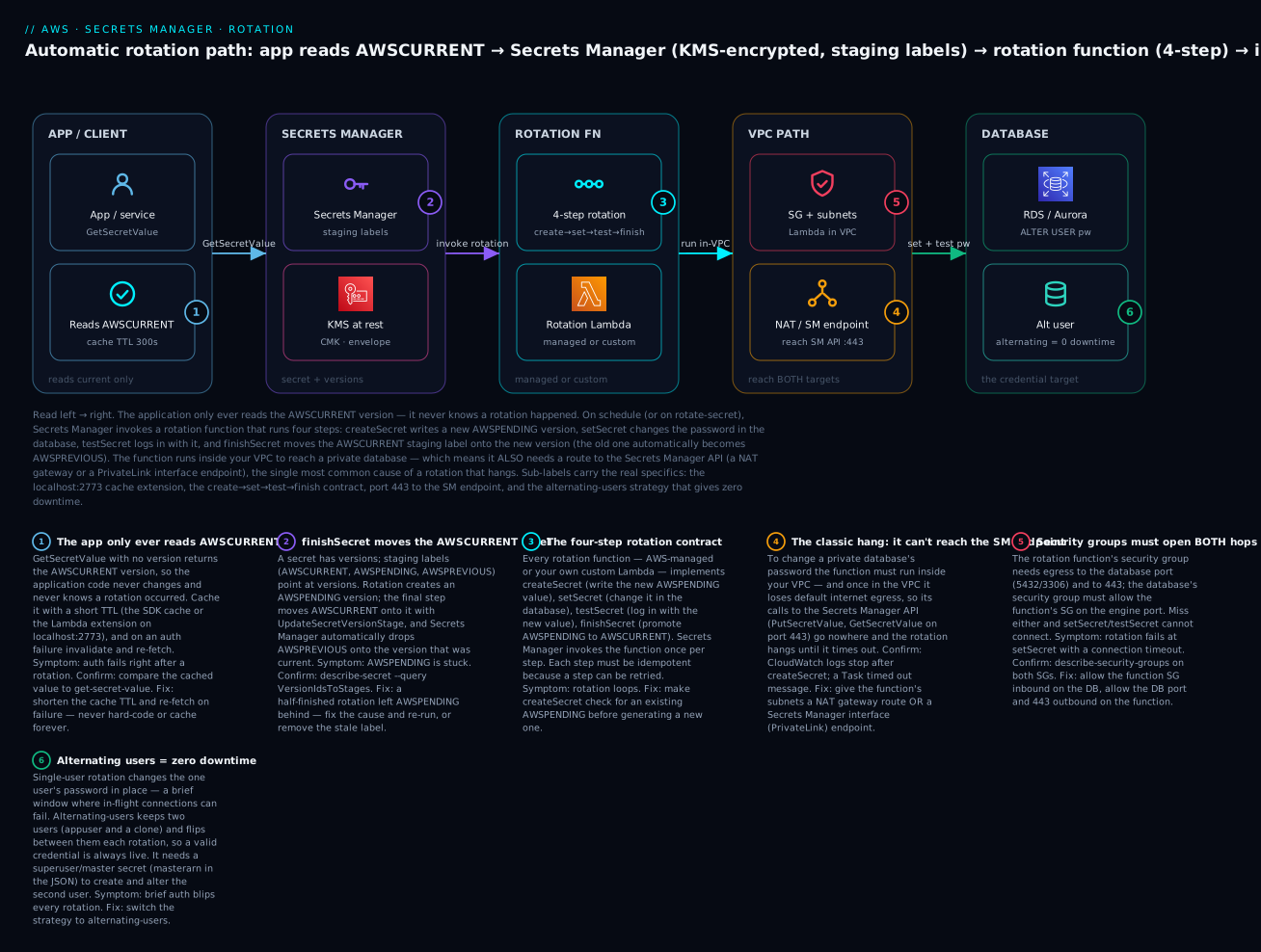
Real-world scenario
Meridian Freight is a fictional logistics SaaS running a Django fleet on ECS behind an ALB, backed by a private Aurora PostgreSQL cluster. For two years the app connected with a single database password stored in an ECS task-definition environment variable — visible in the console, in CloudTrail RegisterTaskDefinition events, and in every developer’s aws ecs describe-task-definition output. A SOC 2 auditor flagged it: the credential had never been rotated, and at least nine people had seen it. The remediation ticket read simply “rotate DB credentials every 30 days, no downtime.” It took three attempts to get right, and each failure is a section of this article.
Attempt one — the hang. An engineer enabled rotation in the console with a single-user strategy, and the rotation function was attached to the Aurora VPC so it could reach the cluster. The first rotation started, createSecret ran, and then the function went silent for thirty seconds and failed with Task timed out. The secret was now stuck with an AWSPENDING version and RotationEnabled: true but LastRotatedDate unchanged. The cause was textbook: the function was in private subnets to reach Aurora, but those subnets had no route to the Secrets Manager API — no NAT, no interface endpoint — so PutSecretValue had nowhere to go. The fix was one resource: a Secrets Manager interface endpoint with private DNS enabled and its SG open to the function’s SG. The next rotation completed in eight seconds.
Attempt two — the blip. With rotation now completing, the team noticed a small spike of FATAL: password authentication failed errors in the app logs at exactly the rotation timestamp, every rotation. It was brief — a few seconds — but on a payments-adjacent service even a few seconds of auth errors triggered pages. The cause was the single-user strategy: setSecret changed the one user’s password in place, and the ECS tasks holding the old value in their pools failed until they re-read the secret. The fix was to switch to the alternating-users strategy, which required creating a master secret (the Aurora superuser) and adding its ARN as masterarn in the app secret. Now rotation flips between app_svc and app_svc_clone; the credential in AWSCURRENT is always valid, and the blip vanished.
Attempt three — the cache. Rotation was now clean, but one background worker — a nightly batch job that ran for hours — still failed after a rotation that happened mid-run. It had read the secret once at process start and cached it forever. The fix was the caching discipline this article preaches: use the SDK caching client with a short TTL, and, critically, invalidate and re-fetch on any authentication error. The batch job now catches the auth exception, re-reads AWSCURRENT, and reconnects; a rotation mid-run costs it one reconnect, not a failed job.
The finished design is exactly the lab below: an Aurora app secret with managed alternating-users rotation on a 30-day schedule, a master secret for the superuser, a Secrets Manager interface endpoint so the in-VPC rotation reaches the API privately, a customer CMK encrypting both secrets (so the security team gets kms:Decrypt audit trails in CloudTrail), and application code that reads AWSCURRENT through a short-TTL cache and re-fetches on failure. Rotation now runs monthly, invisibly, and the auditor’s finding is closed. The lesson the platform lead repeats: “Secrets Manager rotation is easy to turn on and easy to get subtly wrong — the failures are never in the crypto, they’re in the network and the cache.”
Advantages and disadvantages
| Advantages | Disadvantages |
|---|---|
| Built-in, scheduled rotation with a proven four-step contract | $0.40/secret/month adds up across hundreds of secrets |
The app reads only AWSCURRENT — rotation is transparent to it |
The rotation function’s VPC/endpoint networking is easy to get wrong |
| Managed rotation for RDS/Aurora/Redshift/DocumentDB — no code | Custom rotation for anything else is real Lambda you must maintain |
| Alternating-users gives genuinely zero-downtime rotation | Alternating-users needs a privileged master secret to manage |
| KMS envelope encryption, native cross-account resource policies | Cross-account needs a CMK and two policy grants — a common miss |
| Native multi-Region replicas with per-Region keys | Each replica is billed as a separate secret |
| Random password generation and RDS “manage master user password” | Caching wrong reintroduces “broke after rotation” |
Versioning + staging labels enable clean rollback (AWSPREVIOUS) |
More moving parts than a static Parameter Store SecureString |
Secrets Manager wins whenever a credential must change on a schedule without an outage — database passwords, rotating API keys, anything a compliance control forces you to rotate. It loses its edge for plain configuration and rarely-changed single-account secrets, where Parameter Store’s free SecureString does the encryption job without the per-secret fee. Reach for Secrets Manager for the rotating credentials that earn the $0.40, and keep the rest in Parameter Store.
Hands-on lab
You will create a Secrets Manager secret for an RDS PostgreSQL application user, attach managed alternating-users rotation on a 30-day schedule, force a rotation and watch the staging labels move version to version, retrieve AWSCURRENT, and wire a small app snippet to fetch it — then tear it all down. Everything is aws CLI first, with a Terraform stack after. ⚠️ Secrets Manager ($0.40/secret/mo), the rotation Lambda, KMS, and any NAT/endpoint all incur charges — do the teardown.
Assumptions: AWS CLI v2 configured, and a running private RDS PostgreSQL instance (kv-lab-pg) in a VPC with two private subnets — build it with Launch Amazon RDS Hands-On if you don’t have one. Export a few variables:
export AWS_REGION=us-east-1
export VPC_ID=vpc-0abc123def456
export SUBNET_A=subnet-0aaa11112222       # private, AZ a
export SUBNET_B=subnet-0bbb33334444       # private, AZ b
export DB_ID=kv-lab-pg
export DB_ENDPOINT=$(aws rds describe-db-instances --db-instance-identifier "$DB_ID" \
  --query 'DBInstances[0].Endpoint.Address' --output text)
export DB_SG=$(aws rds describe-db-instances --db-instance-identifier "$DB_ID" \
  --query 'DBInstances[0].VpcSecurityGroups[0].VpcSecurityGroupId' --output text)
echo "DB_ENDPOINT=$DB_ENDPOINT  DB_SG=$DB_SG"
Step 1 — a customer CMK for the secrets
A CMK gives you kms:Decrypt audit trails and is required if you ever share cross-account.
KEY_ID=$(aws kms create-key --description "KloudVin lab secrets key" \
  --query 'KeyMetadata.KeyId' --output text)
aws kms create-alias --alias-name alias/kv-secrets --target-key-id "$KEY_ID"
echo "KEY_ID=$KEY_ID"
Expected: a key ID and the alias alias/kv-secrets.
Step 2 — the master (superuser) secret for alternating-users
Alternating-users rotation needs a privileged secret to create and alter the second app user. Use the RDS master credentials (here read from the RDS-managed master secret; substitute your own master user/password).
aws secretsmanager create-secret \
  --name kv/lab/pg-master \
  --description "PG superuser for alternating-users rotation" \
  --kms-key-id alias/kv-secrets \
  --secret-string "{\"engine\":\"postgres\",\"host\":\"$DB_ENDPOINT\",\"port\":5432,\"username\":\"kvadmin\",\"password\":\"REPLACE_WITH_MASTER_PW\",\"dbname\":\"appdb\",\"dbInstanceIdentifier\":\"$DB_ID\"}"

MASTER_ARN=$(aws secretsmanager describe-secret --secret-id kv/lab/pg-master \
  --query 'ARN' --output text)
echo "MASTER_ARN=$MASTER_ARN"
Expected: an ARN like ...secret:kv/lab/pg-master-AbCdEf.
Step 3 — the application secret (references the master via masterarn)
aws secretsmanager create-secret \
  --name kv/lab/appdb \
  --description "App DB credentials (rotated, alternating-users)" \
  --kms-key-id alias/kv-secrets \
  --secret-string "{\"engine\":\"postgres\",\"host\":\"$DB_ENDPOINT\",\"port\":5432,\"username\":\"app_svc\",\"password\":\"REPLACE_WITH_APP_PW\",\"dbname\":\"appdb\",\"dbInstanceIdentifier\":\"$DB_ID\",\"masterarn\":\"$MASTER_ARN\"}"
Expected: the app secret’s ARN. Note masterarn in the JSON — that is what makes alternating-users possible. (Create the app_svc role in the database first, e.g. CREATE ROLE app_svc LOGIN PASSWORD '...'.)
Step 4 — ensure the rotation function can reach the SM API (interface endpoint)
Because rotation runs in the VPC to reach the private DB, give it a private path to the Secrets Manager API so it never hangs:
EP_SG=$(aws ec2 create-security-group --group-name kv-sm-endpoint-sg \
  --description "SM interface endpoint SG" --vpc-id "$VPC_ID" --query GroupId --output text)
# Allow 443 into the endpoint from within the VPC (tighten to the function SG in prod)
aws ec2 authorize-security-group-ingress --group-id "$EP_SG" \
  --protocol tcp --port 443 --cidr 10.0.0.0/16

aws ec2 create-vpc-endpoint --vpc-id "$VPC_ID" --vpc-endpoint-type Interface \
  --service-name com.amazonaws.$AWS_REGION.secretsmanager \
  --subnet-ids "$SUBNET_A" "$SUBNET_B" \
  --security-group-ids "$EP_SG" --private-dns-enabled
Expected: a vpce-... endpoint ID moving to available. This is the single step that prevents the classic rotation hang.
Step 5 — attach managed alternating-users rotation, every 30 days
aws secretsmanager rotate-secret \
  --secret-id kv/lab/appdb \
  --rotation-lambda-arn arn:aws:lambda:$AWS_REGION:$(aws sts get-caller-identity --query Account --output text):function:SecretsManagerRDSPostgreSQLRotationMultiUser \
  --rotation-rules '{"AutomaticallyAfterDays":30,"Duration":"3h"}'
Expected: the call returns and RotateImmediately (default true) kicks off the first rotation. If you have not deployed the AWS rotation template Lambda, enable rotation from the RDS or Secrets Manager console (which deploys/attaches it for you) and choose Alternating users + 30 days — the console path is the managed-rotation experience and needs no Lambda maintenance.
Step 6 — force a rotation and watch the labels move
Force an immediate rotation and inspect the version-to-label map before and after:
# Before: note which version is AWSCURRENT
aws secretsmanager describe-secret --secret-id kv/lab/appdb --query 'VersionIdsToStages'

# Force a rotation now
aws secretsmanager rotate-secret --secret-id kv/lab/appdb

# Poll until LastRotatedDate updates (rotation completed)
aws secretsmanager describe-secret --secret-id kv/lab/appdb \
  --query '{Enabled:RotationEnabled,Last:LastRotatedDate,Next:NextRotationDate}'

# After: AWSCURRENT has moved to a new version; the old one now holds AWSPREVIOUS
aws secretsmanager describe-secret --secret-id kv/lab/appdb --query 'VersionIdsToStages'
aws secretsmanager list-secret-version-ids --secret-id kv/lab/appdb \
  --query 'Versions[].{Version:VersionId,Stages:VersionStages}'
Expected: before, one version has ["AWSCURRENT"]; after, a new version has ["AWSCURRENT"] and the previous one has ["AWSPREVIOUS"]. You have just watched finishSecret move the label.
Step 7 — retrieve AWSCURRENT (and AWSPREVIOUS for rollback)
# The value your app uses (AWSCURRENT is the default)
aws secretsmanager get-secret-value --secret-id kv/lab/appdb \
  --query SecretString --output text | jq '{username, host, port}'

# The prior value — how you'd roll back a bad rotation
aws secretsmanager get-secret-value --secret-id kv/lab/appdb \
  --version-stage AWSPREVIOUS --query SecretString --output text | jq '.username'
Expected: the current credential’s username (e.g. app_svc_clone after a rotation) and the previous one (e.g. app_svc) — proof the two app users alternate.
Step 8 — wire an app to fetch the secret
The application never references a version — it reads AWSCURRENT and re-fetches on auth failure:
import boto3, json, psycopg2

sm = boto3.client("secretsmanager")
_cache = {}

def get_creds(force=False):
    if force or "v" not in _cache:
        _cache["v"] = json.loads(sm.get_secret_value(SecretId="kv/lab/appdb")["SecretString"])
    return _cache["v"]

def connect():
    c = get_creds()
    try:
        return psycopg2.connect(host=c["host"], port=c["port"], dbname=c["dbname"],
                                user=c["username"], password=c["password"], sslmode="require")
    except psycopg2.OperationalError:
        c = get_creds(force=True)          # a rotation moved AWSCURRENT — re-fetch
        return psycopg2.connect(host=c["host"], port=c["port"], dbname=c["dbname"],
                                user=c["username"], password=c["password"], sslmode="require")
Expected: the app connects with the current credential and transparently recovers across a rotation by re-fetching on the first failure.
Step 9 — teardown (⚠️ removes everything)
# Turn rotation off, then delete the secrets (force-delete skips the recovery window)
aws secretsmanager cancel-rotate-secret --secret-id kv/lab/appdb
aws secretsmanager delete-secret --secret-id kv/lab/appdb --force-delete-without-recovery
aws secretsmanager delete-secret --secret-id kv/lab/pg-master --force-delete-without-recovery

# Remove the interface endpoint and its SG
VPCE=$(aws ec2 describe-vpc-endpoints --filters "Name=vpc-id,Values=$VPC_ID" \
  "Name=service-name,Values=com.amazonaws.$AWS_REGION.secretsmanager" \
  --query 'VpcEndpoints[0].VpcEndpointId' --output text)
aws ec2 delete-vpc-endpoints --vpc-endpoint-ids "$VPCE"
aws ec2 delete-security-group --group-id "$EP_SG"

# Schedule the CMK for deletion (7-30 day waiting period; keys can't be deleted instantly)
aws kms disable-key --key-id "$KEY_ID"
aws kms schedule-key-deletion --key-id "$KEY_ID" --pending-window-in-days 7
Expected: the secrets delete immediately (with --force-delete-without-recovery; without it they enter a 7–30 day recovery window and keep billing), the endpoint and SG are removed, and the CMK is scheduled for deletion. A secret left in the recovery window still costs $0.40/month — force-delete or wait it out.
The whole thing as Terraform
terraform {
  required_providers { aws = { source = "hashicorp/aws", version = "~> 5.0" } }
}
provider "aws" { region = "us-east-1" }

variable "vpc_id"             { type = string }
variable "private_subnet_ids" { type = list(string) }
variable "db_endpoint"        { type = string }
variable "db_id"              { type = string }
variable "master_password"    { type = string, sensitive = true }
variable "app_password"       { type = string, sensitive = true }
variable "rotation_lambda_arn"{ type = string }   # the AWS PG MultiUser template

resource "aws_kms_key" "secrets" {
  description             = "KloudVin lab secrets key"
  deletion_window_in_days = 7
}
resource "aws_kms_alias" "secrets" {
  name          = "alias/kv-secrets"
  target_key_id = aws_kms_key.secrets.key_id
}

# Interface endpoint so in-VPC rotation reaches the SM API privately
resource "aws_security_group" "sm_endpoint" {
  name   = "kv-sm-endpoint-sg"
  vpc_id = var.vpc_id
  ingress { from_port = 443, to_port = 443, protocol = "tcp", cidr_blocks = ["10.0.0.0/16"] }
}
resource "aws_vpc_endpoint" "secretsmanager" {
  vpc_id              = var.vpc_id
  service_name        = "com.amazonaws.us-east-1.secretsmanager"
  vpc_endpoint_type   = "Interface"
  subnet_ids          = var.private_subnet_ids
  security_group_ids  = [aws_security_group.sm_endpoint.id]
  private_dns_enabled = true
}

resource "aws_secretsmanager_secret" "master" {
  name       = "kv/lab/pg-master"
  kms_key_id = aws_kms_key.secrets.arn
}
resource "aws_secretsmanager_secret_version" "master" {
  secret_id     = aws_secretsmanager_secret.master.id
  secret_string = jsonencode({
    engine = "postgres", host = var.db_endpoint, port = 5432,
    username = "kvadmin", password = var.master_password,
    dbname = "appdb", dbInstanceIdentifier = var.db_id
  })
}

resource "aws_secretsmanager_secret" "appdb" {
  name       = "kv/lab/appdb"
  kms_key_id = aws_kms_key.secrets.arn
}
resource "aws_secretsmanager_secret_version" "appdb" {
  secret_id     = aws_secretsmanager_secret.appdb.id
  secret_string = jsonencode({
    engine = "postgres", host = var.db_endpoint, port = 5432,
    username = "app_svc", password = var.app_password,
    dbname = "appdb", dbInstanceIdentifier = var.db_id,
    masterarn = aws_secretsmanager_secret.master.arn   # enables alternating-users
  })
}

resource "aws_secretsmanager_secret_rotation" "appdb" {
  secret_id           = aws_secretsmanager_secret.appdb.id
  rotation_lambda_arn = var.rotation_lambda_arn
  rotation_rules {
    automatically_after_days = 30
    duration                 = "3h"
  }
}

output "app_secret_arn" { value = aws_secretsmanager_secret.appdb.arn }
terraform apply builds the identical stack; the aws_secretsmanager_secret_rotation resource enables rotation (rotating immediately by default) so you can watch the labels move exactly as in Step 6.
Common mistakes & troubleshooting
The rotation playbook. Symptom → root cause → the exact command or console path to confirm → the fix. The connectivity failures overlap with RDS Connection Timeouts Troubleshooting Playbook — a rotation function that can’t reach the DB fails for the same reasons an app can’t.
| # | Symptom | Root cause | Confirm (exact command / path) | Fix |
|---|---|---|---|---|
| 1 | Rotation hangs ~30s then fails; logs stop after createSecret |
Function is in the VPC (to reach the DB) but has no route to the Secrets Manager API | CloudWatch logs show a Task timed out; no PutSecretValue line |
Add a NAT gateway route or a Secrets Manager interface endpoint (private DNS on) to the function’s subnets |
| 2 | Rotation fails at setSecret/testSecret with a connection timeout |
Function can reach the SM API but not the database (SG/subnet) | describe-security-groups — DB SG has no ingress from the function SG |
Allow the DB engine port from the function’s SG; ensure the function is in subnets that route to the DB |
| 3 | AWSPENDING is stuck on a version; rotation won’t progress |
A previous rotation didn’t finish (failed at set/test/finish) | describe-secret --query VersionIdsToStages shows a lingering AWSPENDING |
Fix the root cause, then rotate-secret again; if truly orphaned, update-secret-version-stage --remove-from-version-id <v> to drop the stale label |
| 4 | App gets FATAL: password authentication failed right after a rotation |
App cached the old value / read AWSCURRENT once and never re-read |
Compare the app’s in-memory value to get-secret-value |
Re-fetch on auth failure; use a short cache TTL; never hard-code the value |
| 5 | App intermittently uses the wrong (old) password | App explicitly pinned AWSPREVIOUS or a version ID |
Check the --version-stage/--version-id in the app’s call |
Read AWSCURRENT (the default) unless you’re deliberately rolling back |
| 6 | AccessDeniedException on GetSecretValue despite the IAM allow |
Missing kms:Decrypt on the CMK |
get-secret-value error mentions KMS; check the caller’s KMS perms |
Grant kms:Decrypt on the encrypting key to the principal |
| 7 | Cross-account retrieve fails with AccessDenied |
Only one of the two grants is in place, or the secret uses the default key | Check the secret resource policy and the CMK key policy | Grant GetSecretValue in the resource policy and kms:Decrypt in the key policy; re-encrypt with a CMK if it used the default key |
| 8 | Alternating-users rotation fails: “cannot alter user” / permission denied | No master secret or the masterarn user lacks privilege |
get-secret-value on the app secret — is masterarn present and valid? |
Add a valid masterarn whose user can CREATE/ALTER the app users; grant it the needed DB privileges |
| 9 | Rotation Lambda ends with Task timed out after N seconds at the DB step |
Function timeout too low for a slow DB connection/ALTER |
CloudWatch Duration near the configured timeout |
Raise the Lambda timeout (e.g. 30s → 120s); check DB connection latency |
| 10 | RotationEnabled: true but LastRotatedDate never updates |
First rotation is failing silently each cycle | describe-secret; open the rotation Lambda’s CloudWatch logs |
Diagnose the step it dies on (usually #1 or #2); fix connectivity/permissions |
| 11 | Secrets Manager can't invoke the rotation function |
Missing lambda:InvokeFunction permission for secretsmanager.amazonaws.com |
Lambda resource policy has no Secrets Manager principal | Add the add-permission/aws_lambda_permission granting Secrets Manager invoke |
| 12 | ResourceExistsException / can’t create secret |
The name already exists (or is in the recovery window) | describe-secret / list-secrets for the name |
Use a new name, or restore-secret if it’s soft-deleted |
| 13 | Deleted a secret but it’s still billing | delete-secret without force enters a 7–30 day recovery window |
describe-secret --query DeletedDate is set |
delete-secret --force-delete-without-recovery, or wait out the window |
| 14 | Rotation succeeds but the app in another Region reads the old value | App reads the primary cross-Region, or the replica lagged | Confirm the app uses the local replica ARN | Point regional apps at the local replica; replicas reflect the primary’s AWSCURRENT |
| 15 | GetSecretValue throttling / high cost |
Reading the secret on every request with no cache | CloudTrail volume of GetSecretValue; the bill |
Add the caching client or the Lambda extension (localhost:2773) with a TTL |
| 16 | MalformedPolicyDocumentException / policy rejected on put-resource-policy |
BlockPublicPolicy refused a too-broad policy (working as intended) |
The error names the offending statement | Scope the Principal/add a Condition; never make a secret public |
Rotation status & fields you’ll read
describe-secret field |
Meaning |
|---|---|
RotationEnabled |
Whether rotation is on |
RotationLambdaARN |
The function doing the rotation |
RotationRules |
AutomaticallyAfterDays / ScheduleExpression / Duration |
LastRotatedDate |
When the last successful rotation completed |
NextRotationDate |
When the next one is scheduled |
VersionIdsToStages |
The version → staging-label map (your primary diagnostic) |
DeletedDate |
Set if the secret is in the recovery window |
CloudWatch log signatures to recognize
| Log signature (rotation Lambda) | What it tells you |
|---|---|
createSecret line, then silence, then Task timed out |
Can’t reach the SM API (endpoint/NAT) — playbook #1 |
Error at setSecret: connection timeout to the DB |
Can’t reach the DB (SG/subnet) — playbook #2 |
testSecret fails: authentication failed |
New password wasn’t actually set, or wrong user — check setSecret |
AccessDeniedException ... kms:Decrypt |
Missing KMS permission — playbook #6 |
finishSecret runs but labels don’t move |
Idempotency bug or a permissions gap on UpdateSecretVersionStage |
The nastiest three, in prose
The VPC endpoint catch-22. This is the failure that defines Secrets Manager rotation. To rotate a private database’s password, the rotation function must live in the VPC — and the moment it does, it can no longer reach the public Secrets Manager API unless you give it a NAT route or a PrivateLink interface endpoint. The tell is unmistakable: CloudWatch shows createSecret starting and then nothing for the entire function timeout, ending in Task timed out. There is no error message because the API call is not being rejected, it is going into a void. The interface endpoint is the better fix — it is cheaper than a NAT, keeps traffic on the AWS network, and needs only that its security group allow 443 from the function and that Private DNS be enabled so the standard hostname resolves to the private ENI.
The cache that outlives the rotation. The whole point of AWSCURRENT is that the app can read it obliviously — but only if the app actually re-reads it. A service that fetches the secret once at boot and caches it forever will sail through the first rotation with no trouble at all, right up until it needs a new database connection with a password that was rotated out from under it. The fix is a discipline, not a feature: cache with a short TTL, and treat any authentication failure as a signal to invalidate the cache and re-fetch AWSCURRENT before retrying. Do that and even a long-running batch job survives a mid-run rotation with a single reconnect.
Cross-account: one grant is never enough. Sharing a secret across accounts fails in a way that looks like an IAM problem but is half a KMS problem. You need four things aligned: the secret’s resource policy granting the other account GetSecretValue, the other account’s identity policy allowing the call, the secret encrypted with a customer CMK (the default aws/secretsmanager key cannot be shared), and that CMK’s key policy granting the other account kms:Decrypt. Teams routinely set the resource policy, watch it still fail with AccessDenied, and burn an afternoon before realizing the decrypt grant on the key was never added. If it uses the default key, you cannot share it at all until you re-encrypt with a CMK.
Best practices
- Rotate every credential that can be rotated. Database passwords, API keys, service-account secrets — if it authenticates something, it should have a rotation schedule. A static secret is a dated liability.
- Default to alternating-users for production. Single-user rotation has a real (if brief) auth-blip window; alternating-users is genuinely zero-downtime. Use single-user only for dev or truly tolerant workloads.
- Solve the network before you enable rotation. A DB rotation function must reach both the database and the Secrets Manager API. For a private DB, add a Secrets Manager interface endpoint (cheaper than NAT, private) and open the security groups on both hops.
- Never cache a secret forever. Cache with a short TTL, always serve
AWSCURRENT, and re-fetch on any auth failure. Use the SDK caching client or the Lambda extension to cut cost and latency without breaking rotation. - Use a customer CMK for anything shared or audited. The default key can’t go cross-account and gives you no per-secret key-usage audit. A CMK costs ~$1/month and buys you both.
- Keep the master secret tight. The alternating-users master secret is the most powerful credential in the chain — scope its IAM, its DB privileges, and who can read it.
- Store structured JSON, not bare strings, for DB secrets. Managed rotation needs
engine,host,port,username,password(andmasterarnfor alternating) — populate them correctly at create. - Turn on
RotateImmediatelyand watch the first rotation. Rotating once on enable proves the whole path works while you’re paying attention, not at 3 a.m. on day 30. - Force-delete lab secrets; recovery-window real ones.
--force-delete-without-recoveryfor throwaways; the default 7–30 day window (and its ongoing $0.40/mo) for anything you might need back. - Put config in Parameter Store, secrets in Secrets Manager. Pay the $0.40 only for values that earn it with rotation; keep the free, hierarchical config in Parameter Store.
- Alarm on rotation failure. A CloudWatch alarm on a stale
LastRotatedDateor a rotation-Lambda error metric turns a silent failure into a ticket before the credential ages out.
Security notes
Rotation is a security control, and its own configuration is a security surface:
- Least-privilege retrieval. Grant
secretsmanager:GetSecretValuescoped to specific secret ARNs (or a name prefix), pluskms:Decrypton the encrypting key. Never grantsecretsmanager:*to application roles. - Envelope encryption with a CMK. Every secret is KMS-encrypted; prefer a customer CMK when you need CloudTrail on the key (who decrypted which secret when), key-policy control, or cross-account sharing. Turn on KMS key rotation for the CMK itself.
- Guard the rotation function’s identity. The rotation Lambda’s execution role can read and write the secret and connect to the database — it is privileged. Scope it to exactly the secrets it rotates and the
kms:GenerateDataKey/kms:Decryptit needs. - Protect the master secret. For alternating-users, the master secret holds a superuser. Restrict who can read it, and consider a separate KMS key so its decrypt audit is isolated.
- Resource policies with
BlockPublicPolicy. When sharing cross-account, scope thePrincipaland addConditions (source account,PrincipalOrgID, VPC endpoint). KeepBlockPublicPolicyon so a secret can never be made world-readable. - Private API path. Use a Secrets Manager interface endpoint so both rotation and retrieval reach the API without traversing the internet; add an endpoint policy to constrain which secrets can be read through it.
- CloudTrail everything. Every
GetSecretValue,PutSecretValue,RotateSecretandUpdateSecretVersionStageis logged. Alarm on unusualGetSecretValuevolume (possible exfiltration) and on rotation failures. - Short cache TTLs are a security property too. A long-lived cache means a compromised-then-rotated credential stays usable in that process longer. A short TTL bounds that window.
Cost & sizing
Secrets Manager billing is simple but easy to under-estimate at scale — it is per secret, and replicas count:
| Cost driver | How it’s billed | Notes / how to control |
|---|---|---|
| Stored secret | $0.40 per secret per month (prorated) | The main lever; each replica is a separate $0.40 |
| API calls | $0.05 per 10,000 calls | GetSecretValue in a hot loop adds up — cache it |
| Replicas | $0.40/month each Region | Only replicate where a local read is needed |
| KMS (default key) | No key-month charge; requests billed | Decrypt on retrieve, GenerateDataKey on write |
| KMS (CMK) | ~$1/key/month + requests | Buys cross-account + key audit |
| Rotation Lambda | Standard Lambda pricing | A few invocations per rotation — negligible |
| Interface endpoint | ~$0.01/hr/AZ + data | Cheaper than NAT for private API access |
| NAT gateway (if used) | ~$0.045/hr + data processing | Only if you don’t use an interface endpoint |
| Secret in recovery window | Still $0.40/month until purged | Force-delete labs; don’t leave soft-deleted secrets |
Rough monthly figures (us-east-1, order-of-magnitude — confirm in the calculator; ~₹85/USD):
| Setup | Secrets | Rough USD/mo | Rough INR/mo |
|---|---|---|---|
| One rotating DB secret (+ master) | 2 | ~$0.80 + calls | ~₹70 |
| 20 rotating app secrets, cached reads | 20 | ~$8 + minimal calls | ~₹680 |
| 20 secrets, uncached (1M reads/mo) | 20 | ~$8 + ~$5 calls | ~₹1,100 |
| 20 secrets replicated to 1 extra Region | 40 | ~$16 + calls | ~₹1,360 |
| CMK for the set | 1 key | ~$1 + requests | ~₹85 |
Secrets Manager has no free tier beyond a 30-day trial per secret, unlike Parameter Store’s free standard tier. The cost-control levers are: cache reads (turns the per-call charge to near zero), keep only genuinely-rotating secrets here (put config in Parameter Store), replicate only where a local read is required, and force-delete secrets you’re done with so they stop billing during the recovery window.
Interview & exam questions
1. What do the AWSCURRENT, AWSPENDING and AWSPREVIOUS staging labels point at, and which does a default GetSecretValue return? They are movable pointers to secret versions: AWSCURRENT is the live version (and the default a bare GetSecretValue returns), AWSPENDING is the new version mid-rotation, and AWSPREVIOUS is the last-current version kept for rollback. AWSPREVIOUS is assigned automatically when AWSCURRENT moves. (SCS-C02, DVA-C02)
2. Walk the four steps of a rotation function and name the one that makes the new secret live. createSecret (store the new value as AWSPENDING), setSecret (change it in the database/service), testSecret (verify it works), finishSecret (move the AWSCURRENT label onto the pending version). finishSecret is the step that makes it live. (DVA-C02, SCS-C02)
3. Why does alternating-users rotation give zero downtime and single-user does not? Single-user changes the one user’s password in place, so instances holding the old value fail until they re-read. Alternating-users keeps two users and rotates the inactive one, so the credential in AWSCURRENT is always valid — nothing the running fleet is using is ever altered. (SCS-C02, SAP)
4. A rotation hangs for the function’s whole timeout then fails, with logs stopping after createSecret. What’s wrong? The function is in the VPC to reach a private DB but has no route to the Secrets Manager API endpoint. Add a NAT gateway route or a Secrets Manager interface (PrivateLink) endpoint with private DNS, and open its security group on 443. (SCS-C02, ANS)
5. What two reachability targets must a database rotation function have? The database (to run ALTER USER and the test query) and the Secrets Manager API endpoint (to read the pending version, write versions, and move labels). Missing the second is the classic hang. (SCS-C02)
6. An app gets auth failures immediately after every rotation. Root cause and fix? It cached the secret and didn’t re-read AWSCURRENT. Cache with a short TTL and re-fetch on any authentication failure before retrying the connection. (DVA-C02)
7. You have secretsmanager:GetSecretValue but still get AccessDenied. Why? The secret is encrypted with a KMS key and the principal lacks kms:Decrypt on it. Grant kms:Decrypt on the encrypting key. (SCS-C02)
8. What’s required to share a secret with another account? A resource policy on the secret granting the account GetSecretValue, the secret encrypted with a customer CMK (not the default key), and that CMK’s key policy granting the account kms:Decrypt, plus the account’s own identity policy. (SCS-C02, SAP)
9. When would you use custom rotation instead of managed? For anything that is not RDS, Aurora, Redshift or DocumentDB — third-party API keys, OAuth client secrets, self-managed databases — you write a Lambda implementing the same four-step contract against that service’s API. (DVA-C02)
10. Secrets Manager vs Parameter Store SecureString — the deciding factors? Secrets Manager has built-in rotation, native cross-account resource policies, multi-Region replicas and a 64 KB size, at $0.40/secret/month. Parameter Store SecureString is free (standard), KMS-encrypted, hierarchical, but has no native rotation and smaller size. Use Secrets Manager for rotating/shared secrets, Parameter Store for config and rarely-changed secrets. (SCS-C02, SAA-C03)
11. How do multi-Region replicas behave for rotation? Rotation happens on the primary and the new AWSCURRENT propagates to the read-only replicas; you don’t rotate a replica. Each replica uses a Region-local KMS key and is billed as a separate secret; you can promote one to standalone for DR. (SAP, SCS-C02)
12. What is AWSPENDING stuck on a version telling you? A previous rotation started (createSecret ran) but never finished — it failed at set/test/finish. Diagnose the failing step (usually connectivity), fix it, and re-run rotation; remove the stale label only if the version is truly orphaned. (SCS-C02)
Quick check
- Which staging label does a default
GetSecretValue(no version specified) return? - Name the four rotation steps in order, and say which one moves
AWSCURRENT. - A DB rotation function is attached to the VPC and can reach the database, but rotation hangs. What is it almost certainly missing?
- Why is alternating-users the zero-downtime strategy?
- You get
AccessDeniedonGetSecretValuedespite an IAM allow for it. What permission is likely missing?
Answers
AWSCURRENT— the live version everyone should use.createSecret → setSecret → testSecret → finishSecret;finishSecretmoves theAWSCURRENTlabel onto the pending version.- A route to the Secrets Manager API endpoint — a NAT gateway or a PrivateLink interface endpoint (with its SG open on 443 and private DNS enabled). In the VPC it lost default internet egress.
- Because it rotates a second, inactive user and only then moves
AWSCURRENTto it — the credential the running fleet is using is never altered, so a valid credential is live the entire time. kms:Decrypton the KMS key that encrypts the secret — retrieval needs bothGetSecretValueandkms:Decrypt.
Glossary
| Term | Definition |
|---|---|
| Secret | A named, versioned container in Secrets Manager holding an encrypted value (string or JSON) up to 64 KB. |
| Version | One immutable value of a secret, identified by a version ID; rotation adds versions rather than overwriting. |
| Staging label | A movable pointer to a version; a label lives on exactly one version at a time. |
AWSCURRENT |
The staging label for the live version; the default a bare GetSecretValue returns. |
AWSPENDING |
The staging label for the new version being created and tested during a rotation. |
AWSPREVIOUS |
The staging label for the last-current version, assigned automatically for rollback. |
| Rotation function | The Lambda implementing createSecret → setSecret → testSecret → finishSecret; AWS-managed or custom. |
| Managed rotation | Rotation operated by AWS for RDS, Aurora, Redshift and DocumentDB — no Lambda to maintain. |
| Custom rotation | A Lambda you write to rotate anything else against its own API, using the same four-step contract. |
| Single-user strategy | Rotates one user’s password in place; a brief auth-blip window. |
| Alternating-users strategy | Rotates between two cloned users for genuinely zero-downtime rotation; needs a master secret. |
Master secret (masterarn) |
A privileged secret used by alternating-users rotation to create and alter the app users. |
| RotationRules | The schedule: AutomaticallyAfterDays or ScheduleExpression, plus an optional Duration window. |
| Interface endpoint (PrivateLink) | A private ENI for the Secrets Manager API so in-VPC rotation/retrieval avoids the internet. |
| Envelope encryption | Secrets Manager encrypts the value with a KMS data key and stores the encrypted data key alongside. |
| Resource policy | A policy on the secret granting other principals/accounts access, complementing identity policies. |
| Replicated secret | A read-only copy of a secret in another Region, kept in sync from the primary. |
| Caching client / Lambda extension | Client-side caches that serve AWSCURRENT with a short TTL to cut latency and API cost. |
Next steps
- Build the database this article rotates credentials for: Launch Amazon RDS (MySQL & PostgreSQL) Hands-On: Networking, Backups & Secure Connect.
- Understand the encryption underneath every secret: AWS KMS Hands-On: Encryption Keys and Envelope Encryption.
- Put non-rotating config and cheaper secrets in the right store: AWS Systems Manager Parameter Store Hands-On: Config and SecureString.
- When a rotated credential still won’t connect, work the network playbook: RDS Connection Timeouts: A Troubleshooting Playbook.