“Encryption at rest” looks like a checkbox until the day it 403s you. You have s3:GetObject, you have an IAM policy an auditor would sign off on, and the download still fails — because the object is SSE-KMS and the key never named your principal. Or a batch job that ran for a year suddenly can’t decrypt anything after a teammate “cleaned up an unused key,” and there is no undo. Both are the same lesson: the moment you use a customer-managed key for anything — S3, EBS, RDS, Secrets Manager, or your own application data — AWS KMS becomes a second, independent authorization system with its own root of trust, its own policy language, and its own failure modes. This article gives you that system end to end, plus the hands-on muscle memory to wield it.
AWS Key Management Service (KMS) is a managed service that creates and controls cryptographic keys and performs cryptographic operations with them. The crucial design fact — the one that surprises people — is that for a symmetric key, the key material never leaves KMS in plaintext. You do not get the key bytes and encrypt locally with them; you either hand KMS ≤4 KB of data and get ciphertext back (Encrypt), or — the pattern that actually scales — you ask KMS for a data key you use locally and then throw away (GenerateDataKey). That second pattern is envelope encryption, and understanding it is the difference between an architecture that encrypts a 500 MB file cheaply and one that either can’t (the 4 KB wall) or hammers KMS into throttling.
You will build the whole model: the three key types (symmetric, asymmetric, HMAC) and when each fits; the three ownership tiers (AWS-owned, AWS-managed aws/service, and customer-managed CMKs) and why a CMK is worth the dollar a month; authorization — the key policy as the root of trust (and why an IAM allow does nothing without it), how IAM policies and grants layer on, and the sharp-edged conditions kms:ViaService and encryption context; envelope encryption step by step with openssl; rotation, aliases, multi-Region keys, and safe deletion with its 7–30 day window; CloudTrail as the audit trail of every key use; and the cost model. Then a hands-on lab you can run on a sandbox account and a troubleshooting playbook you keep open at 02:00 when AccessDeniedException is all you have. If you have already secured S3 with SSE-KMS, this is the layer underneath it — see Securing Amazon S3: Bucket Policies, Block Public Access & the 403 Playbook.
To frame the whole field before the deep dive, here is every KMS moving part this article covers, what it decides, and where it lives.
| Moving part | What it controls | Grants or blocks? | Where it lives | Most common failure it causes |
|---|---|---|---|---|
| Key policy | Who may use/manage the key | Grants (root of trust) | On the KMS key | AccessDeniedException — principal not named |
| IAM policy | What the caller may do — if the key delegates to IAM | Grants (only via delegation) | On the user/role | 403 because the key policy never delegated to IAM |
| Grant | Temporary, scoped delegation (often to a service) | Grants (additive) | On the KMS key | Service can’t use the key — grant never created |
kms:ViaService |
Restrict use to a specific AWS service path | Caps a grant | Any KMS policy/condition | Direct aws kms call blocked; only S3/EBS path works |
| Encryption context | Additional authenticated data, bound to the ciphertext | Caps (must match) | Passed per request | InvalidCiphertextException on decrypt (context mismatch) |
| Key spec / usage | Symmetric vs asymmetric vs HMAC; encrypt vs sign | Defines valid ops | Set at key creation (immutable) | InvalidKeyUsageException — wrong op for the key |
| Rotation | New backing key material, same key ID | — | Key setting | Confusion: nothing “breaks”; old ciphertext still reads |
| Key state | Enabled / Disabled / PendingDeletion | Blocks when not Enabled | Key lifecycle | KMSInvalidStateException / DisabledException |
| Alias | Friendly, repointable name for a key | — | Per-Region, per-account | NotFoundException — alias not in this Region |
What problem this solves
Two failures, opposite in direction, same root cause: not knowing that the key is a separate authorization boundary. The first is self-inflicted denial — you can’t decrypt data you believe you own. Your IAM policy allows kms:Decrypt, the Policy Simulator says Allow, and you still get AccessDeniedException, because the key policy on that customer-managed key never named your principal and never delegated to IAM. Teams burn hours widening the IAM policy to kms:* — which changes nothing, because the denier is on the key, in a different console. The second is catastrophic loss or exposure — a key gets scheduled for deletion or disabled and every ciphertext under it becomes unreadable (KMS deliberately makes the key material unrecoverable), or a key policy is written so broadly (Principal: "*", no conditions) that any principal the account trusts can decrypt your most sensitive data.
What breaks without this knowledge is measured in incidents and in irreversibility. A deleted KMS key is the rare AWS action with no undo once the 7–30 day window elapses: the encrypted RDS snapshot, the S3 objects, the EBS volumes, the Secrets Manager secrets all become permanently opaque. On the access side, the cost is time and over-permissioning — the SSE-KMS 403 that hides behind an S3 error, the cross-account read that needs three doors open (bucket policy, IAM, and key policy), the service integration (EBS, Lambda, Aurora) that silently fails to launch because a grant couldn’t be created. Every one of these is precisely locatable once you hold the model.
Who hits this: everyone who turns on encryption with a customer-managed key, but hardest in cross-account designs (a shared key read by other accounts), regulated workloads (where a CMK’s audit trail and rotation are compliance requirements), high-throughput systems (where direct Encrypt/Decrypt per record throttles and envelope encryption plus data-key caching is mandatory), and anywhere a service integration quietly depends on a grant you didn’t know existed. The fix is almost never “make the key policy *” — it is “find the layer saying no (key policy, IAM delegation, grant, ViaService, or encryption context) and make that layer correct.”
Learning objectives
By the end of this article you can:
- Distinguish the three key types — symmetric (
SYMMETRIC_DEFAULT), asymmetric (RSA/ECC for encrypt or sign), and HMAC — and choose the right key spec and key usage for a workload. - Explain the three ownership tiers — AWS-owned, AWS-managed (
aws/service), and customer-managed (CMK) — and justify when a CMK’s policy control, rotation and audit are worth ~$1/month. - State the KMS authorization rule: the key policy is the root of trust, an IAM policy grants access only if the key policy delegates to IAM, and grants add temporary, scoped permission on top — then combine all three correctly for same-account and cross-account use.
- Use
kms:ViaServiceand encryption context correctly, and predict the exact exception each causes when it doesn’t match. - Implement envelope encryption with
GenerateDataKeyandopenssl— encrypt a large file locally, discard the plaintext data key, store the encrypted data key — and say precisely why it beats directEncrypt(the 4 KB limit, KMS traffic, cost). - Configure automatic and on-demand rotation, aliases, and multi-Region keys, and explain what rotates and what stays the same.
- Disable vs schedule deletion of a key safely, and recover from the “pending deletion” state before the window closes.
- Read CloudTrail to see who used a key, and work any
AccessDeniedException,IncorrectKeyException,InvalidCiphertextExceptionorThrottlingExceptionto root cause with a playbook.
Prerequisites & where this fits
You should be comfortable reading an ARN and a JSON policy document, know what an IAM principal (user, role, or assumed-role session), an identity-based policy and a resource-based policy are, and be able to run the AWS CLI with a configured profile. You do not need cryptography theory — you need to know that a symmetric key encrypts and decrypts with the same secret, an asymmetric key pair splits into a private key (kept secret) and a public key (shareable), and an HMAC proves integrity and authenticity with a shared secret. If IAM evaluation itself is shaky, read Debugging IAM ‘Access Denied’: Policy Evaluation Logic, SCPs, Boundaries & a Playbook first — KMS authorization sits directly on top of that model, with the key policy as an extra, mandatory layer.
KMS is the encryption substrate under most of AWS. Almost every “enable encryption” checkbox in the console is really “pick a KMS key.” Knowing KMS makes all of those legible at once — the S3 SSE-KMS gate, the EBS volume key, the RDS snapshot key, the Secrets Manager and Parameter Store secret keys. Here is where KMS shows up and what permission the integration needs, so you recognise the pattern everywhere.
| Service | How it uses KMS | Typical key | KMS permission the caller/service needs |
|---|---|---|---|
| Amazon S3 (SSE-KMS) | Per-object data keys via a Bucket Key | AWS-managed aws/s3 or a CMK |
kms:GenerateDataKey (write), kms:Decrypt (read) |
| Amazon EBS | Volume encrypted with a data key; a grant lets EC2 use it | aws/ebs or a CMK |
kms:CreateGrant, GenerateDataKeyWithoutPlaintext, Decrypt |
| Amazon RDS / Aurora | Storage + snapshot encryption | aws/rds or a CMK |
kms:CreateGrant, Decrypt, GenerateDataKey* |
| AWS Secrets Manager | Encrypts the secret value | aws/secretsmanager or a CMK |
kms:GenerateDataKey, Decrypt (with SecretARN context) |
| SSM Parameter Store (SecureString) | Encrypts the parameter value | aws/ssm or a CMK |
kms:Encrypt/Decrypt on the parameter’s key |
| DynamoDB | Table encryption at rest | AWS-owned (default), aws/dynamodb, or CMK |
kms:Decrypt, GenerateDataKey (CMK only) |
| Amazon EFS / FSx | File-system encryption | aws/elasticfilesystem or CMK |
kms:CreateGrant, Decrypt |
| CloudWatch Logs | Log-group encryption | CMK (via a key-policy grant to the logs service) | Key policy must allow logs.<region>.amazonaws.com |
| Your application | Envelope-encrypt arbitrary data | A CMK you create | kms:GenerateDataKey, kms:Decrypt |
This maps directly onto certification objectives: KMS fundamentals, key policies and envelope encryption are core to SAA-C03 and DVA-C02, and the full data-protection picture — grants, ViaService, multi-Region keys, custom key stores and the audit trail — is central to SCS-C02 (Security Specialty).
Core concepts
Six mental models make every later diagnosis obvious.
A symmetric CMK’s key material never leaves KMS in plaintext — ever. You cannot export it. Every operation is an API call: Encrypt and Decrypt (KMS does the crypto on ≤4 KB), or GenerateDataKey (KMS mints a fresh data key, hands you a plaintext copy and an encrypted copy, and forgets it). This single fact is why envelope encryption exists and why KMS is auditable: every use is a logged request, not a copied secret.
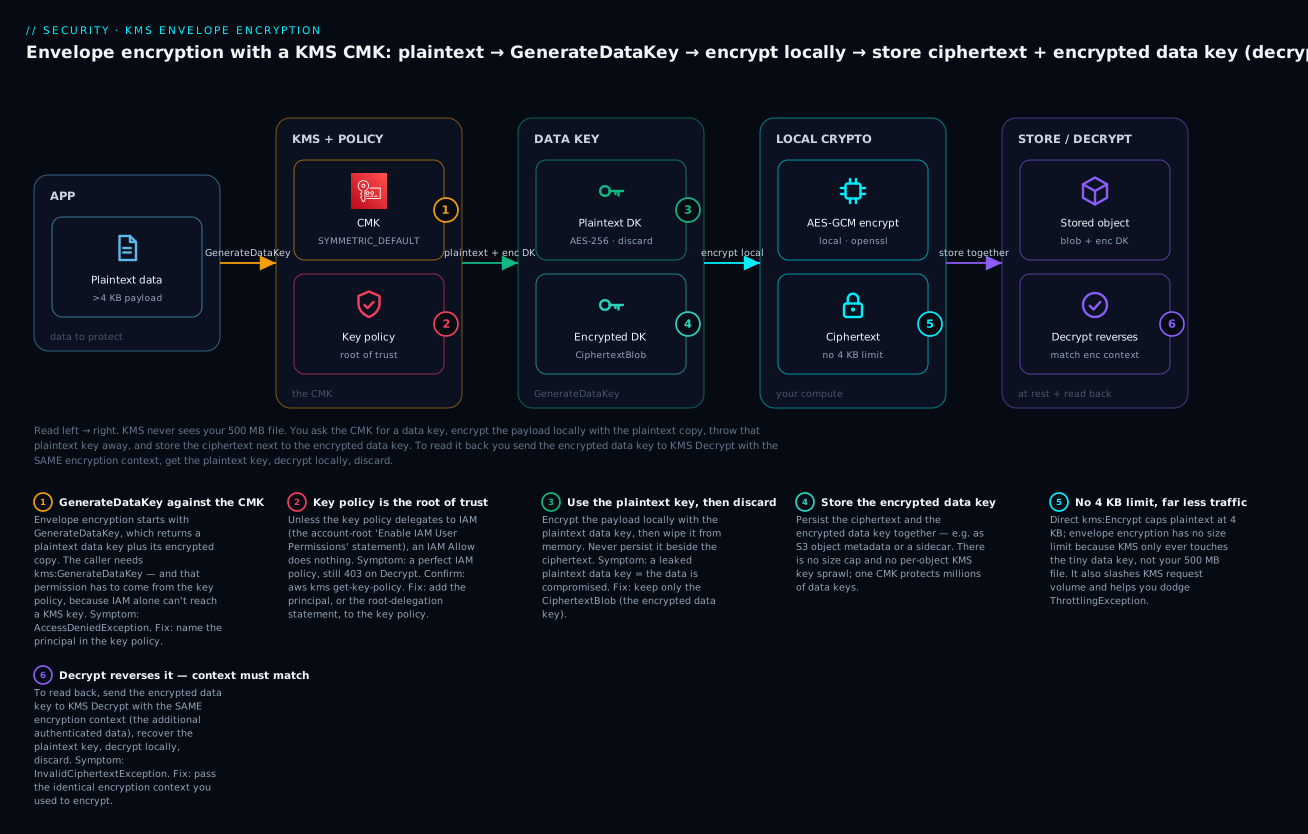
Envelope encryption is “encrypt the data with a data key, encrypt the data key with the CMK.” For anything larger than 4 KB — or anything you do at volume — you ask the CMK for a data key, encrypt your payload locally with the plaintext copy, discard the plaintext copy, and store the encrypted data key next to the ciphertext. To read it back, you send the encrypted data key to Decrypt, recover the plaintext key, decrypt locally, and discard again. KMS only ever touches a 32-byte key, never your gigabytes.
The key policy is the root of trust; IAM is not enough on its own. Unlike most AWS resources, a KMS key requires a resource policy, and that policy is authoritative. An IAM policy granting kms:Decrypt works only if the key policy delegates to IAM — the default key policy does this with an “Enable IAM User Permissions” statement naming the account root. Remove that statement and no IAM policy in the account can touch the key; the key policy must name principals directly. This is the number-one KMS gotcha and the number-one KMS 403.
Grants are temporary, additive, programmatic permissions — the way services borrow your key. A grant delegates a specific set of operations (and optional encryption-context constraints) to a grantee principal, without editing the key policy. AWS services use grants constantly: when you launch an encrypted EBS volume, EC2 creates a grant so it can decrypt the volume on your behalf, then retires it. Grants only add access; they never deny.
Encryption context is non-secret additional authenticated data (AAD) bound to the ciphertext. It is a set of key–value pairs you pass on Encrypt/GenerateDataKey; KMS cryptographically binds it to the ciphertext and requires the identical context on decrypt. Get it wrong or omit it and you get InvalidCiphertextException. It is logged in CloudTrail (so never put secrets in it) and is the safest way to scope a grant or key-policy condition to, say, one tenant or one object.
A key is a stable reference (key ID/ARN); its material can change underneath it. Rotation swaps the backing cryptographic material but keeps the key ID, ARN, alias, and policy identical — nothing you reference changes, and old ciphertext still decrypts because KMS keeps the prior material. An alias is a second layer of indirection: a friendly, repointable name so your code says alias/app-data and you can swap the underlying key without a redeploy.
The vocabulary in one table
Pin down every moving part before the deep sections; the glossary repeats these for lookup.
| Term | One-line definition | Grants or caps? | Failure it drives |
|---|---|---|---|
| CMK (customer-managed key) | A KMS key you create, own the policy for, and pay ~$1/mo | — | The unit everything else attaches to |
| Key policy | The resource policy on the key; root of trust | Grants | AccessDeniedException — principal not named |
| IAM policy (for KMS) | Identity policy allowing kms:* actions |
Grants only via delegation | 403 when the key never delegated to IAM |
| Grant | Temporary, scoped delegation via CreateGrant |
Grants (additive) | Service integration fails — grant missing |
| Data key | A key KMS generates for you to use locally | — | Leaked if you persist the plaintext copy |
| Envelope encryption | Encrypt data with a data key; encrypt the data key with the CMK | — | The pattern that dodges the 4 KB limit |
| Encryption context | Non-secret AAD bound to the ciphertext | Caps (must match) | InvalidCiphertextException on mismatch |
kms:ViaService |
Condition limiting use to a service path | Caps | Direct call blocked; only the service path works |
| Alias | Friendly, repointable name (alias/…) |
— | NotFoundException if used in the wrong Region |
| Key rotation | New backing material, same key ID | — | None — old ciphertext still decrypts |
| Multi-Region key | Primary + replicas sharing key material + key ID | — | Cross-Region decrypt works only with replicas |
| Key state | Enabled / Disabled / PendingDeletion / Unavailable | Blocks unless Enabled | KMSInvalidStateException |
Key types — symmetric, asymmetric, and HMAC
KMS keys come in three flavours, fixed at creation by two immutable properties: the key spec (the algorithm/size) and the key usage (what operation it is allowed to perform). You cannot change either after the key is created — a symmetric encrypt key can never sign, and an RSA sign key can never GenerateDataKey. Choose deliberately.
| Key spec | Type | Key usage | What it does | Choose when |
|---|---|---|---|---|
SYMMETRIC_DEFAULT |
Symmetric (AES-256-GCM) | ENCRYPT_DECRYPT |
Encrypt/Decrypt ≤4 KB, GenerateDataKey, envelope |
The default — 95% of workloads |
RSA_2048 / RSA_3072 / RSA_4096 |
Asymmetric | ENCRYPT_DECRYPT or SIGN_VERIFY |
Public-key encrypt, or sign/verify | You must share a public key, or verify off-AWS |
ECC_NIST_P256 / P384 / P521 |
Asymmetric (ECDSA) | SIGN_VERIFY (and KEY_AGREEMENT) |
Digital signatures; ECDH key agreement | Signing with small, fast keys |
ECC_SECG_P256K1 |
Asymmetric | SIGN_VERIFY |
secp256k1 signatures (blockchain) | Crypto-asset / secp256k1 signing |
HMAC_224 / 256 / 384 / 512 |
HMAC (symmetric) | GENERATE_VERIFY_MAC |
Compute/verify a MAC (integrity + authenticity) | Message authentication, token signing |
SM2 (China Regions) |
Asymmetric | ENCRYPT_DECRYPT or SIGN_VERIFY |
SM2 encrypt/sign | Regulatory requirement in China |
The key usage value is the second immutable choice; it determines which API calls the key accepts.
| Key usage | Valid key specs | APIs it enables | You cannot |
|---|---|---|---|
ENCRYPT_DECRYPT |
Symmetric, RSA, SM2 | Encrypt, Decrypt, GenerateDataKey*, ReEncrypt |
Sign or generate a MAC |
SIGN_VERIFY |
RSA, ECC, SM2 | Sign, Verify, GetPublicKey |
Encrypt or GenerateDataKey |
GENERATE_VERIFY_MAC |
HMAC | GenerateMac, VerifyMac |
Encrypt, decrypt, or sign |
KEY_AGREEMENT |
ECC (NIST curves), SM2 | DeriveSharedSecret |
Encrypt directly |
Symmetric keys — the default, and what you almost always want
A symmetric key (SYMMETRIC_DEFAULT) is a single 256-bit AES-GCM secret that both encrypts and decrypts. It never leaves KMS unencrypted, so all use is via API. It supports the operations that matter for data protection — Encrypt/Decrypt for ≤4 KB and, crucially, GenerateDataKey for envelope encryption of anything larger. Every AWS service integration (S3, EBS, RDS, Secrets Manager) uses symmetric keys. If you are not sure which type you need, you need this one.
Asymmetric keys — when you must share a public key
An asymmetric key is an RSA or ECC key pair: KMS holds the private key (which never leaves) and lets anyone download the public key with GetPublicKey. Use them only when a symmetric key genuinely can’t work: you need to let an external party encrypt data that only you can decrypt (they use the public key offline), or you need to sign data that others verify without calling AWS (they verify with the public key). The trade-offs are real — asymmetric operations are slower, cost more per request, there is no GenerateDataKey (so no native envelope encryption for large data), and the direct-encrypt payload limit is even smaller than symmetric (an RSA_2048 OAEP-SHA-256 key encrypts only ~190 bytes). Signing use cases include software-supply-chain signatures, JWT signing, and document signing.
HMAC keys — integrity and authenticity, not confidentiality
An HMAC key doesn’t encrypt anything. It computes a Message Authentication Code (GenerateMac) that proves a message wasn’t altered and came from someone holding the key, and verifies it (VerifyMac). Use it to sign API tokens, validate webhook payloads, or protect message integrity where both sides trust KMS. HMAC in KMS gives you a FIPS-validated MAC without the key material ever touching your code.
Key ownership — AWS-owned vs AWS-managed vs customer-managed
Every KMS key falls into one of three ownership tiers. The tier decides whether you can see the key, control its policy, rotate it, audit it, and how you pay. This is the single most important operational distinction after “symmetric vs asymmetric.”
| Ownership tier | Visible in your account? | You control the key policy? | Rotation | Monthly cost | In CloudTrail? | Use when |
|---|---|---|---|---|---|---|
| AWS-owned | No (shared, outside your account) | No | AWS-managed, opaque | Free | No (not your events) | You just want default encryption, zero control |
AWS-managed (aws/service) |
Yes (read-only) | No (AWS sets it) | Automatic, yearly, mandatory | Free (pay per request) | Yes | A service default with per-service isolation + audit |
| Customer-managed (CMK) | Yes (full) | Yes | Optional auto + on-demand | ~$1/month + requests | Yes | You need policy control, rotation choice, cross-account, or audit |
AWS-owned keys are a shared pool AWS uses for default encryption (e.g., the default DynamoDB table key). You never see them, can’t audit them, and pay nothing — acceptable only when you have no compliance or access-control requirement.
AWS-managed keys appear in your account with an aws/<service> alias — aws/s3, aws/ebs, aws/rds, aws/secretsmanager, aws/ssm. AWS writes and owns their key policy (locked to the service via kms:ViaService), rotates them automatically once a year, and doesn’t charge the monthly fee (you pay only per request). You get CloudTrail visibility but no policy control — you can’t grant another account access, can’t restrict which principals use them, and can’t do cross-account. That last limitation is exactly why CMKs exist.
Customer-managed keys (CMKs) are the keys you create. You own the key policy (the entire point), choose the rotation behaviour, control cross-account sharing, and get full CloudTrail attribution — at ~$1/month per key plus per-request charges. The table below is the “why bother with a CMK” argument in one place.
| Capability | AWS-owned | AWS-managed | Customer-managed (CMK) |
|---|---|---|---|
| Edit the key policy | ✗ | ✗ | ✓ |
| Grant cross-account access | ✗ | ✗ | ✓ |
| Restrict principals / conditions | ✗ | ✗ | ✓ |
| Choose rotation (on/off, period, on-demand) | ✗ | ✗ (forced yearly) | ✓ |
| Disable / schedule deletion | ✗ | ✗ | ✓ |
| Import your own key material (BYOK) | ✗ | ✗ | ✓ (EXTERNAL origin) |
| Multi-Region key | ✗ | ✗ | ✓ |
| Full CloudTrail attribution | ✗ | ✓ | ✓ |
| Monthly cost | Free | Free | ~$1/mo |
The rule of thumb: use AWS-managed keys for low-stakes default encryption where you just want isolation and audit for free; reach for a CMK the moment you need policy control, cross-account sharing, a specific rotation posture, key deletion control, or an auditor asking “who can decrypt this, and prove it.”
Authorization — key policy, IAM, and grants
This is the depth anchor. A KMS request is authorized by evaluating up to three sources together: the key policy (always), any IAM policies on the caller (only if the key policy allows IAM to matter), and any grants on the key. Miss how they combine and you get the classic “my IAM policy is perfect and it still 403s.”
The key policy is the root of trust
Every KMS key has exactly one key policy — a resource policy you cannot remove (you can only replace it). It is authoritative: KMS starts every authorization decision here. The elements mirror an IAM policy, with KMS-specific traps.
| Element | What it is | The trap |
|---|---|---|
Effect |
Allow or Deny |
An explicit Deny here beats every Allow anywhere |
Principal |
Who the statement applies to | Required; AWS: "…:root" delegates to IAM, it is not literally “the root user only” |
Action |
KMS actions (kms:Decrypt, kms:GenerateDataKey, kms:CreateGrant, …) |
Cryptographic vs management actions differ; enumerate them |
Resource |
Always "*" in a key policy |
"*" means this key — the policy is already scoped to the key it’s on |
Condition |
kms:ViaService, kms:EncryptionContext:*, kms:CallerAccount, … |
Wrong operator/key silently denies |
Sid |
Statement label | Name statements so CloudTrail/decoders reference them |
The default key policy — what you get if you create a key without specifying one — contains the single most misunderstood statement in KMS: the root delegation.
{
  "Sid": "Enable IAM User Permissions",
  "Effect": "Allow",
  "Principal": { "AWS": "arn:aws:iam::111122223333:root" },
  "Action": "kms:*",
  "Resource": "*"
}
This does not mean “only the root user can use the key.” …:root here means “this account,” and the statement says: allow IAM policies in account 111122223333 to govern access to this key. With it present, an IAM policy that grants kms:Decrypt on the key ARN works normally. Remove it and no IAM policy can touch the key — you must name every principal directly in the key policy. That is a legitimate hardening move (it stops an over-broad IAM policy from reaching the key) but it is also how people accidentally lock themselves out. The Principal forms you’ll write:
Principal form |
Example | Means |
|---|---|---|
| Account (IAM delegation) | {"AWS":"arn:aws:iam::111122223333:root"} |
Let IAM policies in this account govern the key |
| A specific role | {"AWS":"arn:aws:iam::111122223333:role/app"} |
That role may use the key (per the Action) |
| A cross-account role/account | {"AWS":"arn:aws:iam::444455556666:root"} |
Delegate to account 444455556666 (they still need IAM) |
| An AWS service | {"Service":"logs.ap-south-1.amazonaws.com"} |
A service principal (e.g. CloudWatch Logs) may use the key |
| Everyone (rare, dangerous) | "*" |
Any principal — only ever with tight Conditions |
How the three sources combine
Here is the rule that ends the confusion. For a same-account caller, access is allowed if the key policy grants it directly, or the key policy delegates to IAM and an IAM policy grants it, or a grant covers it — and no explicit Deny fires. For a cross-account caller, you need both sides: the key policy in the owner account must allow the external account/principal, and an IAM policy in the caller’s account must allow the call on that key ARN. The truth table:
| Scenario | Key policy allows? | IAM allows? | Grant covers? | Delegates to IAM? | Result |
|---|---|---|---|---|---|
| Same account | Yes (names the principal) | — | — | — | Allow (key policy alone) |
| Same account | No | Yes | — | Yes (root stmt) | Allow (IAM via delegation) |
| Same account | No | Yes | — | No | Deny — key never delegated to IAM |
| Same account | No | No | Yes | — | Allow (grant) |
| Same account | Yes | Yes | — | — | Deny if an explicit Deny fires |
| Cross account | Yes (names ext. acct) | No (in caller acct) | — | — | Deny — need IAM on the caller side too |
| Cross account | No | Yes | — | — | Deny — key policy must allow the account |
| Cross account | Yes | Yes | — | — | Allow (both doors open) |
Read it as: the key policy is the gate that must always open; IAM only helps when the key policy invited it (the root statement); grants are an independent additive path; and cross-account is always two-sided. This is why the S3 SSE-KMS cross-account read needs three things — the bucket policy, the caller’s IAM, and the key policy naming the external principal.
The CLI to read and set a key policy, and the same in Terraform:
# Read the current key policy (the 'default' policy is named "default")
aws kms get-key-policy --key-id alias/app-data --policy-name default \
  --query Policy --output text | jq .

# Replace it (e.g. delegate to IAM AND grant an app role Decrypt directly)
aws kms put-key-policy --key-id alias/app-data --policy-name default \
  --policy file://key-policy.json
resource "aws_kms_key" "app" {
  description             = "app-data envelope key"
  key_usage               = "ENCRYPT_DECRYPT"
  customer_master_key_spec = "SYMMETRIC_DEFAULT"
  enable_key_rotation     = true
  rotation_period_in_days = 365
  deletion_window_in_days = 30

  policy = jsonencode({
    Version = "2012-10-17"
    Statement = [
      { Sid = "EnableIAM", Effect = "Allow",
        Principal = { AWS = "arn:aws:iam::111122223333:root" },
        Action = "kms:*", Resource = "*" },
      { Sid = "AppRoleUse", Effect = "Allow",
        Principal = { AWS = aws_iam_role.app.arn },
        Action   = ["kms:Encrypt","kms:Decrypt","kms:GenerateDataKey*","kms:DescribeKey"],
        Resource = "*" }
    ]
  })
}

resource "aws_kms_alias" "app" {
  name          = "alias/app-data"
  target_key_id = aws_kms_key.app.key_id
}
Grants — temporary, scoped, service-friendly delegation
A grant is a way to delegate a specific set of KMS operations to a principal without editing the key policy — ideal for temporary or programmatic access, and the mechanism AWS services use to borrow your key. When you launch an encrypted EBS volume with a CMK, EC2 Auto Scaling (or the EBS service) calls CreateGrant so it can call Decrypt/GenerateDataKeyWithoutPlaintext on your behalf, then retires the grant when done. Grants are additive only (they never deny), take effect quickly (use the returned grant token to avoid eventual-consistency lag), and can be constrained by encryption context.
| Grant field | What it is | Note |
|---|---|---|
GranteePrincipal |
Who gets the permission (role, service, account) | The identity that may now call the key |
Operations |
The exact kms:* operations allowed |
e.g. Decrypt, GenerateDataKey, CreateGrant |
Constraints |
EncryptionContextEquals / EncryptionContextSubset |
Bind the grant to a specific context (scope to a tenant/object) |
RetiringPrincipal |
Who may retire (remove) the grant | Often the service or the granting role |
GrantToken |
A token to use the grant immediately | Beats grant eventual consistency |
GrantId |
The grant’s identifier | Use with RetireGrant/RevokeGrant |
The three authorization mechanisms, side by side, so you pick the right tool:
| Aspect | Key policy | IAM policy | Grant |
|---|---|---|---|
| Lives on | The key | The principal | The key |
| Requires the root-delegation statement? | It is the root of trust | Yes (or a direct key-policy grant) | No |
| Good for | Durable, declarative access; cross-account | Broad per-principal access across many keys | Temporary/scoped; service integrations |
Can express Deny? |
Yes | Yes | No (additive only) |
| Scope to encryption context | Via Condition |
Via Condition |
Via Constraints |
| Typical limit | 32 KB policy size | Standard IAM limits | 50,000 grants per key |
| Revoke by | Rewriting the policy | Editing the IAM policy | RetireGrant / RevokeGrant |
# Grant a Lambda role permission to Decrypt, scoped to one tenant's context
aws kms create-grant --key-id alias/app-data \
  --grantee-principal arn:aws:iam::111122223333:role/report-fn \
  --operations Decrypt \
  --constraints EncryptionContextEquals={tenant=acme}
# → { "GrantId": "abcd12...", "GrantToken": "AQpAM..." }
resource "aws_kms_grant" "report_fn" {
  name              = "report-fn-decrypt-acme"
  key_id            = aws_kms_key.app.key_id
  grantee_principal = aws_iam_role.report_fn.arn
  operations        = ["Decrypt"]
  constraints { encryption_context_equals = { tenant = "acme" } }
}
kms:ViaService — restrict use to a service path
kms:ViaService is a condition key that limits key use to requests that arrive through a specific AWS service in a specific Region — for example s3.ap-south-1.amazonaws.com or ec2.ap-south-1.amazonaws.com. AWS-managed keys use it to lock themselves to their service; you use it on a CMK to say “this key may be used only when S3 (or EBS) is calling on a principal’s behalf — never by a person running aws kms decrypt directly.” Powerful, and a classic self-inflicted denial: add ViaService for S3 and your own direct aws kms decrypt from the CLI is denied, because that path isn’t S3.
| Condition key | What it gates | Example value |
|---|---|---|
kms:ViaService |
Which AWS service path the call came through | s3.ap-south-1.amazonaws.com |
kms:CallerAccount |
The account making the request | 444455556666 (cross-account allow-list) |
kms:EncryptionContext:<k> |
A specific encryption-context key’s value | kms:EncryptionContext:tenant = acme |
kms:EncryptionContextKeys |
Which context keys must be present | ["tenant"] |
kms:GrantIsForAWSResource |
Only allow CreateGrant from AWS services |
true (safe grant delegation) |
kms:RequestAlias |
The alias used in the request | alias/app-data |
kms:MultiRegionKeyType |
Primary vs replica | PRIMARY / REPLICA |
kms:KeySpec / kms:KeyUsage |
Constrain create/describe by spec/usage | SYMMETRIC_DEFAULT / ENCRYPT_DECRYPT |
{ "Sid": "OnlyViaS3InRegion", "Effect": "Allow",
  "Principal": { "AWS": "arn:aws:iam::111122223333:role/app" },
  "Action": ["kms:Decrypt","kms:GenerateDataKey"],
  "Resource": "*",
  "Condition": {
    "StringEquals": {
      "kms:ViaService": "s3.ap-south-1.amazonaws.com",
      "kms:CallerAccount": "111122223333" } } }
Encryption context — additional authenticated data that must match
Encryption context is a set of non-secret key–value pairs you pass on Encrypt, GenerateDataKey, and ReEncrypt. KMS folds it into the encryption as additional authenticated data (AAD) and requires the byte-identical context on Decrypt — same keys, same values (case-sensitive); pair order does not matter. It gives you three things: a tamper-evident binding (a ciphertext for tenant acme cannot be decrypted while claiming tenant beta), a grant/policy scoping hook (kms:EncryptionContext:tenant), and an audit breadcrumb (it appears in CloudTrail — which is exactly why it must never contain secrets).
| Encryption-context fact | Implication |
|---|---|
| Non-secret; logged in CloudTrail | Use identifiers (tenant, purpose, object key) — never passwords/PII |
| Must match exactly on decrypt | Omit or mistype it → InvalidCiphertextException |
| Order-independent, case-sensitive | {a=1,b=2} == {b=2,a=1}; Acme ≠ acme |
| Not supported by asymmetric encrypt | Only symmetric Encrypt/GenerateDataKey accept it |
| Usable in conditions & grant constraints | Scope access to one tenant/object without new keys |
| AWS services set their own | S3 uses the object ARN; Secrets Manager uses the secret ARN |
Envelope encryption — GenerateDataKey vs direct Encrypt
Direct Encrypt sends your plaintext to KMS and gets ciphertext back — simple, but it caps at 4,096 bytes and turns every encryption into a KMS API call. Envelope encryption inverts that: you get a data key from the CMK, encrypt locally, and only the tiny data key ever travels to KMS. This is not an optional optimisation — it is how you encrypt anything bigger than 4 KB and how you keep KMS from throttling you at scale.
| Approach | How it works | Size limit | KMS calls per object | Use when |
|---|---|---|---|---|
Direct Encrypt/Decrypt |
KMS encrypts/decrypts the payload itself | 4 KB (symmetric) | 1 per operation | Tiny secrets: a password, a token, a config value |
Envelope (GenerateDataKey) |
Get a data key, encrypt locally, store the encrypted key | No limit | 1 (or fewer with caching) per data key, not per byte | Files, blobs, high volume — almost everything else |
GenerateDataKey is the heart of it. One call returns three things:
| Output field | What it is | What you do with it |
|---|---|---|
Plaintext |
The data key in the clear (e.g. 256-bit AES) | Encrypt your payload locally, then destroy it |
CiphertextBlob |
The same data key, encrypted under the CMK | Store it next to the ciphertext; send it to Decrypt later |
KeyId |
The CMK ARN that wrapped the data key | Audit / know which key to Decrypt with |
The lifecycle, step by step — the mental model the diagram draws:
| Step | Operation | Where it runs | Key fact |
|---|---|---|---|
| 1 | GenerateDataKey(KeyId, KeySpec=AES_256, EncryptionContext) |
KMS | Returns plaintext + encrypted data key |
| 2 | Encrypt payload with the plaintext data key (AES-256-GCM) | Your compute | KMS never sees the payload |
| 3 | Discard the plaintext data key from memory | Your compute | The security-critical step |
| 4 | Store the encrypted data key with the ciphertext | Your storage | E.g. S3 metadata, a sidecar, a DB column |
| 5 | To read: Decrypt(CiphertextBlob, same EncryptionContext) |
KMS | Recovers the plaintext data key |
| 6 | Decrypt payload locally, then discard the data key again | Your compute | Reverses steps 2–3 |
At scale, even one GenerateDataKey per object is too many — so you cache and reuse a data key across many objects with the AWS Encryption SDK and its data-key caching, trading a bounded reuse window for a massive drop in KMS traffic.
| Aspect | No caching (one data key per object) | Data-key caching (AWS Encryption SDK) |
|---|---|---|
KMS GenerateDataKey calls |
One per object — throttles at high TPS | One per cache window (max age / max bytes / max messages) |
| Cost | Full per-request KMS charge | Sharply lower |
| Throttling risk | High (ThrottlingException) |
Low |
| Trade-off | Maximum key isolation | Bounded reuse — set conservative cache limits |
| Also mitigated by | — | S3 Bucket Keys (for S3 SSE-KMS specifically) |
The one-screen version in shell — this is exactly what the lab automates:
# 1) Ask the CMK for a data key
DK=$(aws kms generate-data-key --key-id alias/app-data --key-spec AES_256 \
      --encryption-context purpose=lab,tenant=acme --output json)
echo "$DK" | jq -r .Plaintext     | base64 -d > /tmp/dk.bin      # plaintext data key (guard it)
echo "$DK" | jq -r .CiphertextBlob | base64 -d > /tmp/dk.enc      # encrypted data key (store it)

# 2) Encrypt a big file locally with the plaintext key, then 3) discard it
openssl enc -aes-256-cbc -pbkdf2 -in bigfile.dat -out bigfile.enc -pass file:/tmp/dk.bin
shred -u /tmp/dk.bin 2>/dev/null || rm -f /tmp/dk.bin              # DISCARD the plaintext key
Rotation, aliases, multi-Region keys, and deletion
These four lifecycle features share one theme: the key ID is a stable handle, and a lot can change underneath it without breaking anything that references it.
Key rotation — what rotates, what stays
Rotation replaces the key’s backing cryptographic material while keeping the key ID, ARN, alias, and policy identical. Because the identifiers don’t change, you re-encrypt nothing and update no references; KMS retains the older material so existing ciphertext still decrypts, and new encryptions use the newest material. KMS offers automatic rotation (a configurable period, default ~365 days, between 90 and 2560 days) and on-demand rotation (RotateKeyOnDemand, up to a limited number of times) for immediate rotation after, say, a suspected exposure.
| Aspect | Automatic rotation | On-demand rotation |
|---|---|---|
| Trigger | KMS, on a schedule you set | You call RotateKeyOnDemand |
| Period | Default ~1 year; 90–2560 days configurable | Any time (bounded number of on-demand rotations) |
| Applies to | Symmetric CMKs with AWS-generated material | Same |
| Not available for | Asymmetric, HMAC, imported (EXTERNAL), custom key store |
Same restriction |
| Extra cost | None for automatic annual rotation | None per rotation |
| Effect on references | None — key ID/ARN/alias/policy unchanged | Same |
Exactly what changes and what doesn’t — the source of most “did rotation break my app?” confusion (answer: no):
| Item | Rotates / changes? |
|---|---|
| Backing key material | Yes — new material generated |
| Key ID and key ARN | No — stable forever |
| Alias | No |
| Key policy, grants | No |
| Ability to decrypt old ciphertext | No — old material retained, still works |
| Your application code / stored key references | No changes needed |
aws kms enable-key-rotation --key-id alias/app-data --rotation-period-in-days 365
aws kms rotate-key-on-demand --key-id alias/app-data          # rotate right now
aws kms get-key-rotation-status --key-id alias/app-data
Aliases — a repointable name
An alias is a friendly name (alias/app-data) that points to exactly one key ID and can be repointed to a different key later. Aliases are per-Region and per-account, the aws/ prefix is reserved for AWS-managed keys, and using an alias in your code decouples it from the physical key — you can migrate to a new key (or a multi-Region replica) by updating the alias, no redeploy. Note that aliases are Regional: alias/app-data in ap-south-1 is a different object from the same name in us-east-1.
| Alias fact | Note |
|---|---|
| Format | alias/<name>; aws/… reserved for AWS-managed keys |
| Scope | Per-Region, per-account (not global) |
| Points to | Exactly one key; a key can have several aliases |
| Repointable | update-alias swaps the target key ID — decouples code from keys |
| In requests | Usable as --key-id; also matchable via kms:RequestAlias |
| Gotcha | Using it in the wrong Region → NotFoundException |
Multi-Region keys — same key material in many Regions
A multi-Region key (MRK) is a set of interoperable keys — one primary and one or more replicas in other Regions — that share the same key material and the same key ID (with an mrk- prefix). Data encrypted by the primary in ap-south-1 can be decrypted by the replica in us-east-1 without any cross-Region call, which is what makes them right for disaster recovery, active-active global apps, DynamoDB global tables, and signing where you need the same key everywhere. Each replica is otherwise independent: its own key policy, grants, aliases, enable/disable state, and rotation.
| Property | Single-Region key | Multi-Region key |
|---|---|---|
| Key ID | Region-unique | Shared across Regions (mrk-… prefix) |
| Key material | One Region only | Replicated to each Region |
| Cross-Region decrypt | Not possible (must call the origin Region) | Works — decrypt with the local replica |
| Key policy / grants / aliases | Per key | Per replica (independent) |
| Best for | Most workloads | DR, global apps, cross-Region data movement |
| Caveat | — | Delete replicas before the primary; shared material widens blast radius |
# Create a primary MRK, then replicate it to another Region
PRIMARY=$(aws kms create-key --multi-region --description app-mrk \
  --query KeyMetadata.KeyId --output text --region ap-south-1)
aws kms replicate-key --key-id "$PRIMARY" --replica-region us-east-1 --region ap-south-1
resource "aws_kms_key" "primary" {
  description = "app-mrk"
  multi_region = true
  enable_key_rotation = true
}
resource "aws_kms_replica_key" "use1" {
  provider        = aws.us_east_1
  primary_key_arn = aws_kms_key.primary.arn
  description     = "app-mrk replica"
}
Disable vs delete — and the waiting period
There is no instant “delete a KMS key” button, by design — a deleted key makes every ciphertext under it permanently unrecoverable. So KMS forces a waiting period of 7 to 30 days (default 30) via ScheduleKeyDeletion; during it the key is in PendingDeletion and unusable, and you can still CancelKeyDeletion to recover. When you merely suspect a key is unused, disable it first: DisableKey makes it instantly unusable but instantly reversible, so you can watch CloudTrail for failed operations before committing to deletion.
| Action | Reversible? | Effect on the key | Waiting period | Still billed? |
|---|---|---|---|---|
DisableKey |
Yes — EnableKey instantly |
Unusable now; material intact | None | Yes (~$1/mo) |
ScheduleKeyDeletion |
Yes, until the window ends (CancelKeyDeletion) |
PendingDeletion; unusable |
7–30 days (default 30) | Yes, until actually deleted |
| Deletion completes | No — irreversible | Material destroyed; ciphertext unrecoverable forever | — | Stops |
The safe deprovisioning ritual: disable → wait and watch CloudTrail for AccessDenied/KMSInvalidStateException from real callers → if silent, schedule deletion with a 30-day window → cancel immediately if anything screams. The full set of key states you’ll see in describe-key:
| Key state | Can encrypt/decrypt? | How you got here | Billed? |
|---|---|---|---|
Enabled |
Yes | Normal | Yes |
Disabled |
No | DisableKey |
Yes |
PendingDeletion |
No | ScheduleKeyDeletion |
Yes (until deleted) |
PendingReplicaDeletion |
No | Deleting an MRK replica | Yes |
PendingImport |
No | Created with EXTERNAL origin, no material yet |
Yes |
Unavailable |
No | Custom/external key store disconnected | Yes |
Creating / Updating |
Transient | In-flight operation | — |
CloudTrail — the audit trail of every key use
Because every KMS operation is an API call, CloudTrail records who used which key, when, from where, and with what encryption context — the reason a CMK satisfies “prove who can decrypt this” in an audit. KMS events are management events (logged by default in an org/account trail), so you get Decrypt, GenerateDataKey, CreateGrant, ScheduleKeyDeletion and the rest without enabling data events. For the deeper audit/compliance picture see AWS CloudTrail and Config: Audit and Compliance at Scale.
| KMS event in CloudTrail | Logged when | What to look for |
|---|---|---|
Decrypt |
Anyone decrypts data / a data key | userIdentity, resources (key ARN), encryptionContext |
GenerateDataKey / …WithoutPlaintext |
A data key is minted (envelope write) | Which principal is encrypting, and the context |
Encrypt / ReEncrypt |
Direct ≤4 KB encrypt / re-wrap | Confirms who wrote a small secret |
CreateGrant / RetireGrant |
A service or role borrows/returns the key | granteePrincipal — spot rogue grants |
DisableKey / ScheduleKeyDeletion |
Someone moves toward decommissioning | Alarm on these — near-irreversible |
PutKeyPolicy |
The key policy changes | Alarm — a policy that widens Principal |
GetPublicKey |
A public key is downloaded (asymmetric) | Expected for verify/encrypt flows |
# Who called Decrypt on this key in the last events?
aws cloudtrail lookup-events \
  --lookup-attributes AttributeKey=EventName,AttributeValue=Decrypt \
  --query 'Events[].{who:Username,when:EventTime}' --output table
A CloudWatch metric filter that alarms on ScheduleKeyDeletion and PutKeyPolicy is one of the highest-value, lowest-cost KMS controls you can add — it catches an accidental (or malicious) key deletion or a policy that suddenly says Principal: "*" within minutes.
Architecture at a glance
The diagram traces envelope encryption left to right — the exact flow the lab performs. On the left, an application holds plaintext larger than the 4 KB direct-Encrypt limit (badge context: this is why we don’t just call Encrypt). It calls GenerateDataKey against the customer-managed key; that call is authorized by the key policy — the root of trust — and needs kms:GenerateDataKey granted there (badge 1), because an IAM allow alone does nothing unless the key policy delegates to IAM (badge 2). KMS returns a plaintext data key and its encrypted copy (the CiphertextBlob). The app encrypts the payload locally with the plaintext key and then discards it (badge 3) — the security-critical move — keeping only the encrypted data key (badge 4). The result is ciphertext with no size limit (badge 5), stored alongside the encrypted data key. To read it back, the app sends the encrypted data key to Decrypt with the same encryption context (badge 6) — mismatch it and you get InvalidCiphertextException — recovers the plaintext key, decrypts locally, and discards again. KMS never touches the payload, only the 32-byte data key, which is why this scales to gigabytes and dodges throttling.
Real-world scenario
Nordwind Logistics runs a 12-account AWS Organization. Their shipment-imaging pipeline stores ~2 TB/day of scanned customs documents in S3, encrypted with a customer-managed KMS key, and a separate analytics account reads a curated subset. Everything worked in staging. In the first week of production, three KMS failures land — each a textbook lesson.
Failure one — the pipeline throttles at the morning peak. The original design encrypted every scanned page by calling kms:Encrypt directly. At 200 pages/second across a fleet, KMS started returning ThrottlingException and the ingestion queue backed up. Two problems compounded: Encrypt is capped at 4 KB (some pages’ OCR JSON blobs exceeded it, throwing validation errors), and one KMS call per page blew through the Region’s cryptographic-operations request rate. The fix was to switch to envelope encryption with data-key caching: the workers now call GenerateDataKey once per batch via the AWS Encryption SDK, reuse the cached data key for a bounded window, and encrypt pages locally. KMS request volume dropped by two orders of magnitude, the throttling vanished, and the 4 KB wall became irrelevant because KMS only ever wrapped a 32-byte data key. Their runbook line: never call KMS per record — call it per data key, and cache the data key.
Failure two — the analytics account 403s cross-account. The analytics role had a clean IAM policy allowing kms:Decrypt on the key ARN, and the S3 bucket policy named the account. It still failed with AccessDeniedException. The trap was the third door: the key policy in the pipeline account had been hardened to remove the broad root-delegation statement, and it named only the pipeline’s own roles — never the external analytics principal. S3 cross-account SSE-KMS reads need all three: the bucket policy, the caller’s IAM, and the key policy naming the external role with kms:Decrypt. They added the analytics role to the key policy (scoped with an encryption-context condition on the dataset), and the read went green. The lesson they wrote down: an S3 403 that names a key ARN is a KMS-key-policy problem, and cross-account KMS is always two accounts’ policies plus the key policy.
Failure three — the “unused” key that wasn’t. A platform engineer, tidying up, saw a CMK with low console activity and ran schedule-key-deletion with the minimum 7-day window. Four days later a quarterly archival job — the key’s only heavy user — failed across the board with KMSInvalidStateException: key is pending deletion. Because the window hadn’t closed, they ran CancelKeyDeletion and recovered with zero data loss, but it was closer than anyone liked. The postmortem produced two standing controls: a CloudWatch alarm on ScheduleKeyDeletion and DisableKey for every production key, and a policy that keys are disabled and watched for 30 days before anyone schedules deletion. Had the window elapsed, ~9 months of encrypted archives would have been permanently unreadable — the one AWS mistake with no undo.
Advantages and disadvantages
KMS’s managed, policy-driven, audited model is what makes encryption usable at enterprise scale — and its irreversibility and layered authorization are what make it a skill. The trade-offs, then when each matters.
| Advantages | Disadvantages / costs |
|---|---|
| Key material never leaves KMS unencrypted (can’t be exfiltrated) | You can never export a symmetric key — no offline decrypt |
| Every use is logged in CloudTrail (audit-grade) | More API calls to reason about and (at scale) to budget |
| Key policy + IAM + grants = precise, least-privilege access | The layering is easy to half-configure (the #1 403) |
| Envelope encryption removes size limits and cuts KMS traffic | You must handle the plaintext data key correctly (discard it) |
| Automatic rotation with zero re-encryption or code change | Rotation doesn’t cover asymmetric/imported material |
| Multi-Region keys enable DR and global decrypt | Shared material widens the blast radius if compromised |
| Managed FIPS 140-validated HSMs; no HSM ops for you | Custom/external key stores add real operational weight |
| Deletion is protected by a mandatory waiting period | Deletion is irreversible once the window closes — no undo |
The layering matters most in multi-account, regulated estates, where a central security team must prove who can decrypt each dataset, rotate on a schedule, and share specific keys cross-account under tight conditions — a job AWS-managed keys can’t do and only CMKs with hand-written policies can. In a single-account app, most of this collapses to “make one CMK, keep the default key policy, turn on rotation, use an alias, and envelope-encrypt anything over 4 KB” — a fifteen-minute setup that still buys you audit, rotation and the deletion safety net.
Hands-on lab
You will create a customer-managed symmetric CMK with an alias and a scoped key policy, envelope-encrypt a file with GenerateDataKey + openssl, decrypt it with a matching encryption context, prove that a mismatched context fails, enable rotation, and tear down safely. Everything is free-tier-friendly except the CMK’s ~$1/month (prorated) and a few requests; teardown schedules the key for deletion at the end. Use a sandbox account. Region is ap-south-1 throughout — change it to yours. Here is what each step proves before you run it.
| Step | You do | It proves |
|---|---|---|
| 0 | Confirm identity | You’re the principal you think you are |
| 1 | Create a CMK + alias | Ownership, aliases, SYMMETRIC_DEFAULT |
| 2 | Set a scoped key policy | Key policy is the root of trust |
| 3 | GenerateDataKey + local openssl |
Envelope encryption, discard the plaintext key |
| 4 | Decrypt the data key with context |
Encryption context must match |
| 5 | Mismatched context | InvalidCiphertextException on purpose |
| 6 | Enable rotation | Key ID stays; material rotates |
| 7 | Teardown (⚠️ deletion window) | Disable → schedule deletion safely |
Step 0 — Confirm who you are. Half of all “impossible” KMS denials are “you’re not the principal you think.”
aws sts get-caller-identity
# Expected: { "Account": "111122223333", "Arn": "arn:aws:iam::111122223333:user/you" }
Step 1 — Create a customer-managed symmetric key and an alias.
KEY_ARN=$(aws kms create-key --description "kv-kms-lab" \
  --key-usage ENCRYPT_DECRYPT --key-spec SYMMETRIC_DEFAULT \
  --query KeyMetadata.Arn --output text --region ap-south-1)
echo "$KEY_ARN"
# Expected: arn:aws:kms:ap-south-1:111122223333:key/1234abcd-...

aws kms create-alias --alias-name alias/kv-kms-lab --target-key-id "$KEY_ARN" --region ap-south-1
aws kms describe-key --key-id alias/kv-kms-lab --region ap-south-1 \
  --query 'KeyMetadata.{State:KeyState,Spec:KeySpec,Usage:KeyUsage,MR:MultiRegion}'
# Expected: { "State":"Enabled","Spec":"SYMMETRIC_DEFAULT","Usage":"ENCRYPT_DECRYPT","MR":false }
Step 2 — Attach a scoped key policy. Keep the IAM delegation (so you can use the key) and add an explicit statement for an app role. Write it to a file and put it.
ME=$(aws sts get-caller-identity --query Arn --output text)
ACCT=$(aws sts get-caller-identity --query Account --output text)
cat > /tmp/key-policy.json <<JSON
{ "Version": "2012-10-17", "Statement": [
  { "Sid":"EnableIAM","Effect":"Allow",
    "Principal":{"AWS":"arn:aws:iam::${ACCT}:root"},
    "Action":"kms:*","Resource":"*" },
  { "Sid":"AdminAndUse","Effect":"Allow",
    "Principal":{"AWS":"${ME}"},
    "Action":["kms:Encrypt","kms:Decrypt","kms:GenerateDataKey*","kms:DescribeKey","kms:ScheduleKeyDeletion","kms:EnableKeyRotation"],
    "Resource":"*" }
]}
JSON
aws kms put-key-policy --key-id alias/kv-kms-lab --policy-name default \
  --policy file:///tmp/key-policy.json --region ap-south-1
Step 3 — Envelope-encrypt a file. Make a payload bigger than the 4 KB direct-Encrypt limit, get a data key, encrypt locally, and discard the plaintext key.
# A 1 MB payload — far over the 4 KB Encrypt limit, so envelope encryption is required
head -c 1048576 /dev/urandom > /tmp/payload.bin

# 1) Ask the CMK for a 256-bit data key WITH an encryption context
DK=$(aws kms generate-data-key --key-id alias/kv-kms-lab --key-spec AES_256 \
  --encryption-context purpose=lab,tenant=acme --region ap-south-1 --output json)

echo "$DK" | jq -r .Plaintext     | base64 --decode > /tmp/dk.plain   # plaintext data key
echo "$DK" | jq -r .CiphertextBlob | base64 --decode > /tmp/dk.enc     # encrypted data key (store this)

# 2) Encrypt the payload locally with the plaintext data key
openssl enc -aes-256-cbc -pbkdf2 -salt -in /tmp/payload.bin -out /tmp/payload.enc \
  -pass file:/tmp/dk.plain
# 3) DISCARD the plaintext data key — never store it beside the ciphertext
rm -f /tmp/dk.plain
ls -l /tmp/payload.enc /tmp/dk.enc
# Expected: payload.enc (~1 MB) and dk.enc (the wrapped key). Together they are the "envelope".
Step 4 — Decrypt: recover the data key, then the file. Send the encrypted data key back to KMS with the same encryption context.
aws kms decrypt --ciphertext-blob fileb:///tmp/dk.enc \
  --encryption-context purpose=lab,tenant=acme --region ap-south-1 \
  --query Plaintext --output text | base64 --decode > /tmp/dk.plain2

openssl enc -d -aes-256-cbc -pbkdf2 -in /tmp/payload.enc -out /tmp/payload.dec \
  -pass file:/tmp/dk.plain2
rm -f /tmp/dk.plain2

cmp /tmp/payload.bin /tmp/payload.dec && echo "ROUND-TRIP OK"
# Expected: ROUND-TRIP OK  (the decrypted file is byte-identical)
Step 5 — Prove a mismatched encryption context fails. Change one value and KMS refuses.
aws kms decrypt --ciphertext-blob fileb:///tmp/dk.enc \
  --encryption-context purpose=lab,tenant=WRONG --region ap-south-1
# Expected: An error occurred (InvalidCiphertextException) when calling the Decrypt operation
Step 6 — Enable rotation and confirm the key ID is unchanged.
aws kms enable-key-rotation --key-id alias/kv-kms-lab \
  --rotation-period-in-days 365 --region ap-south-1
aws kms get-key-rotation-status --key-id alias/kv-kms-lab --region ap-south-1
# Expected: { "KeyRotationEnabled": true, "RotationPeriodInDays": 365 }
# The key ARN/alias never change — rotation is transparent.
Step 7 — Teardown (⚠️ deletion has a waiting period). Delete the alias, then schedule key deletion with the minimum 7-day window (a CMK bills ~$1/month while it exists, including during the pending window).
aws kms delete-alias --alias-name alias/kv-kms-lab --region ap-south-1
aws kms schedule-key-deletion --key-id "$KEY_ARN" \
  --pending-window-in-days 7 --region ap-south-1
# Expected: { "KeyState":"PendingDeletion","DeletionDate": "...+7 days" }
# To abort while it's pending: aws kms cancel-key-deletion --key-id "$KEY_ARN"
rm -f /tmp/payload.* /tmp/dk.enc /tmp/key-policy.json
⚠️ A customer-managed key cannot be deleted immediately — only scheduled (7–30 days) — and it keeps billing until the window closes. Schedule it now so it stops billing, and remember: once deletion completes, anything encrypted under this key is unrecoverable.
The Terraform equivalent of the whole key setup, for when you graduate from click-ops:
resource "aws_kms_key" "lab" {
  description              = "kv-kms-lab"
  key_usage                = "ENCRYPT_DECRYPT"
  customer_master_key_spec = "SYMMETRIC_DEFAULT"
  enable_key_rotation      = true
  rotation_period_in_days  = 365
  deletion_window_in_days  = 7      # 7-30; teardown waiting period
  policy = data.aws_iam_policy_document.lab.json
}
resource "aws_kms_alias" "lab" {
  name          = "alias/kv-kms-lab"
  target_key_id = aws_kms_key.lab.key_id
}
Common mistakes & troubleshooting — the KMS AccessDenied playbook
This is the playbook. KMS gives you terse exceptions; the skill is mapping the exception plus the operation to the exact layer. Work it top-down: authorization first (key policy, then IAM delegation, then grant), then request-shape issues (encryption context, ViaService, key state, size, throttling). Always read the full error message — it often names the key ARN and the missing action.
First, the 30-second triage — the exception you see maps almost 1:1 to the layer.
| If you see… | It’s probably… | Do this first |
|---|---|---|
AccessDeniedException on Decrypt/GenerateDataKey |
Key policy doesn’t grant the principal (or no IAM delegation) | aws kms get-key-policy … --policy-name default |
| Perfect IAM policy, still denied | Key policy didn’t delegate to IAM (no root statement) | Check for the Enable IAM User Permissions statement |
InvalidCiphertextException on decrypt |
Encryption-context mismatch (or corrupt ciphertext) | Compare the context byte-for-byte with the encrypt call |
IncorrectKeyException |
Decrypting with the wrong KeyId |
Omit --key-id (symmetric) or use the right ARN |
| Denied only from the CLI, works from S3/EBS | kms:ViaService condition blocks the direct path |
Read the key policy/IAM condition |
| A service (EBS/RDS/Lambda) can’t use the key | Grant never created (or key policy blocks the service) | Check list-grants; check the service principal |
KMSInvalidStateException / DisabledException |
Key Disabled or PendingDeletion | describe-key → KeyState |
ThrottlingException |
Request rate exceeded | Envelope-encrypt + data-key caching; request a quota raise |
ValidationException about 4096 bytes |
Payload too big for direct Encrypt |
Switch to envelope encryption |
NotFoundException |
Alias/key wrong Region or doesn’t exist | Confirm Region and the alias exists there |
Now the full playbook.
| # | Symptom | Root cause | Confirm (exact command) | Fix |
|---|---|---|---|---|
| 1 | AccessDeniedException on Decrypt, IAM clearly allows it |
Key policy doesn’t name the principal and doesn’t delegate to IAM | aws kms get-key-policy --key-id <k> --policy-name default --query Policy --output text | jq . |
Add the principal to the key policy, or add the Enable IAM User Permissions root statement |
| 2 | Cross-account Decrypt 403s though the caller’s IAM allows it |
Only one side configured — the key policy doesn’t allow the external account/principal | Read the key policy; look for the external role/account | Add the external principal to the key policy; keep the IAM allow in the caller account (both required) |
| 3 | InvalidCiphertextException on decrypt |
Encryption context doesn’t match what was used to encrypt (or the blob is corrupt) | Diff the --encryption-context on encrypt vs decrypt (case-sensitive) |
Pass the identical context; if unknown, check CloudTrail’s encryptionContext on the GenerateDataKey event |
| 4 | IncorrectKeyException on decrypt |
You passed a KeyId that didn’t encrypt this ciphertext |
The error names the mismatch | For symmetric, omit --key-id (KMS reads it from the blob) or pass the correct key ARN |
| 5 | Direct Encrypt fails: “member must have length ≤ 4096” |
Payload exceeds the 4 KB direct-Encrypt limit |
The ValidationException names 4096 |
Use envelope encryption (GenerateDataKey + local AES) |
| 6 | Works via S3/EBS but a direct aws kms decrypt is denied |
kms:ViaService condition restricts use to a service path |
Read the key policy/IAM Condition for kms:ViaService |
Call through the intended service, or add your principal without the ViaService cap for admin use |
| 7 | Launching an encrypted EBS volume / RDS fails on the key | The service couldn’t CreateGrant (key policy blocks it, or the launching role lacks kms:CreateGrant) |
aws kms list-grants --key-id <k>; check the error for grant |
Allow the service principal + kms:CreateGrant in the key policy; grant the role kms:CreateGrant (often with kms:GrantIsForAWSResource) |
| 8 | ThrottlingException under load |
Exceeded the Region’s cryptographic-operations request rate | The exception is explicit; check CloudWatch KMS request metrics | Envelope-encrypt with data-key caching; enable S3 Bucket Keys; request a rate-quota increase |
| 9 | KMSInvalidStateException: … is pending deletion |
The key was scheduled for deletion | aws kms describe-key --key-id <k> --query KeyMetadata.KeyState |
If within the window, aws kms cancel-key-deletion --key-id <k>; then re-enable |
| 10 | DisabledException |
The key is Disabled | describe-key → KeyState: Disabled |
aws kms enable-key --key-id <k> (after confirming it should be on) |
| 11 | Cannot schedule deletion / “key is a multi-Region primary” | An MRK primary can’t be deleted while replicas exist | describe-key → MultiRegionConfiguration |
Delete/annihilate the replicas first, then the primary |
| 12 | InvalidKeyUsageException |
Using the key for the wrong operation (e.g. Sign on an ENCRYPT_DECRYPT key, or wrong algorithm) |
Check KeyUsage/KeySpec in describe-key |
Use a key whose KeyUsage matches the operation; you can’t change usage after creation |
| 13 | Asymmetric Encrypt fails with a size error |
RSA direct-encrypt limit is far below 4 KB (e.g. ~190 bytes for RSA-2048 OAEP-SHA-256) | The error names the max | Envelope-encrypt, or use a larger RSA key — but prefer a symmetric key for data |
| 14 | NotFoundException on alias/… |
The alias doesn’t exist in this Region (aliases are Regional) | aws kms list-aliases --region <r> |
Create the alias in the Region, or call the Region where it exists |
| 15 | New key: MalformedPolicyDocumentException or “would lock out” |
A key policy that leaves no principal able to manage the key | KMS rejects it unless BypassPolicyLockoutSafetyCheck=true |
Include an admin principal (usually the root delegation) in the policy |
| 16 | KeyUnavailableException |
The key lives in a custom/external key store that’s disconnected | describe-key → KeyState: Unavailable |
Reconnect the CloudHSM/external key store; retry |
KMS exception reference
Not every failure is authorization. Distinguish the auth failures from request-shape and state failures.
| Exception | HTTP | Meaning | Is it a policy problem? |
|---|---|---|---|
AccessDeniedException |
400 | Authorization failed (key policy / IAM / grant / condition) | Yes — read which action + key |
InvalidCiphertextException |
400 | Ciphertext or AAD (encryption context) invalid/mismatched | No — fix the encryption context |
IncorrectKeyException |
400 | Ciphertext was encrypted under a different key than specified | No — use the right/no KeyId |
DisabledException |
409 | The key is disabled | No — key state |
KMSInvalidStateException |
409 | Key not in a valid state (PendingDeletion/Disabled) for the op | No — key state |
NotFoundException |
400 | Key/alias doesn’t exist (often wrong Region) | No — identifier/Region |
ThrottlingException |
400 | Request rate exceeded | No — rate/caching |
InvalidKeyUsageException |
400 | Operation doesn’t match the key’s usage/spec/algorithm | No — wrong key type |
KeyUnavailableException |
500 | Key temporarily unavailable (custom/external key store) | No — key-store connectivity |
LimitExceededException |
400 | Too many keys/grants/aliases | No — quota |
MalformedPolicyDocumentException |
400 | Key/IAM policy JSON invalid or would lock out | Yes — fix the policy |
DryRunOperationException |
400 | --dry-run succeeded (permission check only) |
Informational |
Encryption context & ViaService — the quiet deniers
When the principal is clearly authorized but you’re still denied or getting InvalidCiphertext, a condition or the context evaluated wrong.
| Condition / context | Denies when… | Confirm | Common trap |
|---|---|---|---|
| Encryption context (AAD) | Decrypt context ≠ encrypt context | Diff both calls’ --encryption-context |
Case-sensitive; Acme ≠ acme; a missing pair fails |
kms:ViaService |
Call didn’t come via the named service | Read the Condition; check the calling path |
Admin CLI call blocked by an S3-only ViaService |
kms:CallerAccount |
Caller’s account not in the allow-list | Compare the account id | Hard-coded old account after a migration |
kms:EncryptionContext:<k> |
The context value doesn’t match the policy | Check the required key/value | Service sets its own context (S3 object ARN, secret ARN) |
kms:GrantIsForAWSResource |
CreateGrant not initiated by an AWS service |
Check who’s creating the grant | People try to CreateGrant manually under this condition |
kms:RequestAlias |
The request didn’t use the required alias | Confirm the --key-id was the alias |
Using the key ARN when the policy demands the alias |
The nastiest three, in prose
The SSE-KMS 403 that hides inside an S3 error. You call s3:GetObject, S3 returns 403 AccessDenied, and you spend an hour on the bucket policy — but the object is SSE-KMS and the real denier is the key policy not granting you kms:Decrypt. Tell them apart by reading the message: an S3-authorization denial references S3; the KMS one names kms:Decrypt and a key ARN. Fix it on the key, not the bucket. Cross-account makes it a three-door problem — bucket policy, caller IAM, and key policy — as Securing Amazon S3 covers from the S3 side.
The encryption-context mismatch that looks like corruption. InvalidCiphertextException reads like “your data is damaged,” and people go hunting for a truncated blob. Nine times out of ten the blob is fine and the encryption context differs — a value changed, a pair got dropped, or the case is off. KMS binds the context as authenticated data, so an off-by-one context is indistinguishable from tampering, on purpose. Recover the exact context from the GenerateDataKey/Encrypt event in CloudTrail (it’s logged in the clear) and replay it.
The “unused” key that gets scheduled for deletion. Console activity graphs lag and don’t show every caller; a key that looks idle may back a quarterly job or a rarely-read archive. ScheduleKeyDeletion starts a 7–30 day countdown, and if it completes, every ciphertext under that key is gone forever — the one AWS action with no undo. Never delete straight away: disable the key, alarm on ScheduleKeyDeletion/DisableKey, watch CloudTrail for real callers hitting KMSInvalidStateException, and only schedule deletion (long window) once it’s been provably silent.
Best practices
- Default to one symmetric
SYMMETRIC_DEFAULTCMK per data domain. Reach for asymmetric only when you must share a public key or verify off-AWS, and HMAC only for MAC use cases. Don’t over-fragment into hundreds of keys you can’t audit. - Keep the root IAM-delegation statement unless you have a reason to remove it — then you manage day-to-day access with IAM and reserve the key policy for the deliberate exceptions (cross-account, service principals, hardening).
- Treat cross-account KMS as multi-door from the start: the owner’s key policy names the external principal and the caller’s IAM allows the action and (for S3) the bucket policy allows it. Write all of them together.
- Always envelope-encrypt anything over 4 KB or anything at volume. Use the AWS Encryption SDK with data-key caching so KMS traffic (and cost) stays flat as throughput grows; discard the plaintext data key immediately after use.
- Use encryption context on every envelope operation — bind data to a tenant/purpose/object, scope grants and policies to it, and get a free audit breadcrumb. Never put secrets in it (it’s logged).
- Prefer grants for services and temporary access, key policy/IAM for durable access. Add
kms:GrantIsForAWSResourceso only AWS services can create grants where that’s the intent. - Turn on key rotation (automatic) for every symmetric CMK; it’s free, transparent, and an easy compliance win. Rotate on-demand immediately after any suspected exposure.
- Use aliases everywhere in code and config (
alias/app-data, never a raw key ID) so you can repoint to a new or replica key without a redeploy. - Lock direct use down with
kms:ViaServicewhere a key should only ever be used through one service — but keep an admin path so you’re not locked out of your own key. - Never delete a key on a hunch. Disable → alarm on
DisableKey/ScheduleKeyDeletion→ watch CloudTrail → schedule deletion with the maximum 30-day window. Alarm onPutKeyPolicytoo — it catches a policy suddenly widening toPrincipal: "*". - Right-size against throttling before it happens: know your Region’s KMS request-rate quota, prefer envelope + caching + S3 Bucket Keys, and request a quota increase ahead of a launch rather than during the incident.
Security notes
Encryption keys are the crown jewels; the controls exist so a single mistake doesn’t hand them over or lose them.
| Principle | Why it matters here | How |
|---|---|---|
| Least privilege on the key | The key is a separate authorization boundary | Name specific principals + actions in the key policy; avoid Principal: "*" |
| Key policy as root of trust | IAM alone can over- or under-grant | Decide deliberately whether to delegate to IAM; audit the policy |
| Separation of duties | Key admins ≠ key users ≠ deleters | Split kms:PutKeyPolicy/ScheduleKeyDeletion from Decrypt/GenerateDataKey |
| Encryption context | Binds ciphertext to a purpose; tamper-evident | Require it in grants/policies; never store secrets in it |
| Rotation | Limits exposure of any one key version | Automatic rotation on; on-demand after incidents |
kms:ViaService / data perimeter |
Stop direct or foreign use of a service key | Restrict to the service path and kms:CallerAccount/org |
| Audit everything | Prove and detect who decrypts | CloudTrail on; alarm on PutKeyPolicy/ScheduleKeyDeletion/DisableKey |
| Protect against loss | Deletion is irreversible | Long deletion window; disable-and-watch; backups of re-encryptable data |
| Highest assurance when required | Some regs demand single-tenant HSMs / external keys | Custom key store (CloudHSM) or external key store (XKS) |
Cost & sizing
KMS is cheap until it isn’t — the monthly key fee is trivial, and the real lever is request volume, which envelope encryption and caching control. Everything free (AWS-owned/managed keys’ monthly fee, the first tranche of requests) versus what actually shows up on the bill:
| Item | What drives cost | Rough cost | Note / free-tier |
|---|---|---|---|
| Customer-managed key (CMK) | Per key, per month, prorated hourly | ~$1/key/month | Billed even while Disabled or PendingDeletion |
AWS-managed key (aws/service) |
— | Free monthly | You still pay per request |
| AWS-owned key | — | Free | No monthly, no request charge to you |
| Symmetric requests | Encrypt/Decrypt/GenerateDataKey/ReEncrypt |
~$0.03 per 10,000 | First 20,000 requests/month free |
| Asymmetric requests (ECC / larger RSA) | Per operation | Higher (~$0.10–$0.15 per 10,000) | RSA-2048 ~ symmetric pricing |
| Multi-Region replica keys | Each replica is a billable key | ~$1/replica/month | Plus requests in each Region |
| Data-key caching (Encryption SDK) | — | Reduces request cost sharply | The main scale lever |
| S3 Bucket Keys | — | Reduces SSE-KMS request cost up to ~99% | Turn on for any SSE-KMS bucket |
| Custom key store (CloudHSM) | HSM cluster hours | Much higher (HSM pricing) | Only when single-tenant HSMs are required |
| External key store (XKS) | Your external key manager + proxy | Your infra + KMS request fees | Highest operational weight |
The practical guidance: a handful of CMKs cost a few dollars a month — don’t agonise over the monthly fee, agonise over request volume. A workload that calls Decrypt per record will dominate its own bill and risk throttling; the same workload using envelope encryption with data-key caching (or S3 Bucket Keys for SSE-KMS) can cut KMS requests by one-to-two orders of magnitude, taking both cost and throttling off the table. Delete keys you truly don’t need (after the disable-and-watch ritual) so you’re not paying ~$1/month each for abandoned keys — but never trade a dollar of key fee for the risk of unrecoverable data.
Interview & exam questions
Q1. Why does a symmetric KMS key never appear in your code, and how do you encrypt a 1 GB file with it? The key material never leaves KMS in plaintext, so you can’t encrypt locally with it directly. You use envelope encryption: GenerateDataKey returns a plaintext data key and an encrypted copy; you encrypt the file locally with the plaintext key, discard it, and store the encrypted data key with the ciphertext. (SAA-C03, DVA-C02)
Q2. An IAM policy grants kms:Decrypt on a key, but the call gets AccessDeniedException. Why, and how do you confirm? The key policy is the root of trust and it didn’t delegate to IAM (no “Enable IAM User Permissions” root statement) or didn’t name the principal. Confirm with aws kms get-key-policy; fix by adding the principal (or the root delegation) to the key policy. (SCS-C02, DVA-C02)
Q3. What’s the difference between direct Encrypt and GenerateDataKey? Encrypt has KMS encrypt your plaintext directly, capped at 4 KB and one KMS call per operation. GenerateDataKey returns a data key you use locally (no size limit, far less KMS traffic) — the basis of envelope encryption. (SAA-C03, DVA-C02)
Q4. What is encryption context and what happens if it doesn’t match on decrypt? Non-secret key–value pairs bound to the ciphertext as additional authenticated data; KMS requires the identical context on decrypt. A mismatch (or omission) yields InvalidCiphertextException. It’s logged in CloudTrail, so never put secrets in it. (SCS-C02, DVA-C02)
Q5. Compare AWS-owned, AWS-managed, and customer-managed keys. AWS-owned: invisible, free, no control. AWS-managed (aws/service): visible, free monthly, AWS-set policy, forced yearly rotation, no cross-account. Customer-managed (CMK): full policy control, chosen rotation, cross-account, deletion control, ~$1/month. (SAA-C03, SCS-C02)
Q6. How do grants differ from key policies and IAM policies? Grants are temporary, additive, programmatic delegations (CreateGrant) of specific operations to a principal — used heavily by AWS services (e.g., EBS) — that can’t express Deny and are revoked via RetireGrant/RevokeGrant. Key policies and IAM policies are durable and can express Deny. (SCS-C02)
Q7. What does automatic key rotation change, and what stays the same? It generates new backing key material; the key ID, ARN, alias, and policy stay identical, old material is retained so existing ciphertext still decrypts, and no re-encryption or code change is needed. Not supported for asymmetric/HMAC/imported keys. (SAA-C03, SCS-C02)
Q8. You get 403 reading an SSE-KMS object though s3:GetObject is granted. Cause and fix? The KMS key policy doesn’t grant your principal kms:Decrypt. The errorMessage names kms:Decrypt and a key ARN; fix it in the key policy (cross-account also needs the caller’s IAM and the bucket policy). (SCS-C02, DVA-C02)
Q9. What is a multi-Region key and when do you use one? A primary plus replicas that share the same key material and key ID (mrk-…), so data encrypted in one Region decrypts in another with no cross-Region call — for DR, active-active global apps, and cross-Region data movement. Each replica has its own policy/grants/aliases. (SCS-C02, SAA-C03)
Q10. How do you safely decommission a key you think is unused? Don’t delete first. Disable it, alarm on DisableKey/ScheduleKeyDeletion, watch CloudTrail for callers hitting KMSInvalidStateException, then ScheduleKeyDeletion with a long window; CancelKeyDeletion recovers it while pending. Deletion is irreversible once the 7–30 day window closes. (SCS-C02)
Q11. What does kms:ViaService do, and what’s a common self-inflicted failure with it? It restricts key use to requests arriving through a specific AWS service in a Region (e.g., s3.ap-south-1.amazonaws.com). The classic failure: after locking a key to S3, your own direct aws kms decrypt is denied because that path isn’t S3 — keep an admin path. (SCS-C02)
Q12. How do you keep a high-throughput workload from throttling KMS? Use envelope encryption (one GenerateDataKey per data key, not per record) with data-key caching in the AWS Encryption SDK, enable S3 Bucket Keys for SSE-KMS, and request a KMS request-rate quota increase ahead of the peak. (DVA-C02, SCS-C02)
Quick check
- You need to encrypt a 200 MB file with a symmetric CMK. Which API do you call and why not
Encrypt? - Your IAM policy allows
kms:Decrypt, but the call 403s. Which layer is most likely, and how do you confirm? - A decrypt returns
InvalidCiphertextExceptionthough the blob is intact. What’s the cause and the fix? - What changes and what stays the same when a symmetric CMK auto-rotates?
- Why is scheduling a key for deletion the most dangerous KMS operation, and what’s the safe alternative first?
Answers
GenerateDataKey(envelope encryption). DirectEncryptis capped at 4 KB, and one KMS call per file doesn’t scale; withGenerateDataKeyyou encrypt the file locally with the plaintext data key, discard it, and store the encrypted data key.- The key policy. It’s the root of trust — an IAM allow works only if the key policy delegates to IAM (the “Enable IAM User Permissions” root statement) or names the principal directly. Confirm with
aws kms get-key-policy --key-id <k> --policy-name default. - Encryption-context mismatch. The context on decrypt must byte-for-byte match the context used on encrypt (case-sensitive). Recover the exact context from the
GenerateDataKey/Encryptevent in CloudTrail and pass it identically. - The backing key material changes (new version); the key ID, ARN, alias, and policy stay the same, old material is kept so existing ciphertext still decrypts, and you re-encrypt nothing.
- Because completed deletion is irreversible and makes every ciphertext under the key permanently unrecoverable. Safe alternative: disable the key first, alarm on and watch CloudTrail for real callers, and only then schedule deletion with the maximum 30-day window (cancellable while pending).
Glossary
- AWS KMS — Managed service that creates and controls cryptographic keys and performs cryptographic operations, backed by FIPS-validated HSMs.
- CMK (customer-managed key) — A KMS key you create and fully control (policy, rotation, deletion); costs ~$1/month.
- AWS-managed key — A service key with an
aws/<service>alias; AWS owns its policy and rotates it yearly; free monthly, pay per request. - AWS-owned key — A key in a shared AWS pool, invisible and free, used for default encryption with no customer control.
- Key policy — The mandatory resource policy on a KMS key; the root of trust for all access decisions.
- Root delegation (“Enable IAM User Permissions”) — The default key-policy statement (
Principal: account root) that lets IAM policies govern the key; without it, IAM alone can’t grant access. - Grant — A temporary, additive, programmatic delegation of specific KMS operations to a principal, via
CreateGrant; used heavily by AWS services. - Data key — A key KMS generates (
GenerateDataKey) for you to use locally; returned as a plaintext copy (use and discard) and an encrypted copy (store). - Envelope encryption — Encrypting data with a data key and encrypting that data key with a CMK; removes the 4 KB limit and cuts KMS traffic.
- Encryption context — Non-secret key–value additional authenticated data bound to a ciphertext; must match exactly on decrypt.
kms:ViaService— A condition key restricting key use to requests coming through a specific AWS service and Region.- Key spec / key usage — The immutable algorithm (
SYMMETRIC_DEFAULT,RSA_2048,ECC_NIST_P256,HMAC_256, …) and permitted operation (ENCRYPT_DECRYPT,SIGN_VERIFY,GENERATE_VERIFY_MAC) fixed at creation. - Key rotation — Replacing a key’s backing material while keeping its key ID/ARN/alias/policy; automatic (configurable period) or on-demand.
- Alias — A friendly, repointable, per-Region name (
alias/…) for a key;aws/is reserved for AWS-managed keys. - Multi-Region key (MRK) — A primary plus replicas sharing key material and key ID (
mrk-…) so ciphertext moves across Regions without cross-Region calls. - Key state — The key’s lifecycle status (
Enabled,Disabled,PendingDeletion,Unavailable, …); onlyEnabledkeys perform crypto. - Scheduled deletion —
ScheduleKeyDeletionwith a mandatory 7–30 day waiting period; irreversible once complete, cancellable while pending.
Next steps
- Apply KMS to storage you’ve already secured — turn on SSE-KMS and Bucket Keys the right way in Securing Amazon S3: Bucket Policies, Block Public Access & the 403 Playbook, and encrypt block storage in Amazon EBS Hands-On: Volume Types, Snapshots, Resizing & Encryption.
- Store and rotate application secrets on top of a CMK with AWS Secrets Manager rotation hands-on and configuration with SSM Parameter Store for config.
- Master the authorization model beneath every KMS 403 in Debugging IAM ‘Access Denied’: Policy Evaluation Logic, SCPs, Boundaries & a Playbook, and the cross-account mechanics in Cross-Account Access with IAM Roles & sts:AssumeRole.
- Prove who used every key over time with AWS CloudTrail and Config: Audit and Compliance at Scale.