Every headline S3 data leak — the ones with millions of records and a company name in the press — traces back to the same handful of mistakes: a bucket left public-read, an ACL nobody audited, a bucket policy with "Principal": "*" and no condition, an object written by another account that the owner could never see. And every one of those is preventable with settings that ship on by default today. The flip side is the daily pain that never makes the news: the 403 AccessDenied on a bucket you own, with an IAM policy you wrote, that still won’t let you GetObject. Both problems are the same problem — you have to know exactly which of six independent layers is deciding the request — and this article gives you that model plus the playbook to work it under pressure.
S3 authorization is not one check; it is a stack. A request is evaluated against Block Public Access (account and bucket), Object Ownership / ACLs, the bucket (resource) policy, the caller’s IAM identity policy, any VPC endpoint policy on the path, and — if the object is encrypted with a customer-managed key — the KMS key policy. An explicit Deny in any of them wins outright; a public grant can be silently neutralised by Block Public Access no matter what the policy says; and an encrypted object needs a permission on a different resource entirely (the key). Miss one layer and you either leak data or you 403 yourself. This is why “S3 security” is really “S3 request evaluation,” and why the same knowledge that prevents the leak also decodes the denial.
You will build the model layer by layer, then make it operational. You will learn the four Block Public Access settings and precisely what each one blocks; why Object Ownership = BucketOwnerEnforced is the modern default that kills ACLs and the whole class of cross-account-ownership bugs; the anatomy of a bucket policy (Principal, Action, the crucial bucket-vs-bucket/* Resource, and the high-value Condition keys — aws:SourceIp, aws:SourceVpce, s3:x-amz-server-side-encryption, aws:SecureTransport, aws:PrincipalOrgID, s3:DataAccessPointArn); how to force TLS and SSE-KMS; cross-account access via bucket policy vs Access Points vs Access Grants; IAM Access Analyzer for S3; and a compact presigned-URL security note. The article carries a heavy 403 playbook because that is the daily reality. Read the prose once; keep the tables open at 02:00. If you are new to buckets themselves, start with the hands-on S3 Buckets Fundamentals and come back.
What problem this solves
Two failures, opposite in direction, same root cause. The first is accidental exposure: someone makes a bucket public “just to test,” or an app SDK sets a public-read ACL, or a policy grants "Principal": "*" scoped only by an IP range, and suddenly customer PII is on the open internet and indexed by a scanner within hours. The second is self-inflicted denial: an engineer with a valid IAM policy gets 403 AccessDenied and burns an afternoon widening the policy to s3:* — which changes nothing, because the real denier was Block Public Access, a bucket-policy Deny, an object owned by another account, or a KMS key that never named them. Both come from not holding the full evaluation stack in your head.
What breaks without this knowledge is measured in incidents and hours. Public-bucket leaks are the single most common cloud data-breach class in every industry report; they are also, since April 2023, almost entirely preventable by defaults AWS now ships (Block Public Access on, ACLs disabled) — if you don’t turn them off. On the denial side, the cost is time and over-permissioning: teams “fix” a 403 with AdministratorAccess or a public policy, converting a five-minute layer diagnosis into a standing security finding. The actual cause is always precisely locatable; the skill is knowing which of the six layers to interrogate, and with which exact command.
Who hits this: everyone with a bucket, but hardest in cross-account designs (a data-lake bucket read by other accounts, where you need both a bucket-policy allow and an identity allow), on encrypted workloads (the KMS gate that hides behind an S3 403), in VPC-only architectures (gateway/interface endpoints with tight endpoint policies), and anywhere a compliance guardrail forces TLS, encryption, or an org boundary. The fix is almost never “make it public” or “add *” — it is “find the layer saying no (or the layer that should be saying no and isn’t) and make that layer correct.”
To frame the whole field before the deep dive, here is every layer this article covers, what it decides, and the first place to look.
| Layer | What it controls | Grants or blocks? | Where it lives | Most common 403 it causes |
|---|---|---|---|---|
| Block Public Access (BPA) | Whether public ACLs/policies take effect | Blocks (never grants) | Account + bucket | A “public” read blocked even though the policy allows it |
| Object Ownership / ACLs | Who owns objects; whether ACLs work at all | Grants (legacy) / disables | Bucket | Owner can’t read an object another account wrote |
| Bucket (resource) policy | Who may do what to this bucket | Grants + explicit Deny | Bucket | Cross-account principal not named; wrong Resource ARN |
| IAM identity policy | What the calling principal may do | Grants + explicit Deny | User / role | Missing Action; bucket-vs-object ARN wrong |
| VPC endpoint policy | What can traverse the S3 endpoint | Blocks (caps) | Gateway/interface endpoint | Only fails from inside the VPC |
| KMS key policy | Who may use the encryption key | Grants (key use) | KMS key | 403 naming kms:Decrypt + a key ARN |
| Condition keys | Contextual guardrails (TLS, IP, SSE, org) | Caps a grant | Any policy above | Denied without TLS / from wrong IP / without SSE header |
Learning objectives
By the end of this article you can:
- Explain the complete S3 request-evaluation order — Block Public Access, Object Ownership/ACLs, bucket policy, IAM identity policy, VPC endpoint policy, KMS key policy — and state the same-account (OR) vs cross-account (AND) rule and the “explicit Deny wins” rule.
- Configure all four Block Public Access settings (
BlockPublicAcls,IgnorePublicAcls,BlockPublicPolicy,RestrictPublicBuckets) at account and bucket level, and say precisely what each blocks. - Set Object Ownership to
BucketOwnerEnforcedto disable ACLs, and explain why that kills the public-ACL leak class and the cross-account-ownership trap. - Write a hardened bucket policy — correct
Principal,Action, bucket-vs-bucket/*Resource— that forces TLS (aws:SecureTransport), forces SSE-KMS (s3:x-amz-server-side-encryption), and restricts to a VPC endpoint (aws:SourceVpce) or your org (aws:PrincipalOrgID). - Design cross-account access three ways — bucket policy + IAM, S3 Access Points, and S3 Access Grants — and pick the right one.
- Run IAM Access Analyzer for S3 to surface external-access findings before an auditor (or attacker) does.
- Work any
403 AccessDeniedto root cause in minutes using a layer-by-layer playbook, and decode the nastiest cases — the SSE-KMS 403 that is really a key-policy problem, the cross-account object-ownership trap, and BPA overriding a valid policy.
Prerequisites & where this fits
You should already be comfortable creating a bucket, uploading and downloading objects, and reading an ARN and a JSON policy document. You should know what an IAM principal (user, role, or role session), an identity-based policy (attached to the principal) and a resource-based policy (attached to the resource) are, and that a role is assumed via sts:AssumeRole. If any of that is shaky, do the hands-on S3 Buckets Fundamentals first, then read the general IAM policy-evaluation and Access Denied playbook — this article is the S3-specific application of that evaluation model.
This sits in the Storage security track and is the security layer beneath everything else you build on S3: static sites fronted by CloudFront CDN with caching and OAC, data lakes, backups, and the lifecycle/tiering decisions in S3 Storage Classes & Lifecycle. Everything here maps to certification objectives: bucket policies, BPA and encryption are core to SAA-C03 and DVA-C02, and the full data-perimeter/KMS/cross-account picture is central to SCS-C02 (Security Specialty).
A quick map of who usually owns each layer, so during an incident you page the right person:
| Layer | Where it is configured | Who usually owns it | Denials / risks it drives |
|---|---|---|---|
| Account BPA | S3 account settings / Organizations | Cloud platform / security | Overrides every bucket’s public grants |
| Bucket BPA | Per-bucket settings | Bucket / app team | Blocks a public policy or ACL on that bucket |
| Object Ownership | Per-bucket ownership controls | Bucket / app team | ACL behaviour; cross-account object ownership |
| Bucket policy | Per-bucket | Bucket / app team | Cross-account grants, TLS/SSE/IP/VPCE conditions |
| IAM identity policy | On the user/role | App / dev team | Missing Action, wrong ARN, wrong condition |
| VPC endpoint policy | On the gateway/interface endpoint | Network team | Blocks calls that traverse the endpoint |
| KMS key policy | On the KMS key | Security / KMS admins | kms:Decrypt/GenerateDataKey denied on SSE-KMS |
Core concepts
Six mental models make every later diagnosis obvious.
Deny by default; an Allow overrides it; an explicit Deny overrides every Allow. Nothing is permitted until something explicitly allows it — the base state is an implicit deny. An Allow (in the bucket policy or the identity policy) lifts it. But an explicit Deny in any policy that applies — bucket policy, identity policy, an SCP, or a VPC endpoint policy — ends the evaluation with a denial, no matter how many Allows exist. Deny is not outvoted.
Same-account is OR; cross-account is AND. Inside one account, a request is allowed if either the identity policy or the bucket policy allows it (and nothing denies it). Across accounts it is stricter: the caller’s identity policy in account A must allow the action and the bucket policy in account B must allow the caller — both, independently. This single rule explains the majority of cross-account 403s: someone opened one door and not the other.
Block Public Access is a veto, not a grant. BPA can only remove public access; it never adds any. Its whole job is to make a public ACL or a public bucket policy not take effect, regardless of what the ACL or policy says. That is exactly why it stops the famous leaks: even a mistaken "Principal": "*" policy is inert while RestrictPublicBuckets is on. If you truly need public reads, the modern answer is not “turn BPA off” — it is CloudFront with Origin Access Control in front of a still-private bucket.
ACLs are legacy; ownership decides who can even read. Access Control Lists predate IAM policies and grant coarse access per-object or per-bucket. The modern default, Object Ownership = BucketOwnerEnforced, disables ACLs entirely and makes the bucket owner the owner of every object. Without it, an object written by another account can be owned by that account — and the bucket owner gets 403 on their own bucket’s object. Disabling ACLs removes both the public-ACL leak vector and the cross-account-ownership trap in one setting.
Encryption adds a whole extra gate. If an object is encrypted with a customer-managed KMS key, reading it needs s3:GetObject and kms:Decrypt that the KMS key policy grants your principal; writing it needs kms:GenerateDataKey. The key policy is authoritative for the key — no identity policy grants key use unless the key delegates to IAM or names you. This is why a perfect s3:GetObject still 403s: the denier is the key, in a different console.
The message is diagnostic — if you read it precisely. An S3 403 is not one thing. AccessDenied with “no identity-based policy allows” is an implicit deny; AccessDenied naming kms:Decrypt and a key ARN is the KMS gate; 403 with SignatureDoesNotMatch is a clock/region problem, not a policy at all. Reading the exact errorMessage collapses six layers to one.
The vocabulary in one table
Pin down every moving part before the deep sections; the glossary repeats these for lookup.
| Term | One-line definition | Grants or caps? | Denials it drives |
|---|---|---|---|
| Implicit deny | The default: no policy allows it | — | The base state you must override |
| Explicit Deny | A statement with Effect: Deny |
Caps (hard) | Beats every Allow; ends evaluation |
| IAM identity policy | Attached to user/group/role | Grants | Missing Action / wrong ARN / condition |
| Bucket policy | Resource policy on the bucket | Grants + Deny | Principal not named; wrong Resource ARN |
| ACL | Legacy per-object/bucket grant list | Grants (coarse) | Public-read exposure; ownership confusion |
| Object Ownership | Who owns written objects; ACLs on/off | Controls ownership | Owner 403 on cross-account-written object |
| Block Public Access | Account/bucket veto on public grants | Caps (never grants) | Public policy/ACL rendered inert |
| KMS key policy | Resource policy on the encryption key | Grants (key use) | kms:Decrypt/GenerateDataKey denied |
| VPC endpoint policy | Policy on the S3 endpoint | Caps | Blocks calls traversing the endpoint |
| Access Point | Named endpoint with its own policy | Grants (scoped) | Access-point policy or origin denies |
| Access Grants | Identity→prefix grant → temp creds | Grants (scoped) | Grant scope/prefix mismatch |
| Presigned URL | Time-limited signed link to one object | Grants (inherited) | Expired / signer lost permission |
The S3 access-control layers and how a request is evaluated
This is the depth anchor. When a principal calls an S3 API — GetObject, PutObject, ListBucket — AWS assembles every policy in scope and evaluates them to a single boolean. The order matters because some layers short-circuit: an explicit Deny ends it immediately, and Block Public Access can neutralise a public grant before the policy even “counts.” Here is the full pipeline, in order.
| # | Layer (in order) | Question asked | If it fails | Grants or only caps? | Controlled where |
|---|---|---|---|---|---|
| 0 | Default | Any policy allows this at all? | Implicit deny | — | Deny by default |
| 1 | Explicit Deny (any policy) | Does ANY policy Deny this? |
Deny — stop now | Caps (absolute) | Bucket / identity / SCP / endpoint |
| 2 | Block Public Access | Is this access “public,” and is BPA on? | Public grant inert | Caps only | Account + bucket |
| 3 | VPC endpoint policy | Does the endpoint allow it (if via one)? | Implicit deny | Caps only | Gateway/interface endpoint |
| 4 | Object Ownership / ACL | Does an ACL grant (if ACLs enabled)? | (not fatal alone) | Grants (legacy) | Bucket |
| 5 | Bucket policy | Does the resource policy allow the principal? | (not fatal alone, same-acct) | Grants + Deny | Bucket |
| 6 | IAM identity policy | Does an attached policy allow it? | Implicit deny (if no other Allow) | Grants + Deny | User / role |
| 7 | KMS key policy | May the principal use the key (SSE-KMS)? | Deny (kms:Decrypt) |
Grants (key use) | KMS key |
Read it as a gauntlet: the request starts denied, an Allow (from the bucket policy or the identity policy, or a legacy ACL grant) lifts it, and then it must pass BPA, the endpoint policy, and — for encrypted objects — the KMS key, without hitting any explicit Deny. The truth table below compresses the same-account vs cross-account rule that trips up the most people.
| Scenario | Identity policy allows? | Bucket policy allows? | Explicit Deny anywhere? | Result |
|---|---|---|---|---|
| Same account | Yes | (any) | No | Allow (OR — identity is enough) |
| Same account | No | Yes | No | Allow (OR — bucket policy is enough) |
| Same account | No | No | No | Deny (implicit — nothing allows) |
| Same account | Yes | Yes | Yes (either) | Deny (Deny wins) |
| Cross account | Yes | No | No | Deny (need BOTH doors) |
| Cross account | No | Yes | No | Deny (need BOTH doors) |
| Cross account | Yes | Yes | No | Allow (both doors open) |
Identity policy vs bucket policy — when to use which
Both grant S3 access; they differ in what they attach to and what they can express. Identity policies travel with the principal and can span many buckets and services; bucket policies live on the bucket, can name external principals and anonymous access, and are the only place to express Deny-for-everyone guardrails like force-TLS. You often use both.
| Aspect | IAM identity policy | Bucket (resource) policy |
|---|---|---|
| Attaches to | User / group / role | The bucket |
Names a Principal? |
No (the principal is the holder) | Yes — required; can be *, an account, a role |
| Cross-account grants | Only the “caller side” | The “resource side” — mandatory cross-account |
| Anonymous / public access | Cannot express | Can ("Principal":"*") — and BPA guards it |
| Good for | Per-team access across many buckets/services | Per-bucket guardrails: force TLS/SSE, IP/VPCE, org |
| Size limit | 6,144 chars/managed policy (identity) | 20 KB per bucket policy |
Force-TLS / force-SSE Deny |
Awkward (per principal) | Natural home (applies to everyone) |
| Where a 403 hides | Missing Action, wrong ARN, boundary/SCP | Principal missing, wrong Resource ARN, condition |
The rule of thumb: put broad, per-principal grants in identity policies (your app role can read these five buckets) and put per-bucket invariants in the bucket policy (nobody, ever, without TLS and SSE-KMS; only from this VPC endpoint; only from this org). Cross-account always needs the bucket policy.
Block Public Access — the four settings, precisely
Block Public Access (BPA) is the single most important S3 safety net. It exists at two scopes — the account (covers every current and future bucket) and the bucket — and the effective setting is the more restrictive of the two. Since April 2023 all four settings are on by default for new buckets, and new buckets also disable ACLs. BPA has four independent toggles; knowing exactly what each blocks is the difference between “secure” and “I thought that was covered.”
| Setting | What it blocks | ACLs or policies? | New or existing? | If OFF you risk |
|---|---|---|---|---|
| BlockPublicAcls | Rejects PutObject/PutBucketAcl/PutObjectAcl calls that would set a public ACL |
ACLs | New public ACLs (rejects the call) | A future write making an object public-read |
| IgnorePublicAcls | Makes S3 ignore all public ACLs already on the bucket/objects | ACLs | Existing + new | Old public ACLs still granting access |
| BlockPublicPolicy | Rejects PutBucketPolicy if the policy would grant public access |
Policies | New public policies (rejects the call) | Someone attaching a public bucket policy |
| RestrictPublicBuckets | If a bucket has a public policy, limits access to AWS service principals and same-account authorized users only | Policies | Existing effect | A public policy already in place still granting cross-account/anon |
The two ACL settings and the two policy settings pair up: one blocks new public grants (rejects the API call), the other neutralises existing ones (ignores/restricts their effect). Turn all four on and public exposure via S3 is off the table — a mistaken public policy is rejected at write time by BlockPublicPolicy, and if one slipped in earlier, RestrictPublicBuckets makes it inert.
What counts as “public” — the SourceIp gotcha
BPA’s BlockPublicPolicy/RestrictPublicBuckets only act on grants S3 deems public. A statement with "Principal": "*" is public unless it is constrained by one of a specific set of condition keys that S3 treats as making it non-public. Critically, aws:SourceIp is not on that list — so a policy that grants "Principal": "*" limited only by an IP range is still “public” and will be blocked. The keys that do make a *-principal statement non-public:
Condition key that de-publicises Principal: "*" |
Effect |
|---|---|
aws:PrincipalAccount / aws:PrincipalArn |
Fixed to specific accounts/principals → not public |
aws:PrincipalOrgID |
Limited to your organization → not public |
aws:SourceAccount / aws:SourceArn |
Fixed calling service/resource → not public |
aws:SourceVpc / aws:SourceVpce |
Fixed VPC / VPC endpoint → not public |
s3:DataAccessPointArn / s3:DataAccessPointAccount |
Via a specific access point → not public |
aws:SourceIp |
Still considered PUBLIC — BPA will block it |
The lesson: never try to “safely” open a bucket to the world by Principal: "*" + aws:SourceIp. BPA is right to block it — an IP allow-list is not authentication. Use a VPC endpoint condition, a named principal, or CloudFront.
Account-level vs bucket-level, and the CLI/Terraform
Set BPA at the account level so it covers every bucket by default; set it per-bucket only to relax it deliberately (rare). The effective value is the union of “blocked” across both scopes — you cannot un-block at the bucket level what the account blocks.
| Scope | Command / resource | Covers | Precedence |
|---|---|---|---|
| Account | aws s3control put-public-access-block --account-id <id> |
All current + future buckets | More restrictive of account/bucket wins |
| Bucket | aws s3api put-public-access-block --bucket <b> |
That bucket only | Cannot loosen below account setting |
| Account (TF) | aws_s3_account_public_access_block |
All buckets in the account | Set once, org-wide via SCP too |
| Bucket (TF) | aws_s3_bucket_public_access_block |
One bucket | Pair with every bucket resource |
# Turn ALL FOUR on at the account level (the safe default)
aws s3control put-public-access-block --account-id 111122223333 \
  --public-access-block-configuration \
  BlockPublicAcls=true,IgnorePublicAcls=true,BlockPublicPolicy=true,RestrictPublicBuckets=true

# And on a specific bucket
aws s3api put-public-access-block --bucket my-app-prod-111122223333 \
  --public-access-block-configuration \
  BlockPublicAcls=true,IgnorePublicAcls=true,BlockPublicPolicy=true,RestrictPublicBuckets=true

# Verify (both scopes)
aws s3control get-public-access-block --account-id 111122223333
aws s3api get-public-access-block --bucket my-app-prod-111122223333
# Account-wide BPA — one resource protects every bucket
resource "aws_s3_account_public_access_block" "acct" {
  block_public_acls       = true
  ignore_public_acls      = true
  block_public_policy      = true
  restrict_public_buckets = true
}

resource "aws_s3_bucket_public_access_block" "bucket" {
  bucket                  = aws_s3_bucket.app.id
  block_public_acls       = true
  ignore_public_acls      = true
  block_public_policy      = true
  restrict_public_buckets = true
}
Object Ownership and ACLs disabled — the modern default
Object Ownership decides who owns objects written to your bucket and whether ACLs work at all. It has three settings; the modern, recommended one — BucketOwnerEnforced — disables ACLs entirely and makes the bucket owner own every object regardless of who wrote it. This is the default for buckets created after April 2023.
| Object Ownership setting | ACLs? | Who owns a written object | Use when |
|---|---|---|---|
| BucketOwnerEnforced | Disabled | Always the bucket owner | Default — recommended for almost everything |
| BucketOwnerPreferred | Enabled | Bucket owner if writer sets bucket-owner-full-control |
Migrating off ACLs; cross-account writers cooperate |
| ObjectWriter | Enabled | The writer (legacy) | Only if a legacy workload depends on ACLs |
Why disabling ACLs matters so much: ACLs are a second, older grant system that most audits forget to check. With BucketOwnerEnforced, the two worst ACL problems vanish at once.
| Problem ACLs cause | With ObjectWriter (ACLs on) |
With BucketOwnerEnforced (ACLs off) |
|---|---|---|
| Public-read leak | An object/bucket ACL of public-read exposes data |
Impossible — ACLs are ignored; only policies grant |
| Cross-account ownership trap | Account B writes an object → B owns it → bucket owner A gets 403 | Bucket owner owns every object automatically |
| Audit surface | Must review bucket ACL and every object ACL | One thing to review: the bucket policy |
| Grant model | Two systems (ACL + policy) can disagree | One system — policies only |
The canned ACLs that BucketOwnerEnforced neutralises — worth knowing so you recognise them in legacy code and stop using them:
| Canned ACL | Grants | Risk / note |
|---|---|---|
private |
Owner full control only | The safe default (and the only sane one) |
public-read |
Anyone can read | Classic leak vector — never use |
public-read-write |
Anyone can read AND write | Catastrophic; never use |
authenticated-read |
Any AWS-authenticated user can read | “Any AWS account on earth” — not “your users” |
bucket-owner-read |
Bucket owner can read the object | Cross-account write hint (legacy) |
bucket-owner-full-control |
Bucket owner full control | The BucketOwnerPreferred migration ACL |
aws-exec-read |
EC2/AWS can read (AMI bundles) | Niche AWS-internal use |
log-delivery-write |
Log delivery group can write | S3 server-access-log target buckets |
# Disable ACLs (set BucketOwnerEnforced) on an existing bucket
aws s3api put-bucket-ownership-controls \
  --bucket my-app-prod-111122223333 \
  --ownership-controls 'Rules=[{ObjectOwnership=BucketOwnerEnforced}]'

# Confirm
aws s3api get-bucket-ownership-controls --bucket my-app-prod-111122223333
resource "aws_s3_bucket_ownership_controls" "app" {
  bucket = aws_s3_bucket.app.id
  rule { object_ownership = "BucketOwnerEnforced" }  # ACLs disabled
}
Note: once ACLs are disabled, any request that sends an ACL header (e.g.
--acl bucket-owner-full-control) fails withAccessControlListNotSupported. That is expected — remove the ACL flag from your upload code.
Bucket-policy anatomy — Principal, Action, Resource, Condition
A bucket policy is a JSON document of Statements, each with Effect (Allow/Deny), Principal (who), Action (what), Resource (which ARNs), and optional Condition. Getting the pieces exactly right is where most self-inflicted 403s live. Here is every element and its trap.
| Element | What it is | The trap |
|---|---|---|
Effect |
Allow or Deny |
A Deny here beats every Allow anywhere — use for guardrails |
Principal |
Who the statement applies to | Required in a resource policy; * = public (BPA guards it) |
Action |
The S3 API actions | Bucket-level vs object-level actions differ (see below) |
Resource |
The ARN(s) affected | Bucket ARN vs bucket/* — the #1 mistake |
Condition |
Contextual guardrails | Wrong operator/key silently denies (or fails to deny) |
Sid |
Statement id (label) | Name every statement so logs/decoders reference it |
Principal forms
The Principal says who. Getting the form wrong (account vs role vs assumed-role session) is a top cross-account bug.
Principal form |
Example | Means |
|---|---|---|
| Everyone (anonymous) | "*" |
Public — only viable behind CloudFront/BPA-aware design |
| An entire account | {"AWS":"arn:aws:iam::444455556666:root"} |
Any principal in account 444455556666 (that its admin allows) |
| A specific role | {"AWS":"arn:aws:iam::444455556666:role/reader"} |
That role (recommended cross-account form) |
| A specific user | {"AWS":"arn:aws:iam::444455556666:user/alice"} |
That IAM user |
| An AWS service | {"Service":"cloudfront.amazonaws.com"} |
A service principal (e.g. CloudFront OAC, logging) |
| Federated | {"Federated":"cognito-identity.amazonaws.com"} |
A federated identity provider |
Org-scoped * |
"*" + aws:PrincipalOrgID condition |
Anyone in your org, nobody outside |
Note the assumed-role vs role subtlety: name the role ARN (role/reader) in the Principal; the actual caller is an assumed-role session (assumed-role/reader/<session>) and S3 matches it to the role. Never put the session ARN in the policy.
Actions — bucket-level vs object-level
S3 actions split into those that act on the bucket (need the bucket ARN) and those that act on objects (need the bucket/* ARN). Mixing them up is the classic ListBucket-vs-GetObject 403.
| Action | Level | Resource ARN it needs | Note |
|---|---|---|---|
s3:ListBucket |
Bucket | arn:aws:s3:::b |
“List objects” — a bucket action, not object |
s3:GetObject |
Object | arn:aws:s3:::b/* |
Download an object |
s3:PutObject |
Object | arn:aws:s3:::b/* |
Upload an object |
s3:DeleteObject |
Object | arn:aws:s3:::b/* |
Delete an object |
s3:GetBucketPolicy |
Bucket | arn:aws:s3:::b |
Read the bucket policy |
s3:PutBucketPolicy |
Bucket | arn:aws:s3:::b |
Write the bucket policy |
s3:GetBucketLocation |
Bucket | arn:aws:s3:::b |
Region of the bucket |
s3:ListAllMyBuckets |
Account | * |
List buckets you own (global) |
s3:GetObjectVersion |
Object | arn:aws:s3:::b/* |
Versioned read |
s3:AbortMultipartUpload |
Object | arn:aws:s3:::b/* |
Clean up MPU |
s3:GetObjectTagging |
Object | arn:aws:s3:::b/* |
Object tags |
s3:ListBucketMultipartUploads |
Bucket | arn:aws:s3:::b |
In-progress MPUs |
Resource — the bucket-vs-bucket/* rule
The single most common self-inflicted S3 403: using the bucket ARN where you need the object ARN, or vice-versa. There is no region or account in a standard S3 bucket ARN.
| You want to… | Resource ARN | Wrong ARN that 403s |
|---|---|---|
| List objects in a bucket | arn:aws:s3:::b |
arn:aws:s3:::b/* (that’s objects, not the bucket) |
| Get/Put a specific object | arn:aws:s3:::b/reports/q3.csv |
arn:aws:s3:::b (that’s the bucket) |
| Get/Put any object | arn:aws:s3:::b/* |
arn:aws:s3:::b |
| Objects under a prefix | arn:aws:s3:::b/logs/* |
arn:aws:s3:::b/logs (misses the objects) |
| Both list and read | Two statements: b and b/* |
One ARN can’t cover both |
A hardened read grant therefore uses two ARNs — one for the bucket (list) and one for the objects (get):
{
  "Version": "2012-10-17",
  "Statement": [
    { "Sid": "CrossAccountReadOnly", "Effect": "Allow",
      "Principal": { "AWS": "arn:aws:iam::444455556666:role/reader" },
      "Action": ["s3:ListBucket"],
      "Resource": "arn:aws:s3:::my-app-prod-111122223333" },
    { "Sid": "CrossAccountReadObjects", "Effect": "Allow",
      "Principal": { "AWS": "arn:aws:iam::444455556666:role/reader" },
      "Action": ["s3:GetObject"],
      "Resource": "arn:aws:s3:::my-app-prod-111122223333/*" }
  ]
}
The high-value condition keys
Condition is where a bucket policy becomes a guardrail. These are the keys that earn their keep in production, what they gate, and the operator you use.
| Condition key | What it gates | Typical operator | Example value |
|---|---|---|---|
aws:SecureTransport |
TLS vs plain HTTP | Bool |
false → Deny (force TLS) |
s3:x-amz-server-side-encryption |
The SSE header on PutObject |
StringNotEquals / Null |
aws:kms (force SSE-KMS) |
s3:x-amz-server-side-encryption-aws-kms-key-id |
Which KMS key on write | StringNotEquals |
a specific key ARN |
aws:SourceIp |
Caller’s public IP | IpAddress / NotIpAddress |
203.0.113.0/24 |
aws:SourceVpc |
Which VPC (via endpoint) | StringEquals / StringNotEquals |
vpc-0abc123 |
aws:SourceVpce |
Which VPC endpoint | StringEquals / StringNotEquals |
vpce-0abc123 |
aws:PrincipalOrgID |
Caller’s AWS Organization | StringEquals / StringNotEquals |
o-exampleorgid |
s3:x-amz-acl |
Canned ACL on write | StringEquals |
bucket-owner-full-control |
s3:DataAccessPointArn |
Via a specific access point | StringEquals |
an access-point ARN |
aws:SourceArn / aws:SourceAccount |
Calling service/resource (confused-deputy) | StringEquals / ArnLike |
a CloudFront distribution ARN |
s3:x-amz-content-sha256 |
Require signed payload | StringEquals |
UNSIGNED-PAYLOAD (deny it) |
aws:ResourceOrgID / s3:ResourceAccount |
Data perimeter (which account owns the resource) | StringEquals |
account/org id |
Force TLS — every hardened bucket has this
The universal first guardrail: deny any request not over TLS. Note it uses Bool and a Deny with Principal: "*" — and this is not considered a “public” grant because it is a Deny, so BPA leaves it alone.
{ "Sid": "DenyInsecureTransport", "Effect": "Deny",
  "Principal": "*", "Action": "s3:*",
  "Resource": ["arn:aws:s3:::b", "arn:aws:s3:::b/*"],
  "Condition": { "Bool": { "aws:SecureTransport": "false" } } }
Force encryption on write
Since April 2023 S3 encrypts every new object with at least SSE-S3 automatically, so “deny unencrypted PUT” now means “force a specific stronger encryption” — usually SSE-KMS with a named key. Two conditions do it: deny a PUT whose SSE header isn’t aws:kms, and deny one that names the wrong key.
{ "Sid": "DenyWrongEncryption", "Effect": "Deny",
  "Principal": "*", "Action": "s3:PutObject",
  "Resource": "arn:aws:s3:::b/*",
  "Condition": { "StringNotEquals": {
    "s3:x-amz-server-side-encryption": "aws:kms" } } },
{ "Sid": "DenyWrongKmsKey", "Effect": "Deny",
  "Principal": "*", "Action": "s3:PutObject",
  "Resource": "arn:aws:s3:::b/*",
  "Condition": { "StringNotEquals": {
    "s3:x-amz-server-side-encryption-aws-kms-key-id":
      "arn:aws:kms:ap-south-1:111122223333:key/abcd-1234" } } }
Restrict to a VPC endpoint or your org
Two data-perimeter guardrails: only allow access through your gateway VPC endpoint (so the data never touches the internet), and only from principals in your organization.
{ "Sid": "OnlyFromVpce", "Effect": "Deny",
  "Principal": "*", "Action": "s3:*",
  "Resource": ["arn:aws:s3:::b", "arn:aws:s3:::b/*"],
  "Condition": { "StringNotEquals": { "aws:SourceVpce": "vpce-0abc123def456" } } },
{ "Sid": "OnlyMyOrg", "Effect": "Deny",
  "Principal": "*", "Action": "s3:*",
  "Resource": ["arn:aws:s3:::b", "arn:aws:s3:::b/*"],
  "Condition": { "StringNotEquals": { "aws:PrincipalOrgID": "o-exampleorgid" } } }
The operator pitfalls that turn a “correct” condition into a silent wrong answer:
| Operator issue | What goes wrong | Fix |
|---|---|---|
Missing IfExists |
Key absent → condition false → unexpected allow/deny | Use …IfExists when the key may be absent (e.g. aws:SourceVpce on non-VPC calls) |
Bool on aws:SecureTransport |
Comparing to string "false" not boolean |
Value is the string "false" under Bool — correct as written |
StringEquals vs StringLike |
Exact where you needed a wildcard | StringLike/ArnLike for * patterns |
Null misuse for SSE |
true = header absent; false = present |
To force SSE, deny when header is Null:true OR wrong value |
NotIpAddress scope |
Denies the whole world except a CIDR — plus BPA still sees *+SourceIp as public |
Prefer VPCE/org conditions over IP allow-lists |
| Multiple values in a key | Any-match (OR), not all-match | List several VPCEs = allow from any of them |
Encryption enforcement — SSE-S3, SSE-KMS, DSSE, and Bucket Keys
S3 offers four server-side encryption modes. Baseline SSE-S3 is automatic and free; SSE-KMS adds an auditable, permissioned key (and a second authorization gate); DSSE-KMS double-encrypts for the strictest compliance; SSE-C means you manage keys yourself. Pick per data sensitivity and cost.
| Mode | Header value | Key managed by | Extra auth gate? | Cost | Use when |
|---|---|---|---|---|---|
| SSE-S3 | AES256 |
AWS (S3-owned) | No | Free | Default baseline for everything |
| SSE-KMS | aws:kms |
You (customer-managed KMS key) | Yes — KMS key policy | ~$1/key/mo + per-request | Auditable access, key rotation, compliance |
| DSSE-KMS | aws:kms:dsse |
You (two layers) | Yes — KMS key policy | Higher (double KMS) | Regulatory dual-layer requirements |
| SSE-C | (customer key in header) | You entirely | No (you hold the key) | Free (you run key mgmt) | You must hold keys outside AWS |
The critical operational fact: SSE-KMS turns S3 authorization into a two-key problem. A GetObject needs s3:GetObject (data) and kms:Decrypt (key). A PutObject needs s3:PutObject and kms:GenerateDataKey. If the key policy doesn’t name your principal (and doesn’t delegate to IAM), you get a 403 that names KMS, not S3.
| Operation | S3 permission needed | KMS permission needed | 403 if KMS missing says |
|---|---|---|---|
GetObject (SSE-KMS) |
s3:GetObject |
kms:Decrypt |
...ciphertext refers to a key... you do not have access / kms:Decrypt |
PutObject (SSE-KMS) |
s3:PutObject |
kms:GenerateDataKey |
AccessDenied naming kms:GenerateDataKey |
CopyObject (SSE-KMS) |
s3:GetObject + s3:PutObject |
kms:Decrypt + kms:GenerateDataKey |
Whichever key op is missing |
| Cross-account SSE-KMS read | s3:GetObject + bucket policy |
kms:Decrypt in the key policy and the caller’s IAM |
Key policy didn’t name the external principal |
S3 Bucket Keys — cut KMS cost up to 99%
Every SSE-KMS operation is normally a KMS API call (GenerateDataKey/Decrypt), and at scale those requests dominate the bill. S3 Bucket Keys create a short-lived bucket-level key that S3 uses to derive per-object keys, collapsing many KMS calls into few — reducing KMS request costs by up to ~99% and easing KMS request-rate limits.
| Aspect | Without Bucket Key | With S3 Bucket Key |
|---|---|---|
| KMS calls | One per object operation | Far fewer (bucket-level key reused) |
| KMS request cost | Full (~$0.03 per 10k) | Up to ~99% lower |
| KMS rate limits | Can throttle at high TPS | Rarely a factor |
| CloudTrail KMS events | One per object | Fewer (coarser audit) |
| Enable via | — | Bucket setting / BucketKeyEnabled=true on put |
# Default-encrypt the bucket with SSE-KMS + Bucket Key on
aws s3api put-bucket-encryption --bucket my-app-prod-111122223333 \
  --server-side-encryption-configuration '{
    "Rules":[{"ApplyServerSideEncryptionByDefault":{
      "SSEAlgorithm":"aws:kms",
      "KMSMasterKeyID":"arn:aws:kms:ap-south-1:111122223333:key/abcd-1234"},
      "BucketKeyEnabled":true}]}'
resource "aws_s3_bucket_server_side_encryption_configuration" "app" {
  bucket = aws_s3_bucket.app.id
  rule {
    apply_server_side_encryption_by_default {
      sse_algorithm     = "aws:kms"
      kms_master_key_id = aws_kms_key.s3.arn
    }
    bucket_key_enabled = true   # up to ~99% fewer KMS calls
  }
}
Cross-account access — bucket policy, Access Points, or Access Grants
Three ways to let another account (or many identities) read your bucket, in increasing sophistication. Cross-account always needs the resource side to allow the caller; they differ in how you express and scale that.
| Pattern | How it grants | Scales to | Best for |
|---|---|---|---|
| Bucket policy + IAM | Bucket policy names the external role; their IAM allows the call | A handful of accounts | Simple, few consumers |
| S3 Access Points | Per-consumer named endpoint, each with its own policy + BPA | Hundreds of app/team access patterns | Many teams sharing one big bucket |
| S3 Access Grants | Maps identities (IAM or IdC) → prefixes → temp creds | Thousands of users/prefixes | Fine-grained, directory-based data lake access |
| AssumeRole into owner acct | Consumer assumes a role in your account, then reads normally | Few, high-trust | When you’d rather grant a role than a bucket policy |
S3 Access Points
An Access Point is a named network endpoint attached to a bucket, each with its own policy and its own Block Public Access settings. Instead of one sprawling bucket policy shared by twenty teams, each team gets an access point scoped to its prefix, optionally locked to a VPC. You can also delegate the bucket’s access control to access points so the bucket policy stays tiny.
| Feature | Bucket policy | Access Point |
|---|---|---|
| Policy scope | One policy, whole bucket | One policy per access point |
| Own BPA | Bucket-level only | Per access point |
| VPC-only | Condition in the big policy | Native NetworkOrigin=VPC on the AP |
| ARN | arn:aws:s3:::b |
arn:aws:s3:ap-south-1:111122223333:accesspoint/team-a |
| Delegation | — | Bucket policy can delegate to all APs in the account |
| Good for | Few consumers | Many teams / prefixes on one bucket |
# Create a VPC-only access point for one team
aws s3control create-access-point --account-id 111122223333 \
  --name team-a --bucket my-app-prod-111122223333 \
  --vpc-configuration VpcId=vpc-0abc123

# Delegate the bucket's access control to access points (tiny bucket policy)
# Condition: s3:DataAccessPointAccount = the bucket owner account
The delegation bucket-policy statement — grant to access points in your account and let each AP’s own policy do the real scoping:
{ "Sid": "DelegateToAccessPoints", "Effect": "Allow",
  "Principal": { "AWS": "arn:aws:iam::111122223333:root" },
  "Action": "s3:*",
  "Resource": ["arn:aws:s3:::b", "arn:aws:s3:::b/*"],
  "Condition": { "StringEquals": { "s3:DataAccessPointAccount": "111122223333" } } }
Multi-Region Access Points (MRAP) go one step further: a single global endpoint that routes to buckets in multiple Regions (active-active or failover), using SigV4A signing. Use them for global low-latency reads or cross-Region resilience; they carry their own MRAP policy.
S3 Access Grants
S3 Access Grants maps identities — IAM principals, or users/groups from IAM Identity Center (your corporate directory) — directly to S3 prefixes with READ/WRITE/READWRITE scope, and hands back temporary credentials scoped to just that prefix. It is the answer to “I have 2,000 analysts and 500 datasets and I don’t want 2,000 IAM policies.”
| Access Grants concept | What it is |
|---|---|
| Instance | One per account per Region; the grants registry |
| Location | A registered S3 prefix (e.g. s3://lake/finance/) + an IAM role S3 uses |
| Grant | Identity → location/prefix → READ/WRITE/READWRITE |
| Grantee | An IAM principal or an IdC user/group |
| GetDataAccess | The API that returns temp creds scoped to the grant |
VPC endpoints and the endpoint policy
To keep S3 traffic off the public internet, you route it through a VPC endpoint. Two kinds exist, and each can carry an endpoint policy that further caps what can traverse it — another place a 403 can be born (one that only fails from inside the VPC).
| Endpoint type | For S3 | Cost | Endpoint policy | Note |
|---|---|---|---|---|
| Gateway endpoint | Yes (classic S3/DynamoDB) | Free | Yes | Route-table entry; no ENI; region-local |
| Interface endpoint (PrivateLink) | Yes (S3 too) | Per-hour + per-GB | Yes | ENI with private IP; works cross-region/on-prem |
The endpoint policy is default-open; the moment someone attaches a restrictive one, calls that go through the endpoint can be denied even with perfect bucket and identity policies. Pair it with the bucket-side aws:SourceVpce condition for a two-way lock: the bucket only accepts requests from your endpoint, and your endpoint only allows requests to your buckets.
| Perimeter direction | Where you set it | Condition/policy | Effect |
|---|---|---|---|
| Bucket accepts only your VPCE | Bucket policy | Deny unless aws:SourceVpce matches |
No internet path to the data |
| Endpoint reaches only your buckets | Endpoint policy | Allow only your bucket ARNs / org | No data exfiltration to foreign buckets |
IAM Access Analyzer for S3
IAM Access Analyzer continuously evaluates your bucket policies, ACLs and access points and flags any bucket that is accessible from outside your account or organization — an external-access finding. It is how you catch the leak before the auditor (or the attacker) does. It also validates policies and can generate least-privilege policies from CloudTrail activity.
| Access Analyzer capability | What it finds | Use it to |
|---|---|---|
| External-access findings (S3) | Buckets shared with external accounts / public | Catch an accidental public/cross-account grant |
| Unused-access findings | Roles/permissions nobody uses | Shrink the S3 attack surface |
| Policy validation | 100+ checks on a policy document | Fail a bad bucket policy in CI |
| Custom policy checks | check-no-new-access, check-access-not-granted |
Block a PR that widens S3 access |
| Policy generation | Builds a policy from real CloudTrail activity | Right-size an over-broad grant |
# List S3 external-access findings from your account analyzer
aws accessanalyzer list-findings \
  --analyzer-arn arn:aws:access-analyzer:ap-south-1:111122223333:analyzer/acct \
  --filter '{"resourceType":{"eq":["AWS::S3::Bucket"]}}' \
  --query 'findings[?status==`ACTIVE`].[resource,isPublic,principal]' --output table
Presigned URLs — a compact security note
A presigned URL is a time-limited, signed link that lets anyone holding it perform one S3 operation (usually GetObject or PutObject) as the signer, without their own AWS credentials. It inherits the signer’s permissions and expires. It is enormously useful and quietly dangerous.
| Presigned-URL fact | Implication |
|---|---|
| Uses the signer’s permissions | If the signer can read it, the URL can — scope the signer tightly |
Time-limited (X-Amz-Expires) |
Max 7 days for SigV4; use minutes, not days |
| Anyone with the link can use it | Treat the URL itself as a secret; don’t log it or put it in URLs that get cached |
| Revoked if signer loses permission | Deleting/deny-ing the signer’s access invalidates outstanding URLs |
| Works while BPA is on | It’s authenticated access, not public — the right way to share one object |
| Encodes region/bucket/key | A 403 SignatureDoesNotMatch often = clock skew or wrong region |
The rule: sign with a narrowly-scoped role (not an admin), keep expiry short, and prefer presigned URLs or CloudFront signed URLs over ever making a bucket public.
Architecture at a glance
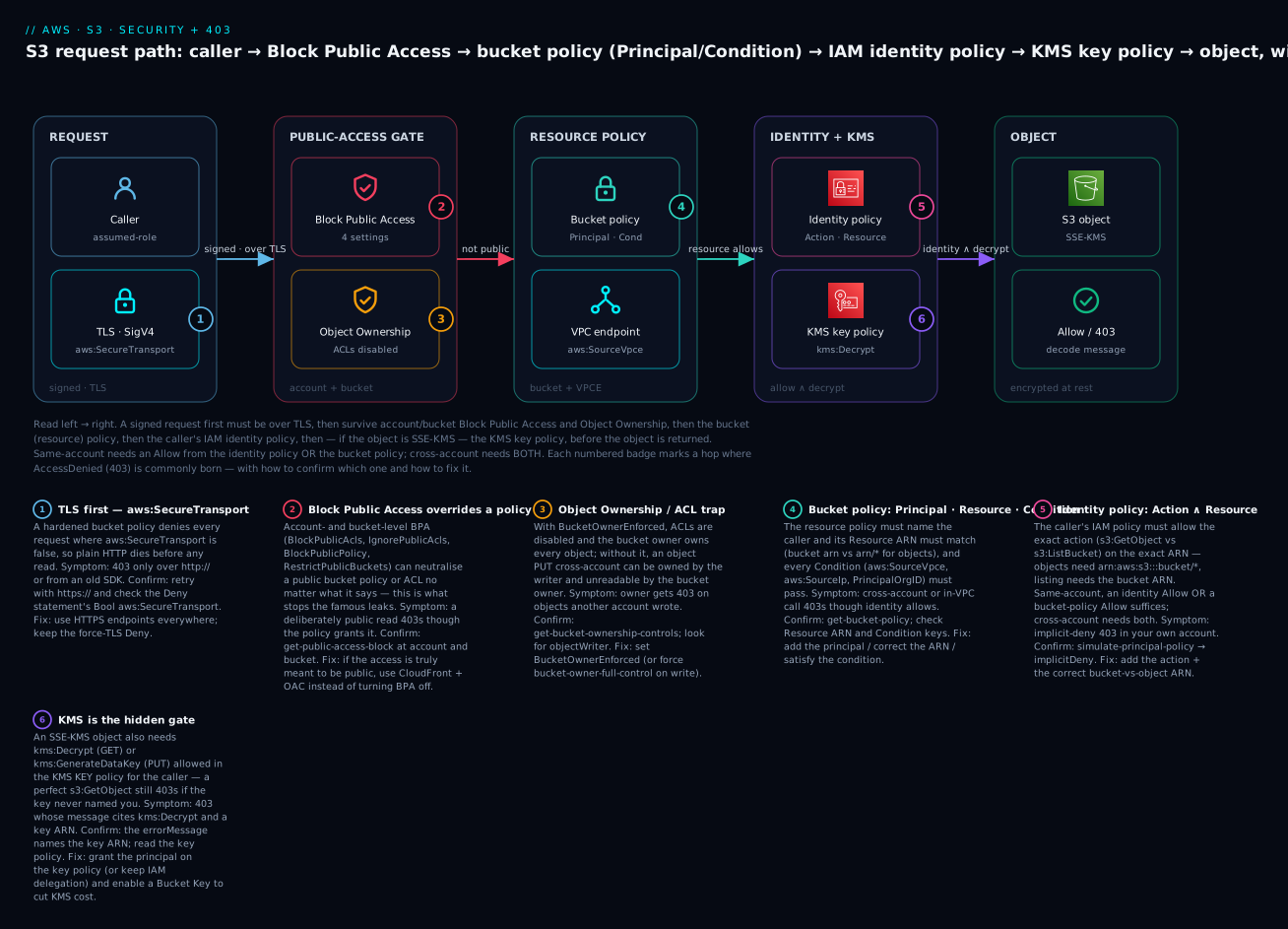
The diagram traces one S3 request left to right through every layer. On the left the caller (an assumed-role session) makes a signed request that must be over TLS — a hardened bucket denies non-TLS via aws:SecureTransport (badge 1). The request then meets the public-access gate: Block Public Access (badge 2) can neutralise any public grant, and Object Ownership = BucketOwnerEnforced (badge 3) means ACLs are off and the bucket owner owns every object. Next the resource policy — the bucket policy must name the principal, match the Resource ARN (bucket vs bucket/*), and satisfy every Condition such as aws:SourceVpce (badge 4), with the VPC endpoint as the private path. Then identity + KMS — the caller’s IAM identity policy must allow the exact action on the exact ARN (badge 5), and if the object is SSE-KMS the KMS key policy must grant kms:Decrypt (badge 6). Only a request that collected an Allow (identity OR bucket policy same-account; both cross-account) and passed BPA, the endpoint and the key with no explicit Deny reaches the object; anything else exits as 403 AccessDenied, which you decode back to the layer that stopped it.
Real-world scenario
Meridian Health runs a 25-account AWS Organization with a shared data-lake bucket, meridian-lake-prod-111122223333, in the data-prod account. Two consumers read from it: an analytics account (444455556666) whose Fargate task assumes role/lake-reader, and a partner ingestion job in a third account that writes curated files back. Everything is SSE-KMS with a customer-managed key, RestrictPublicBuckets and force-TLS are on org-wide, and a compliance rule requires all access to traverse the VPC endpoint. In staging it works. In production, three failures land in the same week.
Failure one — the analytics reader 403s cross-account. The lake-reader role has a clean identity policy allowing s3:GetObject on the lake ARN, and the Policy Simulator says Allow. That green result is the trap: same-account habits. Cross-account needs both doors, and the lake bucket policy named the account root of 444455556666 but a stray Deny statement — a data-perimeter guard — required aws:SourceVpce to match data-prod’s endpoint, not the analytics account’s. The reader came through the analytics VPC endpoint, tripping the Deny. The errorMessage said with an explicit deny in a resource-based policy. Fix: the perimeter Deny was rewritten to allow either endpoint via a multi-value aws:SourceVpce list. Ten minutes once they read the message instead of the simulator.
Failure two — the owner can’t read the partner’s files. The partner account writes objects that the data-prod owner suddenly can’t GetObject — 403 AccessDenied, but only on files written that week. The bucket had been created years ago with ObjectWriter ownership (ACLs on). The partner’s writes, lacking a bucket-owner-full-control ACL, were owned by the partner account, so the bucket owner had no access to its own bucket’s objects — the classic ownership trap. Fix: set Object Ownership = BucketOwnerEnforced, disabling ACLs so the bucket owner owns everything going forward, plus a one-time CopyObject (in place) to re-own the existing partner files. The audit surface shrank from “bucket ACL + every object ACL” to “one bucket policy.”
Failure three — a 403 that names KMS. After a key rotation, the same lake-reader that worked yesterday 403s — and the errorMessage references kms:Decrypt on a key ARN, not S3. The platform team had rotated in a new customer-managed key whose key policy granted kms:Decrypt only to a named admin role, not to lake-reader, and had not restored the Enable IAM User Permissions delegation. The S3 permission never changed; the key started denying. Fix at the key, not the data service: add lake-reader (and the cross-account analytics principal) to the key policy with kms:Decrypt, and turn on an S3 Bucket Key to cut the now-higher KMS request bill by ~95%. The runbook line Meridian wrote: an S3 403 that mentions a key ARN is a KMS problem — fix the key policy; and cross-account is always two doors plus, for SSE-KMS, a third on the key.
Advantages and disadvantages
The layered, deny-by-default model is what makes S3 safe at scale — and what makes debugging it a skill. The trade-offs, then when each matters.
| Advantages of the layered model | Disadvantages / costs |
|---|---|
| BPA makes accidental public exposure nearly impossible | You must not turn BPA off for “quick tests” |
| ACLs-disabled removes a whole leak + ownership class | Legacy apps that set ACLs need code changes |
| Bucket policy expresses per-bucket invariants (TLS/SSE/VPCE) | More layers = more places a request can silently die |
| Same-account OR keeps simple cases simple | Cross-account AND is easy to half-configure (one door) |
| SSE-KMS gives auditable, permissioned encryption | Adds a KMS gate that surprises people (and costs) |
| Access Points/Grants scale sharing to many consumers | More moving parts to learn and monitor |
| Access Analyzer catches leaks before auditors | Findings need a triage process to be useful |
The layering matters most in multi-account, regulated estates where a central team must guarantee limits no bucket owner can exceed — BPA at the account/org level, force-TLS/force-SSE via SCP-backed bucket policies, and Access Analyzer as the continuous check. In a single-account side project, most layers are dormant (no cross-account, no VPCE perimeter), so security collapses to “BPA on, ACLs off, a force-TLS bucket policy” — three settings that take two minutes and prevent the headline outcome.
Hands-on lab
You will lock down a bucket end-to-end, grant a specific cross-account role read via bucket policy, then run IAM Access Analyzer. Everything here is free-tier-safe except a few cents of S3/KMS; teardown is at the end. Use a sandbox account, not production. Replace 111122223333 with your account id and 444455556666 with a second account you control (or skip the cross-account step).
Step 0 — Confirm who you are. Half of all “impossible” denials are “you’re not the principal you think.”
aws sts get-caller-identity
# Expected: { "Account": "111122223333", "Arn": "arn:aws:iam::111122223333:user/you" }
Step 1 — Create a bucket with security on from birth.
BUCKET=kv-s3sec-lab-$RANDOM
aws s3api create-bucket --bucket $BUCKET --region ap-south-1 \
  --create-bucket-configuration LocationConstraint=ap-south-1

# Block Public Access — all four
aws s3api put-public-access-block --bucket $BUCKET \
  --public-access-block-configuration \
  BlockPublicAcls=true,IgnorePublicAcls=true,BlockPublicPolicy=true,RestrictPublicBuckets=true

# Object Ownership = BucketOwnerEnforced (ACLs disabled)
aws s3api put-bucket-ownership-controls --bucket $BUCKET \
  --ownership-controls 'Rules=[{ObjectOwnership=BucketOwnerEnforced}]'

# Default SSE-KMS + Bucket Key (create a key first)
KEY=$(aws kms create-key --description s3seclab --query KeyMetadata.Arn --output text)
aws s3api put-bucket-encryption --bucket $BUCKET \
  --server-side-encryption-configuration "{\"Rules\":[{\"ApplyServerSideEncryptionByDefault\":{\"SSEAlgorithm\":\"aws:kms\",\"KMSMasterKeyID\":\"$KEY\"},\"BucketKeyEnabled\":true}]}"
Step 2 — Attach a hardened bucket policy: force TLS + force SSE-KMS. Write the policy to a file and put it.
cat > /tmp/policy.json <<JSON
{ "Version": "2012-10-17", "Statement": [
  { "Sid":"DenyInsecureTransport","Effect":"Deny","Principal":"*",
    "Action":"s3:*","Resource":["arn:aws:s3:::$BUCKET","arn:aws:s3:::$BUCKET/*"],
    "Condition":{"Bool":{"aws:SecureTransport":"false"}} },
  { "Sid":"DenyWrongEncryption","Effect":"Deny","Principal":"*",
    "Action":"s3:PutObject","Resource":"arn:aws:s3:::$BUCKET/*",
    "Condition":{"StringNotEquals":{"s3:x-amz-server-side-encryption":"aws:kms"}} }
]}
JSON
aws s3api put-bucket-policy --bucket $BUCKET --policy file:///tmp/policy.json
Step 3 — Verify the guardrails bite. A plain-HTTP call should fail; an unencrypted-style PUT should fail; an HTTPS + SSE-KMS PUT should succeed (the CLI uses HTTPS and the bucket default handles SSE).
echo "hello" > /tmp/o.txt
aws s3 cp /tmp/o.txt s3://$BUCKET/o.txt        # Expected: upload succeeds (HTTPS + default SSE-KMS)
aws s3 cp s3://$BUCKET/o.txt /tmp/back.txt     # Expected: download succeeds (you can Decrypt — you're key admin)

# Prove force-TLS works: force the HTTP endpoint (SDK-level) — expect AccessDenied
aws s3api get-object --bucket $BUCKET --key o.txt /tmp/x.txt \
  --endpoint-url http://s3.ap-south-1.amazonaws.com
# Expected: An error occurred (AccessDenied) ... explicit deny (aws:SecureTransport)
Step 4 — Grant a cross-account role read via bucket policy. Add two statements (bucket ARN for list, bucket/* for get) naming the external role, then also grant it kms:Decrypt on the key (SSE-KMS needs the key too).
cat > /tmp/policy2.json <<JSON
{ "Version": "2012-10-17", "Statement": [
  { "Sid":"DenyInsecureTransport","Effect":"Deny","Principal":"*","Action":"s3:*",
    "Resource":["arn:aws:s3:::$BUCKET","arn:aws:s3:::$BUCKET/*"],
    "Condition":{"Bool":{"aws:SecureTransport":"false"}} },
  { "Sid":"CrossAcctList","Effect":"Allow",
    "Principal":{"AWS":"arn:aws:iam::444455556666:role/lake-reader"},
    "Action":"s3:ListBucket","Resource":"arn:aws:s3:::$BUCKET" },
  { "Sid":"CrossAcctRead","Effect":"Allow",
    "Principal":{"AWS":"arn:aws:iam::444455556666:role/lake-reader"},
    "Action":"s3:GetObject","Resource":"arn:aws:s3:::$BUCKET/*" }
]}
JSON
aws s3api put-bucket-policy --bucket $BUCKET --policy file:///tmp/policy2.json

# The KMS key must ALSO allow the external principal kms:Decrypt (grant on the key policy)
# aws kms put-key-policy ... add a statement for arn:aws:iam::444455556666:role/lake-reader
Remember: for this to work end-to-end the other account must also grant role/lake-reader an identity policy allowing s3:GetObject/s3:ListBucket and kms:Decrypt — cross-account is both doors, plus the key.
Step 5 — Run IAM Access Analyzer. Create an account analyzer (if you don’t have one) and check for external-access findings — your cross-account grant should surface as an expected external share.
aws accessanalyzer create-analyzer --analyzer-name acct --type ACCOUNT 2>/dev/null || true
sleep 30
aws accessanalyzer list-findings \
  --analyzer-arn "$(aws accessanalyzer list-analyzers --query 'analyzers[0].arn' --output text)" \
  --filter '{"resourceType":{"eq":["AWS::S3::Bucket"]}}' \
  --query 'findings[].[resource,isPublic,status]' --output table
# Expected: your bucket listed with isPublic=false, shared to 444455556666 (an EXPECTED external access)
Step 6 — Teardown (avoid lingering charges).
aws s3 rm s3://$BUCKET --recursive
aws s3api delete-bucket --bucket $BUCKET
aws kms schedule-key-deletion --key-id "$KEY" --pending-window-in-days 7  # ⚠️ CMK: 7-30 day window
⚠️ A customer-managed KMS key costs ~$1/month while it exists and can only be scheduled for deletion (7–30 days). Schedule it now so it stops billing.
Common mistakes & troubleshooting — the 403 decoder
This is the playbook. Find your symptom, read across to the exact command that confirms the layer, then the fix. Work it top-down: the earlier layers (explicit Deny, BPA) short-circuit everything, so rule them out first, and always start with the errorMessage — it names the layer.
First, the 30-second triage — the pattern you notice maps almost 1:1 to the layer:
| If you see… | It’s probably… | Do this first |
|---|---|---|
| A deliberately public read is blocked | Block Public Access | get-public-access-block (account + bucket) |
| Broadening the identity policy changes nothing | An explicit Deny (bucket policy / SCP) | Read the reason clause; stop adding Allows |
| Cross-account call 403s though identity allows | Bucket policy missing the principal (one door) | get-bucket-policy; add the principal |
| 403 naming a KMS key ARN | The KMS key policy gate | Fix the key policy, not S3 |
| Owner 403s on objects another account wrote | Object Ownership (ACLs on, writer owns) | get-bucket-ownership-controls |
ListBucket denied but GetObject works (or vice-versa) |
Wrong Resource ARN (bucket vs bucket/*) |
Check the ARN per action |
| Denied only from inside the VPC | VPC endpoint policy or aws:SourceVpce |
Read the endpoint policy + bucket condition |
403 SignatureDoesNotMatch |
Not a policy — clock/region/creds | Fix clock skew / region / credentials |
Now the full playbook.
| # | Symptom | Root cause | Confirm (exact command / console path) | Fix |
|---|---|---|---|---|
| 1 | A bucket you made “public” still returns 403 | Block Public Access (account or bucket) neutralises the grant | aws s3api get-public-access-block --bucket b; aws s3control get-public-access-block --account-id <id> |
Don’t disable BPA — front with CloudFront + OAC, or use presigned URLs |
| 2 | AccessDenied though your identity policy clearly allows it | An explicit Deny in the bucket policy (TLS/SSE/VPCE guardrail) or an SCP | errorMessage says “with an explicit deny in a …”; aws s3api get-bucket-policy |
Satisfy the condition (use HTTPS/SSE/right VPCE) or scope the Deny |
| 3 | Cross-account GetObject 403s though the caller’s IAM allows it | Bucket policy doesn’t name the external principal (only one door open) | aws s3api get-bucket-policy --bucket b; look for the role ARN |
Add the external role to the bucket policy (bucket ARN + bucket/*) |
| 4 | s3:ListBucket denied but GetObject works (or reverse) |
Wrong Resource ARN: list needs arn:...:b, objects need arn:...:b/* |
Read the policy’s Resource per statement |
List → bucket ARN; Get/Put → bucket/*; use two statements |
| 5 | Reading an SSE-KMS object returns 403 naming kms:Decrypt + a key ARN |
KMS key policy doesn’t grant the caller | errorMessage names the key ARN; read the key policy |
Grant kms:Decrypt in the key policy (or keep IAM delegation) |
| 6 | Writing an SSE-KMS object 403s | Missing kms:GenerateDataKey on the key |
errorMessage names kms:GenerateDataKey |
Add kms:GenerateDataKey to the caller on the key policy |
| 7 | Bucket owner 403s on objects another account wrote | Object Ownership = ObjectWriter — the writer owns them | aws s3api get-bucket-ownership-controls; get-object-acl shows a foreign owner |
Set BucketOwnerEnforced; re-copy existing objects to re-own |
| 8 | PutBucketPolicy rejected with “public policies are blocked” |
BlockPublicPolicy rejects a policy S3 deems public | Check for Principal:"*" scoped only by aws:SourceIp |
De-publicise with aws:SourceVpce/PrincipalOrgID/named principal |
| 9 | PutObject/PutObjectAcl fails with AccessControlListNotSupported |
ACLs disabled (BucketOwnerEnforced) but the call sends an ACL |
The call includes --acl / x-amz-acl |
Remove the ACL header — policies grant access now |
| 10 | 403 from an old client only, works from a new one | Force-TLS Deny (aws:SecureTransport:false) or SigV2 |
Client using http:// or SigV2 |
Use HTTPS + SigV4; upgrade the SDK |
| 11 | PutObject denied “explicit deny” though you sent no encryption | Force-SSE bucket policy denies PUT without the SSE header | Policy has s3:x-amz-server-side-encryption Deny |
Send --sse aws:kms (or rely on bucket default encryption) |
| 12 | Denied only when calling through the VPC endpoint | VPC endpoint policy or aws:SourceVpce mismatch |
Read the endpoint policy; compare aws:SourceVpce in the bucket policy |
Add the bucket/action to the endpoint policy; match the VPCE id |
| 13 | Cross-account works for some accounts, denied for others | aws:PrincipalOrgID / aws:SourceAccount condition excludes them |
Check the org id/account in the bucket-policy Condition |
Add the account to the org, or widen the condition |
| 14 | 403 SignatureDoesNotMatch (not AccessDenied) |
Not IAM — clock skew, wrong Region, or wrong secret key | aws --debug shows region/endpoint; check system clock |
Sync clock (NTP), use the bucket’s Region, verify credentials |
| 15 | PermanentRedirect / AuthorizationHeaderMalformed |
Talking to the wrong Region endpoint for the bucket | get-bucket-location; the error names the correct region |
Use the bucket’s Region endpoint |
| 16 | 403 RequestTimeTooSkewed |
System clock off by > 15 min from AWS | Compare local time to real time | Fix NTP; SigV4 rejects skew > 15 minutes |
| 17 | 403 on a requester-pays bucket | Missing x-amz-request-payer: requester header |
Bucket has requester-pays on | Add --request-payer requester and have s3:GetObject |
| 18 | Access via an Access Point 403s though the bucket policy is fine | The access-point policy or its NetworkOrigin=VPC denies |
Read the AP policy; check you’re in the right VPC | Grant on the AP policy; call from the AP’s VPC |
S3 status/error-code reference
Not every 4xx is IAM. Distinguish the authorization failures from the request/signature failures.
| Code / error | HTTP | Meaning | Is it a policy problem? |
|---|---|---|---|
AccessDenied |
403 | Authorization failed | Yes — read the reason clause |
AllAccessDisabled |
403 | Bucket access disabled (often billing/legal hold) | No — account-level |
AccessControlListNotSupported |
400 | Sent an ACL while ACLs are disabled | No — remove the ACL header |
SignatureDoesNotMatch |
403 | Wrong secret key / region / canonicalization | No — credentials/region |
RequestTimeTooSkewed |
403 | Clock skew > 15 min | No — fix NTP |
InvalidAccessKeyId |
403 | Access key doesn’t exist | No — wrong/rotated key |
ExpiredToken |
400 | STS session expired | No — re-auth |
PermanentRedirect |
301 | Wrong-Region endpoint | No — use bucket Region |
AuthorizationHeaderMalformed |
400 | Region mismatch in the SigV4 scope | No — set the right Region |
NoSuchBucket |
404 | Bucket doesn’t exist (or wrong Region) | No — check name/Region |
KMS.DisabledException / KMSInvalidStateException |
400 | SSE-KMS key disabled or pending deletion | Key state, not policy |
kms:Decrypt in an AccessDenied |
403 | KMS key policy denied | Yes — the key policy |
The AccessDenied reason clause, decoded for S3
The newer messages name the layer. Map the clause to the fix.
| Reason clause in the message | Layer that denied you | Fix |
|---|---|---|
| “no identity-based policy allows the … action” | Identity (implicit) | Add the Action + correct bucket-vs-object ARN |
| “with an explicit deny in a resource-based policy” | Bucket policy Deny |
Satisfy the condition (TLS/SSE/VPCE) or scope the Deny |
| “with an explicit deny in an identity-based policy” | Identity Deny |
Find and scope the Deny in your policy |
| “with an explicit deny in a service control policy” | SCP (Organizations) | Adjust the SCP at the OU |
| “because no resource-based policy allows the … action” | Bucket policy (cross-acct) | Add the principal to the bucket policy |
Names kms:Decrypt / kms:GenerateDataKey + a key ARN |
KMS key policy | Grant the key op on the key policy |
| “with an explicit deny in a VPC endpoint policy” | VPC endpoint policy | Add the action/resource to the endpoint policy |
Condition-key mismatches — the quiet deniers
When Action and Resource are right but you’re still denied, a Condition evaluated false.
| Condition key | Denies when… | Confirm | Common trap |
|---|---|---|---|
aws:SecureTransport |
Request not over TLS | Retry with https:// |
Old SDK/endpoint using HTTP |
s3:x-amz-server-side-encryption |
PUT without the required SSE header | Inspect the PUT headers | Rely on bucket default or send --sse aws:kms |
aws:SourceVpce |
Not the named VPC endpoint | Compare the VPCE id | Wrong/second endpoint; use IfExists for non-VPC calls |
aws:SourceIp |
Public egress IP not in range | Check the public IP | It’s the NAT/egress IP, not the private VPC IP |
aws:PrincipalOrgID |
Caller not in the org | Compare the org id | Hard-coded old org id after a migration |
s3:x-amz-acl |
Required canned ACL absent | Check the write’s ACL | Only relevant while ACLs enabled |
aws:SourceArn/aws:SourceAccount |
Calling service mismatch (confused-deputy) | Decode; check the source | CloudFront OAC / logging service principal |
ARN and identity traps
Half of “no identity-based policy allows” is a subtly wrong Resource ARN.
| ARN / identity trap | Wrong | Right / rule |
|---|---|---|
| Bucket vs object | arn:aws:s3:::b for GetObject |
Objects need arn:aws:s3:::b/* |
| List needs the bucket | arn:aws:s3:::b/* for ListBucket |
ListBucket needs arn:aws:s3:::b |
| Prefix scoping | arn:aws:s3:::b/logs |
arn:aws:s3:::b/logs/* for the objects |
| Region/account in S3 ARN | Adding region/account to a bucket ARN | Standard S3 bucket ARNs omit both |
| Partition | arn:aws:… in GovCloud/China |
aws-us-gov / aws-cn |
| Role vs assumed-role in Principal | assumed-role/…/<session> |
Name the role ARN; S3 matches the session |
| Account root vs role | :root when you meant one role |
:role/name for least privilege |
| Access point ARN | Using the bucket ARN via an AP | arn:aws:s3:<region>:<acct>:accesspoint/<name> |
| Case in bucket name | MyBucket |
Bucket names are lowercase; ARNs case-sensitive |
| Wrong profile/creds | You’re a different principal | aws sts get-caller-identity first, always |
Best practices
- Turn Block Public Access ON at the account level, and keep all four settings on for every bucket. Enforce it org-wide with an SCP so nobody can disable it.
- Disable ACLs — set Object Ownership to
BucketOwnerEnforcedon every bucket. It removes the public-ACL leak vector and the cross-account-ownership trap in one move. - Never make a bucket public to serve content. Put CloudFront with Origin Access Control in front of a private bucket, or use presigned URLs. See CloudFront CDN setup with caching and OAC.
- Put a force-TLS
Denyon every bucket (aws:SecureTransport:false). It’s one statement and it’s non-negotiable for compliance. - Force SSE-KMS with a named key where data is sensitive, and turn on S3 Bucket Keys to keep the KMS bill sane.
- Treat cross-account as two doors from the start — write the identity allow and the bucket-policy allow together, scoped by
aws:PrincipalOrgID; for SSE-KMS add the third door on the key policy. - Get the Resource ARN right: bucket ARN for bucket actions,
bucket/*for object actions, two statements when you need both. - Prefer specific principals over
:root, and preferaws:SourceVpce/PrincipalOrgIDoveraws:SourceIp(which BPA rightly treats as public). - Scale sharing with Access Points or Access Grants instead of one giant bucket policy when many teams read one bucket.
- Run IAM Access Analyzer continuously and validate bucket policies in CI (
check-no-new-access) so an over-broad grant fails the PR, not production. - Alarm on
AccessDeniedand on public-access changes — a CloudTrail metric filter onPutBucketPolicy/PutBucketPublicAccessBlockcatches a bad change in minutes. - Never “fix” a 403 with a public policy or
s3:*— it usually doesn’t even work (the denier is BPA or aDeny) and leaves a standing finding.
Security notes
Locking down S3 is a security-sensitive activity where the temptation under pressure is to over-open. The layers exist to stop exactly that.
| Principle | Why it matters here | How |
|---|---|---|
| Deny by default, least privilege on the fix | The 403 is a chance to grant exactly what’s needed | Add the specific Action + ARN, not * or public |
| Block Public Access as the outer net | Renders a mistaken public grant inert | All four settings on, account-level, SCP-enforced |
| ACLs disabled | Removes a second, easily-forgotten grant system | BucketOwnerEnforced everywhere |
| Force encryption in transit and at rest | Compliance + confidentiality | aws:SecureTransport Deny + default SSE-KMS |
| KMS key policy as a second authorization layer | The key is authoritative for the key | Scope kms:Decrypt/GenerateDataKey to real consumers |
| Data perimeter | Keep data in your org and off the internet | aws:PrincipalOrgID + aws:SourceVpce; VPC endpoints |
| Continuous external-access detection | Catch leaks before an attacker | IAM Access Analyzer + alarms on policy changes |
| Short-lived, scoped sharing | Presigned URLs beat public buckets | Sign with a narrow role, short expiry |
Cost & sizing
S3 security controls are almost all free — Block Public Access, bucket policies, Object Ownership, ACLs, Access Points, Access Analyzer’s external-access findings and policy validation cost nothing. The bill comes from encryption and the evidence you keep.
| Item | What drives cost | Rough cost | Free-tier / note |
|---|---|---|---|
| Block Public Access / bucket policy / ownership | — | Free | Always free |
| S3 Access Points | — | Free (standard S3 request pricing applies) | No extra charge for the AP itself |
| IAM Access Analyzer (external access) | Per analyzer | Free | The external-access analyzer is free |
| IAM Access Analyzer (unused access) | Per IAM role/user/month | ~$0.20 per role or user/mo | Optional; org-wide adds up |
| SSE-S3 | — | Free | Baseline encryption, no charge |
| SSE-KMS key | Per key/month | ~$1/key/mo | AWS-managed key is free; CMK is ~$1 |
| SSE-KMS requests | Per Decrypt/GenerateDataKey |
~$0.03 per 10k requests | The scale cost — mitigate with Bucket Keys |
| S3 Bucket Keys | — | Free (reduces KMS requests up to ~99%) | Turn on for any high-TPS SSE-KMS bucket |
| Interface VPC endpoint (if used for S3) | Per-hour + per-GB | ~$0.01/hr + data | Gateway endpoint for S3 is free — prefer it |
| CloudTrail data events (S3 object-level) | Per event | ~$0.10 / 100k events | Only if you need object-level audit |
The practical guidance: keep every free control on by default, use the free gateway VPC endpoint for S3 rather than an interface endpoint unless you need cross-Region/on-prem reach, and — the one real lever — always enable S3 Bucket Keys on SSE-KMS buckets: at even modest object volumes the KMS request cost dwarfs the ~$1/month key, and Bucket Keys cut it by up to 99%. Remember every customer-managed KMS key is ~$1/month whether used or not.
Interview & exam questions
Q1. Name the layers an S3 request is evaluated against, and the one rule that overrides all others. Explicit Deny (any policy) → Block Public Access → VPC endpoint policy → Object Ownership/ACL → bucket policy → IAM identity policy → KMS key policy (for SSE-KMS). The overriding rule: an explicit Deny anywhere beats every Allow. (SAA-C03, SCS-C02)
Q2. Same-account, does an S3 GetObject need both an identity-policy allow and a bucket-policy allow? No — same-account, either suffices (OR). Cross-account needs both (AND): the caller’s identity policy and the bucket policy, plus the KMS key policy if SSE-KMS. (SAA-C03, DVA-C02)
Q3. What do the four Block Public Access settings do? BlockPublicAcls rejects calls setting new public ACLs; IgnorePublicAcls ignores existing public ACLs; BlockPublicPolicy rejects new public bucket policies; RestrictPublicBuckets limits a bucket that already has a public policy to AWS services and same-account principals. (SCS-C02, SAA-C03)
Q4. Why is Principal:"*" limited by only aws:SourceIp still blocked by BPA? Because S3 does not treat aws:SourceIp as a condition that makes a *-principal statement non-public — an IP allow-list isn’t authentication. Use aws:SourceVpce, aws:PrincipalOrgID, or a named principal instead. (SCS-C02)
Q5. You get 403 on an encrypted S3 object though s3:GetObject is granted. Likely cause and how to confirm? The KMS key policy — the object is SSE-KMS with a key that doesn’t grant your principal kms:Decrypt. Confirm from the errorMessage, which names kms:Decrypt and a key ARN; fix in the key policy. (SCS-C02, DVA-C02)
Q6. A bucket owner can’t read objects another account wrote. What setting fixes it? Object Ownership = BucketOwnerEnforced, which disables ACLs and makes the bucket owner own all objects. With the legacy ObjectWriter, the writing account owns its objects. (SAA-C03, SCS-C02)
Q7. s3:ListBucket is denied but s3:GetObject works. Why? Wrong Resource ARN. ListBucket is a bucket action needing arn:aws:s3:::bucket; GetObject is an object action needing arn:aws:s3:::bucket/*. Use two statements. (DVA-C02, SAA-C03)
Q8. How do you force all writes to use SSE-KMS with a specific key? A bucket-policy Deny on s3:PutObject when s3:x-amz-server-side-encryption isn’t aws:kms, plus another Deny when s3:x-amz-server-side-encryption-aws-kms-key-id isn’t your key ARN. (SCS-C02, DVA-C02)
Q9. What’s the safe way to serve public web content from S3? Don’t make the bucket public. Keep BPA on and put CloudFront with Origin Access Control in front of the private bucket; the bucket policy trusts the distribution via aws:SourceArn. (SAA-C03)
Q10. What is S3 Bucket Keys and why enable it? A bucket-level key S3 uses to derive per-object data keys, drastically reducing KMS GenerateDataKey/Decrypt calls — cutting KMS request cost up to ~99% and easing KMS rate limits on SSE-KMS buckets. (SAA-C03, SCS-C02)
Q11. Difference between S3 Access Points and Access Grants? Access Points are named endpoints (each with its own policy + BPA) for scaling bucket access patterns across teams; Access Grants map identities (IAM or IAM Identity Center) to prefixes and vend temporary credentials — finer-grained, directory-driven data-lake access. (SCS-C02)
Q12. Which tool finds a bucket accidentally shared externally, and name two of its checks? IAM Access Analyzer — external-access findings, unused-access findings, policy validation, and custom checks check-no-new-access/check-access-not-granted. (SCS-C02)
Quick check
- Same-account vs cross-account: how many policies must allow an S3 GetObject, and which?
- You made a bucket “public” but it still 403s. Which layer is most likely, and how do you confirm?
- A 403 message names
kms:Decryptand a key ARN. Which layer, and where’s the fix? s3:ListBucketneeds which Resource ARN, ands3:GetObjectwhich?- Why won’t
Principal:"*"+aws:SourceIpsurvive Block Public Access?
Answers
- Same-account: one (identity policy OR bucket policy — either suffices). Cross-account: both (identity policy in the caller’s account AND bucket policy on the resource), plus the KMS key policy if the object is SSE-KMS.
- Block Public Access. Confirm with
aws s3api get-public-access-block --bucket bandaws s3control get-public-access-block --account-id <id>. The fix is to serve via CloudFront + OAC, not to disable BPA. - The KMS key policy gate. Fix it in the key policy — grant the principal
kms:Decrypt(andkms:GenerateDataKeyfor writes), or keep the key’s IAM delegation — not in the S3/identity policy. s3:ListBucketneeds the bucket ARNarn:aws:s3:::b;s3:GetObjectneeds the object ARNarn:aws:s3:::b/*. Two statements when you need both.- Because S3 does not count
aws:SourceIpamong the condition keys that make a*-principal statement non-public, so BPA still considers it public and blocks it. An IP allow-list isn’t authentication.
Glossary
- Block Public Access (BPA) — Account- and bucket-level settings that veto public ACLs and public bucket policies; four toggles (
BlockPublicAcls,IgnorePublicAcls,BlockPublicPolicy,RestrictPublicBuckets), all on by default for new buckets. - Object Ownership — A bucket setting controlling who owns written objects and whether ACLs work;
BucketOwnerEnforceddisables ACLs and makes the bucket owner own everything. - ACL (Access Control List) — The legacy per-object/bucket grant system; disabled by
BucketOwnerEnforcedand the source of the public-read leak and cross-account-ownership traps. - Bucket policy — The resource-based policy on a bucket; names a
Principal, grants actions, and is the natural home for guardrailDenys (force TLS/SSE) and cross-account grants. - Identity policy — An IAM policy attached to a user/group/role granting S3 actions across buckets.
- Same-account OR / cross-account AND — Same-account access needs an allow from either the identity or bucket policy; cross-account needs both.
- SSE-S3 / SSE-KMS / DSSE-KMS / SSE-C — S3 server-side encryption modes: S3-owned key (free), customer KMS key (auditable, adds a KMS gate), dual-layer KMS, and customer-provided key.
- KMS key policy — The resource policy on a KMS key; authoritative for
kms:Decrypt/GenerateDataKey. An SSE-KMS 403 is usually here. - S3 Bucket Keys — A bucket-level key that reduces KMS API calls (and cost) for SSE-KMS by up to ~99%.
- Condition key — A contextual guardrail in a policy (
aws:SecureTransport,aws:SourceVpce,s3:x-amz-server-side-encryption,aws:PrincipalOrgID, …). - VPC endpoint policy — A policy on the gateway/interface S3 endpoint that caps what may traverse it.
- S3 Access Point — A named endpoint attached to a bucket with its own policy and BPA; scales access patterns across teams.
- Multi-Region Access Point (MRAP) — A global endpoint routing to buckets in multiple Regions (SigV4A), for global reach or failover.
- S3 Access Grants — Maps identities (IAM or IAM Identity Center) to S3 prefixes and vends temporary, scoped credentials.
- Presigned URL — A time-limited signed link that lets any holder perform one S3 operation as the signer, inheriting the signer’s permissions.
- IAM Access Analyzer — A service that flags buckets shared outside your account/org (external-access findings) and validates/generates policies.
Next steps
- If buckets themselves are new, do the hands-on S3 Buckets Fundamentals first, then return here to lock them down.
- Master the general authorization model behind every S3 403 in Debugging IAM ‘Access Denied’: Policy Evaluation Logic, SCPs, Boundaries & a Playbook.
- Serve web content the safe way — private bucket behind CloudFront CDN setup with caching and OAC.
- Optimise what those secured buckets cost over time with S3 Storage Classes & Lifecycle.
- Extend the data-perimeter idea org-wide with SCPs, RCPs and VPC endpoint policies across every account.