Quick take: CloudFront is a programmable cache with a global footprint, not a “make it faster” toggle. The speed is a side effect; the real product is control — which bytes are cached and for how long (the cache policy and TTLs), what reaches your origin (the origin request policy), what the browser is told (the response headers policy), who is allowed in (signed URLs, WAF, geo), and what runs at the edge (CloudFront Functions / Lambda@Edge). Get the cache key and OAC right first; everything else is behaviors layered on top of the same request path.
Every millisecond your users wait for a static asset is a millisecond you can delete by serving it from a machine near them instead of from ap-south-1. Amazon CloudFront is AWS’s content delivery network: 600-plus edge locations and a tier of larger regional edge caches that sit in front of your origin, absorb reads, terminate TLS close to the user, and only bother your S3 bucket or load balancer when they genuinely have to. Treated as a checkbox it “works.” Treated as an engineering surface it is one of the highest-leverage services in AWS — a single well-tuned cache policy can cut your origin load by 95% and your egress bill along with it.
This guide is the hands-on, senior-engineer version. You will learn the distribution and the edge → regional-edge-cache → origin hierarchy; origins — S3 locked down with Origin Access Control (OAC) (the modern replacement for the legacy OAI), custom origins (ALB/EC2/any HTTP endpoint), and origin groups for failover; cache behaviors and how path patterns win by precedence; the policy trio that most teams get wrong — cache policy (the cache key), origin request policy (what’s forwarded), and response headers policy (CORS + security headers); TTLs and the truth about invalidations (why versioned object names beat /*); compression, HTTPS via ACM in us-east-1, signed URLs / cookies, geo-restriction, edge compute (CloudFront Functions vs Lambda@Edge), WAF, and logging. Then you will build the whole thing in a lab — an S3 static site behind CloudFront with OAC, a custom cache policy, HTTPS, a push-and-invalidate cycle, and a x-cache: Hit/Miss verification — in aws CLI and Terraform, with teardown.
By the end you will read an x-cache header the way you read a stack trace, and you will never again forward every cookie to your origin and wonder why your hit ratio is zero.
What problem this solves
Without a CDN, every request — a logo, a JS bundle, an API call, a video segment — travels to a single origin Region and back. That is slow for anyone not sitting next to that Region, expensive (origin egress and compute scale linearly with traffic), and fragile (a launch spike hits the origin all at once). CloudFront solves a specific cluster of production problems that a bigger EC2 or a read replica cannot.
| Problem in production | What breaks without CloudFront | The CloudFront answer |
|---|---|---|
| Users in Mumbai, London, São Paulo hit one Region | 200–350 ms RTT per object; TLS handshake × distance | Edge locations terminate TLS and serve cached bytes locally |
| A launch or sale sends 1M concurrent reads at S3/ALB | Origin CPU spike, 5xx, throttling, egress bill explosion | Edge + regional caches + Origin Shield collapse it to a trickle |
| Your S3 bucket must be private but publicly reachable | Public bucket (data leak) or a broken CloudFront→S3 403 | OAC signs each fetch; the bucket stays private |
| One origin dies mid-incident | Hard outage until someone repoints DNS | Origin group fails over to the secondary automatically |
| You ship a JS change but users keep the old file | Stale bundle, “clear your cache” support tickets | Versioned filenames + targeted invalidations |
| The same object is fetched from origin thousands of times | Origin over-read, low cache hit ratio, high cost | A tight cache policy and long TTLs on immutable assets |
| Every response must carry HSTS/CSP + CORS headers | Headers added inconsistently per origin app | Response headers policy injects them at the edge |
| Scrapers and floods reach your app before it can 403 | Origin does the work of rejecting bad traffic | WAF + rate limits + geo-restriction at the edge |
| Premium/paid assets must be gated | A leaked S3 URL is public forever | Signed URLs / cookies with expiry + key groups |
Who hits these: front-end and platform engineers shipping SPAs and static sites; media teams streaming video; API teams putting a cache in front of an ALB; security engineers who need a private origin and a WAF; and every candidate sitting CLF-C02, SAA-C03, DVA-C02, SOA-C02, or the networking specialty ANS-C01, where OAC-vs-OAI, the policy trio, TTL precedence, and signed URLs are guaranteed questions. The failures below — an S3 403 through OAC, a stale object that won’t die, a 5% hit ratio because you forwarded every cookie, an ACM cert “not showing up” because it’s in the wrong Region — are the four most common CloudFront tickets in existence.
Learning objectives
By the end of this guide you can:
- Explain the CloudFront distribution and the edge → regional edge cache → Origin Shield → origin hierarchy, and why each tier exists.
- Lock an S3 origin with Origin Access Control (OAC), write the bucket policy that makes it work, and migrate off legacy OAI.
- Configure custom origins (ALB/EC2/any HTTP) and an origin group for automatic failover, choosing the correct failover status codes.
- Design cache behaviors with path patterns and understand precedence, then build the policy trio — cache policy (cache key), origin request policy (forwarding), response headers policy (CORS + security).
- Reason about TTL precedence (Min/Default/Max vs
Cache-Control/Expires/s-maxage) and choose versioned objects over expensive/*invalidations. - Enable compression, set up HTTPS with an ACM certificate in us-east-1, and pick the right viewer/origin protocol policy and TLS security policy.
- Gate private content with signed URLs / signed cookies and key groups, add geo-restriction, and attach a WAF web ACL.
- Choose between CloudFront Functions and Lambda@Edge, wire the four trigger points, and turn on standard and real-time logs.
- Diagnose any “403 / stale / low-hit-ratio / cert-missing / 502-504 / CORS-blocked / redirect-loop” failure from the exact symptom.
Prerequisites & where this fits
This is an intermediate networking topic. You should be comfortable with S3, HTTP semantics (methods, status codes, Cache-Control), and the AWS Console/CLI. If a row below is shaky, read the linked foundation first.
| You should know | Why it matters here | Where to get it |
|---|---|---|
| S3 buckets, objects, and storage classes | S3 is the canonical CloudFront origin; lifecycle affects what you cache | S3 Storage Classes & Lifecycle |
| DNS, alias records, and hosted zones | You point a custom domain at the distribution with a Route 53 alias | Route 53: Records & Routing Policies |
| What an ALB is and how it fronts compute | Custom origins and origin-group failover point at an ALB | ALB vs NLB vs API Gateway, Compared |
Basic HTTP caching (Cache-Control, ETag) |
TTL precedence is built on these headers | This article’s TTLs and invalidations section |
| IAM policies and service principals | The OAC bucket policy uses a service principal + condition | IAM Users, Groups, Roles & Policies |
Where it fits: CloudFront is the edge tier of almost every serious AWS front end. It sits in front of S3 for static sites and assets, in front of an ALB or API Gateway for dynamic apps, and in front of MediaPackage for video. It is the natural companion to the serverless web application and three-tier web application patterns — the “front door” that both of those diagrams draw at the left edge.
Core concepts
Before the option matrices, fix the mental model. CloudFront is a distribution: a globally deployed configuration that maps incoming requests to origins through a chain of caches and policies. A request walks this path, and every concept below is one hop on it.
| Concept | What it is | Why it matters |
|---|---|---|
| Distribution | The top-level config object (E... id, d1234.cloudfront.net domain) |
The unit you create, version, and attach a domain + cert to |
| Edge location | 600+ POPs that terminate TLS and serve cached objects | Where the user actually connects; the L1 cache |
| Regional edge cache (REC) | ~13 larger mid-tier caches between edge and origin | L2 cache; improves hit ratio, shields the origin |
| Origin Shield | An optional single caching layer in a Region you choose | L3 collapse point; dedupes concurrent origin misses |
| Origin | Where CloudFront fetches on a miss (S3, ALB, EC2, any HTTP) | The source of truth behind the cache |
| Origin group | A primary + secondary origin with failover criteria | Automatic origin failover on 5xx / timeout |
| Cache behavior | A rule (matched by path pattern) that binds a path to an origin + policies | How /api/* and /* get different treatment |
| Cache policy | Defines the cache key (headers/cookies/query) + TTLs | Directly sets your hit ratio |
| Origin request policy | What CloudFront forwards to the origin on a miss | Can forward more than it caches on |
| Response headers policy | Headers CloudFront adds/removes on the response | CORS + security headers without touching the app |
| Invalidation | A request to purge objects from all edge caches early | The “make it stop being stale” button (costs money) |
| OAC | Origin Access Control: SigV4-signed private S3 access | Keeps the bucket private; replaces OAI |
| Signed URL / cookie | Time-limited, key-signed access to private content | Gates paid/premium assets |
| Cache HIT / MISS | Whether the edge served from cache or went to origin | Read from the x-cache response header |
The cache hierarchy, top to bottom
A request does not go “edge → origin.” It walks a tiered cache, and each tier is a chance to avoid the next. Understanding the tiers is the whole game for hit ratio and origin protection.
| Tier | Where | Serves | Purpose | Note |
|---|---|---|---|---|
| Viewer | User’s browser/app | Browser cache | Zero-latency repeat | Governed by Cache-Control you send |
| Edge location (L1) | 600+ POPs | GET/HEAD/OPTIONS |
Closest cache to user | Smaller cache; hot objects |
| Regional edge cache (L2) | ~13 Regions | GET/HEAD/OPTIONS |
Bigger cache behind edges | Not used for dynamic/proxy methods (PUT/POST/…) |
| Origin Shield (L3) | 1 Region you pick | All methods | Request collapsing | Optional, extra per-request cost |
| Origin | Your S3/ALB | Source of truth | Only hit on a full miss | Protect it with the tiers above |
Two rules fall out of this table. First, proxy/dynamic methods (PUT, POST, PATCH, DELETE) skip the regional edge cache and go edge → (shield) → origin, because they are not cacheable. Second, the more objects that live in the L2/L3 tiers, the fewer requests reach the origin — which is exactly why enabling Origin Shield and using long TTLs on immutable assets is how you survive a launch.
Distributions and the edge hierarchy
Creating a distribution — the settings that matter
A distribution has dozens of settings; these are the ones that change behavior or cost. Everything else you can leave at the default.
| Setting | Values | Default | When to change | Trade-off / gotcha |
|---|---|---|---|---|
| Price class | All / 200 / 100 | All | Cut cost if you have no users in expensive Regions | Excluded Regions route to a farther edge → higher latency |
| Alternate domain names (CNAMEs) | Your domains | none (*.cloudfront.net) |
Serve on your own domain | Requires an ACM cert in us-east-1 covering them |
| Custom SSL certificate | ACM cert / default | default | Custom domain | Cert MUST be in us-east-1 regardless of origin Region |
| Security policy (min TLS) | e.g. TLSv1.2_2021 | TLSv1 (legacy) | Enforce modern TLS to viewers | Older clients on weak TLS get rejected |
| Supported HTTP versions | HTTP/1.1, /2, /3 | HTTP/2 on | Enable HTTP/3 (QUIC) for mobile | Minor; generally leave HTTP/2+3 on |
| Default root object | e.g. index.html |
none | Static sites (serve index at /) |
Without it, / returns a 403/404 from S3 |
| Standard logging | on/off → S3 | off | You need access logs | Log delivery has a small S3 storage cost |
| IPv6 | on/off | on | Almost always leave on | Off only for legacy allowlists |
| WAF web ACL | CLOUDFRONT-scope ACL | none | Edge security | ACL must be created in us-east-1 |
| Default TTL / behaviors | via cache policy | CachingOptimized | Tune per path | Covered in the policy sections below |
# Create the simplest distribution from a config file (S3 origin, OAC attached)
aws cloudfront create-distribution-with-tags \
  --distribution-config-with-tags file://dist-config.json
# List distributions and their domain names
aws cloudfront list-distributions \
  --query "DistributionList.Items[].{Id:Id,Domain:DomainName,Status:Status}" \
  --output table
Price classes — what each excludes
Price class is the one setting that trades latency for money at the distribution level. There are exactly three.
| Price class | Includes | Excludes | Use when |
|---|---|---|---|
| PriceClass_All | Every edge location worldwide | nothing | Global audience; best latency everywhere |
| PriceClass_200 | Most Regions incl. India, Middle East | South America, Australia, NZ | No meaningful users in the excluded set |
| PriceClass_100 | US, Canada, Europe, Israel | Asia-Pacific, South America, etc. | Audience is US/EU only; cheapest |
Choosing a cheaper class does not make those users fail — CloudFront simply routes them to the nearest included edge, so a São Paulo user on PriceClass_100 is served from the US at higher latency. For a truly global product, PriceClass_All is the default worth paying for.
Regional edge caches and Origin Shield
The REC tier is automatic and free — you cannot turn it off, and it silently improves hit ratio by pooling many edges behind a larger cache. Origin Shield is the one you opt into and pay for: it designates a single Region as a mandatory extra hop so that every regional edge cache funnels its misses through one place, collapsing concurrent requests to the origin.
| Feature | Regional edge cache | Origin Shield |
|---|---|---|
| Opt-in | No (automatic) | Yes (per origin) |
| Count | ~13, chosen by AWS | 1, you pick the Region |
| Cost | Free | Per-request charge on shield misses |
| Best for | General hit-ratio lift | Launch spikes, live events, many edges → one origin |
| Rule of thumb | Always on | Enable it in the same Region as your origin |
Enable Origin Shield in the same Region as your origin so the extra hop adds negligible latency but maximum collapsing benefit.
Origins: S3, custom, and origin groups
An origin is where CloudFront fetches on a miss. The three you will actually use are an S3 bucket (REST endpoint), a custom HTTP origin (ALB/EC2/API), and — layered on top — an origin group that pairs two of them for failover.
Origin types compared
| Origin type | Endpoint shape | Auth to origin | HTTPS to origin | Notes |
|---|---|---|---|---|
| S3 REST (recommended) | bucket.s3.ap-south-1.amazonaws.com |
OAC (SigV4) | AWS-managed | Private bucket; supports SSE-KMS via OAC |
| S3 website endpoint | bucket.s3-website-ap-south-1.amazonaws.com |
none (public) | HTTP only | Redirects/index docs, but bucket must be public; treated as custom origin |
| Custom (ALB/EC2/any HTTP) | alb-123.ap-south-1.elb.amazonaws.com |
custom headers / mTLS | http/https/match-viewer | Dynamic apps, APIs |
| API Gateway | abc.execute-api.<region>.amazonaws.com |
IAM / headers | https | Serverless APIs behind the edge |
| Lambda function URL / MediaStore / MediaPackage | service endpoint | OAC / signed | https | Serverless origin, video |
Origin Access Control (OAC) — the modern S3 lock
OAC is how you keep an S3 bucket private while letting exactly one CloudFront distribution read it. The edge signs every origin request with SigV4; the bucket policy allows the CloudFront service principal but only when the request comes from your distribution (AWS:SourceArn). It is the direct replacement for Origin Access Identity (OAI), which you should not use for new work.
| Capability | OAC (use this) | OAI (legacy) |
|---|---|---|
| Signing | SigV4, per request | Special CloudFront identity |
| SSE-KMS encrypted objects | Supported | Not supported |
| All AWS Regions (incl. opt-in) | Yes | No (SigV2 Regions only) |
Dynamic requests (POST/PUT) to S3 |
Yes | No |
| Granular per-distribution control | Yes (SourceArn condition) |
Coarser |
| AWS recommendation | Recommended | Deprecated for new use |
| Migration | Create OAC, swap on origin, update bucket policy | — |
The bucket policy is the part people get wrong. It must grant s3:GetObject to the CloudFront service principal, scoped to your distribution ARN:
{
  "Version": "2012-10-17",
  "Statement": [{
    "Sid": "AllowCloudFrontOACRead",
    "Effect": "Allow",
    "Principal": { "Service": "cloudfront.amazonaws.com" },
    "Action": "s3:GetObject",
    "Resource": "arn:aws:s3:::shopfast-cdn-assets/*",
    "Condition": {
      "StringEquals": {
        "AWS:SourceArn": "arn:aws:cloudfront::123456789012:distribution/E2ABCDXYZ12345"
      }
    }
  }]
}
# Create an OAC (SigV4, always sign, S3 origin type)
aws cloudfront create-origin-access-control --origin-access-control-config '{
  "Name":"shopfast-s3-oac","SigningProtocol":"sigv4",
  "SigningBehavior":"always","OriginAccessControlOriginType":"s3"
}'
The three OAC signing knobs:
| OAC setting | Values | Default / pick | Effect |
|---|---|---|---|
| SigningProtocol | sigv4 |
sigv4 |
Only option; SigV4 signing |
| SigningBehavior | always / never / no-override |
always |
always = sign every request; no-override = only if viewer didn’t already sign |
| OriginType | s3 / mediastore / lambda / mediapackagev2 |
s3 |
Match your origin service |
Custom origins — timeouts and protocol
A custom origin is any HTTP server — an ALB in front of EC2/ECS, an EC2 instance, an API, or an S3 website endpoint. The settings that cause real incidents are the timeouts and the protocol policy.
| Setting | Values | Default | When to change | Gotcha |
|---|---|---|---|---|
| Origin protocol policy | http-only / https-only / match-viewer | match-viewer | Force https-only to origin | match-viewer + viewer redirect-to-https can loop (see troubleshooting) |
| Origin SSL protocols | SSLv3…TLSv1.2 | TLSv1.2 | Drop old TLS to origin | Origin must support the chosen version |
| HTTP port / HTTPS port | 1–65535 | 80 / 443 | Non-standard origin ports | Must match origin’s listener |
| Origin read timeout | 1–60 s (up to 180 via quota) | 30 s | Slow origins (large renders) | Too low → 504; too high → slow failure |
| Origin keep-alive timeout | 1–60 s | 5 s | Reuse connections to a busy origin | Should be ≤ origin’s keep-alive |
| Connection attempts | 1–3 | 3 | Fail faster into an origin group | Fewer attempts = faster failover |
| Connection timeout | 1–10 s | 10 s | Faster failover | Lower = quicker to try secondary |
| Custom origin headers | key/value | none | Shared-secret so origin only trusts CloudFront | Pair with an ALB rule that 403s missing header |
A classic hardening move: add a custom origin header (e.g. X-Origin-Verify: <random>) on the origin and configure the ALB to reject requests that lack it, so nobody can bypass CloudFront and hit the ALB directly.
Origin groups — automatic failover
An origin group pairs a primary and a secondary origin and defines the failover criteria — the status codes (plus connection errors and timeouts) that make CloudFront retry the request against the secondary. This is DR at the edge, and it only applies to GET, HEAD, and OPTIONS.
| Failover attribute | Detail |
|---|---|
| Members | Exactly 2 origins: primary + secondary |
| Trigger status codes | Choose from 400, 403, 404, 416, 500, 502, 503, 504 |
| Also triggers on | Connection failure, connection timeout, response timeout |
| Methods covered | GET, HEAD, OPTIONS only |
| Typical pattern | S3 in Region A primary → S3 in Region B (or an ALB) secondary |
| What it is not | Load balancing — it only uses the secondary on primary failure |
| Status code | Include in failover? | Why |
|---|---|---|
| 500 / 502 / 503 / 504 | Yes | Transient origin/server errors — retrying elsewhere may succeed |
| 404 | Usually no | The object genuinely doesn’t exist; failover just doubles the 404 |
| 403 | Sometimes | Only if a permissions blip is plausible; often masks an OAC misconfig |
| 400 / 416 | Rarely | Client-side error; retry won’t help |
# Origin group is defined inside the distribution config (Origins + OriginGroups).
# The failover criteria live under OriginGroups.Items[].FailoverCriteria.StatusCodes
aws cloudfront get-distribution-config --id E2ABCDXYZ12345 \
  --query "DistributionConfig.OriginGroups"
Cache behaviors and path-pattern precedence
A distribution has one default cache behavior (path pattern *) and any number of ordered cache behaviors, each matched by a path pattern. A request is matched against the ordered behaviors top to bottom, first match wins; if none match, the default behavior applies. This is how /api/* reaches your ALB with caching disabled while /* serves S3 with a long TTL.
| Behavior setting | Values | Default | Notes |
|---|---|---|---|
| Path pattern | e.g. /api/*, *.jpg, /static/* |
* (default) |
Case-sensitive; ? and * wildcards |
| Target origin / origin group | one origin | — | Where a miss goes |
| Viewer protocol policy | allow-all / redirect-to-https / https-only | redirect-to-https (recommended) | Force HTTPS at the viewer |
| Allowed HTTP methods | 3 sets (below) | GET,HEAD | Enable write methods for APIs |
| Cached methods | GET,HEAD / +OPTIONS | GET,HEAD | Cache OPTIONS for CORS preflight |
| Cache policy | managed or custom | CachingOptimized | The cache key + TTLs |
| Origin request policy | managed or custom | none | What’s forwarded to origin |
| Response headers policy | managed or custom | none | CORS + security headers |
| Compress objects automatically | yes/no | no | Enable for text assets (gzip/brotli) |
| Function associations | CF Functions / Lambda@Edge | none | Edge compute triggers |
| Field-level encryption | config | none | Encrypt specific POST fields at the edge |
| Smooth streaming / RTMP | on/off | off | Legacy Microsoft Smooth Streaming |
Path-pattern precedence — worked example
Order matters. CloudFront evaluates ordered behaviors by their position, so the most specific pattern must come first. Here is a real ordering and what each request resolves to:
| Order | Path pattern | Origin | Cache policy | Resolves |
|---|---|---|---|---|
| 0 | /api/* |
ALB | CachingDisabled | /api/orders → ALB, no cache |
| 1 | /static/immutable/* |
S3 | CachingOptimized (1 yr) | /static/immutable/app.9f3.js → S3, cached 1 yr |
| 2 | *.jpg |
S3 | Custom (7 days) | /img/logo.jpg → S3, cached 7 days |
| 3 | /* (default) |
S3 | Custom (index) | everything else → S3 |
If you put /* above /api/*, the default swallows everything and your API is cached — a classic self-inflicted outage. Specific first, * last.
Allowed HTTP methods — the three sets
| Method set | Includes | Use for |
|---|---|---|
| GET, HEAD | reads only | Static content (default) |
| GET, HEAD, OPTIONS | + preflight | CORS-enabled static content |
| GET, HEAD, OPTIONS, PUT, POST, PATCH, DELETE | full | Dynamic apps / APIs behind CloudFront |
Only GET, HEAD, and OPTIONS responses are ever cached; PUT/POST/PATCH/DELETE always go to the origin. Enabling the write methods does not cache them — it just permits them through.
The policy trio: cache, origin request, response headers
This is where most CloudFront tuning lives, and where most hit-ratio disasters are born. Three independent policies attach to a behavior and do three different jobs. Confusing them is the single most common design mistake.
| Policy | Governs | Wrong setting causes |
|---|---|---|
| Cache policy | The cache key (which headers/cookies/query strings) + Min/Default/Max TTL + gzip/brotli | Low hit ratio (key too broad) or stale content (TTL too long) |
| Origin request policy | What CloudFront forwards to the origin on a miss (can be a superset of the cache key) | Origin missing a header/cookie it needs (e.g. Host, Authorization) |
| Response headers policy | Headers CloudFront adds/removes on the response to the viewer | Missing CORS/security headers; broken CORS |
The mental model: the cache policy decides what makes two requests “the same” (and thus a cache hit); the origin request policy decides what the origin gets to see; the response headers policy decides what the browser is told. You can forward a header to the origin (origin request policy) without caching on it (cache policy) — that is exactly how you pass Authorization to your API while still caching by URL only for anonymous reads.
Cache policy — building the cache key
| Cache-key component | Options | Effect on hit ratio | Cache on it when |
|---|---|---|---|
| Headers | none / whitelist | Each distinct value = separate cache entry | The response varies by that header (e.g. Accept-Encoding) |
| Cookies | none / whitelist / all | all = near-zero hit ratio |
Only session-specific responses; usually none |
| Query strings | none / whitelist / all | Each unique query = new entry | Response varies by query (e.g. ?size=large); ignore tracking params |
| Min TTL | seconds | Floor even if origin says less | Rarely > 0 unless overriding origin |
| Default TTL | seconds | Used when origin sends no cache header | Set to your safe default (e.g. 86400) |
| Max TTL | seconds | Ceiling even if origin says more | Cap how long you’ll trust origin headers |
| Gzip / Brotli | enabled flags | Enables compressed variants in cache | Enable both for text assets |
Managed cache policies save you from hand-rolling the common cases:
| Managed cache policy | Cache key | TTLs | Use for |
|---|---|---|---|
| CachingOptimized | No headers/cookies/query; gzip+brotli | 1 s / 24 h / 1 yr | Static assets (the default win) |
| CachingDisabled | Nothing cached | 0 / 0 / 0 | APIs / dynamic (/api/*) |
| CachingOptimizedForUncompressedObjects | Like Optimized, no compress | 1 s / 24 h / 1 yr | Already-compressed media |
| Elemental-MediaPackage | Media-specific | media TTLs | Video from MediaPackage |
| Amplify | SPA-friendly | Amplify defaults | Amplify-hosted apps |
The number-one hit-ratio killer: choosing a policy (or legacy “forward all cookies/query strings”) that puts high-cardinality data in the cache key. If you forward all cookies, every user’s session cookie makes their request unique, so nothing is ever a hit and CloudFront becomes an expensive pass-through.
Origin request policy — what the origin sees
| Component | Options | Typical choice |
|---|---|---|
| Headers | none / whitelist / allViewer / allViewerAndWhitelistCloudFront | allViewer for apps that need real client headers |
| Cookies | none / whitelist / all | all for apps that read cookies at origin |
| Query strings | none / whitelist / all | all for APIs that use them |
| Managed origin request policy | Forwards | Use for |
|---|---|---|
| AllViewer | All viewer headers, cookies, query strings | Dynamic apps needing full context |
| AllViewerExceptHostHeader | Everything except Host |
Origins that must set their own Host (e.g. API Gateway) |
| CORS-S3Origin | Origin, Access-Control-Request-* |
S3 origins serving CORS |
| CORS-CustomOrigin | CORS headers for custom origins | ALB/EC2 serving CORS |
| UserAgentRefererHeaders | User-Agent, Referer |
Origins that vary on these |
Response headers policy — CORS + security headers
This policy injects the headers every security review asks for, without touching your application code.
| Header category | Header(s) | What it does |
|---|---|---|
| HSTS | Strict-Transport-Security |
Force HTTPS for max-age seconds |
| No sniff | X-Content-Type-Options: nosniff |
Stop MIME-type sniffing |
| Frame options | X-Frame-Options: DENY/SAMEORIGIN |
Clickjacking protection |
| Referrer | Referrer-Policy |
Control the Referer sent onward |
| CSP | Content-Security-Policy |
Restrict resource origins |
| XSS (legacy) | X-XSS-Protection |
Legacy browser XSS filter |
| CORS | Access-Control-Allow-Origin, -Methods, -Headers, -Max-Age, -Credentials, -Expose-Headers |
Cross-origin access |
| Custom | any key/value | Add app-specific headers |
| Remove headers | e.g. Server, X-Powered-By |
Strip origin fingerprinting |
| Server-Timing | Server-Timing |
Emit edge timing for RUM |
| Managed response headers policy | Adds | Use for |
|---|---|---|
| SecurityHeadersPolicy | HSTS, nosniff, frame, referrer, CSP scaffold | Any site wanting a security baseline |
| CORS-With-Preflight | Full CORS incl. preflight | APIs needing preflight |
| SimpleCORS | Access-Control-Allow-Origin: * basics |
Simple public CORS |
| CORS-and-SecurityHeadersPolicy | Both of the above | The common combined choice |
Legacy forwarded-values vs the policies
Old distributions used inline forwarded values on the behavior instead of policies. Know the mapping for the exam and for migrations:
| Legacy (forwarded values) | Modern equivalent | Why the policies win |
|---|---|---|
ForwardedValues.Headers |
Cache policy headers + origin request policy headers | Split cache key from forwarding |
ForwardedValues.Cookies |
Cache policy cookies / origin request cookies | Cache on none, forward all |
ForwardedValues.QueryString |
Cache/origin request query strings | Fine-grained per-list control |
MinTTL/DefaultTTL/MaxTTL inline |
Cache policy TTLs | Reusable across behaviors |
| Custom response headers via Lambda@Edge | Response headers policy | No compute, no cost |
TTLs, compression, and invalidations
TTL precedence — who wins
The TTL that actually applies is a negotiation between your cache policy’s Min/Default/Max and the caching headers your origin sends. This precedence trips up nearly everyone.
| Origin sends | CloudFront caches for | Clamped by |
|---|---|---|
Cache-Control: max-age=600 |
600 s | Between Min and Max TTL |
Cache-Control: s-maxage=3600, max-age=600 |
3600 s (s-maxage wins for shared caches) |
Between Min and Max TTL |
Expires: <date> |
Until that date | Between Min and Max TTL |
| Nothing | Default TTL | — |
Cache-Control: no-cache / must-revalidate |
Revalidates with origin (conditional GET) |
— |
Cache-Control: no-store / private |
Not cached | — |
| Value below Min TTL | Raised to Min TTL | Min TTL floor |
| Value above Max TTL | Lowered to Max TTL | Max TTL ceiling |
Key facts: s-maxage takes precedence over max-age at CloudFront because CloudFront is a shared cache; Min TTL can force caching even when the origin says don’t (use with care); Default TTL only applies when the origin is silent. The clean pattern is to let the origin drive TTL via Cache-Control and use Min/Max as guardrails.
Cache-Control directives that matter at the edge
| Directive | Effect at CloudFront | Effect at browser |
|---|---|---|
max-age=N |
Cache N s (if no s-maxage) |
Cache N s |
s-maxage=N |
Cache N s (overrides max-age) |
ignored |
no-cache |
Store but revalidate each time | Revalidate |
no-store |
Never cache | Never cache |
private |
Not cached (shared cache) | Cached (browser only) |
public |
Cacheable even with auth | Cacheable |
must-revalidate |
Revalidate once stale | Revalidate |
immutable |
— | Skip revalidation for max-age |
The immutable-asset recipe: build tools fingerprint filenames (app.9f3c1a.js), and you serve them with Cache-Control: public, max-age=31536000, immutable. A new build produces a new filename, so there is nothing to invalidate — the old file simply stops being referenced.
Compression — gzip and brotli
CloudFront can compress on the fly, but only when several conditions all hold.
| Condition | Requirement |
|---|---|
| Behavior setting | Compress objects automatically = yes |
| Cache policy | gzip and/or brotli enabled |
| Viewer | Sends Accept-Encoding: gzip/br |
| Object size | Between 1,000 and 10,000,000 bytes |
| Content type | A compressible type (text, JS, CSS, JSON, SVG…) |
| Origin | Response is not already compressed |
If any row is false, CloudFront serves the object uncompressed. The most common miss: the behavior toggle is on but the cache policy doesn’t have brotli enabled, so modern browsers fall back to gzip (or nothing).
Invalidations — the expensive button
An invalidation purges objects from every edge cache before their TTL expires. It is the right tool for an emergency (“we published a wrong price”), and the wrong tool for routine deploys.
| Aspect | Detail |
|---|---|
| Free tier | First 1,000 paths per month free (per account) |
| Cost after | $0.005 per path (a wildcard path counts as one path) |
| Wildcards | /images/* or /* allowed; /* counts as a single path |
| Propagation | Typically a few minutes across all edges |
| Scope | Purges matching objects in edge + regional caches |
| Not for | Every deploy — use versioned filenames instead |
| Approach | How | Cost | Best for |
|---|---|---|---|
| Versioned object names | app.9f3.js, new hash per build |
$0 (nothing to purge) | Routine deploys (recommended) |
| Targeted invalidation | Purge the exact changed paths | Cheap (few paths) | A handful of files changed |
/* invalidation |
Purge everything | 1 path, but re-warms whole cache | Emergencies only |
# Targeted invalidation of exactly the files you changed
aws cloudfront create-invalidation --distribution-id E2ABCDXYZ12345 \
  --paths "/index.html" "/config.json"
# Nuclear option (emergencies): purge everything
aws cloudfront create-invalidation --distribution-id E2ABCDXYZ12345 --paths "/*"
The rule every senior engineer internalizes: if you invalidate on every deploy, you have a versioning problem, not a caching problem. Fingerprint your assets and reserve invalidations for content you cannot rename (like index.html itself, which you serve with a short TTL).
HTTPS, certificates, and protocol policy
The us-east-1 certificate rule
To serve on your own domain over HTTPS, you attach an ACM certificate — and it must live in us-east-1 (N. Virginia) no matter where your origin or users are. This is the single most surprising CloudFront fact and a guaranteed exam question. A cert in ap-south-1 simply will not appear in the distribution’s certificate dropdown.
| Certificate option | Domain served | Cost | Notes |
|---|---|---|---|
| Default CloudFront cert | *.cloudfront.net only |
free | No custom domain |
| ACM cert (us-east-1) + SNI | Your domain(s) | free (SNI) | The normal choice |
| ACM cert (us-east-1) + dedicated IP | Your domain(s) | ~$600/month | Only for ancient non-SNI clients |
| Imported cert | Your domain(s) | free | Bring your own CA; still must be in us-east-1 |
Viewer and origin protocol policies
There are two independent HTTPS legs: viewer↔CloudFront and CloudFront↔origin. Get both right.
| Leg | Policy options | Recommended | Effect |
|---|---|---|---|
| Viewer protocol policy | allow-all / redirect-to-https / https-only | redirect-to-https | HTTP viewers get 301 to HTTPS |
| Origin protocol policy | http-only / https-only / match-viewer | https-only (if origin has TLS) | How CloudFront talks to origin |
| Combination | Behavior | Risk |
|---|---|---|
| Viewer redirect-to-https + Origin match-viewer | Viewer HTTP → 301 → HTTPS → origin HTTP? No — match-viewer follows the post-redirect HTTPS | Usually fine |
| Viewer allow-all + Origin match-viewer where origin also redirects to HTTPS | HTTP viewer → HTTP origin → origin 301 → loop | Redirect loop (see troubleshooting) |
| Viewer https-only + Origin https-only | Clean end-to-end TLS | Origin must present a valid cert |
| Origin http-only to an ALB with HTTP listener | Works, but unencrypted origin leg | Acceptable only inside a trusted VPC path |
TLS security policy
| Security policy | Min TLS | Use when |
|---|---|---|
| TLSv1.2_2021 | TLS 1.2 (modern ciphers) | New distributions (recommended) |
| TLSv1.2_2019 | TLS 1.2 | Slightly broader cipher set |
| TLSv1.1_2016 / TLSv1_2016 | TLS 1.1 / 1.0 | Legacy clients only |
| Default (no custom cert) | TLSv1 | Only on *.cloudfront.net |
Signed URLs, cookies, and geo-restriction
Private content — signed URLs vs signed cookies
For content that must not be public — paid videos, private downloads — CloudFront gates access with a time-limited signature validated at the edge against a trusted key group.
| Mechanism | Grants access to | Use when | How the client carries it |
|---|---|---|---|
| Signed URL | One specific file | Single downloads, RTMP, clients that can’t set cookies | Query-string params on the URL |
| Signed cookies | Many files (path/pattern) | Streaming a whole HLS/DASH ladder, whole-site gating | CloudFront-* cookies, URL unchanged |
| Signing detail | Options |
|---|---|
| Policy type | Canned (one URL, Expires only) vs custom (IP range, date range, wildcard resource) |
| Key management | Key groups (modern, IAM-managed public keys) vs CloudFront key pairs (legacy, root account) |
| Where referenced | The cache behavior’s Restrict viewer access → trusted key group |
| Failure mode | Missing/expired signature → 403 |
Use key groups, not the legacy root-account key pairs — key groups let any admin rotate keys without root and support multiple active public keys.
Geo-restriction
| Option | Where it lives | Granularity | Notes |
|---|---|---|---|
| CloudFront geo-restriction | Distribution setting | Country allow/block list | Simple, native; returns 403 |
| WAF geo-match rule | Web ACL | Country + combine with other rules | Finer control, count/block |
| Lambda@Edge / CF Functions | Behavior | CloudFront-Viewer-Country header |
Custom logic (redirect, price) |
Native geo-restriction is a blunt allow/block by country; for “block these countries and rate-limit and allow this IP,” use WAF instead.
Edge compute: CloudFront Functions vs Lambda@Edge
Two ways to run code at the edge. They are not interchangeable — pick by trigger point and weight.
| Dimension | CloudFront Functions | Lambda@Edge |
|---|---|---|
| Runtime | JavaScript (edge-optimized) | Node.js / Python |
| Triggers | viewer-request, viewer-response | viewer-request, origin-request, origin-response, viewer-response |
| Runs at | Edge locations (L1) | Regional edge caches (L2) |
| Latency | Sub-millisecond | Milliseconds (possible cold start) |
| Max execution | < ~1 ms | 5 s (viewer) / 30 s (origin) |
| Max memory | ~2 MB | 128 MB (viewer) / up to 10 GB (origin) |
| Package size | ~10 KB | 1 MB (viewer) / 50 MB (origin) |
| Network / disk access | No | Yes (VPC, other AWS services) |
| Request body access | No | Yes (origin triggers, with config) |
| Scale | 10M+ RPS | High, but regionalized |
| Cost | ~$0.10 / million | Lambda request + duration (higher) |
| Use for | Header rewrites, redirects, URL normalize, simple auth/JWT check, A/B | Fetch from a service, heavy transforms, request-body work, MediaTailor |
| The four Lambda@Edge triggers | Fires when | Typical use |
|---|---|---|
| viewer-request | Before cache lookup | Auth, URL rewrite, redirects |
| origin-request | On a cache miss, before origin | A/B origin routing, add origin headers, fetch config |
| origin-response | After origin, before caching | Rewrite/normalize origin response, add headers pre-cache |
| viewer-response | Before returning to viewer | Add/modify response headers per request |
Decision rule: if it manipulates headers, rewrites URLs, or validates a token, use a CloudFront Function (cheaper, faster, viewer-side). Reach for Lambda@Edge only when you need an origin-side trigger, a network call, the request body, or a real language runtime. For static header injection, prefer the response headers policy over either — no code at all.
WAF, logging, and observability
Attaching a WAF
A web ACL attached to a CloudFront distribution must be created in the CLOUDFRONT scope (which lives in us-east-1). It evaluates at the edge, before the cache and origin, so managed rule groups, rate limits, and IP/geo matches reject bad traffic globally.
# The web ACL ARN is set on the distribution (WebACLId in the config).
# WAF for CloudFront must be scope=CLOUDFRONT (us-east-1).
aws wafv2 list-web-acls --scope CLOUDFRONT --region us-east-1
Standard vs real-time logs
| Feature | Standard (access) logs | Real-time logs |
|---|---|---|
| Destination | S3 bucket | Kinesis Data Streams |
| Latency | Minutes–hours (batched) | Seconds |
| Fields | Fixed, ~30+ fields | Configurable subset |
| Sampling | 100% | Configurable sample rate |
| Cost | S3 storage | Kinesis + per-log-line |
| Use for | Billing analysis, audits, Athena queries | Live dashboards, anomaly detection |
Beyond logs, CloudFront emits CloudWatch metrics — Requests, BytesDownloaded, 4xxErrorRate, 5xxErrorRate, CacheHitRate (with additional metrics enabled), and OriginLatency. The cache statistics and popular objects reports in the console are your first stop for a hit-ratio problem.
Architecture at a glance
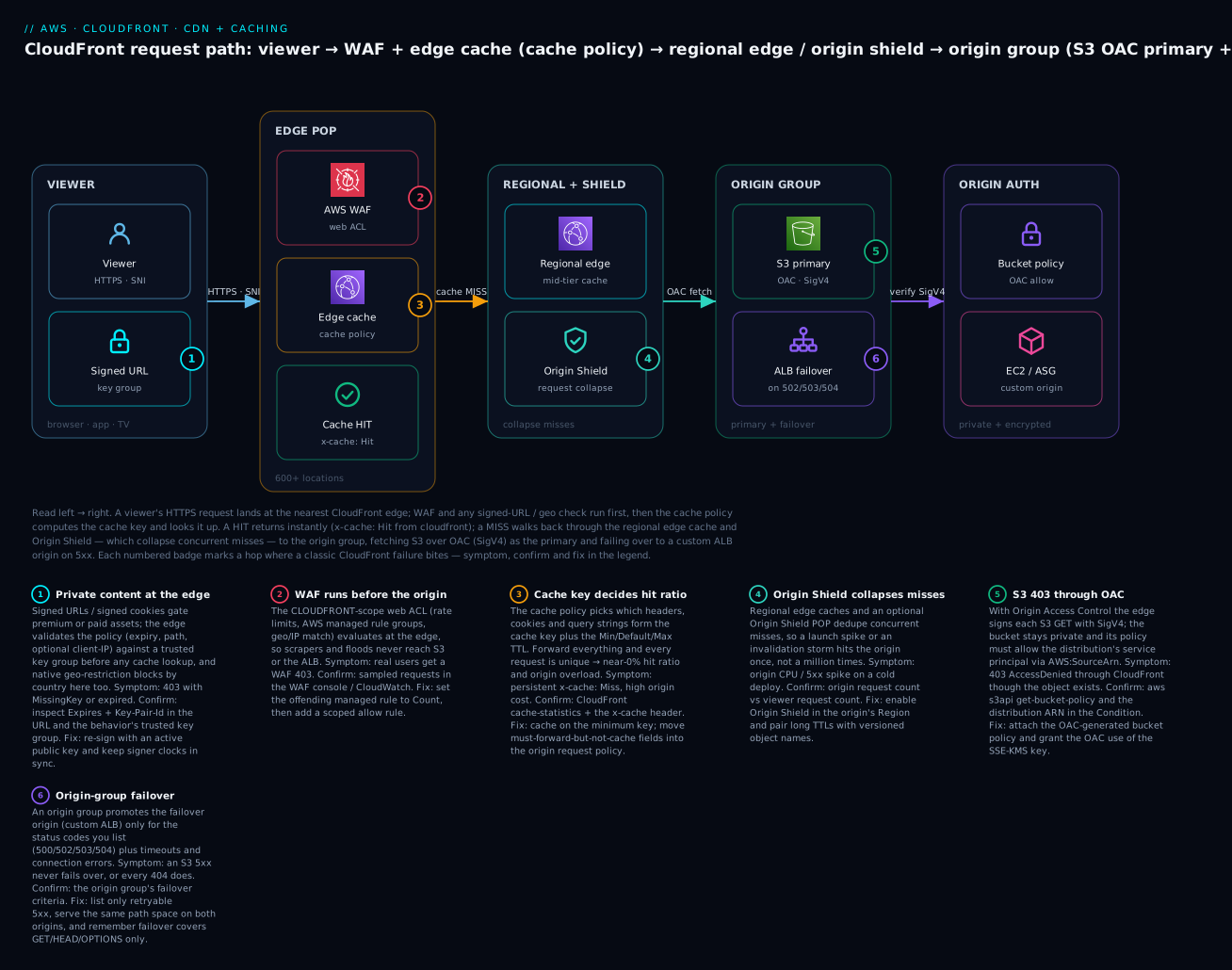
The diagram traces one request, left to right. A viewer opens an HTTPS connection (with SNI) to the nearest edge location; if the content is private, the edge validates a signed URL against a trusted key group first. AWS WAF inspects the request, then the cache policy computes the cache key and looks it up: a HIT returns immediately with x-cache: Hit from cloudfront. On a MISS, the request walks back through the regional edge cache and Origin Shield, which collapse concurrent misses so the origin is hit once. The origin group fetches from S3 over OAC (SigV4-signed, bucket stays private) as the primary and fails over to a custom ALB origin on 5xx. Each numbered badge marks a hop where a specific failure bites; the legend narrates every one as symptom, confirm, and fix.
Real-world scenario
ShopFast, an Indian D2C retailer, served its React storefront and all product images straight from a public S3 bucket in ap-south-1, with the naked bucket website URL pasted into the app config. Three things were quietly wrong. The bucket was public (a compliance finding waiting to happen). Every image was fetched from Mumbai for every user, so a shopper in London waited 300 ms per thumbnail on a product grid of forty images. And every deploy overwrote app.js in place, so returning users ran a stale bundle until they hard-refreshed — the support queue filled with “the site looks broken” that “clear your cache” resolved.
The rebuild followed this article. They put CloudFront in front of the bucket, made the bucket private, and attached an OAC with an AWS:SourceArn-scoped bucket policy — the public-bucket finding closed the same day. The default behavior used the managed CachingOptimized cache policy (no cookies, no query strings in the key), which took the image hit ratio from ~40% to 96% within a day; origin GET requests to S3 dropped by an order of magnitude and so did the egress line on the bill. They enabled automatic compression with brotli in the cache policy, and the JS/CSS bundles shrank ~70% over the wire.
Deploys were the next fix. The build now fingerprints filenames (app.9f3c1a.js) served with Cache-Control: public, max-age=31536000, immutable, and index.html gets a short 60 s TTL. A deploy uploads the new hashed files and runs one targeted invalidation of /index.html — no more /*, no more stale bundles, and the monthly invalidation count sits comfortably inside the free 1,000 paths. For the /api/* path they added an ordered behavior to a custom ALB origin with the managed CachingDisabled policy and an AllViewerExceptHostHeader origin request policy so the API sees real client headers.
For resilience they wrapped the S3 origin and a static “maintenance” ALB in an origin group failing over on 500/502/503/504, and they enabled Origin Shield in ap-south-1. The payoff came on their next sale: a T-0 traffic wall that used to spike S3 5xx now hit warm edges, the shield collapsed the cold-cache misses to a trickle, and origin CPU barely moved. The one self-inflicted incident during testing was a redirect loop — viewer allow-all plus origin match-viewer against an origin that itself redirected HTTP→HTTPS — fixed in one line by setting the viewer policy to redirect-to-https and the origin policy to https-only.
Advantages and disadvantages
| Advantages | Disadvantages |
|---|---|
| Global edge caching cuts latency and origin load dramatically | Caching adds a layer to reason about (staleness, invalidation) |
| OAC keeps origins private with no public bucket | OAC/bucket-policy misconfig → opaque 403s |
| Policy trio cleanly separates cache key / forwarding / response headers | Three policies to understand; easy to conflate |
| Deep AWS integration (S3, ALB, ACM, WAF, Route 53, Terraform) | Some settings are global/us-east-1-only (certs, WAF scope) |
| Edge compute (CF Functions / Lambda@Edge) without managing servers | Lambda@Edge is regionalized, pricier, and harder to debug |
| Free tier is generous (1 TB out, 10M requests, 2M function calls) | Data-transfer-out and per-request costs scale with success |
| Invalidations exist for emergencies | Over-using /* invalidations is slow and can cost money |
| Signed URLs/cookies + WAF + geo gate private content at the edge | Signing, key groups, and TLS/us-east-1 rules add setup friction |
When each matters: the caching and OAC advantages are decisive for any real front end — they are why CloudFront is the default edge for AWS workloads over a third-party CDN. The disadvantages are almost all cache physics and AWS’s global-service quirks (us-east-1 certs, CLOUDFRONT-scope WAF), not flaws — the discipline is to version your assets, cache on the minimum key, and verify with the x-cache header rather than guessing.
Hands-on lab
You will host a static site on a private S3 bucket behind CloudFront with OAC, attach a custom cache policy, verify HTTPS on the default cert, push a change, issue a targeted invalidation, and prove the cache with the x-cache header — in aws CLI and Terraform, with a full teardown. Cost: effectively free. A lab distribution, a few KB in S3, and a handful of requests sit inside the free tier; the only thing that could cost money is leaving it running (delete it after).
Use an admin profile in a sandbox, never root. Set a Region for the bucket; the distribution and cert are global. Replace the bucket name with a globally unique one.
Step 0 — Variables and a private bucket.
BUCKET=shopfast-cdn-lab-$(date +%s)
REGION=ap-south-1
aws s3api create-bucket --bucket $BUCKET --region $REGION \
  --create-bucket-configuration LocationConstraint=$REGION
# Keep it private: block all public access (default, but be explicit)
aws s3api put-public-access-block --bucket $BUCKET \
  --public-access-block-configuration \
  BlockPublicAcls=true,IgnorePublicAcls=true,BlockPublicPolicy=true,RestrictPublicBuckets=true
printf '<h1>v1 from CloudFront</h1>' > index.html
aws s3 cp index.html s3://$BUCKET/index.html --content-type text/html
Expected: the bucket is created and index.html uploaded. The bucket is not public — a direct S3 website URL would 403, which is the point.
Step 1 — Create an OAC.
OAC_ID=$(aws cloudfront create-origin-access-control \
  --origin-access-control-config '{
    "Name":"'"$BUCKET"'-oac","SigningProtocol":"sigv4",
    "SigningBehavior":"always","OriginAccessControlOriginType":"s3"}' \
  --query 'OriginAccessControl.Id' --output text)
echo "OAC: $OAC_ID"
Expected: an OAC id like E1A2B3C4D5E6F7.
Step 2 — Create the distribution (S3 origin + OAC + default root object). Build a dist.json referencing the bucket’s REST domain and the OAC, then create it.
cat > dist.json <<JSON
{
  "CallerReference": "lab-$(date +%s)",
  "Comment": "shopfast cdn lab",
  "Enabled": true,
  "DefaultRootObject": "index.html",
  "Origins": { "Quantity": 1, "Items": [{
    "Id": "s3-$BUCKET",
    "DomainName": "$BUCKET.s3.$REGION.amazonaws.com",
    "OriginAccessControlId": "$OAC_ID",
    "S3OriginConfig": { "OriginAccessIdentity": "" }
  }]},
  "DefaultCacheBehavior": {
    "TargetOriginId": "s3-$BUCKET",
    "ViewerProtocolPolicy": "redirect-to-https",
    "CachePolicyId": "658327ea-f89d-4fab-a63d-7e88639e58f6",
    "Compress": true
  }
}
JSON
DIST_JSON=$(aws cloudfront create-distribution --distribution-config file://dist.json)
DIST_ID=$(echo "$DIST_JSON" | jq -r '.Distribution.Id')
DIST_DOMAIN=$(echo "$DIST_JSON" | jq -r '.Distribution.DomainName')
DIST_ARN=$(echo "$DIST_JSON" | jq -r '.Distribution.ARN')
echo "Distribution: $DIST_ID  $DIST_DOMAIN"
Expected: a distribution id (E...), a domain (d123.cloudfront.net), and Status: InProgress. The cache policy id 658327ea-... is the managed CachingOptimized policy.
Step 3 — Attach the OAC bucket policy. Now let this distribution read the private bucket.
cat > bucket-policy.json <<JSON
{ "Version":"2012-10-17","Statement":[{
  "Sid":"AllowCloudFrontOAC","Effect":"Allow",
  "Principal":{"Service":"cloudfront.amazonaws.com"},
  "Action":"s3:GetObject",
  "Resource":"arn:aws:s3:::$BUCKET/*",
  "Condition":{"StringEquals":{"AWS:SourceArn":"$DIST_ARN"}}}]}
JSON
aws s3api put-bucket-policy --bucket $BUCKET --policy file://bucket-policy.json
Expected: no error. Without this policy, Step 5 would return 403 AccessDenied — the single most common OAC mistake.
Step 4 — Wait for deployment.
aws cloudfront wait distribution-deployed --id $DIST_ID
echo "Deployed."
Expected: returns after a few minutes when Status flips to Deployed.
Step 5 — Fetch twice and read x-cache.
# First request: expect a MISS (edge has to fetch from S3)
curl -sD - -o /dev/null https://$DIST_DOMAIN/ | grep -i -E 'x-cache|x-amz-cf-pop'
# Second request: expect a HIT (served from the edge)
curl -sD - -o /dev/null https://$DIST_DOMAIN/ | grep -i x-cache
Expected: the first shows x-cache: Miss from cloudfront, the second x-cache: Hit from cloudfront. You are now serving a private bucket through a global cache over HTTPS.
Step 6 — Push a change and invalidate.
printf '<h1>v2 from CloudFront</h1>' > index.html
aws s3 cp index.html s3://$BUCKET/index.html --content-type text/html
# Without invalidation, the edge still serves v1 until TTL expires:
curl -s https://$DIST_DOMAIN/         # likely still "v1"
# Targeted invalidation of just the changed path:
aws cloudfront create-invalidation --distribution-id $DIST_ID --paths "/index.html"
aws cloudfront wait invalidation-completed --distribution-id $DIST_ID \
  --id $(aws cloudfront list-invalidations --distribution-id $DIST_ID \
         --query 'InvalidationList.Items[0].Id' --output text)
curl -s https://$DIST_DOMAIN/          # now "v2"
Expected: before the invalidation you see v1 (stale from cache); after it completes, v2. This is the stale-content lifecycle in miniature — and the reason immutable, fingerprinted filenames beat invalidations for routine deploys.
Step 7 (Terraform equivalent). The same stack, declaratively — note zone_id-free OAC wiring and the bucket policy driven off the distribution ARN.
resource "aws_s3_bucket" "assets" { bucket = "shopfast-cdn-lab-tf" }

resource "aws_s3_bucket_public_access_block" "assets" {
  bucket                  = aws_s3_bucket.assets.id
  block_public_acls       = true
  block_public_policy     = true
  ignore_public_acls      = true
  restrict_public_buckets = true
}

resource "aws_cloudfront_origin_access_control" "oac" {
  name                              = "shopfast-s3-oac"
  origin_access_control_origin_type = "s3"
  signing_behavior                  = "always"
  signing_protocol                  = "sigv4"
}

resource "aws_cloudfront_distribution" "cdn" {
  enabled             = true
  default_root_object = "index.html"

  origin {
    domain_name              = aws_s3_bucket.assets.bucket_regional_domain_name
    origin_id                = "s3-assets"
    origin_access_control_id = aws_cloudfront_origin_access_control.oac.id
  }

  default_cache_behavior {
    target_origin_id       = "s3-assets"
    viewer_protocol_policy = "redirect-to-https"
    allowed_methods        = ["GET", "HEAD"]
    cached_methods         = ["GET", "HEAD"]
    compress               = true
    # Managed CachingOptimized policy id
    cache_policy_id = "658327ea-f89d-4fab-a63d-7e88639e58f6"
  }

  restrictions { geo_restriction { restriction_type = "none" } }
  viewer_certificate { cloudfront_default_certificate = true }
}

data "aws_iam_policy_document" "oac" {
  statement {
    actions   = ["s3:GetObject"]
    resources = ["${aws_s3_bucket.assets.arn}/*"]
    principals {
      type        = "Service"
      identifiers = ["cloudfront.amazonaws.com"]
    }
    condition {
      test     = "StringEquals"
      variable = "AWS:SourceArn"
      values   = [aws_cloudfront_distribution.cdn.arn]
    }
  }
}

resource "aws_s3_bucket_policy" "assets" {
  bucket = aws_s3_bucket.assets.id
  policy = data.aws_iam_policy_document.oac.json
}
Step 8 — Teardown (⚠️ do this to avoid a lingering distribution).
# A distribution must be disabled before it can be deleted.
ETAG=$(aws cloudfront get-distribution-config --id $DIST_ID --query ETag --output text)
aws cloudfront get-distribution-config --id $DIST_ID \
  --query DistributionConfig > cfg.json
jq '.Enabled=false' cfg.json > cfg-off.json
aws cloudfront update-distribution --id $DIST_ID \
  --distribution-config file://cfg-off.json --if-match $ETAG
aws cloudfront wait distribution-deployed --id $DIST_ID
ETAG2=$(aws cloudfront get-distribution-config --id $DIST_ID --query ETag --output text)
aws cloudfront delete-distribution --id $DIST_ID --if-match $ETAG2
aws cloudfront delete-origin-access-control --id $OAC_ID \
  --if-match $(aws cloudfront get-origin-access-control --id $OAC_ID --query ETag --output text)
aws s3 rm s3://$BUCKET --recursive && aws s3api delete-bucket --bucket $BUCKET --region $REGION
Expected: the distribution disables (a few minutes), then deletes; OAC and bucket are removed. Disabling before delete is mandatory — deleting an enabled distribution fails.
Common mistakes & troubleshooting
The playbook first — symptom to fix, with the exact command or console path to confirm. These are the real CloudFront tickets, in rough order of frequency.
| # | Symptom | Root cause | Confirm (command / console) | Fix |
|---|---|---|---|---|
| 1 | 403 AccessDenied from CloudFront, object exists in S3 |
OAC bucket policy missing/wrong SourceArn |
aws s3api get-bucket-policy --bucket B; check the distribution ARN |
Attach OAC bucket policy scoped to the distribution ARN |
| 2 | 403 on SSE-KMS objects via OAC |
KMS key policy doesn’t allow the OAC/CloudFront | aws kms get-key-policy; look for CloudFront grant |
Add kms:Decrypt for the OAC principal + ViaService s3 |
| 3 | Users see old content after deploy | TTL not expired; no invalidation; filename reused | curl -sD - .../file | grep -i 'age|x-cache' |
Invalidate the path, or switch to versioned filenames |
| 4 | Cache hit ratio near 0% | Cache key too broad — cookies/query forwarded | Console → distribution → Cache statistics; check the cache policy | Cache on minimum key; move forwarding to origin request policy |
| 5 | Custom domain won’t offer your ACM cert | Cert is not in us-east-1 | aws acm list-certificates --region us-east-1 |
Request/import the cert in us-east-1 |
| 6 | 502 Bad Gateway from origin |
Origin TLS/cipher/cert mismatch or bad response | CloudWatch 5xxErrorRate; curl -v the origin directly |
Fix origin cert/SSL protocol; ensure Host header handling |
| 7 | 504 Gateway Timeout |
Origin slower than origin read timeout | Origin latency metric; time the origin with curl -w |
Speed up origin, or raise origin read timeout (≤180 s) |
| 8 | ERR_TOO_MANY_REDIRECTS (redirect loop) |
Viewer allow-all + origin match-viewer + origin redirects HTTP→HTTPS | curl -IL and watch the 301 chain |
Viewer redirect-to-https, origin https-only |
| 9 | CORS request blocked in browser | No Access-Control-Allow-Origin; OPTIONS not cached/allowed |
Browser console; curl -H 'Origin: x' -X OPTIONS |
Attach a response headers policy (CORS) + allow/cache OPTIONS |
| 10 | Signed URL returns 403 |
Expired, wrong key group, or clock skew | Decode Expires/Key-Pair-Id; check trusted key group |
Re-sign with an active key; sync signer clock (NTP) |
| 11 | GET to origin website endpoint 403s |
Used S3 REST origin with a website-only feature (redirects/index) | Check origin domain: s3. vs s3-website |
Use the website endpoint as a custom origin (public) or add a CF Function to rewrite |
| 12 | New behavior/setting “not taking effect” | Change still InProgress, or CDN/browser cached |
aws cloudfront get-distribution --id E... --query 'Distribution.Status' |
Wait for Deployed; test with a cache-busting query or x-cache |
| 13 | Origin group never fails over | Failover status codes don’t include the origin’s error, or method isn’t GET/HEAD | Origin group failover criteria; the actual status code | Add the real 5xx to criteria; failover is GET/HEAD/OPTIONS only |
| 14 | Compression not happening | Behavior compress off, or brotli not in cache policy, or object outside size range | curl -H 'Accept-Encoding: br' -sD - .../f | grep -i content-encoding |
Enable Compress + gzip/brotli in cache policy; check size/type |
| 15 | WAF blocks legitimate users (403) | An AWS managed rule matched normal traffic | WAF sampled requests / CloudWatch | Set the rule to Count, add a scoped allow rule |
Status/x-cache reference
The x-cache header (and friends) tell you exactly what the edge did. Read them before guessing.
| Header value | Meaning | Implication |
|---|---|---|
Hit from cloudfront |
Served from edge cache | Working as intended |
Miss from cloudfront |
Went to origin (not cached / expired) | First hit, or TTL expired, or key too broad |
RefreshHit from cloudfront |
Revalidated with origin, object still fresh | no-cache/must-revalidate in play |
Error from cloudfront |
Origin/edge error | Check 4xx/5xx + origin |
Redirect from cloudfront |
Viewer-protocol or function redirect | Expected with redirect-to-https |
LambdaGeneratedResponse from cloudfront |
Lambda@Edge synthesized the response | Function returned early |
| Status | Likely cause | How to confirm | Fix |
|---|---|---|---|
| 403 | OAC/bucket policy, signed URL, WAF, or geo-restriction | x-cache, WAF logs, bucket policy |
Match the cause: policy, re-sign, WAF, geo |
| 404 | Object missing or wrong default root object | S3 head-object; distribution default root object |
Upload the object / set DefaultRootObject |
| 502 | Origin TLS/response invalid | curl -v origin; CloudWatch |
Fix origin cert/protocol |
| 503 | Origin capacity / throttling | Origin metrics | Scale origin; enable Origin Shield |
| 504 | Origin timeout | Origin latency; read timeout | Speed origin or raise read timeout |
The three nastiest, in prose
The S3-403-through-OAC that “should work.” You created the OAC, attached it to the origin, and still get 403. Ninety percent of the time the bucket policy is missing or its AWS:SourceArn doesn’t exactly match the distribution ARN (a typo, or you copied the domain instead of the ARN). The other ten percent: the objects are SSE-KMS encrypted and the KMS key policy doesn’t grant the CloudFront service principal kms:Decrypt. Confirm with aws s3api get-bucket-policy and aws kms get-key-policy, and remember OAI cannot do SSE-KMS at all — another reason to be on OAC.
The zero-hit-ratio pass-through. The distribution “works” but your origin is on fire and the bill is climbing. The cause is almost always a cache key that includes high-cardinality data — you forwarded all cookies or all query strings (often via a legacy forwarded-values config or the wrong managed policy), so every request is unique and nothing is a hit. Confirm in Cache statistics (hit rate) and by seeing Miss from cloudfront on repeated identical requests. Fix by switching the behavior to CachingOptimized (or a custom policy that caches on the minimal key) and moving anything the origin genuinely needs into the origin request policy — forward it without caching on it.
The redirect loop. The page fails with ERR_TOO_MANY_REDIRECTS. The classic cause is a mismatch: viewer protocol policy allow-all lets an HTTP request through, the origin protocol policy match-viewer forwards it as HTTP to an origin that itself redirects HTTP→HTTPS, and CloudFront caches/loops the redirect. Confirm with curl -IL and watch the 301 chain. Fix by setting the viewer policy to redirect-to-https (CloudFront does the upgrade once, at the edge) and the origin policy to https-only, so the origin never sees HTTP and never issues its own redirect.
Best practices
- Make the origin private. S3 → OAC with an
AWS:SourceArn-scoped bucket policy; custom origins → a secret custom origin header the ALB enforces. Never leave a public bucket behind CloudFront. - Cache on the minimum key. Default to no cookies, no query strings, only the headers the response truly varies on. Broad keys are the #1 cause of low hit ratio.
- Separate cache key from forwarding. Use the origin request policy to send the origin what it needs (
Authorization, real client headers) without polluting the cache key. - Version, don’t invalidate. Fingerprint asset filenames with
immutable+max-age=31536000; reserve invalidations forindex.html-class files and emergencies. - Let the origin drive TTL via
Cache-Control, and use Min/Max TTL as guardrails, not the primary control. - Put the ACM cert in us-east-1 and use SNI; only pay for a dedicated IP if you truly must support pre-SNI clients.
- Force HTTPS end to end: viewer
redirect-to-https, originhttps-only, security policyTLSv1.2_2021. - Enable compression (gzip and brotli in the cache policy) for text assets.
- Prefer policies and CloudFront Functions over Lambda@Edge for header/URL work; reach for Lambda@Edge only for origin-side or network logic.
- Turn on Origin Shield in the origin’s Region for spiky or launch-heavy workloads.
- Attach a WAF (CLOUDFRONT scope, us-east-1) with rate limiting and the core managed rule groups.
- Instrument it: enable the
CacheHitRate/OriginLatencyadditional metrics and standard logs to S3 (Athena for analysis), real-time logs for live dashboards.
Security notes
| Control | What to do | Why |
|---|---|---|
| Private origin | OAC (S3) or enforced custom origin header (ALB) | Prevent origin bypass and public buckets |
| Encryption in transit | Viewer redirect-to-https, origin https-only, TLSv1.2_2021 |
No plaintext legs |
| Encryption at rest | SSE-KMS on S3; grant the OAC kms:Decrypt |
Encrypted objects still served |
| WAF | CLOUDFRONT-scope web ACL: managed rules + rate limit | Reject bad traffic at the edge |
| Private content | Signed URLs/cookies via key groups (not root key pairs) | Time-limited, revocable access |
| Geo / IP | Native geo-restriction or WAF geo/IP match | Compliance, abuse control |
| Security headers | Response headers policy: HSTS, CSP, nosniff, frame | Harden the browser without app changes |
| Header hygiene | Remove Server/X-Powered-By; add a shared origin secret |
Reduce fingerprinting and bypass |
| Least privilege | Scope the bucket policy to one distribution ARN | One distribution ≠ access to all buckets |
| Audit | CloudTrail on config changes; standard logs for access | Who changed the distribution, and who fetched what |
Field-level encryption is available for the rare case where specific POST fields (e.g. a card number) must be encrypted at the edge with a public key so only a downstream service with the private key can read them — most apps don’t need it, but know it exists.
Cost & sizing
CloudFront has no hourly charge — you pay for what flows through it. Four things drive the bill.
| Cost driver | Roughly | Notes |
|---|---|---|
| Data transfer out to internet | ~$0.085/GB (US/EU, first 10 TB) up to ~$0.17/GB (India/APAC/SA) | The dominant cost; varies by edge Region |
| HTTP/HTTPS requests | ~$0.0075–$0.01 per 10,000 (HTTPS pricier) | Per-request; region-tiered |
| Invalidations | First 1,000 paths/month free, then $0.005/path | /* counts as one path |
| Origin Shield | Per-request on shield misses | Worth it for spike protection |
| Lambda@Edge | Request + GB-second (pricier than base Lambda) | Regionalized compute |
| CloudFront Functions | ~$0.10 / million invocations | 2M/month always free |
| Real-time logs | Per log line + Kinesis | Standard logs are just S3 storage |
| Dedicated IP SSL | ~$600/month | Almost never needed (use SNI) |
| Free tier (perpetual, per account) | Amount |
|---|---|
| Data transfer out | 1 TB / month |
| HTTP/HTTPS requests | 10,000,000 / month |
| CloudFront Functions invocations | 2,000,000 / month |
| Invalidation paths | 1,000 / month |
Two cost levers matter most. First, hit ratio is a cost control: every point of hit ratio is origin egress and requests you don’t pay for twice — so tuning the cache key pays the bill down directly. Second, data transfer from an AWS origin (S3/ALB in the same account) to CloudFront is free, so putting CloudFront in front of S3 can reduce your total egress versus serving S3 directly to the internet. Right-size the price class to your audience, and prefer versioned objects so you almost never pay for invalidations.
Interview & exam questions
1. What is OAC and how does it differ from OAI? (SAA-C03, SCS-C02) Origin Access Control signs each S3 origin request with SigV4 so the bucket can stay private and allow only your distribution via AWS:SourceArn. Unlike the legacy Origin Access Identity, OAC supports SSE-KMS encrypted objects, all Regions, and dynamic requests — it is the recommended approach for all new distributions.
2. Why must a custom SSL certificate be in us-east-1? (SAA-C03) CloudFront is a global service whose control plane reads ACM certificates from us-east-1 (N. Virginia) only. A cert in any other Region will not appear for the distribution — you must request or import it in us-east-1.
3. Difference between a cache policy and an origin request policy? (DVA-C02) The cache policy defines the cache key (which headers/cookies/query strings + TTLs) — what makes two requests the same cached object. The origin request policy defines what CloudFront forwards to the origin on a miss, which can be a superset. You can forward Authorization to the origin without caching on it.
4. How do TTLs interact with Cache-Control? (DVA-C02, SOA-C02) If the origin sends Cache-Control/Expires, CloudFront honors it, clamped between Min TTL and Max TTL; s-maxage overrides max-age for CloudFront as a shared cache. If the origin sends nothing, the Default TTL applies.
5. When do you invalidate vs version? (DVA-C02) Version (fingerprint filenames with immutable) for routine deploys — there’s nothing to purge and it’s free. Invalidate for content you can’t rename (like index.html) or emergencies; the first 1,000 paths/month are free, then $0.005/path, and /* re-warms the whole cache.
6. CloudFront Functions vs Lambda@Edge? (SAA-C03, DVA-C02) CloudFront Functions are lightweight JS on viewer-request/response at edge locations (sub-ms, ~$0.10/M) for header/URL/token work. Lambda@Edge runs Node/Python on all four triggers including origin-side, at regional edge caches, with network access and heavier limits — use it only when you need those.
7. How does an origin group provide failover? (SAA-C03) It pairs a primary and secondary origin with failover criteria (status codes like 500/502/503/504 plus timeouts/connection errors). On a matching failure for a GET/HEAD/OPTIONS, CloudFront retries the secondary. It is failover, not load balancing.
8. How do you keep an S3 origin private? (SCS-C02) Block all public access on the bucket, attach an OAC, and set a bucket policy allowing the cloudfront.amazonaws.com service principal s3:GetObject only when AWS:SourceArn equals your distribution ARN.
9. Why is your cache hit ratio low? (SOA-C02) The cache key is too broad — typically forwarding all cookies or query strings, making every request unique. Narrow the cache policy to the minimal key and move must-forward fields to the origin request policy.
10. What are signed URLs vs signed cookies? (DVA-C02) Both gate private content with a time-limited signature validated against a trusted key group. A signed URL grants one file (query-string params); signed cookies grant many files/paths without changing URLs — ideal for streaming a whole HLS/DASH ladder.
11. Where does WAF attach to CloudFront? (SCS-C02, ANS-C01) A CLOUDFRONT-scope web ACL (created in us-east-1) attaches to the distribution and evaluates at the edge — before cache and origin — so rate limits and managed rules reject bad traffic globally.
12. How do you add security/CORS headers without touching the app? (DVA-C02) Attach a response headers policy (managed SecurityHeadersPolicy, CORS-With-Preflight, or a custom one) to the behavior — CloudFront injects HSTS/CSP/Access-Control-* on the response, no code or Lambda needed.
Quick check
- You get a
403 AccessDeniedthrough CloudFront but the object exists in the private S3 bucket. What is the most likely cause, and how do you confirm it? - Your hit ratio is ~5% and the origin is overloaded. What single setting is almost certainly wrong?
- You uploaded a new ACM certificate but it doesn’t appear when configuring the distribution. What did you forget?
- A user runs the same request twice; the first
x-cacheisMiss from cloudfront, the second isHit from cloudfront. Is this a bug? - You deploy
app.js(same filename) and users see the old version. Name the two ways to fix it, and which is preferred.
Answers
- The OAC bucket policy is missing or its
AWS:SourceArndoesn’t match the distribution ARN. Confirm withaws s3api get-bucket-policyand compare the ARN. (If objects are SSE-KMS, also check the KMS key policy grants the OACkms:Decrypt.) - The cache key is too broad — you’re forwarding all cookies and/or query strings. Narrow the cache policy to the minimum key; move must-forward fields to the origin request policy.
- The certificate must be in us-east-1 (N. Virginia); a cert in any other Region won’t appear.
- No — that’s correct behavior. The first request populated the edge cache (miss to origin); the second was served from the edge (hit). It’s exactly how you verify caching.
- Invalidate the path, or version the filename (fingerprint +
immutable). Versioning is preferred — it’s free and eliminates staleness by construction; invalidation is for files you can’t rename or emergencies.
Glossary
| Term | Definition |
|---|---|
| Distribution | The top-level CloudFront config mapping requests to origins via caches and policies. |
| Edge location | One of 600+ POPs that terminate TLS and serve cached objects near the user. |
| Regional edge cache (REC) | A larger mid-tier cache between edge locations and the origin; automatic. |
| Origin Shield | An optional single caching layer in a chosen Region that collapses concurrent origin misses. |
| Origin | The source CloudFront fetches from on a miss (S3, ALB/EC2, API GW, MediaPackage). |
| Origin group | A primary + secondary origin with failover criteria for automatic origin failover. |
| OAC (Origin Access Control) | SigV4-signed private access to an S3 origin; replaces the legacy OAI. |
| OAI (Origin Access Identity) | The deprecated predecessor to OAC; no SSE-KMS support. |
| Cache behavior | A rule matched by path pattern binding a path to an origin + policies. |
| Cache policy | Defines the cache key (headers/cookies/query strings) and Min/Default/Max TTL. |
| Cache key | The set of request attributes that determine whether two requests share a cached object. |
| Origin request policy | Defines what CloudFront forwards to the origin on a miss (can exceed the cache key). |
| Response headers policy | Headers CloudFront adds/removes on responses (CORS, HSTS, CSP…). |
| TTL (Min/Default/Max) | Bounds on how long CloudFront caches an object; Default applies when the origin is silent. |
| Invalidation | A request to purge objects from edge caches before TTL expiry (first 1,000 paths/month free). |
| Signed URL / cookie | Time-limited, key-signed access to private content, validated against a key group. |
| Key group | A managed set of public keys used to validate signed URLs/cookies (modern; not root key pairs). |
| Price class | Which set of edge locations serves the distribution (All / 200 / 100). |
| x-cache | Response header reporting Hit/Miss/RefreshHit/Error from cloudfront. |
| CloudFront Functions | Lightweight JS on viewer-request/response at edge locations. |
| Lambda@Edge | Node/Python on all four triggers at regional edge caches; heavier, network-capable. |
Next steps
- Point your domain at it: Route 53: Records & Routing Policies — alias the apex/
wwwat the distribution and pair with latency/failover routing. - Get the origin right: S3 Storage Classes & Lifecycle — what you cache and how lifecycle affects the objects behind CloudFront.
- Front a serverless app: Serverless Web Application Architecture on AWS — CloudFront + S3 + API Gateway + Lambda as one system.
- Front a classic stack: Three-Tier Web Application Architecture on AWS — CloudFront in front of an ALB and web/app/data tiers.
- Choose the dynamic origin: ALB vs NLB vs API Gateway, Compared — the custom origins your
/api/*behavior points at.