Quick take: on AWS, nothing happens without IAM saying yes. Learn its four building blocks — users, groups, roles, policies — and the JSON shape they all share, and you can read any permission decision instead of guessing at it.
The fastest way to break an AWS account is to attach AdministratorAccess to everything and move on. It works on day one and becomes a breach on day ninety: an access key leaks, a Lambda you forgot about can delete the production database, and an auditor asks “who can read the customer data?” and nobody can answer. IAM (Identity and Access Management) is the service that decides, for every single API call in your account, whether the caller is allowed to do the thing. Get comfortable with it early and everything else on AWS gets easier; skip it and you will relearn it during an incident.
This article teaches IAM the way you actually use it: the mental model first (who the principals are and how a policy is shaped), then each moving part option-by-option, then a real, copy-pasteable hands-on lab where you build a group with a scoped policy, put a user in it, create a role an EC2 instance assumes through an instance profile, attach a customer-managed policy, and test the whole thing with the Policy Simulator before you trust it — in both the aws CLI and Terraform, with a clean teardown. We finish with a troubleshooting playbook for the “why is this denied?” and, worse, “why could they do that?” moments.
By the end you will choose the right principal for any caller, know when a role beats a user, write an identity policy and a resource policy and say which one is the real gate, read a policy-JSON document line by line, tighten a broad policy toward least privilege using IAM Access Analyzer, and diagnose the five failure modes that produce almost every AccessDenied. Everything uses real ARNs, real limits, real error strings and the real ap-south-1 region — no hand-waving.
What problem this solves
Without IAM discipline, “permissions” is a pile of ad-hoc grants nobody can reason about. Every new person gets a personal IAM user with an access key. Every application gets the same key baked into its config. Policies get copied from Stack Overflow with "Resource": "*" because it “just works.” Six months later you have keys in laptops, keys in Git history, keys in CI logs, and no way to answer basic questions: who can delete this bucket? which of these forty users still works here? if this key leaks, what is the blast radius? The honest answer to all three is “everything and we don’t know.”
What breaks concretely: a departed contractor’s access key still works because deleting a human is a manual, per-account chore nobody did. A developer testing in “dev” reaches a production table because the same over-broad policy is attached everywhere. A deployment fails at 2 a.m. with AccessDenied and the on-call engineer cannot tell whether it is a missing Allow, an explicit Deny, a wrong resource ARN, or a trust policy that never named the caller. Each of these is a five-minute problem if you hold the model in your head, and a two-hour problem if you do not.
Who hits this: literally everyone on AWS, because there is no “off” switch for IAM — every call is authorized. It bites hardest on teams that started with one root login “just to try it,” on anyone handing credentials to a third party, and on the first real security review. The fix is not more policies; it is the right four building blocks used the right way, which is exactly what this article builds. Here is the whole toolkit in one frame before we go deep:
| Building block | What it is | Holds credentials? | Use it for | Beginner mistake |
|---|---|---|---|---|
| User | A named long-term identity (a person or, rarely, an app) | Yes — password and/or access keys | Break-glass admins; legacy apps that cannot assume a role | Giving every human a user with keys |
| Group | A bucket of users that share policies | No | Attaching a policy once for many users | Attaching policies to users directly |
| Role | An identity anything can temporarily assume | No — STS mints temporary creds | EC2/Lambda, cross-account, federation, humans via SSO | Baking a user’s key into an app |
| Policy | A JSON document listing allowed/denied actions | No | Saying what is permitted, on which resources, when | "Action":"*", "Resource":"*" everywhere |
Learning objectives
By the end of this article you can:
- Explain the IAM mental model — principals, credentials, policies, authentication vs authorization — and place any real caller in it.
- Choose correctly between an IAM user, an IAM group, and an IAM role, and state precisely when a role beats a user.
- Name every policy type — AWS-managed, customer-managed, inline; identity-based vs resource-based; permissions boundary; session policy — and where each attaches.
- Read and write a policy-JSON document element by element:
Version,Statement,Sid,Effect,Action/NotAction,Resource/NotResource,Principal,Condition. - Apply least privilege, and generate a tight policy from real activity using IAM Access Analyzer policy generation from CloudTrail.
- Compare access keys vs roles vs IAM Identity Center, enforce MFA, and set an account password policy.
- Test a permission before you ship it with the IAM Policy Simulator, and build the whole thing with
awsCLI and Terraform. - Diagnose the common failures:
AccessDenied, a policy that “won’t take effect,” inline-vs-managed confusion, a wrongResourceARN, and an MFA-required condition.
Prerequisites & where this fits
You need an AWS account you can log into and an aws CLI configured with an admin (or near-admin) profile — not the root user, which you should have locked behind MFA and set aside. You should be comfortable running a CLI command, reading JSON output, and editing a small JSON file. You do not need prior IAM depth; that is what we build. Knowing what an S3 bucket and an EC2 instance are will make the examples concrete, because the lab uses both.
This is the hands-on identity foundation of your AWS knowledge. It sits directly beneath the multi-account, organization-wide view in AWS Organizations and IAM Foundations: Accounts, OUs and Roles — that article covers accounts as blast-radius boundaries, OUs, SCPs and the full policy-evaluation chain; this one zooms into the single-account mechanics you touch every day. When you are ready to scale humans past a handful of break-glass users, move to IAM Identity Center: SSO and Permission Sets. When a call is denied and you need the forensic method, go to the dedicated IAM Policy Evaluation and Access Denied Troubleshooting. Cross-account access — one account’s role assumed by another — is its own hands-on in IAM Cross-Account Roles and AssumeRole Hands-On, and the very first hardening steps for a new account are in AWS Account Setup: Root, IAM, Billing and MFA. The network-side boundary that complements the identity boundary is AWS VPC, Subnets and Security Groups Explained.
A quick map of who owns what when a permission question lands on your desk:
| Layer | What lives here | Who usually owns it | Failure it causes |
|---|---|---|---|
| Root user | Account owner identity; billing | Account owner | Total compromise if it leaks |
| IAM users/groups | Human & legacy-app identities | Platform / security | Key sprawl, stale access |
| IAM roles + trust | Temporary access for workloads/humans | App + platform | AssumeRole denied or too broad |
| Identity policies | What a principal may do | Whoever writes the policy | Over-broad or missing grants |
| Resource policies | Who may touch a resource | Resource owner team | Cross-account AccessDenied |
| Conditions / MFA | When an action is allowed | Security | Locked out or MFA bypassed |
Core concepts
Five ideas make every later section obvious. Read them once and the rest of IAM stops being a maze.
A principal is whoever is calling. Every AWS API call is made by a principal — an IAM user, an assumed role (an EC2 instance, a Lambda, a federated human), or the root user. IAM’s whole job is to look at the principal, the action, the resource and the conditions, and return Allow or Deny. There is no anonymous access to your resources unless you explicitly created it.
Authentication is “who are you”; authorization is “what may you do.” These are separate. Authentication is proving identity — a password + MFA for a human, an access key signature for a user, or temporary credentials from STS (Security Token Service) for a role. Authorization is the policy evaluation that follows. A perfectly authenticated caller with no matching Allow gets AccessDenied; that is not a login failure, it is a permissions failure, and confusing the two wastes the first ten minutes of every incident.
Credentials come in two flavours: long-term and temporary — and you want temporary. A long-term credential (a user’s password or access key) exists until you delete it; it does not expire on its own, which is exactly why leaked keys are so dangerous. A temporary credential is minted by STS when a role is assumed, lasts 15 minutes to 12 hours, and then dies. The modern rule: humans and workloads use temporary credentials via roles; long-term access keys are reserved for a few break-glass users and legacy automation that genuinely cannot assume a role.
A policy is a JSON document, and every policy is the same shape. Identity policies, resource policies, trust policies, permissions boundaries, session policies, SCPs — all of them are JSON made of statements, each with an Effect (Allow/Deny), Action(s), a Resource, an optional Principal (only in resource/trust policies) and optional Conditions. Learn the shape once and every policy you ever meet reads the same.
The default is deny, and an explicit Deny always wins. If nothing explicitly Allows an action, it is denied (an implicit deny). If anything — an identity policy, a resource policy, a boundary, an SCP — explicitly Denies it, it is denied no matter how many Allows exist. “Mostly allowed” is not a state. This one rule explains most IAM surprises, and its full mechanics are the subject of IAM Policy Evaluation and Access Denied Troubleshooting; here we use the short version.
The vocabulary in one table
Pin down every moving part before the deep sections. The glossary at the end repeats these for lookup; this is the model side by side:
| Term | One-line definition | Where it lives | Why it matters |
|---|---|---|---|
| Principal | The identity making a request | The caller | Every decision starts here |
| IAM user | Long-term identity + credentials | Per account | People/legacy apps; avoid for scale |
| IAM group | A set of users sharing policies | Per account | Attach policy once, not per user |
| IAM role | An assumable identity, no static creds | Per account | Temporary, auditable access |
| Trust policy | Who may assume a role | On the role | The real gate for AssumeRole |
| Identity policy | What a principal may do | On user/group/role | Grants permissions |
| Resource policy | Who may touch this resource | On the resource | Enables cross-account access |
| Managed policy | Standalone, reusable policy | Account or AWS | The default way to grant |
| Inline policy | Policy embedded in one principal | On that principal | 1:1, dies with the principal |
| Permissions boundary | Max permissions for one principal | On a user/role | Caps; never grants |
| Session policy | Extra cap passed at assume time | On the session | Scopes a single session |
| Access key | Long-term programmatic credential | On a user | Leaks are the top breach cause |
| STS | Mints temporary credentials | Global/regional endpoint | Powers AssumeRole & SSO |
| Instance profile | Wrapper letting EC2 wear a role | On an instance | Auto-rotated creds for EC2 |
| ARN | Amazon Resource Name (unique id) | Everywhere | The target of every Resource |
Authentication vs authorization at a glance
| Question | Mechanism | Failure looks like | Where to check |
|---|---|---|---|
| Who are you? (human) | Password + MFA / SSO session | Sign-in error, MFA prompt | Console sign-in page |
| Who are you? (app) | Access key signature / role creds | InvalidClientTokenId, SignatureDoesNotMatch |
CLI error text |
| What may you do? | Policy evaluation | AccessDenied / is not authorized to perform |
CloudTrail, Policy Simulator |
| Under what conditions? | Condition block |
Denied only sometimes (IP, MFA, region) | The policy’s Condition |
Users vs groups vs roles
This is the decision you make constantly, so get the three principal types crisp. All three are identities; the difference is how they hold credentials and how long access lasts.
The IAM user — a long-term identity
An IAM user is a named identity inside one account with its own long-term credentials: an optional console password (a “login profile”) and up to two access keys for programmatic calls. A user is a person’s daily login or a static machine identity — but for humans at any scale you should prefer SSO, and for machines you should prefer roles. The user exists until you delete it, and so do its keys; nothing expires on its own.
| User attribute | What it is | Default / limit | Note |
|---|---|---|---|
| Login profile (password) | Console sign-in | None until you create one | Governed by the account password policy |
| Access keys | Programmatic long-term creds | Up to 2 per user (hard) | Two exist only to enable rotation |
| MFA device | Second factor | 0; you should add 1+ | Virtual, FIDO2 or hardware |
| Groups membership | Inherit group policies | Up to 10 groups per user | Preferred way to grant |
| Inline policies | Embedded 1:1 policies | Aggregate 2,048 chars | Prefer managed instead |
| Attached managed policies | Reusable grants | 10 per principal (raisable to ~20) | Consolidate to stay under |
| Permissions boundary | Max-permission cap | 0 or 1 | For safe delegation |
| Path / tags | Org/labels | Optional | Useful for ABAC |
The IAM group — attach once, not per user
An IAM group is not a principal you can “log in as”; it is a container that holds users and carries policies so every member inherits them. Groups exist purely to stop you attaching the same policy to twenty users by hand. When someone changes teams, you change group membership — not a pile of individual policies.
| Group fact | Detail | Why it matters |
|---|---|---|
| A group cannot be a principal | You never assume or sign in as a group | It only groups users |
| A user can be in up to 10 groups | Membership is many-to-many | Compose access from small groups |
| Groups cannot nest | No group-inside-a-group | Keep the model flat |
| Groups have no credentials | No keys, no password | Members bring their own identity |
| Policies attach to the group | Managed or inline | One attach point for many users |
| Default groups per account | 300 (raisable) | Groups are cheap; use them |
The IAM role — an assumable identity with no static keys
An IAM role is the most important idea in IAM. It is an identity with permissions but no long-term credentials. Instead, a trusted principal assumes it and STS hands back temporary credentials for a bounded session. A role has two policies doing completely different jobs: a trust policy (who may assume it) and a permissions policy (what the assumed session may do). Conflating them is the single most common beginner mistake.
| Role component | Answers | If wrong | Where you edit it |
|---|---|---|---|
Trust policy (AssumeRolePolicyDocument) |
Who may assume this role? | Nobody can — or everybody can | Role → Trust relationships |
| Permissions policy (identity policy) | What may the session do? | Too little (broken) or too much (dangerous) | Role → Permissions |
| Max session duration | How long the creds last | Sessions too long = bigger blast radius | 1h default, up to 12h |
| Permissions boundary (optional) | The cap on the role | Uncapped delegation risk | Role setting |
| Instance profile (for EC2) | Lets an EC2 box wear the role | App on EC2 has no creds | Auto-created or explicit |
The decision: user vs group vs role
Here is the comparison you will reach for again and again:
| Dimension | IAM user | IAM group | IAM role |
|---|---|---|---|
| Is a principal? | Yes | No (container) | Yes (when assumed) |
| Holds long-term creds? | Yes (password/keys) | No | No (temp via STS) |
| Credential lifetime | Until deleted | n/a | 15 min – 12 h |
| Best for | Break-glass humans; legacy apps | Sharing policies across users | Workloads, cross-account, SSO |
| MFA | Per user | n/a | Via the assuming identity |
| Offboarding | Delete user + keys everywhere | Remove membership | Nothing standing to clean up |
| Audited as | The user | n/a | assumed-role/…/session in CloudTrail |
| Rotation burden | Constant (keys) | None | None (auto) |
When a role beats a user (almost always)
The pattern is loud once you see it: anything that can assume a role should, and long-term keys are the exception, not the rule. Map your caller to the right identity:
| The caller is… | Right identity | Why | Anti-pattern |
|---|---|---|---|
| An EC2 instance | Role via instance profile | Auto-rotated creds from IMDSv2 | Access key in user-data/AMI |
| A Lambda function | Execution role | Creds injected & rotated | Key in an env var |
| An ECS task | Task role | Per-task least privilege | Shared node key |
| Another AWS account | Role with a trust policy | Revocable, auditable, conditioned | A shared IAM user |
| A human employee | Identity Center → assume role | Temporary creds, central lifecycle | A personal user with keys |
| A CI/CD pipeline (GitHub) | Role via OIDC federation | No stored secret at all | A long-lived key in CI |
| On-prem automation | IAM Roles Anywhere (or scoped user) | Cert-based temp creds | A key with * |
| Break-glass admin | A few IAM users + MFA | A way in if SSO is down | Many standing users |
Read that table twice. Six of eight rows are roles. The two users are edge cases — break-glass humans and automation that truly cannot federate. Long-term access keys are the leading cause of real AWS breaches because they do not expire, travel in plaintext, and rarely get rotated.
IAM entity limits per account
The numbers you design around (most raisable via Service Quotas; know the starting points):
| Entity / limit | Default | Adjustable? | Note |
|---|---|---|---|
| IAM users | 5,000 | Yes | Need many? You want SSO instead |
| IAM groups | 300 | Yes | Cheap — use them freely |
| IAM roles | 1,000 | Yes (to ~5,000) | Roles proliferate; ask early |
| Groups per user | 10 | No | Compose from small groups |
| Access keys per user | 2 | No | Two enable rotation |
| Managed policies per principal | 10 | Yes (to 20) | Consolidate or go inline |
| Customer-managed policies | 1,500 | Yes | Prefer fewer, reusable |
| Versions per managed policy | 5 | No | Delete old versions to add new |
| Inline policy size (user/group/role) | 2,048 / 5,120 / 10,240 chars | No | Large inline → make it managed |
| Managed policy document size | 6,144 chars | No | Split or use NotAction |
| Role session duration | 1 h default, 12 h max | Configurable | Role chaining caps at 1 h |
Policy types: the full taxonomy
“Attach a policy” hides real choices. There are more policy types than beginners expect, and they behave differently in evaluation. Learn the taxonomy and half of IAM confusion evaporates.
Identity-based vs resource-based
The first fork: is the policy attached to an identity or to a resource?
| Identity-based policy | Resource-based policy | |
|---|---|---|
| Attaches to | A user, group, or role | A resource (S3 bucket, SQS queue, KMS key, role trust) |
Has a Principal? |
No (the identity is the principal) | Yes (names who is allowed) |
| Grants across accounts? | No, by itself | Yes — this is how cross-account works |
| Example | “This role may s3:GetObject” |
“This bucket allows account 111122223333 to read” |
| Same-account rule | Either side Allowing is enough | Either side Allowing is enough |
| Cross-account rule | Identity and resource must both Allow | Identity and resource must both Allow |
A trust policy is a special resource-based policy that lives on a role and answers “who may assume me.” That is why an EC2 role needs Service: ec2.amazonaws.com in its trust policy — the resource (the role) is granting the principal (the EC2 service) the right to assume it.
AWS-managed vs customer-managed vs inline
The second fork applies only to identity-based policies: where does the policy document live?
| Flavour | What it is | ARN form | When to use | Downside |
|---|---|---|---|---|
| AWS-managed | AWS-authored, e.g. ReadOnlyAccess |
arn:aws:iam::aws:policy/<Name> |
Quick starts, broad roles | Often too broad (*) |
| Customer-managed | You author it; reusable; versioned | arn:aws:iam::<acct>:policy/<Name> |
The default for real least privilege | You maintain it |
| Inline | Embedded in one principal | (no standalone ARN) | A genuinely 1:1 rule that must die with the principal | Not reusable; easy to forget |
The inline-vs-managed distinction causes real bugs: you tighten a customer-managed policy, but a principal keeps old access because a forgotten inline policy also grants it. Inline policies are listed by a different API call (list-user-policies, not list-attached-user-policies), so they hide from anyone who only checks attached policies. Rule of thumb: prefer customer-managed; use inline only when the grant is truly specific to one principal and should vanish when it is deleted.
Common AWS-managed policies worth knowing by name:
| AWS-managed policy | Grants | Good for | Watch out for |
|---|---|---|---|
AdministratorAccess |
* on * |
Break-glass, sandbox | God-mode; never a default |
PowerUserAccess |
Everything except IAM/Organizations/Account | Developers who shouldn’t manage IAM | Still very broad |
ReadOnlyAccess |
Read/list/describe across services | Auditors, dashboards | Includes reading data (e.g. S3 objects) |
ViewOnlyAccess |
List/describe metadata only (no data reads) | Support, inventory | Narrower than ReadOnly |
Billing |
View/manage billing | Finance | Attach in the mgmt account |
SecurityAudit |
Read config for security review | Security team | Read-only posture checks |
IAMUserChangePassword |
Let a user change their own password | Everyone with a login | Pair with password policy |
Job-function set (DatabaseAdministrator, NetworkAdministrator, SystemAdministrator, SupportUser, DataScientist) |
Scoped by role | Starting points to trim | Treat as a base, not final |
The caps: permissions boundary and session policy
The third group of policies never grants anything — it only caps. These trip up beginners because a principal with a perfect Allow can still be denied by a cap above it.
| Cap type | Caps what | Set by | Typical use | Grants? |
|---|---|---|---|---|
| Permissions boundary | The max a single user/role can do | Account admin | Safe delegation (“this team’s roles can’t exceed X”) | Never |
| Session policy | The max for one assumed session | Whoever calls AssumeRole | Narrow a broad role for one job | Never |
| SCP (Organizations) | The max for principals in an OU/account | Org admin | Org-wide guardrails | Never |
| RCP (Organizations) | The max exposure of resources | Org admin | Data-perimeter guardrails | Never |
Effective permissions are the intersection: a boundary of s3:* plus an identity policy of AdministratorAccess yields only s3:*. SCPs and RCPs are the Organizations layer covered in AWS Organizations and IAM Foundations: Accounts, OUs and Roles; the point here is simply that caps subtract, they never add.
Every policy type side by side
| Policy type | Attaches to | Grants or caps? | Has Principal? |
Cross-account? |
|---|---|---|---|---|
| Identity policy (managed/inline) | User, group, role | Grants | No | No (by itself) |
| Resource policy | A resource | Grants + enables x-acct | Yes | Yes |
| Trust policy | A role | Grants assume | Yes | Yes |
| Permissions boundary | A user/role | Caps | No | No |
| Session policy | A session | Caps | No | No |
| SCP | OU/account | Caps | No | Org-wide |
| RCP | OU/account | Caps | No | Org-wide |
| VPC endpoint policy | An endpoint | Caps | Yes | No |
Policy JSON anatomy
Because every policy is the same JSON shape, learning the elements once pays off forever. Here is a complete identity policy, then every element enumerated.
{
  "Version": "2012-10-17",
  "Statement": [
    {
      "Sid": "ReadAppBucket",
      "Effect": "Allow",
      "Action": ["s3:GetObject", "s3:ListBucket"],
      "Resource": [
        "arn:aws:s3:::kloudvin-app-data",
        "arn:aws:s3:::kloudvin-app-data/*"
      ]
    },
    {
      "Sid": "DenyPlaintext",
      "Effect": "Deny",
      "Action": "s3:*",
      "Resource": "arn:aws:s3:::kloudvin-app-data/*",
      "Condition": { "Bool": { "aws:SecureTransport": "false" } }
    }
  ]
}
Every element, enumerated
| Element | Required? | Meaning | Example |
|---|---|---|---|
Version |
Yes | Policy language version — always this date | "2012-10-17" |
Statement |
Yes | One statement or an array of them | [ {…}, {…} ] |
Sid |
No | Human label for the statement | "ReadAppBucket" |
Effect |
Yes | Allow or Deny |
"Allow" |
Action |
Yes* | API action(s); wildcards allowed | "s3:GetObject" |
NotAction |
* | Everything except these actions | "iam:*" (with care) |
Resource |
Yes* | ARN(s) the statement applies to | "arn:aws:s3:::b/*" |
NotResource |
* | Everything except these ARNs | rare |
Principal |
Resource/trust only | Who — only in resource & trust policies | { "Service": "ec2.amazonaws.com" } |
NotPrincipal |
Resource/trust only | Everyone except these principals | rare, tricky |
Condition |
No | When the statement applies | { "Bool": {…} } |
* Exactly one of Action/NotAction and (for most policy types) one of Resource/NotResource is required per statement. Version must be the literal string 2012-10-17 — it is a policy-language version, not today’s date, and using anything else silently changes how variables are parsed.
Effect — the two-value core
| Effect | Meaning | Beats | Beginner note |
|---|---|---|---|
Allow |
Permit the action | Nothing (an explicit Deny overrides it) | You need at least one Allow, or it’s an implicit deny |
Deny |
Forbid the action | Every Allow, anywhere | Use for guardrails; one Deny is absolute |
Action and NotAction
Actions are service:Operation strings. Wildcards let you widen; NotAction inverts the set (and is easy to misuse).
| Pattern | Matches | Risk |
|---|---|---|
s3:GetObject |
One exact action | Precise — preferred |
s3:Get* |
All S3 actions starting Get |
Convenient, moderately broad |
s3:* |
Every S3 action | Broad — bucket-wide power |
* |
Every action in AWS | Admin — only for break-glass |
NotAction: ["iam:*"] with Allow |
Allows everything except IAM | Dangerous — allows future new services too |
NotAction with Deny |
Denies everything except a set | Common in region-lock guardrails |
The NotAction + Allow combination is the classic footgun: PowerUserAccess uses it deliberately, but hand-rolling it grants every service AWS launches tomorrow. Prefer explicit Action lists unless you know exactly why you want the inverse.
Resource — ARNs, the exact target
A wrong Resource ARN is one of the top causes of a silent AccessDenied. The ARN format is arn:partition:service:region:account-id:resource, but several services omit parts. Memorise the shapes you use most:
| Service / thing | ARN shape | Note |
|---|---|---|
| S3 bucket | arn:aws:s3:::my-bucket |
No region/account; bucket-level actions |
| S3 object | arn:aws:s3:::my-bucket/prefix/* |
/* suffix; object-level actions |
| EC2 instance | arn:aws:ec2:ap-south-1:111122223333:instance/i-0abc123 |
Region + account required |
| IAM role | arn:aws:iam::111122223333:role/AppServerRole |
No region for IAM |
| IAM user | arn:aws:iam::111122223333:user/alice |
No region |
| DynamoDB table | arn:aws:dynamodb:ap-south-1:111122223333:table/Orders |
Region + account |
| Lambda function | arn:aws:lambda:ap-south-1:111122223333:function:my-fn |
Colon before name |
| SQS queue | arn:aws:sqs:ap-south-1:111122223333:my-queue |
Name is the resource |
| SNS topic | arn:aws:sns:ap-south-1:111122223333:my-topic |
— |
| KMS key | arn:aws:kms:ap-south-1:111122223333:key/<key-id> |
Key ID, not alias |
| Secrets Manager secret | arn:aws:secretsmanager:ap-south-1:111122223333:secret:App-a1b2c3 |
6 random chars suffix |
| CloudWatch Logs group | arn:aws:logs:ap-south-1:111122223333:log-group:/aws/app:* |
Trailing :* for streams |
The single most common ARN bug: granting s3:GetObject on arn:aws:s3:::my-bucket (the bucket ARN) instead of arn:aws:s3:::my-bucket/* (the object ARN). Object-level actions need the /*; bucket-level actions like s3:ListBucket need the bare bucket ARN. Many policies need both.
Condition — the when
The Condition block is where a broad grant becomes a safe one. A condition has an operator, a key, and a value:
| Operator family | Examples | Use for |
|---|---|---|
| String | StringEquals, StringNotEquals, StringLike, StringEqualsIgnoreCase |
Tags, ARNs, usernames, regions |
| Numeric | NumericEquals, NumericLessThan, NumericGreaterThanEquals |
Counts, ports |
| Date | DateGreaterThan, DateLessThan |
Time-boxed access |
| Boolean | Bool |
MFA present, secure transport |
| IP address | IpAddress, NotIpAddress |
Source CIDR allow-lists |
| ARN | ArnEquals, ArnLike |
aws:SourceArn matching |
| Null | Null |
Key present / absent |
| Set qualifiers | ForAllValues:, ForAnyValue: |
Multi-value keys (tag keys) |
…IfExists suffix |
BoolIfExists |
Only evaluate when the key exists |
High-value condition keys you will actually use:
| Condition key | Enforces | Defends against |
|---|---|---|
aws:MultiFactorAuthPresent |
Session was MFA’d | Stolen static creds |
aws:MultiFactorAuthAge |
MFA within N seconds | Long-lived sensitive sessions |
aws:SourceIp |
Call from an allowed CIDR | Off-network use |
aws:SecureTransport |
HTTPS only | Plaintext exfil |
aws:PrincipalOrgID |
Caller is in your org | Random external accounts |
aws:SourceArn / aws:SourceAccount |
A specific service resource is the caller | Confused-deputy |
sts:ExternalId |
Caller presents a shared secret | Third-party confused-deputy |
aws:RequestedRegion |
Action targets an allowed region | Sprawl, data residency |
aws:PrincipalTag / aws:ResourceTag |
Tags must match (ABAC) | Over-broad coarse roles |
aws:username / aws:userid |
The specific caller identity | Self-service (“edit only your own”) |
Principal appears only in resource-based and trust policies — never in an identity policy (there, the identity it is attached to is the principal). Its shapes:
Principal form |
Example | Meaning |
|---|---|---|
| AWS account | { "AWS": "arn:aws:iam::111122223333:root" } |
Any principal in that account |
| IAM role/user | { "AWS": ".../role/ci-deployer" } |
One specific identity — preferred |
| AWS service | { "Service": "ec2.amazonaws.com" } |
A service assuming the role |
| Federated | { "Federated": "arn:aws:iam::…:oidc-provider/…" } |
OIDC/SAML federation |
| Everyone | { "AWS": "*" } |
Almost never — anyone, anywhere |
Least privilege and Access Analyzer
Least privilege means a principal has exactly the permissions it needs and no more. Nobody hits it on the first try; you iterate toward it. The realistic ladder:
| Stage | What you attach | Trade-off |
|---|---|---|
| 0. Bootstrap | Broad AWS-managed (PowerUserAccess) |
Fast, unsafe — temporary only |
| 1. Observe | Run the workload; collect CloudTrail | You learn what it actually calls |
| 2. Generate | Access Analyzer builds a policy from that activity | Draft is tight but review it |
| 3. Tighten | Scope Resource to real ARNs; add conditions |
Some manual work |
| 4. Verify | Simulator + Access Analyzer validation | Catches over-broad and typos |
| 5. Boundary | Add a permissions boundary for delegation | Structural safety net |
Access Analyzer, four features you should use
IAM Access Analyzer is more than one tool. Know which does what:
| Feature | What it does | Cost |
|---|---|---|
| External access findings | Flags resources (buckets, roles, keys) shared outside your account/org | Free |
| Unused access findings | Flags unused roles, users, permissions, and access keys | Paid per analyzed IAM role/user per month |
| Policy generation | Builds a least-privilege policy from CloudTrail activity | Free |
| Policy validation / custom checks | Lints a policy for security issues; checks “no new access” in CI | Validation free; custom checks paid |
Policy generation from CloudTrail is the beginner’s best friend — you stop guessing which actions an app needs and let real activity tell you:
# Generate a least-privilege policy from the last N days of CloudTrail activity
aws accessanalyzer start-policy-generation \
  --policy-generation-details '{"principalArn":"arn:aws:iam::111122223333:role/AppServerRole"}' \
  --cloud-trail-details '{"trails":[{"cloudTrailArn":"arn:aws:cloudtrail:ap-south-1:111122223333:trail/org-trail","allRegions":true}],"accessRole":"arn:aws:iam::111122223333:role/AccessAnalyzerCloudTrailRole","startTime":"2026-07-01T00:00:00Z"}'

# Then fetch the generated policy
aws accessanalyzer get-generated-policy --job-id <job-id-from-above>
Policy validation catches problems before you ship. Its findings come in four severities:
| Finding type | Meaning | Example |
|---|---|---|
ERROR |
The policy is invalid and won’t work | Bad ARN syntax, unknown action |
SECURITY_WARNING |
Works but is risky | "Principal":"*" without a condition |
WARNING |
Works but likely a mistake | Deprecated global condition key |
SUGGESTION |
Style/clarity improvement | Redundant statement, empty Sid |
# Lint a policy document locally before you attach it
aws accessanalyzer validate-policy \
  --policy-type IDENTITY_POLICY \
  --policy-document file://read-app-bucket.json
A complementary trick is access advisor — it reports which services a principal has actually used, so you can delete permissions to services it has never touched:
# Which services has this role actually used? (trim the rest)
JOB=$(aws iam generate-service-last-accessed-details \
  --arn arn:aws:iam::111122223333:role/AppServerRole --query JobId -o text)
aws iam get-service-last-accessed-details --job-id "$JOB"
Access keys vs roles vs Identity Center
Credentials are where most breaches start, so be deliberate about which kind each caller gets. Every credential type on AWS, ranked roughly worst-to-best for humans:
| Credential | Who it’s for | Lifetime | Rotation | Risk if leaked |
|---|---|---|---|---|
| Root access key | Nobody | Forever | n/a | Total account compromise |
| Root password + MFA | Account owner (rare use) | Forever | Manual | High — lock it away |
| IAM user password | Break-glass humans | Until changed | Policy-driven | Console takeover |
| IAM user access key | Legacy apps | Forever | Manual (2-key dance) | Full user permissions, silently |
| Temporary STS creds (role) | Workloads, cross-account | 15 min – 12 h | Automatic | Expires fast; low |
| Identity Center session | Humans (SSO) | Session length | Automatic | Expires; central kill switch |
Access keys vs roles vs Identity Center, head to head
| Dimension | Access keys (IAM user) | Roles (STS) | Identity Center (SSO) |
|---|---|---|---|
| Credential type | Long-term | Temporary | Temporary |
| Best caller | Legacy machine | Any workload / cross-account | Humans |
| Expiry | Never | ≤ 12 h | Session length |
| Offboarding | Delete user + rotate | Nothing standing | Remove from group |
| Multi-account | A user per account | One role trust per account | One identity, many accounts |
| CLI use | Static keys in a file | aws sts assume-role / profile |
aws sso login |
| MFA | Per user, easy to skip | Via assumer | Enforced centrally |
| Audit | Scattered | assumed-role sessions |
Central assignment view |
The destination for humans is IAM Identity Center: SSO and Permission Sets. Until you get there, the two survival rules are: enforce MFA and never create root access keys.
MFA — the cheapest security you will ever buy
MFA (multi-factor authentication) requires a second factor beyond the password. Types:
| MFA type | Example | Strength | Note |
|---|---|---|---|
| Virtual MFA | Authenticator app (TOTP) | Good | Free; phone-based |
| FIDO2 / passkey | YubiKey, platform passkey | Strongest | Phishing-resistant |
| Hardware TOTP | Key-fob token | Good | Physical device to manage |
The root user should carry MFA (you can now register multiple devices), and every IAM user with a console login should too. Enforce it with a condition that denies sensitive actions unless MFA is present — but use BoolIfExists, not Bool, so you do not accidentally block service sessions where the key is absent:
{
  "Version": "2012-10-17",
  "Statement": [{
    "Sid": "DenySensitiveWithoutMFA",
    "Effect": "Deny",
    "NotAction": ["iam:ChangePassword", "iam:CreateVirtualMFADevice", "iam:EnableMFADevice", "sts:GetSessionToken"],
    "Resource": "*",
    "Condition": { "BoolIfExists": { "aws:MultiFactorAuthPresent": "false" } }
  }]
}
Password policy for the account
If you keep any IAM users with console logins, set an account password policy:
| Setting | Range / values | Sensible value | Note |
|---|---|---|---|
| Minimum length | 6–128 | 14+ | Longer beats complexity |
| Require uppercase / lowercase | on/off | on | — |
| Require number / symbol | on/off | on | — |
| Allow users to change own password | on/off | on | Pair with IAMUserChangePassword |
| Max password age | 1–1095 days | 90 (or 0 if using SSO) | Rotation vs fatigue |
| Prevent reuse | 1–24 | 24 | Stops recycling |
| Hard expiry (admin reset) | on/off | off (usually) | On locks users out fully |
aws iam update-account-password-policy \
  --minimum-password-length 14 \
  --require-uppercase-characters --require-lowercase-characters \
  --require-numbers --require-symbols \
  --allow-users-to-change-password --max-password-age 90 --password-reuse-prevention 24
The Policy Simulator
Before you attach a policy and hope, test it. The IAM Policy Simulator evaluates whether a given principal (or a raw policy document) would be allowed to perform an action on a resource — without making the real call, so nothing gets created or deleted.
| Tool | What it answers | Makes a real call? | Limits |
|---|---|---|---|
| Policy Simulator | “Would principal X be allowed to do Y on Z?” | No | Does not evaluate SCPs; limited resource-policy support |
| Real call (least-priv attempt) | “Does it actually work now?” | Yes | Side effects; noisy |
| Access Analyzer validation | “Is this policy well-formed and safe?” | No | Lint, not a decision |
| Access Analyzer custom check | “Does this change grant new access?” | No | CI gate; paid |
# Simulate whether a role's policies allow two S3 actions on a specific object ARN
aws iam simulate-principal-policy \
  --policy-source-arn arn:aws:iam::111122223333:role/AppServerRole \
  --action-names s3:GetObject s3:PutObject \
  --resource-arns "arn:aws:s3:::kloudvin-app-data/reports/q3.csv" \
  --query "EvaluationResults[].{Action:EvalActionName,Decision:EvalDecision}" --output table
--------------------------------------
|      SimulatePrincipalPolicy       |
+----------------+-------------------+
|     Action     |     Decision      |
+----------------+-------------------+
|  s3:GetObject  |  allowed          |
|  s3:PutObject  |  implicitDenied   |
+----------------+-------------------+
implicitDenied means “nothing allowed it” (add an Allow); explicitDeny means “a Deny statement blocked it” (find and fix the Deny). You can also pass --context-entries to simulate a condition — for example, whether the call would pass with aws:MultiFactorAuthPresent=true. Remember the simulator’s blind spot: it does not evaluate Organizations SCPs, so a call it says is allowed can still be denied by an SCP in the real world.
Architecture at a glance
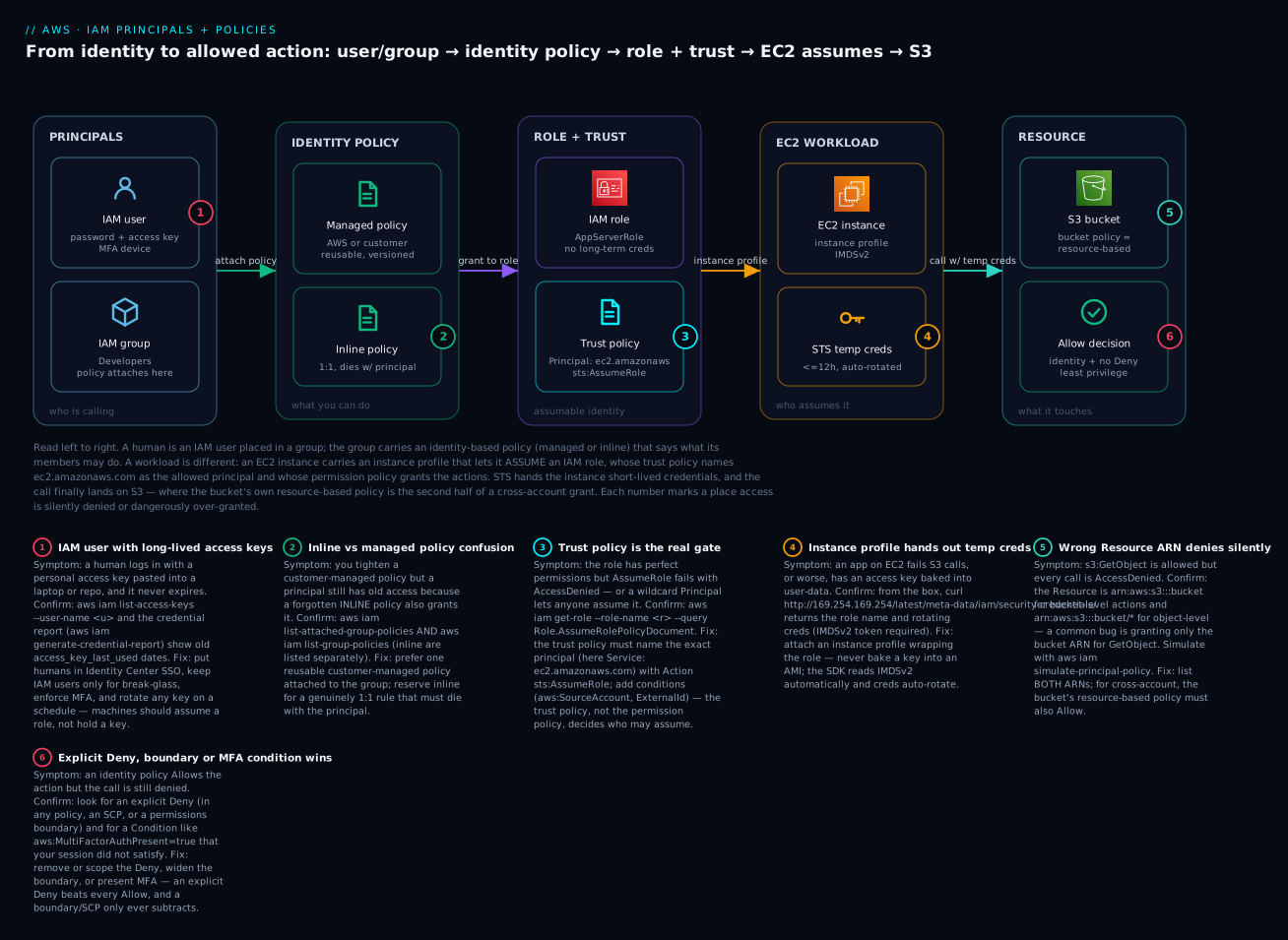
The diagram is not a network packet path — it is the authorization path for the exact thing you build in the lab, read left to right. On the left are the principals: a human is an IAM user dropped into an IAM group, and the group carries an identity-based policy (managed or inline) that says what its members may do. That is the human story. The workload story is different and runs along the same rail: an EC2 instance carries an instance profile that lets it assume an IAM role, whose trust policy names ec2.amazonaws.com as the allowed principal and whose permissions policy grants the actions. STS hands the instance short-lived, auto-rotating credentials — no key is ever stored on the box. The call finally lands on an S3 bucket, whose own resource-based bucket policy is the second half of any cross-account grant, and the Allow decision at the end is the AND of “an identity/resource policy allows it” and “no explicit Deny, boundary or condition blocks it.”
Follow the six badges and you have the complete beginner failure map: a long-lived access key on the user (1); inline-vs-managed confusion hiding an old grant (2); a trust policy that names the wrong principal so nobody (or everybody) can assume the role (3); the instance profile handing out temp creds instead of a baked-in key (4); a wrong Resource ARN that denies silently (5); and an explicit Deny, boundary or MFA condition that overrides an Allow (6). The legend narrates each as symptom · confirm · fix — the same method as the troubleshooting section below.
Real-world scenario
Trailhead Learning, a 40-person ed-tech startup in Bengaluru, ran everything through a single AWS account with one shared “admin” IAM user whose access key lived in a pinned Slack message. It worked until it did not. During a routine dependency update, a build script logged its environment — including that access key — to a public CI build page. Within a day, an attacker used the key to spin up dozens of large GPU instances for crypto-mining across four regions. The first anyone knew was a ₹6,80,000 surprise on the month’s bill and a throttled account.
The cleanup was also the redesign, and it followed exactly the model in this article. First, contain: they deleted the leaked access key immediately (aws iam delete-access-key), rotated everything, and used the credential report (aws iam generate-credential-report) to inventory every user and key. They found nine IAM users, six with access keys, four of those keys unused for over 90 days — including one belonging to a developer who had left in the spring.
Then, restructure. They deleted the shared admin user entirely. Humans moved to Identity Center SSO with MFA enforced (a topic they read up on separately), leaving exactly two break-glass IAM users with hardware MFA and no access keys. Every application lost its baked-in key: the API servers on EC2 got an instance profile wrapping a role scoped to precisely the three S3 prefixes and one DynamoDB table they used, generated with Access Analyzer from a week of CloudTrail rather than guessed. The CI pipeline switched to a role assumed via GitHub OIDC, so there was no stored secret left to leak at all.
Then, guardrail. They set an account password policy, attached a DenySensitiveWithoutMFA boundary-style deny to the break-glass users, and put a Bool aws:SecureTransport=false deny on their data buckets so nothing could be read over plain HTTP. Before attaching each new policy they ran it through the Policy Simulator and validate-policy; the validator caught a SECURITY_WARNING on a first-draft bucket policy that used "Principal":"*" with no condition — precisely the over-broad grant that would have re-opened the door.
The measurable outcome: the next month’s bill returned to its usual ₹95,000, and a follow-up review answered the question that had been unanswerable before — “if any single credential leaks now, what is the blast radius?” For the workload roles, the answer was “read three S3 prefixes and one table, for at most one hour, from inside our VPC.” The lesson the engineering lead wrote in the postmortem: “We didn’t get breached because AWS was insecure. We got breached because we handed out a permanent key instead of a temporary role. Roles expire. Keys wait.”
The migration as a sequence, because the order is the lesson:
| Step | Action | What it fixed |
|---|---|---|
| 1 | Delete leaked key; rotate; credential report | Stop the bleeding; see reality |
| 2 | Delete shared admin user; 2 break-glass left | No standing god-mode |
| 3 | EC2 → instance-profile role (scoped) | Apps hold no keys |
| 4 | CI → GitHub OIDC role | No stored secret to leak |
| 5 | Password policy + MFA denies + TLS deny | Guardrails on what’s left |
| 6 | Simulator + validate-policy before every attach | Catch over-broad before prod |
Advantages and disadvantages
The users/groups/roles/policies model — used well — prevents a whole class of incidents while adding some up-front thinking. Weigh it honestly:
| Advantages | Disadvantages |
|---|---|
| Temporary role credentials expire — leaks self-heal | Roles + trust policies are a steeper mental model than “here’s a key” |
| Least privilege limits blast radius to exactly what’s needed | Writing tight policies and correct ARNs is fiddly at first |
| Groups make human access one-attach, easy to audit | Requires discipline to not attach policies to users directly |
| Instance profiles/OIDC remove stored secrets entirely | More moving parts than a single access key |
| The JSON shape is uniform across every policy type | The caps (boundary/SCP/session) surprise you until learned |
| Access Analyzer + Simulator let you verify before shipping | Extra steps in the workflow |
| CloudTrail attributes every action to a principal/session | Assumed-role session names need convention to stay readable |
The model is right for every AWS user — there is no scale too small, because even a solo account benefits from roles-over-keys and MFA. The disadvantages are all one-time learning or automatable, while the advantages compound with every new workload, hire, and audit. The teams that regret IAM are the ones who never learned the model and drowned in ad-hoc grants — exactly the state this article gets you out of.
Hands-on lab
You will build a real, minimal slice of everything above: a group with a scoped customer-managed policy, a user in that group, and a role an EC2 instance assumes through an instance profile — then test it with the Policy Simulator and tear it all down. IAM, STS and the Simulator are free; the only line that can cost money is launching an EC2 instance in Step 7 (a t3.micro is free-tier eligible, and teardown removes it). Run everything with an admin profile, not root, in ap-south-1.
Set a couple of shell variables first so the commands are copy-paste ready. Replace the account id with yours.
export AWS_REGION=ap-south-1
ACCOUNT_ID=$(aws sts get-caller-identity --query Account -o text)
echo "Building in account $ACCOUNT_ID / region $AWS_REGION"
Step 1 — Create a customer-managed policy (scoped, least-privilege). Save this as read-app-bucket.json; it grants read on one bucket and its objects only.
{
  "Version": "2012-10-17",
  "Statement": [
    {
      "Sid": "ListTheBucket",
      "Effect": "Allow",
      "Action": "s3:ListBucket",
      "Resource": "arn:aws:s3:::kloudvin-lab-data"
    },
    {
      "Sid": "ReadObjects",
      "Effect": "Allow",
      "Action": "s3:GetObject",
      "Resource": "arn:aws:s3:::kloudvin-lab-data/*"
    }
  ]
}
aws iam create-policy \
  --policy-name KloudvinLabS3Read \
  --policy-document file://read-app-bucket.json \
  --description "Read-only on the lab bucket"
Expected output includes the new policy ARN — capture it:
POLICY_ARN=$(aws iam list-policies --scope Local \
  --query "Policies[?PolicyName=='KloudvinLabS3Read'].Arn | [0]" -o text)
echo "$POLICY_ARN"     # arn:aws:iam::<acct>:policy/KloudvinLabS3Read
Step 2 — Create a group and attach the policy.
aws iam create-group --group-name KloudvinLabDevs
aws iam attach-group-policy --group-name KloudvinLabDevs --policy-arn "$POLICY_ARN"
Step 3 — Create a user and put it in the group. No access key yet — we add one only to demonstrate, then delete it in teardown.
aws iam create-user --user-name kloudvin-lab-dev
aws iam add-user-to-group --group-name KloudvinLabDevs --user-name kloudvin-lab-dev
# Verify the group membership took
aws iam get-groups-for-user --user-name kloudvin-lab-dev \
  --query "Groups[].GroupName" -o text     # -> KloudvinLabDevs
Step 4 — Create the EC2 role with a trust policy. Save this trust policy as ec2-trust.json. Note the Principal is the EC2 service, and the condition ties the role to your account to blunt confused-deputy misuse.
{
  "Version": "2012-10-17",
  "Statement": [{
    "Effect": "Allow",
    "Principal": { "Service": "ec2.amazonaws.com" },
    "Action": "sts:AssumeRole"
  }]
}
aws iam create-role \
  --role-name KloudvinLabAppRole \
  --assume-role-policy-document file://ec2-trust.json \
  --max-session-duration 3600 \
  --description "Assumed by EC2 to read the lab bucket"
# Attach the SAME scoped policy so the role's permissions are least-privilege too
aws iam attach-role-policy --role-name KloudvinLabAppRole --policy-arn "$POLICY_ARN"
Step 5 — Wrap the role in an instance profile. EC2 can only wear a role through an instance profile; the CLI needs this explicitly (the console creates it for you).
aws iam create-instance-profile --instance-profile-name KloudvinLabAppProfile
aws iam add-role-to-instance-profile \
  --instance-profile-name KloudvinLabAppProfile --role-name KloudvinLabAppRole
Step 6 — Test with the Policy Simulator BEFORE trusting it. Confirm the role can read an object but cannot write one, and cannot touch a different bucket.
aws iam simulate-principal-policy \
  --policy-source-arn "arn:aws:iam::${ACCOUNT_ID}:role/KloudvinLabAppRole" \
  --action-names s3:GetObject s3:PutObject s3:DeleteObject \
  --resource-arns "arn:aws:s3:::kloudvin-lab-data/reports/q3.csv" \
  --query "EvaluationResults[].{Action:EvalActionName,Decision:EvalDecision}" --output table
Expected: s3:GetObject → allowed; s3:PutObject and s3:DeleteObject → implicitDenied. That is least privilege proven before anything real exists.
Step 7 — (Optional, costs pennies) attach the profile to an EC2 instance and verify from inside. Launch a t3.micro with the profile, SSH/SSM in, and read the rotating credentials from IMDSv2:
# From inside the instance (IMDSv2 requires a token first)
TOKEN=$(curl -sX PUT "http://169.254.169.254/latest/api/token" \
  -H "X-aws-ec2-metadata-token-ttl-seconds: 60")
curl -s -H "X-aws-ec2-metadata-token: $TOKEN" \
  http://169.254.169.254/latest/meta-data/iam/security-credentials/
# -> KloudvinLabAppRole   (the role name; creds rotate automatically)
aws s3 ls s3://kloudvin-lab-data     # works — no key was ever stored here
Step 8 — The same build in Terraform. For real work you would author this as code from the start:
resource "aws_iam_policy" "s3_read" {
  name        = "KloudvinLabS3Read"
  description = "Read-only on the lab bucket"
  policy = jsonencode({
    Version = "2012-10-17"
    Statement = [
      { Sid = "ListTheBucket", Effect = "Allow", Action = "s3:ListBucket",
        Resource = "arn:aws:s3:::kloudvin-lab-data" },
      { Sid = "ReadObjects", Effect = "Allow", Action = "s3:GetObject",
        Resource = "arn:aws:s3:::kloudvin-lab-data/*" }
    ]
  })
}

resource "aws_iam_group" "devs" {
  name = "KloudvinLabDevs"
}
resource "aws_iam_group_policy_attachment" "devs_s3" {
  group      = aws_iam_group.devs.name
  policy_arn = aws_iam_policy.s3_read.arn
}

resource "aws_iam_user" "dev" {
  name = "kloudvin-lab-dev"
}
resource "aws_iam_user_group_membership" "dev" {
  user   = aws_iam_user.dev.name
  groups = [aws_iam_group.devs.name]
}

data "aws_iam_policy_document" "ec2_trust" {
  statement {
    effect  = "Allow"
    actions = ["sts:AssumeRole"]
    principals {
      type        = "Service"
      identifiers = ["ec2.amazonaws.com"]
    }
  }
}
resource "aws_iam_role" "app" {
  name                 = "KloudvinLabAppRole"
  assume_role_policy   = data.aws_iam_policy_document.ec2_trust.json
  max_session_duration = 3600
}
resource "aws_iam_role_policy_attachment" "app_s3" {
  role       = aws_iam_role.app.name
  policy_arn = aws_iam_policy.s3_read.arn
}
resource "aws_iam_instance_profile" "app" {
  name = "KloudvinLabAppProfile"
  role = aws_iam_role.app.name
}
Step 9 — Teardown (do this to avoid leaving a mess). Detach and delete in dependency order; IAM refuses to delete an entity that still has attachments.
# EC2 instance first if you did Step 7: aws ec2 terminate-instances --instance-ids <id>
aws iam remove-role-from-instance-profile --instance-profile-name KloudvinLabAppProfile --role-name KloudvinLabAppRole
aws iam delete-instance-profile --instance-profile-name KloudvinLabAppProfile
aws iam detach-role-policy --role-name KloudvinLabAppRole --policy-arn "$POLICY_ARN"
aws iam delete-role --role-name KloudvinLabAppRole
aws iam remove-user-from-group --group-name KloudvinLabDevs --user-name kloudvin-lab-dev
aws iam delete-user --user-name kloudvin-lab-dev
aws iam detach-group-policy --group-name KloudvinLabDevs --policy-arn "$POLICY_ARN"
aws iam delete-group --group-name KloudvinLabDevs
aws iam delete-policy --policy-arn "$POLICY_ARN"
For Terraform, the whole teardown is one line: terraform destroy.
A quick checklist of what you just built and verified:
| # | Built | Verified how |
|---|---|---|
| 1 | Customer-managed policy (scoped) | create-policy returned an ARN |
| 2 | Group with the policy attached | list-attached-group-policies |
| 3 | User inside the group | get-groups-for-user |
| 4 | Role with an EC2 trust policy | get-role shows the trust doc |
| 5 | Instance profile wrapping the role | get-instance-profile |
| 6 | Least privilege proven | Simulator: Get allowed, Put/Delete denied |
| 7 | No stored keys on EC2 | IMDSv2 returns rotating creds |
Common mistakes & troubleshooting
Almost every IAM problem is one of a handful of failure modes. This is the playbook — symptom, root cause, the exact command or console path to confirm, and the fix. Keep it open when a call is denied.
| # | Symptom | Root cause | Confirm (command / console) | Fix |
|---|---|---|---|---|
| 1 | AccessDenied on an action you “granted” |
Implicit deny — nothing actually Allows it | aws iam simulate-principal-policy … → implicitDenied |
Add an Allow for the exact action + resource |
| 2 | Allow exists but still denied | An explicit Deny wins (policy, boundary, or SCP) | Simulator shows explicitDeny; search policies for "Effect":"Deny" |
Remove/scope the Deny; widen the boundary |
| 3 | Tightened a policy, access unchanged | A forgotten inline policy still grants it | aws iam list-user-policies (inline) vs list-attached-user-policies |
Delete the stray inline policy |
| 4 | s3:GetObject denied despite an Allow |
Wrong Resource ARN — bucket ARN used for an object action | Check ARN: object needs …/bucket/*, not …/bucket |
Add the /* object ARN (often need both) |
| 5 | sts:AssumeRole → is not authorized to perform: sts:AssumeRole |
Trust policy doesn’t name the caller | aws iam get-role --query Role.AssumeRolePolicyDocument |
Add the exact principal to the trust policy |
| 6 | Anyone can assume the role | Trust policy has "Principal":"*" |
Same get-role query; look for * |
Name the exact service/account/role |
| 7 | EC2 app has no permissions | No instance profile attached, or empty | aws ec2 describe-iam-instance-profile-associations |
Attach a profile wrapping the role |
| 8 | Denied only sometimes | An unmet Condition (MFA, IP, region) | Read the policy’s Condition; check your session |
Satisfy it (MFA/VPN) or scope the condition |
| 9 | EntityAlreadyExists creating a policy |
Name collision with an existing policy | aws iam list-policies --scope Local |
Reuse it, or pick a new name |
| 10 | DeleteConflict deleting a role/policy |
Still attached to something | aws iam list-entities-for-policy / list-attached-role-policies |
Detach first, then delete |
| 11 | LimitExceeded: managed policies |
10-per-principal cap hit | aws iam list-attached-role-policies (count) |
Consolidate policies or request a quota bump |
| 12 | New key/policy “not working yet” | Eventual consistency propagation lag | Retry after a few seconds | Wait & retry; don’t rewrite a correct policy |
| 13 | Cross-account read denied though identity allows | Resource policy (bucket/KMS) never agreed | Check bucket policy + KMS key policy in the owner account | Add a matching Allow on the resource side |
| 14 | Console shows access, CLI is denied | Different principal (SSO role vs an old key profile) | aws sts get-caller-identity |
Use the right profile/role |
The AccessDenied message reference
The error string itself tells you which failure mode you are in — learn to read it:
| Message fragment | Means | Where the block is | First move |
|---|---|---|---|
is not authorized to perform … because no identity-based policy allows |
Implicit deny | Missing Allow on the identity | Add the Allow |
with an explicit deny in an identity-based policy |
Explicit Deny on the principal | A Deny statement |
Find & scope the Deny |
with an explicit deny in a service control policy |
SCP blocked it | Organizations SCP | Fix the SCP (org admin) |
with an explicit deny in a permissions boundary |
Boundary blocked it | The principal’s boundary | Widen/adjust the boundary |
is not authorized to perform: sts:AssumeRole on resource: role/… |
Trust policy gate | The role’s trust policy | Name the caller in trust |
because no resource-based policy allows |
Cross-account resource side missing | Bucket/queue/key policy | Add resource-policy Allow |
MultiFactorAuthentication failed / condition unmet |
MFA-required condition | A Condition block |
Present MFA / re-auth |
The three failures that waste the most beginner hours
Explicit Deny (and boundaries) overriding your Allow. Beginners assume “I added an Allow, so it works.” But an explicit Deny anywhere — in the same policy, another attached policy, a permissions boundary, or an SCP inherited from Organizations — wins outright, and a boundary that simply omits the action denies it too (the effective set is the intersection). The tell is the Simulator returning explicitDeny (a Deny statement) versus implicitDenied (nothing allowed). If it’s explicit, stop adding Allows and go find the Deny. The full mechanics — evaluation order across every policy type — are the subject of IAM Policy Evaluation and Access Denied Troubleshooting; reach for it whenever a decision surprises you.
Inline-vs-managed confusion. You update a customer-managed policy to remove an action, then find the principal can still do it. The reason is almost always a second, inline policy on the same user, group, or role that also grants it — and inline policies are invisible to anyone who only lists attached policies. Always check both lists (list-*-policies for inline, list-attached-*-policies for managed). This is also why we prefer managed policies: one reusable document, one place to audit, no hidden second grant.
The wrong Resource ARN. S3 is the classic trap: object-level actions (GetObject, PutObject) need the object ARN arn:aws:s3:::bucket/*, while bucket-level actions (ListBucket, GetBucketLocation) need the bare bucket ARN arn:aws:s3:::bucket. Grant only the bucket ARN and every GetObject is denied; grant only the object ARN and every ListBucket is denied. Most read policies need both ARNs. When a call is denied and the action is clearly allowed, suspect the ARN before anything else, and confirm with the Simulator against the exact ARN the app uses.
Best practices
| # | Practice | Why it matters |
|---|---|---|
| 1 | Roles over keys for everything that can assume | Temporary creds expire; leaks self-heal |
| 2 | Never create root access keys; MFA the root user | Root bypasses IAM — a leak is total |
| 3 | Attach policies to groups/roles, never to individual users | One audit point; no per-user sprawl |
| 4 | Prefer customer-managed over inline and over broad AWS-managed | Reusable, versioned, auditable, tight |
| 5 | Scope Resource to exact ARNs, not * |
Limits blast radius to what’s needed |
| 6 | Start from Access Analyzer-generated policies, then tighten | Least privilege from real activity, not guesses |
| 7 | Simulate & validate-policy before you attach |
Catch over-broad and typos pre-prod |
| 8 | Use permissions boundaries when delegating IAM | Teams can’t escalate past their cap |
| 9 | Name the exact Principal in trust policies; never * |
The trust policy is the real gate |
| 10 | Rotate any surviving access key on a schedule (≤ 90 d) | Shrinks the window a leak is useful |
| 11 | Turn on Access Analyzer (external + unused) | Finds public/stale access automatically |
| 12 | Use a session-name convention for assumed roles | Keeps CloudTrail readable during incidents |
Security notes
IAM is the security layer, so the whole article is security — but a few points deserve emphasis. Least privilege is a practice, not a one-time setting: permissions drift as apps change, so re-run access advisor and Access Analyzer unused-access periodically and delete what is no longer used. Encryption and identity intersect at KMS: reading an encrypted S3 object needs kms:Decrypt on the key and the key policy allowing your principal — a permission people forget until a cross-account read fails. Network isolation complements identity: an instance-profile role scoped to S3 plus a VPC that only reaches S3 through a gateway endpoint is far stronger than either alone; pair this with AWS VPC, Subnets and Security Groups Explained. Protect the assumption path: harden trust policies with aws:SourceAccount/aws:SourceArn (service confused-deputy), sts:ExternalId (third parties), and aws:PrincipalOrgID (org-only). Enforce MFA with BoolIfExists, not Bool, so you require MFA for humans without breaking service sessions where the key is absent. Finally, treat CloudTrail as non-optional: it is what turns “someone deleted the bucket” into “this session, from this role, at this time, and here is the AccessDenied reason it was almost stopped.”
Cost & sizing
IAM is one of the few AWS services that is essentially free — you pay for the resources permissions protect, not for the permissions:
| Item | Cost | Note |
|---|---|---|
| IAM users, groups, roles, policies | Free | No charge for the entities |
STS AssumeRole / temporary creds |
Free | Unlimited assume calls |
| IAM Identity Center (SSO) | Free | The recommended human path |
| MFA (virtual/hardware) | Free (you buy hardware keys) | ~₹2,000–4,000 per FIDO2 key |
| Access Analyzer — external access | Free | Turn it on everywhere |
| Access Analyzer — unused access | Paid: per analyzed IAM role/user per month | Single-digit ₹ per principal/mo; check current pricing |
| Access Analyzer — custom policy checks | Paid: per check | Used in CI gates |
| CloudTrail management events | First copy free | Data events & extra trails cost |
“Sizing” IAM is about policy hygiene, not spend: fewer, tighter, reusable customer-managed policies; groups instead of per-user grants; roles instead of keys. The real cost of getting IAM wrong is never the IAM bill — it is the ₹6,80,000 crypto-mining incident from the scenario above, or the audit you fail. Spend the effort on least privilege; it is free and it is the cheapest security you will ever buy.
Interview & exam questions
Q1. What is the difference between an IAM user and an IAM role? A user is a long-term identity with its own credentials (password/access keys) that exist until deleted; a role has no long-term credentials and is assumed by a trusted principal, with STS minting temporary credentials for a bounded session. Prefer roles for workloads and cross-account access. (CLF-C02, SAA-C03)
Q2. Why attach policies to groups instead of users? So permissions are managed in one place for many users: adding or removing a user from a group changes their access without editing individual policies, which keeps access auditable and avoids per-user sprawl. (CLF-C02)
Q3. Identity-based vs resource-based policy — what’s the practical difference? An identity-based policy attaches to a user/group/role and has no Principal; a resource-based policy attaches to a resource, has a Principal, and enables cross-account access. For cross-account, both the identity and the resource policy must Allow. (SAA-C03, SCS-C02)
Q4. What does an explicit Deny do? It overrides any and all Allows — evaluation stops and the request is denied — regardless of how permissive the identity policy is. This is why guardrails use Deny. (SCS-C02)
Q5. Trust policy vs permissions policy on a role? The trust policy (AssumeRolePolicyDocument) says who may assume the role; the permissions policy says what the assumed session may do. AssumeRole fails at the trust policy before any permission is checked. (SAA-C03)
Q6. How should an application on EC2 get AWS credentials? Through an instance profile wrapping an IAM role; the SDK reads short-lived, auto-rotating credentials from IMDSv2. Never bake an access key into the AMI or user-data. (SAA-C03, DVA-C02)
Q7. AWS-managed vs customer-managed vs inline policy? AWS-managed are AWS-authored and reusable but often broad; customer-managed are your own reusable, versioned policies (the default for least privilege); inline are embedded 1:1 in a single principal and die with it. (CLF-C02)
Q8. What is a permissions boundary? A managed policy that sets the maximum permissions a user or role can have; effective permissions are the intersection of the identity policy and the boundary. It caps, never grants, and enables safe delegation of IAM. (SCS-C02)
Q9. How do you move an over-privileged role toward least privilege? Observe real usage (CloudTrail/access advisor), generate a policy with IAM Access Analyzer, scope Resource to exact ARNs, add conditions, then verify with the Policy Simulator and validate-policy. (SCS-C02, SAA-C03)
Q10. Why is s3:GetObject denied even though your policy allows it? Most often a wrong Resource ARN — object actions need arn:aws:s3:::bucket/*, not the bucket ARN — or an explicit Deny/condition. Confirm with the Simulator against the exact object ARN. (DVA-C02)
Q11. What’s the risk of long-term access keys, and the alternative? They never expire, travel in plaintext, and are rarely rotated, so a leak grants standing access. The alternative is temporary credentials via roles (STS), or human SSO via Identity Center. (SCS-C02)
Q12. Does the Policy Simulator account for SCPs? No — it evaluates identity (and some resource) policies but not Organizations SCPs, so a call it reports as allowed can still be denied by an SCP in production. (SCS-C02)
Quick check
- You need an application on EC2 to read one S3 bucket. Which principal type, and how does it get credentials?
- Your policy
Allowss3:GetObjectbut the call is denied. Name two likely causes. - Where does a
Principalelement appear, and where does it never appear? - What is the difference between
implicitDeniedandexplicitDenyin the Simulator, and how does your fix differ? - Why prefer a customer-managed policy over an inline one?
Answers
- An IAM role attached via an instance profile; the app reads short-lived, auto-rotating credentials from IMDSv2 — no key is stored on the box.
- A wrong
ResourceARN (object actions need…/bucket/*, not the bucket ARN) or an explicit Deny / unmet Condition overriding the Allow. (A cross-account resource policy not agreeing is a third.) - It appears in resource-based and trust policies (naming who is allowed); it never appears in an identity-based policy, where the attached identity is the principal.
implicitDeniedmeans nothing Allowed it — add an Allow;explicitDenymeans aDenystatement (or boundary/SCP) blocked it — find and scope the Deny. Adding more Allows won’t fix an explicit Deny.- It is reusable, versioned, and centrally auditable — one document you attach to many principals — whereas inline policies are 1:1, invisible to attached-policy listings, and easy to forget (a top cause of “the tightened policy didn’t change anything”).
Glossary
| Term | Definition |
|---|---|
| Principal | The identity making a request — an IAM user, an assumed role, or root. |
| IAM user | A long-term identity with its own password and/or access keys. |
| IAM group | A container of users that share attached policies; not itself a principal. |
| IAM role | An assumable identity with no long-term credentials; STS mints temporary ones. |
| Trust policy | The resource-based policy on a role that says who may assume it. |
| Identity policy | A policy attached to a user/group/role stating what it may do. |
| Resource policy | A policy attached to a resource stating who may access it (enables cross-account). |
| Managed policy | A standalone, reusable policy — AWS-managed or customer-managed. |
| Inline policy | A policy embedded in a single principal that is deleted with it. |
| Permissions boundary | A managed policy capping the maximum permissions of a principal. |
| Session policy | A policy passed at assume time that caps a single session. |
| Access key | A long-term programmatic credential (key ID + secret) for an IAM user. |
| STS | Security Token Service — issues temporary credentials for assumed roles. |
| Instance profile | The wrapper that lets an EC2 instance assume a role. |
| ARN | Amazon Resource Name — the globally unique identifier of a resource. |
| Least privilege | Granting exactly the permissions needed and no more. |
| Access Analyzer | The IAM tool for external/unused-access findings, policy generation and validation. |
| Policy Simulator | A tool that predicts allow/deny for an action without making the real call. |
Next steps
- Scale humans off IAM users entirely with IAM Identity Center: SSO and Permission Sets.
- Learn the full decision order behind every denial in IAM Policy Evaluation and Access Denied Troubleshooting.
- Grant access between accounts safely in IAM Cross-Account Roles and AssumeRole Hands-On.
- See where this sits in a multi-account estate in AWS Organizations and IAM Foundations: Accounts, OUs and Roles.
- Harden a brand-new account from the first login in AWS Account Setup: Root, IAM, Billing and MFA.