Quick take: In a multi-account AWS estate, humans should never hold long-lived IAM users or access keys. IAM Identity Center is how you give every engineer one login, short-lived credentials, and exactly the right role in exactly the right accounts — from a browser or from
aws sso login.
A twelve-account AWS org had thirty engineers, and every one of them carried an IAM user with an access key in a ~/.aws/credentials file. Rotating keys was a quarterly fire drill nobody finished. Onboarding meant hand-copying eleven inline policies. Off-boarding meant hoping someone remembered to delete users in all twelve accounts — and one contractor still had AdministratorAccess in the shared services account four months after the engagement ended. None of this was a policy problem. It was an identity plumbing problem, and the fix is AWS IAM Identity Center (the service formerly called AWS SSO): one place where a human signs in, one place where you say “this group gets this role in these accounts,” and short-lived credentials minted on demand instead of static keys sitting on laptops.
IAM Identity Center is not a single feature you toggle — it is a small system with distinct moving parts, and the “why can’t I see any roles?” and far more dangerous “why can this contractor still get in?” incidents come from not holding the whole chain in your head. The chain is: an identity source decides where users and groups come from (a built-in directory, Active Directory, or an external IdP like Okta or Entra ID). A permission set is a reusable bundle of policies plus a session duration — a role template. An account assignment is the triple that actually grants access: principal × permission set × account. When you assign, Identity Center provisions the permission set as a real IAM role — named AWSReservedSSO_<name>_<hash> — into each target account. The human then opens the access portal or runs aws sso login, picks an account and role, and STS hands back temporary credentials.
By the end of this article you will enable Identity Center on top of an organization, choose the right identity source, build a permission set with AWS-managed, inline, customer-managed and boundary policies, tune its session duration and relay state, assign a group to an account, log in from the portal and the CLI, wire ABAC with session tags, and auto-provision workforce from Okta/Entra over SCIM. We use real service names, real limits, real error strings, and the exact aws CLI, Terraform aws_ssoadmin_* resources and ~/.aws/config blocks — not a simplified cartoon of them. This is the modern default for human access on AWS, and it is the single highest-leverage identity investment you will make.
What problem this solves
A multi-account AWS estate that authenticates humans with IAM users has a structural flaw: identity is duplicated per account and static. Every account needs its own copy of every user, every user carries a long-lived password and access key, and there is no single lever to grant, change, or revoke access across the estate. The result is credential sprawl (keys on laptops, in repos, in CI), off-boarding gaps (a user deleted in one account but not the other eleven), and audit blindness (you cannot answer “who can touch production?” because the answer is scattered across twelve IAM databases).
What breaks without Identity Center, concretely: onboarding is O(accounts) — a new hire needs a user and policies created in every account they touch. Rotation never finishes — static access keys must be rotated on a schedule and nobody does it reliably, so 400-day-old keys become the norm. Off-boarding is best-effort — deleting a human means deleting them everywhere, and the one you miss is the breach. There is no MFA story that scales — you configure MFA per IAM user per account. And temporary access is impossible — an IAM user’s key works until you delete it; there is no natural expiry.
Who hits this: every team past a single account or past a handful of people. It bites hardest on regulated workloads (an auditor will ask you to prove least privilege and prompt off-boarding), on teams onboarding contractors and third parties, and on anyone already running AWS Organizations and IAM Foundations: Accounts, OUs and Roles who is still logging humans in with per-account IAM users. Identity Center replaces that with centralized human identity + short-lived, role-based access — and the rest of this article is how each piece works and the exact ways each one fails.
To frame the whole field before the deep sections, here is every moving part, the question it answers, and where it lives:
| Layer | The question it answers | Where it lives | Primary failure if you get it wrong |
|---|---|---|---|
| Organization | What accounts exist to grant into? | Management account | Identity Center needs Organizations first |
| Identity Center instance | Where do humans sign in? | One home Region | Wrong Region = portal 404, CLI errors |
| Identity source | Where do users/groups come from? | The instance | Wrong source = “no users”, SCIM gaps |
| Users & groups | Who is the principal? | Identity store / IdP | Assigning users not groups = sprawl |
| Permission set | What can the principal do? | The instance | Edit without re-provision = stale access |
| Account assignment | Where does the grant apply? | Per target account | Missing triple = “no roles” in portal |
| AWSReservedSSO role | How is it enforced in-account? | Each target account | Manual edits get reverted on re-provision |
| Access portal / CLI | How does the human get credentials? | awsapps.com/start |
Region/expiry errors on aws sso login |
Learning objectives
By the end of this article you can:
- Explain why IAM Identity Center is the modern default for human access across many accounts, and where a break-glass IAM user still has a place.
- Choose an identity source — the built-in Identity Center directory, Active Directory (AWS Managed Microsoft AD or AD Connector), or an external IdP (Okta / Entra ID) via SAML for sign-in and SCIM for provisioning.
- Build a permission set end to end: AWS-managed policies, an inline policy, customer-managed policy references, a permissions boundary, a session duration (PT1H–PT12H) and relay state, and understand that it materializes as an IAM role.
- Create account assignments — the principal × permission set × account triple — and re-provision correctly after every edit.
- Sign in through the access portal and configure the CLI with
aws configure sso, the[sso-session]block in~/.aws/config, andaws sso login. - Implement ABAC with session tags/attributes so one permission set scopes access by department, project or cost centre.
- Auto-provision workforce with SCIM and map external IdP attributes correctly.
- Stand the whole thing up with
awsCLI and Terraform (aws_ssoadmin_*,aws_identitystore_*), and diagnose the dozen ways it fails.
Prerequisites & where this fits
You should already have an AWS Organization with all features enabled (Identity Center requires it), management-account access to enable the service, and a comfort level with the aws CLI v2, JSON policy documents, and the idea that an IAM role is assumed to get temporary credentials rather than logged into. Knowing the IAM policy-evaluation order (explicit Deny wins; an SCP caps the maximum) makes the permission-set material land — if that is fuzzy, read AWS Organizations and IAM Foundations: Accounts, OUs and Roles first.
This sits in the identity and governance layer of an AWS estate. Identity Center is what a landing zone wires up for you: AWS Control Tower Guardrails: Building a Secure Multi-Account Foundation enables Identity Center as part of the baseline and expects you to manage permission sets on top of it. The guardrails that cap what any permission set can do — even an admin one — are service control policies, covered in AWS Organizations SCPs: Multi-Account Guardrails; a permission set can grant AdministratorAccess, but an SCP on the OU still wins. And where Identity Center is human access, machine and cross-account access uses role assumption directly — AWS IAM Cross-Account Roles and AssumeRole: Hands-On is the companion for that path. Identity Center is, under the hood, standardized cross-account AssumeRole for humans.
Core concepts
The mental model is a pipeline: identity source → Identity Center instance → permission set → account assignment → provisioned IAM role → temporary credentials. Get every noun in that sentence precise and the whole service becomes legible. Identity Center owns exactly two kinds of thing — who (users and groups, from your identity source) and what/where (permission sets and their assignments to accounts). It does not run workloads, hold data, or cost money by itself; it is a control plane that ends by creating IAM roles other accounts already understand.
Here is every object you will touch, what it is, and where it is defined:
| Object | What it is | Scope | Created / owned in | Analogy |
|---|---|---|---|---|
| Instance | Your Identity Center deployment | One per org, one home Region | Management (or delegated admin) | The SSO control plane |
| Identity source | Where users/groups originate | Instance-wide (one at a time) | Instance settings | The address book |
| Identity store | Built-in user/group directory | The instance | Identity Center | Local directory (d-xxxx) |
| User | A human principal | Identity store or IdP | Identity source | The person |
| Group | A set of users | Identity store or IdP | Identity source | The team |
| Permission set | Reusable policy bundle + session | Instance-wide | Instance | A role template |
| Account assignment | principal × set × account | Per account | Instance | The actual grant |
| Provisioned role | AWSReservedSSO_* IAM role |
One target account | Target account | The enforced permission |
| Access portal | Web UI listing account+role tiles | Per user | awsapps.com/start |
The front door |
| Permissions boundary | Max-permission cap on the set’s role | Per permission set | Instance | The ceiling |
And here is the lifecycle — the order things happen, and what triggers the next step. Missing any one of these is a distinct failure mode you will meet in the troubleshooting section:
| # | Step | Trigger | Result | If skipped |
|---|---|---|---|---|
| 1 | Enable instance | You enable Identity Center on the org | Identity store d-xxxx, portal URL |
Nothing to sign in to |
| 2 | Set identity source | Choose directory / AD / external IdP | Users & groups appear | No principals to assign |
| 3 | Create users/groups | Manual, AD sync, or SCIM | Principals exist | “No users” when assigning |
| 4 | Create permission set | Define policies + session duration | A role template exists | Nothing to assign |
| 5 | Assign to account | principal × set × account | Provision job runs | “No roles” in portal |
| 6 | Provision | Automatic on assign; manual on edit | AWSReservedSSO_* role created |
Stale access after edits |
| 7 | Sign in | Portal or aws sso login |
STS temp credentials | — |
A last framing point that trips people: a permission set is not a role, and an assignment is not access until it provisions. The permission set is a template held centrally; the moment you assign it to an account, Identity Center provisions it — creates an IAM role in that account whose name starts with AWSReservedSSO_ and whose trust policy allows the Identity Center service to assume it on the user’s behalf. Edit the permission set later and the accounts do not auto-update; you must re-provision. This single fact is the root cause of a large share of “I changed the policy but access didn’t change” tickets.
IAM Identity Center vs long-lived IAM users
The core decision is simple once stated: humans get Identity Center; machines and break-glass get IAM. An IAM user is a static identity with a password and up to two access keys that live until you delete them. Identity Center gives the same human a single federated sign-in and temporary credentials scoped to a role and an account, expiring in 1–12 hours. Everything about operating at scale — onboarding, rotation, off-boarding, MFA, audit — is easier on the Identity Center side because identity is centralized and credentials are ephemeral.
| Dimension | Long-lived IAM users | IAM Identity Center |
|---|---|---|
| Credential lifetime | Until deleted (static) | 1–12 h, minted on demand |
| Where identity lives | Per account, duplicated | Central identity store / IdP |
| Onboarding cost | O(accounts): user + policies each | Add to a group once |
| Off-boarding | Delete in every account (miss = breach) | Remove from group once |
| MFA | Per user, per account | Enforced centrally |
| Access keys on laptops | Normal, and dangerous | None — creds are temporary |
| Rotation | Manual, scheduled, often skipped | No static keys to rotate |
| Cross-account | Duplicate users or set up roles | Native: assign set to N accounts |
| Audit “who can touch prod?” | Scattered across accounts | One assignments view |
| Console + CLI parity | Yes | Yes (portal + aws sso login) |
| External IdP integration | SAML per account, painful | SAML + SCIM, centrally |
| Cost | Free | Free (unless you run AD) |
| Right for | Break-glass, some automation | All human access |
You do not delete IAM entirely — you demote it. A handful of roles remain the correct tool, and a break-glass IAM user with a physical MFA key is a deliberate safety net for the day Identity Center or your IdP is unavailable.
| Keep an IAM identity for… | Why | Guardrail |
|---|---|---|
| Break-glass user | Recover if IdP/Identity Center is down | Physical MFA, sealed password, alarmed on use |
| Automation / CI roles | Machines assume roles, not portals | OIDC / instance roles, no static keys |
| Service-linked roles | AWS services need them | Managed by AWS |
| Legacy third-party | Vendor only supports IAM keys | Scope tightly, rotate, prefer roles |
| EC2 / Lambda execution | Workload identity | Instance profile / execution role |
| Root user | Account-level tasks only | MFA, never for daily work |
The punchline for exams and for real life: if a person is typing, they should be coming through Identity Center. If code is calling, it should be assuming a role. Static IAM access keys for humans are a finding, not a design.
Choosing an identity source
An Identity Center instance has exactly one identity source at a time, and it is the biggest early decision because switching it later is disruptive. The source determines where users and groups come from and how they authenticate. There are three families, with Active Directory offering two connection styles.
| Identity source | Auth handled by | Provisioning | Best for | Cost |
|---|---|---|---|---|
| Identity Center directory | Identity Center (built-in) | Manual / SCIM | Small teams, no existing IdP | Free |
| AWS Managed Microsoft AD | Your managed AD | AD sync | AD-centric shops, on-AWS AD | ~$0.40/hr (Standard) |
| AD Connector | Your on-prem AD | AD sync | Existing on-prem AD, no new DCs | ~$0.05/hr (small) |
| External IdP (SAML+SCIM) | Okta / Entra / Ping / etc. | SCIM 2.0 | Orgs standardized on an IdP | IdP licensing |
The built-in Identity Center directory (the identity store, identified as d-xxxxxxxxxx) is the zero-dependency default: you create users and groups directly, Identity Center handles passwords and MFA, and there is nothing else to run. It is the fastest path for a lab or a small org, and you can still bulk-load it over SCIM.
Choosing Active Directory means users authenticate against your directory. AWS Managed Microsoft AD runs actual domain controllers in AWS (a real, billed resource); AD Connector is a lightweight proxy to your on-prem AD (cheaper, no DCs in AWS, but auth latency depends on the link). Both surface AD users/groups into Identity Center via directory sync.
Choosing an external IdP splits the job cleanly into two protocols, and understanding the split is the difference between a smooth rollout and a week of “the user exists in Okta but not in AWS” tickets:
| Concern | Protocol | Direction | What it does | Failure if misconfigured |
|---|---|---|---|---|
| Sign-in / authentication | SAML 2.0 | IdP → Identity Center | Proves who the user is at login | Can’t log in; SAML assertion errors |
| User/group provisioning | SCIM 2.0 | IdP → Identity Center | Pushes users/groups into the store | User can log in but has no groups/roles |
| Attributes for ABAC | SAML attrs / SCIM | IdP → session tags | Carries department, project, etc. | PrincipalTag conditions never match |
| Deprovisioning | SCIM | IdP → Identity Center | Removes/disables leavers | Off-boarding gap |
| Group membership | SCIM | IdP → Identity Center | Keeps groups in sync | Assignments target empty groups |
SAML is only about sign-in; SCIM is what actually creates the users and groups inside Identity Center so you have something to assign. Enable one without the other and you get the classic symptom: the user authenticates fine but the access portal shows no accounts and no roles, because the identity carries no group that any assignment references.
External IdP specifics differ enough between the two dominant providers to warrant a side-by-side:
| Aspect | Okta | Microsoft Entra ID (Azure AD) |
|---|---|---|
| App to add | “AWS IAM Identity Center” app | “AWS IAM Identity Center” enterprise app |
| SAML metadata | Exchange metadata XML both ways | Exchange metadata XML both ways |
| SCIM endpoint | From Identity Center settings | From Identity Center settings |
| SCIM token | Bearer token from Identity Center | Bearer token from Identity Center |
| What syncs | Assigned users + pushed groups | Assigned users + groups in scope |
| Group sync gotcha | Must “push groups” explicitly | Only groups assigned to the app sync |
| Attribute for ABAC | Okta profile → SAML attribute | Entra claim → SAML attribute |
| Nested groups | Flattened on push | Not expanded — assign leaf groups |
The single most common external-IdP mistake, in both tools: assuming that all IdP groups appear in AWS. They do not. Only the users assigned to the AWS app and the groups you explicitly scope/push are provisioned over SCIM. An assignment that targets a group the IdP never pushed grants nothing.
Finally, switching identity source is not a casual toggle. Changing the source can remove existing assignments and always resets MFA registrations, because principal IDs are recreated. Plan it as a migration:
| If you change from… | To… | What happens | Do this first |
|---|---|---|---|
| Identity Center dir | External IdP | Users recreated via SCIM; assignments may drop | Export assignments; re-map by group |
| Identity Center dir | Active Directory | Directory-sourced users; local users removed | Recreate groups in AD |
| Active Directory | External IdP | Re-provision from IdP; principal IDs change | Re-create assignments post-cutover |
| External IdP | Identity Center dir | SCIM stops; users become local | Rebuild groups/memberships |
| Any change | Any | MFA devices reset; users re-enroll | Warn users; schedule a window |
The safe pattern is to pick your long-term source before you build permission sets and assignments, especially if you already run Okta or Entra. Retrofitting an IdP after 200 assignments exist means re-doing those assignments against new principal IDs.
Permission sets in depth
A permission set is the heart of the service: a named, reusable bundle of permissions plus session behaviour that you assign to any number of accounts, where it becomes an IAM role. Think of it as the job — “Platform Admin,” “Read-Only Auditor,” “Billing Viewer” — decoupled from which account and which person. You define it once, centrally, and assign it wherever that job applies.
A permission set is built from up to five permission components plus two behaviour settings:
| Component | What it is | How many | Materializes as | When to use |
|---|---|---|---|---|
| AWS managed policies | AWS-authored policies (e.g. ReadOnlyAccess) |
Multiple | Attached managed policies on the role | Fast, standard job profiles |
| Inline policy | One JSON policy embedded in the set | One | Inline policy on the role | Set-specific grants/denies |
| Customer-managed policies | Referenced by name, must exist in each account | Multiple | Attached managed policies on the role | Reused policies you version yourself |
| Permissions boundary | Max-permission ceiling for the role | One | Boundary on the role | Cap delegated admins |
| Session duration | How long the role session lasts | One (PT1H–PT12H) | MaxSessionDuration on the role |
Longer for interactive admins |
| Relay state | Post-login redirect URL | One | Console landing page | Deep-link to a service/region |
Two of these have sharp edges. AWS-managed vs customer-managed policies: an AWS-managed policy is referenced by a single global ARN and always exists. A customer-managed policy reference is attached by name and path, and the actual policy must already exist in every target account — Identity Center does not copy it there. Assign a set that references arn:aws:iam::<acct>:policy/MyOrgBaseline to an account that lacks that policy and provisioning fails. This is powerful (you version the policy yourself, per account, e.g. via AWS Control Tower Guardrails: Building a Secure Multi-Account Foundation or Terraform) and a common footgun.
| Policy type in a set | Where the policy lives | Same across accounts? | Failure mode |
|---|---|---|---|
| AWS managed | AWS global (arn:aws:iam::aws:policy/…) |
Yes, always | Rare |
| Inline | Inside the permission set | Yes (copied on provision) | Size limit exceeded |
| Customer-managed (referenced) | Each target account, by name | Only if you deploy it everywhere | Missing in an account → provision fails |
| Permissions boundary | AWS managed or customer-managed | Depends on which | Boundary missing → provision fails |
Session duration
Session duration controls how long the temporary credentials from this permission set last before the user must re-authenticate the role (distinct from the portal sign-in session). It is an ISO-8601 duration from PT1H to PT12H. Longer is more convenient for interactive admins; shorter shrinks the window a leaked credential is usable.
| Setting | Value range | Default | When to lengthen | When to shorten |
|---|---|---|---|---|
| Session duration | PT1H – PT12H | PT1H | Long interactive admin work | Sensitive/prod access |
| Common admin | PT4H – PT8H | — | Full workday without re-login | — |
| Common read-only | PT8H – PT12H | — | Dashboards, monitoring | — |
| Sensitive/prod | PT1H | — | — | Minimize blast radius |
| Break-glass emulation | PT1H | — | — | Force frequent re-auth |
There are two different session clocks and confusing them causes “why did I get logged out?” tickets. The permission-set session duration (PT1H–PT12H) is how long a set of role credentials lasts. The access-portal (sign-in) session is a separate, instance-wide setting — default 8 hours, configurable roughly 15 minutes to 90 days — controlling how long before the user must re-authenticate to the portal itself.
| Session type | Governs | Range | Default | Set where |
|---|---|---|---|---|
| Permission-set session | Role credential lifetime | PT1H–PT12H | PT1H | Per permission set |
| Access-portal session | Portal re-authentication | ~15 min – 90 days | 8 h | Instance settings |
| AWS console session (via portal) | Console tab validity | Follows role session | — | Derived |
Relay state
Relay state is a small quality-of-life setting: a URL the console redirects to immediately after federated login through this permission set. Point an operations set at the CloudWatch console in your primary Region and admins land where they work instead of the generic console home. It has no security effect; it is pure ergonomics.
https://ap-south-1.console.aws.amazon.com/cloudwatch/home?region=ap-south-1
Provisioning and the AWSReservedSSO role
When you assign a permission set to an account (or edit an already-assigned one and re-provision), Identity Center creates or updates an IAM role in that account. Knowing its shape is essential for debugging and for writing trust policies elsewhere that reference it.
| Property | Value / behaviour | Why it matters |
|---|---|---|
| Role name | AWSReservedSSO_<PermSetName>_<16-hex-hash> |
Predictable prefix; hash differs per account |
| Path | /aws-reserved/sso.amazonaws.com/ |
Filter SSO roles by path |
| Trust policy | Trusts the Identity Center SAML provider | Do not edit — reverted on re-provision |
| Managed edits | Reverted on next provision | Never hand-edit these roles |
| Session name | The user’s Identity Center username | Shows in CloudTrail as the human |
| Deletion | Removed when the last assignment is removed | Un-assign to clean up |
| Boundary | Present if the set has one | Enforced as the ceiling |
Because the role name embeds a per-account random hash, never hardcode the full name across accounts; match on the AWSReservedSSO_ prefix or the reserved path when you need to reference these roles (for example in a resource policy that must allow “any SSO admin”). CloudTrail records the human’s username as the role session name, so an SSO-driven action is attributable to a person, not to an anonymous shared role — a major audit win over shared IAM users.
The provisioning lifecycle has explicit states, and reading them is how you confirm an edit actually took effect:
| Provisioning state | Meaning | Your action |
|---|---|---|
| IN_PROGRESS | Provision job running | Wait, then re-check |
| SUCCEEDED | Role created/updated in account | Done |
| FAILED | Missing dependency (e.g. referenced policy) | Read the failure reason, fix, re-provision |
| Out of date (implicit) | Set edited, accounts not re-provisioned | Run provision-permission-set |
Limits and quotas
Enumerate the ceilings before you design, because several are low and shape your permission-set strategy (favour fewer, broader sets over hundreds of narrow ones). Quotas can change and some are adjustable via Service Quotas — verify current values, but these are the orders of magnitude:
| Limit | Approx. value | Adjustable? | Design implication |
|---|---|---|---|
| Permission sets per instance | 500 | Some limits adjustable | Don’t create one per person |
| Permission sets provisioned per account | 50 | Check quotas | Reuse sets across accounts |
| AWS managed policies per set | ~10–20 | Follows IAM role limit | Consolidate policies |
| Inline policy size per set | ~10,240 chars | No | Prefer managed refs for big policies |
| Customer-managed refs per set | Multiple (with limits) | Check quotas | Policy must exist in each account |
| Accounts per assignment API call | One (AWS_ACCOUNT) |
— | Loop or use IaC for many accounts |
| Session duration | PT1H–PT12H | No | Can’t exceed 12 h |
| Identity source | 1 per instance | No | Choose carefully upfront |
| Instance | 1 org instance | Account instances possible | Prefer the org instance |
| AWSReservedSSO roles | Count toward IAM roles/account (~1,000) | IAM quota adjustable | Many sets × many accounts adds up |
Account assignments: principal × permission set × account
An account assignment is what actually grants access, and it is a triple: a principal (a group or user), a permission set, and a target account. All three must be present and the assignment must be provisioned for a human to see a role tile in the portal. Miss any leg of the triple and the user gets nothing — this is the single most common “it’s not working” cause, and it is almost always a missing or mis-targeted assignment rather than a policy problem.
| Leg of the triple | What it is | Choose | Anti-pattern |
|---|---|---|---|
| Principal | Who gets access | A group (ideally) | Assigning individual users |
| Permission set | What they can do | The job template | One set per person |
| Target account | Where it applies | A specific account ID | Expecting OU-wide magic |
Always assign groups, not users. A group assignment means onboarding is “add to the group” and off-boarding is “remove from the group” — zero AWS changes. Assigning individual users recreates the per-account sprawl Identity Center exists to kill.
| Assign to… | Onboarding | Off-boarding | Scales? |
|---|---|---|---|
| Group | Add user to group | Remove from group | Yes |
| Individual user | New assignment per account | Delete assignment per account | No — sprawl returns |
A frequent misconception: there is no OU-level assignment. You assign a permission set to accounts, one account per assignment. To grant a group ReadOnly across an OU of 20 accounts, you create 20 assignments — which is exactly why you drive assignments from Terraform or a loop, not the console, at scale.
| Operation | API / CLI | Terraform | Notes |
|---|---|---|---|
| Create assignment | sso-admin create-account-assignment |
aws_ssoadmin_account_assignment |
Auto-provisions on create |
| Delete assignment | sso-admin delete-account-assignment |
Destroy the resource | Removes role if last one |
| List assignments | sso-admin list-account-assignments |
Data source | Per account + set |
| Provision (re-sync) | sso-admin provision-permission-set |
Implicit on change | Needed after set edits |
| List accounts for a set | sso-admin list-accounts-for-provisioned-permission-set |
— | Audit which accounts have it |
The access portal and CLI: aws sso login
Once a user is assigned, they consume access two ways. The access portal — https://d-xxxxxxxxxx.awsapps.com/start or a custom subdomain — is a web page of tiles, one per account+permission-set they are entitled to, each offering “Management console” or “Command line access.” The CLI path is aws sso login, and the modern (AWS CLI v2 ≥ 2.9) way to configure it uses a token-based [sso-session] block shared across profiles.
The three ways to reach a role, and when to use each:
| Method | How | Best for | Credential lifetime |
|---|---|---|---|
| Access portal (console) | Click “Management console” | Interactive console work | Portal/role session |
| Access portal (copy creds) | Click “Command line access”, copy | One-off CLI on a shared box | Role session |
aws sso login (CLI) |
Configured profile + browser device flow | Daily CLI/SDK/IaC work | Role session, auto-cached |
Configure it once with aws configure sso, which writes both blocks to ~/.aws/config:
aws configure sso --profile dev-admin
# SSO session name: my-org
# SSO start URL: https://d-1234567890.awsapps.com/start
# SSO region: ap-south-1
# SSO registration scopes: sso:account:access
# → it lists your accounts/roles; pick one
The resulting file — the [sso-session] block is reusable across every profile so you authenticate once and get all your accounts:
[sso-session my-org]
sso_start_url = https://d-1234567890.awsapps.com/start
sso_region = ap-south-1
sso_registration_scopes = sso:account:access

[profile dev-admin]
sso_session = my-org
sso_account_id = 111122223333
sso_role_name = AdminAccess
region = ap-south-1
output = json

[profile prod-readonly]
sso_session = my-org
sso_account_id = 444455556666
sso_role_name = ReadOnly
region = ap-south-1
output = json
Every field, what it does, and the failure if it is wrong:
| Field | Block | Meaning | If wrong |
|---|---|---|---|
sso_start_url |
sso-session | Your portal URL | Login can’t find the instance |
sso_region |
sso-session | The instance home Region | Token/login errors |
sso_registration_scopes |
sso-session | OIDC scope (sso:account:access) |
Registration fails |
sso_session |
profile | Links profile → session block | Falls back to legacy format |
sso_account_id |
profile | Target account (12 digits) | “role not available in account” |
sso_role_name |
profile | Permission set name (not ARN) | Role not found |
region |
profile | Default Region for API calls | Calls hit wrong Region |
output |
profile | CLI output format | Cosmetic |
Then the daily flow:
aws sso login --sso-session my-org      # opens browser; approve the device code
aws sts get-caller-identity --profile dev-admin
# → Arn: arn:aws:sts::111122223333:assumed-role/AWSReservedSSO_AdminAccess_abc123.../jdoe
aws s3 ls --profile dev-admin           # real command with temp creds
aws sso logout                          # clears the cached token
Under the hood, aws sso login runs an OAuth 2.0 device authorization flow: the CLI registers a client, opens your browser to the portal, you approve, and an SSO access token is cached in ~/.aws/sso/cache/. Individual role credentials are then fetched on demand and cached in ~/.aws/cli/cache/. The token — not your role creds — is what expires and forces the next aws sso login.
| Cache / artifact | Location | Contains | Lifetime |
|---|---|---|---|
| SSO access token | ~/.aws/sso/cache/*.json |
Portal OIDC token | Portal session |
| Role credentials | ~/.aws/cli/cache/*.json |
Temp STS creds | Role session (PT1H–PT12H) |
| Client registration | ~/.aws/sso/cache/ |
OIDC client reg | ~90 days |
| Config | ~/.aws/config |
sso-session + profiles | Until you edit |
The admin/automation CLIs you use to build Identity Center are separate from the aws sso used to consume it. Know the three services:
| CLI namespace | Purpose | Key commands |
|---|---|---|
aws sso-admin |
Manage sets & assignments | create-permission-set, attach-managed-policy-to-permission-set, put-inline-policy-to-permission-set, create-account-assignment, provision-permission-set, describe-permission-set |
aws identitystore |
Manage users & groups | create-user, create-group, create-group-membership, list-users, list-groups |
aws sso |
Consume access (login) | login, logout, list-accounts, list-account-roles |
ABAC, session tags and SCIM auto-provisioning
Two advanced capabilities take Identity Center from “central login” to “policy that writes itself.” Attribute-based access control (ABAC) lets one permission set serve many teams by scoping access with attributes carried from your identity source. SCIM keeps your workforce in sync automatically so you never touch users by hand.
ABAC with session tags
Enable attributes for access control on the instance, and selected user attributes (from the identity store, SAML assertions, or SCIM) are attached to the role session as session tags. Your permission-set policy then uses aws:PrincipalTag/<key> conditions, so a single DeveloperAccess set can restrict each user to resources tagged with their department or project — no per-team set required.
| ABAC piece | What it is | Example |
|---|---|---|
| Source attribute | Field on the user in your IdP/store | department = payments |
| Attribute mapping | Maps source → Identity Center attribute | ${path:enterprise.department} |
| Session tag | Attribute on the assumed-role session | aws:PrincipalTag/Department |
| Policy condition | Uses the tag to allow/deny | StringEquals: {aws:PrincipalTag/Department: payments} |
| Resource tag | Tag on the AWS resource | Department = payments |
| Match | Session tag == resource tag → allow | Access granted only to own dept |
| Enable at | Instance → “attributes for access control” | Required first |
A policy fragment inside a permission set that scopes EC2 control to the user’s own department:
{
  "Effect": "Allow",
  "Action": ["ec2:StartInstances", "ec2:StopInstances"],
  "Resource": "*",
  "Condition": {
    "StringEquals": {
      "aws:ResourceTag/Department": "${aws:PrincipalTag/Department}"
    }
  }
}
The single ABAC failure to internalize: if the attribute is not populated and mapped, the session tag is absent, aws:PrincipalTag/Department resolves to nothing, and the condition silently never matches — the user is denied everywhere and it looks like a policy bug. Confirm the attribute lands with aws sts get-caller-identity context and CloudTrail, not by staring at the policy.
SCIM auto-provisioning
SCIM 2.0 (System for Cross-domain Identity Management) is the protocol by which your external IdP pushes users and groups into Identity Center and keeps them current — creating joiners, updating changes, and deprovisioning leavers. You enable automatic provisioning in Identity Center, which hands you a SCIM endpoint URL and a bearer token, and you paste both into the IdP’s provisioning config.
| SCIM behaviour | What happens | Watch out for |
|---|---|---|
| Create | New IdP user → new Identity Center user | Only assigned users sync |
| Update | Attribute change → synced | Mapping must include the attribute |
| Deactivate | Leaver disabled in IdP → disabled in AWS | Confirms off-boarding |
| Group push | Assigned group → Identity Center group | Must be explicitly pushed/scoped |
| Nested groups | Not expanded | Assign leaf groups |
| Token expiry | SCIM bearer token expires (~1 year) | Rotate before expiry or sync stops |
| Sync cadence | Periodic (IdP-driven, ~40 min typical) | Not instant; allow lag |
The two SCIM failures you will meet: a group that was never pushed (so an assignment against it grants nothing — the fix is to scope/push that group in the IdP), and an expired SCIM token (so sync silently stops and new hires never appear — the fix is to rotate the token in Identity Center and update the IdP). Neither throws an obvious error in the AWS console; both show up as “the user/group isn’t in Identity Center.”
Architecture at a glance
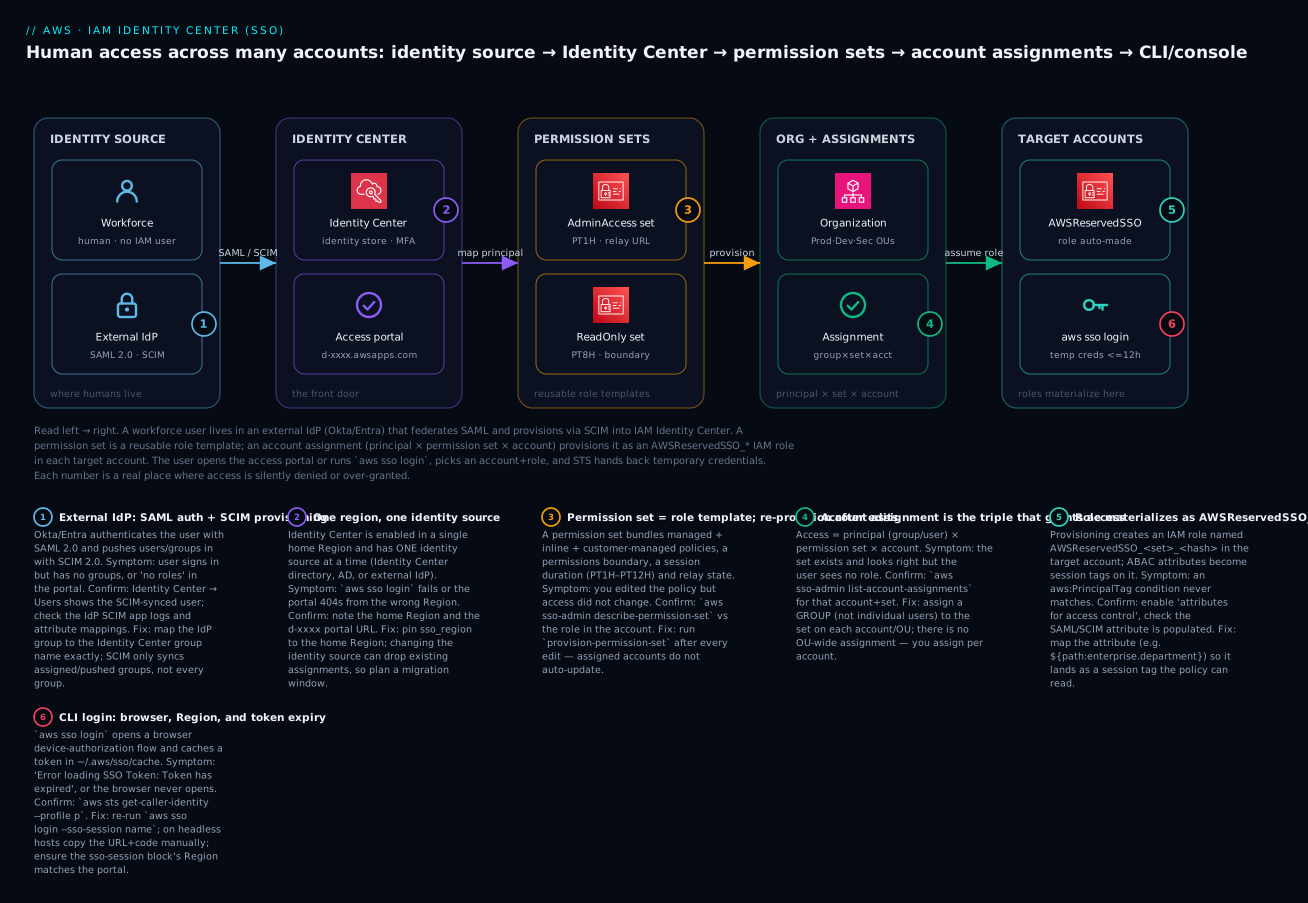
Read the diagram left to right — it is the authorization and access path, not a request packet. On the far left a workforce user lives in an external IdP (Okta or Entra ID); SAML 2.0 authenticates them and SCIM 2.0 provisions them into IAM Identity Center, which runs in a single home Region and owns the identity store and MFA. In the centre, permission sets are reusable role templates — one carries AdministratorAccess with a PT1H session, another ReadOnly with a boundary. The organization ties accounts into OUs, and an account assignment — the group × set × account triple — provisions each set into its target accounts, where it materializes as an AWSReservedSSO_* IAM role. Finally the user opens the access portal or runs aws sso login, picks an account and role, and STS returns temporary credentials valid up to 12 hours.
Each numbered badge marks a real place where access is silently denied or over-granted: SAML/SCIM mapping at the IdP (1), the one-Region/one-source constraint of the instance (2), re-provisioning after editing a set (3), the assignment triple that is so often incomplete (4), the role and its ABAC session tags materializing in-account (5), and the CLI login where Region and token-expiry errors bite (6). The legend narrates each as symptom, how to confirm, and fix.
Real-world scenario
Northwind Payments, a fictional but representative fintech, ran 18 AWS accounts under Organizations with 45 engineers, and every engineer had IAM users in the 4–6 accounts they touched. The trigger for change was an audit finding: a departed contractor still held PowerUserAccess in the shared-services account 90 days after leaving, discovered only because IAM Access Analyzer flagged an access key last used the day before. The auditor’s question — “prove that no former employee retains access to production” — was unanswerable, because the answer lived in 18 separate IAM databases.
The platform team’s remediation was a two-week Identity Center rollout. They already ran Entra ID for corporate identity, so they set the identity source to external IdP, exchanged SAML metadata, and enabled SCIM so joiners, movers and leavers flowed automatically from HR-driven Entra groups. They defined seven permission sets instead of the sprawl of inline policies: PlatformAdmin (AdministratorAccess, PT1H, boundary-capped), AppDeveloper (a curated inline policy plus ABAC on Department), ReadOnlyAuditor (ReadOnlyAccess, PT12H), BillingViewer, SecurityBreakGlass, NetworkAdmin, and DBOperator. ABAC was the unlock: instead of an AppDeveloper set per squad, one set scoped every engineer to resources tagged with the department Entra pushed as a session tag, so the payments squad could never touch the lending squad’s resources despite sharing a permission set.
Assignments were driven entirely from Terraform — a map of {group, permission_set, account} triples rendered aws_ssoadmin_account_assignment resources, so granting ReadOnlyAuditor across the seven-account “Prod” OU was seven lines of HCL, code-reviewed and version-controlled. The PlatformAdmin set carried a permissions boundary so that even an admin could not disable CloudTrail or leave the organization — the guardrail held above the role, complementing the SCPs on the OUs (see AWS Organizations SCPs: Multi-Account Guardrails).
The results were concrete. Onboarding a new engineer dropped from “raise tickets for IAM users in six accounts” to “HR adds them to an Entra group; SCIM syncs them in ~40 minutes.” Off-boarding became instant and provable: disable in Entra, SCIM deactivates them everywhere, and the audit answer is a single assignments export plus CloudTrail. One incident surfaced during rollout — engineers reported “no accounts in the portal” on day one. Root cause: the Entra groups had been created but not pushed to the AWS SCIM app, so the assignments referenced empty groups. Scoping the groups to the app fixed it in minutes and became the top item on their runbook. Six months on, there is not a single human IAM access key left in the org, and the mean time to off-board went from “days, best-effort” to “minutes, guaranteed.”
Advantages and disadvantages
| Advantages | Disadvantages / costs |
|---|---|
| One login for a human across all accounts | Requires AWS Organizations (all features) |
| Temporary credentials — no static keys to leak | One identity source per instance (lock-in-ish) |
| Onboarding/off-boarding via group membership | Switching source is disruptive (re-map, MFA reset) |
| Centralized MFA enforcement | Permission-set edits need explicit re-provision |
| Attributable actions (human name in CloudTrail) | No OU-level assignment — per-account grants |
| ABAC: one set scopes many teams | ABAC misconfig fails silently (empty session tag) |
| Free service | AD source (Managed AD) is billed |
Native Terraform (aws_ssoadmin_*) support |
Customer-managed policy must exist in each account |
Console + CLI + SDK parity (aws sso login) |
Single home Region — get it right upfront |
| 1–12 h session tuning per set | Portal vs role session confusion for users |
Where each matters: the temporary-credentials and off-boarding advantages are decisive for any regulated or growing org — they turn the two hardest identity problems into group edits. The disadvantages are mostly upfront design costs (pick the source and Region carefully, deploy customer-managed policies everywhere, wire re-provisioning into your pipeline) rather than ongoing pain. The one that bites operationally forever is re-provision-after-edit: bake it into your IaC/CI so a changed set always re-syncs to its accounts.
Hands-on lab
This lab enables Identity Center, creates a group and user in the built-in directory, builds a ReadOnly permission set, assigns it to one account, and logs in via aws sso login. It is free (the Identity Center directory costs nothing; you run no AD). Do it in the management account of a test organization, or a delegated admin account.
⚠️ Cost note: IAM Identity Center and its built-in directory are free. This lab incurs no charges. If you instead choose AWS Managed Microsoft AD as a source, that directory is billed (~$0.40/hr). Teardown at the end removes the assignment and permission set.
Step 1 — Enable Identity Center and capture identifiers
Console: IAM Identity Center → Enable. Choose your home Region deliberately (you cannot easily move it). Then capture the instance ARN and identity store ID:
aws sso-admin list-instances
# {
#   "Instances": [{
#     "InstanceArn": "arn:aws:sso:::instance/ssoins-abc1234567890def",
#     "IdentityStoreId": "d-1234567890"
#   }]
# }
INSTANCE_ARN=arn:aws:sso:::instance/ssoins-abc1234567890def
STORE_ID=d-1234567890
Expected: one instance ARN and a d-xxxxxxxxxx identity store ID. Note your portal URL from the console dashboard (e.g. https://d-1234567890.awsapps.com/start).
Step 2 — Create a group and user (built-in directory)
GROUP_ID=$(aws identitystore create-group \
  --identity-store-id "$STORE_ID" \
  --display-name "ReadOnly-Auditors" \
  --query GroupId --output text)

USER_ID=$(aws identitystore create-user \
  --identity-store-id "$STORE_ID" \
  --user-name "jdoe" \
  --display-name "Jane Doe" \
  --name Formatted="Jane Doe",FamilyName="Doe",GivenName="Jane" \
  --emails Value="jane@example.com",Type="work",Primary=true \
  --query UserId --output text)

aws identitystore create-group-membership \
  --identity-store-id "$STORE_ID" \
  --group-id "$GROUP_ID" \
  --member-id UserId="$USER_ID"
Expected: a GroupId, a UserId, and a membership. In the console the user appears under Users; they will receive an email to set a password and register MFA (or you set it manually).
Step 3 — Create the permission set
PS_ARN=$(aws sso-admin create-permission-set \
  --instance-arn "$INSTANCE_ARN" \
  --name "ReadOnly" \
  --description "Org-wide read-only auditor access" \
  --session-duration "PT8H" \
  --relay-state "https://ap-south-1.console.aws.amazon.com/cloudwatch/home?region=ap-south-1" \
  --query PermissionSet.PermissionSetArn --output text)

aws sso-admin attach-managed-policy-to-permission-set \
  --instance-arn "$INSTANCE_ARN" \
  --permission-set-arn "$PS_ARN" \
  --managed-policy-arn "arn:aws:iam::aws:policy/ReadOnlyAccess"
Expected: a permission-set ARN like arn:aws:sso:::permissionSet/ssoins-.../ps-abc123..., with ReadOnlyAccess attached.
Step 4 — Assign the group to an account
TARGET_ACCOUNT=111122223333   # a member account ID

aws sso-admin create-account-assignment \
  --instance-arn "$INSTANCE_ARN" \
  --target-id "$TARGET_ACCOUNT" --target-type AWS_ACCOUNT \
  --permission-set-arn "$PS_ARN" \
  --principal-type GROUP --principal-id "$GROUP_ID"
This auto-provisions. Confirm the role landed in the target account:
aws sso-admin list-account-assignments \
  --instance-arn "$INSTANCE_ARN" \
  --account-id "$TARGET_ACCOUNT" \
  --permission-set-arn "$PS_ARN"
# → PrincipalType GROUP, PrincipalId <group>, PermissionSetArn <ps>
Expected: the assignment listed, and (in the target account) an IAM role named AWSReservedSSO_ReadOnly_<hash> under path /aws-reserved/sso.amazonaws.com/.
Step 5 — Configure the CLI and log in
As the assigned user (jdoe, after they set a password + MFA):
aws configure sso --profile audit
# SSO session name: my-org
# SSO start URL: https://d-1234567890.awsapps.com/start
# SSO region: ap-south-1
# scopes: sso:account:access
# → pick account 111122223333, role ReadOnly

aws sso login --sso-session my-org
aws sts get-caller-identity --profile audit
# Arn: arn:aws:sts::111122223333:assumed-role/AWSReservedSSO_ReadOnly_<hash>/jdoe
aws s3 ls --profile audit          # works (read-only)
aws s3 mb s3://should-fail --profile audit  # AccessDenied — read-only, as intended
Expected: get-caller-identity shows the assumed AWSReservedSSO_ReadOnly role with jdoe as the session name; reads succeed, writes are denied.
Verification checkpoints
| Checkpoint | Command / place | Pass looks like |
|---|---|---|
| Instance exists | aws sso-admin list-instances |
One ARN + d-xxxx |
| User in group | Console → Groups → members | jdoe listed |
| Set has policy | aws sso-admin list-managed-policies-in-permission-set |
ReadOnlyAccess |
| Assignment exists | list-account-assignments |
Your group + set |
| Role provisioned | Target account IAM roles | AWSReservedSSO_ReadOnly_* |
| Login works | aws sts get-caller-identity |
Assumed-role ARN + username |
| Least privilege holds | aws s3 mb (write) |
AccessDenied |
The same in Terraform
data "aws_ssoadmin_instances" "this" {}

locals {
  instance_arn      = tolist(data.aws_ssoadmin_instances.this.arns)[0]
  identity_store_id = tolist(data.aws_ssoadmin_instances.this.identity_store_ids)[0]
}

resource "aws_identitystore_group" "auditors" {
  identity_store_id = local.identity_store_id
  display_name      = "ReadOnly-Auditors"
  description        = "Read-only auditors"
}

resource "aws_ssoadmin_permission_set" "readonly" {
  name             = "ReadOnly"
  description      = "Org-wide read-only auditor access"
  instance_arn     = local.instance_arn
  session_duration = "PT8H"
  relay_state      = "https://ap-south-1.console.aws.amazon.com/cloudwatch/home?region=ap-south-1"
}

resource "aws_ssoadmin_managed_policy_attachment" "readonly" {
  instance_arn       = local.instance_arn
  permission_set_arn = aws_ssoadmin_permission_set.readonly.arn
  managed_policy_arn = "arn:aws:iam::aws:policy/ReadOnlyAccess"
}

resource "aws_ssoadmin_account_assignment" "readonly_dev" {
  instance_arn       = local.instance_arn
  permission_set_arn = aws_ssoadmin_permission_set.readonly.arn
  principal_id       = aws_identitystore_group.auditors.group_id
  principal_type     = "GROUP"
  target_id          = "111122223333"
  target_type        = "AWS_ACCOUNT"
}
Terraform handles re-provisioning on change automatically — editing the managed-policy attachment and re-applying pushes the update to assigned accounts, which is exactly why IaC beats the console here.
Teardown
aws sso-admin delete-account-assignment \
  --instance-arn "$INSTANCE_ARN" \
  --target-id "$TARGET_ACCOUNT" --target-type AWS_ACCOUNT \
  --permission-set-arn "$PS_ARN" \
  --principal-type GROUP --principal-id "$GROUP_ID"

aws sso-admin delete-permission-set \
  --instance-arn "$INSTANCE_ARN" --permission-set-arn "$PS_ARN"

aws identitystore delete-user  --identity-store-id "$STORE_ID" --user-id  "$USER_ID"
aws identitystore delete-group --identity-store-id "$STORE_ID" --group-id "$GROUP_ID"
Deleting the last assignment removes the AWSReservedSSO_ReadOnly_* role from the target account. You can leave the instance enabled (it is free) or disable it in the console.
Common mistakes & troubleshooting
This is the section you will return to. The playbook table first — symptom to root cause to the exact confirm to the fix — then a status/error reference and a decision table, then prose on the three nastiest failures.
| # | Symptom | Root cause | Confirm (exact command / console path) | Fix |
|---|---|---|---|---|
| 1 | Portal shows no accounts / no roles | No assignment references the user’s groups | aws sso-admin list-account-assignments --account-id <acct> --permission-set-arn <ps> |
Assign the user’s group × set × account |
| 2 | Edited a permission set, access unchanged | Assigned accounts not re-provisioned | aws sso-admin describe-permission-set vs the role’s policies |
aws sso-admin provision-permission-set --target-type ALL_PROVISIONED_ACCOUNTS |
| 3 | aws sso login: Token has expired |
SSO access token expired | aws sts get-caller-identity --profile p → SSOTokenLoadError |
Re-run aws sso login --sso-session <name> |
| 4 | aws sso login: browser never opens |
Headless / no default browser | Look for the printed URL + code | Open URL manually, enter the code |
| 5 | Login/token errors with wrong Region | sso_region ≠ instance home Region |
Check portal URL Region vs ~/.aws/config |
Set sso_region to the home Region |
| 6 | User authenticates but has no groups | SCIM group never pushed from IdP | Identity Center → Groups (group absent/empty) | Push/scope the group in the IdP SCIM app |
| 7 | New hires never appear in AWS | SCIM bearer token expired | Identity Center → provisioning status; IdP sync logs | Rotate SCIM token; update the IdP |
| 8 | Provisioning FAILED on a set | Referenced customer-managed policy missing in account | describe-permission-set-provisioning-status reason |
Deploy the policy in that account, re-provision |
| 9 | ABAC condition never matches | Attribute not populated/mapped → empty session tag | CloudTrail session context; confirm attribute set | Map ${path:...} attribute; enable ABAC attributes |
| 10 | Admin edited the AWSReservedSSO role, change vanished | Re-provision reverts manual edits | Compare role now vs after next provision | Edit the permission set, never the role |
| 11 | External IdP: can’t sign in at all | SAML metadata/trust mismatch | IdP sign-in logs; SAML response error | Re-exchange SAML metadata both ways |
| 12 | sso_role_name not found |
Used the permission-set ARN, not its name | ~/.aws/config profile |
Set sso_role_name to the set name |
| 13 | Access works, then drops mid-task | Permission-set session (PT1H) expired | get-caller-identity fails after ~1 h |
Raise session duration or re-login |
| 14 | Can’t enable Identity Center | Organizations not in all features | Organizations console → settings | Enable all features first |
The status and error strings you will actually see, decoded:
| Error / status | Where | Meaning | Fix |
|---|---|---|---|
SSOTokenLoadError / Token has expired |
CLI | SSO token missing/expired | aws sso login again |
| Error loading SSO Token | CLI | No cached token for the session | aws sso login --sso-session <name> |
UnauthorizedException |
sso/sso-admin |
Token invalid or no permission | Re-login; check admin IAM perms |
| The SSO session has expired or is invalid | CLI/SDK | Portal session ended | Re-authenticate |
AccessDeniedException on sso-admin:* |
Admin CLI | Caller lacks Identity Center admin | Grant AWSSSODirectoryAdministrator/SSO admin |
| Provisioning status FAILED | sso-admin |
Missing dependency (policy/boundary) | Read reason; deploy dependency; re-provision |
| SAML Response was not successful | IdP | Assertion/trust mismatch | Re-exchange metadata; check attribute map |
| SCIM 401 / token invalid | IdP provisioning | Expired/wrong SCIM token | Rotate token in Identity Center |
| No roles available (portal) | Portal | User assigned to nothing | Create the assignment triple |
ConflictException on assign |
sso-admin |
Assignment already exists | It’s already there — no action |
ThrottlingException |
Bulk assigns | Too many API calls | Back off; use IaC with retries |
Role MaxSessionDuration mismatch |
Console | Set session > role cap | Session set to PT1H–PT12H only |
And the fast decision table for the two symptoms that account for most tickets:
| If you see… | It’s probably… | Do this |
|---|---|---|
| No roles/accounts in portal | Missing or mis-targeted assignment | Assign the group to the account |
| Policy edit didn’t take effect | Not re-provisioned | provision-permission-set |
| Login worked yesterday, fails today | Token expired | aws sso login |
| User exists in IdP, not in AWS | SCIM didn’t push the group | Scope/push group; check SCIM token |
| Condition denies everyone | Empty session tag (ABAC) | Map + populate the attribute |
| Manual role edit reverted | Re-provision overwrote it | Edit the set, not the role |
“Not authorized” running sso-admin |
You lack SSO admin rights | Grant SSO admin; use delegated admin |
| Can’t enable the service | Org not all-features | Enable all features in Organizations |
The three nastiest failures, in prose. First, “no roles in the portal” after an external-IdP rollout. The user signs in perfectly (SAML works), so it looks like an AWS problem, but the access portal is empty. The cause is almost always that the IdP created the user but never pushed the group over SCIM — Okta requires you to “push groups” explicitly and Entra only syncs groups scoped to the enterprise app. Your assignment targets a group that, from AWS’s view, has no members. Confirm in Identity Center → Groups (the group is missing or empty) and in the IdP’s provisioning logs. The fix is to scope/push the group in the IdP; do not add users individually in AWS as a workaround, because SCIM will fight you.
Second, the silent re-provision gap. You tighten a permission set — remove an action, add a Deny — apply it, and the offending access still works. Identity Center changed the template but did not touch the already-provisioned roles in the member accounts; they are now out of date. This is not a bug, it is the model: assignments do not auto-track set edits. Confirm by comparing describe-permission-set against the actual role in a target account. The fix is aws sso-admin provision-permission-set --target-type ALL_PROVISIONED_ACCOUNTS (or Terraform, which does it for you). Wire this into your pipeline so a merged set change always re-provisions — otherwise your policy-as-code drifts from reality and a security tightening never lands.
Third, ABAC that denies everyone. You build one DeveloperAccess set with a aws:PrincipalTag/Department condition, roll it out, and every developer is denied everything. The policy is correct; the session tag is empty. Either “attributes for access control” is not enabled on the instance, or the department attribute is not mapped from the IdP/store, or the IdP user simply has no department value. Because an absent tag makes the StringEquals condition false, the effect is a blanket deny that reads like a policy bug. Confirm by inspecting the assumed-role session context (CloudTrail requestParameters/session tags) — not the policy JSON. Fix the mapping (${path:enterprise.department} for AD, the SAML/SCIM attribute for an IdP) and ensure the attribute is populated for real users before you cut over.
Best practices
- Humans in Identity Center, machines in IAM roles. Static human access keys are a finding; eliminate them and keep only a single, alarmed break-glass IAM user with a physical MFA key.
- Assign groups, never individual users. Onboarding and off-boarding become group edits; individual assignments recreate the sprawl you are escaping.
- Fewer, broader permission sets. Model jobs (Admin, Developer, Auditor, Billing), not people or projects; use ABAC to specialize rather than minting a set per team.
- Bake re-provisioning into CI. A changed permission set must re-provision to all assigned accounts automatically, or policy-as-code silently drifts from reality.
- Drive assignments from Terraform. A reviewed map of
{group, set, account}triples beats console clicks and gives you an auditable grant history. - Cap admin sets with a permissions boundary. Even
AdministratorAccessshould not be able to disable CloudTrail or leave the org — boundary above the role, SCPs above the OU. - Short sessions for sensitive access. PT1H for prod/admin, longer for read-only; shrink the window a leaked credential is usable.
- Pin the home Region and identity source early. Both are painful to change; decide before you build 200 assignments.
- Deploy customer-managed policies everywhere first. A referenced policy must exist in every target account or provisioning fails.
- Delegate administration off the management account to a dedicated security/identity account, and restrict who holds SSO admin.
- Rotate the SCIM token before it expires and monitor provisioning status so joiners/leavers never silently stop syncing.
- Enforce MFA centrally (WebAuthn/FIDO2 preferred) and set a sane portal session duration.
Security notes
Identity Center is a security control, but it has its own attack surface and least-privilege story. The core wins are structural: no long-lived human keys, centrally enforced MFA, temporary credentials, and human-attributable CloudTrail. Layer the following on top.
| Control | Why | How |
|---|---|---|
| Delegated administration | Keep humans out of the management account | Register a security account as SSO delegated admin |
| MFA enforcement | Stop credential-only compromise | Require MFA; prefer WebAuthn/FIDO2 |
| Permissions boundary on admin sets | Bound even AdministratorAccess |
Attach a boundary to the set |
| SCPs above the OU | Cap what any set can do per OU | See SCP guardrails article |
| Short session duration | Shrink leaked-credential window | PT1H for sensitive sets |
| Portal session limit | Force periodic re-auth | Lower the instance sign-in session |
| Break-glass hygiene | Recover if IdP is down | One alarmed IAM user, physical MFA, sealed |
| CloudTrail on assignments | Detect grant changes | Alert on CreateAccountAssignment |
| Access reviews | Catch stale grants | Periodic assignment export + review |
| Least-privilege admin | Limit who edits sets | Scope sso-admin:* tightly |
| SCIM token as a secret | It grants provisioning | Store securely; rotate on schedule |
| ABAC for isolation | Blast-radius by attribute | Session tags + resource tags |
The permission-set model composes with the rest of the IAM chain rather than replacing it: an SSO role is still subject to SCPs, RCPs, permissions boundaries, and resource policies. A permission set can grant AdministratorAccess and the user still cannot do something an SCP denies on the OU — the guardrail wins. That layering is the whole point: convenience at the identity layer, hard limits at the org layer.
Cost & sizing
IAM Identity Center itself is free — the service, the built-in identity store, permission sets, assignments, and aws sso login cost nothing. What can appear on the bill are the identity source (if you run AWS Managed Microsoft AD) and adjacent services, plus your external IdP’s own licensing.
| Cost driver | Charge (approx.) | INR/month (approx.) | Notes |
|---|---|---|---|
| Identity Center service | Free | ₹0 | Sets, assignments, portal, CLI |
| Identity Center directory | Free | ₹0 | Built-in identity store |
| AWS Managed Microsoft AD (Standard) | ~$0.40/hr | ~₹24,000 | Only if AD is your source |
| AWS Managed Microsoft AD (Enterprise) | Higher | Higher | Larger/multi-Region AD |
| AD Connector (small) | ~$0.05/hr | ~₹3,000 | Proxy to on-prem AD |
| External IdP (Okta/Entra) | Per your license | Varies | Not an AWS charge |
| CloudTrail (assignments/logins) | Mgmt events free | ~₹0 | Data events extra |
| STS calls | Free | ₹0 | Credential vending |
Sizing is about permission-set count and assignment fan-out, not compute. Favour a small catalogue of broad, ABAC-specialized sets over hundreds of narrow ones — you have ~500 sets per instance and only ~50 provisioned per account, and each provisioned set is an IAM role counting toward the ~1,000-roles-per-account quota. If AD is your source, right-size it: AD Connector is far cheaper than Managed AD when you already have on-prem domain controllers; Managed AD earns its cost only when you need actual AWS-hosted DCs. For most orgs the correct and cheapest answer is the free built-in directory fed by an external IdP over SCIM — you pay only for the IdP you already own.
Interview & exam questions
Q1. Why is IAM Identity Center preferred over IAM users for human access in a multi-account org? It centralizes identity (one login, one place to grant/revoke), issues temporary credentials instead of static keys, enforces MFA centrally, and makes onboarding/off-boarding a group-membership change rather than per-account IAM edits. Maps to SAA-C03 and SCS-C02.
Q2. What are the three parts of an account assignment? A principal (group or user), a permission set, and a target account. All three must exist and be provisioned before a user sees a role in the portal.
Q3. A permission set materializes as what, and named how? As an IAM role in each assigned account, named AWSReservedSSO_<setname>_<hash> under path /aws-reserved/sso.amazonaws.com/. You must not hand-edit it — re-provisioning reverts changes.
Q4. You edited a permission set but access didn’t change. Why? Assigned accounts do not auto-update on a set edit; you must re-provision (provision-permission-set, or let Terraform do it). The provisioned roles were out of date.
Q5. What is the difference between SAML and SCIM in an external-IdP setup? SAML 2.0 handles authentication (sign-in); SCIM 2.0 handles provisioning (pushing and syncing users/groups). Without SCIM, a user can log in but has no groups and thus no assignments — an empty portal.
Q6. What are the two session durations and how do they differ? The permission-set session (PT1H–PT12H) is the lifetime of the role credentials; the access-portal (sign-in) session (default 8 h, up to 90 days) is how long before the user re-authenticates to the portal. They are independent.
Q7. How does ABAC work in Identity Center? Enable “attributes for access control”; user attributes from the identity source become session tags on the assumed role; permission-set policies use aws:PrincipalTag/<key> conditions so one set scopes access per department/project. Maps to SCS-C02.
Q8. Can an SCP block a permission set that grants AdministratorAccess? Yes. The SSO role is still evaluated against SCPs on the OU; an explicit Deny in an SCP overrides the admin grant. The permission set grants; the SCP caps. See AWS Organizations SCPs: Multi-Account Guardrails.
Q9. What identity sources can Identity Center use, and how many at once? The built-in Identity Center directory, Active Directory (AWS Managed Microsoft AD or AD Connector), or an external IdP via SAML+SCIM — exactly one at a time per instance, and switching is disruptive.
Q10. How does a user get CLI access? aws configure sso writes an [sso-session] block and profile to ~/.aws/config; aws sso login runs a device-authorization flow and caches an SSO token; the CLI then vends temporary role credentials per profile. Maps to DVA-C02/SOA-C02.
Q11. What breaks if sso_region is wrong? The CLI cannot find or validate the token for your instance — login/token-load errors. It must equal the instance’s home Region.
Q12. Why assign groups rather than users? So onboarding/off-boarding is a single group-membership change with zero AWS edits; per-user assignments recreate multi-account sprawl.
Quick check
- What is the exact triple that makes up an account assignment?
- A user signs in via your external IdP but the portal shows no accounts. What is the most likely cause?
- You removed an action from a permission set and applied it, but access still works. What did you forget?
- What is the maximum permission-set session duration, and what setting governs the portal sign-in session separately?
- Where do ABAC attributes end up on the role, and which policy condition key reads them?
Answers
- Principal (group/user) × permission set × target account — all three, provisioned.
- SCIM never pushed the user’s group into Identity Center (Okta “push groups”; Entra app-scoped groups), so the assignment targets an empty group. SAML auth works but there is nothing assigned.
- To re-provision the permission set to its assigned accounts (
provision-permission-set/ re-apply Terraform). Set edits don’t auto-propagate. - PT12H for the permission-set session; the access-portal session is a separate instance setting (default 8 h, up to ~90 days).
- As session tags on the assumed-role session; policies read them via
aws:PrincipalTag/<key>(matched againstaws:ResourceTag/<key>for resource scoping).
Glossary
| Term | Definition |
|---|---|
| IAM Identity Center | AWS service (formerly AWS SSO) for centralized human access to many accounts with temporary credentials. |
| Instance | Your Identity Center deployment; one org instance in a single home Region. |
| Identity source | Where users/groups come from: Identity Center directory, Active Directory, or external IdP. One at a time. |
| Identity store | The built-in user/group directory, identified d-xxxxxxxxxx. |
| Permission set | A reusable bundle of policies + session duration + relay state; a role template. |
| Account assignment | The grant: principal × permission set × account. |
| Provisioning | Creating/updating the AWSReservedSSO_* IAM role in a target account from a permission set. |
| AWSReservedSSO role | The IAM role a permission set becomes in each account; do not hand-edit. |
| Access portal | The web UI (awsapps.com/start) listing a user’s account+role tiles. |
aws sso login |
CLI command running an OAuth device flow to cache an SSO token for the profile. |
| sso-session block | The [sso-session] stanza in ~/.aws/config shared across profiles (token-based auth). |
| SAML 2.0 | Protocol for federated authentication from an external IdP. |
| SCIM 2.0 | Protocol for provisioning users/groups from an external IdP into the identity store. |
| ABAC | Attribute-based access control: user attributes become session tags used in policy conditions. |
| Session tag | A key/value on the assumed-role session, read via aws:PrincipalTag/<key>. |
| Permissions boundary | The maximum permissions the set’s role can have — a ceiling, not a grant. |
| Relay state | The post-login console redirect URL configured on a permission set. |
| Delegated administration | Managing Identity Center from a member (security) account instead of the management account. |
Next steps
- Build the account and OU structure this rests on: AWS Organizations and IAM Foundations: Accounts, OUs and Roles.
- Automate the whole baseline, Identity Center included: AWS Control Tower Guardrails: Building a Secure Multi-Account Foundation.
- Cap what any permission set can do, even admin: AWS Organizations SCPs: Multi-Account Guardrails.
- Understand the role-assumption mechanics under human SSO, for machines and cross-account: AWS IAM Cross-Account Roles and AssumeRole: Hands-On.
- Wire ABAC deeply with tagging strategy and permission boundaries across your estate as the next maturity step.