Quick take: A Service Control Policy is a ceiling, not a key. It can never grant an action — it only caps the maximum any principal in an account can do, including the account’s own administrators. Attach it to an OU, and every account beneath inherits the cap. Get the ceiling right and a compromised admin still cannot leave the org, turn off logging, or spin up crypto miners in a region you have never used.
A retail platform ran everything in one AWS account for three years. When a developer’s leaked access key was used to launch 400 p4d GPU instances across six regions overnight, the bill was the least of the damage — the attacker also disabled CloudTrail so nobody could see what else they touched. The post-incident review reached one conclusion the team had heard before and ignored: a single account has no place to stand a guardrail. There is nothing above the administrator that says “you may never do this.” AWS Organizations gives you that place, and Service Control Policies (SCPs) are the guardrails you bolt to it.
This article is the step-by-step build. You will lay out the recommended organizational unit (OU) structure — Security, Infrastructure, Workloads split into Prod and Non-Prod, Sandbox and Suspended — and understand why each OU exists as a blast-radius and policy boundary. You will learn the one rule that trips up everyone: an SCP is a permission boundary for the whole account, not a grant, so an action is only allowed when it is permitted in both the SCP chain and IAM. You will choose between an allow-list and a deny-list strategy, attach policies at the root, an OU and a single account and watch them inherit, and paste in the canonical guardrails every serious org runs — deny leaving the organization, deny disabling CloudTrail/GuardDuty/Config, deny operating outside approved regions, deny root-user actions, require IMDSv2, require encryption, and deny deleting security resources. Every step is shown in the Console, with the aws organizations CLI, and in Terraform, and the last third of the article is a troubleshooting playbook for the failures that make SCPs feel like black magic — the management-account exemption, the FullAWSAccess lockout, and the region-deny that quietly kills the console.
We build the raw mechanism by hand. If you would rather have AWS stand this structure up and keep it drifting-free for you, that is AWS Control Tower Guardrails: Building a Secure Multi-Account Foundation — Control Tower is Organizations plus a managed landing zone plus baked-in guardrails, and everything here is what it automates. This article also assumes the identity and policy-evaluation basics from AWS Organizations and IAM Foundations: Accounts, OUs and Roles; if the phrase “explicit Deny always wins” is new to you, read that first.
What problem this solves
In a single account, or in a flat pile of accounts with no organization over them, there is no altitude above the administrator. Whoever holds AdministratorAccess — or whoever steals their credentials — can do anything the AWS APIs allow: delete the audit trail, disable threat detection, launch resources in any of 30+ regions, leave your consolidated bill, or attach an over-broad policy to themselves. IAM alone cannot stop this, because IAM is a granting system; the same admin who can be granted power can grant it back. You need a control that sits outside and above every principal in the account and subtracts from what is even possible. That control is the SCP.
What breaks without it, concretely: a misconfigured CI role in “dev” can reach the production account because nothing structurally separates them; an engineer can spin up a data pipeline in ap-northeast-3 that your security team has no logging or GuardDuty coverage in; a compromised principal can call cloudtrail:StopLogging and blind you during the exact window you most need visibility; a departing contractor’s role can call organizations:LeaveOrganization on an account and take it (and its resources) out of your governance and billing. None of these are exotic — they are the standard first moves in a real incident, and every one of them is a single SCP away from being impossible.
Who hits this: any team past the “one account to try AWS” stage. It bites hardest on regulated workloads (a PCI or SOC 2 auditor will ask “prove production cannot be reached from dev” and “prove logging cannot be disabled” — both are SCP answers), on platform teams vending accounts to dozens of product squads, and on any org that has grown enough that “we trust everyone with admin” is no longer a security posture. The rest of this article is the structure and the exact policies that turn those “prove it” questions into a one-line attach-policy.
To frame the whole field before the deep sections, here is every layer a guardrail estate is built from, the question it answers, and what fails if you skip it:
| Layer | The question it answers | Where it lives | Primary failure if you skip it |
|---|---|---|---|
| AWS account | What is the blast-radius boundary? | The org | One breach or one runaway script = everything |
| Organization + management account | Who governs and pays for the accounts? | Management (payer) account | No place to attach any guardrail |
| Organizational Units (OUs) | How do I group accounts by trust and function? | The org root | Every account gets the same (or no) policy |
| Service Control Policies (SCPs) | What is the maximum anyone in an account may do? | Root / OUs / accounts | Admins and attackers can do anything |
| Tag Policies | What tags must resources carry, and with what values? | Root / OUs / accounts | Cost allocation and ABAC break |
| Backup Policies | How is data centrally backed up and retained? | Root / OUs / accounts | Per-account backup drift, no org retention floor |
| Delegated administration | Which member account runs a security service org-wide? | Registered per service | Everything funnels through the payer |
| Org CloudTrail | Who did what, and why was a call denied? | Security OU → Log Archive | You cannot prove a guardrail fired |
Learning objectives
By the end of this article you can:
- Justify a multi-account design in the language your leadership uses — blast-radius isolation, clean cost attribution, and hard security boundaries — and explain what each buys you.
- Lay out the recommended OU structure (Security, Infrastructure, Workloads/Prod, Workloads/Non-Prod, Sandbox, Suspended) and place any new account in the right OU.
- State the single most important SCP rule — an SCP is a ceiling, not a grant — and predict the outcome of any combination of SCP Allow/Deny and IAM Allow/Deny.
- Choose deliberately between a deny-list and an allow-list SCP strategy and explain the
FullAWSAccessmechanics behind each. - Attach SCPs at the root, an OU, and a single account, and reason about inheritance — how multiple SCPs in a chain intersect.
- Write and deploy the canonical guardrail SCPs: deny leaving the org, protect CloudTrail/GuardDuty/Config, region-lock with global-service carve-outs, deny root-user actions, require IMDSv2, require encryption, and protect security resources.
- Apply Tag Policies and Backup Policies, and set up delegated administration so a member account (not the payer) runs your security services.
- Diagnose the classic SCP failures — the management-account exemption, the
FullAWSAccesslockout, inheritance confusion, and a region-deny that breaks global services — from the exact CloudTrail message and CLI call.
Prerequisites & where this fits
You should already have an AWS Organizations organization with all features enabled (not merely consolidated billing — SCPs require all features), access to the management account, and at least one member account you can experiment with. You need the aws CLI v2 configured with a profile that can call organizations:* in the management account, comfort reading and editing JSON policy documents, and — for the Terraform sections — Terraform 1.5+ with the aws provider 5.x. Nothing here needs deep IAM authoring skill, but you must be fluent in the idea that an explicit Deny always wins and that permissions are an intersection of several policy types, not a single list.
This is the preventive-guardrail layer of an AWS estate. It sits directly on top of the account/OU/IAM foundation and directly beneath every workload. Here is where it fits among its neighbours, and who usually owns each piece during a change or an incident:
| Layer | What lives here | Who usually owns it | Failure classes it causes |
|---|---|---|---|
| Management account / billing | Org creation, payer, SCP authoring | Cloud platform + finance | Total compromise if it leaks; workloads here dodge all SCPs |
| Organization + OUs | Account grouping, policy attach points | Platform / security | Wrong OU = wrong guardrails inherited |
| SCPs (this article) | Maximum-permission ceilings | Security / platform | Too broad (no protection) or too tight (legit work denied) |
| IAM Identity Center | SSO, permission sets, MFA | Identity / platform | Right people, wrong ceiling — SCP caps the permission set |
| IAM (per account) | Roles, identity policies, boundaries | App + platform | Grant exists but SCP caps it, or SCP allows but IAM doesn’t |
| Tag / Backup policies | Tag governance, org backup plans | FinOps / platform | Untagged spend, no retention floor |
| Org CloudTrail | Every API call + deny reason | Security | “We can’t prove the guardrail worked” |
The identity side of this — how humans get into these accounts under the SCP ceiling — is AWS IAM Identity Center: SSO and Permission Sets. The tag governance that Tag Policies enforce is covered end to end in AWS Tagging Strategy: Cost Allocation and Enforcement. And when a call is denied and you need to know whether an SCP, an IAM policy or a boundary did it, work through AWS IAM Policy Evaluation: Troubleshooting Access Denied.
Core concepts
Why multi-account at all
A single AWS account is one flat namespace of resources, one trust boundary, and one bill. Splitting a workload estate across many accounts buys three things that no amount of in-account IAM can replicate. First, blast-radius isolation: an account is the hardest boundary AWS offers, so a breach, a runaway script, a service-quota exhaustion, or a bad deploy in one account cannot touch another unless you deliberately build a path. Second, billing and cost attribution: each account is a natural cost centre, so a per-account bill answers “what does the payments team spend?” without heroic tag hygiene. Third, hard governance boundaries: an account is the unit an SCP, a GuardDuty membership, a Config aggregator, and a delegated-admin registration all attach to — you cannot region-lock “the dev part” of a shared account, but you can region-lock the entire Non-Prod OU.
| Driver | Single account | Multi-account | What the account boundary gives you |
|---|---|---|---|
| Blast radius | One breach = everything | Breach stops at the account wall | The strongest isolation AWS offers |
| Cost attribution | Tag-hygiene heroics, always leaky | Per-account bill by design | Clean chargeback / showback |
| Service quotas | One workload can exhaust limits for all | Quotas are per-account | Noisy-neighbour protection |
| Guardrails | Nowhere to attach a ceiling | SCP per OU/account | Structural, not best-effort, controls |
| Environment separation | Dev IAM error reaches prod data | Prod is a different account | Auditor-provable dev↮prod isolation |
| Delegation | All-or-nothing admin | Team owns its account, capped by SCP | Autonomy without a master key |
The Organizations building blocks
AWS Organizations is a container for accounts governed centrally. Its parts:
| Concept | What it is | Key facts and limits |
|---|---|---|
| Management account | The account that creates the org and pays the consolidated bill (a.k.a. payer). | Exactly one per org. SCPs never restrict it. Keep it workload-free. |
| Member account | Every other account in the org. | Fully governed by SCPs inherited from its OU chain. |
| Organization root | The single top node of the hierarchy (r-xxxx). |
Not the account root user. Policies attached here apply org-wide. |
| Organizational Unit (OU) | A folder of accounts and/or nested OUs. | Nestable to 5 levels below the root; policies attach and inherit downward. |
| Handshake / invite | Inviting an existing account, or creating a new one. | LeaveOrganization removes an account — a thing you deny with an SCP. |
| All features | The org mode that unlocks SCPs and other policy types. | Consolidated-billing-only orgs cannot use SCPs; enable all features first. |
| Service-linked roles | Roles AWS services create in your account. | Exempt from SCPs — a deny cannot break AWS’s own automation. |
The policy types Organizations can attach
SCPs are the famous one, but Organizations attaches several management policy types, all of which inherit down the OU tree:
| Policy type | What it controls | Effect | Requires |
|---|---|---|---|
| Service Control Policy (SCP) | Maximum permissions for principals in an account | Caps (denies/allow-lists) actions; never grants | All features + enable policy type |
| Resource Control Policy (RCP) | Maximum access to resources, including by external principals | Caps the resource side (data perimeter) | All features + enable policy type |
| Tag Policy | Which tag keys/values resources must carry | Reports or enforces compliant tags | All features + enable policy type |
| Backup Policy | Org-wide AWS Backup plans, schedules, retention | Centrally creates/enforces backup plans | All features + enable policy type |
| Declarative Policy | Baseline service configuration state (e.g. EC2 IMDSv2, VPC BPA) | Pins a service to a desired state | All features + enable policy type |
| AI Services Opt-Out | Whether AWS may use your content to improve AI services | Opts accounts in/out org-wide | All features + enable policy type |
| Chatbot Policy | Access from AWS Chatbot (Slack/Teams) | Governs chat-ops access | All features + enable policy type |
This article focuses on SCPs, Tag Policies and Backup Policies; RCPs and declarative policies are the natural next layer and are covered in the delegated-admin and data-perimeter articles.
SCP is a ceiling, not a grant — the one rule
This is the concept everything else depends on. An SCP defines the maximum available permissions for the IAM users and roles in an account. It does not grant anything. A principal’s effective permissions are the intersection of what the SCP chain allows and what IAM grants, minus any explicit Deny in either. Say it as a formula: effective = (SCP-allowed) ∩ (IAM-allowed) − (any explicit Deny).
| Property | Service Control Policy | IAM identity policy |
|---|---|---|
| Can it grant access? | No — never | Yes |
| Can it deny/cap access? | Yes | Yes |
| Attaches to | Root, OU, or account | User, group, or role |
| Affects | All principals in the account (incl. member root user) | The one principal it’s attached to |
| Managed by | The org (central) | Each account (local) |
| Applies to management account? | No | Yes |
| Applies to service-linked roles? | No | N/A |
| A call is allowed when | SCP allows AND IAM allows AND no explicit Deny | (combined with the SCP rule at left) |
The single most common misunderstanding is thinking an SCP Allow gives someone access. It does not. An SCP Allow only widens the ceiling to include those actions; the principal still needs an IAM Allow to actually use them. This is why you almost never write SCP Allow statements in a deny-list org — the FullAWSAccess policy already sets the ceiling to *.
Equally important is knowing what an SCP does not touch — these exemptions are exam favourites and real-world footguns:
| An SCP does NOT affect… | Meaning | Consequence |
|---|---|---|
| The management account | No SCP restricts the payer | Never run workloads there; test from a member account |
| Service-linked roles | AWS’s own automation is exempt | A deny can’t break SLR-driven features |
| Resource-based policies | SCPs cap the principal, not the resource | Use RCPs for the resource / data-perimeter side |
| Anything outside your org | SCPs only govern member accounts | External principals need RCPs / resource policies |
| Existing resources (mostly) | SCPs gate actions, not current state | Use Config / declarative policies to remediate state |
| The management-account root user | Exempt like the account it belongs to | Lock it with hardware MFA regardless |
It also helps to place SCPs alongside the other capping mechanisms people confuse them with:
| Control | Scope | Grants? | Set by | Applies to |
|---|---|---|---|---|
| SCP | Whole account (via OU) | No | The org | All principals in member accounts |
| Permissions boundary | One principal | No | Each account’s admin | The single role/user it’s attached to |
| IAM identity policy | One principal | Yes | Each account’s admin | The principal it’s attached to |
| IAM explicit Deny | One principal | No (denies) | Each account’s admin | The principal it’s attached to |
| RCP | A resource | No | The org | Access to resources, incl. external callers |
An action survives only if it clears every cap that applies (SCP ∩ boundary ∩ session policy) and is granted by an identity or resource policy, with no explicit Deny anywhere.
Allow-list vs deny-list strategy
There are two ways to shape the ceiling. In a deny-list strategy you keep the AWS-managed FullAWSAccess policy attached (its single statement is Allow * on *, so the ceiling starts at “everything”) and layer Deny statements to carve pieces out. In an allow-list strategy you remove FullAWSAccess and attach SCPs that explicitly Allow only the services you sanction, so the ceiling starts at “nothing” and you add back.
| Aspect | Deny-list (keep FullAWSAccess) | Allow-list (remove FullAWSAccess) |
|---|---|---|
| Ceiling starts at | Everything (*) |
Nothing |
| You write | Deny statements for what’s forbidden |
Allow statements for what’s permitted |
| New AWS services | Available by default (until denied) | Blocked by default (until allowed) |
| Maintenance | Lower; add a deny when needed | Higher; add allows as needs grow |
| Best for | Most OUs (Workloads, Infra, Security) | Tightly-scoped OUs (Sandbox, PCI, a locked training account) |
| Failure mode | Forgot to deny something dangerous | Forgot to allow something needed → broad breakage |
| Risk if misapplied | Over-broad (thing you meant to block slips through) | Over-tight (FullAWSAccess removed with no allow = total lockout) |
Most real orgs run deny-list everywhere except a few special OUs. Allow-list is powerful but brittle: every new legitimate need is a policy change, and removing FullAWSAccess without a complete allow set locks the OU out of everything (a failure we return to in troubleshooting).
The evaluation rule: an action needs an Allow in BOTH places
When a principal in a member account makes a request, AWS evaluates SCPs as part of the full authorization chain. For the SCP layer specifically, the request must be allowed by every SCP in the chain from the root down to the account (each level’s SCPs are intersected), and there must be no explicit Deny at any level. Then, separately, IAM must also allow it. Here is the truth table that matters:
| SCP chain result | IAM result | Final decision | Why |
|---|---|---|---|
| Allowed (in ceiling) | Allow | Allow | Both agree |
| Allowed (in ceiling) | No Allow (implicit deny) | Deny | IAM never granted it |
| Allowed (in ceiling) | Explicit Deny | Deny | Explicit Deny wins |
| Explicit Deny in SCP | Allow | Deny | SCP Deny wins over any IAM Allow |
| Not in ceiling (allow-list gap) | Allow | Deny | Outside the SCP ceiling |
| Any | Any, but principal is management-account | Allow (SCP ignored) | SCPs don’t apply to the payer |
| Any | Any, but principal is a service-linked role | Allow (SCP ignored) | SLRs are exempt |
Read row 4 twice: an admin with AdministratorAccess (Allow * on *) is still denied by an SCP Deny. That is the whole point — the SCP sits above IAM.
Inheritance: attach at root, OU, or account
An SCP can attach to three target types, and a principal is subject to all SCPs along its chain, intersected:
| Attach point | Applies to | Typical use | Inheritance behaviour |
|---|---|---|---|
| Organization root | Every account in the org (except management) | Org-wide non-negotiables (deny leave-org, deny root, region floor) | Inherited by every OU and account |
| OU | Every account in that OU and nested OUs | Function-specific ceilings (Security, Infra, Workloads, Sandbox) | Inherited by child OUs and accounts |
| Account | That one account | A one-off exception or extra-tight cap | Combined with all inherited SCPs |
Inheritance intersects — a lower level can only tighten, never loosen, what a higher level allows. If the root denies us-east-2 and a Workloads OU tries to allow it, it stays denied; a child cannot re-grant what an ancestor denied. Limits you will hit:
| Limit | Value | Note |
|---|---|---|
| Max SCP document size | 5,120 characters (incl. whitespace) | Minify JSON to fit; split into multiple SCPs |
| Max SCPs attached per root/OU/account | 5 | Combine statements or split targets |
| OU nesting depth | 5 levels below root | Deep enough for almost any org |
| Max accounts (default quota) | 10 (raise via Support) | Soft limit; large orgs run thousands |
| Policy types | Must be enabled per type at the root | enable-policy-type before first use |
Designing the OU structure
The OU layout is the skeleton every SCP hangs on. Group accounts by shared trust level and governance need, not by team names (teams reorganize; a “production database” account’s risk profile does not). The AWS-recommended baseline, which Control Tower also uses, looks like this:
| OU | Purpose | Example accounts | Typical SCPs applied |
|---|---|---|---|
| Security | Centralized security & audit tooling, separation of duties | Log Archive, Audit/Security Tooling | Protect trail/GuardDuty/Config; deny data-plane changes to logs |
| Infrastructure | Shared platform services | Networking (Transit Gateway), Shared Services, CI/CD | Region-lock, require IMDSv2, deny public networking changes |
| Workloads → Prod | Production application accounts | payments-prod, web-prod |
Require encryption, region-lock, deny risky/expensive services |
| Workloads → Non-Prod | Dev/test/staging accounts | payments-dev, web-staging |
Region-lock, deny expensive instance families, allow more services |
| Sandbox | Individual experimentation, throwaway | alice-sandbox, training-01 |
Allow-list of cheap services; hard region + spend limits |
| Suspended | Quarantine for compromised/decommissioned accounts | Any account being offboarded | Deny * except read-only + billing |
| (Policy Staging) | Optional OU to test a new SCP on one account first | scp-canary |
The SCP under test, before org-wide rollout |
Two design rules save you real pain. First, split Workloads into Prod and Non-Prod OUs, not one Workloads OU with per-account SCPs — you want to region-lock or deny-expensive-instances across all of Non-Prod in one attach, and you want Prod to be strictly tighter. Second, keep a Suspended OU ready before you need it: when an account is compromised, you move it there in seconds and its principals lose everything but read-only forensics access, buying time to investigate without the attacker acting.
Here is how the same account changes ceiling as it moves between OUs — the mechanism that makes quarantine a one-command action:
| Action | Account’s OU before | Account’s OU after | Effective ceiling change |
|---|---|---|---|
| Promote dev→prod | Workloads/Non-Prod | Workloads/Prod | Tighter: encryption required, fewer services |
| Compromise detected | Workloads/Prod | Suspended | Collapses to read-only + billing |
| Decommission | Workloads/Non-Prod | Suspended | Same quarantine ceiling |
| New sandbox for a hire | (new) | Sandbox | Allow-list of cheap services only |
Finally, the OU anti-patterns that cause the most regret:
| Anti-pattern | Why it hurts | Do instead |
|---|---|---|
| Group OUs by team name | Teams reorg; risk profile doesn’t | Group by trust level / function |
| One flat Workloads OU | Can’t make Prod strictly tighter than dev | Split Prod and Non-Prod OUs |
| Workloads in the management account | SCP-exempt = no guardrail, max blast radius | Keep the payer workload-free |
| No Suspended OU | Quarantine becomes a scramble mid-incident | Pre-build it, ready to move into |
| Deeply nested OUs (5 levels “because we can”) | Inheritance gets hard to reason about | Keep the tree shallow and legible |
| Per-account SCPs everywhere | Unmanageable; hits the 5-per-target cap | Attach at the OU; reserve account SCPs for true one-offs |
Writing SCPs: syntax, conditions and patterns
An SCP is an IAM-style JSON policy, but with a restricted grammar. What it supports:
| Element | Allowed in an SCP? | Notes |
|---|---|---|
Version |
Yes | Always "2012-10-17" |
Statement |
Yes | One or more |
Effect |
Allow or Deny |
Allow only meaningful in allow-list strategy |
Action / NotAction |
Yes | NotAction is the workhorse for region/service carve-outs |
Resource |
"*" only for Allow; specific ARNs allowed in Deny |
You generally scope by Condition, not Resource |
Condition |
Yes | Where most guardrails live (region, tags, tokens, encryption) |
Principal / NotPrincipal |
No | SCPs apply to all principals; you can’t name one (use Condition on aws:PrincipalArn) |
Sid |
Yes | Use meaningful Sids; they show up in denials |
The condition keys you will reach for again and again:
| Condition key | Used to | Example value |
|---|---|---|
aws:RequestedRegion |
Region-lock | ["ap-south-1","us-east-1"] |
aws:PrincipalArn |
Exempt or target a role (break-glass, deny root) | arn:aws:iam::*:root |
aws:PrincipalIsAWSService |
Exempt AWS’s own service calls | true |
aws:PrincipalOrgID |
Require the caller belongs to your org | o-abc123 |
ec2:MetadataHttpTokens |
Require IMDSv2 | required |
ec2:MetadataHttpPutResponseHopLimit |
Constrain IMDS hop limit | numeric |
s3:x-amz-server-side-encryption |
Require S3 SSE on upload | aws:kms / AES256 |
ec2:Encrypted |
Require EBS encryption | true |
aws:SecureTransport |
Require TLS | false (deny when false) |
aws:ResourceTag/… / aws:RequestTag/… |
Tag-based control | your tag values |
A few durable patterns:
| Pattern | Shape | When to use |
|---|---|---|
| Blanket deny | Deny an action list on * |
Forbidden services (e.g. deny route53domains:* in Non-Prod) |
| Conditional deny | Deny unless a Condition is met |
Require IMDSv2, require encryption, region-lock |
| NotAction region-lock | Deny on NotAction:[global services] with region condition |
The canonical region guardrail |
| Principal exemption | Add Condition ArnNotLike aws:PrincipalArn to a Deny |
Let a break-glass/automation role through a protective deny |
| Allow-list | Allow only the sanctioned services (FullAWSAccess removed) |
Sandbox, PCI, locked-down OUs |
The canonical guardrails (ready SCP JSON)
These are the guardrails almost every mature org runs. Attach the org-wide ones at the root, and the function-specific ones at the relevant OU. Here is the catalogue, then the JSON.
| # | Guardrail | Denies | Attach at | Key gotcha |
|---|---|---|---|---|
| 1 | Deny leaving the org | organizations:LeaveOrganization |
Root | None — safe org-wide |
| 2 | Protect CloudTrail | Stop/Delete/Update logging, delete trail | Root or Security OU | Exempt your trail-automation role |
| 3 | Protect GuardDuty | Disable detector, delete, DeleteMembers |
Root or Security OU | Delegated-admin account manages it |
| 4 | Protect Config | Stop recorder, delete rules/aggregator | Root or Security OU | Don’t block Config’s own SLR |
| 5 | Region-lock | Everything outside approved regions | Root (floor) + tighten per OU | Must carve out global services |
| 6 | Deny root-user actions | Any action by the account root user | Root | Member root should be unused anyway |
| 7 | Require IMDSv2 | RunInstances without HttpTokens=required |
Infra + Workloads OUs | Also deny ModifyInstanceMetadataOptions weakening |
| 8 | Require encryption | Unencrypted S3 puts / EBS volumes / RDS | Workloads/Prod OU | Match your KMS strategy |
| 9 | Protect security resources | Delete KMS keys, Security Hub, Access Analyzer, IAM roles used by security | Security OU + Root | Exempt the security delegated-admin role |
| 10 | Deny disabling account protections | account:* region/contact changes, close-account |
Root | Payer usually owns these anyway |
1) Deny leaving the organization
{
  "Version": "2012-10-17",
  "Statement": [
    {
      "Sid": "DenyLeaveOrganization",
      "Effect": "Deny",
      "Action": "organizations:LeaveOrganization",
      "Resource": "*"
    }
  ]
}
2) Protect CloudTrail (do not let anyone blind the org)
{
  "Version": "2012-10-17",
  "Statement": [
    {
      "Sid": "ProtectCloudTrail",
      "Effect": "Deny",
      "Action": [
        "cloudtrail:StopLogging",
        "cloudtrail:DeleteTrail",
        "cloudtrail:UpdateTrail",
        "cloudtrail:PutEventSelectors"
      ],
      "Resource": "*",
      "Condition": {
        "ArnNotLike": {
          "aws:PrincipalArn": "arn:aws:iam::*:role/OrgCloudTrailAdmin"
        }
      }
    }
  ]
}
3) Protect GuardDuty and 4) Config (protect detection and compliance)
{
  "Version": "2012-10-17",
  "Statement": [
    {
      "Sid": "ProtectGuardDuty",
      "Effect": "Deny",
      "Action": [
        "guardduty:DeleteDetector",
        "guardduty:DisassociateFromMasterAccount",
        "guardduty:UpdateDetector",
        "guardduty:DeleteMembers",
        "guardduty:StopMonitoringMembers"
      ],
      "Resource": "*"
    },
    {
      "Sid": "ProtectConfig",
      "Effect": "Deny",
      "Action": [
        "config:StopConfigurationRecorder",
        "config:DeleteConfigurationRecorder",
        "config:DeleteDeliveryChannel",
        "config:DeleteConfigRule",
        "config:DeleteConfigurationAggregator"
      ],
      "Resource": "*"
    }
  ]
}
5) Deny operating outside approved regions (with global-service carve-out)
This is the guardrail that breaks orgs when written carelessly. Global services (IAM, STS, Route 53, CloudFront, Organizations, Support, WAF, Shield, and billing/cost APIs) route through us-east-1, so you must keep us-east-1 allowed and list those services in NotAction, even if you never intend to run compute there.
{
  "Version": "2012-10-17",
  "Statement": [
    {
      "Sid": "DenyOutsideApprovedRegions",
      "Effect": "Deny",
      "NotAction": [
        "iam:*", "sts:*", "organizations:*",
        "route53:*", "route53domains:*",
        "cloudfront:*", "waf:*", "wafv2:*", "shield:*",
        "globalaccelerator:*", "networkmanager:*",
        "support:*", "trustedadvisor:*", "health:*",
        "account:*", "budgets:*", "ce:*", "cur:*", "tax:*",
        "kms:*", "access-analyzer:*"
      ],
      "Resource": "*",
      "Condition": {
        "StringNotEquals": {
          "aws:RequestedRegion": ["ap-south-1", "us-east-1"]
        }
      }
    }
  ]
}
Attach this at the root with your broadest approved set (say ap-south-1 + us-east-1), then a tighter version per OU (e.g. Non-Prod only ap-south-1 + us-east-1; a specific Prod OU adds ap-southeast-1). Because inheritance intersects, an account ends up allowed only in the regions permitted by every SCP in its chain.
6) Deny root-user actions in member accounts
{
  "Version": "2012-10-17",
  "Statement": [
    {
      "Sid": "DenyRootUserActions",
      "Effect": "Deny",
      "Action": "*",
      "Resource": "*",
      "Condition": {
        "StringLike": { "aws:PrincipalArn": "arn:aws:iam::*:root" }
      }
    }
  ]
}
The member-account root user should be locked (hardware MFA, no keys, never used). This SCP makes that structural — even if someone signs in as member root, they can do nothing. (It does not touch the management-account root — SCPs never apply there.)
7) Require IMDSv2 on every EC2 launch
{
  "Version": "2012-10-17",
  "Statement": [
    {
      "Sid": "DenyRunInstancesWithoutIMDSv2",
      "Effect": "Deny",
      "Action": "ec2:RunInstances",
      "Resource": "arn:aws:ec2:*:*:instance/*",
      "Condition": {
        "StringNotEquals": { "ec2:MetadataHttpTokens": "required" }
      }
    },
    {
      "Sid": "DenyWeakeningMetadataOptions",
      "Effect": "Deny",
      "Action": "ec2:ModifyInstanceMetadataOptions",
      "Resource": "*",
      "Condition": {
        "StringNotEquals": { "ec2:MetadataHttpTokens": "required" }
      }
    }
  ]
}
8) Require encryption (S3 uploads and EBS volumes)
{
  "Version": "2012-10-17",
  "Statement": [
    {
      "Sid": "DenyUnencryptedS3Uploads",
      "Effect": "Deny",
      "Action": "s3:PutObject",
      "Resource": "*",
      "Condition": {
        "Null": { "s3:x-amz-server-side-encryption": "true" }
      }
    },
    {
      "Sid": "DenyUnencryptedEBS",
      "Effect": "Deny",
      "Action": "ec2:CreateVolume",
      "Resource": "*",
      "Condition": {
        "Bool": { "ec2:Encrypted": "false" }
      }
    }
  ]
}
9) Protect security resources from deletion
{
  "Version": "2012-10-17",
  "Statement": [
    {
      "Sid": "ProtectSecurityResources",
      "Effect": "Deny",
      "Action": [
        "kms:ScheduleKeyDeletion",
        "kms:DisableKey",
        "securityhub:DisableSecurityHub",
        "access-analyzer:DeleteAnalyzer"
      ],
      "Resource": "*",
      "Condition": {
        "ArnNotLike": {
          "aws:PrincipalArn": "arn:aws:iam::*:role/OrgSecurityAdmin"
        }
      }
    }
  ]
}
Every protective deny that a legitimate automation role must bypass gets an ArnNotLike exemption for that role — otherwise your own pipelines get denied. Guard those role names jealously; the exemption is only as strong as the roles you can create.
These guardrails aren’t arbitrary — each maps to controls auditors ask about. A rough crosswalk:
| Guardrail | CIS AWS Benchmark area | PCI-DSS | NIST 800-53 family | What the auditor asks |
|---|---|---|---|---|
| Protect CloudTrail | Logging | 10.x | AU | “Prove logging can’t be disabled” |
| Protect GuardDuty/Config | Monitoring | 10.6 / 11.x | SI / CA | “Prove detection stays on” |
| Region-lock | Scope | 1.x scope | AC / SC | “Prove no out-of-scope regions” |
| Deny root actions | Root usage | 8.x | AC-6 | “Prove root isn’t used” |
| Require IMDSv2 | Config hardening | 6.x | SC | “Prove no SSRF-prone metadata v1” |
| Require encryption | Storage | 3.x / 4.x | SC-13 / SC-28 | “Prove data-at-rest encryption” |
| Protect security resources | Logging integrity | 10.5 | SI | “Prove controls can’t be deleted” |
Treat this as a starting map, not a certification — the exact control IDs shift by framework version, but the pattern (a preventive SCP is the cleanest evidence for a “prove it can’t happen” control) holds.
Tag Policies and Backup Policies
SCPs cap actions. Two sibling policy types govern tags and backups, and both inherit down the OU tree the same way.
Tag Policies
A Tag Policy defines which tag keys are standardized, the allowed values, the required capitalization, and — critically — whether non-compliant resource creation is enforced (blocked) for specific resource types. On its own a Tag Policy only reports non-compliance; enforcement needs the enforced_for clause plus the resource types listed.
| Capability | What it does | Example |
|---|---|---|
| Standardize keys | Pins the canonical case of a key | CostCenter (not costcenter) |
| Allowed values | Restricts a key to a value set | Environment ∈ {prod, staging, dev} |
@@assign / operators |
Sets or merges values down the tree | Child OU adds a value |
enforced_for |
Blocks non-compliant creation for listed types | ec2:instance, s3:bucket |
| Compliance report | Org-wide report of non-compliant resources | Via Resource Groups |
{
  "tags": {
    "Environment": {
      "tag_key": { "@@assign": "Environment" },
      "tag_value": { "@@assign": ["prod", "staging", "dev"] },
      "enforced_for": { "@@assign": ["ec2:instance", "s3:bucket"] }
    },
    "CostCenter": {
      "tag_key": { "@@assign": "CostCenter" }
    }
  }
}
Tag Policy enforcement blocks the creation of a non-compliant resource of an enforced type — it does not retroactively fix existing resources, and it does not block the action if the resource type is outside enforced_for. Pair it with an SCP that denies ec2:RunInstances without a CostCenter request tag if you want true hard enforcement of presence. The full strategy is in AWS Tagging Strategy: Cost Allocation and Enforcement.
Backup Policies
A Backup Policy centrally defines AWS Backup plans — schedules, lifecycle (transition to cold, expire), target vaults, copy actions to other regions/accounts, and resource selection by tag — and pushes them to member accounts so backups cannot silently drift or be forgotten per-account.
| Element | What it sets | Example |
|---|---|---|
rules |
Schedule + window + retention | Daily 05:00 UTC, keep 35 days |
lifecycle |
Cold-storage transition and expiry | Cold after 90d, delete after 365d |
target_backup_vault |
Where recovery points land | OrgVault (KMS-encrypted) |
copy_actions |
Cross-region / cross-account copy | Copy to ap-southeast-1 DR vault |
selections |
Which resources, by tag | backup=daily |
regions |
Which regions the plan runs in | ["ap-south-1"] |
{
  "plans": {
    "OrgDailyBackup": {
      "regions": { "@@assign": ["ap-south-1"] },
      "rules": {
        "DailyRule": {
          "schedule_expression": { "@@assign": "cron(0 5 ? * * *)" },
          "target_backup_vault_name": { "@@assign": "OrgVault" },
          "lifecycle": {
            "move_to_cold_storage_after_days": { "@@assign": "90" },
            "delete_after_days": { "@@assign": "365" }
          }
        }
      },
      "selections": {
        "tags": {
          "SelectByBackupTag": {
            "iam_role_arn": { "@@assign": "arn:aws:iam::$account:role/AWSBackupDefaultServiceRole" },
            "tag_key": { "@@assign": "backup" },
            "tag_value": { "@@assign": ["daily"] }
          }
        }
      }
    }
  }
}
Inheritance operators (shared by Tag and Backup Policies)
Unlike SCPs (which simply intersect), Tag and Backup Policies merge down the tree using control operators:
| Operator | Effect | Use |
|---|---|---|
@@assign |
Set/overwrite the value at this level | Default; set a value |
@@append |
Add to the inherited value (lists) | Child OU adds allowed tag values |
@@remove |
Remove from the inherited value | Child drops an inherited value |
@@assign + @@operators_allowed_for_child_policies |
Control what children may change | Lock a value org-wide |
Delegated administration and the management-account exemption
You should not run security tooling from the management account. Delegated administration lets you register a member account (usually the Audit/Security account in the Security OU) as the org-wide admin for a service, so GuardDuty, Security Hub, Config, IAM Access Analyzer, Macie, Firewall Manager and AWS Backup are all operated from that account — keeping the payer minimal and enforcing separation of duties.
| Service | How to delegate | Notes |
|---|---|---|
| GuardDuty | guardduty enable-organization-admin-account |
Regional — run in every active region |
| Security Hub | securityhub enable-organization-admin-account |
Regional |
| IAM Access Analyzer | organizations register-delegated-administrator |
Org-scoped analyzer |
| AWS Config | organizations register-delegated-administrator |
Aggregator in the Audit account |
| AWS Backup | backup … + register delegated admin |
Org backup policies |
| Macie / Detective / Firewall Manager | register-delegated-administrator |
Each service-specific |
The management-account exemption is the single biggest gotcha in this whole topic, so internalize it:
| Fact | Implication | What to do |
|---|---|---|
| SCPs never restrict the management account | A deny-region or deny-root SCP has no effect there | Never run workloads in the payer |
| The payer can administer every account | Its compromise = org-wide compromise | Minimal access, hardware MFA, break-glass only |
| SCPs attached to the root still skip the payer | Testing an SCP from the payer misleads you | Always test guardrails from a member account |
| Delegated admin moves tooling out of the payer | Security runs under an SCP ceiling like everyone else | Register the Audit account as delegated admin |
Architecture at a glance
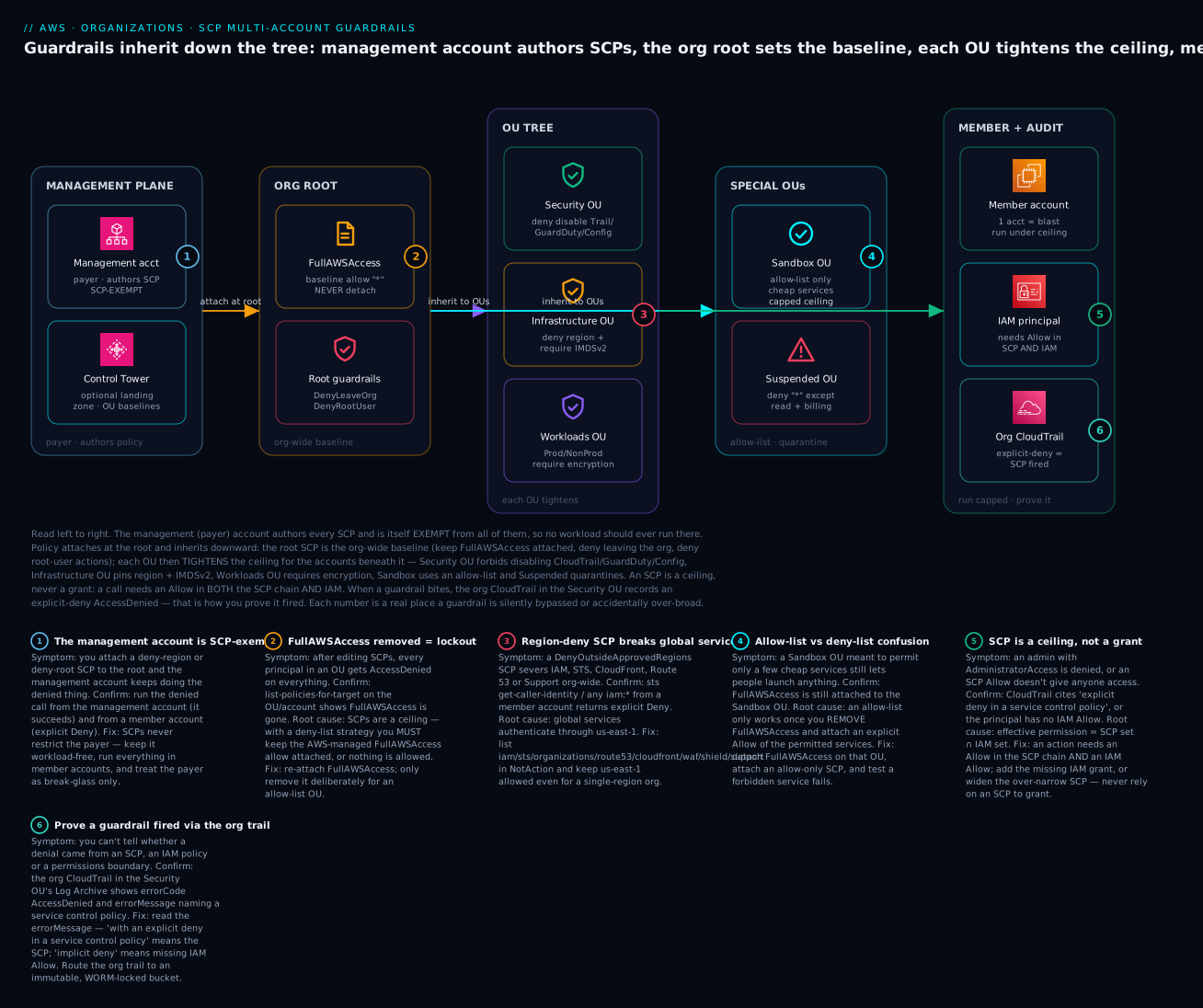
The diagram traces a guardrail from where it is authored to where it bites. On the far left, the management (payer) account authors every SCP and is itself exempt from all of them — which is exactly why no workload should ever run there. Policy attaches at the org root (keep FullAWSAccess, deny leaving the org, deny root-user actions) and inherits downward, intersecting as it goes. Each OU then tightens the ceiling for the accounts beneath it: the Security OU forbids disabling CloudTrail/GuardDuty/Config, the Infrastructure OU pins region and IMDSv2, the Workloads OU requires encryption, the Sandbox OU flips to an allow-list, and the Suspended OU collapses to read-only. On the right, a member account runs capped — an IAM principal there needs an Allow in both the SCP chain and IAM — and when a guardrail fires, the org CloudTrail in the Security OU records an explicit-deny AccessDenied, which is how you prove it worked. The numbered badges mark the six places a guardrail is most often silently bypassed or accidentally over-broad.
Real-world scenario
NimbusPay, a fictional Bengaluru-based payments startup, grew from one AWS account to eleven in eighteen months with no organizing structure — accounts were invited into consolidated billing purely to split the bill. The trigger for change was a PCI-DSS assessment: the auditor asked NimbusPay to prove that the cardholder-data environment could not be reached from developer accounts, that audit logging could not be turned off, and that no resources ran in regions outside their approved ap-south-1. NimbusPay could prove none of it, because there was no layer above the account admins.
The platform team spent two weeks building the structure by hand. They enabled all features and the SCP, Tag and Backup policy types. They created the OU tree — Security, Infrastructure, Workloads/Prod, Workloads/Non-Prod, Sandbox, Suspended — and moved each of the eleven accounts into place: the two cardholder-data accounts into Workloads/Prod, the seven dev/test accounts into Workloads/Non-Prod, the shared networking account into Infrastructure, and a new dedicated Audit account into Security. They attached the org-wide guardrails at the root (deny leave-org, deny root, region floor of ap-south-1 + us-east-1 with the global-service NotAction carve-out) and tightened per OU: Workloads/Prod added require-encryption and require-IMDSv2 and dropped every region except ap-south-1 + us-east-1; the Security OU protected CloudTrail/GuardDuty/Config from being disabled and exempted only the OrgSecurityAdmin role.
Two things went wrong, both instructive. First, on the day they attached the region-lock at the root, the whole org’s console access to IAM and the billing pages broke — they had forgotten us-east-1 and the global-service NotAction list, so every sts and iam call was denied. They fixed it in ten minutes by adding the carve-out, but it was a scary ten minutes and taught them to always stage a new SCP on a single canary account first. Second, a nightly Lambda that copied encrypted RDS snapshots to a DR account started failing with AccessDenied after they attached the protect-security-resources SCP — the Lambda’s role needed kms:* on the DR key, and the deny had no exemption for it; adding an ArnNotLike carve-out for the snapshot-copy role fixed it.
The payoff: NimbusPay handed the auditor three one-line answers. “Prove dev cannot reach prod” → separate accounts in separate OUs, no cross-account role paths. “Prove logging cannot be disabled” → the ProtectCloudTrail SCP, and here is the CloudTrail event showing a test StopLogging denied. “Prove no out-of-region resources” → the region-lock SCP and a Config rule confirming zero resources outside ap-south-1. What had been un-answerable became list-policies-for-target output. Total added cost: about ₹0 for Organizations and SCPs themselves; the spend was GuardDuty, Config and CloudTrail data, which they were adding for PCI anyway.
Advantages and disadvantages
| Advantages | Disadvantages / costs |
|---|---|
A control above every admin — caps even AdministratorAccess |
An over-broad deny can break legitimate work org-wide |
| Preventive (blocks the action) not just detective | No Principal element; targeting a role needs Condition gymnastics |
| Free — SCPs and Organizations cost nothing | 5 KB / 5-per-target limits force careful policy design |
| Inherit down the OU tree — one attach covers many accounts | Inheritance intersects; a child can’t re-grant, which surprises people |
Auditor-friendly — “prove it” becomes list-policies-for-target |
The management account is exempt — a permanent asterisk |
| Structural, not best-effort — survives IAM misconfig | Testing from the payer misleads; you must test from a member account |
| Composable with Tag/Backup/RCP/declarative policies | Region-deny and protective denies have sharp edges (global services, break-glass) |
SCPs matter most when the cost of an admin (or an attacker with admin) doing the wrong thing is high and irreversible: turning off logging, exfiltrating via a new region, leaving the org, deleting a KMS key. They matter least for fine-grained, per-user, per-resource grants — that is IAM’s job, and trying to do it in SCPs (which can’t name principals or grant) is a category error.
Hands-on lab
You will create an OU, move a member account into it, attach a deny-region SCP, prove a denied action fails, then tear it all down. Everything here is free — Organizations, OUs and SCPs cost nothing. ⚠️ The only thing that could cost money is if you actually launch a resource to test (an EC2 instance); we test with a read-only call that costs ₹0.
Prerequisites: run these from the management account with a profile that can call organizations:*. Confirm you are in the right place first.
| Step | Command | Expected |
|---|---|---|
| Confirm org + all features | aws organizations describe-organization |
"FeatureSet": "ALL" |
| Confirm you’re the mgmt account | aws sts get-caller-identity |
Account = the payer’s ID |
| Find the root ID | aws organizations list-roots --query 'Roots[0].Id' --output text |
r-xxxx |
Step 1 — Enable the SCP policy type (once per org)
ROOT_ID=$(aws organizations list-roots --query 'Roots[0].Id' --output text)
aws organizations enable-policy-type \
  --root-id "$ROOT_ID" \
  --policy-type SERVICE_CONTROL_POLICY
Expected: JSON showing the root with SERVICE_CONTROL_POLICY now ENABLED under PolicyTypes. (If it’s already enabled you get PolicyTypeAlreadyEnabledException — harmless.)
Console path: AWS Organizations → Policies → Service control policies → Enable.
Step 2 — Create a Sandbox OU
aws organizations create-organizational-unit \
  --parent-id "$ROOT_ID" \
  --name "Sandbox"
# capture the OU id
OU_ID=$(aws organizations list-organizational-units-for-parent \
  --parent-id "$ROOT_ID" \
  --query "OrganizationalUnits[?Name=='Sandbox'].Id" --output text)
echo "OU: $OU_ID"
Expected: OU: ou-xxxx-xxxxxxxx.
Console path: Organizations → AWS accounts → select the root → Actions → Create new → Organizational unit → name it Sandbox.
Step 3 — Move a test member account into the OU
Use a throwaway/dev member account ID (not anything precious). First find where it currently sits (its source parent), then move it.
ACCOUNT_ID=111122223333   # <-- your test member account
SRC_PARENT=$(aws organizations list-parents \
  --child-id "$ACCOUNT_ID" \
  --query 'Parents[0].Id' --output text)

aws organizations move-account \
  --account-id "$ACCOUNT_ID" \
  --source-parent-id "$SRC_PARENT" \
  --destination-parent-id "$OU_ID"
Expected: no output on success (exit code 0). Verify:
aws organizations list-parents --child-id "$ACCOUNT_ID"
# Parents[0].Id should now equal $OU_ID
Console path: Organizations → AWS accounts → tick the account → Actions → Move → choose Sandbox.
Step 4 — Create and attach a deny-region SCP
Write a minimal region-lock that allows only ap-south-1 + us-east-1 and carves out global services.
cat > /tmp/deny-region.json <<'JSON'
{
  "Version": "2012-10-17",
  "Statement": [{
    "Sid": "DenyOutsideApprovedRegions",
    "Effect": "Deny",
    "NotAction": ["iam:*","sts:*","organizations:*","route53:*",
      "cloudfront:*","waf:*","wafv2:*","shield:*","support:*",
      "account:*","budgets:*","ce:*","health:*","kms:*"],
    "Resource": "*",
    "Condition": {
      "StringNotEquals": { "aws:RequestedRegion": ["ap-south-1","us-east-1"] }
    }
  }]
}
JSON

POLICY_ID=$(aws organizations create-policy \
  --name "DenyOutsideApprovedRegions" \
  --description "Region-lock to ap-south-1 + us-east-1" \
  --type SERVICE_CONTROL_POLICY \
  --content file:///tmp/deny-region.json \
  --query 'Policy.PolicySummary.Id' --output text)

aws organizations attach-policy \
  --policy-id "$POLICY_ID" \
  --target-id "$OU_ID"
echo "Attached $POLICY_ID to $OU_ID"
Expected: Attached p-xxxxxxxx to ou-xxxx-xxxxxxxx. Confirm it’s on the target:
aws organizations list-policies-for-target \
  --target-id "$OU_ID" --filter SERVICE_CONTROL_POLICY \
  --query 'Policies[].Name'
# ["FullAWSAccess", "DenyOutsideApprovedRegions"]
Note FullAWSAccess is still there — that is the deny-list strategy working: everything is allowed except what you denied (out-of-region actions).
Step 5 — Prove a denied action fails (from the member account)
This is the critical verification, and it must run from inside the member account, not the payer. Assume a role into the test account (or sign in to it), then try a call in a non-approved region:
# from within the member account's credentials:
aws ec2 describe-instances --region eu-west-1
Expected — an explicit SCP denial:
An error occurred (UnauthorizedOperation) when calling the DescribeInstances
operation: You are not authorized to perform this operation ... with an
explicit deny in a service control policy
Now confirm an approved region still works:
aws ec2 describe-instances --region ap-south-1
# returns your instances (or an empty Reservations list) — NOT denied
If you instead try the same eu-west-1 call from the management account, it succeeds — proving the management-account exemption first-hand.
Step 6 — Teardown (leave nothing behind)
# detach and delete the SCP
aws organizations detach-policy --policy-id "$POLICY_ID" --target-id "$OU_ID"
aws organizations delete-policy --policy-id "$POLICY_ID"

# move the account back to the root
aws organizations move-account --account-id "$ACCOUNT_ID" \
  --source-parent-id "$OU_ID" --destination-parent-id "$ROOT_ID"

# delete the (now empty) OU
aws organizations delete-organizational-unit --organizational-unit-id "$OU_ID"
Expected: each command exits 0. delete-organizational-unit fails if the OU still contains accounts — move them out first (as above).
The same build in Terraform
For anything beyond a lab, manage this as code. This stands up the OU, the SCP, and the attachment declaratively:
terraform {
  required_providers { aws = { source = "hashicorp/aws", version = "~> 5.0" } }
}
provider "aws" { region = "ap-south-1" }   # run against the management account

data "aws_organizations_organization" "this" {}

resource "aws_organizations_organizational_unit" "sandbox" {
  name      = "Sandbox"
  parent_id = data.aws_organizations_organization.this.roots[0].id
}

resource "aws_organizations_policy" "deny_region" {
  name        = "DenyOutsideApprovedRegions"
  description = "Region-lock to ap-south-1 + us-east-1"
  type        = "SERVICE_CONTROL_POLICY"
  content = jsonencode({
    Version = "2012-10-17"
    Statement = [{
      Sid      = "DenyOutsideApprovedRegions"
      Effect   = "Deny"
      NotAction = ["iam:*", "sts:*", "organizations:*", "route53:*",
        "cloudfront:*", "waf:*", "wafv2:*", "shield:*", "support:*",
        "account:*", "budgets:*", "ce:*", "health:*", "kms:*"]
      Resource  = "*"
      Condition = { StringNotEquals = { "aws:RequestedRegion" = ["ap-south-1", "us-east-1"] } }
    }]
  })
}

resource "aws_organizations_policy_attachment" "deny_region_sandbox" {
  policy_id = aws_organizations_policy.deny_region.id
  target_id = aws_organizations_organizational_unit.sandbox.id
}
terraform destroy is your teardown. To move an account under management, use the aws_organizations_account resource’s parent_id — but note Terraform can only move accounts it manages; accounts created outside Terraform are moved with the CLI as in Step 3.
aws organizations command reference
Keep this handy — the verbs you’ll reach for constantly:
| Task | Command |
|---|---|
| Describe the org / feature set | aws organizations describe-organization |
| List the root ID | aws organizations list-roots |
| Enable SCPs | aws organizations enable-policy-type --root-id <r> --policy-type SERVICE_CONTROL_POLICY |
| Create an OU | aws organizations create-organizational-unit --parent-id <p> --name <n> |
| List OUs under a parent | aws organizations list-organizational-units-for-parent --parent-id <p> |
| Find an account’s parent | aws organizations list-parents --child-id <acct> |
| Move an account | aws organizations move-account --account-id <a> --source-parent-id <s> --destination-parent-id <d> |
| Create an SCP | aws organizations create-policy --type SERVICE_CONTROL_POLICY --name <n> --content file://p.json |
| Attach / detach an SCP | aws organizations attach-policy / detach-policy --policy-id <p> --target-id <t> |
| What’s attached to a target | aws organizations list-policies-for-target --target-id <t> --filter SERVICE_CONTROL_POLICY |
| What a policy is attached to | aws organizations list-targets-for-policy --policy-id <p> |
| List accounts in an OU | aws organizations list-accounts-for-parent --parent-id <p> |
| Register delegated admin | aws organizations register-delegated-administrator --account-id <a> --service-principal <svc> |
Common mistakes & troubleshooting
The playbook. Each row is a real failure, how to confirm it, and the fix.
| # | Symptom | Root cause | Confirm (exact command / console path) | Fix |
|---|---|---|---|---|
| 1 | SCP attached, but the denied action still succeeds | You tested from the management account (exempt) | Run the call from the payer (works) and from a member account (denied); sts get-caller-identity shows which |
Always test guardrails from a member account; never run workloads in the payer |
| 2 | Whole OU gets AccessDenied on everything after an SCP edit |
FullAWSAccess was detached in a deny-list OU |
list-policies-for-target --target-id <ou> shows no FullAWSAccess |
Re-attach the AWS-managed FullAWSAccess; only remove it for a deliberate allow-list |
| 3 | Region-lock SCP breaks IAM/STS/console/billing | Global services route via us-east-1; you denied it |
From a member account, aws iam list-users returns explicit Deny |
Add global services to NotAction and keep us-east-1 in the allowed regions |
| 4 | An AdministratorAccess admin is unexpectedly denied |
An SCP Deny in the chain caps them (correct behaviour) |
CloudTrail event: errorMessage cites “explicit deny in a service control policy” |
If the deny is wrong, narrow it or add an ArnNotLike exemption; if right, it’s working |
| 5 | An SCP Allow you added gave nobody access |
SCPs never grant; you also need an IAM Allow | Principal has no matching IAM policy (iam simulate-principal-policy) |
Add the IAM grant; use SCP only to shape the ceiling |
| 6 | A child OU can’t re-allow something the parent denied | Inheritance intersects; children only tighten | Compare list-policies-for-target at each level of the chain |
Loosen at the parent/root, or move the account to a less-restricted OU |
| 7 | Legit automation (snapshot copy, deploy) denied after a protective SCP | The Deny has no exemption for the automation role |
CloudTrail shows the SLR/role principal denied on the guarded action | Add Condition ArnNotLike aws:PrincipalArn for that specific role |
| 8 | New AWS service silently unavailable in an OU | It’s an allow-list OU and you never allowed the new service | list-policies-for-target shows a custom Allow SCP, no FullAWSAccess |
Add the service to the allow SCP, or switch that OU to deny-list |
| 9 | delete-organizational-unit fails |
The OU still contains accounts | list-accounts-for-parent --parent-id <ou> returns accounts |
Move accounts out first, then delete the empty OU |
| 10 | enable-policy-type errors |
Org isn’t in all features, or type already enabled | describe-organization → FeatureSet; error is AlreadyEnabled |
Enable all features first; ignore PolicyTypeAlreadyEnabledException |
| 11 | GuardDuty/Security Hub denies in one region only | Delegated admin registered in some regions, not all | securityhub get-administrator-account --region <r> is empty |
These services are regional — run enable-organization-admin-account in every active region |
| 12 | Deny-region SCP breaks S3, CloudWatch, DynamoDB globally-used features | You denied the region a global-ish call needs (e.g. S3 us-east-1 legacy endpoint, cloudfront) |
CloudTrail deny on the service in us-east-1 |
Keep us-east-1 allowed; add the service to NotAction if it must run there |
| 13 | Tag Policy didn’t block a non-compliant resource | Tag Policies only report unless enforced_for lists the type |
Check the policy JSON for enforced_for and the resource type |
Add the type to enforced_for, or add an SCP that denies creation without the tag |
| 14 | Account still governed by old OU’s SCPs after “moving” it | The move didn’t actually happen (wrong source parent) | list-parents --child-id <acct> shows the old OU |
Re-run move-account with the correct --source-parent-id |
Error / status reference — what a denial actually says
The exact string tells you which layer denied you. Learn to read them:
| Message fragment | It means | Where the Deny lives |
|---|---|---|
with an explicit deny in a service control policy |
An SCP Deny (or allow-list gap) blocked it |
SCP chain (root/OU/account) |
with an explicit deny in a resource control policy |
An RCP capped the resource side | RCP chain |
with an explicit deny in an identity-based policy |
An IAM Deny on the principal |
IAM identity policy |
with an explicit deny in a permissions boundary |
A boundary capped the role | Permissions boundary |
because no identity-based policy allows |
No IAM Allow (implicit deny) — not an SCP | Missing IAM grant |
UnauthorizedOperation (EC2) |
EC2’s form of AccessDenied | Could be SCP or IAM — read the detail |
AccessDenied with no explicit-deny phrase |
Implicit deny — nothing granted it | Missing Allow somewhere |
Decision table — reading a denial fast
| If you see… | It’s probably… | Do this |
|---|---|---|
| “explicit deny in a service control policy” | An SCP in the chain | list-policies-for-target up the chain; find the Deny statement by Sid |
| Denial only from member accounts, not the payer | SCP working as designed | Confirm you’re not accidentally relying on the payer |
| Denial appeared right after an SCP change | Your new/edited SCP | Detach it from a canary account and re-test |
| Only global services (iam/sts) broke | Region-lock without carve-out | Add NotAction global list + keep us-east-1 |
| Everything broke in one OU | FullAWSAccess removed |
Re-attach FullAWSAccess |
| One region’s security service is blind | Regional delegated-admin gap | Enable org admin in that region |
The three nastiest failures, in prose
The FullAWSAccess lockout. Someone reads that SCPs are “deny by default like IAM” and removes FullAWSAccess thinking it’s cleaner, then adds a couple of Deny statements. The result: because the ceiling is now empty (no Allow anywhere) and SCPs never inherit an implicit allow, every action in that OU is denied — including, cruelly, the actions you’d use to fix it if you were signed into a member account. The fix is trivial once you know it (re-attach FullAWSAccess from the management account, which is exempt and can still act), but the panic is real. The lesson: in a deny-list org, FullAWSAccess is load-bearing — never detach it except deliberately for an allow-list OU where you’ve written a complete Allow set.
The region-deny that kills the console. You region-lock to ap-south-1 because you’re an India-only shop, deny everything else including us-east-1, and within minutes people can’t open the IAM console, can’t see the billing page, can’t use Route 53 or CloudFront or Support. The reason is that these global services authenticate through us-east-1 regardless of where you operate; deny that region and you sever the control plane. The fix is the NotAction carve-out for global services plus keeping us-east-1 in your allowed set — always, even if you never launch a single instance there. Stage every region-lock on a canary account first.
The self-inflicted break-glass lockout. You write a beautiful protect-security-resources SCP that denies deleting KMS keys, disabling Security Hub, and touching IAM roles — with no exemption. Then your own security automation role, or your break-glass role, needs to do one of those things during an incident and gets an explicit Deny. Because SCPs cap everyone in the member account, and because the management account (the one place still exempt) may not have the tooling wired up, you’re stuck at the worst possible moment. The fix is to add an ArnNotLike aws:PrincipalArn exemption for your named break-glass/automation roles to every protective deny, store the break-glass credentials offline, and re-test the break-glass path after every guardrail change.
Best practices
- Never run workloads in the management account. It is SCP-exempt and its compromise is org-wide compromise. Keep it to org administration, and use it break-glass only, with hardware MFA.
- Run deny-list everywhere except a few tightly-scoped OUs. Keep
FullAWSAccessattached; layerDenystatements. Reserve allow-list for Sandbox, PCI, or locked training accounts where you can enumerate every permitted service. - Stage every new SCP on a canary account/OU first. Attach to one throwaway account, test the intended denial and a battery of legitimate actions, then roll out to the OU.
- Always keep
us-east-1allowed and carve out global services in any region-lock. IAM, STS, Route 53, CloudFront, Support, WAF, Shield and billing route throughus-east-1. - Attach org-wide non-negotiables at the root, function-specific tightening at the OU, and reserve account-level SCPs for genuine one-offs.
- Exempt named break-glass/automation roles from protective denies with
ArnNotLike aws:PrincipalArn, and re-test the break-glass path after every change. - Keep a Suspended OU ready so quarantining a compromised account is a one-command move, not a scramble.
- Delegate security services to the Audit account, not the payer, so your tooling runs under a normal ceiling and you enforce separation of duties.
- Version SCPs in Git and deploy via Terraform/CloudFormation, with review — an SCP change can break the whole org, so treat it like the production change it is.
- Mind the 5 KB / 5-per-target limits: minify JSON, and split concerns across multiple SCPs rather than one giant policy.
- Pair Tag Policies with SCPs for hard tag enforcement — Tag Policies enforce format on listed types; an SCP denying creation without a required request tag enforces presence.
- Read the denial string before you debug — “explicit deny in a service control policy” vs “no identity-based policy allows” points you at completely different fixes.
Security notes
SCPs are themselves a security control, but they have a security posture of their own. The management account is the crown jewel: it authors every guardrail and is exempt from all of them, so protect it with hardware MFA, a locked-down root user (no access keys, ever), minimal Identity Center access, and monitoring on every action it takes. Treat the ability to attach/detach SCPs (organizations:AttachPolicy, DetachPolicy, CreatePolicy, UpdatePolicy) as one of the most powerful permissions in your estate — scope it to a tiny platform-security group, and consider requiring change review because a bad SCP is an org-wide outage or an org-wide hole.
Encryption and network isolation are enforced through SCPs here rather than being properties of them: the require-encryption and require-IMDSv2 guardrails are how you make “unencrypted is impossible” and “IMDSv1 is impossible” structural rather than aspirational. Route the org CloudTrail to an immutable, Object-Lock (WORM) bucket in a dedicated Log Archive account in the Security OU, so that even a principal who somehow bypasses a guardrail cannot erase the evidence — and so that “explicit deny in a service control policy” events are preserved as your proof that the guardrails fired. Finally, remember SCPs do not touch service-linked roles or resource-based policies (that’s RCPs) — for a true data perimeter you layer RCPs on top, as covered in the delegated-admin and data-perimeter material.
Cost & sizing
The good news dominates: AWS Organizations, OUs, SCPs, Tag Policies and Backup Policies cost nothing. There is no charge for the org, for attaching policies, or for the number of accounts. What costs money is the tooling the guardrails protect, which you run anyway for security and compliance:
| Item | Cost | Notes |
|---|---|---|
| Organizations / OUs / SCPs / Tag & Backup Policies | Free | No charge for the org, accounts, or policy attachments |
| CloudTrail management events | First copy free; extra trails/data events billed | Org trail’s management events are free; data events cost |
| GuardDuty | Per GB of analyzed logs + events | Scales with account activity; ~usage-based |
| AWS Config | Per configuration item recorded + rule evaluations | Can be significant at scale; scope recorders |
| AWS Backup | Storage (warm/cold) + cross-region copy transfer | Backup Policy defines it; storage is the driver |
| KMS | Per key/month + per API call | Encryption guardrails imply KMS usage |
Right-sizing here is about the protected services, not the guardrails: scope Config recorders to the resource types you care about, tier Backup lifecycle to cold storage and expiry to control storage growth, and use us-east-1 GuardDuty/CloudTrail free-tier allowances where they apply. For an India-only startup like the scenario’s NimbusPay, the guardrail layer added roughly ₹0; the compliance tooling (GuardDuty + Config + CloudTrail data) is the line item, and it exists because of the audit, not because of the SCPs. Sizing rule of thumb: the number of OUs and SCPs is bounded by clarity, not cost — keep it as simple as the governance requires, since every extra SCP is another 5 KB you maintain and another thing that can deny something at 2 a.m.
Interview & exam questions
Q1. Is a Service Control Policy a grant or a cap? What does that imply for a call to succeed? An SCP is a cap (a ceiling), never a grant. It defines the maximum permissions available to principals in an account but grants nothing. For a call to succeed it must be allowed by the SCP chain and by IAM, with no explicit Deny in either — effective permission is the intersection. (SCS-C02, SAA-C03.)
Q2. An admin with AdministratorAccess is denied an action. Give two SCP-related reasons.
(1) An SCP in the account’s chain has an explicit Deny on that action — the ceiling overrides the IAM grant. (2) The OU uses an allow-list strategy and the action isn’t in the allowed set, so it’s outside the ceiling. Both cap below *. (SCS-C02.)
Q3. Why does an SCP attached to the root not affect the management account? Because SCPs never restrict the management (payer) account by design — it owns the org and must always be able to administer it. This is why you keep the management account workload-free and test guardrails from a member account. (SCS-C02, SOA-C02.)
Q4. Explain the difference between a deny-list and an allow-list SCP strategy.
A deny-list keeps the managed FullAWSAccess (ceiling = everything) and layers Deny statements to remove things — new services are allowed by default. An allow-list removes FullAWSAccess (ceiling = nothing) and explicitly Allows only sanctioned services — new services are blocked by default. Most orgs run deny-list; allow-list suits tightly-scoped OUs. (SCS-C02.)
Q5. A region-lock SCP broke IAM and the billing console. Why, and how do you fix it?
Global services (IAM, STS, Route 53, CloudFront, Support, WAF, Shield, billing) authenticate through us-east-1, so denying that region severs them. Fix with a NotAction list of those global services and by keeping us-east-1 in the allowed regions — always, even for a single-region org. (SCS-C02.)
Q6. What is the FullAWSAccess policy and what happens if you remove it in a deny-list OU?
FullAWSAccess is the AWS-managed default SCP (Allow * on *) that sets the ceiling to “everything.” Removing it in a deny-list OU with no replacement Allow drops the ceiling to nothing, so every action in that OU is denied — a lockout. Re-attach it from the exempt management account to recover. (SCS-C02.)
Q7. How does SCP inheritance work across root, OU and account? A principal is subject to all SCPs from the root down to its account, intersected — each level can only tighten, never loosen. A child OU cannot re-grant something an ancestor denied. Explicit Deny at any level wins. (SCS-C02, SAA-C03.)
Q8. Which policy element can an SCP NOT use, and how do you target a specific role instead?
An SCP cannot use Principal/NotPrincipal — it applies to all principals in the account. To exempt or target a specific role, use a Condition on aws:PrincipalArn (e.g. ArnNotLike to exempt a break-glass role from a protective Deny). (SCS-C02.)
Q9. How do you prevent a member account from disabling audit logging?
Attach an SCP denying cloudtrail:StopLogging, DeleteTrail, UpdateTrail (and similar for GuardDuty/Config), typically at the root or Security OU, with an ArnNotLike exemption only for your named trail-administration role. Route the org trail to a WORM-locked Log Archive account. (SCS-C02, SOA-C02.)
Q10. What is delegated administration and why register the Audit account rather than use the payer? Delegated administration registers a member account as the org-wide admin for a service (GuardDuty, Security Hub, Config, Access Analyzer, Backup), so security tooling runs outside the SCP-exempt payer, under a normal ceiling, enforcing separation of duties and keeping the management account minimal. (SCS-C02.)
Q11. Tag Policies aren’t blocking non-compliant resources. Why?
By default Tag Policies only report non-compliance. Blocking creation requires the enforced_for clause listing the specific resource types (e.g. ec2:instance). For hard presence enforcement, pair it with an SCP that denies creation without the required request tag. (SCS-C02, SOA-C02.)
Q12. Why must you test an SCP from a member account, and stage it on a canary first? Because the management account is exempt, testing there gives a false pass. Staging on a canary account/OU lets you confirm both the intended denial and that legitimate actions still work, before an org-wide rollout that could otherwise cause an org-wide outage. (SCS-C02.)
Quick check
- Can an SCP
Allowstatement give a user access to an action they have no IAM policy for? Why or why not? - You attach a deny-region SCP at the root and it seems to do nothing when you test it. What’s the most likely reason?
- In a deny-list org, what single AWS-managed policy must stay attached, and what happens if you remove it?
- Two SCPs in a chain: the root allows
us-east-1+ap-south-1; a child OU’s SCP allows onlyap-south-1. Which regions can accounts in that OU use? - A protect-CloudTrail SCP is blocking your legitimate log-pipeline automation role. How do you let just that role through?
Answers
- No. An SCP only sets the ceiling; it never grants. The user still needs an IAM
Allow, and the effective permission is the intersection of the SCP ceiling and the IAM grant. - You’re testing from the management account, which is exempt from all SCPs. Test from a member account, where the deny actually applies.
FullAWSAccess(Allow * on *). Remove it with no replacement Allow and the ceiling drops to nothing — every action in that OU is denied (a lockout); re-attach it from the exempt management account to recover.- Only
ap-south-1. Inheritance intersects — a child can only tighten, so the OU’s accounts get the intersection of the two allowed sets. - Add a
ConditionwithArnNotLikeonaws:PrincipalArnnaming that specific role (e.g.arn:aws:iam::*:role/OrgCloudTrailAdmin) to the protectiveDenystatement.
Glossary
| Term | Definition |
|---|---|
| AWS Organizations | The service that groups AWS accounts under one management account for central governance and consolidated billing. |
| Management account | The payer account that creates the org; SCPs never restrict it. Keep it workload-free. |
| Member account | Any account in the org other than the management account; fully governed by inherited SCPs. |
| Organization root | The single top node (r-xxxx) of the OU hierarchy; not the account root user. |
| Organizational Unit (OU) | A folder of accounts/nested OUs (up to 5 levels deep) to which policies attach and inherit downward. |
| Service Control Policy (SCP) | An org policy that caps the maximum permissions of principals in an account; never grants. |
| FullAWSAccess | The AWS-managed default SCP (Allow * on *) that sets a deny-list ceiling to “everything.” |
| Deny-list strategy | Keep FullAWSAccess and layer Deny statements; new services allowed by default. |
| Allow-list strategy | Remove FullAWSAccess and explicitly Allow only sanctioned services; new services blocked by default. |
| Inheritance (intersection) | An account is subject to all SCPs in its chain, intersected — children only tighten. |
| Management-account exemption | The rule that SCPs do not apply to the payer account. |
| Tag Policy | An org policy standardizing tag keys/values and optionally enforcing them on listed resource types. |
| Backup Policy | An org policy that centrally defines and enforces AWS Backup plans across accounts. |
| Delegated administration | Registering a member account (usually Audit) as the org-wide admin for a security service. |
| Service-linked role (SLR) | A role AWS services create; exempt from SCPs. |
| Break-glass role | An emergency role, exempted from protective denies via ArnNotLike, with offline credentials. |
aws:RequestedRegion |
The condition key used to region-lock actions in an SCP. |
| IMDSv2 | The token-required EC2 instance metadata service; enforced via ec2:MetadataHttpTokens=required. |
| Suspended OU | A quarantine OU whose SCP collapses accounts to read-only + billing for incident response/offboarding. |
Next steps
- AWS Control Tower Guardrails: Building a Secure Multi-Account Foundation — let AWS stand up and drift-check the OU structure, SCPs and baselines you built by hand here.
- AWS Organizations and IAM Foundations: Accounts, OUs and Roles — the identity and policy-evaluation chain that SCPs sit on top of.
- AWS IAM Identity Center: SSO and Permission Sets — how humans get into these capped accounts without long-lived keys.
- AWS Tagging Strategy: Cost Allocation and Enforcement — the tag governance that Tag Policies and tag-condition SCPs enforce.
- AWS IAM Policy Evaluation: Troubleshooting Access Denied — read any denial back to the exact SCP, IAM policy or boundary that produced it.