Quick take: a tag is a two-character key-value string, and it is also the single most leveraged governance primitive on AWS. It decides who pays for a resource, who owns it, whether automation touches it, and — through ABAC — whether an identity can even read it. Get the taxonomy and the enforcement right once and every downstream FinOps, security and lifecycle problem gets easier. Get it wrong and you spend the next two years reconciling
envagainstEnv.
A mid-size SaaS company opened its monthly AWS bill at ₹48 lakh and could not tell you which product line, which team, or which environment spent a single rupee of it. Every engineer had been told to “tag your resources,” nobody had said which tags with which values, and so the account carried 640 distinct tag keys — team, Team, TEAM, owner, owned-by, Owner, cost-center, costcenter, CC, and 631 more — none of which grouped cleanly in Cost Explorer. Finance built the chargeback spreadsheet by hand from resource names. When a resource was renamed, the spreadsheet silently lied. This is the normal state of an untagged-or-badly-tagged AWS estate, and it is entirely avoidable.
The thing that makes tagging hard is that it looks trivial and is actually a distributed-systems problem. A tag has no schema, no required-field enforcement, and no referential integrity unless you build all three. It is case-sensitive, so Env=prod and env=Prod are four different facts. It is not retroactive, so the day you activate a cost allocation tag you see nothing until resources actually carry it and the billing pipeline catches up ~24 hours later. And the control that reports non-compliance (Organizations Tag Policies) is not the control that blocks it (an SCP or IAM condition on aws:RequestTag), which is why so many teams enable Tag Policies, watch the compliance number sit at 60%, and wonder why nothing is being prevented.
This article builds a tagging strategy that survives contact with a real engineering org. You will define a small, closed tag taxonomy with allowed values; understand the tag limits and the case-sensitivity trap that quietly doubles your key count; activate cost allocation tags correctly and understand the 24-hour lag; use Tag Policies for standardisation and reporting; enforce at create time with SCP/IAM conditions so an untagged resource cannot be born; detect and remediate the stragglers with AWS Config; apply tags at scale with Terraform default_tags and the Tag Editor; and finally turn the tags into money with Cost Explorer group-by-tag, showback and chargeback. Real service names, real limits, real aws CLI and Terraform, and the exact ways each layer fails.
What problem this solves
Without a tagging strategy, three functions of your business break at once. Finance cannot allocate cost: one consolidated bill covers every team, product and environment, and there is no dimension to slice it by, so showback is a guess and chargeback is impossible. Operations cannot answer “who owns this?”: an orphaned RDS instance runs for eight months because the person who created it left and nothing records the team. Security and lifecycle automation cannot target resources safely: your “delete everything in dev after 30 days” script has no reliable way to know what “dev” is, so it either does nothing or deletes production.
What breaks concretely, in the order teams usually hit it: the bill becomes un-attributable (you cannot say what a product line costs, so you cannot price it or cut it); ownership becomes tribal knowledge (every incident starts with “whose is this?”); automation becomes dangerous (backup, patch, stop-at-night and cleanup jobs key off tags that are inconsistent or missing); access control stays coarse (you cannot say “developers may only touch resources tagged with their own team” because the tags are unreliable); and audits stall (you cannot prove that PII-bearing resources are isolated because DataClassification was never applied). Each of these is a tag problem wearing a different costume.
Who hits this: everyone past a single team or a single environment, and hardest of all the fast-growing org that scaled headcount before it scaled governance. The fintech facing an audit needs DataClassification. The platform team running chargeback needs CostCenter and Application. The SRE team automating lifecycle needs Environment and ManagedBy. The security team building ABAC needs Owner and team tags on both principals and resources. A tagging strategy is the one artefact that serves all of them — which is exactly why it must be designed once, centrally, and enforced, rather than left to 200 engineers to improvise.
To frame the whole field before the deep sections, here is what tags are asked to do, who depends on it, and what fails when the tag is missing or wrong:
| Job tags do | Who depends on it | Mechanism | Primary failure if the tag is missing/wrong |
|---|---|---|---|
| Cost allocation | Finance / FinOps | Activated cost allocation tag → Cost Explorer / CUR | Unattributable bill; no showback or chargeback |
| Ownership & operations | SRE / on-call | Owner, Application tags read by humans and tools |
Orphaned resources; “whose is this?” on every incident |
| Automation & lifecycle | Platform / DevOps | Backup, patch, stop-schedule, cleanup key off tags | Jobs skip resources or hit the wrong ones |
| Access control (ABAC) | Security / IAM | aws:ResourceTag / aws:PrincipalTag conditions |
Coarse, over-broad access; no team isolation |
| Compliance & audit | GRC / security | DataClassification, evidence via Config |
Cannot prove isolation of regulated data |
| Inventory & search | Everyone | Tag Editor, Resource Groups, Tagging API | Cannot find “all prod RDS across regions” |
Learning objectives
By the end of this article you can:
- Design a required-tag taxonomy — Environment, Owner, CostCenter, Application, DataClassification, ManagedBy — each with a closed, documented allowed-value list, plus a set of optional contextual tags.
- State the AWS tag limits exactly (50 tags per resource, 128-char keys, 256-char values, the reserved
aws:prefix) and avoid the case-sensitivity trap that turns one key into three. - Activate user-defined and AWS-generated cost allocation tags from the management account, and explain the 24-hour lag and why historical untagged usage stays untagged.
- Author an Organizations Tag Policy that enforces key capitalisation and allowed values, and explain precisely why it reports non-compliance but does not block untagged creates on its own.
- Enforce tagging at create time with
aws:RequestTagandaws:TagKeysconditions in an SCP and an IAM policy so an untagged resource cannot be created — and know which services cannot be caught this way. - Deploy the AWS Config
required-tagsmanaged rule with auto-remediation as the continuous backstop for resources the preventive gate misses. - Apply tags at scale with Terraform
default_tags, CloudFormation stack tags, and the Tag Editor / Resource Groups Tagging API for bulk retag. - Turn tags into money: Cost Explorer group-by-tag, Cost Categories, split cost allocation for shared spend, and a workable showback → chargeback model.
Prerequisites & where this fits
You should have an AWS Organizations setup with a management account and at least one member account, aws CLI configured with a profile that can reach both, and enough IAM to attach policies. Terraform 1.5+ with the aws provider ≥ 5.x is used for the IaC snippets. You do not need prior FinOps depth — that is what we build — but you should know what an EC2 instance, an S3 bucket and an IAM policy are, and be comfortable reading JSON policy documents.
This is the governance and cost layer of an AWS estate, and it sits directly on top of the account and guardrail structure. The org, OU and policy machinery this article uses is the same one covered in AWS Organizations and IAM Foundations: Accounts, OUs and Roles and, at landing-zone scale, AWS Control Tower Guardrails: Building a Secure Multi-Account Foundation. The preventive SCP work here is a specific application of the guardrail patterns in AWS Organizations SCPs: Multi-Account Guardrails. The detective half — Config rules and resource inventory — is AWS Config: Resource Inventory and Compliance Rules. And the payoff, turning activated tags into budgets and reports, is AWS Billing, Cost Explorer and Budgets: Hands-On Cost Control.
A quick map of who owns which part of the tagging system, so you route work to the right team:
| Layer | What lives here | Who usually owns it | Failure class it causes |
|---|---|---|---|
| Taxonomy & standard | The required keys + allowed values | Cloud platform + Finance | Free-text sprawl; no agreed schema |
| Tag Policy (Organizations) | Case/value standard + compliance report | Platform / governance | “Looks enforced, blocks nothing” |
| SCP / IAM conditions | Deny untagged creates (the block) | Security / platform | Untagged resources get created |
| AWS Config rules | Detect + remediate existing gaps | Security / platform | Stragglers stay untagged forever |
IaC (default_tags) |
Resources born tagged | Every app team | New resources missing tags |
| Cost allocation activation | Tags become a billing dimension | Finance (payer account only) | Cost Explorer group-by shows nothing |
| Cost Explorer / Categories | Showback, chargeback, split shared | FinOps / Finance | No attribution; disputes over the bill |
Core concepts
A tag is a label you attach to an AWS resource, consisting of a key and an optional value — for example Environment=production. Tags are metadata: they change nothing about how a resource behaves, but almost every governance system on AWS reads them. There is no central tag registry, no schema, and no enforcement of consistency out of the box; a tag is exactly as reliable as the controls you build around it. That single fact drives the whole strategy: you are not “adding labels,” you are operating a small, schemaless, distributed database whose integrity constraints you must implement yourself with policy.
Tags come in two provenances. User-defined tags are the ones you create; their keys appear exactly as you type them. AWS-generated tags are applied automatically by services and always carry the reserved aws: prefix — aws:createdBy, aws:cloudformation:stack-name, aws:autoscaling:groupName, aws:ecs:clusterName. You cannot create, edit or delete an aws:-prefixed tag, and — importantly — they do not count against your per-resource tag limit. Both provenances can become cost allocation dimensions, but they are activated separately.
There are four distinct places tag governance can live, and confusing them is the number-one reason tagging programs fail. Encoding a tag in IaC makes a resource born tagged but does nothing about resources created by hand or by other tools. A Tag Policy standardises and reports but (with narrow exceptions) does not block. An SCP or IAM condition blocks at create time but only for services that support tag-on-create. AWS Config detects and remediates after the fact but cannot prevent the create. You need all four, layered, because each covers a gap the others leave. Here is the mental model as a table you can keep open:
| Control | When it acts | What it actually does | What it does NOT do | Scope |
|---|---|---|---|---|
IaC default_tags |
At apply (create/update) |
Stamps every taggable resource the tool creates | Nothing about console/CLI/other-tool creates | Per provider / stack |
| Organizations Tag Policy | Continuous + on tagging ops | Standardises case/values; reports compliance; can block non-compliant values on limited resource types | Block an untagged create in general | Org / OU / account |
| SCP | At the API call, org-wide | Denies a create action if required tag absent | Anything the service can’t tag at create | Org / OU / account (all principals) |
| IAM condition | At the API call, per principal | Denies/permits based on aws:RequestTag etc. |
Apply to principals it isn’t attached to | Per identity/role |
AWS Config required-tags |
On config change + periodic | Flags NON_COMPLIANT; triggers SSM remediation | Prevent the resource from existing | Per account/region |
| Cost allocation activation | In the billing pipeline | Makes a tag a Cost Explorer/CUR dimension | Apply the tag; act retroactively on untagged usage | Payer account, org-wide |
Two more primitives round out the vocabulary. A Resource Group is a saved collection of resources selected by a tag query or a CloudFormation stack, used for a console view and bulk operations. A Cost Category is a billing-console construct that maps spend (by tag, account, service, or charge type) into named buckets like “Platform” or “TeamA,” with optional split-charge rules for shared cost — it sits above tags and is how you do chargeback when one tag is not enough. Keep these straight: a tag labels a resource, a Resource Group selects resources by tag, a cost allocation tag is a billing dimension, and a Cost Category is a billing rollup.
Finally, distinguish the two access-control uses of tags, because they use different condition keys. aws:ResourceTag/<Key> matches a tag on the resource being acted on. aws:PrincipalTag/<Key> matches a tag on the caller. aws:RequestTag/<Key> and aws:TagKeys match tags supplied in the create request itself. ABAC (“attribute-based access control”) is the pattern of writing one policy — “you may act on resources whose Team tag equals your own Team tag” — using aws:ResourceTag and aws:PrincipalTag together, so you do not write a policy per team.
| Condition key | Refers to | Typical use | Example |
|---|---|---|---|
aws:RequestTag/<Key> |
Tag in the create request | Require a tag at create time | Deny RunInstances if CostCenter absent |
aws:TagKeys |
The set of keys in the request | Require an exact key set / forbid extras | ForAllValues:StringEquals the allowed keys |
aws:ResourceTag/<Key> |
Tag on the existing resource | ABAC on read/modify/delete | Allow TerminateInstances only on Team=payments |
aws:PrincipalTag/<Key> |
Tag on the calling identity | ABAC — match caller to resource | Allow if PrincipalTag/Team == ResourceTag/Team |
Why tags matter: the five jobs, in depth
Every tagging program is justified by the jobs the tags do. If you cannot name the job, you cannot pick the tag. Here are the five, each with the mechanism that reads the tag and the concrete failure when it is absent.
Cost allocation is the job most teams start with. A tag becomes a slicing dimension in Cost Explorer, the Cost and Usage Report (CUR), Budgets and Cost Categories — but only after you activate it in the billing console. Once active, “group by CostCenter” turns a single bill into per-team lines, which is the raw material for showback and chargeback. Without it, Finance allocates by hand and every reorg breaks the spreadsheet.
Ownership and operations is the job that pays off at 2 a.m. When PagerDuty wakes you for an unfamiliar resource, the Owner and Application tags tell you whose Slack channel to open. Runbooks, ChatOps and even the Console’s resource list read these. Without them the first fifteen minutes of every incident is archaeology.
Automation and lifecycle is the job that quietly saves the most money and does the most damage when wrong. Backup selection (AWS Backup uses tag-based resource selection), patch groups (Systems Manager patch baselines target by tag), stop-at-night schedules, and “delete dev after N days” cleanup all key off tags. A resource with the wrong Environment tag gets patched on the prod schedule, or gets deleted by the dev cleaner. This is why Environment must be a closed value list, not free text.
Access control via ABAC is the job that scales IAM. Instead of one policy per team, you write one policy that says “a principal may act on a resource when the resource’s Team tag equals the principal’s Team tag,” using aws:ResourceTag and aws:PrincipalTag. Add a team by tagging its people and its resources — no new policy. But ABAC is only as trustworthy as the tags: if a developer can set their own resource’s Team tag freely, they can grant themselves access, so ABAC requires the enforcement layer to lock which tags a principal may set.
Compliance and lifecycle of data is the job auditors care about. DataClassification drives encryption requirements, network isolation, retention and access reviews. In a mature estate a Config rule asserts “every resource tagged DataClassification=restricted must have encryption enabled and must not be public,” and the tag is the join key between the resource and the control. Miss the tag and you cannot prove — or enforce — the control.
| Job | Reads the tag via | Required tag(s) | Failure mode without it | Blast radius |
|---|---|---|---|---|
| Cost allocation | Cost Explorer, CUR, Budgets, Cost Categories | CostCenter, Application, Environment |
Unattributable bill | Finance / whole org |
| Ownership & ops | Human triage, ChatOps, Console | Owner, Application |
Orphaned resources, slow incidents | On-call / SRE |
| Automation & lifecycle | AWS Backup, SSM patch, schedulers, cleanup | Environment, Backup, ManagedBy |
Wrong resource patched/deleted | Production risk |
| Access control (ABAC) | IAM aws:ResourceTag / aws:PrincipalTag |
Owner, Team |
Over-broad access; no isolation | Security |
| Compliance & data | Config rules, audit evidence | DataClassification |
Cannot prove/enforce isolation | GRC / audit |
A tag taxonomy that sticks
The single most important design decision is the required-tag set: a small number of keys, each with a closed allowed-value list, that every taggable resource must carry. Small, because a taxonomy nobody can recite is one nobody applies. Closed values, because free text is what produced prod, Prod, production and PROD as four “environments.” Six keys is the sweet spot most mature estates converge on; more than eight and compliance collapses.
Here is the recommended required set. Treat the keys as fixed and the allowed values as a starting point you localise to your org, but keep every value list closed.
| Required key | Purpose | Allowed values (closed list) | Format rule | Enforced by |
|---|---|---|---|---|
| Environment | Isolation, lifecycle, automation targeting | production, staging, development, sandbox, shared |
lowercase, from list | Tag Policy + SCP + Config |
| Owner | Human/team accountability | Team email or group alias (e.g. payments@corp.com) |
valid email/alias | SCP + Config |
| CostCenter | Chargeback to a finance code | 4-digit code from Finance (e.g. 4021) |
^[0-9]{4}$ |
Tag Policy + SCP + Config |
| Application | Groups resources into a workload/service | Registered app slug (e.g. checkout-api) |
lowercase-hyphen | Config |
| DataClassification | Drives encryption, isolation, retention | public, internal, confidential, restricted |
lowercase, from list | Tag Policy + Config |
| ManagedBy | Provenance / who may change it | terraform, cloudformation, console, manual |
lowercase, from list | Tag Policy |
Alongside the required set, define a set of optional contextual tags — applied when relevant, still with agreed keys so they stay searchable. Enumerating them stops teams from inventing proj, project and Project for the same idea.
| Optional key | When to apply | Example value | Notes |
|---|---|---|---|
Project |
Time-boxed initiatives | q3-migration |
Retire when the project ends |
Compliance |
Regulated workloads | pci, hipaa, gdpr |
Pairs with DataClassification |
Backup |
Override default backup policy | daily, hourly, none |
Read by AWS Backup selection |
Schedule |
Stop/start automation | office-hours, always-on |
Read by instance scheduler |
Version |
Deployment/release tracking | 2026.07.1 |
Often set by CI |
ExpiryDate |
Auto-cleanup of sandbox | 2026-09-30 |
Read by a cleanup Lambda |
MapMigrated |
AWS MAP credit tracking | migABC123 |
AWS-defined for migration credits |
Two conventions matter as much as the keys themselves. Key naming: pick one capitalisation style and enforce it — this article uses PascalCase keys (CostCenter, DataClassification) because it reads well and the aws: reserved prefix is unambiguously distinct. Value naming: prefer lowercase, hyphen-delimited, from a closed list; forbid spaces where you can, because spaces are legal in tag values but a constant source of copy-paste bugs. Document the standard in one page and link it from the platform README.
| Convention area | Rule | Good | Bad | Why |
|---|---|---|---|---|
| Key case | One style, enforced (PascalCase) |
CostCenter |
costcenter, cost_center |
Case-sensitive keys → duplicates |
| Value case | lowercase from closed list | production |
Production, PROD |
Automation/cost group cleanly |
| Delimiter | hyphen in slugs | checkout-api |
checkout_api, Checkout API |
Consistent, space-free |
| Reserved prefix | never start a key with aws: |
Application |
aws:app |
aws: is AWS-only |
| Booleans | explicit words, not empty | Backup=none |
Backup= (empty) |
Empty value ≠ “no” |
| Abbreviations | spell out or register | Environment |
Env, E |
Ambiguity kills searchability |
Finally, anti-patterns to write into the standard as forbidden, because every one of them has cost a team a quarter of reconciliation:
| Anti-pattern | Why it hurts | Do instead |
|---|---|---|
| Free-text values | 640 keys, nothing groups | Closed allowed-value lists |
| Encoding many facts in one tag | name=prod-checkout-4021-payments unparseable |
One fact per tag |
| Duplicate keys by case | Env and env both exist |
Enforce one canonical case |
| Using names in place of tags | Rename breaks every report | Tag, don’t parse names |
| Sensitive data in tags | Tags are visible in many APIs/CUR | Never put secrets/PII in tags |
| Per-team tag standards | No org-wide rollup | One central taxonomy |
Tag limits, rules and the case-sensitivity trap
Tags feel unconstrained until you hit a limit mid-deployment. Know the numbers before you design, because a few of them (the 50-tag cap, the aws: reservation, case sensitivity) shape the whole strategy.
| Limit / rule | Value | Notes / gotcha |
|---|---|---|
| Max user-defined tags per resource | 50 | aws:-prefixed tags do NOT count toward this |
| Tag key length | 128 Unicode characters | Counted in UTF-8; multi-byte chars use more |
| Tag value length | 256 Unicode characters | Values may be empty (but avoid it) |
| Key/value case sensitivity | Case-sensitive | Env ≠ env ≠ ENV — three distinct keys |
| Reserved prefix | aws: |
Cannot create/edit/delete; AWS-managed only |
| Allowed characters (general) | Letters, numbers, spaces, and + - = . _ : / @ |
Some services are stricter (see below) |
| Unique keys per resource | Each key once | A key maps to exactly one value |
| Cost allocation tag activation | Payer account only | Member accounts cannot activate |
AWS Config required-tags keys |
6 keys max per rule | Use multiple rules or a Lambda for more |
| Tag Policy allowed values per key | Practical soft limits apply | Very long value lists are unwieldy |
The allowed-character set is not universal. Most services accept the general set above, but several restrict it, and a tag that is legal on S3 can be rejected on another service — a real failure when a default_tags block hits a resource type with stricter rules.
| Service / resource | Character quirk | Consequence |
|---|---|---|
| General resources | + - = . _ : / @, letters, numbers, spaces |
Baseline |
| EC2 (many resource types) | Key must not start with aws:; some values reject certain chars |
InvalidParameterValue on create |
| S3 object tags | Max 10 tags per object (not 50); key ≤128, value ≤256 | Object tags are separate from bucket tags |
| Cost allocation tag keys | Avoid special chars that break CUR columns | Broken grouping in reports |
| Route 53 / some legacy APIs | Narrower value sets historically | Test before bulk-tagging |
| ASG tags | PropagateAtLaunch boolean per tag |
Instances may or may not inherit |
The case-sensitivity trap deserves its own treatment because it is the most common silent failure in the corpus. Because keys are case-sensitive, Environment, environment and ENVIRONMENT are three separate keys. Cost Explorer treats them as three columns; a required-tags rule checking Environment will mark a resource tagged environment=production as NON_COMPLIANT; and ABAC keyed on aws:ResourceTag/Team silently fails to match a resource tagged team. The estate ends up with two of each key — the canonical one your tools check, and the miscased one your engineers typed — and half your “untagged” resources are actually mistyped.
| Symptom of the case trap | What is really happening | How to confirm | Fix |
|---|---|---|---|
Cost Explorer shows both Env and env |
Two distinct activated tags | Billing → Cost Allocation Tags list | Standardise to one; retag; deactivate the wrong one |
| Config rule flags a “tagged” resource | Rule checks Environment, resource has environment |
get-compliance-details-by-config-rule |
Retag to canonical case; Tag Policy pins case |
| ABAC denies a legitimate user | PrincipalTag/Team vs ResourceTag/team mismatch |
CloudTrail AccessDenied, compare tag keys |
Canonicalise case across principals + resources |
| “50% untagged” but resources look tagged | Miscased keys don’t match the checked key | Tag Policy compliance report | Enforce capitalisation in the Tag Policy |
The durable fix for the case trap is the Tag Policy, which can pin the exact capitalisation of a key so anything else is reported non-compliant — covered next.
Activating cost allocation tags (and the 24-hour lag)
A tag on a resource is invisible to the bill until you activate it as a cost allocation tag. This is the step most teams miss, then spend a day convinced Cost Explorer is broken. Two facts govern it: activation happens only in the management (payer) account, and there is a lag of up to ~24 hours before an activated tag appears as a dimension and starts populating cost data. Activation is also not retroactive to untagged usage — it surfaces the tag going forward; usage that never carried the tag stays in the “No <tagkey>” bucket forever.
There are two kinds of cost allocation tag, activated on two different pages, and you need both:
| Type | Examples | Where to activate | Notes |
|---|---|---|---|
| User-defined | CostCenter, Environment, Application |
Billing → Cost Allocation Tags → User-defined | Only keys already seen on resources appear in the list |
| AWS-generated | aws:createdBy, aws:cloudformation:stack-name, aws:ecs:clusterName |
Billing → Cost Allocation Tags → AWS-generated | One toggle enables the AWS-generated family |
The AWS-generated tags are genuinely useful and cost nothing to enable:
| AWS-generated tag | Applied by | Useful for |
|---|---|---|
aws:createdBy |
Most services (best-effort) | Attributing spend to the IAM principal that created it |
aws:cloudformation:stack-name |
CloudFormation | Per-stack cost rollup |
aws:cloudformation:logical-id |
CloudFormation | Per-resource-in-stack detail |
aws:autoscaling:groupName |
EC2 Auto Scaling | ASG-level cost |
aws:ecs:clusterName / aws:ecs:serviceName |
ECS | Container cost by cluster/service |
aws:eks:cluster-name |
EKS | Cluster-level cost |
aws:cloudformation:stack-id |
CloudFormation | Unique stack identity across renames |
aws:elasticmapreduce:job-flow-id |
EMR | Per-cluster (job flow) cost |
The activation workflow, end to end, and the lag at each step:
| Step | Action | CLI / Console | Timing |
|---|---|---|---|
| 1 | Apply the tag to resources | IaC / Tag Editor | Immediate on resource |
| 2 | Wait for the key to appear in the activation list | Billing console | Up to ~24h after first use |
| 3 | Activate the user-defined key(s) | aws ce update-cost-allocation-tags-status |
Immediate action |
| 4 | Activate AWS-generated tags | Billing console toggle | Immediate action |
| 5 | Wait for data to populate | Cost Explorer / CUR | Up to ~24h |
| 6 | Group/filter by the tag | Cost Explorer | After populate |
You can list and activate cost allocation tags from the payer account with the CLI:
# List current status of every cost allocation tag key
aws ce list-cost-allocation-tags --output table

# Activate specific user-defined tags (payer account only)
aws ce update-cost-allocation-tags-status --cost-allocation-tags-status \
  TagKey=CostCenter,Status=Active \
  TagKey=Environment,Status=Active \
  TagKey=Application,Status=Active
Expected output from the list call shows each key with Status: Active | Inactive, its Type (UserDefined | AWSGenerated), and LastUpdatedDate. If a key you expect is missing from the list entirely, no resource has carried it yet (or the ~24h discovery lag has not elapsed).
In Terraform you can manage activation declaratively so it is not a forgotten console click:
# Activate cost allocation tags from the payer account
resource "aws_ce_cost_allocation_tag" "cost_center" {
  tag_key = "CostCenter"
  status  = "Active"
}

resource "aws_ce_cost_allocation_tag" "environment" {
  tag_key = "Environment"
  status  = "Active"
}
Two subtleties worth internalising. First, Cost Categories let you build a billing rollup that does not depend on a single perfect tag: a rule can say “if CostCenter is 4021 OR the account is payments-prod, bucket it as Payments,” which rescues attribution while the tagging backfill is in flight. Second, split cost allocation data (for ECS/EKS) attributes shared cluster cost down to task/pod by tag, so containers are not a black hole in chargeback. Both are payer-account features and both read your activated tags.
Organizations Tag Policies: standardise and report (they do not block)
An Organizations Tag Policy is a policy type you enable in the management account and attach to the org root, an OU, or an account. It defines, per tag key: the canonical capitalisation of the key, the allowed values, and — via enforced_for — an optional, narrow set of resource types on which non-compliant tagging operations are actually prevented. Its primary output is a compliance report: for every resource, is each tag present, correctly cased, and within the allowed values?
The critical thing to understand — and the source of endless confusion — is what a Tag Policy does and does not do:
| Tag Policy capability | Does it? | Detail |
|---|---|---|
| Standardise key capitalisation | Yes | Pins CostCenter; flags costcenter as non-compliant |
| Restrict a key to allowed values | Yes | production/staging/… ; others non-compliant |
| Report non-compliant resources | Yes | Org-wide compliance report + per-resource status |
| Prevent an untagged create | No | A resource with no tags can still be created |
| Prevent a non-compliant value on tagging ops | Partly | Only for resource types listed in enforced_for, and only for tag create/update operations |
| Add a missing tag automatically | No | It reports; remediation is your job (Config/SSM) |
Read that table twice. A Tag Policy with no enforced_for is a reporting control — it will happily let an untagged EC2 instance exist and simply mark it non-compliant. Even with enforced_for, it governs tagging operations on specific supported resource types; it does not turn “no tags at all” into a hard failure at RunInstances. That is why the block must come from an SCP/IAM condition. Teams that enable Tag Policies and expect prevention watch their compliance percentage crawl and conclude tagging “doesn’t work” — when in fact they never installed the enforcement layer.
A Tag Policy is JSON. Here is one that standardises three keys — pinning case, constraining values, and enforcing values on EC2 and RDS where supported:
{
  "tags": {
    "CostCenter": {
      "tag_key": { "@@assign": "CostCenter" },
      "tag_value": { "@@assign": ["4021", "4022", "4090", "5010"] },
      "enforced_for": { "@@assign": ["ec2:instance", "rds:db"] }
    },
    "Environment": {
      "tag_key": { "@@assign": "Environment" },
      "tag_value": { "@@assign": ["production", "staging", "development", "sandbox", "shared"] },
      "enforced_for": { "@@assign": ["ec2:instance", "ec2:volume", "rds:db"] }
    },
    "DataClassification": {
      "tag_key": { "@@assign": "DataClassification" },
      "tag_value": { "@@assign": ["public", "internal", "confidential", "restricted"] }
    }
  }
}
The operators matter:
| Operator | Meaning | Use |
|---|---|---|
@@assign |
Set this value, overriding inherited | Define the standard at this node |
@@append |
Add to inherited values | Extend a parent’s allowed-value list |
@@none |
Remove inherited values | Rare; drop an inherited constraint |
tag_key |
The canonical capitalisation | Pins case; miscased keys are non-compliant |
tag_value |
Allowed values list | Closed value set |
enforced_for |
Resource types to actually enforce on | Narrow; only supported types |
@@operators_allowed_for_child_policies |
Which operators children may use | Governs delegation down the OU tree |
Deploy and inspect it with the CLI and Terraform:
# Enable the policy type once, at the org root
aws organizations enable-policy-type \
  --root-id r-abcd --policy-type TAG_POLICY

# Create and attach the policy
aws organizations create-policy --name required-tags-standard \
  --type TAG_POLICY --content file://tag-policy.json
aws organizations attach-policy \
  --policy-id p-0123456789 --target-id ou-abcd-workloads

# See the effective (merged) policy for an account
aws organizations describe-effective-policy \
  --policy-type TAG_POLICY --target-id 111122223333
resource "aws_organizations_policy" "tag_standard" {
  name    = "required-tags-standard"
  type    = "TAG_POLICY"
  content = file("${path.module}/tag-policy.json")
}

resource "aws_organizations_policy_attachment" "tag_standard" {
  policy_id = aws_organizations_policy.tag_standard.id
  target_id = aws_organizations_organizational_unit.workloads.id
}
Compliance is read org-wide through the Resource Groups Tagging API, which is what powers the console’s compliance view:
# Org-wide non-compliance summary (run from an account with the org report enabled)
aws resourcegroupstaggingapi get-compliance-summary \
  --group-by RESOURCE_TYPE --output table

# Per-resource compliance in the current account/region
aws resourcegroupstaggingapi get-resources \
  --include-compliance-details --exclude-compliant-resources \
  --query 'ResourceTagMappingList[].ResourceARN'
Enforcing tags: SCP and IAM conditions that block untagged creates
This is the layer that actually prevents an untagged resource from existing. It works by attaching a condition to the create action that inspects the tags in the request (aws:RequestTag/<Key>, aws:TagKeys) and denies the call when a required tag is missing or has a disallowed value. Put this in an SCP and it applies org-wide to every principal (including account admins) as a guardrail; put it in an IAM policy and it applies to the specific principals it is attached to. For a hard, non-bypassable rule, use the SCP.
The canonical “deny an untagged create” pattern uses the Null operator — deny if the request tag is absent:
{
  "Version": "2012-10-17",
  "Statement": [
    {
      "Sid": "DenyEc2RunWithoutCostCenter",
      "Effect": "Deny",
      "Action": "ec2:RunInstances",
      "Resource": "arn:aws:ec2:*:*:instance/*",
      "Condition": {
        "Null": { "aws:RequestTag/CostCenter": "true" }
      }
    },
    {
      "Sid": "DenyEc2RunWithoutEnvironment",
      "Effect": "Deny",
      "Action": "ec2:RunInstances",
      "Resource": "arn:aws:ec2:*:*:instance/*",
      "Condition": {
        "Null": { "aws:RequestTag/Environment": "true" }
      }
    },
    {
      "Sid": "DenyBadEnvironmentValue",
      "Effect": "Deny",
      "Action": "ec2:RunInstances",
      "Resource": "arn:aws:ec2:*:*:instance/*",
      "Condition": {
        "StringNotEquals": {
          "aws:RequestTag/Environment": ["production", "staging", "development", "sandbox", "shared"]
        },
        "Null": { "aws:RequestTag/Environment": "false" }
      }
    }
  ]
}
The second value-check statement pairs StringNotEquals with Null: false so it only fires when the tag is present but wrong — otherwise a missing tag would satisfy StringNotEquals and produce confusing double-denies. To require an exact key set, use aws:TagKeys with the set operators:
{
  "Sid": "RequireExactTagKeysOnCreateTags",
  "Effect": "Deny",
  "Action": "ec2:CreateTags",
  "Resource": "*",
  "Condition": {
    "ForAllValues:StringNotEquals": {
      "aws:TagKeys": ["CostCenter", "Environment", "Owner", "Application", "DataClassification", "ManagedBy", "Project", "Backup"]
    }
  }
}
The condition keys, and exactly when each fires:
| Condition key | Operator commonly paired | Fires when | Use for |
|---|---|---|---|
aws:RequestTag/<Key> |
Null (true) |
Tag key absent from request | Require a tag exists |
aws:RequestTag/<Key> |
StringNotEquals + Null:false |
Tag present but value not allowed | Constrain values at create |
aws:TagKeys |
ForAllValues:StringNotEquals |
Request contains a key outside the allowed set | Forbid stray keys |
aws:TagKeys |
ForAnyValue:StringEquals |
Request contains one of these keys | Protect specific keys from change |
aws:ResourceTag/<Key> |
StringEquals |
Existing resource tag matches | ABAC on modify/delete |
aws:PrincipalTag/<Key> |
StringEquals |
Caller’s tag matches | ABAC — match caller to resource |
The hard limitation you must design around: create-time tag conditions only work where the service supports tag-on-create — passing tags in the same API call that creates the resource. For a resource that can only be tagged after creation, aws:RequestTag on the create action is empty, so a Null=true deny would block all creation. You cannot enforce those at create; you fall back to Config detection + remediation. Know which side of this line each service sits on before you write a blanket deny — here are the common ones:
| Create action | Tag-on-create? | How tags are passed | Deny-untagged at create? |
|---|---|---|---|
EC2 RunInstances |
Yes | TagSpecifications |
Yes |
EC2 CreateVolume |
Yes | TagSpecifications |
Yes |
RDS CreateDBInstance |
Yes | --tags |
Yes |
DynamoDB CreateTable |
Yes | Tags |
Yes |
Lambda CreateFunction |
Yes | Tags |
Yes |
IAM CreateRole / CreateUser |
Yes | Tags |
Yes |
ECS CreateCluster / CreateService |
Yes | tags |
Yes |
SNS CreateTopic / SQS CreateQueue |
Yes | Tags |
Yes |
EFS CreateFileSystem |
Yes | Tags |
Yes |
S3 CreateBucket |
No (separate PutBucketTagging) |
after create | No — use Config backstop |
The last row is the classic trap: CreateBucket carries no tags, so a Null=true deny on it blocks every bucket create. For those services, enforce with Config detection + remediation instead of a create-time condition.
| Enforcement placement | Scope | Bypassable by | Best for |
|---|---|---|---|
| SCP | Org root / OU / account, all principals | Nobody in scope (even admins) | Org-wide hard rule |
| IAM identity policy | The attached user/role | A different role without it | Team-/role-specific rules |
| Permissions boundary | Caps a delegated role | N/A (it only caps) | Safe IAM delegation |
Tag Policy enforced_for |
Listed resource types, tagging ops | N/A | Value/case on supported types |
| AWS Config remediation | Post-hoc, per account/region | It’s detective, not preventive | Catch what the gate can’t |
A subtle but important interaction: to create a resource with tags, the principal usually needs both the create permission and <service>:CreateTags (or the create action’s tag permission), and your value-constraint statements must not accidentally deny the very tags your IaC sets. Test the policy against your Terraform’s exact TagSpecifications before rolling it org-wide, or you will block your own pipeline.
Detecting and remediating with AWS Config
The preventive gate cannot catch everything — resources created before you deployed it, resources from services that can’t tag-on-create, and tags removed after creation. AWS Config is the detective backstop. The managed rule required-tags (identifier REQUIRED_TAGS) evaluates supported resource types and marks each COMPLIANT or NON_COMPLIANT based on up to six required keys, each with an optional allowed-value list.
required-tags parameter |
Meaning | Example |
|---|---|---|
tag1Key … tag6Key |
The required tag keys (up to 6) | CostCenter, Environment |
tag1Value … tag6Value |
Comma-separated allowed values (optional) | production,staging,development |
| Scope (resource types) | Which resource types to evaluate | AWS::EC2::Instance, AWS::RDS::DBInstance |
| Evaluation trigger | Configuration change + periodic | On change and on schedule |
Deploy it with the CLI and Terraform. The Config recorder must already be on in the account/region.
aws configservice put-config-rule --config-rule '{
  "ConfigRuleName": "required-tags",
  "Description": "Every resource must carry CostCenter + Environment",
  "Source": { "Owner": "AWS", "SourceIdentifier": "REQUIRED_TAGS" },
  "InputParameters": "{\"tag1Key\":\"CostCenter\",\"tag2Key\":\"Environment\",\"tag2Value\":\"production,staging,development,sandbox,shared\"}",
  "Scope": { "ComplianceResourceTypes": ["AWS::EC2::Instance","AWS::RDS::DBInstance","AWS::S3::Bucket"] }
}'
resource "aws_config_config_rule" "required_tags" {
  name = "required-tags"

  source {
    owner             = "AWS"
    source_identifier = "REQUIRED_TAGS"
  }

  input_parameters = jsonencode({
    tag1Key   = "CostCenter"
    tag2Key   = "Environment"
    tag2Value = "production,staging,development,sandbox,shared"
  })

  scope {
    compliance_resource_types = [
      "AWS::EC2::Instance",
      "AWS::RDS::DBInstance",
      "AWS::S3::Bucket",
    ]
  }
}
Detection alone leaves the tag missing; add auto-remediation so a non-compliant resource is stamped. Config invokes an SSM Automation document as the remediation action. There is no one-size managed document for arbitrary tags, so most teams attach a small custom runbook (or AWS-SetRequiredTags-style automation) that applies the standard default. Configure it as automatic so it fires on every new non-compliant evaluation.
| Remediation option | How | Trade-off |
|---|---|---|
| Automatic SSM Automation | Config remediation-configuration with Automatic=true |
Hands-off; must guard against wrong-value overwrites |
| Manual SSM Automation | Same, Automatic=false, click to run |
Human review; slower |
| EventBridge → Lambda | Config compliance-change event triggers Lambda TagResources |
Flexible logic; more to maintain |
| Conformance pack | Bundle required-tags + others as one deployable |
Org-wide standard set; less per-account drift |
resource "aws_config_remediation_configuration" "required_tags" {
  config_rule_name = aws_config_config_rule.required_tags.name
  resource_type    = "AWS::EC2::Instance"
  target_type      = "SSM_DOCUMENT"
  target_id        = "MyOrg-ApplyDefaultTags"   # custom Automation runbook
  automatic        = true
  maximum_automatic_attempts_per_30_minutes = 5

  parameter {
    name         = "AutomationAssumeRole"
    static_value = aws_iam_role.config_remediation.arn
  }
  parameter {
    name           = "ResourceId"
    resource_value = "RESOURCE_ID"
  }
}
Two gotchas that bite in production. First, the required-tags managed rule supports only a subset of resource types — it does not evaluate every resource in your account, so “100% compliant” from this rule means “100% of the supported types.” For full coverage you supplement with the Resource Groups Tagging API compliance report. Second, Config evaluations and rule invocations cost money (per rule evaluation and per configuration item recorded); a very broad recorder plus many rules across many accounts adds up — right-size the recorded resource types.
Applying tags at scale: IaC default_tags and bulk retag
The cheapest tag to get right is the one applied at creation. With Terraform, the default_tags block on the provider stamps every taggable resource that provider creates — you write the standard once and stop relying on each engineer to remember it.
provider "aws" {
  region = "ap-south-1"

  default_tags {
    tags = {
      CostCenter         = "4021"
      Environment        = "production"
      Owner              = "payments@corp.com"
      Application        = "checkout-api"
      DataClassification = "confidential"
      ManagedBy          = "terraform"
    }
  }
}

# This bucket inherits all six default_tags automatically
resource "aws_s3_bucket" "assets" {
  bucket = "checkout-assets-prod"
  # A resource-level tag with the SAME key overrides the default:
  tags = { Environment = "production" }
}
The precedence and edge behaviour of default_tags is where perpetual terraform plan diffs come from, so learn it explicitly:
| Behaviour | Rule | Consequence |
|---|---|---|
| Merge | Resource tags merge over default_tags |
Same key at resource level wins |
| New resources only | default_tags applies at create/update by this provider |
Pre-existing/other-tool resources untouched |
| External tags | Tags added out-of-band (e.g. aws:createdBy, Config remediation) |
Cause drift diffs unless ignored |
ignore_tags |
Provider block can ignore keys/prefixes | Stops fights with externally-managed tags |
| Multiple providers | Each provider alias has its own default_tags |
Cross-region needs the block on each |
| Computed/complex | ASG tag, some modules override |
Verify propagation for those types |
provider "aws" {
  # Ignore tags that other systems manage, to stop perpetual diffs
  ignore_tags {
    key_prefixes = ["aws:"]
    keys         = ["LastModifiedBy", "kubernetes.io/cluster"]
  }
}
CloudFormation has the equivalent at the stack level: tags on the stack cascade to resources that support tagging, and the aws:cloudformation:stack-name AWS-generated tag is added automatically.
aws cloudformation create-stack --stack-name checkout-prod \
  --template-body file://app.yaml \
  --tags Key=CostCenter,Value=4021 Key=Environment,Value=production \
         Key=Application,Value=checkout-api Key=ManagedBy,Value=cloudformation
For everything already running untagged, use the Tag Editor (Resource Groups console) or the Resource Groups Tagging API to bulk-retag across services and regions. The Tag Editor finds resources by type/tag/region and edits tags in bulk; the API does it scriptably.
| Bulk tool | Interface | Best for | Limit / note |
|---|---|---|---|
| Tag Editor | Console | Interactive find-and-retag across regions | Per-region result pages |
| Resource Groups Tagging API | CLI/SDK (tag-resources) |
Scripted backfill | Batched by ARN list; ~20 ARNs/call |
| Resource Groups | Console/CLI | Saved tag-query collection + bulk ops | Feeds SSM/automation |
| Per-service tagging APIs | e.g. ec2 create-tags |
Service-specific edge cases | When the generic API can’t |
# Find every untagged S3 bucket and RDS instance, then bulk-apply a tag
aws resourcegroupstaggingapi get-resources \
  --resource-type-filters s3 rds --tags-per-page 100 \
  --query 'ResourceTagMappingList[?!Tags].ResourceARN' --output text

aws resourcegroupstaggingapi tag-resources \
  --resource-arn-list \
    arn:aws:s3:::legacy-logs-bucket \
    arn:aws:rds:ap-south-1:111122223333:db:legacy-db \
  --tags CostCenter=4090,Environment=production,ManagedBy=manual
Cost Explorer, showback and chargeback
Once tags are applied and activated, Cost Explorer turns them into money. Group or filter by any activated cost allocation tag; untagged spend appears as No <tagkey>. This is the raw material for two org models: showback (report each team its cost for visibility, no internal billing) and chargeback (actually allocate cost to team budgets). Most orgs start with showback to build trust in the numbers, then move to chargeback once compliance is high.
| Model | What it does | Prerequisite | Political weight |
|---|---|---|---|
| Showback | Shows each team its cost, no billing | Activated tags, decent compliance | Low — informational |
| Chargeback | Bills cost to team/BU budgets | High compliance + shared-cost rules | High — real money moves |
| Hybrid | Showback most, chargeback a few big buckets | Cost Categories | Medium |
The hard part of chargeback is untagged and shared cost — the No CostCenter bucket, plus genuinely shared resources (a NAT gateway, a shared cluster, data transfer). Cost Categories solve this with rules and split charge rules:
| Cost type | How to allocate | Tool |
|---|---|---|
| Cleanly tagged | Group by the tag | Cost Explorer / CUR |
Untagged (No CostCenter) |
Proportional split or “unallocated” bucket | Cost Category split rule |
| Shared infra (NAT, TGW) | Split by consumer tag proportionally | Cost Category split charge rule |
| Shared cluster (ECS/EKS) | Per task/pod | Split cost allocation data |
| Support / RI/SP discounts | Allocate or centralise | Cost Category rule |
# Month-to-date cost grouped by the CostCenter tag (payer account)
aws ce get-cost-and-usage \
  --time-period Start=2026-07-01,End=2026-07-31 \
  --granularity MONTHLY --metrics UnblendedCost \
  --group-by Type=TAG,Key=CostCenter --output table
The end-to-end chargeback pipeline, and where each depends on tagging:
| Stage | Depends on | Failure if tags are weak |
|---|---|---|
| Slice the bill | Activated cost allocation tags | Everything lands in No CostCenter |
| Bucket into teams/BUs | CostCenter/Application + Cost Categories |
Wrong team billed |
| Split shared cost | Split charge rules keyed on tags | Shared cost stuck as “unallocated” |
| Report per team | CUR + BI, or Cost Explorer reports | Numbers disputed, trust lost |
| Enforce budgets | AWS Budgets filtered by tag | Alerts on the wrong scope |
Architecture at a glance
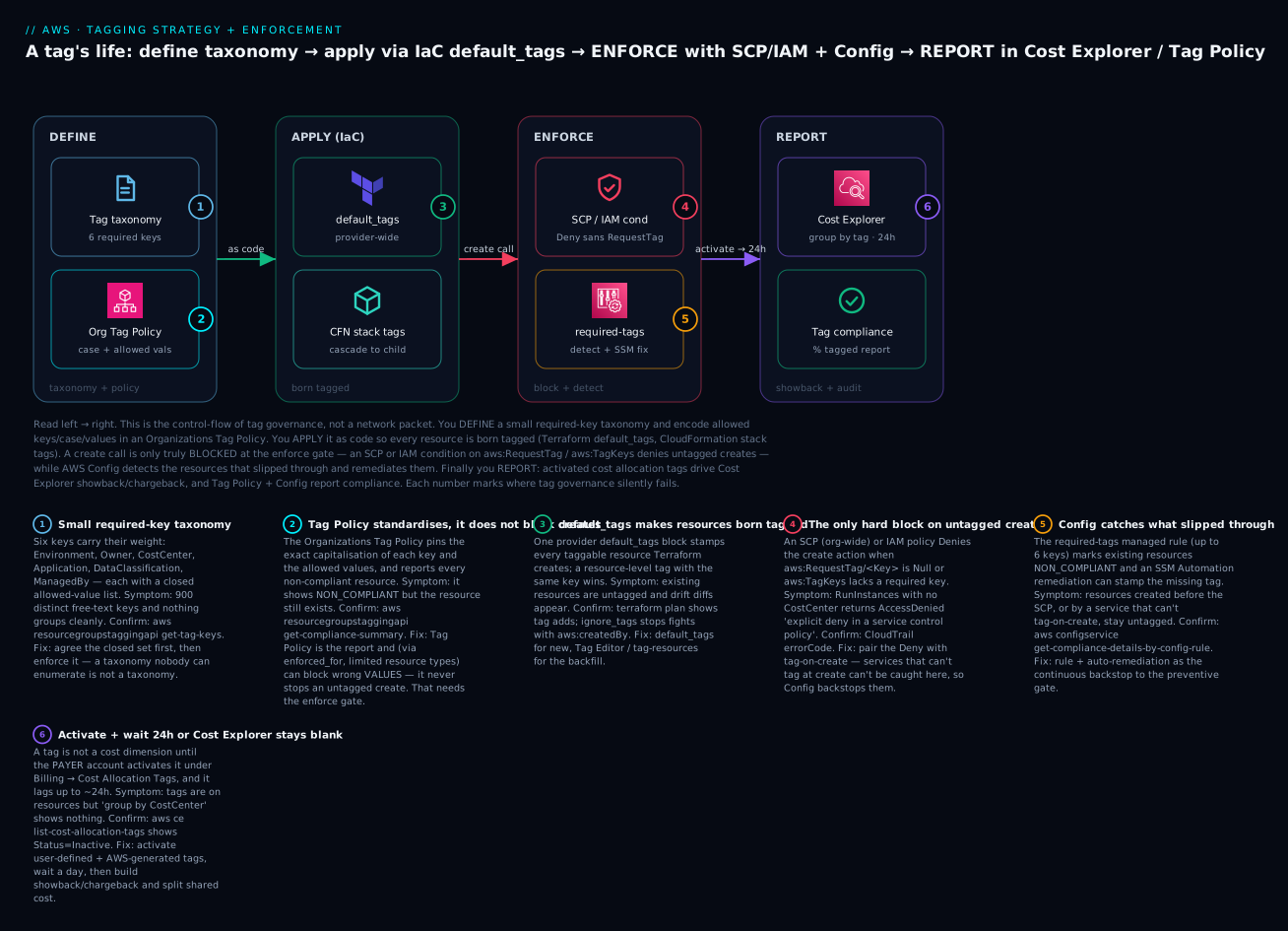
The diagram is not a network path — it is the life of a tag, read left to right, and it maps one-to-one onto the four control layers this article builds. Start at DEFINE: a small taxonomy (the doc) of six required keys with closed allowed-value lists, encoded into an Organizations Tag Policy that pins each key’s capitalisation and its permitted values and continuously reports compliance. That standard flows into APPLY (IaC), where Terraform default_tags and CloudFormation stack tags make every resource born tagged — the cheapest place to get it right. A create call then reaches the ENFORCE gate, the only place an untagged create is truly stopped: an SCP or IAM condition on aws:RequestTag/aws:TagKeys denies the call when a required tag is missing or wrong, while AWS Config’s required-tags rule detects the resources that slipped past — created before the gate, or by a service that cannot tag-on-create — and an SSM remediation stamps them. Finally, REPORT: once the payer account activates the tags (and the ~24-hour lag elapses), Cost Explorer groups spend by tag for showback and chargeback, and the Tag Policy plus Config report the compliance percentage.
Follow the six numbered badges and you have the complete failure map: a taxonomy too large or free-text to enumerate (1) at DEFINE; a Tag Policy that reports but is mistaken for a block (2) alongside it; default_tags that covers new resources but not the untagged backfill (3) at APPLY; the SCP/IAM condition that is the only hard block on untagged creates (4) and the Config rule that backstops what the gate cannot catch (5) at ENFORCE; and cost allocation tags that must be activated in the payer account and lag ~24 hours (6) at REPORT. The legend narrates each as symptom · confirm · fix — the same method as the rest of the article: localise to a layer, read the cause, run the named check, apply the fix.
Real-world scenario
Nimbus Retail, a fictional but representative e-commerce company, ran 14 AWS accounts under one organization and a ₹52-lakh monthly bill that Finance could allocate to exactly one line item: “AWS.” Three teams — Checkout, Catalog and Data — shared the accounts, and every attempt at chargeback died on the fact that the estate carried 470 distinct tag keys, dominated by env/Env/Environment and team/owner/cost-center in every casing. The CFO had asked a simple question — “what does Checkout cost us?” — and nobody could answer it within 20%.
The platform team ran the four-layer playbook over six weeks. Week 1 — taxonomy. They agreed the six required keys and closed value lists in a one-page standard, with Finance owning the CostCenter codes. Week 2 — standardise and measure. They enabled Tag Policies at the org root pinning the canonical case for all six keys and the allowed values for Environment, CostCenter and DataClassification, then pulled the org-wide compliance report: 38% compliant, and — the eye-opener — 22% of “untagged” resources were actually miscased (environment instead of Environment). Week 3 — apply as code. Every Terraform provider got a default_tags block and an ignore_tags { key_prefixes = ["aws:"] } to stop drift; new resources were now born compliant. Week 4 — enforce. They shipped an SCP denying ec2:RunInstances, rds:CreateDBInstance and a dozen other tag-on-create actions without CostCenter and Environment, first in report-only shadow (an IAM policy on a canary role) then org-wide. Untagged creates dropped to near zero overnight. Week 5 — backstop and backfill. A Config required-tags rule with SSM auto-remediation caught the stragglers and the services that can’t tag-on-create; the Tag Editor bulk-retagged 900 legacy resources over two afternoons. Week 6 — activate and report. Finance activated the user-defined and AWS-generated cost allocation tags in the payer account, waited a day for the lag, and built Cost Explorer reports grouped by CostCenter, with a Cost Category splitting the shared NAT and observability spend proportionally.
The result: compliance went from 38% to 96% (the last 4% being resource types that genuinely don’t support tags), and the CFO’s question got a two-click answer. The two things that made it stick were starting with the standard (not the tooling) and installing the block before chasing compliance — the SCP is what stopped the backlog from refilling faster than the Tag Editor could drain it. The one scar: an early value-constraint SCP briefly blocked the Terraform pipeline because it denied a tag the modules legitimately set, fixed by testing the policy against the real TagSpecifications before the org-wide roll-out.
Advantages and disadvantages
A tagging-and-enforcement program is nearly all upside, but the costs are real enough to plan for — mostly organisational (agreeing the standard, retrofitting the estate) rather than technical.
| Advantages | Disadvantages / costs |
|---|---|
| Per-team/product cost attribution (showback → chargeback) | Requires org-wide agreement on a standard (political) |
| Fast ownership lookup during incidents | Retrofitting a large untagged estate is real effort |
| Safe, targeted automation (backup, patch, cleanup) | Enforcement can block your own pipeline if untested |
| ABAC — one policy scales to many teams | ABAC trust depends on locking who can set tags |
| Audit evidence for data classification | AWS Config evaluations add cost |
| Consistent inventory/search across regions | Tag Policy reports but doesn’t block — easy to misread |
| Cheapest governance primitive on AWS | Some resource types don’t support tags at all |
Works with existing IaC (default_tags) |
Case-sensitivity traps if not enforced early |
When each matters: the cost-attribution advantage dominates for Finance-driven programs, and there the disadvantage that bites is shared/untagged cost — plan Cost Categories from day one. For security-driven programs the ABAC advantage is the headline, and its paired risk — that a user who can set their own resource’s tag can grant themselves access — means you must deploy the aws:TagKeys enforcement before you trust ABAC. For platform/lifecycle programs the automation advantage leads, and the risk is the value-constraint SCP blocking legitimate creates, so shadow-test everything.
Hands-on lab
This lab builds the full loop on a free-tier-friendly footprint: a Terraform default_tags block that makes resources born tagged, an AWS Config required-tags rule that detects gaps, an IAM policy (safer to test than an org-wide SCP) that denies an untagged create, and verification of each. It uses ap-south-1 (Mumbai). ⚠️ Cost note: an S3 bucket is free at rest; the AWS Config recorder and rule evaluations cost a small amount (roughly ₹0.20–₹0.25 per evaluation and per configuration item recorded), so the teardown at the end matters. Estimated cost if you tear down same-day: under ₹20.
Step 0 — Prerequisites and variables
export AWS_REGION=ap-south-1
export ACCT=$(aws sts get-caller-identity --query Account --output text)
echo "Account: $ACCT  Region: $AWS_REGION"
mkdir -p ~/tag-lab && cd ~/tag-lab
| Variable | Value | Purpose |
|---|---|---|
AWS_REGION |
ap-south-1 |
Where lab resources live |
ACCT |
your 12-digit id | Used in ARNs |
| Working dir | ~/tag-lab |
Terraform + JSON files |
Step 1 — Terraform default_tags: resources born tagged
Create main.tf:
terraform {
  required_providers { aws = { source = "hashicorp/aws", version = "~> 5.0" } }
}

provider "aws" {
  region = "ap-south-1"
  default_tags {
    tags = {
      CostCenter         = "4021"
      Environment        = "development"
      Owner              = "lab@corp.com"
      Application        = "tag-lab"
      DataClassification = "internal"
      ManagedBy          = "terraform"
    }
  }
}

# Compliant bucket — inherits all six default_tags
resource "aws_s3_bucket" "compliant" {
  bucket        = "tag-lab-compliant-${data.aws_caller_identity.me.account_id}"
  force_destroy = true
}

data "aws_caller_identity" "me" {}

output "compliant_bucket" { value = aws_s3_bucket.compliant.bucket }
Apply and verify the tags landed without you naming them per-resource:
terraform init && terraform apply -auto-approve
BUCKET=$(terraform output -raw compliant_bucket)
aws s3api get-bucket-tagging --bucket "$BUCKET" \
  --query 'TagSet' --output table
Expected output: a table listing all six tags (CostCenter=4021, Environment=development, …) even though the resource block set none of them — that is default_tags doing its job.
Step 2 — An untagged resource to catch
Create one bucket without Terraform (simulating a console/CLI create that bypasses default_tags), so Config has something non-compliant to find:
aws s3 mb "s3://tag-lab-untagged-$ACCT"
Step 3 — AWS Config required-tags rule
Ensure the Config recorder is on (skip if your account already records), then add the rule. If you need a recorder, the console’s one-click setup is fastest; via CLI you create a recorder, delivery channel and start it (abbreviated here — see the AWS Config: Resource Inventory and Compliance Rules walkthrough for the full recorder setup).
aws configservice put-config-rule --config-rule '{
  "ConfigRuleName": "tag-lab-required-tags",
  "Source": { "Owner": "AWS", "SourceIdentifier": "REQUIRED_TAGS" },
  "InputParameters": "{\"tag1Key\":\"CostCenter\",\"tag2Key\":\"Environment\"}",
  "Scope": { "ComplianceResourceTypes": ["AWS::S3::Bucket"] }
}'

# Trigger an evaluation and read compliance (wait ~1-2 min after the trigger)
aws configservice start-config-rules-evaluation \
  --config-rule-names tag-lab-required-tags
aws configservice get-compliance-details-by-config-rule \
  --config-rule-name tag-lab-required-tags \
  --query 'EvaluationResults[].{R:EvaluationResultIdentifier.EvaluationResultQualifier.ResourceId,C:ComplianceType}' \
  --output table
Expected output: the Terraform bucket shows COMPLIANT; the tag-lab-untagged-... bucket shows NON_COMPLIANT. That is the detective layer working.
Step 4 — IAM policy that denies an untagged create
Rather than an org-wide SCP (which could block your other work), attach a deny to a test role so you can prove the mechanism safely. Create the policy deny-untagged.json:
{
  "Version": "2012-10-17",
  "Statement": [{
    "Sid": "DenyBucketCreateWithoutCostCenter",
    "Effect": "Deny",
    "Action": "s3:CreateBucket",
    "Resource": "*",
    "Condition": { "Null": { "aws:RequestTag/CostCenter": "true" } }
  }]
}
# Create a test role you can assume, attach the deny + s3 perms
aws iam create-role --role-name tag-lab-tester \
  --assume-role-policy-document "{\"Version\":\"2012-10-17\",\"Statement\":[{\"Effect\":\"Allow\",\"Principal\":{\"AWS\":\"arn:aws:iam::$ACCT:root\"},\"Action\":\"sts:AssumeRole\"}]}"
aws iam put-role-policy --role-name tag-lab-tester \
  --policy-name deny-untagged --policy-document file://deny-untagged.json
aws iam attach-role-policy --role-name tag-lab-tester \
  --policy-arn arn:aws:iam::aws:policy/AmazonS3FullAccess

# Assume it
CREDS=$(aws sts assume-role --role-arn arn:aws:iam::$ACCT:role/tag-lab-tester \
  --role-session-name t --query Credentials --output json)
export AWS_ACCESS_KEY_ID=$(echo $CREDS | jq -r .AccessKeyId)
export AWS_SECRET_ACCESS_KEY=$(echo $CREDS | jq -r .SecretAccessKey)
export AWS_SESSION_TOKEN=$(echo $CREDS | jq -r .SessionToken)
Now test both paths (note: S3 CreateBucket does not accept tags in the same call in every SDK path, so this demonstrates the condition mechanism; for a guaranteed tag-on-create demo, ec2:RunInstances with --tag-specifications is the canonical example — included below):
# EC2 is the cleanest tag-on-create demo. Untagged run is DENIED:
aws ec2 run-instances --image-id ami-0abc --instance-type t3.micro --dry-run
# -> UnauthorizedOperation / explicit deny when no CostCenter RequestTag

# Tagged run passes the condition (still --dry-run so nothing launches):
aws ec2 run-instances --image-id ami-0abc --instance-type t3.micro --dry-run \
  --tag-specifications 'ResourceType=instance,Tags=[{Key=CostCenter,Value=4021}]'
# -> DryRunOperation (would have succeeded) — condition satisfied
Expected output: the untagged run-instances returns an explicit-deny AccessDenied/UnauthorizedOperation; the tagged one returns DryRunOperation (“Request would have succeeded”). That contrast is the enforcement layer.
Step 5 — Reset the session and verify
unset AWS_ACCESS_KEY_ID AWS_SECRET_ACCESS_KEY AWS_SESSION_TOKEN
aws sts get-caller-identity   # back to your own identity
Step 6 — Teardown (do this to stop Config charges)
| # | Command | Removes |
|---|---|---|
| 1 | aws configservice delete-config-rule --config-rule-name tag-lab-required-tags |
Config rule (stops evaluations) |
| 2 | aws s3 rb s3://tag-lab-untagged-$ACCT --force |
The untagged bucket |
| 3 | terraform destroy -auto-approve |
Terraform bucket + tags |
| 4 | aws iam delete-role-policy --role-name tag-lab-tester --policy-name deny-untagged |
Inline deny policy |
| 5 | aws iam detach-role-policy --role-name tag-lab-tester --policy-arn arn:aws:iam::aws:policy/AmazonS3FullAccess |
Managed policy |
| 6 | aws iam delete-role --role-name tag-lab-tester |
Test role |
⚠️ If you turned on the Config recorder solely for this lab, stop it too (aws configservice stop-configuration-recorder --configuration-recorder-name default) or it keeps recording configuration items across your account.
Common mistakes & troubleshooting
Tagging fails quietly — nothing crashes, the wrong thing just doesn’t happen. This is the playbook. Localise to a layer (DEFINE / APPLY / ENFORCE / REPORT), confirm with the exact command, apply the fix.
| # | Symptom | Root cause | Confirm (exact command / console path) | Fix |
|---|---|---|---|---|
| 1 | Cost tags don’t appear in Cost Explorer | Tag never activated in payer account | aws ce list-cost-allocation-tags → Status: Inactive |
Activate in payer account; update-cost-allocation-tags-status |
| 2 | Activated, still no data for a day | The ~24h lag after activation/first use | Billing → Cost Allocation Tags LastUpdatedDate |
Wait ~24h; data is not retroactive to untagged usage |
| 3 | Tag Policy shows NON_COMPLIANT but nothing is blocked | Tag Policies report, don’t block untagged creates | aws resourcegroupstaggingapi get-compliance-summary |
Add an SCP/IAM aws:RequestTag deny to block |
| 4 | Half of “untagged” resources are actually tagged | Case-sensitivity: environment ≠ Environment |
Compare keys in get-resources --include-compliance-details |
Pin case in Tag Policy; retag to canonical case |
| 5 | Some resources can never be made compliant | Resource type doesn’t support tags | AWS “Services that support the Resource Groups Tagging API” doc | Exclude from scope; don’t chase impossible 100% |
| 6 | ABAC denies a legitimate user | PrincipalTag/Team ≠ ResourceTag/Team (case/value) |
CloudTrail AccessDenied; compare the two tag values |
Canonicalise both; enforce which tags a user may set |
| 7 | SCP blocks your Terraform pipeline | Value-constraint denies a tag the modules set | CloudTrail errorCode on the pipeline role |
Test policy vs real TagSpecifications; align allowed values |
| 8 | default_tags causes perpetual plan diffs |
External tags (aws:createdBy, Config remediation) |
terraform plan shows tag add/remove churn |
ignore_tags { key_prefixes = ["aws:"] } |
| 9 | Config rule says COMPLIANT but resources are untagged | Rule only covers supported resource types | aws configservice describe-config-rules scope |
Supplement with Tagging API compliance report |
| 10 | Deny-untagged SCP blocks ALL creates of a service | Service can’t tag-on-create; RequestTag always null |
Test create with --tag-specifications — still denied |
Remove that service from the create-deny; use Config remediation |
| 11 | Bulk tag-resources fails for some ARNs |
Mixed types; some reject a char or exceed tag cap | Read the per-ARN FailedResourcesMap in the response |
Fix value chars; check 50-tag / S3 10-tag caps |
| 12 | New account has no Tag Policy effect | Policy type not enabled / not attached to that OU | aws organizations describe-effective-policy --policy-type TAG_POLICY --target-id <acct> |
Enable TAG_POLICY, attach at the right OU |
| 13 | aws: tag edit rejected |
aws: prefix is reserved |
Attempt returns InvalidParameterValue |
Never set aws: keys; they’re AWS-managed |
| 14 | Cost Category shows huge “unallocated” | Untagged + shared cost not split | Cost Categories → rule coverage | Add split charge rules; improve tag compliance |
The three nastiest failures deserve prose, because the table can’t carry the reasoning.
“Tag Policy is on, compliance won’t move, and untagged resources keep appearing.” This is the single most common misdiagnosis. Teams enable Tag Policies, expect prevention, and watch the compliance number sit at 60% while new untagged resources appear daily. The mental error is treating a reporting control as a preventive one. A Tag Policy standardises case and values and reports compliance; its enforced_for can block non-compliant values on a narrow set of resource types during tagging operations — but it does not stop an untagged RunInstances or CreateBucket. Nothing will drive compliance up until you install the block: an SCP (org-wide, un-bypassable) or IAM condition that Denies the create action when aws:RequestTag/<Key> is null. The Tag Policy tells you who is non-compliant; the SCP is what stops the backlog refilling. Deploy the SCP in shadow first (as an IAM policy on a canary role) so you learn which tag-on-create actions your workloads actually use before you deny them org-wide.
“The SCP works for EC2 and RDS but breaks a third service entirely.” When you write Deny <action> if aws:RequestTag/CostCenter is null, you are assuming the service supports tag-on-create — passing tags in the create call. For services that only allow tagging after creation, the request never carries RequestTag, so the Null=true condition is always true and you deny every create of that service, including legitimate ones. The confirm is telling: even a create with --tag-specifications (or the service’s equivalent) is denied, because the tags aren’t part of that API. The fix is to scope the deny to actions you have verified support tag-on-create, and lean on Config detection + SSM remediation for the rest — the preventive gate and the detective backstop are complementary precisely because neither covers every service.
“Cost Explorer shows the tag but half the spend is No CostCenter.” Two separate causes hide here. First, activation is not retroactive: any usage that occurred before the resource carried the tag is permanently unattributed — you cannot back-tag history. Second, genuinely shared cost (a NAT gateway, a shared EKS cluster, inter-AZ transfer) has no single owning CostCenter and lands in the unallocated bucket by default. The fix for the first is patience and forward-compliance (it self-heals as tagged usage accumulates); the fix for the second is Cost Categories with split charge rules, which proportionally allocate shared and unallocated cost to consumers based on their tagged usage. Chasing 100% tagged spend without split rules is a treadmill; the split rules are how mature FinOps closes the last 15%.
An error/status reference for the codes and states you’ll actually see:
| Code / status | Where | Meaning | Fix |
|---|---|---|---|
AccessDenied “explicit deny in a service control policy” |
CloudTrail / API | An SCP RequestTag/TagKeys deny fired |
Add the required tag(s) to the request |
AccessDenied “explicit deny in an identity-based policy” |
CloudTrail / API | IAM condition denied the create | Add tag(s), or fix the value to an allowed one |
UnauthorizedOperation |
EC2 | Deny or missing perms on RunInstances/CreateTags |
Grant CreateTags; satisfy the tag condition |
InvalidParameterValue |
Many services | Illegal char in tag key/value, or aws: prefix |
Use allowed chars; never set aws: keys |
TooManyTags / “Tag limit exceeded” |
Many services | Over 50 (or S3 object 10) tags | Remove tags; don’t encode many facts in tags |
NON_COMPLIANT |
AWS Config | Resource missing/wrong required tag | Retag; auto-remediation via SSM |
NOT_APPLICABLE |
AWS Config | Resource type not in rule scope | Expected; not a failure |
INSUFFICIENT_DATA |
AWS Config | Rule hasn’t evaluated yet | Wait / start-config-rules-evaluation |
Status: Inactive |
Cost allocation tags | Tag not activated as a cost dimension | Activate in payer account |
Tag Policy NON_COMPLIANT |
Organizations | Key case/value outside the standard | Retag to canonical; check enforced_for |
Best practices
- Start with the standard, not the tooling. Agree the six required keys and their closed value lists on one page, with Finance owning
CostCenter, before you touch Tag Policies or SCPs. Tooling enforces a standard; it cannot invent one. - Keep the required set small (≤ 6–8 keys). Compliance is inversely proportional to the number of required tags. Push everything else into documented optional tags.
- Close every value list. Free text is the disease; allowed-value enumerations are the cure.
Environmenthas five values, not infinity. - Pin capitalisation in a Tag Policy on day one. The case-sensitivity trap is cheap to prevent and expensive to clean up. One canonical case per key, enforced org-wide.
- Install the block before chasing compliance. An SCP denying untagged tag-on-create stops the backlog refilling; the Tag Editor drains what’s already there. Do them in that order.
- Make resources born tagged.
default_tagsin every Terraform provider and stack tags in every CloudFormation deploy — the cheapest tag is the one applied at creation. - Backstop with Config, don’t rely on it alone. The
required-tagsrule + SSM remediation catches what the gate can’t, but it’s detective and covers only supported types. - Activate cost allocation tags in the payer account, and expect the 24h lag. Do it once, up front, for both user-defined and AWS-generated tags, so the data is accumulating before Finance needs it.
- Handle shared cost with Cost Categories from day one. Split charge rules are how you allocate NAT, clusters and unallocated spend — don’t wait until chargeback disputes force it.
- Lock which tags a principal may set before trusting ABAC. ABAC is only as safe as the
aws:TagKeysenforcement that stops a user re-tagging a resource into their own team. - Never put secrets or PII in tags. Tags surface in many APIs, CUR exports and the console — treat them as public metadata.
- Review the taxonomy quarterly. Retire dead
Projecttags, add keys the business now needs, and re-check the compliance report as a KPI.
Security notes
Tags are a security primitive, not just a cost one, and they cut both ways: they enable fine-grained access (ABAC) and they become an attack surface if a principal can set them freely.
ABAC and least privilege. The pattern that scales IAM is aws:ResourceTag/Team == aws:PrincipalTag/Team: one policy grants a principal access only to resources whose team tag matches the principal’s own. This is powerful and dangerous. If a developer can call CreateTags to set a resource’s Team tag to their own team — or set their own principal tag — they can grant themselves access to anything. So ABAC has a hard prerequisite: an enforcement policy that restricts which tag keys a principal may set (aws:TagKeys with ForAllValues/ForAnyValue) and forbids editing the ABAC-governing keys. Set the principal tags centrally (via Identity Center permission-set session tags or the SAML assertion), never let users self-tag the keys that gate access.
DataClassification drives controls. Treat DataClassification as the join key between a resource and its required controls. A Config rule can assert “resources tagged DataClassification=restricted must have encryption enabled, must not be public, and must reside in an approved region.” The tag doesn’t provide the security — encryption and network isolation do — but it’s how you target and prove the control at scale.
Tags are visible. Tag keys and values appear in DescribeInstances, the Tagging API, CloudTrail, CUR exports, Cost Explorer and the console. They are not a secret store. Never place credentials, tokens, personal data or internal hostnames in a tag; a read-only cost analyst can see all of them.
| Security concern | Control | Condition key / mechanism |
|---|---|---|
| Users self-granting via tags | Restrict settable tag keys | aws:TagKeys deny on ABAC keys |
| Cross-team resource access | ABAC match | aws:ResourceTag == aws:PrincipalTag |
| Principal tag spoofing | Set tags centrally | Identity Center session tags / SAML |
| Regulated data isolation | Tag-driven Config rules | aws:ResourceTag/DataClassification |
| Sensitive data leakage | Policy + review | Never store secrets/PII in tags |
| Tamper of enforced tags | Deny tag delete/change on key resources | aws:TagKeys + resource-level deny |
Cost & sizing
Tags themselves are free — applying, storing and reading them costs nothing. The costs come from the enforcement and reporting machinery around them, and from the savings tags unlock.
| Cost driver | Roughly what it costs | Notes |
|---|---|---|
| Tags on resources | Free | No charge for the tags themselves |
| Organizations Tag Policies | Free | Included with Organizations |
| SCP / IAM conditions | Free | No charge for policy evaluation |
| AWS Config recorder | ~₹0.25 per configuration item recorded | Scales with resource count/changes |
| AWS Config rule evaluations | ~₹0.001–₹0.01 per evaluation (tiered) | Scales with rules × resources × changes |
| SSM Automation remediation | Free tier, then per step | Runbook executions |
| Cost Explorer | Free (UI); API calls ~₹0.85 each | The API (get-cost-and-usage) is billed per request |
| Cost & Usage Report (CUR) | S3 storage of the report only | The report itself is free |
The dominant variable cost is AWS Config across many accounts. Right-size it: record only the resource types you need, scope the required-tags rule to types that actually support tags, and prefer periodic over hyper-frequent evaluation where possible. A conformance pack across 20 accounts recording everything can run into the low thousands of rupees per month; scoped sensibly it’s a fraction of that.
Against these small costs sits the payoff. The entire justification for tagging is that you cannot cut a cost you cannot see. In practice, activating cost allocation tags and putting per-team spend in front of teams via showback drives a first-pass reduction of 10–25% on a previously unattributed bill — untagged, forgotten and oversized resources surface immediately. On the ₹52-lakh Nimbus bill, that’s ₹5–13 lakh a month, dwarfing the few thousand rupees of Config cost. Tagging is the rare governance investment that pays for itself in the first billing cycle.
Free-tier notes: AWS Config offers no perpetual free tier for rules, but the volumes in this article’s lab are cents. Cost Explorer’s UI is free; only its API is billed. Organizations, Tag Policies, SCPs and IAM conditions are all free.
Interview & exam questions
Q1. Why does activating a cost allocation tag show nothing in Cost Explorer for a day? There’s a lag of up to ~24 hours between activating a tag (in the payer account) and it appearing as a usable dimension with populated data. Activation is also not retroactive to usage that never carried the tag. Maps to CLF-C02 / the FinOps track.
Q2. A Tag Policy shows 60% compliance but untagged resources keep being created. Why, and what fixes it? Tag Policies report (and, via enforced_for, can block non-compliant values on limited resource types) but do not block untagged creates in general. To block, add an SCP or IAM condition denying the create when aws:RequestTag/<Key> is null. SAA-C03 / SCS-C02.
Q3. What’s the difference between aws:RequestTag, aws:ResourceTag and aws:PrincipalTag? aws:RequestTag/<Key> is a tag in the create request (enforce at create time); aws:ResourceTag/<Key> is a tag on the existing resource (ABAC on modify/delete); aws:PrincipalTag/<Key> is a tag on the caller (ABAC matching). SCS-C02 / SAA-C03.
Q4. Why can’t you enforce create-time tags on every service with one SCP? Only services that support tag-on-create carry aws:RequestTag on the create call. For services that tag only after creation, a Null=true deny would block all creation, so you scope the deny to tag-on-create actions and use Config detection/remediation elsewhere. SCS-C02.
Q5. Env and env both appear in Cost Explorer. What happened and how do you prevent it? Tag keys are case-sensitive, so those are two distinct tags. Prevent it by pinning the canonical capitalisation in an Organizations Tag Policy and enforcing it; remediate by retagging to the canonical case and deactivating the wrong one. SOA-C02.
Q6. How do you make every Terraform-created resource carry your standard tags without repeating them? A default_tags { tags = {…} } block on the aws provider; a resource-level tags key with the same name overrides the default. Use ignore_tags to prevent drift from externally-managed tags like aws:createdBy. DVA-C02 / SAA-C03.
Q7. Which account can activate cost allocation tags, and why does that matter? Only the management (payer) account. Member-account admins cannot activate, so cost-tag activation is a centralised Finance/platform task — a common source of “I activated it and nothing happened” when done from the wrong account. CLF-C02.
Q8. How many required tag keys does the AWS Config required-tags managed rule support, and what’s a key limitation? Up to six keys (each with optional allowed values). Its main limitations: it covers only a subset of resource types, and it’s detective — it flags NON_COMPLIANT but doesn’t prevent creation. SOA-C02.
Q9. What is ABAC and what must be true for it to be secure? Attribute-based access control grants access by matching principal tags to resource tags (aws:PrincipalTag/Team == aws:ResourceTag/Team) so one policy scales to many teams. It’s only secure if principals cannot set the ABAC-governing tags themselves — enforce which tag keys a principal may set with aws:TagKeys. SCS-C02.
Q10. How do you allocate the cost of a shared NAT gateway across teams in chargeback? Use Cost Categories with split charge rules that proportionally allocate shared and unallocated cost to consumers based on their tagged usage — a single tag can’t own shared infra. FinOps / CLF-C02.
Q11. What’s the difference between showback and chargeback? Showback reports each team its cost for visibility with no internal billing; chargeback actually allocates cost to team budgets. Most orgs start with showback to build trust in the numbers, then move to chargeback once compliance is high. FinOps.
Q12. A default_tags block causes perpetual terraform plan diffs. Why and what’s the fix? Something outside Terraform (e.g. aws:createdBy, Config remediation, another tool) adds tags, so Terraform sees drift each plan. Add ignore_tags { key_prefixes = ["aws:"] } (and specific keys) to the provider so those tags don’t fight your state. DVA-C02.
Quick check
- You activated
CostCenteras a cost allocation tag but Cost Explorer’s “group by CostCenter” is empty. What are the two most likely reasons? - True or false: an Organizations Tag Policy will prevent an engineer from launching an EC2 instance with no tags.
- Which condition key do you use to deny a create call that lacks a required tag, and which operator makes it fire on absence?
- Why might the AWS Config
required-tagsrule report a resource asCOMPLIANTeven though you know it’s untagged? - In ABAC, what must you lock down before you can trust
aws:ResourceTag == aws:PrincipalTagmatching?
Answers
- Either it isn’t actually activated (check
list-cost-allocation-tagsforStatus: Inactive, and remember only the payer account can activate), or the ~24-hour lag hasn’t elapsed / the usage predates the tag (activation isn’t retroactive). - False. Tag Policies report non-compliance (and can block non-compliant values on limited resource types via
enforced_for) but do not block an untagged create. You need an SCP/IAM condition onaws:RequestTag. aws:RequestTag/<Key>with theNulloperator set to"true"— it fires when the tag key is absent from the request, so theDenytakes effect on untagged creates.- Because the rule only evaluates a subset of supported resource types; a resource of an unsupported type is
NOT_APPLICABLE, and “compliant” only ever means “compliant among the types the rule covers.” Supplement with the Tagging API compliance report. - Which tag keys a principal may set — enforce with
aws:TagKeysso a user cannot re-tag a resource (or themselves) into another team and self-grant access. Set principal tags centrally, not by user self-service.
Glossary
| Term | Definition |
|---|---|
| Tag | A key-value label on an AWS resource; metadata read by cost, security, automation and inventory systems. |
| User-defined tag | A tag you create; the key appears exactly as typed. |
| AWS-generated tag | A tag applied automatically by a service, always aws:-prefixed; can’t be edited and doesn’t count toward the 50-tag limit. |
| Cost allocation tag | A tag activated in the payer account so it becomes a dimension in Cost Explorer / CUR. |
| Tag Policy | An Organizations policy that standardises key case and allowed values and reports compliance; blocks only non-compliant values on limited resource types. |
| SCP (Service Control Policy) | An org/OU/account guardrail capping maximum permissions; used with tag conditions to deny untagged creates org-wide. |
aws:RequestTag/<Key> |
Condition key matching a tag supplied in the create request; used to enforce tags at create time. |
aws:TagKeys |
Condition key matching the set of tag keys in a request; used to require an exact key set or forbid extras. |
aws:ResourceTag/<Key> |
Condition key matching a tag on the existing resource; used for ABAC on modify/delete. |
aws:PrincipalTag/<Key> |
Condition key matching a tag on the calling identity; used for ABAC matching. |
| ABAC | Attribute-based access control; grants access by matching principal tags to resource tags so one policy scales to many teams. |
required-tags |
The AWS Config managed rule (identifier REQUIRED_TAGS) that flags resources missing up to six required tag keys. |
default_tags |
The Terraform aws provider block that stamps standard tags on every taggable resource it creates. |
| Tag Editor | The Resource Groups console tool for finding and bulk-editing tags across services and regions. |
| Cost Category | A billing-console rollup that maps spend (by tag/account/service) into named buckets, with split-charge rules for shared cost. |
| Showback / Chargeback | Showback reports cost to teams for visibility; chargeback allocates cost to team budgets. |
Next steps
- Put the guardrail in place org-wide: AWS Organizations SCPs: Multi-Account Guardrails is where the deny-untagged SCP lives alongside your other preventive controls.
- Build the detective backstop and inventory: AWS Config: Resource Inventory and Compliance Rules covers the recorder, conformance packs and remediation in full.
- Turn activated tags into money: AWS Billing, Cost Explorer and Budgets: Hands-On Cost Control takes the group-by-tag reports here into budgets, alerts and anomaly detection.
- Ground the account and identity structure this all sits on: AWS Organizations and IAM Foundations: Accounts, OUs and Roles.
- Automate the whole landing zone: AWS Control Tower Guardrails: Building a Secure Multi-Account Foundation bakes tagging guardrails into account vending.