The API call comes back the same way it always does when it’s this kind of day: An error occurred (AccessDenied) when calling the GetObject operation. You wrote the identity policy yourself. You can see the Allow. And it is still denied. This is the single most common — and most misdiagnosed — failure in all of AWS, because AccessDenied does not mean “you have no permission.” It means “at least one of seven independent gates said no, and I’m not going to tell you which one unless you know how to ask.” The trap is that engineers stare at the identity policy for an hour when the real denier is a service control policy two OUs up, a permission boundary attached by the platform team, a KMS key policy that never named you, or a resource policy in another account that has no idea you exist.
This article is the diagnostic playbook. The depth anchor is the thing almost nobody holds fully in their head: AWS’s complete policy-evaluation logic — the order in which explicit Deny, SCPs/RCPs, resource-based policies, identity-based policies, permission boundaries, session policies and VPC endpoint policies are combined, and the one iron rule underneath it: every request is denied by default; an Allow is needed to override the default; and that Allow must survive every gate — while a single Deny anywhere ends the evaluation immediately. Once that model is in your hands, “Access Denied” stops being a wall and becomes a decision tree with exactly one true answer.
Then we make it operational. You will learn to read the AccessDenied message itself — the newer messages name the failing policy type in plain English — to decode the encoded authorization failure message with aws sts decode-authorization-message, and to drive the three tools that tell the truth: the IAM Policy Simulator, IAM Access Analyzer, and CloudTrail (where every denied call is logged with its errorCode and errorMessage). Because this is a reference you will open mid-incident, the evaluation gates, the message reasons, the condition keys, the ARN traps and the playbook itself are all laid out as scannable tables. Read the prose once; keep the tables open at 02:00.
What problem this solves
IAM is deny-by-default and additive-with-caps, and that combination is genuinely hard to reason about under pressure. A permission you need can be granted in one place and quietly removed in another. A cross-account call needs two policies to agree. An encrypted object needs a third policy — on the key — that lives in a different blade entirely. The failure surface is not “did I write an Allow” but “did my Allow survive an SCP, a boundary, a session policy, a resource policy and a key policy, and did none of them contain a Deny.” Six or seven things must all be true; the error tells you only that something wasn’t.
What breaks without this knowledge is time and trust. On-call engineers widen a policy to "Action": "*" and it still fails (because the denier was an SCP, and * can’t beat an allow-list gap or a Deny), which teaches the terrifying lesson that “IAM is random.” Others grant AdministratorAccess to “unblock” a workload — turning a five-minute permissions fix into a standing security finding — and it still fails because the real gate was a KMS key policy or a permission boundary that AdministratorAccess cannot exceed. The actual cause is always precisely diagnosable; the skill is knowing which of the seven gates to interrogate and with which command.
Who hits this: everyone, but hardest in AWS Organizations environments (SCPs and RCPs add gates most builders never see), in cross-account designs (assume-role trust policies, resource policies, external IDs), on encrypted workloads (the KMS gate), and on any team that uses permission boundaries to delegate IAM safely (the boundary silently caps every role the delegated admins create). The fix is almost never “add more permissions” — it’s “find the gate that is saying no and make that specific gate say yes.”
To frame the whole field before the deep dive, here is every denial class this article covers, what is actually saying no, and the first place to look.
| Denial class | What is actually denying you | The tell | First place to look | Most common single cause |
|---|---|---|---|---|
| Implicit deny (identity) | No statement allows the action | Message: “no identity-based policy allows” | simulate-principal-policy |
Missing Action or wrong Resource ARN |
| Explicit Deny | A Deny in some policy wins outright |
Message: “with an explicit deny in a …” | decode-authorization-message |
SCP or boundary Deny you didn’t write |
| SCP / RCP cap | Org guardrail omits or denies the action | Works in mgmt account, denied in member | organizations describe-effective-policy |
Allow-list gap (missing service) |
| Resource policy | The resource never named your principal | Cross-account or S3/KMS/SNS call | get-bucket-policy / trust policy |
Principal missing from resource policy |
| KMS key policy | The encryption key didn’t allow you | 403 names kms:Decrypt + a key ARN |
KMS key policy blade | Key policy grants no one but root |
| Permission boundary | Your Allow is outside the ceiling | Role has the Allow but is denied | simulate with the boundary |
Boundary omits the action |
| Session policy | AssumeRole scoped the session down | Only the assumed session fails | Inspect assume-role --policy |
Inline session policy too tight |
| Condition mismatch | A Condition evaluated false |
Denied from one IP/without MFA | Decode / simulate with context | aws:SourceIp, MFA, PrincipalOrgID |
| VPC endpoint policy | Endpoint policy blocked the call | Only via the VPC endpoint | Endpoint policy JSON | Default-open replaced by a tight policy |
Learning objectives
By the end of this article you can:
- Recite and apply AWS’s complete policy-evaluation order — explicit Deny → SCP/RCP → resource-based → identity-based → permission boundary → session policy → VPC endpoint policy — and state the deny-by-default rule that ties them together.
- Read an AccessDenied message and map its exact wording to the gate that denied you, distinguishing an implicit deny (“no identity-based policy allows”) from each explicit-deny variant (“with an explicit deny in a service control policy / permission boundary / resource-based policy / VPC endpoint policy”).
- Decode the encoded authorization failure message with
aws sts decode-authorization-messageand readallowed,explicitDeny,matchedStatementsandfailures. - Drive the IAM Policy Simulator (
simulate-principal-policy/simulate-custom-policy) and know its blind spots (it does not evaluate SCPs), use Access Analyzer for external-access and unused-access findings and policy checks, and query CloudTrail for the denied call byerrorCode. - Diagnose the nine root-cause families: missing
Action, wrongResourceARN,Conditionmismatch (SourceIp / MFA / PrincipalOrgID), SCP/RCP deny, permission boundary too tight, KMS key policy, cross-account trust policy, resource policy missing the principal, and wrong region/partition. - Explain why an encrypted resource needs a KMS key policy grant in addition to the data-service permission, and why cross-account needs both an identity allow and a resource allow.
- Work a real AccessDenied to root cause in minutes using a structured symptom → root cause → confirm → fix playbook.
Prerequisites & where this fits
You should already know IAM’s building blocks: a principal (an IAM user, an IAM role session, or the account root), a policy (a JSON document of Statements each with Effect, Action, Resource and optional Condition), the difference between an identity-based policy (attached to a user/group/role) and a resource-based policy (attached to a resource like an S3 bucket or an SQS queue), and how a role is assumed via sts:AssumeRole. You should be comfortable running the aws CLI, reading JSON, and reading an ARN. If those are shaky, start with AWS Organizations & IAM Foundations and the hands-on IAM Users, Groups, Roles & Policies, then come back.
This sits at the top of the Security & Identity track: it is the debugging layer over everything those foundations build. It pairs tightly with AWS Organizations SCPs & Multi-Account Guardrails (SCPs are the gate most people forget) and IAM Cross-Account Roles & AssumeRole (trust policies, external IDs and session policies are three of the seven gates). Everything here maps to certification objectives: the evaluation order and SCPs are core to SCS-C02 (Security Specialty) and SAP-C02 (Solutions Architect Professional), and appear on SAA-C03 and DVA-C02.
A quick map of who owns which gate, so during an incident you page the right person fast:
| Gate | Where it lives | Who usually owns it | Denials it causes |
|---|---|---|---|
| Explicit Deny | Any of the six policy types | Whoever wrote that policy | Hard stop; beats every Allow |
| SCP / RCP | AWS Organizations (mgmt / delegated admin) | Cloud platform / security | Allow-list gap or Deny across an OU |
| Resource-based policy | On the resource (S3, KMS, SQS, IAM trust) | Resource / app team | Cross-account and same-account grants |
| Identity-based policy | On the user/group/role | App / dev team | Missing Action, wrong ARN, Condition |
| Permission boundary | On the IAM entity | Platform team (delegation) | Caps a delegated role’s effective set |
| Session policy | Passed at AssumeRole / federation |
The code that assumes the role | Over-tight inline session policy |
| VPC endpoint policy | On the interface/gateway endpoint | Network team | Blocks calls that traverse the endpoint |
Core concepts
Five mental models make every later diagnosis obvious.
Deny by default; an Allow overrides the default; a Deny overrides every Allow. Nothing is permitted until something explicitly allows it. That is the base state — an implicit deny. An Allow in an identity-based or resource-based policy lifts the implicit deny. But an explicit Deny in any policy that applies to the request ends the evaluation with a denial, no matter how many Allows exist. There is no “score”; Deny is not outvoted. Root user is the one near-exception — the account root has implicit full access that SCPs can still restrict.
The request is evaluated against a set of policies, and the caps only subtract. When you call an API, AWS assembles every policy in scope — identity policies on the principal, any resource policy on the target, the permission boundary on the principal, the SCPs/RCPs on the account’s OU path, any session policy from the assume-role, and any VPC endpoint policy on the path. SCPs, RCPs, permission boundaries and session policies never grant anything — they are maximum-permission filters. They can only turn an Allow into a deny; they cannot create access. So the effective permission set is (identity ∪ resource allows) ∩ SCP ∩ RCP ∩ boundary ∩ session ∩ endpoint, minus any explicit Deny anywhere.
Cross-account needs both doors open. Inside one account, an action is allowed if either the identity policy or the resource policy allows it (for services that have resource policies). Across accounts it is stricter: the caller’s identity policy in account A must allow the action and the resource’s resource policy in account B must allow the caller — both, independently. Assuming a role is the canonical case: your identity needs sts:AssumeRole on the role, and the role’s trust policy (a resource-based policy) must name your principal.
Encryption adds a whole extra gate. If a resource is encrypted with a customer-managed KMS key, reading or writing it requires the data-service permission and a KMS permission (kms:Decrypt, kms:GenerateDataKey, …) that the KMS key policy allows for your principal. The key policy is authoritative for the key: unless it either names your principal or delegates to IAM (the default Enable IAM User Permissions statement), no identity policy in the world grants key access. This is why an S3 GetObject with a perfectly good bucket permission still 403s — the denier is the key, in a different console entirely.
The message is diagnostic — if you read it precisely. AWS’s AccessDenied messages evolved to name the reason. “no identity-based policy allows” is an implicit deny (you never granted it). “with an explicit deny in a service control policy” is an SCP Deny. “with an explicit deny in a permissions boundary” is the boundary. For services that support it (EC2 and others), the error carries an encoded authorization failure message you decode to see the matched statements. Learning to read the exact wording collapses the search space from “seven gates” to “this gate.”
The vocabulary in one table
Pin down every moving part before the deep sections; the glossary repeats these for lookup.
| Term | One-line definition | Grants or caps? | Denials it drives |
|---|---|---|---|
| Implicit deny | The default: no statement allows it | — | The base state you must override |
| Explicit Allow | A Statement with Effect: Allow |
Grants | Absent → implicit deny |
| Explicit Deny | A Statement with Effect: Deny |
Caps (hard) | Beats every Allow, ends evaluation |
| Identity-based policy | Attached to user/group/role | Grants | Missing Action / wrong ARN / Condition |
| Resource-based policy | Attached to a resource (S3, KMS, SQS…) | Grants | Principal not named (esp. cross-account) |
| SCP | Organizations guardrail on accounts/OUs | Caps | Allow-list gap or Deny across an OU |
| RCP | Resource control policy (Organizations) | Caps | Caps resource-policy access org-wide |
| Permission boundary | Max-permission filter on an IAM entity | Caps | Effective set = policy ∩ boundary |
| Session policy | Inline/managed policy at AssumeRole/federation | Caps | Session scoped below the role |
| VPC endpoint policy | Policy on an interface/gateway endpoint | Caps | Blocks calls traversing the endpoint |
| Trust policy | The resource policy on a role (who may assume) | Grants (assume) | Principal/external-ID/MFA mismatch |
| KMS key policy | The resource policy on a KMS key | Grants (key use) | kms:Decrypt/GenerateDataKey denied |
| Encoded authz message | Opaque blob in some AccessDenied errors | — | Decode to see matched statements |
The complete policy-evaluation logic
This is the depth anchor. When a principal makes a request, AWS runs a fixed evaluation to a single boolean. The order matters because the first rule short-circuits everything: any explicit Deny ends the evaluation immediately. After that, each cap must permit the action, and at least one Allow must exist. Here is the full order, top to bottom, exactly as AWS combines them within an account (plus the VPC endpoint gate when the request traverses one).
| # | Gate (in order) | Question asked | If it fails | Grants or only caps? | You control it where |
|---|---|---|---|---|---|
| 0 | Default | Any policy in scope at all? | Implicit deny | — | N/A (deny by default) |
| 1 | Explicit Deny | Does ANY policy Deny this? |
Deny — stop now | Caps (absolute) | Every policy type |
| 2 | SCP / RCP | Do Org policies allow it? | Implicit deny | Caps only | Organizations mgmt/delegated admin |
| 3 | Resource-based | Does the resource allow this principal? | (not fatal alone, same-acct) | Grants | On the resource |
| 4 | Identity-based | Does an attached policy allow it? | Implicit deny (if no resource allow) | Grants | On the user/role |
| 5 | Permission boundary | Is it within the boundary? | Implicit deny | Caps only | On the IAM entity |
| 6 | Session policy | Is it within the session scope? | Implicit deny | Caps only | At AssumeRole/federation |
| 7 | VPC endpoint policy | Does the endpoint allow it? | Implicit deny | Caps only | On the endpoint |
Read the flow as a gauntlet: the request starts denied, an Allow (from identity or resource) lifts it, and then it must pass through every cap without hitting a Deny. The truth table below is the entire model compressed — memorise it and you can predict any outcome.
| Explicit Deny anywhere? | SCP allows? | Identity or resource Allow? | Boundary allows? | Session allows? | Result |
|---|---|---|---|---|---|
| Yes | (any) | (any) | (any) | (any) | Deny (Deny always wins) |
| No | No | (any) | (any) | (any) | Deny (SCP cap) |
| No | Yes | No | (any) | (any) | Deny (implicit — no Allow) |
| No | Yes | Yes | No | (any) | Deny (outside boundary) |
| No | Yes | Yes | Yes | No | Deny (outside session) |
| No | Yes | Yes | Yes / n/a | Yes / n/a | Allow |
Three subtleties that trip up even experienced engineers, stated precisely so you don’t over- or under-claim them:
| Subtlety | The precise rule | Why it bites |
|---|---|---|
| Same-account identity vs resource | Either an identity allow or a resource allow suffices | People add a bucket policy AND an identity policy, then a Deny in one blocks both |
| Cross-account | You need both an identity allow (caller acct) and a resource allow (resource acct) | One side alone → implicit deny; classic assume-role failure |
| Boundary vs resource policy | A permission boundary limits what the principal’s identity policy can do; access granted to the principal by a resource policy can apply even outside the boundary | Explains “the boundary should have blocked it but didn’t” |
Gate 1 — Explicit Deny (always wins)
An explicit Deny in any policy in scope ends the evaluation with a denial. There is no override — not AdministratorAccess, not root, not a resource policy allow. Because a Deny can live in six different places, “who wrote the Deny” is the whole question. This is the gate people fight for hours because they keep adding Allows, which cannot help.
| Where a Deny can hide | Typical author | Message signature | How you confirm it |
|---|---|---|---|
SCP (Deny statement) |
Security / platform | “explicit deny in a service control policy” | organizations describe-effective-policy |
RCP (Deny statement) |
Security / platform | “explicit deny in a resource control policy” | RCP on the account/OU |
| Permission boundary | Platform (delegation) | “explicit deny in a permissions boundary” | get-role/get-user → boundary ARN |
| Session policy | The assuming code | “explicit deny in a session policy” | Inspect the assume-role --policy |
| Resource policy | Resource owner | “explicit deny in a resource-based policy” | get-bucket-policy etc. |
| Identity policy | App / dev | “explicit deny in an identity-based policy” | simulate-principal-policy |
| VPC endpoint policy | Network | “explicit deny in a VPC endpoint policy” | Endpoint policy JSON |
A frequent real Deny is the data-perimeter pattern — an SCP that denies everything unless aws:PrincipalOrgID matches, or aws:SourceIp is in the corporate range. A developer on home Wi-Fi trips the IP condition and reads it as “my policy is wrong.” It isn’t; the guardrail is doing its job.
Gate 2 — SCPs and RCPs (the Organizations cap)
Service control policies are Organizations guardrails attached to the management account, an OU, or an account. They cap the maximum permissions of every principal in member accounts — and they never grant. Two failure modes: an allow-list gap (the SCP uses Allow on a specific list and your action isn’t on it, so it’s implicitly denied) and an explicit Deny. The management account is not restricted by SCPs, which is exactly why “it works in the org’s management account but fails in the member account” is the SCP fingerprint. Resource control policies (RCPs) are the newer sibling: they cap what resource-based policies can grant across the org (e.g. force aws:PrincipalOrgID on every bucket), and they surface as “explicit deny in a resource control policy.”
| Aspect | SCP | RCP |
|---|---|---|
| Caps which side | Principals (identity requests) | Resources (resource-based policy access) |
| Attaches to | Root / OU / account | Root / OU / account |
| Grants permissions? | Never | Never |
| Default | FullAWSAccess (allow all) |
RCPFullAWSAccess (allow all) |
| Applies to mgmt account | No (exempt) | Resource perimeter still applies |
| Message signature | “explicit deny in a service control policy” | “explicit deny in a resource control policy” |
| Confirm with | describe-effective-policy --policy-type SERVICE_CONTROL_POLICY |
describe-effective-policy --policy-type RESOURCE_CONTROL_POLICY |
Confirm the effective SCP for the account you’re denied in (run from the management or a delegated-admin account):
# The union/intersection of every SCP on this account's OU path
aws organizations describe-effective-policy \
  --policy-type SERVICE_CONTROL_POLICY \
  --target-id 123456789012 \
  --query 'EffectivePolicy.PolicyContent' --output text | jq .
The classic allow-list-gap SCP — everything below it is denied by omission the moment you leave FullAWSAccess:
{
  "Version": "2012-10-17",
  "Statement": [
    { "Sid": "AllowedServicesOnly", "Effect": "Allow",
      "Action": ["s3:*", "ec2:*", "cloudwatch:*", "logs:*"],
      "Resource": "*" }
  ]
}
If your action is dynamodb:GetItem, it’s not on the list, so it’s denied in every member account regardless of a perfect identity policy. The fix is to add the service to the SCP allow-list, not to touch the identity policy. In Terraform:
resource "aws_organizations_policy" "allowed_services" {
  name    = "allowed-services"
  type    = "SERVICE_CONTROL_POLICY"
  content = data.aws_iam_policy_document.allowed.json
}
The two SCP strategies denote where the denial comes from — an omission or an explicit Deny — and you debug them differently:
| SCP strategy | Mechanism | Denies when | Best for |
|---|---|---|---|
| Allow-list | Allow only the listed services; everything else is implicitly denied |
You use a service not on the list | Tightly-scoped workload / sandbox OUs |
| Deny-list | FullAWSAccess plus an explicit Deny on specific actions |
You hit a denied action | Broad guardrails (deny root, deny disabling CloudTrail) |
| Deny-unless-condition | Deny unless a Condition holds (e.g. aws:PrincipalOrgID) |
The condition evaluates false | Data-perimeter (deny access from outside the org) |
| Region restriction | Deny when aws:RequestedRegion is not in the allowed set |
You call an API in a blocked region | Data-residency / compliance |
Gate 3 — Resource-based policies
Some services let you attach a policy to the resource: an S3 bucket policy, an SQS/SNS access policy, a Lambda resource policy, a KMS key policy, an IAM role trust policy, a Secrets Manager secret policy, an ECR repository policy, and more. A resource policy names a Principal (who) and grants directly. Same-account, a resource allow or an identity allow is enough. Cross-account, the resource allow is mandatory (plus the caller’s identity allow). The commonest bug: the resource policy’s Principal doesn’t include your ARN, or names the role ARN when the caller is an assumed-role session (or vice versa), or uses "*" narrowed by a Condition you fail.
| Service | Resource policy name | Cross-account without it? | Common mistake |
|---|---|---|---|
| S3 | Bucket policy | No | Principal omits caller; arn:...:root scoping wrong |
| KMS | Key policy | No | No IAM delegation and principal not named |
| SQS | Queue policy | No | aws:SourceArn condition excludes the real source |
| SNS | Topic policy | No | Subscribe/Publish principal missing |
| Lambda | Function resource policy | No | add-permission never run for the caller/service |
| IAM role | Trust policy | No | Wrong principal or missing sts:AssumeRole |
| Secrets Manager | Secret policy | No | Cross-account read without secret policy + KMS |
| ECR | Repository policy | No | Pull principal missing (cross-account pull) |
| API Gateway | Resource policy | No | Source VPCE / account not allowed |
| EFS | File system policy | No | elasticfilesystem:ClientMount principal missing |
| EventBridge | Bus resource policy | No | Cross-account PutEvents principal missing |
| OpenSearch | Domain access policy | No | Principal/IP condition excludes caller |
Read a bucket policy and a role’s trust policy — the two you check most:
# The bucket's own resource policy — is your principal in it?
aws s3api get-bucket-policy --bucket my-app-prod-bucket \
  --query Policy --output text | jq .

# The role's trust policy (resource policy) — who is allowed to assume it?
aws iam get-role --role-name cross-account-reader \
  --query 'Role.AssumeRolePolicyDocument' --output json | jq .
Gate 4 — Identity-based policies
The policy attached to the calling user or role. This is where you usually wrote the Allow, and where three concrete mistakes cause 90% of self-inflicted denials: (a) missing Action — you allowed s3:GetObject but the call is s3:ListBucket (listing is a different action on a different resource, the bucket not the object); (b) wrong Resource ARN — bucket vs object (arn:aws:s3:::b vs arn:aws:s3:::b/*), wrong account/region/partition, or a wildcard that doesn’t cover the path; © Condition fails — an MFA, SourceIp or tag condition evaluates false. The simulator is built exactly for this gate.
# Does alice's identity policy allow GetObject on this exact object?
aws iam simulate-principal-policy \
  --policy-source-arn arn:aws:iam::123456789012:user/alice \
  --action-names s3:GetObject \
  --resource-arns arn:aws:s3:::my-app-prod-bucket/reports/q3.csv \
  --query 'EvaluationResults[].{Action:EvalActionName,Decision:EvalDecision}' \
  --output table
A result of implicitDeny means “no statement allowed it” — add the Action/Resource. explicitDeny means “a Deny matched” — hunt the Deny (often a boundary you can pass with --permissions-boundary-policy-input-list, or an SCP the simulator can’t see — see the tool caveats).
Gate 5 — Permission boundaries
A permission boundary is a managed policy attached to an IAM user or role that sets the maximum permissions that entity can have. The effective permissions are the intersection: an action is allowed only if both the identity policy and the boundary allow it. Boundaries never grant; they cap. They exist to let you safely delegate IAM — a junior admin can create roles, but a boundary condition forces every new role to carry the same boundary, so nobody can escalate beyond it. The failure mode: the identity policy has the Allow, the boundary omits the action, and you get an implicit deny that looks impossible (“but AdministratorAccess is attached!”). See AWS Organizations & IAM Foundations for how boundaries and SCPs layer together.
# Simulate WITH the boundary applied — reveals the intersection
aws iam simulate-principal-policy \
  --policy-source-arn arn:aws:iam::123456789012:role/app-role \
  --action-names dynamodb:PutItem \
  --resource-arns arn:aws:dynamodb:ap-south-1:123456789012:table/orders \
  --permissions-boundary-policy-input-list file://boundary.json
Gate 6 — Session policies
When you assume a role (or federate), you can pass an inline --policy or managed --policy-arns that further restricts the session. The session’s effective permissions are the intersection of the role’s identity policy and the session policy. This is invisible unless you inspect the assume-role call, so “the role works when I test it, but the running session is denied” points straight here. The service that assumed the role (a container, a Lambda, a federation broker) may be attaching a tighter session policy than you realise.
# The session policy caps this session below the role's own permissions
aws sts assume-role \
  --role-arn arn:aws:iam::123456789012:role/app-role \
  --role-session-name debug \
  --policy '{"Version":"2012-10-17","Statement":[{"Effect":"Allow","Action":"s3:GetObject","Resource":"*"}]}'
# This session can ONLY GetObject, even if app-role allows far more.
Gate 7 — VPC endpoint policies, and the KMS key gate
Two more gates that live off to the side. A VPC endpoint policy (on a gateway endpoint for S3/DynamoDB, or an interface endpoint) is a resource-style policy that caps what can be done through that endpoint. The default is allow-all; the moment someone attaches a restrictive one, calls that traverse the endpoint can be denied even with perfect identity and resource policies. And the KMS key policy — covered as a gate in its own right below because it is the single most surprising denier — must allow your principal kms:Decrypt/GenerateDataKey for any encrypted-resource read/write.
| Off-to-the-side gate | When it applies | Default | Message / tell | Fix |
|---|---|---|---|---|
| VPC endpoint policy | Request goes via a VPC endpoint | Full access | “explicit deny in a VPC endpoint policy” / only fails from the VPC | Add principal/action/resource to endpoint policy |
| KMS key policy | Resource encrypted with a CMK | Enable IAM User Permissions (delegates to IAM) |
403 names kms:Decrypt + a key ARN |
Grant principal in key policy or keep IAM delegation |
Because the KMS key policy is the single most surprising denier, know its anatomy. A console-created customer-managed key ships with these statements; the absence of the first is the classic trap that makes identity policies silently useless on that key:
| Key-policy statement | Principal | Key actions | What it enables |
|---|---|---|---|
| Enable IAM User Permissions | arn:aws:iam::<acct>:root |
kms:* |
Delegates to IAM — now identity policies can grant key use |
| Key administrators | Named admin roles | Create*, Describe*, Put*, Revoke*, Disable*, ScheduleKeyDeletion |
Manage the key — but not use it to encrypt/decrypt |
| Key users | Named app/workload roles | Encrypt, Decrypt, ReEncrypt*, GenerateDataKey*, DescribeKey |
Actually use the key for crypto operations |
| Grants for AWS services | Named roles | CreateGrant, ListGrants, RevokeGrant (with kms:GrantIsForAWSResource) |
Let EBS/S3/etc. create grants on your behalf |
| (missing root statement) | — | — | If Enable IAM User Permissions is absent, ONLY explicitly-named principals work — every identity policy is ignored |
Decoding the Access Denied message
The message is the fastest diagnostic you own, because the newer AWS wording names the gate. Learn to parse it. A typical modern message:
An error occurred (AccessDenied) when calling the GetObject operation:
User: arn:aws:iam::123456789012:user/alice is not authorized to perform:
s3:GetObject on resource: arn:aws:s3:::my-app-prod-bucket/reports/q3.csv
because no identity-based policy allows the s3:GetObject action
Every field is a clue: the principal ARN (are you even who you think you are?), the exact action, the exact resource (bucket vs object!), and — the gold — the reason clause at the end. Map the reason clause to the gate:
| Reason clause in the message | Gate that denied you | What it means | Confirm | Fix |
|---|---|---|---|---|
| “no identity-based policy allows the … action” | Identity (implicit) | You never granted it | simulate-principal-policy → implicitDeny |
Add the Action + exact Resource ARN |
| “with an explicit deny in an identity-based policy” | Identity (Deny) | A Deny in your own policy | Search policies for "Effect":"Deny" |
Scope/remove the Deny |
| “with an explicit deny in a service control policy” | SCP | Org guardrail Deny | describe-effective-policy (SCP) |
Narrow the SCP Deny at the OU |
| “with an explicit deny in a resource control policy” | RCP | Org resource guardrail Deny | describe-effective-policy (RCP) |
Adjust the RCP condition |
| “with an explicit deny in a permissions boundary” | Boundary | Boundary Deny | get-role → boundary; simulate |
Widen the boundary |
| “because … boundary allows” absent / implicit | Boundary (implicit) | Action outside the boundary | Simulate with the boundary | Add the action to the boundary |
| “with an explicit deny in a session policy” | Session | AssumeRole session policy Deny | Inspect assume-role --policy |
Widen the session policy |
| “with an explicit deny in a resource-based policy” | Resource | Resource policy Deny | get-bucket-policy etc. |
Fix the resource policy Deny |
| “because no resource-based policy allows the … action” | Resource (cross-acct) | Resource never named you | Read the resource/trust policy | Add your principal to it |
| “with an explicit deny in a VPC endpoint policy” | VPC endpoint | Endpoint policy Deny | Read the endpoint policy | Add action/principal to endpoint policy |
| “is not authorized to perform: sts:AssumeRole on resource: role/…” | Trust (resource) | Trust policy doesn’t allow you | get-role trust doc |
Add your principal to the trust policy |
“ciphertext refers to a customer master key that does not exist … or you do not have access” / kms:Decrypt denied |
KMS key policy | Key didn’t allow you | errorMessage names the key ARN | Grant kms:Decrypt in the key policy |
The encoded authorization failure message
Some services (notably EC2, and others) return an encoded authorization failure message — an opaque, base64-ish blob — instead of a plain reason, so as not to leak policy detail to an unauthorised caller. If you are authorised to decode it (sts:DecodeAuthorizationMessage), it is the richest signal available: it shows whether the decision was allowed, whether an explicit deny fired, and which statements matched.
# EC2 example: the RunInstances error contains <Encoded>...</Encoded>
aws sts decode-authorization-message \
  --encoded-message "<the long encoded blob>" \
  --query DecodedMessage --output text | jq .
The decoded JSON tells you exactly which gate and statement decided the request:
| Decoded field | What it tells you | How to use it |
|---|---|---|
allowed |
Final boolean decision | false → keep reading for why |
explicitDeny (in context/matchedStatements) |
Whether a Deny fired | true → hunt the Deny source |
matchedStatements |
The exact statements that matched | Names the policy that decided |
failures |
Why matching failed | e.g. condition key that evaluated false |
context.principal |
The real principal ARN | Confirms who the request ran as |
context.action / resource |
The action + resource evaluated | Confirms the ARN/partition/region |
context.conditions |
The condition keys AWS saw | Compare to your Condition block |
Reading context.conditions against your policy’s Condition is how you catch a aws:SourceIp that didn’t match, or an aws:PrincipalTag/Project that was absent because the session wasn’t tagged.
The diagnostic tools
Four tools, each with a different view and a different blind spot. Use the right one for the gate you suspect.
| Tool | What it evaluates | Its blind spot | Best for |
|---|---|---|---|
| IAM Policy Simulator | Identity policies; optional resource policy, boundary, context | Does not evaluate SCPs; some conditions approximated | Identity/boundary/resource logic before you deploy |
| Access Analyzer | External access, unused access, policy validation, custom checks | Not a live per-request “why denied” | Finding over-broad grants; validating policy; unused permissions |
| CloudTrail | The actual denied API call, errorCode, errorMessage, identity |
Latency (minutes); management events only unless data events on | What actually happened in production |
sts decode-authorization-message |
The encoded failure blob (matched statements) | Only when the service returns one; needs decode permission | EC2 and services that emit encoded messages |
aws --debug |
The signed request, region, endpoint, credentials used | Verbose; client-side only | Wrong region/endpoint, wrong credentials/profile |
CloudTrail: find the denied call
Every denied API call is logged. In production, CloudTrail is where you learn who was denied doing what — often revealing that the principal was not who you assumed (a container using the task role, not your user). Query it in the console (Event history, filter by User name or Event source), via lookup-events, or with Athena/CloudTrail Lake for volume.
# Recent denied calls via CloudTrail Lake (or use Athena on the S3 trail)
aws cloudtrail lookup-events \
  --lookup-attributes AttributeKey=EventName,AttributeValue=AssumeRole \
  --query 'Events[?contains(CloudTrailEvent, `AccessDenied`)].CloudTrailEvent' \
  --output text | jq '{who:.userIdentity.arn, err:.errorCode, msg:.errorMessage}'
The errorCode families you’ll see, and what each means:
errorCode |
Service pattern | Meaning | Note |
|---|---|---|---|
AccessDenied |
Most services | Standard authorization failure | Read errorMessage for the reason clause |
AccessDeniedException |
Newer/JSON services (DynamoDB, Lambda) | Same, different envelope | Same reason-clause parsing |
Client.UnauthorizedOperation |
EC2 | Not authorized | Carries the encoded message |
UnauthorizedOperation |
EC2 (legacy) | Not authorized | Decode the encoded blob |
Client.InvalidPermission.* |
EC2 SG ops | Different error — not IAM | Don’t chase IAM here |
403 Forbidden (S3) |
S3 | AccessDenied or bad signature/region | Distinguish auth vs signature |
SignatureDoesNotMatch |
Any (SigV4) | Clock skew / wrong secret / region | Not a policy problem |
ExpiredToken / InvalidClientTokenId |
STS creds | Session expired / wrong creds | Re-auth; check the profile |
KMS.AccessDeniedException |
KMS via a data service | Key policy denied kms:* |
The KMS gate |
An Athena query over the CloudTrail table to pull every denial in a window — the fastest way to see a pattern (one principal, one action, one resource):
SELECT eventtime, useridentity.arn AS who, eventsource, eventname,
       errorcode, errormessage
FROM cloudtrail_logs
WHERE errorcode IN ('AccessDenied','AccessDeniedException','Client.UnauthorizedOperation')
  AND eventtime > '2026-07-13T00:00:00Z'
ORDER BY eventtime DESC
LIMIT 100;
The fields inside each CloudTrail event are the diagnosis. Read them in this order — the first three routinely change the whole investigation because they reveal the request ran as a different principal than you assumed:
| CloudTrail field | What it tells you | Why it matters |
|---|---|---|
userIdentity.arn |
The real principal | Confirms who was denied — often a role/session, not your user |
userIdentity.type |
IAMUser / AssumedRole / AWSService |
Distinguishes a session from a user from a service |
userIdentity.sessionContext |
Assume-role chain, MFA, source identity | Reveals the session’s MFA state and tags |
eventName |
The API that was called | Maps to the IAM action to grant |
errorCode |
AccessDenied / UnauthorizedOperation |
The denial class |
errorMessage |
The reason clause | Names the gate that denied you |
requestParameters |
The resource ARN / region requested | Confirms ARN, partition and region |
sourceIPAddress |
The caller’s IP | Checks aws:SourceIp conditions |
When it’s not IAM: aws --debug and the client side
Before you blame a policy, rule out the client. Wrong region, wrong profile, or an expired session all look like denials but aren’t policy problems. aws --debug prints the signed request and the credentials used:
--debug signal |
Grep for | Tells you |
|---|---|---|
| Region / endpoint | endpoint: / https://…amazonaws.com |
Which region/partition the call actually hit |
| Credential source | Looking for credentials / the profile name |
Which profile/role signed the request |
| Access key id | AWS Access Key ID |
Whether you’re the principal you expect |
| Signed request | Authorization / Signature header |
The SigV4 region+service the request is scoped to |
| Retry / throttle | Retry needed / Throttling |
Distinguishes throttling from an auth failure |
Access Analyzer and the simulator caveats
IAM Access Analyzer answers different questions: external access findings (which resources are shared outside your account/org), unused access findings (permissions and roles nobody uses), policy validation (100+ checks on a policy document), and custom policy checks like check-no-new-access (does this change grant anything new?) and check-access-not-granted (does this policy grant a sensitive action?). It won’t tell you “why was this one call denied,” but it will tell you your resource policy is too open (the inverse problem) or that the action you’re fighting over is unused and should perhaps be removed. The most important caveat to internalise, so you don’t trust a green simulator over a red production call:
| Caveat | Consequence | Work around it by |
|---|---|---|
| Simulator ignores SCPs | It says Allow; production says Deny | Also run describe-effective-policy (SCP) |
| Simulator doesn’t run RCPs | Same false-positive on resource access | Check RCPs in Organizations |
| Some conditions approximated | MFA/tag/time keys may not reflect reality | Pass --context-entries; verify with decode |
| Resource policy is an input, not auto-fetched | Cross-account logic missing unless you supply it | Pass --resource-policy |
| CloudTrail lag | The call you just made isn’t there yet | Wait a few minutes; management events only |
Architecture at a glance
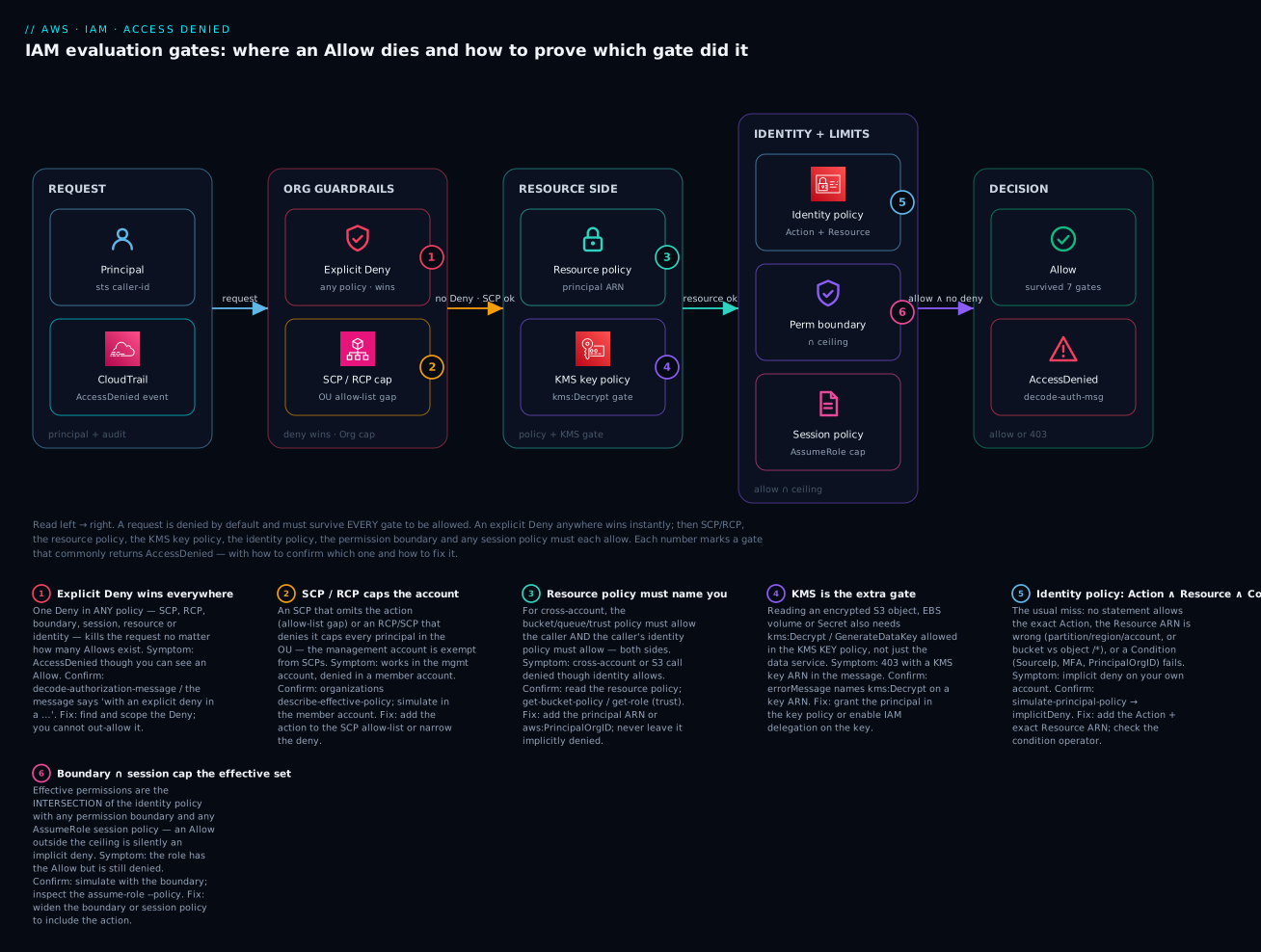
The diagram traces a single request left to right through all seven gates. On the left the principal makes the call and CloudTrail records it; the request enters denied by default and must survive each gate. First the Org guardrails — an explicit Deny anywhere wins instantly (badge 1), then the SCP/RCP cap must allow it (badge 2). Next the resource side — the resource policy must name the principal for cross-account (badge 3), and if the target is encrypted the KMS key policy is an extra gate for kms:Decrypt (badge 4). Then identity + limits — the identity policy must allow the exact Action on the exact Resource with any Condition satisfied (badge 5), intersected with the permission boundary and any session policy (badge 6). Only a request that collected an Allow and passed every cap with no Deny reaches Allow; anything else exits as AccessDenied, which you then decode back to the gate that stopped it.
Real-world scenario
Nimbus Analytics runs a 40-account AWS Organization with a data-perimeter guardrail: a top-level SCP denies every action unless aws:PrincipalOrgID equals the org, plus an RCP that forces the same on all resource policies. A new team ships a nightly job in the data-prod account: a Fargate task assumes role/etl-runner, reads raw files from an S3 bucket in the same account, and writes curated Parquet to a bucket in the data-lake account, both encrypted with customer-managed KMS keys. In staging it works. In production, the task fails with AccessDenied on the cross-account PutObject, and — intermittently — on the same-account read too.
The on-call engineer’s first instinct is the identity policy on etl-runner, which plainly allows s3:PutObject on the target ARN. Simulator says Allow. That green result is the trap: the simulator doesn’t evaluate SCPs, RCPs, the cross-account resource policy, or the KMS gate. She pulls CloudTrail and reads the actual errors. Two distinct errorMessages appear. The cross-account write says “because no resource-based policy allows the s3:PutObject action” — the data-lake bucket policy names the role ARN arn:aws:iam::…:role/etl-runner, but the caller is an assumed-role session and, more to the point, cross-account requires the resource policy to allow, which it did — except the RCP on data-lake denied it because the bucket policy’s Principal block didn’t carry an aws:PrincipalOrgID condition, so the resource guardrail stripped the grant. Reason clause: nailed to gate 2/3.
The intermittent same-account read is stranger. It fails only on files written that day. She decodes the pattern: the new raw files are encrypted with a second KMS key the platform rotated in, and that key’s key policy grants kms:Decrypt only to a named admin role — not to etl-runner. The data-service permission (s3:GetObject) was fine; the KMS gate (badge 4) denied it, and the S3 error surfaced as a 403 whose errorMessage named kms:Decrypt on the new key ARN. Old files, encrypted with the old (correctly-delegated) key, still read — hence “intermittent.”
The fix is three precise edits, none of them “add more IAM to the role”: (1) add aws:PrincipalOrgID to the data-lake bucket policy’s Principal grant so the RCP stops stripping it; (2) add etl-runner to the new KMS key policy with kms:Decrypt/GenerateDataKey (or, better, restore the key’s Enable IAM User Permissions delegation so identity policies work); (3) change the bucket-policy Principal to the role ARN form that matches assumed sessions and scope it with aws:PrincipalOrgID. Total change: eleven lines across a bucket policy and a key policy. Time lost before the method kicked in: two hours of staring at a green simulator. The lesson Nimbus wrote into its runbook: read the CloudTrail errorMessage first; it names the gate. The simulator is for before you deploy, not for why production is denied.
Advantages and disadvantages
The layered, deny-by-default model is what makes AWS safe at scale — and what makes debugging it a skill. The trade-offs, then when each matters.
| Advantages of the layered model | Disadvantages / costs |
|---|---|
| Deny-by-default: nothing leaks by accident | Every new access needs an explicit, correct Allow |
| Multiple caps enable safe delegation (boundaries, SCPs) | More gates = more places a request can silently die |
| Explicit Deny gives an absolute, un-overridable guardrail | A stray Deny is hard to find; beats all Allows |
| Resource policies enable precise cross-account sharing | Cross-account needs both sides — easy to do one |
| KMS key policy isolates encryption from data access | The “extra gate” surprises people constantly |
| Org-wide SCP/RCP enforce guardrails centrally | SCPs are invisible to the simulator and to member-account admins |
| Session policies scope temporary credentials tightly | Invisible unless you inspect the assume-role call |
The layering matters most in regulated, multi-account estates where a central team must guarantee limits no member-account admin can exceed — there, SCPs and boundaries are non-negotiable and the debugging cost is the price of provable containment. In a single-account startup, most gates are dormant (no SCPs, no boundaries, no cross-account), so denials collapse to “the identity policy is wrong,” and the simulator alone usually suffices.
Hands-on lab
You will manufacture and then diagnose three real denials — an identity implicit deny, a boundary intersection deny, and a KMS-gate deny — using only free-tier-safe resources. Everything here is free except a few cents of S3/KMS if you leave it running; teardown is at the end. Use a sandbox account, not production.
Step 0 — Confirm who you are. Half of all “impossible” denials are “you’re not the principal you think.” Always start here.
aws sts get-caller-identity
# Expected: { "UserId": "...", "Account": "123456789012",
#             "Arn": "arn:aws:iam::123456789012:user/you" }
Step 1 — Create a test user with a deliberately narrow policy.
aws iam create-user --user-name denytest
aws iam put-user-policy --user-name denytest --policy-name narrow \
  --policy-document '{"Version":"2012-10-17","Statement":[
    {"Effect":"Allow","Action":"s3:ListAllMyBuckets","Resource":"*"}]}'
aws iam create-access-key --user-name denytest   # note the keys for a scratch profile
Step 2 — Reproduce an identity implicit deny. Configure a scratch profile with those keys, then try an action you did not grant:
aws s3api list-objects-v2 --bucket some-bucket --profile denytest
# Expected: An error occurred (AccessDenied) ...
#   because no identity-based policy allows the s3:ListBucket action
Note the reason clause names identity and the action is s3:ListBucket (not ListObjects — the IAM action differs from the API name). Confirm with the simulator:
aws iam simulate-principal-policy \
  --policy-source-arn arn:aws:iam::123456789012:user/denytest \
  --action-names s3:ListBucket --resource-arns arn:aws:s3:::some-bucket \
  --query 'EvaluationResults[0].EvalDecision' --output text
# Expected: implicitDeny
Fix it (add the action + the bucket ARN, not the object ARN):
aws iam put-user-policy --user-name denytest --policy-name narrow \
  --policy-document '{"Version":"2012-10-17","Statement":[
    {"Effect":"Allow","Action":["s3:ListAllMyBuckets","s3:ListBucket"],
     "Resource":["*","arn:aws:s3:::some-bucket"]}]}'
Step 3 — Reproduce a boundary intersection deny. Attach a boundary that allows only EC2 describe calls, then grant the user S3 in the identity policy and watch the intersection deny S3:
aws iam put-user-policy --user-name denytest --policy-name broad \
  --policy-document '{"Version":"2012-10-17","Statement":[
    {"Effect":"Allow","Action":"s3:*","Resource":"*"}]}'
# Boundary that does NOT include S3:
aws iam create-policy --policy-name ec2-only-boundary \
  --policy-document '{"Version":"2012-10-17","Statement":[
    {"Effect":"Allow","Action":"ec2:Describe*","Resource":"*"}]}'
aws iam put-user-permissions-boundary --user-name denytest \
  --permissions-boundary arn:aws:iam::123456789012:policy/ec2-only-boundary
aws s3 ls --profile denytest
# Expected: AccessDenied — the identity policy allows s3:* but the
#   boundary (ec2 only) intersects it to nothing for S3.
Confirm the intersection with the simulator by supplying the boundary:
aws iam simulate-principal-policy \
  --policy-source-arn arn:aws:iam::123456789012:user/denytest \
  --action-names s3:ListAllMyBuckets --resource-arns "*" \
  --permissions-boundary-policy-input-list \
    '{"Version":"2012-10-17","Statement":[{"Effect":"Allow","Action":"ec2:Describe*","Resource":"*"}]}' \
  --query 'EvaluationResults[0].EvalDecision' --output text
# Expected: implicitDeny  (allowed by identity, not by the boundary)
Step 4 — Reproduce the KMS gate. Create a CMK whose key policy delegates to IAM, put an encrypted object, and see it read; then remove the delegation and watch the same S3 permission 403 on the KMS gate.
KEY_ID=$(aws kms create-key --description labkey --query KeyMetadata.KeyId --output text)
aws s3 mb s3://kv-iam-lab-$RANDOM
# ... put an object with --sse aws:kms --sse-kms-key-id $KEY_ID, then GetObject works
# Now replace the key policy with one that names ONLY your admin, not denytest:
aws kms put-key-policy --key-id $KEY_ID --policy-name default --policy '{
  "Version":"2012-10-17","Statement":[
   {"Sid":"AdminOnly","Effect":"Allow",
    "Principal":{"AWS":"arn:aws:iam::123456789012:user/you"},
    "Action":"kms:*","Resource":"*"}]}'
# denytest GetObject on the encrypted object now returns 403 naming kms:Decrypt
The lesson in one line: the S3 permission never changed — the key started denying you.
Step 5 — Teardown (avoid lingering charges).
aws iam delete-access-key --user-name denytest --access-key-id AKIA...
aws iam delete-user-policy --user-name denytest --policy-name narrow
aws iam delete-user-policy --user-name denytest --policy-name broad
aws iam put-user-permissions-boundary --user-name denytest --permissions-boundary "" 2>/dev/null || \
  aws iam delete-user-permissions-boundary --user-name denytest
aws iam delete-user --user-name denytest
aws iam delete-policy --policy-arn arn:aws:iam::123456789012:policy/ec2-only-boundary
aws kms schedule-key-deletion --key-id $KEY_ID --pending-window-in-days 7  # ⚠️ CMK: min 7-day window
aws s3 rb s3://kv-iam-lab-XXXX --force
⚠️ A customer-managed KMS key costs ~$1/month while it exists and can only be scheduled for deletion (7–30 day window). Schedule it now so it stops billing.
Common mistakes & troubleshooting
This is the playbook. Find your symptom, read across to the exact command that confirms the gate, then the fix. Work it top-down: the earlier gates (Deny, SCP) short-circuit everything, so rule them out first.
First, the 30-second triage — the pattern you notice maps almost 1:1 to the gate:
| If you see… | It’s probably… | Do this first |
|---|---|---|
| Broadening the policy changes nothing | An explicit Deny (SCP / boundary / resource) | Read the reason clause; stop adding Allows |
| Denied only in member accounts | An SCP cap | organizations describe-effective-policy |
| 403 naming a KMS key ARN | The KMS key policy gate | Fix the key policy, not the data service |
| “no resource-based policy allows” | Cross-account resource policy missing you | Add your principal to the resource/trust policy |
| Simulator says Allow, prod says Deny | SCP/RCP or the live resource policy | Trust CloudTrail’s errorMessage |
| Denied from home, works from the office | An aws:SourceIp condition |
Use the VPN / allowed CIDR |
| Denied right after a deploy | A new resource / rotated key under an old policy | Extend the ARN pattern; grant the new key |
Now the full playbook:
| # | Symptom | Root cause | Confirm (exact command / console path) | Fix |
|---|---|---|---|---|
| 1 | AccessDenied though your identity policy clearly allows it | An explicit Deny elsewhere (SCP/boundary/resource) wins | Read errorMessage for “with an explicit deny in a …”; sts decode-authorization-message |
Find & scope that Deny; you cannot out-Allow it |
| 2 | Works in the org management account, denied in a member account | SCP allow-list gap or Deny | aws organizations describe-effective-policy --policy-type SERVICE_CONTROL_POLICY --target-id <acct> |
Add the action to the SCP allow-list / narrow the Deny |
| 3 | Message: “no identity-based policy allows the X action” | Implicit deny — you never granted X |
aws iam simulate-principal-policy … --action-names X → implicitDeny |
Add X to the identity policy with the right Resource |
| 4 | s3:GetObject works but s3:ListBucket is denied (or vice-versa) |
Wrong Resource ARN: object (…/*) vs bucket (…) |
Simulate each action against each ARN | List needs the bucket ARN; Get needs the object …/* |
| 5 | Cross-account call denied though your identity allows it | Resource policy doesn’t name your principal | aws s3api get-bucket-policy / get-role trust doc |
Add your principal ARN (or aws:PrincipalOrgID) to the resource policy |
| 6 | sts:AssumeRole denied: “not authorized to perform: sts:AssumeRole on role/…” |
Trust policy omits your principal (or wrong external ID) | aws iam get-role --query Role.AssumeRolePolicyDocument |
Add the principal to the trust policy; match sts:ExternalId |
| 7 | Reading an encrypted S3 object / EBS / Secret returns 403 naming kms:Decrypt |
KMS key policy doesn’t allow you | errorMessage names kms:Decrypt + a key ARN; read the key policy |
Grant kms:Decrypt/GenerateDataKey in the key policy (or keep IAM delegation) |
| 8 | Role tests fine but the running session is denied | Session policy at AssumeRole scoped it down | Inspect the code’s assume-role --policy/--policy-arns; CloudTrail the session |
Widen/remove the session policy |
| 9 | AdministratorAccess attached, still denied |
Permission boundary caps the entity below admin | aws iam get-role/get-user → PermissionsBoundary; simulate with it |
Add the action to the boundary (effective = policy ∩ boundary) |
| 10 | Denied only from a specific network / laptop | Condition on aws:SourceIp evaluates false |
Decode the message; compare context.conditions to your policy |
Add your egress CIDR / use the VPN / VPC endpoint |
| 11 | Denied unless you re-auth with MFA | Condition requires aws:MultiFactorAuthPresent |
Message/decode shows the MFA condition; check the session | Assume the role/sign in with MFA; refresh the session |
| 12 | Cross-account works for some principals, denied for others | Condition on aws:PrincipalOrgID / org guardrail |
Decode; check the org id in context.conditions |
Ensure the caller is in the allowed org; fix the condition value |
| 13 | EC2 RunInstances/CreateVolume fails with a long encoded blob |
EC2 returns an encoded authorization message | aws sts decode-authorization-message --encoded-message <blob> |
Read matchedStatements/failures; fix the named gate |
| 14 | Simulator says Allow, production says Deny | Simulator doesn’t evaluate SCPs/RCPs or the live resource policy | Cross-check with CloudTrail errorMessage + describe-effective-policy |
Trust CloudTrail; add SCP/resource-policy fixes |
| 15 | Works in us-east-1, denied in another region |
Wrong region/partition in the Resource ARN, or aws:RequestedRegion Deny |
aws --debug shows the endpoint/region; check ARN region field |
Fix the ARN region/partition; check region-restriction SCP |
| 16 | Denial appears minutes after a deploy, no policy changed | New resource under an old wildcard, or a rotated KMS key | CloudTrail diff; compare object key policy / KMS key id | Extend the ARN pattern; grant the new key |
| 17 | Lambda/API call to another service denied at runtime | The execution role (not you) lacks the permission | CloudTrail userIdentity.arn = the role, not you |
Add the permission to the execution role |
| 18 | Secret read denied cross-account despite secret policy | The secret’s KMS key also needs a cross-account grant | Secret policy + the key policy both; errorMessage | Grant the caller on both the secret policy and its KMS key |
The nastiest three, in prose
The explicit Deny you didn’t write (row 1). This is the number-one time-sink. An engineer sees their Allow, cannot fathom the denial, and starts broadening the identity policy — s3:*, then * on * — and it still fails. Nothing in an identity policy can beat a Deny that lives in an SCP, a permission boundary, an RCP or a resource policy. The instant you suspect this, stop editing Allows and read the errorMessage reason clause or decode the message; it will contain “with an explicit deny in a <policy type>,” which is the entire answer. Then go to that policy type and scope the Deny. The lesson: when broadening a policy makes no difference, you are fighting a Deny, and Allows are the wrong tool.
The KMS gate hiding behind an S3/EBS/Secrets 403 (rows 7, 18). Encrypted resources have a second, invisible authorization: the KMS key policy. A perfectly correct s3:GetObject grant returns 403 because the object is encrypted with a customer-managed key whose policy never named your principal. The tell is in the errorMessage — it references kms:Decrypt and a key ARN, not an S3 ARN. The default AWS-managed key delegates to IAM (so identity policies work), but a customer-managed key with a hand-written key policy may grant no one but an admin role. Cross-account secrets are the double-whammy: you need the secret’s resource policy and the secret’s KMS key to both allow you. Fix at the key, not the data service.
Cross-account is two doors, and people open one (rows 5, 6). Same-account habits break across accounts. In your own account, an identity Allow is enough. Across accounts, the caller’s identity policy in account A must allow the action and the resource policy (bucket policy, trust policy, key policy) in account B must allow the caller — both, independently, or it’s an implicit deny with “because no resource-based policy allows.” The assume-role case is the archetype: sts:AssumeRole on the identity side, and the role’s trust policy naming your principal on the resource side. If you’re using an external ID (the confused-deputy defence), the sts:ExternalId in the trust policy Condition must match exactly what the caller passes — a mismatch reads as a plain AssumeRole denial. See IAM Cross-Account Roles & AssumeRole for the full pattern.
The trust policy is where most assume-role denials actually live. Enumerate its failure modes so you check the right half of the two doors:
| Trust-policy failure | Symptom | Confirm | Fix |
|---|---|---|---|
| Principal not listed | “not authorized to perform: sts:AssumeRole” | aws iam get-role --query Role.AssumeRolePolicyDocument |
Add the caller ARN to Principal |
| External ID mismatch | AssumeRole denied, the principal looks correct | Compare sts:ExternalId in the trust Condition vs the call |
Pass the matching --external-id |
| MFA condition unmet | Denied unless the session has MFA | Trust Condition has aws:MultiFactorAuthPresent: true |
Assume with MFA (--serial-number + --token-code) |
aws:PrincipalOrgID filter |
Some callers allowed, others denied | The org id in the trust Condition |
Ensure the caller is in the allowed org |
| Wrong principal form | Session vs role ARN mismatch | assumed-role/… vs role/… in the trust doc |
Use the role ARN form in Principal |
| Identity side missing | The caller’s own policy lacks sts:AssumeRole |
simulate-principal-policy for sts:AssumeRole |
Grant sts:AssumeRole on the role ARN (the other door) |
Condition-key mismatches — the quiet deniers
When the Action and Resource are right but you’re still denied, a Condition evaluated false. These are the ones that bite in production, and the operator matters as much as the key.
| Condition key | Denies when… | Confirm | Common operator trap |
|---|---|---|---|
aws:SourceIp |
Caller IP not in the CIDR | Decode → context.conditions |
It’s the public egress IP, not the private VPC IP |
aws:VpcSourceIp |
Private IP not in range (via endpoint) | Endpoint request context | Only set when traversing a VPC endpoint |
aws:MultiFactorAuthPresent |
Session has no MFA | sts get-caller-identity + session |
BoolIfExists vs Bool changes federated behaviour |
aws:MultiFactorAuthAge |
MFA too old | Session age | Re-auth resets it |
aws:PrincipalOrgID |
Caller not in the org | Decode; compare org id | Hard-coded old org id after a migration |
aws:PrincipalTag/<k> |
Session missing the tag | Decode context.conditions |
Session wasn’t tagged at AssumeRole |
aws:ResourceTag/<k> |
Resource missing/other tag | Read the resource’s tags | Tag on the wrong resource / case-sensitive |
aws:SourceArn / aws:SourceAccount |
Calling service ARN/account mismatch | Decode; check the source | Confused-deputy guard on SNS/SQS/KMS |
aws:RequestedRegion |
Action in a blocked region | aws --debug endpoint |
Region-restriction SCP |
aws:SecureTransport |
Request not over TLS | Scheme of the request | Bool false denies plain HTTP |
s3:x-amz-server-side-encryption |
PutObject without the required SSE header | The PutObject headers | Bucket policy demands SSE-KMS |
And the operator pitfalls themselves, which turn a “correct” value into a false match:
| Operator issue | What goes wrong | Fix |
|---|---|---|
StringEquals vs StringLike |
Exact match where you needed a wildcard (or vice-versa) | Use StringLike for */? patterns |
Missing IfExists |
Key absent → condition treated as false → deny | Use …IfExists when the key may be absent |
Null mis-set |
true requires the key absent; false requires present |
Read Null as “is the key missing?” |
ArnEquals vs ArnLike |
Wildcards ignored under ArnEquals |
ArnLike for wildcard ARNs |
| Case sensitivity | Tag keys/values differ in case | Match the exact case; standardise tags |
| Multiple values in one key | Any-match vs all-match confusion | Multiple values = logical OR within a key |
ARN and identity traps
Half of “no identity-based policy allows” is a subtly wrong Resource ARN. Enumerate the fields before you rewrite the policy.
| ARN / identity trap | Wrong | Right / rule |
|---|---|---|
| Bucket vs object | arn:aws:s3:::b for GetObject |
Objects need arn:aws:s3:::b/*; bucket ops need arn:aws:s3:::b |
| Partition | arn:aws:… in GovCloud/China |
aws-us-gov / aws-cn partitions |
| Region field | Wrong region in a regional ARN | Match the resource’s region (S3 ARNs omit region) |
| Account field | Wrong 12-digit account | Match the resource-owning account |
| Wildcard scope | …/prod/* won’t match …/prod |
Add both, or a broader pattern |
| Role vs assumed-role principal | Trust/resource policy names role/… |
Assumed sessions are assumed-role/…/<session> — scope to the role ARN form |
| Path in the name | Role/user path omitted | Include /team/ path if the entity has one |
| Case in keys/paths | MyBucket vs mybucket |
S3 bucket names are lowercase; ARNs are case-sensitive |
| Service principal vs IAM principal | Naming s3.amazonaws.com as an IAM user |
Service principals only in trust/resource Principal |
| Wrong profile/credentials | You’re a different principal than you think | aws sts get-caller-identity first, always |
Two more sources of “correct-looking but denied” policies: the wrong partition in an ARN, and the inverted policy elements (NotAction/NotResource/NotPrincipal) that quietly grant or deny far more than intended.
| Partition | ARN prefix | Note |
|---|---|---|
| Standard (commercial) | arn:aws: |
The default global regions |
| GovCloud (US) | arn:aws-us-gov: |
Separate credentials, console and ARNs |
| China | arn:aws-cn: |
Operated by partners; entirely separate accounts |
| Policy element / construct | The trap | Rule of thumb |
|---|---|---|
NotAction with Allow |
Allows everything except — dangerously broad | Prefer explicit Action; use NotAction only with Deny |
NotResource |
Same inversion risk on the resource side | Use sparingly; reason about the complement |
NotPrincipal |
Very hard to reason about; order-sensitive | Avoid; use explicit Principal + conditions |
Principal: "*" in a resource policy |
Anonymous/public unless conditioned | Always constrain with aws:PrincipalOrgID / SourceArn |
Wildcard Action: "s3:*" |
Grants far more than the one call you needed | Enumerate the exact actions |
Missing Sid |
Can’t reference the statement in decode/logs | Name every statement |
Best practices
- Start every diagnosis with
aws sts get-caller-identity. More “impossible” denials than you’d believe are “you’re a different principal than you assumed” (a task role, a default profile, an expired session). - Read the
errorMessagereason clause before touching any policy. It names the gate — implicit vs explicit, and which policy type. Editing before reading it wastes the most time. - When broadening a policy changes nothing, stop — you’re fighting a Deny. Switch from adding Allows to hunting the Deny (SCP, boundary, RCP, resource, session).
- Trust CloudTrail over the simulator for production denials. The simulator can’t see SCPs/RCPs or the live resource policy; CloudTrail records what actually happened.
- Grant least privilege, but grant the exact Action and Resource. Prefer specific ARNs; use Access Analyzer policy generation to build a policy from real CloudTrail activity.
- Treat cross-account as two policies from the start. Write the identity Allow and the resource/trust policy together, scoped by
aws:PrincipalOrgID. - Keep KMS keys delegating to IAM (
Enable IAM User Permissions) unless you have a reason not to — hand-written key policies that name only an admin are a top hidden denier. - Validate policies in CI with Access Analyzer (
check-no-new-access,check-access-not-granted, policy validation) so over-broad or broken policies fail the PR, not production. - Prefer permission boundaries over hope for delegation. Force every delegated role to carry the boundary so nobody can escalate past the ceiling.
- Alarm on
AccessDeniedspikes. An EventBridge rule / CloudWatch metric filter onerrorCode = AccessDeniedcatches broken deploys and probing alike. - Never fix a denial with
"*". It usually doesn’t even work (the denier is a cap or a Deny), and it leaves a standing security finding. - Document the seven gates in your runbook with the confirm command for each — the whole team debugs faster.
Security notes
Debugging denials is a security-sensitive activity: the temptation under pressure is to over-grant, and each of the gates exists to stop exactly that. Some principles specific to this topic:
| Principle | Why it matters here | How |
|---|---|---|
| Least privilege on the fix | The denial is a chance to grant exactly what’s needed | Add the specific Action + ARN, not * |
Protect DecodeAuthorizationMessage |
The decoded message reveals policy internals | Grant sts:DecodeAuthorizationMessage narrowly (to responders) |
Guard cross-account with ExternalId |
Prevents the confused-deputy problem | Require and match sts:ExternalId in trust policies |
| Keep SCPs/RCPs as the outer guardrail | They can’t be over-ridden by member admins | Data-perimeter SCP: deny unless aws:PrincipalOrgID |
| Encrypt-and-gate with KMS key policies | The key is a second authorization layer | Scope key policies to the roles that truly need Decrypt |
| Audit denials, not just allows | Denials reveal probing and broken automation | CloudTrail + metric filter + alarm on AccessDenied |
| Least privilege for responders | Even debugging tools are permissions | Read-only: iam:Simulate*, iam:GetRole, organizations:Describe*, CloudTrail read |
Cost & sizing
IAM itself is free — policies, users, roles, evaluation, the simulator and Access Analyzer’s core features cost nothing. The bill, such as it is, comes from the evidence you keep and the encryption you gate with. Rough figures (region-dependent; INR at ~₹86/USD):
| Item | What drives the cost | Rough cost | Free-tier / note |
|---|---|---|---|
| IAM (policies, roles, evaluation) | — | Free | Always free |
| IAM Policy Simulator | — | Free | Always free |
| Access Analyzer (external access) | Per analyzer | Free | The external-access analyzer is free |
| Access Analyzer (unused access) | Per IAM role/user analyzed/month | ~$0.20 per role or user/month | Optional; org-wide can add up |
| CloudTrail management events | First copy of management events | Free | The trail you need for denials is free |
| CloudTrail data events | Per event (S3/Lambda data-plane) | ~$0.10 / 100k events | Only if you enable data events |
| CloudTrail Lake | Ingest + storage + query scanned | ~$2.50/GB ingest + query | Optional; convenient for queries |
| Athena over CloudTrail S3 | Per TB scanned | ~$5/TB scanned | Partition the trail to cut scan cost |
| KMS customer-managed key | Per key/month + per 10k requests | ~$1/key/month + ~$0.03/10k | AWS-managed keys are free; requests still bill |
The practical guidance: keep the free management-events trail on in every account (it’s how you debug), enable data events only where you need object-level denials (they’re the cost driver), and remember every customer-managed KMS key is ~$1/month whether used or not — the lab teardown schedules yours for deletion for exactly this reason. Access Analyzer unused access is worth its ~$0.20/principal/month in a large estate because it directly shrinks the attack surface that causes these denials in the first place.
Interview & exam questions
Q1. State AWS’s policy-evaluation order and the one rule that overrides all others. Deny by default; then: any explicit Deny wins immediately; SCPs/RCPs must allow; a resource-based or identity-based Allow is required; permission boundary, session policy and VPC endpoint policy each must allow. The overriding rule: an explicit Deny anywhere beats every Allow. (SCS-C02, SAP-C02)
Q2. A principal has AdministratorAccess but is denied. Name three gates that can still deny it. A permission boundary (effective = policy ∩ boundary), an SCP/RCP in Organizations, an explicit Deny in a resource policy or session policy, or a KMS key policy for an encrypted resource. AdministratorAccess is an identity Allow and cannot beat a cap or a Deny. (SCS-C02)
Q3. Same-account, does an S3 GetObject need both an identity policy allow and a bucket policy allow? No — same-account, either suffices. Cross-account it needs both the caller’s identity allow and the bucket’s resource-policy allow. (SAA-C03, DVA-C02)
Q4. You get 403 on an encrypted S3 object though s3:GetObject is granted. What’s the likely gate and how do you confirm? The KMS key policy — the object is encrypted with a CMK that doesn’t grant your principal kms:Decrypt. Confirm from the errorMessage, which names kms:Decrypt and a key ARN; fix in the key policy. (SCS-C02, DVA-C02)
Q5. How do you tell an implicit deny from an explicit deny from the message alone? “no identity-based policy allows the X action” = implicit (nothing granted it). “with an explicit deny in a <policy type>” = explicit Deny, and it names which policy type. (SCS-C02)
Q6. What is the encoded authorization failure message and when do you see it? An opaque blob some services (notably EC2) return instead of a plain reason, to avoid leaking policy detail. Decode with aws sts decode-authorization-message (needs sts:DecodeAuthorizationMessage) to see allowed, explicitDeny, matchedStatements and failures. (SCS-C02)
Q7. Why can the IAM Policy Simulator say Allow while production says Deny? The simulator does not evaluate SCPs/RCPs, doesn’t auto-fetch the live cross-account resource policy, and approximates some conditions. Cross-check with CloudTrail’s errorMessage and organizations describe-effective-policy. (SCS-C02, SAP-C02)
Q8. An action works in the management account but fails in a member account. What’s the cause? An SCP — the management account is exempt from SCPs, member accounts are not. It’s either an allow-list gap (action not on the SCP’s Allow list) or an explicit Deny. Confirm with describe-effective-policy. (SAP-C02, SCS-C02)
Q9. AssumeRole is denied with “not authorized to perform: sts:AssumeRole.” Where do you look? Two places: the caller’s identity policy (needs sts:AssumeRole on the role) and the role’s trust policy (must name the caller as Principal). If an external ID is required, sts:ExternalId must match. (DVA-C02, SCS-C02)
Q10. What does a permission boundary do, and how does it differ from an SCP? A boundary is a max-permission filter on an IAM entity; effective permissions are the intersection of the entity’s policies and the boundary. An SCP is a max-permission filter on an account/OU in Organizations. Both only cap, never grant; the boundary is per-entity, the SCP is per-account. (SCS-C02, SAP-C02)
Q11. A cross-account role works for some callers, denied for others. What condition is the usual culprit? aws:PrincipalOrgID (or aws:SourceArn/aws:SourceAccount) in the trust or resource policy — callers outside the allowed org fail. Decode the message and compare context.conditions. (SCS-C02)
Q12. Which tool finds over-broad access rather than why-denied, and name two of its checks. IAM Access Analyzer — external-access findings, unused-access findings, policy validation, and custom checks check-no-new-access and check-access-not-granted. It’s the inverse of denial-debugging: it finds too much access. (SCS-C02)
Quick check
- In what order does AWS evaluate: identity policy, explicit Deny, SCP, permission boundary?
- Cross-account S3 GetObject: how many policies must allow it, and which?
- You see “with an explicit deny in a permissions boundary.” Do you edit the identity policy or the boundary?
- Which tool can’t see SCPs, and what do you use instead for a production denial?
- An encrypted-object 403 names
kms:Decryptand a key ARN. Which gate, and where’s the fix?
Answers
- Explicit Deny first (wins outright) → SCP (must allow) → identity policy (the Allow) → permission boundary (must allow). Session and VPC endpoint policies follow the boundary. Deny short-circuits everything.
- Two: the caller’s identity policy (in the caller’s account) and the bucket policy (resource policy, in the bucket’s account) must both allow it.
- The boundary. The message names the gate — the effective set is identity ∩ boundary, so add the action to the boundary.
- The IAM Policy Simulator can’t see SCPs/RCPs; use CloudTrail (
errorMessage) plusorganizations describe-effective-policyfor production. - The KMS key policy gate. Fix it in the key policy — grant the principal
kms:Decrypt/GenerateDataKey, or keep the key’s IAM delegation — not in the S3/identity policy.
Glossary
- Implicit deny — The default outcome when no policy allows an action; the base state every request starts in.
- Explicit Deny — A
StatementwithEffect: Deny; overrides every Allow and ends evaluation immediately. - Identity-based policy — A policy attached to an IAM user, group, or role; grants permissions to that principal.
- Resource-based policy — A policy attached to a resource (S3 bucket, KMS key, SQS queue, IAM role trust policy) naming a
Principal. - SCP (Service Control Policy) — An AWS Organizations guardrail on accounts/OUs that caps the maximum permissions of member-account principals; never grants.
- RCP (Resource Control Policy) — An Organizations guardrail that caps what resource-based policies can grant across the org.
- Permission boundary — A managed policy that sets the maximum permissions of an IAM entity; effective permissions are the intersection with its identity policies.
- Session policy — An inline or managed policy passed at
AssumeRole/federation that further restricts the temporary session. - Trust policy — The resource-based policy on an IAM role that defines which principals may assume it.
- KMS key policy — The resource-based policy on a KMS key; authoritative for who may use the key (
kms:Decrypt,GenerateDataKey). - VPC endpoint policy — A resource policy on an interface/gateway VPC endpoint that caps what can be done through it.
- Encoded authorization failure message — An opaque blob some services return in AccessDenied errors; decode with
sts decode-authorization-message. aws:PrincipalOrgID— A condition key matching the caller’s Organizations org id; the backbone of data-perimeter guardrails.- Effective permissions — The net of every gate:
(identity ∪ resource) ∩ SCP ∩ RCP ∩ boundary ∩ session ∩ endpoint, minus any explicit Deny. - Confused deputy — An attack where a service is tricked into using its permissions on an attacker’s behalf; mitigated with
aws:SourceArn/ExternalId.
Next steps
- Ground the model in the fundamentals: AWS Organizations & IAM Foundations.
- Build the muscle memory for writing the policies you’re debugging: IAM Users, Groups, Roles & Policies (hands-on).
- Master the gate people forget: AWS Organizations SCPs & Multi-Account Guardrails.
- Go deep on the two-doors cross-account pattern, external IDs and session policies: IAM Cross-Account Roles & AssumeRole (hands-on).