Quick take: a cross-account IAM role is a door in Account B with two locks. The trust policy decides who is allowed to open it; the permission policy decides what they can touch once inside.
sts:AssumeRoleis the act of opening the door — and it hands back a set of temporary keys that expire on a timer, so nothing long-lived ever leaves the building.
Sooner or later every AWS estate outgrows a single account. A security account needs to read CloudTrail logs in twenty member accounts; a CI pipeline in your tooling account needs to deploy into staging and prod; a SaaS vendor needs to scan your resources; the data team in Account A needs to read one bucket in Account B. The wrong answer — the answer that shows up in breach post-mortems — is to mint a long-lived IAM user, generate an access key, and paste it into the other account’s config. Those keys never expire, get copied into .env files and CI variables, leak into git history, and grant standing access to whoever finds them.
The right answer is a cross-account IAM role assumed with sts:AssumeRole. Instead of sharing a permanent secret, Account B publishes a role, states in the role’s trust policy exactly which principal in Account A may assume it, and grants that role a scoped permission policy. When Account A needs access it calls STS, proves it is the named principal, and receives temporary security credentials that live for minutes to at most twelve hours. No secret crosses the boundary permanently, access is auditable in CloudTrail on both sides, and revoking access is a one-line trust-policy edit rather than a frantic key rotation.
This guide is the hands-on, senior-engineer version of that story. You will learn the two policies a role always has and why people confuse them, the full AssumeRole request/response, the MaxSessionDuration and role-chaining limits that bite scheduled jobs, the ExternalId that closes the confused-deputy hole for third parties, the resource-based alternative (S3 bucket policy, KMS key policy) that skips AssumeRole entirely, session tags for ABAC, and how to assume a role from the CLI, an SDK, and Terraform. Then you will build it end to end in a lab and keep a troubleshooting playbook for every AccessDenied you will ever see.
What problem this solves
In a multi-account estate, work in one account routinely needs data or actions in another. You have four ways to bridge that gap, and only two are safe. Long-lived access keys are the classic trap; cross-account roles and resource policies are the fix.
| Approach | How access is granted | Credential lifetime | Blast radius if leaked | Audit trail | Verdict |
|---|---|---|---|---|---|
| Long-lived IAM user + access key shared to Account A | Permanent secret copied across the boundary | Forever (until manually rotated) | Full — anyone with the key is that user | Muddy — one identity, many callers | Avoid |
| Root credentials of Account B | The account’s master key | Forever | Total account compromise | None useful | Never |
Cross-account role + sts:AssumeRole |
Trust policy names the caller; STS issues temp creds | 15 min – 12 h, auto-expiring | Bounded by the role’s permission policy and the session | Rich — AssumeRole + every call logged in both accounts |
Preferred |
| Resource-based policy (bucket/key/queue policy) | Resource grants the external principal directly | Caller uses its own creds; no swap | Bounded to that one resource | Both identity and resource calls logged | Preferred for a single resource |
What breaks when you get this wrong is not subtle. A shared access key ends up in a public GitHub repo and an attacker has standing read/write in prod. A SaaS integration is configured without an ExternalId and a malicious co-tenant tricks the vendor into touching your account (the confused-deputy problem). A nightly cross-account backup job is written to assume a role for twelve hours, then one day it starts assuming through another role and silently caps at one hour, and the second half of the job fails at 01:00 with ExpiredToken. Every one of these is a design choice you make in the trust policy and the assume call — which is exactly what this article makes explicit.
Who hits it: platform and security teams building the landing zone; DevOps engineers wiring CI into multiple accounts; data engineers sharing S3 across accounts; anyone integrating a third-party SaaS; and every candidate sitting SAA-C03, SCS-C02, or DVA-C02, where cross-account trust and STS are guaranteed exam territory.
Learning objectives
By the end of this guide you can:
- Explain why cross-account roles beat shared access keys, and choose between
AssumeRoleand resource-based access for a given task. - Read and write both policies of a role — the trust (assume-role) policy that answers who, and the permission policy that answers what.
- Walk the full
sts:AssumeRoleflow: request parameters, the temporary-credential response, session duration, andMaxSessionDuration. - Use
ExternalIdcorrectly to defeat the confused-deputy problem for third-party access, and know why it is not a password. - Predict role-chaining behaviour, including the hard 1-hour cap and the transitive-tag rules.
- Grant cross-account access without
AssumeRoleusing S3 bucket policies and KMS key policies, and know when that is the better design. - Pass session tags and build ABAC across accounts with
aws:PrincipalTag. - Assume a role from the
awsCLI (ad hoc and via a~/.aws/configprofile), an SDK, and Terraform’sassume_roleblock. - Diagnose any cross-account
AccessDenied,ExpiredToken, orMaxSessionDurationfailure from the exact error string.
Prerequisites & where this fits
This is an intermediate identity topic. You should already be comfortable with IAM identities and JSON policy structure. If any row below is shaky, read the linked foundation first.
| You should know | Why it matters here | Where to get it |
|---|---|---|
| IAM users, groups, roles, policies | A cross-account role IS a role with a special trust policy | IAM Users, Groups, Roles & Policies: A Hands-On Guide |
| How a permission is decided (evaluation order) | Cross-account needs an Allow on BOTH sides; explicit Deny always wins | IAM Policy Evaluation & AccessDenied Troubleshooting |
| AWS Organizations & SCPs | An SCP can silently block sts:AssumeRole org-wide |
Organizations SCPs & Multi-Account Guardrails |
| Accounts as blast-radius boundaries | Why we cross accounts at all | AWS Organizations and IAM Foundations |
Basic aws CLI + a profile with admin in a sandbox |
You will run real commands | AWS CLI v2 installed and configured |
Where this fits: cross-account roles are the connective tissue of a landing zone. Human access is better delivered through IAM Identity Center SSO & Permission Sets, which itself hands out short-lived role sessions. The pattern here — a role trusting a principal, assumed for temporary creds — is what Identity Center, CI/CD, and cross-account automation are all built on. Master it once and the rest is configuration.
Core concepts
Three ideas carry the whole topic: a role has two policies; STS turns an assume request into temporary credentials; and cross-account almost always means two allows — one on the identity side, one on the resource or trust side.
The mental model: a role is a set of permissions anyone allowed can wear
An IAM role is not a person and has no long-term credentials. It is a named bundle of permissions plus a statement of who is allowed to borrow them. Borrowing is done through AWS STS (Security Token Service), which vends temporary security credentials: an AccessKeyId (always prefixed ASIA), a SecretAccessKey, and a SessionToken, all stamped with an Expiration. Present those three to any AWS API within the window and you act as the role, with exactly the role’s permissions, from a session identity like arn:aws:sts::222222222222:assumed-role/CrossAppRead/vinod-cli.
| Term | What it is | Concrete form |
|---|---|---|
| Role | A wearable permission set with a trust policy | arn:aws:iam::222222222222:role/CrossAppRead |
| Trust (assume-role) policy | Resource policy on the role saying who may assume | JSON with a Principal element |
| Permission policy | Identity policy(ies) saying what the role can do | Managed/inline policies attached to the role |
| STS | The service that vends temporary credentials | sts.ap-south-1.amazonaws.com |
| Temporary credentials | Short-lived key/secret/token trio | ASIA… + secret + session token + Expiration |
| Assumed-role session | Your identity while wearing the role | arn:aws:sts::…:assumed-role/Role/SessionName |
RoleSessionName |
A label you pick, shown in CloudTrail and the ARN | vinod-cli (2–64 chars) |
The two policies of a role — the single most-confused thing in IAM
Every role carries two distinct policies, and mixing them up is the number-one source of cross-account pain. The trust policy is the gate; the permission policy is the room behind it.
| Aspect | Trust policy (assume-role policy) | Permission policy |
|---|---|---|
| Question it answers | WHO may assume this role | WHAT the assumed session may do |
| Policy type | Resource-based (attached to the role itself) | Identity-based (managed or inline) |
Principal element |
Required — names the allowed caller | Not used |
Typical Action |
sts:AssumeRole (+ TagSession, SetSourceIdentity) |
s3:GetObject, kms:Decrypt, dynamodb:Query… |
| Where it lives | Role.AssumeRolePolicyDocument |
Attached policy ARNs / inline documents |
| Set with | --assume-role-policy-document |
attach-role-policy / put-role-policy |
| When evaluated | First — you cannot get credentials without it | After — on every API call the session makes |
| In a cross-account role | Names the Account A principal | Grants access to Account B resources |
| Failure looks like | AccessDenied on sts:AssumeRole |
AccessDenied on the actual action after a good assume |
The discipline this table encodes: if AssumeRole itself fails, you fix the trust policy; if the assume succeeds but a later call is denied, you fix the permission policy (or a resource policy). Never touch the permission policy to solve a trust failure — the credentials never even got issued.
Cross-account means two allows
Within one account, an Allow on your identity policy is usually enough. Across accounts, AWS requires a grant on both sides and there is no implicit trust between accounts:
| Cross-account operation | Grant needed in Account A | Grant needed in Account B |
|---|---|---|
| Assume a role in B | Identity policy Allow sts:AssumeRole on the role ARN |
Role trust policy names the A principal |
| Read an S3 object in B via the assumed role | (session already is the role) | Role permission policy + bucket policy (if any) allow s3:GetObject |
| Read an S3 object in B directly (own identity) | Identity policy Allow s3:GetObject |
Bucket policy allows the A principal |
| Decrypt an SSE-KMS object in B | Caller policy Allow kms:Decrypt |
Key policy grants kms:Decrypt to the caller |
Hold this table in your head and 90% of “but I gave it permission and it still says AccessDenied” tickets solve themselves: you granted one allow and forgot the other.
Why cross-account roles beat shared access keys
The instinct to “just make a user and share the key” is understandable — it is one command. It is also the single worst identity decision you can make at scale. Here is the concrete comparison.
| Dimension | Shared long-lived access key | Cross-account role + AssumeRole |
|---|---|---|
| Secret crossing the boundary | Permanent AKIA… key + secret |
None — only a temporary ASIA… session |
| Expiry | Never (until you remember to rotate) | 15 min – 12 h, automatic |
| Revocation | Delete/rotate the key everywhere it was copied | Edit the trust policy once; or attach an AWSRevokeOlderSessions-style deny |
| Who used it | One identity for every caller — unattributable | Each session named; caller identity in CloudTrail on both sides |
| Leak in git / CI logs | Standing access until discovered | Session already expired; and it never had the raw key |
| Scoping per use | Fixed to the user’s policy | Session policies can shrink perms per assume |
| Least privilege over time | Drifts up; nobody dares remove | Role is the single point to tighten |
| MFA / conditions | Hard to enforce on a key | Trust policy can require MFA, ExternalId, org, source IP |
The clinching argument is auditability plus automatic expiry. When a role session leaks, the credentials are usually dead before anyone can use them, and CloudTrail tells you exactly which principal assumed the role, from where, and what they did. When a long-lived key leaks, you learn about it from the bill or from AWS Abuse. Access keys have exactly two legitimate homes left — the tiny set of on-prem or third-party tools that genuinely cannot assume a role — and even those should be short-lived where possible. Everything running inside AWS uses roles: EC2 instance profiles, ECS task roles, Lambda execution roles, and cross-account assume.
The two policies of a role, in detail
The trust (assume-role) policy — who may assume
The trust policy is a resource-based policy attached to the role. Its distinguishing feature is the Principal element, which names who may call sts:AssumeRole on this role. A minimal cross-account trust policy:
{
  "Version": "2012-10-17",
  "Statement": [{
    "Effect": "Allow",
    "Principal": { "AWS": "arn:aws:iam::111111111111:role/ci-deployer" },
    "Action": "sts:AssumeRole",
    "Condition": {
      "StringEquals": { "sts:ExternalId": "kloudvin-7f3a9c" }
    }
  }]
}
Every field is load-bearing:
| Element | Values you’ll use | Notes / gotcha |
|---|---|---|
Principal.AWS |
…:root (whole account), …:user/name, …:role/name |
…:root delegates to all of Account A’s IAM — the account’s admins decide who; it is NOT literally the root user only |
Principal.Service |
ec2.amazonaws.com, lambda.amazonaws.com |
For service roles, not cross-account humans |
Principal.Federated |
SAML provider ARN, cognito-identity.amazonaws.com |
Uses AssumeRoleWithSAML / WithWebIdentity instead |
Action |
sts:AssumeRole, sts:TagSession, sts:SetSourceIdentity |
Add TagSession if callers pass session tags, or tagging fails |
Condition sts:ExternalId |
Your unique per-integration string | Anti-confused-deputy for third parties |
Condition aws:PrincipalOrgID |
o-xxxxxxxxxx |
Trust every principal in your org without listing accounts |
Condition aws:MultiFactorAuthPresent |
true |
Force MFA before the role can be assumed |
Condition aws:SourceIp |
CIDR list | Pin assume to your egress IPs |
The conditions you can layer onto a trust policy are where most of the security lives:
| Condition key | Type | Purpose / example |
|---|---|---|
sts:ExternalId |
String | Third-party confused-deputy nonce |
sts:RoleSessionName |
String | Constrain or require a specific session-name pattern |
sts:SourceIdentity |
String | Require callers to set an immutable source identity |
aws:PrincipalOrgID |
String | Trust every principal in your Organization (o-xxxx…) |
aws:PrincipalTag/<key> |
String | ABAC — match a tag on the calling principal |
aws:PrincipalArn |
ARN | Match the exact calling principal ARN |
aws:MultiFactorAuthPresent |
Bool | Require MFA to have been used |
aws:MultiFactorAuthAge |
Numeric | Require MFA within the last N seconds |
aws:SourceIp |
IP | Restrict assume to specific egress CIDRs |
The …:root subtlety trips up everyone. Writing "AWS": "arn:aws:iam::111111111111:root" does not mean only Account A’s root user; it means “any principal in Account A that its own IAM policies also allow to assume this role.” That is a delegation: Account B trusts Account A to manage its own users, and each of them still needs an identity-policy Allow for sts:AssumeRole on their side. Use the full role/name form when you want to pin trust to exactly one workload.
The permission policy — what the role can do
The permission policy is an ordinary identity policy attached to the role. Once assumed, the session’s effective permissions are governed entirely by it (intersected with any session policies and capped by permissions boundaries or SCPs). Example for a read-only cross-account role:
{
  "Version": "2012-10-17",
  "Statement": [
    { "Effect": "Allow", "Action": ["s3:GetObject", "s3:ListBucket"],
      "Resource": ["arn:aws:s3:::kloudvin-shared", "arn:aws:s3:::kloudvin-shared/*"] },
    { "Effect": "Allow", "Action": "kms:Decrypt",
      "Resource": "arn:aws:kms:ap-south-1:222222222222:key/*",
      "Condition": { "StringEquals": { "kms:ViaService": "s3.ap-south-1.amazonaws.com" } } }
  ]
}
| Attachment method | Command | Use when |
|---|---|---|
| AWS-managed policy | aws iam attach-role-policy --policy-arn arn:aws:iam::aws:policy/ReadOnlyAccess |
Prototyping; broad, coarse access |
| Customer-managed policy | attach-role-policy with your own ARN |
Reusable across many roles — preferred |
| Inline policy | aws iam put-role-policy --policy-name p --policy-document file://p.json |
One-off, tightly bound to this role |
The two-policy split is deliberate: the account that owns the role controls both who may enter (trust) and what they may do (permission), so the resource owner is always in charge of its own blast radius.
The sts:AssumeRole flow, step by step
When Account A runs aws sts assume-role, this happens: the CLI signs the request with A’s own credentials; STS reads the target role’s trust policy; if the caller matches the Principal and every Condition passes, STS mints temporary credentials scoped to the role and returns them with an expiry; the caller then re-signs subsequent requests with those temporary credentials, and each downstream call is authorised against the role’s permission policy.
AssumeRole is one of a family of STS operations. Know which one applies — the cross-account case is almost always plain AssumeRole:
| STS operation | Use case | Credential input | Max duration |
|---|---|---|---|
AssumeRole |
An IAM principal assumes a role (cross- or same-account) | Caller’s IAM/temp creds | Role MaxSessionDuration (≤ 12 h); 1 h if chained |
AssumeRoleWithSAML |
Federated SSO from a SAML 2.0 IdP | SAML assertion | ≤ 12 h, bounded by IdP session |
AssumeRoleWithWebIdentity |
OIDC federation (Cognito, Google, EKS IRSA) | OIDC/JWT token | ≤ 12 h |
GetSessionToken |
MFA-protected temp creds for the same IAM user (not a role) | IAM user creds | 15 min – 36 h (1 h for root) |
GetFederationToken |
Temp creds for a federated user from an IAM user | IAM user creds | 15 min – 36 h |
DecodeAuthorizationMessage |
Turn an encoded AccessDenied blob into readable JSON |
n/a | n/a |
The request parameters
| Parameter | Required | Range / format | Purpose |
|---|---|---|---|
RoleArn |
Yes | arn:aws:iam::B:role/Name |
The role to assume |
RoleSessionName |
Yes | 2–64 chars [\w+=,.@-] |
Session label — shows in CloudTrail and the assumed-role ARN |
DurationSeconds |
No | 900–43200, default 3600 | Session length; capped by role MaxSessionDuration |
ExternalId |
No | 2–1224 chars | Required if the trust policy demands it (third-party) |
Policy |
No | ≤2048 chars inline JSON | Session policy — further restricts (intersection only) |
PolicyArns |
No | up to 10 managed ARNs | Managed session policies — also restrict-only |
SerialNumber + TokenCode |
No | MFA device ARN + 6-digit code | Needed if trust requires MFA |
Tags |
No | up to 50 key/value pairs | Session tags for ABAC |
TransitiveTagKeys |
No | subset of tag keys | Tags that survive role chaining |
SourceIdentity |
No | 2–64 chars | Immutable caller identity across a chain |
The response — temporary credentials
| Response field | Example | What to do with it |
|---|---|---|
Credentials.AccessKeyId |
ASIAXXXXXXXXEXAMPLE |
Export as AWS_ACCESS_KEY_ID |
Credentials.SecretAccessKey |
wJalr…EXAMPLEKEY |
Export as AWS_SECRET_ACCESS_KEY |
Credentials.SessionToken |
IQoJb3JpZ2luX2Vj… |
Export as AWS_SESSION_TOKEN (required — omit it and every call fails) |
Credentials.Expiration |
2026-07-14T12:34:56Z |
Re-assume before this time |
AssumedRoleUser.Arn |
arn:aws:sts::222222222222:assumed-role/CrossAppRead/vinod-cli |
Your identity for bucket/key policies and ABAC |
AssumedRoleUser.AssumedRoleId |
AROA…:vinod-cli |
Stable unique id of the session |
PackedPolicySize |
12 |
% of the session-policy space used; near 100 → PackedPolicyTooLarge |
Session duration and MaxSessionDuration
Two separate limits govern how long a session lives. DurationSeconds is what the caller asks for; MaxSessionDuration is the ceiling the role permits. Ask for more than the ceiling and STS rejects the call — it does not silently clamp.
| Setting | Where set | Range | Default | Notes |
|---|---|---|---|---|
DurationSeconds (request) |
assume-role call |
900 (15 min) – 43200 (12 h) | 3600 (1 h) | Must be ≤ role MaxSessionDuration |
MaxSessionDuration (role) |
aws iam update-role --max-session-duration |
3600 (1 h) – 43200 (12 h) | 3600 (1 h) | The hard ceiling for direct assume |
| Role-chaining session | implicit | ≤ 3600 (1 h) | 3600 | Overrides the above — see chaining |
| Console federation session | sign-in URL | ≤ 43200, or 12 h max | 12 h | Separate getSigninToken flow |
AssumeRoleWithSAML / WithWebIdentity |
request | 900 – 43200 | 3600 | Also bounded by the IdP SessionDuration |
To let a long-running job hold a 4-hour session, raise the ceiling first:
aws iam update-role --role-name CrossAppRead --max-session-duration 14400
aws sts assume-role --role-arn arn:aws:iam::222222222222:role/CrossAppRead \
  --role-session-name batch --duration-seconds 14400
Ask for --duration-seconds 43200 against a role whose ceiling is the default 3600 and you get: An error occurred (ValidationError): The requested DurationSeconds exceeds the MaxSessionDuration set for this role.
Regional vs global STS endpoints
Which STS endpoint you hit affects latency and, in newer opt-in regions, whether the session token even works. Prefer regional endpoints in production.
| Aspect | Global sts.amazonaws.com |
Regional sts.<region>.amazonaws.com |
|---|---|---|
| Routes to | us-east-1 |
The named region |
| Latency | Higher for non-us-east-1 callers | Local, lower |
| Token validity | v1 token; may be rejected in newer opt-in regions | Valid in that region |
| How to select | Legacy default in some SDKs | AWS_STS_REGIONAL_ENDPOINTS=regional / sts_regional_endpoints = regional |
| Symptom if wrong | InvalidClientTokenId / RegionDisabledException |
n/a |
ExternalId and the confused-deputy problem
ExternalId is a small string with an outsized security job: it closes the confused-deputy hole that appears whenever a third party assumes roles across many customers.
The attack it prevents
Picture a monitoring SaaS, “AcmeMonitor,” in account 999999999999. Every customer creates a role that trusts 999999999999 so AcmeMonitor can read their metrics. You are customer Y with role AcmeReadOnly. A malicious customer X knows your account id and your role name (both are guessable). X asks AcmeMonitor to “please read the resources in role arn:aws:iam::YYYY:role/AcmeReadOnly.” AcmeMonitor’s backend — the deputy — dutifully assumes your role using its own 999999999999 identity, and now X is reading your data through AcmeMonitor. AcmeMonitor was confused into acting against the wrong account.
The fix: your trust policy also requires sts:ExternalId equal to a value that only you and AcmeMonitor know (AcmeMonitor generates and shows it to you at setup). AcmeMonitor stores your ExternalId against your customer record and passes it only when acting for you. X does not know your ExternalId, so even if X names your role, AcmeMonitor’s assume call for X carries X’s ExternalId and fails your StringEquals condition.
| Question | Answer |
|---|---|
| Is ExternalId a secret / password? | No. It is an anti-confused-deputy nonce, not an authenticator. Treat the trust Principal as the real gate. |
| Who generates it? | The third party (the SaaS), one unique value per customer. Never let the customer choose it. |
| When do you need it? | Any time a role is assumed by a party that also serves other customers with the same identity |
| Do you need it for your own accounts? | No — for first-party cross-account, aws:PrincipalOrgID or exact role ARNs are cleaner |
| Length / charset | 2–1224 chars, [\w+=,.@:\/-] |
| Where the caller passes it | --external-id (CLI), ExternalId (API), external_id (config/Terraform) |
When to require ExternalId vs other conditions
| Scenario | Best trust control |
|---|---|
| Third-party SaaS assuming your role | sts:ExternalId (mandatory) |
| Your own accounts within one Organization | aws:PrincipalOrgID |
| One specific workload in another of your accounts | Exact role/name in Principal |
| Humans assuming a break-glass role | aws:MultiFactorAuthPresent = true |
| Assume only from your corporate egress | aws:SourceIp |
Omit ExternalId for a third-party role and AWS Trusted Advisor / IAM Access Analyzer will flag it; it is a well-known finding. Add it and the SaaS’s setup wizard almost always asks for it by design.
Role chaining and its gotchas
Role chaining is assuming a role using credentials that are themselves from an assumed role: A → assume RoleX → use RoleX’s ASIA creds to assume RoleY. It is common (a hub account assumes an org-access role, then chains into a workload role) and it has one rule that ruins scheduled jobs if you forget it.
| Fact about chaining | Detail |
|---|---|
| Definition | Using role-vended (ASIA…) creds to call AssumeRole again |
| Session cap | 1 hour, hard — regardless of either role’s MaxSessionDuration |
| Asking for > 1 h while chaining | Error: The requested DurationSeconds exceeds the 1 hour session limit for roles assumed by role chaining. |
| Transitive tags | Session tags marked transitive carry into the next hop automatically |
| Re-tagging a transitive key | Not allowed — attempting to change a transitive tag’s value errors |
SourceIdentity |
Propagates and is immutable across the entire chain |
| Practical depth | AWS does not publish a fixed depth, but each hop re-caps to ≤ 1 h |
Direct and chained assumes behave differently enough to tabulate side by side:
| Aspect | Direct assume (from user / SSO) | Chained assume (from role creds) |
|---|---|---|
| Max session | Up to role MaxSessionDuration (≤ 12 h) |
1 hour, hard |
| Requesting > 1 h | Allowed up to the ceiling | Errors immediately |
| Session tags | Set fresh | Transitive tags carry; can’t re-tag a transitive key |
| Typical use | CI from Identity Center; user → role | Hub role → workload role |
| Refresh strategy | Long session tolerable | Must refresh at least hourly |
The classic failure: a nightly job runs aws sts assume-role --duration-seconds 43200 and works for months because it assumes directly from an IAM user. Someone “improves” the pipeline so it first assumes a hub role, then chains into the target role — and now the 12-hour request is a chained request, so it either errors immediately or silently caps at 1 hour, and the job dies with ExpiredToken after 60 minutes. The fix is either to assume the final role directly from long-lived (or Identity Center) credentials, or to accept the 1-hour cap and build credential refresh into the job.
# Chaining: these creds are ASIA from a role, so 1 h is the ceiling
aws sts assume-role --role-arn arn:aws:iam::222222222222:role/RoleY \
  --role-session-name chain --duration-seconds 3600   # 3600 ok; 3601+ errors
Resource-based cross-account access: the alternative to AssumeRole
AssumeRole is not the only way across the boundary. Many services carry a resource-based policy that can grant an external principal directly — no role swap, no temporary-credential dance. The caller uses its own Account A identity and calls the resource in Account B. For a single bucket, queue, or key, this is simpler and often the better design.
| Service | Resource policy | Cross-account without AssumeRole? |
|---|---|---|
| S3 | Bucket policy | Yes — grant the A principal s3:GetObject on the bucket |
| KMS | Key policy (+ grants) | Yes — grant kms:Decrypt/Encrypt to the A account/role |
| SQS | Queue policy | Yes |
| SNS | Topic policy | Yes |
| Lambda | Resource (function) policy | Yes — for cross-account invoke |
| Secrets Manager | Secret resource policy | Yes (+ KMS key must allow too) |
| ECR | Repository policy | Yes — cross-account image pulls |
| EventBridge | Event-bus resource policy | Yes — cross-account events |
| API Gateway | Resource policy | Yes |
| Glue Data Catalog | Catalog resource policy | Yes (+ Lake Formation) |
| IAM role | Trust policy | This is AssumeRole |
AssumeRole vs resource-based: which to choose
| Factor | AssumeRole (role in B) |
Resource-based (policy in B) |
|---|---|---|
| Best for | Broad access, many resources, admin-like tasks | A single resource (one bucket/queue/key) |
| Credential model | Caller becomes a B principal via temp creds | Caller stays an A principal |
| Both-sides allow needed | A identity Allow + B trust | A identity Allow + B resource policy |
| Session tags / duration / MFA | Yes — full STS controls | No session concept |
| Blast radius | The whole role permission policy | Exactly what the resource policy grants |
| Auditing | AssumeRole + calls in both accounts |
Direct call, logged in both accounts |
| Typical use | Security account reading 20 accounts; CI deploys | Data team reads one shared bucket |
Two S3 nuances that generate tickets. First, cross-account S3 always needs both allows — an Allow on the caller’s identity policy in A and an Allow in the bucket policy in B; there is no same-account short-circuit across the boundary. Second, object ownership: with “Bucket owner enforced” (ACLs disabled — now the default), the bucket owner owns all objects and bucket-policy grants are what matter; older buckets with ACLs can leave objects owned by the writer’s account and unreadable by the bucket owner until you set bucket-owner-full-control. And whenever the object is SSE-KMS, the KMS key policy must grant the caller kms:Decrypt on top of the bucket grant — the most common “I gave S3 access but downloads fail” cause.
// Bucket policy in Account B granting a specific assumed role in A
{
  "Version": "2012-10-17",
  "Statement": [{
    "Sid": "AllowCrossAccountRead",
    "Effect": "Allow",
    "Principal": { "AWS": "arn:aws:iam::111111111111:role/DataReader" },
    "Action": ["s3:GetObject", "s3:ListBucket"],
    "Resource": ["arn:aws:s3:::kloudvin-shared", "arn:aws:s3:::kloudvin-shared/*"]
  }]
}
Session policies, session tags, and ABAC
Session policies — shrink perms at assume time
A session policy is passed during AssumeRole (--policy inline or --policy-arns) and can only restrict the resulting session — the effective permissions are the intersection of the role’s identity policies and the session policy. You cannot grant anything the role does not already have. This is how a broad “assume the shared role but only touch one prefix today” pattern works.
| Control | Direction | Set where | Effect |
|---|---|---|---|
| Role permission policy | Grants | On the role | Baseline of what the role can do |
Session policy (--policy) |
Restricts | At assume time | Intersection — never expands |
| Permissions boundary | Restricts | On the role/user | Ceiling on identity policies |
| SCP | Restricts | On the OU/account | Org-wide ceiling |
| Resource policy | Grants (cross-acct: required) | On the resource | The other half of a cross-account allow |
Session tags and ABAC across accounts
Session tags are key/value pairs attached to the session at assume time. Combined with aws:PrincipalTag conditions in permission and resource policies, they enable attribute-based access control (ABAC) that spans accounts — one role, access scoped by tags rather than by ever-multiplying policies.
| Rule | Detail |
|---|---|
| Pass tags | --tags Key=Project,Value=Blue Key=Team,Value=Data |
| Trust permission required | Trust policy must allow sts:TagSession, else tagging fails |
| Limits | Up to 50 session tags; key ≤ 128 chars, value ≤ 256; keys case-insensitive-unique |
| Transitive | --transitive-tag-keys Project → tag survives role chaining |
| Use in policy | "Condition": {"StringEquals": {"aws:PrincipalTag/Project": "Blue"}} |
| From federation | SAML/OIDC IdP can inject tags as PrincipalTag attributes |
aws sts assume-role --role-arn arn:aws:iam::222222222222:role/AbacRole \
  --role-session-name abac --tags Key=Project,Value=Blue \
  --transitive-tag-keys Project
Assuming a role: CLI, profiles, SDK, and Terraform
Ad hoc from the CLI
The manual way returns credentials you export into environment variables:
CREDS=$(aws sts assume-role \
  --role-arn arn:aws:iam::222222222222:role/CrossAppRead \
  --role-session-name vinod-cli --external-id kloudvin-7f3a9c \
  --query Credentials --output json)
export AWS_ACCESS_KEY_ID=$(echo "$CREDS" | jq -r .AccessKeyId)
export AWS_SECRET_ACCESS_KEY=$(echo "$CREDS" | jq -r .SecretAccessKey)
export AWS_SESSION_TOKEN=$(echo "$CREDS" | jq -r .SessionToken)
aws sts get-caller-identity   # now shows the assumed-role ARN
The right way: a profile in ~/.aws/config
Far better, let the CLI/SDK assume and auto-refresh by defining a role profile. This is the pattern you should use daily:
# ~/.aws/config
[profile dev-admin]
region = ap-south-1

[profile crossapp]
role_arn = arn:aws:iam::222222222222:role/CrossAppRead
source_profile = dev-admin
external_id = kloudvin-7f3a9c
role_session_name = vinod-cli
duration_seconds = 3600
region = ap-south-1
Then simply: aws s3 ls s3://kloudvin-shared --profile crossapp. The SDK assumes the role, caches the credentials, and re-assumes automatically when they expire.
| Config key | Purpose | Example |
|---|---|---|
role_arn |
Role to assume | arn:aws:iam::222222222222:role/CrossAppRead |
source_profile |
Profile that provides the base credentials | dev-admin |
credential_source |
Alternative to source_profile on EC2/ECS |
Ec2InstanceMetadata, EcsContainer, Environment |
external_id |
ExternalId to pass | kloudvin-7f3a9c |
mfa_serial |
MFA device ARN → CLI prompts for a code | arn:aws:iam::111111111111:mfa/vinod |
role_session_name |
Session name | vinod-cli |
duration_seconds |
Requested session length | 3600 |
region |
STS + service region | ap-south-1 |
Use source_profile when base creds come from another profile; use credential_source when they come from the environment or an instance/task role. Setting both is an error.
From an SDK (boto3)
import boto3
sts = boto3.client("sts")
resp = sts.assume_role(
    RoleArn="arn:aws:iam::222222222222:role/CrossAppRead",
    RoleSessionName="vinod-app",
    ExternalId="kloudvin-7f3a9c",
    DurationSeconds=3600,
)
c = resp["Credentials"]
s3 = boto3.client("s3",
    aws_access_key_id=c["AccessKeyId"],
    aws_secret_access_key=c["SecretAccessKey"],
    aws_session_token=c["SessionToken"])
print(s3.get_object(Bucket="kloudvin-shared", Key="report.csv")["ContentLength"])
In production, prefer letting botocore assume via the config profile (boto3.Session(profile_name="crossapp")) so refresh is automatic; only call assume_role by hand when you need per-call session policies or tags.
From Terraform
Terraform assumes at two levels. The provider assume_role block controls which identity Terraform acts as; the aws_iam_role resource defines the trust and permission policies you are building.
# Provider aliased to Account B, acting through an assumed role
provider "aws" {
  alias  = "acctB"
  region = "ap-south-1"
  assume_role {
    role_arn         = "arn:aws:iam::222222222222:role/TerraformDeploy"
    session_name     = "terraform"
    external_id      = "kloudvin-7f3a9c"
    duration         = "1h"
    transitive_tag_keys = ["Project"]
    tags             = { Project = "Blue" }
  }
}

# The cross-account role we are creating, with both policies
data "aws_caller_identity" "a" {}   # the account running Terraform

resource "aws_iam_role" "crossapp" {
  provider = aws.acctB
  name     = "CrossAppRead"
  max_session_duration = 3600
  assume_role_policy = jsonencode({
    Version = "2012-10-17"
    Statement = [{
      Effect    = "Allow"
      Principal = { AWS = "arn:aws:iam::111111111111:role/ci-deployer" }
      Action    = "sts:AssumeRole"
      Condition = { StringEquals = { "sts:ExternalId" = "kloudvin-7f3a9c" } }
    }]
  })
}

resource "aws_iam_role_policy" "crossapp" {
  provider = aws.acctB
  role     = aws_iam_role.crossapp.id
  policy   = jsonencode({
    Version = "2012-10-17"
    Statement = [{ Effect = "Allow", Action = ["s3:GetObject","s3:ListBucket"],
      Resource = ["arn:aws:s3:::kloudvin-shared","arn:aws:s3:::kloudvin-shared/*"] }]
  })
}
Terraform assume_role argument |
Maps to STS parameter | Notes |
|---|---|---|
role_arn |
RoleArn |
Required |
session_name |
RoleSessionName |
Shows in CloudTrail |
external_id |
ExternalId |
For third-party trust |
duration |
DurationSeconds |
Duration string e.g. "1h" (replaced deprecated duration_seconds) |
policy |
Policy |
Inline session policy |
policy_arns |
PolicyArns |
Managed session policies |
tags / transitive_tag_keys |
Tags / TransitiveTagKeys |
Session tags for ABAC |
source_identity |
SourceIdentity |
Immutable across chain |
Architecture at a glance
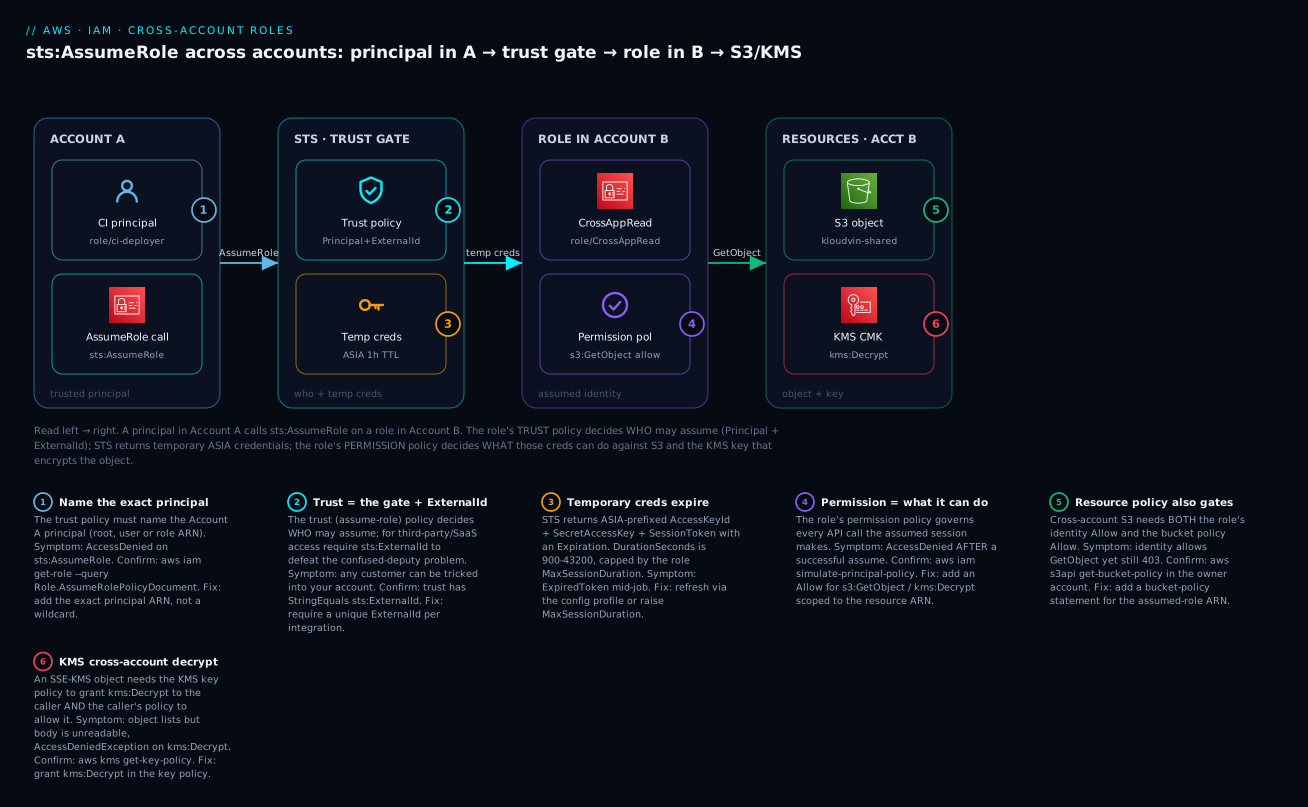
The diagram traces one cross-account read, left to right. A CI principal in Account A (role/ci-deployer) issues sts:AssumeRole against a role in Account B. STS evaluates that role’s trust policy — the gate that checks the Principal and the ExternalId — and, on success, returns temporary credentials (ASIA…, expiring within the session window). The caller now wears the CrossAppRead role; its permission policy authorises s3:GetObject, and the request reaches the S3 object in Account B. Because the object is encrypted with a customer-managed KMS key, the key policy must also grant kms:Decrypt — the sixth badge, and the single most common cross-account snag. Each numbered badge marks a hop where a specific failure class bites; the legend narrates every one as symptom, confirm, and fix.
Real-world scenario
KloudVin Analytics runs a classic three-account split: a tooling account (111111111111) with the CI/CD pipeline, a data account (222222222222) holding a curated S3 data lake encrypted with a customer-managed KMS key, and a security account (333333333333) that aggregates CloudTrail. The data science team, whose workloads run in the tooling account, needs read access to one prefix of the data-lake bucket — nothing more.
The first attempt was the wrong one. A platform engineer, under deadline, created an IAM user in the data account named svc-datascience, generated an access key, and dropped it into the CI system’s secret store as DATA_AWS_KEY. It worked immediately. Six weeks later a routine secret-scanning tool flagged that the same key had been pasted into a Confluence runbook, and the key had s3:* and had been used from three unexplained IP addresses. The blast radius was the entire bucket, and because one static identity was used by everything, CloudTrail could not distinguish the pipeline from the leak. Rotating it meant tracking down every copy.
The rebuild took an afternoon and followed this article. In the data account they created CrossAppRead with a trust policy naming exactly arn:aws:iam::111111111111:role/ci-deployer and requiring aws:PrincipalOrgID equal to the org — no ExternalId needed, since this is first-party. The permission policy allowed only s3:GetObject/s3:ListBucket on s3:prefix curated/datascience/*, plus kms:Decrypt on the data-lake key scoped by kms:ViaService = s3.ap-south-1.amazonaws.com. They added a matching statement to the KMS key policy granting kms:Decrypt to the role — the step everyone forgets — and, because the bucket used “Bucket owner enforced,” no ACL work was needed. In the tooling account, the ci-deployer role got an identity policy allowing sts:AssumeRole on just that one role ARN. The pipeline switched to a crossapp profile with role_arn + credential_source = EcsContainer.
The outcomes were exactly what the design promised. Sessions now last one hour and refresh automatically; a leaked session token is dead before it can be abused. CloudTrail in both accounts shows AssumeRole events with the session name and the pipeline’s identity, so the security account can alert on any assume that is not from the CI role. When a contractor rolled off, revoking access was a single trust-policy edit, not a key hunt. And when someone later tried to widen the role to s3:*, the code review caught it because the permission policy is the one obvious place that governs blast radius. The only incident since was self-inflicted: a well-meaning refactor introduced a hub-role hop, the 12-hour batch export started chaining, and it began failing at the 1-hour mark with ExpiredToken — resolved by assuming the export role directly from the task role instead of through the hub.
Advantages and disadvantages
| Advantages | Disadvantages |
|---|---|
| No permanent secret crosses the account boundary | More moving parts than one shared key |
| Credentials expire automatically (15 min – 12 h) | Session expiry surprises long jobs (ExpiredToken) |
| Fine-grained trust: exact principal, MFA, ExternalId, org, IP | Two policies to reason about — people confuse trust vs permission |
| Rich, attributable CloudTrail on both accounts | Role chaining silently caps at 1 hour |
| Revoke by editing one trust policy | Cross-account also needs the other allow (resource/KMS) — easy to miss |
| Session policies + tags scope each session | Session-policy PackedPolicyTooLarge if you over-stuff |
| The foundation for SSO, CI/CD, and automation | ExternalId only helps for third parties, not first-party |
When each matters: the auto-expiry and attribution advantages are decisive for anything security-sensitive or audited — which is nearly everything in a shared estate. The disadvantages are almost all operational learning-curve items, not fundamental costs: once your team internalises “trust = who, permission = what, cross-account = two allows, chaining = 1 hour,” the failure modes stop recurring. The one genuine trade-off is simplicity for a truly trivial one-off — and even then, a resource-based policy beats a shared key.
Hands-on lab
You will create a role in “Account B” that trusts a principal in “Account A,” assume it from the CLI, and read an S3 object through it — with both aws CLI and Terraform paths and a full teardown. Cost: effectively zero — IAM, STS, and a handful of tiny S3 objects are free-tier friendly; the only charge is fractions of a paisa for S3 storage/requests.
You can run this with two real accounts (ideal) or simulate it in one account by having the account trust itself (
Principal= your own account) — the mechanics are identical. Replace111111111111(A) and222222222222(B) with your real ids; in the single-account version they are the same id. Use an admin profile in a sandbox, never root.
Step 0 — Set variables.
ACCT_A=111111111111        # caller account (use your id)
ACCT_B=222222222222        # role/resource account (same id if single-account)
CALLER_ARN=$(aws sts get-caller-identity --query Arn --output text)
BUCKET=kloudvin-shared-$RANDOM
REGION=ap-south-1
echo "Caller: $CALLER_ARN  Bucket: $BUCKET"
Step 1 — (In Account B) create a bucket and an object to read.
aws s3api create-bucket --bucket "$BUCKET" --region "$REGION" \
  --create-bucket-configuration LocationConstraint="$REGION"
echo "cross-account hello from KloudVin" > /tmp/report.txt
aws s3 cp /tmp/report.txt "s3://$BUCKET/curated/report.txt"
Expected: upload: /tmp/report.txt to s3://kloudvin-shared-XXXX/curated/report.txt.
Step 2 — (In Account B) write the trust policy and create the role. For the lab we trust the whole caller account root; in production name the exact role and add an ExternalId.
cat > /tmp/trust.json <<JSON
{ "Version": "2012-10-17",
  "Statement": [{
    "Effect": "Allow",
    "Principal": { "AWS": "arn:aws:iam::${ACCT_A}:root" },
    "Action": "sts:AssumeRole",
    "Condition": { "StringEquals": { "sts:ExternalId": "kloudvin-lab-7f3a" } }
  }] }
JSON

aws iam create-role --role-name CrossAppRead \
  --assume-role-policy-document file:///tmp/trust.json \
  --max-session-duration 3600 \
  --query "Role.{Arn:Arn,Max:MaxSessionDuration}"
Expected: the role ARN arn:aws:iam::222222222222:role/CrossAppRead and Max: 3600.
Step 3 — (In Account B) attach a least-privilege permission policy.
cat > /tmp/perm.json <<JSON
{ "Version": "2012-10-17",
  "Statement": [{
    "Effect": "Allow",
    "Action": ["s3:GetObject","s3:ListBucket"],
    "Resource": ["arn:aws:s3:::${BUCKET}","arn:aws:s3:::${BUCKET}/*"]
  }] }
JSON
aws iam put-role-policy --role-name CrossAppRead \
  --policy-name read-shared --policy-document file:///tmp/perm.json
Step 4 — (In Account A) allow the caller to assume the role. In two real accounts, attach this to your caller principal; in the single-account lab an admin already has it, so you can skip if you are admin.
cat > /tmp/assume.json <<JSON
{ "Version": "2012-10-17",
  "Statement": [{
    "Effect": "Allow", "Action": "sts:AssumeRole",
    "Resource": "arn:aws:iam::${ACCT_B}:role/CrossAppRead"
  }] }
JSON
# Example if your caller is a role named ci-deployer:
# aws iam put-role-policy --role-name ci-deployer \
#   --policy-name allow-assume --policy-document file:///tmp/assume.json
Step 5 — Assume the role and inspect the temporary credentials.
aws sts assume-role \
  --role-arn "arn:aws:iam::${ACCT_B}:role/CrossAppRead" \
  --role-session-name lab --external-id kloudvin-lab-7f3a \
  --query "{AKID:Credentials.AccessKeyId,Exp:Credentials.Expiration,Who:AssumedRoleUser.Arn}"
Expected: an AKID starting ASIA, an Exp timestamp ~1 hour out, and Who = arn:aws:sts::222222222222:assumed-role/CrossAppRead/lab. Now omit --external-id and re-run — you get AccessDenied … not authorized to perform: sts:AssumeRole, proving the trust condition is the gate.
Step 6 — Use the session to read the object (via a profile). Add the profile once, then use it:
cat >> ~/.aws/config <<INI

[profile crossapp-lab]
role_arn = arn:aws:iam::${ACCT_B}:role/CrossAppRead
source_profile = default
external_id = kloudvin-lab-7f3a
region = ${REGION}
INI

aws s3 cp "s3://${BUCKET}/curated/report.txt" - --profile crossapp-lab
aws sts get-caller-identity --profile crossapp-lab --query Arn --output text
Expected: the file contents cross-account hello from KloudVin, and a caller ARN that is the assumed-role session, not your base user.
Step 7 — (Optional) the Terraform equivalent. Save as main.tf, terraform init && terraform apply. It builds the same role with both policies (see the provider/aws_iam_role example in the Terraform section above), scoped to your ids.
Step 8 — Teardown (do this — it removes the role and bucket).
aws iam delete-role-policy --role-name CrossAppRead --policy-name read-shared
aws iam delete-role --role-name CrossAppRead
aws s3 rm "s3://${BUCKET}" --recursive
aws s3api delete-bucket --bucket "$BUCKET" --region "$REGION"
# remove the [profile crossapp-lab] block you appended to ~/.aws/config
⚠️ The S3 bucket and objects are the only things that could accrue cost; teardown deletes them. IAM roles and STS calls cost nothing.
Common mistakes & troubleshooting
This is the section you will come back to. Cross-account failures are almost always one of the rows below — match your symptom, run the confirm step in the right account, apply the fix. The golden rule: an AssumeRole failure is a trust problem; a failure after a successful assume is a permission/resource problem.
| # | Symptom | Root cause | Confirm (exact command) | Fix |
|---|---|---|---|---|
| 1 | AccessDenied … not authorized to perform: sts:AssumeRole on resource: role … |
Trust policy doesn’t name your principal | aws iam get-role --role-name R --query Role.AssumeRolePolicyDocument (in B) |
Add your exact principal ARN to the trust Principal |
| 2 | AccessDenied on assume, and you’re passing/omitting an ExternalId |
Trust requires sts:ExternalId and yours is missing/wrong |
Check trust for StringEquals sts:ExternalId |
Pass --external-id with the exact value |
| 3 | AccessDenied on assume, MFA users |
Trust requires aws:MultiFactorAuthPresent=true |
Trust Condition mentions MFA |
Add --serial-number <mfa-arn> --token-code 123456 |
| 4 | AccessDenied on assume, “explicit deny in a service control policy” |
An SCP blocks sts:AssumeRole |
aws sts decode-authorization-message --encoded-message <blob> |
Adjust the SCP on the caller’s OU/account |
| 5 | AccessDenied on assume, trust looks correct |
Caller’s own identity policy lacks sts:AssumeRole on the role ARN |
Simulate in A: aws iam simulate-principal-policy --action-names sts:AssumeRole |
Add Allow sts:AssumeRole on the role ARN in Account A |
| 6 | ExpiredToken / “security token … is expired” on a downstream call |
Temp creds passed their Expiration |
Compare now vs Credentials.Expiration |
Re-assume; better, use a config profile that auto-refreshes |
| 7 | ValidationError: requested DurationSeconds exceeds the MaxSessionDuration |
Asked longer than the role’s ceiling | aws iam get-role --query Role.MaxSessionDuration |
Raise --max-session-duration or lower --duration-seconds |
| 8 | requested DurationSeconds exceeds the 1 hour session limit for roles assumed by role chaining |
You are chaining (assuming from ASIA creds) |
Check whether current creds are from a role | Assume the final role directly, or request ≤ 3600 |
| 9 | Assume succeeds, s3:GetObject in B denied though role has the Allow |
Bucket policy doesn’t also allow the assumed role | aws s3api get-bucket-policy --bucket B (in B) |
Add a bucket-policy Allow for the assumed-role ARN |
| 10 | Object lists but download/body fails, AccessDeniedException on kms:Decrypt |
KMS key policy doesn’t grant the caller kms:Decrypt |
aws kms get-key-policy --key-id K --policy-name default (in B) |
Grant kms:Decrypt to the role in the key policy |
| 11 | CLI: Unable to locate credentials / partial credentials found with a role profile |
source_profile/credential_source misconfigured |
Inspect ~/.aws/config; run aws configure list --profile p |
Set a valid source_profile (or credential_source), not both |
| 12 | InvalidClientTokenId … security token is invalid in an opt-in region |
Global STS session token not valid in that region, or stale creds | aws sts get-caller-identity --region <opt-in> |
Use the regional STS endpoint / re-issue creds |
| 13 | Assumed-role console session drops after 1 h | Chained/older session cap | n/a | Re-authenticate; avoid chaining for long console work |
| 14 | ABAC aws:PrincipalTag condition never matches after a chain |
Session tag wasn’t marked transitive | Check --transitive-tag-keys on the first assume |
Mark the tag transitive so it survives chaining |
| 15 | Passing --tags returns AccessDenied on sts:TagSession |
Trust policy doesn’t allow sts:TagSession |
Read the trust Action list |
Add sts:TagSession to the trust policy |
STS & cross-account error reference
| Error / code | HTTP | Meaning | Typical cause | Fix |
|---|---|---|---|---|
AccessDenied (sts:AssumeRole) |
403 | Trust rejected the caller | Principal not named / condition failed | Fix the trust policy |
ExpiredToken / ExpiredTokenException |
403 | Session credentials expired | Past Expiration |
Re-assume / auto-refresh |
InvalidClientTokenId |
403 | Token invalid | Rotated key, wrong partition, region STS off | Re-issue; use regional endpoint |
ValidationError (MaxSessionDuration) |
400 | Duration > role ceiling | Asked 12 h on a 1 h role | Raise ceiling or lower request |
ValidationError (1-hour chaining) |
400 | Chained session > 1 h | Chaining with long duration | ≤ 3600 or assume directly |
AccessDenied on sts:TagSession |
403 | Tagging not permitted | Trust lacks TagSession |
Add sts:TagSession |
PackedPolicyTooLarge |
400 | Session policy too big | Over-stuffed --policy |
Trim / use managed --policy-arns |
RegionDisabledException |
403 | STS not active in region | Opt-in region STS disabled | Enable STS regional activation |
MalformedPolicyDocument |
400 | Trust/permission JSON invalid | Bad principal ARN or JSON | Fix the document |
AccessDeniedException on kms:Decrypt |
400/403 | KMS refused decrypt | Key policy lacks cross-account grant | Grant kms:Decrypt in the key policy |
Reading an AccessDenied properly
Modern AWS AccessDenied messages tell you which policy type produced the deny — read the fragment before you touch anything:
| Message fragment | It means | Where to fix |
|---|---|---|
is not authorized to perform: sts:AssumeRole on resource: role … |
The trust policy didn’t allow you | The role’s trust policy (Account B) |
with an explicit deny in a service control policy |
An SCP blocked the assume | The SCP on the caller’s OU |
with an explicit deny in a resource-based policy |
A bucket/key/resource policy denied | That resource policy (Account B) |
with an explicit deny in a permissions boundary |
A boundary capped it out | The boundary on the role/caller |
because no identity-based policy allows |
Implicit deny — nothing granted it | Add the Allow (caller in A, or role in B) |
The security token included in the request is expired |
ExpiredToken |
Re-assume / refresh |
The two nastiest real failures deserve prose. The KMS decrypt trap: you grant the role s3:GetObject, ListBucket works, head-object works, and then get-object fails with a KMS AccessDeniedException. Everyone stares at the bucket policy. The object is SSE-KMS, and cross-account KMS needs two things — the key policy in the owner account must name the caller (or its account) with kms:Decrypt, and the caller’s own policy must allow kms:Decrypt too. Confirm with aws kms get-key-policy; fix by adding the caller to the key policy. The chaining cap: a 12-hour scheduled export that “worked yesterday” starts dying at exactly 60 minutes with ExpiredToken. Nothing about the role changed — the path to it did: a new hub-role hop turned a direct assume into a chained one, and chained sessions are capped at 1 hour regardless of MaxSessionDuration. Confirm by checking whether the credentials making the final assume are themselves ASIA (role-vended); fix by assuming the final role directly from the base identity, or by building refresh into the job.
Best practices
- Never share long-lived access keys across accounts. If something inside AWS needs cross-account access, it assumes a role. Reserve keys for the rare external tool that truly cannot.
- Name the exact principal in trust policies. Prefer
role/nameover…:root; addaws:PrincipalOrgIDfor first-party,sts:ExternalIdfor third-party. - Require
sts:ExternalIdfor every third-party integration — it is the confused-deputy defence and a standard security-review finding if absent. - Grant the role least privilege, scoped to specific resource ARNs and conditions (
kms:ViaService,s3:prefix), nots3:*on*. - Keep
MaxSessionDurationas short as the workload tolerates (default 1 h is fine for most); only raise it for genuinely long jobs. - Design for the 1-hour chaining cap. If a job needs long sessions, assume the final role directly, or build automatic credential refresh.
- Use config-file role profiles (
role_arn+source_profile/credential_source) so the SDK refreshes credentials for you — do not hand-rollassume-rolein scripts. - Remember cross-account = two allows. For resource access, grant on both the identity and the resource/KMS side; for assume, grant identity
sts:AssumeRolein A and trust in B. - Use session policies and session tags to scope a single session, and ABAC (
aws:PrincipalTag) to avoid policy sprawl. - Prefer a resource-based policy when the need is a single bucket/queue/key — it is simpler than a whole role.
- Alert on
AssumeRolein CloudTrail for sensitive roles (break-glass, org-access), matching on session name and source. - Deliver human access through Identity Center, not hand-built assume flows — it issues short-lived sessions with the same underlying mechanics.
Security notes
Cross-account roles are a security control, so treat their configuration as security code. Least privilege on both policies: the trust policy should name the narrowest principal and add conditions (ExternalId, PrincipalOrgID, MFA, SourceIp); the permission policy should scope to specific ARNs. Encryption: when data is SSE-KMS, the KMS key policy is part of your access surface — a role with s3:GetObject but no kms:Decrypt grant is (correctly) blocked, and conversely an over-broad key policy silently widens access, so audit key policies alongside role policies. Network isolation: add aws:SourceIp or aws:SourceVpc/aws:VpcSourceIp conditions to pin assume or resource access to your networks, and consider VPC endpoints for STS (com.amazonaws.<region>.sts) so assume calls never traverse the public internet. Identity: require MFA (aws:MultiFactorAuthPresent) for human-assumable roles and set SourceIdentity so the original human is attributable through the whole chain. Auditing: AssumeRole is logged in both the caller and the role-owner accounts — centralise those logs (see CloudTrail, Config & Audit for Compliance) and alert on assumes of privileged roles. Finally, run IAM Access Analyzer to surface roles that trust external accounts or lack an ExternalId, and to catch trust policies that unintentionally allow the whole world (Principal: "*").
Cost & sizing
There is almost nothing to pay for here — the value is in what you don’t spend on incident response.
| Item | Cost | Notes |
|---|---|---|
| IAM roles & policies | Free | No charge for roles, trust, or permission policies |
sts:AssumeRole calls |
Free | STS API calls are not billed |
| Temporary credentials | Free | No cost per session |
| CloudTrail management events | Free (first copy) | AssumeRole is a management event; a second trail/S3 storage costs |
| S3 / KMS accessed via the role | Standard S3/KMS pricing | You pay for the data, not the access mechanism |
| KMS key used for SSE | ~$1/key/month + $0.03 per 10k requests | The key exists regardless of cross-account |
| VPC endpoint for STS (optional) | ~$0.01/hour/AZ + data | Only if you route STS privately |
Sizing is about session duration and refresh, not money. Right-size MaxSessionDuration to the shortest value the workload tolerates (default 3600 for interactive and most automation; raise only for long batch jobs, and mind the 1-hour chaining cap). For high-frequency automation, prefer config-profile auto-refresh over calling assume-role on every invocation, which keeps STS call volume and latency low. Rough figures: a CI pipeline assuming a role a few thousand times a day costs ₹0 in STS and adds negligible latency (a single sub-100 ms call, then cached). The only line item that grows is CloudTrail storage if you keep a dedicated audit trail — pennies for the volume most estates generate.
Interview & exam questions
1. What are the two policies attached to an IAM role, and what does each control? The trust (assume-role) policy — a resource-based policy with a Principal element — controls who may assume the role. The permission policy — an identity-based policy — controls what the assumed session may do. Trust is evaluated first (to issue credentials); permission is evaluated on every subsequent call. (SAA-C03, SCS-C02)
2. Why prefer cross-account roles over shared IAM access keys? Roles issue temporary, auto-expiring credentials (15 min–12 h) instead of a permanent secret; nothing long-lived crosses the boundary; each session is attributable in CloudTrail; and revocation is a trust-policy edit rather than hunting down copied keys. (SAA-C03)
3. What is the confused-deputy problem and how does ExternalId solve it? A third party that assumes roles across many customers can be tricked into acting against the wrong customer’s account. Requiring a unique sts:ExternalId per customer — generated by the third party and passed only when acting for that customer — means an attacker who names your role can’t supply your ExternalId, so the assume fails. (SCS-C02)
4. A role has MaxSessionDuration 3600 but you request --duration-seconds 43200. What happens? STS returns a ValidationError: the requested DurationSeconds exceeds the role’s MaxSessionDuration. STS does not clamp — you must raise the ceiling with update-role or lower the request. (DVA-C02, SOA-C02)
5. What is role chaining and its key limitation? Assuming a role using credentials already vended by an assumed role. The resulting session is capped at 1 hour, regardless of either role’s MaxSessionDuration; requesting more errors. Design long jobs to assume directly or refresh. (SAA-C03)
6. Cross-account: a role has s3:GetObject allow but GetObject still returns AccessDenied. Name two likely causes. (a) The bucket policy in the owner account doesn’t also allow the assumed-role principal — cross-account S3 needs both allows. (b) The object is SSE-KMS and the KMS key policy doesn’t grant the caller kms:Decrypt. (SCS-C02)
7. How do resource-based policies differ from AssumeRole for cross-account access? With a resource-based policy (S3 bucket, KMS key, SQS queue), the external principal uses its own credentials and the resource grants it directly — no role swap or temp-credential exchange. AssumeRole makes the caller become a principal in the other account. Resource policies suit a single resource; roles suit broad access. (SAA-C03)
8. What is a session policy and can it grant new permissions? A policy passed at assume time (--policy/--policy-arns) that only restricts — the effective permissions are the intersection of the role’s identity policies and the session policy. It can never grant anything the role lacks. (DVA-C02)
9. Which STS permission must the trust policy include for callers to pass session tags? sts:TagSession (alongside sts:AssumeRole). Without it, passing --tags returns AccessDenied on sts:TagSession. Mark tags transitive to survive role chaining. (SCS-C02)
10. What does Principal: {"AWS": "arn:aws:iam::111111111111:root"} in a trust policy mean? It delegates trust to all of Account A’s IAM — any principal there that Account A’s own policies also permit may assume the role. It is not literally “only the root user.” Use the exact role/name form to pin to one workload. (SCS-C02)
11. How do you diagnose an AssumeRole AccessDenied caused by an SCP? The message contains “explicit deny in a service control policy.” Decode the encoded authorization message with aws sts decode-authorization-message, then adjust the SCP on the caller’s OU/account. (SCS-C02, SOA-C02)
12. Why prefer a ~/.aws/config role profile over calling assume-role in a script? The profile (role_arn + source_profile/credential_source) makes the SDK/CLI assume and auto-refresh credentials transparently, avoiding ExpiredToken on long runs and keeping the session token handling out of your code. (DVA-C02)
Quick check
- Which of a role’s two policies decides who may assume it, and which decides what it can do?
- Your
assume-rolesucceeds but the very nexts3:GetObjectfails withAccessDenied. Which policy do you investigate — trust or permission? - A nightly job assumes a role for 8 hours and suddenly starts failing after 1 hour. What single design change most likely caused it?
- A SaaS vendor gives you a role setup that includes an ExternalId. What attack does that ExternalId prevent?
- You granted a cross-account role
s3:GetObjectand added the bucket policy, but downloads still fail with a KMS error. What did you forget?
Answers
- The trust (assume-role) policy decides who; the permission policy decides what.
- The permission policy (or a resource/bucket/KMS policy) — the assume already succeeded, so trust is fine. Never edit trust to fix a post-assume denial.
- Role chaining was introduced (the job now assumes through another role), which caps the session at 1 hour. Assume the final role directly or add refresh.
- The confused-deputy problem — a malicious co-tenant tricking the shared vendor into assuming your role.
- The KMS key policy grant — an SSE-KMS object needs
kms:Decryptgranted to the caller in the key policy and allowed in the caller’s own policy.
Glossary
| Term | Definition |
|---|---|
| AssumeRole | STS API that exchanges a caller’s identity for temporary credentials scoped to a role, if the role’s trust policy allows the caller. |
| STS | AWS Security Token Service — vends temporary security credentials (ASIA… key + secret + session token + expiry). |
| Trust policy | Resource-based policy on a role, with a Principal element, defining who may assume it. Also called the assume-role policy. |
| Permission policy | Identity-based policy attached to a role defining what the assumed session may do. |
| Temporary credentials | Short-lived key/secret/session-token trio issued by STS, with an Expiration; AccessKeyId starts with ASIA. |
| ExternalId | A string required by a trust policy to defeat the confused-deputy problem for third-party access; generated by the third party, unique per customer. |
| Confused deputy | An attack where a privileged intermediary is tricked into acting against the wrong principal’s resources. |
| Role chaining | Assuming a role using credentials already vended by an assumed role; the session is capped at 1 hour. |
| MaxSessionDuration | The role-level ceiling (3600–43200 s) on how long a directly-assumed session may last. |
| Session policy | A policy passed at assume time that only restricts the session (intersection with the role’s policies). |
| Session tags | Key/value pairs attached to a session (sts:TagSession) used for ABAC via aws:PrincipalTag. |
| Resource-based policy | A policy attached to a resource (bucket, key, queue) that can grant an external principal access without AssumeRole. |
| assumed-role ARN | The session identity, arn:aws:sts::ACCOUNT:assumed-role/RoleName/SessionName, used in resource policies and ABAC. |
| aws:PrincipalOrgID | A condition key matching your Organization’s id, used to trust every principal in the org without listing accounts. |
| credential_source | A CLI config key (Ec2InstanceMetadata/EcsContainer/Environment) providing base creds for a role profile instead of source_profile. |
Next steps
- Master the identities first: IAM Users, Groups, Roles & Policies: A Hands-On Guide — the building blocks every role is made of.
- Debug any denial fast: IAM Policy Evaluation & AccessDenied Troubleshooting — the evaluation order that governs cross-account allows.
- Do human access the right way: IAM Identity Center SSO & Permission Sets — short-lived role sessions for people, built on this same mechanism.
- Put guardrails around it all: Organizations SCPs & Multi-Account Guardrails — how an SCP can permit or block
sts:AssumeRoleorg-wide. - See where it fits in the landing zone: AWS Organizations and IAM Foundations — accounts as blast-radius boundaries and where cross-account roles live.