Quick take: ALB routes HTTP/HTTPS with host, path and header rules at layer 7. NLB forwards raw TCP and UDP packets fast at layer 4, with static IPs and source-IP preservation. API Gateway is a managed API front door that adds authorization, throttling, caching and a developer portal. Pick the OSI layer and the feature set first; the service falls out of that choice. Forcing one front door to do another’s job is the single most common — and most expensive — mistake in this corner of AWS.
A platform team building a multiplayer gaming backend put everything behind one Application Load Balancer because “it worked for the website.” Voice chat, which rides UDP for low latency, performed terribly — ALB speaks only HTTP/HTTPS, so the team had bolted UDP onto a sidecar that round-tripped through the wrong layer. The WebSocket player-state channel technically worked but was awkward to route and kept getting cut at the idle timeout. The partner leaderboard REST API had no rate limiting, so one misbehaving integrator could saturate the backend. None of these were code bugs. They were layer bugs — the wrong front door chosen for the protocol and the feature. The fix was to stop asking one service to be all three: NLB for UDP voice with static IPs, ALB for HTTP game services with path-based routing, and API Gateway for partner-facing REST with usage plans and throttling. The moment the team split traffic by layer, the firefighting stopped.
This article is the decision guide and the failure playbook for those three entry points — Application Load Balancer (ALB), Network Load Balancer (NLB) and Amazon API Gateway — plus the legacy Classic Load Balancer (CLB) and the L7 cousin Gateway Load Balancer (GWLB) so you know what to avoid and what’s adjacent. You will learn the mental model that makes the choice obvious (which OSI layer does the work, and what each service can and cannot do there), the option-by-option differences (TLS termination, routing, health checks, source-IP behaviour, latency, limits), how to read the error and quota tables you will actually hit in production, and a structured symptom → root cause → how to confirm (exact CLI/console path) → fix playbook for the failures each one throws. Every configuration gets both an aws CLI snippet and a Terraform snippet. Because this is a reference you will return to mid-incident, the differences, the limits and the playbook are all laid out as scannable tables — read the prose once, keep the tables open at 02:14.
By the end you will stop guessing. When a new workload arrives you will name the layer in ten seconds, pick the right entry point, and know its limits and its failure modes before they bite. When an existing one throws a 502, a 429 or a silent connection reset, you will localise it to the exact hop and fix it — not by switching services in a panic, but because you understand what each front door is for.
What problem this solves
Different traffic needs different entry points, and AWS gives you several because no single one is right for every protocol, latency target and feature need. Choosing the wrong one does not usually fail loudly on day one — it fails expensively over time: latency you can’t explain, features you have to rebuild by hand, throttling you can’t apply, costs that balloon at scale, and connections that drop for reasons buried three layers down.
What breaks without this knowledge: a team puts a high-throughput TCP service (a database proxy, a game server, an MQTT broker) behind an ALB and pays an HTTP-parsing tax plus per-LCU costs it doesn’t need, when an NLB would move the same packets at a fraction of the latency and cost. Or it fronts a partner REST API with a bare ALB and has no throttling, no API keys, no usage plans — so the first noisy integrator takes down the backend for everyone. Or it reaches for API Gateway for a chatty internal microservice that does a million low-value calls a second, and the per-request pricing turns a ₹5,000 bill into a ₹2,00,000 one. Each is the wrong layer, not a bug.
Who hits this: nearly every team running anything public-facing on AWS — web apps, APIs, containers, game servers, IoT ingestion, partner integrations. It bites hardest on teams that learned one tool (usually ALB, because it’s the web default) and reach for it reflexively, and on teams scaling a service whose traffic profile has outgrown the front door they started with. The fix is almost never “switch everything” — it’s “match each traffic class to the layer that serves it, and know that layer’s limits.”
To frame the whole field before the deep dive, here is every entry point this article covers, the OSI layer it works at, what it is fundamentally for, and the one thing that most often sends people to the wrong one:
| Entry point | OSI layer | Fundamentally for | Killer feature | Most common misuse |
|---|---|---|---|---|
| Application Load Balancer (ALB) | L7 (HTTP/HTTPS) | Routing web traffic by content (host/path/header) | Rich L7 routing + WAF + native container/Lambda targets | Used for raw TCP/UDP or extreme throughput it can’t serve |
| Network Load Balancer (NLB) | L4 (TCP/UDP/TLS) | Moving packets fast with static IPs | Millions of flows, ~ms latency, static EIPs, source-IP preserved | Used where you actually needed L7 routing or WAF |
| API Gateway (REST/HTTP/WS) | L7 (managed API) | Publishing managed APIs with auth/throttle/cache | Full API lifecycle: keys, usage plans, authorizers, caching | Used for chatty internal traffic where per-request cost explodes |
| Classic Load Balancer (CLB) | L4/L7 (legacy) | Nothing new — backwards compatibility only | (none worth choosing) | Chosen for new builds; it should never be |
| Gateway Load Balancer (GWLB) | L3 (transparent) | Inserting inline appliances (firewalls/IDS) | Transparent traffic steering to a fleet of virtual appliances | Confused with NLB; it’s for inspection, not app traffic |
Learning objectives
By the end of this article you can:
- Name the OSI layer a workload needs (L4 vs L7 vs managed-API) and pick ALB, NLB or API Gateway from that in seconds — and justify the choice.
- Compare ALB, NLB and API Gateway across routing, TLS termination, health checks, source-IP behaviour, latency, WebSocket/gRPC support and limits without reaching for the docs.
- Configure each one with both
awsCLI and Terraform, including listeners, target groups, health checks, TLS, sticky sessions and usage-plan throttling. - Read the error/status-code and quota reference tables for each service and map a 502, 503, 429 or 504 to a specific cause.
- Diagnose the failures each front door hits — ALB unhealthy targets, NLB idle-timeout resets and source-IP surprises, API Gateway throttling and payload limits — and confirm each with an exact CLI command or console path.
- Decide where WAF goes (ALB / API Gateway / CloudFront, never NLB), how to preserve the client source IP, and how to terminate or pass through TLS correctly at each layer.
- Estimate the cost of each option (LCU vs NLCU vs per-million requests) and avoid the classic per-request-pricing blow-up.
Prerequisites & where this fits
You should understand AWS networking basics: a VPC, subnets (public vs private), security groups, Availability Zones, and that Elastic Load Balancing (ELB) is the umbrella service that includes ALB, NLB, GWLB and the legacy CLB. You should know what a target group is conceptually (the pool of backends a load balancer forwards to), what a listener is (the port/protocol the front door accepts on), and the difference between layer 4 (TCP/UDP packets, no awareness of HTTP) and layer 7 (HTTP requests, headers, paths). Familiarity with running aws CLI and reading JSON, plus basic Terraform, will let you run every snippet here.
This sits in the Networking & traffic-management track. It assumes the VPC fundamentals from AWS VPC, Subnets and Security Groups Explained (security groups and subnet placement decide whether your targets are even reachable) and the AZ model from AWS Regions and Availability Zones: Resiliency from the Ground Up (cross-zone load balancing and per-AZ static IPs only make sense once you understand zones). It is upstream of the compute choices in AWS Compute: EC2, Lambda, ECS and EKS — Which One to Choose? and the container path in AWS ECS vs EKS vs Fargate: Choose Your Container Path, because what you put behind the load balancer shapes which load balancer you pick. If your backend is event-driven, AWS Lambda Patterns: Event-Driven Functions That Scale to Zero pairs with API Gateway’s Lambda integration.
A quick map of who owns what during an incident, so you page the right person:
| Layer | What lives here | Who usually owns it | Failure classes it can cause |
|---|---|---|---|
| Client / DNS | TLS, name resolution, retries | Frontend / SRE | Misrouting, cert errors; often red herrings |
| CloudFront / edge (optional) | CDN, edge TLS, WAF | Network / platform | 502/504 at edge, cache surprises |
| ALB (L7) | Host/path routing, target health | Platform / app | 502/503 (unhealthy targets), 504 (slow backend) |
| NLB (L4) | TCP/UDP forwarding, static IPs | Network team | Idle-timeout resets, source-IP surprises |
| API Gateway (managed) | Auth, throttle, cache, mapping | API / platform | 429 (throttle), 403 (authorizer), 413 (payload) |
| Target group / backend | EC2/ECS/EKS/Lambda, health checks | App team | 5xx from the app itself, failed health checks |
Core concepts
Five mental models make every later decision obvious.
The layer does the work, and the layer constrains the features. An L7 front door (ALB, API Gateway) understands HTTP — it can read the path, host and headers, route on them, terminate TLS, inject headers, and have AWS WAF inspect the request. An L4 front door (NLB) sees only TCP/UDP segments — it forwards packets blind to a target, which makes it faster and cheaper but means it cannot route by URL, cannot run WAF, and cannot do HTTP things. The first question for any workload is therefore “does the entry point need to read HTTP?” If yes, you’re at L7 (ALB or API Gateway). If you just need to move TCP/UDP fast, you’re at L4 (NLB).
ALB and API Gateway are both L7, but they solve different problems. ALB is a load balancer: it spreads HTTP traffic across targets with content-based rules and is the natural front for web apps and container fleets. API Gateway is an API-management product: it adds the things a load balancer doesn’t — API keys, usage plans and throttling, authorizers (Cognito/IAM/Lambda/JWT), request/response mapping, caching, a developer portal, and per-stage versioning. If you’re publishing an API to customers or partners and need to govern it, that’s API Gateway. If you’re spreading web traffic across servers, that’s ALB. Many architectures use both — API Gateway out front for governance, an ALB behind it for the fleet.
A listener accepts; a target group receives; a health check decides. Every ELB load balancer has one or more listeners (e.g. HTTPS on 443) that match incoming traffic to a target group — the pool of backends (EC2 instances, IP addresses, Lambda functions, or for NLB an ALB). The load balancer continuously runs a health check against each target; only healthy targets receive traffic. A huge fraction of “the load balancer is broken” incidents are simply the health check is failing — wrong path, wrong port, wrong success matcher, or a security group blocking the probe — so the LB correctly refuses to send traffic and returns 503. Knowing the health check is the arbiter localises most failures instantly.
Source IP, TLS and timeouts behave differently at each layer — and that’s where surprises live. At L7 the load balancer terminates the TCP connection and opens a new one to the target, so the target sees the load balancer’s IP, and you recover the real client IP from the X-Forwarded-For header. At L4, NLB preserves the client source IP by default (the target sees the real client), which is great for allow-lists and logging but means your security groups must allow the client CIDRs, not the LB. TLS can be terminated at the front door (decrypt there, plaintext or re-encrypt to the backend) or passed through (NLB TCP passthrough hands the encrypted bytes straight to the target). And each has its own idle timeout — ALB’s is configurable (default 60 s), NLB’s TCP idle timeout is a fixed 350 seconds, and long-lived connections that go quiet get reset, which is the classic NLB gRPC/DB-connection mystery.
Managed means limits and per-request economics. API Gateway is fully managed — no capacity to provision — but that convenience comes with account-level throttling (a default 10,000 requests/second with a 5,000 burst per Region), payload size limits (10 MB for REST, 6 MB for a synchronous Lambda integration), an integration timeout (29 seconds maximum), and per-million-request pricing that is wonderful at low/medium volume and brutal at extreme volume. ALB and NLB price on capacity units (LCU/NLCU) instead, which is far cheaper for steady high-throughput traffic but gives you none of API Gateway’s governance. The economics flip depending on traffic shape, and choosing the wrong one for your shape is a real money mistake.
The vocabulary in one table
Before the deep sections, pin down every moving part:
| Concept | One-line definition | Where it lives | Why it matters to the choice |
|---|---|---|---|
| Listener | Port + protocol the LB accepts on | On the load balancer | Decides which protocols the front door speaks |
| Target group | Pool of backends the LB forwards to | Per LB (ALB/NLB) | The thing health checks and routing point at |
| Health check | Probe deciding if a target is healthy | Per target group | Failing it → 503; arbiter of most outages |
| L7 (application) | HTTP-aware (path/host/headers) | ALB, API Gateway | Enables content routing, WAF, header injection |
| L4 (network) | TCP/UDP packet forwarding | NLB | Fast, cheap, no HTTP awareness |
| TLS termination | Decrypt at the front door | ALB / NLB(TLS) / API GW | Where certs live; vs passthrough |
| Source-IP preservation | Target sees real client IP | NLB (default) | Drives SG rules and allow-lists |
X-Forwarded-For |
Header carrying the real client IP | ALB/API GW | How L7 backends recover client IP |
| LCU / NLCU | Capacity-unit billing metric | ALB / NLB | Cost model for the load balancers |
| Usage plan | Throttle + quota + API-key tier | API Gateway | How you govern callers; ALB has no equivalent |
| Authorizer | Auth check before the request runs | API Gateway | Cognito/IAM/Lambda/JWT gate |
| Stage | A deployed snapshot of an API | API Gateway | Versioning (dev/test/prod) of the API |
| Cross-zone LB | Spread across AZs evenly | ALB (on) / NLB (opt-in) | Even distribution vs per-AZ data cost |
ALB, NLB and API Gateway, head to head
This is the table you came for. The full side-by-side across every dimension that decides the choice. Read your requirement down the left, read which service satisfies it across the columns.
| Dimension | Application Load Balancer (ALB) | Network Load Balancer (NLB) | API Gateway |
|---|---|---|---|
| OSI layer | L7 (HTTP/HTTPS, gRPC) | L4 (TCP/UDP/TLS) | L7 (managed API) |
| Protocols | HTTP, HTTPS, HTTP/2, gRPC, WebSocket | TCP, UDP, TCP_UDP, TLS | HTTPS (REST/HTTP), WSS (WebSocket) |
| Routing | Host, path, header, query, method, source-IP rules | None (flow hash to target) | Resource/method, stage variables, mappings |
| TLS | Terminate (+ optional re-encrypt) | Terminate (TLS listener) or passthrough (TCP) | Terminate (managed certs / ACM) |
| WAF | Yes | No | Yes (REST APIs) |
| Source client IP | In X-Forwarded-For (LB IP at TCP) |
Preserved by default | In X-Forwarded-For |
| Static IP | No (use NLB or Global Accelerator in front) | Yes — one EIP per AZ | N/A (managed endpoint) |
| Targets | EC2, IP, Lambda, ECS/EKS | EC2, IP, ALB (as target) | Lambda, HTTP(S), AWS services, VPC link |
| Latency added | Single-digit ms | ~sub-ms (very low) | Tens of ms (managed overhead) |
| Sticky sessions | Yes (duration/app cookie) | Yes (source-IP based) | N/A (stateless) |
| Auth built in | No (use OIDC/Cognito action on rules) | No | Yes (Cognito/IAM/Lambda/JWT) |
| Throttling / quotas | No | No | Yes (usage plans, per-method) |
| Caching | No | No | Yes (per stage) |
| Idle timeout | Configurable (default 60 s) | Fixed 350 s (TCP) | 29 s integration max |
| Pricing model | Per hour + LCU | Per hour + NLCU | Per million requests (+ cache/data) |
| Best for | Web apps, microservices, containers | TCP/UDP, gaming, IoT, high throughput | Customer/partner managed APIs |
| Avoid for | Non-HTTP, extreme packet rates | Anything needing L7 routing/WAF | Chatty high-volume internal calls |
The reverse lookup — start from the requirement, land on the service:
| If your requirement is… | Choose | Why |
|---|---|---|
| Route by URL path / hostname | ALB | Only L7 LB with content routing |
| Raw TCP or UDP forwarding | NLB | Only one that speaks L4 / UDP |
| A fixed, static IP to allow-list | NLB | One EIP per AZ; ALB has none |
| Lowest possible latency | NLB | Sub-ms vs ALB’s single-digit ms |
| Millions of concurrent connections | NLB | Scales to tens of millions of flows |
| WAF inspection on requests | ALB or API Gateway | WAF associates with L7 only |
| API keys, usage plans, throttling | API Gateway | The only one with governance |
| Per-caller rate limiting | API Gateway | Usage plans; LBs can’t |
| Response caching at the edge of the API | API Gateway | Per-stage cache |
| WebSocket player/chat channel | ALB or API Gateway (WS) | Both speak WebSocket |
| gRPC service | ALB | Native gRPC target support |
| Preserve the real client IP cheaply | NLB | Default source-IP preservation |
| Front a Lambda with full request control | API Gateway | Mappings, auth, throttling |
| Spread HTTP across a container fleet | ALB | Native ECS/EKS integration |
| Insert a firewall/IDS appliance inline | GWLB | Transparent appliance steering |
TLS is where each front door behaves subtly differently — terminate, re-encrypt, or pass the encrypted bytes straight through. The full matrix:
| TLS need | ALB | NLB | API Gateway |
|---|---|---|---|
| Terminate TLS at the front door | Yes (HTTPS listener, ACM) | Yes (TLS listener, ACM) | Yes (managed / ACM) |
| Re-encrypt to the backend | Yes (HTTPS target group) | N/A (forwards plaintext after terminate) | Via HTTPS integration |
| End-to-end passthrough (no decrypt at LB) | No | Yes (TCP listener) | No |
| Where the cert lives | ACM on the listener | ACM on the TLS listener | ACM / API GW custom domain |
| mTLS (client cert auth) | Yes (mutual TLS on listener) | No (passthrough to backend does it) | Yes (mutual TLS on custom domain) |
| SNI / multiple certs | Yes (up to 25) | Yes (TLS listener) | Per custom domain |
| Min TLS policy control | ssl_policy (TLS 1.2/1.3) |
ssl_policy on TLS listener |
Security policy (TLS 1.2) |
And the reverse question every architecture review asks — which front door can front which compute target:
| Backend target | ALB | NLB | API Gateway |
|---|---|---|---|
| EC2 instances | Yes (instance/ip) | Yes (instance/ip) | Via HTTP_PROXY / VPC link |
| ECS / Fargate | Yes (ip target) | Yes (ip target) | Via VPC link |
| EKS pods | Yes (ip/ALB controller) | Yes (ip/NLB controller) | Via VPC link |
| Lambda | Yes (lambda target) | No (not directly) | Yes (Lambda proxy) |
| Another ALB | No | Yes (ALB as target) | No |
| AWS service (DynamoDB/SQS) | No | No | Yes (service integration) |
| On-prem / external HTTP | Via ip + Direct Connect | Via ip | Yes (HTTP_PROXY) |
Deep dive — Application Load Balancer (L7)
ALB is the HTTP workhorse. It terminates the client TCP/TLS connection, parses the HTTP request, evaluates listener rules in priority order, and forwards to the matching target group. Because it understands HTTP, it can do everything content-based: route /api/* to one fleet and /static/* to another, send shop.example.com and admin.example.com to different targets on the same listener, weight traffic for blue/green, and redirect or return fixed responses without ever touching a backend.
Create one with the CLI — a load balancer, a target group, a health check, and an HTTPS listener:
# 1) Create the ALB across two public subnets, attach a security group
aws elbv2 create-load-balancer \
  --name alb-shop-prod --type application \
  --subnets subnet-aaa subnet-bbb --security-groups sg-alb \
  --scheme internet-facing

# 2) Create a target group with an HTTP health check on /healthz
aws elbv2 create-target-group \
  --name tg-shop-web --protocol HTTP --port 8080 --vpc-id vpc-123 \
  --health-check-path /healthz --health-check-protocol HTTP \
  --matcher HttpCode=200 --healthy-threshold-count 3 --unhealthy-threshold-count 3

# 3) HTTPS listener with an ACM cert, default action forwards to the TG
aws elbv2 create-listener \
  --load-balancer-arn <alb-arn> --protocol HTTPS --port 443 \
  --certificates CertificateArn=<acm-arn> --ssl-policy ELBSecurityPolicy-TLS13-1-2-2021-06 \
  --default-actions Type=forward,TargetGroupArn=<tg-arn>
The same in Terraform — declarative, reviewable, the production default:
resource "aws_lb" "shop" {
  name               = "alb-shop-prod"
  load_balancer_type = "application"
  subnets            = [aws_subnet.public_a.id, aws_subnet.public_b.id]
  security_groups    = [aws_security_group.alb.id]
}

resource "aws_lb_target_group" "web" {
  name        = "tg-shop-web"
  port        = 8080
  protocol    = "HTTP"
  vpc_id      = aws_vpc.main.id
  target_type = "ip"
  health_check {
    path                = "/healthz"
    matcher             = "200"
    healthy_threshold   = 3
    unhealthy_threshold = 3
    interval            = 15
  }
}

resource "aws_lb_listener" "https" {
  load_balancer_arn = aws_lb.shop.arn
  port              = 443
  protocol          = "HTTPS"
  ssl_policy        = "ELBSecurityPolicy-TLS13-1-2-2021-06"
  certificate_arn   = aws_acm_certificate.shop.arn
  default_action {
    type             = "forward"
    target_group_arn = aws_lb_target_group.web.arn
  }
}
ALB routing rules — what you can match on
Listener rules are evaluated by priority (lowest number first); the first match wins, and a default action catches everything else. Each rule’s condition can combine multiple match types. The full menu:
| Condition type | Matches on | Example | Common use |
|---|---|---|---|
path-pattern |
URL path | /api/* |
Split API vs static vs UI |
host-header |
Host header | admin.example.com |
Multi-tenant / subdomain routing |
http-header |
Any request header | X-Channel: mobile |
Channel / client-type routing |
http-request-method |
HTTP verb | POST |
Send writes to a different fleet |
query-string |
Query key/value | version=beta |
Feature/beta routing |
source-ip |
Client CIDR | 203.0.113.0/24 |
Partner/office-only paths |
And the actions a rule can take — not every action is “forward to a target”:
| Action | What it does | Needs a target? | Use |
|---|---|---|---|
forward |
Send to one or more target groups (weighted) | Yes | Normal routing; blue/green weights |
redirect |
301/302 to another URL/scheme | No | HTTP→HTTPS; domain moves |
fixed-response |
Return a status + body directly | No | Maintenance page; block path |
authenticate-oidc |
Run an OIDC auth flow first | Yes (then forward) | Gate an app behind SSO |
authenticate-cognito |
Cognito user-pool auth first | Yes (then forward) | Login wall via Cognito |
A redirect-everything-to-HTTPS listener, which every public ALB should have on port 80:
aws elbv2 create-listener --load-balancer-arn <alb-arn> \
  --protocol HTTP --port 80 \
  --default-actions '[{"Type":"redirect","RedirectConfig":{"Protocol":"HTTPS","Port":"443","StatusCode":"HTTP_301"}}]'
ALB target-group settings — the knobs that decide health and stickiness
The target group is where health and session behaviour live. Get these wrong and the ALB either won’t send traffic (failing health checks) or sends it unevenly (bad stickiness). Every setting that matters:
| Setting | What it does | Default | When to change | Gotcha |
|---|---|---|---|---|
target-type |
instance / ip / lambda / alb | instance | ip for Fargate/ENI, lambda for serverless |
ip needs SG to allow the LB subnet CIDRs |
health-check-path |
Path probed for health | / |
Always point at a fast, cheap /healthz |
/ is often slow or auth-walled → false unhealthy |
health-check-protocol |
HTTP / HTTPS | HTTP | HTTPS if the target only speaks TLS | Cert/SNI must match or probe fails |
matcher (HttpCode) |
Success status range | 200 |
Widen to 200-299 if app returns 204/206 |
A 301 on / reads as unhealthy |
healthy-threshold-count |
Consecutive passes to mark healthy | 5 (ALB) / 3 | Lower for faster recovery | Too low flaps on transient blips |
unhealthy-threshold-count |
Consecutive fails to mark unhealthy | 2 | Higher to ride out brief blips | Too low evicts during GC pauses |
interval |
Seconds between probes | 30 | 10–15 for faster detection | Lower = more probe load on targets |
timeout |
Per-probe timeout | 5 s | Raise for slow health endpoints | Must be < interval |
deregistration_delay |
Connection-drain seconds | 300 | Lower (30–60) for fast deploys | Too low cuts in-flight requests |
stickiness (duration cookie) |
Pin client to a target | off | Legacy stateful apps only | Concentrates load; defeats even spread |
slow_start |
Ramp traffic to new targets | 0 (off) | 30–120 s for JIT-warming apps | Delays full use of new capacity |
load_balancing.algorithm |
round_robin / least_outstanding | round_robin | least_outstanding_requests for uneven request costs |
Round-robin can overload slow targets |
ALB and WebSocket / gRPC / HTTP2
ALB speaks HTTP/2 to clients and supports WebSocket (the Upgrade handshake passes through and the connection stays open) and native gRPC (set the target-group protocol version to GRPC and the matcher to gRPC status codes). The one thing to watch: WebSocket and other long-lived connections die at the idle timeout if they go quiet — raise it or send keepalives.
# Raise the ALB idle timeout to 4000s for long-lived WebSocket connections
aws elbv2 modify-load-balancer-attributes --load-balancer-arn <alb-arn> \
  --attributes Key=idle_timeout.timeout_seconds,Value=4000
| Protocol need | ALB support | What to set | Watch-out |
|---|---|---|---|
| HTTP/1.1 | Native | Nothing | — |
| HTTP/2 (client) | Native | On by default to client | Backend leg is HTTP/1.1 |
| WebSocket | Yes | Raise idle_timeout |
Quiet sockets cut at timeout |
| gRPC | Yes | TG protocol version GRPC |
Matcher uses gRPC status codes |
| Server-Sent Events | Yes | Raise idle_timeout |
Same idle-cut risk as WebSocket |
Deep dive — Network Load Balancer (L4)
NLB operates at layer 4: it picks a target by a flow hash (source IP/port, dest IP/port, protocol) and forwards the TCP/UDP segments without parsing anything above L4. That makes it astonishingly fast (sub-millisecond added latency), able to handle tens of millions of flows, and the only ELB that speaks UDP. It also gives you a static IP per AZ (attach an Elastic IP), which is the reason allow-list-driven and DNS-pinned clients use it.
# NLB with a TCP listener on 443, forwarding to an IP target group
aws elbv2 create-load-balancer --name nlb-game-prod --type network \
  --subnets subnet-aaa subnet-bbb --scheme internet-facing

aws elbv2 create-target-group --name tg-game-tcp \
  --protocol TCP --port 7777 --vpc-id vpc-123 \
  --health-check-protocol TCP --healthy-threshold-count 3

aws elbv2 create-listener --load-balancer-arn <nlb-arn> \
  --protocol TCP --port 443 \
  --default-actions Type=forward,TargetGroupArn=<tg-arn>
resource "aws_lb" "game" {
  name                             = "nlb-game-prod"
  load_balancer_type               = "network"
  subnets                          = [aws_subnet.public_a.id, aws_subnet.public_b.id]
  enable_cross_zone_load_balancing = true   # off by default on NLB — and AZ data charges apply
}

resource "aws_lb_target_group" "game" {
  name        = "tg-game-tcp"
  port        = 7777
  protocol    = "TCP"
  vpc_id      = aws_vpc.main.id
  target_type = "ip"
  health_check {
    protocol          = "TCP"
    healthy_threshold = 3
    interval          = 10
  }
}
NLB protocols and listeners
NLB listeners speak more than TCP — and the protocol you pick decides health-check options and TLS behaviour:
| Listener protocol | Carries | TLS handling | Health-check options | Use |
|---|---|---|---|---|
TCP |
Any TCP stream | Passthrough (encrypted to target) | TCP, HTTP, HTTPS | Databases, game servers, MQTT, SSH |
UDP |
UDP datagrams | N/A | TCP/HTTP on a side port | Voice, DNS, syslog, game telemetry |
TCP_UDP |
Both on one port | N/A / passthrough | TCP/HTTP | Protocols using both (e.g. DNS) |
TLS |
TLS-terminated TCP | Terminated at NLB (ACM cert) | TCP, HTTP, HTTPS | Offload TLS at L4 but keep static IP |
NLB attributes — source IP, cross-zone, and the timeout that bites
NLB’s defaults differ from ALB’s in ways that catch people. The three that matter most: source-IP preservation (on by default for instance/IP targets — your SGs must allow the client, not the LB), cross-zone load balancing (OFF by default, unlike ALB where it’s on — and turning it on incurs inter-AZ data charges), and the fixed 350-second TCP idle timeout (you cannot change it; long-lived quiet connections reset). The full attribute set:
| Attribute / behaviour | Default | What it controls | When to change | Gotcha |
|---|---|---|---|---|
| Client IP preservation | On (instance/IP) | Target sees real client IP | Off only if targets can’t handle it | SGs must allow client CIDRs, not LB |
| Cross-zone load balancing | Off | Spread across all AZ targets | On for even distribution | Inter-AZ data transfer cost when on |
| TCP idle timeout | 350 s (fixed) | Reset idle TCP flows | Cannot change — design around it | gRPC/DB/SSH drop if quiet > 350 s |
deregistration_delay |
300 s | Connection drain on deregister | Lower for fast deploys | Cuts in-flight if too low |
proxy_protocol_v2 |
Off | Prepend client info header | On when behind another proxy | Target must parse PROXY v2 |
TLS ssl_policy (TLS listener) |
Recent default | Cipher/protocol set | Tighten to TLS 1.2+/1.3 | Old clients may fail handshake |
Health-check interval |
10 s (TCP) / 30 (HTTP) | Probe frequency | Lower for faster failover | More probe load |
A worked source-IP example: with preservation on, a game client at 203.0.113.50 connecting through the NLB makes the EC2 target see 203.0.113.50 directly — so the instance security group must Allow TCP 7777 from 0.0.0.0/0 (or the client ranges), not from the NLB. People allow the NLB’s ENI and then wonder why every connection is refused. That’s the source-IP model working exactly as designed.
# Enable cross-zone LB (off by default on NLB) and check it
aws elbv2 modify-load-balancer-attributes --load-balancer-arn <nlb-arn> \
  --attributes Key=load_balancing.cross_zone.enabled,Value=true
NLB as an ALB target — the “best of both” pattern
A genuinely useful trick: register an ALB as a target of an NLB. You get the NLB’s static IP and the ALB’s L7 routing together — common when a client (or a third party) demands a fixed IP to allow-list but you still need path-based routing and WAF behind it. The NLB forwards TCP 443 to the ALB; the ALB does the HTTP work.
| Goal | Pattern | What each layer gives |
|---|---|---|
| Static IP + L7 routing | NLB → ALB target | NLB: fixed EIP; ALB: host/path/WAF |
| Static IP + raw TCP | NLB → instances | NLB: fixed EIP + low latency |
| Global static anycast IP | Global Accelerator → ALB/NLB | GA: 2 anycast IPs, edge entry |
| L7 routing only | ALB → instances | ALB: full content routing |
Deep dive — API Gateway (managed API front door)
API Gateway is not a load balancer — it’s an API-management product. It accepts requests, authorizes them (Cognito, IAM, Lambda authorizer, or JWT), throttles them per usage plan, optionally caches responses, maps request/response shapes, and integrates with a backend (Lambda, an HTTP endpoint, an AWS service directly, or a private VPC resource via a VPC link). It comes in three flavours — REST, HTTP and WebSocket — and choosing the right flavour is itself a decision.
REST vs HTTP vs WebSocket APIs
The newer HTTP API is cheaper and lower-latency but has fewer features than the older REST API. The full comparison:
| Capability | REST API | HTTP API | WebSocket API |
|---|---|---|---|
| Primary use | Full-feature managed REST | Lean, cheap proxy to Lambda/HTTP | Bidirectional realtime |
| Price (per million) | Higher (~3.5× HTTP) | Lowest | Per message + connection-minute |
| Latency overhead | Higher | Lower | Per-message |
| Authorizers | IAM, Cognito, Lambda | JWT, Lambda, IAM | Lambda (on connect) |
| API keys + usage plans | Yes | No (limited) | No |
| Request/response mapping | Full (VTL) | Minimal | Route-based |
| Caching | Yes (per stage) | No | No |
| WAF | Yes | No | No |
| Private (VPC) integration | VPC link (NLB) | VPC link (ALB/NLB) | — |
| Edge/Regional/Private endpoint | All three | Regional | Regional |
| Choose when | You need keys, caching, WAF, mapping | Simple, high-volume, cost-sensitive | Chat, notifications, live data |
Create a simple HTTP API fronting a Lambda with the CLI:
# HTTP API with a Lambda proxy integration and a default stage with auto-deploy
aws apigatewayv2 create-api --name api-orders \
  --protocol-type HTTP --target arn:aws:lambda:ap-south-1:111122223333:function:orders
A REST API with a usage plan and throttling, in Terraform:
resource "aws_api_gateway_rest_api" "orders" {
  name = "orders-api"
}

resource "aws_api_gateway_usage_plan" "partners" {
  name = "partners"
  api_stages {
    api_id = aws_api_gateway_rest_api.orders.id
    stage  = aws_api_gateway_stage.prod.stage_name
  }
  throttle_settings {
    rate_limit  = 200   # steady-state requests/second for this plan
    burst_limit = 400   # bucket size for spikes
  }
  quota_settings {
    limit  = 1000000    # requests
    period = "MONTH"
  }
}

resource "aws_api_gateway_api_key" "partner_acme" {
  name = "acme"
}

resource "aws_api_gateway_usage_plan_key" "acme" {
  key_id        = aws_api_gateway_api_key.partner_acme.id
  key_type      = "API_KEY"
  usage_plan_id = aws_api_gateway_usage_plan.partners.id
}
API Gateway authorizers — gating who gets in
Authorization is the headline reason to choose API Gateway over an ALB. The options, what they check, and when each fits:
| Authorizer type | Checks | Best for | Note |
|---|---|---|---|
NONE |
Nothing (open) | Public read endpoints | Combine with API key + throttle |
| API key | A key in x-api-key |
Partner identification + usage plans | Not auth — identity for metering only |
| IAM | SigV4-signed requests | Service-to-service, internal | Caller needs AWS creds |
| Cognito | Cognito user-pool JWT | End-user web/mobile auth | Native user pools |
| Lambda (token) | Custom logic on a bearer token | Bespoke / third-party IdP | You write the verify logic |
| Lambda (request) | Custom logic on full request | Header/query/context-based auth | Most flexible; cache the result |
| JWT (HTTP API) | OAuth2/OIDC JWT claims | Standard OIDC providers | HTTP API only; no Lambda needed |
API Gateway throttling and the 429
Throttling is layered, and a 429 can come from any layer. From most-specific to least: per-method limits, the usage-plan rate/burst for the caller’s key, the stage default, and finally the account-level ceiling (default 10,000 rps + 5,000 burst per Region). The first ceiling hit wins.
| Throttle scope | Default | Configurable? | Returns | How to confirm |
|---|---|---|---|---|
| Account (Region) | 10,000 rps / 5,000 burst | Via quota increase | 429 | Service Quotas console |
| Stage default | Inherits account | Yes | 429 | Stage → Default Route Throttling |
| Per-method | Inherits stage | Yes | 429 | Method throttling settings |
| Usage plan (per key) | Plan rate/burst | Yes | 429 | Usage plan → throttle |
| Per-client quota | Plan quota (e.g. /month) | Yes | 429 (quota) | Usage plan → quota |
API Gateway caching, mapping and integration types
REST APIs can cache responses per stage (sized 0.5 GB–237 GB) with a TTL, cutting backend load and latency for read-heavy endpoints. Mapping templates (VTL) reshape requests/responses. And the integration type decides what sits behind the gateway:
| Integration type | Backend | Use | Limit to know |
|---|---|---|---|
AWS_PROXY (Lambda proxy) |
Lambda | Most serverless APIs | 6 MB sync payload; 29 s timeout |
AWS (Lambda non-proxy) |
Lambda | When you need request mapping | Same limits + VTL effort |
HTTP_PROXY |
Any HTTP endpoint | Front an existing service | 29 s timeout |
HTTP |
HTTP endpoint + mapping | Reshape to a legacy API | 29 s timeout |
MOCK |
None | Stubs, CORS preflight | Returns canned response |
AWS (service integration) |
DynamoDB/SQS/etc directly | Skip Lambda for simple ops | Per-service quotas |
| Private (VPC link) | NLB (REST) / ALB or NLB (HTTP) | Reach private VPC backends | Needs the link + target |
The error & limit reference
The lookup table you scan first during an incident: the status codes and the hard limits you realistically hit across all three front doors, what each means on AWS specifically, how to confirm, and the fix.
Status / error codes
| Code | Source | Meaning on AWS | Likely cause | How to confirm | First fix |
|---|---|---|---|---|---|
| 502 Bad Gateway | ALB / API GW | Bad/no answer from target | Target crashed, wrong port, Lambda error, bad response format | ALB access logs elb_status_code=502; target health |
Fix target; align port/health; check Lambda |
| 503 Service Unavailable | ALB / NLB | No healthy target to send to | All targets unhealthy; no target registered in the AZ | TargetGroup → Targets unhealthy; HealthyHostCount=0 |
Fix health check; register targets per AZ |
| 504 Gateway Timeout | ALB / API GW | Backend too slow | Target slower than idle timeout; API GW 29 s integration cap | ALB target_processing_time; APIGW IntegrationLatency |
Speed up backend; raise ALB idle timeout |
| 460 | ALB | Client closed connection before response | Client timeout/abort | ALB access log code 460 | Client-side; usually benign |
| 463 | ALB | X-Forwarded-For had too many IPs |
Malformed XFF chain | ALB access log code 463 | Fix upstream proxy XFF handling |
| 429 Too Many Requests | API GW | Throttled | Account/stage/method/usage-plan limit hit | CloudWatch ThrottleCount; Service Quotas |
Raise throttle/quota; cache; request increase |
| 403 Forbidden | API GW / WAF | Authorizer denied or WAF blocked | Bad token, missing key, WAF rule | APIGW execution logs; WAF sampled requests | Fix token/key; tune WAF rule |
| 413 Payload Too Large | API GW | Request body over limit | > 10 MB (REST) / 6 MB (Lambda sync) | Request size vs limit | Use multipart/S3 presigned upload |
| 401 Unauthorized | API GW | Auth required / failed | Missing/expired credentials | Authorizer logs | Present valid credentials |
| 500 Internal Server Error | API GW | Gateway/integration error | Mapping template error; integration failure | APIGW execution logs (/aws/apigateway) |
Fix mapping/integration |
| Connection reset | NLB | TCP flow reset | 350 s idle timeout exceeded | Target sees no FIN; flow idle > 350 s | TCP keepalives < 350 s |
| Connection refused | NLB | SG blocked the client | SG allows LB instead of client (source-IP preserved) | VPC Flow Logs REJECT on target ENI | Allow client CIDRs on target SG |
Hard limits & quotas
The numbers that shape designs — and that you cannot wish away:
| Limit | ALB | NLB | API Gateway | Note |
|---|---|---|---|---|
| Idle / connection timeout | 60 s (configurable) | 350 s TCP (fixed) | 29 s integration max | NLB’s is unchangeable |
| Max request/payload | No fixed body cap (streaming) | N/A (L4) | 10 MB REST / 6 MB Lambda sync | Use S3 for big uploads |
| Targets per target group | 1,000 (default) | 1,000 (default) | N/A | Soft quota; raise via Support |
| Rules per ALB | 100 (default) | N/A | N/A | Soft quota |
| Certificates per ALB | 25 (default) | 25 (TLS) | per-domain | SNI multi-cert |
| Default request rate | (LCU-bound) | (NLCU-bound) | 10,000 rps + 5,000 burst | API GW account-level |
| Static IPs | None | 1 EIP per AZ | None | Use NLB/Global Accelerator |
| Cross-zone LB default | On | Off | N/A | NLB opt-in costs inter-AZ data |
| WAF support | Yes | No | REST only | L7 only |
| Max APIs / resources | N/A | N/A | 600 APIs; 300 resources/API | Soft quotas |
| Lambda integration timeout | N/A | N/A | 29 s (hard) | Long jobs → async pattern |
Three reading notes that save the most time:
| Distinction | The trap | How to tell them apart |
|---|---|---|
| ALB 502 vs 503 | Both look like “LB broken” | 502 = a target answered badly; 503 = no healthy target to answer |
| API GW 429 (account) vs (usage plan) | Hours tuning the wrong throttle | If only one key 429s → usage plan; if all callers 429 → account/stage |
| NLB “refused” vs “reset” | Different root causes | Refused at connect = SG/source-IP; reset mid-flow = 350 s idle timeout |
Architecture at a glance
The diagram traces a single request from the client and shows the three front doors side by side as the decision tier, then the shared compute and observability behind them. Read it left to right. A client (web, mobile or IoT) arrives at the edge, optionally through CloudFront for CDN and edge TLS, with AWS WAF available — but note immediately that WAF attaches only to the L7 paths (ALB, API Gateway, CloudFront), never to NLB. From the edge the request lands on exactly one of three entry points chosen by protocol and feature need: the ALB path terminates HTTP/HTTPS and routes by host/path/header into a target group with HTTP health checks; the NLB path forwards raw TCP/UDP with a static EIP per AZ, preserves the source IP, and carries the fixed 350-second idle timeout; the API Gateway path is the managed front door adding an authorizer, usage-plan throttling and caching in front of the same backends. All three converge on shared compute (EC2, ECS, EKS or Lambda — including IP targets) and emit their own access logs and CloudWatch metrics (5xx rate, target response time, throttle count).
Notice what each numbered badge marks: it is the decision or failure point that bites on that path. Badge 1 sits on the ALB target group — the unhealthy-target 502/503 that is the single most common ALB incident. Badge 2 sits on the NLB flow — the 350-second idle reset that silently kills long-lived gRPC and database connections. Badge 3 sits on API Gateway — the 429 when a throttle ceiling is hit. Badge 4 is the architecture-level trap: the wrong front door for the protocol (UDP on ALB, no rate-limit on a partner API, an oversized payload). Badge 5 is WAF on the wrong layer. The first question on any new workload is the one this diagram is built around: which layer does the entry point need to work at? — and the column you land in tells you which service, which limits, and which failures to expect.
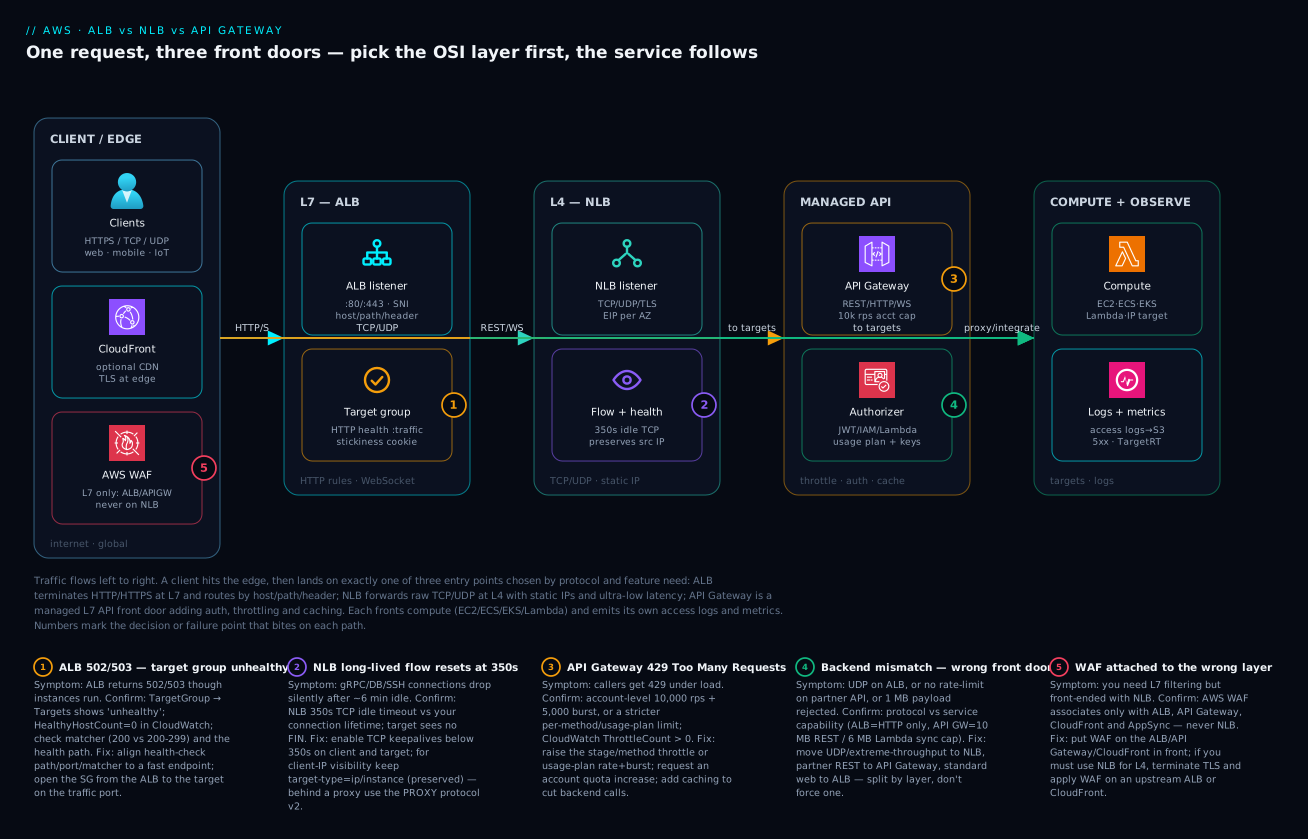
Real-world scenario
Vyana Games runs a multiplayer mobile title out of the Mumbai (ap-south-1) region: a Unity client, a fleet of authoritative game servers on EC2 (UDP), a set of stateless HTTP microservices on ECS Fargate (matchmaking, profile, store), a realtime chat channel, and a partner leaderboard API consumed by three esports websites. The platform team is five engineers; the monthly AWS spend across these front doors started at about ₹95,000 and was rising fast for reasons nobody could pin down.
The original design was the classic anti-pattern: one ALB for everything. UDP voice and game traffic were tunnelled over a WebSocket shim through the ALB because “the ALB was already there,” which added 30–60 ms of jitter and made the game feel laggy in 5v5 matches. The chat channel rode WebSocket on the same ALB and kept dropping connections — players had to reconnect every few minutes. The partner leaderboard API was a plain ALB target group with no throttling; when one esports site deployed a buggy poller that hammered the endpoint 50× normal, it starved the Fargate fleet and matchmaking timed out for everyone. And the bill: the ALB’s LCU charges were climbing because the WebSocket-tunnelled UDP traffic generated enormous connection churn.
The breakthrough was a whiteboard session that asked one question per workload: what layer does this actually need? Voice and game traffic are UDP and latency-critical — that’s L4, NLB, full stop, with source-IP preservation so the game servers see real client IPs for anti-cheat. The HTTP microservices need host/path routing and WAF — that’s L7, ALB. Chat is realtime bidirectional — they kept it on API Gateway WebSocket for managed scale and connection handling. The partner leaderboard needs governance — API keys, per-partner throttling, a usage plan, and caching for the read-heavy leaderboard — that’s API Gateway REST, no question.
The migration ran over three weeks. They stood up an NLB with Elastic IPs per AZ for the game/voice servers (the esports partners could now allow-list a stable IP, a bonus they hadn’t planned for), preserving the client source IP so the anti-cheat allow-lists worked. They moved the HTTP services behind a dedicated ALB with path rules (/match/*, /store/*, /profile/*) and put WAF in front to block the credential-stuffing they’d been seeing on login. They built the partner leaderboard as an API Gateway REST API with a usage plan per partner (200 rps steady, 400 burst, 1M/month quota), API keys so they could identify and rate-limit each integrator independently, and a 0.5 GB stage cache with a 30-second TTL on the leaderboard GET — which cut backend calls by ~80% and dropped p95 latency from 180 ms to 22 ms.
The results were unambiguous. Voice jitter fell from 30–60 ms to under 5 ms once UDP rode the NLB at L4 instead of being tunnelled through L7. The buggy-partner incident became a non-event: the offending key simply hit its 429 ceiling and got throttled in isolation, while every other caller and the game itself were untouched. Login credential-stuffing dropped off once WAF was in the path. And the bill fell to about ₹71,000 — the NLB is far cheaper than the ALB was for that connection-churny traffic, and the API Gateway cache slashed Lambda/Fargate invocations. The lesson the team wrote on the wall: “One load balancer for everything is one bug for everything. Pick the layer per workload.”
The migration as a before/after, because the mapping is the lesson:
| Workload | Before (one ALB) | After (right layer) | Why it’s better |
|---|---|---|---|
| Voice / game (UDP) | Tunnelled over WebSocket on ALB | NLB TCP/UDP, EIP per AZ | L4 latency; source IP for anti-cheat |
| HTTP microservices | Same ALB, mixed in | Dedicated ALB + path rules + WAF | Clean routing; WAF on logins |
| Realtime chat | WebSocket on ALB (dropping) | API Gateway WebSocket | Managed connections at scale |
| Partner leaderboard | ALB TG, no governance | API Gateway REST + usage plans + cache | Per-partner throttle; 80% fewer backend calls |
| Cost | ~₹95,000 rising | ~₹71,000 | NLB cheaper for churn; cache cuts invocations |
Advantages and disadvantages
No single front door wins on every axis — that’s the whole point. Weigh them honestly:
| Advantages | Disadvantages |
|---|---|
| ALB: richest L7 routing (host/path/header/method), native ECS/EKS/Lambda targets, WAF, OIDC/Cognito auth actions, gRPC/WebSocket | ALB: HTTP/HTTPS only — useless for UDP or raw TCP; higher latency than NLB; LCU cost can climb with connection churn |
| NLB: sub-millisecond latency, tens of millions of flows, static EIP per AZ, UDP support, source-IP preservation, cheap for steady throughput | NLB: no L7 routing, no WAF, no header awareness; fixed 350 s idle timeout you can’t change; cross-zone off by default (and costs data when on) |
| API Gateway: full API governance — keys, usage plans, throttling, authorizers, caching, mappings, stages, developer portal — with almost no code | API Gateway: per-request pricing punishes high volume; tens-of-ms latency overhead; 29 s integration timeout; 10 MB/6 MB payload caps; more moving parts |
| All three scale automatically and integrate with CloudWatch access logs and metrics | All three add a hop you must health-check, log and reason about; the wrong choice silently taxes latency, features or cost |
| ALB + NLB price on capacity units — very cheap for steady high-throughput traffic | API Gateway can be 10–40× the cost of an ALB for the same chatty internal traffic |
| NLB → ALB pattern gives static IP and L7 routing together | CLB (legacy) and GWLB (appliance-only) are easy to pick by mistake for the wrong reason |
When each matters: choose ALB when the entry point must read HTTP and route on it (almost all web/microservice traffic), and you want WAF and container-native targets. Choose NLB when latency, raw throughput, UDP, or a static allow-listable IP dominate — gaming, IoT, financial feeds, database proxies. Choose API Gateway when you’re publishing an API to others and need to govern it (auth, per-caller throttling, keys, caching) more than you need raw throughput, and the volume is low-to-medium enough that per-request pricing stays sane. The disadvantages are all predictable — UDP-on-ALB latency, NLB idle resets, API-Gateway cost-at-scale — which is exactly why naming the layer first prevents every one of them.
Hands-on lab
Stand up all three front doors in front of a trivial backend, observe how each behaves, and tear it all down — free-tier-friendly where possible (the load balancers and API Gateway have small hourly/request costs; we delete everything at the end). Run in a shell with the aws CLI configured for a sandbox account in ap-south-1. Replace the placeholder IDs with your VPC/subnet IDs.
Step 1 — Variables and a target instance. Use an existing VPC with two public subnets, or create them first.
export VPC=vpc-0123456789abcdef0
export SUB_A=subnet-0aaa SUB_B=subnet-0bbb
export REGION=ap-south-1
# A tiny instance running a web server on :8080 (or reuse one you have)
aws ec2 run-instances --image-id ami-0xxxx --instance-type t3.micro \
  --subnet-id $SUB_A --associate-public-ip-address \
  --user-data 'IyEvYmluL2Jhc2gKcHl0aG9uMyAtbSBodHRwLnNlcnZlciA4MDgw' \
  --tag-specifications 'ResourceType=instance,Tags=[{Key=Name,Value=lab-backend}]'
Expected: an instance ID; note it and its private IP.
Step 2 — Create an ALB with an HTTP health check and watch the target go healthy.
ALB_ARN=$(aws elbv2 create-load-balancer --name lab-alb --type application \
  --subnets $SUB_A $SUB_B --query 'LoadBalancers[0].LoadBalancerArn' --output text)
TG_ARN=$(aws elbv2 create-target-group --name lab-tg --protocol HTTP --port 8080 \
  --vpc-id $VPC --health-check-path / --query 'TargetGroups[0].TargetGroupArn' --output text)
aws elbv2 register-targets --target-group-arn $TG_ARN --targets Id=<instance-id>
aws elbv2 create-listener --load-balancer-arn $ALB_ARN --protocol HTTP --port 80 \
  --default-actions Type=forward,TargetGroupArn=$TG_ARN
# Watch health flip from 'initial' to 'healthy'
aws elbv2 describe-target-health --target-group-arn $TG_ARN \
  --query 'TargetHealthDescriptions[].TargetHealth.State' --output text
Expected: the state moves initial → healthy within a couple of minutes. Curl the ALB DNS name and you get the Python server’s directory listing.
Step 3 — Break the health check on purpose, watch the 503. Point the health check at a path that 404s:
aws elbv2 modify-target-group --target-group-arn $TG_ARN --health-check-path /nope --matcher HttpCode=200
sleep 60
aws elbv2 describe-target-health --target-group-arn $TG_ARN \
  --query 'TargetHealthDescriptions[].TargetHealth.{state:State,reason:Reason}' --output json
# Now curl the ALB — you get a 503 because no target is healthy
curl -s -o /dev/null -w "%{http_code}\n" http://<alb-dns-name>/
Expected: state unhealthy, reason Target.ResponseCodeMismatch, and the curl returns 503. This is the single most common ALB incident, reproduced in one command. Restore it: aws elbv2 modify-target-group --target-group-arn $TG_ARN --health-check-path /.
Step 4 — Create an NLB and observe the static-IP / source-IP behaviour.
NLB_ARN=$(aws elbv2 create-load-balancer --name lab-nlb --type network \
  --subnets $SUB_A $SUB_B --query 'LoadBalancers[0].LoadBalancerArn' --output text)
NTG_ARN=$(aws elbv2 create-target-group --name lab-ntg --protocol TCP --port 8080 \
  --vpc-id $VPC --query 'TargetGroups[0].TargetGroupArn' --output text)
aws elbv2 register-targets --target-group-arn $NTG_ARN --targets Id=<instance-id>
aws elbv2 create-listener --load-balancer-arn $NLB_ARN --protocol TCP --port 80 \
  --default-actions Type=forward,TargetGroupArn=$NTG_ARN
# The NLB preserves your source IP — the instance SG must allow YOUR client, not the NLB
Curl the NLB DNS name; if you get connection-refused, that’s the source-IP preservation lesson: open the instance security group to your client CIDR on 8080, not the NLB. Fix it and the curl succeeds.
Step 5 — Create an HTTP API Gateway in front of the ALB (HTTP_PROXY) and throttle it.
API_ID=$(aws apigatewayv2 create-api --name lab-api --protocol-type HTTP \
  --query 'ApiId' --output text)
# (Add an integration to the ALB DNS and a default route; then a stage with throttling)
aws apigatewayv2 create-stage --api-id $API_ID --stage-name '$default' --auto-deploy \
  --default-route-settings 'ThrottlingRateLimit=5,ThrottlingBurstLimit=2'
# Hammer it past 5 rps and watch some requests return 429
for i in $(seq 1 30); do curl -s -o /dev/null -w "%{http_code} " https://$API_ID.execute-api.$REGION.amazonaws.com/; done; echo
Expected: a burst of 200s followed by several 429s once you exceed the 5 rps / 2-burst ceiling — the throttling lesson, reproduced.
Validation checklist. You created all three front doors, saw an ALB return 503 from a failed health check, learned the NLB source-IP model the hard way (connection refused until the SG allowed the client), and watched API Gateway return 429 when a throttle ceiling was crossed. Each maps to a real production incident:
| Step | What you did | What it proves | Real-world analogue |
|---|---|---|---|
| 2 | ALB + healthy target | The listener→TG→health-check chain | Standing up any web service |
| 3 | Break health check → 503 | Health check is the arbiter | The #1 ALB incident |
| 4 | NLB + source-IP refusal | NLB preserves the client IP | SG-vs-client confusion in prod |
| 5 | API GW throttle → 429 | Throttling is layered and real | Partner API rate-limit incidents |
Cleanup (stop the hourly/request charges).
aws elbv2 delete-listener --listener-arn <alb-listener-arn>
aws elbv2 delete-load-balancer --load-balancer-arn $ALB_ARN
aws elbv2 delete-load-balancer --load-balancer-arn $NLB_ARN
aws elbv2 delete-target-group --target-group-arn $TG_ARN
aws elbv2 delete-target-group --target-group-arn $NTG_ARN
aws apigatewayv2 delete-api --api-id $API_ID
aws ec2 terminate-instances --instance-ids <instance-id>
Cost note. Two load balancers and an HTTP API for an hour, plus a t3.micro, is a few tens of rupees total; deleting everything stops it. ALB/NLB bill per hour + capacity unit even when idle, so don’t leave them running.
Common mistakes & troubleshooting
This is the playbook — the part you bookmark. First as a scannable table you can read mid-incident, then the entries that bite hardest with full confirm-command detail.
| # | Symptom | Root cause | Confirm (exact cmd / console path) | Fix |
|---|---|---|---|---|
| 1 | ALB returns 503 though instances are running | All targets failing the health check | aws elbv2 describe-target-health → unhealthy; reason ResponseCodeMismatch/Timeout |
Fix health path/port/matcher; open SG from ALB to target |
| 2 | ALB returns 502 intermittently | Target returns a malformed/empty HTTP response, or Lambda errored | ALB access logs elb_status_code=502, target_status_code=-; Lambda logs |
Fix target response; for Lambda check the function error |
| 3 | New ECS/Fargate targets never go healthy | target-type=instance used for awsvpc/IP targets, or SG blocks LB subnet |
TG shows targets stuck initial/unhealthy; check target_type |
Use target-type=ip; allow LB subnet CIDRs on the task SG |
| 4 | NLB connections “refused” at connect | Source-IP preserved; SG allows the NLB, not the client | VPC Flow Logs on target ENI show REJECT from client IP | Allow the client CIDRs (not the NLB) on the target SG |
| 5 | gRPC/DB/SSH over NLB drops after ~6 min | 350 s fixed TCP idle timeout exceeded | Flow idle > 350 s; target never saw a FIN | TCP keepalives < 350 s on client and target |
| 6 | NLB traffic lands on only one AZ’s targets | Cross-zone LB off (NLB default) | describe-load-balancer-attributes shows cross-zone false |
Enable cross-zone (accept inter-AZ data cost) |
| 7 | API Gateway callers get 429 | A throttle ceiling hit (account/stage/method/usage-plan) | CloudWatch ThrottleCount; Service Quotas; usage-plan limits |
Raise the relevant throttle/quota; cache; request account increase |
| 8 | API Gateway returns 504 / “Endpoint timed out” | Backend slower than the 29 s integration limit | APIGW IntegrationLatency near 29,000 ms |
Speed up backend; make the call async (SQS/Step Functions) |
| 9 | API Gateway returns 413 | Payload over 10 MB (REST) / 6 MB (Lambda sync) | Request body size vs limit | Upload via S3 presigned URL; stream; chunk |
| 10 | API Gateway returns 403 to valid callers | Authorizer denied, missing API key, or WAF blocked | APIGW execution logs; WAF sampled requests | Fix token/key mapping; tune the WAF rule |
| 11 | WAF rules “do nothing” on an NLB | WAF can’t attach to NLB (L4) | WebACL association list has no NLB | Put WAF on an ALB/API GW/CloudFront in front |
| 12 | Backend sees the LB’s IP, not the client | L7 terminates TCP; real IP is in X-Forwarded-For |
App logs show 10.x LB IP | Read X-Forwarded-For (ALB/APIGW) or use NLB (preserves IP) |
| 13 | HTTPS works but HTTP just hangs/404s | No HTTP→HTTPS redirect listener on :80 | Only a :443 listener exists | Add a :80 listener with a redirect action to 443 |
| 14 | Sticky app overloads a few instances | ALB duration-cookie stickiness pinning clients | TG attribute stickiness.enabled=true |
Disable stickiness for stateless apps; spread load |
| 15 | API Gateway cost spikes unexpectedly | Per-request pricing on chatty/high-volume traffic | Cost Explorer by API GW usage type | Move internal chatty traffic to ALB; add stage caching |
The expanded form, with the full reasoning for the ones that bite hardest:
1. ALB returns 503 though the instances are running fine.
Root cause: All targets are failing the health check, so the ALB has nothing healthy to forward to. Usually a wrong health-check path (pointing at / which is slow/auth-walled/redirects), a wrong port, a too-strict matcher (expecting 200 when the app returns 301/302/204), or a security group that doesn’t allow the ALB to reach the target on the health-check port.
Confirm: aws elbv2 describe-target-health --target-group-arn <arn> returns State: unhealthy with Reason: Target.ResponseCodeMismatch (matcher) or Target.Timeout (SG/port/slow path). The console TargetGroup → Targets tab shows the same.
Fix: Point the health check at a fast, cheap /healthz that returns 200; widen the matcher if the app legitimately returns 2xx other than 200; open the target’s security group to the ALB’s security group on the traffic/health port.
2. ALB returns 502 Bad Gateway intermittently.
Root cause: A target answered, but badly — an empty response, a malformed HTTP response, a connection reset mid-response, or (for a Lambda target group) the function threw or returned a non-conforming payload.
Confirm: ALB access logs (enable them to S3) show elb_status_code=502 with target_status_code="-" and a target_processing_time indicating the target was reached. For Lambda targets, the function’s CloudWatch logs show the error.
Fix: Fix the target’s response (don’t return empty bodies / reset connections under load); for Lambda, fix the function or its response format; ensure keep-alive settings on the target don’t close connections the ALB is reusing.
4. NLB connections are “refused” at connect time.
Root cause: NLB preserves the client source IP by default, so the target sees the real client, and the target’s security group must allow the client CIDRs — not the NLB. People reflexively allow the NLB’s ENI (as they would for an ALB) and every connection is refused.
Confirm: Enable VPC Flow Logs on the target ENI; you’ll see REJECT entries from the client IP on the service port. The NLB itself has no security group, so the target SG is the only L4 filter.
Fix: Allow the client CIDRs (or 0.0.0.0/0 for a public service) on the target security group for the service port. If you genuinely can’t, disable client-IP preservation on the target group (then the target sees the NLB and you allow the NLB subnet CIDRs instead).
5. Long-lived connections over NLB drop after about six minutes. Root cause: The NLB TCP idle timeout is a fixed 350 seconds and cannot be changed. A gRPC stream, a database connection in a pool, or an SSH session that goes quiet for longer than 350 s is silently reset — the target often never sees a FIN, so it thinks the connection is still open. Confirm: The drop correlates with ~350 s of inactivity; the application sees resets, not graceful closes; raising application-level activity prevents it. Fix: Enable TCP keepalives below 350 seconds on both the client and the target so the flow never goes idle long enough to be reaped. For connection pools, set a max-idle below 350 s. There is no way to raise the NLB timeout — you design around it.
7. API Gateway callers get 429 Too Many Requests.
Root cause: A throttle ceiling was crossed. From most-specific to least: a per-method limit, the caller’s usage-plan rate/burst, the stage default, or the account-level 10,000 rps + 5,000 burst per Region. The first one hit returns 429.
Confirm: CloudWatch ThrottleCount for the API/stage; if only one API key throttles, it’s that key’s usage plan; if everyone throttles at the same rps, it’s the stage/account ceiling. Service Quotas shows the account limit.
Fix: Raise the relevant throttle (usage-plan rate/burst, stage/method settings) or request an account-level quota increase via Service Quotas; add stage caching to cut backend calls; for legitimately huge volume, reconsider whether API Gateway (per-request priced) is the right front door at all.
8. API Gateway returns 504 / “Endpoint request timed out.”
Root cause: The backend integration took longer than API Gateway’s hard 29-second integration timeout. A slow Lambda, a slow HTTP backend, or a synchronous call doing too much work.
Confirm: CloudWatch IntegrationLatency for the method climbs toward/over 29,000 ms.
Fix: Speed up the backend; or convert a long operation to asynchronous — return 202 immediately and process via SQS/Step Functions, polling or webhook for the result. You cannot raise the 29 s cap.
11. WAF rules appear to do nothing in front of an NLB. Root cause: AWS WAF associates only with ALB, API Gateway (REST), CloudFront and AppSync — all L7. It cannot attach to an NLB, which operates at L4 and never sees the HTTP request WAF needs to inspect. Confirm: The WebACL’s associated-resources list contains no NLB (it can’t). Fix: Put the WAF on an ALB, API Gateway or CloudFront in front of the workload. If you must use an NLB for L4 reasons, terminate TLS and place an ALB or CloudFront (with WAF) upstream of it.
12. The backend logs the load balancer’s IP, not the real client.
Root cause: At L7, the ALB (and API Gateway) terminate the client TCP connection and open a new one to the target, so the target’s socket peer is the load balancer. The real client IP is carried in the X-Forwarded-For header.
Confirm: App access logs show a 10.x/LB subnet IP as the remote address.
Fix: Read the client IP from X-Forwarded-For (left-most untrusted hop, with care about spoofing) in the app or proxy. If you need the real client IP at the socket level (e.g. for L4 allow-lists), use an NLB with source-IP preservation instead.
Best practices
- Name the OSI layer before naming the service. “Does the entry point need to read HTTP?” decides L7 (ALB/API GW) vs L4 (NLB) in one question. Every other decision follows.
- One front door per traffic class, not one for everything. Split UDP/TCP to NLB, HTTP to ALB, governed APIs to API Gateway. Mixing protocols on one entry point is how you get latency, dropped connections and ungoverned APIs.
- Make the health check shallow, fast and honest. Point it at a cheap
/healthz, not/. Match the real success codes. A bad health check returns 503 for a perfectly healthy fleet — the #1 ALB incident. - For NLB, allow the client (not the LB) in target security groups. Source-IP preservation is on by default; allow-listing the NLB instead of the client refuses every connection.
- Design around the NLB 350-second idle timeout. Use TCP keepalives under 350 s for gRPC, database pools and any long-lived connection. You cannot change the timeout.
- Always add an HTTP→HTTPS redirect listener on :80. A bare HTTPS-only ALB leaves plain-HTTP clients hanging; the redirect is one rule.
- Put WAF on the L7 layer (ALB/API Gateway/CloudFront), never NLB. If you need L4 and WAF, front the NLB with a CloudFront/ALB that carries the WAF.
- Use usage plans and throttling on every partner/customer API. One ungoverned caller can starve a shared backend; per-key usage plans isolate the blast radius to that key’s 429.
- Cache read-heavy API Gateway endpoints. A per-stage cache with a short TTL can cut backend calls 70–90% and slash both latency and cost.
- Disable ALB stickiness for stateless apps. Duration-cookie stickiness concentrates load on a few targets and defeats even distribution; only legacy stateful apps need it.
- Enable access logs on every front door. ALB/NLB access logs to S3 and API Gateway execution/access logs to CloudWatch turn a two-hour mystery into a two-minute lookup of the exact status code and timing.
- Right-size the economics to the traffic shape. Steady high-throughput → capacity-unit-priced ALB/NLB. Low/medium governed APIs → API Gateway. Never front chatty high-volume internal traffic with per-request-priced API Gateway.
- Use
target-type=ipfor Fargate/ENI targets and open the LB subnet CIDRs on the task SG, or new tasks never go healthy.
The alerts worth wiring before the next incident — the leading indicators, not just “site down”:
| Alert on | Signal | Threshold (starting point) | Why it’s leading |
|---|---|---|---|
| Unhealthy targets | UnHealthyHostCount (ALB/NLB) |
≥ 1 for 3 min | Catches eviction before 503s hit users |
| Healthy host floor | HealthyHostCount |
< desired count | Predicts capacity loss |
| Backend latency | TargetResponseTime p95 |
> your SLO | Slow backend creeping toward timeout |
| ALB 5xx rate | HTTPCode_ELB_5XX_Count |
> 1% of requests | The symptom; confirm, don’t wait |
| API GW throttling | ThrottleCount |
> 0 sustained | First sign a ceiling is being hit |
| API GW integration latency | IntegrationLatency p95 |
> 20,000 ms | Approaching the 29 s hard cap |
| NLB flow reset | TCP_Target_Reset_Count |
spike | Idle-timeout or target-side resets |
Security notes
- Terminate TLS at the front door and enforce a modern policy. Use ACM certificates on the ALB/NLB(TLS)/API Gateway and a current SSL policy (TLS 1.2 minimum, prefer a TLS 1.3 policy). Re-encrypt to the backend where the threat model demands it.
- WAF on every internet-facing L7 entry point. Attach an AWS WAF WebACL to the ALB, API Gateway (REST) or CloudFront to block common exploits (SQLi, XSS), rate-limit, and stop credential stuffing. NLB can’t carry WAF — front it with one that can.
- Least-privilege security groups, and the right side for NLB. ALB targets: allow only the ALB’s SG. NLB targets (source-IP preserved): allow the client CIDRs, scoped as tightly as the service allows. Never
0.0.0.0/0on a private service. - Authorize at the API Gateway, don’t roll your own. Use Cognito, IAM, Lambda or JWT authorizers so unauthenticated requests never reach the backend. API keys are for identification and metering, not authentication — pair them with a real authorizer.
- Keep backends private. Put EC2/ECS/EKS targets in private subnets; let only the load balancer (in public subnets) be internet-facing. For API Gateway → private VPC backends, use a VPC link rather than exposing the backend publicly.
- Don’t leak the client IP trust boundary. When reading
X-Forwarded-For, trust only the hop your own infrastructure added; a naive left-most read is spoofable. For hard L4 allow-lists, prefer NLB source-IP preservation over header trust. - Log and retain access logs. ALB/NLB access logs to a locked-down S3 bucket and API Gateway logs to CloudWatch are both a security audit trail and the incident-response record; protect the bucket and set retention.
- Scope API Gateway resource policies and private endpoints. For internal-only APIs use a private API Gateway endpoint with a resource policy restricting it to your VPC/VPCE, so it’s never reachable from the internet at all.
The security controls that also prevent outages — secure and resilient pull the same direction:
| Control | Mechanism | Secures against | Also prevents |
|---|---|---|---|
| TLS termination + modern policy | ACM cert + ssl_policy |
Downgrade / cleartext | Handshake failures from stale ciphers |
| WAF on L7 | WebACL on ALB/APIGW/CloudFront | SQLi, XSS, cred-stuffing, floods | Backend overload from abusive traffic |
| Usage plans + API keys | API Gateway throttling | Abuse, scraping, runaway callers | One caller starving the shared backend |
| Authorizers | Cognito/IAM/Lambda/JWT | Unauthenticated access | Bad requests reaching/crashing the backend |
| Private subnets for targets | Subnet placement + SG | Direct internet hits bypassing the LB/WAF | Accidental public exposure of a backend |
| Tight target SGs (client side for NLB) | Security groups | Unauthorized L4 access | Misconfig-driven “refused” confusion |
| Private API endpoints + resource policy | API GW private + VPCE | Internet reachability of internal APIs | Data exfiltration via a public API |
Cost & sizing
The bill drivers, and how they interact with the choice:
- ALB / NLB price on capacity units. ALB bills per hour plus LCUs (a blend of new connections, active connections, processed bytes, and rule evaluations); NLB bills per hour plus NLCUs (new/active flows and bytes). Steady high-throughput traffic is cheap on this model — a busy NLB can cost a fraction of what the same traffic costs on API Gateway. Connection churn (lots of short-lived connections) drives LCU/NLCU up, which is why the Vyana WebSocket-tunnelled UDP was expensive on the ALB.
- API Gateway prices per request. REST APIs are roughly 3.5× the per-million cost of HTTP APIs; both add caching ($/GB-hour) and data-out charges. This is excellent at low/medium volume — you pay only for what you serve, with zero idle cost — and brutal at very high volume. A service doing a billion calls a month can cost orders of magnitude more on API Gateway than behind an ALB.
- Cross-zone load balancing on NLB costs inter-AZ data. It’s off by default; turning it on for even distribution adds inter-AZ transfer charges. ALB has cross-zone on (and free).
- Caching is the cheapest API Gateway lever. A per-stage cache cuts both backend invocation cost (fewer Lambda/Fargate calls) and latency; for read-heavy APIs it often pays for itself many times over.
- Idle load balancers still bill. ALB/NLB charge the hourly rate even at zero traffic — delete or consolidate unused ones. API Gateway has no idle cost (pure per-request), which is a real advantage for spiky/low-baseline APIs.
A rough monthly picture (ap-south-1, indicative — confirm current pricing):
| Front door | What you pay | Rough INR / month (moderate load) | Cheapest when | Most expensive when |
|---|---|---|---|---|
| ALB | Hourly + LCU | ~₹1,800 base + LCU | Steady HTTP web/microservice traffic | Huge connection churn |
| NLB | Hourly + NLCU | ~₹1,800 base + NLCU | Steady high-throughput TCP/UDP | Cross-zone on with big inter-AZ data |
| API Gateway (HTTP) | Per million requests | ~₹85 / million + data | Low/medium volume, spiky baseline | Billions of calls/month |
| API Gateway (REST) | Per million (~3.5× HTTP) | ~₹300 / million + cache | Need keys/cache/WAF, modest volume | Very high volume |
| API GW stage cache | $/GB-hour | ~₹1,500 (0.5 GB) | Read-heavy APIs (pays back via fewer backend calls) | Write-heavy / low cache hit |
| Global Accelerator (optional) | Hourly + data | ~₹2,500 + data | Need global static anycast IPs | Single-region simple workloads |
Sizing rule of thumb: steady, high-throughput, latency-sensitive → NLB; HTTP web/microservices needing routing + WAF → ALB; governed APIs at low-to-medium volume → API Gateway (HTTP API unless you need REST’s keys/cache/WAF/mapping). The cost mistake that recurs most is fronting chatty, high-volume internal traffic with per-request-priced API Gateway when an ALB would cost a tenth as much — name the traffic shape, then pick.
Interview & exam questions
1. What’s the fundamental difference between ALB and NLB, and how do you choose? ALB is a layer-7 load balancer — it parses HTTP, routes by host/path/header, terminates TLS, and supports WAF, gRPC and WebSocket. NLB is a layer-4 load balancer — it forwards raw TCP/UDP by flow hash with sub-millisecond latency, static IPs and source-IP preservation, but no HTTP awareness. Choose ALB when the entry point must read HTTP and route on it; choose NLB for raw TCP/UDP, extreme throughput, static IPs, or lowest latency.
2. When do you use API Gateway instead of an ALB, given both are L7? API Gateway is an API-management product, not just a load balancer. Use it when you need governance — API keys, usage plans, per-caller throttling, authorizers (Cognito/IAM/Lambda/JWT), response caching, request/response mapping, stages and a developer portal. Use an ALB when you just need to spread HTTP traffic across targets with content routing. Many designs use both: API Gateway out front for governance, an ALB behind for the fleet.
3. An ALB returns 503 but the EC2 instances are clearly running. What’s wrong and how do you confirm? The targets are failing the health check, so the ALB has nothing healthy to forward to. Confirm with aws elbv2 describe-target-health — you’ll see unhealthy with a reason like Target.ResponseCodeMismatch (matcher too strict) or Target.Timeout (SG/port/slow path). Fix the health-check path/port/matcher and open the target’s security group to the ALB.
4. Why do long-lived connections over an NLB drop after about six minutes, and how do you prevent it? The NLB has a fixed 350-second TCP idle timeout that you cannot change. Any flow (gRPC, database pool, SSH) that goes idle longer than 350 s is silently reset. Prevent it with TCP keepalives below 350 seconds on both ends so the connection never goes idle long enough to be reaped.
5. You front your TCP service with an NLB and every connection is refused. What’s the most likely cause? NLB preserves the client source IP by default, so the target’s security group must allow the client CIDRs — not the NLB. Allowing the NLB (as you would for an ALB) refuses every connection. Confirm with VPC Flow Logs on the target ENI (REJECT from the client IP) and fix by allowing the client ranges on the target SG.
6. API Gateway callers start getting 429. Walk through how you’d diagnose it. A throttle ceiling was hit. Check from most-specific to least: a per-method limit, the caller’s usage-plan rate/burst, the stage default, or the account-level 10,000 rps + 5,000 burst per Region. CloudWatch ThrottleCount and which keys are affected tell you the layer — one key throttling means its usage plan; everyone throttling at the same rate means the stage/account ceiling. Raise the relevant throttle/quota or add caching.
7. Where can AWS WAF be attached, and what does that mean for NLB designs? WAF attaches to ALB, API Gateway (REST), CloudFront and AppSync — all L7. It cannot attach to an NLB (L4), because the NLB never parses the HTTP request WAF inspects. If you need L4 and WAF, front the NLB with a CloudFront or ALB that carries the WAF.
8. How does each front door expose the real client IP to the backend? At L7 (ALB, API Gateway), the LB terminates the client connection, so the backend’s socket peer is the LB; the real client IP is in the X-Forwarded-For header. At L4, the NLB preserves the source IP by default, so the target sees the real client at the socket level — which is why NLB is preferred for L4 allow-lists.
9. What are API Gateway’s key hard limits, and how do they shape design? A 29-second integration timeout (long operations must go asynchronous via SQS/Step Functions), a 10 MB REST / 6 MB synchronous-Lambda payload limit (big uploads go through S3 presigned URLs), and an account-level 10,000 rps + 5,000 burst default throttle (raise via Service Quotas). These push you toward async patterns, S3-based uploads, and caching for high-read APIs.
10. Why is choosing the wrong front door a cost problem, not just a feature problem? ALB/NLB price on capacity units (cheap for steady high-throughput traffic), while API Gateway prices per request (great at low/medium volume, brutal at extreme volume). Fronting chatty, high-volume internal traffic with API Gateway can cost 10–40× what an ALB would; conversely, paying for an idle ALB on a spiky low-baseline API wastes the hourly charge that API Gateway (no idle cost) avoids. Match the pricing model to the traffic shape.
11. What’s the NLB-in-front-of-ALB pattern for, and why use it? Registering an ALB as a target of an NLB gives you the NLB’s static IP per AZ and the ALB’s L7 routing and WAF together. It’s the answer when a client or partner demands a fixed IP to allow-list but you still need path-based routing and WAF behind it.
12. Should you ever pick a Classic Load Balancer for a new design? No. CLB is legacy, predates ALB/NLB, and offers nothing they don’t do better. New L7 work goes to ALB, new L4 work to NLB. CLB exists only for backwards compatibility with old setups.
These map to the AWS Certified Solutions Architect – Associate (SAA-C03) — design resilient, high-performing architectures, ELB/load-balancer selection, and API Gateway — and the Advanced Networking – Specialty (ANS-C01) — hybrid and edge networking, NLB source-IP and static-IP behaviour, Global Accelerator, and PrivateLink. The serverless/API angle also touches the Developer – Associate (DVA-C02). A compact cert mapping for revision:
| Question theme | Primary cert | Exam objective area |
|---|---|---|
| ALB vs NLB vs API GW selection | SAA-C03 | Design high-performing / resilient architectures |
| Health checks, target groups, 503/502 | SAA-C03 | Design resilient architectures |
| NLB source-IP, static IP, 350 s timeout | ANS-C01 | Design and implement network connectivity |
| API Gateway auth, throttling, usage plans | DVA-C02 | Develop / secure serverless apps |
| WAF placement, TLS termination | SAA-C03 / Security | Design secure architectures |
| Cost models (LCU vs per-request) | SAA-C03 | Design cost-optimized architectures |
Quick check
- A workload needs to forward UDP with the lowest possible latency and a static IP partners can allow-list. Which front door, and why is ALB wrong?
- An ALB returns 503 while your instances are healthy in the OS. What is the single most likely cause and the exact command to confirm it?
- True or false: you can attach AWS WAF to a Network Load Balancer to filter malicious requests.
- Connections through your NLB to a gRPC service drop silently after a few minutes of inactivity. Why, and what’s the fix?
- You’re publishing a partner REST API and need per-partner rate limiting and API keys. Which service, and what construct gives you the per-partner throttle?
Answers
- NLB. It’s the only ELB that speaks UDP, adds sub-millisecond latency, and gives a static EIP per AZ for allow-listing. ALB is layer 7, HTTP/HTTPS only — it cannot forward UDP at all, and has no static IP.
- All targets are failing the health check, so the ALB has no healthy target to forward to. Confirm with
aws elbv2 describe-target-health --target-group-arn <arn>— it returnsState: unhealthywith a reason (Target.ResponseCodeMismatchfor a too-strict matcher,Target.Timeoutfor SG/port/slow path). Fix the health-check path/port/matcher and the target’s security group. - False. WAF attaches only to L7 resources — ALB, API Gateway (REST), CloudFront and AppSync. NLB operates at L4 and never sees the HTTP request WAF inspects. Front the NLB with an ALB/CloudFront that carries the WAF.
- The NLB has a fixed 350-second TCP idle timeout that can’t be changed; an idle gRPC stream is reset after it. Fix by enabling TCP keepalives below 350 seconds on the client and target so the flow never goes idle long enough to be reaped.
- API Gateway, with a usage plan per partner (rate + burst + quota) bound to a per-partner API key. The usage plan’s throttle settings give each partner an independent rate limit, so one noisy integrator hits its own 429 without affecting the others.
Glossary
- Elastic Load Balancing (ELB) — the AWS service family that includes ALB, NLB, Gateway Load Balancer and the legacy Classic Load Balancer.
- Application Load Balancer (ALB) — a layer-7 load balancer that parses HTTP and routes by host, path, header, method and query; supports TLS termination, WAF, gRPC and WebSocket.
- Network Load Balancer (NLB) — a layer-4 load balancer that forwards TCP/UDP/TLS by flow hash with very low latency, static IP per AZ, and source-IP preservation.
- API Gateway — a managed API front door (REST/HTTP/WebSocket) adding authorizers, throttling, usage plans, API keys, caching, mapping and stages.
- Classic Load Balancer (CLB) — the legacy ELB predating ALB/NLB; offers nothing new and should not be chosen for new designs.
- Gateway Load Balancer (GWLB) — a layer-3 load balancer that transparently steers traffic to a fleet of inline virtual appliances (firewalls, IDS/IPS).
- Listener — the port + protocol a load balancer accepts traffic on (e.g. HTTPS:443, TCP:7777).
- Target group — the pool of backends (EC2, IP, Lambda, or an ALB) a load balancer forwards to, with its own health check.
- Health check — the probe a load balancer runs against each target; only healthy targets receive traffic, and a failing check returns 503.
- Cross-zone load balancing — spreading traffic across targets in all AZs; on (and free) for ALB, off by default (and costs inter-AZ data) for NLB.
- Source-IP preservation — NLB’s default behaviour of passing the real client IP to the target, so target security groups must allow the client.
X-Forwarded-For— the HTTP header an L7 load balancer adds to carry the real client IP, since the backend otherwise sees the LB’s IP.- LCU / NLCU — Load Balancer / Network Load Balancer Capacity Units, the metered billing dimension for ALB / NLB.
- Usage plan — an API Gateway construct binding API keys to a rate/burst throttle and a quota, used to govern per-caller access.
- Authorizer — an API Gateway check (Cognito, IAM, Lambda, or JWT) that authorizes a request before it reaches the backend.
- Stage — a deployed, named snapshot of an API Gateway API (e.g.
dev,prod) with its own settings, throttling and cache. - Integration timeout — API Gateway’s hard 29-second limit on a backend call; longer operations must be made asynchronous.
- VPC link — the API Gateway mechanism for reaching private VPC backends (via an NLB for REST, ALB or NLB for HTTP APIs).
- Idle timeout — the period of inactivity after which a connection is closed; configurable on ALB (default 60 s), fixed at 350 s on NLB.
Next steps
You can now pick the right front door for any workload and fix the failures each one throws. Build outward:
- Foundational: AWS VPC, Subnets and Security Groups Explained — the network and security-group placement that decides whether your targets are even reachable.
- Related: AWS Regions and Availability Zones: Resiliency from the Ground Up — how cross-zone load balancing and per-AZ static IPs map onto the AZ model.
- Related: AWS Compute: EC2, Lambda, ECS and EKS — Which One to Choose? — what you put behind the load balancer, and how it shapes the front-door choice.
- Related: AWS ECS vs EKS vs Fargate: Choose Your Container Path — container targets,
target-type=ip, and how the orchestrator integrates with ALB/NLB. - Related: AWS Lambda Patterns: Event-Driven Functions That Scale to Zero — the serverless backends API Gateway fronts, and the async patterns that beat the 29-second timeout.