Quick take: Route 53 is a control plane disguised as a phone book. The record types are the boring part — the power is that a single
Arecord for your apex can quietly become a weighted canary, a latency map across regions, or an active-passive failover gated by health checks, all without the client knowing. Get the alias vs CNAME decision and the NS delegation right first, then every routing policy is just a different answer-selection rule on top of the same zone.
Every request to your application starts with a DNS lookup, and that lookup is the one hop you fully control before a single packet reaches your infrastructure. Amazon Route 53 is AWS’s authoritative DNS service, but treating it as “the place you paste an IP” wastes most of what it does. The same hosted zone that answers shopfast.in → 13.234.x.x can split traffic 90/10 for a canary, steer each user to their lowest-latency region, fail over to a static S3 site when the primary ALB dies, or return a different answer per country — and it does all of this at the DNS layer, before your compute is even involved.
This guide is the hands-on, senior-engineer version of Route 53. You will learn the difference between public and private hosted zones and how delegation via NS records at your registrar actually makes a zone authoritative; every record type you will realistically create and how TTL governs propagation; the single most important decision in the whole service — alias vs CNAME, why a CNAME is illegal at the zone apex, and why an alias to an ALB or CloudFront is both free and faster; and then all eight routing policies — simple, weighted, latency, failover, geolocation, geoproximity, multivalue answer, and IP-based — each with real config in both aws CLI and Terraform. You will build a working zone in the lab, add a weighted split and a latency policy across two regions, prove it with dig, and keep a troubleshooting playbook for every “why isn’t this resolving?” ticket you will ever get.
By the end you will read a dig +trace the way you read a stack trace, and you will never again try to CNAME your apex.
What problem this solves
DNS is where a surprising share of production outages actually live — not because DNS is hard, but because it is cached, delegated, and eventually-consistent, and those three properties bite teams that treat it as a config field. Route 53 solves a specific set of problems that a static A → IP cannot.
| Problem in production | What breaks without Route 53’s features | The Route 53 answer |
|---|---|---|
| Apex domain must point at an ALB/CloudFront whose IP changes | You can’t CNAME the apex (RFC forbids it); pinning an IP breaks when the LB scales | Alias record at the apex to the LB’s DNS name + hosted-zone-id |
| Ship a risky release to 10% of users first | Deploy-to-everyone; no DNS-level canary | Weighted routing (90/10, then flip) |
| Global users, one region = slow for half of them | Everyone hits us-east-1 from Mumbai at 250 ms RTT | Latency routing to the nearest-by-latency region |
| Primary region/stack dies | Manual DNS edit at 2 a.m. under pressure | Failover routing + health checks (automatic) |
| Legal/data-residency: EU users must hit EU stack | No way to branch answer by geography | Geolocation / geoproximity routing |
| Need N healthy IPs returned, minus the dead ones | Client hits a downed node repeatedly | Multivalue answer with per-record health checks |
| Internal service names must resolve only inside the VPC | Split-brain, or internal names leak publicly | Private hosted zone associated to the VPC |
| “It works on my machine but not for the customer” | No visibility into what Route 53 actually answered | test-dns-answer + query logging |
Who hits these: platform and networking engineers who own the zone; DevOps engineers wiring blue-green and canary; SREs building multi-region DR; anyone migrating a domain onto AWS; and every candidate sitting SAA-C03, SOA-C02, DVA-C02, or the networking specialty ANS-C01, where alias-vs-CNAME and the routing policies are guaranteed questions. The failures below are not exotic — a mis-delegated zone, an apex CNAME rejection, a weighted split that “doesn’t split” because of DNS caching, and a private zone that won’t resolve are the four most common Route 53 tickets in existence.
Learning objectives
By the end of this guide you can:
- Explain how DNS delegation works and make a Route 53 public hosted zone authoritative by setting the four NS records at your registrar.
- Create and reason about every record type you need —
A,AAAA,CNAME,MX,TXT,CAA,SRV,NS,SOA— and choose the right TTL. - Make the alias vs CNAME decision correctly every time, including why the zone apex demands an alias and how the target’s hosted-zone-id and
evaluate_target_healthwork. - Configure all eight routing policies — simple, weighted, latency, failover, geolocation, geoproximity, multivalue answer, IP-based — in both
awsCLI and Terraform. - Attach health checks (endpoint, calculated, CloudWatch-alarm) and combine them with failover and weighted records, including nested policies via alias-to-record.
- Set up a private hosted zone, associate it to a VPC, and avoid the
enableDnsHostnames/split-horizon traps. - Turn on query logging and use
dig,test-dns-answer, andlist-resource-record-setsto prove what the zone is actually returning. - Diagnose any “not resolving / apex rejected / split not splitting / private zone silent” failure from the exact symptom.
Prerequisites & where this fits
This is an intermediate networking topic. You should be comfortable with the basics of DNS (that a resolver walks from the root down) and with the AWS Console/CLI. If a row below is shaky, read the linked foundation first.
| You should know | Why it matters here | Where to get it |
|---|---|---|
| What a load balancer is and the ALB/NLB/API-GW split | Alias targets and routing policies point at these | ALB vs NLB vs API Gateway, Compared |
| Regions and Availability Zones | Latency and failover policies are region-scoped | AWS Regions and Availability Zones Explained |
| VPC and its DNS attributes | Private hosted zones live inside a VPC | VPC, Subnets & Security Groups Explained |
| Multi-region active-active thinking | Route 53 is the front door of that pattern | Multi-Region Active-Active Architecture on AWS |
Basic aws CLI v2 + a sandbox account |
You will run real commands | AWS CLI v2 installed and configured |
Where this fits: Route 53 is the global entry point of almost every AWS architecture. It sits in front of ALBs, CloudFront, S3, and API Gateway, and it is the mechanism that turns a pile of regional stacks into one addressable service. The routing policies here are what make multi-region active-active actually route, and the health-check-driven failover is the DNS half of any disaster-recovery plan (see Backup & Disaster Recovery Strategies). Two closely related topics — a deep dive on Route 53 health checks and failover troubleshooting, and a full CloudFront CDN setup with caching and origins — are natural next reads; where they exist in this series, follow them after this one.
Core concepts
Three ideas carry the whole service: DNS is a delegated, cached hierarchy; a Route 53 hosted zone is your authoritative slice of that hierarchy; and a record set is an answer plus a routing rule. Hold those and everything else is configuration.
The mental model: resolution, delegation, caching
When a client resolves www.shopfast.in, a recursive resolver (your ISP’s, or 8.8.8.8) walks down from the root: root name servers point it to the .in TLD servers, which point it to the authoritative name servers for shopfast.in — and those are Route 53’s, if your registrar’s NS records delegate there. Route 53 answers authoritatively, and every layer caches the answer for its TTL. That caching is the source of most confusion: your edit is instant at Route 53 and invisible to a client whose resolver still holds the old answer.
| Term | What it is | Concrete form |
|---|---|---|
| Authoritative name server | The server that owns the real answer for a zone | ns-2048.awsdns-64.com (one of Route 53’s) |
| Recursive resolver | The caching server the client actually asks | 8.8.8.8, 1.1.1.1, your ISP |
| Hosted zone | Your authoritative container for one domain in Route 53 | shopfast.in. (note the trailing dot = root) |
| Record set (RRSet) | One name + type + routing rule + value(s) | www.shopfast.in. A 60 → 13.234.1.2 |
| TTL | Seconds a resolver may cache the answer | 60, 300, 86400 |
| Delegation | Parent zone’s NS records pointing at the child’s NS | .in says “ask Route 53 for shopfast.in” |
| Apex / root / naked domain | The zone name itself, with no host prefix | shopfast.in (vs www.shopfast.in) |
| FQDN | Fully-qualified name, ending in the root dot | www.shopfast.in. |
A record set is an answer plus a rule
The thing you create in Route 53 is a resource record set. Its identity is the tuple (name, type) — plus, for the multi-answer policies, a set identifier that lets several record sets share the same name and type. The routing policy is a property of the record set, not a separate object.
| Field | Meaning | Notes / limits |
|---|---|---|
| Name | The DNS name being answered | Apex or subdomain; wildcard * allowed |
| Type | Record type (A, AAAA, CNAME, MX…) |
One RRSet per (name, type, set-id) |
| TTL | Cache lifetime in seconds | Not settable on alias-to-AWS-resource |
| Value(s) | The answer(s) | Multiple values = round-robin within the set |
| Alias | Points at an AWS resource / same-zone record | Mutually exclusive with TTL+Value |
| Routing policy | simple / weighted / latency / failover / geo / geoproximity / multivalue / IP-based | Property of the set |
| Set identifier | Unique label within a policy group | Required for all multi-answer policies |
| Health check id | Associates a health check | Not usable with alias evaluate_target_health |
Two hard limits worth memorizing: a single hosted zone holds up to 10,000 record sets by default (raiseable by support), and an account holds up to 500 hosted zones by default. Neither is something a normal estate hits, but automation that creates a record per tenant can.
Hosted zones: public vs private, and delegation
A hosted zone is a collection of record sets for one domain. There are exactly two kinds, and confusing them — or getting delegation wrong — is where new Route 53 users lose the most time.
Public vs private
| Aspect | Public hosted zone | Private hosted zone |
|---|---|---|
| Answers queries from | The public internet | Only VPCs associated with the zone |
| Name servers | 4 public Route 53 NS (a delegation set) | Internal Route 53 Resolver (no public NS) |
| Made authoritative by | NS records at your registrar | VPC association + VPC DNS attributes |
| Typical use | Your website, MX, public API | Internal service discovery, *.internal names |
| Requires at the VPC | n/a | enableDnsSupport and enableDnsHostnames = true |
| Resolvable via | Any resolver worldwide | The VPC’s .2 resolver (VPC CIDR base +2) only |
| Same name in both = | — | Split-horizon: inside the VPC the private zone wins |
| Query logging | Supported (CloudWatch Logs, us-east-1) | Use Resolver query logging instead |
A private hosted zone is how you give internal names like db.prod.internal a stable address that only resolves inside your network. It has no public name servers; instead you associate it with one or more VPCs, and those VPCs must have both enableDnsSupport and enableDnsHostnames enabled or the zone stays silent — the single most common private-zone failure.
Delegation: what actually makes a public zone authoritative
Creating a public hosted zone does not make it live. Route 53 assigns four NS records (the delegation set) and one SOA record. Your zone only starts answering once the parent — your domain registrar, or the parent DNS if it is a subdomain — publishes NS records pointing at those four name servers. Until then, resolvers have no idea Route 53 is authoritative and you get NXDOMAIN or SERVFAIL everywhere.
| Step | What you do | How to confirm |
|---|---|---|
| 1. Create the public zone | aws route53 create-hosted-zone |
Note the 4 NS in DelegationSet.NameServers |
| 2. Copy the exact 4 NS | Into the registrar’s name-server settings | Registrar console shows them |
| 3. Wait for parent TTL | Registrar/TLD NS TTL is often 24–48 h on first set | dig NS shopfast.in @8.8.8.8 returns Route 53’s NS |
| 4. Verify authority | Query Route 53 directly, then via a public resolver | dig shopfast.in @ns-2048.awsdns-64.com matches |
Two nuances that cause real tickets. First, if you registered the domain through Route 53 Domains, delegation is wired automatically — but if you later delete and recreate the hosted zone, Route 53 assigns a new delegation set and you must update the registrar to the new NS. Second, for a subdomain (dev.shopfast.in) delegated to its own zone, the NS records go in the parent zone (shopfast.in), not at the registrar. A reusable delegation set lets you pin the same four NS across many zones (useful for white-labeling name servers or scripting bulk migrations).
The SOA record is the zone’s metadata: its primary name server, the responsible-party email (with the @ written as a .), a serial number, and — the field that matters operationally — the minimum TTL, which governs negative caching (how long a resolver caches an NXDOMAIN).
| SOA field | Example value | What it controls |
|---|---|---|
| Primary NS | ns-2048.awsdns-64.com. |
The zone’s master name server |
| Responsible email | awsdns-hostmaster.amazon.com. |
Contact (the first . is really @) |
| Serial | 1 |
Version; increments on change (managed by Route 53) |
| Refresh / Retry / Expire | 7200 / 900 / 1209600 |
Secondary-sync timers (mostly moot on Route 53) |
| Minimum TTL | 86400 |
Negative-cache TTL for NXDOMAIN answers |
Record types and TTL
Route 53 supports far more record types than you will use daily. Here is the practical set, what each is for, and the mistakes that hide in them.
| Type | Purpose | Value format | Apex OK? | Gotcha |
|---|---|---|---|---|
A |
Name → IPv4 | 13.234.1.2 |
Yes | Multiple values = round-robin |
AAAA |
Name → IPv6 | 2406:da00::1 |
Yes | Add alongside A for dual-stack |
CNAME |
Name → another name | app.elb.amazonaws.com |
No | Can’t coexist with any other record at the same name |
ALIAS |
Name → AWS resource / same-zone record | (target + hosted-zone-id) | Yes | Route 53-only; not a real DNS type |
MX |
Mail exchange | 10 mail.shopfast.in |
Yes (at apex, usually) | Lower preference number = higher priority |
TXT |
Free text (SPF, DKIM, verification) | "v=spf1 include:_spf.google.com ~all" |
Yes | Must be quoted; 255-char chunks |
CAA |
Which CAs may issue certs | 0 issue "amazon.com" |
Yes | Omit and any CA can issue for you |
SRV |
Service location | 1 10 5060 sip.shopfast.in |
No (uses _service._proto) |
Priority, weight, port, target |
NS |
Delegate a subdomain | ns-1.awsdns.com |
At apex = the zone’s own NS | Subdomain NS delegates that child |
SOA |
Zone authority/metadata | (see table above) | Apex only | One per zone; managed by Route 53 |
PTR |
Reverse (IP → name) | host.shopfast.in |
n/a | Reverse zones are usually your provider’s |
Route 53 also supports NAPTR, SSHFP, TLSA, DS (for DNSSEC), and the newer HTTPS/SVCB records — reach for those only when a specific protocol demands them.
TTL: the propagation dial
TTL (time-to-live) is the number of seconds a resolver may cache your answer. It is the single knob that governs how fast a change reaches users — and the reason a “completed” DNS change can look broken for an hour.
| TTL value | Behaviour | Use for |
|---|---|---|
60 (1 min) |
Fast propagation, more queries (more cost) | Records you will change soon (before a cutover) |
300 (5 min) |
Common default balance | Web endpoints, general records |
3600 (1 h) |
Fewer queries, slower change | Stable records |
86400 (24 h) |
Cheapest, slowest to change | MX, TXT, rarely-changing infra |
| Alias-to-AWS-resource | Not settable — Route 53 uses the target’s TTL | ALB/CloudFront/S3 aliases (typically 60 s) |
| Alias-to-same-zone-record | Uses the target record’s TTL | Nested routing policies |
The discipline: lower the TTL well before a planned change (a day ahead if the current TTL is 24 h), do the change, verify, then raise it back. You cannot “un-cache” an answer that resolvers already hold — the only cure for a stuck record is to wait out its TTL. On an alias to an AWS resource you never set TTL; Route 53 inherits the target’s (60 s for ELB), which is one more reason aliases are the apex answer.
Alias vs CNAME — the single most important Route 53 decision
This is the concept that separates people who “use Route 53” from people who understand it. A CNAME is a standard DNS record: it maps one name to another name, and the resolver then has to look that name up too. An alias is a Route 53 invention: it maps a name directly to an AWS resource (or another record in the same zone), Route 53 resolves the target internally, and it returns the actual A/AAAA answer in one shot.
Two facts make alias the default for AWS targets: DNS forbids a CNAME at the zone apex (the apex already holds SOA and NS, and a CNAME cannot coexist with other records), and alias queries to AWS resources are free, whereas CNAME lookups are billed as standard queries and cost an extra resolution round-trip.
| Dimension | Alias | CNAME |
|---|---|---|
Works at the zone apex (shopfast.in) |
Yes | No — DNS spec forbids it |
| Points at | AWS resources + same-zone records only | Any hostname, incl. external |
| Query cost | Free (to AWS resources) | Billed as a standard query |
| Resolution | Route 53 returns the A/AAAA directly |
Client must resolve the target too (extra hop) |
| TTL | Inherited from target (not settable) | You set it |
| Coexist with other records at same name | Yes (it resolves to A/AAAA) |
No — CNAME must be alone |
| Health-aware | evaluate_target_health |
No |
| Record type seen by client | A / AAAA |
CNAME |
| Needs the target’s hosted-zone-id | Yes | No |
| Use for | Apex → ALB/CloudFront/S3/API-GW; nested policies | www → external SaaS, a vendor CNAME |
Alias targets and their hosted-zone-ids
An alias needs two things: the target’s DNS name and its hosted-zone-id (a canonical zone id Route 53 uses to resolve the target). CloudFront’s is a global constant; ELB and S3-website ids are per region. Hardcoding the wrong id is a classic error — in Terraform you should always read it from the resource attribute instead.
| Alias target | Example DNS name | Hosted-zone-id source | Terraform attribute |
|---|---|---|---|
| CloudFront distribution | d111.cloudfront.net |
Global constant Z2FDTNDATAQYW2 |
aws_cloudfront_distribution.x.hosted_zone_id |
| ALB / CLB (per region) | my-alb-123.us-east-1.elb.amazonaws.com |
us-east-1 = Z35SXDOTRQ7X7K; eu-west-1 = Z32O12XQLNTSW2 |
aws_lb.x.zone_id |
| NLB (per region) | my-nlb.elb.us-east-1.amazonaws.com |
Different from ALB, per region | aws_lb.x.zone_id |
| S3 website endpoint | bucket.s3-website.ap-south-1.amazonaws.com |
Per region (us-east-1 = Z3AQBSTGFYJSTF) |
aws_s3_bucket.x region’s website zone id |
| API Gateway (regional custom domain) | d-abc.execute-api.ap-south-1.amazonaws.com |
Per region | aws_api_gateway_domain_name.x.regional_zone_id |
| VPC interface endpoint | vpce-...vpce-svc-...amazonaws.com |
Per endpoint DNS entry | endpoint dns_entry[0].hosted_zone_id |
| Global Accelerator | a1234.awsglobalaccelerator.com |
Global constant Z2BJ6XQ5FK7U4H |
aws_globalaccelerator_accelerator.x.hosted_zone_id |
| Another Route 53 record (same zone) | blue.shopfast.in |
The current hosted zone’s id | aws_route53_zone.x.zone_id |
The evaluate_target_health flag turns an alias into a health-aware pointer. Set it true on an alias to an ALB and Route 53 treats the record as unhealthy when the ALB reports no healthy targets — which is exactly what makes alias-based failover work without a separate health check. Set it on an alias-to-record and Route 53 evaluates that record’s health recursively, which is how nested routing trees stay healthy end to end.
# Alias A-record at the apex → an ALB, with target-health evaluation
cat > /tmp/apex-alias.json <<'JSON'
{ "Comment": "apex alias to ALB",
  "Changes": [{ "Action": "UPSERT",
    "ResourceRecordSet": {
      "Name": "shopfast.in.", "Type": "A",
      "AliasTarget": {
        "HostedZoneId": "Z35SXDOTRQ7X7K",
        "DNSName": "dualstack.my-alb-123.us-east-1.elb.amazonaws.com.",
        "EvaluateTargetHealth": true } } }] }
JSON
aws route53 change-resource-record-sets \
  --hosted-zone-id Z0123456789ABCDEFGHIJ --change-batch file:///tmp/apex-alias.json
resource "aws_route53_record" "apex" {
  zone_id = aws_route53_zone.main.zone_id
  name    = "shopfast.in"
  type    = "A"
  alias {
    name                   = aws_lb.web.dns_name
    zone_id                = aws_lb.web.zone_id     # never hardcode this
    evaluate_target_health = true
  }
}
Routing policies, end to end
A routing policy decides which answer Route 53 returns when several could apply. There are eight. The first is trivial; the other seven let multiple record sets share the same (name, type) and pick between them with a set identifier. Here is the whole set at a glance before the deep dives.
| Policy | Picks the answer by | Needs a set-id? | Health-check aware | Classic use |
|---|---|---|---|---|
| Simple | Nothing — one record, round-robin its values | No | No | A single endpoint |
| Weighted | Proportional weight w / Σw |
Yes | Yes | Canary, blue-green, A/B |
| Latency | Lowest measured latency to the resolver’s region | Yes | Yes | Global multi-region apps |
| Failover | Primary while healthy, else secondary | Yes | Required | Active-passive DR |
| Geolocation | Client’s continent / country / state | Yes | Yes | Data residency, localized content |
| Geoproximity | Distance from a region/lat-long, ± bias | Yes | Yes | Tunable geographic spread |
| Multivalue answer | Up to 8 healthy records, at random | Yes | Yes (per record) | Simple health-aware spread |
| IP-based | Client source IP → a CIDR location | Yes | Yes | Steer known ISPs / networks |
Simple routing
The default. One record set, one name/type, one or more values. If you put several IPs in one simple A record, Route 53 returns all of them in a random order (client-side round-robin) — but there are no health checks, so a dead IP keeps being served. Use it only for a single, stable endpoint.
aws route53 change-resource-record-sets --hosted-zone-id $ZID --change-batch '{
  "Changes":[{"Action":"UPSERT","ResourceRecordSet":{
    "Name":"static.shopfast.in.","Type":"A","TTL":300,
    "ResourceRecords":[{"Value":"13.234.1.2"},{"Value":"13.234.1.3"}]}}]}'
Weighted routing — canary and blue-green
Weighted routing is the workhorse for safe releases. You create several record sets with the same name and type, each with a weight from 0 to 255 and a unique set identifier. Route 53 returns each in proportion to weight / (sum of weights). A weight of 0 means “never serve this” — unless every record in the group is 0, in which case they’re served equally.
| Weight config | Effective split | Scenario |
|---|---|---|
90 / 10 |
90% blue, 10% green | Canary — dip a toe into the new version |
50 / 50 |
Even | A/B test between two stacks |
100 / 0 → 0 / 100 |
Flip all at once | Blue-green cutover |
255 / 1 |
~99.6% / ~0.4% | Tiny canary |
0 / 0 |
Equal (special case) | Both off ⇒ Route 53 serves both evenly |
10 / 10 / 10 |
~33% each | Three-way spread |
Attach a health check to each weighted record and an unhealthy target is dropped from the rotation automatically, its share redistributed to the survivors — so weighted routing doubles as a crude load balancer with failover.
# Two weighted A-records at app.shopfast.in — 90% blue, 10% green canary
for pair in "blue 90 13.234.1.10" "green 10 13.234.9.10"; do
  set -- $pair
  aws route53 change-resource-record-sets --hosted-zone-id $ZID --change-batch "{
    \"Changes\":[{\"Action\":\"UPSERT\",\"ResourceRecordSet\":{
      \"Name\":\"app.shopfast.in.\",\"Type\":\"A\",\"TTL\":60,
      \"SetIdentifier\":\"$1\",\"Weight\":$2,
      \"ResourceRecords\":[{\"Value\":\"$3\"}]}}]}"
done
resource "aws_route53_record" "blue" {
  zone_id        = aws_route53_zone.main.zone_id
  name           = "app.shopfast.in"
  type           = "A"
  ttl            = 60
  set_identifier = "blue"
  weighted_routing_policy { weight = 90 }
  records        = ["13.234.1.10"]
  health_check_id = aws_route53_health_check.blue.id
}
resource "aws_route53_record" "green" {
  zone_id        = aws_route53_zone.main.zone_id
  name           = "app.shopfast.in"
  type           = "A"
  ttl            = 60
  set_identifier = "green"
  weighted_routing_policy { weight = 10 }
  records        = ["13.234.9.10"]
  health_check_id = aws_route53_health_check.green.id
}
Latency-based routing
Latency routing sends each user to the AWS Region that gives them the lowest network latency — measured, not geographic. Route 53 maintains a latency database of region-to-network round-trips and updates it over time. You create one record per region, each tagged with its Region, and Route 53 returns the fastest for the querying resolver.
| Property | Detail |
|---|---|
| Selection basis | Measured latency from resolver’s network to each AWS region — not distance |
| Config | One record per region, Region attribute set, shared name/type |
| Surprise | The “nearest” region by map may not win if another region has lower latency |
| Resolver dependency | Decision is based on the resolver’s location, not the client’s (unless EDNS Client Subnet) |
| Pairs with | Health checks (skip an unhealthy region) and alias targets (regional ALBs) |
| Billing | A “special” query — $0.60 per million (see Cost) |
resource "aws_route53_record" "us" {
  zone_id        = aws_route53_zone.main.zone_id
  name           = "api.shopfast.in"
  type           = "A"
  set_identifier = "us-east-1"
  latency_routing_policy { region = "us-east-1" }
  alias {
    name                   = aws_lb.us.dns_name
    zone_id                = aws_lb.us.zone_id
    evaluate_target_health = true
  }
}
resource "aws_route53_record" "eu" {
  zone_id        = aws_route53_zone.main.zone_id
  name           = "api.shopfast.in"
  type           = "A"
  set_identifier = "eu-west-1"
  latency_routing_policy { region = "eu-west-1" }
  alias {
    name                   = aws_lb.eu.dns_name
    zone_id                = aws_lb.eu.zone_id
    evaluate_target_health = true
  }
}
Failover routing — active-passive DR
Failover routing is the DNS backbone of disaster recovery. You create exactly two record sets: one PRIMARY and one SECONDARY. Route 53 serves the primary while its health check passes, and switches to the secondary when it fails. This is the one policy where a health check is effectively mandatory — without it (and without alias evaluate_target_health), Route 53 has no way to know the primary is down.
| Role | When served | Requirement |
|---|---|---|
PRIMARY |
While healthy | Health check or alias evaluate_target_health=true |
SECONDARY |
When primary is unhealthy | Should be independently healthy (or a static fallback) |
| Detection time | interval × failure-threshold (30 s × 3 = 90 s standard; 10 s × 3 = 30 s fast) | Plus client TTL to re-query |
| Common secondary | Static S3 website (“we’re on backup”), another region’s ALB, a maintenance page | Keep it genuinely independent of the primary’s failure |
# PRIMARY alias to the ALB (health via evaluate_target_health), SECONDARY to S3 static site
aws route53 change-resource-record-sets --hosted-zone-id $ZID --change-batch '{
 "Changes":[
  {"Action":"UPSERT","ResourceRecordSet":{
    "Name":"shopfast.in.","Type":"A","SetIdentifier":"primary",
    "Failover":"PRIMARY",
    "AliasTarget":{"HostedZoneId":"Z35SXDOTRQ7X7K",
      "DNSName":"dualstack.my-alb.us-east-1.elb.amazonaws.com.",
      "EvaluateTargetHealth":true}}},
  {"Action":"UPSERT","ResourceRecordSet":{
    "Name":"shopfast.in.","Type":"A","SetIdentifier":"secondary",
    "Failover":"SECONDARY",
    "AliasTarget":{"HostedZoneId":"Z3AQBSTGFYJSTF",
      "DNSName":"s3-website.us-east-1.amazonaws.com.",
      "EvaluateTargetHealth":false}}}]}'
Geolocation routing
Geolocation routing branches the answer on where the client is — by continent, country, or (for the US) subdivision/state. The most specific match wins: a US-CA record beats a US record beats a North America record. You should always define a Default record for clients whose location can’t be determined; without one, unmatched clients get no answer (NXDOMAIN).
| Match granularity | Example | Precedence |
|---|---|---|
| Subdivision (US state) | US-CA (California) |
Most specific — wins |
| Country | IN (India), DE (Germany) |
Beats continent |
| Continent | EU, NA, AS |
Beats default |
| Default | catches everything unmatched | Least specific — the safety net |
| No match, no default | — | NXDOMAIN — the classic geolocation bug |
Use geolocation for data residency (EU users must hit the EU stack for GDPR), localized content, or licensing restrictions. Do not confuse it with latency routing: geolocation is about legal/where, latency is about fast.
Geoproximity routing and bias
Geoproximity routes by geographic distance between the user and your resource’s region (or a custom latitude/longitude), and it adds a unique dial: bias. A positive bias (+1 to +99) expands the geographic area routed to a resource; a negative bias (-1 to -99) shrinks it. This lets you deliberately shift the dividing line — e.g., push more of central India’s traffic toward Mumbai even though another region is marginally closer.
| Bias | Effect | Use |
|---|---|---|
0 |
Pure geographic midpoint between resources | Even split by distance |
+50 |
Route 53 treats this resource as “closer” — grows its region | Send more traffic to a bigger/cheaper region |
-50 |
Treats it as “farther” — shrinks its region | Drain a region gradually |
| Range | -99 … +99 |
Fine geographic tuning |
Geoproximity is configured per-record with a coordinates {} (custom lat/long) or an AWS region, plus the bias. Historically it required Route 53 Traffic Flow; it is now available directly on records via the API and Terraform’s geoproximity_routing_policy block.
Multivalue answer routing
Multivalue answer returns up to eight healthy records at once, chosen at random, each optionally backed by its own health check. Route 53 returns only the healthy ones, so clients that pick from the list avoid dead endpoints. It is not a substitute for a load balancer — there’s no session awareness, no true balancing, and clients cache — but it is a cheap way to spread traffic across several health-checked IPs.
| Property | Detail |
|---|---|
| Answers returned | Up to 8 healthy records per query |
| Selection | Random among healthy |
| Per-record health checks | Yes — unhealthy records are omitted |
| Vs simple routing | Simple returns all values with no health awareness |
| Vs load balancer | No balancing/stickiness/TLS; client-side pick only |
IP-based routing
IP-based routing sends an answer based on the client’s source IP block. You build CIDR collections containing named locations (each a set of CIDR blocks), then attach records to a (collection, location). It uses EDNS Client Subnet where the resolver supports it. Use it to steer a specific ISP’s users, a corporate network, or known bad actors to a particular endpoint.
resource "aws_route53_cidr_collection" "isps" { name = "isp-map" }
resource "aws_route53_cidr_location" "actn" {
  cidr_collection_id = aws_route53_cidr_collection.isps.id
  name               = "act-fibernet"
  cidr_blocks        = ["203.0.113.0/24", "198.51.100.0/22"]
}
resource "aws_route53_record" "isp_a" {
  zone_id        = aws_route53_zone.main.zone_id
  name           = "cdn.shopfast.in"
  type           = "A"
  ttl            = 60
  set_identifier = "act-users"
  records        = ["13.234.5.6"]
  cidr_routing_config {
    collection_id = aws_route53_cidr_collection.isps.id
    location_name = aws_route53_cidr_location.actn.name
  }
}
The comparison you will actually be asked
| Policy | Multiple records same name? | Set-id | Health checks | Answer count | Best for | Watch out |
|---|---|---|---|---|---|---|
| Simple | No (one set, many values) | No | No | All values | Single endpoint | No health awareness |
| Weighted | Yes | Yes | Optional | 1 (weighted) | Canary / blue-green | Client cache masks split |
| Latency | Yes | Yes | Optional | 1 (fastest) | Global apps | “Nearest” ≠ nearest by map |
| Failover | Yes (2) | Yes | Required | 1 (healthy) | Active-passive DR | Secondary must be independent |
| Geolocation | Yes | Yes | Optional | 1 (by geo) | Data residency | Missing Default ⇒ NXDOMAIN |
| Geoproximity | Yes | Yes | Optional | 1 (by distance±bias) | Tunable geo spread | Bias math is non-obvious |
| Multivalue | Yes | Yes | Optional (per rec) | Up to 8 healthy | Health-aware spread | Not a load balancer |
| IP-based | Yes | Yes | Optional | 1 (by CIDR) | Steer known networks | Needs EDNS client subnet |
Health checks and combining policies
Routing policies get their intelligence from health checks. Route 53 runs checks from roughly 15 checker locations worldwide, and an endpoint is considered healthy when more than 18% of them report success — so a single flaky checker never trips a failover.
Health check types
| Type | Monitors | Use when |
|---|---|---|
| Endpoint | An IP/domain over HTTP, HTTPS, or TCP | Route 53 can reach the endpoint directly |
| Calculated (parent) | Up to 255 child health checks; healthy if ≥ N children are | Combine signals; avoid single-metric flapping |
| CloudWatch alarm | The state of a CloudWatch alarm | Endpoint is private/internal (Route 53 can’t reach it) — alarm on a metric instead |
Endpoint health-check settings
| Setting | Values | Default | Notes |
|---|---|---|---|
| Protocol | HTTP / HTTPS / TCP | HTTP | HTTPS adds SNI; TCP just checks the port opens |
| Port | 1–65535 | 80/443 | Must be reachable from Route 53’s public checkers |
| Path | e.g. /healthz |
/ |
Return 2xx/3xx = healthy |
| Request interval | 30 s (standard) or 10 s (fast) | 30 s | Fast interval is a paid feature |
| Failure threshold | 1–10 | 3 | Consecutive fails before “unhealthy” |
| String matching | Search first 5120 bytes of the body | Off | Confirm a real page, not just a 200 |
| Latency measurement | Graph response latency | Off | Paid feature |
| Invert | Treat healthy as unhealthy | Off | For “fail when this IS reachable” logic |
| Health-checker regions | Choose which regions probe | All | Fewer regions = fewer source IPs to allow |
Two operational notes. First, your security group / firewall must allow the Route 53 health-checker IP ranges (published in the ROUTE53_HEALTHCHECKS service in the AWS IP ranges file) or every check fails and everything looks “down.” Second, for a private endpoint that public checkers can’t reach, don’t try to expose it — create a CloudWatch-alarm health check on a metric (e.g., UnHealthyHostCount on the internal ALB) and let that drive failover.
Combining and nesting policies
Real architectures combine policies by pointing an alias at another record in the same zone (with evaluate_target_health), building a tree. Route 53 Traffic Flow gives a visual editor and versioned traffic policies for this, billed at $50/month per policy record.
| Combination | How | Example |
|---|---|---|
| Latency → Weighted | Top record is latency per region; each latency record is an alias to a weighted group | Global app that also canaries per region |
| Failover → Multivalue | Primary is a multivalue group; secondary a static site | Health-aware primary with static DR |
| Geolocation → Latency | Branch by country, then pick fastest region within | Residency + performance |
| Weighted → Failover | Split traffic, each split has its own primary/secondary | Blue-green with per-color DR |
Query logging and observability
You cannot fix what you cannot see. Route 53 offers query logging for public hosted zones, streaming every DNS query to CloudWatch Logs — and the log group must be in us-east-1, a constraint that trips everyone once. For private zones and VPC resolution, use Resolver query logging (to CloudWatch, S3, or Firehose) instead.
| Logged field | Example | Why it helps |
|---|---|---|
| Timestamp | 2026-07-14T09:12:03Z |
Correlate with incidents |
| Query name | app.shopfast.in |
What was asked |
| Type | A, AAAA, MX |
Spot wrong-type lookups |
| Response code | NOERROR, NXDOMAIN |
Find typos / missing records |
| Route 53 edge location | BOM50 (Mumbai) |
Which POP answered |
| Resolver IP (masked) | 203.0.113.0 |
Client network (privacy-masked) |
| EDNS client subnet | /24 prefix |
Better geo/latency attribution |
Two more tools belong in your muscle memory. aws route53 test-dns-answer asks Route 53 what it would answer for a name/type from a given resolver location — bypassing all caching, perfect for verifying a routing policy. And list-resource-record-sets dumps the zone’s actual records so you can diff intent against reality. Pair query logging with CloudTrail (which records the changes to your zone) for full audit; see CloudTrail, Config & Audit for Compliance.
# What would Route 53 answer for a Mumbai-ish resolver? (no cache involved)
aws route53 test-dns-answer --hosted-zone-id $ZID \
  --record-name api.shopfast.in --record-type A \
  --resolver-ip 8.8.8.8 --edns0-client-subnet-ip 49.36.0.0
Architecture at a glance
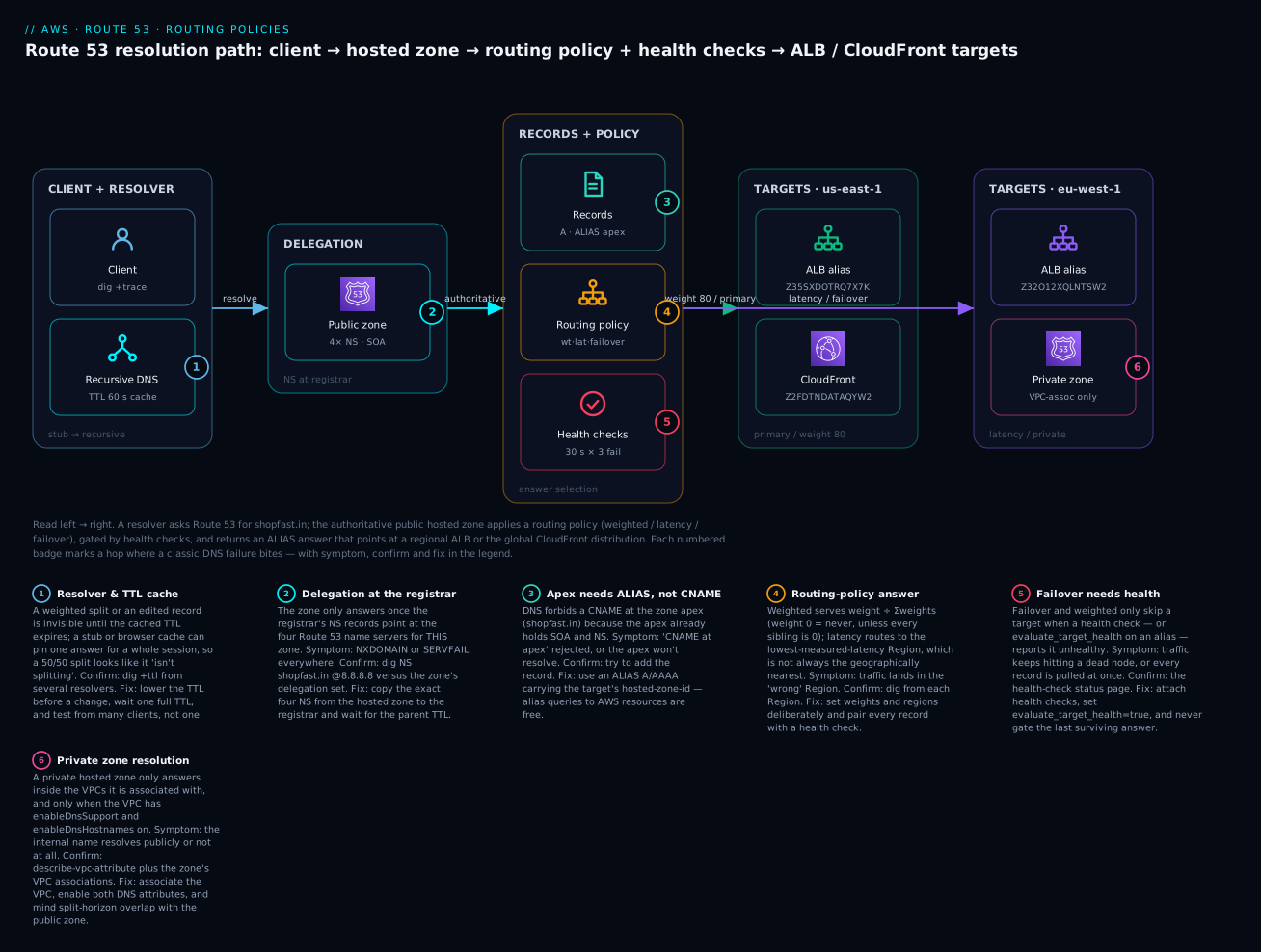
The diagram traces one resolution, left to right. A client hands the name to a recursive resolver, which — because the registrar’s NS records delegate to Route 53 — reaches the authoritative public hosted zone. The zone holds the records (including the apex ALIAS), runs the requested routing policy (weighted / latency / failover), and consults health checks before returning an answer. That answer is an alias to a regional ALB in us-east-1 (with the ALB’s hosted-zone-id Z35SXDOTRQ7X7K) or to the global CloudFront distribution (Z2FDTNDATAQYW2); a second region, eu-west-1, holds the latency/failover twin, and a separate private hosted zone answers only inside the VPC. Each numbered badge marks a hop where a specific DNS failure bites; the legend narrates every one as symptom, confirm, and fix.
Real-world scenario
ShopFast, an Indian D2C retailer, ran everything out of a single ALB in ap-south-1 (Mumbai) with a plain A record at shopfast.in pointing at one of the ALB’s IPs — copied by hand from nslookup during setup two years earlier. Two things had been quietly wrong the whole time. First, the apex was a hardcoded IP, so when AWS scaled the ALB and retired that IP during a traffic spike, the apex went dark for forty minutes while nobody could work out why www (a proper CNAME to the ALB) still worked. Second, their Black Friday plan was “point DNS at the new stack when we’re ready” — with a TTL of 86400 on the record, meaning any cutover would take a full day to reach users.
The rebuild followed this article. They replaced the apex A with an alias A-record to the ALB, reading zone_id from Terraform’s aws_lb attribute so it could never drift — no more hand-copied IPs, and alias queries are free. They dropped the apex and www TTLs to 60 s a week before the sale. For the sale itself they wanted a canary: the new checkout stack behind a second ALB got a weighted record at checkout.shopfast.in with weights 95 / 5, each color health-checked; when the green stack held up for an hour they flipped to 50 / 50, then 0 / 100, watching the CloudWatch 5xx rate at each step and ready to flip back in one terraform apply.
Then they went multi-region. A warm standby in ap-southeast-1 (Singapore) got its own ALB, and api.shopfast.in became a latency policy with alias targets and evaluate_target_health=true in both regions — Southeast Asian users started landing on Singapore automatically. For true DR they added a failover policy on the apex: PRIMARY alias to the Mumbai ALB, SECONDARY alias to an S3 static “we’ll be right back” site, so a total regional loss degraded to a branded maintenance page in about 90 seconds instead of a connection timeout. Finally, internal service names (orders.internal, cache.internal) moved into a private hosted zone associated with the prod VPC — after a half-hour of “why won’t it resolve” that turned out to be enableDnsHostnames disabled on an older VPC.
The results: the apex outage class disappeared, the Black Friday canary caught a checkout bug at 5% (the green stack’s connection pool was undersized) before it hit everyone, latency routing cut Singapore p50 DNS-to-first-byte noticeably, and the one DR game-day they ran flipped to the S3 page and back cleanly. The only self-inflicted incident was a weighted split that “wasn’t splitting” during testing — until they realized their office resolver had cached the 100/0 answer, and test-dns-answer showed Route 53 was splitting correctly all along.
Advantages and disadvantages
| Advantages | Disadvantages |
|---|---|
| Alias records solve the apex problem and are free to query | Alias only targets AWS resources / same-zone records |
| Eight routing policies = canary, latency, DR, residency at the DNS layer | DNS caching delays and masks every change (TTL) |
| Health-check-driven failover with no compute in the path | Failover is only as fast as detection + TTL (tens of seconds, not instant) |
| 100% SLA on the authoritative service; anycast, global | Latency/geo decisions are per resolver, not per client (unless EDNS) |
| Deep AWS integration (ELB/CloudFront/S3/API-GW, Terraform attrs) | Private zones need VPC DNS attributes + careful split-horizon |
test-dns-answer + query logging make it debuggable |
“Special” queries (latency/geo/IP) cost more per million |
| Traffic Flow for versioned, nested policies | Traffic Flow policy records are $50/month each |
When each matters: the alias and routing-policy advantages are decisive for any real AWS front end — they are why Route 53 is the default choice over third-party DNS for AWS workloads. The disadvantages are almost all DNS physics, not Route 53 flaws: caching, per-resolver decisions, and failover-detection time are true of all DNS. The engineering discipline is to design around them — low TTLs before changes, health checks with sane thresholds, and always verifying with test-dns-answer rather than a single cached dig.
Hands-on lab
You will create a public hosted zone, add an alias A-record to an ALB, layer a weighted split and a latency policy across two regions, and prove it all with dig — in both aws CLI and Terraform, with a full teardown. Cost: a few paise. A hosted zone is ~$0.50/month (prorated; delete within the hour and it’s effectively free), queries in a lab are negligible, and the only real charge would be the ALBs — so the lab uses placeholder alias targets and IPs where you don’t already have an ALB, and notes exactly where a real ALB would cost money.
Use an admin profile in a sandbox, never root. Replace
shopfast.inwith a domain you actually control if you want end-to-end public resolution; otherwise you can still create everything and verify withtest-dns-answer(which doesn’t require delegation).
Step 0 — Set variables and create the zone.
DOMAIN=shopfast.in
REGION=ap-south-1
ZID=$(aws route53 create-hosted-zone --name $DOMAIN \
  --caller-reference "lab-$(date +%s)" \
  --query 'HostedZone.Id' --output text | sed 's#/hostedzone/##')
echo "Zone: $ZID"
aws route53 get-hosted-zone --id $ZID \
  --query 'DelegationSet.NameServers'
Expected: a zone id like Z0123456789ABCDEFGHIJ and four name servers (ns-...awsdns...). In production you now copy those four into your registrar; for the lab you can proceed with test-dns-answer.
Step 1 — Add a simple A-record and read it back.
aws route53 change-resource-record-sets --hosted-zone-id $ZID --change-batch '{
  "Changes":[{"Action":"UPSERT","ResourceRecordSet":{
    "Name":"static.shopfast.in.","Type":"A","TTL":60,
    "ResourceRecords":[{"Value":"13.234.1.2"}]}}]}'
aws route53 list-resource-record-sets --hosted-zone-id $ZID \
  --query "ResourceRecordSets[?Name=='static.shopfast.in.']"
Expected: the record echoed back with TTL 60 and value 13.234.1.2.
Step 2 — Add an apex ALIAS A-record to an ALB. If you have a real ALB, use its DNS name and zone_id; otherwise this shows the shape (it will fail only if the target doesn’t exist).
aws route53 change-resource-record-sets --hosted-zone-id $ZID --change-batch '{
  "Changes":[{"Action":"UPSERT","ResourceRecordSet":{
    "Name":"shopfast.in.","Type":"A",
    "AliasTarget":{"HostedZoneId":"Z35SXDOTRQ7X7K",
      "DNSName":"dualstack.my-alb.us-east-1.elb.amazonaws.com.",
      "EvaluateTargetHealth":true}}}]}'
Now prove the apex-CNAME rule: try to add a CNAME at the apex and watch it fail.
aws route53 change-resource-record-sets --hosted-zone-id $ZID --change-batch '{
  "Changes":[{"Action":"UPSERT","ResourceRecordSet":{
    "Name":"shopfast.in.","Type":"CNAME","TTL":60,
    "ResourceRecords":[{"Value":"my-alb.us-east-1.elb.amazonaws.com"}]}}]}'
Expected: InvalidChangeBatch ... RRSet of type CNAME with DNS name shopfast.in. is not permitted at apex. That’s the whole reason alias exists.
Step 3 — Add a weighted 90/10 split.
for pair in "blue 90 13.234.1.10" "green 10 13.234.9.10"; do
  set -- $pair
  aws route53 change-resource-record-sets --hosted-zone-id $ZID --change-batch "{
    \"Changes\":[{\"Action\":\"UPSERT\",\"ResourceRecordSet\":{
      \"Name\":\"app.shopfast.in.\",\"Type\":\"A\",\"TTL\":60,
      \"SetIdentifier\":\"$1\",\"Weight\":$2,
      \"ResourceRecords\":[{\"Value\":\"$3\"}]}}]}"
done
Step 4 — Add a latency policy across two regions.
aws route53 change-resource-record-sets --hosted-zone-id $ZID --change-batch '{
 "Changes":[
  {"Action":"UPSERT","ResourceRecordSet":{
    "Name":"api.shopfast.in.","Type":"A","TTL":60,
    "SetIdentifier":"mumbai","Region":"ap-south-1",
    "ResourceRecords":[{"Value":"13.234.2.20"}]}},
  {"Action":"UPSERT","ResourceRecordSet":{
    "Name":"api.shopfast.in.","Type":"A","TTL":60,
    "SetIdentifier":"singapore","Region":"ap-southeast-1",
    "ResourceRecords":[{"Value":"13.250.2.20"}]}}]}'
Step 5 — Verify without cache using test-dns-answer.
# Simulate a resolver in India vs one in Singapore for the latency record
aws route53 test-dns-answer --hosted-zone-id $ZID \
  --record-name api.shopfast.in --record-type A --resolver-ip 8.8.8.8
Expected: a RecordData value that changes with the simulated resolver/region — Mumbai’s IP for an India-ish resolver. Run it a few times against app.shopfast.in and you’ll see the 90/10 weighting.
Step 6 — If the zone is delegated, verify with dig.
dig +short NS shopfast.in @8.8.8.8          # should list Route 53's 4 NS
dig +short app.shopfast.in @1.1.1.1         # weighted answer
dig +ttl shopfast.in @8.8.8.8               # see the remaining cached TTL
dig +trace api.shopfast.in                  # full delegation walk
Step 7 — The Terraform equivalent. Save as main.tf, then terraform init && terraform apply.
provider "aws" { region = "ap-south-1" }

resource "aws_route53_zone" "main" { name = "shopfast.in" }

resource "aws_route53_record" "static" {
  zone_id = aws_route53_zone.main.zone_id
  name    = "static.shopfast.in"
  type    = "A"
  ttl     = 60
  records = ["13.234.1.2"]
}

resource "aws_route53_record" "blue" {
  zone_id        = aws_route53_zone.main.zone_id
  name           = "app.shopfast.in"
  type           = "A"
  ttl            = 60
  set_identifier = "blue"
  weighted_routing_policy { weight = 90 }
  records        = ["13.234.1.10"]
}

resource "aws_route53_record" "green" {
  zone_id        = aws_route53_zone.main.zone_id
  name           = "app.shopfast.in"
  type           = "A"
  ttl            = 60
  set_identifier = "green"
  weighted_routing_policy { weight = 10 }
  records        = ["13.234.9.10"]
}
Step 8 — Teardown (do this).
# Delete every record you added (alias/weighted/latency need the exact set)
aws route53 list-resource-record-sets --hosted-zone-id $ZID \
  --query "ResourceRecordSets[?Type=='A']" --output json
# For each non-NS/SOA record, submit a DELETE change-batch mirroring its exact definition, then:
aws route53 delete-hosted-zone --id $ZID
# Terraform users: terraform destroy
⚠️ A hosted zone charges ~$0.50/month; delete it to stop the charge (delete within an hour of creation and it is effectively free). Any real ALB/CloudFront you created for the alias targets costs money on its own — tear those down too.
Common mistakes & troubleshooting
This is the section you will return to. Match the symptom, run the confirm step, apply the fix. The golden rule: if it doesn’t resolve at all, suspect delegation or a typo; if it resolves but returns the “wrong” or stale answer, suspect caching or a routing-policy/health-check misconfig.
| # | Symptom | Root cause | Confirm (exact command) | Fix |
|---|---|---|---|---|
| 1 | Name won’t resolve anywhere (NXDOMAIN/SERVFAIL) |
Registrar NS don’t delegate to this zone’s 4 NS | dig NS shopfast.in @8.8.8.8 vs zone’s DelegationSet |
Set the exact 4 NS at the registrar; wait the parent TTL |
| 2 | New/edited record still returns the old value | Resolver cached the previous answer for its TTL | dig +ttl name @8.8.8.8 (watch the TTL count down) |
Wait one TTL; test with test-dns-answer; lower TTL before future changes |
| 3 | RRSet of type CNAME ... not permitted at apex |
Tried to CNAME the zone apex | The error from change-resource-record-sets |
Use an alias A/AAAA at the apex instead |
| 4 | Weighted split “isn’t splitting” | Your client/resolver cached one answer | aws route53 test-dns-answer repeatedly (no cache) |
It is splitting; verify server-side, don’t judge from one dig |
| 5 | Alias evaluate_target_health yanks all traffic |
Only target is health-gated; it flapped ⇒ nothing to serve | Health-check status; the ALB HealthyHostCount |
Don’t gate the last survivor; add a static secondary; fix the target |
| 6 | Latency policy returns the “wrong” region | Latency is measured, not geographic; decision is per-resolver | test-dns-answer --resolver-ip ... per region |
Expected behaviour; use geolocation if you need legal geography |
| 7 | Failover never fails over | No health check attached (and no alias evaluate_target_health) |
aws route53 get-health-check-status |
Attach a health check to PRIMARY or set evaluate_target_health=true |
| 8 | Health check always unhealthy | Firewall/SG blocks Route 53 checker IPs | Check SG vs ROUTE53_HEALTHCHECKS IP ranges |
Allow the checker CIDRs (or use a CloudWatch-alarm check) |
| 9 | Private hosted zone doesn’t resolve in the VPC | VPC lacks enableDnsHostnames/enableDnsSupport or isn’t associated |
aws ec2 describe-vpc-attribute --attribute enableDnsHostnames |
Enable both attributes; associate the VPC to the zone |
| 10 | Internal name resolves to the public IP | Split-horizon: public zone shadows or private not associated | dig name from inside vs outside the VPC |
Put the name in the private zone; associate the VPC |
| 11 | Geolocation clients get NXDOMAIN |
No Default record for unmatched locations | List RRSets; look for a * / Default geo record |
Add a Default geolocation record as the catch-all |
| 12 | Email bounces / lands in spam | Missing/incorrect MX, or SPF/DKIM/DMARC TXT wrong |
dig MX shopfast.in; dig TXT shopfast.in |
Fix MX preference/host; one SPF TXT; add DKIM + DMARC |
| 13 | Cert issuance blocked / mis-issued | CAA record missing or too strict |
dig CAA shopfast.in |
Add 0 issue "amazon.com" for ACM (and your other CAs) |
| 14 | InvalidChangeBatch: ... but it already exists |
UPSERT vs CREATE, or set-identifier collision | Inspect the exact RRSet in list-resource-record-sets |
Use UPSERT, or match the existing set-id/weight exactly |
| 15 | www works, apex doesn’t |
Apex was a hardcoded IP that changed | dig +short shopfast.in vs the ALB’s current IPs |
Replace apex with an alias to the ALB |
DNS response-code reference
| RCODE | Name | Meaning | Typical Route 53 cause | Fix |
|---|---|---|---|---|
| 0 | NOERROR |
Query succeeded (may be empty) | Fine — or right name, wrong type | Check you asked the right record type |
| 2 | SERVFAIL |
Resolver failed | Broken delegation, DNSSEC mismatch | Fix NS at registrar; check DNSSEC DS record |
| 3 | NXDOMAIN |
Name does not exist | Record missing, or geolocation with no Default | Create the record / add a Default |
| 5 | REFUSED |
Server refused | Querying a server not authoritative for the zone | Query Route 53’s NS or a public resolver |
| — | Empty ANSWER, NOERROR |
Name exists, that type doesn’t | e.g. AAAA asked, only A exists |
Add the missing type or query the right one |
Decision table: read the symptom, name the cause
| If you see… | It’s probably… | Do this |
|---|---|---|
Nothing resolves, dig NS shows non-Route 53 NS |
Delegation not done | Fix registrar NS |
| Resolves, but old value; TTL counting down | Cache | Wait the TTL; lower it next time |
| Apex change rejected | CNAME-at-apex | Use alias |
| One region always answered regardless of location | Simple record, or client cache | Add per-region latency records; test with test-dns-answer |
| Failover stuck on primary while it’s down | Missing/failing health check config | Attach health check / evaluate_target_health |
| Internal name public or absent | Private zone/VPC-DNS | Associate VPC, enable DNS attrs |
| Mail bouncing | MX/SPF | Fix MX + one SPF TXT |
The three nastiest failures, in prose
The weighted split that “isn’t splitting.” You set 50/50, refresh your browser twenty times, and always get the same IP — so you conclude weighting is broken. It isn’t: your resolver cached the first answer for its TTL, and your browser caches on top of that, so one client sees one answer for the whole TTL window. Weighting is a population behavior across many resolvers, not a per-request coin flip. Confirm the truth with aws route53 test-dns-answer (which bypasses all caching) run repeatedly, or query several different public resolvers (@8.8.8.8, @1.1.1.1, @9.9.9.9). Never judge a routing policy from a single cached dig.
The apex that goes dark while www stays up. Someone set the apex to a literal A → IP copied from nslookup, and CNAMEd www to the ALB properly. Months later AWS scales or replaces the ALB, that IP is retired, and the apex points at nothing while www (which follows the live CNAME) is fine. The fix is not “grab the new IP” — it’s to make the apex an alias to the ALB so it tracks the live address forever, for free. This is the number-one apex outage class and it is 100% preventable.
The private zone that silently won’t resolve. You create orders.internal in a private hosted zone, associate the VPC, and instances still can’t resolve it. The cause is almost always a VPC missing enableDnsHostnames (and sometimes enableDnsSupport) — both must be true, and the instance must use the VPC’s .2 resolver, not a hardcoded public one. Confirm with aws ec2 describe-vpc-attribute --vpc-id vpc-xxx --attribute enableDnsHostnames; fix by enabling both attributes and confirming the zone lists that VPC in its associations. Watch for split-horizon: if the same name exists in a public zone, clients inside the VPC get the private answer and clients outside get the public one — usually what you want, but a trap if you didn’t intend it.
Best practices
- Alias, never CNAME, for AWS targets — always at the apex. Read the
zone_id/dns_namefrom the resource in Terraform; never hardcode a hosted-zone-id or an IP. - Lower the TTL a day before any planned cutover (to 60 s), make the change, verify, then raise it back. Design changes around the current TTL you cannot un-cache.
- Attach health checks to every multi-answer record (weighted, failover, multivalue) so a dead target drops out automatically.
- Never health-gate your last surviving answer. For failover, make the secondary genuinely independent (another region or a static S3 page).
- Always define a Default record for geolocation, or unmatched clients get
NXDOMAIN. - Use
test-dns-answerto verify routing policies, not a singledigfrom your cached office resolver. - Turn on query logging (CloudWatch Logs in us-east-1) for public zones you care about, and pair it with CloudTrail for change auditing.
- Keep record changes in Terraform/IaC, reviewed like code — DNS is a control plane and a fat-fingered apex is an outage.
- For private zones, enable both VPC DNS attributes and be deliberate about split-horizon overlap with public zones.
- Set a
CAArecord so only your intended CAs (e.g.,amazon.comfor ACM) can issue certificates for your domain. - Right-size failure detection: fast interval (10 s) + threshold 3 ≈ 30 s detection; add the TTL for real client failover time. Don’t set thresholds so tight they flap.
- Use one SPF TXT record only, add DKIM and DMARC, and keep MX preferences sane — email records are where “harmless” DNS edits cause outages.
Security notes
DNS is an attack surface and an integrity control, so treat the zone as security-sensitive. Domain and record integrity: enable DNSSEC signing on public zones to prevent spoofed answers (it adds a DS record at the registrar and signs responses), and lock down who can call change-resource-record-sets with tight IAM — a compromised zone can redirect your entire domain. Least privilege: scope IAM to specific hosted zones with the route53:ChangeResourceRecordSets action gated by the route53:ChangeResourceRecordSetsNormalizedRecordNames condition where you need per-record control; keep registrar access (Route 53 Domains, us-east-1) even tighter and MFA-protected — losing the registrar loses the domain. Certificate control: a CAA record limits which CAs may issue for you, blunting mis-issuance. Email spoofing: correct SPF (one TXT), DKIM, and DMARC records are anti-phishing controls, not just deliverability. Private data: use private hosted zones so internal names never leak to public resolvers, and use Resolver DNS Firewall to block exfiltration via DNS to known-bad domains. Auditing: every zone change is a CloudTrail event and every query can be logged — alert on changes to apex, MX, and NS records, which are the high-value targets. Finally, guard against dangling records: an alias or CNAME pointing at a deleted S3 bucket or released Elastic IP can be claimed by an attacker (subdomain takeover) — sweep for and delete orphaned records.
Cost & sizing
Route 53 is cheap, but the pricing has sharp edges — alias queries are free, “special” queries cost more, and health-check add-ons stack up. Rough INR uses ~₹85/USD.
| Item | Price (USD) | Rough INR | Notes |
|---|---|---|---|
| Hosted zone | $0.50/zone/mo (first 25), $0.10 after | ~₹42/zone/mo | Delete within 12 h of creation = no charge |
| Standard queries | $0.40 per million (first 1 B), $0.20/M over | ~₹34 per million | A/AAAA/CNAME/simple/weighted/failover/geo-country |
| Special queries | $0.60 per million (first 1 B), $0.30/M over | ~₹51 per million | Latency, geoproximity, IP-based |
| Alias queries to AWS resources | Free | ₹0 | ELB, CloudFront, S3 website, API GW, etc. |
| Health check (AWS endpoint) | $0.50/mo each | ~₹42/mo | Endpoint inside AWS |
| Health check (non-AWS endpoint) | $0.75/mo each | ~₹64/mo | Endpoint outside AWS |
| Health-check options | +$1/mo (AWS) / +$2/mo (non-AWS) each | ~₹85–170/mo | HTTPS, string match, fast interval, latency measurement |
| Traffic Flow policy record | $50/mo each | ~₹4,250/mo | Only if you use Traffic Flow’s visual/versioned policies |
| Query logging | CloudWatch Logs ingest/storage | varies | The logging itself is free; you pay CloudWatch |
| Resolver endpoint | $0.125/ENI/hr | ~₹10.6/ENI/hr | Only for hybrid/inbound-outbound DNS |
What drives the bill: query volume (make every AWS-target record an alias to zero out those queries), number of special-policy queries (latency/geo/IP cost 50% more — worth it when they earn their keep), and health-check add-ons (each optional feature is a separate line, so don’t enable string-matching or fast-interval on checks that don’t need them). Sizing is about detection vs cost: fast-interval health checks (10 s) cost more but cut failover time — reserve them for the endpoints that matter. For a typical small estate — one zone, a handful of alias records, two health checks — you are looking at well under $3/month (~₹250); the cost only grows with query volume in the hundreds of millions or Traffic Flow.
Interview & exam questions
1. Why can’t you put a CNAME at the zone apex, and what do you use instead? DNS forbids a CNAME from coexisting with other records at the same name, and the apex always has SOA and NS records — so a CNAME there is illegal. Route 53’s alias record solves it: it works at the apex, returns the target’s A/AAAA directly, and is free to query for AWS resources. (SAA-C03, DVA-C02)
2. Alias vs CNAME — give three differences. Alias works at the apex, CNAME does not; alias queries to AWS resources are free, CNAME queries are billed and add a resolution hop; alias can be health-aware via evaluate_target_health. Alias targets only AWS resources or same-zone records, while a CNAME can point anywhere. (SAA-C03)
3. What makes a Route 53 public hosted zone authoritative? Delegation: the parent (your registrar for an apex domain) must publish NS records pointing at the four Route 53 name servers assigned to that specific zone. Creating the zone alone does nothing until the registrar’s NS delegate to it. (ANS-C01, SOA-C02)
4. Explain weighted routing and the meaning of weight 0. Several records share a name/type, each with a weight 0–255; Route 53 returns each in proportion to weight ÷ Σweights. Weight 0 means never serve that record — unless all records in the group are 0, in which case they’re served equally. It’s the basis of canary and blue-green. (SAA-C03, DVA-C02)
5. Latency-based routing — what is the decision based on? The measured network latency from the querying resolver’s location to each AWS region (from Route 53’s latency database), not geographic distance. The “nearest” region by map isn’t always chosen, and the decision follows the resolver, not the client, unless EDNS Client Subnet is present. (SAA-C03, ANS-C01)
6. How does failover routing know to fail over? Via a health check on the PRIMARY record, or evaluate_target_health=true on a primary alias. Without one, Route 53 has no health signal and never switches. Detection time ≈ interval × failure-threshold, plus the record’s TTL for clients to re-query. (SAA-C03, SOA-C02)
7. A geolocation policy returns NXDOMAIN for some users. Why? Those users’ locations matched no record and there was no Default record. Geolocation resolves most-specific-first (subdivision > country > continent > default); always define a Default as the catch-all. (SAA-C03)
8. Geolocation vs geoproximity? Geolocation branches on the client’s political location (continent/country/US-state). Geoproximity branches on geographic distance from a region or lat/long and adds a bias (−99…+99) to expand or shrink a resource’s area. Use geolocation for residency/legal, geoproximity for tunable spread. (ANS-C01)
9. What does multivalue answer routing do, and how is it not a load balancer? It returns up to 8 healthy records (health-checked) chosen at random, omitting unhealthy ones. It has no true balancing, stickiness, or TLS termination and clients cache — so it spreads traffic health-awarely but doesn’t replace an ELB. (SAA-C03)
10. Why won’t a private hosted zone resolve inside a VPC? Almost always because the VPC lacks enableDnsHostnames and/or enableDnsSupport, or the VPC isn’t associated with the zone. Both attributes must be true and the VPC associated; instances must use the VPC’s .2 resolver. (ANS-C01, SOA-C02)
11. How do you verify a routing policy without DNS caching getting in the way? Use aws route53 test-dns-answer, which asks Route 53 what it would return for a name/type from a simulated resolver location, bypassing all caches. It’s the correct tool to prove weighting/latency behavior instead of a single cached dig. (SOA-C02, DVA-C02)
12. Why are alias queries free but CNAME queries billed? Alias resolution to an AWS resource happens inside Route 53’s infrastructure, so AWS doesn’t charge for it; a CNAME is a standard external record that incurs a normal query charge plus a second lookup of the target name. It’s a real cost lever at scale — alias every AWS target. (SAA-C03)
Quick check
- You need the apex
shopfast.into point at an ALB whose IP changes. Which record type, and why not a CNAME? - You set a weighted
50/50split but everydigfrom your laptop returns the same IP. Is weighting broken? How do you verify? - A failover policy never switches to the secondary even though the primary is down. What’s the most likely missing piece?
- Some European users get
NXDOMAINfrom your geolocation policy. What did you forget? - An internal name in a private hosted zone won’t resolve from an EC2 instance in the associated VPC. Name the two VPC attributes to check.
Answers
- An alias A-record — a CNAME is illegal at the zone apex, and an alias tracks the ALB’s live address for free.
- No — your resolver/browser cached one answer for the TTL. Verify with
aws route53 test-dns-answer(no cache) or query several public resolvers; weighting is a population behavior. - A health check on the PRIMARY (or
evaluate_target_health=trueon a primary alias) — without a health signal, failover never triggers. - A Default geolocation record as the catch-all for unmatched locations.
enableDnsHostnamesandenableDnsSupport(both must be true), plus confirm the VPC is associated with the zone.
Glossary
| Term | Definition |
|---|---|
| Hosted zone | A container in Route 53 for all records of one domain; public (internet) or private (VPC-only). |
| Delegation | The parent zone’s NS records pointing at a child zone’s name servers; what makes a zone authoritative. |
| Delegation set | The four Route 53 name servers assigned to a public hosted zone. |
| Alias record | A Route 53-specific record mapping a name to an AWS resource (or same-zone record); works at the apex, free to query. |
| Zone apex / naked domain | The domain name itself (shopfast.in) with no host prefix; can’t hold a CNAME. |
| TTL | Seconds a resolver may cache an answer; the propagation dial for any change. |
| Set identifier | A unique label letting several records share a name/type under a multi-answer routing policy. |
| Weighted routing | Splits traffic proportionally by weight (0–255); basis of canary and blue-green. |
| Latency routing | Returns the region with the lowest measured network latency to the resolver. |
| Failover routing | Serves PRIMARY while healthy, else SECONDARY; requires a health check. |
| Geolocation routing | Branches the answer by the client’s continent/country/subdivision; needs a Default record. |
| Geoproximity routing | Branches by geographic distance from a region/lat-long, tunable with a bias (−99…+99). |
| Multivalue answer | Returns up to 8 healthy, health-checked records at random. |
| evaluate_target_health | An alias flag making Route 53 consider the target’s health when answering. |
| Health check | A probe (endpoint / calculated / CloudWatch-alarm) Route 53 uses to include or drop records. |
| Split-horizon | The same name in a public and a private zone answering differently inside vs outside the VPC. |
Next steps
- Front a global app with it: Multi-Region Active-Active Architecture on AWS — latency and failover routing in a real two-region build.
- Know your alias targets: ALB vs NLB vs API Gateway, Compared — the load balancers your alias records point at.
- Ground the region concepts: AWS Regions and Availability Zones Explained — what latency and failover policies are choosing between.
- Get private DNS right: VPC, Subnets & Security Groups Explained — the VPC DNS attributes private hosted zones depend on.
- Audit every change: CloudTrail, Config & Audit for Compliance — track who edited the zone, and pair it with query logging.