At 03:40 on a Sunday, us-east-1 starts throwing errors — not a full outage, just enough that your checkout success rate slides from 99.6% to 71% and your pager will not stop. Your architecture diagram has a second Region drawn in it. The question that decides whether this is a five-minute event or a five-hour one is brutally simple: can us-west-2 take the write traffic right now, without a human provisioning anything, and if it does, how much data do you lose in the handoff? Almost every team that “has a DR Region” discovers at this exact moment that the second Region was a backup, not a peer — its Auto Scaling group is scaled to two tasks, its database is a read replica nobody has ever promoted under load, and its service quotas were never raised. The diagram lied.
Multi-region active-active means both Regions serve production traffic simultaneously, each a self-sufficient stateless stack, with the data layer replicating between them continuously and asynchronously. It is the top of the disaster-recovery ladder — the only tier that gives a near-zero-recovery-time answer to a Regional impairment — and also the most expensive, the most operationally demanding, and the one with the sharpest failure modes: the instant you accept writes in two Regions you sign up for replication lag, write conflicts, and a consistency model that is no longer “read your writes.” This article is the blueprint a senior engineer actually needs: the routing tier (Route 53 latency/failover/weighted/geoproximity records, health checks, and Application Recovery Controller routing controls), the entry-point decision (Global Accelerator anycast vs DNS), the data layer end to end (DynamoDB global tables with last-writer-wins, Aurora Global Database write-forwarding and managed failover/switchover, S3 Cross-Region Replication with Multi-Region Access Points, ElastiCache Global Datastore), the write-topology decision that governs everything, and the runbooks, game days and cost reality that separate a design that survives a Regional event from one that merely claims to.
By the end you will be able to place every component, state the RTO and RPO each choice actually delivers (not the marketing number), pick single-writer vs multi-writer for a workload and defend it, wire failover so it is deterministic instead of hopeful, and rehearse it with AWS Fault Injection Service before the real thing. Multi-region is not a checkbox; it is a set of trade-offs you make with open eyes, and the ones that bite hardest — conflict resolution, lag-as-RPO, static stability — are exactly the ones the happy-path tutorials skip.
What problem this solves
A single AWS Region is remarkably reliable, but “remarkably reliable” is not “never impaired.” Regional events happen — a control-plane degradation, a networking fault, a dependency (DNS, IAM, an internal service) that browns out a whole Region for hours — and when they do, everything you run there is affected at once, across every AZ, because a Regional impairment is not an AZ failure that Multi-AZ can route around. Multi-AZ buys survival of a data-centre loss; it buys nothing when the Region’s own control plane is sick. That is the gap multi-region closes, and the only thing that closes it.
The pain is concrete: a single-Region payments platform hit by a four-hour Regional impairment is down for four hours, because the failover target does not exist or exists only as cold infrastructure that takes hours to stand up and a database of unknown promotion time. Teams discover mid-incident that the “DR plan” was a wiki page describing a manual rebuild nobody has run since the last re-org, that the standby’s quotas cap it at a fraction of production load, and that “promote the read replica” targets a replica whose lag they have never measured. The outage is not the disaster; the unrehearsed, undersized, manually-triggered failover is.
Who hits this: anyone with a hard RTO/RPO contract (regulated payments, health, trading), anyone whose revenue-per-minute makes a multi-hour outage a board-level event, and anyone selling an availability SLA they cannot honour from one Region. It bites hardest on stateful workloads — a stateless web tier is trivial to run in two Regions; the entire difficulty lives in the data layer and the write topology. The fix is never “draw a second Region”; it is “make the second Region a peer continuously proven — by traffic, by rehearsal, and by pre-provisioned capacity — to take the load.”
What a single Region cannot survive, and what each protection level does and does not cover — this is why “we have Multi-AZ” is not an answer to a Regional-outage requirement:
| Failure | Single instance | Multi-AZ (one Region) | Multi-region active-active |
|---|---|---|---|
| Instance/host dies | Down | Survives (other AZ) | Survives |
| AZ (data-centre) outage | Down | Survives | Survives |
| Regional control-plane impairment | Down | Down (all AZs affected) | Survives (other Region) |
| Regional network/DNS brownout | Down | Down | Survives |
| Bad deploy poisons the Region | Down | Down | Survives (deploy per-Region, shift away) |
| Data-corrupting bug replicated everywhere | Down | Down | Not covered (needs backups/PITR) |
Note the last row: multi-region protects against infrastructure loss, not logical corruption — a bad write replicates to both Regions, so you still need point-in-time recovery and backups underneath active-active.
To frame the field before the deep dive, here is the disaster-recovery ladder every team is somewhere on, and what each rung actually costs and delivers:
| DR strategy | What runs in the second Region | Typical RTO | Typical RPO | Relative cost | When it’s the right answer |
|---|---|---|---|---|---|
| Backup & restore | Nothing live — snapshots/backups only | Hours to a day | Hours (last backup) | ~5–10% of prod | Dev/test, non-critical, tight budget |
| Pilot light | Core data replicating; compute off/minimal | Tens of minutes to hours | Minutes (async replica) | ~15–25% of prod | Important but not tier-0; can tolerate a scale-up |
| Warm standby | Full stack, scaled-down but running | Minutes | Seconds to minutes | ~40–60% of prod | Tier-1; needs fast recovery, cost-conscious |
| Active-active (multi-region) | Full stack at production scale, taking traffic | Seconds to low minutes | Seconds (or ~0 with sync/switchover) | ~100%+ of prod (often 2×+) | Tier-0; Regional-outage survival is mandatory |
The rest of this article is about the bottom row — but the row above it, warm standby, is the right answer far more often than teams admit, and one honest question decides between them: do you need to survive a Regional event with seconds of RTO, or is a few-minutes scale-and-promote acceptable? If a few minutes is fine, warm standby is dramatically cheaper and simpler. Active-active is for when it is not.
Learning objectives
By the end of this article you can:
- Place every component of an active-active architecture — Route 53 routing, per-Region stateless stacks, and the global data layer — and explain the request/replication path end to end.
- Choose the right Route 53 routing policy (latency, geoproximity, failover, weighted, multivalue) and design health checks that fail over deterministically, and know when to reach for Application Recovery Controller routing controls instead of DNS health checks.
- Decide between Global Accelerator (anycast, fast fail-away, static IPs) and Route 53 (DNS, cheaper, more flexible) for the front door — and when to use both.
- Design the data layer: DynamoDB global tables (and their last-writer-wins conflict model), Aurora Global Database (write-forwarding, managed failover vs switchover, RPO/RTO), S3 CRR with Multi-Region Access Points, and ElastiCache Global Datastore — and state the consistency each provides.
- Make the write-topology decision — single-writer vs multi-writer, region-pinning, and the idempotency required to make either safe — and defend it for a given workload.
- Quantify replication lag as live RPO, alarm on it, and reason about what a failover costs in lost data when lag is non-zero.
- Write and rehearse a failover runbook, run game days with AWS Fault Injection Service, and build cross-region observability so you can see both Regions and the lag between them.
- Model the cost of active-active honestly — the doubled compute, the cross-region data-transfer bill, and where the money actually goes.
Prerequisites & where this fits
You should be comfortable with single-Region AWS at a production level: VPCs across multiple Availability Zones, an Application Load Balancer in front of ECS Fargate or EC2, RDS/Aurora and DynamoDB basics, Route 53 hosted zones and record types, IAM roles, and infrastructure as code (Terraform or CloudFormation). You should understand the difference between an AZ (an isolated data-centre-scale failure domain inside a Region) and a Region (an independent geographic deployment with its own control plane), and why Multi-AZ inside one Region does not protect against a Regional event. Familiarity with RTO (recovery time objective — how long until service is restored) and RPO (recovery point objective — how much data loss is acceptable) is assumed throughout.
This article sits at the top of the resilience track. It builds directly on the single-Region foundation in The Classic AWS Three-Tier Web Application Architecture — the ALB → Auto Scaling → RDS stack you replicate per Region — and on the asynchronous, idempotent messaging patterns in EventBridge → SQS/SNS → Lambda: the event path and its decision points, because cross-region designs lean heavily on eventual consistency and at-least-once semantics. It is the AWS-native counterpart to the same problem on other clouds: the mechanics differ but the trade-offs are identical, so Azure Multi-Region Active-Active & Disaster Recovery and GCP Multi-Region Active-Active Architecture are worth reading side by side if you run more than one cloud.
A quick map of who owns what during a Regional incident, so you know which lever each team pulls:
| Layer | What lives here | Who usually owns it | Its role in a failover |
|---|---|---|---|
| DNS / routing | Route 53 records, health checks, ARC | Platform / SRE | Steers users away from the impaired Region |
| Global entry | Global Accelerator, CloudFront | Platform / network | Anycast fail-away; edge caching |
| Regional compute | ALB, ECS/EKS/EC2, per-Region config | App / platform | Absorbs the shifted load (must be pre-scaled) |
| Relational data | Aurora Global Database, RDS | Data / DBA | Promotion (switchover/failover) sets real RPO |
| NoSQL data | DynamoDB global tables | App / data | Already multi-writer; conflicts resolved by LWW |
| Object/cache | S3 CRR + MRAP, ElastiCache Global Datastore | Platform / app | Object failover routing; cache warm-up |
| Observability | Cross-region CloudWatch, lag metrics | SRE | Tells you the lag/RPO before you decide to fail over |
Core concepts
Six mental models make every later decision obvious.
A Region is a blast radius, and multi-region is the only thing that contains it. AWS gives you three nested failure domains: an instance/host, an Availability Zone (data-centre scale), and a Region (an independent deployment with its own control plane). Multi-AZ survives the middle one; only two Regions survive the outer one. Critically, the two must be operationally independent — if failing over to Region B requires a control-plane call in the impaired Region A (to scale, change DNS, or promote), then A’s impairment blocks your escape. This is static stability: Region B must keep serving and take more load using only resources and control planes that already exist and are healthy.
Active-active means writes in two places, and that changes everything about your data. A stateless compute tier is easy to duplicate; the hard part is state. The moment both Regions accept writes you inherit three problems that do not exist single-Region: replication lag, write conflicts (the same item written in both Regions at once), and a weaker consistency model (a read in Region B may not reflect a write in Region A yet). Every data-layer choice below is about how you handle these three, and the biggest — single-writer vs multi-writer — is whether you avoid conflicts or resolve them.
Replication is asynchronous, and lag is your live RPO. Cross-region replication is asynchronous by design, because synchronous replication across ~3,000+ km of fibre would add tens of milliseconds to every write and couple the two Regions’ availability. Asynchronous means there is always lag between a write committing at the source and appearing at the target — and that lag is your RPO at any instant. Lag of 800 ms means an unplanned failover loses up to 800 ms of writes; a spike to 45 s loses 45 s. That is why you alarm on lag: it is the single number that tells you what a failover will cost.
Planned and unplanned failover have different RPOs. A planned switchover (you initiate it, both Regions healthy) drains in-flight writes and achieves RPO 0 — Aurora’s managed switchover does exactly this. An unplanned failover (Region A impaired) cannot drain anything, so its RPO equals the replication lag at the moment of failure. Your numbers must state which kind they assume; quoting “RPO 0” without “on a planned switchover” is the most common way DR designs mislead.
DNS failover is slow and sticky; anycast failover is fast. Failing over at the DNS layer (Route 53 health checks flipping a record) is only as fast as detection + TTL + client resolver caching — realistically 60 s to several minutes, longer for misbehaving clients. Failing over at the anycast layer (Global Accelerator) reroutes at the backbone in seconds because the client’s IP never changes. That trade-off is why latency-critical workloads pay for Global Accelerator while cost-sensitive ones live with DNS.
Idempotency is not optional. Replication and failover both create duplicate and re-ordered delivery — a client retrying against Region B after A timed out submits the same operation twice. If every write is idempotent (keyed on a business identifier so a repeat is a no-op) these duplicates are harmless; if not, you double-charge the card and double-ship the order. Conditional writes on a business key plus a dedup TTL is the seatbelt that makes at-least-once, multi-writer semantics safe — required, not recommended.
The vocabulary in one table
Pin down every moving part before the deep sections; the glossary repeats these for lookup, but this is the mental model side by side:
| Concept | One-line definition | Where it lives | Why it matters to active-active |
|---|---|---|---|
| Region | An independent AWS deployment with its own control plane | Global | The blast radius multi-region contains |
| Static stability | Region B works without depending on Region A | Design principle | Failover must not call the sick Region |
| RTO / RPO | Time-to-recover / data-loss-tolerated | Contract | The numbers every choice is measured against |
| Route 53 health check | A probe that marks an endpoint healthy/unhealthy | Global (us-east-1 metrics) | Drives DNS failover |
| ARC routing control | An on/off switch for traffic to a Region | Application Recovery Controller | Deterministic manual/gray failover |
| Global Accelerator | Anycast static IPs on the AWS backbone | Global (edge) | Fast, DNS-independent failover |
| Global table | A multi-writer, multi-Region DynamoDB table | DynamoDB | Multi-writer NoSQL; LWW conflicts |
| Last-writer-wins (LWW) | Conflict rule: highest timestamp survives | DynamoDB global tables | Concurrent writes silently drop the loser |
| Aurora Global Database | One primary + secondary-Region read replicas | Aurora | Relational cross-region; write-forwarding |
| Write-forwarding | Secondary forwards writes to the primary | Aurora Global DB | Lets you write from a secondary Region |
| Managed switchover | Planned, RPO-0 Aurora Region promotion | Aurora Global DB | The rehearsable, no-data-loss path |
| CRR / MRAP | S3 Cross-Region Replication / Multi-Region Access Point | S3 | Object replication + single global endpoint |
| Replication lag | Delay between source write and target visibility | All async replication | The live RPO; alarm on it |
Why multi-region — and the DR tiers that lead up to it
Before committing to active-active, be honest about which DR tier your workload actually needs, because each rung up the ladder multiplies cost and operational burden. The four tiers are a menu, not a ladder you must climb, and most workloads should stop below the top. Backup & restore keeps nothing live in the second Region — snapshots only — provisioning from scratch on disaster (RTO hours-to-a-day). Pilot light keeps the data replicating but compute off/minimal, scaling up on disaster (RTO tens of minutes). Warm standby runs the full stack scaled-down (say 20%), scaling up and shifting on disaster (RTO minutes) — the sweet spot for most tier-1 systems and far cheaper than active-active. Active-active runs the full stack at production scale in both Regions, both serving; there is no “recovery,” only shifting the impaired Region’s traffic to the peer already handling its share (RTO seconds-to-low-minutes). Only the top tier gives a near-seamless answer to a Regional event, and only it is worth its cost when a multi-hour outage is existential.
The tiers compared on the axes that actually decide the choice:
| Dimension | Backup & restore | Pilot light | Warm standby | Active-active |
|---|---|---|---|---|
| Second-Region compute | None until disaster | Minimal / off | Running, scaled-down | Full production scale |
| Second-Region data | Snapshots only | Live replica | Live replica | Live, bi-directional |
| RTO | Hours–day | 10s of min–hours | Minutes | Seconds–low minutes |
| RPO | Backup interval | Replica lag | Replica lag | Replica lag (~0 planned) |
| Traffic split in steady state | 100/0 | 100/0 | 100/0 (or 99/1) | 50/50 (or geo-weighted) |
| Failover action | Provision + restore | Scale + promote | Scale + shift | Shift traffic |
| Relative monthly cost | ~5–10% | ~15–25% | ~40–60% | ~100%+ (often 2×+) |
| Operational complexity | Low | Medium | High | Highest |
| Conflict handling needed? | No | No | No (single-writer) | Yes, if multi-writer |
A worked example makes the numbers real. Say your contract is RTO 60 s, RPO 5 s. Backup & restore (RTO hours) fails outright; pilot light (RTO 20+ min) fails the RTO. Warm standby might meet RTO 60 s if scale-up and DNS failover are fast and pre-warmed, and meets RPO 5 s if replica lag stays under 5 s. Active-active meets both comfortably in steady state — the second Region is already serving, so “failover” is just re-weighting traffic, and RPO tracks the sub-second lag. The tighter the RTO/RPO, the higher up the ladder you are forced; RTO 60 s / RPO 5 s sits right at the boundary where warm standby stops being reliable and active-active becomes the safe choice.
The routing tier: Route 53 and Application Recovery Controller
Getting traffic to the right Region is the front half of the design. AWS gives you two mechanisms — Route 53 (DNS) and Global Accelerator (anycast) — and within Route 53, several routing policies that do very different jobs. Getting this layer wrong means users routed to a dead Region (no failover) or pinned to the far Region (bad latency); getting it right means each user lands on the closest healthy Region and moves off an impaired one deterministically.
Route 53 routing policies — pick the right one
A Route 53 record’s routing policy decides which answer a resolver gets. For active-active you almost always combine latency-based routing (send each user to the lowest-latency Region) with health checks (so an unhealthy Region drops from the answer set). The other policies solve adjacent problems: failover for strict active-passive, weighted for canary/blue-green and gradual shifting, geolocation/geoproximity for data-residency and bias, and multivalue for simple client-side spreading.
| Routing policy | What it does | Best for | Health-check aware? | Gotcha |
|---|---|---|---|---|
| Latency-based | Returns the Region with lowest measured latency to the resolver | Active-active with geo-distributed users | Yes | “Latency” is AWS’s measurement, not the user’s real RTT |
| Geoproximity | Routes by geographic distance, with an adjustable bias to expand/shrink a Region’s pull | Deliberate geographic shaping | Yes | Requires Traffic Flow; more complex than latency |
| Geolocation | Routes by the user’s continent/country/state | Data residency, localized content | Yes | Needs a default record or some users get no answer |
| Failover | Primary until unhealthy, then secondary | Active-passive, strict | Yes (required) | Only two states; not for true active-active |
| Weighted | Splits traffic by assigned weights (e.g. 90/10) | Canary, blue-green, gradual shift | Yes | Weights are per-answer, not guaranteed per-user |
| Multivalue answer | Returns up to 8 healthy records, client picks | Simple spread without an LB | Yes | Not a load balancer; no latency awareness |
| Simple | One static answer | Single-Region, no failover | No | No failover at all — avoid for multi-region |
The two records you actually deploy for latency-based active-active with failover:
# Region A (us-east-1) — latency record tied to a health check
aws route53 change-resource-record-sets --hosted-zone-id Z123EXAMPLE \
  --change-batch '{
    "Changes": [{
      "Action": "UPSERT",
      "ResourceRecordSet": {
        "Name": "api.shopfast.in",
        "Type": "A",
        "SetIdentifier": "us-east-1",
        "Region": "us-east-1",
        "AliasTarget": {
          "HostedZoneId": "Z35SXDOTRQ7X7K",
          "DNSName": "dualstack.alb-use1-123.us-east-1.elb.amazonaws.com",
          "EvaluateTargetHealth": true
        },
        "HealthCheckId": "hc-use1-xxxx"
      }
    }]
  }'
# Terraform: two latency records, one per Region, each health-checked
resource "aws_route53_record" "api_use1" {
  zone_id        = var.zone_id
  name           = "api.shopfast.in"
  type           = "A"
  set_identifier = "us-east-1"

  latency_routing_policy { region = "us-east-1" }
  health_check_id = aws_route53_health_check.use1.id

  alias {
    name                   = aws_lb.use1.dns_name
    zone_id                = aws_lb.use1.zone_id
    evaluate_target_health = true
  }
}

resource "aws_route53_record" "api_usw2" {
  zone_id        = var.zone_id
  name           = "api.shopfast.in"
  type           = "A"
  set_identifier = "us-west-2"

  latency_routing_policy { region = "us-west-2" }
  health_check_id = aws_route53_health_check.usw2.id

  alias {
    name                   = aws_lb.usw2.dns_name
    zone_id                = aws_lb.usw2.zone_id
    evaluate_target_health = true
  }
}
The evaluate_target_health = true on the alias is the quiet hero: it means Route 53 will not return a Region whose ALB target group has no healthy targets, layering a second, faster health signal on top of the explicit health check.
Route 53 health checks — the failover trigger
A health check is a probe (from a fleet of global checkers) against an endpoint; when enough checkers report failure for a configured window, the check flips to unhealthy and Route 53 stops returning the associated record. A few properties govern how fast and reliably failover happens, and mis-tuning them is the difference between a 30-second failover and a five-minute — or flapping — one.
| Health-check knob | What it controls | Default / options | Effect on failover |
|---|---|---|---|
| Request interval | Seconds between probes | 30 s standard, 10 s fast | Fast halves detection time (costs more) |
| Failure threshold | Consecutive fails before unhealthy | 3 (range 1–10) | Lower = faster but flappier |
| Type | HTTP/HTTPS/TCP/string-match/calculated/CloudWatch-alarm | — | Calculated/CW-alarm enable rich logic |
| String matching | Body must contain a token | on/off (HTTP/HTTPS) | Catches “200 OK but app broken” |
| Latency measurement | Records probe latency | on/off | Diagnostics, not failover |
| SNI / port / path | What exactly is probed | configurable | Probe a real health path, never / |
| Regions (checkers) | Which checker Regions probe | ≥3 by default | More checkers = fewer false positives |
Design rules that save incidents: probe a dedicated deep-health path (e.g. /healthz that verifies this Region can actually serve — DB reachable, dependencies up), not the homepage, so a broken app fails the check even when the web server answers. Use a fast (10 s) interval with a failure threshold of 3 for a ~30 s detection window on tier-0. And remember the quirk that costs hours in an incident: Route 53 health-check status and its CloudWatch metrics are published only in us-east-1. Build failover automation to read HealthCheckStatus from the Region it monitors and you build it wrong — the metric lives in N. Virginia regardless of which Region the check targets.
# A fast, string-matching health check against a deep-health endpoint
aws route53 create-health-check \
  --caller-reference "shopfast-usw2-$(date +%s)" \
  --health-check-config '{
    "Type": "HTTPS_STR_MATCH",
    "FullyQualifiedDomainName": "usw2.internal.shopfast.in",
    "ResourcePath": "/healthz",
    "SearchString": "SERVING",
    "Port": 443,
    "RequestInterval": 10,
    "FailureThreshold": 3,
    "MeasureLatency": true
  }'
Application Recovery Controller — deterministic failover you control
DNS health checks are reactive — they fail over when a Region looks broken to a probe. But many real Regional impairments are gray failures: the Region is degraded, not down, and health checks flap or stay green while error rates climb. For these, and for planned failovers and game days, you want a switch you throw deliberately, and that is Application Recovery Controller (ARC).
ARC has two parts. Readiness checks continuously audit whether your recovery Region is actually ready — do its Auto Scaling groups have the same capacity, are its quotas raised, do its resources match the primary — and flag drift before an incident, so you never discover mid-failover that Region B was quietly under-provisioned. Routing controls are highly-available on/off switches (backed by a cluster of five endpoints across five Regions, so the control plane you use to fail over is itself Regionally-independent) that you flip to shift traffic; each routing control is tied to a Route 53 health check, so flipping the control changes what DNS returns. A safety rule prevents you from turning both Regions off at once (or on, depending on your assertion). The whole point is static stability of the control plane: you can fail over even when the impaired Region’s own APIs are unreachable, because the ARC data plane lives elsewhere.
# Flip Region A OFF and Region B ON via ARC routing controls (data-plane endpoint)
aws route53-recovery-cluster update-routing-control-states \
  --region us-west-2 \
  --update-routing-control-state-entries '[
    {"RoutingControlArn":"arn:aws:route53-recovery-control::111122223333:controlpanel/abc/routingcontrol/use1","RoutingControlState":"Off"},
    {"RoutingControlArn":"arn:aws:route53-recovery-control::111122223333:controlpanel/abc/routingcontrol/usw2","RoutingControlState":"On"}
  ]'
When to reach for which routing mechanism:
| Situation | Mechanism | Why |
|---|---|---|
| Steady-state geo-routing | Route 53 latency + health checks | Automatic, closest-healthy, no ops |
| Hard-down Region (clear failure) | Route 53 health checks | Detects and drops it automatically |
| Gray failure (degraded, flapping) | ARC routing control | You decide, deterministically, not a probe |
| Planned failover / game day | ARC routing control | Throw the switch, observe, throw it back |
| Fastest possible fail-away | Global Accelerator | Anycast, seconds, no DNS TTL |
| Verifying standby is ready | ARC readiness checks | Catches capacity/quota drift pre-incident |
Global Accelerator vs Route 53 — anycast or DNS
Both put a stable name/address in front of two Regions, but they operate at different layers and fail over on different timescales, and the choice is one of the more consequential in the design.
Route 53 is DNS: the client resolves your name and gets an IP for a specific Region; failover means changing the DNS answer, which is bounded by TTL and client caching. Global Accelerator gives you two static anycast IPs advertised from AWS edge locations worldwide; the client always connects to the same IPs, traffic enters the AWS backbone at the nearest edge, and Global Accelerator routes it to the healthy Region over AWS’s private network. Failover is a backbone routing change, not a DNS change — it happens in seconds and the client never re-resolves anything, so even the worst DNS-caching client fails over instantly.
| Dimension | Route 53 (DNS) | Global Accelerator (anycast) |
|---|---|---|
| Layer | DNS (name → IP) | Network (anycast IP on backbone) |
| Client-facing address | Changes per Region | Two static IPs, never change |
| Failover speed | 60 s – several min (TTL + caching) | Seconds (backbone reroute) |
| Failover trigger | Health check flips DNS | Endpoint health flips routing |
| Latency benefit | Routes to low-latency Region | Enters backbone at nearest edge, less jitter |
| Traffic control | Weighted/latency/geo policies | Traffic dials (per-endpoint %), no geo policies |
| Protocols | Anything (it’s DNS) | TCP/UDP (great for non-HTTP too) |
| Cost | Cheap (queries + health checks) | Fixed hourly + per-GB premium |
| Client IP preservation | N/A | Preserves client IP to the ALB |
| Best when | Cost-sensitive, HTTP, geo policies needed | Latency/failover-critical, static IPs required |
Practically: use Route 53 alone for cost-sensitive HTTP workloads where a 1–2 minute DNS failover is acceptable and you want rich geo/weighted policies. Use Global Accelerator when you need sub-10-second failover, static IPs (for firewall allow-lists or IoT devices hard-coding an address), non-HTTP protocols, or lower latency/jitter via early backbone entry. Many tier-0 designs use both — Global Accelerator for the front door’s fast failover and static IPs, with Route 53 still owning the zone — because they solve overlapping but distinct problems.
# A Global Accelerator with two Regional ALB endpoints and a traffic dial
aws globalaccelerator create-accelerator --name shopfast-ga --ip-address-type IPV4
# ...then an endpoint group per Region, each pointing at that Region's ALB:
aws globalaccelerator create-endpoint-group \
  --listener-arn "$LISTENER_ARN" \
  --endpoint-group-region us-west-2 \
  --traffic-dial-percentage 100 \
  --endpoint-configurations "EndpointId=$ALB_USW2_ARN,Weight=128,ClientIPPreservationEnabled=true"
The traffic dial (0–100% per endpoint group) is Global Accelerator’s answer to weighted routing: dial us-east-1 to 0 and traffic drains to us-west-2 in seconds — a clean, DNS-independent manual failover that is ideal for game days.
The data layer: where multi-region gets hard
Everything above is the easy half. The data layer is where active-active earns its reputation, because it is where replication lag, write conflicts, and consistency live. AWS gives you a purpose-built multi-region option for each data shape — DynamoDB for key-value/document, Aurora for relational, S3 for objects, ElastiCache for cache — and each makes different promises. Choosing the wrong one, or misunderstanding its conflict model, is how teams lose data silently.
A map of the options and what each actually guarantees:
| Data store | Multi-region feature | Write model | Conflict resolution | Consistency across Regions | Typical replication lag |
|---|---|---|---|---|---|
| DynamoDB | Global tables | Multi-writer (all Regions) | Last-writer-wins (timestamp) | Eventual (or strong with MRSC) | Typically < 1 s |
| DynamoDB (MRSC) | Global tables, strong consistency | Multi-writer, one write Region | N/A (strongly consistent) | Strong (up to 3 Regions) | Higher; write-Region bound |
| Aurora | Global Database | Single-writer (+ write-forwarding) | N/A (one logical writer) | Read replicas lag primary | Typically < 1 s (storage-level) |
| RDS (non-Aurora) | Cross-Region read replica | Single-writer | N/A | Async replica | Seconds+ |
| S3 | CRR + Multi-Region Access Points | Write to either bucket | Version-based; LWW per key | Eventual | Seconds to minutes (RTC: 15-min SLA) |
| ElastiCache | Global Datastore | Single-writer (one primary Region) | N/A | Async; secondary read-only | Sub-second typical |
| MemoryDB | Multi-Region | Single-writer per key space | N/A | Async | Sub-second typical |
DynamoDB global tables and the last-writer-wins conflict model
A DynamoDB global table is a set of identical tables in multiple Regions that DynamoDB keeps in sync automatically. It is multi-writer — every Region accepts writes to every item — which is exactly what makes it so convenient for active-active and exactly where the sharp edge is. When the same item is written in two Regions close enough in time that the writes cross in replication, DynamoDB resolves the conflict with last-writer-wins: the write with the highest timestamp survives, and the other is silently discarded. No error, no merge, no notification — the losing write simply vanishes.
This is fine for many workloads and catastrophic for a few. It is fine when items are naturally region-partitioned (each user/tenant writes predominantly in one Region) or when writes are commutative/idempotent (setting a status, upserting a profile). It is dangerous for shared mutable counters or balances — two Regions incrementing the same item concurrently loses an increment, because LWW overwrites, it does not add. The mitigations are architectural: region-pin writers so an item is only written from one Region (effective single-writer per item), model writes as immutable append events (no conflicts if you never overwrite), or use multi-Region strong consistency (MRSC) — strongly consistent across up to three Regions, at the cost of routing writes through a designated Region and higher latency.
| Global-tables property | Behaviour | Implication |
|---|---|---|
| Replication scope | All items, all attributes, all Regions | Full copy everywhere; cost scales with Regions |
| Write acceptance | Every Region accepts every write | True multi-writer convenience |
| Conflict rule (eventual) | Last-writer-wins by timestamp | Concurrent same-item writes lose the loser |
| Conflict rule (MRSC) | Strongly consistent, no lost writes | Higher latency; write-Region-bound; ≤3 Regions |
| Replication mechanism | Async via DynamoDB Streams internally | Requires Streams; near-real-time |
| Typical lag | Usually well under a second | Small but non-zero RPO |
| Lag metric | ReplicationLatency (per source→dest) |
Alarm on it — it’s your RPO |
| Reserved attribute | Adds aws:rep:* metadata |
Don’t collide with these attribute names |
| Prerequisite | Streams enabled; matching table config | Can’t retrofit blindly onto a live table without care |
# Turn an existing table into a global table by adding a replica Region
aws dynamodb update-table --table-name Orders \
  --replica-updates '[{"Create": {"RegionName": "us-west-2"}}]'

# Watch replication latency — this number IS your RPO
aws cloudwatch get-metric-statistics --namespace AWS/DynamoDB \
  --metric-name ReplicationLatency \
  --dimensions Name=TableName,Value=Orders Name=ReceivingRegion,Value=us-west-2 \
  --start-time "$(date -u -v-1H +%FT%TZ)" --end-time "$(date -u +%FT%TZ)" \
  --period 60 --statistics Average Maximum
# Terraform: a global table (v2) with two replicas and Streams on
resource "aws_dynamodb_table" "orders" {
  name             = "Orders"
  billing_mode     = "PAY_PER_REQUEST"
  hash_key         = "orderId"
  stream_enabled   = true
  stream_view_type = "NEW_AND_OLD_IMAGES"

  attribute {
    name = "orderId"
    type = "S"
  }
  replica { region_name = "us-west-2" }
}
The consistency guarantee a read gives you differs by store and by where you read — this is the table to reason from when a user complains “I saved it and it’s gone”:
| Read scenario | DynamoDB global table | Aurora Global DB | S3 CRR |
|---|---|---|---|
| Read own write, same Region | Strong (if ConsistentRead) |
Strong (from primary) | Read-after-write on the source |
| Read own write, other Region | Eventual (lag window) | Replica lag window | Eventual (lag window) |
| Read after failover | May miss un-replicated writes | Missing up to lag (unplanned) | Missing pending-replication objects |
| Concurrent cross-Region writes | LWW resolves silently | N/A (single writer) | LWW per key by version |
| Strong across Regions | Only with MRSC (≤3 Regions) | Reads always lag primary | Not applicable |
Aurora Global Database — relational across Regions
Relational data cannot be casually multi-writer (foreign keys, transactions, and unique constraints make LWW meaningless), so Aurora Global Database takes a different shape: one primary Region that accepts writes, and secondary Regions that hold read-only replicas kept in sync by storage-level replication — Aurora replicates at the storage layer, not by shipping SQL, so lag is typically under a second even across continents and adds no load to the primary’s compute.
To let application servers in a secondary Region issue writes without repointing to the primary’s endpoint, Aurora offers write-forwarding: a secondary-Region writer endpoint transparently forwards write statements to the primary and applies them, so your app can “write locally” while the actual write still funnels to the single primary (preserving relational integrity). You choose a read-consistency level for forwarded writes (eventual, session, or global) trading latency for how much of your own/others’ writes a subsequent read sees.
The failover story has two distinct paths, and conflating them is the classic RPO mistake:
- Managed switchover (planned): you initiate it while everything is healthy; Aurora drains in-flight replication, promotes a chosen secondary to primary, and demotes the old primary — RPO 0, no data loss. This is the path you rehearse and use for planned maintenance or proactive evacuation. RTO is typically low minutes.
- Managed failover / cross-Region failover (unplanned): the primary Region is impaired; you promote a secondary. Aurora cannot drain what it cannot reach, so the new primary has whatever replicated — RPO equals the replication lag at failure (usually sub-second, but exactly why you alarm on lag). RTO is typically single-digit minutes.
| Aurora Global DB aspect | Detail | Why it matters |
|---|---|---|
| Write model | Single primary Region | Preserves relational integrity, no LWW |
| Secondary Regions | Up to 5, read-only replicas | Local low-latency reads globally |
| Replication | Storage-level, async | Sub-second lag, no primary CPU cost |
| Write-forwarding | Secondary forwards writes to primary | Write “locally” without repointing endpoint |
| Read consistency (forwarding) | eventual / session / global | Latency vs “see your writes” trade-off |
| Managed switchover | Planned, drains, RPO 0 | The rehearsable, no-loss path |
| Unplanned failover | Promote secondary; RPO = lag | Real Regional loss; some data may be lost |
| Typical RTO | Low single-digit minutes | Promotion + endpoint/DNS repoint |
| Lag metric | AuroraGlobalDBReplicationLag (ms) |
Your live relational RPO |
| Endpoints | Cluster/reader per Region + global writer | Apps target Region-local endpoints |
# Planned, zero-data-loss switchover to the secondary Region
aws rds switchover-global-cluster \
  --global-cluster-identifier shopfast-global \
  --target-db-cluster-identifier arn:aws:rds:us-west-2:111122223333:cluster:shopfast-usw2

# Unplanned failover (real Regional loss) — accepts data loss up to current lag
aws rds failover-global-cluster \
  --global-cluster-identifier shopfast-global \
  --target-db-cluster-identifier arn:aws:rds:us-west-2:111122223333:cluster:shopfast-usw2 \
  --allow-data-loss
The two flags tell the whole story: switchover-global-cluster has no --allow-data-loss because there is none; failover-global-cluster --allow-data-loss is the “the Region is gone, take what we have” button you press only in a genuine impairment.
S3 Cross-Region Replication and Multi-Region Access Points
Objects replicate with S3 Cross-Region Replication (CRR): a replication rule copies newly written objects from a source bucket to a destination bucket in another Region, asynchronously. Two properties trip teams up. First, CRR replicates new objects going forward — it does not back-fill objects that existed before you enabled it (you need S3 Batch Replication for that), and by default it does not replicate delete markers or existing-object metadata changes unless you configure it to. Second, replication is eventually consistent with a variable lag (seconds to minutes); if you need a bound, S3 Replication Time Control (RTC) provides a 15-minute SLA and replication metrics.
To give applications a single global endpoint that fails over between buckets, use a Multi-Region Access Point (MRAP): one hostname routes requests to the nearest/healthy bucket, with failover controls you flip (active/passive per Region, 0/100) to shift object traffic — the S3 analogue of a Route 53 failover. Writes through a MRAP go to one bucket and replicate out via CRR.
| S3 multi-region property | Behaviour | Gotcha / mitigation |
|---|---|---|
| CRR scope | New objects, source → dest | Existing objects need Batch Replication |
| Delete markers | Not replicated unless enabled | Enable if you need deletes to propagate |
| Lifecycle actions | Never replicated | Set lifecycle independently in each bucket |
| Consistency | Eventual, variable lag | Use RTC for a 15-min SLA + metrics |
| Bi-directional | Configure CRR both ways | Watch for replication loops (uses replica markers) |
| MRAP | Single global endpoint | Routes to nearest/healthy; failover controls |
| MRAP failover | Manual/active-passive 0/100 |
The S3 “flip the Region” switch |
| Metric | OperationsPendingReplication, BytesPending... |
Alarm — pending ops = un-replicated data at risk |
| SigV4A | MRAP requires SigV4A signing | SDK/tooling must support it |
# A replication rule with RTC (15-min SLA) and metrics
aws s3api put-bucket-replication --bucket shopfast-assets-use1 \
  --replication-configuration '{
    "Role": "arn:aws:iam::111122223333:role/s3-crr-role",
    "Rules": [{
      "ID": "to-usw2", "Status": "Enabled", "Priority": 1,
      "Filter": {}, "DeleteMarkerReplication": {"Status": "Enabled"},
      "Destination": {
        "Bucket": "arn:aws:s3:::shopfast-assets-usw2",
        "ReplicationTime": {"Status": "Enabled", "Time": {"Minutes": 15}},
        "Metrics": {"Status": "Enabled", "EventThreshold": {"Minutes": 15}}
      }
    }]
  }'
ElastiCache Global Datastore
Cache is not a source of truth, but a cold cache in the failover Region can turn a clean failover into a latency cliff and a thundering herd on the database. ElastiCache Global Datastore (Redis/Valkey) keeps a single primary Region replicating to read-only secondaries with sub-second lag; on failover you promote a secondary to primary. The rule is simple: treat the cache as warm-but-not-authoritative — a secondary that has been replicating is warm, so promoting it avoids the cold-start herd, but never rely on the cache for correctness across the failover, only for performance.
| ElastiCache Global Datastore aspect | Detail |
|---|---|
| Topology | One primary Region, up to 2 secondaries |
| Secondary role | Read-only until promoted |
| Replication | Async, typically sub-second |
| Failover | Promote a secondary to primary |
| Value in failover | Warm cache avoids thundering-herd on DB |
| Caveat | Not authoritative; correctness lives in the DB |
The write-topology decision — the choice that governs everything
Above all the per-service detail sits one decision that shapes the entire architecture: where do writes happen? Get this right and the rest follows; get it wrong and you fight conflicts and lag forever. There are three practical topologies.
Single global writer (active-active reads, single-Region writes). Both Regions serve reads locally, but all writes go to one Region (via write-forwarding or by routing writes to the primary’s endpoint). One logical writer means LWW never fires and relational integrity holds — at the cost of cross-region write latency for far users and a failover that must promote a new writer. The default, correct choice for relational data and anything with strong-consistency or unique-constraint needs.
Multi-writer with region-pinning. Both Regions accept writes, but you partition the keyspace so each item is only ever written from one Region — pin a tenant/user/shard to a “home” Region and route its writes there. This gives local write latency and no conflicts (effective single-writer per item), the sweet spot for partitionable workloads (per-tenant SaaS, per-user data) and a natural fit for DynamoDB global tables. The cost is routing complexity — a stable, fast lookup of each key’s home Region — and a plan to temporarily re-home a down Region’s keys.
Full multi-writer (accept and resolve conflicts). Every Region writes every item and you resolve the conflicts — LWW for DynamoDB, or app-level merge (CRDTs, append-only logs, reconciliation). Lowest write latency and simplest routing, but it demands a data model that tolerates conflicts: immutable events, commutative operations, or explicit merge. Right for conflict-free/tolerant data (event streams, analytics ingestion, idempotent status updates), wrong for anything where a silently-lost write is unacceptable (balances, inventory decrements, bookings).
| Write topology | Write latency | Conflict handling | Failover impact | Best data shape |
|---|---|---|---|---|
| Single global writer | High for far users | None (one writer) | Must promote a writer (adds RTO) | Relational, strong-consistency |
| Multi-writer, region-pinned | Low (local) | None (partitioned) | Re-home the down Region’s keys | Partitionable (per-tenant/user) |
| Full multi-writer | Low (local) | LWW or app merge | Trivial (already everywhere) | Conflict-free/tolerant, event data |
Whichever you pick, idempotency is mandatory, because failover and retries produce duplicate writes. The pattern is the same everywhere: derive a deterministic idempotency key from the business operation (e.g. order#<id>#placed), and make the write conditional on that key not already existing, with a TTL to bound storage.
# Idempotent write: a duplicate delivery (from retry or failover) is a no-op
def place_order(table, order_id, payload):
    try:
        table.put_item(
            Item={"pk": f"ORDER#{order_id}", "sk": "PLACED", **payload,
                  "ttl": int(time.time()) + 30 * 86400},
            ConditionExpression="attribute_not_exists(pk)")
    except ClientError as e:
        if e.response["Error"]["Code"] == "ConditionalCheckFailedException":
            return  # already placed — safe no-op, not an error
        raise
A decision table for picking a topology from the workload:
| If the data is… | And you need… | Pick | Because |
|---|---|---|---|
| Relational with constraints | Correctness over write latency | Single global writer (Aurora) | LWW would corrupt relational invariants |
| Per-tenant / per-user | Local writes + no conflicts | Multi-writer, region-pinned | Partitioning eliminates conflicts |
| Balances / inventory | No lost writes, ever | Single writer or MRSC / app locks | LWW silently drops an increment |
| Event / append-only streams | Lowest latency, high throughput | Full multi-writer | Immutable appends never conflict |
| Idempotent status upserts | Simplicity + local writes | Full multi-writer (LWW) | Commutative writes tolerate LWW |
| Bookings / reservations | Strong consistency | Single writer or MRSC | Double-booking is unacceptable |
Stateless compute per Region, and static stability
With routing and data decided, the compute tier is comparatively simple if you hold one line: each Region’s compute must be stateless and self-sufficient. No session state on the instance (push it to the global data layer or a signed token), no dependency on the other Region to serve a request, and — the part teams skip — enough capacity, already provisioned, to absorb the other Region’s traffic when it fails over.
That last point is static stability applied to compute, and the most expensive truth in active-active. Run each Region at its own steady-state load and, when one fails, the survivor must instantly serve 2× its normal traffic. Relying on autoscaling to catch up is a trap: scaling takes minutes (launch, warm, register, health-check), the surge is instant, and a Regional impairment may be the very thing degrading the scaling control plane you depend on. The robust pattern is pre-provisioned headroom — run each Region able to take the full failover load without scaling (or with a large warm pool) — so failover is a routing change, not a race against autoscaler latency. This is why active-active often costs more than 2×: each side carries failover headroom.
| Compute concern | Anti-pattern | Static-stability pattern |
|---|---|---|
| Session state | Sticky sessions on the instance | Stateless + global data/token store |
| Failover capacity | Rely on autoscaling to 2× | Pre-provisioned headroom / warm pools |
| Config/secrets | Fetched from the other Region | Region-local (SSM/Secrets Manager per Region) |
| Service discovery | Cross-Region calls in the hot path | Region-local endpoints only |
| Quotas | Default limits in the standby Region | Quotas raised to full-load in both Regions |
| Deploys | Deploy to one Region only | Identical IaC, deploy to both, drift-checked |
| Control-plane dependency | Failover calls the impaired Region | Data-plane-only failover (ARC, GA dial) |
The quota point deserves emphasis because it is the silent killer: service quotas (running tasks, ENIs, Lambda concurrency, NAT gateway bandwidth) are per-Region, and a standby Region provisioned “small” often has default quotas that cap it far below full production load. When it must take 2× traffic, it hits a quota wall and throttles — during the incident, when you can least afford it. ARC readiness checks exist precisely to catch this drift before the incident; use them, and raise the standby’s quotas to match production, not to match its steady-state.
Failover runbooks, game days, and cross-region observability
A multi-region architecture is only as good as the failover you can execute under pressure at 3 a.m., and the only way to know it works is to have run it. Three disciplines make the difference: a runbook that is deterministic and scripted (not a wiki page of prose), game days that rehearse it at full load with AWS Fault Injection Service (FIS), and cross-region observability that shows you both Regions and the lag between them so you can decide before you pull the trigger.
The failover runbook — deterministic, not hopeful
An unplanned Regional-failover runbook is a short, ordered sequence where every step is a single scripted action with a verification, and — critically — every step uses a data-plane control that does not depend on the impaired Region. The canonical sequence:
| # | Step | Action (data-plane) | Verify | Notes |
|---|---|---|---|---|
| 1 | Confirm it’s Regional, not app | Check health across services in the Region | Multiple services failing, not one | Don’t fail over for a single-service blip |
| 2 | Read the current replication lag | CloudWatch lag metrics (from us-east-1) | Lag value = the RPO you’ll incur | This is the data-loss decision point |
| 3 | Decide: accept the lag as RPO | Human/automated go/no-go | Lag ≤ RPO budget → proceed | State the accepted loss explicitly |
| 4 | Shift traffic away | ARC routing control flip / GA dial to 0 | New requests hit the healthy Region | Seconds; no DNS wait if GA/ARC |
| 5 | Promote the writer | failover-global-cluster --allow-data-loss |
New primary accepts writes | RPO = lag from step 2 |
| 6 | Promote cache (if used) | ElastiCache Global Datastore promote | Secondary now primary, writable | Warm cache avoids DB herd |
| 7 | Flip S3 object routing | MRAP failover control (0/100) | Writes land in the surviving bucket | Objects mid-replication may be pending |
| 8 | Verify end-to-end | Synthetic checkout on survivor | Success rate recovers | The only proof that matters |
| 9 | Communicate + monitor | Status page, watch lag/errors | Steady state on one Region | Plan the fail-back separately |
Fail-back (returning to the recovered Region) is a separate, planned runbook run when the Region is healthy — and it should use the managed switchover (RPO 0) path, never the data-loss failover, because there is no emergency justifying data loss on the way back.
Game days with AWS Fault Injection Service
FIS runs controlled failure experiments so you rehearse the runbook against realistic faults instead of hoping. An experiment template defines the fault, the targets, and a stop condition (a CloudWatch alarm that aborts the experiment if real damage exceeds a threshold). The experiments worth running quarterly:
| Experiment | What FIS injects | What it proves / finds |
|---|---|---|
| Regional evacuation | Blackhole traffic + ARC flip to one Region | Survivor capacity (the cold-standby trap), full RTO |
| AZ failure in a Region | Stop instances / disrupt one AZ | Multi-AZ within the Region still holds |
| Aurora failover | Trigger a DB cluster failover | Promotion time, app reconnect behaviour |
| Dependency latency | Inject latency on a downstream | Timeout/retry/idempotency behave under stress |
| Throttle injection | API error/throttle on a service | Backoff and quota headroom hold up |
| Replication-lag spike | Load-generate writes, watch lag | Lag alarms fire; RPO decision is exercised |
The rule the ShopFast team wrote holds universally: a failover you have not rehearsed at full load does not exist. Steady-state health tells you nothing about whether the survivor can take 2× — only the game day does.
Cross-region observability — see both Regions and the lag
You cannot operate what you cannot see, and multi-region doubles the surface. The observability that matters is not “is each Region up” (necessary but insufficient) — it is a single pane that shows both Regions side by side and the replication lag between them, because lag is the number the failover decision hinges on. The signals to wire, and where each lives:
| Signal | Metric / source | Region it’s published in | Alarm at |
|---|---|---|---|
| Aurora replication lag | AuroraGlobalDBReplicationLag (ms) |
Each Region’s cluster | RPO/2 |
| DynamoDB replication lag | ReplicationLatency (per dest) |
Source Region | RPO/2 |
| S3 pending replication | OperationsPendingReplication |
Source bucket Region | > 0 sustained |
| Route 53 health status | HealthCheckStatus |
us-east-1 only | Any unhealthy |
| Per-Region error rate | ALB/target 5xx, app metrics | Each Region | > SLO |
| Per-Region saturation | CPU/concurrency/task count | Each Region | Approaching failover capacity |
| Global Accelerator health | Endpoint health, flow logs | Global | Endpoint unhealthy |
Two platform quirks to encode in the tooling: Route 53 health-check metrics live only in us-east-1 (build the dashboard to read them there, always), and cross-region metric math requires either a monitoring account with cross-account/cross-Region observability enabled or shipping metrics to one place — a per-Region dashboard nobody looks at during an incident is worse than useless. Put the two Regions and the lag on one screen, or the runbook’s “read the lag” step becomes a scramble.
Architecture at a glance
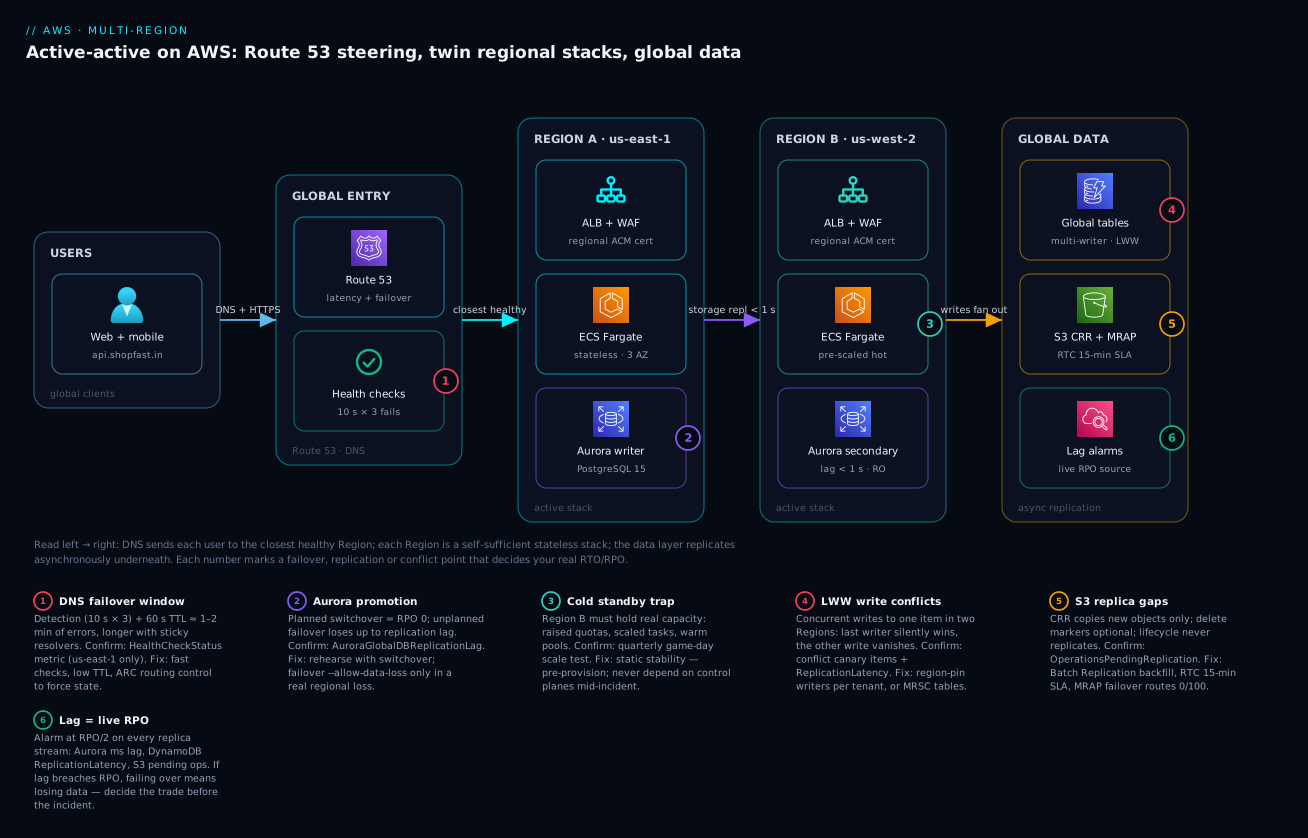
Read the system left to right. Users worldwide resolve api.shopfast.in and are steered by the global entry tier — Route 53 latency-based records backed by fast health checks, optionally fronted by Global Accelerator’s anycast IPs — to the closest healthy Region. Each Regional stack (us-east-1 and us-west-2) is a complete, self-sufficient copy: an ALB with WAF terminating TLS on a regional ACM cert, a stateless ECS Fargate service spread across three AZs, and a Region-local database endpoint. Neither Region needs the other to serve a request; the second stack is not a cold standby but a pre-scaled peer carrying its own traffic plus failover headroom. Underneath both, the global data tier replicates continuously and asynchronously: DynamoDB global tables accept writes in both Regions (resolving concurrent same-item writes by last-writer-wins), Aurora Global Database keeps a sub-second read replica in the secondary Region for a single-writer relational core, and S3 Cross-Region Replication with a Multi-Region Access Point mirrors objects with a 15-minute RTC SLA. CloudWatch watches the replication lag on every stream, because that lag is your live RPO and the number that decides what a failover costs.
The six numbered badges mark the decisions that turn this from a drawing into a design that survives a Regional event: the DNS failover window (detection plus TTL), Aurora promotion (switchover for RPO 0 vs failover-with-data-loss), the cold-standby capacity trap, DynamoDB’s last-writer-wins conflict semantics, S3 replication gaps (new objects only; deletes and lifecycle need care), and lag-as-RPO alarming. Read each badge as a place where the happy path and the real path diverge.
Real-world scenario
ShopFast, a fictional Indian D2C commerce platform, ran entirely in ap-south-1 (Mumbai) and had grown to ₹9 crore in monthly GMV. Their availability SLA to marketplace partners promised 99.95%, but a single Region cannot honour that against a Regional event, and their board — after a competitor lost a full day of sales to a Regional impairment — mandated active-active with an RTO of 90 seconds and RPO of 10 seconds for the checkout path.
The team started, correctly, by classifying data rather than lifting-and-shifting. Carts, sessions, and product-view events went to DynamoDB global tables in ap-south-1 and ap-southeast-1 (Singapore) — naturally per-user-partitioned, so they region-pinned each user’s cart writes to their home Region and never hit an LWW conflict in practice. Orders, payments, and inventory — relational, constraint-heavy, and absolutely intolerant of a silently-lost write — went to Aurora Global Database with ap-south-1 as the single writer and Singapore as a sub-second read replica, using write-forwarding so Singapore app servers could accept order writes that funnelled to the Mumbai primary. Product images and invoices went to S3 with CRR + RTC and a MRAP front door. The write topology was deliberately mixed: multi-writer region-pinned for carts, single-global-writer for money.
The first game day was humbling. Using AWS Fault Injection Service, they simulated an ap-south-1 impairment by blackholing traffic and flipping the ARC routing control to shift everything to Singapore. Three things broke that the diagram had hidden. First, Singapore’s ECS service was scaled to its steady-state (30% of total), and when it took 100% of traffic it saturated and throttled while autoscaling crawled — a textbook cold-standby capacity trap. Second, Singapore’s Lambda concurrency quota was the default, far below production need, so background workers throttled during the surge. Third, checkout latency spiked because with Mumbai gone, write-forwarding had nowhere to forward until Aurora was switched over — and the runbook’s step for that was a manual console click nobody had timed.
The fixes were static-stability fixes. They pre-scaled Singapore to carry full failover load (accepting the cost — this is why active-active exceeds 2×), raised every per-Region quota to production levels in both Regions and wired ARC readiness checks to alarm on drift, and rewrote the runbook so an unplanned Mumbai loss triggers failover-global-cluster --allow-data-loss (accepting RPO = current lag, which their AuroraGlobalDBReplicationLag alarm confirmed sat under 400 ms) with the ARC routing-control flip as a single scripted action. The next game day hit RTO 74 seconds end to end (ARC flip + Aurora promotion + Global Accelerator dial to 0), with measured RPO under 1 second because lag was healthy at the moment of failover. The lesson the team wrote at the top of their runbook: the failover you have never rehearsed at full load does not exist — the design on paper met the SLA; only the game day made it real.
Advantages and disadvantages
Active-active is powerful and expensive, and the trade-off is stark. The explicit two-column view:
| Advantages | Disadvantages |
|---|---|
| Survives a full Regional impairment (the only tier that does) | Highest cost — often 2×+ a single Region |
| Near-zero RTO in steady state (both Regions already serving) | Highest operational complexity |
| Low latency globally (users hit the closest Region) | Data layer inherits lag, conflicts, weaker consistency |
| RPO ~0 on planned switchover | Unplanned failover RPO = replication lag (non-zero) |
| No “recovery” scramble — failover is a routing change | Requires pre-provisioned failover headroom (extra cost) |
| Rehearsable with game days / FIS | Multi-writer risks silent data loss (LWW) if misused |
| Both Regions continuously prove they work (live traffic) | Cross-region data-transfer bill is real and ongoing |
| Blue-green/canary per Region for safer deploys | Quota and drift management doubles |
When each side matters: the advantages are decisive only when a multi-hour Regional outage is existential — regulated payments, a marketplace SLA with penalties, a trading system. For most workloads the disadvantages dominate and warm standby is the wiser choice, delivering minutes-RTO at a fraction of the cost and complexity without ever accepting multi-writer conflict risk. The honest test: if you cannot articulate a specific, quantified business loss from a 30-minute Regional outage that exceeds the annual cost of the second full Region plus the engineering to operate it, you do not need active-active — you need warm standby and a good runbook.
Hands-on lab
This lab stands up the routing and NoSQL data half of an active-active design in two Regions using a DynamoDB global table and Route 53 latency records with health checks — enough to see cross-region replication and DNS failover work, staying within or near the free tier. (A full Aurora Global Database is out of free-tier scope; the CLI for it is in the sections above.)
1. Create a table in Region A and make it global.
aws dynamodb create-table --region us-east-1 --table-name lab-orders \
  --attribute-definitions AttributeName=orderId,AttributeType=S \
  --key-schema AttributeName=orderId,KeyType=HASH \
  --billing-mode PAY_PER_REQUEST \
  --stream-specification StreamEnabled=true,StreamViewType=NEW_AND_OLD_IMAGES

aws dynamodb update-table --region us-east-1 --table-name lab-orders \
  --replica-updates '[{"Create": {"RegionName": "us-west-2"}}]'
2. Write in Region A, read in Region B — watch it replicate.
aws dynamodb put-item --region us-east-1 --table-name lab-orders \
  --item '{"orderId": {"S": "A-1001"}, "amount": {"N": "4999"}}'

# Within ~1 second it appears in us-west-2:
aws dynamodb get-item --region us-west-2 --table-name lab-orders \
  --key '{"orderId": {"S": "A-1001"}}'
# Expected: the item with amount 4999
3. Write in Region B, read in Region A — confirm it’s truly multi-writer.
aws dynamodb put-item --region us-west-2 --table-name lab-orders \
  --item '{"orderId": {"S": "B-2002"}, "amount": {"N": "1299"}}'
aws dynamodb get-item --region us-east-1 --table-name lab-orders \
  --key '{"orderId": {"S": "B-2002"}}'
# Expected: the item written in us-west-2, now visible in us-east-1
4. Observe replication latency (your RPO).
aws cloudwatch get-metric-statistics --region us-east-1 --namespace AWS/DynamoDB \
  --metric-name ReplicationLatency \
  --dimensions Name=TableName,Value=lab-orders Name=ReceivingRegion,Value=us-west-2 \
  --start-time "$(date -u -v-30M +%FT%TZ)" --end-time "$(date -u +%FT%TZ)" \
  --period 60 --statistics Average Maximum
5. (Optional) See LWW in action. Write the same orderId in both Regions within the same second (script both put-item calls back to back); after replication settles, get-item from both Regions returns the same value — the later-timestamped write. The other write is gone, silently. This is the conflict model you must design around.
6. Create health checks and latency records (requires a hosted zone and two public endpoints — e.g. two ALBs or two API Gateway stages). Follow the Route 53 CLI in the routing section, one latency record per Region each bound to a health check, then disable one endpoint and watch dig api.yourzone return only the healthy Region after the failure threshold.
7. Teardown — delete replicas first, then the table.
aws dynamodb update-table --region us-east-1 --table-name lab-orders \
  --replica-updates '[{"Delete": {"RegionName": "us-west-2"}}]'
# wait for the replica to be removed, then:
aws dynamodb delete-table --region us-east-1 --table-name lab-orders
# Also delete any Route 53 health checks and records you created.
Common mistakes & troubleshooting
Active-active fails in characteristic ways, almost all of them at the seams — the data layer, the failover trigger, and capacity. Each below is a real failure mode with how to confirm it and the fix.
| # | Symptom | Root cause | How to confirm | Fix |
|---|---|---|---|---|
| 1 | Failover takes 5+ minutes, users still hit the dead Region | DNS TTL too high + client resolver caching | Check record TTL; dig shows old answer post-failover |
Low TTL (30–60 s); use Global Accelerator or ARC for seconds |
| 2 | Writes silently disappear under concurrent load | DynamoDB LWW dropping the losing write | Conflict-canary items; compare writes vs stored | Region-pin writers, or MRSC, or append-only model |
| 3 | Standby Region throttles the moment it takes traffic | Default per-Region quotas + no pre-scaling | ARC readiness check flags drift; throttle errors spike | Raise quotas to full load; pre-provision headroom |
| 4 | Unplanned failover loses more data than expected | Replication lag was high at failure (= RPO) | AuroraGlobalDBReplicationLag / ReplicationLatency history |
Alarm on lag at RPO/2; decide before failing over |
| 5 | Old objects missing in the failover Region | CRR replicates new objects only, no back-fill | Object count mismatch between buckets | Run S3 Batch Replication to back-fill |
| 6 | Deletes don’t propagate; deleted objects reappear | Delete-marker replication not enabled | Object present in dest after source delete | Enable DeleteMarkerReplication in the rule |
| 7 | Health check green but Region is actually broken | Probing / not a deep-health path |
App down yet / returns 200 |
Probe /healthz that checks DB + deps; string-match |
| 8 | Failover automation reads no health-check metric | Route 53 health metrics only exist in us-east-1 | HealthCheckStatus empty in the target Region |
Read the metric from us-east-1 |
| 9 | Cross-region write latency tanks checkout | Write-forwarding funnelling far to the primary | Latency to primary Region in traces | Region-pin writes, or accept and cache; pick topology |
| 10 | Both Regions accidentally routed off (total outage) | Missing ARC safety rule | Both routing controls Off simultaneously | Add an ARC safety rule preventing both-off |
| 11 | Replication loops / doubled objects (bi-dir S3) | Bi-directional CRR re-replicating replicas | Objects bouncing between buckets | Rely on replica-marker exclusion; scope rules |
| 12 | Bill explodes after go-live | Cross-region data transfer + doubled compute | Cost Explorer: DataTransfer-Regional + duplicated resources | Model it (below); minimize chatty cross-region calls |
Deeper on the three that hurt most
Silent write loss (row 2) is the scariest because there is no error. The confirmation technique is a conflict canary: a background job that writes a known, monotonically-increasing value to the same item from both Regions and periodically checks whether any writes were lost; a gap proves LWW is dropping writes. The moment you see it, the data model — not a config — is wrong for multi-writer, and the fix is architectural (region-pin, MRSC, or append-only).
Lag-as-RPO surprise (row 4) happens when a team quotes “RPO 0” (true for planned switchover) and then suffers an unplanned failover during a lag spike, losing seconds of writes they thought were safe. The fix is cultural as much as technical: alarm on replication lag at RPO/2 on every stream (AuroraGlobalDBReplicationLag, DynamoDB ReplicationLatency, S3 OperationsPendingReplication), and make the runbook state explicitly that an unplanned failover loses up-to-current-lag — so the on-call engineer decides to accept that loss with eyes open, rather than discovering it after.
Capacity trap (row 3) is the most common game-day failure and the reason game days exist. A standby sized for its own steady-state cannot absorb the other Region’s load without either pre-provisioned headroom or fast-enough scaling — and autoscaling is rarely fast enough for an instant 2× surge, and may itself be impaired. Confirm with a full-load game day (FIS); fix by pre-scaling and raising quotas. There is no shortcut: the only proof a Region can take failover load is watching it do so.
Best practices
- Classify data first, choose services second. Map every dataset to a consistency requirement (can it tolerate a lost write? does it need constraints?) before picking DynamoDB vs Aurora vs S3. The write topology falls out of the data’s tolerance for conflicts, not the other way around.
- Make the write topology explicit and per-dataset. Single-global-writer for money and constraints; multi-writer region-pinned for partitionable per-tenant data; full multi-writer only for conflict-free/tolerant data. Write it down; defend it.
- Idempotency everywhere. Every write conditional on a business idempotency key with a TTL. Failover and retries will duplicate; idempotency makes duplicates no-ops.
- Alarm on replication lag as your live RPO. On every stream, at RPO/2. Lag is the single number that decides what a failover costs; treat a lag alarm as a pre-incident, not a curiosity.
- Design for static stability. Region B must serve and scale using only healthy, already-existing resources and control planes — never call the impaired Region to fail away from it. Prefer ARC routing controls and Global Accelerator traffic dials (data-plane) over anything that touches the sick Region’s control plane.
- Pre-provision failover headroom and raise quotas in both Regions. Do not rely on autoscaling to absorb an instant 2× surge, and never leave the standby on default per-Region quotas. Use ARC readiness checks to catch drift.
- Prefer managed switchover for planned events; reserve
--allow-data-lossfailover for real Regional loss. Rehearse the switchover (RPO 0); understand the failover’s RPO = lag. - Keep failover deterministic. ARC routing controls (with a safety rule preventing both-off) or Global Accelerator dials over hoping DNS health checks flip cleanly, especially for gray failures.
- Run game days on a schedule. Quarterly at minimum, at full load, with FIS. A failover you have not rehearsed at full load does not exist.
- Probe deep health, not
/. Health checks must verify the Region can actually serve (DB + dependencies), with string matching, or you fail over too late or not at all. - Deploy identical IaC to both Regions and drift-check. Same Terraform/CDK, both Regions, with readiness checks or
terraform plancatching divergence. A standby that has drifted is a standby that will fail. - Minimize chatty cross-region calls in the hot path. Each cross-region round-trip adds latency and data-transfer cost; keep the request path Region-local and let only replication cross the Region boundary.
Security notes
- Encrypt in transit and at rest, per Region. Replication traffic between Regions rides the AWS backbone, but enforce TLS on your own cross-region calls and encrypt every store (Aurora, DynamoDB, S3) with KMS. Note that KMS keys are Region-scoped — use multi-Region KMS keys where you need the same key material in both Regions (e.g. to decrypt replicated envelope-encrypted data), or replicate/re-encrypt deliberately.
- Least-privilege replication roles. The S3 CRR role and any cross-region replication identities get only the replicate permissions they need on only the specific buckets/tables — a broad cross-region role is a cross-Region blast radius.
- Region-local secrets and config. Store secrets in Secrets Manager / SSM Parameter Store in each Region (Secrets Manager supports cross-Region replication of secrets) so a Region never depends on the other for its credentials — that dependency breaks static stability and widens the blast radius.
- IAM is global, but scope by Region where it matters. IAM principals are global, but use
aws:RequestedRegioncondition keys and Region-scoped resource ARNs to prevent a compromised credential in one Region from acting in the other. - Protect both front doors equally. WAF, Shield, and rate limits must be identical in both Regions — an attacker will target the weaker one, and after a failover all traffic (and all attack traffic) lands on the survivor.
- Guard the failover controls. ARC routing controls and Global Accelerator dials are powerful — a bad flip is a self-inflicted outage. Lock them behind tight IAM, require MFA/approval for manual flips, and use ARC safety rules so no single action can route both Regions off.
- Audit cross-region access. Enable CloudTrail in both Regions (and organization trails) so a failover, a promotion, or a routing-control flip is attributable — during an incident you need to know who threw which switch.
Cost & sizing
The uncomfortable headline: active-active typically costs more than 2× a single Region, not exactly 2×, because each Region carries failover headroom on top of its own load. Where the money actually goes:
- Doubled (or more) compute. Two full production stacks, each sized to absorb the other’s traffic. If each Region runs at its own steady-state you save money but fail the capacity test; if each carries full failover headroom you pay for ~2× your peak capacity. This is the largest line item and the one warm standby avoids.
- Cross-region data transfer. Every byte replicated between Regions is billed at the inter-Region data-transfer rate (roughly $0.02/GB between many Region pairs, higher for some). Global-table replication, Aurora storage replication, S3 CRR, and any chatty cross-region application calls all accrue here. High-write-volume workloads can run this into serious money — model it from your write throughput.
- Doubled data stores. DynamoDB global tables bill replicated write capacity (replicated write request units) and storage in every Region; Aurora bills the secondary cluster’s instances and storage; S3 bills the destination copy. Reads are local (a benefit), but the storage and replication write cost is real.
- Route 53 and health checks are cheap; Global Accelerator is not. Route 53 queries and health checks are pennies. Global Accelerator adds a fixed hourly charge per accelerator plus a per-GB data-transfer premium — worth it for fast failover and static IPs, but a real line item.
- Observability doubles. CloudWatch metrics, logs, and cross-region dashboards in both Regions.
A rough monthly picture for a mid-size API doing meaningful write volume, active-active across two Regions (illustrative, INR):
| Cost driver | What you pay for | Rough INR / month | Notes |
|---|---|---|---|
| Compute (2 Regions, headroom) | 2× ECS/EC2 at ~2× peak capacity | ~₹2,00,000–4,00,000 | Largest item; warm standby is far less |
| DynamoDB global table | Replicated writes + storage ×2 | ~₹40,000–1,20,000 | Replicated write units cost extra |
| Aurora Global Database | Primary + secondary clusters | ~₹80,000–2,00,000 | Secondary instances + storage |
| Cross-region data transfer | Replication + app cross-calls | ~₹20,000–1,00,000+ | Scales with write volume — model it |
| S3 CRR + storage | Destination copy + RTC | ~₹10,000–50,000 | RTC adds a small per-GB premium |
| Global Accelerator (if used) | Hourly + per-GB | ~₹3,000–15,000 | Skip if Route 53 DNS failover suffices |
| Route 53 + health checks | Queries + fast checks | ~₹1,000–5,000 | Cheap; fast checks cost a little more |
| CloudWatch (2 Regions) | Metrics, logs, dashboards | ~₹10,000–40,000 | Doubles with the second Region |
Right-sizing levers: run warm standby instead of active-active if minutes-RTO is acceptable (the single biggest saving); region-pin reads so cross-region traffic is only replication, not application chatter; use on-demand/PAY_PER_REQUEST for spiky DynamoDB rather than over-provisioned capacity; and drop Global Accelerator if DNS failover meets your RTO. The free-tier reality: you can learn multi-region cheaply (DynamoDB global tables and Route 53 fit a lab budget), but you cannot run production active-active cheaply — the doubled stack is the point, and it is the cost.
Interview & exam questions
1. What is the difference between RTO and RPO, and why does the kind of failover change the RPO? RTO is how long until service is restored; RPO is how much data loss is acceptable. A planned switchover drains in-flight replication and achieves RPO 0; an unplanned failover cannot drain and so its RPO equals the replication lag at the moment of failure. Quoting “RPO 0” without saying “on a planned switchover” is misleading — the unplanned path always loses up-to-current-lag.
2. Why doesn’t Multi-AZ protect against a Regional event? Multi-AZ spreads across data-centre-scale failure domains within one Region, surviving an AZ loss. A Regional impairment affects the Region’s own control plane and shared services across all AZs at once, so there is no healthy AZ to route to. Only running in a second Region — with an independent control plane — survives it.
3. Explain DynamoDB global tables’ last-writer-wins model and when it’s dangerous. Global tables are multi-writer; concurrent writes to the same item in two Regions are resolved by keeping the highest-timestamp write and silently discarding the other. It’s safe for region-partitioned or commutative/idempotent writes but dangerous for shared mutable counters/balances, where a lost increment is silent data corruption. Mitigate with region-pinning, an append-only model, or multi-Region strong consistency (MRSC).
4. What is write-forwarding in Aurora Global Database, and what does it trade off? Write-forwarding lets application servers in a secondary Region issue writes that Aurora transparently forwards to the single primary, so you can “write locally” without repointing to the primary’s endpoint — preserving relational integrity with one logical writer. The trade-off is added latency (writes still funnel to the primary) and a read-consistency choice (eventual/session/global) for whether a subsequent read sees the forwarded write.
5. When would you choose Global Accelerator over Route 53 for the front door? When you need sub-10-second failover (anycast backbone reroute, no DNS TTL), static IPs (firewall allow-lists, hard-coded device addresses), non-HTTP protocols (TCP/UDP), or lower latency/jitter via early backbone entry. Route 53 is cheaper and offers richer geo/weighted policies but fails over at DNS speed (60 s–minutes) and is subject to client caching.
6. What is static stability and why does it matter for failover? Static stability means Region B can serve — and take on more load — using only resources and control planes that already exist and are healthy, without depending on the impaired Region. It matters because if failing over to B requires calling an API in the sick Region A (to scale, promote, or change DNS), then A’s impairment can block your escape. It drives pre-provisioned headroom, raised quotas, and data-plane-only failover (ARC, GA dials).
7. What does Application Recovery Controller add over Route 53 health checks? ARC provides routing controls — deterministic on/off switches (backed by a five-Region cluster, so the control plane is itself Region-independent) you flip to shift traffic, ideal for gray failures and planned failovers where health checks flap or stay green — and readiness checks that continuously audit whether the recovery Region is actually provisioned to match production, catching capacity/quota drift before an incident.
8. Describe the three write topologies and which data each suits. Single global writer (all writes to one Region) — relational/constraint data, no conflicts, but far-user write latency and a promotion on failover. Multi-writer region-pinned (partition the keyspace so each item is written from one Region) — partitionable per-tenant/user data, local writes and no conflicts. Full multi-writer (every Region writes everything, resolve by LWW/merge) — conflict-free/tolerant event data, lowest latency, but demands the data model tolerate conflicts.
9. Why is idempotency mandatory in a multi-region design? Failover and client retries produce duplicate (and re-ordered) writes — a client retrying against Region B after A timed out may submit the same operation twice. Idempotent writes (conditional on a business key with TTL) turn duplicates into no-ops; without them you double-charge and double-ship. It is required, not optional, given at-least-once semantics.
10. What are the two gotchas with S3 Cross-Region Replication people miss? First, CRR replicates new objects only — it does not back-fill pre-existing objects (needs S3 Batch Replication) and does not replicate delete markers or lifecycle actions unless configured. Second, replication is eventually consistent with variable lag; use Replication Time Control (RTC) for a 15-minute SLA and metrics. A Multi-Region Access Point gives a single endpoint with failover controls on top.
11. How do you know what an unplanned failover will cost in data loss, before you trigger it? Watch the replication lag metric on every stream — AuroraGlobalDBReplicationLag (ms), DynamoDB ReplicationLatency, S3 OperationsPendingReplication. That lag is the RPO at that instant, so the current lag tells you how much data an unplanned failover loses. Alarm at RPO/2 so you can decide, with eyes open, whether to accept the loss.
12. Why does active-active often cost more than 2× a single Region? Because each Region must carry failover headroom — enough capacity to absorb the other Region’s traffic on failover — on top of its own steady-state load, so you pay for roughly 2× your peak capacity, not 2× your average. Add cross-region data-transfer, doubled data-store storage/replication-write costs, and (optionally) Global Accelerator, and the total exceeds a simple doubling. This is the reason warm standby is often the wiser choice.
These map to AWS Certified Solutions Architect – Professional (design for organizational complexity; resilient, high-availability, multi-Region architectures; DR strategies and RTO/RPO), AWS Certified Solutions Architect – Associate (design resilient architectures; Route 53 routing policies; RDS/Aurora/DynamoDB/S3 replication), and the AWS Certified Advanced Networking – Specialty (Route 53, Global Accelerator, cross-Region connectivity). A compact cert-mapping for revision:
| Question theme | Primary cert | Objective area |
|---|---|---|
| DR tiers, RTO/RPO, switchover vs failover | SAP-C02 | Design for resiliency & business continuity |
| Route 53 policies & health checks | SAA-C03 / ANS-C01 | Design resilient / networked architectures |
| Global Accelerator vs DNS | ANS-C01 | Edge & global network design |
| Global tables, LWW, MRSC | SAP-C02 / DBS | Multi-Region data & consistency |
| Aurora Global DB, write-forwarding | SAP-C02 / DBS | Relational HA across Regions |
| Static stability, quotas, game days | SAP-C02 | Operational excellence & resilience |
Quick check
- Your contract says RPO 0. A Regional impairment hits and you run
failover-global-cluster --allow-data-losson Aurora. Do you actually meet RPO 0? Why or why not? - Two Regions write the same DynamoDB item within the same second. What happens to the two writes, and what signal (if any) do you get?
- You fail over with Route 53 health checks and some users still hit the dead Region ten minutes later. Name the two most likely reasons.
- What is the one metric that tells you, at any instant, how much data an unplanned failover would lose — and where do you set the alarm?
- Your standby Region is sized to its own steady-state traffic. Why will it likely fail when it must take the other Region’s load, and what are the two fixes?
Answers
- No. RPO 0 holds only for a planned managed switchover, which drains in-flight replication.
failover-global-cluster --allow-data-lossis the unplanned path — it cannot drain the impaired Region, so its RPO equals the replication lag at the moment of failure (hopefully sub-second, which is why you alarm on lag, but not zero). - The write with the higher timestamp survives; the other is silently discarded by last-writer-wins. You get no error and no notification — which is why a conflict canary and
ReplicationLatencyawareness matter, and why shared mutable items shouldn’t be full multi-writer. - (a) The DNS record’s TTL is too high and/or client resolvers are caching the old answer, so clients don’t re-resolve to the healthy Region for minutes. (b) Some clients ignore TTL entirely. The fix is a low TTL plus, for real speed, Global Accelerator (anycast) or ARC routing controls that don’t depend on DNS propagation.
- Replication lag —
AuroraGlobalDBReplicationLagfor Aurora,ReplicationLatencyfor DynamoDB,OperationsPendingReplicationfor S3. It is the live RPO. Alarm at RPO/2 on every replication stream so you can decide before failing over whether the current lag (data loss) is acceptable. - It can’t absorb an instant 2× surge: autoscaling is too slow for the instant surge (and may itself be impaired during a Regional event), and the standby may hit default per-Region quotas. The two fixes: pre-provision failover headroom (or large warm pools) so failover is a routing change not a scaling race, and raise per-Region quotas to full production load in both Regions (with ARC readiness checks catching drift).
Glossary
- Active-active — an architecture where both Regions serve production traffic simultaneously, each a self-sufficient stack, with the data layer replicating between them.
- RTO (Recovery Time Objective) — the maximum acceptable time to restore service after an incident.
- RPO (Recovery Point Objective) — the maximum acceptable amount of data loss, measured in time (e.g. “5 seconds of writes”).
- Region — an independent AWS geographic deployment with its own control plane; the failure domain multi-region contains.
- Availability Zone (AZ) — an isolated, data-centre-scale failure domain within a Region; Multi-AZ survives an AZ loss, not a Regional one.
- Static stability — the property that a Region can keep serving (and scale) using only already-existing, healthy resources and control planes, without depending on an impaired Region.
- Route 53 routing policy — the rule (latency, weighted, failover, geolocation, geoproximity, multivalue, simple) determining which DNS answer a resolver receives.
- Route 53 health check — a global probe that marks an endpoint healthy/unhealthy, driving DNS failover; its status/metrics are published only in
us-east-1. - Application Recovery Controller (ARC) — routing controls (deterministic traffic on/off switches, backed by a five-Region cluster) plus readiness checks (continuous audits of standby provisioning).
- Global Accelerator — static anycast IPs on the AWS backbone that route to the healthy Region and fail over in seconds, independent of DNS.
- Traffic dial — Global Accelerator’s per-endpoint-group 0–100% control for shifting or draining traffic.
- DynamoDB global table — a multi-Region, multi-writer DynamoDB table kept in sync automatically.
- Last-writer-wins (LWW) — the conflict rule where, for concurrent writes to the same item, the highest-timestamp write survives and the other is silently dropped.
- Multi-Region strong consistency (MRSC) — a DynamoDB global-tables mode giving strong consistency across up to three Regions at higher latency.
- Aurora Global Database — one primary Region plus read-only secondary-Region replicas kept in sync by storage-level replication.
- Write-forwarding — an Aurora feature letting a secondary Region accept writes that are transparently forwarded to the single primary.
- Managed switchover — a planned, RPO-0 Aurora Region promotion that drains in-flight replication.
- Managed / cross-Region failover — an unplanned Aurora promotion (
--allow-data-loss) whose RPO equals the replication lag at failure. - Cross-Region Replication (CRR) — S3 asynchronous replication of new objects to a bucket in another Region.
- Replication Time Control (RTC) — an S3 CRR option providing a 15-minute replication SLA and metrics.
- Multi-Region Access Point (MRAP) — a single global S3 endpoint that routes to the nearest/healthy bucket with failover controls.
- ElastiCache Global Datastore — cross-Region Redis/Valkey replication (one primary, read-only secondaries) for a warm failover cache.
- Replication lag — the delay between a write committing in the source Region and appearing in the target; the live RPO at any instant.
- Idempotency key — a deterministic identifier for a business operation that makes a repeated write (from retry or failover) a safe no-op.
- AWS Fault Injection Service (FIS) — a service for running controlled failure experiments (game days), e.g. simulating a Regional impairment.
Next steps
You can now design, reason about, and rehearse an active-active architecture. Build outward:
- Foundation: The Classic AWS Three-Tier Web Application Architecture — the single-Region VPC → ALB → Auto Scaling → RDS stack you replicate per Region.
- Related: EventBridge → SQS/SNS → Lambda: the event path and its decision points — the async, idempotent, at-least-once patterns that make cross-region eventual consistency safe.
- Related: AWS Microservices on ECS Fargate Architecture — the container platform that runs identically in each Region’s stateless stack.
- Related: AWS Serverless Web Application Architecture — a serverless take on the per-Region stack that pairs naturally with DynamoDB global tables.
- Cross-cloud: Azure Multi-Region Active-Active & Disaster Recovery and GCP Multi-Region Active-Active Architecture — the same trade-offs on other clouds, worth reading side by side.