There is a moment in every web project when someone asks: “why are we paying for two servers to sit at 3% CPU all night?” The serverless web application is AWS’s answer, and it is by far the most common serverless architecture in production: a single-page application (SPA) served as static files from Amazon S3 through CloudFront, users authenticated by Amazon Cognito, an API fronted by Amazon API Gateway, business logic in AWS Lambda, and state in Amazon DynamoDB. No instance to patch, no idle capacity to pay for, and every tier scales from zero to thousands of requests per second without you touching a slider.
But “no servers” does not mean “no architecture.” Each hop in that chain has its own failure modes, quotas and pricing curve, and the design decisions interlock: choose the wrong API Gateway flavour and you pay 3.5× per request for features you never use; skip Origin Access Control and your “private” bucket is one policy typo from public; model DynamoDB like a SQL database and your first popular feature hot-partitions the table; ignore cold starts and your p99 latency chart grows a second-long shelf. This article walks the reference architecture end to end — the way I build it for clients — with the exact settings, limits, failure points and worked cost numbers for every tier.
By the end you will be able to draw this architecture from memory, defend every component choice (REST vs HTTP API, on-demand vs provisioned capacity, SQS vs EventBridge, Standard vs Express Step Functions), quote the limits that actually bite (29-second API Gateway timeout, 6 MB Lambda payload, 400 KB DynamoDB item), and estimate a monthly bill within a few dollars before you deploy anything. You will also build a working slice of it — Cognito-protected HTTP API, Lambda, DynamoDB — with SAM in about twenty minutes, almost entirely inside the free tier.
What problem this solves
The traditional three-tier web stack on AWS — ALB, EC2/ECS fleet, RDS — is a fine architecture with three chronic pains for web workloads. First, idle cost: web traffic is spiky (daytime peaks, campaign bursts, dead nights), yet you provision and pay for peak-ish capacity 24×7; a modest ALB + two Fargate tasks floor is roughly $60–70/month before it serves a single request. Second, operational surface: AMIs or base images to patch, autoscaling policies to tune, connection pools and instance health to babysit. Third, scale ceilings you must manage yourself: a traffic spike is your problem to absorb with warm capacity, and getting it wrong is a 3 a.m. page.
The serverless web architecture inverts all three. Every tier is a managed service billed per request (or per GB-second), scales automatically, and exposes configuration instead of servers. The trade is a new set of problems: cold-start latency, per-service quotas that throttle you rather than fall over, distributed debugging across five services, and a data model (DynamoDB) that punishes relational habits. Teams that adopt the pattern without learning those trades ship an app that is cheap and fragile. Teams that learn them ship an app that is cheap and boring — the good kind of boring.
Who hits this: startups that want a production-grade stack for under ₹1,500/month, enterprises pushing internal tools and customer portals off EC2, and anyone whose traffic profile is bursty or unpredictable. Here is the full request path this article covers, hop by hop, with what each hop does and where it characteristically fails:
| Hop | Service | What it does | Billed on | Characteristic failure |
|---|---|---|---|---|
| 1 | Route 53 | DNS; ALIAS record to CloudFront | Hosted zone + queries (ALIAS to AWS: free) | Wrong/missing ALIAS; cert-name mismatch |
| 2 | CloudFront | TLS, caching, global edge for SPA + API | Data out + requests (1 TB/mo free) | 403 from origin; stale cache after deploy |
| 3 | S3 (private) | Stores SPA build artefacts | GB-month + requests | Public-access mistake; deep-link 403 without SPA fallback |
| 4 | Cognito | Sign-up/sign-in; issues JWTs | Monthly active users | Expired/wrong-audience token → 401 |
| 5 | API Gateway | Routes, authorizes, throttles the API | Per million requests | 429 throttle; 29 s timeout → 504 |
| 6 | Lambda | Business logic, per-request compute | Requests + GB-seconds | Cold start; concurrency throttle; 6 MB payload |
| 7 | DynamoDB | Single-digit-ms key-value state | Request units (or provisioned) + storage | Hot partition throttle; 400 KB item cap |
| 8 | SQS / EventBridge / Step Functions | Async work, events, workflows | Per request / event / state transition | Poison messages; missing DLQ; lost events |
Learning objectives
By the end of this article you can:
- Draw the end-to-end serverless web architecture — edge, auth, API, compute, data, async — and explain what each service contributes and what it costs.
- Serve an SPA from a private S3 bucket via CloudFront with Origin Access Control, correct SPA deep-link routing and safe cache invalidation on deploy.
- Configure a Cognito user pool and app client, explain ID vs access vs refresh tokens, and wire a JWT authorizer into API Gateway.
- Choose between REST APIs and HTTP APIs on API Gateway using a feature/price matrix, and set throttling so a spike degrades gracefully.
- Explain the Lambda execution model — cold vs warm starts, the concurrency types, layers, memory-to-CPU scaling — and eliminate cold-start pain with provisioned concurrency or SnapStart where it matters.
- Design a basic DynamoDB single-table schema from access patterns, choose on-demand vs provisioned capacity with real numbers, and know when DAX earns its cost.
- Route async work through SQS, SNS, EventBridge and Step Functions, choosing the right one per use case with DLQs everywhere.
- Estimate the monthly bill for 5M and 100M request months, and articulate when serverless loses to containers.
Prerequisites & where this fits
You should know the AWS fundamentals: what a region and AZ are (see AWS Regions and Availability Zones: Resiliency from the Ground Up), IAM roles and policies at the level of AWS Organizations and IAM Foundations, and have the AWS CLI v2 plus SAM CLI installed with credentials for a sandbox account. Familiarity with one Lambda runtime (Node.js or Python) and basic HTTP/JWT concepts helps; no prior DynamoDB experience is assumed.
This article is the architectural centerpiece of the AWS track. It builds on the compute decision in AWS Compute: EC2, Lambda, ECS and EKS (you have decided on Lambda; here is everything around it), goes deeper than the front-door comparison in AWS Load Balancers and API Gateway: ALB, NLB and API Gateway Compared, and pairs with AWS Lambda Patterns: Event-Driven Functions That Scale to Zero for the pure event-driven side. The database choice itself (DynamoDB vs RDS vs Aurora) is argued in AWS Databases: RDS, DynamoDB and Aurora; here we assume DynamoDB and focus on using it well.
Core concepts
Five mental models carry the whole architecture.
Everything is a managed service with a quota, not a server with a capacity. Nothing in this stack “falls over” under load the way an overwhelmed EC2 instance does. Instead, each service throttles at a quota — API Gateway at 10,000 requests/second (account default), Lambda at your concurrency limit, DynamoDB at partition throughput — and returns a specific error (429, TooManyRequestsException, ProvisionedThroughputExceededException). Capacity planning becomes quota planning: know each ceiling, decide which are real risks for your traffic, and raise or architect around them before launch, not during one.
The SPA and the API are separate applications with separate lifecycles. The frontend is static files — HTML, JS bundles, images — built once and served from S3 through CloudFront’s 600+ edge locations. The backend is an API consumed over HTTPS with a JWT. They deploy independently, cache differently (immutable hashed bundles vs never-cache API responses), and fail differently. Treating the SPA as “just files on a CDN” and the API as “the actual app” untangles most design debates.
Identity is a token, verified statelessly at the door. Cognito authenticates the user once and issues short-lived JWTs (JSON Web Tokens). API Gateway’s JWT authorizer verifies the signature against Cognito’s published JWKS keys and checks issuer, audience and expiry — without calling Cognito on each request and without your Lambda code seeing a password, ever. Authorization becomes claims inspection (sub, cognito:groups, scopes) inside your function or at the route level.
Compute is ephemeral; state lives at the edges. A Lambda execution environment is created on demand (a cold start), handles one request at a time, may be reused for subsequent requests (warm starts), and is destroyed whenever AWS pleases. Anything in memory or /tmp is a cache, never a store. Durable state goes to DynamoDB or S3; in-flight work goes to SQS or Step Functions. This single rule — functions are stateless — is what lets Lambda scale sideways instantly and what breaks lift-and-shifted code that assumed sticky processes.
Synchronous for questions, asynchronous for work. The synchronous path (CloudFront → API Gateway → Lambda → DynamoDB) should answer questions in tens of milliseconds. Anything slow, retryable, or third-party — sending email, resizing images, calling a payment provider’s webhook, fan-out updates — leaves the synchronous path via SQS, SNS, EventBridge or Step Functions and is processed by other Lambdas. The 29-second API Gateway timeout is not an obstacle; it is a design linter telling you a slow thing belongs on the async path.
The moving parts, pinned down:
| Concept | One-line definition | Where configured | Why it matters |
|---|---|---|---|
| OAC (Origin Access Control) | CloudFront’s SigV4 identity for reading a private S3 origin | CloudFront origin + S3 bucket policy | Keeps the SPA bucket fully private |
| User pool | Cognito’s user directory + OIDC token issuer | Cognito | Source of truth for identity; issues JWTs |
| App client | A named consumer of the user pool (your SPA) | Cognito user pool | Its ID is the JWT audience; holds token lifetimes |
| JWT authorizer | API Gateway’s stateless token check | API Gateway (HTTP API) | Rejects bad tokens with 401 before Lambda runs |
| Stage | A deployed snapshot of an API ($default, prod) |
API Gateway | Where throttling/logging attach |
| Execution environment | The micro-VM instance running your function | Lambda-managed | Cold vs warm start; one request at a time |
| Init phase | Code outside the handler, run once per environment | Your function code | Where cold-start time goes; where to open clients |
| Concurrency | Number of in-flight executions of a function | Lambda (account + function) | The real scale ceiling; throttles at limit |
| RCU / WCU / RRU / WRU | DynamoDB read/write capacity (provisioned) or request (on-demand) units | DynamoDB table | The pricing and throughput currency |
| Partition key | Hash key that decides an item’s storage partition | Table + GSI design | Skewed keys → hot partition → throttling |
| GSI | Global secondary index — alternate PK/SK over the same items | DynamoDB | Serves additional access patterns |
| DLQ | Dead-letter queue for messages/events that repeatedly fail | SQS / Lambda / EventBridge | The difference between “lost” and “parked” work |
The edge tier: Route 53, CloudFront and the S3-hosted SPA
The frontend tier’s job: serve ~2–5 MB of static build output to any user on earth in under 100 ms, over TLS, for approximately nothing. The pattern is a private S3 bucket (never the S3 website endpoint) behind a CloudFront distribution with OAC, an ACM certificate (which for CloudFront must live in us-east-1, regardless of your app’s region), and a Route 53 ALIAS record.
S3 website endpoint vs CloudFront + OAC
You will still find tutorials using S3’s static website hosting endpoint. Do not ship it:
| Property | S3 website endpoint | CloudFront + private bucket + OAC |
|---|---|---|
| Bucket exposure | Must be public | Fully private; Block Public Access all-on |
| HTTPS on custom domain | Not supported (HTTP only) | Yes — ACM cert, TLS 1.2/1.3 |
| Latency | Single-region | 600+ edge locations, cached |
| SPA deep links | index.html error document (200-ish hack) |
Custom error response 403→/index.html 200 |
| WAF attachable | No | Yes (AWS WAF web ACL) |
| Cost at scale | S3 egress ~$0.09/GB | 1 TB/month free, then ~$0.085–0.11/GB |
| Verdict | Demos only | The production pattern |
OAC (which replaced the older Origin Access Identity in 2022 — OAC adds SigV4 signing and SSE-KMS support) makes CloudFront the only principal allowed to s3:GetObject. The bucket stays behind Block Public Access, so no future policy typo can expose it.
# Private SPA bucket in ap-south-1, public access fully blocked
aws s3api create-bucket --bucket ticketleaf-spa-prod --region ap-south-1 \
  --create-bucket-configuration LocationConstraint=ap-south-1
aws s3api put-public-access-block --bucket ticketleaf-spa-prod \
  --public-access-block-configuration \
  BlockPublicAcls=true,IgnorePublicAcls=true,BlockPublicPolicy=true,RestrictPublicBuckets=true

# The OAC that CloudFront will sign origin requests with
aws cloudfront create-origin-access-control --origin-access-control-config \
  Name=oac-ticketleaf-spa,OriginAccessControlOriginType=s3,SigningBehavior=always,SigningProtocol=sigv4
The bucket policy then grants GetObject to the CloudFront service principal, scoped to your distribution ARN (the condition is what stops any other AWS customer’s distribution reading your bucket):
{
  "Version": "2012-10-17",
  "Statement": [{
    "Sid": "AllowCloudFrontOACRead",
    "Effect": "Allow",
    "Principal": { "Service": "cloudfront.amazonaws.com" },
    "Action": "s3:GetObject",
    "Resource": "arn:aws:s3:::ticketleaf-spa-prod/*",
    "Condition": { "StringEquals": {
      "AWS:SourceArn": "arn:aws:cloudfront::111122223333:distribution/E2ABCDEF123456"
    } }
  }]
}
The distribution settings that matter
In Terraform, the load-bearing parts of the distribution look like this:
resource "aws_cloudfront_origin_access_control" "spa" {
  name                              = "oac-ticketleaf-spa"
  origin_access_control_origin_type = "s3"
  signing_behavior                  = "always"
  signing_protocol                  = "sigv4"
}

resource "aws_cloudfront_distribution" "spa" {
  enabled             = true
  default_root_object = "index.html"
  aliases             = ["app.ticketleaf.in"]
  price_class         = "PriceClass_200"   # includes India; PriceClass_All adds S. America/Aus

  origin {
    domain_name              = aws_s3_bucket.spa.bucket_regional_domain_name
    origin_id                = "spa-s3"
    origin_access_control_id = aws_cloudfront_origin_access_control.spa.id
  }

  default_cache_behavior {
    target_origin_id       = "spa-s3"
    viewer_protocol_policy = "redirect-to-https"
    allowed_methods        = ["GET", "HEAD"]
    cached_methods         = ["GET", "HEAD"]
    compress               = true
    cache_policy_id        = "658327ea-f89d-4fab-a63d-7e88639e58f6" # Managed-CachingOptimized
  }

  custom_error_response {                  # SPA deep-link fix: /events/123 → index.html
    error_code            = 403
    response_code         = 200
    response_page_path    = "/index.html"
    error_caching_min_ttl = 10
  }

  viewer_certificate {
    acm_certificate_arn      = aws_acm_certificate.spa_useast1.arn  # MUST be us-east-1
    ssl_support_method       = "sni-only"
    minimum_protocol_version = "TLSv1.2_2021"
  }

  restrictions { geo_restriction { restriction_type = "none" } }
}
Every setting above is a decision; here is the matrix:
| Setting | Recommended value | Default | Why / trade-off | Gotcha |
|---|---|---|---|---|
| Origin type | S3 REST origin + OAC | — | Private bucket, SigV4-signed reads | Website endpoint = custom origin, no OAC possible |
default_root_object |
index.html |
none | / resolves to the app shell |
Only applies at /, not subpaths — hence error mapping |
| Custom error response | 403 → /index.html, HTTP 200 |
none | S3 REST origin returns 403 (not 404) for missing keys to callers without ListBucket |
Map 404 too if you grant ListBucket; keep error_caching_min_ttl low |
| Cache policy (assets) | CachingOptimized + hashed filenames |
CachingOptimized |
Immutable main.3f9c2b.js cached ~forever |
index.html must be short-TTL/no-cache or deploys don’t take |
viewer_protocol_policy |
redirect-to-https |
allow-all |
Never serve the app over HTTP | HSTS via response headers policy for belt-and-braces |
compress |
true |
false |
Brotli/gzip: JS bundles shrink ~70% | Origin must not pre-set Content-Encoding |
| Price class | PriceClass_200 |
All |
Covers Asia/India; All adds ~nothing for most apps at extra cost |
PriceClass_100 (NA/EU only) hurts Indian users |
| Certificate | ACM in us-east-1, TLS 1.2 min | — | CloudFront reads certs only from us-east-1 | A cert in ap-south-1 simply won’t appear in the dropdown |
| WAF web ACL | Attach for public apps | none | Managed rules stop scanner noise | WAF for CloudFront is also created in us-east-1 |
Deploys, invalidation, and the API-behind-CloudFront question
A deploy is: sync hashed assets with a long cache, upload index.html with no-cache, then invalidate just the shell:
aws s3 sync build/ s3://ticketleaf-spa-prod --delete \
  --cache-control "public,max-age=31536000,immutable" --exclude index.html
aws s3 cp build/index.html s3://ticketleaf-spa-prod/index.html \
  --cache-control "no-cache,no-store,must-revalidate"
aws cloudfront create-invalidation --distribution-id E2ABCDEF123456 --paths "/index.html"
The first 1,000 invalidation paths/month are free ($0.005/path after); with hashed assets you rarely need more than the shell. You can also route /api/* as a second CloudFront behavior to API Gateway — one domain, no CORS, WAF in one place, at the cost of extra per-request CloudFront charges and disabling caching on that path. Most teams start with a separate api. subdomain plus CORS and consolidate later.
For dynamic logic at the edge, know the two options and their price gap:
| CloudFront Functions | Lambda@Edge | |
|---|---|---|
| Runs at | Every edge location | Regional edge caches |
| Language / limits | JavaScript, <1 ms, no network calls | Node/Python, up to 5 s (viewer) / 30 s (origin), network OK |
| Typical use | Redirects, security headers, URL rewrites | Auth at edge, origin selection, A/B with lookups |
| Price | $0.10 per million | $0.60 per million + duration |
| For this architecture | Security-headers + trailing-slash rewrites | Rarely needed — keep auth in API Gateway |
The identity tier: Cognito user pools and JWTs
Amazon Cognito does two unrelated jobs, and conflating them causes most Cognito confusion. A user pool is a user directory and OIDC identity provider: it stores users, runs sign-up/sign-in (with MFA, password policy, email/phone verification, social and SAML federation) and issues JWTs. An identity pool (federated identities) exchanges tokens for temporary AWS credentials so a browser can call AWS services directly (e.g., upload to S3). A standard serverless web app needs only a user pool; add an identity pool only when the SPA must touch AWS APIs itself.
# User pool with sane password policy and email verification
aws cognito-idp create-user-pool --pool-name ticketleaf-users \
  --auto-verified-attributes email \
  --policies "PasswordPolicy={MinimumLength=12,RequireUppercase=true,RequireLowercase=true,RequireNumbers=true,RequireSymbols=false}" \
  --region ap-south-1

# Public app client for the SPA: NO secret (a browser can't keep one), SRP auth only
aws cognito-idp create-user-pool-client \
  --user-pool-id ap-south-1_AbCdEfGhI --client-name spa-client \
  --no-generate-secret \
  --explicit-auth-flows ALLOW_USER_SRP_AUTH ALLOW_REFRESH_TOKEN_AUTH \
  --token-validity-units "AccessToken=minutes,IdToken=minutes,RefreshToken=days" \
  --access-token-validity 60 --id-token-validity 60 --refresh-token-validity 30
Two design points hide in those flags. First, --no-generate-secret: a client secret in a browser bundle is not a secret; public clients authenticate the user, not the client. Second, ALLOW_USER_SRP_AUTH: the SRP (Secure Remote Password) flow proves the password without ever transmitting it; the tempting USER_PASSWORD_AUTH flow sends it in the request body and exists mainly for server-side migrations.
The three tokens
A successful sign-in returns three JWTs. Send the right one to the right place:
| Token | Purpose | Default lifetime | Configurable range | Where it goes |
|---|---|---|---|---|
| ID token | Who the user is — identity claims (email, name, cognito:groups) |
60 min | 5 min – 24 h | The SPA, for display/UX decisions |
| Access token | What the client may call — scopes, groups | 60 min | 5 min – 24 h | Authorization header to API Gateway |
| Refresh token | Silently obtain new ID/access tokens | 30 days | 1 h – 10 years | Stays in the Amplify/SDK token store; never sent to your API |
The API Gateway JWT authorizer validates the access token per request: fetch Cognito’s public keys from the pool’s JWKS URL (cached), verify signature, check iss (the pool), aud/client_id (your app client), exp and nbf. All stateless — no Cognito call, no charge, sub-millisecond:
aws apigatewayv2 create-authorizer --api-id a1b2c3d4 \
  --name cognito-jwt --authorizer-type JWT \
  --identity-source '$request.header.Authorization' \
  --jwt-configuration \
  "Audience=<app-client-id>,Issuer=https://cognito-idp.ap-south-1.amazonaws.com/ap-south-1_AbCdEfGhI"
The claims land in your Lambda event (event.requestContext.authorizer.jwt.claims), so per-user data access is claims.sub — no session store anywhere.
Auth flows, hosted UI, and pricing tiers
How the SPA actually performs sign-in, and which knob to choose:
| Option | What it is | Choose when | Trade-off / gotcha |
|---|---|---|---|
| Amplify Auth / SDK + SRP | Your own UI calling Cognito’s API with SRP | You want full UI control (most SPAs) | You build the forms; SRP handled by the library |
| Managed login (hosted UI) | Cognito-hosted pages, OAuth authorization code + PKCE | Fastest path; social/SAML federation | Branding is CSS-limited; redirect-based UX |
| Federation (Google/SAML/OIDC) | External IdP, Cognito brokers and still issues its JWTs | “Login with Google” / enterprise SSO | Attribute mapping; users are pool users either way |
USER_PASSWORD_AUTH |
Password sent in request | Legacy migration with a migration trigger only | Weakest option; keep disabled otherwise |
| Lambda triggers | Hooks: pre-sign-up, post-confirmation, pre-token-gen | Auto-confirm corp domains, custom claims, welcome flows | Trigger errors block sign-in — code defensively |
Pricing changed in late 2024: new pools choose a tier — Essentials ($0.015/MAU after a 10,000-MAU free allowance) is the default and covers everything above; Lite matches the legacy feature set with its old 50,000-MAU free tier; Plus ($0.02/MAU) adds threat protection (risk-based adaptive auth, compromised-credential checks). A 9,000-MAU app on Essentials costs $0; at 50,000 MAU it is about $600/month — budget for it, because at consumer scale Cognito MAU can exceed your entire compute bill. Also watch the category rate limits: user-pool sign-in operations default to ~120 RPS (soft) — plenty for most apps, a real ceiling for token-per-request antipatterns (don’t call InitiateAuth per API call; that is what the 1-hour access token is for).
The API tier: REST vs HTTP APIs on API Gateway
API Gateway is the front door: it terminates TLS, authorizes, throttles, shapes and routes requests to Lambda. The first decision is which of its two HTTP-ish products to use — confusingly named REST APIs (v1, 2015) and HTTP APIs (v2, 2019). Both speak REST; the differences are features, latency and a 3.5× price gap.
| Dimension | HTTP API (v2) | REST API (v1) |
|---|---|---|
| Price (us-east-1) | $1.00/million (first 300M) | $3.50/million (first 333M) |
| Added latency | ~1–3 ms typical | ~5–10 ms typical |
| JWT authorizer (Cognito/OIDC) | Built-in | Via Cognito authorizer / Lambda authorizer |
| Lambda authorizer | Yes (simple + IAM formats) | Yes |
| Usage plans + API keys | No | Yes |
| Per-method throttling | Route-level | Method-level + usage plans |
| Request/response transformation (VTL) | No | Yes |
| Request validation (models) | No (validate in code) | Yes |
| Caching built in | No (put CloudFront in front) | Yes ($0.02–$3.80/hr by size) |
| Edge-optimized endpoint | No (regional only) | Yes (also regional/private) |
| Private API (VPC-internal) | No | Yes (via interface endpoints) |
| WAF direct attach | No (attach via CloudFront) | Yes |
| Canary deployments | No | Yes |
| Payload / timeout | 10 MB / max 30 s | 10 MB / default 29 s (Regional can raise via quota, at reduced RPS) |
Default route $default + auto-deploy |
Yes — much simpler model | No — explicit stages/deployments |
The decision rule I use: HTTP API by default — for a Cognito-authenticated JSON API it is cheaper, faster and has the JWT authorizer built in. You need REST API only for: API keys/usage plans (selling API access), request/response mapping without touching Lambda code, built-in caching, private (VPC-only) APIs, or WAF attached directly without CloudFront. (WebSocket APIs are a third product for push/real-time — out of scope here, same pricing family.)
Throttling, timeouts and the quotas that page you
| Quota / limit | Default value | Scope | Raisable? | What hitting it looks like |
|---|---|---|---|---|
| Account throttle | 10,000 RPS, burst 5,000 | Per account per region, shared across APIs | Yes (support) | 429 Too Many Requests |
| Stage/route throttle | Inherits account | Per stage/route — set lower deliberately | You set it | 429 on the noisy route only |
| Integration timeout | 29 s REST / 30 s max HTTP API | Per integration | REST Regional: yes, with RPS trade-off | 504 while Lambda keeps running |
| Payload size | 10 MB | Request/response | No | 413 Request Entity Too Large |
| Lambda proxy response | 6 MB (Lambda’s limit) | Response via Lambda proxy | No | 502 on large responses |
| Routes per HTTP API | 600 (soft) | Per API | Yes | Deployment error |
| Custom domains | 120 per account (soft) | Region | Yes | CloudFormation failure |
| Authorizer result | 401/403 emitted at gateway | — | — | Requests never reach Lambda (good) |
Two production rules. First, set stage-level throttles below the account default for every API — one runaway client or load test on API A must not exhaust the shared 10,000 RPS and take down APIs B and C. Second, treat 29 seconds as a design constraint: anything that can exceed it (report generation, third-party calls) returns 202 Accepted immediately and finishes on the async path; the SPA polls or receives a push. In SAM, the API tier is pleasantly terse:
Api:
  Type: AWS::Serverless::HttpApi
  Properties:
    StageName: prod
    Auth:
      Authorizers:
        CognitoJwt:
          JwtConfiguration:
            issuer: !Sub https://cognito-idp.${AWS::Region}.amazonaws.com/${UserPool}
            audience: [ !Ref UserPoolClient ]
          IdentitySource: $request.header.Authorization
      DefaultAuthorizer: CognitoJwt
    CorsConfiguration:
      AllowOrigins: ["https://app.ticketleaf.in"]
      AllowMethods: [GET, POST, PUT, DELETE]
      AllowHeaders: [Authorization, Content-Type]
      MaxAge: 600
CORS deserves its sentence: with the SPA on app.ticketleaf.in and the API on api.ticketleaf.in, the browser sends a preflight OPTIONS; HTTP APIs answer it from the CorsConfiguration above without invoking Lambda (unauthenticated — correct, since preflights carry no Authorization header). Half of all “my API is broken” reports during development are CORS; configure it at the gateway, never by hand-rolling headers in five Lambdas.
The compute tier: Lambda cold starts, concurrency and layers
AWS Lambda runs your handler in a Firecracker micro-VM created on demand. The lifecycle is the key to every performance conversation: on the first request (or a scale-out), Lambda creates an execution environment — download code, start the runtime, run your init code (everything outside the handler) — then invokes the handler. That creation is the cold start. The environment is then kept warm and reused for subsequent requests, one at a time; idle environments are reaped after minutes to an hour-ish (unspecified, do not rely on it).
Cold-start anatomy and what each phase costs
| Phase | What happens | Typical cost | You control it by |
|---|---|---|---|
| Environment provisioning | Firecracker micro-VM + runtime bootstrap | ~50–100 ms managed runtimes | Choice of runtime; nothing else |
| Code download | Fetch your package/image layers | ~10–100 ms (size-dependent) | Small packages; tree-shaken bundles |
| Init phase | Top-level code: imports, SDK clients, config | 10 ms – 10 s — the variable | Lazy imports; light frameworks; init reuse |
| Handler | Your actual business logic | Your code | — |
| VPC attachment (if any) | Hyperplane ENI path | ~+tens of ms (post-2019; was seconds) | Only attach to VPC when you must reach VPC resources |
Real-world init numbers: a bundled Node.js 20 or Python 3.12 function with the AWS SDK runs ~100–400 ms cold; Java or .NET with a DI framework runs 1–4+ s cold. Warm invocations skip all of it. The design consequences:
- Do heavy things once, in init: create the DynamoDB client, read config, load certs outside the handler. Init also gets a CPU boost (up to two vCPUs regardless of memory) — free speed.
- Keep packages small: bundle/tree-shake (esbuild for Node); import
@aws-sdk/client-dynamodb, not the whole SDK. - Never connection-pool like a server: one client per environment is the pool. (For RDS from Lambda you’d add RDS Proxy — with DynamoDB, no pools, no proxy, one reason it fits serverless so well.)
Memory, CPU and the counterintuitive cost curve
Memory is Lambda’s single performance dial: 128 MB to 10,240 MB, and CPU scales linearly with it — ~1 vCPU at 1,769 MB, up to 6 vCPUs at 10 GB. Because you bill per GB-second, doubling memory doubles the rate but often more-than-halves CPU-bound duration — making the bigger setting cheaper and faster:
| Memory | vCPU (approx.) | CPU-bound job duration (illustrative) | Cost per invoke (x86, us-east-1) |
|---|---|---|---|
| 128 MB | ~0.07 | 11,000 ms | $0.0000229 |
| 512 MB | ~0.29 | 2,800 ms | $0.0000233 |
| 1,024 MB | ~0.58 | 1,400 ms | $0.0000233 |
| 1,769 MB | ~1.0 | 850 ms | $0.0000245 |
| 3,008 MB | ~1.7 | 700 ms (single-threaded flattens here) | $0.0000350 |
Run AWS Lambda Power Tuning (an open-source Step Functions state machine) against each function instead of guessing; I/O-bound API handlers usually land at 512–1,024 MB, JSON-heavy or crypto work at 1,769 MB. Prefer arm64 (Graviton) — ~20% cheaper per GB-second and typically as fast or faster for interpreted runtimes.
Concurrency: the real scaling model
Lambda scale is measured in concurrency — in-flight executions — not RPS. At 50 req/s × 200 ms average, you occupy 50 × 0.2 = 10 concurrent environments. The three concurrency knobs:
| Type | What it does | Costs | Use for |
|---|---|---|---|
| Unreserved (default) | All functions share the account pool — default quota 1,000/region (soft; brand-new accounts often start far lower — check yours and request a raise before launch) | Nothing extra | Everything by default |
| Reserved concurrency | Carves a guaranteed max/min slice for one function; also a hard cap | Free | Protect the account pool from a runaway function; cap DB-hammering consumers |
| Provisioned concurrency | Pre-initializes N environments — no cold starts on them | $0.0000041667/GB-s while allocated (+ reduced duration rate) | Latency-critical sync APIs; predictable peaks (schedule it) |
Scaling speed: each function can grow by 1,000 concurrent executions every 10 seconds — effectively instant for web traffic. When concurrency is exhausted, invocations throttle: synchronous callers get errors (surfacing as 500-class from API Gateway), async invocations are retried by Lambda for up to ~6 hours. Provisioned concurrency in CLI and Terraform, pinned to an alias (never $LATEST):
aws lambda put-provisioned-concurrency-config \
  --function-name ticketleaf-api --qualifier live \
  --provisioned-concurrent-executions 25
resource "aws_lambda_alias" "live" {
  name             = "live"
  function_name    = aws_lambda_function.api.function_name
  function_version = aws_lambda_function.api.version
}

resource "aws_lambda_provisioned_concurrency_config" "api" {
  function_name                     = aws_lambda_function.api.function_name
  qualifier                         = aws_lambda_alias.live.name
  provisioned_concurrent_executions = 25
}
A cheaper cold-start fix for Java (free) and Python/.NET (paid, per cached GB + per restore) is SnapStart: Lambda snapshots the initialized environment and resumes from the snapshot in sub-second time. For a typical Node/Python web API, though, the honest advice is: measure first — at steady traffic, cold starts are often <1% of invocations, and 300 ms at p99.5 may simply not matter.
Layers, packaging and the limits table
Layers are shared read-only archives mounted into /opt — for common libraries, Lambda extensions (observability agents), or heavy binaries shared across functions. They de-duplicate deployment, not cold-start time (layer bytes still count toward download/unzip). Limits you will actually hit:
| Limit | Value | Raisable? | Bites when |
|---|---|---|---|
| Timeout | Default 3 s, max 900 s | No | Long jobs → move to Step Functions/SQS |
| Memory | 128 – 10,240 MB | No | Big in-memory transforms |
| Sync payload (req + resp) | 6 MB | No | File upload/download through Lambda — use S3 pre-signed URLs instead |
| Async payload | 256 KB | No | Fat events — pass S3 pointers |
| Response streaming | Up to 20 MB soft (Node.js function URLs) | Soft | Server-rendered streams, big JSON |
| Package: zip upload / unzipped | 50 MB / 250 MB incl. layers | No | Data-science deps → container image |
| Container image | 10 GB | No | Rarely |
| Layers per function | 5 | No | Extension + libs + binaries stacking |
/tmp ephemeral storage |
512 MB default → 10,240 MB | Config | Media processing scratch space |
| Env vars | 4 KB total | No | Stuffing config — use SSM Parameter Store |
| Account concurrency | 1,000 (soft, region) | Yes — request early | Launch day on a fresh account |
The data tier: DynamoDB single-table design, capacity modes and DAX
DynamoDB is the default state store for this architecture because it shares Lambda’s operational model: per-request billing, no connections, no maintenance windows, single-digit-millisecond reads at any scale. The price is a mental-model swap: you design from access patterns, not from entities, because DynamoDB has no joins and no ad-hoc query planner.
The single-table mindset
Every item has a partition key (PK) — hashed to pick a storage partition — and optionally a sort key (SK) that orders items within the partition. A Query reads one PK’s items, optionally filtered by SK conditions (begins_with, between). Single-table design stores multiple entity types in one table using generic PK/SK attributes, shaped so each access pattern is one Query. For a ticketing app:
| Entity / pattern | PK | SK | Access pattern served |
|---|---|---|---|
| User profile | USER#u123 |
PROFILE |
GetItem — profile by user id |
| User’s orders | USER#u123 |
ORDER#2026-07-01T18:32Z#o789 |
Query PK, SK begins_with ORDER#, newest-first with ScanIndexForward=false |
| Order + line items | ORDER#o789 |
META / ITEM#1..n |
One Query returns order header + items |
| Event catalogue by city (GSI1) | GSI1PK=CITY#BLR |
GSI1SK=EVENT#2026-08-15#e456 |
Browse events by city ordered by date |
| Ticket inventory counter | EVENT#e456 |
INVENTORY |
Atomic decrement via UpdateItem with ConditionExpression |
| Idempotency record | IDEMP#<key> |
REQUEST |
Conditional put; TTL auto-expires after 24 h |
Extra patterns that don’t fit the primary key go to a GSI (global secondary index) — an automatically maintained copy of the items with a different PK/SK (eventually consistent, own capacity, up to 20 per table). Design rule: list your access patterns in a spreadsheet first, then derive keys — never the reverse. And if you genuinely need ad-hoc queries, aggregations and joins across evolving relations, use a relational store — that boundary is exactly where AWS Databases: RDS, DynamoDB and Aurora draws it.
On-demand vs provisioned capacity
| Dimension | On-demand | Provisioned (+ auto scaling) |
|---|---|---|
| Billing unit | Per request: WRU $0.625/M, RRU $0.125/M (us-east-1, post-Nov-2024 50% cut) | Per hour: WCU $0.00065/hr, RCU $0.00013/hr |
| Unit of work | 1 write ≤1 KB; 1 read ≤4 KB (strong; eventually-consistent = ½) | Same sizes, per-second capacity |
| Idle cost | $0 | Pay reserved units 24×7 |
| Spikes | Absorbs instantly (up to ~2× previous peak; new tables ~4,000 WRU/12,000 RRU baseline, grows) | Auto scaling reacts in minutes — spiky traffic throttles first |
| Cost crossover | Cheaper below roughly ~30–40% sustained utilization of the equivalent provisioned units | Cheaper for steady, predictable load; reserved capacity cheaper still |
| Ops | Zero | Targets, alarms, min/max to tune |
| Default advice | Start here | Move hot, steady tables later with real traffic data |
Worked numbers: 5M reads (eventually consistent, ≤4 KB) + 1M writes/month on-demand = 2.5M RRU × $0.125/M + 1M WRU × $0.625/M ≈ $0.94/month. The equivalent always-on provisioned floor (say 5 RCU + 2 WCU with headroom) is about $1.30 — at low scale on-demand wins and removes throttling risk. Storage is $0.25/GB-month after the always-free 25 GB.
# Flip a table to on-demand
aws dynamodb update-table --table-name ticketleaf-main \
  --billing-mode PAY_PER_REQUEST

# The single-table shape in SAM/CloudFormation
MainTable:
  Type: AWS::DynamoDB::Table
  Properties:
    TableName: ticketleaf-main
    BillingMode: PAY_PER_REQUEST
    AttributeDefinitions:
      - { AttributeName: PK,     AttributeType: S }
      - { AttributeName: SK,     AttributeType: S }
      - { AttributeName: GSI1PK, AttributeType: S }
      - { AttributeName: GSI1SK, AttributeType: S }
    KeySchema:
      - { AttributeName: PK, KeyType: HASH }
      - { AttributeName: SK, KeyType: RANGE }
    GlobalSecondaryIndexes:
      - IndexName: GSI1
        KeySchema:
          - { AttributeName: GSI1PK, KeyType: HASH }
          - { AttributeName: GSI1SK, KeyType: RANGE }
        Projection: { ProjectionType: ALL }
    TimeToLiveSpecification: { AttributeName: expiresAt, Enabled: true }
    PointInTimeRecoverySpecification: { PointInTimeRecoveryEnabled: true }
Hot partitions, limits and DAX
Throughput is delivered per partition: ~3,000 RCU and 1,000 WCU per partition, ~10 GB data each. A skewed key — every request hitting PK=EVENT#taylor-swift-blr on sale day — saturates one partition while the table idles. Adaptive capacity mitigates but does not repeal the limit; the fixes are design: write sharding (EVENT#e456#SHARD#0..9 suffixes, scatter-gather reads), caching hot reads, or moving pure counters to atomic UpdateItem spread across shards.
| Limit | Value | Consequence |
|---|---|---|
| Item size | 400 KB | Store blobs in S3, keep pointers; split fat items |
| Query/Scan page | 1 MB per page | Paginate with LastEvaluatedKey |
| Per-partition throughput | 3,000 RCU / 1,000 WCU | Hot keys throttle regardless of table capacity |
BatchGetItem / BatchWriteItem |
100 items, 16 MB / 25 items, 16 MB | Chunk client-side; handle UnprocessedKeys |
| Transactions | 100 items / 4 MB, 2× capacity cost | Keep transactional scopes small |
| GSIs / LSIs | 20 (soft) / 5, LSI only at creation | Plan GSIs; avoid LSIs unless you need strong consistency on the index |
| On-demand table max throughput | ~40,000 RRU/WRU default (soft) | Request raise for launch events |
| Streams retention | 24 h | Downstream consumers must keep up |
DAX (DynamoDB Accelerator) is a write-through cache cluster speaking the DynamoDB API: microsecond reads, item cache + query cache (5-minute default TTL). It is the right tool for extremely read-heavy, read-mostly, eventual-consistency-tolerant workloads — the event-catalogue browse path at 100k reads/s — and the wrong tool for everything else: it is not serverless (you pay per node-hour, from roughly $0.04/hr for a dax.t3.small, cluster of 3+ for production), it lives in your VPC (dragging your Lambdas into VPC config), and strongly consistent reads bypass it. Sequence the cheaper wins first: CloudFront caching for anonymous reads, in-environment memoization in warm Lambdas, on-demand mode — then DAX only when the read bill or latency SLO demands it.
Async paths: SQS, SNS, EventBridge and Step Functions
Everything slow, third-party or fan-out leaves the request path. AWS gives you four async primitives; choosing well is a one-table decision:
| Dimension | SQS | SNS | EventBridge | Step Functions |
|---|---|---|---|---|
| Model | Queue (pull, 1 consumer group) | Pub/sub push fan-out | Event bus + content-filter rules | Workflow/state machine |
| Consumers | One logical consumer | Up to 12.5M subs; A2A + SMS/email | 5 targets/rule, many rules | Orchestrated steps |
| Ordering / dedupe | FIFO option: ordered, exactly-once processing per group | FIFO topics (to FIFO queues) | Best-effort | Deterministic by design |
| Retry / DLQ | Visibility timeout + maxReceiveCount → DLQ |
Per-subscription retry policy + DLQ | 24 h retry + DLQ per target | Per-state Retry/Catch |
| Buffering | Yes — its whole job (retention up to 14 d) | No (push) | Archive + replay | Execution history 1 yr (Standard) |
| Price (us-east-1) | $0.40/M req (std, after 1M free) | $0.50/M publishes | $1.00/M custom events | $25/M state transitions (Standard) / requests+duration (Express) |
| Reach for it when | Decouple producer/consumer rates; work queues | Simple fan-out to many subscribers; SMS/mobile push | Domain events, 3rd-party (SaaS) events, cron (Scheduler), cross-account buses | Multi-step logic with branching/retries/human-ish waits |
The bread-and-butter pattern in this architecture: the API Lambda writes an order, then publishes OrderPlaced to EventBridge; rules route it to an SQS queue (email worker), another queue (analytics), and a Step Functions execution (fulfilment). SQS sits in front of every worker Lambda because it buffers bursts and gives you redrive:
# Worker queue + DLQ with sane redrive (park after 5 failed receives)
aws sqs create-queue --queue-name order-email-dlq
aws sqs create-queue --queue-name order-email \
  --attributes '{"VisibilityTimeout":"180","RedrivePolicy":"{\"deadLetterTargetArn\":\"arn:aws:sqs:ap-south-1:111122223333:order-email-dlq\",\"maxReceiveCount\":\"5\"}"}'
Three SQS numbers to respect: visibility timeout must exceed the worker’s worst-case runtime (rule of thumb: ≥6× the Lambda timeout when using the Lambda event source, which polls in batches); message size caps at 256 KB (pass S3 pointers for more); FIFO queues do ~300 msg/s without batching (3,000 with), so high-throughput fan-in stays on standard queues with idempotent consumers (standard = at-least-once, occasionally out of order — design for duplicates with that IDEMP# conditional-put pattern from the DynamoDB section). Deeper queue-worker patterns, back-pressure and event-source tuning are covered in AWS Lambda Patterns: Event-Driven Functions That Scale to Zero.
Step Functions earns its (steep) per-transition price when logic has shape: the fulfilment flow reserve seats → charge card → issue tickets → email, with compensation on failure is five Lambda calls, three failure paths and a saga — as a state machine it is declarative, visual, retried per-step and auditable for a year. Choose the flavour deliberately:
| Standard | Express | |
|---|---|---|
| Max duration | 1 year | 5 minutes |
| Semantics | Exactly-once workflow | At-least-once (sync mode at-most-once-ish) — steps must be idempotent |
| Price | $25 per million transitions (4,000 free/mo) | $1.00/M requests + GB-s duration |
| History | Full 90-day console history + 1 yr | CloudWatch Logs only |
| Fit | Long, audited business workflows | High-volume, short orchestration (replaces “Lambda calling Lambda”) |
The anti-pattern both replace: Lambdas invoking Lambdas synchronously — you pay for the caller’s wait, couple their timeouts and lose retry isolation.
Observability: X-Ray and CloudWatch across five services
A request now touches CloudFront, API Gateway, Lambda and DynamoDB before it answers. Without correlation, an incident is four consoles and guesswork. The stack: CloudWatch Logs (every Lambda logs here; structured JSON via Powertools), CloudWatch Metrics + alarms, and AWS X-Ray distributed tracing — enable Tracing: Active on functions and tracing on the API stage, and the SDK-instrumented DynamoDB/SQS calls appear as subsegments under one trace ID. X-Ray’s first 100k traces recorded/month are free ($5/M after) — sample, don’t trace 100%.
The signals worth alarming on, per tier:
| Tier | Metric | Alarm threshold (starting point) | It usually means |
|---|---|---|---|
| CloudFront | 5xxErrorRate |
>1% for 5 min | Origin (S3/API) failures, OAC/policy break |
| API Gateway | 5xx (HTTP API), Latency p99 |
>0.5% / >1.5 s | Lambda errors/timeouts behind the API |
| API Gateway | 4xx spike (esp. 429) |
Sudden ×3 baseline | Throttle hit or auth outage (401s) |
| Lambda | Errors / Throttles |
>0 sustained | Bugs / concurrency ceiling |
| Lambda | Duration p95 vs timeout |
p95 > 60% of timeout | Timeout risk; downstream slowness |
| Lambda (event-source) | IteratorAge / queue depth |
Growing | Workers can’t keep up |
| DynamoDB | ThrottledRequests, SystemErrors |
>0 sustained | Hot partition / capacity floor |
| SQS | ApproximateNumberOfMessagesVisible on DLQ |
>0 | Poison messages parked — investigate |
| Cognito | Sign-in failures (via logs) | Spike | Credential stuffing or a broken client release |
The single most useful Logs Insights query I run — cold-start rate and duration percentiles from Lambda’s built-in REPORT lines:
filter @type = "REPORT"
| stats count() as invokes,
        avg(@duration) as avgMs,
        pct(@duration, 95) as p95Ms,
        count(@initDuration) as coldStarts,
        avg(@initDuration) as avgInitMs
  by bin(5m)
If coldStarts/invokes is under ~1% and avgInitMs is a few hundred milliseconds, provisioned concurrency is a cost, not a fix. Keep log retention deliberate (aws logs put-retention-policy … --retention-in-days 30) — the default is never expire, and log storage quietly becomes a real line item at $0.03/GB-month on top of $0.50/GB ingest.
Architecture at a glance
Read the diagram left to right, following one page load and one API call. The browser resolves app.ticketleaf.in via Route 53 (an ALIAS to CloudFront), pulls the SPA shell and hashed bundles from CloudFront — which fetches them, SigV4-signed via OAC, from a fully private S3 bucket. The SPA signs the user in against the Cognito user pool (SRP; tokens cached by the SDK) and calls api.ticketleaf.in with the access token in the Authorization header. API Gateway’s JWT authorizer verifies the token statelessly and proxies the route to the Lambda handler, which queries the single-table DynamoDB design and answers in tens of milliseconds. Work that must not block the response — confirmation email, fulfilment workflow — is handed to SQS and Step Functions and processed off the request path.
The numbered badges mark the five decision/failure points this article keeps returning to: OAC bucket policy at the edge (1), token rejection at the authorizer (2), gateway throttling (3), cold starts at the first compute hop (4), hot-partition throttling in the data tier (5), and poison messages parking in the DLQ (6):
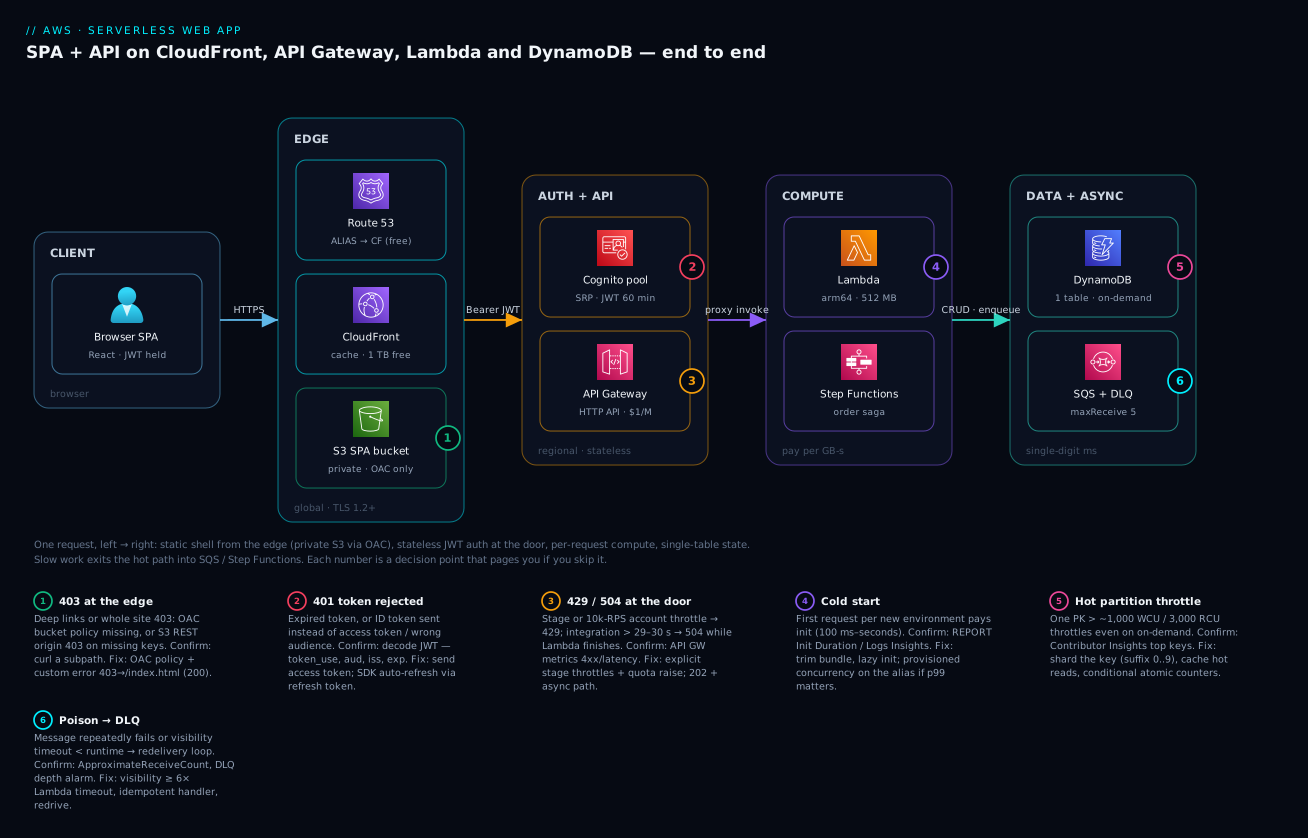
What the diagram deliberately leaves out — CloudWatch/X-Ray (they attach to every node), the EventBridge bus (an alternative entry to the async zone), and multi-region — are additive; the five-zone spine is the architecture. If you can redraw this spine and narrate each badge, you understand the system.
Real-world scenario
TicketLeaf, a twelve-person events startup in Bengaluru, sells tickets for club nights and indie gigs — 40–80k monthly users, near-zero traffic on weekday mornings, brutal spikes when a popular act announces at 6 p.m. Their v1 was a Node monolith on two t3.medium instances behind an ALB with RDS MySQL: ~₹18,000/month, and it fell over twice during on-sales when connections piled up.
The rebuild followed this article’s spine: React SPA on S3 + CloudFront (OAC, PriceClass_200), Cognito Essentials (~35k MAU — 10k free, ~$375 beyond, their biggest surprise line item), HTTP API with JWT authorizer, twelve Node.js 20 Lambdas at 1,024 MB on arm64, single-table DynamoDB on-demand, EventBridge OrderPlaced events fanning to SQS-fed workers (email, WhatsApp notify, analytics) and a Standard Step Functions saga for reserve → charge → issue → notify with compensation.
Launch week produced three instructive incidents. First, deep links 403’d: marketing shared app.ticketleaf.in/events/arijit-blr and users got CloudFront’s XML AccessDenied — the custom error response (403 → /index.html, 200) had been configured only on the staging distribution. Five-minute fix, but a reminder that with S3 REST origins missing key = 403, not 404. Second, the first big on-sale threw 429s at exactly 100 RPS — nobody had noticed the account-level API Gateway throttle had been lowered to 100 RPS in that account by an earlier team “to be safe.” A Service Quotas request and explicit per-stage throttles (2,000 RPS API, 200 RPS per route) fixed it. Third and most educational: the seat-inventory item for the Arijit on-sale was a single EVENT#<id>/INVENTORY counter — a textbook hot key. At ~1,400 write requests/s against a 1,000 WCU partition ceiling, DynamoDB threw ProvisionedThroughputExceededException (yes, on-demand tables throw it too — the partition limit is physics, not billing). They sharded the counter across ten suffixed items with scatter-gather reads and moved the availability display to a 2-second-TTL cached value — sale throughput tripled with zero throttles the following week.
Steady-state numbers after three months: p50 API latency 38 ms, p99 210 ms; cold starts 0.4% of invocations (they skipped provisioned concurrency after measuring); monthly bill ≈ $61 — CloudFront $0 (inside the free TB), Lambda ~$4, API Gateway ~$9 (9M requests), DynamoDB ~$11, Cognito ~$28 net of tier changes, SQS/EventBridge/Step Functions ~$5, CloudWatch/X-Ray ~$4 — call it ₹5,200/month, down from ₹18,000, with on-sales that no longer page anyone. Their retro’s one-liner is the whole pattern: “we stopped paying for idle and started paying attention to quotas.”
Advantages and disadvantages
| Advantages | Disadvantages |
|---|---|
| True pay-per-use — $0 at zero traffic; cost tracks revenue-ish load | Cold-start latency on sync paths (100 ms–seconds; worst for Java/.NET) |
| Scales 0 → thousands RPS with no capacity management | Quota-driven failure modes — 429s/throttles you must know in advance |
| No servers to patch; tiny ops surface; per-tier managed HA across AZs | Distributed debugging — one request spans 4–6 services; tracing is mandatory, not optional |
| Fine-grained security: per-function IAM roles, stateless JWT auth | DynamoDB rigidity — access patterns up front; ad-hoc queries/joins hurt |
| Independent deploy/scale per function; blast radius per route | 29 s / 6 MB / 15 min ceilings force architectural workarounds |
| Free tiers cover dev/small prod almost entirely | Per-request pricing can lose at sustained high, steady load vs containers |
| Managed identity (Cognito) cheaper than building auth | Cognito MAU pricing stings at consumer scale; migrations are sticky |
| Async primitives (SQS/EventBridge/SFN) built in, DLQs everywhere | Vendor coupling: the architecture is AWS-shaped; porting is a rewrite |
When serverless wins: spiky/diurnal/unpredictable traffic, request-response APIs under ~50 ms of compute, teams without dedicated ops, products where time-to-market beats latency perfection, and anything with long idle periods (internal tools, B2B portals, MVPs). When it loses: sustained high steady throughput (a flat 500 RPS 24×7 — do the math, containers usually win on raw compute cost), latency-critical paths that cannot tolerate p99.9 cold starts even with provisioned concurrency, long-lived connections and heavy WebSocket state, compute >15 minutes per unit, and portability requirements. The honest crossover: many teams run this exact architecture and one Fargate service (see AWS Compute: EC2, Lambda, ECS and EKS and AWS Load Balancers and API Gateway) for the one hot, steady, latency-sensitive endpoint.
Hands-on lab
Build the core slice — Cognito-protected HTTP API → Lambda → DynamoDB — in ~20 minutes, essentially free-tier. Prereqs: AWS CLI v2, SAM CLI ≥1.100, Node.js 20, a sandbox account/region (ap-south-1 below).
1. Scaffold.
mkdir ticketleaf-lab && cd ticketleaf-lab && mkdir src
2. template.yaml — the whole backend in one SAM file:
AWSTemplateFormatVersion: '2010-09-09'
Transform: AWS::Serverless-2016-10-31
Globals:
  Function: { Runtime: nodejs20.x, MemorySize: 512, Timeout: 10, Tracing: Active,
              Architectures: [arm64] }

Resources:
  UserPool:
    Type: AWS::Cognito::UserPool
    Properties:
      UserPoolName: lab-users
      AutoVerifiedAttributes: [email]
      UsernameAttributes: [email]
  UserPoolClient:
    Type: AWS::Cognito::UserPoolClient
    Properties:
      UserPoolId: !Ref UserPool
      GenerateSecret: false
      ExplicitAuthFlows: [ALLOW_USER_PASSWORD_AUTH, ALLOW_USER_SRP_AUTH, ALLOW_REFRESH_TOKEN_AUTH]

  NotesTable:
    Type: AWS::DynamoDB::Table
    Properties:
      BillingMode: PAY_PER_REQUEST
      AttributeDefinitions: [{ AttributeName: PK, AttributeType: S },
                             { AttributeName: SK, AttributeType: S }]
      KeySchema: [{ AttributeName: PK, KeyType: HASH },
                  { AttributeName: SK, KeyType: RANGE }]

  Api:
    Type: AWS::Serverless::HttpApi
    Properties:
      Auth:
        Authorizers:
          CognitoJwt:
            JwtConfiguration:
              issuer: !Sub https://cognito-idp.${AWS::Region}.amazonaws.com/${UserPool}
              audience: [!Ref UserPoolClient]
            IdentitySource: $request.header.Authorization
        DefaultAuthorizer: CognitoJwt

  NotesFn:
    Type: AWS::Serverless::Function
    Properties:
      Handler: index.handler
      CodeUri: src/
      Environment: { Variables: { TABLE: !Ref NotesTable } }
      Policies: [{ DynamoDBCrudPolicy: { TableName: !Ref NotesTable } }]
      Events:
        List:   { Type: HttpApi, Properties: { ApiId: !Ref Api, Path: /notes, Method: GET } }
        Create: { Type: HttpApi, Properties: { ApiId: !Ref Api, Path: /notes, Method: POST } }

Outputs:
  ApiUrl:    { Value: !Sub "https://${Api}.execute-api.${AWS::Region}.amazonaws.com" }
  PoolId:    { Value: !Ref UserPool }
  ClientId:  { Value: !Ref UserPoolClient }
3. src/index.mjs — one handler, two routes, per-user data via the JWT sub claim (init code outside the handler, as preached):
import { DynamoDBClient } from "@aws-sdk/client-dynamodb";
import { DynamoDBDocumentClient, QueryCommand, PutCommand } from "@aws-sdk/lib-dynamodb";
const ddb = DynamoDBDocumentClient.from(new DynamoDBClient({}));   // init: once per environment

export const handler = async (event) => {
  const sub = event.requestContext.authorizer.jwt.claims.sub;
  if (event.requestContext.http.method === "POST") {
    const { text } = JSON.parse(event.body ?? "{}");
    const note = { PK: `USER#${sub}`, SK: `NOTE#${Date.now()}`, text };
    await ddb.send(new PutCommand({ TableName: process.env.TABLE, Item: note }));
    return { statusCode: 201, body: JSON.stringify(note) };
  }
  const out = await ddb.send(new QueryCommand({
    TableName: process.env.TABLE,
    KeyConditionExpression: "PK = :pk AND begins_with(SK, :sk)",
    ExpressionAttributeValues: { ":pk": `USER#${sub}`, ":sk": "NOTE#" },
    ScanIndexForward: false,
  }));
  return { statusCode: 200, body: JSON.stringify(out.Items) };
};
4. Deploy (sam build && sam deploy --guided, accept defaults, stack name ticketleaf-lab). Expected tail: Successfully created/updated stack - ticketleaf-lab plus the three outputs. Export them:
get_out() { aws cloudformation describe-stacks --stack-name ticketleaf-lab \
  --query "Stacks[0].Outputs[?OutputKey=='$1'].OutputValue" --output text; }
API=$(get_out ApiUrl); POOL=$(get_out PoolId); CLIENT=$(get_out ClientId)
5. Prove the door is locked. curl -i $API/notes → 401 {"message":"Unauthorized"} — the authorizer rejected you before Lambda ran (check CloudWatch: zero invocations).
6. Create a user and get a JWT (admin-create to skip email flow in the lab; USER_PASSWORD_AUTH is enabled here for curl-ability — disable it outside labs):
aws cognito-idp admin-create-user --user-pool-id $POOL --username vinod@example.com \
  --message-action SUPPRESS
aws cognito-idp admin-set-user-password --user-pool-id $POOL \
  --username vinod@example.com --password 'Str0ng-Passw0rd!' --permanent
TOKEN=$(aws cognito-idp initiate-auth --auth-flow USER_PASSWORD_AUTH \
  --client-id $CLIENT \
  --auth-parameters USERNAME=vinod@example.com,PASSWORD='Str0ng-Passw0rd!' \
  --query 'AuthenticationResult.AccessToken' --output text)
7. Call the API authenticated.
curl -s -X POST $API/notes -H "Authorization: Bearer $TOKEN" \
  -H "Content-Type: application/json" -d '{"text":"serverless works"}'
# → 201 {"PK":"USER#<sub>","SK":"NOTE#1751871234567","text":"serverless works"}
curl -s $API/notes -H "Authorization: Bearer $TOKEN"
# → 200 [ { ...your note... } ]
8. See the machinery. Cold vs warm: the first request’s REPORT line in CloudWatch Logs shows Init Duration: ~250 ms; the second shows none. Run the Logs Insights query from the observability section; open the X-Ray trace map and find API Gateway → Lambda → DynamoDB as one trace.
9. Teardown (leave nothing billing):
sam delete --stack-name ticketleaf-lab --no-prompts
Extension exercises: add the S3+CloudFront frontend from the edge section; add an SQS-triggered worker consuming an EventBridge NoteCreated event; put 25 units of provisioned concurrency on NotesFn and watch Init Duration vanish.
Common mistakes & troubleshooting
The playbook — symptom to fix, in the order these actually show up in the field:
| # | Symptom | Root cause | Confirm | Fix |
|---|---|---|---|---|
| 1 | SPA deep links return 403 AccessDenied XML |
S3 REST origin returns 403 for missing keys; no SPA fallback | curl -i https://app…/events/x → 403 + XML body |
CloudFront custom error response 403→/index.html (200) |
| 2 | Whole site 403 after enabling OAC | Bucket policy missing/mis-scoped CloudFront service principal | Policy lacks cloudfront.amazonaws.com + your distribution ARN condition |
Apply the OAC bucket policy; keep Block Public Access on |
| 3 | Deploys don’t show for some users | index.html cached long at edge/browser |
curl -sI …/index.html → check cache-control, x-cache: Hit |
no-cache on the shell + invalidate /index.html; hash all bundles |
| 4 | Every API call 401 “Unauthorized” | ID token sent instead of access token, or wrong audience/issuer in authorizer | Decode JWT (token_use, aud, iss) vs authorizer config |
Send access token; align audience = app-client ID |
| 5 | 401s begin exactly N minutes after login | Token expired; SPA never refreshes | exp claim vs clock; works right after re-login |
Use the SDK’s auto-refresh (refresh token), retry-once-on-401 |
| 6 | Browser: CORS error, but curl works | Preflight OPTIONS unanswered / origin not allowed |
DevTools network tab: failing OPTIONS; missing access-control-allow-origin |
Configure CorsConfiguration on the HTTP API (exact origin, Authorization header) |
| 7 | 429 Too Many Requests at modest load |
Stage/route/account throttle lower than you think | aws service-quotas get-service-quota … L-8A5B8E43; stage settings |
Raise account quota; set deliberate per-stage/route limits |
| 8 | 504 after exactly 29–30 s; Lambda log shows success later |
Integration timeout < function duration | API GW latency ≈ 29,000 ms; Lambda Duration > that |
Return 202 + async path; (REST regional) raise timeout quota; shorten work |
| 9 | Random 502 Internal server error from HTTP API |
Malformed Lambda proxy response (missing statusCode/non-string body) or unhandled exception |
Lambda log: response shape / stack trace at that timestamp | Always return {statusCode, body: JSON.stringify(...)}; wrap handler in try/catch |
| 10 | 502/500 burst during traffic spike | Lambda concurrency throttling (account pool exhausted) | Throttles metric > 0; account ConcurrentExecutions at limit |
Raise account concurrency; reserved concurrency for the hot function |
| 11 | First request after idle takes 2–5 s | Cold start (big package / heavy init / VPC + Java) | REPORT line Init Duration; Logs Insights cold-start query |
Trim bundle, lazy imports, arm64; provisioned concurrency or SnapStart if it matters |
| 12 | ProvisionedThroughputExceededException on an on-demand table |
Hot partition — one PK over 1,000 WCU/3,000 RCU | CloudWatch Contributor Insights on the table → top keys | Shard the hot key; cache reads; spread writes |
| 13 | Worker Lambda processes the same message repeatedly | Visibility timeout < function runtime; no DLQ | SQS ApproximateReceiveCount climbing on one message |
Visibility ≥ 6× function timeout; add DLQ maxReceiveCount 5; make handler idempotent |
| 14 | Emails/events silently never happen | Async failure with no DLQ (Lambda async or EventBridge target) | Lambda DeadLetterErrors/AsyncEventsDropped; EventBridge FailedInvocations |
Configure DLQ/OnFailure destinations everywhere async |
| 15 | Bill spike with flat traffic | Log ingestion (debug logging at volume) or unsampled X-Ray | Cost Explorer by service → CloudWatch; Logs ingestion metric | Drop log level, set retention, sample traces |
The error-code map across the stack — where a status code is generated tells you where to look:
| Code | Emitted by | Actually means | First place to look |
|---|---|---|---|
| 403 (XML body) | S3 via CloudFront | Missing object or OAC/policy break | Bucket policy, error mappings |
| 401 | API GW authorizer | JWT missing/expired/invalid/wrong aud/iss |
Decode the token; authorizer config |
| 403 | API GW | Route exists but authorization failed (scopes/policy); or missing route + default 403 | Route auth config, resource policy |
| 429 | API GW / Lambda / DynamoDB (as exception) | Throttle at that layer | Which layer’s metric spiked first |
| 502 | API GW | Lambda crashed or returned malformed proxy response | Lambda logs at that timestamp |
| 504 | API GW / CloudFront | Integration timeout (29–30 s) | Lambda duration; downstream latency |
| 500 | API GW | Internal integration failure (incl. Lambda throttle on sync invoke) | Throttles metric, API GW execution logs |
TooManyRequestsException |
Lambda API | Concurrency limit hit | Account/reserved concurrency |
ProvisionedThroughputExceededException |
DynamoDB SDK | Partition or table throughput exceeded (SDK retries first) | Contributor Insights hot keys |
ConditionalCheckFailedException |
DynamoDB | Conditional write lost the race (often correct behaviour — idempotency working) | Only alarm if unexpected |
Best practices
- One Lambda per route-ish, one IAM role per Lambda — least privilege beats a mega-function with
dynamodb:*. SAM’s scoped policy templates (DynamoDBCrudPolicy) make this cheap. - Ship arm64 by default; benchmark once, save ~20% on compute forever.
- Set memory by measurement (Power Tuning), not vibes; 512–1,024 MB is the web-API sweet spot.
- Alias + versions for every function; point provisioned concurrency and event sources at the alias, deploy with CodeDeploy canaries (
Canary10Percent5Minutes) so a bad deploy rolls itself back. - Throttle every stage explicitly and keep a Service Quotas dashboard for the big four: API GW RPS, Lambda concurrency, DynamoDB table throughput, Cognito category RPS. Review before every launch/marketing event.
- DLQs are non-negotiable on every queue, every async Lambda, every EventBridge target — plus an alarm on DLQ depth > 0.
- Idempotency keys on every mutating endpoint (conditional put on
IDEMP#<key>with TTL): clients retry, SQS redelivers, Step Functions re-runs — duplicates are a when, not an if. - Structured JSON logs + correlation IDs (Lambda Powertools) from day one; you cannot grep your way across five services.
- Cache immutable assets forever, HTML never; automate the deploy-and-invalidate sequence in CI.
- Keep functions out of VPCs unless they need VPC resources — DynamoDB/SQS/EventBridge need no VPC; adding one buys you cold-start ENI paths, gateway/interface endpoints and NAT bills for nothing.
- Infrastructure as code only — SAM or Terraform, never console-built prod. Console for reading, code for writing.
- Do the container math annually: when a function sits at high steady concurrency 24×7, price the Fargate equivalent — grown-up architectures mix both.
Security notes
Identity and least privilege. Each function gets its own execution role scoped to its table/queue/topic ARNs (condition keys like dynamodb:LeadingKeys can even enforce per-tenant prefixes). No IAM users, no long-lived keys — CI deploys via OIDC-assumed roles. Cognito handles user credentials so you never store a password hash; turn on MFA (at least optional), and use the Plus tier’s adaptive auth if you are a credential-stuffing target.
Tokens. Access/ID tokens: short (60 min default is fine; shorter for sensitive apps). Refresh tokens: enable revocation and device tracking so a stolen refresh token can be killed (aws cognito-idp revoke-token). In the SPA, keep tokens in memory (the Amplify default storage is fine for most; understand the XSS trade-offs before inventing your own). Never log a token — scrub Authorization headers from access logs.
Edge. Block Public Access on the SPA bucket, OAC-only reads, TLS 1.2 minimum, HSTS + Content-Security-Policy via a CloudFront response headers policy — CSP is your main XSS mitigation, and XSS is the threat model for a JWT-holding SPA. Put AWS WAF (managed common + known-bad-inputs rules, plus a rate-based rule) on CloudFront for public apps.
Service-to-service. All calls are IAM-signed (SigV4) — there are no network-level trust assumptions to misconfigure, which is why this architecture needs no VPC by default; if policy mandates private networking, interface endpoints exist for every service here (see AWS VPC, Subnets and Security Groups Explained). Encrypt at rest everywhere it isn’t already: DynamoDB is encrypted by default (AWS-owned key; switch to a customer-managed KMS key for audit-grade control), same for S3 (SSE-S3 → SSE-KMS where required), SQS/SNS/EventBridge support KMS too. Secrets (third-party API keys) live in Secrets Manager or SSM Parameter Store SecureString, fetched in init and cached — never in Lambda env vars in plaintext if you can avoid it, never in code. And log the control plane: CloudTrail on, per AWS CloudTrail, Config and Audit Compliance.
Cost & sizing
The pay-per-use model, with real arithmetic (us-east-1 list prices; multiply by ~₹85/USD; ap-south-1 runs a few percent higher on some services). Always-free tiers that matter here: Lambda 1M requests + 400,000 GB-s/month; DynamoDB 25 GB + 25 provisioned WCU/RCU; CloudFront 1 TB egress + 10M requests; SQS 1M requests; X-Ray 100k traces; Cognito Essentials 10,000 MAU.
Scenario A — early production: 5M API requests/month (~2 RPS average), Lambda 512 MB × 120 ms, DynamoDB 5M reads + 1M writes, 50 GB CDN egress, 8,000 MAU:
| Line item | Arithmetic | Monthly |
|---|---|---|
| Lambda requests | 5M − 1M free = 4M × $0.20/M | $0.80 |
| Lambda duration | 5M × 0.12 s × 0.5 GB = 300k GB-s → inside 400k free | $0.00 |
| HTTP API | 5M × $1.00/M | $5.00 |
| DynamoDB on-demand | 2.5M RRU × $0.125/M + 1M WRU × $0.625/M | $0.94 |
| DynamoDB storage | 10 GB → inside 25 GB free | $0.00 |
| CloudFront + S3 | 50 GB + 2M req → inside free TB; S3 5 GB | $0.12 |
| Cognito Essentials | 8,000 MAU → inside 10k free | $0.00 |
| SQS + EventBridge + SFN | ~2M msgs + 1M events + 50k transitions | $3.10 |
| CloudWatch + X-Ray | 4 GB logs ingest + retention + sampled traces | $2.50 |
| Total | ≈ $12.50 ≈ ₹1,050/month |
The same load on ALB + 2× Fargate (0.5 vCPU/1 GB) + RDS db.t4g.micro Multi-AZ floors around $95–110/month before it serves a request — an ~8× gap, plus the pager you didn’t carry.
Scenario B — success: 100M API requests/month (~38 RPS average, peaks ×10), 60k MAU, 500 GB egress:
| Line item | Arithmetic | Monthly |
|---|---|---|
| Lambda (requests + duration) | 99M × $0.20/M + (6M GB-s − 0.4M free) × $0.0000167 | $113 |
| HTTP API | 100M × $1.00/M | $100 |
| DynamoDB | 50M RRU + 20M WRU × rates | $19 |
| Cognito Essentials | 50k billable MAU × $0.015 | $750 |
| CloudFront/S3/queues/logs | egress inside free TB; bigger log volume | ~$40 |
| Total | ≈ $1,020 ≈ ₹87,000/month |
Two lessons jump out of Scenario B. First, Cognito becomes the biggest line at consumer scale — model MAU growth before you commit, and note REST API would add $250 over HTTP API at this volume for nothing you use. Second, even at 100M requests the compute is ~$113; a Fargate fleet handling the same peaks would be in the same range — the serverless premium buys you the 10× peak absorption without pre-provisioning. The crossover argument is utilization: at high, flat, sustained load (the same 38 RPS with no idle), containers start winning on raw $/request; with spiky or diurnal load, serverless keeps winning. Right-size by watching four numbers monthly: Lambda GB-s (memory tuning), API GW request count (per-request tax), DynamoDB WRU/RRU split (on-demand vs provisioned switch — at steady load, flipping a hot table to provisioned+auto-scaling routinely saves 40–60%), and CloudWatch ingest (the silent grower). Storage-heavy features (uploads, exports) go direct-to-S3 with pre-signed URLs — never through Lambda — for both the 6 MB limit and the bill; lifecycle them per Amazon S3 Storage Classes and Lifecycle.
Interview & exam questions
1. Walk me through what happens when a user loads the app and clicks “buy ticket.” DNS via Route 53 ALIAS to CloudFront; CloudFront serves the cached SPA from a private S3 origin via OAC. The SPA authenticates against Cognito (SRP), receives ID/access/refresh JWTs. The buy click sends POST /orders with the access token; API Gateway’s JWT authorizer validates signature/issuer/audience/expiry statelessly, invokes Lambda; Lambda writes DynamoDB (conditional write for inventory), publishes an event; SQS/Step Functions handle email and fulfilment async; the API returns in tens of ms.
2. HTTP API vs REST API — how do you choose? Default to HTTP API: ~$1.00/M vs $3.50/M, lower latency, built-in JWT authorizer — everything a JSON+JWT API needs. Choose REST only for API keys/usage plans, VTL request/response transformation, built-in caching, private (VPC) endpoints, edge-optimized endpoints, direct WAF, or canary stages.
3. What exactly is a cold start and three ways to reduce its impact? First invocation on a new execution environment pays environment creation + code download + init (code outside the handler). Reduce: smaller bundles and lazy init; more memory/arm64 (faster init); provisioned concurrency (pre-initialized environments, no cold start on them) or SnapStart (snapshot-resume for Java/Python/.NET). Also: keep functions out of VPCs unless needed, and measure — if cold starts are <1% of invokes, spend nothing.
4. Why can a DynamoDB on-demand table still throttle? Throughput is delivered per partition: ~3,000 RCU/1,000 WCU each. A hot key concentrates load on one partition — billing mode is irrelevant to that physical ceiling. Fix by sharding the key (write sharding + scatter-gather), caching hot reads, or restructuring keys. Confirm with CloudWatch Contributor Insights.
5. ID token vs access token — which goes to the API and why does it matter? The access token authorizes API calls (token_use: access, carries scopes/groups); the ID token describes identity for the client. JWT authorizers configured with the app-client audience typically reject the wrong token type — the classic “everything 401s in prod” bug is the SPA sending the ID token.
6. Your API returns 502 intermittently but Lambda logs show no errors. Likely cause? Malformed proxy response: the handler returned an object without statusCode/string body on some code path (or threw after logging success, or crashed the runtime). API Gateway can’t map it → 502. Fix by normalizing every return path; catch-all middleware (Powertools/middy) makes it structural.
7. How does the JWT authorizer scale — does it call Cognito per request? No. It fetches and caches the pool’s JWKS public keys, then verifies signatures locally plus iss/aud/exp claims — stateless, no Cognito round-trip, no per-request auth charge, which is why token validity (not Cognito RPS) is your session-control knob.
8. When would you not build this architecture? Sustained flat high throughput (containers cheaper per request), hard p99.9 latency floors where any cold start is unacceptable, long-lived compute >15 min per unit, heavy stateful protocols, ad-hoc relational query needs, or strict multi-cloud portability mandates.
9. SQS vs SNS vs EventBridge in one line each? SQS: a buffer one consumer drains at its own pace — decouples rates. SNS: push fan-out of one message to many subscribers (+ SMS/mobile). EventBridge: an event bus with content-based routing rules, SaaS/AWS event integration, archive/replay and a scheduler — the default for domain events; combine (EventBridge → SQS → Lambda) so every consumer gets buffering and a DLQ.
10. Standard vs Express Step Functions? Standard: exactly-once, up to 1 year, $25/M transitions, full auditable history — business-critical workflows (payments, fulfilment). Express: at-least-once, ≤5 min, priced on requests+duration, much cheaper at volume — high-rate short orchestrations with idempotent steps.
11. How do you deploy a Lambda change safely with zero downtime? Publish a new version, shift the alias with CodeDeploy canary/linear traffic shifting (e.g., 10% for 5 minutes), alarm on Errors/Duration to auto-rollback. Provisioned concurrency and event sources bind to the alias, so the shift is invisible to callers.
12. Design the inventory decrement so overselling is impossible. Atomic conditional update: UpdateItem with SET available = available - :q and ConditionExpression: available >= :q; a failed condition (ConditionalCheckFailedException) means sold out — no read-modify-write race. At extreme rates, shard the counter and/or serialize per-event through a FIFO group or Step Functions.
Cert relevance: this architecture is the spine of SAA-C03 (Design Resilient/High-Performing/Cost-Optimized Architectures — serverless is its favourite answer), most of DVA-C02 (Lambda lifecycle, API Gateway, DynamoDB, Cognito flows, X-Ray), the serverless-refactor scenarios in SAP-C02, and the Serverless domain of ANS/Data specialties touch the async half.
Quick check
- Users report the app “sometimes takes 3 seconds to respond after lunch.” Which architectural behaviour is the prime suspect, and what one log field confirms it?
- Your SPA bucket has Block Public Access enabled and no public policy — yet the site serves fine through CloudFront. What makes that possible?
- A
POST /orderscall spends 31 seconds in Lambda and completes successfully, but the client received an error. What error code did it get and from where? - On sale day, writes to one event’s inventory item throw
ProvisionedThroughputExceededExceptionalthough the on-demand table is nowhere near its account limits. Why? - Which token does the SPA put in the
Authorizationheader, how is it verified, and what happens when it expires?
Answers
- Cold starts after post-lunch idle reaped warm environments — the first request per new environment pays init. Confirm via the
Init Durationfield onREPORTlines (orcount(@initDuration)in Logs Insights). Fix with provisioned concurrency if the p-latency matters. - Origin Access Control: CloudFront signs origin requests with SigV4 as
cloudfront.amazonaws.com, and the bucket policy allowss3:GetObjectfor that service principal scoped to your distribution ARN — private to the world, readable by your distribution only. - A 504 from API Gateway — the integration timeout (~29–30 s) fired and the gateway abandoned the request even though Lambda (timeout up to 900 s) finished. Long work belongs on the async path with a
202. - Hot partition: one partition key = one partition = ~1,000 WCU ceiling regardless of billing mode or table-level quota. Shard the counter key (suffix 0…9) and aggregate on read, or serialize through a queue.
- The access token, verified statelessly by the JWT authorizer against Cognito’s cached JWKS keys plus
iss/aud/expchecks. On expiry the API returns 401 and the SPA’s SDK uses the refresh token to obtain new tokens silently, then retries.
Glossary
- SPA (single-page application) — a frontend delivered as static assets that renders and routes client-side, calling APIs for data.
- OAC (Origin Access Control) — CloudFront mechanism that SigV4-signs origin requests so a private S3 bucket can be read only by your distribution (successor to OAI).
- JWKS — the JSON Web Key Set of public keys an issuer (Cognito) publishes; authorizers verify JWT signatures against it.
- User pool / app client — Cognito’s user directory + token issuer, and a named consumer of it whose ID becomes the token audience.
- SRP (Secure Remote Password) — password-proof protocol used by Cognito sign-in that never transmits the password itself.
- JWT authorizer — API Gateway’s stateless validation of a bearer token’s signature, issuer, audience and expiry before invoking the integration.
- Execution environment — the Firecracker micro-VM instance that runs one Lambda invocation at a time; reused warm, created cold.
- Cold start / init phase — first-use environment creation plus your outside-the-handler code; visible as
Init Duration. - Provisioned concurrency — pre-initialized execution environments that eliminate cold starts for a function alias, billed while allocated.
- SnapStart — Lambda feature that resumes environments from a snapshot of the initialized state (Java free; Python/.NET priced).
- Concurrency — number of simultaneous in-flight executions; the unit Lambda scales and throttles in (RPS × duration).
- RCU/WCU vs RRU/WRU — DynamoDB capacity units (provisioned, per second) vs request units (on-demand, per call); 1 read unit = 4 KB (strong), 1 write unit = 1 KB.
- Single-table design — modelling multiple entity types in one DynamoDB table with generic PK/SK so each access pattern is one Query.
- GSI (global secondary index) — an alternate-key, eventually consistent projection of a table serving additional access patterns.
- Hot partition — a partition key receiving load beyond ~3,000 RCU/1,000 WCU, throttling regardless of billing mode.
- DAX — DynamoDB Accelerator; a write-through, in-VPC cache cluster serving microsecond reads for read-heavy workloads.
- DLQ (dead-letter queue) — where messages/events land after exhausting retries, preserving them for inspection and redrive.
- Visibility timeout — how long a received SQS message stays hidden before redelivery; must exceed worst-case processing time.
- Saga / compensation — multi-step distributed transaction pattern (natural in Step Functions) where failures trigger explicit undo steps.
Next steps
You can now draw, defend and price the canonical serverless web application. Deepen each tier from here:
- Next: AWS Lambda Patterns: Event-Driven Functions That Scale to Zero — the async half of this architecture: event sources, batching, back-pressure and worker patterns in depth.
- Related: AWS Databases: RDS, DynamoDB and Aurora — Choose the Right Store — pressure-test the DynamoDB choice, and know when the answer is Aurora Serverless instead.
- Related: AWS Load Balancers and API Gateway: ALB, NLB and API Gateway Compared — when the front door should be an ALB (containers, WebSockets at scale) rather than API Gateway.
- Related: Amazon S3 Storage Classes and Lifecycle: Optimize Cost Without Losing Data — the upload/export side: pre-signed URLs, storage classes and lifecycle rules for user content.
- Related: AWS Organizations and IAM Foundations: Accounts, OUs and Roles — put this workload in a well-structured multi-account setup with least-privilege deploy roles.