Ask ten AWS architects to whiteboard “a web application on AWS” and you get ten nearly identical drawings: DNS at the top, a load balancer in the middle, two rows of EC2 instances, a database at the bottom, everything duplicated across two Availability Zones. That drawing is the three-tier web application architecture, and it has been the default answer for two decades because it is the smallest design that survives the three failures that actually happen — an instance dying, a data centre going dark, and a database host failing — without a human touching anything at 2 a.m.
A three-tier architecture separates a web application into a presentation tier (what receives browser traffic), an application tier (where business logic runs) and a data tier (where state lives), each in its own network segment, each scaled and secured independently. On AWS the canonical mapping is Route 53 and CloudFront at the edge, an Application Load Balancer feeding an EC2 Auto Scaling group for the web tier, an internal load balancer and second Auto Scaling group for the app tier, and RDS Multi-AZ plus S3 for data — all inside a VPC laid out across two or three Availability Zones.
This article is the full walkthrough, in the order a request travels: the mental model first, then each component with the why behind every choice — subnet plan, NAT decision, ALB health checks, launch templates and scaling policies, Multi-AZ failover mechanics, the security-group chain, IAM roles, CloudWatch alarms — with real aws CLI, Terraform and CloudFormation, a what-fails-when table, a costed small deployment, and an honest section on when to use Lightsail, Beanstalk or serverless instead.
What problem this solves
Every three-tier architecture is an escape from the same starting point: one EC2 instance running nginx, the application and MySQL side by side. That box works brilliantly until the day it doesn’t, and its failure modes are all correlated — everything shares one machine, one disk, one IP, one Availability Zone.
| Concern | Single EC2 “everything box” | Three-tier architecture |
|---|---|---|
| Instance failure | Down until someone rebuilds it | ALB routes around it; Auto Scaling replaces it in minutes |
| AZ outage | Down for the duration (hours) | Second AZ keeps serving; capacity rebuilds automatically |
| Traffic spike | Vertical resize = downtime, with a biggest-instance ceiling | Scale-out adds instances in minutes, no downtime |
| Deployments | In-place on the live box; a bad deploy is an outage | Rolling instance refresh; reversible per-instance |
| Database contention | App and DB fight for the same CPU/RAM/IO | DB isolated on RDS with its own sizing and failover |
| Security blast radius | Web, SSH and DB on one host; one exploit owns everything | Each tier firewalled; DB unreachable from the internet by construction |
The deeper problem is coupled failure domains. On the single box, “the disk is full because of logs” takes down the database; “the app leaked memory” takes down the web server. Three-tier is not primarily about performance — it is about making each failure small, automatic to recover from, and invisible to users. It is also the background architecture behind half the AWS Solutions Architect Associate exam, so it rewards learning properly rather than by osmosis. Who hits this: every team whose “temporary” single instance became production, and anyone who inherited a pet server nobody dares reboot.
Learning objectives
By the end of this article you can:
- Explain why applications split into presentation, application and data tiers, and what “stateless compute, stateful data” buys operationally.
- Design the VPC: CIDR plan, six subnets across two AZs in three ranks, IGW, NAT gateways and route tables — and justify each choice.
- Configure an ALB end to end: HTTPS listener with ACM, HTTP redirect, target groups, health checks tuned for fast detection.
- Build web and app tiers as Auto Scaling groups from launch templates with IMDSv2, target tracking and ELB health checks.
- Explain RDS Multi-AZ failover — synchronous standby, DNS flip, 60–120 s window — and what Multi-AZ does not give you.
- Wire the tier-to-tier security-group chain and per-tier IAM roles.
- Predict what happens when an instance dies, an AZ fails or the database fails over — and estimate a small deployment’s monthly cost.
Prerequisites & where this fits
You need an AWS account, comfort with the console and CLI, and the ability to read a CIDR block without panic. If subnets, route tables and gateways are hazy, read AWS VPC & Networking Fundamentals Explained first; if Regions and AZs are new, start with AWS Regions and Availability Zones.
This is the trunk of the AWS architecture track — the “why” behind the hands-on build in Your First Highly Available Web App on AWS, with a per-component deep dive linked from each section. Master this one pattern and most AWS reference architectures reveal themselves as variations: swap EC2 for containers, RDS for Aurora, add a queue between tiers, and you have half the enterprise catalogue.
Core concepts
Four ideas carry the entire architecture; get these and every later decision becomes obvious rather than memorised.
Tiers are failure and scale boundaries, not code folders. The web/app/data split gives each layer its own blast radius, scaling dial and security perimeter: web scales with request count, app with CPU-hungry logic, data completely differently (vertically, or with read replicas). Fusing them means scaling — and failing — them together. Small apps sometimes collapse web and app into one tier; the data separation is the non-negotiable one.
Stateless compute, stateful data — the golden rule. Any web- or app-tier instance must be killable at any moment with zero data loss: no sessions in instance memory (use ElastiCache, DynamoDB or a signed cookie), no uploads on instance disk (use S3), no database on the instance, logs shipped to CloudWatch Logs. An instance holding unique state turns Auto Scaling from a healer into a data-loss machine. Every three-tier war story — including the scenario below — violates this rule.
Availability Zones are the unit of failure you plan for. An AZ is one or more physically separate data centres; AWS’s contract is that AZs fail independently. So place two of everything stateless in different AZs and let managed services (ALB, RDS Multi-AZ) handle their own cross-AZ redundancy. Two AZs is the minimum; three adds headroom at slightly higher cross-AZ data cost.
Traffic passes through choke points you control. Client → Route 53 → CloudFront/WAF → ALB → web tier → internal ALB → app tier → RDS. Every arrow is a place to attach health checks, SG rules, metrics and TLS. The choke points turn a pile of instances into a system: the ALB decides who is healthy, the SG chain decides who may talk to whom, CloudWatch watches every hop.
The whole architecture as a responsibility table:
| Tier | What runs here | AWS building blocks | Scales by | Holds state? |
|---|---|---|---|---|
| Edge | DNS, CDN, TLS, filtering | Route 53, CloudFront, ACM, AWS WAF | Managed (global) | No (cache only) |
| Web (presentation) | Front-end app, dynamic pages | ALB (public subnets) + EC2 ASG (private subnets) | Requests → CPU target tracking | Never |
| Application | Business logic, APIs, jobs | Internal ALB + EC2 ASG (private subnets) | CPU / queue depth | Never |
| Data | Relational state, files, cache | RDS Multi-AZ, S3 (ElastiCache optional) | Vertically + read replicas; S3 scales itself | Always — and only here |
The network foundation: VPC, subnets and routing
Everything sits inside one VPC — your private, software-defined network. Give it a /16 (65,536 addresses): address space is free, renumbering later is misery. The three-tier layout rule is three ranks of subnets, repeated per AZ:
- Public subnets — routed to the internet gateway (IGW). Only the ALB and NAT gateways live here. Not your EC2 instances.
- Private app subnets — no inbound path from the internet; outbound (package pulls, third-party APIs) goes via a NAT gateway in the public subnet. Web and app instances live here.
- Private data subnets — no internet route in either direction. RDS lives here; anything it needs from AWS goes over VPC endpoints, not NAT.
| Subnet | CIDR | AZ | Route for 0.0.0.0/0 | What lives here |
|---|---|---|---|---|
| public-a | 10.0.0.0/24 | ap-south-1a | Internet gateway | ALB node, NAT gateway A |
| public-b | 10.0.1.0/24 | ap-south-1b | Internet gateway | ALB node, NAT gateway B |
| app-a | 10.0.10.0/24 | ap-south-1a | NAT gateway A | Web + app EC2 (AZ a) |
| app-b | 10.0.11.0/24 | ap-south-1b | NAT gateway B | Web + app EC2 (AZ b) |
| data-a | 10.0.20.0/24 | ap-south-1a | — (no route) | RDS primary or standby |
| data-b | 10.0.21.0/24 | ap-south-1b | — (no route) | RDS standby or primary |
Leave CIDR gaps (10.0.2–9, 10.0.12–19) so a third AZ or new rank slots in without renumbering. Each layout decision is deliberate:
| Decision | The choice made | Why | The alternative, and why not |
|---|---|---|---|
| VPC size | /16 (10.0.0.0/16) | Room for years of growth; peering-friendly if non-overlapping | /24 VPC: you will re-IP the estate within a year |
| AZ count | 2 (3 for critical) | Survives one AZ failure; matches ALB/RDS minimums | 1 AZ: an AZ event is a full outage; 4+: cost with little gain |
| Instances in private subnets | Always | No public IPs on compute; attack surface is the ALB alone | Public instances “for easy SSH”: use SSM instead |
| NAT gateway per AZ | One per public subnet | AZ loss doesn’t sever the surviving AZ’s egress; no cross-AZ data charge | Single NAT: ~₹2,800/mo cheaper but a hidden cross-AZ dependency — dev only |
| Data subnets, no internet route | Yes | Databases never need the internet; removes an exfiltration class | Reusing app subnets: loses the “DB cannot egress” guarantee |
| S3 from private subnets | Gateway VPC endpoint | Free, keeps S3 traffic off the NAT (~$0.045/GB processing) | Via NAT: works, but you pay per GB for the privilege |
The build, condensed to the commands that matter (IDs shortened; region ap-south-1):
# VPC + one subnet per rank in AZ a (repeat -a → -b for the second AZ)
aws ec2 create-vpc --cidr-block 10.0.0.0/16 \
  --tag-specifications 'ResourceType=vpc,Tags=[{Key=Name,Value=three-tier}]'
aws ec2 create-subnet --vpc-id vpc-0aa1 --cidr-block 10.0.0.0/24  --availability-zone ap-south-1a
aws ec2 create-subnet --vpc-id vpc-0aa1 --cidr-block 10.0.10.0/24 --availability-zone ap-south-1a
aws ec2 create-subnet --vpc-id vpc-0aa1 --cidr-block 10.0.20.0/24 --availability-zone ap-south-1a

# Internet gateway → default route for the public route table
aws ec2 create-internet-gateway
aws ec2 attach-internet-gateway --internet-gateway-id igw-0bb2 --vpc-id vpc-0aa1
aws ec2 create-route --route-table-id rtb-public \
  --destination-cidr-block 0.0.0.0/0 --gateway-id igw-0bb2

# NAT gateway (per AZ, needs an EIP) → default route for each private table
aws ec2 create-nat-gateway --subnet-id subnet-public-a --allocation-id eipalloc-0cc3
aws ec2 create-route --route-table-id rtb-app-a \
  --destination-cidr-block 0.0.0.0/0 --nat-gateway-id nat-0dd4

# Free S3 gateway endpoint so instance→S3 traffic skips the NAT
aws ec2 create-vpc-endpoint --vpc-id vpc-0aa1 --service-name com.amazonaws.ap-south-1.s3 \
  --route-table-ids rtb-app-a rtb-app-b
In Terraform the entire network is one well-worn module call — the rare case where the community module is genuinely the right answer:
module "vpc" {
  source  = "terraform-aws-modules/vpc/aws"
  version = "~> 5.0"

  name = "three-tier"
  cidr = "10.0.0.0/16"

  azs              = ["ap-south-1a", "ap-south-1b"]
  public_subnets   = ["10.0.0.0/24", "10.0.1.0/24"]
  private_subnets  = ["10.0.10.0/24", "10.0.11.0/24"]
  database_subnets = ["10.0.20.0/24", "10.0.21.0/24"]

  enable_nat_gateway     = true
  one_nat_gateway_per_az = true   # false in dev to save ~$33/mo per extra NAT
  enable_dns_hostnames   = true
}
Routing subtleties, endpoint types and NAT internals get their own treatment in the AWS VPC Deep Dive; the layout above is everything this architecture needs.
Traffic in: Route 53, CloudFront and the ALB
Route 53 owns the name. For the apex domain create an alias A record — Route 53’s record type that points at AWS resources (CloudFront, ALB) by name, follows their IP changes automatically, and costs nothing per query. Never hard-code an ALB’s IPs: they change. This architecture needs exactly one alias record; the rest is in Route 53 DNS: Records, Routing Policies and Health Checks.
CloudFront does two jobs: serving static assets (/static/*, images, JS, CSS) from an S3 origin so those requests never touch your EC2 fleet, and terminating TLS close to users. The bucket stays private — CloudFront reaches it via Origin Access Control (OAC) — and AWS WAF attaches to the distribution (or ALB) with managed rule groups, dropping SQL injection, XSS and known-bad clients before they consume a vCPU you pay for. Mechanics in the CloudFront Deep Dive.
The Application Load Balancer (ALB) is the heart of the web tier: a managed Layer-7 balancer AWS runs as redundant nodes across your (minimum two) public subnets. Three sub-components matter:
- Listeners — 443 with a free auto-renewing ACM certificate forwarding to the web target group; 80 doing nothing but a 301 redirect.
- Target groups — the registered instance set for one tier; the ASG manages membership automatically.
- Health checks — the ALB probes every target and stops routing to failures. The most under-tuned setting in the whole architecture:
| Health check setting | Default | Use here | Why |
|---|---|---|---|
| Path | / | /healthz | Dedicated endpoint proving the app can serve, not just that nginx is up |
| Interval | 30 s | 10 s | Detect failure in tens of seconds, not minutes |
| Timeout | 5 s | 5 s | Fine; raise only if /healthz does real work (it shouldn’t) |
| Unhealthy threshold | 2 | 2 | 2 × 10 s → out of rotation ~20–30 s after failure |
| Healthy threshold | 5 | 2 | Back in rotation quickly; 5 × 10 s is needlessly slow |
| Success codes | 200 | 200 | Strict — a 302 login redirect must not count as healthy |
| Deregistration delay | 300 s | 30–60 s | Drain time for in-flight requests; 300 s stalls every deploy |
One design point worth making explicit: keep /healthz shallow (process up, config readable). If the probe also pings the database, a DB failover makes every instance report unhealthy at once and the ALB pulls your entire fleet during the exact 90 seconds you need it serving. Deep dependencies belong in alarms, not load-balancer probes.
Why an ALB and not an NLB or API Gateway? Because this is HTTP: you want path/host routing, health checks, WAF attachment, redirects and OIDC actions. NLB is for raw TCP/UDP at extreme scale with static IPs; API Gateway is for serverless APIs and gets expensive at steady volume. The full decision matrix is in ALB vs NLB vs API Gateway; every listener/rule/TLS option in the Elastic Load Balancing Deep Dive.
# Target group with tuned health checks
aws elbv2 create-target-group --name web-tg --protocol HTTP --port 80 \
  --vpc-id vpc-0aa1 --target-type instance \
  --health-check-path /healthz --health-check-interval-seconds 10 \
  --healthy-threshold-count 2 --unhealthy-threshold-count 2

# Internet-facing ALB across both public subnets
aws elbv2 create-load-balancer --name web-alb --type application \
  --scheme internet-facing --subnets subnet-public-a subnet-public-b \
  --security-groups sg-alb

# HTTPS listener with an ACM cert + HTTP→HTTPS redirect
aws elbv2 create-listener --load-balancer-arn $ALB_ARN --protocol HTTPS --port 443 \
  --certificates CertificateArn=$ACM_ARN \
  --ssl-policy ELBSecurityPolicy-TLS13-1-2-2021-06 \
  --default-actions Type=forward,TargetGroupArn=$TG_ARN
aws elbv2 create-listener --load-balancer-arn $ALB_ARN --protocol HTTP --port 80 \
  --default-actions 'Type=redirect,RedirectConfig={Protocol=HTTPS,Port=443,StatusCode=HTTP_301}'
The internal ALB between web and app tiers is the same resource with --scheme internal, in the private subnets, with its own target group and health checks — a stable DNS name for the web tier while app instances churn beneath it.
The compute tiers: launch templates and Auto Scaling
Both compute tiers follow the same recipe: a launch template (the versioned definition of “what an instance of this tier looks like”) plus an Auto Scaling group (ASG) (the controller keeping N healthy copies across AZs). Web and app tiers differ only in instance size, security group and user data.
| Launch template setting | Value here | Why |
|---|---|---|
| AMI | Amazon Linux 2023, or a baked golden AMI | User-data bootstrap is fine to start; baked AMIs cut boot to seconds |
| Instance type | t3.small (web) / t3.medium (app) | Burstable suits spiky web traffic; t4g (Graviton) for ~20% less |
| Security group | web-sg / app-sg | The tier chain — see the security section |
| IAM instance profile | Per-tier role | SSM, CloudWatch agent, S3/Secrets — never access keys on disk |
| Metadata options | HttpTokens=required (IMDSv2) |
Blocks the classic SSRF→credential-theft path |
| Public IP | Disabled | Private subnets; the ALB is the only front door |
| User data | cloud-init: install app, start service | Keep idempotent; debug via /var/log/cloud-init-output.log |
| EBS | 20 GB gp3, encrypted, delete-on-termination | Cheaper and faster at baseline than gp2; nothing precious lives here |
The ASG settings that make the architecture self-healing:
--vpc-zone-identifierlists the private subnets in both AZs — this is what actually spreads instances across failure domains; the ASG balances per-AZ counts automatically.--health-check-type ELB— the crucial one. By default an ASG replaces only instances failing EC2 status checks (hardware-level). With ELB health checks, an instance the ALB considers unhealthy — app hung, port closed, 500s on /healthz — is terminated and replaced. Pair it with a grace period covering your boot time (90–300 s) or the ASG kills instances mid-startup forever.- Min 2 — never 1: the minimum is your availability floor, the maximum your budget ceiling.
For scaling policy, one choice is right for this pattern and the rest are special cases:
| Policy type | How it works | Use when | Gotcha |
|---|---|---|---|
| Target tracking | “Hold average CPU at 50%” — AWS manages the alarms | Default for request-driven tiers | Metric must rise with load; scale-in is deliberately slow |
| Step scaling | Your alarm thresholds, your step adjustments | Asymmetric or multi-threshold needs | You own alarm tuning forever |
| Scheduled | Set min/desired at fixed times | Known peaks, pre-warming a sale | Blind to the unexpected — combine with target tracking |
| Predictive | ML forecast pre-provisions capacity | Strong daily/weekly periodicity | Needs history; wrong for novel spikes |
| Manual / none | Fixed desired count | Steady internal apps | HA without elasticity |
Target 50% CPU rather than 80%: the headroom is the feature — it absorbs the minutes-long gap before new instances turn InService, and it covers losing an AZ (half your fleet) without immediate saturation.
aws ec2 create-launch-template --launch-template-name web-lt \
  --launch-template-data '{"ImageId":"ami-0abcd1234example","InstanceType":"t3.small",
    "SecurityGroupIds":["sg-web"],"IamInstanceProfile":{"Name":"web-tier-profile"},
    "MetadataOptions":{"HttpTokens":"required"},"UserData":"<base64 cloud-init>"}'

aws autoscaling create-auto-scaling-group --auto-scaling-group-name web-asg \
  --launch-template LaunchTemplateName=web-lt,Version='$Latest' \
  --min-size 2 --max-size 6 --desired-capacity 2 \
  --vpc-zone-identifier "subnet-app-a,subnet-app-b" \
  --target-group-arns $TG_ARN \
  --health-check-type ELB --health-check-grace-period 120

aws autoscaling put-scaling-policy --auto-scaling-group-name web-asg \
  --policy-name keep-cpu-50 --policy-type TargetTrackingScaling \
  --target-tracking-configuration '{
    "PredefinedMetricSpecification": {"PredefinedMetricType": "ASGAverageCPUUtilization"},
    "TargetValue": 50.0
  }'
Deployments ride the same machinery: publish a new launch-template version, run an instance refresh (aws autoscaling start-instance-refresh), and the ASG rolls the fleet gradually, honouring health checks — a bad build fails its checks and the refresh halts instead of completing the outage for you. Lifecycle hooks, warm pools and mixed instances live in EC2 Auto Scaling: Launch Templates, Policies and Lifecycle; instance internals in the EC2 Deep Dive.
The data tier: RDS Multi-AZ and S3
RDS runs the relational database as a managed instance: AWS owns the OS, patching, backups and — the part you cannot script yourself at 2 a.m. — failover. The canonical choice here: MySQL or PostgreSQL on a db.t4g.medium, gp3 storage, Multi-AZ.
Multi-AZ (instance deployment) means one primary in data-a and one synchronous standby replica in data-b — every committed write lands on both before the commit returns. The standby is invisible (not queryable) until the primary fails or you patch with failover, at which point RDS promotes it and flips the DNS behind the endpoint name. Your application keeps using app-db.xxxxx.ap-south-1.rds.amazonaws.com; after a typical 60–120 seconds of failed connections, new ones land on the promoted standby. Two habits make this seamless: connect by endpoint name (never a resolved IP) and use a connection pool that retries and re-resolves DNS. The newer Multi-AZ DB cluster flavour (two readable standbys, ~35 s failovers) is the upgrade path when the single-standby model pinches.
Know what each RDS durability mechanism is for — mixing them up is the most common design error in reviews:
| Mechanism | Replication | Readable? | Purpose | Endpoint behaviour | Cost effect |
|---|---|---|---|---|---|
| Multi-AZ standby | Synchronous | No | Availability — automatic failover | Same endpoint, DNS flips | ~2× instance + storage |
| Read replica | Asynchronous | Yes | Read scaling, reporting, cross-region | Separate endpoint each | +1 instance each |
| Backups / PITR | Daily snapshot + 5-min logs | No | Recovery from bad data | Restore creates a new instance | Storage only (1–35 day retention) |
Multi-AZ does not protect you from DELETE FROM orders — that replicates synchronously too, with great efficiency. Backups (7–35 day retention) plus deletion protection are non-negotiable companions. Set the DB subnet group to the data subnets, --no-publicly-accessible, and let RDS keep the master password in Secrets Manager (--manage-master-user-password) so no credential lands in user data or a repo.
# CloudFormation: the data tier in one resource
Database:
  Type: AWS::RDS::DBInstance
  DeletionPolicy: Snapshot
  Properties:
    DBInstanceIdentifier: app-db
    Engine: mysql
    EngineVersion: "8.0"
    DBInstanceClass: db.t4g.medium
    MultiAZ: true
    AllocatedStorage: 50
    StorageType: gp3
    StorageEncrypted: true
    MasterUsername: admin
    ManageMasterUserPassword: true
    DBSubnetGroupName: !Ref DataSubnetGroup
    VPCSecurityGroups: [!Ref DbSecurityGroup]
    BackupRetentionPeriod: 7
    DeletionProtection: true
    PubliclyAccessible: false
S3 completes the data tier as the home for everything that is a file: static assets served via CloudFront/OAC, user uploads (via the SDK, or straight from browsers with presigned URLs so uploads never transit your instances), logs and backups. Turn on versioning and a lifecycle rule; S3 gives eleven-nines durability for the price of a coffee. Engines and replicas: RDS & Aurora Deep Dive; the SQL-vs-NoSQL fork: RDS vs DynamoDB vs Aurora; buckets: S3 Deep Dive.
Security: the security-group chain and IAM roles
Security groups (SGs) are stateful instance-level firewalls, and the pattern that makes three-tier work is the chain: each tier’s SG allows inbound traffic only from the SG of the tier above it — referenced by ID, never by CIDR. SG references follow membership automatically: when the ASG scales 2 → 6, the rules already cover the new four. CIDR rules between tiers are how people end up with 10.0.0.0/8 allow all three months later.
| Security group | Inbound rule | Source | Why |
|---|---|---|---|
| alb-sg | TCP 443, TCP 80 | 0.0.0.0/0 (or CloudFront prefix list) | The only internet-facing surface; 80 exists solely to redirect |
| web-sg | TCP 80 | alb-sg | Web instances accept the ALB and nothing else — not even each other |
| int-alb-sg | TCP 8080 | web-sg | Internal ALB accepts only the web tier |
| app-sg | TCP 8080 | int-alb-sg | App instances accept only the internal ALB |
| db-sg | TCP 3306 | app-sg | The database accepts only the app tier; the internet cannot route here |
Note what is absent: port 22. Nothing here needs SSH — SSM Session Manager gives shell access through the instance role with audit logging, no bastion, no key pairs, no inbound rules. Restrict alb-sg to the AWS-managed CloudFront origin-facing prefix list and users cannot bypass the WAF by hitting the ALB directly. Leave NACLs at default allow-all — a coarse, stateless second layer you reach for deliberately; trade-offs in Security Groups and NACLs Deep Dive.
IAM roles replace credentials everywhere. Each tier’s instance role grants exactly what that tier does: the web tier typically needs only AmazonSSMManagedInstanceCore and CloudWatchAgentServerPolicy; the app tier adds scoped S3 access and secretsmanager:GetSecretValue on the one DB secret ARN. No IAM users, no access keys in files. With IMDSv2 enforced, code gets short-lived credentials automatically and an SSRF hole no longer leaks them trivially. Evaluation mechanics: IAM Fundamentals.
Observability: the CloudWatch alarms that matter
The architecture heals itself, but you still need to know it happened — an auto-replaced instance at 3 a.m. is fine once and a pattern by the fifth time. Wire every alarm to an SNS topic. These cover the real failure surface:
| Alarm | Metric (namespace) | Starting threshold | What it catches |
|---|---|---|---|
| ALB 5xx spike | HTTPCode_ELB_5XX_Count (AWS/ApplicationELB) | >10 in 5 min | ALB can’t get good answers — fleet-wide problem |
| Target 5xx spike | HTTPCode_Target_5XX_Count | >20 in 5 min | Your app is throwing errors |
| Unhealthy hosts | UnHealthyHostCount (per target group) | ≥1 for 5 min | Instance out of rotation and not recovering |
| Slow responses | TargetResponseTime p95 | >1 s for 10 min | Degradation before users notice |
| CPU sustained | CPUUtilization (AWS/EC2, per ASG) | >80% for 15 min | Scaling can’t keep up, or max-size ceiling hit |
| RDS CPU | CPUUtilization (AWS/RDS) | >80% for 15 min | Query regressions, missing index, undersized class |
| RDS storage | FreeStorageSpace | <10% | Full storage stops writes; enable storage autoscaling too |
| RDS connections | DatabaseConnections | >80% of max | App-tier pool leak — precedes an outage |
Subscribe to RDS events too (failover, low storage), so you know a failover happened even though the app survived it.
aws cloudwatch put-metric-alarm --alarm-name alb-target-5xx \
  --namespace AWS/ApplicationELB --metric-name HTTPCode_Target_5XX_Count \
  --dimensions Name=LoadBalancer,Value=app/web-alb/50dc6c495c0c9188 \
  --statistic Sum --period 300 --evaluation-periods 1 --threshold 20 \
  --comparison-operator GreaterThanThreshold \
  --alarm-actions arn:aws:sns:ap-south-1:111122223333:ops-alerts
Add the CloudWatch agent (via the instance role) for memory and disk metrics — EC2 does not emit them natively. Dashboards and the audit side live in CloudWatch & CloudTrail Observability.
Architecture at a glance
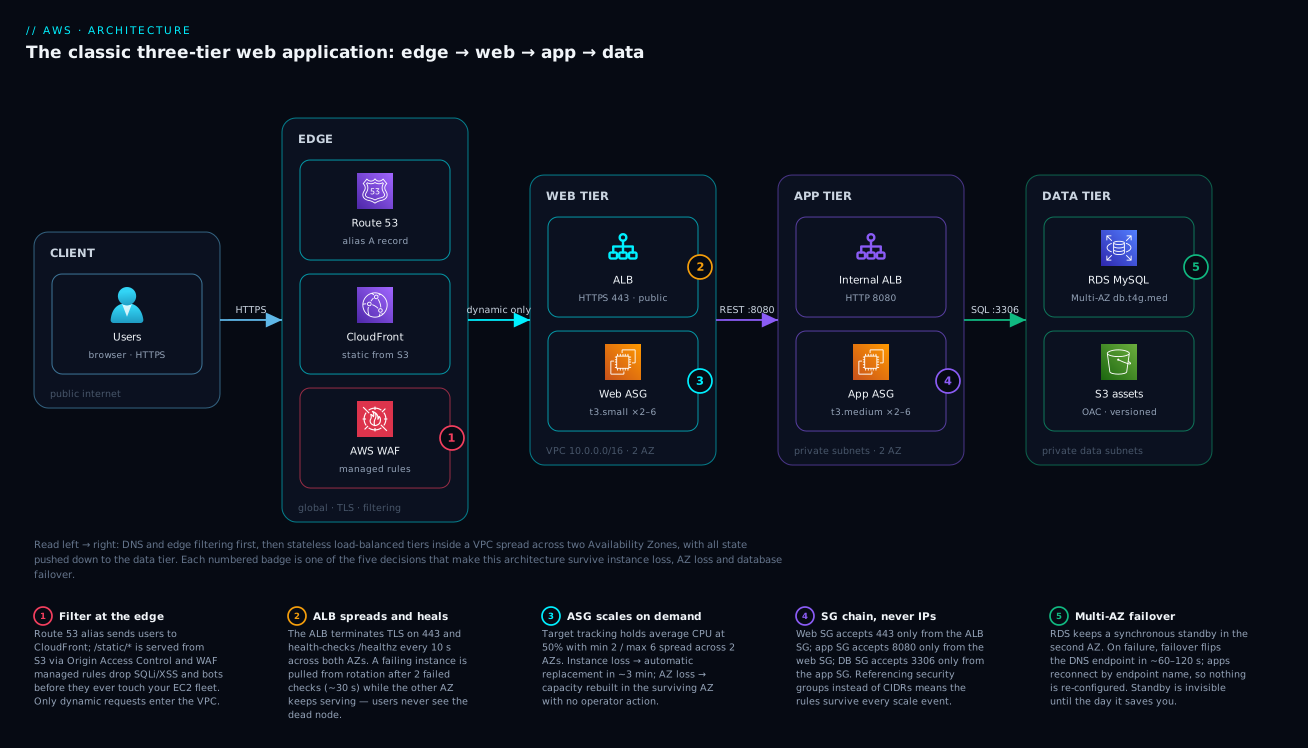
Read the diagram left to right, the way a request travels. A user resolves the domain through Route 53 and lands on CloudFront, which serves /static/* straight from a private S3 bucket via OAC while AWS WAF managed rules drop injection attempts and known-bad clients at the edge — only clean, dynamic requests ever enter your VPC. They arrive at the ALB in the public subnets, which terminates TLS on 443 and forwards to whichever web-tier instances are passing their /healthz probes, spread across two AZs by the Auto Scaling group.
The path then repeats one tier down: web instances call the internal ALB on 8080 fronting the app-tier ASG, and app instances talk SQL on 3306 to RDS Multi-AZ, whose synchronous standby waits in the second AZ for a failover that flips DNS in about a minute. The five numbered badges mark the decisions that make this drawing production-grade rather than decorative: edge filtering, ALB health checks, target-tracking scale-out, the security-group chain, and Multi-AZ failover.
What fails when: the resilience ledger
This table is the point of the whole architecture. Before building it you should be able to state what each failure does to users — afterwards, test the first three rows deliberately.
| Failure event | What the platform does | User impact | Recovery | Your action |
|---|---|---|---|---|
| Web/app instance dies or hangs | ALB pulls it after 2 failed checks (~20–30 s); ASG replaces it | A few in-flight requests error; retries succeed | InService in ~2–5 min | None; find the cause later |
| Entire AZ goes down | Surviving-AZ ALB nodes keep serving; ASG rebuilds capacity there; per-AZ NAT keeps egress | Brief blip; ~50% capacity until refill — the 50% CPU target absorbs it | Minutes | None immediately; watch CPU alarms |
| RDS primary fails (or its AZ dies) | Automatic failover: standby promoted, endpoint DNS flipped | Writes fail ~60–120 s; pools reconnect | 1–2 min | None; confirm via RDS event |
| NAT gateway’s AZ lost | Per-AZ NAT: surviving AZ unaffected. Single NAT: surviving AZ loses outbound internet (inbound still works) | None / third-party-call features fail | — / until routes re-pointed | Nothing / add a NAT in the healthy AZ |
| Bad data written (bug, human error) | Nothing — Multi-AZ faithfully replicates the mistake | Wrong data served | PITR restore to a new instance | The one row where you recover — rehearse it |
| Whole region down | Nothing in this design | Full outage | DR territory | See AWS Backup & Disaster Recovery Strategies |
Real-world scenario
TicketNila, a Chennai event-ticketing startup, ran exactly the “everything box” this article opens with: one m5.xlarge with nginx, Django and MySQL serving ~40 requests/second. Then a film-launch on-sale was signed, projected at 900 rps for two hours on a Friday evening.
The rebuild followed this article’s shape: a /16 VPC across ap-south-1a/1b, ALB, web tier (t3.small, 2–12), app tier (t3.medium, 2–10), MySQL to db.r6g.large Multi-AZ, images to S3 behind CloudFront. Load-testing at 600 rps found the first landmine: Django sessions were in local memory, so as the fleet scaled 2→8, users bounced between instances and were logged out mid-purchase; ALB sticky sessions went in as a Friday-safe band-aid. The second was quieter: the ASG used health-check-type EC2, so an instance with wedged gunicorn workers (healthy kernel) sat in rotation serving 502s until a human noticed. Switching to ELB checks with a 120 s grace period made the fleet actually self-healing.
On-sale night peaked at 870 rps: web tier 2→9, app tier 2→7, CPU near the 50% target, p95 under 400 ms. At 19:41 — mid-peak — the RDS primary’s host failed. Failover took 94 seconds; 61 checkout requests errored, every one succeeded on retry, and nobody outside the ops channel knew. The follow-ups were the real fixes: sessions to ElastiCache Redis (stickiness off), a read replica for the analytics dashboard that had been stealing primary IOPS, scheduled scaling to min 6 before any announced on-sale. The bill went from ₹9,000 to ~₹52,000/mo — “the cheapest insurance in the company”, per the CTO, after seeing the failover graph.
Advantages and disadvantages
| Advantages | Disadvantages |
|---|---|
| Survives instance loss, AZ loss and DB failure with no operator action | 24×7 baseline cost (~$250/mo small) even at zero traffic — serverless idles cheaper |
| Every component scales independently; capacity follows load | You manage OS patching, AMIs and runtimes on every instance |
| Clear security story: SG chain, private compute, no-egress data subnets | More moving parts than PaaS — needs IaC discipline |
| No vendor magic: portable, transparent, easy to reason about | Scale-out reacts in minutes, not milliseconds — spikes need pre-warming |
| Deployments are rolling and reversible via instance refresh | Relational tier still scales up, not out (until Aurora/replicas enter) |
| Maps directly to SAA exam scenarios and enterprise review checklists | Overkill for a blog, brochure site or true MVP |
The disadvantages share one theme: you are operating servers. A fair trade when you need runtime control, predictable latency and steady traffic that makes per-request pricing expensive — a bad trade for tiny or wildly bursty workloads, which is what the next section is for.
Alternatives: when not to build this
| If this describes you | Use instead | You give up | You gain |
|---|---|---|---|
| Learning, prototypes, modest traffic | Lightsail (fixed-price bundles, managed-ish DB and LB) | Fine-grained VPC control, ASG elasticity | ~$10–40/mo predictable bill, hours less setup |
| This exact architecture, but managed | Elastic Beanstalk (builds ALB+ASG+RDS for you) | Some knob access — still understand what it built | Deploys, health, scaling wired in a day |
| Team ships containers already | ECS on Fargate behind the same ALB | Per-instance OS control (good riddance) | No instances to patch — see Your First Container Deployment on ECS Fargate |
| Spiky/low traffic, event-driven | Serverless: API Gateway + Lambda + DynamoDB | Long-running processes, warm state; cold starts appear | Zero idle cost — see AWS Lambda Event-Driven Patterns |
| Actually a static site + API | S3 + CloudFront front end | Server-rendered pages | Pennies per month — see Static Websites on S3 + CloudFront |
The honest heuristic: three-tier-on-EC2 earns its keep with steady traffic, OS-level control needs, or software that expects long-lived servers. When none hold, move up an abstraction level — the head-to-head is in AWS Compute: EC2 vs Lambda vs ECS vs EKS.
Hands-on lab
Build a minimum honest version — one compute tier (web), the ALB, a database — in about an hour. Cost note: use db.t4g.micro single-AZ for the lab (Multi-AZ doubles cost and can be taken on faith until production), and tear down the NAT gateway and ALB promptly — they bill hourly.
- Network. Run the VPC/subnet/IGW/NAT commands from the network section (or the Terraform module) in
ap-south-1: two public, two private subnets; the lab DB shares the private ones. - Security groups.
alb-sg(443/80 from0.0.0.0/0),web-sg(80 fromalb-sg),db-sg(3306 fromweb-sg) — the chain, minus the middle tier. - Instance role.
AmazonSSMManagedInstanceCoreplus an instance profile. - Launch template. Amazon Linux 2023,
t3.micro,web-sg, the profile,HttpTokens=required, and user data that installs nginx and writes/healthz:
#!/bin/bash
dnf install -y nginx
echo ok > /usr/share/nginx/html/healthz
echo "Served by $(hostname -f)" > /usr/share/nginx/html/index.html
systemctl enable --now nginx
- Target group + ALB + listener. The three
elbv2commands from the ALB section (an HTTP-only listener on 80 is fine without a domain — skip ACM/443). - ASG. Min 2 / max 4 across the private subnets, attached to the target group,
--health-check-type ELB --health-check-grace-period 120, plus the CPU-50 target-tracking policy. - Database.
aws rds create-db-subnet-groupover the private subnets, thencreate-db-instanceas in the data-tier section but with--db-instance-class db.t4g.micro --no-multi-az --allocated-storage 20and--vpc-security-group-ids sg-db. - Verify.
curl http://<alb-dns-name>/repeatedly — the served hostname alternates between two instances; the target group shows 2 healthy targets. - Break it (the whole point).
aws ec2 terminate-instanceson one instance. Keep curling: traffic never stops, and within ~3 minutes the ASG shows a fresh InService replacement. If you built Multi-AZ, rehearse a failover —aws rds reboot-db-instance --db-instance-identifier app-db --force-failover— and time it. - Teardown, in dependency order — ASG (
delete-auto-scaling-group --force-delete), ALB + target group, RDS (delete-db-instance --skip-final-snapshot), NAT gateway, released EIP, subnets, IGW, VPC. The NAT and ALB keep billing if forgotten.
Common mistakes & troubleshooting
| # | Symptom | Root cause | Confirm | Fix |
|---|---|---|---|---|
| 1 | All targets “unhealthy”, site 503s, instances fine | web-sg doesn’t allow the health-check port from the ALB’s SG | Target group health reason: Request timed out |
Inbound rule on web-sg, source alb-sg |
| 2 | ASG launches → terminates → launches, forever | Grace period shorter than app boot | Activity history: “ELB health check failure” seconds after launch | Raise --health-check-grace-period; make /healthz exist early |
| 3 | Instances can’t dnf install / reach APIs |
No 0.0.0.0/0 → NAT route, or NAT in a private subnet | describe-route-tables; SSM in, curl -m5 https://aws.amazon.com |
Add the NAT route per AZ; NAT belongs in a public subnet |
| 4 | App can’t reach RDS: connection timed out | db-sg references wrong SG, or wrong subnet group | From app instance: nc -zv <db-endpoint> 3306 |
db-sg source = app-sg; subnet group over data subnets |
| 5 | Users randomly logged out when fleet scales | Session state in instance memory | Bug reports correlate with ASG scale events | Sessions → ElastiCache/DynamoDB; stickiness only as a bridge |
| 6 | 502s from ALB, instances look healthy | App keep-alive shorter than ALB idle timeout (60 s) | ALB access logs: elb 502, target closed connection | App keep-alive > 60 s (e.g. 65–75 s) |
| 7 | Whole fleet unhealthy during DB failover | /healthz does a database query | All targets fail the second the RDS failover fires | Shallow /healthz; alarm DB reachability separately |
Best practices
- Two AZs minimum for everything; run web/app ASGs with min 2 spread across both — min 1 is high-availability theatre.
- Target-track CPU at 50%, not 80: the headroom is your AZ-loss and scale-lag buffer.
- Use ELB health checks on the ASG with a realistic grace period; keep
/healthzshallow and alarm deep dependencies separately. - Enforce IMDSv2 and no public IPs in every launch template; access instances via SSM, never SSH.
- Chain security groups by SG reference, tier to tier; the day you type a CIDR between tiers, the model starts rotting.
- RDS: Multi-AZ on, deletion protection on, 7+ day backups, password in Secrets Manager, endpoint name (never IP) in app config.
- Serve static content from S3 + CloudFront, not EC2 — cheaper, faster, and it removes load you would otherwise scale for.
- Everything in IaC from day one; console-built three-tiers become unreproducible archaeology.
- Rehearse failure quarterly: kill an instance, force an RDS failover, disable an AZ’s subnets in staging — the resilience ledger should match reality.
Security notes
The perimeter is deliberately tiny: one ALB listener on 443 (plus a redirect on 80); everything else has no public IP and no internet route to it. Keep it that way: WAF on CloudFront or the ALB; alb-sg restricted to the CloudFront origin-facing prefix list; TLS 1.2+ policies with auto-renewing ACM certificates. Encrypt at rest everywhere it is a checkbox — EBS, RDS storage (StorageEncrypted: true, settable only at creation), S3 default encryption — and re-encrypt ALB→instance if compliance requires end-to-end TLS. Identity-wise: per-tier least-privilege IAM roles, the DB credential in Secrets Manager, IMDSv2 required, and CloudTrail + VPC Flow Logs on so both API-level and network-level history exist when you must answer “what talked to what, when”.
Cost & sizing
Approximate on-demand pricing for the small deployment (us-east-1 rates, ₹ at ~84/USD — ballpark; check the calculator for Mumbai):
| Component | Sizing | ~USD/mo | ~INR/mo |
|---|---|---|---|
| Web tier EC2 | 2 × t3.small | $30 | ₹2,550 |
| App tier EC2 | 2 × t3.small | $30 | ₹2,550 |
| EBS | 4 × 20 GB gp3 | $6 | ₹550 |
| Public ALB | 1 + light LCU | $20 | ₹1,700 |
| Internal ALB | 1 + light LCU | $18 | ₹1,500 |
| NAT gateway | 1 × ($33 + ~100 GB) | $37 | ₹3,100 |
| RDS MySQL | db.t4g.medium Multi-AZ, 50 GB gp3 ×2 | $105 | ₹8,800 |
| S3 + CloudFront | 20 GB assets, ~50 GB egress (free tier) | $2 | ₹170 |
| Route 53 | 1 zone + queries | $1 | ₹85 |
| CloudWatch | ~10 alarms, 5 GB logs | $6 | ₹500 |
| Total | ~$255 | ~₹21,500 |
What the bill teaches: the database is ~40% — Multi-AZ doubles instance cost, which is why staging runs single-AZ; NAT is the sneaky one — a second NAT adds ~$33/mo before per-GB processing, which the free S3 gateway endpoint exists to dodge; and compute is the flexible part — Graviton (t4g) shaves ~20%, a 1-year Compute Savings Plan ~28–40% on the steady minimums, and max-size instances bill only while scaling runs. A dev environment of the same shape — single AZ, one NAT, no internal ALB, single-AZ db.t4g.micro, min 1 — lands near $70–90/mo (~₹6,000–7,500).
Interview & exam questions
-
Why split an application into three tiers? Independent failure domains, scaling behaviour and security boundaries per layer — a crash or compromise in one tier is contained by network design, not luck.
-
Why must web/app instances be stateless? So Auto Scaling can kill or replace any instance at any time with zero data loss: sessions to ElastiCache/DynamoDB, files to S3, data to RDS. Disposability is what self-healing depends on.
-
What lives in public subnets here? Only the ALB and NAT gateways. Instances and the database sit in private subnets — the SAA exam loves “EC2 in public subnets” as a tempting wrong answer.
-
How does RDS Multi-AZ failover work, and how long? The synchronous standby is promoted and RDS flips the DNS behind the endpoint name; clients reconnect — typically 60–120 s (~35 s for Multi-AZ DB clusters). No data loss: replication is synchronous.
-
Multi-AZ vs read replica? Multi-AZ is availability: synchronous, not readable, same endpoint, automatic failover. Replicas are scale: asynchronous, readable, separate endpoints, manual promotion. Neither replaces backups, which protect against bad data.
-
What does the ASG’s ELB health-check type change? The ASG replaces instances the load balancer deems unhealthy, not just EC2 hardware-check failures — otherwise a dead app on a healthy kernel stays in the group serving errors.
-
How do the security groups chain, and why SG references over CIDRs? alb-sg ← internet; web-sg ← alb-sg; app-sg ← int-alb-sg; db-sg ← app-sg. SG references track membership as the fleet scales; CIDR rules go stale and drift permissive.
-
Why one NAT gateway per AZ? A NAT gateway is HA within its AZ only: with a single NAT, the surviving AZ loses outbound internet when the NAT’s AZ dies — and cross-AZ data charges apply besides.
-
A scaling event logs users out. Diagnose. Session state on instances. Mitigate with ALB sticky sessions; fix by externalising sessions, then disable stickiness.
-
When would you recommend against this architecture? Very low or wildly spiky traffic (serverless), minimal-ops teams (Lightsail/Beanstalk), static sites (S3+CloudFront), container-native teams (ECS/Fargate). It pays off with steady traffic and OS-level control needs.
Quick check
- Which two resource types belong in the public subnets?
- An instance’s app hangs but the kernel is healthy. Which ASG setting gets it replaced?
- During an RDS Multi-AZ failover, what changes: the endpoint name, or the IP behind it?
- Web instances must accept port 80 only from the ALB. What is the SG rule’s source?
- Which components bill hourly even at zero traffic?
Answers
- The ALB and the NAT gateways — never application instances or the database.
--health-check-type ELB(with an adequate grace period), so ALB-detected failures trigger replacement.- The IP behind it. The endpoint name is stable — exactly why applications must connect by name.
- The ALB’s security group ID (alb-sg), not a CIDR block.
- The ALB(s), the NAT gateway(s) and RDS — none of them scale to zero.
Glossary
- Three-tier architecture — presentation, application and data layers, each independently scaled, secured and failed.
- VPC — your isolated software-defined network; the container for subnets, routing and gateways.
- Availability Zone (AZ) — one or more physically separate data centres in a Region; the failure domain this design plans around.
- NAT gateway — managed outbound-only translation letting private instances reach the internet without being reachable from it.
- ALB — managed Layer-7 balancer with listeners, health-checked target groups and TLS termination.
- Launch template — the versioned definition (AMI, type, SGs, role, user data) from which an ASG stamps instances.
- Auto Scaling group (ASG) — the controller keeping N healthy instances across AZs, replacing failures, scaling by policy.
- Target tracking — a scaling policy holding a metric (e.g. average CPU 50%) by adding/removing instances.
- RDS Multi-AZ — managed database with a synchronous standby in a second AZ and automatic DNS-flip failover.
- Security-group chain — tier-to-tier SG rules whose source is another SG, so rules track fleet membership automatically.
Next steps
- Build it hands-on with Your First Highly Available Web App on AWS, then compare the result against this article’s resilience ledger.
- Go deep on the knob-heavy components: EC2 Auto Scaling and the Elastic Load Balancing deep dive.
- Harden the data tier with RDS & Aurora: Engines, Multi-AZ, Replicas, Backups.
- See the pattern evolve toward containers and multi-region in The AWS Architecting Ladder.