Quick take: Amazon S3 looks like a folder full of files and is nothing of the sort. A bucket is a globally-unique, Region-bound container; an object is a blob addressed by a flat key; the “folders” you see in the console are a lie the UI tells you using the
/delimiter. Get those three ideas right and the rest — versioning, presigned URLs, multipart upload, static hosting — clicks into place. Get them wrong and you meetBucketAlreadyExists, a 403 you can’t explain, a presigned link that 403s at the wrong minute, and a multipart upload quietly billing you forever. This is the hands-on ground floor, built so the deep articles stand on solid rock.
You will create your first S3 bucket in the next ten minutes, and the single most important thing to understand before you do is that S3 is an object store, not a filesystem. There are no directories, no rename, no “move” — there is a flat namespace of keys mapping to immutable blobs, and every richer feature is layered on top of that one primitive. A bucket is a named container that lives in exactly one Region and whose name must be unique across every AWS account on Earth. An object is the thing you store: a value (0 bytes to 5 TB), a key (the full path-like string, up to 1,024 bytes), and metadata. That is the entire data model. Everything else — versioning, lifecycle, website hosting, presigned URLs — is a behaviour attached to buckets and objects.
The reason this article exists is that almost every S3 mistake a beginner makes traces back to imagining a filesystem that is not there. You try to “create a folder” and wonder why it is empty. You expect mv and there is only copy-then-delete. You overwrite an object and expect an undo, then learn about versioning the hard way. You share a private object by making the whole bucket public because you never met presigned URLs. You upload a 4 GB file with a single PUT and hit EntityTooLarge because you never met multipart upload. Each of these is a five-minute fix once you hold the right mental model, and a multi-hour outage or a surprise bill when you do not.
By the end you will create buckets from both the AWS CLI and Terraform, upload objects with cp and sync, push a large file as a multipart upload and stop the cost leak of abandoned parts, mint a presigned GET URL and hand it to someone with no AWS account, turn on versioning and restore an object you overwrote, stand up a static website, and tear the whole thing down cleanly. You will also walk out with a troubleshooting playbook for the seven errors that eat a beginner’s afternoon. This is a Beginner article that does not talk down to you: real limits, real error strings, real commands.
What problem this solves
Storing files is the most basic thing a cloud does, and it is also where teams quietly lose the most time and money because the abstraction is subtly different from the local disk they grew up on. S3 solves durable, unlimited, pay-per-use object storage — eleven nines of durability, no capacity to provision, no server to patch, reachable over HTTPS from anywhere. But “it’s just files in the cloud” is exactly the wrong intuition, and the gap between that intuition and how S3 actually works is the problem this article closes.
Without a correct model of buckets, keys and the flat keyspace, the failures are specific and repetitive. You cannot create a bucket because the name is taken (BucketAlreadyExists) — because names are globally unique, not per-account. Your upload is denied (AccessDenied) and you cannot tell whether it is IAM, the bucket policy, or Block Public Access. Your “folder” is empty and confusing because folders are not real. Your presigned URL works for you and 403s for the recipient. Your sync re-uploads gigabytes that did not change. Your static site returns XML instead of your homepage because you hit the REST endpoint, not the website endpoint. Every one of these has a precise cause and a one-line fix — once you know the model.
Who hits this: everyone, on day one. S3 is the most-used AWS service and the first one most people touch, which means the beginner mistakes above are made millions of times a year. It underpins nearly everything else — CloudFront serves from it, data lakes are built on it, backups land in it, Terraform state lives in it, CI artifacts pile up in it. Learning S3 correctly is not optional foundational trivia; it is the substrate for a career’s worth of AWS work. Here is the field this article covers and the one trap attached to each idea:
| Concept you’ll master | What it really is | The beginner trap it removes |
|---|---|---|
| Bucket | Globally-unique, Region-bound container | Thinking the name is per-account → BucketAlreadyExists |
| Object | Value + key + metadata, immutable | Expecting in-place edit / rename |
| Key | Flat UTF-8 string up to 1,024 bytes | Thinking a/b/c.txt implies real folders |
| Prefix | Leading part of a key + / delimiter |
Believing the console’s “folders” exist |
| Durability & consistency | 11 nines, strong read-after-write | Coding retries for stale reads you’ll never see |
| Multipart upload | Parallel chunked PUT for big objects | Single-PUT a 6 GB file → EntityTooLarge |
| Presigned URL | Time-limited, credential-free access to one object | Making the whole bucket public to share one file |
| Versioning | Keep every overwrite as a version | Overwrite = permanent loss, no undo |
| Static hosting | Serve a site from a bucket | Hitting the REST endpoint and getting XML |
Learning objectives
By the end of this article you can:
- Explain the S3 data model precisely — bucket, object, key, value, metadata — and why the keyspace is flat with no real folders.
- Apply the bucket naming rules (3–63 chars, DNS-compliant, globally unique, no dots for TLS) and pick a name that never collides or breaks virtual-hosted addressing.
- State the hard limits — 5 TB max object, 5 GB single-PUT, 10,000 multipart parts, 1,024-byte keys, 2 KB user metadata — and predict which one a given operation will hit.
- Upload and sync objects with
aws s3 cp/sync, run a multipart upload, and use a lifecycle rule to abort incomplete multipart uploads so orphaned parts stop billing you. - Generate a presigned URL for GET and PUT, choose the right expiry, and diagnose the three reasons a presigned URL returns 403.
- Enable versioning, understand delete markers, permanently delete a specific version, restore an overwritten object, and reason about MFA-delete.
- Configure static website hosting, tell the website endpoint apart from the REST endpoint, and explain why CloudFront + OAC is the better production pattern.
- Map all of this to the AWS Certified Cloud Practitioner (CLF-C02), Solutions Architect – Associate (SAA-C03) and Developer – Associate (DVA-C02) storage objectives.
Prerequisites & where this fits
You need an AWS account with the AWS CLI v2 installed and configured (aws configure with an access key, or better, an SSO/IAM Identity Center profile), permission to use S3 (the managed AmazonS3FullAccess policy is fine for a sandbox), and optionally Terraform ≥ 1.5 if you want the IaC path. You should be comfortable running commands in a terminal and reading JSON. You do not need to know IAM policy grammar yet — this article points to where that lives without requiring it.
This is a Foundations / Storage article and the entry point to the S3 track. It is upstream of almost everything: once buckets and objects make sense, Amazon S3 Storage Classes and Lifecycle teaches you to cut the bill by matching each object to its access pattern; the security half — keeping buckets private, writing bucket policies, and the four Block Public Access switches — lives in S3 Bucket Policies and Block Public Access; and when you want a real CDN with HTTPS in front of a private bucket, Amazon CloudFront Hands-On: CDN Setup, Origins, Caching picks up exactly where the static-hosting section here stops. Before any of it, Securing a Brand-New AWS Account makes sure you are not doing this as the root user.
A quick map of who owns what in an S3 setup, so a design review talks to the right people:
| Layer | What lives here | Who usually owns it | What it can break |
|---|---|---|---|
| Bucket identity | Name, Region, ownership | Platform / cloud team | Global-uniqueness clash; wrong-Region latency |
| Access control | IAM, bucket policy, Block Public Access | Security team | Public leak, or 403 on legitimate access |
| Object producers | PutObject, key layout, storage class |
App / data team | Hot prefixes, cold data on the wrong class |
| Data protection | Versioning, Object Lock, replication | Platform + compliance | Silent overwrite loss; runaway version cost |
| Delivery | Presigned URLs, website endpoint, CloudFront | App / platform | Public buckets; HTTP-only sites; expired links |
| Cost & cleanup | Lifecycle, abort-MPU, expiry | FinOps + platform | Orphaned multipart parts; version bloat |
Core concepts
Five ideas make every later decision obvious. Internalise these and the CLI just becomes typing.
A bucket is a globally-unique, Region-bound container. When you create a bucket, the name you choose must be unique across every AWS account in the partition (the standard aws partition covers all commercial Regions), not just your account — because S3 addresses buckets by DNS name (my-bucket.s3.ap-south-1.amazonaws.com) and DNS is global. The bucket then physically lives in one Region you pick at creation and never leaves it; that is where the bytes sit and what determines latency and data-residency. There is no nesting — a bucket cannot contain another bucket. This is why your first create-bucket may fail with BucketAlreadyExists: someone, somewhere, already took that name.
An object is a value, a key, and metadata — and it is immutable. An object is the unit you store: the value (the bytes, 0 to 5 TB), the key (the full name, e.g. uploads/2026/07/clip.mp4, up to 1,024 bytes of UTF-8), and metadata (system-set like Content-Type and Content-Length, plus optional user-defined x-amz-meta-* headers up to 2 KB total). You cannot edit an object in place or append to it; you overwrite it with a whole new PUT, which (without versioning) replaces it entirely. “Rename” and “move” do not exist as primitives — they are copy-to-new-key-then-delete-old.
The keyspace is flat; folders are a UI illusion. There are no directories in S3. The key logs/2026/app.log is a single flat string that happens to contain slashes. S3 treats / as an ordinary character; the console fabricates a folder tree by asking S3 to group keys on the / delimiter and showing you the common prefixes. A prefix is just the leading substring of a key. This matters because it explains why “empty folders” are weird (they are zero-byte placeholder objects the console creates), why ListObjectsV2 with --delimiter / returns CommonPrefixes, and why request-rate scaling is described per prefix.
Durability is eleven nines and consistency is strong. S3 stores each object redundantly across at least three Availability Zones in the Region, giving 99.999999999% (11 nines) of designed durability and 99.99% designed availability for S3 Standard — you are not going to lose an object to a disk failure. Since December 2020, S3 also gives strong read-after-write consistency by default, in every Region, at no extra cost: write a new object or overwrite an existing one, and the very next GET or LIST returns the latest data. You do not need to code around eventual consistency anymore; that advice is stale.
Everything richer is a toggle on buckets and objects. Versioning, lifecycle, static website hosting, replication, Object Lock, requester pays, transfer acceleration — all of these are configurations you switch on for a bucket, and presigned URLs, byte-range GETs, multipart upload and tags are behaviours of the object API. None of them change the core model; they layer onto it. Learn the model once and each feature is a small addition rather than a new mystery.
The vocabulary in one table
Pin down every moving part before the deep sections. The glossary at the end repeats these for lookup; this is the mental model side by side:
| Term | One-line definition | Where it lives | Why it matters |
|---|---|---|---|
| Bucket | Named, Region-bound, globally-unique container | The Region you pick | Unit of ownership, policy, billing |
| Object | Value + key + metadata, immutable blob | Inside a bucket | The thing you actually store |
| Key | Full UTF-8 name of an object, ≤ 1,024 bytes | Per object | Addresses the object; drives prefix scaling |
| Value / body | The bytes, 0 B – 5 TB | Per object | What you PUT and GET |
| Prefix | Leading part of a key (up to a /) |
Logical, not stored | Fakes folders; unit of request-rate scaling |
| Delimiter | Character (/) used to group keys |
LIST request param | How the console builds a folder tree |
| Metadata | System + user key/value pairs on an object | Per object | Content-Type, cache, custom x-amz-meta-* |
| Version ID | Unique id for one version of a key | Versioned bucket | Lets you keep/restore/delete versions |
| Delete marker | Placeholder that hides all versions of a key | Versioned bucket | A “delete” that is reversible |
| Presigned URL | Time-limited signed URL to one object | Generated client-side | Credential-free share/upload |
| Multipart upload | Chunked, parallel PUT of a large object | Object API | Uploads > 100 MB reliably; can leak cost |
| ETag | Hash/identifier of object content | Per object/version | Change detection; multipart ETags differ |
Buckets: naming, Region, and the “no folders” truth
A bucket is the first thing you create and the hardest to change later (you cannot rename or move it — you make a new one and copy). Two decisions matter: the name and the Region.
The naming rules that actually bite
S3 general-purpose bucket names follow DNS rules because the name becomes a hostname. Break them and create-bucket fails with InvalidBucketName; bend them (dots) and virtual-hosted HTTPS breaks subtly. The full ruleset:
| Rule | Requirement | Why it exists | Failure if broken |
|---|---|---|---|
| Length | 3–63 characters | DNS label limits | InvalidBucketName |
| Characters | Lowercase a–z, 0–9, ., - |
DNS-safe set | InvalidBucketName |
| Start / end | Begin and end with a letter or number | DNS labels | InvalidBucketName |
| No adjacent dots | .. not allowed |
DNS validity | InvalidBucketName |
| Not an IP | Must not look like 192.168.5.4 |
Avoid host ambiguity | InvalidBucketName |
| Global uniqueness | Unique across all accounts in the partition | DNS is global | BucketAlreadyExists (409) |
No xn-- prefix |
Reserved (Punycode) | Internationalized-domain safety | InvalidBucketName |
| No reserved prefixes | Not sthree-, amzn-s3-demo- |
AWS-reserved | InvalidBucketName |
| No reserved suffixes | Not -s3alias, --ol-s3, --x-s3, .mrap |
Access-point / directory-bucket reserved | InvalidBucketName |
| Dots + TLS | Avoid . unless hosting a website |
. breaks the *.s3 wildcard cert |
HTTPS cert mismatch |
The practical rule: lowercase, hyphens not dots, prefix with your org and a purpose, and add a unique suffix. Something like kloudvin-media-prod-ap-south-1 collides with nobody and reads clearly. Reserve dotted names (www.example.com) only for the static-website case where the bucket name must match the domain.
Region choice and addressing
A bucket lives in one Region, chosen at creation. That Region drives latency (put data near its users/compute), data residency (compliance), and cost (per-GB rates vary). Two addressing styles reach the same bucket:
| Addressing style | Form | Notes |
|---|---|---|
| Virtual-hosted (preferred) | https://bucket.s3.ap-south-1.amazonaws.com/key |
Modern default; breaks on dotted names over TLS |
| Path-style (legacy) | https://s3.ap-south-1.amazonaws.com/bucket/key |
Being deprecated; avoid for new work |
| Website endpoint | http://bucket.s3-website-ap-south-1.amazonaws.com |
HTTP only; index/error docs (see hosting section) |
| Global us-east-1 quirk | https://bucket.s3.amazonaws.com |
Legacy global endpoint resolves to us-east-1 |
There is one creation gotcha worth memorising now: in us-east-1 you create a bucket with no location constraint, but in every other Region you must pass a LocationConstraint (CLI: --create-bucket-configuration LocationConstraint=<region>), or you get an error. The Region also decides the endpoint you must talk to — send a request to the wrong regional endpoint and S3 answers with a 301 PermanentRedirect or 400 AuthorizationHeaderMalformed telling you the expected Region.
There are no folders
Say it once more because it is the root of half of all S3 confusion: there are no folders. The console’s folder tree is generated on the fly from key prefixes and the / delimiter. When you “create a folder” named photos/ in the console, S3 stores a zero-byte object with the key photos/ as a placeholder so the empty folder shows up. Delete every object under a prefix and the “folder” vanishes, because it never existed as a container.
| You think | Reality in S3 | Consequence |
|---|---|---|
a/b/c.txt is a file in nested folders |
One flat key: the string a/b/c.txt |
No traversal cost; prefixes are free |
| Creating a folder makes a container | Optionally makes a folder/ zero-byte object |
“Empty folders” are real objects |
| Moving a file is cheap | Copy to new key + delete old | “Move” is two operations, billed as such |
| Listing a folder is a directory read | LIST with a prefix + delimiter | Pagination applies; 1,000 keys per page |
Objects, keys, metadata and the flat keyspace
An object is value + key + metadata. Each part has limits and behaviours worth knowing cold.
Object anatomy
| Part | What it is | Limit / detail |
|---|---|---|
| Value (body) | The bytes you store | 0 bytes to 5 TB per object |
| Key | The object’s full name | Up to 1,024 bytes UTF-8; any character (slashes are literal) |
| Version ID | Identifies a version (if versioning on) | Opaque string; null on unversioned objects |
| System metadata | S3/HTTP-managed | Content-Type, Content-Length, Last-Modified, ETag, storage class |
| User metadata | Your x-amz-meta-* headers |
Total ≤ 2 KB; returned on GET/HEAD; set at write time |
| Tags | Up to 10 key/value pairs | Separate from metadata; used by lifecycle, IAM, cost allocation |
| ACL / policy | Legacy per-object ACL + bucket policy | Prefer bucket policy + BPA (security sibling) |
The limits that decide how you upload
These numbers govern day-to-day behaviour. Memorise the first three:
| Limit | Value | What hits it | What to do instead |
|---|---|---|---|
| Max object size | 5 TB | Huge media/backups | Multipart upload |
| Max single-PUT size | 5 GB | One-shot PutObject of a big file |
Multipart (auto in CLI/SDK) |
| Multipart max parts | 10,000 | Very large objects / tiny parts | Increase part size |
| Multipart part size | 5 MB – 5 GB (last part any size) | Chunking large uploads | Keep parts ≥ 5 MB |
| Multipart recommended above | ~100 MB | Reliability on big files | Let the CLI/SDK auto-multipart |
| Key length | 1,024 bytes | Very deep “paths” | Shorten key structure |
| User metadata total | 2 KB | Stuffing data into headers | Store data in the object/DB |
| Tags per object | 10 | Over-tagging | Use fewer, meaningful tags |
| Buckets per account | 10,000 default (up to 1,000,000 via quota) | Many-bucket designs | Request a quota increase |
| Objects per bucket | Unlimited | — | — |
System vs user metadata
Metadata travels with the object and is returned on GET/HEAD. System metadata is mostly set for you; user metadata is yours to define at write time (and immutable afterward without a copy):
| Metadata | Set by | Example | Mutable without re-PUT? |
|---|---|---|---|
Content-Type |
You (or guessed) | video/mp4 |
No — copy object onto itself to change |
Content-Length |
S3 | 5242880 |
No |
Last-Modified |
S3 | timestamp | No |
ETag |
S3 | MD5 (single PUT) or -N composite (multipart) |
No |
Cache-Control |
You | max-age=86400 |
Via copy |
x-amz-meta-* |
You | x-amz-meta-owner: vinod |
Via copy |
| Storage class | You / lifecycle | STANDARD, GLACIER |
Via transition/copy |
Prefixes, delimiters, and listing
Listing is where the flat keyspace shows through. ListObjectsV2 returns up to 1,000 keys per page (use the continuation token to paginate). Add a delimiter and S3 rolls keys up into common prefixes — that is exactly how the console draws folders:
| LIST parameter | Effect | Example |
|---|---|---|
--prefix |
Only keys starting with this string | --prefix logs/2026/ |
--delimiter |
Group keys sharing a prefix up to the delimiter | --delimiter / → CommonPrefixes |
--max-keys |
Cap results per page (≤ 1,000) | --max-keys 100 |
--start-after |
Begin listing after this key | resume/paginate |
--continuation-token |
Fetch the next page | from previous response |
# List "top-level folders" under a prefix — this is what the console does
aws s3api list-objects-v2 --bucket kloudvin-media-prod \
  --prefix uploads/ --delimiter / \
  --query 'CommonPrefixes[].Prefix'
# Output: [ "uploads/2026/", "uploads/archive/" ]
Request-rate scaling is per prefix. S3 automatically scales to at least 3,500 PUT/COPY/POST/DELETE and 5,500 GET/HEAD requests per second per prefix, and there is no limit on the number of prefixes. If you hammer a single hot prefix you can see 503 SlowDown; spread writes across more prefixes (e.g. by leading the key with a high-cardinality token) and throughput scales roughly linearly.
| Request type | Per-prefix baseline (req/s) | How to scale further |
|---|---|---|
| GET / HEAD | 5,500 | More prefixes; add CloudFront in front |
| PUT / COPY / POST / DELETE | 3,500 | More prefixes; parallelize writes |
| Number of prefixes | Unlimited | Design keys for spread, not sequential hotspots |
The object API: PUT, GET, LIST, DELETE, multipart, byte-range
Everything you do to objects is one of a handful of API calls. The high-level aws s3 commands (cp, sync, mv, rm, ls) are ergonomic wrappers; the low-level aws s3api commands map one-to-one to the REST API and expose every parameter.
| Operation | REST / s3api call |
High-level aws s3 |
Notes |
|---|---|---|---|
| Upload one object | put-object |
cp |
Single PUT ≤ 5 GB; auto-multipart in high-level |
| Download one object | get-object |
cp |
Supports byte-range |
| List objects | list-objects-v2 |
ls |
1,000/page; use prefix + delimiter |
| Delete one object | delete-object |
rm |
204 on success; delete marker if versioned |
| Delete many | delete-objects |
rm --recursive |
Up to 1,000 keys per call |
| Copy object | copy-object |
cp (S3→S3) |
Server-side; also does metadata/class change |
| Get metadata only | head-object |
— | Cheap existence/size/class check |
| Sync a tree | (many calls) | sync |
Compares size + timestamp, uploads deltas |
| Start multipart | create-multipart-upload |
(auto in cp) |
Returns an UploadId |
| Multipart cleanup | list-/abort-multipart-upload |
— | Stop paying for orphaned parts |
Single PUT vs multipart upload
A single PutObject tops out at 5 GB. Beyond that you must use multipart upload, and AWS recommends it for anything over ~100 MB even under 5 GB, because it uploads parts in parallel, lets you retry a failed part instead of the whole file, and survives flaky networks. The high-level aws s3 cp/sync do this automatically once a file crosses the configured threshold.
| Dimension | Single PUT | Multipart upload |
|---|---|---|
| Max size | 5 GB | 5 TB (10,000 parts × ≤ 5 GB) |
| Parallelism | None | Parts upload concurrently |
| Retry granularity | Whole object | Per part |
| Best for | Small/medium objects | Large files, unreliable links |
| Failure cost | Re-upload everything | Re-upload one part |
| Hidden risk | None | Abandoned parts keep billing |
Multipart part-size math matters: parts must be 5 MB–5 GB (except the final part) and there are at most 10,000 parts, so for a 5 TB object you need part sizes around 512 MB+. The AWS CLI exposes the knobs:
# Tune when/how the CLI switches to multipart (defaults: 8 MB threshold, 8 MB chunks)
aws configure set default.s3.multipart_threshold 100MB
aws configure set default.s3.multipart_chunksize 64MB
aws configure set default.s3.max_concurrent_requests 10
| CLI setting | Default | Meaning |
|---|---|---|
multipart_threshold |
8 MB | File size above which cp/sync uses multipart |
multipart_chunksize |
8 MB | Size of each part |
max_concurrent_requests |
10 | Parallel part transfers |
max_queue_size |
1,000 | Task queue depth |
The one thing that costs money silently: if a multipart upload is interrupted and never completed or aborted, the uploaded parts stay in the bucket, invisible to ls, and you are billed for them. Set a lifecycle rule to abort incomplete uploads (shown in the lab), and audit with list-multipart-uploads.
Byte-range GETs
You do not have to download a whole object. A byte-range GET fetches just the bytes you ask for (Range: bytes=0-1048575), returning HTTP 206 Partial Content. It powers video seeking, resumable downloads, and parallel/multi-threaded downloaders:
# Download only the first 1 MiB of a large object
aws s3api get-object --bucket kloudvin-media-prod --key masters/film.mov \
  --range bytes=0-1048575 first-mib.bin
# Response includes: "ContentRange": "bytes 0-1048575/5368709120", HTTP 206
| Use case | Range behaviour | Status code |
|---|---|---|
| Video/audio seek | Player requests the needed byte window | 206 |
| Resumable download | Resume from the last received byte | 206 |
| Parallel download | Many threads fetch disjoint ranges | 206 |
| Range past EOF | Requested range not satisfiable | 416 InvalidRange |
Presigned URLs: credential-free access to one object
This is the feature every beginner needs and few discover in time. A presigned URL is a normal HTTPS URL with a signature baked into the query string that grants temporary, credential-free access to exactly one object for one operation. You (a principal with the right permissions) generate it; you hand it to anyone — a browser, a partner, a mobile app — and they use it with no AWS account and no credentials. It is how you share a private object without making the bucket public, and how a browser uploads straight to S3 without your keys ever touching the client.
The mechanics: the URL encodes the signer’s identity, a timestamp (X-Amz-Date), an expiry (X-Amz-Expires), the allowed HTTP method, and a signature. S3 validates all of it on use. The permissions the URL carries are the intersection of the signer’s permissions and the operation — a presigned PUT only works if the signer can s3:PutObject.
Generating them
# Presigned GET (download) — CLI supports GET directly; default expiry 3600s
aws s3 presign s3://kloudvin-media-prod/reports/q2.pdf --expires-in 900
# Output: https://kloudvin-media-prod.s3.ap-south-1.amazonaws.com/reports/q2.pdf?
#         X-Amz-Algorithm=AWS4-HMAC-SHA256&X-Amz-Credential=...&X-Amz-Date=...&
#         X-Amz-Expires=900&X-Amz-SignedHeaders=host&X-Amz-Signature=...
The AWS CLI presign command only makes GET URLs. For a presigned PUT (browser-direct upload), use an SDK:
import boto3
s3 = boto3.client("s3", region_name="ap-south-1")
url = s3.generate_presigned_url(
    ClientMethod="put_object",
    Params={"Bucket": "kloudvin-media-prod", "Key": "uploads/user123/avatar.png",
            "ContentType": "image/png"},
    ExpiresIn=600,          # 10 minutes
)
# The client does:  curl -X PUT -H "Content-Type: image/png" --upload-file avatar.png "<url>"
GET vs PUT presigned URLs
| Aspect | Presigned GET | Presigned PUT |
|---|---|---|
| Purpose | Let someone download a private object | Let someone upload without your keys |
| CLI support | aws s3 presign |
SDK only (generate_presigned_url) |
| Signer must have | s3:GetObject |
s3:PutObject |
| Method must match | GET | PUT (mismatch → 403) |
| Common use | Email a report link, temp media | Browser/mobile direct upload |
| Extra guard | — | Constrain Content-Type, size (via policy/POST) |
Expiry — the number that trips people
The maximum lifetime of a presigned URL depends on what credentials signed it, and this is the single most common presigned-URL bug:
| Signing credential | Max expiry | Practical note |
|---|---|---|
| IAM user long-term access key | 7 days (604,800 s) | The absolute ceiling |
| STS temporary credentials (assume-role) | ≤ remaining life of those creds | Often far less than 7 days |
| IAM role on EC2 / instance profile | ≤ credential rotation window | Can be ~1 hour |
| IAM Identity Center (SSO) session | ≤ session duration | Frequently 1–8 hours |
CLI default (if --expires-in omitted) |
3,600 s (1 hour) | Set it explicitly |
The trap: you generate a “7-day” link on an EC2 instance using its role, and it dies in an hour because the underlying temporary credentials expire first. If you need the full 7 days, sign with a long-term IAM user key (and guard that key).
S3 Transfer Acceleration (a first mention)
For uploads/downloads from far away, S3 Transfer Acceleration routes traffic over the CloudFront edge network to the bucket’s Region, often materially faster over long distances. It uses a distinct endpoint and costs extra per GB:
| Property | Detail |
|---|---|
| Endpoint | bucket.s3-accelerate.amazonaws.com |
| Enable | put-bucket-accelerate-configuration --accelerate-configuration Status=Enabled |
| Requires | DNS-compliant bucket name without dots |
| Cost | Additional per-GB transfer fee (only pay if it’s actually faster) |
| When to use | Global users uploading to a single-Region bucket |
| When not | Same-Region traffic (no benefit, just cost) |
Versioning: keep every overwrite, restore any mistake
By default, a PUT to an existing key overwrites and destroys the old object — there is no undo. Turn on versioning and S3 keeps every version of a key: an overwrite makes the new object the current version and demotes the old one to noncurrent (both retained, both billed); a delete inserts a delete marker instead of removing anything.
The three versioning states
| State | Meaning | Reversible? |
|---|---|---|
| Unversioned (default) | No versions; overwrite destroys old | — |
| Enabled | Every version kept; deletes add markers | Can be suspended |
| Suspended | New objects get null version; existing versions retained |
Can re-enable |
Once a bucket has been versioning-enabled, it can only be suspended, never returned to pristine “unversioned.” Suspending does not delete existing versions — it just stops making new ones (new writes get a null version id).
Delete markers and how “delete” works
With versioning on, DeleteObject without a version id does not delete anything — it adds a delete marker that becomes the current version, so a subsequent GET returns 404 as if the object were gone. Nothing is actually removed; every version still sits behind the marker, still billed. To truly remove data you must delete specific versions by id.
| Operation | On a versioned bucket | Result |
|---|---|---|
| PUT existing key | New current version; old → noncurrent | Both retained |
| DELETE (no version id) | Inserts a delete marker | Object “hidden”, 404 on GET, nothing freed |
| DELETE with version id (a real version) | Permanently deletes that version | Bytes freed |
| DELETE with version id (a delete marker) | Removes the marker | Object restored to previous current |
| GET (no version id) | Returns current version (or 404 if marker) | Latest |
| GET with version id | Returns that exact version | Time travel |
Restoring an overwritten or deleted object
Two restore moves you will use constantly:
- Undo an accidental overwrite: copy the old version back over the key as the new current version:
copy-objectwith--copy-source "bucket/key?versionId=OLD". - Undo an accidental delete: delete the delete marker (by its version id) — the previous version becomes current again.
MFA-delete
For high-value buckets you can add MFA-delete, which requires a valid MFA code to permanently delete a version or to change the bucket’s versioning state. It is deliberately awkward: it can only be enabled by the bucket owner using the root account’s MFA, via the CLI/API (not the console), and versioning must be enabled. Use it for compliance/immutability-adjacent needs; for stronger guarantees reach for Object Lock (covered in the storage-classes and security articles).
| Versioning feature | What it protects against | Cost / caveat |
|---|---|---|
| Versioning | Accidental overwrite/delete | You pay for every retained version |
| Noncurrent-version lifecycle | Version bloat / runaway cost | Configure expiry (see lifecycle article) |
| Delete markers | Reversible deletes | They accumulate; clean up dangling markers |
| MFA-delete | Malicious/accidental permanent delete | Root-only, CLI-only, awkward by design |
Static website hosting (and why CloudFront is better)
S3 can serve a static website — HTML/CSS/JS/images, no server-side code — straight from a bucket. You enable website hosting, name an index document (index.html) and an error document (error.html), and S3 exposes a website endpoint. This is the fast way to publish a landing page, docs site, or SPA.
Website endpoint vs REST endpoint — the confusion that generates the most 403s
The bucket answers on two different endpoints that behave completely differently. Hitting the wrong one is the classic “why is my site returning XML?” bug:
| Aspect | Website endpoint | REST endpoint |
|---|---|---|
| Host form | bucket.s3-website-REGION.amazonaws.com (dash) or bucket.s3-website.REGION.amazonaws.com (dot) |
bucket.s3.REGION.amazonaws.com |
| Protocol | HTTP only (no HTTPS) | HTTPS |
Root request / |
Serves the index document | Lists/denies; returns XML, not index.html |
| Errors | Serves your custom error document | Returns S3 XML error |
| Auth | Anonymous (needs public read) | SigV4 for private objects |
| Redirect rules | Supported | Not supported |
| Best for | Simple public sites | API-style object access |
Note the endpoint format varies by Region age: older Regions use a dash (s3-website-us-east-1), newer ones a dot (s3-website.ap-south-1). Always confirm with get-bucket-website or the console.
Making it publicly readable — carefully
The website endpoint serves anonymous requests, so the objects must be publicly readable. That means either relaxing Block Public Access and attaching a public-read bucket policy, or — far better — keeping the bucket private and putting CloudFront + Origin Access Control (OAC) in front. Block Public Access is on by default for good reason; turning it off is a deliberate act, covered in the security sibling.
// Public-read bucket policy for a *website* bucket (only if you truly want it public)
{
  "Version": "2012-10-17",
  "Statement": [{
    "Sid": "PublicReadForWebsite",
    "Effect": "Allow",
    "Principal": "*",
    "Action": "s3:GetObject",
    "Resource": "arn:aws:s3:::kloudvin-site-prod/*"
  }]
}
Why CloudFront + OAC wins in production
| Requirement | S3 website endpoint | CloudFront + OAC over private bucket |
|---|---|---|
| HTTPS / TLS | No (HTTP only) | Yes (ACM cert, HTTP→HTTPS redirect) |
| Custom domain | Via DNS, but HTTP | Yes, with cert |
| Bucket stays private | No (needs public read) | Yes (OAC signs requests) |
| Caching / global edge | No | Yes (600+ POPs) |
| WAF / geo-restriction | No | Yes |
| Cost at scale | Data transfer from S3 | Cheaper egress + caching |
The takeaway for beginners: the S3 website endpoint is a great way to learn and to publish throwaway pages, but any real site should be a private bucket behind CloudFront with OAC. That is exactly the setup in Amazon CloudFront Hands-On.
Storage classes, tags, metadata and requester pays — a first look
Every object has a storage class that trades price for retrieval latency and minimums. As a beginner you will use S3 Standard (the default) for everything; just know the others exist and that a one-line lifecycle rule can move cold data to cheaper classes automatically. The full option-by-option treatment — the minimums, retrieval fees, and the traps that erase the saving — is in S3 Storage Classes and Lifecycle.
| Storage class | One-liner | When (as a beginner) |
|---|---|---|
| S3 Standard | Hot, millisecond, no retrieval fee | Your default; leave it here |
| Intelligent-Tiering | Auto-tiers by access, small monitoring fee | Unknown/mixed access, large objects |
| Standard-IA | Cheaper storage, retrieval fee, 30-day/128 KB minimums | Warm data ≥ 128 KB (via lifecycle) |
| One Zone-IA | Standard-IA in one AZ, ~20% cheaper | Reproducible data only |
| Glacier Instant / Flexible / Deep Archive | Archive, cheap storage, restore latency | Long-term archives (later) |
Tags vs metadata confuse newcomers because both are key/value pairs on an object. They serve different jobs:
| Feature | Object tags | Object metadata |
|---|---|---|
| Count / size | Up to 10 pairs | User metadata ≤ 2 KB total |
| Mutable | Yes, independently (put-object-tagging) |
No — requires a copy to change |
| Used by | Lifecycle filters, IAM conditions, cost allocation | HTTP behaviour (Content-Type, cache) |
| Returned on GET | No (separate call) | Yes, as headers |
| Billed | Small per-tag charge | Included |
Requester Pays flips who pays for access: normally the bucket owner pays for storage, requests and egress; enable Requester Pays and the requester pays for requests and data transfer (owner still pays storage). It is used for large public datasets. Requesters must opt in per request:
| Aspect | Detail |
|---|---|
| Enable | put-bucket-request-payment --request-payment-configuration Payer=Requester |
| Requester must send | x-amz-request-payer: requester (CLI: --request-payer requester) |
| Anonymous access | Disabled on Requester-Pays buckets |
| Response confirms | x-amz-request-charged: requester |
| Missing the header | 403 AccessDenied |
Architecture at a glance
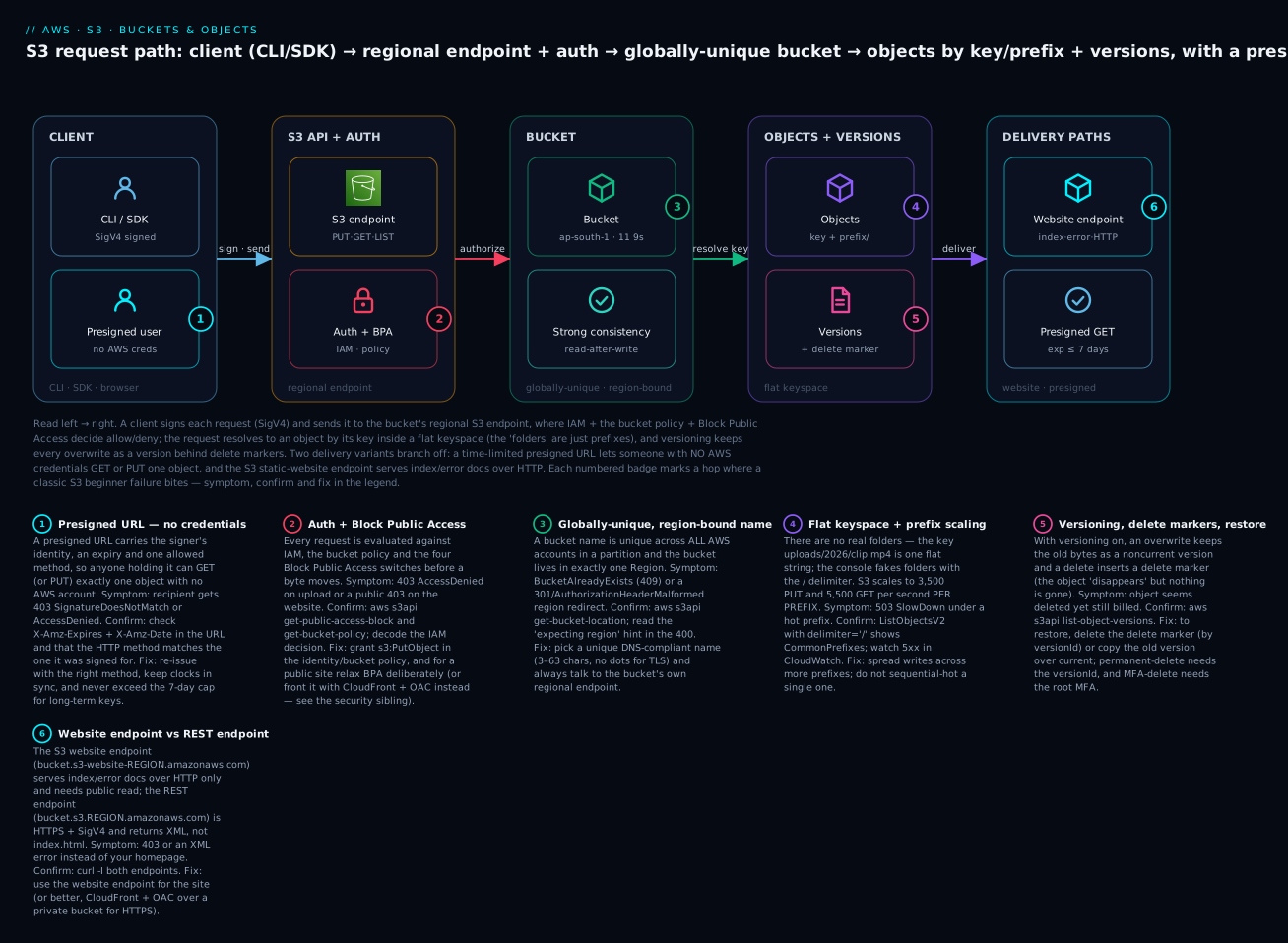
The diagram traces a single S3 request from left to right. A client — the AWS CLI, an SDK, or a browser — signs each request with SigV4 and sends it to the bucket’s regional S3 endpoint, where IAM + the bucket policy + Block Public Access decide allow or deny before a byte moves. The request resolves against the globally-unique, Region-bound bucket (which gives you 11 nines of durability and strong read-after-write consistency), then to an object addressed by its key inside a flat keyspace where the “folders” are only prefixes; with versioning on, every overwrite is retained behind delete markers. Two delivery variants branch off the right: a presigned URL lets someone with no AWS credentials GET or PUT exactly one object until it expires, and the static-website endpoint serves your index/error documents over HTTP. The six numbered badges mark the exact hops where beginner failures bite — a presigned 403, an AccessDenied/BPA denial, a BucketAlreadyExists name clash, a hot-prefix 503 SlowDown, a versioning/delete-marker surprise, and the website-vs-REST-endpoint mixup — and the legend narrates each as symptom, confirm and fix.
Real-world scenario
KloudVin Learning, a fictional but very typical ed-tech startup in Bengaluru, needed to store and serve course videos, lesson PDFs, and student-uploaded assignments — and did every beginner thing wrong before getting it right.
The first mistake was the bucket name. An engineer tried to create videos in the console and got BucketAlreadyExists. He assumed the tool was broken; in fact the name is globally unique and had been taken years ago. They renamed to kloudvin-learning-media-ap-south-1, which read clearly and never collided.
The second mistake was sharing. To let a partner download a single 2 GB masterclass file, someone flipped off Block Public Access and made the whole bucket public — exposing every student’s uploaded assignment to the internet for three days until a security review caught it. The fix was a presigned GET URL: a 15-minute link to that one object, bucket private again, nobody else exposed. They wrote a tiny Lambda that mints presigned URLs on demand for authorized downloads.
The third mistake was uploads. Their web app uploaded student assignments by streaming the file through their own EC2 servers to S3, which fell over whenever twenty students submitted at once. They switched to presigned PUT URLs: the browser uploads directly to S3, the server only issues the short-lived signed URL. Server load dropped to near zero and large uploads stopped timing out. They constrained the presigned PUTs to a 50 MB size and application/pdf content type.
The fourth mistake was a 6 GB course export. A nightly job did a single PutObject of a 6 GB archive and failed every night with EntityTooLarge. They switched the job to aws s3 cp, which auto-multiparts anything over the threshold — but then noticed the bill creeping up. list-multipart-uploads revealed dozens of abandoned multipart uploads from earlier failed runs, all silently billed. A one-line lifecycle rule (AbortIncompleteMultipartUpload after 1 day) plugged the leak, and they aborted the existing orphans.
The fifth mistake was an overwrite. An intern re-ran an export script that overwrote the wrong object and there was no undo — the original was gone. They enabled versioning on the media bucket; a week later when it happened again, restoring was a single copy-object from the noncurrent version. They added a noncurrent-version lifecycle expiry so retained versions did not balloon the bill.
By the end, KloudVin’s S3 setup was boring in the best way: private buckets, presigned URLs for every share and upload, multipart with abort-cleanup for big files, versioning with bounded retention, and a static marketing site fronted by CloudFront over a private bucket. None of it was advanced — it was just the fundamentals, applied on purpose.
Advantages and disadvantages
| Advantages | Disadvantages / trade-offs |
|---|---|
| Eleven nines durability, no capacity to manage | Not a filesystem — no rename/append/POSIX semantics |
| Unlimited scale, pay only for what you store | Per-request + egress costs add up at scale |
| Strong read-after-write consistency by default | Easy to misconfigure access (public leaks) |
| Presigned URLs share without exposing the bucket | Presigned expiry pitfalls (credential-bound) |
| Versioning gives undo for overwrites/deletes | Retained versions/parts silently cost money |
| Static hosting in minutes | Website endpoint is HTTP-only, needs public read |
| Multipart makes huge/unreliable uploads robust | Abandoned multipart parts leak cost invisibly |
| Global reach via Transfer Acceleration / CloudFront | Region/endpoint mismatches cause 301/400s |
The trade-offs cluster around one theme: S3’s flexibility means you own the correctness. Durability is free; getting access, cleanup and expiry right is on you. That is exactly what the hands-on lab builds muscle for.
Hands-on lab
A complete, free-tier-friendly walkthrough: create a bucket (CLI + Terraform), upload with cp/sync, do a real multipart upload, mint and use a presigned GET, enable versioning and restore an overwrite, host a static site, then tear it all down. Set your own globally-unique bucket name — replace kloudvin-lab-<yourname>-2026 everywhere. Region here is ap-south-1; change as needed.
⚠️ Cost note: Everything here is a few cents at most and well within the S3 free tier (5 GB storage, 20,000 GET, 2,000 PUT/month for 12 months). The only things that cost money if forgotten are retained storage, orphaned multipart parts, and object versions — the teardown removes all three.
Step 0 — Prerequisites
aws --version            # expect aws-cli/2.x
aws sts get-caller-identity   # confirm you're NOT the root user
export BUCKET=kloudvin-lab-yourname-2026
export REGION=ap-south-1
Step 1 — Create a bucket (CLI)
# Outside us-east-1 you MUST pass a LocationConstraint
aws s3api create-bucket --bucket "$BUCKET" --region "$REGION" \
  --create-bucket-configuration LocationConstraint="$REGION"
# Expected: { "Location": "http://kloudvin-lab-yourname-2026.s3.amazonaws.com/" }

aws s3api get-bucket-location --bucket "$BUCKET"
# Expected: { "LocationConstraint": "ap-south-1" }
If you get BucketAlreadyExists, the name is taken globally — pick another. In us-east-1 only, omit the --create-bucket-configuration flag entirely.
Step 1 (alternate) — Create the same bucket with Terraform
# main.tf
terraform {
  required_providers { aws = { source = "hashicorp/aws", version = "~> 5.0" } }
}
provider "aws" { region = "ap-south-1" }

resource "aws_s3_bucket" "lab" {
  bucket = "kloudvin-lab-yourname-2026"
}

# Keep it private (defaults are on, but be explicit)
resource "aws_s3_bucket_public_access_block" "lab" {
  bucket                  = aws_s3_bucket.lab.id
  block_public_acls       = true
  block_public_policy     = true
  ignore_public_acls      = true
  restrict_public_buckets = true
}
terraform init && terraform apply   # type yes
# Expected: aws_s3_bucket.lab: Creation complete after 2s [id=kloudvin-lab-yourname-2026]
Step 2 — Upload objects with cp and sync
echo "hello s3" > hello.txt
aws s3 cp hello.txt "s3://$BUCKET/notes/hello.txt"
# Expected: upload: ./hello.txt to s3://.../notes/hello.txt

mkdir -p site && echo "<h1>KloudVin</h1>" > site/index.html && echo "not found" > site/error.html
aws s3 sync ./site "s3://$BUCKET/www/"
# Expected: upload: site/index.html to s3://.../www/index.html  (and error.html)

# See the flat keyspace + how the console fakes folders
aws s3api list-objects-v2 --bucket "$BUCKET" --prefix "" --delimiter "/" \
  --query '{prefixes: CommonPrefixes[].Prefix, keys: Contents[].Key}'
# Expected prefixes: ["notes/", "www/"]  — those are prefixes, not folders
Step 3 — Multipart upload of a large file
# Create a ~200 MB file (portable)
head -c 209715200 /dev/urandom > bigfile.bin   # 200 MiB

# Lower the multipart threshold so cp definitely uses multipart, then upload
aws configure set default.s3.multipart_threshold 16MB
aws configure set default.s3.multipart_chunksize 16MB
aws s3 cp bigfile.bin "s3://$BUCKET/uploads/bigfile.bin"
# Expected: a progress bar; cp transparently splits into ~13 parts and completes

# A multipart object's ETag ends in "-N" (part count), unlike a single-PUT MD5
aws s3api head-object --bucket "$BUCKET" --key uploads/bigfile.bin --query 'ETag'
# Expected: "\"d41d8cd...-13\""

# Check for (and there should be none yet) in-progress/abandoned uploads
aws s3api list-multipart-uploads --bucket "$BUCKET"
# Expected: {} (no incomplete uploads because cp completed cleanly)
Now install the cost-leak guard — a lifecycle rule that aborts any multipart upload not completed within 1 day:
cat > abort-mpu.json <<'JSON'
{ "Rules": [ {
  "ID": "abort-incomplete-mpu",
  "Filter": {},
  "Status": "Enabled",
  "AbortIncompleteMultipartUpload": { "DaysAfterInitiation": 1 }
} ] }
JSON
aws s3api put-bucket-lifecycle-configuration --bucket "$BUCKET" \
  --lifecycle-configuration file://abort-mpu.json
# Terraform equivalent
resource "aws_s3_bucket_lifecycle_configuration" "lab" {
  bucket = aws_s3_bucket.lab.id
  rule {
    id     = "abort-incomplete-mpu"
    status = "Enabled"
    filter {}
    abort_incomplete_multipart_upload { days_after_initiation = 1 }
  }
}
Step 4 — Generate and use a presigned GET URL
URL=$(aws s3 presign "s3://$BUCKET/notes/hello.txt" --expires-in 300)
echo "$URL"
# Use it with NO credentials — plain curl, as any recipient would:
curl -s "$URL"
# Expected: hello s3

# Prove expiry works: wait past 300s (or set --expires-in 5) and retry
# Expected after expiry: <Error><Code>AccessDenied</Code>...Request has expired...
Step 5 — Enable versioning, overwrite, and restore
aws s3api put-bucket-versioning --bucket "$BUCKET" \
  --versioning-configuration Status=Enabled
aws s3api get-bucket-versioning --bucket "$BUCKET"   # Expected: { "Status": "Enabled" }

# Version 1 already exists (hello.txt). Overwrite it → version 2, v1 becomes noncurrent
echo "OOPS wrong content" > hello.txt
aws s3 cp hello.txt "s3://$BUCKET/notes/hello.txt"

aws s3api list-object-versions --bucket "$BUCKET" --prefix notes/hello.txt \
  --query 'Versions[].{VersionId:VersionId,IsLatest:IsLatest,Size:Size}'
# Expected: two versions; note the VersionId of the OLDER one (IsLatest=false)

OLD=<paste-old-VersionId>
# Restore by copying the old version back over the key as the new current version
aws s3api copy-object --bucket "$BUCKET" --key notes/hello.txt \
  --copy-source "$BUCKET/notes/hello.txt?versionId=$OLD"
aws s3 cp "s3://$BUCKET/notes/hello.txt" -   # print to stdout
# Expected: hello s3   (original content restored)
Bonus — the delete-marker behaviour:
aws s3api delete-object --bucket "$BUCKET" --key notes/hello.txt   # inserts a delete marker
aws s3 cp "s3://$BUCKET/notes/hello.txt" - 2>&1 || echo "404 as expected (hidden by marker)"
# Find the delete-marker VersionId and remove it to un-delete
aws s3api list-object-versions --bucket "$BUCKET" --prefix notes/hello.txt \
  --query 'DeleteMarkers[].VersionId'
aws s3api delete-object --bucket "$BUCKET" --key notes/hello.txt --version-id <marker-id>
# Object reappears
Step 6 — Host a static website
aws s3api put-bucket-website --bucket "$BUCKET" --website-configuration \
  '{"IndexDocument":{"Suffix":"index.html"},"ErrorDocument":{"Key":"error.html"}}'

# The website endpoint (HTTP only). Note dot vs dash varies by Region.
echo "http://$BUCKET.s3-website.$REGION.amazonaws.com/www/index.html"
To actually serve it you must allow public read (BPA off + public-read policy) or front it with CloudFront + OAC. For the lab, compare the two endpoints and observe the difference — the REST endpoint returns XML/403, the website endpoint would serve index.html once public:
curl -sI "https://$BUCKET.s3.$REGION.amazonaws.com/www/index.html" | head -1   # REST: 200 only if you're authed
curl -sI "http://$BUCKET.s3-website.$REGION.amazonaws.com/"       | head -1     # website: 403 until public
Keeping the bucket private and using CloudFront + OAC is the production path — continue in the CloudFront article.
Step 7 — Teardown (removes every cost source)
# 1) Abort any lingering multipart uploads
aws s3api list-multipart-uploads --bucket "$BUCKET" \
  --query 'Uploads[].{Key:Key,UploadId:UploadId}' --output text | \
  while read KEY UPLOAD_ID; do
    [ -n "$UPLOAD_ID" ] && aws s3api abort-multipart-upload \
      --bucket "$BUCKET" --key "$KEY" --upload-id "$UPLOAD_ID"; done

# 2) Delete ALL object versions and delete markers (required for a versioned bucket)
aws s3api delete-objects --bucket "$BUCKET" --delete "$(aws s3api list-object-versions \
  --bucket "$BUCKET" --output json --query \
  '{Objects: Versions[].{Key:Key,VersionId:VersionId}}')" 2>/dev/null
aws s3api delete-objects --bucket "$BUCKET" --delete "$(aws s3api list-object-versions \
  --bucket "$BUCKET" --output json --query \
  '{Objects: DeleteMarkers[].{Key:Key,VersionId:VersionId}}')" 2>/dev/null

# 3) Remove website config and delete the (now empty) bucket
aws s3api delete-bucket-website --bucket "$BUCKET"
aws s3api delete-bucket --bucket "$BUCKET"
# Expected: no output = success

# Terraform users: `terraform destroy` (add force_destroy=true to the bucket to
# let TF delete a non-empty/versioned bucket in one shot).
rm -f hello.txt bigfile.bin abort-mpu.json; rm -rf site
If delete-bucket returns BucketNotEmpty, you still have versions, delete markers, or in-progress multipart parts — re-run steps 1 and 2.
Common mistakes & troubleshooting
This is the section you will come back to. First the playbook — symptom → root cause → how to confirm → fix — then an S3 error/status-code reference, then a decision table.
| # | Symptom | Root cause | Confirm (exact command) | Fix |
|---|---|---|---|---|
| 1 | BucketAlreadyExists (409) on create |
Name is taken globally, not just in your account | Try a different name; names are partition-unique | Add org/purpose/unique suffix: kloudvin-media-prod-ap-south-1 |
| 2 | IllegalLocationConstraintException / wrong-Region create |
Missing/incorrect LocationConstraint outside us-east-1 |
Note your --region vs constraint |
Pass --create-bucket-configuration LocationConstraint=<region> (omit only in us-east-1) |
| 3 | AccessDenied (403) on upload |
IAM identity policy, bucket policy, or Block Public Access denies | aws sts get-caller-identity; aws s3api get-bucket-policy; get-public-access-block |
Grant s3:PutObject; fix the bucket policy; see the security sibling |
| 4 | Presigned URL 403 AccessDenied “Request has expired” |
Expiry elapsed, or credential lifetime shorter than --expires-in |
Read X-Amz-Expires/X-Amz-Date in the URL |
Re-issue; sign long-lived links with an IAM user key (7-day cap) |
| 5 | Presigned URL 403 SignatureDoesNotMatch |
HTTP method mismatch, edited URL, or client clock skew | Compare method used vs signed; check clock | Use the exact method it was signed for; sync system time (NTP) |
| 6 | Multipart upload “never completes”; bill creeps up | Abandoned parts retained and billed, invisible to ls |
aws s3api list-multipart-uploads --bucket B |
Abort them; add AbortIncompleteMultipartUpload lifecycle rule |
| 7 | EntityTooLarge (400) on upload |
Single PUT > 5 GB (or a part > 5 GB) | Check file size vs 5 GB | Use aws s3 cp (auto-multipart) or s3api multipart |
| 8 | sync re-uploads everything each run |
S3 has no mtime; sync compares size + last-modified, and they changed |
aws s3 sync --dryrun ... shows what it would send |
Accept size+time semantics; use --size-only where safe |
| 9 | Static site returns XML, not index.html |
You hit the REST endpoint, not the website endpoint | curl -I both endpoints |
Use bucket.s3-website[.-]REGION.amazonaws.com; enable website config |
| 10 | Static site 403 on the website endpoint | Block Public Access on / no public-read policy | get-public-access-block; get-bucket-policy |
Relax BPA + add public-read policy, or front with CloudFront + OAC |
| 11 | 301 / AuthorizationHeaderMalformed (400) |
Talking to the wrong Region’s endpoint | aws s3api get-bucket-location; read the “expecting region” hint |
Target the bucket’s own regional endpoint / set --region |
| 12 | RequestTimeTooSkewed (403) |
Client clock differs from S3 by > 15 min | date -u; compare to real UTC |
Fix system clock / enable NTP |
| 13 | Object “deleted” but still billed | Versioning on: delete inserted a delete marker, versions remain |
aws s3api list-object-versions --bucket B |
Delete specific versions by id; expire noncurrent versions via lifecycle |
| 14 | NoSuchKey (404) though “the folder exists” |
Folders are prefixes; the exact key is different (trailing slash, case) | aws s3api list-objects-v2 --prefix ... |
Use the exact key string; keys are case-sensitive |
| 15 | Can’t delete bucket: BucketNotEmpty (409) |
Objects, versions, delete markers, or MPU parts remain | list-object-versions; list-multipart-uploads |
Delete all versions + markers + abort MPUs first (or force_destroy) |
| 16 | Intermittent 503 SlowDown |
Request rate exceeds per-prefix scaling on a hot prefix | Watch 5xx in CloudWatch; check key layout | Spread across more prefixes; add retries with backoff; front with CloudFront |
S3 error / status-code reference
| HTTP | S3 error code | Meaning | Likely cause | Fix |
|---|---|---|---|---|
| 200 | — | OK | Success | — |
| 204 | — | No Content | Successful DELETE | — |
| 206 | — | Partial Content | Byte-range GET succeeded | — |
| 301 | PermanentRedirect |
Wrong endpoint for the bucket’s Region | Region mismatch | Use the bucket’s regional endpoint |
| 307 | TemporaryRedirect |
New bucket still propagating | Just-created bucket | Retry after a moment / use regional endpoint |
| 400 | AuthorizationHeaderMalformed |
Region in request ≠ bucket Region | Wrong --region |
Set the correct Region |
| 400 | EntityTooLarge |
Object/part exceeds limit | Single PUT > 5 GB | Use multipart |
| 400 | InvalidBucketName |
Name breaks DNS rules | Uppercase/dots/length | Rename per the rules |
| 400 | MalformedXML |
Bad config document | Lifecycle/website JSON/XML wrong | Fix the document |
| 403 | AccessDenied |
Not authorized | IAM / bucket policy / BPA | Grant permission; adjust policy |
| 403 | SignatureDoesNotMatch |
Signature invalid | Method mismatch / edited URL / clock | Re-sign; sync clock |
| 403 | RequestTimeTooSkewed |
Clock skew > 15 min | Wrong system time | NTP |
| 403 | InvalidObjectState |
Object archived (Glacier) | GET on Glacier without restore | Restore first (storage-classes article) |
| 404 | NoSuchBucket |
Bucket doesn’t exist | Wrong name/Region | Check name and Region |
| 404 | NoSuchKey |
Key doesn’t exist | Typo/trailing slash/case | Use the exact key |
| 405 | MethodNotAllowed |
Operation not allowed here | Wrong endpoint/verb | Correct method/endpoint |
| 409 | BucketAlreadyExists |
Name taken globally | Not unique | Pick a unique name |
| 409 | BucketAlreadyOwnedByYou |
You already own it | Re-create in same account | No-op / continue |
| 409 | BucketNotEmpty |
Bucket has content | Objects/versions/MPUs remain | Empty fully first |
| 412 | PreconditionFailed |
Conditional header failed | If-Match/If-None-Match |
Re-read ETag |
| 416 | InvalidRange |
Range not satisfiable | Range past EOF | Request a valid range |
| 500 | InternalError |
Transient server error | AWS-side | Retry with backoff |
| 503 | SlowDown |
Throttling | Hot-prefix request rate | Spread prefixes; backoff |
Decision table — “if you see…”
| If you see… | It’s probably… | Do this |
|---|---|---|
| 403 only for the recipient, works for you | Presigned expiry or method mismatch | Re-issue; check X-Amz-Expires, method |
| 403 on your own upload | IAM / bucket policy / BPA | Check identity + policy + public-access-block |
| XML where your homepage should be | REST endpoint, not website endpoint | Switch to s3-website endpoint |
| Storage cost with no visible objects | Orphaned MPU parts or noncurrent versions | list-multipart-uploads; list-object-versions |
| 301 / AuthorizationHeaderMalformed | Region/endpoint mismatch | get-bucket-location; fix --region |
| Object “gone” but bill unchanged | Delete marker on a versioned bucket | Delete the marker or the versions |
The three nastiest in practice deserve prose. Orphaned multipart parts are the classic silent bill: a CI job that uploads big artifacts and crashes leaves parts that never appear in aws s3 ls, accrue storage cost forever, and are only visible via list-multipart-uploads — always ship the abort-incomplete lifecycle rule with any bucket that takes large uploads. The presigned-expiry-vs-credential trap bites teams who generate “7-day” links from code running under an IAM role (EC2, Lambda, ECS): the URL’s X-Amz-Expires may say 7 days, but the underlying temporary credentials expire in an hour, so the link dies early — sign long-lived links with a dedicated, tightly-scoped IAM user key. The versioned-delete surprise catches people who think deleting solved their cost problem: on a versioned bucket a plain delete only hides the object behind a marker while every version keeps billing, so a “cleanup” that used rm frees nothing — you must delete versions by id or expire noncurrent versions with lifecycle.
Best practices
- Never operate as root. Use an IAM user/role with least privilege; keep the root account locked (see the account-setup article).
- Name buckets deterministically: lowercase, hyphens,
org-purpose-env-region, globally unique — no dots unless you are hosting a website on that exact domain. - Keep Block Public Access ON by default. Sharing a single object is a job for a presigned URL, not a public bucket.
- Prefer presigned URLs for both sharing and uploading. Presigned PUTs let browsers upload directly to S3 without your servers or keys in the path.
- Always ship an
AbortIncompleteMultipartUploadlifecycle rule on any bucket that receives large uploads — it is the cheapest cost-leak insurance you will ever buy. - Enable versioning on buckets that hold irreplaceable data, and pair it with a noncurrent-version expiration lifecycle rule so retained versions do not balloon the bill.
- Let the CLI/SDK handle multipart — do not hand-roll single PUTs for large files; tune
multipart_thresholdif needed. - Set
Content-TypeandCache-Controlat upload time. Metadata is immutable without a copy, so getting it right on the PUT saves rework. - Design keys for prefix spread, not sequential hotspots, if you expect thousands of requests per second.
- Talk to the bucket’s own regional endpoint; set
--region/AWS_REGIONto avoid 301/400 redirects. - Front real websites with CloudFront + OAC over a private bucket — HTTPS, caching, WAF, and no public bucket.
- Turn on default encryption (SSE-S3 is on by default now; use SSE-KMS for controlled keys) and CloudTrail data events for audit.
Security notes
S3 security is a deep topic (its own article), but the fundamentals belong here because insecure defaults are how beginners leak data.
| Control | What it does | Beginner default |
|---|---|---|
| Block Public Access (4 switches) | Overrides ACLs/policies that would make data public | Keep all ON unless hosting a public site deliberately |
| Bucket policy | Resource-based allow/deny at the bucket | Least privilege; no Principal: "*" unless intended |
| IAM identity policy | What a user/role may do to S3 | Grant specific actions/resources, not s3:* |
| Default encryption | Encrypts objects at rest | SSE-S3 on by default; SSE-KMS for key control |
| Presigned URLs | Time-limited, single-object access | Short expiry; scope by method; don’t over-share |
| MFA-delete | Requires MFA to delete versions | For compliance-critical buckets |
| Object Ownership / ACLs disabled | Turns off legacy ACLs, policy-only access | Keep ACLs disabled (the modern default) |
| CloudTrail data events + Access Logs | Audit who did what | Enable on sensitive buckets |
The two rules that prevent most incidents: (1) keep buckets private and share via presigned URLs or CloudFront + OAC, never by flipping off Block Public Access to “just get it working”; and (2) grant IAM and bucket policies the specific actions and resources needed, never s3:* on arn:aws:s3:::*. Access-denied troubleshooting — reading the IAM decision, the bucket policy, and BPA together — is covered in S3 Bucket Policies and Block Public Access.
Cost & sizing
S3 has no capacity to provision — you pay for what you use across a few dimensions. The mistake is assuming it is only per-GB storage; requests and egress often dominate small-object, high-traffic workloads.
| Cost driver | Billed on | Notes |
|---|---|---|
| Storage | Per GB-month, by storage class | Standard is the baseline; colder classes cheaper to store |
| PUT/COPY/POST/LIST requests | Per 1,000 requests | Pricier tier than GET |
| GET/SELECT requests | Per 10,000 requests | Cheaper per request than PUT |
| Data transfer OUT to internet | Per GB egress | Biggest surprise; CloudFront often cheaper |
| Data transfer IN | Free | Uploads cost nothing to transfer |
| Same-Region S3↔EC2 | Free | Keep compute and bucket in one Region |
| Cross-Region transfer | Per GB | Replication and cross-Region reads cost |
| Management features | Per unit | Inventory, analytics, replication, Object Lambda |
| Transfer Acceleration | Per GB premium | Only when actually faster |
| Orphaned MPU parts / old versions | Storage per GB | The invisible line item — clean up |
The free tier (first 12 months) covers 5 GB Standard storage, 20,000 GET, 2,000 PUT, and 100 GB egress/month — more than enough for this lab and for learning. Rough order-of-magnitude for a small production bucket in ap-south-1: storage is a few US cents (a few INR) per GB-month; a million GETs is well under a dollar; the number that surprises people is internet egress, which is why static sites and media belong behind CloudFront, not served straight from S3.
Right-sizing for S3 is less about “size” and more about hygiene: put cold data on cheaper classes with a lifecycle rule, expire noncurrent versions and abort incomplete uploads, and move public/high-traffic delivery to CloudFront. Do those three and an S3 bill essentially manages itself.
Interview & exam questions
1. Why must an S3 bucket name be globally unique? Because S3 addresses buckets by DNS name (bucket.s3.region.amazonaws.com), and DNS is a global namespace. Names are unique across all AWS accounts within a partition. (CLF-C02, SAA-C03)
2. Are there folders in S3? No. The keyspace is flat; keys are strings that may contain /. The console fabricates a folder view by grouping keys on the / delimiter into common prefixes. “Empty folders” are zero-byte placeholder objects. (CLF-C02, DVA-C02)
3. What consistency model does S3 provide today? Strong read-after-write consistency for PUTs of new objects, overwrite PUTs, DELETEs, and LIST operations, in all Regions, at no extra cost (since Dec 2020). No need to code around eventual consistency. (SAA-C03, DVA-C02)
4. When must you use multipart upload? Any object over 5 GB (the single-PUT limit) requires it, and AWS recommends it above ~100 MB for reliability and parallelism. Parts are 5 MB–5 GB, up to 10,000 parts, 5 TB total. (DVA-C02, SAA-C03)
5. What is a presigned URL and when do you use it? A time-limited, signed URL granting credential-free access to one object for one method. Use it to share a private object or to let a browser upload directly to S3 without exposing the bucket or your keys. (DVA-C02)
6. What limits a presigned URL’s maximum lifetime? The signing credentials. IAM user long-term keys allow up to 7 days; temporary/STS credentials cap the URL at the credentials’ remaining lifetime (often ≤ 1 hour). (DVA-C02)
7. What happens when you delete an object in a versioning-enabled bucket without specifying a version? S3 inserts a delete marker that becomes the current version; the object appears deleted (GET → 404) but every version is retained and still billed. Delete the marker to restore. (SAA-C03, DVA-C02)
8. How do you permanently delete data in a versioned bucket? Issue DELETE with an explicit versionId for each version (and remove delete markers). Plain deletes only add markers. Lifecycle noncurrent-version expiration automates it. (SAA-C03)
9. Website endpoint vs REST endpoint — what’s the difference? The website endpoint (s3-website) serves index/error documents over HTTP only and needs public read; the REST endpoint (s3.region) is HTTPS + SigV4 and returns XML, not index.html. Hitting the wrong one is a classic 403/XML bug. (SAA-C03)
10. Why prefer CloudFront + OAC over the S3 website endpoint for a real site? HTTPS/TLS, caching at 600+ edge locations, WAF/geo-restriction, cheaper egress, and the bucket stays private (OAC signs origin requests) instead of being public. (SAA-C03)
11. What is the per-prefix request-rate scaling for S3? At least 3,500 PUT/COPY/POST/DELETE and 5,500 GET/HEAD requests per second per prefix, with no limit on the number of prefixes; spread keys across prefixes to scale throughput. (SAA-C03)
12. How do abandoned multipart uploads cost you money, and how do you stop it? Interrupted uploads leave parts that are billed but invisible to ls. Detect with list-multipart-uploads; prevent with an AbortIncompleteMultipartUpload lifecycle rule. (DVA-C02, SOA-C02)
Quick check
- Your
create-bucketfails withBucketAlreadyExistseven though you have no such bucket. Why? - You “deleted” an object on a versioned bucket but storage cost did not drop. What happened, and how do you actually free the space?
- A teammate’s presigned URL works for you but 403s for them ten minutes later. Name two likely causes.
- You upload a 6 GB file with a single
PutObjectand getEntityTooLarge. What is the fix? - Your static site returns XML instead of
index.html. What did you do wrong?
Answers
- Bucket names are globally unique across all AWS accounts in the partition — someone else already owns that name. Choose a more specific, unique name.
- A delete on a versioned bucket without a version id inserts a delete marker; all versions are retained and still billed. Delete the specific versions by id (or set a noncurrent-version expiration lifecycle rule).
- Expiry elapsed (
X-Amz-Expirespassed, or the signer’s temporary credentials expired sooner than the stated window), or method/URL mismatch / clock skew causingSignatureDoesNotMatch. - Use multipart upload — either
aws s3 cp(which auto-multiparts) or thes3apimultipart flow. Single PUT tops out at 5 GB. - You hit the REST endpoint (
bucket.s3.region.amazonaws.com), which returns XML, instead of the website endpoint (bucket.s3-website[.-]region.amazonaws.com) — and you need website hosting enabled with public read (or CloudFront + OAC).
Glossary
| Term | Definition |
|---|---|
| Bucket | A globally-unique, Region-bound container for objects; the unit of ownership, policy and billing. |
| Object | An immutable blob of 0 B–5 TB, addressed by a key, carrying metadata (and a version id if versioned). |
| Key | The object’s full UTF-8 name (≤ 1,024 bytes); a flat string where / is a literal character. |
| Prefix | The leading portion of a key; the basis for the console’s “folders” and for request-rate scaling. |
| Delimiter | A character (usually /) passed to LIST to group keys into common prefixes. |
| Flat keyspace | S3’s namespace model — no real directories, just keys mapping to objects. |
| Metadata | System (Content-Type, ETag) and user (x-amz-meta-*, ≤ 2 KB) key/value data on an object. |
| Multipart upload | Chunked, parallel upload of a large object (parts 5 MB–5 GB, ≤ 10,000 parts, ≤ 5 TB). |
| Presigned URL | A time-limited, signed URL granting credential-free access to one object for one HTTP method. |
| Byte-range GET | A GET for a subset of an object’s bytes, returning HTTP 206 Partial Content. |
| Versioning | Bucket setting that retains every version of a key; overwrites demote old versions to noncurrent. |
| Delete marker | A placeholder inserted by a non-versioned delete on a versioned bucket; hides all versions reversibly. |
| Version ID | The unique identifier of one version of a key. |
| Strong read-after-write consistency | S3’s guarantee that a read after a write returns the latest data, in all Regions. |
| Static website hosting | Serving HTML/CSS/JS directly from a bucket via the website endpoint (HTTP, index/error docs). |
| Website endpoint | bucket.s3-website[.-]region.amazonaws.com — serves index/error docs over HTTP; needs public read. |
| REST endpoint | bucket.s3.region.amazonaws.com — HTTPS + SigV4 API endpoint; returns XML, not index.html. |
| Requester Pays | Bucket mode where the requester (not the owner) pays for requests and egress. |
| Transfer Acceleration | Uploads/downloads routed over the CloudFront edge network for long-distance speed. |
| ETag | An identifier of object content — MD5 for single PUTs, a composite -N value for multipart objects. |
Next steps
- Cut your S3 bill by matching objects to access patterns and automating transitions in Amazon S3 Storage Classes and Lifecycle.
- Lock buckets down properly — IAM vs bucket policies, the four Block Public Access switches, and diagnosing
AccessDenied— in S3 Bucket Policies and Block Public Access. - Put a real CDN with HTTPS in front of a private bucket in Amazon CloudFront Hands-On: CDN Setup, Origins, Caching.
- Make sure your foundations are safe first with Securing a Brand-New AWS Account: Root Lockdown, IAM, MFA, Billing Alerts.