Every application needs configuration — a database endpoint, a feature flag, an API key, a Redis URL — and every team eventually learns the hard way that the worst place to keep it is in the code. Hard-coded values force a redeploy to change a URL; a .env file committed “just this once” leaks a password into git forever; environment variables baked into an image tie the config to the artefact instead of the environment. AWS Systems Manager Parameter Store is the AWS-native answer: a managed, hierarchical, versioned key-value store for configuration and secrets, with SecureString values encrypted by KMS, IAM controlling who reads what, and clean integrations into ECS, Lambda, CloudFormation and CodeBuild. And unlike its heavier cousin Secrets Manager, the SecureString type is free.
This article is the working guide. You will build a real parameter hierarchy — plain String config alongside a KMS-SecureString password under a customer-managed key — read the whole tree back in one call with get-parameters-by-path --with-decryption, wire a version label so prod always points at a known-good value, attach an advanced-tier expiration policy, and then consume the parameters from an ECS task definition, a Lambda (both the SDK and the caching Parameters/Secrets extension), a CloudFormation dynamic reference and CodeBuild — all with copy-pasteable aws ssm CLI and equivalent Terraform. Along the way you will learn the mechanics that decide whether this is smooth or a support ticket: standard versus advanced tier, how the partition of trust splits between IAM and KMS for a SecureString, why the parameter ARN drops a slash, and exactly when you should reach past Parameter Store to Secrets Manager instead.
Keep the tables open. Parameter Store is a reference-dense service — types, tier limits, path rules, policy shapes, IAM actions, integration syntaxes, error strings — and this piece is deliberately built as a lookup you return to mid-design and mid-incident. Read the prose once to build the model; come back to the tables when you are naming a hierarchy, scoping a policy, or staring at an AccessDenied you did not expect.
What problem this solves
Configuration sprawl is a silent tax on every team. Without a config store, settings scatter: some in environment variables set in the pipeline, some in a mounted file, some in a wiki, some hard-coded because “it never changes.” Rotating a database password means finding every copy. Promoting a build from staging to production means rebuilding the image because the config is baked in. And secrets end up in the worst possible places — a docker run -e PASSWORD=... in shell history, a committed terraform.tfvars, a Slack message. Every one of these is a breach or an outage waiting for a trigger.
Parameter Store fixes the shape of the problem, not just the storage. Config lives outside the artefact, so the same image runs in dev, staging and prod by reading a different path. Secrets are encrypted at rest with KMS and released only to principals IAM (and the KMS key policy) permit, so “who can read the prod DB password” becomes an auditable IAM question with a CloudTrail record, not a matter of who has the wiki link. Values are versioned, so a bad change is one get-parameter-history away from a rollback, and a label lets you pin “the version prod is allowed to use” independently of the latest edit. And because it is a first-class AWS service, ECS, Lambda, CloudFormation, CodeBuild and EC2 user-data can all pull from it natively — no bespoke config service to run.
Who hits this: every engineer shipping containers or functions that need environment-specific settings; every platform team standardising how secrets reach workloads; every candidate sitting DVA-C02, SOA-C02 or SAA-C03, all of which test SecureString, tiers, hierarchies and the Parameter Store versus Secrets Manager trade-off. This article gives you the mental model, the exact commands, and the failure playbook. For the sibling capabilities of Systems Manager — running commands, patching and shelling into instances without SSH — see SSM Session Manager, Patch Manager & Run Command; this article is the configuration-and-secrets half of the same service.
A quick map of who owns which layer during a Parameter Store design or incident, so you pull in the right person:
| Layer | What lives here | Who usually owns it | What it decides / can break |
|---|---|---|---|
| Naming / hierarchy | Path scheme /app/env/component/key |
Platform + app teams | Whether IAM can scope cleanly; discoverability |
| Parameter data | Values, types, tiers, versions, labels | App / dev team | 4 KB vs 8 KB limits, tier cost, rollback |
| Encryption | SecureString, which KMS key |
Security team | Who can decrypt; compliance posture |
| IAM access | ssm:GetParameter*, path ARNs |
Security + platform | Least privilege vs over-broad reads |
| Consumption | ECS secrets, Lambda ext, CFN refs, CodeBuild |
App + platform | Injection failures, cold-start latency |
| Cost / FinOps | Advanced-tier params, higher throughput | FinOps + owners | Surprise $0.05/param bills; throttling |
Learning objectives
By the end of this article you can:
- Choose correctly between the three parameter types — String, StringList and SecureString — and set the
dataType(textvsaws:ec2:image). - Decide between the standard and advanced tiers (and Intelligent-Tiering), and quote the 4 KB / 8 KB, 10,000 / 100,000 and cost differences from memory.
- Design a hierarchical path scheme and read an entire subtree in one call with
get-parameters-by-path --recursive --with-decryption. - Use versioning and labels to pin and roll back configuration safely.
- Attach advanced-tier parameter policies —
Expiration,ExpirationNotification,NoChangeNotification— and understand the EventBridge events they emit. - Explain the split trust model of a
SecureString: the IAMssm:GetParametergrant AND the KMSkms:Decryptgrant, and how the defaultaws/ssmkey differs from a customer-managed CMK. - Reference parameters from CloudFormation/CDK (
{{resolve:ssm}}/{{resolve:ssm-secure}}), ECS task definitions (secretsvalueFrom), Lambda (SDK + the caching extension), CodeBuild, and consume AWS public parameters (latest AMI IDs). - Make a defensible Parameter Store vs Secrets Manager decision on cost, rotation, size and cross-account.
- Diagnose the common failures —
AccessDeniedon decrypt,ParameterNotFound, advanced-tier billing surprises, ECS injection failures, throttling and CFN references that will not resolve — with the exact command to confirm and the fix.
Prerequisites & where this fits
You need an AWS account with the aws CLI v2 configured (aws configure or SSO — see AWS CLI profiles, SSO & config troubleshooting if that is shaky), permission to call ssm:*, kms:* and iam:* in a sandbox account, and optionally Terraform 1.5+ with the aws provider. Comfort with IAM policies (identity vs resource policies, ARNs) is assumed; if IAM policy evaluation and AccessDenied troubleshooting is unfamiliar, skim it first, because half of Parameter Store pain is really IAM-plus-KMS pain. You do not need prior KMS depth — this article explains the parts you need — but the full envelope-encryption model lives in KMS encryption keys & envelope encryption hands-on.
This sits at the centre of the DevOps and Security tracks. It is downstream of basic IAM and the account setup, and upstream of every workload that needs configuration: it feeds ECS task definitions & services, Lambda functions, CloudFormation stacks and CDK apps. It pairs with Secrets Manager rotation (the paid, rotating alternative for high-value secrets) and with the operational side of Systems Manager in Session Manager, Patch Manager & Run Command.
Core concepts
Start with the vocabulary. Parameter Store is small, but the words carry precise meaning and the exam tests the edges.
| Term | What it is | The important detail |
|---|---|---|
| Parameter | A single named key-value entry | Identified by its name (which may be a hierarchical path) |
| Type | String, StringList, or SecureString |
Only SecureString is encrypted; the type is set at creation |
| Tier | Standard, Advanced, or Intelligent-Tiering |
Governs size, count, policies and cost |
| Value | The stored data (≤ 4 KB standard / 8 KB advanced) | For SecureString this is the plaintext before KMS encryption |
| Version | A monotonically increasing integer per parameter | A new version is created on every overwrite; starts at 1 |
| Label | A named alias attached to one version | Lets you pin prod/stable to a specific version |
| Policy | A rule (Expiration, etc.) on a parameter |
Advanced tier only; emits EventBridge events |
| dataType | text (default) or aws:ec2:image |
Validates AMI IDs when set to aws:ec2:image |
| Path / hierarchy | Slash-delimited name /app/env/key |
Enables GetParametersByPath and path-scoped IAM |
| KMS key | The key that encrypts a SecureString |
Default alias/aws/ssm or a customer-managed CMK |
The anatomy of a parameter
Every parameter is more than a name and a value — a handful of attributes travel with it, and knowing them prevents most confusion.
| Attribute | Example | Notes |
|---|---|---|
| Name | /app/prod/db/host |
Simple (dbHost) or hierarchical (must start with /) |
| Type | SecureString |
String, StringList, SecureString |
| Value | db.internal:5432 |
≤ 4 KB standard, ≤ 8 KB advanced |
| Tier | Advanced |
Standard / Advanced / Intelligent-Tiering |
| Version | 7 |
Integer; auto-incremented on overwrite |
| Labels | prod, rollback-safe |
Up to 10 per version |
| KeyId | alias/aws/ssm or a CMK ARN |
Only for SecureString |
| dataType | text |
Or aws:ec2:image for AMI validation |
| LastModifiedDate / User | CloudTrail-visible | Who changed it and when |
| ARN | arn:aws:ssm:us-east-1:111122223333:parameter/app/prod/db/host |
Note: one slash after parameter |
That ARN is a recurring gotcha: the parameter name /app/prod/db/host becomes ...:parameter/app/prod/db/host — the leading slash of the name and the parameter/ prefix collapse into a single slash. Get this wrong in an IAM policy and you get a silent AccessDenied.
Parameter types in depth
Parameter Store has exactly three types, and the choice is mostly about encryption.
| Type | Stored as | Encrypted? | Use for | Gotcha |
|---|---|---|---|---|
| String | Single plain-text value | No | Non-secret config: URLs, ports, flags, ARNs | Anyone with ssm:GetParameter reads it in the clear |
| StringList | Comma-separated values | No | Lists: subnet IDs, allowed origins, feature sets | Split on , in the app; commas in values need escaping/JSON |
| SecureString | KMS-encrypted ciphertext | Yes (KMS) | Passwords, API keys, tokens, connection strings | Reading it needs --with-decryption and kms:Decrypt |
A StringList is a convenience, not a data structure — it is a single string that Parameter Store and some integrations know to split on commas. If a value can itself contain a comma, store JSON in a String instead. A SecureString is the only encrypted type; you cannot “encrypt a String” after the fact — you choose SecureString at write time (though you can overwrite a String with a SecureString of the same name, creating a new version).
The dataType field
Independent of the three value types, each parameter carries a dataType that tells AWS how to validate and use the value.
| dataType | Meaning | Effect |
|---|---|---|
text |
Default; an arbitrary value | No validation |
aws:ec2:image |
The value is an EC2 AMI ID | SSM validates the AMI exists before accepting the put; lets EC2/ASG/CFN consume it as an image reference |
aws:ssm:integration |
Used by SSM integrations (e.g. webhooks) | Reserved for specific integration parameters |
Setting --data-type aws:ec2:image on a parameter holding ami-0abcd1234 means a typo or a deregistered AMI is rejected at write time, and services that accept an “SSM parameter AMI reference” (launch templates, Auto Scaling, CloudFormation) can point at the parameter instead of a fixed AMI — so a golden-image update is a single parameter overwrite, not a fleet of edits.
Standard vs advanced tier
The single most cost-and-limit-relevant choice is the tier. It is set per parameter and can be changed.
| Dimension | Standard | Advanced |
|---|---|---|
| Max value size | 4 KB | 8 KB |
| Max parameters per Region per account | 10,000 | 100,000 |
| Parameter policies (Expiration etc.) | ❌ Not supported | ✅ Supported |
| Cost | Free (storage) | $0.05 per parameter per month (prorated hourly) |
| Standard throughput | Free, ~40 TPS shared | Free, ~40 TPS shared |
| Higher throughput option | Available (paid per API call) | Available (paid per API call) |
| Change tier later | Standard → Advanced anytime | Advanced → Standard only if value ≤ 4 KB and no policies |
| Best for | The overwhelming majority of config + secrets | Large values, or parameters needing policies |
The rule: default to standard. It is free, holds 10,000 parameters, and covers virtually all config and most secrets (a 4 KB value is a lot of text). You reach for advanced only when a value genuinely exceeds 4 KB (a certificate chain, a large JSON blob) or you need a parameter policy — and both of those are deliberate decisions, not accidents.
Intelligent-Tiering — the surprise-bill lever
Intelligent-Tiering lets Parameter Store pick the tier for you: it uses standard until a parameter needs an advanced feature, then silently upgrades.
| Trigger | Intelligent-Tiering result |
|---|---|
| Value ≤ 4 KB, no policy | Stays Standard (free) |
| Value > 4 KB | Upgrades to Advanced ($0.05/month) |
| A parameter policy attached | Upgrades to Advanced ($0.05/month) |
| Already at 10,000 standard params | New params created as Advanced |
Intelligent-Tiering is convenient but it is exactly how a “free” store starts generating a bill: attach one policy or push one value past 4 KB and that parameter quietly becomes billable. If cost predictability matters, set the tier explicitly (--tier Standard or --tier Advanced) so an upgrade is a choice, not a side effect. This is the number-one Parameter Store billing surprise, and it appears in the troubleshooting playbook.
Limits & quotas to know
| Limit | Value | Note |
|---|---|---|
| Standard parameters / Region / account | 10,000 | Soft-ish; advanced raises the ceiling to 100,000 |
| Advanced parameters / Region / account | 100,000 | Each billed $0.05/month |
| Value size (standard / advanced) | 4 KB / 8 KB | Names + value; hard limit |
| Max versions per parameter | 100 | Oldest are pruned only if you delete/label carefully |
| Labels per version | 10 | A label points at one version at a time |
| Label length | 100 chars | a-zA-Z0-9_.-/; cannot start with a number; latest reserved |
| Hierarchy depth | 15 levels | Count the slashes in the path |
Parameters per GetParameters call |
10 | Batch reads; more → paginate or GetParametersByPath |
| Default throughput | ~40 TPS (shared) | Increase with higher-throughput setting (paid) |
| Higher throughput | up to 1,000+ TPS | $0.05 per 10,000 API interactions when enabled |
Hierarchical paths and get-parameters-by-path
A parameter name can be flat (dbHost) or a hierarchy using / as a separator (/app/prod/db/host). Hierarchies are the feature that makes Parameter Store scale organisationally: they enable bulk reads and path-scoped IAM.
| Path rule | Detail |
|---|---|
| Leading slash | Any name with a / must start with /; a flat name has none |
| Separator | / only; each segment a-zA-Z0-9_.- |
| Max depth | 15 hierarchy levels |
| Reserved prefixes | /aws and /ssm are reserved (public + service parameters) |
| Case sensitivity | Names are case-sensitive |
| ARN collapse | /app/prod/x → arn:...:parameter/app/prod/x (single slash after parameter) |
A sane scheme is /<app>/<env>/<component>/<key>, e.g. /checkout/prod/db/password, /checkout/staging/db/password. Because IAM can scope to arn:...:parameter/checkout/prod/*, the prod checkout role reads only prod checkout config — the hierarchy is the permission boundary.
The read/write API surface
| Operation | What it does | Reads how many | Notes |
|---|---|---|---|
put-parameter |
Create or overwrite one parameter | — (write) | --overwrite to update; new version each time |
get-parameter |
Fetch one parameter by name | 1 | --with-decryption for SecureString |
get-parameters |
Fetch up to 10 by exact name | ≤ 10 | Batch; returns InvalidParameters for missing names |
get-parameters-by-path |
Fetch a whole subtree | Page (10/call) | --recursive, --with-decryption, --parameter-filters |
get-parameter-history |
List all versions of a parameter | Page | Shows values, labels, policies, who/when |
describe-parameters |
List metadata (no values) | Page | Resource must be *; cannot be path-scoped in IAM |
label-parameter-version |
Attach/move a label | — | Up to 10 labels/version |
unlabel-parameter-version |
Remove a label | — | — |
delete-parameter / delete-parameters |
Delete one / many | — | delete-parameters up to 10 names |
get-parameters-by-path options
The workhorse for reading configuration is get-parameters-by-path. It pulls an entire branch in a paginated stream.
| Flag | Effect | Default |
|---|---|---|
--path /app/prod |
The subtree to read | Required |
--recursive |
Include all descendant levels, not just one | Off (one level only) |
--with-decryption |
Decrypt SecureString values (needs kms:Decrypt) |
Off (returns ciphertext markers) |
--parameter-filters |
Filter by Type, KeyId, tag:x, Label etc. |
None |
--max-results |
Page size (up to 10) | 10 |
--recursive + IAM |
IAM must allow the path prefix, e.g. parameter/app/prod/* |
— |
Two traps live here. First, without --recursive you only get the immediate level — /app/prod/x but not /app/prod/db/host — which looks like “half my parameters vanished.” Second, without --with-decryption a SecureString comes back with a placeholder, not the value; add the flag and the kms:Decrypt permission or you get an AccessDeniedException from KMS, not SSM.
Versioning and labels
Every time you overwrite a parameter, Parameter Store keeps the old value and increments an integer version. This is free rollback insurance.
| Behaviour | Detail |
|---|---|
| First write | Version 1 |
Each --overwrite |
Version n+1; old versions retained |
| Max retained versions | 100 |
| Reading a version | name:version, e.g. /app/prod/db/host:3 |
| History | get-parameter-history --name /app/prod/db/host lists all |
| Deleting the parameter | Removes all versions |
Reference syntax — name, version, label
You can address a parameter three ways, and integrations accept all three.
| Reference form | Resolves to | Use when |
|---|---|---|
/app/prod/db/host |
The latest version | Normal reads; you always want current |
/app/prod/db/host:3 |
Version 3 exactly | Pin a specific historical value |
/app/prod/db/host:prod |
The version the label prod points at |
Decouple “what prod uses” from “latest edit” |
Labels are the professional pattern. Instead of consumers reading “latest” (which changes the instant anyone edits), they read :release or :prod, and you move that label to a new version only after validation. A bad edit no longer reaches production until you deliberately advance the label — and rolling back is moving the label to the previous version, not re-editing the value.
| Label rule | Detail |
|---|---|
| Labels per version | Up to 10 |
| Label points at | Exactly one version (moving it detaches from the old) |
| Naming | a-zA-Z0-9_.-/; max 100 chars |
| Cannot | Start with a number; be latest; contain spaces |
| Moving a label | label-parameter-version --labels prod --parameter-version 5 |
Parameter policies (advanced tier)
Parameter policies are automation rules attached to a parameter — and they are advanced-tier only, which is why attaching one triggers the tier upgrade. Each policy emits an event to Amazon EventBridge (formerly CloudWatch Events) so you can react.
| Policy type | What it does | Typical use |
|---|---|---|
| Expiration | Deletes the parameter at a given ISO 8601 timestamp | Temporary credentials, time-boxed feature flags |
| ExpirationNotification | Emits an EventBridge event N days/hours before expiration | “This secret expires in 15 days” alert |
| NoChangeNotification | Emits an event if the parameter has not changed in N days | Staleness / rotation reminder for un-rotated secrets |
You attach policies as a JSON array on put-parameter:
[
  { "Type": "Expiration", "Version": "1.0",
    "Attributes": { "Timestamp": "2026-12-31T23:59:59.000Z" } },
  { "Type": "ExpirationNotification", "Version": "1.0",
    "Attributes": { "Before": "15", "Unit": "Days" } },
  { "Type": "NoChangeNotification", "Version": "1.0",
    "Attributes": { "After": "30", "Unit": "Days" } }
]
| Policy detail | Behaviour |
|---|---|
| Requires | Advanced tier (attaching one upgrades an Intelligent-Tiering param) |
| Event target | EventBridge default event bus; route to SNS/Lambda |
| Expiration timing | Best-effort around the timestamp, not to-the-second |
| Combine | You can attach Expiration + ExpirationNotification + NoChangeNotification together |
| Remove | Overwrite with an empty policies array [] |
NoChangeNotification is the closest Parameter Store gets to rotation: it will not rotate a secret for you, but it will nag you (via EventBridge → SNS) that a password has sat unchanged for 90 days. If you need the store to actually rotate the secret, that is the line where you move to Secrets Manager rotation.
SecureString and KMS: the split trust model
A SecureString is encrypted with KMS using envelope encryption — Parameter Store asks KMS for a data key, encrypts the value, and stores the ciphertext. The crucial consequence is that reading a secret requires two permissions from two services.
| To do this | You need (SSM) | You need (KMS) |
|---|---|---|
Write a SecureString |
ssm:PutParameter |
kms:GenerateDataKey (+ kms:Encrypt) on the key |
Read a SecureString with decryption |
ssm:GetParameter |
kms:Decrypt on the key |
| Read metadata only (no value) | ssm:GetParameter |
none |
This is the mistake that generates the most confused tickets: a role has ssm:GetParameter on the parameter, the call still fails, and the error is an AccessDeniedException from KMS, not SSM. The read is a two-lock door.
Which KMS key — aws/ssm vs a CMK
| Key choice | What it is | Who can decrypt | When to use |
|---|---|---|---|
alias/aws/ssm (default) |
AWS-managed key, auto-created per Region | Any principal in the account with ssm:GetParameter (the managed key policy delegates to SSM) |
Quick start, single-account, low-compliance config |
| Customer-managed CMK | A key you create and control | Only principals the CMK key policy (and IAM) explicitly grant kms:Decrypt |
Compliance, cross-account, separation of duties, audit |
With the default aws/ssm key, decryption “just works” for account principals with SSM access — convenient, but you cannot restrict who decrypts beyond the SSM permission, and it does not cross account boundaries. With a CMK, the key policy becomes a second, independent gate: you can allow the app role to decrypt while denying it to everyone else, rotate the key, and grant a role in another account. Compliance-driven and multi-account setups always use a CMK. The envelope-encryption mechanics behind this — data keys, GenerateDataKey, key rotation — are covered in KMS encryption keys & envelope encryption.
Referencing parameters from your workloads
Storing config is half the job; the value is in how cleanly it reaches a running workload. Here is the full menu.
| Consumer | Mechanism | Needs | Decrypts SecureString? |
|---|---|---|---|
| CLI / scripts | aws ssm get-parameter(s) |
ssm:GetParameter* (+ kms:Decrypt) |
With --with-decryption |
| App via SDK | GetParameter / GetParametersByPath |
Same, on the task/role | Yes (SDK flag) |
| Lambda | SDK or Parameters/Secrets extension (cached) | Execution role perms | Yes |
| ECS task | secrets valueFrom in the task def |
Execution role perms | Yes (injected as env var) |
| CloudFormation | {{resolve:ssm}} / {{resolve:ssm-secure}} |
Deploying principal perms | ssm-secure only |
| CDK | StringParameter.valueForStringParameter etc. |
Synth/deploy perms | Limited (dynamic ref) |
| CodeBuild | env: parameter-store: in buildspec |
Build role perms | Yes |
| EC2 user-data | aws ssm get-parameter at boot |
Instance role perms | Yes |
| Public AMIs / regions | Read /aws/service/... public params |
None (public) | N/A |
CloudFormation / CDK dynamic references
CloudFormation resolves Parameter Store values at deploy time via dynamic references.
| Reference | Resolves | Notes |
|---|---|---|
{{resolve:ssm:/app/prod/db/host}} |
Latest String/StringList |
Version optional; pin with :version |
{{resolve:ssm:/app/prod/db/host:3}} |
Version 3 | Deterministic deploys |
{{resolve:ssm-secure:/app/prod/db/pw:2}} |
SecureString, decrypted |
Only in supported resource properties; deployer needs kms:Decrypt |
CFN Parameter type AWS::SSM::Parameter::Value<String> |
Latest value at deploy | Resolves the value from the parameter you name |
The catch with {{resolve:ssm-secure}} is that it is only honoured in a specific allow-list of resource properties (so a secret is not accidentally splashed into a plaintext field), and the value is resolved and used but not stored in the template — good. In CDK, ssm.StringParameter.valueForStringParameter(this, '/app/prod/db/host') produces a CloudFormation dynamic reference; SecureString cannot be resolved at synth time (by design) — you pass it through as a dynamic reference for the deploy. Full stack mechanics are in CloudFormation first stack and CDK with TypeScript.
ECS task definitions — the secrets block
ECS injects parameters as environment variables at container start using the secrets array (distinct from plain environment).
"containerDefinitions": [{
  "name": "api",
  "image": "111122223333.dkr.ecr.us-east-1.amazonaws.com/api:1.4",
  "secrets": [
    { "name": "DB_HOST",     "valueFrom": "/checkout/prod/db/host" },
    { "name": "DB_PASSWORD", "valueFrom": "arn:aws:ssm:us-east-1:111122223333:parameter/checkout/prod/db/password" }
  ]
}]
| ECS secrets rule | Detail |
|---|---|
| Injected as | Environment variables, at container start (not runtime-refreshed) |
valueFrom |
Parameter name (same Region) or full ARN (any Region) |
| Permission | The task execution role (not the task role) needs ssm:GetParameters |
| SecureString + CMK | Execution role also needs kms:Decrypt on the CMK |
| Network | Fargate tasks need a route to the SSM/KMS endpoints (VPC endpoint or NAT) |
| Change picked up | Only on a new task/deployment, not live |
The most common ECS mistake is putting the permission on the task role instead of the execution role — the execution role is what the ECS agent uses to pull the image and fetch secrets before your code runs. See ECS task definitions & services for the full role model.
Lambda — SDK vs the caching extension
A Lambda can call GetParameter directly with the SDK, but on a hot path that is a network call per invocation and a throttling risk. The AWS Parameters and Secrets Lambda Extension solves this: it is a layer that runs a local HTTP server which caches parameters in memory.
| Extension detail | Value |
|---|---|
| Delivered as | A public Lambda layer (regional ARN) |
| Local endpoint | http://localhost:2773/systemsmanager/parameters/get?name=/app/prod/db/host&withDecryption=true |
| Auth header | X-Aws-Parameters-Secrets-Token: $AWS_SESSION_TOKEN |
SSM_PARAMETER_STORE_TTL |
Cache TTL in seconds (default 300) |
PARAMETERS_SECRETS_EXTENSION_CACHE_ENABLED |
true/false (default true) |
PARAMETERS_SECRETS_EXTENSION_CACHE_SIZE |
Max cached items (default 1000) |
PARAMETERS_SECRETS_EXTENSION_HTTP_PORT |
Listener port (default 2773) |
SSM_PARAMETER_STORE_TIMEOUT_MILLIS |
Upstream timeout |
With the extension, the first invocation fetches and caches; subsequent invocations within the TTL read from local memory — no SSM call, no throttling, sub-millisecond. The function still needs ssm:GetParameter (+ kms:Decrypt) on its execution role; the extension only caches, it does not grant. For the fundamentals of building the function itself, see Lambda first function hands-on and, for triggers, Lambda event-driven patterns.
CodeBuild
CodeBuild reads parameters into build environment variables directly from the buildspec.
version: 0.2
env:
  parameter-store:
    DB_HOST: /checkout/prod/db/host
    DOCKER_TOKEN: /ci/shared/docker/token   # SecureString: decrypted automatically
phases:
  build:
    commands:
      - echo "Connecting to $DB_HOST"
| CodeBuild rule | Detail |
|---|---|
env: parameter-store: |
Maps env-var names to parameter names |
env: secrets-manager: |
The equivalent block for Secrets Manager |
| Permission | The CodeBuild service role needs ssm:GetParameters (+ kms:Decrypt) |
| SecureString | Decrypted automatically into the env var (keep build logs clean) |
Public parameters — free reads AWS maintains
AWS publishes a large tree of public parameters under /aws/service/... that any account can read for free — the most useful being always-current AMI IDs.
| Public parameter | Returns |
|---|---|
/aws/service/ami-amazon-linux-latest/al2023-ami-kernel-default-x86_64 |
Latest Amazon Linux 2023 AMI ID |
/aws/service/ami-amazon-linux-latest/amzn2-ami-hvm-x86_64-gp2 |
Latest Amazon Linux 2 AMI ID |
/aws/service/ami-windows-latest/Windows_Server-2022-English-Full-Base |
Latest Windows Server 2022 AMI |
/aws/service/ecs/optimized-ami/amazon-linux-2023/recommended |
Recommended ECS-optimised AMI (JSON) |
/aws/service/canonical/ubuntu/server/22.04/stable/current/amd64/hvm/ebs-gp2/ami-id |
Latest Ubuntu 22.04 AMI |
/aws/service/global-infrastructure/regions |
All Region codes (list via get-parameters-by-path) |
/aws/service/global-infrastructure/services |
All service codes |
This is why a launch template can say “always use the latest AL2023 AMI” without a hard-coded ID: it references the public parameter, and AWS keeps the value current. Reading them costs nothing and needs no special permission.
Cross-account and cross-region
Parameter Store is regional and, unlike Secrets Manager, has no resource-based policy — which shapes how you share.
| Scenario | Approach | Note |
|---|---|---|
| Same account, same Region | Direct GetParameter |
The normal case |
| Cross-account | Assume a role in the owner account, then read | No resource policy exists — sharing = sts:AssumeRole + cross-account roles |
| Cross-Region | Parameters do not replicate; recreate or sync | Automate with EventBridge + Lambda if you must mirror |
| Read a Secrets Manager secret via SSM | get-parameter --name /aws/reference/secretsmanager/<secret-id> --with-decryption |
A neat bridge: use the SSM API to fetch a Secrets Manager secret |
| Public parameters | Read directly | /aws/service/* is global-read |
The lack of a resource policy is a genuine limitation: if account B must read a secret in account A, there is no “share this parameter with account B” button — account B assumes a role in account A and reads it there. Secrets Manager, by contrast, supports resource policies for native cross-account access, which is one of the deciding factors below.
Parameter Store vs Secrets Manager
They overlap enough to confuse and differ enough to matter. This is a heavily-tested decision.
| Dimension | Parameter Store | Secrets Manager |
|---|---|---|
| Primary purpose | Configuration and secrets | Secrets (with lifecycle) |
| Encryption | KMS (SecureString; aws/ssm or CMK) |
KMS (always; aws/secretsmanager or CMK) |
| Cost | SecureString free (std); advanced $0.05/param/mo |
$0.40 per secret/mo + $0.05 per 10k API calls |
| Built-in rotation | ❌ None (only NoChangeNotification alert) |
✅ Managed rotation (native for RDS/Redshift/DocumentDB; custom via Lambda) |
| Max value size | 4 KB / 8 KB | 64 KB |
| Cross-account | ❌ No resource policy (assume-role) | ✅ Resource policies (native cross-account) |
| Random secret generation | ❌ | ✅ GetRandomPassword |
| Versioning | Numeric versions + labels | Version stages (AWSCURRENT/AWSPREVIOUS/AWSPENDING) |
| Hierarchy / bulk read | ✅ Native paths + GetParametersByPath |
Naming convention only |
| CloudFormation ref | {{resolve:ssm}} / {{resolve:ssm-secure}} |
{{resolve:secretsmanager}} |
| Free tier | SecureString free ongoing |
30-day trial only |
The decision, distilled:
| If you need… | Choose | Because |
|---|---|---|
| Plain config (URLs, flags, ARNs) | Parameter Store | Free String, hierarchy, labels |
| Secrets with no rotation requirement | Parameter Store SecureString |
Free, KMS-encrypted, IAM-gated |
| Automatic rotation (DB passwords, keys) | Secrets Manager | Managed rotation you do not build |
| A value > 8 KB | Secrets Manager | 64 KB ceiling |
| Native cross-account sharing | Secrets Manager | Resource policies |
| Thousands of cheap parameters | Parameter Store | $0.40/secret adds up fast in Secrets Manager |
| Generated random passwords | Secrets Manager | GetRandomPassword |
Cost makes this concrete. At 1,000 secrets: Secrets Manager is ~$400/month before API calls; Parameter Store SecureString (standard) is $0 for the same 1,000 values. The trade you make for that zero is rotation — Parameter Store will not rotate anything. The mature pattern is both: Parameter Store for the hundreds of config values and low-churn secrets, Secrets Manager for the handful of high-value credentials that must rotate — and where you want the SSM API everywhere, reference the Secrets Manager secret through /aws/reference/secretsmanager/<id>. The rotation half of that story is Secrets Manager rotation hands-on.
| Cost example (us-east-1, approx) | Parameter Store | Secrets Manager |
|---|---|---|
| 100 config values | Free (standard) | ~$40/mo |
| 1,000 secrets | Free (standard SecureString) |
~$400/mo |
| 10 large (10 KB) secrets | ~$0.50/mo (advanced) | ~$4/mo |
| 1M API reads (higher throughput) | ~$5 | ~$5 |
| Rotation of a DB password | Not available | Included (rotation Lambda runs) |
Architecture at a glance
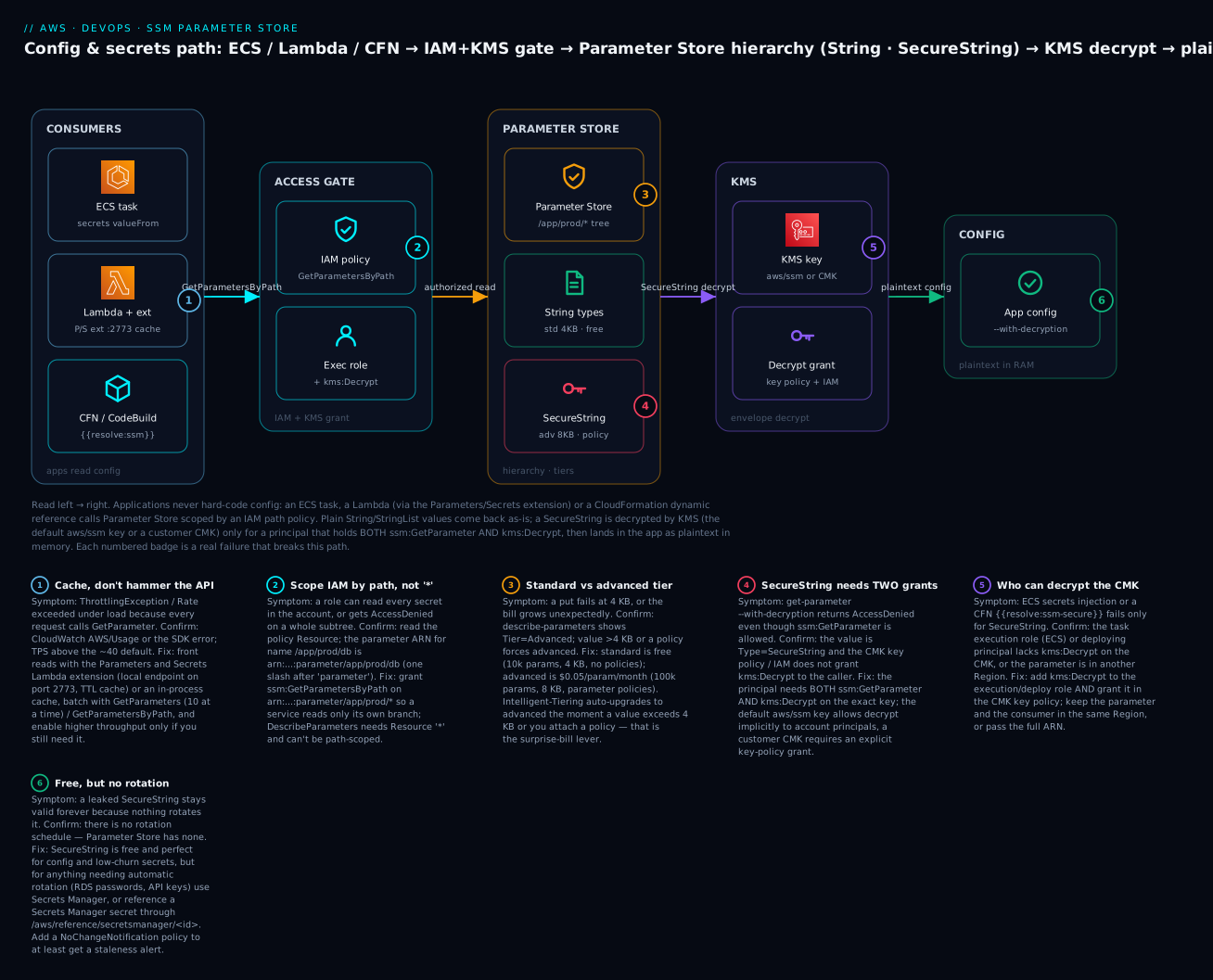
The diagram is the model to internalise. Read it left to right. On the left, three kinds of consumer — an ECS task (via its secrets block), a Lambda (via the caching Parameters/Secrets extension on port 2773), and CloudFormation/CodeBuild (via a {{resolve:ssm}} dynamic reference) — all reach the same store. Every read passes through an access gate: an IAM policy scoped to a path ARN decides which subtree the caller may read, and for a SecureString the caller’s role must also carry kms:Decrypt. In the centre sits Parameter Store itself: a hierarchy under /app/prod/* holding plain String values (free, 4 KB, standard tier) alongside a SecureString (advanced tier, 8 KB, policy-bearing). A SecureString read fans right into KMS — the default aws/ssm key or a customer CMK whose key policy is the second lock — and only a principal holding both locks receives the plaintext config in memory. The six numbered badges mark the failures that bite each hop: caching to avoid throttling at the consumer, path-scoped IAM at the gate, the tier decision and the SecureString double-grant in the store, the KMS decrypt grant, and the “free but no rotation” reality at the output.
Real-world scenario
LedgerLoop, a fictional fintech, ran forty microservices whose config lived in a tangle of pipeline environment variables and one shared, encrypted .env file baked into a base image. Two incidents forced a rethink in the same quarter. First, a database failover changed an endpoint, and because the endpoint was baked into images, restoring service meant rebuilding and redeploying nineteen services — a four-hour outage for a one-line change. Second, a departing contractor’s laptop still held the shared .env, and with no way to know which of forty services actually used which secret, security had to rotate everything and redeploy the fleet.
The platform team moved config to Parameter Store with a strict hierarchy: /<service>/<env>/<component>/<key>. Non-secret settings (endpoints, ports, feature flags, queue URLs) became free String and StringList parameters on the standard tier; the fifteen genuine secrets per environment (DB passwords, third-party API keys) became SecureString values under a customer-managed CMK per environment, so the prod CMK’s key policy could grant kms:Decrypt only to prod task execution roles — a hard, auditable boundary. Each service’s ECS task definition read its own branch through the secrets block, and the task execution roles were scoped to arn:...:parameter/<service>/prod/* plus kms:Decrypt on the prod CMK — so the payments service literally could not read the ledger service’s secrets, enforced by IAM, not convention.
For the database endpoints — the thing that caused outage one — they used labels. Consumers read /ledger/prod/db/host:active, and a failover became a single label-parameter-version moving the active label to a parameter holding the new endpoint; the next task placement picked it up with no rebuild. For the un-rotated third-party keys they could not yet automate, they attached a NoChangeNotification policy at 90 days (auto-upgrading those to advanced tier at $0.05 each — fifteen keys, about $9/month total) so EventBridge would nag them via Slack when a key went stale. The three highest-value credentials — the core banking DB and two payment-processor keys — went to Secrets Manager with managed rotation, referenced from a couple of services through /aws/reference/secretsmanager/... so the SSM read path stayed uniform.
The measurable outcome:
| Metric | Before | After |
|---|---|---|
| Endpoint change → recovery | Rebuild + redeploy 19 services (~4 h) | Move a label (~seconds) |
| “Who can read prod payment keys?” | Unknown (shared .env) |
An IAM + KMS query, CloudTrail-audited |
| Blast radius of one leaked file | Entire fleet | One service’s branch |
| Secrets rotated on contractor exit | Everything (fear-driven) | Only the 3 rotating secrets |
| Config store monthly cost | (hidden in build complexity) | ~$9 (advanced policies) + Secrets Manager for 3 |
| Cross-service secret access | Implicit, ungoverned | Denied by path-scoped IAM |
The lesson LedgerLoop took away: the hierarchy is the security model. Once config had a path and secrets had a CMK, “who can read what” stopped being tribal knowledge and became a policy you could read, test and audit.
Advantages and disadvantages
| Advantages | Disadvantages |
|---|---|
SecureString is free — no per-secret charge |
No built-in rotation (Secrets Manager has it) |
Native hierarchy + GetParametersByPath bulk read |
4 KB / 8 KB value ceiling (Secrets Manager: 64 KB) |
| Versioning + labels give free rollback and pinning | No resource policy — cross-account needs assume-role |
| KMS encryption with a CMK for real access control | SecureString read needs the two-grant (SSM + KMS) dance |
| Deep integration: ECS, Lambda, CFN, CDK, CodeBuild, EC2 | Advanced tier / Intelligent-Tiering can surprise on cost |
| Free public parameters (latest AMIs, Regions) | ~40 TPS default throughput — hot paths need caching |
| Fine-grained, path-scoped IAM | DescribeParameters cannot be path-scoped in IAM |
| CloudTrail-audited reads and writes | Regional only; no automatic cross-Region replication |
When each matters: the advantages dominate for the everyday case — hundreds of config values and low-churn secrets across many services, where free storage, hierarchy and IAM scoping are exactly right. The disadvantages bite when a secret must rotate automatically (use Secrets Manager), when a value is large (>8 KB), or when you need native cross-account sharing — at which points you either add Secrets Manager for those specific secrets or accept an assume-role hop.
Hands-on lab
A complete, mostly-free walk-through: create a KMS CMK, build a parameter hierarchy with String, StringList and a SecureString, read the whole tree decrypted in one call, add a version and a label, attach an advanced-tier expiration policy, wire an ECS task definition and a Lambda to consume it, then tear everything down. Everything runs in us-east-1; swap the Region if you prefer. ⚠️ Standard parameters and SecureString are free; the CMK costs ~$1/month (prorated) and advanced-tier parameters cost $0.05 each/month — the teardown removes them. Schedule the CMK deletion so you are not billed beyond the lab.
Step 1 — Create a customer-managed KMS key for the secret.
KEY_ID=$(aws kms create-key \
  --description "ssm-lab parameter store CMK" \
  --tags TagKey=env,TagValue=lab \
  --query 'KeyMetadata.KeyId' --output text --region us-east-1)

aws kms create-alias --alias-name alias/ssm-lab --target-key-id "$KEY_ID"
echo "CMK: $KEY_ID"
Expected: a key ID (UUID) prints, and the alias alias/ssm-lab is created. You will reference the alias when writing the SecureString.
Step 2 — Put plain config: a String and a StringList (standard tier, free).
aws ssm put-parameter --name "/checkout/prod/db/host" \
  --value "db.checkout.internal:5432" --type String \
  --tier Standard --tags Key=env,Value=lab --region us-east-1

aws ssm put-parameter --name "/checkout/prod/app/allowed-origins" \
  --value "https://app.example.com,https://admin.example.com" --type StringList \
  --tier Standard
Expected: each call returns {"Version": 1, "Tier": "Standard"}. Note the leading slash — these are hierarchical names.
Step 3 — Put a SecureString under the CMK.
aws ssm put-parameter --name "/checkout/prod/db/password" \
  --value "S3cr3t-Pa55!" --type SecureString \
  --key-id "alias/ssm-lab" --tier Standard
Expected: {"Version": 1, "Tier": "Standard"}. The value is now stored encrypted; a read without --with-decryption returns a placeholder, not the password.
Step 4 — Read one parameter, decrypted.
aws ssm get-parameter --name "/checkout/prod/db/password" \
  --with-decryption --query 'Parameter.Value' --output text
Expected: S3cr3t-Pa55!. If you omit --with-decryption you get an encrypted-looking blob; if your caller lacks kms:Decrypt on alias/ssm-lab you get AccessDeniedException from KMS (the two-grant model in action).
Step 5 — Read the whole subtree in one call (the money command).
aws ssm get-parameters-by-path \
  --path "/checkout/prod" --recursive --with-decryption \
  --query 'Parameters[].{Name:Name,Value:Value}' --output table
Expected: a table of all three parameters — host, allowed-origins and the decrypted password — pulled with one API call. Drop --recursive and you get nothing (they are all deeper than one level); drop --with-decryption and the password comes back encrypted.
Step 6 — Create a new version and pin a label.
aws ssm put-parameter --name "/checkout/prod/db/host" \
  --value "db.checkout.internal:6432" --type String --overwrite

aws ssm label-parameter-version --name "/checkout/prod/db/host" \
  --parameter-version 2 --labels active

aws ssm get-parameter --name "/checkout/prod/db/host:active" \
  --query 'Parameter.Value' --output text
Expected: the overwrite returns {"Version": 2}; the label attaches; the labelled read returns db.checkout.internal:6432. Move active back to version 1 and the same read returns the old endpoint — that is your rollback.
Step 7 — Attach an advanced-tier expiration policy.
aws ssm put-parameter --name "/checkout/prod/tmp/launch-token" \
  --value "temporary-value" --type SecureString --key-id "alias/ssm-lab" \
  --tier Advanced \
  --policies '[
    {"Type":"Expiration","Version":"1.0","Attributes":{"Timestamp":"2026-12-31T23:59:59.000Z"}},
    {"Type":"ExpirationNotification","Version":"1.0","Attributes":{"Before":"15","Unit":"Days"}}
  ]'
Expected: {"Version": 1, "Tier": "Advanced"}. ⚠️ This parameter is now advanced tier and costs $0.05/month until deleted. It will auto-delete at the timestamp, and EventBridge fires 15 days before.
Step 8 — Wire an ECS task definition to consume the secret. This is a definition you can register (running it needs a cluster; registration alone is free). The execution role must allow ssm:GetParameters and kms:Decrypt.
{
  "family": "checkout-api",
  "networkMode": "awsvpc",
  "requiresCompatibilities": ["FARGATE"],
  "cpu": "256", "memory": "512",
  "executionRoleArn": "arn:aws:iam::111122223333:role/checkout-exec-role",
  "containerDefinitions": [{
    "name": "api",
    "image": "111122223333.dkr.ecr.us-east-1.amazonaws.com/checkout:1.0",
    "secrets": [
      { "name": "DB_HOST",     "valueFrom": "/checkout/prod/db/host:active" },
      { "name": "DB_PASSWORD", "valueFrom": "/checkout/prod/db/password" }
    ]
  }]
}
The execution role needs this inline policy (note the ARN with a single slash after parameter, and kms:Decrypt on the CMK):
{
  "Version": "2012-10-17",
  "Statement": [
    { "Effect": "Allow", "Action": ["ssm:GetParameters"],
      "Resource": "arn:aws:ssm:us-east-1:111122223333:parameter/checkout/prod/*" },
    { "Effect": "Allow", "Action": ["kms:Decrypt"],
      "Resource": "arn:aws:kms:us-east-1:111122223333:key/KEY-UUID-HERE" }
  ]
}
Step 9 — Consume from Lambda via the caching extension. Attach the public layer and read from the local endpoint. Execution-role permissions are the same two grants.
import os, urllib.request, json

def handler(event, context):
    port = os.environ.get("PARAMETERS_SECRETS_EXTENSION_HTTP_PORT", "2773")
    name = "/checkout/prod/db/password"
    url = f"http://localhost:{port}/systemsmanager/parameters/get?name={name}&withDecryption=true"
    req = urllib.request.Request(url)
    req.add_header("X-Aws-Parameters-Secrets-Token", os.environ["AWS_SESSION_TOKEN"])
    value = json.load(urllib.request.urlopen(req))["Parameter"]["Value"]
    return {"got_secret_len": len(value)}
Expected: the first invocation fetches and caches; subsequent invocations within SSM_PARAMETER_STORE_TTL (default 300 s) return from the extension’s memory with no SSM call. Set the layer ARN for your Region and add ssm:GetParameter + kms:Decrypt to the function role.
Step 10 — Read a public parameter (free, no setup).
aws ssm get-parameter \
  --name "/aws/service/ami-amazon-linux-latest/al2023-ami-kernel-default-x86_64" \
  --query 'Parameter.Value' --output text
Expected: the current Amazon Linux 2023 AMI ID (e.g. ami-0abc...) — a value AWS keeps up to date for you.
Step 11 — Teardown (⚠️ stops all charges).
aws ssm delete-parameters --names \
  "/checkout/prod/db/host" "/checkout/prod/app/allowed-origins" \
  "/checkout/prod/db/password" "/checkout/prod/tmp/launch-token"

aws kms delete-alias --alias-name alias/ssm-lab
aws kms schedule-key-deletion --key-id "$KEY_ID" --pending-window-in-days 7
Expected: parameters delete immediately (DeletedParameters lists all four); the CMK is scheduled for deletion in 7 days (the minimum window) and stops incurring the monthly charge once deleted. Confirm with aws ssm describe-parameters --query 'Parameters[?starts_with(Name,\/checkout`)]'` — it should be empty.
The whole lab as Terraform
The same result declaratively — a CMK, the parameter hierarchy including a SecureString, an advanced-tier policy parameter, and the execution-role policy. terraform destroy is your teardown.
resource "aws_kms_key" "ssm" {
  description         = "ssm-lab parameter store CMK"
  enable_key_rotation = true
  tags                = { env = "lab" }
}

resource "aws_kms_alias" "ssm" {
  name          = "alias/ssm-lab"
  target_key_id = aws_kms_key.ssm.key_id
}

resource "aws_ssm_parameter" "db_host" {
  name  = "/checkout/prod/db/host"
  type  = "String"
  value = "db.checkout.internal:5432"
  tier  = "Standard"
  tags  = { env = "lab" }
}

resource "aws_ssm_parameter" "origins" {
  name  = "/checkout/prod/app/allowed-origins"
  type  = "StringList"
  value = "https://app.example.com,https://admin.example.com"
}

resource "aws_ssm_parameter" "db_password" {
  name   = "/checkout/prod/db/password"
  type   = "SecureString"
  key_id = aws_kms_key.ssm.key_id
  value  = "S3cr3t-Pa55!"          # in real code, pass via a variable, never commit
  tier   = "Standard"
}

resource "aws_ssm_parameter" "launch_token" {
  name   = "/checkout/prod/tmp/launch-token"
  type   = "SecureString"
  key_id = aws_kms_key.ssm.key_id
  value  = "temporary-value"
  tier   = "Advanced"
  # Parameter policies via the AWS provider:
  # use the `data_type` / lifecycle and a raw policy string as supported by your provider version.
}

data "aws_iam_policy_document" "exec" {
  statement {
    actions   = ["ssm:GetParameters"]
    resources = ["arn:aws:ssm:us-east-1:${data.aws_caller_identity.me.account_id}:parameter/checkout/prod/*"]
  }
  statement {
    actions   = ["kms:Decrypt"]
    resources = [aws_kms_key.ssm.arn]
  }
}

data "aws_caller_identity" "me" {}

resource "aws_iam_role_policy" "exec" {
  name   = "checkout-ssm-read"
  role   = aws_iam_role.exec.id           # your ECS task execution role
  policy = data.aws_iam_policy_document.exec.json
}
Note the value for a SecureString is stored in Terraform state in plaintext — treat state as sensitive (encrypted remote backend, restricted access), or write the value out-of-band with the CLI and only manage metadata in Terraform. This state-sensitivity point is exactly why some teams keep the highest-value secrets in Secrets Manager and reference them.
Common mistakes & troubleshooting
Parameter Store fails in a small, learnable set of ways — and most of them are really IAM-plus-KMS. Here is the playbook: symptom, root cause, the exact command or console path to confirm, and the fix.
| # | Symptom | Root cause | Confirm (command / console) | Fix |
|---|---|---|---|---|
| 1 | AccessDeniedException on get-parameter --with-decryption even though ssm:GetParameter is allowed |
Missing kms:Decrypt on the key that encrypts the SecureString |
The error text names KMS; check the CMK key policy + the caller’s IAM | Grant kms:Decrypt on the exact key ARN to the role and in the CMK key policy |
| 2 | ParameterNotFound for a parameter you know exists |
Wrong Region, missing leading /, or a typo in the path |
aws ssm describe-parameters --region <r>; compare exact name |
Match the Region (--region), include the leading slash, use the exact case-sensitive name |
| 3 | get-parameters-by-path returns nothing |
No --recursive, so only the immediate level is read |
Re-run with --recursive; list with describe-parameters |
Add --recursive; confirm the --path prefix is correct |
| 4 | SecureString values come back as ciphertext markers |
--with-decryption omitted |
Inspect the returned Value |
Add --with-decryption (and ensure kms:Decrypt) |
| 5 | Unexpected $0.05/parameter charges |
Advanced tier — often via Intelligent-Tiering auto-upgrade | describe-parameters --query 'Parameters[?Tier==\Advanced`]'` |
Set --tier Standard explicitly; remove policies/large values to downgrade |
| 6 | ECS task fails to start: unable to pull secrets or registry auth / ResourceInitializationError |
Task execution role lacks ssm:GetParameters (or kms:Decrypt for CMK) |
ECS service events; the stopped-task reason | Add the two grants to the execution role (not the task role); verify the parameter ARN |
| 7 | ECS injects the wrong/no value | valueFrom name/ARN wrong, or parameter in another Region |
describe-parameters; check valueFrom matches |
Use the exact name (same Region) or full ARN (cross-Region) |
| 8 | ThrottlingException / Rate exceeded under load |
Too many GetParameter calls above ~40 TPS |
CloudWatch AWS/Usage for SSM; the SDK error rate |
Cache (Lambda extension / in-process), batch with GetParameters/GetParametersByPath, enable higher throughput |
| 9 | CloudFormation {{resolve:ssm-secure}} does not resolve |
Used in an unsupported resource property, or deployer lacks kms:Decrypt |
CFN events; the property’s dynamic-reference support | Use it only in supported properties; grant the deploy role kms:Decrypt; pin :version |
| 10 | CFN {{resolve:ssm}} returns a stale value |
Reference not pinned; CFN cached the value at last deploy | Compare template value to current parameter | Pin :version, or update the stack to re-resolve; use AWS::SSM::Parameter::Value type for deploy-time resolve |
| 11 | Cross-account read fails outright | Parameter Store has no resource policy | Confirm you are in the wrong account | Assume a role in the owner account and read there (sts:AssumeRole) |
| 12 | label command rejected |
Label starts with a number, is latest, or exceeds 10/version |
Read the error; get-parameter-history shows labels |
Rename the label (letters first), stay under 10 per version |
| 13 | put-parameter fails: ValidationException … value ... exceeded maximum |
Value > 4 KB on standard tier | Measure the value size | Use --tier Advanced (8 KB) or move the blob to S3 and store the pointer |
| 14 | ParameterAlreadyExists on put-parameter |
Overwriting without --overwrite |
The error names the conflict | Add --overwrite (creates a new version) |
| 15 | describe-parameters AccessDenied despite a path-scoped policy |
DescribeParameters requires Resource * — it is not resource-level |
Read the policy Resource | Grant ssm:DescribeParameters on * (scope reads with GetParametersByPath instead) |
| 16 | Lambda extension returns 400 / no value | Missing X-Aws-Parameters-Secrets-Token header or wrong port |
Log the extension response; check env PARAMETERS_SECRETS_EXTENSION_HTTP_PORT |
Send the header = $AWS_SESSION_TOKEN; use port 2773; grant the function ssm:GetParameter |
Error / exception reference
| Exception | Source | Meaning | Typical trigger | First move |
|---|---|---|---|---|
ParameterNotFound |
SSM | No such parameter (in this Region) | Typo, wrong Region, missing / |
Check name + --region with describe-parameters |
ParameterAlreadyExists |
SSM | Name exists, no overwrite flag | put-parameter without --overwrite |
Add --overwrite |
AccessDeniedException (SSM) |
SSM/IAM | Not allowed the SSM action | Missing ssm:GetParameter* or wrong ARN |
Fix the IAM policy Resource (mind the single slash) |
AccessDeniedException (KMS) |
KMS | Not allowed to decrypt | Missing kms:Decrypt on the key |
Grant on the role and the CMK key policy |
ThrottlingException |
SSM | Request rate too high | Above default TPS | Cache, batch, or enable higher throughput |
ValidationException |
SSM | Malformed request | Value too big, bad policy JSON, bad name | Fix the field the message names |
ParameterMaxVersionLimitExceeded |
SSM | Over 100 versions | Very churny parameter | Clean up; reconsider using labels over frequent overwrites |
InvalidKeyId |
SSM/KMS | Bad/deleted KMS key | Key deleted or wrong Region | Point at a valid key in the same Region |
HierarchyLevelLimitExceededException |
SSM | Path deeper than 15 levels | Over-nested naming | Flatten the hierarchy |
TooManyUpdates |
SSM | Concurrent writes to the same parameter | Parallel put-parameter |
Serialise writes; back off and retry |
The two nastiest real failures
“My role can read the parameter but decryption is denied.” A task or user has ssm:GetParameter on arn:...:parameter/app/prod/*, the metadata reads fine, but --with-decryption throws AccessDeniedException — and reading closely, the denial is from KMS, not SSM. This is the split-trust model: a SecureString read is two locks, and the second (kms:Decrypt) is on the CMK, gated by the CMK’s own key policy in addition to IAM. With the default aws/ssm key it “just works” because that managed key delegates decrypt to SSM for account principals; the moment you move to a CMK (which you should, for real secrets), you must add the principal to the key policy and grant kms:Decrypt in IAM. Teams lose an afternoon here because they instrument SSM and never look at the KMS side. Confirm by reading the CMK key policy (aws kms get-key-policy) and the caller’s effective permissions; fix by granting kms:Decrypt in both places.
“We deployed fine in dev, and prod says ParameterNotFound / injected nothing.” The classic cause is Region, closely followed by the ARN single-slash. Parameter Store is regional, so a parameter created in us-east-1 is invisible from a task or stack in eu-west-1 — the same name, a different store. And when scoping IAM, the parameter name /app/prod/db maps to arn:...:parameter/app/prod/db (one slash after parameter, not parameter//app), so a policy written with two slashes or without the path silently denies. In ECS specifically, layer on the execution-role-not-task-role confusion, and a “config that worked yesterday” fails on a fresh deploy in a new Region. Confirm with describe-parameters --region <target> and by echoing the exact ARN into the policy; fix by keeping consumer and parameter in the same Region (or passing full ARNs) and getting the ARN slash right.
Best practices
- Design the hierarchy first.
/<app>/<env>/<component>/<key>makes IAM path-scoping trivial and config discoverable. The hierarchy is the permission boundary. - Default to the standard tier. It is free, holds 10,000 parameters, and covers nearly everything. Reach for advanced only for >4 KB values or real parameter policies — deliberately, never via surprise Intelligent-Tiering.
- Use a customer-managed CMK for
SecureStringsecrets, not the defaultaws/ssmkey, so the key policy is a real, auditable second gate — and use a per-environment key so prod and dev secrets are cryptographically separated. - Grant the two
SecureStringpermissions together —ssm:GetParameterandkms:Decrypt— and remember the ECS execution role (not the task role) is the one that fetches secrets. - Scope IAM to path ARNs (
parameter/app/prod/*), neverResource: "*", and mind the single slash afterparameter. - Read config with
GetParametersByPathin one recursive call rather than manyGetParametercalls — fewer requests, no throttling, atomic snapshot of a branch. - Use labels for promotion and rollback. Consumers read
:active/:release; you move the label after validation. Rollback becomes moving a label, not editing a value. - Cache on hot paths. Use the Parameters/Secrets Lambda extension or an in-process cache with a sane TTL; a per-invocation
GetParameteris a throttling incident waiting to happen. - Reference public parameters for AMIs (
/aws/service/ami-amazon-linux-latest/...) instead of hard-coding IDs, so image updates are automatic. - Set tiers explicitly and alarm on advanced-parameter count so cost cannot creep in silently.
- Keep Terraform state encrypted and access-controlled — a
SecureStringvalue lands in state in plaintext; for the highest-value secrets, prefer Secrets Manager or write values out-of-band. - Move to Secrets Manager when you need rotation, >8 KB, or native cross-account — and bridge via
/aws/reference/secretsmanager/<id>to keep one read path.
Security notes
Parameter Store security is IAM-first, KMS-second, and CloudTrail-audited. There is no network listener; access is entirely through the AWS API.
| Control | Mechanism | Practical guidance |
|---|---|---|
| Authorization | IAM identity policies on ssm:GetParameter* / ssm:PutParameter |
Grant only the actions used; never ssm:* in prod |
| Path scoping | Resource ARN parameter/app/prod/* |
The hierarchy is the boundary; one service reads only its branch |
| Encryption at rest | SecureString + KMS (CMK) |
Use a per-environment CMK; the key policy is a second gate |
| Who can decrypt | kms:Decrypt on the CMK (IAM + key policy) |
Restrict to the exact roles; the aws/ssm key cannot be restricted |
| Encryption in transit | TLS to the SSM endpoint | Enforced; use the regional endpoint |
| Private connectivity | VPC interface endpoints for ssm and kms |
Keep reads off the public internet — see VPC subnets & security groups |
| Auditing | CloudTrail records every Get/Put |
Alarm on GetParameter of prod secrets by unexpected principals |
| Least privilege for describe | ssm:DescribeParameters needs * |
Prefer GetParametersByPath (path-scoped) for reads |
| Value hygiene | Keep secrets out of logs | Never echo a decrypted value in CI; CodeBuild masks parameter-store env |
The strongest posture combines path-scoped IAM with a per-environment CMK: a role can name the parameter and must be on the key policy to read it, so “who can read the prod DB password” is answered by two independent, auditable policies. The weakest — and unfortunately most common — is a broad ssm:GetParameters on * with the default aws/ssm key, which lets any principal with SSM access read every secret in the account. The full identity-policy evaluation model behind these decisions is in IAM policy evaluation & AccessDenied troubleshooting.
Cost & sizing
Parameter Store is one of the cheapest useful services in AWS — but there are exactly three levers that turn on a bill. Approximate us-east-1 list prices as of 2026; always verify current pricing.
| Cost driver | Charge | Notes |
|---|---|---|
Standard parameters (any type, incl. SecureString) |
Free | Up to 10,000/Region; storage + standard throughput free |
| Advanced parameters | $0.05 per parameter / month | Prorated hourly; needed for >4 KB or policies |
| Higher-throughput API interactions | $0.05 per 10,000 | Only when you enable higher throughput |
| KMS (CMK) | ~$1 / key / month + $0.03 per 10k requests | The aws/ssm managed key has no monthly charge |
| Public parameters | Free | /aws/service/* reads cost nothing |
Rough INR at ~₹84/USD: an advanced parameter ≈ ₹4/month; a CMK ≈ ₹84/month; 10,000 higher-throughput reads ≈ ₹4. Sizing guidance:
| Situation | Recommendation | Why |
|---|---|---|
| Everyday config + low-churn secrets | Standard tier, default | Free; 4 KB is ample |
| A value > 4 KB (cert chain, big JSON) | Advanced tier (8 KB) | Only way to exceed 4 KB in Parameter Store |
| Need Expiration / notification policies | Advanced tier | Policies are advanced-only |
| Very high read rate (hot config) | Cache + maybe higher throughput | Caching first; throughput charge only if still needed |
| Secret must rotate / >8 KB / cross-account | Secrets Manager (~$0.40/secret) | Parameter Store cannot do these |
| Thousands of secrets, no rotation needed | Parameter Store SecureString |
Free vs ~$0.40 each in Secrets Manager |
The two traps: Intelligent-Tiering silently upgrading parameters to advanced (set tiers explicitly and alarm on advanced count), and reaching for Secrets Manager by reflex for values that never rotate — at 1,000 secrets that reflex is ~$400/month you did not need to spend. Conversely, do not contort Parameter Store to fake rotation; when rotation is the requirement, the ~$0.40/secret for Secrets Manager is the right spend.
Interview & exam questions
Q: What are the three Parameter Store types and which is encrypted? String (single plain value), StringList (comma-separated plain values), and SecureString (KMS-encrypted). Only SecureString is encrypted, and only it needs --with-decryption plus kms:Decrypt to read. (CLF-C02, DVA-C02)
Q: Standard vs advanced tier — the key differences? Standard: 4 KB values, 10,000 parameters/Region, no policies, free. Advanced: 8 KB values, 100,000 parameters, parameter policies supported, $0.05 per parameter/month. Intelligent-Tiering auto-picks and can upgrade (and start billing) when a value exceeds 4 KB or a policy is attached. (DVA-C02, SOA-C02)
Q: What two permissions does reading a SecureString require, and from where? ssm:GetParameter (from SSM/IAM) and kms:Decrypt (from KMS, gated by the CMK’s key policy and IAM). A SecureString read is a two-lock door; the denial is often a KMS AccessDeniedException, not SSM. (DVA-C02, SCS)
Q: How do you read an entire configuration hierarchy in one call? get-parameters-by-path --path /app/prod --recursive --with-decryption. Without --recursive you get only the immediate level; without --with-decryption SecureString values return as ciphertext. (DVA-C02)
Q: Difference between the default aws/ssm key and a customer CMK for SecureString? aws/ssm is AWS-managed, free, and lets any account principal with SSM access decrypt — you cannot restrict who. A CMK is yours: the key policy is an independent, auditable gate, supports cross-account, and is required for real least-privilege and compliance. (SCS, DVA-C02)
Q: How do you promote and roll back configuration safely? Use labels: consumers read name:active; you move the active label to a validated version to promote, and back to the previous version to roll back — without editing the value or redeploying. (DVA-C02)
Q: What are parameter policies and which tier do they need? Expiration (auto-delete at a timestamp), ExpirationNotification (EventBridge event N days before), and NoChangeNotification (event if unchanged for N days). All require the advanced tier and emit EventBridge events. (SOA-C02, DVA-C02)
Q: How does an ECS task consume a SecureString, and what is the classic mistake? Via the secrets block with valueFrom set to the parameter name/ARN; the value is injected as an environment variable at container start. The classic mistake is granting the permission to the task role instead of the task execution role, which is what actually fetches the secret. (DVA-C02)
Q: Parameter Store vs Secrets Manager — when do you pick Secrets Manager? When you need built-in automatic rotation, values larger than 8 KB, native cross-account sharing via resource policies, or generated random passwords. Otherwise Parameter Store SecureString is free and sufficient. (SAA-C03, DVA-C02, SCS)
Q: How do you get the latest Amazon Linux AMI without hard-coding an ID? Read the AWS public parameter /aws/service/ami-amazon-linux-latest/al2023-ami-kernel-default-x86_64; AWS keeps it current, and launch templates/CFN can reference it directly. (SAA-C03, SOA-C02)
Q: You get ThrottlingException reading config under load. Fix? Cache the values — the Parameters/Secrets Lambda extension or an in-process cache — batch with GetParameters/GetParametersByPath, and only if still needed enable the higher-throughput setting (which then bills per API interaction). (DVA-C02, SOA-C02)
Q: Why might a cross-account read of a parameter be impossible directly? Parameter Store has no resource-based policy, so you cannot share a parameter to another account; the consumer must assume a role in the owning account and read there. Secrets Manager, by contrast, supports resource policies for native cross-account access. (SCS, SAA-C03)
Quick check
- You store a database password as a
SecureStringunder a customer CMK. A role hasssm:GetParameteron the exact ARN but the decrypted read fails. What is missing and where? - Which single command reads every parameter under
/checkout/prod, including nested ones, with secrets decrypted? - A “free” Parameter Store starts showing $0.05 charges per parameter. What silently caused it, and how do you prevent it?
- You need the config change on a database failover to reach consumers with no rebuild. What Parameter Store feature makes that a one-step operation?
- When do you choose Secrets Manager over a Parameter Store
SecureString?
Answers
kms:Decrypton the CMK — granted in both the role’s IAM policy and the CMK’s key policy. ASecureStringread is two locks (SSM + KMS); the denial comes from KMS.aws ssm get-parameters-by-path --path /checkout/prod --recursive --with-decryption.--recursivegets nested levels;--with-decryptiondecryptsSecureStringvalues (and needskms:Decrypt).- Intelligent-Tiering auto-upgraded parameters to advanced tier because a value exceeded 4 KB or a policy was attached. Prevent it by setting
--tier Standardexplicitly and alarming on advanced-parameter count. - Version labels. Consumers read
name:active; on failover you move theactivelabel (or overwrite + relabel) to the parameter holding the new endpoint, and the next task/read picks it up — no rebuild. - When you need automatic rotation, values > 8 KB, native cross-account sharing (resource policies), or generated random passwords. Otherwise
SecureStringis free and sufficient.
Glossary
| Term | Definition |
|---|---|
| Parameter | A named key-value entry in Parameter Store, addressed by name or hierarchical path. |
| String / StringList | Unencrypted single value / comma-separated list of values. |
| SecureString | A KMS-encrypted parameter value; the only encrypted type. |
| Tier | Standard (free, 4 KB), Advanced (paid, 8 KB, policies), or Intelligent-Tiering. |
| Parameter policy | An advanced-tier rule (Expiration, ExpirationNotification, NoChangeNotification) emitting EventBridge events. |
| Version | The auto-incrementing integer created on each overwrite; retained up to 100. |
| Label | A named alias pinned to one version, used for promotion and rollback. |
| Hierarchy / path | A slash-delimited name (/app/env/key) enabling bulk read and path-scoped IAM. |
| GetParametersByPath | The API that reads a whole subtree (--recursive, --with-decryption). |
| dataType | text or aws:ec2:image (validates AMI IDs). |
| CMK | A customer-managed KMS key whose key policy independently gates SecureString decryption. |
| aws/ssm key | The default AWS-managed KMS key for SecureString; free, unrestrictable. |
| Dynamic reference | CloudFormation {{resolve:ssm}} / {{resolve:ssm-secure}} that resolves a parameter at deploy time. |
| Parameters and Secrets extension | A Lambda layer that caches parameters behind a local endpoint on port 2773. |
| Public parameter | An AWS-maintained read-only parameter under /aws/service/* (e.g. latest AMIs). |
Next steps
- Run commands, patch and shell into instances with the operational half of Systems Manager in SSM Session Manager, Patch Manager & Run Command.
- Add automatic rotation for high-value secrets in Secrets Manager rotation hands-on.
- Understand the envelope encryption and key policies behind
SecureStringin KMS encryption keys & envelope encryption hands-on. - Inject these parameters into containers correctly in ECS task definitions, services & autoscaling.
- Resolve
AccessDeniedon the SSM+KMS two-grant model with IAM policy evaluation & AccessDenied troubleshooting.