You run one command — aws s3 ls — and the terminal answers with a wall of red: Unable to locate credentials. Or worse, it works, lists buckets happily, and only twenty minutes later do you realise those were production buckets and you meant to be in the sandbox account. The AWS CLI is the single most-used tool in a cloud engineer’s day, and almost none of its pain comes from the commands themselves. It comes from one deceptively simple question the CLI has to answer before every single call: who are you, and in which account? That answer is assembled from a chain of sources — command-line flags, environment variables, an assume-role hop, an SSO token, two dotfiles in ~/.aws, and, on a server, the instance’s own role — and the first source that produces a usable credential wins. Understand that chain and you can debug any credential error in under a minute. Ignore it and you will lose hours to a stale environment variable you exported last Tuesday.
This is a practitioner’s guide to the parts of the AWS CLI that actually break: the ~/.aws/config and ~/.aws/credentials files and every key they hold, named profiles, the credential provider chain and its exact precedence, SSO profiles backed by IAM Identity Center, assume-role profiles for cross-account work, the environment variables that quietly override everything, and the global options — --region, --output, pagination, --query, --dry-run — that shape every command. We treat credential errors the way an on-call engineer must: as a small set of symptom classes, each with a precise root cause you confirm with aws configure list and aws sts get-caller-identity, then fix. Every mechanism gets both the aws command and a Terraform equivalent where infrastructure is involved, and the reference tables are built to keep open in a second window while you work.
By the end you will stop guessing about identity. When a command fails you will know whether the CLI never found a credential, found the wrong one, found an expired one, or found a valid credential that simply isn’t allowed to do the thing you asked. You will set up a plain access-key profile, an SSO profile and an assume-role profile from scratch, prove each one with sts get-caller-identity, and read the credential chain the way it actually resolves rather than the way you assumed it did. That difference — knowing which source won — is the whole game.
What problem this solves
The AWS CLI hides a genuinely complex authentication and authorization system behind a two-word command. That abstraction is a gift right up until it breaks, and then the error message tells you almost nothing useful: Unable to locate credentials does not say which of eight credential sources it checked, and AccessDenied does not say whether you are the wrong identity or the right identity lacking a permission. The information you need is real and knowable, but it is spread across two config files, your shell environment, a token cache directory, and, on a server, the instance metadata service. If you do not know which of those the CLI consults, in what order, you burn time editing the wrong file.
What breaks without this knowledge is predictable and expensive. An engineer exports temporary keys into their shell to test something, forgets, and for the next week every --profile flag is silently ignored because static environment variables outrank profile files — they ship a change to the wrong account. A team rotates to IAM Identity Center but never learns that the SSO token expires every few hours, so every morning starts with a confusing ExpiredToken and a support ping. A CI job assumes a role but the source credentials it chains from have expired, producing an error that names the target role and sends everyone debugging the wrong policy. None of these are hard once you can see the chain; all of them are hours-long mysteries when you cannot.
Who hits this: everyone who touches AWS from a terminal, from a first-week junior running aws configure to the platform engineer wiring an assume-role graph across twelve accounts. It bites hardest on people juggling multiple accounts (the wrong-profile trap), teams migrating from long-lived IAM keys to SSO (the token-expiry surprise), and anyone running the CLI on EC2 or in a container (where the credential source is the instance role and the failure mode is metadata reachability, not a missing file). The fix is almost never “run aws configure again” — it is “find which link in the chain answered, and why.”
Here is the whole field in one frame: every credential symptom class this article covers, the question it forces, and the first command to run.
| Symptom class | What the CLI is really telling you | First question to ask | First command to run | Most common single cause |
|---|---|---|---|---|
Unable to locate credentials |
“No source in the chain returned a credential” | Is any profile even selected? | aws configure list |
No profile set, or a typo’d profile name |
| Wrong account / identity | “A source answered — just not the one you meant” | Which source won? | aws sts get-caller-identity |
Static env var shadowing your profile |
ExpiredToken |
“The temporary credential aged out” | Is this SSO, assume-role, or MFA? | aws configure list (see Type) |
SSO/role session lapsed; re-login |
AccessDenied |
“Right identity, wrong permissions” | Am I who I think I am? | aws sts get-caller-identity |
Missing IAM permission or SCP cap |
You must specify a region |
“No region resolved from any source” | Is a region set anywhere? | aws configure list |
No region in profile/env/flag |
InvalidClientTokenId |
“The access key itself is not valid” | Is the key active and in this partition? | aws configure list |
Deleted/inactive key or wrong partition |
| Command hangs, no prompt | “Output is sitting in a pager” | Did anything actually fail? | press q |
Default pager (less) on long output |
Learning objectives
By the end of this article you can:
- Install the AWS CLI v2 on macOS, Linux and Windows, verify the version, and keep it current — and explain why v2 (not v1) is the only sane choice for SSO.
- Read and hand-edit
~/.aws/configand~/.aws/credentials, and say exactly which setting belongs in which file and why the[profile name]vs[name]header difference exists. - Create and select named profiles with
--profileandAWS_PROFILE, and predict which one a given command will actually use. - Recite the credential provider chain in precedence order and use it to explain any “wrong credential” bug in one pass.
- Stand up an SSO profile with
aws configure sso, understand thesso-sessionblock, and refresh it withaws sso login. - Build an assume-role profile with
role_arnplussource_profileorcredential_source, and wire inexternal_id,mfa_serialandduration_secondscorrectly. - Drive the global options fluently:
--region,--output(json/table/text/yaml), pagination (--no-cli-pager,--max-items,--page-size), server-side--filtersvs client-side--queryJMESPath, and--dry-run. - Diagnose and fix every common credential error with
aws configure listandaws sts get-caller-identityas your two-command diagnostic kit.
Prerequisites & where this fits
You need an AWS account you can log into (the free tier is plenty — nothing here provisions billable resources beyond trivial API calls), a terminal on macOS, Linux or Windows, and permission to install a package. For the SSO section you need an organization using IAM Identity Center (formerly AWS SSO); if you do not have one, the plain-profile and assume-role paths stand on their own. Basic comfort with a shell — editing a dotfile, exporting an environment variable, reading JSON — is assumed. You do not need to understand IAM policy internals; when a call is denied for permissions rather than identity, that is a different topic and we will point you to it.
This article sits at the Foundations layer of the AWS track: it is the tool you use to exercise everything else. It assumes the account and identity model from AWS Organizations and IAM Foundations: Accounts, OUs and Roles sits above it — accounts, OUs, IAM Identity Center, roles and trust policies are the what; this article is the how you reach them from a keyboard. It pairs directly with three siblings you will meet again in the troubleshooting section: AWS cross-account roles and AssumeRole, hands-on for the role graph an assume-role profile rides on, IAM Identity Center and SSO permission sets for what an SSO profile is actually mapped to, and IAM policy evaluation and AccessDenied troubleshooting for the day a credential is valid but the action is refused.
A quick map of where each credential source lives, who owns it, and what failure it can cause — so mid-incident you know which layer to poke:
| Layer | Where it lives | Who usually owns it | Failure class it causes |
|---|---|---|---|
| CLI flags | Typed on the command | You, per command | Typo’d --profile, forgotten --region |
| Environment | Your shell / CI env | You or the CI system | Stale keys shadowing a profile |
| Shared config | ~/.aws/config |
You | Wrong [profile] header, missing region |
| Shared credentials | ~/.aws/credentials |
You | Missing key pair, partial credentials |
| SSO token cache | ~/.aws/sso/cache/ |
The CLI (auto) | Expired token, needs aws sso login |
| Assume-role graph | IAM roles + trust policies | Platform / security | Denied AssumeRole, ExternalId mismatch |
| Instance metadata | EC2 IMDS / ECS endpoint | Platform / you (Terraform) | Hop limit, no instance profile attached |
Core concepts
Before any command runs, the AWS CLI must resolve two things independently: credentials (who you are — an access key, a session token, or a promise of one via a role/SSO) and configuration (region, output format, retry behaviour, and which profile to read). These come from overlapping-but-different sources, which is the root of most confusion. Getting the mental model right makes the rest mechanical.
Profiles: a named bundle of settings
A profile is a named set of credential and configuration values. The magic word default is just the profile used when you name none. You select a non-default profile with --profile NAME on a command or AWS_PROFILE=NAME in the environment. A profile can carry static credentials (an access key), or it can carry instructions for obtaining credentials (an SSO login, an assume-role directive) — and the second kind is what every modern setup uses, because static long-lived keys on a laptop are the number-one AWS credential leak.
Two files, two jobs
Configuration lives in ~/.aws/config; credentials can live in ~/.aws/credentials. The split is historical and slightly leaky (SSO and assume-role settings live in config even though they yield credentials), but the rule of thumb holds: secrets (aws_access_key_id, aws_secret_access_key) go in credentials; everything else (region, output, sso, role_arn, source_profile) goes in config. On Windows the files sit under %USERPROFILE%\.aws\.
| Aspect | ~/.aws/config |
~/.aws/credentials |
|---|---|---|
| Primary job | Configuration + credential sources | Static long-lived credentials |
Section header for foo |
[profile foo] |
[foo] |
default header |
[default] |
[default] |
Holds region, output |
Yes | No (ignored here) |
Holds aws_access_key_id |
Allowed but unusual | Yes — the normal place |
Holds sso_*, role_arn |
Yes | No |
| Overridden by env var | AWS_CONFIG_FILE |
AWS_SHARED_CREDENTIALS_FILE |
| Safe to commit to git? | Never (may contain account IDs, URLs) | Never (contains secrets) |
The single most common beginner cut is the header mismatch: in config a non-default profile is [profile dev], but in credentials the same profile is [dev] (no profile word). Put [profile dev] in credentials and the CLI looks for a profile literally named profile dev and reports it cannot be found.
The credential provider chain
When the CLI needs a credential it walks an ordered list of providers and stops at the first one that returns something usable. This is the concept. Memorise the order and you can explain every “it used the wrong identity” bug by asking: which provider higher in the list answered first? The table below is the resolution order the AWS CLI v2 uses; higher rows win.
| # | Provider | What it reads | Wins when… | Classic gotcha |
|---|---|---|---|---|
| 1 | Command-line options | --profile, --region, --output |
Always evaluated first | --profile picks the block; it is not itself a credential |
| 2 | Environment — static keys | AWS_ACCESS_KEY_ID + AWS_SECRET_ACCESS_KEY (+ AWS_SESSION_TOKEN) |
The pair is exported | Shadows every profile file — the wrong-account trap |
| 3 | Assume role | role_arn + source_profile/credential_source in the chosen profile |
Profile declares a role_arn |
Fails if the source creds are stale, not the target |
| 4 | Assume role with web identity | web_identity_token_file + role_arn |
Federated/OIDC (EKS IRSA, GitHub OIDC) | Token file path wrong or token expired |
| 5 | IAM Identity Center (SSO) | sso_* keys + cached token |
Profile is an SSO profile | Token expired → run aws sso login |
| 6 | Shared credentials file | ~/.aws/credentials for the chosen profile |
Static keys present there | Header mismatch [profile x] vs [x] |
| 7 | Shared config file | ~/.aws/config (credentials placed here) |
Keys present in config | Unusual; env still outranks it |
| 8 | ECS/EKS container credentials | AWS_CONTAINER_CREDENTIALS_RELATIVE_URI/_FULL_URI |
Running as an ECS task / EKS pod | URI unreachable, task role missing |
| 9 | EC2 instance profile (IMDS) | Instance metadata service (IMDSv2) | On EC2 with an attached role | Hop limit 1 behind a container; metadata disabled |
Two subtleties worth internalising now, because they cause the nastiest bugs. First, --profile (row 1) is not a credential — it selects which profile the file-based providers (rows 3–7) read, but static credential environment variables (row 2) still outrank a profile’s file credentials. So aws --profile prod ... can still run as whoever your exported AWS_ACCESS_KEY_ID belongs to. Second, the assume-role provider (row 3) needs a source of credentials to make the sts:AssumeRole call; when it fails, the error frequently names the target role while the real problem is the source — an expired SSO token or stale keys one hop back.
Kinds of profile
Not all profiles are the same shape. The CLI infers the type from which keys a profile contains, and that type decides which provider handles it.
| Profile type | Tell-tale keys | Credential lifetime | Best for | Note |
|---|---|---|---|---|
| Static / long-lived | aws_access_key_id, aws_secret_access_key |
Until rotated | Break-glass, some CI | Discouraged on laptops; rotate ≤ 90 days |
| SSO (Identity Center) | sso_session or sso_start_url + sso_account_id, sso_role_name |
Hours (token-bound) | Human, multi-account | The modern default for people |
| Assume-role | role_arn + source_profile/credential_source |
Session (≤ role max) | Cross-account, elevation | Chain from an SSO/base profile |
| Web-identity / OIDC | role_arn + web_identity_token_file |
Session | EKS IRSA, GitHub Actions | Token minted by the platform |
| Process (external) | credential_process |
Whatever the tool returns | Custom credential tools, aws-vault |
Command must emit a JSON blob |
| Instance/container | (none — resolved from IMDS/ECS) | Auto-rotated | EC2, ECS, EKS workloads | No keys on disk at all — the goal state |
Installing and updating the AWS CLI v2
There are two major versions in the wild. AWS CLI v1 is Python-pip-installed and does not support aws configure sso in the way v2 does; AWS CLI v2 ships as a self-contained bundle (its own embedded Python), installs from a platform package, and is the only version you should run today. If aws --version prints aws-cli/1.x, you are on the legacy line and should replace it.
| Trait | AWS CLI v1 | AWS CLI v2 |
|---|---|---|
| Distribution | pip install awscli |
Platform installer (pkg/zip/MSI/Docker) |
| Bundled runtime | Uses your Python | Embedded Python — no dependency clashes |
aws configure sso / SSO login |
Limited / no | Full support (the reason to upgrade) |
--output yaml, aws configure import, auto-prompt |
No | Yes |
sso-session refreshable token block |
No | Yes |
| Recommended today | No | Yes — use this |
Installing per platform
Pick the installer for your OS. Each lands the aws binary and an aws_completer for shell tab-completion.
| Platform | Install method | Command / action | Installs to |
|---|---|---|---|
| macOS (GUI) | Official pkg | Download AWSCLIV2.pkg, double-click |
/usr/local/aws-cli |
| macOS (CLI) | curl + installer |
curl "https://awscli.amazonaws.com/AWSCLIV2.pkg" -o AWSCLIV2.pkg && sudo installer -pkg AWSCLIV2.pkg -target / |
/usr/local/aws-cli |
| macOS (Homebrew) | Homebrew | brew install awscli |
Homebrew prefix |
| Linux x86_64 | Zip bundle | curl "https://awscli.amazonaws.com/awscli-exe-linux-x86_64.zip" -o awscliv2.zip && unzip awscliv2.zip && sudo ./aws/install |
/usr/local/aws-cli |
| Linux ARM64 | Zip bundle | Same as above with awscli-exe-linux-aarch64.zip |
/usr/local/aws-cli |
| Windows | MSI | msiexec /i https://awscli.amazonaws.com/AWSCLIV2.msi (or download + double-click) |
C:\Program Files\Amazon\AWSCLIV2 |
| Any | Docker | docker run --rm -it amazon/aws-cli command |
Container image |
On Linux the zip bundle is worth understanding because it is also how you update: the ./aws/install script refuses to clobber an existing install, so to upgrade you pass the update flag.
# Fresh install
curl "https://awscli.amazonaws.com/awscli-exe-linux-x86_64.zip" -o awscliv2.zip
unzip awscliv2.zip
sudo ./aws/install

# Update an existing v2 in place (point --bin-dir/--install-dir at the current ones)
sudo ./aws/install --update --bin-dir /usr/local/bin --install-dir /usr/local/aws-cli
Keeping it current
The AWS CLI v2 has no built-in self-update command — there is no aws upgrade. You keep it current by re-running the installer (with --update on Linux) or via your package manager. Do not let it drift: new AWS services and options appear only in newer CLI builds, and some SSO/OIDC fixes are version-gated.
| Update path | Command | Notes |
|---|---|---|
| Linux zip | sudo ./aws/install --update ... |
Re-download the zip first for the latest |
| macOS pkg | Re-download and re-run AWSCLIV2.pkg |
The pkg upgrades in place |
| Homebrew | brew upgrade awscli |
Homebrew tracks releases; easy to script |
| Windows MSI | Re-run the latest MSI | Or winget upgrade Amazon.AWSCLI |
| Docker | docker pull amazon/aws-cli:latest |
Pin a tag in CI for reproducibility |
| Verify after | aws --version |
Expect aws-cli/2.x Python/3.x … |
$ aws --version
aws-cli/2.17.0 Python/3.11.9 Darwin/24.5.0 source/arm64
If that prints aws-cli/1.*, or your shell finds an old binary first, check which -a aws — a pip-installed v1 in ~/.local/bin shadowing the v2 in /usr/local/bin is a common “I installed v2 but SSO still fails” cause.
The config and credentials files, decoded
Everything the CLI knows about you, absent environment variables, lives in these two files. Learn every key and you can hand-craft any profile without the interactive wizard — which matters because the wizard cannot express assume-role chains or credential_process.
~/.aws/config — the full key reference
A minimal config looks like this; the annotated table follows.
[default]
region = ap-south-1
output = json

[profile dev]
region = ap-south-1
output = table
cli_pager =

[profile prod]
region = us-east-1
role_arn = arn:aws:iam::222222222222:role/PowerUser
source_profile = sso-base
| Key | Belongs to | Example value | What it does | Gotcha |
|---|---|---|---|---|
region |
Any profile | ap-south-1 |
Default region for calls | Missing → You must specify a region |
output |
Any profile | json table text yaml |
Default output format | Overridden by --output |
cli_pager |
Any profile | (empty) or less -R |
Pager for long output | Set empty to disable the pager |
cli_auto_prompt |
Any profile | on-partial on |
Interactive command prompting | on is chatty; on-partial is nicer |
role_arn |
Assume-role | arn:aws:iam::222…:role/X |
Role to assume | Needs source_profile or credential_source |
source_profile |
Assume-role | sso-base |
Profile that provides base creds | Mutually exclusive with credential_source |
credential_source |
Assume-role | Ec2InstanceMetadata |
Non-profile base creds | Use on EC2/ECS instead of source_profile |
external_id |
Assume-role | KLOUDVIN-7f3a |
Confused-deputy guard | Must match the trust policy exactly |
mfa_serial |
Assume-role | arn:aws:iam::111…:mfa/vinod |
Require MFA on assume | CLI prompts for the 6-digit code |
duration_seconds |
Assume-role | 3600 |
Session length (900–role max) | Chained roles cap at 3600 |
role_session_name |
Assume-role | vinod-cli |
Names the session in CloudTrail | Defaults to botocore-session-… |
sso_session |
SSO | kloudvin |
Points at an [sso-session] block |
The modern, refreshable form |
sso_account_id |
SSO | 333333333333 |
Target account for the role | 12 digits, no dashes |
sso_role_name |
SSO | AdministratorAccess |
Permission set name | Case-sensitive |
sso_start_url |
SSO (legacy) | https://kloudvin.awsapps.com/start |
Portal URL (inline SSO) | Prefer sso_session instead |
sso_region |
SSO (legacy) | ap-south-1 |
Region of the Identity Center | Not necessarily your workload region |
web_identity_token_file |
OIDC | /var/run/secrets/.../token |
OIDC token path | EKS IRSA / GitHub OIDC |
credential_process |
Process | /usr/local/bin/aws-vault export … |
External credential command | Must print the documented JSON |
ca_bundle |
Any profile | /etc/ssl/corp.pem |
Custom CA for TLS | Corporate proxy interception |
retry_mode |
Any profile | standard adaptive |
Retry strategy | adaptive adds client-side rate limiting |
max_attempts |
Any profile | 3 |
Total attempts incl. first | 0/1 disables retries |
endpoint_url |
Any profile | http://localhost:4566 |
Override the service endpoint | LocalStack / VPC endpoints |
~/.aws/credentials — the credential keys
This file holds only credentials and is deliberately small.
[default]
aws_access_key_id = AKIAIOSFODNN7EXAMPLE
aws_secret_access_key = wJalrXUtnFEMI/K7MDENG/bPxRfiCYEXAMPLEKEY

[ci-runner]
aws_access_key_id = AKIAI44QH8DHBEXAMPLE
aws_secret_access_key = je7MtGbClwBF/2Zp9Utk/h3yCo8nvbEXAMPLEKEY
| Key | Purpose | Notes |
|---|---|---|
aws_access_key_id |
Public part of the key pair | Starts AKIA (long-lived) or ASIA (temporary) |
aws_secret_access_key |
Secret part | Never log, never commit |
aws_session_token |
Present for temporary creds | Required with ASIA… keys |
aws_credential_expiration |
ISO-8601 expiry (some tools write it) | The CLI refreshes if it can |
Profile naming, file locations and overrides
The header rules trip up everyone once. Here they are exhaustively.
| Scenario | In ~/.aws/config |
In ~/.aws/credentials |
|---|---|---|
| The default profile | [default] |
[default] |
A named profile dev |
[profile dev] |
[dev] |
| A profile with a space (avoid) | [profile my dev] |
[my dev] |
An sso-session block |
[sso-session kloudvin] |
(not valid here) |
You can move the files themselves with environment variables — useful for isolating CI or for direnv-style per-project credentials.
| Override | Default location | Effect |
|---|---|---|
AWS_CONFIG_FILE |
~/.aws/config |
Read config from a custom path |
AWS_SHARED_CREDENTIALS_FILE |
~/.aws/credentials |
Read credentials from a custom path |
AWS_PROFILE |
default |
Choose the active profile |
HOME / USERPROFILE |
OS home | Indirectly moves the ~/.aws dir |
The equivalent Terraform provider block references the same profile — infrastructure code should point at a profile name, never inline keys:
provider "aws" {
  region  = "ap-south-1"
  profile = "prod"          # reads ~/.aws/config [profile prod]
}

# Or, for assume-role directly in the provider (no profile needed):
provider "aws" {
  region = "us-east-1"
  assume_role {
    role_arn     = "arn:aws:iam::222222222222:role/Terraform"
    session_name = "terraform-ci"
    external_id  = "KLOUDVIN-7f3a"
  }
}
Named profiles and the resolution order
A profile is selected, in order of precedence: the --profile flag beats the AWS_PROFILE environment variable, which beats the literal default profile. But selecting a profile is not the same as selecting credentials — remember rows 1 and 2 of the chain: exported static keys still win. This section makes that concrete.
Selecting a profile
aws s3 ls --profile dev            # explicit, per-command — clearest
export AWS_PROFILE=dev             # sticky for the shell session
aws s3 ls                          # now uses dev
aws configure list-profiles        # enumerate every profile you have
| Selection method | Scope | Precedence | When to use |
|---|---|---|---|
--profile NAME |
Single command | Highest | One-off commands, scripts, clarity |
AWS_PROFILE=NAME |
Shell session | Middle | Working in one account for a while |
AWS_DEFAULT_PROFILE (v1 legacy) |
Shell session | Middle | Deprecated — prefer AWS_PROFILE |
[default] profile |
Fallback | Lowest | Your day-to-day sandbox |
How one setting — region — resolves across sources
Region is the clearest illustration of precedence because it comes from six places. The CLI takes the first it finds, top-down.
| # | Source of region |
Example | Beats everything below |
|---|---|---|---|
| 1 | --region flag |
--region eu-west-1 |
Yes |
| 2 | AWS_REGION env var |
export AWS_REGION=eu-west-1 |
Yes (over AWS_DEFAULT_REGION) |
| 3 | AWS_DEFAULT_REGION env var |
export AWS_DEFAULT_REGION=eu-west-1 |
Yes (over files) |
| 4 | region in the chosen profile (config) |
region = ap-south-1 |
Yes (over default profile) |
| 5 | region in [default] |
region = us-east-1 |
Last resort |
| 6 | (nothing set) | — | You must specify a region |
The same top-down rule governs output (via --output → AWS_DEFAULT_OUTPUT → profile → default) and credentials (via the provider chain above). Internalise “first match wins, flags beat env, env beats files” and you never have to guess.
SSO profiles (IAM Identity Center)
For humans working across multiple accounts, IAM Identity Center (the service formerly called AWS SSO) is the right answer: you log in once via a browser to your org’s portal, and the CLI mints short-lived credentials per account/role on demand — no long-lived keys on the laptop. An SSO profile stores where to log in and which account/role to request; the actual credentials are cached and refreshed from an SSO token.
The aws configure sso wizard
Running the wizard is the easiest way to create both the reusable sso-session block and a profile that references it.
$ aws configure sso
SSO session name (Recommended): kloudvin
SSO start URL [None]: https://kloudvin.awsapps.com/start
SSO region [None]: ap-south-1
SSO registration scopes [sso:account:access]: sso:account:access
# → browser opens; you approve the device authorization
The following accounts are available:
> 333333333333 (Sandbox)
  222222222222 (Production)
Using the role name "AdministratorAccess"
CLI default client Region [None]: ap-south-1
CLI default output format [None]: json
CLI profile name [AdministratorAccess-333333333333]: sandbox-admin
| Prompt | Example answer | Goes into | Meaning |
|---|---|---|---|
| SSO session name | kloudvin |
[sso-session kloudvin] |
Reusable, refreshable login |
| SSO start URL | https://kloudvin.awsapps.com/start |
sso-session block | Your org’s portal |
| SSO region | ap-south-1 |
sso-session block | Where Identity Center runs |
| SSO registration scopes | sso:account:access |
sso-session block | Enables token refresh |
| Account | 333333333333 (Sandbox) |
sso_account_id |
Target account |
| Role name | AdministratorAccess |
sso_role_name |
The permission set |
| CLI default Region | ap-south-1 |
region |
Region for your calls |
| CLI default output | json |
output |
Output format |
| CLI profile name | sandbox-admin |
[profile sandbox-admin] |
What you type after --profile |
The result on disk — note the two blocks:
[sso-session kloudvin]
sso_start_url = https://kloudvin.awsapps.com/start
sso_region = ap-south-1
sso_registration_scopes = sso:account:access

[profile sandbox-admin]
sso_session = kloudvin
sso_account_id = 333333333333
sso_role_name = AdministratorAccess
region = ap-south-1
output = json
sso-session block vs legacy inline SSO
Older guides show sso_start_url directly in the profile. That still works but is not refreshable — the token cannot silently renew, so you re-login more often. Prefer the sso-session form.
| Aspect | Modern sso-session block |
Legacy inline sso_* |
|---|---|---|
| Where the URL lives | [sso-session name] block |
Inside each profile |
| Token refresh | Yes (via sso_registration_scopes) |
No — full re-login |
| Reuse across profiles | One block, many profiles | Repeated per profile |
| Created by | aws configure sso (v2 recent) |
Older aws configure sso |
| Recommended | Yes | Migrate away |
Logging in and the token cache
aws sso login --profile sandbox-admin      # or: --sso-session kloudvin
# browser opens, approve; token cached in ~/.aws/sso/cache/
aws sts get-caller-identity --profile sandbox-admin
aws sso logout                              # clears cached tokens
| Command | Effect | When |
|---|---|---|
aws sso login --profile P |
Opens browser, caches token | Start of day / after expiry |
aws sso login --sso-session S |
Same, keyed by session | Refresh all profiles on that session |
aws sso logout |
Deletes cached SSO/role creds | End of day, shared machine |
ls ~/.aws/sso/cache/ |
Shows cached token JSON files | Debugging expiry |
aws configure sso-session |
Create/edit an sso-session block only | Adding a second org |
The SSO access token (portal login) and the per-account role credentials have different lifetimes; when either lapses you get an SSO-expiry error and the fix is always aws sso login. There are no long-lived secrets to rotate — that is the whole point.
Assume-role profiles
AssumeRole is how you cross an account boundary or elevate privilege: a base identity calls sts:AssumeRole on a target role and receives temporary ASIA… credentials scoped to that role. An assume-role profile automates this — you name the role_arn and where the base credentials come from, and the CLI performs the STS call transparently and caches the result.
The keys, end to end
[profile prod-admin]
role_arn = arn:aws:iam::222222222222:role/Admin
source_profile = sso-base          # where base creds come from
external_id = KLOUDVIN-7f3a         # if the trust policy requires it
mfa_serial = arn:aws:iam::111111111111:mfa/vinod
duration_seconds = 3600
role_session_name = vinod-cli
region = us-east-1
| Key | Required? | Example | Purpose |
|---|---|---|---|
role_arn |
Yes | arn:aws:iam::222…:role/Admin |
The role to assume |
source_profile |
One of these two | sso-base |
Profile providing base creds |
credential_source |
One of these two | Ec2InstanceMetadata |
Non-profile base creds |
external_id |
If trust policy requires | KLOUDVIN-7f3a |
Confused-deputy protection |
mfa_serial |
If policy requires MFA | arn:…:mfa/vinod |
Prompts for a TOTP code |
duration_seconds |
No (default 3600) | 3600 |
900 to the role’s max session |
role_session_name |
No | vinod-cli |
Appears in CloudTrail + ARN |
region |
Recommended | us-east-1 |
Region for subsequent calls |
source_profile vs credential_source
These are mutually exclusive and answer the same question — where do the base credentials for the AssumeRole call come from? — differently.
source_profile |
credential_source |
|
|---|---|---|
| Base creds come from | Another named profile | Environment / EC2 / ECS |
| Valid values | any profile name | Environment, Ec2InstanceMetadata, EcsContainer |
| Use on a laptop | Yes (chain from SSO/base) | Rarely |
| Use on EC2/ECS/CI | No | Yes — chain from the instance/task role |
| Can they coexist? | No — pick exactly one | No |
The aws sts assume-role call underneath, which the profile automates, is also runnable by hand — invaluable for debugging (you see the real error before the CLI reframes it):
aws sts assume-role \
  --role-arn arn:aws:iam::222222222222:role/Admin \
  --role-session-name vinod-debug \
  --external-id KLOUDVIN-7f3a \
  --profile sso-base
# → returns Credentials{AccessKeyId ASIA…, SecretAccessKey, SessionToken, Expiration}
The Terraform equivalent, when a pipeline assumes the role, mirrors the same fields:
provider "aws" {
  region = "us-east-1"
  assume_role {
    role_arn     = "arn:aws:iam::222222222222:role/Admin"
    session_name = "terraform-ci"
    external_id  = "KLOUDVIN-7f3a"
    duration     = "1h"
  }
}
Why assume-role fails (preview)
Because the failure so often points at the wrong thing, keep this small map handy; the full playbook expands it later.
| Failure | Real cause | Where to look |
|---|---|---|
AccessDenied on assume |
Trust policy doesn’t allow your principal | Target role’s trust policy |
ExpiredToken on assume |
The source creds expired | source_profile (SSO/base) |
AccessDenied … sts:ExternalId |
external_id missing/mismatched |
Trust policy Condition |
MultiFactorAuthentication failed |
Wrong/reused MFA code, clock skew | mfa_serial, device time |
| Works once, fails after 1h | duration_seconds > role max, or chaining cap |
Role MaxSessionDuration |
Environment variables reference
Environment variables sit above the config files in precedence (rows 1–2 and various config overrides), which makes them powerful and dangerous. This is the exhaustive list you will actually meet.
| Variable | Overrides | Example | Notes |
|---|---|---|---|
AWS_PROFILE |
selected profile | prod |
The clean way to switch accounts |
AWS_DEFAULT_PROFILE |
selected profile (v1) | prod |
Legacy; prefer AWS_PROFILE |
AWS_ACCESS_KEY_ID |
file credentials | AKIA… |
With secret, shadows all profiles |
AWS_SECRET_ACCESS_KEY |
file credentials | wJalr… |
Never echo into logs |
AWS_SESSION_TOKEN |
file credentials | IQoJb… |
Required for temporary (ASIA…) keys |
AWS_REGION |
profile region | ap-south-1 |
Preferred; beats AWS_DEFAULT_REGION |
AWS_DEFAULT_REGION |
profile region | ap-south-1 |
Older name; still honoured |
AWS_DEFAULT_OUTPUT |
profile output | table |
json/table/text/yaml |
AWS_PAGER |
pager setting | (empty) | Set empty to disable the pager globally |
AWS_CONFIG_FILE |
~/.aws/config |
/path/config |
Relocate the config file |
AWS_SHARED_CREDENTIALS_FILE |
~/.aws/credentials |
/path/creds |
Relocate the credentials file |
AWS_CA_BUNDLE |
TLS trust store | /etc/ssl/corp.pem |
Corporate TLS interception |
AWS_MAX_ATTEMPTS |
max_attempts |
5 |
Total retry attempts |
AWS_RETRY_MODE |
retry_mode |
adaptive |
legacy/standard/adaptive |
AWS_ROLE_ARN |
— | arn:…:role/X |
Web-identity/OIDC flows |
AWS_WEB_IDENTITY_TOKEN_FILE |
— | /var/run/.../token |
EKS IRSA / GitHub OIDC |
AWS_ROLE_SESSION_NAME |
role_session_name |
ci-run-42 |
Names the session |
AWS_CONTAINER_CREDENTIALS_RELATIVE_URI |
— | /v2/credentials/… |
ECS task role endpoint |
AWS_CONTAINER_CREDENTIALS_FULL_URI |
— | http://169.254.… |
EKS Pod Identity / custom |
AWS_EC2_METADATA_DISABLED |
IMDS provider | true |
Turns off the IMDS lookup |
AWS_METADATA_SERVICE_TIMEOUT |
IMDS timeout | 1 |
Seconds before IMDS gives up |
AWS_ENDPOINT_URL |
endpoint_url |
http://localhost:4566 |
Global endpoint override |
AWS_ENDPOINT_URL_S3 |
S3 endpoint | http://localhost:4566 |
Per-service override |
AWS_USE_FIPS_ENDPOINT |
endpoint | true |
FIPS 140-2 endpoints |
AWS_STS_REGIONAL_ENDPOINTS |
STS endpoint | regional |
Prefer regional STS (recommended) |
Two you will lean on constantly: AWS_PROFILE (clean account switching) and — for debugging — deliberately unset-ting AWS_ACCESS_KEY_ID AWS_SECRET_ACCESS_KEY AWS_SESSION_TOKEN to remove the number-one shadowing culprit.
Global options: region, output, pagination, query, dry-run
Independent of who you are, a handful of global flags shape every command’s behaviour and output. Master these and the CLI becomes a data tool, not just an API poker.
--output formats
aws ec2 describe-instances --output table
aws ec2 describe-instances --output text
aws ec2 describe-instances --output yaml
| Format | Best for | Machine-parseable | Note |
|---|---|---|---|
json |
Default; piping to jq |
Yes | The canonical format |
table |
Human reading in a terminal | No | Pretty ASCII grid; pair with --query |
text |
awk/cut in shell scripts |
Yes (tab-delimited) | Watch column order; use with --query |
yaml |
Readable config-like output | Yes | v2 only |
yaml-stream |
Streaming large results | Yes | Emits as it paginates |
Pagination
By default the CLI paginates for you (fetching all pages) and pipes long output into a pager (less). Both behaviours surprise people — the “hang” is just less waiting; press q.
| Option / setting | Effect | Example |
|---|---|---|
--no-cli-pager |
Disable the pager for this command | aws s3api list-objects-v2 … --no-cli-pager |
cli_pager = (config) |
Disable pager for a profile | empty value in [profile x] |
AWS_PAGER="" |
Disable pager globally | export AWS_PAGER="" |
--max-items N |
Return at most N items (client-side) | --max-items 10 |
--page-size N |
Items per API call (server-side) | --page-size 100 |
--starting-token TOKEN |
Resume from a NextToken |
for scripted paging |
--no-paginate |
Make one API call only | debugging raw responses |
--max-items and --page-size differ in a way that matters for throttling: --page-size controls how many the service returns per call (smaller = more calls but gentler on rate limits), while --max-items caps how many the CLI shows you and prints a NextToken to continue.
--query (client-side JMESPath)
--query runs a JMESPath expression over the JSON response after it arrives — so it works on any field, any service. These are real, useful expressions:
| Goal | Command |
|---|---|
| Just the running instance IDs | aws ec2 describe-instances --query "Reservations[].Instances[?State.Name=='running'].InstanceId" --output text |
| ID, type, state as a table | aws ec2 describe-instances --query "Reservations[].Instances[].{ID:InstanceId,Type:InstanceType,State:State.Name}" --output table |
| All S3 bucket names | aws s3api list-buckets --query "Buckets[].Name" --output text |
| Newest AMI’s ID | aws ec2 describe-images --owners self --query "sort_by(Images,&CreationDate)[-1].ImageId" --output text |
| Count of volumes | aws ec2 describe-volumes --query "length(Volumes)" |
| Users older than a date | aws iam list-users --query "Users[?CreateDate<='2024-01-01'].UserName" |
| First subnet in an AZ | aws ec2 describe-subnets --query "Subnets[?AvailabilityZone=='ap-south-1a']|[0].SubnetId" --output text |
--filters (server-side) vs --query (client-side)
They look similar and are frequently confused; the difference is where the work happens and how much data crosses the wire.
| Aspect | --filters |
--query |
|---|---|---|
| Runs where | On the AWS service (server-side) | In the CLI (client-side) |
| Reduces data over the wire | Yes | No (full response still downloaded) |
| Syntax | Name=…,Values=… (service-defined keys) |
JMESPath expression |
| Available on | Only services that support it (e.g. EC2) | Every command |
| Example | --filters "Name=instance-state-name,Values=running" |
--query "…[?State.Name=='running']" |
| Best practice | Filter server-side first, then shape with --query |
Combine both |
# Server-side filter (less data) THEN client-side shape (nicer output):
aws ec2 describe-instances \
  --filters "Name=instance-state-name,Values=running" "Name=tag:Env,Values=prod" \
  --query "Reservations[].Instances[].{ID:InstanceId,IP:PrivateIpAddress}" \
  --output table
--dry-run
Some mutating EC2 commands accept --dry-run: the CLI sends the request with a dry-run flag so the service checks permissions without doing the action.
| Result you see | Meaning | What to do |
|---|---|---|
DryRunOperation — “Request would have succeeded” |
You have permission | Re-run without --dry-run |
UnauthorizedOperation |
You lack permission | Fix the IAM policy first |
InvalidParameterValue etc. |
Request is malformed | Fix the arguments |
(no --dry-run support) |
Service doesn’t offer it | Use a read-only call to test access |
$ aws ec2 run-instances --image-id ami-0abcd1234 --instance-type t3.micro --dry-run
An error occurred (DryRunOperation) when calling the RunInstances operation: Request would have succeeded, but DryRun flag is set.
“Who am I?” — the two commands that end most arguments
| Command | Answers | Reads AWS? |
|---|---|---|
aws configure list |
Which profile/region/keys are active and where each came from | No — local only |
aws sts get-caller-identity |
The real Account, UserId and ARN AWS sees | Yes — one API call |
aws configure list-profiles |
Every profile name you have | No |
aws configure get region --profile P |
A single resolved value | No |
$ aws configure list
      Name                    Value             Type    Location
      ----                    -----             ----    --------
   profile                sandbox-admin           manual    --profile
access_key     ****************ABCD              sso    sso
secret_key     ****************wxyz              sso    sso
    region                ap-south-1      config-file    ~/.aws/config

$ aws sts get-caller-identity
{
    "UserId": "AROA...:vinod",
    "Account": "333333333333",
    "Arn": "arn:aws:sts::333333333333:assumed-role/AWSReservedSSO_AdministratorAccess_.../vinod"
}
The Type/Location columns in aws configure list are the single most useful diagnostic in this whole article: they tell you exactly which source supplied each value. If access_key shows Type=env, an environment variable is winning — that is your bug, right there, before you touch a config file.
Architecture at a glance
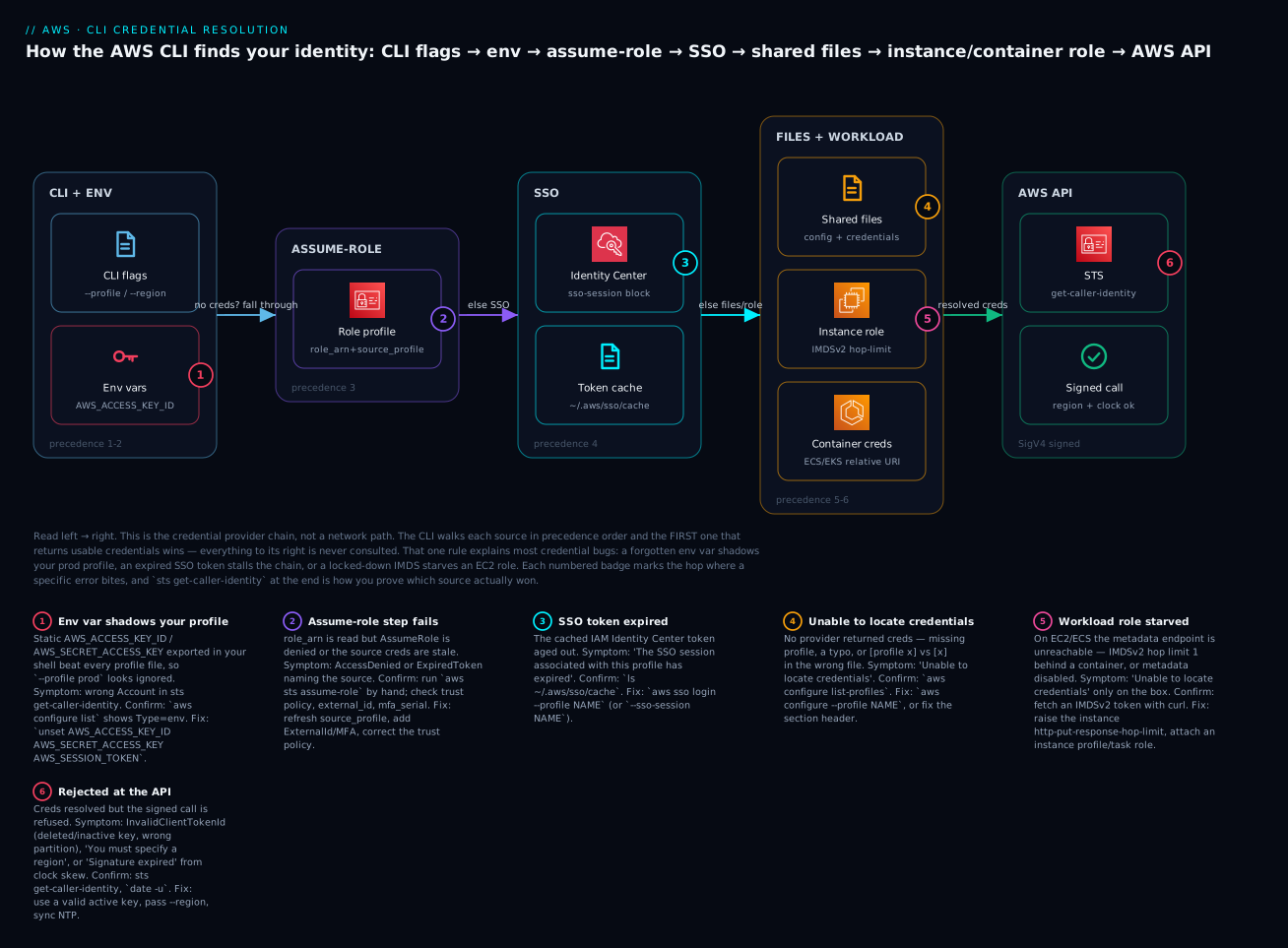
The diagram is not a network path — it is the credential provider chain, drawn left to right in precedence order. Read it as a waterfall: the CLI asks each source in turn, and the first one that hands back a usable credential wins, so nothing to its right is ever consulted. Start at CLI flags + environment: --profile/--region select which block to read, but exported static keys (AWS_ACCESS_KEY_ID) short-circuit everything — badge 1, the wrong-account trap. If no static creds are present, the chosen profile may declare an assume-role directive (role_arn + source_profile), which makes an STS call using base creds one hop back — badge 2, where a stale source masquerades as a target-role problem. Failing that, an SSO profile reads its cached IAM Identity Center token — badge 3, the daily aws sso login. Then the shared files (~/.aws/config + credentials) — badge 4, the [profile x] vs [x] header and “Unable to locate credentials.” On a server the chain ends at the instance or container role via IMDS/ECS — badge 5, the IMDSv2 hop-limit starvation. Whatever wins is then signed with SigV4 and sent to the AWS API, where sts get-caller-identity proves which source actually answered — badge 6, the place InvalidClientTokenId, a missing region, or clock skew rejects an otherwise-resolved credential.
Follow the six badges and you have the entire failure map in resolution order: a shadowing env var (1), a broken assume-role hop (2), an expired SSO token (3), a missing or mis-headered profile (4), a starved workload role (5), and an API-level rejection (6). The legend narrates each as symptom · confirm · fix — the same method as the rest of the article: localise to a link in the chain, read the cause, run the named check, apply the fix.
Real-world scenario
KloudVin Retail, a mid-size e-commerce team, runs three AWS accounts: sandbox (333333333333), staging, and production (222222222222). For years every engineer had a long-lived IAM user with AKIA… keys in ~/.aws/credentials, and deployments ran from a laptop with those keys exported into the shell for convenience. It worked until the Tuesday a senior engineer, Priya, shipped a config change intended for staging that landed in production — because six days earlier she had exported production keys to run a one-off migration and never unset them. Her --profile staging flag had been silently ignored the whole time; static environment credentials (row 2 of the chain) outranked the profile file (row 6). The change took the checkout page down for eleven minutes.
The post-incident fix was structural, and it is the exact setup this article teaches. First, they killed long-lived keys for humans entirely and moved to IAM Identity Center. Each engineer now runs aws configure sso once to create an sso-session block (kloudvin) and a per-account profile — sandbox-admin, staging-deploy, prod-readonly. A morning starts with a single aws sso login --sso-session kloudvin, and every profile on that session is good for the day; there are no AKIA… secrets on any laptop to leak or to shadow anything.
Second, production writes go through an explicit assume-role profile, prod-deploy, whose source_profile is the low-privilege prod-readonly SSO profile and whose role_arn points at a Deployer role gated by external_id = KLOUDVIN-7f3a and mfa_serial. Elevation is now a deliberate act: the CLI prompts for an MFA code, and CloudTrail records role_session_name = <engineer>-deploy on every privileged call, so “who changed production” is answerable in one query. The deploy pipeline itself uses credential_source = Ec2InstanceMetadata from a CI runner’s instance role — no keys anywhere in the pipeline config.
Third, they made the chain visible. Every deploy script now begins with aws sts get-caller-identity and asserts the returned Account equals the intended one before doing anything mutating; a mismatch aborts the run. A shell prompt plugin shows the active AWS_PROFILE in colour — red for prod-*. The reusable habit that came out of the incident is one sentence long and worth stealing: before any command that changes state, run aws sts get-caller-identity and read the account number out loud. Eleven minutes of downtime bought a workflow where the wrong-account class of error simply cannot recur silently — the identity is asserted, not assumed.
Advantages and disadvantages
The AWS CLI’s credential model is powerful because it is layered; it is confusing for exactly the same reason. Weigh it honestly.
| Advantages | Disadvantages |
|---|---|
| One tool for every AWS service and account | The precedence chain is invisible until it bites |
| Profiles cleanly separate accounts/roles | Header rules ([profile x] vs [x]) trip up beginners |
| SSO removes long-lived keys from laptops | SSO tokens expire; needs a daily aws sso login |
| Assume-role enables least-privilege elevation | Errors often name the target, not the failing source |
| Env vars make CI/automation trivial | Env vars silently shadow profiles — the wrong-account trap |
--query/--filters turn it into a data tool |
JMESPath has a learning curve |
| Fully scriptable, IaC-friendly | Version drift breaks new services/SSO fixes |
configure list shows the source of each value |
Two files + env + IMDS = many places to check |
When does each side matter? The advantages dominate for teams with more than one account and more than one engineer — profiles plus SSO plus assume-role is simply how professional AWS is done. The disadvantages bite hardest on newcomers (the file/precedence rules) and on anyone mixing static env keys with profiles (unset them and half the pain evaporates). The mitigation for nearly every disadvantage is the same two-command diagnostic — aws configure list and aws sts get-caller-identity — which is why this article treats them as the core skill.
Hands-on lab
You will set up three profiles — a plain (static-key) profile, an SSO profile, and an assume-role profile — and verify each with aws sts get-caller-identity, then run a real --query example. Nothing here provisions billable resources; the only calls are STS and a describe. Where a step needs org-specific values (an SSO start URL, a role ARN), substitute your own. There is no teardown required beyond optionally removing the profiles you added.
Prerequisites for the lab:
| Need | How to get it | Cost |
|---|---|---|
| AWS CLI v2 | See install table above; aws --version shows 2.x |
Free |
| A sandbox account | AWS Free Tier | Free |
| An IAM user with an access key (for the plain profile) | IAM console → Users → Security credentials → Create access key | Free |
| (Optional) IAM Identity Center enabled | Org admin, or skip the SSO step | Free |
| (Optional) A role you may assume | See the cross-account roles hands-on | Free |
Step 1 — Confirm your starting point
aws --version
aws configure list-profiles      # what you already have
Expected: a version line beginning aws-cli/2. and a (possibly empty) list of profile names. If aws is not found or shows 1.x, fix that first with the install table.
Step 2 — Create a plain (static-key) profile
aws configure --profile lab-plain
# AWS Access Key ID [None]: AKIAIOSFODNN7EXAMPLE
# AWS Secret Access Key [None]: wJalrXUtnFEMI/K7MDENG/bPxRfiCYEXAMPLEKEY
# Default region name [None]: ap-south-1
# Default output format [None]: json
This writes [lab-plain] into ~/.aws/credentials (the keys) and [profile lab-plain] into ~/.aws/config (region + output). Verify identity:
$ aws sts get-caller-identity --profile lab-plain
{
    "UserId": "AIDA................",
    "Account": "333333333333",
    "Arn": "arn:aws:iam::333333333333:user/lab-user"
}
Expected: an Arn of the form …:user/<name> and your sandbox Account. Now prove the source of each value:
$ aws configure list --profile lab-plain
      Name                    Value             Type    Location
      ----                    -----             ----    --------
   profile                  lab-plain           manual    --profile
access_key     ****************MPLE   shared-credentials-file
    region                ap-south-1      config-file    ~/.aws/config
The shared-credentials-file type confirms the key came from ~/.aws/credentials, not an env var.
Step 3 — Create an SSO profile
If your org has IAM Identity Center, run the wizard; otherwise read this step and skip to Step 4.
aws configure sso --profile lab-sso
# SSO session name (Recommended): kloudvin
# SSO start URL [None]: https://YOUR-ORG.awsapps.com/start
# SSO region [None]: ap-south-1
# SSO registration scopes [sso:account:access]:
# (browser opens → approve device authorization)
# choose an account + role when prompted
# CLI default client Region [None]: ap-south-1
# CLI default output format [None]: json
Log in and verify — note the assumed-role ARN, the hallmark of temporary SSO credentials:
$ aws sso login --profile lab-sso
$ aws sts get-caller-identity --profile lab-sso
{
    "UserId": "AROA................:vinod",
    "Account": "333333333333",
    "Arn": "arn:aws:sts::333333333333:assumed-role/AWSReservedSSO_.../vinod"
}
Expected: the ARN is an assumed-role, not a user — you are running on short-lived credentials with no secret on disk. aws configure list --profile lab-sso will show Type=sso for the keys.
Step 4 — Create an assume-role profile
Point a profile at a role you are allowed to assume, chaining from a base profile (use lab-plain or lab-sso as the source_profile). Add these lines to ~/.aws/config:
[profile lab-assume]
role_arn = arn:aws:iam::333333333333:role/ReadOnlyLab
source_profile = lab-plain
role_session_name = lab-assume-demo
region = ap-south-1
Verify — the CLI performs the STS call for you and returns the assumed identity:
$ aws sts get-caller-identity --profile lab-assume
{
    "UserId": "AROA................:lab-assume-demo",
    "Account": "333333333333",
    "Arn": "arn:aws:sts::333333333333:assumed-role/ReadOnlyLab/lab-assume-demo"
}
Expected: the Arn ends with assumed-role/ReadOnlyLab/lab-assume-demo and the session name you set. If instead you see AccessDenied, the role’s trust policy does not allow your lab-plain principal to assume it — that is a policy fix, covered in the cross-account roles hands-on, not a CLI fix.
Step 5 — Run a real --query example across profiles
Prove the profiles work for a normal read call, and shape the output:
# Regions enabled for your account, as plain text
aws ec2 describe-regions \
  --query "Regions[].RegionName" --output text --profile lab-plain

# Your account's S3 buckets as a table (works on whichever profile has access)
aws s3api list-buckets \
  --query "Buckets[].{Name:Name,Created:CreationDate}" \
  --output table --profile lab-sso
Expected: a tab-separated list of region names, and an ASCII table of bucket names and creation dates. Swap --profile values to confirm each identity independently.
Step 6 (optional) — Clean up
No AWS resources were created, so there is nothing billable to delete. To remove the lab profiles, delete their sections from ~/.aws/config and ~/.aws/credentials, or:
aws sso logout                     # clear cached SSO tokens if you did Step 3
# then hand-edit the [lab-*] sections out of ~/.aws/{config,credentials}
| Step | You proved | The signal |
|---|---|---|
| 2 | Static profile works | Arn = …:user/…; key from credentials file |
| 3 | SSO issues temp creds | Arn = assumed-role/AWSReservedSSO_… |
| 4 | Assume-role chains | Arn = assumed-role/ReadOnlyLab/<session> |
| 5 | --query shapes output |
text list + ASCII table |
Common mistakes & troubleshooting
This is the heart of the article. Credential errors reduce to a small set of symptom classes; each has a precise root cause you confirm with one command. Your two-tool kit is aws configure list (which source supplied each value) and aws sts get-caller-identity (who AWS thinks you are). Work the table top-down.
The playbook
| # | Symptom (exact error) | Root cause | Confirm (exact command) | Fix |
|---|---|---|---|---|
| 1 | Unable to locate credentials. You can configure credentials by running "aws configure". |
No provider returned a credential — no profile selected, or none configured | aws configure list (all values blank) · aws configure list-profiles |
aws configure --profile NAME, or pass --profile, or aws sso login |
| 2 | Right command, wrong account in results | Static AWS_ACCESS_KEY_ID in env shadows your profile (chain row 2) |
aws configure list shows access_key … Type env |
unset AWS_ACCESS_KEY_ID AWS_SECRET_ACCESS_KEY AWS_SESSION_TOKEN |
| 3 | The config profile (X) could not be found |
Profile name typo, or [profile X] header in the wrong file |
aws configure list-profiles · check headers in both files |
Fix the header: [profile X] in config, [X] in credentials |
| 4 | An error occurred (ExpiredToken) … The security token included in the request is expired. |
Temporary creds (SSO/assume-role/MFA) lapsed | aws configure list (Type sso/assume-role) |
aws sso login --profile X, or re-assume the role |
| 5 | The SSO session associated with this profile has expired or is otherwise invalid. |
Cached IAM Identity Center token aged out | ls -l ~/.aws/sso/cache/ (old mtime) |
aws sso login --profile X (or --sso-session S) |
| 6 | An error occurred (AccessDenied) … is not authorized to perform: <action> |
Valid identity, missing IAM permission or SCP cap | aws sts get-caller-identity (confirm you are who you expect) |
Grant the permission / adjust the policy — see policy-evaluation guide |
| 7 | You must specify a region. You can also configure your region by running "aws configure". |
No region from flag, env, or profile | aws configure list (region blank) |
--region ap-south-1, or set region in the profile |
| 8 | An error occurred (InvalidClientTokenId) … The security token included in the request is invalid. |
Access key deleted/inactive, or wrong partition (e.g. GovCloud/China) | aws configure list (key present) · check key in IAM console |
Create/activate a valid key; use the correct partition endpoint |
| 9 | An error occurred (SignatureDoesNotMatch) … |
Wrong aws_secret_access_key, or a stray character/whitespace |
Re-check the secret in ~/.aws/credentials |
Paste the correct secret; watch for trailing spaces |
| 10 | Signature expired: … is now earlier than … / … difference between the request time and the current time is too large |
Clock skew — local clock off by > 5 min | date -u vs a time source |
Sync NTP: sudo chronyc makestep / enable time sync |
| 11 | Assume-role fails: AccessDenied … not authorized to perform: sts:AssumeRole on resource: <role> |
Trust policy doesn’t allow your principal (or external_id missing) |
aws sts assume-role --role-arn … --profile source by hand |
Fix the role trust policy; add matching external_id |
| 12 | An error occurred (AccessDenied) … sts:ExternalId condition failed |
external_id in the profile ≠ the trust policy condition |
Compare external_id (config) with trust policy Condition |
Set the exact external_id the trust policy requires |
| 13 | Repeated Enter MFA code / MultiFactorAuthentication failed with an invalid MFA one time pass code |
Reused/expired TOTP, or device clock skew | Try a fresh code; check the authenticator’s time | Wait for a new code; fix device time; verify mfa_serial ARN |
| 14 | Command hangs with no error, cursor blinking | Output opened in the pager (less), waiting for you |
Press q; you return to the prompt |
--no-cli-pager, or export AWS_PAGER="", or cli_pager= in config |
| 15 | On EC2/ECS only: Unable to locate credentials |
IMDS unreachable — hop limit 1 behind a container, IMDSv2 required, or metadata disabled | Try to fetch an IMDSv2 token via curl on the box |
Raise --http-put-response-hop-limit, attach an instance profile/task role |
| 16 | Partial credentials found in env, missing: aws_secret_access_key |
Only one of the key/secret pair is set | env | grep AWS_ |
Set both, or unset both and use a profile |
| 17 | botocore.exceptions.SSLError / CERTIFICATE_VERIFY_FAILED |
Corporate TLS interception, missing CA | openssl s_client -connect sts.amazonaws.com:443 |
Point AWS_CA_BUNDLE/ca_bundle at the corporate root CA |
| 18 | Could not connect to the endpoint URL: "https://…" |
Wrong region/service name, no network, or bad endpoint_url |
aws configure list region · nslookup the endpoint |
Correct the region/service; unset a bad AWS_ENDPOINT_URL |
Error / status reference
The error string AWS returns tells you the category before you read anything else. Keep this next to the playbook.
| Error code / string | Category | Meaning | First move |
|---|---|---|---|
Unable to locate credentials |
Client (no creds) | Chain returned nothing | aws configure list |
Partial credentials found |
Client (config) | One of a pair missing | env | grep AWS_ |
The config profile (X) could not be found |
Client (config) | Profile/header wrong | aws configure list-profiles |
ExpiredToken |
STS (temporary) | Session lapsed | re-login / re-assume |
InvalidClientTokenId |
STS/auth | Key invalid/inactive/partition | check key in IAM |
SignatureDoesNotMatch |
Auth | Bad secret / whitespace | re-enter secret |
Signature expired / time-diff |
Auth (time) | Clock skew | sync NTP |
AccessDenied |
Authorization | Valid identity, no permission | check policy/SCP |
UnauthorizedOperation |
Authorization (EC2) | No permission (dry-run) | grant permission |
DryRunOperation |
Success (dry-run) | You do have permission | drop --dry-run |
You must specify a region |
Client (config) | No region resolved | set --region/profile |
Could not connect to the endpoint URL |
Network/config | Endpoint/region/DNS wrong | fix region/network |
SSO session … has expired |
SSO token | Portal token aged out | aws sso login |
MultiFactorAuthentication failed |
MFA | Bad/reused code, skew | fresh code, fix time |
Decision table — from symptom to the right file
| If you see… | It’s probably… | Do this first |
|---|---|---|
Wrong Account in get-caller-identity |
An env var winning | aws configure list → check Type column |
Unable to locate credentials on a laptop |
No/typo’d profile | aws configure list-profiles |
Unable to locate credentials on EC2 |
IMDS/instance-role issue | test IMDSv2 on the box |
ExpiredToken after lunch |
SSO/role session lapsed | aws sso login --profile X |
AccessDenied but the right identity |
Missing permission, not a CLI bug | inspect the IAM policy / SCP |
| Command never returns | Pager waiting | press q, then --no-cli-pager |
The three nastiest failures, in prose
The env-var shadow (playbook #2) is the one that costs the most, because nothing looks wrong. You pass --profile staging, the command runs, results come back — they are simply from the wrong account. The cause is that static credential environment variables sit at row 2 of the chain, above every profile file, so a long-forgotten export AWS_ACCESS_KEY_ID=… from a debugging session weeks ago wins over your explicit --profile. There is exactly one reliable tell: aws configure list prints Type env next to access_key. Make it a reflex — before any state-changing command, run aws sts get-caller-identity and read the account number. The permanent fix is cultural: never export long-lived keys; use AWS_PROFILE (which selects a profile rather than injecting credentials) or SSO, and keep a shell function that unsets the three credential vars in one shot.
The assume-role misattribution (playbook #11) sends people debugging the wrong thing. When an assume-role profile fails, the CLI surfaces an error mentioning the target role_arn, so the instinct is to edit that role’s permissions. But the AssumeRole call needs source credentials, and the failure is frequently that the source_profile — an SSO login or base key one hop back — has expired or is itself denied. Confirm by running the underlying call by hand: aws sts assume-role --role-arn <target> --role-session-name debug --profile <source>. If that errors with ExpiredToken, your source is stale (aws sso login); if it errors with AccessDenied … sts:AssumeRole, the target role’s trust policy doesn’t list your source principal (or wants an external_id you didn’t supply). The error text lies about which end is broken; the manual call tells the truth.
Clock skew (playbook #10) produces errors that look like authentication failures but are physics. AWS SigV4 signatures embed a timestamp and are rejected if your clock differs from AWS’s by more than about five minutes — you get Signature expired or “the difference between the request time and the current time is too large,” which reads like a credential problem and sends you rotating keys that were never bad. It bites laptops that slept for days, VMs whose clock drifted, and containers on a host with a wrong clock. Confirm in one command — date -u and compare to real time — and fix by forcing an NTP sync (sudo chronyc makestep, or enabling host time sync). No credential change will ever fix a clock problem.
Best practices
- Never put long-lived keys on a laptop. Use IAM Identity Center (SSO) for humans and instance/task roles for workloads. Static
AKIA…keys are the single most-leaked AWS secret. - One profile per account-role, named for what it is (
prod-readonly,staging-deploy), neverdefaultfor anything privileged. Ambiguity is how the wrong-account incident happens. - Assert identity before mutating. Begin deploy scripts with
aws sts get-caller-identityand check theAccountmatches the intended one; abort on mismatch. - Prefer
AWS_PROFILEover exporting keys.AWS_PROFILEselects a profile (safe);AWS_ACCESS_KEY_IDinjects credentials that shadow everything (dangerous). - Keep a
unsetshell function — one command to clearAWS_ACCESS_KEY_ID,AWS_SECRET_ACCESS_KEY,AWS_SESSION_TOKEN— and run it whenever a command “ignores” your profile. - Use the
sso-sessionblock, not inlinesso_*— it enables token refresh and is reusable across profiles. - Chain assume-role from SSO, not from static keys.
source_profile = <sso-base>keeps the whole chain key-less. - Gate privileged roles with
external_idandmfa_serialand set a meaningfulrole_session_nameso CloudTrail attributes every action to a human. - Set a region in every profile to avoid
You must specify a region, and setoutput = jsonfor scriptability. - Disable the pager in automation (
AWS_PAGER=""orcli_pager=) so scripts never hang waiting onless. - Show the active profile in your shell prompt, colour-coded (red for prod), so you always see which account you are in.
- Keep the CLI current — version drift silently breaks new services and SSO fixes; script
brew upgrade awsclior the--updateinstall. - Never commit
~/.aws/*and add it to global gitignore; treat account IDs and start URLs as sensitive too.
Security notes
The CLI’s credential model is a security control surface; configure it defensively.
| Control | Why | How |
|---|---|---|
| No long-lived keys for humans | Eliminates the top leak vector | IAM Identity Center + aws sso login |
| Short session durations | Limits blast radius of a stolen token | duration_seconds low; role MaxSessionDuration tight |
| MFA on privileged assume-role | Stops silent elevation | mfa_serial in the profile + trust policy Condition |
external_id on third-party roles |
Prevents the confused-deputy attack | matching external_id in profile + trust policy |
| Least-privilege base profile | Elevation is deliberate, not default | source_profile = read-only; write via assume-role |
| IMDSv2 only on EC2 | Blocks SSRF credential theft | http-tokens = required, hop limit tuned |
| CloudTrail on STS | Attributes every action to a session | role_session_name = human identity |
File permissions on ~/.aws |
Local secret protection | chmod 600 ~/.aws/credentials |
| Never echo secrets | Avoid leaking to logs/history | masked in configure list; don’t echo $AWS_SECRET_ACCESS_KEY |
| Rotate any remaining static keys | Reduce exposure window | ≤ 90 days; prefer eliminating them |
The Terraform for an IMDSv2-only, hop-limit-tuned instance — the workload side of the chain — is worth pinning:
resource "aws_instance" "app" {
  ami                  = "ami-0abcd1234"
  instance_type        = "t3.micro"
  iam_instance_profile = aws_iam_instance_profile.app.name
  metadata_options {
    http_tokens                 = "required"   # IMDSv2 only
    http_put_response_hop_limit = 2            # allow one container hop
    http_endpoint               = "enabled"
  }
}
Cost & sizing
The AWS CLI itself is free, and so are the identity mechanics around it — but a few adjacent things do cost, and it is worth knowing which.
| Item | Cost | Notes |
|---|---|---|
| AWS CLI (the tool) | Free | Open-source, no licence |
sts:GetCallerIdentity, sts:AssumeRole |
Free | No charge for STS calls |
| IAM Identity Center | Free | No per-user charge for the service |
| IAM users / access keys | Free | The keys cost nothing; the leak is the cost |
| CloudTrail management events | First copy free | Data events / extra trails bill |
| Data transfer from API calls | Usually negligible | Large s3 cp downloads bill egress |
| The actions you run | Vary | run-instances bills the instance — --dry-run first |
| KMS on encrypted calls | Per-request tiny | If your calls touch KMS-encrypted resources |
There is no “sizing” in the compute sense, but two operational costs are real: time (a credential mystery can eat an hour — the two-command diagnostic is the mitigation) and risk (a leaked static key can cost a great deal — SSO and instance roles are the mitigation). In INR terms the tool and identity layer are effectively ₹0; the only line items that appear on a bill are the resources your commands create, which is precisely why --dry-run and an identity assertion before mutating are cheap insurance.
Interview & exam questions
Q1. What is the AWS CLI credential provider chain, and why does its order matter? It is the ordered list of sources the CLI checks for credentials — command-line options, environment variables, assume-role, web-identity, SSO, the shared credentials file, the config file, and finally container/instance metadata — stopping at the first that returns a usable credential. Order matters because a higher source silently wins: exported static keys (env) override any profile file, which is the classic wrong-account bug. (CLF-C02, SAA-C03)
Q2. Why can aws --profile prod s3 ls still run against the wrong account? Because --profile selects which profile block the file-based providers read, but static credential environment variables (AWS_ACCESS_KEY_ID/AWS_SECRET_ACCESS_KEY) sit higher in the chain and are used directly. aws configure list showing Type env confirms it; unset the variables to fix. (SOA-C02)
Q3. What is the difference between ~/.aws/config and ~/.aws/credentials? credentials holds static keys (aws_access_key_id/aws_secret_access_key) with [name] headers; config holds configuration and credential sources (region, output, sso, role_arn) with [profile name] headers. The header difference — [profile x] in config vs [x] in credentials — is a frequent error. (CLF-C02)
Q4. How do you configure an SSO profile, and what refreshes it? Run aws configure sso to create an sso-session block (start URL, SSO region, scopes) and a profile referencing it (sso_account_id, sso_role_name). aws sso login opens the browser and caches a token in ~/.aws/sso/cache/; when it expires you re-run aws sso login. No long-lived keys are stored. (SAA-C03, SCS-C02)
Q5. Explain source_profile vs credential_source in an assume-role profile. Both supply the base credentials for the sts:AssumeRole call; source_profile names another profile (typical on a laptop), while credential_source uses Environment, Ec2InstanceMetadata, or EcsContainer (typical in CI/on a server). They are mutually exclusive. (SAA-C03)
Q6. An assume-role profile returns ExpiredToken — where is the problem? Almost always in the source, not the target: the source_profile (an SSO or base credential) has expired, even though the error mentions the target role. Confirm by running aws sts assume-role by hand from the source profile; fix by refreshing the source (aws sso login). (SOA-C02)
Q7. What does aws sts get-caller-identity return and why is it the most useful debugging command? It returns the Account, UserId, and Arn that AWS actually sees for your current credentials — cutting through every layer of the chain to answer “who am I, really.” An assumed-role ARN means temporary creds; a user ARN means static keys. (CLF-C02)
Q8. How do server-side --filters and client-side --query differ? --filters is processed by the AWS service (service-defined keys, reduces data over the wire, only some services support it); --query is a JMESPath expression evaluated by the CLI after the full response arrives (works on any command/field). Best practice: filter server-side, then shape with --query. (DVA-C02)
Q9. What causes You must specify a region and how do you resolve it? No region resolved from any source: no --region flag, no AWS_REGION/AWS_DEFAULT_REGION, and no region in the selected or default profile. Fix by passing --region or setting region in the profile. (CLF-C02)
Q10. You get Signature expired / a time-difference error. Is it a credential problem? No — it is clock skew. SigV4 signatures embed a timestamp rejected if your clock differs from AWS by more than ~5 minutes. Confirm with date -u; fix by syncing NTP. Rotating keys will not help. (SOA-C02)
Q11. Why prefer IAM Identity Center over IAM users with access keys for CLI access? SSO issues short-lived, per-account credentials with no long-lived secret on the laptop, supports MFA and central permission sets, and removes the top credential-leak vector. IAM user keys are long-lived, must be rotated, and are frequently committed or exported by accident. (SAA-C03, SCS-C02)
Q12. What does --dry-run do on an EC2 command? It sends the request with a dry-run flag so the service checks permissions only: DryRunOperation means you would be allowed (re-run without the flag), UnauthorizedOperation means you lack permission. It is a safe way to test IAM before performing a mutating action. (DVA-C02)
Quick check
- In the credential provider chain, which wins: a static
AWS_ACCESS_KEY_IDin your shell, or the profile you pass with--profile? - Where does
aws_secret_access_keybelong —~/.aws/configor~/.aws/credentials— and what is the section header for a profile nameddevin that file? - Your SSO command fails with “the SSO session has expired.” What single command fixes it?
- An assume-role profile returns
ExpiredToken. Which end — source or target — do you investigate first, and with what manual command? - A
describecommand “hangs” with no output and no error. What is happening and how do you stop it?
Answers
- The static environment variable wins — env credentials (chain row 2) outrank profile-file credentials.
--profileselects the block but does not override exported static keys. Confirm withaws configure list(Type env); fix by unsetting the variable. - In
~/.aws/credentials, under the header[dev](noprofileword — that prefix is only used inconfig, as[profile dev]). aws sso login --profile <name>(or--sso-session <name>) — it re-opens the browser and refreshes the cached token.- Investigate the source first; the error names the target but the
source_profilecreds have usually lapsed. Runaws sts assume-role --role-arn <target> --role-session-name debug --profile <source>to see the real error. - Output has opened in the pager (
less) and is waiting for you. Pressqto return to the prompt; disable it with--no-cli-pagerorexport AWS_PAGER="".
Glossary
| Term | Definition |
|---|---|
| Profile | A named bundle of credential + configuration settings selected with --profile/AWS_PROFILE. |
| Credential provider chain | The ordered list of sources the CLI checks for credentials; the first that returns one wins. |
~/.aws/config |
Config file holding region, output, and credential sources (sso, role_arn); headers are [profile name]. |
~/.aws/credentials |
File holding static aws_access_key_id/aws_secret_access_key; headers are [name]. |
| IAM Identity Center | AWS’s SSO service (formerly AWS SSO); issues short-lived per-account credentials via a portal login. |
sso-session block |
A reusable, refreshable SSO login definition (sso_start_url, sso_region, scopes) referenced by profiles. |
| AssumeRole | sts:AssumeRole — exchanging a base identity for temporary role credentials, often cross-account. |
source_profile |
The profile whose credentials are used to make an assume-role call. |
credential_source |
Non-profile base creds for assume-role: Environment, Ec2InstanceMetadata, or EcsContainer. |
external_id |
A shared secret in a trust policy condition that prevents the confused-deputy attack. |
mfa_serial |
The ARN of an MFA device the CLI prompts against before assuming a role. |
| Temporary credentials | Short-lived keys (ASIA…) with a session token, from STS/SSO/assume-role. |
| JMESPath | The query language behind --query, evaluated client-side over the JSON response. |
| IMDS | The EC2 Instance Metadata Service that supplies an instance role’s credentials (IMDSv2 = token-based). |
sts get-caller-identity |
The call that returns the Account/UserId/ARN AWS actually sees for your current credentials. |
| Clock skew | Local clock drift beyond ~5 minutes that invalidates SigV4 signatures (Signature expired). |
Next steps
- Build the role graph an assume-role profile rides on in AWS cross-account roles and AssumeRole, hands-on.
- Understand what an SSO profile is actually mapped to in IAM Identity Center and SSO permission sets.
- When a credential is valid but the action is refused, work through IAM policy evaluation and AccessDenied troubleshooting.
- Ground the whole identity model in AWS Organizations and IAM Foundations: Accounts, OUs and Roles.
- Put the CLI to work provisioning with confidence — pair it with an infrastructure-as-code workflow so every command you learned here runs the same way in automation.