You have written CloudFormation by hand, and you know the feeling: 400 lines of YAML to stand up a Lambda, an API and a table, half of it copy-pasted !Ref and !GetAtt plumbing, no loops, no types, a typo you only discover at deploy time. The AWS Cloud Development Kit (CDK) exists to delete that misery. You describe your infrastructure in a real programming language — TypeScript, Python, Java, Go or C# — with variables, functions, for loops, if statements, IDE autocomplete and compile-time type checking, and CDK turns that program into a CloudFormation template for you. You keep every guarantee CloudFormation gives you (managed rollback, drift detection, an auditable stack) and lose the hand-plumbing.
The single most important sentence in this article is this: CDK is a template generator, not a separate provisioning engine. When you run cdk synth, CDK runs your TypeScript and emits a plain CloudFormation template to a folder called cdk.out/. When you run cdk deploy, CDK hands that template to CloudFormation — the same service you already know — which computes a change set and provisions the resources. There is no secret CDK backend in the cloud doing the work; there is your code, a generated template, and CloudFormation. Internalise that and every confusing thing about CDK — why a synth “does nothing”, why cross-stack exports deadlock, why CAPABILITY_NAMED_IAM shows up, why a cdk destroy can leave a table behind — stops being magic and becomes a consequence you can reason about.
By the end you will understand the CDK object model (App → Stack → Construct, and the three construct levels L1/L2/L3), the full workflow (init, bootstrap, synth, diff, deploy, destroy), how environments and context resolve, how to pass values between stacks without creating an export deadlock, how assets bundle your Lambda code, how aspects and cdk-nag enforce policy across the whole tree, how escape hatches let you reach raw CloudFormation when an L2 is missing a property, and how to test a stack with assertions and snapshots. Then you will build the real thing — a Lambda + API Gateway + DynamoDB stack — from cdk init to curl to cdk destroy, watch the generated template, add a test, and finish with a sixteen-row troubleshooting playbook for the failures that hit every CDK team.
What problem this solves
Raw CloudFormation is declarative and safe, but it is not expressive. There are no variables you can compute, no functions you can factor out, no types to catch a wrong property name, and no loop to say “make one of these per environment”. A ten-line intent — “a Lambda behind an API, allowed to write to this table” — becomes a hundred lines of YAML where you hand-write the IAM policy, hand-wire every !GetAtt, and rediscover the exact AWS::ApiGateway::Method incantation from the docs each time. Teams respond by copy-pasting templates between projects, which means every bug and every insecure default propagates by copy-paste too.
What breaks without a tool like CDK is consistency and speed at scale. A platform team supporting forty microservices cannot hand-maintain forty near-identical CloudFormation templates; they drift, the IAM policies are each subtly different, and onboarding a new service is a day of YAML archaeology. The pain is worst exactly where it matters most — IAM. Hand-written least-privilege policies are tedious, so people write Action: "*" “just to ship”, and that over-grant is now permanent. CDK’s L2 constructs turn table.grantWriteData(fn) into a correct, scoped, auto-generated policy — the secure thing becomes the easy thing, which is the only way secure defaults ever win.
Who hits this: any team doing infrastructure-as-code on AWS beyond a handful of resources, especially serverless and container teams who provision the same shapes (function + queue + table, service + load balancer + database) over and over. CDK is the AWS-native answer for teams that want a real language and are content to stay on AWS; Terraform is the answer for multi-cloud or existing-Terraform estates; SAM is the narrower serverless-only cousin. This article is CDK-deep, but it keeps the comparison honest so you choose correctly.
Here is the whole field on one screen — what CDK gives you, the raw-CloudFormation pain it removes, and the trap that replaces it if you use it carelessly:
| CDK capability | Raw-CloudFormation pain it removes | The new trap it introduces |
|---|---|---|
| Real language (TS/Python/…) | No variables, loops, functions, types | You can write too much logic in infra code |
| L2 constructs with sane defaults | Hand-writing every property from docs | Defaults hide what actually deploys — read the synth |
grant*() IAM helpers |
Hand-rolled, often over-broad policies | Grants can widen scope if you grant on the wrong resource |
cdk diff before deploy |
Guessing what a template change does | A clean diff still trusts CloudFormation’s own rules |
| Assets (auto-zip/Docker) | Manual zip + S3 upload + template wiring | Docker must be running; bootstrap bucket must exist |
| Cross-stack references | Manual Export/ImportValue bookkeeping |
The export deadlock on refactors |
cdk-nag + aspects |
No built-in policy checks | A wall of findings if you bolt it on late |
Learning objectives
By the end of this article you can:
- Explain the CDK object model — the App → Stack → Construct construct tree, the
Constructbase class, node ids and logical-id generation — and why “everything is a construct”. - Choose the right construct level for a job: L1 (
Cfn*, raw 1:1 CloudFormation), L2 (curated, sane defaults,grant*()/metric*()helpers), and L3 (patterns, opinionated multi-resource bundles). - Run the full workflow —
cdk init,cdk bootstrap(and what the CDKToolkit stack actually contains),cdk synth,cdk diff,cdk deploy,cdk destroy— and read the CloudFormation template a synth generates. - Wire environments (
env: { account, region }), resolve context (cdk.context.json), and pass values between stacks with props,CfnOutputandFn.importValue— and avoid the cross-stack export deadlock. - Use assets to bundle Lambda code and Docker images, aspects and cdk-nag to enforce policy across the whole tree, and escape hatches (
addOverride,node.defaultChild) to reach raw CloudFormation when an L2 is missing a property. - Test a stack with fine-grained assertions and snapshot tests, and understand CDK Pipelines — the self-mutating CI/CD pattern.
- Make the CDK vs Terraform vs raw CloudFormation vs SAM decision on real criteria, and know where CDK for Terraform (cdktf) fits.
- Run a symptom → cause → confirm → fix playbook for the dozen-plus failures that hit every CDK deploy.
Prerequisites & where this fits
You need an AWS account with permission to create IAM roles, Lambda functions, API Gateway APIs and DynamoDB tables (a personal or dev sandbox account — never straight into production). You need Node.js ≥ 18 and the CDK CLI (npm install -g aws-cdk, giving you the cdk command; check with cdk --version, which should report v2.x). You need the AWS CLI v2 configured (aws configure or aws sso login), and for the asset-bundling parts, Docker running locally. You should be comfortable with TypeScript basics and have met CloudFormation at least once — CDK will make far more sense if you have felt the pain it removes.
Everything in the lab fits the always-free tiers of Lambda, API Gateway (12-month free) and DynamoDB on-demand, so the running cost is effectively zero; the only lines that can bill a few paise are CloudWatch Logs and the tiny S3 storage of the bootstrap assets bucket. This article assumes CDK v2 throughout (the v1 monolithic @aws-cdk/* packages reached end of support; v2 ships as a single aws-cdk-lib).
Where this sits: CDK is one of five ways to do IaC on AWS, and it builds on CloudFormation rather than replacing it. If you have never deployed a stack, read AWS CloudFormation Hands-On: Your First Stack, Templates & Change Sets first — CDK generates exactly the kind of template that article teaches you to read. The resources you will build here have their own hands-on deep-dives: Your First AWS Lambda Function: Handlers, Triggers, Roles & Logs Hands-On for the function, Amazon API Gateway Hands-On: REST vs HTTP APIs, Authorizers & Throttling for the API, and Amazon DynamoDB Hands-On: Tables, Keys, Capacity Modes & Indexes for the table. For the narrower serverless-only alternative see AWS SAM Hands-On: The Serverless Application Model, and to run CDK in CI/CD see AWS CodePipeline & CodeBuild: CI/CD on AWS Hands-On.
A quick map of who owns what in the CDK stack, so when a deploy misbehaves you look in the right layer first:
| Layer | What lives here | Who “owns” it | What it can cause |
|---|---|---|---|
| Your TypeScript app | Constructs, props, logic | You | Type errors, wrong construct level, over-logic |
aws-cdk-lib constructs |
L1/L2/L3 definitions + defaults | AWS + the CDK team | Surprising defaults; a missing L2 prop |
cdk synth |
Compiles TS → CloudFormation template | The CDK CLI | “Nothing deployed” (you never deployed the synth) |
| Assets + bootstrap | S3 bucket, ECR repo, deploy roles | cdk bootstrap (CDKToolkit) |
“requires bootstrapping”; version mismatch |
| CloudFormation | Change sets, provisioning, rollback | AWS | Export deadlock, CAPABILITY_NAMED_IAM, retained resources |
| The real resources | Lambda, API GW, DynamoDB | AWS | Runtime errors — a different set of articles |
Core concepts
Five ideas make everything later obvious. Read them once; the deep sections just expand each.
Everything is a construct, and constructs form a tree. A construct is the basic building block — a class extending the Construct base class from the constructs package. Constructs nest: an App contains one or more Stacks, and each Stack contains constructs, which can contain more constructs, all the way down to the individual L1 resources. This is the construct tree, and its shape determines the logical ids CloudFormation sees. The App is the root; a Stack maps 1:1 to a CloudFormation stack; a leaf L1 construct maps 1:1 to a CloudFormation resource.
Constructs come in three levels of abstraction. L1 constructs (named CfnBucket, CfnFunction, prefix Cfn) are a mechanical 1:1 mirror of raw CloudFormation resources — every property, no defaults, no helpers. L2 constructs (Bucket, Function, Table) are hand-curated by the CDK team: sane defaults, sensible types, and rich methods like bucket.grantRead(role) or table.grantWriteData(fn) that generate correct IAM for you. L3 constructs (also called patterns, e.g. aws-apigateway.LambdaRestApi, aws-ecs-patterns.ApplicationLoadBalancedFargateService) are opinionated bundles that wire several resources into a common architecture in one line.
cdk synth compiles your code to a CloudFormation template. Your TypeScript is not deployed directly. cdk synth executes your app, walks the construct tree, and produces a cloud assembly in cdk.out/ — one CloudFormation template per stack (<Stack>.template.json), plus any assets (zipped Lambda code, Docker images) and metadata. cdk deploy uploads the assets and submits the template to CloudFormation. CDK adds nothing at runtime in the cloud; the deployed thing is a normal CloudFormation stack you can see in the console.
Bootstrapping provisions the machinery CDK deploys through. Before you can deploy a CDK app that uses assets (almost all do), you run cdk bootstrap once per account-and-region. It creates a CloudFormation stack named CDKToolkit containing a versioned S3 bucket for file assets, an ECR repository for Docker image assets, and a set of IAM roles the deploy uses (a deploy role, a file-publishing role, a CloudFormation execution role, a lookup role). Skip it and your first asset deploy fails with “this stack uses assets, so the toolkit stack must be deployed… run cdk bootstrap”.
Composition, not inheritance, is how you build. You build bigger things by containing smaller constructs and passing values through props (constructor arguments), not by deep inheritance. Within a stack you pass a live object reference (table.grantWriteData(fn) — CDK figures out the dependency). Across stacks, a reference becomes a CloudFormation Export/ImportValue pair automatically, which is powerful and is also the source of the notorious export deadlock you will learn to avoid.
The vocabulary in one table
Pin every moving part down before the deep dive. The glossary repeats these for lookup; this is the mental model side by side:
| Term | One-line definition | Where you see it | Why it matters |
|---|---|---|---|
| Construct | The base building block; everything extends it | Every class you new |
The tree’s node type |
| App | The root construct; the whole program | new App() in bin/ |
Container for all stacks |
| Stack | A deployment unit = one CloudFormation stack | class X extends Stack |
The blast radius of a deploy |
L1 / Cfn* |
Raw 1:1 CloudFormation resource | new CfnBucket(...) |
Full control, no defaults |
| L2 | Curated construct with defaults + helpers | new Bucket(...) |
Your default choice |
| L3 / pattern | Opinionated multi-resource bundle | LambdaRestApi |
One-line common architectures |
cdk synth |
Compile TS → CloudFormation template | cdk.out/*.template.json |
CDK is a generator |
| Bootstrap | The CDKToolkit stack (bucket/ECR/roles) | cdk bootstrap |
Prereq for asset deploys |
| Asset | Bundled local code/image referenced by a stack | lambda.Code.fromAsset |
How your Lambda code ships |
| Context | Cached env facts + feature flags | cdk.context.json, cdk.json |
Deterministic synth |
| Environment | The target { account, region } |
env: on a Stack |
Where a stack deploys |
| Aspect | A visitor applied across the tree | Aspects.of(app).add(...) |
Cross-cutting rules |
| Escape hatch | Reach raw CFN from an L2 | node.defaultChild |
Fill a missing L2 prop |
Construct levels: L1, L2 and L3
The construct level you pick is the single biggest lever on how much CDK helps you. The rule of thumb is simple — default to L2, reach for L3 when a pattern fits exactly, drop to L1 only when you must — but you should understand all three to know why.
The three levels side by side
| Dimension | L1 (Cfn*) |
L2 (curated) | L3 (pattern) |
|---|---|---|---|
| Maps to | One CloudFormation resource, 1:1 | One primary resource + helpers | Many resources wired together |
| Naming | CfnBucket, CfnFunction, CfnTable |
Bucket, Function, Table |
LambdaRestApi, ApplicationLoadBalancedFargateService |
| Defaults | None — you set every property | Secure/sane defaults | Opinionated end-to-end |
| IAM helpers | None | grant*(), metric*(), addEventSource() |
Wires IAM across the bundle |
| Coverage | 100% of CloudFormation, day one | Most common services | Common architectures only |
| When to use | A brand-new service, or a prop L2 lacks | Default for almost everything | The pattern matches your intent exactly |
| Risk | Verbose, error-prone, no guard rails | A default may not be what you want | Opinionated — hard to bend |
The coverage row explains a real-world fact: when AWS launches a new service or a new property, the L1 for it exists almost immediately (L1s are code-generated from the CloudFormation resource specification), but the hand-curated L2 may lag by weeks or months. That gap is exactly what escape hatches (later) are for — you use the L2 for 95% and reach into the L1 underneath for the one new property.
L1 — raw CloudFormation, in code
An L1 is a thin, generated wrapper: every property is exactly the CloudFormation property, in the same casing, with no defaults. You rarely start here, but you must recognise it:
| L1 fact | Detail | Consequence |
|---|---|---|
| Source | Code-generated from the CFN resource spec | New props appear fast, no curation |
| Property names | PascalCase/CFN casing (e.g. bucketName) |
Matches the CloudFormation docs 1:1 |
| Defaults | None | You must set required props yourself |
| Validation | Minimal (type-level) | Bad combinations fail at deploy, not synth |
| Access from L2 | myL2.node.defaultChild as CfnBucket |
The escape-hatch entry point |
| Typical use | Missing L2 prop; a not-yet-curated service | The 5% case |
L2 — the curated default you should reach for
L2 constructs are where CDK earns its keep. Beyond sane defaults, their methods are the reason to prefer them — they generate correct, scoped IAM and wiring so you never hand-write a policy for the common cases:
| L2 helper family | Example | What it generates |
|---|---|---|
grant*() |
table.grantWriteData(fn) |
A least-privilege IAM policy on the function’s role, scoped to the table ARN |
grantRead/Write/ReadWrite |
bucket.grantRead(role) |
Scoped S3 read/write actions + KMS if encrypted |
metric*() |
fn.metricErrors() |
A CloudWatch Metric object for alarms/dashboards |
add*Trigger/addEventSource |
fn.addEventSource(new SqsEventSource(q)) |
The event-source mapping + required permissions |
addToRolePolicy |
fn.addToRolePolicy(stmt) |
A custom statement when a grant doesn’t exist |
| Connection helpers | db.connections.allowFrom(fn, ...) |
Security-group rules between resources |
The grant*() methods are worth dwelling on because they change your security posture. table.grantWriteData(fn) inspects both objects, writes an IAM policy that allows exactly dynamodb:PutItem/UpdateItem/DeleteItem/BatchWriteItem on that table’s ARN (and its indexes), attaches it to the function’s execution role, and adds a dependency so CloudFormation orders it correctly. You did not write "Resource": "arn:aws:dynamodb:..." and you did not over-grant "*". That is the single most valuable thing L2 does.
L3 — patterns, the one-liners
L3 patterns encode a whole architecture. They are fantastic when your intent matches the pattern and frustrating when it almost does. A sampler of the common ones:
| Pattern (L3) | Module | Wires up |
|---|---|---|
LambdaRestApi |
aws-cdk-lib/aws-apigateway |
An API Gateway REST API with a Lambda proxy integration + permissions |
HttpApi + HttpLambdaIntegration |
@aws-cdk/aws-apigatewayv2-* |
An HTTP API fronting a Lambda |
ApplicationLoadBalancedFargateService |
aws-ecs-patterns |
ALB + Fargate service + task def + SGs + target group |
QueueProcessingFargateService |
aws-ecs-patterns |
SQS queue + Fargate consumer + autoscaling on queue depth |
Distribution + S3Origin |
aws-cloudfront / -origins |
A CloudFront distribution in front of an S3 bucket |
NodejsFunction |
aws-lambda-nodejs |
A Lambda that bundles TS/JS with esbuild automatically |
The trade with L3 is bendability. When ApplicationLoadBalancedFargateService gives you 90% of what you need, the last 10% (a custom health check path, an extra listener rule) is reached through its exposed sub-constructs (service.targetGroup, service.loadBalancer) — and if even that is not enough, you stop using the pattern and compose the L2s yourself.
The CDK workflow: init, bootstrap, synth, diff, deploy, destroy
CDK is a CLI-driven loop. Learn the six commands you use daily and the handful you use occasionally.
The command reference
| Command | What it does | When you run it |
|---|---|---|
cdk init app --language typescript |
Scaffolds a new app (project structure, cdk.json, deps) |
Once, at project start |
cdk bootstrap |
Deploys the CDKToolkit stack to an account/region | Once per account/region (and on version bumps) |
cdk list (cdk ls) |
Lists the stacks in the app | To see stack names before targeting one |
cdk synth |
Compiles to CloudFormation; prints/writes the template | Constantly — to see what will deploy |
cdk diff |
Diffs the synthesized template against the deployed stack | Before every deploy — the safety check |
cdk deploy |
Synths, uploads assets, submits a change set, deploys | To apply changes |
cdk watch |
Deploys on save (hotswap where possible) for fast inner loop | During active development |
cdk destroy |
Deletes the stack’s CloudFormation stack | To tear down |
cdk import |
Brings existing resources under CDK management | Adopting existing infra |
cdk doctor / cdk context |
Diagnostics; view/clear cached context | When context or env is wrong |
cdk init — scaffolding and what you get
cdk init lays down a conventional project. For TypeScript:
| Path | Contents | You edit it? |
|---|---|---|
bin/<app>.ts |
The App entry point; instantiates your stacks |
Yes — add stacks, set env |
lib/<app>-stack.ts |
Your first Stack subclass |
Yes — this is where constructs go |
cdk.json |
App command + context/feature flags | Rarely — feature flags live here |
package.json |
Deps (aws-cdk-lib, constructs) + scripts |
Yes — add construct libraries |
tsconfig.json |
TypeScript compiler config | Rarely |
test/ |
Jest test scaffold | Yes — add assertion/snapshot tests |
.gitignore |
Ignores cdk.out/, node_modules/ |
Rarely |
cdk init offers three template types and several languages:
cdk init template |
Produces | Language options |
|---|---|---|
app |
A ready-to-extend application | typescript, javascript, python, java, csharp, go |
lib |
A publishable construct library | typescript |
sample-app |
An app with an example stack (SQS + SNS) | typescript, python, … |
cdk bootstrap — the CDKToolkit stack
Bootstrapping is a one-time, per-target setup that provisions the resources CDK deploys through. The modern (“v2”/hnb659fds qualifier) bootstrap stack contains:
| CDKToolkit resource | Purpose | Notes |
|---|---|---|
| Staging S3 bucket | Holds file assets (zipped Lambda code, templates) | Versioned; named cdk-hnb659fds-assets-<acct>-<region> |
| ECR repository | Holds Docker image assets | Named cdk-hnb659fds-container-assets-<acct>-<region> |
| Deploy role | Assumed by the CLI to orchestrate the deploy | cdk-hnb659fds-deploy-role-* |
| File-publishing role | Uploads assets to the bucket | cdk-hnb659fds-file-publishing-role-* |
| Image-publishing role | Pushes images to ECR | cdk-hnb659fds-image-publishing-role-* |
| CloudFormation execution role | The role CloudFormation uses to create resources | cdk-hnb659fds-cfn-exec-role-* |
| Lookup role | Read-only role for fromLookup() context queries |
cdk-hnb659fds-lookup-role-* |
| SSM parameter | Stores the bootstrap version | /cdk-bootstrap/hnb659fds/version |
Two operational facts you must know. First, bootstrap has a version, stored in that SSM parameter; when you upgrade the CDK CLI, a newer app may require a newer bootstrap and fail with a version-mismatch error until you re-run cdk bootstrap. Second, the bootstrap command:
# Bootstrap a specific account/region explicitly
cdk bootstrap aws://111122223333/ap-south-1

# In a CI/enterprise setup, restrict what deploys can do
cdk bootstrap --cloudformation-execution-policies \
  "arn:aws:iam::aws:policy/PowerUserAccess" \
  aws://111122223333/ap-south-1
| Bootstrap flavour | What it is | Use when |
|---|---|---|
Modern (default in v2, hnb659fds) |
Roles + versioned bucket + ECR; supports cross-account | Almost always |
| Legacy | A bare assets bucket, no roles (v1 era) | Only legacy v1 apps; avoid |
| Custom qualifier | A non-default 9-char qualifier to isolate estates | Multiple isolated CDK setups per account |
--trust |
Trust another account to deploy into this one | CDK Pipelines / cross-account CI |
| Scoped exec policy | Narrow --cloudformation-execution-policies |
Least-privilege deploys (not AdministratorAccess) |
cdk synth — see the template
cdk synth is the command you should run obsessively, because it shows you exactly what CDK will ask CloudFormation to build:
cdk synth                       # print the template(s) to stdout (YAML)
cdk synth MyStack               # just one stack
cdk synth --quiet               # write to cdk.out/ without printing
ls cdk.out/                     # MyStack.template.json, manifest.json, assets…
| Synth output artefact | File | What it holds |
|---|---|---|
| CloudFormation template | cdk.out/<Stack>.template.json |
The generated template CloudFormation will deploy |
| Cloud assembly manifest | cdk.out/manifest.json |
Stacks, dependencies, asset pointers, env |
| Asset manifest | cdk.out/<Stack>.assets.json |
Where each asset lives + its hash |
| Bundled assets | cdk.out/asset.<hash>/ |
The actual zipped code / staged files |
| Tree | cdk.out/tree.json |
The construct tree (for tooling) |
cdk diff and cdk deploy
cdk diff compares the freshly synthesized template with what is currently deployed and prints resource-level additions, changes and deletions, plus IAM changes and security-group changes highlighted separately (you must confirm those). cdk deploy then does the whole cycle. Its options you will actually use:
cdk deploy flag |
Effect | When |
|---|---|---|
--all |
Deploy every stack in the app | Multi-stack apps |
--require-approval never |
Skip the “do you approve these IAM changes?” prompt | CI (with care) |
--hotswap |
Patch Lambda/StepFn code directly, bypassing CFN | Dev inner loop only — never prod |
--outputs-file out.json |
Write CfnOutputs to a JSON file |
Feeding outputs to tests/scripts |
--exclusively |
Deploy only the named stack, not its deps | Targeted redeploy |
--rollback false |
Leave a failed stack for inspection (v2) | Debugging a failed deploy |
--method=direct |
Skip the change set, deploy directly | Faster, less safe |
-c key=value |
Pass a context value at the CLI | One-off context override |
The default cdk deploy path is safe: it synths, creates a change set, and (if there are IAM or security-group changes) asks you to approve before executing. That approval prompt exists because CDK-generated IAM is easy to trust blindly — read it.
Environments, context and configuration
Two mechanisms decide where a stack deploys and what facts the synth uses: environments and context. Getting them wrong produces the classic “it synthesized differently on CI than on my laptop” bug.
Environments — { account, region }
Every Stack has an environment: the account and region it targets. You can leave it unspecified (environment-agnostic) or pin it (environment-specific), and the choice changes what CDK can do at synth time:
| Env style | How you set it | What synth can do | Trade-off |
|---|---|---|---|
| Agnostic | Omit env |
Uses pseudo-params (Aws.ACCOUNT_ID, Aws.REGION) |
Portable, but no context lookups (can’t call fromLookup) |
| Specific (literal) | env: { account: "1111...", region: "ap-south-1" } |
Full lookups; AZ/AMI/VPC queries work | Hard-coded — use per-env config |
| Specific (from CLI env) | env: { account: process.env.CDK_DEFAULT_ACCOUNT, region: process.env.CDK_DEFAULT_REGION } |
Full lookups against whoever’s creds are active | Depends on the caller’s profile |
// bin/app.ts — pin the environment so lookups and correct AZ counts work
new MyStack(app, "MyStack", {
  env: { account: process.env.CDK_DEFAULT_ACCOUNT, region: process.env.CDK_DEFAULT_REGION },
});
The gotcha: an agnostic stack cannot run context lookups like Vpc.fromLookup() or Stack.availabilityZones, because those need a concrete account/region to query. If you see “Cannot retrieve value from context provider… account/region are not specified”, pin the env.
Context — cached facts and feature flags
Context is a key-value map available during synth, sourced from several places and cached so synths are deterministic. It carries two very different things: environment lookups (the AZs in a region, an AMI id, a looked-up VPC) that CDK caches into cdk.context.json, and feature flags (behaviour toggles) that live in cdk.json.
| Context source | File / mechanism | Typical contents | Precedence |
|---|---|---|---|
CLI -c/--context |
Command line | One-off overrides | Highest |
cdk.context.json |
Cached lookups | AZs, AMIs, VPC ids, hosted zones | Cached env facts |
cdk.json context |
Committed config | Feature flags, app config | Committed defaults |
~/.cdk.json |
User global | Personal defaults | Lowest |
Common feature flag (in cdk.json) |
Effect when true |
|---|---|
@aws-cdk/core:stackRelativeExports |
Export names are stack-relative (cleaner) |
@aws-cdk/aws-iam:minimizePolicies |
Merges IAM statements to fit policy size limits |
@aws-cdk/aws-s3:serverAccessLogsUseBucketPolicy |
Uses a bucket policy for access logs |
@aws-cdk/aws-lambda:recognizeLayerVersion |
Layer changes trigger function updates |
Two rules keep context sane: commit cdk.context.json so every teammate and CI synthesizes identically (an uncommitted lookup can silently change your template when an AZ set changes), and clear a stale entry with cdk context --reset <key> (or cdk context --clear) when a looked-up value genuinely changed.
cdk.json — the app’s control file
cdk.json key |
Purpose |
|---|---|
app |
The command CDK runs to synth (e.g. npx ts-node bin/app.ts) |
context |
Feature flags and your own app config |
watch |
Include/exclude globs for cdk watch |
requireApproval |
Default approval level for deploys |
build |
Optional pre-synth build command |
Composition: props, cross-stack references and outputs
You assemble infrastructure by passing values between constructs and stacks. How you pass them decides whether you get clean composition or a deployment deadlock.
Three ways to pass a value
| Mechanism | Scope | How | Use for |
|---|---|---|---|
| Props (constructor args) | Within an app, at synth time | new Consumer(this, "C", { table }) |
Passing a construct/object into another construct |
| Context | Whole app, at synth time | this.node.tryGetContext("key") |
Config/flags/looked-up facts |
| CfnOutput + import | Across deployed stacks | new CfnOutput(...) / Fn.importValue(...) |
Genuine cross-stack, cross-deploy values |
Within a single app, the idiomatic way to share a resource is to pass the object as a prop and let CDK create the reference. When the producer and consumer are in the same stack, CDK adds a normal Ref/GetAtt. When they are in different stacks of the same app, CDK automatically creates a CloudFormation Export on the producer and an Fn::ImportValue on the consumer — you don’t write either by hand:
// StackA creates a table; StackB consumes it — CDK wires the export/import for you.
const a = new StackA(app, "StackA");
new StackB(app, "StackB", { table: a.table });   // 'table' is a public readonly field on StackA
CfnOutput and Fn.importValue
Sometimes you do want an explicit export — to read a value in the console, feed it to a script, or reference a stack you deploy separately:
| Tool | Direction | Example | Note |
|---|---|---|---|
CfnOutput |
Publish a value from a stack | new CfnOutput(this, "ApiUrl", { value: api.url, exportName: "MyApiUrl" }) |
With exportName it becomes a cross-stack export |
Fn.importValue |
Consume another stack’s export | Fn.importValue("MyApiUrl") |
Creates a hard dependency on the exporter |
| Direct object ref | CDK-managed cross-stack | props.table.tableName |
Preferred — CDK manages the export lifecycle |
The export deadlock — the failure that scares people
Here is the trap, and it is worth understanding deeply because the error message is bewildering the first time. CloudFormation refuses to delete or change an Export while another stack is importing it. So when a value flows from StackA (exporter) to StackB (importer) and you then remove the dependency in your code — say StackB no longer needs StackA’s table — the next deploy tries to delete StackA’s export while StackB (not yet redeployed) still imports it, and CloudFormation blocks it:
Export MyApiUrl cannot be deleted as it is in use by StackB
The fix is a two-step deploy, and CDK cannot do it for you because it is a CloudFormation rule:
| Step | Action | Why |
|---|---|---|
| 1 | Keep the export in StackA (don’t remove it yet) | The import still needs it |
| 2 | Change StackB to stop importing it; deploy StackB | Now nothing imports the export |
| 3 | Remove the export from StackA; deploy StackA | Safe — no importer remains |
The practical avoidance rules: prefer direct object references within one app (CDK manages the export lifecycle and often avoids the problem), keep genuinely shared, long-lived values (a VPC id, a hosted-zone id) in SSM Parameter Store and read them with StringParameter.valueForStringParameter() instead of a CloudFormation export, and when you must refactor an export, do the two-step dance above.
| Cross-stack pattern | Coupling | Refactor safety |
|---|---|---|
| Direct object ref (same app) | CDK-managed export/import | CDK often reorders/keeps exports to avoid deadlock |
Explicit CfnOutput + Fn.importValue |
Hard CFN export/import | Prone to the deadlock on removal |
| SSM Parameter Store | Loose (a name lookup) | No export; safe to change independently |
| Nothing shared (duplicate) | None | Safest, but drift risk |
Assets: bundling Lambda code and Docker images
An asset is a local file, directory or Docker image that a stack references and that CDK uploads to the bootstrap bucket/ECR at deploy time, wiring the S3 key or image URI into the template. Assets are how your Lambda code actually gets to AWS.
| Asset type | Construct | What CDK does | Ends up in |
|---|---|---|---|
| File/dir (zip) | lambda.Code.fromAsset("path") |
Zips + hashes the dir, uploads to the assets bucket | The staging S3 bucket |
| Bundled code | lambda.Code.fromAsset(path, { bundling }) |
Runs a build (in Docker) then zips the output | The staging S3 bucket |
NodejsFunction |
aws-lambda-nodejs |
Bundles TS/JS with esbuild automatically | The staging S3 bucket |
PythonFunction |
@aws-cdk/aws-lambda-python-alpha |
pip install deps in Docker, then zips |
The staging S3 bucket |
| Docker image (Lambda) | lambda.DockerImageFunction |
docker build, pushes to ECR |
The container-assets ECR repo |
| Docker image (ECS) | ecs.ContainerImage.fromAsset("path") |
docker build, pushes to ECR |
The container-assets ECR repo |
| Bundling detail | Behaviour | Gotcha |
|---|---|---|
| Content hashing | The asset’s hash is derived from its contents | Change the code → new hash → CFN sees a change |
| Docker requirement | bundling and image assets need Docker running |
“Cannot connect to the Docker daemon” if it’s stopped |
| Local bundling | Some bundlers can skip Docker (tryBundle) |
Falls back to Docker if local fails |
esbuild for Node |
NodejsFunction bundles + tree-shakes |
Needs esbuild installed or Docker |
| Exclude patterns | .dockerignore/asset excludes trim the upload |
Forgetting them ships node_modules bloat |
The most common asset failure is the plainest: cdk deploy for a bundled or image asset fails because Docker is not running. CDK shells out to docker; if the daemon is down you get “Cannot connect to the Docker daemon at unix:///var/run/docker.sock”. Start Docker (or use a non-bundled Code.fromAsset on a pre-built zip) and re-run.
Aspects, cdk-nag and escape hatches
Three features let you apply policy and reach beneath the abstractions: aspects (cross-cutting visitors), cdk-nag (a policy pack built on aspects) and escape hatches (raw CloudFormation access).
Aspects — visit the whole tree
An aspect is an object with a visit(node) method that CDK calls for every construct in the tree during a prepare phase. Aspects are how you apply something to everything without touching each construct:
| Aspect use | What it does | Example |
|---|---|---|
| Tagging | Add tags to every taggable resource | Tags.of(app).add("team", "platform") (Tags is an aspect) |
| Compliance checks | Inspect resources and add errors/warnings | “every bucket must have encryption” |
| Mutation | Change properties across the tree | Force RemovalPolicy in non-prod |
| Enforcement | Fail synth if a rule is violated | Annotations.of(node).addError(...) |
// A tiny aspect: fail synth if any S3 bucket lacks encryption.
class EncryptionRequired implements IAspect {
  visit(node: IConstruct): void {
    if (node instanceof CfnBucket && !node.bucketEncryption) {
      Annotations.of(node).addError("Bucket must define encryption");
    }
  }
}
Aspects.of(app).add(new EncryptionRequired());
cdk-nag — batteries-included policy packs
cdk-nag is a widely used library that ships aspects implementing well-known rule packs, so you don’t hand-write compliance checks:
| cdk-nag pack | Encodes | Typical finding |
|---|---|---|
AwsSolutionsChecks |
AWS best-practice rules | “IAM policy grants * actions” |
HIPAASecurityChecks |
HIPAA controls | “S3 bucket lacks logging” |
NIST80053R5Checks |
NIST 800-53 rev 5 | “RDS not encrypted” |
PCIDSS321Checks |
PCI DSS 3.2.1 | “SG allows 0.0.0.0/0 on 22” |
import { AwsSolutionsChecks, NagSuppressions } from "cdk-nag";
Aspects.of(app).add(new AwsSolutionsChecks({ verbose: true }));
// Justify an accepted exception (audited, not silenced):
NagSuppressions.addResourceSuppressions(fn, [
  { id: "AwsSolutions-IAM4", reason: "AWS managed basic-exec policy is acceptable here" },
]);
The discipline cdk-nag enforces is that exceptions must be explicit and justified via NagSuppressions, each with a written reason — an auditable trail instead of a silent over-grant. Bolt it on early; adding it to a mature app produces a wall of findings.
Escape hatches — reach the raw CloudFormation
When an L2 lacks a property (a new CloudFormation feature the L2 hasn’t curated yet), you don’t abandon the L2 — you reach through it to the underlying L1 and set the raw property. This is an escape hatch:
| Escape hatch | What it does | Example |
|---|---|---|
node.defaultChild |
Get the underlying L1 from an L2 | const cfnBucket = bucket.node.defaultChild as CfnBucket |
addOverride |
Set any template path (even unknown props) | cfnBucket.addOverride("Properties.AccelerateConfiguration.AccelerationStatus", "Enabled") |
addPropertyOverride |
Set a property under Properties. (shorthand) |
cfnBucket.addPropertyOverride("VersioningConfiguration.Status", "Enabled") |
addDeletionOverride |
Remove a property CDK generated | cfnBucket.addDeletionOverride("Properties.Tags") |
addDependency (L1) |
Force resource ordering | cfnA.addDependency(cfnB) |
Raw CfnResource |
Drop to a fully raw resource | new CfnResource(this, "X", { type: "AWS::...", properties: {...} }) |
// L2 for 95%, escape hatch for the one prop it lacks:
const table = new dynamodb.Table(this, "T", { partitionKey: { name: "id", type: dynamodb.AttributeType.STRING } });
const cfnTable = table.node.defaultChild as dynamodb.CfnTable;
cfnTable.addPropertyOverride("SSESpecification.SSEEnabled", true);
addOverride uses a dot path into the template JSON, so it can set properties CDK doesn’t even model — the ultimate “I know better than the construct” hatch. Use it sparingly and leave a comment, because it bypasses CDK’s type safety.
Testing CDK: assertions, snapshots and cdk-nag
Because a stack is code, you can unit-test it — and because it compiles to a template, the assertions run against that synthesized template, not against live AWS. Three test styles, each answering a different question:
| Test type | Question it answers | Library | Runs against |
|---|---|---|---|
| Fine-grained assertions | “Does the template contain a resource with these properties?” | aws-cdk-lib/assertions (Template) |
The synthesized template |
| Snapshot | “Did the template change unexpectedly?” | Jest toMatchSnapshot() |
The whole template JSON |
| cdk-nag in tests | “Does it violate a policy rule?” | cdk-nag + Annotations |
The tree during synth |
import { Template, Match } from "aws-cdk-lib/assertions";

test("table is on-demand and function can write it", () => {
  const app = new App();
  const stack = new ApiStack(app, "Test");
  const t = Template.fromStack(stack);

  t.resourceCountIs("AWS::DynamoDB::Table", 1);
  t.hasResourceProperties("AWS::DynamoDB::Table", {
    BillingMode: "PAY_PER_REQUEST",
  });
  t.hasResourceProperties("AWS::Lambda::Function", {
    Runtime: "nodejs20.x",
    Handler: "index.handler",
  });
  // The grant produced a scoped IAM policy (not "*")
  t.hasResourceProperties("AWS::IAM::Policy", {
    PolicyDocument: Match.objectLike({
      Statement: Match.arrayWith([
        Match.objectLike({ Action: Match.arrayWith(["dynamodb:PutItem"]) }),
      ]),
    }),
  });
});
| Assertion helper | Checks | Example |
|---|---|---|
resourceCountIs(type, n) |
Exactly n resources of a type |
One table, one function |
hasResourceProperties(type, props) |
A resource with (at least) these props | BillingMode: "PAY_PER_REQUEST" |
hasResource(type, whole) |
Full resource incl. DeletionPolicy etc. |
Retain policy present |
findResources(type) |
Return all matching resources for custom asserts | Iterate over policies |
Match.objectLike |
Partial object match | Ignore fields you don’t assert |
Match.arrayWith |
Array contains these items | An action is present |
templateMatches(...) |
The whole template equals | Rare — brittle |
Snapshot tests are the cheap safety net: expect(Template.fromStack(stack).toJSON()).toMatchSnapshot() fails the build if anything in the template changes, forcing a human to confirm the diff was intended. Combine the two — snapshots to catch surprises, fine-grained assertions to pin the properties you care about.
CDK Pipelines and CI/CD
You can deploy CDK from any CI (a cdk deploy in a CodeBuild or GitHub Actions job — see AWS CodePipeline & CodeBuild: CI/CD on AWS Hands-On). But CDK also ships CDK Pipelines (aws-cdk-lib/pipelines), a construct that defines a self-mutating CI/CD pipeline in the same CDK code:
| CDK Pipelines concept | What it is |
|---|---|
| Self-mutation | The pipeline updates itself first if the pipeline definition changed, then deploys the app |
| Stage | A deployable unit (one or more stacks) promoted through environments |
| Wave | A group of stages deployed in parallel |
| Synth step | The build step that runs cdk synth to produce the cloud assembly |
| Cross-account | Deploy to dev/stage/prod accounts via --trust bootstrap |
The self-mutating property is the clever part: you commit a change that adds a new stage to the pipeline, the pipeline runs, notices its own definition changed, updates itself, and then continues with the new stage — no click-ops to change the pipeline. The cost is conceptual weight and a slower first run; for a single app in a single account, a plain cdk deploy in CI is simpler.
| CI approach for CDK | Best for | Trade-off |
|---|---|---|
cdk deploy in CodeBuild/GH Actions |
Most teams, single or few environments | You manage promotion logic |
| CDK Pipelines | Multi-account, multi-stage, CDK-native shops | Heavier; self-mutation to learn |
| Synth artefact + CloudFormation deploy | Separation of build vs deploy duties | Two-step; lose some CDK deploy niceties |
CDK vs Terraform vs CloudFormation vs SAM
Pick the IaC tool on real criteria, not fashion. All four are legitimate; they optimise for different things.
| Criterion | Raw CloudFormation | AWS CDK | AWS SAM | Terraform |
|---|---|---|---|---|
| Language | YAML/JSON | TS/Python/Java/Go/C# | YAML (CFN superset) | HCL |
| Under the hood | Native engine | Generates CloudFormation | Transforms to CloudFormation | Own engine + state file |
| Clouds | AWS only | AWS only (cdktf for others) | AWS serverless only | Multi-cloud |
| Abstraction/reuse | Low (no functions) | High (real language, L2/L3) | Serverless macros | Modules |
| State | Managed by CFN | Managed by CFN | Managed by CFN | You manage state (S3+Lock) |
| Diff/plan | Change sets | cdk diff (→ change set) |
Change sets | terraform plan |
| Local test/run | None | Jest assertions/snapshots | sam local invoke/start-api |
terratest, plan |
| Drift handling | Drift detection | Via CFN | Via CFN | plan shows drift, can reconcile |
| Best for | Simple/portable templates, macros | AWS teams wanting a real language | Pure serverless apps + local testing | Multi-cloud, existing TF estates |
| Sharp edge | Verbose, no logic | Leaky abstraction; you must read synth | Serverless-only scope | State management + no native rollback |
| If you… | Lean toward |
|---|---|
| Are AWS-only and want types, loops, IDE help | CDK |
Build pure serverless apps and want sam local |
SAM (or CDK) |
| Run multi-cloud, or already have a big Terraform estate | Terraform |
| Want the smallest dependency and a portable template | Raw CloudFormation |
| Like CDK’s constructs but must deploy with Terraform | cdktf (CDK for Terraform) |
CDK for Terraform (cdktf) deserves a note: it lets you author infrastructure in TypeScript/Python using CDK’s construct programming model but synthesizes Terraform JSON and deploys through Terraform (with Terraform state), instead of CloudFormation. It is a separate project from AWS CDK; you’d choose it when you love the construct model but are committed to Terraform’s engine and multi-cloud reach. It is not the same as AWS CDK and does not share the bootstrap/CloudFormation machinery described here.
Architecture at a glance
The diagram below is the exact pipeline you run in the lab, drawn left to right as the journey your code takes to become real infrastructure. On the left you author a TypeScript app — an App containing a Stack containing constructs at levels L1/L2/L3. cdk synth compiles that program into a CloudFormation template written to cdk.out/, alongside any assets (your zipped Lambda code). Those assets upload to the CDKToolkit bootstrap bucket (created once per account/region), and cdk deploy hands the template to CloudFormation, which computes a change set and provisions the real resources — a Lambda function behind an API Gateway REST API, writing to a DynamoDB table.
The whole point the diagram makes visible is that CDK is a generator: nothing between “your code” and “CloudFormation” is a live cloud service — it’s your program, a template file, and an S3 upload. The six numbered badges mark the six places a CDK deploy fails, and the legend narrates each as symptom · confirm · fix — the same map as the troubleshooting playbook, drawn onto the pipeline so you can see where each failure lives.
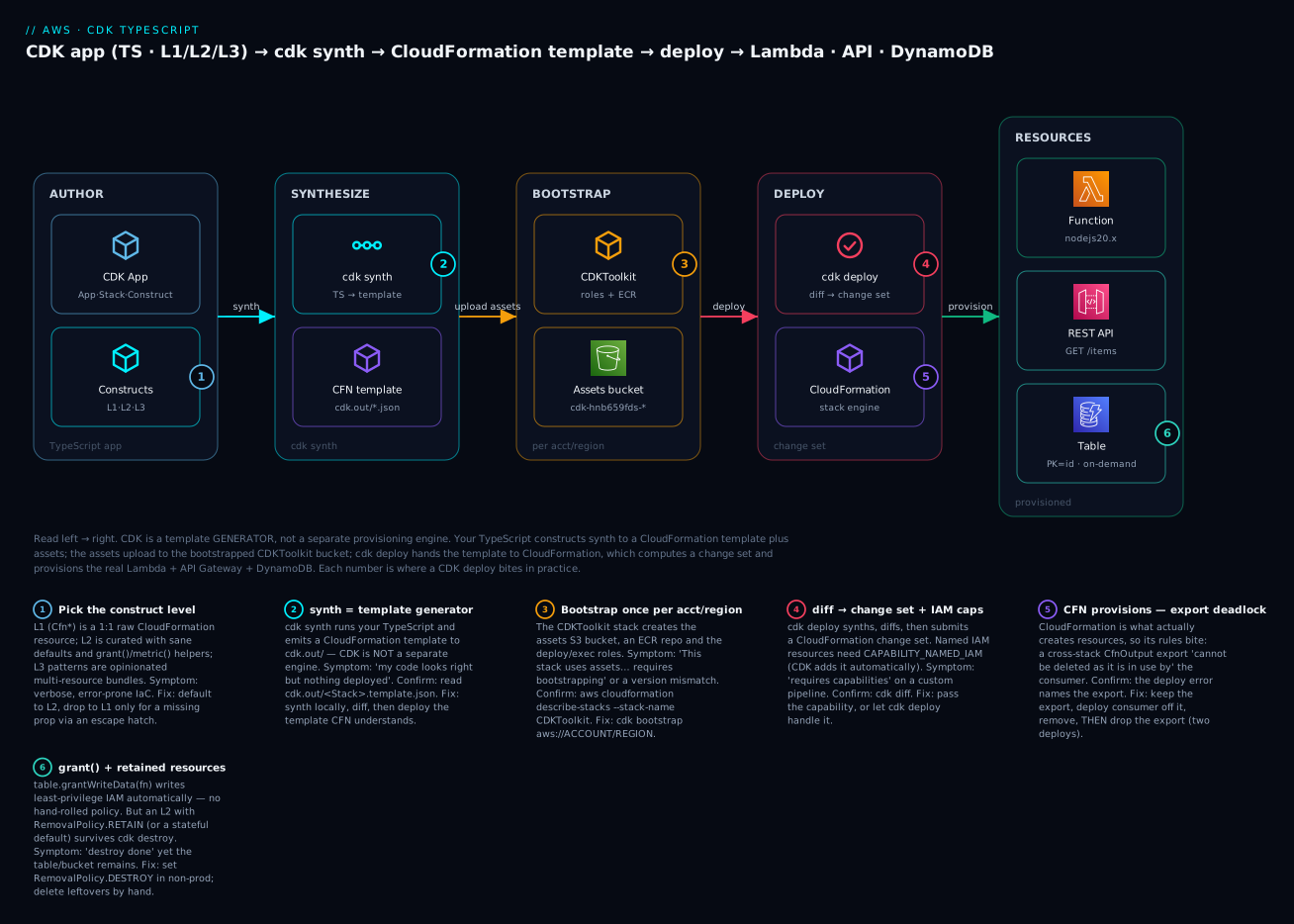
| Badge | Failure class | Lives at | Playbook row |
|---|---|---|---|
| 1 | Wrong construct level / verbose IaC | The TypeScript app | rows 13, 14 |
| 2 | “Nothing deployed” — synth ≠ deploy | cdk synth |
row 15 |
| 3 | Not bootstrapped / version mismatch | CDKToolkit | rows 1, 2 |
| 4 | CAPABILITY_NAMED_IAM / diff surprise |
cdk deploy / diff |
rows 5, 7 |
| 5 | Cross-stack export deadlock | CloudFormation | row 4 |
| 6 | grant gap / retained on destroy |
The resources | rows 6, 8 |
Real-world scenario
PayHaven, a Bengaluru fintech, ran a payments API on a hand-written 900-line CloudFormation template that three engineers were scared to touch. Every new microservice meant copy-pasting the template, find-replacing names, and rediscovering the API Gateway method wiring; the IAM policies had drifted so far that a security review found four functions with dynamodb:* on Resource: "*". Their platform lead, Meera, was asked to migrate to CDK with TypeScript and to make “secure by default” the path of least resistance.
She started with cdk init app --language typescript and rebuilt one service — a Lambda behind an API writing to a table — as a single Stack. The first win was IAM: replacing the hand-written dynamodb:* block with table.grantWriteData(fn) produced a scoped policy allowing exactly the four write actions on that one table’s ARN. She ran cdk synth and read the generated template against the old hand-written one, line by line, to convince the security team the migration was behaviour-preserving — the review that had taken days now took an hour because the diff was mechanical.
Then she hit every classic wall in order. The first cdk deploy failed with “requires bootstrapping” — she had a fresh CI account and hadn’t run cdk bootstrap; one command fixed it (playbook row 1). When she split the estate into a shared NetworkStack and per-service stacks and exported the VPC via CfnOutput, a later refactor to stop importing it produced Export … cannot be deleted as it is in use — the export deadlock (row 4). She learned the two-step deploy the hard way, then moved the shared VPC id into SSM Parameter Store so future refactors wouldn’t deadlock. Her CI pipeline’s custom deploy step failed with requires capabilities: [CAPABILITY_NAMED_IAM] because she’d named the execution role explicitly; cdk deploy adds the capability automatically, but her hand-rolled aws cloudformation deploy step did not (row 5/7). Finally, a cdk destroy in a test account “succeeded” yet left a DynamoDB table behind, because the L2 defaulted stateful resources to RETAIN; she set RemovalPolicy.DESTROY in non-prod (row 8).
Six months later PayHaven had forty services on CDK, a shared construct library encoding their standards (a SecureTable construct with encryption + point-in-time-recovery baked in, a StandardApi L3), and cdk-nag in CI failing any PR that introduced a wildcard IAM action without a justified NagSuppression. Meera’s retro line, pinned in the platform channel, was the thesis of this article: “CDK didn’t remove CloudFormation — it removed the copy-paste. Every failure we hit was a CloudFormation rule leaking through, and once we read the synth we could see it coming.”
Advantages and disadvantages
| Advantages | Disadvantages |
|---|---|
| Real language: variables, loops, functions, types | You can hide too much logic in infra code |
| IDE autocomplete + compile-time checks | Another abstraction layer to learn on top of CFN |
L2 grant*() generates least-privilege IAM |
Leaky abstraction — you must read the synth |
| L3 patterns: whole architectures in a line | Patterns are hard to bend past ~90% |
| Unit-testable (assertions + snapshots) | CloudFormation’s rules still bite (export deadlock) |
| Keeps CFN’s managed rollback + drift detection | Bound to CloudFormation’s limits + resource coverage |
cdk diff before every deploy |
Node/CLI/bootstrap version drift across a team |
| Shareable construct libraries encode standards | Debugging spans TS → template → CFN → resource |
When each side matters: CDK’s advantages dominate for AWS-native teams building many similar stacks — serverless fleets, container platforms, anything where a construct library pays back the abstraction cost across dozens of services. The disadvantages bite when you have one small, static template (raw CloudFormation or SAM is lighter), when you are multi-cloud (Terraform or cdktf), or when a team treats CDK as “programming” and buries deploy-time surprises in clever TypeScript. The honest rule: reach for CDK when you’ll build the same shapes repeatedly on AWS and want types plus real IAM helpers; stay closer to raw templates when the infra is small and unchanging.
| Choose CDK when… | Reconsider when… |
|---|---|
| You’re AWS-only and build many similar stacks | You’re multi-cloud (Terraform/cdktf) |
| You want typed IaC + IDE help + real IAM helpers | You have one tiny static template (raw CFN/SAM) |
| A platform team wants to encode standards as constructs | The team won’t invest in reading the synth |
| You value CFN’s managed rollback + drift | You need a plan/apply model with your own state (TF) |
| You’ll unit-test infrastructure | Pure serverless with heavy local testing (SAM shines) |
Hands-on lab
You will build the diagram: a TypeScript CDK stack with a Lambda (L2, bundled from local code), an API Gateway REST API in front of it (L3 LambdaRestApi), and a DynamoDB table (L2) that the function is granted write access to — then bootstrap, synth (and read the generated CloudFormation), diff, deploy, curl the API, add an assertion test, and cdk destroy. Everything is free-tier. This lab uses ap-south-1 (Mumbai).
⚠️ Cost note: Lambda, API Gateway (12-month free tier) and DynamoDB on-demand at this volume are free. The only lines that can bill a few paise are CloudWatch Logs and the S3 storage of the bootstrap assets bucket. We destroy the app at the end; the CDKToolkit bootstrap stack is meant to persist (leave it, or delete it separately).
What you’ll create
| Resource | Construct level | Purpose | Cost at lab volume |
|---|---|---|---|
| CDKToolkit stack | (bootstrap) | Assets bucket + ECR + roles | ~₹0 (S3 storage of a few KB) |
DynamoDB table Items |
L2 Table |
Stores items | Free (on-demand, tiny) |
Lambda ApiFn |
L2 Function |
Handles the request, writes an item | Free (free tier) |
| REST API | L3 LambdaRestApi |
HTTPS front door, GET /items |
Free (free tier) |
| IAM policy (grant) | Generated | Scoped PutItem on the table |
Free |
Step 1 — Install and scaffold
node --version            # v18+
npm install -g aws-cdk    # the 'cdk' CLI
cdk --version             # 2.x.y (build ...)

mkdir kv-cdk-lab && cd kv-cdk-lab
cdk init app --language typescript
Expected: cdk init scaffolds bin/, lib/, test/, cdk.json, package.json, installs aws-cdk-lib + constructs, and prints “All done!”. Open the project in your editor.
Step 2 — Write the Lambda handler
Create lambda/index.js (kept as plain JS so no bundler is needed for the lab):
const { DynamoDBClient } = require("@aws-sdk/client-dynamodb");
const { DynamoDBDocumentClient, PutCommand } = require("@aws-sdk/lib-dynamodb");

const ddb = DynamoDBDocumentClient.from(new DynamoDBClient({})); // once per cold start
const TABLE = process.env.TABLE_NAME;

exports.handler = async (event) => {
  const id = String(Date.now());
  await ddb.send(new PutCommand({ TableName: TABLE, Item: { id, note: "hello from cdk" } }));
  return {
    statusCode: 200,
    headers: { "content-type": "application/json" },
    body: JSON.stringify({ saved: id, table: TABLE }),
  };
};
The AWS SDK v3 is available in the nodejs20.x managed runtime, so this needs no npm install for the lab.
Step 3 — Define the stack
Replace lib/kv-cdk-lab-stack.ts with the real thing — an L2 table, an L2 function, an L3 API, and one grant:
import { Stack, StackProps, CfnOutput, RemovalPolicy, Duration } from "aws-cdk-lib";
import { Construct } from "constructs";
import * as dynamodb from "aws-cdk-lib/aws-dynamodb";
import * as lambda from "aws-cdk-lib/aws-lambda";
import * as apigw from "aws-cdk-lib/aws-apigateway";

export class KvCdkLabStack extends Stack {
  constructor(scope: Construct, id: string, props?: StackProps) {
    super(scope, id, props);

    // L2 DynamoDB table — on-demand billing, destroyed on teardown (non-prod!)
    const table = new dynamodb.Table(this, "Items", {
      partitionKey: { name: "id", type: dynamodb.AttributeType.STRING },
      billingMode: dynamodb.BillingMode.PAY_PER_REQUEST,
      removalPolicy: RemovalPolicy.DESTROY, // ⚠️ non-prod only — deletes data on destroy
    });

    // L2 Lambda — code bundled from ./lambda as an asset
    const fn = new lambda.Function(this, "ApiFn", {
      runtime: lambda.Runtime.NODEJS_20_X,
      architecture: lambda.Architecture.ARM_64,
      handler: "index.handler",
      code: lambda.Code.fromAsset("lambda"),
      timeout: Duration.seconds(10),
      environment: { TABLE_NAME: table.tableName }, // pass the name via env
    });

    // The one line that replaces a hand-written IAM policy:
    table.grantWriteData(fn); // scoped PutItem/UpdateItem/DeleteItem on this table's ARN

    // L3 pattern — a REST API with a Lambda proxy integration
    const api = new apigw.LambdaRestApi(this, "Api", {
      handler: fn,
      proxy: false,
    });
    api.root.addResource("items").addMethod("GET"); // GET /items → fn

    new CfnOutput(this, "ApiUrl", { value: api.url });
  }
}
Confirm bin/kv-cdk-lab.ts instantiates it with an environment so lookups work:
import { App } from "aws-cdk-lib";
import { KvCdkLabStack } from "../lib/kv-cdk-lab-stack";

const app = new App();
new KvCdkLabStack(app, "KvCdkLabStack", {
  env: { account: process.env.CDK_DEFAULT_ACCOUNT, region: process.env.CDK_DEFAULT_REGION },
});
Step 4 — Bootstrap the account/region
export CDK_DEFAULT_REGION=ap-south-1
cdk bootstrap
Expected: CDK deploys the CDKToolkit CloudFormation stack. You’ll see “✅ Environment aws://111122223333/ap-south-1 bootstrapped.” Verify the machinery exists:
aws cloudformation describe-stacks --stack-name CDKToolkit \
  --region ap-south-1 --query 'Stacks[0].StackStatus' --output text
# CREATE_COMPLETE
aws ssm get-parameter --name /cdk-bootstrap/hnb659fds/version \
  --region ap-south-1 --query Parameter.Value --output text
# 22  (the bootstrap version)
Step 5 — Synth and READ the generated template
This is the step that teaches the whole article. Compile your TypeScript to CloudFormation and look at it:
cdk synth
Expected: CDK prints the YAML template. Note what it generated for you — you wrote ~30 lines of TypeScript and got a full template. Inspect the JSON on disk:
ls cdk.out/
# KvCdkLabStack.template.json  manifest.json  KvCdkLabStack.assets.json  asset.<hash>  tree.json ...
| In the synth you’ll find | Generated from | The point |
|---|---|---|
AWS::DynamoDB::Table with BillingMode: PAY_PER_REQUEST |
your L2 Table |
Your prop, plus a DeletionPolicy: Delete from RemovalPolicy |
AWS::Lambda::Function Runtime: nodejs20.x |
your L2 Function |
Plus an auto-generated execution role |
AWS::IAM::Role + AWS::IAM::Policy scoped to the table ARN |
grantWriteData |
You never wrote this policy |
AWS::ApiGateway::RestApi + Method + Deployment + Stage |
the L3 LambdaRestApi |
One construct → four resources |
AWS::Lambda::Permission for API Gateway to invoke |
the L3 wiring | The resource-policy you’d forget by hand |
S3Key: <hash>.zip on the function code |
the asset | Where your ./lambda code will upload |
Step 6 — Diff and deploy
cdk diff shows what would change (against nothing yet — a full create). Then deploy:
cdk diff
# Resources
# [+] AWS::DynamoDB::Table Items ...
# [+] AWS::Lambda::Function ApiFn ...
# IAM Statement Changes  (you must approve these)
# ...

cdk deploy
Expected: CDK shows the IAM statement changes and asks “Do you wish to deploy these changes (y/n)?” — type y. It uploads the asset, submits a change set, and streams CREATE_COMPLETE events. At the end it prints the output:
Outputs:
KvCdkLabStack.ApiUrl = https://abc123.execute-api.ap-south-1.amazonaws.com/prod/
Step 7 — Call the API
API=$(aws cloudformation describe-stacks --stack-name KvCdkLabStack \
  --region ap-south-1 --query "Stacks[0].Outputs[?OutputKey=='ApiUrl'].OutputValue" --output text)

curl -s "${API}items"
# {"saved":"1752480000000","table":"KvCdkLabStack-Items..."}

# Confirm the write landed in DynamoDB:
aws dynamodb scan --table-name "$(aws cloudformation describe-stack-resources \
  --stack-name KvCdkLabStack --region ap-south-1 \
  --query "StackResources[?ResourceType=='AWS::DynamoDB::Table'].PhysicalResourceId" --output text)" \
  --region ap-south-1 --query 'Count'
# 1
Step 8 — Add and run an assertion test
Replace test/kv-cdk-lab.test.ts with a fine-grained assertion that proves the grant is scoped, not a wildcard:
import { App } from "aws-cdk-lib";
import { Template, Match } from "aws-cdk-lib/assertions";
import { KvCdkLabStack } from "../lib/kv-cdk-lab-stack";

test("synthesizes an on-demand table and a scoped write grant", () => {
  const app = new App();
  const stack = new KvCdkLabStack(app, "Test");
  const t = Template.fromStack(stack);

  t.resourceCountIs("AWS::DynamoDB::Table", 1);
  t.hasResourceProperties("AWS::DynamoDB::Table", { BillingMode: "PAY_PER_REQUEST" });
  t.hasResourceProperties("AWS::Lambda::Function", { Runtime: "nodejs20.x" });

  // The grant is scoped to write actions, NOT dynamodb:*
  t.hasResourceProperties("AWS::IAM::Policy", {
    PolicyDocument: Match.objectLike({
      Statement: Match.arrayWith([
        Match.objectLike({ Action: Match.arrayWith(["dynamodb:PutItem"]) }),
      ]),
    }),
  });
});
npm test
# PASS  test/kv-cdk-lab.test.ts
#   ✓ synthesizes an on-demand table and a scoped write grant
Notice the test never touched AWS — it synthesized the stack in memory and asserted against the template. That is why CDK tests are fast and free.
Step 9 — Tear down
cdk destroy
# Are you sure you want to delete: KvCdkLabStack (y/n)? y
Expected: CloudFormation deletes the stack. Because you set RemovalPolicy.DESTROY, the table goes too. Verify nothing is left:
aws cloudformation describe-stacks --stack-name KvCdkLabStack --region ap-south-1
# An error occurred (ValidationError) ... Stack ... does not exist   ← good
| Teardown step | Command | Note |
|---|---|---|
| Delete the app stack | cdk destroy |
Removes Lambda, API, table (table only because RemovalPolicy.DESTROY) |
| (Optional) remove bootstrap | aws cloudformation delete-stack --stack-name CDKToolkit |
Only if no other CDK app uses this account/region |
| Check for leftovers | describe-stacks returns “does not exist” |
A retained table/bucket would remain otherwise |
Common mistakes & troubleshooting
This is the section you’ll return to. Match the symptom, run the confirm command, apply the fix. Rows tagged (CFN) are CloudFormation rules leaking through CDK — expected, not a CDK bug.
| # | Symptom | Root cause | Confirm (exact command / path) | Fix |
|---|---|---|---|---|
| 1 | This stack uses assets… must be deployed. Run 'cdk bootstrap' |
Account/region never bootstrapped | aws cloudformation describe-stacks --stack-name CDKToolkit → not found |
cdk bootstrap aws://<acct>/<region> |
| 2 | This CDK deployment requires bootstrap stack version 'N'… found 'M' |
CLI newer than the deployed bootstrap | aws ssm get-parameter --name /cdk-bootstrap/hnb659fds/version |
Re-run cdk bootstrap to upgrade the toolkit |
| 3 | Cannot connect to the Docker daemon on deploy |
A bundled/image asset needs Docker; it’s stopped | docker ps errors |
Start Docker; or use a pre-built zip via Code.fromAsset |
| 4 | Export <name> cannot be deleted as it is in use by <stack> |
Cross-stack export deadlock on refactor | aws cloudformation list-imports --export-name <name> |
Two-step deploy: stop the import, deploy consumer, then remove export (CFN) |
| 5 | Requires capabilities: [CAPABILITY_NAMED_IAM] |
A named IAM resource + a custom deploy step | cdk diff shows a named role/policy |
Let cdk deploy handle it, or add the capability to your CFN deploy (CFN) |
| 6 | AccessDenied on dynamodb:PutItem at runtime |
Missing/incorrect grant (or granted on wrong construct) |
CloudWatch logs name the action + resource | Add table.grantWriteData(fn); confirm it’s the same table/fn |
| 7 | cdk diff shows changes you didn’t make (drift) |
Someone changed a resource in the console | cdk diff; aws cloudformation detect-stack-drift |
Revert console change, or re-import intent into code |
| 8 | cdk destroy “succeeds” but a table/bucket remains |
L2 default RemovalPolicy.RETAIN on stateful resources |
Console still shows the resource | Set RemovalPolicy.DESTROY (non-prod); delete leftover by hand (CFN) |
| 9 | The role defined for the function cannot be assumed by Lambda |
IAM propagation lag right after create | aws iam get-role on the exec role |
Retry the deploy; usually transient |
| 10 | The security token included in the request is invalid |
Wrong/expired AWS creds or wrong account | aws sts get-caller-identity |
Refresh aws sso login; check the profile/region |
| 11 | Circular dependency: Cannot use resource in a cross-stack reference |
Two stacks reference each other (A→B and B→A) | cdk synth names the cycle |
Break the cycle: extract shared resource to a third stack or SSM (CFN) |
| 12 | Resource handler returned message: already exists |
A named resource (bucket/role) name collides | The error names the resource | Let CDK auto-name (drop the explicit name), or pick a unique one |
| 13 | An L2 lacks a property you need | The L2 hasn’t curated a new CFN prop | Check the L2 props vs the CFN docs | Escape hatch: node.defaultChild + addPropertyOverride |
| 14 | TypeError/compile error in the stack |
TypeScript/type mismatch in your code | npm run build / tsc --noEmit |
Fix types; CDK caught it before deploy (a feature) |
| 15 | “I ran cdk synth but nothing deployed” |
synth only generates a template; it doesn’t deploy | cdk deploy was never run |
Run cdk deploy; synth ≠ deploy |
| 16 | cdk deploy hangs then ROLLBACK_COMPLETE |
A resource failed to create; CFN rolled back | Read the failing event in cdk deploy output / console |
Fix the resource; --rollback false to inspect a failed create |
| 17 | Cannot retrieve value from context provider… account/region are not specified |
Env-agnostic stack tried a context lookup (e.g. Vpc.fromLookup) |
cdk synth names the provider; check the stack’s env |
Pin env: { account, region } on the stack (or via CDK_DEFAULT_*) |
The CloudFormation error reference (leaks through CDK)
Because CDK deploys via CloudFormation, most deploy-time failures are CloudFormation errors. Recognise the common ones:
| Error / status | Meaning | Fix |
|---|---|---|
ROLLBACK_COMPLETE (on create) |
First create failed and rolled back; stack is unusable | Delete the stack, fix the cause, redeploy |
UPDATE_ROLLBACK_FAILED |
An update rollback itself failed | continue-update-rollback, then fix |
Export … cannot be deleted as it is in use |
An export is still imported | Two-step deploy (row 4) |
Requires capabilities: [CAPABILITY_*] |
Template creates IAM/named resources | Acknowledge the capability |
Resource already exists |
A named resource collides | Auto-name or rename |
Circular dependency between resources |
Resources reference each other | Restructure references |
No updates are to be performed |
Nothing changed | Not an error — the diff was empty |
Bootstrap and asset quick reference
| Situation | Check | Resolution |
|---|---|---|
| Fresh account | describe-stacks --stack-name CDKToolkit |
cdk bootstrap |
| CLI upgraded | SSM /cdk-bootstrap/hnb659fds/version |
cdk bootstrap again |
| Cross-account deploy | Trust relationship on the target | cdk bootstrap --trust <pipeline-acct> |
| Docker asset fails | docker ps |
Start Docker or avoid bundling |
| Assets bucket deleted | The bootstrap bucket is gone | Re-bootstrap to recreate it |
The three nastiest, explained
The export deadlock (row 4) is the one that ambushes every team that splits into multiple stacks. It is not a CDK bug — it is CloudFormation refusing to remove an Export while any stack still ImportValues it. The mental model: an export is a shared contract, and you cannot revoke a contract someone still relies on. So a refactor that removes a cross-stack dependency must be deployed in two passes — first make the consumer stop importing (and deploy it), then remove the export (and deploy the producer). CDK will happily generate a single-pass change that CloudFormation then rejects. The durable fix for genuinely shared, long-lived values (a VPC id, a hosted-zone id) is to keep them in SSM Parameter Store and read them by name, which creates no export and no deadlock.
“synth ≠ deploy” (row 15) confuses newcomers because CDK feels like a deployment tool. It isn’t, quite: cdk synth runs your program and writes a CloudFormation template to cdk.out/ — it changes nothing in AWS. Only cdk deploy uploads assets and submits the template to CloudFormation. If you edit your stack, run cdk synth, see the new resource in the output, and wonder why the console doesn’t show it — you never deployed. Make cdk diff (which synths and compares to the live stack) your habit before every deploy; it is the closest CDK analogue to terraform plan.
Retained resources after cdk destroy (row 8) surprise people who assume “destroy” means “delete everything”. CDK’s L2 constructs for stateful resources (S3 buckets, DynamoDB tables, RDS databases) default their RemovalPolicy to RETAIN precisely so a careless destroy doesn’t nuke production data. That safety default means a test-account cdk destroy reports success while the table quietly remains (and keeps costing, and blocks re-creating a same-named resource). In non-prod, set RemovalPolicy.DESTROY explicitly (as the lab does); in prod, keep RETAIN and delete deliberately. Either way, after a destroy, check for leftovers rather than trusting the word “success”.
Best practices
- Default to L2; drop to L1 only via an escape hatch. L2 gives you sane defaults and
grant*()IAM. Reach intonode.defaultChildfor the rare missing property, and comment why. - Read the synth before every deploy.
cdk synth(andcdk diff) show exactly what CloudFormation will do. Treat the generated template as the source of truth, not your TypeScript’s intent. - Prefer
grant*()over hand-written IAM.table.grantWriteData(fn)produces scoped, correct policies. Never writeAction: "*"/Resource: "*"when a grant exists. - Pin the environment for anything using lookups. Set
env: { account, region }sofromLookup, AZ counts and AMI queries resolve; commitcdk.context.jsonso synth is deterministic across the team and CI. - Avoid cross-stack exports for values that change; use SSM Parameter Store. It sidesteps the export deadlock and decouples stack lifecycles.
- Set
RemovalPolicydeliberately.DESTROYin non-prod so teardown is clean;RETAIN(the default) in prod so you never lose stateful data by accident. - Add cdk-nag early and justify exceptions with
NagSuppressions. Bolting it on late means a wall of findings; each suppression must carry a written reason for the audit trail. - Write both snapshot and fine-grained assertion tests. Snapshots catch any unexpected template change; assertions pin the properties (like a scoped grant) you actually care about.
- Keep infra logic simple. A little
for-loop over environments is great; a 200-line class hierarchy that hides what deploys is a liability. Favour readability of the synth. - Version-lock the CDK CLI and
aws-cdk-libacross the team + CI, and re-bootstrap on upgrades. Bootstrap version mismatches are a common CI failure. - Encode standards as shared constructs. A
SecureTable(encryption + PITR) or aStandardApiL3 makes the compliant choice the default across every service. - Use
--hotswaponly in dev. It patches Lambda code outside CloudFormation for a fast inner loop, but it drifts the stack; never use it in a pipeline to prod.
Security notes
CDK’s security model is CloudFormation’s plus what your constructs generate. Get these right:
| Control | What to do | Why |
|---|---|---|
Least-privilege via grant*() |
Use grantX(principal) instead of hand-written policies |
Generates scoped actions on exact ARNs, not * |
| Scoped bootstrap exec policy | cdk bootstrap --cloudformation-execution-policies <scoped> |
The CFN exec role shouldn’t be AdministratorAccess in prod |
| cdk-nag in CI | Fail PRs on AwsSolutionsChecks findings |
Catch wildcard IAM, open SGs, unencrypted stores before deploy |
| Approve IAM diffs | Keep requireApproval on; read the IAM changes |
CDK-generated IAM is easy to trust blindly |
| No secrets in code/context | Use Secrets Manager/SSM SecureString; reference by ARN | cdk.json/cdk.context.json are committed to git |
| Encryption + PITR defaults | Encode them in shared constructs (SecureTable) |
Make the compliant choice the default |
| Cross-account trust minimal | --trust only the pipeline account |
Limit who can deploy into an account |
| RETAIN stateful in prod | Keep the default RemovalPolicy.RETAIN on data stores |
A stray destroy can’t delete production data |
The two you’ll get wrong first: committing a secret into cdk.json/cdk.context.json (they’re in git — use Secrets Manager and reference by ARN, never inline the value), and bootstrapping prod with the default AdministratorAccess execution policy (scope it down with --cloudformation-execution-policies so a compromised pipeline can’t do anything).
Cost & sizing
CDK itself is free — it’s a CLI and a library. What costs money is the AWS resources it deploys, plus a sliver for the bootstrap machinery:
| Cost driver | How it’s charged | Lever |
|---|---|---|
| CDK CLI + library | Free | — |
| Bootstrap assets S3 bucket | S3 storage of your zipped assets/templates | Lifecycle-expire old asset versions |
| Bootstrap ECR repo | ECR storage of image assets | Prune old images; only if you use image assets |
| Deployed resources | Whatever Lambda/API/DynamoDB/etc. cost | Right-size the actual resources |
| CloudWatch Logs | Ingestion + storage from the resources | Set log retention |
| Item | This lab | A real serverless service |
|---|---|---|
| Bootstrap S3 storage | A few KB (₹0) | A few MB of asset versions (paise) |
| Lambda | Free tier | Depends on invocations/GB-s |
| API Gateway | Free tier (12-mo) | $1.00–$3.50 per million calls |
| DynamoDB on-demand | Free tier | Per read/write request unit |
| CDK’s own cost | ₹0 | ₹0 |
The practical cost hygiene specific to CDK: the bootstrap assets bucket accumulates old asset versions on every deploy (each unique code hash is a new object). Over a busy CI year that’s real storage — add an S3 lifecycle rule to expire non-current versions, or periodically clean the bucket. Everything else is just the cost of the resources you’d pay for however you deployed them; CDK adds nothing to the runtime bill.
Interview & exam questions
1. What is AWS CDK, and what does cdk synth actually produce? CDK is a framework for defining cloud infrastructure in a general-purpose language (TypeScript, Python, etc.) that synthesizes to a CloudFormation template. cdk synth runs your app, walks the construct tree, and writes a CloudFormation template plus assets to cdk.out/. CDK is a template generator; CloudFormation does the provisioning. (DVA-C02, DOP-C02)
2. Explain L1, L2 and L3 constructs. L1 (Cfn*) are raw, 1:1 CloudFormation resources with no defaults; L2 are curated constructs with sane defaults and helper methods like grant*(); L3 (patterns) are opinionated multi-resource bundles (e.g. LambdaRestApi). Default to L2, use L3 when a pattern fits, drop to L1 for missing properties. (DVA-C02)
3. What does cdk bootstrap create and why is it needed? It deploys the CDKToolkit CloudFormation stack containing a versioned S3 assets bucket, an ECR repo, and deploy/publish/exec/lookup IAM roles, per account and region. Any CDK app that uses assets (nearly all) needs it, or deploy fails with “requires bootstrapping”. (DOP-C02)
4. How do you pass a value from one stack to another, and what’s the export deadlock? Within one app, pass the construct as a prop and let CDK create the reference (it auto-generates an Export/ImportValue across stacks). The deadlock: CloudFormation won’t delete an export still imported elsewhere, so removing a cross-stack dependency needs a two-step deploy — stop importing, deploy the consumer, then remove the export. (DOP-C02)
5. Your grant isn’t working — the function gets AccessDenied at runtime. Debug it. Check you granted on the same objects the code uses (right table, right fn), read the CloudWatch error to see the exact action/ARN denied, and inspect the synthesized AWS::IAM::Policy to confirm the action is present and scoped to the correct ARN. A grant on the wrong construct silently no-ops. (DVA-C02, SCS)
6. What is an escape hatch and when do you use one? A way to reach the raw CloudFormation beneath an L2 when it lacks a property: const cfn = l2.node.defaultChild as CfnX then cfn.addPropertyOverride(path, value). Use it for a new CloudFormation property the L2 hasn’t curated yet — keep the L2 for 95% and override the one gap. (DVA-C02)
7. How do you test a CDK stack without deploying? Synthesize in memory and assert on the template: Template.fromStack(stack) with hasResourceProperties/resourceCountIs (fine-grained) and toMatchSnapshot() (snapshot). Tests run against the generated template, so they’re fast and free and never touch AWS. (DVA-C02, DOP-C02)
8. What’s the difference between cdk synth, cdk diff and cdk deploy? synth generates the template locally (no AWS change); diff synthesizes and compares against the deployed stack (like terraform plan); deploy uploads assets and submits a change set to CloudFormation to apply. “I synthed but nothing deployed” means deploy was never run. (DOP-C02)
9. Why might cdk destroy leave a resource behind? L2 constructs for stateful resources (S3, DynamoDB, RDS) default RemovalPolicy to RETAIN to protect data. destroy then reports success while the resource remains. Set RemovalPolicy.DESTROY in non-prod to remove it; keep RETAIN in prod. (DOP-C02)
10. CDK vs Terraform vs SAM vs raw CloudFormation — when each? CDK: AWS-only, want a real language and IAM helpers. Terraform: multi-cloud or existing TF estate, own state model. SAM: pure serverless with local testing (sam local). Raw CloudFormation: small, portable, minimal-dependency templates. cdktf uses CDK’s model but deploys via Terraform. (DOP-C02, SAP)
11. What are aspects and cdk-nag? Aspects are visitors CDK applies to every construct in the tree (tagging, validation, mutation). cdk-nag is a library of aspects implementing rule packs (AwsSolutions, HIPAA, NIST, PCI) that flag insecure patterns at synth; exceptions are justified via NagSuppressions. (SCS, DOP-C02)
12. What is a CDK Pipeline and what does “self-mutating” mean? A construct (aws-cdk-lib/pipelines) that defines a CI/CD pipeline in CDK code. Self-mutating means the pipeline updates its own definition first when the pipeline code changes, then deploys the app — no click-ops to modify the pipeline. Best for multi-account, multi-stage CDK-native shops. (DOP-C02)
Quick check
- You edited your stack, ran
cdk synth, and the new resource is in the output — but the AWS console doesn’t show it. Why? - Your first
cdk deployin a brand-new account fails with a message about assets and bootstrapping. What one command fixes it? - You wrote
table.grantWriteData(fn). Name two things that appear in the synthesized template because of that single line. - You removed a cross-stack dependency and deploy fails with “Export … cannot be deleted as it is in use”. What deployment sequence fixes it?
- After
cdk destroythe CloudFormation stack is gone but the DynamoDB table remains. What default caused this, and how do you change it for a dev environment?
Answers
cdk synthonly generates a CloudFormation template intocdk.out/— it deploys nothing. You must runcdk deploy(orcdk diffto preview against the live stack). synth ≠ deploy.cdk bootstrap(optionallycdk bootstrap aws://<account>/<region>) — it deploys the CDKToolkit stack with the assets bucket and roles the deploy needs.- An
AWS::IAM::Policy(scoped to the table’s ARN, allowingdynamodb:PutItem/UpdateItem/DeleteItem/BatchWriteItem) attached to the function’s execution role, plus a dependency so CloudFormation orders them — none of which you hand-wrote. - A two-step deploy: (1) change the consumer stack to stop importing the export and deploy it first; (2) then remove the export from the producer stack and deploy that. CloudFormation won’t delete an export still in use.
- The L2
Table’s defaultRemovalPolicy.RETAIN(which stateful constructs use to protect data). SetremovalPolicy: RemovalPolicy.DESTROYon the table for a dev/non-prod environment so teardown removes it.
Glossary
| Term | Definition |
|---|---|
| CDK (Cloud Development Kit) | A framework to define infrastructure in a general-purpose language that synthesizes to CloudFormation. |
| Construct | The base building block; every CDK class extends it. Constructs nest into a tree. |
| App | The root construct representing the whole CDK program; contains stacks. |
| Stack | A deployment unit that maps 1:1 to a CloudFormation stack. |
L1 / Cfn* construct |
A raw, 1:1, code-generated wrapper of a CloudFormation resource, with no defaults. |
| L2 construct | A curated construct with sane defaults and helper methods (grant*(), metric*()). |
| L3 / pattern construct | An opinionated bundle wiring several resources into a common architecture. |
cdk synth |
Compiles the app into a CloudFormation template + assets in cdk.out/ (the cloud assembly). |
| Bootstrap / CDKToolkit | The one-time per-account/region stack providing the assets bucket, ECR repo and deploy roles. |
| Asset | Local code/image referenced by a stack and uploaded to the bootstrap bucket/ECR at deploy. |
| Context | Cached environment facts and feature flags used during synth (cdk.context.json, cdk.json). |
| Environment | The { account, region } a stack targets; agnostic if unset (no lookups). |
| CfnOutput / Fn.importValue | Publish a value from a stack / consume another stack’s export; the basis of cross-stack references. |
| Export deadlock | CloudFormation refusing to delete an export still imported by another stack. |
| Aspect | A visitor CDK applies to every construct for cross-cutting concerns (tags, checks, mutation). |
| cdk-nag | A library of aspect-based rule packs (AwsSolutions, HIPAA, NIST, PCI) that flag insecure patterns. |
| Escape hatch | Reaching the raw L1/CloudFormation from an L2 (node.defaultChild, addOverride). |
| CDK Pipelines | A construct defining a self-mutating CI/CD pipeline for CDK apps. |
Next steps
- Learn the template CDK generates. Read the CloudFormation it emits, from the ground up, in AWS CloudFormation Hands-On: Your First Stack, Templates & Change Sets.
- Compare the serverless-native path. See where SAM’s
sam localand macro model fit versus CDK in AWS SAM Hands-On: The Serverless Application Model. - Run CDK in a pipeline. Wire
cdk deployinto automated delivery with AWS CodePipeline & CodeBuild: CI/CD on AWS Hands-On. - Go deeper on the resources you built. Master the function in Your First AWS Lambda Function: Handlers, Triggers, Roles & Logs Hands-On, the API in Amazon API Gateway Hands-On: REST vs HTTP APIs, Authorizers & Throttling, and the table in Amazon DynamoDB Hands-On: Tables, Keys, Capacity Modes & Indexes.