Every serverless API you build eventually needs a front door — something that terminates TLS, checks who is calling, refuses to be hammered, shapes the request, and hands it to your code. On AWS that front door is Amazon API Gateway, and the single most consequential decision you will make is which of its three flavors to use: a REST API (feature-rich, VTL transforms, API keys, caching, private endpoints), an HTTP API (cheaper, faster, JWT-native, the modern default for plain Lambda proxying), or a WebSocket API (stateful, two-way, for chat and live feeds). Choose the wrong one and you either pay 3.5× per request for features you never touch, or you box yourself into a flavor that cannot do the request transformation your legacy backend needs.
This is not a “click Create API” tutorial. API Gateway is a stack of gates — custom domain, WAF, authorizer, throttle bucket, request validator, mapping template, integration — and each gate has its own configuration surface, its own quota, and its own status code when it says no. A 403 can mean five completely different things depending on which gate emitted it. A 502 almost always means your Lambda returned the wrong shape. A 504 means you crossed the 29-second integration ceiling. Knowing which gate bit, from the status code and one log line, is the difference between a five-minute fix and a two-hour guess.
By the end you will be able to pick REST vs HTTP from a feature-and-cost matrix instead of a coin flip, wire every authorizer type (IAM SigV4, Cognito user pools, Lambda token/request, and HTTP-API JWT), throttle a spike gracefully with usage plans and API keys, reshape requests with VTL, front the API with a custom domain and WAF, and read the access log to find any failing hop. You will build two working APIs by hand — an HTTP API with a JWT authorizer and a REST API with an API-key usage plan, throttling and a mapping template — with aws CLI and Terraform, test authorized and throttled calls, then tear it all down.
What problem this solves
Without a managed API front door you are writing, in every service, the same undifferentiated plumbing: TLS termination, request parsing, auth token validation, rate limiting, per-client quotas, request/response logging, CORS handling, and a routing layer that maps URLs to handlers. That code is security-critical, tedious, and identical across teams — and when you hand-roll it on EC2 or containers you also own patching it, scaling it, and paying for it to idle overnight. Teams that skip the front door end up with each Lambda parsing its own JWTs, no consistent throttle, and a rate-limit story that is “hope nobody notices.”
API Gateway externalizes all of that into configuration. It terminates TLS at a custom domain with an ACM certificate, validates a JWT or a SigV4 signature or an API key before your code runs, throttles per-account, per-stage, per-method and per-client, validates the request body against a schema, transforms it with a template, invokes your Lambda or HTTP backend, logs every hop, and traces it with X-Ray — all billed per request, scaling from zero to tens of thousands of requests per second with no capacity to manage. The pain it removes is real, but it introduces its own: the wrong flavor is expensive, the proxy response shape is unforgiving, the 29-second timeout is a hard wall, and CORS-on-errors is a classic silent failure.
Here is the full request path this article covers, gate by gate, with what each gate does and its characteristic failure:
| # | Gate | What it does | Config surface | Characteristic failure |
|---|---|---|---|---|
| 1 | Route 53 + custom domain | DNS + TLS at your own hostname | ACM cert, base-path mapping | 403 from wrong base-path / cert region |
| 2 | WAF (REST only) | Blocks bots, rate-limits, filters | WebACL on the stage | Silent 403 with no execution log |
| 3 | Stage | Deployed snapshot; where logging/throttle/cache attach | Stage settings, stage variables | Stage variable ${} unresolved |
| 4 | Authorizer | Verifies caller identity | JWT / Cognito / Lambda / IAM | 401 (no/expired token) or 403 (denied) |
| 5 | Throttle + usage plan | Rate/burst/quota per account, stage, method, client | Method throttle, usage plan | 429 Too Many Requests |
| 6 | Request validator | Rejects bad body/params | Validator + model (JSON Schema) | 400 Bad Request Body |
| 7 | Mapping template (VTL) | Reshapes request/response (REST non-proxy) | Integration request/response | 500 from template error |
| 8 | Integration | Invokes Lambda / HTTP / AWS service | Proxy or non-proxy | 502 (bad shape) / 504 (timeout) |
| 9 | Access + execution logs, X-Ray | Observability of every hop | Stage settings | Blind debugging with logs off |
Learning objectives
By the end of this article you can:
- Choose REST vs HTTP vs WebSocket APIs from a feature and cost matrix, and justify the 3.5× price gap between REST and HTTP.
- Build resources, methods and integrations, and explain Lambda proxy vs non-proxy, HTTP proxy, AWS-service and mock integrations plus the exact proxy event/response shape.
- Manage stages, deployments and stage variables, and run a canary release that shifts a slice of traffic to a new deployment.
- Configure every authorizer — IAM SigV4, Cognito user pools, Lambda token/request (with result caching), and the HTTP-API JWT authorizer.
- Add request validation and VTL mapping templates, and read
$input,$context,$utiland$stageVariables. - Throttle correctly with account/stage/method limits and usage plans + API keys for per-client quotas, and diagnose the 429.
- Enable caching (REST), CORS, WAF, custom domains, access/execution logging, X-Ray, and private APIs via interface endpoints.
- Work a 403/401/429/502/504 failure to root cause from the status code and a single log line.
Prerequisites & where this fits
You should have the AWS CLI v2 configured with credentials for a sandbox account, permission to create API Gateway, Lambda, IAM and (optionally) Cognito resources, and one working Lambda runtime (this article uses Node.js 20). Comfort with JSON, HTTP verbs, status codes and JWTs helps; no prior API Gateway experience is assumed. Terraform ≥ 1.5 with the aws provider is used for the IaC snippets.
This article is the front-door deep dive of the AWS serverless track. It sits one layer below the reference build in AWS Serverless Web Application Architecture: CloudFront, API Gateway, Lambda and DynamoDB End to End, goes far deeper on the API tier than the load-balancer comparison in AWS Load Balancers and API Gateway: ALB, NLB and API Gateway Compared, and feeds the pure event-driven work in AWS Lambda Patterns: Event-Driven Functions That Scale to Zero. If you have not yet shipped a function, do Your First AWS Lambda Function: A Hands-On Walkthrough first — this article assumes you can deploy a Lambda and read its logs.
Core concepts
Six mental models carry the whole service.
API Gateway is a pipeline of request/response phases, not a single hop. Every REST request passes through four phases: the method request (auth, validation, API key), the integration request (mapping template transforms it for the backend), the integration (the backend runs), and the integration response / method response (a template transforms the result back). Each phase can succeed or fail independently, and the phase decides the status code. HTTP APIs collapse this to a leaner path (route → authorizer → integration) with no VTL, which is exactly why they are faster and cheaper.
A stage is the only thing that is actually live. You build an API definition, then create a deployment (an immutable snapshot), then point a stage (prod, dev, $default) at that deployment. Throttling, logging, caching, WAF, X-Ray and stage variables all attach to the stage, not the API. Forgetting to redeploy after a change is the single most common “my fix isn’t live” bug on REST APIs — HTTP APIs can auto-deploy to sidestep it.
Authorization happens at the door, before your code. An authorizer verifies the caller and either lets the request through or returns 401/403 without invoking your integration. A JWT authorizer (HTTP API) checks a token’s signature, issuer, audience and expiry statelessly against a JWKS endpoint. A Lambda authorizer runs your code to return an IAM-style policy, cached by identity source. IAM (SigV4) authorization requires the caller to sign the request with AWS credentials. Your business logic never sees a raw credential.
Proxy integration trades control for simplicity. With Lambda proxy (AWS_PROXY), API Gateway passes the whole request to your function as a fixed JSON event and expects a fixed JSON response { statusCode, headers, body } back — no templates, but your function owns the entire HTTP contract. With non-proxy, you write VTL mapping templates to translate between HTTP and whatever your backend wants. Proxy is the default for new work; non-proxy is for legacy backends and fine-grained transformation.
Throttling is layered and additive. The account has a region-wide bucket (10,000 rps steady-state, 5,000 burst by default). On top of that you set stage and method limits, and per-client limits through usage plans + API keys. A request must pass every applicable bucket; the tightest one that trips returns 429. This is capacity planning as quota planning: know each ceiling before launch, not during one.
Everything is observable if you turn it on — and blind if you don’t. Access logs record one line per request ($context variables: status, latency, which authorizer, integration error). Execution logs record the internal phase-by-phase trace. X-Ray stitches the API-to-integration latency. None are on by default, and REST execution/access logging needs a one-time account-level CloudWatch Logs role ARN — the classic “why are there no logs” gotcha.
The moving parts, pinned down:
| Term | One-line definition | Where set | Why it matters |
|---|---|---|---|
| Resource | A URL path node (/items, /items/{id}) |
REST API | The routing tree |
| Method | An HTTP verb on a resource (GET /items) |
REST API | Where auth/validation attach |
| Route | HTTP API’s VERB /path unit |
HTTP API | Leaner equivalent of method+resource |
| Integration | The backend binding for a method/route | Method / route | Proxy vs non-proxy; the target |
| Stage | A named deployment of the API | API | Live URL; throttle/log/cache anchor |
| Deployment | An immutable snapshot of the definition | REST API | REST must redeploy to go live |
| Stage variable | ${stageVariables.x} key-value per stage |
Stage | Point one stage at a different backend |
| Authorizer | Pre-integration identity check | API | Emits 401/403 before your code |
| Usage plan | Rate/burst/quota bundle tied to API keys | REST API | Per-client throttling and metering |
| API key | x-api-key client identifier |
REST API | Associates a caller with a usage plan |
| Mapping template | VTL transform of request/response | REST integration | Non-proxy request/response shaping |
| Model | A JSON Schema for request validation | REST API | Basis for 400-on-bad-body |
| Gateway response | Customizable canned error (4XX/5XX) | API | Where you add CORS headers to errors |
The request lifecycle, phase by phase (REST)
| Phase | What runs | Can emit | Your control point |
|---|---|---|---|
| Method request | Auth, API-key check, request validation | 401, 403, 400, 429 | Authorizer, validator, apiKeyRequired |
| Integration request | Request mapping template (non-proxy) | 500 (template error) | VTL $input/$context mapping |
| Integration | Backend (Lambda/HTTP/AWS) executes | 502, 504 | Timeout (≤29 s), backend correctness |
| Integration response | Response mapping + status override | 500 (template error) | VTL, selectionPattern regex |
| Method response | Final headers/status to the client | 200/4xx/5xx | Declared response models/headers |
The three flavors: REST vs HTTP vs WebSocket
API Gateway is really three products sharing a console. Getting the choice right up front saves both money and rework.
Full feature matrix
| Capability | REST API | HTTP API | WebSocket API |
|---|---|---|---|
| Best for | Feature-rich public/partner APIs | Simple Lambda/HTTP proxying | Two-way, stateful (chat, live) |
| Protocol | Request/response HTTP | Request/response HTTP | Persistent WebSocket |
| Price / million req | $3.50 (tiered to $1.51) | $1.00 (to $0.90) | $1.00 msgs + $0.25/M conn-min |
| Latency overhead | Higher (VTL pipeline) | Lowest (~60% less) | n/a |
| Lambda proxy | Yes | Yes | Yes (per route) |
| Non-proxy + VTL mapping | Yes | No | Limited (templates on routes) |
| HTTP proxy integration | Yes | Yes | No |
| AWS-service integration | Yes (many services) | Yes (subset via SDK) | Yes |
| Mock integration | Yes | No | No |
| Private (VPC) endpoint | Yes | No | No |
| Edge-optimized endpoint | Yes | No (regional only) | No |
| API keys + usage plans | Yes | No | No |
| Per-client throttling | Yes (usage plans) | No | No |
| Request validation (models) | Yes | No | No |
| Response caching | Yes (0.5–237 GB) | No | No |
| JWT authorizer | No (use Cognito authorizer) | Yes (any OIDC) | No |
| Cognito user pool authorizer | Yes | Via JWT authorizer | No |
| Lambda authorizer | Yes (token + request) | Yes (request, simple resp.) | Yes |
| IAM (SigV4) auth | Yes | Yes | Yes |
| WAF | Yes | No (front with CloudFront) | No |
| Custom domain + mTLS | Yes (mTLS on regional) | Yes (mTLS) | Yes |
| Auto-deploy | No (explicit deployment) | Yes (optional) | No |
| Access/execution logs | Both | Access only | Both |
| X-Ray tracing | Yes | Yes | Yes |
| Payload format | 1.0 | 1.0 or 2.0 | n/a |
| Max integration timeout | 29 s (raisable via quota) | 29 s (raisable via quota) | 29 s |
REST vs HTTP cost, side by side
At 1 KB responses, no data-transfer surprises, us-east-1 list price:
| Monthly requests | REST @ $3.50/M | HTTP @ $1.00/M | You save with HTTP |
|---|---|---|---|
| 1 million | $3.50 | $1.00 | $2.50 (71%) |
| 10 million | $35.00 | $10.00 | $25.00 |
| 100 million | $350.00 | $100.00 | $250.00 |
| 333 million | $1,165.50 | $333.00 | $832.50 |
| 1 billion | ~$2,171 (tiered) | ~$933 (tiered) | ~$1,238 |
REST tiers down (first 333M at $3.50, next to 667M at $2.80, next to 19B at $2.38, above at $1.51); HTTP is $1.00 for the first 300M then $0.90. The gap is why HTTP is the default for plain proxying — but note what you give up above: no usage plans, no caching, no VTL, no WAF, no request validation.
Which flavor — the decision table
| If you need… | Pick | Because |
|---|---|---|
| Cheapest Lambda/HTTP proxy, JWT auth | HTTP API | 71% cheaper, lowest latency, JWT-native |
| API keys + per-client quotas (metering, partners) | REST API | Usage plans are REST-only |
| Response caching to shield the backend | REST API | Caching is REST-only |
| VTL request/response transformation | REST API | HTTP has no mapping templates |
| Request body validation against a schema | REST API | Models/validators are REST-only |
| A private API reachable only inside a VPC | REST API | PRIVATE endpoint type is REST-only |
| WAF directly on the API | REST API | WAF attaches to REST stages only |
| An edge-optimized global endpoint | REST API | Or put CloudFront in front of HTTP |
| Two-way push (chat, tickers, notifications) | WebSocket API | Persistent connection, routes |
| Simple internal microservice front door | HTTP API | Fast, cheap, less to configure |
Resources, methods and integrations
Integration types, end to end
| Integration type | REST value | What it does | Templates? | Typical use |
|---|---|---|---|---|
| Lambda proxy | AWS_PROXY |
Passes whole request to Lambda, expects fixed response shape | No | New serverless APIs (default) |
| Lambda (non-proxy) | AWS |
Invokes Lambda; you map request and response with VTL | Yes | Fine-grained shaping, legacy events |
| HTTP proxy | HTTP_PROXY |
Forwards request as-is to an HTTP(S) URL | No | Fronting an existing HTTP backend |
| HTTP (non-proxy) | HTTP |
Forwards to HTTP URL with VTL mapping | Yes | Reshape before/after an HTTP backend |
| AWS service | AWS |
Calls an AWS service action directly (no Lambda) | Yes | S3 upload, SQS SendMessage, DynamoDB PutItem |
| Mock | MOCK |
Returns a response from a template, no backend | Yes | Stubs, CORS preflight, health checks |
| VPC link (private) | HTTP_PROXY + VpcLink |
Reaches a private NLB/ALB in your VPC | Proxy/no | Private microservices behind API GW |
Lambda proxy: the event shape (payload 1.0, REST)
Your handler receives this exact object:
| Field | Type | Contains |
|---|---|---|
resource |
string | The matched resource path (/items/{id}) |
path |
string | The actual request path (/items/42) |
httpMethod |
string | GET, POST, … |
headers |
map | Single-valued headers |
multiValueHeaders |
map[list] | Repeated headers |
queryStringParameters |
map | ?a=1 → {a:"1"} (null if none) |
multiValueQueryStringParameters |
map[list] | Repeated query params |
pathParameters |
map | {id:"42"} |
stageVariables |
map | The stage’s variables |
requestContext |
object | requestId, identity, authorizer claims, stage |
body |
string | Raw body (string, even for JSON) |
isBase64Encoded |
boolean | True for binary bodies |
Lambda proxy: the response shape (get this wrong = 502)
| Field | Required | Rule |
|---|---|---|
statusCode |
Yes (REST 1.0) | Integer HTTP status |
headers |
No | { "Content-Type": "application/json" } |
multiValueHeaders |
No | For repeated response headers |
body |
Yes if present must be a string | JSON must be JSON.stringify-ed |
isBase64Encoded |
No | True when body is base64 binary |
The single most common REST proxy bug: returning a raw object as
bodyinstead of a string, or omittingstatusCode. API Gateway cannot serialize it and returns 502 Bad Gateway. HTTP APIs (payload 2.0) are forgiving — return a bare object and they defaultstatusCodeto 200 and stringify — but a returned object with a numericbodystill 502s.
Proxy vs non-proxy — what you trade
| Aspect | Lambda proxy (AWS_PROXY) |
Lambda non-proxy (AWS) |
|---|---|---|
| Request mapping | None — full event to Lambda | VTL template you write |
| Response mapping | None — Lambda owns status/headers | VTL template + selectionPattern |
| Coupling | Lambda owns the HTTP contract | API Gateway owns it |
| CORS on success | Lambda must add headers | Method response declares them |
| Error status mapping | Lambda sets statusCode |
selectionPattern regex on error |
| Speed to build | Fastest | Slower (templates) |
| Best when | New code you control | Legacy events, strict shaping |
HTTP API payload format 2.0 vs 1.0
| Property | 1.0 (REST + HTTP opt-in) | 2.0 (HTTP default) |
|---|---|---|
version field |
absent / "1.0" |
"2.0" |
| Method location | httpMethod |
requestContext.http.method |
| Path | path |
rawPath + routeKey |
| Multi-value headers | multiValueHeaders |
Comma-joined in headers |
| Cookies | in headers |
dedicated cookies array |
| Response shortcut | must return full shape | bare object → 200 + stringified |
| Query string | queryStringParameters |
queryStringParameters + rawQueryString |
Wiring a method (REST) and a route (HTTP)
REST needs the four-step method chain; HTTP needs one route:
# REST: create resource, method, proxy integration, deploy
REST_ID=$(aws apigateway create-rest-api --name orders-rest \
  --endpoint-configuration types=REGIONAL --query id --output text)
ROOT=$(aws apigateway get-resources --rest-api-id "$REST_ID" \
  --query 'items[0].id' --output text)
RES=$(aws apigateway create-resource --rest-api-id "$REST_ID" \
  --parent-id "$ROOT" --path-part items --query id --output text)
aws apigateway put-method --rest-api-id "$REST_ID" --resource-id "$RES" \
  --http-method GET --authorization-type NONE --api-key-required
aws apigateway put-integration --rest-api-id "$REST_ID" --resource-id "$RES" \
  --http-method GET --type AWS_PROXY --integration-http-method POST \
  --uri "arn:aws:apigateway:$AWS_REGION:lambda:path/2015-03-31/functions/$FN_ARN/invocations"
aws apigateway create-deployment --rest-api-id "$REST_ID" --stage-name prod
# HTTP: one-shot quick-create wires route + integration + $default stage
aws apigatewayv2 create-api --name orders-http --protocol-type HTTP \
  --target "$FN_ARN"        # auto-creates $default route + auto-deploy stage
# Terraform: HTTP API route to a Lambda proxy
resource "aws_apigatewayv2_api" "http" {
  name          = "orders-http"
  protocol_type = "HTTP"
}
resource "aws_apigatewayv2_integration" "lambda" {
  api_id                 = aws_apigatewayv2_api.http.id
  integration_type       = "AWS_PROXY"
  integration_uri        = aws_lambda_function.api.invoke_arn
  payload_format_version = "2.0"
}
resource "aws_apigatewayv2_route" "get_items" {
  api_id    = aws_apigatewayv2_api.http.id
  route_key = "GET /items"
  target    = "integrations/${aws_apigatewayv2_integration.lambda.id}"
}
Stages, deployments and stage variables
Stage settings that matter
| Setting | REST | HTTP | Purpose |
|---|---|---|---|
| Throttle rate / burst | Yes | Yes (default route) | Requests/sec + burst per stage |
| Access logging | Yes | Yes | One $context line per request |
| Execution logging (OFF/ERROR/INFO) | Yes | No | Phase-by-phase internal trace |
| Detailed CloudWatch metrics | Yes | Yes | 4XX/5XX/Latency per method/route |
| Cache | Yes | No | TTL response cache (REST) |
| X-Ray active tracing | Yes | Yes | End-to-end trace |
| WAF WebACL | Yes | No | Attach a WebACL |
| Stage variables | Yes | Yes | Per-stage config |
| Auto-deploy | No | Yes | Push changes without a deployment |
| Client certificate | Yes | No | Backend can verify API GW |
Stage variables — one API, many backends
A stage variable is a name=value on the stage, referenced as ${stageVariables.name} in an integration URI, a Lambda alias, or a mapping template. The classic use: prod points at the :prod Lambda alias, dev at :dev, from one API definition.
| Use case | Reference | Notes |
|---|---|---|
| Lambda alias per stage | ...:function:api:${stageVariables.lambdaAlias} |
Add lambda:InvokeFunction permission per alias |
| HTTP backend per stage | https://${stageVariables.host}/orders |
Full or partial URI substitution |
| Feature flag in VTL | #if($stageVariables.debug == "on") |
Toggle behavior without redeploy |
| Auth toggle | authorizer ARN via variable | Different authorizer per environment |
Gotcha: a stage variable used in a Lambda integration URI that has no matching
lambda:InvokeFunctionpermission for that alias produces a 500 withInvalid permissions on Lambda function. And an unresolved${stageVariables.x}(variable not set on the stage) surfaces as a500— always confirm the variable exists on the stage you called.
Canary releases (REST)
A canary shifts a percentage of stage traffic to a new deployment while the rest stays on the current one — same URL, split at the stage.
| Canary setting | Values | Effect |
|---|---|---|
percentTraffic |
0.0–100.0 | Share of requests to the canary deployment |
deploymentId |
a deployment | The new snapshot under test |
stageVariableOverrides |
map | Canary-only stage variables |
useStageCache |
true/false | Whether canary shares the stage cache |
aws apigateway update-stage --rest-api-id "$REST_ID" --stage-name prod \
  --patch-operations op=replace,path=/canarySettings/percentTraffic,value=10
# promote when metrics look good:
aws apigateway update-stage --rest-api-id "$REST_ID" --stage-name prod \
  --patch-operations op=copy,from=/canarySettings/deploymentId,path=/deploymentId \
                     op=remove,path=/canarySettings
Custom domains, endpoint types and ACM
Endpoint types (REST)
| Endpoint type | Where it lives | Best for | ACM cert region |
|---|---|---|---|
| Edge-optimized | CloudFront-fronted, global | Geographically dispersed clients | us-east-1 (always) |
| Regional | In the API’s region | Same-region clients, custom CDN, mTLS | The API’s region |
| Private | Interface VPC endpoint only | Internal-only APIs | n/a (no public domain) |
The number-one custom-domain 403/handshake failure: putting the ACM cert in the wrong region. Edge-optimized custom domains need the cert in us-east-1 regardless of where the API runs; regional domains need it in the same region as the API. HTTP APIs are regional only.
Custom domain components
| Component | What it is | Gotcha |
|---|---|---|
| Domain name | api.example.com you own |
Must have a validated ACM cert |
| Base-path mapping | Maps a path (/v1) to an API+stage |
Missing/empty mapping → 403 at the domain |
| DNS record | Alias/CNAME to the API GW target | Point at the distribution/regional target, not the execute-api URL |
| Security policy | Min TLS 1.2 | Default and recommended |
| mTLS | Client-cert trust store in S3 | Regional REST + HTTP only |
# Regional custom domain + base-path mapping (REST)
aws apigateway create-domain-name --domain-name api.example.com \
  --regional-certificate-arn "$CERT_ARN" \
  --endpoint-configuration types=REGIONAL --security-policy TLS_1_2
aws apigateway create-base-path-mapping --domain-name api.example.com \
  --rest-api-id "$REST_ID" --stage prod --base-path v1
resource "aws_apigatewayv2_domain_name" "api" {
  domain_name = "api.example.com"
  domain_name_configuration {
    certificate_arn = aws_acm_certificate.api.arn   # same region for HTTP API
    endpoint_type   = "REGIONAL"
    security_policy  = "TLS_1_2"
  }
}
resource "aws_apigatewayv2_api_mapping" "v1" {
  api_id      = aws_apigatewayv2_api.http.id
  domain_name = aws_apigatewayv2_domain_name.api.id
  stage       = aws_apigatewayv2_stage.prod.id
  api_mapping_key = "v1"
}
Authorization: five ways to say who you are
The authorizer matrix
| Authorizer | Flavors | Verifies | Emits on fail | Caching |
|---|---|---|---|---|
| IAM (SigV4) | REST, HTTP, WS | AWS SigV4 signature + execute-api:Invoke |
403 | n/a |
| Cognito user pools | REST | ID/access token from a pool + scopes | 401 | n/a |
| Lambda authorizer (TOKEN) | REST, WS | A single header token, your code returns a policy | 401/403 | By token, 0–3600 s |
| Lambda authorizer (REQUEST) | REST, HTTP, WS | Headers/query/stage/context, returns policy or simple bool | 401/403 | By identity sources |
| JWT authorizer | HTTP | Any OIDC JWT (Cognito, Auth0, Okta): iss, aud, exp, scopes | 401 | Stateless (JWKS cached) |
IAM (SigV4) authorization
Set authorization-type AWS_IAM on the method; the caller signs with AWS credentials, and API Gateway checks an execute-api:Invoke allow. Best for service-to-service and internal tools where callers already hold IAM credentials.
aws apigateway update-method --rest-api-id "$REST_ID" --resource-id "$RES" \
  --http-method GET --patch-operations op=replace,path=/authorizationType,value=AWS_IAM
# caller must sign; e.g. awscurl / SigV4 SDK:
awscurl --service execute-api --region "$AWS_REGION" "https://$REST_ID.execute-api.$AWS_REGION.amazonaws.com/prod/items"
Cognito user pool authorizer (REST)
| Field | Value | Note |
|---|---|---|
providerARNs |
the user pool ARN(s) | Multiple pools allowed |
| Token source | Authorization header |
Send the ID or access token |
authorizationScopes |
OAuth scopes on the method | Requires the access token if set |
| Validation | signature, exp, token_use |
No code to run |
Lambda authorizers — token vs request
| Aspect | TOKEN authorizer | REQUEST authorizer |
|---|---|---|
| Input to your Lambda | One header value (e.g. Authorization) |
Headers, query, path, stage, context |
| Cache key | The token string | Concatenated identity sources |
identitySource |
method.request.header.Authorization |
One or more request params |
| HTTP API support | No | Yes (with simple responses) |
| Returns | IAM policy (+ optional context) |
IAM policy, or {isAuthorized, context} |
| Result TTL | authorizerResultTtlInSeconds 0–3600 (default 300) |
same |
A Lambda authorizer returns an IAM policy document plus an optional context map that flows to $context.authorizer.<key> (and into a proxy event’s requestContext.authorizer). The Resource in the policy can be a wildcard so the cached Allow covers sibling methods; scope it tighter for least privilege.
// REQUEST Lambda authorizer (HTTP API simple response)
exports.handler = async (event) => {
  const token = (event.headers.authorization || "").replace("Bearer ", "");
  const ok = token === process.env.SHARED_SECRET;      // demo: verify a JWT for real
  return { isAuthorized: ok, context: { tenant: "acme" } };
};
JWT authorizer (HTTP API)
The modern default: no code, stateless, works with any OIDC issuer.
| Field | Example | Meaning |
|---|---|---|
issuer |
https://cognito-idp.<region>.amazonaws.com/<poolId> |
JWKS is fetched from here |
audience |
the app client ID / API identifier | Must match the token aud/client_id |
identitySource |
$request.header.Authorization |
Where the bearer token is |
| Scopes | on the route (authorizationScopes) |
Optional per-route OAuth scopes |
aws apigatewayv2 create-authorizer --api-id "$HTTP_ID" --name jwt-auth \
  --authorizer-type JWT --identity-source '$request.header.Authorization' \
  --jwt-configuration Audience="$APP_CLIENT_ID",Issuer="https://cognito-idp.$AWS_REGION.amazonaws.com/$POOL_ID"
resource "aws_apigatewayv2_authorizer" "jwt" {
  api_id           = aws_apigatewayv2_api.http.id
  authorizer_type  = "JWT"
  identity_sources = ["$request.header.Authorization"]
  name             = "jwt-auth"
  jwt_configuration {
    audience = [var.app_client_id]
    issuer   = "https://cognito-idp.${var.region}.amazonaws.com/${var.pool_id}"
  }
}
Request validation and VTL mapping templates (REST)
Request validation
A request validator checks the request before integration, returning 400 on failure with no backend cost.
| Validator | Checks | Set on |
|---|---|---|
Validate body |
Body against a model (JSON Schema) | Method request |
Validate query string parameters and headers |
Required params/headers present | Method request |
Validate body, query string parameters, and headers |
Both | Method request |
VAL=$(aws apigateway create-request-validator --rest-api-id "$REST_ID" \
  --name body-and-params --validate-request-body --validate-request-parameters \
  --query id --output text)
aws apigateway put-method --rest-api-id "$REST_ID" --resource-id "$RES" \
  --http-method POST --authorization-type NONE \
  --request-validator-id "$VAL" --request-models application/json=OrderModel
VTL: the variables you actually use
| Variable | Returns | Example |
|---|---|---|
$input.body |
Raw request body string | logging, passthrough |
$input.json('$.field') |
JSON-path value as JSON | $input.json('$.orderId') |
$input.path('$') |
JSON-path value as an object | iterate with #foreach |
$input.params('name') |
Path/query/header param | $input.params('id') |
$context.requestId |
Unique request id | trace correlation |
$context.identity.sourceIp |
Caller IP | logging, allow-listing |
$context.authorizer.<key> |
Authorizer context value |
tenant/user propagation |
$context.stage |
Stage name | environment branching |
$stageVariables.<key> |
Stage variable | backend selection |
$util.escapeJavaScript() |
Escapes a string for JSON | safe body building |
$util.parseJson() |
Parses a JSON string | reshape nested payloads |
$util.base64Encode() |
Base64 | binary handling |
## Integration request template: HTTP body → SQS SendMessage form
Action=SendMessage&MessageBody=$util.urlEncode($input.body)&MessageAttribute.1.Name=tenant&MessageAttribute.1.Value.StringValue=$context.authorizer.tenant&MessageAttribute.1.Value.DataType=String
passthroughBehavior |
Meaning |
|---|---|
WHEN_NO_MATCH |
Pass raw body through when no template matches the Content-Type |
WHEN_NO_TEMPLATES |
Pass through only if no templates defined |
NEVER |
Reject unmatched Content-Type with 415 Unsupported Media Type |
Throttling, usage plans and API keys
The four throttle layers (they stack)
| Layer | Scope | Default | How to set | Trips with |
|---|---|---|---|---|
| Account | Region-wide, all APIs | 10,000 rps steady / 5,000 burst | Service Quotas increase | 429 |
| Stage | One stage | inherits account | Stage throttle rate/burst | 429 |
| Method | One method on a stage | inherits stage | Per-method override | 429 |
| Usage plan (per key) | One API key | none until set | Usage plan rate/burst/quota | 429 |
A request must satisfy every applicable bucket; the tightest one that empties returns 429 Too Many Requests with x-amzn-ErrorType: ThrottlingException (or LimitExceededException when a usage-plan quota is exhausted). Throttling is a token bucket: burst is the bucket size (max concurrent), rate is the refill per second.
Usage plans + API keys (REST only)
| Setting | What it does | Example |
|---|---|---|
throttle.rateLimit |
Steady rps for keys on the plan | 100 |
throttle.burstLimit |
Bucket size | 200 |
quota.limit + period |
Requests per DAY/WEEK/MONTH | 1,000,000 / MONTH |
| API key | x-api-key header value (20–128 chars) |
client identifier, not auth |
apiKeyRequired on method |
Enforces the key | 403 if missing when required |
apiStages |
Which API+stage the plan applies to | orders-rest:prod |
An API key is an identifier and metering handle, not a security control — never use it as authentication. Pair it with a real authorizer. A key sent to a method whose
apiKeyRequiredis false is simply ignored (no metering, no throttle by plan).
KEY_ID=$(aws apigateway create-api-key --name acme --enabled --query id --output text)
PLAN=$(aws apigateway create-usage-plan --name bronze \
  --throttle rateLimit=100,burstLimit=200 \
  --quota limit=1000000,period=MONTH \
  --api-stages apiId="$REST_ID",stage=prod --query id --output text)
aws apigateway create-usage-plan-key --usage-plan-id "$PLAN" \
  --key-id "$KEY_ID" --key-type API_KEY
resource "aws_api_gateway_usage_plan" "bronze" {
  name = "bronze"
  api_stages { api_id = aws_api_gateway_rest_api.orders.id  stage = "prod" }
  throttle_settings { rate_limit = 100  burst_limit = 200 }
  quota_settings   { limit = 1000000  period = "MONTH" }
}
resource "aws_api_gateway_api_key" "acme" { name = "acme" }
resource "aws_api_gateway_usage_plan_key" "acme" {
  key_id        = aws_api_gateway_api_key.acme.id
  key_type      = "API_KEY"
  usage_plan_id = aws_api_gateway_usage_plan.bronze.id
}
Throttle vs quota
| Throttle (rate/burst) | Quota (limit/period) | |
|---|---|---|
| Time scale | Per second | Per day/week/month |
| Error | 429 ThrottlingException | 429 LimitExceededException |
| Purpose | Smooth spikes | Cap total consumption / billing tiers |
| Resets | Continuously (token refill) | At period boundary |
Caching (REST)
A stage cache stores integration responses keyed by the request, cutting backend load and latency. It is REST-only and billed per hour by size.
| Cache setting | Values | Note |
|---|---|---|
| Cache capacity | 0.5, 1.6, 6.1, 13.5, 28.4, 58.2, 118, 237 GB | Per stage; hourly charge |
| Default TTL | 0–3600 s (default 300) | 0 disables caching |
| Cache key parameters | chosen path/query/header params | Wrong keys → cross-user cache bleed |
| Encrypt cache data | true/false | Encrypt at rest |
| Per-method TTL/override | override at method level | Cache reads, not writes |
| Cache invalidation | Cache-Control: max-age=0 + IAM perm |
InvalidateCache permission gates it |
| Cache size | Approx $/hour | Approx $/month |
|---|---|---|
| 0.5 GB | $0.020 | ~$14.40 |
| 1.6 GB | $0.038 | ~$27.40 |
| 6.1 GB | $0.200 | ~$144 |
| 13.5 GB | $0.250 | ~$180 |
| 28.4 GB | $0.500 | ~$360 |
Cache-key mistakes are a data-leak class of bug: if you cache a per-user response but do not include the user identity in the cache key, user B can be served user A’s cached response. Only cache safely-shared responses, or include the authorizing header/claim in the cache key.
CORS, WAF, logging, X-Ray and private APIs
CORS — REST vs HTTP
| Aspect | REST API | HTTP API |
|---|---|---|
Preflight OPTIONS |
You add an OPTIONS method (MOCK) returning Access-Control-* |
Native: API GW answers OPTIONS automatically |
| Actual response headers | Proxy: Lambda must return them; non-proxy: method response | Native corsConfiguration adds them |
| Error responses | Add CORS headers to gateway responses (DEFAULT_4XX/5XX) |
Handled by native config |
| Config | Per method + gateway responses | One corsConfiguration block |
The nastiest CORS bug: preflight passes but the error response (a 401/429/500) lacks
Access-Control-Allow-Origin, so the browser shows “CORS error” for what is actually an auth or throttle failure. On REST, add the header to the relevant gateway responses, not just the method.
# HTTP API native CORS
aws apigatewayv2 update-api --api-id "$HTTP_ID" \
  --cors-configuration AllowOrigins="https://app.example.com",AllowMethods="GET,POST,OPTIONS",AllowHeaders="authorization,content-type",MaxAge=300
WAF (REST only)
A WAFv2 WebACL attaches to a REST stage (regional scope). HTTP APIs have no native WAF — front them with CloudFront + WAF. Common managed rules: AWSManagedRulesCommonRuleSet, AWSManagedRulesAmazonIpReputationList, plus a rate-based rule.
aws wafv2 associate-web-acl --web-acl-arn "$WEBACL_ARN" \
  --resource-arn "arn:aws:apigateway:$AWS_REGION::/restapis/$REST_ID/stages/prod"
Logging: access vs execution
| Log type | Flavors | Where | Content |
|---|---|---|---|
| Access logs | REST, HTTP | CloudWatch Logs group you set | One $context line per request |
| Execution logs | REST | Auto group per stage | Phase-by-phase internal trace |
| Detailed metrics | REST, HTTP | CloudWatch metrics | 4XX/5XX/Latency per method/route |
Useful $context access-log field |
Tells you |
|---|---|
$context.status |
Final HTTP status returned |
$context.integrationErrorMessage |
Why the integration failed (502/504) |
$context.authorizer.error |
Why an authorizer denied |
$context.integration.latency |
Backend time (vs total responseLatency) |
$context.error.responseType |
The gateway response type (e.g. THROTTLED) |
$context.apiKeyId / $context.identity.apiKey |
Which client key called |
{ "requestId":"$context.requestId", "ip":"$context.identity.sourceIp",
  "status":"$context.status", "err":"$context.error.message",
  "intErr":"$context.integrationErrorMessage", "authErr":"$context.authorizer.error",
  "latency":"$context.responseLatency", "intLatency":"$context.integration.latency" }
The one-time gotcha: REST execution and access logging to CloudWatch requires an account-level IAM role ARN set in API Gateway → Settings (
cloudWatchRoleArn). If it is unset, logging silently does nothing. Set it once per region.
X-Ray and private APIs
Enable X-Ray active tracing on the stage to trace API-Gateway-to-integration latency. A private API (PRIVATE endpoint type, REST only) is reachable only through an interface VPC endpoint (com.amazonaws.<region>.execute-api) and needs a resource policy allowing that endpoint:
| Private API piece | What it does |
|---|---|
Endpoint type PRIVATE |
No public execute-api URL |
| Interface VPC endpoint | execute-api ENI with private DNS |
| Resource policy | Allow aws:SourceVpce = your endpoint |
| DNS | Private DNS resolves execute-api inside the VPC |
Architecture at a glance
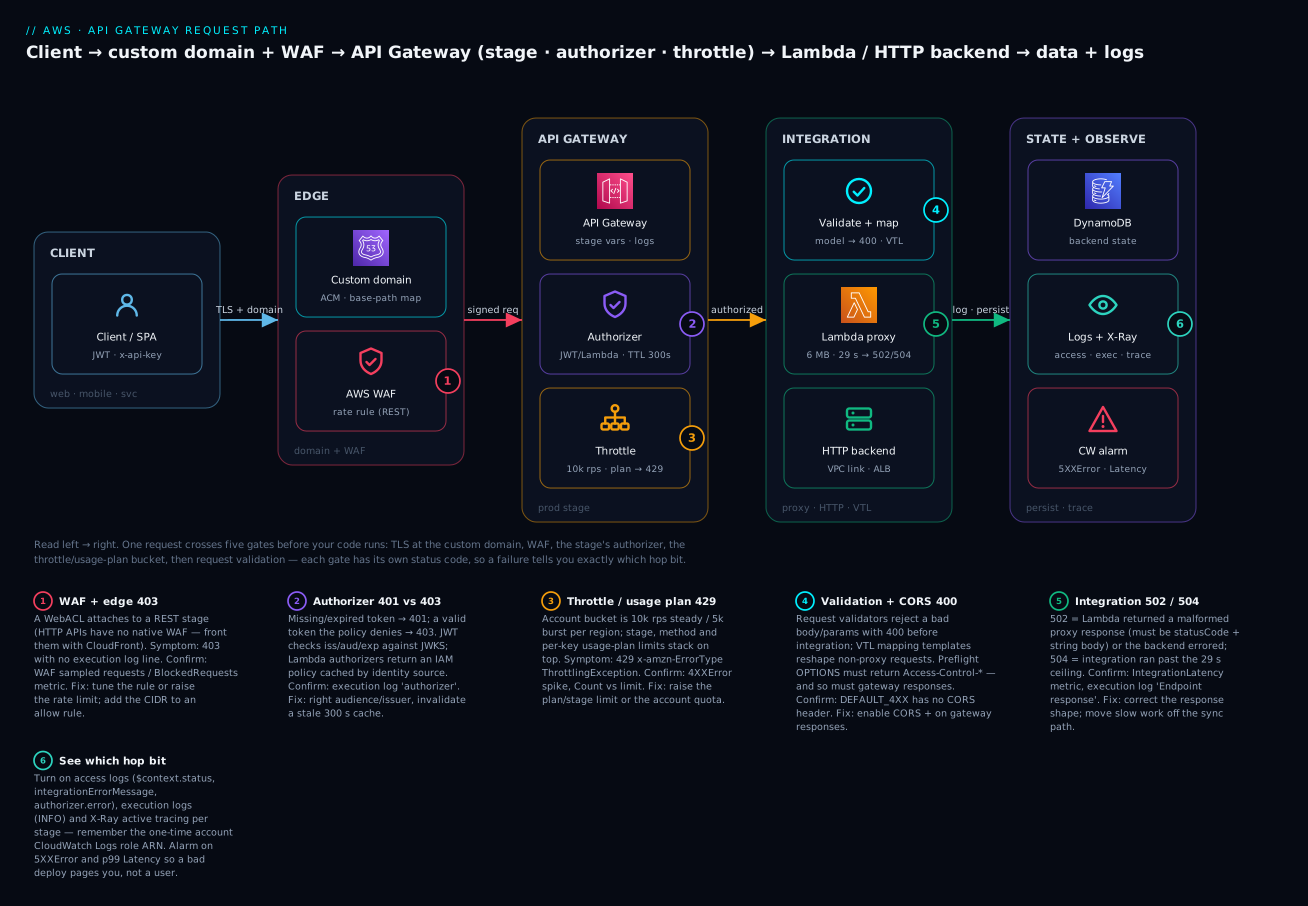
The diagram traces one request left to right through every gate. A client presents a JWT and/or an x-api-key; the request lands on a custom domain (ACM cert, base-path mapping), passes WAF (REST only), hits the prod stage, is checked by the authorizer (JWT/Lambda/Cognito/IAM), metered by the throttle + usage plan bucket, validated and optionally VTL-mapped, then handed to the Lambda proxy or an HTTP backend (via VPC link), which reads/writes DynamoDB — with access + execution logs, X-Ray traces and a CloudWatch alarm watching 5XXError and p99 Latency. Each numbered badge marks where a specific status code is emitted, so a failure names its own gate.
Real-world scenario
Meridian Tickets, a mid-size events platform, ran a public REST API on API Gateway fronting 40 Lambdas. Their problems were textbook. First, cost: at 220 million requests/month they paid roughly $770/month for the API tier alone on REST, even though 34 of the 40 endpoints were plain Lambda proxies with no VTL, no caching, and no API keys. Second, a launch-day meltdown: when a headline act went on sale, traffic spiked to ~14,000 rps and callers got a wall of 429s — the account default of 10,000 rps they had never raised. Third, a mystery 403 on their partner integration that took a day to diagnose.
The migration was surgical. They split the API into two: the six partner-facing, metered, cached endpoints stayed on REST (usage plans gave partners a 1M-requests/month quota and a per-partner x-api-key, and a 300-second cache on the read-heavy /events endpoint cut Lambda invocations by 63%). The 34 simple proxy endpoints moved to an HTTP API with a Cognito JWT authorizer — dropping those from $3.50 to $1.00 per million and shaving ~40 ms of p50 latency off each call. Blended, the API bill fell to about $300/month, a 61% cut, and p99 latency on the migrated routes improved because the VTL pipeline was gone.
They fixed the spike by requesting an account quota increase to 20,000 rps and adding a usage plan throttle so a single partner could not consume the whole bucket; a stage-level rate of 12,000 rps with 6,000 burst absorbed the on-sale surge, and the cache soaked the read amplification. The partner 403 turned out to be the classic pair: the partner had been calling /v1 but the base-path mapping was only configured for the root, and separately their SDK dropped the x-api-key header on redirect so the apiKeyRequired method rejected them. Both were visible in one access-log line ($context.error.responseType = MISSING_AUTHENTICATION_TOKEN for the path, API_KEY_MISSING for the header) — logs they had never enabled because the account CloudWatch role ARN was unset. Enabling logging first would have turned a one-day hunt into a five-minute read. The lesson they wrote on the wall: pick the flavor per endpoint, raise the quota before the launch, and turn logs on before you need them.
Advantages and disadvantages
| Advantages | Disadvantages |
|---|---|
| Fully managed front door — no servers to patch/scale | Per-request cost adds up at very high volume vs an ALB |
| Auth, throttle, validation before your code runs | REST VTL pipeline adds latency and complexity |
| Scales 0 → tens of thousands rps automatically | Account 10k rps default surprises launches |
| Per-client metering & quotas (REST usage plans) | Usage plans/caching/WAF are REST-only (not HTTP) |
| Deep observability (access/exec logs, X-Ray) | Logging off by default; account role ARN gotcha |
| Custom domains, mTLS, private endpoints | 29-second integration ceiling on sync work |
| HTTP APIs are cheap and low-latency | HTTP APIs drop features you may later need |
| Native JWT auth (HTTP) / Cognito (REST) | Proxy response shape is unforgiving (502) |
REST wins when you need metering, caching, VTL, WAF, private or edge-optimized endpoints. HTTP wins for cheap, fast, JWT-fronted proxying — the majority of internal microservices. WebSocket wins only when you genuinely need server push. When request rates get truly massive and features are minimal, compare against an ALB → Lambda front door, which is flat-rate per LCU rather than per request.
Hands-on lab
You will build two APIs on a free-tier-friendly account: (A) an HTTP API fronting a Lambda with a JWT authorizer backed by Cognito, and (B) a REST API with an API-key usage plan, method throttling, and a request-validation + mapping touch. Then you will test authorized, unauthorized and throttled calls, and tear everything down.
⚠️ Cost note: Lambda, API Gateway (first 1M REST / 1M HTTP calls) and Cognito (first 10k/50k MAUs) are free-tier eligible. A REST cache and a custom domain are not free — this lab skips the cache and domain; enable them only if you accept the hourly/cert cost. Tear down at the end regardless.
Step 0 — variables and a Lambda both APIs share
export AWS_REGION=ap-south-1
export ACCT=$(aws sts get-caller-identity --query Account --output text)

# Minimal execution role
cat > trust.json <<'EOF'
{ "Version":"2012-10-17","Statement":[{"Effect":"Allow",
  "Principal":{"Service":"lambda.amazonaws.com"},"Action":"sts:AssumeRole"}]}
EOF
ROLE_ARN=$(aws iam create-role --role-name apigw-lab-fn \
  --assume-role-policy-document file://trust.json --query Role.Arn --output text)
aws iam attach-role-policy --role-name apigw-lab-fn \
  --policy-arn arn:aws:iam::aws:policy/service-role/AWSLambdaBasicExecutionRole
sleep 10   # let the role propagate

# The handler (returns a correct proxy response shape)
mkdir -p fn && cat > fn/index.mjs <<'EOF'
export const handler = async (event) => {
  const claims = event.requestContext?.authorizer?.jwt?.claims
              || event.requestContext?.authorizer?.claims || {};
  return {
    statusCode: 200,
    headers: { "Content-Type": "application/json" },
    body: JSON.stringify({ ok: true, user: claims.sub || "anon", path: event.rawPath || event.path })
  };
};
EOF
( cd fn && zip -q ../fn.zip index.mjs )
FN_ARN=$(aws lambda create-function --function-name apigw-lab \
  --runtime nodejs20.x --handler index.handler --role "$ROLE_ARN" \
  --zip-file fileb://fn.zip --query FunctionArn --output text)
Expected: FN_ARN prints an ARN like arn:aws:lambda:ap-south-1:123456789012:function:apigw-lab.
Step 1 — Cognito user pool (for the JWT authorizer)
POOL_ID=$(aws cognito-idp create-user-pool --pool-name apigw-lab-pool \
  --query UserPool.Id --output text)
CLIENT_ID=$(aws cognito-idp create-user-pool-client --user-pool-id "$POOL_ID" \
  --client-name lab-client --explicit-auth-flows ALLOW_USER_PASSWORD_AUTH ALLOW_REFRESH_TOKEN_AUTH \
  --query UserPoolClient.ClientId --output text)
# a test user with a permanent password
aws cognito-idp admin-create-user --user-pool-id "$POOL_ID" --username lab@example.com \
  --message-action SUPPRESS
aws cognito-idp admin-set-user-password --user-pool-id "$POOL_ID" \
  --username lab@example.com --password 'Lab-Passw0rd!' --permanent
Step 2 — HTTP API + JWT authorizer + route
HTTP_ID=$(aws apigatewayv2 create-api --name lab-http --protocol-type HTTP \
  --query ApiId --output text)
INT_ID=$(aws apigatewayv2 create-integration --api-id "$HTTP_ID" \
  --integration-type AWS_PROXY --integration-uri "$FN_ARN" \
  --payload-format-version 2.0 --query IntegrationId --output text)
AUTH_ID=$(aws apigatewayv2 create-authorizer --api-id "$HTTP_ID" --name jwt \
  --authorizer-type JWT --identity-source '$request.header.Authorization' \
  --jwt-configuration Audience="$CLIENT_ID",Issuer="https://cognito-idp.$AWS_REGION.amazonaws.com/$POOL_ID" \
  --query AuthorizerId --output text)
aws apigatewayv2 create-route --api-id "$HTTP_ID" --route-key 'GET /me' \
  --target "integrations/$INT_ID" \
  --authorization-type JWT --authorizer-id "$AUTH_ID"
aws apigatewayv2 create-stage --api-id "$HTTP_ID" --stage-name '$default' --auto-deploy
aws lambda add-permission --function-name apigw-lab --statement-id http-invoke \
  --action lambda:InvokeFunction --principal apigateway.amazonaws.com \
  --source-arn "arn:aws:execute-api:$AWS_REGION:$ACCT:$HTTP_ID/*/*/me"
HTTP_URL="https://$HTTP_ID.execute-api.$AWS_REGION.amazonaws.com"
Step 3 — test the JWT authorizer (401 then 200)
# no token → 401
curl -s -o /dev/null -w "%{http_code}\n" "$HTTP_URL/me"          # expect 401

# get an ID token, then call authorized
ID_TOKEN=$(aws cognito-idp initiate-auth --auth-flow USER_PASSWORD_AUTH \
  --client-id "$CLIENT_ID" \
  --auth-parameters USERNAME=lab@example.com,PASSWORD='Lab-Passw0rd!' \
  --query 'AuthenticationResult.IdToken' --output text)
curl -s -H "Authorization: $ID_TOKEN" "$HTTP_URL/me"             # expect {"ok":true,"user":"<sub>",...}
Expected: first call prints 401; second prints the JSON body with your Cognito sub. If the second returns 401, the token aud must equal the app client ID and the issuer must match the pool exactly.
Step 4 — REST API with API key, usage plan, throttle and validation
REST_ID=$(aws apigateway create-rest-api --name lab-rest \
  --endpoint-configuration types=REGIONAL --query id --output text)
ROOT=$(aws apigateway get-resources --rest-api-id "$REST_ID" --query 'items[0].id' --output text)
RES=$(aws apigateway create-resource --rest-api-id "$REST_ID" --parent-id "$ROOT" \
  --path-part items --query id --output text)
# GET /items requires an API key
aws apigateway put-method --rest-api-id "$REST_ID" --resource-id "$RES" \
  --http-method GET --authorization-type NONE --api-key-required
aws apigateway put-integration --rest-api-id "$REST_ID" --resource-id "$RES" \
  --http-method GET --type AWS_PROXY --integration-http-method POST \
  --uri "arn:aws:apigateway:$AWS_REGION:lambda:path/2015-03-31/functions/$FN_ARN/invocations"
aws apigateway create-deployment --rest-api-id "$REST_ID" --stage-name prod
aws lambda add-permission --function-name apigw-lab --statement-id rest-invoke \
  --action lambda:InvokeFunction --principal apigateway.amazonaws.com \
  --source-arn "arn:aws:execute-api:$AWS_REGION:$ACCT:$REST_ID/*/GET/items"

# API key + usage plan with a tight throttle so we can trip a 429
KEY_VALUE=$(aws apigateway create-api-key --name lab-key --enabled \
  --query value --output text)
KEY_ID=$(aws apigateway get-api-keys --name-query lab-key --include-values \
  --query 'items[0].id' --output text)
PLAN=$(aws apigateway create-usage-plan --name lab-plan \
  --throttle rateLimit=1,burstLimit=1 --quota limit=1000,period=DAY \
  --api-stages apiId="$REST_ID",stage=prod --query id --output text)
aws apigateway create-usage-plan-key --usage-plan-id "$PLAN" \
  --key-id "$KEY_ID" --key-type API_KEY
REST_URL="https://$REST_ID.execute-api.$AWS_REGION.amazonaws.com/prod/items"
Step 5 — test the API key (403) and the throttle (429)
# missing key → 403
curl -s -o /dev/null -w "%{http_code}\n" "$REST_URL"                    # expect 403

# with the key → 200
curl -s -H "x-api-key: $KEY_VALUE" "$REST_URL"                          # expect 200 JSON

# hammer it — rate 1/burst 1 means most of a burst is 429
for i in $(seq 1 10); do
  curl -s -o /dev/null -w "%{http_code} " -H "x-api-key: $KEY_VALUE" "$REST_URL"
done; echo                                                             # expect a mix of 200 and 429
Expected: no key → 403; with key → 200; the loop prints several 429s once the burst bucket empties. That is the usage-plan throttle doing its job.
Step 6 — turn on access logging (see the gates)
LG=$(aws logs create-log-group --log-group-name /apigw/lab-rest 2>/dev/null; \
     echo "arn:aws:logs:$AWS_REGION:$ACCT:log-group:/apigw/lab-rest")
aws apigateway update-stage --rest-api-id "$REST_ID" --stage-name prod \
  --patch-operations \
   op=replace,path=/accessLogSettings/destinationArn,value="$LG" \
   op=replace,path=/accessLogSettings/format,value='{"status":"$context.status","err":"$context.error.responseType","key":"$context.identity.apiKeyId"}'
# (Requires the one-time account CloudWatch role ARN — set it if logs stay empty:)
# aws apigateway update-account --patch-operations op=replace,path=/cloudwatchRoleArn,value=arn:aws:iam::$ACCT:role/<apigw-cloudwatch-role>
Step 7 — teardown (deletes everything)
aws apigatewayv2 delete-api --api-id "$HTTP_ID"
aws apigateway delete-usage-plan-key --usage-plan-id "$PLAN" --key-id "$KEY_ID"
aws apigateway delete-usage-plan --usage-plan-id "$PLAN"
aws apigateway delete-api-key --api-key "$KEY_ID"
aws apigateway delete-rest-api --rest-api-id "$REST_ID"
aws logs delete-log-group --log-group-name /apigw/lab-rest 2>/dev/null || true
aws lambda delete-function --function-name apigw-lab
aws cognito-idp delete-user-pool --user-pool-id "$POOL_ID"
aws iam detach-role-policy --role-name apigw-lab-fn \
  --policy-arn arn:aws:iam::aws:policy/service-role/AWSLambdaBasicExecutionRole
aws iam delete-role --role-name apigw-lab-fn
Verify teardown: aws apigateway get-rest-apis --query "items[?name=='lab-rest']" returns [], and aws apigatewayv2 get-apis --query "Items[?Name=='lab-http']" returns [].
Common mistakes & troubleshooting
This is the section you will reread at 2 a.m. Work top to bottom: read the status code, then the one access-log field that disambiguates it, then apply the fix.
The playbook
| # | Symptom | Root cause | Confirm (exact command / field) | Fix |
|---|---|---|---|---|
| 1 | 403 “Missing Authentication Token” on a URL that should exist | Path/method not deployed, or wrong stage/base-path | curl -i $URL; check $context.error.responseType=MISSING_AUTHENTICATION_TOKEN; get-resources |
Deploy the method; call the right stage; fix the base-path mapping |
| 2 | 403 with a valid caller (REST) | IAM AWS_IAM deny, resource policy deny, or WAF block |
Access log error.responseType = ACCESS_DENIED/WAF_FILTERED; WAF BlockedRequests |
Grant execute-api:Invoke; fix resource policy; tune WAF rule |
| 3 | 403 “Forbidden” with x-amzn-ErrorType: ForbiddenException |
API key missing/disabled/wrong plan; apiKeyRequired true |
responseType=API_KEY_MISSING/INVALID_API_KEY; get-usage-plan-keys |
Send x-api-key; enable key; attach key to the plan on that stage |
| 4 | 401 Unauthorized | Missing/expired/wrong-audience JWT, or Lambda authorizer denied | $context.authorizer.error; decode JWT exp/aud/iss |
Refresh token; set audience = app client ID; match issuer exactly |
| 5 | 401 after it “worked a minute ago” | Stale authorizer cache serving an old Deny/Allow | Result TTL (default 300 s); authorizerResultTtlInSeconds |
Lower/clear TTL; flush cache; fix identity source key |
| 6 | 429 Too Many Requests | Account/stage/method/usage-plan throttle tripped | x-amzn-ErrorType: ThrottlingException; 4XXError spike; compare Count to limit |
Raise the tightest bucket; request account quota increase |
| 7 | 429 LimitExceededException at a period boundary | Usage-plan quota exhausted (day/week/month) | get-usage --usage-plan-id ...; responseType=QUOTA_EXCEEDED |
Raise quota, or wait for reset; move client to a bigger plan |
| 8 | 502 Bad Gateway | Lambda proxy returned wrong shape (object body, no statusCode) or threw |
$context.integrationErrorMessage; execution log “Malformed Lambda proxy response” |
Return {statusCode, body:"<string>"}; JSON.stringify the body |
| 9 | 504 Gateway Timeout | Integration exceeded the 29 s ceiling | IntegrationLatency ~29,000 ms; integrationErrorMessage=Timeout |
Speed up backend; move slow work async (SQS/Step Functions); request timeout quota bump |
| 10 | 500 Internal Server Error | VTL template error, bad integration URI, or stage-variable Lambda permission | Execution log “Execution failed due to configuration error”; Invalid permissions on Lambda function |
Fix the template/URI; add lambda:InvokeFunction for the alias |
| 11 | CORS error in the browser | Preflight OK but error response lacks Access-Control-Allow-Origin |
Browser console “No ‘Access-Control-Allow-Origin’”; the failing call is 401/429/500 | Add CORS headers to gateway responses (REST) / native CORS (HTTP) |
| 12 | Custom-domain 403 / TLS fail | ACM cert in wrong region, or missing/empty base-path mapping | get-base-path-mappings; cert region (us-east-1 for edge) |
Move cert to correct region; add the base-path mapping |
| 13 | Stage variable ${} not resolving |
Variable not set on the called stage, or typo | get-stage --query variables; look for literal ${stageVariables.x} in URI |
Set the variable on that stage; fix the reference name |
| 14 | “My change isn’t live” (REST) | Forgot to create a new deployment | Compare get-stage deploymentId to latest get-deployments |
create-deployment --stage-name prod (or enable HTTP auto-deploy) |
| 15 | 413 Request Entity Too Large | Body over the 10 MB REST payload limit | curl -i returns 413 |
Use multipart/S3 pre-signed upload; don’t POST large blobs through the API |
| 16 | No logs at all (REST) | Account CloudWatch Logs role ARN unset | API Gateway → Settings shows empty cloudWatchRoleArn |
update-account to set the role ARN once per region |
Status / error-code reference
| Code | x-amzn-ErrorType / responseType |
Meaning | Emitted by |
|---|---|---|---|
| 400 | BadRequestException / BAD_REQUEST_BODY |
Request validation failed | Request validator / model |
| 401 | UnauthorizedException / UNAUTHORIZED |
Missing/invalid token | JWT / Cognito / Lambda authorizer |
| 403 | AccessDeniedException / ACCESS_DENIED |
IAM/resource-policy/WAF deny | IAM auth, resource policy, WAF |
| 403 | MissingAuthenticationTokenException |
Route/method not found for signature scheme | Routing (wrong path/method) |
| 403 | ForbiddenException / API_KEY_* |
API key missing/invalid | Usage plan / API key |
| 404 | NotFoundException |
Resource does not exist | Routing |
| 413 | RequestTooLargeException |
Payload over 10 MB (REST) | Method request |
| 415 | UnsupportedMediaTypeException |
Content-Type unmatched, passthrough=NEVER |
Integration request |
| 429 | ThrottlingException / THROTTLED |
Rate/burst throttle | Account/stage/method/plan |
| 429 | LimitExceededException / QUOTA_EXCEEDED |
Usage-plan quota exhausted | Usage plan |
| 500 | InternalServerErrorException |
VTL error / config error | Integration request/response |
| 502 | BAD_GATEWAY |
Malformed integration/proxy response | Integration |
| 503 | — | Backend unavailable | Integration/backend |
| 504 | INTEGRATION_TIMEOUT |
Integration exceeded 29 s | Integration |
Decision table — from a symptom to a cause
| If you see… | It’s probably… | Do this |
|---|---|---|
| 403 with no execution log line | WAF or resource-policy block (before logging) | Check WAF sampled requests / resource policy |
| 403 only on partner calls | API-key/usage-plan or base-path issue | Confirm key on plan + base-path mapping |
| 401 that comes and goes | Authorizer cache TTL | Lower TTL, verify identity source |
| 429 only during spikes | Account/stage burst too low | Raise burst; request quota increase |
| 429 that resets at midnight | Usage-plan quota (DAY) | Raise quota / bigger plan |
| 502 on a new deploy | Proxy response shape regression | Return string body + statusCode |
| 504 on one slow endpoint | Sync call past 29 s | Make it async |
| CORS error on a failing call | Missing CORS on gateway responses | Add headers to gateway responses |
The three nastiest, in prose
The malformed proxy response (502). New engineers write return { body: { ok: true } } and API Gateway returns 502 with “Malformed Lambda proxy response” in the execution log. The contract is strict: statusCode is required (REST 1.0), and body must be a string — so JSON.stringify it. HTTP API payload 2.0 forgives a bare object (wraps it 200 + stringified), which is why the same handler behaves differently across flavors and masks the bug until you move it to REST.
CORS masking auth/throttle failures. Your OPTIONS preflight is configured, the happy path works, but a 401 or 429 shows up in the browser as a generic “CORS error” because the error response has no Access-Control-Allow-Origin. On REST APIs, gateway responses (DEFAULT_4XX, DEFAULT_5XX, UNAUTHORIZED, THROTTLED) are separate from your method responses and need the CORS headers added explicitly. Until you do, every backend error looks like a frontend/CORS problem and you debug the wrong layer.
The 29-second wall (504). API Gateway integrations hard-cap at 29 seconds by default (raisable via a service-quota increase on REST/regional, but most accounts run the default). A report endpoint that scans a big table, a third-party call that occasionally hangs, or a cold-starting downstream can cross it and return 504 even though the Lambda eventually finished — you pay for the full Lambda run and the client got nothing. The fix is architectural: return a 202 Accepted with a job id, do the work asynchronously (SQS + worker Lambda, or Step Functions), and let the client poll or receive a webhook.
Best practices
- Default to HTTP APIs; reach for REST only for a feature you actually use — usage plans/API keys, caching, VTL, request validation, WAF, private or edge-optimized endpoints.
- Raise the account throttle quota before a launch, and layer stage/method/usage-plan limits so one client cannot drain the shared bucket.
- Turn on access + execution logging and X-Ray on day one — set the account CloudWatch role ARN once per region; you cannot debug what you did not log.
- Never use an API key as authentication. Pair keys (metering/quota) with a real authorizer (JWT/Cognito/IAM/Lambda).
- Return the exact proxy response shape (
statusCode+ stringbody) and test it on the flavor you deploy to, not just locally. - Add CORS headers to gateway responses, not only to the happy-path method, so errors surface correctly in the browser.
- Validate requests at the gateway with models/validators to reject junk with a cheap 400 before it reaches Lambda.
- Cache only safely-shared responses, and if a response is per-user, include the user identity in the cache key — or don’t cache it.
- Use stage variables (or aliases) for environment routing, and remember the matching
lambda:InvokeFunctionpermission per alias. - Keep sync work under a few seconds; anything that can approach 29 s belongs on the async path.
- Scope the authorizer policy
Resourceand keep the result TTL short enough that a revoked token stops working quickly. - Version with base-path mappings (
/v1,/v2) on a stable custom domain rather than leaking theexecute-apihostname.
Security notes
- Least privilege on the integration role — the Lambda’s execution role, and any
AWS-service integration credentials role, should grant only the specific actions/resources needed. - Prefer JWT/Cognito/IAM over long-lived API keys. Keys are for metering; rotate them, and disable a compromised key immediately (
update-api-key --patch-operations op=replace,path=/enabled,value=false). - Encrypt the response cache (
Encrypt cache data) if it holds any sensitive payloads, and lock the cache-key set so responses cannot bleed across users. - Put WAF in front (REST directly; HTTP via CloudFront) with the common rule set, the IP reputation list, and a rate-based rule; log to a WAF logging destination.
- Use resource policies to constrain a REST API to specific source IPs, VPCs (
aws:SourceVpce) or accounts; make internal APIs private so they have no public URL at all. - Set minimum TLS 1.2 on custom domains, and use mTLS for partner APIs that must present a client certificate.
- Log identity, not secrets — capture
apiKeyId/subin access logs, never the raw token or key value. - Turn on CloudTrail for API Gateway control-plane changes so an unexpected authorizer or stage edit is auditable.
Cost & sizing
What drives the bill: request count × per-million rate (flavor-dependent), data transfer out, optional cache hours (REST), and any WAF and CloudWatch Logs ingestion. Caching and custom domains (via the ACM cert, which is free, but the edge-optimized path uses CloudFront) can add cost; the requests themselves dominate at scale.
| Driver | REST | HTTP | Notes |
|---|---|---|---|
| Requests | $3.50/M (tiered to $1.51) | $1.00/M (to $0.90) | The dominant cost |
| Cache | $0.02–$3.80/hour by size | n/a | Per stage, always-on charge |
| Data transfer out | Standard AWS DTO rates | Same | Egress to the internet |
| WAF | Per WebACL + per rule + per M requests | via CloudFront | REST-attached |
| Logs | CloudWatch ingestion/storage | Same | Access + execution logs |
| Free tier (first 12 months) | Amount |
|---|---|
| REST API calls | 1,000,000 / month |
| HTTP API calls | 1,000,000 / month |
| WebSocket messages | 1,000,000 / month |
| Cache | Not free-tier eligible |
| Monthly requests | REST cost | HTTP cost | Rough INR (HTTP, ₹86/$) |
|---|---|---|---|
| 1 million | $3.50 | $1.00 | ~₹86 |
| 10 million | $35 | $10 | ~₹860 |
| 100 million | $350 | $100 | ~₹8,600 |
Right-sizing rules: move plain-proxy endpoints to HTTP for the 71% saving; add a REST cache only when the backend is the bottleneck and the response is cacheable (a 300 s TTL on a hot read can cut Lambda cost more than the cache costs); and compare an ALB → Lambda front door when volume is very high and you need almost none of API Gateway’s features — LCU-based pricing can beat per-request at scale.
Interview & exam questions
1. When would you choose a REST API over an HTTP API? When you need a REST-only feature: API keys and usage plans, response caching, VTL request/response transformation, request validation via models, WAF directly on the API, a private (VPC) endpoint, or an edge-optimized endpoint. Otherwise HTTP is cheaper and faster. (SAA-C03, DVA-C02)
2. Explain the difference between Lambda proxy and non-proxy integration. Proxy (AWS_PROXY) passes the entire request to Lambda as a fixed event and expects a fixed {statusCode, headers, body} response; no mapping templates. Non-proxy (AWS) uses VTL templates to map the request to the backend and the response back, giving fine control at the cost of complexity. (DVA-C02)
3. A Lambda-backed endpoint returns 502. What’s the most likely cause? A malformed proxy response — usually the function returned a non-string body or omitted statusCode. Fix by returning statusCode and a JSON.stringify-ed string body. (DVA-C02)
4. How do you meter and limit a specific partner’s usage? REST usage plans + API keys: create an API key, attach it to a usage plan with a throttle (rate/burst) and a quota (per day/week/month), associate the plan with the API+stage, and set apiKeyRequired on the methods. HTTP APIs cannot do this. (SAA-C03)
5. What are the throttle layers and their default? Account (region-wide, 10,000 rps steady / 5,000 burst by default), stage, method, and per-key usage plan. A request must pass every applicable bucket; the tightest returns 429. (SAA-C03, ANS-C01)
6. How does a JWT authorizer differ from a Cognito user pool authorizer? JWT authorizers are HTTP-API-only and work with any OIDC issuer (validating iss/aud/exp/scopes statelessly against a JWKS endpoint). Cognito user pool authorizers are REST-only and specific to Cognito pools. Both avoid running your code. (DVA-C02)
7. Why did my API return 504 even though the Lambda finished? The integration exceeded the 29-second timeout, so API Gateway returned 504 while the Lambda kept running (and billing). Move long work to an async pattern (SQS/Step Functions) and return 202. (DVA-C02)
8. How do you customize the error returned when the request body is invalid? Attach a request validator + model (JSON Schema) to the method; invalid bodies get a 400 (BAD_REQUEST_BODY) whose message you can customize via the BAD_REQUEST_BODY gateway response. (DVA-C02)
9. What’s the correct place for the ACM certificate on a custom domain? For edge-optimized custom domains, the cert must be in us-east-1; for regional custom domains (and all HTTP APIs), in the same region as the API. Wrong region → handshake/403 failures. (SAA-C03, ANS-C01)
10. How do you make an API reachable only from inside a VPC? Use a REST private API (PRIVATE endpoint type), create an interface VPC endpoint for execute-api, and add a resource policy allowing that aws:SourceVpce. No public URL exists. (ANS-C01, SCS-C02)
11. Where do throttling, logging and caching attach — the API or the stage? The stage. Deployments are immutable snapshots; the stage points at one and carries throttle, logging, cache, WAF, X-Ray and stage variables. (DVA-C02)
12. Your browser shows a CORS error on a call that returns 401. Why? The preflight is fine, but the 401 error response lacks Access-Control-Allow-Origin. On REST APIs, add CORS headers to the relevant gateway responses (UNAUTHORIZED/DEFAULT_4XX), not just the method. (DVA-C02)
Quick check
- Which two features are REST-only that most often force you off HTTP APIs?
- What is the default account request throttle (steady and burst)?
- What must a Lambda proxy response include to avoid a 502?
- Which authorizer type is HTTP-API-only, and what does it validate?
- Where must the ACM certificate live for an edge-optimized custom domain?
Answers
- Usage plans + API keys and response caching (also VTL, request validation, WAF, private/edge endpoints). 2. 10,000 rps steady-state, 5,000 burst, region-wide. 3. An integer
statusCodeand a stringbody(JSON must be stringified). 4. The JWT authorizer — validates a token’s signature, issuer, audience and expiry (and optional scopes) against a JWKS endpoint. 5. us-east-1, regardless of the API’s region.
Glossary
| Term | Definition |
|---|---|
| REST API | Feature-rich API Gateway flavor: VTL, API keys/usage plans, caching, WAF, private/edge endpoints |
| HTTP API | Cheaper, faster flavor for Lambda/HTTP proxying with native JWT auth; no VTL/keys/caching |
| WebSocket API | Stateful two-way flavor with $connect/$disconnect/custom routes |
| Proxy integration | Passes the whole request to the backend and expects a fixed response shape |
| Non-proxy integration | Uses VTL mapping templates to translate request and response |
| Stage | A named, live deployment of an API; anchor for throttle/log/cache/WAF |
| Deployment | An immutable snapshot of an API definition (REST must redeploy to go live) |
| Stage variable | ${stageVariables.x} per-stage config, e.g. to select a backend/alias |
| Authorizer | Pre-integration identity check (JWT, Cognito, Lambda, IAM) emitting 401/403 |
| JWT authorizer | HTTP-API stateless token check against an OIDC issuer’s JWKS |
| Lambda authorizer | Your function returns an IAM policy (token or request type), cached by identity source |
| Usage plan | REST bundle of throttle (rate/burst) + quota tied to API keys |
| API key | x-api-key client identifier for metering/throttling — not authentication |
| Mapping template | VTL transform of request/response in a REST non-proxy integration |
| Model | JSON Schema used by a request validator to reject bad bodies with 400 |
| Gateway response | Customizable canned 4XX/5XX response (where you add CORS headers to errors) |
| Canary release | Splitting stage traffic between the current and a new deployment |
| Private API | REST API reachable only via an interface VPC endpoint + resource policy |
Next steps
- Build the full stack this front door sits on in AWS Serverless Web Application Architecture: CloudFront, API Gateway, Lambda and DynamoDB End to End.
- Compare API Gateway against layer-4/7 load balancers in AWS Load Balancers and API Gateway: ALB, NLB and API Gateway Compared.
- Wire the async paths a 29-second timeout pushes you toward in AWS Lambda Patterns: Event-Driven Functions That Scale to Zero.
- If you have not shipped a function yet, start with Your First AWS Lambda Function: A Hands-On Walkthrough.