You have a small job to run — resize an uploaded image, validate a webhook, return some JSON to a browser — and you do not want to rent, patch, scale or babysit a server to do it. That is exactly the itch AWS Lambda scratches. Lambda is Function-as-a-Service (FaaS): you hand AWS a single function, tell it what event should wake the function up, and AWS runs your code on demand — zero copies when nothing is happening, thousands of copies under a spike — and bills you only for the milliseconds it actually executes. No EC2 instance, no operating system to update, no idle capacity to pay for at 3 a.m.
The trade for that magic is a very specific mental model, and this article installs it end to end by having you build the thing. Every Lambda invocation is the same three-beat rhythm: an event (a JSON document describing what happened) arrives, Lambda calls your handler (the one function it knows to call) with that event, and your handler returns a response (or throws). Around that beat sit the pieces that trip up every beginner: the execution role that decides what your code is allowed to touch, the CloudWatch Logs group where every print() and crash lands, the environment variables you configure without redeploying, the runtime that turns your .py or .js into a running process, and the trigger that decides how the function is invoked — synchronously (a caller waits for the answer), asynchronously (fire-and-forget, retried for you), or by a poller that reads a queue or stream on your behalf.
By the end you will have written a Python handler, deployed it two ways (a raw aws CLI zip upload and Terraform), invoked it synchronously with a test event, put an HTTPS Function URL in front of it and curled it, set an environment variable, read the START/END/REPORT lines it wrote to CloudWatch, and torn it all down — every step free-tier-friendly. Then, because your next Lambda will inevitably break in one of about a dozen classic ways, you get a symptom-to-fix troubleshooting playbook: AccessDenied because the role can’t write logs, Unable to import module because you zipped the package wrong, Handler not found because you named it file.handler when the function is called something else, a 502 from the Function URL because you returned the wrong shape, and the rest. Read the prose once; keep the tables open when your own function misbehaves.
What problem this solves
Traditional compute makes you the operator. Rent an EC2 instance to run a 200-millisecond job and you pay for 24 hours of an idle box, you patch its kernel, you scale it up before a traffic spike and down after, and you carry the pager when it runs out of memory at midnight. For work that is event-shaped — bursty, intermittent, triggered by “a file landed” or “a request came in” — that model is almost all waste. Lambda deletes the operator role: AWS owns the fleet, the OS, the scaling and the availability; you own a function and its configuration, and nothing else.
What breaks without this understanding is subtle, because Lambda is easy to start and easy to get silently wrong. A first-timer uploads code, invokes it, sees nothing happen, and has no idea whether the function ran, crashed, was denied permission, or never got the event — because they do not yet know that the answer is always in CloudWatch Logs, that “nothing in logs” usually means the role can’t write logs, and that a trigger firing “in the console” but not “from S3” is a resource-policy problem, not a code problem. The service did not fail; the mental model was missing.
Who hits this: literally everyone starting with serverless, plus every developer who has to debug a colleague’s function. It bites hardest on four things a beginner has never had to think about before — the handler string must exactly match file.function; the execution role is a separate identity from your own user and starts with no permissions; the deployment package must contain your dependencies laid out exactly where the runtime looks; and the invocation type changes whether errors come back to you or get retried behind your back. Get those four right on your first function and every later one is a variation on the same theme. This article’s job is to make all four boringly obvious.
Here is the whole field on one screen — the pieces you will meet, what each one is, and the classic beginner trap attached to it:
| Piece | What it is | You configure it as | The beginner trap |
|---|---|---|---|
| Function | Your code + its config, as one deployable unit | Name, runtime, handler, role, memory, timeout | Editing in console then losing it to a redeploy |
| Handler | The entry-point function Lambda calls | A string like lambda_function.lambda_handler |
Naming it file.handler when the function isn’t handler |
| Event | The JSON describing what happened | Shaped by the trigger | Assuming a shape without printing it once |
| Execution role | The IAM identity the code runs as | An IAM role Lambda can assume | Forgetting logs permission → invisible function |
| Trigger / event source | What invokes the function | Function URL, S3, SQS, EventBridge… | Works in console, silent from the real trigger |
| Invocation type | Sync vs async vs poll | Chosen by the trigger | Errors “vanish” because async retries them |
| CloudWatch Logs | Where stdout/stderr and crashes land | Log group /aws/lambda/<name> |
Reading the wrong region; role can’t write |
| Environment variables | Runtime config without a redeploy | Key/value on the function | Expecting a value that was never set → None |
| Deployment package | The zip or container image of your code | Zip (≤250 MB unzipped) or image (≤10 GB) | Dependencies not bundled → ImportModuleError |
Learning objectives
By the end of this article you can:
- Explain event-driven FaaS and the Lambda execution lifecycle — init → invoke → freeze/thaw, and how the execution context (globals,
/tmp, connections) is reused between invocations on a warm sandbox. - Name every supported runtime (Node.js, Python, Java, Go, .NET, Ruby, the OS-only custom runtime, and container images) and write the correct handler signature for each.
- Distinguish the three invocation types — synchronous, asynchronous, and poll-based event-source mapping — and predict each one’s retry, error and payload behaviour.
- Wire the IAM execution role with
AWSLambdaBasicExecutionRolefor logs plus a least-privilege statement for a downstream call, and add a resource-based policy so a trigger is allowed to invoke the function. - Deploy a function three ways — console,
awsCLI zip, and Terraform — set environment variables (and understand their encryption), and pick sensible memory, timeout and /tmp values. - Add a Function URL for instant HTTPS,
curlit, and read theSTART/END/REPORTlines in CloudWatch Logs to confirm duration, memory and cold-start time. - Run a symptom → cause → confirm → fix troubleshooting playbook for the dozen failures that hit every first Lambda, and know which ones point you to the memory/timeout tuning sibling.
Prerequisites & where this fits
You need an AWS account with permission to create IAM roles and Lambda functions (an admin or power-user sandbox account is fine — do this in a personal or dev account, never straight into production). You need the AWS CLI v2 installed and configured (aws configure with an access key or, better, aws sso login), and for the Terraform half, Terraform ≥ 1.5. Everything here fits inside the always-free Lambda tier, so the running cost is effectively zero; the only line items that could bill a few paise are CloudWatch Logs storage and, if you leave it running, nothing else. You should be comfortable reading JSON and running commands in a shell; you do not need prior Lambda experience.
Where this sits: it is the on-ramp to the serverless track. The AWS Compute: EC2, Lambda, ECS and EKS — Which One to Choose? decision is upstream of it — read that if you are still deciding whether a function is even the right shape for your workload. Once you can build one function, AWS Lambda Patterns: Event-Driven Functions That Scale to Zero teaches how to wire many of them into a pipeline (fan-out, DLQs, idempotency), and AWS Serverless Web Application Architecture: CloudFront, API Gateway, Lambda and DynamoDB End to End shows the full web-app shape. Two wave siblings go deeper on the two things you will tune first: AWS Lambda Memory, Timeout & Concurrency Tuning for the performance dials this article only points at, and AWS API Gateway REST & HTTP APIs Hands-On for the most common production trigger (this article uses the simpler Function URL to stay beginner-friendly).
A quick map of who owns what, so when your function misbehaves you look in the right place first:
| Layer | What lives here | Who “owns” it | What it can cause |
|---|---|---|---|
| Trigger / event source | S3, SQS, EventBridge, Function URL, API GW | You + the source service | “Fires in console, silent from trigger” (resource policy) |
| Invocation type | sync / async / poll | Chosen by the trigger | Errors returned vs retried vs blocking a shard |
| Execution role | Permissions the code runs with | You (IAM) | AccessDenied, no logs, downstream denied |
| Runtime + handler | Turns your file into a running process | AWS runtime + your naming | ImportModuleError, HandlerNotFound |
| Your handler code | The business logic | You | Exceptions, timeouts, wrong response shape |
| CloudWatch Logs | Every log line + crash | AWS + your role perms | Invisible function, wrong-region confusion |
Core concepts
Five ideas make everything later obvious. Read them once; the deep sections just expand each.
Lambda runs a function, not a server. You never see or manage a host. You give Lambda a deployment package (a zip of your code, or a container image), tell it the runtime (e.g. python3.12), the handler (which function to call), the execution role (what it may do), and a little config (memory, timeout, env vars). When an event arrives, Lambda finds or creates a micro-VM sandbox (built on Firecracker), loads your package, and runs your handler. You are billed per GB-second of execution plus a tiny per-request fee — and nothing while idle. That “scale to zero, pay per invocation” property is the whole point.
Every invocation is event → handler → response. The trigger produces a JSON event; Lambda calls your handler with two arguments — the event (the payload) and a context (metadata: request id, time remaining, log group). Your handler does its work and returns a value (serialised to JSON for the caller) or raises an exception (which Lambda records as an error). That is the entire contract. Ninety percent of “why doesn’t it work” is a mismatch in one of those three: the event wasn’t shaped as you assumed, the handler string didn’t point at your function, or the response wasn’t the shape the caller needed.
The sandbox has a lifecycle, and it gets reused. A brand-new sandbox goes through Init (download package, start the runtime, run your module-level/import code — this is the cold start), then Invoke (run the handler), then Freeze — the sandbox is paused, not destroyed. The next event may Thaw the same sandbox and skip Init entirely (a warm start). This is why code outside your handler (global variables, an initialised SDK client, a cached DB connection) survives between invocations and is the single biggest performance lever you have. Eventually an idle sandbox is shut down.
The execution context is reused — use it deliberately. Anything you set up at module load or in a global runs once per sandbox and is reused across every invocation that sandbox serves. Put expensive, reusable setup there (SDK clients, config parsing); never store per-user state there (the next invocation is a different user on the same warm sandbox). /tmp (ephemeral disk) also persists across warm invocations, which is a feature for caching and a footgun for anyone who assumes a clean disk.
The execution role is a separate identity that starts empty. Your function does not run as you. It assumes an IAM execution role, and that role has no permissions until you grant them. The very first grant every function needs is permission to write logs — that is what the AWS-managed AWSLambdaBasicExecutionRole policy is for. Forget it and your function runs but is invisible: no log group, no lines, no clue. Every other AWS call your code makes (read S3, write DynamoDB) needs its own statement on that role.
The vocabulary in one table
Pin every moving part down before the deep dive. The glossary at the end repeats these for lookup; this is the mental model side by side:
| Term | One-line definition | Where you set/see it | Why it matters on your first function |
|---|---|---|---|
| FaaS | Run a function on demand, no server to manage | The whole service | The reason you’re here: scale-to-zero, pay-per-use |
| Handler | The function Lambda calls, as file.function |
Function config | Wrong string → Runtime.HandlerNotFound |
| Event | JSON input describing what happened | Produced by the trigger | Print it once; never assume its shape |
| Context | Runtime metadata for this invocation | 2nd handler arg | get_remaining_time_in_millis(), request id |
| Runtime | The language environment (e.g. python3.12) |
Function config | Sets the handler signature and how you package |
| Execution role | IAM identity the code runs as | IAM + function config | No perms by default; the #1 source of AccessDenied |
| Resource policy | Who is allowed to invoke the function | add-permission |
Lets S3/EventBridge/Function URL call you |
| Invocation type | sync / async / poll | Chosen by the trigger | Decides retries and where errors go |
| Cold start | First-call latency while Init runs | Seen in REPORT Init Duration |
Latency, not an error (tuning sibling) |
| Execution context | The warm, reusable sandbox | Implicit | Reuse globals; don’t leak per-user state |
| /tmp | Ephemeral local disk, 512 MB default | Config (up to 10 GB) | Persists warm; not durable storage |
| Function URL | A built-in HTTPS endpoint for the function | Function config | The fastest way to curl a Lambda |
| CloudWatch Logs | Where stdout/stderr/crashes land | /aws/lambda/<name> |
The first place you look, always |
The execution model: event JSON → handler → response
Anatomy of a single invocation
When Lambda invokes your function it calls your handler with two arguments. In Python that is def lambda_handler(event, context):. Everything you need is in those two objects plus what you return.
| Part | What it is | Concrete example | Beginner note |
|---|---|---|---|
event |
The input payload as a native object (dict/list) | {"name": "Vinod"} or an S3/SQS envelope |
Already parsed from JSON for you |
context |
Metadata about this invocation | request id, deadline, log stream | Read-only; useful for timeouts and tracing |
| return value | Your output, serialised to JSON | {"message": "hi Vinod"} |
Only meaningful for synchronous callers |
| raised exception | Any uncaught error | raise ValueError("bad input") |
Becomes an error result + a log traceback |
The context object carries small but useful metadata. You rarely need all of it on day one, but knowing it exists saves you later:
context member |
Meaning | Typical use |
|---|---|---|
aws_request_id |
Unique id for this invocation | Correlate logs across services |
function_name |
The function’s name | Generic logging |
function_version |
$LATEST or a published version |
Confirm which version ran |
memory_limit_in_mb |
Configured memory | Sanity-check config |
log_group_name / log_stream_name |
Where this invocation logs | Jump straight to the stream |
get_remaining_time_in_millis() |
Milliseconds until timeout | Bail out gracefully before a hard kill |
invoked_function_arn |
The exact ARN invoked (incl. alias) | Alias-aware behaviour |
The lifecycle: init → invoke → freeze/thaw
The single most important diagram in your head is the sandbox lifecycle. Each phase has different billing and different rules about what your code can assume.
| Phase | What happens | Billed? | What you control | Classic gotcha |
|---|---|---|---|---|
| Init (cold start) | Sandbox created, runtime starts, your import/global code runs |
Yes (shown as Init Duration) | Keep imports lean; init clients once | Heavy top-level work → slow first call |
| Invoke | Your handler runs for this event | Yes (Duration, rounded up to 1 ms) | The actual work | Exceeding Timeout → hard kill |
| Freeze | Sandbox paused after the response | No | Nothing (background threads are frozen too) | Async work after return may never finish |
| Thaw (warm start) | A later event reuses the sandbox, skips Init | Invoke only | Reuse globals//tmp/connections |
Assuming a clean disk or fresh globals |
| Shutdown | Idle sandbox is destroyed | No | Nothing | Nothing persists to the next one |
Three rules fall out of this table and are worth memorising:
- Code above the handler runs once per cold start, not once per request. Initialise your
boto3client, parse config, and open connections there — they survive warm invocations for free. - After you
return, the sandbox freezes immediately. A background thread or an un-awaited task started in the handler may be paused mid-flight and never resume. Finish your work before returning. - Warm sandboxes carry state. Globals keep their last value;
/tmpkeeps its last files. That is a caching gift and a correctness trap — never store one user’s data in a global and read it for the next.
What the execution context reuses
| Thing | Reused across warm invokes? | Use it for | Do NOT use it for |
|---|---|---|---|
| Module-level globals | Yes | SDK clients, parsed config, small caches | Per-request/per-user state |
| Initialised connections | Yes | DB/HTTP connection reuse | Assuming it’s always alive (may drop) |
/tmp contents |
Yes (same sandbox) | Caching a downloaded model/file | Durable storage (it can vanish) |
| Background threads | Frozen at return, thawed later |
Nothing reliable | Fire-and-forget after responding |
| In-memory secrets | Yes | Caching a fetched secret briefly | Long-lived secrets without rotation |
Runtimes and the handler signature
A runtime is the language environment Lambda starts inside the sandbox. AWS provides managed runtimes for the mainstream languages; for anything else you bring your own via the OS-only runtime (provided.al2023) or a container image. The runtime dictates two things you must get right on your first function: the exact handler string format and how you package dependencies.
Supported runtimes
At the time of writing, the current managed runtime identifiers look like this (AWS deprecates old minor versions on a schedule, so always check the console’s dropdown for the latest):
| Language | Example identifier | Handler format | Package layout for deps |
|---|---|---|---|
| Node.js | nodejs22.x, nodejs20.x |
file.exportedFunction (e.g. index.handler) |
node_modules/ beside your code |
| Python | python3.13, python3.12 |
file.function (e.g. lambda_function.lambda_handler) |
Deps at the zip root (or in a Layer) |
| Java | java21, java17 |
package.Class::method |
Fat JAR or zip with lib/ |
| .NET | dotnet8 |
Assembly::Namespace.Class::Method |
Published output zipped |
| Ruby | ruby3.3 |
file.method (e.g. lambda_function.handler) |
vendor/bundle gems |
| Go | provided.al2023 (OS-only) |
The compiled binary is the handler | Build a static binary named bootstrap |
| Custom / any language | provided.al2023 |
You implement the Runtime API loop | A bootstrap executable |
| Container image | (image, no identifier) | Set in the Dockerfile CMD |
Everything baked into the image (≤10 GB) |
Two beginner clarifications. First, Go no longer has its own managed runtime — you compile a static binary called bootstrap and run it on the OS-only provided.al2023 runtime (the aws-lambda-go library implements the loop for you). Second, a container image is just an alternative package format, not a different service: same handler concept, same role, same logs — but you can ship up to 10 GB and use any base image, which is how teams package heavy ML dependencies.
The handler signature, language by language
The handler string in the function config must resolve to a real function in your package. Here is the shape per language so you can see why file.handler is a format, not a magic word:
| Language | Handler string | Function signature | Returns |
|---|---|---|---|
| Python | lambda_function.lambda_handler |
def lambda_handler(event, context): |
any JSON-serialisable value |
| Node.js (async) | index.handler |
export const handler = async (event) => {…} |
a value or a Promise |
| Node.js (callback) | index.handler |
exports.handler = (event, context, callback) => {…} |
via callback(err, res) |
| Java | com.kv.App::handleRequest |
public Out handleRequest(In in, Context ctx) |
typed object |
| Go | bootstrap |
func handler(ctx, evt) (Out, error) + lambda.Start(handler) |
typed object, error |
| Ruby | lambda_function.handler |
def handler(event:, context:) |
a value |
| .NET | Assembly::Type::Method |
public Out Handler(In in, ILambdaContext ctx) |
typed object |
Read the Python row carefully because you will use it in the lab: the string lambda_function.lambda_handler means “in the file lambda_function.py, call the function lambda_handler.” If your file is app.py and your function is main, the handler string must be app.main. This one mismatch is the most common first-day error, and its signature is Runtime.HandlerNotFound.
How the runtime finds and runs your code
| Runtime type | What Lambda expects | Where code lives in the sandbox | If it’s wrong |
|---|---|---|---|
| Managed (Python/Node/…) | Handler string → file + function | /var/task (LAMBDA_TASK_ROOT) |
HandlerNotFound / ImportModuleError |
OS-only (provided.al2023) |
An executable named bootstrap |
/var/task/bootstrap |
“Couldn’t find valid bootstrap” |
| Container image | The Dockerfile ENTRYPOINT/CMD |
Inside the image | Image errors surface at Init |
Event sources and triggers
A trigger (a.k.a. event source) is whatever causes your function to run. The crucial thing a beginner must internalise is that how the source invokes Lambda — the invocation type — changes the behaviour more than which source it is. There are exactly three invocation types.
The three invocation types
| Invocation type | How it’s invoked | Caller waits? | Retries on error | Where errors go | Payload cap |
|---|---|---|---|---|---|
| Synchronous | Caller invokes and blocks for the response | Yes | None by Lambda (caller may retry) | Returned to the caller | 6 MB (request + response) |
| Asynchronous | Lambda queues the event, returns 202 at once |
No | 2 by default (3 attempts total) | DLQ / on-failure destination | 256 KB |
| Poll-based (event-source mapping) | Lambda polls the source and invokes in batches | n/a | Depends on source (streams block; SQS re-drives) | DLQ / on-failure destination | Batch-dependent |
This single table explains a mountain of “vanishing event” confusion. If you invoke a function synchronously and it throws, you see the error — nothing is retried unless you retry. If a source invokes it asynchronously (S3, SNS, EventBridge) and it throws, Lambda retries it twice more behind your back, and if you never attached a dead-letter queue (DLQ) the event is silently dropped after the third failure. If a poller (SQS, Kinesis, DynamoDB Streams) is involved, Lambda’s own service reads the source and invokes your function synchronously in batches — and a poison record on a stream can block the whole shard.
Which source uses which type
| Event source | Invocation type | Push or poll | Event shape you’ll receive |
|---|---|---|---|
| Function URL | Synchronous | Push (HTTPS) | An HTTP-request envelope (headers, body, method) |
| API Gateway | Synchronous | Push | Proxy event (path, query, headers, body) |
| Application Load Balancer | Synchronous | Push | ELB request event |
aws lambda invoke (CLI/SDK) |
Sync or async (you choose) | Push | Exactly your --payload |
| S3 (object created/deleted) | Asynchronous | Push | S3 records array (bucket, key, size) |
| SNS | Asynchronous | Push | SNS records (message, attributes) |
| EventBridge (rules/schedule) | Asynchronous | Push | The matched event / scheduled trigger |
| SQS (standard/FIFO) | Poll (event-source mapping) | Poll | Batch of messages (Records[]) |
| Kinesis Data Streams | Poll | Poll | Batch of records (base64 data) |
| DynamoDB Streams | Poll | Poll | Batch of change records (old/new image) |
| Kafka / MSK | Poll | Poll | Batch of Kafka records |
Asynchronous retry and destinations
For async invocations the behaviour is configurable, and knowing the defaults stops you from losing events:
| Setting | Range | Default | What it controls |
|---|---|---|---|
MaximumRetryAttempts |
0–2 | 2 | Extra attempts after the first failure |
MaximumEventAgeInSeconds |
60–21,600 (6 h) | 21,600 | How long Lambda keeps retrying before giving up |
| On-failure destination | SQS / SNS / EventBridge / Lambda | none | Where the failed event’s record is sent |
| DLQ (legacy) | SQS / SNS | none | Older mechanism; destinations are preferred |
The rule: an async function with no DLQ or on-failure destination will silently drop events it can’t process. Add one before you rely on the function.
Poll-based (event-source mapping) knobs
When a source is polled, you create an event-source mapping with its own tuning. You do not need these on day one, but recognise them:
| Setting | What it does | Typical starting value |
|---|---|---|
BatchSize |
Max records per invocation | 10 (SQS), 100 (streams) |
MaximumBatchingWindowInSeconds |
Wait to fill a batch | 0–5 s |
MaximumRetryAttempts (streams) |
Retries before skipping a record | -1 (infinite) or a set number |
BisectBatchOnFunctionError |
Split a failing batch to isolate the poison record | true for streams |
FunctionResponseTypes: ReportBatchItemFailures |
Return partial failures so good records commit | recommended for SQS |
Filters |
Server-side filter so you’re only invoked on matching events | narrow early |
The IAM execution role and resource-based policy
Two different IAM concepts sit on every function, and confusing them is a rite of passage. Get them straight now.
| Policy type | Question it answers | Attached to | Example |
|---|---|---|---|
| Trust policy | Who can assume this role? | The execution role | Principal lambda.amazonaws.com |
| Permissions policy | What can the function do? | The execution role | logs:PutLogEvents, dynamodb:PutItem |
| Resource-based policy | Who is allowed to invoke this function? | The function | Allow s3.amazonaws.com to lambda:InvokeFunction |
The execution role must (a) trust the Lambda service so it can be assumed, and (b) carry permissions for everything your code does. The resource-based policy is the other direction — it says which principal is allowed to call your function; that is what “Add trigger” quietly creates, and its absence is the exact reason a function “works in the console but not from S3.”
The managed policies you’ll actually attach
AWS ships managed policies so you don’t hand-write the common ones. For logs you attach exactly one:
| Managed policy | Grants | Attach when |
|---|---|---|
AWSLambdaBasicExecutionRole |
logs:CreateLogGroup, logs:CreateLogStream, logs:PutLogEvents |
Always — every function needs to log |
AWSLambdaVPCAccessExecutionRole |
ENI create/describe/delete | The function runs inside a VPC |
AWSLambdaSQSQueueExecutionRole |
sqs:ReceiveMessage, DeleteMessage, GetQueueAttributes |
SQS is the trigger (poller) |
AWSLambdaDynamoDBExecutionRole |
DynamoDB Streams read + logs | DynamoDB Streams is the trigger |
AWSLambdaKinesisExecutionRole |
Kinesis read + logs | Kinesis is the trigger |
The three actions in AWSLambdaBasicExecutionRole are worth memorising, because when a function is invisible the culprit is always one of them missing:
| Action | Why it’s needed | Symptom if missing |
|---|---|---|
logs:CreateLogGroup |
Create /aws/lambda/<name> on first run |
No log group exists at all |
logs:CreateLogStream |
Create a per-sandbox stream | Group exists, no streams |
logs:PutLogEvents |
Write the actual lines | Streams exist, no lines |
Resource-based policy — letting a trigger call you
For push sources you must grant the source permission to invoke the function. The aws lambda add-permission call (or aws_lambda_permission in Terraform) writes a statement onto the function’s resource policy:
| Trigger | Principal | Extra condition | Created automatically by |
|---|---|---|---|
| S3 | s3.amazonaws.com |
SourceArn = bucket, SourceAccount |
“Add trigger” / notification config |
| EventBridge | events.amazonaws.com |
SourceArn = rule ARN |
Rule target wiring |
| SNS | sns.amazonaws.com |
SourceArn = topic ARN |
Subscription |
| API Gateway | apigateway.amazonaws.com |
SourceArn = API/method |
Integration setup |
| Function URL | (special) FunctionURLAllowPublicAccess when AuthType=NONE |
— | create-function-url-config |
Configuration: memory, timeout, env vars, /tmp and packaging
A function is code plus a handful of configuration values. Here are the ones you set on your first function, with real ranges and defaults.
The core settings
| Setting | Range | Default | Effect | Gotcha |
|---|---|---|---|---|
| MemorySize | 128–10,240 MB (1 MB steps) | 128 MB | Also scales CPU proportionally | ~1,769 MB ≈ 1 vCPU; more memory can be cheaper if it finishes faster (tuning sibling) |
| Timeout | 1–900 s (15 min) | 3 s | Hard kill after N seconds | Default 3 s is tiny — real work often needs more |
EphemeralStorage (/tmp) |
512–10,240 MB | 512 MB | Local scratch disk | Persists warm; not durable |
| Architecture | x86_64 or arm64 |
x86_64 |
CPU arch | arm64 (Graviton) is ~20% cheaper per GB-s |
| Environment variables | ≤ 4 KB total | none | Config without redeploy | Encrypted at rest by KMS |
| Runtime | see runtimes table | — | Language environment | Deprecated runtimes block updates |
| Handler | file.function |
lambda_function.lambda_handler (console default) |
Entry point | Must match your code exactly |
Memory and timeout are the two dials you’ll reach for first, but they have their own deep article — set them sensibly here (128–256 MB and a timeout comfortably above your real runtime) and see AWS Lambda Memory, Timeout & Concurrency Tuning when latency or cost matters.
Environment variables and their encryption
Environment variables let you change behaviour (a table name, a log level, an endpoint) without editing or redeploying code. They are always encrypted at rest: by default with an AWS-managed KMS key, or with your own customer-managed key (CMK) if you want to control access and, optionally, encrypt the values in transit to the console too.
| Aspect | Detail | Beginner note |
|---|---|---|
| Total size limit | 4 KB across all keys+values | Store config, not big blobs |
| Encryption at rest | KMS (AWS-managed by default) | Free with the default key |
| Encryption with a CMK | Optional KMSKeyArn |
Role needs kms:Decrypt on that key |
| Reading them | os.environ["KEY"] (Python) |
Missing key raises KeyError — use .get() |
| Reserved keys you can’t set | AWS_REGION, AWS_ACCESS_KEY_ID, _HANDLER, LAMBDA_TASK_ROOT, … |
Lambda owns these |
Lambda also injects a set of environment variables the runtime and SDK read automatically. You don’t set these — you consume them:
| Injected variable | Value | Handy for |
|---|---|---|
AWS_REGION |
The function’s region | SDK auto-config |
AWS_LAMBDA_FUNCTION_NAME |
The function name | Logging |
AWS_LAMBDA_FUNCTION_MEMORY_SIZE |
Configured MB | Runtime sizing |
AWS_LAMBDA_LOG_GROUP_NAME |
/aws/lambda/<name> |
Jump to logs |
AWS_LAMBDA_INITIALIZATION_TYPE |
on-demand / provisioned-concurrency |
Detect cold-start type |
LAMBDA_TASK_ROOT |
/var/task (your code) |
Locate bundled files |
_HANDLER |
The configured handler string | Introspection |
The filesystem: read-only code, writable /tmp
| Path | Writable? | Persists | Use for |
|---|---|---|---|
/var/task |
No (read-only) | Deployment lifetime | Your code + bundled deps |
/tmp |
Yes | Across warm invokes | Scratch files, cached downloads |
/opt |
No | Layer lifetime | Files from Lambda Layers |
| Anywhere else | No | — | Writing there → EROFS/EACCES |
If your code tries to write a file outside /tmp, you get a read-only-filesystem error — a very common surprise for libraries that cache to ~/.cache or the working directory.
The deployment package: zip vs container
| Dimension | Zip package | Container image |
|---|---|---|
| Max size | 50 MB zipped (direct upload), 250 MB unzipped | 10 GB image |
| Console inline edit | Yes, if ≤ 3 MB | No |
| How you build | Zip code + deps | docker build from an AWS base image |
| Best for | Small/medium functions, quick iteration | Big deps (ML), custom OS libs, existing Docker workflows |
| Cold start | Usually faster for small zips | Optimised base images are competitive |
| Where deps go | At the package root (or a Layer) | Baked into the image |
How you actually deploy it (IaC options)
| Method | What it is | Best for | Trade-off |
|---|---|---|---|
| Console | Click-ops in the browser | Learning, one-off experiments | Not reproducible; lost on redeploy |
aws CLI |
create-function / update-function-code |
Scripts, this lab | Imperative; you track state |
| AWS SAM | Serverless-focused CloudFormation flavour | Serverless apps, local testing (sam local) |
Another DSL to learn |
| CloudFormation / CDK | Full AWS IaC (YAML or code) | AWS-native teams | Verbose (CFN) / build step (CDK) |
| Terraform | Cloud-agnostic IaC (used in this lab) | Multi-cloud, existing TF estates | State management |
CloudWatch Logs and the START/END/REPORT lines
Every invocation writes to a CloudWatch Logs log group named /aws/lambda/<function-name>, in the function’s region, in a per-sandbox log stream. Your print()/console.log() lines land there, uncaught exceptions land there as tracebacks, and Lambda itself frames every invocation with three system lines.
| Log line | Emitted | Key fields | What it tells you |
|---|---|---|---|
START |
At invocation start | RequestId, Version |
Which request, which version ran |
END |
At invocation end | RequestId |
The handler returned/threw |
REPORT |
After END |
Duration, Billed, Memory, Max Mem, Init | The performance + cost summary |
| (your lines) | Whenever you log | your text | Your diagnostics |
The REPORT line is the one you read constantly — it is your cost-and-performance receipt for every call:
REPORT field |
Meaning | What to watch |
|---|---|---|
Duration |
Handler wall-clock time | Your actual latency |
Billed Duration |
Rounded up to 1 ms | What you pay for |
Memory Size |
Configured memory | The ceiling |
Max Memory Used |
Peak used this invocation | If it nears the ceiling → raise memory |
Init Duration |
Cold-start time (only on cold starts) | Present = this was a cold start |
XRAY TraceId |
If X-Ray tracing is on | Distributed trace correlation |
Two config choices make logs sane from day one:
| Log config | Options | Recommendation |
|---|---|---|
| Retention | 1 day – 10 years, or never expire | Set a retention (e.g. 14 days) — the default never expires and quietly accrues cost |
| Log format | Text or structured JSON | JSON if you’ll query with Logs Insights |
| Log level (JSON mode) | Control platform/app log verbosity | Lower it in prod to cut volume |
Free tier and pricing basics
Lambda’s free tier is always free (not a 12-month trial), which is why this whole article costs you effectively nothing.
| Dimension | Free tier (per month) | Beyond free (x86, us-east-1) | Note |
|---|---|---|---|
| Requests | 1,000,000 | $0.20 per 1M requests | Every invocation counts as a request |
| Compute | 400,000 GB-seconds | $0.0000166667 per GB-second | GB-s = memory(GB) × billed seconds |
| Compute (arm64) | Shares the pool | ~$0.0000133334 per GB-second | Graviton is ~20% cheaper |
Ephemeral /tmp > 512 MB |
— | Charged per GB-s over 512 MB | Only if you raise it |
| Function URL | Free (no extra charge) | Free | You pay only the invocation |
The billing formula is worth seeing once: cost ≈ requests × per-request price + Σ(memory_GB × billed_seconds) × per-GB-s price. A 128 MB function that runs 200 ms uses 0.125 GB × 0.2 s = 0.025 GB-s; you get 400,000 of those free every month — that’s ~16 million such invocations before compute costs a rupee. The deeper cost/right-sizing discussion (why more memory sometimes lowers the bill) lives in the tuning sibling.
Architecture at a glance
The diagram below is the exact shape you build in the lab, drawn as a request path you can follow left to right. An event enters from the left — either an HTTPS call to the function’s Function URL (synchronous), or a push/poll from an event source like S3, SQS or EventBridge (asynchronous or poll-based). Lambda turns it into a JSON event and invokes your function, which runs under its IAM execution role and reads its environment variables. As it runs, the function writes START/END/REPORT and your own lines to CloudWatch Logs, and makes one downstream SDK call (here, PutItem to DynamoDB) to show where the execution role’s permissions actually bite.
The six numbered badges mark the six places a first Lambda fails, and the legend narrates each as symptom · confirm · fix — this is the same map as the troubleshooting playbook, drawn onto the architecture so you can see where each failure lives.
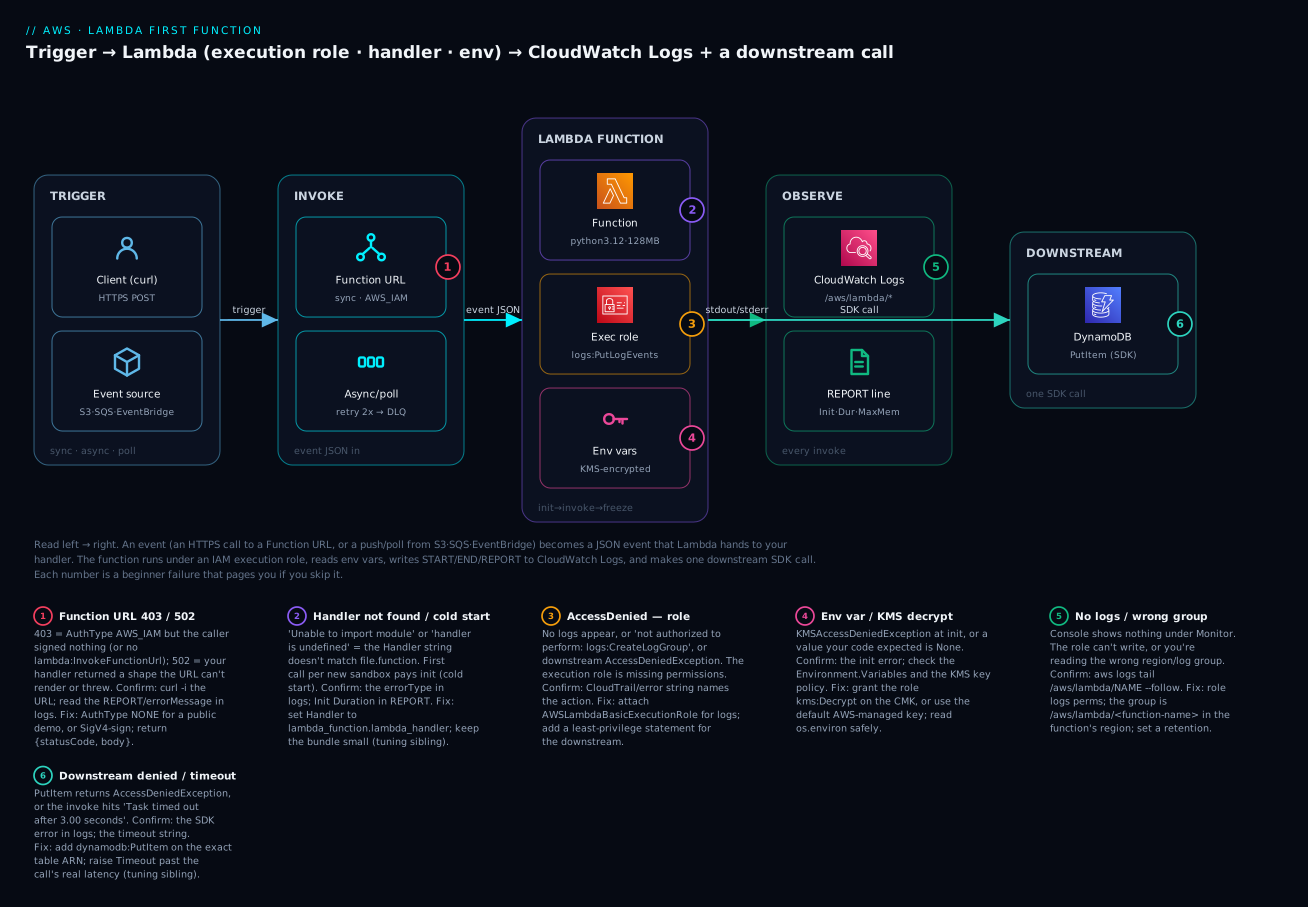
| Badge | Failure class | Lives at | Playbook row |
|---|---|---|---|
| 1 | Function URL 403/502 |
The HTTPS door | rows 9, 10 |
| 2 | Handler not found / cold start | The function/runtime | rows 2, 12 |
| 3 | AccessDenied (role) |
The execution role | rows 1, 6 |
| 4 | Env var / KMS decrypt | Env + KMS | row 7 |
| 5 | No logs / wrong group | CloudWatch Logs | rows 1, 5 |
| 6 | Downstream denied / timeout | The SDK call | rows 6, 4 |
Real-world scenario
KloudMart, a small e-commerce startup in Bengaluru, needed to generate a thumbnail every time a seller uploaded a product photo to their S3 bucket. Their first instinct was a t3.small EC2 instance running a Python worker on a cron loop — which cost about ₹1,100/month to sit idle 95% of the day and still added latency because it polled S3 every minute. A new engineer, Aditi, was asked to “make it serverless” as her onboarding task, and she hit every beginner wall in this article, in order.
She wrote a 40-line lambda_function.py using Pillow, zipped just the .py, and uploaded it. The first S3 upload produced nothing. CloudWatch showed the real error: Unable to import module 'lambda_function': No module named 'PIL' — she had never bundled Pillow (playbook row 3). She rebuilt the zip with pip install pillow -t . and the dependency at the package root, and the import error vanished — replaced by a new silence. This time there were no logs at all, because she had created the execution role by hand and forgotten AWSLambdaBasicExecutionRole; the function was running and failing invisibly (row 1). Attaching the managed policy made the logs appear, and those logs showed AccessDeniedException on s3:GetObject — the role could log, but couldn’t read the very object that triggered it (row 6). She added a least-privilege s3:GetObject/s3:PutObject statement scoped to the one bucket ARN.
The function now worked when she invoked it from the console with a hand-crafted test event — but still did nothing on a real upload. The trigger fired in the console yet was silent from S3 because the S3 bucket had no permission to invoke the function: the resource-based policy was missing (row 11). Adding the S3 principal via add-permission (which the console’s “Add trigger” does automatically, but her hand-built setup had skipped) closed the last gap. Finally, large photos tripped Task timed out after 3.00 seconds — the default timeout (row 4). She raised it to 30 s and bumped memory to 512 MB, which also halved the duration because CPU scales with memory.
The result: thumbnails generated in ~800 ms per image, the EC2 instance deleted, and the monthly bill for this workload dropped from ₹1,100 to effectively ₹0 — comfortably inside the free tier at their volume. Aditi’s takeaway, which she wrote on the team wiki, was the thesis of this article: “Lambda didn’t fail once. Every failure was me missing one of four things — packaging, the role’s permissions, the resource policy, or the timeout. Read CloudWatch first, always.”
Advantages and disadvantages
| Advantages | Disadvantages |
|---|---|
| No servers to provision, patch or scale | 15-minute max runtime — not for long jobs |
| Scales to zero — pay nothing when idle | Cold starts add first-call latency |
| Automatic, near-instant horizontal scaling | Stateless — external store needed for state |
| Generous always-free tier | Concurrency limits can throttle spikes |
| Per-millisecond billing | Debugging is remote (logs, not a local process) |
| Fine-grained IAM per function | Package/dependency size limits (250 MB unzipped) |
| Built-in logging, metrics, tracing hooks | Vendor lock-in to the AWS event ecosystem |
| Many native triggers, no glue code | At-least-once delivery (async/poll) needs idempotency |
When each side matters: the advantages dominate for event-shaped, bursty, short work — webhooks, image/file processing, scheduled chores, glue between services, low-to-moderate-traffic APIs. The disadvantages start to bite when you need long-running processing (use a container/Batch), ultra-low predictable latency at high volume (a warm container may win, or use provisioned concurrency), or heavy stateful compute. The honest rule: reach for Lambda first for anything that reacts to an event and finishes quickly; reconsider when runtime, latency floors, or package size fight you.
| Choose Lambda when… | Reconsider when… |
|---|---|
| Work is triggered by an event and short | Jobs run longer than ~15 minutes |
| Traffic is spiky or unpredictable | Traffic is steady and high enough that a reserved box is cheaper |
| You want zero ops and scale-to-zero | You need OS-level control or special hardware |
| Each request is independent/stateless | You need long-lived in-memory state |
| You’re gluing AWS services together | You need sub-10 ms p99 at very high RPS |
Hands-on lab
You will build the diagram: a Python function, invoked synchronously via a test event and via an HTTPS Function URL, logging to CloudWatch, with an environment variable — first with the aws CLI + zip, then the identical thing as Terraform. Everything is free-tier. Pick a region and stick to it (this lab uses ap-south-1, Mumbai).
⚠️ Cost note: Lambda invocations and a Function URL are free at this volume. The only thing that can bill is CloudWatch Logs storage (paise), so we set a short retention and delete everything at the end.
What you’ll create
| Resource | Purpose | Cost at lab volume |
|---|---|---|
IAM role kv-lambda-first-role |
Execution role (assumed by Lambda) | Free |
Policy attachment AWSLambdaBasicExecutionRole |
Lets the function write logs | Free |
Lambda function kv-first-fn |
Your Python handler | Free (free tier) |
| Function URL | Instant HTTPS endpoint | Free |
Log group /aws/lambda/kv-first-fn |
Where logs land | ~₹0 (short retention) |
Part A — the CLI + zip path
Step 1 — Write the handler. Create lambda_function.py:
import os
import json

# Runs once per cold start (module load), reused on warm invokes.
GREETING = os.environ.get("GREETING", "Hello")

def lambda_handler(event, context):
    print(f"event received: {json.dumps(event)}")  # lands in CloudWatch
    name = event.get("name", "world")
    remaining_ms = context.get_remaining_time_in_millis()
    body = {
        "message": f"{GREETING}, {name}!",
        "request_id": context.aws_request_id,
        "remaining_ms": remaining_ms,
    }
    return body
Step 2 — Zip it. The zip must contain the file at its root (not inside a folder):
zip function.zip lambda_function.py
# adding: lambda_function.py (deflated 45%)
Step 3 — Create the execution role. Lambda needs a role it can assume. First a trust policy, then the role, then attach the logs policy:
cat > trust.json <<'JSON'
{
  "Version": "2012-10-17",
  "Statement": [{
    "Effect": "Allow",
    "Principal": {"Service": "lambda.amazonaws.com"},
    "Action": "sts:AssumeRole"
  }]
}
JSON

aws iam create-role \
  --role-name kv-lambda-first-role \
  --assume-role-policy-document file://trust.json

aws iam attach-role-policy \
  --role-name kv-lambda-first-role \
  --policy-arn arn:aws:iam::aws:policy/service-role/AWSLambdaBasicExecutionRole
Expected: create-role returns the role JSON with an Arn like arn:aws:iam::111122223333:role/kv-lambda-first-role. Wait ~10 seconds before the next step — new roles take a moment to propagate, and creating a function too fast gives The role defined for the function cannot be assumed by Lambda.
Step 4 — Create the function. Substitute your account id in the role ARN:
ACCOUNT_ID=$(aws sts get-caller-identity --query Account --output text)

aws lambda create-function \
  --function-name kv-first-fn \
  --runtime python3.12 \
  --architectures arm64 \
  --handler lambda_function.lambda_handler \
  --role arn:aws:iam::${ACCOUNT_ID}:role/kv-lambda-first-role \
  --zip-file fileb://function.zip \
  --timeout 10 \
  --memory-size 128 \
  --region ap-south-1
Expected: JSON with "State": "Pending" then "Active", "Handler": "lambda_function.lambda_handler", "Runtime": "python3.12".
Step 5 — Invoke it synchronously with a test event. Note the --cli-binary-format flag — without it, CLI v2 expects the payload base64-encoded and you’ll get a confusing error:
aws lambda invoke \
  --function-name kv-first-fn \
  --cli-binary-format raw-in-base64-out \
  --payload '{"name": "Vinod"}' \
  --region ap-south-1 \
  response.json

cat response.json
# {"message": "Hello, Vinod!", "request_id": "…", "remaining_ms": 9987}
The command prints "StatusCode": 200. If you see "FunctionError": "Unhandled", open response.json for the error payload and read the logs (next step).
Step 6 — Read the logs. The easiest way is logs tail:
aws logs tail /aws/lambda/kv-first-fn --follow --region ap-south-1
Expected — the three system lines plus your print:
START RequestId: 7f3c… Version: $LATEST
event received: {"name": "Vinod"}
END RequestId: 7f3c…
REPORT RequestId: 7f3c… Duration: 1.83 ms  Billed Duration: 2 ms  Memory Size: 128 MB  Max Memory Used: 36 MB  Init Duration: 118.42 ms
The Init Duration line appears only on the cold start; invoke again and it disappears (a warm start). Set a retention so the group doesn’t accrue cost:
aws logs put-retention-policy \
  --log-group-name /aws/lambda/kv-first-fn \
  --retention-in-days 14 --region ap-south-1
Step 7 — Set an environment variable and re-invoke. Change behaviour with no code change:
aws lambda update-function-configuration \
  --function-name kv-first-fn \
  --environment "Variables={GREETING=Namaste}" \
  --region ap-south-1

# wait for LastUpdateStatus: Successful, then:
aws lambda invoke --function-name kv-first-fn \
  --cli-binary-format raw-in-base64-out \
  --payload '{"name": "Vinod"}' --region ap-south-1 out.json
cat out.json   # {"message": "Namaste, Vinod!", …}
Step 8 — Add a Function URL and curl it. For a public demo use AuthType NONE (⚠️ anyone with the URL can invoke it — fine for a throwaway, never for real data):
aws lambda create-function-url-config \
  --function-name kv-first-fn \
  --auth-type NONE --region ap-south-1

# NONE requires a resource-based permission for public invoke:
aws lambda add-permission \
  --function-name kv-first-fn \
  --statement-id FunctionURLAllowPublicAccess \
  --action lambda:InvokeFunctionUrl \
  --principal "*" \
  --function-url-auth-type NONE --region ap-south-1
The first command returns a FunctionUrl like https://abc123.lambda-url.ap-south-1.on.aws/. Call it:
curl -s -XPOST 'https://abc123.lambda-url.ap-south-1.on.aws/' \
  -H 'content-type: application/json' -d '{"name":"world"}'
# {"message": "Namaste, world!", …}
Step 9 — Verify and then tear down. Confirm the function is Active, then delete everything:
aws lambda delete-function-url-config --function-name kv-first-fn --region ap-south-1
aws lambda delete-function --function-name kv-first-fn --region ap-south-1
aws logs delete-log-group --log-group-name /aws/lambda/kv-first-fn --region ap-south-1
aws iam detach-role-policy --role-name kv-lambda-first-role \
  --policy-arn arn:aws:iam::aws:policy/service-role/AWSLambdaBasicExecutionRole
aws iam delete-role --role-name kv-lambda-first-role
| Teardown step | Command | Why it must be explicit |
|---|---|---|
| Delete Function URL config | delete-function-url-config |
Leaves a public endpoint otherwise |
| Delete function | delete-function |
Stops all invocations |
| Delete log group | delete-log-group |
Logs persist and bill after the function is gone |
| Detach + delete role | detach-role-policy then delete-role |
Can’t delete a role with attached policies |
Part B — the same thing as Terraform
The CLI is great for learning; Terraform is how you keep it. This main.tf reproduces the whole lab declaratively — note how the archive is built in-code so terraform apply is self-contained:
terraform {
  required_providers {
    aws     = { source = "hashicorp/aws", version = "~> 5.0" }
    archive = { source = "hashicorp/archive", version = "~> 2.4" }
  }
}

provider "aws" {
  region = "ap-south-1"
}

# 1. Zip the handler at apply time
data "archive_file" "fn" {
  type        = "zip"
  source_file = "${path.module}/lambda_function.py"
  output_path = "${path.module}/function.zip"
}

# 2. Execution role + trust policy (assumed by the Lambda service)
data "aws_iam_policy_document" "trust" {
  statement {
    actions = ["sts:AssumeRole"]
    principals {
      type        = "Service"
      identifiers = ["lambda.amazonaws.com"]
    }
  }
}

resource "aws_iam_role" "fn" {
  name               = "kv-lambda-first-role"
  assume_role_policy = data.aws_iam_policy_document.trust.json
}

# 3. Attach the managed logs policy
resource "aws_iam_role_policy_attachment" "logs" {
  role       = aws_iam_role.fn.name
  policy_arn = "arn:aws:iam::aws:policy/service-role/AWSLambdaBasicExecutionRole"
}

# 4. Pre-create the log group so we control retention (avoids the auto-created, never-expiring one)
resource "aws_cloudwatch_log_group" "fn" {
  name              = "/aws/lambda/kv-first-fn"
  retention_in_days = 14
}

# 5. The function itself
resource "aws_lambda_function" "fn" {
  function_name    = "kv-first-fn"
  role             = aws_iam_role.fn.arn
  runtime          = "python3.12"
  architectures    = ["arm64"]
  handler          = "lambda_function.lambda_handler"
  filename         = data.archive_file.fn.output_path
  source_code_hash = data.archive_file.fn.output_base64sha256
  timeout          = 10
  memory_size      = 128

  environment {
    variables = { GREETING = "Namaste" }
  }

  # Ensure logs + policy exist before the function
  depends_on = [
    aws_iam_role_policy_attachment.logs,
    aws_cloudwatch_log_group.fn,
  ]
}

# 6. A public Function URL (demo only)
resource "aws_lambda_function_url" "fn" {
  function_name      = aws_lambda_function.fn.function_name
  authorization_type = "NONE"
}

output "function_url" {
  value = aws_lambda_function_url.fn.function_url
}
terraform init
terraform apply    # review the plan, type yes
curl -s -XPOST "$(terraform output -raw function_url)" -d '{"name":"TF"}'
# {"message": "Namaste, TF!", …}
terraform destroy  # clean teardown, one command
| Terraform detail | Why it’s there | If you omit it |
|---|---|---|
source_code_hash |
Redeploys code when the zip changes | Code edits don’t get deployed |
depends_on on log group + policy |
Orders creation so logs work on the first invoke | First invocations may not log |
Pre-created aws_cloudwatch_log_group |
Controls retention | Lambda auto-creates a never-expiring group |
authorization_type = "NONE" |
Public demo endpoint | Use AWS_IAM for anything real |
Common mistakes & troubleshooting
This is the section you’ll return to. It is a playbook: match your symptom, run the confirm command, apply the fix. Rows tagged (pointer) are covered in depth by the tuning sibling.
| # | Symptom | Root cause | Confirm (exact command / console path) | Fix |
|---|---|---|---|---|
| 1 | Function runs but no logs anywhere | Execution role lacks CloudWatch Logs permission | aws iam list-attached-role-policies --role-name <role> — no AWSLambdaBasicExecutionRole |
Attach AWSLambdaBasicExecutionRole |
| 2 | Runtime.HandlerNotFound / “handler is undefined” |
Handler string ≠ file.function in your code |
Read errorType in the invoke result / logs; compare to your filename+function |
Set handler to match, e.g. lambda_function.lambda_handler |
| 3 | Unable to import module 'X': No module named 'Y' |
Dependency not bundled in the package | Same log line names the missing module | pip install Y -t . then re-zip; or use a Layer |
| 4 | Task timed out after 3.00 seconds |
Timeout too low for the real work | REPORT shows Duration ≈ Timeout |
Raise --timeout; check for a hung network call (pointer) |
| 5 | Logs exist but you can’t find them | Looking in the wrong region / log group | aws logs tail /aws/lambda/<name> --region <r> |
Log group is /aws/lambda/<name> in the function’s region |
| 6 | Downstream call returns AccessDeniedException |
Role missing permission for that action/resource | Error names the action, e.g. dynamodb:PutItem |
Add a least-privilege statement on the exact ARN |
| 7 | KMSAccessDeniedException at init / env var is None |
Role can’t decrypt a CMK, or the var was never set | Init error in logs; get-function-configuration → Environment |
Grant role kms:Decrypt, or use .get() and set the var |
| 8 | The role defined for the function cannot be assumed by Lambda |
Role just created (IAM propagation) or bad trust policy | aws iam get-role → check trust principal lambda.amazonaws.com |
Wait ~10 s; fix the trust policy principal |
| 9 | Function URL returns 403 Forbidden |
AuthType AWS_IAM but request unsigned / no lambda:InvokeFunctionUrl |
curl -i the URL; check the URL’s AuthType |
Use AuthType NONE for a demo, or SigV4-sign the request |
| 10 | Function URL returns 502 Bad Gateway |
Handler threw, or returned a shape the URL can’t render | Logs show the traceback; check the return value | Return {"statusCode":200,"body":"..."} or valid JSON; fix the throw |
| 11 | Works in console, silent from S3/EventBridge | Missing resource-based policy (trigger can’t invoke) | aws lambda get-policy --function-name <name> — no statement for the source |
add-permission for the source principal + SourceArn |
| 12 | First call slow, later calls fast | Cold start — Init ran on a fresh sandbox | REPORT shows Init Duration on the slow one |
Trim package/imports; provisioned concurrency if p99 matters (pointer) |
| 13 | InvalidParameterValueException on create |
Zip has no lambda_function.py at root, or handler path wrong |
Unzip and inspect; --handler vs file layout |
Re-zip with the file at root; match handler |
| 14 | Writing a file throws [Errno 30] Read-only file system |
Code writes outside /tmp |
Stack trace shows the path (e.g. ./cache) |
Write only under /tmp; point libs’ cache dirs at /tmp |
| 15 | Async events “disappear” on error | No DLQ / on-failure destination; retried then dropped | get-function-event-invoke-config — no destination |
Add an on-failure destination; make the handler idempotent |
| 16 | Rate exceeded / 429 TooManyRequestsException |
Hit the concurrency limit / throttled | CloudWatch Throttles metric > 0 |
Request a concurrency increase; add reserved concurrency (pointer) |
The invoke-time error reference
When a synchronous invoke fails, the response carries a structured error. Recognise the common errorType values:
errorType / message |
Meaning | Fix |
|---|---|---|
Runtime.ImportModuleError |
Handler’s module or a dependency won’t import | Bundle the dep; fix the module name |
Runtime.HandlerNotFound |
Handler string doesn’t resolve to a function | Correct the handler string |
Runtime.MarshalError |
Return value isn’t JSON-serialisable | Return dict/list/str/number/bool, not objects |
Sandbox.Timedout / “Task timed out” |
Ran past the timeout | Raise timeout; find the slow call |
Unhandled + your exception |
Your code raised | Read the traceback; fix the bug |
KMSAccessDeniedException |
Can’t decrypt env vars | Grant kms:Decrypt on the CMK |
Runtime.ExitError |
The runtime process died (OOM/segfault) | Raise memory; check native crashes (pointer) |
Function URL HTTP status reference
| Status | Meaning at the Function URL | Likely cause | Fix |
|---|---|---|---|
200 |
Success | — | — |
403 |
Forbidden | AWS_IAM auth + unsigned request, or missing invoke permission |
Sign the request, or AuthType NONE + add-permission |
413 |
Payload too large | Request body > 6 MB | Send less; use S3 for large payloads |
429 |
Throttled | Concurrency limit hit | Raise concurrency (pointer) |
500 |
Function error | Handler threw an unhandled exception | Read logs; fix the code |
502 |
Bad Gateway | Bad/invalid response shape from the handler | Return valid JSON or {statusCode, body} |
The three nastiest, explained
“No logs at all” (row 1) is the one that wastes the most beginner hours, because your instinct is to debug the code when the problem is permissions. A function with no logs permission still runs and still fails — it just can’t tell you. Always confirm the role has AWSLambdaBasicExecutionRole first; it’s a five-second check that rules out the most common invisible failure. If logs exist but are empty of your lines while showing START/END, your handler is returning before your code runs (wrong handler) or logging at a filtered level.
“Works in console, silent from the trigger” (row 11) confuses people because the function is provably correct — you just invoked it successfully. But console/CLI invokes use your identity’s permission to call lambda:InvokeFunction; an event source uses a resource-based policy on the function. When you click “Add trigger” in the console, AWS silently writes that policy for you; when you wire things by hand (or in partial IaC), you must add it yourself with add-permission. aws lambda get-policy shows exactly which principals are currently allowed.
Duplicate side effects under retries catch teams moving from synchronous to asynchronous/poll triggers. Sync invokes don’t retry; async invokes retry twice and pollers can redeliver, all under at-least-once delivery. If your handler charges a card or inserts a row, the same event can run more than once. The fix is idempotency (a dedupe key, a conditional write) — not something you need for your very first sync function, but the moment you attach S3/SQS/EventBridge it becomes load-bearing; AWS Lambda Patterns: Event-Driven Functions That Scale to Zero covers the patterns.
Best practices
- Attach
AWSLambdaBasicExecutionRoleto every function, first. A function you can’t observe is a function you can’t debug. Add it before you write a line of handler logic. - Keep the handler thin; do setup at module scope. Initialise SDK clients, parse config and open connections above the handler so warm invocations reuse them — it’s free performance.
- One function, one job, least-privilege role. Give each function its own role scoped to exactly the actions and ARNs it uses. Never reuse a broad “lambda-admin” role.
- Set a real timeout and a log retention. The 3 s default and never-expiring logs are footguns; pick a timeout comfortably above your real runtime and a retention like 14–30 days.
- Make handlers idempotent the moment a non-sync trigger is involved. At-least-once delivery means the same event can arrive twice; design for it with dedupe keys or conditional writes.
- Never bake secrets into env vars or code. Use Secrets Manager or SSM Parameter Store and fetch (and cache) at init; env vars are for non-secret config.
- Prefer
arm64(Graviton). It’s ~20% cheaper per GB-second and usually as fast or faster for interpreted runtimes — a free win on day one. - Return the shape the caller expects. For a Function URL/API Gateway proxy, that’s often
{"statusCode": 200, "body": "..."}; a raw dict from a URL can surface as a502. - Pin runtimes and watch deprecation. AWS deprecates old runtime versions; a deprecated runtime blocks code and config updates. Move up proactively.
- Deploy with IaC, not clicks. Console edits are lost on the next deploy and aren’t reviewable; use Terraform/SAM/CDK so the function is reproducible.
- Log structured JSON and a correlation id. Include
context.aws_request_id(or the trigger’s id) so you can trace one request across services in Logs Insights.
Security notes
Lambda’s security model is refreshingly small, but each piece matters:
| Control | What to do | Why |
|---|---|---|
| Least-privilege execution role | Scope actions to specific ARNs; one role per function | A compromised function can only do what its role allows |
| No secrets in env vars | Secrets Manager / SSM + kms:Decrypt at init |
Env vars are visible to anyone with GetFunctionConfiguration |
| CMK for sensitive env vars | Set KMSKeyArn to a customer-managed key |
Control who can decrypt; audit via CloudTrail |
| Resource-based policy scoping | Always set SourceArn/SourceAccount on add-permission |
Stops the confused-deputy — a different bucket/account invoking you |
| Function URL auth | Use AWS_IAM, not NONE, for anything real |
NONE is a public, unauthenticated endpoint |
| VPC only when needed | Attach to a VPC for private resources; add AWSLambdaVPCAccessExecutionRole |
Reach private RDS/ElastiCache without going public |
| CloudTrail on | Audit Invoke, UpdateFunctionCode, AddPermission |
Detect tampering and unexpected invokers |
| Least-trust trust policy | Trust only lambda.amazonaws.com |
Nothing else should assume the execution role |
The two you’ll get wrong first: putting a database password in a plaintext env var (use SSM/Secrets Manager), and shipping a Function URL with AuthType NONE “just for testing” and forgetting it — that’s a public endpoint into your account. Delete demo URLs the moment you’re done.
Cost & sizing
Lambda cost has exactly two components plus a rounding rule, and the free tier swallows most beginner usage:
| Cost driver | How it’s charged | Lever to pull |
|---|---|---|
| Requests | $0.20 per 1M (after 1M free/month) | Fewer, batched invocations |
| Compute (GB-seconds) | memory(GB) × billed-seconds × rate (after 400k GB-s free) | Right-size memory; use arm64; finish faster |
| Rounding | Billed duration rounds up to 1 ms | Negligible for most work |
/tmp > 512 MB |
Charged per GB-s over the free 512 MB | Only raise if you need it |
| CloudWatch Logs | Ingestion + storage | Set retention; log less at high volume |
A worked example to make it concrete:
| Scenario | Memory | Duration | Invocations/mo | GB-s/mo | Est. cost |
|---|---|---|---|---|---|
| This lab | 128 MB | 2 ms | ~50 | ~0.0125 | ₹0 (free tier) |
| Thumbnailer (KloudMart) | 512 MB | 800 ms | 100,000 | 40,000 | ₹0 (within 400k free) |
| Busy API | 256 MB | 50 ms | 20,000,000 | 250,000 | Requests: ~$3.8; compute within free-ish → a few dollars |
| Over-provisioned | 1,024 MB | 800 ms | 100,000 | 80,000 | Compute now billable — more memory isn’t always cheaper |
The counter-intuitive part — that raising memory can lower the bill when the extra CPU finishes the work in proportionally less time — is the whole subject of AWS Lambda Memory, Timeout & Concurrency Tuning. For your first function, 128–256 MB and a generous timeout is the right, cheap default.
Interview & exam questions
1. What is AWS Lambda in one sentence, and what do you not manage? Lambda is event-driven Function-as-a-Service: you provide a function and a trigger, and AWS runs it on demand, scaling from zero, billing per millisecond. You don’t manage servers, the OS, patching, scaling or availability — only the code and its config. (CLF-C02)
2. Explain the init → invoke → freeze lifecycle and why it matters. On a cold start Lambda runs Init (start runtime, run your module/global code), then Invoke (the handler), then Freeze (pause the sandbox, not destroy it). A later event may thaw the same sandbox and skip Init. It matters because module-scope setup is reused across warm invokes — the main performance lever — and background work after return may be frozen. (DVA-C02)
3. What are the three invocation types and how does each handle errors? Synchronous (caller waits, gets the error, no Lambda retries), asynchronous (queued, 202 returned, Lambda retries twice, then DLQ/destination), and poll-based event-source mapping (Lambda polls SQS/streams and invokes in batches; streams block on a poison record, SQS re-drives). (DVA-C02, SAA-C03)
4. Your function runs but produces no logs. First hypothesis? The execution role is missing CloudWatch Logs permission — attach AWSLambdaBasicExecutionRole. The function runs and can fail invisibly without logs:CreateLogGroup/CreateLogStream/PutLogEvents. (DVA-C02)
5. The handler is lambda_function.lambda_handler. What must be true in your package? A file lambda_function.py at the package root containing a function lambda_handler(event, context). A mismatch yields Runtime.HandlerNotFound. (CLF-C02)
6. Difference between the execution role and a resource-based policy? The execution role (with its trust policy) defines what the function can do and who can assume it; the resource-based policy on the function defines who can invoke it. A trigger firing in the console but not from S3 is usually a missing resource-based policy. (DVA-C02, SCS)
7. Why might an async-triggered function silently drop events? Async invokes retry twice then discard the event if no DLQ or on-failure destination is configured. Under at-least-once delivery you must attach a destination and design idempotent handlers. (DVA-C02)
8. What’s a cold start and how do you reduce it? The Init latency paid when a new sandbox starts (runtime boot + your module code). Reduce it by trimming the package and imports, initialising lazily, choosing a lighter runtime, or using provisioned concurrency for latency-sensitive paths. (DVA-C02)
9. How is Lambda priced, and what’s always free? Per request ($0.20/1M) plus per GB-second of compute, billed to the millisecond. Always free: 1M requests and 400,000 GB-seconds per month. (CLF-C02)
10. Where do you store a database password for a Lambda? In Secrets Manager or SSM Parameter Store, fetched (and cached) at init with the role granted secretsmanager:GetSecretValue / ssm:GetParameter and kms:Decrypt — never as a plaintext environment variable. (SCS, DVA-C02)
11. Zip vs container image — when would you pick each? Zip for small/medium functions and fast iteration (≤ 250 MB unzipped); container image for large dependencies (up to 10 GB), custom OS libraries, or an existing Docker workflow. (DVA-C02)
12. What does the REPORT log line tell you? Duration and Billed Duration (cost), Memory Size and Max Memory Used (right-sizing — raise memory if you’re near the ceiling), and Init Duration (present only on cold starts). (DVA-C02)
Quick check
- What are the two arguments Lambda passes to your handler, and what does each contain?
- Your Python file is
app.pyand the function ismain. What is the correct handler string? - A function invoked by S3 throws an exception. How many times does Lambda retry, and where does the event go if you configured nothing?
- You see
Init Durationin theREPORTline of one invocation but not the next. Why? - A Function URL returns
403. Name the two most likely causes.
Answers
event(the input payload as a native object) andcontext(invocation metadata — request id, remaining time, log group). The handler does its work using both and returns a value or raises.app.main— the format isfile.function, so the fileapp.pyand functionmaingiveapp.main.- Twice (three attempts total) for async invocations; with no DLQ or on-failure destination configured, the event is dropped after the final failure.
- The first invocation was a cold start (Init ran on a fresh sandbox, so
Init Durationis reported); the second reused the now-warm sandbox and skipped Init. AuthType AWS_IAMwith an unsigned request (or a caller lackinglambda:InvokeFunctionUrl), or — forAuthType NONE— a missing resource-basedadd-permissionstatement.
Glossary
| Term | Definition |
|---|---|
| FaaS (Function-as-a-Service) | A compute model where you deploy individual functions that run on demand, with no server management. |
| Handler | The function Lambda invokes, named as file.function; the entry point for every invocation. |
| Event | The JSON input describing what happened, passed as the first handler argument. |
| Context | The second handler argument: runtime metadata (request id, remaining time, log group). |
| Runtime | The language environment (e.g. python3.12) or OS-only/custom runtime that runs your code. |
| Execution role | The IAM role the function assumes; defines what AWS actions the code may perform. |
| Trust policy | The part of a role that says which principal (here lambda.amazonaws.com) may assume it. |
| Resource-based policy | A policy on the function itself that says which principals may invoke it. |
| Invocation type | Synchronous, asynchronous, or poll-based (event-source mapping) — governs retries and error handling. |
| Cold start | The first-call latency while a new sandbox runs Init (runtime boot + your module code). |
| Warm start | A later invocation that reuses an existing (thawed) sandbox and skips Init. |
| Execution context | The reusable warm sandbox: globals, connections and /tmp persist across warm invocations. |
| Deployment package | The zip (≤ 250 MB unzipped) or container image (≤ 10 GB) containing your code and dependencies. |
| Function URL | A built-in dedicated HTTPS endpoint for a function, with AWS_IAM or NONE auth. |
| GB-second | The compute billing unit: configured memory in GB multiplied by billed run time in seconds. |
| DLQ / on-failure destination | Where a failed async/poll event’s record is sent so it isn’t silently lost. |
| Event-source mapping | The Lambda-managed poller that reads SQS/Kinesis/DynamoDB Streams and invokes your function in batches. |
Next steps
- Wire a real trigger. Move from a Function URL to S3 or EventBridge and learn the async model hands-on with AWS Lambda Patterns: Event-Driven Functions That Scale to Zero.
- Put a proper API in front of it. Swap the Function URL for a managed API with routes, auth and throttling in AWS API Gateway REST & HTTP APIs Hands-On.
- Tune what you built. Turn the memory/timeout/concurrency dials this article only pointed at with AWS Lambda Memory, Timeout & Concurrency Tuning.
- See the full serverless shape. Assemble functions, an API, auth and a database into a working app in AWS Serverless Web Application Architecture: CloudFront, API Gateway, Lambda and DynamoDB End to End.
- Re-check the compute decision. Confirm a function is still the right tool as your workload grows with AWS Compute: EC2, Lambda, ECS and EKS — Which One to Choose?.