You can build a serverless API in raw CloudFormation, but the first time you try it you write about 120 lines of YAML to stand up one Lambda behind one route: the function, its IAM role, the role’s trust and permission policies, the log group, the API, its stage, the deployment, the integration, the route, and the lambda:InvokeFunction permission that lets the API call the code. Nine resources, hand-wired, for one HTTP endpoint. AWS SAM — the Serverless Application Model — collapses all of that into roughly a dozen lines, because SAM is a CloudFormation transform: a macro named AWS::Serverless-2016-10-31 that expands a handful of short-hand resource types into the full CloudFormation you would otherwise type by hand.
That is the whole idea, and it is worth saying precisely because people misfile SAM as “a different IaC tool.” It is not. A SAM template is a CloudFormation template with one extra Transform: line and permission to use five or six special resource types like AWS::Serverless::Function and AWS::Serverless::HttpApi. When you deploy, AWS runs the transform server-side, the short-hand explodes into ordinary AWS::Lambda::Function, AWS::IAM::Role, AWS::ApiGatewayV2::Api and the rest, and from that point on it is a normal CloudFormation stack — same drift detection, same rollback, same change sets. You get CloudFormation’s guarantees with a fraction of CloudFormation’s typing.
The second half of SAM is the SAM CLI (sam), and it is where the day-to-day speed comes from: sam init scaffolds an app, sam build compiles each function per-runtime (esbuild for TypeScript, pip for Python, containers when you ask), sam local start-api runs the whole API on your laptop inside the real Lambda Docker image so you can curl it before you deploy, sam deploy --guided walks you through your first ship and writes a samconfig.toml so every later deploy is one command, and sam sync — Accelerate mode — gives you a sub-ten-second inner loop by pushing code-only changes straight to the service and skipping the full CloudFormation update. By the end of this article you will have built a Lambda + HttpApi + DynamoDB SimpleTable app, run it locally, shipped it, changed a line and watched sam sync update it in seconds, then torn it down — and you will have a 16-row troubleshooting playbook for when sam build can’t find Docker, the transform rejects your Events shape, or a too-narrow policy template throws AccessDenied in production.
Here is the entire SAM surface on one screen — every moving part, what it is, and the beginner trap attached to it:
| Piece | What it is | You write it as | The trap that bites first |
|---|---|---|---|
| Transform | The macro that expands shorthand | Transform: AWS::Serverless-2016-10-31 |
Omitting it → CFN rejects AWS::Serverless::* as unknown |
AWS::Serverless::Function |
Lambda + role + logs + event wiring | One resource with Events, Policies |
Wrong Events shape → source never wired |
AWS::Serverless::HttpApi / Api |
API Gateway HTTP / REST front door | Implicit from an event, or explicit | Editing the implicit API you didn’t declare |
AWS::Serverless::SimpleTable |
A single-key DynamoDB table | PrimaryKey + billing |
Needing a GSI it can’t express |
| Policy templates | Least-priv IAM shortcuts | Policies: [DynamoDBCrudPolicy: …] |
Too narrow → runtime AccessDenied |
Globals |
Defaults applied to every function/API | A top-level Globals: block |
Expecting it to cover resource types it doesn’t |
sam build |
Per-runtime compile into .aws-sam |
sam build (+ --use-container) |
Native deps fail without a container build |
sam local |
Run functions/API in Docker locally | sam local start-api / invoke |
No Docker daemon → it can’t start |
sam deploy |
Package to S3 + drive CFN changeset | sam deploy --guided |
Missing CAPABILITY_AUTO_EXPAND |
sam sync |
Fast inner loop, skips full CFN | sam sync --watch |
Using it for prod → drift |
samconfig.toml |
Saved deploy parameters | Written by --guided |
Committing secrets/params by accident |
What problem this solves
The pain SAM removes is boilerplate density plus a broken inner loop. Raw CloudFormation is verbose by design — it makes no assumptions — so a serverless app that is conceptually “three functions, one API, one table” becomes several hundred lines in which the interesting five lines (the code path, the permission, the route) are buried under role trust policies and API stage plumbing you copy-paste and never read. Worse, CloudFormation has no local story: to test a change you aws cloudformation deploy and wait two to four minutes for a stack update, every time, for a one-character fix. That feedback loop is where serverless productivity goes to die.
What breaks without SAM is not that things are impossible — it is that they are slow and error-prone in ways that compound. You hand-write an IAM role and give it dynamodb:* on * because scoping it correctly is fiddly, and now you have a least-privilege violation in every service. You wire an S3 trigger and forget the AWS::Lambda::Permission, so the bucket silently never invokes the function. You want to try the handler against a realistic API Gateway event and you have no way to do it except deploy-and-curl. Each of these is a half-hour tax, several times a day. SAM’s Policies templates make the scoped role a one-liner, its Events block wires the trigger and the permission for you, and sam local plus sam local generate-event let you replay a real event shape on your laptop.
Here is exactly what the transform collapses — the raw CloudFormation resources SAM generates for you from each line of shorthand, and roughly how much typing it saves:
| You write (SAM shorthand) | The transform generates (raw CloudFormation) | Hand-written lines saved |
|---|---|---|
AWS::Serverless::Function (no role) |
AWS::Lambda::Function + AWS::IAM::Role + trust policy + AWS::Logs::LogGroup |
~25 |
Events: { Type: HttpApi } |
AWS::ApiGatewayV2::Api (implicit) + Integration + Route + Stage + AWS::Lambda::Permission |
~40 |
Events: { Type: Api } |
AWS::ApiGateway::RestApi + Deployment + Stage + Method + Resource + Permission |
~50 |
Events: { Type: S3 } |
AWS::Lambda::Permission + the bucket notification config wiring |
~15 |
Policies: [DynamoDBCrudPolicy] |
A full inline IAM policy with 8 scoped dynamodb:* actions on the table ARN |
~20 |
AWS::Serverless::SimpleTable |
AWS::DynamoDB::Table with PAY_PER_REQUEST and a single-key schema |
~12 |
Globals: { Function: { Timeout: 10 } } |
The same property copied onto every function in the file | N × 1 |
Learning objectives
By the end of this article you can:
- Explain that SAM is a CloudFormation transform (
AWS::Serverless-2016-10-31), why a SAM template is a superset of a CloudFormation template, and how the macro expands short-hand into ordinary resources server-side at deploy time. - Author every SAM resource type —
AWS::Serverless::Function(withEvents,Policies,Layers,Environment),ApiandHttpApi,SimpleTable,StateMachine,LayerVersionandApplication(from the Serverless Application Repository) — and know when to reach past shorthand to a raw CFN resource. - Use the
Globalssection to set fleet-wide defaults and predict exactly which resource types and properties it applies to. - Choose policy templates for least-privilege IAM the easy way, mix them with raw IAM statements and managed-policy ARNs, and diagnose the classic “too-narrow template → runtime
AccessDenied.” - Run the full SAM CLI loop —
sam init,sam validate --lint,sam build(per-runtime and--use-container),sam local invoke/start-api/generate-event,sam deploy --guided(+samconfig.toml),sam sync/Accelerate,sam logs,sam traces. - Build, locally test, deploy, hot-update with
sam sync, and tear down a Lambda + HttpApi + DynamoDB app end to end. - Decide SAM vs CDK vs raw CloudFormation vs the Serverless Framework from a real trade-off matrix, and bootstrap CI/CD with
sam pipeline. - Work a symptom → cause → confirm → fix playbook for the dozen-plus ways a first SAM app breaks.
Prerequisites & where this fits
You need an AWS account with permission to create IAM roles, Lambda functions, API Gateway APIs and DynamoDB tables (a personal or dev sandbox — never straight into production), the AWS CLI v2 configured (aws configure or aws sso login), the AWS SAM CLI installed (brew install aws-sam-cli, or the MSI/pip installer — check with sam --version, you want ≥ 1.100), Docker running (SAM’s local emulation and container builds need it), and Node.js 20 if you follow the TypeScript lab (or Python 3.12 for the Python variant). Everything here is free-tier-friendly: Lambda’s always-free tier, HTTP API’s first million requests, and DynamoDB on-demand at a few reads/writes cost effectively nothing; the only lingering line items are CloudWatch Logs storage and the tiny S3 objects SAM uploads.
Where this sits: SAM is the fastest on-ramp to Infrastructure as Code for serverless specifically. It assumes you already understand a Lambda function’s anatomy — if the handler signature, execution role and CloudWatch Logs are new, build one by hand first with Your First AWS Lambda Function: Handlers, Triggers, Roles & Logs Hands-On. SAM’s most common front door is API Gateway, so the flavors, authorizers and throttling in Amazon API Gateway Hands-On: REST vs HTTP APIs, Authorizers & Throttling are the layer SAM’s Events shorthand is generating for you. SAM is one way to write IaC on AWS; the general-purpose engine underneath it is CloudFormation, covered in AWS CloudFormation: Your First Stack Hands-On, and the imperative alternative that generates CloudFormation from TypeScript is in AWS CDK with TypeScript: Infrastructure as Code Hands-On — read that one for the SAM-vs-CDK decision from the CDK side.
A quick map of who owns what in a SAM project, so when something misbehaves you look in the right place:
| Layer | What it owns | Where it lives | When it’s the culprit |
|---|---|---|---|
template.yaml |
The desired infrastructure + shorthand | Repo root | Wrong property names, bad Events shape |
samconfig.toml |
Saved deploy params (stack, region, caps) | Repo root | Deploys to the wrong account/region |
| SAM CLI | Build, local run, package, deploy driver | Your laptop / CI | Docker missing, stale .aws-sam cache |
| SAM transform | Shorthand → CloudFormation expansion | AWS (server-side) | Transform/AUTO_EXPAND errors |
| CloudFormation | Create/update/rollback the real stack | AWS | Changeset empty, capability, rollback |
| The resources | Lambda, API GW, DynamoDB at runtime | AWS | AccessDenied, 5xx, throttles |
Core concepts
SAM is a transform, not a separate system
Every SAM template starts with two lines that make it a SAM template rather than a plain CloudFormation template:
AWSTemplateFormatVersion: '2010-09-09'
Transform: AWS::Serverless-2016-10-31
Transform is a standard CloudFormation feature — it names a macro that CloudFormation runs against your template before it creates resources. AWS::Serverless-2016-10-31 is a macro AWS hosts for you. When you deploy, CloudFormation sends the template to that macro, the macro finds every AWS::Serverless::* resource and rewrites it into ordinary resources, and CloudFormation then processes the expanded template. Because it is a macro, deploying a SAM template through raw CloudFormation requires the CAPABILITY_AUTO_EXPAND capability (you are telling CloudFormation “yes, I know a macro will change my template”), on top of CAPABILITY_IAM for the roles it generates. The sam CLI passes both for you; this is why people who try to aws cloudformation deploy a SAM template directly hit a capability error.
The practical consequences of “it’s just CloudFormation underneath” are worth internalizing:
| Because SAM is a transform… | …this is true |
|---|---|
| The expanded template is normal CloudFormation | You get drift detection, rollback, change sets, stack policies |
| You can mix raw CFN and shorthand freely | AWS::S3::Bucket and AWS::Serverless::Function in one file |
| Intrinsics work everywhere | !Ref, !GetAtt, !Sub, !ImportValue, Conditions, Mappings |
Deploy needs CAPABILITY_AUTO_EXPAND |
Because a macro rewrites the template |
sam validate can’t catch everything |
Some errors only surface when the macro runs server-side |
| Outputs/Exports work as usual | Cross-stack references are unchanged |
The SAM resource types
There are only a handful of short-hand types. Learn what each one expands into and you can predict its behavior:
| SAM resource type | Expands into (headline resources) | Use it for |
|---|---|---|
AWS::Serverless::Function |
Lambda::Function + IAM::Role + Logs::LogGroup + event wiring |
Any Lambda, with its triggers and permissions inline |
AWS::Serverless::Api |
ApiGateway::RestApi + Stage + Deployment |
A REST API (VTL, API keys, usage plans, private) |
AWS::Serverless::HttpApi |
ApiGatewayV2::Api + Stage |
A cheaper, faster HTTP API (JWT-native, the modern default) |
AWS::Serverless::SimpleTable |
DynamoDB::Table (single key, on-demand) |
A quick key-value table with one primary key |
AWS::Serverless::StateMachine |
StepFunctions::StateMachine + role + logging |
A Step Functions workflow with inline event triggers |
AWS::Serverless::LayerVersion |
Lambda::LayerVersion (+ retention control) |
Shared code/deps packaged as a layer |
AWS::Serverless::Application |
A nested stack from the Serverless Application Repository (SAR) | Reusing a published app/component by reference |
The Globals section
Globals is a top-level block that sets default properties applied to every resource of a supported type in the file, so you write Timeout, Runtime, MemorySize, Tracing and shared env vars once instead of on each function. It only applies to five resource types, and a per-resource property overrides (or, for maps/lists, merges with) the global. The single most common Globals surprise is expecting it to cover a property or a resource type it does not — for example it applies to Function but there is no global for SimpleTable’s PrimaryKey.
Globals supports |
Common properties you set there | Not covered by Globals |
|---|---|---|
Function |
Runtime, Handler, Timeout, MemorySize, Architectures, Environment, Tracing, Layers, VpcConfig |
Policies, Events, FunctionName |
Api |
Cors, Auth, EndpointConfiguration, AccessLogSetting, TracingEnabled |
Per-method settings, DefinitionBody |
HttpApi |
Auth, CorsConfiguration, AccessLogSettings, DefaultRouteSettings |
Per-route overrides |
SimpleTable |
SSESpecification |
PrimaryKey, TableName |
StateMachine |
(limited) | Definition, Policies |
The SAM template, section by section
A SAM template has the same top-level sections as any CloudFormation template — Transform and Globals are the only SAM-specific additions. Master these and you can read any SAM file:
| Section | Required? | What it holds | SAM note |
|---|---|---|---|
AWSTemplateFormatVersion |
Optional | Always '2010-09-09' |
Unchanged |
Transform |
Required for SAM | AWS::Serverless-2016-10-31 |
This is what makes it SAM |
Description |
Optional | Human description of the stack | Unchanged |
Globals |
Optional | Fleet-wide defaults | SAM-only |
Parameters |
Optional | Inputs (--parameter-overrides) |
Unchanged |
Mappings |
Optional | Static lookup tables (!FindInMap) |
Unchanged |
Conditions |
Optional | Boolean gates for resources | Unchanged |
Resources |
Required | Shorthand + raw resources | Mix freely |
Outputs |
Optional | Exported values (API URL, ARNs) | Unchanged |
Metadata |
Optional | Build hints (BuildMethod: esbuild) |
SAM reads build metadata here |
The intrinsic functions you will actually reach for, since a SAM template is CloudFormation:
| Intrinsic | Does | Typical SAM use |
|---|---|---|
!Ref X |
Physical ID / value of X |
!Ref ItemsTable → the table name |
!GetAtt X.Attr |
An attribute of X |
!GetAtt ItemsTable.Arn |
!Sub "…${X}…" |
String interpolation | Build the API URL in Outputs |
!ImportValue |
A value exported by another stack | Reference a shared VPC/subnet |
!FindInMap |
Look up in Mappings |
Per-env memory sizes |
!If / Conditions |
Conditional resource/property | Create a resource only in prod |
!Ref ServerlessHttpApi |
The implicit HttpApi’s ID | Reference an API you didn’t declare |
That last row is a genuine gotcha and worth flagging early: when a function declares an HttpApi (or Api) event without pointing at an explicit API resource, SAM creates one implicitly with the logical ID ServerlessHttpApi (or ServerlessRestApi for REST). You reference it by that name in Outputs and !Ref. People spend twenty minutes looking for an API resource they never wrote — it is the implicit one the transform generated.
AWS::Serverless::Function in depth
This is the resource you will write most, so know every property. A function is your code plus its configuration plus its triggers plus its permissions, all in one block.
| Property | What it sets | Values / default | When you change it |
|---|---|---|---|
Runtime |
Language runtime | nodejs20.x, python3.12, java21, go (via provided.al2023), dotnet8, ruby3.3 |
Match your code; prefer newest |
Handler |
Entry point | file.function (e.g. app.handler) |
Must match your file/export |
CodeUri |
Where the code is | Path (., src/) or S3 URI |
Set to the buildable source dir |
MemorySize |
RAM (and proportional CPU) | 128–10240 MB; default 128 | Raise for CPU-bound work |
Timeout |
Max seconds per invoke | 1–900; default 3 | Raise past real p99 latency |
Architectures |
CPU architecture | [x86_64] or [arm64] (Graviton) |
arm64 is cheaper/faster |
Environment.Variables |
Runtime config | Key/value map | Table names, log level |
Policies |
The role’s permissions | Templates, ARNs, inline statements | Scope to what the code touches |
Events |
Triggers | Map of named event sources | Wire API/S3/SQS/schedule |
Layers |
Attached layers | List of ARNs / !Ref |
Share deps/code |
Tracing |
X-Ray mode | Active, PassThrough |
Active for traces |
ReservedConcurrentExecutions |
Concurrency cap | Integer | Protect a downstream |
ProvisionedConcurrencyConfig |
Pre-warmed instances | Integer | Kill cold starts on hot paths |
EphemeralStorage.Size |
/tmp size |
512–10240 MB; default 512 | Big temp files |
DeadLetterQueue |
Async failure sink | SQS/SNS target | Catch failed async invokes |
FunctionUrlConfig |
Direct HTTPS URL | AuthType, Cors |
Skip API GW for a simple endpoint |
AutoPublishAlias |
Publish + alias on deploy | Alias name | Enable safe deploys / canaries |
DeploymentPreference |
Canary/linear rollout | Type, Alarms, Hooks |
CodeDeploy-driven gradual shift |
Event sources — the Events block
Events is where SAM earns its keep: each entry both configures the trigger and generates the AWS::Lambda::Permission (or event-source mapping) that lets it invoke your function. The Type determines the shape of Properties. Get the shape wrong and the source silently never fires — the number-one “it works in the console but not from the trigger” bug.
Events Type |
Wires which trigger | Key Properties |
Invocation model |
|---|---|---|---|
HttpApi |
API Gateway HTTP API | Path, Method, ApiId, Auth |
Sync |
Api |
API Gateway REST API | Path, Method, RestApiId, Auth |
Sync |
S3 |
S3 bucket notification | Bucket, Events, Filter |
Async |
SQS |
SQS queue poller | Queue, BatchSize, ScalingConfig |
Poll (event-source mapping) |
SNS |
SNS topic subscription | Topic, FilterPolicy |
Async |
DynamoDB |
DynamoDB Streams | Stream, StartingPosition, BatchSize |
Poll |
Kinesis |
Kinesis Data Stream | Stream, StartingPosition |
Poll |
Schedule |
EventBridge Scheduler rule | Schedule, Input |
Async (cron/rate) |
ScheduleV2 |
EventBridge Scheduler (newer) | ScheduleExpression, FlexibleTimeWindow |
Async |
EventBridgeRule |
EventBridge pattern rule | Pattern, EventBusName |
Async |
CloudWatchLogs |
Log subscription filter | LogGroupName, FilterPattern |
Async |
Cognito |
Cognito user-pool trigger | UserPool, Trigger |
Sync |
AlexaSkill |
Alexa skill | SkillId |
Sync |
IoTRule |
IoT topic rule | Sql |
Async |
MSK / SelfManagedKafka |
Kafka poller | Stream/KafkaBootstrapServers, Topics |
Poll |
ALB |
Application Load Balancer target | LoadBalancerArn, Path, Method |
Sync |
Policies — least privilege the easy way
The Policies property accepts four different forms, and you can mix them in one list. This flexibility is the whole point: reach for a policy template for the common case, drop to a raw inline statement when the template does not fit.
| Form | Example | When to use |
|---|---|---|
| Policy template | - DynamoDBCrudPolicy: { TableName: !Ref ItemsTable } |
Common scoped grants — the default choice |
| Managed policy ARN | - arn:aws:iam::aws:policy/AmazonS3ReadOnlyAccess |
A broad AWS-managed policy fits |
| Inline IAM statement | A full Statement list under - Statement: |
The template doesn’t cover your action |
!Ref a policy resource |
- !Ref MyCustomManagedPolicy |
Reuse a policy defined elsewhere |
Policy templates are named, parameterized, least-privilege snippets. There are around a hundred; these are the ones you will use constantly:
| Policy template | Grants (scoped) | Parameter |
|---|---|---|
DynamoDBCrudPolicy |
Get/Put/Update/Delete/Query/Scan/BatchGet/BatchWrite on a table | TableName |
DynamoDBReadPolicy |
Get/Query/Scan/BatchGet (read-only) | TableName |
DynamoDBWritePolicy |
Put/Update/Delete/BatchWrite | TableName |
DynamoDBStreamReadPolicy |
Read a table’s stream | TableName, StreamName |
S3CrudPolicy |
Get/Put/Delete objects in a bucket | BucketName |
S3ReadPolicy |
Get/List objects in a bucket | BucketName |
SQSSendMessagePolicy |
sqs:SendMessage* to a queue |
QueueName |
SQSPollerPolicy |
Receive/Delete/GetAttributes (for pollers) | QueueName |
SNSPublishMessagePolicy |
sns:Publish to a topic |
TopicName |
LambdaInvokePolicy |
lambda:InvokeFunction on a function |
FunctionName |
KMSDecryptPolicy |
kms:Decrypt on a key |
KeyId |
SSMParameterReadPolicy |
Read one SSM parameter path | ParameterName |
VPCAccessPolicy |
ENI create/describe/delete (Lambda-in-VPC) | (none) |
StepFunctionsExecutionPolicy |
states:StartExecution on a state machine |
StateMachineName |
CloudWatchPutMetricPolicy |
cloudwatch:PutMetricData |
(none) |
The failure mode to burn into memory: a policy template scoped too narrow (say DynamoDBReadPolicy on a function that also writes) passes sam validate, deploys clean, works in every read test, then throws AccessDeniedException: User is not authorized to perform: dynamodb:PutItem the first time it writes in production. The template is doing its job — least privilege — you just picked the wrong one. The fix is the Crud variant or an added inline statement, never dynamodb:* on *.
Build metadata
For compiled/bundled runtimes, sam build reads the function’s Metadata block to know how to build it. For TypeScript this is where you turn on esbuild:
Metadata key |
Value | Effect |
|---|---|---|
BuildMethod: esbuild |
(nodejs runtimes) | Bundle + transpile TS with esbuild |
BuildMethod: makefile |
(any) | Run your Makefile target build-<LogicalId> |
BuildMethod: nodejs20.x |
(matches runtime) | Default npm-based build |
BuildProperties.EntryPoints |
[src/app.ts] |
esbuild entry file(s) |
BuildProperties.Minify |
true/false |
Minify the bundle |
BuildProperties.Target |
es2022 |
JS target |
BuildProperties.Sourcemap |
true |
Emit sourcemaps for stack traces |
The other resource types
Serverless::Api vs Serverless::HttpApi
Both put an API in front of your functions, but they expand into different services (ApiGateway::RestApi vs ApiGatewayV2::Api) with different features and costs. Pick HttpApi unless you need a REST-only feature.
| Dimension | Serverless::Api (REST) |
Serverless::HttpApi (HTTP) |
|---|---|---|
| Underlying service | API Gateway v1 (REST) | API Gateway v2 (HTTP) |
| Relative cost | ~3.5× per request | Cheaper (baseline) |
| Latency | Higher | Lower |
| Auth built in | IAM, Cognito, Lambda authorizer | JWT, IAM, Lambda authorizer |
| Request/response transform | VTL mapping templates | None (proxy only) |
| API keys + usage plans | Yes | No |
| Caching | Yes | No |
| Private (VPC) endpoints | Yes | No |
| WAF integration | Yes | No (use CloudFront/edge) |
| CORS | Per-method config | Simple CorsConfiguration |
| Implicit logical ID | ServerlessRestApi |
ServerlessHttpApi |
| Define routes via | Events or DefinitionBody (OpenAPI) |
Events or DefinitionBody |
SimpleTable
SimpleTable is deliberately minimal: a DynamoDB table with exactly one primary key and on-demand billing. It is perfect for a lookup or a first table and a trap the moment you need a second access pattern.
SimpleTable property |
What it sets | Note |
|---|---|---|
PrimaryKey.Name |
Partition key attribute name | e.g. id |
PrimaryKey.Type |
String / Number / Binary |
Only a partition key — no sort key |
ProvisionedThroughput |
RCU/WCU | Omit → PAY_PER_REQUEST (on-demand) |
SSESpecification |
Encryption at rest | KMS options |
TableName |
Explicit name | Omit → CFN-generated name |
Tags |
Cost/owner tags | Map |
No GlobalSecondaryIndexes |
— | Need a GSI/sort key → use AWS::DynamoDB::Table |
The moment you need a sort key, a GSI, streams, or TTL, graduate to the raw AWS::DynamoDB::Table — you can keep it in the same SAM file and still reference it with !Ref/!GetAtt.
StateMachine
AWS::Serverless::StateMachine wires a Step Functions workflow with the same Events/Policies conveniences as a function.
StateMachine property |
What it sets | Note |
|---|---|---|
Definition |
Inline Amazon States Language | YAML/JSON in the template |
DefinitionUri |
External ASL file | Point at statemachine/def.asl.json |
DefinitionSubstitutions |
${Var} → resource ARNs |
Inject function ARNs into the ASL |
Type |
STANDARD or EXPRESS |
Express = high-volume, short, cheaper |
Policies |
Execution role permissions | Same templates as functions |
Events |
Triggers (Schedule, Api, EventBridgeRule) |
Start executions on events |
Logging |
CloudWatch Logs config | Log execution history |
Tracing |
X-Ray | Trace the workflow |
Role |
Bring your own role | Instead of Policies |
LayerVersion and Application (SAR)
| Resource / property | What it does | Note |
|---|---|---|
AWS::Serverless::LayerVersion |
Publishes a Lambda layer | Shared deps/code across functions |
ContentUri |
The layer’s content dir | Built by sam build |
CompatibleRuntimes |
Which runtimes may attach it | e.g. [nodejs20.x] |
RetentionPolicy |
Retain / Delete old versions |
Retain keeps history |
AWS::Serverless::Application |
Nests a stack from a template or SAR | Reuse a published component |
Location |
SAR ApplicationId + SemanticVersion, or a template path |
Where the app comes from |
Parameters |
Inputs to the nested app | Passed through |
The SAM CLI workflow
The CLI is the half of SAM you touch every day. Here is the full command surface, then the flags that matter for the three you run most.
| Command | Does | You run it |
|---|---|---|
sam init |
Scaffold a new app from a template | Once per project |
sam validate |
Lint/validate the template | Before every build (in CI) |
sam build |
Compile each function into .aws-sam/build |
After every code/dep change |
sam local invoke |
Run one function once, locally, in Docker | Unit-ish testing a handler |
sam local start-api |
Serve the whole API locally on :3000 |
Front-end/integration testing |
sam local start-lambda |
Emulate the Lambda service endpoint | Point an SDK at local Lambda |
sam local generate-event |
Print a realistic sample event | Feed local invoke a real shape |
sam deploy |
Package to S3 + drive a CFN changeset | Every real deployment |
sam sync |
Fast inner-loop update (Accelerate) | Dev iteration only |
sam logs |
Tail CloudWatch Logs for the stack’s functions | Debugging after deploy |
sam traces |
Fetch X-Ray traces | Latency/error tracing |
sam list |
Show stack resources/endpoints/outputs | “What did I deploy?” |
sam package |
Upload artifacts + rewrite template (no deploy) | CI split package/deploy |
sam publish |
Publish an app to the SAR | Sharing a component |
sam pipeline bootstrap/init |
Scaffold CI/CD resources + pipeline files | One-time CI setup |
sam delete |
Delete the stack + artifacts | Teardown |
sam build
sam build reads each function’s Runtime/Metadata, resolves its dependencies, and writes a self-contained artifact per function under .aws-sam/build, plus a rewritten template.yaml that points CodeUri at those artifacts.
| Flag | Effect | When |
|---|---|---|
| (none) | Build on the host toolchain | Fast, when host matches the runtime |
--use-container |
Build inside the official Lambda Docker image | Native deps / reproducible builds |
--parallel |
Build functions concurrently | Many functions |
--cached |
Reuse unchanged build artifacts | Speed up repeat builds |
--build-dir |
Change output dir | Custom pipelines |
--manifest |
Point at a specific requirements.txt/package.json |
Non-standard layout |
--beta-features |
Enable preview build features | When a feature needs it |
-t / --template |
Use a non-default template file | Multiple templates |
sam local
Everything under sam local runs your function inside the real Lambda runtime Docker image, so a missing Docker daemon is the first failure. start-api reads your Events of type Api/HttpApi and serves them.
| Flag / subcommand | Effect | Note |
|---|---|---|
start-api --port 3000 |
Serve the API locally | Change port if 3000 is taken |
invoke <LogicalId> -e event.json |
One invocation with a payload | -e - reads stdin |
generate-event <service> <event> |
Print a sample event | Pipe into invoke |
--env-vars env.json |
Override env vars locally | Point at a local DynamoDB |
--warm-containers EAGER|LAZY |
Keep containers warm between calls | Faster local iteration |
--debug-port 5858 |
Attach a debugger | Step through the handler |
--docker-network |
Join a Docker network | Reach local DynamoDB/Postgres |
--profile / --region |
AWS creds/region for real downstream | When local calls real AWS |
sam deploy and samconfig.toml
sam deploy --guided is the first-run wizard: it prompts for stack name, region, capabilities, and whether to save the answers, then writes samconfig.toml so every later sam deploy is parameter-free. Under the hood it uploads artifacts to S3, expands the transform, creates a change set, and executes it.
sam deploy flag |
samconfig.toml key |
Purpose |
|---|---|---|
--guided |
— | Interactive first deploy; writes the config |
--stack-name |
stack_name |
CloudFormation stack name |
--region |
region |
Target region |
--capabilities |
capabilities |
CAPABILITY_IAM + CAPABILITY_AUTO_EXPAND |
--resolve-s3 |
resolve_s3 = true |
Use the SAM-managed artifacts bucket |
--s3-bucket |
s3_bucket |
Explicit artifacts bucket |
--parameter-overrides |
parameter_overrides |
Values for Parameters |
--confirm-changeset |
confirm_changeset |
Show the diff and ask before applying |
--no-execute-changeset |
— | Create the changeset only (review in CI) |
--image-repositories |
image_repositories |
ECR repos for image-package functions |
--config-env |
([env.deploy...]) |
Named environments (dev/prod) in one file |
sam sync / Accelerate — the fast inner loop
sam sync is the productivity headline. Instead of a full CloudFormation update (minutes) for every change, sam sync watches your files and, for a code-only change, calls the Lambda service API (UpdateFunctionCode) directly, skipping CloudFormation entirely — a two-to-ten-second update. For a template change it falls back to a real stack update. It is a development tool: because code-only syncs bypass CloudFormation, the deployed function can drift from what a clean sam deploy of the same template would produce, which is exactly why you never point sam sync at production.
sam sync mode |
What it does | Speed | Safe for |
|---|---|---|---|
sam sync --watch |
Watch files; auto-choose code vs infra sync | Fast (code), slow (infra) | Dev |
sam sync --code |
Push code only, always skip CFN | Fastest | Dev inner loop |
--code --resource-id Fn |
Sync just one function | Fastest | Dev, targeted |
sam sync (no flags) |
One infra+code sync via CFN | Slow | Dev |
| (never) on prod | — | — | Use sam deploy |
sam logs and sam traces close the loop: sam logs --stack-name <s> --tail streams every function’s CloudWatch Logs (add --name <LogicalId> to narrow), and sam traces --tail pulls X-Ray traces so you can see the API-GW → Lambda → DynamoDB latency breakdown without leaving the terminal.
Policy templates vs raw IAM — the decision
Both express the function’s permissions; the question is which to reach for. Templates are least-privilege by construction but only cover common grants; raw IAM covers anything but you own the scoping.
| If… | Use | Why |
|---|---|---|
A common grant exists (DynamoDBCrudPolicy, S3ReadPolicy) |
Policy template | Least-privilege, one line, self-documenting |
| The action isn’t in any template | Inline Statement |
Full control of Action/Resource/Condition |
| A broad AWS-managed policy genuinely fits | Managed ARN | Don’t reinvent AmazonSQSReadOnlyAccess |
| Org policy mandates a specific customer-managed policy | !Ref/ARN |
Reuse the approved policy |
| You need cross-resource wiring (Fn → Table) | Connectors |
SAM generates the least-priv policy for the link |
AWS::Serverless::Connector (and the Connectors shorthand) deserves a mention: instead of hand-picking a policy template, you declare “this function needs to write to this table” and SAM computes the minimal IAM for the link. It is the newest and often cleanest way to express intent:
PutItemFunction:
  Type: AWS::Serverless::Function
  Connectors:
    TableConn:
      Properties:
        Destination:
          Id: ItemsTable
        Permissions:
          - Write
SAM ↔ CloudFormation interop and sam pipeline
Because SAM is a transform, a SAM template is a place you can put any CloudFormation resource. This is the escape hatch that means you never outgrow SAM for the non-serverless bits of a serverless app.
| You can… | Because… | Example |
|---|---|---|
| Add raw CFN resources | The expanded template is normal CFN | AWS::S3::Bucket, AWS::DynamoDB::Table with a GSI |
!Ref/!GetAtt between shorthand and raw |
They coexist in one template | Function reads a raw bucket’s name |
Use DependsOn, Conditions, Mappings |
Standard CFN features | Order creation, gate by env |
| Import existing resources | CloudFormation import works | Adopt a pre-existing table |
| Nest stacks | AWS::CloudFormation::Stack or Serverless::Application |
Split a large app |
| Keep secrets in SSM/Secrets Manager | Reference by dynamic reference | '{{resolve:ssm:/app/key}}' |
For CI/CD, sam pipeline bootstraps the plumbing so you are not hand-writing OIDC roles and artifact buckets:
sam pipeline step |
Creates | For |
|---|---|---|
sam pipeline bootstrap |
Per-stage IAM roles, artifact + pipeline-exec resources | Each environment (dev/prod) |
sam pipeline init |
A ready pipeline file for your CI provider | GitHub Actions, GitLab, Jenkins, CodePipeline |
(generated) --config-env deploys |
Environment-scoped sam deploy invocations |
Promote the same artifact across stages |
SAM vs CDK vs raw CloudFormation vs Serverless Framework
There is no single winner; there is a right tool per team and workload. All four ultimately produce CloudFormation (except Serverless Framework, which can target multiple clouds). Decide on language, scope and team.
| Dimension | SAM | CDK | Raw CloudFormation | Serverless Framework |
|---|---|---|---|---|
| Authoring | YAML shorthand | TypeScript/Python/etc. code | YAML/JSON | YAML + plugins |
| Best for | Serverless-first apps | Any AWS infra, imperative | Full control, any resource | Serverless, multi-cloud |
| Local run | sam local (great) |
sam local via CDK, or third-party |
None built in | serverless-offline plugin |
| Fast inner loop | sam sync |
cdk watch (hotswap) |
None | sls deploy function |
| Abstraction | Low (thin over CFN) | High (constructs, defaults) | None | Medium |
| IAM ergonomics | Policy templates | Grant methods (table.grantWrite) |
Hand-written | Plugins/iamRoleStatements |
| Multi-account/CI | sam pipeline |
CDK Pipelines | Your own | Framework/plugins |
| Non-AWS resources | No (AWS only) | No (AWS only) | No | Yes (providers) |
| Learning curve | Low | Medium–high | Medium (verbose) | Low–medium |
| Vendor/tooling risk | AWS-owned | AWS-owned | AWS-native | Third-party (license history) |
| Drift/rollback | CloudFormation | CloudFormation | CloudFormation | CloudFormation |
| When to pick | Lambda + API + table, fast | Complex infra as real code | Edge cases, no abstraction | Existing SLS shop / multi-cloud |
The short version: SAM when the app is serverless and you value a great local loop and minimal YAML; CDK when infrastructure is complex enough that loops, functions and typed abstractions in a real language pay off (see the CDK-side view in AWS CDK with TypeScript: Infrastructure as Code Hands-On); raw CloudFormation when you want zero abstraction or you are templating non-serverless estates (covered in AWS CloudFormation: Your First Stack Hands-On); Serverless Framework when you already run it or genuinely need multi-cloud.
Architecture at a glance
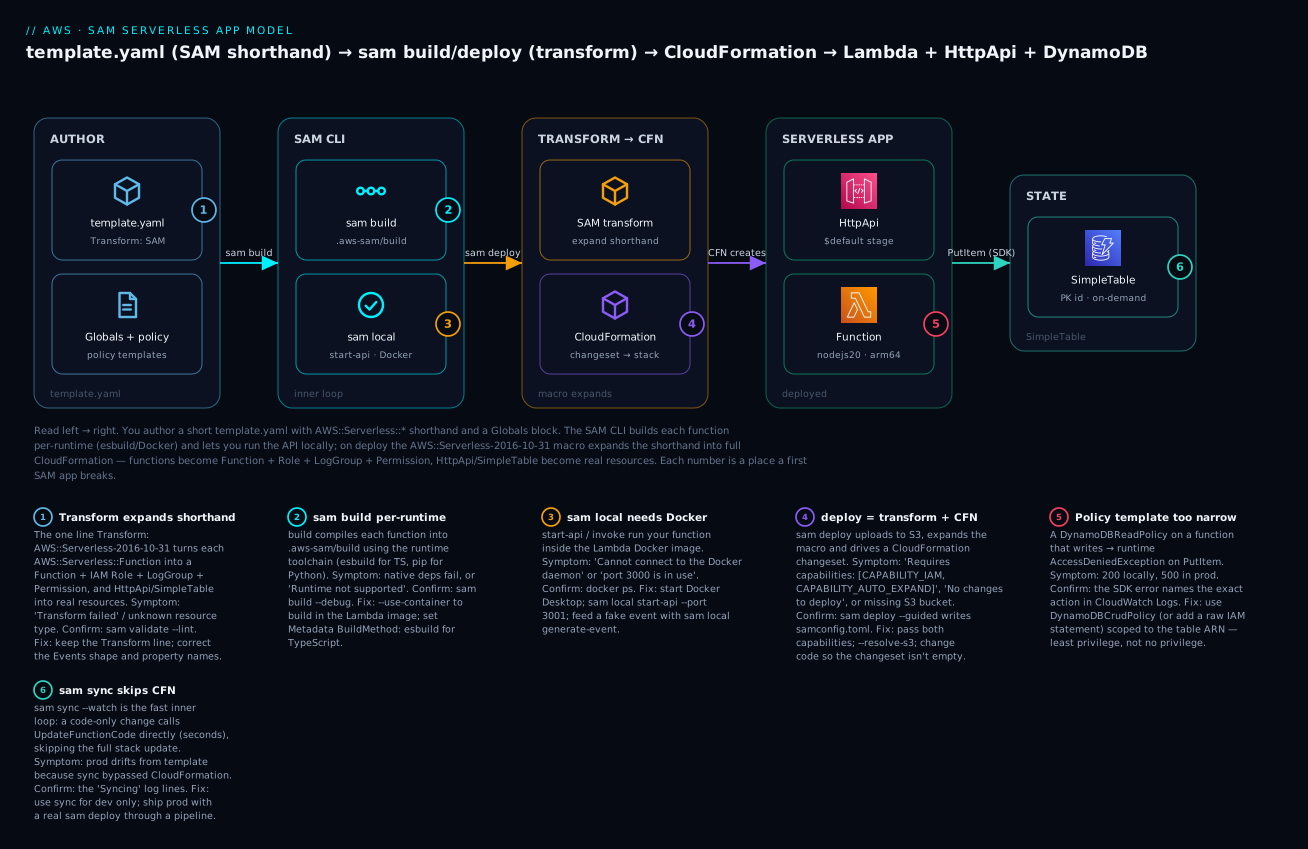
The diagram traces both the workflow (left) and the deployed system (right), because in SAM they are the same story: what you author on the left becomes what runs on the right. You write a compact template.yaml with AWS::Serverless::* shorthand, a Globals block and policy templates. The SAM CLI builds each function per-runtime into .aws-sam/build (esbuild for TypeScript here) and can serve the whole API locally in Docker for curl testing. On sam deploy, the AWS::Serverless-2016-10-31 transform expands the shorthand — each function becomes a Lambda + IAM role + log group + the API permission, the HttpApi becomes a real API Gateway v2 API, and the SimpleTable becomes a DynamoDB table — and CloudFormation drives a change set that creates the stack. At runtime a request hits the HttpApi’s $default stage, invokes the arm64 Node.js function, which writes to the on-demand DynamoDB table via the SDK using exactly the permissions the DynamoDBCrudPolicy template scoped for it. Each numbered badge marks a place a first SAM app breaks; the legend narrates symptom, confirm and fix.
Real-world scenario
Meridian Freight, a mid-size logistics firm, ran a “shipment events” microservice on a hand-written CloudFormation template: three Lambdas (ingest, enrich, notify), a REST API, a DynamoDB table and an SQS queue, spread across 640 lines of YAML that two engineers understood and nobody else touched. Deploys took four minutes; a one-line handler fix meant a four-minute wait to see it live, so developers batched changes, which made every failed deploy a hunt through five commits. Their IAM was the tell-tale sign of CloudFormation fatigue: every function’s role had dynamodb:* and sqs:* on *, because scoping each one by hand was too tedious to bother with — a finding their first security review flagged as high risk.
They migrated to SAM over a sprint. The 640-line template became 180 lines: functions collapsed into AWS::Serverless::Function blocks with Events wiring the API, queue and stream triggers (deleting ~200 lines of AWS::Lambda::Permission and event-source-mapping boilerplate), and the wildcard roles became DynamoDBCrudPolicy and SQSSendMessagePolicy one-liners scoped to the exact table and queue ARNs — the security finding closed itself. The behavioural change that the team felt most, though, was sam sync --watch: the inner loop for a handler tweak went from four minutes to about seven seconds, so engineers stopped batching and started shipping one change at a time, and the “which of these five commits broke it” problem evaporated.
Two things bit them during the migration, and both are instructive. First, a developer moved the notify function’s policy from DynamoDBCrudPolicy to DynamoDBReadPolicy while “tightening” permissions, not realizing notify also wrote a “last notified” timestamp back to the table; it passed every test (all reads) and threw AccessDeniedException on dynamodb:UpdateItem in production during the first real notification — a five-minute fix once they read the CloudWatch line, but a reminder that “least privilege” means right privilege, not less. Second, someone ran sam sync against the staging stack to “quickly test” a change, then a teammate ran a normal sam deploy of a slightly older template branch, and the code-only drift from the sync got overwritten — they adopted the rule “sam sync on personal dev stacks only; staging and prod ship exclusively through the sam pipeline-generated GitHub Actions workflow.” A year on, the service is 180 lines anyone on the team can read, deploys through a reviewed pipeline, and no role has a wildcard on it.
Advantages and disadvantages
| Advantages | Disadvantages |
|---|---|
| Drastically less YAML than raw CloudFormation | Only really shines for serverless shapes |
Real local testing (sam local, Docker) |
Local emulation isn’t a perfect prod replica |
sam sync gives a seconds-fast inner loop |
sync can drift from a true CFN deploy |
| Policy templates = least-privilege by default | Templates don’t cover every action |
| It is CloudFormation — drift, rollback, change sets | Inherits CloudFormation’s slow full deploys |
| Mixes freely with raw CFN resources | No abstraction/loops like CDK’s real code |
| AWS-owned, first-party, no license risk | AWS-only (no multi-cloud) |
Events wires trigger and permission |
Wrong Events shape fails silently |
Globals removes repetition |
Globals scope surprises (limited types) |
| Free tooling, huge template ecosystem | Macro errors surface only server-side |
SAM’s advantages compound for a team building a serverless-first system: the local loop and sam sync change how fast you iterate, the policy templates change your security posture for free, and “it’s just CloudFormation” means you keep every operational guarantee. The disadvantages matter most at the edges — if your estate is mostly VPCs, EC2 fleets and RDS with a little Lambda, the shorthand buys you little and CDK or raw CloudFormation fits better; if you need constructs, loops and typed reuse, CDK’s real-language authoring wins; if you must target more than AWS, only the Serverless Framework does that.
Hands-on lab
You will scaffold a TypeScript app, replace the template with a Lambda + HttpApi + DynamoDB SimpleTable, build it, run the API locally and curl it, deploy it, hit the live URL, then change a line and watch sam sync update it in seconds — and tear it all down. Everything here is free-tier-friendly. A Python variant is noted at the end.
⚠️ Costs money only if you leave it running long enough to matter: nothing here does at test volume (Lambda free tier, HTTP API’s first million requests, DynamoDB on-demand pennies, a few tiny S3 objects).
sam deleteat the end removes it all.
Step 0 — Prerequisites check
sam --version          # want >= 1.100
aws sts get-caller-identity   # confirms creds + account
docker ps              # must succeed — sam local & container builds need Docker
node --version         # want v20.x for the TS lab
Expected: sam --version prints something like SAM CLI, version 1.135.0, get-caller-identity prints your account/ARN, docker ps prints a (possibly empty) container table without an error.
Step 1 — Scaffold the app
sam init \
  --name sam-items \
  --runtime nodejs20.x \
  --dependency-manager npm \
  --app-template hello-world \
  --package-type Zip
cd sam-items
Expected: SAM generates a project tree (template.yaml, hello-world/, events/, samconfig later). We are going to replace the template and source with our own.
Step 2 — Write the SAM template
Replace template.yaml with this. Note the Transform line, the Globals defaults, the SimpleTable, the two functions with HttpApi events, the esbuild build metadata, the scoped policy templates, and the Outputs referencing the implicit ServerlessHttpApi.
AWSTemplateFormatVersion: '2010-09-09'
Transform: AWS::Serverless-2016-10-31
Description: SAM hands-on — HttpApi + Lambda + DynamoDB SimpleTable

Globals:
  Function:
    Runtime: nodejs20.x
    Architectures: [arm64]
    MemorySize: 512
    Timeout: 10
    Tracing: Active
    Environment:
      Variables:
        TABLE_NAME: !Ref ItemsTable

Resources:
  ItemsTable:
    Type: AWS::Serverless::SimpleTable
    Properties:
      PrimaryKey:
        Name: id
        Type: String
      # No ProvisionedThroughput => PAY_PER_REQUEST (on-demand)

  PutItemFunction:
    Type: AWS::Serverless::Function
    Metadata:
      BuildMethod: esbuild
      BuildProperties:
        Minify: true
        Target: es2022
        Sourcemap: true
        EntryPoints: [src/put-item.ts]
    Properties:
      Handler: put-item.handler
      CodeUri: .
      Policies:
        - DynamoDBCrudPolicy:
            TableName: !Ref ItemsTable
      Events:
        PutItem:
          Type: HttpApi
          Properties:
            Path: /items
            Method: post

  GetItemFunction:
    Type: AWS::Serverless::Function
    Metadata:
      BuildMethod: esbuild
      BuildProperties:
        EntryPoints: [src/get-item.ts]
    Properties:
      Handler: get-item.handler
      CodeUri: .
      Policies:
        - DynamoDBReadPolicy:
            TableName: !Ref ItemsTable
      Events:
        GetItem:
          Type: HttpApi
          Properties:
            Path: /items/{id}
            Method: get

Outputs:
  ApiUrl:
    Description: HttpApi base URL
    Value: !Sub "https://${ServerlessHttpApi}.execute-api.${AWS::Region}.amazonaws.com"
Step 3 — Write the handlers and package.json
Create src/put-item.ts:
import { DynamoDBClient } from "@aws-sdk/client-dynamodb";
import { DynamoDBDocumentClient, PutCommand } from "@aws-sdk/lib-dynamodb";
import { randomUUID } from "node:crypto";

const ddb = DynamoDBDocumentClient.from(new DynamoDBClient({}));
const TABLE = process.env.TABLE_NAME!;

export const handler = async (event: any) => {
  const body = JSON.parse(event.body ?? "{}");
  const id = body.id ?? randomUUID();
  await ddb.send(new PutCommand({ TableName: TABLE, Item: { id, ...body } }));
  return { statusCode: 201, body: JSON.stringify({ id }) };
};
Create src/get-item.ts:
import { DynamoDBClient } from "@aws-sdk/client-dynamodb";
import { DynamoDBDocumentClient, GetCommand } from "@aws-sdk/lib-dynamodb";

const ddb = DynamoDBDocumentClient.from(new DynamoDBClient({}));
const TABLE = process.env.TABLE_NAME!;

export const handler = async (event: any) => {
  const id = event.pathParameters?.id;
  const res = await ddb.send(new GetCommand({ TableName: TABLE, Key: { id } }));
  if (!res.Item) return { statusCode: 404, body: JSON.stringify({ error: "not found" }) };
  return { statusCode: 200, body: JSON.stringify(res.Item) };
};
Create package.json (esbuild bundles the SDK, so it stays out of the deployed zip if you mark it external — here we keep it simple and bundle):
{
  "name": "sam-items",
  "version": "1.0.0",
  "dependencies": {
    "@aws-sdk/client-dynamodb": "^3.600.0",
    "@aws-sdk/lib-dynamodb": "^3.600.0"
  },
  "devDependencies": { "esbuild": "^0.23.0" }
}
Then npm install. Delete the scaffolded hello-world/ directory so only your src/ remains.
Step 4 — Validate and build
sam validate --lint
sam build
Expected: validate prints template.yaml is a valid SAM Template; build prints per-function Building codeuri: … Runtime: nodejs20.x … Build method: esbuild, then:
Build Succeeded
Built Artifacts  : .aws-sam/build
Built Template   : .aws-sam/build/template.yaml
Commands you can use next
=========================
[*] Invoke Function: sam local invoke
[*] Deploy: sam deploy --guided
Step 5 — Run the API locally and curl it
sam local start-api reads your HttpApi events and serves them on :3000 inside Docker (it will pull the Lambda image the first time). For the local write to reach a real table you would point TABLE_NAME at DynamoDB Local; to keep this step pure-local we just confirm the route wiring and handler execution.
sam local start-api          # in one terminal
# in another terminal:
curl -s -XPOST http://127.0.0.1:3000/items -d '{"name":"widget","qty":3}'
Expected: the start-api terminal logs Mounting PutItemFunction at http://127.0.0.1:3000/items [POST] and, on the request, spins a container and prints START/END/REPORT lines; the curl returns {"id":"<uuid>"} (or a DynamoDB credentials/endpoint error if you pointed it at real AWS without creds — that still proves the route and handler ran). Stop the server with Ctrl-C.
Step 6 — Deploy for real (guided)
sam deploy --guided
Answer the prompts: stack name sam-items, your region, Allow SAM CLI IAM role creation = Y (this is the CAPABILITY_IAM consent), Disable rollback = N, allow the functions to have no auth for this demo (HttpApi has no authorization defined, Is this okay? = y), and Save arguments to configuration file = Y. SAM creates the managed S3 bucket, uploads, expands the transform, and drives the change set.
Expected: a change-set preview listing AWS::Lambda::Function, AWS::IAM::Role, AWS::ApiGatewayV2::Api, AWS::DynamoDB::Table and permissions being Added, then Successfully created/updated stack - sam-items and an Outputs table:
Key                 ApiUrl
Description         HttpApi base URL
Value              https://ab12cd34ef.execute-api.ap-south-1.amazonaws.com
A samconfig.toml now exists — every later sam deploy needs no flags.
Step 7 — Hit the live API
API=$(aws cloudformation describe-stacks --stack-name sam-items \
  --query "Stacks[0].Outputs[?OutputKey=='ApiUrl'].OutputValue" --output text)

curl -s -XPOST "$API/items" -d '{"name":"widget","qty":3}'    # -> {"id":"<uuid>"}
ID=<paste-the-uuid>
curl -s "$API/items/$ID"                                       # -> {"id":"…","name":"widget","qty":3}
Expected: the POST returns a fresh id; the GET returns the stored item from the real DynamoDB table. You just proved the scoped DynamoDBCrudPolicy/DynamoDBReadPolicy grants work end to end.
Step 8 — The fast inner loop with sam sync
Change put-item.ts to also stamp a timestamp, e.g. add createdAt: new Date().toISOString() into the Item. Then:
sam sync --watch --stack-name sam-items
Expected: on the first run SAM asks to confirm (it warns this is for dev), then on save it prints something like Syncing Function PutItemFunction and Finished syncing … 0m6s — a code-only update via UpdateFunctionCode, no CloudFormation change set. curl the POST again and the response item now carries createdAt. Stop with Ctrl-C.
Step 9 — Logs and traces
sam logs --stack-name sam-items --name PutItemFunction --tail
sam traces --tail        # X-Ray, since Tracing: Active is set globally
Expected: sam logs streams the function’s CloudWatch log events (including your START/REPORT); sam traces shows the API-GW → Lambda → DynamoDB segment timings.
Step 10 — Teardown
sam delete --stack-name sam-items
Expected: SAM asks to confirm, deletes the CloudFormation stack (Lambda, role, API, table, log groups) and the artifacts it uploaded, and prints Deleted successfully. Verify with aws cloudformation describe-stacks --stack-name sam-items returning a does not exist error.
Python variant: sam init --runtime python3.12 --dependency-manager pip, drop the esbuild Metadata (Python builds from requirements.txt), set Handler: app.handler, CodeUri: src/, and use boto3 in app.py. Everything else — Globals, SimpleTable, Events, Policies, the whole CLI loop — is identical.
Common mistakes & troubleshooting
This is the section you will come back to. First the structured playbook, then an error-string reference, then a decision table and prose on the three nastiest.
| # | Symptom | Root cause | Confirm (exact command / path) | Fix |
|---|---|---|---|---|
| 1 | Unresolved resource dependencies / Invalid Serverless Application Specification |
Missing Transform line, or a bad Events property name |
sam validate --lint |
Add Transform: AWS::Serverless-2016-10-31; fix the property against the SAM spec |
| 2 | sam build fails: RuntimeError … requires the Docker / native module errors |
Building native deps on a mismatched host | sam build --debug |
sam build --use-container to build in the Lambda image |
| 3 | sam build fails: Build method 'esbuild' … requires |
esbuild not installed / wrong Metadata |
npm ls esbuild |
npm i -D esbuild; verify BuildMethod: esbuild + EntryPoints |
| 4 | sam local start-api errors: Cannot connect to the Docker daemon |
Docker isn’t running | docker ps |
Start Docker Desktop / dockerd; retry |
| 5 | sam local errors: port 3000 is in use / address already in use |
Another process on 3000 | lsof -i :3000 |
sam local start-api --port 3001 |
| 6 | sam local returns creds/endpoint errors on a DB call |
Local container has no AWS creds / real endpoint | Read the handler error in the terminal | --env-vars → DynamoDB Local, or accept it (route/handler still proved) |
| 7 | sam deploy fails: Requires capabilities: [CAPABILITY_AUTO_EXPAND] |
Deploying the macro without expand consent | The deploy error text | sam deploy (adds it), or --capabilities CAPABILITY_IAM CAPABILITY_AUTO_EXPAND |
| 8 | sam deploy fails: Requires capabilities: [CAPABILITY_IAM] |
Stack creates IAM roles | The deploy error text | Add CAPABILITY_IAM (or answer Y to role creation in --guided) |
| 9 | sam deploy: No changes to deploy. Stack … is up to date |
Change set is empty (nothing changed) | sam deploy output |
Actually change code/template; or --force-upload won’t help — it’s a real no-op |
| 10 | sam deploy fails: Unable to upload artifact … bucket does not exist |
No artifacts bucket configured | Check samconfig.toml for s3_bucket/resolve_s3 |
sam deploy --resolve-s3 (managed bucket) or --s3-bucket <name> |
| 11 | API returns 500; logs show AccessDeniedException … dynamodb:PutItem |
Policy template too narrow (ReadPolicy on a writer) |
sam logs --name Fn --tail; read the action |
Use DynamoDBCrudPolicy (or add an inline Statement) scoped to the table |
| 12 | Trigger (S3/SQS/schedule) never fires; function is silent | Wrong Events Type/shape → source not wired |
aws lambda get-policy --function-name <fn> (no permission = not wired) |
Fix the Events block to the correct Type + Properties; redeploy |
| 13 | Global default (Timeout/Runtime) not applied to a function | Property set in Globals that Globals doesn’t support, or overridden locally |
Inspect expanded template: sam build then read .aws-sam/build/template.yaml |
Move it to a supported Globals type, or set it per-resource |
| 14 | !Ref ServerlessHttpApi / ServerlessRestApi → does not exist |
Referencing the implicit API when routes are on an explicit one (or vice-versa) | sam list resources --stack-name <s> |
Reference the actual API’s logical ID; or declare an explicit AWS::Serverless::HttpApi |
| 15 | Prod behaves unlike the template after edits | sam sync code-drift never reconciled with CloudFormation |
Compare live code vs sam deploy output |
Run a full sam deploy; restrict sam sync to dev stacks |
| 16 | sam deploy rolls back: ROLLBACK_COMPLETE, can’t update again |
A failed create left the stack in a dead state | aws cloudformation describe-stack-events --stack-name <s> |
sam delete then redeploy; fix the resource that failed first |
Error/status reference — the strings you will actually see and what they mean:
| String / code | Where | Meaning | Fix |
|---|---|---|---|
CAPABILITY_AUTO_EXPAND required |
sam deploy |
You’re deploying a macro (SAM) template | Let sam add it, or pass it explicitly |
CAPABILITY_IAM / CAPABILITY_NAMED_IAM required |
sam deploy |
Stack creates roles (named roles need the second) | Add the capability / answer Y to role creation |
No changes to deploy |
sam deploy |
Empty change set | Change something real |
Runtime … is not supported |
sam build |
Typo’d/retired runtime | Use a current runtime string |
Cannot connect to the Docker daemon |
sam local/build --use-container |
Docker not running | Start Docker |
Error: Running AWS SAM projects locally requires Docker |
sam local |
Same | Start Docker |
AccessDeniedException |
Runtime (CloudWatch) | Role/policy lacks the action | Fix the policy template / statement |
ResourceNotFoundException |
Runtime | Wrong table/queue name (env var) | Check Environment.Variables / !Ref |
502 Bad Gateway |
HttpApi | Handler returned a bad shape or threw | Return {statusCode, body}; read logs |
403 Forbidden (missing auth) |
HttpApi | Route needs auth or wrong path | Check Auth/route; base path |
Transform … failed |
Deploy | Macro couldn’t expand the template | sam validate --lint; fix shorthand |
ROLLBACK_COMPLETE |
CloudFormation | Create failed; stack unusable | sam delete + redeploy |
Decision table — you see X, it’s probably Y, do Z:
| If you see… | It’s probably… | Do this |
|---|---|---|
Works in sam local, 500 in prod |
Missing/narrow IAM (local uses your creds) | Widen the policy template to what the code does |
| A trigger never fires but console-test works | Events shape wrong → no permission generated |
Fix Events; confirm with aws lambda get-policy |
| Deploy says “no changes” but you edited code | You edited but didn’t sam build, or edited the built copy |
sam build then sam deploy |
| Global timeout ignored on one function | Local override, or unsupported in Globals |
Read the expanded template; set per-resource |
sam sync fast but prod later “reverts” |
A full deploy overwrote synced code-drift |
Only sync dev; ship prod via sam deploy |
Capability errors on a raw cloudformation deploy |
You bypassed sam for a macro template |
Use sam deploy, or pass CAPABILITY_AUTO_EXPAND |
The three nastiest, in prose. First, the too-narrow policy template: it is insidious precisely because everything green-lights it. sam validate passes, the deploy succeeds, every read test works, and it fails only on the first write in production with AccessDeniedException: dynamodb:UpdateItem. The lesson is that “least privilege” is correct privilege — read the code, enumerate every action it performs, and pick the template (or write the inline statement) that grants exactly those. The confirm is always the same: sam logs --name <Fn> --tail and read the exact action the SDK error names.
Second, the silently un-wired event source: you write an Events block with a slightly wrong Type or property (say Queue where SAM expects a !GetAtt Queue.Arn, or S3 without Bucket), the transform accepts it as some valid shape, and no AWS::Lambda::Permission gets generated — so the trigger fires into the void and your function is simply never invoked, with nothing in the logs because it never ran. The confirm is not in the function’s logs (there are none); it is aws lambda get-policy --function-name <fn> — if the source’s permission statement is missing, the wiring is broken. Compare your Events block against the SAM spec property-by-property.
Third, sam sync drift: sam sync --code pushes straight to the Lambda service, skipping CloudFormation, so the deployed function no longer matches what a clean sam deploy of your template would produce. On a personal dev stack that is exactly what you want (speed). The trap is running it against a shared stack: the next real sam deploy — from CI, or a colleague, or you on a different branch — reconciles the stack back to the template and silently discards your synced changes, or worse, someone debugging “prod” is looking at code that exists in no commit. Rule: sam sync on ephemeral personal stacks only; staging and prod ship exclusively through sam deploy in a pipeline.
Best practices
- Treat
template.yamlas the source of truth and ship prod only viasam deploy(ideally through asam pipeline-generated workflow). Reservesam syncfor personal dev stacks. - Pick the right policy template, then verify it against the code’s actual actions. Never fall back to
dynamodb:*/s3:*on*; if no template fits, write a scoped inlineStatement. - Prefer
HttpApioverApiunless you need a REST-only feature (VTL, API keys, caching, private endpoints, WAF). - Put shared config in
Globals(runtime, memory, timeout, tracing, common env vars) and override per-function only where it differs — but knowGlobals’ supported types. - Turn on
Tracing: Activeand structured logging from day one;sam traces/sam logsare only as good as what you emit. - Use
arm64(Graviton) for new functions — cheaper and usually faster; only stay onx86_64for an incompatible native dependency. - Build reproducibly in CI with
--use-containerso the artifact matches the Lambda runtime exactly, and splitsam package/sam deployif your pipeline separates artifact-build from release. - Keep
samconfig.tomlin git but never put secrets in it or inparameter_overrides; use SSM Parameter Store / Secrets Manager dynamic references instead. - Graduate from
SimpleTableto rawAWS::DynamoDB::Tablethe moment you need a sort key, GSI, streams or TTL — in the same template. - Reference the implicit API by its real logical ID (
ServerlessHttpApi/ServerlessRestApi), or declare an explicit API resource when you need to configure it. - Run
sam validate --lintin CI to catch shorthand and property errors before the server-side transform does. - Pin runtime and SDK versions; a silent runtime bump can change behaviour on the next build.
Security notes
SAM’s security story is mostly IAM ergonomics plus CloudFormation’s guarantees, and the controls are the ones that keep a serverless app least-privileged and auditable:
| Control | How SAM does it | Do this |
|---|---|---|
| Least-privilege function roles | Policy templates scope to a named resource ARN | Use Crud/Read/Write variants; avoid wildcards |
| No shared roles by default | Each Function gets its own generated role |
Don’t force one role across functions |
| Deploy-time IAM consent | CAPABILITY_IAM / CAPABILITY_NAMED_IAM |
Review the change set’s IAM before approving |
| Secrets out of the template | SSM/Secrets Manager dynamic references | '{{resolve:ssm:/app/db}}', never plaintext env |
| Encryption at rest | SimpleTable.SSESpecification, KMS on env vars |
Enable KMS; grant kms:Decrypt narrowly |
| API authorization | Auth on HttpApi/Api (JWT, IAM, Lambda authz) |
Don’t ship NONE auth beyond a demo |
| Network isolation | VpcConfig + VPCAccessPolicy |
Put functions in a VPC to reach private data |
| Supply-chain integrity | --use-container builds, pinned deps |
Reproducible artifacts; scan dependencies |
| Pipeline trust | sam pipeline OIDC roles, per-stage |
No long-lived deploy keys in CI |
| Auditability | It’s CloudFormation → CloudTrail on every change | Alert on out-of-band stack drift |
The single highest-value habit is the policy-template discipline: because SAM makes a scoped role a one-liner, there is no longer any excuse for the wildcard roles that raw-CloudFormation fatigue used to produce. Read each function’s code, grant exactly its actions on exactly its resources, and let the generated per-function role isolate blast radius.
Cost & sizing
SAM itself is free — you pay only for what the stack deploys. The cost drivers are the runtime resources, and the sizing levers are the function properties:
| Driver | What it costs | Lever |
|---|---|---|
| Lambda invocations | Per request (first 1M/mo free) | Fewer, batched invokes; right-size triggers |
| Lambda GB-seconds | MemorySize × duration |
Tune MemorySize; arm64 is ~20% cheaper |
| HTTP API requests | Per million (first 1M/mo free) | Cheaper than REST for the same traffic |
| REST API requests | ~3.5× HTTP API per million | Only pay it for REST-only features |
| DynamoDB (on-demand) | Per read/write request unit | On-demand for spiky; provisioned for steady |
| DynamoDB storage | Per GB-month | TTL to expire old items |
| CloudWatch Logs | Ingestion + storage | Set retention; log at the right level |
| X-Ray traces | Per trace recorded | Sample; Active only where needed |
| S3 artifacts | Tiny (the deploy zips) | Lifecycle-expire old artifacts |
Sizing guidance and free-tier reality:
| Choice | Small/dev | Production | Note |
|---|---|---|---|
MemorySize |
128–512 MB | Right-sized from tuning | More memory = more CPU |
Architectures |
arm64 |
arm64 |
Cheaper + faster default |
| API flavor | HttpApi |
HttpApi unless REST-only |
Cost + latency |
| DynamoDB billing | On-demand | On-demand (spiky) / provisioned (steady) | On-demand is zero-ops |
| Log retention | 7 days | 30–90 days | Uncapped logs quietly bill |
For the lab in this article, the total cost at test volume rounds to zero — a few dozen invocations, a few DynamoDB requests, a megabyte of logs and a tiny S3 object, all inside the free tier. In INR terms a light dev app that stays within the always-free Lambda and first-million HTTP-API tiers is often ₹0–₹50/month; the bill only grows when real traffic, verbose logging, or an under-sized memory setting (paying for long durations) kicks in. The performance-and-cost dials live in AWS Lambda Memory, Timeout & Concurrency Tuning — SAM just makes them one-line properties.
Interview & exam questions
1. What exactly is AWS SAM? A CloudFormation transform (AWS::Serverless-2016-10-31) plus a CLI. The transform is a macro that expands short-hand AWS::Serverless::* resource types into full CloudFormation at deploy time; a SAM template is therefore a superset of a CloudFormation template. (DVA-C02)
2. Why does deploying a SAM template need CAPABILITY_AUTO_EXPAND? Because SAM is implemented as a macro, and CloudFormation requires CAPABILITY_AUTO_EXPAND to run any macro that rewrites your template — on top of CAPABILITY_IAM for the roles SAM generates. The sam CLI passes both automatically. (DVA-C02)
3. What does AWS::Serverless::Function expand into? At minimum an AWS::Lambda::Function, an AWS::IAM::Role (with a trust policy and your Policies), and a LogGroup; plus, per Events entry, the trigger resources and the AWS::Lambda::Permission/event-source-mapping that wire it. (DVA-C02)
4. When would you choose Serverless::Api over Serverless::HttpApi? When you need a REST-only feature: VTL request/response mapping, API keys and usage plans, response caching, private (VPC) endpoints, or native WAF/edge integration. Otherwise HttpApi is cheaper, faster and the default. (SAA-C03, DVA-C02)
5. What are policy templates and why prefer them? Named, parameterized least-privilege IAM snippets (e.g. DynamoDBCrudPolicy: {TableName: …}) that expand to a scoped inline policy on the function’s role. They make correct least-privilege a one-liner instead of hand-written IAM, reducing the temptation to use wildcards. (SCS-C02, DVA-C02)
6. What’s the difference between sam deploy and sam sync? sam deploy packages to S3, expands the transform and drives a full CloudFormation change set (minutes) — the way you ship. sam sync (Accelerate) is a dev inner loop: for code-only changes it calls the service API directly (UpdateFunctionCode), skipping CloudFormation for a seconds-fast update, at the cost of possible drift — never for prod. (DVA-C02)
7. What does Globals do and what are its limits? It sets default properties applied to every resource of a supported type (Function, Api, HttpApi, SimpleTable, StateMachine). Per-resource properties override globals. It does not cover every property (e.g. not Policies/Events on functions) or every resource type. (DVA-C02)
8. How do you use a raw CloudFormation resource in a SAM template? Just declare it — a SAM template is CloudFormation, so AWS::S3::Bucket or a full AWS::DynamoDB::Table with a GSI coexists with shorthand, and you cross-reference with !Ref/!GetAtt. This is how you handle anything SAM’s shorthand doesn’t express. (DVA-C02, SAP-C02)
9. Your S3-triggered function never runs and has no logs. Diagnose it. No logs means it never invoked; the usual cause is a wrong Events shape so no AWS::Lambda::Permission was generated. Confirm with aws lambda get-policy --function-name <fn> — a missing source permission proves the wiring. Fix the Events block and redeploy. (DVA-C02)
10. SAM vs CDK — how do you choose? SAM for serverless-first apps that value minimal YAML and a great local loop (sam local, sam sync); CDK when infrastructure is complex enough that authoring it as real typed code with constructs, loops and grant* methods pays off. Both compile to CloudFormation. (SAP-C02)
11. What’s a SimpleTable and when do you outgrow it? A DynamoDB table with a single partition key and on-demand billing, expressed in a few lines. You outgrow it the instant you need a sort key, a GSI, streams or TTL — then switch to raw AWS::DynamoDB::Table in the same file. (DVA-C02)
12. How does SAM support CI/CD? sam pipeline bootstrap provisions per-stage IAM roles and artifact resources; sam pipeline init generates a pipeline definition for your CI provider (GitHub Actions, GitLab, Jenkins, CodePipeline). Combined with --config-env, you promote the same artifact across environments through reviewed sam deploys. (DVA-C02, SAP-C02)
Quick check
- What single line turns a CloudFormation template into a SAM template, and what capability does deploying it therefore require?
- Name the resource type that expands into a Lambda function plus its role, log group and event wiring.
- Why might a function pass every test yet throw
AccessDeniedExceptionin production, and how do you confirm which action is denied? - What is the key operational difference between
sam deployandsam sync, and why issam syncunsafe for prod? - A function’s
HttpApievent route works, but!Ref ServerlessHttpApiinOutputserrors. What’s going on?
Answers
Transform: AWS::Serverless-2016-10-31; because it is a macro, deploying it requiresCAPABILITY_AUTO_EXPAND(plusCAPABILITY_IAMfor the generated roles).AWS::Serverless::Function— it expands intoAWS::Lambda::Function+AWS::IAM::Role+LogGroup+ per-event trigger resources andAWS::Lambda::Permission.- A policy template scoped too narrow (e.g.
DynamoDBReadPolicyon a function that also writes) passes read tests and fails on the first write; confirm withsam logs --name <Fn> --tailand read the exactdynamodb:*action the SDK error names, then use theCrudvariant or an inline statement. sam deploydrives a full CloudFormation change set (the way you ship);sam syncpushes code-only changes directly to the Lambda service, skipping CloudFormation for a seconds-fast dev loop — which causes drift from the template, so it’s dev-only.- You are referencing the wrong logical ID — this errors only if the routes are actually on an explicit API you declared (or none exists); when routes use an implicit API, SAM creates it as
ServerlessHttpApi, which is exactly what you reference. Usesam list resourcesto see the real logical ID.
Glossary
| Term | Definition |
|---|---|
| SAM | AWS Serverless Application Model — a CloudFormation transform + CLI for building serverless apps. |
| Transform | A CloudFormation macro named in the template; AWS::Serverless-2016-10-31 is SAM’s. |
| Macro | Server-side code CloudFormation runs to rewrite a template before creating resources. |
CAPABILITY_AUTO_EXPAND |
The consent required to deploy a template that a macro will rewrite. |
| Shorthand resource | An AWS::Serverless::* type that expands into multiple raw resources. |
Globals |
Template section setting default properties for supported resource types. |
| Policy template | A named, parameterized least-privilege IAM snippet (e.g. DynamoDBCrudPolicy). |
Events |
A function’s triggers; each entry also generates the invoke permission/mapping. |
SimpleTable |
A single-key, on-demand DynamoDB table expressed in a few lines. |
| Implicit API | The ServerlessHttpApi/ServerlessRestApi SAM creates when an event needs an API you didn’t declare. |
sam build |
Compiles each function per-runtime into .aws-sam/build. |
sam local |
Runs functions/APIs locally inside the Lambda Docker image. |
sam sync / Accelerate |
Fast dev inner loop that pushes code-only changes straight to the service. |
samconfig.toml |
Saved deploy parameters written by sam deploy --guided. |
| SAR | Serverless Application Repository — publish/reuse apps via AWS::Serverless::Application. |
| Connector | AWS::Serverless::Connector — declares intent (Read/Write) and generates least-priv IAM for a link. |
Next steps
- Build the Lambda underneath the shorthand by hand first: Your First AWS Lambda Function: Handlers, Triggers, Roles & Logs Hands-On.
- Go deep on the API layer SAM’s
Eventsgenerates: Amazon API Gateway Hands-On: REST vs HTTP APIs, Authorizers & Throttling. - Learn the engine underneath SAM: AWS CloudFormation: Your First Stack Hands-On.
- Compare the imperative alternative that generates CloudFormation from code: AWS CDK with TypeScript: Infrastructure as Code Hands-On.
- Tune the functions SAM deploys: AWS Lambda Memory, Timeout & Concurrency Tuning.