You built a VPC, a couple of subnets, a security group, an S3 bucket and an EC2 instance by clicking through the console last month. It works. Now a teammate needs the identical setup in a second Region, an auditor asks “what exactly is deployed and who changed it,” and you need to tear the whole thing down cleanly without leaving an orphaned NAT Gateway quietly billing you. Click-ops answers none of those questions, because the only record of what you built is the running resources themselves — no source of truth, no diff, no review, no repeatable teardown. Infrastructure as Code (IaC) replaces the clicks with a file, and on AWS the native, no-extra-charge IaC engine is AWS CloudFormation.
CloudFormation flips the model from imperative (“call RunInstances, then CreateBucket, then…”) to declarative: you write a template describing the desired end state — “a VPC with this CIDR, a bucket with this name, an instance of this type” — and hand it to CloudFormation, which works out the API calls, the ordering (a subnet needs its VPC first), the wait conditions, and — crucially — what to do when something fails. A deployed instance of a template is a stack: create the stack and the resources appear together; update the stack and CloudFormation computes the delta; delete the stack and everything it created is removed in reverse dependency order. One file, one unit, one lifecycle.
This article installs the whole mental model by using it. You will read a template section by section (Parameters, Mappings, Conditions, Resources, Outputs and the rest), learn the intrinsic functions that turn a static document into a dynamic one (Ref, Fn::GetAtt, Fn::Sub, Fn::FindInMap, Fn::ImportValue and friends), then deploy a real stack — a VPC, an S3 bucket and an EC2 instance — using change sets so you preview every change before it happens, make an update, detect drift when someone edits a resource by hand, and delete it cleanly. After the build comes the part you’ll bookmark: a symptom-to-fix troubleshooting playbook for CREATE_FAILED rollbacks, the Requires capabilities: [CAPABILITY_IAM] wall, circular dependencies, “export in use” delete failures and the rest. Read the prose once; keep the tables open when your own first stack won’t deploy.
What problem this solves
Without IaC, infrastructure lives only as running resources plus tribal memory. That breaks in production in specific, expensive ways. Reproducibility vanishes: standing up an identical environment in another Region or account is a manual re-click that drifts from the original in a dozen small ways. Review vanishes: nobody can diff “what will change” before it happens, so a mistyped instance type or an over-broad security group lands straight in prod. Teardown becomes guesswork: you delete the instance and the bucket but forget the Elastic IP and the security group, and the account slowly fills with orphans. Auditability vanishes: when something changes, there is no record of what, by whom, from what previous state.
CloudFormation solves each of those. The template is the source of truth and lives in git, so infrastructure gets pull-requested, reviewed and versioned like application code. Change sets produce a diff — “these 3 resources will be Modified, this 1 will be Replaced” — before you apply anything. A stack deletes as a unit, in reverse order, so teardown is one command and there are no orphans (unless you deliberately retain them). Every operation is recorded in CloudFormation stack events and in CloudTrail, so “who changed what, when” is answerable. And because CloudFormation understands the dependency graph, it creates a subnet only after its VPC exists and deletes them in the right order without you sequencing anything by hand.
Who hits the pain of skipping it: every engineer who has tried to “recreate prod in staging” and gotten it subtly wrong; every team that has suffered a change nobody reviewed; every account owner who has hunted orphaned resources on the monthly bill. CloudFormation is a CLF-C02 foundational concept, a SAA-C03 architecture staple (repeatable, multi-AZ, multi-account deployments), and a DVA-C02 developer skill (templates, change sets, sam/cdk which sit on top of it). Here is the whole field on one screen — the pieces you meet, and the classic trap on each:
| Piece | What it is | You write / call it as | The classic trap |
|---|---|---|---|
| Template | A YAML/JSON file of desired state | A file with up to 10 top-level sections | Editing live resources instead of the template |
| Stack | A deployed instance of a template | create-stack / deploy |
Treating a stack’s resources as independently editable |
| Change set | A preview of what an update will do | create-change-set → execute-change-set |
Executing without reading the Replacement column |
| Parameter | An input you pass at deploy time | Parameters: + --parameters |
No AllowedValues, so bad input reaches resources |
| Mapping | A static lookup table (e.g. region→AMI) | Mappings: + Fn::FindInMap |
Hard-coding AMIs instead of an SSM parameter |
| Intrinsic function | Runtime logic in the template | Ref, !GetAtt, !Sub, … |
Nesting two short-form functions (invalid YAML) |
| Output / Export | A value the stack publishes | Outputs: + Export |
Exporting a value then being unable to change it |
| DeletionPolicy | What happens to a resource on delete | DeletionPolicy: Retain/Snapshot |
Default Delete wiping a database on teardown |
| Drift | Live state diverging from the template | detect-stack-drift |
Console edits silently making the template a lie |
| Capability | Your ack that a template creates IAM | --capabilities CAPABILITY_IAM |
Deploy rejected until you acknowledge it |
Learning objectives
By the end of this article you can:
- Read and write every top-level template section —
AWSTemplateFormatVersion,Description,Metadata,Parameters,Mappings,Conditions,Transform,Resources,Outputs(andRules) — and choose YAML over JSON for the right reasons. - Define Parameters with types,
AllowedValues,NoEcho, and SSM-parameter types that resolve live values (like the latest AMI) at deploy time. - Use Mappings +
Fn::FindInMapand Conditions +Fn::If/Fn::Equalsto make one template serve dev, staging and prod. - Apply the core intrinsic functions —
Ref,Fn::GetAtt,Fn::Sub,Fn::Join,Fn::FindInMap,Fn::If,Fn::ImportValue,Fn::Select/Fn::GetAZs,Fn::Base64— and the pseudo parameters (AWS::Region,AWS::AccountId,AWS::StackName). - Deploy and update a stack through change sets, reading the Action and Replacement columns before you execute, and reason about update behaviours (no-interruption / some-interruption / replacement).
- Protect stateful resources with
DeletionPolicyandUpdateReplacePolicy(Retain/Snapshot), and detect drift after out-of-band changes. - Choose between nested stacks and cross-stack exports, and understand StackSets for multi-account/Region rollout and the capabilities model.
- Run a symptom → confirm → fix troubleshooting playbook for
CREATE_FAILED, capability, circular-dependency, export-in-use and drift failures.
Prerequisites & where this fits
You need an AWS account with permission to create the resources in the lab (VPC, S3, EC2) and to call CloudFormation — a personal or sandbox account, never straight into production. Have the AWS CLI v2 configured (aws configure or aws sso login), a text editor, and optionally cfn-lint (pip install cfn-lint) and cfn-guard for local validation. You should be comfortable reading YAML and know roughly what a VPC, subnet, security group, S3 bucket and EC2 instance are — this article is about orchestrating them, not introducing them. If you need those primitives first, see Launch Your First EC2 Instance and Connect over SSH and Amazon S3 Buckets Fundamentals Hands-On. CloudFormation itself is free; you pay only for the resources it creates (this lab’s are free-tier-friendly and torn down at the end).
Where this sits: CloudFormation is the native AWS IaC engine and the layer several higher-level tools compile down to. Knowing where it fits stops you reaching for the wrong tool:
| Tool | What it is | Language | Compiles to | When to reach for it |
|---|---|---|---|---|
| CloudFormation | AWS-native declarative IaC | YAML/JSON | AWS API calls directly | AWS-only estates; the substrate for the others |
| AWS SAM | Serverless macro over CloudFormation | YAML (SAM) | CloudFormation (via Transform) |
Lambda/API/DynamoDB serverless apps |
| AWS CDK | Imperative code that emits templates | TS/Python/Java/Go | CloudFormation templates | You want loops, types and abstractions |
| Terraform | Multi-cloud declarative IaC | HCL | Provider API calls | Multi-cloud, or a large existing HCL estate |
| Pulumi | Imperative multi-cloud IaC | TS/Python/Go/… | Provider API calls | Code-first, multi-cloud |
The two wave siblings extend this article directly: AWS CDK with TypeScript: Infrastructure Hands-On writes real code that synthesises the kind of template you read here, and AWS SAM: Serverless Application Model Hands-On is a CloudFormation Transform that expands into one. When a deploy fails, knowing which layer owns the failure is half the fix:
| Layer | What lives here | Who “owns” it | What it can cause |
|---|---|---|---|
| Your IAM identity | Permission to call CloudFormation and the resources | You | AccessDenied on a resource mid-create |
| The template | Sections, functions, resource properties | You | Validation errors, circular deps |
| The change set | The computed diff (Add/Modify/Remove/Replace) | CloudFormation | Surprise replacement / no-op |
| The stack | The live resources + their state machine | CloudFormation | ROLLBACK_COMPLETE, UPDATE_ROLLBACK_FAILED |
| The resource provider | The service that actually creates it (EC2, S3…) | AWS + you | The real error string (quota, name taken) |
Core concepts
Six ideas make everything later obvious. Read them once; the deep sections expand each.
A template is desired state; a stack is a running instance of it. The template says what should exist. CloudFormation compares that to what does exist for a given stack and makes the difference happen — creating, updating or deleting resources. You never issue RunInstances yourself; you declare an AWS::EC2::Instance and CloudFormation calls the API for you, in the right order.
CloudFormation builds a dependency graph and works it in order. When resource B references resource A (via Ref or Fn::GetAtt), CloudFormation infers that A must exist first — an implicit dependency. You rarely order anything by hand; you only add an explicit DependsOn for the cases the engine can’t infer (e.g. an IAM policy that must attach before an instance uses it). On delete, it walks the graph in reverse.
A stack has a state machine, and some states are terminal for updates. Every operation moves the stack through statuses like CREATE_IN_PROGRESS → CREATE_COMPLETE. If a create fails, the stack rolls back to ROLLBACK_COMPLETE — a dead end you can only delete, not update. If an update fails, it rolls back to UPDATE_ROLLBACK_COMPLETE (recoverable). Knowing which state you’re in tells you whether to fix-and-retry or delete-and-recreate.
Change sets are “diff before apply.” Instead of updating blind, you create a change set — CloudFormation computes exactly which resources will be Added, Modified, Removed or Replaced, and whether a modification needs a replacement (a new physical resource, old one deleted). You read that diff, then execute it. This is the single most important safety habit in CloudFormation.
Intrinsic functions turn a static file into a dynamic one. Ref pulls a value (a parameter’s value, a resource’s physical ID); Fn::GetAtt pulls a specific attribute (a bucket’s ARN, an instance’s private IP); Fn::Sub interpolates strings; Fn::FindInMap looks up a table; Fn::If branches on a condition; Fn::ImportValue reads another stack’s export. Combined with pseudo parameters (AWS::Region, AWS::AccountId, AWS::StackName) they let one template adapt to any account, Region or environment.
Policies on a resource decide its fate on change and delete. DeletionPolicy controls what happens to a resource when the stack is deleted (or the resource removed); UpdateReplacePolicy controls the old resource when an update replaces it. Set both to Retain/Snapshot on databases and you can never accidentally destroy data with a template change. Pin the vocabulary before the deep dive:
| Term | One-line definition | Where you set/see it | Why it matters early |
|---|---|---|---|
| Template | The declarative desired-state file | A .yaml/.json document |
Your source of truth |
| Stack | A deployed instance of a template | create-stack, console |
The lifecycle unit |
| Logical ID | A resource’s name in the template | The key under Resources: |
How functions reference it |
| Physical ID | The real AWS ID it maps to | i-0abc…, a bucket name |
What Ref usually returns |
| Change set | A previewed diff of an update | create-change-set |
Preview before apply |
| Intrinsic function | Runtime logic (Ref, !GetAtt…) |
Anywhere a value is needed | Dynamic templates |
| Pseudo parameter | Built-in value (AWS::Region…) |
Used like a parameter | Account/Region portability |
| Export / Import | A published/consumed cross-stack value | Export: / Fn::ImportValue |
Loose coupling between stacks |
| Drift | Live state ≠ template state | detect-stack-drift |
Detects out-of-band edits |
| Capability | Ack that a template makes IAM/macros | --capabilities |
Deploy gate for IAM/expand |
Template anatomy: the ten sections
A CloudFormation template is a map with a fixed set of top-level sections. Only one — Resources — is required; the rest are optional and can appear in any order (though the order below reads best). Here is every section, what it does, and the gotcha:
| Section | Required? | What it holds | Gotcha |
|---|---|---|---|
AWSTemplateFormatVersion |
No | The template language version | Only valid value is "2010-09-09"; omit and it defaults |
Description |
No | A human string describing the template | Max 1024 bytes; must follow the format version |
Metadata |
No | Arbitrary data + AWS::CloudFormation::Interface (console UX) |
Not passed to resources; easy to bloat |
Parameters |
No | Inputs supplied at deploy time | Max 200; no default = must supply every deploy |
Rules |
No | Cross-parameter validation rules | Rarely used; validates parameter combinations |
Mappings |
No | Static lookup tables | Max 200; keys must be literals (no functions) |
Conditions |
No | Named booleans for conditional creation | Can only use condition functions + params/mappings |
Transform |
No | Macros to run (AWS::Serverless, AWS::LanguageExtensions) |
Needs CAPABILITY_AUTO_EXPAND |
Resources |
Yes | The AWS resources to manage | The only required section; max 500 resources |
Outputs |
No | Values to return / export | Max 200; an in-use export can’t be changed |
A few structural limits are worth committing to memory because you hit them at scale: 500 resources, 200 parameters, 200 mappings, 200 outputs per template; a template body is capped at 51,200 bytes when passed inline and up to ~1 MB when referenced from an S3 URL; a stack name is at most 128 characters. When you outgrow 500 resources you split into nested stacks (covered later).
Resources — the only section that matters if you delete the rest
Every entry under Resources has a logical ID (the key), a Type (AWS::<service>::<resource>), and a Properties map. Beyond properties, a resource can carry resource attributes that aren’t properties of the underlying service but instructions to CloudFormation itself:
| Attribute | What it does | Values | When you need it |
|---|---|---|---|
Type |
The resource type | AWS::EC2::Instance, … |
Always (required) |
Properties |
The service-specific config | A map | Almost always |
DependsOn |
Force ordering CloudFormation can’t infer | A logical ID or list | Explicit sequencing (e.g. IAM before use) |
DeletionPolicy |
Fate on stack/resource delete | Delete (default) / Retain / Snapshot / RetainExceptOnCreate |
Protect stateful data |
UpdateReplacePolicy |
Fate of the old resource on replacement | Delete (default) / Retain / Snapshot |
Protect data during replacements |
Condition |
Create this resource only if a condition is true | A condition name | Env-specific resources |
Metadata |
Arbitrary data on the resource | A map | cfn-init, tooling hints |
CreationPolicy |
Wait for a success signal before CREATE_COMPLETE |
Signal count + timeout | ASG/instance readiness gates |
UpdatePolicy |
How to roll updates (ASG, Lambda alias) | Policy object | Rolling ASG/AutoScalingRollingUpdate |
The distinction that trips people: Properties configure the resource; the attributes configure CloudFormation’s behaviour toward it. DeletionPolicy: Retain is not an S3 setting — it’s an instruction to CloudFormation to not call DeleteBucket on teardown.
Parameters: typed, constrained inputs
Parameters are the inputs you pass at deploy time so one template serves many situations — different environments, sizes, or names. Each parameter has a Type and optional constraints; CloudFormation validates the input before touching any resource, so a bad value fails fast with a clear message instead of halfway through a create.
Parameter types
| Type | Accepts | Example use |
|---|---|---|
String |
Any string | Environment name, a tag value |
Number |
An integer or float (as a string) | A port, a count |
List<Number> |
Comma-separated numbers | A list of ports |
CommaDelimitedList |
Comma-separated strings | A list of CIDRs / subnet names |
AWS::EC2::KeyPair::KeyName |
An existing key pair name | SSH key selection (validated to exist) |
AWS::EC2::VPC::Id |
An existing VPC id | Deploy into a chosen VPC |
AWS::EC2::Subnet::Id |
An existing subnet id | Place an instance/ENI |
AWS::EC2::SecurityGroup::Id |
An existing SG id | Attach to an instance |
AWS::EC2::Image::Id |
An existing AMI id | Choose an image (validated) |
AWS::EC2::AvailabilityZone::Name |
An AZ name | Pin an AZ |
List<AWS::EC2::Subnet::Id> |
Multiple subnet ids | ALB across subnets |
The AWS-specific types are more than convenience: CloudFormation validates that the value exists (a wrong subnet id fails before deploy) and the console renders a dropdown of your real resources instead of a free-text box — far fewer fat-finger errors.
Parameter properties
| Property | Meaning | Example |
|---|---|---|
Type |
The parameter type (required) | String |
Default |
Value used if none supplied | dev |
AllowedValues |
An explicit whitelist | [dev, staging, prod] |
AllowedPattern |
A regex the value must match | ^[a-z0-9-]+$ |
ConstraintDescription |
Friendly message on constraint failure | must be dev, staging or prod |
MinLength / MaxLength |
String length bounds | 3 / 20 |
MinValue / MaxValue |
Numeric bounds | 1 / 65535 |
NoEcho |
Mask the value in console, describe-stacks, logs |
true for secrets |
Description |
Human help text | Shown in the console form |
NoEcho: true is important but not encryption — it masks the value in the console and API output (shows ****) so a password isn’t visible in describe-stacks, but the value is still passed to resources in plaintext and can appear in resource properties. For real secrets, reference SSM Parameter Store or Secrets Manager by ARN rather than passing the secret as a parameter.
SSM-parameter types: resolve live values at deploy
A powerful third family lets a parameter’s value be looked up from SSM Parameter Store at deploy time instead of typed in. This is the modern way to always get the latest AMI without hard-coding an id per Region:
| SSM parameter type | Resolves to | Classic use |
|---|---|---|
AWS::SSM::Parameter::Value<String> |
The string value of an SSM parameter | A config value stored centrally |
AWS::SSM::Parameter::Value<List<String>> |
A StringList SSM parameter |
A list of subnets/CIDRs |
AWS::SSM::Parameter::Value<AWS::EC2::Image::Id> |
An AMI id from a public/SSM parameter | Latest AL2023/Windows AMI |
AWS::SSM::Parameter::Value<AWS::EC2::KeyPair::KeyName> |
A key pair name | Centrally-managed key selection |
Passing LatestAmiId with a default of /aws/service/ami-amazon-linux-latest/al2023-ami-kernel-default-x86_64 means CloudFormation asks SSM for the current AL2023 AMI id at deploy time — so you never ship a stale, hard-coded AMI and the same template works in every Region. You will use exactly this in the lab.
Mappings and Conditions: one template, many environments
Mappings + Fn::FindInMap
A Mapping is a static, two-level lookup table baked into the template. You retrieve a value with Fn::FindInMap [MapName, TopLevelKey, SecondLevelKey]. Because it’s static, keys must be literal strings (you can’t compute a mapping’s contents with functions, though the keys you look up with can be dynamic).
| Aspect | Detail | Gotcha |
|---|---|---|
| Shape | MapName → TopKey → { SecondKey: value } |
Exactly two levels — no more, no less |
| Lookup | !FindInMap [MapName, TopKey, SecondKey] |
A missing key fails the whole deploy |
| Dynamic top key | !FindInMap [EnvConfig, !Ref Env, InstanceType] |
The key can be a Ref; the table cannot |
| Common use | region→AMI, env→sizing, account→settings | SSM parameter types often beat region→AMI now |
| Limits | 200 mappings/template; literal values only | No intrinsic functions inside the map body |
The historically dominant use — a RegionMap of region→AMI id — is increasingly replaced by the SSM-parameter type above (which self-updates), but mappings remain the clean way to encode env→sizing (dev gets t3.micro, prod gets t3.medium) with no external dependency.
Conditions + Fn::If
A Condition is a named boolean, defined in the Conditions section using condition functions, then referenced from a resource’s Condition attribute, from a property (via Fn::If), or from an output. It’s how one template creates a NAT Gateway in prod but not in dev, or turns on versioning only for production data.
| Condition function | Form | Returns |
|---|---|---|
Fn::Equals |
!Equals [a, b] |
true if a == b |
Fn::And |
!And [c1, c2, …] |
true if all true (2–10 conditions) |
Fn::Or |
!Or [c1, c2, …] |
true if any true (2–10 conditions) |
Fn::Not |
!Not [c] |
the negation |
Fn::If |
!If [CondName, valueIfTrue, valueIfFalse] |
one of two values (used in Resources/Outputs) |
AWS::NoValue |
!Ref AWS::NoValue |
removes the property entirely (as a !If branch) |
The Fn::If … AWS::NoValue pattern is the idiom for “include this property only in prod”: VersioningConfiguration: !If [IsProd, {Status: Enabled}, !Ref AWS::NoValue]. Note Conditions can only reference parameters, mappings and other conditions — never a resource’s runtime attribute (a resource doesn’t exist yet when conditions are evaluated).
Outputs and cross-stack exports
The Outputs section publishes values out of a stack — an instance id to print, a VPC id for another stack to consume, an endpoint URL for a human. Each output has a Value (required) and optional Description, Condition, and — the powerful one — Export:
| Output field | Meaning | Note |
|---|---|---|
Value |
The value to return (required) | Usually a Ref or !GetAtt |
Description |
Human text | Shown in console/describe-stacks |
Condition |
Only emit if this condition is true | Optional |
Export.Name |
Publish under a cross-account/Region-unique name | Enables Fn::ImportValue |
Exports are how independent stacks share values without tight coupling: a network stack exports its VPC id as network-VpcId, and an app stack imports it with Fn::ImportValue: network-VpcId. Three rules govern exports, and each is a troubleshooting row later:
| Rule | Consequence |
|---|---|
| Export names are unique per account per Region | Two stacks can’t both export VpcId in the same Region |
| You can’t delete a stack whose export is imported | The importing stack locks it |
| You can’t change/remove an output that’s imported | The value is frozen while consumed |
That last rule is the sharp edge: once network-VpcId is imported anywhere, you cannot modify that output until every importer stops importing it. Exports are a contract — design them deliberately, because they’re hard to change once consumed.
YAML vs JSON
CloudFormation accepts both YAML and JSON for the same template. They’re interchangeable in capability, but not in ergonomics:
| Dimension | YAML | JSON |
|---|---|---|
| Comments | Yes (#) |
No |
| Short-form functions | Yes (!Ref, !GetAtt) |
No (full { "Ref": … } only) |
| Multi-line strings | Clean (| block scalars for UserData) |
Escaped \n soup |
| Verbosity | Lower (no braces/quotes everywhere) | Higher |
| Whitespace sensitivity | Significant (indent errors bite) | Insensitive |
| Tooling/merge | Occasionally trips on tabs | Universally parseable |
Write YAML. Comments, the !Ref short forms, and block scalars for UserData make it dramatically more readable, and every example here is YAML. The one YAML trap worth pre-empting: you cannot nest two short-form functions on the same node — !Base64 !Sub "…" is invalid YAML (two tags on one node). Use the full form for the outer one: Fn::Base64: !Sub "…". You’ll see exactly that in the lab’s UserData.
Intrinsic functions and pseudo parameters
Intrinsic functions are CloudFormation’s small runtime language — they resolve at deploy time to real values. Here is the working set, with the short form and what each returns:
| Function | Short form | Purpose | Example |
|---|---|---|---|
Ref |
!Ref X |
A param’s value, or a resource’s default (usually physical ID) | !Ref AppVpc → vpc-0abc… |
Fn::GetAtt |
!GetAtt X.Attr |
A specific resource attribute | !GetAtt AppBucket.Arn |
Fn::Sub |
!Sub "…${X}…" |
String interpolation of refs/attrs | !Sub "${Env}-app" |
Fn::Join |
!Join [d, [a,b]] |
Join a list with a delimiter | !Join ["-", [a, b]] |
Fn::Split |
!Split [d, s] |
Split a string into a list | !Split [",", !Ref List] |
Fn::Select |
!Select [i, list] |
Pick an element by index | !Select [0, !GetAZs ""] |
Fn::FindInMap |
!FindInMap [M, k1, k2] |
Look up a mapping value | !FindInMap [EnvConfig, dev, InstanceType] |
Fn::GetAZs |
!GetAZs region |
List of AZs in a Region | !GetAZs "" (current Region) |
Fn::If |
!If [c, t, f] |
Conditional value | !If [IsProd, Enabled, Suspended] |
Fn::Equals |
!Equals [a, b] |
Boolean equality (in Conditions) | !Equals [!Ref Env, prod] |
Fn::ImportValue |
!ImportValue name |
Read another stack’s export | !ImportValue network-VpcId |
Fn::Base64 |
!Base64 s |
Base64-encode (UserData) | Fn::Base64: !Sub "…" |
Fn::Cidr |
!Cidr [block, count, bits] |
Carve subnet CIDRs from a block | !Cidr [10.0.0.0/16, 4, 8] |
Fn::GetAtt (nested) |
— | Attribute of a nested stack output | !GetAtt Net.Outputs.VpcId |
Fn::ToJsonString |
— | Serialize to JSON (LanguageExtensions) | needs Transform |
Fn::Length |
— | Length of a list (LanguageExtensions) | needs Transform |
The two you’ll reach for constantly are Ref and Fn::GetAtt, and the difference matters: Ref returns a resource’s default value (usually its physical ID), while GetAtt returns a named attribute. What Ref returns is resource-specific and a frequent surprise:
| Resource | Ref returns |
Useful Fn::GetAtt |
|---|---|---|
A Parameter |
The parameter’s value | — |
AWS::EC2::Instance |
Instance id (i-…) |
.PrivateIp, .PublicIp, .PublicDnsName, .AvailabilityZone |
AWS::S3::Bucket |
Bucket name | .Arn, .DomainName, .RegionalDomainName, .WebsiteURL |
AWS::EC2::VPC |
VPC id | .CidrBlock, .DefaultSecurityGroup |
AWS::EC2::Subnet |
Subnet id | .AvailabilityZone, .VpcId |
AWS::IAM::Role |
Role name | .Arn, .RoleId |
AWS::SNS::Topic |
Topic ARN | .TopicName |
AWS::SQS::Queue |
Queue URL | .Arn, .QueueName |
AWS::DynamoDB::Table |
Table name | .Arn, .StreamArn |
Notice the inconsistency that catches everyone: Ref on an SNS topic returns an ARN, on an SQS queue returns a URL, on an S3 bucket returns a name, on an IAM role returns a name (you need !GetAtt Role.Arn for the ARN). When a downstream property “isn’t the value you expected,” this table is why — check the per-resource Ref return before assuming a bug.
Fn::Sub vs Fn::Join
Both build strings; Fn::Sub is almost always cleaner:
Fn::Sub |
Fn::Join |
|
|---|---|---|
| Form | !Sub "arn:${AWS::Partition}:s3:::${Bucket}" |
!Join [":", ["arn", "aws", "s3", …]] |
| Readability | High (inline ${}) |
Low (positional list) |
| Variable map | Optional 2nd arg for locals | N/A |
Escaping a literal ${} |
${!Literal} |
N/A |
| Best for | Almost everything | Joining a dynamic list (e.g. !Split output) |
Pseudo parameters
Pseudo parameters are values CloudFormation provides for free — you Ref them like a parameter but never define them:
| Pseudo parameter | Resolves to | Typical use |
|---|---|---|
AWS::Region |
The stack’s Region (ap-south-1) |
Region-portable names, !GetAZs |
AWS::AccountId |
The 12-digit account id | Globally-unique bucket names, ARNs |
AWS::StackName |
The stack’s name | Prefixing exports/tag values |
AWS::StackId |
The full stack ARN | Unique correlation |
AWS::Partition |
aws / aws-cn / aws-us-gov |
Partition-correct ARNs |
AWS::URLSuffix |
amazonaws.com (varies by partition) |
Endpoint hostnames |
AWS::NotificationARNs |
The stack’s SNS notification ARNs | Wiring alarms |
AWS::NoValue |
Removes a property (with Fn::If) |
Conditional properties |
Using !Sub "${AWS::AccountId}" and ${AWS::Region} in a bucket name is how you get a globally-unique S3 bucket name that still works when you deploy the same template into another account or Region — exactly what the lab does.
Stacks and change sets
The stack state machine
A stack is always in one status. Reading it correctly tells you whether to retry, wait, or delete:
| Status | Meaning | What to do |
|---|---|---|
CREATE_IN_PROGRESS |
Creating resources | Wait |
CREATE_COMPLETE |
All resources created | Done |
CREATE_FAILED |
A resource failed to create | Read events; usually rolls back next |
ROLLBACK_IN_PROGRESS |
Undoing a failed create | Wait |
ROLLBACK_COMPLETE |
Create failed and rolled back | Terminal — delete and recreate |
ROLLBACK_FAILED |
The rollback itself failed | delete-stack, or manual cleanup |
REVIEW_IN_PROGRESS |
Change set created for a new stack, not yet executed | Execute or delete the change set |
UPDATE_IN_PROGRESS |
Applying an update | Wait |
UPDATE_COMPLETE_CLEANUP_IN_PROGRESS |
Update done; deleting old resources | Wait (already succeeded) |
UPDATE_COMPLETE |
Update applied | Done |
UPDATE_ROLLBACK_IN_PROGRESS |
Undoing a failed update | Wait |
UPDATE_ROLLBACK_COMPLETE |
Update rolled back to prior state | Fix template, retry |
UPDATE_ROLLBACK_FAILED |
The update rollback failed | continue-update-rollback (± skip) |
DELETE_IN_PROGRESS |
Deleting the stack | Wait |
DELETE_COMPLETE |
Stack and resources gone | Done |
DELETE_FAILED |
A resource wouldn’t delete | Fix blocker; --retain-resources |
The one that ambushes newcomers is ROLLBACK_COMPLETE: after a failed first create, the stack sits in this state, and any update-stack returns an error. There is no recovery — you must delete-stack and create again. (An update failure lands in the recoverable UPDATE_ROLLBACK_COMPLETE instead.) The full anatomy of failure and rollback — and how to keep resources for inspection — is the subject of the sibling AWS CloudFormation: Stack Failed & Rollback Troubleshooting.
Change sets: preview before you apply
A change set is CloudFormation’s dry run. You submit a proposed template (or parameters), CloudFormation computes the diff, and you inspect it before executing. It’s the difference between “hope this update is safe” and “know exactly what it does.”
| Change field | Values | Meaning |
|---|---|---|
Action |
Add / Modify / Remove / Import / Dynamic |
What happens to the resource |
LogicalResourceId |
The template key | Which resource |
ResourceType |
AWS::S3::Bucket, … |
Its type |
Replacement |
True / False / Conditional |
Whether a Modify recreates it |
Scope |
Properties / Tags / Metadata / … |
What part changes |
Details |
Per-property causes | Why a replacement is needed |
The column to never skim is Replacement. False means an in-place update (safe). True means CloudFormation will create a new resource and delete the old — a new physical ID, and for stateful resources, potential data loss. Conditional means it might replace depending on values known only at execution. Reading this before executing is the habit that separates a calm CloudFormation operator from one who deletes a database by editing a name. Two change-set types exist:
--change-set-type |
Use | Resulting pre-execute status |
|---|---|---|
CREATE |
Preview a brand-new stack | Stack shows REVIEW_IN_PROGRESS |
UPDATE (default) |
Preview changes to an existing stack | Stack stays in its current status |
Dependencies and deploy order
CloudFormation figures out order from references — you mostly don’t sequence anything. But knowing the three mechanisms saves you from both under- and over-specifying:
| Mechanism | How it works | When to use |
|---|---|---|
Implicit (Ref/GetAtt) |
Referencing B from A makes A wait for B | The default — 95% of ordering |
Explicit (DependsOn) |
Force A to wait for B with no reference | IAM policy before the role’s user acts; ordering side effects |
| None | Independent resources create in parallel | Faster deploys; the default when nothing references |
Two failure shapes come from dependencies. A missing implicit dependency is rare (you usually do reference what you need). A circular dependency is common when refactoring: resource A references B and B references A, so CloudFormation can’t order them and fails with Circular dependency between resources. DependsOn does not fix a true cycle (it makes it worse) — you break the cycle by restructuring, e.g. moving a security-group rule out of the group into a separate AWS::EC2::SecurityGroupIngress resource so the two groups don’t reference each other directly.
Update behaviours: no-interruption, some-interruption, replacement
When you change a resource property, CloudFormation applies one of three update behaviours — and which one depends on the specific property, documented per-property in the AWS resource reference:
| Behaviour | What happens | Physical ID | Risk |
|---|---|---|---|
| No interruption | Updated in place, no downtime | Unchanged | Low |
| Some interruption | Updated with brief disruption (e.g. reboot) | Unchanged | Medium (short downtime) |
| Replacement | New resource created, old deleted | Changes | High (data loss on stateful) |
Concrete examples make it stick — the same “change a property” action ranges from harmless to destructive:
| Change | Resource | Behaviour | Note |
|---|---|---|---|
Add/change a Tag |
Most resources | No interruption | Safe |
Change InstanceType |
AWS::EC2::Instance |
Some interruption | Stop/start; same instance id |
Change ImageId (AMI) |
AWS::EC2::Instance |
Replacement | New instance; old terminated |
Change UserData |
AWS::EC2::Instance |
Replacement | New instance (unless you signal otherwise) |
Change BucketName |
AWS::S3::Bucket |
Replacement | New bucket; old deleted (must be empty) |
Change AllocatedStorage (grow) |
AWS::RDS::DBInstance |
Some interruption | Online in many cases |
Change DBInstanceIdentifier |
AWS::RDS::DBInstance |
Replacement | New DB — data loss without a snapshot |
Change SG SecurityGroupIngress |
AWS::EC2::SecurityGroup |
No interruption | Rules updated live |
Change AvailabilityZone |
AWS::EC2::Subnet |
Replacement | AZ is immutable |
The rule: the change set’s Replacement: True is your early warning. Any replacement on a stateful resource (RDS, EBS volume, S3 bucket with data) must be paired with a Snapshot/Retain policy or an explicit migration — never executed casually.
DeletionPolicy and UpdateReplacePolicy
These two attributes are your data-safety seatbelts, and they answer different questions:
DeletionPolicy— what happens to a resource when it is removed from the stack or the stack is deleted.UpdateReplacePolicy— what happens to the old resource when an update replaces it.
| Value | DeletionPolicy |
UpdateReplacePolicy |
Supported on |
|---|---|---|---|
Delete (default*) |
Deletes the resource | Deletes the old resource | All |
Retain |
Keeps it (orphaned from the stack) | Keeps the old one | All |
Snapshot |
Snapshots then deletes | Snapshots then deletes | RDS, EBS Volume, ElastiCache, Redshift, Neptune, etc. |
RetainExceptOnCreate |
Retain — unless the resource was created by the failed op | N/A | All (delete/rollback only) |
*Default is Delete for most resources, but note S3 buckets must be empty to delete, and some resources default differently. The professional pattern for anything stateful is to set both to Retain or Snapshot:
AppDatabase:
  Type: AWS::RDS::DBInstance
  DeletionPolicy: Snapshot          # snapshot on stack delete
  UpdateReplacePolicy: Snapshot     # snapshot if an update replaces it
  Properties: { ... }
Set only DeletionPolicy and a replacing update still destroys the old database (that’s governed by UpdateReplacePolicy). Forgetting the pairing is a classic and painful data-loss cause. RetainExceptOnCreate (added in 2023) solves the annoyance where Retain leaves orphaned resources behind after a failed create rollback — it retains on genuine deletes but still cleans up resources the failed create just made.
Drift detection
CloudFormation assumes it’s the only thing changing a stack’s resources. When someone edits a resource by hand — tweaks a security group in the console, changes a bucket policy with the CLI — the live state drifts from the template, and your template quietly becomes a lie. Drift detection finds those out-of-band changes.
| Concept | Values | Meaning |
|---|---|---|
| Stack drift status | DRIFTED / IN_SYNC / NOT_CHECKED / UNKNOWN |
Whole-stack summary |
| Resource drift status | IN_SYNC / MODIFIED / DELETED / NOT_CHECKED |
Per resource |
| Detection is async | Start → poll status → read drifts | Not instant on big stacks |
| Coverage | Most but not all resource types support drift | NOT_CHECKED = unsupported |
| Property scope | Compares actual vs expected properties | Shows the exact differing property |
The workflow is three calls: detect-stack-drift (returns a detection id) → describe-stack-drift-detection-status (poll until DETECTION_COMPLETE) → describe-stack-resource-drifts (read the MODIFIED/DELETED resources and the exact property diffs). Drift detection is read-only — it reports, it doesn’t fix. To reconcile, you either update the template to match reality (accept the change) or re-deploy to overwrite the drift (revert it). You’ll run this in the lab.
Nested stacks vs cross-stack exports
Real estates outgrow one template. Two composition patterns exist, and they solve different coupling problems:
| Dimension | Nested stacks | Cross-stack exports |
|---|---|---|
| Mechanism | AWS::CloudFormation::Stack with a TemplateURL |
Export in Outputs + Fn::ImportValue |
| Coupling | Tight — parent owns children | Loose — independent stacks |
| Lifecycle | Children deploy/update/delete with the parent | Each stack has its own lifecycle |
| Reuse model | A component “class” instantiated many times | A shared value (a VPC id) consumed once |
| Pass data in | Parent → child via Parameters |
Not applicable (import by name) |
| Read data out | !GetAtt Child.Outputs.X |
!ImportValue export-name |
| Update blast radius | Whole tree can update together | Changing an in-use export is blocked |
| Best for | Reusable modules, breaking the 500-resource limit | Long-lived shared infra (network, IAM) |
Nested stacks are how you modularise and reuse: a vpc.yaml template becomes a component you instantiate from a parent, passing parameters in and reading Outputs out via !GetAtt NestedStack.Outputs.VpcId. They update as a unit and are ideal for “the same three-tier module in five apps.” Cross-stack exports are for loosely-coupled, independently-owned stacks — a foundational network stack exports its VPC/subnet ids, and many app stacks import them, each with its own release cadence. The trade-off is the rigidity you met earlier: an exported value is frozen while imported. Use nested stacks for reuse; use exports for stable, shared, rarely-changing contracts. The classic reference target for both is a layered app like the AWS Three-Tier Web Application Architecture, where a network stack, a data stack and an app stack compose cleanly.
StackSets: one template, many accounts and Regions
A stack lives in one account, one Region. StackSets deploy the same template as stack instances across many accounts and Regions from a single operation — the mechanism behind org-wide guardrails, baseline VPCs, and centralized logging. Two permission models exist:
| Model | Trust setup | Targets | Auto-deploy to new accounts |
|---|---|---|---|
| Self-managed | You create AWSCloudFormationStackSetAdministrationRole (admin acct) + AWSCloudFormationStackSetExecutionRole (each target) |
Any account ids you specify | No (add instances manually) |
| Service-managed | Uses AWS Organizations + service-linked roles | OUs (organizational units) | Yes — new accounts in the OU get it automatically |
Service-managed StackSets integrate with AWS Organizations so you target an OU and every account in it (now and future) receives the stack — the same foundation used by AWS Organizations & SCPs: Multi-Account Guardrails and AWS Control Tower Landing Zone & Account Factory. Rollout is governed by operation preferences so a bad template doesn’t hit every account at once:
| Preference | Controls | Example |
|---|---|---|
MaxConcurrentCount / MaxConcurrentPercentage |
How many accounts deploy at once | 10% at a time |
FailureToleranceCount / FailureTolerancePercentage |
How many failures before stopping | Stop after 1 failure |
RegionConcurrencyType |
SEQUENTIAL or PARALLEL across Regions |
Region-by-region for safety |
RegionOrder |
The Region rollout order | Canary Region first |
StackSets are a topic in their own right; for a first stack you only need to know they exist and that they turn “deploy this everywhere” into one governed operation instead of N manual deploys.
Capabilities and safety controls
Capabilities
Some templates can do things powerful enough that CloudFormation makes you acknowledge them explicitly — a deliberate speed bump, not a bug:
| Capability | Required when the template… | Error if missing |
|---|---|---|
CAPABILITY_IAM |
Creates IAM resources (roles, policies) with generated names | Requires capabilities: [CAPABILITY_IAM] |
CAPABILITY_NAMED_IAM |
Creates IAM resources with custom names | Requires capabilities: [CAPABILITY_NAMED_IAM] |
CAPABILITY_AUTO_EXPAND |
Uses macros/Transforms (SAM, nested-change-set expansion) | Requires capabilities: [CAPABILITY_AUTO_EXPAND] |
You pass these on the create/update/change-set call: --capabilities CAPABILITY_IAM. NAMED_IAM is stricter because a custom-named role can collide across stacks/accounts, so AWS wants a louder acknowledgement. The permission model of what those IAM resources grant is exactly the territory of IAM Users, Groups, Roles & Policies Hands-On — capabilities are the gate; least-privilege is the discipline behind the gate.
Safety controls
Beyond capabilities, CloudFormation offers several guards you should know:
| Control | What it does | Set via |
|---|---|---|
| Stack policy | Deny updates/replacements to protected resources | set-stack-policy (JSON) |
| Termination protection | Block accidental delete-stack |
update-termination-protection --enable-... |
| Rollback triggers | Roll back if a CloudWatch alarm fires during deploy | --rollback-configuration |
--disable-rollback / OnFailure |
Keep failed resources for inspection instead of rolling back | create-stack --on-failure DO_NOTHING |
DeletionPolicy: Retain |
Preserve a resource on delete | Resource attribute |
Service role (--role-arn) |
CloudFormation acts with a scoped role, not your identity | --role-arn |
A stack policy is a JSON document that, once set, denies update actions on matching resources unless you explicitly override — the seatbelt that stops an errant template edit from replacing the production database. Termination protection is the equivalent for deletes. Rollback triggers wire CloudWatch alarms into the deploy so a create/update that technically succeeds but breaks a health metric still rolls back. And --disable-rollback (or --on-failure DO_NOTHING) is the debugging switch you’ll wish you’d used — it leaves the failed resources in place so you can read the real error instead of watching everything vanish in a rollback.
Validation tooling
Catch template problems before CloudFormation does, in CI:
| Tool | Checks | Depth |
|---|---|---|
aws cloudformation validate-template |
JSON/YAML syntax + basic structure | Shallow — not property validity |
cfn-lint |
Resource properties, intrinsic-function usage, best practices | Deep — the essential local linter |
cfn-guard (Guard) |
Policy-as-code rules (“all buckets must be encrypted”) | Compliance/governance |
cdk synth / sam validate |
For CDK/SAM sources | Tool-specific |
The trap is trusting validate-template — it only confirms the template parses, not that InstanceTyp (typo) is a real property or that your !GetAtt names a real attribute. cfn-lint catches those, so run it locally and in CI; add cfn-guard when you need to enforce policy (encryption, no public buckets) rather than just catch typos.
Architecture at a glance
The diagram below is the exact flow you build in the lab, drawn left to right. On the left you author one template — its Parameters, Mappings, Conditions, Resources and Outputs — and lint it with cfn-lint/cfn-guard before anything touches AWS. You then ask CloudFormation for a change set: it computes exactly what will be Added, Modified, Removed or Replaced, and you read that diff (especially the Replacement column) before you execute. On execute, the engine resolves the dependency graph and creates the resources as a single stack — an App VPC, an S3 bucket and an EC2 instance whose type comes from a Fn::FindInMap and whose AMI comes from an SSM parameter. To the right, the stack is governed: a CREATE_FAILED triggers automatic rollback, and drift detection flags any resource later edited by hand. Finally the stack publishes Outputs, some Exported for other stacks to Fn::ImportValue.
The six numbered badges mark the six places a first stack bites, and the legend narrates each as symptom · confirm · fix — the same map as the troubleshooting playbook, drawn onto the architecture so you can see where each failure lives.
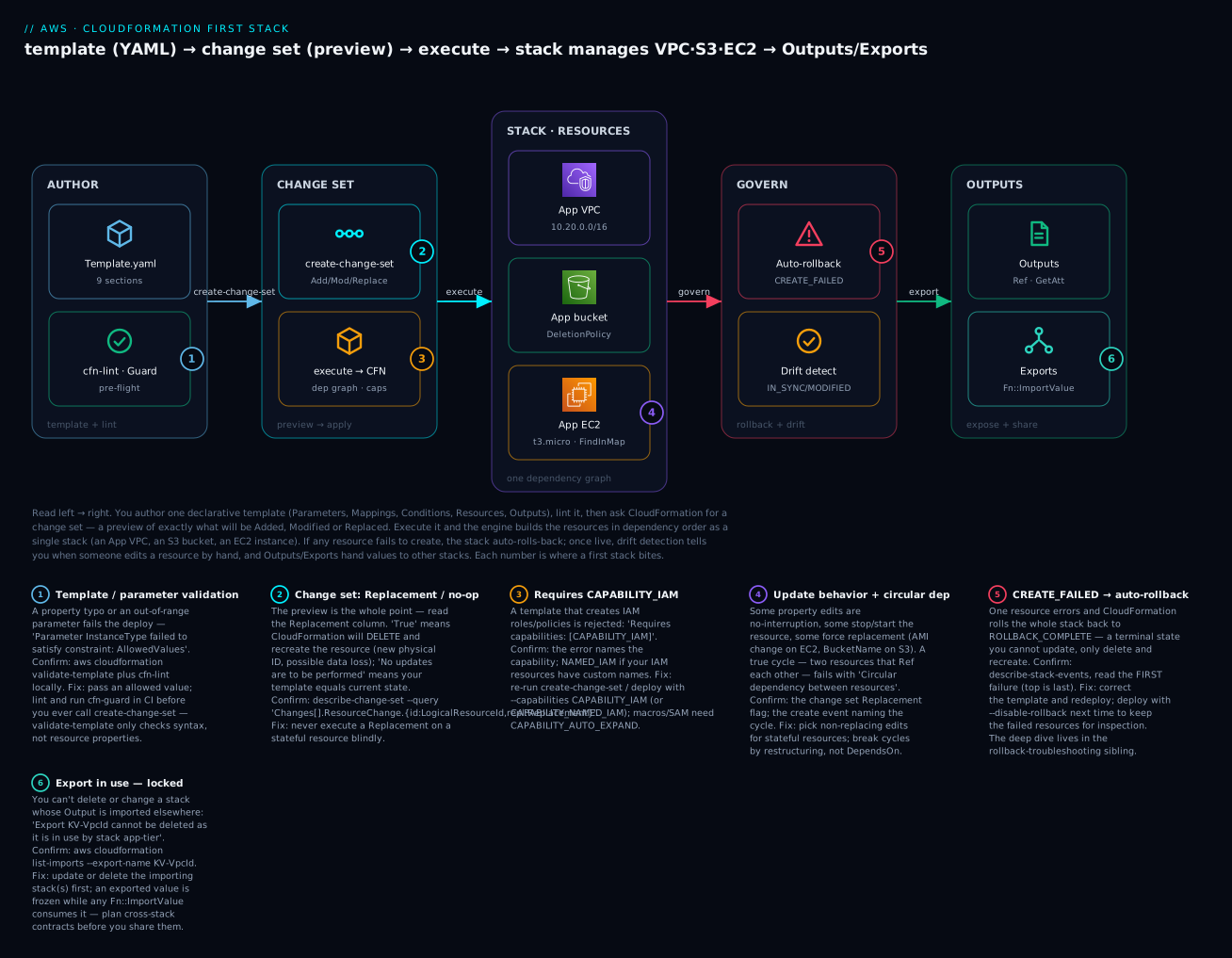
| Badge | Failure class | Lives at | Playbook row |
|---|---|---|---|
| 1 | Template / parameter validation | The lint + validate-template step |
rows 7, 15 |
| 2 | Change set: replacement / no-op | create-change-set preview |
rows 3, 8 |
| 3 | Requires capabilities: [CAPABILITY_IAM] |
The execute/deploy call | row 2 |
| 4 | Update behaviour / circular dependency | The resource graph | rows 4, 8 |
| 5 | CREATE_FAILED → auto-rollback |
The stack state machine | rows 1, 10 |
| 6 | Export in use — locked | Cross-stack outputs | rows 5, 6 |
Real-world scenario
Meadowlark Health, a health-tech startup in Bengaluru, ran its patient-portal infrastructure — a VPC, an ALB, an Auto Scaling group and an RDS database — entirely through the console. It worked until three things collided in one quarter, each a lesson from this article.
First, an auditor asked for reproducible environments. The compliance team needed staging to be provably identical to production, and nobody could prove it, because both were hand-built and had drifted apart over eighteen months. A platform engineer, Ananya, spent a week codifying the estate into CloudFormation templates — a network stack that exports its VPC and subnet ids, a data stack, and an app stack that imports them. Re-deploying the template into a fresh account produced a byte-for-byte identical environment, and the audit question became a git diff. The cross-stack exports gave her the loose coupling she wanted: the network stack rarely changes; the app stack ships daily.
Second, a careless edit nearly destroyed the database. An engineer, tidying naming conventions, changed DBInstanceIdentifier in the template and ran an update. Before executing, Ananya’s new rule — always create a change set first — surfaced the killer line: Replacement: True on the RDS instance. Executing it would have deleted the production database and created a new empty one. They cancelled, reverted the name change, and added DeletionPolicy: Snapshot and UpdateReplacePolicy: Snapshot to every stateful resource so a future slip would snapshot rather than vaporize. The change set preview, a habit that costs ten seconds, saved the company its patient data.
Third, someone edited a security group in the console during an incident and forgot to put it back. Two weeks later a template re-deploy behaved unexpectedly, and it took hours to realize the live SG no longer matched the template. Ananya wired a scheduled drift detection run into their pipeline; it now reports any MODIFIED resource within an hour, and the team either folds the change into the template or reverts it. The out-of-band edit that used to be invisible is now a dashboard row.
Ananya’s summary for the team wiki was the thesis of this article: “CloudFormation didn’t make us slower — it made us honest. The template is the truth, the change set is the safety check, the deletion policies are the seatbelt, and drift detection is the smoke alarm. We stopped clicking, and we stopped guessing.” Their environment-provisioning time dropped from a two-day manual checklist to a fifteen-minute deploy, and they have not had an unreviewed infrastructure change since.
Advantages and disadvantages
| Advantages | Disadvantages |
|---|---|
| Native to AWS — no extra tool, no state file to host | AWS-only (no multi-cloud) |
| Change sets preview every change before apply | YAML/JSON is verbose vs a real language (→ CDK) |
| Understands the dependency graph and rollback | ROLLBACK_COMPLETE after a failed create is terminal |
| Drift detection surfaces out-of-band edits | Drift is read-only and not all resources support it |
DeletionPolicy/UpdateReplacePolicy protect data |
Easy to forget the pairing and lose data on replace |
| StackSets deploy across accounts/Regions | Cross-stack exports are rigid once imported |
| Free (you pay only for resources) | Slower feedback loop than local tools for iteration |
| Deep service coverage + managed by AWS | New resource properties sometimes lag the API |
When each side matters: CloudFormation is the obvious default for an AWS-only estate where you want the vendor-native engine, no state file to secure, and preview-before-apply built in. The friction shows up at the edges — multi-cloud (reach for Terraform), authoring ergonomics at scale (reach for CDK, which emits CloudFormation), and the specific sharp states (ROLLBACK_COMPLETE, export locks) you now know to expect. None are blockers; they’re the specific things to remember, each mapped to a troubleshooting row below.
| Choose CloudFormation when… | Look wider when… |
|---|---|
| Your estate is AWS-only | You deploy across AWS + Azure/GCP (→ Terraform/Pulumi) |
| You want the AWS-native engine + no state hosting | You want loops/types/abstractions in a real language (→ CDK) |
| You need change-set previews and drift built in | Your team already runs a mature Terraform estate |
| You deploy org-wide with StackSets/Organizations | You need a provider AWS doesn’t model well |
Hands-on lab
You will build the diagram: author a template with a Parameter, a Mapping, Conditions, Outputs and three resources (a VPC, an S3 bucket and an EC2 instance), then deploy it through a change set, make an update (another change set), detect drift, and delete it. This lab uses ap-south-1 (Mumbai); pick one Region and stick to it.
⚠️ Cost note: Everything here is free-tier-friendly. The
t3.microinstance is free-tier-eligible (or a few paise/hour beyond it), the VPC/subnet/SG are free, and the S3 bucket stores nothing. CloudFormation itself is free. The teardown at the end removes all of it. If you deployEnvironmentName=prod, the mapping selects at3.medium(not free) — keep itdev.
What you’ll create
| Resource | Purpose | Cost at lab volume |
|---|---|---|
AppVpc (AWS::EC2::VPC) |
The network, 10.20.0.0/16 |
Free |
AppSubnet (AWS::EC2::Subnet) |
One subnet via !Select/!GetAZs |
Free |
AppSg (AWS::EC2::SecurityGroup) |
Egress-only SG for the lab | Free |
AppBucket (AWS::S3::Bucket) |
Globally-unique bucket via !Sub |
Free (empty) |
AppInstance (AWS::EC2::Instance) |
t3.micro sized by !FindInMap, AMI via SSM |
Free-tier eligible |
Step 1 — Author the template
Save this as kv-first-stack.yaml. It exercises every concept above: a String parameter with AllowedValues, an SSM-parameter type for the AMI, a Mapping + Fn::FindInMap, a Condition + Fn::If, Ref/Fn::GetAtt/Fn::Sub/Fn::Select/Fn::GetAZs/Fn::Base64, pseudo parameters, a DeletionPolicy, and Outputs with an Export.
AWSTemplateFormatVersion: "2010-09-09"

Description: >
  KloudVin first stack — a minimal VPC, an S3 bucket and an EC2 instance,
  parameterised by environment, sized from a Mapping, with cross-stack Outputs.

Metadata:
  AWS::CloudFormation::Interface:
    ParameterGroups:
      - Label: { default: "Environment" }
        Parameters: [EnvironmentName, LatestAmiId]

Parameters:
  EnvironmentName:
    Type: String
    Default: dev
    AllowedValues: [dev, staging, prod]
    Description: Drives instance sizing (via a Mapping) and S3 versioning (via a Condition).

  LatestAmiId:
    Type: AWS::SSM::Parameter::Value<AWS::EC2::Image::Id>
    Default: /aws/service/ami-amazon-linux-latest/al2023-ami-kernel-default-x86_64
    Description: Resolved from SSM Parameter Store at deploy time — always the latest AL2023 AMI.

Mappings:
  EnvConfig:
    dev:     { InstanceType: t3.micro }
    staging: { InstanceType: t3.small }
    prod:    { InstanceType: t3.medium }

Conditions:
  IsProd: !Equals [!Ref EnvironmentName, prod]

Resources:
  AppVpc:
    Type: AWS::EC2::VPC
    Properties:
      CidrBlock: 10.20.0.0/16
      EnableDnsSupport: true
      EnableDnsHostnames: true
      Tags:
        - Key: Name
          Value: !Sub "${EnvironmentName}-kv-vpc"

  AppSubnet:
    Type: AWS::EC2::Subnet
    Properties:
      VpcId: !Ref AppVpc                      # implicit dependency on AppVpc
      CidrBlock: 10.20.1.0/24
      AvailabilityZone: !Select [0, !GetAZs ""]   # first AZ in this Region
      Tags:
        - Key: Name
          Value: !Sub "${EnvironmentName}-kv-subnet-a"

  AppSg:
    Type: AWS::EC2::SecurityGroup
    Properties:
      GroupDescription: KloudVin lab SG — egress only
      VpcId: !Ref AppVpc
      SecurityGroupEgress:
        - IpProtocol: "-1"
          CidrIp: 0.0.0.0/0

  AppBucket:
    Type: AWS::S3::Bucket
    DeletionPolicy: Delete            # lab: delete on teardown (bucket stays empty)
    UpdateReplacePolicy: Retain       # but keep the old one if an update ever replaces it
    Properties:
      BucketName: !Sub "${EnvironmentName}-kv-cfn-${AWS::AccountId}-${AWS::Region}"
      PublicAccessBlockConfiguration:
        BlockPublicAcls: true
        BlockPublicPolicy: true
        IgnorePublicAcls: true
        RestrictPublicBuckets: true
      VersioningConfiguration:
        Status: !If [IsProd, Enabled, Suspended]   # versioning only in prod

  AppInstance:
    Type: AWS::EC2::Instance
    Properties:
      ImageId: !Ref LatestAmiId
      InstanceType: !FindInMap [EnvConfig, !Ref EnvironmentName, InstanceType]
      SubnetId: !Ref AppSubnet
      SecurityGroupIds: [!Ref AppSg]
      UserData:
        Fn::Base64: !Sub |          # full-form Fn::Base64 wrapping short-form !Sub
          #!/bin/bash
          echo "hello from ${EnvironmentName} in ${AWS::Region}" > /tmp/kv.txt
      Tags:
        - Key: Name
          Value: !Sub "${EnvironmentName}-kv-app"

Outputs:
  VpcId:
    Description: The VPC id, exported for app-tier stacks to import.
    Value: !Ref AppVpc
    Export:
      Name: !Sub "${AWS::StackName}-VpcId"
  BucketName:
    Description: The globally-unique bucket name.
    Value: !Ref AppBucket
  BucketArn:
    Description: The bucket ARN (via GetAtt).
    Value: !GetAtt AppBucket.Arn
  InstanceId:
    Value: !Ref AppInstance
  InstancePrivateIp:
    Description: The instance private IP (via GetAtt).
    Value: !GetAtt AppInstance.PrivateIp
Step 2 — Validate and lint
Catch problems before AWS does:
aws cloudformation validate-template \
  --template-body file://kv-first-stack.yaml --region ap-south-1
# Returns the Parameters and Description if the syntax is valid.

cfn-lint kv-first-stack.yaml   # deep check: properties, functions, best practices
Expected: validate-template echoes the parameters; cfn-lint prints nothing (clean). If cfn-lint flags a property, fix it now — this is the cheapest place to catch a typo.
Step 3 — Create the stack via a change set (preview, then execute)
Rather than create-stack, use a change set so you preview the create. For a new stack, use --change-set-type CREATE:
aws cloudformation create-change-set \
  --stack-name kv-first-stack \
  --change-set-name cs-create-1 \
  --change-set-type CREATE \
  --template-body file://kv-first-stack.yaml \
  --parameters ParameterKey=EnvironmentName,ParameterValue=dev \
  --region ap-south-1

aws cloudformation wait change-set-create-complete \
  --stack-name kv-first-stack --change-set-name cs-create-1 --region ap-south-1
Preview exactly what will be created (read this before executing):
aws cloudformation describe-change-set \
  --stack-name kv-first-stack --change-set-name cs-create-1 --region ap-south-1 \
  --query 'Changes[].ResourceChange.{Action:Action,Type:ResourceType,Id:LogicalResourceId,Replacement:Replacement}' \
  --output table
Expected: five rows, all Action=Add, Replacement=None (nothing to replace on a create). Now execute and wait:
aws cloudformation execute-change-set \
  --stack-name kv-first-stack --change-set-name cs-create-1 --region ap-south-1

aws cloudformation wait stack-create-complete \
  --stack-name kv-first-stack --region ap-south-1
If your template had created IAM resources, both the change set and execute would need
--capabilities CAPABILITY_IAM. This template creates none, so no capability is required — but you’ll see that error in the playbook.
Step 4 — Read the Outputs
aws cloudformation describe-stacks --stack-name kv-first-stack --region ap-south-1 \
  --query 'Stacks[0].Outputs' --output table
Expected: VpcId (vpc-…), BucketName (dev-kv-cfn-<acct>-ap-south-1), BucketArn, InstanceId (i-…), InstancePrivateIp (10.20.1.x). Confirm the export landed:
aws cloudformation list-exports --region ap-south-1 \
  --query "Exports[?Name=='kv-first-stack-VpcId']"
Shortcut for later:
aws cloudformation deploy --template-file kv-first-stack.yaml --stack-name kv-first-stack --parameter-overrides EnvironmentName=dev --region ap-south-1does create-or-update via a change set in one command (add--capabilitiesif the template makes IAM). The explicit change-set flow above is whatdeploydoes under the hood.
Step 5 — Make an update via a change set
Add default encryption to the bucket — a no-interruption modify. Insert this under AppBucket’s Properties:
      BucketEncryption:
        ServerSideEncryptionConfiguration:
          - ServerSideEncryptionByDefault:
              SSEAlgorithm: AES256
Create an UPDATE change set (keep the parameter as-is with UsePreviousValue):
aws cloudformation create-change-set \
  --stack-name kv-first-stack --change-set-name cs-update-1 --change-set-type UPDATE \
  --template-body file://kv-first-stack.yaml \
  --parameters ParameterKey=EnvironmentName,UsePreviousValue=true \
  --region ap-south-1

aws cloudformation wait change-set-create-complete \
  --stack-name kv-first-stack --change-set-name cs-update-1 --region ap-south-1

aws cloudformation describe-change-set \
  --stack-name kv-first-stack --change-set-name cs-update-1 --region ap-south-1 \
  --query 'Changes[].ResourceChange.{Action:Action,Id:LogicalResourceId,Replacement:Replacement,Scope:Scope}' \
  --output table
Expected: one row — Action=Modify, Id=AppBucket, Replacement=False, Scope=["Properties"]. That Replacement=False is your green light. Execute:
aws cloudformation execute-change-set \
  --stack-name kv-first-stack --change-set-name cs-update-1 --region ap-south-1
aws cloudformation wait stack-update-complete --stack-name kv-first-stack --region ap-south-1
Step 6 — Detect drift after an out-of-band change
Simulate a console edit by tagging the bucket outside CloudFormation, then detect the drift:
BUCKET=$(aws cloudformation describe-stacks --stack-name kv-first-stack --region ap-south-1 \
  --query "Stacks[0].Outputs[?OutputKey=='BucketName'].OutputValue" --output text)

aws s3api put-bucket-tagging --bucket "$BUCKET" \
  --tagging 'TagSet=[{Key=out-of-band,Value=yes}]' --region ap-south-1

DRIFT_ID=$(aws cloudformation detect-stack-drift --stack-name kv-first-stack \
  --region ap-south-1 --query StackDriftDetectionId --output text)

aws cloudformation describe-stack-drift-detection-status \
  --stack-drift-detection-id "$DRIFT_ID" --region ap-south-1 \
  --query '{Status:DetectionStatus,Drift:StackDriftStatus}'
# { "Status": "DETECTION_COMPLETE", "Drift": "DRIFTED" }

aws cloudformation describe-stack-resource-drifts --stack-name kv-first-stack \
  --stack-resource-drift-status-filters MODIFIED --region ap-south-1 \
  --query 'StackResourceDrifts[].{Res:LogicalResourceId,Status:StackResourceDriftStatus}' \
  --output table
Expected: AppBucket shows MODIFIED. To reconcile, either add the tag to the template (accept the change) or re-run the update (revert it). Drift detection only reports — it never changes resources.
Step 7 — Tear down
Delete the whole stack in one command; CloudFormation removes the resources in reverse dependency order:
aws cloudformation delete-stack --stack-name kv-first-stack --region ap-south-1
aws cloudformation wait stack-delete-complete --stack-name kv-first-stack --region ap-south-1
# Verify it's gone (should error 'does not exist'):
aws cloudformation describe-stacks --stack-name kv-first-stack --region ap-south-1
| Teardown step | Command | Why it matters |
|---|---|---|
| Delete the stack | delete-stack + wait stack-delete-complete |
Removes VPC, subnet, SG, bucket, instance as a unit |
| Empty the bucket first (if you wrote objects) | aws s3 rm s3://$BUCKET --recursive |
DeletionPolicy: Delete fails on a non-empty bucket |
| Confirm no exports remain | aws cloudformation list-exports |
An in-use export would have blocked delete |
| Check the console | CloudFormation → Stacks | Stack should be absent, not DELETE_FAILED |
Because the bucket stayed empty and its DeletionPolicy is Delete, the stack deletes cleanly with no orphans — the whole point of managing infrastructure as a stack.
Common mistakes & troubleshooting
This is the section you’ll return to. Match your symptom, run the confirm command, apply the fix.
| # | Symptom | Root cause | Confirm (exact command / console path) | Fix |
|---|---|---|---|---|
| 1 | Stack in CREATE_FAILED then ROLLBACK_COMPLETE; won’t update |
A resource failed to create; the stack rolled back to a terminal state | aws cloudformation describe-stack-events --stack-name S → read the first failure (list is newest-first) |
Fix the template; delete-stack and recreate (ROLLBACK_COMPLETE can’t be updated). Next time deploy --on-failure DO_NOTHING to keep resources for inspection — see the rollback sibling |
| 2 | Requires capabilities: [CAPABILITY_IAM] |
Template creates IAM roles/policies | The error names the capability; NAMED_IAM if IAM resources have custom names |
Re-run create/change-set/deploy with --capabilities CAPABILITY_IAM (or CAPABILITY_NAMED_IAM) |
| 3 | No updates are to be performed. |
The submitted template equals the current stack state | describe-change-set shows zero changes; you edited the wrong file/param |
Make an actual change; or the diff is live drift (CFN compares template↔template, not template↔reality) |
| 4 | Circular dependency between resources |
Two resources reference each other | The create event names the cycle; read your Ref/GetAtt edges |
Break the cycle by restructuring (e.g. move an SG rule into a separate AWS::EC2::SecurityGroupIngress); DependsOn won’t fix a true cycle |
| 5 | Export X cannot be deleted as it is in use by stack Y |
You’re deleting/changing a stack whose export is imported | aws cloudformation list-imports --export-name X |
Update/delete the importing stack(s) first, then the exporter |
| 6 | Update fails: can’t modify/remove an output | The output is exported and imported elsewhere | list-imports --export-name X shows consumers |
Stop the importers first; an in-use export is frozen |
| 7 | Parameter 'InstanceType' failed to satisfy constraint |
Value violates AllowedValues/AllowedPattern/bounds |
The error names the constraint; check the Parameters block |
Pass an allowed value; widen the constraint if legitimately too narrow |
| 8 | Update replaced a resource you didn’t expect (new id / data gone) | You executed a change with Replacement: True |
Before executing: describe-change-set --query 'Changes[].ResourceChange.Replacement' |
Read the change set first; pair stateful resources with Snapshot/Retain policies |
| 9 | Nested stack fails; parent shows CREATE_FAILED |
A child stack failed to create | Parent event points to the nested stack ARN → open that stack’s events | Fix the child template; deploy --disable-rollback to keep the child for inspection |
| 10 | UPDATE_ROLLBACK_FAILED |
The rollback itself couldn’t complete (a resource wouldn’t revert) | describe-stack-events names the stuck resource |
continue-update-rollback; if needed --resources-to-skip <LogicalId> to skip the stuck one |
| 11 | DELETE_FAILED on delete-stack |
A resource can’t be deleted (non-empty bucket, external dependency, retained) | Events name the resource + reason (bucket not empty) |
Empty the bucket / clear the dependency; retry, or delete-stack --retain-resources <Id> |
| 12 | AccessDenied mid-create on a specific resource |
Your identity (or the service role) lacks that resource’s permission | CloudTrail / the event names the action denied | Grant the underlying permission (this is IAM, not a CFN bug); or pass a scoped --role-arn |
| 13 | Drift shows MODIFIED after a console edit |
Someone changed the resource out-of-band | detect-stack-drift → describe-stack-resource-drifts |
Reconcile: update the template to match, or re-deploy to revert |
| 14 | Template edit does nothing to UserData/AMI as expected |
Those changes force replacement, not in-place update | describe-change-set shows Replacement: True on the instance |
Expected behaviour; accept the replacement or use a launch template/versioning strategy |
| 15 | Template body ... exceeds maximum |
Inline template over 51,200 bytes | The submit error names the size limit | Upload to S3 and use --template-url; or split into nested stacks |
| 16 | !Base64 !Sub "…" / short-form nesting parse error |
Two short-form intrinsic functions on one YAML node | The YAML parser or cfn-lint flags it |
Use the full form for the outer function: Fn::Base64: !Sub "…" |
The error / status reference
The strings CloudFormation emits, decoded:
| Message / status | Where you see it | Meaning | Fix |
|---|---|---|---|
ROLLBACK_COMPLETE |
Stack status | Failed create, rolled back — terminal | Delete and recreate |
UPDATE_ROLLBACK_COMPLETE |
Stack status | Failed update, reverted (recoverable) | Fix template; retry |
UPDATE_ROLLBACK_FAILED |
Stack status | The update rollback itself failed | continue-update-rollback (± skip) |
REVIEW_IN_PROGRESS |
Stack status | A CREATE-type change set exists, unexecuted |
Execute or delete the change set |
Requires capabilities: [CAPABILITY_IAM] |
Create/update | IAM resources present | Add --capabilities |
No updates are to be performed. |
Update | Template equals current state | Change something real |
Circular dependency between resources |
Create | Resources reference each other | Restructure to break the cycle |
Export X cannot be deleted as it is in use |
Delete/update | An import consumes the export | Remove importers first |
... already exists |
Create | A physical name (bucket, role) is taken | Use a unique/generated name |
failed to satisfy constraint |
Validation | Parameter violates its constraint | Pass an allowed value |
Resource is not in a state that can be updated |
Update | Resource busy / prior op incomplete | Wait; check events |
The three nastiest, explained
ROLLBACK_COMPLETE after a failed create (rows 1, 10) confuses everyone once. A brand-new stack whose first create fails does not sit at CREATE_FAILED waiting for a fix — it rolls back and lands in ROLLBACK_COMPLETE, and every update-stack from there returns an error. The state is terminal: you must delete-stack and create again. The right habit is to read describe-stack-events (it’s newest-first, so scroll to the bottom for the first failure — the root cause), fix the template, and redeploy. When you’re debugging a create that keeps failing, deploy with --on-failure DO_NOTHING (or --disable-rollback) so the failed resources stay and you can inspect the real error instead of watching them vanish. The full anatomy is the sibling AWS CloudFormation: Stack Failed & Rollback Troubleshooting.
A surprise Replacement: True deletes data (row 8). CloudFormation will happily execute a change that recreates a resource — a new physical ID, the old one deleted — if you tell it to. Change the BucketName, the RDS DBInstanceIdentifier, a subnet’s AvailabilityZone, or an instance’s ImageId, and the change set will show Replacement: True. If you execute it on a stateful resource without a Snapshot/Retain policy, the data is gone. The fix is a discipline, not a setting: always describe-change-set and read the Replacement column before execute-change-set, and set DeletionPolicy and UpdateReplacePolicy to Snapshot/Retain on every database, volume and stateful store.
Cross-stack exports lock you in (rows 5, 6). The first time you Export a value and another stack Fn::ImportValues it, you’ve created a contract you can’t unilaterally change: you cannot delete the exporting stack, and you cannot even modify or remove that output, while any importer consumes it. aws cloudformation list-imports --export-name X tells you who’s holding the lock. Plan cross-stack exports as deliberate, stable interfaces (a VPC id that rarely changes), not as a convenient way to pass every value around — and when you must change one, update or remove the importers first, in order.
Best practices
- Always create a change set before an update, and read the
Replacementcolumn. Ten seconds of preview prevents the single worst CloudFormation mistake — an unreviewed replacement that deletes a stateful resource. - Set
DeletionPolicyandUpdateReplacePolicyon everything stateful. Databases, EBS volumes and buckets with data getSnapshotorRetainon both — one without the other still loses data on a replacing update. - Version templates in git and deploy from CI. The template is the source of truth; infrastructure changes get pull-requested, reviewed and linted like application code.
- Lint with
cfn-lintand enforce withcfn-guard.validate-templateonly checks syntax;cfn-lintcatches bad properties and function usage, andcfn-guardenforces policy (encryption, no public buckets) before deploy. - Parameterise with constraints, not free text.
AllowedValues,AllowedPatternand typed parameters fail bad input fast and give the console dropdowns instead of fat-finger boxes. - Resolve AMIs (and shared config) from SSM parameters, not hard-coded ids.
AWS::SSM::Parameter::Value<AWS::EC2::Image::Id>always gets the latest, and the template stays Region-portable. - Prefer
Fn::SuboverFn::Joinfor readable strings, and use pseudo parameters (AWS::AccountId,AWS::Region) for portable names and ARNs. - Use nested stacks for reuse, cross-stack exports for stable shared infra. Don’t export values that change often — an in-use export is frozen.
- Enable termination protection and a stack policy on production stacks. Block accidental deletes and protect critical resources from update/replacement.
- Deploy with a scoped service role (
--role-arn), not your admin identity. CloudFormation then acts with least privilege, and a template can’t do more than the role allows. - Run drift detection on a schedule. Out-of-band edits are invisible until you look; a scheduled
detect-stack-driftturns them into a dashboard row you can reconcile. - Keep stacks appropriately sized. One giant stack couples unrelated lifecycles and risks the 500-resource limit; split by lifecycle (network / data / app) and compose.
Security notes
CloudFormation’s security surface is about what the template can do and who can run it:
| Control | What to do | Why |
|---|---|---|
| Least-privilege deploy role | Give CloudFormation a scoped --role-arn, not your admin identity |
A template can only create what the role allows — blast-radius control |
| Capabilities as a gate | Require CAPABILITY_IAM/NAMED_IAM reviews in CI |
IAM-creating templates get extra scrutiny before deploy |
NoEcho for sensitive parameters |
Mask secrets in console/describe-stacks output |
Prevents casual exposure (but is not encryption) |
| Reference secrets, don’t pass them | Pull from SSM/Secrets Manager by ARN via dynamic references | Secrets never sit in the template or parameter history |
| Stack policies on prod | Deny update/replace on critical resources | Stops an errant edit from replacing a database |
| Termination protection | Enable on prod stacks | Blocks accidental delete-stack |
DeletionPolicy: Retain/Snapshot |
On all stateful resources | Data survives teardown and replacement |
| Encrypt stateful resources in the template | Set encryption properties (S3 SSE, RDS StorageEncrypted) |
Encryption is codified, not a manual afterthought |
| CloudTrail on CloudFormation + resources | Audit CreateStack, ExecuteChangeSet, SetStackPolicy |
Full record of who changed infrastructure |
Two things people get wrong first: passing a database password as a plain String parameter (it lands in the parameter history and resource properties — use a dynamic reference to Secrets Manager instead, {{resolve:secretsmanager:…}}), and deploying templates with their personal admin credentials (so the template can do anything they can — instead give CloudFormation a scoped service role and let least privilege bound what any template can create). The permission model behind all of this is the subject of IAM Policy Evaluation & Access-Denied Troubleshooting.
Cost & sizing
CloudFormation the service is free — there is no charge for stacks, change sets, drift detection or StackSets on AWS resource types. You pay only for the resources a stack creates, plus a small charge if you register and use third-party (non-AWS) resource types via the registry (billed per handler-second).
| Cost driver | How it’s charged | Lever to pull |
|---|---|---|
| The resources | Normal per-resource pricing (EC2, RDS, NAT…) | Right-size in the template; delete stacks you don’t need |
| CloudFormation itself | Free for AWS resource types | — |
| Third-party resource types | Per handler operation-second (registry extensions) | Only register extensions you use |
| Drift/StackSets | Free (you pay for the resources deployed) | — |
| Leftover retained resources | You keep paying for Retained resources after delete |
Track and clean up retained orphans |
| Free tier / figure | Amount | Note |
|---|---|---|
| CloudFormation operations | Free | Stacks, change sets, drift, StackSets |
This lab’s t3.micro |
Free-tier eligible (750 hrs/mo, 12 mo) | ~₹0 within free tier |
| This lab’s VPC/subnet/SG | Free | No hourly charge |
| This lab’s empty S3 bucket | Free | Storage billed per GB — it’s empty |
| Third-party extensions | ~$0.0009 per handler-second | Only if you use registry extensions |
The sizing lesson is indirect but real: because CloudFormation makes teardown a single command, the biggest cost lever it gives you is no orphans — a stack deletes everything it made (unless you retained it), so you stop paying for the forgotten NAT Gateway and unattached EIP that click-ops leaves behind. The one cost trap unique to CloudFormation is DeletionPolicy: Retain: those resources survive the stack delete and keep billing, so track what you retain and clean it up deliberately.
Interview & exam questions
1. What is the difference between a template and a stack? A template is the declarative YAML/JSON file describing desired state; a stack is a deployed instance of that template — the live resources CloudFormation manages as one unit. One template can produce many stacks (dev, staging, prod). (CLF-C02, SAA-C03)
2. Why use a change set instead of updating directly? A change set is a preview — CloudFormation computes exactly which resources will be Added, Modified, Removed or Replaced (and whether a Modify needs a replacement) before you apply. It’s the safety check that prevents an unreviewed replacement from destroying a stateful resource. (DVA-C02, SAA-C03)
3. Ref vs Fn::GetAtt? Ref returns a resource’s default value (usually its physical ID — but an ARN for SNS, a URL for SQS, a name for S3/IAM); Fn::GetAtt returns a named attribute (!GetAtt Bucket.Arn, !GetAtt Instance.PrivateIp). Use GetAtt when you need a specific attribute rather than the default. (DVA-C02)
4. What does DeletionPolicy do, and how does it differ from UpdateReplacePolicy? DeletionPolicy controls a resource’s fate when the stack is deleted (or the resource removed): Delete/Retain/Snapshot. UpdateReplacePolicy controls the old resource when an update replaces it. Set both to Retain/Snapshot on stateful resources — one alone still loses data on a replacing update. (SAA-C03, DVA-C02)
5. A stack is in ROLLBACK_COMPLETE. What now? It’s a terminal state after a failed first create — you cannot update it. Read describe-stack-events for the first failure, fix the template, then delete and recreate the stack. (A failed update lands in the recoverable UPDATE_ROLLBACK_COMPLETE instead.) (DVA-C02)
6. When do you need CAPABILITY_IAM vs CAPABILITY_NAMED_IAM? CAPABILITY_IAM when a template creates IAM resources with generated names; CAPABILITY_NAMED_IAM when those IAM resources have custom names (stricter, because custom names can collide). Macros/Transforms need CAPABILITY_AUTO_EXPAND. (SAA-C03, SCS)
7. Nested stacks vs cross-stack exports — when each? Nested stacks (AWS::CloudFormation::Stack) for tightly-coupled reuse — a module instantiated from a parent, updated as a unit, read via !GetAtt Child.Outputs.X. Cross-stack exports (Export/Fn::ImportValue) for loosely-coupled, independently-owned stacks sharing a stable value; but an in-use export is frozen. (SAA-C03)
8. How do you always get the latest AMI without hard-coding it? Use an SSM-parameter type parameter, AWS::SSM::Parameter::Value<AWS::EC2::Image::Id>, defaulted to a public SSM path (e.g. /aws/service/ami-amazon-linux-latest/al2023-...). CloudFormation resolves the current AMI id at deploy time, keeping the template Region-portable. (DVA-C02, SAA-C03)
9. What is drift detection and what are its limits? It compares a stack’s live resource properties against the template’s expected state and reports each resource as IN_SYNC/MODIFIED/DELETED/NOT_CHECKED. It’s read-only (reports, doesn’t fix) and not all resource types support it. Reconcile by updating the template or re-deploying. (SOA-C02)
10. What are StackSets and the two permission models? StackSets deploy one template across many accounts/Regions as stack instances. Self-managed uses admin + execution roles you create for specific account ids; service-managed integrates with AWS Organizations, targets OUs, and auto-deploys to new accounts in the OU. (SAA-C03, SAP)
11. How does CloudFormation decide resource creation order? From references: when resource B uses Ref/Fn::GetAtt on A, CloudFormation infers an implicit dependency (A first). Add explicit DependsOn only where there’s no reference. A circular dependency (A↔B) fails — you break it by restructuring, not with DependsOn. (DVA-C02)
12. How do you safely handle a template change that forces replacement of a database? Recognise it in the change set (Replacement: True), ensure DeletionPolicy and UpdateReplacePolicy are Snapshot, and plan the migration — or avoid the replacing change (many properties are immutable, so changing them recreates the resource). Never execute a stateful replacement blind. (SAA-C03, DVA-C02)
Quick check
- You edit a template and run an update, and the change set shows
Replacement: Trueon your RDS instance. What willexecute-change-setdo, and what protects you? - Your first
create-stackfails and the stack is nowROLLBACK_COMPLETE. Why doesupdate-stackrefuse, and what’s the fix? - Which capability does a template that creates an IAM role with a custom name require, and why the stricter one?
- You want the same template to use
t3.microin dev andt3.mediumin prod without editing it per environment. Name two mechanisms. - You try to delete a network stack and get
Export ... cannot be deleted as it is in use. What’s happening and how do you resolve it?
Answers
- It will delete the old RDS instance and create a new one (new physical ID) — data loss unless protected. Your protection is reading the change set before executing, plus
DeletionPolicy: SnapshotandUpdateReplacePolicy: Snapshotso the old instance is snapshotted rather than destroyed. ROLLBACK_COMPLETEis a terminal state for a failed first create — CloudFormation won’t update it. Readdescribe-stack-eventsfor the first failure, fix the template, then delete the stack and create it again.CAPABILITY_NAMED_IAM. A custom-named IAM resource can collide with an existing one across stacks/accounts, so CloudFormation demands the louder acknowledgement (generated names only needCAPABILITY_IAM).- A Mapping (
EnvConfig→ env →InstanceType, retrieved withFn::FindInMap) driven by anEnvironmentNameParameter; or Conditions withFn::Ifselecting the type. (The lab uses the mapping.) - Another stack imports that stack’s exported value via
Fn::ImportValue, which freezes it. Runaws cloudformation list-imports --export-name <name>to find the consumers, update or delete them first, then delete the exporter.
Glossary
| Term | Definition |
|---|---|
| CloudFormation | AWS’s native, declarative infrastructure-as-code service; free, you pay only for resources. |
| Template | A YAML/JSON document describing the desired end state (up to 10 top-level sections; only Resources required). |
| Stack | A deployed instance of a template — the resources CloudFormation manages as one lifecycle unit. |
| Change set | A previewed diff of what an update will Add/Modify/Remove/Replace, executed only after you review it. |
| Logical ID / Physical ID | The resource’s name in the template vs the real AWS identifier it maps to. |
| Parameter | A typed, optionally-constrained input supplied at deploy time; SSM types resolve live values. |
| Mapping | A static two-level lookup table, read with Fn::FindInMap. |
| Condition | A named boolean (from condition functions) that gates resources/properties/outputs. |
| Intrinsic function | Deploy-time logic — Ref, Fn::GetAtt, Fn::Sub, Fn::If, Fn::ImportValue, etc. |
| Pseudo parameter | A built-in value like AWS::Region, AWS::AccountId, AWS::StackName. |
| Output / Export | A value a stack returns; an Export can be Fn::ImportValued by another stack (and is then frozen). |
| DeletionPolicy | Resource attribute controlling its fate on stack/resource delete (Delete/Retain/Snapshot). |
| UpdateReplacePolicy | Resource attribute controlling the old resource when an update replaces it. |
| Replacement | A change-set outcome where CloudFormation recreates a resource (new physical ID, possible data loss). |
| Drift | Divergence of live resource state from the template, found by drift detection (read-only). |
| Nested stack | A stack created as a resource (AWS::CloudFormation::Stack) inside a parent, for reuse/modularity. |
| StackSet | A construct that deploys one template across many accounts and Regions as stack instances. |
| Capability | An explicit acknowledgement (CAPABILITY_IAM/NAMED_IAM/AUTO_EXPAND) required for IAM/macro templates. |
Next steps
- Learn to debug the failures deeply. When a stack rolls back, work the full anatomy in AWS CloudFormation: Stack Failed & Rollback Troubleshooting —
--disable-rollback, reading events, and recovering stuck states. - Author templates with real code. Trade YAML for loops, types and abstractions in AWS CDK with TypeScript: Infrastructure Hands-On, which synthesises the CloudFormation you just read.
- Build serverless apps the CloudFormation way. Use the serverless macro in AWS SAM: Serverless Application Model Hands-On — a
Transformthat expands into a full template. - Compose a real system. Apply nested stacks and cross-stack exports to a layered app in AWS Three-Tier Web Application Architecture.
- Scale to many accounts. Combine StackSets with AWS Organizations & SCPs: Multi-Account Guardrails and AWS Control Tower Landing Zone & Account Factory to deploy baselines org-wide.