Quick take: a landing zone is a pre-configured, secure, multi-account AWS environment that new workloads land into without anyone re-deciding logging, identity, or guardrails. AWS Control Tower is the managed service that stands one up in an afternoon and keeps it true for years — provided you understand the four systems underneath the wizard: the account model, the baseline, the guardrail engine, and the account-vending lifecycle.
You have been handed a growing AWS estate — five accounts today, forty by next year — and the mandate is uncomfortably broad: “make it governed.” Left alone, every team opens its own account, wires its own CloudTrail (or forgets to), invents its own admin role, and turns on services in whatever region a tutorial used. Six months later a security review asks a simple question — “prove no S3 bucket in any account is public, and show me one immutable copy of every API call” — and the honest answer is a two-week archaeology project. That gap between “we have accounts” and “we have a governed foundation” is exactly what a landing zone closes.
This article is the build-and-operate deep dive. Its sibling, AWS Control Tower Guardrails: Building a Secure Multi-Account Foundation, goes deep on the guardrail engine — how SCPs, Config rules and Hooks evaluate. Here we go deep on the lifecycle: what Control Tower actually automates when you press Set up landing zone, the three shared accounts and OU tree it materializes, the baseline of org CloudTrail + centralized logging + Config + IAM Identity Center it lays down, and then — the part that dominates day-two — Account Factory, Account Factory for Terraform (AFT), the newer Account Factory customization, Customizations for Control Tower (CfCT), enrolling existing accounts, drift detection and repair, and landing-zone version upgrades. Every moving part comes with the exact aws CLI or Terraform to inspect and change it, and a troubleshooting playbook for when setup fails, an account gets stuck provisioning, or a manual change trips drift at 9am.
By the end you will treat the landing zone not as a black box you clicked once, but as a machine you can read, extend, repair and version. When setup fails on a pre-existing CloudTrail, when an account sits in Under change for an hour, when Config flags 300 resources overnight, or when someone asks “can we still add region eu-central-1 two years in?”, you will know exactly which subsystem is in play, where its state lives, and how to move it without breaking the next vend.
What problem this solves
Multi-account AWS is not optional at scale — it is the primary blast-radius and billing boundary. But doing multi-account by hand means re-solving the same five problems for every account, and getting them subtly inconsistent:
- Centralized, tamper-proof audit. Every account’s CloudTrail must land in one place a workload team cannot delete. Done per-account by hand, one forgotten trail is one blind account.
- Config-based compliance. You want continuous evidence (“is anything public? unencrypted? open to 0.0.0.0/0?”) aggregated across the whole org, not 40 separate dashboards.
- Preventive guardrails. Some things should be impossible, not merely reported — nobody should be able to stop the org CloudTrail or delete the log bucket, in any account, ever.
- Consistent human access. One identity source, one set of permission sets, mapped to accounts — not 40 copies of an
AdminIAM user with a shared password. - Repeatable account creation. A new team should get a fully-baselined, logged, guardrailed account from a request form in twenty minutes, not a two-day ticket.
Control Tower packages all five into one landing zone and — crucially — keeps enforcing them as you add accounts. Who hits the pain without it? Anyone past ~5 accounts; anyone in a regulated industry that must prove controls; any platform team tired of being the manual account-creation bottleneck. The counter-question is whether the managed opinionation costs you more flexibility than it saves — we settle Control Tower vs raw Organizations vs Landing Zone Accelerator at the end.
Learning objectives
By the end of this article you can:
- Explain precisely what a landing zone is and enumerate what Control Tower automates versus what remains your responsibility.
- Describe the three shared accounts (management, Log Archive, Audit) and the OU structure, and inspect them from the CLI.
- Enumerate the baseline — organization CloudTrail, centralized Config, the Log Archive buckets, IAM Identity Center — and the baselines API that applies it.
- Classify every guardrail as preventive (SCP), detective (Config), or proactive (CloudFormation Hook), and by guidance as mandatory / strongly recommended / elective.
- Vend a compliant account four ways — Console Account Factory, the provisioning API, AFT, and CfCT — and choose between them.
- Enroll an existing account, detect and repair drift, and run a landing-zone version upgrade as a safe runbook.
- Decide Control Tower vs raw Organizations vs Landing Zone Accelerator for a given org.
Prerequisites & where this fits
This is an Advanced / Governance topic. You should already be comfortable with:
| You should know | Why it matters here | Refresher |
|---|---|---|
| AWS Organizations, OUs, consolidated billing | Control Tower is a management layer on top of Organizations | AWS Organizations & IAM: Multi-Account Foundations |
| Service Control Policies (SCPs) | Preventive guardrails are SCPs; custom SCPs coexist with them | AWS Organizations SCPs: Multi-Account Guardrails |
| IAM Identity Center, permission sets | Human access to every vended account flows through it | AWS IAM Identity Center: SSO & Permission Sets |
| The guardrail engine internals | How each control type evaluates and denies | Control Tower Guardrails foundation |
| CloudTrail & AWS Config basics | The baseline is built from an org trail + org-wide Config | (described in prose below) |
Terraform aws provider |
AFT and control resources are managed as code | — |
Where it fits: a landing zone is layer zero of an AWS platform. Networking (Transit Gateway, shared VPCs), a CI/CD platform, observability and FinOps all sit inside the accounts Control Tower vends. Get this layer wrong and every layer above inherits the mistake in 40 places.
Core concepts
Control Tower is not one service; it is an orchestrator that wires together AWS Organizations, CloudTrail, AWS Config, IAM Identity Center, Service Catalog, CloudFormation StackSets, S3, KMS and SNS into a coherent, versioned whole. Learn the vocabulary first — every later section leans on these terms.
The vocabulary in one table
| Term | What it is | Where it lives | Inspect with |
|---|---|---|---|
| Landing zone | The well-architected, multi-account baseline Control Tower builds and versions | The management account, spanning the org | aws controltower get-landing-zone |
| Home region | The region where Control Tower’s control plane and orchestration run; permanent once set | Chosen at setup | get-landing-zone → manifest.governedRegions / console |
| Governed regions | Regions where Config recorders + guardrails are deployed | Landing-zone manifest | get-landing-zone |
| Management account | The org root/payer account where Control Tower is installed | Top of the org, in no OU | aws organizations describe-organization |
| Shared accounts | Log Archive + Audit, created by Control Tower | The Security OU | aws organizations list-accounts-for-parent |
| Organizational Unit (OU) | A folder of accounts that guardrails attach to and inherit down | Organizations | aws organizations list-organizational-units-for-parent |
| Registered / governed OU | An OU Control Tower manages (baseline + controls applied) | Organizations + Control Tower | aws controltower list-enabled-baselines |
| Guardrail (control) | A governance rule: preventive, detective, or proactive | Attached to an OU | aws controltower list-enabled-controls |
| Baseline | The bundle of resources Control Tower applies to an account/OU | Managed by Control Tower | aws controltower list-baselines |
| Account Factory | The self-service pipeline that vends and enrolls accounts | A Service Catalog product | aws servicecatalog search-products |
| Drift | State that changed outside Control Tower’s management | Org + provisioned products | get-landing-zone → driftStatus |
The mental model in one sentence
The management account runs Control Tower, which lays a baseline (central logging + Config + identity) into shared accounts, attaches guardrails to OUs so policy inherits down, and exposes Account Factory so anyone can request a fully-baselined account that automatically inherits the OU’s guardrails. Everything after this article is a detail on one of those four verbs.
What a landing zone is — and what Control Tower automates
A landing zone is a destination: a place where a new workload lands and is immediately logged, monitored, guardrailed and access-controlled, because those decisions were made once for the whole org. AWS’s prescriptive landing zone is opinionated — three shared accounts, a Security OU, an org trail, org-wide Config, Identity Center — and Control Tower is the button that builds and maintains it.
The critical distinction for operating it: Control Tower automates a specific, bounded set of things, and explicitly leaves the rest to you. Confusing “Control Tower manages it” with “AWS manages everything” is the root of half of all drift incidents.
| Control Tower automates | It does NOT do (still yours) |
|---|---|
| Creating the org (or adopting an existing one) with all features enabled | Networking: VPCs beyond the optional Account Factory VPC, TGW, DNS |
| Creating Log Archive + Audit shared accounts | Workload IAM roles, app secrets, data-plane KMS keys |
| An organization CloudTrail delivering to Log Archive | CloudTrail data events (S3/Lambda object-level) — opt-in, extra cost |
| AWS Config in every governed account + region, aggregated | Config conformance packs beyond the guardrail rules |
| Centralized S3 log buckets (KMS-encrypted, lifecycle, optional Object Lock) | Log analytics (Athena, OpenSearch, SIEM export) |
| IAM Identity Center directory + default permission sets | Fine-grained permission sets, ABAC, external IdP federation |
| Mandatory guardrails always on; a catalog of optional ones | Custom SCPs, custom Config rules, custom Hooks (via CfCT) |
| Account Factory to vend + enroll accounts | Application blueprints beyond the account baseline (via AFT/AFC) |
| Drift detection + a Reset/Repair path | Automatic drift prevention — you must not hand-edit managed resources |
| Landing-zone versioning with an update path | Deciding when to update and re-registering OUs afterward |
The services Control Tower switches on
When you set up a landing zone, these services start incurring usage and appear in your bill even though Control Tower itself is free:
| Service | What Control Tower configures | Bill impact |
|---|---|---|
| AWS Organizations | Org with all features; SCPs enabled | Free |
| AWS CloudTrail | One organization trail, management events, log-file validation, KMS | Management events: first copy free; storage in S3 |
| AWS Config | Recorder in every governed account × region; guardrail rules; aggregator in Audit | Per configuration item + per rule evaluation — the biggest line item |
| Amazon S3 | Log Archive buckets for CloudTrail + Config | Storage + requests |
| AWS KMS | CMK for trail + Config encryption | Per-key/month + requests |
| Amazon SNS | Notification topics in Audit + management | Negligible |
| IAM Identity Center | Directory, permission sets, assignments | Free |
| Service Catalog | The Account Factory portfolio + product | Free |
| CloudFormation StackSets | Baseline delivery to accounts | Free (you pay for what stacks create) |
The shared accounts and the org/OU structure
Control Tower’s first act is to establish separation of duties through dedicated accounts. Three accounts have special meaning; you keep the management account empty of workloads and treat the two security accounts as break-glass-only.
The three shared accounts in detail
| Account | Role | What lives here | Who touches it | Never do this |
|---|---|---|---|---|
| Management (payer) | Root of the org; where Control Tower, Organizations, billing and Identity Center are administered | Control Tower config, SCPs, Identity Center directory, consolidated billing | Cloud platform admins only; heavily restricted | Run workloads here — it cannot be constrained by SCPs (SCPs don’t apply to the management account) |
| Log Archive | Immutable, centralized log store | S3 buckets for org CloudTrail + Config; KMS keys; optional Object Lock (WORM) | Read-only for auditors; no interactive workloads | Grant delete on the log buckets; move it out of the Security OU |
| Audit (a.k.a. Security Tooling) | Cross-account security operations | SNS topics, Config aggregator, cross-account audit roles; usual home for delegated admin of GuardDuty / Security Hub | Security team via read/notification roles | Use as a general sandbox; it should stay security-only |
The management account is special in one way that catches people out: SCPs do not restrict the management account. A workload there is un-guardrailed and can dismantle the org. This is why “keep the management account clean” is rule #1, not a nicety.
The default and a production OU structure
At setup, Control Tower creates a Security foundational OU (holding Log Archive + Audit) and offers to create an additional OU (historically “Sandbox”). You then grow the tree. Nested OUs are supported (Organizations allows five levels of nesting).
| OU | Purpose | Typical accounts | Guardrail posture |
|---|---|---|---|
| Security (foundational) | Isolate the audit/logging plane | Log Archive, Audit | Mandatory + strict; no workloads |
| Infrastructure | Shared platform services | Networking (TGW/DNS), shared services, CI/CD | Strongly-recommended + custom |
| Workloads → Prod | Production applications | One account per app/team | Strictest elective + region deny |
| Workloads → NonProd | Dev/test/staging | Mirror of Prod, looser | Detective-heavy, some preventive relaxed |
| Sandbox | Experimentation | Individual dev accounts, spend-capped | Very loose; region-restricted |
| Suspended | Quarantine / offboarding | Accounts being decommissioned | Deny-all SCP; kept out of billing surprises |
| PolicyStaging (optional) | Test SCP/guardrail changes before Prod | One throwaway account | Where you prove a control before it hits Prod |
Inspecting the structure from the CLI
Everything Control Tower builds is visible through Organizations and the Control Tower APIs. Learn to read it without the console.
# 1. The org and its management (payer) account
aws organizations describe-organization \
  --query 'Organization.[Id,MasterAccountId,FeatureSet]' --output text
# o-a1b2c3d4e5   123456789012   ALL

# 2. The root, then the OUs under it
ROOT=$(aws organizations list-roots --query 'Roots[0].Id' --output text)   # r-abcd
aws organizations list-organizational-units-for-parent --parent-id "$ROOT" \
  --query 'OrganizationalUnits[].[Name,Id]' --output table

# 3. Accounts inside the Security OU (Log Archive + Audit)
aws organizations list-accounts-for-parent --parent-id ou-abcd-11112222 \
  --query 'Accounts[].[Name,Id,Email,Status]' --output table

# 4. Which OU does an account live under?
aws organizations list-parents --child-id 222233334444 \
  --query 'Parents[0].[Type,Id]' --output text     # ORGANIZATIONAL_UNIT ou-abcd-33334444

# 5. The landing zone itself: version + drift
LZ=$(aws controltower list-landing-zones --query 'landingZones[0].arn' --output text)
aws controltower get-landing-zone --landing-zone-identifier "$LZ" \
  --query 'landingZone.{ver:version,drift:driftStatus.status,regions:manifest.governedRegions}'
The same structure in Terraform (you manage OUs with the aws provider; Control Tower then registers them):
resource "aws_organizations_organizational_unit" "workloads" {
  name      = "Workloads"
  parent_id = data.aws_organizations_organization.this.roots[0].id
}

resource "aws_organizations_organizational_unit" "workloads_prod" {
  name      = "Prod"
  parent_id = aws_organizations_organizational_unit.workloads.id
}
The baseline Control Tower lays down
The baseline is the concrete set of resources Control Tower drops into accounts and shared accounts to make the landing zone real. Modern Control Tower exposes this as first-class baselines you enable on an OU — which is also how you register an OU and enroll accounts through the API.
Baseline components
| Component | What it does | Where it lands | Confirm |
|---|---|---|---|
| Organization CloudTrail | One trail, all accounts, management events, log-file validation, KMS-encrypted | Delivers to Log Archive S3 | aws cloudtrail describe-trails --query 'trailList[?IsOrganizationTrail]' |
| Centralized S3 log bucket | Immutable store for CloudTrail logs; lifecycle to Glacier; optional Object Lock | Log Archive account | aws s3api get-bucket-versioning --bucket aws-controltower-logs-<id>-<region> |
| AWS Config recorder + delivery | Records configuration items in every governed account × region | Every enrolled account | aws configservice describe-configuration-recorders |
| Config aggregator | Org-wide compliance view | Audit account | aws configservice describe-configuration-aggregators |
| Config S3 bucket | Stores configuration snapshots/history | Log Archive account | `aws s3 ls |
| IAM Identity Center | SSO directory + default permission sets | Management (delegable) | aws sso-admin list-instances |
| SNS notification topics | Aggregated compliance/security notifications | Audit + management | `aws sns list-topics |
| Baseline IAM roles | AWSControlTowerExecution, Config/CloudTrail service roles |
Every account | aws iam get-role --role-name AWSControlTowerExecution |
The baselines API — registering an OU and enrolling accounts
Control Tower models the baseline as named, versioned artifacts you enable on a target. This is the API-driven replacement for “register OU” and is how you enroll accounts programmatically.
| Baseline | Applies to | Contains |
|---|---|---|
| AWSControlTowerBaseline | An OU (registers it) / an account (enrolls it) | Config recorder, CloudTrail integration, baseline roles, guardrail attach points |
| IdentityCenterBaseline | The org (prerequisite) | Identity Center wiring the account baseline depends on |
| AuditBaseline | The Audit shared account | Cross-account audit roles, aggregator, SNS |
| LogArchiveBaseline | The Log Archive shared account | Central buckets, KMS, Object Lock policy |
| BackupBaseline (elective, newer) | An OU | AWS Backup plans/vaults for centralized backup governance |
# List the baselines available and which are already enabled
aws controltower list-baselines --query 'baselines[].[name,arn]' --output table
aws controltower list-enabled-baselines \
  --query 'enabledBaselines[].[targetIdentifier,baselineVersion]' --output table

# Register an OU (enable the AWSControlTowerBaseline on it)
CT_BASELINE=$(aws controltower list-baselines \
  --query "baselines[?name=='AWSControlTowerBaseline'].arn" --output text)
IC_BASELINE_ARN=$(aws controltower list-enabled-baselines \
  --query "enabledBaselines[?contains(baselineIdentifier,'IdentityCenterBaseline')].arn" --output text)

aws controltower enable-baseline \
  --baseline-identifier "$CT_BASELINE" \
  --baseline-version 4.0 \
  --target-identifier arn:aws:organizations::123456789012:ou/o-a1b2c3d4e5/ou-abcd-33334444 \
  --parameters '[{"key":"IdentityCenterEnabledBaselineArn","value":"'"$IC_BASELINE_ARN"'"}]'
# → returns an operationIdentifier; poll it:
aws controltower get-baseline-operation --operation-identifier <op-id> \
  --query 'baselineOperation.status'   # IN_PROGRESS → SUCCEEDED
To repair an OU/account that has drifted from its baseline, reset-enabled-baseline re-applies the managed configuration:
aws controltower reset-enabled-baseline \
  --enabled-baseline-identifier arn:aws:controltower:ap-south-1:123456789012:enabledbaseline/AB12CD34EF
Guardrails: preventive, detective and proactive
Guardrails (the console calls them controls) are the enforcement layer. There are three types by mechanism and three categories by guidance — do not confuse the two axes. The sibling article dissects how each evaluates; here is the operator’s map, enumerated.
The three types side by side
| Type | Mechanism | When it acts | Effect | Status you’ll see | Applies to |
|---|---|---|---|---|---|
| Preventive | Service Control Policy (SCP) | On the API call | Blocks — explicit Deny, the action never happens |
Enforced |
Whole OU (all member accounts) |
| Detective | AWS Config rule | After the resource exists | Flags — reports compliant/non-compliant, does not block | Clear / In violation |
Governed regions of the OU |
| Proactive | CloudFormation Hook | Before provisioning (during a CFN deploy) | Blocks at create — stops non-compliant resources being made via CloudFormation | PASS / FAIL / SKIP |
CloudFormation operations in the OU |
The practical difference between detective and proactive is timing: a detective control tells you a bucket became public; a proactive control stops the CloudFormation stack that would make it public from ever succeeding. Neither proactive nor detective catches a click in the console that a preventive SCP would have blocked — which is why the three compose rather than overlap.
The three guidance categories
| Category | Behaviour | Can you disable it? | Typical count | Example |
|---|---|---|---|---|
| Mandatory | Always enabled on every governed account; enforced automatically | No | ~15–20 | Disallow changes to CloudTrail configured by Control Tower |
| Strongly recommended | AWS’s best-practice set; you choose to enable | Yes | dozens | Disallow public read access to S3 buckets (detective) |
| Elective | Locks down common but not universal patterns | Yes | dozens+ (proactive catalog is large) | Disallow actions as the root user |
Mandatory controls — enumerated
These are on the moment the landing zone exists. Most are preventive SCPs protecting the baseline itself (so a workload account cannot dismantle its own logging), plus a few detective/config ones.
| # | Mandatory control (human name) | Type |
|---|---|---|
| 1 | Disallow changes to CloudTrail configured by AWS Control Tower | Preventive |
| 2 | Disallow deletion of the Log Archive (S3 buckets) | Preventive |
| 3 | Disallow changes to the bucket policy for Log Archive S3 buckets | Preventive |
| 4 | Disallow changes to encryption configuration for Log Archive S3 buckets | Preventive |
| 5 | Disallow changes to logging configuration for Log Archive S3 buckets | Preventive |
| 6 | Disallow changes to lifecycle configuration for Log Archive S3 buckets | Preventive |
| 7 | Disallow changes to AWS Config rules set up by Control Tower | Preventive |
| 8 | Disallow changes to AWS Config aggregation set up by Control Tower | Preventive |
| 9 | Disallow changes to Amazon CloudWatch set up by Control Tower | Preventive |
| 10 | Disallow changes to Amazon SNS / SNS subscriptions set up by Control Tower | Preventive |
| 11 | Disallow changes to IAM roles set up by Control Tower and CloudFormation | Preventive |
| 12 | Disallow changes to AWS Lambda functions set up by Control Tower | Preventive |
| 13 | Integrate CloudTrail events with Amazon CloudWatch Logs | Mandatory (config) |
| 14 | Enable AWS Config in all governed accounts and regions | Detective (config) |
| 15 | Disallow changes to tags created by Control Tower for Config resources | Preventive |
Strongly-recommended controls — a representative set
| # | Strongly-recommended control | Type |
|---|---|---|
| 1 | Disallow public read access to Amazon S3 buckets | Detective |
| 2 | Disallow public write access to Amazon S3 buckets | Detective |
| 3 | Enable encryption at rest for Log Archive | Detective |
| 4 | Detect whether MFA is enabled for the root user | Detective |
| 5 | Detect whether public access to Amazon RDS instances is enabled | Detective |
| 6 | Detect unrestricted incoming SSH traffic (0.0.0.0/0 → 22) | Detective |
| 7 | Detect unrestricted incoming RDP traffic (0.0.0.0/0 → 3389) | Detective |
| 8 | Detect whether EBS volumes attached to EC2 are encrypted | Detective |
| 9 | Detect whether versioning is enabled for S3 buckets | Detective |
| 10 | Detect whether storage-encryption is enabled for RDS DB instances | Detective |
Elective + proactive controls — a representative set
| # | Elective / proactive control | Type | Identifier pattern |
|---|---|---|---|
| 1 | Disallow actions as the root user | Preventive | AWS-GR_RESTRICT_ROOT_USER |
| 2 | Disallow creation of access keys for the root user | Preventive | AWS-GR_RESTRICT_ROOT_USER_ACCESS_KEYS |
| 3 | Disallow deletion of S3 buckets without MFA | Preventive | AWS-GR_DISALLOW_S3_DELETE_WITHOUT_MFA |
| 4 | Require an S3 bucket to have encryption enabled | Proactive | CT.S3.PR.1 (example) |
| 5 | Require S3 buckets to block public access | Proactive | CT.S3.PR.x |
| 6 | Require an EBS volume to be encrypted at rest | Proactive | CT.EC2.PR.x |
| 7 | Require an RDS instance to have storage encryption | Proactive | CT.RDS.PR.x |
| 8 | Require a DynamoDB table to have point-in-time recovery | Proactive | CT.DYNAMODB.PR.x |
| 9 | Disallow internet ingress via SSH/RDP on security groups | Preventive | AWS-GR_RESTRICTED_COMMON_PORTS (example) |
Control identifiers come in two shapes. Legacy Control Tower controls use
arn:aws:controltower:<region>::control/AWS-GR_<NAME>. Newer catalog controls usearn:aws:controlcatalog:::control/<hash>, and proactive controls carry the friendlyCT.<SERVICE>.PR.<n>form. Always resolve the exact ARN from the API rather than hard-coding it — the hashes are account-agnostic but the enable target (the OU ARN) is not.
Enabling a guardrail — CLI and Terraform
# What is already enabled on an OU?
OU_ARN=arn:aws:organizations::123456789012:ou/o-a1b2c3d4e5/ou-abcd-33334444
aws controltower list-enabled-controls --target-identifier "$OU_ARN" \
  --query 'enabledControls[].[controlIdentifier,statusSummary.status]' --output table

# Enable a control (returns an async operation id)
aws controltower enable-control \
  --control-identifier arn:aws:controltower:ap-south-1::control/AWS-GR_RESTRICT_ROOT_USER \
  --target-identifier "$OU_ARN"
# {"operationIdentifier":"a1b2c3d4-..."}

aws controltower get-control-operation --operation-identifier a1b2c3d4-... \
  --query 'controlOperation.status'   # IN_PROGRESS → SUCCEEDED
# Terraform manages controls with aws_controltower_control
resource "aws_controltower_control" "restrict_root" {
  control_identifier = "arn:aws:controltower:ap-south-1::control/AWS-GR_RESTRICT_ROOT_USER"
  target_identifier  = aws_organizations_organizational_unit.workloads_prod.arn
}

resource "aws_controltower_control" "s3_public_read" {
  control_identifier = "arn:aws:controltower:ap-south-1::control/AWS-GR_RESTRICTED_S3_PUBLIC_READ_PROHIBITED"
  target_identifier  = aws_organizations_organizational_unit.workloads_prod.arn
}
Region deny — the control that can lock you out
The Region deny setting is an org-wide SCP that denies every action outside your governed regions and home region. It is powerful and dangerous: global services authenticate through us-east-1, so a naïve region deny locks you out of IAM, Organizations, Route 53, CloudFront, STS and Support.
| Aspect | Detail |
|---|---|
| What it is | An SCP applied at the org root denying * outside allowed regions |
| Allowed regions | Home region + governed regions |
| Must-exempt global services | iam:*, organizations:*, route53:*, cloudfront:*, sts:*, support:*, globalaccelerator:*, wafv2:* (partial), Identity Center |
| How exemption works | The Control Tower region-deny SCP uses NotAction to carve out these global namespaces |
| Enable | Landing-zone settings → Region deny, or in the manifest |
| The trap | Adding your own SCP that denies by region without the same NotAction carve-out breaks global services in every account |
Account Factory, AFT, and Account Factory customization
Account Factory is the reason platform teams stop being the account-creation bottleneck. It is an AWS Service Catalog product that, given a small request, creates a brand-new AWS account, applies the account baseline, attaches the OU’s guardrails, wires Identity Center access and (optionally) provisions a starter VPC. Four delivery mechanisms front the same engine.
Four ways to vend an account
| Method | Interface | Best for | Customization | State |
|---|---|---|---|---|
| Console Account Factory | Service Catalog UI / provision-product | One-off accounts, first exploration | Account + network baseline only | Service Catalog provisioned product |
| Provisioning API / CLI | servicecatalog provision-product |
Scripts, simple automation | Same as console | Provisioned product |
| Account Factory for Terraform (AFT) | GitOps (4 repos) → CodePipeline | Fleet vending, per-account IaC customization | Global + per-account Terraform | Terraform state + DynamoDB |
| Customizations for Control Tower (CfCT) | CloudFormation solution + manifest.yaml | Org-wide SCPs/StackSets triggered by lifecycle events | CloudFormation + SCP, event-driven | CodePipeline + StackSets |
Plus the Account Factory customization (AFC) feature — a blueprint attached in the console that deploys a CloudFormation template into the account at creation, giving AFT-style customization without running AFT. Compare the three “customization” paths carefully; teams routinely pick the wrong one.
Account Factory provisioning parameters
| Parameter | Meaning | Constraint / gotcha |
|---|---|---|
AccountEmail |
Root email of the new account | Must be globally unique across all AWS; use +alias addressing |
AccountName |
Friendly name | Unique within the org |
ManagedOrganizationalUnit |
Target registered OU (Name (ou-id)) |
Must be a registered OU or enrollment stalls |
SSOUserEmail |
Identity Center user granted admin | Creates/uses an Identity Center user |
SSOUserFirstName / SSOUserLastName |
For the SSO user | — |
VPCOptions / network baseline |
Optional starter VPC config | Set CIDR carefully; overlaps break peering later |
# Vend an account through the Service Catalog CLI
PRODUCT_ID=$(aws servicecatalog search-products \
  --filters FullTextSearch="AWS Control Tower Account Factory" \
  --query 'ProductViewSummaries[0].ProductId' --output text)
ARTIFACT_ID=$(aws servicecatalog describe-product --id "$PRODUCT_ID" \
  --query 'ProvisioningArtifacts[-1].Id' --output text)

aws servicecatalog provision-product \
  --product-id "$PRODUCT_ID" --provisioning-artifact-id "$ARTIFACT_ID" \
  --provisioned-product-name "payments-prod" \
  --provisioning-parameters \
    Key=AccountEmail,Value=aws+payments-prod@example.com \
    Key=AccountName,Value="payments-prod" \
    Key=ManagedOrganizationalUnit,Value="Prod (ou-abcd-33334444)" \
    Key=SSOUserEmail,Value=platform@example.com \
    Key=SSOUserFirstName,Value=Platform \
    Key=SSOUserLastName,Value=Team

# Track it
aws servicecatalog describe-provisioned-product --name "payments-prod" \
  --query 'ProvisionedProductDetail.Status'   # UNDER_CHANGE → AVAILABLE (or ERROR/TAINTED)
Account Factory for Terraform (AFT)
AFT is AWS’s GitOps engine for account vending. You deploy it once (into its own dedicated AFT management account) via a Terraform module, then vend accounts by opening pull requests against four repositories.
| AFT repo | Holds | Triggers |
|---|---|---|
| aft-account-request | One module block per account (the request) | New/updated request → provision or update account |
| aft-global-customizations | Terraform applied to every vended account | After each account is provisioned |
| aft-account-customizations | Named customization bundles selected per account | When a request references the bundle by name |
| aft-account-provisioning-customizations | Step Functions/Lambda hooks in the provisioning flow | During provisioning (pre/post baseline) |
Deploying AFT (run in the AFT management account):
module "aft" {
  source = "github.com/aws-ia/terraform-aws-control_tower_account_factory"

  ct_management_account_id    = "123456789012"
  log_archive_account_id      = "111111111111"
  audit_account_id            = "222222222222"
  aft_management_account_id   = "333333333333"

  ct_home_region              = "ap-south-1"
  tf_backend_secondary_region = "ap-southeast-1"

  vcs_provider                = "codecommit"        # or github / gitlabselfmanaged / bitbucket
  terraform_distribution      = "oss"
  aft_feature_cloudtrail_data_events      = false
  aft_feature_enterprise_support          = false
  aft_feature_delete_default_vpcs_enabled = true
}
An account request (in aft-account-request):
module "payments_prod" {
  source = "./modules/aft-account-request"

  control_tower_parameters = {
    AccountEmail              = "aws+payments-prod@example.com"
    AccountName               = "payments-prod"
    ManagedOrganizationalUnit = "Prod (ou-abcd-33334444)"
    SSOUserEmail              = "platform@example.com"
    SSOUserFirstName          = "Platform"
    SSOUserLastName           = "Team"
  }
  account_tags = { "CostCenter" = "payments", "Env" = "prod" }
  change_management_parameters = { change_requested_by = "platform", change_reason = "new payments prod account" }
  account_customizations_name  = "payments-baseline"   # -> aft-account-customizations/payments-baseline
}
Choosing among the customization paths
| Dimension | AFT | Account Factory Customization (AFC) | CfCT |
|---|---|---|---|
| Interface | GitOps (Terraform, 4 repos) | Console blueprint attached to Account Factory | manifest.yaml + CloudFormation |
| Language | Terraform | CloudFormation (blueprint) | CloudFormation + SCP JSON |
| Scope | Per-account + global, deep IaC | Per-account at creation | OU/account, org-wide, event-driven |
| Extra account needed | Yes (AFT management account) | No | No |
| Best when | You standardize on Terraform and vend many accounts | You want console vending + one CFN blueprint | You push custom SCPs/StackSets on lifecycle events |
| Runs on | CodePipeline/CodeBuild/Step Functions/Lambda/DynamoDB in AFT account | Control Tower + Service Catalog | CodePipeline + StackSets in management account |
Customizations for Control Tower (CfCT)
CfCT is an AWS-published solution (deployed via a CloudFormation stack) that lets you layer custom SCPs and CloudFormation StackSets onto the landing zone and have them apply automatically whenever Control Tower fires a lifecycle event (e.g., an account is enrolled or an OU is registered). You describe intent in a manifest.yaml; a CodePipeline reconciles it.
| CfCT deploy method | Deploys | Targets | Use for |
|---|---|---|---|
scp |
A Service Control Policy from a JSON file | OUs and/or accounts | Custom preventive guardrails beyond the catalog |
stack_set |
A CloudFormation StackSet | Accounts × regions | Baseline infra (VPC, IAM roles, GuardDuty enable) org-wide |
A minimal manifest.yaml:
region: ap-south-1
version: 2021-03-15
resources:
  - name: deny-leave-org
    resource_file: policies/scp-deny-leave-org.json
    deploy_method: scp
    deployment_targets:
      organizational_units:
        - Workloads

  - name: baseline-guardduty
    resource_file: templates/guardduty-member.yaml
    deploy_method: stack_set
    deployment_targets:
      organizational_units:
        - Workloads
    regions:
      - ap-south-1
      - ap-southeast-1
CfCT and AFT are complementary, not competing: AFT vends and customizes individual accounts with Terraform; CfCT pushes org-wide SCPs and StackSets on lifecycle events. Large orgs run both — AFT for account IaC, CfCT for org policy.
Enrolling existing accounts
Not every account is born in the factory; you inherit accounts from acquisitions, old bills, or a pre-Control-Tower era. Enrollment brings an existing account under governance: it moves into a registered OU, gets the baseline (Config, CloudTrail integration, roles) and inherits the OU’s guardrails.
Prerequisites — the checklist that prevents 90% of failures
| # | Prerequisite | Why | Confirm |
|---|---|---|---|
| 1 | Account is a member of the organization | Enrollment operates within the org | aws organizations list-accounts --query "Accounts[?Id=='<id>']" |
| 2 | AWSControlTowerExecution role exists (admin trust to management) |
Control Tower assumes it to apply the baseline | aws iam get-role --role-name AWSControlTowerExecution (in the target account) |
| 3 | No conflicting AWS Config recorder / delivery channel | Control Tower creates its own; a pre-existing one collides | aws configservice describe-configuration-recorders (per region) |
| 4 | No conflicting organization CloudTrail in the account | The org trail is managed centrally | aws cloudtrail describe-trails |
| 5 | Target OU is registered with Control Tower | Baseline attaches at the OU | aws controltower list-enabled-baselines |
| 6 | No SCP blocks the enrollment actions | Enrollment calls Config/CloudTrail/IAM | Review SCPs on the destination OU |
| 7 | Account not already enrolled / not the management account | Idempotency | Control Tower console account list |
Enrollment methods
| Method | How | Notes |
|---|---|---|
| Console | Account Factory → Enroll account | Simplest; one at a time |
| API/baseline | aws controltower enable-baseline targeting the account (via its OU) |
Programmatic; also update-enabled-baseline |
| AFT | Add an aft-account-request referencing the existing account’s email |
Brings inherited accounts into the GitOps fleet |
| CfCT | Move account into a governed OU; lifecycle event applies customizations | Good when enrollment is part of a larger migration |
The most common enrollment sequence, by CLI:
# 1. Create the execution role in the target account (only if missing) —
#    a CloudFormation StackSet from the management account is the clean way.
#    Trust policy allows the management account to assume it as admin.

# 2. Move the account into a registered OU
aws organizations move-account --account-id 444455556666 \
  --source-parent-id ou-abcd-oldparent --destination-parent-id ou-abcd-33334444

# 3. Enroll by enabling the account baseline on it (through the registered OU path)
aws controltower enable-baseline \
  --baseline-identifier "$CT_BASELINE" --baseline-version 4.0 \
  --target-identifier arn:aws:organizations::123456789012:account/o-a1b2c3d4e5/444455556666 \
  --parameters '[{"key":"IdentityCenterEnabledBaselineArn","value":"'"$IC_BASELINE_ARN"'"}]'
Drift detection and repair
Drift is any state that changed outside Control Tower’s management — someone edited a managed SCP by hand, moved an account between OUs directly in Organizations, deleted an OU, or removed the execution role. Control Tower detects it and offers repair paths, but never prevents it (that is what the mandatory guardrails are for). Knowing the drift type tells you the repair.
| Drift type | Trigger | Detect | Repair |
|---|---|---|---|
| SCP drift | A guardrail SCP edited/detached by hand | Console dashboard; SCP no longer matches managed content | Re-register the OU / Reset landing zone |
| OU governance drift | OU deleted, renamed, or moved outside CT | get-landing-zone driftStatus; OU missing |
Re-create/re-register the OU |
| Account moved | Account moved between OUs directly in Organizations | aws organizations list-parents differs from expected |
Move it back or re-enroll under the intended OU |
| Account removed from OU | Account pulled out of governance | Account shows unmanaged | Re-enroll (enable-baseline) |
| Provisioned-product drift | Someone changed a factory-managed resource | Service Catalog product TAINTED |
Repair the account in Account Factory |
| Role drift | AWSControlTowerExecution deleted/edited |
Baseline operations fail with AccessDenied | Re-create the role, then reset baseline |
| Landing-zone drift | Baseline resources changed | get-landing-zone driftStatus.status = DRIFTED |
Reset landing zone (re-applies current config) |
# Is the landing zone in drift?
aws controltower get-landing-zone --landing-zone-identifier "$LZ" \
  --query 'landingZone.driftStatus'        # {"status":"IN_SYNC"} or {"status":"DRIFTED"}

# Reset re-applies the current landing-zone configuration (repairs most drift)
aws controltower reset-landing-zone --landing-zone-identifier "$LZ"
# → operationIdentifier; poll with get-landing-zone-operation
aws controltower get-landing-zone-operation --operation-identifier <op-id> \
  --query 'operationDetails.status'
Golden rule: never hand-edit a resource whose name starts with
aws-controltowerorAWSControlTower, and never edit the Control Tower SCPs directly in Organizations. Every such edit becomes drift that you then have to reconcile — and a reset can overwrite your change, or your change can silently weaken a guardrail. Make changes through the right tool (custom SCPs via CfCT, account IaC via AFT), never by editing the managed artifact.
Landing zone version upgrades
The landing zone is versioned (e.g., 3.1 → 3.2 → 3.3). When AWS ships a new version — new baseline resources, new mandatory controls, security fixes — the dashboard surfaces Update available. Upgrading is safe if you follow it with re-registration; skip that and old accounts silently miss the new baseline while new ones get it, which shows up months later as inconsistent guardrails.
| Step | Action | Command / place |
|---|---|---|
| 1 | Read the release notes; note new controls/baselines | Control Tower console → What’s new |
| 2 | Check current version + drift | aws controltower get-landing-zone |
| 3 | Update the landing zone to the new version | aws controltower update-landing-zone / console Update |
| 4 | Re-register every OU (or update enabled baselines) | enable-baseline / update-enabled-baseline per OU |
| 5 | Update all accounts so member baselines converge | Console Update account / AFT re-run |
| 6 | Verify no residual drift | get-landing-zone driftStatus = IN_SYNC |
# Update the landing zone to a new version (manifest describes desired config)
aws controltower update-landing-zone \
  --landing-zone-identifier "$LZ" \
  --version "3.3" \
  --manifest file://landing-zone-manifest.json
# Terraform manages the landing zone as a resource; bump version + manifest together
resource "aws_controltower_landing_zone" "this" {
  manifest_json = file("${path.module}/landing-zone-manifest.json")
  version       = "3.3"
}
Treat “update landing zone → re-register all OUs → update all accounts → verify IN_SYNC” as one atomic runbook, ideally in a maintenance window, tested in a non-prod org or the PolicyStaging OU first. A half-finished upgrade is the single most common source of “new accounts are compliant, old accounts throw AccessDenied.”
Control Tower vs raw Organizations vs Landing Zone Accelerator
Control Tower is opinionated. Sometimes the opinion fits; sometimes you need the DIY control of raw Organizations or the depth of Landing Zone Accelerator (LZA). Decide deliberately.
| Dimension | Raw Organizations (DIY) | AWS Control Tower | Landing Zone Accelerator (LZA) |
|---|---|---|---|
| What it is | Primitive: org, OUs, SCPs, consolidated billing | Managed landing zone + guardrails + Account Factory | AWS-published, deeply configurable CloudFormation solution |
| Setup effort | You build everything | ~1 afternoon, wizard-driven | High: configure files, pipeline, deep customization |
| Baseline logging/Config | You wire it | Automated (org trail, Config, Log Archive) | Automated + extensive, config-driven |
| Guardrails | Hand-write SCPs | Curated preventive/detective/proactive catalog | Very large control set incl. compliance frameworks |
| Account vending | Custom (scripts/Terraform) | Account Factory / AFT / CfCT | Config-driven account creation |
| Customization ceiling | Unlimited (you own it) | Moderate (AFT/CfCT/AFC within CT’s model) | Very high; built for complex/regulated |
| Regulated / GovCloud / air-gapped | Manual | Supported but opinionated | Purpose-built (NIST, CMMC, GovCloud, C2S) |
| Operational burden | All on you | Low–moderate (AWS-managed control plane) | Higher (you operate the solution) |
| Cost of the tool | Free | Free (pay for enabled services) | Free (pay for enabled services + more of them) |
| Choose when | Tiny org, or you need total control and have the team | Most enterprises wanting governance fast | Heavy regulation, hundreds of controls, deep bespoke needs |
The nuance many miss: these are not mutually exclusive. Control Tower sits on Organizations, so you still write custom SCPs. And LZA can run on top of Control Tower — using CT for the baseline and LZA for the extended controls. Start with Control Tower unless you already know you have GovCloud/air-gapped/hundreds-of-controls requirements; graduating to LZA later is easier than un-building a bespoke DIY estate.
Architecture at a glance
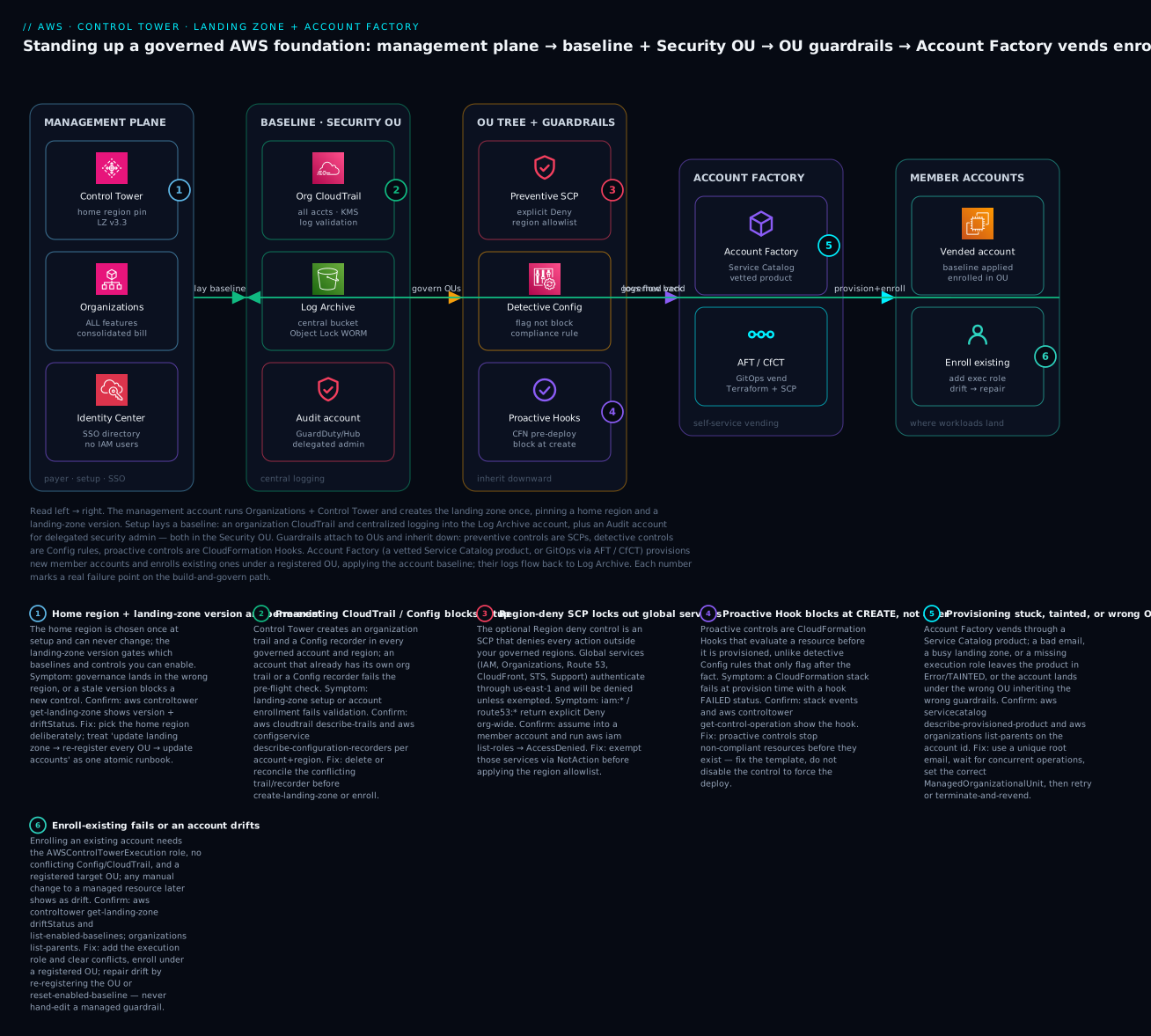
Read the diagram left to right as the standing-up sequence. The management plane (Control Tower + Organizations + Identity Center) creates the landing zone once, pinning a permanent home region and a landing-zone version (badge 1). Setup lays a baseline: an organization CloudTrail and centralized logging into the Log Archive account, plus an Audit account for delegated security admin — both in the Security OU (badge 2 marks the pre-existing-trail collision that fails setup). Guardrails attach to the OU tree and inherit downward: preventive SCPs (badge 3, the region-deny lockout risk), detective Config rules, and proactive CloudFormation Hooks (badge 4, which block at create-time). Account Factory — the vetted Service Catalog product, or GitOps via AFT/CfCT — provisions new member accounts and enrolls existing ones (badge 5 for stuck provisioning, badge 6 for enroll-fail/drift), and their logs flow back to Log Archive.
Real-world scenario
Company: NimbusPay, a fintech in Mumbai (ap-south-1), 30 engineers, scaling from 6 AWS accounts to a target of ~35 over 18 months as they split monolith services into per-team accounts. A payments regulator requires immutable audit logs, proof that no production data store is public or unencrypted, and evidence that root is not used.
Starting state (the mess). Six accounts, each with its own CloudTrail (two accounts had none), three different Admin IAM users with shared credentials in a password manager, and resources scattered across ap-south-1, us-east-1 and — inexplicably — us-west-2 because one engineer followed a US tutorial. An audit request for “one immutable copy of all API calls for the last 90 days” had no clean answer.
The build. The platform lead set up a Control Tower landing zone with ap-south-1 as home region and ap-south-1 + ap-southeast-1 as governed regions. Control Tower created Log Archive and Audit in a Security OU, an org trail into a KMS-encrypted, Object-Lock (WORM) Log Archive bucket, org-wide Config, and Identity Center. They built OUs — Infrastructure, Workloads/Prod, Workloads/NonProd, Sandbox, Suspended — and turned on the strongly-recommended S3-public and root-MFA detective controls plus the elective “disallow actions as root” preventive control on Prod. Region deny was enabled with the standard global-service NotAction exemptions, killing the us-west-2 sprawl.
The two incidents. (1) Enrollment of the existing accounts failed on the two accounts that already had a Config recorder — setup validation refused to proceed. They deleted the stray recorders (aws configservice delete-configuration-recorder) and re-ran enrollment; both went AVAILABLE. (2) Six weeks later, an engineer “fixed” a slow deploy by editing the Control Tower Config service role by hand; the next AFT customization run failed AccessDenied and the dashboard showed drift. The fix was a Reset landing zone, which re-applied the managed role — and a new mandatory rule: managed resources are changed through CfCT/AFT, never by hand.
Result. New accounts now arrive from an AFT pull request in ~25 minutes, fully baselined and guardrailed. The regulator’s three asks became three CLI queries: describe-trails shows one immutable org trail; the Config aggregator in Audit proves no public/unencrypted stores; the root-usage detective control shows clean. What was a two-week archaeology project is now a ten-minute report. The cost of Control Tower itself was zero; the AWS Config bill rose ~₹22,000/month across 35 accounts — a line item they now watch and tune with recording exclusions.
Advantages and disadvantages
| Advantages | Disadvantages |
|---|---|
| Governed multi-account foundation in an afternoon, not a quarter | Opinionated: three shared accounts and a fixed baseline shape you must accept |
| Central, tamper-proof audit (org trail + WORM Log Archive) by default | AWS Config cost scales with accounts × resources × regions — the real bill |
| Mandatory guardrails make baseline-tampering impossible | Managed resources must not be hand-edited — a discipline the team must hold |
| Self-service Account Factory removes the platform bottleneck | Customization has a ceiling; deep bespoke needs push you to CfCT/AFT/LZA |
| Versioned landing zone with a defined upgrade path | Upgrades require re-registering OUs / updating accounts — a real runbook |
| Home-region + governed-region model gives regional discipline | Home region is permanent; region deny can lock you out if misconfigured |
| Sits on Organizations, so custom SCPs still work | Not available/limited in some regions and partitions; check before committing |
When each matters: the advantages dominate for a growing enterprise that values time-to-governed and provable controls. The disadvantages bite hardest for teams with unusual topologies (many partitions, air-gapped, hundreds of bespoke controls) — that is the LZA signal — or teams unwilling to adopt the “don’t touch managed resources” discipline, who will live in perpetual drift.
Hands-on lab
This lab inspects a landing zone, registers an OU, enables a guardrail, vends an account, verifies the guardrail blocks a real action, and tears down. Cost note: Control Tower is free, but this lab does create a new account (permanent — you cannot delete an AWS account immediately, only close it and let it enter a 90-day suspension), turns on AWS Config (billable per configuration item + rule evaluation), and stores logs in S3/KMS. Budget a few hundred INR if you leave it running; close the vended account promptly.
Prerequisites
| Need | Detail |
|---|---|
| A landing zone already set up | This lab assumes Control Tower is enabled (setup itself is console-only and irreversible-ish; we describe the flow, then work by CLI) |
| Management-account admin credentials | Control Tower APIs run from the management account |
| AWS CLI v2 configured for the management account | aws sts get-caller-identity returns the management account id |
| A spare unique root email for the new account | e.g. aws+ctlab@yourdomain.com |
Step 0 — (Context) enabling a landing zone
Setup is a console action (Control Tower → Set up landing zone): you pick the home region, name the Security/Sandbox OUs, provide unique emails for Log Archive and Audit, choose governed regions, and optionally enable region deny. It takes ~30–60 minutes and creates the two shared accounts. Because it is largely irreversible and creates accounts, we do not automate it here — from Step 1 we operate an existing landing zone by CLI.
Step 1 — Inspect the landing zone
aws sts get-caller-identity --query Account --output text   # confirm you're in management
LZ=$(aws controltower list-landing-zones --query 'landingZones[0].arn' --output text)
aws controltower get-landing-zone --landing-zone-identifier "$LZ" \
  --query 'landingZone.{version:version,drift:driftStatus.status,regions:manifest.governedRegions}'
Expected output (shape):
{ "version": "3.3", "drift": "IN_SYNC", "regions": ["ap-south-1","ap-southeast-1"] }
Step 2 — See the org, shared accounts and OUs
ROOT=$(aws organizations list-roots --query 'Roots[0].Id' --output text)
aws organizations list-organizational-units-for-parent --parent-id "$ROOT" \
  --query 'OrganizationalUnits[].[Name,Id]' --output table
aws organizations list-accounts \
  --query 'Accounts[].[Name,Id,Status]' --output table
You should see the Security OU and, inside it, Log Archive and Audit.
Step 3 — Create and register a Workloads/Sandbox OU
# Create the OU (Organizations)
OU_ID=$(aws organizations create-organizational-unit --parent-id "$ROOT" \
  --name "CtLab-Sandbox" --query 'OrganizationalUnit.Id' --output text)
OU_ARN="arn:aws:organizations::$(aws sts get-caller-identity --query Account --output text):ou/$(aws organizations describe-organization --query 'Organization.Id' --output text)/${OU_ID}"

# Register it with Control Tower by enabling the AWSControlTowerBaseline
CT_BASELINE=$(aws controltower list-baselines \
  --query "baselines[?name=='AWSControlTowerBaseline'].arn" --output text)
IC_BASELINE_ARN=$(aws controltower list-enabled-baselines \
  --query "enabledBaselines[?contains(baselineIdentifier,'IdentityCenter')].arn" --output text)

OP=$(aws controltower enable-baseline --baseline-identifier "$CT_BASELINE" \
  --baseline-version 4.0 --target-identifier "$OU_ARN" \
  --parameters '[{"key":"IdentityCenterEnabledBaselineArn","value":"'"$IC_BASELINE_ARN"'"}]' \
  --query 'operationIdentifier' --output text)
aws controltower get-baseline-operation --operation-identifier "$OP" --query 'baselineOperation.status'
# IN_PROGRESS ... poll until SUCCEEDED
Step 4 — Enable a preventive guardrail on the OU
aws controltower enable-control \
  --control-identifier arn:aws:controltower:ap-south-1::control/AWS-GR_RESTRICT_ROOT_USER \
  --target-identifier "$OU_ARN" --query 'operationIdentifier' --output text
# poll:
aws controltower list-enabled-controls --target-identifier "$OU_ARN" \
  --query 'enabledControls[].[controlIdentifier,statusSummary.status]' --output table
Step 5 — Vend an account via Account Factory (CLI)
PRODUCT_ID=$(aws servicecatalog search-products \
  --filters FullTextSearch="AWS Control Tower Account Factory" \
  --query 'ProductViewSummaries[0].ProductId' --output text)
ARTIFACT_ID=$(aws servicecatalog describe-product --id "$PRODUCT_ID" \
  --query 'ProvisioningArtifacts[-1].Id' --output text)

aws servicecatalog provision-product --product-id "$PRODUCT_ID" \
  --provisioning-artifact-id "$ARTIFACT_ID" --provisioned-product-name "ctlab-acct" \
  --provisioning-parameters \
    Key=AccountEmail,Value=aws+ctlab@yourdomain.com \
    Key=AccountName,Value="ctlab-acct" \
    Key=ManagedOrganizationalUnit,Value="CtLab-Sandbox (${OU_ID})" \
    Key=SSOUserEmail,Value=you@yourdomain.com \
    Key=SSOUserFirstName,Value=Lab Key=SSOUserLastName,Value=User

# Watch (vending takes ~20-30 min)
aws servicecatalog describe-provisioned-product --name "ctlab-acct" \
  --query 'ProvisionedProductDetail.Status'   # UNDER_CHANGE -> AVAILABLE
Step 6 — Verify the guardrail actually blocks
Once the account is AVAILABLE, assume into it (via Identity Center or the AWSControlTowerExecution role) and confirm the root-restriction / a region-deny control denies a real action. For a region-deny check from inside the vended account:
# In the vended account, try an action in a non-governed region -> explicit Deny
aws ec2 describe-instances --region us-west-2
# An error occurred (AccessDenied) ... with an explicit deny in a service control policy
The AccessDenied with “explicit deny in a service control policy” is proof the preventive guardrail is enforcing.
Step 7 — Teardown
# 1. Close the vended account: terminate the Service Catalog provisioned product
aws servicecatalog terminate-provisioned-product --provisioned-product-name "ctlab-acct"
#    then, from the management account, CLOSE the account (Organizations console or:)
aws organizations close-account --account-id <vended-account-id>   # enters 90-day suspension

# 2. Disable the guardrail
aws controltower disable-control \
  --control-identifier arn:aws:controltower:ap-south-1::control/AWS-GR_RESTRICT_ROOT_USER \
  --target-identifier "$OU_ARN"

# 3. Disable the baseline (de-register) then delete the OU
EB=$(aws controltower list-enabled-baselines \
  --query "enabledBaselines[?targetIdentifier=='${OU_ARN}'].arn" --output text)
aws controltower disable-baseline --enabled-baseline-identifier "$EB"
aws organizations delete-organizational-unit --organizational-unit-id "$OU_ID"
⚠️ You cannot immediately delete an AWS account.
close-accountstarts a 90-day suspension; during it the account still counts toward some quotas. Only vend lab accounts you’re willing to leave closed for 90 days. Config keeps billing until the account is closed and recorders stop — close promptly.
Common mistakes & troubleshooting
This is the section you will re-open at 9am. First the structured playbook (symptom → root cause → confirm → fix), then an error/status reference, then a decision table for the nastiest failure class, then prose on the two that cost the most hours.
The playbook
| # | Symptom | Root cause | Confirm (exact command / console path) | Fix |
|---|---|---|---|---|
| 1 | Landing-zone setup fails early | Account already has an organization CloudTrail or a Config recorder | aws cloudtrail describe-trails --query 'trailList[?IsOrganizationTrail]'; aws configservice describe-configuration-recorders per region |
Delete/reconcile the pre-existing trail/recorder, then retry setup |
| 2 | Account enrollment fails | Missing AWSControlTowerExecution role, or conflicting Config recorder in the account |
In target account: aws iam get-role --role-name AWSControlTowerExecution; describe-configuration-recorders |
Create the execution role (StackSet) and delete the stray recorder, re-enroll |
| 3 | Account stuck in UNDER_CHANGE / Under change for a long time |
A concurrent Control Tower operation (CT serializes many ops), or a StackSet failure | aws servicecatalog describe-provisioned-product --name <n>; Control Tower console → Account details |
Wait for the other op; if ERROR/TAINTED, read the CFN StackSet error and retry/terminate-revend |
| 4 | Vended account in wrong OU → wrong guardrails | Wrong ManagedOrganizationalUnit value, or OU not registered |
aws organizations list-parents --child-id <acct> |
Move the account to the correct registered OU; re-run baseline |
| 5 | Dashboard shows drift after a manual change | Someone edited a managed resource / moved an account / edited an SCP | aws controltower get-landing-zone --query 'landingZone.driftStatus' |
Reset landing zone; re-register affected OU; stop hand-editing managed resources |
| 6 | A legitimate deploy hits AccessDenied “explicit deny in an SCP” |
A guardrail SCP (or region deny) blocks the action; or a custom SCP conflicts with a guardrail | Decode: aws sts get-caller-identity; check the OU’s SCPs and enabled controls |
Scope the deny (move account to a looser OU, or narrow the custom SCP with NotAction) — never disable a mandatory control |
| 7 | Global services (IAM/Route 53/CloudFront) denied everywhere | Region deny SCP without global-service NotAction exemptions |
From a member account: aws iam list-roles → AccessDenied |
Add iam/organizations/route53/cloudfront/sts/support to the region-deny NotAction exemptions |
| 8 | New accounts compliant, old accounts throw AccessDenied | Half-finished landing-zone upgrade — OUs/accounts not re-registered | get-landing-zone version vs enabled-baseline versions per OU |
Complete the runbook: update-enabled-baseline per OU, update all accounts |
| 9 | Config flags hundreds of resources overnight | A detective control turned on across all governed regions found existing non-compliance | Config aggregator in Audit → non-compliant rules | Triage real findings; it’s detecting, not breaking — remediate or scope the rule |
| 10 | Cannot add a region two years in | You must add it as a governed region and re-baseline; global services may need us-east-1 |
get-landing-zone governedRegions list |
Update landing zone to add the region; re-register OUs so Config deploys there |
| 11 | enable-control / enable-baseline returns ConflictException |
Another CT operation is in flight (they serialize) | aws controltower list-control-operations / get-baseline-operation |
Wait for the in-flight op to reach SUCCEEDED, then retry |
| 12 | Enrolled account can still delete its own log data | It is not actually governed (enrollment silently incomplete) or the mandatory control didn’t apply | list-enabled-baselines; try s3:DeleteObject on the log bucket → should Deny |
Re-enroll via enable-baseline; verify mandatory controls show Enforced |
| 13 | Reset landing zone wiped a change you made |
You edited a managed resource; reset re-applies managed config | Compare pre/post reset; the change is gone | Re-implement the change the right way (CfCT for SCPs, AFT for account IaC) |
| 14 | Can’t change the home region | The home region is permanent by design | Console shows it greyed out | You cannot; to truly move you must rebuild the landing zone (rare, disruptive) |
Error / status-code reference
| Code / status | Where | Meaning | Likely cause | Fix |
|---|---|---|---|---|
AccessDenied + “explicit deny in a service control policy” |
Any member account API call | A preventive guardrail/SCP blocked it | Region deny or a Deny SCP on the OU | Adjust OU/SCP scope; exempt global services |
ConflictException |
controltower APIs |
Another CT operation is in progress | CT serializes org-wide ops | Poll the in-flight operation, then retry |
ResourceNotFoundException |
enable-control/enable-baseline |
Bad control/baseline ARN or unregistered target | Wrong identifier or OU not registered | Resolve ARNs from list-baselines/list-controls; register the OU |
ValidationException |
enable-baseline |
Missing required parameter | e.g. no IdentityCenterEnabledBaselineArn |
Supply the Identity Center baseline ARN parameter |
Provisioned product ERROR / TAINTED |
Service Catalog / Account Factory | The vend failed midway | StackSet failure, duplicate email, quota | Read StackSet error; fix and update, or terminate + revend |
driftStatus = DRIFTED |
get-landing-zone |
Landing zone changed out-of-band | Manual edit / account move | Reset landing zone; re-register OUs |
Baseline operation FAILED |
get-baseline-operation |
Baseline couldn’t apply | Missing execution role, SCP blocking Config | Fix the role/SCP; reset the enabled baseline |
TooManyRequestsException |
bulk enable-control loops |
Throttling | Enabling many controls in a tight loop | Back off; enable serially with waits |
Account SUSPENDED |
Organizations | Account closed | close-account was called |
Nothing — it’s in the 90-day window |
Decision table — the pre-existing CloudTrail/Config collision
The single most common setup and enrollment blocker. Use this to decide the fix fast.
| If you see… | It’s probably… | Do this |
|---|---|---|
| Setup fails; account has an org trail already | A pre-existing organization CloudTrail conflicts with the one CT wants to create | Delete or convert the org trail; keep only CT’s org trail |
| Enrollment fails; account has a Config recorder | A pre-existing Config recorder/delivery channel collides | delete-configuration-recorder + delete-delivery-channel, then enroll |
| Enrollment fails; execution role missing | AWSControlTowerExecution not present in the target account |
Deploy the role via a StackSet from management, then enroll |
| Enrollment succeeds but guardrails absent | Account landed in an unregistered OU | Move to a registered OU; enable-baseline |
AccessDenied during enrollment |
A custom SCP on the destination OU blocks Config/CloudTrail setup | Temporarily relax the SCP or add NotAction for the setup, re-enroll |
The two that cost the most hours
1) Region deny that locks you out of global services. The Region-deny control is a blunt instrument: an org-root SCP denying everything outside your governed regions. But IAM, Organizations, Route 53, CloudFront, STS and Support are global and route through us-east-1. Turn region deny on without the standard NotAction exemptions and every account loses the ability to manage IAM or DNS — including, in the worst framing, the ability to fix the SCP if you also fenced the management pathways. Always keep the exemption list (iam:*, organizations:*, route53:*, cloudfront:*, sts:*, support:*, globalaccelerator:*, plus Identity Center) and test in a Sandbox OU first. If you write your own region SCP alongside CT’s, it must carry the same carve-out — two region SCPs, one missing the exemptions, still locks you out.
2) The half-finished landing-zone upgrade. You click Update on the landing zone, it succeeds, and you move on. Weeks later, accounts vended after the update are compliant while accounts that existed before it throw AccessDenied on actions a new baseline role should permit — because you never re-registered the OUs or updated the existing accounts, so their baseline is a version behind. The landing zone version and the per-OU/per-account baseline versions are separate pieces of state; update-landing-zone only moves the first. The fix and the prevention are the same: treat the upgrade as one runbook — update landing zone, update-enabled-baseline on every OU, Update account on every account (or re-run AFT), then confirm driftStatus = IN_SYNC and consistent baseline versions everywhere.
Best practices
- Keep the management account empty of workloads. SCPs don’t restrict it; anything there is un-guardrailed and can dismantle the org. Use it only for Control Tower, Organizations, billing and Identity Center.
- Choose the home region deliberately. It is permanent. Pick where your data-residency and latency needs live (e.g.,
ap-south-1for India). - Never hand-edit managed resources. Anything named
aws-controltower*/AWSControlTower*, the guardrail SCPs, the Log Archive buckets, the Config roles — change them only through CfCT/AFT. Hand edits become drift. - Design the OU tree before vending. Moving accounts between OUs later is drift-prone; get Prod/NonProd/Sandbox/Suspended right first.
- Enable region deny with the global-service exemptions, and test SCP changes in a PolicyStaging/Sandbox OU before Prod.
- Standardize account creation on one path — AFT for a Terraform shop, Account Factory + AFC for a CloudFormation shop — don’t mix ad-hoc console vends into a governed fleet.
- Automate enrollment prerequisites (execution role via StackSet, recorder cleanup) so inherited accounts enroll cleanly.
- Watch AWS Config cost from day one: exclude high-churn resource types you don’t need, and reconsider recording global resources in every region.
- Version upgrades are a runbook, not a click: update → re-register OUs → update accounts → verify IN_SYNC, in a window.
- Delegate security admin to the Audit account (GuardDuty, Security Hub) rather than running it from management.
- Cross-check
driftStatuson a schedule (a simpleget-landing-zonecron) so drift is caught in hours, not audits.
Security notes
- Immutability of audit. Enable S3 Object Lock (WORM) on the Log Archive bucket and keep the mandatory controls that forbid changing it — this is what makes “immutable copy of every API call” true, not aspirational.
- Least privilege for humans. No IAM users in vended accounts; access is Identity Center permission sets mapped to accounts, ideally short-session and MFA-enforced. See AWS IAM Identity Center: SSO & Permission Sets.
- Protect the execution role.
AWSControlTowerExecutionis admin-in-every-account; its trust must be only the management account, and a mandatory guardrail forbids editing it. - Encrypt everything at rest with CMKs. Control Tower uses KMS for the trail and Config; keep the key policies tight and audited.
- Region deny is a security control, not just hygiene — it shrinks the attack surface to approved regions. Pair it with detective controls for open security groups and public storage.
- Delegate, don’t centralize secrets. Run GuardDuty and Security Hub org-wide with the Audit account as delegated admin, so a compromised member account cannot silence its own findings.
- Root user lockdown. Enable the elective “disallow actions as root” and “no root access keys” controls; detect root MFA with the strongly-recommended control.
Cost & sizing
Control Tower itself is free. You pay for the services it turns on — and one of them, AWS Config, is usually the dominant line item because it records configuration items across every account and every governed region.
| Cost driver | What drives it | Rough figure (illustrative) | How to control |
|---|---|---|---|
| AWS Config — configuration items | Recorded resource changes × accounts × regions | ~$0.003 per item; large orgs = the biggest bill | Exclude noisy resource types; limit global-resource recording |
| AWS Config — rule evaluations | Detective guardrail evaluations | ~$0.001 per evaluation (first tier) | Enable only the detective controls you need |
| CloudTrail | Management events (first copy free); data events billable | Data events ~$0.10 / 100k | Leave data events off unless required |
| S3 (Log Archive) | Log volume × retention | Storage + lifecycle to Glacier | Lifecycle rules; Glacier for old logs |
| KMS | CMKs for trail/Config | ~$1/key/month + request costs | Reuse keys where policy allows |
| AFT infra | CodeBuild/Pipeline/Lambda/Step Functions/DynamoDB in AFT account | Small, usage-based | Only if you run AFT |
| SNS/CloudWatch | Notifications, log integration | Negligible | — |
Sizing intuition. A 35-account org across two governed regions with normal churn commonly lands Config in the low tens of thousands of INR/month (the NimbusPay scenario saw ~₹22,000/month); the trail, S3 and KMS together are usually a fraction of that. Free-tier reality: there is no free tier for Control Tower’s Config usage at scale — budget for Config from account one, and set an AWS Budgets alarm on the Config and S3 line items. The cheapest lever by far is excluding resource types from Config recording that you never audit.
Interview & exam questions
1. What is a landing zone, and what does Control Tower automate? A landing zone is a pre-configured, secure, governed multi-account AWS environment. Control Tower automates creating the org with all features, the Log Archive and Audit shared accounts, an organization CloudTrail into centralized logging, org-wide AWS Config, IAM Identity Center, mandatory guardrails, and Account Factory. (SAP-C02, SCS-C02)
2. Name the three shared accounts and their roles. Management (payer/org root, where Control Tower and Organizations live), Log Archive (immutable centralized CloudTrail + Config logs), and Audit/Security (cross-account security operations, delegated GuardDuty/Security Hub admin). Log Archive and Audit sit in the Security OU.
3. Distinguish preventive, detective, and proactive guardrails. Preventive = SCPs that block an API call (explicit Deny). Detective = Config rules that flag non-compliance after the fact. Proactive = CloudFormation Hooks that block at create-time during a CFN deploy. They compose; each catches a different moment.
4. What’s the difference between mandatory, strongly-recommended, and elective controls? That’s the guidance axis, independent of type. Mandatory are always on and can’t be disabled (they protect the baseline). Strongly-recommended are AWS best practices you opt into. Elective lock down common-but-not-universal patterns.
5. How does Account Factory differ from AFT and CfCT? Account Factory is the Service Catalog product that vends/enrolls accounts. AFT is a GitOps (Terraform, 4 repos, own account) engine for fleet vending + per-account IaC. CfCT is a CloudFormation solution pushing custom SCPs/StackSets on lifecycle events. AFT customizes accounts; CfCT customizes the org.
6. Why must the management account stay workload-free? SCPs do not restrict the management account, so anything there is un-guardrailed and can modify or dismantle the organization — it’s the one account guardrails can’t protect.
7. What are the prerequisites to enroll an existing account?
Member of the org, the AWSControlTowerExecution role present, no conflicting Config recorder or org CloudTrail, a registered destination OU, and no SCP blocking the enrollment actions.
8. How does Region deny lock you out, and how do you prevent it?
It’s an SCP denying actions outside governed regions; global services (IAM, Route 53, CloudFront, STS, Organizations, Support) authenticate via us-east-1 and get denied. Prevent it by exempting those namespaces with NotAction.
9. What is drift and how do you repair it?
Drift is state changed outside Control Tower — a moved account, an edited SCP, a hand-modified managed role. Detect via get-landing-zone driftStatus; repair by re-registering the OU, repairing the account in Account Factory, or Reset landing zone.
10. Walk through a safe landing-zone version upgrade.
Read release notes; update-landing-zone to the new version; then re-register every OU (update-enabled-baseline) and update every account; verify driftStatus = IN_SYNC. Skipping the re-registration leaves old accounts a baseline version behind.
11. When would you choose Landing Zone Accelerator over Control Tower? When you need deep, config-driven customization, hundreds of compliance controls, or GovCloud/air-gapped/multi-partition topologies. LZA can even run on top of Control Tower’s baseline.
12. What usually dominates the Control Tower bill and why? AWS Config — it records configuration items across every account and governed region, and each item plus each rule evaluation is billable. Control the cost by excluding resource types and limiting governed regions.
Quick check
- The home region of a Control Tower landing zone can be changed later — true or false?
- Which guardrail type stops a non-compliant resource before it exists, and via what mechanism?
- You enroll an existing account but it gets no guardrails. What’s the most likely cause?
- Which single AWS service usually dominates the Control Tower bill?
- Name the four AFT repositories.
Answers
- False. The home region is permanent; changing it means rebuilding the landing zone.
- Proactive controls, implemented as CloudFormation Hooks, which block non-compliant resources at create-time during a CFN deploy.
- It landed in an unregistered OU (or the baseline didn’t apply) — move it to a registered OU and
enable-baseline. - AWS Config (configuration items + rule evaluations across all accounts × governed regions).
aft-account-request,aft-global-customizations,aft-account-customizations,aft-account-provisioning-customizations.
Glossary
| Term | Definition |
|---|---|
| Landing zone | A pre-configured, secure, governed multi-account AWS environment that workloads land into. |
| Home region | The region hosting Control Tower’s orchestration; chosen once and permanent. |
| Governed region | A region where Control Tower deploys Config recorders and guardrails. |
| Shared accounts | The Log Archive and Audit accounts Control Tower creates, in the Security OU. |
| Baseline | The set of resources (Config, CloudTrail integration, roles) Control Tower applies to an account/OU. |
| Guardrail / control | A governance rule: preventive (SCP), detective (Config), or proactive (Hook). |
| Mandatory / strongly-recommended / elective | The guidance categories of controls, by whether they’re always-on, best-practice, or optional. |
| Account Factory | The Service Catalog pipeline that vends and enrolls governed accounts. |
| AFT | Account Factory for Terraform — a GitOps engine (own account, four repos) for fleet vending. |
| AFC | Account Factory Customization — a console blueprint that runs a CloudFormation template at account creation. |
| CfCT | Customizations for Control Tower — a solution pushing custom SCPs/StackSets on lifecycle events. |
| Enrollment | Bringing an existing account under Control Tower governance. |
| Drift | State changed outside Control Tower’s management, requiring repair. |
| Reset landing zone | Re-applying the current landing-zone configuration to repair drift. |
| Region deny | An SCP denying actions outside governed regions (with global-service exemptions). |
AWSControlTowerExecution |
The admin role Control Tower assumes in each account to apply the baseline. |
Next steps
- Go deep on the guardrail engine itself — how SCPs, Config rules and Hooks evaluate and deny — in AWS Control Tower Guardrails: Building a Secure Multi-Account Foundation.
- Master the primitive underneath everything here — orgs, OUs, consolidated billing — in AWS Organizations & IAM: Multi-Account Foundations.
- Write and reason about custom preventive policies (the language of CfCT SCPs) in AWS Organizations SCPs: Multi-Account Guardrails.
- Wire human access to every vended account with AWS IAM Identity Center: SSO & Permission Sets.
- Next in this track: extend the baseline with centralized backup governance and cross-account security tooling delegated to the Audit account.