The deploy dies at 02:10 and the stack sits in ROLLBACK_COMPLETE. You fix the typo that broke it, run update-stack, and CloudFormation refuses: Stack ... is in ROLLBACK_COMPLETE state and can not be updated. You try a change set — same wall. The stack is a tombstone: the only thing you can do to it is delete it. Meanwhile a different stack won’t tear down — DELETE_FAILED, because an S3 bucket still holds objects — and a third is frozen in UPDATE_ROLLBACK_FAILED because the update’s own rollback failed, and now it accepts no updates at all. Three different stuck states, three completely different escapes, and picking the wrong one wastes the incident.
AWS CloudFormation is a state machine, and every stuck stack is sitting in exactly one named state with exactly one way out. The whole skill of un-sticking a stack is reading two things fast — the stack status and the ResourceStatusReason on the earliest failed event — and then running the one command that is valid from that state. ROLLBACK_COMPLETE means delete-and-recreate; there is no other path. UPDATE_ROLLBACK_FAILED means continue-update-rollback, optionally skipping the resource that can’t be reconciled. DELETE_FAILED means retry the delete while retaining the resource that won’t die. A hung ..._IN_PROGRESS almost always means a custom resource or a WaitCondition never signalled. Guess instead of reading, and you will delete a stack you could have continued, or continue a rollback that will only fail again.
By the end of this article you will read the CloudFormation status machine like a subway map — knowing which states are transient (wait), which are healthy terminal (proceed), and which are dead-ends that need a specific escape hatch — and you will carry a status + reason → root cause → confirm → fix playbook you can run under pressure. Everything is shown as real aws cloudformation CLI plus the CloudFormation templates that reproduce each failure, with the exact error strings, event fields and flags — never a hand-waved number. It maps directly to the infrastructure-as-code and troubleshooting domains of DVA-C02, SOA-C02 and the DOP-C02 DevOps Engineer Professional exam.
What problem this solves
CloudFormation’s promise is that a template is a single, atomic, all-or-nothing description of your infrastructure: apply it and you get exactly what it says, or you get nothing and a clean rollback. That promise mostly holds — and the “mostly” is where careers are made and lost at 2 a.m. When a create half-succeeds, when a rollback can’t undo what it started, or when a delete trips over a resource that refuses to disappear, the stack lands in a state that is not obvious and not self-healing. The failure modes are finite and well-defined, but they are also unforgiving: the same word — “rollback” — appears in a healthy terminal state (UPDATE_ROLLBACK_COMPLETE, you’re fine) and in a frozen dead-end (UPDATE_ROLLBACK_FAILED, you’re stuck), and telling them apart is the difference between a shrug and an outage.
What breaks without this knowledge is your mean-time-to-recovery and, quietly, your infrastructure’s integrity. A team hits ROLLBACK_COMPLETE on a first deploy, doesn’t realise the stack can only be deleted, and spends an hour trying to “fix” it with updates and change sets that all bounce. Another manually deletes a resource from the console to “clean up,” then the next update-stack fails and its rollback fails too — UPDATE_ROLLBACK_FAILED — because CloudFormation tried to restore a resource that no longer exists, and now the whole stack is frozen. A third writes a perfectly good template with an S3 bucket, ships to production for months, then can’t tear down the dev copy because the bucket filled with objects and delete-stack keeps returning DELETE_FAILED. None of these are exotic bugs. They are the documented, expected behaviour of a state machine that most engineers only ever see in its happy path.
Who hits this: anyone who runs CloudFormation past a single toy stack. It bites hardest on teams new to IaC (who don’t yet know that ROLLBACK_COMPLETE is terminal), on anyone who edits managed resources out of band (the number-one cause of failed rollbacks), on teams with custom resources and WaitConditions (the number-one cause of hung ..._IN_PROGRESS stacks), and on anyone tearing down environments with stateful resources (S3, ENIs, IAM roles, cross-stack exports) that have their own delete-ordering rules. The fix is never “retry and pray.” It is: read the status, read the earliest failed event’s reason, name the state, and apply the one operation that state permits. Here is the entire stuck-state field on one screen so you can orient before the deep dive:
| Status you’re stuck in | What it means | Can you update it? | The only escape |
|---|---|---|---|
ROLLBACK_COMPLETE |
The first create failed and was rolled back; the stack is an empty tombstone | No | delete-stack, then recreate |
ROLLBACK_FAILED |
The rollback of a failed create itself failed | No | delete-stack (--retain-resources for the stuck one), recreate |
UPDATE_ROLLBACK_FAILED |
An update failed and its rollback also failed | No (until recovered) | continue-update-rollback (± --resources-to-skip) |
UPDATE_ROLLBACK_COMPLETE |
An update failed but rolled back cleanly to the previous good state | Yes | none needed — you’re back to good |
UPDATE_FAILED |
An update failed with rollback disabled; resources preserved | Yes (retry) | rollback-stack, or fix + update-stack, or delete |
CREATE_FAILED |
A create failed with rollback disabled; resources preserved for debugging | No (never completed) | delete-stack or rollback-stack; fix + recreate |
DELETE_FAILED |
A resource wouldn’t delete | n/a | delete-stack --retain-resources <ids> |
stuck ..._IN_PROGRESS |
A custom resource / WaitCondition never signalled |
No | wait for timeout; cancel-update-stack (update only); then recover |
REVIEW_IN_PROGRESS |
Stack created by a change set that was never executed | Only via execute-change-set |
execute the change set, or delete-stack |
Learning objectives
By the end of this article you can:
- Trace a stack through the CloudFormation state machine — the create, update and delete lifecycles and their
..._IN_PROGRESS,..._COMPLETEand..._FAILEDbranches — and classify any status as transient (wait), healthy terminal (proceed), or dead-end (needs a specific escape). - Diagnose
ROLLBACK_COMPLETEas the terminal result of a failed first create, know why it can only be deleted and recreated, and read the earliestCREATE_FAILEDevent to find the true root cause instead of the “Rollback requested by user” noise. - Recover
UPDATE_ROLLBACK_FAILED— the state where a rollback itself failed — withcontinue-update-rollback, know when to fix the blocking resource out of band first versus skip it with--resources-to-skip, and explain why rollbacks fail (a resource that can’t return to its old state, a dependency, a drifted/deleted resource). - Resolve
DELETE_FAILEDfor every common blocker — a non-empty S3 bucket, an ENI still attached, an IAM role in use, a cross-stack export in use, a custom-resource Lambda that errors — and finish the delete with--retain-resources. - Un-stick a hung
..._IN_PROGRESSby recognising the custom resource /WaitConditionsignal timeout, and usecancel-update-stackto abort an in-flight update. - Name the root causes of create/update failures — insufficient capabilities (IAM), a custom resource /
WaitConditiontimeout, a service quota, an invalid property or a resource that already exists, a stack policy blocking the update, a nested-stack child failure, and drift — from the exact reason string. - Use the debugging levers —
--disable-rollbackand--on-failure DO_NOTHINGto preserve a failed create,describe-stack-eventsto find the first truth, anddetect-stack-driftto find out-of-band changes. - Run a
status + reason → root cause → confirm → fixplaybook end to end, and reproduce and recoverROLLBACK_COMPLETE,DELETE_FAILEDandUPDATE_ROLLBACK_FAILEDin a hands-on lab.
Prerequisites & where this fits
You should already be comfortable with CloudFormation basics: a template (YAML or JSON) declares resources with logical IDs, you deploy it as a stack with create-stack/update-stack, and CloudFormation maps each logical ID to a real physical resource (an ARN, a bucket name, an instance ID). You should know what a change set is (a preview of what an update will do), what a DeletionPolicy is, and roughly what a custom resource and a nested stack are. You should be able to run aws from a shell, read JSON with --query, and read a CloudFormation template. If you have never built a stack from scratch, start with the build-it-first walkthrough Your First CloudFormation Stack: Templates, Change Sets and Deploys Hands-On, then come back here for what happens when it breaks.
This is the operational, incident-time companion to the design-side reference. It sits alongside the higher-level authoring tools — if you drive CloudFormation through TypeScript, the same stuck states and escapes apply and are covered in AWS CDK with TypeScript: Infrastructure as Code Hands-On (CDK synthesises templates and deploys stacks, so cdk deploy hits every state in this article). And because a large share of create/update failures are really quota failures, keep the increase workflow from AWS Service Quotas: Viewing Limits and Requesting Increases Hands-On close — half of “the create failed” incidents end with a quota request, not a template fix.
Before the deep dive, fix the mental model of where each failure lives in the lifecycle, so you look in the right place first:
| Lifecycle phase | Operation | Stuck / terminal states it can leave | First place to look |
|---|---|---|---|
| Create | create-stack |
CREATE_FAILED, ROLLBACK_COMPLETE, ROLLBACK_FAILED |
Earliest CREATE_FAILED event + ResourceStatusReason |
| Update | update-stack |
UPDATE_FAILED, UPDATE_ROLLBACK_COMPLETE, UPDATE_ROLLBACK_FAILED |
Events + detect-stack-drift |
| Delete | delete-stack |
DELETE_FAILED |
The dependency named in the reason |
| Change set | create-change-set / execute-change-set |
REVIEW_IN_PROGRESS |
describe-change-set |
| Custom resource / wait | any | Hung ..._IN_PROGRESS |
The provider Lambda’s CloudWatch logs / cfn-signal |
| Nested stack | any | Parent ..._FAILED mirrors a child |
The child stack’s own events |
Core concepts
The stack lifecycle — every status, what it means, and what you can do next
A CloudFormation stack is always in exactly one status, and the status tells you three things: which phase you’re in (create, update, delete, import), whether it is transient (it will move on by itself), healthy terminal (proceed), or a dead-end (it needs a specific command), and therefore which operations are legal right now. This is the depth anchor of the whole article — memorise the shape of it, because at 2 a.m. the status is the first word you read.
| Status | Phase | Kind | What it means | What you can do |
|---|---|---|---|---|
CREATE_IN_PROGRESS |
Create | Transient | Provisioning resources | Wait; no cancel for creates |
CREATE_COMPLETE |
Create | Terminal (good) | All resources created | update-stack, delete-stack |
CREATE_FAILED |
Create | Terminal (bad) | A resource failed; rollback was disabled | Read events; rollback-stack or delete-stack |
ROLLBACK_IN_PROGRESS |
Create | Transient | Undoing a failed create (deleting what it made) | Wait |
ROLLBACK_COMPLETE |
Create | Dead-end | Failed create fully rolled back; empty tombstone | delete-stack only, then recreate |
ROLLBACK_FAILED |
Create | Dead-end | The failed-create rollback itself failed | delete-stack (± --retain-resources), recreate |
UPDATE_IN_PROGRESS |
Update | Transient | Applying changes | cancel-update-stack to abort |
UPDATE_COMPLETE_CLEANUP_IN_PROGRESS |
Update | Transient | Update succeeded; deleting replaced/old resources | Wait (already good) |
UPDATE_COMPLETE |
Update | Terminal (good) | Update applied | update-stack, delete-stack |
UPDATE_FAILED |
Update | Terminal (bad) | Update failed with rollback disabled | rollback-stack, retry, or delete |
UPDATE_ROLLBACK_IN_PROGRESS |
Update | Transient | Reverting a failed update | Wait |
UPDATE_ROLLBACK_COMPLETE_CLEANUP_IN_PROGRESS |
Update | Transient | Rollback done; cleaning up the new resources | Wait |
UPDATE_ROLLBACK_COMPLETE |
Update | Terminal (good) | Reverted to the previous good state | update-stack, delete-stack |
UPDATE_ROLLBACK_FAILED |
Update | Dead-end | The rollback failed | continue-update-rollback (± skip) |
DELETE_IN_PROGRESS |
Delete | Transient | Removing resources | Wait |
DELETE_COMPLETE |
Delete | Terminal | Stack gone (retained for ~90 days in the console) | none |
DELETE_FAILED |
Delete | Dead-end | A resource wouldn’t delete | delete-stack --retain-resources |
REVIEW_IN_PROGRESS |
Create | Special | Created by a change set, not yet executed | execute-change-set or delete-stack |
IMPORT_IN_PROGRESS |
Import | Transient | Importing existing resources into a stack | Wait |
IMPORT_COMPLETE |
Import | Terminal (good) | Resources imported | update-stack, delete-stack |
IMPORT_ROLLBACK_IN_PROGRESS |
Import | Transient | Reverting a failed import | Wait |
IMPORT_ROLLBACK_FAILED |
Import | Dead-end | Import rollback failed | continue-update-rollback / fix + retry |
IMPORT_ROLLBACK_COMPLETE |
Import | Terminal | Import reverted | update-stack, delete-stack |
Two consequences fall straight out of this table. First, the word “rollback” is not one thing — UPDATE_ROLLBACK_COMPLETE is a healthy state (your update failed but the stack is safely back where it was), while UPDATE_ROLLBACK_FAILED is a frozen one. Read the last token, not the middle one. Second, the two most dangerous states — ROLLBACK_COMPLETE and UPDATE_ROLLBACK_FAILED — are dead-ends with different escapes: one you can only delete, the other you can only continue. Confusing them is the classic wasted hour.
Transient vs healthy-terminal vs dead-end — the only classification that matters mid-incident
Collapse the 23 statuses into four buckets and the panic drains out of the incident. Everything is one of these:
| Kind | Statuses | What to do |
|---|---|---|
| Healthy terminal | CREATE_COMPLETE, UPDATE_COMPLETE, UPDATE_ROLLBACK_COMPLETE, IMPORT_COMPLETE |
Proceed — update or delete normally |
| Transient (wait) | every ..._IN_PROGRESS and ..._CLEANUP_IN_PROGRESS |
Wait; only UPDATE_IN_PROGRESS is cancellable |
| Dead-end (needs the matching escape) | ROLLBACK_COMPLETE, ROLLBACK_FAILED, UPDATE_ROLLBACK_FAILED, DELETE_FAILED, IMPORT_ROLLBACK_FAILED |
Run the one command that state allows |
| Preserved for debug | CREATE_FAILED, UPDATE_FAILED (rollback disabled) |
Inspect, then rollback-stack / delete / retry |
The “preserved for debug” bucket only exists if you asked for it — with --disable-rollback or --on-failure DO_NOTHING. By default a failed create rolls all the way back to ROLLBACK_COMPLETE, deleting the evidence. That trade-off — a clean tombstone versus a messy but inspectable failure — is a choice you make at submit time, and it is one of the most useful levers in this whole article.
The escape operations — which command is legal in which state
There are only a handful of commands that move a stuck stack, and each is valid in a specific state. Running the wrong one returns an error like ... is in ROLLBACK_COMPLETE state and can not be updated — annoying but harmless. Knowing the mapping cold is most of the battle:
| Command | Valid in state(s) | What it does | Key flag |
|---|---|---|---|
delete-stack |
any terminal / dead-end | Deletes the stack | --retain-resources, --role-arn |
delete-stack --retain-resources |
DELETE_FAILED only |
Skips the stuck resources, deletes the rest, removes the stack | list of logical IDs |
continue-update-rollback |
UPDATE_ROLLBACK_FAILED only |
Retries the failed rollback | --resources-to-skip |
cancel-update-stack |
UPDATE_IN_PROGRESS only |
Aborts an in-flight update → triggers rollback | (none) |
rollback-stack |
CREATE_FAILED / UPDATE_FAILED (rollback disabled) |
Rolls the stack back to the last stable state | --role-arn |
--disable-rollback |
at submit (create/update/execute-change-set) |
On failure, stops and preserves resources | boolean |
--on-failure |
at submit (create only) | ROLLBACK (default) / DELETE / DO_NOTHING |
DO_NOTHING = keep for debug |
Reading stack events — the earliest ..._FAILED is the truth
Every diagnosis in this article starts with describe-stack-events, and there is exactly one trick to reading it: the API returns events newest-first, but the root cause is the oldest failure. When a stack fails, one resource fails first, and then CloudFormation cancels every sibling that was still in flight and rolls back everything it had built — so the top of the event list is a wall of noise (Rollback requested by user, Resource creation cancelled) and the single line that matters is buried near the bottom. Learn to ignore the collateral and find the first truth.
| Event field | What it is | What it tells you |
|---|---|---|
Timestamp |
When the event fired | Ordering — the API returns newest first |
LogicalResourceId |
The template’s logical name | Which resource in your template |
ResourceType |
e.g. AWS::S3::Bucket |
What kind of resource |
ResourceStatus |
e.g. CREATE_FAILED |
The transition |
ResourceStatusReason |
The message | The real cause — read this line |
PhysicalResourceId |
The actual ARN / name / ID | The resource to inspect out of band |
And here are the reason strings that are noise, not cause — the fingerprints of collateral damage you must scroll past:
| Reason string (excerpt) | What it really is |
|---|---|
Rollback requested by user |
The stack-level note that a rollback started — not the failure |
Resource creation cancelled |
A sibling resource aborted because another one failed — collateral |
The following resource(s) failed to create: [X] |
A summary line naming the culprit — go read X’s own event |
Resource is not in the state stackUpdateComplete |
A wait/dependency waiting on the resource that actually failed |
ROLLBACK_COMPLETE: the create that can only be deleted
ROLLBACK_COMPLETE is the single most misunderstood state in CloudFormation, and the misunderstanding is expensive. It means precisely this: the very first create-stack failed, and CloudFormation rolled the whole thing back — deleting every resource it had managed to create — leaving an empty shell. The critical, non-obvious consequence is that you cannot update a stack in ROLLBACK_COMPLETE, and you cannot run a change set against it either. There is no previous good version to base an update on, because the stack never reached CREATE_COMPLETE even once. The only legal operation is delete-stack. You fix the template, delete the tombstone, and create-stack again from scratch.
This trips people because their instinct — fix the bug, re-run the deploy — is exactly right conceptually but blocked mechanically. They edit the template, run update-stack, and get An error occurred (ValidationError) ... is in ROLLBACK_COMPLETE state and can not be updated. They assume the tool is broken. It isn’t; the state is terminal-for-updates by design. Note the crucial distinction from an update failure: if an already-CREATE_COMPLETE stack fails during an update-stack, it rolls back to UPDATE_ROLLBACK_COMPLETE (a healthy state you can immediately update again), because there is a previous good version. ROLLBACK_COMPLETE is reserved for the first create — there’s nothing to roll back to, only to delete.
Action in ROLLBACK_COMPLETE |
Allowed? | Why |
|---|---|---|
update-stack |
No | No prior good version to update from |
create-change-set (UPDATE type) |
No | Same — can’t change a never-created stack |
continue-update-rollback |
No | This isn’t an update rollback |
delete-stack |
Yes | The only way out |
describe-stack-events |
Yes | To find the original CREATE_FAILED cause |
create-stack (same name) |
Only after the delete completes | Recreate from the fixed template |
Debug before you delete: --disable-rollback and --on-failure
The tragedy of the default rollback is that it deletes the evidence: by the time you see ROLLBACK_COMPLETE, the half-created resources — the ones that would tell you why — are already gone. The fix is to tell CloudFormation not to roll back when a create fails, so it stops at CREATE_FAILED with everything preserved for inspection. Two flags do this, and knowing them turns a blind delete-and-retry loop into a targeted fix:
| Option | Applies to | On failure the stack… | Use when |
|---|---|---|---|
--on-failure ROLLBACK (default) |
create | Rolls back and deletes created resources → ROLLBACK_COMPLETE |
Normal production creates |
--on-failure DELETE |
create | Rolls back and deletes the whole stack → gone | Ephemeral / CI stacks you’ll recreate anyway |
--on-failure DO_NOTHING |
create | Stops at CREATE_FAILED, keeps resources |
Debugging a create that fails deep in |
--disable-rollback |
create / update / execute-change-set |
Stops at CREATE_FAILED / UPDATE_FAILED, keeps resources |
Debugging any failed op |
| (default) | update | Rolls back to the previous good state → UPDATE_ROLLBACK_COMPLETE |
Normal updates |
--on-failure and --disable-rollback are mutually exclusive on create-stack (pick one). After a preserved failure, you have three ways forward: inspect the broken resources and fix the template then delete+recreate; run rollback-stack to have CloudFormation roll back to the last stable state (which for a first create means deleting everything → the stack is removed or becomes deletable); or, for an update, retry update-stack with the fix.
# Preserve a failing FIRST create for debugging instead of getting a tombstone
aws cloudformation create-stack --stack-name web \
  --template-body file://web.yaml \
  --capabilities CAPABILITY_NAMED_IAM \
  --disable-rollback        # on failure -> CREATE_FAILED, resources kept

# ...inspect what got created, read the reason, then either fix+recreate or:
aws cloudformation rollback-stack --stack-name web   # roll back to last stable state
# The tombstone escape: read the cause, delete, recreate with the fix
aws cloudformation describe-stack-events --stack-name web \
  --query "reverse(StackEvents[?ResourceStatus=='CREATE_FAILED'].[LogicalResourceId,ResourceStatusReason])" \
  --output table                      # the FIRST (oldest) row is the truth
aws cloudformation delete-stack --stack-name web
aws cloudformation wait stack-delete-complete --stack-name web
aws cloudformation create-stack --stack-name web \
  --template-body file://web-fixed.yaml --capabilities CAPABILITY_NAMED_IAM
UPDATE_ROLLBACK_FAILED: when the rollback itself fails
This is the scary one. An update-stack failed — fine, that happens — but then CloudFormation’s automatic attempt to roll back to the previous good state also failed, and the stack is now frozen in UPDATE_ROLLBACK_FAILED. It will not accept a new update-stack. The resources are in a mixed, half-updated, half-rolled-back state. The only command that moves it is continue-update-rollback, which tells CloudFormation to retry the rollback it gave up on. But retrying blindly just fails again at the same resource — so first you have to understand why a rollback fails, because the fix depends entirely on the cause.
A rollback’s job is to put every resource back the way it was before the update. It fails when a resource can’t be put back. The catalogue of reasons is short and every one is worth recognising on sight:
| Cause | Concrete example | Why the rollback can’t complete |
|---|---|---|
| Resource can’t return to its old state | An RDS parameter or SG rule whose old value is now invalid | The prior configuration is no longer applicable |
| Out-of-band change (drift) | Someone edited or deleted the resource in the console | CloudFormation’s assumed prior state no longer exists |
| Unsatisfiable dependency | A resource depends on another still in a bad state | The rollback ordering can’t be honoured |
| Non-empty S3 delete during rollback | Rollback must delete a bucket that gained objects | S3 refuses to delete a non-empty bucket |
| Lost IAM permission mid-op | The deploy role’s rights were narrowed during the update | The rollback API call is now AccessDenied |
| Nested-stack child rollback failed | A child AWS::CloudFormation::Stack is itself UPDATE_ROLLBACK_FAILED |
The parent can’t finish until the child does |
The overwhelmingly common trigger in real life is the second row: someone changed a CloudFormation-managed resource out of band. They deleted an “unused” security group, renamed a bucket, tweaked an IAM policy in the console — and now a rollback that tries to restore the original can’t, because reality no longer matches what CloudFormation recorded. This is why “don’t touch managed resources by hand” is not pedantry; it’s the thing that keeps rollbacks working.
Recovering: fix-then-continue, or skip-then-reconcile
You have two paths out, and choosing correctly is the whole game:
| Situation | Do this |
|---|---|
| The resource can be made to match what CloudFormation expects | Fix it out of band (recreate it, empty the bucket, restore the setting), then continue-update-rollback with no skip |
| The resource genuinely can’t be restored | continue-update-rollback --resources-to-skip <LogicalId>, then reconcile the drift afterward |
| You’d rather abandon the stack | delete-stack (may itself need --retain-resources) |
| A nested-stack child is the blocker | continue-update-rollback --resources-to-skip NestedStack.LogicalId from the root stack |
The fix-then-continue path is always cleaner when it’s possible: you make reality match CloudFormation’s expectation (for a manually deleted resource, recreate it with the same physical ID; for a non-empty bucket, empty it), then continue-update-rollback with no arguments and the rollback completes normally, landing you in the healthy UPDATE_ROLLBACK_COMPLETE. The skip path is the escape hatch when a resource can’t be reconciled — CloudFormation stops trying to roll that resource back, marks it UPDATE_COMPLETE as-is, and finishes the rollback of everything else. But skipping has a cost you must pay later:
--resources-to-skip rule |
Detail |
|---|---|
| Format | LogicalResourceId, or NestedStackName.LogicalResourceId for a resource inside a nested stack |
| Effect | CloudFormation leaves the resource in its current state and marks it UPDATE_COMPLETE without touching it |
| Your responsibility | You must make the resource consistent with the template afterward (fix it, re-import it, or remove it on the next update) |
| The risk | Skipped resources become drift — the template no longer matches reality |
| What’s skippable | Only resources that failed to roll back (or depend on ones that did) |
# Find the resource whose rollback failed, and why
aws cloudformation describe-stack-events --stack-name api \
  --query "reverse(StackEvents[?ResourceStatus=='UPDATE_ROLLBACK_FAILED'].[LogicalResourceId,ResourceStatusReason])" \
  --output table

# PATH 1 (preferred): fix the resource out of band, then continue with NO skip
#   e.g. recreate the manually deleted resource, or empty the bucket, then:
aws cloudformation continue-update-rollback --stack-name api

# PATH 2 (escape hatch): the resource can't be reconciled — skip it, then fix drift later
aws cloudformation continue-update-rollback --stack-name api \
  --resources-to-skip BadSecurityGroup childStack.OrphanedBucket

aws cloudformation wait stack-rollback-complete --stack-name api
# -> lands in UPDATE_ROLLBACK_COMPLETE; now reconcile any skipped resources
DELETE_FAILED: the resource that won’t die
delete-stack usually just works — CloudFormation deletes resources in reverse dependency order and the stack disappears. DELETE_FAILED means one resource refused to be deleted, and CloudFormation stopped. Unlike the rollback states, the fix here is almost always about the resource, not the stack: clear whatever is blocking the delete, then re-run delete-stack; or, if you’re willing to abandon the stuck resource, re-run with --retain-resources naming it, and CloudFormation deletes everything else and removes the stack, leaving the named resource for you to own. The blockers are a short, memorable list:
| Resource | Why delete fails | Reason string (excerpt) | Fix |
|---|---|---|---|
| S3 bucket | Still holds objects (or versions + delete markers) | The bucket you tried to delete is not empty |
Empty it (all versions), then retry; or --retain-resources |
| Security group | Still referenced by an ENI or another SG | resource sg-xxxx has a dependent object |
Remove the ENI / referencing rule, then retry |
| Subnet / VPC | An ENI (often Lambda-in-VPC) is still attached | The subnet ... has dependencies and cannot be deleted |
Delete the ENI or wait for Lambda ENI GC |
| IAM role | Still attached to a running resource, or has policies | Cannot delete entity, must detach all policies first / role in use |
Detach policies; stop the consumer |
| Custom resource | The provider Lambda’s Delete errored or is already gone |
Received response status [FAILED] / no response |
Fix the Lambda’s response; or --retain-resources |
| Cross-stack export | Another stack still imports the value | Cannot delete export ... as it is in use by <stack> |
Delete/repoint the importing stack first |
| RDS / DynamoDB / EBS | Deletion protection or a final-snapshot rule | provider-specific | Disable deletion protection; allow the snapshot |
The non-empty S3 bucket — the most common DELETE_FAILED of all
The number-one DELETE_FAILED in the world is a non-empty S3 bucket. CloudFormation issues DeleteBucket, S3 rejects it with The bucket you tried to delete is not empty, and the stack freezes. The reason is a hard S3 rule: you cannot delete a bucket that contains objects. Worse, on a versioned bucket, “empty” means every version and every delete marker is gone, not just the current objects — deleting the visible objects leaves versions behind and the bucket still won’t delete. You have two fixes. Empty the bucket completely and retry the delete; or abandon the bucket with --retain-resources and clean it up separately.
# Fix A: fully empty the bucket (including versions), then retry the stack delete
BUCKET=my-stack-data-abc123
aws s3 rm "s3://$BUCKET" --recursive                       # current objects
# versioned buckets: also purge versions + delete markers
aws s3api delete-objects --bucket "$BUCKET" --delete "$(aws s3api list-object-versions \
  --bucket "$BUCKET" --query '{Objects: Versions[].{Key:Key,VersionId:VersionId}}' --output json)" 2>/dev/null || true
aws s3api delete-objects --bucket "$BUCKET" --delete "$(aws s3api list-object-versions \
  --bucket "$BUCKET" --query '{Objects: DeleteMarkers[].{Key:Key,VersionId:VersionId}}' --output json)" 2>/dev/null || true
aws cloudformation delete-stack --stack-name my-stack

# Fix B: abandon the bucket, delete the rest of the stack (only valid in DELETE_FAILED)
aws cloudformation delete-stack --stack-name my-stack --retain-resources DataBucket
aws cloudformation wait stack-delete-complete --stack-name my-stack
To prevent the whole class going forward, tell CloudFormation what to do with stateful resources at delete time via DeletionPolicy — but understand it precisely, because Retain is not a DELETE_FAILED: it is the deliberate “keep this and finish cleanly” instruction, and the stack reaches DELETE_COMPLETE with the resource left behind on purpose.
DeletionPolicy value |
On stack / resource delete | On replacement update |
|---|---|---|
Delete (default for most types) |
Resource is deleted | Old is deleted |
Retain |
Resource is kept; the delete still COMPLETES (not a failure) | Kept |
RetainExceptOnCreate |
Retained on delete, but a rolled-back create still cleans it up | — |
Snapshot (RDS, EBS, Redshift, etc.) |
A snapshot is taken, then the resource is deleted | Snapshot taken |
--retain-resources — the rules
--retain-resources is the delete-side twin of --resources-to-skip: it lets you finish an operation by abandoning the resource that’s blocking it. The rules:
--retain-resources rule |
Detail |
|---|---|
| Valid state | DELETE_FAILED only (you cannot pre-emptively retain on a first delete-stack) |
| What it does | Deletes everything except the listed logical IDs, then removes the stack |
| The retained resources | Are left running — you now own them; they keep billing until you clean them up |
| Typical use | A bucket you want to keep, an ENI stuck on slow Lambda GC, a custom resource whose provider Lambda is gone |
Stuck ..._IN_PROGRESS: custom resources and wait conditions
A stack that sits in CREATE_IN_PROGRESS (or UPDATE_IN_PROGRESS, or DELETE_IN_PROGRESS) for far longer than the resources should take is almost never CloudFormation being slow — it is waiting for a signal that is never coming. Two mechanisms make CloudFormation wait for an external “I’m done” callback, and both hang the entire stack when the callback doesn’t arrive: custom resources and WaitConditions.
| Symptom | Cause | Confirm | Escape |
|---|---|---|---|
CREATE_IN_PROGRESS for ~1 hour, then CREATE_FAILED |
A custom-resource Lambda never called the response URL | The custom resource’s event is stuck IN_PROGRESS; check the Lambda’s logs |
Fix the Lambda’s cfn-response; wait out the timeout |
UPDATE_IN_PROGRESS hangs |
Same, or a resource that never stabilises | Events show one resource stuck IN_PROGRESS |
cancel-update-stack |
CREATE_IN_PROGRESS with a WaitCondition |
cfn-signal never sent (e.g. EC2 UserData failed before signalling) |
The WaitCondition is pending; check EC2 logs / UserData |
Fix cfn-signal; check Count/Timeout |
DELETE_IN_PROGRESS hangs |
Custom-resource Delete never responds; or ENI GC |
Events; the provider Lambda’s logs | Wait; if it fails → DELETE_FAILED → retain |
The mechanics differ, and knowing which one you’re looking at tells you where to go:
| Aspect | Custom resource | WaitCondition |
|---|---|---|
| Signals via | The provider (Lambda/SNS) calls cfn-response to a presigned S3 URL |
cfn-signal / curl to the handle’s presigned URL |
| Timeout | Provider-driven; a hung Lambda blocks up to ~1 hour | The Timeout property you set (seconds) |
| On no signal | Custom Resource failed to stabilize / signal timeout |
WaitCondition timed out. Received 0 conditions when expecting 1 |
| Typical use | Run an API call / bootstrap step during deploy | Wait for EC2 bootstrap or an app to become ready |
| On delete | The Lambda gets a Delete event and must respond |
The handle is simply deleted |
The most important lever for the update case is cancel-update-stack, the only way to abort an in-flight update. It is narrow and precise:
cancel-update-stack property |
Detail |
|---|---|
| Valid state | UPDATE_IN_PROGRESS only |
| Effect | Stops the update and triggers a rollback to the last good state → UPDATE_ROLLBACK_IN_PROGRESS |
| Not for | Nested stacks (cancel the root), creates, or deletes |
| After | You land in UPDATE_ROLLBACK_COMPLETE (or UPDATE_ROLLBACK_FAILED if the rollback can’t finish) |
The deep lesson for custom resources: your provider must send a response on every path, including failure and delete, or it hangs the stack. A Lambda that throws before calling cfn-response, or whose Delete handler assumes a resource that’s already gone and errors, leaves CloudFormation waiting. Always wrap the handler so that any outcome sends SUCCESS or FAILED back — a swallowed exception here is a one-hour stack hang.
Root causes: why creates and updates fail in the first place
Before a stack can get stuck, an operation has to fail, and the failure has a specific cause written in the earliest ..._FAILED event. The most valuable habit in all of CloudFormation is reading that ResourceStatusReason and recognising which of a dozen root causes it names. Start with the one that fails before the stack even exists: capabilities.
Capabilities — the failure that isn’t even a stack
If your template creates IAM resources or uses macros/transforms, CloudFormation requires you to acknowledge that explicitly with a --capabilities flag. Miss it and create-stack is rejected at the API call — InsufficientCapabilitiesException — with no stack created at all, which confuses people who go looking for stack events that don’t exist.
| Capability | Required when the template contains | Error without it |
|---|---|---|
CAPABILITY_IAM |
IAM resources (roles, policies) with generated names | Requires capabilities : [CAPABILITY_IAM] |
CAPABILITY_NAMED_IAM |
IAM resources with explicit names | Requires capabilities : [CAPABILITY_NAMED_IAM] |
CAPABILITY_AUTO_EXPAND |
Macros / transforms / nested expansions (e.g. SAM, Include) |
Requires capabilities : [CAPABILITY_AUTO_EXPAND] |
The root-cause catalogue
Everything else fails inside the stack, as a resource-level ..._FAILED event. This is the reference to scan the reason against:
| Root cause | Typical reason string (excerpt) | Confirm | Fix |
|---|---|---|---|
| Missing capabilities | Requires capabilities : [CAPABILITY_NAMED_IAM] |
API error; no stack created | Re-run with --capabilities |
| Resource already exists | <name> already exists / BucketAlreadyExists |
Resource event | Rename, import, or delete the conflicting resource |
| Invalid property value | Property validation failure / is not a valid ... |
Resource event | Fix the template value |
| Service quota / limit | The maximum number of X has been reached / ... limit exceeded |
Resource event; Service Quotas | Request an increase |
| Deploy-role permission denied | ... is not authorized to perform: <action> / AccessDenied |
Resource event | Grant the deploy role / stack role the action |
| Custom-resource timeout | Custom Resource failed to stabilize / Failed to receive 1 resource signal(s) |
Custom-resource event; Lambda logs | Fix the cfn-response signal |
WaitCondition timeout |
WaitCondition timed out. Received 0 ... expecting 1 |
WaitCondition event |
Send cfn-signal; raise Timeout/fix Count |
| Circular dependency | Circular dependency between resources: [...] |
validate-template |
Break the cycle (DependsOn / refactor) |
| Stack policy denial | Action denied by the stack policy |
get-stack-policy |
Edit the policy or use --stack-policy-during-update-body |
| Nested-stack child failure | Embedded stack <arn> was not successfully created/updated |
The child stack’s events | Fix the child’s real error |
| Rollback triggered by alarm | Stack rollback initiated ... alarm ... |
RollbackConfiguration |
Fix the app/alarm; adjust triggers |
| Replacement resource failed | The new (replacement) resource’s own ..._FAILED |
Resource event | Fix the new resource’s config |
| Export in use | Cannot delete export ... as it is in use by ... |
list-imports |
Update the importing stack first |
| Drifted resource | Update fails because reality ≠ expected | detect-stack-drift |
Reconcile the drift |
| No-op update | No updates are to be performed. (not fatal) |
— | Change something real, or ignore |
The error-string decoder
The greatest hits, on one screen — the strings you’ll actually see, what each means, and the move:
| Reason string (excerpt) | Means | Move |
|---|---|---|
Rollback requested by user |
The stack-level rollback note — not the cause | Scroll to the first resource ..._FAILED |
Resource creation cancelled |
Collateral — a sibling aborted because another failed | Ignore; find the real failure |
The following resource(s) failed to create: [X] |
Summary naming the culprit | Read X’s own event |
Requires capabilities : [CAPABILITY_NAMED_IAM] |
Template has named IAM resources | Add --capabilities CAPABILITY_NAMED_IAM |
<name> already exists |
A same-named resource exists outside the stack | Rename or import it |
The bucket you tried to delete is not empty |
S3 DeleteBucket on a non-empty bucket |
Empty it (all versions) or --retain-resources |
has a dependent object / has dependencies and cannot be deleted |
SG/subnet/VPC still referenced (often an ENI) | Remove the dependency, retry |
WaitCondition timed out |
No cfn-signal within Timeout |
Fix signalling |
Custom Resource failed to stabilize |
Provider Lambda never responded | Fix cfn-response |
Action denied by the stack policy |
A stack policy protects the resource | Override during update / edit the policy |
Cannot delete export ... in use by ... |
Cross-stack import dependency | Update the importer first |
No export named ... found |
Fn::ImportValue points at a missing export |
Create/fix the export |
Stack policies and nested stacks — two special failure sources
A stack policy is a JSON document attached to a stack that protects resources from updates. Its default is dangerous to forget: once a stack has any policy, every resource is protected (implicitly denied) unless an Allow says otherwise. An update that touches a protected resource fails or silently skips it with Action denied by the stack policy. To push a one-off update through without permanently weakening the policy, pass a temporary override with --stack-policy-during-update-body.
| Stack-policy action | Protects against | Note |
|---|---|---|
Update:Modify |
In-place property changes | Least disruptive |
Update:Replace |
Replacement (a new physical resource) | The most dangerous to allow by accident |
Update:Delete |
Removal during an update | Guards stateful resources |
Update:* |
All update actions | The blanket protection |
Nested stacks hide their real failures. When a parent stack’s AWS::CloudFormation::Stack resource shows CREATE_FAILED or UPDATE_FAILED, that event only tells you which child failed — the actual reason lives in the child stack’s own events. And the nastiest case is a child stuck in UPDATE_ROLLBACK_FAILED: you recover it from the root stack, using NestedStack.LogicalId syntax in --resources-to-skip.
| Nested-stack situation | Behaviour | Where the truth is |
|---|---|---|
| Child create/update failed | Parent shows AWS::CloudFormation::Stack ..._FAILED |
The child stack’s events |
| Child rollback failed | Parent is UPDATE_ROLLBACK_FAILED |
Recover from the root stack |
| Skipping a child’s resource in rollback | Use NestedStackName.LogicalId in --resources-to-skip |
Root continue-update-rollback |
| Deleting | Delete the root; children go with it | An orphaned child appears if it hits DELETE_FAILED |
Drift: the out-of-band change that breaks the next operation
Drift is the gap between what your template says and what the real resources actually are, created when someone changes a CloudFormation-managed resource outside CloudFormation — a console edit, a CLI tweak, a “temporary” fix that never got templated. Drift is the silent precondition for most UPDATE_ROLLBACK_FAILED incidents: an update or its rollback assumes a prior state that drift has already invalidated, so the operation fails on a resource that “should” have been fine. detect-stack-drift is how you see it before it bites, and how you explain a rollback that failed for no obvious reason.
StackResourceDriftStatus |
Meaning |
|---|---|
IN_SYNC |
The resource matches the template |
MODIFIED |
A property was changed out of band |
DELETED |
The resource was deleted out of band |
NOT_CHECKED |
Drift not evaluated (or the type doesn’t support detection) |
| Drift | Consequence on the next operation | Fix |
|---|---|---|
Property MODIFIED |
An update may fail or silently re-set it; a rollback may fail | Reconcile: fix the template or the resource |
Resource DELETED |
Update/rollback fails does not exist → UPDATE_ROLLBACK_FAILED |
Recreate the resource, or skip + reconcile |
| Tags / policy added manually | Overwritten on the next deploy | Move the change into the template |
# Detect drift: kick it off, poll for the result, then list what's off
DID=$(aws cloudformation detect-stack-drift --stack-name api --query StackDriftDetectionId --output text)
aws cloudformation describe-stack-drift-detection-status --stack-drift-detection-id "$DID" \
  --query '{status:DetectionStatus,drift:StackDriftStatus,n:DriftedStackResourceCount}'
aws cloudformation describe-stack-resource-drifts --stack-name api \
  --stack-resource-drift-status MODIFIED DELETED \
  --query "StackResourceDrifts[].[LogicalResourceId,StackResourceDriftStatus]" --output table
Architecture at a glance
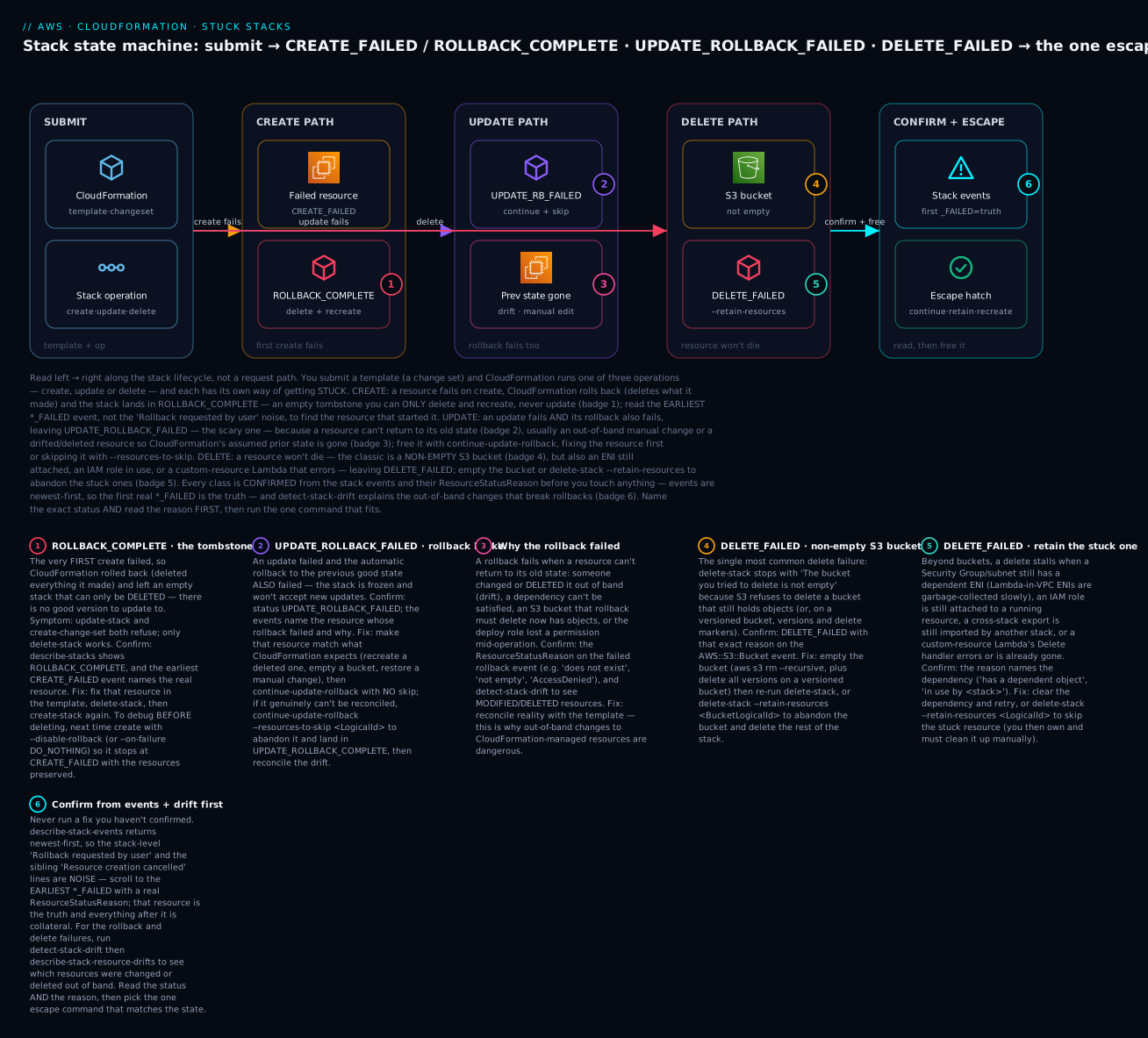
The diagram is not a request path — it’s the stack state machine, read left to right along the lifecycle. You submit a template (a change set) and CloudFormation runs one of three operations, and each has its own way of getting stuck: the create path ends in ROLLBACK_COMPLETE (an empty tombstone you can only delete and recreate); the update path can freeze in UPDATE_ROLLBACK_FAILED when a resource can’t return to its old state, usually because of an out-of-band change; and the delete path trips over a resource that won’t die — the classic non-empty S3 bucket — into DELETE_FAILED. Every stuck state carries a numbered badge, and each is confirmed the same way: read the earliest ..._FAILED event and its ResourceStatusReason, then run the single escape command that state permits. The legend narrates all six as symptom · confirm · fix.
Real-world scenario
LedgerLoom, a fintech running its platform as ~40 CloudFormation stacks in ap-south-1, lived through all three stuck states in a single bad afternoon — and the on-call engineer’s write-up afterwards became the team’s canonical runbook. The trigger was a routine change: a developer added an S3 bucket and an IAM role to the payments-api stack and deployed.
The first failure was a tombstone. A brand-new sibling stack, payments-worker, was created for the first time — and it failed, because the template named an IAM role explicitly but the pipeline invoked create-stack without --capabilities CAPABILITY_NAMED_IAM. Except it didn’t fail with a stack event: it failed at the API call with Requires capabilities : [CAPABILITY_NAMED_IAM], and no stack was created, so the engineer’s first five minutes were spent hunting for a stack in the console that wasn’t there. Once they added the capability, the create ran, but a second resource — a bucket whose name collided with an existing one — failed with payments-worker-data already exists, and the stack rolled all the way back to ROLLBACK_COMPLETE. The engineer’s instinct was to fix the bucket name and update-stack; CloudFormation bounced it with ... is in ROLLBACK_COMPLETE state and can not be updated. The lesson, written in bold in the runbook: a first-create failure is a tombstone — delete-stack, then create-stack, never update.
The second failure was the scary one. On the main payments-api stack, the update to add the role failed midway (a typo in the role’s trust policy), and the automatic rollback also failed — UPDATE_ROLLBACK_FAILED. The reason on the failed rollback event was Security group sg-0ab... does not exist. Someone, weeks earlier, had manually deleted a security group the stack managed, to “tidy up” — classic drift. The update had tried to modify a downstream resource that referenced that SG, and the rollback couldn’t restore the prior state because the SG was gone. detect-stack-drift confirmed it: one resource DELETED, two MODIFIED. The clean fix was fix-then-continue: they recreated the security group with its original ID and rules, then ran continue-update-rollback with no skip, and the stack rolled back cleanly to UPDATE_ROLLBACK_COMPLETE. Where a resource couldn’t be recreated, they would have used --resources-to-skip and reconciled later — but recreating was cleaner, so they did that.
The third failure came at cleanup. Tearing down the failed payments-worker tombstone with delete-stack returned DELETE_FAILED: The bucket you tried to delete is not empty. During the brief window the bucket existed, an automated test had written objects into it. The bucket was versioned, so a naive aws s3 rm --recursive left versions behind and the delete failed again. They purged versions and delete markers, re-ran delete-stack, and it completed. The retrospective actions were three: wire --capabilities into every pipeline create-stack call so the capability failure can’t recur; add a lint rule and a code-review gate forbidding out-of-band changes to managed resources (the drift that caused the UPDATE_ROLLBACK_FAILED); and set DeletionPolicy deliberately on stateful resources plus a bucket-emptying custom resource so teardown never trips on a full bucket again. Total time lost: about ninety minutes — most of it on the first ten, hunting for a stack that the capability error had never created.
Advantages and disadvantages
Understanding the state machine is the difference between CloudFormation being a predictable, recoverable deployment engine and being an opaque source of frozen stacks. The same all-or-nothing rigor that makes it safe is what produces the sharp-edged stuck states.
| Advantages (when you read the state machine) | Disadvantages (the traps to manage) |
|---|---|
| Every stuck stack is in exactly one named state with one escape | The states are easy to confuse (UPDATE_ROLLBACK_COMPLETE vs _FAILED) |
| Automatic rollback keeps failed creates/updates from leaving half-built messes | ROLLBACK_COMPLETE is a terminal tombstone that surprises newcomers |
--disable-rollback preserves a failure for precise debugging |
The default rollback deletes the evidence you needed |
continue-update-rollback + skip recovers almost any frozen update |
A rollback fails silently when a resource was changed out of band |
--retain-resources always gets you out of DELETE_FAILED |
Retained resources become orphans you must track and bill for |
detect-stack-drift explains “impossible” rollback failures |
Drift accumulates invisibly until an update trips on it |
| Reason strings name the exact resource and cause | The first truth is buried under rollback/cancel noise |
The advantages dominate when a team treats CloudFormation as a state machine to be read, not a black box to be retried: they set --disable-rollback when debugging, they never touch managed resources by hand, they set DeletionPolicy deliberately, and they know which escape command each dead-end wants. The disadvantages dominate when teams learn the tool only in its happy path — they hit ROLLBACK_COMPLETE and thrash with updates, they cause UPDATE_ROLLBACK_FAILED with a console “cleanup,” and they can’t tear down a stack because a bucket is full. The skill, as always, is learning the failure modes before the incident.
Hands-on lab
You will reproduce and recover the three stuck states that matter most — ROLLBACK_COMPLETE, DELETE_FAILED, and UPDATE_ROLLBACK_FAILED — on a free-tier-friendly account in ap-south-1. Everything uses S3, SNS and IAM roles (all free — no EC2, no NAT), so the only cost is a fraction of a rupee. Run in CloudShell (Bash) where aws is pre-authenticated. Teardown is at the end.
Step 0 — Variables.
export AWS_DEFAULT_REGION=ap-south-1
ACCT=$(aws sts get-caller-identity --query Account --output text)
echo "account=$ACCT region=$AWS_DEFAULT_REGION"
Part A — Force and recover ROLLBACK_COMPLETE
Step A1 — A template whose first create fails. A good S3 bucket (creates fine) plus an IAM role that references a non-existent managed policy (a guaranteed, free, deterministic failure — and it needs CAPABILITY_NAMED_IAM, tying in the capability lesson).
cat > rollback-lab.yaml <<'YAML'
AWSTemplateFormatVersion: '2010-09-09'
Resources:
  GoodBucket:
    Type: AWS::S3::Bucket
    Properties:
      BucketName: !Sub 'stuck-lab-a-${AWS::AccountId}-${AWS::Region}'
  BadRole:
    Type: AWS::IAM::Role
    Properties:
      RoleName: stuck-lab-bad-role
      AssumeRolePolicyDocument:
        Version: '2012-10-17'
        Statement:
          - Effect: Allow
            Principal: { Service: ec2.amazonaws.com }
            Action: sts:AssumeRole
      ManagedPolicyArns:
        - arn:aws:iam::aws:policy/ThisPolicyDoesNotExist   # <-- deterministic failure
YAML
Step A2 — Prove the capability guard first (optional but instructive). Submit with no capabilities and watch it get rejected before a stack exists:
aws cloudformation create-stack --stack-name stuck-lab-a --template-body file://rollback-lab.yaml
# -> An error occurred (InsufficientCapabilitiesException) ... Requires capabilities : [CAPABILITY_NAMED_IAM]
Step A3 — Now submit correctly and let it fail into ROLLBACK_COMPLETE.
aws cloudformation create-stack --stack-name stuck-lab-a \
  --template-body file://rollback-lab.yaml --capabilities CAPABILITY_NAMED_IAM
aws cloudformation wait stack-rollback-complete --stack-name stuck-lab-a 2>/dev/null || true
aws cloudformation describe-stacks --stack-name stuck-lab-a --query 'Stacks[0].StackStatus' --output text
# -> ROLLBACK_COMPLETE
Step A4 — Read the FIRST truth (not the noise). Events are newest-first; the oldest CREATE_FAILED with a real reason is the cause.
aws cloudformation describe-stack-events --stack-name stuck-lab-a \
  --query "reverse(StackEvents[?ResourceStatus=='CREATE_FAILED'].[LogicalResourceId,ResourceStatusReason])" \
  --output table
# The FIRST row -> BadRole : Policy arn:aws:iam::aws:policy/ThisPolicyDoesNotExist does not exist or is not attachable.
# (a GoodBucket "Resource creation cancelled" row is COLLATERAL, not the cause)
Step A5 — Prove you cannot update a tombstone.
sed 's#arn:aws:iam::aws:policy/ThisPolicyDoesNotExist#arn:aws:iam::aws:policy/AmazonS3ReadOnlyAccess#' \
  rollback-lab.yaml > rollback-fixed.yaml
aws cloudformation update-stack --stack-name stuck-lab-a \
  --template-body file://rollback-fixed.yaml --capabilities CAPABILITY_NAMED_IAM
# -> ValidationError: Stack:...stuck-lab-a is in ROLLBACK_COMPLETE state and can not be updated.
Step A6 — The only escape: delete, then recreate with the fix.
aws cloudformation delete-stack --stack-name stuck-lab-a
aws cloudformation wait stack-delete-complete --stack-name stuck-lab-a
aws cloudformation create-stack --stack-name stuck-lab-a \
  --template-body file://rollback-fixed.yaml --capabilities CAPABILITY_NAMED_IAM
aws cloudformation wait stack-create-complete --stack-name stuck-lab-a
aws cloudformation describe-stacks --stack-name stuck-lab-a --query 'Stacks[0].StackStatus' --output text
# -> CREATE_COMPLETE
Part B — Force and recover DELETE_FAILED (non-empty S3 bucket)
Step B1 — A stack with just a bucket, created successfully.
cat > delete-lab.yaml <<'YAML'
AWSTemplateFormatVersion: '2010-09-09'
Resources:
  DataBucket:
    Type: AWS::S3::Bucket
    Properties:
      BucketName: !Sub 'stuck-lab-b-${AWS::AccountId}-${AWS::Region}'
YAML
aws cloudformation create-stack --stack-name stuck-lab-b --template-body file://delete-lab.yaml
aws cloudformation wait stack-create-complete --stack-name stuck-lab-b
BUCKET="stuck-lab-b-${ACCT}-${AWS_DEFAULT_REGION}"
Step B2 — Put an object in the bucket, then try to delete the stack.
echo "block the delete" > /tmp/o.txt
aws s3 cp /tmp/o.txt "s3://$BUCKET/o.txt"
aws cloudformation delete-stack --stack-name stuck-lab-b
aws cloudformation wait stack-delete-complete --stack-name stuck-lab-b 2>/dev/null || true
aws cloudformation describe-stacks --stack-name stuck-lab-b --query 'Stacks[0].StackStatus' --output text
# -> DELETE_FAILED
Step B3 — Confirm the cause.
aws cloudformation describe-stack-events --stack-name stuck-lab-b \
  --query "reverse(StackEvents[?ResourceStatus=='DELETE_FAILED'].[LogicalResourceId,ResourceStatusReason])" \
  --output table
# -> DataBucket : The bucket you tried to delete is not empty ...
Step B4 — Fix A: empty the bucket, then retry the delete.
aws s3 rm "s3://$BUCKET" --recursive
aws cloudformation delete-stack --stack-name stuck-lab-b
aws cloudformation wait stack-delete-complete --stack-name stuck-lab-b
aws cloudformation describe-stacks --stack-name stuck-lab-b 2>&1 | grep -q 'does not exist' \
  && echo "DELETED (stack gone)"
Fix B (the alternative you would use if you wanted to keep the bucket): while the stack is in
DELETE_FAILED, runaws cloudformation delete-stack --stack-name stuck-lab-b --retain-resources DataBucket— CloudFormation removes the stack and leaves the bucket for you to own.
Part C — Force and recover UPDATE_ROLLBACK_FAILED (out-of-band change)
This reproduces the classic: a manual change makes a rollback impossible. You create a bucket + a bucket policy, delete the bucket out of band, then push an update to the policy — the update fails (NoSuchBucket) and its rollback fails too (NoSuchBucket again), landing in UPDATE_ROLLBACK_FAILED.
Step C1 — v1: a bucket and a bucket policy, created cleanly.
cat > uprbf-v1.yaml <<'YAML'
AWSTemplateFormatVersion: '2010-09-09'
Resources:
  Data:
    Type: AWS::S3::Bucket
    Properties:
      BucketName: !Sub 'stuck-lab-c-${AWS::AccountId}-${AWS::Region}'
  DataPolicy:
    Type: AWS::S3::BucketPolicy
    Properties:
      Bucket: !Ref Data
      PolicyDocument:
        Version: '2012-10-17'
        Statement:
          - Sid: DenyInsecureV1
            Effect: Deny
            Principal: '*'
            Action: 's3:*'
            Resource: !Sub '${Data.Arn}/*'
            Condition: { Bool: { 'aws:SecureTransport': 'false' } }
YAML
aws cloudformation create-stack --stack-name stuck-lab-c --template-body file://uprbf-v1.yaml
aws cloudformation wait stack-create-complete --stack-name stuck-lab-c
BUCKET_C="stuck-lab-c-${ACCT}-${AWS_DEFAULT_REGION}"
Step C2 — The out-of-band change: delete the bucket by hand. This is the drift that will break the rollback.
aws s3 rb "s3://$BUCKET_C" --force # bucket gone; CloudFormation still thinks it exists
Step C3 — v2: change the policy’s Sid and push the update. CloudFormation calls PutBucketPolicy on the now-missing bucket → the update fails, then the rollback (which also calls PutBucketPolicy) fails → UPDATE_ROLLBACK_FAILED.
sed 's/DenyInsecureV1/DenyInsecureV2/' uprbf-v1.yaml > uprbf-v2.yaml
aws cloudformation update-stack --stack-name stuck-lab-c --template-body file://uprbf-v2.yaml
sleep 20
aws cloudformation describe-stacks --stack-name stuck-lab-c --query 'Stacks[0].StackStatus' --output text
# -> UPDATE_ROLLBACK_FAILED
Step C4 — Confirm the cause.
aws cloudformation describe-stack-events --stack-name stuck-lab-c \
  --query "reverse(StackEvents[?contains(ResourceStatus,'FAILED')].[LogicalResourceId,ResourceStatus,ResourceStatusReason])" \
  --output table
# -> DataPolicy : ... The specified bucket does not exist (NoSuchBucket)
Step C5 — Recover with continue-update-rollback --resources-to-skip. The bucket genuinely can’t be restored to what CloudFormation expects, so skip the policy (and bucket) — CloudFormation stops trying and lands you back in a healthy state.
aws cloudformation continue-update-rollback --stack-name stuck-lab-c \
  --resources-to-skip DataPolicy Data
aws cloudformation wait stack-rollback-complete --stack-name stuck-lab-c
aws cloudformation describe-stacks --stack-name stuck-lab-c --query 'Stacks[0].StackStatus' --output text
# -> UPDATE_ROLLBACK_COMPLETE  (now reconcile: the skipped resources are drift)
The cleaner alternative when a resource can be restored: recreate it out of band with the same physical ID (here,
aws s3 mb s3://$BUCKET_C), thencontinue-update-rollbackwith no skip — the rollback completes normally with nothing left drifted.
Step D — Validation checklist. You reproduced three stuck states and recovered each with its matching escape:
| Part | Stuck state reproduced | The confirming reason | The escape you used |
|---|---|---|---|
| A | ROLLBACK_COMPLETE |
... policy ... does not exist or is not attachable (first create failed) |
delete-stack + recreate |
| B | DELETE_FAILED |
The bucket you tried to delete is not empty |
Empty the bucket, retry (or --retain-resources) |
| C | UPDATE_ROLLBACK_FAILED |
... bucket does not exist (out-of-band delete) |
continue-update-rollback --resources-to-skip |
Teardown (⚠️ do this — the stacks and bucket are tiny but real).
aws cloudformation delete-stack --stack-name stuck-lab-a          # deletes the recreated good stack
aws cloudformation delete-stack --stack-name stuck-lab-c          # policy skipped; bucket already gone
aws s3 rb "s3://stuck-lab-b-${ACCT}-${AWS_DEFAULT_REGION}" --force 2>/dev/null || true
aws cloudformation wait stack-delete-complete --stack-name stuck-lab-a 2>/dev/null || true
rm -f rollback-lab.yaml rollback-fixed.yaml delete-lab.yaml uprbf-v1.yaml uprbf-v2.yaml /tmp/o.txt
# stuck-lab-b is already deleted from Part B; confirm none remain:
aws cloudformation list-stacks --stack-status-filter CREATE_COMPLETE UPDATE_ROLLBACK_COMPLETE DELETE_FAILED \
  --query "StackSummaries[?starts_with(StackName,'stuck-lab')].[StackName,StackStatus]" --output table
Cost note. S3, SNS and IAM roles used here are free; the only spend is negligible S3 request/storage for one small object, removed at teardown. There is no compute, NAT or provisioned capacity left running. CloudFormation itself is free for AWS-native resource types.
Common mistakes & troubleshooting
This is the playbook — the part you bookmark. First the scannable master table you can read at 02:10, then the three nastiest failures in full. Every row is a real stuck state with the exact status, the root cause, the field to confirm it on, and the precise command that frees it.
| # | Stack status / symptom | Root cause | Confirm (event / reason) | Fix (exact command) |
|---|---|---|---|---|
| 1 | ROLLBACK_COMPLETE, update-stack refused |
First create failed → tombstone | ... is in ROLLBACK_COMPLETE state and can not be updated |
delete-stack then create-stack with the fix |
| 2 | create-stack returns an error, no stack appears |
Missing capabilities | Requires capabilities : [CAPABILITY_NAMED_IAM] |
Re-run with --capabilities CAPABILITY_NAMED_IAM |
| 3 | ROLLBACK_COMPLETE, unclear why |
A resource failed on first create | Earliest CREATE_FAILED ResourceStatusReason |
Fix that resource; delete + recreate |
| 4 | ROLLBACK_FAILED |
The failed-create rollback also failed | Events name the resource that wouldn’t delete | delete-stack (± --retain-resources), recreate |
| 5 | UPDATE_ROLLBACK_FAILED |
A resource can’t return to its old state | Failed-rollback event’s reason | Fix the resource, then continue-update-rollback |
| 6 | UPDATE_ROLLBACK_FAILED, resource deleted out of band |
Drift — the prior state is gone | ... does not exist; detect-stack-drift → DELETED |
Recreate it, or continue-update-rollback --resources-to-skip <id> |
| 7 | UPDATE_ROLLBACK_FAILED on a nested stack |
A child stack’s rollback failed | Parent event names the child | continue-update-rollback --resources-to-skip Child.LogicalId (root) |
| 8 | DELETE_FAILED, S3 bucket |
Bucket not empty (or versions/markers) | The bucket you tried to delete is not empty |
Empty (all versions), retry; or --retain-resources DataBucket |
| 9 | DELETE_FAILED, security group / subnet |
An ENI still references it | has a dependent object / has dependencies |
Delete the ENI (often Lambda-in-VPC GC), retry |
| 10 | DELETE_FAILED, IAM role |
Role still in use / has policies | Cannot delete entity, must detach ... |
Detach/stop the consumer, retry |
| 11 | DELETE_FAILED, custom resource |
Provider Lambda’s Delete errored / is gone |
Received response status [FAILED]; Lambda logs |
Fix the Lambda; or --retain-resources <CR> |
| 12 | DELETE_FAILED, Cannot delete export ... in use |
Cross-stack import dependency | list-imports names the consumer |
Delete/repoint the importing stack first |
| 13 | Hung CREATE_IN_PROGRESS ~1h then fails |
Custom resource never signalled | Custom Resource failed to stabilize |
Fix cfn-response on every path |
| 14 | Hung CREATE_IN_PROGRESS with WaitCondition |
cfn-signal never sent |
WaitCondition timed out. Received 0 ... |
Fix cfn-signal; check Count/Timeout |
| 15 | Hung UPDATE_IN_PROGRESS |
A resource won’t stabilise | Events show one resource stuck IN_PROGRESS |
cancel-update-stack |
| 16 | CREATE_FAILED, <name> already exists |
Name collision with an existing resource | Resource event | Rename, import, or delete the conflict |
| 17 | CREATE_FAILED, quota |
Service limit reached | The maximum number of X has been reached |
Request an increase (Service Quotas) |
| 18 | UPDATE_FAILED (not rolled back) |
Update failed with rollback disabled | Status UPDATE_FAILED; resources preserved |
rollback-stack, or fix + update-stack |
| 19 | Update silently skips a resource | Stack policy protects it | Action denied by the stack policy |
--stack-policy-during-update-body, or edit the policy |
| 20 | Update fails, reality ≠ template | Drift | detect-stack-drift → MODIFIED/DELETED |
Reconcile drift, then re-update |
| 21 | update-stack returns No updates are to be performed |
No real diff (not a failure) | Same message | Change something real, or ignore |
| 22 | Parent stack ..._FAILED, reason vague |
A nested child failed | Embedded stack <arn> was not successfully ... |
Read the child stack’s events |
The three that cause the most damage, expanded:
A. UPDATE_ROLLBACK_FAILED — the frozen stack you must reconcile, not retry. An update-stack fails and its rollback fails too, leaving the stack frozen; naively re-running continue-update-rollback just fails again at the same resource, and people loop on it for an hour. The cause is almost always that a resource can’t be put back the way it was — overwhelmingly because it was changed or deleted out of band (someone edited it in the console), so CloudFormation’s recorded prior state no longer matches reality. Confirm: read the ResourceStatusReason on the UPDATE_ROLLBACK_FAILED event — ... does not exist, ... is not empty, AccessDenied — and run detect-stack-drift → describe-stack-resource-drifts to see which resources are MODIFIED/DELETED. Fix (in order of preference): if the resource can be restored, make reality match CloudFormation’s expectation (recreate the deleted resource with the same physical ID, empty the bucket, restore the setting) and then continue-update-rollback with no skip — the rollback completes cleanly with zero residual drift. Only if the resource genuinely can’t be reconciled do you continue-update-rollback --resources-to-skip <LogicalId> (using NestedStack.LogicalId for nested children), which marks the resource UPDATE_COMPLETE as-is and finishes the rollback — after which you must reconcile the drift (re-import it, fix it, or remove it on the next deploy). The senior habit that eliminates this whole class: never modify a CloudFormation-managed resource by hand.
B. ROLLBACK_COMPLETE — the tombstone that can only be deleted. The dashboard shows ROLLBACK_COMPLETE, you fix the template, and every update-stack and change set bounces with ... can not be updated. This is not a bug: ROLLBACK_COMPLETE is the terminal result of a first create-stack that failed and rolled all the way back, so there is no previous good version to update to — the only legal operation is delete-stack, after which you create-stack fresh with the fix. Confirm: the status is ROLLBACK_COMPLETE (not UPDATE_ROLLBACK_COMPLETE, which is updatable), and the earliest CREATE_FAILED event’s ResourceStatusReason names the real culprit — scroll past the Rollback requested by user and Resource creation cancelled noise. Fix: delete-stack, wait stack-delete-complete, then create-stack with the corrected template. The habit that saves the debugging next time: when a first create is risky, submit it with --disable-rollback (or --on-failure DO_NOTHING) so a failure stops at CREATE_FAILED with the half-built resources preserved for inspection instead of deleted into a tombstone — you get to see exactly what broke before you clean up.
C. DELETE_FAILED — the non-empty S3 bucket (and its versioned trap). A teardown that “should” be trivial freezes at DELETE_FAILED because delete-stack tried to delete an S3 bucket that still holds objects — The bucket you tried to delete is not empty — since S3 refuses to delete a non-empty bucket. The trap that catches people twice: on a versioned bucket, a plain aws s3 rm --recursive deletes the current objects but leaves versions and delete markers, so the retry still fails. Confirm: DELETE_FAILED with that reason on the AWS::S3::Bucket event. Fix: either fully empty the bucket — current objects and all versions and all delete markers (list-object-versions + delete-objects for both Versions[] and DeleteMarkers[]) — then re-run delete-stack; or, if you’d rather keep the bucket, delete-stack --retain-resources <BucketLogicalId> (valid only in DELETE_FAILED) to abandon it and delete the rest of the stack. The durable prevention is to set DeletionPolicy deliberately on stateful resources and, for buckets you always want auto-cleared, attach a small “empty the bucket on delete” custom resource so teardown never trips.
Best practices
- Read the status and the earliest failed event’s reason before touching anything. The status names the state; the oldest
..._FAILEDResourceStatusReasonnames the cause. Everything above it in the newest-first event list is rollback/cancel noise. - Know the one escape per dead-end cold:
ROLLBACK_COMPLETE→ delete + recreate;UPDATE_ROLLBACK_FAILED→continue-update-rollback(± skip);DELETE_FAILED→ retry with--retain-resources; hungUPDATE_IN_PROGRESS→cancel-update-stack. - Never modify a CloudFormation-managed resource out of band. The console “quick fix” is the number-one cause of
UPDATE_ROLLBACK_FAILED. If you must change something, change the template and deploy it. - Debug failures with
--disable-rollback(or--on-failure DO_NOTHING). Preserving a failed create atCREATE_FAILEDbeats losing the evidence to aROLLBACK_COMPLETEtombstone. - Wire
--capabilitiesinto every pipelinecreate-stack/update-stack. TheInsufficientCapabilitiesExceptionfails before a stack exists and wastes minutes hunting for a stack that was never created. - Set
DeletionPolicydeliberately on every stateful resource (Retain/Snapshotfor data you can’t lose, and auto-empty custom resources for buckets), so teardown never surprises you withDELETE_FAILED. - Make custom-resource providers respond on every path — success, failure, and delete — so a swallowed exception can’t hang the stack in
..._IN_PROGRESSfor an hour. - Run
detect-stack-driftbefore big updates and after any incident. Drift is the silent precondition for failed rollbacks; catchingMODIFIED/DELETEDresources early prevents the freeze. - Prefer fix-then-continue over skip. Skipping a resource in
continue-update-rollbackleaves drift you must reconcile; restoring the resource first leaves the stack clean. - Use change sets to preview updates, and use nested stacks knowing that a child failure hides its real reason in the child’s events, not the parent’s.
- Enable termination protection on stateful production stacks and disable it explicitly before an intended delete, so a stray
delete-stackcan’t run. - Alarm on stacks that linger in
..._IN_PROGRESSor land in any_FAILED/ROLLBACK_COMPLETEstate via EventBridge on CloudFormation state-change events — a frozen stack should page you, not be discovered at the next deploy.
Security notes
- Least-privilege stack roles. Deploy with a scoped stack role (
--role-arn) so CloudFormation acts with exactly the permissions the template needs — not the deployer’s broad rights. A permission narrowed mid-operation is a real cause ofUPDATE_ROLLBACK_FAILED(the rollback’s API call becomesAccessDenied), so change deploy-role policies carefully. - Acknowledge IAM changes explicitly.
CAPABILITY_IAM/CAPABILITY_NAMED_IAMexist so a template can’t silently create or escalate identities — treat a capability prompt as a signal to review what IAM the template touches, not a checkbox to auto-approve. - Protect resources with a stack policy. A stack policy that denies
Update:Replace/Update:Deleteon stateful resources prevents an accidental template change from replacing a production database. Use--stack-policy-during-update-bodyfor deliberate one-off overrides rather than weakening the standing policy. - Guard against destructive rollbacks of data. Set
DeletionPolicy: RetainorSnapshoton databases, buckets and volumes so a failed create’s rollback (or a mistaken delete) can’t wipe data —RetainExceptOnCreatekeeps the retain behaviour without leaving orphans from rolled-back creates. - Don’t leak secrets in templates or outputs. Never hard-code credentials in a template or expose them via
Outputs/Exports(exports are readable by any stack in the account); reference Secrets Manager/SSM Parameter Store dynamic references ({{resolve:...}}) instead, and remember that--disable-rollbackdebugging may leave sensitive half-built resources around — clean them up. - Enable termination protection and drift detection on production stacks, and treat any detected drift as a security finding — an out-of-band change is both a rollback hazard and an unreviewed modification to your infrastructure.
Cost & sizing
CloudFormation itself is free for AWS-native resource types (you pay only for the resources it provisions); third-party/registry resource types and Hooks bill per handler operation. The real cost of stuck stacks is indirect — orphaned and retained resources that keep billing, half-built resources left by --disable-rollback, and custom-resource Lambdas that hang and retry. Right-sizing here means not leaving things running by accident.
| Cost driver | How it bills | Right-size by | Rough figure |
|---|---|---|---|
| CloudFormation (native types) | Free | — | ₹0 for AWS::* resources |
| Third-party / registry types + Hooks | Per handler operation beyond a free tier | Limit custom types; batch operations | Small per-operation charge above ~1,000/month |
Retained resources (--retain-resources, DeletionPolicy: Retain) |
The resource’s own billing, forever | Track and clean up orphans; tag them | Whatever the resource costs (a bucket, an EBS volume…) |
Preserved failed creates (--disable-rollback) |
The half-built resources’ own billing | Delete promptly after debugging | Depends on what got created before the failure |
| Custom-resource Lambdas | Lambda invocation + duration | Fast handlers; respond on every path | Negligible unless one hangs and retries |
Snapshots (DeletionPolicy: Snapshot) |
EBS/RDS snapshot storage | Lifecycle-expire old snapshots | Per-GB-month snapshot storage |
Sizing rules of thumb: the expensive mistakes are orphans — a bucket you retained and forgot, an EBS volume left by a Snapshot policy’s parent, resources preserved by --disable-rollback and never cleaned up. Tag everything CloudFormation-managed and periodically reconcile against live stacks so retained/orphaned resources surface. Keep custom-resource Lambdas small and fast (a hung one blocking a stack for an hour is cheap in Lambda terms but expensive in engineer time). And prefer DeletionPolicy: Snapshot over Retain for volumes and databases you might need but don’t want running — a snapshot is far cheaper than a live resource. In INR terms, CloudFormation adds essentially nothing to the bill; the line items to watch are the stateful resources its policies keep alive after a stack is gone.
Interview & exam questions
Q1. A stack is in ROLLBACK_COMPLETE. You fixed the template — why won’t update-stack work, and what do you do?
ROLLBACK_COMPLETE is the terminal result of a first create that failed and rolled back completely, so there is no previous good version to update from — CloudFormation rejects updates and change sets. The only path is delete-stack, then create-stack with the fix. (DVA-C02, SOA-C02)
Q2. Distinguish UPDATE_ROLLBACK_COMPLETE from UPDATE_ROLLBACK_FAILED.
UPDATE_ROLLBACK_COMPLETE is healthy — an update failed but the stack rolled back cleanly to its previous good state and you can update it again. UPDATE_ROLLBACK_FAILED is frozen — the rollback itself failed and the stack accepts no updates until you continue-update-rollback. Read the last token, not “rollback.” (DVA-C02, DOP-C02)
Q3. What causes UPDATE_ROLLBACK_FAILED, and how do you recover?
A resource can’t be returned to its old state — most commonly because it was changed or deleted out of band (drift), or a dependency/permission blocks it. Recover by making the resource match CloudFormation’s expectation and running continue-update-rollback with no skip; if it can’t be reconciled, continue-update-rollback --resources-to-skip <LogicalId> and reconcile the drift afterward. (DOP-C02, SOA-C02)
Q4. delete-stack returns DELETE_FAILED on an S3 bucket. Why, and what are your two fixes?
S3 refuses to delete a non-empty bucket (The bucket you tried to delete is not empty), and on a versioned bucket you must also remove all versions and delete markers. Fix A: fully empty the bucket, then retry delete-stack. Fix B: delete-stack --retain-resources <BucketLogicalId> (valid only in DELETE_FAILED) to abandon the bucket and delete the rest. (SOA-C02, DVA-C02)
Q5. You ran create-stack and got an error, but no stack appears in the console. What happened?
The template creates IAM (or uses macros) and you didn’t pass --capabilities, so CloudFormation rejected the call at the API with InsufficientCapabilitiesException and never created a stack. Re-run with CAPABILITY_IAM / CAPABILITY_NAMED_IAM / CAPABILITY_AUTO_EXPAND as required. (DVA-C02)
Q6. How do you find the true cause of a rollback in the stack events?
describe-stack-events returns newest-first, so the top is noise (Rollback requested by user, Resource creation cancelled). Scroll to the earliest ..._FAILED event with a real ResourceStatusReason — that resource is the root cause; everything after it is collateral. (SOA-C02)
Q7. A stack has been in CREATE_IN_PROGRESS for 40 minutes with no visible progress. What’s likely, and how do you confirm?
A custom resource or a WaitCondition is waiting for a signal that never came — the provider Lambda didn’t call the response URL, or cfn-signal was never sent from an EC2 instance. Confirm from the stuck resource’s event and the provider Lambda’s / instance’s logs; it will eventually time out to CREATE_FAILED (Custom Resource failed to stabilize / WaitCondition timed out). (DVA-C02, DOP-C02)
Q8. What does --disable-rollback (or --on-failure DO_NOTHING) buy you?
On a failed create/update it stops at CREATE_FAILED/UPDATE_FAILED and preserves the resources instead of rolling back, so you can inspect exactly what failed. It’s the antidote to ROLLBACK_COMPLETE deleting your evidence. From there you can rollback-stack, fix and retry, or delete. (DOP-C02)
Q9. How do you abort an update that’s taking too long or heading somewhere bad?
cancel-update-stack, valid only in UPDATE_IN_PROGRESS, stops the update and triggers a rollback to the last good state (→ UPDATE_ROLLBACK_IN_PROGRESS → UPDATE_ROLLBACK_COMPLETE). It doesn’t apply to creates, deletes, or nested stacks (cancel the root). (SOA-C02)
Q10. A nested stack’s parent shows UPDATE_FAILED but the reason is vague. Where do you look?
At the child stack’s own events — the parent’s AWS::CloudFormation::Stack event only says the embedded stack failed (Embedded stack <arn> was not successfully updated). If the child is UPDATE_ROLLBACK_FAILED, recover from the root stack using NestedStack.LogicalId in --resources-to-skip. (DOP-C02)
Q11. What is drift, and how does it cause failed rollbacks?
Drift is the divergence between a stack’s template and the real resources, created by out-of-band changes. It causes failed rollbacks because an update’s rollback assumes a prior state that drift has invalidated — e.g. it tries to restore a resource that was manually deleted and fails does not exist. Detect it with detect-stack-drift → describe-stack-resource-drifts. (DOP-C02, SOA-C02)
Q12. When would you use --retain-resources versus --resources-to-skip?
--retain-resources is a delete-side flag (valid only in DELETE_FAILED) that abandons a resource so the rest of the stack can be deleted. --resources-to-skip is an update-rollback flag (valid only in UPDATE_ROLLBACK_FAILED) that skips a resource so the rollback can finish. Both leave you owning the skipped/retained resource to reconcile. (DVA-C02, DOP-C02)
Quick check
- A stack is in
ROLLBACK_COMPLETE. Why can’t you update it, and what is the only way forward? - What single distinction separates the healthy
UPDATE_ROLLBACK_COMPLETEfrom the frozenUPDATE_ROLLBACK_FAILED, and what command frees the frozen one? delete-stackfails withDELETE_FAILEDon a versioned S3 bucket, and youraws s3 rm --recursivedidn’t fix it. What did you miss, and what’s the alternative escape?- You get an error from
create-stackbut no stack is created. What’s the cause, and the fix? - In
describe-stack-events(newest-first), which event is the real root cause, and which two reason strings are noise?
Answers
- Because
ROLLBACK_COMPLETEis the terminal result of a first create that failed and rolled back — there’s no previous good version to update from. The only way forward isdelete-stack, thencreate-stackwith the fixed template. - The last token:
..._COMPLETEmeans the rollback succeeded and the stack is back to its previous good state (updatable now);..._FAILEDmeans the rollback itself failed and the stack is frozen. Free it withcontinue-update-rollback(optionally--resources-to-skip <LogicalId>if a resource can’t be reconciled). - A versioned bucket also needs all versions and delete markers removed, not just current objects (
list-object-versions+delete-objectsfor bothVersions[]andDeleteMarkers[]). The alternative isdelete-stack --retain-resources <BucketLogicalId>(valid only inDELETE_FAILED) to abandon the bucket and delete the rest. - The template creates IAM resources (or uses macros) and you didn’t pass
--capabilities, so CloudFormation rejected the call withInsufficientCapabilitiesExceptionbefore creating a stack. Re-run withCAPABILITY_IAM/CAPABILITY_NAMED_IAM/CAPABILITY_AUTO_EXPAND. - The earliest (oldest)
..._FAILEDevent with a realResourceStatusReasonis the cause.Rollback requested by user(the stack-level note) andResource creation cancelled(a sibling aborted because another failed) are noise — scroll past them.
Glossary
| Term | Definition |
|---|---|
| Stack status | The single state a stack is in (CREATE_COMPLETE, ROLLBACK_COMPLETE, UPDATE_ROLLBACK_FAILED, …) that determines which operations are legal. |
ROLLBACK_COMPLETE |
The terminal state after a first create-stack failed and rolled back fully; the stack can only be deleted, not updated. |
UPDATE_ROLLBACK_FAILED |
The frozen state after an update’s rollback itself failed; recovered with continue-update-rollback (± --resources-to-skip). |
DELETE_FAILED |
A delete stopped because a resource wouldn’t delete (non-empty bucket, dependent ENI, in-use role); finished with --retain-resources. |
continue-update-rollback |
The command (valid only in UPDATE_ROLLBACK_FAILED) that retries a failed rollback, optionally skipping unrecoverable resources. |
cancel-update-stack |
The command (valid only in UPDATE_IN_PROGRESS) that aborts an in-flight update and triggers a rollback. |
rollback-stack |
Rolls a CREATE_FAILED/UPDATE_FAILED (rollback-disabled) stack back to its last stable state. |
--disable-rollback / --on-failure DO_NOTHING |
Submit-time flags that preserve a failed create/update (stopping at CREATE_FAILED/UPDATE_FAILED) for debugging instead of rolling back. |
--retain-resources |
A delete-stack flag (valid only in DELETE_FAILED) that abandons named resources so the rest of the stack can be deleted. |
ResourceStatusReason |
The event field carrying the human-readable failure message — the real cause you read on the earliest ..._FAILED event. |
| Capabilities | Explicit acknowledgements (CAPABILITY_IAM, CAPABILITY_NAMED_IAM, CAPABILITY_AUTO_EXPAND) required for templates with IAM or macros. |
| Custom resource | A template resource backed by a Lambda/SNS provider that must call a response URL; a non-responding provider hangs the stack ..._IN_PROGRESS. |
WaitCondition |
A resource that pauses the stack until it receives cfn-signal callbacks; times out with WaitCondition timed out if they don’t arrive. |
DeletionPolicy |
Per-resource instruction (Delete, Retain, RetainExceptOnCreate, Snapshot) for what happens to a resource on delete/replacement. |
| Drift | The divergence between a stack’s template and the real resources, caused by out-of-band changes; the usual precondition for failed rollbacks. |
| Stack policy | A JSON document protecting resources from updates; once present, resources are denied unless explicitly allowed, overridable per-update. |
Next steps
- Build the stacks this playbook debugs — templates, change sets, parameters and deploys — in Your First CloudFormation Stack: Templates, Change Sets and Deploys Hands-On.
- Drive the same stacks from code (and hit the same states via
cdk deploy) in AWS CDK with TypeScript: Infrastructure as Code Hands-On. - Turn the most common create failure — a quota — into a fix with AWS Service Quotas: Viewing Limits and Requesting Increases Hands-On.
- Practise the diagnostic reflex — read the status, read the earliest failed event, run the one escape command — on every stack you touch until it’s muscle memory.