Every AWS account ships with a wall around each service, and one day your workload runs into it. A deployment pipeline tries to launch the fleet for a load test and half the instances fail with VpcLimitExceeded or a bare You have requested more vCPU capacity than your current vCPU limit. A viral spike drives Lambda to TooManyRequestsException at exactly 1,000 concurrent executions. A new environment can’t allocate its sixth Elastic IP because the default is five. None of these are bugs, and none of them are “AWS is out of servers” — they are quotas (AWS’s current name for what everyone still calls limits): deliberate per-account, per-region caps that exist so a runaway script, a compromised key, or a bad terraform apply can’t consume an unbounded slice of a shared platform — or of your own bill.
The problem is that quotas are invisible until you hit one, and by then you are usually mid-incident. The fix is to treat them as a first-class part of your architecture: know where each limit lives, know whether it is adjustable or a hard ceiling, know the default you start with versus the applied value your account actually has, and — most importantly — watch your utilization so a CloudWatch alarm warns you at 80% instead of a pager warning you at 100%. AWS gives you one console and one API to do most of this — Service Quotas — plus Trusted Advisor checks and CloudWatch AWS/Usage metrics to see how close you are.
This is the field guide. You will learn the exact aws service-quotas commands to look up any limit, tell adjustable from non-adjustable, request an increase (and when you must fall back to a Support case), pre-provision increases for every new account in an Organization with quota request templates, and — the part that separates seniors from juniors — set a CloudWatch alarm on the AWS/Usage namespace at 80% of a quota using the SERVICE_QUOTA() metric-math function so throttling is something you schedule around, never something that surprises you. There is a complete hands-on lab (CLI + Terraform, with teardown) and a troubleshooting playbook for the twelve limit-related failures you will actually see.
What problem this solves
Quotas break things in production in ways that look like something else, which is exactly why they cost so much time. The launch of a new microservice stalls because the account is capped at five VPCs and someone already used them on sandbox environments. A perfectly healthy autoscaling group can’t scale out during Black Friday because the On-Demand vCPU quota for the Standard instance family is lower than the fleet needs — and the error, InsufficientInstanceCapacity, looks identical to a quota problem but is not one. A batch job that fans out to Lambda drops a third of its messages to a dead-letter queue because it blew past the account’s 1,000 concurrent-execution ceiling and every over-limit invoke came back 429. A data pipeline hammering one S3 prefix starts getting 503 Slow Down.
Who hits this? Everyone, eventually — but three groups feel it hardest. New accounts (and every account freshly vended from AWS Organizations) start with deliberately low defaults, so the first real workload is often the first wall. Fast-growing workloads cross thresholds silently — you were at 60% of your ENI quota last quarter and nobody looked. And event-driven / spiky systems discover that a quota which is comfortable at steady state is fatal at peak, because the ceiling is on concurrency and request rate, not on monthly totals. Without a deliberate quota practice, every one of these becomes a Sev-2 discovered at the worst possible moment. With one, an increase request that takes hours-to-days to approve is filed last week, on a calendar reminder, because an alarm told you the runway was shrinking.
Learning objectives
By the end of this article you can:
- Locate any AWS limit across the four places quotas actually live (Service Quotas, per-service consoles, Trusted Advisor, Support-only) and read its default, applied, adjustable and global-vs-regional attributes.
- Explain why quotas exist (blast-radius containment, spend protection, fair multi-tenancy) and why the vast majority are soft and per-region.
- Look up and request increases with the
aws service-quotasCLI and theaws_servicequotas_service_quotaTerraform resource, and know when a request auto-approves versus routes to a Support case. - Recall the limits engineers actually hit — EC2 On-Demand vCPU quotas per family, Elastic IPs (5), VPCs per region (5), security-group rules, Lambda concurrency (1,000), S3 per-prefix request rates, API Gateway throttling, SES sending, RDS instances, ENIs — with real quota codes.
- Monitor utilization with CloudWatch
AWS/Usagemetrics and theSERVICE_QUOTA()function, and wire an alarm at 80% so you are warned early. - Roll out quota increases fleet-wide for new accounts using Organizations quota request templates.
- Diagnose the difference between a quota rejection (
LimitExceeded) and a capacity shortfall (InsufficientInstanceCapacity) — the single most common false diagnosis in this area.
Prerequisites & where this fits
You should be comfortable with the AWS CLI (a configured profile with credentials), the idea of regions and Availability Zones (most quotas are scoped to a single region), and IAM basics (you will attach a policy granting servicequotas:* read/request actions). Terraform familiarity helps for the IaC half of the lab but is not required to follow it.
Quotas sit underneath everything else you build on AWS, which is why this is a Foundations topic and why it maps cleanly to the operational and architecture certifications. It is examined directly in SOA-C02 (SysOps — monitoring quotas, Trusted Advisor, requesting increases) and CLF-C02 (Cloud Practitioner — the concept of soft limits and Support), and it underpins scenario questions in SAA-C03 (designing for scale means designing within — and raising — quotas). If you are standing up a multi-account landing zone, read this alongside AWS Control Tower: Guardrails for a Multi-Account Foundation and AWS Organizations & IAM Foundations, because quota request templates are an Organizations feature. Because quotas exist partly to cap spend, they are the natural sibling of cost governance — pair this with AWS Billing: Cost Explorer, Budgets & Alerts.
Core concepts
Start with the vocabulary, because AWS renamed things and the old words persist everywhere — docs, error strings, blog posts, and your senior engineer’s muscle memory.
| Term | What it means | Where you see it |
|---|---|---|
| Quota | The current AWS name for a maximum value for a resource, action or rate in your account. | Service Quotas console/API, newer docs. |
| Limit | The legacy name for the same thing. Still used in error strings (LimitExceeded), Trusted Advisor (“Service Limits”), and per-service docs. |
Everywhere older. Treat as a synonym for quota. |
| Default value | The value AWS ships for a quota, before any change. What a brand-new account starts with. | get-aws-default-service-quota. |
| Applied value | The value actually in force for your account in this region — the number a request is checked against. May be higher than default after an increase. | get-service-quota. |
| Adjustable | Whether you can raise the quota yourself via a request (true) or it is a hard ceiling (false). |
Adjustable field in the API. |
| Global quota | A quota that spans all regions (IAM, Route 53, CloudFront, some Organizations limits) rather than per-region. | GlobalQuota: true in the API. |
| Quota code | The stable identifier for a quota, e.g. L-1216C47A (EC2 Standard vCPUs). |
Used in every CLI/Terraform call. |
| Service code | The stable identifier for a service, e.g. ec2, lambda, vpc. |
Used with quota code to address a quota. |
| Utilization | Your current usage as a fraction of the applied quota. The number you should alarm on. | AWS/Usage metrics + SERVICE_QUOTA() math. |
Why quotas exist
Quotas are not AWS being stingy; they are three protections wearing one coat.
| Reason | What it protects | Concrete example |
|---|---|---|
| Blast-radius containment | The shared platform and other tenants from one account’s runaway. | A leaked key can’t spin up 100,000 instances to mine crypto — it hits the vCPU quota first. |
| Spend protection (yours) | Your own bill from a bug or a bad loop. | A misconfigured autoscaler can’t launch an unbounded fleet at 3 a.m.; the quota is a circuit breaker. |
| Fair multi-tenancy | Finite regional capacity shared across all customers. | Per-account rate limits on control-plane APIs keep one caller from starving the region’s API endpoints. |
| Safe defaults for new accounts | New/untrusted accounts from being weaponized before AWS has any usage history. | Low starting vCPU/EIP/VPC defaults that grow as the account establishes a track record. |
Two consequences fall out of this design and you should internalize both. First, most quotas are per-account and per-region — raising the Lambda concurrency quota in ap-south-1 does nothing for us-east-1, and your teammate’s account is unaffected by yours. Second, the vast majority are soft (adjustable) — AWS wants you to grow and will raise most limits on request, often automatically. The dangerous minority are the hard limits that cannot move at all (or only via a negotiated Support case), and knowing which is which is half the skill.
Scope: per-region, per-account, or global
The scope of a quota decides how many times you have to raise it. Get this wrong and you “raise the quota” but the workload still fails somewhere you forgot.
| Scope | What it means | Example services / quotas | Consequence for you |
|---|---|---|---|
| Per-region | Independent value in every region. | EC2 vCPUs, VPCs, Lambda concurrency, RDS instances, ENIs, EIPs. | Raise (and alarm) in each region you deploy to. |
| Per-AZ | Independent value in every Availability Zone. | NAT gateways per AZ (5). | Rare, but check when a per-AZ resource fails in only one AZ. |
| Global (account-wide) | One value for the whole account, all regions. | IAM roles/users/policies, Route 53 hosted zones, CloudFront distributions, some Organizations limits. | Raise once; GlobalQuota: true in the API. |
| Per-resource | A cap within one resource, not the account. | Rules per security group, routes per route table, records per hosted zone. | Redesign the resource (split) or raise the sub-limit. |
Where quotas actually live (four systems, one truth)
The single biggest time-sink for newcomers is not knowing that quotas are surfaced in four different places, only one of which is the “official” modern home.
| System | Covers | Read access | Can request increase? | Notes |
|---|---|---|---|---|
Service Quotas (console + service-quotas API) |
Most quotas for ~200 services, with defaults, applied values, adjustability and (for some) live utilization. | Free, IAM-gated. | Yes — self-service RequestServiceQuotaIncrease. |
The modern default. Start here. |
| Per-service consoles / docs | Service-specific limits, some not yet in Service Quotas (older or niche). | Free. | Sometimes (deep links into Service Quotas or a Support case). | Fallback when Service Quotas has no entry. |
| Trusted Advisor (“Service Limits” check) | ~50 of the most-hit limits, with current usage flagged at 80%/100%. | Core checks free; full set needs Business/Enterprise Support. | No — it links you to the increase flow. | Great for a portfolio glance; not exhaustive. |
| AWS Support case only | Non-adjustable-via-API limits, very large jumps, and a few services with no Service Quotas entry. | N/A | Yes — a “Service limit increase” case. | Available even on Basic Support; paid support only buys speed. |
The mental model: Service Quotas is the source of truth for the number; Trusted Advisor is the source of truth for how close you are (for the ~50 it covers); CloudWatch AWS/Usage is the source of truth for how close you are for everything with a usage metric; and a Support case is the escape hatch when self-service can’t move the wall.
Reading a quota: default, applied, adjustable, global
Before you can request anything you must read the four attributes that describe a quota, because they determine your entire strategy.
| Attribute | Question it answers | CLI to read it | Why it matters |
|---|---|---|---|
| Default value | What does a fresh account get? | get-aws-default-service-quota |
Tells you how far you’ve already moved and what a new account will start with. |
| Applied value | What is my account capped at now, here? | get-service-quota |
The only number a request is actually checked against. |
| Adjustable | Can I raise it myself? | either call, Adjustable field |
false means don’t plan around raising it — redesign or open a Support case. |
| Global | Does this apply per-region or account-wide? | either call, GlobalQuota field |
Global quotas (IAM, Route 53) are raised once; regional quotas must be raised per region. |
A worked example — the difference between default and applied is not academic. Suppose your account was created two years ago and someone already raised EC2 Standard vCPUs to 256. The default is still whatever AWS ships (low), but your applied value is 256, and that is your real headroom:
# Applied value for THIS account in THIS region (what actually governs)
aws service-quotas get-service-quota \
  --service-code ec2 --quota-code L-1216C47A \
  --query 'Quota.[QuotaName,Value,Adjustable,GlobalQuota]' --output text
# EC2 Standard (A, C, D, H, I, M, R, T, Z) instances   256.0   True   False

# What AWS ships by default (for comparison / new-account planning)
aws service-quotas get-aws-default-service-quota \
  --service-code ec2 --quota-code L-1216C47A \
  --query 'Quota.Value' --output text
Read the Adjustable and GlobalQuota booleans every time. If Adjustable is false, no amount of request-service-quota-increase will help — you either redesign (spread across regions/accounts) or open a Support case and hope. If GlobalQuota is true, you do the increase once for the account, not once per region.
The Service Quotas API, operation by operation
The whole workflow is a dozen commands under aws service-quotas. Memorize the shape and you can find or raise any limit from the terminal.
Operation (aws service-quotas …) |
What it does | Key parameters |
|---|---|---|
list-services |
Enumerate every service code Service Quotas knows. | --query 'Services[].ServiceCode' |
list-service-quotas |
List the applied quotas for a service (your values). | --service-code ec2 (paginated) |
list-aws-default-service-quotas |
List the default quotas for a service. | --service-code ec2 |
get-service-quota |
Read one applied quota. | --service-code, --quota-code |
get-aws-default-service-quota |
Read one default quota. | --service-code, --quota-code |
request-service-quota-increase |
File a self-service increase request. | --service-code, --quota-code, --desired-value |
get-requested-service-quota-change |
Check the status of one request. | --request-id |
list-requested-service-quota-change-history |
All increase requests in the account. | --status, --service-code |
list-requested-service-quota-change-history-by-quota |
History for one quota. | --service-code, --quota-code |
put-service-quota-increase-request-into-template |
Add a quota to the Organizations new-account template. | --service-code, --quota-code, --desired-value, --aws-region |
get-service-quota-increase-request-from-template |
Read a template entry. | --service-code, --quota-code, --aws-region |
list-service-quota-increase-requests-in-template |
List all template entries. | (management/delegated-admin account) |
associate-service-quota-template |
Turn the template on for the org. | (management account) |
disassociate-service-quota-template |
Turn the template off. | (management account) |
Finding a quota code when you only know the name is the everyday task. There is no single “search” call, so you list and filter:
# Find the quota code for "Concurrent executions" in Lambda
aws service-quotas list-service-quotas --service-code lambda \
  --query "Quotas[?contains(QuotaName,'Concurrent executions')].[QuotaName,QuotaCode,Value,Adjustable]" \
  --output table
# ---------------------------------------------------------------
# |  Concurrent executions  |  L-B99A9384  |  1000.0  |  True    |
# ---------------------------------------------------------------
Quota request status lifecycle
A request is not a switch; it is a small state machine. Know the states so you can tell “still processing” from “you need to do something.”
| Status | Meaning | Your move |
|---|---|---|
PENDING |
Received, being evaluated by the automated system. | Wait — often minutes for common quotas. |
CASE_OPENED |
Routed to the AWS service team via a Support case (large jump or manual review). | Watch the Support case; be ready to justify. |
APPROVED |
Granted; applied value is being (or has been) raised. | Verify with get-service-quota. |
DENIED |
Refused by the automated system. | Re-request smaller, or open a Support case with justification. |
NOT_APPROVED |
Service team declined the case. | Read the case notes; redesign or escalate via your account team. |
CASE_CLOSED |
The associated Support case is closed. | Confirm the applied value actually moved. |
INVALID_REQUEST |
Bad input (e.g. desired value below current, non-adjustable quota). | Fix the request; you cannot lower a quota this way. |
The limits engineers actually hit
You do not need to memorize thousands of quotas — you need the two dozen that cause 90% of the pages. This is that reference. Quota codes are stable; where a value is a common default it is shown, but always confirm the applied value for your account with get-service-quota because prior increases move it.
EC2 On-Demand vCPU quotas — the modern model
The single most misunderstood limit on AWS. Since 2019, EC2 On-Demand limits are measured in vCPUs, not instance count, and instances are grouped into family buckets. One m5.24xlarge (96 vCPUs) consumes 96 against the Standard bucket. New accounts start low and grow with history. Each bucket is a separate, independently adjustable quota, per region.
| On-Demand family bucket | Instance families | Quota code | Adjustable | Notes |
|---|---|---|---|---|
| Standard | A, C, D, H, I, M, R, T, Z | L-1216C47A |
Yes | The one you hit first; covers general-purpose + most workhorse types. |
| F (FPGA) | F | L-74FC7D96 |
Yes | Niche; low default. |
| G and VT (graphics/video) | G, VT | L-DB2E81BA |
Yes | GPU rendering/transcoding. |
| P (GPU compute) | P | L-417A185B |
Yes | ML training; often needs a large increase + justification. |
| Inf (inference) | Inf | L-1945791B |
Yes | Inferentia accelerators. |
| Trn (training) | Trn | L-2C3B7624 |
Yes | Trainium accelerators. |
| X (memory-optimized) | X | L-7295265B |
Yes | Large in-memory (SAP HANA, caches). |
| High Memory (u-*) | u-* | L-43DA4232 |
Yes | Multi-TB memory bare-metal. |
| DL | DL | L-6E869C2A |
Yes | Deep-learning accelerators. |
Spot has an entirely separate set of vCPU quotas — raising On-Demand does nothing for Spot:
| Spot bucket | Quota code | Adjustable | Notes |
|---|---|---|---|
| All Standard (A, C, D, H, I, M, R, T, Z) Spot requests | L-34B43A08 |
Yes | Measured in vCPUs, like On-Demand. |
| All G and VT Spot requests | L-3819A6DF |
Yes | GPU Spot. |
| All P Spot requests | L-7212CCBC |
Yes | GPU-compute Spot. |
| All X Spot requests | L-E3A00192 |
Yes | Memory Spot. |
Networking limits (per region unless noted)
| Quota | Service | Quota code | Common default | Adjustable | Gotcha |
|---|---|---|---|---|---|
| VPCs per Region | vpc |
L-F678F1CE |
5 | Yes | Internet gateways per region track this; raise both. |
| EC2-VPC Elastic IPs | ec2 |
L-0263D0A3 |
5 | Yes | The classic “sixth EIP” wall; AddressLimitExceeded. |
| Network interfaces per Region (ENIs) | ec2 |
L-DF5E4CA3 |
5,000 | Yes | Lambda-in-VPC, ECS/EKS ENIs, and NAT all consume these. |
| Security groups per network interface | ec2 |
L-2AFB9258 |
5 | Yes | Hard max 16; the product with rules-per-SG is capped. |
| Inbound or outbound rules per security group | vpc |
L-0EA8095F |
60 | Yes | Rules-per-SG × SGs-per-ENI must stay ≤ 1,000. |
| VPC security groups per Region | vpc |
L-E79EC296 |
2,500 | Yes | Sprawl from per-service SGs adds up fast. |
| Routes per route table | vpc |
L-93826ACB |
50 | Yes | Non-propagated routes; propagated (BGP) are separate. |
| NAT gateways per Availability Zone | vpc |
L-FE5A380F |
5 | Yes | Per-AZ, not per-region. |
| Rules per Network ACL | vpc |
L-2AEEBF1A |
20 | Yes | Numbered rule slots; leave gaps. |
| Subnets per VPC | vpc |
L-407747CB |
200 | Yes | Per VPC; a per-resource sub-limit. |
| Active VPC peering connections per VPC | vpc |
L-7E9ECCDB |
50 | Yes | Prefer Transit Gateway past a handful. |
Serverless & integration limits
| Quota | Service | Quota code | Common default | Adjustable | Gotcha |
|---|---|---|---|---|---|
| Concurrent executions | lambda |
L-B99A9384 |
1,000 | Yes | Account-wide; reserved + provisioned carve out of it. |
| Function and layer storage | lambda |
L-2ACBD22F |
75 GB | Yes | Deploy-package sprawl fills this; CodeStorageExceededException. |
| Elastic network interfaces per VPC (Lambda) | lambda |
L-9FEE3D26 |
250 | Yes | Hyperplane ENIs for VPC-attached functions. |
| Throttle rate (account, REST) | apigateway |
L-8A5B8E43 |
10,000 RPS | Yes | Steady-state; per region. Returns 429. |
| Burst (account, REST) | apigateway |
L-CDF5615A |
5,000 | Yes | Token-bucket burst on top of steady rate. |
| Sending quota (per 24h) | ses |
via Support | 200 (sandbox) | Yes | Sandbox until you request production access. |
| Max send rate (per second) | ses |
via Support | 1 (sandbox) | Yes | Raised with the daily quota. |
| In-flight messages (Standard queue) | sqs |
— | 120,000 | No | Hard cap; FIFO is 20,000. Design around it. |
Storage & database limits
| Quota | Service | Quota code | Common default | Adjustable | Gotcha |
|---|---|---|---|---|---|
| DB instances | rds |
L-7B6409FD |
40 | Yes | Per region; clusters counted separately. |
| Total storage for all DB instances | rds |
L-7ADC1BER |
100 TiB | Yes | Aggregate across instances. |
| Manual DB snapshots | rds |
L-272F1212 |
100 | Yes | Automated snapshots don’t count. |
| Tables (per account, per region) | dynamodb |
L-F98FE922 |
2,500 | Yes | On-demand tables count too. |
| Storage for gp3/gp2 volumes | ebs |
L-D18FCD1D |
50 TiB | Yes | Per volume type, per region. |
| S3 buckets (per account) | s3 |
L-DC2B2D3D |
10,000 | Yes | Account-wide; a general-purpose bucket cap (was 100). |
| S3 request rate (per prefix) | s3 |
— | 3,500 write / 5,500 read RPS | Auto | Not in Service Quotas; auto-partitions. 503 Slow Down. |
Security, identity & operations limits (many global, many hard)
| Quota | Service | Quota code | Common default | Adjustable | Scope |
|---|---|---|---|---|---|
| Roles per account | iam |
L-FE177D64 |
1,000 | Yes | Global. |
| Users per account | iam |
L-F55AF5E4 |
5,000 | Yes | Global; prefer roles/SSO over users. |
| Managed policies attached per IAM entity | iam |
L-0DA4ABF3 |
10 | Yes | Global; hard max 20. |
| Customer managed KMS keys | kms |
L-C2F1777E |
100,000 | Yes | Per region. |
| CloudFormation stacks | cloudformation |
L-0485CB21 |
2,000 | Yes | Per region. |
| CloudWatch alarms | cloudwatch |
L-4761C2C3 |
5,000 | Yes | Per region; each alarm ~$0.10/mo. |
| Auto Scaling groups per Region | autoscaling |
L-CDE20ADC |
500 | Yes | Per region. |
| Hosted zones | route53 |
L-4EA4796A |
500 | Yes | Global. |
| EKS clusters | eks |
L-1194D53C |
100 | Yes | Per region. |
The four rate/concurrency quotas that need extra care
Four of the limits above behave differently from a simple resource count — they cap a rate or concurrency, they scale in surprising ways, and each has its own failure signature. They are the ones the brief-writer in you should know cold.
Lambda concurrent executions. The account default is 1,000 simultaneous executions per region. It is a shared pool: reserved concurrency you pin to a function is carved out of it, provisioned concurrency (pre-warmed) is carved out too, and everything else draws from the unreserved remainder — which must stay ≥ 100. Separately, each function can scale up by 1,000 concurrent invocations every 10 seconds until the account pool is exhausted; cross that and you get 429.
| Concurrency type | What it is | Draws from | Gotcha |
|---|---|---|---|
| Account concurrency | The 1,000 (default) regional pool. | — | Adjustable via L-B99A9384; alarm at 80%. |
| Reserved | A guaranteed slice pinned to one function. | The account pool | Reserving too much starves other functions; can’t drop unreserved below 100. |
| Provisioned | Pre-initialised (warm) execution environments. | The reserved slice | Costs money even when idle; use for cold-start-sensitive paths. |
| Unreserved | The remainder any un-pinned function shares. | The account pool | Must stay ≥ 100; a spike here throttles everything un-reserved. |
| Per-function scaling rate | +1,000 concurrency per 10s per function. | The account pool | A single flash-crowd function can drain the whole pool; buffer with SQS. |
S3 request rate (per prefix). Not a Service Quotas item — S3 scales automatically. Each prefix sustains at least 3,500 write and 5,500 read requests per second; ramp faster than S3 can split partitions and you get 503 Slow Down until it catches up.
| Operation class | Sustained rate per prefix | Notes |
|---|---|---|
PUT / COPY / POST / DELETE (write) |
≥ 3,500 RPS | Per prefix, not per bucket. |
GET / HEAD (read) |
≥ 5,500 RPS | Per prefix; scales with more prefixes. |
| Scale mechanism | Automatic partitioning | No request needed; add prefixes to multiply. |
| Failure under ramp | 503 Slow Down |
Add exponential backoff; spread keys; ramp gradually. |
API Gateway throttling. REST APIs throttle at four layers, evaluated together with a token bucket (steady-state rate + burst). The account default is 10,000 RPS steady and 5,000 burst per region; breach any layer and the caller gets 429 Too Many Requests.
| Throttle layer | Default | Adjustable | Precedence |
|---|---|---|---|
| Account (per region) | 10,000 RPS / 5,000 burst | Yes (L-8A5B8E43, L-CDF5615A) |
Outermost ceiling. |
| Stage | Inherits account | Set per stage | Below account. |
| Method | Inherits stage | Set per method/route | Below stage. |
| Usage plan (per API key) | None until set | Set per key | Per-client rate + quota (daily/monthly). |
SES sending. New accounts are in the sandbox: 200 messages per 24 hours, 1 message/second, and you can only send to verified addresses. You leave the sandbox by requesting production access (a Support/console request), after which the daily sending quota and max send rate are raised on request as your reputation builds.
| Attribute | Sandbox | Production (after request) |
|---|---|---|
| Daily sending quota | 200 / 24h | Raised on request (thousands+). |
| Max send rate | 1 msg/sec | Raised on request. |
| Recipients | Verified only | Any address. |
| How to change | Request production access | Sending-quota increase request. |
Requesting an increase — the workflow and Support cases
A quota increase is a request, not a command, and the path it takes depends on the quota and the size of the jump.
The self-service path (adjustable quotas)
For an adjustable quota within AWS’s automated-approval envelope, you file a request and it is often granted in minutes without a human. Larger jumps route to the service team as a Support case (CASE_OPENED) and take hours to days.
# Raise Lambda concurrent executions from 1,000 to 5,000
aws service-quotas request-service-quota-increase \
  --service-code lambda --quota-code L-B99A9384 \
  --desired-value 5000 \
  --query 'RequestedQuota.[Id,Status,DesiredValue]' --output text
# 3f0e...c9   PENDING   5000.0

# Poll the request until APPROVED (or CASE_OPENED)
aws service-quotas get-requested-service-quota-change \
  --request-id 3f0e...c9 \
  --query 'RequestedQuota.Status' --output text
The Terraform equivalent tracks the increase as state, which is powerful and dangerous — see the gotchas below.
resource "aws_servicequotas_service_quota" "lambda_concurrency" {
  service_code = "lambda"
  quota_code   = "L-B99A9384"
  value        = 5000
}

# Read-only lookup (no request) — useful for alarms and asserts
data "aws_servicequotas_service_quota" "eip" {
  service_code = "ec2"
  quota_code   = "L-0263D0A3"
}
| Terraform object | Purpose | Watch out for |
|---|---|---|
aws_servicequotas_service_quota (resource) |
Requests/tracks an increase; value is the desired applied value. |
You cannot set value below the current applied value — apply fails. |
aws_servicequotas_service_quota (data source) |
Reads applied/default/adjustable without requesting. | Use for alarm thresholds and drift checks. |
aws_servicequotas_template (resource) |
An Organizations new-account template entry. | Management or delegated-admin account only. |
aws_servicequotas_template_association (resource) |
Turns the org template on. | One per organization. |
When you must open a Support case
Some walls the self-service API cannot move. Non-adjustable quotas (Adjustable: false), quotas with no Service Quotas entry, and jumps beyond the automated envelope route to AWS Support as a “Service limit increase” case. This is available on Basic Support (limit increases are not paywalled) — paid support tiers only get you faster responses and a TAM. Provide a concrete justification (expected usage, launch date, architecture), because a human reads it.
| Situation | Self-service works? | What to do |
|---|---|---|
| Adjustable quota, modest jump | Yes | request-service-quota-increase; often auto-approved. |
| Adjustable quota, very large jump (e.g. 1,000 → 50,000 vCPUs) | Partly | Request routes to CASE_OPENED; justify in the case. |
Non-adjustable quota (Adjustable: false) |
No | Open a Support case; may be refused — redesign is the real fix. |
| Service has no Service Quotas entry | No | Open a Support case (“Service limit increase”). |
| You need it in five regions | Per region | Request in each region (or use a template for new accounts). |
Quota request templates for new accounts (Organizations)
The most valuable feature almost nobody enables. When you vend a new account from AWS Organizations, it arrives with default quotas — the low ones. A quota request template is a list of increases the management (or delegated-admin) account defines once; every account created afterward automatically gets those requests submitted at creation. This is how you stop re-raising the same ten quotas for every new workload account.
| Step | Command / action | Notes |
|---|---|---|
| 1. Enable trusted access | In Organizations, enable Service Quotas trusted access. | Required once. |
| 2. Add template entries | put-service-quota-increase-request-into-template per quota/region. |
Only adjustable quotas that support templates. |
| 3. Turn the template on | associate-service-quota-template |
Applies to accounts created after this. |
| 4. Verify | list-service-quota-increase-requests-in-template |
Confirms what new accounts will get. |
# From the management (or delegated-admin) account: pre-raise EIPs to 20
# in ap-south-1 for every NEW account
aws service-quotas put-service-quota-increase-request-into-template \
  --service-code ec2 --quota-code L-0263D0A3 \
  --aws-region ap-south-1 --desired-value 20

aws service-quotas associate-service-quota-template
Two limits to remember: the template applies only at account creation (existing accounts are untouched — raise those directly), and only adjustable, template-supported quotas can be added. Pair this with your landing-zone automation so a freshly vended account is usable on day one.
Monitoring utilization so you’re warned before the wall
This is the section that turns quotas from a recurring outage into a non-event. You have three complementary ways to see how close you are, and you should use all three.
| Method | Coverage | Latency | Best for |
|---|---|---|---|
| Service Quotas console alarm | Quotas with a usage metric (“utilization-supported”). | Near-real-time. | One-click alarm on a specific quota. |
CloudWatch AWS/Usage + SERVICE_QUOTA() |
Everything publishing an AWS/Usage metric. |
~1 min. | Custom thresholds, dashboards, IaC-managed alarms. |
| Trusted Advisor “Service Limits” | ~50 of the most-hit limits, whole portfolio. | Refresh (up to daily). | Cross-account glance; flags at 80%/100%. |
The AWS/Usage namespace
AWS services publish current usage to the AWS/Usage CloudWatch namespace so you can graph usage against the quota. The metric you graph is ResourceCount (for resource quotas) or CallCount (for rate quotas).
| Dimension | Example value | Meaning |
|---|---|---|
Service |
EC2, Lambda, VPC |
Which service. |
Type |
Resource, API |
Resource count vs API-rate quota. |
Resource |
vCPU, ConcurrentExecutions |
The specific thing being counted. |
Class |
Standard/OnDemand, None |
The bucket (e.g. On-Demand family class). |
Metric name |
ResourceCount / CallCount |
What you actually alarm on. |
The magic is the SERVICE_QUOTA() metric-math function: given a usage metric, it returns that quota’s applied value. So percent-utilization is a one-line expression, and the alarm needs no hard-coded threshold that goes stale when you raise the quota:
e1 = (m1 / SERVICE_QUOTA(m1)) * 100      # m1 = the AWS/Usage metric
ALARM when e1 >= 80 for 1 datapoint
Wiring the 80% alarm (the whole point)
# Alarm at 80% of the Lambda concurrent-executions quota, account-wide
aws cloudwatch put-metric-alarm \
  --alarm-name lambda-concurrency-80pct \
  --alarm-description "Lambda concurrency >= 80% of quota" \
  --namespace AWS/Usage --evaluation-periods 1 --datapoints-to-alarm 1 \
  --threshold 80 --comparison-operator GreaterThanOrEqualToThreshold \
  --treat-missing-data notBreaching \
  --alarm-actions arn:aws:sns:ap-south-1:111122223333:quota-warnings \
  --metrics '[
    {"Id":"m1","MetricStat":{"Metric":{"Namespace":"AWS/Usage","MetricName":"ResourceCount","Dimensions":[
        {"Name":"Service","Value":"Lambda"},{"Name":"Type","Value":"Resource"},
        {"Name":"Resource","Value":"ConcurrentExecutions"},{"Name":"Class","Value":"None"}]},
      "Period":300,"Stat":"Maximum"},"ReturnData":false},
    {"Id":"e1","Expression":"(m1/SERVICE_QUOTA(m1))*100","Label":"pctUtilization","ReturnData":true}
  ]'
Because the threshold is a percentage computed against SERVICE_QUOTA(m1), raising the quota later automatically raises the absolute alarm point — you never have to touch the alarm. That is the difference between a quota practice that scales and one that rots.
Trusted Advisor for the portfolio glance
Trusted Advisor’s Service Limits check watches ~50 of the most-hit limits and flags any at ≥80% (yellow) or 100% (red), across the account, refreshed up to daily. The core service-limit checks are available to every account; the full check set, programmatic access (support:DescribeTrustedAdvisorChecks / RefreshTrustedAdvisorCheck) and on-demand refresh require Business or Enterprise Support. Use it as the human dashboard; use CloudWatch alarms as the pager.
| Trusted Advisor Service Limits — attribute | Detail |
|---|---|
| Limits covered | ~50 of the highest-impact (EC2 On-Demand/Spot, EBS, VPC, EIP, ELB, Auto Scaling, RDS, SES, IAM, DynamoDB, and more). |
| Yellow flag | Usage ≥ 80% of the quota. |
| Red flag | Usage = 100% of the quota. |
| Data source | Backed by Service Quotas / service usage. |
| Free tier | Core service-limit checks available to all accounts. |
| Paid tier | Full check set, API access, on-demand refresh → Business/Enterprise Support. |
| Refresh cadence | Automatic (up to daily); manual refresh on paid tiers. |
| Blind spots | Only the ~50 curated limits — not every quota. Fill gaps with AWS/Usage alarms. |
Architecture at a glance
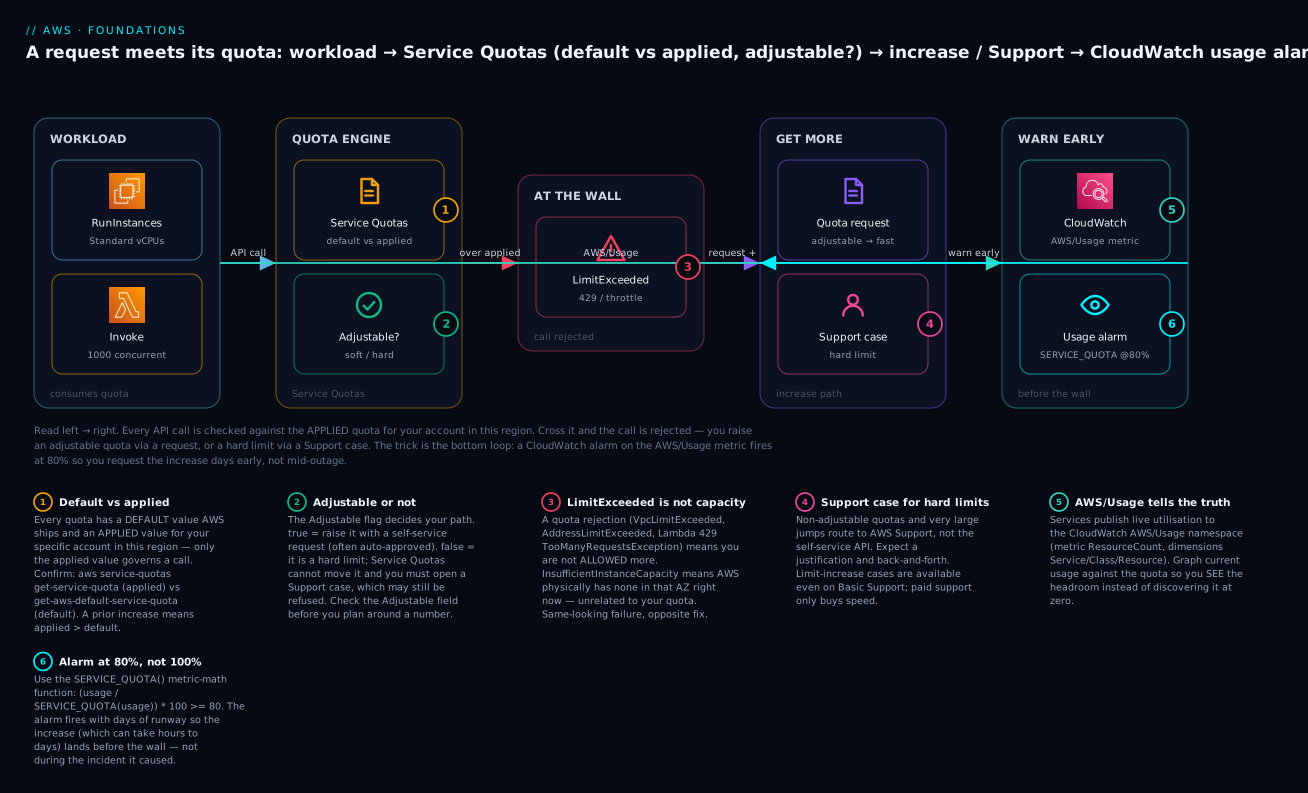
The diagram traces a single request from the moment it tries to consume a quota to the moment an alarm would have warned you. Read it left to right. A workload — an EC2 RunInstances call, a Lambda Invoke — is checked by the Service Quotas engine against the applied value for your account in this region, and the Adjustable? decision decides your options. Cross the applied value and the call is rejected at the wall (LimitExceeded, a 429, an AddressLimitExceeded). From there you take the get-more path: an adjustable quota is raised with a self-service request that often auto-approves; a hard limit routes to an AWS Support case and may not move at all.
The important part is the bottom loop. Every service publishes its usage to CloudWatch’s AWS/Usage namespace, and a usage alarm built with SERVICE_QUOTA() fires at 80% — feeding the get-more path before the wall is reached. That loop is the whole discipline: you request the increase because an alarm told you the runway was shrinking, not because production fell over. The numbered badges mark the six decision points — default-vs-applied, adjustable-or-not, the LimitExceeded-is-not-capacity trap, the Support-case escape hatch, the AWS/Usage truth source, and the 80% alarm — and the legend narrates each as what-it-is · how-to-confirm · what-to-do.
Real-world scenario
Meridian Streaming (a fictional but very typical mid-size SaaS) ran a live-events product on ap-south-1. Their platform team had raised the EC2 Standard vCPU quota to 512 eighteen months ago and never looked again. Utilization crept: more transcoding, a new recommendations service, a chat backend — each adding a handful of c6i and m6i instances. By the time of a marquee cricket final, steady-state usage sat at ~430 vCPUs.
At kickoff, autoscaling tried to add ~120 vCPUs of transcoding capacity across three AZs. The first ~80 landed. The rest failed — but with two different errors that the on-call engineer initially conflated. Some RunInstances calls returned VcpuLimitExceeded (they had crossed 512, the applied quota). Others, in the busiest AZ, returned InsufficientInstanceCapacity — nothing to do with the quota, AWS simply had no c6i.4xlarge free in that AZ at that second. The engineer spent twenty minutes requesting a quota increase (correct for the first error, irrelevant for the second) while viewers rebuffered.
The post-incident fixes were textbook, and every one of them is in this article. First, they wired a CloudWatch AWS/Usage alarm at 80% of the Standard vCPU quota with SERVICE_QUOTA() math — at 430/512 (84%) it would have paged days earlier, and they would have pre-raised to 1,024 on a calendar reminder. Second, they added the same alarm to their Trusted Advisor review and their new-account quota request template, so every future account started at 1,024. Third — and this is the lesson that sticks — they wrote a runbook that says in bold: LimitExceeded means you raise the quota; InsufficientInstanceCapacity means you diversify (more instance types in the ASG via a mixed-instances policy, spread across more AZs, or a Capacity Reservation for the event window). Six months later, a bigger event ran without a single quota-related page. The wall had not moved on its own; they had learned to see it coming.
Advantages and disadvantages
| Advantages of a deliberate quota practice | Disadvantages / costs |
|---|---|
| Increases filed days early (alarm-driven) instead of mid-incident. | Requires standing up alarms + a review cadence (real, if small, effort). |
| One API/Terraform surface for ~200 services’ limits. | Not every quota is in Service Quotas or has a usage metric — gaps remain. |
Percentage alarms with SERVICE_QUOTA() never go stale when you raise a quota. |
Metric-math alarms are fiddly to author; wrong dimensions = silent no-data. |
| Templates make new Organizations accounts usable on day one. | Templates apply only at account creation; existing accounts still manual. |
| Spend protection: quotas cap runaway launches and bugs. | Low defaults slow legitimate scale-up if you haven’t pre-raised. |
| Self-service increases often auto-approve in minutes. | Large jumps and hard limits route to Support (hours–days, sometimes refused). |
The trade-off that matters: quotas protect you and constrain you with the same mechanism. The teams that suffer treat them as AWS’s problem discovered at 100%; the teams that don’t treat them as their own capacity plan, watched at 80%.
Hands-on lab
A free-tier-friendly, copy-pasteable walk-through: look up a quota, see its utilization, alarm at 80%, request an increase, and (optionally) manage it in Terraform — then tear it down. Reading quotas and creating one alarm are effectively free; the ⚠️ notes flag the only thing that costs anything.
Prerequisites: AWS CLI v2 configured (aws sts get-caller-identity works), an IAM principal allowed to call servicequotas:* and cloudwatch:PutMetricAlarm, and a region — this lab uses ap-south-1. Set it once:
export AWS_REGION=ap-south-1
Step 1 — Confirm your identity and pick a quota
aws sts get-caller-identity --query 'Account' --output text
# 111122223333
We will use EC2-VPC Elastic IPs (ec2 / L-0263D0A3) — adjustable, universally present, default 5, and safe to inspect.
Step 2 — Read the applied and default values
aws service-quotas get-service-quota \
  --service-code ec2 --quota-code L-0263D0A3 \
  --query 'Quota.[QuotaName,Value,Adjustable,GlobalQuota]' --output text
# EC2-VPC Elastic IPs   5.0   True   False

aws service-quotas get-aws-default-service-quota \
  --service-code ec2 --quota-code L-0263D0A3 \
  --query 'Quota.Value' --output text
# 5.0
Expected: applied 5.0, Adjustable = True, GlobalQuota = False. If applied is higher than 5, someone already raised it — that is your real headroom.
Step 3 — See current utilization
Look at how many EIPs you actually hold versus the quota:
# Count allocated Elastic IPs in this region
aws ec2 describe-addresses --query 'length(Addresses)' --output text
# 2
Two of five used = 40% utilization. In a busy account you would graph this from the AWS/Usage namespace instead of counting by hand.
Step 4 — Create an SNS topic for the alarm to notify
TOPIC_ARN=$(aws sns create-topic --name quota-warnings --query 'TopicArn' --output text)
aws sns subscribe --topic-arn "$TOPIC_ARN" --protocol email \
  --notification-endpoint you@example.com
# Confirm the subscription from the email AWS sends.
echo "$TOPIC_ARN"
Step 5 — Alarm at 80% of the EIP quota with SERVICE_QUOTA()
aws cloudwatch put-metric-alarm \
  --alarm-name eip-usage-80pct \
  --alarm-description "Elastic IPs >= 80% of quota" \
  --evaluation-periods 1 --datapoints-to-alarm 1 \
  --threshold 80 --comparison-operator GreaterThanOrEqualToThreshold \
  --treat-missing-data notBreaching \
  --alarm-actions "$TOPIC_ARN" \
  --metrics '[
    {"Id":"m1","MetricStat":{"Metric":{"Namespace":"AWS/Usage","MetricName":"ResourceCount","Dimensions":[
        {"Name":"Service","Value":"VPC"},{"Name":"Type","Value":"Resource"},
        {"Name":"Resource","Value":"ElasticIP"},{"Name":"Class","Value":"None"}]},
      "Period":300,"Stat":"Maximum"},"ReturnData":false},
    {"Id":"e1","Expression":"(m1/SERVICE_QUOTA(m1))*100","Label":"pctUsed","ReturnData":true}
  ]'
⚠️ Cost: a CloudWatch alarm is about $0.10/month (roughly ₹9). The AWS/Usage metrics themselves are free. Verify the alarm exists:
aws cloudwatch describe-alarms --alarm-names eip-usage-80pct \
  --query 'MetricAlarms[0].[AlarmName,StateValue]' --output text
# eip-usage-80pct   INSUFFICIENT_DATA   (until the first datapoint lands)
Step 6 — Request an increase (optional; safe and free)
Raising the EIP quota costs nothing until you actually allocate more EIPs. Request a bump to 10:
REQ_ID=$(aws service-quotas request-service-quota-increase \
  --service-code ec2 --quota-code L-0263D0A3 --desired-value 10 \
  --query 'RequestedQuota.Id' --output text)

aws service-quotas get-requested-service-quota-change --request-id "$REQ_ID" \
  --query 'RequestedQuota.[Status,DesiredValue]' --output text
# PENDING   10.0   (may become APPROVED or CASE_OPENED)
Step 7 — (Optional) manage the same quota in Terraform
# main.tf
provider "aws" { region = "ap-south-1" }

resource "aws_servicequotas_service_quota" "eip" {
  service_code = "ec2"
  quota_code   = "L-0263D0A3"
  value        = 10
}

output "eip_quota_applied" {
  value = aws_servicequotas_service_quota.eip.value
}
terraform init && terraform apply -auto-approve
Note the gotcha: if the CLI request in Step 6 is still PENDING, Terraform may show drift or contend with it — manage a given quota from one place. And you cannot set value below the current applied number; Terraform will error, because Service Quotas has no “decrease.”
Step 8 — Teardown
# Delete the alarm (stops the ~$0.10/mo)
aws cloudwatch delete-alarms --alarm-names eip-usage-80pct

# Remove the SNS topic
aws sns delete-topic --topic-arn "$TOPIC_ARN"

# If you used Terraform, stop tracking the quota (does NOT lower it)
terraform destroy -auto-approve
⚠️ You cannot “undo” a quota increase — destroying the Terraform resource or closing the request just stops tracking it; the applied value stays raised. That is harmless (a higher ceiling costs nothing by itself) but worth knowing. There is nothing else to clean up: reading quotas and requesting increases incur no charge.
Common mistakes & troubleshooting
The playbook. Each row is a real failure with the exact way to confirm it and the fix. The golden rule sits at the top: a quota rejection tells you that you are not allowed more; a capacity error tells you AWS has none right now — never confuse them.
| # | Symptom | Root cause | Confirm (exact command / console path) | Fix |
|---|---|---|---|---|
| 1 | You have requested more vCPU capacity than your current vCPU limit on RunInstances |
Crossed the On-Demand vCPU quota for that family bucket (per region). | aws service-quotas get-service-quota --service-code ec2 --quota-code L-1216C47A vs current usage. |
Request an increase on the right family bucket; remember it’s vCPUs, not instances. |
| 2 | InsufficientInstanceCapacity on launch |
AWS has no capacity for that instance type in that AZ right now — not a quota. | Retry in another AZ/type; check the error is InsufficientInstanceCapacity, not *LimitExceeded. |
Diversify instance types (mixed-instances ASG), spread AZs, or use a Capacity Reservation. Raising the quota does nothing. |
| 3 | Lambda invokes fail with 429 TooManyRequestsException / Rate Exceeded |
Hit account concurrent executions (1,000) or a per-function reserved cap. | aws service-quotas get-service-quota --service-code lambda --quota-code L-B99A9384; check reserved concurrency per function. |
Raise the concurrency quota; set reserved concurrency; add SQS to buffer bursts. |
| 4 | AddressLimitExceeded allocating an Elastic IP |
At the EIP quota (default 5) for the region. | aws ec2 describe-addresses --query 'length(Addresses)' vs quota L-0263D0A3. |
Release unused EIPs; raise L-0263D0A3; use a NAT gateway (1 EIP) instead of per-instance EIPs. |
| 5 | VpcLimitExceeded on CreateVpc |
At the VPCs per Region quota (default 5). | aws ec2 describe-vpcs --query 'length(Vpcs)' vs quota L-F678F1CE. |
Delete stale VPCs; raise L-F678F1CE; consolidate with shared VPC / Transit Gateway. |
| 6 | S3 clients get 503 Slow Down under load |
Exceeding 3,500 write / 5,500 read RPS per prefix before S3 auto-partitions. | CloudWatch 5xxErrors on the bucket; check request key distribution. |
Spread keys across more prefixes; add exponential-backoff retries; pre-warm with gradual ramp. |
| 7 | API Gateway returns 429 with x-amzn-ErrorType: ThrottlingException |
Hit account/stage/method throttle (10,000 RPS + 5,000 burst default). | API GW → Stage → Logs; check 4XXError/Count metrics. |
Raise account throttle quota; set per-method throttling; add caching; use SQS/async. |
| 8 | Quota increase request returns INVALID_REQUEST / “not adjustable” |
The quota’s Adjustable is false — a hard ceiling. |
... get-service-quota ... --query 'Quota.Adjustable' → False. |
You cannot self-serve; open a Support case (may be refused) or redesign around it. |
| 9 | Increase “approved” but the quota didn’t move | You read the default not the applied value, or approval hasn’t propagated. | Compare get-service-quota (applied) with get-aws-default-service-quota (default) and request status. |
Re-check the applied value; wait for APPROVED to propagate; verify correct region. |
| 10 | You raised the quota but launches still fail | Right quota, wrong region — quotas are per-region. | echo $AWS_REGION; re-run get-service-quota in the failing region. |
Request the increase in that region (or use a template for new accounts). |
| 11 | KMS/DynamoDB calls intermittently ThrottlingException |
Hit a rate quota (KMS ops/sec, DynamoDB throughput), not a resource count. | CloudWatch ThrottledRequests (DynamoDB) / KMS ThrottlingException in logs. |
Raise the rate quota; add backoff/jitter; cache; increase provisioned throughput or use on-demand. |
| 12 | New Organizations account hits low defaults immediately | Account vended before the quota request template was associated (or template lacks the quota). | aws service-quotas list-service-quota-increase-requests-in-template. |
Raise quotas directly in the existing account; fix the template for future accounts. |
| 13 | Terraform aws_servicequotas_service_quota apply fails |
value set below current applied, or a pending CLI request is contending. |
terraform plan error; compare with get-service-quota. |
Set value ≥ applied; manage each quota from one place only. |
| 14 | CodeStorageExceededException deploying Lambda |
Hit the function & layer storage quota (75 GB default). | ... get-service-quota --service-code lambda --quota-code L-2ACBD22F. |
Delete old versions/layers; raise L-2ACBD22F. |
Error / status-code reference
| Error string / code | Service | Class | Means | First move |
|---|---|---|---|---|
*LimitExceeded (VpcLimitExceeded, AddressLimitExceeded, VcpuLimitExceeded) |
EC2 / VPC | Quota | You are at the applied quota. | Confirm applied value; request increase in this region. |
InsufficientInstanceCapacity |
EC2 | Capacity | AWS has no capacity for that type/AZ now. | Diversify type/AZ; retry; Capacity Reservation. Not a quota fix. |
InsufficientHostCapacity |
EC2 (Dedicated) | Capacity | No dedicated-host capacity available. | Try another AZ/type; pre-allocate hosts. |
429 TooManyRequestsException |
Lambda / API GW | Rate quota | Concurrency or throttle exceeded. | Raise concurrency/throttle; backoff; buffer with SQS. |
ThrottlingException / Rate exceeded |
KMS, STS, control-plane | Rate quota | API request-rate quota hit. | Exponential backoff + jitter; request rate increase. |
ProvisionedThroughputExceededException |
DynamoDB | Rate quota | Table/partition throughput exceeded. | Raise capacity / on-demand; backoff; fix hot key. |
503 Slow Down |
S3 | Rate quota | Per-prefix request rate exceeded before partition split. | Spread prefixes; backoff; gradual ramp. |
LimitExceededException |
IAM, CFN, others | Quota | Resource count quota hit. | Delete unused; request increase (many IAM caps are hard). |
INVALID_REQUEST (request status) |
Service Quotas | Meta | Non-adjustable, or desired < applied. | Check Adjustable; don’t try to lower. |
NOT_APPROVED (request status) |
Service Quotas | Meta | Service team declined the case. | Read case notes; justify harder or redesign. |
CodeStorageExceededException |
Lambda | Quota | Function + layer storage quota full. | Prune old versions/layers; raise L-2ACBD22F. |
ResourceLimitExceeded |
SageMaker, others | Quota | Service-specific resource-count quota. | Confirm in Service Quotas; request increase. |
Decision table — read the signal, pick the move
| If you see… | It’s probably… | Do this |
|---|---|---|
*LimitExceeded on create/launch |
A resource-count quota is full. | Confirm applied value; request increase in this region. |
InsufficientInstanceCapacity |
A capacity shortfall, not a quota. | Diversify type/AZ; retry; Capacity Reservation. |
429 from Lambda/API GW |
A concurrency/throttle rate quota. | Raise the rate; add reserved concurrency; buffer with SQS. |
503 Slow Down from S3 |
Per-prefix request rate exceeded. | Spread prefixes; backoff; ramp gradually. |
ThrottlingException intermittently |
An API request-rate quota. | Backoff + jitter; request a rate increase; cache. |
Increase request INVALID_REQUEST |
Non-adjustable, or value below applied. | Check Adjustable; open a Support case if hard. |
| “I raised it but it still fails” | Wrong region, or you read the default. | Verify applied value in the failing region. |
| New account hits low walls at once | Vended before the template applied. | Raise directly; fix the template for next time. |
| A quota has no Service Quotas entry | Older/niche service. | Per-service console or a Support case. |
Alarm stuck INSUFFICIENT_DATA |
Wrong AWS/Usage dimensions. |
Fix Service/Resource/Class; confirm a datapoint. |
| Spot fleet won’t grow but On-Demand is fine | Separate Spot vCPU quota bucket. | Raise the Spot quota (L-34B43A08 etc.), not On-Demand. |
CodeStorageExceededException on deploy |
Lambda function/layer storage full. | Delete old versions/layers; raise L-2ACBD22F. |
The three nastiest, in prose
LimitExceeded vs InsufficientInstanceCapacity. This is the mistake that ruins incidents. They both mean “my instance didn’t launch,” but the fixes are opposite. *LimitExceeded is a policy rejection — raise the quota. InsufficientInstanceCapacity is a physics rejection — AWS’s pool for that exact type in that exact AZ is momentarily empty, and no quota request will help. The tell is the error string; the fix for capacity is to widen your options (more instance types via a mixed-instances policy, more AZs) or reserve ahead of a known spike with a Capacity Reservation. If your runbook says “launch failed → request a quota increase,” it is wrong half the time.
The regional trap. Quotas are per-region and the console silently shows whichever region is selected. Engineers raise a quota in us-east-1 (because that’s what opened), then watch launches keep failing in ap-south-1 and conclude the increase “didn’t work.” It worked — in the wrong region. Always echo $AWS_REGION and read the applied value in the failing region before you conclude anything.
Silent metric-math alarms. The 80% alarm only protects you if the AWS/Usage dimensions are exactly right. One wrong dimension (Class should be None for EIPs but Standard/OnDemand for Standard vCPUs) yields a metric that never reports, the alarm sits in INSUFFICIENT_DATA forever, and you feel protected while being blind. After creating any quota alarm, force a datapoint or wait for one and confirm the alarm leaves INSUFFICIENT_DATA — an alarm you never validated is worse than no alarm, because it buys false confidence.
Best practices
- Alarm at 80%, not 100%. Every quota you depend on for scale gets an
AWS/Usage+SERVICE_QUOTA()alarm. The percentage form never goes stale when you raise the quota. - Read the applied value, never the default.
get-service-quotais the truth;get-aws-default-service-quotais only for planning new accounts. - Check
Adjustablebefore you plan around a number. If it’sfalse, your architecture — not a request — is the fix. - Pre-raise, don’t react. File increases on a calendar/alarm trigger; the automated envelope may auto-approve, but large jumps take hours-to-days via a case.
- Use quota request templates so every new Organizations account is usable on day one instead of hitting default walls.
- Right-region everything. Request and verify in the region that will actually run the workload; repeat per region.
- Distinguish quota from capacity in your runbooks in bold:
LimitExceeded→ raise the quota;InsufficientInstanceCapacity→ diversify/reserve. - Track quotas as code with the Terraform data source for thresholds and the resource for deliberate, reviewed increases — but manage each quota from one place.
- Turn on Trusted Advisor Service Limits review as the portfolio dashboard; back it with CloudWatch alarms as the pager.
- Release the unused. Idle EIPs, stale VPCs, orphaned ENIs and old Lambda versions all consume quota (and some cost money). Reclaim before you request.
- Design for the rate limits, not just counts. Backoff-with-jitter on every throttleable API (S3, KMS, DynamoDB, control-plane) so a burst degrades gracefully instead of erroring.
Security notes
Quotas are themselves a security control — a cap on how much damage a compromised credential can do — so treat the ability to change them as privileged.
| Concern | Practice |
|---|---|
| Least privilege for reading | Grant servicequotas:GetServiceQuota, GetAWSDefaultServiceQuota, ListServiceQuotas, ListServices, and cloudwatch:GetMetricData to anyone who needs visibility. Read is safe and broad. |
| Gate increase actions | Restrict servicequotas:RequestServiceQuotaIncrease and the template actions (PutServiceQuotaIncreaseRequestIntoTemplate, AssociateServiceQuotaTemplate) to a small platform/cloud-ops role — raising quotas raises the blast radius. |
| Guard templates in Organizations | Template actions run from the management or delegated-admin account. Use a permission boundary/SCP so only the intended role can associate a template. |
| Audit changes | Service Quotas and CloudWatch actions are logged in CloudTrail. Alert on RequestServiceQuotaIncrease and AssociateServiceQuotaTemplate from unexpected principals. See AWS CloudTrail, Config & Audit Compliance. |
| Don’t over-raise “just in case” | A very high quota weakens the spend/blast-radius protection quotas provide. Raise to a justified number with headroom, not to the maximum. |
| Protect the SNS/alerting path | The quota-warning SNS topic should be encrypted (KMS) and its subscriptions locked down; a muted alert is a missed early warning. |
The IAM actions to scope, split cleanly into safe (read) and privileged (change):
| IAM action | Category | Grant to |
|---|---|---|
servicequotas:ListServices |
Read | Anyone needing visibility. |
servicequotas:ListServiceQuotas |
Read | Anyone needing visibility. |
servicequotas:GetServiceQuota |
Read | Anyone needing visibility. |
servicequotas:GetAWSDefaultServiceQuota |
Read | Anyone needing visibility. |
servicequotas:ListRequestedServiceQuotaChangeHistory |
Read | Audit/ops. |
cloudwatch:GetMetricData |
Read | Dashboards/alarms. |
servicequotas:RequestServiceQuotaIncrease |
Privileged | Platform/cloud-ops role only. |
servicequotas:PutServiceQuotaIncreaseRequestIntoTemplate |
Privileged | Management/delegated-admin only. |
servicequotas:AssociateServiceQuotaTemplate |
Privileged | Management account only. |
support:CreateCase |
Privileged | Whoever files limit-increase cases. |
Cost & sizing
Service Quotas itself is free — listing, reading, requesting increases, and templates cost nothing. Raising a quota is also free: a higher ceiling has no charge; you only pay when you use the underlying resource. The costs in this whole workflow are small and specific.
| Item | Cost (USD) | Cost (INR approx.) | Notes |
|---|---|---|---|
| Service Quotas API + console | $0 | ₹0 | Read/request/templates all free. |
| Raising a quota | $0 | ₹0 | You pay for usage, not for headroom. |
| CloudWatch alarm (per quota) | ~$0.10/mo | ~₹9/mo | Standard alarm price; metric-math is free. |
AWS/Usage metrics |
$0 | ₹0 | AWS-published; not custom metrics. |
| SNS notifications | ~$0.50 / million (email variants free tier) | negligible | Alert delivery. |
| Trusted Advisor full checks | Bundled with Business/Enterprise Support | Support-tier dependent | Core service-limit checks are free. |
Sizing guidance: alarm on the quotas your scale actually depends on (compute vCPUs, Lambda concurrency, ENIs, EIPs, API throttle, the databases you run) — a dozen alarms is ~$1.20/month (~₹110) and pays for itself the first time it prevents an outage. Do not alarm on all ~200 services’ every quota; that’s noise and needless alarm cost. Free-tier note: CloudWatch’s free tier includes 10 alarms, so a small account’s quota alarms may cost nothing at all.
Interview & exam questions
Q1. Since 2019, how are EC2 On-Demand instance limits measured, and why does it matter? In vCPUs, grouped into family buckets (Standard; F; G/VT; P; Inf; Trn; X; High Memory; DL), per account per region — not instance count. It matters because a single large instance can consume the whole quota, and each bucket is raised independently: raising Standard does nothing for P/GPU. (SAA-C03, SOA-C02.)
Q2. What is the difference between the default and applied value of a quota? Default is what AWS ships for a fresh account (get-aws-default-service-quota); applied is your account’s actual current value in this region (get-service-quota), which prior increases can raise above default. Only the applied value governs a call. (SOA-C02, CLF-C02.)
Q3. You raised a quota but instances still won’t launch with InsufficientInstanceCapacity. Why? That error is a capacity shortfall — AWS has no stock for that type/AZ right now — not a quota rejection. No quota increase fixes it. Diversify instance types/AZs or use a Capacity Reservation. (SAA-C03.)
Q4. How do you get warned before hitting a quota rather than after? Alarm on the CloudWatch AWS/Usage metric using the SERVICE_QUOTA() metric-math function at ~80% utilization, wired to SNS; and/or use Trusted Advisor’s Service Limits check (flags at 80%). (SOA-C02.)
Q5. Which quotas are global rather than per-region, and why does it change your workflow? IAM, Route 53, CloudFront and some Organizations limits are global (GlobalQuota: true) — raise once for the account. Regional quotas (EC2, VPC, Lambda, RDS) must be raised in each region you use. (SAA-C03.)
Q6. A quota’s Adjustable field is false. What are your options? You cannot self-serve an increase. Open an AWS Support case (available even on Basic Support) — which may still be refused — or, more reliably, redesign to spread the load across regions/accounts or a different service. (SOA-C02.)
Q7. What are quota request templates and when do they apply? An Organizations feature: the management/delegated-admin account defines a set of increases that are automatically requested for every account created after the template is associated. They do not affect existing accounts. (SAA-C03, Advanced Networking topics.)
Q8. Lambda is returning 429 TooManyRequestsException at ~1,000 concurrent. What’s happening and what do you do? You’ve hit the account-level concurrent-executions quota (default 1,000). Raise L-B99A9384, set reserved concurrency for critical functions, and buffer spiky producers through SQS so bursts queue instead of erroring. (DVA-C02, SAA-C03.)
Q9. Why does S3 return 503 Slow Down, and is it a Service Quotas item? You exceeded the per-prefix request rate (~3,500 write / 5,500 read RPS) faster than S3 auto-partitions. It is not in Service Quotas — you spread keys across prefixes and add exponential backoff. (DVA-C02.)
Q10. Which support tier is required to request a service-limit increase? None beyond Basic — limit-increase cases are available on all support tiers. Paid tiers (Business/Enterprise) buy faster responses, full Trusted Advisor, and programmatic check access, not the right to increase. (CLF-C02.)
Q11. How would you enforce that only a platform team can raise quotas? Restrict servicequotas:RequestServiceQuotaIncrease and template actions to a specific IAM role via policy/permission boundary and, in Organizations, an SCP; audit invocations in CloudTrail. (SCS-C02, SOA-C02.)
Q12. In Terraform, what happens if you set aws_servicequotas_service_quota.value below the current applied value? The apply fails — Service Quotas has no decrease operation. You can only request equal-or-higher values, and destroying the resource stops tracking without lowering the quota. (DevOps/IaC.)
Quick check
- Which CLI call returns the value a request is actually checked against —
get-service-quotaorget-aws-default-service-quota? - You get
InsufficientInstanceCapacity. Do you request a quota increase? Why or why not? - What metric-math function turns an
AWS/Usagemetric into a percentage of its quota? - Your teammate raised the VPC quota but your
CreateVpcstill fails. Name the most likely cause. - Which feature automatically submits increase requests for every new account in an Organization?
Answers
get-service-quota— that returns the applied value (the default call only tells you what AWS ships).- No.
InsufficientInstanceCapacityis a capacity shortfall for that type/AZ right now, not a quota rejection; diversify instance types/AZs or use a Capacity Reservation. SERVICE_QUOTA()— e.g.(m1 / SERVICE_QUOTA(m1)) * 100.- Wrong region — quotas are per-region; the increase was applied in a different region than the failing call.
- Quota request templates (AWS Organizations) — applied at account creation, for adjustable, template-supported quotas.
Glossary
| Term | Definition |
|---|---|
| Quota / Limit | The maximum value for a resource, action or rate in your account; synonyms (quota is the modern name). |
| Default value | The value AWS ships for a quota before any change; what a new account starts with. |
| Applied value | The value actually in force for your account in a region — what a call is checked against. |
| Adjustable | Whether you can raise a quota via a self-service request (soft) or not (hard). |
| Global quota | A quota that applies account-wide across all regions (e.g. IAM, Route 53). |
| Quota code | Stable identifier for a quota (e.g. L-1216C47A), used in CLI/Terraform. |
| Service code | Stable identifier for a service (e.g. ec2, lambda). |
| On-Demand vCPU quota | The modern EC2 limit measured in vCPUs per instance-family bucket, per region. |
| Concurrent executions | Lambda’s account-level cap on simultaneous invocations (default 1,000). |
AWS/Usage |
The CloudWatch namespace where services publish current utilization for quota monitoring. |
SERVICE_QUOTA() |
A CloudWatch metric-math function returning a quota’s applied value for percentage alarms. |
| Quota request template | An Organizations mechanism to auto-request increases for every newly created account. |
| Trusted Advisor Service Limits | A check that flags quotas at ≥80%/100% utilization across the account. |
| InsufficientInstanceCapacity | A capacity (not quota) error: AWS has no stock for that type/AZ at that moment. |
| Support case (service limit increase) | The escape hatch for non-adjustable quotas and large jumps; available on all support tiers. |
| Reserved concurrency | A guaranteed slice of the Lambda concurrency pool pinned to one function. |
| Provisioned concurrency | Pre-initialised (warm) Lambda environments that eliminate cold starts, billed even when idle. |
| Rate quota vs resource quota | A cap on requests/sec or concurrency (rate) versus a cap on how many of a thing exist (resource). |
| Utilization | Current usage as a percentage of the applied quota — the value you alarm on at 80%. |
Next steps
- Pair quotas with cost governance so both your ceiling and your bill are watched: AWS Billing: Cost Explorer, Budgets & Alerts.
- Understand what actually consumes your vCPU and concurrency quotas: AWS Compute: EC2, Lambda, ECS and EKS — Which One to Choose?.
- See why EIP, VPC and security-group quotas bite where they do: AWS VPC, Subnets & Security Groups Explained.
- Roll quota increases into a governed multi-account foundation with templates: AWS Control Tower: Guardrails for a Multi-Account Foundation.
- Because quotas are per-region, ground the model in AWS Regions & Availability Zones Explained.