You have an application in a Git repository and a place to run it — an ECS service, a Lambda function, an S3 bucket, a CloudFormation stack. Between the two sits the least glamorous, most load-bearing part of the whole system: the thing that turns git push into “the new version is live,” reliably, on every commit, without a human copying artifacts around at 2 a.m. On AWS the native pair that does this is AWS CodePipeline — the orchestrator that models your release as stages of actions — and AWS CodeBuild — the managed build service that runs your tests, compiles, and (for a container app) does the docker build and docker push. Wire them together and a push to main runs your tests, builds an immutable image, waits for someone to click Approve, and does a rolling deploy — hands-off, auditable, repeatable.
CodePipeline looks like a row of boxes in the console and hides a stack of decisions that separate a pipeline you trust from one that silently ships the wrong thing. How does a Source action even see your GitHub repo without you pasting a personal access token — a CodeConnections connection. How does the artifact from Build reach Deploy — a zipped input/output artifact in a per-pipeline S3 bucket, matched by name. How does CodeBuild run docker build at all — privileged mode and a big enough compute type. Where do secrets come from — SSM Parameter Store and Secrets Manager, referenced in buildspec.yml, never hard-coded. Which of the two IAM roles grants what — the pipeline role assumes actions and passes roles; the CodeBuild role talks to ECR, logs, SSM. Get one of those wrong and the failure is specific and infuriating: connection is not available, denied: not authorized, artifact not found, or a Deploy stage that sits InProgress forever.
This article builds the whole mental model by building the pipeline. You will connect GitHub via CodeConnections, create a CodeBuild project with a real buildspec.yml that runs tests, docker builds and pushes an immutable :sha tag to Amazon ECR and emits imagedefinitions.json, add a manual-approval gate, and finish with a rolling deploy to an ECS service — first with the aws CLI, then the identical stack in Terraform, then a clean teardown. Around that sits the reference you will actually return to: option-by-option tables for stages, actions, sources, buildspec phases, compute types, deploy providers, the two service roles, and a symptom → confirm → fix troubleshooting playbook for every stage that breaks. Read the prose once; keep the tables open when your own pipeline goes red.
What problem this solves
Without a pipeline, “deploying” is a person following a runbook: pull the latest code, run the tests locally (or skip them because it’s late), build the artifact on a laptop with whoever’s toolchain versions, upload it somewhere, and poke the running service into picking it up. Every one of those steps is a place for drift and mistakes. The build isn’t reproducible because it ran on a machine you can’t reconstruct. The tests are advisory because a human decides whether to run them. The deploy is manual, so it’s rare, so each one is big and scary, so rollbacks are worse. And there is no audit trail: six weeks later nobody can say which commit is in production or who approved it.
CI/CD replaces the runbook with a program. Continuous integration means every push is automatically built and tested in a clean, defined environment — CodeBuild spins up a fresh container, runs your buildspec, and fails the commit if a test fails, so main stays releasable. Continuous delivery means that green build flows automatically toward production through gated stages — build the image, push it to ECR, pause for a human approval on the risky ones, then deploy — so releases become small, frequent, and boring. The failure modes you are trying to design out are concrete: a build that “works on my machine” but not in CI; a deploy that ships an image nobody scanned; a rollback that pulls “the version that was live” and gets the wrong thing because tags were mutable; a production change with no record of who shipped it.
Who hits this: every developer who has manually deployed twice and never wants to a third time; every platform team asked for “one-click, audited deploys” and “no long-lived credentials in CI”; every security engineer who needs to prove that the artifact in production came from a specific commit through a controlled path. CodePipeline + CodeBuild is a DVA-C02 core topic (you’re expected to know buildspec phases, artifacts, and approvals cold), a SAA-C03 architecture piece (how the release path fits the workload), and a SOA-C02 operations concern (pipelines that page you when they break). Here is the whole field on one screen — the pieces you meet and the classic trap on each.
| Piece | What it is | You configure it as | The classic trap |
|---|---|---|---|
| CodePipeline | The release orchestrator: stages of actions | A pipeline (V1 or V2) | Modeling one giant stage instead of Source→Build→Deploy |
| Stage | An ordered group of actions with a transition | stages[] in the pipeline |
Serial actions that should run in parallel (runOrder) |
| Action | One unit of work (Source/Build/Deploy/Approval/Invoke) | actions[] with a provider |
Wrong provider, or missing iam:PassRole |
| Artifact | The zipped files handed between stages | Named OutputArtifacts/InputArtifacts |
Output name ≠ the next action’s input name |
| Artifact store | The per-pipeline S3 bucket + encryption | artifactStore (SSE-S3 or KMS) |
KMS key the role can’t decrypt |
| CodeConnections | Managed OAuth link to GitHub/GitLab/Bitbucket | A connection ARN, UseConnection |
Left PENDING; handshake never completed |
| CodeBuild | Managed build compute that runs buildspec.yml |
A build project | No privileged-mode for Docker; compute too small |
| buildspec.yml | The build recipe: phases, artifacts, reports, cache | A YAML file in the repo | Wrong phase for a command; secret hard-coded |
| Manual approval | A human gate that pauses the run | An Approval action + SNS |
No notify; approver lacks PutApprovalResult |
| Deploy action | Ship it: ECS/CFN/Lambda/S3/EKS | A Deploy action |
Deploy role can’t UpdateService / cross-account |
| Service roles | Pipeline role + CodeBuild role | Two IAM roles, least privilege | One over-broad * role for everything |
Learning objectives
By the end of this article you can:
- Model a release as CodePipeline stages → actions, explain transitions,
runOrder, and how input/output artifacts flow through the S3 artifact store. - Connect a GitHub/GitLab/Bitbucket repository with CodeConnections (and say where CodeCommit, S3, and ECR sources fit, including CodeCommit’s maintenance status).
- Choose V1 vs V2 pipelines and configure V2 triggers (branch/tag/PR/file-path filters), pipeline-level variables, and execution modes (SUPERSEDED / QUEUED / PARALLEL).
- Write a real
buildspec.yml—install/pre_build/build/post_build/finally,envwith SSM/Secrets Manager,artifacts,reports,cache— and pick a compute type and managed image, enabling privileged mode fordocker build. - Add a manual-approval gate with SNS notification and a review URL, and reason about the 7-day timeout.
- Configure deploy actions — ECS rolling, ECS blue/green via CodeDeploy, CloudFormation, Lambda, S3, EKS — including cross-account deploys and the deploy role.
- Design least-privilege pipeline and CodeBuild service roles, and know when a build needs a VPC (and therefore NAT/endpoints) to reach private resources or the internet.
- Build the whole thing — Source (GitHub) → Build (test +
docker build+ push ECR) → Approval → Deploy (ECS) — withawsCLI and Terraform, then run a symptom → confirm → fix troubleshooting playbook.
Prerequisites & where this fits
You need an AWS account with permission to create CodePipeline, CodeBuild, IAM roles, an S3 bucket and (optionally) a KMS key — a dev or sandbox account, never straight into production. Have the AWS CLI v2 configured, Terraform ≥ 1.5 for the IaC half, a GitHub account with a small repo you control (a Dockerfile plus a trivial test), and the two things the lab deploys into: an ECR repository and a running ECS service. Those two are built in the wave siblings Amazon ECR Hands-On: Push, Pull, Scan & Lifecycle Container Images and Amazon ECS on Fargate: Deploy Your First Service Behind an ALB (Hands-On) — do those first if you haven’t; this article assumes the repo kv-web and an ECS service already exist. You should be comfortable with Docker basics, IAM roles vs policies, and reading YAML/JSON.
Where this sits: CodePipeline is the control plane of your release, sitting above the compute you already run. It doesn’t replace your infrastructure tooling — it drives it. A pipeline’s Deploy stage typically runs a CloudFormation change set, an ECS rolling update, a CodeDeploy blue/green shift, or a CDK deploy. If your deploys are described as code, the natural next steps are the wave siblings AWS CodeDeploy: Blue/Green & Canary Deployments (Hands-On) for safe traffic shifting and AWS CDK with TypeScript: Infrastructure as Code (Hands-On) for synthesising the stacks a pipeline deploys. The identity and network plumbing under all of this is covered in AWS IAM: Users, Groups, Roles & Policies (Hands-On) and AWS PrivateLink & VPC Endpoints: Interface vs Gateway. A quick map of who owns what, so when a stage fails you look in the right place first:
| Layer | What lives here | Who “owns” it | What a mistake here causes |
|---|---|---|---|
| Source connection | The link to GitHub/GitLab | CodeConnections | connection is not available; no trigger |
| Pipeline definition | Stages, actions, artifacts, triggers | CodePipeline | Artifact-name mismatch; stage never runs |
| Artifact store | The zipped handoffs + encryption | S3 + KMS | AccessDenied on the CMK; artifact not found |
| Build recipe | Phases, tests, docker build, push |
buildspec.yml + CodeBuild |
Phase error; OOM; docker daemon unreachable |
| Service roles | What the pipeline / build may do | IAM | denied; PassRole refused; deploy blocked |
| Deploy target | ECS/CFN/Lambda/S3/EKS | The deploy provider | Rolling deploy stuck; wrong image; cross-account |
Core concepts
Start with the object model, because every error message is phrased in these nouns. A pipeline is an ordered list of stages. Each stage is a group of actions. Between stages sits a transition (which you can disable to hold a release). Within a stage, actions run in parallel by default but you can serialize them with runOrder (an action with runOrder: 2 waits for runOrder: 1 to succeed). Each action belongs to a category — Source, Build, Test, Deploy, Approval, or Invoke — and each category is fulfilled by a provider (CodeConnections, CodeBuild, ECS, CloudFormation, CodeDeploy, Lambda, and so on).
Data moves between actions as artifacts: a zipped bundle of files. An action declares its output artifacts (what it produces) and input artifacts (what it consumes), each by a name you choose. CodePipeline stores every artifact in a per-pipeline S3 bucket — the artifact store — encrypted with SSE-S3 or a KMS customer-managed key. The single most common structural bug in all of CodePipeline is a name mismatch: Build writes an output artifact called BuildOut, Deploy reads an input artifact called build_output, and the run fails with “artifact not found.” The names are literal strings and they must match.
The Source action is special: it turns “there is new code” into “here is a zip of that code as the first artifact.” For GitHub/GitLab/Bitbucket that plumbing is a CodeConnections connection (formerly CodeStar Connections) — a managed OAuth link you authorize once by installing the AWS Connector app on your Git provider; the connection lives as an ARN the pipeline references with the codeconnections:UseConnection permission. This is why you never paste a personal access token into a pipeline anymore. For a container-image source you can use ECR (a new image tag triggers the pipeline); for a blob you can use S3.
Everything the pipeline is allowed to do comes from two service roles. The pipeline service role (trusted by codepipeline.amazonaws.com) is assumed by CodePipeline to read/write the artifact bucket, start builds, and call deploy APIs — crucially it needs iam:PassRole to hand your task/execution roles to ECS or your stack role to CloudFormation. The CodeBuild service role (trusted by codebuild.amazonaws.com) is assumed by each build to write logs, read the source artifact, pull secrets from SSM/Secrets Manager, and — in our lab — authenticate to and push to ECR. Keeping these two roles distinct and least-privilege is the difference between a pipeline you can hand an auditor and one you can’t.
| Concept | Definition | Why it matters |
|---|---|---|
| Stage | An ordered group of actions with a transition in front | The unit you gate, disable, and read status on |
| Transition | The gate between two stages (enabled/disabled) | Disable it to hold releases without deleting the pipeline |
| Action | One task: a category + provider + config | Where the actual work (and the failure) happens |
| runOrder | Integer that serializes actions in a stage | Run test before build; approval before deploy in a stage |
| Category | Source · Build · Test · Deploy · Approval · Invoke | Determines valid providers and artifact rules |
| Provider | The service that fulfils a category | CodeConnections, CodeBuild, ECS, CFN, CodeDeploy, Lambda |
| Input artifact | A named bundle an action consumes | Must match a prior action’s output name exactly |
| Output artifact | A named bundle an action produces | Zipped into the artifact-store bucket |
| Artifact store | The pipeline’s S3 bucket + encryption key | Cross-region actions need a bucket per region |
| Execution | One run of the pipeline for one source change | Has an ID; visible in history; mode governs concurrency |
| Pipeline role | Role CodePipeline assumes to orchestrate | Needs PassRole, StartBuild, deploy + S3/KMS |
| CodeBuild role | Role each build assumes to do work | Needs logs, S3 artifact, ECR, SSM/Secrets |
CodePipeline: stages, actions, artifacts
Action categories and their providers
The category constrains what an action may do and how artifacts flow. Source actions have only outputs; Deploy actions have only inputs; Build/Test actions have both. Know the common provider per category — the exam tests it and so does real life.
| Category | Common providers | Input artifact | Output artifact | Typical use |
|---|---|---|---|---|
| Source | CodeConnections (GitHub/GitLab/Bitbucket), CodeCommit, S3, ECR | none | yes (the source) | Fetch the code/image that triggered the run |
| Build | CodeBuild, Jenkins | yes | optional | Compile, test, docker build, push |
| Test | CodeBuild, third-party | yes | optional | Run a test suite as its own action |
| Deploy | ECS, CloudFormation, CodeDeploy, S3, Elastic Beanstalk, Lambda, EKS, Service Catalog | yes | usually none | Ship the artifact to the target |
| Approval | Manual approval | none | none | Pause for a human decision |
| Invoke | Lambda, Step Functions | optional | optional | Custom logic: run a script, call an API |
Transitions, runOrder, and stage shape
A healthy pipeline is a handful of stages, each doing one job. Actions inside a stage default to parallel; runOrder makes them sequential when order matters (an approval must precede the deploy it guards). Transitions are your manual brake: disable the transition before Deploy to freeze production while leaving Build running.
| Control | What it does | Values | When to use |
|---|---|---|---|
| Stage | Groups actions; status rolls up | 1…N stages | Source, Build, Approve, Deploy as separate stages |
| Transition | Gate before a stage | Enabled / Disabled | Disable to hold releases (e.g. change freeze) |
| runOrder | Serialize actions in a stage | Integer ≥ 1 | Approval runOrder:1, Deploy runOrder:2 |
| Parallel actions | Same runOrder = concurrent |
— | Deploy to two regions at once |
| Namespace | Exposes an action’s variables | e.g. SourceVariables |
Pass the commit SHA to a later action |
V1 vs V2 pipelines
CodePipeline now has two pipeline types. V1 is the classic model. V2 adds git-based triggers with branch/tag/PR/file-path filters, pipeline-level variables, and execution modes — and is billed differently (per action-execution-minute rather than a flat monthly fee). New pipelines should almost always be V2; the extra trigger precision alone (build only when src/** changes on main) is worth it.
| Capability | V1 | V2 |
|---|---|---|
| Stages / actions | Yes | Yes |
| Git triggers with filters | No (branch only) | Yes — branch, tag, PR, filePaths include/exclude |
| Pipeline-level variables | No | Yes — declared, referenced as #{variables.name} |
| Execution modes | SUPERSEDED only | SUPERSEDED, QUEUED, PARALLEL |
| Billing | ~$1 per active pipeline / month | Per action-execution-minute (usage-based) |
| Recommended for | Legacy, simple flows | Everything new |
Execution modes
The mode decides what happens when a new commit lands while a run is still going — the difference between deploying the latest code and deploying every commit in order.
| Mode | Behaviour on a new change mid-run | Use when |
|---|---|---|
| SUPERSEDED (default) | Newer execution replaces the older waiting one; only the latest proceeds | You only care about deploying the newest commit |
| QUEUED | Executions queue and run one-by-one, in order | Every commit must go through (ordered releases) |
| PARALLEL | Executions run independently and concurrently | Per-branch pipelines; independent changes |
Source: CodeConnections, CodeCommit, S3, ECR
Source provider comparison
The Source action is where a pipeline meets your VCS. For third-party Git the answer is CodeConnections; the older per-pipeline webhook + OAuth token and CodeStar connections are legacy. CodeCommit is AWS’s own Git host but is now in maintenance.
| Source | Trigger mechanism | Auth | Notes |
|---|---|---|---|
| CodeConnections → GitHub | Webhook via the AWS Connector app | Managed OAuth (a connection ARN) | The default for GitHub today; no PAT stored |
| CodeConnections → GitLab | Webhook | Managed OAuth | GitLab.com and self-managed |
| CodeConnections → Bitbucket | Webhook | Managed OAuth | Bitbucket Cloud |
| CodeCommit | EventBridge rule (recommended) or polling | IAM (it’s an AWS service) | ⚠️ Closed to new customers; prefer GitHub/GitLab |
| Amazon S3 | EventBridge on object create, or polling | IAM | Source is a zip/object; good for artifacts, not code |
| Amazon ECR | EventBridge on new image push | IAM | A new image tag drives the pipeline |
CodeCommit’s maintenance status — read this before you pick it
As of mid-2024 AWS CodeCommit is closed to new customers: if your account never used it, you cannot create new CodeCommit repositories, and AWS steers all new work to GitHub, GitLab, or Bitbucket via CodeConnections. Existing CodeCommit customers keep working. Practical takeaway: do not architect a new pipeline around CodeCommit. Use a third-party Git provider through a CodeConnections connection — which is exactly what the lab does.
V2 triggers and filters
V2 lets a Source trigger fire selectively. This is how you stop a docs-only commit from rebuilding and redeploying your service, or run a separate pipeline for tags.
| Filter | What it matches | Example | Effect |
|---|---|---|---|
| Push · branches | Branch name (include/exclude glob) | main, release/* |
Build only on those branches |
| Push · tags | Git tag (include/exclude) | v* |
A release pipeline on version tags |
| Push · filePaths | Changed file paths (include/exclude) | include src/**, exclude docs/** |
Skip docs-only commits |
| Pull request | PR events (opened/updated/closed) | on main |
CI checks on PRs |
| PR · filePaths | Paths changed in the PR | include app/** |
Gate only code-relevant PRs |
CodeBuild and the buildspec.yml
buildspec phases — where each command belongs
CodeBuild runs your build inside a container from a managed (or custom) image, executing the phases of buildspec.yml in order. Put each command in the right phase: dependency installs in install, registry login in pre_build, compile/test/build in build, push and artifact emission in post_build. If a phase command exits non-zero, the build fails and later phases are skipped — except finally blocks, which run even on failure (use them for cleanup or diagnostics).
| Phase | Runs | Typical commands | If it fails |
|---|---|---|---|
| install | First; sets runtime versions | runtime-versions, npm ci, install tools |
Build fails; nothing else runs |
| pre_build | Before the build | ECR docker login, compute the image tag, lint |
Build fails; build/post_build skipped |
| build | The main work | npm test, docker build, compile |
post_build still runs? No — only finally |
| post_build | After a successful build | docker push, write imagedefinitions.json |
Build marked failed |
| finally (per phase) | Always, after that phase’s commands | Upload logs, tear down a test DB | Runs even when the phase failed |
buildspec top-level keys
buildspec.yml is more than phases. These keys control secrets, outputs, test reports, and caching.
| Key | Purpose | Example |
|---|---|---|
| version | Buildspec schema | 0.2 (current) |
| env | Build-time variables + secret sources | variables, parameter-store, secrets-manager |
| phases | The ordered commands | install/pre_build/build/post_build |
| artifacts | Files to zip as the output artifact | files: [imagedefinitions.json] |
| reports | Test/coverage reports to ingest | file-format: JUNITXML |
| cache | Paths to cache across builds | paths: [node_modules/**/*] |
| batch | Batch/matrix build configuration | build-graph, build-matrix |
| proxy | Behaviour behind an explicit proxy | upload-artifacts, logs |
Secrets in a build — never hard-code
env pulls values from three places. Plaintext variables are fine for non-secret config; secrets must come from SSM Parameter Store (parameter-store:) or Secrets Manager (secrets-manager:), which resolve at build start using the CodeBuild role’s permissions. Reference a specific JSON key in a secret with secret-id:json-key.
| Source | buildspec syntax | Resolved from | Grant on the CodeBuild role |
|---|---|---|---|
| Plaintext | variables: { KEY: value } |
The buildspec / project env | none (visible in logs — non-secret only) |
| SSM Parameter Store | parameter-store: { API: /kv/web/api } |
SSM at build start | ssm:GetParameters on the parameter ARN |
| Secrets Manager | secrets-manager: { DB: kv/web/db:password } |
Secrets Manager at build start | secretsmanager:GetSecretValue (+ kms:Decrypt) |
| Project env override | Set in the project, not the buildspec | Project config | Same as above; keep secrets out of plaintext |
Build environments: compute types
The compute type sets vCPU and memory; the environment type sets the OS/architecture (Linux, Linux GPU, ARM, Windows). Too small and a JVM/webpack build OOMs; too big and you pay for idle cores. Sizes for the Linux general-purpose fleet:
| Compute type | vCPU | Memory | Good for |
|---|---|---|---|
| BUILD_GENERAL1_SMALL | 2 | 3 GB | Small apps, quick tests, the free tier |
| BUILD_GENERAL1_MEDIUM | 4 | 7 GB | Typical app builds + docker build |
| BUILD_GENERAL1_LARGE | 8 | 15 GB | Big compiles, multi-arch images |
| BUILD_GENERAL1_XLARGE | 36 | 72 GB | Heavy monorepos, parallel test shards |
| BUILD_GENERAL1_2XLARGE | 72 | 145 GB | Very large builds |
| BUILD_LAMBDA_* | 1–10 GB tiers | — | Fast-start, short builds on Lambda compute |
Managed images and privileged mode
The managed image ships a toolchain; aws/codebuild/standard:7.0 (Ubuntu) carries current Node, Python, Go, Java, and the Docker CLI. To run docker build you must set privileged-mode: true on the project so the build container can run the Docker daemon — without it, docker commands fail with “Cannot connect to the Docker daemon.”
| Setting | Values | Default | When to change | Gotcha |
|---|---|---|---|---|
| image | aws/codebuild/standard:7.0, AL2023, ARM, Windows, custom ECR |
standard | Match your runtime/arch | Custom images need the CodeBuild role to pull |
| type | LINUX_CONTAINER, LINUX_GPU_CONTAINER, ARM_CONTAINER, WINDOWS_SERVER_2022_CONTAINER |
Linux | ARM/GPU/Windows builds | Wrong type ≠ your image’s arch → won’t start |
| privileged-mode | true / false |
false |
Any Docker build/run | Off → “Cannot connect to the Docker daemon” |
| imagePullCredentialsType | CODEBUILD / SERVICE_ROLE |
CODEBUILD | Custom image in your ECR | SERVICE_ROLE needs ECR pull perms |
Caching, reports, batch, and local builds
Three features earn their keep on real projects. Cache (S3 or local Docker-layer/source/custom) skips re-downloading dependencies. Reports ingest JUnit/coverage output so pass/fail and coverage show in the console. Batch builds fan out a matrix (multiple runtimes/arch) from one project. And you can run the whole buildspec locally with the CodeBuild agent Docker image to debug without pushing.
| Feature | What it does | How | Payoff |
|---|---|---|---|
| S3 cache | Persists paths (e.g. node_modules) across builds |
cache: { paths: [...] } + project S3 cache |
Faster dependency-heavy builds |
| Local cache | DOCKER_LAYER / SOURCE / CUSTOM on the host |
Project cache.modes |
Reuse Docker layers between builds on a warm host |
| Reports | Test/coverage visualization + history | reports: group, file-format |
See failing tests without reading logs |
| Batch builds | Matrix/graph of builds from one project | batch: in buildspec + StartBuildBatch |
Test across Node 18/20/22 in one run |
| Local build | Run the buildspec on your machine | codebuild_build.sh + agent image |
Debug a phase failure fast, no pipeline |
Useful built-in environment variables
CodeBuild injects environment variables you’ll reference constantly in a buildspec — the commit SHA for the image tag, paths, and the region/account. These are set automatically; you don’t declare them.
| Variable | Value | Typical use |
|---|---|---|
| CODEBUILD_RESOLVED_SOURCE_VERSION | The full commit SHA of the source | Tag the image :${…:0:8} for an immutable, traceable tag |
| CODEBUILD_BUILD_ID | project:uuid of this build |
Correlate logs/reports to a build |
| CODEBUILD_BUILD_NUMBER | Monotonic build number | Human-friendly build labelling |
| CODEBUILD_SRC_DIR | Path to the primary source | cd into the checkout; find files |
| CODEBUILD_BUILD_ARN | ARN of the build | Cross-reference in other AWS APIs |
| AWS_REGION / AWS_DEFAULT_REGION | The build’s region | Region-aware CLI calls |
| CODEBUILD_INITIATOR | Who/what started it (e.g. the pipeline) | Distinguish pipeline vs manual runs |
Deploy actions and manual approval
Deploy provider comparison
The Deploy action’s provider decides how the artifact reaches production. For a container app you have two ECS paths: the built-in Amazon ECS provider (a rolling update driven by imagedefinitions.json) and Amazon ECS (Blue/Green) backed by CodeDeploy (traffic-shifting with appspec.yaml + taskdef.json).
| Provider | Deploys | Input artifact needs | Rollback story |
|---|---|---|---|
| Amazon ECS (rolling) | New image to an ECS service | imagedefinitions.json |
ECS circuit breaker / redeploy prior task def |
| ECS (Blue/Green) via CodeDeploy | Shift traffic to a new task set | appspec.yaml + taskdef.json + image |
Automatic on alarm; instant traffic re-shift |
| CloudFormation | A stack (create/update/change set) | Template + params | Stack rollback on failure |
| CodeDeploy (EC2/on-prem) | App to an instance fleet | appspec.yml + bundle |
Redeploy last-known-good |
| AWS Lambda (via CFN/SAM or CodeDeploy) | New function version + alias shift | Package / template | Alias weight rollback |
| Amazon S3 | Files to a bucket (static site) | The built site artifact | Re-deploy prior artifact |
| Amazon EKS | Manifests/Helm to a cluster | Kube manifests | kubectl rollout undo |
ECS rolling vs blue/green — the two artifacts
The difference is what the Deploy action reads. Rolling wants a tiny imagedefinitions.json mapping container name → image URI; CodePipeline registers a new task-definition revision and calls UpdateService. Blue/green hands CodeDeploy an appspec.yaml and taskdef.json and shifts an ALB’s traffic from the old task set to the new one.
| Aspect | ECS rolling (Amazon ECS provider) | ECS blue/green (CodeDeploy) |
|---|---|---|
| Artifact | imagedefinitions.json |
appspec.yaml + taskdef.json + image detail |
| Mechanism | New task-def revision + UpdateService |
New task set; ALB traffic shift |
| Traffic shift | Gradual by min-healthy/max-percent | Canary / Linear / AllAtOnce |
| Rollback | Circuit breaker or manual redeploy | Auto on CloudWatch alarm; instant |
| Extra cost | None | Second target group; brief double capacity |
Manual approval gates
An Approval action pauses the run until a human approves or rejects — the human control point in an otherwise automated flow. Wire an SNS topic so approvers are notified, add a review URL (a dashboard, the change ticket) and optional comments. The action waits up to 7 days; if nobody acts, it fails and the release stops.
| Field | Purpose | Notes |
|---|---|---|
| SNS topic | Notify approvers | Approver identity/email via the subscription |
| Review URL | Link to what to review | e.g. a staging URL or the CloudWatch dashboard |
| Comments | Context for the approver | Shows in the console and the approval record |
| Timeout | Max wait before it fails | ~7 days, then the action is rejected |
| Permission | Who may approve | codepipeline:PutApprovalResult on the pipeline |
Service roles, least privilege, and cross-account
The two roles side by side
Two roles do all the work. The pipeline role orchestrates; the CodeBuild role builds. Keep them separate — CodeBuild should never be able to call UpdateService, and the pipeline should never need ECR push.
| Aspect | Pipeline service role | CodeBuild service role |
|---|---|---|
| Trusted by | codepipeline.amazonaws.com |
codebuild.amazonaws.com |
| Assumed by | CodePipeline, to orchestrate | Each build, to do work |
| Core permissions | S3 artifact RW, KMS, StartBuild, deploy APIs, iam:PassRole |
Logs, S3 artifact RW, ECR, SSM/Secrets |
| Must NOT have | ECR push, app secrets | ecs:UpdateService, PassRole for deploy |
| Classic failure | PassRole denied → deploy blocked |
No GetAuthorizationToken → push denied |
Least-privilege permission matrix
Grant per action. The pipeline role needs to read the source, start the build, and drive the deploy — plus PassRole scoped to exactly the roles it hands off. The CodeBuild role needs logs, the artifact bucket, and ECR.
| Action / need | Role | Key IAM actions |
|---|---|---|
| Use the GitHub connection | Pipeline | codeconnections:UseConnection on the connection ARN |
| Read/write artifacts | Both | s3:GetObject, s3:PutObject, s3:GetBucketVersioning on the artifact bucket |
| Use the artifact CMK | Both | kms:Decrypt, kms:GenerateDataKey on the key |
| Start the build | Pipeline | codebuild:StartBuild, BatchGetBuilds |
| Write build logs | CodeBuild | logs:CreateLogGroup/CreateLogStream/PutLogEvents |
| Auth to ECR | CodeBuild | ecr:GetAuthorizationToken (Resource *) |
| Push the image | CodeBuild | ecr:BatchCheckLayerAvailability, InitiateLayerUpload, UploadLayerPart, CompleteLayerUpload, PutImage on the repo ARN |
| Read a secret | CodeBuild | ssm:GetParameters / secretsmanager:GetSecretValue (+ kms:Decrypt) |
| Deploy to ECS | Pipeline | ecs:DescribeServices/DescribeTaskDefinition/RegisterTaskDefinition/UpdateService, iam:PassRole on the task+exec roles |
| Deploy via CFN | Pipeline | cloudformation:* on the stack + iam:PassRole on the stack role |
Cross-account deploy
A common shape is one tools/CI account running the pipeline that deploys into dev/stage/prod accounts. Each target account holds a deploy role that the pipeline role can sts:AssumeRole; the artifact KMS key must be shareable so the target account can decrypt artifacts; the artifact bucket policy must allow the target account to read.
| Piece | Where it lives | What it must allow |
|---|---|---|
| Deploy role | Target account | Trust the tools account; permission to do the deploy (ECS/CFN) |
| Pipeline role | Tools account | sts:AssumeRole on each deploy role |
| Artifact bucket policy | Tools account | s3:Get* for the target account principals |
| Artifact KMS key policy | Tools account | kms:Decrypt for the target account |
Action roleArn |
Pipeline action | Set to the target account’s deploy role |
CodeArtifact — the package registry alongside
Not part of the release path but adjacent: AWS CodeArtifact is a managed package registry (npm, PyPI, Maven, NuGet, generic) with a domain → repository → upstream model. A build authenticates with a 12-hour token (aws codeartifact get-authorization-token) and pulls dependencies from your repo, which can proxy public npmjs/PyPI so you cache and vet third-party packages instead of pulling from the public internet on every build. Point your CodeBuild install phase at CodeArtifact when you want reproducible, audited dependencies.
Architecture at a glance
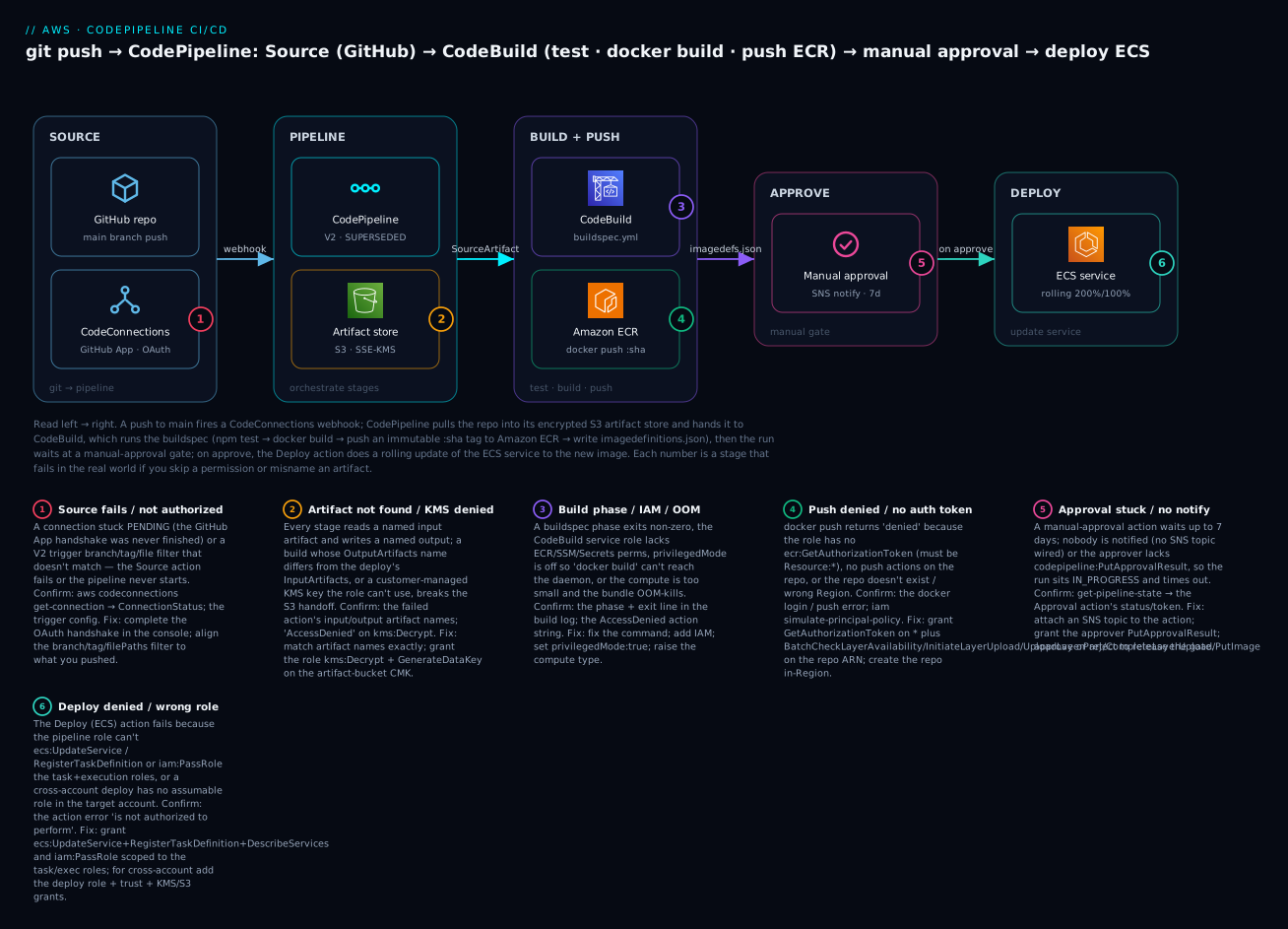
The diagram below is the exact pipeline you build in the lab, read left to right along the release path. A push to main fires a CodeConnections webhook; CodePipeline pulls the repo into its encrypted S3 artifact store as the source artifact and hands it to CodeBuild, which runs buildspec.yml — npm test, then docker build, then docker push of an immutable :sha tag to Amazon ECR, and finally writes imagedefinitions.json as its output artifact. The run then waits at a manual-approval gate (with an SNS notification); on approve, the Deploy action registers a new task-definition revision and does a rolling update of the ECS service to the new image. The numbered badges mark the six stages where pipelines most often break — the source connection, the artifact/KMS handoff, the build phase/IAM/privileged mode, the ECR push, the approval gate, and the ECS deploy role — each narrated in the legend as symptom · confirm · fix.
Real-world scenario
LedgerLoop, a Pune fintech, shipped its statements API by hand: a senior engineer pulled main, ran docker build on a laptop, docker pushed to ECR, and edited the ECS service in the console to point at the new tag. It worked until it didn’t. One Friday a build made on a laptop with a newer base image passed locally, deployed, and crash-looped in production because a native dependency mismatched the runtime — and because the same engineer was the only one who knew the runbook and had gone home, the service was degraded for forty minutes. The retro produced one demand: no more laptop builds, no more console deploys, and an audit trail of who shipped what.
The platform engineer built a CodePipeline V2 pipeline. Source was GitHub through a CodeConnections connection, with a trigger filtered to main and filePaths including src/** and excluding docs/** so documentation edits stopped triggering redeploys. Build was a CodeBuild project on BUILD_GENERAL1_MEDIUM with privileged-mode on; the buildspec ran npm ci, npm test, built the image tagged with the commit SHA (CODEBUILD_RESOLVED_SOURCE_VERSION), pushed it to ECR, and wrote imagedefinitions.json. Between Build and Deploy sat a manual-approval action wired to an SNS topic the on-call rotation subscribed to. Deploy used the Amazon ECS provider for a rolling update.
The first pipeline run failed at Source: the connection was PENDING because nobody had finished installing the AWS Connector GitHub App — a two-minute fix in the console, and the single most common first-run failure. The second run failed in Build with denied: not authorized on docker push: the CodeBuild role had ECR push actions on the repo but not ecr:GetAuthorizationToken, which must be granted on Resource: *. Once that was fixed the build was green but the pipeline sat at the approval gate — because the SNS topic had no confirmed subscription, nobody got the email, and the run would have timed out after seven days. They subscribed the on-call address, confirmed it, and the gate started paging correctly.
The payoff came six weeks later. A change that would have crash-looped in production got its image built and pushed, then paused at the approval gate; the approver opened the review URL (a staging deployment of that exact image), saw it failing there, and rejected the approval. Production never saw it. Because the pipeline registered a new task-definition revision per deploy and the SHA tag was immutable, rolling back was UpdateService to the previous revision — one command, thirty seconds. The forty-minute Friday outage did not recur; deploys went from a scary weekly event to a boring, audited, several-times-a-day non-event, and the audit question (“who shipped build 4c1f9a and when?”) became a line in the pipeline’s execution history.
Advantages and disadvantages
| Advantages | Disadvantages |
|---|---|
| Fully managed — no CI servers to run, patch, or scale | Less flexible than Jenkins/GitHub Actions for exotic workflows |
| Deep IAM + AWS-service integration (ECS, CFN, Lambda, ECR) | AWS-native; awkward if your world is multi-cloud |
| No long-lived Git tokens — CodeConnections manages OAuth | Connection handshake is a manual first-run step |
| Per-pipeline artifact store with encryption + audit history | Artifact-name matching is finicky and error-prone |
| CodeBuild scales build compute per run, per-minute billing | Cold build start adds latency vs a warm self-hosted runner |
| Manual approvals + cross-account roles built in | Two-role least-privilege takes real IAM effort to get right |
| V2 triggers/filters/variables + execution modes | V2 billing is usage-based and less predictable than V1’s flat fee |
Where the AWS-native pair sits against the common alternatives:
| Tool | Strength | Weakness | Best when |
|---|---|---|---|
| CodePipeline + CodeBuild | IAM-native, managed, cross-account, no servers | AWS-only; less flexible; artifact-name fiddliness | Your targets are AWS (ECS/EKS/Lambda/CFN) |
| GitHub Actions | Huge marketplace, PR-native UX, multi-cloud | You manage secrets/OIDC to AWS; runner ops if self-hosted | Source lives in GitHub; broad ecosystem needed |
| GitLab CI | Integrated with GitLab, powerful .gitlab-ci.yml |
Tied to GitLab; runner management | You’re a GitLab shop |
| Jenkins | Infinitely flexible, plugin for everything | You run, patch, scale, and secure it | Complex legacy/on-prem pipelines |
CodePipeline + CodeBuild wins decisively when your workloads are AWS (ECS/EKS/Lambda/CloudFormation) and you want managed, IAM-native, auditable delivery without operating build infrastructure. It’s the natural choice for a team already deep in AWS that wants “one-click, least-privilege, cross-account” without standing up and securing Jenkins. Reach for GitHub Actions or GitLab CI instead when your source and issues already live there and you want tight PR-level UX, a huge marketplace of pre-built steps, or genuinely multi-cloud targets — many teams even run GitHub Actions for CI and CodePipeline for the AWS deploy. The disadvantages that bite first pipelines are almost always the fiddly ones — the connection handshake and artifact-name matching — which is exactly what the lab and playbook below dwell on.
Hands-on lab
You will build a full pipeline: Source (GitHub via CodeConnections) → Build (CodeBuild: test + docker build + push to ECR) → Manual approval → Deploy (rolling update to an ECS service) — first with the aws CLI, then the same stack in Terraform, then teardown. ⚠️ Cost note: CodeBuild bills per build-minute (a small build is a few paise), the V2 pipeline bills per action-execution-minute, and the artifact S3 bucket + KMS key cost almost nothing at this scale. Tear down when done. This lab assumes you already have an ECR repo kv-web and an ECS cluster kv-demo with a service kv-web-svc from the wave siblings.
Lab variables
| Variable | Example | Notes |
|---|---|---|
| Region | ap-south-1 |
Mumbai |
| Account ID | 111122223333 |
Yours: aws sts get-caller-identity |
| GitHub repo | your-org/kv-web |
Has a Dockerfile, buildspec.yml, a test |
| Branch | main |
The trigger branch |
| ECR repo | kv-web |
Built in the ECR sibling lab |
| ECS cluster / service | kv-demo / kv-web-svc |
Built in the ECS sibling lab |
| Container name | kv-web |
Must match the task def + imagedefinitions.json |
| Artifact bucket | kv-pipeline-artifacts-111122223333 |
Created below |
| Pipeline name | kv-web-pipeline |
V2 |
Step 1 — Put a buildspec.yml in the repo
Commit this buildspec.yml at the repo root. It sets the Node runtime, logs in to ECR, tags the image with the commit SHA, runs tests, builds and pushes, and writes the deploy artifact.
version: 0.2
env:
  variables:
    AWS_REGION: ap-south-1
    ECR_REPO: kv-web
    CONTAINER_NAME: kv-web
  parameter-store:
    API_BASE: /kv/web/api-base
phases:
  install:
    runtime-versions:
      nodejs: 20
    commands:
      - npm ci
  pre_build:
    commands:
      - AWS_ACCOUNT_ID=$(aws sts get-caller-identity --query Account --output text)
      - REGISTRY=$AWS_ACCOUNT_ID.dkr.ecr.$AWS_REGION.amazonaws.com
      - aws ecr get-login-password --region $AWS_REGION | docker login --username AWS --password-stdin $REGISTRY
      - IMAGE_TAG=${CODEBUILD_RESOLVED_SOURCE_VERSION:0:8}
      - IMAGE_URI=$REGISTRY/$ECR_REPO:$IMAGE_TAG
  build:
    commands:
      - npm test
      - docker build -t $IMAGE_URI .
  post_build:
    commands:
      - docker push $IMAGE_URI
      - printf '[{"name":"%s","imageUri":"%s"}]' "$CONTAINER_NAME" "$IMAGE_URI" > imagedefinitions.json
reports:
  unit:
    files:
      - 'junit.xml'
    file-format: JUNITXML
artifacts:
  files:
    - imagedefinitions.json
cache:
  paths:
    - 'node_modules/**/*'
Note CODEBUILD_RESOLVED_SOURCE_VERSION (the real commit SHA), parameter-store for non-secret config, and imagedefinitions.json as the single artifact the ECS Deploy action consumes. The container name in that file must match the container name in your ECS task definition.
Step 2 — Create the CodeConnections connection (and authorize it)
aws codeconnections create-connection \
  --provider-type GitHub \
  --connection-name kv-github \
  --region ap-south-1
Expected: a ConnectionArn and ConnectionStatus: PENDING. ⚠️ A PENDING connection cannot be used yet. Open the Developer Tools → Settings → Connections console, select kv-github, click Update pending connection, and install/authorize the AWS Connector for GitHub app on your repo. Verify:
aws codeconnections get-connection --connection-arn <arn> \
  --query 'Connection.ConnectionStatus' --output text
# Expected: AVAILABLE
Step 3 — Artifact bucket and a KMS key
aws s3 mb s3://kv-pipeline-artifacts-111122223333 --region ap-south-1
aws s3api put-bucket-versioning \
  --bucket kv-pipeline-artifacts-111122223333 \
  --versioning-configuration Status=Enabled
(SSE-S3 is the default; a KMS CMK is optional for this single-account lab but required for cross-account.)
Step 4 — The two IAM roles
Create the CodeBuild role with a trust policy for codebuild.amazonaws.com, then attach a policy granting logs, artifact S3, ECR, and SSM:
aws iam create-role --role-name kv-codebuild-role \
  --assume-role-policy-document '{"Version":"2012-10-17","Statement":[{"Effect":"Allow","Principal":{"Service":"codebuild.amazonaws.com"},"Action":"sts:AssumeRole"}]}'

aws iam put-role-policy --role-name kv-codebuild-role --policy-name kv-build-perms \
  --policy-document '{
    "Version":"2012-10-17",
    "Statement":[
      {"Effect":"Allow","Action":["logs:CreateLogGroup","logs:CreateLogStream","logs:PutLogEvents"],"Resource":"*"},
      {"Effect":"Allow","Action":["s3:GetObject","s3:PutObject","s3:GetBucketLocation"],"Resource":["arn:aws:s3:::kv-pipeline-artifacts-111122223333","arn:aws:s3:::kv-pipeline-artifacts-111122223333/*"]},
      {"Effect":"Allow","Action":"ecr:GetAuthorizationToken","Resource":"*"},
      {"Effect":"Allow","Action":["ecr:BatchCheckLayerAvailability","ecr:InitiateLayerUpload","ecr:UploadLayerPart","ecr:CompleteLayerUpload","ecr:PutImage","ecr:BatchGetImage"],"Resource":"arn:aws:ecr:ap-south-1:111122223333:repository/kv-web"},
      {"Effect":"Allow","Action":"ssm:GetParameters","Resource":"arn:aws:ssm:ap-south-1:111122223333:parameter/kv/web/*"}
    ]}'
Then the pipeline role, trusted by codepipeline.amazonaws.com, with connection use, artifact S3, StartBuild, ECS deploy, and PassRole:
aws iam create-role --role-name kv-pipeline-role \
  --assume-role-policy-document '{"Version":"2012-10-17","Statement":[{"Effect":"Allow","Principal":{"Service":"codepipeline.amazonaws.com"},"Action":"sts:AssumeRole"}]}'

aws iam put-role-policy --role-name kv-pipeline-role --policy-name kv-pipeline-perms \
  --policy-document '{
    "Version":"2012-10-17",
    "Statement":[
      {"Effect":"Allow","Action":"codeconnections:UseConnection","Resource":"<connection-arn>"},
      {"Effect":"Allow","Action":["s3:GetObject","s3:PutObject","s3:GetBucketVersioning"],"Resource":["arn:aws:s3:::kv-pipeline-artifacts-111122223333","arn:aws:s3:::kv-pipeline-artifacts-111122223333/*"]},
      {"Effect":"Allow","Action":["codebuild:StartBuild","codebuild:BatchGetBuilds"],"Resource":"*"},
      {"Effect":"Allow","Action":["ecs:DescribeServices","ecs:DescribeTaskDefinition","ecs:DescribeTasks","ecs:ListTasks","ecs:RegisterTaskDefinition","ecs:UpdateService"],"Resource":"*"},
      {"Effect":"Allow","Action":"iam:PassRole","Resource":["arn:aws:iam::111122223333:role/kv-web-task-role","arn:aws:iam::111122223333:role/kv-web-exec-role"],"Condition":{"StringLike":{"iam:PassedToService":"ecs-tasks.amazonaws.com"}}}
    ]}'
Step 5 — The CodeBuild project
aws codebuild create-project --region ap-south-1 \
  --name kv-web-build \
  --source '{"type":"CODEPIPELINE"}' \
  --artifacts '{"type":"CODEPIPELINE"}' \
  --service-role arn:aws:iam::111122223333:role/kv-codebuild-role \
  --environment '{
    "type":"LINUX_CONTAINER",
    "image":"aws/codebuild/standard:7.0",
    "computeType":"BUILD_GENERAL1_MEDIUM",
    "privilegedMode":true
  }'
privilegedMode:true is what lets docker build run. source/artifacts of type CODEPIPELINE mean CodePipeline provides the source and collects the artifact.
Step 6 — Create the pipeline (V2)
Write pipeline.json describing four stages, then create it. Abbreviated but complete in shape:
{
  "pipeline": {
    "name": "kv-web-pipeline",
    "pipelineType": "V2",
    "executionMode": "SUPERSEDED",
    "roleArn": "arn:aws:iam::111122223333:role/kv-pipeline-role",
    "artifactStore": { "type": "S3", "location": "kv-pipeline-artifacts-111122223333" },
    "triggers": [{
      "providerType": "CodeStarSourceConnection",
      "gitConfiguration": {
        "sourceActionName": "Source",
        "push": [{ "branches": { "includes": ["main"] }, "filePaths": { "includes": ["src/**"], "excludes": ["docs/**"] } }]
      }
    }],
    "stages": [
      { "name": "Source", "actions": [{
        "name": "Source", "actionTypeId": {"category":"Source","owner":"AWS","provider":"CodeStarSourceConnection","version":"1"},
        "configuration": {"ConnectionArn":"<connection-arn>","FullRepositoryId":"your-org/kv-web","BranchName":"main","DetectChanges":"false"},
        "outputArtifacts": [{"name":"SourceOut"}] }] },
      { "name": "Build", "actions": [{
        "name": "Build", "actionTypeId": {"category":"Build","owner":"AWS","provider":"CodeBuild","version":"1"},
        "configuration": {"ProjectName":"kv-web-build"},
        "inputArtifacts": [{"name":"SourceOut"}], "outputArtifacts": [{"name":"BuildOut"}] }] },
      { "name": "Approve", "actions": [{
        "name": "ManualApproval", "actionTypeId": {"category":"Approval","owner":"AWS","provider":"Manual","version":"1"},
        "configuration": {"NotificationArn":"arn:aws:sns:ap-south-1:111122223333:kv-deploy-approvals","CustomData":"Approve prod deploy of kv-web"} }] },
      { "name": "Deploy", "actions": [{
        "name": "Deploy", "actionTypeId": {"category":"Deploy","owner":"AWS","provider":"ECS","version":"1"},
        "configuration": {"ClusterName":"kv-demo","ServiceName":"kv-web-svc","FileName":"imagedefinitions.json"},
        "inputArtifacts": [{"name":"BuildOut"}] }] }
    ]
  }
}
aws codepipeline create-pipeline --cli-input-json file://pipeline.json --region ap-south-1
Note the provider name is still CodeStarSourceConnection in the API even though the service is now CodeConnections. SourceOut and BuildOut are the artifact names — the Build’s input must equal the Source’s output, and the Deploy’s input must equal the Build’s output.
Step 7 — Trigger and watch
Push a commit to main (touching src/**), or start it manually:
aws codepipeline start-pipeline-execution --name kv-web-pipeline --region ap-south-1
aws codepipeline get-pipeline-state --name kv-web-pipeline --region ap-south-1 \
  --query 'stageStates[].{stage:stageName,status:latestExecution.status}'
Expected: Source → Succeeded, Build → InProgress then Succeeded, Approve → InProgress (waiting).
Step 8 — Approve the gate
Get the approval token, then approve:
TOKEN=$(aws codepipeline get-pipeline-state --name kv-web-pipeline \
  --query "stageStates[?stageName=='Approve'].actionStates[0].latestExecution.token" --output text)

aws codepipeline put-approval-result --pipeline-name kv-web-pipeline \
  --stage-name Approve --action-name ManualApproval \
  --result summary="LGTM",status=Approved \
  --token "$TOKEN" --region ap-south-1
Step 9 — Verify the deploy
aws ecs describe-services --cluster kv-demo --services kv-web-svc \
  --query 'services[0].deployments[].{status:status,taskDef:taskDefinition,running:runningCount}'
Expected: a PRIMARY deployment referencing a new task-definition revision whose image is the :sha you just pushed, runningCount climbing to desired.
Step 10 — Teardown
aws codepipeline delete-pipeline --name kv-web-pipeline --region ap-south-1
aws codebuild delete-project --name kv-web-build --region ap-south-1
aws codeconnections delete-connection --connection-arn <arn> --region ap-south-1
aws iam delete-role-policy --role-name kv-pipeline-role --policy-name kv-pipeline-perms
aws iam delete-role --role-name kv-pipeline-role
aws iam delete-role-policy --role-name kv-codebuild-role --policy-name kv-build-perms
aws iam delete-role --role-name kv-codebuild-role
aws s3 rb s3://kv-pipeline-artifacts-111122223333 --force
(Leave the ECR repo and ECS service if you’re keeping the sibling labs; otherwise tear those down per their guides.)
The same thing in Terraform
The identical stack as code — connection, artifact bucket, both roles (policies abbreviated), the CodeBuild project, and the four-stage V2 pipeline:
terraform {
  required_providers { aws = { source = "hashicorp/aws", version = "~> 5.0" } }
}
provider "aws" { region = "ap-south-1" }

data "aws_caller_identity" "me" {}

resource "aws_codestarconnections_connection" "github" {
  name          = "kv-github"
  provider_type = "GitHub"
}

resource "aws_s3_bucket" "artifacts" {
  bucket = "kv-pipeline-artifacts-${data.aws_caller_identity.me.account_id}"
}
resource "aws_s3_bucket_versioning" "artifacts" {
  bucket = aws_s3_bucket.artifacts.id
  versioning_configuration { status = "Enabled" }
}

resource "aws_iam_role" "codebuild" {
  name = "kv-codebuild-role"
  assume_role_policy = jsonencode({
    Version = "2012-10-17",
    Statement = [{ Effect = "Allow", Principal = { Service = "codebuild.amazonaws.com" }, Action = "sts:AssumeRole" }]
  })
}
resource "aws_iam_role_policy" "codebuild" {
  role = aws_iam_role.codebuild.id
  policy = jsonencode({
    Version = "2012-10-17",
    Statement = [
      { Effect = "Allow", Action = ["logs:CreateLogGroup","logs:CreateLogStream","logs:PutLogEvents"], Resource = "*" },
      { Effect = "Allow", Action = ["s3:GetObject","s3:PutObject","s3:GetBucketLocation"], Resource = [aws_s3_bucket.artifacts.arn, "${aws_s3_bucket.artifacts.arn}/*"] },
      { Effect = "Allow", Action = "ecr:GetAuthorizationToken", Resource = "*" },
      { Effect = "Allow", Action = ["ecr:BatchCheckLayerAvailability","ecr:InitiateLayerUpload","ecr:UploadLayerPart","ecr:CompleteLayerUpload","ecr:PutImage","ecr:BatchGetImage"], Resource = "arn:aws:ecr:ap-south-1:${data.aws_caller_identity.me.account_id}:repository/kv-web" },
      { Effect = "Allow", Action = "ssm:GetParameters", Resource = "arn:aws:ssm:ap-south-1:${data.aws_caller_identity.me.account_id}:parameter/kv/web/*" }
    ]
  })
}

resource "aws_codebuild_project" "build" {
  name         = "kv-web-build"
  service_role = aws_iam_role.codebuild.arn
  source    { type = "CODEPIPELINE" }
  artifacts { type = "CODEPIPELINE" }
  environment {
    type            = "LINUX_CONTAINER"
    image           = "aws/codebuild/standard:7.0"
    compute_type    = "BUILD_GENERAL1_MEDIUM"
    privileged_mode = true
  }
}

resource "aws_iam_role" "pipeline" {
  name = "kv-pipeline-role"
  assume_role_policy = jsonencode({
    Version = "2012-10-17",
    Statement = [{ Effect = "Allow", Principal = { Service = "codepipeline.amazonaws.com" }, Action = "sts:AssumeRole" }]
  })
}
resource "aws_iam_role_policy" "pipeline" {
  role = aws_iam_role.pipeline.id
  policy = jsonencode({
    Version = "2012-10-17",
    Statement = [
      { Effect = "Allow", Action = "codestar-connections:UseConnection", Resource = aws_codestarconnections_connection.github.arn },
      { Effect = "Allow", Action = ["s3:GetObject","s3:PutObject","s3:GetBucketVersioning"], Resource = [aws_s3_bucket.artifacts.arn, "${aws_s3_bucket.artifacts.arn}/*"] },
      { Effect = "Allow", Action = ["codebuild:StartBuild","codebuild:BatchGetBuilds"], Resource = aws_codebuild_project.build.arn },
      { Effect = "Allow", Action = ["ecs:DescribeServices","ecs:DescribeTaskDefinition","ecs:RegisterTaskDefinition","ecs:UpdateService","ecs:DescribeTasks","ecs:ListTasks"], Resource = "*" },
      { Effect = "Allow", Action = "iam:PassRole", Resource = "*", Condition = { StringLike = { "iam:PassedToService" = "ecs-tasks.amazonaws.com" } } }
    ]
  })
}

resource "aws_codepipeline" "pipe" {
  name          = "kv-web-pipeline"
  role_arn      = aws_iam_role.pipeline.arn
  pipeline_type = "V2"
  artifact_store { location = aws_s3_bucket.artifacts.bucket, type = "S3" }

  stage {
    name = "Source"
    action {
      name             = "Source"
      category         = "Source"
      owner            = "AWS"
      provider         = "CodeStarSourceConnection"
      version          = "1"
      output_artifacts = ["SourceOut"]
      configuration = {
        ConnectionArn    = aws_codestarconnections_connection.github.arn
        FullRepositoryId = "your-org/kv-web"
        BranchName       = "main"
      }
    }
  }
  stage {
    name = "Build"
    action {
      name             = "Build"
      category         = "Build"
      owner            = "AWS"
      provider         = "CodeBuild"
      version          = "1"
      input_artifacts  = ["SourceOut"]
      output_artifacts = ["BuildOut"]
      configuration    = { ProjectName = aws_codebuild_project.build.name }
    }
  }
  stage {
    name = "Approve"
    action {
      name     = "ManualApproval"
      category = "Approval"
      owner    = "AWS"
      provider = "Manual"
      version  = "1"
    }
  }
  stage {
    name = "Deploy"
    action {
      name            = "Deploy"
      category        = "Deploy"
      owner           = "AWS"
      provider        = "ECS"
      version         = "1"
      input_artifacts = ["BuildOut"]
      configuration = {
        ClusterName = "kv-demo"
        ServiceName = "kv-web-svc"
        FileName    = "imagedefinitions.json"
      }
    }
  }
}
terraform apply builds it all; the connection is created PENDING, so authorize it once in the console as in Step 2. terraform destroy tears it down.
Common mistakes & troubleshooting
This is the section you will come back to. The playbook maps each real failure to the exact command that confirms it and the fix. Pipeline failures are almost always one of: the connection, an artifact name, a missing IAM action, PassRole, or privilegedMode.
| # | Symptom | Root cause | Confirm (exact command) | Fix |
|---|---|---|---|---|
| 1 | Source action fails: connection is not available |
CodeConnections connection still PENDING (handshake never completed) |
aws codeconnections get-connection --connection-arn <arn> --query 'Connection.ConnectionStatus' |
Console → Settings → Connections → Update pending connection; authorize the AWS Connector app |
| 2 | Pipeline never triggers on push | V2 trigger branch/tag/filePaths filter doesn’t match; or DetectChanges off with no webhook |
Check triggers in get-pipeline; push a change under src/** on main |
Align the filter to what you push; ensure the trigger exists |
| 3 | Build fails at pre_build/build: a phase command exits non-zero |
Test failed, missing dependency, or wrong command for the phase | Open the build log; find Phase ... State: FAILED and the command |
Fix the command/test; put installs in install, login in pre_build |
| 4 | docker: Cannot connect to the Docker daemon |
privilegedMode is false on the project |
aws codebuild batch-get-projects --names kv-web-build --query 'projects[0].environment.privilegedMode' |
Set privilegedMode:true; re-run |
| 5 | docker push → denied: not authorized |
CodeBuild role lacks ecr:GetAuthorizationToken (needs Resource:*) or repo push actions |
aws iam simulate-principal-policy --policy-source-arn <role> --action-names ecr:GetAuthorizationToken |
Grant GetAuthorizationToken on * + layer/push actions on the repo ARN |
| 6 | Build OOM-killed / very slow; exit 137 |
Compute type too small for the build | Build log shows OOM; ... computeType is SMALL |
Raise to BUILD_GENERAL1_MEDIUM/LARGE |
| 7 | Build can’t read a secret: value is empty / AccessDenied |
Role lacks ssm:GetParameters / secretsmanager:GetSecretValue (+ kms:Decrypt) |
Build log at start: parameter/secret resolution error | Grant the parameter/secret (and KMS) to the CodeBuild role |
| 8 | Deploy fails: artifact not found / input artifact missing |
Build’s outputArtifacts name ≠ Deploy’s inputArtifacts name |
Compare names in get-pipeline; the action config |
Make them identical (BuildOut == BuildOut) |
| 9 | Deploy (ECS) fails: is not authorized to perform: ecs:UpdateService or iam:PassRole |
Pipeline role missing ECS actions or PassRole on the task/exec roles |
The action error; simulate-principal-policy for iam:PassRole |
Add ecs:UpdateService/RegisterTaskDefinition + iam:PassRole scoped to those roles |
| 10 | Approval stage sits InProgress forever, then fails after 7 days |
No SNS notification, or approver lacks codepipeline:PutApprovalResult |
get-pipeline-state → Approve action status/token |
Wire an SNS topic + confirmed subscription; grant PutApprovalResult; approve/reject |
| 11 | Deploy “succeeds” but ECS runs the old image | imagedefinitions.json container name ≠ the task-def container name, or wrong imageUri |
cat imagedefinitions.json in the build log; compare to the task def |
Match the container name exactly; verify the pushed :sha URI |
| 12 | AccessDenied on the artifact bucket / KMS mid-pipeline |
Role can’t read/write the artifact S3 bucket or use its CMK | The action error names s3:* or kms:Decrypt |
Grant S3 RW on the bucket + kms:Decrypt/GenerateDataKey on the CMK |
| 13 | CodeBuild in a VPC times out reaching the internet / public ECR / npm | Build placed in a private subnet with no NAT and no endpoints | Build log: connection timeout on docker pull/npm; check the project VPC config |
Add a NAT gateway, or VPC endpoints for the AWS services; or remove the VPC config if not needed |
| 14 | Cross-account deploy fails: not authorized to assume role |
Pipeline role can’t sts:AssumeRole the target deploy role, or trust/KMS/S3 policy missing |
The action error; the target role’s trust policy | Add sts:AssumeRole; fix the deploy role trust; share the artifact KMS key + bucket policy |
| 15 | Whole stage frozen; nothing moves | A transition is disabled | get-pipeline-state → the stage inboundTransitionState.enabled = false |
Enable the transition (enable-stage-transition) |
CodePipeline action/execution status reference
Status strings you’ll read in get-pipeline-state and the console — know what each means before you “fix” a non-problem.
| Status | Meaning | What to do |
|---|---|---|
InProgress |
Action/stage running (or an approval waiting) | Wait; for an approval, act on the gate |
Succeeded |
Completed OK | Nothing |
Failed |
Action failed | Read the action error; consult the playbook |
Stopped |
Execution stopped (manually or superseded) | Expected if you stopped it or a newer run won |
Superseded |
A newer execution replaced this one (SUPERSEDED mode) | Expected; the latest commit proceeded |
Cancelled |
Cancelled (e.g. pipeline updated mid-run) | Re-run if needed |
CodeBuild phase-status reference
aws codebuild batch-get-builds shows a phases[] array; each phase has a phase-status. This localizes a build failure to a phase in one call.
| phase-status | Meaning | Usual cause |
|---|---|---|
SUCCEEDED |
Phase completed | — |
FAILED |
A command exited non-zero | Failing test, bad command, denied API call |
FAULT |
Infrastructure fault during the phase | Transient; retry |
TIMED_OUT |
Phase exceeded the build timeout | Raise timeout; speed up the phase; bigger compute |
CLIENT_ERROR |
Problem with the request/config | Bad buildspec, missing source, wrong image |
IN_PROGRESS |
Still running | Wait |
The two nastiest, explained
The ECR push authorization split (row 5) is the most common build failure and the least obvious. Engineers grant the CodeBuild role push actions (PutImage, UploadLayerPart) on the repository ARN, run the build, and still get denied: not authorized — because docker login first calls ecr:GetAuthorizationToken, which is an account-level action that only accepts Resource: "*". If you scope it to the repo ARN (or forget it), login fails before push is even attempted. The two must go together: GetAuthorizationToken on *, the layer/push actions on the repo ARN.
The PassRole wall on deploy (row 9) blocks the Deploy stage even when the pipeline role looks like it has ECS permissions. The Amazon ECS provider registers a new task-definition revision, and that task def references your task role and execution role — so CodePipeline must be allowed to iam:PassRole those two roles to ecs-tasks.amazonaws.com. Miss it and the deploy fails with “is not authorized to perform: iam:PassRole.” The fix is a PassRole statement scoped to exactly those role ARNs with an iam:PassedToService condition — never a blanket PassRole on *, which is a privilege-escalation footgun an auditor will flag.
Best practices
- Pin images by immutable SHA tags, not
latest— tag withCODEBUILD_RESOLVED_SOURCE_VERSIONso every deploy maps to one commit and rollback is deterministic. - Two least-privilege roles, never one. The pipeline role orchestrates and passes roles; the CodeBuild role builds. Scope ECR/S3/SSM to specific ARNs; scope
PassRoleto specific roles with aniam:PassedToServicecondition. - Put a manual-approval gate before production with an SNS notification and a review URL pointing at a staging deployment of the exact image.
- Filter V2 triggers so docs-only or unrelated changes don’t redeploy —
filePathsinclude/exclude onmainsaves builds and blast radius. - Keep secrets in SSM/Secrets Manager, referenced from
env; never echo them in a phase command (build logs are readable). - Enable the ECS deployment circuit breaker (or CodeDeploy blue/green) so a bad image rolls back automatically instead of crash-looping.
- Cache dependencies (
node_modules, Docker layers) to cut build minutes and cost. - Emit test reports (
reports:JUnit) so a red build is diagnosable from the console, not a log scroll. - Use CodeConnections, not stored tokens — no long-lived Git credentials in the pipeline.
- Everything as code (Terraform/CDK/CloudFormation) so the pipeline itself is reviewable, versioned, and reproducible.
- Right-size compute: start
SMALL/MEDIUM; only go bigger when a build actually OOMs or is too slow. - Alarm on pipeline failures via EventBridge → SNS so a red pipeline pages you, not surprises you at the next deploy.
Security notes
CI/CD is a high-value target: it can build and deploy anything, so its blast radius is your whole platform. Lock it down along five axes.
| Control | What to do | Why |
|---|---|---|
| Least privilege | Two scoped roles; ARNs not *; PassRole conditioned |
A compromised build shouldn’t be able to redeploy prod |
| No stored credentials | CodeConnections for Git; SSM/Secrets for secrets | No long-lived tokens to leak from logs or config |
| Encrypt artifacts | KMS CMK on the artifact bucket (required cross-account) | Artifacts contain your source and build output |
| Protect the ECR push | GetAuthorizationToken on *, push actions on the repo ARN only |
Minimal registry write; nothing broader |
| Guard the deploy gate | Restrict PutApprovalResult; require approval to prod |
Only authorized humans release |
| Network isolation | VPC-configure builds that touch private data; endpoints for AWS APIs | Keep build traffic off the public internet where possible |
| Audit | CloudTrail on Code* APIs; pipeline execution history | “Who shipped what, when, and who approved it” |
| Log hygiene | Never echo secrets; use no-echo env; scoped log group |
Build logs are readable by anyone with log access |
Two rules matter most. First, iam:PassRole is the crown jewel — a pipeline role with PassRole on * can pass any role to a service and effectively escalate to it; always scope it to the exact roles and add an iam:PassedToService condition. Second, the approval gate is a security control, not a formality — restrict codepipeline:PutApprovalResult to the release approvers, because whoever can approve can ship.
Cost & sizing
Three line items drive the bill: CodeBuild build-minutes (by compute type), the pipeline (V1 flat vs V2 usage), and trivial S3/KMS for artifacts. The knobs are compute size, build frequency, and caching.
| Cost driver | Billed as | Rough figure | Lever |
|---|---|---|---|
| CodeBuild (Linux small) | Per build-minute | ~$0.005/min on-demand; ~₹0.4/min | Cache deps; smaller compute; fewer builds |
| CodeBuild (Linux medium) | Per build-minute | ~$0.01/min | Right-size; don’t over-provision |
| CodeBuild (Linux large) | Per build-minute | ~$0.02/min | Only for builds that need it |
| CodePipeline V1 | Per active pipeline / month | ~$1/pipeline; free if no runs that month | Consolidate rarely-used pipelines |
| CodePipeline V2 | Per action-execution-minute | Usage-based; there’s a monthly free allotment | Fewer/faster actions; V1 for very busy simple pipelines |
| Artifact S3 + KMS | GB-month + requests + key | Paise at this scale | Lifecycle-expire old artifacts |
| Data transfer / NAT | Per GB (if build in a private subnet + NAT) | NAT ~₹4/hr + per-GB | Prefer VPC endpoints; avoid a VPC build unless needed |
Free tier: CodeBuild includes 100 build-minutes/month on general1.small; CodePipeline V2 has a monthly free allotment of action-execution-minutes (and V1’s first pipeline is effectively free when it doesn’t run). Sizing guidance: start every project on SMALL or MEDIUM, turn on caching, and only move up a compute tier when a build genuinely OOMs (exit 137) or its wall-clock is your bottleneck — the medium tier at ~$0.01/min handles most app builds plus a docker build comfortably. For a team doing dozens of deploys a day, the build-minutes dwarf the pipeline fee, so cache aggressively and keep images small.
Interview & exam questions
1. What is the difference between a stage and an action in CodePipeline?
A stage is an ordered group of actions with a transition in front of it; an action is a single unit of work (Source, Build, Test, Deploy, Approval, or Invoke) fulfilled by a provider. Actions in a stage run in parallel unless serialized with runOrder. (DVA-C02)
2. How does data pass between stages? As named artifacts — zipped bundles stored in the pipeline’s S3 artifact store. An action declares output artifacts (what it produces) and input artifacts (what it consumes); an action’s input name must exactly match a prior action’s output name, or you get “artifact not found.” (DVA-C02)
3. How do you connect a pipeline to GitHub today, and what changed from the old way?
Use a CodeConnections (formerly CodeStar Connections) connection — a managed OAuth link authorized by installing the AWS Connector app — referenced by ARN with codeconnections:UseConnection. It replaces storing a personal access token or a per-pipeline webhook. (DVA-C02/SAA-C03)
4. Why can’t you create a new CodeCommit repository? AWS CodeCommit is closed to new customers as of mid-2024; only accounts already using it can create repos. New pipelines should source from GitHub/GitLab/Bitbucket via CodeConnections. (SAA-C03)
5. What does privileged-mode do in CodeBuild and when do you need it?
It lets the build container run the Docker daemon, which is required to run docker build/docker run inside CodeBuild. Without it you get “Cannot connect to the Docker daemon.” (DVA-C02)
6. Where do the phases of a buildspec run, and what runs on failure?
install → pre_build → build → post_build, in order; if a phase command exits non-zero the build fails and later phases are skipped — except finally blocks within a phase, which always run (use them for cleanup). (DVA-C02)
7. How does the ECS (rolling) deploy action know what to deploy?
It reads imagedefinitions.json — a JSON array mapping each container name to an image URI — from its input artifact, registers a new task-definition revision, and calls UpdateService. The container name must match the task definition. (DVA-C02)
8. Contrast ECS rolling with ECS blue/green deploys in a pipeline.
Rolling uses the Amazon ECS provider with imagedefinitions.json and shifts via min-healthy/max-percent; blue/green uses CodeDeploy with appspec.yaml+taskdef.json, creates a new task set, and shifts ALB traffic (canary/linear/all-at-once) with automatic alarm-based rollback. (DVA-C02/SAA-C03)
9. What are the two service roles and the classic failure of each?
The pipeline role (trusted by codepipeline.amazonaws.com) orchestrates and must iam:PassRole the deploy targets — its classic failure is PassRole denied. The CodeBuild role (trusted by codebuild.amazonaws.com) builds and pushes — its classic failure is missing ecr:GetAuthorizationToken on *. (DVA-C02/SCS-C02)
10. What do V2 pipelines add over V1?
Git triggers with branch/tag/PR/filePaths filters, pipeline-level variables, and execution modes (SUPERSEDED/QUEUED/PARALLEL); V2 is billed per action-execution-minute rather than a flat monthly fee. (DVA-C02)
11. A build fails to reach the internet to docker pull a base image — what’s likely and how do you confirm?
The CodeBuild project is VPC-configured into a private subnet with no NAT gateway and no VPC endpoints, so it has no egress. Confirm via the project’s vpcConfig and a connection-timeout in the log; fix with a NAT gateway or the right VPC endpoints (or remove the VPC config if the build doesn’t need private access). (SOA-C02/ANS-C01)
12. How do you do a safe, audited production deploy in a pipeline?
Insert a manual-approval action before the Deploy stage, wired to an SNS topic and a review URL; restrict codepipeline:PutApprovalResult to release approvers; deploy immutable SHA-tagged images with the circuit breaker (or blue/green) on for automatic rollback. (DVA-C02/SCS-C02)
Quick check
- Build writes an output artifact named
BuildOut; the Deploy action readsbuild_out. What happens, and what’s the fix? - Your
docker pushin CodeBuild returnsdenied: not authorizedeven though the role hasPutImageon the repo. What’s missing? - The pipeline never runs when you push a docs change but should run for code — what V2 feature is doing this and is it a bug?
- The Deploy (ECS) stage fails with
iam:PassRolenot authorized. Which role needs what? - An approval action has sat
InProgressfor two days. What are the two most likely reasons nobody has approved?
Answers
- The run fails with “artifact not found” — input and output artifact names must match exactly. Rename one so both are
BuildOut(names are literal strings). ecr:GetAuthorizationTokenonResource: "*".docker loginneeds it before any push; scoping it to the repo ARN (or omitting it) fails login.- V2 trigger
filePathsfiltering (includesrc/**, excludedocs/**). It’s working as intended — the docs-only commit didn’t match the include filter. - The pipeline role needs
iam:PassRolescoped to the ECS task role and execution role (with aniam:PassedToService: ecs-tasks.amazonaws.comcondition), because the new task-def revision references them. - No SNS notification (or an unconfirmed subscription) so nobody was told, and/or the intended approver lacks
codepipeline:PutApprovalResult. It will fail after ~7 days if untouched.
Glossary
| Term | Definition |
|---|---|
| CodePipeline | AWS’s managed release orchestrator modeling delivery as stages of actions. |
| CodeBuild | Managed build service that runs buildspec.yml in a container and bills per build-minute. |
| Stage | An ordered group of actions in a pipeline, fronted by a transition. |
| Action | A single unit of work (Source/Build/Test/Deploy/Approval/Invoke) fulfilled by a provider. |
| Artifact | A zipped bundle of files passed between actions via the S3 artifact store, matched by name. |
| Artifact store | The per-pipeline S3 bucket (SSE-S3 or KMS) holding all artifacts. |
| CodeConnections | Managed OAuth link (formerly CodeStar Connections) to GitHub/GitLab/Bitbucket. |
| buildspec.yml | The YAML build recipe: phases, env, artifacts, reports, cache. |
| Privileged mode | CodeBuild setting that enables the Docker daemon so docker build works. |
| Compute type | CodeBuild’s vCPU/memory size (BUILD_GENERAL1_SMALL…2XLARGE, Lambda tiers). |
| imagedefinitions.json | The artifact the ECS rolling deploy reads: container name → image URI. |
| Manual approval | An action that pauses the run for a human decision (up to ~7 days), optionally SNS-notified. |
| Pipeline role | The IAM role CodePipeline assumes to orchestrate; needs iam:PassRole. |
| CodeBuild role | The IAM role each build assumes to log, read artifacts, and push to ECR. |
| Execution mode | V2 concurrency: SUPERSEDED, QUEUED, or PARALLEL. |
| CodeArtifact | Managed package registry (npm/PyPI/Maven/NuGet) with domain→repo→upstream. |
Next steps
- Add safe traffic-shifting: AWS CodeDeploy: Blue/Green & Canary Deployments (Hands-On) to replace the rolling ECS deploy with alarm-guarded blue/green.
- Deploy infrastructure, not just images: AWS CDK with TypeScript: Infrastructure as Code (Hands-On) to synthesise the stacks your pipeline ships.
- Master the build’s registry: Amazon ECR Hands-On: Push, Pull, Scan & Lifecycle Container Images for immutable tags, scanning, and lifecycle.
- Understand the deploy target: Amazon ECS on Fargate: Deploy Your First Service Behind an ALB (Hands-On) for task definitions, services, and rolling deploys.
- Get the permissions right: AWS IAM: Users, Groups, Roles & Policies (Hands-On) and, when a build needs private access, AWS PrivateLink & VPC Endpoints: Interface vs Gateway.